#avatar-rigging
1 messages · Page 59 of 1
 solemn oasis
Unless I have some sort of fundamental misunderstanding about weight paint
 crisp tendon
I'm gonna show you the best thing ever @solemn oasis
solemn oasis
ight
crisp tendon
Go into object mode, press A, then hit Ctrl + P, click on automatic weight paint
 main sage
how do you copy bones? this thing is missing a shoulder and such
solemn oasis
Oh yeah that's what I did before, but the spine is the only thing that moved
main sage
copy / dupe
solemn oasis
I'll try again though in case I fucked up
crisp tendon
The legs are moving for me
 gloomy loom
@crisp tendon hey mr kuroky, you were right about attaching the particles to the body
solemn oasis
Okay I probably fucked up then
gloomy loom
thanks
crisp tendon
Glad that worked
 tame skiff
@crisp tendon, what if the selection order isn't right? the armature has to be the active object, I think
 charred sorrel
When I duplicate the hands/fingers, howdo i rotate it to fit the other hand?
crisp tendon
https://i.gyazo.com/bd115d8a388730f57b402b1fd2782c3e.mp4 @solemn oasis
 north obsidian
https://i.imgur.com/ZIUiHAQ.png Colliders on each leg and hips. But skirt still clips in game? not while playing in unity though. Wat do?

 restive flax
Im having a problem where i cant get near my model in unity with out it rendering out, is there a way to fix this?
crisp tendon
@charred sorrel duplicate them(shift + d), press S for scale, then x and then press -1. Duplicate bones will mirror over z-axis.
solemn oasis
hmm
tame skiff
Super Collider? I just met her!
crisp tendon
@north obsidian Not really a bone question as it is dynamic bones, more complicated, ask the folks in #avatars-mmd
solemn oasis
I'm doing it but it still isn't moving the legs, I'll record myself because I'm probably being a dingus
tame skiff
I was referring to this:
"Go into object mode, press A, then hit Ctrl + P, click on automatic weight paint"
crisp tendon
mesh + armature have to be selected, that's why we go into object mode
 crisp tendon
Doesn't truly matter
tame skiff
I guess I assumed he had more than one mesh object
crisp tendon
He has multiple meshes, but A should select them all
restive flax
This is as close to my avatar and this is the biggest i can make it without it saying "this model is way to big, (ECT)"
tame skiff
Yeah, but the armature has to be the last selected. It has to be the active object, or you get a different ctrl + p menu
crisp tendon
@restive flax Model itself might be extremely tiny but its bounding box is very large
 fading verge
https://gyazo.com/36059023c0bbcf5d242e4559c285186e why am i missing bones
 crisp tendon
wrong bone being used
fading verge
but i have the index and middle finger in blender
 sinful scaffold
would info on dynamic bone settings be riggeing ? or animation?
fading verge
why aren't both of the finger bones
crisp tendon
@tame skiff That's true, i didn't think about that, but he said he managed to bring up that menu so i didn't thought of bringing that up lol
fading verge
in there
crisp tendon
they're invisible until you map them
sinful scaffold
i want something to look like its being affected by gravity basicly so the tassles arnt sticking stright up
crisp tendon
they don't have weight paint
fading verge
oh so weight paint actually matters
crisp tendon
@sinful scaffold Dynamic bones has a lot of tutorials, but it's not really rigging
it matters if you want to make things move
fading verge
oh
crisp tendon
but by selecting a bone in the mapping menu, it'll make the bone appear
fading verge
so i have to put weight paint all over my character in order for it to move?
sinful scaffold
i think weight paint was for me
fading verge
@crisp tendon thanks for the help dude
charred sorrel
how do i move bones across an x axis again?
crisp tendon
press s then x then -1 i think ?
oh just moving ?
drag the arrow that points to X
solemn oasis
@crisp tendon https://gfycat.com/IdealisticShorttermArcherfish
 crisp tendon
Yeah nothing is select
ed*
So shift click the mesh, then shift click the armature, then hit ctrl + P
 meager kiln
tfw still fixing my model's knees
crisp tendon
make sure to select all your meshes in your list
 fallen widget
What should I do when Unity is giving me the "Spine hierarchy is missing elements, make sure Pelvis Spine Chest Neck and Shoulders are mapped" error, but they are mapped, and are parented properly?
crisp tendon
they're not 😄
fallen widget
but
fallen widget
I have no neck
crisp tendon
you need a neck
crisp tendon
fallen widget
what da heck
crisp tendon
optional for certain things
fallen widget
ok let me check dis
crisp tendon
brb
fallen widget
WHY
:(((
it fixed it when I gave it the neck bone
why is the neck considered "optional" in the thingy
that is really silly
thanks for the help
fallen widget
This might be a silly question but, what should I do if I want to make an avatar that isn't humanoid in shape?
Would it be best to look at avatars that have different shapes?
crisp tendon
Depends how much non humanoid it is
charred sorrel
i don't put any bones in blender for a tail right?
that's dynamic bones in unity?
sinful scaffold
you still have to make them
crisp tendon
You need bones and weight paint for dynamic bones to work
sinful scaffold
then turn them into it. but the dynamic bones script costs 20$
charred sorrel
ah dangit, how do i do it from scratch? his tail has no bones, weight, etc
i have the dynamic bones script c:
crisp tendon
Manually 😃
sinful scaffold
yeah have to go into vertex groups and map them to the bone
charred sorrel
crisp tendon
Took me 10 minutes, shouldn't take you much more than that
charred sorrel
here's where i'm at, where do i map them to?
crisp tendon
you create a new bone, parent it to the hip bone
then you make a few more connected to the bone you created, place them in your tail
then weight paint
You can watch a blender tutorial if that's too much
charred sorrel
ah one sec, lemme put the bones in, how many should i put in? one out to the base of the tail and then how many going through it?
crisp tendon
Eh, probably 4 or 5
Mine is trash but i have 5 https://i.gyazo.com/81ffa00c7bae64be63745734a1e1dca7.mp4
 native egret
So can anyone tell mewhy dynamic bones makes my hair spazz out in game?
The longer I wait the more it spazzes
crisp tendon
meager kiln
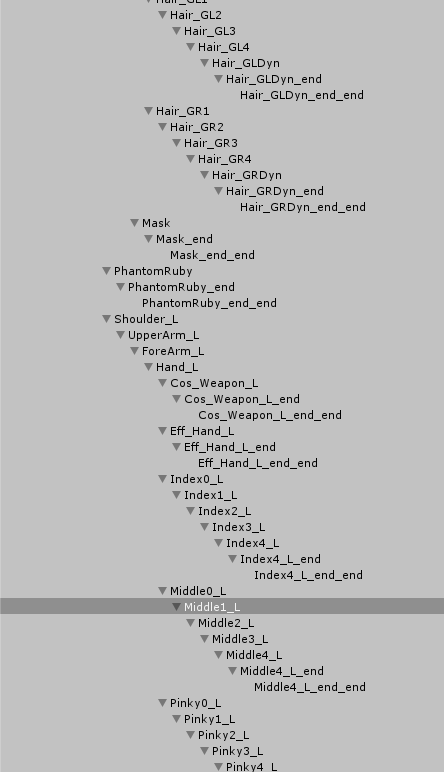
my blender seems to be adding one additional bone to every last of my bone structures, called "X-end"
X as the name of the last bone
 crisp tendon
Select "ignore leaf bones" when importing an fbx in the tiny export menu bottom left under armature
meager kiln
ah, thanks
will try
seems to be working
btw, is that normal that each time i import .fbx, bones look away from the body?
crisp tendon
select "automatic bone orientation" in that same menu
meager kiln
works, thanks
crisp tendon
They need to be connected i think ? @charred sorrel
charred sorrel
oh do they? shoot i thought i could could weight paint it
crisp tendon
Honestly, keep them that way and try, if it doesn't work you'll know why
if it works then you'll have fixed my problem
crisp tendon
i suggest watching a quick weight painting tutorial
Yeah i did it randomly and it worked but i probably fucked up somewhere so i shouldn't give advices on this
charred sorrel
i don't think i saw any tutorials on how to do tails D:
crisp tendon
it's the same as any part of a body tbh, just separate them correctly
fading verge

i named them properly so i think i am okay
if the bones don't appear what should i do?
crisp tendon
don't appear ?
fading verge
yeah they didn't appear last time
so i went back to blender added some more stuff
them named them
crisp tendon
I told you that it was because you didn't map them that they were invisible
 stiff hornet
Ok I really don't want to undo all my bones...yet I feel I might need to. How do I make bones that...seem farther away from each other?
Instead of being entirely connected they can be farther off from one another?
crisp tendon
@stiff hornet To achieve what ?
fading verge
how do i map them so they won't be invisible?
crisp tendon
@fading verge In unity, bone mapping
stiff hornet
So that way it...oh shoot, I need help in modeling this...
Mind if I dm to keep clutter out of here?
 narrow ermine
Yo, what's the point on these hand bones sticking straight up?
crisp tendon
Well the point of these channels is to have the knowledge publicly available @stiff hornet
@narrow ermine What are they called ?
stiff hornet
Well, true. Anyways, so far for bone heigharcy did I do this right @crisp tendon
narrow ermine
@crisp tendon How do I check? Still getting used to that upper right menu
crisp tendon
@stiff hornet You do not have a hierarchy
narrow ermine
10/10 didn't think that was a tail.
crisp tendon
@charred sorrel Select them individually
stiff hornet
Oh so I'm...oh god I was going to make a terrible pun.
charred sorrel
it selects the whole skeleton when i try to select one bone D:
stiff hornet
Anyways how do I make a correct hierarchy?
crisp tendon
because you need to have your armature in pose mode @charred sorrel
@stiff hornet Keep doing what you're doing, or use mixamo, or steal this armature
narrow ermine
@crisp tendon I know how to select individual bones, but how do I tell what the name is?
charred sorrel
OH got it
stiff hornet
How do I merge this with my model?
charred sorrel
it won't paint...?
narrow ermine
The wrist is called R_meta, the fingers are called IndexFinger3_R
crisp tendon
@stiff hornet You drop it correctly in your model, then select your meshes, then select your armature (all in shift click) and then Ctrl + P automatic weight
narrow ermine
In reference to the straight up bones, @crisp tendon
crisp tendon
So they're either reference bones or they are you last bones in the fingers and need to be rotated
@charred sorrel Why not ?
stiff hornet
So, wait wait wait, drop correctly in the model as in...
narrow ermine
@crisp tendon They definitely aren't bones in the finger. DOes that mean safe to delete?
crisp tendon
nope, keep them, if they don't cause any issue just leave them
narrow ermine
@crisp tendon Won't impact my poly too much or anything?
crisp tendon
@stiff hornet import the model i sent you, then steal its skeleton
@narrow ermine Bone don't count into poly count
narrow ermine
Oh.
stiff hornet
How does one steal a skeleton...?
 tawny zephyr
Hey can someone DM me? I have a problem with The VRChat Unity plugin
stiff hornet
Ctrl C it?
crisp tendon
@stiff hornet delete the mesh, then select the skeleton, move it into your body, voilà
@tawny zephyr sdk you mean ?
tawny zephyr
Even though my model’s hands and feet are clearly rigged, I’m getting errors preventing me from uploading it saying that it’s humanoid but hands/feet aren’t specified
narrow ermine
How do I hide bones? I have so many bones in this model's face I can't actually see her.
crisp tendon
@tawny zephyr Are the names also correct ?
tawny zephyr
Yes
charred sorrel
shoot can you merge armatures?
crisp tendon
@narrow ermine press h
tawny zephyr
I rigged the model with Mixamo
crisp tendon
@tawny zephyr Screenshot of your armature in blender pls
narrow ermine
@crisp tendon How do you make it visible again? I just accidentally hid my texture, lol
charred sorrel
shoot cause i messed up... how do you do it?
i didn't realize i created a different armature doing the tail and fingers
tawny zephyr
I’m not using blender, blender confuses me, I’ve been using unity and for some models it works just fine, but for others it just... breaks
narrow ermine
@crisp tendon It's not working, still can't see the texture?
crisp tendon
Wait no, it's part of your armature if you parent the bones
@narrow ermine texture or mesh ?
charred sorrel
narrow ermine
Mesh, sorry
stiff hornet
Um the bones didn't come out right I think...
charred sorrel
tail and fingers are on armature 001
crisp tendon
@tawny zephyr Your skeleton won't be correct if you don't fix it in blender
@charred sorrel what are your bones parented to ?
tawny zephyr
How do I do that?
crisp tendon
download blender, download cat's plugin, import your avatar, click fix model, and that should be it
tawny zephyr
Oh wow, I hope it’s that easy
charred sorrel
wait nvm fixed it sorry sdklfjsd
i'm just still having trouble with weight painting
tame skiff
Unity says all the finger bones are optional. Do I really need dummies of them?
narrow ermine
@crisp tendon My mesh is hidden, I can't figure it out XD
tawny zephyr
Can I open fbx files in blender?
charred sorrel
the model goes purple when i select a bone that didn't originally have weight painting
crisp tendon
@tawny zephyr yes
stiff hornet
@crisp tendon I wanna say this is a bad.
crisp tendon
@narrow ermine unhide it in your armature menu manually then
@charred sorrel Yes, then you add weight paint to it
narrow ermine
@crisp tendon Thanks boo.
crisp tendon
@stiff hornet It's the perfect skeleton, you then put it in your model so that it matches
tame skiff
Nothing wrong with bones outside your body. Just like in real life!
tawny zephyr
How do I import the fbx file? I click import model but when I go to the file’s location it’s not there
 limber willow
im so confused my model had no errors what so ever yet when I load in game this happens anyone know why?
crisp tendon
except when they're all outside of your body lmao
@tawny zephyr don't import with cat's, import with the import menu of blender
tawny zephyr
Ok where is that?
solemn oasis
Is there a way to make bones spawn horizontally instead of vertically? or should I just be flipping my model somehow?
tawny zephyr
Oh I found it
narrow ermine
How many Tris and Faces is too many?
crisp tendon
<19.999
narrow ermine
Ah, cool
 flat sierra
oh
stiff hornet
Ok so...how do I get the arms to be ok...?
crisp tendon
@solemn oasis you can press R + X + 90
solemn oasis
tyvm
crisp tendon
@stiff hornet You need to move every single bone inside of your model, or you can create your own bones to respect this hierarchy
stiff hornet
Ok that's all I need
charred sorrel
it's not painting correctly
flat sierra
how can i have it look like that in edit mode
cause the pose resets when i go into it
so i cant see which vertices to mov
 hearty mauve
How do i attach the mesh to the bones?
tawny zephyr
That didn’t fix anything, my model still has the upper chest bone and if I remove it the hierarchy messes up
Also now the textures are messed up
crisp tendon
@fallen widget If you have issues in vrchat, rotate the bone in blender, if not, move on !
flat sierra
fallen widget
rotate the bone? which one? the leg?
fallen widget
ok
crisp tendon
@tawny zephyr You didn't fix the rig then
tawny zephyr
I hit fix model though
crisp tendon
@flat sierra Change your rest pose
flat sierra
how
crisp tendon
@tawny zephyr Show the result pls, i still don't know what your model looks like
fallen widget
also it's very inconsistent with its naming. There is hips, in the UI, but no pelvis, but I have both a hip and pelvis bone to work with
lol
and it never refers to the hips.
crisp tendon
that's pelvis
 crystal vector
@hearty mauve Send me that model, I will show you in a few minutes
tawny zephyr
No, it didn’t delete anything
crisp tendon
?
fading verge
@crisp tendon When you say i have to map invisible bones how do i map what i can't see
tawny zephyr
And the color messes up in unity too
fading verge
It's giving me a headache
crisp tendon
You're telling me this is the skeleton you've been trying to use all this time ? @tawny zephyr
tawny zephyr
Yes
crisp tendon
...
tawny zephyr
I rigged it from mixamo
crisp tendon
It doesn't have hips or a spine 
@fading verge you select the bone in the menu
@fading verge it'll show up, i can make a gif if you really can't find it
tawny zephyr
Huh, it’s hard to see
They were there before
The thing that they want me to fix is the chest bone
crisp tendon
You need to select a bone then weight paint around it @charred sorrel
tawny zephyr
But then I assign it to none and the whole spine hierarchy messes up
crisp tendon
@tawny zephyr Mixamo doesn't create an usable skeleton that's why, but what you have is unusable
@charred sorrel But you're painting the entire tail lol
charred sorrel
oh no i'm trying to paint one area and it's staying blue
crisp tendon
@charred sorrel Press Z to see what you're doing
tawny zephyr
Well... this model didn’t come with a skeleton before I ran it through mixamo
crisp tendon
It's not very humanoid, that's why it messed up
tawny zephyr
It is humanoid tho
It’s rouge from sonic?
crisp tendon
 crisp tendon
he feet are bigger than her chest, that's not very humanoid proportions
fading verge
how do i fix this
crisp tendon
@fading verge
tawny zephyr
It’s as human as any of my other models
Ugh... this is so confusing... I’ll put this aside for tonight
fading verge
It feels so satisfying to progress
charred sorrel
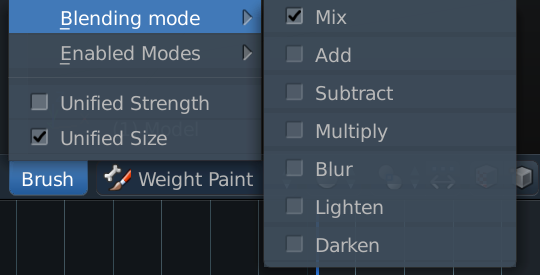
how do you get a hard brush for weight painting?
it's all; spotty and airbrushy
i can't get a good area around the bone
crisp tendon
select your brush in brush menu
 dire charm
can someone point me to a tutorial for rigging a mesh with physics?
 fallow dove
real fast for mouth viseme does it need a jawbone?
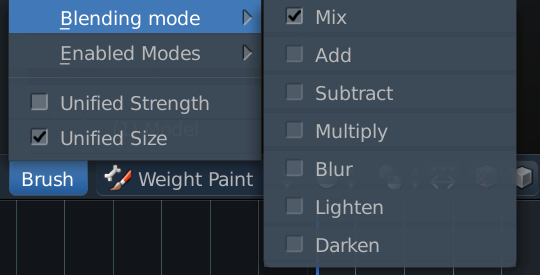 charred sorrel
that's what i have
crisp tendon
then it should be good
charred sorrel
it's not painting anything D:
crisp tendon
you're not doing it correctly
crisp tendon
@limber willow Can you give me the avatar ID of the problem you've had issues uploading please ?
@charred sorrel That's how weight paint works
charred sorrel
i mean like
i have to rapidly click
or sometimes it doesn't put paint on at all
crisp tendon
press z and send a screenshot of the tail
i'm pretty sure the tail has like 2 vertices
limber willow
oh I fixed the issue it was on my end it works fine now
crisp tendon
How did you solve it ?
crisp tendon
oh
fading verge
Guys do i need a spine or is the head just fine
 crude crag
Hello, question: for uploading, what bones in the hands are mandatory when mapping in unity?
charred sorrel
crisp tendon
@fading verge neck too
Yeah that's what i thought @charred sorrel lol
You can only paint on the edges you see
charred sorrel
for a dynamic tail?
charred sorrel
horizontal lines?
crisp tendon
yes
charred sorrel
which horizontal lines?
fading verge
ok ok
So i need to have a neck in the mapping, but my model is neckless and would mess up if i put in a neck
correct?
narrow ermine
What caused this?
crisp tendon
@charred sorrel
@fading verge neck just need to exist in the rigging, not have any effect on the model
fading verge
even if the model literal has no neck it wouldn't be affected
crisp tendon
yep
charred sorrel
fading verge
oh okay
charred sorrel
i changed it to edit mode and it's gone?
charred sorrel
nevermind got it
wait no wtf happened
the lines disappear when i go from weight painting to bone editing
it won't paint certain parts of the tail
crude crag
question: for uploading, what bones in the hands are mandatory when mapping in unity?
crisp tendon
thumb index and middle
i mean, not mandatory, you just need three fingers
and those will be the names
they can be anything
tame skiff
Do you mean we only need one bone for each finger?
crude crag
yeah that's more along what I mean
like there's the hand map in the unity window on the right, which of the dots have to be filled?
tame skiff
I thought that's what he was saying. I'd like to know too
crisp tendon
the thumb, the index and the middle finger
fading verge
isnt that what you just said?
crisp tendon
Yep

 crisp tendon
that's not the hierarchy
fading verge
oh
fading verge
 charred sorrel
there's no way of copypasting it for that right?
fading verge
oh
crisp tendon
use cat's plugin
fading verge
can i go back to blender and redo it instead?
crisp tendon
how so ?
fading verge
it didn't give me any package to import
there was just folders
and more folders
nothing was in it
tame skiff
I tried putting cats in a blender and I made a mess too
fading verge
Actually i have the same amount as the picture you uploaded had
crisp tendon
Ok, then rename your stuff so that it makes sense
crisp tendon
yes
crisp tendon
yep
charred sorrel
you can't copy-paste weight painting from one hand to another can you?
crisp tendon
you can mirror if possible
charred sorrel
how would i do that? o: i don't want to have to redo the weight painting i did on one hand ugh
crisp tendon
Find a tutorial 
 fading verge
oh
 graceful garden
I have a rigging(mabey) question
crude crag
shoot
graceful garden
So i have an avatar im working on. When i use cats to fix the rigging, it says a bunch of different bone are missing. cats is supposed to fix bone issues right?
fading verge
 fallow dove
only if it has the bones from beginining cats isnt an auto make bones its aauto detect parents and asign bones that exist correctly and deletes extras @graceful garden
graceful garden
Oh.. so all is lost then
..
fading verge
Kuro is my hiarchy on the body good?
graceful garden
I never saved after the cats fix but if the bones are missing, they are missing
graceful garden
Guess ill have to find a new avatar
fading verge
can someone help me with some unity stuff?
fallow dove
only if i get viseme answers!
crystal vector
@graceful garden can you send that model to me?
narrow ermine
On models that come with weapons, how do you avoid having the weapons get imported into unity in your hand and from the sheathed position? Do you have to hide the hand weapons somehow?
 wooden dirge
How to stop the eye bones form rotating 90 degrees when i import the model into unity? i'v made several avitars with eye rigging and this si the first time ive encountered this issue.
crystal vector
@fallow dove Tell me!
fallow dove
you split them on their own @narrow ermine
narrow ermine
@fallow dove What do you mean? 😃
graceful garden
@crystal vector i can when i get home. You looking to fix it?
charred sorrel
i can't find any tutorials on mirroring weight painting
crystal vector
@graceful garden I might be able to make this model cats compatible
graceful garden
@crystal vectorits an xps model
narrow ermine
Gotcha... Thanks Kuro
crystal vector
@graceful garden It's fine, I'm working on making it xps compatible
fallow dove
oh wait
crystal vector
@graceful garden I am one of the cats devs
charred sorrel
how? i only have wieght painting on one hand
graceful garden
Then i will send it to you when i get home. Email or what?
fallow dove
@fading verge scratch that
are you doing in configure mode?
anywho quick i need VISEMES
i have the shapes why dont they work in game
 past marlin
So im apparently needing to add a hip bone where do i put it on the model or hierarchy
fading verge
Why i need to rename it out of configure mode?
fallow dove
@fading verge yes
fading verge
where should i rename it then
charred sorrel
anyone know how to mirror weight painting?
fallow dove
@fading verge best to do it in blender
 sonic apex
hey uh, how do i fix my foot bones so they dont clip through the ground in game
fallow dove
lower the heel a bit?
fading verge
okay i renamed it on the hiarchy out of configure mode
sonic apex
i unno how
fallow dove
cuz its where the joint is where the floor touches
fading verge
but it has the names like spine 001 or 002 when i configure it
is that okay?
out of configure it is hips spine and chest
fallow dove
left click the bone and drag down but remember the values and copy paste the Y values to toher leg
@fading verge thats fine
crystal vector
@fallow dove Did you select visemes as the lip sync in Unity?
fallow dove
@crystal vector yea
 eternal elm
how should i rig it if i want a beak to open and close when i talk
crystal vector
@fallow dove and did you fill them all in?
crystal vector
I mean in Unity
fallow dove
in the correct shapes
spots in the vr descriptor
like my shapes exist it just wont move
what i fuck up in blender
fading verge
okay i have another problem
crystal vector
Do they move in Unity?
fading verge

It always reverts this way when i fix it
like i fix everything and apply
enforce tpose
that stuff
fallow dove
oh
fading verge
am i royally screwed?
fading verge
help
crystal vector
@fallow dove you don't need to do an animation :D you can just select the mesh and click on blendshapes in the inspector
fading verge
i spent 20 hours and i don't want to give up
crystal vector
@fading verge what did you select as the bones?
crystal vector
So did you assign them all in Unity?
@fallow dove
@fading verge Yea, below that green figure
fallow dove
@crystal vector missing the first two
have the rest
put my basic mouth shape as the first two
fading verge
https://gyazo.com/1f2d560cf67751f6a2dd99eda8746ee3 @crystal vector like this?
 crystal vector
Don leave any of them blank, that should work though
fallow dove
going in game for a try but im pretty sures dead still
fading verge
Hotox
I did the exact same thing
and once you said that
it worked
I'm not lying
fallow dove
lol
fading verge
What even is this
crystal vector
Haha
fading verge
Guys, how do I stop my avatar from clipping into the ground when walking? I go to adjust the height in Unity but nothing works.
crystal vector
Well at least it works now
 crystal vector
@fading verge Move your hips in the configure mode up in Unity
crystal vector
@fading verge Mh I mean below that green figure on the right side
@fading verge moving the hips up should move the whole model up
fading verge
Where it says mapping?
crystal vector
Yup
fading verge
do i click save?
I'm also having trouble where no matter where I put the viewport I seem to look over the character's shoulder.
Should I move it further in?
It's lined up fine horizontally with the head.
fallow dove
its still dead
fading verge
@fallow dove help pls
fallow dove
@fading verge sry busy dying on my own model as well
@crystal vector it just doesnt like it not sure wth
fading verge
o ok
crystal vector
@fallow dove Mh I have no idea then
fading verge
Hotox do i save the mapping
I'm scare i would mess up
if i press save or anything
crystal vector
Why not
fading verge
Damn Rhino it sounds like you're going through hell over there. :/
I've spent almost 21 hours
making this model
in a span of 3 days
fallow dove
quick whats the push to talk in vrchat
i think everything has been working from start
 tacit peak
v
fallow dove
and im just dmb
fading verge
oh i fixed the clipping
 drowsy dune
hello everyone, I had a question I would like to ask. I am having an issue with the model I made, the animation for the lip sync does not work. Is there a particular place to check such as the rigging skeleton or something else. thank you in advance
fading verge
but now he floats a little too high, oops
LOL
wait wtf
he only clips when im looking down
narrow ermine
What happened to my mouth?
charred sorrel
How do you add a texture in blender? or do you do that in unity?
fading verge
Any clue why this isn't letting me paint? Pose mode, Select mesh, Weight Paint, selected bone and vertex group matches? Any clues?
Pose Mode>Select Bone>Select Mesh>Ctrl+Tab
meager kiln
is there a way to block char moving legs while looking upwards and only use head/neck?
like locking bones maybe?
fading verge
@fading verge can you help me with something please?
ctrl+tab?
i might be able to help
meager kiln
i know there are fixed axes in blender, im not sure if that's it
fading verge

Looks like wherever you got your avatar from they didnt name those bones properly
so unity cant figure out which bones are which

oh

You mean this?
Right the names are not correct
But each time i change the names
Sok0 what is ctrl+tab suppose to do after selecting the mesh
they revert
they revert
wait
root?
root is optional
oh shoot i just noticed a future problem
 narrow ermine
So, I'm a bit confused. I have a weapon on my back and in my hands. If I delete the weapons in my hands, the weapon on my back loses color. How can I delete the weapons in my hands and retain the atlas for color?
crisp tendon
edit the atlas yourself ?
charred sorrel
unity or blender to put on texture?
also this happened and i don't know why
there was nothing wrong in blender
fading verge
I think im gonna rename it in blender cause the names revert each time i apply
that's prob why
 woeful summit
Can anyone help me plz
 little inlet
@charred sorrel click on the inspector and add the textures to it
fading verge
Any ideas why I can't weight paint? Painted multiple times before, but for some reason I just can't paint on this model. Vertex groups aren't locked and everything matches. Pose Mode, Selected mesh, Weight paint, vertexgroup and bones match. I click and nothing happens at all
charred sorrel
how do i do that @little inlet ?
 haughty lava
what rigging in unity would I use for a four legged avatar?
fading verge
you need to use a brush to paint
haughty lava
or i guess "animation type"
fading verge
look at your brush
charred sorrel
i have multiple problems... model is transparent and dynamic bones aren't working
anyone help?
what's going on with the model?
fading verge

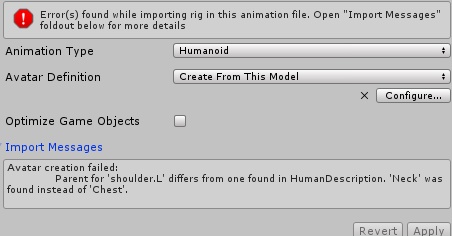
SERIOUSLY?!
yes look at your list
one shoulder is under neck and one is under chest
how are they under though
i made the chest the parent
but each time i apply and press done
 harsh flicker
Anyone wanna be amazing and atempt to teach me in a DM how to make a non humanoid?
fading verge
it all reverts
charred sorrel
can someone please help me with this transparency/dynamic tail problem?
fading verge
Does God hate me for some reason?
charred sorrel
i feel you :/
harsh flicker
@charred sorrel What exactly is the probleM
fading verge
Isn't it in ABC order in each parent
charred sorrel
harsh flicker
Here do you wanna go into a Private call and i can walk you though it?
fading verge
cause i put both of the limbs in chest parent
charred sorrel
do you know how to fix it?
harsh flicker
Yeah
fading verge
you did not put both limbs in the chest parent
you may think you did
but it doesnt matter what you think
because you didnt
charred sorrel
yeah we can
harsh flicker
I added ya
fading verge

@fading verge does this work
does it give you an error?
i haven't clicked apply yet
well dont wait for me to tell you
give it a try
shoulders are under chest now
cause each time i click apply this happens

but okay
well you are fixing one problem at a time
what a surprise
 rich dust

 rotund umbra
nobody seems to know the answer to this question but ill try asking here.
does anyone know what the blue outline means?
fading verge
look in your rettings
user preferences > themes
sok0
The arms reverted into the neck
move neck to the bottom of the list
What is this
What's wrong with my cat's? I can use it before but it's shows up error today

 brisk mesa
cat's plugin is being weird for me too in that if i'm just trying to do anything else it JOINS meshes for me when i dont want it to
fading verge
I think i found the problem
@fading verge is there a way to unparent the bones and parent them to the chest bone?
brisk mesa
yea you go into the bone options on the right
the bone icon, you select a bone and there's like a 'parent' textbox above the checkbox for Connected or not, which is also useful
crystal vector
@fading verge Try to update Blender
@brisk mesa It should only join meshes when fixing the armature
brisk mesa
what about when i have my eyeball bones set up and correctly in the spheres, and Cat's plugin tells me they aren't?
crystal vector
You mean it says that there aren't vertex groups?
brisk mesa
oh yeah i guess ill just find the thing to assign it, huh
crystal vector
@brisk mesa I'm looking for all the different bone names. Can you show me you eye hierarchy?
fading verge
@crystal vector I will try . Thank you
brisk mesa
oh i just have lefteye righteye parented to head bone lol
crystal vector
@brisk mesa that's it? There are no other eye bones?
brisk mesa
nope, ti's okay ill just figure it out tmr
fading verge
@crystal vector It works now. Thank you very much <3
 south oar
if my model has a jaw bone, can he talk?
 copper moth
Can someone help me find a 3d model that looks like this, or help me make this one a 3d model
 empty grove
My blender model looks fine when I am using it in blender, but as soon as I export it as an fbx file and open it in unit, its upside down
any way to fix it?
unity*
past marlin
im having an issue saving i don't have enough bones
but when i check the armature i have all the bones and theyre labeled correctly too
 summer sequoia
can anyone help me out with this issue?

have no idea whats going on with the pants here
 faint cliff
summer sequoia
faint cliff
summer sequoia
problem with the bones?
faint cliff
wait wrong one
there
i got that hip/chest warning at first which is why i swapped the parent
but now i get the problem listed below
@summer sequoia ^ any ideas?
faint cliff
are they neccesary
faint cliff
because i thought if ring was dotted it wasn't neccesary
summer sequoia
no that just means theres nothing selected in that slot
summer sequoia
thats where you error is coming from
if the avatar does have shoulder bones
try finding them and putting them on
that may solve your rigging issue
No upper chest is needed hoever
normal chest and spine is nessisary
summer sequoia
did it work?
summer sequoia
good luck

 waxen crow
anyone know why my avatars arms move perfectly fine for emotes, but dont move when i pick things up?
nvm apparently i was too short? lol
charred sorrel
my model is transparent and i don't know why
it's like the only problem on it
it looks fine in blender but unity makes it transparent
 stark bronze
@charred sorrel Try this https://www.youtube.com/watch?v=NWrtxR4oxTs

Video Added: 27th May 2014 No serious description given. Music: Montezuma's Revenge - Main Theme (from unfinished Atari 800 game) trivia: the music is cover ...
You might not see those black parts, but do try anyway.
Try spotting the parts that you can see through in Unity, and apply that tutorial to those parts.
 obsidian bone
https://puu.sh/yXdg4.png anyone know how i can stop the feet from clipping into the floor?

I heard i can't fix the hands clipping without custom animations, so I don't care about that
 pearl moss
i think you have to fix the positioning of the model and make sure their feet are at the x,y and z 0 location in blender
charred sorrel
the entire model is transparent
it's not just one part, it's like... inverted
it's completely fine in blender but unity makes it transparent
pearl moss
maybe apply shaders and see if it works after
obsidian bone
Don't you need to change the object type or something?
It's in tupper's guide
Lemme see if I can find it
pearl moss
yea if u havent already set the renderin mode to cutout and changed the alpha offset
 dry umbra
anytime i put something in the head catagory either it being glasses or visor its fine but when i look in a ingame mirror it looks all fucked up like thee whole models invisable but in game to other people it looks fine
pearl moss
thats just vrchat weirdness im pretty sure a lot of issues happen only clientside
 fading verge
What do you do if your model has no shoulder-bones, and you add them in blender but they won't show up in unity?
 north trellis
I've already asked this in #avatars-mmd but it was probably the wrong place to ask.
https://files.catbox.moe/pqtbz3.png


 gilded sphinx
Is there a way to do dynamic bones without paying for the unity script?
stark bronze
That, or bone rotation.
crude crag
@roswell are you able to select the bones in the unity mapper?
stark bronze
If you rotate it does it spaz out get fucked?
 grand drum
nope
grand drum
so i just move the hand up?
 modest tusk
As if your character were trying to raise his wrist
stark bronze
select the bone in pose mode, press r and .. z(?) and then type 90 on numpad
modest tusk
I believe that should work as well, yes
stark bronze
yes
stark bronze
are the hands supposed to float?
stark bronze
Okay what happens if you put the hand back, and rotate the part before the hand instead?
stark bronze
ok.
idk I think the problem is with the floating hands thing.. not really sure how people have done it.
grand drum
should i send the blend file and you check it out?
oh wait
i didnt weight paint the body
only the hands legs and head
stark bronze
if you rotate the chest/spine, does the hands legs and head stay stationary?
 honest timber
I think this model may be messed up. It is claiming that the "spine" needs to be a child of the "hips", but on this model it seems to be the opposite
stark bronze
@honest timber Can't you just re-parent them
honest timber
probably, will mess around with it
fading verge
You can just add bones to a model, right?
stark bronze
Yeah.
crude crag
I've found that you generally can
grand drum
do i need to weight paint the whole body?
stark bronze
not sure. Do atleast weight paint the area around the bone (i.e chest area for chest bone, common-sense, someone more experienced in weight painting might know better tho, I'm fairly new too)
modest tusk
If you want your model to at least look moderately decent, you will want to weight paint the whole body AND make sure each bone when moved (in a reasonable manner) doesn't look strange
i.e use pose mode and make poses that would be rather common occurence. Unless of course you're not going to be using VR / other animations
grand drum
i see
 naive tree
@north trellis did you fix the issue ?
 jovial aurora
: Anyone good with unity? I'm wracking my brain over this. The parents all connect from the neck all the way down to the spine yet when I try to upload it the message reads "Spine nierchy incorrect. Make sure that the parent of both Shoulders and the Neck is the Chest" Help?
 rough canopy
Are the shoulders parented to the neck by any chance? They should be parented to the chest @jovial aurora
 scenic crypt
I believe so
How would I go about doing that since the only bone it connects to is the neck? I should mention this has yet to be fully rigged...I got it on my own
scenic crypt
I have no eyes or jaw due to the head being the big green mess in the face.
Also when I opened it the head and neck were all in her hair....
So I tried to manually parent them to what worked.
naive tree
just need neck and head
scenic crypt
Yeah I have neck and head
naive tree
open the fbx in blender and check to what your shoulders are parented
i'm quite sure they're parented to neck
scenic crypt
They are. I had to remove one bone and scale the chest bone up just to keep the upper chest empty.
Should I try manually rotating the shoulder bones to attach to the chest bone?
scenic crypt
I can try that too. Yes the upper chest makes a ik bone not work or something f even though this model has no facial rigging yet
tawny zephyr
Can someone help me?? All my models mess up because "Spine 1 has bone length of zero"
so i extend the bone a bit but it doesn't stay extended
 hidden bloom
what could be causing the bone heat weighting: failed to find solution for one or more bones
fading verge
i usually just extrude if im going off a previous bone
hidden bloom
select the a bone in edit mode then while it is selected click add down at the bottom then press single bone
the highlighted part down the bottom
fading verge
If I use CATS and then export the model from Blender to Maya, will that mess things up?
I'd rather use something I'm somewhat more familiar with
 static flint
Is anyone here good at rigging a mesh that doesn't have bones by chance?
hidden bloom
i know unity will accept a maya file but to blender to maya i dont know because i cant be botheered creating a account for it
 earnest shale
Does anyone know how to turn a part of a model into jiggle bones or soft body? Im working on a pikmin and want his anntenae to flop around, but im new to this and cant figure itbout
Jiggle deformer in maya doest seem to do what i want
static flint
@earnest shale Won't Dynamic bones on Unity sort that out?
earnest shale
Well dont ask me, tell me lol
static flint
It should.😂
hidden bloom
dynamic bones work best with things like hair that face towards the floor but maybe it would work if you added gravity to the part to keep it in the air
static flint
@earnest shalehttps://youtu.be/KywzhVH5o0Q

A Unity tutorial on how to use the dynamic bone plugin, which is available on the asset store here: https://www.assetstore.unity3d.com/#!/content/16743?aid=1...
earnest shale
Ah man. $20. Here i thought i was missing an easy setting in unity
i've managed to get this far without spending a cent, idk if i want the pikmin jiggle that badly lol
hmm that doesn't looks quite like what i want either
it seems like the bones always go back to it's original shape
i'd want the flower on the pikmin's head to act as a sort of weight always keeping the antennae slightly bent
and just sort of swing around
hidden bloom
that is the price you pay for moving hair
also it isnt $20 unless you are in us as i got it for $22 just because of where i was
 hidden bloom
yeah i know and it updates as you buy it
earnest shale
i went all the way to the pay screen and it still says 20
hidden bloom
and that was what i was saying before
even though it says $20 it may or may not be $20 until the program says oh you are in this country so here is the real price
and yeah i know it is around $30 for a banana holder
hidden bloom
random question but is there a fast way to weight paint a whole model
wait i just forgot to add weight to the bones which the parts were connected to
 still relic
For anyone who's rigged a model through mixamo, does it matter if the model ends up face down on the "Ground" of the preview window after rigging and before downloading? Will that mess with the thing?
 gritty viper
Hey guys, I have a problem with the parameters of the dynamic bones asset, i have the Felix Argyle model with the long dress and I am wondering what parameters would I use for good movement of the dress
So far i have found good ones but it still looks weird, anyone have any good cloth parameters for that kind of stuff?
 shy lark
thinking about what part of Felix would need jiggle physics
hidden bloom
sorry bagel i havent used mixamo to rig anything
also there is a video above about on what parameters to use
gritty viper
Tou dont worry I looked, it doesnt have a bone haha
Or else i would be tempted
I used those parameters and the dress takes forever to move back to the original position
 inner granite
Hi i am rigging upp a karacter but my eye bones is sticking to the head. Have tryed to use vertex groups but to no good so need some help.
hidden bloom
it was worth a try but wouldnt incresing the negative gravity force it down faster
sorry i meant force
(Edit and I do know that setting messes some stuff up above 0.1)
 gaunt dock
anyone around for a question?
got this mmd and going from blender to unity one of the legs goes missing, no bones.
crisp tendon
Is it mapped in the humanoid configuration ?
fading verge
Is there a way to fix the moustache, remove the green spines, and keep the model from tearing?
 verbal crown
so how do i fix the pelvis angle to be 180 with the thighs or whatever its asking me to do?
 gleaming falcon
@fading verge Probably needs to be adjusted in Blender
gleaming falcon
👍
crisp tendon
@fading verge looks good !
static flint
Is anyone here good at rigging a model that doesn't have any bones by chance?
 sonic carbon
It's not too hard to learn basic rigging
That way you can make any avatar you want even if you only have a model
 dry stone
Got a tutorial?
dry stone
my skeleton looks like this, idk why, or how to fix:
sonic carbon
That's just one way of displaying bones, it looks alright
the rigging tuitorial video I used was https://www.youtube.com/watch?v=Q9f-WVs3ghI
Welcome to the third episode in a series on creating a simple character in Blender. (http://blender.org) Rigging part two: http://bit.ly/characterRigging02 D...
just bear in mind that the torso needs at least 3 bones (hips waist and chest), and that the ik bones are optional
flat sierra
i keep trying to change the pose on my character and whenever i move the other ear down
the opposite one resets
in unity
 covert badge
puu.sh/yXADp/42c81cdf4a.jpg Is the avatar going to be floating up ingame?

The cloak, I mean.
sonic carbon
Yes, but if the cape has bones you might be able to rotate it down
covert badge
It does.. How do I do that?
sonic carbon
hmm, you might just be able to do it from that view, if you select the bone, and click rotate in the top left
sonic carbon
just click on armature and go down the hireracy, you shouldn't move the bones, but rotating bones like that should be okay
 sonic carbon
urgh, is there no root bone for them?
covert badge
When I try to select all of them and move it around with the rotator tool, the cloak fucks up and spazzes
Is there a way I can do it in Blender?
 sonic carbon
Yep, might be easier, parent them all to one bone and then rotate that one
covert badge
hmh..
sonic carbon
like, one parent cape bone, not the bone it's already parented to (the neck or something, presumably)
There was a tutorial for that for dynamic bones






 covert badge
That's a little confusing x.x
sonic carbon
https://www.youtube.com/watch?v=LrCCl_F9XNs this video has a bit for parenting bones
Here's a video on extremely common issues I see with bones and rigging setups, and ways to solve them. I cover: - Leaving Upper Chest Blank - Reparenting spi...
but once you've got them parented to the same bone, you'd just need to rotate that one and the whole cape would move
can't do that as it is becasue it looks like the cape bones are parented to the neck and you don't wanna rotate that :P
dry stone
Why does my skeleton not have bones, only weird spheres
dry stone
How do I make them normal bones
 warm ridge
Hey guys when I export an FBX from blender into Unity the parts of the model that are paper thin are invisible on one side
dry stone
How do I display them normally
 uneven hill
in blender and in unity scene, my model is where it should be, but in bone configuration and when animated, my model sinks into the ground. Is this a rigging error?
warm ridge
Allogro is your character in T position in blender?
sonic carbon
@warm ridge you'll either need to duplicate and inverts the normals of those parts in blender, or use a two-sider shader
uneven hill
yes
warm ridge
Hmm that happened on one of my skins and I just raised it up in unity
uneven hill
in the scene view?
warm ridge
I tried in a few views, not sure which one worked lol
uneven hill
ok thanks, I guess that I will just try trail and error
warm ridge
Thanks Jonah I'll try that