#avatar-rigging
1 messages · Page 57 of 1
 scarlet crow
 narrow ermine
@crystal vector I see. When I blink this is the maximum my eyes will close. There's no obvious way to fix it ?
 calm needle
is the left and right foot equal in shape?
 crystal vector
@narrow ermine You could try to mix that shapekey with itself multiple times
 somber gale
@crystal vector that didnt help
scarlet crow
probably not, but the upper porion of her tail is the right leg, i just wanted it to be so that it gets used like it is the leg so the tail will still have some movement
somber gale
i just need to know where the "fix" button is
narrow ermine
@calm needle Was that directed at me? 😛
calm needle
yeah 😛
narrow ermine
@calm needle I'm using CAT cus I'm new to all this. Is setting the range relatively simple?
calm needle
 pallid vapor
hello? could anyone help me with my problem?
calm needle
set the max range higher on the blink and see if it looks better
crystal vector
@somber gale Install mmd_tools and Cats Blender Plugin into Blender. Then that button is in the cats tab
pallid vapor
if i stand still for more than a second my spider man just like to lean like this
calm needle
@scarlet crow the left leg being asymetrical to the right could be causing some of the issues
 swift radish
@calm needle How so? I just imported it normally
 naive tree
@pallid vapor hips have bad angle or misalignment of hips vs spine/chest, can u post a screenshot of your hips/spine/chest from sideview?
calm needle
in blener, rotate it 180 degrees, then reexport
somber gale
@crystal vector yes i have both of those and im in the cats tab, wheres the button
pallid vapor
sure in blender or in unity?
scarlet crow
@calm needle do you think it would also help if i set the right foot as the tail link that is closest to the ground and make the left be at the same level?
calm needle
its probably easier to have two equal invsiible legs
pallid vapor
@naive tree unity or blender?
swift radish
How do I add a texture to a model?
naive tree
@pallid vapor blender
scarlet crow
Would there still be a way to make the tail move while being set as a humanoid? @calm needle
calm needle
dynamic bones or custom animation overrides
pallid vapor
here
 crude crag
@swift radish is that a .png you have selected?
swift radish
Yes
narrow ermine
@calm needle Me increasing the max to 1.5 or to 2.0 seemed to have 0 effect.
somber gale
@crystal vector ITS STILL BROKEN DDDD:
pallid vapor
@naive tree
crude crag
@swift radish watch this https://youtu.be/NCkqlW-JsGk?t=542
crystal vector
@somber gale Dammit
calm needle
@narrow ermine are you setting the value to max after you do that to test it?
narrow ermine
@calm needle Sorry, I got a bit confused by the wording.
crude crag
@swift radish relevant bit ends at the 11 minute mark, if you still dont "get" it ping me
narrow ermine
@calm needle I changed the max and then re-pressed 'create eye tracking'
calm needle
ah right, cats tool. Im guitly of not using cats tool for eyes
i tend to setup the visemes for blinking and junk manually
narrow ermine
Ahhh, okay that makes sense. Well, I might just disable eye blinking entirely then. I don't think this particualr character would be negatively impacted by no blinking.
crude crag
so here's the current state of the skeleton. imported from Gmod with no adjustments yet. do I add a bit above or below that top dot to make a proper neck/head arrangement? https://cdn.discordapp.com/attachments/390924372782612480/399757626344341505/neckbone1.PNG

(sorry for reposting but it seems less busy now)
somber gale
@crystal vector is there anyone you can het to help me
crude crag
@somber gale it's generally easier to just ask your question and then somebody might know the answer
calm needle
Smashed, does that model even have a proper neck?
somber gale
nobody does, we need a pro @crude crag
crude crag
I don't know frankly, I'm new to modeling, let alone blender
thankfully there are good tutorials out there
but there isn't one for this specific issue that I've found 😛
crystal vector
@somber gale Send me that model and I will take a look tomorrow
calm needle
smd files have some wierd import bone structures so its sometimes hard to see what is going on in them
there is achance the head and neck are right on top of each other
swift radish
@crude crag I get to the point where he applies the texture, but mine doesn't apply like his does, it just does this
 tame skiff
crude crag
tame skiff
crude crag
so you hit "A" in the 3d space yeah? you clicked the little picture in the bottom right and selected the texture again? @swift radish
swift radish
Yeah, exactly step by step
crude crag
hm, i don't know! thats what usually works for me. hopefully someone else can help you
Can anyone help troubleshoot applying textures to models?
 warm oar
Can someone tell me how to fix the feet on here. everything else is find but the feet are twisted up like crazy
swift radish
crude crag
does it look fine in blender brimstone?
crude crag
that's so strange vex!
calm needle
might sound strange but try adding a light to the scene and switching to material mode
swift radish
I don't know how to do either of those things xD
crude crag
@warm oar oh, maybe you need to add footbones?
 void geyser
can someone just fix my avatar for me i have tried everything and i reset my pc so unity isnt installed :C
 quartz condor
Can someone help me with the OBJ/FMX switch to mixamo as mine gets no textures and then i dont get any selection of textures in unity when all my textures look a-okay on blender
void geyser
i have a bone which isnt movie and tried to add dynamic bones but they arent linked to the model i dont know what i am doing :C
calm needle
@swift radish
the reason i say to do this is because i frequently have it so that despite being in texture mode, it still shows white
quartz condor
anyone ?
crude crag
silly question, but have you tried saving after applying the texture in blender?
the lower texture, specifically
crude crag
and you imported that saved one to unity anew?
quartz condor
yes
thats well textured
but its when i upload it to mixamo for the bone rigging
it works
but the textures dont
crude crag
you exported the whole thing as an fbx I'm guessing...
crude crag
i dont think it likes a zip
quartz condor
@crude crag Mind if i add you
crude crag
I do. please dont.
 fading verge
Is it possible to use some of VRC's animations, but not all of them? I have a unique Egg-shaped monster humanoid that would not work well with head movements.
quartz condor
Ah i really need someone to talk to me while i screen cast it on discord
crude crag
you cleared out any animations before downloading, yeah?
oh! you downloaded it specifically as FBX for unity from mixamo, yes?
crude crag
hm, selecting humanoid wouldn't affect that...man idk where it's goofed up
quartz condor
but the textures are not correct from the moment i upload it to mixamo
I don't know where im going wrong
Its all good from blender
crude crag
oh, so once you download it from mixamo have you tried looking at it in blender? is it proper there?
 dusty atlas
um...can i ask a question?
crude crag
just go ahead and ask it torch. if someone has an answer they'll say it.
crude crag
hm!
that shouldn't happen
(i think)
try opening the mixamo file in blender and re-applying the textures
quartz condor
Its like Mixamo is making it into one structure, and asoon as i apply the textures the whole thing adds only one texture block to the entire model
dusty atlas
ok, i was just trying to add a avatar to my VRchat and i was told to add the rigged character and the VR SDK i have both those in there now but what do i with them?
crude crag
Try skipping through this video past the point I linked https://youtu.be/NCkqlW-JsGk?t=905
dusty atlas
k
crude crag
idk how much work you've done with the character
but that covers everything that's absolutely necessary
 stiff hornet
Hey I got a question. It's not possible to upload an avatar with 20,000 tris or over, is it?
stiff hornet
So 20,000 or over is gone?
fading verge
So i can see the prop that i have asigned to my hand, but other people cant see it?
what do i do to fix that?
crude crag
yep. If you do 19,999 it'll let you upload, but it'll be a hard to load model. closer to 10k is better
or 5k even
stiff hornet
Ok cause I'm trying to do Sinon from SAO, and when putting it through the auto decimation...the jacket gets cut off instantly
Like, one triangle off the jacket is bad
dusty atlas
im a little confused this is talking about balls and stuff lol i have my character from the unity asset store so i thought i just had to apply the sdk.. or something along those lines..
crude crag
is there a texture on the model already?
dusty atlas
yes
crude crag
does it have a skeleton set up? guessing yes. be sure to do what he says on that part.
crude crag
https://youtu.be/NCkqlW-JsGk?t=1038 did you apply the humanoid skeleton and all that stuff?
dusty atlas
i was trying to do that part...but i got lost ill try again
crude crag
yep it's important
 cosmic mica
quick question - is the drawing line that comes from a finger like some avatars a trail feature in unity?
 arctic finch
i need help with fixing the camera on a avatar can anyone help
crude crag
@arctic finch perspective camera?
arctic finch
@crude crag yea the camera is in the chest
crude crag
and whats the problem you're encountering?
 limber prawn
anyone know what causes a model's feet to be sunken in the ground, but then pop out when walking?
arctic finch
dumb*
 opal citrus
anyone know what this problem is? i have no idea...this happens when i export to fbx
 tacit sinew
How do i get these to stay down?, they have bones in them
opal citrus
@tacit sinew, try adding gravity to them under the dynamic bone configuration for it, set the y value to be -.001, than fiddle with it
not totally sure if it'll fix it 100% though
dusty atlas
my unity crashed 😓
tacit sinew
dont have dynamic bones D:
opal citrus
oh, do you know how to add them?
tacit sinew
no like dont have the tool thing
tacit sinew
ye
opal citrus
only way to really
fix that is
erm actually i'm sure there are a couple ways but
from what i know, i think in unity you can select that specific bone(s) and rotate it down, i believe what you set them at will stick when you upload to vrchat
if that doesn't work please let me know i haven't tried it yet
 rugged eagle
hey guys, how do I select one bone in blender? It always selects all bones when I try to right click a single bone.
tacit sinew
make sure you are in edit mode
fading verge
can I voice chat with someone, I need help adding 2 bones (eye bones) to a model. I am a complete noob at this but am very eager to learn. I have a model WITH the eye bones in, but the polycount is much too high. The armature is the exact same minus that missing eye bone problem. I just need someone to tell me how to add the eye bones in place where they are in the other model. If there is a copy+paste from other project as well
stiff hornet
Hey I got a question
Are you allowed to whitelist items that cannot be decimated?
Well, auto decimated i mean
 frigid fiber
I'm assuming you mean in blender, you can just select which meshes to decimate and which to leave alone
narrow ermine
I have a part of my character I don't want, it's technically a weapon. How do I get it to no longer show up?
For reference / understanding
tacit sinew
I shouldnt need any of these bones in the face right? any performance increase if i get rid of them?
 native egret
Any idea why my leg does this?
if I face the other direction my other leg does the same thing
 fleet echo
Rolate bone is wrong
scarlet crow
Is there a way to have two chains of bones run down one tail?
native egret
how wouldI fix that?
scarlet crow
@narrow ermine if there is a mesh you don't want at all, just delete it
fading verge
@scarlet crow parent to the single bone?
scarlet crow
How so?
narrow ermine
@scarlet crow I'm a bit of a newb when it comes to Atlas. Can you walk me through that? I need to separate my meshes, look for the correct mesh in the upper left and delete?
scarlet crow
scarlet crow
Yeah, as long as your meshes are separated then you can just find the useless one and delete it @narrow ermine
 valid magnet
Hey.
 dusky pendant
@fading verge This is why I can't do custom avatar commissions atm
That freaking abomination
fading verge
lol
narrow ermine
@scarlet crow Does that need to be done prior to atlasing?
dusky pendant
It angers me whenever I look at it
scarlet crow
@fading verge Yeah lol It was just one singkle strand in the middle, but i'd like there to be two for stability
valid magnet
This might not be the correct place to ask this, but I'm trying to upload a slightly-edited version of the default Robot model. I downloaded it from the asset store and it spits this error out when I try to upload it. https://i.imgur.com/qk5YMJI.png
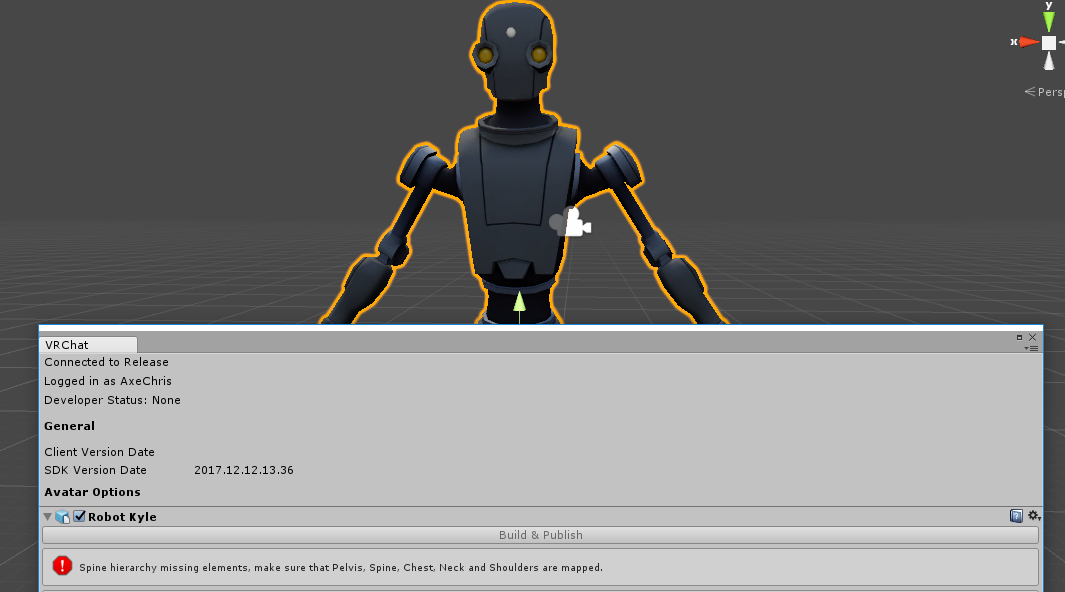
I look at the bones and apparently there's no chest?
scarlet crow
@narrow ermine it should be technically, but if you've atlased I believe you can still separate and if you can still select that object on it's own it should be safe to delete still
fading verge
@valid magnet check your rig in the configuration menu
valid magnet
Right, I'm there.
fading verge
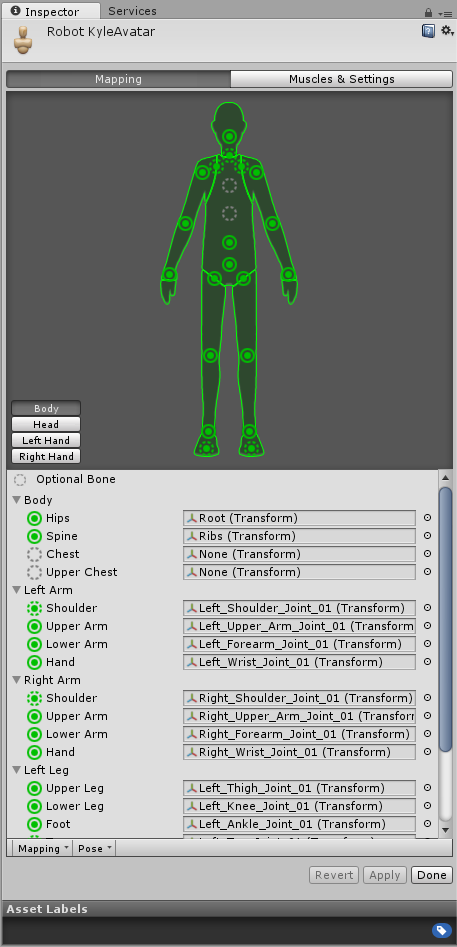
Screenshot the green guy
valid magnet
 frail moon
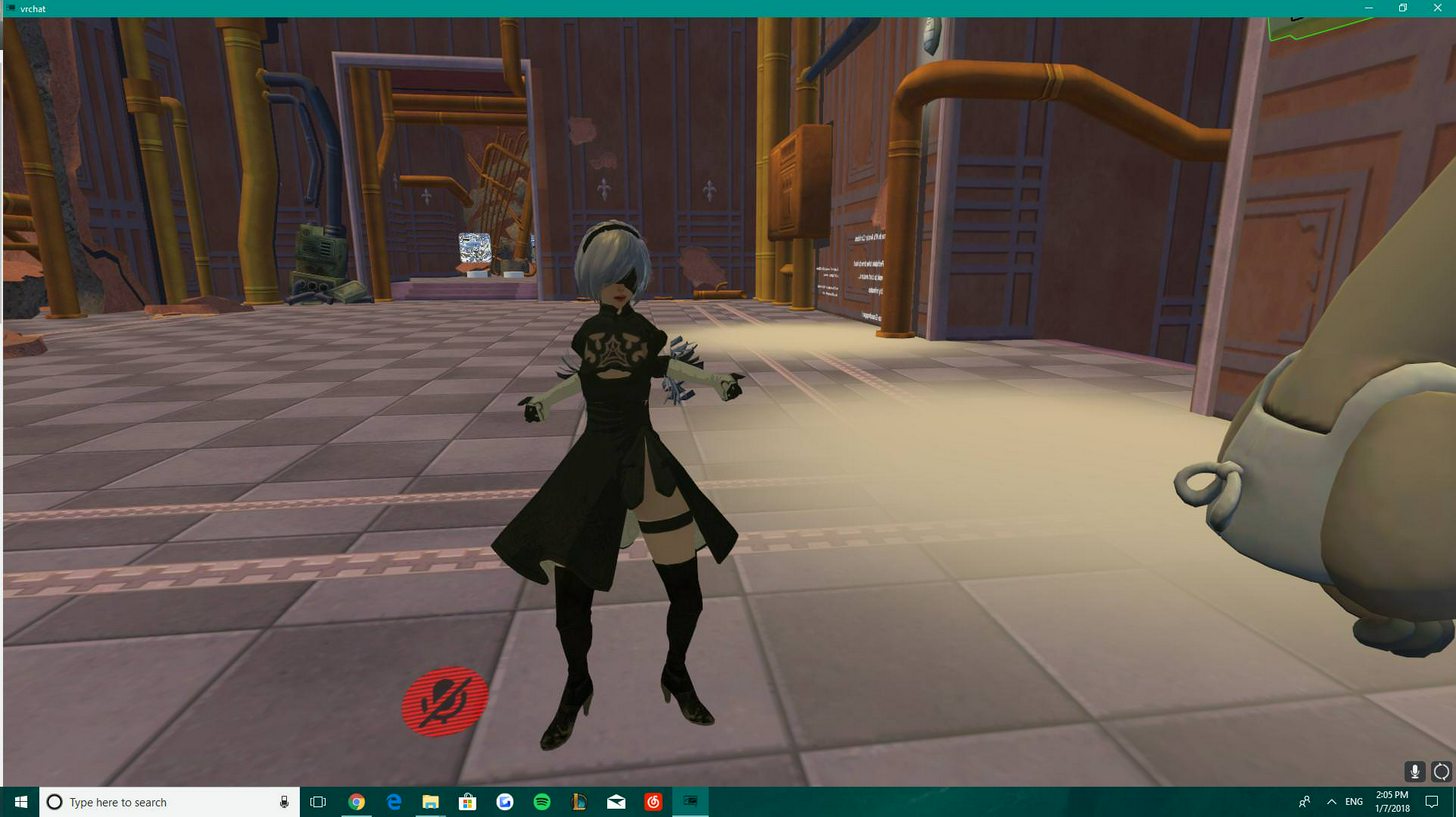
Hello VRChat community! I'm new to the game and I was trying to import my own custom avatar when this happened https://imgur.com/a/6DHAg
 narrow ermine
@scarlet crow I'm a bit of a newbie to all this, when I select my texture it's all together, how exactly do I separate it now? Separate by materials doesn't seem to do anything, but I'm probably misunderstanding the situation.
frail moon
Has this ever happened to anyone before
valid magnet
The question is.. What could it possibly be mapped to without conflicting with other bones? 🤔
 elder meteor
Hmm can someone tell me if its ok that those bones are pointing UP ? is it good or bad ?
scarlet crow
@narrow ermine Ah, then you won't be able to do so anymore. Is it an invisible object amd is your tri count below 20k?
narrow ermine
Yeah way below, only 2.8
scarlet crow
Okay, then as long as the part you don't want is invisible you won't need to worry about it appearing in the game
narrow ermine
Even if it shows up as blue in unity for whatever reason?
 open cedar
Anyone know how to resize it together with the bone?I can only scale character but not the bone ;w;
crude crag
Got a new question: my model has little spheres for all the other bones, but when I add a new bone it's only a stick. How would I turn it into a ball like the others?
elder meteor
Thanks @scarlet crow
tacit sinew
you can scale it in unity later?
fading verge
@open cedar the bone itself?
open cedar
oh is it?ok then..I think I will just proceed then because the scale is huge ._.
scarlet crow
@elder meteor what are the odd bones assigned as?
narrow ermine
@scarlet crow Actually, now that I know I can just redo the blender process fast and delete it. That would probably be best.
fading verge
O
scarlet crow
Yeah, especially if you don't need to decimate, it will be easier to start over
narrow ermine
Yeah, I don't need to decimate this particular guy at all. I already started and figured out how to delete the bat. Thanks for your help.
scarlet crow
That's good, no problem
fading verge
Good luck
I did suggest manually deleting the faces n vertecies
Guess that works too
valid magnet
So I'm still a bit lost.
I've tried mapping ribs to the chest, but that won't work because it was originally the spine, and it won't let me use the root for a spine.
 low river
Ok so
Me and a guy literally were trying to figure out why my avatars eyes arent rigged
and we genuinely cannot find out why
scarlet crow
@verbal galleon which part?
tacit sinew
A lot of my models have this lean in game dont really have good pictures of it but this is one that isnt that bad? is it something with the hips/spine?
scarlet crow
Check in blender and make sure that is isnt a vertice that's gone out of place
scarlet crow
Select her and go into edit mode just to be sure
also test out bones in pose mode to see if any have parts of the mesh connected that shouldn't be
 coral coral
So I'm not sure if it's something I'm doing in Rigging or Unity, but the past two avatars I've rigged have their feet going through the floor.
crude crag
alright so how do I make the top bone look like the bottom bone?
coral coral
Can't you change the appearance of your bones?
crude crag
where would I do that
scarlet crow
@verbal galleon do you have CATS blender plugin?
crude crag
the skeleton I had didn't have a neck bone so I turned the head bone into the neck bone and added a new bone to that that I called the head bone. But the new bone doesn't have the same settings as the rest of them. @coral coral
scarlet crow
Okay, once you have it you'll see the button to enter pose mode
There probably is a way to do it withough that plugin but i don't know it, im fairly new to all this stuff still, can only share what i've learned so far
coral coral
I don't have it open right now, but all it looks like to me, Smashed is that the bone just simply has a different appearance.
crude crag
I don't think so, cause when I try to import into unity it doesn't "see" that new bone
coral coral
Hmmm.
I'm not sure, because all of the bones I've seen from my rigging have worked just fine.
 verbal galleon
@scarlet crow do you know how well the fix model button is?
Seems like it is stuck
coral coral
I assume you have the CATS plugin and fixed the model, right?
low river
Like, download to edit
scarlet crow
have you imported the model through cats or still had it open from before?
@verbal galleon
verbal galleon
@scarlet crow I had it from before.
crude crag
Ok so I had to manually select the thing so unity sees the bone now @coral coral . BUT! When I originally imported the model before adding this bone, all bones were green right away. now a bunch are red.
 dreamy sun
no custom maid 3d 2
scarlet crow
@verbal galleon try opening blender again and import her through that plugin, then fix model and go from there, if she is less than 20k tris already you won't have much work to do again
crude crag
like it was in a t-pose by default last time but now it isn't
i think that's what unity doesn't like
dreamy sun
okay so none people try it yet , i will try extract model
crude crag
should I just go back to blender and manually put it in a t-pose?
low river
@coral coral the one everyone uses in vrchat, the Gregzilla one
I call it the gregzilla one because thats what it is
coral coral
Ah, I can't help you.
low river
Because
I honestly want to and will do this https://cdn.discordapp.com/attachments/183803168562479106/399794299564457984/26230364_1527366190692328_1614969012536943118_n.png
 crude crag
So in unity I'm setting a T-pose, and it is unfortunately not allowing the forearm to turn green, even though it is paralell to the ground
 agile crater
a few of my models the bones were red and it didnt seem to matter
i dont thing any of my models were in the t pose either
crude crag
aw butts the other upper arm isn't turning green either
you really think I can skip it gchome? hm.
agile crater
well it doesnt hurt to atleast try it
you can save the model where it is now if you want so you can go back to this point if something is messed up
let me look in unity real quick and see if some of my models bones are still red
 cerulean mantle
alt printscreen
agile crater
ty
cerulean mantle
Or was it ctrl
agile crater
cerulean mantle
Also enforce t pose ;D
cerulean mantle
It doesn’t really...
agile crater
i have a few models like this and i havent noticed any problems
agile crater
anybody know how i would add a jaw to an already rigged model
warm oar
anyone know how to fix this? my feet are sinking into the ground
crude crag
dammit! still getting that spine hierarchy missing elements error
agile crater
if i understand that error right you probably just have to switch around which bone is the parent to which
crude crag
oh wait I need to enable shoulder
yeah
would making the arrows with points shoulderbones work? Would I need to move the joints at the circle to the other circle?
 north obsidian
Do you need dynamic bones to make skirts move when you walk/ run?
 pearl moss
yea
agile crater
yeah
fading verge
Does anyone have the spine hierarchy chart
agile crater
its $20 on the asset store i think
fading verge
I goofed real bad and don't remember how to fix it...
warm oar
can anyone help me with my model?
pearl moss
whats the problem
warm oar
My feet are in the ground
agile crater
@crude crag I dont think you can make those your shoulderbones because atleast on my models those 3 bones are all one
idk for sure though
crude crag
nah you're probably right. I'll probably need to add in one for each side then?
 polar mural
Just clever use of bone parenting
You do not need dynamic bones to make skirts move when you run
pearl moss
@warm oar you made sure the feet of your avatar are at the x, y and z 0 location in blender before you exported it?
warm oar
huh alright
polar mural
If you parent the skirt bones to the legs the skirt will move with the leg
pearl moss
that sounds unnatural
agile crater
does it look as good as dynamic bones though?
crude crag
Anybody have a place with a bunch of skeletons that I can reference designs for?
polar mural
On characters with big dresses it seems to work well enough
agile crater
i can send you pictures of my models if you want
somebody thismorning was linking a pretty good reference sheet but i cant seem to find that now
warm oar
positioning locations are all 0 in blender is there another location i need to look at?
crude crag
unity?
crude crag
no i mean try looking in unity that it was zeroed out
open cedar
Anyone have problem like,when inserting avatar the scale is huge..need resize it
or you guys resize it in unity?
 pearl moss
in blender? when you import it theres a scale slider in the bottom left
0.08 is usually the way to go
agile crater
yeah i resize in unity
warm oar
the scale?
agile crater
for me i resize usually to around .03 or .025
crude crag
@fading verge look up a bit, was this what you were looking for?
pearl moss
well try clicking fix first
agile crater
but it probably varys based on models
pearl moss
if the textures arent fixed then ur missing them
pearl moss
yea wat
 atomic mesa
so ive been following Tupper's guide on how to convert mmd to vrchat using the Blender app and Cats plugin and whenever i go to import my model and press the fix button
atomic mesa
the textures dont apply and the model turns out pink
fading verge
I appreciate it 👍
warm oar
where is fix located in blender?
pearl moss
well its in the cats tool
atomic mesa
the Cats plugin tab
agile crater
you need the cats plugin
pearl moss
have you made sure that ur textures are in the folder along with ur pmd?
atomic mesa
yea
i wanted to reach out to Tupper about it, but i'm not sure if dming the moderators is allowed
warm oar
where can i download the cat plugins?
tacit sinew
How do i create a duplicate bone of the head for the hair for dynamic bones
crude crag
I think it's okay turkey
tacit sinew
I tried just using the head bone but it moves the eyes with it
atomic mesa
@crude crag should i try it?
crude crag
I did it earlier when I was wanting to get approved and didn't get yelled at 😛
atomic mesa
ahh, that's good to know 😄
polar mural
Go to the texture on the mesh and see if it says "could not load"
polar mural
Im not on my computer right now but in the right panel
If you click the triangle mesh I think on the top panel
Then on the bottom panel there is a checkered circle maybe
There should be a list of textures there
fading verge
Anyone know what to do when importing MMD models, where the ass sticks out and up a bit?
It's only when I'm using full body.
 pliant helm
How would one make Miku's pigtails be able to move?
 jovial lance
dynamic bones
atomic mesa
@polar mural it shows a list but like, no circles next to them
jovial lance
speaking of, i need a bit of help parenting some bones so i can apply dynamic bones to them
 mild atlas
someone sent me a mediafire link to dynamicbones and it's in a folder not a unity package or whatever it should be to import
 inland ridge
I have no idea what I did wrong, but the animation is really wonky with my avatar. Any idea what I need to change? https://drive.google.com/open?id=1B8MA-mpbNBx3X5Y0trGRiIuPG4o_F6g3

Google Drive
jovial lance
i want to apply dynamic bones to these sleeves, but CATS only recognizes the left sleeve
pliant helm
@mild atlas Orly? Do you happen to have the link? O:
polar mural
@atomic mesa bring the issue to the avatars chat as its a texture issue
mild atlas
tryna find it
jovial lance
i know a bit about manual parenting, but there's nothing i can seem to parent the sleeve bones to in the armature
atomic mesa
@polar mural alrighty, thank you
 serene wharf
Okay i'm just gonna ask here. I've noticed that some of my characters kinda poke their pelvis out a bit in VRchat. Is that due to an wakward position of the bones? When comparing one of my models who does it, to one that doesn't. I notice the ones that doesn't do it, has a very stiff and straight bone structure. while the ones that does, has like the Hip bone positioned a little bit forward with a backward angle. is that the cause? And if so do i need to go back to Blender and manually move that?
jovial lance
it wont let me parent them to the elbow since it's higher in the heirarchy, and if i parented them to the wrists, it would end up applying dynamic bones to my fingers, which i dont want
jovial lance
oh i can?
agile crater
i dont have the dynamic bones myself but im 80% sure i saw that in a video
jovial lance
i suppose i could try parenting them to my wrists and see if i can set exclusions for the fingers
unless there's something else i could do instead
serene wharf
@agile crater Sorry to interrupt you helping the other person. but do you perhaps have an answer to my problem?
polar mural
@serene wharf I think that the position on the avatar viewpoint can affect it sometimes
jovial lance
anyone?
 small swift
is there a way add bones to make a hand? in unity
serene wharf
Oh really?
jovial lance
perhaps by manually doing the thing CATS does
serene wharf
Do i then have to move the viewpoint further into the head? or further away??
polar mural
@serene wharf it may be a deeper issue but try moving it deeper in
ive heard having x at 0.04 can help
agile crater
What top said is all i can think of
or mabye the bone itself is positioned wierd but idk
serene wharf
@polar mural So you don't think the position of the hip bone could be the problem? https://gyazo.com/fe3c3f1f367c70bb9a67059674408613
 agile crater
nah im pretty sure all of my models look like that too
but i dont really know much about modeling/rigging
jovial lance
so does anyone know how to manually do the kind of bone parenting CATS does?
polar mural
@serene wharf its a possibility but I always like to try and get away with the easiest fix first
serene wharf
Alright. thank you for the help!
 fringe hamlet
I rigged my first boi https://i.imgur.com/qyGHcNo.png
jovial lance
he's beautiful
fringe hamlet
ty it's my cupsona uwu
agile crater
did you rig the mouth too @fringe hamlet ?
fringe hamlet
I couldn't get that part
I'm using 3ds max so I'm kind of an outlier
if there's a guide with weight painting I could probably follow
crude crag
Anyone know why the clavicle isn't showing up? It lets me select it in unity but the bone isn't showing up in green
same area in blender
@ me if you have an answer, I have to go to bed unfortunately. be back tomorrow evening
agile crater
yeah ive been having alot of trouble finding a guide on how to add a jaw also
 dire charm
should the tpose for an avatar be with the palms facing downwards?
jovial lance
thats how it usually is
 obsidian rock
where do people get custom shaders?
jovial lance
cubeds shaders?
dire charm
ok
is there a way to change the auto generated rig made by mixamo?
it somehow messed up the index finger but only on one hand
crude crag
You can change it in blender yeah
Just take the mixamo file, fix it in blender then then export it back to unity
north obsidian
best way with Dynamic Bones to make skirt not clip when running?
north obsidian
Got them and still clip 😦
pearl moss
hm i guess its just trial and error changing the radiuses until it works
make sure theres a radius set on the actual dynamic bone too cus i made that mistake the first time
north obsidian
👌🏼
 odd musk
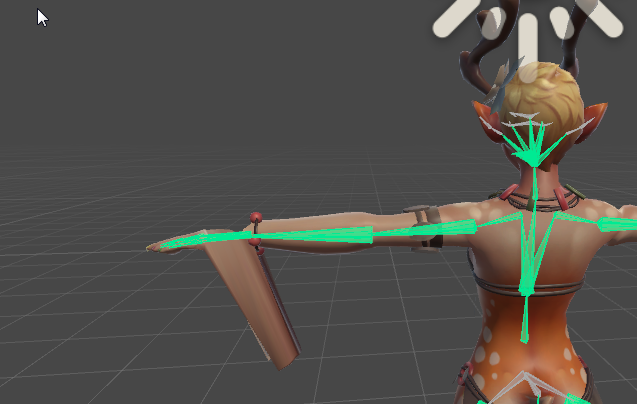
https://i.imgur.com/SeOroh0.png anyone know what could cause this? I sincerely swear nothing is weight painted to make this happen, also sorry for being a bother about this model if anyone has seen me before ;;

if its helpful i actually added weight paint and that made the back of the hand retract to the mesh like it's supposed to, but then https://i.imgur.com/TTIOMzR.png this is what it looks like in unity. before this it looked fine in unity despite the hand being broken in vrchat
 dawn shadow
fleet echo
dawn shadow
fleet echo
@night sigil No politics or religious discussions
that rule on discord
i think it rule on vrchat as well
 acoustic depot
So. Weirdly. After I put a model throgh mixamo could put in its textures fine. But once I took that same model into blender to use cats and fix some parts it made it so anytime I drop a texture on it it turns black. In unity told the model to get its material from the local file. Not sure why this is happening if anyone has imput!
Also @odd musk tecs love that character awesome someone is bringing her in!
 balmy solstice
Since the main avatars one is talking about things, How do i shrink the size of bones?
 stiff pumice
how do i do mouth movement?
 unreal turret
 minor sapphire
should I parent jaw bone to head or neck
 distant patrol
@odd musk hand verts are mapped to root/hips
@open cedar whats wrong?
@minor sapphire should be head i believe
open cedar
When I put the avatar in blender,everything seems fine
but when I put into unity,the hair kinda
I don't know..no colour??
distant patrol
unity might not recognice the material
select the character mesh and edit its materials
open cedar
TT
distant patrol
it might just not have loaded the right texture, you can fix this in unity however
distant patrol
ifyou just colored it instead, yes you can do this in unity too via materials
open cedar
but I think its kinda hard..so many colour sigh
distant patrol
nah
you can just change color of texture in unity
should be simple in this case
distant patrol
yes you can change the color it uses to show the texture in unity
 sharp relic
Using automatic weights. Anyone know how to make it so hand movement doesn't kill my mesh?
moved the thumb in pose mode on the picture and it killed my mesh
distant patrol
well you need to put the bone oints into correct positions for this mesh
as well as get their length right
thats gonna be a start but you may still need to edit weights by hand
sharp relic
you're talking about the hand bones right?
 potent moth
how to link other model's bones to my main avatar
distant patrol
then go to blender move the bones to whatever parent of the normal model you want
then export to unity again
 unborn kelp
anyone have a good vid tutorial to learn rigging like bone placesment and adding children bones and such
dm me preferable ❤
distant patrol
for blender i dont know any but adding children bones should be easy
unborn kelp
are there any plugins that can do it where you could add chest, head, legs, arms and so on and where you could just move the bones around
 pseudo silo
is there someone here with an avatar with eye tracking here want to help me test something?
distant patrol
depends
distant patrol
why tho
pseudo silo
so you don't have to launch vrchat to test it
pseudo silo
it essentially points out flaws in your avatar if you want eye tracking
helps detect problems, works for me, but you know how things are
distant patrol
that image
im not 100% sure but aside from mesh being named body i think it also needs spme bones names specifically
your root needs to be Armature -> Hips -> Spine -> Chest -> Neck -> Head -> LeftEye/RightEye
otherwise i never got it working first try
but i migh imagine this
additionally the game doesnt give a shit about visime names
it simply takes the first 4 visimes it finds
even if they are mouth ones
so the order needs to be correct for shapekeys
unborn kelp
anyone know how to fix this, i really love the model im trying to do 😦
potent moth
re-parent them in blender i guess?
unborn kelp
there are no "skirt bones to parent" 😦
 signal frost
can someone help me remap the bones of this guy? I tried Mimaxmo and right now, his hand bones are also binded to his cheek
potent moth
what bone that is?
unborn kelp
@potent moth only these show
distant patrol
@pseudo silo if you get a new verison let me know. with that extra info i think you can cover all details
its important that the order of visime is blink left blink right lower left lower right
you can check if the names are correct and in correct order i think
signal frost
@potent moth you talking to me?
distant patrol
@signal frost his hand bones arent mapped to his cheek. his chest is mapped to his head
signal frost
if I deleted the bind and rebind them, will their weight still be the same?
i'm just new to rigging in general
pseudo silo
@distant patrol yeah sure, I'm also going to have it read the muscle settings and use them just like VRchat does
i'm struggling with it a bit though
distant patrol
whenever i use muscle settings my avatar breaks
pseudo silo
i commented those parts out because I couldn't figure it out, but I just realized maybe i did figure it out because my eyes are still messed
distant patrol
i was told to never click the muscle button
pseudo silo
oh muscle button is great
unborn kelp
@potent moth i think there is something called boobs between the neck and spine, that might be why its not connected?
distant patrol
boobs is the bone that comes between uper spine and lower spine
is that not like real life?
XD
potent moth
most of the cases boobs wont parent with spine
potent moth
ture
distant patrol
you can make a chest clone called bustroot
and then put dyn bone there
if the bone has sno subbones dyn wont work
unborn kelp
how do i connect these point?
pseudo silo
goddamn I thought I understood how the eyes work but i still don't
signal frost
I rebinded the bone but his hand bones will still move his cheeks, what do I do?
pseudo silo
if I use LeftEye and RightEye as my eye bones they're rotated incorrectly by 90 degrees
but if I just have blank LeftEye and RightEye, and exact identical bones called RealLeftEye and RealRightEye rigged up
it works fine
@signal frost you have to weight paint my dude
unborn kelp
pseudo silo
switch to weight paint mode, click on the mesh data tab on the right, then select a vertex group (probably one of the hand/arm groups) and make sure the cheeks stay blue
@unborn kelp they're parented, if you want them to have the tails line up, click on the child bone, and in the bone settings check the "Connected" checkbox
minor sapphire
Ok, I set my jaw bone and weight painted I just have a quick question, what limits how much much it opens? I assume I set that in unity? I dont want it to open too much when I talk
(also set shape keys for blinking)
signal frost
@pseudo silo thanks
distant patrol
@pseudo silo the bones initial possition ios probably rotated by 90 instad of being defined as 0
i also ended up with this often
my soltuion was to always clone headbones and move them to the right possition to use as eyes
pseudo silo
ohh
which way do you "aim" the bones then in blender?
I've been aiming them up, root in the center, tail straight up
followup question
my real eye bones are rotated the same way
but they're no longer oriented wrong in-game
distant patrol
actually since i dont use an endbone i dont aim them anywhere as only the rotaton root matters
when i add bones i work with dummy objects
most of the time
they seem less glitchy then bones in 3dsmax
i think you moved them to look up which is what caused youissue
and the new bones were crated with that initial position
i think
thats the difference
i can reset the xform in 3dsmax which usually fixes this
along with reparenting the bone then i am fine
but really annoying cases i do some additional stuff like recreating the entire rig by saving it to file then loading it
dunno what blenders options are but my oppinion is that bones are supper glitchy and very prone to corrupting themselves
signal frost
will it be okay if my charracter is not in T pose?
distant patrol
in blender?
naive tree
@unborn kelp hips and spine are not connected
unborn kelp
i fixed it
signal frost
nvm, it did gave me a warning in the configure, but it worked out
 lyric current
So I put dyn bones in my avatar's tail last night. Shows up fine for me but people say I show up as a red invis avatar. Something with the script?
distant patrol
reupload
lyric current
Thanks, I'll try that.
signal frost
my head moves with the camera normally, but does not move at all when I use emotes or moving my camera while sitting, help?
distant patrol
i thought head and stuff nevermoves during emotes
 round tinsel
Can anyone help me with dynamic bone in unity? When I add it to my model it shows the white lines but it doesn’t move in the preview window
It works when I upload it but it takes forever to test that way
 cursive isle
@round tinsel Are you pressing the play button to activate the scene? Once you do that, you should be able to drag your character around in the scene and see the bones move.
 inland spade
I imported my avatar but it walks on the toes, do i have to shorten my avatar or something with the bones??, cant provide a pic cuz im on work atm
round tinsel
I didn’t know I needed to do that, thanks
I’m not home right now but I’ll try it later
potent moth
you should connect it to the head bone
 exotic crypt
i think thats the only thing thats screwed up everything else is fine right?
potent moth
rip bones
potent moth
re parent it
fading verge
when you delete bones, children arent deleted
potent moth
looks horrible
exotic crypt
bugs out whenever i try to
it gets out of rigging
wtf the center is there and its connected to the groove
is this supposed to be happening?
fading verge
just send me the file il fix it
fading verge
your supposed to do it in blender
exotic crypt
wait what part of the file should i send
fading verge
Here's a video on extremely common issues I see with bones and rigging setups, and ways to solve them. I cover: - Leaving Upper Chest Blank - Reparenting spi...
if you are too lazy to learn how to properly do your bones by yourself & learn proper setup

VRCat: Community-Run VRChat Forums
Cats Blender Plugin (0.5.0)
A tool designed to shorten steps needed to import and optimize MMD and Mixamo models into VRChat.
[IMG]
Features...
download this plugin anyway its handy for other things
exotic crypt
ok
 lament knoll
Can someone help me by telling me how I screwed up? I tried to rig eyes for the eye tracking, and my irises get rotated out to the side of my avatar's head, outside the head mesh.
 maiden iris
biggest problem i've found after getting into this stuff the last week is fixing the vertex weights across the model
lament knoll
They are both pointing outwards
Is it caused by the eye bone rotation in blender not being set to zero?
maiden iris
I need to get used to using the selection tool and painting the weighting, takes me ages and still unsure how to properly weight the areas for proper humanoid limb movement, definitely an art form
signal frost
my head moves with the camera normally, but does not move at all when I use emotes or moving my camera while sitting, help?
 dusty grotto
anyone knows why my whole unity is suddenly super slow?
fading verge
birus
 shy lark
I noticed that as well with the new VRCSDK when the build control panel is open
lament knoll
Are you running other instances or significant background workloads?
dusty grotto
nope just unity
i can zoom in and out perfectly, but whenever i click at something the whole thing goes to shit
 stark bobcat
My fingers turn out all messed up ingame, any common causes for this?
dusty grotto
update: i removed the csdk file and everything works again
unity works like a clock once csdk was re-imported, ty @shy lark
lament knoll
@nih I manually fixed the t pose in the unity rigging configure mode. Chance of saying that the pose isn't a t pose but it should still work.
 warped coyote
can someone help me for a few mins? my knees keep bowing in on my avatar, and im not 100% sure why but obviously its a bone problem
 earnest lily
So I got this model that has no neck bone
the way to fix this would be to add another bone from the head bone, give that bone the prior head's weight paint and then give the old head a neck type weight pain, right?`
If so, how do I give this new bone the other one's weight?
earnest lily
alright, but I'll still need to add weights to the new head, right?
distant patrol
you already got a head tho
earnest lily
or is there a way to get a bone inbetween the rest of the body nad the old head?
distant patrol
yes
earnest lily
I guess just a bit of parenting changing would do the trick? I am still super unsure as to how this whole thing works
 tawny night
so when i tried to put dynamic bones on to my avatar only they move when i stop moving like in this
anyone know a fix?
 odd mantle
Are Dynamic bones worth getting for any avatar?
 south bear
yep
unless you want to do cloth
then theres a built in tool
in unity for that
and i think that works and is whitelisted
lyric current
I dyn boned my tail, still no response. (in VRchat) RIP.
Trying to unstiff my tail and it isn't having it.
lyric current
@south bear added a few bones and offset gravity on Y... Still nothing. :{
lyric current
No
south bear
thats why
south bear
always use play mode
for stuff like that
?
@vapid sleet i guess i can help
also
quit out of vrchat
 vapid sleet
👍
lyric current
I did.
south bear
it doesnt load new or overwritten if your logged in already
south bear
@vapid sleet if you want you can dm me the model
vapid sleet
aye aye
south bear
and i can see if i can do some stuff
vapid sleet
thanks
fading verge
Dyna bone only affects the bone children. Also make sure the children of your selected bone actually have weights
 little inlet


 fading verge
Doing so can result in a permaban from VRChat:/
 shadow shoal
Yeah sending dynamic bones is illegal
 solid adder
Eh, it's only $20.
 gray sierra
I bought it during the black friday sale for $10. Totally worth
shadow shoal
Good price, good bones
south bear
i kinda wish they allowed swing bone
which is a cheaper but very simple altertive
same for ik
but i think with the final ik one is cause they use it
for vrtracking
 violet cobalt
So when trying to upload my avatar to vrchat i get an error "Your rig has the UPPERCHEST mappped in the humanoid Rig. this will cause problems with IK"
Anyone know how to fix that
fading verge
yea
shy lark
unset upper chest bone in rigging
south bear
remove the upper chest mapped in the humanoid rig
south bear
EMPTY
shy lark
no upper chest 🅱one
violet cobalt
sorry i'm so new, how would i do that
south bear
thats fine
violet cobalt
all i did was add something to my hand
 grand drum
hey guys how do fix a model that use multiple legs?
like make it move on multiple legs
south bear
remove spineA from upperchest
violet cobalt
lmao
shy lark
spine A 🅱ad 🅱one
grand drum
i uploaded the model but it looks weird
south bear
then get ready for some run with unity
grand drum
like he is standing on 2 legs
 unique stag
i created a custom model, but there's no such option as "build" in vrchat sdk menu
grand drum
i am new to all of this modeling and stuff
 arctic cradle
can someone explain how i would add a floating crown to my character. have the crown and the character in blender
violet cobalt
Hm so i tried just uploading the avatar without the edit, and i'm getting erros, But its a model from the unity store, Though it would be ready to go
guess i gotta edit the base model
 alpine vortex
Anyone know how to trigger the audio source?
grand drum
does anyone know why this model stands on its feet
like weirdly on the top of its toe
 crisp tendon
don't map the toe in unity
violet cobalt
south bear
YEP
violet cobalt
so i disabled the upper chest aye, But i need to connect right
how do i connect
without it being weird
south bear
so change spine to spine A
crisp tendon
No you'll have to fix it in blender
south bear
i cant see smol writing well
crisp tendon
use cat's plugin
crisp tendon
i think this is just a rotation problem
the whole avatar seems to be rotated 90° backwards
violet cobalt
wish 20k wasnt the tris limit, :/
shadow shoal
Just decimate to 19,999
crisp tendon
@grand drum give it a 90° forward rotation in unity
shadow shoal
Fix it in cat's blender tools
odd mantle
Any idea how to go about sorting out these bones so they all just go together into the arm instead of affecting different things?
shadow shoal
Yes
shadow shoal
You should scale it to fit the armature
grand drum
@crisp tendon so i just rotate the model and thats it?
grand drum
its already rotated
 lost radish
Ruuu, I'm going to livestream the best way to make avatars and decimate, where do I post it when I go live?
 tawdry shale
How would i go about fixing this? It seems to be missing hand, goes straight from wrist to fingers.
 rugged tide
isnt wrist mostly hand anyway?
as in if there's a wrist it gets used as hand
in my experience
 dry marsh
Good morning! I'm a bit new here, so I apologize if I ask any obvious questions. Do any of you have recommended tutorials for rigging within blender perhaps? I have been using Mixamo, but unfortunately it's breaking a lot of the models that I wish to use. They don't end up looking very good if they're not strictly humanoid, and models that have things like helmets or armor tend to have very weird results where the helmet is pulled around and stretched
tawdry shale
oh ok, but this model has all of it's fingers bent at the middle, thought it might be something with how the bones are set up
but i dont really know where to start
is it a problem that they are pointing upwards?
cerulean mantle
@dry marsh check out tuppers cats tutorial
grand drum
hey guys is there a way to move the mesh of the model? because one of the models i have has an arm inside the model and that really ruins the rigging
 surreal basalt
go into blender, get the cats plugin, separate materials and delete the extra arm
grand drum
there is also the finger
surreal basalt
unless its connected to the body.... is it?
grand drum
eh its not really an mmd model
and there is no bones in it
its a rammus model but whenever i move the arm the whole body moves with it like its glued
surreal basalt
thats cus theres no bones
 stark sandal
Ok so i have a problem.
For some reason i keep getting this even though everything is mapped
fading verge
Why when im on 1:10:42 of the video of Tupper i make my character materials to Opact and stills blank
surreal basalt
have you configured it
stark sandal
Yea
shadow shoal
Don't forget neck and head
stark sandal
both are mapped
 reef scarab
who know hwo to add custom shader effects to character in unity?
stark sandal
Could this be a reason?
grand drum
@surreal basalt i have the model with the bones,but from what i understood you are telling me to put a bone for the finger and bone for the body so they dont get sticked together?
stark sandal
I wish i could just send the entire project and have someone fix it instead of trying 100 things that doesnt work
surreal basalt
Oh no. I thought you didn’t have a skeleton for it
dry marsh
@cerulean mantle much obliged!
cerulean mantle
Rotation
fading verge
So just rotate the arms in unity?
naive tree
@fading verge err, rotate them in blender 90deg
fading verge
Ok thanks
naive tree
no 180*
fading verge
gotcha
dusty grotto
I was ripping my hair off cause i couldn't find the reason the avatar wouldn't upload, then i found out it was the servers, not the avatar
praise the lord
 sick depot
alright guys I got a working model but it doesnt have any fingers so it cant crouch ingame.
can i simply add bones to the wrists or is there something to look out for?
 woven pulsar
wtf is wrong with my SDK
i could publish fine yesterday
now it says Error updating content. Unity package upload failed. Failed to create file record.
fading verge
Servers are down @woven pulsar
woven pulsar
ohh
 stoic urchin
Any good resources on doing non humanoid rigs?
 red sage
anyone who makes video tutorials or is willing to help lend a hand on rigging an existing model?
 alpine aspen
so if I have a prerigged model that works in unity and Ive used it in vrchat, what do i modify it in to add mouth movement and dynamic bone movement?
do i have to go to blender to add bones in the mouth and nose for the dynamic bones?
 feral spade
You have to use unity for dynamic bones
It’s an asset you’re gonna need to buy and then import. I’m not sure how people do it without it.
alpine aspen
but to add the bones to the nose and mouth, where would i do that?
feral spade
Oh, blender
alpine aspen
okay, coolio. thank you!
feral spade
Ye, np
stark bobcat
So, my character walks like a dude, what's wrong`
shadow shoal
You forgot to set animation to female
stark bobcat
I've checked the animation to female
alpine aspen
should I add the bones before or after putting into Mixamo though?
shadow shoal
After
feral spade
After
alpine aspen
sick thanks
shadow shoal
Different account, make a new scene
elder meteor
im so new fk me
 merry cloak
idk what this means
http://puu.sh/yX185/bf0a688a08.png
 feral spade
Did you make your rig a humanoid?
merry cloak
yes
 meager kiln
can someone tell why my character bends his knees forward when I look upwards?
meager kiln
due to his almost 1:1 leg to body ratio it looks strange
cant he only use neck?
the strange thing is
he does only use neck when he moves
merry cloak
ok i see what i did wrong his shoulders are not hocked up
meager kiln
ctrl+J
dire charm
i always used booleans
red sage
strl + J is doing nothing
meager kiln
select stuff first
then click on free space in view
and ctrl j
it must be in orange line
 upbeat atlas
guys i'm pretty sure i got the rigging correct but my character still has a broken hip