#avatar-rigging
1 messages · Page 55 of 1
 torpid minnow
 serene wharf
Okay. I've noticed this on several of my avatars now. Why is the hips or... well. the Pelvis poking out? What causes that??
torpid minnow
Rip I removed the random second armature

 torn isle
I need a picture of the skeleton...
 scarlet crow
Okay, let me know if you figure something out, the only video i found on it didn't work
 gentle dock
Uh on blender or unity
torn isle
Unity.
 lucid isle
gentle dock
lucid isle
gentle dock
Sorry Im bad at this, Do you want the visable bones or the armature list
 fading verge
then go to modifiers
gentle dock
Yes
fading verge
it shouldve fixed it
torn isle
Show me all of it.
 limber grotto
torn isle
limber grotto
torn isle
Send the whole screen.
scarlet crow
on just the tail mesh?
fading verge
hm
all i know
im still stuck on this screen for this model ;v
is that will permananly modify your mesh for the new position
maybe thats not what you want?
because it will need to be re-armatured after so probably not
scarlet crow
No that is, I want her to stay like I have her so that is her default when loaded

 balmy solstice
I decided to go with the regular one, maybe it was translating it that screwed it up?
gentle dock
Oh heck, How can I bring those up
torn isle
As well as the chart of the skeleton on the right.
 alpine drift
@gentle dock you probably didnt connect the neck from the rigging section
gentle dock
Probably
torn isle
Go to rigging screen.
scarlet crow
What does it mean when a box is red?
fading verge
that it's selected but not active

This procedure supposes that you have already rigged and weight-painted your object so that it deforms correctly. At this point, you simply want a different rest pose for your object. However, when…
that should work
gentle dock
I cant find the rigging screen :(((( sorry
alpine drift
Go to where your avatar model is located in your assets folder, click on your avatar, on the upper right hand side there is a "rig" button. Click on that and there is a button called "configure" from there on the upper right hand side there is a tab called "head" and you probably need to connect the neck @gentle dock
torn isle
...
fading verge
its basically what I said before, but there is an extra step that I missed
My dynamic bone settings have become SUPER sensitive, like the default 0.5 radius for a collider is the size of a planet. Anyone know what's up?
Anyone know how to fix this?
alpine drift
I wish I knew, so I could tell you
fading verge
i've heard of that happening a lot lately
 torn isle
Yes.
gentle dock
oh heck thanks
torn isle
Look for chest bone, drag it into the center circle closest to the spine.
On the model on the right.
alpine drift
Yeah you're missing the chest @gentle dock
fading verge
do i need dynamtic bones if play without vr headset
torn isle
No. @fading verge
alpine drift
@fading verge nope
balmy solstice
@torn isle I tried again with the untranslated model
gentle dock
The circle wont move?
torn isle
No. From the bone hierachy on the left, find chest bone. Then drag it to the circle closest to the spine on the right diagra.. @gentle dock
fading verge
alright, thnx, didnt want to go through effort of trying to put an mmd in, if needed to have that
torn isle
And? @balmy solstice
alpine drift
You have to find the chest rig on the left hand side, and drag it to the "none" section on where the chest is at on the right hand side. @gentle dock
gentle dock
Man you guys are smart as hell
balmy solstice
@torn isle well it's feet aren't going back to front in unity so, progress there
torn isle
Great.
alpine drift
@gentle dock just learned from experience man you'll get there don't give up!
gentle dock
Alright the chest is now in the circle
alpine drift
Save and apply 😉
gentle dock
Okay?
scarlet crow
@fading verge that helped, I had just made a mistake when i tried it before, but now i've gone and done that and the mesh is where it should be but the armature went straight again
gentle dock
OH wow, Now I just need a sceen discriptor
scarlet crow
I'll go back and try again real quick
 mild mural
4D it should look better in game.
 meager kiln
well, going to test it then
alpine drift
I never had this problem, but there are 2 ways to solve this problem. If you can separate them in Unity thats great. If not, then you can try using blender to manually separate the polygons.
@meager kiln
scarlet crow
not sure what i did the first time but it's fixed now
meager kiln
@alpine drift i mean, in T-pose they are k
mild mural
I had an Avatar whose legs and feet formed a V but looked spaced out in game.
meager kiln
well, uploading now
gentle dock
Dangit, you guys have been a huge help, but now the texture is see through, do I go to avatars, or avatars mmd
torn isle
Not unless someone gives out an oldee version.
 mild atlas
i know its paid software and i'm also aware free versions exist. i don't have the money to buy it now either
torn isle
Which happened to me.
mild mural
@balmy solstice double check that unity didn't Auto assign limbs to the opposite side.
I found one model where the Creator misnamed left and right
alpine drift
@gentle dock go to your materials folder, click on the sphere looking thingys, and change the type on the top right from "transparent" to "opaque"
gentle dock
Thx
balmy solstice
@mild mural are you currently on vr chat?
mild mural
Nah I'm lying in bed
scarlet crow
How do I create and assign new bones for the left leg?
alpine drift
Np
gentle dock
When I change the material and apply it swaps it to none
alpine drift
Helping others is a way to train myself to remember these things @gentle dock xD
fading verge
Eye tracking on CATS is being funny. I need to do it manually on all my recent models because it doesn't place the new bones properly. I'd like to know if anyone else is having this issue.
 gentle dock
Alrighty then, huge reminder time
fading verge
To clarify, the old bones are placed fine, and move the eye naturally.
alpine drift
Click on a sphere and send me a pic of what it looks like @gentle dock


 ancient jackal
wait let me send a better pic
(Btw I keep getting the "incorrect spine hierarchy error)
alpine drift
@gentle dock do you have a materials folder by any chance?
gentle dock
Uh no its my texture folder
Because it worked that way for everything else
Im a mess
I just went and made one
Inserted all the materals
ancient jackal

"Spine hierarchy incorrect" Not sure if I'm missing any bones or not, this error has been bugging me for so long
 alpine drift
Make all the spheres opaque
gentle dock
Uh ok
alpine drift
@ancient jackal give me a sec
ancient jackal
Gotcha
gentle dock
All opaque
alpine drift
Yup all of the spheres opaque
 sly pelican
@ancient jackal do all the main bones follow a hierarchy?
gentle dock
Dang
sly pelican
Hip <- Spine <- Chest <- Neck (<- Head), Both Shoulders (Both Arms <- Hands)
alpine drift
@ancient jackal from the picture that you showed me, on the top right where you see the green person, click on the "head" button and check to see if a neck is connected
sly pelican
Yeah see if the head isn't replaced with Eyes or something. Got that a couple times before.
gentle dock
So after opaque what could I fix
alpine drift
@gentle dock you might have to click on your avatar in your assets folder, click on model on the top right, and send me s picture of what shows up there
A*
 median warren
i have a question on unity
will vrchat sdk let me upload with scripts on my skeleton
https://www.assetstore.unity3d.com/en/#!/content/90743 this one specifically
ancient jackal
Yeah the neck is connected to the chest
Oh, alright
so when I move the neck it always stays connected with the chest
but the shoulders aren't
 alpine drift
@ancient jackal follow what whuping suggested then 😃
alpine drift
Hmm, what about in rig? @gentle dock
 blazing hornet
whats comes after shoulder?
alpine drift
Damn this would be 10x easier for me to help if I wasnt on my phone
 blazing hornet
and how do I make armature show
gentle dock
@alpine drift
alpine drift
Should be shoulder, below that should be elbow, then wrist @blazing hornet
blazing hornet
and why is armature invisible
alpine drift
@gentle dock by any chance do you remember a materials folder being made when you first imported the model?
gentle dock
Well I readded it after, This is iteration like 15 of this model
alpine drift
@blazing hornet was Armature invisible when you imported the model?
blazing hornet
yes
gentle dock
So I have the materials, but they were not present in the begining
ancient jackal
 blazing hornet
should I just take armature bone structure from another character?
alpine drift
@blazing hornet did you modify anything with the model through blender or something before importing it to unity?
ancient jackal
Shoulder_L is the actual shoulder, while the one above it just shows it's the arm i guess
blazing hornet
It came as an fbx already
ancient jackal
how would I be able to take out ShoulderP_L and make it Shoulder_L if possible
or if that would fix anything
(Same thing with right, ShoulderP_L is above Shoulder_R, which is the actual shoulder)
 rocky wasp
Hey how can I fix some of my bones? I need hips to be the parent of the spine bones but I don't know how to do that
alpine drift
@gentle dock under the materials tab when you click on your model, where it says locations, what are your options?
@blazing hornet you can try tossing the model in blender to see if it has bones
blazing hornet
thats why I asked why are they invisible but nvm Ill just use another characters armature
 hot lynx
hi i need help like i wanna add wings to my knuckles
but whenver i try to add the files to the assets
it doesnt work
https://gyazo.com/efe9c756513d4dc7f5d74d099af426e6
 gentle dock
GET THAT KNUCKLES OUTTA HERE
hot lynx
hek u its beautiful
gentle dock
ok
 hot lynx
but idk how
blazing hornet
that*
Add it as part of the mesh
unless you want to mess with it
as dynamic bones
alpine drift
@gentle dock it's odd that your hair is pink, you probably had a materials folder but deleted it or something. You can always try to start from the beginning (importing the model through unity) and the Materials folder should be there and you should drag all the material images in that folder. Something must've happened that messed up your spheres lol you have the rigging down though so that won't be an issue for you 😃
 silk mason
can someone tell me what the new sdk did?
gentle dock
ah heck'
Thanks bandit
Real deal
The best
amazing
++++++-+++--++-+
SO helpful
blazing hornet
Is there upper arm and lower arm?
I got l shoulder
upper arm
lower arm
hand
silk mason
quess not okthen
alpine drift
@hot lynx what extension is the files for the wings?
ancient jackal
How do I parent the bones in blender?
alpine drift
@gentle dock You'd be surprised how well you can perform by starting from the importing part especially if you are a little more familiar with what you are doing.
alpine drift
For the wings in the rar file, is it an .fbx extension?
alpine drift
@hot lynx
hot lynx
fbx
alpine drift
@cooper are you trying to figure out the hierarchies?
hot lynx
@blazing hornet
alpine drift
Sounds solid
ancient jackal
Hey, does anyone know how to parent the bones in blender?
alpine drift
@hot lynx drag the fbx inside the asset folder, and the textures inside the materials folder
@blazing hornet can you show me a pic?
hot lynx
there is also a .fae file?
alpine drift
@ancient jackal do you have mmd tools installed for blender?
 ancient jackal
yeah
gentle dock
Uploading takes a long time huh
 ancient jackal
Oo, Infinite
alpine drift
@hot lynx it looks like the. System cannot find the file specified, meaning the .rar is not extracted to your desktop or somethin
gentle dock
How long does it take usually to upload the model
alpine drift
@ancient jackal wait are you still having problems with your shoulders?
@gentle dock not long, like 2 minutes
gentle dock
ehhhh this is taking a bit
ancient jackal
I'm pretty sure I found the solution, I just don't know how to
blazing hornet
cenz is your knuckles rig fine?
ancient jackal
I'd have to parent the shoulders to the chest bone, but I'm not sure how to on blender
blazing hornet
I get to re-rig yay
 frozen hare
has anyone had problems with the CATS plugin not creating eye tracking? Whenever i create eye trracking it seems to work in Blender but when i asign the eye bones in Unity they dont work in game ...i tried the Old eyes and the New one and none of them work
gentle dock
Oh man
I fugged it
Uh
uh
Whats it mean when it says no camaras rendering
While on display 1
nvm
im dumb
ancient jackal
This is all so complicated
 worthy citrus
im trying to import CATS and MMD into Blender but the file is showing different than the tutrotial download... it just opens the folder not importing the file
 granite kestrel
@worthy citrus that's because you unzipped it
@gentle dock that's just the SDK doing its job, but yes you should use the latest always
worthy citrus
makes sense lol
granite kestrel
I mean running build and publish should take 2 minutes and the upload another minute
 naive tree
@frozen hare try exporting with apply modifiers disabled in geometries
frozen hare
@naive tree that worked! tyvm for the help Ive been trying to rig this avatar for like 2 hours now, thanks again XD
naive tree

VRCat: Community-Run VRChat Forums
This is how you should import and export your mmd models in order to prevent potential issues and remove unnecessary objects.
mmd_tools:
First of all,...
save as preset
balmy solstice
https://cdn.discordapp.com/attachments/399494229136769024/399494364738355212/20180107202025_1.jpg A friend pov
https://cdn.discordapp.com/attachments/399494229136769024/399494817794490368/unknown.png My Pov
What's the issue here?


 pseudo silo
@balmy solstice did you configure your muscle settings?
balmy solstice
???? @pseudo silo what's that
pseudo silo
click on your fbx in the asset browser, in the upper right under the rig tab press "Configure"
then in the upper right click Muscles and settings
then use the sliders to test the limits of your model
and the drop downs to adjust the limits
it's possible that your neck and head bones have 360 degrees of freedom
balmy solstice
Proabably
pseudo silo
it'd be good to know what your eye bones are attached to also
vrchat likes to just rotate them directly at objects
pseudo silo
if you need info on how the eyes work
check this out

Google Docs
Overview VRChat has two eye tracking facilities, and they both interfere with each other. This document attempts to describe them, and a basic solution to implementing proper tracking eyes. Requirements VRChat won’t enable eye tracking at all unless two requirements are met: The bone hierarchy H...
meager kiln
anyone had this problem with FLAT ELBOW? https://i.imgur.com/hidgSxq.jpg

in unity and avatar preview it looks normal
aka like this
and this
https://i.imgur.com/GHvcMN2.png
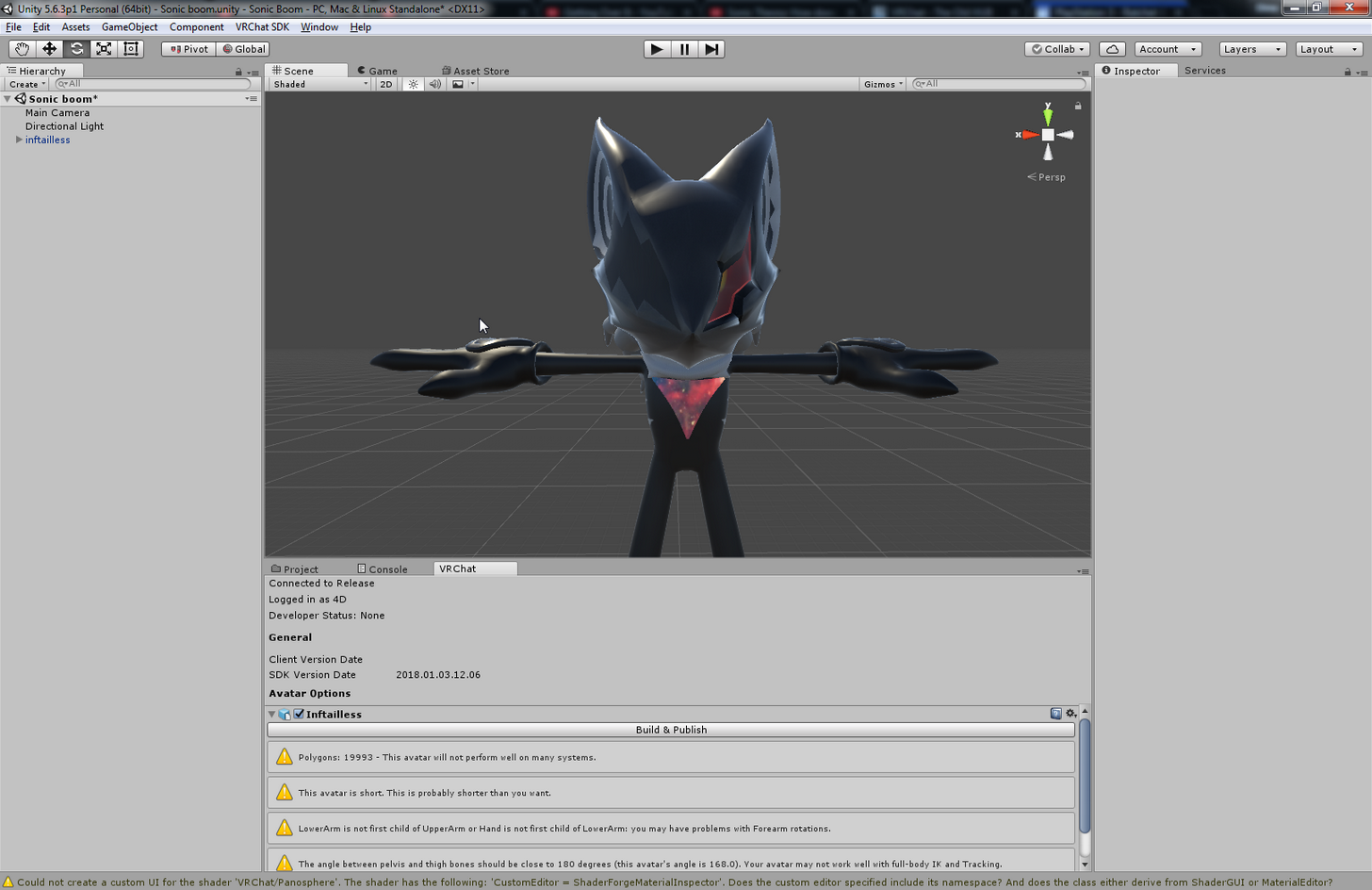 scarlet crow
Okay so if you make an atlas with cats and are slow to realize that doesn't look too great in spots is there a way to load the old textures back to manually atlas?
saved after the cats atlas so rip eyes if it's irreversible
balmy solstice
@meager kiln Never miss arm day
I hope I've fixed the arresterdramon head issue
If i have, PRAISE BE
meager kiln
@balmy solstice :c
balmy solstice
FINALLY I CAN SAY "Gumdramon digivolve too Arresterdramon!"
@meager kiln Seriously though, Check the settings on the other arm, it looks fine yes?
meager kiln
they both have similar settings 🤔
 knotty mantle
I tried to add dynamic bones to a model that I threw in to mixamo, but they don't seem to be attached to my meshes. Did I miss something? https://i.gyazo.com/b421bd9ff686decbbdbc10e023ac4008.mp4
pseudo silo
mixamo doesn't bind arbitrary bones
if you want that you'd have to do your own rigging
 manic flicker
what degree did you put your fingers?
knotty mantle
Okay let me rephrase then. How do I attach my meshes to bones? When I try to follow most "skinning" guides, my model just gets all distorted and the bones don't even seem to move anything in pose mode
balmy solstice
@pseudo silo I'm still getting the backwards head thing even though things look fine on my end
manic flicker
click tthe armature area and select xray
balmy solstice
I got rid of the eye bind too
pseudo silo
@knotty mantle I don't have any tutorials on hand, though the general idea is that you position bones in the center of joints, then create vertex groups that correspond to the skin the bone would move
hmmm
if you want to toss the fbx/blender file at me in a pm i'll take a look
it's odd that it's only broken for other people and not you
 pliant helm
Can someone help me with a hierarchy problem? x.x Apparently it's out of order but every time I try to fix it I just mess it up more...
balmy solstice
@pseudo silo are you currently on VR chat?
pseudo silo
nah, but i can launch it real quick
balmy solstice
@pseudo silo please do, this might make things easier
balmy solstice
I am in Old Hub #52
@pseudo silo you should have received a fr from kagejason
I am currently a digimon avatar
 hidden ether
@meager kiln Select the bone in the outliner whilst in edit mode then hit delete.
fading verge
Is there a method for allowing others with dynamic bone colliders to affect your avatar's dynamic bones?
For example, if I wanted my friend to be able to play with my avatars hair.
hidden ether
If another player has colliders on their avatar, I believe they can interact with others' dynamic bones.
fading verge
Ah. I have two people with dyanmic bones and dynamic bone colliders on their hands and neither of them can interact with the other's bones.
I feel like there should be a way to apply my friend's collider to another friends avatar, but I assume they'd have to have their avatars in one account.
 solid mortar
I cant figure out how to change the bones so that the guns stay up, I can move them in pose mode but when I exit it they return to pointing down, do I change the bones to sit up in unity or something ;o?
hidden ether
Don't edit them in pose mode. (pose mode is for animating) You can try moving them in Unity, though I'm not sure how to do that in Blender.
solid mortar
Its Mutsu ^^ Le nagato would be awesome to find next ^^
@hidden ether okay thank you ^^
Mhm maybe I should try and animate them to rest, then stand up, that would be a nice thing to learn ^^.
solid mortar
I dont mind as long as I gain knoweldge from it 😃
 normal blaze
https://puu.sh/yW7Bw.png will my wrist being stood up like this be a problem?
 crystal vector
I think it's only a problem if you have VR but I'm not sure
fading verge
Silly question, but how do I change my Unity's gret background back to the default sky and ground?
 royal glen
after separating by materials my blush ended up like this, how can I restore it?
stayed broken after joining meshes
fading verge
@patent hemlock Thank you! Worked.
royal glen
separating and rejoining worked, thx
aaa
@patent hemlock
so when I try to add eye tracking, it removes my cat ears (which are there by setting a shape key), and the eyes don't move in testing (but blinking does work)
I got the ears back by editing the shape key again, but is there a way to fix eye track for this model?
 latent lotus
is there any way to rig a model in unity or do I have to use a different program?
meager kiln
@solid mortar are you the one with _Touhou name?
solid mortar
Yes 😄
 summer wren
Does anyone know why dynamic bone starts twitching like crazy ?
solid mortar
I honestly think it might be a cpu thing, what is your cpu?
Other people have said about this problem as well and been trying to figure out if it could be something to do with the processor people have.
summer wren
The dynamic bone thing?
solid mortar
Yeah ;o Does it happen with all your models?
solid mortar
Mhm, maybe it has something to do with how the bones are done in the hair has been done ;o Honestly nobody really knows the cause for that issue.
summer wren
I'll try messing around with the update rate
hidden ether
There's a hotkey for it too which i believe is E
 odd fable
I'll keep that in mind for my next issues
 spiral sleet
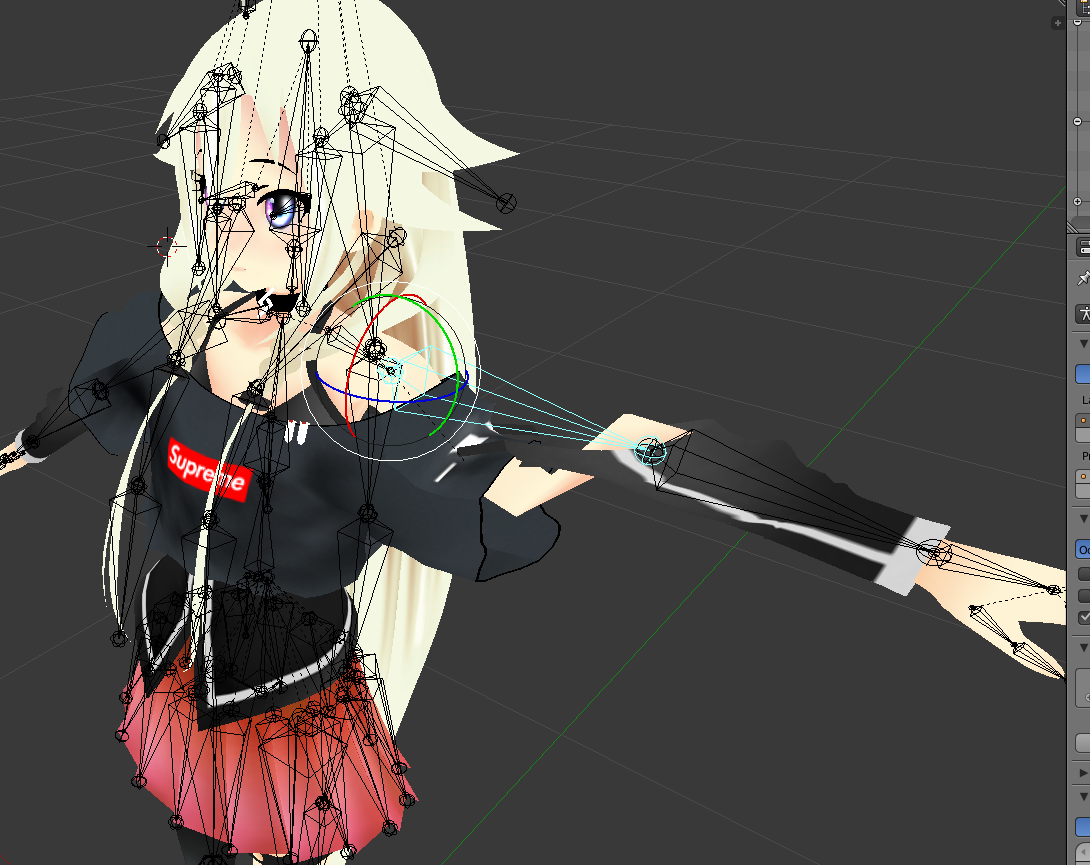
Hey guys! I have an issue with a model..... the bicep part of the mesh isnt moving with the shoulder/arm in pose mode. Any suggestions?
fading verge
I'm making my friend an avatar and for some reason the hair comes out messed up in Unity but it looks fine in Blender. I feel like it might be the bones doing that but I'm honestly not sure. If anyone can help me out here.
Left is Unity right is Blender
spiral sleet
https://imgur.com/a/tjP76 is my error; any suggestions would be great!
 rare marsh
did you rotate the selected bone?
spiral sleet
Did I rotate the bone from stock importation? No, but I'll play around with rotation and see what's up
rare marsh
i asked because the other arm is in a V form, and this arm is in T form
soooo

the bone i highlited is the shoulder, and the under arm is beeing ripped up of that
spiral sleet
let me reload the model/image, I think I was tinkering with it to see if I could get it to work any way possible
I'm a server admin, not a animator >.<
spiral sleet
It can be stressful managing 1000's of nodes, but this bone/rigging stuff is stressful too 😛
mild mural
@fading verge hey man, It looks like a few vertices at the end of the hair are in the wrong vertex group.
fading verge
@mild mural I'm going to keep running in to you aren't I lol
mild mural
Probably
fading verge
Gonna have to explain to me a little better, i have 0 knowledge on how to model
I think it might be a bone problem since they are in place when i remove the bones they are attached to
spiral sleet
https://imgur.com/a/jZ744 is the .pmd loaded in, immediately fixed/meshes split, and translated

but then once you move the arm, it tears
mild mural
@fading verge Select one of the vertices slightly higher in the hair strand to find out what vertex group they should belong to
mild mural
Yeah, in the info panel in the 3D view, it should list a bone or two with a weight value.
fading verge
yeah i see it
near the top like
It's set to both head and fronthair bone
right above that is only head
right under is only front hair
mild mural
Even the tips? What's the value in them?
fading verge
shoulda pulled it out a little bit
my b
tips are fronthair1 1.0
im assuming the fronthair number should be higher than head
but i have no clue how these things work
mild mural
Hmm, if the tips were changed to that fronthair_r it might fix it
fading verge
i'll mess around with numbers and see what happens
i actually didnt know this setting existed
thanks again
mild mural
Np, didn't even have to get out of bed. 😋
mild mural
separate the face from the main body
so you'll have a body mesh and a face mesh
might have to do the whole head so you don't get ugly seams
 bold moss
so i cant decimate the face?
mild mural
decimating changes the tris, so all the shapekeys are destroyed
mild mural
the yellow triangles in the hierarchy list are meshes
bold moss
my body is not a hierarchy is all in 1 mesh how can i only take the face off?
 crystal jay
do the name of the Bones matter when you make them in blender?
spiral sleet
https://imgur.com/a/tjP76 any advice?
mild mural
either a bone isn't parented properly or there's a vertex weight issue
 green iris
Anyone willing to take 2 seconds to do something for me in blender
I know its an easy job i just can't figure it out myself
spiral sleet
how do I access the weights area? every time I tried to do anything regarding weights (what I feel is the issue) I'd get told it was locked
 dusky pendant
And you can NEVER decimate the fact anyway
spiral sleet
when I pivot the arm up-down in pose mode, I see the shoulder moving to align with the fingertips, but it seems like its not moving at the same rate
bold moss
when i separate my meshes the shape keys stop working
 crisp tendon
"You can rejoin them later"
 rancid jolt
help, im using cats blender, it seems to think that the left eye (trying to create eye tracking) is connected to the wrong bone
crisp tendon
what is it connected to ?
rancid jolt
crisp tendon
oh so you didn't assign a vertex group to your eye bone
rancid jolt
crisp tendon
You also need to create blink shapekeys
crisp tendon
so assign the blink shapekeys to this menu and make sure the vertex group of the left eye exists
rancid jolt
uh, howd i do that
crisp tendon
you told me they already exist so just use vrc.blink_left and vrc.blink_right to the cats menu for the blinking

Google Docs
Name the armature “Armature”. Name the mesh containing both eyeballs “Body”. If possible, make the whole head or avatar a single mesh. Name the bone hierarchy like this. Bones not mentioned can be named whatever. IMPORTANT: You cannot have any bones interrupting the hierarchy. For example, you ca...
rancid jolt
so i just... do it in unity later?
crisp tendon
no you have to do everything in blender for eye tracking
rancid jolt
ok, i literally just assumed without reading o o p s
thanks for helping >< ill come back if i encounter some stuff again
 crisp tendon
you might be missing an end bone
 deep tusk
I have end bones at the tips, but they are not assigned.
the 3 bones I have assigned are the joints.
for each finger that is
crisp tendon
Assign the end bones then
deep tusk
as the tips in unity?
crisp tendon
yes
spiral sleet
Last call before I pass out; any idea how to adjust this or where to look guide-wise to fix this? https://giphy.com/gifs/err-3ohc1ddEc9tnwMCNxK/fullscreen
crisp tendon
weight paint
spiral sleet
when I try to weight paint it says its locked
 bitter canopy
which program do you skin in?
crisp tendon
spiral sleet
thanks ruubick, I'll tinker some more
I knew I was missing something stupidly small
rancid jolt
aagh, i checked for more than three times and everything was the same way as instructed
deep tusk
@crisp tendon, my end bones seem to have been automatically generated by unity, but they're in the same place as the distal joints. Is it ok to move the generated bones in Unity or do I have to create them manually in Blender?
rancid jolt
nothings working out
spiral sleet
Ruuubick, you remind me so much of the senior devs at my company in that its a one-liner that solves an hour of frustration. I think I got it now, thanks!
crisp tendon
@deep tusk try moving them in your hierarchy first, if it doesn't fix it then yes you can create your own in blender
@rancid jolt So what are you current eye bones connected to ? Usually they are parented to the head bone but not directly connected
rancid jolt
it seems to be connected to the head bone
crisp tendon
Disconnect it then
rancid jolt
then..?
crisp tendon
That was the other kind of "then" lol
If you have them not connected it should work properly
unless there's still no vertex group on the left eye
crisp tendon
Well, keep the only left eye bone that has the correct vertex group
rename it Eye_L
crisp tendon
Sure
rancid jolt
e y e s
crisp tendon
Yeah there's a few things to fix
 latent roost
green iris
latent roost
green iris
Cross legged it looks like how do i fix?
crisp tendon
@rancid jolt https://youtu.be/gCPcg9y4ZBM

Creating Eye tracking for your Avatar in VRChat Links: Download Unity MMD rigging: https://www.mediafire.com/file/7awm878q43c1m7q/MMD_EYETRACKING.ht Eyetrack...
 opaque marlin
hey quick question, in Unity it looks like my char has nipples but they don't show in blender? Any way I can get rid of them in Unity without having to redo all of the unity work I've done?
crisp tendon
@green iris Rotate hip bone in blender by 180°
@green iris Actually try to use cat's plugin first, your skeleton has other problems
@opaque marlin nipples on texture ?
crisp tendon
That would be fixed in blender
crisp tendon
check the vertices in blender
opaque marlin
can I just delte them?
crisp tendon
probably not, but you can normalize or dissolve the zone
opaque marlin
how do I go about that
crisp tendon
might make it rounder and remove that tiny bump
into edit mode, right click on of the vertices, then you can shift click all the ones you need, once that's selected press ctrl + X and dissolve
opaque marlin
its just really messing up the texture
green iris
@crisp tendon Well its fixed sorta it actually just made a bunch of other problems
Its not cross legged anymore
 still harness
Hey I have this weird eye tracking bug. Anyone got any idea what might be causing it?
https://youtu.be/G7_13nsPpQA

 shadow shoal
Maybe remove eyelids shape keys?
 oblique cliff
did you add lower eyelid visemes in blender?
because you can just leave those on basis
 loud bear
I have them on basis but the same problem
and it's even more noticeable because of huge eyes
still harness
I left the lower eyelids on basis
 viscid jewel
hey guys, question: When i was about to upload my character in Unity it said: "Spine hierarchy missing elements, make sure that Pelvis, Spine, Chest, Neck and Shoulders are mapped" I looked through it and apparently something is not right with the shoulders... my problem is, that I am completely new to blender and rigging in general, if anyone could help me out i'd be very greatful!
 coral coral
If I wanted to have an avatar with a tail like the Alaskan Bull Worm one, where it flows freely, what would I do?
fading verge
pay for the dynamic bones asset in the store like everybody else
coral coral
Well I have the dynamic bones asset.
coral coral
I've already used it to make tails that move around, but they have a somewhat firm shape that goes into place.
The Bull Worm one just moves around at will and has no resting position.
Something akin to how Sly Cooper's Tail moves.
fading verge
there are a lot of settings in dynamic bones it's going to be in there
odd fable
i have a question, do i want finger tips in the end or no?
is it supposed to be just joints?
Working on a weird model
fading verge
there are three bones per finger
odd fable
Just two apparently
The thumb has one
Its weird to rig
The one before all connects and makes the wrist
I have no clue how to add bones also
 daring wadi
odd fable
daring wadi
odd fable
With what?
coral coral
I seem to be having an issue where if I move a part of the model, that part disappears.
Like, when I turn the head it shrinks and turns 2D.
I have no idea why this happens, this is the first I've ever seen it.
 fiery glacier
Hmmm, trying to merge 3-4 separate models into one with bones doesnt work very well 🤔
anyone know why even though i have the bones, in unity jiggle bones does nothing at all?
fading verge
Merging models is just a little extra work
fiery glacier
i think its the mesh not getting attached to the bone
but i dunno what to do about it though im trying
all i know is that my bones are positioned correctly
coral coral
You've been using Weight paints, right?
fiery glacier
probably not as i have no idea what that is, or atleast what it does
coral coral
Weight paints decides what part of a mesh each bone will move.
fiery glacier
i guess its a process of clicking each bone, and then the spot of where that bone will move something on the mesh?
or something like that
coral coral
How it works is that you right click the mesh in blender.
Then go into Weight paint mode.
Same process as pose mode and edit mode.
Then you create a new "layer" so to speak.
And name it the same as the bone that will move it.
fiery glacier
hmm
coral coral
You then paint the area that you want the bone to control.
fiery glacier
i c
fiery glacier
the "layers" are in the relations right?
coral coral
They're the vertex groups.
coral coral
You don't need to click each vertex.
When you paint you can just go over the area of the model.
coral coral
Are the weights the same name as the bone?
fiery glacier
well im not looking in the right area then because all i see are the vertexes, and when i click on each it highlights an area
coral coral
That's the painted areas for each vertex group.
fiery glacier
then where should i be looking?
coral coral
On the right side of the screen, with the vertex groups, you click on each one, and they change the color of a certain area to red.
Create a new one that has the same name as the bones that don't move anything.
Then you are able to click over the area that you want.
fiery glacier
thanks, i guess this is going to be a tedious process, so i can just google if i need any more help i guess
 merry jewel
Is there a guide anywhere on jaw bones? I see a lot for visemes but I'm not looking to do anything fancy, the model I'm working with just has two intersecting half-spheres. with some eyes for a head. Just want it to flap around
fading verge
You just add a bone then set it as the jaw bone
merry jewel
But as far as where to paint the weight, controlling how it moves, theres gotta be a guide somewhere. I'm pretty new to all this. I modelled and rigged the rest of it myself, and it works for the most part.
fading verge
They;re normal in unity. but turned in in game
 barren meteor
I'm getting told the LowerArm and LowerLeg are not the first Child of UpperArm (or Hand), or UpperLeg (or Foot), respectively. This is post-CATS fixing. Will this be an actual problem, or is this just a quirk of whatever?
fading verge
lmfao, so i decimated a model from 86k to 22k. removed extra or unwanted materials and what not. then went to use cats decimation tool to get the last bit down to 20k. on "save" and "half" it literally didnt do anything xD
hey does anyone know how to fix turned in feet?
they're straight in unity
 daring flare
@barren meteor That's not an issue. Everything should work fine.
barren meteor
Cool beans.
fading verge
can someone help
Can you show me that it looks OK in blender
Unity rather
yeah it got deleted in my project so i have to redo it real quick
one minute
daring flare
@fading verge It's likely a bone rotation issue. make sure you enforce tpose when you convert to humanoid and it should show in unity.
fading verge
how do i force the tpose?
I accidentally deleted my eyes bones, how do I add them back?
i was thinking that it was a humanoid issue
I deleted them like a billion steps ago and just realized
restart i'd say
I figured out how to make my own shape keys from the ones I accidentally deleted
why?
daring flare
@fading verge You would just have to re add new bones and parent the eye meshes to them.
blazing hornet
can someone explain how they got knuckles avatar mouth to move if its only 1 mesh?
daring flare
There's a drop down in the rig configuration menu to enforce tpose
fading verge
Mouth moving is a mesh deformation and not a seperate mesh
sok0 you want to see the tpose?
daring flare
@blazing hornet They probably just used a jaw bone linked to the mesh
blazing hornet
how would I do that
fading verge
Add a jaw bone in blender then set it as the jaw bone in unity
fading verge
officer, in unity select an animator controller then press play
so that I can see what it looks like in unity
daring flare
If it has a jaw bone then just link it as a jaw flap bone in unity.
blazing hornet
doesnt look like knuckles has a jaw
fading verge
ok
hold on soko it's giving me an error i need to fix
it keeps saying i have a bone length of 0 yet i fixed that
now it's turned in in unity
idk what to do. might just get a different model
daring flare
If it auto detected a jaw flap blend shape then he should. Check the armature and if it asks you to link a mesh then add his full mesh. Most likely it's labeled body if you used cats plugin.
hot lynx
https://gyazo.com/e9f0bbd479c31b23fb8083f7dacdbd38 how do i add this all to vrchat it only adds the knuckles not the wings
 hot lynx
idk inever talk lol
fading verge
ok officer, if it's turned in unity then your bones are messed up in blender
blazing hornet
;-;
fading verge
so whatever is easier for you
blazing hornet
I need help with that
fading verge
heh ok
cenz it looks like you added a wing asset to unity
VRchat will not capture that
you need to add the wings in blender then join the meshes
hot lynx
nvm i not downloading blender rip thanks
 limber willow
dont I have an avatar descriptor or did I do it wrong
I cant fingure out why it isnt working
fading verge
click on the console
limber willow
do you need a picture of consol?
fading verge
no im just making sure that you refrshed the console after making the descriptor
by clicking on it
Try Mixamo

VRChat Wikia
This documentation should be able to assist someone with absolutely no 3D/VR Chat SDK experience in creating a quick and easy avatar. If you see a model with two variations, a High Poly and Low...
@restive falcon
 tight coral
I think I finally figured out how to custom add bones for eye tracking
 agile crater
Anybody know of any good tutorials on adding a jawbone to an already rigged model?
torpid minnow
Does anyone know why when in edit mode, my bones in the hand are perfect
But in object mode they go out of place?
fading verge
Because you are posed
go in to pose mode
does anyone know of an alternative to Muscle Animation Editor? or is it completely unnecessary for characters
press alt+r and alt+g
sorry
select all your bones then press those keys
you moved your bones in pose mode by accident when they should have been moved in edit mode
 low river
Ok so
torpid minnow
The avatar was done by Mixamo. I had to repair the fingers in Blender considering they we're terrible.
low river
Anyone having their avatar not update when you upload?
when I try to do it, for some reason mine isnt changing
torpid minnow
The bones I added sok0
Are not staying in place
When I added them and went to object mode
limber willow
so I fixed that problem now im getting spine hierarchy incorrect...
fading verge
candy what "update" are you talking about
 tulip wadi
ug my custom avatars still wont show up
fading verge
doomish so fix the heirarchy
uh
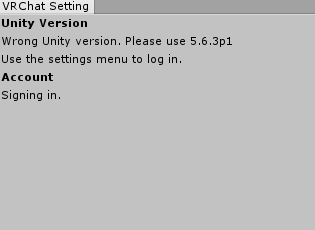
https://i.imgur.com/xbNbE9y.png
what do i do


coffee uninstall
low river
Nah I mean, im changing my avatar
fading verge
and get the right version
i have to spend 660 dollars on vr because i need a gtx 1060
low river
and nothings showing up when I load in
limber willow
I dont see any problems tho ;-; this is my first time
low river
im still messing... as I have an online test due today :v
fading verge
tulip wadi
my character models won't load
fading verge
if they are not in the correct order you will get that error
Crispy then you must be doing something wrong
I dont know what you did so not sure
 weak rose
I am having some really annoying problems in that my model has a fully functioning rig and the joints and everything work in pose mode yet when I put the model into vrchat its stuck in tpose and none of the animations work
fading verge
Zoe your bone mappings were done incorrectly in Unity or Blender
weak rose
fading verge
as an example if you dont map your fingers correctly in unity
then VRChat will disable all animations
you should have got a warning in Unity
about what you did wrong
weak rose
Except the are and VRCSDK warns you if tis wrong and it didnt warn me
because its right
weak rose
Obviously there is something wrong but that doesnt inatly mean your stance that its with mapping is whats wrong
fading verge
where is the vr chat console
weak rose
fading verge
?
weak rose
fading verge
vrc descriptor
weak rose
fading verge
what happens if you pick a controller and run it
tulip wadi
sok0 does it have to be 5.6 can't be a later version?
fading verge
5.6.3p1
tulip wadi
only that
fading verge
only that
odd fable
Wtf... it didn't show the mmd junk this time
weak rose
Sok0 how to I picka controller and run it
tulip wadi
ug
tulip wadi
hopefully my models saved in unity will transfer over
fading verge
simpleavatarcontroller
weak rose
Ive never done this so where do I select that
fading verge
animator controller
says none
click the little dot to the right
and select simple
fading verge
turn play off
weak rose
Okay
tulip wadi
sok0 will my current models transfer over when I have to download that version?
fading verge
then also position your camera so you can see your model
Crispy it wont delete it but you may have to reimport not sure
 sturdy galleon
lately a lot of my avatars have been showing up with invisible parts of their body... i cant figure out whats causing this, it started happening randomly
fading verge
and it doesnt look like that in VRChat?
tulip wadi
sok0 can you help me try to model please? like how I can attach models together as one?
weak rose
clansad just select the texture and hit opaqu
Crispy thats what I have been struggling with its really annoying I found the easiest way was to use a pmx editor but that only helps for mmd stuff
sturdy galleon
thank you
tulip wadi
mmd?
tulip wadi
oh
weak rose
If you wanna find them search mmd tag on deviatn art
tulip wadi
i'm trying to put the uganda knuckles in a hot air balloon
but they won't upload as one
weak rose
Oh thats not hard okay
tulip wadi
so how would I
tulip wadi
oh so the balloon first?
weak rose
does the hot air balloon/knuckles have any bones
tulip wadi
knuckles yes, balloon i don't think so
tulip wadi
so do i have to uninstall unity to get the 5.6.3p1 version
weak rose
show the knuckles bone structure
tulip wadi
or is there a quicker way
weak rose
select it so it glows orange
then in the bottem where it says object mode change it to pose mode
one that is done shift click a bone to highlight it as blue
tulip wadi
im not in the correct version
i have to download the correct one
which will take forever
weak rose
No need to uninstall
tulip wadi
oh ok
weak rose
Also the boen stuff is done in blender
tulip wadi
but the install takes forever
weak rose
Yeah
@fading verge Any clue as to what I can do about my aniamtion problem?
Most of the time no its a tedious pain but I know how to
agile crater
get the windows dowload assistant
weak rose
Whenever I watched the tutorial on how to do all this thats where it told me to put it
never was told otherwise
and never had a problem because of it
tulip wadi
thx
agile crater
the sdk works with the newest version of unity asfaik
tulip wadi
do i only need to install the unity editor since I already have another version installed?
merry jewel
So testing a jaw bone, when you're in unity in the area where you map bones and you can check things in the muscles & settings, all the bars are midway so the jaw is partially open. I'm assuming the default on the jaw position is fully closed until you talk right?
tulip wadi
is this all i need to download?
fading verge
muscles and settings is different than how it looks in game
tulip wadi
freaking 2.7gb
weak rose
@fading verge I am a fucking idiot
It works
I had the wrong one slected in game
I have like 3 of them
weak rose
Its fine haha thanks for the help though
tulip wadi
hopefully this install wont take forever
weak rose
knowing the way to test the animation is helpful
agile crater
did you install an older version of unity at first?
tulip wadi
should i uninstall the other version since I won't need it
it was a more recent version
merry jewel
So is there a better way to see how its going to look ingame without having to upload and load in every time? I just want to check how the weighting on the jaw bone looks so it isn't deformed when fully open, is the bar in muscles & settings not a good indicator?
sturdy galleon
so another thing is when i upload my models, they seem to be gigantic. is the way to fix this just scaling them shorter with transform?
tulip wadi
how i wish there was a way to delete every file (that is not required to run windows) you haven't used in a year
fading verge
Jerot the bar in muscles is an indicator of the extent of movement
it will at least show you if it looks broken or not
merry jewel
That's all I needed to know, thanks 😄
merry jewel
Its aliiive
odd fable
Anyone know how to do bones? Need this bone to be redone and same thing happened to the other hand
fading verge
there is a transform modifier right there
and the heirarchy is on the left side of the screen
you need to take it in to blender if your vertex groups are off though
agile crater
how would i go about adding a jawbone to my already rigged model?
torpid minnow
Guys.
agile crater
from the videos that ive been able to find on the subject i need to add a animation controller, do i need to do that for vrchat?
torpid minnow
How would you weight-paint without destroying the mesh?
My middle and ring finger are weightpainted together.
odd fable
@fading verge The bone is off, I tried resizing and rotating it
fading verge
Weight paint does not change the mesh at all
torpid minnow
Then I have the wrong term
fading verge
Wafflesz you need blender
odd fable
@fading verge I have it and i put it in there
fading verge
use the brush to remove the color from the area you do not want to move
 viral lily
anyone know what to do about a hand that does this?
fading verge
then you didnt do it right
viral lily
everything is properly rigged, also no problems in blender 🤷
odd fable
rotate the bone ahams
torpid minnow
How didn't I though, I removed it on each bone
fading verge
Ahams the tips of your fingers are not mapped correctly
torpid minnow
that was weightpainted on this finger
viral lily
how do i do that exactly?
odd fable
viral lily
it looks just fine to me
odd fable
@viral lily just use the rotate one on the bone
torpid minnow
I dont understand
odd fable
it should fix it
fading verge
show me the weight paint of the finger bone
viral lily
weight paint? (im still new to this sorry :/ )
torpid minnow
This is happens
when I even attempt
to remove the paint from the middle finger on the ring finger
The brush is on smooth
One second
fading verge
dan how is it in armature edit mode
viral lily
@odd fable i cant rotate the bones...whenever i try it tells me that the character is no longer in t-pose
odd fable
I could be wrong but i think that doesn't matter in this case
 indigo moat
you can ignore that warning if you know it's correct
viral lily
furthermore i cant really rotate it so it will be straight
indigo moat
try all the axiis
odd fable
Does it not affect it?
did you pick the right bone?
Could be the next bone ahead of it
or whatever is ahead of it
viral lily
there is no bone ahead of it
odd fable
Nothing thats the end of it? not even a tip?
fading verge
It looks like the hands were clasped then when you force T position is spread the fingers out but you dont have the tips mapped properly to the bones so they dont extend
you need to take it in to blender and look at the weight painting
tulip wadi
ok the correct unity version is installed
and my previous model files are there
hopefully the models are
fading verge
good
viral lily
oh i think you got something there wafflez
its the finger 3 i think
but its kinda tricky to do on the thumb
torpid minnow
sok0
How do you save a weight paint, because whenever I remove the paint on a finger and move to another bone
is adds paint back
 patent oak
If a bone is made of multiple pieces, is there a way to break them up in Unity? Without having to go through all of Blender and doing all the work over again? I have a rig that has two arm bones, one that is just the Humerus, but the other that is considered the same bone goes from shoulder to wrist.
fading verge
how do i import textures for a .blend model