#avatar-rigging
1 messages · Page 47 of 1
 fading verge
try tuppers video
 wind grove
ok thanks @tawny temple i hope this works lol
 tawny temple
wish you luck
 warm oar
@tawny temple yeah I am away from my computer at the moment, but when I get back I'll pm you the website I got it from
tawny temple
ok
 half glade
Guys there're avatars that come with the dynamics bones done but in unity only the main body bones are active
how can i activate those others bones that are like grey
tawny temple
add the dynamic bones script in unity
fading verge
So when i move my head my shirt moves with it anyone know how to fix?
 mystic fjord
help plz
mystic fjord
how?
 rigid yoke
can anyone explain why my avatars in game are tip toeing and the pelvis is jutting forward?
 wide mirage
are you tip toeing with your pelvis out in VR?
rigid yoke
no im not using vr
 topaz briar
anyone here that knows about rigging, could someone take a look at a model? seems like theres some problems with the bones that need to be fixed manually
 swift axle
Can anyone tell me how I can get rid of this extra fingers
rigid yoke
if its any help its only when im standing still
topaz briar
@swift axle oh, i have worked with deku´s model before, i think you need to separate it by materials and then delete the one of the extra fingers
 fluid tendon
Why everytime when I put the decimated avatar into unity and do the rig thing it's broken.
Like the whole left is red.
Left hand*
And even when I fix the arm, the hand and fingers is still red
 static flint
 earnest lily
so I had this hip issue the other day https://i.imgur.com/rriTJup.png and when i tried to fix it, while I was successful in fixing the hips, this happened https://i.imgur.com/PM5QInI.png
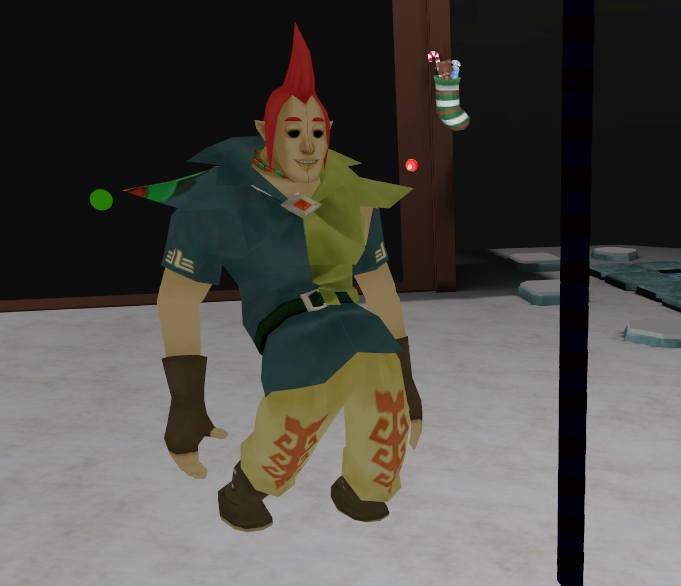
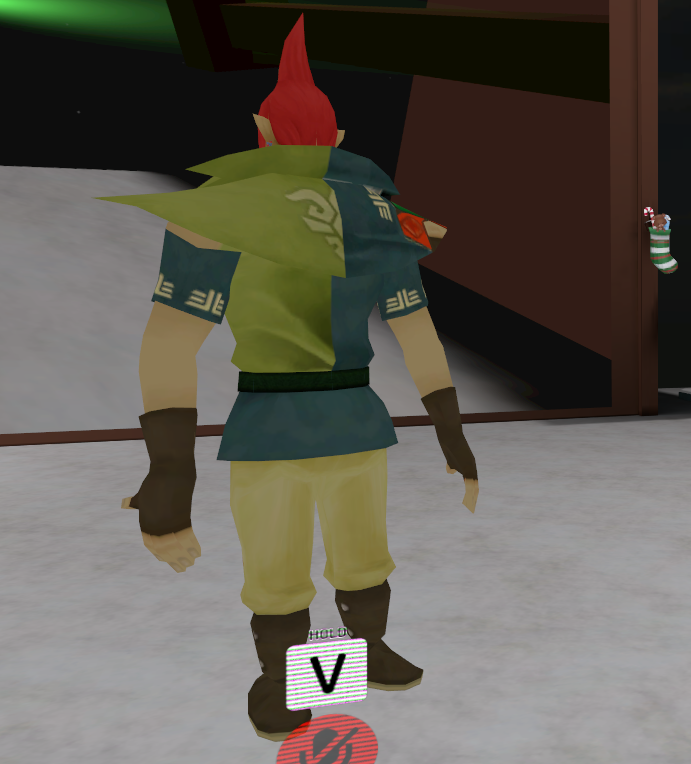
what do
as you can see most of the model si weirdly flipped
 wispy spear
I FINALLY found how how to rig my avatar
 scarlet crow
Okay so I've been messing with colliders and the dynamic bones but still no success, my legs still clip through the dress
 arctic marten
I need some help, for whatever reason my model defaulted to this kind of rigging, and I can't seem to get rid of it
 primal wagon
Tried Mapping > Automap?
primal wagon
Is the skeleton rigify?
Upperchest is an optional bone so you can just set that to None I believe
arctic marten
So it may be that It is creating this rigging from the model. But once it maps the model, it requires upperchest exist
fading verge
anyone with some knowlege on unity dynamic bones?
 worthy relic
deos anybody know of good vid that meaches how to rig a model from scratch?
*teaches
primal wagon
Ok, REALLY need to know what's going on here and how I can fix it. The root bone is weirdly connecting to the left upperarm and I'm not sure why.
 native egret

So I made this animation for an emote for sora
and I went to render it to test to see if at least that much worked
and when I try to upload it, it says he now has no feet or hands specified
feet and upper arms, to be exact
wind grove
a friend wants to know if its possible to have this as an avatar https://free3d.com/3d-model/vulpix-pokemon-11060.html

Free Download, 3d Vulpix (Pokemon) model available in dae, fbx format and made with Blender.
primal wagon
"a friend"
wind grove
yeah, a friend
wind grove
🤔
topaz briar
Does someone here have spare time to fix a models rig?
wind grove
rip
native egret
wow what the fuck
I saved the scene as a new version
deleted the animation
and it deleted it all for both versions
there goes about 4 hours of work
fan-fucking-tastic
tawny temple
@native egret check your recycle bin
native egret
no
native egret
I deleted that part
I still have the .anim saved
can I restore it somehow
if I still have the .anim saved can I restore all that
scarlet crow
Am I able to separate by materials in blender, work on the model in unity, and bring it back to blender to re join the meshes?
 mellow plinth
you can do it with cat
scarlet crow
How do I take the model from unity back to blender? I do use cats
 plucky terrace
can anybody rig a model for me
scarlet crow
So I can separate the mesh to work on it more easily, also without having to re set everything i've done in unity so far
if nothing else, am i able to join the meshes back into one in unity?
scarlet crow
Worth a try, i've been messing with this for the past three days
mellow plinth
just look for the fbx file in unity folder that you've been working with and open it with blender
then you can join the mesh in blender and replace the new fbx file with the old one in unity folder
 midnight blaze
@here can somebody please help me with mouth tracking
scarlet crow
I can't find my unity folder, it says it's in documents but i dont see it in the file explorer
Nevermind, how do I open and fbx in blender
Found that too, I ask too much lol
Is the unity file the one that has what i've done to her in unity?
mellow plinth
it should be
midnight blaze
@here can somebody please help me with mouth tracking
 sullen ice
can someone help me? everytime when i press the play button my head drops on the ground 🤔
midnight blaze
tracking issue?
sullen ice
midnight blaze
i have no idea😬
 hidden ether
so
what is the difference
between post normalised weight painting and
interactive normalised weight painting
in maya
:B
 torpid osprey
So, does Unity listen to blenders bone constraints?
 obsidian minnow
So this Freya model only has 4 fingers (including the thumb) and three of them aren't really individual fingers. What should i do here? Just weight one finger to the entire hand and leave the rest unweighted?
fading verge
Weight the entire hand with the hand bone
Since I assume you can't move the fingers
obsidian minnow
alright, thanks man
fading verge
👍
torpid osprey
Is there anyway to limit a arm movement? I want the wrist/fingers to move but not the arm.
 rich locust
On this avatar it says part of the spine heirarchy is missing, no idea what is missing very new to this
i think maybe it has something to do with the neck?
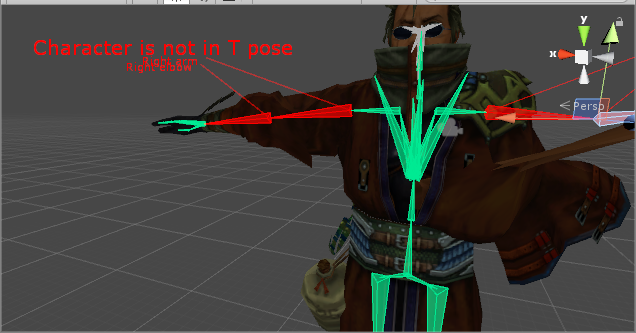
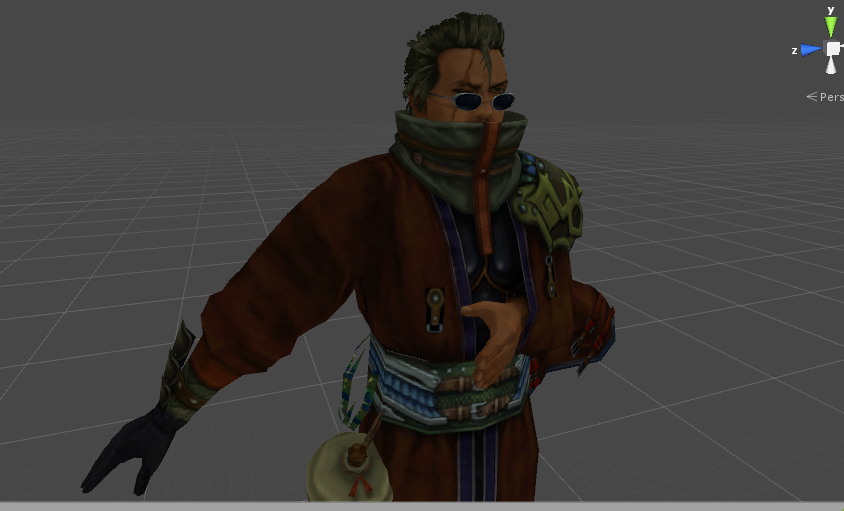
ok i think the prblem was the boi had no neck, but now he isnt in a T pose
it should be child now right? any help?
 balmy violet
http://samleheny.tumblr.com/ Nice tumbler on creating more anatomically correct joint bone placements
 torpid osprey
Your chest bones are all over the place...
rich locust
me?
rich locust
what should i do to fix them
torpid osprey
What does it look like in blender
Im playing with something but your chest on a human should look something like this
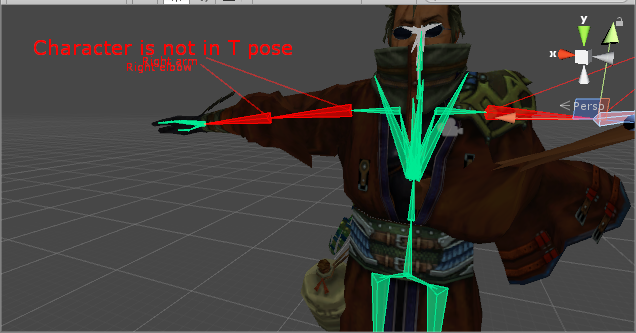 rich locust
this is what the origininal model i was using looked like
torpid osprey
Perhaps in unity change your hip bone to the actual hipbone?
See if that does anything, theres a root bone on the floor that look likes is causing issues.
rich locust
ok that fixed the error message but it is still saying it is not in t pose
torpid osprey
Enforce T-Pose
torpid osprey
No problem getting a picture.

Should matter all too much I believe.
But try that
rich locust
i got this
 tepid cloak
what bones are necessary for an avatar?
torpid osprey
Pretty much everything, you cant have a upper chest though.
Theres pretty good guides out there.
 quiet whale
Can anyone help? I'm trying to attach a particle system to my avatars hand. It shows it working in the avatar descriptor and when I move the joints but in game it's always stuck to my right side?
I had connected it to my avatars wrist in the heirarchy
Sorry if I've put this in the wrong section XD
 main plaza
http://puu.sh/yT74Z/1f4bb159f1.png
how do i get rid of this "invisible bubble" around my camera that clips into all my models?

making it hard to inspect things up close
fading verge
Are nipples on male characters allowed in VRCHAT? Say I'm creating a dude in a swimsuit?
Is there some sort of rule guide I can read for uploading avatars to VRChat?
 boreal walrus
 tidal hill
@fading verge if it's socially acceptable irl, it's probably acceptable in vrc. So I'd say it's fine, yes.
 wild arch
um... is she gonna be ok? lolol
those arms... idk what is happening...
arms looked normal until i got here...
 neon sierra
asking here is probably the right place
i see nothing wrong in blender, with model looking alright
the moment i export as fbx and imported into unity, the eyes of my avatar suddenly went missing
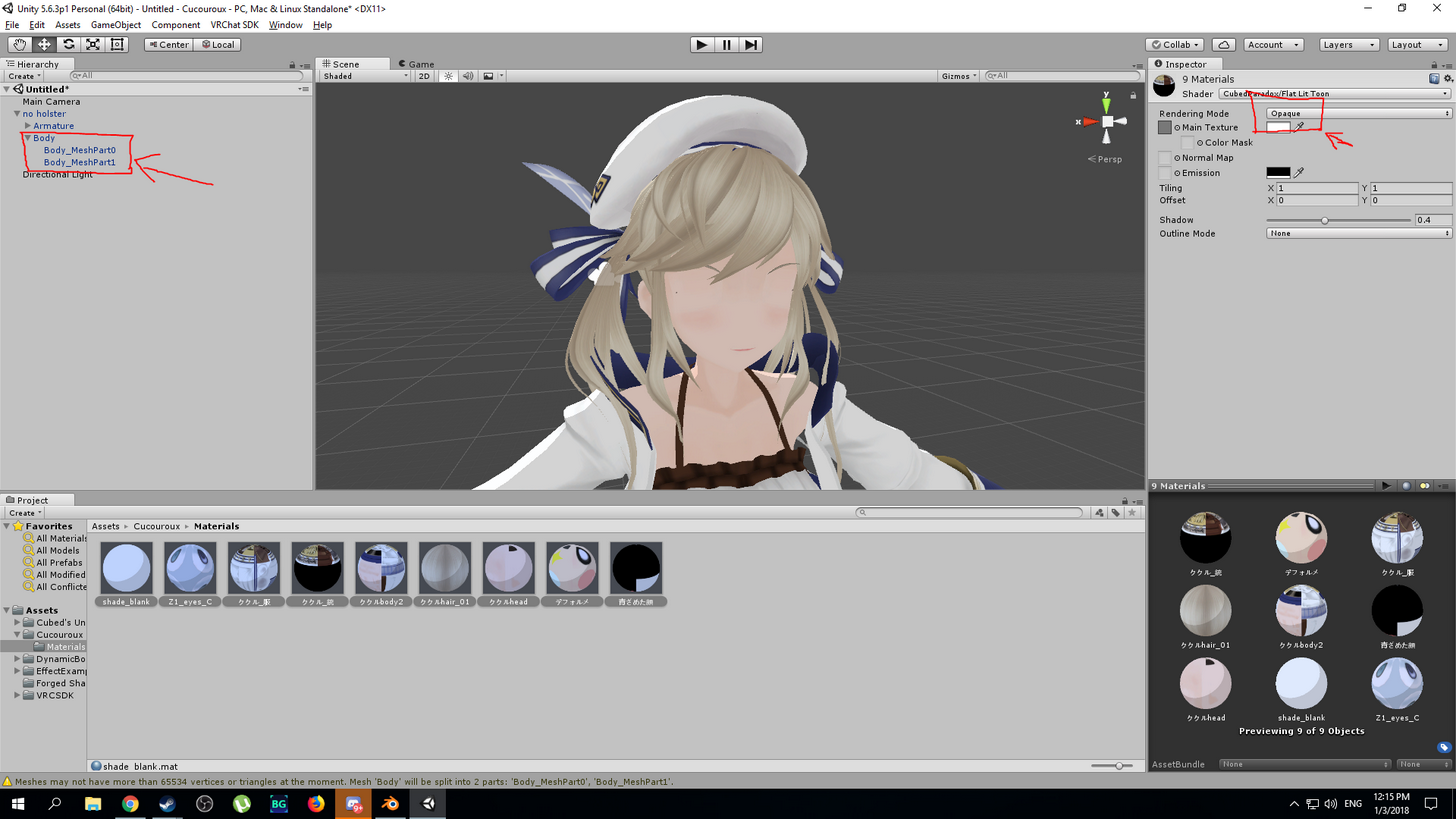 wild arch
i just found out that her elbow bone is placed at her wrist..... so that's why :/
 flat sierra
any clue why part of the model isnt staying together when rotated?
 balmy solstice
I wanna have like a whole bunch of digimon avatars
flat sierra
i really want lopmon or terriermon but im not skilled enough
fading verge
@balmy solstice Oh I'll gladly share my royal knights too
balmy solstice
Would these royal knights Involve Omnimon, Magnamon and Gallantmon?
balmy solstice
PLEASE YES
fading verge
I have atm, Omnimon x, Omnimon Alter-B, Alphamon, Crusaidermon, Magnamon X, Gallantmon Crimson mode, Beelzemon, Dodomon, Wargreymon X & Black
Not on pc atm aaaaa
fading verge
I'll will tho in a bit
I can't seem to rig em
One if my friends has Omnimon tho
I tried rigging Gallantmon X but it was troublesome reeeee
balmy solstice
(Gallantmon X is awseom uwu)
fading verge
Ikr
balmy solstice
I look forward to having the whole main character line in the game
fading verge
Yeye
scarlet crow
Can someone help me with rigging clothing in blender? I'm so done trying to do it in unity, nothing is working
fading verge
I'd like to see em haha
balmy solstice
I have some digimon models, but I can't rig to save my life
fading verge
Took me an entire day for alphamon since he was my first avatar
And then the rest was easy
balmy solstice
@fading verge All the models I have
fading verge
Ah I can tell you Linkz models is what I use
balmy solstice
Wait you use them? How did you get the texture not look dumb?
balmy solstice
But the links models don't load in blender?
fading verge
I load/import em via .dae
Since that's what they're came from
@balmy solstice also another friend of mine had gumdramon and flamedramon
fading verge
🤔
 lavish jacinth
how do i avoid o legs
fading verge
?
fading verge
Just move them?
lavish jacinth
..
fading verge
I'm not really sure what you're talking about without some context here
fading verge
Provide screenshots
fading verge
Can you take a screenshot?
Have you checked your model in the scene?
To make sure the legs are straight?
lavish jacinth
yeah they are
fading verge
Odd
lavish jacinth
like its reaaaallly small
 ruby stream
what do i name my bones in Blender
lavish jacinth
@fading verge it looks like she is slightly bent backwards
lavish jacinth
ill play with the legbones a bit see if theyre maybe too far apart
fading verge
alright
 mild mural
@lavish jacinth try putting the hip bone very slightly above your hips
lavish jacinth
ok
worthy relic
what do i do if the model i downloaded doesnt have any shoulders in the rig?
balmy solstice
would i need to add a dynamic bone for the tail?
 compact badger
Hello, I'm not sure if this is the correct place to post but I'm getting the error "spine hierarchy incorrect, make sure that the parent of both shoulders and the neck is the chest" and I'm not sure how I can fix this in unity. Thanks so much for anyone who can help.
 warm pollen
you fix it in bblender
do it like that

GitHub
cats-blender-plugin - A tool designed to shorten steps needed to import and optimize MMD and Mixamo models into VRChat.
compact badger
Is there a way I can export it from unity to blender?
warm pollen
just use the same fbbx
compact badger
Blender takes fbbx?
 polar mural
So new to unity and blender, the model i'm trying to use has no neck bone I think, how do I add one? Getting this error trying to upload
https://i.gyazo.com/dec0de2e9adf4280fc3dd824111f729d.png
 compact badger
I just asked that Yokel, look what Black said 😃
polar mural
Ahh
warm pollen
😂
compact badger
xD
warm pollen

Google Docs
VRChat MMD Model Guide for dummies [Disclaimer] This guide or any of the authors are in no way affiliated with the creators of VRChat therefore If there is any incorrect information or spelling please feel free to suggest an edit on the document itself or send a message to one of the authors ...
contains all the links you need
compact badger
I have blender all set, but I did not know it could take fbx.
polar mural
Hmm, actually seems I dont have any hip bones, so fix model on cats doesnt work
torpid osprey
Anyone know if unity listens to blenders bone limitations?
compact badger
Same @polar mural
torpid osprey
Oh you guys need to add bones?
compact badger
I don't have the oerinal MMD file, so what should I do tho?
torpid osprey
What file type do you have?
compact badger
FBX
polar mural
Same ^
Trying to use this model: https://www.models-resource.com/playstation_3/neptunev/model/7709/
compact badger
I tried cats blender addon, just game me an error it cant fix with the hips like Yokel.
torpid osprey
Let me see if I can get it in Yokel
compact badger
Weeirish, what do you reccomend I can do about that same error? Except I have no orginal MMD file to use pmdx editor thing on.
compact badger
Only FBX.
torpid osprey
You try moving it to blender?.
compact badger
Yup, I was able to run Cat's addon on it and it said it would run into problms because of no hips.
polar mural
I think its the same with mine if you can do that for me, i'm really new to blender and adding bones .-.
compact badger
I'd apprciate that! Before you do that, can you try to explain it? I'd prefer to not have to always ask lol.
torpid osprey
Yeah I can show you
compact badger
😄
torpid osprey
At least try to show you 😄
torpid osprey
Yep
Also yokel Im trying to get your file to work... its the wrong version
Trying to convert it.
compact badger
Which VR Headset you got Weeirish?
polar mural
I want the vive but probably can only afford the oculus .-.
torpid osprey
Ah I converted it already I think 😄
compact badger
;O
torpid osprey
Its pretty fun, I dont use it as much as I Should though
Ive had it since day 1.
I live in seattle so I got my box pretty fast.
compact badger
I just got my rift less than 12 hours ago lmfao.
Still need a third sensor tho >.<
fucking pavlov vr is hard without it
polar mural
Would it be better to use 3 sensors in a desk enviroment? currently have a small space with a L shaped desk
compact badger
If your not turning 360 yokel 2 will do just fine
polar mural
Would I just put one to the left and right of me? Or like corner to corner of my desk maybe?
compact badger
for 2 or 3?
torpid osprey
 polar mural
2 probably
compact badger
2 just put them on the corner of your deck and face them torwards the circle
desk*
torpid osprey
Thats alot of bones....
polar mural
Ahh
polar mural
If possible, or I can find another model to use if you want
polar mural
Huh?
torpid osprey
Dynamic bones, addon in unity for making cloth...clothly.
compact badger
@torpid osprey If his is a lot, then what do you call mine lmfao.
torpid osprey
Haha you got big ol wingos though 😛
compact badger
Favorite WoW Boss ever tho ❤
torpid osprey
Illdian is everyones
compact badger
Took me forever to find the model
 compact badger
However I don't think they fully watched an updated tutorial, I think the only problem left is the hips.
Very nice 😮
How long you been working on that?
torpid osprey
Very annoying.. with the arm in the sleeve >_<
Few dayss... trying to figure out a way to do the arm... might just have to do custom animations.
torpid osprey
Its annoying holding your arm at your chest
compact badger
i have warglave models tho to use 😃
compact badger
need to learn how to add sound for his classic "you are not prepared" and no not yet.
torpid osprey
I figure that will be quicker than rerigging this X)
ruby stream
@torpid osprey would you happen to know how to implement a custom animation made in Blender into a VRChat avatar in Unity
torpid osprey
I dont Robot
compact badger
Lots of videos about that robot.
torpid osprey
Ive never tried...
compact badger
If you watch it first then rewatch it slowly doing it, that should work.
Thats how I got tmy model so far, hips are the only problem.
torpid osprey
You just need to add a bone, and parent.. I can show you real quick
compact badger
I'll link you the one I was watching, its nice and easy to follow.
Sure Weeirish
😃
Just lemmi know what to do or what you need me to do!
@ruby stream https://www.youtube.com/watch?v=V0l4-pH3vI4

Creating custom animations for hand gestures and emotes in VRChat
ruby stream
thank you!
compact badger
GL Man! 😃
torpid osprey
He was asking about importing blender animations to unity 😛
compact badger
I think that covers it.
torpid osprey
Ah
compact badger
I remember one of the videos I watched talking about using blender tho.
I watched a lot lol
So, how do I add the hip bone and parent them 😮
torpid osprey
Alllllright
polar mural
Hows it going with the model? 😄
 swift radish
 toxic grove
I'm currently rigging a model and I'm having toruble remembering how to set a joint to none
Does anyone know how to do it?
 somber aurora
hmm
can i have the bone structure or list of bones i need to do for use in vrchat?
 naive tree
@swift radish add outline in shader
http://prntscr.com/hvf9el enable outline and it'll work
 fading verge
hey
i really need some help to get my avatar running
it says it needs the upperchestbone gone but idk how to remove it
could someone pls remove it then send me it pls
naive tree
you unassign it in unity rig
 crisp tendon


 naive tree
also good morning Rubick 
fading verge
how do i set it to none
toxic grove
click on upper chest then press Delete
crisp tendon
@naive tree Halo i worked all night in blender so i'm just gonna stay up today i guess
god damn mixamo animations
naive tree
@crisp tendon hehe, look what I decimated from 89k, helped a person out, http://prntscr.com/hv7la9

horns were 36k i think, now they are 1,5k with manual work
crisp tendon
is that a before or after ? Because it looks great !
fading verge
how do i make the upperchest none
crisp tendon
@fading verge hit the delete key
naive tree
yea it looks nice, except for the back of the dress LOL http://prntscr.com/hv6cgm
 naive tree
i fixed it a bit, but i'm a complete noob
 steel sphinx
There's a little dot next to "Upper Chest" .. click that lil' dot. Scroll to the top. Click "None."
crisp tendon
But clicking the delete key on the mapped bone does the job too
naive tree
where's the "how to computer " picture at
 steel sphinx
I've started making animated gifs of those same screens @crisp tendon .. but with "rage shaking" added.
For effect.
crisp tendon
That sounds like a fantastic idea lol
naive tree
@crisp tendon hehe, i need to make some pictures of how to fix people problems, that's easier to understand
scarlet crow
How difficult would it be to make a custom standing animation so that my avatars forearms are just a bit further out?
 lucid isle
hey umm if my avatars eyes are floating around in her head how would i fix it
crisp tendon
weight paint them to the head
@flat sierra I assume you're talking about the cracks in the texture ?
lucid isle
k cuz ill try weight painting them i tried parenting the mesh
naive tree
@lucid isle you could select the eyes and seperately assign them to eye bone vertex group
lucid isle
i did
naive tree
and check if the eye bones are parented to head
lucid isle
its also the whites
flat sierra
and the arms
flat sierra
how do i fix the cracks
crisp tendon
you probably have to make sure there are no vertices missing in blender
flat sierra
vertices?
fading verge
how do i mkae the parent of both shoulders and neck the chest?
 ebon lichen
Anybody familiar with unity assets with weird bone structures? lol
 pseudo sedge
@fading verge if this is mmd, than you have twist bones between your hand parts, reparent them to this - chest>shoulder>arm>elbow>wrist, and not delete twist bones, in Blender
crisp tendon
@flat sierra Did you use blender before ?
fading verge
@pseudo sedge how do i do that?
crisp tendon
@flat sierra You also used cat's plugin to fix it ?
flat sierra
huh?
crisp tendon
you downloaded a plugin for blender, did you even use it ?
pseudo sedge
@fading verge
fading verge
im in unity
pseudo sedge
you can't reparent in unity
fading verge
and have no idea how to use blender
pseudo sedge
what a model are you using, is that mmd model? or other kind
fading verge
wwait i got it
lucid isle
@naive tree they should be when i get home ill send u a screen shot of it
naive tree
@flat sierra you can merge vertices/edges with selecting two and alt+M
to close the cracks
flat sierra
oh thanks
fading verge
even with this will it work in vrchat?
naive tree
be prepared to use cntrl+z a lot
pseudo sedge
@fading verge yes
fading verge
nice
lucid isle
hmm maybe thatll work for my eye issue too
fading verge
it will run propely bc last time it ran in t pose
pseudo sedge
@lucid isle eyes must be weight painted to head, or to bones which must be parented to head
fading verge
it was rather emebressing
ebon lichen
Anyone want to help me properly rig/animate https://www.assetstore.unity3d.com/en/#!/content/76271 and get it into vrchat? lmao. I got a static version into the game. But the eyes don't move(you'll see the problem if we share screens) Worst 50$ spent lmao
crisp tendon
🤔
lucid isle
k ill do that to her whites as well
flat sierra
im still new at it
pseudo sedge
@flat sierra in Edit mode you can select verts, after you select 2 which you want to merge press alt+m
for edit mode you can click Tab or change it on panel at the bottom of main window
lucid isle
cus theyre also jumbling around in her head
crisp tendon
@ebon lichen Is it not rigged already ?
flat sierra
ooh
ebon lichen
Er, well it is. but the bone structure is weird
Also when you move it into blender to add eye blinking+lip sync; the face is giant while the body is super small(they are seperate parts)
crisp tendon
afaik if the bone structure is altered, the animations might not work correctly
flat sierra
now i have a problem where it says "cannot start posing cause rest position enabled'
crisp tendon
can you sharescreen that to me ? @ebon lichen
ebon lichen
Yeah sure
pseudo sedge
@flat sierra
pseudo sedge
@flat sierra and i think you are in edit mode for bones, go to object mode back and select your mesh first, than in edit mode you can select verts
flat sierra
sweet thanks
 inland snow
if i have a model where i like when its connected to a apature... is there a way to extract that model in that pose to then later rig with proper bones?
 south oar
helppp
naive tree
@south oar select your mesh http://prntscr.com/hvfjtv http://prntscr.com/hvfjx5


make so box is around your avatar
 neat wing
I think you need to clarify a little more;
I assume what Yuumi means is that the Box needs to basically be up against your avatar in the front and back.
inland snow
is that a 3d object > cube?
south oar
inland snow
wow claps
naive tree
@south oar u select mesh, not bones, go to skinned mesh renderer
and in bounds: fix your box
inland snow
naive tree
dude please
south oar
SAME LOCATION
naive tree
you need to go out of rig
naive tree
basically yes
inland snow
why are hips set to armature?
inland snow
my spine has a legenth of 0
south oar
thx guys
steel sphinx
@south oar In the future - please try to get an issue resolved in one channel? To avoid confusion? 😃
inland snow
oh man i wish i could get a issue resolved in one channel
south oar
@steel sphinx sure! i'm sorry for that
steel sphinx
It just gets a little confusing. :/ No worries.
steel sphinx
I can tell!
naive tree
no excuses, off with the head
fading verge
Do I have any hope of actually getting the Tri count down far enough to use this in-game?
steel sphinx
@fading verge Oh, that's common.
naive tree
you must get her in, imagine the jiggle physics
fading verge
I WANNNNT ITTT lmao
 half birch
Damn that's alot of tri's
fading verge
Does it ultimately matter if there is alot of bones like in the hair
half birch
Really gonna take some time to reduce that but I also think it's possible
No 2-3 bones in hair is enough
fading verge
I have a strong CPU but idk if the game itself will allow me
steel sphinx
@fading verge I am gonna say that the bones in the hair are a bit excessive. You might be able to absorb / reduce those a bit. 😃
fading verge
The hierarchy on this character to me seems so discombobulated
steel sphinx
Skirt, too.
fading verge
The skirt is literally gonna be a pain I can just tell
i have to figure out howto do that
 marsh widget
nah thunder i already have her
fading verge
w0t
inland snow
yeah cant do that
fading verge
@marsh widget how do you have her?
steel sphinx
Really? Push the chest up a bit, extrude a tiny micro bone. Connect up / Parent.
inland snow
in blender right?
steel sphinx
Yush
fading verge
Did you do it yourself?
marsh widget
i took the model and make it so i could upload it
inland snow
well the bones are holding the avatar up in place
fading verge
How did it turn out?
marsh widget
ok i believe
steel sphinx
Hokie-dokie. 😃
fading verge
lmao is it possible to hand over models that you have completed to other people so they can upload them to the game too?
marsh widget
made it for myself
fading verge
would you be willing to let me have that model?
marsh widget
yes
marsh widget
just give me a min
steel sphinx
Nevermind. haha
inland snow
i need a extra dot floting in space
 dry minnow
having some issues with using mixamo to rig, whenever i download the model it doesn't give the armatures with it. is there a way to get them?
dry minnow
rip
steel sphinx
Well it can be rigged and in the hiarchy (it probably has to be) .. but without any weight, it's impact might be irrelevant.
inland snow
i cant atttache the torso
keeps saying bone legenth of 0
and all my bones are 0
they are points
wait is the chest the main point
the model is around
as it has a transform of 0 0 0
polar mural
Enforced T pose on my avatar and it turned into a monster .-.
https://gyazo.com/0882bf42c74e742cc5555abe9def2049
 inland snow
one of your bones is rotated
to make it that way
check the rotation of that middle bone that makes him fold
on transfrom below the rigging
polar mural
Yeah
naive tree
@polar mural your legs are parented to neck and not hips it seems?
and chest is not assigned
polar mural
Not sure, new to unity / blender and bones xD
Had Weeirish quickly fix up some of the bones before he went to bed for me
naive tree
send me the fbx in private, ill check it
inland snow
how do i create bones in blender?
i have a full set almost except a spine
none are connected...
 pulsar hearth
ey, how do i make the lip sync work?
fading verge
good
 light dagger
so how do I go from having a rigged model to getting it into the game
inland snow
anyone know how to witch armatures
from characture controler to custom animations
@light dagger you need to ensure the rigging is the same as the palyer controller in unity
also your bones need a hierarchy
the pelvus and the torso need to be not in the same phyical space
even if your mocap data only accounted for one point
and you added a extra for the controller
 earnest walrus
im having trouble with camera, in unity its in front of face but in game its no where close
inland snow
the ASCII data for the meshes need to be in upper case starting and the bone data needs to be lower case
light dagger
if I'm using the online one like in the screenshot up there
inland snow
i have no idea what that online one is
topaz briar
Guys, quick question, is there a limit to how many avatars you can upload?
inland snow
no idea badfish
steel sphinx
And that is going into my "OHG OD WHATIS HAAPENING TO MEEEee" folder.
hidden ether
@topaz briar as long as you're not uploading like 100 or anything like that, you'll probably be fine.
inland snow
?
steel sphinx
I like to save mutant / abomination screenshots of broken avatars. 😃
topaz briar
I was asking because unity isnt letting me upload one, the build and publish buttons are gray and the model doesnt have any red warnings
hidden ether
Mind taking a screenshot badfish?
topaz briar
hidden ether
whole screen?
 ocean thistle
Hello, someone that has used CATs plugin can help me?
Oh nevermind wrong chat, should post in animation
hidden ether
:salute:
steel sphinx
@inland snow So how did you ultimately fix it? I'm curious. 😃
steel sphinx
Oh!
inland snow
applying my dancing to the model its self
no need for mocap
erm
controller
i just dance
all night long
now to work on hight and facing the right way
steel sphinx
I'm not entirely sure what you just said, but I'm really happy for you that you're happy!
inland snow
odd
its 50megs uncompressed
here
feel free to examine it and see it what not
but dont distribute it please
to anyone in the chat
inland snow
remember Dance Dance Revolution is a Trade mark of konami and 3d dancer data should not be used without written permission from konami comptuer intertainment japan. the data here is orignal but is close enough to the arcade dancers from early 2000s that they may be mistaken for the real thing. (2 years worth of work making these over 15 years ago!)
kind of how disney will sue if you say mickey mouse the wrong way or draw your own.
that being said my tribute data will remain that and i have 40 or so orignal dancers that look the style of this dancer
but are as i said orignal
also caperoia is at armature.02
best seen in dope sheet action editor in blender
polar mural
So not sure if im doing this right, but I dont have a hip bone in the hierarchy to use cats plugin, how do I add a hip bone or whatever to fix it?
 light dagger
why is upperchest being rigged such a problem
light dagger
so how do I fix that then
just unmap it?
ok that fixed it
but now hierarchy is buggered
oh I think I did it
crisp tendon
it has to be linked and green
light dagger
its uploading and saying "future proofing your content"
for about a really long time
that mean its working?
 carmine bane
@polar mural make sure to have this option enabled when importing
 mental cloud
does the main root of an armateure actually have to be the hips or can you choose that urself?
 silk kestrel
Is there an unofficial max limit for the number of dynamic bones a model should have?
 raw field
how many dynamic bones could you possible need?
silk kestrel
currently the model has a total of 90 dynamic bones, 80 in the skirt
raw field
Doesnt name a limit in the documentation
i wouldnt go overboard. if people complain about you being laggy then you might want to change it.
silk kestrel
thats what I want to avoid, going back to re-do the joints as weight painting skirts can be a pain
half birch
Can't you parent em so the weight is absorbed in the parent?
silk kestrel
good point, I almost forgot about CATs mix weights
 safe bluff
Newer versions of CATS have integrated bone merging
You could use that to decrease it
 timid fog
Uhh… Would anyone be willing to rig a model for me? I have no idea how to rig models, in any program…
silk kestrel
now is a good time as any to learn
timid fog
Are you able to teach me?
silk kestrel
This guy can https://www.youtube.com/watch?v=cp1YRaTZBfw

A quick tutorial of how to rig a character in blender the very very basics. nice quick and simple to get you started. It's meant for people with a basic unde...
timid fog
Thanks. I'll try this
silk kestrel
You will also need this as a guide on how unity handles bones
timid fog
does it work for version 5.72?
silk kestrel
it should be fine, I dont think the shortcut keys have changed much between blender versions
timid fog
how do I scroll in blender? The controls are very different from Unity…
timid fog
Blaaarg! I'm already lost, and I'm not even two minutes into the video.
 viral lily
im so done with this shit....the translations on those body parts tho...
anyone who can help?
 dire mica
I can't see the rest of the bones hierarchy but it is as the error says
raw field
Check your bone hierarchy
dire mica
Direct parent of the shoulders has to be the chest
viral lily
yea i checked it...the namings are shit..
tawny temple
It's probably parent issues
Use blender and just make the left and right shoulders parent the chest bone
Idk what the chest bone is called for the model though
viral lily
exactly..
tawny temple
Use cats to translate the bones
viral lily
its really just the naming thats the problem here..otherwise i could easily spot it
timid fog
If I put all the bones in my model, can someone align them for me?
viral lily
cats?
tawny temple
Yeah
 lapis lynx
Hmm. So. My avatar's eyes are clipping... Anyone know how to fix that. I got eyetracking working using CATS in the first place. p_q
viral lily
what is cats?
tepid cloak
lapis lynx
It's a tool to ease MMD imports
tepid cloak
so, i'm wanting to add bones to this mmd model
wanting to animate the tail, how should i add bones after the process of getting it ready is done?
tawny temple
@viral lily If you want,I can take a look at the model
viral lily
where do i find "cats"?
tepid cloak
or tupper's tut
lapis lynx
^
tepid cloak
tupper's tut actually helped me so much
timid fog
How do I scroll in Blender?
timid fog
no, scroll
viral lily
just say its a plugin lol
tepid cloak
i don't get what you mean by scroll
viral lily
that was the answer i was looking for 😅
timid fog
If I zoom, I zoom in on 0,0,0. I want to scroll so I can more accurately place bones.
tawny temple
@tepid cloak just add another bone,make it parent to the hip bone then start making more till you reach the end of the tail
 hushed sedge
So I took a look at the rig again and I still have the problem that I mentioned in #avatars-mmd, can someone take a look at it if I were to upload the files?
viral lily
thx btw 😉
 viral stag
do you have to like, create a custom sitting animation just to get your avatars to sit correctly, without the skirt going through the legs, or what
tepid cloak
thanks nek 👌
tawny temple
You're welcome
tepid cloak
how many bones/joints are necessary in the hands?
timid fog
I'm just going to assume I can't scroll in Blender.
So even if I wanted to, and knew how to, I still couldn't rig models.
timid fog
up\down, left\right.
tepid cloak
first of all you want to learn the front, side, and top views, as well as ortho
that will help you more accurately place bones
you have a number pad?
tawny temple
hold shift + middle mouse button then move mouse up/down, or left/right
tepid cloak
the 3 buttons most important to you in this situation are num1, num3, num7, and num9
timid fog
Kinda? It only functions properly some of the time, but, yeah, I have a number pad.
@tawny temple, thank you.
tepid cloak
num5 is ortho, for extreme precision when in these 4 views
num1 is front, num3 is side, num7 is top, and num9 is flip
so if you have it on the front, then you press num9, you get the back, and etc
timid fog
I just need to be able to zoom somewhere other than 0,0,0.
tepid cloak
oh
seriously though use those views, it's industry standard
and for good reason, it makes doing anything extremely easy
tawny temple
@tepid cloak an example for the hand,my hand/finger bones that i create from scratch
well all the bones for this model i created from scratch but anyways that's it
tepid cloak
timid fog
You want to rig the model for me? it would save me a huge amount of trouble ans frustration. I'd also greatly appreciate it.
tepid cloak
i would do it if i knew what all is needed
timid fog
I'm going to place all the bones first, as accurately as I can.
 craggy fulcrum
So, what are the limitations of motion and shape for the game? I wanted to rig Johnny 5 from Short Circuit, but didn't know if the treads and arms would work very well.
tawny temple
hand bone,starts from the wrist to the middle of the hand.then the fingers
tepid cloak
so it doesn't have to be 5 fingers?
tawny temple
it shouldn't
tepid cloak
alright, thanks again 👌
tawny temple
another model that i created the bones from scratch
still a trial and error thing though,to fine tune it :p
timid fog
do I need a root bone at 0,0,0? Cause that's what the image PottedSoylent posted seems to suggest.
hushed sedge
Can someone take a look at the blender project and tell me what I'm doing wrong? First time that I can't seem to find my mistake
 tawny temple
idk, i just put mine as the hip bone
hushed sedge
tawny temple
where the hip bone should be
hushed sedge
everything is symmetrical but in Unity it doesn't automatically detect the right ankle and when I add it manually it drags across the floor like that
tawny temple
@hushed sedge check how it looks in unity
oh
try to manually reposition it in unity
hushed sedge
tawny temple
the model
 ivory spire
Should I be getting the mouth to move when I talk? Is that in the unity area?
tawny temple
what do you mean?you want the mouth to move when you talk?
make a bone for the mouth in blender,if the model already has it then in unity assign the mouth to that bone
i think it was something like that
 molten vale
So I assume making a custom walk anim in unity is ill-advised?
I tried but for some reason my avatar ends up half-way into the ground
tepid cloak
make sure your character's feet are on the grid
my character's eyes have no shape keys, they just use texture swapping to blink
tawny temple
@molten vale try setting where i marked to this
tepid cloak
how do i get that across with eye tracking
tepid cloak
saint nek-olas
tawny temple
you're welcome
tawny temple
lol @tepid cloak
tepid cloak
at least to blink
tawny temple
also idk, haven't worked with eye tracking yet
molten vale


Using SetTextureOffset to animate a texture sheet, and track an object with eyes in #unity3d, like in Legend of Zelda - Twilight Princess #gamedev #unitytips #indiedev Sample code in first reply
More stuff > https://t.co/FqAsMb9Plg https://t.co/9ES4iBrsX1
Retweets
921
Likes
3394
 Twitter
tepid cloak
Twitter
tepid cloak
ooh thanks
 round abyss
Eye tracking uses bones blink uses a looping animation
molten vale
not sure if it applies the same
tepid cloak
i don't really get the idea of what's going on with the eye tracking
is this something i need to do in unity?
molten vale
oh @tawny temple that's if the animation is.. wait I am confused now.
I'm not sure what I am doing tbh
craggy fulcrum
Nemesis, eh? Good choice.
molten vale
First of all I am using the unity animation field and idk if there's a proper way to animate emotes
or cycles
silk kestrel
you are animation a run cycle using a dope sheet? What are you a old school disney animator?





 tepid cloak
rip the fact that i have to animate a run in FK
well, i might be able to make it IK but idk
tawny temple
honestly idk too much about animations that are built from scratch haha sorry about that
silk kestrel
you are all sadists with a glutton for punishment >.>
molten vale
hey man I just go with what I know
if I can make an AK out of a shovel, so be it
don't need milling equipment just give me a shovel.
and power tools
craggy fulcrum
And lots and lots of elbow grease
tepid cloak
ay i'm trying to be a rigger later in life so whatever 🤷
silk kestrel
@tepid cloak This is like full rigging, what we do in vrchat is only 10% of the work
tepid cloak
ye, this looks like the stuff i've done already
tawny temple
vrchat only use the basic bones
tepid cloak
though i do want to know what all those controls do
silk kestrel
The hair stuff uses dynamics but allows animators to animate on top of the dynamic or just go ham on it
other than that it is your basic fk/ik switch with no flip
tepid cloak
hm
silk kestrel
allows you to place your model in world space depending on your shot needs
tepid cloak
ohh so that's the thing you move to move the whole thing
silk kestrel
@tepid cloak but you might want to mix up your skills if you want to be a rigger, a lot of the stuff is being automated nowadays
I got in as a rigger for my current job but I have not rigged anything for the last 3 years save for personal projects
silk kestrel
do what?
silk kestrel
Problem solving, the test I was given was as much as a rationalising as it was a skill test
even with auto-rig stuff, there will always be something which will break
Take CATs tools, technically it should make conversion from mmd to vrchat easy
but because there are so many variables and areas where it will fail, that is where problem solving comes into play
so dont just blindly click on the buttons in CATs, try to understand their function and what it does under the hood
tawny temple
^
 pseudo cipher
hey guys im pretty new to importing models into vr chat i know how to do it and use mixamo but haven't done a successful one would rigging be hard for this? https://www.models-resource.com/wii/mysimskingdom/model/18832/
I Might try some non humanoids one later like cool ass monsters
silk kestrel
that looks like a model easy to rig
tawny temple
also like how mixamo can rig wrong too XD
another example
oh yeah that is pretty easy to rig
pseudo cipher
Hoping this one will turn out well for my first and i have no clue how to do non humanoids
silk kestrel
that is true XD
silk kestrel
nope out of non-humanoids, quadruped legs are nasty to do and they dont really map well unless you know anatomy very well
tawny temple
it's easy rigging, just tedious
non-humanoid in vrchat you might need custom animations
craggy fulcrum
Would a robot with treads be rig-able? Non humanoid
pseudo cipher
Should i avoid the non humanoids for now then? half of the models i want dont even work mixamo
silk kestrel
I would recommend getting some experience in humanoids first
tawny temple
or else they might just t-pose unless you rig the bones specifically to cope with it
silk kestrel
you need an ik~~~
craggy fulcrum
So basically, mess with humanoids with tutorials and eventually branch out to non humanoids slowly?
silk kestrel
yes
tawny temple
yeah
craggy fulcrum
I like to start complicated sometimes though. Trial by fire and all
But I see your point
tawny temple
learn with humanoid,then animating the models then you should be good for non-humanoid
craggy fulcrum
As in, custom animations and the like?
silk kestrel
animation is another beast all together >.>
craggy fulcrum
Figured as much
tawny temple
yeah because if you set it up in unity for vrchat, if it's set as generic then it won't use vrchat humanoid animation preset thus ending in t-pose or a static model
molten vale
😓
silk kestrel
so unity can only do any form of tracking as long as it is a humanoid rig?
tawny temple
it's just a vrchat thing, if a model is set up to use generic, it won't use the vrchat preset animations,but if it's set up as humanoid then it will use the preset
craggy fulcrum
By preset animations, you mean hand movements and leg movements, etc?
tawny temple
yeah
craggy fulcrum
Head turning and all?
tawny temple
hold on i'll get an example
craggy fulcrum
So I'd need to create a fully custom model with animations if it doesn't walk like a human?
tepid cloak
honestly it's not all that hard to use a reference of what you want
craggy fulcrum
My idea is Johnny 5 from Short Circuit. Robot that moves on tank treads and doesn't move like a human much at all
tepid cloak
the problem is texturing without something like substance painter
tawny temple
this thing just becomes a static model
craggy fulcrum
So any movement at all has to be animated INCLUDING tracking, right?
craggy fulcrum
For that model
tawny temple
hold on, fiddling with it
craggy fulcrum
What moves?
tawny temple
the model
craggy fulcrum
In game?
tawny temple
yeah
silk kestrel
it just moves without playing any animation correct?
craggy fulcrum
How does it know what's what?
tawny temple
nah, it plays walking animation
it plays all animations
just forgot to rig the hands soo it became static, but after rigging the hands,it's fine
craggy fulcrum
Interesting