#avatar-rigging
1 messages · Page 44 of 1
 lime laurel
 inland snow
whats a modifier
lime laurel
@silk kestrel sorry
inland snow
oh you guys are talking to eachother
i feel dumb
here i was applying what you guys where saying to my modeling
XD
lime laurel
@silk kestrel would i have to parent the pieces like clothing?
 silk kestrel
@lime laurel could you try adding an armature modifier?
Let me run you through my steps on how I swapped meshes, maybe you can see what works and apply it your problem
lime laurel
could we do a voice chat thing lol
silk kestrel
ok
 fading verge
pr0ksee another thing you can do is assign the vertex groups to the bones
i learned how to do that by watching a video on how to make titties bounce but it helped me fix a model that stumped even ruuubrick
https://www.youtube.com/watch?v=4mCkZ0ouNz4 this video

How to make custom jiggle avatar??? Tutorial covers: - Creating breast bones - Linking breast bones with vertex group - Applying dynamic bone script to breasts
removed the timestamp that would skip halfway through it XD
but yeah this might help you without having to screw with the armature or weight painting
basically do what he explains, just select the stuff you want to be attached to the arm instead of boobers
fading verge
nntb make sure the animation is set to humanoid not generic
this menu on the righthand side there
 timber rune
It should be a quick fix
fading verge
yeah, super quick
timber rune
Just need to make sure you get rid of the upperchest bone and swap the bones accordingly
 heady loom
Okay, I just realized I ended up making an entirely new Armature, is there a way to simply make it a part of the same Armature?
fading verge
select both and hit ctrl j I think
heady loom
Not doing anything :<
timber rune
Try to make the headbone a parent?
fading verge
you can select all the bones and go into the box shaped menu and set the parent to Armature 1
I think
Don't quote me on that
That's just a hotfix I used once that worked for me
timber rune
Well if its attached to the bone I figure it would move with the bone its attached to
heady loom
Well then
silk kestrel
holy, what is with all this problems with armature and meshes popping up
heady loom
This was on me, I made a new bone outside of the original armature like an idiot
timber rune
When unity is throwing a wrench into your hard work to start off the new year
 elfin obsidian
I have a question. So, because of the way I had to extract the model, I had to get the mesh and armature seperately. So everything is there, https://puu.sh/yRX1J/388733c502.png but it's just not connected. https://puu.sh/yRX1V/ba06a78676.png How do?

 heady loom
I wanted to make it spereate because I wanted to make the hair a jiggle bone and figured it'd mess with the original armature
 heady belfry
How do I tell if a bone is a twist bone?
heady loom
I got it to parent to the head!
inland snow
shouldnt you parrent the hips?
timber rune
Oh god it's that little rat from Gigantic
heady loom
... Crud
timber rune
[ Claps for spaztron ]
elfin obsidian
I know I love the little rat from gigantic. Except motiga put hella bones in their body and because of her little rat legs unity is saying she doesn't have upper legs
heady loom
Apparently the highest priority bone isn't the hip but...Metarig?
timber rune
._.
heady loom
If I deleted the metarig bone would it cause issues?
fading verge
probably
Be gentle with your armature XD
Sometimes you can delete bones with no issue, other times this kills the model
heady loom
Maybe I should make a Skeleton from scratch and avoid using the built-in skeleton in blender
fading verge
post a pic real quick of what your armature and bone hierarchy look like?
fading verge
Yeah, I'd say don't delete simply because I don't know what the icon next to it means
However it shouldn't hurt to keep it in there
heady loom
I hope not... don't want pain and suffering 20 hours down the line TT 3TT
fading verge
Is this a model you're converting from another format?
inland snow
any idea how to in the project window pull a animation out of one model and just have it sitting as a usable file?
heady loom
Yeah, it didn't have any bones
timber rune
It took me a whole week to get my model right, just be patient with it and treat it like your baby.
inland snow
its embeeded into the fbx
inland snow
so i had to convert it 2 times
when i converted it the first time the chest didnt attache correctly
the second time the animation messed up but the chest worked
so i have the broken animation one
pointing to the coreect animation of the other one
and both seem to have to be generic for the animation to play
if i change to humanoid
it goes away
this is so frustrating
lol
inland snow
well its like
no end point
does anyone have a small avatar thats rigged
that i could just like set to invisable
and let my avatar play instead
i dont care if it is rigged at this point
i just want it dancing
in vrchat
 distant jewel
Is there anyone willing to rig a model for me? I'm completely lost with rigging.
timber rune
If I actually knew what I was doing sure, but I don't
elfin obsidian
So, how can I get unity to recognize this as the Upper Left Leg without like, rerigging the whole dang thing? https://puu.sh/yRXpk/485595a662.png
 distant jewel
I tried that. I'm beyond incompetent with rigging
 cinder iris
for some reason the model I got only has one shape key that closes both eyes and everytime i use CATS only one eye closes
 ebon lichen
Why is my FBX model like this(imported from unity asset store)
fading verge
that's terrifying
timber rune
I just noticed the T Posed model on that gray thing in the middle
distant jewel
Okay, Mixamo's stuck on processing my avatar. Nothing's caught on fire yet so I'm hopeful
 peak yew
Hey, hope this is the right place to ask this. This is my first time working with an avatar but the head seems off-center in movement. I didn't add any animations in Unity since I don't have assets yet (which I plan to buy). Can anyone pinpoint what is causing the neck to do this?
timber rune
Looks like you need to move the headbone a bit back
It seems like the head got pulled forward from where it should have been sometime when you put it in Unity
 errant crystal
Is there a way to rig a mesh to a different bone than the one its set to in blender? I think I'm asking that right, I need a mesh to be rigged to the head bone and not the neck bone
fading verge
Onyx you can try assigning the vertices to the head bone
https://www.youtube.com/watch?v=4mCkZ0ouNz4 this is for boobers but it works for anything
How to make custom jiggle avatar??? Tutorial covers: - Creating breast bones - Linking breast bones with vertex group - Applying dynamic bone script to breasts
it just explains the concept quickly and simply in an easy to follow way
errant crystal
Do I need dynamic bones for that too?
fading verge
naw
This tutorial explains how to parent vertices specifically so you can make the boobs jiggle, but the concept works for other uses as well
errant crystal
Hmm okay
ebon lichen
So does anyone work with unity asset models much here
timber rune
Unfortunately not.
peak yew
I'm not sure if it helps any but this is what the bone looks like in Unity.
fading verge
if you want to see if this is a quick fix, make a backup, but try selecting the neck bone in that interface and moving it backward by as much as the head slumps forward
timber rune
Hmmm
timber rune
^
peak yew
Yeah I already made a backup just to take a look.
fading verge
Whenever I use this model in game
I am like two feet in front and two feet to the right of wheremy vrc avatar descriptor actually is
set the descriptor two feet backwards and two feet to the left
good luck!
I allready tried that
the descriptor is stuck
truly, we were never meant to be cars
inland snow
i dislike blender very much
fading verge
modelling is sufferring
ebon lichen
Unity asset models suck to use if anyone cares.
timber rune
Was it a free or paid one?
inland snow
timber rune
Hmmm
inland snow
in blender it dosnt attache the parts of the mesh to the mocap points
like it does in milkshape 3d
or fragmotion
timber rune
Does the model have a lot of bones outside the typical skeleton @ebon lichen ?
elfin obsidian
So now I'm getting this error buuuuut https://puu.sh/yRYeK/b6d6650135.png it's all mapped https://puu.sh/yRYft/09f3d75545.png


All the hierarchy is fine
 crystal vector
@elfin obsidian Your chest is not mapped
elfin obsidian
I remember reading something about keeping that empty??? But yes duh I can't read it is totally there
In That There Error
crystal vector
Keep upperchest empty, not chest
inland snow
can i have 2 skeletons
all my dance data is based on the data that the parent is the bottom center
and all points connect to it
hotox dont match the chest
ok need help
besides FBX
what format is good for preserving animation and importing into blender
collada dosnt support animation
 narrow gyro
hey i just uploaded a model into unity and it says that theres something wrong with her lower left leg. i can provide screenshots of the problem i just need specifications on what exactly to screenshot
lime laurel
so i opened my rig in unity, the rig was created with rigify, and unity says theres no head bone
crystal vector
@narrow gyro Please screenshot how you mapped the bones
timber rune
The mapping probably got botched
narrow gyro
nvm i think i may have fixed it manually?
ok actually i didnt not fix it http://prntscr.com/huqvf9
 crystal vector
Show your bone mapping @narrow gyro
 vital ruin
How do you delete bones in Blender? Every time I try, it deletes the model as well.
Rather rig it myself than figure out why Unity doesn't like it
lol
narrow gyro
 crystal vector
@vital ruin Go into edit mode, select the bone and hit delete
heady loom
Yeah, don't delete the OBJECT
lime laurel
i have a rig in unity saying no head bone
i made it with rigify and there most certainly was a head bone
crystal vector
@narrow gyro Upper leg has to be the leg, not the knee
@lime laurel Check how the bones are mapped
lime laurel
?
narrow gyro
http://prntscr.com/huqwje should the right leg be mapped like this too?
 crystal vector
@narrow gyro Yup
narrow gyro
http://prntscr.com/huqwq4 ok uh whats the issue with this

should the head be above the neck
silk kestrel
yes
crystal vector
@narrow gyro It's fine like that
 blazing hornet
characters with small pov have issues with the [esc] guide?
narrow gyro
http://prntscr.com/huqx4w what should the jaw be mapped to? because rn its on a hair bone
 silk kestrel
jaw is an optional piece, if you have visimes, you can set it to none
inland snow
getting further
i have no idea how to delete duplicate data
or even apply textures in blender
T.T
but its now in blender not missing its torso or his crotch
but there are 2 of him
one missing aposing parts
i went over 1k polys having 2 identical models overlaying
vital ruin
btw, how do I rig a hand for vrchat? The tutorials I saw just attach the fingers to the wrist but that doesnt work.
Do I do shoulder > upper arm > lower arm > and put a bone towards the middle of the hand that extends into fingers?
inland snow
after i get it down i will help
lol
right now i am still having issues with blender
2 models missining a aposing pice
so i have duplitated the models
it caused a odd error
not to mention textures are not on it yet
 tawny temple
@vital ruin this is how i rigged mine
inland snow
do you know if you can use 2 bone structures
one for rigging and one for a 2nd animation set
?
or possibly 4-6 rigs
vital ruin
ah ok, yeah thats about what I was asking
crystal vector
@lime laurel Assign the head bone to head
lime laurel
found it but this is what it says
narrow gyro
http://prntscr.com/huqvf9 how do i fix these issues?
tawny temple
@lime laurel go into unity and make the head bones parent to neck bone
lime laurel
how would i do that
tawny temple
i mean blender
lime laurel
oh
not sure how to do that
also this rig makes unity run really slow
i used rigify
heady loom
Should I move the thumb, by moving the verticies of the mesh, before adding finger bones or will it be okay in terms of T-Posing?
fading verge
can someone help me with parenting a bone please. My hip bone is not a child bone of the spine
heady loom
Shouldn't the hip be the parent of spine in VRChat?
fading verge
ye
heady loom
Also image of what I was talking about a sexond ago
heady loom
... Strange
tawny temple
@fading verge just make the spines bone parent to hip bone
ignore the groove bone
@fading verge i can screenshare if you want to, i've worked with that kind of bone structure before
 autumn mauve
Hey guys, sorry to butt in, but does anyone know how to give a line of dynamic bones physics so they don't spin around/float in zero gravity?
fading verge
yes please
heady loom
Learning Rigging is both fun and frustrating as all hell
lime laurel
'spine heirachy missing elements
 south bronze
Do these bones look ok? I'm a real amatuer
lime laurel
its like nostop problems 😄
tawny temple
@lime laurel send me the model, i'll try to fix it for you
 hidden ether
Spine hierarchy missing elements means you have parented your bones wrong, or there are missing bones.
tawny temple
murdoch, it's just wrong parenting
hidden ether
🤷
vital ruin
So Im having a problem rn. Everything but my arms are working on this.
The arm bones are grabbing the sides of the helmet instead of the arms.

 safe bluff
 gentle silo
Does anyone know how to add/create bones in unity? Some of the models that I want to make into avatars don't have important bones like shoulders and chest set.
vital ruin
Oh. I figured it out. I had to merge the textures cause I guess for game reasons, there's 3 different versions of each hand/glove
so they werent attached to the main body
I thought I tried that about 4 times already
it worked the 5th
🤔
fading verge
@gentle silo Extrude from parent bone (extrude from Chest if you need Breast bones etc.), decouple from parent, rename the bone to breast, shoulder or whatever and then weight paint it
gentle silo
@sterile ruin Are you sure? I want to conserve disk space by leaving blender alone.
I have 785 gb left
@fading verge How do I do that? I'm a complete and utter noob at unity.
fading verge
It's in Blender
heady loom
What names do i give figner bones for VRChat?
 heady loom
I see!
Why... is this happening?
There's no weight paint on that vertex and I've cleared it manually to make sure
silk kestrel
@heady loom it is time you learnt the concept of "normalise"
heady loom
Teach me, sensei
silk kestrel
this is what I suspect is going on. The parts that are moving even though they do not have any weights have a micro value inside, 0.01
because you did not normalise your weights, that 0.01 will be treated as 1.00 if there are no other weights attached to it
I suggest turning on [Auto Normalize] in your tab and painting over that area with a weight value of 0.0
another example of normalise to clarify, You have a vertex which has a weight value of 1.0 on boneA and 1.0 on boneB. If you did not normalise, the vertex will treat boneA as 0.5 and boneB as 0.5
If you did normalise, whatever you painted last will trump over all values. So if you painted boneB with a weight value of 1.0, boneB will be 1.0 while boneA will be forced into 0.0
silk kestrel
keep the strength
 naive tree
weight 0 = mesh won't move with the bone
heady loom
The issue is it was moving with the bone without any weighted paint, Potted suggested I normalize and that was my attempt at it. I think I did it wrong.
naive tree
that's kinda normal, from what I've seen
i don't know why the mesh has 0 weight, but it moves
fading verge
how to fix this?
 cyan karma
I think I had that problem before. Try going into Mapping and see if everything is correct
fading verge
seems fine
cyan karma
look into the list
i had that problem before and thought it was fine before actually checking trough everything
fading verge
how can i add shoulders? (didnt rig btw)
heady loom
I've no idea
I'm doing this as a first try, I've parented the hair bones to the hip bone of the other armacher
fading verge
is the mesh parented?
heady loom
I have no idea what I did by parenting the hair bones to the model but I think it fucked everything up and Ctrl Z isn't going back far enough to undo it
 plucky terrace
can anybody help me put a model intoa t pose
its rigged
but in the game since the ctual model is not in t pose
it just bobs up and down
 marble oar
i keep getting the error spine hierarchy missing elements, i've looked everywhere on how to fix it but i can't find anything, can someone help me out
naive tree
@marble oar send me fbx
marble oar
alright, do you want the assets as well?
naive tree
no
marble oar
alright, there you go
heady loom
oh bb

 fading verge
hi everyone, i am having a weird issue in blender, when i try the pose mode from cat plugin only the armature move but the mesh stays the same, they are like not attached 😦
naive tree
when u change all bones youll prob need to Reset and then Enforce T-pose
heady loom
@fading verge Is the Mesh not parented to the Armature?
fading verge
does it need to be under or above the mesh?
is the first item on top of the list, under it i have all the different parts of the mesh cause i separated them by material
plucky terrace
can anybody help me put a model intoa t pose
its rigged
but in the game since the ctual model is not in t pose
it just bobs up and down
can somebody take a look at it
fading verge
this is what i see
but when i try to move any bone the mesh stay the same 😦
same with me actually
if anyone can help
i've added some other items like a scarf and different hairs and the armature on those actually move the mesh, but on the main body is not working
i have no clue how but i fixed it kinda, the hands are all screwed up XD
but legs and other stuff work now
omg why
marble oar
where can i download unity 5.6.3p1? I'm a bit confused
 crisp tendon
pins in #avatars-2-general
marble oar
thanks
fading verge
any idea on how to fix the hands? 😦
omg i broke it again 😦 now the armature won't move the mesh at all
 languid plaza
How do I fix this? Anyone know?
 lime silo
How can I set a non Tpose as default without changing it from humanoid?
is it even possible?
crisp tendon
in blender, set it the way you want then a to select everything (in edit mode i believe) then ctrl + p to apply as rest position
crisp tendon
Yes, there's an icon somewhere in skeleton but i don't remember where specifically sorry
 pallid jungle
Alright gonna give it a go... https://gyazo.com/bc69d18a3c45ab5102d7d25c01c2632d?token=a93cf15f3dd306fdaf289c053a53730d

 restive needle
uuuhm i have a little problem with Unity...
i can't see the Bones on the model when i configure the bones i just see the names
this is how it looks like in this mode
 pure falcon
Anyone here reckon they would know the origin of this issue with my Avatars arms? I have looked at the weight painting and done it over and over again from scratch many times.
 vestal dirge
Maybe left/right hand bone assignment is swapped?
 past patrol
do you guys know if this is an issue

i tried using mixamo like 4 times yesterday
and i either got a finger error or a spine error
dont really know what any of that means on that image
i dont know why mixamo doesnt give me all my fingers
pure falcon
hackspanner, is that something I change in the unity bone config window?
 mellow plinth
mixamo is buggy when it come to auto rigging
past patrol
well like
my avatar is from gtasa
so how tf would i even go rigging the hands
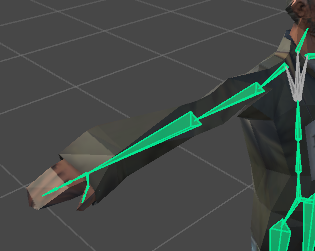
like i
i dont know
pure falcon
Dont
past patrol
wouldn't i get an error lol
pure falcon
I dont think so,
mellow plinth
U don’t need hands
pure falcon
It would move the entire hand, just like in GTA SA anywya
pure falcon
Yeah just one bone from the wrist to the tip of the middle finger should do it
vestal dirge
@pure falcon yup in the rig configuration. Click on the hand bone slots on right side and see if they are connected to the proper side of the body
restive needle
does noone of you know how i can see the bones again?
mellow plinth
Just leave the finger bones blank
pure falcon
Yeah they are... from what I can tell
when I click on the hand bone in the config it selects the corresponding hand
Someone suggested to me that its my arms glitching when the game expects me to have free moving arms in VR but I dont
vestal dirge
@pure falcon your hands are not free to move?
pure falcon
Well I dont have VR, and thats what he said might be glitching it out
but then my other models work fine
vestal dirge
@pure falcon no its fine. Without VR your arms just play the idle animation. But if the arm/hand bones are assigned wrong, it might look like that.
fading verge
ech i forgot the scarf
 strong shoal
I want to rig a mech that has no Chest or Neck bones. Please advise
DM me any answers
 honest bridge
Anyone free to take a look at an issue I'm having atm? It wont T pose my model as the left arm has errors
past patrol
ugh
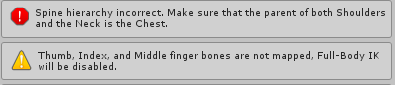
i get two errors
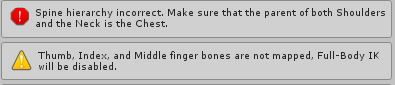
one for removing the upper chest, i'm assuming
and the other for having no hands
🤷
Is there some sort of way I can like bypass that
and publish it or no
because these errors consistantly show up every time
fading verge
anyone got a copy of muscle animation editor that they can send me, i appreciate it 😃
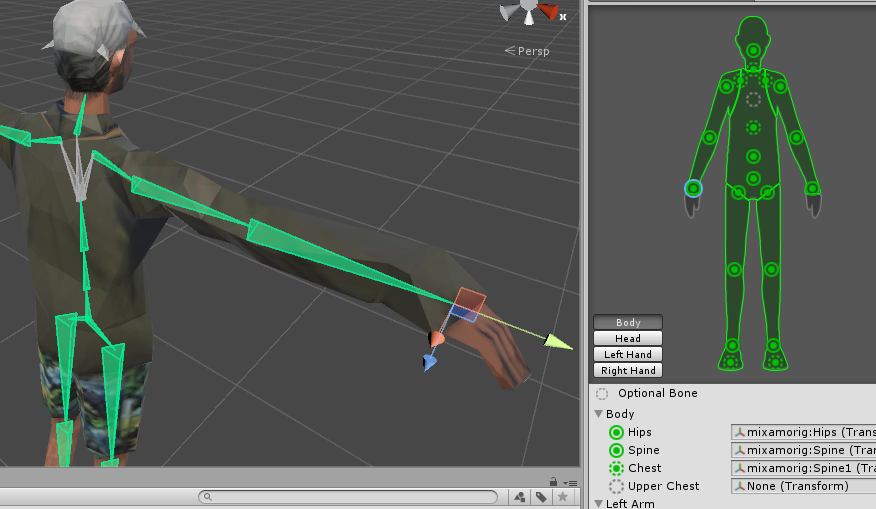
 restive solstice
Do NOT put anything in upper chest. It's supposed to be empty.
past patrol
right, aren't you supposed to delete it?
restive solstice
No, in unity, just leave upper chest empty.
past patrol
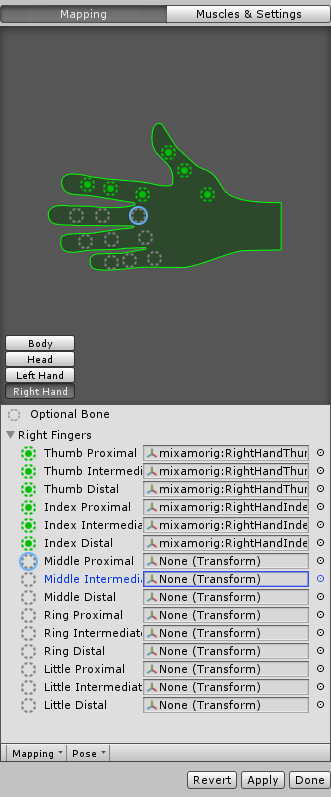
do you know this finger error too?
restive solstice
It just means your fingers in unity aren't mapped. Those warnings generally tells you a certain part of your model isn't going to work. You can still upload your model I think.
past patrol
ohh
so uh
how do you leave upper chest empty
because mine says upper chest 'none (transform)'
because I deleted it
restive solstice
If you mean you just left it blank and not literally deleted the chest portion of your model then that's fine.
past patrol
well
i dont know really what that means exactly
but i'll show a picture
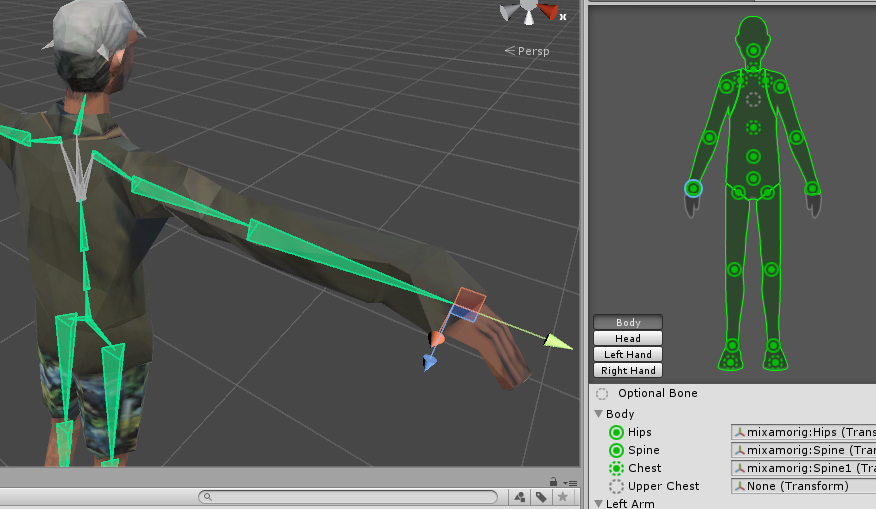
i don't know how to 'leave something blank', other than deleting it
is what i'm saying
restive solstice
Yeah that's fine.
restive solstice
Then you might want to check the hierarchy in blender or something. Sometimes, some models have two types of bones in the same position, and unity can't read that, in my experience. I just drag the spine bone out abit and unity read it later. You can try using Cat's plugin.
restive solstice
I mean it should be fine? How it works in dynamic bone I don't know.
fading verge
I wonder if there is a dynamic bone that would replicate a stiff peice of clothing that well 🤔
 gleaming needle
In unity, with my 2b character, it says i have to have pelvis spine chest neck and shoulders mapped, which they already are...
 rotund thunder
i always have spine hierarchy issues despite the blender rigifiy metarigs supposedly having all bones correctly parented. its really annoying because i dont want to have to get another program to rig models in
i only have like 2 models that were succesfully rigged by the metarigs
and even when i do get models that have rigs, they will almost always have spine hierarchy issues too
 jaunty herald
I have a couple weird questions - how would I go about merging two seperate model armatures (head/body) with different hierarchies (pictured), and is having my bones all stacked on top of each other a bad thing? (also pictured) if I check them by posing manually, they seem to respond correctly, just their "origins"(?) are all stacked on top of each other
naive tree
I Don't think you can bring her back to life.. impaled by a chunk of steel
jaunty herald
that large bone is all the body bones all stacked on top of each other - if I pose them (e.g. skirt, leg, etc), they look correct to me
similar story in the head, just you can't see them
lime silo
how do I mirror the rotation of 2 selected bones in unity? (or movement)
restive needle
i have a problem with a model...
everytime i load the avatar ingame the tail goes to the front of the avatar which make the avatar look weird
the leg bones are connected to the right legs so that not the problem
timber rune
Is that..
fading verge
@past patrol Make sure you translated all the bones btw
past patrol
everything worked out perfect other than the lip sync which i don't even want to get started on LOL
but i didn't mess with it anyway, so it's all working
 pulsar mortar
hey all does anyone know how to make multiple textures work on your avatar?
as I have 3 for diffrent parts 1 for face and 2 for clothing
marble oar
i'm having some trouble setting up the viewing point on my avatar
i have it set right in front of the eyes but when i log in i'm looking through chest level
and it's way off center
 bright bolt
hay can some one help me i am having trouble with Automatic Weight it keeps give me and error
 teal spruce
I have a smoll issue
I don't know if it could be fixed tho
I tried to move it, but he won't
It's a bone for Dynamic Bone
 south oar
if my model does not have Hips can it cause problem in the game?
fading verge
So im decimating this character... got pretty far but still not enough. was watching tuppers new video on importing and he talks about decimating more detailed models with hidden geometry, although he doesn't do one.(im sure he will at some point.) he means like overlapping clothes right? or is there more to it?
plucky terrace
can somebody help me put a custom rigged model into a t pose, not the rig, just the model into a t pose
fading verge
How do I solve twisting wrists in VR?
 sharp sapphire
So, I'm doing my Gerudo Link to use and it's saying 'HIps was not found in the hierarchy' when I use fix model from cats
 supple yew
I got the same error with Eggrobo but I didn't think anything of it since I used a generic rig anyway
sharp sapphire
So how do I make it useable then
supple yew
no idea
mellow plinth
is there a way to change bone first child in blender instead of unity
sharp sapphire
mellow plinth
@sharp sapphire what bone did u set on the hips in unity
sharp sapphire
nothing
this is the og file
haven't edited the unity yet
this is the one I downloaded.
mellow plinth
whats the bone hierarchy look like in blender
sharp sapphire
Which parts are that jw?
and here's the one I'm trying to make https://hakirya.deviantart.com/art/Link-Breath-of-the-Wild-Gerudo-Girl-687401188
mellow plinth
it should look something like this if u have translate everything with cat
sharp sapphire
this?
 spiral pagoda
uhh im pretty sure i have the hierarchy correct
is pelvis required now? or isnt it just hips
sharp sapphire
@mellow plinth is that what you wanted
sharp sapphire
Okay, so how do I change that?
mellow plinth
go into pose mode and move the waist around and see how it look
@spiral pagoda you need to show the rig config also too many poly
mellow plinth
did u click the waist bone in pose mode ?
sharp sapphire
Won't let me :/
It won't switch off spine
it just turns off pose mode
I'm looking at this now and there is nothing connecting the waist
mellow plinth
follow the number
spiral pagoda
@mellow plinth yeah im decimating within unity using LOD and heres the screenshot of the rig config
mellow plinth
follow the instruction in the screenshot i gave
sharp sapphire
yeah I did
mellow plinth
@spiral pagoda what about the head? do you have the neck map?
sharp sapphire
it just stretches and the leg stay in place
mellow plinth
that's how the hips work
mellow plinth
yeah u move it too much
spiral pagoda
@mellow plinth The neck is the child of chest and the parent of head but vr's sdk doesnt ask for neck
mellow plinth
anyway u should have the spine under the hips in the hierarchy
sharp sapphire
Okay, well how do I change that
mellow plinth
go to edit mode click the spine bone
spiral pagoda
yeah spine is under hips
mellow plinth
@spiral pagoda have you map the neck in the rig config?
spiral pagoda
there is no option to map neck for me
sharp sapphire
I've selected spine bone
mellow plinth
@spiral pagoda
fading verge
Does anyone know how to shrink a bone in Blender? My rig imported from Maya to blender came out mostly fine, but one bone for some reason is massive in size
spiral pagoda
didnt see that
mellow plinth
@sharp sapphire click on the bone icon next to the material icon
scroll down and there's a Parent box type in the waist bone
sharp sapphire
...Material?
mellow plinth
yes check the hierarchy
sharp sapphire
this?
mellow plinth
👌
sharp sapphire
Now it's saying Spine was not found in the hierarchy
I am never doing this ever again
mellow plinth
what are you trying to do? Fix Model with cat?
sharp sapphire
That's what someone told me to do, fix the bones and shit
mellow plinth
u dont need to do that
sharp sapphire
So now it's under wiat I should be good?
mellow plinth
you have all the bones translate and correct hierarchy no need for it
go to pose mode and move it around
see how it look
fading verge
@mellow plinth thanks, I will give that a shot. I’m also having an issue where my model looks fine in when I select the Amateur bone hierarchy, but selecting the Pose Hierarchy makes it look super fucked up
sharp sapphire
So now just take it over to unity and import and it should be good?
mellow plinth
yes
supple yew
The character has no neck and I can't give him a neck or the head will clip into the torso and reveal the inside. Is a neck really required to upload an avatar?
I obviously can't animate a generic rig apparently so I'm trying to fit it to a humanoid rig and it's not working either
fading verge
Darkmew, do you know how to fix my second issue above?
Ive rerigged this model 4 times using various methods to get it to import properly
mellow plinth
@supple yew it look like that model doesn't have neck bone. All i see is spine and head
fading verge
@mellow plinth thanks, I will give that a shot. I’m also having an issue where my model looks fine in when I select the Amateur bone hierarchy, but selecting the Pose Hierarchy makes it look super fucked up
supple yew
But I can't give the character a neck. It wouldn't make sense and it'd send the head moving in ways it shouldn't.
 calm needle
screm, you could try doing whta i do in situations like that
fading verge
C/p from above
supple yew
what
calm needle
add a super super tiny neck bone that is only about .001 in length between the spine and head
supple yew
I'll just go back to Blender
Since that seems to be where everything became fuckedous
mellow plinth
@fading verge are you editing this in blender?
calm needle
super tiny
fading verge
Import from maya to blender @supple yew , rigged by me.
supple yew
What
supple yew
?????
fading verge
Changed the name i @‘d as soon as i tapped it
supple yew
oh.
mellow plinth
show me the screenshot @fading verge
mellow plinth
look like your model is missing texture
supple yew
It has textures.
Ah fuckit I'll start from scratch
fucc it happened again
nevermind it was because I renamed the textures folder
sharp sapphire
@mellow plinth REEEEEEEAAAAAAAAAAAAAAAAAALLLLLYYYY starting to get sick of this shit
 main bobcat
Does somebody know how to fix the fingertips I googled everywhere but can't find a solution
mellow plinth
@sharp sapphire show me what's in the rigged config
 supple yew
so I have no idea what to do now
timber rune
Lomse just rotate the fingers till they are pointed straight out
 muted helm
Yeah you can have bones with no weights or impact on the final design
mellow plinth
show me what's in the config
supple yew
I don't even know how to select a bone, much less modify the structure and ADD them
 uncut moat
Cute shinoby btw
uncut moat
yeah
 hard zenith
maybe i should do it without
uncut moat
Maybe a light problem ?
hard zenith
lul
uncut moat
shader*
 warm notch
question
sharp sapphire
warm notch
if i want to put in phantom hand bones do i put them where the hands begin or can i put them anywhere
sharp sapphire
@mellow plinth there you go
calm needle
there are several ways you can do
supple yew
What's the most reliable?
fading verge
@mellow plinth sorry for the delay. Pic 1 is pose selected, pic 2 is armateur selected. Still trying to shrink the massive bone.
supple yew
I don't understand like, half of this
I just see the spine and the head
fading verge
mellow plinth
@sharp sapphire https://youtu.be/Vi1K6P9QMnM go to 6min

VRChat Avatar tutorial from Unity to VRChat Links: Unity: https://unity3d.com/unity/qa/patch-releases/5.6.3p1 Model I used: VRC SDK: www.vrchat.com (Ensure y...
supple yew
So what do I do to add the neck
Add the neck as a child of the Spine, and then make the Head bone the child of the Neck bone?
calm needle
i tend to disconnect the two bones, then move the lower one out of theway slightly to make room for the new one
supple yew
uh
I don't know what connection between bones really means in this context but I'll just try and figure it out
calm needle
sharp sapphire
🙃 they are mapped though
main bobcat
@timber rune thanks
supple yew
They're not connected though
sharp sapphire
no for me
supple yew
Does that mean I can just add the tiny neck between the Spine and Head?
And do the Neck and Head need to be connected?
calm needle
when they arent connected, it means you can move the parts around more freely
calm needle
not connected
fading verge
welcome to my rigging for the last 4 days >:/
calm needle
connected
fading verge
no wonder people hate rigging, all the programs that can do it are shit
 jovial bison
I don't have any problems with rigging, it's the weight painting that ticks me off xD
supple yew
Oh
calm needle
te tend to select the lower bone and then lower the Z slightly to make a gap
fading verge
It's the importing to another program and everything blows up that ticks me the fuck off
jovial bison
The bone structure isn't too complicated
sharp sapphire
Stuff this
supple yew
So the neck is connected to the head and the spine?
sharp sapphire
I give up
fading verge
rerigged this model 4 god damn times in the last two days
 whole tulip
anyone know how to fix this
calm needle
yeah. and the legs are connected to the hips
jovial bison
For VRChat, you have the hips, which is parent to the spine, which is parent to the chest, which is parentto the shoulder and the neck
then the neck is parent to the head
calm needle
if you select just the tip of the bone, ou can hit E to extrude a new bone from it
jovial bison
Rosi it means you have a duplicate bone
supple yew
Wait what
jovial bison
2 actually
jovial bison
Then it's not a humanoid
whole tulip
@jovial bison what do i replace the bones with
calm needle
😛 you can add "hips" via pointless bones
my prinny didnt have a spine
but i made a makeshift micro bone for it
jovial bison
You can also just not weight paint the hips if it doesn't have any
calm needle
exactly
fading verge
@mellow plinth Any idea how to fix my Pose vs Armateur issue?
calm needle
the new bone wont have weight paint and shouldnt affect too much
jovial bison
Kal what do you mean ?
supple yew
Should I just show the full skeleton of the model currently? I added the tiny neck, too
mellow plinth
@fading verge oh sorry im helping a friend out. Haven't look in your issue yet
jovial bison
I prolly missed his issue
fading verge
no worries, I appreciate any help
first one is pose selected
second is armateur selected
mellow plinth
oh
supple yew
nevermind I fucked up the spine
jovial bison
Ok you can press a to select all
then alt + r alt + g and alt + s
To reset the pose
mellow plinth
did u move anything in pose mode?
calm needle
messing stuff up is just the first process of learning the correct way
supple yew
I'll just go back to the base model
fading verge
I have a really hard moving shit in blender, the controls make 0 sense to me and there's so much stretching/warping that I don't think I could get it all back to the right position
calm needle
you can also technicly subdivide the bone to split it up into mulitple bones as well
fading verge
I don't even know hot to select multip shit to move in the hiearchy, can't figure it out
supple yew
whot
mellow plinth
lol dw blender is confused as hell
fading verge
I hate it a lot, but it's not any more buggy than Maya.
mellow plinth
im still trying to learn to make that fucking donut with blender haha
fading verge
create -> torus
 sharp raptor
can someone help me https://i.imgur.com/cUwx7pC.png

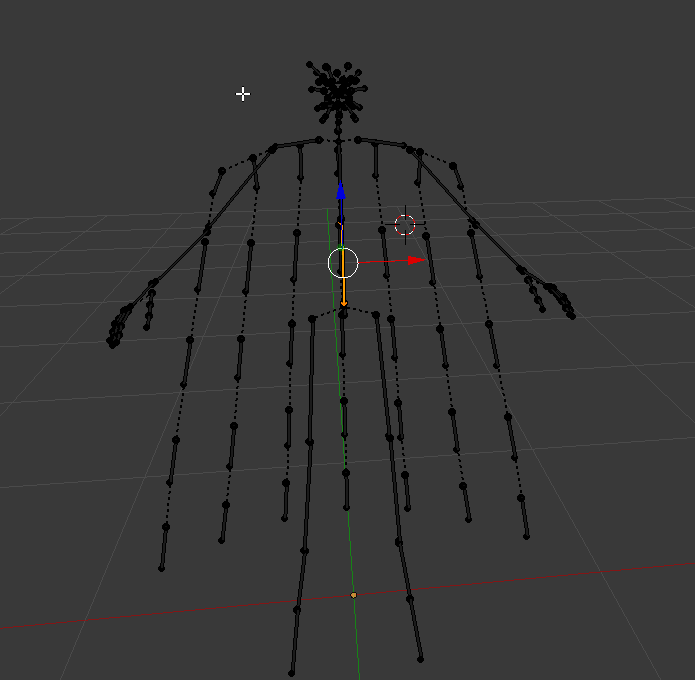
that is my bone layout
i got that error when i tried to upload it to vrchat
whole tulip
ohhh i fixed it
i just looked up right arm and found the left arm equivalent
200 iq
spoke too soon...
sharp raptor
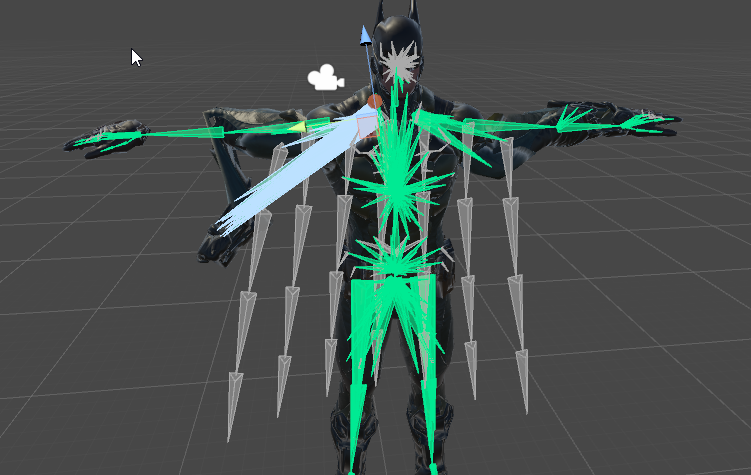 warm notch
whats the button to add bones?
 icy maple
Hello, i'm new to all of these things...
I'm trying out blender on a new character, i'm following that lady's guide, but the 'fix model' thing deletes a lot of the skirt, as well as the bones I wanted deleted. I kinda want the skirt bones. How do I select specific bones to delete if the fix model will wreck the good parts?
fading verge
Is there a way to have a viseme be the 'default' expression on a face?
icy maple
Just figured it out :3
 mild mural
You can, but you might have to redo other existing shape keys.
fading verge
How do I disconnect my waist from my spine?
@mild mural Where could I learn to do that?
So apperantly the problem with the skirt was that my waist was connected to my spine
I dont know how to disconnect them, though.
Anyone?
mild mural
@fading verge look up blend from shape, however any changes made to the basis shape key will affect every other existing key. There might be another way, but I'm not sure.
 fervent glacier
@fading verge how did you get the matsix avatar?
fading verge
Matsix avatar?
fervent glacier
yea
fading verge
wot
fervent glacier
ä bit up in the chat i saw you had it
fading verge
I don't have it
fervent glacier
ok
icy maple
What's a waistcancel? does it need to be there? does it do anything?
fading verge
Can anyone help me out with fixing this model? I've got no idea how to work with bones, it was an MMD model i ripped.
Here's how it looks in unity
 waxen ember
Forgive me if I'm wrong, I'm still an amateur at this myself, but I believe her (pants?) are missing bones that could separate them from sticking together like that.
 timid fog
If I add a hat to the model, how do I rig it to move with the head?
fading verge
@waxen ember you know alot more than me trust me
This is how they look in blender, the top ones are connected to the hip
@timid fog 99% sure just drop the hat model under head in the hierarchy
essentially where the hair is located
then angle the hat how you want it
timid fog
Thanks.
fading verge
np
 carmine creek
So.... The feet are backwards on my model, anyone else have this problem or HAD this problem? If so how did you fix?
And when I say they are backwards I mean when I go into "Build and Publish" His ankels are twisted and his feet are backwards.
 spark sequoia
"Make sure that the parent of both shoulder and the neck is the chest"
fading verge
Hey, I'm a complete noob as it's my first time using blender, I'm trying to get this model under 20k Tris. Does anyone know if it's ok to decimate the eye animations using the planer option? https://puu.sh/ySkS5/9d864a8684.png
 mild mural
@fading verge the pant cuff bones need to be connected to the knees
fading verge
let me try that out
waxen ember
Hey guys, I'm a computer animation student so I'm still an amateur at this stuff- also first time creating a VRchat ava so bear with me... I have fixed all the bones to be a humanoid rig however I get the dreaded "spine hierarchy incorrect make sure that the parent of both shoulders and the neck is the chest" error, however each time I fix the hierarchy the applications don't save...I'm not sure how to fix this. T posing and all bones are correctly adjusted
fading verge
CATS named the model's knee down to the ankle as "leg" and the "knee" is down where the feet are. Should i be connecting them to "leg" instead?
mild mural
Whatever the shin is called. As long as it rotates where the knee would be.
fading verge
👍 ?
oh waity
im dumb
it is named knee
i was looking at parents
lol
ill test it out in a sec thank you
icy maple
What number do i have to get under 20k? Verts? or Faces?
mild mural
@waxen ember did you re-export from blender and are now trying to reimport in unity?
Fucking autocorrect. "Trumpet"
crisp tendon
@icy maple verts
waxen ember
LOL I was trying to figure out if trumpet was a term I didn't know
icy maple
thanks! almost there...
waxen ember
Yes, I re exported and imported
icy maple
was at 45k, down to 25k atm
waxen ember
I've been scratching my head over this all day
Would it be better to go back and fix the hierarchy in Blender instead?
mild mural
@waxen ember in unity, right click your model and hit show in explorer. Then drag your fbx in there to replace.
Then it should update
waxen ember
let me try
carmine creek
I still have yet to figure out why my feet are backwards when I animate, I rigged it all correctly..... I think.
fading verge
Trying to weight paint in blender, but whenever I try to click on a bone to change its weight, it selects the entire armature. What do?
 wind ore
@carmine creek is it simply rotated wrong?
mild mural
You can select it in pose mode then go back to weight
fading verge
Is that what you have to do? Holy damn, that's like an extra 8 clicks per bone. God damnit blender
icy maple
Why do places thats not the eyes have shaped keys for laugh wink blink etc? they are on my legs.
crisp tendon
@fading verge Set armature to pose mode
carmine creek
@wind ore Not too sure, I just checked and it might be that but I am not sure, it is at X-81 Y-12 Z-63
fading verge
Ohhh I did.
mild mural
@icy maple don't worry about that
waxen ember
@mild mural thank you for your help atm ^^ it means a bunch, i reapplied but the rig is still messing with me... here's what the hierarchy looks like
wind ore
@carmine creek I mean, all of those values are Negative. So, possibly. Is that the Rotation value? make them positive or 0 and see what it does.
I'd personally just set all the negative rotation values to 0 and see where I am at, and revert then try something else if that's not what needed to be done. i'd assume you'd want to set the X to 0 at least.
waxen ember
mild mural
@icy maple it happens when you separate by materials
icy maple
roger, thank you. i'll remove and drop more polygons
mild mural
@waxen ember where's the head? Or is that what Hat is?
carmine creek
Yea it just had to be reversed, thank you very much! @wind ore
waxen ember
That;s what hat is sorry
wind ore
@carmine creek Make sure it still works fine in the rig option. use the muscles section and move it around. or move it around in blender.
 flat sierra
hii
waxen ember
everything is ultimately correct and in working order all that's missing is the hierarchy of these items refuses to adjust...
flat sierra
i found a bunch of pre rigged digimon models but for some reason it keeps saying theres no shoulder/neck even tho its got all green on the body
mild mural
@waxen ember I may have missed something. Are you adjusting the hierarchy in blender?
wind ore
They still might not have shoulders or necks, even if there are bones asigned to be a shoulder or a neck in that menu. I'd look at in blender, not unity for bone management
@flat sierra
carmine creek
@wind ore It works! +Rep to you!
wind ore
@fallen granite what's rep!? you're welcome. I try to brainstorm or help if I can, despite not knowing a ton my self.
flat sierra
wind ore
@flat sierra You have no chest bone assigned.
waxen ember
sorry i forgot to mention, I'm doing so in unity, mostly because I'm not as adept in blender
@mild mural
flat sierra
yea I cant figure out blender
wind ore
I know it's not Needed but your models should have chest bones
flat sierra
its so weird
wind ore
@flat sierra also what exactly is the error you're getting? if you can ss that
wind ore
oh
waxen ember
enter the rigging screen and remap the bones
 wind ore
@flat sierra if you can throw the files in a Rar and message me it using filetea I can look at it and see if I understand what's up or not, but i'm not sure looking at it from here other than the fact that
flat sierra
oh ok
wind ore
I don't see a spine bone(?)
not sure
it has one mapped
The names are throwing me off so hard haha
wind ore
@fresh jacinth Did you go into riging? looks like unasigned bones, go asign them
 fresh jacinth
I did
 limber prawn
would anyone happen to know why a model's arm glitches back and forth , almost like it s vibrating?
wind ore
double check
waxen ember
@mild mural is it okay if i dm you?
wind ore
and save it
 zinc urchin
hmm, how about doing it again
mild mural
@waxen ember You can only save changes to hierarchy through blender, unless there's a way I don't know.
mild mural
Sorry for slow response, was finishing laundry.
waxen ember
No wonder they keep reverting...I'll have to move everything in blender
It's okay thank you for clearing that up! I couldn't find the answer anywhere
zinc urchin
I think when I had that problem, I just dragged all of the bones to their places again (even though they were proper to begin with). sometimes unity is buggy, but idk, hopefully it just fixes itself somehow
fresh jacinth
Is it because the character has high heels?
So the feet are angled
Im pretty lost on this tbh
Cause everything's set up fine
?
waxen ember
@mild mural sorry to bother again, something crazy happened. I restablished the chest as a parent for the bones in blender, reimported and once again the hierarchy was out of place. I went back to blender and now the entire chest bone is missing. I have a back up so its not a big issue, but it is a head scratcher
@teal spruce did you rescale and rotate them?
teal spruce
It was too big at the start, so yes
I was forced to rescale it
It's not so important, it's just an accessorie
mild mural
weird, maybe an accidental click or something
waxen ember
I feel too far in to give up but this is really bugging me, I'll try again
sharp raptor
anyone know a way i can mirror what i do in blender on the y axis say for example i change the size of the bone on one leg it changes the size of the bone on the other?
mild mural
one way is to select both and scale/position at the same time
sharp raptor
okay thanks
but
how would that work if i try to spread the legs apart
they will go to one side
mild mural
are you doing this in pose mode or edit mode?
 white epoch
I need help i get this error. I'll post the rigging here in a second
blazing hornet
is it possible to successfully upload an egg with feet, but the feet are rigged? or does it need to be the whole humanoid including arms
white epoch
crisp tendon
@white epoch map your bones in unity humanoid configuration
white epoch
They are in humanoid @crisp tendon
crisp tendon
If every bone mentionned in the error is not mapped, it won't work
white epoch
Only model I've had trouble with and it all looks mapped properly
fading verge
@mild mural Finally got it working after a bit thanks btw
sharp raptor
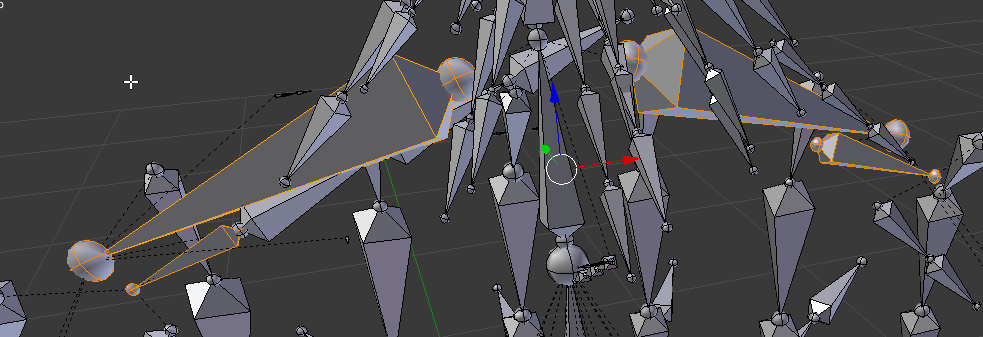 fading verge
Does anyone know why It doesn't detect the bones when I export this into Unity?
Aka My Rococks account
I mean there is 15 bones?
fresh jacinth
silk kestrel
@fresh jacinth It means that your hip bone and spine bone are on the same 3d space, increase the height of your spine in blender
@fading verge can you screenshot your humanoid rig and bone hierarchy?
fading verge
Okay
uhh, so i just threw my model into unity after fixing everything. and now everything on my head is not textured.
silk kestrel
❤ teto is love~
 silk kestrel
@fading verge There could be multiple problems, Check that your materials is connected to your head texture
@fading verge the first problem is there is no mapping on your character
fading verge
Alright? So how do I get to the mapping of my Character
silk kestrel
on your humanoid rig, there is a small circle on it, click on it and map it with the appropriate bone
eg. at the hips text, on the extreme right, there should be a small circle next to it, click on that
@fading verge if your material is connected, check that unity is able to read your file format. If you go into the textures folder, you should be able to see a preview of your image
silk kestrel
On your left window in unity, can you open up KazuinAesthetic?
silk kestrel
go to your materials folder and select the material which is your face
The inspector panel (the right most panel) should show you if you have a texture connected
fading verge
hmm, im not seeing any options for textures or any name textures. i only see shader options
would a picture help?
silk kestrel
yes screenshot please
 silk kestrel
@fading verge your turning to miku displeases me greatly...
 severe flower
@fading verge Ayyy another roblox boy
silk kestrel
on albedo, there is a square box, that should hold your texture
fading verge
suh
severe flower
how ya doin
silk kestrel
@fading verge your file does not contain any bones
fading verge
I dont really play roblox lol? More of an exploiter
severe flower
oh
fading verge
this is more for practice. this model was originally 76k tris
How can I have it export the bones as well...
silk kestrel
@fading verge click on the box of the right of albedo, see if you can link to your face texture. You should also try out cubes shaders
severe flower
mixamo kinda distorts some characters
fading verge
Yeah I own alot of paid exploits lol
Anyone having problems signing into VRChat for unity? Its stuck at Signing in
Are you familiar with RC7?
oooooh, ok i see how to choose the texture.
severe flower
Anyway here's like 7 characters from one of my Roblox games I'm planning to rig and use in the game
fading verge
Sick
Wanna see my sword
I plan to add to VRchat as well
Lemme bring it up
☕
severe flower
Here's my roblox character, which eventually after I figure out how to rig and do jiggle physics for the plume, I'll use in the game too
fading verge
Roblox
severe flower
Around 2009, but made an account in 2010
fading verge
nice
severe flower
banned a few times for odd reasons
fading verge
VRChat wasn't around
severe flower
I'm aware
fading verge
I know you are
My current avatar is bad https://gyazo.com/113f726ae244b59992492a289566f149
 severe flower
There's another character I'm wanting to rig up
fading verge
How do I export the bones as well? 😦
severe flower
not sure
blender is the bane of me
I tried using mixamo for this one character named future Brad, but as you can see it distorted his body
This is the original
fading verge
I see...
 jovial lance
this is unity
 faint cliff