#avatar-rigging
1 messages · Page 43 of 1
 royal gale
 craggy dragon
Trying to find the issue causing the bones to animate to the side on this mode rather than the front, anyone have any ideas? It all looks okay.
 cosmic mica
if the bone rigging system is completly symetrical, then why does the right arm wrist pivot off center in vrchat?
 long hill
Does anyone have a doc that shows proper bone hierarchy and naming?
craggy dragon
I have no idea, GearBell.
 latent flicker
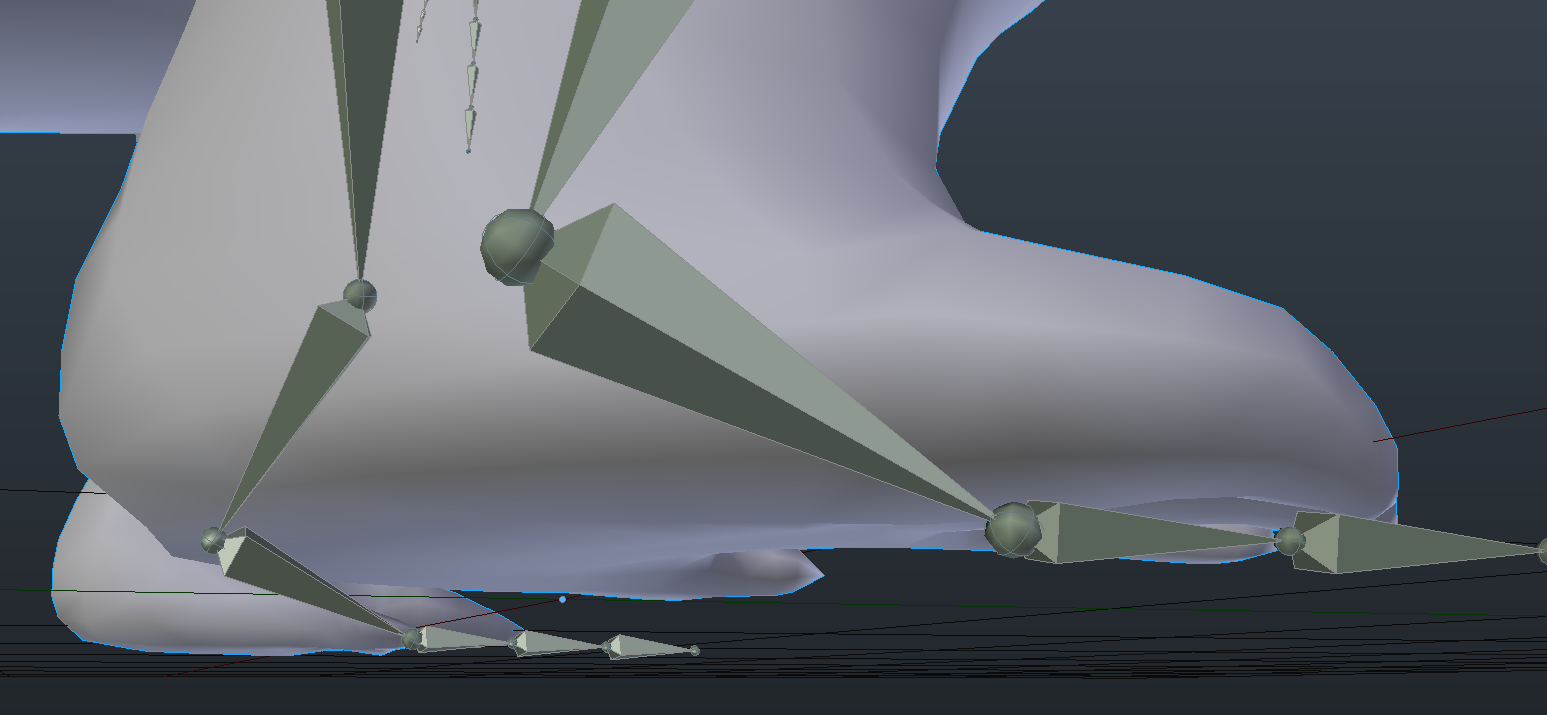
what should the bones in the feet for high heels look like?
long hill
Thank you!
royal gale
👍
craggy dragon
But really, if my bones are symmetrical, the weighting works (I've checked). Why does it animate to the side?
cosmic mica
how do i bind an object to a bone in blender?
not skinning, its just a solid object (arm piece)
 vague acorn
can someone make a skype call wiht me or sth like that and teach me how to get a avtart in vr chat i have done 3 avatars and they all are in T pose in the game no movment att all.
 smoky dawn
Anyone here wanna give me a tiny bit of advice on whats going on here?
the ponytail here is vertex group mapped on blender to this ponytail bone, however when adding a dynamic bone in unity it SHOULD work, right?

however when I attempt to dynamic bone it in unity it doesnt give me any hair movement. Is this because of the bone placement? or do i need to change a parenting possibly?
Dynamic bones in breasts work A-OK btw, it just seems to be the ponytail
This was an MMD model where the ponytail bone was placed there in blender once imported and converted
I think I figured it out actually, I noticed that the parented bone is the breast bones for some reason???
anyway
 spice holly
have some problems with my skirt bone collider. i added colliders for legs and knees. when i move the skirt still goes through the legs. hair and boobs work fine. first time im doing dynamic bones. moving the skirt up and down works fine. forward and backwards fucks it up
smoky dawn
I'd say mess with the dampening/stiffness of a skirt
that might help with the collision detection
because if it's moving too fast
it might be too fast for the collision to detect
it's capped at 60 refresh rate
or the inert setting
on the dynamic bones themselves i mean
spice holly
alright i will play around with that
 tacit sinew
anyone have any ideas why this happens?https://gyazo.com/854173905b90fccbcbdc00fed142eee9

 crisp tendon
what are those bones supposed to be ?
tacit sinew
for the feathers
crisp tendon
missing weight paint then
 bleak wasp
woudlnt you want it at 100 so it moves with the leg?
spice holly
ok it works now. it just needed alot of tweaking of the colliders and the dynamic bones. ty @smoky dawn
tacit sinew
ok I tested when i have the upper leg slected and painted the feathers with weight and it still does the same thing
i would do sometihng like this right?
 silent cliff
Dumb Question: Is it good practice to delete bones that you don't plan on animating?
 neon sierra
"kill me"
tacit sinew
ok I tihnk the bones for the feathers are just parented wrong how would i reparent them?
so R leg feathers to right knee
 abstract cloak
Question: Why does my bone parenting work in Blender but in Unity/Game the hat floats above my head
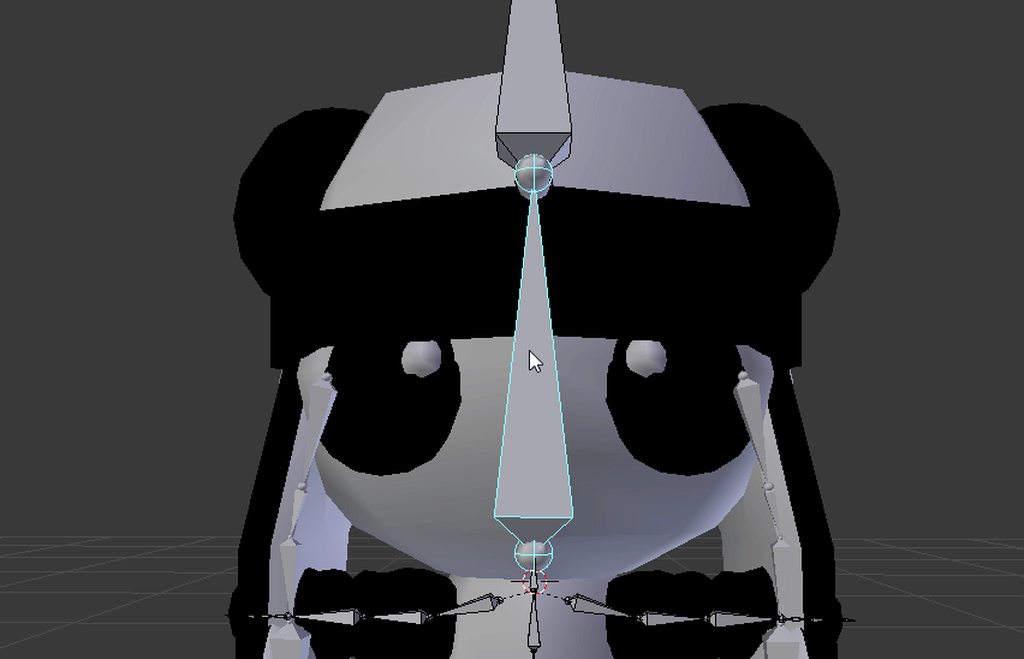
and it doesn't follow the head
 mellow plinth
why can't i see the bones inside the model in weight paint mode?
 oblique latch
have the ball on the face but all i have is this in game when i move
 fierce crag
Hey guys quick Q, is there a way to move your character in unity as you would in game? Ie. drag the viewpoint around? I have problems with some bones and need to investigate.
 proven hollow
Im having a problem with making this an avatar.
I can bring it into VRC, but then the character is totally far from the camera perspective
EVen if I move the perspective ball in front of the character
There is still issues with centering
 silver mountain
can anyone help me with this? idk why in vrchat the avatars' feet look like this...in blender and unity the feet look fine though.
 bright bolt
hello i am just wondering is there nay vidoe you wopuld recomedn to set up rigging for the modle
 heady belfry
So, I don't know if my model has eyes anymore. And I don't know how to move the eyelids to show them. Could someone help?
 woeful sonnet
@heady belfry Is your model currently in blender or unity or something else?
 simple forge
if i have a premade rig with odd proportions and rename/reparent the bones does the game distort the character?
heady belfry
Blender
simple forge
like forcefit my skeleton to the default rig?
woeful sonnet
@heady belfry You should be able to select the eyelids or the whole face if your model is separated by materials and then press h to hide it
 spiral pagoda
i know this question has been probably asked alot but I have literally tried everything I could find
so uh, basically after I exported my .fbx from blender into unity, it for some reason refuses to recognize the textures.
and heres my blender setup
im using cycles renderer
woeful sonnet
@spiral pagoda did you create a textures folder?
 fading verge
how can i add the wings to my avatar
spiral pagoda
i tried setting path to "copy" and then clicking on the box
woeful sonnet
@spiral pagoda then you have to go into "body" and assign each texture to the part it goes on
spiral pagoda
not right now, unfortunately
simple forge
unity does not import textures applied by default
some fbx exporters have a checkbox for embed media
oblique latch
so my rig is halfway in the floor and the rig camera is all f up this happened to my last rig as well wtf am i not doing ?
simple forge
so all your textures get packaged with the fbx in an fbxm file
spiral pagoda
blender never created a fbxm file
simple forge
check your export options
im not a blender user but maya and max have embed checkboxes
blender probably has it
cosmic you might need to 0 your transforms on the mesh
in blender
if your root pivot is in the middle of your body you might need to move it down to match up with the bottom of the feet
i still dont understand why these characters dont have a root bone
to define the ground properly
woeful sonnet
@oblique latch set all your positions and rotations to 0
if you're moving around your model to get a good look at it, do it in play mode
and you can manually move the little gray ball with the x y and z inputs under the avatar descriptor
oblique latch
i did all of that and i moved the avatar descriptor up to its face and moved it out a bit but still not working ok @woeful sonnet
fading verge
I have 3 different models I am going to distribute, but they all have weight problems, anyone willing to give me a 1 on 1 tutorial on fixing these?
spiral pagoda
omfg I just found a workaround because aparently unity does not work well with cycles so I have to export it as a .obj into 3dxchange. pack the textures and then export it back into blender
and then export it as a .fbx
this is stupid
woeful sonnet
@oblique latch sorry im not exactly a master at this, but you can try asking someone else. ive only ever done humanoids
my advice basically only goes that far
simple forge
how many materials do you have kaithyl
oblique latch
lol i was just chating back zd plus is hard to find good help on this discord
simple forge
it might just be easier to drag the textures into the right materials
if you only have a few materials
woeful sonnet
@oblique latch yeah very few people actually have a really solid grasp on what theyre doing
spiral pagoda
because the website where I got the textures from includes everything as one material
simple forge
you lose all your weighting if you use obj
 naive tree
@oblique latch it'shard to findhelp with specific issues, like when ppl want to be special snowflakes and build a dinosaur avatar 😓
spiral pagoda
theres just 4 different ones for emission and etc
fading verge
My models are all super cuties. https://imgur.com/a/OodXL Wouldn't you love to see more characters for weebs to run around as. Could a sensei please notice me 😃
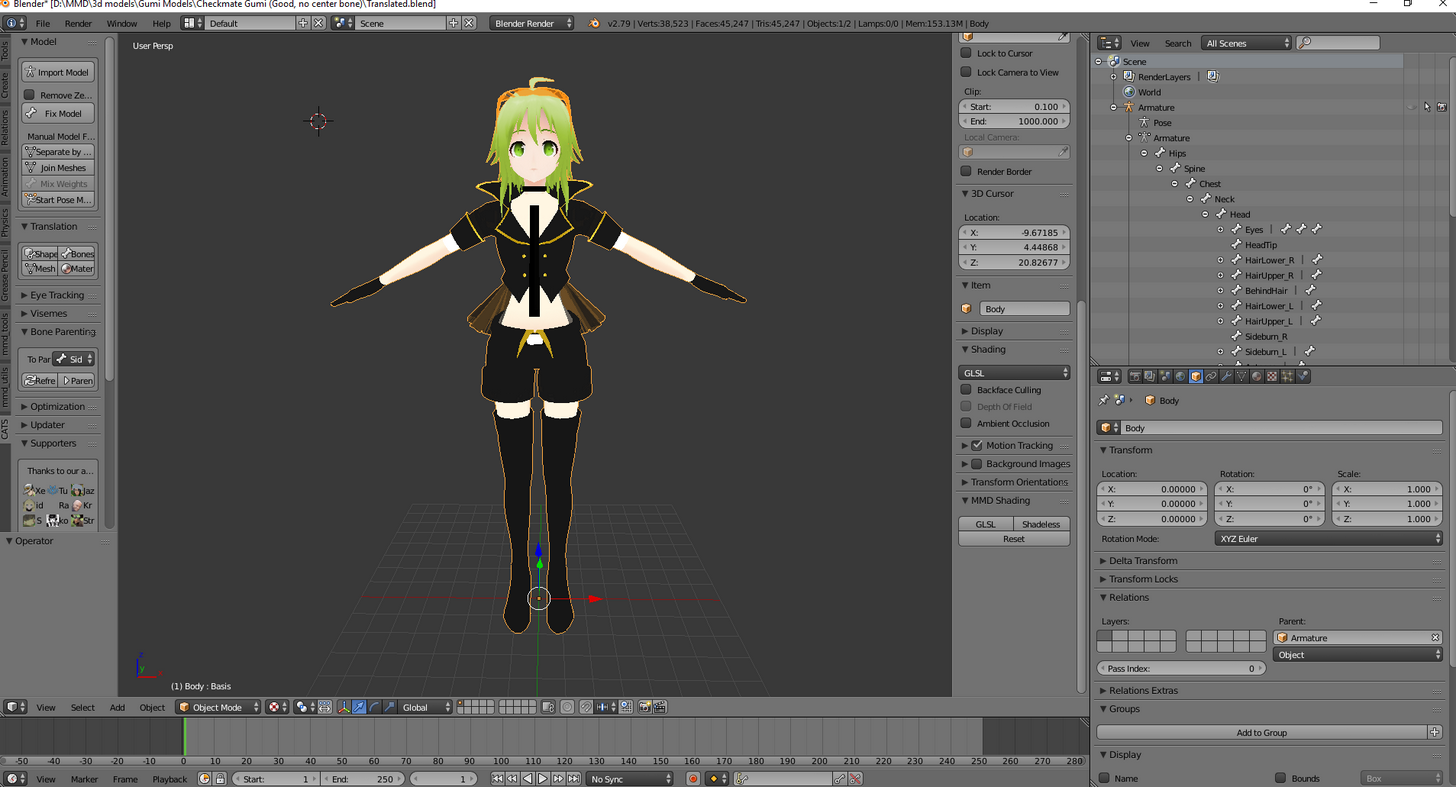 spiral pagoda
and cycles just recognizes it all as 1 material
oblique latch
my dinosaur avatar is 98% working just the cam and halfway in the floor xd
simple forge
can you move your dinosaur up in unity so its feet match up with the grid
oblique latch
no that will not help plus i did that xd
oblique latch
i did that as well
oblique latch
?
simple forge
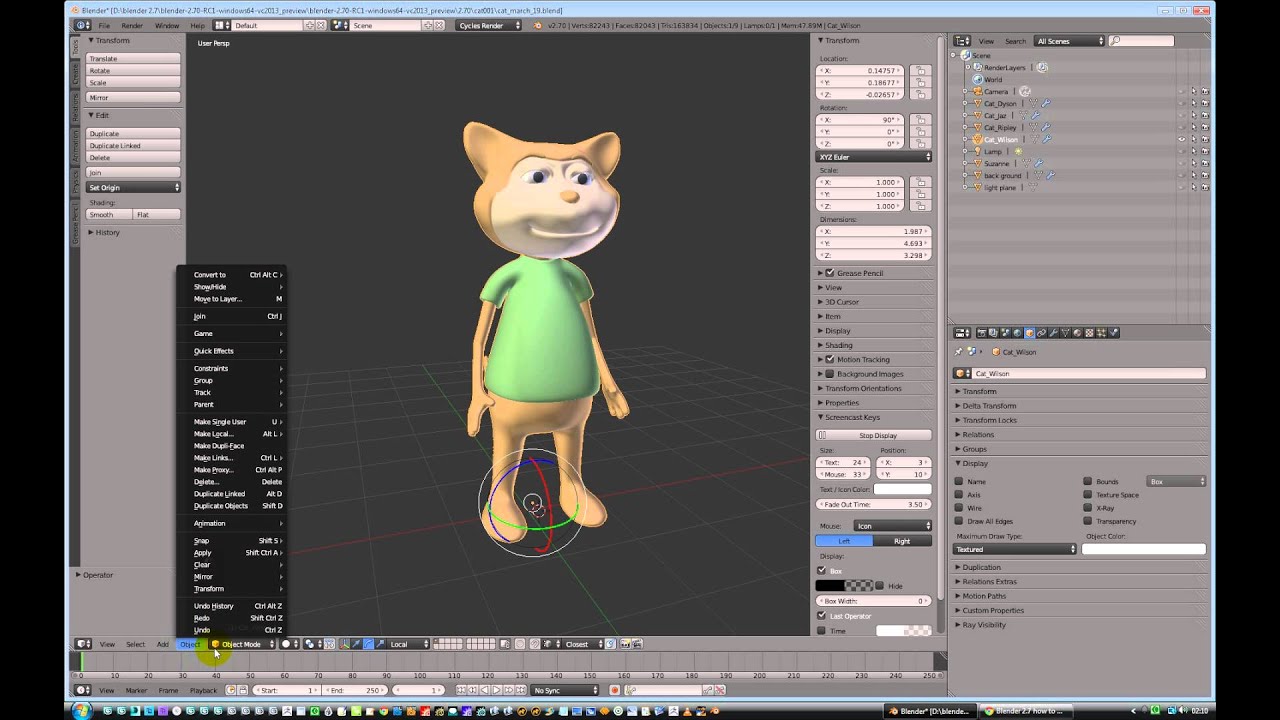
Quick how to video for new users of Blender 2.7
if you dont 0
it wont change your center
oblique latch
i did that and my guy just jups off the map
oblique latch
oblique latch
how do you find that
simple forge
its on the panel when you are exporting fbx
lower left corner
might have a scroll bar you need to move
oblique latch
 west gulch
Well so much for Mixamo, humans have 5 fingers not 1
oblique latch
am i just not looking i do not have it
simple forge
file->export->fbx
oblique latch
my b xd
simple forge
hey this does have embed textures
oblique latch
is that all i need to do or is there more i have to have on
simple forge
@spiral pagoda
spiral pagoda
?
spiral pagoda
no the problem is because of cycles and its incompatibility with unity
simple forge
oh
its your shaders
try using the one everyone has for anime characters or
the legacy emission one
emission keeps it lit kinda flat
spiral pagoda
uh no because cycles has its own "tab" in blender
something about reverse raytracing and the fact that it uses nodes which prevents me from converting it to blenders internal renderer
fading verge
So, I'm trying to figure out weight painting, My models neck isn't painted properly. I understand the point of painting and I just need to paint the chest vertices so they move with the neck to prevent aweful snapping.
But, what I don't get is how to not select unwanted vertices, like the hair and the collar
oblique latch
i i move i am nit in the grond but if i stay i am
simple forge
so it looks fine on idle?
oblique latch
if i move my guy in vr chat
simple forge
errgh
you might have to override the idle animation then
im still new to this so idk how how this stuff all works but if you have a custom rig that isnt humanoid usually you have to redefine animations for everything
but that dinosaur probably has premade animations right?
oblique latch
i can do all that as my guy has all of that that parts not hard at all
simple forge
so you probably just need to assign them to the right state or whatever unity calls them
weird how it only works correctly on move though
naive tree
@fading verge u can select faces u want to be painted and then in data tab assign them http://prntscr.com/hun4d8
 oblique latch
yep and its odd how the cam works as well i should be looking at my face in the mirror but its not xd
simple forge
hopefully you dont have to re export every single animation with that experimental toggle
 rough charm
This may seem like a stupid question, but, is there a way to focus on ,say, just the hand when rigging?
(in Blender)
oblique latch
so i did the overrides and he is still in the ground
fading verge
@fading verge Enable mask selection by clicking the icon next to the arrow on the bottom of the screenshot.
oblique latch
so my guy is f xd its so hard to work out whats making it do this
simple forge
ahhhhhhhhhhh
maybe something to do with your player height
and being sitting or standing
pretty sure your center gets moved down in sitting mode
or characters with no defined sitting animation usually just clip into chairs at odd heights
oblique latch
but he is not in a sitting mode
simple forge
you arent using vr mode right
like when you go into the game it says if you want to be standing or sitting
oblique latch
no vr yet just gamepad and pc keys
simple forge
is the dinosaur a unity store model?
oblique latch
yep
simple forge
idk anymore man
since its not a humanoid model
its probably something simple to fix
but im thinking of the wrong thing
oblique latch
it works ok in the demo that it has but its just when its in vr it f up
simple forge
the player height or something is messing with it im sure
i dont have much experience with unity though
but if its anything like unreal then there has to be a way to disable the avatar being offset of its vr component
fading verge
@fading verge Sorry I stepped away for a sec. Once I clicked, whats the next step?
Once I have face selection for masking selected, is it hitting ''C' to select unwanted faces and pressing H to hide them?
west gulch
I'm at a loss, I'm not sure what to do since Mixamo has failed me, and I have no idea on how to use rigify
 south bronze
Hi, I'm having some issues with rigging my model in blender. The hair remains floating when my model rotates etc. I tried extending the skeleton to include bones for this hair but I get a "Bone Height Weighting: failed to find solution for one or more bones" when applying the armature to the mesh. Which I think is something to do with those hair bones as they dont move the mesh whilst the rest of the body does.
 white epoch
I need help guys so I'm getting these errors but my avatar is properly rigged. About to post the rig here in a second
west gulch
Use toe_end should fix toes, but what about arms? I don't see the listing
white epoch
Here ya go and thanks btw
west gulch
Looks good to me so that one is a pickle, let me check one of mine
woeful sonnet
i usually leave the toes on none
west gulch
I see nothing wrong at all
white epoch
I've been doing what I normally do when i make models and its always worked. I'm getting these errors when I try to upload it:
Your avatar is humanoid, but it's feet aren't specified!
Your avatar is humanoid, but it's upper arms aren"t specified
Humanoid avatar must have head, hands, and feet bones mapped.
However you guys see they are mapped
west gulch
I'd check https://www.youtube.com/watch?v=LrCCl_F9XNs to make sure something wasn't missed
Here's a video on extremely common issues I see with bones and rigging setups, and ways to solve them. I cover: - Leaving Upper Chest Blank - Reparenting spi...
As for rigging, anyone have advise on an autorigger?
white epoch
Love Tuppers video btw, and I've watched them all to learn how to upload my avatars
I used cat's blender tool
So it should be all good unless it messed up somehow
 hard zenith
Yes cat plugin best
west gulch
Yeah the only issue I have is for some reason mixamo can't read my avatar and gave it 1 bone for hands
white epoch
I'll keep on experimenting to figure this out and I'll post the fix here in case this happens to anyone else. If you guys figure something let me know as well plz
 compact pebble
Question, how do I make this flat image forced to stand up in game? Right now it sticks to the floor
 nova wigeon
if you made it in blender make sure you reset the location, rotation, and scale
compact pebble
Nah just made a flat surface in unity and stuck and image to it. 😛
Suppose it needs a rig?
crisp tendon
kinda yes
 blazing hornet
can someone explain how to fix this

I am in blender
I just don't know specifically what to do, some of the bones are inside each other
crisp tendon
Did you use cat's plugin ?
blazing hornet
no why
 placid rampart
It does a lot of bone fixes.
crisp tendon
It could help in your case
 swift radish
How to I disconnect or delete an object without breaking the prefab instance? I want to make animations
Unchecking the active box box doesn't do anything
If I just 'delete' it, it kind of breaks and the whole character's heiarchy turns black text
naive tree

VRCat: Community-Run VRChat Forums
Cats Blender Plugin (0.4.1)
A tool designed to shorten steps needed to import and optimize MMD and Mixamo models into VRChat.
[IMG]
Features...
oblique latch
so my guy still in the ground when i do not move and i still can not fix it xd
west gulch
I think I'm gonna call it a day, Mixamo refuses to give me a skelton
 muted terrace
the website? I don't think mixamo does skeletons anymore. You need to use Blender and Unity
 fleet echo
@muted terrace mixamo still can
muted terrace
So I added a bone in blender since the model I'm creating doesn't have enough bones but when I import to unity I don't see the added bones. I've been sure to export the model and reimport so that's not the issue.
I also notice the bone i added is green in the inspector hierarchy.
in blender
blazing hornet
if I decimate hair will it affect anything?
blazing hornet
kk ty
west gulch
It still does but its not as effective anymore
but really I don't know how to do the skeletons from scratch
blazing hornet
well good thing it doesnt need animation XD
fading verge
Hello I need help
 marsh widget
also dont touch elbows or joints usually
blazing hornet
anyone got dynamic bone?
fading verge
I have my feet specified but it says they aren't specified
blazing hornet
or lil mystics discord?
fading verge
Anybody able to help?
 muted terrace
@west gulch I'm just getting into bones in blender and it doesn't seem too hard. You just create a new armature and then spawn new bones off the armature name them and that's pretty much it
then parent the rig
naive tree
@fading verge check bone config
west gulch
Still noobish to comands of blender so the hard part is getting the thing to move

 naive tree
also missing a chest bone
fading verge
Okay hold on
naive tree
@fading verge dm me the fbx, I'll take a quick look, no promises
 sly jackal
hey can anyone help me out im trying to rig a vaporeon as an avatar but idk how to rig a four legged animation
and im rather new to unity and blender so apologize if im not using correct termanology
 jovial bison
Happy new year everyone! I have a silly question about Blender
I got my entire body weight painted properly

But my hair doesn't move with my head
Should I just join them ?
naive tree
your hair has no bones right?
jovial bison
Nope
naive tree
ok ill dm u how to do it
jovial bison
Thanks !
 weak rose
So I downloaded a Halo 2 Elite model that came rigged however im not sure if its rigging will work in vr chat because ive never done soemthing like it
it seems to lack shoulder
shoulders*
and idk if thats gonna make it not work
latent flicker
why does that happen?
weak rose
Your model isnt positioned at 0 0 0
or it is and it goes through the floor and you need to adjust the positioning in unity to fix it
weak rose
Alrighty so adjust that number till the feet are on the ground in unity
the ground is the grid so if its below the grid its below the ground if im correct I might be wrong
oblique latch
my rig is moving up instead of down what do i do
 near dagger
my model is facedown in game, somewhere from blender's fbx export to the unity import something went wrong but i cant fix it
naive tree
@near dagger try this, doubletap A to select mesh + bones, in Transformation change Rotation X to 90 deg, then hit cntrl+A > Rotation, if 90 changed to 0 then you're done
export and check in unity
near dagger
Unity is also auto importing a 90 deg X rotation, i'll align and upload and see what happens
 lime laurel
is there a way to get the unity skeleton into blender so i can rig my avatar correctly because mixamo is messing it up
its got the like, shoulders in the neck and makes him stretch out
lime laurel
and all i gotta do is remove the rig, move the bones in a correct t-pose, apply weights and boom?
 neon shard
Is dynamicbone the only working physics system for VRChat? Has anyone had success with unity joints?
I have been developing in unity for years, and have never had issues with joints until VRChat
 supple zinc
Does anyone know when Dynamic Bone might go on sale? $20 is a tough pill to swallow.
neon shard
Yea I agree. $20 is a lot for a whitelisted script. I could write one but of course it would be disabled by the VRChat team
Do they have a cash deal with the dynamicbones guy or something?
naive tree
@neon shard spring joints and cloth physics works, from what I know
neon shard
Thanks Yuumi, ill give it a try
near dagger
Heres what happening
blazing hornet
any way I can keep quality while decimation?
naive tree
yes, decimate by materials and not entire model
near dagger
Last screenshot, I got the skeleton and mesh both vertical but both bodies in the assets are facedown and opposite directions
oblique latch
it still has bugs but my new guy is looking better his legs are still in the ground and the controls are reversed?
near dagger
@oblique latch I had that issue yesterday, I solved it by looking at my right and left legs and seeing that they were reversed. My right legs were named my left and vice versa.
oblique latch
ok cool i will have a look thank you
 crisp tendon
don't try to upload the camera
crisp tendon
show your build preview
fading verge
 crisp tendon
wtf is the plane supposed to be
oblique latch
his legs are not reversed as he still moves like its inverted
latent flicker
cant fix it... character is at 0 0 0, feet are above the grid, still this happening... i am clueless.
jovial bison
Does she wear high heels ?
latent flicker
yes
jovial bison
If so, did you put the bone through the foot or along the bottom of the heels ?
latent flicker
how do i do that wtf xD
jovial bison
I guess you auto weight painted or had it rigged by mixamo ?
latent flicker
nope, its an mmd
jovial bison
Ok, well, my thought is that your bone is in the foot which VRChat doesn't like when it comes to high heels
Check the bone and see if it's in the right shape for a foot
Coz when you wear high heels, the foot is like this \
latent flicker
jovial bison
Look the bone is not to the bottom of the high heel
So everything under the bone is underground
latent flicker
how do i get it there without bugging out?
jovial bison
Adjust them in the blender
 latent flicker
servers down or your connection
fading verge
i just had to disable future proofing i think
latent flicker
@jovial bison i dont know how to adjust them xD i am a noob in that
oh and btw how do i get rid of eye tracking?
 jovial bison
In Blender, select the Armature then focus the 3D view
Press Tab to enter edit mode
Get view from the front
Select both the ends of the toes
Only the ends, not the whole bone
Then drag them down into the feet
latent flicker
which one? the one in the foot or the leg bone?
jovial bison
Just the small round joint at the end of the toes
near dagger
So my issue stems from making Shapekeys for my jaw on my model, any ideas?
latent flicker
like this?
jovial bison
Could you show how they were before
lime laurel
also delete toes
jovial bison
Don't need to delete them you can unbind them
crisp tendon
Toes are fine, just don't map them in unity
lime laurel
true
latent flicker
crisp tendon
Even lower at the end if you can
jovial bison
Hmm yeah maybe a bit lower
lime laurel
anyone know an easy way to mirror rig without re naming all the bones
jovial bison
Yes
Hold on

Once completing one side of an armature it's simple to copy the bones from one side to the other to complete the rig. Certain points of interest to make this...
Works perfectly
latent flicker
it works if that gap is there?
 jovial bison
Those are some cute little feet xD
latent flicker
i have already done dynamic bones and face emotes on the old one with the bugged feet, any way to replace that and keep the animations etc?
jovial bison
What do you mean ?
latent flicker
the things that i marked are custom animations for the overide and the models in the hierachy are copies of that model, which have the animations on
 steep elbow
Hey, I'm pretty new to Unity, I was wondering if anyone could tell me what's going on.
crisp tendon
@steep elbow To what ? Where ?
steep elbow
Everything is rigged just fine
However when I go to check the muscles, moving them doesn't move the model at all
west gulch
I think I did something wrong, I have 2 meta rigs
lime laurel
anyone know where to get a proper (unity-wise) tpose skeleton to rig with,
the mixamo one im using is gonna require a lot of editing
west gulch
Reimport to Blender and CATS it
latent flicker
@jovial bison fixed it i think, thx
jovial bison
Nice :3
lime laurel
CATS?
fading verge
Hey all, having trouble with one of my models. In Blender it looks normal but in Unity it's doing this. Someone said it was because it was weighted wrong, but I'm not sure how to fix it. Does someone have a link to a tutorial or a simple explanation how to fix it? Thanks
jovial bison
Is it possible to see the textures/materials while weight painting ?
Do I need 2 views for that ?
fading verge
If bones aren't showing up in the parent bone drop down menu in CATS, how can we parent them manually?
latent flicker
dont think so, always did it without textures, i dont think thats possible, but google could answer
 near dagger
I got everything aligned, but now my skeleton and mesh arent connected, like my skeleton will move but my mesh wont move with it
west gulch

GitHub
cats-blender-plugin - A tool designed to shorten steps needed to import and optimize MMD and Mixamo models into VRChat.
@past patrol No it's no longer reliable, I've had broken bones, and everything is defaulting to no skeleton
crisp tendon
It is if you're importing a humanoid model
fading verge
Anyone have any idea about the issue with my model I posted a couple minutes ago?
west gulch
well I learned how to bone things so yeah
crisp tendon
@fading verge Open blender, and check the weight paint
fading verge
So it is definitely a weight painting issue? That's something I haven't messed with before
crisp tendon
It is
near dagger
I ran Fix model for Blender and it didnt work
 past patrol
i just wanted to import a gtasa model but idk what would be the best way to 'rig' it, since mixamo doesn't work with it
near dagger
Not blender but Cat
fading verge
Thank you, I'll look up a quick tutorial on it and see if I can fix it
 zenith plank
probably
crisp tendon
legs and hips not connected
fading verge
You mean you'd be willing to fix it for me, or just explain in simple terms for me?
zenith plank
they are in blender
crisp tendon
If you really try but can't, then yes i can do it for you
past patrol
what's the best rigging source/program/site/etc. that's available as of now
fading verge
You're so nice omf
fading verge
I'm definitely going to try because this will help later too but thank you so much for offering
past patrol
awh
fading verge
❤
past patrol
how
fading verge
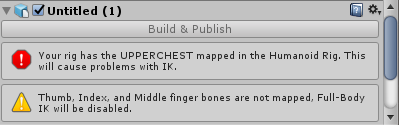
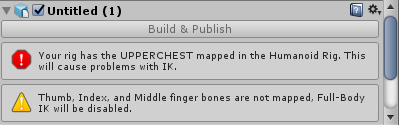
You gotta have the upper chest not mapped
fading verge
It's very easy so don't be intimidated
You just have to open up the configuration for the skeleton and unmap the chest and do map the fingers
fading verge
It will be okay
crisp tendon
🤔
fading verge
In unity select your model and where it has you set the animation type to humanoid click configure
crisp tendon
@fading verge Focus on your problems first, then you can help people, or you'll end up like me not doing any work for four hours 😠
fading verge
XD I'm about to sit down and watch like 45 mins of tutorials before I get to work so I'm not worried
fading verge
Okay so select your upper chest dot and just delete
Then you can get to the "hands" section of the interface where you can click and drag your finger bones to the correct place they should be on the mapping thingy
Drag them from the menu on the left, to the blank spots on the right
zenith plank
l o n g
fading verge
yeah i have really no idea why my model is like this
crisp tendon
@fading verge You merged your meshes right ?
fading verge
Yeah
crisp tendon
🙏
fading verge
I dunno why she has Crazy Bones though
past patrol
idk where upper chest is lol
fading verge
those are her Wrists
past patrol
it's devoid of my bones
fading verge
I'm just like "okay" and if it ain't broke I don't worry
but now it broke... 😂
Just the right wrist is contorted though so i really dunno
crisp tendon
@past patrol It's in the list in the bottom right
past patrol
oh jesus
that makes sense
ziy could you explain the hands thing again when you have the time lol
 silk kestrel
@crisp tendon do you know how important future proofing is in vrchat?
crisp tendon
It isn't
fading verge
There should be a good tutorial on YouTube that you can use
silk kestrel
so I can disable future proofing?
fading verge
Babyray I mean
crisp tendon
@silk kestrel Yes
@fading verge Like the best tutorial ever made ? https://www.youtube.com/watch?v=7P0ljQ6hU0A

VRChat Community Discord: https://discord.gg/VRChat Download VRChat! http://store.steampowered.com/app/438100/VRChat/ mmd_tools GitHub: https://github.com/po...
silk kestrel
thank you!
fading verge
A yeah I love Tuppers tutorials
 timber rune
I've seem to come across a weird problem with my skeletal rigging and how I am seen by people in VRChat. In Unity, Blender and Mixamo everything appears to be mapped out correctly without issues, and when I loaded the avatar in and looked in a mirror everything looked perfectly fine, but apparently to other people my head is turned /on backwards despite myself looking straight ahead, also for some reason one of my fingers seem to be bent backwards (This I notice in looking at a mirror without anyone needing to tell me its broken) Any thoughts as to what might have gone wrong?
crisp tendon
Correct SDK version ?
silk kestrel
@timber rune something like this?
timber rune
Wish I could have a screenshot for reference, but unfortunately I do not since everyone else but me seems to see it. A friend of mine sent me a snapchat where my torso was facing 45 degrees to the side despite me looking directly at them and my head turned even further. But I am for the most part looking in the general front facing direction.
Pretty sure it's the right SDK version as well.
I'm not entirely used to porting models yet, but I've been following the guide on the VRWikia to the letter.
silk kestrel
Did you have to enforce a t-pose during rigging in unity?
fading verge
@past patrol you still having trouble?
timber rune
Well it wasn't quite T-Posed in Unity or Mixamo. The arms were on the side of the model pointing directly at the ground.
fading verge
@past patrol It ought to look like this when you're messing with the fingers
Ignoring my model in the center of course
past patrol
i removed the upper chest earlier and had some other error along with the finger error still there
so i figured i'd restart, but
the model is from gtasa, so the hands look like gloves, i figured like mixamo didn't know how to make them hands if that's possible
maybe that's what the error was
fading verge
Everything I know I learned from Tupper's tutorials so if you haven't watched those, give them a shot
timber rune
https://gyazo.com/598b237dc1345d7e319afcf7daeff613 This is how the model looks in Mixamo and Unity. Everything seems to have worked as far as animations go in game apart from the issues I mentioned about where I'm facing/oriented
 blazing hornet
pov in unity help, is it a component?
timber rune
You mean where you're looking from the perspective of the model? If yes it is a component
timber rune
VRC_Avatar Descriptor
blazing hornet
Its the avatar desc
yeye
tyty
Also do you know
like which pos?
for a 0.8 size model
naive tree
ppl put it different, i put it between eyes 50/50 in skin
timber rune
Ideally right where you would have a VR headset over the eyes of your model
naive tree
some put it inside of head
blazing hornet
I dont know specific cord
timber rune
You'll have to eyeball it
naive tree
just change the cords
timber rune
^
naive tree
and it'll move accordingly
timber rune
Just fiddle with them till you find the right spot
blazing hornet
how do I see the pov move
timber rune
Just lots and lots of trial and error
There's a little tiny white ball that's where you can keep track of where it is
You might need to rotate your camera around to find it but it's easier if you put -1 in the Z axis and then work your way from there
Should be plaxed somewhere behind your heads model
model's head*
fading verge
@crisp tendon So uh when I get to the weight painting interface in blender she looks like this
timber rune
I'm already getting tipsy rip
fading verge
I assume she hasn't any weight painted on her at all?
fading verge
This is an XPS model I imported so she might be behaving different
naive tree
@fading verge check if the mesh moves in pose mode
fading verge
It does
timber rune
As far as I know in the 5 days I spent trying to figure out Unity, you have to input the coords manually unlike the ability to move/rotate/resize models
fading verge
She was imported looking like the vitruvian man and I made her T-pose like that using Pose mode
blazing hornet
whats the grey dot behind?
fading verge
In Blender she looks perfect but her jacket's wrist is all fucky in Unity
blazing hornet
 timber rune
Is it a big or small dot?
 timber rune
The gray dot should be the descriptor
blazing hornet
kk ty
fading verge
See, I can move her just fine in pose mode
fading verge
the grey dot is where your camera will be Coopertow
timber rune
That's a lot of head bones makin her look like Pinhead
blazing hornet
my pov right
fading verge
Yeah, she's an XPS model so she's made to have her face moved around and posed
naive tree
@fading verge are you having hierarchy issues? sry i missed the earlier messages
blazing hornet
correct
timber rune
The gray dot is where 'your' eyes will see from
fading verge
@naive tree My issue is that in Unity her jacket's wrist is all screwy
timber rune
Basically the perspective of the character.
fading verge
Let me screenshot it again
fading verge
Ah okay
Yeah I really dunno why it's doing that, she has no weight painting at all
The vertices are assigned correctly too it seems like...
 fading verge
However in Edit mode she's not posed right
timber rune
It's easier to tell nothing will get in the way if you look at the model from the side view and position it an inch or two away from the eyes
 coarse sky
So could anyone possibly make an avi for me? I have the model selected, I just cant get the rigging right no matter how hard I try
timber rune
Have you tried Mixamo?
fading verge
And this is the problem area, its vertices are set to a bone that isn't mapped in the "configuration" thing for the skeleton
blazing hornet
what if its out past the nose
fading verge
Is that my issue? When I assign those vertices to a different bone, it deforms it worse though...
This is the first time I've ever seen this with the XPS i've imported so I'm at a loss
timber rune
As long as its coming from the front of the model's face it should be good to go. Just not too far away
naive tree
@fading verge check that bone parenting, or you can try mixing weight if that helps
fading verge
She's not weight painted at all though, and when I paint it, it deforms completely
And the bones are parented to each other in a way that makes sense to me
This group of vertices is parented to right wrist ctr which is parented to the right elbow, so it should be okay
But it's doing something weird in Unity
Someone said yesterday when I asked that it had to do with weight painting, and the vertices were going back to the original position seen in Edit mode
blazing hornet
 fading verge
But I dunno why since she's not weight painted...
blazing hornet
they are mapped ;c
fading verge
I'm completely at a loss here as to what's wrong with her X0
timber rune
Bone trees are like coding, you miss one tiny little detail and everything goes to shit suddenly.
fading verge
I dunno why in Edit mode she's not posed to her armature either
Unless that's normal
fading verge
When I set this group of vertices to be mapped to the right wrist instead of right wrist ctr it looks like this
So it's deformed even more
blazing hornet
I fixed it I think its cause the chest wasnt used under mapping
timber rune
 fading verge
Does anyone want to take a look at this model for me and see if they can isolate the problem?
Yuumi or Ruuuubrick
blazing hornet
I am getting the hang of this lmfao
timber rune

VRChat Wikia
This documentation should be able to assist someone with absolutely no 3D/VR Chat SDK experience in creating a quick and easy avatar. If you see a model with two variations, a High Poly and Low...
I just work off that and for the most part it should work
fading verge
I'd be eternally grateful if someone could help me figure it out 😂
timber rune
It's a helpful guide for starters.
blazing hornet
how do I exit mapping
timber rune
Make sure you apply your changes and then hit done
timber rune
More or less
blazing hornet
When it detects lip sync it gives me jaw flap blend shape, should I just not mess with that
fading verge
@crisp tendon Would you be willing to look at my model if you've got a couple minutes? Just to see if you can tell me why it's doing this so I can fix it
timber rune
I don't exactly know what to do there since I've only ported models where their mouths don't move (AKA they don't have one to talk with)
blazing hornet
better to learn sooner or later lel
silk kestrel
@fading verge I can take a look if Ruuubick is busy
timber rune
Time to go back to trying to figure out what went wrong with mine now.
fading verge
I think they're in VRC right now, so if you'd be willing I'd be very grateful
blazing hornet
is there any other way of getting dynamic bones?
crisp tendon
You can send the fbx
 spark sequoia
Does anyone know what could cause arms to stick out on my model only when I have VR on?
blazing hornet
@crisp tendon send it to you?
crisp tendon
Sorry i was asking @fading verge
blazing hornet
oh ok
crisp tendon
But dynamic bones you can ask someone in vrchat, not on discord though
fading verge
Should I .rar the whole project or just send the fbx?
 ashen iris
So uh I think I have a rigging issue since Im getting stuck in T pose, any help?
blazing hornet
okok
crisp tendon
just the fbx
fading verge
The fbx will have like, the textures and stuff in it, right?
Okay, I'll send it. Thank you so much
timber rune
T Posed while in VRC @ashen iris ?
blazing hornet
is 0.8 tall?
crisp tendon
ashen iris
Yes, and Unity I suppose. I feel like I should be able to tell when rigged properly in Unity.
timber rune
It should be T Posed in Unity
ashen iris
right, but even when publishing?
timber rune
You might have gone wrong with the bones if you're having TPose issues in VRC
ashen iris
One thing I may have overlooked was the armature modifier in Blender, is that required?
timber rune
[ Processing... ]
ashen iris
Because all my weights and posing works
timber rune
I'm not quite sure. Haven't messed around with the model in blender a whole lot since I just took assets I downloaded from a site.
Send a screenshot of your bones in Unity
ashen iris
blazing hornet
does unity not to transparency?
https://gyazo.com/c568372015103ae280f14d2ca548b5b0
Thats unity
https://gyazo.com/8ebec7082f08ba967c3b3c90a3a06e0d
Gyazo
This is blender

 timber rune
Hmmm
blazing hornet
all the decals have black frames around them in unity
prob cause png?
wait no png is for trans
timber rune
@ashen iris Might be because your Chest is set to Spine and not Spine 2
timber rune
Hmm, not sure where you might have gone wrong then.
ashen iris
Im testing a few things out rn, Ill get back to it lol
 sick hamlet
Having a little trouble myself- no head
ashen iris
Should my model deform and pose while configuring and moving the bones in bone mapping in Unity?
past patrol
i just need help getting one avatar in-game and i'll be satisfied for a few days lol
 clear cedar
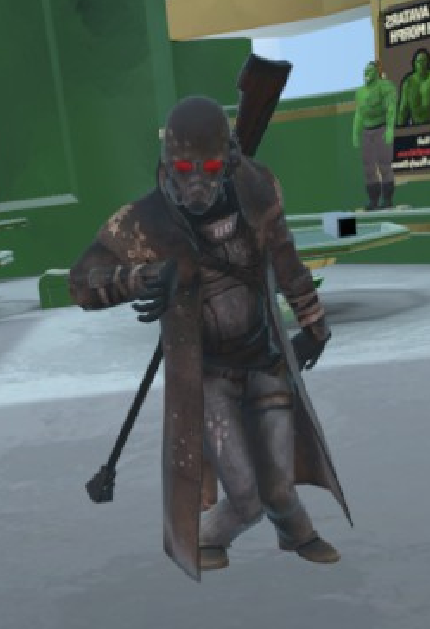
Any of you guys ever had this problem before? (the legs) https://i.imgur.com/DKrhvWs.png
 fading verge
I've also got an avatar whose legs are screwy if someone's got a quick answer to that
timber rune
Change your height Jordo
Your height might be too short for your model so that's why you're 'kneeling'
fading verge
???
timber rune
Hmm
past patrol
nice ncr ranger though
swift radish
What's the best setting for audio emotes so it's not inaudible in game?
clear cedar
I think I figured it out
But the knees is so annoying
I mean, I don't crouch much, but I still want the possibility to do it :/
timber rune
Oh, my model doesn't have a neck bone .-.
clear cedar
Vex, I think Spatial set to 3D + Volume 0.1 to 0.5 + Doppler to 0 + Max distance to a much lower amount should be fine
 clear cedar
Nice
timber rune
I need to add a neck bone to it
clear cedar
Nooot sure you can in Unity
timber rune
Yeah that's what I was thinking
My endless pain is doing everything, realizing I've made a mistake and then having to redo everything
Muh curse
 inland snow
hi looking for a little help
hi is there a good resorce for modeling ( ms3d ascii > ms3d > blender > unity ) the model is compacted and not rigged as defualt and even though i can get the animations to play in unity i cant import as a model as the bones arnt connected...
rough charm
Anyone know how i can fix this? I dont have 3DS max so thats not an option :\
west gulch
Is there a way to have CATS fix custom bones?
inland snow
i am having bone issues also
but mine is my bones arnt bones
they are animated motion tracked points
weak rose
Im having an issue with this rig in that when I walk in vr chat the legs raise up into the chest and the head raises into the air, any fix?
timber rune
Those are some wonky bones
rough charm
Whats weird is they worked for the most part, the shoulders were the only issues
weak rose
@timber rune I mean it isnt human and has backwards legs so
timber rune
Did you put it to a humanoid rig @weak rose ?
west gulch
So my issue is the bones in Unity go full T while the pose is not
weak rose
Yeah you have to for vr chat
timber rune
Did you rig out that entire skeleton or was that the way it was?
inland snow
if my object could export in a pose i could put it in a t pose...
but all i got is points
weak rose
No this is how it was and I changed the names to have proper naming conventions
timber rune
I would try putting the model through https://www.mixamo.com/#/ and then saving the .fbx and then putting it through unity
It won't walk exactly the way an Elite does, but it should fix your problem
weak rose
Alrighty
 fierce pumice
can someone please help me with my rigging tried to follow vrpill common bone and rigging issues video but that has put my poor avatar in a worse state then she came in....
timber rune
Are you asking if Mixamo takes .fbx files?
It can take fbx, obj and zips then it can spit them out in a few other formats its done auto rigging
weak rose
okay
inland snow
what can i use to attch joints together to create a bone
timber rune
If that doesn't work you're going to have to probably ask someone else. That's the only quick fix taht comes to mind
timber rune
Just test the animations to see if everything looks alright but dont download it with the animation
weak rose
ah okay
timber rune
You should see a little x to remove the animation and just download the model as it is
weak rose
It looked like an elite walking so idk if thats good or bad
timber rune
Does his head look alright when moving?
weak rose
one sec
timber rune
Since he has an open maw it might look funny
Or mixamo might have botched the head rigging
weak rose
if you go this does it show the arbiter? https://www.mixamo.com/#/?page=1
timber rune
Nope its specific to you
weak rose
ah
timber rune
I only see the model I last uploaded
inland snow
so does anyone know how to turn joints into a rig?
ive been looking on youtube and google for the past 3 days
timber rune
I'd like to help but it's not something I know very well (Aka at all)
You need to parent them to each other
inland snow
right but no app i see allows that
timber rune
Have you tried clicking and dragging a bone to another ?
inland snow
i am using milkshape 3d, fragmotion, blender, and unity3d
ms3d and frag select one point at a time
if i drag it it moves it
blender fuses all the model into one blob
rough charm
The fingers on the model i have arent spread far enough for Mixamo to detect them, is there an easy way to fix that?
timber rune
One thing I wish Unity had was the ability to scroll through values
 odd tulip
inland snow
odd tulip
inland snow
i am half contemplating creating a tiny invisable stick figure and having it have the rigging for import and letting my big avatar just animate
 safe shadow
anyone know why my texture is transparent on unity and not in blender
fading verge
inland snow
i do
fading verge
how can i make her feet above ground?
inland snow
your face is pointing inward not outword
timber rune
Move the entire model up
fading verge
aight
safe shadow
@inland snow how it if looks fine in blender ?
inland snow
well that was my issue before
i had to invert all my model to get it to show correctly
blazing hornet
my character in blender has same face and neck color but in unity the neck is more skin colorish than the face
west gulch
Okay now what? when I move it the arms go red
heady belfry
My right foot says it has a bone length of zero. How do I fix that?
west gulch
Yes, I hate that forced pose
timber rune
Spine 2 is associated with upper chest movement right?
Time to see if I either fixed it or botched it even more
blazing hornet
Character Face and Neck same color but look different, blender they are the same, unity/vrchat they aren't. The texture is one whole, so I cant re-color or whatever because the 1 texture, the skin color is the same
timber rune
Are you in VRC right now Cooper?
inland snow
is there a way to combine points to make a rig?
blazing hornet
@timber rune Yesz
timber rune
Everything look alright?
timber rune
Stop by Avatar Testing #1 and lemme take a look if you aren't busy.
blazing hornet
okok
inland snow
i cant import my model due to the lack of a skeliton even though i have a skeliton
timber rune
Did you put it through mixamo?
timber rune
Ah
 zenith siren
did you parent the mesh to the skele and did you set all the right bones in unity?
timber rune
Cooper did anything about my model look off? Were my knees glitching out/my fingers or hands in the wrong place or my head twisted in a weird direction
Whoops @blazing hornet
inland snow
default pose
blazing hornet
nah
inland snow
timber rune
Oh good, maybe I finally fixed it
inland snow
ive been stuck on this points to bones thing for 3 days
timber rune
So the textures for your face are on the same image for the other textures on your model?
inland snow
no my face textures are seperate so i can swap them around and have animation
each are a seperate image
fading verge
not sure if this is the right area to ask but
how does one attach accessories onto their avatars? in unity
inland snow
right now there isnt anyone really who can help on
just a handfull of people who have issues
fading verge
oh rip
inland snow
i would imagine
if i where to edit a model to add stuff. i would take the FBX of the model and open it in a editor that supports FBX
then make the additions there
also i would reduce the poly count of the said model
i know there are ones out there that are like 10k pollys and what not
i try and limit my self to under 1k
that way i am not killing peoples computers when i enter a room
 dark elbow
Bruh I'm 20k and nobody complains
inland snow
go ahead lets hear you guys chime in and say high poly counts are fine
20k poly is garbage
higher polycounts mean less modeling skill
and shit for optimisation

 wraith fossil
 paper vine
living in the edge
fading verge
👀


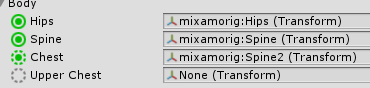


 drifting raven
anyone know how to import a .vmd dance animation? Does that need any sort of rigging?
inland snow
all animations rely on bones
vmd is for mmd i think
motion data can look like this
86.000000 -1.955700 9.345068 -2.676663
87.000000 -2.089386 9.494311 -2.564540
88.000000 -2.215585 9.675038 -2.439274
89.000000 -2.329397 9.883588 -2.302074
90.000000 -2.426796 10.115405 -2.154662
91.000000 -2.504934 10.365224 -1.999306
92.000000 -2.562377 10.627335 -1.838791
which is just a set of 3d space coordanents
silk kestrel
that looks like [frame number] [X translate/rotate] [Y translate/rotate] [Z translate/rotate]
inland snow
lucky
spiral pagoda
but for some reason the fingers is getting mapped inverted
inland snow
your fingers arnt rigged to the end
of your model
only to your knuckles
blender
is your friend
nope
there we go
fading verge
I fixed my issue I was working on hours ago btw, some of her wrist's vertices were assigned to the wrong bone so I reassigned them, for anyone else who works with XPS models
inland snow
hey ziy
how can i connect bones
to make a rig
i litteraly have floating points in space
inland snow
that make my animations work
spiral pagoda
in blender
spiral pagoda
its because this is a .smd
inland snow
or if it does all of my models pices all connect to only one part
fading verge
i usually use CATS plugin and just press "fix armature", it's made for MMD models but can work for some others
inland snow
also fbx 6000 is unsupported so i have to convert it to a 7000
spiral pagoda
bad idea because source engine is radically different from mmd
fading verge
well I did say "some" others
;P
it might be a bad idea but you can always ctrl z it
fading verge
ye
inland snow
can i post it here so you can see what i mean?
fading verge
do it
inland snow
that is the whole model
fading verge
i thought you meant a screenshot
inland snow
i posted screen shots above
spiral pagoda
... fixed it by forcing the model out of vrchats default t-pose
inland snow
nice
if you inport the model into blender
you can see the motion data
and the mesh which is a ton of seperate meches with names like head neck ect
are all one mesh when inporting into blender
it kind of sucks
my idel is to have dancing be the idel animation
then rigt for walking
lime laurel
so when i rig this model in blender that is a multiple parts joined together, the rig only applies to the base body and the other objects that were previously joined all together do not follow the weights
and fix?
besides manually weight painting
silk kestrel
can you elaborate more about this process?
Cause I think I am doing something similar but do not have any problems
I am painting weights for the hair because the armature is different btw
lime laurel
so the model is made up of multiple parts, eg. the belt, chestplate, arm guards, etc. I joined them together (shift+j) and when i rig them with automatic weights, it only weights the main body (the body underneath the armor
so you can see in the pic when i pose it, the pieces do not follow
silk kestrel
for each of the different pieces, did they have an armature?
lime laurel
i made the armature
silk kestrel
did you make the models as well? I think they might have vertex groups which might be interfering with the auto-weight
inland snow
ok i think i got it
lime laurel
there was no vertex groups before
inland snow
does anyone have a list of the proper hierarchy of a vrchat avatars bones
silk kestrel
cant remember who did this, but I saved it out
inland snow
ok ill make my torso the spine
 heady loom
I'm learning how to rig my first model and I have a question, should I use the built-in rigging skeleton in Blender? Will it cause issues in hierarchy with VRChat?
lime laurel
these are all the pieces of the model
before joining
and when i join them, the automatic weights only rigs certain parts
when i try to weight paint myself i get weird distortions
so im at a loss
silk kestrel
sounds different from what I am doing, but this might help, does the mesh have a armature modifier?