#avatar-rigging
1 messages · Page 42 of 1
 tough junco
hey guys so im having a problem with a model when im trying to put clothing on her in blender, i see like two different bone sets (one for the model , and one for the clothing) some one suggested that i combine all meshes into one skeleton... how do i do that?
 fading verge
Select armatures and use the join tool
It won't join them like you expect, however, so you'll need to do some work to make it work
Really wish I knew how to hide objects so I couldn't paint on them
fading verge
I'm obviously too frustrated to make it work >< I'll be back once I cool off
 viral stag
Why are my shoes clipping through the floor randomly??? The model is all grouped together except the face and body
 abstract canyon
heya, messing around with unity and uploading avatars. how come my toon's mouth is open ingame but not in unity? I've looked at the wiki page that talks bout it but I dont understand.
 hazy cobalt
Does anyone know any good tutorials for manual rigging? I've tried autorigging on this model and the results are depressing to say the least
 clever haven
sooooo uhhhhh, anyone know why this is happening?
 crisp tendon
@hazy cobalt Was your avatar facing the correct way when you started with mixamo ?
@magic night No you should just use the bones you have in your body
@clever haven Get rid of the end bone on each finger if you can ?
 magic night
even if i change spine and other i still get same error @crisp tendon
clever haven
@crisp tendon you mean in delete the ends in blender right?
crisp tendon
No, don't map them in unity
magic night
neck is marked on the chest what other place should i place it then
crisp tendon
On neck
 fervent glacier
ok
@crisp tendon what does that avatar help me?
@crisp tendon tell me wich bones i asiggn to what
crisp tendon
Like i said the skeleton is not good at all, so you cannot assign anything, look at this
fervent glacier
why should i look at that one if my skeleton is not functional
its just an avatar you sent
crisp tendon
Yes, did you look at the skeleton of the avatar i just sent ?
 elder nebula
Did you use CATs when translating bones?
fervent glacier
yes
elder nebula
Probably best to go rename the bones into the structure that Unity likes.
crisp tendon
No point, the parenting and weight painting is fucked up
fervent glacier
ok i looked at the skeleton
crisp tendon
Did you see any difference
fervent glacier
yes
but i didnt make the skeleton every avatar i download has that kinda skeleton
i used mmd converter and cats in blender
crisp tendon
And when you fixed the model that's what it gave you ?
fervent glacier
fixed it?
crisp tendon
the button on cat's plugin
 woven crescent
Anyone know how to fix this? Feet are rigged correctly from what i can see
elder nebula
That one, @fervent glacier
fervent glacier
should i do that?
crisp tendon
🤔
elder nebula
Oh yes
crisp tendon
@woven crescent What are the names of your feet and upper arm ?
woven crescent
 crisp tendon
What does it look like in the mapping window ?
woven crescent
 crisp tendon
The scene view please 😄
woven crescent
 crisp tendon
Is it weight painted ?
fading verge
When the uploader talks about the degree difference between the thighs and pelvis bones, what is it referring to exactly?
crisp tendon
The hip bone rotation
fading verge
This is my hip area, looks fine to me
woven crescent
i'm not sure
crisp tendon
usually facing the wrong way or odd angle
@woven crescent Did you try cat's plugin or mixamo ?
fading verge
This is a custom rigging, CATS plugin will not help.
fading verge
oh that's not referring to me
crisp tendon
oh come on man
@fading verge Can you show me the sideway octahedral view of the hip bone ?
fading verge
This is what the autorigger in maya suggested, and as I'm not sure if bones should be in the center of the spine or the rear of the mesh, I left it.
woven crescent
but i still dont know what the problem is, do i re-rig the arms/feet?
fading verge
@crisp tendon
crisp tendon
@fading verge They should be straight, leg too
 crisp tendon
@woven crescent make sure they move in blender and that the arms move with it yes
fervent glacier
@crisp tendon does this bones look right?
crisp tendon
@fading verge Yep, like a normal human skeleton
fervent glacier
ok good
crisp tendon
except the spine curvature
fading verge
Should I try and keep them towards the center of their mesh area?
fading verge
Spince curvature? Maybe I need to read an article about this.
crisp tendon
@fading verge I honestly don't think that matters, but i've always had them somewhat in the center for weight painting reasons
fading verge
😦
crisp tendon
No i meant that it should be like a normal standing human, except the spine curvature that we have, because it doesn't matter in avatars
fading verge
Ahh okay. Thank you for the help.
crisp tendon
@fading verge Looks good to me
fading verge
I get these errors though! 😦 https://gyazo.com/3c772f35ec04923ba6fc3e7c3a436e70

 zenith plank
ok so where did I fuck up
woven crescent
@zenith plank https://i.jld312.us/311217000111.png

 pallid lion
I can't get the upperchest bone to be blank
zenith plank
a ok thanks
Tipper you have the same pfp as a person on this other server i'm on lmao
crisp tendon
@fading verge Oh yeah sorry you're missing a spine
fading verge
😦
pallid lion
Its a common one
zenith plank
yea
pallid lion
I forgot where its from tho
Stock do you know how to leave the upperchest bone blank?
fading verge
Anyone know a solution to the spine issue 😦
zenith plank
I have an issue with unity, so the bones don't show up on screen but they're in the hierarchy
 lean jungle
Alright, so im working with a model that doesnt have a conventional "face" so theres no head bone. How do I create an empty "head" bone on this rig?
crisp tendon
Click on the tiny circle next to the bone and set it to none
lean jungle
Keep in mind im absolute trash at this
crisp tendon
@lean jungle Blender, extrude tool, start from neck and go up
lean jungle
cool, thanks
 long hill
Is there a way to have a head that doesn't turn?
crisp tendon
That's a first one
zenith plank
is it normal for bones not to show up in the scene on unity?
crisp tendon
You can remove the weight paint from the head and neck bone @long hill
zenith plank
ok i'll try that
crisp tendon
Ah sorry, wrong person
zenith plank
oof
crisp tendon
what do you mean not show up ?
fading verge
Like this?
crisp tendon
@fading verge Can't see your model
@zenith plank You have to make sure they are parented and connected
Do they show up in your hierarchy ?
fading verge
zenith plank
or scene
pallid lion
@fading verge Is this the same error you're having too?
pallid lion
How'd you fix it?
crisp tendon
@pallid lion Fix your hierarchy for the error
fading verge
This is all it says now https://gyazo.com/7a0df108279e7b8146889f70a28ed542

Can I ignore it?
pallid lion
@crisp tendon Could you go into a little bit more detail on how to fix it?
crisp tendon
@fading verge You want your avatar to move ?
fading verge
Yes
crisp tendon
Then set it as humanoid
fading verge
It is
crisp tendon
@pallid lion Move the bones in the hierarchy like it asks, shoulders and nech under chest
woven crescent
How do i import a .fbx file to cat's plugin?
crisp tendon
@woven crescent you don't, you import with blender
fervent glacier
@crisp tendon i cant find the toe bones
fading verge
 fervent glacier
@crisp tendon i cant find the toe bones
crisp tendon
you don't need toe bones
fervent glacier
oh ok 😃
 heady belfry
How do I unmap the upper chest? I set it as none, then connected the shoulders and neck to the chest. But when I hit apply and done, it just reverts to what it was
crisp tendon
Back to blender @fading verge
crisp tendon
@heady belfry Were you in play mode during that ?
zenith plank
I honestly have no fucking clue what i'm doing
fading verge
Ohhh, end me... I never even used blender before... I recently found out VRChat was VR-Free so I decided to join the community. However, I thought I was done when I ran a test in Mixamo. But now I guess... I have to do it the hard way......
heady belfry
@crisp tendon I don't think so
crisp tendon
Can you send me the fbx file ?
fervent glacier
@crisp tendon it worked it worked thanks for the help!!!!!!!
fading verge
Me?
pallid lion
@fading verge I got a similar error too
fading verge
😦
crisp tendon
No sorry i was asking stephen
fading verge
alright
pallid lion
crisp tendon
You have to learn blender at some point btw
fading verge
GG
pallid lion
@fading verge Was that the same error message?
crisp tendon
You made a mistake in the hierarchy
fading verge
Nope
crisp tendon
I was telling Tipper
fading verge
It was not the error messsage
crisp tendon
I can't do more for you Kazuin, you have to open blender and fix things
fading verge
alright
pallid lion
Yeah, it just says "Character is not in T pose"
I saw the same for someone else but I forgot which one it was in
crisp tendon
force t-pose then
pallid lion
there we go
crisp tendon
looks fine ?
crisp tendon
no, just parented
zenith plank
ok good
crisp tendon
it's neck to chest, not chest to neck
pallid lion
I tried that too
Do the shoulder go to the chest or neck once you attach the neck to the chest?
pallid lion
It still gives me that message for some reason
 crisp tendon
move your view position
pallid lion
@crisp tendon It should look like this after attaching them right?
crisp tendon
yes, did you select humanoid too ?
pallid lion
Yes, I pressed humanoid and then configure
crisp tendon
did you hit apply after the mapping ?
pallid lion
I hit apply and then done to check
Then it gives me that error code, so then I go back to configure and get, "Character not in t pose"
crisp tendon
t pose then
pallid lion
T pose and then apply?
crisp tendon
yes
pallid lion
Alright well then when I go to control panel it give me the spine hierachy error message
Its been a loop
Cause then for some reason when I go back to configure the bones arn't attached to the chest
crisp tendon
fix that in blender then, and export again
 blissful furnace
mmm, Was doin' eyes for the first time and for some reason they turned into really small tubes and came out of my jaw. nice. If anyone doesn't know easy quick fix to this, don't even bother helping. I will try to fix it by myself tomorrow anyway. Happy new eye year, hehe
 celest bay
doesnt seem like a problem with the vr descriptor location
nvrmnd

found the issue
lean jungle
Alrighty, so one final question: After I export an fbx from blender then open it up in unity, I cant seem to apply the atlas I created in blender for my textures. What am I doing wrong?
 pallid lion
When I clicked fix model it got rid of the chest
celest bay
you might have neck in chest but chest might not be under spine
you might need to go into the rigging and make sure there is a chest set
pallid lion
They arn't attached together throughout the skeleton
celest bay
anyone know a quick way where if you change something in blender to have it replace the one currently in unity so i dont have to redo all the steps ive already done?
 limpid scarab
any easy way to put the bones in the correct position? Just non stop moving them manually won't put them very correct i fear
crisp tendon
automatic bone orientation when importing the fbx ?
limpid scarab
They're already like that when it's imported yeah
but my fingers are broken ingame
crisp tendon
When you set them, did you apply as rest pose ?
limpid scarab
You mean in unity?
oh no that position in blender
What do you exactly mean "when I set them"?
 vestal swallow
Does colliders help clothes not pass through legs? If so how do you do them in unity?
crisp tendon
@limpid scarab Move the fingers the way you want in blender, then set the armature as rest position
afaik that's how you set them to always be
limpid scarab
But the only way is to just twist them until they're in position
crisp tendon
Yeah but you never changed the rest position right ?
 late kernel
ANt
Typo ignore
Anyone ever get this error when publishing a model, even though thier spine heirarchy looks correct?
tough junco
so this looks a bit weird and ingame its stuck in that pose, someone said it was something wrong with weights or something?... any one can help?
crisp tendon
you didn't map them @late kernel
late kernel
If you are talking about that 40 minute long tutorial on how to put models into the game and the new cats plugin, i did
 narrow jacinth
does this look right?
crisp tendon
I'm talking about setting it as a humanoid and configuring it
late kernel
yepperino
crisp tendon
@tough junco Check in blender for the weight painting
@narrow jacinth Don't use toes
late kernel
ill send a pic hold on
crisp tendon
@late kernel So you missed a bone
narrow jacinth
says my spine hierachy is incorrect
crisp tendon
incorrect how
narrow jacinth
late kernel
crisp tendon
@late kernel you forgot the neck
@narrow jacinth Fix the hierarchy, you might have one too many spine bone
crisp tendon
set it to pose position
late kernel
What should i do with the neck?
zenith plank
yo so I got everything working and I'm happy now to like do the thing where it shows up in game thing
crisp tendon
your god damn upperchest
zenith plank
kk
narrow jacinth
guess for hiechary i gotta do it in blender or can i do it in unity
 minor shore
does anyone know why my game crashes when i select a personal avatar?
late kernel
Is armature supposed to be hips?
late kernel
I think i know whats happening now
how do i set the neck bone?
In that list like the pic above
zenith plank
ok so uhh it now says "Spine Transform 'Hips' has bone length of zero."
crisp tendon
click head @late kernel
 nova wigeon
To set the neck bone, click the circle to the right of neck in the panel and search for your neck bone
@late kernel
minor shore
@crisp tendon yeah its the newest version
crisp tendon
@minor shore Anything special about the avatar ? particle effect ? emote override ? dynamic bones ?
minor shore
i added dynamic bones
nova wigeon
Do that in blender
fading verge
just go to rig and set it to none?
nova wigeon
and parent the neck and shoulders to the spine bone
late kernel
Thanks guys it works now!
fading verge
@zenith plank for the zero thing, just ignore it
fading verge
unless you're using vr
zenith plank
I'm using vr
fading verge
oh crap
limpid scarab
@crisp tendon Just like this then? I set the bones correctly and turned it from pose to rest mode
tough junco
ok so i got the bones to move to a T but now what about those meshes?
fading verge
damn dunno how to fix it beyond that stock
crisp tendon
@limpid scarab Select the entire armature and ctrl + a apply as rest pose
nova wigeon
@tough junco reset your bones so they're inside the mesh, select the mesh then the bones and press ctrl + p and select parent with automatic weights
Just move your shoulder bones down so your bone fingers are inside of the mesh fingers
Then select your bones and go into pose mode and rotate your bones to make sure they're weighted correctly
if not, go into weight paint mode and touch up
zenith plank
so I just need to get rid of the upper chest correct?
nova wigeon
Yes
 karmic dew
...This isn't right... Any idea what's the culprit?
nova wigeon
LOL
crisp tendon
@karmic dew Too much bench press
zenith plank
I am one dumb mother fucker so how I do that
nova wigeon
Skipped arm and leg day?
zenith plank
in blender
karmic dew
here's how the bones look like
nova wigeon
parent your legs to your hip bone
same with legs and neck
and remove upper chest bone
karmic dew
parent the upper limbs to the chest instead?
karmic dew
i think i know how..
nova wigeon
Select your upper leg and then the hip bone
and press ctrl + P
and parent without position
or something
karmic dew
and now im at a pc that can barely hold blender, call would make everything go banana
nova wigeon
Nah, calls aren't very performance heavy
I haven't experienced any performance drops anyway
karmic dew
i already have the upper legs parented to hip bone
zenith plank
ok so I removed upper chest and it replaced itself with another bone
nova wigeon
Is there a dotted black line going from the upper leg to hip?
karmic dew
basically the skeleton is what mixao spit out
nova wigeon
Then delete that one as well @zenith plank
karmic dew
yeah
nova wigeon
@karmic dew send a picture of you in edit mode with the bones
so I can see everything
karmic dew
nova wigeon
If you give up now you'll never find out how to fix it
karmic dew
yeah i know its a bit assymetric.
karmic dew
so. i remove the upperchestbone and parent neck and both shoulders to chestbone?
nova wigeon
Do you think we could get in a call? I'm pretty sure I know what the problem is
karmic dew
we can try
nova wigeon
and I don't want to type it out because I'm not good with directions lol
narrow jacinth
could you help me next tanner
nova wigeon
You're #2 in queue
narrow jacinth
ayy
nova wigeon
Got someone else after this lol
narrow jacinth
kk
nova wigeon
then you're next
narrow jacinth
ty
nova wigeon
Np
nova wigeon
I'll help you after kollan @zenith plank
nova wigeon
I'll help you, give me a few lol
limpid scarab
Cheers again @crisp tendon It's perfect now!
 swift radish
The vrchat wiki has literally no info on .obj
help?
tough junco
hmm so i tried doing what @nova wigeon said but at the part where i ctrl + p it gives me an error bone heat weighting : failed to find solution for one or more bones
nova wigeon
It means the bones are outside of the mesh
tough junco
only these bones are kinda out of the mesh nothing else
 muted helm
Is there anything you have to enable for simple jaw flapping rigging? Must tutorials skip over this and go right to blendshapes only, and I have characters that would work fine for jaw flapping. I have a mouth_bone /jawbone setup for jaw motion and I go into the rig components and make sure the mouth/jaw is mapped to the bone, and export the rig to vr_chat.. but nothing happens when I talk, is there an additional step? I can't find any docuementation on that aspect.
swift radish
Why is her body backwards?
@muted helm You have the jaw selected and jaw flap bone enabled, yeah?
zenith plank
did I do it Right?
swift radish
When you're in vrchat, equip a default avatar that has jaw movement (like the blue shirt dude) then test out that the mouth moves, then go to your avatar that has the mouth movement and test it out
Someone showed me that trick and it worked for me
nova wigeon
Yes @zenith plank
zenith plank
AAAAAAAAAAAAAAAAAAAAAAAAAAAAAAAAAAAAAAAAAAAAAAAAAAAAAAAAAAAAAAAAAAAAAAAAAAAAAAAAAAAAAAAAAAAAAAAA thank god
took me 3 days to do this shit
because i'm dumb
swift radish
Thumb up, finger out
Like finger guns
swift radish
It's one of the down buttons, the bottom most button is rockandroll I believe
 blazing hornet
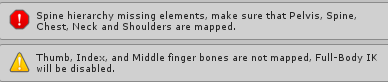
"Spine hierarchy missing elements, make surew that Pelvis, Spine, Chest, Neck and Shoulders are mapped." Help
fading verge
Had same problem b4
 acoustic pilot
Do you have a bone applied to each of those areas?
Even shoulders?
I remember I used to have that issue because I forgot to add shoulder bones
blazing hornet
can you apply bones in unity?
 woeful sonnet
blazing hornet
woeful sonnet
blazing hornet
my blender lags hard
woeful sonnet
im getting this error but i dont know how to fix it
acoustic pilot
Took me some time to learn, but I got it down now
 spare lagoon
Any way to fix this without redoing my DynamicBones?
blazing hornet
Extreme can you explain how I'd do that?
blazing hornet
how shall I show that, blender or unity
swift radish
In unity
blazing hornet
you wan me to just show you the hiearchy?
 silk kestrel
@swift radish did you enforce T-pose by any chance?
swift radish
Just like this
And @silk kestrel is that about my backwards char?
silk kestrel
yes
spare lagoon
I know what I did wrong but, saw it after I map all my dynamic bones and coliders. I just want to know if there is a faster fix then redoing all of it.
silk kestrel
3rd time I have seen it, but is a real pain to fix it
acoustic pilot
@blazing hornet I'd recommend learning how to rig models in blender
blazing hornet
cant do that when it lags hard
silk kestrel
ha...knew it...
acoustic pilot
It took me quite awhile to get dwn, but I can now rig just about everything
blazing hornet
@swift radish how do I find mapping, I am under inspector
swift radish
@blazing hornet , click your model mesh thing, and hit configure in inspector
silk kestrel
How confident are you in your 3D skills? I can tell you how to fix it but it is a cascade sort of thing which may break more of your rig before it gets better
swift radish
Uhhh, I only really know how to use unity, Belnder is an enigma to me xD
narrow jacinth
Hey @nova wigeon you still there?
swift radish
@silk kestrel So there's no like... just rotate the model in blender or rotate the root or some fix like that ? xD
blazing hornet
 silk kestrel
yeah you have to rotate the model in blender
tough junco
i still dont understand how to put the bones inside the mesh.. and im still getting that bone heat weighting error
swift radish
Easy fix cooper!
silk kestrel
but the joint orientations are very messy and will break other parts of your body
narrow jacinth
is it ok for the neck to parent the shoulders?
swift radish
Well ifyou want to message me potted, i'd love to learn how to fix it because a lot of models I downloaded do this problem
blazing hornet
Vex the fix?
swift radish
So @blazing hornet , you need to make that grey bone that's connected to the shouylder the Chest bone for starters
blazing hornet
in blender or unity
swift radish
Unity, all of the bone mapping is here in this page in unity
blazing hornet
then how would I change the shoulder to the chest
swift radish
blazing hornet
so I need to find that piece
swift radish
Click that bone to see the name of it on the left, then click that little circle that I hilighted next to Chest and find the bone
 swift radish
Well your arms aren't connected completely, can I see the area that looks like this?
blazing hornet
 swift radish
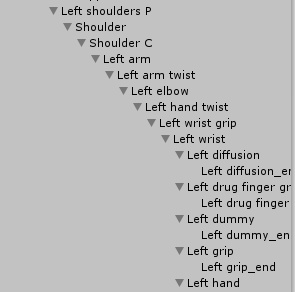
The hands are labeled left hand twist.. are there any other sort of hand bones? It should usually go something like shoulder>elbow>hand
This info would be in the left list, just look for the wrist or hands
If there is a normal 'Hand' bone, that one should be where the 'hand twist' is
For the right and left side respectively
blazing hornet
 swift radish
Interesting
Try assigining the bones like this
Shoulder - Shoulder
Upper arm - left arm
lower arm - left elbow
hand - left wrist
then show me the bones
narrow jacinth
I have a question is it ok to have the neck parent with the shoulders or does it need to be with the chest?
blazing hornet
 fading verge
Aight so im a dude with NO experience on Blender and I barely know how to work with Unity but Im trying to put some skeletons into some models from Halo; Combat Evolved and every time I use the Mixamo Website to turn them into people they end up having their fingers, which are bent and I have no idea as to how to straighten them, becoming all sorts of messed up and looking like they encountered a hand gernade
Is blender the only way I can put a skeleton into these boyos?
blazing hornet
Vex should I do left hand or twistr
swift radish
Dogg, I recommend downloading pre-rigged models, then I can help
Cooper, assign the bones like I listed above
For at least one arm, then show me the model
blazing hornet
 fading verge
I havent been able to find any with pre rigged models. Like I get em from here https://www.models-resource.com/pc_computer/halocombatevolved/ and when I put em in unity as is they kind of have a skeleton but the hands have no bones or whatever and I havent seen any others. Someone i encountered yesterday had working models and he said he got em from Garrys Mod but I have negative knowledge on that
swift radish
Cooper, your model has some weird bones
Where'd you download it? Maybe I can take a look
@fading verge I have a fantastic looking elite ultra from reach all rigged and working, I can find you some links
What sort of models were you looking for from halo?
fading verge
o0o E-Elites? That would be perfect ❤
Im just looking for any old models tbh as long as they work
tough junco
oh wow so i some how managed to get it into a T position.... so umm will it be able to work now in unity?.... because before the arms were at a lower position and it would be stuck like that in game aswell
fading verge
I just used the models from the website there because I loved Halo CE and the site had the weapons and other things too
 safe bluff
You could have just forced t-pose in Unity no?
swift radish
@blazing hornet I'm downloading it and taking a look
blazing hornet
ok thanks for the help
tough junco
i didnt find an option... or im just blind
safe bluff
 muted helm
Ok jaw flapping works for me now .. I had it setup but I had to switch to a default character avatar first then back to my jaw flappy guy...
narrow jacinth
Does anyone know how to fix the model if i change the hiechary to chest?
blazing hornet
@swift radish I can send you my name repair if you need
muted helm
So I guess there's a bug somewhere where it doesn't check or flip the bit for the jaw flap unless it loads a default avatgar
swift radish
@muted helm If you set it up, other people can see your jaw flapping, just you couldn't
muted helm
Ah ok
swift radish
Until you look at the default model
muted helm
That's good to know
tough junco
ok i did what the .gif did but it looks like this
tough junco
well i made it a t pose in blender
narrow jacinth
anyone know why some of my parts of my model becomes small when i change the hiechary
tough junco
but i dont see any weight paints and when i try to apply the weights to the shoulder section it makes it.. dislocated
safe bluff
Set your bones to pose mode
Then click your mesh
And select weight paint
Make sure to right click a bone so you can see what it controls
blazing hornet
@swift radish you checkin it out?
 native egret
Hey guys
so I got a bit of aproblem
"Spine hierarchy incorrect. Make sure tht the parent ofboth the shoulders and the neck is the chest"
swift radish
@blazing hornet
I uploaded it into unity and everything looks perfect already
Weird
tough junco
as so it will look like that
blazing hornet
what did i f up
swift radish
I send you my unity file and you can go from there
tough junco
i dont need to edit anything right? i can start to put it into unity now?
safe bluff
Yeah it should be fine technically
blazing hornet
@swift radish when you can, just dm me it
zenith plank
ok now when I drag my model in unity there's no materials folder
swift radish
So I actually encountered a problem I've never seen xD
The face texture is black? xD
acoustic pilot
For some reason, my avatar in VR won't crouch
 ornate tundra
im having some dynamic bones issues, im trying to make kimono sleeves flowy, but i cant make 2 separate bones for arm and elbow cause i have to exclude the elbow from the arm already so i dont go jello
should i reparent the sleeves to the arm or elbow?
 grave saffron
Can someone help me and my velociraptor?
fading verge
👌
 rich anchor
Alrighty I got a question, I have been following the most recent guide on how to import a char into the game, Now there are no error messages when i look through them, but for some reason when I look at my avatar theres a lot of red, And well it makes me nervous is this normal? Even though I'm getting green all the way across?


 lilac frigate
Hey guys I'm having the error "copied avatar rig configuration mis-match transform hierarchy mis-match transform 'Hips" for human bone 'Hips' not found" can anyone help? I'm trying to apply an animation clip from a mixamo animation to my own. My rig is exactly the same heirarchy
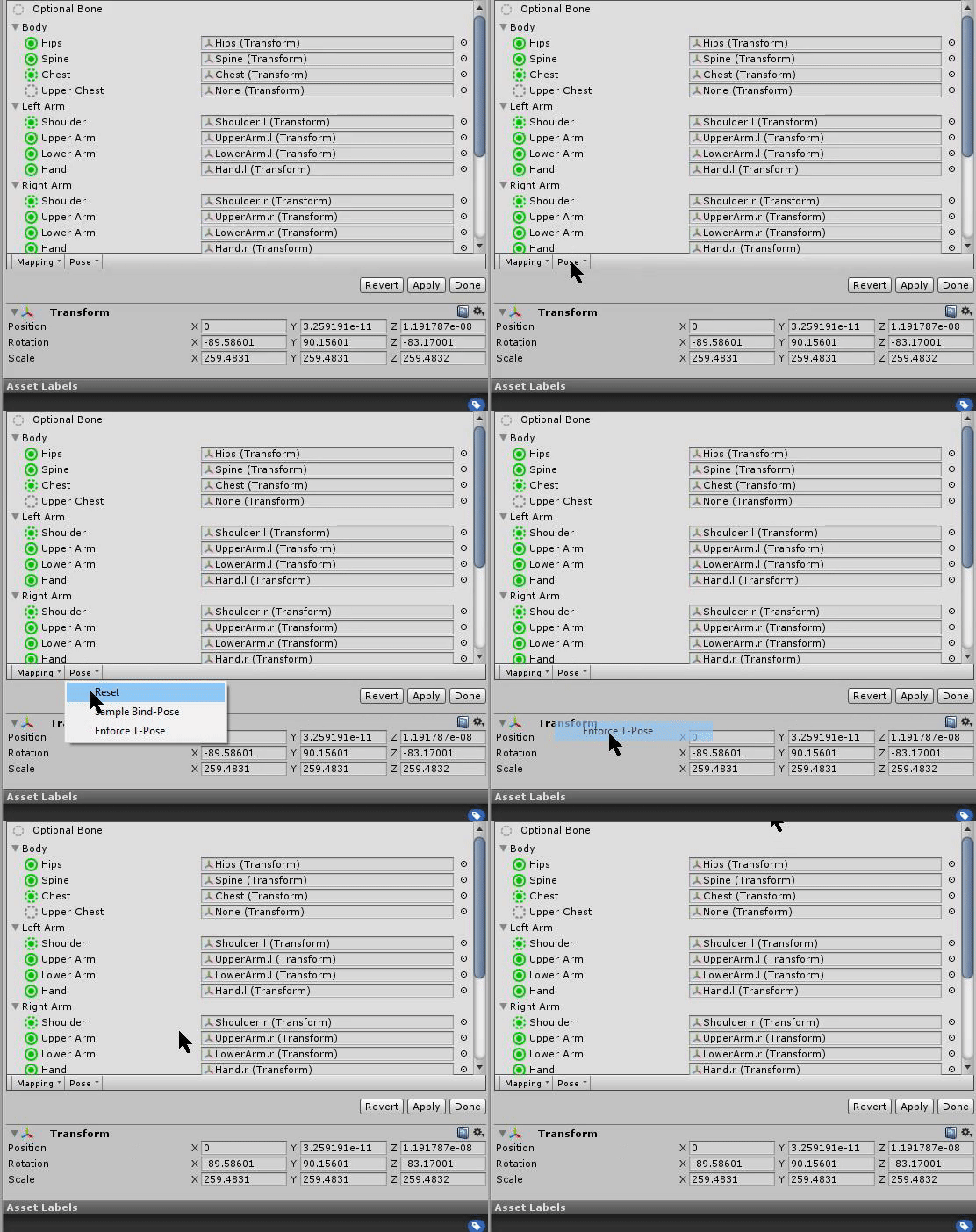
Tren its because your character is not in T-pose under your second photo is a portion called 'pose' and then you click 'enforce T-pose"
There is a little drop-box which is mapping and pose when you configure your avatar
click on pose and then enforce t pose
rich anchor
THANK YOU!
grave saffron
this model started with no selected chest-bone, which vrchat doesnt like
I tried switching it and the spine to something that made more sense, but it resulted in a raptor pose
 reef belfry
is this a good place to ask about Viseme shapes?
 naive tree
@swift radish if u still have problem with that, u have an extra colour added to your face material, it has to be Texture, then white colour besides that and black below
@grave saffron u go into blender and fix hips, they have to point straight up
rich anchor
Another question here, What is the standard spawn size of the cube in feet? So I know how big to make my av in unity?
naive tree
if they are pointing down, select hips, press R then X then type 180
blazing hornet
@swift radish you still there?

 frigid radish
ayy a yoshi
 hidden ether
yEEt
grave saffron
The file isnt importing into Blender. I wonder if it's because it was an PMX file converted into FBX
naive tree
u can import fbx in blender
grave saffron
no no Im aware, it's just blender show anything when I do
ahh, it's just an ASCII file, that's why
hidden ether
im so happy i accidentally discovered orthographic view lmoa
 knotty hull
I'm slowly getting to where I need to be but I'm not so sure how much more I can do as a complete beginner 😢
hidden ether
I did just go through in orthographic view and straighten them all
nova wigeon
and it looks like they aren't parented to eachother
nova wigeon
It'd be best to just re-rig it imo
hidden ether
that's what i'm doing
nova wigeon
That way you have absolutely 0 problems
 nova wigeon
You generally want to have each circle where joints are
so you want to have one at your hip, knee, ankle, etc.
hidden ether
how do i make em look like spheres again lol
nova wigeon
There should be a sphere at the top and bottom of each bone
nova wigeon
An example of what it should look like
hidden ether
ah
but see
https://gyazo.com/6fa6f9580daac8e2141503f6f85d77fd
this is my other model that works almost perfectly when i use it in game, in edit mode with those on

as you can see they're absolutely tiny
the only problem i have with it is the idle animation which seems to be shared with a few source engine models
nova wigeon
Ah
hidden ether
and sitting lol but i have no idea why that is
nova wigeon
Well then keep doing what you're doing. If it seems to work, perfect!
swift radish
So my character has vicemes all working, but when she's not talking her mouth hangs open, how to fix?
hidden ether
Should I tick "Connected" when parenting bones?
 grand thorn
Been working on trying to give this Aku avatar eye tracking and vicemes for a few days now. I can't tell if the eye bones are working because I'm having problems getting the texture to show outside of Blender. When I test in Unity the eyes just stay white. When trying to sculpt to create blendshapes for vicemes I'm not able to affect the model with it. If anyone could help me out and maybe tell me what I'm doing wrong, I'd really appreciate it.
zenith plank
ok I'm guessing I fucked up again?
hidden ether
that doesn't look like a rigging issue
zenith plank
o
hidden ether
also whats good stock
zenith plank
yea it's a materials issue
hidden ether
maybe you've got the materials on the wrong rendering mode?
zenith plank
maybe

 zenith plank
owo
zenith plank
I don't know where I fukced up xd
hidden ether
was the model solid before you chucked materials on it?
zenith plank
I don't know where to ask lmao
naive tree
@zenith plank trasparent as invisible? add outline in cubeds shader
 abstract cloak
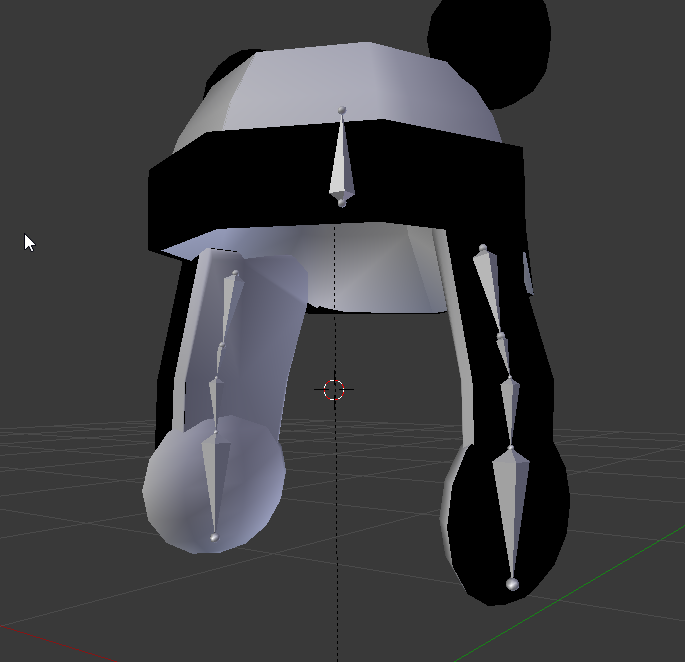
Ok so I think this relates to rigging. https://gfycat.com/ParchedFailingAntlion
I'm using Dynamic bones for my Panda's hat and for some reason it's only attached on the left side of his head. The movement of all this seems so unnatually due to how the bones are laid out: https://i.imgur.com/hjTa11Z.png
Is anybody able to see the issue straight off or require any additional info?

 cedar garnet
also its like this
https://gyazo.com/8d6384ce75b42ec34e7437e79bdf8c3a
Gyazo
Gyazo
the rotate is not doing what i need what tool would it be to put him up and down

 torpid osprey
Is there a way to lock moment in a joint? Say I had a arm in a sling and only wanted the wrist/fingers to rotate and move.
tough junco
only one eye has weighted paint on it while the other doesnt...is there a way to fix it? because ingame only one eye moves aswell
torpid osprey
Paint the other?
tough junco
it paints the whole eye instead of the pupil
torpid osprey
Im not to sure but if theres vertexs on it you can just select them and add them to a mesh group then set the weight?
Im not 100% on that though.
hidden ether
@abstract cloak where is the middle bone in the image parented?
i think the issue might be that it's parented to a bone that is making it off-center
abstract cloak
I found the reasoning behind the offcentre, it was because my Origin point some how was set to where it was pivoting
hidden ether
ah right
abstract cloak
Working on another issue now, I'll send it soon
hidden ether
https://gyazo.com/8094f00da5e4158883bd297f57758c03
https://gyazo.com/05eea3021bedf52973ecb320648d44ee
so can anyone tell me why these bones are completely missing?
hidden ether
yea
torpid osprey
Hmm...
hidden ether
Should I make them bigger? They worked completely fine on my previous model and that model had smaller bones.
granted, that model was a source engine model that came with a rig
 main hill
size doesnt matter just make sure they are parented to the correct bones
hidden ether
hang on
torpid osprey
I was just joking about small bones haha
abstract cloak
So, don't suppose you know how I can stop the hat sliding around the head? https://gfycat.com/CalculatingBitterIndianabat
 hidden ether
https://gyazo.com/e8a7fed8e2dfff60b2f3bc61a0fed86c
this is my parenting - apologies for the lazy naming, i wasn't expecting any problems. I can name them properly if it helps.

i think the hat sliding around the head thing would be cute if he didnt have two sets of ears 🤔
abstract cloak
Yeah, I was gonna remove the ears after 😄
hidden ether
maybe keep it but just tone it down a tiny bit?
i'm not sure where to find the option because I haven't worked with dynamic bones yet, so I apologise for not being able to add much of worth 🤔
abstract cloak
I think I may need to add more bones
fading verge
What do I do about this? https://i.gyazo.com/f7cfdfb27cb4c4e774db373ef1a75273.png

I've already rigged it as a Humanoid
hidden ether
846 polygons? what's your model?
fading verge
 hidden ether
lmao
fading verge
yes
hidden ether
i don't think you want that on a humanoid rig
in fact i'd create animations that match how they are in game
shouldn't be too hard
but
go to the rigging part, send a pic of the whole screen please
abstract cloak
@hidden ether Little update 😛 https://gfycat.com/InsecureWeepyAstrangiacoral
 fading verge
Neat
hidden ether
looks sweet
fading verge
Murdoch? 😦
hidden ether
not totally experienced, but it'll help other people if i can't come to a conclusion
click on "configure"
hidden ether
go to configure and send a screenshot of that whole screen
 raw sphinx
hey guys, when creating a animation to pull a sword out of a sheath, thats on my back, where whould I put the sheath and sword in my aramature? i saw some videos sayin gput the sword in the hand root, but what about the sheath on my back? im askin gbecause i put it on my chest and im getting this error. also, i checked the bone rig and everything looks okay. any help would be great!
hidden ether
why is the sheath a part of the armature? i would just have it as a part of the model
fading verge
Do you happen to know how to associate the textures with the materials?
raw sphinx
hmmm, should i combine the model mesh and sheath mesh i nblender?
well, the sheath didnt come with this model
hidden ether
hang on a tick kazuin
fading verge
Alright
hidden ether
and yeah casual, that's what i'd do
https://gyazo.com/4a3551bcf689110c267c405e17bd54d1 @fading verge
 fading verge
Thank you! 😃
hidden ether
you don't need to use Unit Shadowed, just whichever material you're using
(but: if it comes with a texture it'll probably need unit shadowed)
torpid osprey
Anyone know how to make your arm not move but just your wrist/fingers? Like if your arm was in a sling?
raw sphinx
should i do the same if i want the handle to dissapear from the sheath when the sword comes out aswell?
hidden ether
uhhh is the handle a part of the sheath?
hidden ether
it shouldn't be part of the sheath it should be part of the sword i'd assume
raw sphinx
well the sheath has a handle thats just a handle, then theres a full sword for the hand.
hidden ether
hang on
fading verge
I forgot sorry
hidden ether
it's just right click>create>material
 edgy ginkgo
how do you duel wield two swords and have each work in each hand seperatly using the same gesture
hidden ether
i would assume just have them both show up on the same gesture on each hand
hidden ether
how did you fix it?
 dapper glacier
my avatar's clothing aren't staying on the model, is this a blender issue or unity issue?
blazing hornet
can you decimate in unity or only blender?
silk kestrel
@blazing hornet blender only
naive tree
you can do that in unity, but in blender u have control
unless u want to pay for unity assets like Mantis LOD
and idk how good it is
there is Mantis LOD online that decimates entire avatar, but I wouldnt suggest
hidden ether
has anyone
got the list of bones that are required
and their names
because I've got all my bones correct I just need to find what to name them
main hill
league likes to fuck with those of us who rip models from the game
all of your limbs are backwards
you and to fix them manually or make a new skeleton
fading verge
i'll just fix em, i just found a huge folder of pre-rigged champs and tried using some
anivia's a bitch
how are they backwards? says they're the right way

 hidden ether
@fading verge my hero
 junior mantle
Hi! I exported this model but when I got into vrchat I saw the hands looked all weird and I found one of the thumb bones all messed up like this-- how can I put the bone back into place? 😞
junior mantle
this error pops up when i try to ;_;
naive tree
@junior mantle go to tab that is left from bones and change from Rest to Pose
junior mantle
thank you!! sorry i don't know much about blender lol
main hill
@blazing hornet your finger bones are too short make them longer in blender
blazing hornet
how does one do thatg
main hill
go into blender and select the skeleton and hit TAB to toggle edit mode then extend the length of the bones
right click to select in blender
 verbal adder
So I have my rig and model setup but when I try to configure bone assignment in Unity it doesn't open the menu it just creates the assets and the avatar screen under debug did i miss something?
Humanoid is selected and has been applied but configure doesn't seem to open the assignment options
torpid osprey
Adding weights wants me to mash my head into the wall
 lime monolith
Is there a way to lock the movement of verts along a certain axis?
 digital mango
nvm got it working ' v '
lime monolith
My character is on like a kind of stand, which I want to have always be flat and parallel to the ground. I can accomplish this if I attach the verts of the stand to an unparented bone, but then I run into an issue where the body is a good distance off from the 'stand', like the stand lags behind the movements
I'd like to keep the stand always directly underneath the hips, but to not tilt with the hips or anything
 solid adder
@lime monolith Should be able to just drag onto the avatar without having it parented to a bone.
Adjust accordingly and should be fine
lime monolith
It's not, though
that's what I did, and the hips are tending to sit to the side of the stand
it's not consistent, as running or otherwise moving around changes that
digital mango
Okay so, I have this little notification that says "character not imported as humanoid rig" I just fixed everything. it's all green. what am I missing??
 zenith plank
lemme get uhhh stuck on signing in
 young ocean
https://youtu.be/YyqecP2mn0c?t=525 okay so I'm at this point in the video, but the SDK isn't allowing me to choose 'settings'. The only option I see is 'clear cache and playprefs'

==NOTICE: VRChat Unity version as of Sept 1 2017 is 5.6.3p1== Wicked Good Links: www.vrchat.com http://vrchat.wikia.com/wiki/VRChat_Wikia https://github.com/...
digital mango
is there any way to put textures over a mixamo file??
fading verge
how can i add another leg without messing it up?
hidden ether
@young ocean Restart your Unity a couple times.
@fading verge idk man you might need to do some custom animations for cass because she got no legs yknow
young ocean
That'll fix it?
hidden ether
It may fix it, but I don't think there's a clear cause or solution to that problem. I've had it constantly and it ends up just fixing itself after a couple restarts.

 copper shuttle
Alright so I'm trying to get an HK47 model working
Did the rigging in unity after fixing bone hierarchies in blender
As far as I can tell there's nothing wrong but apparently my models hands and feet are unspecified and unmapped despite there being no indications to the contrary
Any tips?
hidden ether
@torpid osprey You've got the right hand bone pictured parented to a left hand bone.
Check your hand rigs.
copper shuttle
Nevermind
torpid osprey
rubs eyes its been a long day
copper shuttle
I had a checkbox checked that shouldn't have been checked
hidden ether
Haha, same weeir.
hidden ether
There's something you should be able to click that says "Enforce T-Pose"

there you go
torpid osprey
Ahh gotcha sweet thanks
 short nest
@hidden ether https://gyazo.com/5c340583d505a370a4cd35a023c8c083 and https://gyazo.com/c811604d3fa0d02951e44179e9c63efe not sure which one you needed.

 hidden ether
Send me an image of this screen in Blender: https://gyazo.com/039b3072befc25c284a13dbbf7248a79

 hidden ether
Your character doesn't have a head bone... Or a neck bone...
https://cdn.discordapp.com/attachments/395550621568335875/396931931775696896/bones.png
Your skeleton should look something like this, doesn't have to look exactly the same but this is what you want for the Humanoid rig.
 short nest
I assumed the 'head neck and upper' was covering that haha
hidden ether
Also, your parenting should look like this:

Hips are the parents of Spine are the parents of Chest are the parents of Neck and Shoulders.
short nest
Hrm, alright. The model came parented this way, so reep. Gunna have to do a lot of moving around it seems.
Thanks!
fading verge
if my avatar is in the ground in game do i just raise the position in unity?
tough junco
Hey simple question.. how do i make the bones grey so it will be easier to see?
hidden ether
@tough junco No clue how to make them grey, but these options are here. https://gyazo.com/305b83352d0eddf42fb05e757a0c6ff7
 tough junco
hah, please excuse me, but your profile picture makes me laugh a lot
and thanks ill take a look at them
fading verge
uhmmmmm
"Spine Transform 'Spine 1' has bone length of zero." But it wont let me put it into blender to fix. Suggestions?

 marsh widget
''your rig has the Upperchest mapped in the humanoid rig. This will cause problems with IK.'' what deos this mean?
torpid osprey
Dont rig with Upperchest
marsh widget
but if i remove the upperchest then a diffrent error happens
 thick leaf
@marsh widget dawg i got you
see how on the right I have chest selected and upper chest is blank?
blazing hornet
How do I expand bones in blender?
 devout pivot
i think you just click and drag the two ball ends of the bone
 dire mica
Expand as in change size or add another bone to exisiting one
blazing hornet
I dont see that
size
cause in unity it says its 0 size
I see a little gray dot
torpid osprey
Anyone aware of a way to lock motion in a arm when in vr? Like if your arm was in a sling you would only move your wrist and fingers?
devout pivot
That sounds like advanced modeling.
dire mica
@torpid osprey Like permanently?
fading verge
Sure, you're gonna need to weight and vertex paint
 hardy lava
I need to buy the dynamic bones plugin for hair physics, right?
fading verge
Yes
crisp tendon
@torpid osprey Weight paint the things you want to move

 sterile portal
Hi I wanted to ask if anyone could explain to me how to add things like dress to my mmd model or change the hairstyle and how to add that to the bones
fading verge
Download what you want and merge it in PMXE
 fresh vault
guys, my model has only a wink (wink left eye only) and blink (close both eyes)
so now for blink left and right sections, which one should i choose
 royal gale
you can just do blinking as a custom animation later in unity
it does mess with any animation overrides with stuff like emotions if you do them though
 compact pebble
Can you only use humanoid rigs in vrchat or are you able to do animals?
crisp tendon
You can use generic, but you'll need your own animations afaik
viral stag
Hey, I wanted to ask if I'm supposed to do anything to the bone of this sleeve if I wanted to apply dynamic bones to it?
crisp tendon
The way dynamic bones works i believe you may have to create an additionnal bone, but all of it is explained in tutorials
viral stag
I'm sure it's not too difficult but I was wondering if somebody could show me specifically for the sleeves, I figured out the hair, though
crisp tendon
it should behave like skirt afaik
compact pebble
I have imported animations already so i could use generic I guess. problem is when I use the customoverride it wont do anything. Also, the model goes through the ground even though it is high up enough in the editor
 south bear
well i know i broke something https://puu.sh/yRsZM/6b57ddfc46.png
 fading verge
🤔
south bear
this model has 4 spine bones
been playing around
and tried 1 and 4
4 for the chest
and 1 for spine
i think thats how its gotten this messed up
so im using one and 2
south bear
XD
 tawny temple
anyone can help me? my avatars head stays in place when i do an animation XD
 valid junco
eighth fucking model and counting
someone please just help me get out of this hell
does anyone even know how to fix this??
valid junco
tawny temple
what bone is chest assigned to?
valid junco
dire mica
@south bear that's a pretty hilarious looking model lol
 tacit sinew
should I re-assign those skirt bones on the right to the waist? and if so how would I do that
 oblique latch
would anyone like to rig me a set of dinosaurs for a map i am working on for vr chat you can name them as well if you like
silk kestrel
do you mean rigging a full set of animation controls or bone rigging?
 amber fjord
anyone knows a good place to get FF7 and 8 models?
oblique latch
bone rigging so a player cxan be a dinosaur
fading verge
can anyone pm on how to fix this https://gyazo.com/d743a2f3c939f953f406835edf459bab

 limber marsh
make sure the feet are parented to the lower leg
fading verge
k









 fading verge
No hip bone. You probably only have spine and chest
 vagrant abyss
Is there a simple picture/list of all the required bones? Every youtube tutorial I see has dresses and wings. Way too many things . :/
 jovial bison
I'm having a weird problem :o
Everything works fine but my hair is and bracelet are floating

 fading verge
Unity will tell you the required bones
vagrant abyss
ok
jovial bison
The hair is the wrong way around in the bone configuration preview
 finite imp
My mouth blendshapes seem to be working perfectly in blender, but in unity the teeth/inner mouth doesn't move
no jaw bone
 mild mural
 mfw someone forgets which way left and right is while naming bones
oblique latch
this is a hard one but how do i go about fixing this
minor shore
@finite imp did you join the mashes back together in blender?
finite imp
Yep
 pure falcon
Reckon anyone could quickly help me with this error? New and dont know how to fix it
jovial bison
My character has 12.5k polygons after applying a fairly extensive rig, how do I decrease them without loss of quality ?
http://puu.sh/yRyeN/23aeb01efc.jpg Why does this keep happening T-T

 oblique latch
so this dinosaur rig is going well xd
jovial bison
Does it have an avatar ?
jovial bison
Probably yeah
digital mango
could someone please help me with it? I've been working on it for days and I still haven't been able to do it
jovial bison
Did you weight paint ?
digital mango
I couldn't weight paint
it wouldn't let me
jovial bison
Are you able to pose your character in blender or maya with the rig ?
jovial bison
Are you sure you are exporting it with the armature ?
And did you turn off leaf bones ?
oblique latch
this ir is so hard i bet i will be working on it all day
digital mango
what??
what do you mean exporting with the armature? @jovial bison
leaf bones??
I thought it just did that
minor shore
does anyone know why my avatars colors are so dull compared to others?
jovial bison
They probably use custom shaders
minor shore
how can i do that?
jovial bison
There's a video on youtube that shows you where to get those shaders
dire mica
For starters
Get cubed shaders
@minor shore https://github.com/cubedparadox/Cubeds-Unity-Shaders
safe bluff
psure that is cubed shaders
 mellow plinth
is there a way to set first child bone in blender?
minor shore
@dire mica i already used cubeds shaders on her the flat lit toon
dire mica
Ah
digital mango
I literally cannot get anything to work
at all\
I have the model and everything laid out but I just cant get it through the rigging portion
ive tried different models
different bones
everything
someone could you please do it for me
this is not working out for me at all
 craggy dragon
Anyone here know why the model seems to animate to the side and not the front?
Only this model seems to do that, all of the other ones I've uploaded animate fine.
safe bluff
Maybe the way your bone is facing in blender
 carmine creek
Any chance anyone can help a new model maker with two problems?
1: The feet on my model are backwards.
2: I am for some reason missing chest and shoulder bones.
Or is this wrong chat?
oblique latch
my rig has no shoulder how do i fix this or add one
viral stag
How do I copy and paste a bone in the same exact place?