#avatar-rigging
1 messages · Page 41 of 1
 lime monolith
uhhh, instead of me listing it out, just look at the green humanoid rigging thing in Unity
that's the skeleton you're trying to match, just make sure you don't have an Upper Chest
 paper bronze
thanks internet
 edgy ginkgo
So why is that a character is rigged and moving in Unity, but not in ChatVR, its stuck in T-pose
 fading verge
oof
 restive shale
i heard the roblox sound as i read that
 teal cloud
okay
god damn
finally
so my model is in blender, and it's ready to be exported
if I want to put it into mixamo
what should I export it as?
restive shale
fbx is always good
fading verge
anyone else have an issue where some bones don't appear in unity
but do appear in blender
restive shale
fbx my son
restive shale
away
restive shale
I've gotten that same issue a few times
restive shale
I only had one way to fix it
teal cloud
how
 bleak pecan
The feet of my model stretches in game as seen in this idle animation. The toes are attached to the floor while its feet move. How do i fix this?
teal cloud
you have some kind of rigid bone left in there
restive shale
@teal cloud What is did
restive shale
Was create the textures folder in unity
fading verge
Can someone help me work out the typical bone heat weighting failing on blender?
restive shale
then import the nonrigged but textured model to generate the materials
then rig the model
restive shale
and import the rigged untextured fella
restive shale
sure
bleak pecan
@teal cloud Is there something wrong with how the bones are setup?
 lucid sapphire
@teal cloud I had the same thing happen to me too. All you have to do is just drag the textures of the model (where you need to place into the Assets of the Unity scene) right onto the model in unity. like, for example, if you have a texture named face, drag it right onto the face.
 acoustic pilot
Why won't it let me upload my avatar even though I have no red errors in the avatar itself?
As you can see
"Build and Publish" is greyed out
bleak pecan
you've to remap the fingers of your model by configuring it
lucid sapphire
@acoustic pilot it's preventing you from building because of that one actual error, which wants you to remove the audio listener from the camera, which you should even have.
lucid sapphire
the error dialog tells you right there, in the screenshot you gave. it's located in the main camera.
 oblique heron
Why are you trying to publish the camera?
acoustic pilot
I was watching a tutorial and it was showing that you needed the camera there for the "mugshot"
Aka the image people see when they see you in the playerlist as the model
 mild mural
Upload makes it's own camera
mild mural
I've never had to delete the light or default camera
lucid sapphire
yeah same. it just detects the model and only uploads that.
@acoustic pilot you can keep the camera and light, but you just need to remove the audio listener from the camera.
acoustic pilot
@lucid sapphire
Sorry if it's a stupid question
But where do I remove it at then?
I don't see anything talking about a "Audio listener" in the camera in the inpector
Oh wait
There we go
Guess I just deleate that
FINALLY
I CAN UPLOAD IT
THANK YOU
lucid sapphire
 sour kite
Is this a channel i can ask about shapekeys / blend shapes?
 prime gazelle
i can't get eye tracking working for the life of me, I have the correct bones rigged and they're weighted properly, but it just wont work in game, even using cat's plugin, what am I doing wrong ;w;
lucid sapphire
@sour kite you are, i believe. just depends on who's available. i know a little bit, not sure if i can help you completely
sour kite
Well then are shape keys in blender and blend shapes in unity suppose to be set to a certain value? Or are those just to test out the movements?
lucid sapphire
@prime gazelle did you use a vesime blend shape in unity?
sour kite
Yes
prime gazelle
for the mouth tracking? yes
lucid sapphire
@prime gazelle the viseme mask should automatically take care of the eye tracking if you have shape keys setup for the eyes, from my understanding
sour kite
Oop, that question wasn't towards me :v
lucid sapphire
@sour kite not sure what you're asking, but once you have the shape keys setup in blender, either select blend shape or viseme blend in unity, and you should be able to assign them.
sour kite
Well, the thing is. I've already assigned the proper blend shapes and they all work as intended if I were to fiddle with their values both in blender and unity. However once uploaded they don't work in vrc.
prime gazelle
see it makes it weirder cause they move in musslces + settings in unity rigger, but they still wont work in game at all
sour kite
it's like we have the same problem! only it's eyes for you and mouth for me 😦
lucid sapphire
@sour kite that's weird. i don't couldn't think of what the problem is. i haven't gotten the hang of them, since the face mesh of my model just rips off when i put the model into unity 😛
guess we're all having trouble
sour kite
ah such is life
sour kite
Looks like the materials are set on the wrong mesh
lucid sapphire
put the face texuture onto the face mesh
 sudden scaffold
For visemes do i have to have the head as a seperate mesh, or can I join all my meshes together?
prime gazelle
@lucid sapphire what would the visemes be called? just noticed there's only blink visemes in blender
prime gazelle
drag it to the face
lucid sapphire
@prime gazelle you can name them whatever, but here's what you can call them
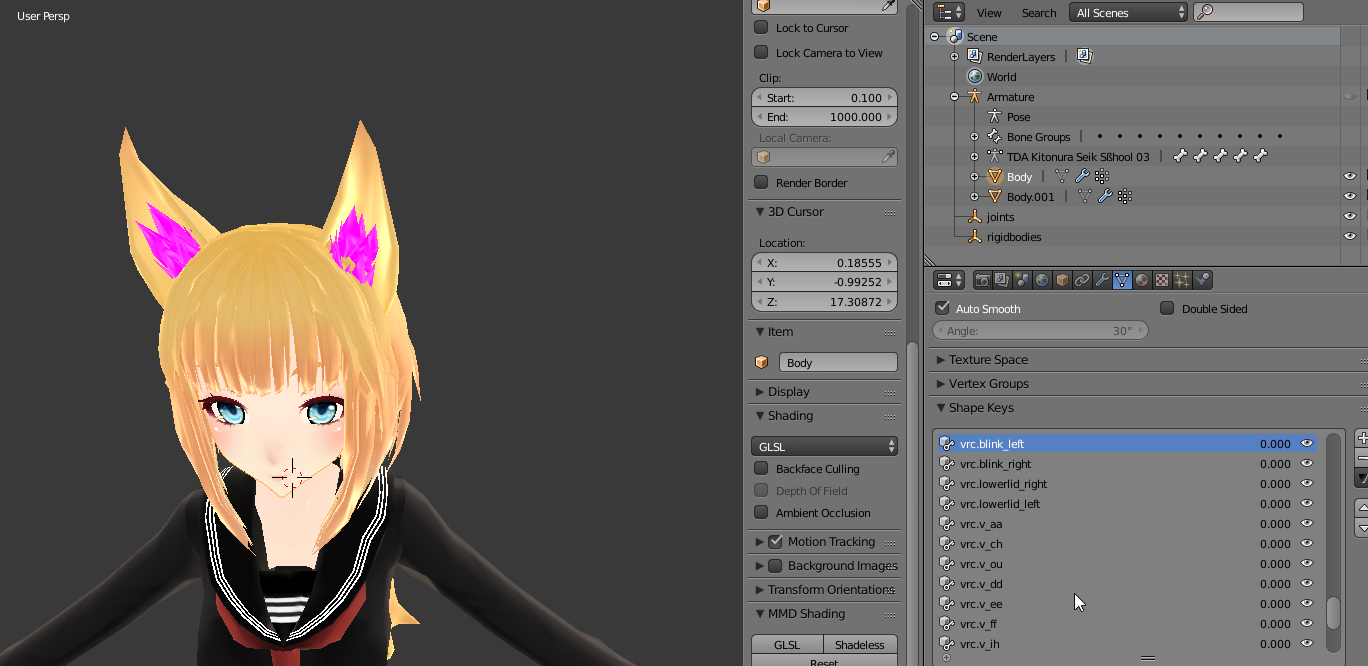
vrc.blink_left
vrc.blink_right
vrc.lowerlid_left
vrc.lowerlid_right
vrc.v_aa
vrc.v_ch
vrc.v_dd
vrc.v_e
vrc.v_ff
vrc.v_ih
vrc.v_kk
vrc.v_nn
vrc.v_oh
vrc.v_ou
vrc.v_pp
vrc.v_rr
vrc.v_sil
vrc.v_ss
vrc.v_th
lucid sapphire
for all the different mouth shapes and sounds
lucid sapphire
@slender tapir drag the face texture onto the face of the model
 slender tapir
it doesnt let me
lucid sapphire
@slender tapir you sure you cant left click on the face of the model and check what texutre is applied?
slender tapir
mhm mhm
 hoary forge
i finished and uploaded my avatar but his legs are fucked up. they look squiggly and weird when i run
and crooked when i stand
prime gazelle
oh uh
go to materials folder
then drag the face material to the face
that should do it
lucid sapphire
@slender tapir you have selected the entire model, but i'd check to see if you have an actual standalone mesh for the face
slender tapir
when i drag the face on it makes th e whole body a face texture
fading verge
Has anyone rigged their own avatar here?
lucid sapphire
@slender tapir
see if you have a face mesh like me
@somber nacelle the only thing i'd say to check is that you only have the Simple AvatarController for your animation controller. it takes care of everything
slender tapir
prime gazelle
@lucid sapphire im really observant, I just discovered the eye bones aren't actually moving the eye mesh in untiy
:VVV
its working in eye tracking testing but the bones themselves arent moving and now im double confused
lucid sapphire
@somber nacelle not quite sure. perhaps it's the spine bone(s) you assigned in the Unity rigging?
@prime gazelle i haven't been able to get eye tracking working myself, so i dont think I'm much help. It just definitely seems weird they aren't moving.
the key shapes for blinking obviously shouldnt affect the eye tracking, so no clue
 fierce pumice
hiya got the same issue
trying to import a model but got the spinal configuration error and I can't seem to delete bones in blender to fix this issue? Watching VRPill's video on it...
 north sable
https://gyazo.com/ba95dc4f254551b96d1604617d0943d3 < All this because I don't know how to animate Shapekeys with Bones in Blender 😃
 lucid sapphire
@somber nacelle it looks to be in order, so I'm not quite sure. only other thing i could think of is that the rotation of a spine is out of whack, but i'm assuming that it looked normal in blender?
 lucid sapphire
@somber nacelle the upper chest shouldnt matter though, since you remapped it as the chest. anyways, are you saying that ALL the models you try out have the same issue, or are they all the same type of models?
i'm thinking that maybe somewhere along that process, the spine gets messed up. not quite sure though
 frosty pewter
My avatars arms keep raising above my head
 hazy cobalt
I noticed that there was a program called "Dynamic Bone", I assume that it's used for jigglebones and such
fierce pumice
yeah but it can hurt others cpu if you use it too much so in moderation
tails, skirts whatever you want to move hair and such too.
hazy cobalt
I was planning on using it pretty much once or twice for my model
 neat cipher
I set one of my avatars to use a shapekey and another to use bone flap but even though people can hear me ingame i dont see in the mirror neither avatar with a moving mouth
anything im missing?
 raw sphinx
any one know how to fix this?
 silk kestrel
can you select the joint named "notsure"
raw sphinx
i named it that becuase i forgot what it was. the rig looks okay in blender, wheni move it to unity its like that
 uneven hill
Also @raw sphinx, looks like your materials are transparent. This has no effect on the armature but it is still something that you are going to want to fix
raw sphinx
i know how to fix it, i just threw it in unity to try to see whats up with this bone, i had it uploaded in game but raninto some weird stuff
is there a way to just delete that big bone?
silk kestrel
delete it in blender, but use the [mix weights] button in CATs tools
raw sphinx
yeah, i used cats tools. its not there in blender, or at least im not finding it.
uneven hill
What is the error though?
silk kestrel
can you identify the name of the big bone which happens in unity? It will give you a start to where to look for in unity
raw sphinx
this big bone is connected to my leg and somewhere else and it makes my avatar twist and stuff.
its attached to the leg bone, when i select the leg its attached to it and i cant single it out.
silk kestrel
do you mind sending me the .fbx so I can debug it?
raw sphinx
sure, one sec.
 dull totem
im having trouble opening 5.6.3p1 unity
hoary forge
my avatar has all its bones but it just slides on the floor. When i change the animation type to humanoid, he is able to walk but stands on 2 legs like some monstrosity
 solid adder
@dull totem try restarting the computer?
And if that doesn't work make sure you have the right Unity version for the correct computer and perhaps reinstalling.
lucid sapphire
do i need the jaw bone for blend shape lip syncing?
uneven hill
@hoary forge what do you mean? Is it a 4 legged character or something?
uneven hill
@lucid sapphire jawbone for jawbone lip syncing and visemes for blend shapes (i think)
uneven hill
@hoary forge ok, animate as humanoid, but then use annimation overide to change idle and walking animations to fit your avatar
You are going to need 4 leggged idle and walking animations though
 uneven hill
Also, i think you might need the arms to be mapped to dummy bones, so that your front legs dont mess up when holding objects
Doesnt matter if you have dummy arms as long as you use custom animations
hoary forge
ah i might just drop this one and find an actual humanoid
or come back to it later
i made another character that is a human and he works very well except for his legs
they are all screwed up
looks like hes a cripple
solid adder
@hoary forge Please tell me that's Artorius' Wolf.
hoary forge
yessir
lime monolith
Is there any kind of way to mess with IPD/world scaling? I'm noticing that on large characters, I'm able to reach through the floor, but on small characters, I can't even touch the in-game ground. Changing my in-game height setting has no effect
solid adder
👏
hoary forge
the lovely sif
 potent quarry
i'm trying to add dynamic bones to my skirt, but the skirt keeps going inside-out
anyone know what could be causing it?
solid adder
@potent quarry you have any colliders instead by chance?
potent quarry
i do, should i remove them?
solid adder
Possibly for now
potent quarry
i'll try that, thank you
solid adder
Also play with the dynamic bone settings for the dress if they are flopping too fast
.5, .1, .1, .9 is usually good for clothing
hoary forge
how do i delete models
uneven hill
Click the sdk tab in unity, then click manage uploaded content
Simply delete what you dont want from there
hoary forge
ty
uneven hill
Np
potent quarry
ooh i figured it out, gravity became inverted somehow?
neat cipher
This is wierd, or is this a mirrors issue: People can see my avatar talk (Jaw Bone Flap mode) but i cannot see it in a mirror so its diffcult for me to test my avatar out. Did the same thing with a secondary avatar with Jaw shape flap. Also Dynamic bone people say looks fine but to me its flapping like mad
teal cloud
yeah, uh I was talking about the legs
did you find the stiff bone?
cuz your ankles weren't moving properly
they were anchored
 limber storm
hey im having this problem where my character is in t-pose looking into a mirror but when i look at my body through the headset (eyes of character) all the movements are correct. any idea what went wrong?
silk kestrel
do you have a screenshot?
limber storm
what do you want a screenshot of, the bones?
silk kestrel
like the t-pose thing vs the headset
limber storm
dont really know how to take a pic in vr, same thing happens in desktop mode. I see the animations normal on myself but others (including myself when i look into the mirror see the tpose). https://gyazo.com/1587cb105658b45ac8094f8e2400a462
 silk kestrel
sorry, dont think I can help with this. 😦
 fickle lion
@limber storm are there any warnings in Unity in the SDK?
 fierce crag
Hey guys quick question. Is it possible to rig a model to work with ikinena? I think it is, but I am newbie when it comes to modelling.
limber storm
aye, actually didn't see them because i didnt scroll https://gyazo.com/1fe10a4779a3254a67040322069593f7

ill check if i can fix it in blender and see what happens
 celest bay
the upper arm lower arm doesnt matter i think but the upper/lower leg does i think
fickle lion
Yeah you just have some parenting issues. Just the bones
celest bay
just make sure you have the names "spine" and "chest" named properly and stuff too
also anyone got a 100% legal not pirated at all download of dynamic bones for unity?
limber storm
yeah
celest bay
might as well get my model refined till the whole RX thing gets resolved
 tawny temple
why does this happen to her neck XD
celest bay
check your VR descriptor location and make sure its exactly at eye level and zeroed on the x-axis
tawny temple
it happenes during the idle animation
celest bay
hmmm
tawny temple
fading verge
Should I mix weight on IK bones?
celest bay
do you play in seated mode @tawny temple?
tawny temple
yeah
 native egret
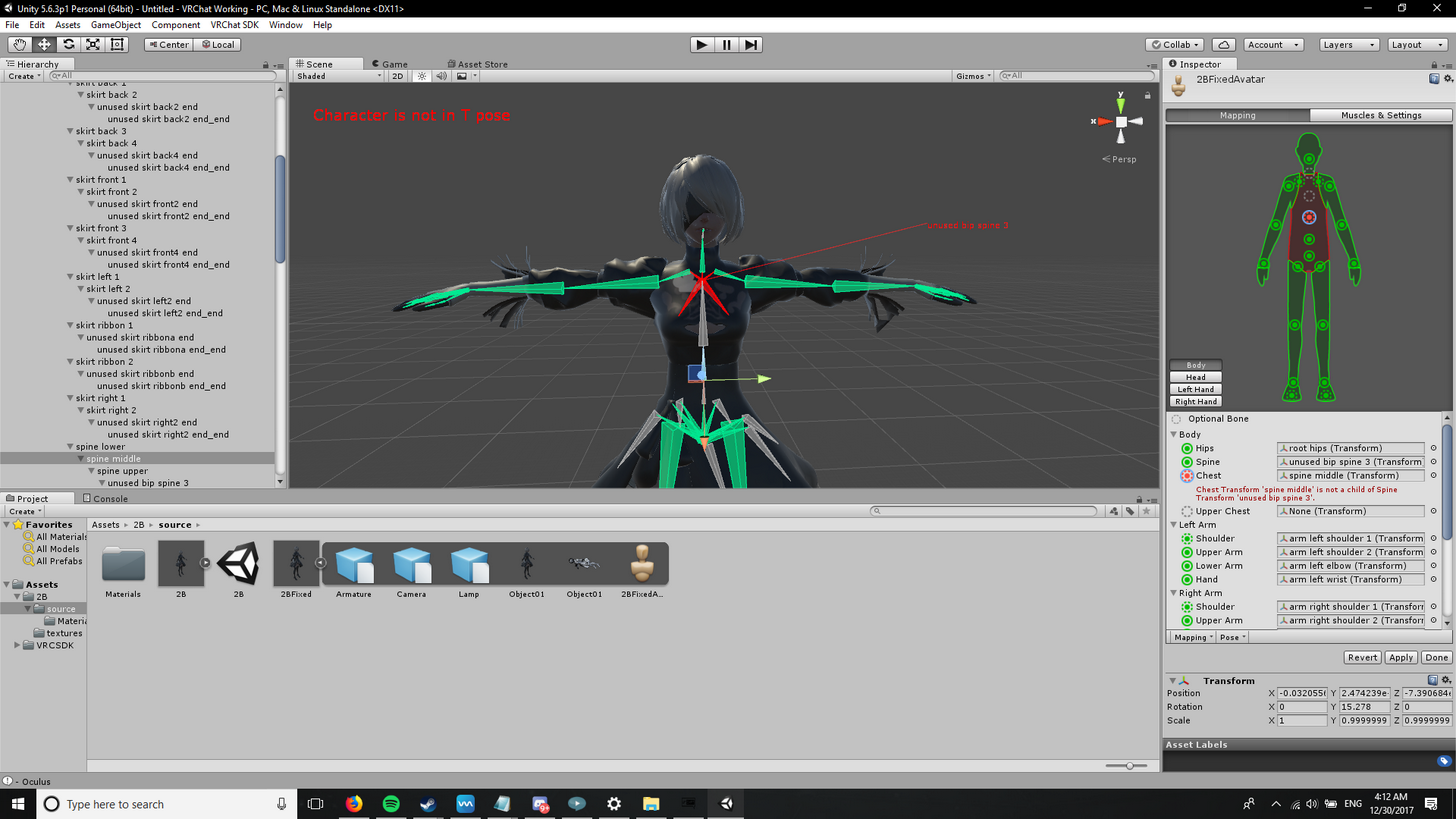
I changed unused bip spine 3 to be my spine because it is connected to the shoulders and up which I was told was what I had to do
celest bay
it could be that you arent centered on the seated area and that could cause it
native egret
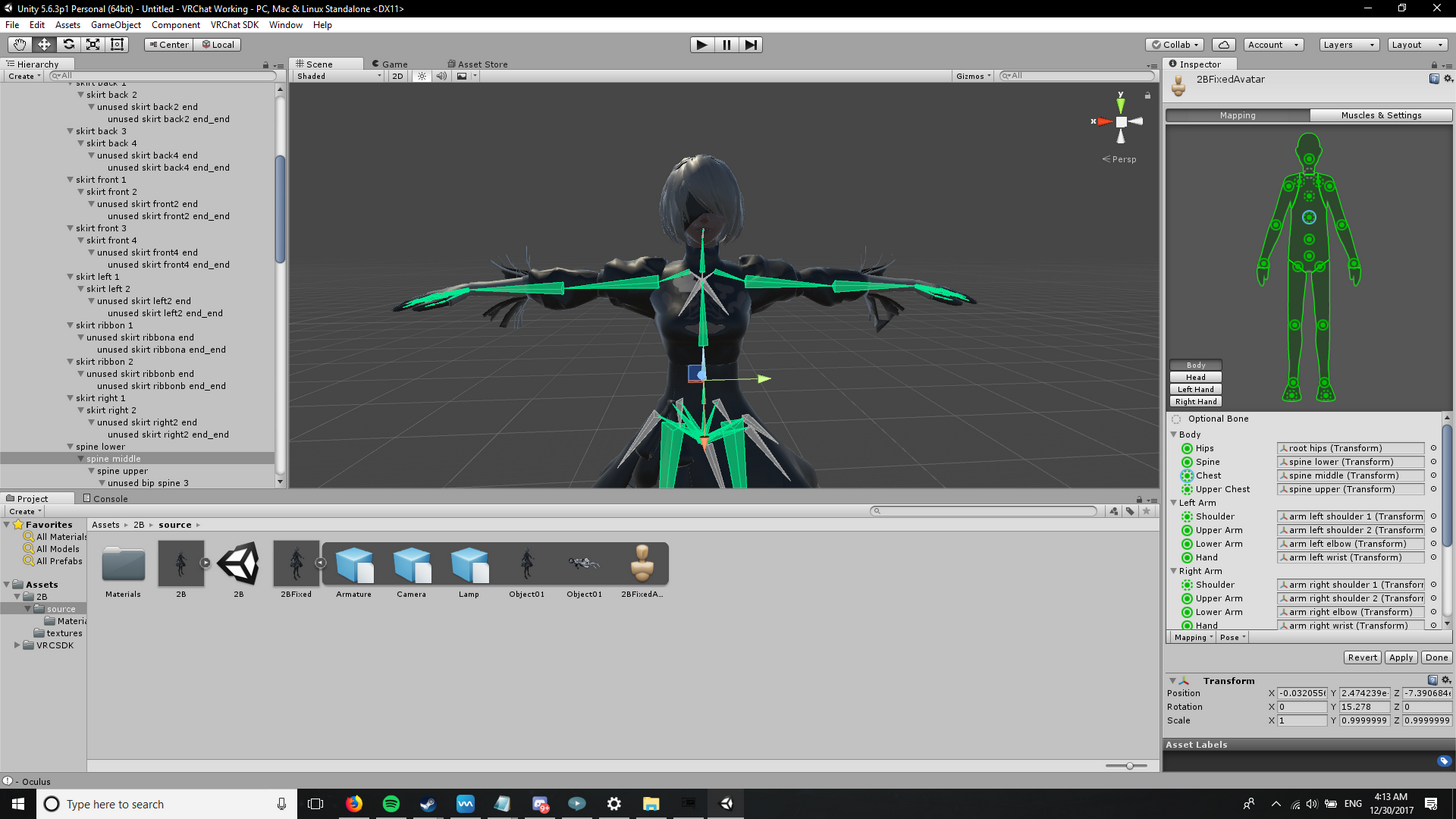
this is the default
and this was my attempted fix
wait that second ones wrong
silk kestrel
set the upperchest to none
 tawny temple
what pottedsoylent said
native egret
it is
tawny temple
oh i just noticed
silk kestrel
your hierarchy is also wrong
native egret
instead of spine upper?
celest bay
Unity doesnt recognize spine upper as a bone im pretty shure
yeah
you have to do it in blender
celest bay
after you do that if chest shows up as none you click that little grey bubble next to the DDL and in there a little window will pop up there and you type in chest and select that
native egret
celest bay
that shouldnt translate into the game
native egret
ok
 native egret
so im renaming the biggest bone in the chest area (which is spine upper in this case) to chest, right?
oh wow lol
celest bay
whatever you see in Unity is the final product so anything that is there or isnt there in blender doesnt matter
native egret
ok
celest bay
yeah
native egret
thx
fading verge
I have a model thats head is disconnecting from body, what did I do wrong?
Well, specifically I have 3 models with all the same issue ><
celest bay
im pretty sure thats just a problem with the models
you could go in and try to fix it by lowing the head in unity but thats about it
fading verge
poopy, I was going to distribute it too ><
celest bay
that or you are putting the VR descriptor too high and that is causing the head to stretch to match its hight
im not 100% sure on that one
fading verge
Descriptors right between eyes where it should be, I thinks
celest bay
I dont know much on how the SDK stuff interacts with unity models that much so dont quote me on that
fading verge
I'll ask around, hopefully they can be fixed
native egret
rip
also this is the default for it now
I don't wanna do anything wrong or unnecessary here
so I delete upperchest right
fading verge
I wanted to see more people using Gumi, my waifu, so I took the effort to decimate and clean 3 different models to distribute hoping I would see her more often
fading verge
Thanks anyways Kyoot dab
 sterile lodge
in vrc avatar descriptor the white sphere is not showing at all? Neep help
celest bay
step 1 make sure your model is scaled down
fading verge
Pic of descriptor values and etc je210
celest bay
1, 1, 1 is like 30 ft tall
so its prob at the feet ish
also if you set the xyz of it sometimes it will get lost inside the models head and it takes some maneuvering of the camera will help
native egret
 naive zinc
@fading verge looks like the weight on the neck isnt set up properly
native egret
when I try to upload it's telling me my spine hierarchy is missing some elemtns
solid adder
@sterile lodge how tall is your avatar by chance?
naive zinc
If you rotate the neck bone in blender/maya do you see similar results?
silk kestrel
@fading verge teto is best waifu
celest bay
@native egret spine lower needs to just be spine
native egret
ahh so I need to rename that as well?
 sterile lodge
my avatar was like 0.5
celest bay
if you have Shoulder PR or PL delete that
sterile lodge
whats a good size?
native egret
I have a few extras
celest bay
@sterile lodge you need it at like 0.07
0.5 is still like 15 feet tall
use the boxes on the ground as reference
each one is 1 meter
@native egret edit the higherarchy in blender
fading verge
Oh boy, I've only ever decimated in blender I don't know how to rotate bones ><
native egret
so I should merge spine lower and middle right
 solid adder
@sterile lodge Well the sdk has an example avatar you can use as a reference for size and usually that's where the camera is at. Otherwise make sure your avatar is selected and position the ball to 0x, 0y, and 0z. That should place it at your avatar's feet so you can easily spot and adjust accordingly
solid adder
No problem
naive zinc
@fading verge select the bomes, change mode to pose mode, than st the bttom change the gizmo to rotate mode
celest bay
@native egret rename spine lower to spine in blender
then click this highlighted in blue below the higherarchy

 celest bay

As the title states, this is a full guide on how to get the basic model port into VRChat! We used the MMD model of Mei for this basic tutorial. If you have a...
honestly just follow that video and you should be good
native egret
ok thanks
sterile lodge
i used that video for my it was good
celest bay
i just realized you arent even running mmd tools addon
fading verge
@naive zinc
celest bay
you can get it for free and find a video on how to install that
native egret
and what would I use it for
fading verge
rotating neck bone brings entire mesh with it
native egret
or will the video teach me that
celest bay
itll teach you
fading verge
@naive zinc So, this is just a weight problem?
native egret
ok thanks
ill do it tomorrow
you've been a big hel kyoot
I appreciate everything
have a great night
naive zinc
Undo the rotate, than google a tutorial on blender wright painting
Can only guide so much on a tablet on a bus lol
celest bay
u2 void
fading verge
Alright, I'll do that! I'm happy to know what the problem is
naive zinc
You don't have too
bleak pecan
sometimes it messes up
fading verge
would fuse work for rigging?

Fuse is a standalone 3D character creator that enables you to make unique characters to use in your game. Fuse comes with 70+ body parts, 150+ clothing meshes, 42 dynamic texturing substances, Unlimited free Auto-Rigs and Animations through the M...
Recommendations
1516
it's a free app on steam
naive zinc
If it soits out working rigs sure
fading verge
i mean for making the models, importing them to blender etc. to add bone structure?
naive zinc
Though honestly rigging isnt hard for vrchat models, so you might just be adding extra steps
Oh yea sure
fading verge
i'm gunna try it
dull totem
can someone link me the unity donwload? I might be donwloading the wrong one
 prisma grotto
How do I get my model to do the t-pose
fading verge
@prisma grotto In Blender or Unity?
fading verge
How did you adjust the pose in scene?
prisma grotto
I messed my leg position a bit and I think that's what makes my legs work weird in VRchat
fading verge
Maybe click the model in the asset list and click revert in the right pane?
Or reimport the model.
prisma grotto
i have no idea how to fix my legs
http://prntscr.com/hu56h9 this happens when im standing still

when im moving http://prntscr.com/hu56me


 clear cedar
Oh god I'm dying, weights are soooo tedious
and I didn't even get to the fingers part
It's just the legs
celest bay
nvrmnd just parenting issues caused when adding Parents for the dynamic bones
silk kestrel
I swear my life is deja vu on this discord
@celest bay It means that your Spine bone is too close to your hip bone, hence the Transform(aka distance) is zero
@celest bay by any chance are you using a neptunia model? I had to help someone who had the same problem recently
celest bay
nah I did stuff with dynamic bones making parents for the skirt and hair and when that happened some of the parenting got mixed up and after i went back into blender and fixed it, it didnt give me the error anymore
anyways im going to bed its 4am
fading verge
anyone know why when i do it all fine with cats in blender my model looks fine http://prntscr.com/hu5pfj but when i come over to unity its head mesh is transparent and i have it all set to opaque http://prntscr.com/hu5pmj

 silk kestrel
It should work, can you screenshot the material the head is applied with?
fading verge

nvm i fixed it, lol. it misclicked another material in a diff named part and was set to transparent there, but is there a way to make the skirt move with legs without dynamic bones?
no way imma spend 20$ for it in the store
 vast pagoda
I’m using a Neptune’s model and my distance is zero for spine and hips
fading verge
me?
silk kestrel
was referring to @vast pagoda to fix his spine and hips
fading verge
this guide says i can use Cloth component in replace of dynamic bones, is this true?
silk kestrel
@floral flare can you elaborate on what you mean "dont properly bend in vr"?
 floral flare
they're always bend
and not stretched when i stretch my hands
i tried y-bot and its perfect there so Gallium thinks its a rigging thing
silk kestrel
@floral flare could you send me just the fbx, I will look at it on my end
floral flare
you need the textures too?
silk kestrel
@floral flare the only issue I can find with the arms in blender is the weighting, is this the problem you were referring to?
silk kestrel
The jacket is going into the arm mesh when the arm bone bends
floral flare
its more like this problem
my arms where stretched IRL
but they stayed like that ingame
silk kestrel
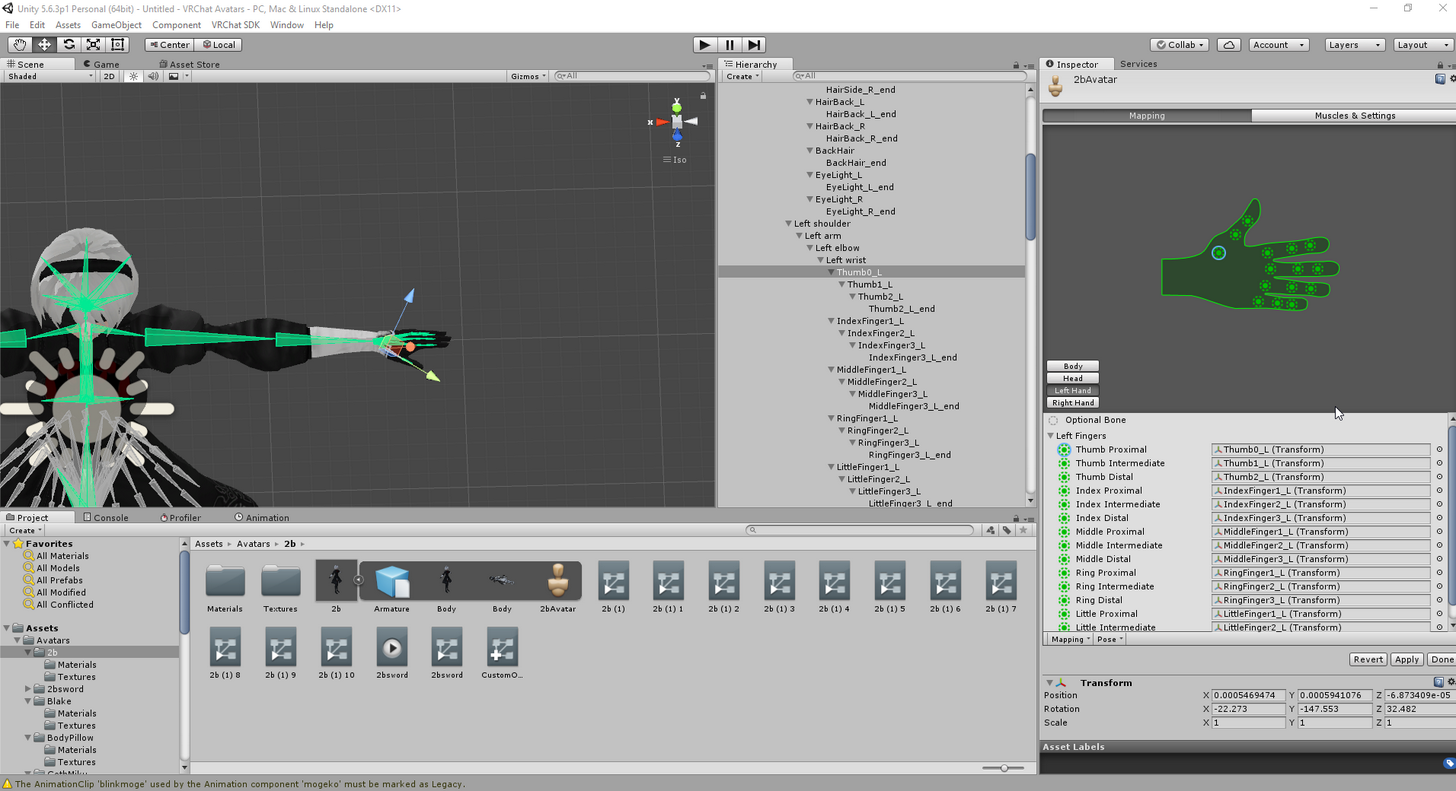
could you post a picture of how you set up the rigging in unity?
might be a mapping issue

 silk kestrel
can you switch over to the mapping for your hand?
cause that should be the one which will drive the IK to bend your arms
 silk kestrel
everything looks correct, I cant identify the problem, sorry...
silk kestrel
are the arms just fixed into place like that even though you are moving your arms?
silk kestrel
@floral flare I might not know...but this guy might https://www.youtube.com/watch?v=6U-KMlRr-XE

It covers the issues with the legs, maybe it might be applicable to the arms
another option I do not know my work is you try to calibrate your vr headset height
floral flare
ingame?
silk kestrel
yea
floral flare
yeah that doesnt fix it
silk kestrel
well,one thing I can suggest is you leave your trackers on the table and move yourself further away. see if that will straigten the arms
floral flare
well im trying everything at this point
yeah that will work
so they're too long
or well
my arms are too short
silk kestrel
ha ha , so that fixed it?
floral flare
yeah..leaving the trackers and moving a bit backwards did straighten them
silk kestrel
hee hee...so the fault lies in your own organic rig XD
uneven hill
Gonna need to get that adjusted
uneven hill
You could just make your avatar have short, stubby arms
floral flare
hey 😦
silk kestrel
like a t-rex?
uneven hill
^
Not saying that you have short, stubby arms irl, just saying that having them in game will solve all problems
floral flare
now it makes sense why it works on short characters
with short arms
ok now the price questions
how do i adjust my avatars
to act like t-rex arms
uneven hill
XD
silk kestrel
lol you can try to shorten the arms?
the rig arms
or alternatively you can attach your trackers to a ruler or something and that would fix the issue
silk kestrel
I am a workflow orientated guy, so I would do it in blender
I believe you can do a dirty edit in unity
floral flare
na i want it perfect
uneven hill
I think that you can just stretch the upper arms inwards i bit in unity XD
In configuration of the bones
silk kestrel
I suggest watching the video I linked. He did talk about how anime models have longer leg proportions relative to regular people. The way to fix them was to increase the bone length
floral flare
i tried moving the elbow bone a bit inward
silk kestrel
observation: by moving it inward, you have lengthed the bones
silk kestrel
according to doubleGoose he says it is a 50/50 thing if it does not work when you stretch it, shrink it
There is no official tutorial on full-body tracking
but those are from his observations working with the tracking system
he also does manly squat sessions XD
floral flare
that should be applieable
to the arms
since its basically the same
frankenstein would be proud of me
that seems to be the solution
silk kestrel
but now it looks a bit like slender man :<
floral flare
oh i just tried stretching vs shrinking
now i need to figure out how to shrink it in blender
and what bone
:x
is it the should or the elbow
or both?
silk kestrel
doublegoose did it on the upper leg bones, so I suggest starting on the upper arms
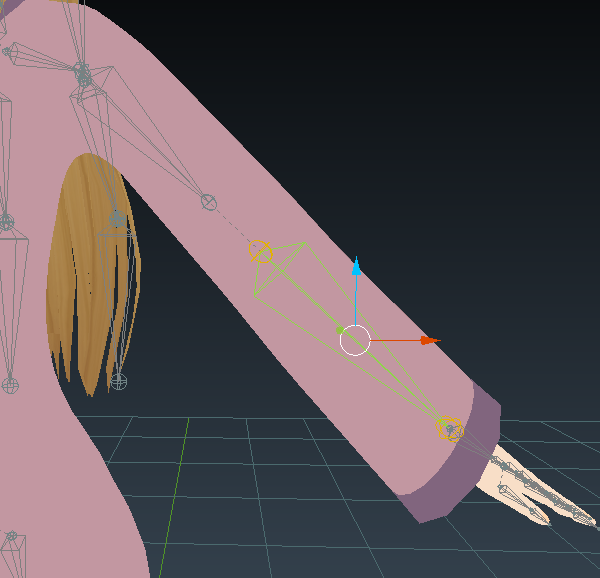 silk kestrel
that would be the forearm, but no harm trying it out.
floral flare
oh i selected the wrong one
ok how do i
shrink them both together
i try to select them with shift+rightclick
but it just de-selects when i try to move it
silk kestrel
ok we will start with shortening the upper arm first
it looks like the "least" destructive way
- select the upper arm bone
- hit [tab] to go into edit mode
floral flare
done
silk kestrel
sorry, could you select the forearm and turn off this attribute if it is turned on?
cause it will cause the forearm to follow the upper arm when we shorten it
floral flare
ok its turned off by default
silk kestrel
ok good, so resuming...
- once in edit mode, 3 arrows should appear (red, green and blue)
- use this to adjust the position of the upper arm
if you move it closer to the forearm bone, you have effectively shrunk it
 silk kestrel
the end bit of the upper arm which sticks out is ignorable as it is a "visualiser"
yeah
 compact pebble
Heya, hope its okay if I drop in here with my problem. I ported an FBX model over from Wowmodelviewer with a few basic animations and proceeded to ready it for vrchat via Unity. But every time its ported in, the body is oddly twisted. The legs and arms are facing the wrong way, as is the camera
silk kestrel
if you are OCD and want it to look right...you can copy the start values from the forearm and paste it into the end value for the upper arm
compact pebble
silk kestrel
@compact pebble on the right side of your window, there is a position and rotation variable, make sure they are all 0
@floral flare Should be good to go for testing
silk kestrel
those naming convensions make it hard to tell
I can only tell that they all start with the filepath name, could you show more of the end bits?
floral flare
ok testing~
compact pebble
Yeah it converted it like that straight from wowmodelviewer, they're all just numbers really
silk kestrel
but no errors means it should be fine
silk kestrel
publish it and you will know
 tired girder
is bad rigging the only thing that will break the ingame animations?
silk kestrel
@floral flare got a screenshot? interested in how it looks now
silk kestrel
@tired girder can you define "break"? Do you mean turning your character into a porcupine of spiky vertices?
silk kestrel
does your bones have any weights?
tired girder
yeah
silk kestrel
have you mapped your bones into unity?
tired girder
yeah I can move it in unity
floral flare
silk kestrel
@tired girder do you happen to own a VRset? Someone had an earleir issue with it as well
tired girder
no
compact pebble
So this is still happening
Head also goes down when looking up, and up when looking down
Looks like the arms are the wrong way, but the legs seem ok
silk kestrel
@compact pebble there is an offchance that your head joint might be flipped 180 degrees
compact pebble
Well the head is the right way, that is the cape i am facing, the back
tired girder
I have my hip bone to a bone that is connected to the "hip" because the bones in the hip only go down to the legs and the spine is not a parrent of the hips is this the problem? and can I make that bone part of the hips
silk kestrel
forgot that was a mirror, yea I see what you mean by everything is reversed
can you send me the .fbx so I can debug it in more detail?
floral flare
so many scuffed avatars
lol
@silk kestrel it doesnt work when i do it in blender
only when i did it in unity
:x
silk kestrel
awww...
uneven hill
Still the long arm problem?
floral flare
yea
uneven hill
In unity bone configuration, try moving shrinking the bone?
compact pebble
@silk kestrel you have any idea how I can fix it? Or what i've done wrong?
uneven hill
Or moving it inwards?
silk kestrel
I am applying a solution now, testing it in-game to verify it works
compact pebble
Ah cool, thanks a lot man
uneven hill
👍
floral flare
i think i'll just live with it
its not worth scuffing the avatar just to have straight arms
thanks for your guys help tho i really appreciat it
silk kestrel
@compact pebble this is just a hunch, but it looks like there are no joint rotations in your bones
fading verge
anyone got a site to pre-rigged league champ models? I can't find any
compact pebble
Right, well I havent really touched any of the bones. This is how it is straight from the game. I guess it just guesses which way the arms go? Any way to fix it?
The animations i applied etc seem to all work. its just that the game controls the character from the back of the head and turns around the bones to work in that direction. Atleast thats what it seems like to me. I'm all new to working with models, learning on the go :p
 silent scaffold
Anyone know how to fix the error "Transform 'Chest' for human bone 'Chest' not found?
compact pebble
Any steps I could take from here? @silk kestrel Or have you no idea?
 clever haven
anyone know why this is happening to the fingers of my model?
silk kestrel
@compact pebble give me a second..I am trying one last solution
compact pebble
Alright sure 😛
silk kestrel
yeah...did not work, I got no ideas so far. I need more time to look into this issue
fading verge
is there any difference between "always animate" and "cull update transforms" in culling mode?
compact pebble
sure, thanks though!
 lament smelt
i downloaded a rigged model i really like from free3d.com its already fbx but it has the texture embedded and it has an upper chest. I cant put onto vr chat with upper chest, but if i take it into blender it gets rid of the texture. Any clues?
compact pebble
Could this be a clue to whats wrong @silk kestrel ? not sure what exactly it means
silk kestrel
yes, the pelvis and thigh bones might be it
compact pebble
Can I fix this in unity somehow?
 crisp tendon
first error yes, second error no
but you can publish even if the second error is still there
it doesn't affect everyone
compact pebble
well thge issue I currently have is that the body is the wrong way around. So im looking through the back of the head with the arms and legs bending to the back of the character

like that
crisp tendon
rotate 180° in unity then
compact pebble
In the scene?
compact pebble
So just 180 on Y?
The dot always has to be in front of the character though, correct?
crisp tendon
between the head and outside the head
silk kestrel
The joitn orientations on this...
crisp tendon
like a 50/50 in and out
compact pebble
Yeah between the eyes, and just in front of it
 wide drum
looool
compact pebble
Like that
crisp tendon
@silk kestrel is that maya ?
wide drum
well, not too hard to fix really
crisp tendon
@compact pebble no it has to be where the eyes are
wide drum
yeah it is
compact pebble
Like up against it?
silk kestrel
@crisp tendon yea maya
crisp tendon
@compact pebble Well they're going to be your eyes, so you want this to be where your eyes are
compact pebble
All tutorials so far ive seen them put it way in front, so I thought that was what i was supposed to do
So like this really?
crisp tendon
yeah that'll do
uneven hill
Can I have dummy leg bones and hip bone that isn't weighted to anything, and then the proper various torso arm and head bones to make a floating torso effect?
crisp tendon
yes
silk kestrel
@uneven hill you finally escaped from #avatars-mmd
uneven hill
Rig as humamoid (with dummy bones) then use custom walking and idling animations
As far as I know
 long hill
Why does it have to be humanoid?
compact pebble
this may be a clue to whatsup. If I click on the upload, and switch back to the scene it looks like this
uneven hill
@long hill its a vrchat thing
 tender maple
Hi, I'm getting this showing up when I'm assigning the rig in unity. I'm still able to bring it ingame, but my arms are perpetually stuck behind my back.
I'm using cat to fix the model which is an MMD, so the armature looks perfect in the hierarchy. So I'm really stumped!
uneven hill
@tender maple enforce the t-pose?
@compact pebble are the back bones all lined up straightly?
compact pebble
Oh, I think I might have done something
I removed the controller for animation and it made the character straight in the editor
long hill
Is there a lip sync tutorial that teaches jaw bone lip sync? All the ones I see are viseme.
compact pebble
Yeah im not sure how it works either. I have a clear defined jaw bone but it doesnt work when I apply it through unity
long hill
Wait, can you pose bones to set shape keys?
Could be a way to make a jaw bone work as "visemes."
silk kestrel
you need actually 4 shapes to get all visemes
open, close, wide, narrow mouth shapes
fading verge
The set of jaw, mouth, tongue, teeth bones are moreso for MMD than anything else. For VRChat you're better off using Visemes so just delete those bones
silk kestrel
CATS tools uses that concept
silk kestrel
if you want more detail you should read "Stop Staring: Facial Modeling and Animation done right"
silk kestrel
@compact pebble YYEEESSSSSSSSSSSSSSSSSSSSSSSSSSSSS
compact pebble
Ohh howd you do it? And what happened to the fingers? xD
silk kestrel
The model was facing + X direction, unity takes -Y as its front
silk kestrel
you have to do it on the armature itself
so it should be -90 on the Z axis
I will send you the file
compact pebble
I see, any way I can get the fixed model so I can apply animations to it?
cool!
Thanks a lot!
silk kestrel
you can fix the claw fingers here https://youtu.be/URvV4DoOr1I?t=20m33s
As the title states, this is a full guide on how to get the basic model port into VRChat! We used the MMD model of Mei for this basic tutorial. If you have a...
the time stamp part will lead you to the claw thing
@long hill yes, head > jaw hierarchy
long hill
So, my plan is to make a horizontal bone in the jaw area and then associate it with a verext group that I make in the jaw area. Afterward, I will pose it as well as drag the lips to set shape keys. Before I attempt that, will it work?
silk kestrel
not too familiar with blender shape keys...sorry cant help you there 😦
 civic copper
If I want to import say, a doll , thats summoned with animation override and it has bones. Does it's rigging matter, how does unity handle 2 skeletons with oone controller?
silk kestrel
No experience doing it, but it is possible. Saw a titan avatar take a pilot doll form his hatch and wiggled it about
civic copper
Yeah I don't know how to set it up, in theory I do but in practice theres something I'm missing, screws my main avatar up
compact pebble
@silk kestrel You think the fingers fix themselves if i apply animations ??
 keen bronze
hi, someone know why in rig miku get ghost bones and this pose ?
 south lagoon
Hey guys - Coming back atcha with another question!
Attempting to rig up a Kaneki Ken Avatar with his Kagune (Screenshot attached).
Will be chucking this into unity with Dynamic bones to give the Tendrils some flexibility to them, As im aware, the current tendril bones are currently not connected to the base model (The kaneki model).
What would be the correct way in this case to go about connecting these?
 wraith fossil
I may be wrong but the way I would approach it is to parent the bone to one of his actual bones
The cats plug in for blender does a good job of helping with this
@south lagoon
south lagoon
Makes the most logical sense to me @wraith fossil !
Can see the bone parenting option in Cats and its already giving me some suggestions of "Potential" bone parents. Think it would make sense myself to have it be parented to the hip bone but sadly its not giving me the suggestion of that! Will have to try and find if I can manually override that
wraith fossil
@keen bronze if you look closely one of the bones aren't being recognized. Make sure all your parts are fully translated
@south lagoon yea try cats suggestion first though they give you the option that will cause the least amount of problems. Let me know if you run into any more trouble
south lagoon
@wraith fossil Cheers pal 😃 Will give it a go!
wraith fossil
Sounds good!
fading verge
Hey, I'm looking for a weight painting tutorial if anyone can share something that would be specifically for this sort of thing
 thorn bone
Do I need to have a complete humaniod skelton for VRChat? What if, lets say, I am missing a head, but have a neck? Is there a way I can still bring it in?
@sterile ruin thanks
 wraith fossil
Does your hoodie have dynamic bones? @delicate plume
 delicate plume
no
south lagoon
Cheers @wraith fossil All hooked up and put some basic dynamic bones on it now!
Giving it a test drive 👌
wraith fossil
@south lagoon ayeee I'm glad you didn't run into any problems
And BTW nice choice! Kaneki was the first avatar I made and imported 😂
 abstract kayak
@delicate plume you need to add the hoodie to a vertex group and the tell blender that the bone move that vertex group
wraith fossil
^^^
Also what's going on with your arm? Did you move it out of place or is it an error
 minor shore
can anyone tell my why her eyes have been blanked out after creating an atlas and how do i get it away q.q
fading verge
I am watching tutorials on weight painting to fix my issue, everyones models are blue, though and mines purple, did the color just change over the years or is there something wrong with my model etc?
@minor shore there's a mesh that's tied to a shapekey that isn't textured until needed in mmd, but that's a mmd thing and doesn't translate to other programs. So, when you did a atlas that invisible texture is now visible. Unless you plan on using that visor seperate the joins again and right click in the head till you select that mesh
and delete it
@minor shore By the way, that model has 70k tris when VRchat only supports 20k, your going to have to decimate it
I also worked with that model the other day, and it has genetalia, your going to have to delete that too
minor shore
@fading verge thanks i'll try it :3 and about the 70k tris i was going to ask how far i should decimate it without losing too much quality
civic copper
delete the fanny! 😃
acoustic pilot
How do people make their avatars bigger then the SDK allows?
civic copper
just dont touch the face and work your way from there
minor shore
will do thanks 😄 been breaking my head over this all day
fading verge
Its a huge learning curve but you will get there! I only started a week ago and I'm a dummy
civic copper
I don't know that Kanna model but I wonder where that 70k resides, she must have some baller shoes or something, not a complex looking model
lime monolith
I manually rigged my model in Blender, and things move just fine in Blender, but in Unity it keeps doing weird stuff. The fingers bend in the wrong direction, for example
Is there an easy way to fix this?
civic copper
check your bones in blender, sometimes CATS removes bones it shouldnt
compact pebble
So ive got my character with his eyes closed, there any way to open them in unity or do I have to use another program for it? I know which bones they are and can change them in the rigging but it doesnt apply in the scene
minor shore
i got the model from here
https://icemega5.deviantart.com/art/Kanna-Kamui-joins-MMD-DL-664577587
lime monolith
I'm not using CATS; I'm not using an MMD
civic copper
still check the finger bones, 3 per finger to not cause issues usually
lime monolith
The skeleton is fine
It's just that they bend in different directions in Blender and Unity
Like, all of the bones have this 'roll' value, which I think is affect it
civic copper
yeah roll and twist bones are a pain in the ass
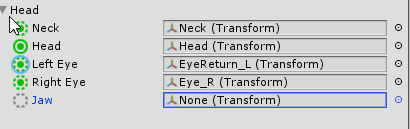
 south quartz
Can the jaw not have anything asigned to it 👀 https://i.imgur.com/ATIwmIt.png
 civic copper
you dont want to if you want to use visemes
south quartz
Ok good
civic copper
you could assign your butt to it for the lulz and have your butt move and talk though
minor shore
okay so the seperating by materials doesn't want to work o.o
south quartz
@civic copper Well i just spend a fair bit of time getting the visemes stuff set up so id rather have just that XD
civic copper
make sure you have the base of the model select when you try that @minor shore
the Armature I mean
minor shore
it is the whole body is selected
civic copper
I'll have a look
minor shore
it's seleted, no?
civic copper
highlight Armature and do it, works ok for me
wraith fossil
@acoustic pilot change the scale of your avatar
minor shore
it's greyed out when i select the armature
wraith fossil
@fading verge idk if the issue about your purple avatar has been answered but as soon as you click fix armature on cats the color shows... Tbh it may just be because the textures aren't translated but idk for sure
fading verge
Big Zeek try using vertex groups for your weight painting
 zenith plank
hol up
so how i rename multiple bones to the same name in blender
or can I use like pmx editor or something
south quartz
Soo...
Anyone wants to guess why they dont show up? https://i.imgur.com/KDIfZ2Q.png
https://i.imgur.com/zMCeysA.png



 minor shore
seperating seems to work before before creating an atlas
but i could remove it either way thanks a lot 😄
fading verge
@south quartz this happened to me. its probably because you had a decimation un applied on your mesh and when you exported it applied them and wrecked your shape keys
civic copper
@minor shore seems ok here
south quartz
@fading verge |And how did you fix it?
fading verge
@wraith fossil I got it, thanks, turns out it wasn't blue as the mmd tools was overlaying intop of it.
you have to check if you have modifiers unapplied and remove them or apply them first with separated meshes
I turned it to shadless and I can weight paint properly
@south quartz make sure you have the correct mesh selected
minor shore
@civic copper yep i worked it out ^^ now on to lowering the tris...
civic copper
@minor shore lots of Tri's in the shoes and leggings
1.5k tri's in her panties, but we dont need those 😃
minor shore
@civic copper ur telling me to remove the panties? 😳
fading verge
dragon does not have underwear
civic copper
oh wow, she has 'textures' underneath!
minor shore
exactly xD
fading verge
😏
civic copper
I'm blind now
fading verge
Just delete poly under panties
minor shore
sorry because of me u had to see that
fading verge
Then use bridge loop between panties and skin where holes pop up
minor shore
@fading verge delete poly u mean decimate the panties?
civic copper
I think he mean delete the textures underneath entirely
fading verge
Well you can do that or just completely delete the polys that make up the flesh underneath the panties
minor shore
then her legs would be gone too
south quartz
@fading verge I maybe should not do this while drinking (making the avatar)
But i got no idea what you meant with checking the modifiers >.>
civic copper
not the texture mesh as a whole just parts
fading verge
Naw you selectively delete the faces/edges/verts
minor shore
how do i select parts
fading verge
Then join the panties to the leg mesh and use the bridge edge loop tool to fill in any seams with a poly
Select mesh
Edit mode
Shift right click the polygon, I would suggest using face select mode for it
@south quartz in your screenshot, on the right, go to the spanner and it shows the modifiers..
Your hotkeys might be different
south quartz
oww
civic copper
select mesh, hit tab, press C for a 'pointer' type tool or use b for box select, drawn around the mesh and delete
fading verge
Careful with box select
civic copper
that you dont select Kanna's box? 😉
civic copper
I only use box select when I'm impatient
fading verge
Aka you could delete random polygons if you select recklessly. Take your time with it, practice a few times to get the hang of it
I use it when I'm trying to clear out a high poly small section
WHY SHOES, WHY DO YOU NEED 20k POLY IN ONE AREA
BEGONE
minor shore
okay so i presed b and selected some parts underneath her panties
fading verge
Are the faces highlighted
minor shore
they r orange
civic copper
hit delete and if you dont like the result alt z
fading verge
Then unhide panties and check out how it looks
Psure control z I default
Is default*
civic copper
yeah probably I dont remember
wraith fossil
@fading verge awesome!
minor shore
woops she's got a hole in her now xD
civic copper
another one 😉
minor shore
oh wait i can hide the panties?
raw sphinx
anyone know how to remove the camera attached to my head? when i choose this avatar in vrchat i was massive
minor shore
i just moved them away
fading verge
Yeah, you'll be making a hole where her bits are
raw sphinx
fading verge
Yes, if you separated the mesh by materials
@minor shore Press H to hide objects
Or click the eyeball in the hierarchy
That way you can edit, then unhide it to make sure it covers her new hole
minor shore
wow i hope my mum doesnt walk in rn
 marsh widget
if you delete the kanna jacket you'll get rid of 6k or so
fading verge
Ok, so, I'm weight painting to fix this, anyone have an example pic of how much area of influence the neck should have?
Feel your neck
Spin your head around
What parts stretch and move
@fading verge like, RL? so just the neighboring skin
Play in pose mode as well to see how your weighting works out
Basically
Rigging and weighting mimic irl
For the..most part..
The lack of real proportions sometimes means throwing that out the window
but this girl doesn't have skin under her coat, she is a walking floating head, this is unimersive
civic copper
or just RP with a Gumi who's broke their neck
fading verge
Better get to modeling her a body the
Then*
Tfw got followed by a still image character of that hanged girl from Doki
Broke necks freak me out
civic copper
This ones pretty cool, doesn't need too much done to it either
fading verge
Those boots tho
civic copper
at least they aren't 40k tri shoes!
minor shore
was able to bring her down to 63k tris so far <.<
fading verge
Both of you make sure to delete her fanny, for w/e reason she has one
marsh widget
and i do that how?
minor shore
i did delete some of her parts yeah
fading verge
hide the skirt and panties, click the skin mesh, press 'C' highlight the genetalia, press 'Del' then delete faces
edgy ginkgo
So i made shape keys and am trying to use CATS, but the tab wont show my shape keys i made, any ideas?
lime monolith
How can I fix my character's fingers bending in the wrong direction?
I tried changing the 'roll' of the bones in Blender, but that didn't fix anything. It's also worth noting that my character doesn't come in a t-pose
marsh widget
@minor shore did you delete the legs mesh?
minor shore
@marsh widget yea i deleted the mesh underneath the stockings, her genitalia and hips
she has some skin under her top
minor shore
did u decimate anything yet?
marsh widget
everything
zenith plank
no finger bones in unity xd
marsh widget
@minor shore theres unnecesary stuff under the hair
and most of the shoes you can just delete
edgy ginkgo
i made shape keys: http://puu.sh/yQX49/413e736eb6.jpg
but they dont show up in the CATS tab

 marsh widget
the undershoes?
fading verge
Probably means under the socks
fading verge
Does gimbal-locked rigging matter for VRChat, since it handles so many of the animations for us?
 native swallow
Is there anyone kind enough out there to take a few moments, possibly and probably longer to help me figure out the rigging on my avatar?
fading verge
I'd assume not.. but how are you getting gimbal lock with the basic rigging
zenith plank
ok so i got the finger to show up in unity
now time to do whateever i need to do and hopefully it works or i wasted 3 days of my life
fading verge
Still weight painting, I decided to check another model of mine that was fully functioning to get a grasp of how big the area of influences were. But, how do people get these models so clean on the weight painting!
Vertex groups
I can barely even touch it without also painting hair arms etc
You can select polygons specifically and assign them to a vertex group that parents think to a bone
Click mesh, edit mode, look for upside down arrow made of dots, click and look at vertex groups
Select bone within mesh and click select
You now see exactly which polygons are parented to the bone
Whats the upside down arrow made of dots ><
that doesn't make sense to me
It's an icon
On right side, near the modifiers button
You mean object data?
Yes, but a visual reference is easier to find
minor shore
go damn ij ust need 9k less tris
minor shore
oh yes gone with the wrists
fading verge
Is this a common issue? This is the only thing wrong with the model, there used to be stockings on those joints but I don't think they would effect this, how can I fix this?
It only happens in certain stances, whenever I look down or when I bend down
 safe bluff
Did you delete bones
fading verge
No I did not, only through cats I believe, if that would do it
Crushed knees
Poor gal
Its so bad ):
zenith plank
cursed image
fading verge
Check their grouping, if that's fine, something messed with them, so you might need to fix them by filling in the holes with new polys and adjusting them to look like
Non crushed knees
It's fine in blender?
I bet they're parented to some random bone
Good way to check is move about in game or do an animation and watch what they do/follow
Would the bones in the heels make this happen?
This model has high heels and the bones go up
fading verge
That was my next suggestion ye
Play with pose mode if you don't wanna check vertex groups
 hardy lava
I finally fixed my avatar's broken foot, I had spent all this time trying to fix right foot but then I remembered I was using a mirror to debug so it was actually the left foot that was broken all along lol
fading verge
What do you pose? the knees
Knees legs feets
Mess with them until you find the problem
Trial and error
compact pebble
Apparently my jaw flap was working all along, it just doesnt show in the mirror
fading verge
Does anyone who knows 3DSMax know why my bones are absolutely massive? They're fine in maya, but in Max I cannot even see my character to rig it.
 magic night
hey quick question will it be okay if i just delete those toes from model?
crisp tendon
if they have weight paint on it no
if they don't, sure
but you should probably remove the other outward bone as well
magic night
ye thats kinda why im asking they are a bit pain
minor shore
so in unity how small should i scale kanna
crisp tendon
minor shore
oh thanks! ^^
fading verge
Hey all, I'm having an issue with one of my models. This is an XPS model I ported into blender then to unity. In Blender it looks normal, however in Unity and VRChat the wrist is deformed like so : https://cdn.discordapp.com/attachments/361742235525709825/396773707982307329/unknown.png


Here's her in Blender with the problem area shown, I don't know much about XPS bones but I suspect it has something to do with the "ctr" bones and how they interact with the "main" bones... That's just a theory though, I have really no idea how these bones are made to work. Does anyone else have any ideas?
This is what happens to her when those "ctr" bones are removed
So I'm parenting my skeleton with my mesh in blender with automatic weights, but nothing is getting applied and I cannot enter weight painting mode.
I may be AFK for the rest of the day so if anyone has any idea please DM me
I'm really disappointed because this model looked great, and then I turned her around and went "oh"
It seems to be just this one area on her wrist so I'm hoping it will be a quick fix doing something esoteric with vertex groups that I only vaguely understand... XD
AFK now, hopefully someone can DM me with an answer, thanks all
 topaz turret
anyone with alot of experience willing to go on call with me and help me with a broken model?
fading verge
@magic night If you have cats, click toe and mix weight
Eliminate all toe bones, only nerds stand on their tippy toes
@fading verge Those bones had weight to them, you need to assign the polys that were parented to them to the upper and lower arm respectively
Notice the mesh stretches to the non tpose position
 blazing crescent
can i have some help im trying to make it so one of the pieces of hair of my avatar isent handled as jaw in unity
 polar siren
How do i force t pose in unity?
 viral stag
Would anybody have an Idea why my shoes are clipping through the floor when I walk, but my feet don't?
fading verge
I'm still having a teensy bit of trouble weight painting. I completely understand it, but I'm having the hardest time still trying to not select certain things, like hair thats in the way etc
minor shore
anyone know where to get the dynamic bone for unity for free?