#avatar-rigging
1 messages · Page 40 of 1
 uneven hill
 toxic umbra
right one sec, ill try
 silk kestrel
@outer python can you screenshot the rig setup from the inspector?
 outer python

 reef maple
Guys a quick question, I have a model of a wolf that I want to use in vrchat.
I just want to know what do I need to choose in unity to make it walk dog like aside from "Humanoid" .
I tried "Generic" but it does not walk, but it slides instead. ( like when models are in T pose)
So, what do I do? The model has bones in every 4 feets and legs.
silk kestrel
you would need to create a walk cycle for it, I dont think VRchat has a quadruped animation library yet
reef maple
Ah I see. Thank you then. @sterile ruin @silk kestrel
 wispy iron
im trying to figure out how to get my skirt to flow properly
wispy iron
i have it bound to dynamic bone to it but now it just bounces like a rubberband anyone have a good number to set dynamic bone at?
toxic umbra
@sterile ruin How do I delete the blushes and stuff like that, on my Avatar, it keeps happening to me with some MMD models, but Idk how to get rid of them. https://gyazo.com/c4e31031101c4767cdb15f9e47a49801
 wispy iron
select the model then in MMD_tools select seperate by materials
select the blush then hit delete
 safe bluff
@reef maple you need to create a custom walking animation
 weak drum
oh also, I'm having this weird issue:

for some reason while I'm in object mode, the scarf is detached. But when I'm in edit mode, the scarf IS attached
wispy iron
should be fine
toxic umbra
@wispy iron @sterile ruin Thanks a lot for the help, seems fine now!
 upbeat bluff
@sterile ruin it worked thx alot now need to fix donut and gun 😉
wispy iron
has anyone been working on dynamic bones?
ive been trying to get it to work on a skirt
i got it all bound around the whole entire skirt only problem is the skirt acts like a rubber band now
 static flint
@wispy iron https://youtu.be/GXrllGsGlFI

Dynamic Bones - 20 USD on the Unity Asset Store! http://u3d.as/7fH VRChat Community Discord: https://vrchat.net/discord Download VRChat! http://store.steampo...
wispy iron
Damping=0.1
Elasticity=0.1
Stiffness=0.1
inert=0
i havent messed with the settings yet i was hoping someone had a pretty decent number for it
because unfortunetly my skirt is divided into 30+ parts so i have 30+ dynamic bone scripts i have to edit
 distant patrol
just create a common root
wispy iron
i cant
static flint
wispy iron
so you have it set like that ayaka?/
wispy iron
whats colliders??
distant patrol
boobs, skirts and hair respectively
wispy iron
ohhhhhhhhhhhhhh
what about the legs though
i dont want the legs clipping through woulding i collide them?
gotcha
its more for hair hitting shoulders and what not?
distant patrol
dynamic bones on legs and using skirt is possible but barely works
it depends lots on the size but yeah its glitchy at best
wispy iron
so is their a way to add one dynamic bone script to one part of the skirt that will use the other parts as well?
distant patrol
you could use cloth from unity but selecting verts with it is such a pain
wispy iron
i spent an hour adding scripts
distant patrol
but not hip, unless u want ur character to be jello
wispy iron
when i did that the skirt was coming out of my body
distant patrol
i usually just clone hipbone andrename it to skirtroot
uneven hill
But ayaka, cant it cause some hip issues if the hips is dynamic. Thats why i always make a skirt root bone
Same with hair
toxic umbra
live n learn
 tame swan
@sterile ruin that's a good one, thanks for that
wispy iron
i can never live after knowing what just happened
so bind it to hips
then root it too the whole skirt folder then add exclusions for the legs
its skirt for me
i have hips parented to skirt
wait no
uneven hill
Also make sure that the skirt root bone is parented to the hip bone
wispy iron
now for boobs
uneven hill
For boobs, put inert to .5 or something
And put the rest of the settings to your liking
Trust me
wispy iron
so can you bind both breasts to one script as well?
uneven hill
Yes
wispy iron
so how do i do that?
do i root it to chest then add exclusion to hair neck and shoulder?
uneven hill
You can do that, but since there are only two boobs, you just as well give each one its own script (it does only have two, right?)
wispy iron
yes
uneven hill
Just be careful because making the chest dynamic can cause the chest itself to move weirdly when you walk
wispy iron
ya i noticed
uneven hill
In which case, it would be better to make each get its own script
wispy iron
ive also noticed when i add the physics i get weird texture glitches
weak drum
Dag nabbit, it's doing the weird leg glitch thing again
wispy iron
ya i think thats what it is
how do you make them more stiff is it less damping or more?
weak drum
 uneven hill
My one char's boob bones were weighted to the actual boob and the clothes covering it. I gave each boob their own dynamic bone script and i never had a clipping problem
@weak drum your leg looks broken, might wanna get that checked out at tge doctor
wispy iron
right or left?
weak drum
@uneven hill tge doctor?
uneven hill
The*
wispy iron
damn i was just about to ask if i could screenshare just to make sure i had it right lol
reef maple
@safe bluff I see. Thanks!
 blissful onyx
Hi, I'm having a slight problem with the titan I converted from SFM: it always moved the hatch instead of just turning the actual head of the titan
I've tried using the 'camera' as head but then it can't be used with the humanoid rig
How can I make it work with the humanoid rig?
wispy iron
now my skirt is clipping through my body and i cant figure out how to fix it
 quartz perch
im guessing the eyeball isnt rigged as the head ???
silk kestrel
@blissful onyx can I see the bone hierarchy of your titan?
most likely you need to parent the camera bone under the neck bone to trick unity into thinking that is the head
 blissful onyx
@silk kestrel sure
silk kestrel
is spine_upper mapped to the neck in unity?
blissful onyx
@silk kestrel no it's currently mapped to the chest
silk kestrel
which bone did you map to the neck?
blissful onyx
It's usually mapped to nothing
 fading verge
so i have dynamic bones but none of my bones are moving i guess you can say?
blissful onyx
I usually map it to unused def_c_intBase
silk kestrel
cool, in that case move the camera bone into your spine_upper
sry, move it into def_c_intBase
from what I understand unity requires a clean parent-child hierarchy between the hips all the way to the head
blissful onyx
So chect_eye should be a child of def_c_intBase and not hatch top?
Apparently Unity didn't like that... (I used drag and drop to set chest_eye as a child of def_c_intBase)
blissful onyx
Oh ok I#ll try that
upbeat bluff
how do i use those ingame ?
blissful onyx
@silk kestrel I did it but since def_c_intBase is still the parent of the hatch the hatch still moves when moving the head
silk kestrel
parent the hatch bone under your chest bone
blissful onyx
It worked, but the eye now moves upwards and sideways when moving the head
silk kestrel
which part is the eye?
never played titanfall, so not sure which part is which
If it is that blue sphere, move it under the chest bone
silk kestrel
yea parent the eye under the chest if you do not want it to move
but if you want the eye to follow your head movements, you might have to look into re-positioning your bones
blissful onyx
In that case; can I leave the neck empty?
silk kestrel
I have never left the neck empty, you could try it out
blissful onyx
It seems to be working now. Thanks a lot! 😄 👍
 ocean thistle
Hello, i do have a problem with rigging my avatar
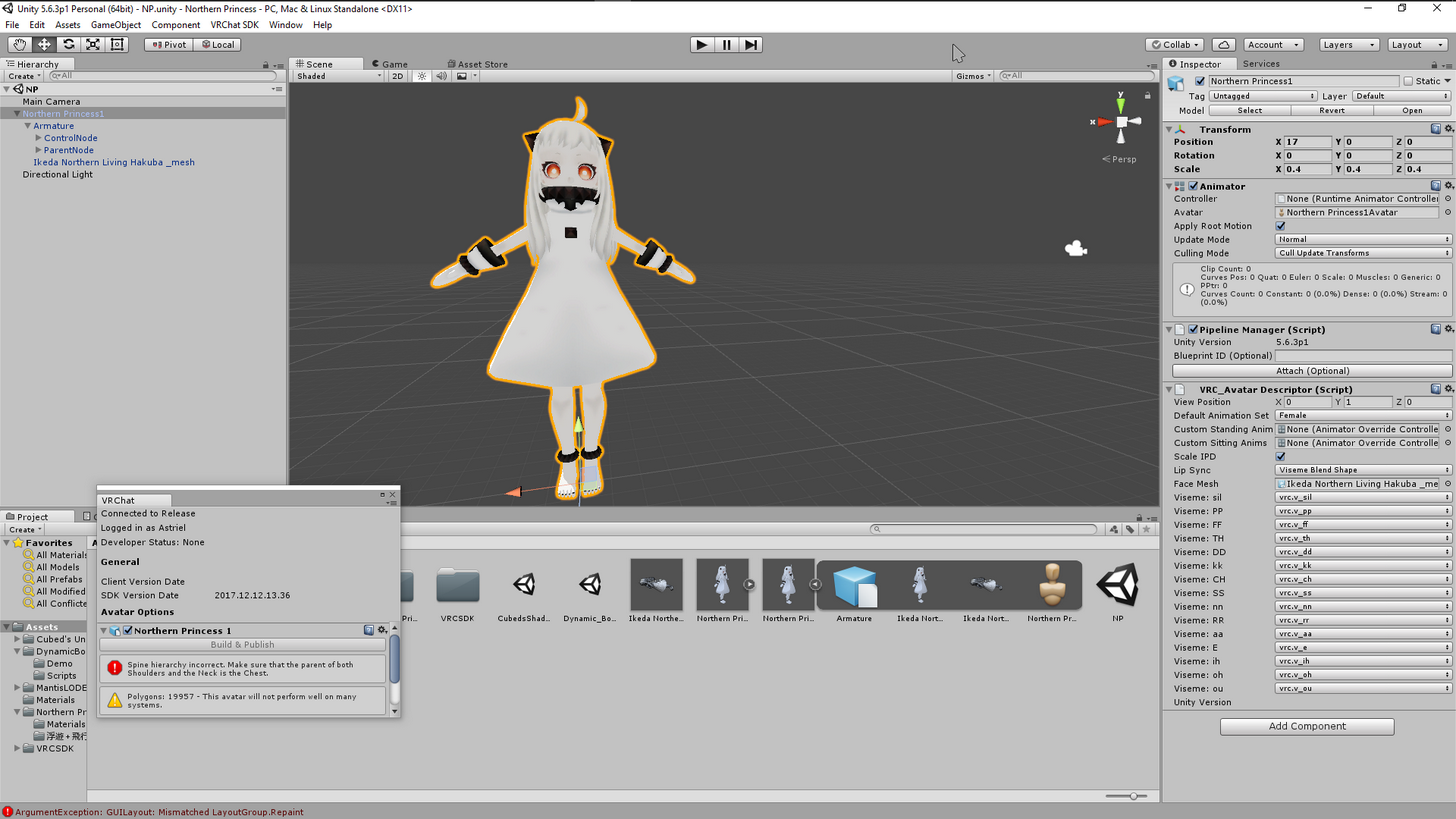
"Spine hierarchy incorrect. Make sure that the parent of both shoulders and the neck is the chest"
The problem is that the parent of those elements is the chest
And it still doesnt work
silk kestrel
can you screenshot your bone hierarchy?
btw @blissful onyx will your titan have a little dummy soldier you can take out from the hatch and wiggle around 😄 ?
ocean thistle
Sure, 1 sec, gotta rename those japanese characters so you can actually see the hierarchy
Are gyazos allowed?
silk kestrel
not sure, but I see some people using them
blissful onyx
@silk kestrel Sadly not. The SFM model I converted doesn't have any interior
ocean thistle
 silk kestrel
your left and right shoulder should be under the chest
 crisp tendon
Use cat's to translatepls
ocean thistle
Oh i see, let me try again
And will do, i tried using the pmx editor thingy but im new to this
@silk kestrel It works now, thank you!
 kind horizon
nͫiͤcͫeͤ
fading verge
can someone help me with the avatar rigging in unity? I've been trying for about a day now to import my avatar into VRChat but I keep getting one of 3 errors. The first one is the one about the upperchest causing problems with IK, when i fix that one i get another error saying "Spine hierarchy missing elements, make sure that the Pelvis, Spine, Chest,Neck and Shoulders are mapped". If i somehow manage to fix that one i get some error that i can't make the humanoid animation type because (bonename)transform parent/ancestor differs from one found in HumanDescription
 chilly ridge
change upperchest to none
fading verge
yep that gives me the second error
 torn heron
hey i got my avatar in game but my fingertips are all bent in like claws is there an easy fix for that? im assuming its something related to finger bones?
fading verge
I have the same issue but my fingers are kinda uh
chilly ridge
probably not mapped correctly
fading verge
fading verge
Then again I’m using a model from a game made in like 1999
I didn’t for mine but I think it’s due to mapping and I have no idea how to fix it
torn heron
@chilly ridge just that my thing was 18k poly and might be running bad
nothing related to bones or hierarchy
chilly ridge
decimating shouldnt make your fingers look like claws
unless you decimated them all the way down
for some reason
chilly ridge
thats why you dont decimate hands or face
torn heron
is there a better way to decimate other than blenders decimate thing?
chilly ridge
but i dont think thats a decimation problem
your fingers dont just randomly bend down from decimation
 simple narwhal
you can use unity'd mantis lod
silk kestrel
did you use cats tools to fix the armature?
chilly ridge
but once you use mantis lod you cant bring it back to blender
 carmine iris
anyone know how to turn my model around?
torn heron
@silk kestrel i used fix model in the cats plugin if thats what u mean
simple narwhal
in unity? press e and rotate it
carmine iris
I've tried rotating and re-rigging, nothing works
torn heron
the guy who taught me how to do this was kind of inexperienced himself so i feel like i missed some steps in decimating
carmine iris
like it's backwards when i import into vrchat
torn heron
i usually just add the decimate tool to the mesh in blender and go from there
silk kestrel
so after using the fix model, did your fingers bent inwards? I vaguely recall a video talking about it
torn heron
not that i recall in blender
silk kestrel
do you have a screenshot of the claw hand?
torn heron
i dont, but i could launch and try to get one
chilly ridge
decimation doesnt fuck up finger bones
my dude
thats just to lower poly and tris count
silk kestrel
rotate the joints back was the fix
chilly ridge
your unity
torn heron
they dotn appear like that in unity
torn heron
where and how i only use unity to do avatars for this game so idk how to do that lol
and this is the first time i had this problem rly but im also kinda newb
silk kestrel
@torn heron this guy covers your issue I think https://youtu.be/URvV4DoOr1I?t=20m32s

As the title states, this is a full guide on how to get the basic model port into VRChat! We used the MMD model of Mei for this basic tutorial. If you have a...
his model also has something similar to your claw hands
carmine iris
my model is backwards when i import my character into vrchat 😐
torn heron
@silk kestrel ah youre right theyre bent in the rigging menu, thanks man
so when thats done just reupload/
thanks again
now i dont look like a freak
chilly ridge
lol
torn heron
lmao
it was weird
i was giving people scratchie @chilly ridge
i was like hey i got claws come get a scratchie
 hard zenith
so i have a spine hierarchy incorrect. Make sure that the parent of both shoulders and the neck is the chest https://i.imgur.com/31Du043.png
why, even tho it is all green in rig
it is filled up too apart for the optional upper chest thing

 zenith plank
ok wait if I make the bones myself in blender will it work when i put it into unity
fading verge
@noble belfry weight paint issue?
@zenith plank you gotta weight paint the model next, unless that's a already done
Then export to unity
zenith plank
ok so how tf do I do that? i'm new to this entire thing
 noble belfry
How do i fix that @fading verge
fading verge
You can yt how to weight paint
In blender
Trust me
You'll need to know it
Im just gonna slide this message here instead of in the public lobby bc this looks like the better place to do such
[9:24 AM] Dogg: So I found a bunch of Halo Combat Evolved models that I’m 120% in love with here https://www.models-resource.com/pc_computer/halocombatevolved/ but I’m facing MAJOR issues. The only one I have worked on so far and put into the game is the Pilot but even then her fingers look like they’ve been amputated and become 2 dimensional when I close them. I have no real experience making skeletons and used the one that the VRchat guide says to. I’m so lost and confused. I also have no clue as to how I can set up the custom animations to display weapons. Can anyone help?
[9:25 AM] Dogg: I’m also having problems with making models from the Armored and regular marines because when I put the folder in they just appear as floating heads
Have you checked the models in blender? Or any other program that lets you view 3d models
I have not
I am -10% experienced with this
Is it the same as Unity?
Well it's a 3d modeling program
Ah

In this episode I go over the user interface of Blender, as well as some important user preferences. Playlist: https://www.youtube.com/playlist?list=PLrgQj91...
So I can make / alter skeletons in there?
Ye
👍
❤ 🤔
Good knowledge to have when you're going to create 3d stuff
So is there any major difference between Blender and Unity then?
Unity is a game engine right? I don't think it has the same stuff of what blender has
Like creating skeletons for one
Can't do that in unity
Ah ok
Blender plz save muh sufferin
Good luck!
 pallid lion
So I got unity and the model ready, how do I get the model into unity itself?
 hard vapor
does anyone know how to get rid of the stuff colored in red? they're not needed for what I'm trying to do
 fading prairie
@fading verge blender is much more aimed at editing models
it's necessary to import most models
pallid lion
Anyone know how to get a model from blender into unity?
fading verge
@hard vapor click on the small circle with a dot on the right and in the pop up window scroll up and select "none"
@pallid lion https://www.youtube.com/watch?v=3wCQCQuWfpk&t=2s&index=10&list=PLr3PniLAJRbKh_W5X9bYUpqrTApjHYbLD

VRChat Custom Avatar tutorial: .pmx files / MMD files. Links: Blender: https://wiki.blender.org/index.php/Dev:Ref/Release_Notes/2.79 Cats: https://vrcat.club...
@pallid lion Export as an FBX file in Blender, and once you've exported it, you can drag an drop it into your assets in Unity
fading verge
hey anybody with dynamic bones mind pming me it c:?
 edgy ginkgo
so question, when you do eyes and for a custom head, do you need to mesh and rigg the eyelids?
fading verge
i think you make visemes for the eyelids if you want them to blink
edgy ginkgo
okie dokies
when i upload my mesh to the server, me feet are in the ground, is there something to fix that?
fading verge
have you set your character to be at origin in unity? the transform values should be x 0 y 0 z 0
edgy ginkgo
i do that automatically
and his feet are on the ground, but ingame they are lower for some reason
fading verge
what about player height in vrchat
hey, does someone whos good with blender mind helping me?
edgy ginkgo
that changes the feet?
fading verge
it sets your height to match the avatar. i dunno if it will fix the feet thing
could it be about where your feet bones are placed?
uneven hill
@edgy ginkgo this error usually happens with female avatar animation, so one possible fix is to use male animation
Not sure why though
fading verge
Make your avatar hover over the origin axis in Blender, that fixes the foot issue
pallid lion
Anyone know how to add eyes to the model in unity?
Well I should say color instead of the acutal eyes themselves
edgy ginkgo
okies, will try, thanks
 real roost
Yo, I'm trying to rig this with barely any knowledge of how this works, and it looks ok, but it gives me an error that says "Spine hierarchy missing elements (pelvis, spine, chest, neck and shoulders)" plz help :s
uneven hill
@real roostprobably a parenting error
 sand raft
Worth checking the mappings too. Just from a quick glance at the side bar, it seems like the naming scheme is weird.
fading verge
you're also missing chest
real roost
could someone explain it a bit more, maybe dm me to walk me through a fix?
fading verge
the body needs a hip, spine, and chest bone. it looks like you're missing one of those in the screenshot.
real roost
So is the rig too simple to begin with, because I cant find more than 2 main bones in the torso...
 ivory sage
im trying to upload this but everytime i upload it it wont show up in game and my personal wont show up either
fading verge
did you simplify the bone structure yourself or did the model come like that?
real roost
just came like this.
ivory sage
help please
fading verge
you might need to insert a bone and paint weights to it in blender then
ivory sage
me?
fading verge
no whitemaskedhero
fading verge
i dont know what your problem is
ivory sage
ok
i upload my character
but it wont show up in game
and my personal tab wont show up either
how do i fix this?
fading verge
i dont know, sorry.
ivory sage
oh ok
sand raft
@ivory sage your view position and scale look absurd. Haven't looked at anything else.
fading verge
ive never had this problem
sand raft
Center it on 0,0,0 tho
fading verge
oh are you literally too small to see yourself?
ivory sage
no my personal tab wont show up
all the items i do wont show up
whats the normal size for a normal character like niko?
fading verge
first set the avatar descriptor to x 0 y 1.6 z 0.02
you have it at y 4.7 which is like 4.7 meters tall
ivory sage
now my character looks like a stick
fading verge
then scale niko's head to be level with the small gray sphere that represents the player origin
you need to scale to every dimension
the same
real roost
Ok, yeah, I probably need to go through another tutorial for my stuff. Thanks Timiku.
fading verge
np, but imo i would get another mmd model of the same character with more bones
real roost
I retextured this one already ;-;
 cobalt bear
a
fading verge
i think rigging bones and painting weights is more work than retexturing lol
real roost
I spent a few days to get to this point, are you sure just one bone would be too much?
fading verge
@ivory sage in the transform panel Set your position to X 0 Y 0 Z 0, Scale x 1 y 1 z 1.
In VRC_Avatar_Descriptor panel set view position to X 0 Y 1.6 Z 0.04
You should see a gray sphere floating around somewhere. Set the Scale of Niko until the gray sphere floats infront of his eyes.
@real roost its up to you then. look up on how to rig bones and try it. im not the best at it so i don't bother.
 rotund thunder
so i have a model that when the vrc avatar discriptor is applied, the line showing where the ground is in relation to a character's feet would be goes straight through the model so half of it goes through teh floor no matter how i position it in blender to fix the height. this model is suppose to be floating slightly too regardless
 cedar jetty
could someone help me with an audio trigger?
hard vapor
Does anyone know how to make a model float?
Trying to make a ufo
it just glides on the floor
fading verge
I'm getting this issue
"spine transform "spine" has bone length of zero"
Does that have anything to do with my hip thrustig forward when I stop moving and my skirt messing up when sitting?
Hey guys, total newb here to Blender and Unity. I'm having some bad luck with some models that I'm wanting to use for avatars. I've gotten a few in which the chest is undefined when I try to rig them in Unity, I'll add a screencap for a good example. Is this something which I can fix on the spot while rigging, or do I need to add bones in Blender to accomplish this?
 polar siren
Wheres the function that forces your avatar to T-pose?
 acoustic pilot
I currently have a small issue with my rig
When I try to adjust the cape bones, it makes my character's torso stretch back
Cape straightend out
Cape rotated down
 lament smelt
So i can do the animation by first going into blender and then making 2 different items then animating it in unity, but then when i try to upload the hierarchy is incorrect. The only way I personally can fix that is by using CATS in Blender, but when i use the fix tool in blender it merges the 2 items together and then I cant animate them in unity . Hopefully that was clear but can i have some help , sorry for dupe postts i dont knowwhere to put it
 naive zinc
@acoustic pilot Adjust the Cape bones so they don't have weight over the torso than?
@lament smelt You can set up a animation in Unity directly if you want, using the Unity Animation system.
 wary wave
How do I set up fingers correctly? Mine currently squish and compact in to nothing
rather then bend
naive zinc
@wary wave Makes sure you have all bones set up with the appropiate weight mapping?
lament smelt
im using the animation tab but because of the fix with CATS i dont have 2 pieces (my character and weapon)
wary wave
What counts as appropriate?
naive zinc
You can export them seperatly and than re-attach the weapon in Unity to the model
acoustic pilot
@naive zinc How do I go about adjusting the weight?
naive zinc
@acoustic pilot In blender or maya?
acoustic pilot
Blender
naive zinc
@wary wave And their all set up in the Unity human config? What happens in game than?
naive zinc
That does not look like the bones are properly skinned to the mesh o.0
naive zinc
Can you send it over, I'l take a look
wary wave
Sure, give me a moment
acoustic pilot
@naive zinc I assume from what that link is telling me, the red in weight painting i means it will have no influence to being stretched by bones, and blue means it will have influence
I knew about weight painting I just didn't understand what the colors exactly did
wary wave
Extreme, are you using blender?
If so, not sure what emania meant about white, blue is 0, no weight, isnt it?
wary wave
I've never seen a white?
wary wave
Nope, still blue
uneven hill
Hmm, maybe my memory is just off
Sorry to confuse you guys
Deleted that 'advice' of mine, so as to not confuse more people
:p
ocean thistle
Hello, does anyone know how to make your character eyes follow others when they move? I've seen that a lot
 fathom geode
does anybody know if we can use rigid bodies from mmd models in unity now
fading verge
Eye tracking in CATS does that for you. Results will vary depending on how well made your model is
uneven hill
@fathom geode as far as I know, it is still unsupported
ocean thistle
@fading verge Thanks!
fathom geode
i have heard its workign now, but there is no info about it anywhere
so i guess ur right
 olive ivy
How can these be a problem at the same time?
 forest cove
That's, a unique problem @olive ivy
olive ivy
🤷
uneven hill
Easy
olive ivy
it happend on the short stuff as well
I was sure the model was higher than 20cm so I enlarged it to be sure lol
 odd tulip
place a cube in the scene to see how big it really is
olive ivy
I did
odd tulip
a cube is 1x1x1 meter
olive ivy
it was like 1.60
acoustic pilot
Yet somehow some people can get a wierdly rigged bastion into the game
olive ivy
hold on lemme do it again
acoustic pilot
Seems legit
I really hope that mine won't give me that size issue
Cuz intially, my rig had a problem with it being too big
And not having enough bones in the torso
odd tulip
The size issue is probably fixable in unity without having to edit anything in blender
olive ivy
acoustic pilot
I fixed the bone issue today, I havn't got to seeing if it will pass the SDK though
olive ivy
shit
odd tulip
huh
olive ivy
didnt update
hold on
here we go
btw the sdk ''update'' (unity downgrade) doesn't fix, tried it
don't ask my why it still gives the error lmao
odd tulip
Your avatar descriptor is on the rinbones5 object right?
olive ivy
yep
odd tulip
huh
i don't know how that's possible
maybe trying updating the sdk? idk that's crazy
odd tulip
the only other thing i can think of is your shoulder bones are actually close to the ground or something. Since it says "The minimum is 20cm shoudler height" maybe theres 2 bones at the origin of the object that are mapped to the shoudler
 bleak bay
h e y t h e r e !
 pure veldt
What would be a reason why my avatars chest is in its pelvis? it has 2 spine bones which are both mapped correctly, but in game his chest is in his ass
bleak bay
who can gibe me sum advice about lip sync?
trying to use shape keys as described on the website's tutorial, but it just ends up fucking my model up
uneven hill
Just map the correct bone into place then?
pure veldt
I did, its mapped just fine, in 3ds max the bones are fine
pure veldt
All my other 20 or so avatars have never had this issue
chilly ridge
😮
uneven hill
Maybe you should pour holy water on it, switch it off and on again, or give it a real good kick
pure veldt
heh
uneven hill
Either might, or might not (probably won't), fix the problem
naive zinc
@pure veldt Send over the FBX, will take a quick look
pure veldt
I think i know what the problem is
The hip and lower pelvis bone are in the same place
 naive zinc
lol
pure veldt
One of my avatars had the same thing but I had fixed it before importing it into unity
hard zenith
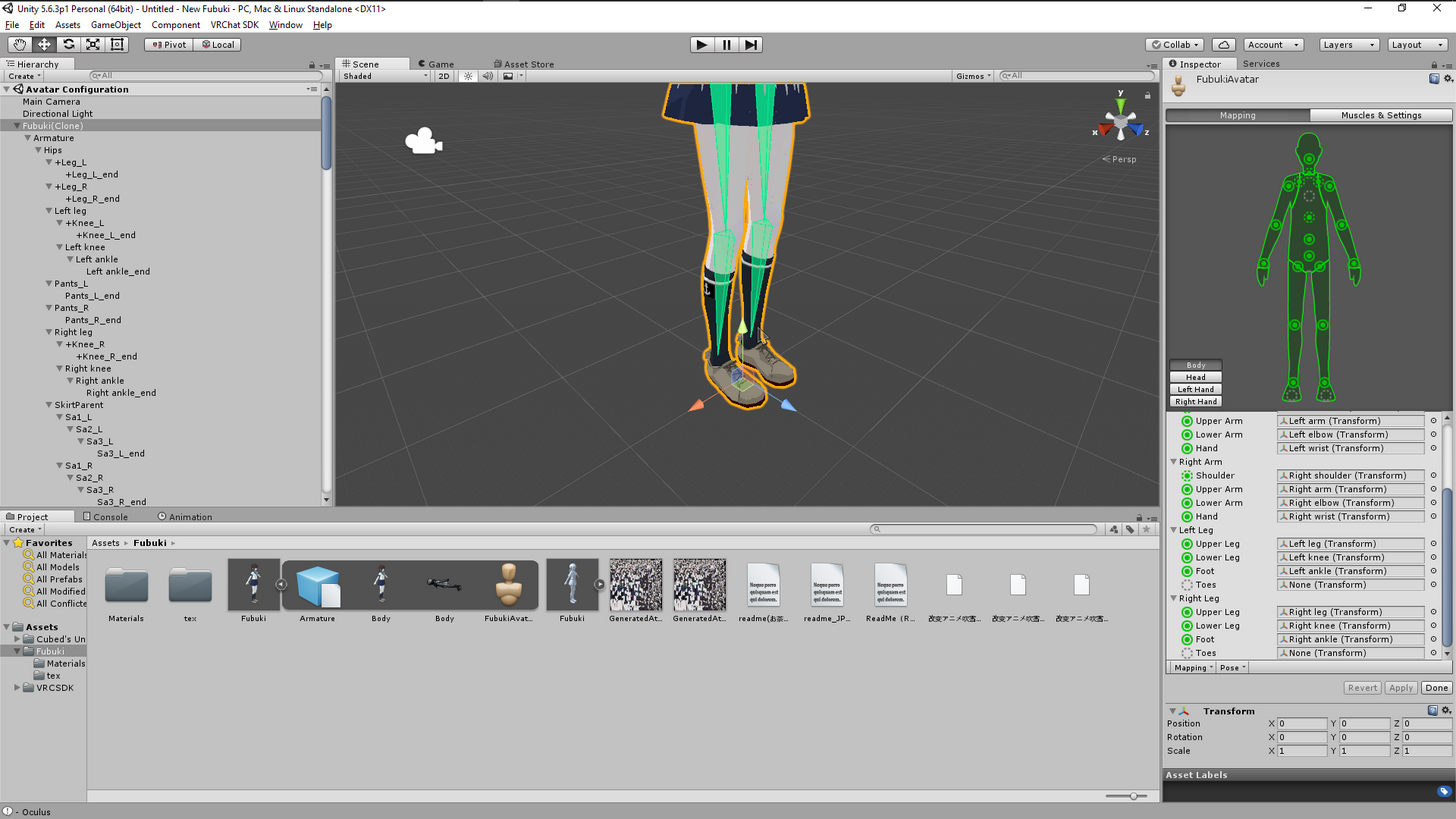
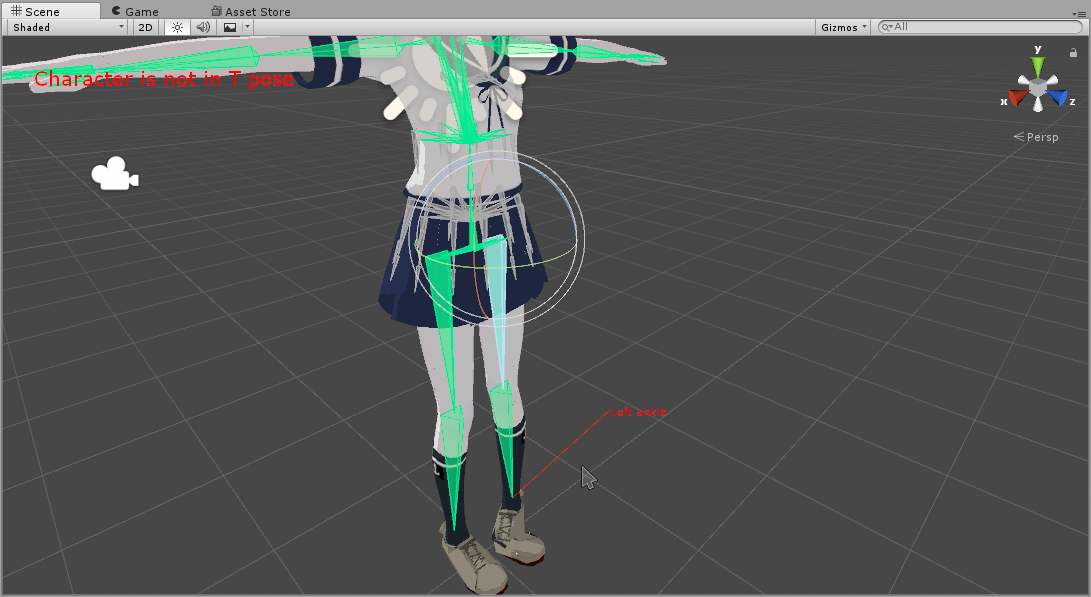
alright somebody can tell me what is wrong with those feets o 3o https://i.imgur.com/AGR2ylT.jpg

 olive ivy
probably your feet are bound to your hips
 warm gazelle
May I have some help with rigging? "Spine Hierarchy incorrect. Make sure that the parent of both Shoulders and the Neck is the Chest."
olive ivy
you know where you set your rig to humanoid?
hard zenith
https://i.imgur.com/mCwWR9K.png @olive ivy
 olive ivy
huh
can you try to move in there?
see if it does the same thign?
like, rotate the hips or something
hard zenith
in unity?
olive ivy
yeah just use the arrows
hard zenith
lul
 rustic coral
anyone know why when i play my custom animation my body flies into the air
its really weird
olive ivy
no, like
the thing you're in
in your screenshot, you see the arrow move thingies right?
hard zenith
oh
oh e
ye
it does it
the same thing
that happens in game
@olive ivy https://i.imgur.com/rFLPMDR.png
 olive ivy
oh
hard zenith
to clean up
olive ivy
I haven't used cat before, if you rigged this yourself I'd tell you to check the weight paints
warm gazelle
May I have some help with rigging? "Spine Hierarchy incorrect. Make sure that the parent of both Shoulders and the Neck is the Chest." I don't understand what could be going wrong. This is my first time doing this fyi..
 drifting raven
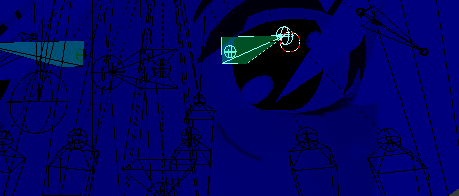
When I click on "create eye tracking" i get the message "The bone "Eye_L" has no existing vertex group or no vertices assigned to it." How do I fix that? The eye bone is a child of the head bone.
olive ivy
@warm gazelle I have a shitty way of fixing this, but it worked for me; Go to your model (get out of the bone screen) and manually drag the bones assigned to the neck and shoulders ONTO the bone assigned to the chest
warm gazelle
how to I manually drag them? @olive ivy
olive ivy
click on them and drag
warm gazelle
out or in the Bone Screen?
olive ivy
in the object hierarchy
warm gazelle
is there a way to throw this to you real quick. I have been doing this for 6 hours today and I am going crazy.. being this is the last step
olive ivy
Let me call you
warm gazelle
aight
 zinc urchin
so I have a problem where when doing animations the head will be "stuck"
here is my current rigging, but I cannot figure out a solution
 signal cairn
https://i.imgur.com/O4YS4BV.png could i get some help here
 zinc urchin
the other models I have done in the past can flip their heads while doing the backflip animation, but this one cannot
signal cairn
avatar stuck in a Tpose
drifting raven
When trying to create eye tracking i get this: https://imgur.com/a/iGqyP. How do I fix that.
 zinc urchin
@signal cairn are you using blender to make sure the bones are weighted with the model?
zinc urchin
yeah, most of the times, they aren't connected so nothing will happen to the model
signal cairn
how do i fix that tho
zinc urchin
easier to be on a call, mind if I call you?
signal cairn
sure
olive ivy
@zinc urchin check the head bones
drifting raven
Anyone able to help me with this: https://imgur.com/a/iGqyP. I get that when clicking the create eye tracking button in blender.
 cinder iris
any idea whats causing the skeleton to come out like this?
olive ivy
Should my model's center of origin be at my feet?
zinc urchin
I think it is easier to manuever in blender if it is at the feet
@cinder iris is that your own created amature or an imported one?
cinder iris
imported
zinc urchin
I think sometimes files just get messed up and you prob just have to manually fix it
to me it looks like you have all the right bones, but their position got messed up while importing
that is my guess
cinder iris
this only occured to me when i export it out of unity
when i open the original it comes out like this
silk kestrel
@cinder iris I can take a look at the file with the broken bones if you dont mind sending it to me
cinder iris
@silk kestrel Sure give me a sec
silk kestrel
@drifting raven most likely your eye mesh is not weighted to the eye bone
can you select your eye bone and go into pose mode
next select your mesh and go into weight mode, screenshot what you see
drifting raven
I'll check.
@silk kestrel Sorry new to this. I've selected the eye bone and entered pose mode. When you say select mesh, is that from the armature? Or do I need to separate by materials first.
silk kestrel
just right click on the mes h in the 3d view
 south lagoon
Hey all - Pleasure to be apart of the avatar community! did my first avatar rig this morning of Kaneki from Tokyo ghoul (Model by Hzeo) Now - having an interesting thing in game where for some reason, he likes to run a bit like a hunched over gremlin.
Im assuming this is something to do with the bones of the model perhaps being misaligned?
wary wave
How hunched over? Almost everyone does.
Could you also show us what it looks like in the configure menu?
south lagoon
Im talking - looks like squatting at a table too small for someone standard but too tall for a small person. If you catch my drift, a little quasimodo if you will 😛
drifting raven
@silk kestrel Is this what you're talking about https://imgur.com/a/Tv1kY
 silk kestrel
yup, there is no skin weight on that eye
if you select other bones, the surrounding area should be red
south lagoon
From what I could tell, Its the run animation more so than anything, theres a slight hunch to the standing form but nothing too drastic there.
wary wave
thats pretty normal. If you look, almost everyone runs hunched over a bit
but yeah, show us what it looks like in unity
with the config menu
south lagoon
No problemo, Loading unity now
drifting raven
@silk kestrel I get different colors when selecting other bones. Some reddish, bluish, etc. But I think I see what your talking about. Is there a video for adding weight to the eyes?
silk kestrel

Quick intro and guide to skinning/weight painting. this video is meant for those with a basic understanding of Blender
south lagoon
Apologies, im being as thick as a doorknob @wary wave, Where abouts am I grabbing this config menu from?
silk kestrel
@drifting raven Because you are using an anime model, there is a chance you have to weight the iris only.
signal cairn
https://i.imgur.com/2nDQ5Nc.png anyone able to shed some knowledge on this and what i can do to solve it? model stuck in a T-pose when ingame
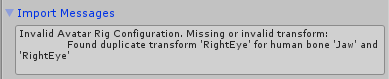 signal cairn
yea
south lagoon
Ah apologies! That menu!
 shy lark
try removing / unsetting the jaw bone in configuration menu
hard zenith
alright
guys
i weight painted the shoes
but when i move them
it does this
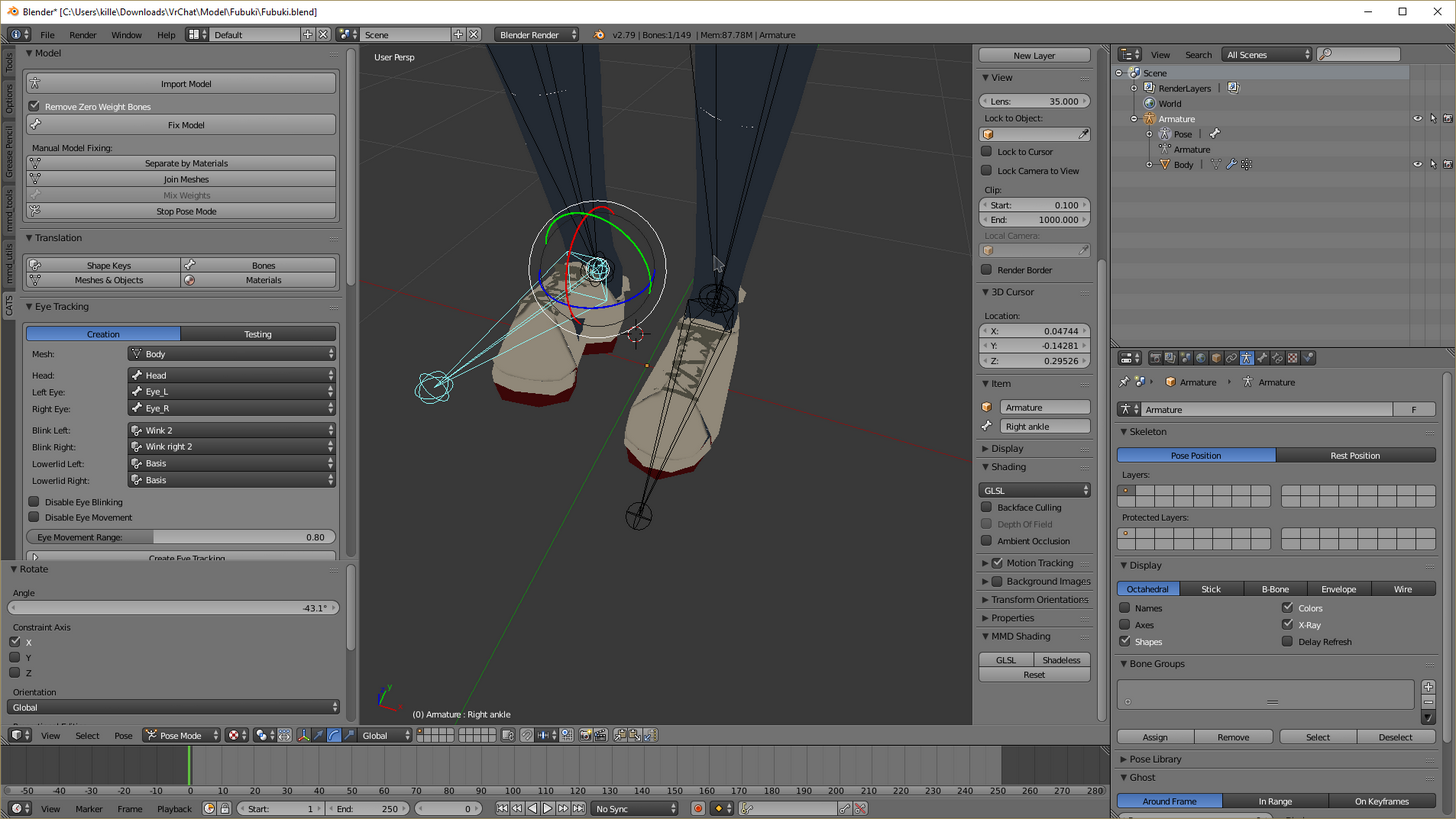
anyone can help? '-'
silk kestrel
is your shoe completely red when you weight paint it?
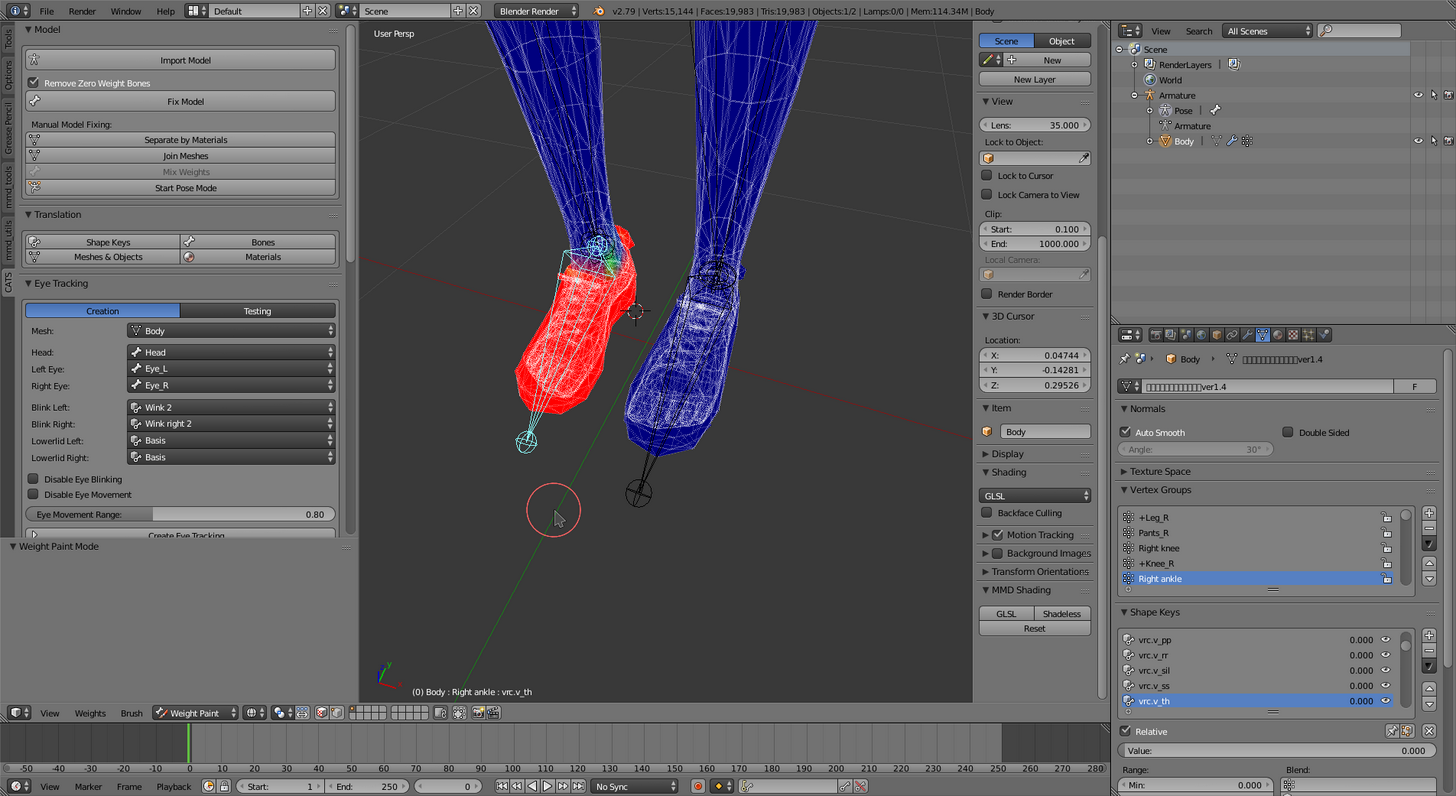
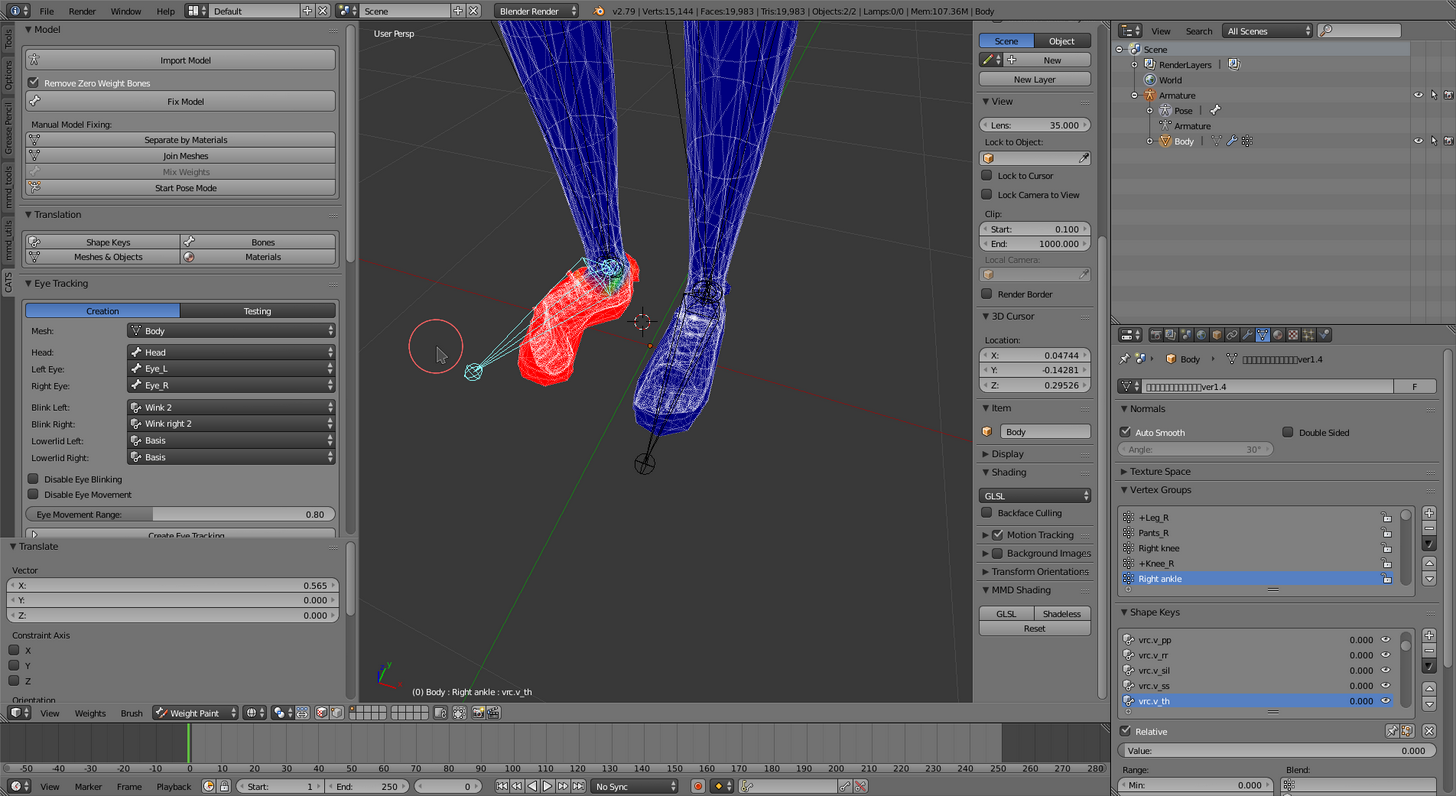 silk kestrel
in your brush tool there is auto normalize, do you have it turned on?
silk kestrel
lets say you have an arm and a hand bone
signal cairn
my avatar doesnt have a jaw bone
silk kestrel
the arm controls parts of the hand mesh, thereform the arm bone weight = 1.0
signal cairn
do i really need a jaw bone
hard zenith
ohh
silk kestrel
if you paint the hand mesh with the hand bone without normalizing, the hand mesh will see its weight value as 2.0
wary wave
@south lagoon Side too please?
shy lark
@signal cairn no, jaw is optional / not required
silk kestrel
so it will divide the weights between the bones. normalize fixes this by saying the mesh value can be no greater than 1.0
drifting raven
@silk kestrel Thanks. I'm giving that a try now with just the pupil.
south lagoon
Fair comment! Thanks @wary wave appreciate your time!
sand raft
!
 jaunty flowerBOT
Command not recognised
 teal cloud
I have this .mdl file but it wont go into mixamo
it says ''problem while uploading your file''
hard zenith
@silk kestrel naruhodo
silk kestrel
what...?
crisp tendon
@teal cloud Afaik Mixamo is fbx or obj
crisp tendon
blender you'd need an addon/plugin, unity i have no idea, you can try
teal cloud
this is so frustrating for me, cause you see
I just want one model
but its rocket science to get one in the game
I have no idea how this stuff works, and any video I watch is just so confusing
its unclear, I can't get any info out of it
I have all the plugins and addons I need, I have the SDK, the Cats plugin
but I don't know what to do with them :/
 void dust
Can someone help me fix a problem with my model? It won't rig properly.
crisp tendon
@teal cloud Have you tried to find this avatar in a different file type ?
@void dust MMD ?
void dust
PMD. I was able to export it with Blender, but I can't configure it right.
crisp tendon
@void dust try using mixamo, it works really well for humanoid
teal cloud
this is the model want
crisp tendon
@teal cloud obj is easy
teal cloud
well when I put it in mixamo it says error
crisp tendon
Did you check if it already had an armature ?
wary wave
Is there a way of having something aim where I'm looking, but not be the head bone?
pallid lion
Idk what I did wrong in blender but
void dust
@crisp tendon Are you sure PMD works with Mixamo?
teal cloud
how do I check that ruuubick
wary wave
Jesus christ
crisp tendon
@void dust Export it or import it ? If you can get it in blender, export it as an fbx
@pallid lion That is bad hierarchy or weird weight paint
void dust
@crisp tendon Okay yeah. I already exported it as an fbx
 opal aurora
It be a source model by the way, just to get this straightened out first
pallid lion
How do you get rid of the extra weight bones in blender?
opal aurora
@spaghettiarms
void dust
@crisp tendon I'll try that.
crisp tendon
@pallid lion You mean the bone or the weight ?
pallid lion
I don't know
crisp tendon
🤔
pallid lion
I really don't know what to do to fix this
crisp tendon
@pallid lion Send us a picture of your armature first, then we'll see
opal aurora
This is their first model, it's a source model at that, we both know how the bones on those are
crisp tendon
yep ...
opal aurora
Best of luck
crisp tendon
oh god
It doesn't win the prize of overall worst, but it definitely get the prize of worst arms ever
Try using cat's plugin in blender
Or remove the skeleton completely and put it in mixamo
crisp tendon
click on "fix model" ?
pallid lion
I don't even know where that option is, I just got this today eariler so I still haven't found out where everything is
nevermind
Found it
and looks much more
crisp tendon

pallid lion
clean
crisp tendon
brb
pallid lion
teal cloud
still trying to find my download
fuck
😩 HOW
I put the obj on my desktop and its invisible to blender
what am I doing wrong
pallid lion
Ruuubick
Its still got noodle arms after the clean up
How do I give it a whole new skeleton instead?
 low river
What would having toes do?
pallid lion
what
wary wave
@low river In VR, lets you stand on your tippie toes
wary wave
pretty much
void dust
Well, I uploaded the model to MIxamo, but it won't let me rig it like it has done with most of my models.
I guess you can only rig .obj on Mixamo?
@crisp tendon I converted the model to .obj and threw it into Mixamo, but the model's off-center so I cant rig it properly.
 thorny ginkgo
so i imported a model into blender and created all the bones correctly. but when i go into unity to veryify bones, the model wont move with the bones. help?
void dust
Here's what I'm talking about.
crisp tendon
@void dust You'll need to remove the guitar first for the rigging process, and you can set her correctly in the middle in blender
drifting raven
@silk kestrel Thanks for the Eye Tracking info. I got it working.
naive zinc
@thorny ginkgo Does the bones move the body in Blender? Aka when you move the hip bone it moves the mesh?
pallid lion
@crisp tendon How do you rig the character with mixamo
thorny ginkgo
kinda, it will move some what, but parts of the "skin" stays in place
naive zinc
Than your weight paint is broke
The hips should move the entire body as if you were moving the mesh on it's own
thorny ginkgo
easiest way to remove the weight paint?
i havnt done anything to texture it or anything
crisp tendon
@pallid lion You upload your character and follow the instructions
naive zinc
Select the body mesh > Click the object (orange cube) in the tool pannel and unparent it > select wrench (Modifiers) and click X on the Amrchair mod
pallid lion
alright
naive zinc
That will unlink your mesh from your bones
To Re-link with auto-weights > Object Mode > Click mesh > Shift-click bones > ctrl+P > Auto weights
pallid lion
I uplaoded it but it didn't give me an option to auto rig it
Wait on
no
It did rig it but I guess I put in the already rigged model
void dust
@crisp tendon I guess I should show you the problem in Unity before I try that. The spine hierarchy is messed up, so I can't have the chest be the child of the spine.
thorny ginkgo
Thank you very much Slub. bones now are attached to model,
crisp tendon
@void dust The one you made with mixamo ?
void dust
So, I'm trying to assign the UpperBody bone to the Chest, and the LowerBody bone to the Spine. However, this doesn't work, since the upperbody bone is not a child of the lowerbody bone; they are both children of the center bone. How do I fix this?
@crisp tendon No; the original I exported from Blender.
pallid lion
@crisp tendon The model's new skeleton works fine now, now how do I put it with the model in unity?
crisp tendon
@pallid lion It's already in the model, just put the model as humanoid and map the bones
@void dust
enforce t-pose
 long hill
Soo I have working eye bnes but ni eye tracking in game
crisp tendon
Did you apply the material ?
long hill
Sorry, typing in VR so spelling is bad.
crisp tendon
in unity
void dust
@crisp tendon That doesn't fix the problem with the spine hierarchy. What do I do about that?
long hill
Does anyone have any idea why my eye tracking is not working?
Do I have to do something or is it as simple as importing a skeleton with working eye bones?
void dust
crisp tendon
Yeah the spine bones aren't good, use cat's plugin in blender to fix that
void dust
What do I do from here?
crisp tendon
fix model
void dust
That's it?
 oblique heron
@void dust You want to get rid of the guitar for mixamo right?
void dust
@crisp tendon I'll see what that does. I've gotta leave for 10-20 minutes.
teal cloud
okay so
pallid lion
@crisp tendon Alright, so how do I now copy the material over to the new model
crisp tendon
you click on your mesh in the hierarchy and you apply the mesh to it on the right
teal cloud
I've pressed next three times
It says its rigging but
It brings me back to this screen every time
with no error messages at all
 tawny temple
quick question, how do i get this to flow more natural than like this, used to be fine before but idk why it's like this now
teal cloud
it just, acts like it didnt do anything
crisp tendon
@teal cloud what shader are you using ?
teal cloud
what shader?
crisp tendon
Ah, so nothing, gotcha
pallid lion
@crisp tendon Is it possible you could quickly show me where I click to convert the mesh from the first model to the new one?
teal cloud
Idk what ur talking about
crisp tendon
i'll try mixamo give me a sec
teal cloud
what do you mean shader
crisp tendon
@pallid lion Convert the mesh ?
tawny temple
@acoustic pilot import it into blender,scale it down then export it then import back to unity
oblique heron
You can scale it in unity
tawny temple
o
oblique heron
And some bones are unmapped in your rig it seems
pallid lion
@crisp tendon I don't see that option if it is one
crisp tendon
@pallid lion What step are you at ? What are you trying to do ?
crisp tendon
You just have to apply the texture
pallid lion
Yeah but how
It doesn't let me drag over the other mesh
and I can't find an option to convert it over
crisp tendon
i told you above
click on the mesh, and then on the right window apply the texture to it
or material if you prefer technical terms
pallid lion
This is all I see on the right
@crisp tendon Can you send a screenshot of where I do this exactly cause I can't find that option
Nevermind
silk kestrel
@acoustic pilot can you screenshot your rig menu in unity?
oblique heron
Hierarchy is wrong. If you go back to the main scene window and go into your model's armature
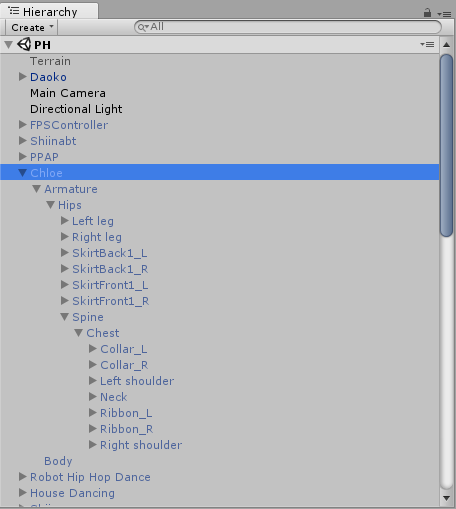
Neck and shoulders both have to be under chest
You can left click and drag them into position
You can't do that in the rig menu, it has to be on the scene window.
 midnight vale
ty 😊 sounds easy
oblique heron
Nps
void dust
@crisp tendon Thanks my guy.
crisp tendon
👌
 vestal swallow
I accidentally uploaded a unity file to my current project and now the dynamic bones component won't let me add them. I'm not sure what I did
All of my assets that I added Including the SDK don't work properly anymore....Do I have to reinstall them?
naive zinc
It probably edited the config to match some shit, easier to start a new project and just re-import stuff
fading verge
any way to add your own shoulders into a model? i want this avatar so badly but no shoulders in it http://prntscr.com/hu1x1y

 woven hatch
Add bones
fading verge
how do you add bones in
woven hatch
Blender
pallid lion
Or Mixamo
 silent scaffold
how do you unassign a bone to a position in rigging?
woven hatch
Because it had no shoulders to begin with
fading verge
ugh, i never did bone adding before soo rip me lol.
woven hatch
Check the hierarchy on the left and make sure there is no shoulders first

 night kayak
Does anyone have a full walkthrough of model rigging and importing? I'd like to just go step by step somewhere. Thanks
 pastel heron
i think something mighta fucked up in mixamo's autorig, just a lil bit http://puu.sh/yQwpa/209b98d7bf.png

you think i can still bring this through unity into vrc lmao
odd tulip
that is a work of art
tawny temple
anyone knows why the scarf does this when i rig it with dynamic bones and moving it around? it's not flowing correctly sadly
just the tip where i circled doesn't move fluidly like the rest of the part
 kindred spear
fuck it, does anyone have a tyrantrum ready to go?
 crystal vector
@cobalt bear You should translate the bones and fix the bone hierarchy. You can use cats for that
 feral loom
Hey guys, quick question. So I imported a Maximo model but after mapping all the bones correctly, the SDK says the Feet/Upper Arms are not mapped. Any idea?
crystal vector
@tawny temple you should weight paint the rest of the scarf to its last bone
@feral loom Can you show how you mapped them?
feral loom
Certainly, give me 2 seconds to pull it back up
tawny temple
@crystal vector thanks
feral loom
@crystal vector https://i.gyazo.com/003658a825cdfb8666a8a8fb24f1311e.png

These are the errors I get: https://i.gyazo.com/8442d568aebf8a1428c5a14f0f2adc68.png
 crystal vector
@feral loom Mmh, looks good to me. Can you show the upper half of the mapped bones?
 crystal vector
Mh I don't see any errors there. But are there two armatures there in the rig?
crystal vector
I could imagine that two armatures can cause that problem
feral loom
As far as I can see, there is only one set of bones
crystal vector
I'm on phone so I don't remember how this normally looks like, but this seems suspicious
feral loom
Oh, those are animations
crystal vector
Ah ok, that makes sense
feral loom
Yeah, I'm just going to re-import it and verify the bones in blender
crystal vector
Yeah do that, I don't know what else the problem could be. Maybe run it through cats
feral loom
Cats?
crystal vector
Cats Blender Plugin
 sleek nest
Hi guys, just a little assist for my first attempt at rigging
crystal vector
It fixes mmd and Mixamo models
feral loom
Is there a specific option for it?
sleek nest
I'm not really sure what the problem is here, could you guys take a brief look?
crystal vector
@feral loom No, just click fix model and it should be ready to go
crystal vector
@sleek nest You should go back to blender and fix your armature. You can use cats for that too
sleek nest
It's really bizarre cuz it became a problem when I started fiddling with the hierarchy so that the Chest was the parent for the neck and the shoulders, which it is now
 rough mural
Anyone else has texture problem with mixamo?
crystal vector
@sleek nest That problem is typical for mmd models. You have to fix your armature in blender for it to work
sleek nest
Is that just redoing the process? Not sure what that means
warm gazelle
I am new to this whole thing and I "finished" my first avatar today. I got in game and the shoes are not on my feet, but instead to the side leaving my textureless toes exposed. Can someone help me figure out how to get my shoes to a normal position? When I view it in Unity the shoes are in the right place, just not when in-game.
crystal vector
@sleek nest No, you have to reparent the bones, so they are in the correct order. You can just click fix model in cats and it does that for you
sleek nest
Ah, alright, thank you very much
crystal vector
@warm gazelle The shoes are probably not weight painted or parented to the feet
warm gazelle
@crystal vector how does one "weight paint"?
crystal vector
@warm gazelle There are tutorials about that. I'm on phone, so I can't show it right now
warm gazelle
alright
crisp tendon
@feral loom Your skeleton is not correct
@feral loom If cat doesn't fix it and you're wondering why, there's one too many spine bone for the rigging, and that's why it wasn't working before
 outer shore
Hey guys, i would need help with an avatar is have worked on for around 6 hours today. My rigging knowledge is complete none and it is the last step i need to finnally port it in.
crisp tendon
yep ?
outer shore
So, i've been told my model's rig should not have 2 spine bones
crisp tendon
correct
 hazy cobalt
Is anyone versed in converting from obj to pmx?
acoustic pilot
I don't know why
I have no Red errors
But the SDK still won't let me publish??
Then this is what the Camera sdk is showing
What am I supposed to do Please help?
feral loom
@crisp tendon Yeah, I just noticed and it's working now
 pulsar hearth
Excuse me, is there anyone who can help me with a problem regarding my avatar's bones/structure
 lime monolith
Not sure if this is the right channel to ask but
acoustic pilot
I mean
lime monolith
is there a way to limit my weight painting to only vertices that I have selected from Edit mode?
acoustic pilot
His is about his rig
I just want to know why the SDK won't let me publish my model at all
There's only one red error and it's just something with the camera
pulsar hearth
😒 i dunno what to do, appearently the skeleton of my character is bigger than the actualy model or something
lime monolith
@acoustic pilot None of those errors look like they should refuse to let you publish
The default camera object comes with an audiolistener
that's not allowed, so the sdk will automatically remove it for you
that won't change anything else
lime monolith
What happens if you click 'build and publish'? Any errors in the console?
acoustic pilot
It won't let me click it in general
It's greyed out
I have the correct unity version (5.6.3p1)
pulsar hearth
Why?
 spring magnet
Is there a way to easily fuse two model's rigs?
 near heart
can someone tell me why ingame my avatars arms are bent backward?
woven hatch
@pulsar hearth Your mesh is too small and your legs are not spread enough
 restive shale
acoustic pilot
restive shale
acoustic pilot
I honestly don't know what to do
My avatar is 100% complete
But the SDK is just shutting me out from uploading
woven hatch
If I’m bein a sugar daddy I can
acoustic pilot
I saved
And closed and reopend unity
Same issue
Do I have to uninstall and reinstall unity?
@oblique heron
oblique heron
No idea >.< Wouldn't hurt to try I guess
acoustic pilot
I swear
I get all of the most complex issues that barely anyone knows how to fix
You would think more people would run into these issues
nope
Just me
outer shore
how would one go about merging 2 spine bones in blender?
 paper bronze



 lime monolith
Fingers take SO LONG TO RIG augh
so many bones
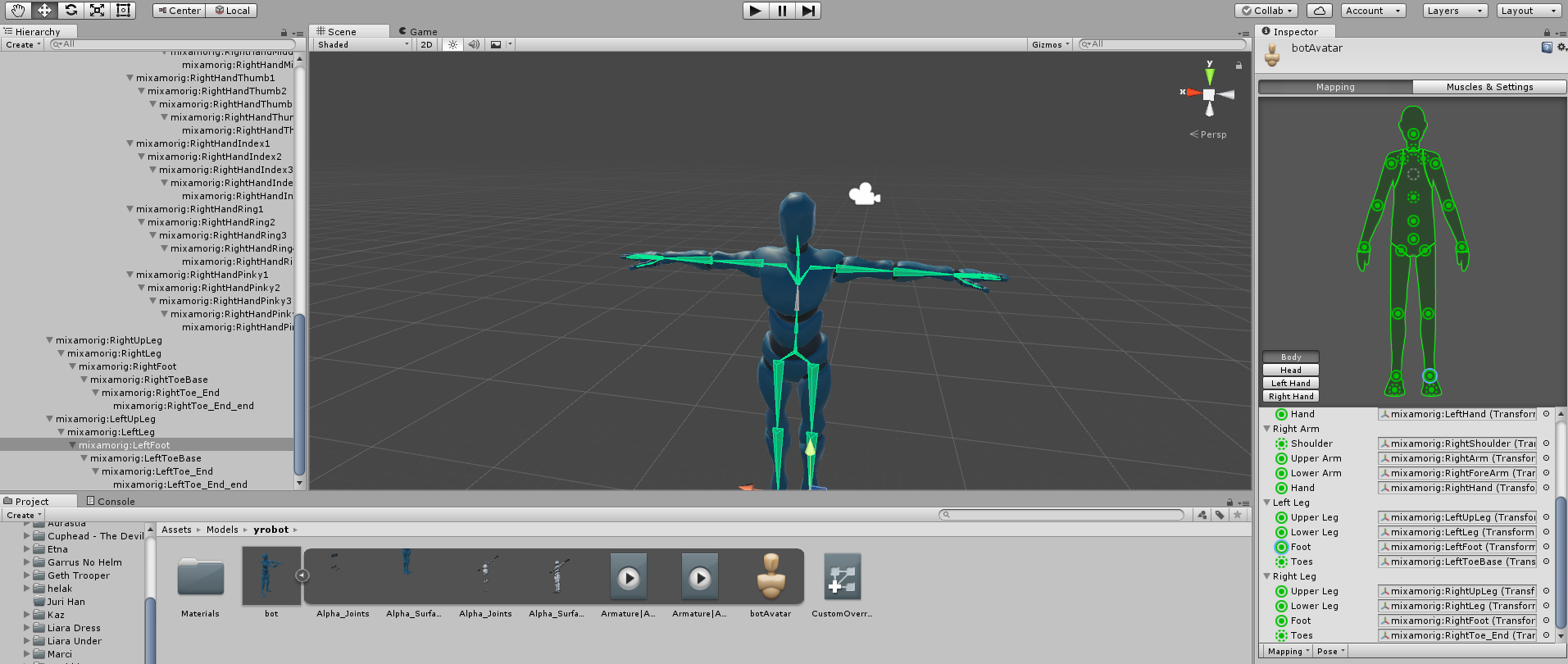
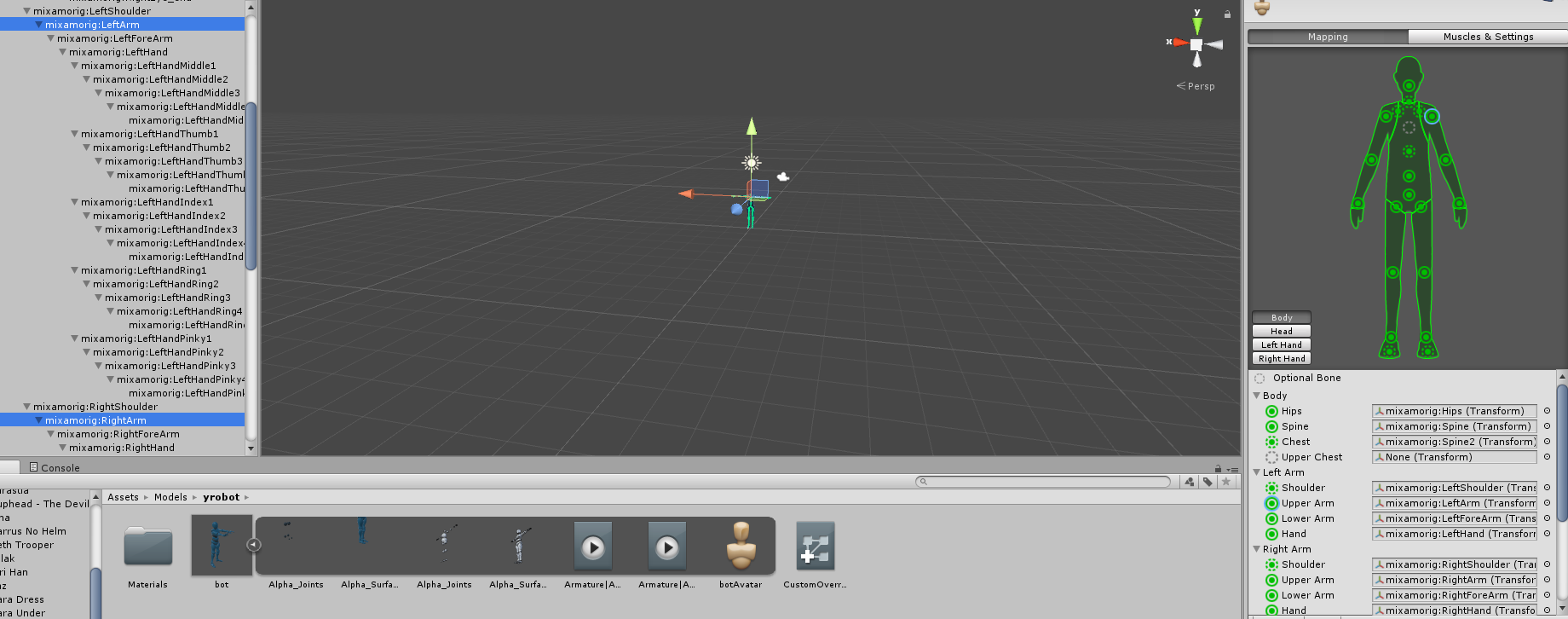
Also Carrot it looks like you're missing the chest
judging by the green picture
Left Shoulder and Right Shoulder and Neck need to be children of Chest, and Upper Chest needs to be empty
 rotund nacelle
Is there a default skeleton somewhere? I've been looking for a some time and it's eluded me.
lime monolith
Hips -> Left leg, Right leg, Spine