#avatar-rigging
1 messages · Page 38 of 1
 limpid scarab
 oblique latch
i did and he is so big
oblique latch
i set it back to 1/1/1 and it just looks like the example
 iron chasm
Just finished building my model and it is ready to be imported into VRChat, but I want to add dynamic bones and i realized that inside armature there are no bones for hair, skirt, etc. Is this normal? And if yes, how can I put in bones for the skirt hair etc
 spring ivy
any1 knows why the wrists on my character are not rotating when playing animations?
rly makes u thonk
oblique latch
i set it back to 1/1/1 but he is to big wtf did it do to my guy xd plus the cam is all f up @limpid scarab
 civic copper
@iron chasm That's kind of pre planned in the Blender stage, but if it has bones it should be in the heirachy
oblique latch
i moved the avatar descriptor up to the face but the cam f up and is at the side of him
oblique latch
its the scale that is f ing up my guy i can not find a good one
 eternal birch
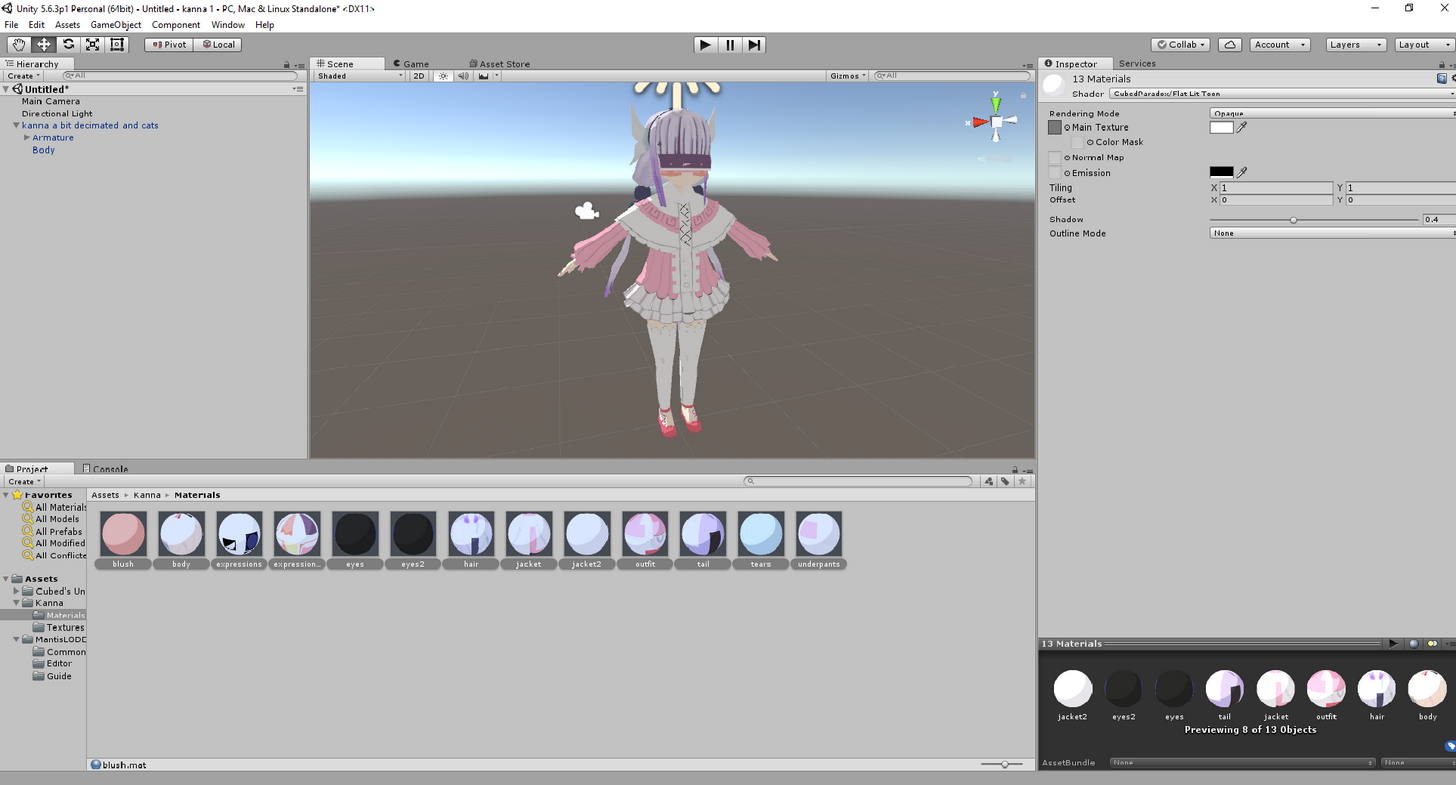 spring ivy
waht does this mean?
 meager shuttle
If my model doesn't have a humanoid shape, do I still set it to Humanoid?
spring ivy
i thonk VRchat doesnt allow anything other than humanoid type so yea
meager shuttle
Alrighty
 crisp tendon
I wish we had some image recognition software that could detect the basic issues people keep having over and over and give the solution on how to fix it
spring ivy
yeeaa
crisp tendon
@meager shuttle You can use Generic
@meager shuttle But humanoid can work for a lot of things
meager shuttle
@crisp tendon will it not animate though?
crisp tendon
It will not, not with the default ones at least
meager shuttle
Alright
crisp tendon
You can bring a generic with its animations
crisp tendon
Yeah generic is a bit more complicated sorry
crisp tendon
jigglypuff sshould be humanoid
oblique latch
i can not fix my guy at all he is to bg and the cam f up i did all i can to work out a fix but its still there
spring ivy
Am I suppose to make the wrists an in-between bone in my character rig setup?
 dire mica
Does the rotation lock on bones in blender work in vrchat?
 clear cedar
Hey guys, any idea why the feet is at an angle compared to the ground? https://i.imgur.com/VjtAndA.jpg
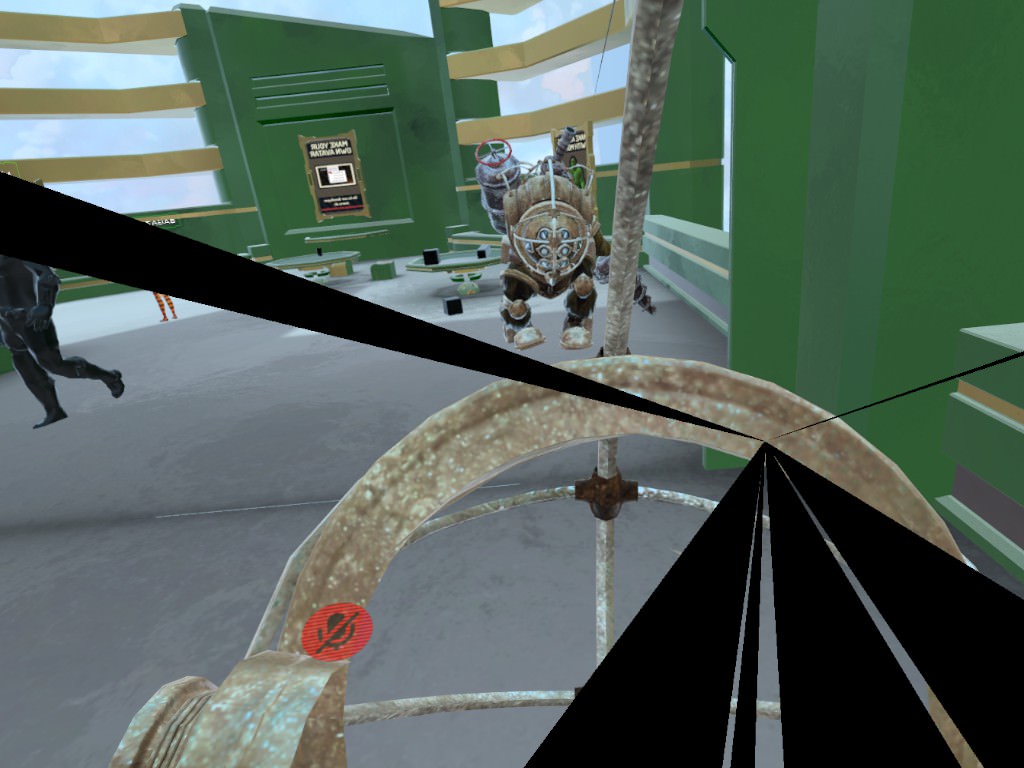
well, the knee is fucked up too but in most situation it's normal and there's only the feet that is bent so
dire mica
Nobody? ._.
 pure oriole
Probably not @dire mica
dire mica
D'aw
 fading verge
I'm going to assume no Asian noob. I'd just done it out of habit, but I've always paired it with an animation only using the one unlocked rotation. Only locking them because paranoid.
But they've always rotated along with the parent bones.
If you're going for globally, unparented bone only within the armature, Shrug
dire mica
I only wanted it to make something look a bit better
But I can deal with not having it
fading verge
You can probably accomplish it with animation overriding idle with a copy. But I don't know what you're exactly doing.
dire mica
Nah, it needs to be dynamic
 weak drum
Ok quick question: say your character model has a scarf that hangs off the back of the neck, how would you go about adding physics to that? I think someone told me it involves dynamic bones and adding force to it
though I dunno if i need to do that in blender or in Unity
something like this:

 marsh escarp
is there a way to give my dynamic bones some Gravity so they hang down, like if i have a scarf or something?
weak drum
that's what I'm tryin' to figure out too
marsh escarp
Well then we are on the same boat
marsh escarp
Now its floating
weak drum
are the dynamic bones something you add in blender?
marsh escarp
You need to ad the bones in blender yes
weak drum
ah ok
marsh escarp
and then select the bone you want as a Dynamic bone
Now the Scarf is just floating around
or is it only in Preview mode?
fading verge
Floating?
marsh escarp
yeh
fading verge
Dunno
marsh escarp
its not hanging down its just like stuck after moving it around
fading verge
Setting the X component of Force equals gravital pull for me
Remove Elasticity then
 unkempt ermine
using an sfm model converted to fbx. Help?
marsh escarp
Ah nvm, i had to but y to -1
 desert knoll
Quick question on some stuff guys. I'm using the "Fix Model" button for the CAT add-on in blender and it removes a bone from the chest to waist. Is that something I need to worry about?
 bitter oriole
probably thinks its upperchest
 gilded brook
What I did wrong when my avatar suffers hypermobility on elbow?
desert knoll
Is it ok to leave the rig as it is without having to use the Fix Model button and just import it to unity?
 last niche
hey I have an eye tracking issue when trying to create it, anyone know the fix?
 fervent pawn
i'm surprised someone hasn't made a guide yet for the spine hierarchy issue
it's a very widespread problem
fading verge
look like lot of ppl got this isue
marsh escarp
Well, my problem is that my lowerbody is not the child of upper body
for whatever reason
and i never tried to change it
gilded brook
@last niche your screenshot is so blurry so I cant read it. But I think it want vertex group for your bone. Do you have vertex group with same name as bone?
last niche
@gilded brook there doesn't seem to be a vertex group for the eye
gilded brook
so, now you know what to do ^^
marsh escarp
How difficult is it to reparent bonegroups
weak drum
ok this is weird, I imported the model to unity after I was finished in blender but uh

the legs are bein' all weird
last niche
@gilded brook i actually dont lol
gilded brook
create vertrex group and assign eye vertexes to it
last niche
@gilded brook oh ok
desert knoll
this video kinda shows the hierarchy https://www.youtube.com/watch?v=URvV4DoOr1I

As the title states, this is a full guide on how to get the basic model port into VRChat! We used the MMD model of Mei for this basic tutorial. If you have a...
marsh escarp
i know the hiarchy, tho i dont know how to actualy change it
As you can see here, the Hips are not connected
 spice pumice
hello, if any can give me some advice on rigging a model
marsh escarp
that would be me
spice pumice
I went to publish and i got the upperchest error, followed by the spine hierarchy error, once I fixed the chest one
spice pumice
i can't figure out how to fix the Spine Hierarchy
also is the 10k polygin limit absolute?
mine is 10698
meager shuttle
I thought the limit was 20k
fervent pawn
it's 20k
 polar siren
@spice pumice it says 10k but u can still upload if under 20k
weak drum

oh I got some sort of warning:
'ImportFBX Warnings:
Mesh 'Mesh.014_DrawCall_287' has 52 (out of 521) vertices with no weight and bone assigned (they will be assigned to bone #0 with weight 1). The list of vertices: 0, 1, 2, 3, 4, 5, 6, 7, 8, 9 and so on...
UnityEditor.AssetImporterTabbedEditor:OnDestroy()'
 vast epoch
im having trouble with the Hip bone have dynamic bone and causing the view point to e higher than the head when sitting down but i found this online https://vrchat.canny.io/bug-reports/p/applying-a-dynamic-bone-to-your-hip-breaks-sitting but can i do this in unity or blender?
 vagrant walrus
so i did the "fix model" shit with cats and it made a different armature for some reason
like now i have two armatures now
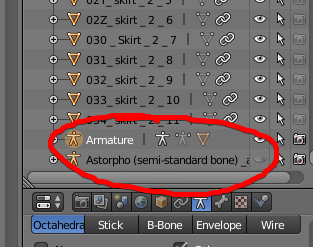
these are the two
the lower one is the original one, should i delete it?
 blissful onyx
Is there a way to use avatars with less than 5 fingers?
blissful onyx
How do I do it? I tried configurung the rig but then it says I don't use the humanoid rig. nvm I got it to work
marsh escarp
can somebody here help me whit my bone hierarchy, i never did it befor and i cant really find any tutorial on how to reparent them if thats even an option
blissful onyx
@marsh escarp As far as I know you can change the parent bones in an 3D editor like blender
 naive zinc
Can i weight blend penetrate?
fading verge
Hey Buddys, i cant rotate my character in Blender because i´m in "Rest position" how can i leave the rest position?
 neon sierra
Also make sure you select the entire armature
fading verge
thanks!
How can i rotate the bone counterclockwise a little bit so its straight?
Use those options
dire mica
For a split second I thought the laces were all bones...
vast epoch
is there a way to take say cat ears and tail from 1 model and add it to another?
 low river
Hey, if you want the models mouth to move as you talk in VRchat, do you want it to by default have the mouth closed?
dire mica
Yes
 spiral marten
can anyone in here help me rig a model propperly?
dire mica
What are you stuck on
spiral marten
I have problems in general rigging after running into the upper chest problem
crisp tendon
is it an mmd ?
spiral marten
I'm really new to this kind of thing, the reason I started was this game
so I don't know what a mmd is
dire mica
Where/how did you get your model
dire mica
What file type is it
spiral marten
the model itself is FBX
spiral marten
I opened it straight to unity
dire mica
And you set the rig to humanoid?
spiral marten
yes
spiral marten
pretty much
dire mica
Im guessing that the vrchat sdk is giving you an error
spiral marten
upperchest and then when I attempt to fix that with my limited knowledge it says something about the neck and shoulders incorrect hierchy
spiral marten
let me set it back up, I was still trying to figure things out
so a screenshot of my rig are you asking for the whole page or the hiearchy?
spiral marten
yes I've seen that a few times
dire mica
Alright
 ember drift
Does anyone have an example pic on how hands should be rigged for vrchat?
dire mica
Eh
This is what mine looks like
I must say however
I don't have VR and as such I have never checked whether they are set up correctly or not
dire mica
Erm?
 slim elm
can someone help me with a model issue?
dire mica
slim elm
i keep getting errors about bones not being maped but it looks like they are
slim elm
nvm i fixed the issue
dire mica
@dapper briar how are you holding up?
spiral marten
dire mica
Oh
Yikes
Actually
It probably aint bad
If you got rid of/merge one of those 2 spines
Then everything should be correct
Altho, the fingers seems a bit odd?
spiral marten
wait so which spines do I merge?
dire mica

Generally you have hips -> spine -> chest
Before you try to fix it
I don't think that you should do it in Unity
I could try to take a look at it
vagrant walrus
nobody responded me yet to if i have to delete or not the old armature
spiral marten
I would apreciate your help
dire mica
And I have no clue what your situation is
spiral marten
I'll dm you the file to the model I'm attempting to use
vagrant walrus
dire mica
Aight
vagrant walrus
like now i have two armatures now
https://i.imgur.com/MWES70q.png
spiral marten
the bones should scale with the model right
 empty edge
@vagrant walrus you should be fine to delete the old armature yes
dire mica
Are they both exactly the same?
vagrant walrus
no, the old armature is the one that comes with the model
the other armature is the one that creates the plugin
and its clearer
spiral marten
I tried to scale it to around 4 meters
somewhere around that
I don't have it scaled in that file though
dire mica
Ah
vagrant walrus
mine is pretty... big isnt it?
dire mica
Oh scale is set to 0.01
spiral marten
so just try to scale it to a reasonable size
vagrant walrus
i can reescale it when i port it to unity so
alright everything should be done
bones work, its less than 20k tris, eye tracking works, gestures work
what now
anything more?
or can i port it to unity already
 vital meadow
how did you manage to get astolfo under 20k? i cried 8 times before i made it work lol
vagrant walrus
lets say that one pretty good modeller helped me
aaaaaall manual work by the way
so the model is still very high quality
vital meadow
i decimated the face and redid all the shapes u.u
vagrant walrus
yeah the face is where i was stuck at the end before they helped me
since veryone was "hurr durr dont touch the face"
had to fix the shape keys though but its working so
vital meadow
awesome!
 dusky oriole
can someone please link me to a vrchat tutorial for making animal avatars that walk on all 4s
vital meadow
send the fbx and textures inside the project
 gentle thorn
Why don't you guys use CAT?
 tawny tapir
How do I fix this? I'm not very smart with unity but when i check the bones for the shoulders and neck are all connected to the spine
chest*
tawny tapir
how can I fix that?
gentle thorn
I'm using CAT and seeing if it fixes it.
 oblique heron
@brisk crypt np
 light inlet

how can i fix this..
i know the boots are to close but.
is there a way to fix this?..
vital meadow
paint weights
light inlet
Whats that.
oblique heron
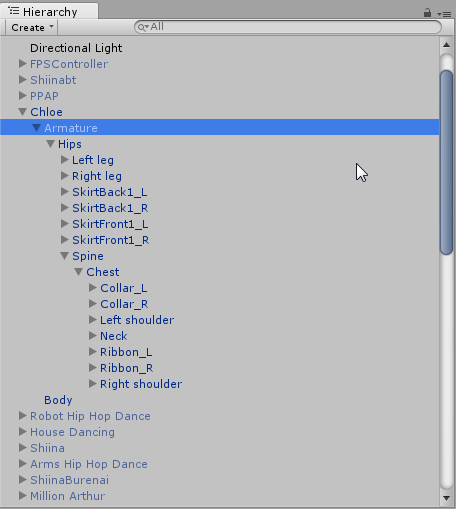
@tawny tapir Check my layout here https://i.imgur.com/mmQuvHq.png You want both shoulders and neck to be parented to the chest
 vital meadow
google blender skinning and weight painting. idk how that works on blender
oblique heron

Tutorial on weight painting and how to fix weight painting issues. Usually when a material moves with the wrong bone. Links: Model: https://mooniiiiichan-lov...
vital meadow
there you go! :P
light inlet
mm
tawny tapir
I might've forgot to translate the bone names from Japanese to English, can I do that in Unity or would I have to go back a few steps to Blender?
dire mica
@tawny tapir not sure if unity cant read em
light inlet
 dire mica
You can give it a try to just translate everything to be safe
@light inlet are you in blender?
light inlet
i wanted to rig this guy
light inlet
but this issue came.
vital meadow
then mixamo didnt do well giving the weights to those vertices
gotta paint it to fix it
oblique heron
I linked a weight painting vid not that long ago
 vital meadow
ok, to make it short. what skinning does is tell how each vertex is going to move by following each bone movement. what your model is doing now is grabbing the vertices of the boot and assigning the weight to the other leg
yo need to tell the mesh to follow the other leg
light inlet
mm?
 mighty jackal
i have a quick question about blender, is this the right chat to ask in?
light inlet
Yea.
oblique heron
Would be in there somewhere yeah. Or should be
mighty jackal
ok, so just to explain why I want to do this - for some reason when I load my model into vrchat, the mouth is open. Now, I adjusted the jaw in the spine heirarchy to be closed, and it shows it as closed until I bring it into VRChat. I think it has to do with the Jaw bone animation for talking.
What I want to do is just rotate the jaw bone in blender, so that when it comes into unity, i dont have to worry about rotating it
and hopefully it keeps it's default position
light inlet
When you want your favorite character in a game but god saying no making alot of troubles with it.
oblique heron
@tawny tapir I'd try to translate those names in blender first with cats though. And maybe a armature fix.
light inlet
jesus chirst-
mighty jackal
i just need to know how to rotate the group of bones about a point
vital meadow
games and animation are made by sweat and tears. and a lot of coffee. getting issues like that is the everyday challenge. don't give up
light inlet
...okay that didnt work.
i guess i'll download blender
huh.
Why god want me fucking dead
oblique heron
@tawny tapir What is assigned to the chest slot in your rig config menu?
 tepid hollow
what should i do if it says your rig has the UPPERCHEST mapped in the Humanoid Rig. This will cause problems with IK
oblique heron
Unmap it. Set it to none.
tepid hollow
k thx
oblique heron
np
vital meadow
character rigging is a full time job. ppl get paid good money for stuff like that. just be patient and you'll get it
tawny tapir
@oblique heron Just realized UpperBody2 is the chest and I have renamed it
 oblique heron
@tawny tapir Oks. Are you still getting errors?
oblique heron
You don't need to fix it if you are not using full body ik. Otherwise I'm not sure. I think it's something with blender though.
 round abyss
I am using full body ik tho
oblique heron
@tawny tapir yep
round abyss
:<
oblique heron
ah >.<
round abyss
just got the rig, when I made these models I made sure the rigging was similar
so this dosent make sense
if they are both 10
180
also thats usually a rigid structure
the thigh bone and pelvis locationa
oblique heron
@round abyss I only found https://docs.vrchat.com/v1.0/docs/rig-requirements#section-full-body-tracking Something to do with the bones
Unity will flag your humanoid rig configuration if it does not meet the Mecanim requirements for a humanoid. Please read and be familiar with this part of the Unity Manual when setting up your avatar: https://docs.unity3d.com/Manual/ConfiguringtheAvatar.html There are sp...
light inlet
some help?..
vital meadow
File -> Import -> fbx
round abyss
applied to your avatar. Ideally, the hip bone is pointing straight up and the upper leg bones point straight down in the TPose, but slight divergence is okay.
thats what I needed to k now
light inlet
oh
round abyss
thanks fantasy
light inlet
okay
oblique heron
ah nps
round abyss
thanks Jirou 😃
light inlet
oh wait that model is not even fbx
vital meadow
what format is it in?
 vital meadow
Tutorial on weight painting and how to fix weight painting issues. Usually when a material moves with the wrong bone. Links: Model: https://mooniiiiichan-lov...
round abyss
I really liked that spine position
light inlet
Okay thanks
 long hill
So, my character's knees knock together when I squat. Can someone recommend some adjustments to make them spread like a normal human being's knees?
tepid hollow
how do i set up an avatar to work with VRchats animation set
long hill
It just needs to have the avatar descriptor property to use the default anims.
vital meadow
needs to have humanoid rig setup
long hill
That too
vital meadow
yup
tepid hollow
thanks ill go test it rn
vital meadow
depends. but i believe it's good, just make sure that each boot is assigned to the corresponding leg
light inlet
it dont have legs under it
vital meadow
not the physical leg, the bone
light inlet
oh.
what
it didnt work it's still the same in mixamo--...
wait
i bet mixamo dont care about the weight paints
SO WHAT do i DO
just rig it in blender i guess?
but i dont know howww.

oh jesus chirst.
is my model is really that small? or that bone is wayy oversized
 odd tulip
I didn't know a thing about blender and followed this tutorial and managed to get a good rig working for my avatar
https://cgi.tutsplus.com/tutorials/building-a-basic-low-poly-character-rig-in-blender--cg-16955
You should make sure to not include an upper chest bone and you don't need a root bone. You can also skip all the IK stuff at the end as it's handled by vrchat

3D & Motion Graphics Envato Tuts+
In this tutorial you will learn how to build a basic rigging system for a low poly character using Blender. Though blender has a Auto-Rigging system called Rigify for bipeds, one must first know...
light inlet
Oh.
odd tulip
also make sure the shoulders are parented to the chest
It's honestly pretty easy once you get the hang of it
light inlet
k
odd tulip
Also the hips should be pointing up not down like in the tutorial i linked
There's a few quirks
Basically i would start with hips and go up then come back and do legs
odd tulip
I think you can just join them together by selecting both and hitting j
or press space and type join
fading verge
^
tepid hollow
what should i do if my character is stuck in T-pose?
light inlet
you probably didnt humaniod it?.
tepid hollow
i had it set to humanoid
tepid hollow
on what unity or blender?
light inlet
blender
tepid hollow
im not sure did you get all the blocks from the character?
odd tulip
hit A @light inlet
if you have anything selected A will deselect everything and if you have nothing selected it selects everything
 tawny tapir
The model I uploaded doesn't have moving joints, how can I fix it?
light inlet
so it's hopeless for me?
odd tulip
no try selecting the boots, hit P and then press By Loose Parts
I don't think they are actually connected by any geometry, but they just intersect each other because they are in a tpose
it won't cause a problem when rigging the avatar
light inlet
on blender or
odd tulip
oh was that screenshot from unity?
odd tulip
yea i'd try seperating them in blender like i said. If that doesn't work you probably need to edit the mesh yourself
light inlet
p ...does nothing
odd tulip
in edit mode
fading verge
^
light inlet
what do to after i pressed p then the loose parts
odd tulip
Basically go to edit mode, click on a vertex/face/edge on one of the boots and hit L to select everything linked to it. Then press P and Seperate by loose parts
they should be seperated if they are actually two objects
if not you need to edit the mesh
and manually seperate them
light inlet
 tepid hollow
when i loaded my character it was stuck in T-pose what should i do about that?
light inlet
i think it's a no.
odd tulip
try selecting just the top part of the boot it should be a seperate object, no?
or the top part of the shoe rather
laces part
in object mode
light inlet
okay now it's a one object
but i cant move it-
instend it's moving the whole model
odd tulip
The boot is one object or the whole model is one object?
light inlet
the boot.
idk why it's moving the whole model when i'm trying to move the boot it's self
odd tulip
the rest of the model isn't outlined in orange is it?
odd tulip
How are you moving it? By right click or with G/translate
I'm not sure how right click moving works but it might move the whole model idk
i only move with G
 ember drift
Thanks @dire mica for the picture of your hand rigging, it helped a lot
light inlet
Okay fixed it and i did that to anything that also was fused like that
legs shoes and boots.
 manic burrow
um. how do i fix this?
odd tulip
Looks like a bone weighting error
you need to click on the bone and paint that one vertex so it follows the bone properly
manic burrow
in blender right? sorry i'm new to this
odd tulip
yea
manic burrow
kk ty
light inlet
same hungry.
odd tulip
If you aren't sure how to do it look up weight painting in blender
dire mica
@ember drift 👍
tawny tapir
Character was good up until now
tepid hollow
what should i do about this? whenever i unmap it i get stuck in Tmode and when i map it it works but im not able to upload it
odd tulip
@tepid hollow Move whichever bone is mapped to upper chest to the chest slot
so you probably have like spine 2 as the upper chest and spine1 as the chest. Make upper chest empty and make chest the spine 2
tepid hollow
ight thank you so much for this, ive been having problems with this all week.
odd tulip
@tawny tapir What is the error under the rig tab in the models import settings? There should be a drop down box with a list of errors
fading verge
@tawny tapir enforce t pose?
 manic burrow
turns out my problem was an extra bone in the arm.
odd tulip
grouped i think
 odd tulip
looks like theres a duplicate fur thingy
not sure what they are called
try selecting them and deleting. Not sure where that came from though
maybe the inside faces of the fur things idk
light inlet
no. that in mixmao
odd tulip
o
odd tulip
uh make sure they aren't hidden in blender try Alt+H
that's very weird that they show up in mixamo
light inlet
Nothing is hidden.
vagrant walrus
this rig is correct, right?
odd tulip
can you send a screenshot of the mappings under the green guy in the top right @vagrant walrus
 odd mango
https://puu.sh/yPJe9/718cc0ef7e.jpg is this misalignment going to pose an issue, and if so how do I fix it?
also I'm encountering a issue where essentially moving the camera flings the character around, I'm unsure if this has to do more with orientation or rigging
 vagrant walrus
mappings under the green guy?
you mean the stuff under the
oh
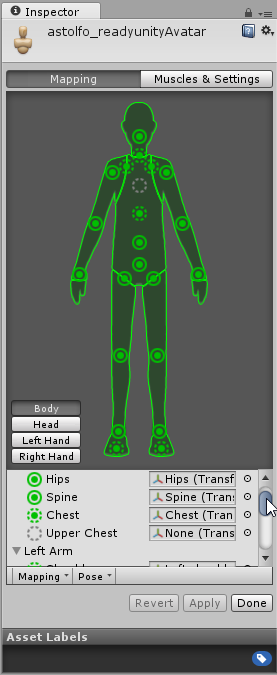
cant show all of them
at the same time
 light inlet
WAIT a second

they just standing there
it's not fused
that mean i can delet it in unity
odd tulip
@vagrant walrus you can drag the entire inspectort tab into it's own window to see all of it at once
it looks fine though
as long as there are no import errors and vrchat isn't giving you an error it will probably work
vagrant walrus
okay so after thta what
dont i need to do some camera thing?
also how i even get out of this menu
odd tulip
hit done
http://vrchat.wikia.com/wiki/Quick_Start_-_Mixamo_Avatar_Creation
you are on step 5 now

VRChat Wikia
This documentation should be able to assist someone with absolutely no 3D/VR Chat SDK experience in creating a quick and easy avatar. If you see a model with two variations, a High Poly and Low...
vagrant walrus
oh okay
odd tulip
Step 4 goes over resizing the charater, which you might need too idk
 warped plaza
im having trouble with this McCree model im working on this cape wont fucking just be a cape it keeps going white and black and filling the whole cape how do i fix this?
light inlet
it's high noon
odd tulip
Is it supposed to be transparent there? If so change the material's rendering mode to cutout or transparent
warped plaza
ok ill try that
odd mango
your textures mightve loaded into the client wrong
it happened to me, to see if its the case I created another folder and just readded in all the textures then the fbx and you can tell in the preview if that is what happened or not
before worrying about bone rigging or any of that
light inlet
 odd mango
yea thats kind of how it looked for my model's shoes
light inlet
err
odd mango
in regards to the gray mesh
light inlet
ah shit
anything that have human's skin color is transprented
not the head though.
odd mango
i think you can fix that in materials maybe, but I wouldn't be exactly sure how

 silver mountain
can anybody help with this? i tried weight painting in blender but i cant even do that for some reason /:
 silver mountain
do i have to go into blender and just restart? i had to delete a lot of things so i can get the poly count below 20k...also i joined all the meshes together to export it
oblique heron
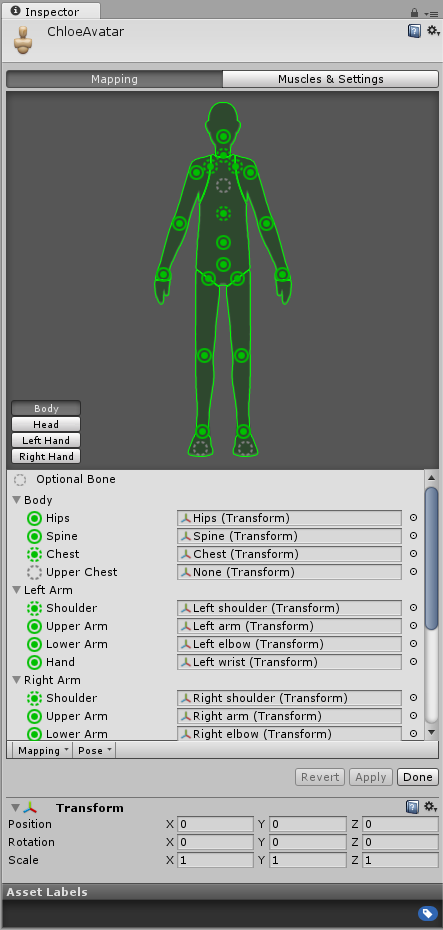
@light inlet You should have all the main slots mapped here https://i.imgur.com/ALXgyYX.png
 warped plaza
tumi you could just decimate it lol
oblique heron
In all the sections
warped plaza
yumi
light inlet
i'm using mixamo-
silver mountain
i did that too-
warped plaza
oh
oblique heron
Are you using mixamo for a walk cycle or dance?
light inlet
t-pose
warped plaza
someone i cant turn the cape to transparent it turns the body transparent too what do i do
light inlet
wait i had to make it for walk?
silver mountain
does anybody know that if the model isnt in a tpose in blender and it isnt in one in unity, will it still work in vrchat or does the rigging need to be modifided?
light inlet
HOLd Up
light inlet
i found more parts that is jut one part
silver mountain
WTFFFFFFFFFFFF im jealous of your skills
light inlet
grr
 woven hatch
@light inlet change the material shader from transparent
@light inlet did you rename anything in the bones
light inlet
rename?.
warped plaza
how does one add dynamic bones to capes again or do i use cloth for capes i forgot
light inlet
i also need to rename things?
 round summit
Hey, I set up eye tracking and blinking in blender, and I can rotate the eye fine in Unity, but neither work in-game. Is there any obvious reason for that which I can't find?
light inlet
i dont understand
what i'm doing wrong

this.

Hm................
this after mixamo
any help??
 cinder iris
Could anyone assist me with this,? I've tried changing Spine1-4 multiple times and still getting the error
 thin zenith
@light inlet you know how to view the properties of the skeleton in Unity, correct?
 trail gorge
@cinder iris you need map some bones, click in some bone without map and drag him for the list in the empty spot in the list
light inlet
..no?
trail gorge
anyone knows how to fix my eye problem?
light inlet
same.
light inlet
.:(
thin zenith
first image: what my Unity window looks like. not sure if it has to exactly look like this
second image: single click your model in the Project tab
third image: ... as per what the red text says
@light inlet
warped plaza
it like you have dynamic bone?yes Welp to bad bitch heres some cloth
cinder iris
@trail gorge I did what you mention but now im getting this
warped plaza
eh most times those dont matter
othere times...
i had those errors they almost mean nothing
unless you fucked up bad lol
trail gorge
@cinder iris just ship it, and see if anything abnormal happens like your head become your hand, if not just ignore
cinder iris
kk thanks.
thin zenith
it's hard to imagine that all three highlighted tetrahedrons here are one single bone.
 swift radish
I tried googling it, but I can't find any info on adding lights or glowing to a model?
warped plaza
derino i have a question you dont want a arm twist bone as your arm if you use vr or do you?
upper arm anyway
 warped plaza
just delte it
thin zenith
@warped plaza honestly, i dunno. i actually only started modeling days ago >..<
thin zenith
i've tried with all the default bones before, and
warped plaza
you just seem to know more than me
thin zenith
the upper half tracked pretty well in VR while the lower half's legs only moved with controllers
but the lower half's problems could have came from other problems
 round summit
Change spine1 to spine2, leave upperchest empty
light inlet
Oh
thin zenith
you know on the right where it says "upper chest"? delete that, and set what used to be upper chest to chest
@round summit beat me to it
light inlet
i dont understand that lol
 gilded hawk
im getting a few errors here, anone able to help?
gilded hawk
what?
round summit
Under the bones, you can "Enforce T-Pose" with the pose dropdown.
light inlet
oh
round summit
It's the dropdown right under hands in your picture, @gilded hawk.
 gilded hawk
thanks @round summit that fixed it
round summit
Ye.
And actually change the bones by clicking on them in the menu where I screenshot, @light inlet
It's the little button to the right of its name.
You can select "None" for upper chest at the top.
light inlet
that just
broke the whole thing
and if i delet the glitched shoes it also delet the model
this is fucking annoying
warped plaza
UM
round summit
Screenshot this for me.
warped plaza
WHAT IF MY MODEL HAS LIKE NO NECK AT ALL
round summit
Where it says it's broken.
light inlet
THATS WHAT i DID
fading verge
@warped plaza make one
light inlet
 warped plaza
i dolnt know how
light inlet
fuck sake
round summit
Are you using mixamo, Jirou?
light inlet
i did
round summit
And Shift-A in blender makes bones, select your armature first though.
and Spine2 is your chest?
fading verge
@warped plaza create a bone in blender or w/e program you use
round summit
Make Spine2 your chest.
fading verge
For the neck
fading verge
You might need to do this for the neck
Tutorial on weight painting and how to fix weight painting issues. Usually when a material moves with the wrong bone. Links: Model: https://mooniiiiichan-lov...
 carmine iris
anyone have any idea of how to take a rob lox avatar and format it for vrchat?
crisp tendon
@carmine iris If you already have your Roblox avatar you can just follow the normal method
light inlet
Well it's working! thanks for everyone that helped me
but i forget that it's tiny also the view is fucked up
gotta fix that lol
naive zinc
Any reasonw hy this is happening?
 fleet night
This happens when i go to upload, the hair doesnt do this in the preveiw?
crisp tendon
@naive zinc Check the rotation of the first bones
fading verge
^
crisp tendon
@fleet night Does it also do this in game '
fading verge
🤔
naive zinc
Got it, kinda
 violet frigate
How do you reconnect a mesh back onto the bones in blender?
swift radish
Why is it that every time I open a .dae in unity, the models turn out backwards with the feet twisted forwards?
Is it a root rotation issue? Or ankles? Or?
 warped bramble
@violet frigate Pretty sure you have to weight paint it
 weak rose
Im new to this and this error is showing up on a model I am importing
How do I fix it?
odd tulip
You probably have the chest slot set to spine1 rather than spine2
assuming it's named that way
spine 2 being the highest spine bone
 safe gate
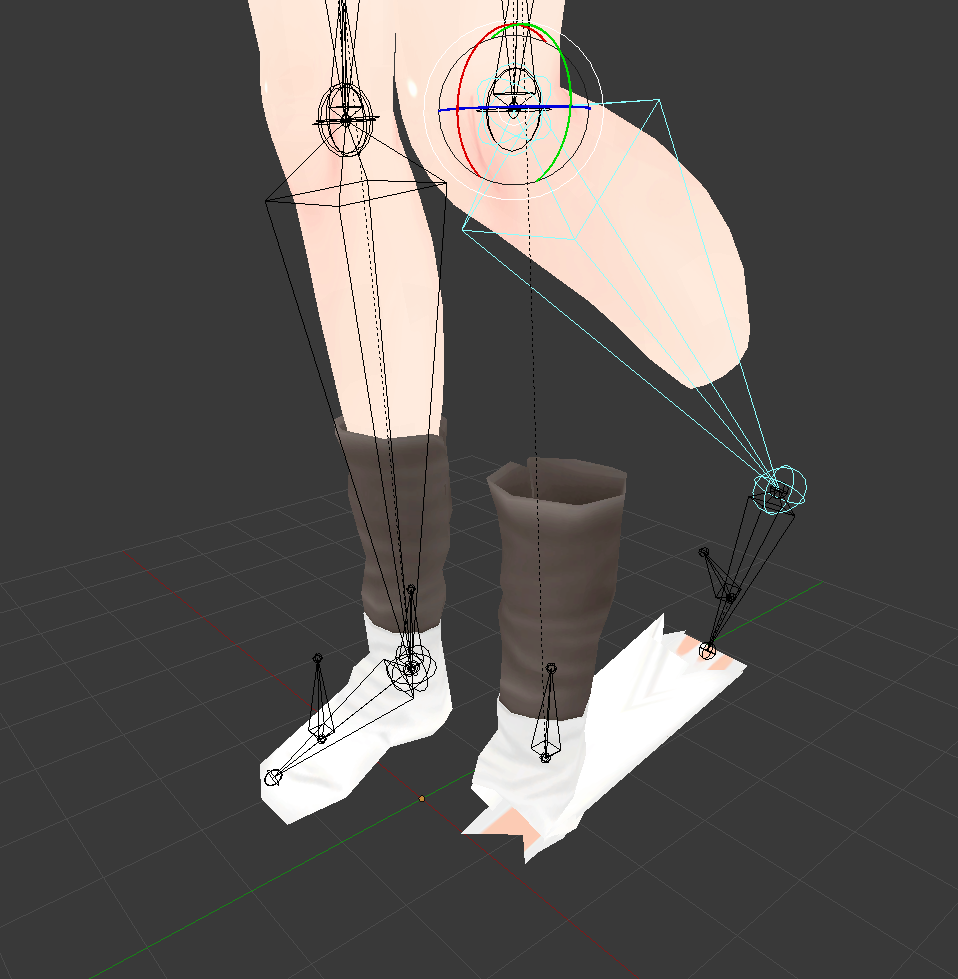
Anyone know how to fix this sort of issue? https://i.imgur.com/J8PFj0S.png


 patent cosmos
so when i rip models directly from league they already have rigs
but they're funky
weak rose
@odd tulip this is hoiw its set up rn
crisp tendon
@weak rose This is a hierarchy issue, make sure both neck and shoulders are below the chest
weak rose
Im super new to this how would I go about that exactly?
crisp tendon
@safe gate weight paint
safe gate
@crisp tendon How do I do that?
crisp tendon
@weak rose Exit configuration, click on your model on the left panel and hierarchy, then manually move both shoulders and neck under chest
patent cosmos
crisp tendon
@safe gate Blender, you may wanna find a tutorial
patent cosmos
safe gate
@crisp tendon I'll do that, thanks
patent cosmos
i'm not sure if you can tell exactly what's going on here, but when I move the DAE into unity instead of blender it makes the chest backwards...?
crisp tendon
@patent cosmos the top part of your avatar seems to be backwards
crisp tendon
@silver mountain Scale the avatar down
silver mountain
okie
crisp tendon
@patent cosmos Go into blender, select the bone(s) and rotate them
patent cosmos
i mean, this is the same bone structure that exists in the original game, and blender can interact with it perfectly fine
weak rose
@crisp tendon there doesnt seem the be a neck or chest
crisp tendon
@patent cosmos Is it facing the correct way in blender ?
patent cosmos
yes, i sent two pictures
crisp tendon
@weak rose Back to blender then !
patent cosmos
in blender it looks fine
weak rose
oh boy
patent cosmos
crisp tendon
@patent cosmos Then select all the armature then press Ctrl + a and click on apply rotation
silver mountain
i scaled it to .75 and none of the errors refreshed/changed @crisp tendon
patent cosmos
in blender or in unity
crisp tendon
@silver mountain Make sure you placed the avatar descriptor on the avatar and not one of the mesh
patent cosmos
i dont see a "apply rotation" option
crisp tendon
@silver mountain The boundaries box might be different for certain parts of the zvatzr
@patent cosmos @patent cosmos
I fucking hate discord on mobile damn
Apologies for the notifications
Select mesh and rotation then press Ctrl + a
And armature
Holy fuck this autocorrect
patent cosmos
wait so just leave the rig as it is and rotate the chest 180 degrees
crisp tendon
No, just need to apply rotation to the existing bones
crisp tendon
It might have an inherent rotation of -180 but doesn't have an effect in blender
 silk kestrel
Got a question, how important is a clean joint system when setting up the armature for vrChat? Coming from a maya background and the joint system in blender kind of scares me
crisp tendon
@patent cosmos you forced t-pose ?
patent cosmos
unity put it in t-pose without me telling it to
crisp tendon
@silk kestrel Never heard of it, so I'd say none ?
silver mountain
should i change the scale factor of the meshes under the model tab to like .5?
patent cosmos
i dont know where i need to be
crisp tendon
@patent cosmos You can still enforce it in the tiny menu
patent cosmos
unity rig or in blender?
crisp tendon
@silver mountain Change the entire model scale at once
@patent cosmos unity, in humanoid configuration there's a tiny menu called pose, click on it and you can enforce t-pose
 chilly remnant
How to fix the weird leaning idle pose? I remember fixing it once but dont remember how to do it
silver mountain
i did that to .5 now...nothing changed still ;-;
crisp tendon
@chilly remnant Probably hip rotation, in blender
patent cosmos
okay and then what
crisp tendon
@silver mountain Are you sure you are trying to upload the correct thing ?
weak rose
@crisp tendon In blender I have the hierarchy dont correct I think is ther an issue here?
crisp tendon
@patent cosmos is it still all red ?
patent cosmos
no, when i say enforce t-pose it makes his chest turn backwards again
crisp tendon
@weak rose Do you have cats plugin installed ?
patent cosmos
if i set it to sample bind pose it makes it look normal though
silver mountain
heres a screenshot of it all-
weak rose
Yes and when trying to fix the model it say the left leg is missing yet its there
patent cosmos
though everything is still red
crisp tendon
@patent cosmos But you applied the rotation in blender ?
patent cosmos
no i didnt know what you wanted me to do in blender
 zenith plank
Bone machine 🅱roke
crisp tendon
@patent cosmos Select the armature + mesh then Ctrl + A and hit apply rotation
@weak rose Then you have to manually rename the bones to match hat the plugin needs
weak rose
okay
chilly remnant
Theres no rotation in any of the bones at the hip area. In Unity it says this tho
crisp tendon
@silver mountain Your viewpoint is at 14 meters up in the scene, why ?
fading verge
Is there any way to like copy weights from bones?
crisp tendon
@silver mountain You can always find the avatar sample on the VRchat wiki I believe
patent cosmos
nothing pops up when i press ctrl+a
crisp tendon
@chilly remnant Then it means the hip bone is not rotated correctly
@patent cosmos try in edit mode
chilly remnant
I looked at it in Blender its not rotated at all 😦
crisp tendon
@chilly remnant picture pls
silver mountain
that was from my last size- will the measures change if i change that? @crisp tendon
patent cosmos
okay i might have done it but im not actually sure
nothing visibly changed in blender after i clicked rotation
chilly remnant
crisp tendon
@silver mountain I'm not sure, but you should definitely compare it to the sample avatar
silver mountain
will do, thank you!
weak rose
@crisp tendon This is what I have apparently there are no leg bones where exactly would I add those?
patent cosmos
it had a red outline though, which I think only happens when I have them both selected?
crisp tendon
@patent cosmos the rotation is now set at 0 instead of whatever it was
@chilly remnant You see the rotation right ?
patent cosmos
so now export as fbx and throw it into unity and see what happens?
crisp tendon
@weak rose No you just have to rename Left Knee to Left leg, etc
weak rose
When I did that it then said left knee was missing
 civic radish
Hey can anyone help me????????????????????
patent cosmos
the dude's still backwards lol
chilly remnant
I do but it says 0 degrees in all of them. Unless you mean another rotation thing that I cant seem to catch
weak rose
What do you mean?
crisp tendon
@chilly remnant I mean with your eyes, you can see it's not pointing straight at the sky right ?
zenith plank
this model won't get into unity because it says LeftUpperLeg not found
chilly remnant
Oooohhhhh
civic radish
I have an error it says the "YPPERCHEST MAPPED IN THE HUMANOID RIG THIS WILL CAUSE PROBLEMS WITH IK.
 royal gale
dont map upper chest
crisp tendon
@weak rose When it says it can't find a bone, change the corresponding bone name to what the plugin needs
@civic radish literally the first rule in the avatar channel dude
patent cosmos
@crisp tendon so like, for some reason unity thinks that bones that exist for his hat are his eyes.
do you think that would do it
civic radish
ok
crisp tendon
@patent cosmos If the hat bones are backwards then that's a possibility
But that would be surprising
civic radish
now it says spine hierarchy inncorrect
chilly remnant
Okay I moved the bone so its pointing straight up and Unity says the angle is now 171.6 degrees
patent cosmos
he only turns backwards if i tell it enforce t-pose
weak rose
Im confused as to what you mean ruuubick as its asking for a left leg that isnt there so changing left knee to left leg then makes it ask for left knee and so on
crisp tendon
@patent cosmos That's so weird, it shouldn't have any effect on the upper body at all
crisp tendon
@weak rose Exactly, when it is looking for a bone, just change the name of the bone it corresponds to
patent cosmos
i MAY have found a problem but idk how legit this is because im not sure how these rigging programs look
crisp tendon
@crisp tendon If it says " No Neck bone is found" and you neck is called head_0 just rename that to Neck so that the plugin can find it"
@patent cosmos You tried using cats plugin just for fun ?
crisp tendon
You should, it's surprising sometimes
weak rose
How do I select I specific bone ruuubick?
patent cosmos
if he werent rotated all funky that should be his left shoulder
crisp tendon
So it's correct ?
patent cosmos
like if you were to rotate him on his spine
crisp tendon
@weak rose in your armature in top right corner in blender
weak rose
Okay there is no bone there that I can turn into left leg
crisp tendon
@patent cosmos Oh, so rename them ?
patent cosmos
im not sure if that's the issue though
crisp tendon
@weak rose Isn't it left Knee ?
weak rose
Yes but if I make left knee left leg then it asks for a left knee so im still missing something
crisp tendon
@patent cosmos yeah but only the upper chest is rotated
patent cosmos
im just trying to figure out why unity is rotating it
crisp tendon
@weak rose the left knee is the bone below then
patent cosmos
because i've pulled 3-4 models from the same game and they all do htis
so obv riot is rigging their things weird
crisp tendon
What game is it from btw ?
crisp tendon
Yeah that's weird
weak rose
The bone below is the left ankle and if I change that it then asks for left ankle
patent cosmos
like it works fine in blender so it doesnt make sense
weak rose
and below left ankle is left toe
patent cosmos
that unity freaks out
weak rose
of which I also cant change
crisp tendon
@weak rose Do you not have leg bones ?
patent cosmos
why does the sample bind pose look normal though?
he only looks fucked in the t-pose
weak rose
It doesnt seem like it but I mean in the rig for the downloaded model they seem to be there
crisp tendon
@weak rose on the screenshot you sent you have enough leg bones
weak rose
it seems in the armeture the legs are missing and I dont know how to add them into the armeture
weak rose
Ill mess about for a bit and maybe find a fix
It might be in a weird order so i might just have to wing it and add different name combinations
patent cosmos
so i think the rotation thing that i tried to do in blender didn't actually apply
i have this but it seems like there should be an "apply" button or something
chilly remnant
Ive tried to move the hip and the legs but nothing is working. It always says its at 171 degrees
crisp tendon
It applies when you click on rotation in the menu
patent cosmos
why can i uncheck it lol
 spring magnet
If I have a generic humanoid model is there an easy way to rig it quickly? Could I get some bones from another model for instance?
crisp tendon
@patent cosmos Do make sure to rotate the bones you need, and honestly give the cats plugin a try
@spring magnet Mixamo !
@chilly ridge Absolutely yes
spring magnet
@crisp tendon That lets you add rigs to arbitrary models or just the ones they have?
crisp tendon
Yeah the Isis chant isn't really cool 'or acceptable in any circumstances
weak rose
It seemed some labels just went missing I reimported the model and the bones were fixed for the legs somewhat
crisp tendon
@patent cosmos That's the biggest dab in earth
crisp tendon
@weak rose nice
patent cosmos
this is what happened when i double-checked that the rotation thing was checked
in blender
crisp tendon
Lmao no
weak rose
It when reimported had a left and right foot option that was supposed the be the legs
odd tulip
all his messages are gone
patent cosmos
i exported it again and opened it in unity and now it's even worse
crisp tendon
Because he realized he fucked up so he's gonna change it
odd tulip
oh is there a way to delete every message like that?
like in the other channel too they are gone
crisp tendon
@patent cosmos Ok, just try cats plugin on the default model you downloaded
patent cosmos
probably a script on BetterDiscord
ok seems like cats is something im gonna want regardless of this specific situation anyway
im afraid to google "blender cats" because i have seen some shit on the internet before
?
crisp tendon
Yes
patent cosmos
im kinda tempted