#avatar-rigging
1 messages · Page 37 of 1
 oblique latch
 fading verge
https://www.youtube.com/watch?v=7eDGzHiRZhQ&feature=youtu.be if anyone could help that'd be great

@Drey#7062 on discord if you can help me or if you have any questions, i've spent around 10 hours just trying to solve this issue
 undone plaza
Does anyone else ever have the issue where the mouth likes to stay open in idle, or trying to remove the jaw bone doesn't make it look any better?
 hot plank
Okay, im so done with it...... I need someone to help me out.. I just cant get my hands to look good ingame, in unity everything looks okay in the T Pose but as soon as i go ingame i have crippled fingers. Is someone maybe okay with fixing my hands ? Only the hands, its the left and right one.
I've been trying around, rotating positioning etc. for around 4 hours now and i cant get it fixed
 clear cedar
@undone plaza There's an entry on that on the wikia http://vrchat.wikia.com/wiki/Avatar's_mouth_is_open_in_VRChat

VRChat Wikia
Click the avatar model in your assets view, then on the inspector view click on the "Rig" tab and assuming its already on "Humanoid" select "Configure" It will ask you if you want to save, do so...
undone plaza
Oh thankyou @clear cedar
 olive dune
I guess this is a question for here, is this an error i can ignore? I don't know what else Unity asks of me to do here:
https://i.imgur.com/auMrRuF.jpg
 oblique latch
why my guy look so odd xdhttps://j.gifs.com/OyJJ1r.gif did i mess up the rig ?

 olive dune
Blender weighting
oblique latch
cat tools in blender can help fix that i think
olive dune
You don't need cats for that just delete the weighting on the leg bones ..
clear cedar
Going to ask again since I think maybe more people are awake? How do I keep some bones stiff/how should I go about this rig so this kind of thing does not happen? https://i.imgur.com/cB1JKCV.png
My current rig https://i.imgur.com/aWdzmNa.png (which is basically how it should be)
 fading verge
Heya, how do i have to parent them to be correct?`
 dire mica
 fading verge
and you have to parent it in blender
Thats how it looks like in blender
how can i put them together, or better parent them correctly?
Should i try cats?
dire mica
Yes
 distant patrol
Anyone is in depth with eyetracking?
fading verge
When i export this one as fbx humanoid animations wont work because of it, how can i fix the leg?
fading verge
i did nothing to it, except move the bones in the leg a little bit, since it fucked up ingame
distant patrol
unfortunatly in blender i cant help much, but essentially i woudl have reset bone positions and then examined the bone hierarchy
ensured that upper leg is child of hips
also that warning message doesnt matter all too much as long as unity picks it up
if you are lucky all you need to do it move the missing leg part back to the correct parent
iny your picture you can see the leg is not missing 😃
fading verge
thats how it looks like in Blender
sadly i´m not that good with Bones yet
maybe its just the Name?
distant patrol
ah yeah, its unconventionally named
fading verge
Hah i thought so
distant patrol
left foot -> left upperleg
left knee -> left lowerleg
left ankle -> left foot
toe stays toe
but you dont need to rename them
just make sure to hit the configure button in unity
and fill in the correct bone names
fading verge
how can i rename them? i get no option if i right click them
fading verge
I had it in unity already, and did some stuff, but somehow it´s not working for now
 strange garden
fading verge
strange garden
strange garden
fading verge
strange garden
help
fading verge
how can i see the configure avatar like in your picture?
fading verge
Thats funny, because blender says im missing a left leg
i dont know which im missing now 😄
oblique latch
is there a way to make a avatar that the player can interact with like a button
 crisp tendon
@oblique latch nope
oblique latch
😑
 stark bronze
How do I make bones connected like this (Blender)?
crisp tendon
Select the bottom bone and chose the top bone as a parent
stark bronze
Umm.
distant patrol
@strange garden try force tpose at bottom
strange garden
doesn't do anything.
distant patrol
i see
crisp tendon
@strange garden you're missing phalanx bones
distant patrol
image of the hand bone hierarchy please
strange garden
uhhHhh
distant patrol
yes its either not filled in or its too many
crisp tendon
or there's none
distant patrol
@strange garden https://i.imgur.com/v4pfbyW.png
 strange garden
ik ik
 steep hazel
why my avatar stand like this?
strange garden
stark bronze
(The bones in the picture from bottom to top are chest, shoulders and upper arms.) I would like the shoulders to have a similar - - - - connection to the chest as they have to the upper arms. Does that make sense?
distant patrol
@steep hazel it looks to me the entire char is at an angle so maybe check bone positions
@stark bronze https://www.youtube.com/watch?v=fPRda2TONCw

Visit my Blender 2.7 Tutorial Series playlist for more Blender Tutorials: https://www.youtube.com/playlist?list=PLda3VoSoc_TR7X7wfblBGiRz-bvhKpGkS In this Tu...
 wheat wigeon
So about my issue earlier, is someone able to delete the blender weighting for me? I've been fiddling around forever trying to figure it out
 mighty jackal
Hello, How might i rig my avatar's cape with the correct physics?
distant patrol
i wouldnt advise to use unity cloth for capes as it acts glitchy ingame
it might be ok with enough dampening but i cannot confirm it. This means your cap needs to be modeled in a position that you want to use as default and then dynamic bones applied
steep hazel
dire mica
Oh my.
fading verge
@strange garden just rotate the bone or bone end
distant patrol
and remove all _shadow _dummy bones for a start. all bones with 0 weights
dire mica
Did he try cats fix model?
steep hazel
i tried. but my avatar's feet just becaome jelly
distant patrol
if weebee rotates his hips that wont achieve anything i believe. I would suggest using enforce tpose in unity and seeif that solves it. the bindpose of the model is potentially at an angle
distant patrol
well in 3ds max i would reset the deformation to initial. unsure what blender equivalent is.
its also possible the bone pivot became dislocated
steep hazel
its kinda draging with it
distant patrol
if you sit down does it draw to the same spot
dire mica
Toes stay on the ground?
distant patrol
might be weighted to root
dire mica
Thats what happened to me before
steep hazel
dire mica
Toes were parented to the hip
steep hazel
it looks like this
dire mica
Altho that does not look similar to when I had it
distant patrol
might be "armature" bone
stark bronze
@distant patrol Thanks, what I needed was apparently the Disconnect from ALT+P
steep hazel
so what should i do now
distant patrol
@stark bronze i had a similar issue in max 😛
it seems introducing new bones and modifying bone structure is something not that commonly done.
@steep hazel check the weights of the verts at the toe area, once you find the wrong bone weights replacethem with weights for toe L and R
distant patrol
if they arent weighted to anyting you could even remove them
are they parented to the other toe bone?
steep hazel
how do i check they are weighted or not?
distant patrol
idk in blender so maybe check this

Blender download: http://www.blender.org/download/get-blender/ Thanks for watching! Portfolio: http://laustinart.tumblr.com/ Twitter: https://twitter.com/...
 civic kayak
https://www.youtube.com/watch?v=Tl4qTgwQwYw&list=PL_V6bauY3bw_Ft_Hl7VMo4agu1HEBM4Tr&index=5 this video helps too

Quick intro and guide to skinning/weight painting. this video is meant for those with a basic understanding of Blender
 sacred heart
@steep hazel Check if you have vertex groups on the mesh wich match the bone name
 drifting tulip
So, i'm working on several different armatures and meshes at once, all in different layers.
However in hindsight i may have hindered myself.
So, i'm curious if there is a way to merge/transfer armature's bones into another armature, i know i can do this by joining meshes but am unsure on bones.
Since i'm trying to tie to peices all together now.
distant patrol
i believe there is a script/tool that allows this in blender.
as for 3ds max i can provide specific instructions
drifting tulip
I've been doing this in blender and don't own 3ds.
I'll try to look for how to figure this out.
Since head/body are seperate armatures of 2 different models i've been trying to merge together.
distant patrol
found

VRCat: Community-Run VRChat Forums
Cats Blender Plugin (0.4.1)
A tool designed to shorten steps needed to import and optimize MMD and Mixamo models into VRChat.
[IMG]
Features...
might be newer versions of this available
but it allows bone merging
drifting tulip
Cats generally doesn't support my armature/bone types since I don't use mmd files but I just have to figure this out manually i think.
distant patrol
maybe this helps.
distant patrol
i extract weight data from one thing to a mesh/file then import it again but this time onto the other set of gones
@steep hazel unparent from hips and parent to lower leg 😃
hopefully that helps fix your stuff
drifting tulip
screenshot for claification of what i'm doing.
 little coral
yo guys quick question
when in unity
when i click configure to change my model

There
th avatar has the changes i want when i view in configure
but when i drag it onto the scene after
 lofty panther
BTW Alt-PrintScreen only captures the active window.
little coral
its like it was the old one
distant patrol
optimally you shouldnt have to move anyhting there
lofty panther
So you don't capture your extra monitors.
drifting tulip
@lofty panther thanks, i just recent went to 2 screens good to know that.
little coral

So like ther emy legs are stright
but when i hit apply and done
then drag onto scene
distant patrol
missing feet?
 distant patrol
oh that. as long as it is fine in configure thats ok
little coral
are you sure?
distant patrol
yeah.
little coral
okay, been killing myself on why it is not saving
distant patrol
it uses t-pose in configure which it should
in normal viewport it shows just like in the file you imported it with
well unless you move anything but basically thats what is going on
little coral
is there a way to like refresh it
distant patrol
as in you edited the model/bones and want to get it back in unity?
little coral
i changed the configuration and it looks fine there
so i want it to show when out of the config
distant patrol
that seems too much of a hassle without anything changing
little coral
https://gyazo.com/21685587b85cb25dce9c226acc8cbd3b also, is this a quick fix?

 tidal bough
Trying to get in contact with Big Al. does anyone know his disc?
distant patrol
@little coral that means you need to rotate the hip bone while leaving all other bones in the same position
i usually unparent the bone, rotate it and then reparent it
or rather reparent bones to the hip
little coral
so back to blender? or rotate it in unity
distant patrol
yup
little coral
yes to blender?
 plucky terrace
can anybody help me my tom nook model doesnt have the bones for both lower arms and hands, and the neck
distant patrol
but i never seen it cause any issue, except maybe break eyetrakcing somehow
@plucky terrace clone existing bones name and put them into hierarchy,
they need to have a lenght but it can be super short
you dont need to weight anyhting to them but their position is important
plucky terrace
no im in unity and im in humanoid rig and he has no bones for the arms and hands, and the feet and the neck
plucky terrace
can you help?
distant patrol
welll i did do this before but i work on something right now
distant patrol
but its a good time to learn new stuff
distant patrol
well you need to check how to do rigging in blender
olive dune
Anyone has any idea why Unity hides part of my rig? like long ear-rig? for example
clear cedar
I'm doing weight painting and when I remove some weight on a piece it becomes super stretched, suggesting that something else has weight paint on that part, the problem is I believe I removed it from all the parts and it's still stretched, any idea?
olive dune
Did you move it befor painting?
clear cedar
Nope, that's even more scary
olive dune
Else it shouldn't have stretched to begin with i think
ehh.. if you paint it with some other bone does it unstretch again?
wait wtf i cannot walk invrchat anymore
clear cedar
doesn't seem to unstretch it
olive dune
the only other solution left = pressing ctrl+z untill you get the bone back
if you cant go that far it's redo time
clear cedar
I have it before I removed the weight paint, but well, the problem will still be there :/
clear cedar
Figured it out
Reset the bind pose and it worked perfectly
Any way to enable the wireframe on top of the weight painting on Cinema 4D?
nvm found it
 spring ivy
umm... how do i fix these errors?
when i play my animations the hands are all fucced up
distant patrol
@steep hazel cool xD
uhm well you can merge the twist bone into the regular bones as they arent used by unity
steep hazel
@distant patrol not cool looking lol
spring ivy
how does one do taht
steep hazel
yeah maybe i will tried
distant patrol
if you dont know how to move pivots try moving armature to 000
altho i am not sure that does anyhting
did you put here feet on the ground in unity?
no nvm i dopnt think that makes a difference
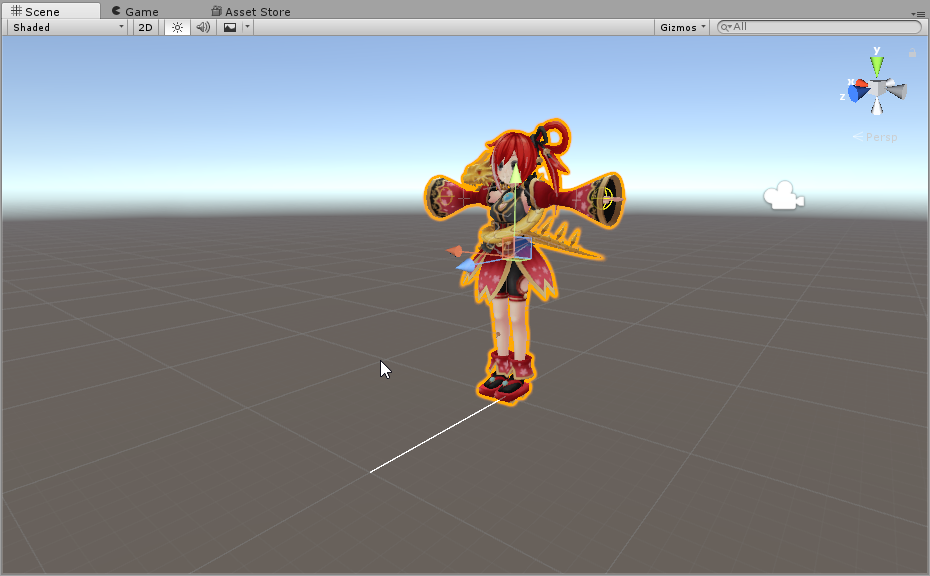
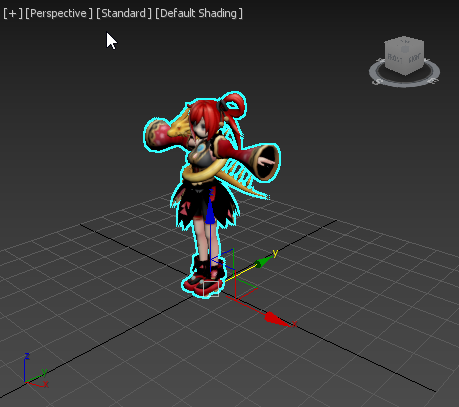
https://i.imgur.com/W0afGEh.png i assume this white line is comming from middle of body for you?
 steep hazel
yes it is
 fading verge
Hi, i´m getting the "Spine hierarchy incorrect, make sure that the partent ob both Shoulders and the Neck is the Chest
Which of those is the chest? Do i just have to rename the waist?
distant patrol
upper body but it wont be that simple
fading verge
can i just switch the parent in pmweditor?
distant patrol
you shoudl probably use the mmd convert tool but well
fading verge
pmx
distant patrol
well you either use the cat and mmd tools or you manually remove bones and merge weights
its possible to do but you really need to know what you are doing
distant patrol
i actually reweighted hands
i only had to adjust it a little bit twice
so that went fine
but doing the entire model is kinda tedious
still need to fix 2 vert sin my hand rig
steep hazel
@distant patrol 🤔
distant patrol
what about unity ava config
steep hazel
maybe...is in here?
distant patrol
thats fine too
one thought tho
go back and set rigging to none
apply it then to humanoid again and assign it again
its possible its an issue with old data
steep hazel
hahahaha
crisp tendon
At least it's an easy fix
distant patrol
some sort of skirt spider hybrid
its an easy fix but one of many you did before and possibly many more you will do 😛
continuing that thought
does that mean that the position of the feed bone defines the bottom end of your character? XD
my character's legs are a little in the floor so if this is true i might just move the foot bone and fixed
 cloud field
So I exported an older blender save which looks fine with no problems, then in Unity when configuring my models rig, this show up.
Then it's fine when not in rig.
I don't know if the problem will appear in game cause I haven't tried it. I don't want to waste my time with this model if it will. Actually I will import it just like this and check so nvm.
cloud field
okay
Didn't do anything. it doesn't show up when in play mode though so Idk if that means it won't show in VrChat. Will check real quick.
distant patrol
set to none then apply
set to humanoid then apply again
if its fucked up because you updated the model this fixes it
if thats not the case then the hand is not weighted to its bone
fading verge
soo i have titanfall models from this shady russian website in fbx form, came with textures materials and a good poly model but for some reason blender wont detect its textures... can someone help me?
cloud field
I tried that, like I said. Will check weight painting
steep hazel
done and im still ganna upload it again?
distant patrol
yup
olive dune
Does anyone know what i have to do to make extra bones visible in the humanoid setup in unity?
It's removing all other bones i'd like to use.
distant patrol
ok so jack the texutres not showing up aint an issue as long as each part still got its material
you can point to right files in unity later as long as mats exist
@olive dune have them linked to something in the rig
olive dune
They're all linked
cloud field
Yep. It's like that in game. I have the fbx file for the one that works so I might just put that in blender.
olive dune
They just not there at all since they're not essential for a humanoid body
distant patrol
then they shoudl show as gray. however last link in bones wont show in certain cases.
olive dune
I have a rig of 2 bones in a group of 3, the 2 at the end don't show
distant patrol
thats normal
olive dune
Then how can i do anything with them then
distant patrol
unless you make tip bones they wont render as gray
olive dune
well i have 2 tips and they don't show anyway
distant patrol
you still can. unity just doesnt render them as gray
olive dune
iC
https://i.imgur.com/hK9xgzk.png
My ears in blender are pointed down , but in VrChat they're just like this, If they're already linked, why are they like this then ?

Is Vrchat overriding animation?
distant patrol
what bones did you use for that
olive dune
I had bones for the hair on the front and the ears, that i called Ear 1 ,2 etc and "ducktails" 1, 2 etc for the hair
linked to the head
olive dune
The tpose model in blender had the ears like this. So i pushed them down after rigging them
with the bones that is.
 jolly jay
 olive dune
in blender or unity
olive dune
Okay ill look that up. thanks alot
clear cedar
Doing weight is soooo tiring
distant patrol
@olive dune basically the bone still thinks that other positon is its default
olive dune
yeah, it's just in T-pose i get it now
distant patrol
i think its called transform reset or something in blender
@clear cedar what you weighting
olive dune
ah
cloud field
If you have Cats in Blender and hit fix model then it should fix it. I think. I'm still new to this stuff. @wise basin
clear cedar
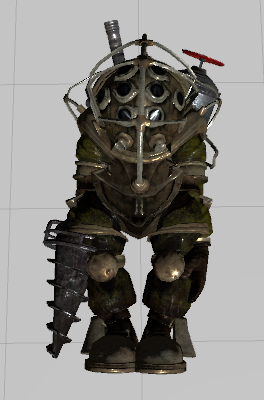
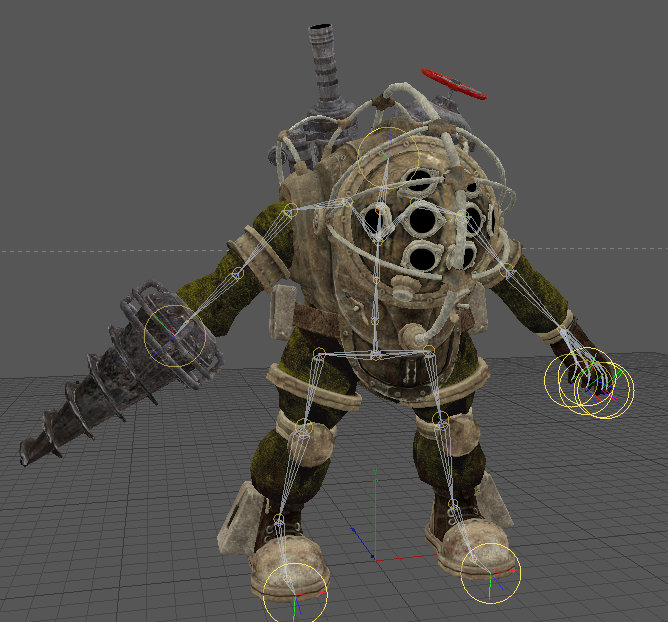
Big Daddy from Bioshock
The arms are easy
But the legs
god damn
Buckles and straps
 wise basin
@cloud field i've used cats tool but still it didn't work
distant patrol
I'm positive you will love hands
clear cedar
Ahahah
Funny thing about that
I don't think I actually need to change anything about that
From what I checked every single individual finger is not connected to any other in the weight map
distant patrol
weight blend
clear cedar
thanks
cloud field
@wise basin Does it only look like that when configuring rig?
distant patrol
like i got a tool to just soften the edges
wise basin
@cloud field ye
distant patrol
@wise basin ting is so messed up i dont even know where to start
clear cedar
I tested it earlier in VRChat and every hand aniamtion was perfect so
clear cedar
I'm excited to arrive at the part where I make the drill turn like it never turned before
 copper verge
 distant patrol
make it do a rocket drill punch
copper verge
What did I do wrong
cloud field
Set the rig to none then hit apply, then set it back to humanoid and hit apply. Tatusto mentioned that to me but it didn't fix mine. Maybe you will have better luck. @wise basin Idk what else to do unless I messed with it. Still new.
clear cedar
Nah, just turn, make the sound and change the eyes to red
Sounds work in animation override, right?
 vestal dirge
@copper verge The automatic humanoid config could not figure out the layout of the bones in the left hand. Re-run the humanoid configuration, and look at the hand bones. you may have to manually assign fingers.
wise basin
@cloud field thanks but ill just work on a different model, if i got time ill try to fix it.
copper verge
 steep hazel
@distant patrol if i changed the bones in blender,should i import again into unity?
distant patrol
yes
best way is
oben asset folder delete old file and then copy new one
if i just replace it usually fucks up. also dont open unity in between or it will mess up
steep hazel
so i need to create a neww floder
cloud field
@wise basin send me the model and I will look at it sometime to see if i have better luck.
olive dune
Finally figured it out
I had to apply a modifier on the armature that set the "edit mode" of my model to the pose mode instead, now let's see what's happened in unity 😃
olive dune
Click the arrow under this section to see what exactly is wrong maybe its more detailed
 white briar
so it looks like the model i want use came with a rig that is slightly scaled up compared to the model. what would be the best way to scale the model/rig, while keeping the other the same?
clear cedar
I need help pls
So my model is at an orientation of 90° and my skeleton (for some reason) is at an angle of -90°, the two line up.
If I import in Unity, my model is oriented right way up, but when I press play
https://i.imgur.com/OdSIKnI.png
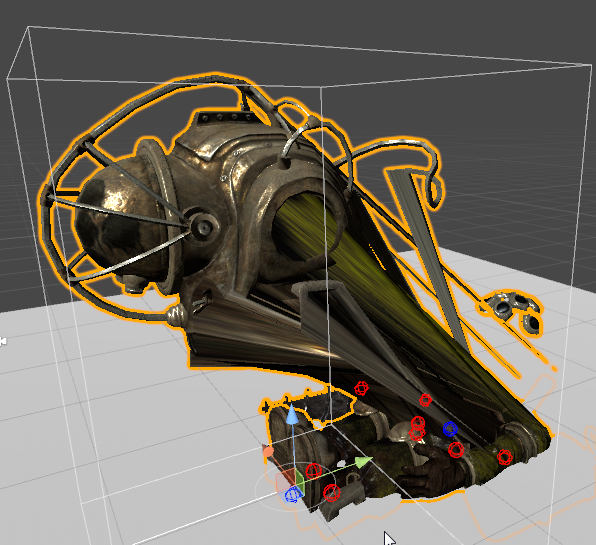
Well, the torso part not moving is probably because I've removed all weight on it for now
But the fact that the animation play on the floor is the problem
crisp tendon
export it upright from blender
clear cedar
I'll try in a sec
distant patrol
its very similar to the issue jason had you might need to reset the transforms if they came appart only in unity
crisp tendon
If it's all good in blender, select all and ctrl + a apply rotation and location
if it's still bent in unity i'll help you out
clear cedar
Sadly I made everything in Cinema 4D Ruuubick, I tried seeing if I could import it in blender but uh, not really.
crisp tendon
Can you not export as an fbx ?
clear cedar
I did, but for some reason I'm losing the skeleton
 limber storm
Hey! Do you guys know what I'm doing wrong? It looks to me like the hierarchy is correct but the neck is not "activated" (green).
crisp tendon
@limber storm chose the neck in head then
Also you'll have to move your shoulder bones under chest
in the hierarchy
@clear cedar I'm not sure then, maybe exporting as an obj ?
Or export selected making sure there's no error on export
clear cedar
Tried to sadly (the export to obj)
crisp tendon
You could try exporting as an fbx, making it go through mixamo ?
Or doing the rigging/weight painting yourself if you're dedicated
clear cedar
Already been doing that ahah, kinda required for the model, it's been killing me
I fixed one problem at least by removing an old bone I didn't actually need https://i.imgur.com/F6q8eD9.png
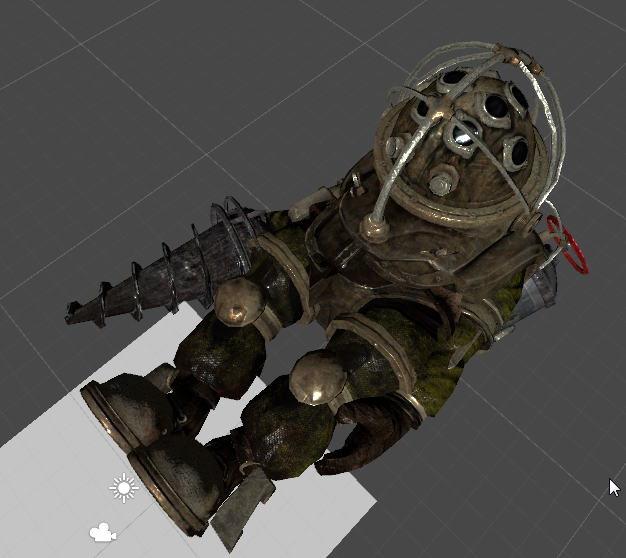
I mean, one solution would be to put the transform rotation of the gameobject to 0 in Unity instead of -90, but then it's below the VRChat minimum 20cm shoulder height so I can't upload it
crisp tendon
you could put the shoulder bones at 21cm from the ground
since he has very large shoulders
 torn pewter
Does lip-syncing just always look weird in a mirror? I can't get it to look right.
clear cedar
there must be a way to make it all work without hacking my way through though
crisp tendon
You can't export with a specified rotation ?
clear cedar
I have not found that option on Cinema 4D no, but who cares, I think I may have found a way
Reset the transform to 0 in Unity and still in Unity set the root bone to -90, since the root bone is not used in the avatar it does not change anything with the pose but for Unity's hierarchy it pulls the skeleton upright
Haven't tested it in game yet though but I will after eating
crisp tendon
that sounds like a very good idea
olive dune
Do i have to do something else beside pressing up and down arrows to ajust my player height? im standing on my toes at all times ..
limber storm
Hey again! I tried what you said and this is the result, I also tried to move the hierarchy so that the head neck lower is above the spine which fixes the "linking" issue but makes it so that it isnt recognized as a humanoid. (I'm new to rigging so I might be missing something really obvious.)
mighty jackal
increase your height by about 2 inches and it should work @olive dune
olive dune
It just doesnt do anything though
mighty jackal
is your model rigged correctly?
olive dune
Wait ...
I just stand on my toes when i look down
My character has a big head ._. it doesn't realy work well i feel like 😂
 naive tree
@limber storm Ill drop you screenshots
of how that hierarchy must look like
i just need to find where they are
limber storm
Thank you!
olive dune
Is there a way to fix characters with a big head from affecting the rest of the body? Not talking about weighting
My head seems to lift my body for some reason, even though the only part that's weighted its the head alone
naive tree
@olive dune can u make a screenshot of that
olive dune
Hold on

I just noticed that my pelvis also forces forward when i try to look straight
I feel like my camera in Unity is relatively far from my face but if i run or look straight up or down or jump my head clips into my camera still.
 olive dune
I feel like mine is positioned exactly so
naive tree
could be also chest+spine positioned more on the back side
olive dune
Would it fix it if the spine is dead center of the mesh instead?
it's not that far off from the center i feel like anywho
naive tree
http://prntscr.com/ht306r this is how it looks for me, you might have spine/chest positioned more to the left

so it's leaning backwards
or some1 mentioned it can be cause that hips is touching spine
naive tree
i think hips should not toouch spine
at least it was a speculation I overheard that it can cause leaning problems for desktop users
olive dune
oh .. my spine is a direct extrude from the hips i think
ill C if i can fix it like that then thnx
Btw, that screenshot of yours, i cant properly see the mesh, is your rig leaning backwards or forwards
 distant patrol
oh that pelvis issue was spine bone scale i think
https://youtu.be/LrCCl_F9XNs last couple.min of video
Here's a video on extremely common issues I see with bones and rigging setups, and ways to solve them. I cover: - Leaving Upper Chest Blank - Reparenting spi...
clear cedar
My solution worked!
Now to finish weighing the left leg
and like, the entire torso/pelvis part
God the running animation is awkward though
 edgy ginkgo
is there a way to make your own mesh rigged? and if so, halp
 neon shard
Does VRChat support twist bones? for upper and lower arm for example?
crisp tendon
@clear cedar Well done, that was a smart solution !
clear cedar
Thanks 😄
edgy ginkgo
hello?
clear cedar
Look in the pinned messages, there is probably some videos that can help you
dammit, I must've pressed on a shortcut or something, my mesh won't move with my bones now for some reason (C4D)
And when I click and drag to paint it instead moves the bone
wtf
 chilly ridge
lul
 inland lichen
Anyone else getting the your avatar is humanoid but upper arms and feet aren't specifide error? (even though I've already rigged the whole avatar and its all specified in unity)
 raw merlin
@neon shard no
inland lichen
@pale hull Darn I was hoping but no dice maybe a full restart of my pc but idk
 pale hull
Can you post a screenshot of your setup in the avatar config scene and the error messages themselves?
 lucid orbit
@inland lichen Set Upper Chest to None!
lucid orbit
@inland lichen (Also, since it's a mixamo rig, you want Spine2 as your Chest)
inland lichen
The mesh is broken because I decimated it to see if that was the issue but same issue as before but it didn't work.
ahh sorry that she mixamo rig I tried to use to see if it would fix it
let me upload the original from mmd to blender
I get the same error on both
so that rig is straight from blender and I get the exact same errors. I'll try the mixamo fixes right now though
 wary wave
I need help with my avatars world scale in VR.
Right now, everything is much too small. People are tiny and the floor is in my chest.
The avatar itself is normal height and has the normal 1.6 viewpoint.
Is this a rigging problem?
lucid orbit
@inland lichen Okay, one, Waist is rarely the Hips in MMD terms. Usually LowerBody is the Hips and UpperBody needs to be made into a child of it to solve a majority of the rigging problems.
@inland lichen You cannot solve this in Unity. Only in Blender. (Before you ask.)
inland lichen
@lucid orbit Thats fine I think I have a tutorial saved on that I can go back through. I remember trying it once before with no dice but I bet If I give it another shot I can figure out where I went wrong the first time.
I think the thing that worries me is that even in the mixamo rig (with the fixes you just gave me) I'm getting the same vrchatsdk error
maybe I should try reimporting it or a fresh project idk
it seems weird to be getting the EXACT same rigging error for two completely different rig setups
lucid orbit
@inland lichen If it's an MMD, you can also give Cat's Blender Plugin's Fix Model a try too. https://youtu.be/0gu0kEj2xwA

Today we'll be going over Cat's Blender Plugin, an amazing Blender script that will save you TONS of time with your armature, visemes, eye tracking, and text...
inland lichen
@lucid orbit OMG I wish I know about that before my first 5 rigging attempts at this model lol. Looks like a lot of nice helpers. Alright I'll restart and give that a try!
lucid orbit
Well, that's why you can only give it a try. It's not perfect.
And some models have absolutely bizzarre rigging so it gets confused.
 hollow current
clear cedar
hollow current
clear cedar
Seems my big daddy rig is the best it can be right now, thanks to everyone who helped me, excited to add the different animations tomorrow and take it for a spin 😄
 silk kestrel
Got a question, when I imported the model in, the hair joints are offset away from the head. Is It good practice to go into edit mode and adjust the position back to normal?
 heavy barn
Hey. When I'm about to upload my avatar it says "Spine hierarchy incorrect. Make sure that the parent of both shoulders and the neck is the chest" But from my understanding it already is. Any1 know something that might help?
wary wave
I want something to aim and move around at where I'm looking, but not have it be the head bone, which requires to be t-posed and to the center.
Is this possible?
inland lichen
@lucid orbit Cats Plugin worked like a charm thanks so much 😄 So I excited I even paetron'd lol
 forest crane

 kind horizon
😂 😂 😂 😂 😂 😂 😂 😂 😂 😂 😂 😂
 civic copper
Anyone have constant issues with thumbs being weird? All my models look like they have disclocated thumbs, like the thumbs are missing bones or the bones aren't long enough
civic copper
they all miss thumb bone distal it seems
wary wave
So it seems world scale is linked to arm length
Is there a way of tricking the game to give you the right scale?
 honest sage
help,can someone help me rig something in blender?
fading verge
Cant do anything on the upload screen like give the avi a name or toggle anything
=
 molten garnet
Im having some issues with a prerigged model and im fairly new to this can anyone help?
 analog wedge
is there a tutorial video for rigging a model/avatar? if you know one please pm the link to me
 graceful whale
check pins
raw merlin
https://imgur.com/a/osIll Can someone tell me what is this angle thing

it keeps pop-ing up but i cant find the problem
and dont mind the skining i was just testing out a new rig
 mighty kiln
@raw merlin notice how your thigh bones are above your pelvis?
thats what its complaining about
basically it wants them to be on the same Z level
or in unity's case, Y level
 brisk crypt
Still having the issue from yesterday and it's making me lose my mind. Still new to unity but when I import this model https://gyazo.com/f2536a73f42ed952cf7236314a2a36e8 from blender to unity it loses the purple colors.
 mighty kiln
because unity is weird and has Y-Up as a default
@brisk crypt have you tried to set your diffuse color to white?
there's a little color picker next to your albedo map, set that to white and see what happens
raw merlin
@mighty kiln thx i was trying to rotate them i all axis but it didint register as an angle change tnx
mighty kiln
its a position thing, not really rotation
brisk crypt
I was following a youtube tutorial that told me to join all the meshes together. Is Could that be the issue? Or is that what I'm supposed to do
 hidden ether
Can someone please send me a closeup of a perfect chest/arms/spine rig really quick?
mighty kiln
@hidden ether currently using this
raw merlin
@brisk crypt what are you vertex groups like
hidden ether
Alright, cool. Thanks homie
mighty kiln
(the top bone above the head is for hair, you can ignore that one)
raw merlin
when you combine meshes they can mess up some times also if you chane geometry when you alredy have skined the mesh upi need to reapply armature with the mesh
mighty kiln
im not sure about how blender does it
but in 3DS Max, you only have to worry about materials
raw merlin
In blender you set the material to the mesh
brisk crypt
Do you mind if I PM you about this stuff @raw merlin ?
raw merlin
and the texture is better to add later in unity
hidden ether
Side note: I don't know why but this Valve Bipedal rig that came with the model I have for some reason has all its bones pointing straight down relative to the body part they're attached to...
mighty kiln
and it comes out like this https://cdn.discordapp.com/attachments/371518032591454208/395499144380153856/unknown.png

and @hidden ether you dont have to worry about that. It's just a bit of rotational stuff that doesnt have any real relevance
hidden ether
i mean it did
raw merlin
otherwise in blender youll have to set texture in materila tab --- image
hidden ether
hang on
raw merlin
@brisk crypt kk
hidden ether
https://i.gyazo.com/3c42db1bda3eb4a1213295b3b735e7e1.png
https://i.gyazo.com/a6e7ff0205f92a69f253c9032be50f5f.png
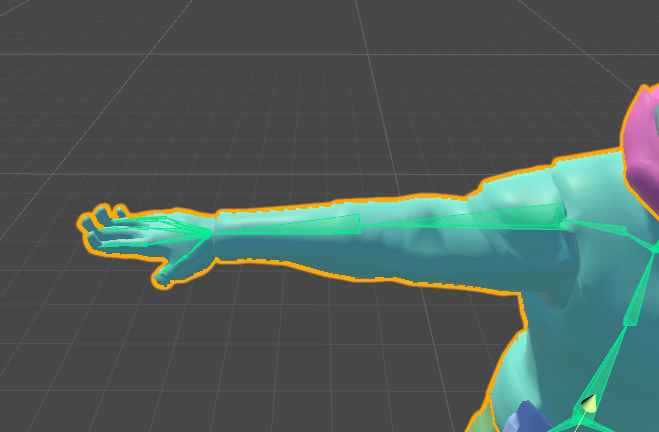
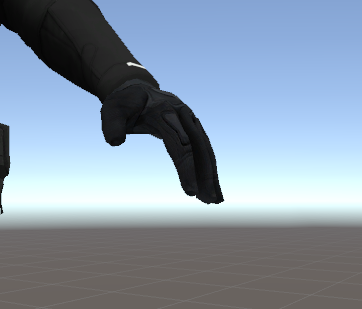
Someone suggested the reason why his hands default to the overextended thing is because maybe the bones are rotated wrong or something?
molten garnet
I cant sem to figure out how to set up this prerigged model, im a complete noob at this
I get a spine hierarchy message when i try to upload
mighty kiln
@hidden ether thats actually really odd. I doubt it would be the case unless the default rotations for the tip bones are offset in a weird way
hidden ether
Any idea on how I could check if that's the case and fix it?
I did just go through and manually rotate them all to be straight, so. lol.
I... think it worked, actually.
His hands don't do that anymore in the rigging thing in unity.
 woven abyss
Can anyone give me some direction on how to fix an issue with my avatar sinking slightly into the ground? Before I rigged it as Humanoid it was fine, but once I rigged it at humonoid it started falling into the ground in VRChat (Not in Unity though). I change the height of the avatar a bit but it seems to sink me into the ground where my feet used to be.
woven abyss
The gray dot is in front of my avatars eyes
 oblique heron
@molten garnet What is the error?
molten garnet
I fixed it, i was having a neck issue, all good now though
oblique heron
cools
hidden ether
lol what is that
 twilit oasis
Is there an easy way to full 180 flip an Armature?
twilit oasis
It seems like my hip are upside down
fading verge
Odd
twilit oasis
R for Rotate X___X
fading verge
🤔
twilit oasis
Okay that should have fix it, now I can just to replace the skeletons
 ornate tundra
looks like the monroe pose
naive tree
@twilit oasis select hips, hit R then X then type 180
 true dagger
and its says spine hierarchy is missing elements
or well it says i need to add a scene desciptor
or avator descriptor
fading verge
👍
crisp tendon
@true dagger Did you follow a single tutorial ?
crisp tendon
What is it about ?
true dagger
how to get a mmd model into vrchat
crisp tendon
Did you watch it until the end ?
true dagger
Yes
crisp tendon
And you still don't know how to add a component to your avatar 🤔
fading verge
I said that to them
crisp tendon

true dagger
which componet do I specifically need to add?
fading verge
Wait you only need one avatar desc component
crisp tendon
It tells you in the error and it the good tutorials
true dagger
I added the avatar one
crisp tendon
To the main model in your hierarchy ?
fading verge
Have you dragged your model in the Scene?
fading verge
Like when you open unity up it shows the grey scene
crisp tendon
I'll give that one to you lolita, I had a rough night and 'i need to sleep lol
Good luck
true dagger
yes it has a grey scene
fading verge
Ah gn
true dagger
Thank you for the help
fading verge
Have you drag your model in there?
true dagger
Yes
fading verge
Hm
fading verge
Configured it too?
true dagger
Yes
 fading verge
Have you made sure your sdk is the correct version?
true dagger
It's the one downloaded off of the website
brisk crypt
https://gyazo.com/76991f3fc6d03462724491d415a2a10d nani the fuck happened


 violet frigate
Quick question, my feet are going through the floor, how do i fix it?
brisk crypt
It's on opaque
But this blue stuff is not supposed to be on the model
neither is the yellow
violet frigate
@brisk crypt You can change the texture from that
fading verge
Delete them?
Or that
anyone else having trouble logging into the SDK thing for unity?
Have you let it load
violet frigate
@brisk crypt Click on them and on the right you'll see a bunch of sqwuares, there's one that says "Main texture"
fading verge
You can drag the texture ^
 brisk crypt
I don't see it
true dagger
anyone know how to fix these errors?
brisk crypt
@violet frigate
true dagger
Where do you rescale at?
fading verge
you need to map your chest
 deep lynx
@violet frigate https://gyazo.com/45dc8f8d4f032fb97b9d46e8f2589e3b might help you
 fading verge
Just click on the model and go to model tab
brisk crypt
Yeah I don't seem to have a "main texture" option
 fading verge
🤔
brisk crypt
Sorry I only started using this stuff last night ; -;
LIke there are these bubbles that aren't supposed to be there
fading verge
There should be a box
To drag the texture in
Once that you can switch to a new shader
Hm
brisk crypt
When using cats when I clicked fix model these bubbles would show up in blender. But they went away when I checked and unchecked rigid bodies
brisk crypt
I assume the rigid bodies are still there
fading verge
anyone help? when i move forward my head kinda turns to jelly and goes inside me
when i move at all
 candid thicket
I don't know what I am doing, is there anyway to check to make sure the mesh is "associated" with the skeleton? I want to start weight painting but don't exactly know how.
please DM me if you have an answer or want me to elaborate
 shadow saddle
how do you fix the issue saying that the models humanoid but missing feet and hangs
 dry thunder
ya im having the same problem
dry thunder
all my rigs bones are in the correct place
fading verge
anyone know how to stop my mesh/bone from ragdolling?
shadow saddle
same here @dry thunder and i have it looks fine
dry thunder
ok idk what i did but somehow fixed my own problem
dry thunder
think their servers got overloaded or something
now i need to figur out how to do this dynamic bone Colliders stuff
oblique heron
@brisk crypt you have to delete the rigid bodies in blender
@dry thunder You have unmapped slots in your rig config
oblique heron
ah oks cool
 lucid sapphire
quick question here. i have a normal xps type model, just a normal mesh, and i cant seem to get the "jaw flap" to work. it just remains open in vrchat, just as it does if i use the "enforce tpose controller" in unity for testing. so i did what the internet said to do, and that's to go into the rigging and check the rotation of the jaw. however, the jaw is just fine.
so does this mean I simply cant use the jaw flap method?
 swift radish
How to add glowing or light?
lucid sapphire
maybe add a light source to the object in unity?
 swift radish
Tried deleting sona's hair, now getting this weird version of her hair that stretches out
brisk crypt
How do I fix the child thing
graceful whale
where you set the model to humanoid
there should be a setting for you to configure your bones
brisk crypt
Yeah I'm moving them so that they are the first child but when I press apply and done for some reason it gets reverted
fading verge
have you parented in blender?
brisk crypt
No I was trying it in unity
brisk crypt
https://gyazo.com/9f36dd68e4a3b96d2ab97c8d1bf26d82 but it seems to be the case though

 hoary grotto
Does anybody rigg models for payment or free. I have a model is just a mesh and don't have the time. ._.
brisk crypt
@fading verge
naive tree
@hoary grotto vrc traders in #353285911322034177 might be a help
fading verge
are your shoulders parented to the chest and the legs to the hips?
 sour kite
OH THANK GOD! I was just about to ask if there was an image i can cheat from with proper bone names. Thanks, drey!
brisk crypt
Yeah. My issue is I can't properly rotate my wrists
That's the only thing that didn't work
@fading verge
hoary grotto
@naive tree Thank you very much for the redirection!
fading verge
i havent worked with hands, sorry man
sour kite
Question: Why is it when I look at my bones in blender, they're just dashed lines?
swift radish
Can someone help with the hair thing?
violet frigate
So the model looks like this https://puu.sh/yPeV4/98c469be11.png in unity, but looks fine in blender

What did i do wrong?
Or, how do i fix this i mean

It's definitely a texture thing right?
fading verge
still looking for some help with my head ragdolling
naive tree
http://prntscr.com/ht7cj1 try this @violet frigate

@fading verge your head prob not parented to head bone or body at at all
violet frigate
@naive tree What is that program even?
naive tree
@violet frigate blender
violet frigate
that's an add on i don't have
naive tree
@violet frigate you select the mesh and enter edit mode
violet frigate
oh, kk
violet frigate
Nope, didn't work, but do you know what's wrong with it?
Like what could i do to fix it?
I didn't do anything to the jacket during decimation so 🤔
naive tree
maybe try adding outline in cubeds shader, but that fixes only invisible mesh
but here it doesn't seem invisible, just missing
violet frigate
You think there's a layer in blender i have to get rid of, that's kinda hidden?
 ember drift
I made skele but his legs don't move when I walk around IRL but when I use the ingame movement system his legs move, any reason for that?
 odd bramble
does anyone know a good resource for rigging facial expressions?
 brisk rock
i mean unity works
odd bramble
I mean on how to do it 😛
fading verge
does anyone have any handy guides or anything to help with rigging your first model? i wanna rig a dragon model i have but ive never done it before
fading verge
i mean i know i can just look on yt i was wondering if there was any specific ones that are good or anything
odd bramble
^
for some reason this guys answer to everything is to look up yt
normally I wouldn't mind, but the unfortunate thing with youtube is that when methods get outdated or no longer work it easily becomes a bad source
and you have to sift through hundreds of outdated resources and methods
 humble lake
So I'm totally new and clueless to bones and rigging. Could I get some help/assistance with a model I've been working on?
 cerulean dawn
Anyone know how to add jawbones to a character
I tried and it won't move my mouth when I use jaw flap bone
lucid sapphire
@cerulean dawn jaw flap bone doesnt always work, as for me. you'll have to make key shapes in blender for blend shape or vimese blend shape.
to answer your question though, i don't know how to add those. they SHOULD be part of the model be default.
sour kite
Can you actually change around the hierarchy in unity? It seem I'm able to do it when i configure an animation type but if I check back on it, it just resets.
lucid sapphire
@sour kite it depends. changing things like bones, as far as i'm aware, needs to be done in blender.
sour kite
I was afraid of that. I'm slowly getting used to unity but blender just boggles my mind.
 patent cosmos
hey guys im having a really weird problem with rigging in unity
so this is what my model usually looks like, but when i try to rig it as a humanoid it uh
turns his head and chest backwards?
i also don't know how to remove his knives from the avatar completely which i'd like to do because they just act weird once i start animating
dry thunder
anyone know a good tut for using dynamic bone collider
 muted helm
I asked earlier, I got a few humanoid rigs ported over to vr chat with no issues, but I have a question if I wanted to do a basic car.. basically a static model, what would be the best bone to capture 100% of the points to animation wise so it it doesn't tilt like crazy? Could I use the armature/root bone for that?
patent cosmos
okay so ive gotten MOST of the problems solved except
drunk-ass tassel on his coat thinks it's attached to his finger
idk if there's a way to get him into t-pose on blender but that would solve it
sour kite
I found a model with the bones as dashed lines when set to octahedral view, are those still bones? Or are those something else?
 limpid scarab
@fresh stump it's probably a little part that is weight painted to a hand bone
remove that weight and it should be ok
patent cosmos
@limpid scarab im not entirely sure how to do that, i've always avoided blender cuz it confused me when i was younger
you're saying try deleting this, yes?
limpid scarab
nono
Quick intro and guide to skinning/weight painting. this video is meant for those with a basic understanding of Blender
check this video out
there should be a little color on the part you selected and is moving when selecting one of the hand/finger bones
You should remove that so it isn't effected by the hand bone
lucid orbit
Huh. Then it's an .fbx export issue. Tried drag and dropping your .blend into Unity instead of exporting as .fbx.
patent cosmos
so it's probably mixamo's fault
probably because mixamo is expecting it to be in t-pose but it isn't
and i'm pretty sure if i do that it'll fuck up his shoulder things
so then i'm back to the other problem
either i use mixamo and let it fuck up that one tassel for whatever reason
or i drop it directly into unity and it puts his legs on backwards for some reason
well actually it makes his chest backwards but still it's pretty dumb
the backwards chest issue also happens if i just use the .blend
patent cosmos
i THINK i got it though it does look odd
clear cedar
Still ,it does not happen in blender but did you verify if there wasn't any weight issue?
distant patrol
bones and mesh position easily corrupt and show wrong orientations. best bet is to always reset transforms before saving to fbx
saving weights to file and reloading them can also fix man issues that seem unsolvable
 trim plume
guys
guddamn i need help
every bloody trime it ry to put a model from unity to vrchat
i make the view position how i wanted
then in game its a bloody mess
format of model is fbx
what the hell am i doin wrong
how is my tank like that
fading verge
My avaster 's rig seem's good in blender , but when i crouch in the game .. avaster's leg over cross
crisp tendon
@trim plume That has nothing to do with the viewpoint, your tank is just rotated either in unity or blender
you need to fix that first
@fading verge What do you mean over cross ?
 floral sable
They pretty much just collide into eachother and bounce a bunch when she stands up
crisp tendon
So bone rotation might be an issue if they collide, and if they bounce it also means that her height in game is not correct
fading verge
@crisp tendon Thank you :3
crisp tendon

 craggy nebula
Anyone gotten eye tracking to work on avatars with more than one spine bone on the rig?
I've read pretty much what is out there I think, and it specifies wanting Hips - Spine - Chest - Neck _Head - LeftEye/RightEye but I don't know if it's the hierarchy that's important or the naming. I really don't want to re-skin my model gah
My original hierarchy when importing is Hips - Spine1 - Spine2 - Chest - Neck - Head but I reconfigure that in the avatar
crisp tendon
So you're going with Generic ?
craggy nebula
no, humanoid. but seems like one of the tutorials specifically says to reparent the bones
bah
crisp tendon
yeah, you can't have two spines
craggy nebula
that is such an annoying break of the pipeline
crisp tendon
You can try cat's plugin in blender to fix it
craggy nebula
I use max, but won't be a problem. it'll just take time
 twin grail
http://puu.sh/yPnhG/78406b355e.jpg How can i fix this
 craggy nebula
eye tracking better work then grrr
crisp tendon
 fading verge
rotate the arms in scene?
twin grail
What you mean
twin grail
XD WAT
fading verge
do you want the arms to move?
crisp tendon
Do you have vr ?
twin grail
This isn't for me
crisp tendon
Does the person have vr ?
twin grail
Nup
crisp tendon
then it doesn't matter
twin grail
But if the person walks around will their stuff move
crisp tendon
if the mapping is correct yes
twin grail
I'm not sure about that
violet frigate
so what do you do when a model is horizontal to the ground? Like so https://puu.sh/yPntE/90d5884956.png

I feel like it's a pretty simple fix, but idk
twin grail
http://puu.sh/yPnvw/0faf551cb5.png @crisp tendon Sorry to ping you but could you help me fix this
 craggy nebula
So I tried to just...remove one of the spines. I expect this to break so hard
crisp tendon
@twin grail Fix the hierarchy the way it's asking to in the red error, and you need fingers for the whole avatar to move
@craggy nebula Did you use cat's plugin ?
craggy nebula
I use max so no
if it breaks it breaks 😛 it
it's not like i HAVE to have eye tracking
crisp tendon
you easily could if you used blender, your call
dire mica
@violet frigate so clicking on the plus in the top right brings up this
Which allows you to rotate, but I noticed that my bones didn't rotate with it
So you might need something else
violet frigate
Yeah that's the problem i noticed as well 😄
twin grail
Wait ruubic are they not already? http://puu.sh/yPnzg/861431b5fc.png
 craggy nebula
@crisp tendon hahah learning blender easy, you funny
violet frigate
@twin grail Make sure everything is mapped correctly
twin grail
It is
violet frigate
Could you screen shot it?
dire mica
Shoulder are supposed to be attached to the chest?
twin grail
http://puu.sh/yPnAA/3ef8c979e8.jpg
http://puu.sh/yPnAO/5401fa0978.png
http://puu.sh/yPnAZ/6f353e6331.png


 violet frigate
Then again, I ran into soneone else doing a knuckles model earlier and they were having the same problem 🤔
twin grail
Yeah because the download for this knuckle meme is shit
violet frigate
Lmao
twin grail
How do i join things in the heirarchy
violet frigate
Wait, that model has a neck right?
twin grail
 twin grail
Idk
dire mica
_>
dire mica
Well import the fbx then
violet frigate
import the fbx
twin grail
How
 boreal thistle
Anyone available to help me with an eye tracking problem? Was able to rig my models and get visemes to work just fine using cats, but not the eye tracking.
violet frigate
click file then import
twin grail
You cant import fbx with cats?
violet frigate
^
twin grail
mkay
violet frigate
@dire mica for my issue, you think i'd have to get the bones to snap to the mesh somehow?
violet frigate
I swear there was like a sequence of things i had to do
 violet frigate
Uhh, can you send the folder my way, i can do it for you if you want xD
twin grail
I'll link you
violet frigate
kk
 gilded hawk
Ummm you can make your shoulder bone the child of the spine in the unity hiearchy @twin grail
violet frigate
@dire mica ... is it really that ez?
dire mica
Dunno
 weak drum
is anyone here sufficient at weight painting when it comes to rigging models? I need help with something
 buoyant river
why does my tracker want to face up insted of sideways when i want to track hips
 modest thicket
can someone finna help me a secc
 radiant thunder
does anyone have that weird knuckles model? I'd like it
fading verge
Hello,i have a dog mmd and i want to put him in game.the problem is how to make him walk on his 4 feet?what type of rig should i use?
dire mica
Do the dynamic bone colliders work?
weak drum

 daring flare
Just add weight to the protruding parts wile you have the bone they should be part of right click selected.
weak drum
Just how much weight though? Full strength or just a lil bit?
daring flare
Full strength
You'll be able to see as you do it so you can rotate it and keep going untill the stretching is gone.
If that doesn't apear to be working then right click on the foot and use the minus brush to go over the opposite foot to the one sellected.
 strong shoal
How do I solve this?
fading verge
I assume you need to do something in blender.
strong shoal
I'm a blender noob
oblique latch
what a good scale for a avatar
limpid scarab
The Y value of your avatar descriptor is a good indication how high your character is
you can compare it in metric units (1.6 Y value = 1.6m)
limpid scarab
and is that orb near your vision/where you would want the camera to be?
oblique latch
i have no orb
limpid scarab
can you zoom out a little?
or descrease the descriptor until you see a orb?
I assume it's flying somewhere high
oblique latch
i found it how do i move it
limpid scarab
decrease the Y and the Z from the avatar descriptor
but what i'd suggest is the following
you put the descriptor at the height you want your character to be (in meters)
Then you adjust the scaling of the model so your head touches the orb
and finally you lower the descriptor a little so it's on eye height
pretty much like this gif does: https://imgur.com/a/7PUZt
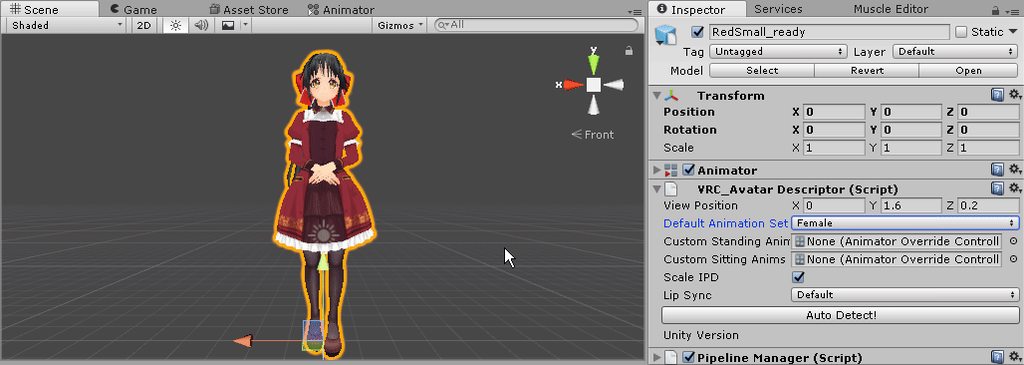


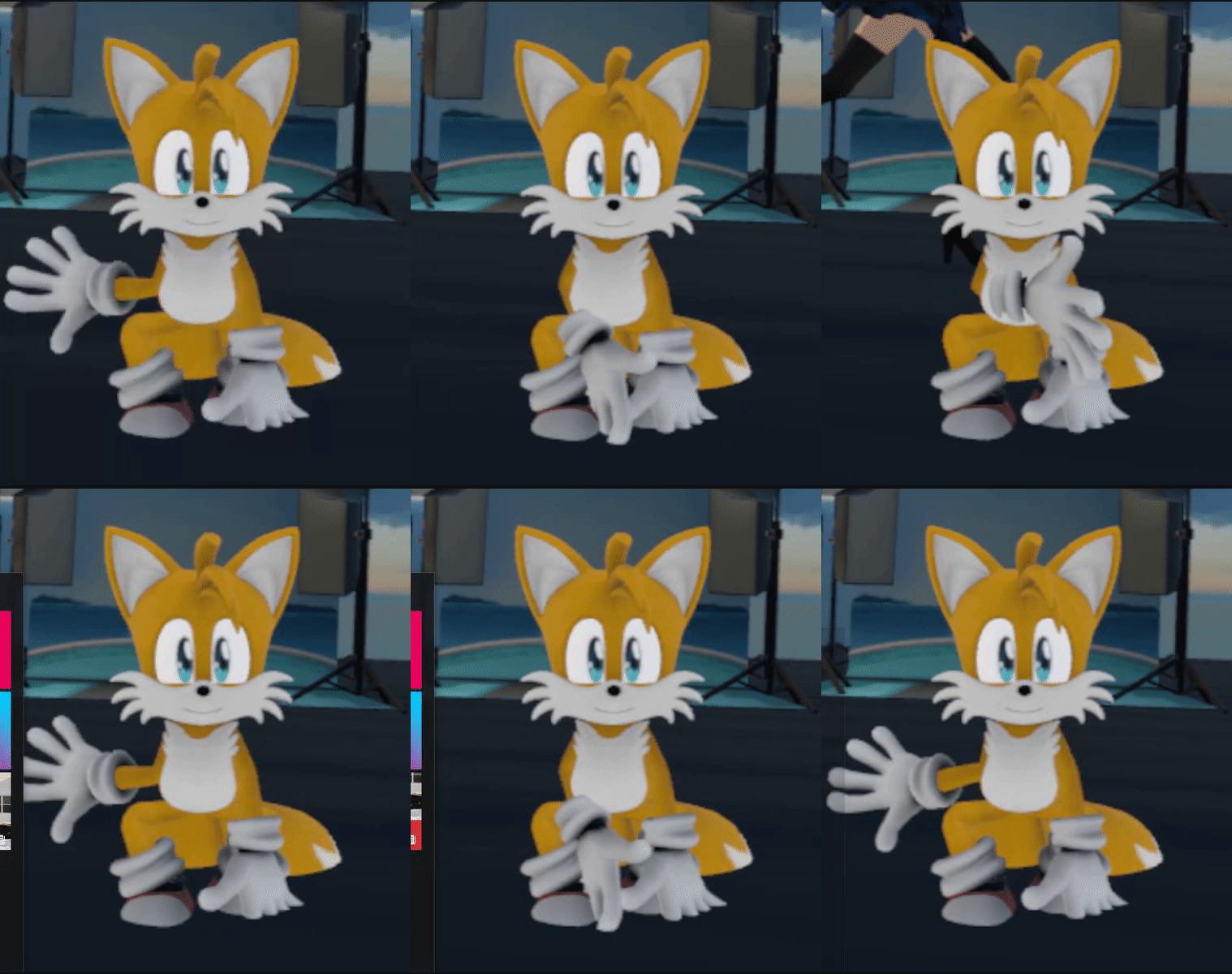

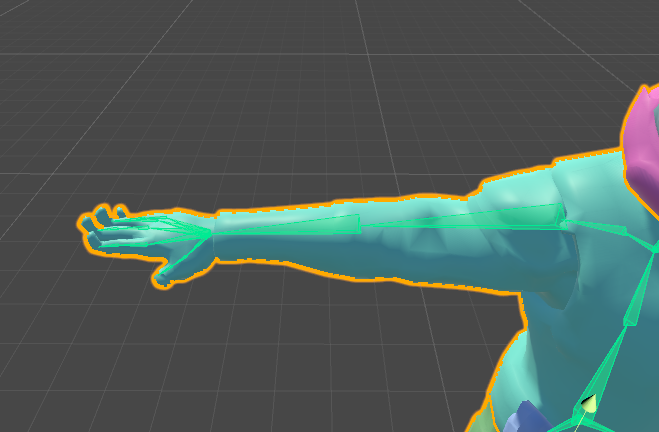


but in your case you'd have to increase the scaling
not decrease
dire mica
Hey
Does anyone know whether the rotation lock on a bone in blender works?
From what I tried it does not seem to work
oblique latch
i still have is short and i did up it @limpid scarab
 dusky oriole
can someone please post a link to a tutorial on nonhumanoid avs for vr chat, I need to learn