#avatar-rigging
1 messages · Page 36 of 1
 wanton pollen
 jagged moth
hi is thay some one can rig up a model for me mixamo wont work or someing a can tray over than mixamo?
 alpine trench
How do I get the avatar to keep the toe bones when using CATS in blender?
my feet go into the ground when I use it
 pure veldt
its not though
you have shoulders parented to an un mapped bone
same with the neck
map whatever bone they're parented to to "Chest"
 olive dune
Does anybody know how certain model parts can be affected even if the weighting for that bone is completely black?
 oblique latch
@pure veldt how do i do that i am new to unity
pure veldt
press that dot
and select the next spine bone up
the spine bone the neck and shoulders are parented to
olive dune
Nvm i needed to make it not-black for some dumb reason
oblique latch
thank you i have it working
pure veldt
👌
 drifting tulip
okay, i have a bone. That i've unhidden yet still can't target outside of armature list because i can't see it.
Is there a way to fix this?
The worst part is its my main parent and i need to know if its weighted
 fading verge
Where can I learn about prepping a model for VR? Ex avoiding twisty wrists.
oblique latch
anyone know how to attach a object to another like the tie so i can add cloth physics and have it stay on
drifting tulip
@oblique latch go into blender, shift and select all bones for the tie, hit ctrl + p and hit keep offset.
it'll make a root bone parent for the tie to remedy that issue.
oblique latch
cool i have it working thank you lots all of you
 daring aspen
Hey anyone wanna help me put a jawbone on kermit?
oblique latch
so i did the steps in blender but when i add a cloth material to it just fall on the ground am i just stupid or did a miss a step
 midnight arch
shurg
 dark elbow
my skirt is parented to my hips, causing the legs to go through it. is this fixable with dynamic bones, or is there something else I can parent the bones to..?
 civic kayak
You can try bone colliders
dark elbow
and put them on different parts of the skirt?
midnight arch
Man this SDK is making no sense like wtf "Spine placement is incorret" dude its correct.
Wheres an auto program to have it map this stuff -.-
dark elbow
mixamo
midnight arch
?
dark elbow
upload a 3d model to it and itll map bones
@civic kayak I dm'ed you, mind checking reeeal quick?
daring aspen
soooo... no one knows this jawbone stuff?
midnight arch
No sorry
 manic warren
basically
 chilly remnant
So I got this Mercy model. Everything SHOULD be working and doing just fine but when I go in game, the hands are behind her back. When configuring the model in Unity it says the model is not in t-pose even though it is. The right shoulder bone is in a weird spot but yet the model is fine. Could that be causing the problem with the hands? Or is that a completely different problem?
 lime monolith
In Blender, I'm working in a situation where I imported a character's legs and boots as separate objects, with separate armatures and everything. When I join the objects together with Ctrl+J, all the bones from both armatures are shown, but in pose mode, moving the bones of the boots no longer moves the boot mesh at all. The mesh still has its vertex groups and weight paints, but they're just not moving with the bones and I can't figure out why.
I can still move the leg bones in pose mode, and the leg mesh moves with them, but the boot mesh seems to be unaffected by any bone movement at all. Any ideas on how to fix this or join the objects properly?
 naive tree
@chilly remnant u have right shoulder parented to neck
@lime monolith check if they have weight in pose mode
on the correct bone
chilly remnant
@naive tree I checked in Blender. I have both of the shoulders parented to chest
naive tree
is that an sfm or mmd avatar?
chilly remnant
Mmd
naive tree
yes, that's first thing u should try
chilly remnant
Alright. I already have it so ill see if it helps
naive tree
if that's an actual mmd
lime monolith
@naive tree Is there a correct way to check that? I can only select Weight Painting mode when I have the mesh selected, not the bone. The mesh has vertex groups the same name as the bones, though, and the weights show up and are visible
 crisp tendon
@teal echo What error ?*
If you're talking about the arms, then you'll have to assign a rest pose in blender
or the arms aren't weight painted
lime monolith
@teal echo Go into the rigging, change the UpperChest bone to None
crisp tendon
probably the former
naive tree
@lime monolith can u mb send me the pmx or fbx you're working with?
chilly remnant
@naive tree after running it through Cats its still broken
 teal echo
I already moved the upper chest to none
 weak drum

I'm getting an error saying that this model's missing the chest/spine hierarchy as well as the hand joints
 oblique heron
Chest is unmapped
weak drum
how would I go fixing that?
oblique heron
Do you see the little circle to the far right of the chest slot?
That little dot after the text
If you click that you can change the slot bind
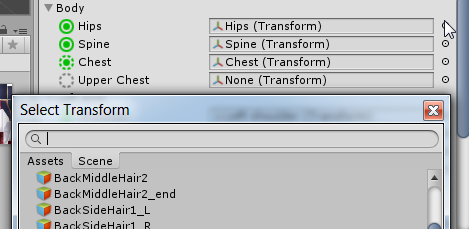 weak drum
ah yes I found that
Also, is there a way to change your VRChat account name? The one that you use on the site?
oblique heron
Hmm not sure
weak drum
I'm just asking because it asked me to use an email address but now said email address is my username
oblique heron
.<
weak drum
eh, I'll just make a new account
There we go~
Should I be concerned that the thumb, middle, and index fingers aren't mapped?
 cold lichen
There's no way to change your name yet, but it' s on the to-do list.
weak drum
it's fine, I simply just made a new account
chilly remnant
Putting it through cats broke the hierarchy :c
cold lichen
You don't have to use Cats, its just a time saver for MMD specifically.
chilly remnant
There was a shoulder bone that was out of place and I tried fixing it with cats but it didnt help but now in Unity its all messed up
weak drum
My only question is how would I go mapping fingers to the kind of hands that Bomberman has
cold lichen
You'd just use a thumb and middle set
weak drum
A thumb n' middle set?
cold lichen
Yea, have the obvious thumb set with 2 or 3 thumb bones and the rest of the boxing glove? set to 2 or 3 "middle" finger
It'll open and close when trying to grab something
Oh wait, i just googled bomberman, coulda sworn he had a thumb
cold lichen
You brobably wouldn't give it any bones, then. So its like power puff girls; sticky hands
weak drum
So would that mean the av would be unable to crouch then?
cold lichen
What?
It just means that it wouldn't have any moving fingers when picking things up
It'll give a warning that no bones are set so full IK will be disabled, but everything should still work.
Or just have empty finger bones not weighed to anything
fading verge
can anyone help me with a viewpoint issue? when i look down or up my viewpoint leaves my avatar
cold lichen
Is it set to humanoid?
fading verge
yes
cold lichen
Is the head properly mapped?
cold lichen
Do yoo know how to check?
fading verge
in unity?
cold lichen
Yes
fading verge
yeah its mapped properly
cold lichen
TO be clear, it's tracking your head movements properly until you look up?
fading verge
i can look left and right fine but up and down it goes out of viewpoint
cold lichen
Does it turn up and down at all or just looks straight ahead?
When you look in a mirror
weak drum
well I was relatively successful with making bomberman but uhhh

those feet are lookin' a tad wonky
fading verge
straight ahead @cold lichen
cold lichen
It's not tracking your head at all, your body will still rotate. Double checking, when you open your rig config, you are checking in the head tab at the bottom left of the green man icon, right?
cold lichen
I was about to suggest checking it all in blender
weak drum
Is there anything I can do about that feet stitching?
cold lichen
@chilly remnant Click the head tab and make sure neck is mapped, too.
@weak drum Make sure it's weighted properly in blender.
weak drum
Weighted Properly?
cold lichen
When you rotate the bones in pose mode, do the feet move properly?
weak drum
lemme check
chilly remnant
@cold lichen neck wasnt mapped but now it is. Is "character not in t pose" a bad thing?
cold lichen
Should still work. It's only a warning that it may look goofy if too far from a perfect T.
weak drum
'Cannot change pose when rest position is enabled'
chilly remnant
Alrighty!
Ok it mostly works but now the feet are like that 😛 Also any way I could close the mouth? Its closed in Unity but slightly open in game
 fair bone
Just say that you are half goat
cold lichen
@weak drum selectthe armature and in the armature tab you can change from rest to pose
fair bone
You'll be fine
chilly remnant
Not a bad idea tbh
cold lichen
@chilly remnant If you have the lip sync set to jaw, it'll open a bit at all times.
chilly remnant
Its set to default
 lucid orbit
@frozen widget Here. https://www.youtube.com/watch?v=LrCCl_F9XNs Watch at 25:30 on.
Here's a video on extremely common issues I see with bones and rigging setups, and ways to solve them. I cover: - Leaving Upper Chest Blank - Reparenting spi...
 trail gorge
anyone know how to fix that? in blender is ok but in unity....is like that
chilly remnant
Any ideas on those crazy feet? They should be okay at least in Unity they are
weak drum
Ok, it's set to pose, now how do I go about weighting them properly?
lucid orbit
@trail gorge Check your Shader settings. Cutout, or Transparent rather than Opaque might be better for the material currently covering the eyes.
trail gorge
@naive tree Thanks, i will try that
naive tree
it depends on how good/bad blush looks, if you set to transaprent i think it goes to normal
but face shadow always kinda looks bad, imo
cold lichen
@weak drum Theres some good guides to weight painting on yt.
 dark gulch
@fading verge sup
manic warren
yo how come when im weight painting and i click nothing happends when im zoomed in
i have to zoom out but it fucks everything
 frozen widget
i found the hip bone, how do i make it point perfectly upwards?
trail gorge
@naive wharf @lucid orbit in any case:
i fix by going in the part with problem>the shader with problem> change to CubedParadox/Flat Lit Toon Distance Fade
Thanks guys!!!
chilly remnant
How do I fix those legs? Ive tried changing my height in game aswell as rigging them again but nothing seems to help. Also the mouth just stays open all the time even tho I mapped it to the jaw flapping thing
cold lichen
Check the weights in blender
lucid orbit
@chilly remnant Odds are you need to weight paint the legs properly. As for the mouth, speech visemes are better than using the jaw flap.
chilly remnant
How do I do any of that? 😄
cold lichen

Quick intro and guide to skinning/weight painting. this video is meant for those with a basic understanding of Blender
weak drum

 deep lynx
Any idea how I can fix the model from leaning forward in vrchat
like, the stomach sticks out
not sure why its doing that, all my other models don't do it
 left saddle
@deep lynx you probably need to fix the rigging. Make sure your avatar isn't doing something like this in the configuration
ie being hunched over
cold lichen
@chilly remnant Make sure they aren't weighted to any other bones, just the ones you want.
And, where are your arms?
chilly remnant
Behind my back x) I have no clue how or why but they got stuck there again after I changed the weight paint
I have to start over I messed up so it doesnt work at all now
Now that I put it in Unity there are no bones
 modern cedar
🅱oneless
trail gorge
someone knows why my avatar disappears when someone see me by peripheral vision in game?
for me is 100% ok
 mild mural
anyone else having issues with jittery dynamic bones?
naive tree
you entire avatar or just part of you
trail gorge
entire avatar, sometimes only hand, sometimes the head, sometimes everything, depend from what angle you see me
naive tree
have you checked in unity if it happens for you too?
trail gorge
using the Scene, everything is seems normal, i make a tour around my avatar and nothing disappears
fading verge
I am having a painful problem
I want to create models for King Crimson and Xavier from X:RA
however
when I press the rigging button
I get the following error
:
Invalid Avatar Rig Configuration. Missing or invalid transform:
Required human bone 'Hips' not found
This is likely preventing me from correctly rigging
somejuan please help
fading verge
how do I redefine the root as hips?
fading verge
Ok
I'm not sure if this breaks any rules or not
but can you please just take the obj and textures
and just directly do them
Because I have negative knowledge when it comes to modeling and rigging
crisp tendon
It is 4:30 am for me so no sorry
fading verge
The age of information has many benefits
like making customized models for your favorite punch ghost from your favorite chinese cartoon
 slow mantle
requesting help, VRchat avatar support channel

getting these errors
problem is, all of the parts specified ARE rigged
not really sure what the hell it wants from me
 calm needle
you are missing head and arms
slow mantle
but I'm not
mild mural
did you select the correct bones?
slow mantle
Nah like
Lemme take a screenshot
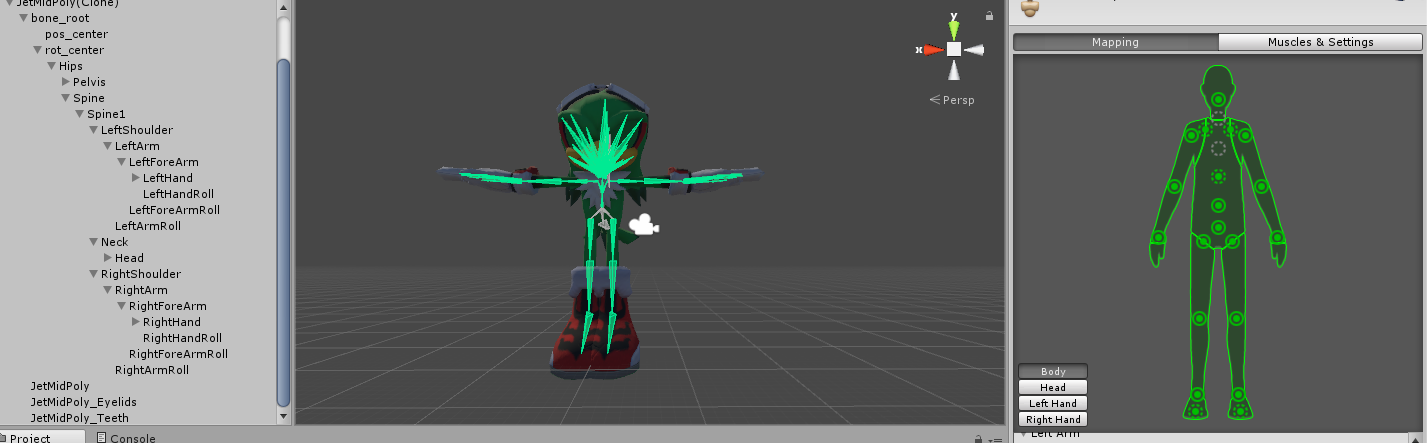
Obscure sanic don't judge
So as you can see, everything is mapped on the model
I am following the correct structure for the model
Hips->Spine->Chest->Neck->Head
and Chest->Shoulder->Arm->Forearm->Hand
and it's not pictured but the legs are mapped according to mecanim standard too
and yet it's still saying I don't have all these parts
just in VRChat's build thingy not unity, unity's cool with it
mild mural
so spine1 is in the chest slot?
slow mantle
indeed
mild mural
maybe the name is throwing it off, not sure
slow mantle
nah i've tried that, same error
mild mural
oh in your pic i see the neck is greyed out
slow mantle
oh shit
 vast jackal
I need some help if anyone is available
im getting an ANNOYING error lemme screenshot it
just realized i wasnt zoomed in, idk if it would help or not
mild mural
don't use head neck twist as a neck
slow mantle
ok fuck me it works now, but his feet have instantly flipped upside down
and his legs have bumped up 364mm
chilly remnant
So im trying to get the bone mapping right in Unity and all the stuff is mapped except chest and upper chest and apparently without those it wont work. What should I do?
vast jackal
@mild mural what would i use
mild mural
it's often called lower neck or something similar
@chilly remnant upper chest has to stay blank, but yes you need a chest
vast jackal
i see head neck upper and head neck lower
mild mural
head neck lower = neck, head neck upper = head
and make sure chest is the parent of neck and both shoulders
mild mural
it's okay to leave the neck twist on it's own
chilly remnant
Theres not any bones I can make the chest or there will be problems with the hierarchy
vast jackal
slow mantle
resolved weird ass foot flip issue by doing sample bind pose then enforcing a t-pose, avatar is now working fine and uploadable, thanks bunches chronubis
mild mural
cool, yeah I always reset then force tpose when rigging
vast jackal
i set spine upper as chest and it gave me the same error
however i didnt change anything else besides that
 daring flare
Anyone know to make a four legged avatar with animations?
chilly remnant
I was able to set a chest now and left upper chest blank. But now its saying that the hierarchy is incorrect
mild mural
both @vast jackal and @chilly remnant you might have to reassign parents in blender chest > neck+shoulders without anything between them
mild mural
when you click on a named bone (under armature) and then the little bone under properties (square grey buttons) you can change the Parent field while in edit mode

 mild mural
I'm not sure what those two vertical bones in the chest are
 main hill
not being in T-pose shouldnt keep you from uploading
 earnest blaze
so it should work
main hill
i dont see why not
are you getting a red message saying that the model isnt humanoid and wont being using the standard animations from the SDK?
vast jackal
@mild mural I feel like im close but this is currently stopping me
mild mural
hit tab while your cursor is in the model area... can't think of the name
chilly remnant
So Unity is now saying "Parent for right shoulder p differs from one found in humandescrpition. Waist 3 was found instead of upper waist 2" but right shoulder p is parented to waist 3
mild mural
@chilly remnant I've only looked at one Overwatch model and it was a bit messy, but you may have to use cats tools and consolidate (mix weights) some spine bones
lots of trial and error honestly
sometimes you'll want to scream
vast jackal
i saw a good widow avi the other day
chilly remnant
Yea ive noticed 😦 Ive tried cats but that only deletes the leg bones and does pretty much nothing to help. Ill keep messing around with this tho. Thanks for the help!

 unique jetty
Hi guys. why does the mesh only move half of the bone that i moved?
vast jackal
@mild mural THANKS IT WORKS
mild mural
@earnest blaze in blender, make sure the feet are on the 0 line, you might have to change the origin of the model afterwords
@vast jackal 👌
sometimes you'll notice little errors after the fact, like some of my avatars looked like they belonged in JoJo with their junk thrust out in front of them
mild mural
yeah it's a pain that more of these things can't just be tweaked in unity
 mild mural
click view in the bottom left and change to isometric and hit front
can you'll see if the feet are below 0
 earnest blaze
ermm ?
mild mural
"view persp/ortho"
earnest blaze
ah
mild mural
toggles between the two
 mild mural
the idle standing animation may be the culprit, a lot of my models have their feet an inch in the ground in game even when they're flat to the ground in blender
earnest blaze
See my firend has the same model but his dosent do this but he not answering me atmo
mild mural
it might be something I'm overlooking in general too, the animation is the only thing I could think of
earnest blaze
okie ty for help
mild mural
np
chilly remnant
So I was able to get everything set but now its saying that the neck and shoulders have to be parented to chest and thats how its set right now. I dont understand this
mild mural
are there any other bones that are between? something like ' chest > wrongbone > neck ' or same for shoulders
chilly remnant
Nope
Neck is going straight to chest same with shoulders
No wait actually... are these "Right shoulder P" and "Left shoulder P" necessary?
mild mural
how many parts have shoulder in the name?
chilly remnant
This is how they look
Those are the C and P shoulders
The "real" ones are the ones where shoulders should be
mild mural
it's hard to tell, are they involved with the wings at all?
chilly remnant
As far as I can tell not at all. The wings are already parented to the chest
mild mural
you might be able to ignore them and just change the normal shoulders's parent to whichever is your chest bone
mild mural
honestly I'm not sure, the blizzard rigs are pretty strange
chilly remnant
Darn. Only thing thats not working are the shoulders haha. So damn close
mild mural
one of the tracers had cloned geometry instead of a specular texture, then again I'm no gamedev
earnest blaze
http://prntscr.com/hsqok6 @mild mural i fixed it
 mild mural
nice
mild mural
👌
 empty sequoia
any of you guys know what these red spheres are for?
mild mural
they might be where items go when you grab them... not sure
empty sequoia
this model was also having problems where the chest area would be completely disfigured in-game
chilly remnant
According to Unity the model had no problems but in game there were no animations
empty sequoia
I have something like that too
I'd have the idle animation playing normally in Unity but in game it gets all messed up
mild mural
make sure the controller is set to none when you upload
empty sequoia
is that what's been causing that?
chilly remnant
How can I see the animations in Unity?
chilly remnant
Oh my character still doesnt have any animations
"Transfrom 'Hips' not found in HumanDescription"
mild mural
sometimes the bones I use for hips are either just root hips or the lowest part of the spine
and make sure it has no parent for best results
chilly remnant
Theres no parent for the hips so that should be fine... this is so weird
Theres a bone called waist and its parent is Groove but I dont think its doing anything
mild mural
yeah the names make it hard sometimes
chilly remnant
This is what I dont understand... When I get rid of the "avatar not created" error, I get the "Spine hierarchy incorrect" one
 mental cloud
can someone explain me real quick why xps bones look always so weird? are those fake bones?
mild mural
all my xps bones look normal
might have been an import error
i use a xps plugin to import mine however
mental cloud
yea nvm im just retarded lol
mild mural
😅
mental cloud
do u know the difference tho between going for generic item ascii, mesh or just the xps?
mild mural
I usually import whichever generic mesh is bigger if there's no "xps" file
 eager fossil
has anybody got like an example picture or list of requirements for a rig?
mental cloud
ok thanks
chilly remnant
So uhm... this happened
 boreal thistle
Pretty stumped trying to get eye tracking working. I worked out dynamic bones and mouth tracking pretty easily but haven't got eye tracking succesfully yet. When using CATS in blender is there a specific order to things that I might be doing incorrectly? IE Fix Model > Translate > Visemes > Eye Tracking > Seperate by Materials > Decimate.
mild mural
the names of the heirarchy have to be exact until the eyes
they have to be Captialized
that stumped me for a time
 swift radish
Can someone help me firgure out why this model imports facing backwards every time?
https://www.models-resource.com/pc_computer/leagueoflegends/model/19238/
I can't rotate it either, it doen't change
boreal thistle
Hierarchy seems correct ect. Would there be an issues by having 2 meshes? Head / Body for decimation purposes/
 ornate tundra
Can someone help me with a rigging issue?
 hollow current
how would i rig the chibi lion saber?
 noble portal
Anyone know why it shows Armature as a bone in the rigging? This hasnt happened before and now any model i try do rig does the same thing
 candid thicket
Can I ask how to fix my "spine hierarchy"? Do I need to find a way to add a bone so there is one for the chest? also, what is wrong with the thumbs? I can't figure it out.
fading verge
Is there a premade human armature that i could download and then bind to my character model?
lucid orbit
@fading verge Look in your VRCSDK in Unity. In Examples > Sample Assets there is a Tutorial Avatar that you can reference for an ideal armature.
 earnest summit
what do i do i tried to do a wolf but it stands on 2 legs instead of on all 4s
wanton pollen
I need some help rigging
eager fossil
Does anybody have any sort of bone Structure and Heirarchy example?
wanton pollen
I need some help
 brisk crypt
Would anyone be willing to answer some noob questions in DMs?
noble portal
How can i fix this issue? I see the bone and the length doesn't look zero at all.
noble portal
ok thanks
fading verge
👍
midnight arch
Hey so for people that know unity. How the #### am I suppose to fix the legs as the hierarchy keeps changing because unity decided to make the skirt as legs... I try forcing to change then everything looks green then apply and done complains again that there no in the same list as I did force it but checking again it automatically goes back to the default. Fml (dm me for more info because this is annoying)
midnight arch
Mk hold up
midnight arch
So its all green right
fading verge
Wait take a screenshot of the bones in the right @midnight arch
Need to see the bones
midnight arch
midnight arch
oh
fading verge
That shows the name of the bones too @midnight arch
midnight arch
fading verge
I said
Oh Lord
Drag the green dots with names up
So that u could see which bones it's rigged to
midnight arch
@.@
fading verge
Gah
midnight arch
This thing is stupid af
fading verge
when my avatar is imported, its imported as a generic and does not get provided with vrchat's animation set
how can i fix that
if its imported as humanoid it gets all distorted
Click on the generic tab
Change to humanoid
yeah but then it gets distorted
Enforce t pose?
midnight arch
Then its not rigged correctly like my feet
fading verge
if i enforce t-pose it gets distorted
the base avatar isn't a humanoid
Ohh
Well I'm not sure
midnight arch
what is your avatar?
fading verge
^
 limpid scarab
@midnight arch Did you have much issues with decimating the vanilla model? I tried getting the chocolat one under 20k and had to destroy almost all of the accessories
limpid scarab
Yeah.. I feel your pain
Hmm damn. I found one ingame with most of the meshes intact
midnight arch
VanillaH is my final but THE F FEET IS MISPLACE THANKS UNITY!
limpid scarab
no clue how they did it
midnight arch
Unity thinks the skirt is feet....
So im trying fix it
but no give me some stupid error
limpid scarab
🤔 That can't be right
midnight arch
midnight arch
Yeah i tried that i cant move them
midnight arch
Unless you know how to work blender
fading verge
I have to reparent some of my avatars
fading verge
Reparent
limpid scarab
Did you remove the stockings? D:
fading verge
^
limpid scarab
I removed the feet and legs under it
midnight arch
Then i removed the pants then some stuff on the shirt
@fading verge dont know how to reparent them
fading verge
when i parent a mesh to a bone for weightpaint etc, it imports as generic instead of humanoid which means i dont get animations
 wind tide
I think I may have done something wrong here
daring flare
@fading verge Everything imports as generic in unity. Click on the model in assets and hit rig, then drop down box to humanoid and apply.
@wind tide It looks like your hip bone isn't the first on the list. Other then that it probably didn't auto map corectly.
daring flare
@fading verge Did it have any warnings under it when you uploaded it?
fading verge
hold on, im gonna get the message again
 stark bronze
What are y'alls usual reasons for Auto weights not working in Blender?
fading verge
Even when I change it to humanoid I still don't get the animation set because it wasn't imported as human. It only imports as generic when I parent a mesh to a bone to give the mesh weight paint.
daring flare
Are all the bones parented to each other starting with Hips as the base?
fading verge
yeagh
daring flare
Try setting it to humanoid and go to configure. The auto rigging might have messed up and been unable to apply
Also go to pose under the rig map and enforce tpose to be sure.
 teal badge
What does Arm Stretch actually affect?
daring flare
@stark bronze I'm afraid I'm not familiar with auto weights in blender. You could try mixamo.
fading verge
the thing is, my avatar isnt a humanoid so i dont want it to be in t-pose
otherwise it gets distorted
daring flare
What kind of avatar is it?
stark bronze
@daring flare What is Mixamo?
fading verge
mixamo is for custom animations
daring flare
It's a rigging and animation site. www.mixamo.com.
daring flare
It can auto rig and weight paint fbx and obj files.
fading verge
i prefer doing that manually
i had one of my models hips not even move from the floor with mixamo
daring flare
I don't usually rig anything from scratch. I fix existing rigs and meshes.
 little coral
Alright boys. Ben trying for 4 hours to get this rigging right. https://gyazo.com/f8701393c34617b7364a5cecbef2c30b i get this everytime


 silk kestrel
your model's right arm joint looks broken
little coral
 fading verge
there should be a bone called spine, I don't think upper body is your spine :p
 fading verge
CATS uses google translate as well, and it usually translate 脊椎 to spine and 脊椎 means spine
 proud wolf
i need assistance, my model has no hip bone and i dont know how to connect the spine to the legs without breaking something
little coral
https://gyazo.com/353d097613ad91615bae9ef30b8182b4 looks to be the spine for me
 fading verge
hm thats wierd
little coral
so im going to rename them right now so that you can see properly and its not backa nd forth
fading verge
where is that waist upper 2 located?
fading verge
ah ok
http://prntscr.com/hsux97 you need to make them the parent of the chest

or the neck
little coral
 fading verge
and shoulders if it's further down
little coral
Can i do that in unity or back to blender?
fading verge
yea move neck and the shoulders to be the children of the chest
blender
let me show you how
 proud wolf
so, you know how bones are like a triangle, does it matter the direction they're facing?
fading verge
you click on neck, left shoulder and right should and then you go into Bone Data and find the Parent: option and type Chest there
little coral
Okay i will try that
fading verge
I think it does Brutarii
proud wolf
hm
fading verge
but I can't say for certain since I'm still new to modelling 😛
proud wolf
also in unity the hip bones is like 3 bones as one, is that important to know
because this model has no hip bone and im not sure how to go about making one
fading verge
I had to make a new hip cause mine was like 10 bones, so my model was messed up and half it's body was in the ground
proud wolf
how did you make one
like
did you just put a bone where it should be, and then somehow parent it to the spine and such with the tools on the sidebar
fading verge
in blender
proud wolf
yes
fading verge
you go into edit mode and click the lower spine point like this http://prntscr.com/hsv07b
 little coral
https://gyazo.com/9e89a00b291796dc944babffbc0f8afc its grayed an i cannot edit it
 fading verge
2sec lessgently
little coral
okay
fading verge
brutarii then you click E to make a new bone
proud wolf
ye but wont that mess up the heirarchy
fading verge
nono we fix that
proud wolf
ah
fading verge
then palce it like this http://prntscr.com/hsv0kb

ofc straight when looking from the back

then you just have to parent the legs and spine to this new hip
like this http://prntscr.com/hsv1a9

then save tpx and use that new hip in unity
@little coral lessgently you have to go into Edit mode to change the parent
little coral
okay.
So i have a clavical bones
will that mess up if i use ths houlder to the chest

Shoulder C on both is the actual shoulder
fading verge
I think that's fine
proud wolf
ok so this is what im starting with
fading verge
all you can do is test it and see if that messes up ingame
yes then click E to create a new bone
little coral
 fading verge
and place it like I did above
fading verge
np 😛
I just did this yesterday as well to this model 😛
my model was messed up tho so my legs doesn't move xD
proud wolf
but you know how in unity the hip bone is like this
fading verge
she had so many wierd bones that it just wouldn't work probably 😛
proud wolf
do i need to have a 3 way bone as a hip
proud wolf
thats the tutorial one in unity
proud wolf
like i said im working with a hole where the hip is
 fading verge
and this model works just fine
proud wolf
will that mess with which end is connected to where
fading verge
you can create a total new bone as well instead of doing a connection to the spine
no, if you just remember to parent the spine to it then it should work
eager fossil
hey i need help, when i try to build and publish my model it says the feet, head and other stuff arent mapped yet they are
fading verge
mapped as in atlas?
proud wolf
is the parent location important
when i parent the leg to the hip, it parents to the top part instead of on the bottom where it would be more anatomically corect
eager fossil
each one of the names for the bones are exact and when i go in to configure the rig, all of the specified bones are correct and mapped
proud wolf
like yours dalle
little coral
https://gyazo.com/2861810c0ebe905d63b8498de6e2dbf7 it looks better now
 proud wolf
so how can i make a 3 way bone like how it shows in unity
fading verge
then you have to create 2 bones instead of 1
little coral
IT'S UPLOADING
fading verge
lets hope your legs move LEssgently 😛
little coral
IT says i need to straighten them out to 180 more but i just wanna see it in game
fading verge
never used 3 way bones brutarii so I can't really help much
proud wolf
in your avatar menu
little coral
mement of truth
fading verge
it should be there right away if you restart the game
little coral
moment*
proud wolf
not even
i uploaded an avatar with my game running and it was there
it just hiccupped for a second
fading verge
never done that for me :/
only if it was a totally new model
and not a replacement
to a current model
proud wolf
h m
proud wolf
nice
 hidden ether
https://i.gyazo.com/3c42db1bda3eb4a1213295b3b735e7e1.png
https://i.gyazo.com/a6e7ff0205f92a69f253c9032be50f5f.png
So, this avatar came out well, besides his hands and spine being a little broken. Can anyone identify any possible problems I've got with this rig?
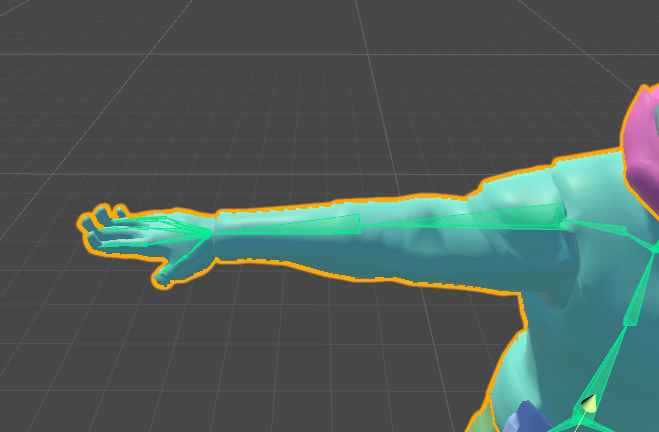
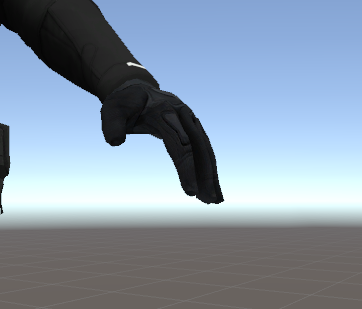
As you can see, his fingers default to this weird double-jointed position.
I did not get a good enough picture of it, but his chest puffs out whenever he's in a default position. Whenever there's an animation playing he's completely fine.
fading verge
thats an easy fix
hidden ether
whatsa fix
fading verge

the left hand is the fixed version
you need to make the ends of the fingers looksl ike this http://prntscr.com/hsvjbk

your ends is probably standing up straight
eager fossil
getting these even though the feet and stuff are specified
fading verge
can't see the full error
eager fossil
rest arent errors dont worry
the rest of the stuff is the poly count, build and publish, and the link
hidden ether
https://gyazo.com/7686611c93f27c0164211bf3c3223e3e @fading verge Mine are only coming up as dots, though I recall seeing them like that before. What didn't I click on?
 fading verge
ehhh that I got no idea about
proud wolf
also if my model has no hands, do i still need to have at least one bone on each side and mark them as hands in unity
same with feet
civic kayak
@hidden ether
proud wolf
darn
 fading verge
not sure why it does that tbh
proud wolf
do i need to have all 5 fingers or is just one bone named hand enough
hidden ether
They're just really fucking small
I also had them set to "stick"
instead of octahedral
@civic kayak Thanks pal
fading verge
https://imgur.com/a/wE6Q2
Does anyone know why my character looks like he has to take a piss when crouching and why the legs are moving like this as soon as i look down
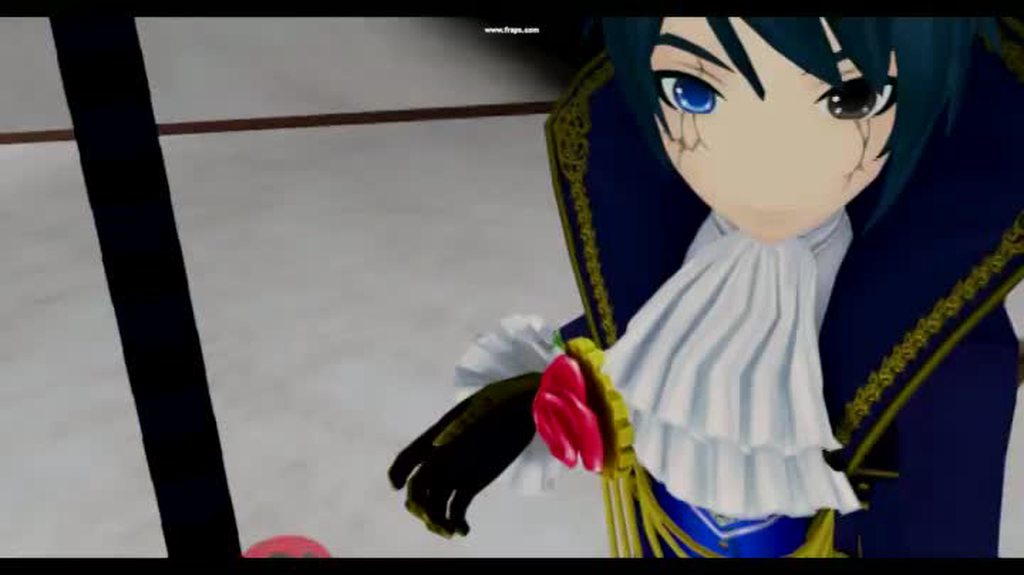 proud wolf
whew
fading verge
civic kayak
@hidden ether no prob, may I know where's the option for your problem?
fading verge
I´m getting no answers everywhere and feel helpless haha
hidden ether
https://gyazo.com/4c5300f93fa5ccfc7b32bca41e2cd67b @civic kayak

 fading verge
oh
hidden ether
he's asking why his character looks weird when he crouches
civic kayak
i dunno man, my model doesnt have any parenting on my toes
civic kayak
yeah but he seems to have some sort of parenting on his feet
fading verge
they look like this for now
ahhh your bones are not tragiht
straight
your leg bones is a little off
in what kind smaller? im a total newb with bones, i´ve never touched them at all
forget the smaller for now
try and make the bones straight first
civic kayak
woah how did you even see that
fading verge
 hidden ether
yeah they're on a tiny bit of an angle
fading verge
you can see it here
hidden ether
you need to make them completely straight
fading verge
i try it,
can i see somewhere when they´re straight?
or just by eye?
I think you have to do it by eye
since when you change the angle of it in settings it messes up a bit 😛
hidden ether
https://gyazo.com/c074610353491b8ca3ba27bffb7fb49e
hahaha
I HAVE TO EDIT SO MANY BONS
 proud wolf
christ i think i finally done it
fading verge
When i edit the bone in edit mode they are strange, but when i switch back to object mode they are like before?
Why is it like that
edit mode lets you edit 1 bone at a time
where the object mode is different
it selects all the bones at once
ah does that mean i have to work with edit mode so much it looks good in object mode?
because i see a change now in object mode
yea you need to use edit mode to edit the leg bones to be straight
proud wolf
wtf
proud wolf
all the required bones are mapped but when i click the build button it says they arnt
fading verge
hmm
proud wolf
o h
eager fossil
im getting these errors even though the bones are specified
proud wolf
like i had to actually click on the head so that it zoomed in
fading verge
@eager fossil check that your bones is set up correctly when clicking configure
eager fossil
proud wolf
how 2 fix
silk kestrel
that means you have a rotation on your thighs
fading verge
unless you use a vrheadset
proud wolf
i do
fading verge
I'm not sure how to fix it either XD
proud wolf
the thigh bone is the upper leg one right
silk kestrel
yes
hidden ether
lol now i see why you didnt want to send a pic initially
proud wolf
how do i check its rotation in blender
hidden ether
um
@eager fossil first of all that rig is so misaligned you should probably fix that first
other than that that's really strange, everything is clearly assigned so perhaps you selected the wrong model when you went to build/publish?
hidden ether
you may not have exited the rigging area when you went to build/publish, remember to hit apply and done when you're finished
fading verge
yea this might work better
eager fossil
when i dont exit the rigging area then it just says i dont have an avatar descriptor
hidden ether
strange. I'm not sure then, sorry.
eager fossil
@hidden ether So i re-exported the model as fbx mapped the bones and did all that and now its working with just minor problems
that are all to do with having vr
proud wolf
hm flipping the hip around didnt fix it
wait what
the error went away by itself with the build menu open
ok
thanks unity
fading verge
do you guys know why my head completly disapears when i´m proning?
not even google can help and nobody answers in the other help room, im crying here 😄
proud wolf
i wish i knew what you meant
im gonna hop on to test my model now
what world are you in
floppiii
hidden ether
alright cool
fading verge
seems like i have to do everything from scratch
proud wolf
oh f u c k
fading verge
I'm trying to figure out why my avatar does this http://prntscr.com/hsw20a xD

not sure why 😛
hidden ether
🚔
 hard zenith
hello anyone know how to import non human rig?
proud wolf
i think something b r o k e
hard zenith
i can import it as generic but then there would be no animation
 viral lily
does anyone know what to do about this?
proud wolf
the hip needs to be straight down and the upper legs need to be straight up
viral lily
it was more a question of "how?"
proud wolf
bone editing like that is done in blender i think
unless you can do it in unity
idk
hard zenith
i can import this as generic rigging but i wouldn't be able to do humanoid since it doesnt have the bones for it so what can i do to have a bit of movement https://i.imgur.com/7J7YIzB.png

 boreal plover
put it in blender and add all the bones needed :`
 trim robin
Real skeleton
hard zenith
eh
 trim robin
With hierarchy
boreal plover
just name the bones right
trim robin
Real skeleton
hidden ether
@hard zenith you might need to manually animate and rig it if you don't want to make it work with a human rig.
hidden ether
^
hard zenith
so i can create bone on top? xD
hidden ether
You can very easily make the bones there but inconsequential.
However, the in-game animations aren't going to look great.
hard zenith
well ye
trim robin
You gotta see it as a jigsaw puzzle
Just try too fit the pieces
Then glue them together
hard zenith
but well i'm kinda a beginner to blender
hidden ether
a very malleable jigsaw puzzle
hard zenith
i just know how to import existing model in the game but they are humanoid XD
fading verge
@hard zenith @proud wolf go into edit mode in blender, click on your hip and edit Roll: to 180 http://prntscr.com/hsw8tj
 fading verge
oh
hard zenith
it is brutarii and another guy
fading verge
werent you asking how to rotate it? xD
fading verge
ohhh by bad I meant @viral lily
proud wolf
thanks dale
viral lily
nani?
hidden ether
oh shit you can do that?
hard zenith
so i should add the bones here? https://i.imgur.com/U2ui4e5.png
 proud wolf
@fading verge why did you do this
hard zenith
how do you cut a bone into two?
hidden ether
lol what
hard zenith
o 3o
proud wolf
with a bonesaw usually
hidden ether
supra create another bone and place it inbetween the two bones
 clear cedar
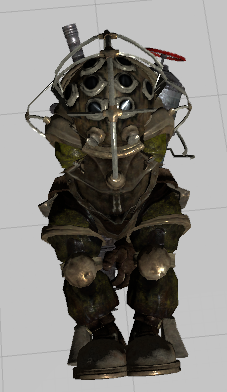
How would you guys go about rigging a Big Daddy from Bioshock? Normal human skeleton or a skeleton that matches the model (Which so far has not given me a good result, because it tries to assume the idle position of a normal skeleton)?
hidden ether
bit advanced
hard zenith
ehhh
hidden ether
hmm
clear cedar
Aka this https://i.imgur.com/rDPjwzK.png
 hidden ether
Jordo i'd go for a custom set however you should be able to use a regular humanoid rig proportional to his body size
clear cedar
The thing though is that the body parts are far more spread than a human, shoulder and hips are wide af (and also the spine & head are basically the same thing but that'd doable with weight painting)
proud wolf
cant you just move the joints
clear cedar
This is what I tried to do basically https://i.imgur.com/OLJwp6u.png
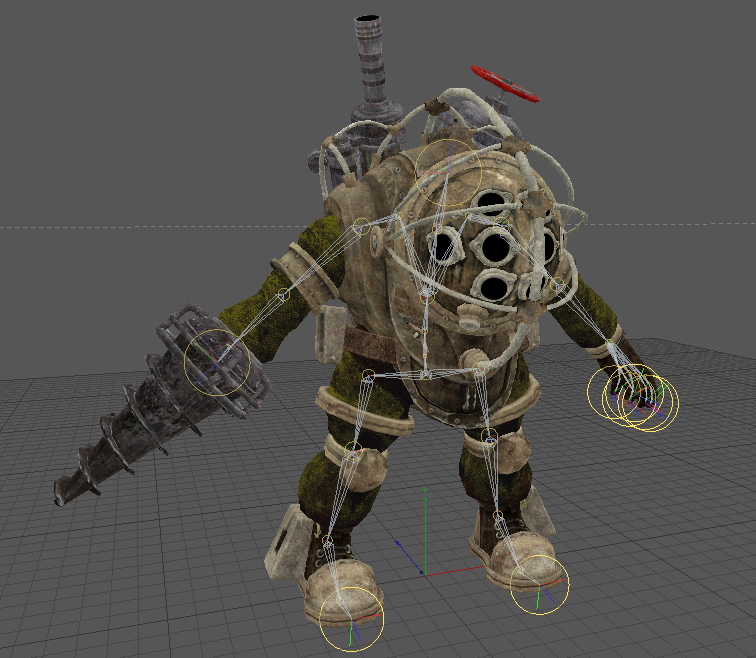 hidden ether
yeah i know, you should be able to align them up though
That's what i'd do
Althougj
His clavicles are a bit weird
or wait
is that the chest
them two bits that make the "W" shape
clear cedar
I've tried to match how Mixamo does it and I think I forgot to move that one up yeah
First time rigging errors
proud wolf
ok so now in a few of my avatars, when i look up or down, the bottom half of my head stretches and squishes
is that because of bad weight painting
or what
hidden ether
i would assume so
clear cedar
But yeah when I try importing it in Unity without doing any of the weight painting yet he gets squished like https://i.imgur.com/rDPjwzK.png
hidden ether
i'm not sure
hidden ether
the game might get a bit pissed that theres only one hand
especially since their right hands are the drills and you pick up stuff with yoyr right hand in game
by default without VR controllers
clear cedar
I have VR so that won't be a problem
And I was thinking of adding an invisible hand (no weight painting but bones exist) and parenting the drill to the forearm/hand
crisp tendon
Or you can just add a weapon bone to the wrist and put the prop on that, unless you specifically don't want the heand to move
hard zenith
well humanoid want the hands
but i actually dont care
i have to put something in
:/
oh you were talking to jordo
but i have the same problem
so i need to add one more bone to the arm
i think
clear cedar
Well, the drill does not act like an hand in game, it's an extension of the forearm, so no need for the weapon bone
But thanks for the suggestion though
hard zenith
now it is saying that "Spine hierarchy missing elements, make sure that Pelvis, Spine, Chest, Neck and Shoulders are mapped. "
but i have everything except pelvis which i think no one needs it right o 3o
i checked my hierarchy, i have everything and the rigging was right
but it is saying i'm missing something
 neon shard
Pelvis is important. If you don't want it on your model just make one and don't weight paint it to any vertices?
neon shard
I had the same issue, turns out unity didn't automap the chest. I did have one so I just needed to map it manually in configure.
candid thicket
Idk what to do about this, but the spine hierarchy seems to be off and I can't figure out how to fix the thumbs.
How do I add bones? I just need a chest I think.
hard zenith
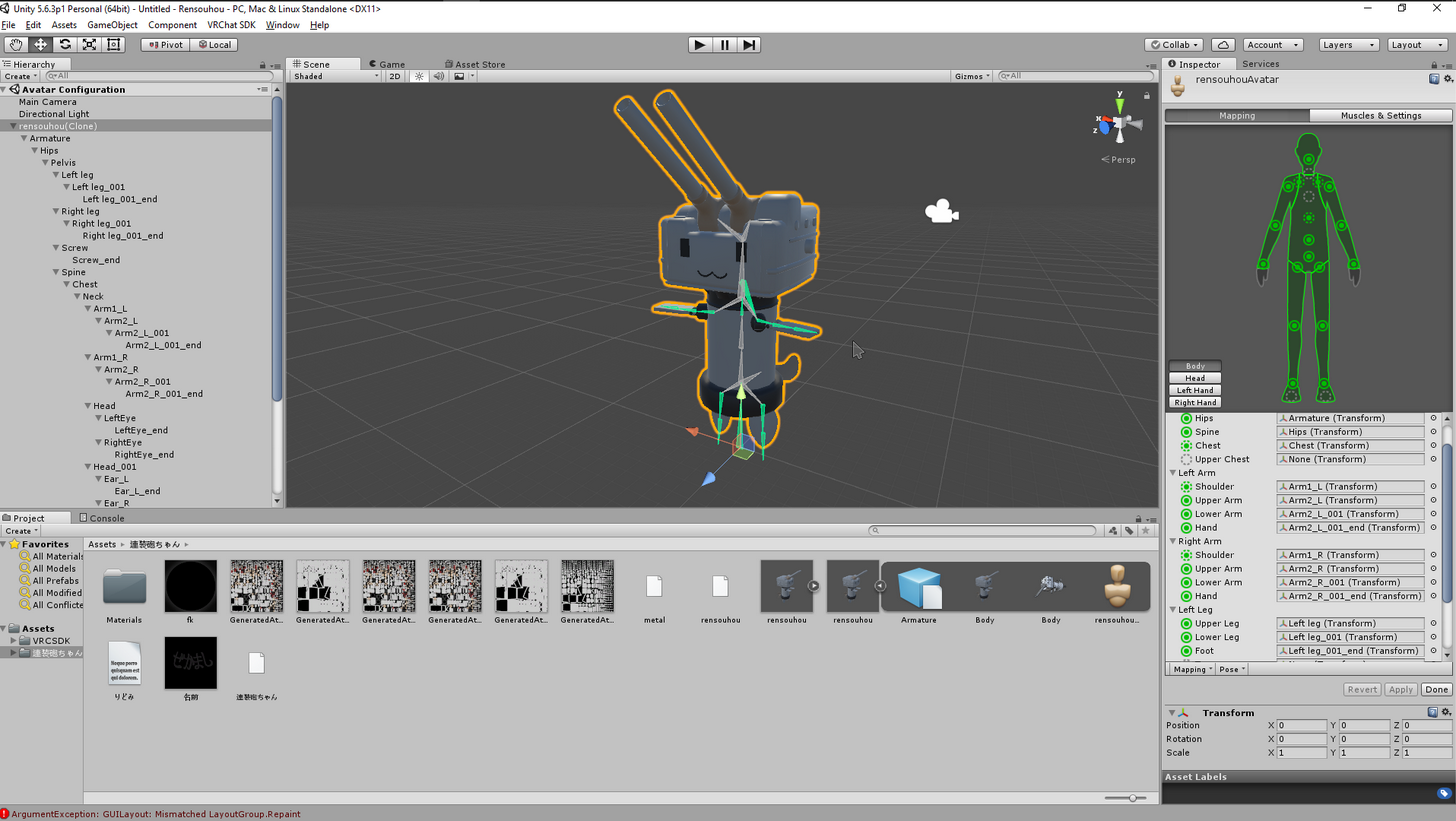


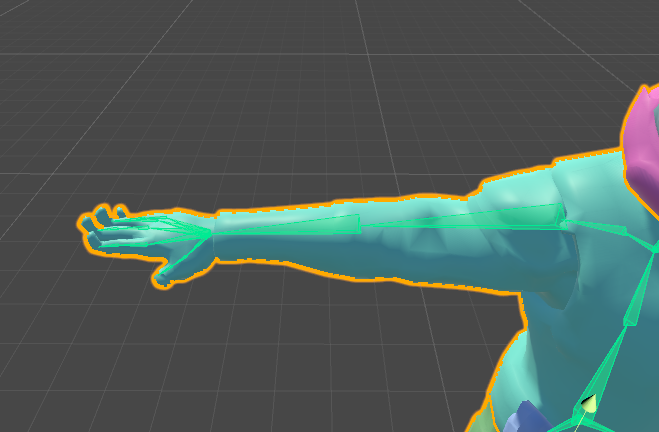
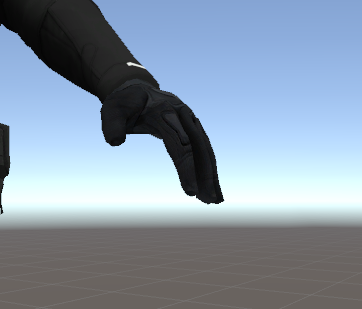


you need to add bones in blender
and me too, i don't get why it doesnt wanna build it now XD
candid thicket
What if I am a total noob at blender and didn't put in the bones myself when I got the model?
T-T
This has been my grief for like 2 weeks
I really didn't think it would be this hard
hard zenith
ye ikr
some works fine
but for things that doesnt really have a humanoid structure
it is hard
candid thicket
Any thoughts on why the thumbs won't be fixed?
I matched the bones to the proper place I'm pretty sure and that usually made the other bones green
Idk why they and the hip won't.
oblique latch
i had my guy working but i go back to add it and i have this
fading verge
scale
hard zenith
what is the scale on unity
fading verge
.85
limpid scarab
can you show a screenshot of your character scaling and the location of your avatar descriptor?
proud wolf
ok i fixed my wait paint issue on one model
and i went from 19k polygons to 16k
n ea t
hidden ether
n i c e
 lapis bluff
any ideas on how to fix full body arms not being fully extended when they are irl?
changeing height just ruins view model position
like if i lie down i can see my chest waaaay too easily
hard zenith
Omg it is working
 dire mica
Coordinates of the model?
oblique latch
i did but it did not help