#avatar-rigging
1 messages · Page 32 of 1
 jovial nest
 low river
God I would
 nocturne vortex
How hard is it to rig something with no armatures?
 valid oak
so for some reason my model has claw fingers, it triggers me
 coarse citrus
Currently trying to upload Brook from one piece to Mixamo and his model keeps coming up straight black
Anyone know a fix?
 nocturne vortex
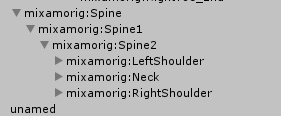
Yeah, it means the parent of the shoulders and neck should be the chest, but how ever you ahve it rigged it isn't.
 nocturne vortex
You should never put anything in the upper chest, set spine 2 to chest and it should work
low river
ok
moving them around makes more errors appear namely how Spine 2 is part of spine 1 and
ahaha what am i doing
OK so what you are saying is https://i.imgur.com/p9NHKjC.png
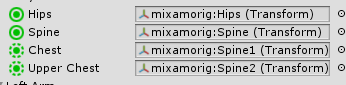
Chest should be Spine2
but i cant switch them without more issues arising
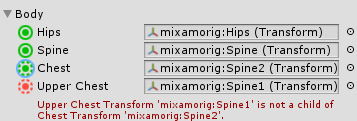
If I switch them, it says "Spine1 is not the child of spine2"
 teal badge
"If I switch them"... 👀
teal badge
Leave 👏 upper 👏 chest 👏 blank 👏
low river
now you tell me
nocturne vortex
NEVER put anything in the upper chest 😠 tf u think that means
nocturne vortex
Nah dw, it takes some getting used to
nocturne vortex
yeah gl man lol
low river
I am doing this so when/if I try to make my OWN model
I already have the rigging stuff down
Next.. those
Zootopia abominations
 lethal mason
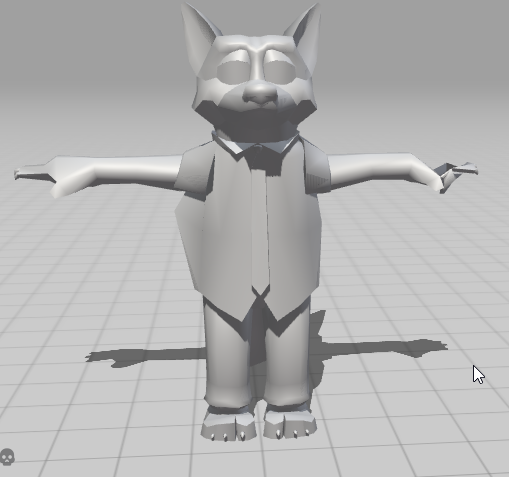
@jovial nest I fixed the issue with my avatar turns out the Spine was indeed low so i raised it and its all fixed. Thx for the suggestion about the hips bring too high
low river
https://i.imgur.com/CP87xZF.png looks fine to me
 lethal mason
Lol looks good man
low river
hes fiiiiiiiiiine
But why is this happen with a symmetrical model
know what
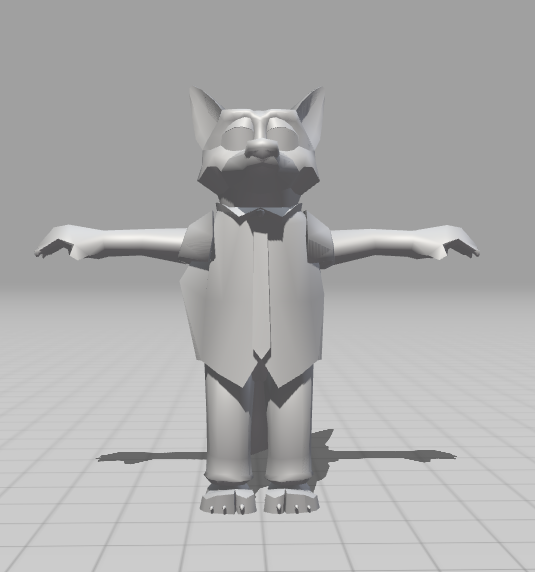
the hand is fine, i can live with that
 desert robin
Can someone help me with an avatar?.
 fading verge
what does this mean
 fringe rose
fading verge
fringe rose
fading verge
kk
 unkempt crane
Okay, so I fixed the neck problem with Cats, but for some reason i have a hand problem now that wasn't there before I fixed the neck problem. anyone know what I should do? pls
jovial nest
@lethal mason np man
low river
@woven hatch Question on giving someone an avatar, I can assume theyd need the SDK stuff as well as the scene?
 zealous fox
https://gyazo.com/24c77f0940d6b709659ea5a924e17184 do i need to redo the bones?

 fleet echo
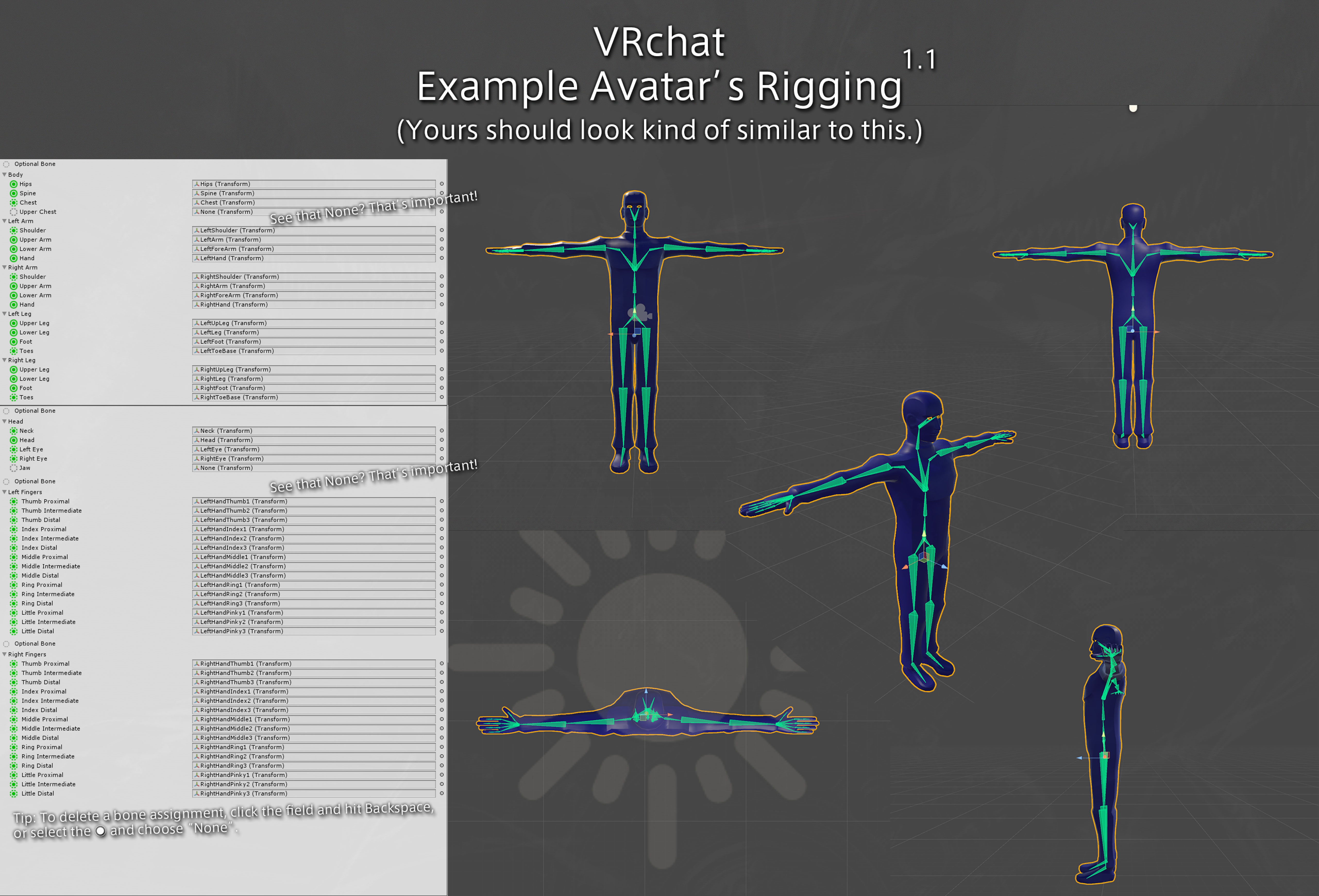
for people use mixamo https://vrcat.club/threads/vrchat-example-model-rigging-chart.204/

VRCat: Community-Run VRChat Forums
Hi everyone.
This is a chart I put together to help newcomers understand how their rigging should look. I also added some annotations to help avoid...
or you can use cat plugin it support mixmamo layout
basic reanme the bone for you
 zenith jay
hey there
low river
Ok os
I sent my friend the EXACT files I'm using
and errors are showing up that I dont see
@teal badge Ok so, ytou know the issue i was having earlier?
with the hiearchy
teal badge
What about them?
low river
https://imgur.com/r2RZg51 this is my friends error, after s ending over the file i gave
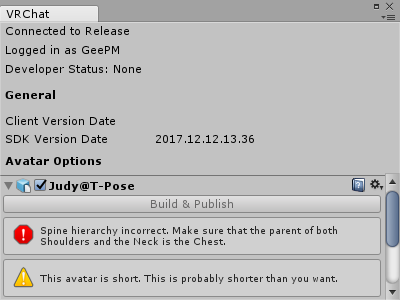
but
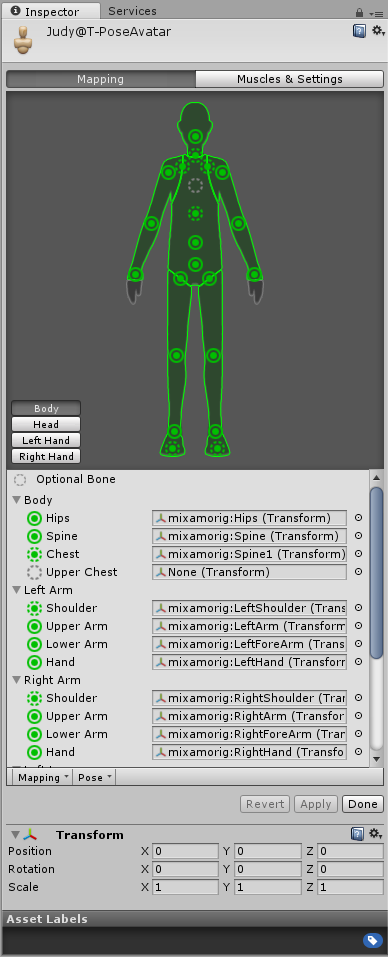
So I literally have no idea how to help
teal badge
These images are worthless. How can anyone do anything with that if you don't include the bone hierarchy? But from your post before, the issue of obvious. Spine1 is not the parent of the shoulders. 2 is.
low river
wait
Ok wait nevrmind
Yeah I just realized
haha
He actually fixed it that way and yet I'm the one whos supposed to be helping
teal badge
I should add this to my chart, maybe...
low river
ok and now
 serene cloak
Who's a pro at Dynamic Bones in hair?

 gentle ivy
You're uploading the same model to another account? You have to click 'detach' on the vrc descriptor to get a new ID
gentle ivy
If you're uploading it you have to do it
low river
Wait nevermind, he did it
again I was supposed to be the one helping him and hes figuring all this out
 warm nova
So, can I get a little help with this?
serene cloak
@warm nova Click down to the right, pose. And then "Force T-Pose"
See if it fixes it
serene cloak
@warm nova And you should properply use "CATS" for blender
So you can translate all the bones correctly
 south bear
its a pokemon model there always predone
for bone names
unless you mean something else?
serene cloak
@warm nova You've used CATS in Blender. Translated all the bones, and fixed the model?
warm nova
Used cats and attempted to translate the bones, wont let me
serene cloak
What does it say?
warm nova
(can you show me how, I was being guided)
south bear
?
warm nova
How to make it a waist and not hips
south bear
one sec
warm nova
kk
warm nova
its ripped from smash4
south bear
https://puu.sh/yLlTH/07235b12ec.png https://puu.sh/yLlUo/1720484a86.png
https://puu.sh/yLlV4/f1200f3d76.png


click the thing beside the hips
on the bone mapping menu
then just type in waist
warm nova
its called hips2n not waist
south bear
hips 2?
warm nova
yea thats just the name of it, there just isn't enough bones in the spine
south bear
no
its fine
you only need to spine bones
as chatvr hates having an upper chest
on models for some reason
south bear
👍
warm nova
just removed hip2 entirely and mapped hips to 1
warm nova
Just did
low river
Anyone else having trouble uploading them through unity right now? My pal didnt have his work
warm nova
wait it broke again now shoulders jacked up
fading verge
Anyone have recommendations for Dynamic Bones? Clothes? Breasts? Fox Tails?
warm nova
fixed again, ok so is there like a button to find the avatar descriptor
fading verge
Also, is there a way to create a downforce on tails to create a "resting" appearance?
 tame shard
anyone else stuck uploading
warm nova
yea @tame shard
tame shard
thanks though i was going crazy
warm nova
stuck on image right @tame shard ?
 radiant snow
Hey, I hope this is the right place to ask this question.
I've been looking through the tutorials, and I'm glad there are so many of them. Could anyone recommend a tutorial for creating/rigging non-human avatars that don't bob around when they walk? I'm talking about, like... Being a giant house, or a vase or sculpture or something. Posted here because it seems like mainly a rigging thing.
 mystic iron
Have you tried a generic rig
radiant snow
N-No...
I have made my first avatar yet, actually. But I will try that.
low river
aaaaaaaaa why do a lot of rips incldue objects with them that arent neccessary
 lilac hound
@tame shard @warm nova im also stuck on this as well so im guessing it's gonna be fixed soon?
warm nova
yea, they made an announcement
zealous fox
Does anyone know how to fix this ? https://gyazo.com/da00339a2c1f951c74cde47f6838975a
 fleet echo
@zealous fox you have extra bone in your arm
and feet
mostly like dont need to worry about them
but if you get hip one need fix for full body
zealous fox
oh lmao one more question why does my avatar have no motion in the game when i walk
or arm movement?
fleet echo
did you delete the armature modifer?
this what happen if you delete it https://i.imgur.com/zz0mzNC.gif
 zealous fox
@fleet echo i think i did it's doing that
fleet echo
just add armature modifer back
zealous fox
@fleet echo okay i fixed it, but why does it do this ?https://gyazo.com/f0dfb39aad686587f7cf438c07192ae7 the texture is just flying will that show up in game?
 fading verge
hey does anyone have a good tutorial vid on how to rig models
zealous fox
@fleet echo alrighty thanks
 modest mortar
Oh. There's a channel for this specifically. Alright. Is it true that 3 fingers are neccesary for animations to work correctly?
teal badge
Something like that, yes.
low river
I feel like the time I put into rigging random game avatars, i could probably learn to sculpt
 vestal swallow
Uh so when I talk my eyes are the Visemes instead of the mouth....any ideas?
 dark elbow
This is what my hierarchy looks like, how do I 'combine' all of the skirt pieces so I can use them with Dynamic Bones? Total noob, sorry!
 limber prawn
Is there anyone that could help me with making an avatar that has floating hands
 dark elbow
oh shoot sick, thanks again Jaz
modest mortar
Alright, sorry for disappearing for so long. So, is there anything that can be done if the model I'm using lacks thumbs?
*Wait, I can just edit discord posts directly.
warm nova
hey, can someone help me try to figure out how to change the bone hierarchy
essentially all I need is to move bust to hip2N
under hip2N
warm nova
Yea, but I'd understand it if bust is just moved under that
fleet echo
unity dont know what the bones spouse to be
unity use basic word for it auto mapping
the auto moapping basic look for right term for that name
warm nova
I really don't want to rename absolutely everything, I just need to move one little thing
bust needs to be a child of hip2N
fleet echo
to be honest need model figure it out
cant tell
just look at image
it better label bone so you know what they area
basic enough term of bone name it better for any help you
plus eye tracking need this correct as well future
doing rigging
warm nova
no i understand the names of the bones, I just need to move it
i know where bust is
and everything
fleet echo
then drag the bone in right slots
warm nova
it reverts back everytime i do it
fleet echo
VRCat: Community-Run VRChat Forums
Hi everyone.
This is a chart I put together to help newcomers understand how their rigging should look. I also added some annotations to help avoid...
fleet echo
i go with name what unity like
make it easier for it auto mapping
or you going to do this alot with your models
i know it sucks reable but eye tracking need this correct as well
script made for right name of bones
example clean outlay for armature
warm nova
it keep changes back whenever I hit apply or done
fleet echo
Hips,Spine,Chest,Neck,Head imporant
need to do in blender
or maya
or any 3d program you like
modest mortar
What do I do about a thumbless model?
fleet echo
need add 3 finger
put in thumb,index middle
each hand
dont need be weight painted
just need be 3
each hand
modest mortar
Ok. This seems like a stupid question, but how do I add bones?
warm nova
also why wont the heirarchy stay the same when I save even though it is correct
 torn isle
Why are my shoes off?
 tacit oasis
because you are inside
modest mortar
I feel a bit akward about asking again. But, how do you make dummy finger bones?
 zinc summit
@modest mortar select arm bone, extrude with E
 serene charm
need help rigging this model https://www.models-resource.com/playstation_2/kh2fm/model/5665/
i tried auto rigging it with mixamo
i tried isolating the textures i wanted but it didn't work
and refused to show up
plus the shoes are combined instead of seperated
fading verge
Hey I need help with a spine hierarchy problem. VR Chat SDK says "Spine hierarchy incorrect" Make sure that the parent of both shoulders and the neck is the chest. Zero idea what to do from here, thanks
 safe bluff
Parent shoulders and neck to chest in Blender
fading verge
so i can not fix this issue within unity?
modest mortar
@zinc summit I hadn't turned on edit mode. Thank you, and sorry for being rude.
safe bluff
No, not really, if it's an MMD try using the Left shoulder P and Right Shoulder P, should be one above shoulders
 craggy hemlock
protip if you're ripping from source
do not use the Tpose
at all
set to sample bind pose
otherwise you will have very broken thumbs
I mean i'm assuming thats common knowledge but i just wanted to make sure if people knew
because i've been trying to figure it out
for awhile
 woven hatch
can somone spot what I'm doing wrong here? I'm simply at a loss after being almost done...
https://gyazo.com/8d60771bf15ee0ed5ecebc65d11e3d44
https://gyazo.com/e307a273cf2bcc40c71631a6b8b3e081
https://gyazo.com/8d60771bf15ee0ed5ecebc65d11e3d44
https://gyazo.com/c76d3a70cac87d011fb15177dc57fbd2


everything looks to be mapped correctly!?!
warm nova
would the arms being inside be a rigging or animation issue? (pm answer as I'm gonna sleep. ALso pm solution too cause that'll help.) Also, how would I fix the claws, they point downwards.
 floral sable
alright fellas I'm kinda wracking my brain here trying to figure this out.
I've created a pretty simple skeleton for a model, and trying to use it in unity
whoops didnt mean to hit that button just yet
I'm getting an error "Transform 'Hips' not found in HumanDescription"
There's a hip bone, and it's mapped as a hip bone.
I'm kinda stumped. Still super new to actually rigging stuff.
If anyone knows what's up and can lend a hand, I'd be mighty appreciative
 west gulch
It should be straight up Hips, unity is telling you what it's looking for
zinc summit
@woven hatch can you collapse the IK bones and screenshot the rest of the hierarchy?
woven hatch
@zinc summit I think I got it. I renamed the armature and it was not lined up with the mapping
I did not know that would cause an issue
 nova wigeon
So am I not supposed to have an Upper Chest bone? Just a hip, spine, neck, and head? Lol
This is my rigged model. Everything shows up in green when importing it..
 civic copper
go rig your humanoid model and hit configure, delete the upper chest bone
 dreamy urchin
Anyone know how I can add another bone to an MMD model? I'm noticing that the one I'm wanting to use has only one bone for the entire upper body portion, while the tutorial I'm watching looks like it has too, one down near the stomach, then one connecting that to the head/shoulders
I should note I'm using an MMD
 crystal vector
@dreamy urchin You can try to use cats, that should fix it
dreamy urchin
cats? is that an addon for Blender?
crystal vector
@dreamy urchin Yes
dreamy urchin
Would that keep all the bones connecting the hoodie and chains on the model?
crystal vector
It's specifically made to make models Vrchat ready.
Yes
dreamy urchin
sweet! thank you! I'll try it out now
fading verge
nevermind I fixed it
dreamy urchin
Ok, so I should have a parent bone for Hips and a Parent bone for Spine right? Spine shouldn't be under hips?
fading verge
Heya, looking to do something which i believe will require use of an armature for an inanimate object.
I required some aid learning how to set up a string to move, as if an Arm wasnt setup right- bouncey and flopping
crystal vector
@dreamy urchin Hips has to be the top parent. Spine has to be parented to Hips.
dreamy urchin
Ok
dark elbow
don't want to interrupt, but I was told there was a way to test animations before uploading so I can see if my dynamic bones are working, is that a thing with the VRCSDK?
crystal vector
@dark elbow just go into play mode. Press the play button above the scene and move your model around
@dreamy urchin If cats didn't throw any error afters clicking fix model the bone hierarchy is correct and will work in vrchat
dreamy urchin
Ok, I was asking because the SDK was throwing a fit still about the heirarchy, I just tried a different model and it worked fine. Thank you! I have been bashing my forehead at my keyboard for days now trying to get this to work, and to think...it was so simple
 narrow widget
ok so i have my model and have the textures applied i have not a clue how to rig or what it is
crystal vector
@dreamy urchin no problem. What did the sdk say about that model?
dreamy urchin
The first one? was saying that the Spine Heirarchy was missing elements.
but I used a different MMD of the same model, same steps, and it liked that one, I think it was just being tempermental lol
crystal vector
Heh maybe ^^
dreamy urchin
unforuantly it looks like I may have to wait until tomorrow before I try out the new model..seeming as I can't get to log in atm :/ Server still having issues?
crystal vector
Might be the case
 dusk token
im in the rigging phase but no bones are visible and the sidebar isnt there
the mapping sidebar that is
narrow widget
ok i try to upload my model to mixamo and i keeps saying unable to map your skeleton
 hybrid furnace
Hey, I'm having issues getting my models rig to work
In game the model just T poses
I didn't go through Mixamo for this model as it was previously rigged for SFM
The skeleton is moving, its just not working with the mesh for some reason
Okay, so its not working in blender either so im guessing thats the source of my issue
Basically, Idk how to attach the skeleton to the model
hybrid furnace
I figured out the main issue in blender
Literally one button I had to press, of course
 halcyon lynx
lol
 open cloud
i also have a question actually
im trying to publish my model and it wont let me, giving me this message
but when i check the rig, it looks fine to me
open cloud
nice!
hybrid furnace
Is it actually stopping the upload?
hybrid furnace
Hmm
I dont know, thats weird
Maybe the bones aren't labled properly?
or are miss-matched
open cloud
i figured it out kinda?
i just made the upperchest and chest the same part
and that seemed to work
fading verge
I always forget the bone hiearchy. Hips Spine Chest... wait where did waist go. bluh
 left bronze
https://i.gyazo.com/bd9cb79247cc9a414a708f3304320131.png what error is this

the rigging doesnt have any problem
 rotund owl
how would i go about copying an armature with weight painting and everything to another model that is almost exactly the same?
the only difference in shape is that one has bunny ears and the other does not
 little coral
https://gyazo.com/30320e36de63e062aeff06d2f25becbb anybody know why this one bone is red?

keeps saying character is not in t pose 😦
rotund owl
@little coral i would say it is either not in t-pose or the parenting is wrong
that are the only things that come to mind
 rotund owl
@little coral https://puu.sh/yLJkt/6aca55475c.png you have tried this right?
 little coral
omg....
i never hit... apply....
FACEPALM
Thanks a lot.... made me double check... lmao
rotund owl
np
left bronze
how exactly does parenting work
because everytime i supposedly parent something to something and i hit apply the change doesnt happen
 stone haven
Anyone know why it does this?
In normal t-pose while not in that menu its normally fine
Actually i get this error
rotund owl
@stone haven sounds very like wrong parenting
zenith jay
Hi
So my problem is that I got my rigging done
but it asks for Shoulders and neck to be under Chest
even tho it is already
 rotund owl
yeah getting info is often kinda hard
little coral
https://gyazo.com/6a8dd90f8de555b68a68e93b36d205e5 how bad is this? do i need to fix 100%?
 little coral
i cant seem to see a problem. https://gyazo.com/567cb3935fa8ba039f2e35c226858570
 little coral
Mines all in a diff language... this is gonna be a task
zenith jay
Hi, gotta reask.
Althought my shoulders and neck is parented to chest
it still asks me to do that
fading verge
ok so in blender my rig shows up fine but when i export it and open in unity it is a simple t
i have the right export settings

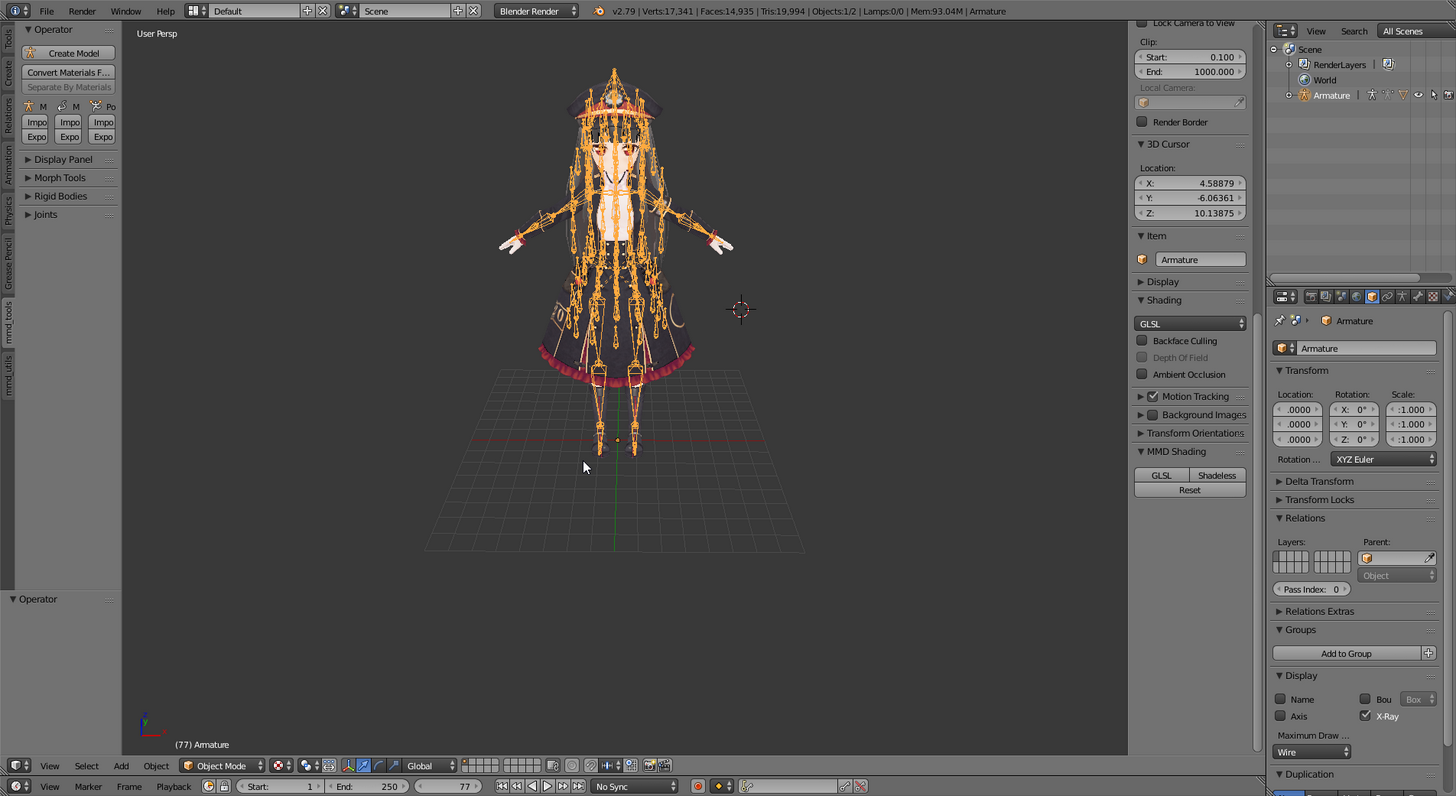
wrong image
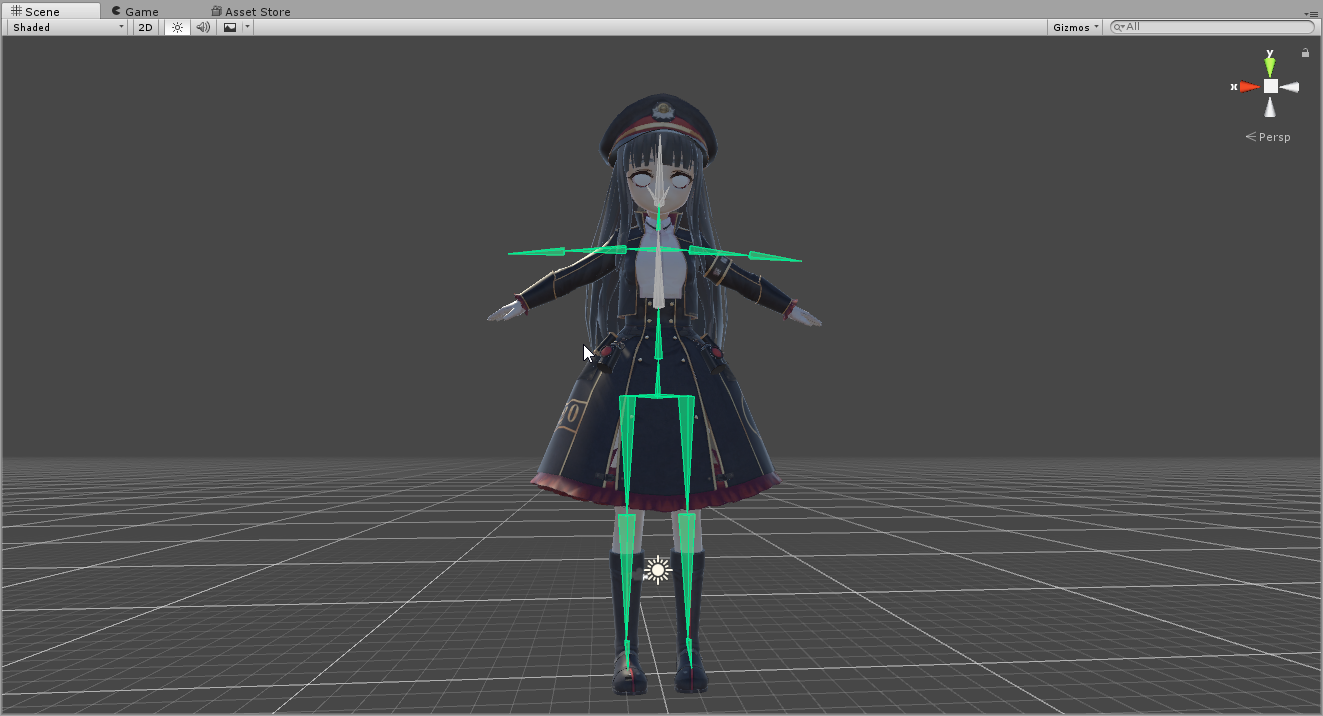
 crisp tendon
Map the bones correctly in the humanoid configuration @finite tree
crisp tendon
You should probably watch the tutorials on rigging issues then
You'll find that in the pins I belive
 finite tree
Alright, I'll give it a go
crisp tendon
If not those are in #tutorials
crisp tendon
Yes you got it
finite tree
Yeah i did all that but it still gives me that error
When i try to publish the model
safe bluff
@finite tree @crisp tendon shoulders are children of the neck
fading verge
Usually the toe end is ToeTip_R_end but it's the ToeTip_R file. The feet are facing downwards which I've heard is a problem. Unity automatically set it this way. Should I change it to ToeTip_R_end or keep it?
 rotund narwhal
Hi all, asking for some help. I Have a model with the correct bone structure, it rigs correctly when I configure it. My neck and both shoulders are children of my chest, but it still gives me the error that they are not. Anyone know why that would happen?
nova wigeon
Do you have it mapped in unity?
rotund narwhal
yes
 lucid isle
help...pls
nova wigeon
Put your character in tpos
nova wigeon
Pose*
 feral shuttle
and it work fine
nova wigeon
You didn't parent your mesh to the bones
feral shuttle
nova wigeon
Either that or you didn't weight paint correctly
lucid isle
all i did was change her boots....
nova wigeon
@feral shuttle my character isn't in tpose by default but if you select it and click configure it should move it into tpose
No @rotund narwhal
Np*
feral shuttle
welp not to show off but this got really easy now
nova wigeon
Once you know how to do it, it's extremely easy
feral shuttle
yeah
feral shuttle
that take fps
nova wigeon
It'll take as much fps as moving an arm or a leg.. if not less
nova wigeon
I mean you don't have to... it was just a suggestion, since you said everything was too easy
feral shuttle
its easy
but im lazy
thats the problem
"Dynamic Bones - 20 USD on the Unity Asset Store! http://u3d.as/7fH"
hell2the noo
nova wigeon
Don't use a unity asset, just make them inside blender or whatever modeling software you use
feral shuttle
oh
 novel aurora
oh my god i forgot that the discord changed up the avatar channels
pls halp
how do fix
lucid isle
im having my own issues
the weight paint looks fine
dunno if that'll make a difference
 hybrid scaffold
So how does rigging work exactly. I am planning on converting a xps file to blender and i heard it might mess up the rigging.
warm nova
would this be a rigging related issue with the arms clipping thru the legs or something else? Also the claws point the wrong way
lastly, all I need to do is add finger bones so I can have full body IK. Can someone help be with adding fingers to the model?
 marsh escarp
is there a way to invrease the bonesize of the spin whitout completly fucking up the model
crisp tendon
@marsh escarp use cats plugin if you're getting the error that says your bone length is zero
marsh escarp
It tells me my Spine hiarcy is not corret thos it looks corret to me.. maye im just a retard and its something easy
stone haven
For hair im not sure if im doing this right.
rotund narwhal
@marsh escarp make sure your neck and shoulders are directly under the chest transform
Click on the head tab when rigging and make sure you are using the right neck
rotund narwhal
Okay so the first screen shot when you are configuring your rig, you can click head, body, and both hands
Go to head and make sure neck is your actual neck
That is my most common issue when my shoulders are right but i get that error
marsh escarp
That one should just be named neck right
becuase i dont see any other bone that could be the neck
rotund narwhal
Yes
It should be, hmm then check your shoulders but those 3 things are the only bones that cause that error
They just need to be childed to your chest
marsh escarp
an and it seems that they are Children of Spine 1
rotund narwhal
Okay yea they need to be children of Chest
Which I think can only be changed in the fbx file through blender? But i dont know, there might be another solution. But that is how I fix that issue
Because the rigging is done through the actual file, idk how to change that in Unity
marsh escarp
i never did anything like this oh boy
 naive tree
@marsh escarp what kind of avatar is it? not mmd right?
marsh escarp
I could export it as a PMX
marsh escarp
Yeh no i dont want to bother anyone whit the problems im having i mean, you all where probably in the same boat as me whit no help
If you would do it i would be really gratefull tho no need to push it, im just going to work on another Avatar in the meantime then
naive tree
I'd help if this was other armature I'm familiar with
but seeing yours for the first time
rotund narwhal
Mind if i friend you, I can message you when im home
I dont mind taking a look, it is good practice
marsh escarp
Go ahead i dont mind
warm nova
no ones answered my question about the arms. Is there a way to move them so they don't clip thru the body during animations? As well as rigging the claws as fingers. (is this a rigging or animation issue with zoroark being idle)
marsh escarp
you could move em further apart
warm nova
Like just move the arm segment in blender?
warm nova
So how do i make it so they don't clip thru (and how would I rig the hand as I am new to rigging)
 pseudo python
I think ridgibodies can prevent your arms from clipping, but I don’t recommend it
warm nova
the shoulders are really close
 static flint
Is anybody able to make a bag that says bag of memes by chance?😁
warm nova
if I drop the file, would you be able to move em just a little? (warning, the bone names aren't the best, but they work
pseudo python
Silver, I recommend getting CAT’s blender plugin
It can fix a ton of bugs, including rig problems automatically
warm nova
whenever I use it it breaks the model
pseudo python
What does it do?
warm nova
says an error about hips and makes the entire model red
warm nova
didn't go down hair because that would be a lil redundant
fading verge
jesus
warm nova
thanks smash4
pseudo python
Let’s see
Could I see a picture of the model with the Armature visible?
I think that’ll be all I need
warm nova
it doesn't actually show up on the model all that well in blender. It only shows points that happen to stick out ;/
warm nova
it doesn't show up I've tried
pseudo python
Click the menu button that looks like pose
If you scroll down you’ll find some options including X-Ray
warm nova
Cats just breaks it
pseudo python
What does it do though
warm nova
none of the bones link
and it says hips were not found in hierarchy
and then gets rid of the textures
pseudo python
Strange
warm nova
yea, so what can I do?
pseudo python
Can you show a picture just to help me clarify
pseudo python
I’m guessing the bones are all parented to one thing?
warm nova
eventually, yes
pseudo python
Rip, gtg, hopefully you get it fixed by the time I return
warm nova
I don't know what to do how would i fix it
 daring flare
If cat is doing that then zandario is probably right. You would likely have to weight paint the mesh to the bones before cat could do anything with it.
warm nova
weight paint???
daring flare
Yea. It tells the mesh how to move according to the bones.
warm nova
Ah, got it
daring flare
I believe Blender has a thing built in that auto does it and then you can just adjust it, but I'm not familiar with it so you would have to look up a tutorial.
stone haven
How would I go about fixing this?
daring flare
You'd have to be more descriptive.
daring flare
You would most likely have to connect the specific meshes together so that they cant come apart but I'm not familiar with how to do that.
naive tree
@stone haven merge vertex or edges if thats what u mean
 thorn fog
Not sure if this is the right chat but I always get ignored in the mmd one so I'm gonna ask here anyway. There's a buttload of models out there of chicks with a load of fox tails but every one I've tried has them sticking out at a 90 degree angle from the rest of the body. Any idea how to fix that so they're, y'know, not?
Guessing it's something to do with rigging up a custom animation for them. Loads of individual bones but I dunno how you'd go about getting them to not do that
 lost lotus
Question, I got my avatar working in game, but the arms are too close to the chest. like with my hands at my sides, my avatars hands go into his thighs. Also whenever I roatate my hands a little bit, it makes my avatars wrists twist and shrink to the width of a needle. Any advice would be appreciated. Thank you
stone haven
@naive tree Thank you so much! That saved me a major headache
naive tree
@stone haven have to do it after decimation when there's holes
naive tree
i mean
stone haven
Welp
stone haven
Alright.
stone haven
We'll find out.
Kinda annoying my face isnt getting attached to the head bone
Not sure what to do about it
This is what i mean
 cosmic cliff
Hi, Poking in. @stone haven Have you weightmapped the face?
stone haven
I used the autoweights. Will I have to do it manually if its not working?
cosmic cliff
Yes. As autoweight is a bit non trustworthy. But just put it on 100% and you should be fine😃
 rugged lance
any reccomendations on the best dynamic bones asset to get?
cosmic cliff
@stone haven Yes. you can make vertex groups and just apply everything directly.
@stone haven You find it in the Data tab
 lilac bone
hey, if anyone's online i need a little help... I need to remove the upperchest thing for the model to work. but,, whenever i try to do that it says it needs the neck and spine and stuff to be connected. How do I fix this? i am new to this :/
cosmic cliff
Hi there @lilac bone . To make the Neck and spine be connected you need the upper body part. as that part keeps the shoulders on correct place if you wish to use the VRChat animations.
Just make the Parent structure be like Spine -> upperBody -> neck.
Unless you want to make custom animations that is. then just remove it.
hybrid furnace
Im getting this error now
stone haven
Cant find all of the non painted verts XP
cosmic cliff
@hybrid furnace Is that neckbone linked to the headbone?
cosmic cliff
@stone haven Yeah that is the harsh part. keep on looking with the Select and Deselect tools there
@hybrid furnace As i see it it just needs to be connected. as it shows it isn't atm
stone haven
;-;
hybrid furnace
Im a little confused, how would I go about connecting it?
cosmic cliff
@hybrid furnace You just make the parent bone to the upperbody bone or just make a new bone called neck.
@stone haven I think you need to seperate the face/head while you do the weightmapping. Go with wireframe mode and you will see the Vertex you missed
hybrid furnace
Huh, okay so there is a neck bone but I cant see it or assign it
I think I got it
stone haven
I mean some things are deforming when they are fully painted
cosmic cliff
@hybrid furnace you need to fix those things sadly in blender
pseudo python
@thorn fog dynamic bones
hybrid furnace
Alright, thanks a ton
cosmic cliff
@stone haven Are you going with bones in the hair atm?
pseudo python
Sadly you have to pay for dynamic bones
hybrid furnace
I got it fixed though, I couldn't see it in the drop down or on the model but I click and dragged the neck from the side to the box where the neck would go
cosmic cliff
@hybrid furnace np mate 😃 do msg if it works at the end.
stone haven
CRAP ONE SEC
hybrid furnace
Will do, you're doin gods work my man
cosmic cliff
I never thought that taking 3d graphics classes would be benefitial until now :p
thorn fog
@pseudo python I've got Dynamic Bones and applied them to the root for the tail bones so they're all bouncy and stuff. Also fixed the angle by rotating and moving in blender. There's a few models available in avatar rooms that have full-blown tail movement animations though, which is what I was after
stone haven
I actually hate weight painting
cosmic cliff
@stone haven That is the most hard part if you ask me. So welcome to the club 😛
crisp tendon
Weight painting is breathing life into your avatar
cosmic cliff
@crisp tendon Cannot agree more!
stone haven
It is but god its a pain XD
cosmic cliff
A good quote from mr Meeseeks. "Life is pain for meeseeks!" So yes. Bringing our avatars to life is pain for us :p
stone haven
XD
hybrid furnace
The avatar works but im having another slight issue
cosmic cliff
@hybrid furnace What is the new problem?
hybrid furnace
I posted it in avatars
stone haven
Why do some of my painted verts move so much and not as the rest does.
and some doesnt move as well as it should
Ugh so much I don't understand
 fickle bobcat
Does anyone think they could help me rig a character model underneath a Coat that only shows the head?
stone haven
@cosmic cliff Why does some of this move not at the same speed as the others?
cosmic cliff
That would be the selection circle is used. @stone haven Can't remeber how to switch back to the old method of mark and move
stone haven
x.x
fickle bobcat
Well if anyone could help me with putting a character into a coat that only shows the face and head and neck then Dm me
 runic void
Hey there. I've rigged up a 3d model but when setting the rig animation in Unity to humanoid it says that the head is not specified; although I do believe I have it set up correctly, does this look correct? Also If there is anything you'd like me to upload for you to see then let me know. I am new to all this so please excuse me.
 wary wave
Since I've moved to a new computer
Does anyone have an already working Avatar that I could please have? I wish to use the armature to make my own avatar.
Any help would be greatly appricated
hybrid furnace
Im trying to change the parenting of bones for a model in unity, but its not letting me actually change them. when I hit apply and done it just immedeatly reverts it.
 worldly pebble
is there any way to find out which side your making the texture for or whatever in unity
because i have to make a bunch of copies of the same picture to try and get it to fit on one side, like this. https://cdn.discordapp.com/attachments/330491775137480705/393912431182872596/unknown.png

i need to get the texture of the block im putting the image on or something and i dont know how to get it
fading verge
 clever wave
you probably have extra bones in your model
most likely Left/Right_Shoulder P
make sure your Left/Right_Shoulders parent is chest and not those ones
Before you drag your model onto the Unity grid you need to upload the textures first
and then click on the icon of your model
on the right, click on rig
- animation type
-humanoid
apply and configure if needed

 oblique latch
so what do i do
clever wave
you're supposed to leave upper chest blank
looks good to me
should go: hips > spine > chest >
 oblique latch
how do i add a scene descriptor or avatar descriptor
hit pose then enforce t pose if that helps it may not @fading verge
fading verge
didnt work
oblique latch
for my rig to work i had to import it to a auto rig website https://www.mixamo.com/#/
clever wave
Keep getting this message even though axis are set to zero http://prntscr.com/hr8kth
 oblique latch
well f xd
crisp tendon
It's just humanoid mapping @oblique latch
@clever wave It's the bounds that are gigantic
clever wave
@crisp tendon ty, I finally figure it out
crisp tendon
@fading verge There's rest post in blender
oblique latch
So how do I fix that @crisp tendon
crisp tendon
@oblique latch Map the bones that are needed and you're good
crisp tendon
Oh it's god damn mixamo again REEEEEE
Is your avatar very humanoid ? @oblique latch
If you have a screenshot of the scene during the rig that could help
to see what bones are green
oblique latch
Yes it is i had to use mixamo as the rig from my gta 5 guy did not work at all xd
crisp tendon
Send a screenshot of your scene
If that can't be fixed in unity, try to use Cat's plugin in blender just to make sure
oblique latch
crisp tendon
need to click on scene so we can see the bones
oblique latch
@crisp tendon
 grand dirge
I'm trying to make a 4 legged Umbreon avatar, but when I do, his arms just end up straight in vr chat, I tried my best to make the arm bones normal but they don't end up that way
 vestal heron
i don't think you can make a 4 legged avatar?
grand dirge
Yeah, someone had an eevee
vestal heron
ahhhh
vestal heron
weird
grand dirge
 vestal heron
idk much, i'm also struggling
grand dirge
I really want this, it sucks
vestal heron
same
grand dirge
You should be able to move the bones in the game, like edit, that would be awesome
vestal heron
same here
 tidal hill
@grand dirge to make that work you need to override the built in vrchat animations with your own custom ones.
teal badge
Reposting my handy rigging chart for anyone that hasn't seen it!
https://vrcat.club/threads/vrchat-example-model-rigging-chart.204/
fleet echo
check humaniod configure
cant just set to humaniod still need go in the configure to check over the bones
because in unity if you dont label the bone correct it wont auto mapp it self
 gilded barn
aaaaa, ok, ill try that, ty!
fleet echo
label bone very important for unity automapping to work
oblique latch
I had to use the blender cat tool to fix my rig but then unity f up and is not importing my textures may downgrade unity the the one the api supports
grand dirge
@tidal hill and where/how do I do that? I don't care much about the animations unless it would fix the way the Umbreon stands.
tidal hill
@grand dirge you would need to use the animation overide portion of the avatar descriptor to apply your own custom walkcycles, idle animations, etc.
grand dirge
ah okay, I'll try to figure that out, thanks much!
 ornate wing
Is there a way to make a parent bone for Dynamic Bones in unity? or do i have to hop back into blender for that
fleet echo
blender
teal badge
You gotta go back unless you want to break the prefab
And you don't want to break the prefab
ornate wing
And I need th eparent bone for dynamic to work properly yeah?
ornate wing
Cheers jaz
I just use cats
I just forgot to do it before i imported my current model and wanted to be lazy
 gleaming fjord
hey i'm pretty new to rigging up characters i was wondering if anyone knew why my limbs aren't specified even though they're mapped.
fleet echo
VRCat: Community-Run VRChat Forums
Hi everyone.
This is a chart I put together to help newcomers understand how their rigging should look. I also added some annotations to help avoid...
gleaming fjord
ok so the names of each part have to be named exactly
teal badge
No they don't
Have you clicked the VRChat window? Maybe it just needs to be refreshed
gleaming fjord
i have the errors remain there
teal badge
Oh... You have Upper Chest mapped. 🔨
gleaming fjord
oh do i delete that?
teal badge
Did you look at the chart? Hit backspace
gleaming fjord
i thought it was optional
teal badge
🔨
gleaming fjord
alright let me un map those
fleet echo
@gleaming fjord dont need to but it help out unity auto mapping
auto mapping like the correct names
plus if every want to do eye tracking need make sure Hips,Spine,Chest,Neck,Head and Mesh name Body and Armature spell like this
gleaming fjord
alright this is all very good information i was confused for awhile i'll let you know if this all works
gilded barn
named everything and tried uploading again but im still getting the error
 solid jackal
@gilded barn when you find someone you watch on devientart on Discord VRchat
gilded barn
hENLO
solid jackal
I WAS SHOCKED. I know that star hair anywhere haha
ornate wing
Success! https://i.imgur.com/Zupw6M4.gifv
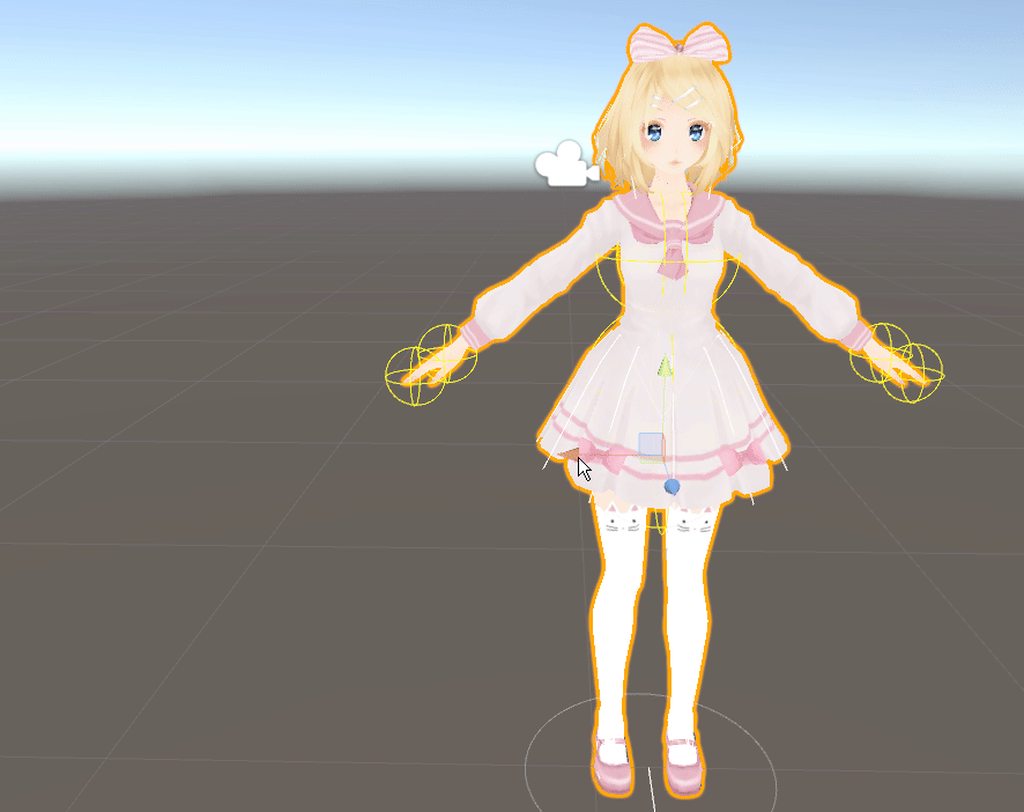 hybrid furnace
Im getting our friend the "Spine hierarchy" error, Im trying to simply change what bone parents what but it doesn't seem to let me actually keep my changes
Any ideas?
 vivid cave
How do I add bones with Blender? I wanna rig up some fingers but have no idea how to do that
Never mind I figured it out
 lucid orbit
Remember, the Hips have both legs as it's children. Spine is a child of Hips. Chest is a child of Spine. Chest has both shoulders and the Neck as it's children.
Unity is bad for making armature alterations. Blender's much better.
hybrid furnace
Now that you do mention that
the hips might be the issue rather than the arms
maybe not, im having a lot of trouble finding the actual issue here
vivid cave
This is pissing me the hell off
The model on the right is riggable to humanoid, but not on the left
And both have the exact same armature
I don't know what I did right the first time, but my FBXes are no longer riggable
EUREKA
TIL not to actually delete the bone tips
hybrid furnace
Im still stuck.
OH
There was a neck 0 this whole time... I just couldn't see it...
 sacred sequoia
Hey maybe someone can help me with this, this hasn't happened with any of my other avatars. Whenever I sit down my upper torso just kind of floats upwards.
 potent glacier
Does anyone know how to to fix the pupils not showing
My pupils are facing downward when eyetracking is enabled
fleet echo
@potent glacier white part of the eye maybe to close
to the pupli
mmd models dont use whole eye to move it just sift the 2d pupli
potent glacier
I think VRchat expects it to be at 0 rotation
Im trying to like "reset" the rotation of the bone
ornate wing
Hey does anyone know why i have Object:Make Parent but not Armature: Make parent?
 frozen pasture
@smoky flume
fading verge
@sacred sequoia does the character have something like a skirt you attached dynamic bones to?
sacred sequoia
No. It wound up fixing itself when I reimported to unity
idk what happened, it's the rig I always use.
fading verge
All right, I was just asking because if you have skirt bones and their parent is hips and you put dynamic bones on the hips, you're gonna have a bad time like that, so what you do is duplicate the hip bone and parent all skirt bones to it then attach physics
 still lark
halp
i'm watching a tutorial on rigging as it's my frist time and the guy made 4 seperate spine bones,
still lark
Yeah i thought something with that is wrong
still lark
I don't think I can use this guy's rigging for vrchat, he has extra bones that weren't in any models I saw
is there any blender tutorial on rigging that I can use for vrchat?
 frigid sedge
How much of an issue is this going to cause? I'm not using motion tracking ATM only desktop mode. Wondering if this is a serious concern or not.
still lark
@fleet echo i mean a tutorial on rigging
still lark
this would be really useful too but for now i need to rig it
Yeah, i found some tutorials but the skeletons they built aren't the same as the skeletons vrchat characters use
lucid orbit
@frigid sedge It's not much of an issue at all. It even sometimes works for people with full body IK anyway. Sometimes.
 forest crane
@lucid orbit 0/
 lucid orbit
@forest crane \o
fleet echo
you can watch any tutiroals how to rigge model
just need to know what bones
need to have
fading verge
Do the shoulders need to have the "connected" tab checked
fading verge
thanks
 calm needle
what exactly causes the pelvis thrust vs the arching forward?
fading verge
I fixed that problem by moving around the hip & spine bones
fleet echo
yea most model find have werid hip bone
need skinny part up and fat end down on the bone
calm needle
the hip and spine bone are exactly 180 degrees so it could be something else im over looking
 fallow saffron
Anyone figure out the arms bent in VR issue yet?
The controllers are at my sides in this screenshot
0 twist bones
still lark
are my fingers ok
rotund owl
@still lark i mean there is a bone missing in the thumb
i dont know if that is a problem though
actually there is bone missing in every finger
lol
took me long enough
still lark
what, where
there are two bones in each finger
are you supposed to break it up into 3
still lark
welp them i'll break it up into 3
still lark
3 fingers each hand?
still lark
yeah i figured ^^
 acoustic pilot
I'm having an issue with a rig in my Omegamon model

VRCat: Community-Run VRChat Forums
For the last week I've been attempting to make this Omegamon/Omnimon Model from Digimon: Cyber Sleuth rig properly. The model came with a rig, but the...
That explains mostly everything
fleet echo
there all rigg verison
acoustic pilot
I'm honestly stuck since I'm pretty much the only one with this problem I feel...
rotund owl
@still lark oh yeah actually you dont have to physically connect the fingers to the wrist

i dont know how other people do it though
still lark
is it okay now?
acoustic pilot
@fading verge Hello, I heard that you were quite knowlegable in rigging models. If you can, or even want to... Could you help me solve my issue with my Omegamon rig I've been struggling with for the past week? https://vrcat.club/threads/rig-issues.201/
VRCat: Community-Run VRChat Forums
For the last week I've been attempting to make this Omegamon/Omnimon Model from Digimon: Cyber Sleuth rig properly. The model came with a rig, but the...
fading verge
Yeah I'll see if I can help
acoustic pilot
Thank you
fading verge
Is the mesh properly weighted?
 west swallow
Sorry, dumb question: Trying to set up the bone structure for my model, looking at Tupper's tutorial and I see this:
fading verge
If so, you could maybe scale the actual model to fit the rigging
west swallow
But I get an error saying that the spine has to be a child to the hips
fading verge
Then use unity scaling to make it large again
acoustic pilot
Well, I have done that before and it worked
But
One of my friends said it isn't how bones work
fading verge
Go to hips @west swallow and set the parent to armature
Then set spines parent to hips
acoustic pilot
Although in unity, the joints seemed to be working fine for me
west swallow
@fading verge thanks, I'll give that a try
fading verge
That was just a quick idea while my computer reboots
acoustic pilot
And I don't know how weights exactly work, because I'm fairly new to this sort of thing
fading verge
It generally isn't how bones work, but it's just a quick fix that may work
soon tm
And you won't really lose anything from it
acoustic pilot
Well, I'll see what I can do then
I'll try your idea out, and if it doesn't work I'll tell ya
Thank you!
Oh, and if I may quickly note:
fading verge
If not, pack your model and the unedited model into a rar and send them my way and I'll see what's up
acoustic pilot
For me to resize it propperly
I have to size the model to be around the hight of the knees of the bones (In blender)
(In unity it just grows in size, but if I keep messing with it the size will match, but it's fairly odd)
fading verge
Could you screen shot the bone structure
acoustic pilot
Just the bones alone?
fading verge
Enable X-ray for the armatures
acoustic pilot
That's what I done for the screenshots in my post
acoustic pilot
Can't blame ya, those little lines are hard to spot
still lark
are the bones parented correctly in the chest? i'm not sure.
also, do I have to create bones connecting from the neck to the eyes, if I don't plan on having eyes that open and close?
fading verge
you dont need to have eye bones
Might have them hidden
Unless you're creating the rig yourself
still lark
i am
fading verge
Then yeah add those in
still lark
okay
fading verge
But looks good to me, you could rotate your hip bone tho
So your tail is where it's head is and vice verse
still lark
huh?
fading verge
💎 Flip your hip bone so it looks like the diamond
Same positions tho
It's how I was taught, dunno if it makes a difference in the end, as some models don't have it set that way and work
still lark
The tutorial I'm watching is using pole targets and IK's, do I need those?
 glossy sparrow
Bahaha... sob I spent some hours tonight in Blender, finally getting the hang of rigging, finally made what I wanted work in Unity, only to realize after everything that it was way too complex and over 20k
But now a lot more and the next attempt with something else should go off without a hitch, knock on wood.
 flat crescent
are there any good weight painting guides? Everything I'm finding is not helpful at all.
still lark
@rotund owl The way I structered my hand made it so I have an extra bone for each finger... how do I do it the correct way?
this is how it looks like
rotund owl
@still lark I never rigged before but I am pretty sure you need to link the wrist and the first bone of every finger and then delete the bones you used to connect them before. I don't remember the keyboard shortcut for connecting bones though.
Maybe you can just delete the old connecting bones after reparenting the other ones to the wrist.
still lark
is this okay?
rotund owl
@fading verge @still lark also I am pretty sure you need to have the hip and legs pointing away from each other, or it might cause problems. The only scenario I know it can cause problems is hip tracking.
Looks good to me
still lark
Thanks a lot, but I don't know what you mean about having the hips and legs pointing away
 junior wind
just editing pre-existing rigs here, but... unity thinks that my hips are at the center, my spine is at the pelvic region, the hips are in-between the legs, the chest is where the stomach is (which is what I set to be spine in blender) and the upper chest is where the lower chest is... do I just swap them around to what I labeled them as or?
rotund owl
@still lark you told been to flip the hip bone some posts up. And it was the right way around
still lark
Yeah but I had no idea what that meant so I put it aside
Didn't want to ask too many questions 😅
rotund owl
Haha
rotund owl
No
 dire mica
So I can just safely delete them
rotund owl
I had weight painting on them one time
junior wind
anyone able to help with my predicament 😛
rotund owl
@junior wind I am not actually sure what you were saying. You don't use the upper chest in unity though.
junior wind
its not solid, but its saying the bone labelled spine should be in the upper chest area, but on the model its in the lower-chest area
its also saying this is where the hips are
lucid orbit
@junior wind Don't rely on the auto-rigger. You often need to make adjustments yourself.
junior wind
true, but as I moved stuff around I started getting errors, I'll move em all back again until I'm satisfied and relay the errors
lucid orbit
@junior wind Remember, Hips has both legs as it's children. Spine is a child of Hips. Chest is a child of Spine. Chest has both shoulders and Neck as it's children. Neck has Head as it's child.
junior wind
ok so I managed to fix up the upper-body, but in doing so apparently messed up the parenting of the lower-body, mainly the legs
both upper-legs don't recognize the hips as its parent, am I required to edit it in blender and do it all again or can I change it in unity?
Eh, I'll fix it up in blender
teal badge
The important thing to remember is that children : direct children. Not grandkids.
junior wind
in rigging, the chest connects to the arms correct? so i would be correct in saying this is the chest?
lucid orbit
@junior wind A bone hiearchy screenshot is much better at determining this.
junior wind
from blender or unity? your choice, I've got both open
would probably be easier to have someone here do it for me, but I gotta learn some time and I'd rather do it now :/
still lark
https://i.imgur.com/PqHZ4IW.gifv
Halp, why does this happen
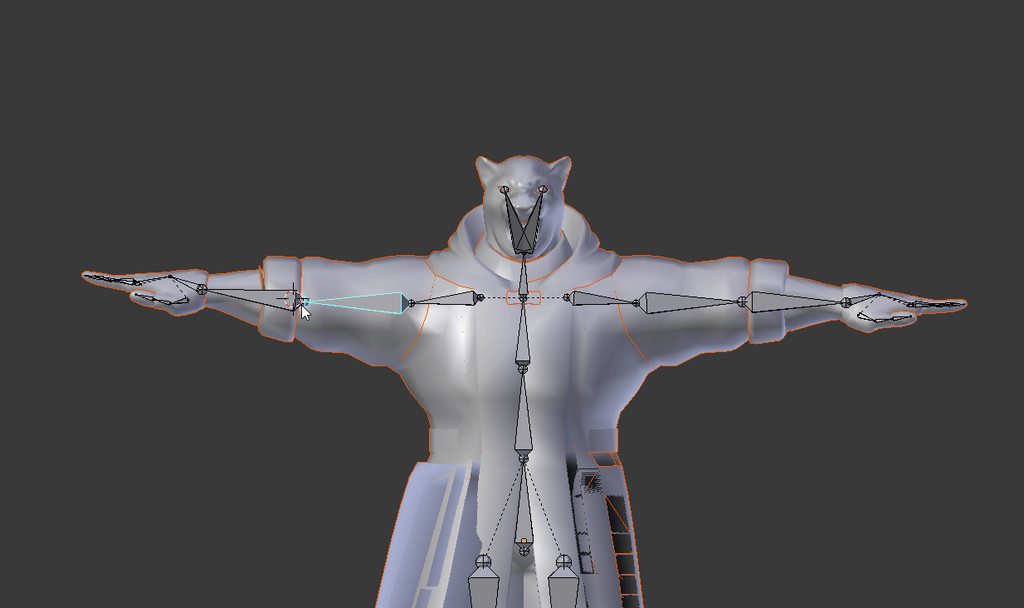





 junior wind
probably connected to that part
still lark
i used automatic weights and this is the result
lucid orbit
@junior wind Either is fine.
@still lark Bad weight painting. Probably best to fix it yourself.
junior wind
I could send you the blender file as well so you can fix it up, but heres the hierarchy from unity
also, I named it stomach because I needed to change its name and it looked like it would be where the stomach was so
lucid orbit
@junior wind Where are your shoulders and where are your legs?
junior wind
ah one sec, further down the list, and I noticed I have legs under Lower Body, and not Waist
here you go, should be the missing things
er, hips even
lucid orbit
Okay go back into Blender, rename LowerBody to Hips.
junior wind
what should I call the other hips then?
lucid orbit
@junior wind You can call it whatever you want. It's not the hips.