#avatar-rigging
1 messages · Page 30 of 1
 fleet echo
 naive tree
@humble leaf have u used cats?
fleet echo
leave in japanese on english unity not going to work
 humble leaf
which makes it a dupe. Even if I change it I can't get it to be a humanoid rig
fleet echo
automapping get confuse
humble leaf
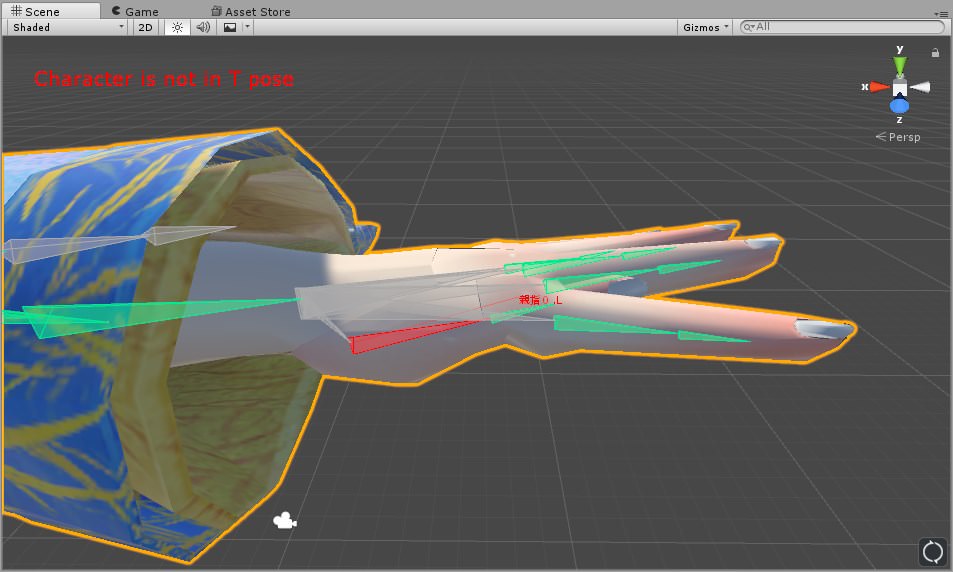
But this is ONLY happening on my left hand
 sly fog
Hmm, I uploaded earlier about my two chests, but now I'm having some hip problems (heh) any ideas on fixing?
 crisp tendon
@humble leaf Use cat's plugin
fleet echo
because there name in way unity auto map get confuse
crisp tendon
@sly fog it shouldn't matter too much, check in vrchat first
sly fog
kk
humble leaf
idk if names matter
crisp tendon
they do, use cat's plugin please$
humble leaf
Because on my right hand the names are also in japs
fleet echo
^
humble leaf
But my right hand is also in japanese and that works.
Ok so
Where do i get the cats
 fading verge
great
humble leaf
and what does it do?
fading verge
thanks
fleet echo

VRCat: Community-Run VRChat Forums
Cats Blender Plugin (0.4.0)
A tool designed to shorten steps needed to import and optimize MMD models into VRChat
[IMG]
Features
Optimizing armature...
crisp tendon

Today we'll be going over Cat's Blender Plugin, an amazing Blender script that will save you TONS of time with your armature, visemes, eye tracking, and text...
fleet echo
cat plugin has feature translate the word in correct for unity
humble leaf
But then that still bring the question.. Why does my right hand fully named in japanese work but left doesnt.
xd
fleet echo
in japanese they dont use L and R like english we do
crisp tendon
Doesn't matter, it's japanese, just use the god damn plugin 
fleet echo
it best to rename your armature so you know what bone it what
if you dont know your own bones in your models
then you going be stuck there and confuse
armature rigging is learn what a bone does
sly fog
Well, good news is my hips work, bad news... I dont even know what happened
crisp tendon
@sly fog Did you use Cat's plugin ?
fading verge
yo is there a war to add animation to charas in vr chat already like the alien playermodel for example
sly fog
@crisp tendon Nada, I been working on it all morning- but I'll go back in blender and apply the plugin
crisp tendon
@sly fog make sure to start with a clean avatar
 silent marlin
I think my bones are starting to look alright, at least for my first time doing this
naive tree
@sly fog use cats on fresh pmx import, if it doesn;t work u can send me the fbx or pmx
ill check it
fleet echo
@silent marlin were you leg bones
silent marlin
I haven't got that far yet
silent marlin
I know
fading verge
Should I delete the second "Right elbow"? The wrist isn't the first parent of Right Elbow
naive tree
if it doesn't cause problems then you should not bother, imo
fleet echo
@sly quiver dont delete need mix weight paint to other elbow
 tropic trench
no matter how many times i change this it never takes effect
fading verge
k
naive tree
@tropic trench can u send me fbx, i have worked with that kind of models
they need some remapping
tropic trench
oh okay allright
tropic trench
well yeah and when i put the stuff in the right place ,click apply and done it dosent take effect
fading verge
Do I need the extra bones under Left and Right eye?
 turbid furnace
Unlikely
fading verge
k
turbid furnace
Can anyone suggest a way of stopping the bottom part of the coat from sticking through my legs without dynamic bones? Is there even a way?
He's fine when walking but once i stand still this happens D:
silent marlin
I got little nep fingers and they look cute because they look like little bear claws on this model
turbid furnace
I can't seem to fix that damned mantle. Went as far as deleting all the mantle's bones but it still bends forward and clips through the legs :/ Might actually have to get dynamic bones for this one
silent marlin
got nep bones 👀
fading verge
sorry xD my part i didnt rename it to "Right elbow 2"
it's the same on left elbow
there is 2 right and left elbows
 dusky pendant
@silent marlin Don't make me make a Plutia
:l
I just busted my ass to make Minato work properly
silent marlin
you should rig a plushie too!
 mystic agate
?
crisp tendon
nice
silent marlin
I guess I should lessen the reds with this model, because it seems to distort pretty much everything because of the size of it
like that
crisp tendon
it's not too bad, but yeah green wouldn't hurt
silent marlin
I just want the avi to not spaghettify for just waving at people :p
I need to find what specifically is distorting my d-pads, though
because they aint weighted to that head
the collar is unpaintable for some reason
poor d-pads
I found the problem
there was a very small amount of red behind the d-pads
 cunning citrus
Can anyone help on get this model im trying to import to work. Fixing bones are not my specialty or anythign like that xD
Like Im not sure if this is minor or easy to fix but this applies everywhere on MMD files Im been trying to import
When Im trying to turn the character animation into humanoid, it creates this kind of error
silent marlin
your hands aren't parented right
cunning citrus
Not sure, this is not my model, and I've been trying to fix it but I've never made a 3d model before
silent marlin
you have to make sure your arms are parented as shoulder>elbow>wrist for it to work
cunning citrus
How does that work?
silent marlin
in MMD models, they'll come parented to stuff like Left arm twist and such
cunning citrus
Does it have to do with joints and rigidbodies?
silent marlin
it has to do more with the fact that MMD has functions that VRChat doesn't
cunning citrus
Ah, but I dont know how to parent it
silent marlin
go here in that menu
you just type the name of what you want to child the already existing bone to
it's why it's a good reason to get the bones translated
 tired pendant
Can anyone pls help me with avatar issues? I've done eye tracking & blinking several times before, but for some reason neither are working for my model. I've done everything like how I normally do, but nothing is moving. The lip sync stuff works fine though. The head mesh is named body, the eye bones are made & parented correctly, they're children of the head, all of the shape keys & vertex groups are set up correctly
https://i.gyazo.com/3f45a4aa7483fc55cb6b2439fb94f72d.png

 prime dome
Yeah it was an issue for mine
Took me too long to figure that one out
Are your eye bones working?
Check to see that they're properly weighted
tired pendant
They are, I've already made sure
 crimson mauve
Sorry to come in as well but I am currently trying to put together a Kanna model for my gf and my rigging is a bit off, the T-pose is off and the chest is missing. When I try to manually assign the chest it creates an error within the model.
tired pendant
And they're already set up in Unity too
@crimson mauve Those twist bones are not supposed to be set, arm twist should be something like arm L or arm R
Make sure that "Chest" is a child to "Spine", and "Spine" is a child to "Hips". Hips should not be parented to anything
crimson mauve
other than the twist bones the hierarchy appears to be right
tired pendant
Chest is also set to spine lol
silent marlin
@cunning citrus that's where cats blender plugin comes in handy
it can translate the bones with the press of a button
crimson mauve
and the chest thing is fixed
shoudl i go back to delete the twist bones to fix the t-pose?
tired pendant
@crimson mauve If you have T-Pose issues, click this:
https://i.gyazo.com/988cd8fd07cd3773326f3ac811603a11.png
Then click reset, then enforce T-Pose

Don't delete the twist bones, the mesh is weightpainted to it, just change the selected bone
cunning citrus
@silent marlin
Can it translate something like this?
crimson mauve
the mesh isnt moving with it, when the pose is reset is when it appears right but then obviously the t-pose isnt being enforced
silent marlin
cats has a menu like this and you can just translate everything with the push of a button
crimson mauve
@tired pendant
tired pendant
Make sure that it isn't a parenting issue, it should go Shoulder > Arm > Elbow > Wrist
Usually it comes like ShoulderP > Shoulder > Arm > ElbowTwist > Elbow > ect
silent marlin
I feel my job is complete, since there's not really any bothering distortion with the movement now
cunning citrus
@silent marlin
Ok, i have it translated and so. But honestly, I feel dumbfounded by all of these xD.
silent marlin
don't worry, it takes time to get used to it :p
cunning citrus
Anyway, uh. So how does the parenting works on the relation tab
silent marlin
and yeah; the translations are generally really basic
well, you just click on parent and you type the parent bone's name
so, like, say that the left wrist is parented to left elbow twist and now left elbow
you type in there and parent it to left elbow
tired pendant
@crimson mauve With your armature, it should go Right Shoulder > Right Arm > Right Elbow > Right Wrist
Don't delete the bones that you don't want, click on the little bone tab below the hierarchy, scroll down until you find parent, and follow what I just said
 vestal swallow
I'm not sure if this is the right place to post but uh can anyone tell me why my dude is looking down like 90% of the time? I tried moving the vision dot in Unity higher and everything is rigged n stuff normally. The only thing I can think of is adjusting the eye movement in CATS plugin in blender....
mystic agate
That's creepy
tired pendant
I do everything manually, I don't know what that new cats plugin can mess up
vestal swallow
Right? He's like giving the grudge eye and I can't figure out why
Some times he looks forward
tired pendant
Do you have eye tracking?
vestal swallow
No I'm on the PC no VR
tired pendant
No I mean does your model's eyes track other players
crimson mauve
@tired pendant good?
tired pendant
That'll work, did you do it with both arms?
crimson mauve
yeah
tired pendant
Try it now and tell me how it goes~
vestal swallow
I tried to disable eye movement on him too and it still does that lol
Am I missing something?
tired pendant
Is he looking down in blender?
vestal swallow
No he's centered in Unity and Blender
LMFAO @mystic agate
He looks down then
and it's creepier
silent marlin
smol nep
cunning citrus
@silent marlin
So In this case, uh.... SO it should be shoulder>Elbow>Wrist?
But some are already parented so I dont know how to change it
silent marlin
I was just seeing if it needed anything first before finalizing was all
tired pendant
Shoulder > Arm > Elbow > Wrist
silent marlin
yeah; it doesn't need to connect to the twist
silent marlin
you just type in what you want the bone to be parented to
like, you go to Wrist.L and child it to Elbow.L
tired pendant
Just below the hierarchy, there is a little bone tab, click that & scroll down until you find "parent"
https://i.gyazo.com/4bccc70c8ee79f4a6de40116edd2d3a3.png
 silent marlin
another thing that could help is the fix model button on cats tool; it's an alternative way to fix your bones and get rid of unnecessary ones
crimson mauve
@tired pendant darn :/
tired pendant
@crimson mauve I've already made that model, I'll just send you my .fbx of it x3
crimson mauve
I love the learning experience but please do XD
tired pendant
You can look at it if you'd like to see what's different
cunning citrus
AAAAAAAAAAAAAAAAAAAAHHHHHHHHHHHH
tired pendant
Again, I manually do everything
crimson mauve
yeah im gonna at the hierarchy in unity if i can
silent marlin
it's a lot of trial and error, but once you get used to it, it becomes pretty fun
it's why I have like 11 avatars now
cunning citrus
xD
But seriously, you save me a lot of trouble
silent marlin
I try my best; I've only got like 5 days of blender experience at most
tired pendant
I lost count at 60 avatars lol
cunning citrus
owo
Too bad I dont know how to create 3d model
All I can do is just do si 2d drawing
Kind of look strange when the sleeves stays rigid but still works for now
tired pendant
@prime dome The lowercase "b" didn't work
 marsh escarp
why does my model start spassing out when i increase the spine by 0.0001
prime dome
@tired pendant its supposed to be a capital B
silent marlin
I love how this nep is the exact size of the default unity cube lol
gonna make a massive Nep with it too
tired pendant
@prime dome It was a capital B before I asked here lol
silent marlin
bigg nep
crisp tendon
Is that an MMD ?
 vernal birch
from what i read it is
it's the 666 miku from MMD Club
The bones were bugged but used Cat's plugin then this is the result
naive tree
did u use plugin on a fresh pmx?
vernal birch
You mean the standart PMX without any modification?
naive tree
yes, fresh from zip file
 warm pollen
some times catplugin delete the bones that are needed
vernal birch
will it have any effect if i just lower the tris
without any bone or model modification other
vernal birch
nop
i recieved it from someone who used it to import the VMD the same in the MMD Club
fleet echo
first thing for pmx model need check has weight paint to beginng with
the error come from creator of the model
not plugin it self
there tons mmd creator rush on mmd models
there not pefect at making them
only few english one know what there doing the rest just rush
crisp tendon
@fading verge Inspector top right corner and scale
 shadow swan
Does anyone have a tutorial for rigging a 4 legged model and still have the possibility of functioning hands?
Alternatively, I'd love to find someone who can make this a reality.
 fading verge
so I set
warm pollen
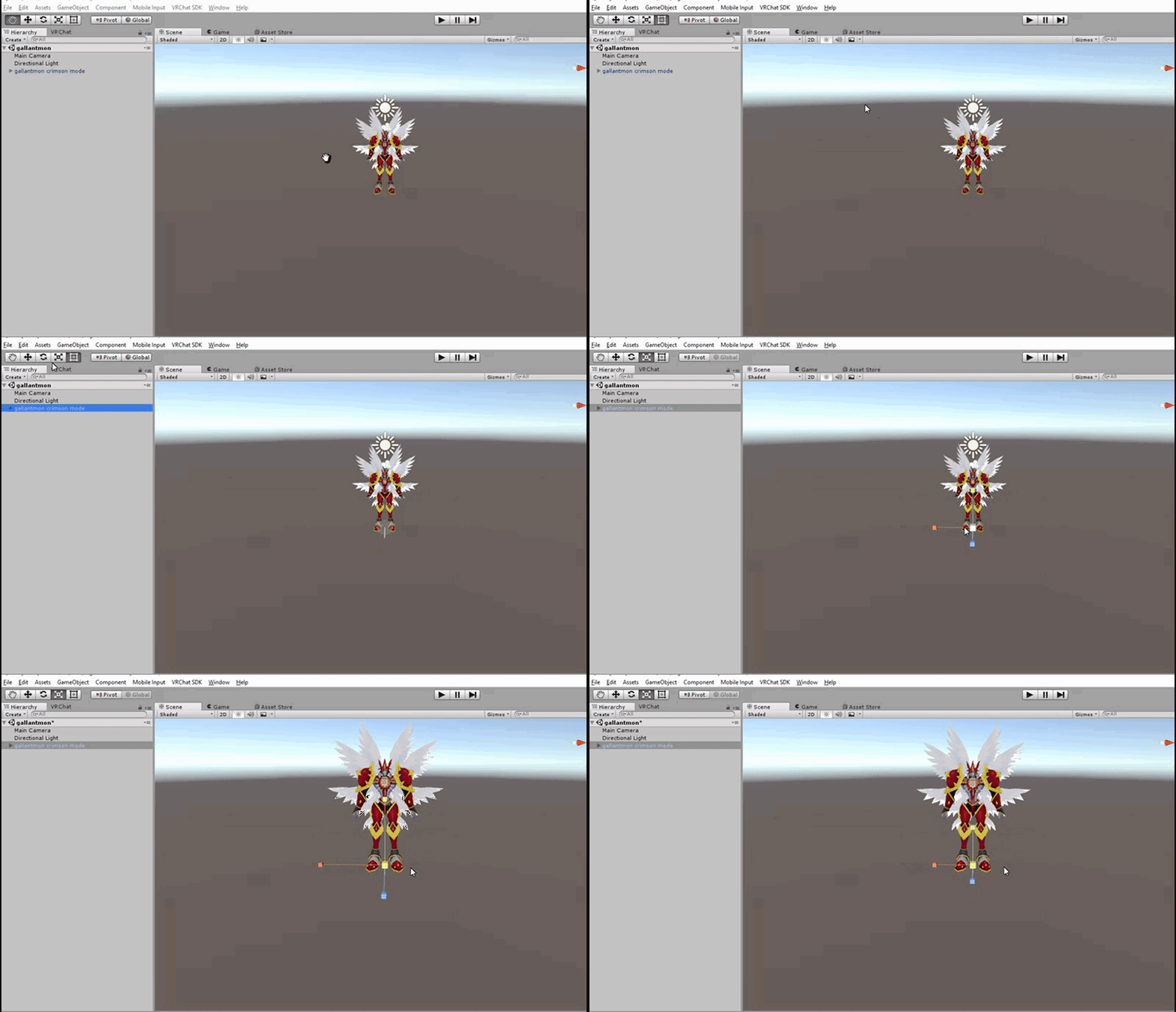
jazneo, let me steal your gif to put it on my guide
warm pollen
for unity

Google Docs
VRChat MMD Model Guide [Disclaimer] This guide or any of the authors are in no way affiliated with the creators of VRChat therefore If there is any incorrect information or spelling please feel free to suggest an edit on the document itself or send a message to one of the authors listed at th...
fading verge
thats always good
fleet echo
@warm pollen you can lol
gif make easer just explan something to someone who dont understand
warm pollen
i tried to write it in text first then gif laater on
fading verge
it honestly does help
 serene cloak
I need some help.
I'm trying to use Eye Tracking, but my avatar's eyes would start closed
Can I fix this?
Anyone?
 teal spruce
Click Start Eye Tracking
In the left
I'll launch blender
Just to show you with screenshots
teal spruce
Try to play with those two
The top one is the closed eyes
Oups
Not
The bottom one
My bad
serene cloak
Doesn't work at all
serene cloak
@teal spruce Tried the other one, nothing changed.
This is my settings, I don't got Blink
 lethal delta
need some help on these errors please
serene cloak
@lethal delta Too many polygons m8. Max 20.000, Recommended is 10.000
You're on 70750
lethal delta
Yeah I know, but when I use the decimate tool it wont let me save mesh
I've had to redo it about 10 times now
fleet echo
@teal spruce it going to blank for bottom lids
not going do nothing
basis just set do nothing
you would have to make your own blendshape for the bottom lid
serene cloak
@fleet echo You gotta be kidding
teal spruce
I don't use the lid :/
 lucid orbit
@serene cloak The lazy person's way of doing the bottom lids? Move a pixel like a tiny bit and then set that as your lowerlids.
 vital meadow
wait. did something happen with CATs new eye tracking?
lethal delta
ah this is confusing, I've been using mantis as well to reduce polygons
serene cloak
@lucid orbit I could blink with the avatar manually before doing eye tracking
fleet echo
cat plugin just short up work but best learn how to do blendshape
if every want to advance your 3d model skills
dont use cat plugin as crotuch
lol
lucid orbit
Yes! Level up those model creation skills!
vital meadow
what am i gonna map in unity then?
teal spruce
I am pretty bad with blinking, the only thing who work is me is the eye tracking of Cat's
I probably need to make something else than clicking on a button
serene cloak
Can I undo the eye tracking for a moment?
fleet echo
cat plugin will do the blink that come with the model
but if you want lower lid you need learn how to make blendshape
teal spruce
I let the professional help you ^^ I am bad :'3
serene cloak
@teal spruce It's okay m8, thx for your try. 😄
vital meadow
i think im just gonna move the eye bones to the actual head bone. idk what the plugin did or perhaps i didn't notice it when i imported the model
fleet echo

Original character, Rich Hari by Ricardo28roi: http://www.blendswap.com/blends/view/66838 In this tutorial: Learn how to make and pose facial shapes in Blend...
serene cloak
@fleet echo I got a video on my second monitor.
I just need to know, how I can undo the cat's eye tracking. CTRL+ALT+Z isn't helping
fleet echo
this video teach me about blendshape
lethal delta
Can anyone help me reduce these polgons and help me with rigging the robot?
fleet echo
@serene cloak it redo it
if setup them
in menu
dont need undo it
just make new blendshape for it
serene cloak
Where is the redo?
lucid orbit
@lethal delta You're going to need to do that on your own. Decimation and removal of Tris is more of an artform than an exact science.
fleet echo
dont need undo it just use creat button again
with setup blendsshape
it overwrite one
serene cloak
@fleet echo No idea what you mean
fleet echo
cat eye tracking made so you dont need undo it
lethal delta
Yeah i I know, When i select my entire avatar and I use the mod on it to reduce the polygons - click save mesh and the save window gets stuck
fleet echo
just need make sure the blendshape in right slot
serene cloak
@fleet echo Yeah, I have no idea how to do that
fleet echo
serene cloak
It looks like a mess
fleet echo
i do this for simple model
serene cloak
Not working either
vital meadow
if you want to learn it the hard way. like a boss
https://www.youtube.com/watch?v=kmE-YnHT2kA

My first tutorial. Sorry if its poop im not used to doing this sorta stuff.
serene cloak
 lucid isle
hey so as you can see Im having a little issue with my avatar not sure if its a bone issue at all
lucid orbit
@lucid isle Oh this. Your Hip and Spine are probably a little off.
lucid isle
ya no clue how to fix it since im using cats blender tool
serene cloak
@fleet echo Where in here earlier, couldn't find anything, that could help me.
lucid orbit
@lucid isle Take a look at https://youtu.be/LrCCl_F9XNs at 25:30
Here's a video on extremely common issues I see with bones and rigging setups, and ways to solve them. I cover: - Leaving Upper Chest Blank - Reparenting spi...
lucid orbit
@lucid isle If Tupper describes what you're experiencing, then that might be a fix.
serene cloak
@fleet echo Could this be the reason?
fleet echo
@serene cloak yea set back to .000
serene cloak
@fleet echo It won't let me
fleet echo
stop eye tracking testing
vital meadow
did you set a key by any chance?
serene cloak
A key?
vital meadow
animation key
serene cloak
I don't think so
lucid isle
k i hope so bc i really dont want her looking like shes easy
lol
now if only i could makr her look good from going from 66k - 19k
vital meadow
check if you have the winks. maybe you don't need the blink shape and you can just delete it
vital meadow
get to the habit of having incremental saves. it's a lifesaver
serene cloak
Yeah, I understand why x'D
@fleet echo @vital meadow Just made a new project, and tried instantly with eye tracking, now it works.
vital meadow
😎 👍
serene cloak
@vital meadow Eye Tracking is activated. Can I decimate the character, without ruining the eye tracking?
vital meadow
never done it before. just don't decimate the face or the eyes. or anything that has to do with the head except for the hair and accesories
serene cloak
@vital meadow So, as I've done up until now, got it. No facey touchy
 south bear
so im working on avatar right now im mainly working on jiggle bones and stuff
vital meadow
also don't decimate the hands unless you do it with vertex groups or know what you're doing in general. it mess up the fingers
south bear
is this too much ? https://puu.sh/yK4fd/52a8771dc9.gif
 lucid orbit
Urgh. I can feel the lag already from all the dynamic bones in the skirt and the multiple dynamic bone colliders.
lucid isle
now if only she could throw nebby in a bag
now the task of making my 66k model go to 19k
south bear
il have to test it out
lucid isle
i think my favorite is that penny model that falls apart
lucid isle
that
lol
ok...back to figureing out this issue
maybe i should give her different boots
bc the ones shes wearing have meshed feet inside them....
is that even possible to do....
south bear
well just noticed that its only one bone
serene cloak
@vital meadow As you can see, he can blink. But when I try to separate by materials, the eyes fucks up
south bear
one bone for each top section
serene cloak
lucid isle
mine cant blink...or move her mouth
her eyes can move...if you call crazy lazy eyes moving
vital meadow
that's weird. check if the shapes are on and move them back to 0
serene cloak
@vital meadow Everthing is on 0
lucid isle
oh as for the bones...the spine is bending inwards a lil
vital meadow
there shouldn't be any problem as long as you have the right bone hierachy, the shapes have the same order, and the mesh is named body
south bear
:/
serene cloak
@vital meadow Seems like, as soon as I separate the Materials, the eye tracks messes itself up
vital meadow
._.
lucid isle
thats her bone structure
idk if anythings wrong
but looks like her spind is bent in
so ya
dinner time
south bear
0n0 its 1:35 am
lucid isle
its 8:35 pm here
i swear ill get this stupid avatar to work...
and where did her fingernails go
teal spruce
02:37 am here
lethal delta
central time zone ❤
lucid isle
im so confused ><
teal spruce
I'm in france
lucid isle
😮
im trying to figure out how to diseminate this avatar while making it not do this

 lucid orbit
@south bear If you're using a converted MMD, go back into Blender, make a new save and give this a try. https://youtu.be/0gu0kEj2xwA
Today we'll be going over Cat's Blender Plugin, an amazing Blender script that will save you TONS of time with your armature, visemes, eye tracking, and text...
south bear
not converted from mmd
lucid orbit
@south bear Ah, I see. Old fashioned way it is. https://youtu.be/LrCCl_F9XNs
Here's a video on extremely common issues I see with bones and rigging setups, and ways to solve them. I cover: - Leaving Upper Chest Blank - Reparenting spi...
south bear
its a direct port from a 3ds game im pretty sure it doesnt have as much mmd's
lucid orbit
(Besides, you learn more doing it this way.)
 sand void
lucid isle
sand void
lucid isle
soo.. ima try extending the spine once im done adjusting this current version of my avatar
fading verge
I've noticed it rare for me to find pmx/pmd that I like. They're all xps/mesh and I don't think CAT works for them too well?
They all have extra bones at the joints and it screws up in Unity because reparenting doesn't go so well and just plain removing them is even worse. So I have to crash course vertices assignment. I've used blender about a week now. Information overload.
 fading grove
Hey sorry if this is the wrong place to ask but is there a way to add dummy bones to a model in unity?\
south bear
No use blender
 crisp lantern
so I'm having an issue with a character I'm trying to add eye bones to
I separated out the eyes into their own pair of meshes, then in blender I set the eye bones as their parents
but then when I import it into unity, it doesn't recognize that the eyes are connected to the eye bones
also it'll randomly relocate the eyes to about 2 meters above the character, and they remain stationary despite attempts to move them
naive tree
@fading verge from what i noticed XPS needs no bone fixing
u only need to reposition in unity
let me find screenshots

this is how their hierarchy looks like
 crisp lantern
I've also tried putting all the verts in the eyes into vertex groups with the same names as the eye bones, but that doesn't work either
in fact in that case even blender won't recognize them as being connected
fading verge
Anyone up for trying to help me figure out how to get the feet of the model I'm working on to connect to the legs of the armature? Been working on it all day and nothing seems to work. (new to blender)
crisp lantern
mine is not an MMD model.
fading verge
and yes it's MMD
The leg bones are moving without the feet for some reason and I haven't been able to find a way to connect them.
fleet echo
@fading verge need weight paint the feet to the bone
it very easy to do on that model lol
fading verge
Any chance you can give me a breakdown on what to do? Like I said, very new to blender.
fleet echo

Quick intro and guide to skinning/weight painting. this video is meant for those with a basic understanding of Blender
watch this show how to weight paint
 barren parrot
I made sure that the parent of the neck and shoulders is the chest but I still keep getting this message, does anyone know why that may be?
nvm
it was a naming problem
 pure veldt
close it in your 3d program you're using
even if it looks closed you'll have to close it more
tropic trench
okay
 cerulean dawn
can someone help me
I would like to know how to make my hair move
it has bones inside of it but not moving
naive tree
dynamic bone, asset store 20$
 still relic
Not sure if this is a rigging question, but can I get digitigrade legs to work like Ori's?
cerulean dawn
so the only way to get it is to pay?
naive tree
pay or find other means
cerulean dawn
oh god o-o
naive tree
@still relic possibly custom walking animation? idk
cerulean dawn
do you mean do the dirty o-o
pure veldt
or you gotta... know.. some people
cerulean dawn
drugs o-o
still relic
haha
still relic
I'm still learning the ins and outs of modeling and rigging, so forgive my ignorance. @naive tree I heard of bone constraints. Do those carry over into unity?
naive tree
no idea
still relic
Chae, from what I understand, obtaining Dynamic Bones by 'other means' is not to be discussed in the discord. Its bad.
fading verge
Does anyone know why all my avatars slouch in desktop mode?
still relic
Just a guess, but maybe the height setting?
fading verge
Nope, height setting has no affect.
fading verge
same though
lucid isle
fading verge
if you figure it out, pleaaaaaaaasse ping me. I've been trying to figure it out for a week.
 jaunty hornet
Could anyone who rigs and imports avatars/models pm me please?
naive tree
ask your question
nobody will pm you most likely
there can be wide variety of issues
fading verge
^ its much easier to just see the question and choose to respond or not. its annoying to message people or ask 'what' to a request of a help
naive tree
@lucid isle have you tried moving your hip bone so it points up?
jaunty hornet
I don't have an issue, i'm just wondering if anyone can rig and import a model, since i'm a 10/10 noob and can't do this complicated things
fading verge
that's a big favor from a stranger
naive tree
99% nobody will do that for you
jaunty hornet
So where's the other 1% ?
naive tree
not here
jaunty hornet
rip
naive tree
move the top of the tip, the ball tip
lucid isle
in unity?
naive tree
blender
naive tree
check if your hip, chest and spine bones are not pointing outwards or strange degrees
lucid isle
they arent here one sec
naive tree
i think i had that issue on my dude, i had to point the hips up
fading verge
Anyone got any idea as to why when I try to weight paint my model's foot the second I click it paints the whole avatar?
naive tree
 lucid isle
fading verge
lucid isle
fading verge
Still just paints the whole av
lucid isle
idk if the bones look ok
crisp tendon
@lucid isle I've seen you say that at least 5 times, you can do it, i believe in you
lucid isle
i failed each time
fading verge
Never give up! And when you succeed, tell me the secret D: I haven't been able to figure it out either
lucid isle
chara refuses to stand up straight
fleet echo
need remember desktop IK dont work right
crisp lantern
ok, so I got the eyes rigged properly finally, they're showing up properly in the unity preview, but when I use it in-game they just stare straight ahead
I know it's not cause I'm on desktop, because the unity-chan avatar has her eyes flying all over the place
do I need to set up visemes?
lucid isle
desktop shouldnt really matter for the avatar i see other ppl on pc that stand straight
fleet echo
it off and on
lucid isle
no check the radius and distances
crisp tendon
^ wise words
If it cannot be fixed, you should be happy with the current avatar
and you tried a lot of things, so it's fine
fleet echo
vr fix the problem lol
lucid isle
im a perfectionist
crisp tendon
yeah but that's an expensive solution lol
lucid isle
pretty sure its not a matter of having vr or not
fleet echo
vr IK more better then desktop IK lol
lucid isle
since pc is set to the sitting mode
fading verge
Its not a matter of vr. I have seen desktop models work fine without ve
lucid isle
ya same
fading verge
Ie not slouching like theyre bored af
fleet echo
that off and on
though for desktop IK
it use be desktop IK head twist around
to back
of the model
fading verge
Ex the default models dont do that afair. I should actually check. But im 99% sure the default robots dont at all
Its not IK
i have 7 models and they all slouch and none have il
lucid isle
they dont
fading verge
Ik*
lucid isle
unity chan dosnt
crisp lantern
never seen that on the reference one
fading verge
Problem*
crisp lantern
don't think I've seen it on the ones from the unity-chan avatar world either
crisp lantern
I do
fading verge
It is when you stand still, they slouch and stick out their stomachs a bit
fading verge
wth, my av just turned black after weight painting?
fleet echo
when adjust the bone on model need put new one in scene
unity
because unity just save the mesh data
fading verge
it's in blender.
fleet echo
yea after you get fix in blender
dont overwrite
that mesh data stay in scene but the bones
data change
fading verge
so even though it's showing up black it'll still load the textures back after export is what you're saying?
So, the video tutorials I've seen say not to pose your model before importing, but that seems to have fixed my bowleggedness issues?
fading verge
So a pal of mine says the slouching is because the spine bone and hip bone are touching. He claims that they must be separated (no connecting bones) and the spine must be above the hip. If its still slouching, the spine needs to be raised more
Dunno if thats true but thats what he says
Oh damn Araedi, I didnt realize how extreme your slouching was
....so how do I fix my av being black?
 ashen stump
Can someone please help me fix the bones for Talon?
T_T
im trying Cats but hes missing bones i think
naive tree
@fading verge yeahhis spine and chest is touching, hip bone is seperated
lucid isle
her 😛
fading verge
@naive tree I’m confused by your message. Are you confirming what my friend said?
lucid isle
but its ok

 fading verge
Also Araedi, to fix your super slouch, are all the bones correct in the unity configure rig? Ex upper chest is NOT bound, and chest is the bone between your shoulders?
lucid isle
they look like this
fleet echo
hip upside down
lucid isle
yeah i use cats blender tool for that
fading verge
Cats blender isnt always accurate though. Ive had fingers bound to hands and hair to jaw ect
ashen stump
i posted pics above
im using cats to do a Blood moon talon
but i cant get the bones right
lucid isle
yup and not letting me select the bones to move them
naive tree
@ashen stump prob because it's not an mmd model?
fading verge
Dynamic bones just adds physics tk something
ashen stump
oh rip >.>
fading verge
I dont know how to edit bones or meshes in blender but im pretty decent at it in max and maya respectively
lucid isle
yeah ive never used blender every time i try it never works like i think it should even when i follow tutorials
like
right now
cant select the bones to move em
even though i should be able to
fading verge
Have to select the top bone and go into edit i believe.
naive tree
select armature, press Tab
fading verge
As in press tab
naive tree
then u can select single bones
 fading verge
I can't even buy unity assets. ;P I'd have to get some gift card just to get Dynamic Bones.
My banks doesn't trust websites based in places known for fraud. Overly paranoid.
 fleet echo
what did you do
fading verge
That avatar is extremely big.
fleet echo
size dont matter
fading verge
I know, because my 2B was much bigger.
fleet echo
only time size matter in unity lol
fleet echo
i leave it big in blender show i can see the floor
when you to small
hard to see that floor
fading verge
Which channel is the one for shader/texture assistance?
ashen stump
paying good money via paypal or csgo skins for custom avatar VR chat models. sick and tired of trying to learn so will pay well for models (: hmu
naive tree
@ashen stump #353285911322034177
ashen stump
ty
lucid isle
ok....i made them straight
naive tree
vrctraders is discord channel
lucid isle
do i also need to move the hip bone up?
fading verge
I can't export my av from blender .-.
Anyone know what's wrong? I finally got the feet attached and now I can't export lol
lucid isle
ill just assume i dont need to move the hip bone
fading verge
If that works for you please tell me, I noticed two of my models doing the lean back too
although I'm going to see if it's not an issue in VR
since it may only be a desktop mode problem
lucid isle
i cant afford a vr headset
so i cant check
but ill wait to do anything till i get an answer
fading verge
I'd like to know, too.
Would be nice to export the default models and see how they're set up. I imagine that's doable.
lucid isle
rigging her to use mouth and eye movments is gonna be a pain...
fading verge
One step at a time.
If you do it all at once, you'll go nuts.
any good tutorial in riging the face? Cos I downloaded an XPS and the facebones are pretty weird
fleet echo
cat plugin does it one click
@paper beacon https://www.youtube.com/watch?v=qdqbJm0BhOc
 lucid isle
ehhh without cat i wouldnt even be using my avatar
fading verge
It can, but the model also needs those bones, and CATs isn't a 100%
fleet echo
because the creator of that model
not the plugin
lol
there tons mmd creator are crappy
fading verge
Not always.
fading verge
I had the standard 15 bones and it still fucked up once. everything was even named correctly.
fleet echo
make sure have news mmd tool
fading verge
It's a community plugin, not a professional application.
fleet echo
with cat plugin
it user not the plugin i use it all the time it only does little error but if find one report
lucid isle
ill just try to use the avie
fading verge
@fleet echo and for the eyes¿
fleet echo
there be bone for lids of the eye
just need move like the mouth
need just look for name of the bone does it
fading verge
I did it but for some weir reason it moves the entire neck
fleet echo
you pull on the wrong bone then
fading verge
behold, cats plugin isn't perfect
lucid isle
if its fixed ill dab
fading verge
pls do
fleet echo
it helpful tool @fading verge only people dont understand how use correctly
will have problem
fading verge
it is helpful, but it is not perfect. It should not be a crutch.
fleet echo
i dont use crutch use way fix model quicker
lucid isle
dab for the loli army
fleet echo
if you understand armature would understand there tons thing to fix model
for vrchat
to get it in
all the small thing can be fix
after it
fading verge
pls no, loli army is troll army
fading verge
@fleet echo in pose mode it moves only the eye but when I create the shapekey it moves the neck
fleet echo
why you pull on neck bone?
what model you doing?
each bone on face need gently move
around not anything on the neck
fading verge
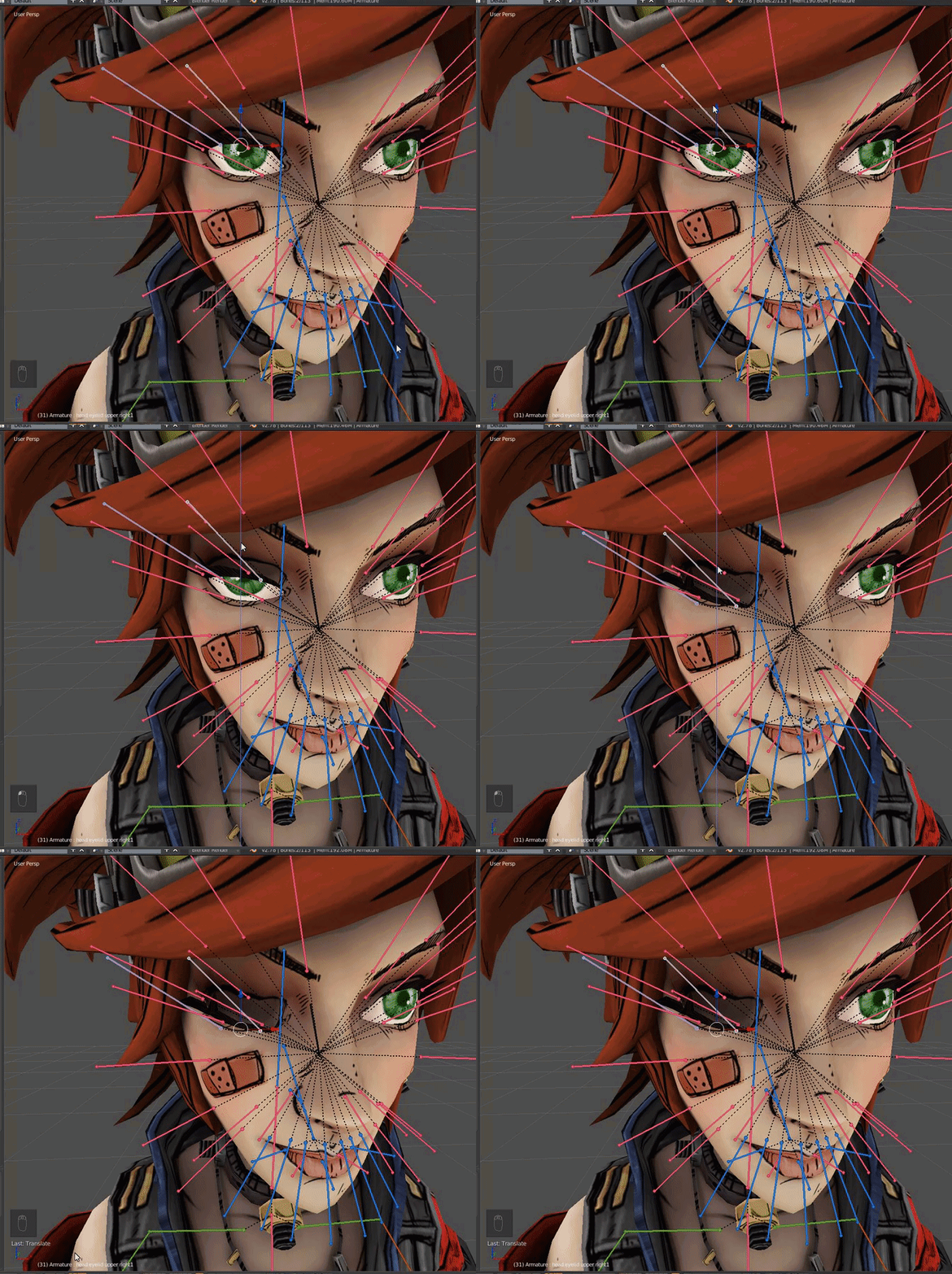
okey now its good but when I try pose mode to move the eyes they rotate instead of "sliding"
Question, if I am adding a weapon or item to a hand in Blender, I need to create a bone. What do I parent said bone to?
fleet echo
@paper beacon https://i.gyazo.com/d727a1af883b6734c4a91f2a0d50e42b.gif
 fading verge
I figure wrist? But then maybe thats wrong.
I mean the eye traking not that, I didn't explain myself
fleet echo
there can be more one bone on the eye lid
need use the direction tool
not the rolation
fading verge
and how many shapekeys?
fleet echo
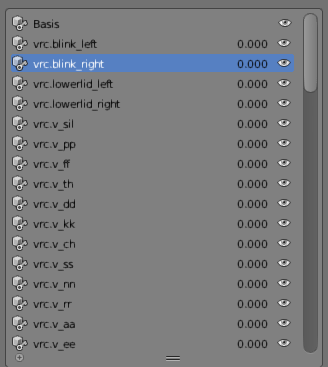
for visime i think around 16 need
for eye tracking need 2 blink and 2 under lid
shape
have make A O CH visime
i use cat plugin
to make the rest of them
fading verge
And to make the eyes move looking at the person?
fleet echo
eye move base on name of the bone and vertex for xps you need to make new bone to vertex group
of the eye
fading verge
how?
fleet echo
@fading verge https://youtu.be/kmE-YnHT2kA
My first tutorial. Sorry if its poop im not used to doing this sorta stuff.
fading verge
Araedi, did you get it working/
lucid isle
now i just gotta fix her legs bending
fading verge
how did you fix the slouching
lucid isle
well its not 100% fixed but shes not "slouching" now she leans back bc of how her knees are bent
lucid isle
im guessing if i move the hipbone back and up a lil she'll be fine
her spine was one issue now i need to deal with the bent legs/thighgap
fading verge
what was the issue, though? I would like to know as it may solve my own problems, or I'll know how to solve it in the future, or I can help others.
lucid isle
im so sleepy
fading verge
Y u no tell me
lucid isle
oh i had to re adjust thebones
fleet echo
so did you get the warning error off the pelvis
after doing that
most time base on model length legs arms as well can make avatar description can go werid



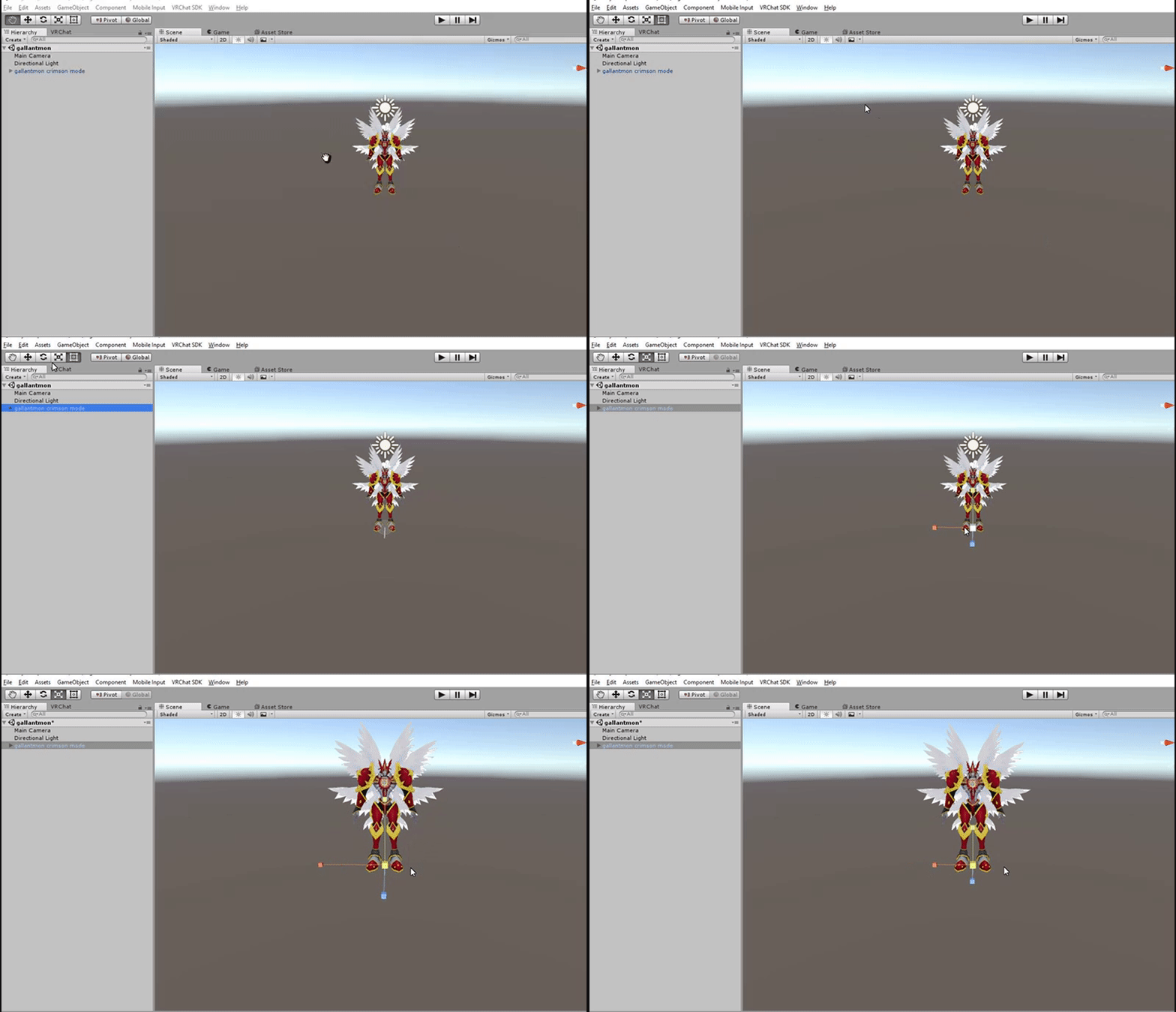


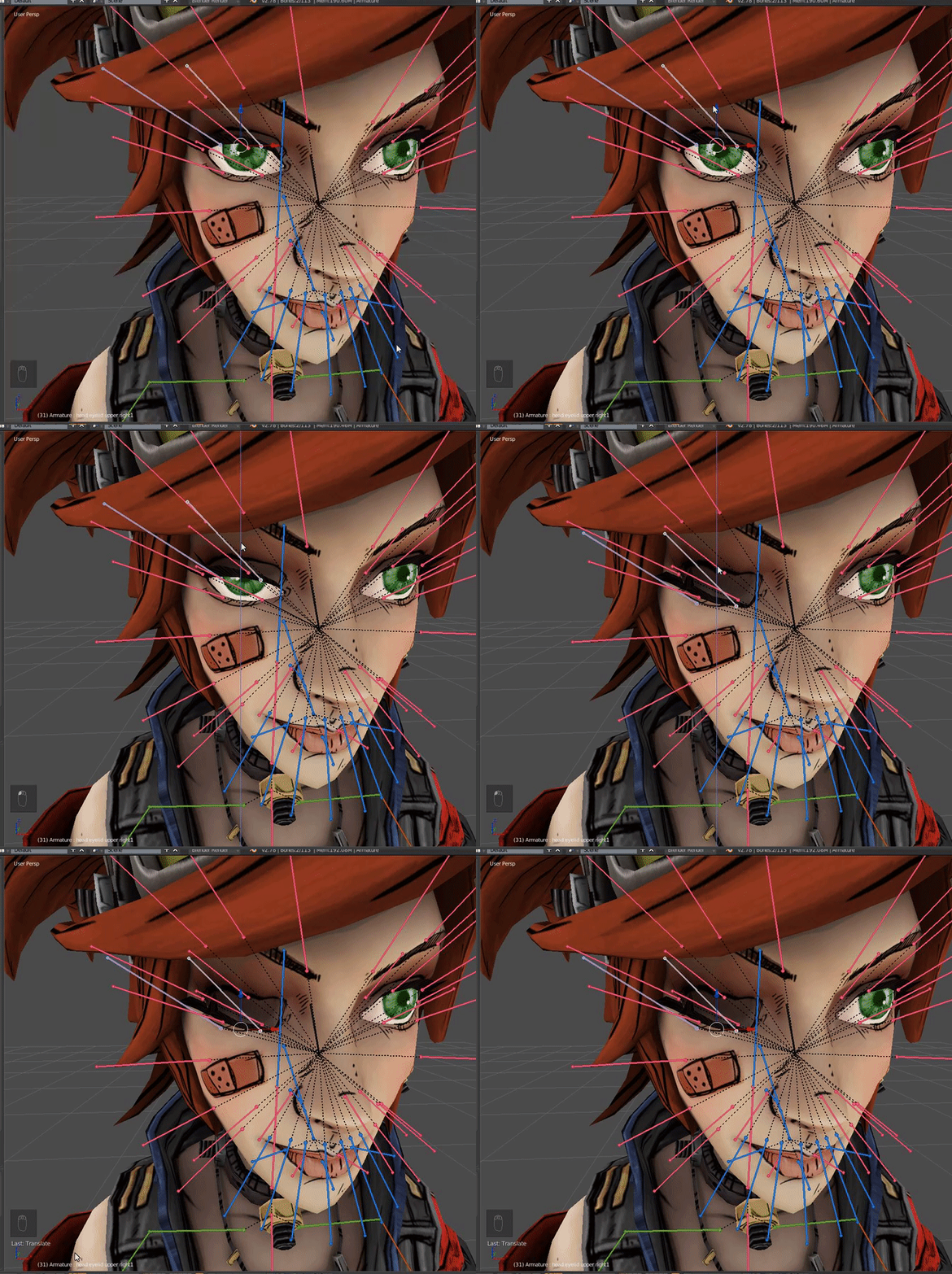
some tip from doublegoose
fading verge
I'm having a bit of trouble with bone hierarchys , is there any way to force something to be the first child of a parent?
fading verge
Readjust how tho D: like the heiarchy, moving something, unity rig, ssldhsh
fleet echo
@fading verge in blender basic just adjust size of the bones in edit mode on armature
fading verge
That is not what i am asking
fading verge
Any help for my issue?
 fluid tendon
Oh my lord I was working on a character for like 2 hours and at the end the tutorial tells me I need to pay 20$ for something to make avatars look alive.. I'm dead now 😄
lucid orbit
Dynamic Bones? They're more like $14 right now.
fluid tendon
I don't know it doesn't matter I'll just probably use the avatars you can pick in some worlds... life is sometimes life I guess... 😄
lucid orbit
A lot of them are pretty good, yes!
lucid isle
her legs looked a lil long so i shortened em in unity
look whos not a slouch 😄
yay
prime dome
is that the only way to fix the slouch?
lucid isle
pretty much
fading verge
Can someone give me a pointer on fixing bowleggedness?
I fixed it on my other model by posing her in blender. I didn't see how that fixed it, but it did. xD
But it doesn't work here.
 north sable
do you have an idle animation set?
fading verge
I'm full on default.
north sable
hmm. try making a single frame animation and place it in idle. just pose it the way you want, hit the keyframe all button and export. you use blender?
and have you ever touched the animation side of blender
fading verge
I haven't touched the animation side. I've played with it for about a week.
north sable
ah cool cool :) you know how to add windows? like another viewport?
fading verge
The most I've done is decimating a much higher poly than a beginner ought to be touching. xD
Not really.
north sable
ahh cool cool. wont be to hard. you see that three lined arrow in the bottom right of the viewing window?
ill see if i can google a picture :)
actually heres a better example. see that cube in the bottom left. its in a Black box with an up and down arrow
fading verge
Yeah.
north sable
sorry. computer with me lol
fading verge
@north sable I would ignore them, but when trying to build+publish to vrchat it says it's not imported as a humanoid rig and will not play vrchat's animation set.
I was in VRChat with some outside eyes looking, my bad.
north sable
see the lines directly left of that cube thing? drag that and the empty space will be filled with a new window 😊
@fading verge lol huh? anything else missing in spots. i know for fact that toes are not required. none of my avatars have toe bones
fading verge
I think there's a time bar at the bottom for animations if I were guessing.
Nothing is missing short of toes, upper body, etc. >.<
north sable
yep :) but you will still need the animation window
fading verge
Alrighty.
north sable
@fading verge how many bones are in the legs? does it have weird extra bones on the legs?
fading verge
leg, knee, ankle.
north sable
https://youtu.be/EcInAv9iHmU @fading verge this will show you the controls of the animation in blender :)
Visit my Blender 2.7 Tutorial Series playlist for more Blender Tutorials: https://www.youtube.com/playlist?list=PLda3VoSoc_TR7X7wfblBGiRz-bvhKpGkS Thanks for...
@fading verge and i presume no toe bone?
fading verge
none
north sable
what about the arms?
north sable
huh.... odd? any switched fingers or oddity in the head :)
fading verge
Is standard fps for VR 90?
north sable
yep
fading verge
So should the animation be 90 frames?
fading verge
And if I set the idle animation will it remove turning animations?
Or disable head rotation?
Saigo, sorry I didn't say something sooner, that bowleggedness is how that character is from the game, why change it?
I know that it is her mesh, but Toobs doesn't stand that way in the game.
north sable
nope
fading verge
I want to have her in a more natural pose.
north sable
it wont disable ik scripts
fading verge
Short of when she's in action, that pose is everything you see on her.
all the artwork, sc's, etc.
She looks like she's straddling something just standing in place. She has a bit more elegance in her posture when she's just standing.
north sable
its posible he is talking about the legs dislocating when he stops moving. ive had that issue before
fading verge
Here, I'll get another Screeny.
See how spread her legs are?
And that bowleggedness?
I guess her calves are pointing outward slightly, but literally every idle stance I can find for her short of when she's in a different outfit she's standing the same way.
north sable
you using the animation set male or female?
fading verge
Female.
I just opened Nier for reference.
Will screeny.
Have you tried adjusting the height in-game or shortening the legs? It's possible it could be the same thing as the slouching issue.
I was just thinking that.
But I don't really understand what she meant.
She's got a lean to her stance actually. Perfect for glitchy desktop ik.
xD
north sable
if you learn the animation controls in blender you can copy exacly that
just note that any bones outside the humanoid rig will always play as if it was the idle animation. if you animate the hair bones to wave, it will always play the wave animation no matter what :)
execpt for emotes
fading verge
Those controls actually seemed fairly simple. I appreciate the link @north sable .
north sable
:) one thing to keep asured, it to have an animation called [A] or [A Default]. and just have it as the tpose
 fallow saffron
Alright quick question. I got my character rigged properly and such through cats blender plugin, except when I go into the game my wrists are bent, anyone know the problem?
north sable
alphabetically unity likes using the top aniamtion as the import pose
it can really mess up doing eye placement if you dont
@fallow saffron check the humanoid rig configure. is this model an mmd?
unity usually gets confused eith bones. it can reverse fingers, and use the wrong bones for the arms
fallow saffron
I mean the model is an mmd yes
north sable
you probably have extra arm bones
fading verge
So it requires a T pose for import. Gotcha. I may need to watch a Tupper video or something for applying animations to avatars in Unity, but I'm on the right track, I think.
north sable
you want to just go through and check everything twice :) best thing to do is use the IK bones. the ones at the most top
best process is to check the bones by using the eotate tool before you assign a bone
fading verge
What is that abbreviation for btw? I get the general idea, but I'm curious now.
north sable
the rotate tool is fone at the top left with like 4 different other tab options :)
fallow saffron
wish I knew what all of that meant lol
fading verge
"IK"
north sable
@fading verge what abbreviation?
Inverse kinematics
its some weird name
basically it uses maths or something to find the position based on restrictions. all i know is it works
@fallow saffron Humanoid rig configure means that menu with the green man in it :) you can click bones you see to highlight them in the heiracy on the left window, one with all them drop downs and the arrows n names
you and to just play around, clicking a bunch of the names and using the roations tool to find out what youve clicked
fallow saffron
yeah everything seems right in there
north sable
when you found what sounds and looks right. drag that selected name on the green man where it makes sense
fallow saffron
only thing that looks odd is the shoulder bones
north sable
shouldet bones, you want to use the ones DIRECTLY in the drop down of the chest. usually its the top most name that rotates the whole arm
unity wont care what its called, all long as its the highest bone on the list (that makes sense as a human would work)
fallow saffron
everything in unity looks correct, no extra bones, but when I get into vrchat my arms at the elbows are permanently bent
north sable
btw, dont be scared of clicking the arrows. its like alot of dropdown menus. closing them helos you understand how it works :)
can you screenshot that heiracy for me plz :)
 steel sphinx
@fallow saffron Hm. Gots a screen shot?
fallow saffron
oh
I figured it out!
apparently the wrist was the parent of chest
figured it out by making my own bones
thats why it was causing them to be bent
steel sphinx
Mmmmm.
fallow saffron
i'll show you
steel sphinx
I believe you! 😃
fallow saffron
I wonder if it was the plugin that caused it?
north sable
nah, ususally thats either exporting, importing mmds or just unity not understanding
actually wait. importing WOULD be the plugins fault ey
fallow saffron
nevermind that actually wasnt the issue
am very confused now
there are some weird bones everywhere though that I'm just gonna delete and see what happens
fleet echo
dkont dlelete
fallow saffron
hm, its a problem with both arms but everything seems correct in unity
the mmd model isnt in an exact t pose in blender, is that an issue?
north sable
you want to do whag i said before :) in the green man menu in unity, (humanoid configure) you want to run through the bones, checking them, then draging any correct bones into the positions on the green man
nope not yet
you can enfore t pose after you make sure everything is assigned propperly :)
north sable
oh cool :) easy model rig
fallow saffron
and dont do the optional bones?
north sable
you dont have any lol. you have a sweet rig there for vrchat
fallow saffron
but its broke ;x;