#animation
1 messages · Page 125 of 1
 clear yew
 urban oasis
is there a way to screenshare so you can point me to the right direction
i have actually zero clue on what you mean
clear yew
We can call I guess. I'd rather do this in the chat though.
urban oasis
for me the chat is less helpful because i cannot tell where what is with just text
but if its not comftorable with you i guess i can keep going in chat
clear yew
If it'll help it's fine
clear yew
Go ahead and start
urban oasis
ok wait
 vast fern
Turns out I was wrong, again. I don't know how to get the on-release trigger to work. Well, kinda. I'm able to get the animator to re-trigger the animation by doing the appropriate gesture, setting the animator to it's default state, but the animation still plays on runtime.
Taking a look at the animator, it looks like it starts going into stop_behavior as soon as the prefab is in runtime. Even in a brand new project with nothing but the unity package in there, it does this same thing, which as far as I can tell means the animation will play on runtime each bit. Is there any way to prevent that? Or am I misunderstanding how the prefab works? @proper hedge
 proper hedge
Make sure you haven't edited any of the default files, or the default state of the objects. The output object should be off by default, and that prevents the first run. if you want this under a combo gesture, you need another animator to disable output, since the combo gesture necessarily means are you going to reset the parent, which will cause it to fire if you don't shut disable output while the parent is off
vast fern
That's the problem, I can't even get this working on a single gesture. I've made a new project with nothing but this prefab in it, and it just turns itself on after a second.
proper hedge
Output is supposed to turn itself on, but the animator on output is what the gesture starts on release
You need to know how to use an animator
The goal of the prefab is to enable the animator component on output, on release
And you use that animator to animate what you want
On child objects
vast fern
Ooh, I see. Alright. Didn't try tinkering with that I should be able to just make a new animator controller that enters into the release animation I want then?
proper hedge
Yeah but it should come with a sample output you can probably just use that
The sample output animates on a gameobject iirc
vast fern
Ah, okay, now it's starting to make more sense. Thanks for the help, I'll try to get tinkering again.
proper hedge
@vast fern i put an example prefab in the sample output folder
the gesture turns off the animator component on "onrelease_trigger" by animating behavior.enabled 0. This will cause the animator to start over when the gesture is released and behavior.enabled 0 returns to default 1
this lets the start_behavior clip play, which is a clip that animates behavior.enabled 1 on the child animator(output)
for 30 frames
then stop_behavior plays, which animates behavior.enabled 0 on the child animator, stopping it. the animator rests at the stop_behavior state until it's reset again with the gesture
the first run through is skipped because output is disabled, so the animator component will not play anything when start behavior is animating it on
while start behavior is playing, that means output animator is enabled for 30 frames, and you have a 30 frame budget for that animator
you can use that animator to simply animate constant values on or off, or you can use it start other animators which do not have a fixed length
the example prefab i added to the sample folder just has the sample output already set up with the child gameobject to animate. the gameobject will shut itself off using a particle system so you can do it again with animating the gameobject back off some other way
vast fern
So, I tried to read through this and understand it as best I can, but I think I'm still missing something. So, I guess I'll have to detail my process.
I started off with the handgun emote to trigger the first phase of the animation. The animation file looks like this.
http://prntscr.com/s8vo90
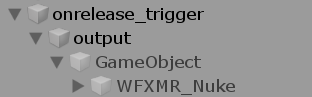
Using your new prefab, I've set up my hierarcy like this: http://prntscr.com/s8vpbh
For reference, WXFMR_Nuke is the second phase of the animation that just plays a particle system on awakening. It is set to On.
I press the play button, and using the gesture manager, I turn the Handgun emote on, and the phase 1 particles show, I turn the handgun emote off, and the particles all disappear and nothing plays. Looking at the hierarchy as I toggle the checkbox shows that the game object attacted to the prefab that is the parent to WFXMR_Nuke never turns on.

 proper hedge
 serene vale
How would i use an animator to make a second arm mimic the main arm? been playing around with it for a while and cant figure it out
proper hedge
you would use constraints
clear yew
Previously we would use a rigid body and joint system.
But as of unity 2018 we now can use the constraint system
serene vale
and how would i go about doing that?
vast fern
Huh. Thanks for the video. I swear that's the way I did it, but I guess following it along just idiot proofed it for me. Thanks
serene vale
oo, think i got it
am i right in thinking i really just need a rotation constraint if i want to keep the arm where it is and just have it movee like the main arm?
clear yew

just a simple animation
made all particles
 coarse bridge
Could someone help with something, i made this avatar and i want to add a dance with sound to it but without having to make a duplicate avatar inside the avatar, how should i do it?
clear yew
Put the dance on an emote slot then not a gesture
coarse bridge
But what if i want the sound too?
clear yew
Add a sound file, in the animation enable it and play on awake
coarse bridge
Tysm!
 left gazelle
yo i got broken vismemes and i don't know how to fix it, for some reason parts of the (insert correct bone here, either chest or breast bones) are being connected into (all of?) the vismemes. i tried restricting it by vertex groups but while it looks good in blender, it still breaks in game
@clear yew the thing you said to kenji, thanks
clear yew
Select the vertices that shouldn’t be moving, open the search menu and search shape propagate
Hm?
left gazelle
you just taught me how to attach sound to emotes
easily
thank, f3 for search right?
ok, i did the thing
they are selected and i searched for the boio
now vhat?
clear yew
Boio?
left gazelle
equivilent of " thingy"
sorry, i have a very heavy meme accent
or is it dialect
?
idk
i think it may have worked
it seems to be less broken, thanks @clear yew
clear yew
You might have to do that to all the broke shape keys
left gazelle
problem is that that is most of them, also there are a lot that i think aren't being used but they are ahrd to pick out
also they are named weird
thanks either way, you have shared some of your wisdom
vast fern
In the particle sub-emitter menu, is it at all possible to make a sound effect play, or to turn a game object on or off? For example, if you wanted to make a bullet make a collision sound after the particle dies.
Dunno if this question belongs here or somewhere else
clear yew
not sure if it works with sound but you can activate objects
https://youtu.be/UOzLfrZYnSM
https://www.youtube.com/watch?v=Y6FpX4blik8
proper hedge
You can use it for sounds yes
coarse bridge
How do i create random eye or ear animation for when i'm on desktop?
 lime slate
i got a question, is there maybe anyone who can help me make clone animation that you can use multiple times and which only stops when the animation is done
 autumn haven
clear yew
autumn haven
clear yew
With all due respect, I hope you don't use that very often
autumn haven
Made the animation for my friends avatar he just uses in private worlds
Not meant to mess with people's screens ^w^
clear yew
why would an animation rotate an object globally instead of locally?
it usually does local rotation but my animation clip seems to be stuck on the pivot's global rotation
 deft sable
Hello,
Maybe someone have a free alternative to the unit package "tail animator" to animate tentacles please ? 😁
 ionic iron
hey i was wondering if anyone could link us a video or guide on the inventory system? id like to be able to spawn objects etc thanks in advance
autumn haven
Create a spawn animation
@clear yew Have you looked at the simulation space in the inspector?
clear yew
do non particles have simulation space?
autumn haven
What do you use to animate?
coarse bridge
I made a blinking animation and put it in an animator controller for my Body mesh, and when i edit the animation it works, but when i preview it just does nothing
 hard sphinx
Anyone have the caramelldansen animation or other various jpop/kpop dances?
@ or DM me
clear yew
@autumn haven i was just keyframing a world scene manually
does anyone know what specifically needs to be done to make a particle effect appear in the mirror? some of my avatars work there and some don't
hard sphinx
 fickle ginkgo
I have a question about full body and animations, I have a model that has a bell and I want the bell to do a sound when I move, my plan is to add the audio source component and activate it on all the movement animations (or atleast on all the ones I have animations for) but will that also trigger the sound when I walk with full body?
clear yew
if you use the analog stick then yeah
fickle ginkgo
ok, so it wont trigger when I move around in my play space with full body? if thats the case then that sucks DX
 stark hearth
does anyone know how to make vmd animations to work in vr-chat? with music and stuff too? and would like to join for a call? ;3;
 keen tiger
Is there any way to leverage the automation from Bitanimator on an avatar despite it not being whitelisted by VRC? I've seen recently uploaded avatars that somehow have and use bitanimator, but whenever I try to upload my avatar with it, I get an error about it stating that it will be removed by the client
 cold pulsar
What does bitanimator even do?
keen tiger
So, it's an expansion of the animator in unity so instead of having to use keyframes, you can sync certain elements of your avatar to the beat for example and it does it all automagically.
It's really kind of a godsend for automation
so you don't have to spend countless hours keyframing.
cold pulsar
How I've done audio reactive things is make a script that does the changes, then another script catches those changes and writes it to the default unity animation
keen tiger
That's actually not half bad of an idea and I guess would accomplish the same thing I'm trying to do. I'm just beyond understanding how other people are getting their AV's to upload with bitanimator.
cold pulsar
They probably arnt, why do you think they are?
keen tiger
I spoke with a content creator in world who told me that there's a "Trick" to getting it to affix and upload with your avatar and then he demonstrated one of his av's that is using it.
He said something referencing parenting of the audio object
but, I'm not sure how that applies.
Anyhow, it looks like I might need to find an alternate means for this.
cold pulsar
Well it depends on how this component works, you cant have it be a child of your avatar as then the SDK deletes it
Does it still work outside the avatar?
keen tiger
That's a good question... I guess I could try to move the object outside of the avatar class and see what that does.
GitHub
Audiovisualizer and animation recorder script for Unity - Leviant/BitAnimator
in the event you were curious.
cold pulsar
All the SDK sees is the non white listed script. So if you can have it outside the avatar reaching in then that might work. I honestly dont see how to get around it besides that or baking to keyframes
cold pulsar
Id look into it more but I have finals tomorrow. Good luck
keen tiger
Good luck on your finals!
cold pulsar
Do let me know if you get it working as it may be better than my home baked solution
keen tiger
Just following up, evidently once this script records the keyframes for you, removing it won't remove the keyframes it's recording, so it has no negative affect on the avatar.
So, the solution is to simply remove it pre-upload
left gazelle
yo, i am trying to use a finger trail as a pen and i got the emotes setup to control it, but when i use them, there is a 7 second delay between me emoting and it stopping emitting
same with when i try to disable to finger trail to clear it
7 second delay
yes i am a newb at this
cold pulsar
Does it go all slowmo?
left gazelle
the trail? no
cold pulsar
Nah the fingers
cold pulsar
Ah, are your animations only on 0.00 and 0.01 keyframes?
cold pulsar
No if its longer than that you experience the slowmo stop which was what I was hinting at
if they are that short that is correct
You said emotes tho, are you using emote toggle props or just gestures
cold pulsar
Should work but who knows
left gazelle
🤷
solid maybe
the annoying thing is that it is working as intended minus the delay
cold pulsar
Well the delay is usually caused by having the animation be too long for a gesture. IIRC when you only have one keyframe it mimics that
left gazelle
it fixed it, thanks @cold pulsar
cold pulsar
Great!
coarse bridge
Can anyone help me please, i want to make a blinking animation for my character which plays normally
And i have setup the animation on the Body mesh and the animation does make a blink and stuff in the editor
But when ever i play or preview, the animation just gets removed from the controller?
left gazelle
now i need to figure out how to make it erase
clear yew
Why not just use the standard blinking animation for VRChat? It's not hard to set up, just takes 4 shape keys in the first four shape key slots
 young hearth
does anyone know why audio keeps on overlapping over each other in gestures? well this is of course through animation so
for example a dance gesture with music
nvm fixed it
 wicked trench
When i use a gesture to play for example dance animation, is it possible to make the second game object that is activating the animation continue playing animation while also enabling the main avatar to move independently of it without stopping the animation? Do i need to add rigid bodies to the one that is animating or something?
 sharp tartan
i have a NPC that should be walking around in my world but my animation sets him to the 0,0 point
clear yew
You can use parent constraints with no targets now to leave it in place iirc
sharp tartan
dang i cant get it working
 forest herald
Is it possible to trigger a katana with a right hand gesture out of a sword sheath that is triggered through a gesture of the left hand with only one animation? In the left hand gesture will be the katana in the sword sheath. And i want to trigger the katana into my right hand with another gesture while the katana in the sword sheath disappears. I don't know if these gestures have to be in one animation in order to work. I'm really new to animations and gestures.
clear yew
You can use a two tier animation system using parent-children behaviour
Some people call them double gestures
forest herald
Thanks i hope there is a good tutorial for that
forest herald
Well i didn't find much about double gestures and two tier animation systems using parent-children behaviour. If you know where i can get some useful information please be sure to tell me.
 odd latch
it's layered activation
ObjectA
ObjectB
both are disabled
GestureA enables ObjectA
GestureB enables ObjectB
to enable ObjectB, you must also be enabling ObjectA by doing GestureA
for example, GestureA activates the sheathe, the katana is inside
Gesture B puts the katana in your right hand
you can't use Gesture B without using Gesture A first
it's not just one animation, it's two animations at minimum
learn how to animate/activate props first, you'll understand double gestures more easily
proper hedge
@clear yew no targets won't work, you need to use exact weight values
@forest herald https://www.youtube.com/watch?v=yBwD15IiDDU this was made in 2017.4 but it's the same

helping someone on discord do a combo gesture
here are some things i used:
hand animations:
https://github.com/oofdesu/lin-unity-packages/blob/master/mixamo_gestures.unitypackage
gesture manager for testing:
https://vrcmods.com/item/4582
 sage vector
I'm trying to make a long animation (a 50 second animation) on a model for vrchat but everytime when I play the animation in game and then change hand gesture, it doesn't stop the animation, it just keeps on playing. Any fix to this?
proper hedge
Gestures cannot be longer than a starting keyframe at 0:00 and ending keyframe at 0:01, and the keyframe values should be the same, constant
If you need to animate with a clip that has length using a gesture, you need to use the animator component
clear yew
what do you do when your animator stuff goes off into the infinite grid off screen?
 muted prairie
@clear yew Press F
clear yew
i see it refocusing my grid but it remains blank, and i would think that i accidentally deleted it all but all my animators are this way now
muted prairie
Did you click on the other layers ?
muted prairie
In that case i have no clue, never heard of animators emptying themselves like that before
 old basin
is there a new pack of default hand gestures or something? Trying to use one from a 2018 guide but when i drag them to my avatar it doesn't actually pose it at all.
 jade sparrow
?
old basin
nvm for some reason the thumbs up gesture from the pack isn't working but the hand open one is.
double nvm. For some reason some of them have "loop time" checked off and that seems to be what's making them not work. Thumbs up, rock and roll, and victory have it but HandOpen, HandGun, Fist and seem to work.
jade sparrow
huh?
@old basin you need loop time off on gestures
Gestures are 2 frames, and loop time off
old basin
yeah figured since it seems to work. Idk why half of them defaulted on for me
 odd tendon
how would I be able to add the animation you get when crouching with C?
jade sparrow
@odd tendon so you want to have a custom crouching animation?
You need to place the animation in the "CROUCHIDLE" Slot in the "CustomOverrideEmpty" (Make a duplicate) included with the vrc sdk. Then place it in the "Custom Standing Anims" and the "Custom Sitting Anims" in your VRC_Avatar Descriptor
odd tendon
oh ok
clear yew
Pretty sure it should be proneidle, not crouchidle. Crouch and standing use the IK
odd tendon
isn't proning when you press z or no
clear yew
Prone is Z yes. Avatars with sitting animations and crawling animations replace proneidle and pronefwd.
clear yew
If the animation override controller is in your avatar descriptor then yeah. You could try it with the crouchidle I guess but I don't know if it'll work
odd tendon
alright guess I'll try it and see how it goes
yeah animations didn't work I'm guessing I did something wrong
was I supposed to set the controller to this?
clear yew
No, the root animator controller gets replaced by the animation controller you put in the avatar descriptor. There's no need to put one there unless you're testing animations
odd tendon
oh ok then what's the problem then
cause the crouch or prone animations aren't working
clear yew
I'm not sure without taking a good look at it myself
If you pick up the gesture manager you can test the animation and see if it works, and that can help narrow things down a little bit
clear yew
anyone know why animations "break" when I upload them to vrchat? Like they look fine in Unity but as soon as they are in VRChat, the positions are all weird
Are you animating muscle groups meant for the armature rig?
Hold on, Im capturing gifs of what it looks like

https://gyazo.com/242a77451baf38bb24da9bf3f5fc9da3 and in vrchat
its specifically the arm thats messed up
even its default pose is now incorrect
Are you animating the root model or a copy of the model with an idle animation
im animating a copy that just has the needed objects and animation
Hm, so what is wrong that breaks?
if you look at the top on the first gif, that is the external robot arm that is supposed to do two things
first state is that it uses parent constraints and follows my left arm with rotation and all, and it works fine except for right now. the second state is when i disable its constraints and let it hover like that, "carrying" the third speaker
but what happens is that the arm rotates and positions itself away from the speaker in-game as well as having a weird default pose. it should just align with my normal arm but instead it rotates 90 degrees and just goes out almost fully straight, with some minor finger movement here and there
How are you hiding the root model? Just disabling the body mesh yeah?
yeah i disable the whole object, ill screenshot
thats the original one and the other is the experimental one that i use for animations
I think there's a bit of a disconnect in what I said and what you thought I said.
how i understood it was that you asked how i hide the root model for when i try to animate.
ill reupload it, maybe i accidentally uploaded the wrong one out of the two
I was asking how you hide the model when you play your animation, which was why I mentioned the method of disabling the body mesh, not your animation testing model in the scene.
not too sure what you mean. are you referring to the whole model or strictly the external arm?
When you spawn the dancing model, do you do anything to the root model
I mean, what I do is that I just put the animations into the custom overrider and let the root model be as is, so that the animations play on it when triggered in-game
So I dont necessarily spawn any new models
So the dance animation is on an emote and not a gesture because you're not spawning/unhiding a model that has the dance animation as an idle on it?
One thing Im curious about is that it doesnt seem to include these other two gameObjects, rather it goes straight to uploading the model only with all its childs
Yeah exactly, it is on an emote
So reason why I have that "freezer" object to begin with is to make the speakers and the external arm not move with the player model, instead they will just stay static while it carries out the animation
by using parent constraints that lock on to it when the animation begins
Huh
the highlighted model in the scene is the main model while the "Freezer" object that is right above it is just meant to be a parent for the arm and the speakers when an animation is played.
Does it not have a Body mesh then? Or is Freezer what Body is renamed to
Freezer is purely a gameobject, it doesn't have anything.
Huh, I'm trying to wrap my head around this setup, things aren't where they usually are
So is FLCL group a root avatar or is it a game object that contains your avatar and its children?
Well, to explain it from the beginning. I had imported mixamo animations that I wanted to use on my character. Issue back then was that when animations played, the speakers as well as the external arm would spin around with my character. So to prevent that, I made a gameObject(Freezer) to constrain them to it while the animation was carried out.
FLCL group is the latter
A game object that contains your avatar and its children. That seems like a very error ridden way to go about it, where is your avatar descriptor placed? FLCL Group or FoolyCooly?
On FoolyCooly, and honestly, if I knew any other way of doing this, I would definitely go about it differently
I have no idea if that actually works or not, it sounds like it shouldn't work at all and that you shouldn't be able to upload an avatar like that. Or at the least you'd get just the avatar but not the parent that came with it. It could be that speakers aren't moving because they're pointing towards nothing, just empties.
haha no no, the speakers are supposed to be static, what Im trying to prevent is this https://gyazo.com/85774d561737caea78aada9160ea85bd

Yeah, like rigid bodies with no fixed joint they stay in place. I've been told constraints can do the same thing. That's what I'm saying.
they do? well that would make things a ton easier, but with the constraints ive got right now, i get the same result as in the gif
in fact, those are just constraints without a parent attached to them
Yeah, that might be what's making them work and not move is what I'm saying.
Which is an interesting thing to consider.
So should I just try to rip it out of FLCL group and use rigid bodies instead? without fixed joints that is
I'm not sure, if the setup seems to be working it seems to be working. Don't change something that isn't broken and all that.
yeah sure, i mean the only broken part is the default stance of the external arm as well as the moving speakers during an animation
Ill try out rigidbodies, ill make a back up real quick
You could have the arm's rest pose be what you want the default stance to be. I don't know what good could come out of controlling the arm part though
no no, the arm part works completely fine when in resting, or well, did. it was only until i added animations that it got weird. its moreso just a lil cool thing that i can use in a default position
ill try to fix and show you what i mean
this is its "default mode"
clear yew
seems like rigidbodies dont stop it
uh okay so now it works, but just for one of the animations
this is very odd but ill experiment further
clear yew
I think you need to freeze the axis on the rigid bodies so they can't move. I don't recall, it's been a while since I touched them
yeah no dw, just had to get clean animations again and they stopped moving. ill have to come up with some way of turning on and off rigidbodies for that arm since there is no easy way from what ive seen so far, so just the speakers themselves will have to do
oh well thanks man! appreciate the help and all
No problem, it was interesting learning about your setup
haha glad to hear. yeah no it was a mess but at least i learnt a lot
one last question, is it possible to loop emotes or do i have to use gestures?
You can turn on looping in the animation but it most likely won't loop depending on the emote, depends on how you set it up. You can artificially loop by copying and pasting key frames though
ah I see. I wanted to keep the animation going until i manually walked around and turned it off but
guess Ill just have to settle on gestures
 sinful wind
Anyone know the list of default hand gestures ? I forgot 😦
And / or if they got a website where I can find other custom hand gestures.
clear yew
you mean just the names or the animation files?
of the default ones that is
You can try these, I've had them for a long time
clear yew
yeah i use that one
Does anyone know of a way to create an animation controller that can be used to create and animation that will toggle the Body mesh of an avatar and also toggle an object parented to the head? This isn't a Toggle im trying to make because that would be super easy, im trying to make an object with a 30 second keyframed animation control the separated parts of the model.
(the idea is to make an animation that starts with the body turned on and an object on the head toggled and animated, then after a few seconds the body turns off to make the model "invisible")
The issue is with object parenting and having the object with the controller turned off (hiding all parented things) until it is toggled on
Why not had something on the root of the avatar with a constraint that pairs it with the head so it stays on the head. That way it doesn't get hidden.
I don't know of any real way to mess with the body mesh outside of the root animator though, normally I think people make their intro animations with a shader that cuts out the base model and then material switches into something nonintrusive when it's time to have the real model show up.
Oki, I am going to say this before I get into the whole reply part of what I'm about to type.
I really REALLY appreciate your response to my question because almost every single person I have asked has been unable to even come up with something to help (even those who has made what I am trying to do themselves) so I am super happy that you tried to help...
but...
In the first sentence of that there is an issue. Constraints. In the year I've been playing and the 9 or so months I've been in Unity making models, not once has there ever been an SDK I've been able to get my hands on (official or not) that will allow me to upload a model with either constraints of any form (rot, pos, whatever) or rigid bodies on the model. I still don't understand why I seem to be the only person with this issue but it sadly is going to make that a big... won't work for me if I tried situation.
I am not NOT NOT saying what you said may not work for others, or is even a bad idea at all.... it's just that I would be unable to upload the model at all if I tried that. I really don't know what's going on with my system and SDKs. I can't even get the new VRCSDK2 Because it won't allow me to upload anything at all so I guess I have no work arounds for this. UGH
also wow I am sorry that was a lot longer than I wanted it to be I am just getting a lil stressed out by these sorts of things that happen to be me specific
If there is a way that consists of things that will allow me to upload the model than I will gladly try it... oh and also custom scripts don't work either
Constraints were only recently added to the new 2018 update which might be why they didn't work for you earlier. I have recognized that there seems to be a problem with the newest SDK for some people to be unable to upload. Custom scripts never worked for VRChat avatars at all
scripts and constraints seem to make sense to some people when I can't upload them but every person I have asked gets confused when I can't upload rigid bodies
cause apparently they are very useful and needed for things like particle systems for gun firing and stuff (also things I'm having a lot of trouble with)
Huh, that's a little odd
They're set up properly yeah? A rigid body and a joint that it connects to
if a rigid body component is on the model
no upload
parenting and stuff doesnt matter
It doesn't upload?
it prevents it
greyed out with the big stop sign error boi
What error?
like when a quest model has an unsupported shader
its more than a you shouldn't have this so it will be very poor on upload, its a REMOVE THIS TO UPLOADD
Are you on the PC platform or Android platform? That could be a factor if it's an error like that.
Pc
always
Can you show me the error?
lemme open unity
ok to make sure its not some parenting issue and im placing a rigid body in a way that would normally work, where should I add the component
this is just a test so whatever works is fine
ya know
imma just get my friend to get my the newest sdk prior to the SDK2 stuff and try to get the particle stuff working with rigid body
if it doesnt work it doesnt, if it does.... I GET TO ANNOY MY FRIENDS YAY
Just to check, what unity version are you working in? I ask everybody this question
2018.4.20f1
Yep, that's right. Interesting
aight got the sdk
so.. do you know how to fix particle systems set to world simulation space just getting stuck on the floor in game
a lot of people told me the fix was with rigid bodies but never told me how
its a gun fire system. functions like one is actually a big lazer but still
If you aren't using fullbody then the IK-Follower works in the same way as a rigid body and is less performance heavy.
But otherwise it's just a system of using a rigid body and joint system. I haven't used them myself in ages so I wouldn't know exactly what needed to be a rigid body and what needed to be a joint
hecc. im getting fullbody so it will be used on the model in the future but hmm
we need more people and by that imma annoy my friend in dms for a bit then test
ah yes, after getting messages about things all day no one replies
so, like a gud friend imma hop on and ask them myself : P
proper hedge
you should not be using ik follower anymore, and don't use joints for things that don't require physics
use constraints
dont put things inside your armature
wicked trench
How can i have custom emote animation playing while also allowing my avatar to move around without stopping the emote?
proper hedge
Have the emote start an animator
this emote starts an animator, but you need to implement what you want
clear yew
or for the lazy people like me, take the emote animation, clone your avatar and put a controller with the animation onto the clone, then put the clone on your avatar. Now in a gesture just turn off the body mesh of the main model and turn on the clone. thats about it
 dapper blaze
tried to create a custom sitting animation. I will start to move up. Both keys in the idle are the same (sets)
urban oasis
i wanna ask does anyone know how i can loop emotes? the actual button for it doesnt actually loop it
 timid flame
Could someone teach me the basics of animation?
urban oasis
like actual animation or just apply an emote to your avatar
timid flame
Animation.. I'm trying to make a version of one of my friends Avatars but he won't help me out.
I just want an object to go to hand and play a sound effect.
urban oasis
well thats far out of my league but does he not give you like any hint or smth?
timid flame
Nope.
urban oasis
well then im sorry i cant help you with that
timid flame
:(
urban oasis
hopefully someone else picks up your question tho
timid flame
Thanks anyways ^v^
urban oasis
this pandadara might be helpful, i mean he helped me with shiftkey animations (even tho i forgot already) maybe he can help
timid flame
How do I add a soun effect?
urban oasis
im not sure how far you are into it rn BUT i can say you gotta make a duplicate of your avatar then after that click on the duplicate, click on window and go to animation and click the first option, then you gotta scroll all the way down, add a proportion (the song). it would be wise putting it in the duplicate and then after adding (you gotta click the plus) and hit the checkmark then it should work for the audio to emote
urban oasis
im pretty sure you can but idk how to have it activated it
urban oasis
i guess you could just google it but im also not sure of it. all i know is emote to audio not solely audio
timid flame
Okay.
I'm trying to get my purple trusted
But it's not working :(
You'd think 800 hours, 400 friends, and a bunch of uploads would give me it
 fallow latch
easiest would be to have model with sound source on disabled by default and have a gesture enable the "gameobject" that have the model and sound in it and have a keyframe that enables it while pressed down "handgun,fingergun etc"
timid flame
@fallow latch that's how I have it
fallow latch
have u tried to have an empty gameobject as parent for the "bat" where the bat is always enabled but the gameobject before "parent" is disabled until enabled by emote?
timid flame
I think I got it to work
I just copied the bat animation and added the sound source to it @fallow latch
Probably not the right way to do it, but it's my way
fallow latch
if it works it works 
 near tide
For anyone looking to add animations to their costom avatars in a hurry, I'd recommend Mixamo. It's a free site where you can upload your avatars and choose from hundreds of different animations to add to them. Good luck!
 halcyon bramble
For particle animations, do you need to have the particle somewhere in the original model before duplicating the model and activating it's particle?
 covert patio
Its technically not necessary if you follow the same hierarchy and naming as the duplicate, but for ease and to lower the chance of accidentally messing it up, its better to put it on the og model, then duplicate it to animate it
 harsh blaze
Yeah regarding particles, you want to put the emitter on the bone structure, ideally towards where you want it to play, easily to manage and more dynamic feeling in-game. and then You can just flick it on or off in the animator by targetting it.
Either can have it as the 1 frame on trick when holding a gesture, or you could shove it in a toggle emote, that just holds it on or off.
I've got an animated mob i'm testing that plays various particle effects during certain animations, ideas to use them as a basis for combat damage on colision.
 unkempt perch
I have an avatar that was converted to a humanoid rig, I created a humanoid animation and I copy pasted the generic transforms into it. It works. The problem I am having is that it doesn't seem to cut that animation and transition into the next animation which also uses those generic transforms. Any ideas why?
timid flame
How can I do an audio emote that you can still move?
 delicate coyote
How do I add a sound to an emote animation?
fallow latch
make an gameobject name it w/e add sound and disable it and make it so the animation enables it
 civic magnet
Hey, everyone. Could someone help with animating custom shader's value? When I try to change it just returns to the first value. Any tips?
Like this
clear yew
How would you go about looping only certain part of an animation? Say i want to have an animation that plays something appearing once, but then looping an idle animation for the thing that appeared? For example, when the gesture is performed, the gun appears, cocks, and goes into a looping animation of it just, existing. whenever i attempt this it usually loops the cocking animation over and over again.
cold pulsar
You would have the animator have 2 nodes, the first is the cocking which transitions into the second node which loops it's animation
timid flame
Anyone have a Glock holding animation that I could have?
 tired mist
the spaitializermixer is missing for some reason i had it before and its somehow disappeared anyone got the files for it? cause the audio wont play on the animation if its not there
 zinc sparrow
Kind of specific but does anyone have a DJ/turntable animation? or something similar that looks like equipment is being worked on
delicate coyote
Name it w/e?
Oh...whatever. I thought that was a naming string convention, I don't know how nitpicky the VRC SDK can be on these things.
 autumn yew
I have a blinking animator in the body of my avatar. My gestures have animator behavior disabled. Everything works fine unless I move. When my avatar moves, the idle animation in the body stops until I use a gesture to disable then reenable the animator again. The animation would stop every time I move. Rotating while remaining in the same spot does not seem to cause this issue. Any ideas what may be causing this?
civic magnet
Hey, everyone. Could someone help with animating custom shader's value? When I try to change it just returns to the first value. Any tips?
@civic magnet Any hints, anyone?
 half marlin
I'm having an issue of turning on an objects animator on by gesture
serene vale
Have an gesture animation that isnt quite working right, its used to scale up part of the model but when the gesture is made it flickers between the initial scale and the one in teh animation, how do i stop this?
nvm, fixed it
3am brain = no good
 ancient fiber
Does using visemes on a body skinned mesh renderer as the face mesh, will this work? Or do I need to have 2 meshes one for body and one for facial animations.
clear yew
Anyone know where I can find some free solider running (with gun) animation? I looked around but found nothing.
 next linden
looking for a free tool to uses my vr headset and full body as mocap
 analog onyx
Having some trouble animating in Unity.
Appears I can't animate any bones that have been set in the avatar definition. Bones not set in the avatar definition can be animated.
analog onyx
Get this error when I try to animate the rig with the animator definition out and then back in again
clear yew
you can't animate the bone used in the humanoid rig
analog onyx
I've been able to fine in the past when creating finger animations for gestures, so I have no idea why it's not letting me do it now.
 odd coral
is there a way to make a animation play only once until the gesture is done? I'm pretty sure there's not but any kind of way would be useful.
proper hedge
yes there is, what are you trying to do?
odd coral
Some kind of animations with items. For ex. Something falling on your head. Cause if it just repeats it kind of looks bad.
odd coral
@proper hedge I don't intend to do any bad or harmful things.
odd coral
Can I get the method please and thank you?
clear yew
@odd coral click the animation file and change it off of loop
ancient fiber
Is there a way to set how fast the animator plays frames, it’s like it turned my seconds to milliseconds with how fast it plays
Speed is set to 1 and there is no multiplier in the controller
I’ve also tried using an empty game object and new animation controller to see if that helps, but it still plays just as fast, if say it’s playing at about x4 speed
 safe osprey
I'm making custom run/walk animations and i just noticed that the override controller doesn't have a StrafeLT clip slot so im just wondering how vrchat handles that
autumn haven
 latent pulsar
i recall someone saying that it was possible to have a gesture that plays an entry animation once, then loops another, and someone answering that it was doable with nodes
is there a tutorial for that sort of thing somewhere, and can you also do exit animations?
 green yoke
i cant find out how to make specific meshes appear on the particle system, heres what happens when i put it on
https://gyazo.com/e0f178e9c0c6d8115bf6e8eefbd73adf
is there a specific way i need to export or make a mesh in blender so that its visible??
or something i just need to fix in unity (was told to ask this here)
proper hedge
Check console to make sure there are no related errors
Your mesh might use a submesh and not be usable as a mesh particle
green yoke
yep, heres the error https://gyazo.com/2f91c8e987f9909907bc212a95226163

how do i fix that?
latent pulsar
any good tutorials for making a generic avatar with animations?
placing an animation override over the avatar did... absolutely nothing.
am i supposed to be using some other method?
latent pulsar
...i think i might have to do them all from scratch, if push comes to shove, seeing as i can’t get them to preview right and they’ve been imported via FBX
hmmm
but i’ve seen models that do the same as i’m trying to do?
 torn pawn
@green yoke be sure that mesh is merged and is using 1 material
civic magnet
Hey, everyone. Could someone help with animating custom shader's value? When I try to change it just returns to the first value. Any tips?
 stray shell
Can someone please help me ? I'm adding music to my animation and I don't know the best settings for Audio. I want it to play for people near me ONLY and not the full map
vast fern
Hey, I'm having problems setting my mesh up to animate. I wanna create a simple animation of the door opening and closing so I can use a trigger to advance the animator and disable the collider. However, I cannot figure out how to get the door and it's related components to rotate at the hinge instead of in the center. I tried making an offset using an empty game object as a reference point, but it keeps putting itself back at the model's center.
 scarlet schooner
Top left set it to pivot instead of Center
vast fern
Never knew that button existed. Huh. Thanks again!
serene vale
i have an animation which scales my avatar and im having an issue moving the view position along with it. I assumed it would work if i set the view position property in the animation but it stays at the same spot that it started, any advice?
clear yew
iirc you cannot edit view positions after it is set
serene vale
damn, looked like it could
clear yew
I've yet to see any model that could without doing something fucky with cameras or shaders
 spare temple
So Im trying to get a item to spawn on my character with a press of like Shift f1, I got the animation set but the mini window doesn't show the item spawning.. help?
clear yew
What does the animation look like? Are you just enabling an object?
spare temple
enabling a object o.o
clear yew
Is the animation on an animation override controller and is the animation override controller in the VRC Avatar Descriptor?
spare temple
yes
clear yew
Can I get some pictures of what you're working on then?
 tender ginkgo
im trying to make an object fade in from invisibility over time. Im using an animation and setting the materials alpha from 0 to 1 over the a few frames but i cant find a shader that doesnt make the object look broken once its faded in. ive tried cubed's transparent and fade shader and ive tried poiyomi but they havent worked. anyone have any ideas?
spare temple
Its just a bell bag for my Isabelle model, I just simply want to appear
clear yew
Can I get some pictures of your setup and what you're working on so I have an idea how to diagnose what is wrong?
Otherwise I recommend getting the gesture manager for unity and testing your animation there.
spare temple
Do you think that would work better then the one unity has?
clear yew
You can test then in unity fine, you can also test through the animator tab to see if it works but it's more complicated but it lets you know if it'll work when you do the gesture.
serene vale
whats a good way to get an object to move on a curved path in an animation, instead of just a straight path from A > B?
clear yew
Don't know if it's the best way but you can make the first frame your starting point and last frame the final point at like 10 seconds
it will move in a straight lin but at the middle point, at 5 seconds, you will add a value that will make go side way
and you repeat that for each middle points
serene vale
wouldnt that still be straight lines just between more points? or am i misunderstanding
clear yew
something like this ?
Again, probably an easier way, I'm not expert in animations
I would use a script to do that normally but since they are not allowed in vrchat, no idea if that's the best way
serene vale
i really hope there is an easier way otherwise it will take oh so long
dont suppose theres a way to animate things to move a certain distance instead of moving to a set point on the xyz?
clear yew
can do that with particles, don't know about objects
 analog pivot
you can use Bezier Path Creator for make a path then animator to create the animation - remove the path after animation make for vrchat compatibility 🙂
serene vale
that may be exactly what im looking for
serene vale
now to figure out how to use it
serene vale
cant figure out how to make it follow the path in an animation so straight lines it is
 keen quest
how my animation looks in game
how it looks in unity
?????
literally all vrchat needs to do is follow whats in unity but its really sad that it can't do that
cold pulsar
What are you doing to the oven mitts? Changing the material to be opaque instead of transparent?
Would probably be better to just enable them
 inner kettle
Hey, I got a question for avatar creation experts...
See, the way I designed my characters, their eyes move by adjusting UV offsets as a shader parameter. I can animate this manually, but I was wondering if it were at all possible to have them use eye tracking like bone-based eyes? Maybe using parameters in meccanim?
Like is there some way to convert the eye bone's movement to my UV offsets? Two floats, eye_x and eye_y.
Any help would be greatly appreciated.
I don't want to use bone-based because I'm happy with how my eye shader works other than this.
 candid pulsar
Can anyone one help me
clear yew
any vrchat teams Please Help me i did everything what it says but it didnt work Please Help
and i pressed return to home option
it didnt work!
Please help
serene vale
How would i go about using a bezier path in an animation to move an object? i can create a path and have the object follow it but i cant figure out how to make it an animation
 heady talon
How would I go about having a particle effect or object not move with my avatar?
I have fog attached to my avatar and Id like it to stay static in the world when I enable it and not move/rotate with my avatar
 strong laurel
Hi im doing a switch between my Main mesh and a looped animated mesh, by emote, the loop stays around 42 ish seconds only is there a way to make the animation infinite??
strong laurel
i just fin a solution with emote toggles
I have two saparete toggles, is there a way to configure them to make the switch in the same one?
 half veldt
Does anybody know how to add spawning animation or edit animator controller template?
torn pawn
@strong laurel copy enable.behaviour key from one file into other
heady talon
@half veldt to do a spawning animation you simply need to attach an animation to the avatar and don't have it loop
proper hedge
yee
 livid nacelle
How come when I play an animation I set up I loose all of my movement ability. Like walking and arms. How can I toggle something and still have the animation play
clear yew
Are you doing the animation with a gesture or are you doing an emote
livid nacelle
Gesture: Fist
It also just plays instantly when I join no matter what gesture im doing
clear yew
Fist tends to be very buggy when it comes to animations because it's not an analog on/off state but a partial
livid nacelle
I found out why, thank you @clear yew
 narrow oyster
quick question: is there any way to make the visema shape keys linear? so instead of animating into the position it just snaps?
 trim grotto
what is going in happen to November regarding the animater
fallow latch
ur not supposed to have the same "custom controller" in both Animator and Avatar Descriptor
clear yew
it doesnt matter
it's automatically switched when you are in-game
 noble shell
shrink or increase, nope viewpoint still stays where head original is , least do for the anims i have that shrink people into a ball i have on my shoulder
half veldt
Karhildr, thank you. I just saw the answer you sent 27 hours ago....
 warped hazel
who is otaku
green yoke
this is gonna sound a bit weird and i dont know exactly how to word it, but is there a way to make it so when an object is turned off via gesture, an object not below it in the hierarchy gets turned off aswell without another keyframe? kind of like linking their visibility status?
 patent crane

Sry for the bad audio but i have no clou how to set up obs :3
Saw again some people making cancer so i just joined.
(I dont think that i will upload this anim to vrchat)
what ya think
i know the audio is bad
 sinful drift
ive been slamming my head against a wall for the last 2 hours and im so close to being done but it refuses to work.
I'm trying to animated an object on my avatar to fold away and fold out. I have two identical objects set up attached to the avatar, except one animates opening and stays open, the other animates closing and stays closed. the opening one is set hidden by default and then replaces the closed one when a gesture is used, except in game only the closing animation works, the opening animation refuses to play. Help!
cool nevermind it just started working for no reason
ARGH
proper hedge
@green yoke yes you can do that with stop action disable on a particle system, using trigger module to kill the particle and cause the disable of the object
clear yew
is there a setting in an animation to have it play in reverse once it reaches its end? and forward again once it finishes that?
because currently i'm just freezing unity trying to copy entire animations and paste them and reverse them after themselves
 high rapids
im working on an animation for a kyouko avatar
https://www.youtube.com/watch?v=hlzg289BiG8

An animation of Kugatachi made for MrBumBandit's Kyouko avatar.
As you can probably see, the particles don't move with the fireball. This is an error only present in the preview, and functions normally in VRChat.
Took a little under a day to make by myself, with some help figu...
took about a day
the movements look scuffed in parts cuz this is my first time 3d animating lol
proper hedge
@clear yew you can use an animator with negative speed in the state. It will reverse the clip
 sand marsh
How do you attach a particle to a model? I'm trying to get a magic circle to stick to my model's hand, but it always stays in the place I spawned it when I use it in game
clear yew
If it's a world particle what we used to do was use a rigid body and fixed joint system. The problem with this is that it isn't the most optimized way now.
Later we moved onto a method that used the IK Follower script. The problem with this is that it breaks in fullbody and after sitting down in stations.
Nowadays in Unity 2018 we can use a constraint system to make particles follow bones
 tacit sky
trying to make an avatar (first time) and it says that the model does not contain an animator. How do I do this if Ill be playing in VR, if it makes any difference?
clear yew
Put an animator component on your model then.
tacit sky
under body?
clear yew
Why under body? The animator component should be on the root of the model. Same with the VRC avatar descriptor .
clear yew
That's fine. It's supposed to be there by default
tacit sky
this is what its saying in the build control panel.
clear yew
Probably because you have the avatar descriptor on the wrong spot, like I said.
tacit sky
oh shit, sorry. Thank you so much
safe osprey
Vrchat keeps cutting my dance animations short how do i fix this
 slate silo
Excuse me what
noble shell
Where did you put the animator
slate silo
noble shell
Put animator on the tail base, if you click in the animation then tail2 , f2 you can see the full path, Body wont find it
it assume its on tail2
slate silo
So take it off the avatar and put it in the tail in armature?
noble shell
check the path , it seems to start at tail2 then goes down from there
slate silo
ohhh
noble shell
can go into play mode, then drop it there and see if it start moving
noble shell
thats my guess, click in the animation , tail2 , f2 shows the path where its ment to be
slate silo
Got it ^-^
If I move the animator to the body instead of the avatar as a whole will it still to face expressions?
 orchid flint
Are we able to have blinking be it's own animation again, or do we still have to stick em into the idle pose?
clear yew
Why not use the blinking that's built into VRChat?
orchid flint
I'm not aware of there being one. I just remember the old method of sticking it into some legacy animation player going kaput, and people ended up having to stick the blinking in the idle pose itself as a fall back
Is the built in blinking what those vrc.blink/lid names for shapekeys do? @clear yew
clear yew
Yeah basically. CATS can set it up for you and test the blinking.
orchid flint
Ah, well, that certainly makes things easier then v:
noble shell
You can still make custom blink ( i never use the cats one ) if avatar still have a visme like it, just stick an animator on body
orchid flint
Hmm, well I got all the stuff renamed with the vrc. stuff in front, eye bones named Left/RightEye, and the body named body, but blinking seems no where to be found @clear yew
clear yew
body or Body? It's case sensitive. Do you have the first four shape keys related to blinking?

Google Docs
Overview VRChat has very anal eye tracking. This document attempts to describe it, and a basic solution to implementing proper tracking eyes. Requirements VRChat won’t enable eye tracking at all unless three requirements are met: The bone hierarchy Armature->Hips->Spine->Che...
clear yew
Blinking ones do need to be the first four shape keys, CATS should automatically set it up and let you test them when you create eye tracking
orchid flint
So, obviously, that's not counting the Basis blend shape right?
Just starting from after it?
clear yew
Indeed
muted prairie
Made this tonight, rig, anim and render 
 ancient matrix
thats awesome
left gazelle
so i have the standard caremelldansen animation and i want it to be looped like 2 or 3 times so the attached audio file will play for longer and not be cut off so soon
any ideas?
 queen sedge
I made a rotating signboard above my head, which works in Unity, but it won't rotate in game. Does anybody know why?
clear yew
@queen sedge How are you rotating your Signboard?
if its via an animator then you must ensure the animator is active constantly and that your Animation is set to Loop Time.
 grim hinge
so I got a model from WOW working with lip sync and all that in game, and im wondering if there is a way to import the model's original animations (like walk cycle) instead of using the VRchat default walk cycle
cold pulsar
You would have to convert them to the unity animation component and then replace the WALK_FWD in the override
 edgy eagle
How do i make my arm band rotate constantly with using blender on my avatar ?
cold pulsar
Give it a looping animation of 0-360 rotation on a single axis with a linear curve
grim hinge
its been like 7 hours but I can finally try the animation thing I asked about earlier - to get the override animations working, do I set the "custom standing anims" to customoverride empty
and then input each custom animation into the appropriate slot
clear yew
Yeah, you put your custom override animation controller into that custom standing animations. You can do it for sitting animations too if you want to do the animations while sitting as well
grim hinge
ok thanks
grim hinge
this might be the wrong place to ask this, but is there a way to add playing sound files as a custom emote?
clear yew
Yeah
grim hinge
how
clear yew
The same way you spawn a prop or an object. Enable an object with the sound on it.
grim hinge
got it. I guess if I wanted just a sound to play, i would have the object be invisible or unnoticable
grim hinge
ok so I got an emote to spawn a weapon, but when I do it, my avatar crouches down into a default position, and i cant do anything else while im using it or else the emote breaks
so for starters, how do I make the animation only spawn the gun, and not make my dude crouch into a default pose
clear yew
Are you trying to do an inventory system using emotes or are you trying to spawn an object using a gesture?
grim hinge
just trying to spawn an object using a gesture. I have it set up to where the object is hidden normally, then when I use "rock and roll" in the custom override it plays the animation and spawns the object
but when I do that, my character also drops into the default animation pose
im testing all these in desktop mode, if that matters
clear yew
Are you doing this in VRChat or in unity? If you're testing in unity that's what automatically happens when you apply animations to models, it's the default muscle pose, which is why we animate on duplicates to avoid this problem. If it's happening in unity then you don't need to worry.
clear yew
Huh, odd. Is there anything on the animation that shouldn't be on it? Any transforms?
grim hinge
only on the hand to make it clench around the handle
clear yew
How does the hand animation work? Are you moving the bones from the hierarchy or are you moving them from the rig/muscle sliders like with muscle animation editor
clear yew
Huh, extra odd.
grim hinge
maybe ill just do it over again and hope for the best
 fast dagger
why do some particles not show in mirrors is there a setting to activate that?
grim hinge
the duplicate is in the default animation pose even when im not in the animation panel - maybe thats whats wrong?
clear yew
Generally that should be fine
grim hinge
ok i think I might have found out whats wrong with mine - To animate the obejct appearing, I turn on animation mode and then hide / unhide the object instead of using the "is active property"
i would try using the "is active" property, but I get an error when I try to get there - "The Avatar definition does not match the property path. please author using a hierarchy the avatar was built with". anyone know what that is?
 restive venture
does anyone here have a laying down animation that i can use. having trouble getting my avatar to lay down
 vague adder
everytime i upload an avatar my c drive keeps getting shit stored into it can i change i path bc im almost out of storage on that drive
 pliant plank
@vague adder i'm not sure about the files created on avatar upload, but you can symlink your vrchat cache folder to a different location (drive in this case) for better storage
 old yoke
is it normal for .anim file to be over 100mb?
edgy eagle
@cold pulsar issue i have with that is that the roatation happens in the middle below my avatar so it just gets moved away from my avatar when i rotate it in any axis. So i wonder how im sepose to get the pivot in the center of my armband mesh
 pliant willow
don't know why my auto blink animation can work on unity but not on VRC, do i really need to put this on the idle override?
clear yew
you can put an animator on the "Body" mesh and animate the blink there directly
clear yew
¯_(ツ)_/¯
 rigid timber
Where is the CustomOverride located or doesnt it exist anymore?
clear yew
@pliant willow Ensure that you have the animator placed on teh "Body" Mesh as svel recommended. and also ensure the following is done to see if everythings connected right.
In your animator Component
- Set the avatar section to the animation avatar supplied with your .fbx. (While not always required, it definitely can make a difference)
- Ensure your Controller is the correct one that was used when making your blink animation
In your Animator Controller
- Ensure that your Default state is set to the Blink Animation you created
- Ensure your Blink Animation is set to Loop in the Blink Animation's File Settings
Other than that, try pressing play in unity and just seeing if the animation plays itself. If not you probably have an issue in your actual animation asset if the above fixes don't work
 nocturne cosmos
add animations to pc mode
proper hedge

clear yew
hello when i try and make all these spiderman clones copy my movement it doesnt work they stay in a pose
what am i doing wrong?
proper hedge
their armature isn't being animated
clear yew
k
proper hedge
each one of those spiderman clones is a mesh and an armature
proper hedge
what you probably want to do is animate a single spiderman, and then use parent constraint component on the duplicates
you need to copy your own movement?
clear yew
ya
proper hedge
as in, with VR movements?
clear yew
yep
proper hedge
or an animated emote
clear yew
vr
proper hedge
try using a rotation constraint on the bones of the clone's armature
have the source be your real bones
see how that works out with like an arm or your neck or something
if the result is good, try it with the whole clone armature(all the bones that need to move, at least)
im not sure if this will work well, but it might
each bone in an armature, it's just rotating. your movements are rotations at the joint, from the parent bone end to the child bone start
so in principle all you need to do is copy rotations
clear yew
wouldnt it be time consuming to put rotation constraint on each bone and whats its coping
proper hedge
yes it would be time consuming. there is a script used to set this up for another purpose, which is to freeze an armature in your current pose. you can maybe leverage the basic work that the script does for your purpose. but, you could also patiently set up the constraints manually. it's not so impossible because in many cases you can multi select and save work. it may be good for you to do it manually so you fully understand what you're doing after making errors. start small and work on a single limb or just your neck
it's copying the rotation of the corresponding real bone
you have a real armature that is actually moving with your tracking
these clone armatures need to have rotation constraints on them, with the source being the corresponding real bone
so that they get those movements from your real armature
clear yew
k
proper hedge
and you're kinda facing yourself so im not sure what side effects will happen
maybe nothing!
proper hedge
when in doubt, mess with the constraint settings there in the dropdown. you can zero everything out or add offsets
clear yew
k
 winter jetty
hey i was following a certain video on how to add custom emotes/emotes + audio onto an avatar in unity
after following all the steps and importing into vrchat it didn't change anything, double checked if they were on EMOTE (since i'm on pc and can't use gestures)
noble shell
You can use gestures with keyboard , shift+f1 to f8
torn pawn
@winter jetty you don't use Emote slots, put them in gesture slots and use shift+f1-f8 (left and right shift can be combined)
 zinc gate
hey guys, i was adding some particles to my avatar and i dont see them in game, i create them, put them in place, put them in the armature, i make an animation with only the particle and i added it to the avatar, and in the game in only see that i move diferently the arm, but not the particle, any help?
zinc gate
its like this
if anyone could help me, it would be great, i was following a tutorial and did exactly everything, so i dont know what should i do to fix it
strong laurel
hi does anyone know a good workflow on how to create animation from a rig with iks and export a compatible animation clip to unity for the vrchat avatar?
clear yew
hey, so i have a animation for blinking on my body mesh but it seems like whenever i have a customanimationoverride on my avatar it cancels out the blinking animation. Im not sure why it doesnt show the blinking because ive done manual blink animations for other avatars and they worked fine.
i can still see the blinking when i preview my avatar in the menu and i see the animation play while im in full body calibration but once being used, the blinking animation freezes.
 red ocean
Ik questions about 4 armed avatars have been asked before, but I dont need them to move with the others while walking/interacting or anything.
I just need the second pair to move in one specific animation and want to know if that is possible.
If so, should they be in a T-pose as well?
 nimble ridge
hmm, haven't messed with rotation constrains, but is there a way to reverse them? as in if one object rotates clockwise, the other one will rotate counterclockwise
 hybrid steppe
i would use aim constraints to empties for the forearm and arm, then a load of rotations for fingers, the animation should be as simple as setting the weight to 1
they should be closer to an a-pose, but as long as you do it with aim constraints, it doesn’t matter too much @red ocean
cold pulsar
@nimble ridge Pretty sure you can do negative values. Lindesus world constraint uses -1 to stay still, so maybe -2 would be exact opposite?
 ripe beacon
who wantts to be my ffriend
proper hedge
@nimble ridge try using negative weight on the constraint
clear yew
hi guys is it possible to toggle a standing animation over colliders?
want a fly mode and a normal standing mode
zinc gate
hey guys, im triying to add a animation of my character opening the mouth and breathing fire, i supose i have to add a jaw? or i can do it with the lip sinc ?
 woven bobcat
does anyone have that default point animation?
 scenic quest
Ok I don't know what I'm doing wrong but I cant seem to add anything more than a single sound to an avatar using either an emote or gesture
 subtle zephyr
Is it possible for an object attached to my avatar play an animation whenever my avatar walks? I want it to lean forward when my character walks
Please @ me if you know the answer as I do not frequent this channel. Thanks in advance!
scenic quest
@subtle zephyr create a spare bone in your rig and in unity set that bone to the item's parent. You can then add an animation property to your walk cycle... i'm no expert but that might work?
Granted I'm the guy that cant get multiple sounds to trigger from my avatar.
zinc gate
hey guys, i was making an animation were my character open his mouth, but when i go to the finished animation and i click play the mouth doesnt move, anyone knows why?
zinc gate
Any help would be great even a tutorial. I've been seeing a lot of tutorials but can't find how to make it work
What I did was create a double of my avatar, click on create an animation, added the mouth blend property, make one frame with the mouth closed, add another one with the mouth opened, and other one far away with the mouth open too. And that's it, when I click on the animation the mouth doesn't move at all, and I have no idea why
subtle zephyr
Thank you @scenic quest I'll explore that option.
cold pulsar
You can't activate a sound when you walk easily since that would be a non humanoid animation. Which has been broken since the quest release
 snow rover
If I want to create an animation from scratch on an humanoid avatar, do I need to absolutely do it on Blender or I can use Unity ?
Since I noticed you can't create humanoid animation
cold pulsar
You can do both. If you do it in blender you export with the FBX
 simple pivot
This one is a beginner and it managed to adjust the hypno-spiral eye animation on the Impim avatar the one thing it would like to get rid of it the eye-flashing animation. It guesses that it is some kind of default ... could someone please help me tailwags
zinc gate
guys how do you add particles to an animation? i just go and click on add property but it doesnt show
clear yew
could anyone help me? I added animations to my avatars and it works fine in unity, but when i upload it to VRChat it doesn't work
 cobalt gyro
Is it Possible to make gestures Right/ left hand specific
so instead of 8 you have 16 guestures
 ionic moat
I have this error https://gyazo.com/5c9c81e1a4b974502672f7905cf4226c on my humanoid animation I am trying to do. I am on unity version 2018.4.20f1 which is what the website says to use. I have made animations before but that was years ago is there something I am missing?
 halcyon bramble
How would I go about animating the prefab there? I tried to animate it with the duplicate avatar body with no success.
EDIT: I had it with the wrist before hand and moved it to the thumb to just try animating the thumb to make it move, but with little success.
 river dune
@halcyon bramble add an animator component to that object and then it should be "animatable"
halcyon bramble
Ty ty, I'll give that a go
halcyon bramble
Do I have to change the controller in the Objects Animator component settings?
 serene panther
can someone help me im new to animations for pc
 serene sorrel
How would i go about making the sub emitted particle have the same rotation as the surface that the parent particle system collides with?
zinc gate
hey guys, how do you add a particle to an animation? because just putting it doesnt work, i supose i have to add something? i tried adding an animator ckmponent but it doesnt work
clear yew
is there an easy way to convert legacy animations to humanoid?
dapper blaze
New to multistages animations/gestures.
I have a sword on my back and I want to pull that sword - a few seconds afterwards the blade is glow is supposed to activate.
I know how to do both, but not how to have the glow stay active after it has been triggered. (gestures - restarting animator and so on.
 slow acorn
@dapper blaze Not quite sure what you mean. But if you want to pull out the sword and have a glow on it a few seconds later. You add the glow and the sword to an animation and put a few second delay on the glow effect.
dapper blaze
Isn't the gesture a replaying animation - meaning once it reaches the end it will restart without the glow and then reactivate it? (I may have missunderstood gestures from the get go).
slow acorn
i think it'll work if you just put looping on the glow
 late radish
Hey there! I'm trying to apply custom sprint/idle animations to a model, but I'm having a little bit of trouble because I can't quite figuring out what each of the abbreviations corresponds to
I assumed that "SprintFWD" would be the animation used when sprinting forward, but replacing it didn't actually change anything for me
also, what are all the STRA animations beneath it?
cold pulsar
It's not STRA its STRAFE:
STRAFELT = strafe left, the numbers are degrees
Im not sure if sprint is even used but it may be blended with run and walk depending on your speed
late radish
Wow I'm a dingus lmao
So is there no way to set an animation to be used exclusively when sprinting?
clear yew
You can, you just can't do anything about the legs on humanoid rigs because the legs uses the IK to track the floor
late radish
So for say, a harpy model, I can't have it sprint by hovering slightly above the floor?
latent pulsar
you would have to test it, as im unsure
clear yew
I think most avatars like that use fake legs so they don't get bound by the IK
late radish
fair
clear yew
Though, are you using a good flying animation?
I'm testing it on my side and I feel like it could work
late radish
clear yew
Yeah I have the same one, hm, gonna have to do some testing with this. Let me know what you find out while you try things out
late radish
So, my thing is I don't want to use it for walk/run, I only want to use it for sprint
I've tested a bunch of stuff, haven't found anything yet that works
 unreal stratus
how can i make a model fly like a ghost instead of normal walk?
unreal stratus
shiet
unreal stratus
all i need is character to kind of float above the ground
late radish
do you know where your character's animation list is?
unreal stratus
not really, i just started with this whole avatar creation thing
i exported a model from koikatsu, fixed the model with cats, exported into unity, fixed atlas and other small details, now its time to do animations and audio during gestures
zinc gate
i think i have a ghost fly animation for walking
i can search it if you want guys
im triying to add a fire animation here but its not working, any clue? i added a animator to the particle
coarse bridge
Does anyone have some good dynamic bones hair settings for avatars with short bob style hair?
About this length, ive got settings that look nice when moving, but not when standing still, and i also have settings that look nice when standing still but not when moving.
cold pulsar
That's really just a vrchat thing imo
Movement is jarring in game for the bones so if you prep them for movement they won't react well in other situations
coarse bridge
Yeah precisely
I was hoping someone had settings that offered a bit of both worlds
clear yew
you should use the distrib settings for any settings for dynbones
it will make it look way better than any basic setting
for short hair I usually use something fairly stuff
.88
.27
.3
.88
coarse bridge
Ty! Ill try that out
coarse bridge
Inert on 0.88 @clear yew ?
clear yew
yes
 arctic moat
i need some help everytime i use my animtion in vrchat it keeps looping but i have looping off in unity
anybody have any idea what i can do
clear yew
can someone help me with adding animation to gestures? i tried and the main avatar won't move, yet the song and lip sync are working
coarse bridge
What do i need to change in dynamic bones to make hair not travel too long away from my character when moving?
clear yew
stiffness
 heavy lily
i have a friend who doesnt have vr, and he always uses my avatar in desktop mode, so i wanted to make him an avatar that he didnt need vr for
im trying to make the security guard raise his arm for an animation, so that hes holding it out in front of him, but he just wont move his arm
ive seen plenty of avatars that are able to move your arms while in desktop mode with gestures, but it just isnt working for me
clear yew
It could be that the arm movement is being overwritten by the idle animation.
I don't think I've seen any avatars having arm movements that were desktop players
heavy lily
i have an avatar that, when in desktop mode, moves your arm up to aim a gun when equipped
not made by me, though
serene panther
I have an aura around the weapon in my hand in unity I got it to spawn in my hand ingame but the aura is not on the gun how do I fix this?
 ashen gulch
yo can we get a mod here or something?
zinc gate
hey guys, something weird happend to me, my animation was working corretly(with particles) and i dont know what did i do, that now i dont see the particles, the particles are attached to my head, others can see them and i can see them when im on holoport, so i dont know what did i do, the only thing i did was add a fixed joint to the particle to make it follow my head
so any clues?
zinc gate
i confirmed it, i cant see it when its attached to my head, so what could i do to see the particles on my head and have them attached to the head?
 pale halo
Is any way still have custom blink animation workin on the model ? Cant figure it out, neither putting anim on body or prefab not workin
noble shell
Animator on body, then go animate the blink after (hit record and move the shapekeys what i do)
never really used the cats blink, since i have half blinks / double blinks
cold pulsar
@heavy lily You cannot animate a humanoid muscle such as the arms in a gesture as the idle animation has precedence IIRC. Usually for these types of models you have multiple arms, disabling and enabling the ones you want. For a gun, you would disable your normal VRchat IK arms and enable ones that are posed in a position you want
@zinc gate You cant see particles on your head since your head is scaled to 0 when you are close to your model. Like you said you can see it in holoport because when your model is further away it doesn't scale the head.
You almost got it when you used fixed joints, but you should use a parent constraint to join the particle system (which should be a direct child of the main avatar gameobject) to the head. Then it wont be scaled
zinc gate
@zinc gate You cant see particles on your head since your head is scaled to 0 when you are close to your model. Like you said you can see it in holoport because when your model is further away it doesn't scale the head.
You almost got it when you used fixed joints, but you should use a parent constraint to join the particle system (which should be a direct child of the main avatar gameobject) to the head. Then it wont be scaled
@cold pulsar and how do i use parent constraints?
oh i discover it , i just have to click activate and add the head
cold pulsar
Yeah its quite simple
zinc gate
thx man
also anyone knows the name of the animation on vr when you put all your fingers on the controler but you dont press any of it? mine is kinda buggy and i would like to fix it
but i dont know the name
zinc gate
@cold pulsar hey man, is this normal XD?
cold pulsar
Im not sure @zinc gate, works fine for me
zinc gate
i dont know how i fixed it, started clicking everything and it got fixed
its for the parent constraints but dont know were
 tribal quail
hey any help? i made an animation but it does not want to stick into the custom overide
it return to "None (animation Clip)"
nvm handled it my self
 lone venture
How do I use my custom visemes as Overrides?
I have blink, angry, sad, and blushing as well as prop spawn/despawn I need to prepare
covert patio
Do you mean that you want to do those actions on gestures?
lone venture
Yes
covert patio
Gotcha! This one is good for face ones https://www.youtube.com/watch?v=vrY3FgpzLRY

Subscribe if you haven't and click Like if you enjoyed the video! Helps me out a lot!
Hello VRChat, welcome to my very first Tutorial Video for VRChat!
I am not a professional, all I aim to do is to teach you of my personal methods for VRChat Gestures Override and to hopeful...
lone venture
I have the blank override file ready
I'm watching that one but I'm stuck at about 5 minutes in
covert patio
ah! lemme jump to five mins
Is it the duplicating the avatar part and dropping the animation on it?
lone venture
Is it necessary to duplicate it? I'd rather keep this thing optimized
Also nvm I'm kinda there??
covert patio
yes. Or else your avatar will be stuck in the motorcycle pose. Duplicating doesnt actually harm your avatar stats. You delete it later, and basically u just use this duplicate to edit the animation files
You want to actually animate on the root of the avatar (the thing in the hierarchy that holds the armature and body of your avatar). You duplicate that part, and then create the animation file or drop an animation file upon it
lone venture
Like this?
covert patio
Yeee!
You also need two frames though
one at 0:00 and one at 0:01
u should be able to just duplicate the first one and slide it to 0:01
lone venture
Uh I think I did it wrong
covert patio
thats motorcycle pose. its ok if it happens on the duplicate!
just means that those bones arent bein animated, which is fine for gestures.
lone venture
Okay, how do I make her blink?
covert patio
If you set it up in CATS, then as long as the eyebones are properly configured ur good!
covert patio
CATS isnt entirely necessary it just makes it easier
0-100!
you can also disable the og while you're working so you can see what you're doing-
lone venture
YES
covert patio
make sure both frames have it set to 100 or else it will flicker!
covert patio
yep! so you can just delete the duplicate when ur done!
then you just put your animation into wherever you want in the empty override controller
lone venture
Do I delete this file?
covert patio
So if you want it to happen when you do victory sign, put it in victory. want it to happen when you do fist, put it in fist
You can!
Tbh i always forget to and then i end up with ten of em around my projects. dont be like me-
lone venture
Uh I just previewed the animation file... is this something to worry about?
covert patio
the motorcycle pose? no
covert patio
yeee! Basically means those bones arent being animated by that animation
gestures only control finger bones so its fine
the idle controls the other bones
unless ur walking or w/e but tldr motorcycle pose no matter for gestures
covert patio
angy time
lone venture
now she blushy
Alright time to add the prop animation. I have sounds picked out for these
covert patio
niiice!!! Dont forget to put them in the override, and then to put the override in the descriptor! otherwise u should b all good to go!
lone venture
So this looks good for the expressions?
covert patio
Yep!
lone venture
Anything I should take into account since I want to use sound when spawning my prop?
covert patio
Make sure its disabled, like ur prop normally. then have it enabled when u do the animation! Make sure its 3d. and sometimes it just wants the sound to be ogg? idk if thats a bug or what but ye.
lone venture
I have 3 files picked out - 1 to spawn, 1 to despawn, and 1 to smack people with it
covert patio
it should despawn automatically when you release the gesture so u shouldnt need a gesture specifically for despawning!
lone venture
Yeah but I want it to make a sound when it disappears
covert patio
ooooo gotcha
lone venture
Had to sacrifice a surprised expression but it'll be worth it
So that prop tutorial should do the trick? And should I make the animation long enough for the entire sound clip?
And make sure the sound doesn't repeat?
covert patio
It should! And gestures can only be two frames long, or else they'll like... extend out super long and its weird. It should enable, and then enabling the sound clip will allow the sound clip to play out without making it more than the two frames
and ye, make sure sound doesnt repeat unless u want it to!
lone venture
Okay I'm stuck on the prop tutorial
covert patio
What's up?
lone venture
There's no dynamic bone in my version of Unity
covert patio
Easy way is to make another gesture that plays the noise, that you can then do when you hit the other person by timing it right
lone venture
There's no way to make a collider do that?
covert patio
I think this goes over like actually doing that? but its waaaay over my head tbh https://vrcat.club/threads/how-to-play-an-animation-on-particle-death.2993/

VRCat: Community-Run VRChat Forums
[ATTACH]
LINK TO EXAMPLE ASSETS:
https://vrcmods.com/item/3813--Prefab-Animate-On-Collision-VRCModsVER-1-W-TUTORIAL
example video with sound: [MEDIA]...
lone venture
Should I work on the spawning/despawning first?
covert patio
of the prop? ye probably but u might have to edit it for this tutorial. and m still not entirely sure if it works on hitting players
covert patio
pretty much! except u just enable it during the animation on both frames, instead of setting a shapekey to 100
covert patio
triggers don't work on avatars! they're a world component
lone venture
Awww
covert patio
you also need an audio source to place the audio file on
lone venture
It's right there in the assets - ElecPulse
Oh
So there's no other way other than playing it at the right time?
covert patio
Nop! Unless you do the particle thing above
and still not sure how well that'd work
lone venture
Does that work on avatars?
Oh
covert patio
Especially as there's no real avatar collision. at least not with particles? like even if you set up particle collision with a high level of it, you can't collide with avatars. People ive seen with the particle death system still cant have tohers touch it, except with objects, or their own finger they added a particle to
lone venture
Shoot...
covert patio
You can make it so it goes off less by making it a complex gesture?
/compound gesture
covert patio
so it'll only go off when the brush is out.
Yeee! kareeda goes over it in his tutorial
And you should only have to enable the game object! if the mesh renderer is already on it doesnt have to be set to on
covert patio
why are you also seting LPBunny as active?
lone venture
I dunno, I thought it was necessary for the anim
covert patio
shouldnt be!
https://www.youtube.com/watch?v=DFl5k3zh3-Q and heres the audio guide!
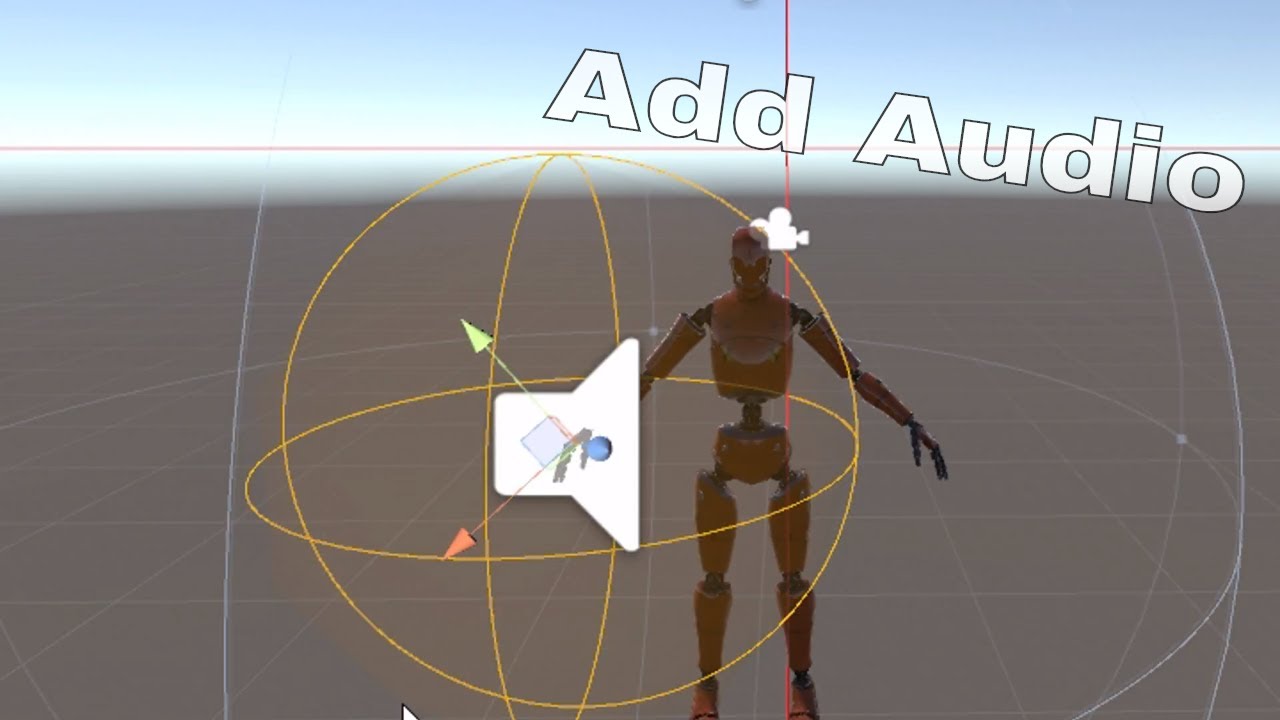
Very basic tutorial on how to add audio to vrchat that is controlled by gesture override / this can also be used for weapons or other objects along with particle systems too.
and heres an audio tutorial!
lone venture
It disappears when I uncheck it
covert patio
because you set it as unactive in the animation
you have to delete that animation key
lone venture
Oh
covert patio
there u go!
covert patio
I'd lower the max distance to smth like 5 perhaps (above the graph on the right)
lone venture
And the animation needs to look like this?
covert patio
You don't need to enable the brush again!
So basically, you want both the brush and the audio source to be natively disabled
like make sure the audio source is unchecked too, even if the brush is enabled
lone venture
Huh? This is the spawning anim
covert patio
then, one gesture enables the brush
ohhhh like theres a sound when you spawn? this isnt the bonking one?
thats fine then!
lone venture
Total of 3!
covert patio
gotcha!
yes that setup is fine for spawn then!
you might need play on awake checked actually
on the audio source
lone venture
So I use the compound gesture for the smack?
covert patio
yep!
lone venture
Do I need a separate duplicate for that or no?
covert patio
For the new animation? Yes
covert patio
I'm not sure tbh. You can make another duplicate and drop ur anim on it and play it to double check. it should be fine tho
I dont use the animation previews-
lone venture
Wait do all the audio sources need to be here?
covert patio
Did you put the animation source on the duplicate and not the og one?
lone venture
Yes
covert patio
Okay. Gotta have everything you want to enable on the og one. Or elsse there's nothing for it to enable
lone venture
Yeahhhhhhhhh my bad
covert patio
its ok!
might wnat to undo your delete and go grab your audio source again to duplicate it onto the og model (making sure its named the same as u do)
lone venture
It's okay I can just redo the anim
Hierarchy looks right now, right?
Just disable all the audio sources on the OG before duplicating, right?
covert patio
Yep!
then just make srue on your brush spawn animation it activates both your brush and your spawn in sound.
on whatever gesture u want to make like the bonk sound on, you enable the bonk sound without enabling the brush
lone venture
Wait, what does a compound gesture do?
covert patio
it makes it so you have to do two gestures to activate something instead of one!
so, for example, i could make it so a sound played on peace sign
or i could make it so i have to do fist and peace sign to play it
with ur brush, u prob only want it to do the attack sound when ur brush is out. so thats why compound gestures are useful
lone venture
So I can set it to do that when I press the trigger and side buttons of my Vive Controller?
Or am I reading that wrong
covert patio
basically it makes it so you have to use two hands to do it
it makes it so like... lets say you activate the sound with victory sign. if you then do victory sign while posing, it'll play the sound. However, if it's compount, and you make it so you need fist and victory sign, it won't happen as randomly
lone venture
So I can make it use the fist button, but only once the brush is activated?
covert patio
its more like u can make it do the attack sound, but only when the brush is activated
lone venture
Yeah that
covert patio
yep!
lone venture
So activate brush with one gesture, then play sound with another gesture, but only if the brush is out?
covert patio
yep!
clear yew
Anyone know what it is that causes this arthritis looking slow open and close hand gesture? it's bugging me that i don't know how to make the gestures snappy like how they should be
any help would be amazing
covert patio
That looks like your gesture is more than two frames! Gestures can only be 0:00 and 0:01
lone venture
Adjust the placement of the keyframes
covert patio
^^