#animation
1 messages · Page 124 of 1
 timid prawn
 hollow lark
I'll just put the behaviour on a different object I think
timid prawn
You can public it to it
hollow lark
yeah
timid prawn
Something like that
hollow lark
Yeah it works just gotta fix the colliders now thanks
 cosmic stratus
hi maybe someone can help me i cant creat an animation anymore on a model it just creat it but i just cant edit anything someone has the same problem ?
cosmic stratus
nvm i got it
 golden oyster
i am also trying the same thing. the problem i have is that if i animate the main model and use a vr head set the model goes wacky on me.
@blissful arrow are you going to use a vr head set or desktop mode?
 blissful arrow
headset
golden oyster
i am in the process of recording what my problem is when i use a head set.
so far i have done a few trial and error stuff to see how to get this to work.
the only thing i am trying to animate is to have it appear from a hand gesture with the model riding in it.
the model still tries to walk even when in the animation all the points are animated
i ether need to make a separate model of the bike and a copy of the main model fixed in the position and hide the true avatar. or make it so that the vr headset motions don't override the animation.
 tacit axle
I don't believe there's a way to stop the ik from following head movements, you're probably going to have to add a separate biker for the gesture and hide the mesh of the real avatar. (make sure not to hide the skeleton itself, that makes it to where the character itself isn't active and you have to reload the avatar to use it again.)
golden oyster
@tacit axle i did think of that but if i hide the (body) that is under armature in the animation but all the meshes hide including the other bike model.
tacit axle
then it may technically be one mesh, as in the bike and biker are part of the same data. this could be solved in many ways. you could probably 'shrink' the bike to fit inside the real character, then use the second character's bike for the hand gesture. this is if the bike has a bone of course. another way would be to use blender to make the bike and the rider completely separate.
golden oyster
i do think i might make a viseme for switching the mesh as a last resort. right now i am switching the material on the main avatar into an invisible one.
tacit axle
that works too
golden oyster
so invisibility shadier did not work but the bike model was doing what i wanted so i am sticking to that separate model method.
Tried the invisibility and i cut a hole in space.
now i am going to see how it fairs with no shadier or material on at all
i know it can be done i have seen avatars on YouTube ride on a go-kart.
i think im finally on the right track
 verbal ether
Anybody know how to make an animation move an object at a constant pace, as appose to it speeding up and then slowing down at the end? (essentially make a smooth loop)
 heady talon
anyone know why adjusting hand positions transforms isn't saving in the animator for 2018 unity?
 amber lagoon
Im looking for some help with converting a VMD file into an Animation or prefab file i can use in unity. i have tried for HOURS (like seriously 9 hours straight)and cannot get it to work
If anyone would be willing to help, or even do it for me i can send the VMD files, i would be so very grateful, ive given up
heady talon
@amber lagoon https://www.youtube.com/watch?v=RKvhLCzflM8&t=761s

Just a note sometimes a glitch occurs when moving the final anim directly to another project somehow makes it lose the shape keys once the new project. You can fix this by exporting the animation file as a Unity package (right click the anim in your assets area and select "exp...
This uses a few unity prefabs that convert VMDs to a animation file to use in unity
takes like 2 mins, if you want shape keys that will take a little longer (like 10 mins) and more steps
amber lagoon
Thank you!!!!!
heady talon

@amber lagoonAlso, I highly recommend that you use a sperate unity project for this process. And preferably Unity 2017
golden oyster
@blissful arrow i figured it out and can help you
amber lagoon
@heady talon It worked! thank you so much! now to figure out how to make a Prefab again 😅
heady talon
np. Glad I could help
 dim pollen
my muscle animator wont work it says no humanoid when the avatar is humanoid??
 frozen swift
any idea why my tail wag animation works, but my pet flying doesn't?
https://gyazo.com/002a1ce4bd98e3ff27c9abb3c902941e

 fleet tinsel
did you put the animation in the pet controller
 atomic axle
Can anyone explain why the Unity 2018 is harder to use than Unity 2017 animation wise? Also can anyone explain why Unity 2017 has lost all the vrc scripts for avatar and world creation? Is it because it's dated now?
Only asking because i can't seem to do animations on Unity 2018
atomic axle
nvm problem solved
dim pollen
anyone else not have pavo studio not working? it keeps saying my model isnt humanoid when it is
heady talon
does it look like that in vrchat?
 bold bay
@verbal ether in animation window, click “curve” in bottom to see the curve view, and right click on key points on the curve, select tangent/linear
heady talon
man I'm still having problems with muscle animator not saving my finger transforms
 daring creek
So I'm running into an issue where when I start a gesture it takes like 2-5 seconds to actually appear and its extremely slow. I checked the animation file and it is on the first frame and doesnt have anything else going on. Am I missing somethin?
fleet tinsel
I'm officially confused
So I have an animation on an animation controller, all I do is put that controller on the prop animator right? And it should work?
 thorn turret

 solid ivy
How do I make so I can spawn in an animation and then just go away?
 wet marten
Anyone ever have an issue of an animation working in unity but not showing in VRC?
 blissful storm
if you're making a gesture facial animation all values should be pasted at the 0 second mark and the one second mark
not sure why you want it to last for three seconds
wet marten
It's been working flawlessly doing it that way with all of the other anims
blissful storm
so when you hit the play button in the animation tab what is your avatar doing?
because i never ran into an issue with facial gestures if i copied and pasted the values at the said two marks
 dull sleet
Im having a bit of a problem right now due to the update. I had a screen shader playing during an animation that would spin the screen around while an object was on the scene and now the object isn't affected at all ... but only for me . every one else in the world sees it fine. I was dropping the object using a rigid body without any attach point i don't know if that's related. The most annoying part is that everything is fine in unity.
 fallow quarry
ayeee anyone know anything about avatar animations please dm me
 stable folio
Hello, I have a model that's in a wheelchair and I'm trying to disable all the walking and standing animations but can't seem to get it to work. Anyone have any ideas?
 keen bough
alright, i'm needing some help with animations, i have 2 models: one with animations, and one without animations, one has a humanoid rig, and the other has a generic rig, but all of the bones are in the exact same spot and have the exact same names, and while animations for the body work just fine, any animations for the eyes and eyelids do not work, and while animations on a generic rig work just fine, once converted to humanoid, the eye animations cease to work, is there a way to fix this?
like i said before, both skeletons have the exact same names on all of the bones, and none of the bones have had their positions or sizes modified
 radiant ember
 still compass

oh hi
SUPPORT ME IF U WANT UWU -
MY PATREON - https://www.patreon.com/Mrmims
MY KO-FI - https://ko-fi.com/mrmims
programs used-
toon boom harmony 17
after effects 2020
graphics display- XP-Pen artist...
 iron stag
would anyone be able to help me with making multiple objects appear in one animation?
I have a animation set with audio where I want a object to appear, stay for a little then another objects appears then another object
all in one animation
 proper hedge
Use the animator component
iron stag
how so? Not too used to that
most of my avatars I normally can just make a animation and boom
never tried this before
proper hedge
Make an animator controller. Drag an animation clips into it. Make sure you can see the animator window in unity so you can do that
Then drag the controller onto an object so it adds the component + controller
Then use that to animate what you want
Has to be child objects of the animator
iron stag
ah ok so I see the animation in the animator
just kinda confused how to do that still :/
 summer mortar
can anyone give me basic tutorial links for animating in Unity i'm a begginer and i'm confused
much appreciated
 swift patio
Hello, I come here with an inquiry. I want to be able to activate a gesture in 1 hand, and then have it activate a separate animator in my other hand.
i.e. I pull out a weapon in my right hand, but activate an effect that is only activate when that gesturing is playing with my other hand.
Would I handle this by doing an animator swap, or add-on in the animation? Or am I looking at this incorrect.
fleet tinsel
i want to toggle armor but have an animation (summoning circle to appear) upon toggle and the armor will stay on but the animation goes away ...can anyone answer this
proper hedge
do walk overrides work yet?
 clear yew
What are overrides?
fallow quarry
anyone know how to fix
 hollow salmon
@proper hedge Depends if the avatar is Generic Type, or Humanoid Type. Either way, I'm sure both work just fine.
proper hedge
it's a humanoid. they weren't working for a long time so wondering if that was ever fixed
fallow quarry
bah!
hollow salmon
@proper hedge I've used them before. They seem to work fine.
fallow quarry
hey can anyone dm me, i need help!
 chilly pilot
haven't done any complex animations in a while. Do we still need to jump through hoops to get world particles to function properly
 fierce bane
@fallow quarry usually caused by an out of date MAE
fierce bane
MAE = Muscle Animation Editor
 pine wadi
So, I am suuuper new to unity and, well everything avatar making related. Trying to make this animated fly for a thing with a friend. I have the fly and animation. I thought I added it, but in game it's not actually animated. Anyone able to help me out?
 glacial breach
How to i fix the motorcycle pose? my old method stopped working
 cold pulsar
@pine wadi You can't use an animation like that, the fly should have an animator that loops the animation
pine wadi
Alright. So add animator component and add the animation to that?
chilly pilot
Does anyone know how to achieve the effect of a texture wrapping around a mesh? Meaning like, shooting a gun; the gun leaves a crack in a wall, and the crack conforms to the geometry of that wall. I've achieved something sort of like that, but it only works on flat surfaces because it uses a plane to project the particle effect on.
heady talon
@chilly pilot you have to fiddle around with cameras and projectors. But I don't think that's possible in vrchat. At least, not in other worlds or easily. You can look up deferred decals and look into that. Or how to project decals. I've only lightly touched this subject and gave up cus it was too much work than what I was willing to do for a public model.
chilly pilot
I remember there was an avatar a while back that could do it. It was a Mudkip that could puke, and it splattered on to the world itself. I wonder if I can find that somewhere.
heady talon
oh now that you mention it I remember a "nutter" avatar going around that was just an edit of the butter avatar and had its puke form to meshes
chilly pilot
Form to meshes?
heady talon
it applied itself to avatars and such
basically everything present in a world that had a mesh besides water
chilly pilot
https://migero.booth.pm/items/1161778 A friend linked me this. I wonder if I can somehow configure it to work for only the world.

影付きの光が必要です
chilly pilot
mhmm
for now though I'll settle with this
fallow quarry
@fierce bane hi hello how to i fix it or update it
it's like i worked so hard on it and i dont want it to be ruined because of something small like this
fierce bane
@fallow quarry if you bought it from the asset store, update
fallow quarry
welp rip thanks bb
keen bough
is it possible at all to create an animation the uses bones instead of shapekeys?
rather, a blinking animation, the model i'm working with lacks any kind of shape key and instead uses bones for the top and bottom eyelids
keen bough
never mind, i finally figured it out after a bunch of testing
fleet tinsel
i have an armor and i want an animation to play when the armor is toggled only for a few seconds then the armor stays on....someone help me figure this out
fleet tinsel
figured it out how to make it work.....now i need to actually make the animation and effects along with the armor.....
iron stag
If I was trying to animate a car driving in, how would I do that?
like just a car that I have a package of already just moving
 thick pasture
Is anyone on atm who has got a strong clue on animators and rotations in animations?
I'm having some small issue that i can't seem to solve atm in an animation i made with the use of animator controllers
 sharp tartan
Anyone know why my pos doesn’t change in game but does in editor
Realized this is the better chat for it
clear yew
anyone know any good animation avatars i could get?
 little elk
Does anyone know how to animate in unity im looking for someone that can do something for me, willing to pay
sharp tartan
is there some option im missing for the pos changing?
here is what i was testing to see if it worked
and in editor it looks like that but in game the character stands there but does the pose in the anim
cold pulsar
Might be better to just disable your main avatar and enable a duplicate with the baked animation
 fringe gust
What's the basic setup to trigger an object animation to play? Everything I'm finding is for avatars. Specifically which of the animation actions should I be choosing? AnimationTrigger? I'm just animating a button press.
fringe gust
Lordy, I figured it out. Not really intuitive that the animator needs to be on the parent object as opposed to the child that's actually moving (the button itself) :\
 median tiger
Hey guys. I have a prop with an animation on it set to play with being activated. In game it's not working. In the play mode on the 2018 unity is does play as intended. Anyone know the solution to this issue? Please at or dm me if so! Heres a preview of the animation.
 final fiber
If I wanted to make a unique idle animation should that be done through Blender, or Unity with Muscle Animation Editor?
clear yew
mb who have dance Inspiration in vmd format?
 old trail
Hello-!
Maybe someone on here can help me.
I'm trying to spawn world objects using a rigidbody and a fixed joint.
The spawn does work, and I can move without the objects moving.
Though I encounter following problem: If I end the animation and then start it again, the objects don't reset their position.
clear yew
You need to manually reset the position to 0
old trail
So I should just use a second animation that sets the position to 0 for the world objects? Gonna try it- thank you
clear yew
That or set it to 0 when you activate it
You got different ways to do it
Check the World object prefab from my good friend Rokk of you want to see how he did it
https://github.com/HugoZink/RokksPrefabs
GitHub
Contribute to HugoZink/RokksPrefabs development by creating an account on GitHub.
old trail
Thank you!
 torn shale
Hi, I was wondering if someone could help me with this. I'm desktop user trying to have an animation (fortnite emote) on my avatar but I want to have it loop and with a song playing along with it. Could anyone help me out in how to achieve this? Currently it just plays the animation once
and without song
cold pulsar
Don't have it be an emote, toggle a seperate model that plays the animation loop on gesture while making your main avatar invisible.
torn shale
any guide you can link me to get me on my way because this is something I have no experience with and I assume it involves some scripting no?
cold pulsar
It's animation. You should look up tutorials on basic unity animation
torn shale
ok I'll have a look but one specific question though. How do I trigger my avatar to turn invisible and the other to turn visible? Is that with the shift+F1 command and the others?
cold pulsar
Shift+f1 ect are the gestures yeah. You can make your avatar invisible by disabling your body gameobject
torn shale
ok so making the avatar visible and invisible and playing a looped animation can all be achieved by using the in-engine animating stuff? And this will end up to be one of these thingies?
cold pulsar
Yeah thats an animation. You need an animation to enable the second model and disable your own. Then that second model has its own animator and animation that loops the dance you want to do. When you let go of the gesture it will revert back to the original state
torn shale
alright, I'll do some digging on how to do this. Thanks a lot!
torn shale
Could anyone help me through this personally? I have looked at tutorials for an hour now and none seem to explain what I want to achieve. They just show how to put an animation on an emote or trigger slot. Not how to toggle your avatar and have a custom animation play on loop on the second avatar. I'm at a loss
cold pulsar
Don't look at vrchat videos. You want basic unity stuff
torn shale
can you link me a video in that case because there are like thousands concerning animation. And I don't need to make an animation per se. I have the animation already for the fortnite dance.
cold pulsar
@torn shale https://www.youtube.com/watch?v=sgHicuJAu3g
You would need to make an animation to enable disable

In this Unity tutorial you'll learn how to animate anything from elevators to bridges all the way to patrolling enemies. We'll cover all the fundamentals you need in order to get started with animation in Unity 3D.
Full Project Download: https://github.com/LooveToLoose/unity-...
torn shale
Ty! I’ll check that out once I’m home
 winter storm
Hey, has anyone got chairs/seats to work on avatars since the new update? @ me if you've done it, because I'm struggling to make them work since the new update broke them.
 young hearth
@winter storm chairs/seats needs to have an animation in order for it to work
winter storm
How would I go about applying one to them?
and how would I have them permanently on?
young hearth
i haven't explore the chairs thing for worlds or avatar gestures yet sadly so i don't know
all i know is that in the new sdk version thats what you have to do, it was mentioned in the patch notes
clear yew
to make the chairs work on avatar, you need to activate them through an animator
I've tried to have two avatars, and toggle one with an emote,when I uncheck the "Is Active" in the animation for that avatar, It works well in the preview (although the model of the main avatar is in a weird position). But when I go to VRChat and play the emote, my avatar goes into the weird position for 2 frames and nothing else happens. (the avatars are two completely different ones)
Does it have to do with the update or am I doing something wrong? Because I have done pretty much the same as some tutorials but it won't work
torn shale
I'm really still struggling with the above issue, I watched the whole tutorial and applied what I saw in there, now I have my second avatar as child of my first. And I got the animation on the second one with a controller attached. Now how do I trigger this animation in-game and how do I make my first avatar dissappear when it plays?
clear yew
I think it is with the "Is Active" option, according to the tutorials I've watched, but I cannot get it to work, so...
torn shale
where do I find this option?
or the specific tutorial you found?
this is what I got right now
clear yew

neoaptt sign
Code Play Teach
Pro Tip:
Alt+16 = ►
Alt+1 = ☺
Something like that
You have opened the animation controller. You don't need that right now. Instead, you have to open the animation tab and select the avatar
But you should do that on a copy, because it kind of screws the model
torn shale
I am on a copy, and in the animation I add my original model and make it inactive right?
and then add this animation to one of the triggers on the vrchat animation controller?
clear yew
Also, this one explains animations a bit better even though he doesn't explain how to hide something

VERY IMPORTANT - PLEASE READ:
This tutorial may still be mostly useful, but there's a few major changes that you need to pay attention to. First off, VRChat now uses Unity 2017.4.15f1, not Unity 5.6. Additionally, there's some new tools for helping with atlasing that you shoul...
torn shale
oh tupper made that, can't believe I hadn't come across that one yet
torn shale
oh it's not supossed to be a child I don't think
I removed it as a child and now I can add it
clear yew
Although I haven't managed to get it working on VRChat, just on the unity preview 😔
So I'm not too confident on my knowledge
torn shale
I can't add my og model as property it seems. only part of the second model I'm animating
so I can't turn it invisible for some reason
I did it, I think 😄
 silver egret
what does this mean?, I'm trying to do a sit pose and i can't add any value to the existing one, if i record and then add a new property everything resets
 half marlin
everytime I go to export a model, an animation starts playing, anyone know why and how to fix??
torn shale
If you worked with a double you have to make it invisible before uploading. Only make your main model visible
toggle this off on your double
half marlin
I'm restarting my animation, and I want to make one where my model dissapears, but when I animate, it doesn't give me the option to make my model active ??
torn shale
I'm having an issue as well, I did everything right (I think). I have second model on which I made the animation then put that animation as 3 of the triggers just to make sure it plays. But in-game it doesn't play. It also looks like I'm playing with both my avatars overlayed on eachother. Even though one should be active and the other not
torn shale
ok I managed to make it trigger at least, but now it just makes my avatar dissappear and I see no second one and hear no sound
 gritty wedge
Is there somewhere i can find nicer pre made female idles?
torn shale
please help me, how do I make it so only one of them plays when I trigger the animation? If I disable the animated one before uploading it doesn't show. If I make the original one inactive in the animation timeline it doesn't show either. Only if I enable both of them does it show up in-game...
 neon dust
Question for anyone generally smarter than I. I've been working on this avatar for a bit, and yesterday I hit the point where I laid out everything. facial animations for gestures on point, dynamic bones, shaders, and the mesh itself all properly intact. But when I go to upload it, it defaults into this idle animation that in turn, at least to what extent I can deduce, breaks the model's animations, causing it to move its fingers on its own and make subtle facial expressions. I attempted to replace the idle with something else, only to find the damage was already done in that regard and the facial expressions were still a little borked.
Any idea on how to fix this, or if I'm wrong about the problem, any idea what that could be?
Before the update I generally never needed to replace the idle in the override, and it would come out in the A pose as per usual, but ever since then no matter how many iterations of the avatar I pump out it all results in this one primary issue.
cold pulsar
@torn shale You should be disabling the body of your main model while enabling the second models main game object via gesture. I'm unsure what else you are doing.
@neon dust I don't quite understand your problem. Is it stuck in idle like that in game or in editor? Idle animations are mostly ignored when the user in in VR.
neon dust
That's the thing, its not ignoring it completely for whatever reason. Its allowing me to use gestures and the overrides kick in promptly, but there's this faint trace of the idle animation that generally shouldn't be there i.e. the fingers moving around on their own and the face on occasion making a subtle expression.
cold pulsar
From what I'm aware that has always been there. Whats wrong with taking the provided idle animation and removing those idle movements?
neon dust
See that's what I pretty much thought as well, but when I looked into the provided one just a few minutes ago, the movements aren't actually coming from there. oy vey.
Also double checked to make sure my shapekeys weren't out of order in any capacity, no issues there.
cold pulsar
The default idle animation has finger movements and such so you can try to cut those animations and see if it does anything
It may be more obvious on some models versus others
neon dust
Fair, I'll attempt this and see what comes of it. Thank you kindly
 autumn quail
Hello! I've been having trouble getting a "Tail wagging" animation to work. I wanted it to be an idle animation so it is always going. I was following this video but i am not quite sure what I am doing wrong. The animation is made and i have it applied to the animation controller. Then I made an Animator Component on the parent bone and made sure the path was correct. However it still didn't work. https://www.youtube.com/watch?v=W7jcRSkOT5U

how to create always running animations for your avatar without using legacy animations
torn shale
@cold pulsar What do you mean by enabling my second models main game object? It's just a model like the first one, with body/armature
torn shale
It seems that when I disable the body of my model it disables both bodies of both models...
even though I selected my first model specifically
 raven glade
I haven't worked on animations in a while, how do i go about a gesture animation with a componet longer then 2 frames? without the hands 'slowly' morphing.
 sage vector
Does anyone know how to make a audio play once when your avatar spawns in?
clear yew
do what ?
winter storm
clear yew
it's written in their release patch note what you need to do https://docs.vrchat.com/docs/latest-release
"Chairs on avatars will not work unless they're enabled via an animator. This is not intended behavior, and will be fixed."
winter storm
Yes I see that, and that is what I am trying to do. I have an animator, I am trying to use it to enable the seats. However, it is not working, and I was hoping that there would be a guide so that I can see what I am currently doing wrong so I can fix it
 potent hatch
Anyone know any good tools in unity to test avatar walk cycles/ Dynamic bone movement. Or maybe just general tools for avatars that you might think useful that I should know about other than the SDK of course. Interesting little tools that are helpful
 merry tiger
You guy's know why on the animation i create when i'm in game when i press another gesture than where i set the animation it's working until the hand recover the good gesture ?
 misty eagle
You can't have animations on gestures iirc, not long ones
Gesture animations have to be a single frame
If I remember right, if you want an actual animation on a gesture you have to use the gesture to spawn a duplicate which plays the animation
merry tiger
No it's just like animations on like framerate 00:00 to 00:01 for activate a sound or make move a part
I have for example a dragon and the sounds when he breath fires activate when i'm pressing something else and i don't know how to fix that it happens to all the avatar i create actually
 fathom field
So when will generic animation be fixed?
 earnest lagoon
It’s still not fixed?
 dim olive
@fathom field they should be working as of today's patch
fathom field
really
dim olive
Yep it was part of the patch couple hours ago
earnest lagoon
👀👀👀
Also uhhh quick question
Can you animate non-humanoid bones on a humanoid avatar?
Or will they just get ignored?
earnest lagoon
Yeaaa so I’ve heard
 frosty moat
so Im told the reasons my seats dint work now is they need to ba called with an animation? how can I do that?
don't*
 orchid flint
Is it possible to make animations in the emotes loop indefinitely now that you can just walk out of em?
 chilly kernel
is there way to make particle system not roll

it rotates with your view so weirdly
 pseudo comet
hello! can anyone help me with animation? i used animation on an object (not avatar) and it works fine in unity but when i try to use it ingame it freezes. any way to fix it?
 muted prairie
Does anyone know what would cause the back leg of this armature to not fit the transform of the keyframe it's being given ? there's two almost identical armatures with same bone names, you can see that the front legs are perfect, but back legs are very off
All transforms applied and bone roll cleared on both
 rose folio
Is there a way to bring a blender animation into unity that was made without an armature? (basically I made the animation by moving the parts that are parented to each other) I don't want to have to rig the entire thing and manually do the animation again in unity
 red grove
I'm trying to make particles where it is like some confetti constantly coming down from my hand, but it seems to go whatever direction my hand is pointing. Is there any way to force the particles to always go down?
clear yew
Does anyone know how to get a non square particle to align to the camera only on 1 axis so it looks like a flying "laser bolt" but is a 2d billboard that only aligns to camera on 1 axis?
little elk
Does anyone know where to get a Taser Animation?
 quartz breach
You guys have the same problem with animations getting stuck on the avatar after i upload it ? , even if you delete them he will be stuck in an emote .
iron stag
so about making a object stay in a world? I used fixed joints? rigid body before but now its not working?
proper hedge
@iron stag use constraints
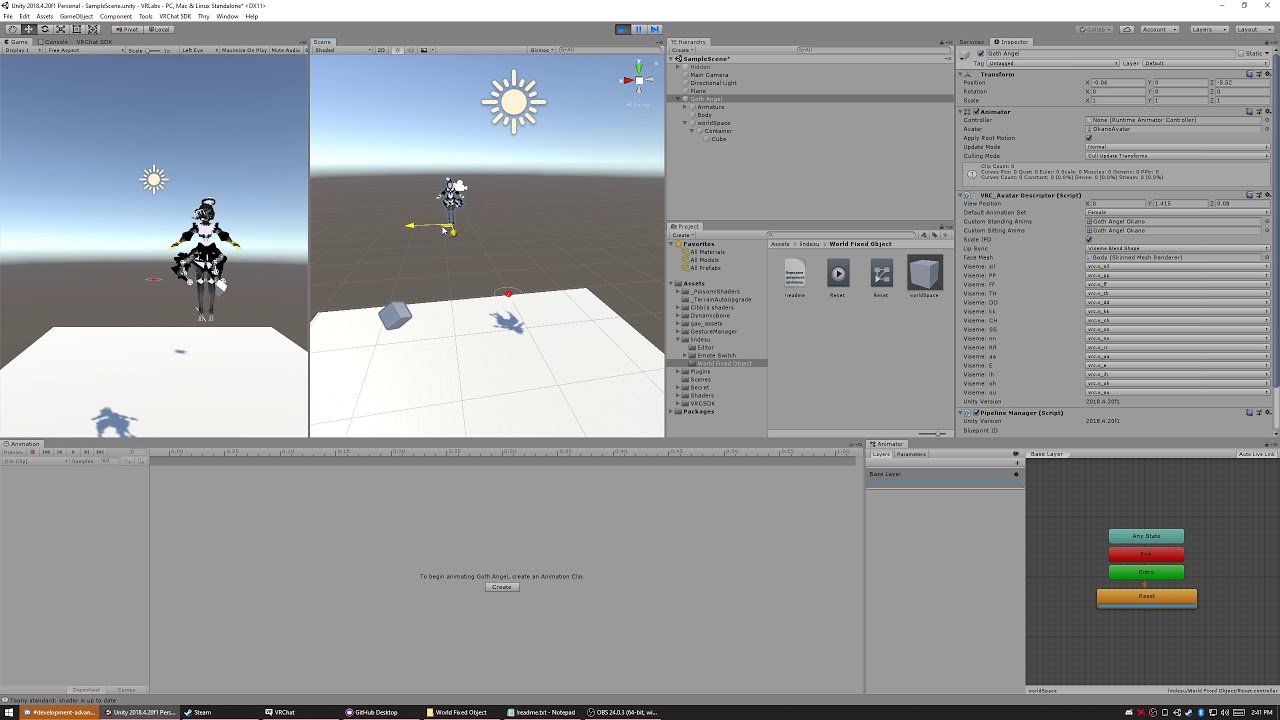
https://github.com/oofdesu/lin-unity-packages/raw/master/worldFixedObject.unitypackage
This is a world fixed object, held in place by constraints.
The "Container" object will reset it's position every time the "worldSpace" object is enabled.
 spring nova
how does that work? You're targetting the body mesh?
oh it's something to do with the reset animation
all the animation does is enable the constraint? Now I'm even more confused
ohh I see now, it's the -1 weight
lmaoo that's so good
 fringe stag
Does anybody know how to make bullets persist even when the animation stops?
cold pulsar
Don't enable/disable the particle system, work with the emission section
 clever pewter
If your hand gestures animations get stuck, try putting the override on the avatar descriptor too (Custom standing & sitting animations)
clear yew
How do you make an animation like fist + fingerpoint = animation trigger
cold pulsar
Stack the gameobjects. Have a parent and child that are both disabled. First gesture enables the parent but does nothing since the child is disabled. Then second gesture at the same time enables the child which would do nothing if the parent was disabled. Need both gestures active to enable the child and then have what you want under that
 odd latch
anyone know where I can learn about beam/ray animation?
nothing specific, I just need to know the principles behind a good F.U. beam
https://www.youtube.com/watch?v=qFmJMhyD74E

UE4 Marketplace:
https://www.unrealengine.com/marketplace/good-particle-beam-and-ray
GOOD Particle : Beam and Ray is pack that helps you to add some cool and beam / ray / laser effects to your game. Variety of element and sound included. So, if you are a developer and you hav...
 rich solstice
bonjour
Is there any way I could have a secondary avatar appear with an animation that i can control as well?
Like, sync controlling between both my models
young hearth
@rich solstice most of my google search yields that you have to animate it, since i never done it before i would assume that you have to hide the other mesh in unity and tool around with this
maybe adding the other mesh's animator controller to your controller?
rich solstice
o boi
the other mshs animator controller?
just have the same animation controllers then?
young hearth
probably yeah
 grim sedge
Any idea why can't I use animations? All of the finger gestures has different face expressions but none of them works for me, while my friend using the same avatar everything works fine for him. Tried other avatars with custom anims but nothing. I'm using index and he's using vive if that has to do anything with it
young hearth
If it works fine for him then its on your end with the index controller configuration
 copper whale
Hey guys, I'm trying to get my boombox to play audio like how a real boombox would, you know, with the slight muffle to it coming out of the speaker, an example of it would be like the Call Of Duty Tranzit Loading Screen when the musiccuts out for a moment and plays through the jukebox. https://www.youtube.com/watch?v=fM47fti409k

This is the song from the loading screen to Green Run, Tranzit in Black Ops II.
cold pulsar
Not really a question on animation. You should do all audio work outside of Unity in something like audacity.
young hearth
you have to play around with mono tones and the hertz to get it to that level of audio and as suggested by scion, audacity can do that
proper hedge
@grim sedge you're probably not using the gesture toggle
Index has a gesture toggle
Left thumb stick press
grim sedge
@proper hedge oh wow that was it, thank you so much
blissful arrow
is there a way to set up each hand to have an indivudal gesture attached to them that triggers seperate animations, so if left hand summoned one item to the left hand and right haned summmoned something to the right hand would that be possible?
 untold surge
Anyone know where to get some cute idle and walking animations for women? My avatar walks like a gymbro
blissful arrow
https://github.com/Xiexe/VRCInventorySystem does this still work?

GitHub
An Inventory system that is easy to set up for your avatars, using emotes. - Xiexe/VRCInventorySystem
cold pulsar
No reason it shouldn't it's just animator voodoo IIRC
clear yew
yes
cold pulsar
That's about as cut and dry as it gets tbh
 strong laurel
Does anyone knows how to trigger an animation when a gesture ends??
blissful arrow
oh my god this inventory is awesome!
clear yew
is it ?
blissful arrow
yes
clear yew
dunno about that
 safe osprey
Does anyone know of a way to set a bool/trigger from an animation. im trying to get a revolver to only have 6 and i need a way to set these parameters in a way vrc is happy with
cold pulsar
Pretty sure you can't animate bools on avatars but there might be a hacky work around I'm unaware of
clear yew
need to use a suspend animation
Editing by Cheese
Link to the package with assets from the video (Includes scripts)
https://drive.google.com/file/d/1oi1Ryc2O5FAKQg1_92G6CbEaUBmKnzhU/view?usp=drivesdk
This is a guide on how to expand your gestures or emotes and create multi-state animators for use with inven...
safe osprey
👌
 boreal pollen
 clear yew
<@&397642795457970181>
 unreal walrus
Noted
 zealous mulch
hey
chilly pilot
I'm trying to change values in a material using an animation, but Unity's not letting me. Instead, when I try and finagle a solution, it gives me this:
does anyone know what this means, or what to do about it?
The thing I'm trying to animate's a modified... I really don't know what - it's from the KryptoFX package.
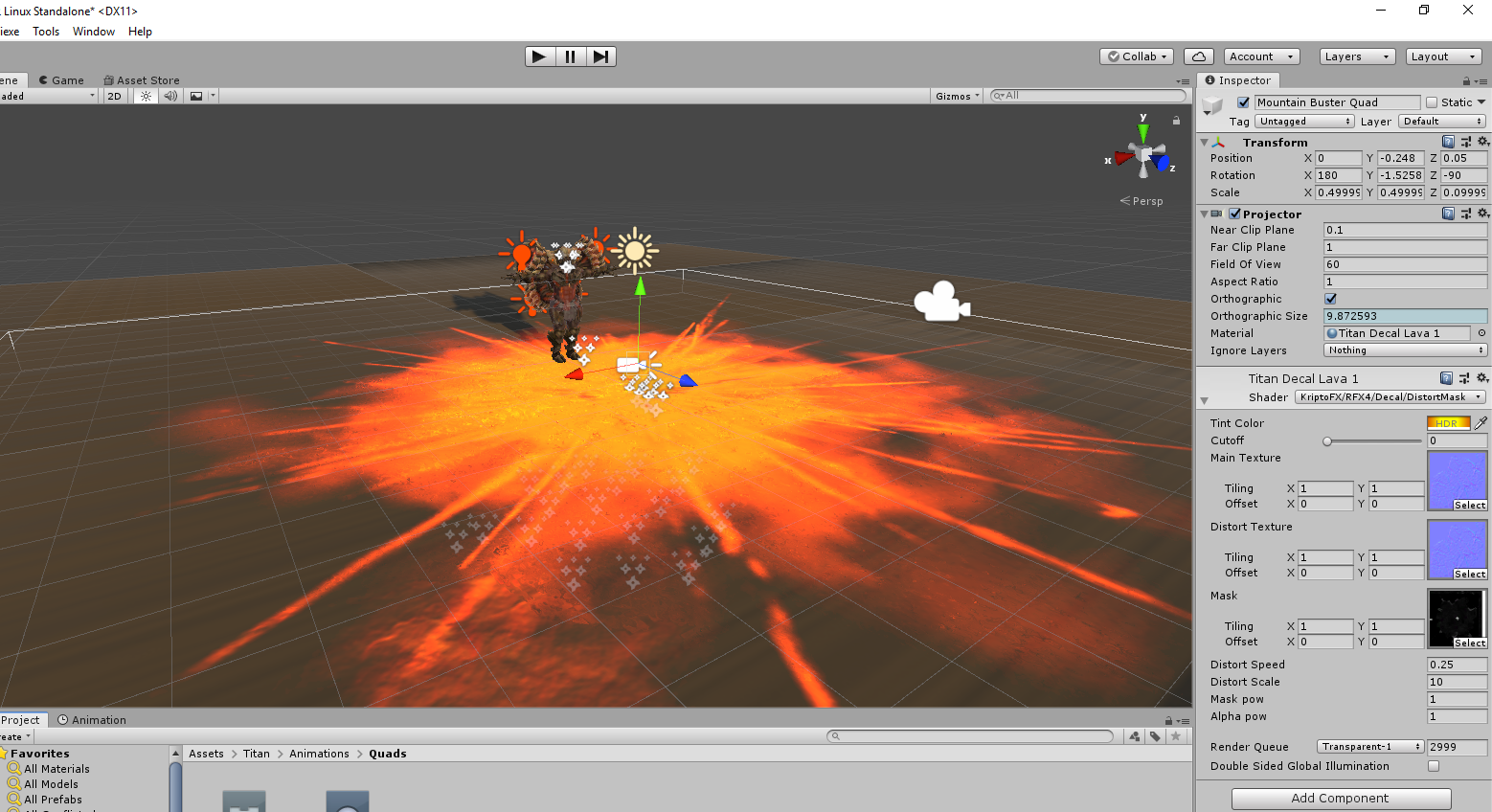
Far right. I want to change the material properties but Unity says no.
cold pulsar
Using a package like KryptoFX it has scripts which you can't use. Have you removed all black listed items from the particles you are trying to use?
chilly pilot
Oh? I... think? It's not the particles that are the issue. That splotch of lava is projected over geometry. It's not a particle. As far as I can tell, projectors are allowed, no?
If not through this method, what's another I can use that VRC will let me that accomplishes the same thing? Wrapping something around geometry, that is.
cold pulsar
Uh there was a specific shader give me a second
I havent played with it much and it doesnt work in editor but I dont think you can have a projector on avatars
chilly pilot
According to some reddit posts that's the case, yes.
Projectors are allowed on worlds but not on avatars.
I'm playing with this now. It seems... sort of like what I need? But even in the event I could get it close to what I want it to look like, the shader itself is so limited I don't think it'd do much for my animations.
Still, thank you for the suggestion.
cold pulsar
Yeah welcome to avatar creation lol
chilly pilot
I've done it for a while, just never anything of the complexity I'm doing now.
I have ideas I want to act on but VRC and Unity are butts : (
cold pulsar
Yeah once you get deep you realize all the limitations that are there
Usually have to settle with things that are close but not perfect
chilly pilot
I don't know if there's anything that'll get this how I need it that isn't projection-based.
chilly pilot
With this in mind though, now I'm left wondering: how do people do things like bullet holes? What I'm trying to make is, in essence, just an enormous bullet hole.
cold pulsar
When I asked my friend he gave me the shader i gave you
Or do you mean particle wise
chilly pilot
Yeah.
cold pulsar
Have the bullet particle create a sub particle that's a 3d cube that sits there. That 3d cobe has the decal shader on it
Create sub particle via burst on death
chilly pilot
icic
another question, unrelated (sort-of): is there a way to create artificial lights using particles? For example: https://youtu.be/tK1fOsCLXxY?t=111 what the big stone guy is doing. If you go frame by frame or your eyes are sharp, you can see shafts of energy/light radiating out of the ground and into the air above.
 cold pulsar
Particles can have lights on em but here you would just want tall, high emission billboards going upwards imo
chilly pilot
I got a facsimile that I like
cold pulsar
Looks nice good job
chilly pilot
chilly pilot
question: are there any penalties imposed on someone's avatar if it exceeds the "maximum" of whatever optimization concern? It's still letting me build and upload and everything, but I just want to be sure.
clear yew
a lot of people auto block poor or very poor avatars, so that's basically what will happen
 wooden ivy
@chilly pilot My fake light shader would work for some of those: https://gitlab.com/s-ilent/fake-lights

GitLab
A shader for Unity that renders simple, cheap fake volumetric lights with instancing.
By default they won't work as particles, but I'm planning an update to add variants for that
By default they won't work as particles, but I'm planning an update to add variants for that
 green swan
how come the fingers bend in the animation but not in game?
clear yew
Is this good? It's my first time animating in unity
 dense gyro
yh
clear yew
?
copper whale
Is anyone here good with emote toggles? Trying to make a sword trail activate when the activation emote is clicked, then have it turn off when the deactivation emote is clicked. But when I finished the animation and put it under emote 1, the trail appears for a split second before disappearing.
 magic reef
do you have the animation set at the end of the gesture aswell?
copper whale
I'm sorry if I sound stupid, but I don't really know what you mean.
Like, how you have the tabs for animation?
This?
@magic reef
copper whale
Oh, You thought it was an gesture toggle.
Nah, it's an emote toggle.
Like how you can have your emote 1 be a wvae.
I want mine to be " Sword trail Activate ".
copper whale
Crap, I seriously need help with them.
chilly pilot
Thanks @wooden ivy I’ll check it out.
chilly pilot
Does anyone know how to make particles that persist after an animation's ended or been cancelled? Someone recommended that I enable the particles on my base avatar to be always on, but with a burst emission of zero, and change the burst emission value with an animation attached to a gesture. I've done that, and (at least for me, and presumably for everyone else) nothing is happening.
chilly pilot
The typical way of doing gestures is still entirely functional (using a clone of the avatar to make an animation to enable the particles or what have you), which... I mean it works, but you know.
 wicked trench
How can i adjust viewpoint of an custom sitting animation? My custom ground sitting animation viewpoint is at ground level instead of where the head is.
chilly pilot
@ my post
Is it because the original particles on the model aren't set to looping, maybe? 🤔
chilly pilot
so I enabled looping on the particle systems
I disabled the looping with the animation and set the bursts to a value with the same animation
the animation worked!
... once.
and it didn't work after that.
🤔
enabled looping on both things
constant stream of particles in accordance with the maximum particle limits I set
chilly pilot
I'm confused, man.
 surreal mesa
anyone got the mmd animation of "The Zombie Song"? (looking for the full dance)
got the animation
 analog pivot
@copper whale are you use unity trail renderer component ?
clear yew
Is there a better application for editing complex .anim files? It seems unity has a aneurism everytime i try to edit complex animations with it
muted prairie
blender ?
analog pivot
umotion is pretty good animation edit inside unity
 prime iron
how do I start an animation with a trigger in a world?
I ask myself more about how the animator/animation components have to be setup to make it work, I know about the trigger
muted prairie
animator, drop the animation in it
 upper hawk
would i come here for help with rigidbodies?
 unreal kernel
an anime battle is in the making
 split herald
does anyone know of a website that has animations?
 simple mason
No I don't sorry
 storm plover
 vivid quartz
thought this might be useful to anyone if they are using the vive wands and want to know what part of the controller, does each animation.
upper hawk
so im having a problem where i am trying to make a ball that bounces around when i use an animation to summon it (make it active) its a rigid body and a spring joint, but everytime i summon it it summons somewhere different and im not sure why. it also moves side to side when i turn my head.
i just dont understand how the connected anchor moves from its soriginal spot
 north kayak
having problems moving the fingers for an animation, after recording it seems that it doesn't save the movements. I've tried adding properties on the animation tab, but after adding each individual bone the numbers wont change.
 covert patio
You can’t record the transforms on humanoid bones.
north kayak
okay, but why wont the animation save the movements after recording them?
covert patio
Im not entirely sure why it doesnt? It has smth to do with just how humanoid bones work. U have to adjust the values of the finger animators.
https://m.youtube.com/watch?v=czEAsvQ-Y-0&t=737s
This guy goes into that (u dont have to watch the whole vid, but there is a section around the middle where he starts adjusting the fingers. @north kayak
SUBSCRIBE, LIKE AND ALL THAT GOOD STUFF!! :D
DISCORD ► https://discord.gg/vNyJgCX
PATREON ► https://www.patreon.com/kunoleo
To be more specitic around 10 minutes in he starts teachin how to move the fingers
 noble latch
New to making avatars i was wondering how to input animations into my avatars
 zinc sparrow
I've figured out how to override animations but how do I spawn a prop on my character using gestures/emote override?
upper hawk
lookup emote toggle prefabs
noble latch
Oki thanks @upper hawk
fathom field
did they fix generic animations yet?
covert patio
@fathom field yes on the april 9th update!
fathom field
that was a lie
i updated the sdk and unity and game to the fullest and nothing happened
 pallid vector

EDIT: If you are using an MMD model please read below!
In this video I will show you how to make your 2D eyes/mouth type avatar have a blinking animation and mouth movements for VRChat!
The process is different for MMD model...
iron stag
so I have a animation setup on my avatar where it changes the skin mesh material renders all to another material but one of the materials doesn't change? even though I got all of the material renders on there
 spice sun
question, anyone know how to import an avatar into a world and attach a looping anination to it? id like to have some dancing characters in my world
please dm me if you can help with that
 brittle minnow
Where tf did animation wrap mode go in 2018? Didn't it used to be a setting on the animations?
quartz breach
Can someone tell me where i can find the sitting poses for avatars ?
clear yew
Did any of the recent updates mess with rigid bodies for world particles? noticed some of the world particles on my avatars tend to be offest now.
but it seems its only offset locally. to everyone else they look fine?
 echo wraith
Offset locally or only in the mirror? For me it's just in the mirror that they're offset.
I should note I'm using the VRC_IKFollower script
The one that breaks when you sit down. -_-
cold pulsar
You should not use rigid bodies or VRC IK followers anymore. Using the parent constraint is more reliable.
echo wraith
I can't keep up anymore. lol
Since using the new Unity version my avatar no longer stays in a t pose once I hit play then stop. He's now always in the stance they take in play mode. Anyway to fix this or is anyone else even experiencing this issue? Making it tough for me to animate stuff onto him.
cold pulsar
Youve applied the vrchat animator, have you tried the pinned fix in this channel for something similar to that?
clear yew
Pumkin's avatar tools has an avatar pose reset button .
echo wraith
I can get him back into the t pose, just he goes right back if I hit play then stop. Even if that original is hidden and I have a duplicate they both change from T to idle after I hit stop. And yes, this is an avatar I ported from the previous Unity.
I've made many avatars, this is only happening to me on the new recommended Unity version.
Alternatively, what will happen if I upload my avatar and he isn't in a t pose in Unity?
cold pulsar
If he is tposed in the rig configuration menu you should be fine
echo wraith
Alright, sounds good enough for me. I'll give it a shot.
safe osprey
Does anyone know of a way to play a randomized animation, i have sound clips that are set up to be played by animations and i need a way to select them at least semi randomly to be played without triggering a hand animation
 candid pulsar
does anyone know if there is a way to make an emote where it changes your idle animations and stuff
 subtle zephyr
2 questions, Is it possible to get an avatar to enter a different running animation after continuous movement for a certain duration?
2nd question. If I wanted different running animation to display if my avatar is moving slightly above the default player movement. What would be a good number? Better question I suppose would be what's the default player avatar movement?
surreal mesa
anyone got the mmd animation/animation of "BBoom BBoom" by Momoland?
 blazing flare
Hello everyone! I hope you all are well! 🙂
I'm trying to use the Playable Director in one of my project worlds - it works well in the Editor, but not in the actual world instance...
Any thoughts? I've tried to search for the setup process for using the component in VRC, but I must have missed something along the way..
clear yew
I need some assistance. i made a model with an animation on the rocknroll gesture, the model is fine until the gesture is pressed. the animation plays as expected, but when i let go of the gesture, it seems to have put itself on every single one of my gestures, any ideas on what i may do to fix this? im an amateur avatar creator ^^;
 pulsar wraith
idk if this is the right channel, but I'm making an avatar with a spawnable object, I know how to do that, but the object has multiple animations linked to it, do I need to add a version of the object for every animation and make it spawn in a version with the desired animation? or can I control the object's seperate animations with seperate gestures?
clear yew
Kris, Animations should be two frames long only, 0 and 1 frame. Otherwise the animation will "stick" on your hand and slowly revert to the off state.
Most animators work around this issue by having their animation enable an object with an idle animation of what they want to happen. We're just turning on and off an object.
proper hedge
@pulsar wraith you can control it, but it usually takes a good amount of planning and esoteric knowledge
Try to describe what you are making. in a generic sense, you need to have several parent objects with animators, and you use another set of parent animators to handle them
proper hedge
you typically only need one instance of the visual thing you are animating
pulsar wraith
oh so I don't need to make seperate models, but I do have to make seperate objects with animators on that model? (assuming I'm understanding it correctly)
as for the description, I'm essentially making a wheel of power from acceleracers spawn with an idle, activation, active and deactivating animation
essentially this (first gif split up):
 flat elbow
Is it possible for me to create an animation for something using my index?
candid pulsar
Hey does anyone know how to make particles work on avatars
odd latch
did the SDK stop adding its own audio component on avatar audio sources?
also, is there a bug that makes audio map-wide or is it that avatar creators don't know how to set audio sources to 3D?
I feel like the SDK needs to force something like that for audio sources and let avatar creators do a workaround if they know what they're doing
 slow acorn
I want to make my Ornstein model be able to shoot lightning bolts out of his spear, how do i do that?
odd latch
particle system at the tip of the spear model
setup the particle system to have lightning traits which highly involves the noise module
https://www.youtube.com/watch?v=2JH3jExqxIY

Quick and easy tutorial on how to make lightning in Unity 5.5.
if that's too complex, just use a picture of a lightning bolt as particles
slow acorn
ay thanks :D, but one more question. Can i make it shoot?
odd latch
what kind of shoot are you talking about? the lightning particle or the picture of a lightning bolt?
slow acorn
i don't know, i kinda meant as a projectile
odd latch
so a picture of a lightning bolt going fast, sure, you can do that
you have to start at something, understanding how particles work is one
try looking around youtube for tutorials on what you want to do with particles
go back here and ask if you still have questions
slow acorn
alright. thanks 🙂
odd latch
I watched an Ornstein fight video, you're going to have to learn particles and give them lightning traits, and not just use pictures of lightning
seems simple enough
slow acorn
i've watched some videos of it but i still don't quite get it lol. I have my lightningbolt made of particles here, but do i need a script to make it travel when i activate the animation?
or maybe i can change the gravity of it
to go sideways
idk
chilly pilot
Is it a VRChat glitch that when you switch gestures it'll start doing your previous gesture for a tiny bit?
clear yew
if your gesture is more than 2 frames then yes
Yeah, it's a commonly known problem, which is why most people developed a habit of doing the fist gesture randomly to clear their gestures.
It does it with normal gestures they're talking about
does it ?
oh you meant the 0,1 second of animation
ya that's "normal"
been like that for years
chilly pilot
icic
that's... annoying.
And there's nothing to be done about it except making a fist between gestures?
clear yew
basically yeah
chilly pilot
well that sucks.
progress.
the only thing I really want more out of these anims is them not stopping the moment I switch gestures
I tried experimenting with making animations to change the burst value from 0 to [whatever it needs to be] in the particle systems but it never worked quite how I needed it to.
I think I'm just reaching the limits of VRC avatar creation and it's frustrating me.
clear yew
I've been told that setting the particles to the world setting makes it so that they don't despawn immediately after the particle system disables, so bullets and bullet holes and bullet cartridges stay.
I don't know how accurate this information is since I've yet to do it myself
chilly pilot
🤔
I've already done that.
if by that you mean, setting the simulation space to world.
All that does is let you use world particles, and only then if they're not attached to the armature unless you wanna do a lot of weird stuff with rigidbodies
chilly pilot
anyone know any good guides on youtube for making convincing humanoid motion in unity animations?
 limpid lodge
I would like to create an idle animation using my vr (index) i thought i saw a tool but forgot its name
clear yew
How do I have a animation play a sound
chilly pilot
put the sound on an empty game object and enable the empty gameobject same as you would spawning in a prop or whatever else
clear yew
ok
chilly pilot
make sure to make the sound 3d and disable doppler
and keep the range/volume reasonable
clear yew
When I run the animation I cant here the sound
chilly pilot
you need to be looking through a camera in game view
cameras come with components called audio listeners
 cursive jungle
Trying to make non-looping gestures for a model, however when I test the model, the character constantly loops the first gesture.
is there a way to fix it, or do I just need to make animator-oriented gestures for each of the broken animations?
 jade sparrow
@clear yew are you adding an audio source to your scene?
@chilly pilot the main camera just has to be in range of the audio source to hear the played audio. Don't have to be in game mode to do it.
chilly pilot
🤷
jade sparrow
XD
They are probably not adding an audio source
We will know when they reply
The main thing I do in vrc is animate 🙂
jade sparrow
@cursive jungle make sure you check that "Loop Time" is ticked off on your animation file
should look exactly like mine
also your gesture should look like this
2 frames, both on
If you dont manage to get it working, feel free to DM me
proper hedge
@chilly pilot if you don't want to write defaults with your gesture after you stop using it, you need to use an animator component, or if JUST particles(not audio), you need to subemit with separate hierarchy or use the trigger module with the gesture
for the animator component you need to know how to animate with behavior.enabled
chilly pilot
What question are you replying to @proper hedge ? I’ve asked a few
jade sparrow
@loud nebula Not the place to ask this. Those are seen as malicious and unfortunately wont be explained on this server.
It's still the same mechanic unfortunately.
odd latch
well, I hope the admin addresses the lack of spatialaudiosource component on avatar audio sources
a lot of new avatars from new creators have map-wide audio and they get annoying the third time you hear them
jade sparrow
@odd latch Yes, unfortunately a lot of people abuse the freedom that VRChat gives us. I recommend setting custom safety settings and just "showing" peoples avatars when you need to. I hide everything but Voice and avatar on everything but friends, and friends have everything on.
odd latch
I mean, I assume they just don't know how to set spatial blend to 3D
being new creators, they are unaware they're putting "bad" audio on their avatars
the SDK did that before for avatar audio sources, I'm just wondering why the component is not added by the new SDKs
maybe I just don't find the coffin dance funny anymore, and I'm too focused on what makes that avatar bad
jade sparrow
There are scripts that allow world devs to help with the special audio for player voices etc, but people still do not use it. The VRC_Player Audio Override allows map devs to have a lot more control over player audio. It's down to the map developers themselves to implement it.
For the comment you just made, they know, its auto set to 3d by default. But as I said previously, people take advantage of the freedom the VRC devs give us as players.
odd latch
auto set to 3D, by Unity or by the SDK? I keep having to set the spatial blend to 3D whenever I make the audio source object, so maybe I don't notice the SDK setting it to 3D automatically on publish
 solemn bone
anyone know how to make a sound play during an emote during a specific point?
chilly pilot
I made an animation that makes me jump superhigh. However, it seems like there is a culling issue. If I or someone else looks away from the cloned model I use for the animation, it disappears from their view until the animation is finished and the actual model returns. This is consistent with Unity’s play mode. Does anyone know a way I might fix this?
chilly pilot
I found out what the problem is. There’s some kind of bug where if you’re using the root instead of key framing the position of the avatar itself, there is some kind of a oclusion bug.
jade sparrow
@chilly pilot Don't animate the root of models, if you want to move them around with less headache, place the model into of an empty gameobject and move that around, and then do all the other animations (moving bones etc) on the model itself.
@solemn bone You need to keyframe it to turn on.
Brief example.
1 gameobject with everything inside of it, then place a animator component onto the gameobject, add an animation file to it and animate from there.
Its a big must do for organization while animating.
It helps when you start making larger animation.
chilly pilot
ye I figured it out
jade sparrow
🙂
chilly pilot
just tacked on an extra ~10 minutes of rekeyframing shit
chilly pilot
I'm working backwards from mixamo stuff so it's a process
but I think I'm finally done this animation
jade sparrow
its mainly because I animate using generic models
not humanoids
gives me more control
They files always have issues being converted to generic since its a completely different animation style (component wise)
chilly pilot
is it a new VRC bug where it just doesn't upload custom animations sometimes
jade sparrow
no?
chilly pilot
been happening to me on occasion
jade sparrow
are you in vrc when you upload it?
chilly pilot
ye but I make sure the name changes and all that beforehand
jade sparrow
Well it still sometimes caches weirdly, even if the name changes. Just make sure to clear your cache in the advanced settings when you upload new stuff
Sometimes I have to delete the model/upload it with a new blueprint id
chilly pilot
ye that's usually what I wind up doing
jade sparrow
Avatar animations has been becoming harder and harder to do with the updates. I hope to see more people making more serious story based animation in the future. Currently its down to a few people who still make largescale animations which aren't just super cancerous.
Im working on some stuff right now
chilly pilot
at laaaaaast
thoughts?
odd latch
what about adding a flat texture of molten ground for the surface?
jade sparrow
@chilly pilot Did you make those particle systems?
If you did, that's top class stuff.
chilly pilot
I made the particles yeah
@odd latch I actually tried to do that with projections but I learned after getting them all set up that avatars can’t use them. I didn’t want just a flat plane because I wanted it to conform to map geometry
One thing I’m still trying to figure out is how to get particles/sound to persist after I end the gestures
jade sparrow
@chilly pilot Unfortunately you cannot. Do you mean a toggle gesture? Because what we are doing with gestures is turning an object on instead of moving shape keys or bones. Once you let go, it resets.
generally you would want to animate everything and tailor your music to the exact size you want. Audacity is a free audio editing software you can use to do such things.
odd latch
which file type offers the best quality? I'm not very familiar about the differences between mp3, wav, ogg, and other types
I tried exporting an audio clip from a video file with audacity, I was not particularly satisfied with the quality so I was wondering if there's anything to preserve the quality from the original clip
chilly pilot
I know for fact particles can persist after a gesture ends, at least. I've seen models pull out a gun, fire the gun, put it away, and the bullet's still wizzing way off in the distance.
I'm just not sure how they did that.
 solemn tartan
how do i decrease the transition time between the idle hand and a gesture?
clear yew
@chilly pilot Here's a quick explanation of how it's done
chilly pilot
🤔
I'll experiment with this tomorrow. Thank you.
Do you set the animation to looping or anything?
What about the particle systems themselves?
solemn tartan
is there some sort of fixed limit on how fast you can teansition between gestures because ive seen emotes practically teleport but i cant seem to figure out how to make this gesture transition faster
odd latch
gesture animations are already set up with only two frames, start to end
you can't get lower than that
maybe you can give the animation itself a speed multiplier? haven't tried myself, just a thought
is there a general method on how to obscure parts of an object
for example, I want to pull a long stick from a small bag
I'm thinking there's an invisible object attached to the bottom of the bag that's also hiding parts of the stick as I "pull" it from inside the small bag
is there a shader for that?
proper hedge
Stencils
@chilly pilot both particles and objects can persist after the gesture ends. For particles, just make a normal submitted particle, then drag it outside of the parent system. That way you can trigger the submission without interrupting the particle
 hard hornet
Could someone help me understand what's going on here? I have an animator set up to switch a dynamic music track back and forth seamlessly. In the image below, the left image shows the animator working perfectly in play mode. The blue bar is there to show that the animations are being played. However, as shown in the image on the right, sometimes and for no apparent reason, the animator will not show any blue bars, and the animations will not play at all in play mode. I change nothing about the animator, nothing about the animations, and at times, nothing else in the project. It just decides to work randomly. Is this a Unity bug? Do I have some sort of setting active that bugs animators out?
solemn tartan
@odd latch the transition between idle and the animation is significantly longer than 1 frame (or even 2 frames) of the animation
wicked trench
Can anyone tell me the best way to sync animation to music? So far I've been doing it by having Audacity open to the side and having to go back and forth syncing to the beat. Is there any better way to do it?
odd latch
can't you put an audio source on the scene and play the scene itself so the music and animation plays together?
though, it's gonna play from the start everytime
that's what I did when I tried to recreate a sequence
wicked trench
@odd latch Yeah but it is so tedious. I wonder if there is a easier way of doing it, or at least see the waveform in the animation tab somehow.
 proud laurel
Got a particle question; Can you actually do anything with Forcefields besides suspend particles in orbit? I figured there'd be a way to "compress" them at the center or something.
odd latch
I use negative values on radial under velocity over time when I want them to converge to the center
no idea how to use forcefields
jade sparrow
@hard hornet still need help?
@wicked trench there is an addon made by vrc member called "Better Keyframing" https://gumroad.com/l/XccBE
You place it under your dopesheet and place your audio into it, then just sync your keyframes right with the waveforms. I can't animate without it. Definitely a must have for animators.

Gumroad
This is a simple script that makes it much easier to keyframe music animations by hand. It plays your music while you're editing the animation as well as displays an audio waveform. Example: https://www.youtube.com/watch?v=yd2b5PoFQp8&feature=youtu.be (now also supports instan...
jade sparrow
@proud laurel currently forcefields only work correctly in worlds, and are limited/not functional on avatars.
proud laurel
Yeah, I found that out when I went to upload 😑
slow acorn
how do i make something disappear with a gesture?
proud laurel
Same way you turn it on.
slow acorn
i mean if i have a sword and i want to draw it from my back
i would have to make it disappear from my back and appear in my hand
clear yew
yes
slow acorn
yes
 weak wraith
I have a vrchat model where when crouched, one of the knees bends forwards (Like knees are supposed to) and one knee bends backwards (Like knees aren't supposed to), is there something simple I could be missing?
I am using default standing and sitting animations
chilly pilot
is your bone hierarchy the same for both legs
 rugged solstice
so via the new updates im a quest player and sounds are now a new feature. im trying to add audio but its giving me this error. So how do i add audio for quest to my avatar?
clear yew
Where'd you see an update about audio being available on quest? I never read anything about that
rugged solstice
because people have sounds playing on avatars
clear yew
they are just bypassing the restrictions
doesn't mean it's allowed or should be used
I've never heard of a quest player with sound tbh.
 odd coral
I was gonna look for a way to make my avatar invisible when I use a gesture, would I make it uncheck the "Body" in the character?
clear yew
You can do it that way yeah. Or you could material switch into an invisible material. 0
odd coral
But when I make it uncheck and I undo the gesture my character stays invisible. Would I have to make another gesture to check it again or something.
And when I'm invisible People cant see other items I hold (from other gestures)
clear yew
because your mesh is disabled
and the skinned mesh component isn't visible anymore
so your body is never culled again
odd coral
So would there be another way.
clear yew
you'll need a shader for that
Or a maxed cutout if your shader supports cutout
Might not appear for other people though
clear yew
I mean, standard can do it.
odd coral
What settings do I change though.
clear yew
Change to cutout and raise alpha cutoff to max.
Don't need to assign a texture if you do that
odd coral
If I put it on my characters body the body just turns white.
clear yew
Are you doing it right. Cause I have it pulled up and working for me
odd coral
I made a new material, put it on cutout, than turned alpha cutoff to max.
and to test I dragged it onto the body.
clear yew
What's your color alpha set to for the albedo map? You want it at 0
odd coral
O, it worked.
It was cause I had the color at 255,255,255
white
So this is a global thing and not a local only thing right?
Just making sure
clear yew
If they're rendering you at the moment it should work
clear yew
how to add a short sound clip to a gesture on this avatar?
i looked up a couple tutorial videos but they all include custom or pre-made (unofficial) animations that apply on humanoid bodies.
 nimble ridge
that is because gestures do require humanoid avatars to work
clear yew
there is a linus tech tips avatar
with just a plain image
and has full music on gesture F4 (POINT)
nimble ridge
yes
clear yew
it's not humanoid, so what's the magic?
nimble ridge
that does not mean its not humanoid
its humanoid, but pretending to be generic
basically the armature has no mesh and there is a plane with the image that is well, the avatar, on the avatar root.
clear yew
so what procedure am I to do? Most tutorials end up going for the "add property" in Animations tab
which here is greyed out.
nimble ridge
well first you will need a full humanoid armature
clear yew
the image has nothing to make an armature though?
nimble ridge
well that does not matter since you will not weight paint any bones to that plane
clear yew
so i need to go and have it done on blender?
nimble ridge
yeah, could just open a normal avatar in blender and steal it armature
deleting the body mesh should do the trick
clear yew
so you're saying working with the simple-est object out there, is actually harder, than with a complete mesh with all features and candy?
sounds difficult for a flat plane.
i've worked with full meshes, but not a flat image.
thought I'd nail that without a sweat, turns out i know nothing and it's harder.
nimble ridge
eh, its easier with planes really since no need to worry about blend shapes, eye tracking, weight painting, proportion and so on
proper hedge
@clear yew you just need an animator
you cant edit an animation clip without an animator for context
clear yew
followed tutorials, doesn't work, greyed out.
if i can't click the button, can't add audio source into animator
proper hedge
because you have no animator
clear yew
AND i HAD it
proper hedge
are you trying to make a gesture, or emote?
clear yew
.....what
NO
i'm trying to add a short audio clip that plays when you execute a gesture
but since this is a flat plane, i have no idea.
proper hedge
okay so you're making a gesture. duplicate your avatar, drag the clip onto the duplicate. it will make an animator for you and then you can add your property
clear yew
let me try this.
nimble ridge
also don't forget to add the audio source itself
clear yew
when i play this it does not make sound
 fast sail
I've been having a problem when I'm making a gesture to take a hat off and have it go to the hand it doesn't want to do the animation in game. I have the game object and everything active in the animation. ):
I don't know if something changed in the update or not since I was able to do it just fine before the update.
strong laurel
Does anyone know why muscle editor is not showing my avatar, i have it selected and it doesnt do anything
muted prairie
is it set as humanoid as the text is saying
strong laurel
Yes, my avatar is already in vrchat, i just wanted to add some things but its not working
muted prairie
is it humanoid ?
strong laurel
yes
muted prairie
You might need to select a part inside the prefab then
Can you show your whole screen and what you're selecting
strong laurel
i have selected everything in diferent orders click and unclick bones, armature, the Parent, and click refresh and nothing
muted prairie
i'm not too sure sorry
strong laurel
found it! the solution was deleting the MAE folder, aparently the first time that you import the editor, it has extra files that it doesnt need.
odd coral
I'm trying to make a animation where a skull pops out of a box and floats there. I have one keyframe where its in it then the next one it's out. But it just flashes between being in the box and out of it. I would like some assistance.
odd latch
turn off the loop toggle on the animation?
clear yew
Am I doing this right in the slightest?
 shrewd wave
In the dev stream they mentioned something that allows you to move an object from one place to another. For example a gun from the holster into the hand without having a duplicate model to simulate holstering. I forgot what that was called and I'm also no sure where to do that. In unity or blender?
odd latch
Parent Constraints
https://twitter.com/higrashi/status/1246269280670191616


ちゃんと武器を背負ったり左右の手で持ち替えたりしてる人はParent Constraintの制御に切り替えたほうがめちゃくちゃ自然になるぞというあのアレ。
そうでなくてもParent Constraint制御にするとアバターに仕込む武器オブジェクトが1つだけで済むようになる。
設定方法は吊り下げでまとめます。 https://t.co/R3U7Y5LzwR
Retweets
313
Likes
693
 Twitter

0:00 - Why use them:
1:51 - How to set them up
5:34 - Demonstration
join my patreon https://www.patreon.com/Zer0VR
booth pm assets https://darealzer0.booth.pm/
private discord https://discord.gg/QcyNveh
public market https://discord.gg/5fAXvjD
Discord: Zer0#9999
although I am not 100% sure on how to set them up
I did trial and error to get the setup that I wanted
 dark cypress
Hello, I've got a few sounds that I want to be triggered by the same gesture but not at the same time. Is there a way to make it randomly choose one of the sounds to be triggered?
Doesn't have to be actually random but at least seem like it is
 white skiff
Quick question, I don't know if the issues with chairs on avatars (vrc_stations) have been fixed yet but, if they haven't, I was wondering how you would enable the chair via an animator? I've never had to do that before so I'm not sure how to start exactly... Would you need to create an animation or animation override before going into it and enabling the chair or something?
proper hedge
Chair off by default, animator on parent object on by default. The animator clip animates the chair on
Learn how to use the animator component
white skiff
okay? what do you mean by the parent object? is that the place on the armature the chair is placed at?
proper hedge
Parent object is the object that another object is nested inside
 toxic sphinx
Does anyone know how to make your avatar invisible and visible by hand emotes ?
Or to hide your nametag
white skiff
oh, gotcha. but the vrc_station is directly applied to the chair which is tied to the wrist of the armature. would that mean that the chair is it's own parent object since it's not nested inside of a different object? I get that the parent object is the one that another is nested inside but I don't see any identifying factors for that. all I have is the VRC_Station with a box collider part of the Chair object that's tied to part of the model's armature.
Sorry, I don't mean to be a pain if I am, I just want to make sure I'm understanding this correctly...
odd coral
I know how to animate and all that but I've been wondering what the "Avatar Controller" does.
odd latch
@white skiff try this
create empty object outside of the avatar object
parent a chair to that empty object
turn the chair object off
create an animation for the empty object, it will automatically create a controller for the empty object
in the animation, enable the chair object, make sure to turn off looping on that animation
put the empty object on your wrist bone
I haven't tried this, but this is what I'd do, it's just a quick answer since no one else has responded
remember to animate objects while outside of the avatar object, or else the avatar will go into the crouching pose and ruin your pose
white skiff
alright @odd latch thank you so much for the help, I'll give that a try when I can! 😄 thank you
proper hedge
@white skiff if the chair object is merely constrained to the wrist, while sitting at the base of your avatar as a sibling of Armature and Body, then it's only parent would be your avatar object(the object with the descriptor on it)
you would need to add a parent
so, create an empty game object, place the chair inside as a child
put an animator on that parent object. make the animator play a clip that enables the child chair object(from being off by default)
 pulsar mulch
does anyone have a fast explanation for double hand gestures?
odd latch
it's layered activation
ObjectA
ObjectB
both are disabled
GestureA enables ObjectA
GestureB enables ObjectB
to enable ObjectB, you must also be enabling ObjectA by doing GestureA
for example, GestureA activates a gun, GestureB fires the gun
you can't fire the gun if you're not doing GestureA at the same time
is this the explanation you're looking for? @pulsar mulch
pulsar mulch
yeah
 charred vigil
Can anyone help me out, I'm trying to add a audio file but when I add it it doesn't play any audio
charred vigil
I've followed the steps in a YouTube video but I can't seem to complete the step with the animation
clear yew
https://streamable.com/wfkq7w i love this song so i spent an hour keyframing this
 clear yew

 sinful wind
Anyone got a list of different idle, sitting and crawling animations that I can see ? Not a download link but just gifs or clips of them is fine.
muted prairie
Mixamo ^
dark cypress
Hello, I haven't gotten any reply from last time so I'm asking again whether it's possible
Is there a way to pick a random sound to play with a gesture rather than the same one each time?
muted prairie
nope
dark cypress
not even seem random?
muted prairie
Not really no
slow acorn
why are my world particles not following the rigidbodies? i place the particles out where i want and attach it to the gameobject, but when i use it in vrcchat its like 5 feet to the left of me and not where i placed them.
 fast dagger
Can you make a emote to toggle between gesture sets for expression i believe I saw that done but how?
So you could have more expressions in the model
clear yew
Dreadrith, I mean, one possible way to do it is to use a custom animator on the model (not the root animator because that one gets replaced) and build a state machine that cycles between a bunch of different songs and stops when you hit a button.
The general concept can be found here
https://youtu.be/sbL9k0VA4OY

I explain how to create a potential infinite amount of gestures using an animator state machine.
========IMPORTANT========
Thank you Bertrand Steenhaut for the help
If you can't open the animation file, you need to set the Serialization to Force Text. While in Unity, go to Ed...
toxic sphinx
do you guys know how to hide your nametag?
clear yew
A big container to cover it from all sides.
And a shader to cut it out but show the world through it
toxic sphinx
how would i make something spin
 split flower
If you want something to spin it’s a not very fun process , it involves using two different objects if you want to be able to enable and disable the spinning and going into the node editor to change the animation smoothing to linear to make the constant spinning effect
It really takes an impact on avatar performance but if you really want it, it can be done
 gritty estuary
how do you add multiple animations with sound to your avatar. I can only get 1 working
toxic sphinx
Oh okay😅 thank you on the information
 pliant harness
so i want to try adding dances or animations to my character...how would i add them to my emotes?
and maybe add music to it?
 sacred nova
hello everyone, you know the avatar animation controller, which one is the 'z' key / laying down emote. Im lost ;-;
clear yew
Proneidle or something like that
sacred nova
thank you so much ❤️
pliant harness
im trying to get a certain animation to play when i do an emote
its like a sound thing
@clear yew
sacred nova

The video cuts off at the end because my stupid ass forgot to move the loop region over, also the actual name for it isn't custom override empty it's animation override controller but I'm dumb so disregard that..
Anyways, there wasn't a lot of short and digestible tutorials o...
this is the best source that I've found to help add sounds or music to an emote
pliant harness
but im trying to add a animation like the particle .pieces
sacred nova
ooh
pliant harness
yeah its dificult i could show you what i mean in screen share if you could?
@sacred nova
 narrow iron
is there a way to make an animation continuously replay in an emote?
pliant harness
yeah been wondering the same thing
 fervent plaza
I think you can just click the loop check box, on the animation file, otherwise idk if the SDK made it so it can only last a certain amount of time.
pliant harness
the thing about it is...is that
it'll replay in the unity thing, but it wont replay in vrchat
itll do one time and thats it
fervent plaza
Then you will need to set it as a gesture, and have a separate amature and body to spawn when you do the gesture
pliant harness
well i already have it set to emote
fervent plaza
Emote wont loop, based on what you said
otherwise I think you can use an inventory system, to make it spawn a model with the animation attached, and then disable your characters skinned mesh renderer.
pliant harness
im already confusion
fervent plaza
If you want a emote to loop, you use a inventory system. otherwise, you will need to make it a gesture.
Both will require you to make it so the emote/gesture disable your skinned mesh (body) and enable another character model that is attached to your armature.
These are the methods I know from before the 2018 update, not sure if there are newer ways.
Question:
For some reason my Animator keeps getting disabled when I click onto the animation timeline. Because of this when I hit the play button in the game scene, the animation wont activate. Is there something I am missing?
 mighty iron
is the audio you added to an emote supposed to play in the building process?
covert patio
i dont think it should? Because it should be disabled. Then the emote enables it. if it is playing in the building process, i'd imagine it's cuz it's enabled.
 thin karma
how do i make enable and disable animations for my avatar?
 jaunty nest
gestures or emotes with a custom animation controller? is that what you are looking for?
mighty iron
i disabled the audio emitter in the animation window and followed the tutorial by risqy but it still plays in the building process?
clear yew
@thin karma xiexes inventory manager
narrow iron
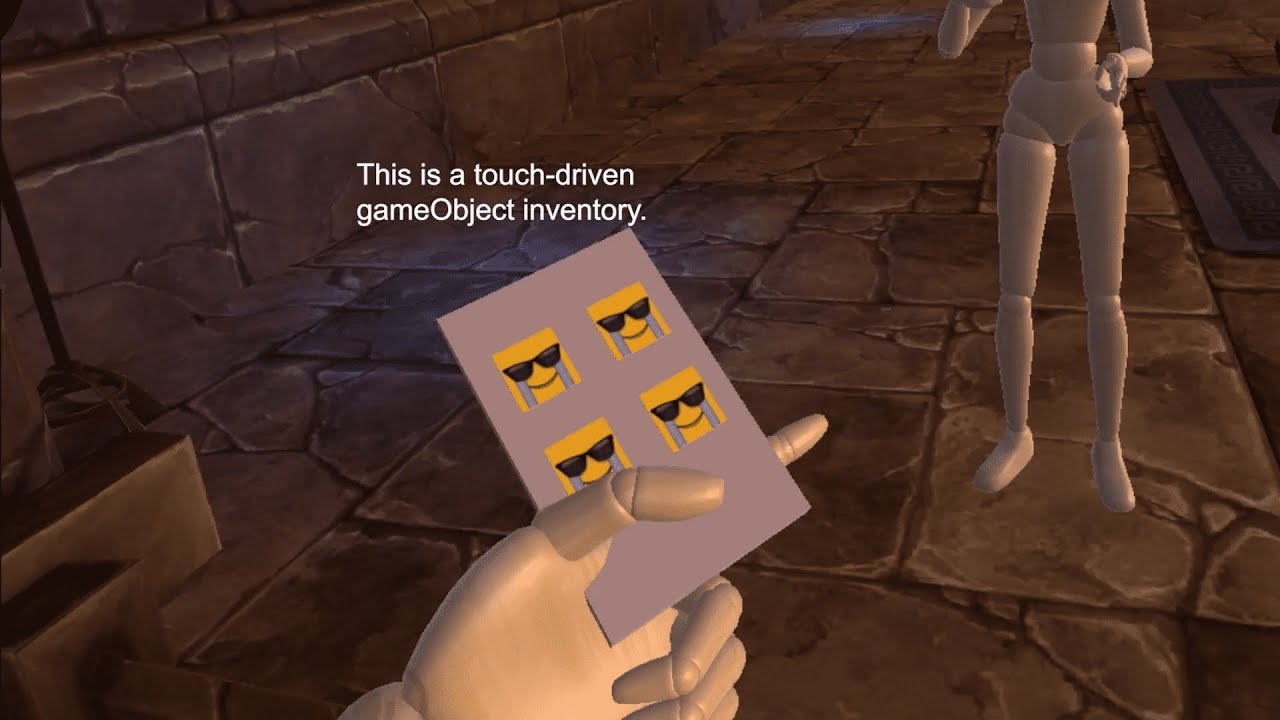
Demonstration and explanation of the inventory generation script from my asset on BOOTH:
https://booth.pm/en/items/1596673
or Stokes:
https://stokesmagee.net/store/product/19-avatar-particle-touch-based-inventory-generator-script/
Visit those links for more info.
Support me! h...
does anyone know how this is done?
pliant harness
okay so im trying to figure out how to add a dance with a song onto my avatar, but it only plays the song and opens and closes its hands
 hollow perch
needs to be in an emote slot, not a hand gesture... OR you duplicate your avatar, put the animation on the duplicate, uncheck it, drag it inside your main avatar, and in the gesture slot, instead of playing the animation, you check the unchecked avatar copy, and you hide your Body mesh.
the emote slot won't affect your performance rank, but it gets cut off after 1 minute and gets activated from the emote menu.
The second one will activate from a gesture and keeps playing forever, but it doubles the amount of stuff for the performance rank
pliant harness
well the emote doesnt repeat it just plays for as long as the dance goes....and the dance can be looped it just wont loop
@hollow perch
hollow perch
to loop it is easy: you can check Loop Time / Loop Pose in the animation clip
I was addressing the part about "it only plays teh song and opens and closes its hands" - that means you put it in a gesture slot not an emote
pliant harness
i would like to show you what its doing....
and i do loop it doesnt loop in vrchat it just stops
thin karma
thank you so much guys ❤️
 serene vale
I'm having issues getting an animation working for sheathing/unsheathing a weapon. Tried duping the weapons in the hands and putting them in the sheathe and having one vanish and the other appear, problem was that it was linked to the hand when in the sheathe so it moves so I fixed that issue but couldn't figure out how to connect it to the chest so it stays in the sheathe so I tried bringing the weapon in on its own into unity but it wont become part of the model and they are just staying as avatars on their own. I'm at a dead end, unsure what else i can do.
serene vale
nvm, figured it out
 desert urchin
Hi ! I am looking for an animation to roller skate if it already exists
clear yew
anyone know how to make prone idles?
mighty iron
(weird quetion) does anyone know how to find good twerk animations? theres only one on mixamo and i dont like it 😦
 bold sonnet
i made a animation for a lolipop to be held in the hand but i just dont know how to disable the one in the mouth whilst the animation is played so only the one in the hand is showing, i have tried deleting the lolipop in the mouth on the duplicated avatar (that didnt work) aswell as just disabling it so it doesnt show that didnt work either
clear yew
If it's on the model by default then you'll have to use an invisible material.
If it's added on with a mesh renderer then you can just disable the object
bold sonnet
it’s just a mesh within unity but I have tried disabling it on the duplicated model and deleting it too but still shows when I play the animation
As I still want it to show when the animation is not playing
young hearth
you have to animate your character model without the lolipop including in with the lolipop that is held on your character's hand, thats how it works.
bold sonnet
thats what im trying to figure out how i would go about doing this, how would i put two animations together
into one animation clip
clear yew
Copy. Paste.
clear yew
i'm having slight trouble with the audio on emotes
i have moved the audio up, made the volume at 1 but when i try to play the emote it's very very low
Probably because it's too loud at base.
VRChat automatically detects this and changes your volume settings accordingly.
huh
 undone edge
So, I made an avatar animation which I sent to a hand position, why can I not quickly turn the animation on and off in game, it takes ~4 seconds to return to my normal hand position
how do I make it not do that
jade sparrow
@undone edge are you using gestures or emotes?
@clear yew vrc has a runtime mechanic to turn down very loud audio, you are able to make your audio louder, but I wont explain how to do that here.
@narrow iron Retro sells this mechanic, it is not public how he made his inventory system.
@bold sonnet if the lolipop is a separate mesh you just need to animate the mesh renderer to turn off. You can add as many layers as you want to the dopesheet of your animation. If its a gesture, it will be 2 frames (both the same) for each item you are trying to trigger.
(Going to bed, will reply to dms and pings in the morning)
@bold sonnet
undone edge
@jade sparrow it's a hand gesture
undone edge
@jade sparrow
jade sparrow
ok that looks fine
now I want to see the inspector while you click on the animation file
you need to make sure you have loop time off
undone edge
oh
jade sparrow
😉
undone edge
what does loop time even do?
jade sparrow
it loops the animation
for example dance animation in fortnite
they are like 4 second clips that are looped
gestures cannot be looped
undone edge
Gotcha, thx
 clear yew
I fixed it
clear yew
https://www.youtube.com/watch?v=lzhgymVwwnE rip jucie wrld

this is a fix video because i upload the wrong video lol
but rip Juice :{
made all particles
song Juice WRLD - Righteous
clear yew
So im trying to make a system for firing dual weapons (the gestures and everything work fine as intended) but im having an issue with the rendering of the particle systems on the weapons. Im trying to make a gun fire effect but when I upload to vrchat the particle just gets stuck in the ground. I have the simulation space set to world (seems to cause the issue) but setting it to local makes the particles move with my hand (not what I want). Does anyone know a fix to world simulation space particles getting stuck on the ground in game? Thanks. If you need more info or have questions just ask and Ill do my best to answer
I heard something about having to add a rigibody component to the wrist but if I do so the SDK will prevent the model from being uploaded.
proper hedge
@jade sparrow it is public, but barely anyone understands it lol
 grizzled knoll
i have a question. Im trying to make an emote that has multiple charachters dancing but when i upload to vrchat and play the emote the main avatar animtes but the others are just tposing
proper hedge
you need an animator on each one
the emote should just enable the disabled objects, and the animators should be on by default
 dawn verge
Is there a way to modify all the vertices at the same time for all shape keys in blender to avoid breaking animations?
 light locust
I have a problem with gestures, they are twitching ever so slightly, there are only 2 frames in the animation and looping is turned off, how can I fix this?
young hearth
in the animation tab, the diamonds needs to be next to each other
and loop needs to be turn on
 obtuse tendon
I’m hitting a wall with implementing a nuke animation within the avatar itself. No matter what I do, the animation won’t show.
The YouTube videos I’m finding isn’t useful
young hearth
whats your issue, what are you trying to do
obtuse tendon
Well I’m attempting to hot key the animation to a gesture. I think assigned the nuke to the particles section.
The nuke animation is there but for some reason it’s not showing up on my avatar screen do some odd reason
undone edge
Is there a way to make custom hand gestures not take really long to go to a different hand gesture
undone edge
@clear yew for me, when ever I do a custom hand gesture that I made (ex. putting an item in my hand) while it's instant, when I switch to something else, it slowly moves the hand to the hand gesture
clear yew
then you have more than frame 0.00 and 0.01
you need just one frame of animation for gestures
undone edge
hmm, I'll look into that
 round lichen
Hello i'm looking for a prone walk, it's cat walk it's lot of use in avatar in vrchat but i can't find the motion.. Need help ! Ty
clear yew
I think I know what you're talking about but I don't have it, I do have a dog run though which is pretty similar
 zinc parcel
ey found out about bones and i been adding bones to the hair and quick question is it recommened to make each hair a sepret bone?
clear yew
Hair bones and skirt bones are the biggest culprits in people's very poor ranks because they add many colliders and dynamic bone scripts to them.
I recommend trying to keep the bones down a bit if possible
zinc parcel
okay
round lichen
That prettyy close but not the one i look for ;u;
 worn cove
is there a way to pause an animation and resume it from the frame it was stopped? instead of starting over
clear yew
Not that I'm aware of with standard animation in VRChat.
round lichen
I found a pic of the motion i looking for, please mention me if u have it thanks ! (prone idle WALK)
 vast fern
Hey, I'm new to working with particles in Unity. I've seen avatars that have different particle behavior when the gesture is enabled and disabled. For example, starting the gesture charges up an attack, and releasing it fires the attack. Anybody know how this is done, and if there's a guide for it?
proper hedge
there are a few ways to do it, i don't know of any guides really
if you know how to animate, basically you are just animating a property to 1 when you stop using the gesture
meaning the default property value needs to be 1, and the gesture animates it to 0
that's the basic idea. but it comes with problems
vast fern
Okay, I think I get what you're saying, but won't that mean the effect triggers when spawning in for the first time?
proper hedge
cause if your default value is 1 you need to prevent the effect from firing yes
there are multiple strategies for overcoming that problem
i have a package here for animating on release. it's probably more robust than what you need if you're just doing particles only, but this how i would recommend doing it overall
vast fern
Honestly, having no sense of direction at the moment, anything helps. Thanks, I'll take a look.
proper hedge
doesn't come with a guide, but it should be readable i hope
use gesture manager
will help you test
GitHub
A simple script which allow you to test your avatar Gesture and Emotes easly on Unity. - BlackStartx/VRC-Gesture-Manager
vast fern
I've never messed with the gesture manager. Does it work with the two gesture trick? The particle animation I'm making is pretty beefy, and I don't wanna trigger it by accident.
proper hedge
yes you can test gestures exactly the way the overrides work in game
vast fern
Gotcha, thanks again.
proper hedge
for the on release prefab there, the point is that the last animator there will be started on release of the gesture
there is a gesture example, iirc
you can put an arbitrary animator there. i have provided a sample animator that just turns on a child game object
jade sparrow
This tool is super useful! Ive been looking for it for a while. Thanks @proper hedge
vast fern
Sorry for the delay, I was making my particles how I liked it before I opened up the on release package you made. I've never worked with the animator tab before, but I assume that I'm just supposed to click on the start behavior node, and replace the Motion section with the animation I actually want?
Just wanna make sure I'm doing this right before going in too deep
Oh, also assuming I copy that thing in the default that changes the animator state as well.
vast fern
Wait, nope, now I think I understand. I don't think you even have to touch that tab. Took me longer than I care to admit to put the pieces together, but I realized what all the names mean.
 urban oasis
may i request help with shift key animations
vast fern
Alright, I've tried tinkering with the prefab and I think I didn't actually understand it. Here's how I set my hierarchy
Basically, the combo gesture works well enough. I'm able to use two emotes to activate both game objects and activate the charging sequence. The problem is, the fire sequence then activates immediately afterwards, without releasing the gesture.
Deactivating and reactivating the gesture just causes it to immediately play the fire animation again. Strangely enough, the fire animation deletes itself from the hierarchy after it finishes playing. I'm well and truly stuck and don't know how to proceed.
Whoops, sorry, forgot the image
urban oasis
well guess i wont get help here then
vast fern
In fairness, you didn't specify what the problem you're having is. What are you trying to do exactly?
urban oasis
lemme give a screenshot
this is the problem
the actual emote wont play it just turns into a statue and duplicates itself
i have zero clue how shift key animations even work and i only got a bit of info from someone else and im stuck
vast fern
When you say shift key animations, do you mean on the keyboard using Shift+F1 through F8? Just trying to make sure I understand what it is you're saying here.
urban oasis
yes
clear yew
What exactly are you trying to do with that? Why are you spawning a duplicate of the model? Are you trying to make it dance when enabling a gesture?
vast fern
Can you take a screenshot of your Unity hierarchy so we can see what that looks like?
clear yew
Put an animator on the duplicate
Put an animation controller on the animator of the duplicate
Set the animation controller's default state to the dance animation.
vast fern
Not all of it, just the base objects, though it seems like Panda knows more what they're talking about than I do
vast fern
The override on the main model I think, but the animators on the duplicate.
urban oasis
you mean the one with the play symbol and the 3 boxes
?
this?
i feel like i need a guiding voice showing me what to do
i hope i get more help because i am still confused
vast fern
Sorry, but as I posted earlier, I know next to nothing about animators, I can't help
urban oasis
man the yt videos dont help neither because they use a different version and the one i tried just got rid of the animation i had
if only it would work the same as normal emotes
vast fern
Ah, well, finally figured out what was going wrong with my issue. The information was all there, I just had to piece it together in my head. Best of luck with your dancing skeleton
clear yew
https://youtu.be/sk9UMzud4m8
I can vet for this one, just watched it myself and it seems to be about right, it does mention the cursed website though. Won't add much intuition on why things are happening though

 urban oasis
oh god please let this be the one
 keen grove
Hello, I'm new to VRChat and interested in the animations of the Avatars, I understand that they are limited to 8 animations/gestures and they are triggered by shift+F keys on keyboard and hand positioning on VR. My question is how does Index Controller work to hand gesture all of the fingers if it needs one per finger and there's only 8?
clear yew
You make the assigned gesture with your hand.
We have to make it so all the different controllers are somewhat standardized and compatible with each other.
urban oasis
i am now currently stuck at the animation bit at 2:20 because i do not have that tab
well what do i do now
clear yew
Window > Animation > Animation
urban oasis
now im stuck again because i dont know how i can get there
clear yew
Get there?
urban oasis
yeah i dont have this exact thing that the one in the yt video has
so im just stumped on what to do
again
clear yew
I don't understand what you're stuck on
urban oasis
well basically he has that at the start
meanwhile idk what to select
he can just add this willy nilly but idk what i am suppose to actually select
clear yew
You add in the thing you want to enable (that is disabled by default). The clone of the avatar that has the dance animation on it.
urban oasis
so i just pick the thing i duplicated thats suppose to do the dance?
yes
ok
my brain is deterroating i now know
damn i think it will finally work now
please for the love of god work
it didnt work
god why must i be doomed with such bullshittery
clear yew
Is your main avatar animation controller placed on the avatar descriptor?
urban oasis
you mean the override or is there something else i should use
clear yew
Yeah, the override
clear yew
On all 3?
urban oasis
yeah the 2 on the descriptor and on the top
clear yew
The one at the top is fine. Does the copy spawn in when you do the animation?
urban oasis
no now theres no copy even
clear yew
Did you change the properties in the animation to enable the clone and disable the body
urban oasis
wait
how do i enable the animation on the properties
where is it
i can only add audio
clear yew
What?
urban oasis
this
urban oasis
yes