#animation
1 messages · Page 121 of 1
 clear yew
 frozen silo
Well, that would be what I want : D I will however be at work for several hours, Ill be on tonight and will try all this again,
Thanks for the tips!
burst would be, time 0, count 1, cycles 1, interval .01 ? oorr
clear yew
I haven't done particles in a long time so I'm not too sure
but it's fairly easy to experiment until it works as intended
frozen silo
I mean, I usually try to figure things out on my own for days before asking. No one likes wasting time, so I came here xp
It sad too bc I use to be great with particles years back but now Ive forgotten everything and trying to get back into vrc
frozen silo
Looks right to me, hby?
 fierce bane
@frozen silo @gray spoke Simulation space for particles does NOT have to be set to world to be seen.
World means it stays in "world space" as in the x y z coordinates etc are based on the world.
It's how bullets are usually set, so you can fire and then turn and it'll keep going in a straight line.
Local means it is local to what the particle system is attached to. Often used for beam-type attacks, lasers, ki blasts, etc because it follows the hand that way as if it was moving extremely quickly like light does.
fierce bane
@frozen silo Most likely what you want for the gun is an emission enable instead of an object enable.
Object on by default, emission disabled by default.
For a single shot per trigger pull: Emission using burst set to 0:01 time and single burst
The duration is your delay between shots (if it's too low multiple shots might get through before it shuts off)
Rough example below.
holding the button down will keep firing in the above example though, so be aware of that
If you want it to only fire once per press there's a few ways to do it, you can just enable a non-looping particle system using burst emission and it'll only fire once every time the system is enabled, but if you release before the bullet expires/dies it'll despawn it.
The other is a weird workaround with non-parented sub emitters (which I haven't bothered with so can't show)
@kindred trout what is the emission you're using on your sub emitter?
 kindred trout
frozen silo
kindred trout
frozen silo
@fierce bane Thank you for this! Im just a lil confused still bc, the object enable you see is to show the gun, and the emission is set to off, and turned on in the anim? I thought it was correct. Is my pic not the same as you mean?
 prime iron
is there a way to turn off blinking of the avatars eyes in unity?
for some reason its also using my vrc_oo for it
 vapid spindle
the first 4 shape keys are blink left, blink right, lowerlid left, lowerlid right and afaik those will be used to do the automatic blinking and "squinting"
 mint haven
I made an animation with multiple keyframes on a hand gesture and when I play another animation he frist one rewinds first. What am I doing wrong?
clear yew
you used more than one frame on a gesture animation
fierce bane
@mint haven You can enable the behavior of an animator that contains what you need it to do.
mint haven
 fierce bane
what exactly are you trying to animate? Is it your avatar's humanoid bones?
mint haven
Trying to animate an object so it moves from one point to another and the animation needs to be 2 seconds long. A second animation is supposed to change the size of my avatar.
If you got time can you help me over a discord call? then I can show you
fierce bane
@mint haven You are aware that changing the size of the avatar will not change the view point, correct?
mint haven
yes and it does not matter
fierce bane
is the object you're trying to move your own avatar or something else?
and are you wanting your avatar to stay that size while you move around, or is it a temporary thing?
mint haven
the whomp fall over the avatar and yes I want to be able to move around with a flat avatar
fierce bane
The easiest way I can think to do it would be to use two gestures, the first puts a dummy avatar in your place and hides your avatar while shrinking it and animates the whomp.
The second gesture would have you appear again already flattened (and either hide the first or you could have them separate)
So it would look like you got flattened by the whomp and can move around freely afterwards
mint haven
i used two gestures for this
fierce bane
You would place the whomp and the dummy avatar under a empty game object, and place an animator on that object. Set up the animation (from that animator) to fall as well as to flatten the avatar at the right times.
The first gesture would enable the animator's object (which would enable the rest beneath it, the whomp and the dummy avatar) And would hide your own avatar (best option is to swap materials to an invisible shader, which prevents some weird desync from disabling the body or mesh renderer)
The second gesture just enables your avatar with the flattened state as well (so you don't have to hold both the entire time)
mint haven
but will the dummy avatar move it's legs and arms?
 surreal crater
I dont know why you want to use a dummy?
Just let the whomp fall on you with a animation
and with that same animation make yourself 0.05 scale or something in the Y axes
Just extend the animation so its basicly infinite
fierce bane
because the resize needed to be timed with the collapse and they want it as a gesture
so you'd have to enable an animator to not cause issues with the gesture system, and an animator under the main one cannot scale parents of itself
@mint haven you can freely animate the dummy avatar to pose or move how you want before the squish, yes. You could also technically bind it to yourself to animate...but I'd really not recommend it.
It's only supposed to be there from activation until it gets squished, and then you switch to the other gesture to hide it, reveal your squished self and move around.
You could avoid using a dummy if you just wanted to time the squish yourself with the second gesture however.
mint haven
somehow i manage to make it worse 🤦♂️
 lament prism
@frozen silo Honestly easiest way to to do what you want is by disabling the particle system entirely, then re-enabling it via an animation.
@mint haven If you want to make an animation longer than one frame, you'll need to animate it under a gameobject (which should be disabled until you want to enable the entire animation).
frozen silo
Am i not enabling them properly?
frozen silo
I thought so ? https://cdn.discordapp.com/attachments/390924344475254792/675882332736978944/Screenshot_294.png

 rough magnet
How do I make it so strafing covers both left and right movement?
 wispy thorn
@rough magnet I was confused by that at first too that there's no left, but turns out it's mimicked
The custom animation you put into right strafe is mimicked by the left strafe
in other words, it will be fine as long as you don't intend them to be different (Might have mixed them up and the left one is the one you apply and right is the one that doesn't exist)
fierce bane
no you do not need to do anything special, it'll just use it
rough magnet
Okay
fierce bane
mobile is derpy with mentions sometimes...
rough magnet
Yeah I noticed
 livid berry
Does anyone know how to make a "prop" or an object be in world space? I can spawn an object, but it seems to turn when I turn and I don't want that to happen
lament prism
@frozen silo try using gesture manager to see exactly what's going wrong
oh okay
I see what's wrong actually
you're enabling the emission for the particle system
you just need to enable the particle system as a whole
 distant tulip
How would I go about making a gesture that would activate a gun model when both gestures are activated, though when left alone would only activate the gesture itself (being something like a thumbs up, middle finger, or whatever)?
livid berry
@distant tulip So you want to pull out a gun only when you have two animations going at once?
I do this kind of thing via layering my animations. So you have a GameObject and nest your gun model within in it and have both disabled. Have your first animation ONLY activate the GameObject that holds the gun model, then on the other animation, activate ONLY the gun model. That way you can ONLY have the gun when BOTH animations are active.
distant tulip
Gotcha, so make one animation activate the gun while another activates the layer that holds the gun?
Thanks, i'll try it out!
fierce bane
@livid berry you need to use a fixed joint with nothing in the rigid body target.
You'll also need to set up an animator with a behavior toggle on the gesture to turn it off.
The animator should be running whenever the gesture is not, and should reset the object's position back to 0,0,0 position/rotation (otherwise it'll offset repeatedly when you use it)
livid berry
@fierce bane I've never had to use fixed joints before, to be honest I don't even know how to use them in VRchat. What kind of situation would you need to use them in? Thanks!
fierce bane
@livid berry this package has everything set up with an example, and has some info text to it as well
was made by lindesu I think?
livid berry
Oh great thank you! I'll check it out =)
fierce bane
check the pinned messages, 2nd one
in the future you should duplicate the avatar and animate on the duplicate (they can be deleted afterwards
clear yew
In blender tho
fierce bane
oh I'm a derp, missed that sorry
 near brook
cause it keeps it as the animation pose
fierce bane
get cats, pose model, "apply pose as basis"
fierce bane
top section of CATS while in pose mode
fierce bane
yes that, sorry
fierce bane
oh...crap I'm too tired for this...
Which version?
fierce bane
find the animation panel, set the slider back down to 0 (which is hopefully your T pose)
fierce bane
Go into pose mode, use A to select all bones, and hit Alt+G Alt+R Alt+S
will reset locaiton, rotation, and scale
fierce bane
Check your animation, make sure it's flowing correctly because I was a derp earlier being too tired...
near brook
it does
ima check in unity
ok
its not in tpose in unity
OK
i re didit
its working
let me check the animation
okay
so
animation isnt there
when i bake animation when i export, it will go not tpose
so when it has the animation it doesnt tpose
fierce bane
is your 0 time for animation the default pose? it's the easiest way to be sure it's set properly.
Also make sure that when not in pose mode it's in the default T-Pose
near brook
it is at time 0
it is in tpose
are u up for a dcord call
or something
cause i dont think it will be done anytime soon in text
and i could be a complete dumbass
fierce bane
I'm going to bed really soon here
As long as the basis pose is in T-Pose and your export settings have it set to export animations you should be good
near brook
welp
i have found
no matter what
when u export it, it changes default pose to the animation pose
 young vapor
can someone make me an intro
clear yew
Vrc traders in #community-servers-old if you want something done for you
distant tulip
I know this is probably not possible, but is it possible to make it so that a gesture wont activate nor move your fingers until another gesture is activated alongside it? I made it so I have a gun that doesn't activate unless RNR and Fist are activated together, but it looks weird when using RNR without fist since the fingers position to hold a gun.
 serene sorrel
Question for anyone who's familiar with how vrc stations work. Is it possible to place a station with an override animation on my avatar that manipulates a player's entire avatar when interacted with, including head and hands (for VR users), much like MMD dance worlds do?
 surreal pebble
^ yes.
Create a seat and add and override controller.
Make the controller by taking your anim file and dropping it onto the station with an empty controller.
It should make a controller file which uses the anim file.
Mind you it's 2:30 am
So take with a grain of salt
@distant tulip yes it's possible. I can't remember how to do it off the top of my head.
Although it's probably something to do with the animator tab.
I can't remember sorry.
frozen silo
So I finally got my particles to play on gesture, and coming from hand, but how to keep particles set to world space to not follow the hand angle? Id like to activate it and move my hand without the particles following where hand is pointing, thought having it to world would keep it where it was and not move around 🤔
 stoic breach
Oh ditto on what Shaipai said, that would be awesome to know
So I've been struggling with designing animations for my VRChat Avatars for a long time (more specifically state machines). I was wondering if anyone who is super knowledgeable would be willing to show me the concepts so that I might be able to figure out what I'm doing right and wrong. If anyone has some free time and is willing to show me the ropes that would be awesome. DM me if you can help please.
clear yew
When ever I do a hand gesture for my dance animations, for some reason it turns ALL of my gestures into that animation and I don't know why
fierce bane
@clear yew gestures can ONLY be 1 frame long, keyframes on 0:00 and 0:01
To make a dance animation as a gesture you need to have a duplicate of the model inside your avatar's hierarchy, and to place the dance animation in an animator on it.
Your gesture should hide your normal avatar and enable the second avatar (which will start the animator running)
@frozen silo @stoic breach What exactly do you mean? Are you using particles over time emission and the emission is following your hand? Or are you firing off a particle and when you move your hand it still follows it?
stoic breach
For me specifically it is the last thing
i fire off the particle and moves with my hand
fierce bane
A world sim particle should stay in place compared to the world, but the emission will follow you around still
make sure you don't have inherit velocity checked on the particle system if is it following you
stoic breach
ah ok thats perfect, one more question how i do make the particle a world sim particle?
frozen silo
uh, same as Raptor, Ill shot it and it will kinda follow my hand position.
I assume it bc Force over lifetime is local? but then I get a unwanted result in direction if I switch that to world
fierce bane
why do you have velocity over lifetime with it set to 0?
and is there a NEED for force over lifetime? could you just use a start speed pointing in the same direction?
And yes, that would be why it changes with your hand, it is constantly adding force based on the hand
@frozen silo ⬆️ forgot to mention, woops
stoic breach
thanks @fierce bane
frozen silo
I was prolly messing with effects until i liked it and perhaps left unnecessary things on, still learning what they all do. and im sure theres other ways to do what i wanted, and thankyou for pointing things out! @fierce bane
fierce bane
@frozen silo yep, remove the force and velocity, set the start speed to what seems right, and align the emitter to the direction you want it to fly.
That seems to be what you intend anyway
You want the particle to fly out and go straight, ignoring your hand position after it fires, correct?
frozen silo
thats what it ended up as and its hard to explain what i was aiming for. i guess say the particle started one direction(towards me or backwards) but then U turns and goes where i pointed.
fierce bane
@frozen silo similar to this?
can do that easily with an "on death" sub emitter that just has negative velocity, set up the timing for the first one to die at the right time, and the sub emitter will fire in the other direciton
the first one could even be local so it follows to your hand, and then the sub emitter be world so it fires from that point and doesn't follow after
frozen silo
Thankyouu, That sounds neat, I'm gonna haveto experiment with this more! I shall sleep now lol ty!
and also I only make this one as a test anyway because the pistol still isnt working, but now that this is, i need to pick apart how to fix the pistol setup >.<
 stuck briar
i love how i just want to add weapon to an avatar but i already wasted like 24 hours
on it
surreal crater
@stuck briar what part are you stuck on?
 sick hemlock
Hello everyone, I see more and more people using this costum prone animation, like the one in the following video 6:41. I would appreciate it if you look into it for a few sec. Maybe someone have it and might wanna share it, or know a contact person? Thanks in advance! https://youtu.be/tiJfKHOtGIw?t=401

It's a sad life but its my life
FOLLOW ME ON TWITCH - Twitch - http://twitch.tv/TruNoom
👍 Hit that like button if you enjoyed
🔔 Join the Notification Squad and click that bell button
Social Links ▼
♥ Twitch - http://twitch.tv/TruNoom
♥ Discord - https://discord.gg/trunoom
♥ ...
 onyx agate
edited crawling animation from mixamo.com
sick hemlock
thanks i will look into it 
 muted lance
So, I'm trying to make this scythe spin
but near the end of the 360, it slows down for a second, then re-loops the animation and repeas
clear yew
Go into the curve settings and set everything to Linear
muted lance
@clear yew How do I do that?
clear yew
Right click and set it to Linear
muted lance
This animation makes all my other animations slow
it's literally just one spin
How do i make it work and not stay on when it's off, or whatever it does.
Please help owo
fierce bane
@muted lance if you want an animation on a gesture that is longer than a single frame, you MUST activate an animator that contains the animation.
The gesture animation itself has to be 1 frame long (keyframes on 0:00 and 0:01 only)
Set up your gesture with your hand animation and everything else that only needs to be a single frame (with the exception of audio if you want accurate timing)
Place an animator above the part that needs to be animated (in this case, above the spinning part).
Does the scythe spin as soon as it appears? Or is it out and held in the hand or something before you start spinning it?
muted lance
@fierce bane The last thing you said. It's thumbs up to bring it out, Then handgun to make it the start spinning. It's only one scythe.
fierce bane
ok, so then you need a behavior toggle animation to enable the animator on the scythe, one second
muted lance
Now, it's currently uploading. My solution attempt was to make it shorter and make sure every other gesture of mine turns it off.
fierce bane
fierce bane
you can take this and copy the keyframes in it to your gesture
muted lance
Just into the spinning one?
fierce bane
the gesture for that yes, you should have another animation that does the actual spin from the view of the animator above the scythe
so ```
Animator
- Spinning Scythe
Yeah, the override one is the spinning one
fierce bane
So the behavior toggle would be part of your handgun gesture animation.
you should remove the spin from that animation though and make a separate animation after you set an animator above the scythe
you're basically just turning an animator on and off with the handgun gesture, and it does the scythe's spin animation
muted lance
Okay, I understand, I just don't know where to start right now haha. I'm pretty new at this
fierce bane
that's fine
muted lance
What should be my first step?
fierce bane
can you give me a screenshot of the hierarchy down to the scythe? have the part you want to spin selected
muted lance
Don't mind the trails, The ones with L are for the spinning anim, while the ones without the L are for the normal scyth
fierce bane
Can you make an empty object on the wrist and place the scythe into that instead?
fierce bane
what is it named?
muted lance
Just scythe.
fierce bane
you can edit them quickly or remake them, up to you
fierce bane
Take the animation I sent you and put it into your assets, store it wherever you want.
Copy the behavior toggle component and paste it into your handgun gesture
muted lance
Okay, should I re-add the scythe back into my anim? It's missing since we slapped it into a different Obj.
fierce bane
Go to that empty object you created and add component and then type "animator" and add the component
You can select your current component for the scythe and just press F2 (in the animation with it selected) and it will open a text box for you to edit.
I'd suggest copy/pasting it into notepad to make it easier to edit
fierce bane
yes you haven't added the animator yet I'd assume?
muted lance
Not yet, should I do that first?
fierce bane
yes, it needs an animator or it will only say missing
muted lance
Okay, the objective with the scythe has the animator
fierce bane
ok same as before to edit the path, select the animator press F2 and change the path to Armature/Hips/Spine/Chest/Right shoulder/Right arm/Right elbow/Right wrist/scythe
muted lance
F2 renames for me
fierce bane
you are in the animation window selecting that component, correct?
fierce bane
it probably says magic/example
muted lance
should I just copy paste what you sent?
fierce bane
yes
muted lance
Done
fierce bane
so you changed Armature/Example over to that, correct?
fierce bane
good, make sure it's checked on both frames
muted lance
done
fierce bane
Just to make sure, you're doing this on the spinning gesture, correct?
fierce bane
you want that behavior enable on the spinning gesture because it'll start the spin
muted lance
Got it, sec
fierce bane
also make sure your summon and spinning gestures are only that one frame long (0:00 and 0:01)
muted lance
OH, Wait. Should I also make a seperate animation with just the spinng?
fierce bane
You're going to yes, but it has to be from the view of the animator on the "scythe" object, not from the view of the top level
it's easy to do it's just hard for me to word correctly
muted lance
Mhm! Just a moment
Okay, so, I just made an anim on the scythe, not the game obj, with the scythe spinnig
Should I put that into the anim?
animator?
@fierce bane
Okay, I caught up
This the scythe spin anim folder.
fierce bane
@muted lance If you make the spinning animation from that animator on the "scythe" object it should already be the only animation in the animator
fierce bane
click the "animator" tab, you should see it as the default state
just to make sure it's all set
muted lance
muted lance
fierce bane
all good then
go back to the component, and uncheck the animator itself to disable it until the gesture activates it
muted lance
okay
fierce bane
this part
fierce bane
can't see the timing, they are both only on 0:00 and 0:01 correct?
fierce bane
yes
fierce bane
NP enjoy
muted lance
@fierce bane So, a thing
The scythe still appears when I do handgun and spins
It's supposed to not do it until I do thumbsup
fierce bane
I thought you wanted it to spin when you did handgun?
muted lance
Also, when I pause the animation for spinning, it'll stop anywhere, not back in the hand
I did, but I wanted an override.
So, the spin only appears after I pull it out with thumbsup on one of my controllers
fierce bane
so you want a combo gesture for it to spin?
muted lance
So, I do thumbsup to pull it out, and then I do handgun to make the spin appear, it won't without it
yes please.
fierce bane
the only way I can think of with this would be using right hand priority to control that, so if the right hand says spin it spins, but if the left hand ever says it it doesn't
muted lance
I see, I know how to do a combo one without this.
I just need to figure it out with this prefab
fierce bane
the easiest way to do it is to ONLY put the spin animation and not the scythe enable on the spin gesture
fierce bane
so you hold the scythe with one hand gesture, and if you press the other it'd enable the spin...but it can't spin if it's not enabled
muted lance
That's what I need to do.
Yep!
I forgot about that.
So, you know my anim with your prefab?
I'm just gonna delete the checkbox that makes the scythe appear for the spin
fierce bane
yep
fierce bane
I assumed you wanted to use the same hand to switch between them...so I didn't mention anything
so it just pauses the rotation instead of resetting it
muted lance
Yeah, I'd like to have it reset but I guess doing this is gonna wor?
fierce bane
that'll only work for the two gesture requirement
muted lance
Okay, so me deleting this thing off my spin animation is gonna make it work.
fierce bane
it'll still pause mid way
fierce bane
you would need a condition or a time for that, and you can't really use conditions
muted lance
What about time?
fierce bane
the time means a certain amount of time passes while running it will use that condition
fierce bane
it's really the only way to set up the enable/disable unless you just want the animation to be really quick
you could do it a crappy way that would work, but it's just duplicating the scythe and having the animator enable with it to spin it at all times while active, and just using a stationary one otherwise
muted lance
I remember that, it's weird
fierce bane
it's the most common way to have a weapon go from your back to your hand, just that it's two in your hand and one is animated
muted lance
Nonon, I have nothing on my body.
fierce bane
I don't know a way to have the animator reset itself without disabling the object or using scripts
muted lance
It's out of mid air for me.
stoic breach
To apply physics to hair can i use dynamic bones or do i have to make it that rigid body thing
fierce bane
I said as an example
fierce bane
@stoic breach yes you can use dynamic bones, it's the most common way
stoic breach
Ok its normally what I use, but i can never replicate the effect where the bones actually follow gravity if that makes sense
fierce bane
use a negative value for Y force
you'll have to play with it as it depends on each individual model setup
fierce bane
gravity is a bit weird at times, a -Y force is reliable as that is always down
stoic breach
gotcha thanks ill try and get it to work
this is the first on my many trials to being good at this modeling thing. I like to think im decent enough in blender but unity is where i get lost. thanks for the help @fierce bane
well thanks I figured it out!
stoic breach
Alright once I figure out state machines and emote toggle its over for you guys 😂
 nimble ridge
😰
stoic breach
yeah you better watch out man XD
nimble ridge
well. guess i have no choice, but to fight back with my final_ik !
clear yew
remember grounder IK ?
nimble ridge

 median bobcat
how do you get a model to auto play an animation within an animation
onyx agate
have one animation activate an empty object that triggers the other animation
all comes down in timing it right
 thin mortar
I have a question so I wanna make a small floating head next to my avatar how would I do that?
fierce bane
@thin mortar do you just want it to move with you or lag behind, or what exactly?
thin mortar
i want it to move when i move, i wanna have it floating besides me up and down slowly
fierce bane
then just get a head with a bone so you can move it, and set an animator as a parent of that bone (so it can animate it), then set an animation to move up and down
onyx agate
the pet follower prefab works similar for me: no need to mess with animations
 past flare
So I am trying to create hand gesture facial expressions.
I created a copy of my avatar.
Then I imported the premade hand gestures.
But when I drag one of the hand gestures onto the duplicate avatar, another file gets created, called "Body".
What is this?
 wooden ivy
That's an animation controller. It's being created because the character you're placing the animation on has no animation controller. Actually, you should only drag an animation to a character to preview it. To set the gesture in VRC, you'll need to create an Animation Override Controller and set it to use the animation controller in the SDK. That will allow you to override the gezture animations
wooden ivy
When you create an override controller it'll have a field to select the animation controller to override. There you can select the VRC standing controller
past flare
I think you are referencing the top part where it says "controller"?
Is "AvatarControllerTemplate" the correct item to be selected in that box?
wooden ivy
Yeah
past flare
Thank you for the info. There must be some other reason why the facial expressions arnt being applied then..
muted lance
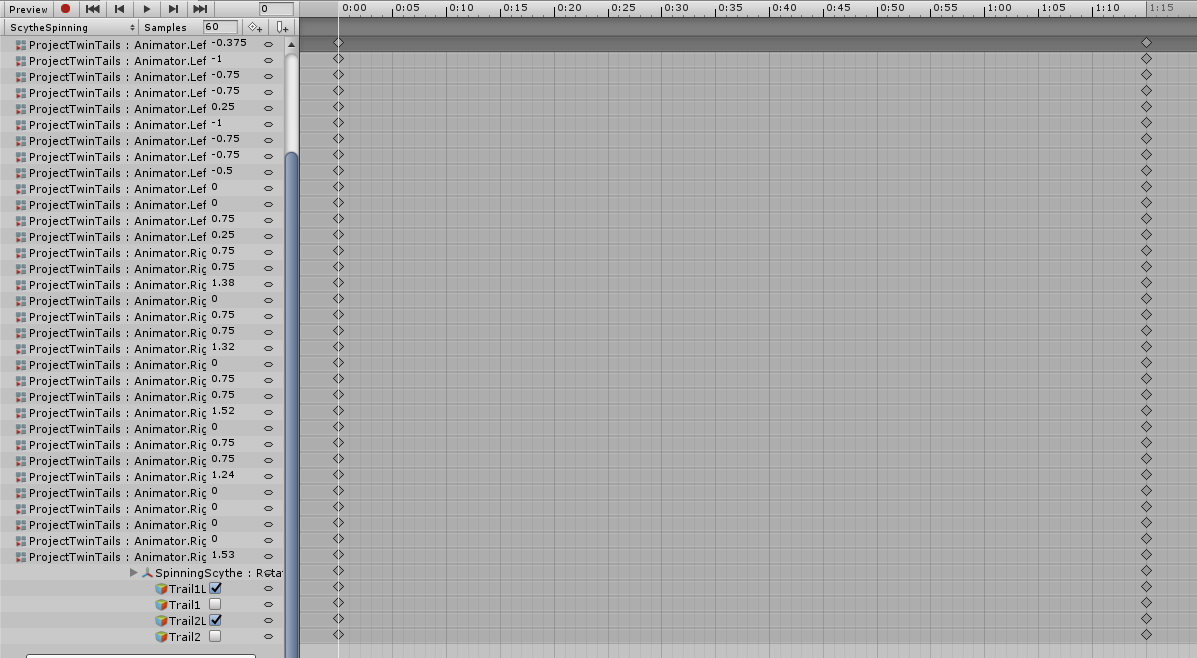
So, this is one scythe. This is the animation that makes it spin, while I have another that summons the same scythe.
The goal is to make this 0-1 frames, but still keep that long of a spin.
It's a gesture overide too.
Anyhelp?
 red shard
Anyone have the mmd for confident by demi Lovato? Only seen 2 avatars ever use it and 1 is now private so I want to put it on one of my avatars
 fleet stirrup

how can I create colider like this spider do?
 cold pulsar
What do you mean collider? He's just using it as a hand puppet.
 rotund harbor
does anyone have all the basic animations that vrc uses? i know most of them come from mixamo; i have the standard hand animations, just wondering if anyone has all the basic ones though like the walk/crouch/crawl and emote animations?
median bobcat
so i have an animated model inside an animation but when the object becomes active it is not playing the animation the way i want it or isnt playing
it plays with the root motion curve but not they way i want it
 wary owl
@muted lance In the animation window in Unity, you can change the sample rate. Move the final keyframe to the second frame, and adjust the sample rate while playing the animation until you get it down to the speed you want. The sample rate is per second and defaults to 60.
 bold belfry
Hey all, relatively new to animating emotes and have a question
I'm trying to animate a simple colour change - I duplicated the textures and changed them slightly and I'd like an emote that changes the texture when you use it
I know how to do it in theory - new animation, hit record, apply new materials, then add the animation to emote1 in the controller object
But for some reason whenever I hit the record button in the animation panel my avatar does this weird crouch, and this is saved to the animation
So he doesn't just change colour, he also squats in game for like a split second xD any ideas?
fleet stirrup
@bold belfry create animation destroy the humanoid Rigged system. that's why you always have to duplicate your avatar first and than create animation from it.

Subscribe if you haven't and click Like if you enjoyed the video! Helps me out a lot!
Hello VRChat, welcome to my very first Tutorial Video for VRChat!
I am not a professional, all I aim to do is to teach you of my personal methods for VRChat Gestures Override and to hopeful...
bold belfry
Thanks Hyper! I'll watch the video
I did do that already, duplicated the character, made the animation then attached it to the controller of the 1st character
Weirdly when I attach it to a gesture it works fine (just changes material) but when I attach it to an emote it does the whole weird crouch thing
fleet stirrup
yes it does
as said because it destroy the humanoid Rigged system
either you have to create animation entire body record or do with gesture
bold belfry
Hmm, not really sure what you mean by create animation entire body
Essentially I'm just trying to have different versions of the same texture on emotes, so I can switch between different patterns of clothing etc
Wouldn't really work with gestures
fleet stirrup
this is record of entire body move animation.
and yea, use gestures are just fine
beside I believe most of vrchat player use gesture to do any animations and not use emotes.
 dull sleet
im trying to trigger a crouching animation , but i cant get it to work unless i put my helmet almost on the floor. is there a setting somewhere i need to chnage depending on the height on my model?
ive put the animation in both the crouch and prone section of the controller but it only seem to trigger at prone height.
 heady talon
Not sure if this is the right channel, but how would I make a particle effect move with my avatar but not rotate?
clear yew
my tail animation doesn't move in play mode or the game
Show the tail components
i just have dynamic bones on the tail
@clear yew
Disable it and try again?
Also where did you put the animator for the tail?
 ionic nova
also, animation type - generic, and you use Animation component or Animatior?
clear yew
animator and on the hips
fierce bane
@dull sleet if I remember correctly, crouch doesn't really trigger as an override but prone does.
@heady talon I can think of a few meanings to that, what exactly are you trying to do? An example would help.
Is it an area of released particles like a sphere of them that you want to stay in place relative to you, but not rotate with you?
Or is it a particle you just don't want to rotate at all, or...what exactly?
@clear yew can you show the animation window with the animator object selected?
clear yew
muted lance
 fierce bane
@clear yew can you select one of those, press F2, and paste the path in here?
they look like they may be based on the avatar level, and not from the hips based on the spacing
clear yew
Armature/Hips/Tail/Armature/Hips/Tail1/Tail1_001
fierce bane
yep, and your animator is on the hips, correct? (also you should really merge those models together in blender or similar, helps on performance)
clear yew
yes
fierce bane
can you show the hierarchy from the animator down to the tail? just select the hip with the animator on it first
could either be another model you're using as the tail, or an accidental edit of the path with extra hierarchy to it
ionic nova
you need top open .anim file with notepad and delete Armature/Hips/ for all of keys, if you not using it on root model but on hips inside, if it's on the bytecode you need to change files conversion to text somewhere in unity settings
or f2 
fierce bane
you don't need to open the anim file to do that, you can just edit it directly in Unity (using the F2 path edit)
heady talon
@fierce bane The second one. Stay relative to my position but not rotate with me
ionic nova
you might need to use Joints to make them follow but not rotate, or payed hard way - FinalIK
fierce bane
@heady talon I...think the easiest way to do that would be using a fixed joint/rigid, and have the rigid's constraints for position checked, but not the rotation. That will keep position with you, but rotation separated
clear yew
OKAY MY TAIL IS WORKING THANK YOU @fierce bane ❤️
fierce bane
good, just remember animations are based on the animator they run from, not the top level at all times
heady talon
@fierce bane thanks. Ill try it out
 wet shoal
can someone please help me with dynamic bones, i have it all set it up but its not working in vrchat
muted lance
Can you send me a screenshot of one of your bones?
clear yew
Does it work in unity?
muted lance
Yeah^
wet shoal
muted lance
Hooooly.
clear yew
What the fuck dude?
muted lance
Hey, I don't recommend doing colliders like that
Jesus
Put one on your middle finger and make it big enough to cover your fingers,
wet shoal
okay, ill try that
muted lance
Does it say compilers need to be fixed?
wet shoal
no
wet shoal
breasts and hair
muted lance
Okay, look for the breasts in your hierarchy and add the bones to them, not the chest itself
And, the way to test in unity is to click play, then select your avatar and move it around to make the hair wave.
fierce bane
you should have a root bone for the breasts, you likely don't and are using the chest bone as the root because of that, correct?
wet shoal
it was a premade unity file
fierce bane
absolutely remove all those colliders except for either middle finger or wrist, and set those to cover the hand.
You're gaining an extremely minor benefit of all those colliders, you won't even notice the difference in one or all of those....but performance wise it's devastating...
that doesn't really answer the question...Are the breast bones a direct child of the chest bone or is there one between them?
fierce bane
ok then unless you know how to use blender you do have to use the chest as the dynbone root.
Do you have the shoulders and neck set under the "exclusions" section?
wet shoal
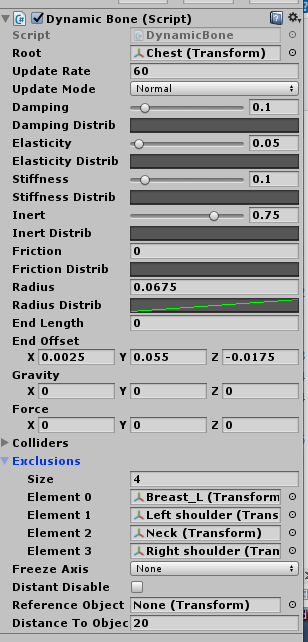 fierce bane
@muted lance just a note on DynBones, the bone set as the root does not move, so setting the root as the breast bones for example would have them not move at all
muted lance
Oh, okay. Got it.
fierce bane
If you want the breasts to move, they should not be under the exclusions, you have the left one set there
you only need one script for both of them to be affected
wet shoal
so remove the breast from the exclusions element?
wet shoal
dynamic bone collider script is on the chest, nothing else
fierce bane
what is the chest collider for?
wet shoal
i dont know
fierce bane
colliders act on other dynbone scripts to move them, or stop them, so I could see it being to stop the hair if it's long
wet shoal
yeah it is pretty long
fierce bane
just...please clean up those colliders, the hair dynbone probably needs it cleaned up too.
Where is the dynbone script for the hair?
wet shoal
 fierce bane
also click the play button at the top of Unity, select your avatar (the top level with the descriptor on it) and move it back and forth...do you see movement for the dynbone stuff?
wet shoal
when i hit play button it locks camera and i cant move avatar
im just gonna check in vr chat
it didnt work
fierce bane
just make sure you click "scene" instead of staying on the "Game" tab
check in unity first
wet shoal
i am in scene but cant move character
fierce bane
select the character in the hierarchy, make sure its' in the move mode at the top, the 4 arrows
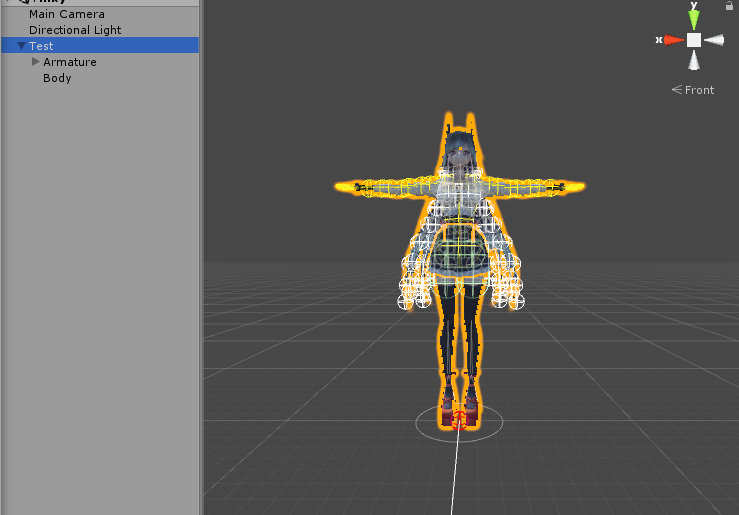 fierce bane
then you probably have the performance option for dynbone limit on in vrc
wet shoal
yeah it doesnt work in vrc but works in unity
fierce bane
the colliders on that avatar are abysmal...you should really reduce the collider amount...a single one for the hand is plenty...I can understand the chest/arms/shoulders if you really want it there though
clear yew
I don't
It will not help with clipping whatsoever
So it's just there to lag for no reason
fierce bane
I mean...if it's set up properly it can avoid the clipping mostly...but honestly you're better off just dealing with it and removing all those colliders to save immensely on performance
clear yew
It's never worth to have a 3k colliders check just to try to prevent clipping
clear yew
Especially since the dyn bone limiter will just remove the colliders and it will clip anyway
fierce bane
a version with a lot of colliders for a low population room where people are fine with it is one thing, but a commonly used version with all those is a terrible idea
clear yew
I personally block those abysmally ranked avatars
fierce bane
the default limits for that limiter is really bad...a bit overkill but understandable...just wish it had a slider for us to adjust
"very poor" doesn't make me block it, it does however make me check why it's ranked that way
clear yew
If you have more than 256 collision checks then the limiter will remove any colliders
That's how I set mine
wet shoal
so is that why it doesnt work in vrc?
clear yew
Yes
clear yew
You do what you want but I strongly suggest to keep the dynamic bone count and the colliders as low as possible
It will prevent a lot of people from blocking you or hide your avatar
median bobcat
So I have a position transformer for my animation but when I root it, that animation doesn't play everything else plays in that animation just not that
muted lance
@fierce bane hEY
Remember how we couldn't get my animator to reset?
Like, the scythe would just stop wherever and not at reset?
solution is to just make fist or another anim reset it back to it's Original position, my brother thought that up.
median bobcat
How do you make emotes loop
 lethal rampart
i'm a bit in over my head here, is there any good documentation or tutorial stuff for how to make npcs in a world? more specifically, how to handle events such as making them do a specific animation when they, say, come close to a player, or are in a specific location.
I have the toybox prefab and i can get the npc to track a person or object, but cant figure out how to do something beyond that
I assume it would involve a trigger, but im trying to, say, make it when the npc capsule collides with the target capsule, it triggers the animation. but it doesnt seem to really work
nimble ridge
triggers triggers animations animators triggers collider collider collider animator and trigger, thats about it
lethal rampart
well yeah. but it doesnt work
both the target and npc have colliders set to trigger, on their own layer, and I have an "on enter trigger" vrctrigger to trigger the animation bool, but just doesnt want to work
nimble ridge
huh, sorry, haven touched vrc in too long to remember what the issues could be 😔
median bobcat
does anyone know how to extend the emote time limit
onyx agate
@median bobcat let the emote trigger a empty object that triggers the longer animation
if the emote timer reaches the object should still be playing
median bobcat
would locomotion still cut it off
onyx agate
that i don’t know
 tender turret
Anyone know how to play an animation using the hand gesture? o-o
distant tulip
How do I go about making a particle activate upon the avatar loading?
tender turret
I tried put both emote and gesture but the emote only last for 3 seconds and gesture only play the sound effect without any animation*** 😮
distant tulip
Nav, technically speaking gestures themselves are animations.
It might not be playing the animation you setup because it isn't linked somehow
Like it might not properly be connected in the animation itself.
I don't know how to do it, but I think that's how it works.
tender turret
or you need two model to do it
once the animation starts
the original with no animation hides
and the one with animation plays
🤔 is that it?
 modest coral
quick question, how do i make it that my avatar smile while i m talking
like those closed eyes smile
with out it looking weird
🤔
clear yew
Anyone know why, when I do a gesture that hides me and makes a duplicate, dance, it turns ALL of my gestures in my Override controller into that gesture?
tender turret
is there any ways to loop emote animation? D:
 tender turret
but if i duplicate my avatar
clear yew
it'll become twice the stuff that's on it lol
clear yew
it's the only way
tender turret
so that means quest user can't see my avatar xD
clear yew
yup lmao it's an F
tender turret
Yeah if only emote animation can be loop >.> so it doesnt take much polygon 😦
Well thanks for answering 👍
clear yew
or they fix how the SDK handles avatars lmao
tender turret
yeah true
clear yew
like using clones or a cloning script that'll use your original avatar it's attached too
tender turret
well i dont know much about scripting xD
tender turret
holy moly
clear yew
it's actually not bad
and it's only used to show off dances and particles i've animated
clear yew
I haven't had complaints yet and some of my friends have poopy computers x3
clear yew
quest's and sniff my avatar 😛
tender turret
haha unless they using the link cable
clear yew
yup
clear yew
I'm having issues with my avatar though, the one I showed
when I do one of the gestures, it turns all of my dances into the first dance I use and it's annoying lmao
tender turret
oh yeah what happen if i copy & paste the animation's keyframe repeatly and making the emote animation last longer? o-o
clear yew
That'
tender turret
so thats mean i didnt need takes alot of polygon
clear yew
Because back in ye ol' day of VRChat, when using an emote, it locks you in place and you can't exit the emote early, so they put a cap on the time limit
and the devs are too lazy to remove the time limit even though you can now cancel the emote early.
tender turret
Yeah true so they wont stuck in the emote till its over
but... they should remove the time limit since the emote can be cancel while moving
xD
clear yew
one day ol' Nav... One day...
tender turret
so many avatar creator doesn't requires to duplicate their avatar and making other people lag
clear yew
till then we gotta make our avatar un-optimized sacks of shit till then to have full dances
tender turret
yeah ONE DAY 😮
yeah
well for me lower the polygon the better xD
once you in a crowded world
that gonna be pain in the a$$
vapid spindle
so is there any way to swap a texture out using an animation or something?
clear yew
you can swap materials
clear yew
in unity you have different material slot if you didn't atlas
just for example
let say you have a material slot for hair (slot 1) and another one for the rest of the body (slot 2)
vapid spindle
yeah
clear yew
you can simply go into the animation tab
start recording
and drag and drop a different material into the slot 1 to change the material
clear yew
dropping the material into a specific body part should also work but it's a bit janky sometimes
material slot doesn't work in mirrors and cameras I believe
vapid spindle
and just do the same thing as with normal gestures and make that animation 1 frame long and the keys are the same in both frames?
clear yew
yes
vapid spindle
okay, gotta try that out, thanks
clear yew
any gesture animation has to be 2 frames only 0.00 and 0.01
if you want something longer you'll need to create a different object and animate it
parent it to your avatar
and use a gesture to activate that object that will play the longer animation for you
vapid spindle
so I would record the animation on that new object, but I would still just swap the material on the main avatar?
clear yew
by putting empty game objects between the root model and the Body mesh
and either making your own toggling system or using one of the automated ones
but if you made a prefab of your model
that would break it
and also eye tracking and vrc blink would stop working
vapid spindle
okay
so do I have to create the animations for emotes the same way? creating a new object and parenting it to the avatar and animating that?
vapid spindle
is that a yes or no
okay
so I can just create the animation on a duplicate of my avatar object, record everything and then put it in the Emote slots in the CustomOverride
clear yew
yes
vapid spindle
aight, thanks
 icy hare
My animations only seem to play sometimes and when they do, they sorta flash for a second and then do a weird slow-mo thing back to the original position before the animation. What's the common reason for this? I've done loads of basic animations before but seem to get this issue sometimes. In this case it's just facial animations, 1 frame to change the expression. Custom overide has animations in it and is applied to the models custom standing/sitting animations. Tried deleting keys on first frame and copying and pasting from frame 0 again but still the same, must be missing something
Nevermind, I suddenly remembered what caused the issue last time. I had some keys in the animation way down the timeline, I just forgot to delete the ones it automatically puts in lol
 blissful viper
Was told this ws the best place to ask my Particle system question
How do I get an object to collider with a particle on my avatar?
I know its possible, and not just with the localplayer collider
cold pulsar
I don't understand your question. You want particles to collide with the world or particles to collide with a specific collider on your avatar?
blissful viper
specific collider
ive got them to collide with the world
sorry question came out like trash, im far from a professional at unity lol
cold pulsar
Pretty sure you can only set the particle to kill itself via trigger collider, not like collide and slide/bounce
What are you trying to do exactly?
blissful viper
thinking about it, i did only see the particle die with someone collider
long story short, i want a kinda tennis game
aka a racket to interact with a ball, which i was hoping to make a particle mesh
cold pulsar
Something to keep in mind is vrchats intense latency, especially for avatars. Something I would try would be have the trigger kill the particle and have a sub particle activate on its parents death with a negative velocity
blissful viper
so like have it create a new ball everytime it collides?
cold pulsar
I don't have personal experience with different types of layered particle systems but I'm pretty sure the negative velocity works. But yeah you'd have to have a lot of sub particles
blissful viper
crumbs
cold pulsar
Have your tried just having a physics collider? Pretty sure it doesn't work but I forget
blissful viper
funiily enough, ive selected the 'interact with dynamic colliders' option on the particle, and ive got dynamic bone collider and collider capsule on the racket to see if they work
but i havent even tried it yet cause im so confident it wont work lol
i thought id ask first, but im going to give it a quick try now
cold pulsar
Well I can promise you it won't interact with the dynamic bone collider at least.
blissful viper
lol, i thought that was a real long shot, im certain they wont work
would you happen to know if this is instead possible as an object using a final IK based world fix?
cold pulsar
Final IK can't do physics so even if you got a system that could fake it it wouldn't be the real thing.
blissful viper
i was thinking i could put a dynamic bone on the ball with 0 elacticity or something, but im guessing it would interact with the world's walls and such
yeah thought it wouldnt work
im really tryin to think outside the box for this one lol
cold pulsar
Did you want to just play tennis with a wall or something?
blissful viper
naa preferably id like it to be played with someone else using the same avatar
but thats real pie in the sky stuff
cold pulsar
That's why I mentioned the latency. Even if you got the system working it's going to be next to impossible to have it synced and working
blissful viper
i would be fine with make the collidion huge and having a really jank form of tennis
plus its going to be badminton more accurately, so the shuttlecock can move fairly slowly to make up for the latency
a game of fast pased tennis would be simply too outlandish
cold pulsar
While I think you could do a personal game of wall tennis with dynamic bones and Final IK grounders I do think that a cross avatar game is unachievable atm unfortunately. Most cross avatar stuff is done via shaders since we are limited in other aspects.
blissful viper
this makes sense
thinking of that then, ill go ahead and make it a squash based avatar instead, so hitting a ball against a wall will make sense
cold pulsar
For that I liked your idea of a dynamic bone chain ending in the ball with elasticity of 0 and a force to mimic the physics/gravity
What I would do then is have a Grounder out of your player capsule facing forward that will stop at a wall and having a huge dynamic bone collider on the foot of it to fake a collider on the wall
While that will "work" I'm pretty sure it's going to be, at best, unwieldy
blissful viper
haha, sounds like it will be
so if i wanted this to take place in like a little box that i drop on the floor
i would have to make a load of giant colliders to mimic the room ill be playing the game in
plus im not quite sure what these Grounders are sorry
is there any tutorial for these Final IK grounders?
cold pulsar
Having it take place in a little box you have as a world prop will cause more issues tbh. You would only really need two colliders to play wall tennis (floor and wall you're using)
There really isn't a tutorial on grounders now that I think about it. I have a video on how to do spiders in vrc but I don't remember if I explain grounders that much
blissful viper
if you are willing to send that video in a Dm i would greatly appreciate it, there might be something i can gleam from it
cold pulsar
It's like 31 minutes of final IK bullshit so it might help
blissful viper
the colliders i put on didnt work for me (predictably), im going to give this particle thing a go with it spawning a new sub particle on collision
then im gunna sit down and grind final ik with help of that video if it doesnt work.... Wish me luck!!

thanks for all your help by the way!
cold pulsar
Yeah I've given my two cents so good luck. Should probably make simpler Final IK videos for beginners
median bobcat
Does anyone know how to change the position of a vr chat camera in an animation
cold pulsar
You cant. Im pretty sure if you add a camera it moves your view to that but I've never done it myself.
 daring gale
can a pick up be on a animation
surreal crater
@daring gale depends what you mean by pickup.
Drop something in the world and make it look like you pick it up yes.
An actual pickup animation from a object in the world no.
daring gale
its a cart slowly moving down a isle.. with food on stop... it stops long enough for someone to pick something up off of it
surreal crater
Is it your world and do you want people to beable to pick that stuff up?
daring gale
....itsmyworld
surreal crater
go to the stuff you want them to be able to pick up, press add component and add a "vrc_pickup"
daring gale
ok?
i know how to put a pick up on a object
im just asking will they fall through the tray while its moving or actually stay put and ready for someone to pick up
surreal crater
I sadly never used a object with vrc_pickup like that so I do not know.
daring gale
well thank u anyways 🙂 ill just have to try and see
surreal crater
no worries if you're scared to make a giant animation and it not working. Just make a smaller one first just to test it. Goodluck! 👍
 twilit geyser
Hey how i can make like a run animation with 3 models at the same time? Like a shadown clone jutsu from naruto
 rigid narwhal
how do i loop a animation? like i have a dance but the audio is bigger than teh dance, i tried setching on the internet but everything i tried didnt work
blissful viper
@median bobcat I think its a matter of moving the chair until smaller avatars sit correctly, but then than fuck up how bigger/normal sized avatars sit on it
not sure how you work around that without shrinking avatars in the seat (which im also sure wouldnt fix the position of smaller avatars on seats
@twilit geyser getting prefabds to dance and stuff is fairly easy, but im not 100% sure how to get prefabs to copy everything your avatar does
I know there was a shader which cloned your avatar and would do exaclty what you want
I think it was called 'Mochie X' shader, may have had glitch in the name
@ ed the wrong person
@rigid narwhal was this animation you want to loop on an emote or a hand gesture on your avatar?
rigid narwhal
@blissful viper its a dance that i danwlouded from fortenite dances xD
surreal crater
@rigid narwhal click on the animation and go to your inspector tab and turn on "Loop Time"
twilit geyser
@blissful viper thanks
 tribal crystal
Hello,
I have an animation for a Dance in my Dance World and unlike all the other 21 Dances, for some reason the camera for the dance is at the waist of the dancer. Is camera position in an animation or do any of you have an idea how to move the camera up during this dance? Thanks
rigid narwhal
@surreal crater hey I did that already and doesn't work, and @blissful viper they are firtenught dances just for the lols, I dawnloud them in the vrcmds website
 noble shell
@tribal crystal Check animation in inspector , Root Tranform Position (y) is set to 'feet' , might be set to center of mass, wich will lower it, if its not that that you can adjust the Offset or add a Position xyz offset in the animation to move the avatar from where it start, handy if you want to force animation to show other sides of avatar
tribal crystal
Thanks :)
fierce bane
@rigid narwhal Assuming you're enabling the song with the same animation, just copy/paste the keyframes for the dance to the end of the animation. Just be aware emotes have a set cutoff point at 50(?) seconds or so
rigid narwhal
Ye tried that but it takes too long, like 20 min long for the bigger animation and I have a i7-9700k
For 1 not for all of them
clear yew
What settings are good for sound? Because for some reason, i just cant get it to where it's loud enough for people to hear xD idk what im doing wrong
clear yew
for a discord with tens of thousands of people x3 its hard to get support
lament prism
It'll auto-adjust sounds when you upload @clear yew
Also you're using the wrong chat.
ALSO, can someone help me? I can't duplicate any animations that I import from blender to unity.
I press CNRL+D but it does nothing.
clear yew
so my music will always be quiet no matter what settings I give it? That's super lame.
lament prism
You'll have to use a an audio program like Audacity to make it louder.
lament prism
No worries.
clear yew
right having a bit of a problem
does anyone know how to create animations that work as an on/off button?
for example pressing the emote to then turn a prop or sound on but still being able to move around like normal while the prop / sound loops
cause I'm at a bit of a loss for finding out how
lament prism
You'd need to just continuously hold the button down until you want to stop the loop.
I don't think there's a way to do what you want exactly, though someone else may know more.
clear yew
well I mean like,
I've seen avatars where they have an animation override on the emote panel
and they gain a prop like wings or etc
but they can still move like normal in vr
which is what I'm trying to figure out how to do
unless it is a different thing then idk
 covert patio
@clear yew https://github.com/Xiexe/VRCInventorySystem

GitHub
An Inventory system that is easy to set up for your avatars, using emotes. - Xiexe/VRCInventorySystem
This'll do it!
 desert gyro
hey, I am working on a bow that I am trying to make animated 4 different ways dependent on draw length, can someone help me with vrc_trigger's animationtrigger?
 vagrant hound
when you Turn off an object that has an animator. Does it always return to the default state?
The effect I'm trying to achieve is one audio clip that has several different sounds on it. With silence in between So that I can keep hitting the same gesture and get a different sound.
the issue is obviously that If I just mute and unmute as opposed to toggling on and off every now and again, it will stop Or start halfway through one of the audio clips.
So I thought what if the object that has the long audio clip on it with all the different sounds had its own animator.
That Cycles through them and then I can just turn that on and off With a regular one. Keyframe gesture
fierce bane
@vagrant hound if you toggle the behaviour of the animator instead of the entire object it will pause wherever it stopped and resume the next time the behaviour is enabled.
(behaviour is the checkbox next to the animator component instead of the object itself)
Behavior toggle isn't accessible by default and requires an altered editor script, manually editing the anim as a text file, or just copy/pasting from an existing animation with it.
Attached is an animation with it in it already. You'll have to change the path (select the component and press F2, then match it to your hierarchy starting at armature)
Note, this animation has it disabled, you want it enabled for your gesture instead.
 oblique hawk
hi
any clue how to retarget unity Character motorcycle standing pose
to normal human standing pose animation automatically?
like...delete main unity motorcycle pose and modify unity animation
to be set to load custom standing pose instead of motorcycle pose.
blissful viper
I want to bump @oblique hawk 's question, i think in theory it should be possible to replace the motorbike thing with a standard tpose, and holy crap would that be more convenient than it constantly switching to that godforsaken pose!
Sadly ive only ever been told to make a duplicate avatar for animations and deal with it :/
blissful viper
absolute god send
many thanks @clear yew! will be checking those pinned messages from now on!!
clear yew
thx bb send 20 bucks paypal
clear yew
nah i'm good
blissful viper
well if you ever need a regular latte, you know who to come to! ☕
clear yew

 copper mesa
Does anyone know how to keep a particle in world when I let go of the trigger?
clear yew
don't turn off the particle system
use the emission module instead to start spawning particles
oblique hawk
@blissful viper
well...making creators to deal with animations in more complicated way
and to say that we all need to deal with it
so we as a creators need to find a plan B , download or buy some unity addon
that will fix that problem is not so simple and good solution
ps
LOL you don't have to ("bump") on book writer question if you don't want to
or at least you can just answer without externaltive meanings
if you think that i'm negative just because someone misunderstand and misjudge me
you don't have to answer me at all.
i don't push anyone it's everyone's free will.
 wraith tangle
So Ive set up blinking on my avatar and it blinks in the avatar preview and all that but Ingame it only blinks while sitting. Anyone know how I can fix this?
 honest osprey
i have a simple 4x4 sprite sheet .. and i want it to be on a surface
how do i approach that?
 wintry stratus
Ok so somehow i made my "fist" 0.02 seconds
how can i make it back to it's original?
 late cove
Anyone having this thing happening to them as well? When I make new animations they show up as their own thing in the override empty template and all the other overrides as well
You can see my custom Finger point, and an empty animation called nothing
fierce bane
@late cove you're likely having that happen by having a duplicate "AvatarTemplateController" that you can edit assigned to the avatar, so when you hit "create" for a new animation it adds it to it.
Normally you wouldn't have any controller assigned (or a testing one), and it would create a new controller (or add it to the testing one) when you create an animation.
An animation needs a controller to attach to to show you what you're making, so it automatically attaches (or creates a controller to attach to if none).
@honest osprey If you just want it on a flat "screen" that shifts between the 4 sprites, you could place a quad, and set an animator above the quad to switch between 4 materials, or edit a shader value, or use a shader that switches between sections of a sheet on it's own.
@wintry stratus I'm not sure what you mean by made it 0.02 seconds...
Did you set the keyframes to that point? If so you can just select and drag them back to 0:01
If it's flickering, just make sure both 0:00 and 0:01 frames are the same settings
late cove
Alright, thanks, do you know if that affects anything in VRChat?
fierce bane
@late cove the controller is overwritten when you upload it, so as long as you have the animations in the slots you want to trigger them (not the custom ones), then it should work fine
late cove
Alright bet, Thanks again!
fierce bane
you can just clear the controller for the avatar you're creating animations with and it will make a new controller for it to work with too if you want to avoid filling that up with things
clear yew
How would I go about adding a dissolve animation to an item? I have the dissolve shader already
When I pull out my staff, I want it to dissolve into existence. I tried putting an animator onto the staff, with the idle animation being an animation of the shader melting into existence
or would I have to set the dissolve onto a separate gesture
So like, a combo
onyx agate
if you want it to happen when you pull out the staff ... make it a emote (inventory system) or gesture animation
 proper hedge
You need to use the animator component
You can just have the component on by default, and then with the gesture turn on the object
Having it fade back out when you let go is trickier
 near rock
I need a lil help. I made an animation to pull out a staff out of my back into my hand. I made it so when it gets in my hand it SHOULD disappear from my back
But going in game i saw that sometimes it works and sometimes it doesn't. In most cases it got in my hand and still on my back for a few seconds or when i start moving around with the joysticks it disappears from my back
Would anyone know how to make it always disappear and not be buggy like that?
Idk if it's related but on every staff there's a 2nd staff because i put a fire shader on it so i got 2 staffs (equal in scale,position and rotation values) on my back and 2 on my hand, could that be why it bugs out?
Also it's a fist gesture so idk if it's related
 bleak raft
question. how do people make it so that in emotes theres clothes/objects you can put on and a button to take them off how do they do that is it a blender thing if so how?
lament prism
Anyone know how to make it so that when I add a chair to an avatar, the person using the chair becomes smaller?
clear yew
my avatar seems to be moveing on its own, like fidgeting and I am wondering if there is an easier way to turn it off? I'm guessing it came with with base model I found, and I am wanting to take it out completely.
onyx agate
in the avatar descriptor double click on the custom animation override and remove stand idle , same for the custom avatar override sitting if it differs
 clear yew
it is
but it has always been none,
I made animations for open hand and point thats it. but for some reason my charact fidgets in vr D;
character*
onyx agate
fidgets as in the feet are constantly moving
clear yew
wait
onyx agate
try removing toes from the rig configuration
clear yew
im dummy there was another controller thing i didnt see and its filled with sit animations and such
ill try removing those and see what it does
yeah I am not sure. I feel like it may be a blender problem
fierce bane
@clear yew blender doesn't put animations onto your avatar in Unity, it's not a blender problem if it's a stable animation.
However if it's twitching around randomly or something, then it might be based on the bones, yes.
A better description of what you're talking about would help though...
Is it just the fingers? is it the feet? the whole body?
clear yew
when I go into crouch mode my legs are swinging out like a spider. @fierce bane
fierce bane
@lament prism you need to place an animation override in that adjusts the scale (like 0.5 would be half size)
clear yew
like a constant swinging
fierce bane
like they can't decide where they should be?
clear yew
its what it looks like yes
fierce bane
most likely your leg bones are TOO straight at the knee. Just give the lower legs a slight bend backwards and you should be fine
fierce bane
the IK system needs a way to figure out which way it should rotate the bones, so the position it starts in tells it how they should bend
so at the knee, where the lower leg or shin starts, rotate that backwards very slightly
clear yew
 fierce bane
part of your issue is probably because you're leaning forwards so far too based on that image
do you have CATS?
clear yew
yes
fierce bane
use it to start pose mode, and make the leg bones straight, with a slight bend at the knee.
Your hip and upper leg should be straight up and down respectively
 fierce bane
as long as it's not bent left/right then you should be good
er, correction, is your hip bone in front of the leg bones? If so you should probably shift the leg forwards a bit to avoid some weird bending that can happen...not required but preventive of some weirdness that can occur
lament prism
@fierce bane thanks!
clear yew
got it thanks again 🙂
fierce bane
@clear yew just remember when you edit bones in blender you should either revert the scene's avatar to prefab or delete and drag it back in.
If you revert to prefab it will likely delete anything on it, like dynamic bones. If you duplicate it first you can copy them over easier
 rancid kelp
Hey guys i saw some avatars with custom emotes that could spawn objects, my question is how can i do this ? I want this guy to spawn this gun on his hand only when i play emote because i often communicate with sign language i need my hands be free almost all time so i don't want to connect it with my hand gesture, can i just activate it by using emote and then hide it when i want ?
fierce bane
@rancid kelp This is what you'll need. Be aware that the emote toggling comes with some limitations.
If people join late, they won't see the same thing, and if people aren't looking they won't see it activate.
Highly recommend having an "on" and an "off" emote to help avoid issues like that.
https://github.com/Xiexe/VRCInventorySystem
GitHub
An Inventory system that is easy to set up for your avatars, using emotes. - Xiexe/VRCInventorySystem
rancid kelp
@fierce bane Bless you 🙂
fierce bane
@rancid kelp also just a note to make sure. If you're using the Index you can click the left stick to toggle gestures or finger tracking.
Worth noting just in case.
I wish they did that with oculus as well since the left stick is unused and it covers most of the fingers....like use default gestures while toggled to finger track mode....
rancid kelp
Yes it would be easier haha i'm using oculus that why i have to deal with things like this ^^
lament prism
Is it possible to animate an object that is NOT under a separate game object?
For example, I made an animation that uses an asset that is used in the animation, but in order for me to animate said object I'd need to put it UNDER the gameobject. So my question is, how can I avoid having to copy the object?
Any ideas? @fierce bane
Or really, is is possible to turn OFF an animator and only turn it back on when you want to use it for an animation?
fierce bane
@lament prism you can toggle behavior of an animator, yes. It'll pause the animator wherever it is in the animation
it's not a component accessible from the animation window by default though
lament prism
Let me ask a better question: is it possible to do what I want to do? @fierce bane
Like not copying the asset and somehow getting the animation I made to stay off until I want it to run using a gesture in-game?
fierce bane
Like I said, behavior toggle the animator
fierce bane
@lament prism Edit the component to match the path to your animator, in the example it is attached under the armature under the name "Example"
lament prism
Yes but how do I add it to the animation you gave to the animation I made?
 patent crane

Just a tiny preview of the avatar. This isnt the finished avatar !
What you think
lament prism
Where exactly should I put that @fierce bane
Like I know I have to make an animator component but how do I apply it.
fierce bane
@lament prism you use that as your gesture if you want to turn the animator on with your gesture
or just copy/paste it into your already made one
lament prism
Well the gameobject I already have has an animator on it so would I just make a second empty or something?
the one highlighted is the one that has an animator on it which controls the assets under it.
fierce bane
you don't put that animation on an animator
lament prism
Oh?
fierce bane
it enables the animator (make sure it's checked, not unchecked in the animation, the default one I gave will be unchecked)
that was the whole ** "put it into your gesture" **
lament prism
I still don't understand where exactly that means.
In the gesture how?
Could you show me what you mean?
fierce bane
you make an animation for a gesture do you not?
lament prism
yes
lament prism
That wouldn't work though since it's not parented to it?
fierce bane
...
it HAS to be parented to it because your gesture runs from your avatar
so everything is either parented to it or it's not in the avatar at all
fierce bane
click the component in the animation window, press F2, you'll get a text box. That is how you set the path
lament prism
oh
fierce bane
I'd suggest doing it in notepad or something as it makes it easier
lament prism
I guess I did something wrong because it's still not finding it.
Sorry if I seem stupid but I've never done something like this before.
fierce bane
show me the hierarchy
lament prism
fierce bane
is that game object the one with the animator on it?
lament prism
Yea
fierce bane
delete the component and copy/paste it back in
lament prism
The animator component on the gameobject?
fierce bane
no, the one in the animation
lament prism
ah
fierce bane
it looks like it was in before you had one and unity doesn't want to update to read it
unless you're not making the animation from the avatar...
fierce bane
what is parented?
fierce bane
yes I can see that
clear yew
<@&397642795457970181>
clear yew
Do I have to manually make an idle animation if my avatar isn't a normal human or can I just download some free stock animation?
Not sure how it works
I mean anything to get out of this tpose would work lol
livid berry
If I wanted to make an object that I could drop (say a ball) down some stairs and make it affected by gravity/collisions/rotations, can this be done by adding a rigidbody to a spawned object when performing a gesture?
 craggy dirge
Greetings
I wanted to make some changes to the animations on an avatar, but when I drag the animation onto the avatar it says this:
https://i.imgur.com/6WVdIZM.png
 clear yew
you are missing Lowpoly_kon
or it's not in the path that's referenced in the properties
fierce bane
@clear yew If you have set the model as Humanoid, and it is properly rigged (bones and weight painting), then it should not be in a T pose. You don't need to get or make your own unless you want to override it.


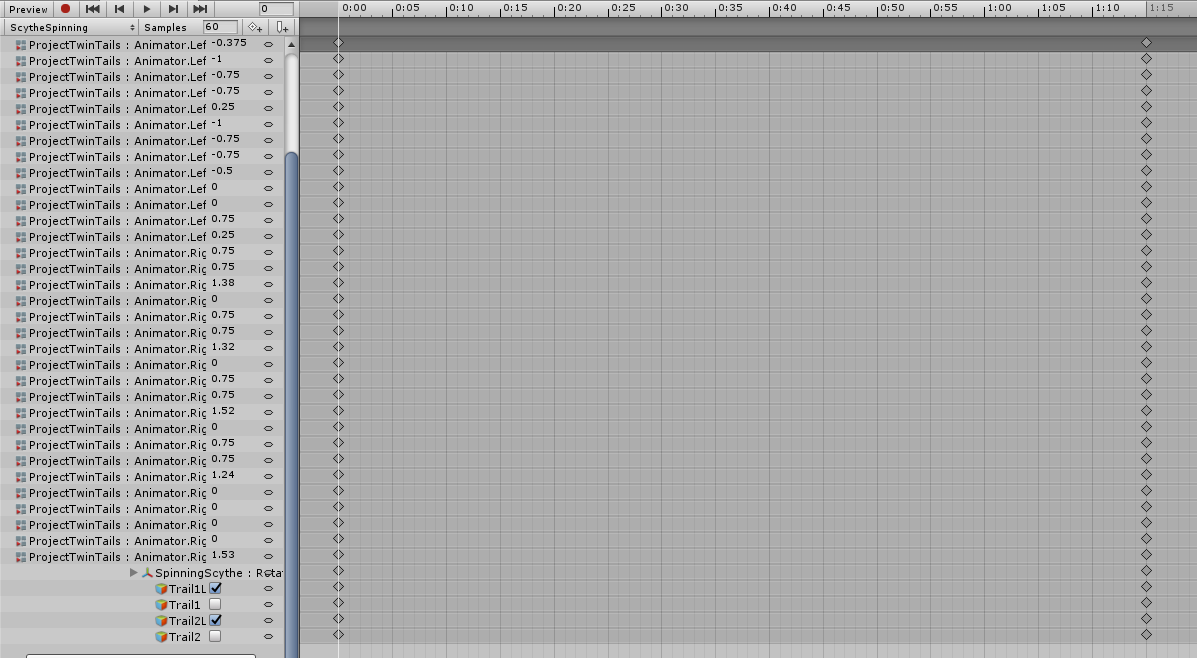

 fierce bane
@livid berry Technically yes, You'd need to make sure gravity was checked and adjust other settings. Be aware other people won't be able to interact with it though as they don't have colliders that will affect it
@clear yew what do you mean gets worse and worse?
Is this something you made and have not yet but bones/weight paint in?
clear yew
Just more and more things I have to do
I set up the weight painting and stuff, lined up a skeleton, but it still tposes
fierce bane
do you have 2 feet, 2 lower legs, 2 upper legs, a hip, spine, chest, neck, head, 2 shoulders, 2 upper arms, 2 lower arms, 2 wrists, and at least 1 bone for 3 separate fingers per hand?
those are the requirements for a humanoid rig
clear yew
One second I have to line the skeleton up
fierce bane
make sure you test the model in pose mode in blender before trying to export to unity too, if it doesn't move properly in pose mode, it won't work for unity/in game
clear yew
It's not lined up yet but this is what the skeleton looks like
Pose mode, I see
seems like all bone needed are present
I did get a warning that it wasn't a humanoid rig
fierce bane
I'm not sure what program that is so I'm not sure how to read it accurately...
clear yew
Maya
clear yew
Not sure how to really ask this but are models all one piece when put into unity?
There aren't split parts or anything right
fierce bane
no they come as one file if you export as FBX
the only way I would consider it multiple parts is if you count materials/textures after you extract them to modify
fierce bane
you set that up in blender (or similar)
clear yew
Ohhh okay
fierce bane
you designate the eye verts as the material you want them to be. Once in unity you could extract the materials/textures and set changed shaders etc for them
clear yew
Ohhh
So I would make a one part one generic material, and another part a second generic, then when I import it into unity I can change it?
fierce bane
if you need a different shader for a specific part, yes
fierce bane
like if you wanted, I dunno...transparent body like a ghost, but a solid hat, usually you would have the hat and the body be separate materials so you could change one but not the other
clear yew
I'd have to do the same thing for just normal colors also right?
Not using textures, just colors
lament prism
@fierce bane I'm sorry to bother you again but I'm STILL stuck on this animation issue I've been having. I've asked multiple people and none of them can find out why this isn't working for me. I've tried nearly every-possible thing but unity is being very annoying and doesn't want to find the path that I've been trying to give it.
The behavior keyframe works only when I enable it inside the actual animation, but ofc that doesn't do me any good.
And it seems like whenever I try linking it, it just automatically finds the animator component that I've got on the armature.
If anyone else knows how to fix this please do help haha.