#animation
1 messages · Page 118 of 1
 fierce bane
@naive cipher do you want instant growth or growth over time?
that's what decides if you use a gesture, or an animator.
Instant you just set the gesture animation to scale the prop to what you want.
Over time you use an animator and adjust scale how you want there as well.
Objects that are a child of another scale with it when animated. IE if you scaled a staff, the orb placed on it would scale too (just maybe not correctly depending on how it's set up, might be out of position)
@dim sierra if you have any dynamic bones on your humanoid bones they'll get in the way of animation, always try to avoid putting them directly on humanoid bones (like hips for a skirt or belt loops, or on the head for hair). Make a root bone and put it on that instead. It can cause issues in game as well.
To animate on them anyway, disable dynamic bones while you animate.
@warm shard just remember you need to keep things simple for Quest.
You CAN however have difference in your models between the two, so PC could have duplicates with rigids/fixed copying your movements, but not on quest.
The thing that determines what is displayed is them being uploaded with the same blueprint ID on different platforms, not the models being the exact same.
If you do that I'd suggest two different avatars in the scene to make it easier...just be aware of changes you need on both.
For rotation you can just make two keyframes, start and end and give it a rotation amount.
Exception is if you need it to rotate in a specific pattern or something instead of a looping set amount.
 naive cipher
I was looking at instant growth. What I was doing was setting an animation on the avatar, that changes the property of the gun to isActive. To do that, though, I had to remove the animator from the gun
That didn’t work though. In fact, it just made the fingers wave around weirdly, and take a few hundred years to transition to the next guesture
 dim sierra
@fierce bane thx buddy! I didn't permanently fix my issue, but I was at least able to get my root keyframed where I needed it to me. I'll remember that for my next avatar 👍
fierce bane
@naive cipher you didn't make sure it was 1 frame only (2 keyframes on 0:00 and 0:01) which is a requirement for gestures to work properly.
The easiest way to set that up is to leave the animator on the gun
- Uncheck the top left checkbox in the inspector with it selected so it's disabled by default.
- Then Duplicate your avatar (always to avoid any possible issues while animating)
- Then hit "record" on your gesture animation (red circle on animation window, above component section)
- Check that same box to enable it.
- Click "record" again to stop recording.
Then just put your gesture animation into the overrides and those into the standing animation overrides (covering bases here)
If you want the hand in a certain pose, set it up in the gesture animation too, make sure to use animator values, not just rotate the transform.
After it's all set, you can copy/paste the 0:00 keyframe to the 0:01 spot by selecting the top diamond, hitting control+C, then moving the white bar for the timeline to 0:01 and hitting Control+V to paste
(apologies for wall of text...unknown skill level, covering needed steps)
naive cipher
Allright, I’ll try that tomarrow
 warm shard
How would I use Final IK to do that puppetry trick btw? I just finished up with the other avatars so soon I want to try and make one who can toggle moving clones of himself
fierce bane
Final IK is a $90USD asset on the store, past that, can't help
warm shard
$90? Jeez. Maybe I'll just set them on some idle pose or something
 kindred trout
Does anyone know how can I make an object disappear/appear gradually?
 clear yew
with a materialize shader i would guess
kindred trout
what shader do you suggest?
clear yew
dunno what the cool kids use now but I know that Bender got some good shaders and he got a materialize shader in the pack

GitHub
Contribute to bendertherobo/Shader-Collection development by creating an account on GitHub.
kindred trout
can I adjust the shader values inside an animation?
clear yew
yes
kindred trout
thanks a lot!
kindred trout
but using the materialize shader would make my weapons unseeable in the mirror now
fierce bane
if you mean a material change, then yes but only to you
kindred trout
also I find out some of my particles can be shown in the mirror, some others not. Is there a limit of max number particles used otherwise the particles would be blocked?
naive cipher
If I want to make a custom animation, do I need something here?
Or do I just have to put the animation in the override controller
Ima put the thing on it
clear yew
You can put it in the animator component for testing purposes if you wanna get a little advanced. Otherwise putting an animator in there makes no difference.
You put the animation override controller you want to apply in the avatar descriptor
naive cipher
Well I guess there's no harm in doing it
clear yew
It's useful for advanced testing if you don't want to go into the game to do it
naive cipher
Oookay, so i'm just going to list what I did, and if someone would tell me what I did wrong, that would be nice.
- I duplicated my avatar
- I made an animation that enables a revolver, using the Is Active property. The animation is one frame long, with two keyframes. Each keyframe enables the revolver.
- I disabled the duplicated avatar, and put the animation in the controller override under FINGERGUN and FIST.
- I uploaded.
So after that, it didn't work. Does anything look wrong there?
fierce bane
@naive cipher when you look at the animation, is your "is active" property a checkbox or a 1 ?
fierce bane
is the hierarchy for your two models exactly the same?
is the revolver object in the same place in both of them and named the same?
naive cipher
Oh wait, I think I may have found the issue
The revolver is scaled to 0.001 for some reason
fierce bane
yeah that'd do it
naive cipher
So pros- I got it to work
Cons- there's a super long delay between enabling the gun and disabling it. Also the fingers now wiggle.
I understand the delay thing, but I have no idea what's happening with the FingerWiggle™️
Okay, apparently I don't understand the delay. Any ideas of how to fix it?
fierce bane
zoom way on on your gesture...most likely your gesture animation isn't at 0:00 and 0:01
OR
zoom way out instead, probably an extra keyframe (often happens if you add component instead of record activation)
kindred trout
@fierce bane is it possible to make the material change visible to myself?
 bitter gyro
Material changes will be visible to everyone. Just not for you in mirrors.
Also, some of your particles may show in mirrors if the particles system is always active and you just animate up certain values.
@kindred trout
kindred trout
@bitter gyro this is quite weird since I once used another avatar made by someone else which can see the material change in the mirror, which inspires me doing the same thing using the materialize shader
bitter gyro
Material changes aren't going to show in mirrors. It's more than likely a mesh swap. @kindred trout
They may have done some extra steps to make it appear to themselves in mirrors.
Toggling objects does show in mirrors. Animating material changes does not.
At least, not yet. I've heard they know how to correct it, but just haven't done it. It'd be nice if they would.
clear yew
it kinda worked 2 years ago then they changed how mirrors worked and you could see objects appearing in them but that broke material change
bitter gyro
Ahh yes. I remember when toggling objects didn't show in mirrors, but toggling the mesh renderer did. It's kind of flipped.
 muted lance
So, In game my model that dances on my hand appears in the air next to me for people while it stays in my hand and does the correct animation for me.
What should I do? Please help.
bitter gyro
Depends on what you're using and how you're animating it. Local vs global is 50% of the animation fight in VRC.
clear yew
Im trying to write a name using particles to match the fireworks I have going on in my world, and I was wondering if it is possible to do by animating an emitter to trace your name
 ember osprey
Hello, I am trying to add custom animations to a jukebox model without bones but has individually meshed handle and record spinner which I animate in Unity. I've created some animations but when overriding them with CustomOverrideEmpty and finger gestures (e,g, shift+F2) I get weird behavior in VRChat as if they desync at one point and do not play properly. Is there a stable way to simply attach some animations to a model with separate meshes without bones and play them in VRChat with a button press?
 little copper
anybody knows why the dynamic bones are flickering? i post it here because it has to be something with the idle animation, only does that on idle https://gyazo.com/9d1e61ff95d362a8d812e10f66767093
clear yew
do you have any property on the idle animation that's touching the dynbone script ? or moving any of those parts ?
little copper
these are the properties, noone of them do anything with dynamic bones https://gyazo.com/dc1bce4ed0891be8a6dcdaa0ed19f738

apparently im the only one who can see the flickering when i asked someone
clear yew
i meant the keyframes of the animation
little copper
and again, only on that ide ^
clear yew
only you ? so it's just local scuff
clear yew
if it's only local and you only see that in mirrors there isn't much that you can do
little copper
well its ok i guess, thanks for trying to help! @clear yew
kindred trout
how can I make the particles contantly changing color upon activation?
kindred trout
is it also possible to change size constantly
fierce bane

Udemy: http://bit.ly/BRACKEYSMEM
Everything to know about the Particle System in Unity!
♥ Support Brackeys on Patreon: http://patreon.com/brackeys/
● Learn more: https://docs.unity3d.com/Manual/class-ParticleSystem.html
························...
kindred trout
👍 \
 near elk
Anyone know the what the song is that goes with the jump dance emote on some avatars?
 flat elbow
Hello i am trying to make a gesture where i throw a ball. i want to be able to throw one ball each time i use the gesture. is this possible?
fierce bane
if the balls are just particles, sure. Particle system on by default and emission off, use burst emission and have the gesture enable emission. Simulation space should be set to world.
You'll have to use either the VRC_IKFollower or a rigidbody/fixed joint setup to make it work properly as well.
flat elbow
oh disable and enable emission with an animation? will that allow balls that are still in the air to still exist?
fierce bane
yes, since the system is never disabled
 quartz sandal
Tried to put particle animation on my avatar, the particles show up but texture of it is missing (instead it just displays as purple square), any tip on how to fix?
in unity it's normal
flat elbow
The particles are not coming out the moment i activate the gesture
quartz sandal
ok, fixed myself by setting shader in particles to particles/alpha blended
wish particles showed in mirrors tho
fierce bane
they can, but they have to be active always for that to happen...
but yeah...that and material changes not showing sucks
@flat elbow there are a lot of things that could be stopping that...how you set up the gesture, the particle system, and other stuff too...screenshots help
warm shard
I feel dumb for asking but can anyone help with this one avatar's shoes? I did the same thing I did with the previous avatar to this one, putting the shoes on both ankle bones, and for whatever reason they won't follow the feet correctly. They'll follow where the feet go vertically, but not where they're spaced horizontally
kindred trout
https://cdn.discordapp.com/attachments/499883514838253568/663343959476797450/00001.jpg
I put point light into the particle system and it does not follow the beam direction
 clear yew
hey um
in Unity, with an animation, how do i get my avatar to curl it's hand
like you would with holding a lightsaber/sword
clear yew
@clear yew You rotate and move the fingers in the animation itself
@clear yew ik that, but that's hard
yeah'
welcome to avatar making XD
 glad escarp
Hey guys - I tried searching this up here, but probably using the wrong words.
I'm having a problem with my prone poses. (Mainly I am trying to add a special Sitting animation)
When I do this my viewpoint when doing the animation gets stuck in my chest - I've heard I can't move the viewpoint itself as a recording, so what else is there? I know folks can get this particular one working as I've seen it in game before.
I've also had another issue (with a different prone that works fine) where it cuts off her Visemes so they no longer work.
If anyone could point me in the right direction I'd appreciate it. Thanks
fierce bane
@kindred trout a point light spawned by the particle system will sit at the center of the particle
Also it doesn't get longer in a single direction if you scale it, it'll just get bigger in all directions, that's how point lights work.
Also lighting spawned by particles adds an extra drain on performance over just having it enabled with it since it has to check the particle system for what it is supposed to do (even if no options are set and it's just "enable and die with particle")
@clear yew you can't actually rotate the finger bones themselves for a humanoid rig. You need to use the animator. components in the animation instead. Or you can pick up "Muscle Animation Editor" to make things much easier on yourself
 charred prairie
I also need help fixing the view point when with an animation, the viewpoint is just in the chest.
fierce bane
@charred prairie @glad escarp When you go prone on desktop the camera is set to a specific height.
Basing your animation ON that height and position (straight down from original camera position) is your only option that I know of.
In VR, crouch/prone being activated is based on your movements. Similar issue with overriding the prone position there, if you set it to a specific position it's not keeping your head with the camera any more
kindred trout
I put the flower particles at the position about the chest but if I go prone the particles would spawn over my head
is there any way to let the spawn point follow my chest
clear yew
Are you using either an IK follower or rigid body fixed joint setup?
fierce bane
@kindred trout ⬆️ if you aren't, you should be for world sim particles
 feral pawn
fierce bane
feral pawn
fierce bane
if the particle isn't attached to your chest, it cannot follow your chest
and you're not using a fixed joint/rigid to target it
parent the particle system to a fixed joint, target the fixed joint to a rigid body on the chest...it will stay with the chest
kindred trout
should I create a fixed joint only or should I also create an extra rigid body, since there is a rigid body along with the fixed joint when I create the fixed joint
 odd latch
@kindred trout https://www.youtube.com/watch?v=PFYKRjsUdq0

both methods for setting up world scale particles
kindred trout
thanks a lot!
odd latch
how do I stitch/merge/combine two animation clips into one?
for example, I have the anim files for point and dance, I want to make a new anim that does point and then dance
clear yew
Find the 2 animations in your project, copy the keyframes from the dance file and paste them into the point animation
odd latch
thanks, got what I wanted, now to add particle effects to the animation
warm shard
Just cause I'm curious, how would you make it so an emote toggles on or off something permanently? I know how to do it with gestures but with emotes it would toggle the object off the moment the emote would end
clear yew
Editing by Cheese
Link to the package with assets from the video (Includes scripts)
https://drive.google.com/file/d/1oi1Ryc2O5FAKQg1_92G6CbEaUBmKnzhU/view?usp=drivesdk
This is a guide on how to expand your gestures or emotes and create multi-state animators for use with inve...
warm shard
This one doesn't help. It's just for cycling animators on hand gestures, not for toggling things from an emote
Maybe it does work for emotes but idk
 proper hedge
Its the same principle with emotes
Start the animators with behavior enabled using an emote override instead of a gesture override
GitHub
Contribute to oofdesu/lin-unity-packages development by creating an account on GitHub.
@warm shard
Emote or gesture turns on animator component (with behavior.enabled 1). Animator then animates your values without writing back defaults
Done
 little elk
Hey guys how do you get a prop to stay in one position so when you play an animation from your controller when you move it will stay instead of being attached to your avatar so when you move it moves, any ideas i need help?
 stone barn
Can you say that again? More clear?
little elk
Yes
Basically i want a prop to be spawned in when i activate it and not move when i move around the world @stone barn
Does anyone know?
stone barn
Oh I understand.
little elk
Could you tell me how to do it because ive looked everywhere and cant seem to find the answer
or any tutorials how to
stone barn
Yeah I’ll send a tutorial
little elk
Thank you
stone barn
Yes
fierce bane
@little elk what you want is a world anchored object, this package has things prepared in it (I forget if there was a readme in it too or not...)
clear yew
Literally put a fixed joint on the object and don't attach it to anything
fierce bane
basically yeah, with an animator above it to reset its position while not active
little elk
thank you guys
charred prairie
is it possible to sit in your own station and use an override animation onto that,
clear yew
Used to be, they removed that so no longer
Ever see those space kerbal program avatars flying about? They used that system
clear yew
You can fake changing/transforming viewpoints through a camera system or shader.
There was a model that snapped your neck and turned your camera upside down like your head was snapped.
charred prairie
do i just make a new camera into the model
fierce bane
a fixed viewpoint would be disorienting for VR (and one using cameras and world anchor would probably be nauseating due to the twitching from the physics object)
probably just be disorienting in general, not just for VR
charred prairie
fierce bane
I'm not sure how to set a camera override unless using a render texture in front of you though...
charred prairie
It is connected to an emote
fierce bane
as for sitting on your own station, no. You CAN set up an animation override, but you won't be in the head unless you adjust yourself (using something like playspace mover)
the head follows the camera, not the other way around, so when you move the head, the camera doesn't move too
proper hedge
when you could sit in your own station, all you needed to do was rotate the station
and you, with your view, would rotate
charred prairie
its just the when i use it the viewpoint its stuck in the chest so playspace mover would allow me to alter the viewpoint
proper hedge
well you can't sit in your own chair anymore anyhow
 fresh estuary
I'd like to make a fish perform a swimming animation, but on a circular path around an island. Does anyone know how I could do that?
proper hedge
if you have a swimming animation, you could try putting the fish inside an object that rotates, so it will just turn in a circular fashion
fresh estuary
Oh shit, that would work I think. Thank you!!!
fierce bane
and if it's an irregular circle, you can use the object it's in to animate a path
charred prairie
i dont see how playspacer can edit veiwpoint
fierce bane
it doesn't edit viewpoint, you'd put yourself into the avatar...depends on the setup
charred prairie
seems like it would work but i dont have steam
clear yew
Playspace mover acts outside of VRChat's viewpoint. It literally moves your playspace, not your viewpoint within the game or outside the game.
charred prairie
clear yew
So? What's your point, that says what I said.
little elk
Does anyone have a download link to the final ik v1.79?
clear yew
You can go on the unity store and buy it from there
clear yew
Yes, it's a paid asset
Like dynamic bone but it seems that most people don't know that or don't care
little elk
So i have it but umm the script seems to be not working with the WorldFixIk
Dont mind the error i know whats that for
clear yew
What's that supposed to do
clear yew
You watched rero's video for that?
Pretty sure he made one for that
clear yew
Yeah he made one, pretty sure he also put a download link to the test package
little elk
Okay can you link?
little elk
okay thanks
clear yew
It's only 90 bucks
fresh estuary
@fierce bane Hey himeki, I was wondering if you could explain your irregular circle animation path idea a little more? Would that be like a mesh of an oval with the mesh render turned off, and it rotates?
fierce bane
@fresh estuary no, it can be a blank object, you'd just sit it wherever (usually center of loop or start position) and animate the child object below it (fish for example) to move, ending in the same location it started so it loops properly.
fresh estuary
@fierce bane Got it working!! Thank you
 surreal crater
@little elk are you trying to play an animation on a avatar that makes whatever you spawn stay in place till you stop doing the animation?
fierce bane
@little elk the error on the script says to fix compile errors, don't ignore your console
surreal crater
let me open up unity and screenshot it for you 1 sec
little elk
Okay
fierce bane
deal with your compile errors...script isn't working at all because of it
surreal crater
put the rigidbody and fixed joint on the empty gameobject on whatever you want to stay in the world
little elk
No there was no error before I added something and it still was like that
surreal crater
the only catch is when you stop doing the animation it remembers where you turned it off so when you turn it on again its in a weird location. So you either need to be in the same position where you dropped it to "pick it up" again or reload your model
fierce bane
or you just put an animator above it that resets its position/rotation to 0,0,0 while off
little elk
I have no clue, I'm still new to animations
fierce bane
disabling the animator behavior when you activate the gesture
fierce bane
Lin has an example package if you're lost.
https://github.com/oofdesu/lin-unity-packages/blob/master/world_fixed_joint.unitypackage
GitHub
Contribute to oofdesu/lin-unity-packages development by creating an account on GitHub.
 deft hearth
how can i make it so either only one hand activates gestures or one hand is dominant meaning, left hand gestures won't activate if certain right hand gestures are activated
odd latch
finger animations or general gesture activations?
surreal crater
that sounds like a keyframing issue to me
clear yew
i'm trying to reposition my characstrs tongue to make it stick out. i move it with the position and rotation thingy. but then when i go to copy paste it, it resets to the default position where the tongue first starts. can i get help ;-;
its for a gesture..
 candid pulsar
Anyone know how to make a rope
 lone venture
What phonemes/letter sounds have to be lip synched?
lone venture
Nvm found them
deft hearth
@odd latch gesture activations
odd latch
well, I could think of setting up different hierarchies that are disabled when a gesture is activated
like, an empty object labeled "LeftHandActivations", and the stuff you want your left hand to activate parented to that empty object
and when you use a gesture for your right hand, include an animation that disables "LeftHandActivations"
and vice versa, "RighHandActivations"
now that I think about it, what you want is kind of complicated and very restrictive
you could try my suggestions, but like I said, it's very restrictive
you might want to do something simpler and then get creative with workarounds
or, get specific in what you want to do and I might think of something up
 deft summit
Can someone please tell me why I can't change the rotation of the bones now? I was originally able to with other models!
deft summit
If you know please pm me, beacuse I'm gonna head to bed, thanks!
clear yew
Looks like that's about right,
Turn on draw halo to make a visible light halo appear around it
If you really want it to be centered you can probably add a empty game object under the last bone and move it back into the center of the LED bit
I have a similar setup on my own tail
kindred trout
how can I turn on draw halo\
fierce bane
In the light options
@deft hearth in VRChat right hand animations take priority.
So if the right hand says something should be off and left says on, it will be off
kindred trout
I tried enabling draw halo but nothing changes
fierce bane
Screenshot settings.
Have you zoomed WAY out yet or in to check for size issues?
deft hearth
@fierce bane how do i check to see and change what the right/left hand says?
fierce bane
You make animations to fit both hands at once
If all gestures say something is off except for one or two, it can only be enabled when that gesture is used on the right hand
deft hearth
and how do i check what the gesture says? lol

 hardy compass
When I go to replace a finger joint movement in unity and I have made an animation, say it's as simple as reducing the size of the eyes and opening the mouth. Do I put it as the animation controller or as a rock and roll bind to the vrsdk activation node, then put it into the vrsdk descriptor as standing model and sitting model?
fierce bane
The second
fierce bane
@kindred trout alpha doesn't effect emission. Set your alpha in the albedo above
 queen surge
Hello folks, sorry to interrupt, I'm new to the discord and I had a question in regards to avatars for a friend.
fierce bane
Don't ask to ask, just ask your question. People will respond if they can help and are around
queen surge
Okay, like I said, new.
fierce bane
it's all good, just explaining a good way to get help
queen surge
My friend is having difficulty with finding a way to have the hair for her avatar not clip through the floor of spaces. Is there a solution or way to fix this? It may not be an animation related question but I asked the main chat and was just ignored.
fierce bane
are they using dynamic bones for the hair?
queen surge
To my knowledge, yes. and she has dynamic bone colliders so it doesn't just go through the avatar.
fierce bane
make a large collider at the floor, make it HUGE but positioned under them. The collider script should be attached to the armature or the top level of the model (with avatar descriptor), not on a bone that would move.
other than that there's no way to make it actually collide with objects since we can't put scripts on objects in a world
that'll work for the majority of worlds, though it'd still go through a wall or a slope for example
queen surge
Understood, I will give her that to go off on. she specifically mentioned the floors.
Thanks
 fleet stirrup
does VrChat no more support VRIK?
clear yew
Final IK?
clear yew
iirc they removed Final IK stuff
At least according to what some friends have told me
clear yew
XieXie's inventory system works.
Or you can just do the normal old reliable activate mesh object animation.
Or activate blendshape if you don't want to add extra mesh renderers.
fleet stirrup
seems XieXie's inventory no more update since 2018 Oct.
clear yew
Probably because it still works.
Tons of people use it
proper hedge
Final IK script still work, you just have to fix the target with a joint or ik follower
Xiexie's script still works
bitter gyro
I feel like I talk about final IK often enough for people to see that it's still usable, but people still keep saying that it doesn't work.
¯_(ツ)_/¯
fleet stirrup
@bitter gyro well I think because their's no tutorial or video for it anymore so people unsure it work or not.
plus no more update
proper hedge
It's not hard to fix, but it's jank and there is a reluctance to normalize this workaround rather than seek a real fix.
bitter gyro
^
proper hedge
We never did get world fixed joints fixed, was kinda just ignored because we found a way to get around the broken part
bitter gyro
I mean, you can search my name with IK. I rarely ever use IK as an acronym for anything other than Inverse Kinematics.
¯_(ツ)_/¯
kindred trout
how can I toggle my weapon forever using an emote?
surreal crater
you mean like a inventory system or just a normal hand gesture?
 wanton haven
Is it possible to make an animation on a gameobject play using a gesture override animation? I tried and so far I just get this.
fierce bane
select that and hit F2, make sure the path is correct from the top level of the avatar
wanton haven
Also, how do you make an intro animation, like with the yapyap the destroyer avatar where a dropship flies in and drops off the avatar?
fierce bane
for example if its an object named "droppod" with the animator on it, and it's directly on the armature, it'd be armature/droppod
for intro animations you'd need to have your avatar hidden (either with a shader or the mesh render disabled), and have the animator active and set to not loop. In the animation it should re-enable the mesh render (or mat swap/shader value adjust)
wanton haven
That's what I thought, but I wasn't sure if the idle animation would override it or if I needed to override that at all.
But thanks for the info
Still saying its missing?
 raw vector
hello peeps, i think this is where i should ask this question
so i made a character that doesnt have a sitting animation
so i tried to add it but... i dont know where am i supposed to put it in
clear yew
Proneidle
raw vector
is that in the Animator section?
wanton haven
Wouldn't it just use the default sitting animations
raw vector
its literally just me laying down like im holding a gun
wanton haven
as long as you set the custom sitting anims to your anim override
wanton haven
Then on the override set what ever animations you want overriden with yor own.
clear yew
Probably need to remap it.
fierce bane
@wanton haven hit F2 on the animation property, copy/paste the text there into chat so I can see what it's looking for
wanton haven
@fierce bane It just says droppod
the object is a child of the avatar object
not the armature
fierce bane
@wanton haven based on your screenshot before it's part of the armature which is why it's saying it can't find it in the avatar itself
 wanton haven
I changed it, before it was looking at Armature/droppod
fierce bane
I'm talking about the hierarchy there.
I can only base things on what you show me, so everything is based off that hierarchy list until I see different. Guessing at changes is only asking for problems
fierce bane
and your animator is on droppod correct?
not on a child of it, but one of the components on it
fierce bane
that all looks fine then...unless you have a difference on your main avatar and you were setting it up on a duplicate to animate make the animation
it's also possible unity's just acting up and misreading it. Restarting Unity should solve that though
wanton haven
I did restart it
still not finding it
it is on a duplicate
but the heirarchy is the same on both
and I'm trying to run it on the duplicate rn
fierce bane
a good way to test. As long as they're the same it should be fine...
fierce bane
try retyping the path and the name in the object, maybe there's a space somewhere you're missing that is breaking it
you could even copy/paste the parts for armature and the droppod object and add a / between
wanton haven
I have tried that. you want me to send the scene, see if its just on my end? I can just make the object active and inactive, but doing so adds 24k tris and I really am trying to kkeep this optimized
clear yew
Missing path issue?
wanton haven
very much so
clear yew
What happen if you remove the first object in the path? That would be armature I think
fierce bane
your animator and descriptor for the avatar is on the top level, the "Vrchat_Tutorial_Avatar (2)" correct?
 analog onyx
Is it really necessary for a gesture to have two frames or is just one fine?
fierce bane
you need two. Just copy/paste the frames to the second
analog onyx
Gotcha
 spring nova
the reason why you need two KEYframes is because if you only have one, you're not specifying the length of the animation and it will default to 1 second. Having two keyframes means you're setting both the start and the end at 0:00 and 0:01, so it's only 1 frame long. The vrchat player controller does not work very well with animations of 1 second long, because the transition away is 4x the length of the animation, so it would take 4 seconds
kindred trout
how can I toggle a weapon forever using an emote override? I am not doing it with gesture shift + F1 - F8.
my weapon would disappear after the emote finished
 torn pawn
@kindred trout https://github.com/Xiexe/VRCInventorySystem

GitHub
An Inventory system that is easy to set up for your avatars, using emotes. - Xiexe/VRCInventorySystem
kindred trout
how should I use it?
wanton haven
So is there a way to change the animation a model plays using a a gesture override animation
like can I make it set the animator on the child object to play a different animation
kindred trout
@torn pawn what is the difference between global enable/disable and just enable/disable animations from the inventory system?
torn pawn
global is enable/disable ALL objects (if you have multiple)
kindred trout
should option "default on" be checked when I use the inventory system?
 sick loom
Deppends on if you want the opject on by default or not
 wooden eagle
analog onyx
wooden eagle
analog onyx
For whatever reason when I got to animate this avatar, it derps out like this, breaking the bounding boxes even when I rotate the armature back.
Because of that, half of the avatar dissapears for others.
fierce bane
@analog onyx duplicate your model and make animations on the second to prevent breaking, also see the second pinned message in this channel to fix it.
analog onyx
Oh, OK
Thanks!
Did this. Unfortunately, the bounds are still broken
No way to just recalculate bounds?
OK, just redid it
Wasn't too hard
Also, how do I get tracers to go the correct way?
Noticed that when I had tried shooting the wep my avatar has, it shoots from the original direction it was pointing to in Unity instead of where the gun's pointing.
It's parented to the gun which is parented to the avatar, simulation space set to world and all
clear yew
You normally use either an IK follower component or a rigid body with fixed joint to match IK movement
analog onyx
@clear yew Use it on the particle system itself?
surreal crater
@analog onyx No you need to make a seperate game object outside of your armature witha rigidbody and fixed joint
you can copy these settings on the rigidbody and fixed joint
Then put the gameobject at the end point of the gun (or where ever you want to particles to spawn from)
Then go the the bone the gun is on and add a rigidbody component
use these settings on there and drag the bone into the None (rigidbody) in the picture above
then drag the particle system into the gameobject you made with the rigidbody and fixed joint
make sure the particle system is on world
and keep the gameobject with the rigidbody and fixed joint on in the animation at all times otherwise it messes up the potition it starts from! (so toggle that particle system on and off not the gameobject)
that should be it unless I forgot something if something is unclear feel free to @ me
proper hedge
Joint is connected to none in your example
surreal crater
@proper hedge sorry it wasnt a question I was trying to help the dude above me 🙂
 near meadow
is it possible to reduce the change in an animation curve? I have a nice mocapped idle animation, but since vrchat pins a few bodyparts in place, I'd like to make the idle stand more still, but there's waaayy too many keys to do it manually, I'd ruin the smoothness
near meadow
i guess i could go through and manually excise the worst keys and just set the tangents to smooth out the gap, but that sounds awful and unreliable unless there's no tool to edit the entire curve at once
and inevitably I'd create some subtle awkward movements as the body shifts to compensate for a leg movement I've removed, so I'd have to go and edit those too
so it sounds a lot like untangling christmas lights 😔
fierce bane
@near meadow I don't know of any way to edit an entire animation curve, but there is a "curves" section that you can use to adjust the flow from keyframe to keyframe for each part.
Either way though, you're down to untangling lights
clear yew
need some help... im makin an animation and its in it final stage where i just need to make an animation to enable it but, well the stuff that i need to be disabled keeps turning back on no matter what i do
 wanton haven
So
If I want to make an avatar intro does the animation need to be on th emain avatar Object?
Also, try recording when changing the state
fierce bane
@clear yew make sure you disable it on the second keyframe, not just the first
clear yew
regardless, even if i only have one frame it enables it
and if i disable it on the other it still reenables
fierce bane
disable it on both and hit play, it should show disabled, if it doesn't I'd restart unity
*play on the animation window, not play mode
clear yew
k
wanton haven
How would I make an animation play onb the avatar at spawn, like a spawn animation?
I can't seem to get it to play the animation so my avatar never spawns
proper hedge
an animator that is on by default
wanton haven
It doesn't seem to be working. This is how I have it set up
That's what the animator controller looks like
proper hedge
Don't use the animator component on the object with the avatar descriptor, it gets replaced at runtime
@wanton haven
wanton haven
So what should I put it on then?
fierce bane
If you need it to replace a material or enable the mesh render, you should either make a dummy object between the avatar descriptor and the armature/body with an animator on it for the animation (or just shift the avatar descriptor/animator/pipeline manager up to a dummy above it)
Or you can use multiple animators to cover different parts, like one on the body that just replaces the material or enables the mesh render, and another animator for whatever your intro animation is
if you use two, just make sure the timing is what you need (example, a delayed mesh render enable when it should appear)
wanton haven
I got it man, though apparently now the Avatar does not follow my VR hands, but appears to be in desktop mode?
On my screen its fine
Other people see me in desktop mode
fierce bane
I think someone said toggling the mesh renderer causes issues, if you're doing that, try using a material swap instead. Start with one using an invisible shader or a shader with a value set to seem that way, then swap material or animate the shader value up (the second is technically better and allows you to fade in if you want to, or snap in, etc)
wanton haven
How the heck do I animate the shader alpha value up @fierce bane
 oblique hawk
@wanton haven
try this:
https://www.shadertoy.com/
or
https://acegikmo.com/shaderforge/
.
.
.
hi
is it possible to drag and drop avatar bone hierarchy
to animation window ?
and if no
then is there a some plugin from github that can make unity
to allow drag an dropping avatar bones to animation window ?
any help please
fierce bane
@wanton haven hit record on animation, adjust alpha. That method is reliant on a shader that allows you to do it, it's a lot easier to just do a material swap from an invisible shader to your normal one and use some kind of effect to hide the change...the second just looks better depending on what you want to do.
@oblique hawk you can buy muscle animation editor from the Unity asset store ($15USD) that opens a window with the muscle values easily adjustable.
I don't know of any free asset that can do the same, pretty sure I would have heard of it by now though...
you don't adjust humanoid bones by rotating/moving them like you can for non-humanoid rigged ones, have to use the muscle controls (they have animator.<muscle> names)
clear yew
https://i.imgur.com/2fB12sv.png I can't get the tail to animate, i have the animator and controller on each of the parts can someone help?
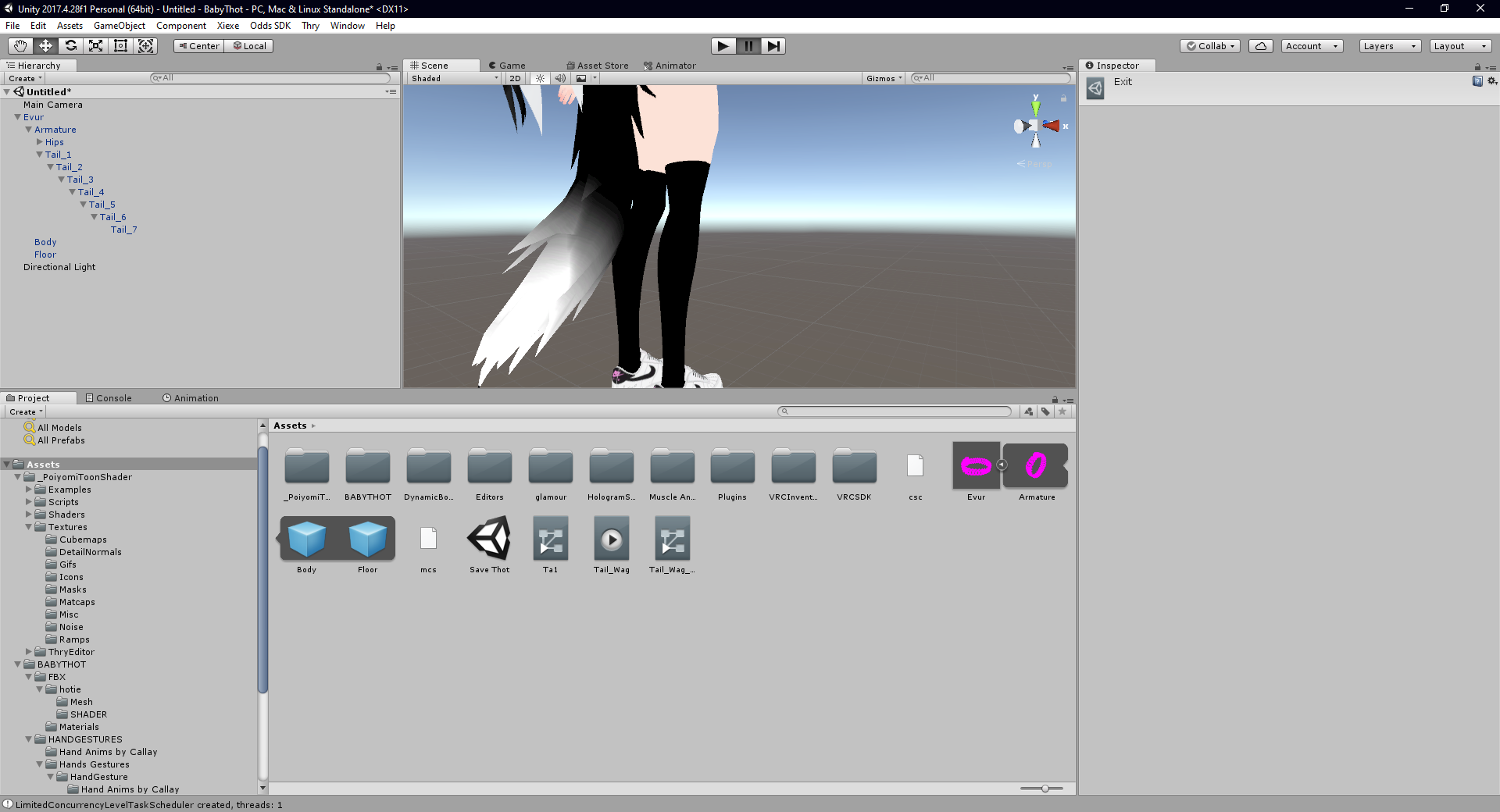 fresh estuary
When you click on the gameobject that has the animator, and then you click on the animation tab, do any of your animations show as broken (yellow text)?
@clear yew
Also it's best to put the animator on something that's a parent of the tail I think, you can have issues with it working if you put the animator on the tail
Hips is good
clear yew
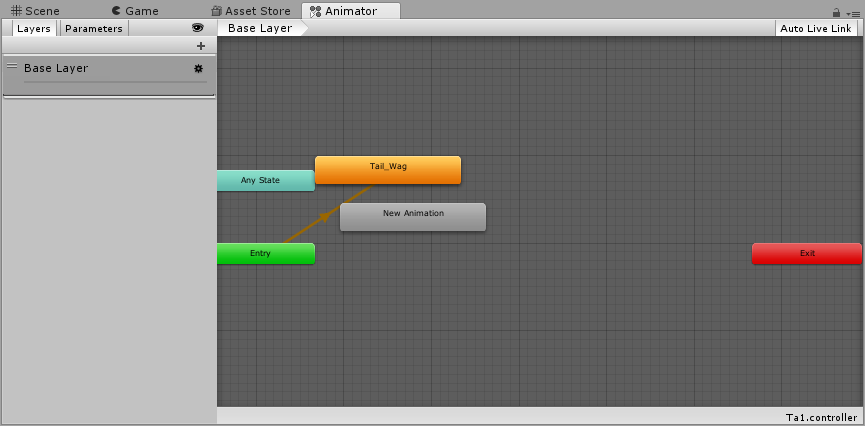
im lost -.- im not good at animation
i got it working on a different avatar and i pretty much copied the same settings over to this one and its not working
fresh estuary
Oh-- this is just a theory but my first guess, knowing that this came from another avatar, is that the way the bones are named or arranged is just slightly different enough that Unity is getting confused. Like I said, if you can find what game object you stuck the animtor on, and then click "Animation", if you have yellow text that will be the problem
clear yew
You think i should rename the animation? the previous avatar tail bones is "Ta1" , and this avatar is "Tail1". Should i just rename it to match Tail1?
fresh estuary
You would have to look at the animation itself in the Animation panel to see what the situation is
fierce bane
also of note, your tail isn't parented to the hip, so it's not going to move properly with your body
try going into play mode (> at the top) and moving the hip bone around
clear yew
I don’t know if this is the right channel or not to ask this question
But how do people like
Pull off like prop spawning in VRChat
Like dropping a magazine from a gun and it like spawns in the world, not attached to the avatar, and then despawns after a few seconds
Like how is that pulled off
fierce bane
something like that is a particle
clear yew
Hm.
Cuz I wanted to pull off like
A working Grenade launcher
For Demoman from TF2
Like rolling grenades that detonate after a few seconds
fierce bane
world sim particles with gravity, collision, and sub emitters for the explosion
oblique hawk
@fierce bane
ah ok then
then i need to import every bones that need to be R,P,S.
but i appreciate your help
 thick crypt
I feel like I need help with an animation subject but at the same time I'm not sure how sfw it is.
wanton haven
Anyone know why my sub emitter particles wouldn't send collision messages?
analog onyx
How do you create emotes that 'enable' the ability to use sets of gestures?
analog onyx
Any idea what it's called?
wanton haven
Its literally called a state machine. 1 sec
analog onyx
I mean the video
wanton haven

I explain how to create a potential infinite amount of gestures using an animator state machine.
========IMPORTANT========
Thank you Bertrand Steenhaut for the help
If you can't open the animation file, you need to set the Serialization to Force Text. While in Unity, go to E...
My guess is you'd need the emote to cause it to enter into another state
 agile condor
Is there a way I can have a part of my avatar always rotate?
fierce bane
depends on what you need. Can either use a particle with a lifetime and rotation speed to match.
Or you can use an animator that rotates an object on loop. Either the object you want, or if multiple things, rotate a common parent
fierce bane
what exactly do you want to rotate?
agile condor
fierce bane
ok, on the hat bone above it place an "animator" component
Once you've done that, open the animation window and hit "create animation"
Click the red circle to start recording (makes it easier), and adjust the axis you want a little bit, amount doesn't matter
Then adjust the amount to 0 on the first frame, and 360 on the frame for the duration you want it to take for one spin
remember, the animation window is based on 60 frames per second, so 1:00 is 1 second, not 1 minute
You can click on the "animator" tab at the top to make sure, but it should only have that one animation in it.
and there should be an orange line from "entry" to that animation
That's it, you should have a rotating object. Go into play mode to see if it's working correctly or not
agile condor
Ah! Thank you so much!
fierce bane
Suggestion: Set it to 1 second duration for easy editing. If you select the animation in the animator window, there is a multiplier box. Adjusting that will speed up or slow down the animation for easy changes later
so if it's 1 second animation, a 2.0 will make it a 0.5 second duration as it is running at 2x speed.
while a 0.5 will make it a 2 second duration since it's running at half speed
And the animator is placed on the hat in this case because an animator can only access things that are children of it. ("Rotate" is a child of "Hat")
oblique hawk
when i drag & drop my animation to emote section in my empty game controller and when i upload my avatar
i see default emotes why and how to fix that
btw
is again vrchat put length limit on animation
and that is why i'm not see my animation in emote?
because i set animation to 60
any help please
 whole helm
did you plug the animator into the sitting and standing slots and the animation component
also i just imported a 30sec animation and it worked great, it's probably not the length
oblique hawk
i didn't plug into custom siting and standing because i did not create custom siting or standing animation i just make shaking hands animation for emote.
and i don't think that i need to put it on there
am i correct ?
whole helm
i didnt do them either and they didnt show up in the menu
until i added them into the slots
it took me a good while to figure that out too, but thats just how it seems to be
oblique hawk
wow it's not logical
but it's ok
thanks a lot
oblique hawk
here's go nothing
in about 1 minute i will know
and i will notice you asap
clear yew
You need to put your custom animation override controller here or else it won't apply to your avatar.
oblique hawk
oof because i was so hurry i upload empty avatar again 😅
so now it's the final uploaded avatar
and this time my avatar has that animation in emote 😉
thanks again 🤟
 trail drum
I'm currently making a 2d model with a few different animations which just consists of the model changing into a different picture and playing some sound
But when the animations play in game, the original image overlaps the new one in the animation
Anyone willing to give advice?
clear yew
Use an invisible material swap or hide Body object.
surreal crater
@trail drum are you sure the material is on the body object? Otherwise you can click on the picture and turn it off then check how its called and use that one to disable in your animation.
trail drum
Yeah, Its on it
wanton haven
Is there a way to make a gesture animation play a specific a animation on a child? Like I have a drop pod that I want to play a drop animation, but if I spawn a new animated model the chair despawns and it forces the player up. It would be better if I could just make the chair do the animation by activating the a animation via the gesture animation
proper hedge
@wanton haven you can just use another gesture while you chair gesture is active
Or if you want it safer, use an emote to enable the chair and then gestures for whatever
Or learn how to use animators to make a hand interface
Here is a package that teaches how to do emote thing
GitHub
Contribute to oofdesu/lin-unity-packages development by creating an account on GitHub.
Here is a vid which might help you work with gestures

helping someone on discord do a combo gesture
here are some things i used:
hand animations:
https://github.com/oofdesu/lin-unity-packages/blob/master/mixamo_gestures.unitypackage
gesture manager for testing:
https://vrcmods.com/item/4582
wanton haven
o sweet
thnx
So o nmy avatar I got my intro animaton to play but now the avatar just tposes
proper hedge
In the animation or always
wanton haven
Always
I get error message in sdk
O wait
might've fixed it
I was having an issue where it appeared to everyone else that I was in desktop mode
oblique hawk
me and my friend together has 90 of poly in total
and we where in kareeda watching some movie
and we start to lagg and hear the scratchy sound like sss sss sss
why is that and how to fix it ?
trail drum
So an update on my situation with 2D animation, it seems like the animations are overlapping with the main model because the main model is not present in any of the copies I made for the animations.
Not sure how to fix this.
wanton haven
@proper hedge I stand corrected, people still see me tposed despite my seeing myself normally
wanton haven
So to elaborate, I added an into animation to my avatar. Now the animation plays at spawn, and On my end everything works fine. However on everyone else's screens, my model is not animated at all after the intro. Anyone know what could be going on?
I don't get any errors in sdk and thats the setup
fierce bane
@wanton haven your model isn't set to a generic rig is it?
wanton haven
It is not
fierce bane
It's using humanoid rig for the main model?
wanton haven
For the body mesh yes
fierce bane
anything other than the main model won't matter as long as it is set humanoid (networked IK issues otherwise)
are you disabling the mesh render or the body/armature objects themselves for anything?
wanton haven
No, just texture swapping to a transparent texture
I can check the anim again
Now this is the subobject setup, could this have anything to do with it
that is parented to the main object with the descriptor
then everything else is parented to that object
fierce bane
everything including armature/body for the main object is under that? Or is that only for that drop pod?
wanton haven
Everything
fierce bane
did you add that object in unity? If so it might mess things up
wanton haven
What object?
fierce bane
If you want to put an animator above your drop pod I'd make a dummy and attach only the droppod there.
If you want to turn your body on at some point (and don't need to animate the skeleton for it), I'd put a second animator on the body mesh that just delays the same amount of time and then enables it.
The object you put between the top level and everything else
wanton haven
But wouldn't putting an animator on the main body fuck with animations in VRChat
fierce bane
no, people do it all the time for manual blink animations
just can't put a second one on the top level with your descriptor, that one is overridden
wanton haven
So move the body and skeleton to children of the descriptor object, and have only the droppod under the gameobject with the intro animator?
THen put an anim on the body that changes mats
in time with the drop animation?
On an unrelated note, is there an easier way to line up guns with hands, I keep getting them misaligned
fierce bane
Yes, exactly that. Just be aware that since you broke the prefab for the model, you'll have to re-do things if you have to make updates in blender
wanton haven
Thats fine
Now I just gotta figure out why the model does a perm pelvic thrust in full body XD
Even if I adjust the angles to within 180
still does it
fierce bane
show me a front and side orthographic view in blender
(probably better off to do that in #avatar-rigging though)
wanton haven
@fierce bane That fixed the animations, thanks. Now I can finally fine tune the anim and add sounds and effects
wanton haven
I'm not sure what channel this goes in, but is there a way to make a sound source play a random sound in a list?
clear yew
Question
Can you add .dmx files onto avatars
And have them be like a trigger for a certain hand gesture
clear yew
??
surreal crater
@clear yew if its just like a model or something then yes. Im not sure how much out of source film maker you're trying to let work
clear yew
Like
Taking an animation for like
Demoman from Team Fortress 2
And putting it on the model in VRChat
surreal crater
if its a animation I dont think it will work
clear yew
Why not?
 covert patio
@clear yew I found this https://developer.valvesoftware.com/wiki/Blender_Source_Tools
but u have to have 2.8 or later it looks like
clear yew
it is but I thought you could port over .dmx
Cuz you can export sfm animations as .dmx
 stark trail
you prob can animation files are weird
unity animations are stored as .anim and thats all i know
clear yew
Ah
From Blender to Unity perhaps
I can port animations from SFM to Blender
And then maybe I can save the blender animation as a different file(?)
covert patio
ya cuz i have heard of ppl animating in blender i believe?
clear yew
yeah
surreal crater
@clear yew I found this with a quick google search this might help you https://forum.unity.com/threads/sfm-dmx-animation.326309/

Unity Forum
I converted an MDL file to a SDM file then to an FBX file. Is there a way to apply an animation made for the MDL file in SFM that was made for that...
clear yew
In all seriousness me and my friends really just want to do this in VRChat
Also epic
covert patio
https://www.youtube.com/watch?v=-sWxMPp5jME and this looks like it goes over throwin from blender to unity! sor cant watch it myself rn

In this unity and blender tutorial I show you how to create an animation for a model with blender and export is as fbx file for using it in Unity game engine.
It is not a tutorial for newbies in Blender, starting point is a rigged model and you should know the basics about r...
Congaaaaa
clear yew
Awesome
Hopefully I could even maybe pull this off today
First things first I gotta port the model, piece of cake cuz I’ve done it so many times tho
Then we doin anims
surreal crater
@clear yew check dm's
fresh estuary
Hey all, does anyone know if Emotes are broken on Generic rigs?
I tried to set one up and it didn't work. Thought there was a chance I might be doing it the wrong way (I did it the way I'd do it for a Humanoid rig)
 hexed sequoia
Hey guys, how do you make an animation last longer than 1 minute?
Not doing any cancer or toxic animation, just a nice rideable one, but it cuts out immediately after 1 minute
near meadow
@fierce bane oh, you're the one that answered me here too, lol. sorry to at you again. WELL, i wanted to let you know that apparently there actually is a way to edit entire animation curves at once. you highlight all and grab the blue bars that appear like handles. i haven't yet found if there's a way to scale it uniformly on both sides (besides doing that by hand, very carefully) but i should be able to use this to select the curves that are causing jerky motion in vrchat and flatten them proportionally. ...by selecting them individually. doing it to all the curves like in the video is obviously a bad idea lol. just so you know, in case it ever helps
 near sedge
Hey! Im having an issue with an animation i made that its about 1 second long.
Since its a second long and i have it set to an emote the victory hand gesture for example. It has to finish one of its loops before i can do another emote. or if im trying to do another emote the new emote takes a couple seconds to start.
So i guess my goal is to make the animation end as soon as i stop doing the hand gesture?
Its a simple tail wag animation with 3 key frames spaced out 0:20 seconds one at the start, one at 0:20 and one at the end 0:40
hexed sequoia
Does anyone here know how to do the animation inventory system? THank you!
near sedge
im afraid i dont
Editing by Cheese
Link to the package with assets from the video (Includes scripts)
https://drive.google.com/file/d/1oi1Ryc2O5FAKQg1_92G6CbEaUBmKnzhU/view?usp=drivesdk
This is a guide on how to expand your gestures or emotes and create multi-state animators for use with inve...
this might help though!
warm shard
So I was thinking of making an emote animation that toggles the avatar's mask on, while also possibly doing a material swap to change the eyes, but I'm not sure how I'd do it
near sedge
I'm afraid i dont have much practice with doing toggles and there arent many videos on it.
But it looks like this one might be good?

Get the folder here: https://github.com/Xiexe/VRCInventorySystem
if any questions arise join either my discord server: https://discordapp.com/invite/yKwUZEs
Or send me a DM on discord: Markenergie#0777
Sorry i couldnt be more helpful, but i hope it at least puts you on the right track?
hexed sequoia
I tried that bottom one. Sadly It isn't playing the animation I have. I don't know what to do ;~;
near sedge
hmm, so i thought maybe it was because i might have forgotten to remove the default timestamps that are put on a new animation. but i just made a brand new one and it has the same issues
bitter gyro
@warm shard If you want to swap the eyes on emote, you'll need to have two sets of irises and they'd both have to be a separate mesh, toggling one off as the other is toggled on with the same emote.
Toggleprops rely on toggling the actual gameobject itself off. I guess you could make a rube goldberg that toggles animators that enables/disables animators, but it's not worth it.
warm shard
It makes sense to me, I'd just need to figure out how to make two different ones. I never made an avatar with two different irises, just with different eye textures
near sedge
@bitter gyro wow that sounds like it would be a mess!
bitter gyro
Just duplicate the iris mesh and weight it to their respective eye bones. Then you'd select each set of irises and separate its mesh out.
near sedge
Oh sorry i meant the rube goldberg approach
bitter gyro
Then in Unity, you'd put each pair of iris meshes under their own toggle prop system, one always off and one always on.
@near sedge The other one would use stop action. It uses a lot more complexity for a lot less reward. If you just really really wanted to toggle prop a shapekey or a material change or something that isn't just toggling an object on or off, you'd probably do it that way. Just be prepared to no longer have eye tracking through conventional methods.
warm shard
That might be the other issue then since I haven't used Blender a lot honestly
near sedge
@bitter gyro you seem quite knowledgeable! do you know if the issue im having with my animation is even possible to fix with the standard VRchat Animation overide?
Or is there another way i can go about this?
bitter gyro
Ahhh. Yeah. Gesture animations themselves can only be a single frame long. If you wanted to trigger an animation like that, there are two methods. One is a lot simpler but more costly in performance and the other just has some things that need to be a certain way in order to work.
But you could either swap tail meshes and that extra mesh is just wagging like so with an animator on that tail's bone root that's always active and loops. That's more costly.
The other one would kind of require you to learn about behavior keyframes. Which isn't so bad. You'd have an animator off by default and toggle it on via gesture.
near sedge
OH that sounds interesting
bitter gyro
If you had an idle animation on that tail, you'd would need to have it toggled off with that same gesture so the animators don't conflict.
near sedge
that makes sense! and i was wanteding to better understand the behavior bits
bitter gyro
Also, I get iffy about targeting the same object with multiple animators, so you might toggle a different bone with the wag animation.
near sedge
hmm, so have the wagging on the bone i want, but have the activator for that bone on something else?
or am i completely missunderstanding you
bitter gyro
Well, that last few bits was only for if you have an animator affecting it already.
Does it just sort of wag on it's own already and you just want it to wag faster on gesture?
near sedge
I currently have it set to be stationary with dynamic bones
bitter gyro
Okay.
near sedge
and a simple wag is the only thing i want currently, i imagine a simple toggle would work? but i was being lazy and trying to do it with a gesture
bitter gyro
Well, you can do it on gesture, and I think that'd be preferable.
warm shard
I figured out that it does allow me to swap the materials used in an animation, so shouldn't I be able to put that into an emote slot then do some other stuff to make it apply to the avatar until you play the animation again?
bitter gyro
You would just have to have a keyframe in the gesture that turns on the animator component that you have on the root of tail.
It's more complicated than that. @warm shard
near sedge
Oh, so i would need to edit the animation thats apart of the overide itself then?
this is exciting!
bitter gyro
Yes. The gesture needs to be targeting the Animator.
Earlier you linked my buddy Rero's video. That's a good start.
It has stuff in it to help.
Basically, you can't normally toggle an Animator component on or off.
So there's a script that creates that keyframe for you. Kind of a Unity hack that we use for VRChat.
near sedge
sweeet!
bitter gyro
@warm shard Toggle props only works by toggling gameobjects.
warm shard
Well maybe more complicated for an emote, but theoretically I could toggle it for a hand gesture at least right?
bitter gyro
So once the animation ends, any material changes or shapekeys or anything else like that will not persist.
Yes, that'd be no problem.
Gestures are much easier.
You'd just have to either hold it or use a cycler, but I can't recommend a cycler.
warm shard
Yeah, I never did this sorta thing with emotes before but I know that everyone says it's way more complicated and has something to do with creating a cycler
bitter gyro
Cyclers just have so many problems with desync.
Which means you'll see one thing and everybody else may see something else.
Because they may drop the frames that they needed to have seen in order for the cycler's state to change for them.
Or, they may not render you when you use your cycler and they still wouldn't see the state change.
warm shard
So if I really wanted to do an emote (or two if you need more to toggle on or off) it'd be best to try switching which mesh is being used instead?
bitter gyro
They only really work if you have enough frames and everyone is rendering you.
Yes. But, toggle props still have desync too.
But having a dedicated On and Off really really helps.
Then you know that if you do On, they see On. Instead of you using a cycler which they could see whatever they rendered.
The alternative is having a huge invisible cube that ensures that you're always rendering for everyone, but I don't recommend that.
Not good for perf.
warm shard
I mean if I can figure out Blender a bit then maybe I can try it. But for now I might just tie it to a gesture until I can figure it out better
bitter gyro
That's perfectly fine. One step at a time.
Every new avatar can be an experiment.
It's what I do.
near sedge
hmm So I made a new Layer in the Animation overide Animator, inside that i put in a state that triggers when the gesture Victory is used.
When that triggers it starts playing the animation Tail wag in a loop.
i feel like i have to be forgetting something though
near sedge
At least i think thats what ive done?
on entry it goes to the State Victory toggle, that had the motion Victory attached to it (write defaults is on if it matters)
In the movement i have the condition Bool>True With has exit time on (im assuming this means when the animation activates it triggers the next state)
and then that goes to Tail wag that has the animation i have made. this also has write defaults on.
bitter gyro
All you really needed from Rero's video was the ability to create behavior keyframes.
xP
fierce bane
@near sedge custom controllers do not work for avatar overrides. You can put one on a tail root for example that animates a tail wag however.
For what you want, you should make an animation, and then duplicate the "CustomOverrideEmpty" from VRCSDK\Examples\Sample Assets\Animation And slot it into the gesture you want to override. And then slot that custom override into your standing animation overrides in the avatar descriptor
bitter gyro
Awh man. I think my lack of explanation may have caused you to waste a bunch of time.
You learned something anyway though, so it's okay.
near sedge
hey sorry im currently using the default Animation overide and adding into it
bitter gyro
Have you made avatars at all before?
bitter gyro
Okay.
fierce bane
you do not edit the animator
bitter gyro
Have you created gestures?
near sedge
yes
fierce bane
you just select it and drag/drop animations into the inspector view for it
unless I'm misunderstanding something there...
bitter gyro
So I was missing some prerequisite background information.
near sedge
Im sorry DX
bitter gyro
Which would have helped me know what needed explanation.
No, it was my fault. I made an assumption.
Lemme get this Unity opened up.
warm shard
So I got the eye-swap animation to work (according to others telling me so) but for some reason it doesn't change at all in mirrors
bitter gyro
Material changes will not appear in mirrors.
fierce bane
@near sedge you're trying to use a gesture to activate an animation that's longer than a single frame, correct? (just scrolled back to find it)
bitter gyro
It's odd, I know. I have a model that swaps out her limb meshes and just material swaps her torso and head, but it doesn't show for me. Awkward.
fierce bane
@warm shard if you're using VR, you can usually use holoport3d to move your character around while you activate it to see it yourself....but yeah they broke material changes and particles showing in mirrors ages ago
warm shard
I feel like there should be a way to fix it, since it only doesn't show for the user..
In mirrors and in game it works for everyone else, so, I dunno
near sedge
@fierce bane thats right
fierce bane
VRC has to fix it themselves...we cannot fix it
we can work around it depending on what we're doing, but that's about it
for example, editing the shaders so that you change a value instead of changing the material
near sedge
i kinda want to make it just a toggle
bitter gyro
@warm shard A mesh swap or shapekey will show in mirrors. That's the only real way for your eyes to change for you.
near sedge
since just turning it on causes all other guestures to lag until it ends
fierce bane
@near sedge do you want it on a gesture though if possible not to mess up the others?
or do you just want the toggle
near sedge
Id like to be able to toggle it with some sorta trigger tied to a gesture like saigo was implying (unless i misunderstood them)
bitter gyro
It's totally possible. I was going to explain a bit better.
Since you have the keyframe script.
near sedge
I gotcha! sorry i dont meant to be impatient at all
bitter gyro
Now anyway.
near sedge
i appreciate every bit of help you're all giving me
fierce bane
I've not set up a gesture toggle in a while, I can however link something that uses a gesture toggle for something else that might work for you.
As for the tail wag, you just need an animator above the first bone you're trying to animate (preferably on a tail root instead of a hip or other humanoid bone though)
fierce bane
and you animate it from that point (or edit the path for it), and then you set up your toggle to enable the animator behaviour instead of the whole object
near sedge
oh dear sorry im probably using the wrong terminologies
bitter gyro
It's not you. 😏 Don't worry.
I already kind of explained all of this. I just need to re-explain it better.
So, if you've made a gesture, then you can make your victory gesture as you normally would. Make the facial expression and whatever else.
Then you have your separate tail animation.
What you would do is place an Animator component on the highest bone in the hierarchy that you are animating.
Lemme get my dragonoid out really quick as an example.
So, in this screencap, you can see in the inspector that I have the animation for the tail selected. The upper most object in the hierarchy that is being animated is tail1.
So that's where I would add my Animator component.
In that slot marked Controller is my controller file which holds only the looping tail animation.
The easiest way to just add a controller is drag and drop the animation onto the object in the hierarchy which has the Animator component.
You won't need to use the animator tab for this at all.
bitter gyro
Yes~
Now in your screenshot the Animator component is already off. You'll want it off by default.
near sedge
kk
bitter gyro
You've got the script in your project now, right?
bitter gyro
Lol Nooo. The script from Rero's video.
near sedge
OH is that not this?
bitter gyro
Well, try this real quick.
near sedge
bitter gyro
That's the keyframe but, I can make it really easy for you.
bitter gyro
What you'd do is select the Gesture you're using to make the tail wag so that you see it in the Inspector tab.
The Gesture animation file, I mean.
near sedge
Gotcha as if i was animating the tail again yeah?
bitter gyro
Yeah. The gesture you're using to animate it though, not the animation for the wag.
near sedge
OH so the victory emote for example?
bitter gyro
Yes.
near sedge
okay i gotcha!
bitter gyro
You'll want to right click where I did in this screenshot and Click the option I have highlighted.
This should work if you installed the script.
bitter gyro
Yes~
near sedge
😄
bitter gyro
Then you would right click the object you have the animator component on like so and click this option.
Getting use to doing it this way will save a lot of time.
Copy Path just adds the Hierarchy path to your clipboard so you can paste it in the animation property.
near sedge
oh nice!
bitter gyro
Then you would go to where it says "Rename This" and paste that there. BUT
You want to delete the part that says like "AvatarName/"
The first "/" and everything before it.
bitter gyro
Then you would just make sure "enabled" is 1.
near sedge
oh ok
bitter gyro
And I thiiink you have that on frame 0 and 1. I can't remember what makes the animator stick.
You may need to later add that property to another gesture and set it to 0.
So you can cancel the animator if it does stick.
But you can just do that part for now.
It shooould be fine on Victory though.
bitter gyro
Well, yes.
There's the normal way and then you could get the gesture manager, which is the easy way.
One sec.
GitHub
A simple script which allow you to test your avatar Gesture and Emotes easly on Unity. - BlackStartx/VRC-Gesture-Manager
This is very handy for testing your avatar in Unity.
I'm not sure how popular it is, but I think VRC should just include it by default.
Anyway, what you would do is make sure you only have one avatar active in your scene. It needs to be set up like it's ready to upload, with the descriptor and everything else ready to go.
Then you'll Enter Play Mode First.
And then drag and drop the "Gesture Manager" prefab into your scene.
This thing.
bitter gyro
It really is. More people should use it. Would be nice if someone would pin that link, but I'm a nobody, sooo. ;P
bitter gyro
There's always a chance the targets are wrong.
Is your tail wag animation targeting the right thing?
Like, you may need to backspace out all the extra hierarchy info.
Because it'll be targeting the avatar root instead of the Tail Base.
fierce bane
tail wag is probably from avatar down instead of from tail animator down
near sedge
Ohhh
hmm
oh wait i have the animator and the animation on the same bone
ugh that was like the first thing you told me XD
bitter gyro
\o/
near sedge
yup that works now
bitter gyro
It's good in play mode?
bitter gyro
Yes~
Path is easy to mix up. Change one thing and it'll mix everything else up sometimes.
fierce bane
you can just select the component, hit F2, and remove the part you don't need
a lot easier if you copy/paste into notepad though...unity's editing for the path is wonky
bitter gyro
Yeah, it doesn't follow the cursor, so it's hard to see.
fierce bane
yeah...if you jump to the end and start typing it'll reset to the start and make it annoying
bitter gyro
Probably get rid of Tail Base too, if the animator is on it.
fierce bane
is your animator on the hip bone?
bitter gyro
Oooh
You won't need the Object the animator is on included in the hierarchy of animations in it's controller.
Just for reference.
near sedge
oh kk
fierce bane
animators can only act on objects below it, not itself
near sedge
Gotcha! 😄
bitter gyro
Better way to put it, yeah.
fierce bane
just clarifying yeah, good to know why it does things
bitter gyro
However, you can make a property affect the object of its animator if you erase the path.
near sedge
but the animator still isnt activating on gesture use?
bitter gyro
What is the path for the Behavior Keyframe in Victory?
fierce bane
make sure you applied the gesture to the custom override, and the CO to the standing animations on the avatar too
and yes, if the animator is on the hips that's correct
near sedge
hmm i hadnt done that to the animation avatar, but now i have and its not working still?
oh wait
fierce bane
animation avatar isn't important, main avatar is
fierce bane
make sure things are in the same place on the main one, the animation duplicate is just to avoid breaking the main, it doesn't go with it
fierce bane
just select it and look in the inspector
fierce bane
and is it slotted into the avatar?
fierce bane
should clear that controller at the top unless you make one for testing or posing for the screenshot, but yes
near sedge
oh didnt know that
bitter gyro
I can always screenshare at some point. Something silly, I'm sure. Like dynamic bones or something.
fierce bane
the gesture system might also be looking at the wrong one, definitely check for that
near sedge
maybe i made the tail controler wrong?
fierce bane
are you using dynamic bones at all?
near sedge
there is one dynamic bone on Tail 1 (just past Tail Base)
i did notice that they arent currently working in play mode?
fierce bane
is the root on it set to that bone properly?
near sedge
lol nope
whoops
huh
thats weird
All of the dynamic bones roots are gone?
on all of them
I wonder how that happened
fierce bane
your "animation" avatar is just the duplicate to animate on correct?
fierce bane
that's...weird...could have had an issue saving or something, or dynbone was removed and readded at some point
near sedge
I did make a second scene for a quest version
and deleted all the the dynamic bones on that (could i just disable them?) but
im not sure why that would effect a different scene?
OH MY GOD
fierce bane
I haven't touched quest versions, I just know they're heavily limited...and I think they'd just disable yoru dynbones or remove them
near sedge
OH nvm
I thought i figured out why the animator wasnt working
I saw avatar and thought it was the same as root
wait all of the dynamic bones are reset actually.
default values all around
ugh thats going to take a while to fix
ill do that later,
that wouldnt effect the animator not turning on anyhow right?
fierce bane
nope
though you can have issues with dynamic bones on something you're trying to animate
near sedge
that makes sense, though i made sure there were no dynamic bones on the part that is animating
and the animation actually works fine
im so confused xD
still need to figure out why that isnt activating or deactivating the animator, but when i manually activate and deactivate the animator i notice that the tail gets locked in whatever position it ended at
unless it wont work since im trying to use the gesture viewer i just got in unity?
Sadly i gotta sleep now, work at 7am, but ill be back to work at this once im home
wanton haven
How would one go about using emotes to add new effects to gestures, like swap out the hand gesture animations with different ones when an emote is toggled?
fierce bane
I don't think there's a way to activate different hand animations since you can't fully swap the controller or overrides in game.
You can have different effects though by disabling parents of a group of effects though
wanton haven
So basically
I have a whole tone of VOice lines I want to play with gestures
I was hoping tI could use an emote to change the voice lines
like toggle an emote override to play a different set of Voice lines
fierce bane
inventory system enabling and disabling group objects that contain the sounds, yes
wanton haven
But wouldn't the paths be funky with animations
fierce bane
only one group on at a time, and the a single gesture just enables a sound in each group
so say point is set up to enable "Sound A" from each of 3 groups. In those groups are sounds A, B, and C
Group 1 is enabled by default, and groups 2 and 3 are disabled by default.
When you toggle group 2 on, you also turn group 1 off
So by default you can use sounds A1, B1, and C1. When you use group 2, those become inaccessible because a parent is disabled, but sounds A2, B2, and C2 become accessible instead because their parent was enabled
and point would still enable sound A2 when in set 2, or A3 in set 3
wanton haven
SO basically, the animation toggles all of the emitters on
but only the one whose parent is active via emotes will actually play?
I typed that before actually reading all of what you said. I basically just paraphrased lol
Makes sense tho
but then I'm guessing the emote would need to disable the base emitters that are on by default, right?
fierce bane
you would disable a parent above them, it can be an empty object otherwise, you just need something disable a group
the "gesture set"s would be the things your emote would toggle (using an inventory system)
fist would activate all 3 fist gestures, but only the active group can be played (because the parents of the other sounds are disabled)
 wintry stratus
How can i make items appear on the different things ike fist?
wintry stratus
Do i have to make a sepperate Animation duplicate for every animation if it should have sound?
wanton haven
You just make an animation that activates the gameobject/item
fierce bane
@wintry stratus no, you don't actually even need to keep the duplicates once you've made your animation. They don't get uploaded with the model, they're only used to prevent the main one breaking
you can even delete the controllers it makes, or just use a single duplicate for all the animations you make
wanton haven
I saw a github with an inventory system a while back, guess I gotta go find it again
GitHub
An Inventory system that is easy to set up for your avatars, using emotes. - Xiexe/VRCInventorySystem
wintry stratus
so i'M trying to do animations with sounds and all that, but for some reason only the Levan polka actually plays music, i did the same thing with the other animations, and the (tf2) Killer solo doesn't spawn in the saxophone when i activate it
Rather said, In unity it spawns in the saxophone, ingame it doesn't, and on niether the music plays
- Are they supposed to be unchecked generally in the animation model part?
wanton haven
They should be unchecked when you upload it on the hierarchy, and they should be checked on both of the gesture animation keyframes. Remember that gesture animations cannot be longer then 1 ms
@wintry stratus
clear yew
does vrchat mirror the right hands keyframes onto the left one or do i gotta copy values?
gestures
torn pawn
you need to mirror it yourself
clear yew
okok, thanks
 unkempt osprey


 near sedge
Hmm, I got it working (the tester in unity was using a different path to run things) but now i just need to figure out a way to make the animation hang after deactivating the gesture so that the tail doesnt stop in an odd position but stops at the end of the animation?
 cursive jungle
I'm using an animation to change the material of a mesh. one of the materials aren't changing despite being set up the same way as the rest of the mesh.
near sedge
@cursive jungle can you give us a screen shot of how you have the animation setup?
unrelated to Deusmodeus, just showing how the animator works
near sedge
@cursive jungle If i remember correctly the wiskers use a different shader and not a texture check that maybe?
it could be the pathing is set for the choose you material but the path for facial hair is different?
@bitter gyro if you have time haha
bitter gyro
@near sedge Time foooor?
near sedge
Oh sorry!
Hmm, I got it working (the tester in unity was using a different path to run things) but now i just need to figure out a way to make the animation hang after deactivating the gesture so that the tail doesnt stop in an odd position but stops at the end of the animation?
bitter gyro
I kind of expected that. Sometimes it sticks and sometimes it doesn't.
near sedge
it makes sense that its happening cause the animator is being disabled preventing the animation from finishing
bitter gyro
The first thing that pops into my head is either have a gesture, or every gesture other than the wag gesture, set the tail's position back.
Or, have another animator that sets the position back.
The reason I don't have this issue is because
I have an idle animation that's always playing unless I'm triggering the other animator.
near sedge
"have another animator that sets the position back."
I thought about that! but when i tried to do it it says that the new animator i made is invalid?
bitter gyro
Wut
near sedge
well sorta
bitter gyro
Invalid?
near sedge
yeah
bitter gyro
That sounds odd.
near sedge
actually it might be because i put the script into the original wag animation to turn off and on the other controller. prolly dumb on my part thinking about it out loud.
bitter gyro
What do you mean by invalid?
near sedge
give me the error "The animator controller (insertControllerhere) you have used is not valid. Animations will not play"