#animation
1 messages · Page 115 of 1
 flint bison
Every time I delete a chunk of say 6 seconds worth of animation, it takes like 5 minutes to actually do it??
 ashen geode
Hey guys, ive made myself some simple sitting animation, I can see in Unity it works prefect However I have absolutely no idea where i need to plug it as I cant seem to find a slot for it in the AnimationOverdrive. Could point it out to me since i can see one for all the hand gestures, walking running etc but no slot for idle sitting. Like am i missing something obvious here?
 fierce bane
@ashen geode put it in the "idle" slot and put the override in the "sitting overrides" on your descriptor
make sure you have a separate one for sitting overrides, as idle is your idle state for the standing set
ashen geode
Thanks!, that worked perfectly, the only problem i have now its from my perspective character is sitting normally but in mirror i can see hands completely clip through avatar legs. Buts thats something i need to work in spare time.
 agile rune
Is it possible to animate fluids as parts of an avatar?
 clear flicker
If you try hard enough
agile rune
Good
 bitter gyro
Lol Pretty much the answer to any "is it possible" question in VRChat.
 torn nebula
Does anyone here know how to animate something (for gesture based animation) that's inside an emote toggle? (Using Xiexe's Inventory Mapper)
I'd like to be able to enable disable something via emotes, but then still operate it via gestures.
My basic attempts thus far simply tell me the object is missing. Everything past the "Enable/Disable" objects seems to be treated differently.
 proper hedge
@torn nebula you need to fix the paths in the animation
in an animation clip, if you select the property and hit F2, you can see what the path is
you will notice how it's a way to reference where an object is, and gesture overrides start referencing from your avatar object down sort of like this
path/to/GameObject
when you put an object in the inventory system emote toggle, it is nested inside a bunch of other objects
this means to animate those same objects and fix your gestures, you just need to edit the path so it's correct. use F2 and enter the correct path

like that
to make this less tedious, you can use the package i linked above, and that will add a "Copy Path" option to your context menu, so you can click on an object and copy the path to paste in a clip
but, if you use Copy Path, you need to remove your avatar name from the copied path
because it doesn't know the context of where you're trying to animate from
just remove your avatar name and the first /
you can test your gestures with this
enter play mode, drag prefab into scene
torn nebula

Thanks a lot for the help and tips. I really appreciate the detailed advice and links.
 jovial charm
Need some advice. So I found a model of the Oudradek from Death Stranding and placed it on my avatar. I have attached it to the chest in the hierarchy.
I have fully animated an animation for it. I saw that it just plays from the get go.
I have tried putting it in my avatar override controller under a gesture.
But the animation never seems to play in game.
Is there a way to make this animation play, I understand that the Oudradek is a different model to the avatar I'm using
Thanks in advance if anyone decides to help ^w^
bitter gyro
The animation needs to be in an animator controller and then that controller needs to be in an animator component. The animator component should probably be on the root of whatever you're animating. Not the avatar root, as that is replaced by the override on upload. You may need to change the paths in the animation. If you want the animation always running, leave the checkbox for the animator component checked. If you only want it to play on gesture, uncheck the animator checkbox and then the gesture would have a behavior keyframe that enables that animator component. You want another gesture to disable it, just in case it gets stuck enabled. @jovial charm
 prisma spruce
@bitter gyro can u provide a screenshot of all of what u r saying above.. I even use youtube for tutorial and does that. But smh. When use gesture to play the anims. only the song of it play but my avatar stay the same. uwu
proper hedge
show how you're currently trying to do it
 vernal crow
Does anyone know how to set up lip sync animation to work on existing fix model for VR Chat? I have a working mmd dance on existing avatar that is fix but the model lips or eye expression won't sync unless model is unfixed in Japanese.
 sick loom
I think you just need to keep the original vesime names as they are aka not translate it
fierce bane
Correct, unless you want to adjust the path of all the visemes in that animation to match the translated names
prisma spruce
I don't understand at all.
So I got this 1 dance animation. How to put it in my avatar and activate it using gesture? Any step by step?
I tried duplicate, make animator controller n a lot of other stuff. It's just doesn't work. Or 1 time only audio come out but nothing else happened. REEE
 clear yew
There's a few tutorials online, but from what I know, you need to use the animation override present in the avatar descriptor, and replace the animation with the one you want
However, I don't know the specifics since it has been a while since I saw them.
fierce bane
@prisma spruce If you want a dance animation to run on a GESTURE and not an EMOTE you need to have a duplicate of your avatar inside the avatar's hierarchy that has the dance animation set for the controller.
And then your gesture enables the duplicate (which causes the controller to activate on it as well, starting the dance) and disables your main one.
It's significantly easier (and better, performance wise) to have it on an Emote as you just slot the animation in on the overrides and make sure they're applied to your avatar.
prisma spruce
@fierce bane Thanks I will try to do as u said. Emote have limit. I dont like it. I wanna have full dance animation that are like more than 1 mins or so... So I make a duplicate of my avatar with dance animation set for the controller as in, the dance is on the idle slot? And how to gesture enables the duplicate like u said exactly?
fierce bane
@prisma spruce Your duplicate needs its own controller, you only need to have the animation in that controller and nothing more though (set as default state).
The top left most box of the inspector pane when you select an object in the hierarchy enables and disables the entire object. That should be unchecked by default, and record an animation that enables that. If you want your avatar to seem like they're dancing instead of visually dropping a duplicate to dance for you, have it deactivate your "body" object too.
 odd latch
does anyone have the know how to fix the issue with xiexie's inventory system where the toggle won't affect people that aren't looking at you?
I was talking to a friend about it and they mentioned something about making my bounding box bigger; I hesitated to ask further where or how to specifically do that so I'm asking here
 cold pulsar
Pretty sure thats an inherent VRChat thing, if you arnt rendered your anims wont play IIRC
On the animators you can check "always animate" which may work
cold pulsar
Gotta hit that 
 unreal eagle
So long as you increase the bounds size after the avatar is loaded the performance stat should remain the same
odd latch
my particle effects and props already put me at the very poor range so it's not that big of a deal anymore for me
which bounding box, though? or is it something external other than my meshes
cold pulsar
odd latch
just for the "Body"? or would I have to increase the bounding box on my toggled prop as well?
unreal eagle
just the body
prisma spruce
@fierce bane LAST QUESTION. I did all of that. And put the animations dance into the duplicate and stuff alr. My last question how to **and record an animation that enables that. ** like you said. Sorry im a complete beginner n legit using ur guide as my learning tools uwu.
and wat to do after I able to record an animation that enables that. Where to put it next? put it in the original avatar controller?
prisma spruce
@fierce bane NVM I UNDERSTAND NOW. I LOVE YOU SO MUCH. THANK YOU!! 
bitter gyro
It'll show up in your stats no matter how you do it, btw. It just may bug and show your bounds much bigger than they actually are.
lol
clear yew
Hey, just a quick (and probably stupid) question. I just finished up on a monster avatar, but I don't know how to make a gesture in which it roars. I have the audio, and the blendshape to open the mouth. The main issue is the gesture limit. Usually I get around the 0.1 second gesture limit by simply having it "activate" an empty game object, which then itself plays the animation. However, the problem is that the blend shape is in the mesh section of the heirarchy, and as such I don't know how to write an animation that "affects" it deep in the armature hierarchy, without making the empty object the parent of everything (armature, bodymesh, etc). That in itself creates more issues, since this game object must be turned off and obviously I don't want to turn off the whole avatar.
Tl;dr I'm being a dummy and don't know how to make an animation deep in one hierarchy affect the mesh in another hierachy. Any help would be appreciated at this point because I've just stared at it for 2 hours now and I feel like an idiot considering the relative simplicity of making a roar
bitter gyro
@clear yew Use multiple animators and trigger them simultaneously on one gesture.
I assumed you're using behavior keyframes anyway.
If not, you should.
clear yew
Behavior keyframes? What are those? Also, I'll try what you recommended, it might work
bitter gyro
Behavior keyframes are the only way to animate an animator to disabled or enabled.
That way, you can get around single frame limitation of gestures and have an animator play the entirety of its animation. So long as you hold the gesture.
But if you're just opening the mouth and activating an audiosource gameobject, it's fine.
clear yew
How exactly would I do something like that? I never heard of behavior keyframes, I just had the gesture set an emptygameobj to active, which plays the animation. I assume this is different, right?
Apologies if it's a weird question, I didn't know anything about Unity before I started working on my models and at this point I'm a caveman banging rocks together to remember what works
bitter gyro
Well, this way you could make it open it's mouth more slowly or add additional animations, etc. But it's up to you. You don't necessarily need it for this use case.
And it's not a weird question. Behavior keyframes are technically a hack.
You're not usually able to use them.
clear yew
How does one use them, then?
bitter gyro
Was getting a link.
Enjoy the videos and music you love, upload original content, and share it all with friends, family, and the world on YouTube.
My buddy made this handy vidya. He has other vidyas.
You don't necessarily need everything he talks about, but he kind of shows how you use the keyframes and the tool in the package.
clear yew
I'll check it out, then. Thank you Saigo
clear yew
I tried to use multiple animators, but the issue remains that the skinned mesh (the mouth) is in the body hierarchy, so turning the animation "off" would result in the whole body turning off
Is there any way to use a blend shape in an animator controller while being in a separate hierarchy? I don't know whether behavior keyframes could fix it either so I'm sort of stuck
fierce bane
@clear yew the best way to do it would be to take it into blender (or other) and put a blank object above the model so that armature and body are contained in it
Avatar
  |--Blank Object (animator goes here)
      |--Armature
      |--Body
Animators can ONLY affect their hierarchy.
In normal dev you'd just have it on the avatar...but since we can't do that for vrc we have to work around it with an extra object.
clear yew
I tried something similar to that, but when I then attempted to animate, either I'd animate on the top blank object (which would then mean that moving the animation breaks it) or I'd make a new obj to animate from. The issue is that I want to put the animation onto something that could be deactivated, so that I could use a gesture to activate it. But whenever I try to animate that, it only lets me affect the things below me in the hierarchy
Is there a way for an animation to be on something deeper in the hierarchy than the thing it is "affecting"?
fierce bane
@clear yew You would deactivate the BEHAVIOR of the animator instead of the entire object
You can only affect something below whatever the animator is on in hierarchy, any child of it can be animated...if you can give an example it would help
clear yew
Okay
What I am doing is trying to make a monster roar. To do that, I would have to have an animation that turns on an audio source while also turning on an animation of the mouth opening and then closing
However, the "mouth" is in the object just called "body". This obj is the mesh of the avatar, and to deactivate it would turn the avatar essentially invisible. My idea is to make two different animations: one of the mouth opening and closing on "body", and the other of the roar activating and deactivating in the other hierarchy (or just in an empty game object parented under "body", doesn't really matter)
You said you could deactivate the behavior of the animator, right? How would I do that? It seems like a silly question but I genuinely do not know what you mean.
Because if I can just deactivate the animation without deactivating the object, that solves all my issues. I could just do it all under the "body" heirarchy and then deactivated the animator behavior, then have it activated by a 0.1 second long animation that would be used as a gesture
@fierce bane So I guess my main question is, how would I deactivate the behavior, and could I reactivate it with another animation (the one the gesture would use to abide by the frame limit)?
fierce bane
a gesture can toggle the behavior of the animator on when held, and off when released just fine.
If you don't know how to edit text based animation files, you need an animation with the behavior toggle already in it (it's a hidden property for some reason)
clear yew
I don't know how to edit em, yeah
How would I unhide it, then? Where could I find an animation with the behavior toggle active?
Do I add the "animation" component?
 hoary creek
i was just wondering if there is somwhere i can go to get a sleeping animation or if anyone has one they are willing to let me use if not do i need to make one
fierce bane
@clear yew give me a few I'll just throw you one
clear yew
Ah, okay
fierce bane
@clear yew
just drop in a folder and you've got a template to duplicate for whatever
clear yew
Thanks. So I just drop that on it, then I "deactivate" that animation and reactivate it with a gesture, right?
fierce bane
Drop that animation in a folder (I'd use it as just a template, and duplicate and edit the new one for ease of use in future)
You'll need to edit the path of that to whatever your animator is in as it's just a generic path right now looking for Armature/AnimatorExample. To edit the path select the property and hit F2 and then just compare to what you have.
You'd use that anim as your gesture anim and add whatever else you need to. Or you can copy the frames to whatever your current gesture anim is (still have to adjust the path). Either way works
clear yew
By gesture anim, do you mean the 2 frame one, or the actual "animation"?\
fierce bane
yes the 2 frame one. A gesture's animation can only be 2 frames (0:00 and 0:01 both should be the same)
that's the one that goes into "fingergun" for example in your overrides
clear yew
That makes sense. But how would I deactivate the animation(the behavior) in the first place? So that it could be toggled to activate by what you sent me
Do I add the animation component and turn off "plays automatically"?
fierce bane
you just uncheck the component
this part is the component's enable/disable checkbox
that's what affects the behavior
clear yew
....Now I feel dumb lol
I'll try it. Thank you Himeki, this could be the solutiuon I was looking for
fierce bane
just remember, an animator only affects things parented to it, not things above it or next to it
for a visual example
clear yew
Alright
I think I've almost got it working. I'll just animate the gesture clip from the top hierarchy
clear yew
@fierce bane It worked! Thanks you so much dude, I would have never figured this out
 bleak raft
does anyone have a youtube link to a tutorial on getting face gestures to work on the F buttons like F3 , F4 etc
 rare radish
anyone know how to fix bone problems?
bleak raft
depends what bone problem is it
fierce bane
@bleak raft make animation that sets the blend shape (or shapes) to whatever value makes it look the way you want. (0 is no effect, 100 is full effect the particular shape can provide...they can be combined)
That animation should have the same settings on both frame 0:00 and 0:01 (and only those frames as gestures can only be 2 frames in total).
That animation is then slotted into the overrides at the spot you want (fingergun, point, etc) which also map to the F keys.
vernal crow
How do I get lip sync animation to work on fix model in unity? The lip sync only works with non fix models in blender but the dance animation works on both fix model and non fix model. I've try translating shape keys for lip sync for fix model but that didn't do anything in unity
fierce bane
lip sync in maps is based on specifically named shape keys.
Same goes for animations you may have downloaded to put on your avatar
vernal crow
and where do I find specifically name shape keys to put on my fixed avatar? Do I need to open the animation in blender to find what shape keys it needs or?
fierce bane
is it one you downloaded, or for a world?
vernal crow
I download it
fierce bane
unity animation or blender?
vernal crow
try to import it in blender as mmd and then export as .fbx for unity
fierce bane
I can't help with blender animation. I believe it should show the info in the animation panel (bottom by default I think).
In unity the animation panel shows the components, whatever moves or changes shows there. You can also select them and hit F2 to see and change the path to fit your setup.
vernal crow
I'll try and export animation lip sync only to unity and see where the path is
exported .fbx to unity with only lip sync on avatar and no animation appears on avatar
prisma spruce
Mind if I ask. Why I cant see my own animation in the game Mirror..? Did i do smth wrong with my animation or smth?
 fallen laurel
Currently, that's a problem with VRChat mirrors
prisma spruce
ahh oky
 chrome lily
Anyone know a good tutorial on how to animate without using muscle editor?
 frank yarrow
and theres a problem with animations that involve turning off meshes for gestures
well for me anyways, i have a bunch of animated gestures that when activated they turn off my main model and two involve the animated model also being turned off which then when the gesture is reset the main model mesh doesnt reappear for some people
oh and adding keyframes of the previous frames before adding a new frame helps with making it so your animation isnt merging the rotations and positions all at once. finally learned that
 icy crow
I've got an animation for blinking, with an animator component on my body mesh object, but the blinking only seems to start after I've used any of my gestures and it seems to break after a little while. My gestures disable the body behaviour to stop the blinking animation. If I remove the override controller from my avatar completely, the blinking works fine though. Any ideas on why this happens?
icy crow
I have 3 gestures currently on fingerpoint, rocknroll and handopen
I've heard that fist can be problematic
proper hedge
which one controls the body animator?
icy crow
All of them disable the animator
proper hedge
which controller are you using?
icy crow
Just a normal unity animation controller with a blinking animation
proper hedge
test it in vr to see if you get the same behavior, desktop gestures are weird idk. if it's weird in desktop and vr, make sure all of your gestures are writing behavior.enabled 0 to the animator for both keyframes, and make sure the animator is on by default
do your gesture overrides animate the blink blendshapes at all
if i had to guess what is wrong it's something about your gestures. i would eliminate them and put in 1 at a time to test
hard to imagine any other failure point. is your animator set to "animate always"?
icy crow
Hmm one of the gestures animates the blink shape key, I'll try remove that first
proper hedge
yeah try that. gesture overrides will enforce defaults aggressively and lock properties
 potent glacier
Ok i don’t know if this going here but it is a animation so I am trying to make a avatar that it can take off it head and the camera (viewpoint) will follow the head but every time I do this I just see the sandbox of the world
Is there anyway you fix it or is it even possible because I seen model can do this before
clear yew
Viewpoint will generally not follow the head from what I know. Generally people do those sort of effects with cameras or shaders.
potent glacier
See I have try that and when I switch to the camera view it just show me the skybox of the world that I am in and not the map it self
prisma spruce
I just Tested. some avatar that i clone. few of the avatar gesture animation of the avatar can be watch on the mirror. And Some other avatar cannot. Anyone got any explanation? Like my personal one cant. So maybe I can fix it or smth.
 inland summit
I’m working on an avatar with a fishing rod and am trying to get a fishing gesture working. I have it set up so that there is a fish object with multiple different fish that are switched between each other using shape keys in a looping animation. Is it possible to make that animation pause when I do a hand gesture so I can sort of randomize the fish that is caught?
fierce bane
@potent glacier if you're only seeing the skybox in the camera view, you likely don't have the flags set up properly.
Do you have layers like player, playerlocal, environment, etc in your layer list?
@inland summit if you disable the behavior of the animator, the animation should pause wherever it is
inland summit
@fierce bane I'm a little confused, I can't seem to find any sort of option to disable an animation behavior when creating a toggle animation on its parent object
fierce bane
You either need an animation with it already on it, the understanding to edit them as a text file, or make an editor script to add it so you can access it.
This can be used as a template.
just make sure to change the path of that component to fit your setup
potent glacier
@fierce bane this is what i got
fierce bane
culling is the important part
clear flags is just "what do I show when nothing is being displayed in a spot"
potent glacier
my culling mask is set to everything and i still is just hte skybox
fierce bane
that also didn't answer my question about your layers
have you done anything to setup your layers yet?
potent glacier
ok explain what are layers is that the hierarchy
fierce bane
that would be a no then
potent glacier
that why i said explain then
fierce bane
Once you set them up, this is what you would see. (top right of inspector pane)
without setup you'll only see the top 5
Things are assigned to a layer in Unity games. What those layers are is different per game as it's designated by the devs.
A camera can be set to see certain layers, but not others
for example no one sees your headless body walking around because that's on the "Player local" layer instead of the "Player" layer
inland summit
Ah, that template helped a bunch, thank you so much!
fierce bane
all working then?
inland summit
as far as I can tell, yeap
fierce bane
@potent glacier give me a minute and I'll give you instructions on how to get it setup properly
potent glacier
ya if you can just dm me
fierce bane
@potent glacier Setting up layers:
- Disable your avatar temporarily (the avatar descriptor will interfere)
- Go into the assets and find the
VRCSDK/Prefabs/Worldfolder and drag theVRCWorldinto your scene. - Open the build control panel and it should have a "set up layers" option shown.
- Click that, then delete your
VRCWorldfrom your scene and re-enable your avatar.
I don't have dms enabled on servers like this or I end up getting flooded at times >.>
potent glacier
ahh your all good thank you for the help
Alright what do I do after I set them up? @fierce bane
fierce bane
check your culling layers on the camera
potent glacier
Yes there are more layers now in the camera, now what? @fierce bane
fierce bane
should work as is that way...remove the flare component though
Also remember you have to swap out of the avatar to check updated settings
potent glacier
Hey @fierce bane it works in desktop mode but not in vr
this is what happen in vr but is desktop look fine
fierce bane
@potent glacier I assume the VR camera acts differently, you could use a workaround by fixing a plane to your actual face with a rigid body and using a camera render texture on it
you'd have to fix the plane to your head with fixed joint/rigid body setup though
prisma spruce
Anyone know how to fix my animation audio. Like I can hear it clear. But my friends cant hear anything unless they stand inside of me. Any help pls.
fallen laurel
Did you change the default size of the sphere? (Max distance)
prisma spruce
@fallen laurel I think i did?? Min Distance 0.08 Max Distance 30
and wtf u got the same song as I do
conqueror
fallen laurel
❤️
fallen laurel
try with linear rolloff
prisma spruce
any other setting I should tick or check too beside linear rolloff?
fallen laurel
Well, i never change more than that
fallen laurel
Try with linear rolloff instead of logarithmic
fallen laurel
Test that and we'll see if it works for ya
prisma spruce
mah baby r ready n set to go to da test. thanks racnarok
 violet moss
any way to trigger an animation when an avatar jumps?
fallen laurel
Nein
icy crow
You can try the FALL override but I think that might only work when you sprint jump @violet moss
clear yew
anyone know how to make blinking eyes animtion?
violet moss
the system blink are shape keys
the first four shape keys listed on a mesh, assuming the armature is named properly for eye tracking, it will also assume those are shape keys for blinking and trigger automatically
bitter gyro
The only real way to do animation on locomotion now is stop action. Everything else is going to only work locally. Unless you just want particles. You can get particles on locomotion with IK_Follower and simple trigger colliders.
 rustic mesa
i made a bullet particle that shoots multiple bullets a second and whenever i try to shoot it aims at the floor
i cant seem to get it to aim with the gun
how do i fix that?
rustic mesa
yeah
i actually did some investigating and the particles act like im on desktop
btw im getting this to work for quest
should it not?
fierce bane
@rustic mesa Quest has a LOT of restrictions to be aware of due to much lower capabilities.
I'm not sure if the VRC_IK Follower works for Quest, but you cannot use physics objects (such as rigid body/fixed joint) with the quest (as shown in the link below) which is normally how you would deal with it.
The VRC_IK Follower would have to go on the wrist (or it gets a little screwy) at 0,0,0 translation/rotation, the particle as a child, and then offset the particle based on that to fit the gun.
https://docs.vrchat.com/docs/quest-content-limitations#section-components
This page will describe various limits in place for the Oculus Quest version of VRChat. These limitations are in place in the interest of performance, user safety, and discouraging malicious behavior. Find more information about limited components on our [Quest Content Optim...
sorry for delay...been busy with stuff
 strong oriole
Is there a way to download the default animations so that I can edit them instead of making a new one from scratch? I've just been making new ones for my animation overrides, but now I'm trying to override the idle animation which has these nice natural looking finger movements I don't think I could replicate very well. I'm trying to add some idle ear and tail movement.
 daring quest
Does anyone here have any links to a tutorial that shows how you can export a rigid body animation with multiple objects from Blender to Unity?
fierce bane
@strong oriole ear/tail can be done with an animator right above whatever you're animating (so a tail or ear root for example)
as far as downloading them, I believe they can't offer them up for download as they're from someone else
strong oriole
@fierce bane How do I do that?
fierce bane
@strong oriole Sorry...thought I responded...was pretty distracted...
- Select whatever the parent is for your tail/ear (commonly you'd have a "root" bone for them, if not it'd have to go onto the hips/head which isn't the best...)
- Then hit add component and type animator, make an animation from there (just hit record and make your animation) and then make sure it's the default state (should be already since it's a new animator and animation)
That's it, they'll play by default. If you want to be able to turn them off you'd need an animation with ananimator.behaviortoggle (and to set whatever animation disables it to the right path for that). Just ask if you need the behavior toggle.
clear yew
How would one go about making a vomiting emote? Like vomiting blood or something.
I was thinking a particle system would be the way to go, but I saw other people recommending simple moving textures. So I am unsure what would be best
To be specific, the liquid would be more of a blackish sludge like oil
bitter gyro
Depends. You could have the particle system for the initial spew and, if you wanted to get fancy, you could use a dissolve on a texture overlay shader to make it give the illusion of it dribbling down your chin.
Moving textures could mean sprite sheets, so you'd probably still use a particle system. Sprite sheets are gold.
There's a gpu particle shader that kind of simulates liquid or slime.
But that can be a pain.
It does kind of stick to surfaces though.
fallen laurel
So, i´ve watched this video https://youtu.be/GHjWF4yflRU
Now with an emote i can ¨spawn¨ another avatar that´s doing some dance
Editing by Cheese Link to the package with assets from the video (Includes scripts) https://drive.google.com/file/d/1oi1Ryc2O5FAKQg1_92G6CbEaUBmKnzhU/view?us...
But i tryed to turn it off with another emote and i can´t :/
tryed turning off Animator with an emote and nothing
clear yew
im trying to have my avatar dance using finger emotes but for some reason only the fingers are being animated.
it dances fine when clicking play on the animation in unity, but when in vrc doing the hand gestures, my avatar doesnt dance 😦
I only have 1 animator on, placed in the proper spot and everything
clear yew
@bitter gyro Thanks, I got it worked out for the most part. I just made a normal particle system with sprites, since I figured the gpu simulation might be too tricky for me/lag others if I use it
proper hedge
@fallen laurel study this
GitHub
Contribute to oofdesu/lin-unity-packages development by creating an account on GitHub.
@clear yew you can't animate parts of your armature that are being controlled by ik. Also the main animator on your avatar, where the descriptor is, gets replaced and does nothing in game
If you want to make yourself dance you need to use the 30 second emote override or use a duplicate avatar
@strong oriole
I think this has all the override clips, I forget
This has all the hand ones, at least
GitHub
Contribute to HugoZink/RokksPrefabs development by creating an account on GitHub.
One of these should have you set
bitter gyro
I keep thinking they extended the emote duration beyond 30 seconds. Either way, it wouldn't be enough so the point is moot.
bleak raft
anyone know how to fix this?
i press f8 to try to get my angry face expression out and it does that
fallen laurel
@proper hedge Domo arigato Mr.Roboto, thanks to your files i discovered what i was doing wrong.
fierce bane
@bleak raft you likely recorded something else with it you didn't intend to, check the animation file
 warm shard
This is just a think I'm curious about: How do you place emotes into an avatar? Is it as simple as plugging in the asset into Hiarchy or what?
fierce bane
@warm shard You take an animation and plug it into the emote slot on a "custom override" and assign that on the avatar's slot for them.
Custom override template is in the VRCSDK to make a copy of
warm shard
My assumption was to plug in the custom override into the animator then add the emote as a property, but that option is grayed out for me
fierce bane
@warm shard Instructions:
- Duplicate the Custom Override template (move it to your avatar files to keep track of it easier)
- Select your custom override
- Drag animation into Emote slot where you want it (emote slots are numbered, 1-8 from top left to bottom right in game, names will not show in Unity)
- Drag your Custom Override file into the "sanding overrides" slot on your avatar (top level, same as the descriptor you added)
warm shard
@fierce bane I'm gonna be honest, I sorta ignored those instructions but I actually got the emotes to work XD
So this is how I did it: Find the animator controller I was using, click on it, then all the emotes, hands gestures and animations popped up in the inspector. I simply went into the emotes and put in the animations for them
bleak raft
can anyone here help me with inputting a face gesture into a override? i just dont wanna break the model again :/
like screenshare with me
sick loom
@bleak raft make the animations on a duplicate to wnsure you wont break your real model
bleak raft
Do i delete the model after im done testing the animation? @sick loom
 near meadow
i'm...very new, is this normal? the body weight paint
seems odd that it's bisected like that, but i can't find any good example images online
sick loom
Doesnt look normal at all
fierce bane
@near meadow definitely not a normal thing to see...
near meadow
sigh. it's just a base i got from an artist, following their rules, but.
sick loom
Id redo the whole weight paint
fierce bane
try moving the model around in pose mode...see if it acts up
near meadow
i might want to drink bleach but i will sure try
yeah lemme see
well it seems to move fine, oddly
i don't honestly know what a correct weight painting would look like, the only weight painting i've done so far is the head/neck
to make sure the seam is tight
but now i'm trying to make her shirt follow without clipping and lol
prisma spruce
how the heck ppl do gesture animation and their music blast all around in the world super crazy loud. And mine people need to stand super close to hear my animation.
clear yew
^same question, actually. Other people's gestures seem fine but half the time I upload them I can barely hear them. Even after attempting to raise the volume in Audacity
sick loom
@prisma spruce a modified SDK whoch is against the rules btw. It lets you upload avatars with world sounds
prisma spruce
Oky nvm then. Now I know. That's why like I cant run away from them n their song even tho im legit super far alr.
prisma spruce
Can anyone dm me where to find super weird super cool animations stuff.
sick loom
No
If you want to lag ppls games with particles and shitty shader. Than at least put the effort in and make them yourself
near meadow
could someone post a screenshot of their own weight painting just so i know if i need to edit mine or not?
clear yew
@near meadow Are you making a new model or working on an existing one and modifying it?
I didn't have to weightpaint the models I published since it was already done, but if its a new one I think there's a standard "example" in the blender manual
I don't remember though so I may be incorrect
bitter gyro
It's not a a requirement to have a modified SDK in order to have an obscene audio range set to 2D btw. @sick loom
Also, that "new" component for audio they added can cause the "old" audio bugs.
sick loom
wait really?
bitter gyro
I'd @ the other guy, but people like using characters you can't type and I'm stuck on mobile.
sick loom
there is a way to make audio not insanely quiet ?
bitter gyro
Also, stacking audiosources makes them exponentially louder. Do not do.
You can stack up to 3 since the client-side limit for simultaneously playing audiosources is 3.
clear yew
So it seems that putting a dance animation on an emote slot is a lot easier than putting a dance emote on a finger gesture, how would I go about doing that? Because in vrc only my fingers gets animated to the dance lmao
near meadow
@sick loom @clear yew
i don't actually know how to uh select a bone in blender, only PMXE, in fact i can't seem to select a bone, at least not easily, so this is just a general display (which doesn't seem to make sense, as i type it out)
also i'm modifying a base, yeah, soft human shapes are too hard for me to model from scratch right now, but i'll look into the example, thank you
near meadow
ahaa, okay, i just figured out how to get weight painting up with pose mode, let's see
aalright, yeah, no big deal, when i select bones they all seem to look correct, just whatever blender's "overview" weight paint means looks weird, alright
strong oriole
@fierce bane I think I'm going to need that animator.behavior toggle. My animations are working, but they have completely overridden the gesture overrides I created which allow me to move the ears with hand gestures. I think I'll need to disable the idle animation when using a gesture override that moves the ears. If you know how to do that, anything you can tell me would be helpful.
@near meadow Is that avatar imported from Miku Miku Dance assets? I'm pretty sure that's some kind of internal vertex numbering system for MMD models that somehow ends up being a weight paint vertex group when imported into Blender. I could be wrong, but that's my theory. On my avatar I just deleted that vertex group and it has caused me no problems whatsoever.
near meadow
yeah, it was. noted! good to know, thank you. i'll save any deletion/cleanup for last but yeah, i'm relieved i don't have to learn to weight paint an entire body, haha
proper hedge
@strong oriole what are you animating in the idle override?
strong oriole
@proper hedge Right now I am not overriding the idle animation. I have used separate animators for the ear and tai idle animations.
The tail is fine as is, the animation I have is one that never needs to be turned off. The ear one is the problem, because I have a 40 second animation that occasionally makes them twitch a bit and point at random sounds but I also want to be able to move them with hand gesture overrides.
fierce bane
@strong oriole
Select the component, hit F2, set path for your needs. I'd suggest keeping it as is and duplicating it as needed for easier setups in the future
strong oriole
Thanks!
proper hedge
you just need to have 2 animators, then. you should be able to do this without huge trouble
1 animator, the passive twitching animator, on by default
second animator, off by default, alternate ear animation
gesture turns off default on animator, turns on alternate animator
that should work fine
strong oriole
I have multiple ear gestures though (which don't need to be animated, just static poses) so doing it that way could be a bit of a pain in the ass. I'll mess around with the behavior toggle though, maybe I'll figure something out.
proper hedge
as long as the default on animator is turned off, the gestures should be able to animate the properties you need, but i'm not sure if there will be a conflict with the way gestures work. it seems like override clips will enforce their defaults when the override isn't being used? seen some weird stuff not sure
strong oriole
Is there a way to just disable the animator component in the gesture animations?
proper hedge
yeah, that's what you can use the behavior.enabled property for
in your gesture override, use behavior.enabled 0 on the animator that you have on by default
afaik this does work fine, i remember doing it for a blend shape i think
strong oriole
How do I add that property?
I've tried hitting record and unchecking the enabled box on the ear animator, but it gives some errors and doesn't do anything in game.
proper hedge
you copy behavior.enabled from an animation clip, and paste it into your gesture override. then you edit the path with F2 so it references the right object
then you make the behavior.enabled value 0 for both keyframes in your override
strong oriole
Okay.
How do I get a behavior.enabled in an animation clip in front of me that I can copy?
proper hedge
it's the clip that was sent to you earlier by someone
you can also use a script
import this, select an animation clip, go to the inspector and right click on the top of the inspector where the label/name of the clip is
strong oriole
I'm still a bit confused on how to open that. I have it in my unity project, but it's not associated with any objects so I can't open it up in the animation window.
proper hedge
"add behavior keyframe"
it's an animation clip, so after you import it, you can select it in your project files and then go to the animation tab
you then select the property in the property pane and ctrl c
strong oriole
Oh, I see. In retrospect that's kind of obvious, thanks for bearing with me here.
proper hedge
np
editing the path will be annoying since you need to reference an object in your armature
if you import that package i posted, one of the scripts in there lets you "Copy Path"
you can just select an object in your hierarchy, right click, and Copy Path
strong oriole
Useful.
proper hedge
you can then paste this path in the field for the animation property to reference
there is one thing to note:
it copies an absolute path, which starts from the base of your scene
so the path includes your avatar object
you need to locate your avatar object in the copied path after you paste it, and delete it
it'll be the start of the path
Miku/path/to/object
delete "Miku/"
strong oriole
I see.
proper hedge
because override clips animate downward from your avatar object
and need a relative path, not absolute one
strong oriole
Do I need to put anything after the path to specify the animator component I need to disable?
proper hedge
nope, just target the object. the behavior.enabled property, and every property, will only target it's relevant component property value
behavior.enabled targets the first component on an object, aside from the transform component
strong oriole
I see.
proper hedge
that component is typically an animator, so it works for that
strong oriole
I think that's the unity work done, I'll let you know how my in-game test goes.
Thanks for the help.
proper hedge
👌 no problem, good luck
oh, you can test in play mode btw
with the gesture manager thing i sent you a bit ago
this thing
you import this, and then when you are in play mode, you can drag this into your hierarchy, and it will select the first enabled avatar
and simulate what happens in game with the animator controller
strong oriole
Nice!
proper hedge
you can then click which override you want on
make sure you only drag this into your scene in play mode, otherwise you might forget it's in your hierarchy and it will cause confusing behavior
proper hedge
nice
strong oriole
Is it possible to use the animations in the emote menu to enable a tool or weapon in my avatar's hand? I've seen something like that done before I think.
I know that I could easily make a gun spawn in my avatar's hand every time I make a certain hand gesture, but I don't want to do that.
 minor rock
I am not sure if this is the correct place for it, but I am having a weird problem with my face animations.
I am trying to make facial expressions, but when I do the idle animation, this is the result in-game
I am 100% sure the animations were done in a copy of the avatar, and the avatar I upload its free from animations. I also tried to do it on a new scene on Unity, without success. I also tried a second avatar, and same problem remains.
From here, I could think its because of the idle animation being sinked in unity, but its not the first avatar I see with an idle animation fully functional so... Please, help me!!
bleak raft
im so confused on why my animation wont work, its a face expession im trying to get and everything looka okay? was wondering if anyone can help me out through my screenshare
proper hedge
@strong oriole
study this
it's set up to work at the base of your avatar, so if you want to use it for something in your armature, like under your wrist, just put the prefab there and repath the emote override clips
 silver sapphire
i have an old dog model...im polishing it up with a few polys but how would i do the animations?
bitter gyro
Depends on what you want. Generic avatars are busted. You might be able to set it up as humanoid, but you'd need a custom animation for every locomotion slot to have a chance and even then, the IK may be weird. It'd only have a possibility of working in desktop mode.
bitter gyro
The alternative gets messy. Since custom locomotions can only affect bones in the humanoid rig, normally, you'd need a dumb setup to work around it.
bitter gyro
I mean, it's definitely doable. But right now it's a pain.
With certain things being broken.
silver sapphire
i got those basic pup movement animations. anything i could do with those?
bitter gyro
It depends on how much work you wanted to put in. As with literally anything in VRC, it's not a question if it can be done, it's how and how long.
Because you can always do anything if you want to try.
silver sapphire
not really much maybe 2 days and 5 hours or something
bitter gyro
You'd have to learn some fancy tricks. I have to head to work though, so I can't really begin explaining right now. I'm sorry! Dx
I'll try and remember though.
silver sapphire
c ya
clear yew
So it seems that putting a dance animation on an emote slot is a lot easier than putting a dance emote on a finger gesture, how would I go about doing that? Because in vrc only my fingers gets animated to the dance lmao any sort of help would be appreciated ❤️ DM me or something
sick loom
You need to make your gesture enable s new avatar with an animator
clear yew
so remove the animator from the first avatar? And have it on the one thats supposed to dance. Toggling off the main avatar
sick loom
Yeah
clear yew
Thats simple but somehow still hurts my small brain
proper hedge
@clear yew the main avatar animator does nothing, it get replaced
there is your Avatar object, with that animator component, controller should be set to None since it's useless, and avatar descriptor component
the children of your avatar object is the Armature, and Body
clear yew
is it at all possible to screenshare or something? It would be much easier for show n tell ❤️
proper hedge
what you need to do is copy your avatar object, and paste the duplicate as a child of your avatar, sibling to Armature and Body
i screenshare but usually only for 10-20/mo
clear yew
10-20 wat
proper hedge
USD, per month
clear yew
oh lol didnt know it was a profitable thing x3
proper hedge
it's not, but i have relatively valuable knowledge about avatar creation, and it takes hours to teach people things and improve their projects, and i charge because i'm pretty low income
clear yew
I'll pass, $20 per month for a half hour session for a quick showing of something is a bit much lol
i understand
proper hedge
anyway, once you have the duplicate avatar as a child, remove the descriptor component, make an animator controller with an animation clip in it, which is your dance
and put that controller on the duplicate avatar
once you have the duplicate dancing in play mode, you can ask for more advice here, will be easier for people to help you once you have that part down
clear yew
can I have multiple dance clips in said controller?
proper hedge
yes, but switching between them via a gesture requires work arounds
clear yew
hecc
so for every dance, I have to create a separate duplicate to preform each one separately? With each having their own unique AO?
proper hedge
you can just stack animators, or come up with a way to switch states within an animator
but you only need 1 mesh duplicate
bleak raft
2 Questions 1. how would one accomplish making a avatar turn into a super saiyan with gesture activation or emote (links to video help also)? And 2. How can one override a default hand gesture but just adding like a face expression in it while still keeping the default hand gesture (for example having open hands and a happy face at the same time)
 soft patrol
Hey how do you spawn stationary objects with a gesture?
fierce bane
@bleak raft
- Activate particle effects and do a material change in the gesture. Could also use a shape key to lengthen the hair or similar.
- Add the same hand effects as well as the face shape key in the same gesture. You have to override it but you can make one with the same hand pose.
Note: hand pose is per hand...record it for both.
Muscle Animation Editor (paid asset) makes setting hand and other poses much easier
bleak raft
the record it for both hands kinda confuses me and also i wanna put different hair for the transformation animation @fierce bane
odd latch
is it possible for unity to attach audio on particle collisions? not necessarily with what VRChat is on right now, I'm just curious
I find it a difficult task to make audio together with particle effects and animations, like gunshots and bullet impacts
fierce bane
@bleak raft make same pose for both hands on the same gesture animation. If you want different hair you can use a shape key, shrink one bone and increase the other, swap between invisible materials and not, or disable one and enable the other if an object...4 options depending on what you want/need/have
@odd latch for a gunshot you enable it at the same time, or have a tuned looping audio to fit multiple shots.
But an object cannot follow a particle without scripting, no
odd latch
that has been my workaround, I have looping audio with multiple shots almost overlapping each other
but it's hard to inject impact sounds on the loop because you could hear it at the beginning, as well
when no impacts has been made
I haven't tested it, yet, but I was going to ask first if this is possible:
object with audio source children
animate the object to enable gunshot sounds on loop and then a few delays later enable impact sounds on loop
is this possible?
fierce bane
Lacking a good way to have impact sounds I just wouldn't use them... you'll have them even when they hit nothing
You could adjust the impact audio to have a delay at the start to make it easier on yourself.
You could also make an animator above your audio that controls it. When the animator is enabled it starts it's animations.
proper hedge
you can do sound on collision with stop action, and positional effects on collision with an elaborate stop action machine, or by using black magic secrets that i cannot divulge 
fierce bane
Can stop action actually work for sound at a particle impact point when you don't have a set distance or location or object?
Maybe I misunderstood it
@proper hedge could you send info on how stop action works? I wanted to look into it and see what I could come up with
proper hedge
@fierce bane https://www.youtube.com/watch?v=eaWiAK0Nu4E

stop action kit from https://github.com/oofdesu/lin-unity-packages low quality guide made public by request
also, peep the setup script

If you're interested in picking up this unitypackage and script contact me on Discord: rero#9097 The touch-based inventory generator aka animate on collision...
you can do sound AT the impact point with an elaborate stop action machine, or by using another technique i can't share
the elaborate way is to create a world collision test. send out a particle with collision, animate an object in the same direction as the particle, and when the particle collides it will intersect with the object trailing it
causing stop action and halting the mechanism
the object location can be sampled with a limb ik script at that point
i make a package which does exactly that, it's more complicated than i described i don't recommend trying to make it. problem is that the package is a little bit out dated, and it has some minor precision issues because the frame the particle dies on can vary
the method i can't share is way better 
it hurts me
im trying to improve the accuracy of the one i can share
its only off by a few units under specific conditions, so it's usable for audio completely
fierce bane
Interesting, I'll take a look, thanks for the links and info
proper hedge
here is that projectile with sound at the impact location

https://lindesu.ga https://github.com/oofdesu/lin-unity-packages https://discord.gg/8ADXhQT A linear projectile with positional effects on collision. Uses st...
i just updated it to hopefully improve consistency in the conditions i was talking about earlier
 quaint remnant
Hey gang. Was told to try putting this here:
I have two animation clips with Mesh Renderer Materials changing the material on a 2d plane model to similuate idlng/walking. I have the clips on the appropriate overrides and have the override set as the controller, but only the idle animation plays even when moving in-game.
My goal was to have it switch to the walking animation when moving. This is the idle animation (ignore the twitch the gif ends early)
It's set to the Tutorial_Avatar's rig and everything, staying flat as it moves
fierce bane
@quaint remnant the custom override should not be set as the controller, but in the "standing overrides" section of the avatar descriptor
quaint remnant
Gotcha. Should I be using a specific controller then?
cold pulsar
You can't have something that isn't a humanoid muscle movement happen from just walking/running, bugs like 6 months old at this point
quaint remnant
Ahhh that's a bummer
cold pulsar
If you set it correctly it will work locally but not for anyone else
It was a bug that was introduced when they added netIK, basically fucked over anyone who uses generics or had other stuff happen when you moved
They stated they did a lot of work on netIK in the 2018 update but I wouldnt get your hopes up itll be fixed, who knows though
quaint remnant
Aw well. Glad to know!
Once I get more 3d under my belt I'll try making a 3d version of him. Thanks for the responses
clear yew
Just hoping someone can help me with this since I've been grappling with it for some time.
My avatar's legs don't animate properly. They walk fine, crouch fine, but when holding still they're constantly re adjusting, like a tapdance. I don't know if it's because they can't find a proper stance, if its a bone or rig issue, etc, but I figured it may be an animation issue.
Any help would be appreciated
violet moss
ok so I'm having an issue fixing something that was broken with network IK. I used to have a skateboard that appeared whenever I walked or ran. but now non-humanoid parameters don't play remotely on walk/run cycles. I'm looking for some way around this, possibly via shader? Any way that would make a given mesh invisible when my player location is not moving.
near meadow
i hate to stack questions up, but are all of the controller's animations customizable? don't see why they wouldn't be but i heard somebody say something to that effect
like i thiiink crouch and prone use IK instead, based on how low you are? hm.
 grim tusk
hey, I've been working on an avatar and I wanted to add some weapons to him
I did an animation (left model)
added it to the custom override and then added that to the actual model
NONE of the emotes work, not even faces
fierce bane
@near meadow Any animation in the custom override is customizable
just be aware that any non-humanoid bone will only animate for others in the idle and no others (networked IK bug)
@clear yew you can try unmapping the toes from the humanoid rig, sometimes that causes an extra amount of shuffling
some shuffling is normal though, a side effect of the IK and VR trying to match up
grim tusk
update, the faces work, but with a delay
fierce bane
@violet moss You could potentially use a "rate over distance" particle system, but to make it not activate when you were shuffling around it'd have to have a higher amount of distance and wouldn't activate instantly when you started moving (which might be preferable, though the body animation not fitting it would be a bit weird...)
grim tusk
it takes like 10 seconds to swap to a face for some reason
fierce bane
@grim tusk if you're talking about gestures instead of emotes, gesture animations can only be two frames long (0:00 and 0:01)
grim tusk
gestures yeah, my bad
fierce bane
both 0:00 and 0:01 keyframes should be the same as well, or it'll flicker back and forth
fierce bane
if it's just 0:00 there is no end and it gets confused
grim tusk
gotcha, added 0:01 and gonna try now
oh yeah, and if the object I'm using is disabled from here
will it get enabled again with the animation?
well, the gesture
fierce bane
if the gesture animation enables it, yes. Just make sure the path is correct
grim tusk
uhh, just tested it to see if it does show the gun
and indeed, it does if I run the animation
but
left is test one, middle is the one that did the animation and right is base
for some reason when I run the animation the character goes underground and the gun loses its rotation
fierce bane
do you have anything else in the gesture?
fierce bane
also did you test by just having it play the gesture? because that's pretty normal...without anything else telling it what to do it goes into a "neutral" pose
grim tusk
gonna publish and see how it looks ingame
fierce bane
also of note, you cannot animate any of the humanoid bones, the game will override it for the IK
so like arm position
fierce bane
with an emote you can't move or look around if that's the intent
grim tusk
kinda wanted to walk around like that but I guess I'll just use it as an occasional emote
fierce bane
even if you could rotate it, your arm would swing when you walked
easiest thing to do is put it on the right hand, and hold an object to point it around
the game is really designed for VR. Desktop "works" but not much is aimed at it
fierce bane
there are other things you could do, like have a fake arm that it's actually attached to
and "hide" the other arm with a shader
grim tusk
how would that work
fierce bane
you'd have a duplicate arm model that wasn't your actual arm, hide real arm and enable the fake one with the gun on it (both would appear that way), and that fake arm would be pointed how you wanted
I did that with a fake pair of legs so I could have a mid-air sitting pose for example
fierce bane
you'd need to make either a model that was JUST the arm, or you'd add a second arm...either way you need to do it in blender
grim tusk
does it work if I do a model with bones only in the arms?
and then show that full model instead of only the arms
fierce bane
you would take your current model, and chop off everything except the arm, and save that as a separate one (or import it to your current one so it has 2 arms in one spot)
grim tusk
I don't know how to remove parts of the model in blender
all I know how to do is just remove the bones
nevermind, found it
modeling and body
fierce bane
time to learn then, mesh edit mode and delete them....can't help with new blender though
grim tusk
this is it right?
fierce bane
you would want to keep JUST an arm
grim tusk
only one?
fierce bane
if the gun is only attached to one arm, yes
grim tusk
not a vr user so wanted to use the other arm too
fierce bane
holding the gun with both?
fierce bane
you only need to keep the parts you're animating, or those that would be weird without it (for example the upper arm if you're only moving the lower arm)
grim tusk
yeah, animating both
fierce bane
you want to minimize the things you're keeping to save on performance...since you're duplicating it
just remember you also need to swap one of them to an invisible material, so make sure you can make it invisible without issues
the more parts you have the more difficult this is going to be to set up especially for someone new to it
in your case removing the entire torso is the best option and only keeping the arms
grim tusk
I need to kinda fix the model tho, deleted a part of the arm by accident
violet moss
@fierce bane I am seeing the uploader disable itself the moment I add a particle system to my avatar
grim tusk
well, one or two parts
fierce bane
@violet moss is it for quest?
violet moss
PC
builder section of SDK just straight up vanishes
until i remove particle system
fierce bane
it absolutely shouldn't be...
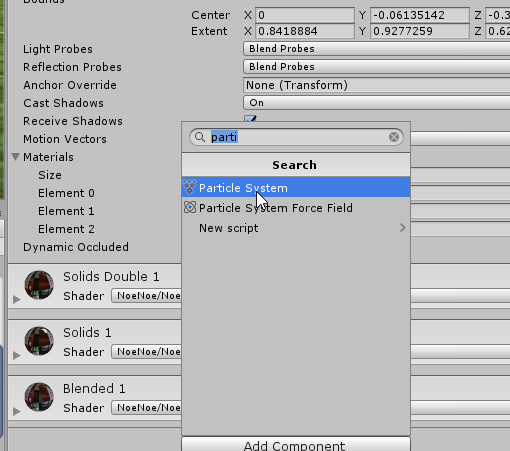
are you doing the right click, effects> particle system ?
grim tusk
I've cut a little but too much, yup
 fierce bane
add it as a child instead of on the component itself...but it shouldn't be doing that
violet moss
adding it to a child empty disables it too, hm
fierce bane
try adding it below the hips, not on the mesh
violet moss
2018 unity if it makes a difference
and ok
nope doesn't seem to matter where it is
Builder pane disables, for ALL avatars
a particle system can be in the scene, but not on a child of any game object that contains an avatar descriptor
i don't think this is #animation anymore so i'mma ask the beta
fierce bane
I haven't tried new unity yet....it might be an issue with the new SDK then
but I'm sure that wasn't a thing in 2017
violet moss
the mesh particle seems to have worked, thank you for the solution
grim tusk
what animation type do I use for arms? humanoid and I disable everything?
(except for arms obviously)
fierce bane
this is a secondary model on top of your current one that is manually animated, so it doesn't really matter, humanoid would work fine and you could adjust your current one without having to re-record it
grim tusk
all of this is supposed to not work or?..
fierce bane
yellow means the path to the object isn't found
that's why I said you'd have to adjust your current one for the change in pathing
grim tusk
I did all the mapping
fierce bane
select component, hit F2, change path to fit new path
grim tusk
animator doesn't even appear when I try to add a new property
fierce bane
what did you do with this new model already other setup the rig
fierce bane
you didn't put it into the scene even?
grim tusk
and that
fierce bane
where did you anchor it and also what bones does it have left on it?
grim tusk
it's alone
and it has everything starting from the left shoulder and starting from the right arm
fierce bane
it should be a child of the chest if it's a pair of arms
grim tusk
missing right shoulder, didn't use it anyways
added it to chest
think I'll stop for today
It's almost 7am.. thanks for the help man
appreciate it
hopefully I manage to do this avatar
will have to find out how to use these arms
fierce bane
Re-making the arm animations for the new arms would probably be easier than re-pathing all the components honestly...
the only other thing you need is to make sure you have a material just for the arms on your normal model (so you can hide it with an invisible shader...
The fake arms you could just disable the skinned render for them though when you wanted to hide them.
If you always want them in the same pose you could just pose them that way so you don't have to animate them to the pose as well.
and good luck
fierce bane
just run the arms as a generic then, it'll work fine that way
just checked mine...generic is what I used for the legs
and definitely take a break if you get frustrated with it (or it's 7am, go sleep)
 silver nacelle
henlo
near meadow
would i really lose anything if i made crouch a sit animation and prone a lounging animation? is that even possible? i know movement while crouched or prone would be weird, but...
silver nacelle
what do you mean
also, is there any other animation savvy here that can help my tarded ass? ive got a particle effect thats not working
grim tusk
the arms' rig is set to generic but animation property still doesn't appear
fierce bane
@grim tusk generic doesn't have animation.elbow for example, you just rotate the bones to fit what you need instead
@silver nacelle have to give us more to go on than "particle no work", give as much info as you can about it, describe what's going on, etc
fierce bane
Telling us what about it isn't working. Is it not showing up at all? Is it not doing what you expect?
Also screenshots help to solve issues.
Glad you got it sorted though.
silver nacelle
I didn't know what wasn't working. so that's why I was asking for help lol.
fierce bane
I'm just saying, we can't help with "it's not working" because we're not there to see it and work through it with you 😛
silver nacelle
well that's why normally some would say, what's the issue?
and I'm only just now getting a response? lol
when this was last night
fierce bane
if you're on voice that's usually how that works. In text people read and some just move on if they only see "it no work"
and yeah, people come and go, like I just got up
fierce bane
I did also say some people just ignore it if they see no info or images etc and it just says "it doesn't work" because there's nothing to react with
silver nacelle
well like I'm just saying that a person would ask the problem
fierce bane
all I'm saying is, in the future you're more likely to get help if you post a screenshot, or can provide more info 😛
if they were paid support and waiting for people sure, not everyone will bother if you're not going to bother providing info either though
silver nacelle
I could if I knew the issue
but I didn't lol
so what am I suppose to do or say at that point
fierce bane
you also didn't give a screenshot of your system so someone could look over the basics, you could have dropped that in pretty easily too 😛
silver nacelle
I didn't wanna flood the chat with them?
fierce bane
fair enough
fierce bane
that wasn't the intent at all...I was saying "here are things you could do to help us help you" that's it...
silver nacelle
using the emoji you had been using implies otherwise :P
fierce bane
I'll avoid that in the future then, didn't think it'd be seen that way
grim tusk
@fierce bane I'm almost done with the rotations, only need the fingers
so after I'm done
I'll have to go to the animation model
and add an animation that activates the arms
but how do I make it so that the regular arms get hidden
clear yew
@fierce bane I unmapped the toes but the issue is still there. I don't know if it's excessive or not though
fierce bane
@clear yew there's often some stepping as you shift position, is it more than just a step once in a while?
clear yew
Oh I get the shift position part, that's fine and dandy
But the issue is that even when standing still they keep doing it, and never stop doing it
It only stops when they are running around and such. Any time they hold still it kicks in
fierce bane
@grim tusk you need a material on the arms of your main model so you can swap it to an invisible shader when you want to hide them and show the other
@clear yew it's been a bit, what were you seeing exactly?
clear yew
I just loaded VRChat so I can describe it more accurately
It's like
The feet lightly get up and go down
grim tusk
phew, arm rotations done
clear yew
Like they're tapping to an invisible beat
fierce bane
is it the whole foot just moving straight up and down?
clear yew
And it is usually just up and down, with periodic shifts to left and right before back to up and down
The leg is moving too. It's the whole foot I'd say, though as I said it's not like the leg is jutting up and jutting down. It's like a slight tap
grim tusk
so I just need this?
clear yew
Almost the kind you'd see in musicals
grim tusk
fully transparent material
fierce bane
so a stomp like motion, but small as if tapping the whole foot on the floot?
clear yew
@grim tusk Not really, what I did was uncheck the box on the separate mesh I want hidden
And then had the "gesture" activate it while deactivating the normal one
@fierce bane Precisely
grim tusk
how do I do that
I'm really new with all of these programs so my knowledge is really low
I just make all gestures active regular arms except for the gun one?
fierce bane
@grim tusk if you don't have a material already set for the whole arm (or several maybe) that covers anything that moves, then you need to take it into blender to make a new material and assign it to that
This isn't all that simple though depending on the current model's setup...you may have to remap the texture for it to work correctly
clear yew
Well basically, I assume you know how to write a gesture? Or do you need an explanation that explains that as well? Also if Himeki didn't mention unchecking in gestures and mentioned transparent stuff I'd trust him, he knows way more than me lol
fierce bane
dragon is trying to set up arms that can be animated for desktop, to aim a weapon, etc.
Currently he's using a secondary set of arms, and the main set has to be hidden at the same time.
clear yew
Ah
Wait
To aim in desktop? Like to move them around?
Or just a second pair of arms?
fierce bane
a set pose
clear yew
Ah, okay
fierce bane
but not using emotes so they can move around still
clear yew
But I assume he wants it to be set in a pose that's aiming, right?
fierce bane
I mean...there WOULD be a way to aim it, but it involves a lot more setup with physics objects and stuff...
fierce bane
he has a set pose that the arm holding the weapon is in, and another pose for the other arm
clear yew
Okay
fierce bane
so it looks like he's holding the weapon out in front instead of the usual by the side look for desktop
clear yew
I can't say I know how to achieve setting poses "properly", but I had a scuffed method where in Rigging I'd move the arm around out of T Pose until it was how I liked it in unity
fierce bane
that'd throw it off normally and he'd always be in that pose though
so instead of switching to that with the gun out, it'd be like that all the time
clear yew
That's the thing. For me the arms work fine, they move and such. But I don't know if his model is different, if mine's an outlier, etc
I'd say your method seems better, with the transparent material.
fierce bane
I did it for a pair of legs so I could "sit" mid air (on a chair made from tails)
clear yew
IDK.
fierce bane
it's definitely more simple with the legs I used because I just cut off at the top of the pants for an easy setup...
clear yew
I've never tried it, yours likely works better though. But if he needs to "cut" the arms he needs to take it to Blender right?
grim tusk
I have the arms cut
fierce bane
@grim tusk if you're already using a texture atlas it should be fairly easy.
Go into blender with your main model, select the arms (equal to how you cut the body out before), and then on the material section, create a new material and assign it to those arms
clear yew
^
fierce bane
then you should be able to set up the texture to match how it looks normally...and in unity you make a second material to swap with the first in the gesture
uh...let me just find that invisible shader to make this easier too...
grim tusk
equal to how I cut the body out
is there a way to import the arms
and select that
because it was a really weird cut
fierce bane
uh...not really....you could import and then compare back and forth, but there isn't really an easy way to use it as a selection mask or anything
fierce bane
eh...that's going to suck to try to replicate...
grim tusk
yeah
and the model isn't exact
because I had to fix some parts I deleted
those brighter parts weren't there in the base
the odd looking ones
the atlas used all of these tho
fierce bane
can you show the full model? at least the arms/chest
grim tusk
in blender as a model or?
fierce bane
blender yes, with the topography shown
fierce bane
showing bones too is fine
grim tusk
but it's not showing the dots
fierce bane
select the body in the list, then you should see them
grim tusk
it just highlights the body
fierce bane
are you in new blender or the previous?
fierce bane
bleh...there isn't really any good cut point on the body you can use either...
grim tusk
yeah..
fierce bane
if you don't have anything using the real arms, you could always make a secondary set of arm bones and use those in the humanoid rig so that you can animate the weighted arms...
though it'd look a bit weird when moving/running...
grim tusk
rip..
isn't it possible to just deactive the actual arms on the gesture?
or have the regular arms always deactivated but then activate them on every single gesture that doesn't use the cannon
fierce bane
no, you can't change your rig from in game
fierce bane
that was the reason I did it this way for the legs too...hide the real ones and fake the positioning
maybe? I don't know what it actually does, but it wouldn't hurt to try it right?
grim tusk
page not available..
rip
I imported the arms and select them, and here you can see what I meant
the arms aren't the exact model
gonna see if I can find a way to move the selection
fierce bane
did you miss parts when you were doing it?
grim tusk
when I did the arms I deleted part of that coat
and I added it back
but it wasn't exact
maybe if I join them?
https://blender.stackexchange.com/questions/7928/how-would-you-cut-a-shape-out-of-an-object-using-another-object the knife project tool could work?

Blender Stack Exchange
Coming from SketchUp one of the tools I miss most is the circle draw tool which lets you draw a circle on any face and then you could extrude it in/out. The only tool that I know of that comes clos...
I could use that to cut out the shape of the arms from the main model and then there should be a way to merge it, right?
selection should stay after merge
fierce bane
that would cut, not select...might work but you might run into issues with the re-joining since you're not separating the mesh, but instead cutting, then separating
grim tusk
think I'll stop for today, I'm really stuck..
fierce bane
you're probably just better off using an emote for it honestly
unless you really want to do it
clear yew
Why not just make the separate arms hidden and unhide through a gesture? I did that with mine and it worked fine. You'd need to readjust the gun position a bit maybe, maybe move it in rigging, but it might be worth a try if all else fails y'know?
Also @fierce bane I tried to readjust the legs in rigging to a T-Pose, and even raised them up, but the issue remains. It isn't necessarily an eyesore, but its the first time in any of my models that this has happened
fierce bane
that's what he'd be doing, but he has to also hide the real arms or he'd have 4 arms
 rotund solar
I think this is the right section.
So I've got a blinking animation that appears to be working in Unity while it runs, but does not function in VRChat once uploaded.
Using the Animation component to do so.
Not too sure where to go from here, or what could be wrong.
Followed multiple tutorials that both ended up like this.
clear yew
The animation component was disabled a long time ago. It's depreciated now.
Use animator components and the first state in the state machine as the idle animation.
rotund solar
Ah, so I was following outdated stuff. Will try that, thanks.
fierce bane
check top pinned message in this channel, has instructions to convert to new system
rotund solar
Managed to get it working, thank you.
clear yew
👌
grim tusk
think I'll just turn the gun into an emote
so I'll just place the gun on the back and then have the emote that takes it out for some seconds
clear yew
Leg issue is still there, so I'll put fixing that on the backburner. Does anyone know how to fully replace gesture animations? For example, when I activate a gesture to fire a laser, the hand still makes the default gesture shape
That's fine and dandy usually, but for the model I am working on, the hands are weirdly proportioned, so the gestures look strange. I'd like to replace them, so that when I make a fist, his hand makes a fist according to how I'd like it to look, instead of the weird one he does atm
TLDR How do I replace the standard hand gestures completely to make my own hand gestures/turn off the hands moving entirely when doing a gesture
fierce bane
@clear yew just make a gesture animation with the humanoid hand anims in it
clear yew
I assume it'll just override the default hand gesture movement then?
fierce bane
yes, whatever gesture you put in there will default the hand position to a neutral pose unless you put something in to set it
it does like a half cupped pose, similar to holding a ball in your hand
remember to record on a duplicate so you don't mess yours up too
violet moss
is there a way to kill a particle early if it's velocity falls below a value
clear yew
Alrighty
My only real issue now is the leg issue. I think it might be due to the spine being different, so I'm gonna mess around with it
fierce bane
@violet moss your only option for actually killing it is collision with minimum kill speed. You can however shrink them to 0 size at a certain speed pretty easily
odd latch
supposed I have a particle system for an army of ants, I want my ants to go uphill while still affected by gravity
because apparently, when a particle is affected by gravity, it can only go down a slope and not up
any settings I should look into?
clear yew
I found that the leg issue was with the spine, since it had gone out of T Pose while rigging
However, when the spine is "in t pose", the character stands up straight. This wouldn't be so bad, but the character is meant to be hunchbacked. Is there any way to reasonably fix this? I don't even know here to begin, even if I went back to Blender.
 halcyon owl
My character's default crouch and prone animation don't seem to work, is there anything known solutions to this?
violet moss
Custom crouch animations are currently disabled/unused. Prone should work, though
halcyon owl
@violet moss i mean default ones
when i crouch, it shows me as still standing but just up to my knees into the ground
violet moss
Are the vr arms working
halcyon owl
you mean the tracking?
if so, they are indeed working @violet moss the rig is seemingly all perfect
clear yew
The legs of my model tap their feet when standing still. I found a solution in raising the spine into a full T Pose, but doing that messes with the model since it's a hunchback
Does anyone have an alternative solution to the legs tapping? It's just annoying at this point, so I'm going to try one last time to fix it and then throw in the towel and ignore it
near meadow
do we have the game's default animations anywhere?
i just kinda wanna edit the prone crawl to not have call of duty gun hands
unless that's not gonna be a problem once i get a headset
i already edited the idle but that's easy because it's one frame lol
cold pulsar
Idle isn't one frame, there is an example in the sdk. I'm pretty sure the other anims are from mixamo? I'm not sure
near meadow
default prone idle is multiple frames?
cold pulsar
probably, the normal idle anim has idle movement and is like 3-4 seconds long IIRC
quaint remnant
So yay good news: working on my first personal 3d model
bad news: proning/crouching doesn't seem to kick in except turning me into a mole
Might just be me 100% overlooking something simple
That and my head (terrifyingly) stays locked in place when emoting with backflips etc
odd latch
That means you don't have IK (or something) enabled because you don't have the right bones assigned
my models have blocky hands so some of the fingers aren't rigged to some finger bones
I have to manually assign finger bones in the configure armature settings in Unity
this enabled IK on my avatar so the head doesn't get locked in place when doing emotes
it might not be the same for you, but the vrchat builder should tell you what bones are unassigned to enable IK
reposting my issue:
supposed I have a particle system for an army of ants, I want my ants to go uphill while still affected by gravity
because apparently, when a particle is affected by gravity, it can only go down a slope and not up
any settings I should look into? something that makes particles stay on the ground while moving in a direction
quaint remnant
Ohhh gotcha yeah.
I had that error so I thought it just mean I can't waggle my fingers since I'm non-vr anyway
fierce bane
@odd latch I can't think of a way for something to follow gravity and go uphill, other than maybe using bounce with a forced x/z velocity to keep it moving in that direction.
In normal game dev you'd just use a shader that mimicked the look if you wanted it to follow the ground, or you'd use a mesh render for the particles to make it appear randomly across a surface, or script things in for it
None of which would work for an avatar, but could work for a world (except custom scripting of course)
too high of a bounce would make it "leap" on lower slopes, too low of one wouldn't make it up steeper ones
odd latch
yeah, I was gonna say, the particle would just bounce back and down
fierce bane
not back if you have a velocity set for it...but bouncing off irregularly, yes
if it's a set hill you want to follow every time you can use velocity curves to have it flow up and over for example...
you could try having a forced velocity (instead of using start speed) alongside gravity so it tries to keep moving forwards even when it collides with a hill, though I'm not sure how well it'll work
fierce bane
@odd latch rough example, but basically what you wanted right?
it definitely wouldn't work on stairs though...
or any sharp upward turn
 hybrid furnace
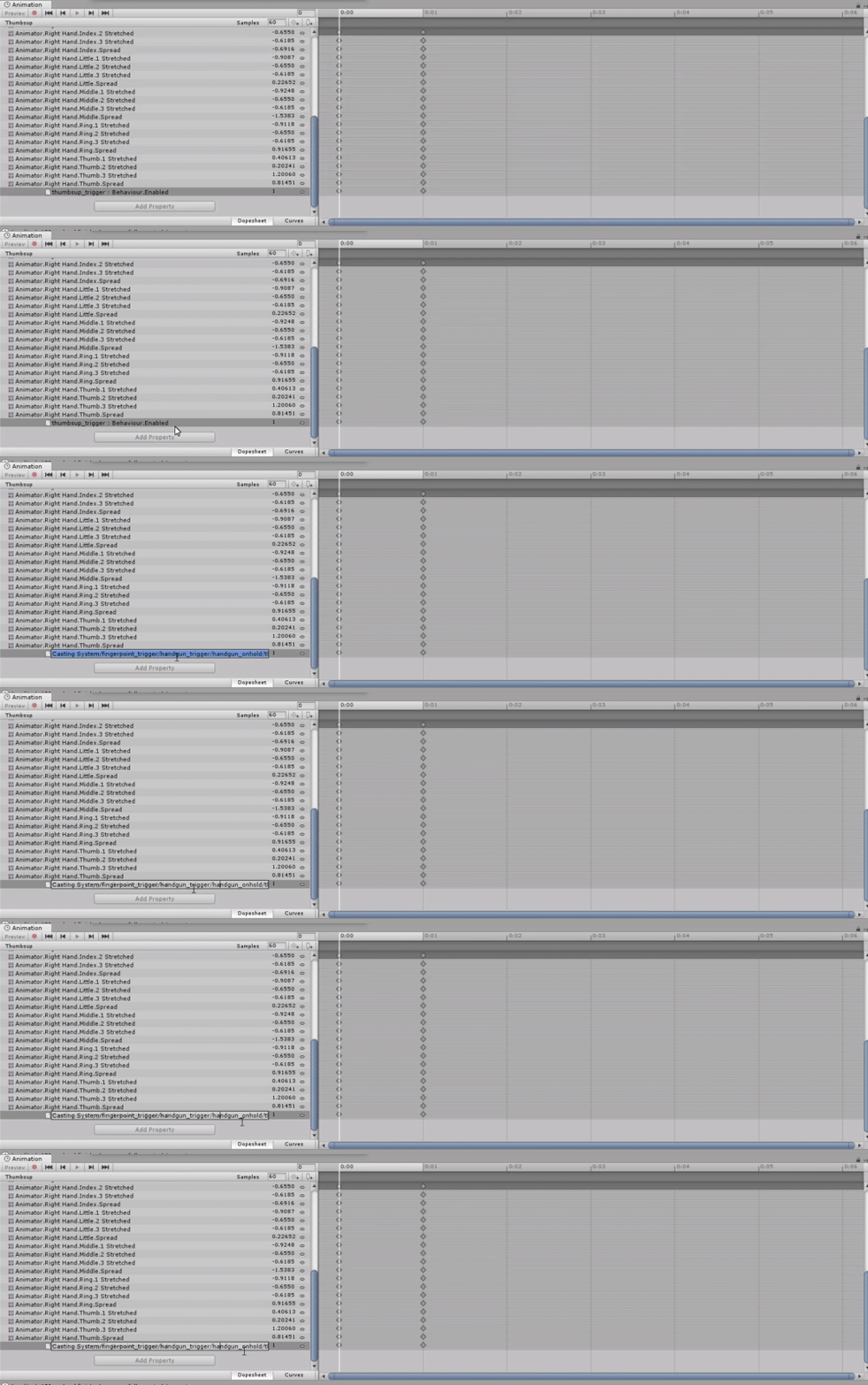
 odd latch
does anyone know if that jackseptic eye animation where he multiplies himself a particle system or a lot of fixed joints?
I was wondering how some of those swarm animations have individual animations
cold pulsar
Pretty sure it's a shader
You'd be able to tell if you saw it's performance settings, if nothing seems agregious than it's probably a shader
fierce bane
if the clones have different animations, they're just duplicates with an animator on it
odd latch
I might put the "travelling particles" project to the side and just stick to stationary particles for now
I'm going to try and copy the sequence on the following video and I think what I'm missing is the effect when the ethereal soldiers get summoned, I'm assuming it's a shader effect so I'm going to ask where/how I might get this shader?
https://youtu.be/oqvriD1LghY?t=35

Fate/Grand Order Absolute Demonic Front: Babylonia Episode 8 FIGHT SCENES Like, subscribe and leave your request!
fierce bane
a materialize shader I guess? opposite of a dissolving one...same concept but in reverse
odd latch
I see, haha, I couldn't find the word to describe the effect, but materialization sounds good, I'll look around
fierce bane
can't speak for the specific asset, but the video on this has a good example.
https://assetstore.unity.com/packages/vfx/shaders/materialize-fx-106815
odd latch
yep, google showed me the same, thanks for engaging
that definitely is a must have for my magic knight
 fringe patio
Anyone know how i can have an effect be delayed in an animation? i wanna have a song play and something pop up but it needs to be a lil after
odd latch
I haven't done it myself, just to get the ball rolling, but I would parent both song audiosource and that something to an empty gameobject, make an animation on the empty gameobject that enables the song and somewhere down the animation enable that something
Someone else might have a better way, but that is what I came up with
fierce bane
just to clarify: animator on the empty game object that has an animation doing that
And yes that's the way you want it
fringe patio
well the animation i made works in unity but it's not working on the avatar when i'm in vrc
any ideas anyone??
proper hedge
Show how you tried to do it
odd latch
is there a shader I can use other than default particle shaders that work with color over time? default particle shaders don't work well with mesh particles
I'm looking for a workaround instead of using the materialization shader and I thought a mesh particle fading in would be a good start
 grizzled kite
yo does aNYONE know where to get the sleeping prone animation
ping me if you reply
sick loom
@grizzled kite vrcm
sick loom
why was I pinged?
grizzled kite
oop my message didn't go through?? 🤔
odd latch
@fierce bane I tried to do what I suggested with audio sources getting enabled at certain times in an animation
when I test in-game, they all get enabled immediately as if the keyframes are all in the first frame of the animation
I guess fallendj and I are having the problem but my solution doesn't work
do I have to do something more in the animator? I'm not familiar tinkering with that part of an animation
fierce bane
@odd latch make certain the audio sources are OFF by default, also check your animation at 0:00 to make sure it's still at 0
odd latch
interesting, so I need to put a keyframe at 0:00 with the audiosources turned off and another keyframe for each audiosource where they get turned on?
fierce bane
@odd latch no, you just disable them by default (inspector, top left checkbox) and then keyframe for when you want it turned on, and then back off (VRC only allows 3 to play at a single time)
I'm just saying make sure it says it's 0 at the 0:00 mark. If not, check the "curves" tab at the bottom and make it a square/constant curve
odd latch
the audiosources at 0:00 were 1 so I'm gonna try putting a keyframe at 0:00 with audiosources at 0
I'll look into curves if the keyframes at at the start doesn't work
fierce bane
you could do that, but it might flicker on then back off
the curves are easy to do and avoid that issue since they're not telling it to do anything at all until you want it turned on
so just be aware, if that doesn't matter, go right ahead
odd latch
alright, but what did you mean by square curve?
fierce bane
I think the unity wording is "constant"
I'm used to audio and electronic stuff, so square wave is what I relate it to...example below
unity curves
odd latch
I see constant waves, but one audiosource dips back down when I think it shouldn't
fierce bane
you want a constant curve that sits at 0 until you need it on, then it's set to 1
odd latch
download servers are so slow, holy shit, I can't even load my avatar to test audio animations
odd latch
animation on audiosources is satisfying so far, I've learned a great deal about particles and animations, thanks for engaging
odd latch
welp, here comes more questions: is it possible to "plant" audiosources in a world? my animation setup pretty much requires I stand still for the sounds to be immersive
but I saw a pingu avatar that spawns a soviet pingu army and the audio stays in one place while the avatar can move around
halcyon owl
i have a set of animations in blender, what would be the recommended filetype to export them to for use in unity?
odd latch
I'm not familiar with exporting animations from blender, but Unity uses .anim file types for animations
halcyon owl
i have a FBX file with an armature and animations in it, but i can't figure out how to apply the animations to the avatar that i alraedy have set up. copy/pasting from the one animation to the other in the animator timeline doesnt seem to work. Can anyone suggest a way for me to do this?
 jolly stag
hello does anyone here make shader animations that wouldnt mind answering a question for me 🙂
fierce bane
@odd latch What you want is a world object, essentially it's an unlinked fixed joint that you release, any object can be on it (including audio or effects)
to get it to work properly though, you need to reset it's position when not in use, so you need the animator.behavior property to disable the position reset while it's locked
@odd latch I think this package was from lindesu(?)
Should have everything you need for world objects
 sly stratus
Does anyone know how to make an idle animation on an avatar loop? I have both loop time and loop pose checked, but when I play the scene, it doesn't loop. (The avatar is placed in-world, I won't be using it)
fierce bane
@sly stratus does the avatar do anything else, or just do an idle loop?
sly stratus
Just an idle loop.
fierce bane
do you just have an animator with a single animation in the controller?
sly stratus
Yes
fierce bane
assuming the animation is set to loop it should just repeat it
sly stratus
Unfortunately, it doesn't, I may have set something incorrectly, I'm not sure. This is my first time in dealing with animation
Would it help if I print my screen?
fierce bane
sure, show your inspector for the object, the animation, and the controller in use
Could be an issue with any of those
fierce bane
The animation itself would help too, it's always possible the paths aren't correct for the components in it
fierce bane
the animation window, Ctrl+6 will pull it up
fierce bane
yep, and is the avatar itself set as a humanoid?
sly stratus
Yes
fierce bane
to rule out any weirdness, have you tried making a simple animation? For example, just rotating it 360 over a second or similar
sly stratus
Ah, no; I've just imported these animations, I've no clue how to create my own.
Ooh, actually, I just did another test
Loops fine now
fierce bane
shrug Unity being weird I guess
sly stratus
Not quite sure what went wrong, I think too many animations were tied to the model? I appreciate your patience with me, nonetheless. ♥️
odd latch
@fierce bane how do I add the animator.behavior property in the animation list? I'm sorry if I'm not directly using the prefab you uploaded but I'm just getting a better understanding of animations
fierce bane
@odd latch you would have to either have an editor script that allowed you to add it, or to edit the animation file as text and add it.
It's far easier to just copy/paste it from another file, or make a duplicate of a file with it already in
I can give you JUST a template animation with it if you'd prefer that, and you'd have to edit the path of the component to fit your setup
world object setup is a little complex, and is usually easier to look at the prefab setup and ask questions on it to understand though. If you get stuck I'd recommend comparing to it to see what might be wrong
odd latch
I'm not sure I'll be able to navigate through the hierarchies to inject my setup in a prefab
fierce bane
you need a multi step hierarchy for it to work properly anyway
reset animator>fixed joint>whatever you need anchored
odd latch
all that's left in my manual setup is disabling the animator
fierce bane
you can change the path of an animation component by selecting it, pressing F2 and editing the path
odd latch
I think I have an understanding on how to make a world object, just that part with putting an animator.behavior in the animations is where I'm stuck at
fierce bane
it's much easier to copy the path out into notepad or something, as it doesn't scroll properly...
I copy/paste the behavior component whenever I need it...I don't know why it's not just a visible aspect...but meh
Template version...only thing in it is the behavior toggle
if you really want to make it yourself, you'll have to either disable the binarization for unity files and edit an animation file by hand to try and add it (not something you usually have to do, and complicated to explain), or you can try to find an editor script that allows you to add it (can't help there)
odd latch
from my experience, copying an animation property needs both animations to have the same hierarchy of the object they're controlling, that's why I'm hesitating to "just copying" the behavior property
fierce bane
that's why I explained how to edit the path to fit your hierarchy
select object (animator.behavior), press F2, select text and copy to notepad, edit path as if it was a file path but for the hierarchy
I'll give you an example for this
This used to be IdleAnimator>Sphere>Sphere-Orbit
so the animation is now broken
selecting "Sphere : Rotation" and pressing F2 brings this up
odd latch
oh shit, can I do that to the animator.behavior?
fierce bane
Typing in the name of the correct path (in this case just Planet but for the moon would have been Planet/Moon-orbit) results in a fixed animation component
yes, that's what I've been trying to say you should do lol
proper animation path shows black/grey instead of bright yellow
(assuming there are no other animators down the path which can break the detection of an invalid component sometimes)
example 2-step path
for an animation, you might have a much longer path, which is why I suggest copying it to notepad and editing it there...it's far easier on you...the built in text edit is derpy, you'll see when you try it
odd latch
the property's icon is now of an animator component, am I doing it right?
fierce bane
does it say <animator object's name>.behavior ?
this should be in your gesture animation, and not one on the avatar btw
fierce bane
enabling the object you want to play sound (or a parent) as well as disabling the reset animator's behavior should be in the gesture together. The animator behavior should be on by default.
So when you use the gesture, it stops resetting the position of the joint to 0,0,0 position/rotation, and enables the sound/animations
should be fine then as long as your path is correct
odd latch
ok, time for testing
odd latch
thanks for the help, my animation improved a lot with the world object setup
 cyan chasm
I'm trying to replace the prone animation on an avatar but the camera stays in the default prone animation's place. How would I update that to the proper spot?
 outer ibex
Anyone know how to make a mesh be anchored to global position instead of to the player? I'm trying to summon an object but I don't want it to follow me. If you know then please @me with the way to do it. Thanks
outer ibex
Thank you
odd latch
@cyan chasm as far as I know, you can't change VRChat's camera positions on the three idle states (standing, crouching, prone)
cold pulsar
Could you enable a camera on proneidle? I've heard having a camera changes your viewpoint to be on it
odd latch
I guess that's a method, I'm not familiar with custom cameras
cyan chasm
I was thinking about doing the camera enabled option although I'll need to test it out myself to see how it feels
cold pulsar
Of course, but it's the only way as we can't influence the viewpoint at run time in any way
 frigid heart
Im trying to set it up so that i need 2 emotes to pull out a sword
Ive got the pulling out figured using game objects
But, I realised that the sword thats at my hip will still dissapear even when im only doing the 2nd emote
how on earth do I do the sword pull out, only backwards
make it dissapear with 2 emotes
cold pulsar
Might be best to do final ik reparenting instead of outright disabling and enabling two different objects
If you have final ik that is
frigid heart
The only way i could figure it out was to have two seperate swords
fierce bane
that does require buying final IK though
frigid heart
and one emote disable each
fierce bane
the way you're doing it is fine and is the common way it's done
fierce bane
true, but we're limited in what we can do without buying things off the store
for a multi gesture effect, all you need to do is have the object you want the second gesture to turn on under another object
Dummy
|-- Actual enable object```His problem was disabling the sword though
frigid heart
Yeah I figured it, it was doing it backwatds that was the problem
HAving something only disable with two emotes
fierce bane
ah, misread my bad
cold pulsar
I wouldn't have recommend final ik if he was only enabling as that's easy. I don't really know how to do the disabling though other than something like the sword on your hip is a particle and it's killed via enabling a trigger
You can also try hiding the sword via stencils
fierce bane
stencil hiding is probably the best option if no final IK...otherwise you'd have to have a weird animator to work around it...