#animation
1 messages · Page 113 of 1
 icy anchor
the heirarchy:
BootDoubleController has a behavior keyframe animation that just toggles the animator on BootController:
That animator, turned off by default, triggers this animation, which just swaps the materials seen in the video:
works flawlessly in unity, not in VRC
 fierce bane
So other people don't see it load when they have your avatar enabled? (you're not using mirrors or cameras to check right?)
icy anchor
I know material swaps don't show in mirrors, so I always rely on others to check it
and they just see the default start material
even friends with animations enabled
fierce bane
extra note, you don't need an animator that enables an animator after a bit, you can just use a blank animation as the default state that has an exit time of however long you want it to wait for the transition to the actual animation.
I can't think of any reason the animation wouldn't activate and swap the material though...
fierce bane
You could potentially have an animation that disables a quad instead of swapping the material though and it should look the same...
I don't know what would stop the material swap from happening though...
You have the start screen as the default state, then it switches in the animation to another one, then a 3rd being your normal state?
icy anchor
The final is the normal state, the animation changes it to the start screen on load
but that gives me an idea of how to fix it
If I made the start screen the first state, then use an animation to toggle on the normal state and leave it on
that just might work
fierce bane
yeah, start screen the normal material, at a set time in the animation, switch to your extra one (assuming it was startup->desktop>avatar based on the video before), then over to the normal state
fierce bane
good luck, hope it works out
 keen folio
Hey all, I am looking to play some audio files when certian animations are triggered. I have an oninteract toggle that opens/closes a big hanger door. I need to play different audio files at different times (different timing when closing). Is there a way to trigger an audio file when a specific animation is triggered?
 muted prairie
have an animation event play at the beginning of that animation and that animation event calls a custom trigger than enables the audio source component or object
keen folio
@muted prairie I have been reading about that but the how to set it up is what I am working on. Any tips?
I aded the event but do not see anything useful int he pull-down
Also see Audio items that can be added into the animation
muted prairie
you need to add the animator on the object the custom trigger is on
keen folio
The animator is on the object with the audio source. I am triggering the animation controller bool with another object. The controller has both open and close animations tied to it.
fierce bane
@keen folio don't enable "play on awake" in the animation, disable the audio OBJECT and leave that "on awake" on. enable the object itself in the animation at the time when you want it to play
keen folio
@fierce bane Does that mean I cannot tie the sound to the object I am animating? I should make a new empty game object and child it to the animated object and activate/deactivate that object?
fierce bane
do what you already have for the "play on awake" but for enabling the object. If the object is a child of the moving object it'll still follow it.
but toggling play on awake doesn't make it play, it just says "you can now play when you are enabled"
otherwise I'm not sure what you're trying to say
keen folio
Sounds like I am not enabling the audio. I am enabling an empty game object with an audio source tied to it?
fierce bane
you could just enable the object the audio is in too
keen folio
Since it is a door will the door not disappear until enabled?
fierce bane
ah, in that case I'd put the audio as a child object of the door instead. Technically you could enable the audio part, but there can be issues with that too
keen folio
I see the audio enable but I doubt that makes it play?
fierce bane
make sure the audio is off by default
keen folio
Will it play with I keyframe the enable?
fierce bane
as long as play on awake is checked, it should, yes
keen folio
I believe that will also make it play when the level is loaded too through right?
Testing it now
fierce bane
no
awake means when the OBJECT becomes activated
as long as the object is off, or the component is off it will not play
as I said several times now "play on awake" means "when this object is activated, play sound"
if play on awake is off it would require a script to play the sound at all
keen folio
k, thx. Making some progress. Plays when the animation is triggered. Wondering if I can add a keyframe to enable play on awake so I do not need the empty game object.
fierce bane
you don't need an EMPTY game object, just an object for the audio.
If your audio component is on the door, and the component is disabled it won't play until the moment it is activated
so if you want it to play at a certain time during the opening of the door, move the "enabled" keyframe to that point in the animation
remember, animation plays frame by frame...so if you delay the point when the sound is activated, then it won't play until then
keen folio
Works perfectly, but, with play on awake enabled on the game object, the audio plays when the level is loaded and then every time I trigger it on the desired keyframe.
fierce bane
if the component is DISABLED by default, it should not play when the map loads...because it's disabled
keen folio
Think this one will work. Loading another test
Saved the extra object by stacking
Left the play on awake off. Then enabled play on awake one keyframe before enable. Then disabled play on awake. Does not play on load but does play every time the animation is triggered.
Thanks for your help @fierce bane !
 stable island
Hey, when im making my own avatar i set a custom CROUCHIDLE animation and the client doesnt seem to use it, how do i fix this?
stable island
Im heading to bed, if you dont mind pinging me when you answer that would be great, thanks!
 marble ledge
is someone out there nice enough to make an avatar with a pen for me (i can send you the model)
i tried to do it myself but for some reason cant get it to work
 clear yew
how to fly with colliders?  i made a gesture that would make a cube collide with my feet but it just makes me fly at random directions, the collider base cube was attached to my hips IIRC
clear yew
does anyone know how to make the reset pose button work after the player use vrc station?
clear yew
Anyone know if you can make edits to the AvatarControllerTemplate and have it still be compatible with VR IK?
...also, FALL isn't even in the default template. Nice.
stable island
Hey, when im making my own avatar i set a custom CROUCHIDLE animation and the client doesnt seem to use it, how do i fix this?
clear yew
@stable island crouchidles animations aren't used in VRChat even though you can override them so we're pretty much stucked using default crouchidels 
stable island
Well thats sad
clear yew
yeppers
stable island
guess ill just have to bind it to like a hand
stable island
Oh?
clear yew
wot
I'm literally using them right now for my TF2 models.
last time i used it didnt
They're working as of this morning.
clear yew
I mean, they've been working for awhile
stable island
well CROUCH IDLE didnt change anything for me
clear yew
Should just be CROUCHIDLE. Regardless, I'm currently making a homebrewed Animation Controller with proper full cardinal support for all directions with crouch/walk/run and proper directional air walking
stable island
CROUCHIDLE didnt change anything for me as i said
clear yew
Well, give me a few hours and I should have a fixed animation controller + basic animation set ready
you mean it ain't just a simple drag and drop?
Uh, no. You'd need to spend a few seconds punching your existing animations in but the names will be significantly less confusing, correctly labelled, and all hopefully functional.
stable island
clear yew
Not too surprised if it's broken by default. I'll take a look at it in a bit.
clear yew
so since I'm very tired of the vrchat animator default missing a ton of key stuff i'm just going to make a new one from scratch with a whole lotta lifted hl2 anims as the default
so far im looking at:
Full cardinal directions for walk/run/crouch
Falling anims for falling w/o movement
Air-walking animations with full directional support
Prone directionals/A prone that doesn't look like you're holding a gun at all times(fucking mixamo)
maybes:
Prone <-> Crouch <-> Stand <-> Prone transitions, if I can figure it out
anyone have anything else they might think they need for me to jam in here? going to throw it up somewhere for usage after it's done
... I'm a lil confused here since you said custom crouching works, so basically are you using an animator that you yourself made which enables you to custom crouch or something? Pls do forgive me for my dumb dumb -w-
im making one right now
stable island
that doesnt answer the question
with the default overrides does CROUCHIDLE work?
@clear yew
stable island
@clear yew
 hollow fjord
Heyoo!
stable island
Hello
clear yew
busy atm, more details later
 tough cargo
Not sure which channel to say this in, but does anyone know how to make a good lightning particle effect? just one that would exist for maybe half a second.
Im quite new to the whole particle system thing so yea.
hollow fjord
Are you all animators?
 crude aspen
Has anyone here made avatars with more than one audio source? If so, can you please show me your setup? Only one specific audio source works, others wont ever work.
 winter sundial
I dragged the default animations onto an avatar, but every field says "Missing". Anything I can do about that?
 peak zinc
hey I am kindaof new to animation in unity, im trying to move the fingers in a certain way but everytime im i move it, first ( in the inspector tab) the rotational values turn red, then when i come to move the next joint, the first one snaps back to its default position. anyone can help?
 modern urchin
i'm new too, but I think you're moving the bones themself whereas you need to be moving the humanoid things it makes you
one sec ill screenshot @peak zinc , that makes no sense haha
so, you should be rotating these
and you can find these by copy/pasting from the default hand animations that VRchat has, like fist
modern urchin
or if you do 'add property, animator' i think too
 analog cedar
Is it possible to edit the existing walk animation?
 outer ibex
So I'm trying to get eye blinking animation working useing visemes. I have the animator set to play the blink animation. It plays the animation in the unity editor but not in-game. The frustrating part is it was working a few days ago. I recently updated the avatar armature. But I don't think that would affect it.
Any ideas on what is wrong?
 torn pawn
where did you put the animation on?
outer ibex
The main object
Does it need to be applied to the body
Because it works in the play mode
@torn pawn
 serene sorrel
Would gladly take any advice with an issue I'm having. Working on a gesture animation that runs about a minute long. The animation is that I have a tablet appear in my avatar's hand, shows a few images on the tablet one after another with audio, the animation ends with a key that culls the tablet. Works as intended (in game). Problem is my fingers stay stuck in the position they were in while holding the tablet, and they stay that way indefinitely - unable to make any other gestures with that hand until I change avatars. Still very green with unity so I'm not sure if I may have missed something
 proper hedge
your gesture animation is probably too long @serene sorrel
it must be only 2 keyframes, at 0:00 and 0:01
if you need an animation that has length, you must do it with an animator component
the gesture is only for activating the object the animator is on, or by turning on the animator component
serene sorrel
Figured it out! Thanks a bunch 🙂
clear yew
anyone know how to make an avatar fly?
outer ibex
I used to but my method broke a few updates ago
 marble thorn
how do i activate particles with hand gestures
 lethal rampart
So seeing as networked ik broke avatar sounds on locomotion, (such as footsteps) would there be any way to get around that? Any alternative possible way of doing it? 🤔
It used to be you just triggered the sound on the run animation, but sadly since the networked ik update, all it accomplishes is that I hear it, and no-one else does
@marble thorn you have 2 ways to go about it.
One is turn the particle game object or component off, making sure to have it set to play on awake, and then have your animation enable that gameobject.
The other way, depending on what you're going for- is to keep the gameobject on, and keep the particles on, but disable the "emission" component on the particle system. And then have your animation enable the emission.
Then you simply put that animation in one of your hand gesture slot
marble thorn
ok
 earnest lagoon
@clear yew you have to set a jump animation to push an invisible cube up into your avatar’s feet
clear yew
@earnest lagoon mind to elaborate that in a step by step process? I tried that but did it as a gesture where a cube appears beneath my feet and used colliders instead, it made me swoosh in rabdom directions everytime I jump lol
earnest lagoon
A normal cube from blender should suffice
I’m not sure what could be causing different directions, but it could be the colliders?
Mine never used colliders. Just a plain old cube
clear yew
I just use the cube from unity, attach it to the hips and do the colliders thingy but you don't use colliders or anything? Just place a cube under the feetsies? Cuz I wanna gradually get higher every time i press the spacebar. @earnest lagoon
earnest lagoon
Nope I don’t use any colliders at all.
I don’t even think it was under any bone hierarchies. It was just an object under the feet that I animated to go upwards whenever I jumped
And yes you will go higher each time, because each time you jump, the cube bumps into your feet again, pushing you higher regardless of your current height if that makes sense
clear yew
hmmmmm i think i get what you're saying, aight imma try that thanks for the help
earnest lagoon
👍👍👍hope it works out!!
clear yew
@earnest lagoon sorry for pinging ya again but what animation do you override? -w- nvm i'm too dum dum for this, are ya willing ta give me pics or something?
 cedar roost
I need someone with cinema 4d anyone pls?
 clear flicker
What do you need help with
cedar roost
I need if someone could export me a .c4d file with an animation to a .fbx file
clear flicker
And there are no tutorials for this?
cedar roost
I need cinema 4d
thats the problem, its not free and I dont want to download some malware
 nimble ridge
its not free, but I don't think its malware
clear flicker
I think we both know what they mean
cedar roost
I mean if its not official, you could download malware
earnest lagoon
@clear yew override the jump animation. If you need pictures I won’t be able to get any for a while today. Sorry for the wait
lethal rampart
is there any way to do sound on locomotion? seeing as the networked ik update broke the usual method of simply animating an audio source with the walk animation
 stone gorge
I have a couple of questions if its alright?
There this avatar I found on Ikita x Toga
I really like it but it lacks hair physics and the twin tails stick out behind it in a rigid manner
First I was wondering, am I allowed to add hair physics or do I need permission?
and also, if I were to do it, what would be the best way? I found a video on how to add physics but I'm not sure if I should put many bones all the way down the hair or if one-two long bones each would be better
proper hedge
@stone gorge you can only edit an avatar from unity, so to change the hair you would need the unity package. toga and ikita have the unity package. you would have to ask them for it
you also do not need a large amount of bones to get some basic dynamic movement
proper hedge
also, are you sure you have dynamic bones turned on? i feel like toga and ikita wouldn't miss putting dynamic bones on such long hair
serene sorrel
Is there a particular way to get Emote animations to loop? Ive set up a custom animation on an override in Unity, set the animation to loop but when i play the emote in game, the animation still ends
proper hedge
The emote override itself runs up to a fixed length and doesn't loop
If what you're trying to loop isn't a dance or something with your main avatar object, you can use the emote to start an animator on a child object, which can loop
@serene sorrel
serene sorrel
Ahhh gotcha. Yeah it's just a dance. Thank you @proper hedge
proper hedge
At this point most people resort to making a duplicate avatar dance
hollow fjord
So you guys just animate your avatars?
I'm hoping to become an animator myself one day
 novel lotus
Question about custom walking animations, I have it working in desktop mode, overriding the control animation, but when in vr/full body the animation doesn't work fully, because it's tracking the head, hands, ect...Is there an option to disable the tracking so only the animation runs or do I need to have a separate model that has the animation on loop and activates when walking then also disabling the non-walking one at the same time, then vise versa when not walking...Hope that made sense, I just haven't seen any answers online for it...
muted prairie
Try asking in #full-body-tracking but your second guess is most likely it
 white herald
whether in full-body or just hands-vr the result is the same while walking, lower body is animated and arms are ik to controllers, just swing your arms or do the over the top solution you mentioned
 left jackal
Anyone know how to make the umbrella work for desktop mode? I'm using muscle editor, but it's not holding the arm 😦
clear yew
@left jackal Muscle Animation editor only works for the humanoid body parts, generic items like guns, umbrellas, e tc have to be manually animated.
If you're wondering how to open and close the umbrella, it should have shape keys for that purpose in its body component (hopefully)
left jackal
@clear yew I wanna know how to make the arm and shoulder stay in place as shown. It stays in unity, but not in game.
clear yew
show me your animation tab
left jackal
1 moment o: @clear yew
clear yew
Also, I may not be the most familaiar with this sort of thing due to me always doing things in VR, but atleast this sould give the resources for someone to fix it if i cant
left jackal
I thought it indeed worked its animation for a split second in game, then stopped.
@clear yew
clear yew
hm.. im not too sure
clear yew
@earnest lagoon sorry but I don't see anything that even resembles a an animation named 'jump' that i could override...
muted prairie
it's Fall
clear yew
tried that but nothing happened, imma just do sum trial and error i guess
muted prairie
Did you duplicate the controller and used it in your descriptor ?
clear yew
Yes I did and just making sure; descriptor refers to the window on the right, yes?
clear yew
Yes I have done that
muted prairie
Then it should work ! Make sure the animation actually plays if you put it in an animation component on your model in Play mode
clear yew
ok thanks for the help Ruuubick 
earnest lagoon
*Did it work?
that’s what I get for typing half awake
 fair scaffold
ye
clear yew
I'm trying to re-create the sword spinning animation shown here but it's kinda hard because the pivot point is dang near impossible to change. If you have any tips PLEASE DM me! Thanks
 red linden
if you don't want to go into blender or whatever to setup a new origin, in Unity you can create an empty object, and then set the empty object to be the parent of whatever you want and then rotating the empty object will be the pivot
 gritty elbow
@left jackal u can't animate ur arms only thing u can change are ur fingers and props
earnest lagoon
They could just override the idle animation with it, no?
earnest lagoon
I guess it would make sense that gestures are restricted to hands and props but is there a reason for it? Is it something to do with the override controller or smth?
proper hedge
Your armature is controlled by IK so you can't animate those bones
Their position and rotation, at least
earnest lagoon
Ahhh I see.
 fervent totem
unsure if this is the right catagory to ask, But can anyone tell me how to make a particle show up as black? When i try to color them black they just turn invisable. (Im attemping to make a black and white aura for halloween)
fervent totem
Nvm, After enough fiddling it worked out. Once i was about ot quit i clicked a random button and it worked....
torn pawn
what's the minimum time for emote toggles now?
 quartz summit
 frail granite
So I'm currently creating an animation and the properties aren't showing up in the animation tab. Is this a Unity problem?
torn pawn
@quartz summit as in toggling with an animator, was wondering what's the minimum time now after they changed how Emotes work (cuz I know minimum time got upped from what was before).
 icy swallow
How'd you animate a prop that stays in place while the avatar moves, ie a barricade for a soldier, or bucket?
icy swallow
Cool, ty both
 lament prism
@frail granite sorry for late response..but try to reload unity, and/or remake the animation controller
 fallow wren
So I'm really new to unity, but I've figured out how to have a song play from my avatar as long as im holding down a certain hand gesture. Now, i want to know if its possible that while I have that song playing and im holding down that hand gesture, with the same gesture i can spawn two NPC's with the model of my choice behind me doing a dance along with the song as long as im holding down the animation. How exactly would I go about doing this?
proper hedge
@fallow wren it's the same principle at first. Right now your gesture is animating a game object on(your audio source), using the is.Active 1 property. Put two "avatars" under a game object and animate that game object on. Put animators that have dance animation clips in them on the avatars
cedar roost
can i put an animation override to an object that have my avatar?
proper hedge
Can you rephrase
proper hedge
You want to animate the object in the hand, or make an object appear in the hand? @cedar roost
cedar roost
animate the object in the hand
proper hedge
You can use another gesture override if it doesn't matter if the animation is only 1 frame long(instant change). If the animation needs to be longer you need to use an animator controller
There is an animator component you can put on an object, then you give the component an animator controller
The animator controller has your animation clip in it
 violet thicket
pew pew pew
https://streamable.com/mdbe9

 glad escarp
Hey guys - anyway I can make my audio sound less terrible? I normalized it and am using an .ogg.. (using 8dB) The song sounds like it's skipping and stuttering and very muttered (like its coming from under a pillow or something)
glad escarp
Ahh I got it. Disabled spatialization and that seems to have fixed it.
 dark cypress
Hello, I'm at a complete loss at what to do to achieve this, any help is appreciated.
I want to change the material on my body periodically, but I don't want that to happen unless I'm doing a gesture. Normally, I'd put an animator on the body whose behavior is disabled and enable it with the gesture. However there already is an animator on my body to do other things. Is there any way I can go about this?
Only way I can think of is to parent the body into an empty object and enable the animator on that object, but that would mean re-arranging the hierarchy of all my clips that use Body blendshapes.
proper hedge
@dark cypress is it a specific material you need to change? Such as clothing? Can you separate it from the main Body mesh?
dark cypress
Nope, the body is one mesh with 2 materials
I went with the way I stated above since it doesn't look like there's any other solution
dark cypress
I remember reading somewhere that VRC now doesn't allow audio source manipulation through animation anymore, is that correct?
My audio source is music and I don't want it to cut off when disabled, so instead I wanted to set the volume from 0 to 1, am I not able to do that?
 feral pawn
hey guys, im having an issue with my dynamic bones, i deleted all the animations and it still does it even on new uploads. I am unsure whats happening
 quasi hinge
Rouge collider?
feral pawn
heres a image of collissions
but ill check
only two different colliders
both hands
they collide with ears and hair
thats it
and they are no where near the rest
 still torrent
So i need some help surprisingly how do i emote and move at the same time?
like if i wanted a moving emote
gesture if you will
 wispy saffron
Yo
do pulse gate keys still work?
it still works for my friend
but i cant get it to work
clear yew
currently having troubles putting a tail wagging animation onto a hand gesture, each time i tried doing so, the hand gesture took up all the slots for the gestures which wouldnt allow any other gesture to work, or the model would entirely disappear upon activating it. anyone know how to fix this?
 bronze citrus
I'm trying to do a particle effect for an iron man avatar I'm working on and the chest beam is working but the hand beams aren't following the hands. I only have the particle effects set to a custom override controller. Am I doing something wrong?
Someone said that I'd need an animator controller or something?
clear yew
how do I make an object stationery when triggered by animations ?
lament prism
@clear yew what do you mean by stationary?
@bronze citrus you need to use fixed joints+rigid bodies.
bronze citrus
rigid bodies on the particle effects?
bronze citrus
yes
now I'm having another issue. Every time I try to make other breath effects, it keeps changing the shapes for all of them instead of just the one
proper hedge
@clear yew you probably made the gesture animation clip too long. Needs to be 0:00 to 0:01 in length
@wispy saffron yes they still work but that's an ancient package at this point
@still torrent what are you trying to animate with the emote?
@bronze citrus you likely need to use ik follower or joints for the particle systems
@clear yew you need to use a world fixed joint, or world fixed ik

GitHub
Contribute to oofdesu/lin-unity-packages development by creating an account on GitHub.
GitHub
Contribute to oofdesu/lin-unity-packages development by creating an account on GitHub.
bronze citrus
This is basically what I've done for the past hour
I can live with this but I'll definitely check out the video you sent
I wanted to try to get different emojis to shoot out other than just the lmao emojis
proper hedge
With the same gesture?
bronze citrus
yes
I have the chest and the hands set to different ones
I was trying to make it where it shot out different ones
at the same time
proper hedge
If you want them all firing at the same time, with various emojis, you can just use multiple particle systems and enable them
You can put them under the same joint
bronze citrus
Now that I think about it, I was using the same particle effect prefab for all of these
clear yew
@proper hedge I’ve tried to do that, but the avatar disappeared. I made 2 duplicates of the model, one with the animation and one to put the actual hand gesture on. I put the animation duplicate into the hand gesture duplicate and tried to make it into a hand gesture that way but when I tested it it came out invisible
proper hedge
Your gesture clip must be animating something that makes you disappear theb
What are you trying to animate?
lament prism
https://www.youtube.com/watch?v=QLUQpwkSOSg @bronze citrus
My apologies for the bad audio, I've yet to get a decent Mic. On a side note, this tutorial won't work with Unity 5.6.3p1. It's meant for Unity 2017.4.15f1.
clear yew
A tail wagging gesture
lament prism
This is a good tut on your issue
bronze citrus
ok thanks
lament prism
no worries
clear yew
I disabled the main body mesh on the hand gesture duplicate and left the animation to play on the animation duplicate
in the hand gesture btw
@lament prism for example , like if you would unhide an object it would stay where it is rather than moving with your avatar
proper hedge
You might've recorded the body mesh disable then
proper hedge
You need an animator controller on the tail that does the wag. It should be off by default. Then you use your gesture to animate behavior.enabled 1, targeting the animator component on the tail
Behavior.enabled 1 is a special property you won't find by default
lament prism
@clear yew yes it would move with the avatar
proper hedge
GitHub
Contribute to oofdesu/lin-unity-packages development by creating an account on GitHub.
lament prism
sometimes you have to manually move the prop though
proper hedge
^^ there is a clip in this package called behavior_enabled.anim
lament prism
what is it exactly?
proper hedge
Copy the behavior enabled keyframe from there @clear yew
lament prism
what is it that you're working with @clear yew
proper hedge
@clear yew yee world fixed joint will do what you want. If you have final ik, use world fixed ik
clear yew
it's a birthday cake that is supposed to stay still once I trigger the animation and not follow the body @lament prism right now I just tried making a gameobject and putting fixed joints on that and triggering the animation like that , don't know if it will work
@proper hedge is this it?
wispy saffron
@proper hedge
u talking about the toggle props package right?
cuz i installed it but i dont see the option to add pulse gate
but my friend does see the option
so idk what hes doing differently
idk if he has something else that i dont
proper hedge
Yeah that's a world fixed joint. Just follow the package instructions and you should be good
lament prism
Even with a world particle system, the animation won't stay "still" if you move around. @clear yew
proper hedge
@wispy saffron yes but that package is just super old and shouldn't be used for the most part
Use suspend animator that I linked above
The emote example
lament prism
And also since it's a birthday cake, the only reason you would need fixed joint and whatnot would be because you're trying to link it to the armature.
if it's just suspended in the air, you wouldn't need to do that.
proper hedge
If you need to add behavior enabled to animations, use rero's editor scripts
clear yew
@lament prism I have seen avatars that do that though , like they put something on the ground and it stays there until they close the animation
doesn't follow their avatar either
proper hedge
lament prism
an object and not a particle system?
proper hedge
You can freeze both in world space
clear yew
I think it's an object , I don't know about a particle system that looks like a table soo-
lament prism
is it a 3d model or what?
proper hedge
If the table is a single mesh and material, making it a particle would be great
Orienting for a drop is the hardest part with world particles but they work the best for non-animated meshes
clear yew
not sure- Let me try this fixed joint thing and see if it works , thanks for the help though 👍
lament prism
okay
proper hedge
If you can make the table into a particle, you can use this as a basis for learning how to orient it when it's dropped. If it's just a world particle alone it will always be facing a world axis. That would work for a round table, but not other types.
Otherwise yeah use a joint or ik
GitHub
Contribute to oofdesu/lin-unity-packages development by creating an account on GitHub.
The only difference between the three for your case would be the amount of jitter the table has
Joint jitters the most, ik very little jitter, and world particle no jitter(but static mesh)
bronze citrus
I'm pretty sure it's just a rigging issue because I got it from the internet and it just probably wasn't rigged right
The effects work with my other avatars so it's probably just the iron man avatar
bronze citrus
well now I'm having problems with audio and I've done everything I'm supposed to do but nothing's working. I can't hear audio that I put into the model
 potent knot
My avatar won't blink for some reason even when I set it up right
 lavish scaffold
How was it set up? @potent knot Animator on Body and loop?
potent knot
It is looped and wym by if it's on the body
lavish scaffold
the Body mesh, where the skinned mesh renderer is (where you select the blinking)
feral pawn
is FinalIK broken? The scripts are throwing a TON of errors, and I am unable to enter play mode because of it
 stark trail
been broken for a long time now
potent knot
K I'm on it @lavish scaffold
bronze citrus
@lament prism the game
lavish scaffold
@potent knot You need to use "Animators" not "Animation". Vrchat does not supports "Animation" components anymore.
on avatars
potent knot
Oh really that probably why
proper hedge
@feral pawn the scripts still work
lament prism
how did you animate the avatar then @bronze citrus
take a screenshot of the animator
 whole panther
So I have the animation where you go floating into space but my view position stays behind. How would you go about making my view position travel with the avatar during an animation.Would I simply make another VRC_AvatarDiscriptor and attach it somewhere to the armature?
clear yew
You can't as far as I know.
Unless you wanted to do something too complicated with cameras or shaders and stuff
serene sorrel
Trying to animate an airplane flyby via hand gesture. Works well except that the plane's origin moves with the rotation of my avatar's head. How would I go about preventing that? I've tried a few rigid body setups but nothing has worked for me so far
 ruby thistle
question for the animators here. If i want to do an animation that moves the whole body of my avatar up, would i just select the armature itself in the animation clip?
proper hedge
@serene sorrel you'd need to do the animation with the objects being a child of something world fixed
joint or ik, ik will work better
@ruby thistle atm you can only move yourself via colliders
 true pendant
I made an animation for my characters hair to move, and I want to have that animation always play, how do you do this?
proper hedge
set the animation clip to loop by clicking on it and checking the loop time box in the inspector
then drag the clip onto the objects it needs to animate from
it will create an animator component and controller. it will be on by default
@true pendant
 lean acorn
Okay so, fixed majority of my issues with my character, including the lip movements, however eye tracking and blinking still do not work. Is there something I need to set up to get them to work, something similar to the controller I set up for the mouth movements?
lean acorn
Nvm, figured it all out, was just a naming scheme issue
 blissful arrow
so trying to animate in unity..
blissful arrow
can anyone help me with it?
muted prairie
You should ask specific questions, not open ended ones, look at tutorials and if you can't understand something you can ask here @blissful arrow
lean acorn
Is there a way to make animation overrides upon activation choose from a selection of sound clips?
randomly
Or not necessarily randomly but just cycle
dark cypress
@lean acorn Not exactly but you can make a way to choose between them by using a double gesture activation. This makes the amount of sound clips kind of limited but it's the only way I can think of.
The way to go about this is to place each sound effect on an Disabled empty object parented by another Disabled empty object. Say you have 3 Sound effects, you'd have them like this then:
SFXHolder 1
-- SFX 1
SFXHolder 2
-- SFX 2
SFXHolder 3
-- SFX 3
Now if you want "Point" for example to play the chosen sound effect, then Point should enable SFX 1, SFX 2 and SFX 3. They won't play because their parent is disabled so what you do is make another gesture, say thumbs up, enable one of the parents.
So if Thumbs up enables SFXHolder 1, and Point enables SFX 1, 2 and 3. Then SFX 1 would play.
This lets you have around 6 different sound effects per gesture I think. Hope this was helpful.
proper hedge
you can cycle but if you're going to try and manage your animations, the right thing to do is learn state management, and cycling is obsolete way to do most things
lean acorn
That was very helpful, thank you @dark cypress
Another question: How would I go about adding something that is triggered by the release of an animation override?
dark cypress
@lean acorn You're welcome, I think you can do that by doing the reverse. Have the sound effect enabled by default and the gesture disables it. When the gesture is released, the sound effect would go back to its original state which is enabled, thus playing the sound effect.
However, this means the sound effect will play automatically once the avatar is loaded, that might be undesired if the sound effect is loud or too many sound effects are at play.
There is a somewhat complicated way to avoid that, let me know if you want to get into it
I just realized you're not talking about sfx specifically, if you're hinting at animations then I'm not sure if it's possible
lean acorn
In this instance I was actually talking about SFX. How difficult are we talking in terms of avoiding the initial sound?
dark cypress
@lean acorn It's not THAT difficult, it's bothersome the first time you do it but then afterwards you can copy paste what you've done.
what I'm thinking of is toggling the sound effects on and off by using emote lock, this allows you to be able to turn on or off the ability to play sound effects. But this comes with the problem that new joiners or people that aren't looking at you when toggling the sound effects will have it desynced
lean acorn
Yeesh yeah at that point it's more trouble than it's worth, considering it's a simple sword sheath sound
dark cypress
if it's only that then you should probably go without toggling it yeah
 chilly kernel
is there any prefabs of audio visualizers or any way to add those to model without going trough blender or something
proper hedge
@lean acorn I have a package here for animating on release
GitHub
Contribute to oofdesu/lin-unity-packages development by creating an account on GitHub.

https://lindesu.ga https://github.com/oofdesu/lin-unity-packages https://discord.gg/8ADXhQT Animate on gesture release, without disabling any child objects.
outer ibex
I have a question. Is it possible in any way to make an emote move the physical location of the player. I know that it's possible to move the visible mesh but the player's viewport always is rooted in place.
 golden lion
anyone know why im not able to active a particle system in vrchat? Animation works in unity, but ingame it doesnt activate the gameobject (i guess)
serene sorrel
@outer ibex AFAIK right now the only way to move your rooted position, or viewport, is with the manipulation of colliders within an animation
@golden lion Are you trying to have the particles simulate in local or world space? If world space, you'll need to set up rigid bodies. Other than that it's very difficult to tell what's wrong without seeing how your hierarchy and animations are set up
outer ibex
Is there any videos on how to do that?
@serene sorrel
golden lion
the issue is they arent event being activated, i put a big cube in there to check, nope.
Something is wrong with animations, friend of mine has the same problem
serene sorrel
@outer ibex Not that I know of
crude aspen
Has anyone tried doing an animation that only partially controls the mesh and leaving your arms and head free to move by ik?
blissful arrow
why is my animation in the ground?
 fresh estuary
@blissful arrow Mess around with these settings in the Inspector for the animation, that usually fixes it for me (in particular changing the "Based Upon" settings and "Offset"
blissful arrow
Thanks
left jackal
Does anyone know how I can edit the head with out breaking the shape keys?
gritty elbow
What are u trying to edit on it @left jackal
left jackal
@gritty elbow I have many ideas, but one big thing is I wanna make fangs from the teeth, by pulling a tooth down to a point, and maybe edit eyebrows or something. Seems if I do edit the face, it may try to deform back due to shapekeys, triggered by blinking, etc.
gritty elbow
So ur trying to edit the teeth to have like a point by moving the vertices?
left jackal
yes
gritty elbow
Should be fine if u apply it to the basis shapekey but u may have to edit the other mouth shapekeys
muted prairie
you can select the vertices you edited on basis and do "Shape propagate"
 vale saffron
how do you make the snail trail mark not start to disappear after i few seconds i put it on my avatar and was drawing and the ink starts to slowly disappear or just to make it last longer
 ionic nova
@vale saffron Time property on a trail renderer component i think
vale saffron
where would that be?
 topaz path
Is it possible to have some kind of system that would allow you to change the material of a mesh using emotes and have them remain until you stop the emote manually?
muted prairie
You can turn off emote switching ?
topaz path
What do you mean?
muted prairie
Are you using VR ?
topaz path
Yes
muted prairie
Which controllers ?
topaz path
Knuckles
muted prairie
In that case, do the emote, then click the thumbstick to keep the emote playing
topaz path
Huh, alright
muted prairie
You'll see an icon show up on your screen
topaz path
Cheerios, thank you^^
 rugged mural
have you guys any ideas why my avatar just stand on the chair when i try sit on the chair?
it still be fixed but doesn't sit down
dark cypress
Does your Avatar have a custom idle animation on the override? If it does, check that your sitting animation override doesn't have the same one
@rugged mural
rugged mural
where could i check the sitting animation override?
dark cypress
You have it on unity right?
rugged mural
yeah
dark cypress
In the VRC_descriptor, there's a standing animation override and a sitting animation override
dark cypress
Aight gimme 1 sec
rugged mural
okay

 rugged mural
should i put the another controller on custom sitting animation?
i mean there is no way to delete the idle animation only one side
dark cypress
If you want the same controller on both so you can do emotes/gestures. Duplicate the standing one, delete the idle clip and set the new one on the sitting override
rugged mural
so it's gonna be like
dark cypress
Select your override controller and press Ctrl+D
dark cypress
yeah
rugged mural
okay i will give it a try !
dark cypress
then delete the idle animation from Moka1
rugged mural
i got it !
dark cypress
Sweet
rugged mural
im sorry but it didn't work but i put the IDLE animation on custom sitting animation so i hope it gonna works
omg it actually works !
Thank you mate !
dark cypress
no problem, wonder why it didn't work without a custom one though 🤔
 vale trellis
Hey lads , is there someone who can give me good idle animations ?
icy swallow
How'd i make a knife spin as a gesture override?
can get the knife to spawn, just not spin smoothly
eg, something similar to csgo's karambit
 limber oar
Hi! I have a character model i'm getting setup for VR Chat, I'm wondering what type of/how many animations I would need before It can be 'usable'
muted prairie
they're automatically provided if your character is fully humanoid
 upbeat sage
So i finally thought i finished my model. But now the eyes do not track or blink. I have the visemes set up to blink and they work when i test it with CATS and also the eyes move because i tested that also. Am I forgetting something within unity. I added left eye and right eye to the head.
limber oar
@muted prairie what if your character is a bionicle
muted prairie
if it has all the required bones for humanoid, it still works
clear yew
Hey, I set up a fixed animation controller to correct the issue where CROUCHIDLE is unused.
It seems that VRChat isn't loading my custom animation controller.
I have it marked as the base controller in both the animation override and the avatar's Animation Controller, but to no avail.
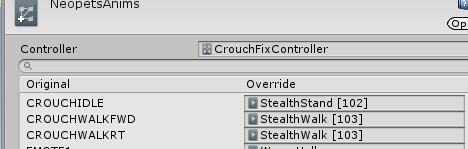
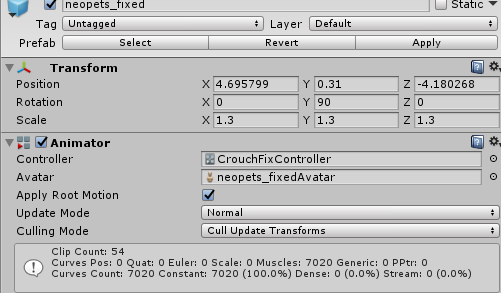
Is there a way to fix this, or does VRChat not allow custom animation controllers?
The controller itself
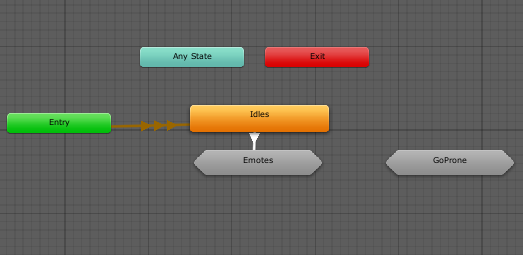

 pulsar canyon
How to make multiple avatars dance together in one animation?
The animation starts to play only the middle is dancing
rugged mural
@pulsar canyon i have a suggestion. let me know if you wanna try it
torn pawn
put them under game object and enable game object
nimble ridge
But peasee, don't use that many audio sources, just pleeease
 magic harbor
I've added cat ears/tail to my model, and successfully sized for full body tracking..
Where/what do I look up to learn how to have the ears move on gesture?
I've heard I can do this in Unity, and would prefer that method.
torn pawn
press record and move the ear bone
magic harbor
Um.. I'll take that as I need to google how to record animation in unity.
 proper pagoda
Anyone wanna join me in a call, and teach me how to make my avatar put down objects on hand gestures? 🙂
clear yew
Anyone have any information on why custom Animation Controllers don't function in VRChat?
nimble ridge
Because they they get replaced ingame with the default one provided by vrc, you are actually only sending the data, not the whole component
lavish scaffold
What are you trying to do? It is not something broken, that is how it is.
clear yew
As I posted above, I made an animation controller that fixed the fact that CROUCHIDLE is unusable.
It's clearly broken, seeing as they would not provide source files for the animation controller if they had not intended to let us do custom animation controllers.
 dull wedge
Has anybody gotten a working "contained 2D" audio source? After several attempts, my friends say they can still hear the audio from anywhere in the world
cedar roost
Now the customoverried is different any help pls?
quasi hinge
You're using SimpleAvatarController, you want the template
quasi hinge
Update your SDK. ¯_(ツ)_/¯
nimble ridge
@clear yew
No way to use custom animators now sorry, and yeah the one provided by them is quite broken and limited (aheam no separate gestures either), no workaround either.
clear yew
you cant from what i've seen. i think it has something to do with either converting to a humanoid rig or having the vrc avatar descriptor component
thats why people always make their animation on a duplicate avatar in the unity scene
 finite marlin
it is on a duplicate avatar but when i import the animation into the game i have my base avatar then also one underneath that gets all the effects from my animation bellow him @clear yew
 sick loom
where can I find that amazing purring loop people use ?
 granite magnet
Does anyone know how to make custom emotes?
finite marlin
i need help quickly what do i do from here as my animation plays both the game object and dark len are both in the animation
 woven summit
fill me in what are aiming for, are u asking how to add it as a gesture? if so drag the animation into the animation override on the gesture you want to replace such as rock and roll or victory(peace sign)
@finite marlin
finite marlin
the actual animation is 40 seconds so i made an override with it in idle, and a seperate animation which triggers it when i bound to rock and roll @woven summit
but my problem is i trigger the animation and the avatar is in the ground
and i cant move arms of it
woven summit
hard to guess exactly u are doing but im guessing you have a duplicate of ur avatar under that game object that just appears in the ground
woven summit
and the duplicate is supposed to plays its own animation or..
finite marlin
i was told to make a duplicate that i can then trigger the animation on
woven summit
ok
woven summit
does the duplicate still have vrchats avatar descriptor etc?
finite marlin
no i got rod of it on the duplicate but added a descriptor onto the game object itself
as thats what i got told to do
woven summit
ok then the animation is set to play with an animation component or or animator componet
sorry if im slow in in a class right now
also what does the animation the duplicate plays looks like?
by the sound of it it enable effects and thats it?
finite marlin
sorry i dont know what u mean by animation component
it alsop imcludes material changes to the avatar
woven summit
but nothing to move the avtar it self?
finite marlin
no the avatar doesnt move no
woven summit
ok then thatss it
the default pose is the that pose i nthe ground
jsut add a place holder off of mixamo or sothing
finite marlin
whats that?
woven summit
ill send u a fbx file that has the animation
copy and paste it into urs and adjust it as u need
that should make the avatar not appear in the ground
finite marlin
okay thank you
should this also mean that i can move the arms and such on the avatar?
woven summit
make sure to huminod the avatar so the animtion works with urs
and not eaxclty
u cant make the avatar move with u ingame unless u rig it as soo
it will jsut this small idol animation
also for souces the animaiton is from here
finite marlin
because correct me if im wrong but if i have a duplicate then i wont be able to interact with the duplicate?
finite marlin
oh, so how would i go about being able to do the animation if i wanted to be able to interact and move around using vr?
woven summit
like the duplicate mirroring ur movement?
finite marlin
my movement
woven summit
yah that would be complcated
u would have to set up a fixed joint on each joint to link the avatar to the dupliate
there are ohter ways but even more complicated
someone else might know a simpler way though
finite marlin
okay
ill probably try learning that
or find a way
so thats how people do their massive animations then i assume?
thanks anyway c:
woven summit
np have fun
finite marlin
thank you you too
 plucky cobalt
How can I reduce animation length to just one frame again?
plucky cobalt
Yes
woven summit
if so it shows that little drag at the end but by what i can tell ur 2 framed and thats what u want
plucky cobalt
woven summit
yep ur good
plucky cobalt
So having empty timeframe doesn't really matter?
I thought typical gesture overrides must end at 0:01
woven summit
urs does
as shown by ur first image
its a gui error on unitys part
because its trying to display a material in the key frames and goes out on to the next frame making it look like its 0.02
plucky cobalt
Alrighty, thanks
 blissful viper
Hey there guys, was hoping someone could help me animate my tail, I'm looking to make a wagging idle animation, there any chance anyone can give me a quick step by step or link a tutorial on how to do this?
magic harbor
Ugh weird problem. Model disappears when gesture plays with facial emote?
fingerpoint with expression = vanish
fingerpoint without expression = ok
clear yew
@magic harbor the first assumption would be that your shapekeys are broken. have you tried changing blendshapes without recording to an animation? Do they function correctly, or does the same issue occur?
I'd recommend checking blendshapes in both blender and unity, to narrow the issue down to either the editor, or the fbx itself.
If its the .fbx you may need to recreate all blend-shapes, or reimport the facemesh/remake the model
If its the editor, then try using a separate project (Or also check if your rig is set to humanoid in the model's import settings).
Thats about all I can think of..
 void grail

so the animation starts and stops after about 3 seconds of him flying in the air, do you know any way of extending it?
if anyone could give me a hand it would be fantastic'
finite marlin
drag the end key frames further away to nearer 20:00
or however long you want it
@void grail
void grail
@finite marlin you mind if we take this to the PMS?
magic harbor
@clear yew I'm afraid I'm too new to even answer that completely. I did take the model into blender, add and edit a few things.. so it's quite possible I broke things. Though the lipsync visemes still work.. and the eyes blink.. but idk enough to say anything more. ha I need to learn about shapekeys/blendshapes next apparently. 🙂 Thanks for the help.
Actually, I believe the face used to be on a seperate mesh.. and now they are all on 'body'. Anywho, off to learning I go.
blissful viper
I don’t suppose anyone can help with setting up an idle tail animation?
clear yew
@blissful viper I can help with that!
magic harbor
Any links, or guides on shape keys, or blendshapes, or where to start on learning that? I'm not finding.. much. (maybe I'm searching for the wrong terms)
magic harbor
Ok, so I checked the blendshapes in unity.. and they seemed to work fine. Eyes blinked, mouth moved.. everything seems good. Maybe I would be better off just remaking the animations and going from there.
 ocean yoke
analog cedar
ocean yoke
analog cedar
Does anyone know where I can find that animation where the avatar slowly starts floating upwards, kinda like it's being beamed up by an alien or something?
blissful arrow
so i'm making animations.
anyone know what some of the extra skin mesh renders do?
stark trail
@blissful arrow extra?
blissful arrow
theres like glossieness and emission what do they do extactly i know thats probably dumb but how does it work?
stark trail
generally you should avoid having more than one skinned mesh renderer on an avatar unless all but one is disabled at all times, unless for an animation
it sounds like you're describing a material anyway
or an animation adjusting a material's properties
what are you trying to accomplish / animate? screenshots appreciated here ^ ^`
blissful arrow
well (after taking parts from a nia model and a few clothes) i want to make the core cristal that nia has glow sutely.
(also yes i changed her hair to brown)
 mental hollow

 round timber
I can't figure out why the particle system I want to appear when doing a gesture doesn't actually appear. The face changes though
have I done anything wrong?
 warped spruce
how do I attach an animation such as the sitting pose to an action like z
does anyone know?
someone dm if you can help
clear yew
@warped spruce put it in the animation override controller under "Fall"
torn pawn
@warped spruce Z is Proneidle
 wet silo
I gonna start making animation can you recommend a free cool animation?
 elder wing
So i made the blinking animation for my character and it works in unity but not vrchat why ?
clear flicker
Are you doing it with a seperate animator?
I think that method doesnt work anymore
elder wing
Yea
 junior python
Yeah that doesnt work any more
Instead i think you have to make a custom idle animation,
 verbal kelp
Having trouble with avatars I downloaded gestures not showing up in game, completely new to this, tried to find a youtube video to help me but they are mostly custom made animations when the one i downloaded already came with some, any tips?
 olive yacht
So I have a bit of a question regarding imported animations. One of the avatars I have has animations made with non-humanoid bones being animated alongside the humanoid (example: a cloak moving as if it was windy via animation). However, when I set the rig in unity to humanoid, it disables all animations from non-humanoid bones. In this case, it stops the cloak from moving at all. How do I go about preventing the rigging system from stopping non-humanoid bone animations?
The only way I've found to do this is to leave the rig as generic but that is very restrictive and disables a lot of features
proper hedge
@clear flicker the fuq? you can't blink with an animator anymore? how does that work?
clear flicker
I forget which one they broke
i know theres an old way of blinking that was removed
but its still the top tutorial
proper hedge
ooh it might be the legacy animation way
clear flicker
Yea something like that
proper hedge
animators should still work for it, it would be bizarre if that was now broken
round timber
I can't figure out why the animation to make an object appear in vrchat doesn't actually work
any ideas?
verbal kelp
Is there any way to rig downloaded emotes to your avatar? Sometimes they look deformed and / or twist the avatars leg waaay to much
vale saffron
is it possible to switch avatar meshes with a gesture?
like I want to have a normal texture for my avatar and when playing murder I want to switch to a scary clown texture
 hybrid merlin
I'm sure it is possible. I remember seeing an avatar that switches to a bloody version when using a gesture
clear flicker
Its possible
 inland summit
I'm trying to make a jojo stand style avatar, with the stand appering behind me on a emote toggle. the stand has an idle animation on it, but I was wondering if it's posslbe to have it play other animations, either when I do an emote or when I'm doing a hand gesture?
The only way I've been able to have it work so far is for the stand with the idle to deactive and another with the attack animation activate on a gesture, but it is kinda unoptimized so would prefer to do it the other way
proper hedge
@inland summit yeah that's possible
With behavior.enabled and animators
Need to know a few animator tricks though
clear yew
Hi
 versed tree
hey im working in unity rn. does anyone know on how to get the texture to change during controller animation overrides?? trying to change the face tex on the victory and rock_and_rol anim. any help?
 hard hornet
@versed tree Texture changes and particles won’t show up locally in the mirror. Have a friend with you when you test these kinds of things so they can tell you if it’s working or not.
 ebon widget
Oi?
ebon widget
BR????
 placid copper
Canal do br esta aqui #portuguese @ebon widget If you want to speak portugeuse you’ll have to speak there. Sorry ):
 mellow axle
How do i stop him to glitch to the ground when i start the animations?
clear yew
I don't know how to do dynamic bones.
It's been awhile since I've last done it
proper hedge
@mellow axle there is probably a property in the animation making you go down, maybe root T or something
You can also get stuck in the floor if you don't animate the armature in an emote
Or if emote is too short
mellow axle
it was the Root T , thank you @proper hedge
mellow axle
My animations only play when i activate them over the EMote menu, how to fix it so they play when i for example press shift + F4 (I did override the Shift+f4 key, but only the guitar "Spawns", the animation doesnt start
Via the emote menu
via shift + F
F4*
proper hedge
@mellow axle emotes work on your main avatar because for a fixed time they disable IK and let you animate the armature. with gestures(the animation overrides mapped to controller/keyboard inputs rather than the menu), it doesn't disable IK, and your humanoid armature cannot be animated(because IK is controlling it).
so, to make your armature animation work with a gesture, you will have to duplicate your avatar and animate that while your original avatar is hidden
mellow axle
@proper hedge and upload the original?
proper hedge
yes, your duplicate will live inside the original
you basically duplicate the avatar, remove the avatar descriptor from the duplicate, and put the duplicate inside your original avatar so it's a child object
overrides only animate child objects of your avatar
the root/base object of your avatar is the object with the avatar descriptor on it
mellow axle
Unhide the Copy and hide the Original while the animation is running?
proper hedge
you just have to hide the original Body mesh
and disabling it with a gesture is weird, as far as i remember
you have to animate the skinned mesh renderer on the original Body mesh to disabled
that will make it invisible
then you animate the alternative avatar on
the alternative avatar will have an animator component on it already
you need to set it to Always Animate rather than Cull Update Transforms
then put your animation clip into an animator controller, or just drag the clip onto the duplicate avatar
if the duplicate avatar object has an animator on it that is playing your clip, and the animator is on by default(as it probably will be), any time you enable the duplicate avatar object, it will play that animation from the start
mellow axle
Alright gonna try it later. Thank you
proper hedge
@mellow axle as a note because i can kinda tell what you tried to do originally
gesture overrides can only be 2 keyframes
a starting keyframe at 0:00 and an ending keyframe at 0:01
its not like an emote where you can have a length
mellow axle
mhmm... then i have to use the Emote menu
proper hedge
well, it's okay, because you are playing the animation with length on an animator component rather than via the override itself
the override animates an object on, and the object has an animator on it
that way you can animate things with length, but the job of the gesture override is merely to animate constant properties
@mellow axle basically, try to understand the unity animator system. youtube some videos on animator controllers, and state machines
the way you use animators in vrchat is very limited so you do not need to grasp anything advanced
just know what the component is and how to inspect what it's doing
you need the animator window to be in your editor somewhere
its not there by default
 cedar cobalt
none of my hand gestures are working
lament prism
How can I have a gesture where I pull out a hypothetical gun so that instead of automatically shooting, you press another button that triggers the shooting animation?
 brittle flicker
Do crouch animation overrides just not work anymore?
cedar cobalt
@lament prism make the gun on one gesture and hold it
then on the other hand have the firing animations so it shoots when it the second had gestures
proper hedge
i wish people would just toggle the gun on with a gesture and work from there
i always hate seeing people do a jank hand interface with 2 guns, 1 that idles and 1 that fires
on 2 gestures
gross
for example, hold handgun -> gun appears. press handgun while gun is out -> fire gun
torn pawn
@cedar cobalt in render tab set to Align to Velocity, then in starting 3d rotation adjust so it faces correct way
cedar cobalt
i got it in a different way
im stuck on anotehr part not XD
im tryna get a trail on teh rocket btu have it glow
like an actual rocket but idk how
torn pawn
you have to have it align to velocity
cedar cobalt
the lighitn trail?
torn pawn
no, the rockets
novel lotus
Ok I'm most likely doing something stupid here, but I need help cause I don't know what to even google...
I'm just trying to switch the check marks in the animation to swap the model when the animation starts..
However I click to change them, then when I click play, they just switch back to normal...IDK how better to explain that, but it's like the preview mode keeps turning on and swapping it back...
So that's what it should be, then I click play to see it, and it switches during the viewing...
proper hedge
How long is the animation? Maybe you have other keyframes at different value
still torrent
Ever heard of positioning it on the barrel
Move it up
So the launch of the rpg is up more
proper hedge
you have to align to velocity
 jade bobcat
how do you stop the hands from looking weird when you sit? whenever I sit on a chair in game the fingers curl up in an odd way and I would like to stop that from happening. do I need an idle for the sit override that just doesnt do anything to the hands?
I should clarify by saying I dont currently use an idle override, so its at default
brittle flicker
What are the best settings for audio sources that won't sound too quiet but also won't blow people's eardrums out?
cedar cobalt
@proper hedge how?
 jade nebula
clear flicker
jade nebula
clear flicker
cool but why
jade nebula
Why not?
clear flicker
just wondering context
jade nebula
I have yet to see anyone in game with any vapes, my brother and I both vape so I figured I'd hook us up with some custom content
jade nebula
Just noticed I should make him fall hard/quicker on the back of his heels as he comes down, think that'll be more effective for the next part of the animation which is a rock forward
 spark frost
curious question where do you make animations for your avatar on unity or on blender/3dmax/3d software?
Thanks o/
lethal rampart
so here's an animation question. in vr, the way it normally is supposed to work, is your head is tracked by the headset and youir controllers track your hand position. so the effect when running is your legs run while your upper torso essentially stays upright in your real world position.
Now, in my avatar, for whatever reason, when I run, my body essentially ignores all of this. the upper body follows the regular run animation instead, with only my hands staying relative to where they should be. the result being when i look down while running I see my body bobbing down and up, as if my viewball was entirely separate from my head. my viewball stays where it should, but the ik is clearly not actually recognizing that the head should be staying in place too. what might cause this? proportions? mismatched height? Ive used avatars with mismatched height before with no issue
jade nebula
@spark frost I make my animations in Maya
 oblique hawk
hallo
i have a problem recording avatar parts in blender
here is a short preview:
https://streamable.com/s/awoyh/aunmks
so how i can fix that or...
is there some step by step tutorial for beginners how to animate anything in blender
and after that...
how to properly export animation into unity
please help
elder wing
How can i add audio to an animation?
ionic nova
@elder wing add audio inside your model, turn it off, inside an animation turn it on, keep checking play on awake
elder wing
@ionic novathank you!
 stoic breach
What the heck, does anyone else have a problem with dynamic bones not uploading
 vale dirge
first time using visemes, what am i doing wrong here? i based it off the example model
ah, fixed, it wasnt rigged to its bones
 zealous lotus
can someone help out with this situation:
Ive made a custom animation with some facial expressions...È
problem is, the animations seems to loop very rapidly, or get reset by something.
the model i took seems to have some default idle animations with the ears, which is what i am working with.
the animation is very simple, and splayed on two separate frames.
both of them with the same keyframes
result is: i flip very aggresively my ears in rapid succession.
 spare shell
i know this is probably a simple question but im still new to unity so
how do i make a gun that i have attached on my back go to my hands ? i couldnt find a video that explains it,
i have followed one video that made the gun appear in my hands, but the gun on my back didnt dissapear, ?
zealous lotus
ignore what i said, issue has been solved
fierce bane
@spare shell generally speaking, you just make two of them, disable the one on your back and enable the one on your hand.
There are other ways using a single object, but they require paid assets (which might still be buggy after recent patches)
If the one on your back isn't disappearing, make sure you're disabling the object in the same animation as you enable the other
spare shell
thanks! it worked
golden lion
hey so i got an index, and i guess im missing something, but it doesnt trigger custom hand animations anymore? they all have the same default
this is how it looked on oculus ingame too
but now when i do finger point, it just finger points (while holding the gun)
als o icant even do a peace/victory sign anymore?
golden lion
but why
who thought thats a good idea
is this final, or will they make adjustments to the system?
proper hedge
it's so you can do hand poses with the controller sensors
pretty sure its final for index
you can get around it
golden lion
damn thats a big oof
well no you cant? you cant animate fingers anymore no?
like holding my gun wont ever be possible anymore with index
proper hedge
you can use a dummy hand for guns and stuff
golden lion
why not give us a third toggle that allows for custom fingers
proper hedge
separate hand mesh and when gun is out, hide main hand mesh and reveal one that is weighted to bones you can animate
golden lion
wouldnt that make more sense then having some hacky workaround
proper hedge
yeah probably
golden lion
i hope its not final
 lime jay
Is it possible to change animation speed in an animation?
For example spinning up a minigun, I have an animation for the barrel that makes it spin once 360°. I'd like another animation to control the speed of that animation
 crystal vigil
hey, so when i try to use skinned mesh render to change my facial expression in the animator the new expression doesn't show on the model
crystal vigil
nevermind, figured it out
 spice kindle
I found an avatar the other day that had a working cellphone where you could tap a song to play. How could I set that up or is it possible to do that without modifying the sdk?
 rough tulip
Can anyone explain how to create an emote toggle to swap the model to another model in the Unity scene?
finite marlin
anyone know of any screen shader that darken the screen slightly?
lament prism
How can I have an animation that starts when the avatar spawns in, and doesn't loop?
proper hedge
you need to use an animator that is on by default.
turn off looping for your animation clip
crude aspen
Vrc cancerspace shader can darken screen.
 serene lava
@rough tulip just have the two meshes for you character and then toggle the meshes. They'll have to share the same Armature though (unless you get fancy with rigidbody and constraints)
rough tulip
@serene lava I already have two meshes set up on the same armature but I can’t figure out how to set it to toggle with an emote
 opaque mica
does turning off an animation's "loop time" stop the animation from looping if i assigned it to a gesture?
torn pawn
no, gestures are looping always, if you want a non-looping thing then enable an object that has a non-looping animation on it
clear yew
I'm placing an animation on an emote (EMOTE1), however the animation doesn't loop on it. How would I go about looping it?
 arctic swan
@spice kindle Idk if someone answered you already or not, but I believe there's a vrc-trigger in the components menu of unity, so you can set it up so a button or something can trigger an audio source
I tried it once but I couldn't get it to work
brittle flicker
How would I go about making it so that my avatar's body looks like it's levitating?
By which, I mean slowly bobbing up and down.
fierce bane
@clear yew emotes are the opposite of gestures in that respect. Emotes don't loop (they have a maximum time limit around 1 minute I believe)
To make an emote "loop" you would have to set up a toggle system to either lock something on, or lock on an object and have the object run an animation.
@spice kindle You would want to use stop motion for that, lindesu would be better to help with that though, I've not touched it.
@arctic swan you can't use trigger components on avatars, only in worlds. See above for what you would do as a workaround.
arctic swan
Ah okay, my bad
fierce bane
@brittle flicker You would need to override the IDLE animations (for stationary levitating) of the avatar unless you want it just as an emote.
- If using a humanoid rig for the avatar, you'd want fake leg bones (unweighted ones) or else they would stretch towards the ground because of the IK. (non-humanoid bones don't animate with idle/walk animations you'd just make a separate one and toggle it when you need to, just sync it up with the idle/walk/etc)
- If generic rig, no one will see them until they (maybe) fix the networked IK for generic avatars. (IDLES seem to sometimes work)
brittle flicker
I'll give that a try, Himeki.
I have an existing idle animation that makes the avatar levitate, it's just that the game sort of makes it "stop" at around the hip or so, so it only looks like the dress is levitating. LOL
spice kindle
is there a tutorial for stop motion?
proper hedge
@spice kindle me lindesu and no, sorry no tutorial yet, though i am writing stuff about it that i will publish eventually. people usually just ask me about it and i explain it
it's stop action btw
there is a particle system module option called stop action
you can use that option to start an animation when a particle dies
for a cellphone/button panel implementation of this, you are probably looking for this package
unfortunately in the past few days i have refactored this package and the guide video that used to apply, no longer does
i was literally writing a new guide right now though
 fickle slate
is there a way i can play a sound upon collision with lightsaber? im trying to find a way for it since im working with one of my star war avatar.
proper hedge
@fickle slate yeah its possible but would be a semi difficult project to do it in a satisfying way
swing sounds is easy
but putting the saber in a wall and having it do the right thing would be a little bit of setup
nobody would do it for free imo
fickle slate
is it with scripting or without scripting?
im pretty sure scripts aren't allowed to begin with
proper hedge
it would require final ik and stop action animation
final ik/animators/stop action for the swinging noises, stop action and animators for the stabbing noise system
fickle slate
hmm. is there a video tutorial for it? i doubt there is one
proper hedge
no there are basically very few people that are familiar enough with avatar component stuff to teach it and there are no proper tutorials videos for exactly what you would need to do
i made an on slash animation kit that would be extremely useful, and that does have a guide video
but it's a minimal setup video for the extra version and you need to know how to use the basic version
this is the extra version preview, which is technically not the right version for the effect you'd want with a lightsaber

******REQUIRES FINAL IK 1.7.1 https://lindesu.ga https://github.com/oofdesu/lin-unity-packages https://discord.gg/8ADXhQT Animate with the swing of your arm....
this is the package
you'd want the basic version, not the extra
it's easier to set up
but it's got no setup guide like the extra one does
applying it for your case and customizing it is possible but you might struggle if you don't have experience with esoteric avatar component stuff, which is understandable
fickle slate
alright, i'll figure out eventually. thx for info
finite marlin
anyone know how i can make a 3d object into world space so it doesnt move with my perspective in game?
 flat cipher
https://github.com/oofdesu/lin-unity-packages try looking here
GitHub
Contribute to oofdesu/lin-unity-packages development by creating an account on GitHub.
 upper locust
Hey guys! does anyone know how to use mesh particles that might be able to help me out?
proper hedge
@upper locust sup
clear yew
when ever i load my avatar in unity he is standing in this pose from the scenario emote, is there a way to get him back to T-pose?
 mental relic
can someone help me configure a avatars custom run/walk animations? only the person using the avatar can see them. to other people your just sliding around doing the custom idle
mental relic
never mind... i just read up on it, and its because of some IK update to vrchat which made those animations local...
spice kindle
Thanks for the help lin, I guess the thing i'm missing though is: how can you enable another game object by disabling a game object?
 iron comet
@clear yew
clear yew
What if I already have something in the controller?
iron comet
Remember what it is. You can go back to it after you do this
Also remember to make a duplicate of your avatar if you are going to be working on animations. This problem is quite common and it is better if it messes up a throw away duplicate then the original.
mental relic
i have a question for the dev team. why did you make some custom animations local instead of global?
unless i shouldnt be useing the animation override thing.
mental relic
im ripping my own hair out trying to get my custom walk/run cycles to work globaly so i dont look stupid just sliding around for everyone in the server but me.
i thought that i would get help here. but everyone is just ignoring my cries for help. is there really NO way to get custom walk and run animations to work globally? because if thats the case, thats the biggest bunch of crap i have heard. why even have it as an option if onlyYOU can see them?
clear flicker
Is the model humanoid?
mental relic
thats the thing. it cant be humanoid because it doesnt have a human skeleton
clear yew
generic animations are broken last time i tried if thats what you are using
clear yew
they killed my poor doggy : (
mental relic
uuuuggghhhhhhhh..... how am i supposed to even get my avatar to animate then
clear flicker
Make in invisible humanoid skeleton, then rig the other object independently and animate it that way
mental relic
if your telling me to animate something that i didnt animate because it came from a game, then i guess i wont be able to get this avatar to work
clear yew
yea im sorry i lost all of my generic models too
mental relic
why did they do that to begin with?
animations isnt exactly a laggy thing if they dont have any effects to them
clear yew
generic avatars are barely used,they updated/changed something and it broke the animations
but since almost nobody uses it they probably wont fix it right now since they have higher priorities
its sad i know
mental relic
i have tried to rig my own avatars, let me tell you this... DONT use blender's automatic weigh paints
i dont even know how to weigh paint to begin with, so now im screwed
clear yew
is it humanoid?
mental relic
yeah, the rig i made was humanoid, and vrchats animations worked for that avatar, but because of blender's automatic weigh paints, it messed up the model SO bad
mental relic
but if you have an avatar, like a skeleton for example, mixamo wont even detect that your using a model
or rather, it wont detect that the points are on a model
in my opinion, mixamo is useless if you dont have an avatar that is the size of a normal human
i really hope the vrchat dev team fixes generic avatars... because if they dont, i wont be able to even make avatars anymore.
and the ones i have made people wont take seriously
because its just doing a idle animation while sliding around
 sour hazel
Hi I just started using unity recently and I can't figure out how to get the blink animation to work right
I added the animation I made to an animator controller and got my model blinking, but in vrc the model doesn't blink unless I switch gestures and if I move, the blinking stops. If someone doesn't mind helping me out that'd be awesome
 tepid mango
 lavish scaffold
@sour hazel Where did you add the blinking animation? The animator must be in the part called "body"
sour hazel
I was actually not using the blink animation, but wink instead. Everything is in Japanese so it’s hard to understand
spice kindle
So an update to my question from yesterday (for anyone who is curious) after I looked at a prefab that did this on a site that must not be named lol, Seems the sub emitter of a particle system doesn't have to be a child of it. Assign it while it's the child then move it somewhere else. When the sub emitter particle ends it resets itself.
clear yew
how do you keep an animation within world space yet have it consistently spawn where you want it to? I know you can have an object spawn within world space if you put a empty controller on a fixed joint and check root motion. but once its disabled. it stays there relative to ur avatars position so when u do the animation again it goes off position. to get it rite i have to reload the avatar.
spice kindle
I noticed in unity at least that if you have a fixed joint on the object but leave its target unassigned it connects to the world itself and prevents the object from moving. You could exploit this with an animation controller on the object you want to have stay put but reset when you call it. You need two states in your controller, one that enables a configurable joint to move the object with you, and one that enables the fixed joint to lock it in place, switching from one to the other after a short time (a few frames). Then to move the object you simply disable it and enable it again.
 heady sundial
@sour hazel If you use CATS in Blender you can quickly translate shape keys. https://youtu.be/ivefuDY7S3U?t=500
Just an FYI for next time
spice kindle
I've not tested whether that object is indeed fixed in vrc though. for the configurable joint set all axes locked (rotation and position) and set the anchor off auto and to 0 position
proper hedge
@spice kindle it's an animator trick, fundamentally. when you turn off and back on the parent of an animator, when the animator plays again it will play from the first state
so the idea is that you stop the first run of the animator so it skips the first state on scene start
then you use an animator to always enable the object that has the stop action particle on it
when stop action causes the disable to happen, the object is forced back on the next frame
this resets the animator, making it play the first state
the first state animates whatever values you want
or rather, it starts an animator which then animates the values you want
the second state, the one it rests on after it gets reset, animates the stopping of the animator that animates your values
@clear yew you have to animate a reset of the object the joint is on
when you stop an object in world space and move or rotate away from it
you are create an offset between your transforms and the transforms of the object that isn't moving with you
it's still a child of your avatar
when you turn the joint off, it'll move with you again
when the joint is off you need to reset the transforms to 0, so its back under whatever object it's a child of
this has an emote and a gesture example of a world fixed joint with a reset
proper hedge
@spice kindle also dont use the vrcmuds stop action package. it's almost a year old. retro sells an updated package with extra functions and i have one on my github
spice kindle
I just needed to get the concept that the mechanism exploits. It's specifically the sub emitter reparent part that I didn't get till i looked at the other prefab. I can devise my own systems from there. Thanks for your help though
proper hedge
@spice kindle you're probably still going to want to reference a package that isn't the vrcmuds one, as a heads up. that package does some stuff you shouldn't/don't need to do
biggest things are that you shouldn't pulse the enable particle, you don't need a flicker fix if you are not pulsing the enable, there shouldn't be a suspend in the on logic animator, and a reset animator is unnecessary
clear yew
someone halp me i cant get animations working >-<
 somber lantern
Anyone have a tutorial of sorts on how you can add dynamic bone scripts to avatar animations via Unity?
flat cipher
Same way you would add them normally. If you want them on only when animations play the add them and disable. Enable in the animation
clear yew
shaders.
end.
its literally shaders, you need to either find one or code it yourself. it looks like the above image is really aids because it wouldnt be stereo correct.
also that was for when u was asking to shake peoples screen^
 primal pawn
That is also a yikes i thought he got banned
clear yew
Can anyone help me about how to make particles that make you look like you are throwing something ? a video would be good too
primal pawn
Depends on what you are trying to throw?
clear yew
it is supposed to be an object presenting to be a sphere of liquid
primal pawn
Mesh Particles then?
clear yew
yeah- do you know a tutorial video for it ?
primal pawn
You just go into the render Tab and set It to mesh and have the mesh In unity
brittle flicker
How can I make my avatar float?
clear yew
anyone has crawling animation?
 drowsy bay
How long can a animation be in VRchat?
proper hedge
Indefinite, depending on whether you're using an animator or trying to animate within the override
Gesture overrides are 2 keyframes at a constant value
Emote overrides last like 30 seconds or something I forget. It's a fixed amount
If you need something longer you use an animator started by the override
And you might have to compromise on the design of the animation
Like animating your armature vs animating a duplicate avatar's armature
@drowsy bay
 red laurel



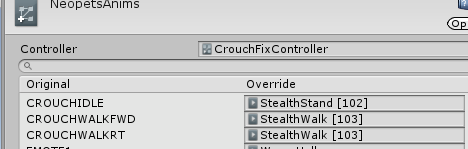
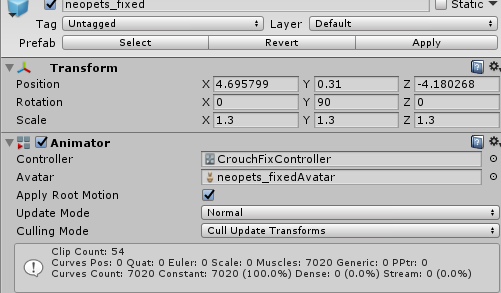
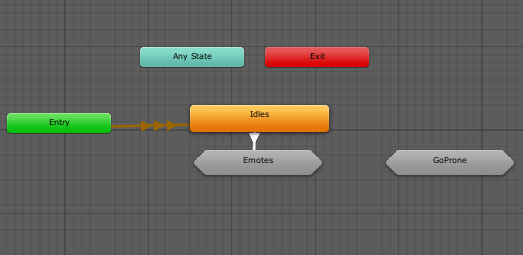
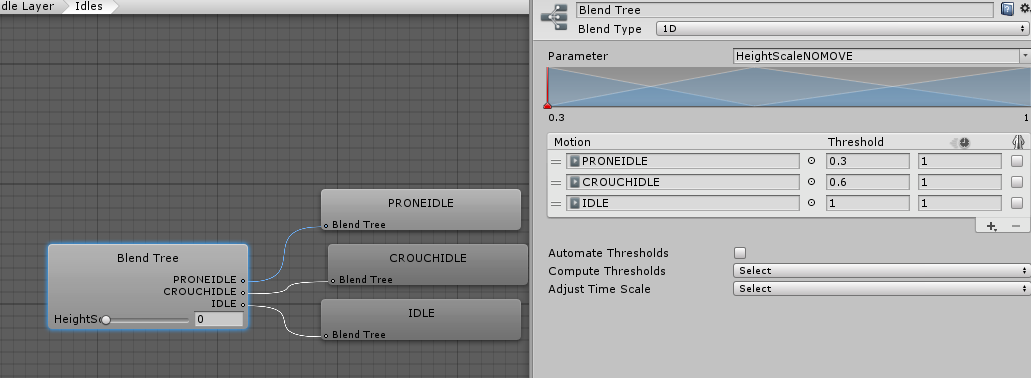


 dull sleet
@here Hi everyone, I need help to create an animation in unity. I want to create a chargeable attack that varies in effect depending on the charge time. Does anyone know how i need to go at this to make it work. I tried a few things that didn't really work so far.
brittle flicker
You'd need a script for that, @dull sleet.
dull sleet
mmm , but aren't script not permitted in vr chat .
cause i've seen a few avatar pull off that animation, most of Toga's and Ikita and i'm interested in making my own.
@brittle flicker or is there some script that are tolerated ?
brittle flicker
I'm pretty sure scripts still aren't allowed yet, but I'm just saying that's the only best way to achieve what you're after.
dull sleet
mmmm.... ok. Not that i don't trust your answer but since a good amount of public model have those , do you think they might have made it happen differently
brittle flicker
Another possibility is that they modified the animator.
dull sleet
Is there a way to animate an object outside the object with the animator
brittle flicker
You mean, you have an object with an animator, but you want to animate a completely separate object with it?
dull sleet
yes
brittle flicker
Animators are restricted to the object they're bound to.
dull sleet
Damn it...
brittle flicker
But I'm pretty sure they can apply to all children of the object they're bound to.