#animation
1 messages · Page 107 of 1
 plucky skiff
 glass peak
@clear yew Thanks for the help, I was able to get it to work
 orchid wasp
when i activatea model with an animationg it keeps on turning
should i unlcick root motion
 white current
hey for some reason my blink animation isnt working can anyone help?
it works in unity but when i upload it its not ingame
 torn pawn
how is it set up? Animation components are not supported anymore
torn pawn
check first pinned message of this channel
white current
thanks boss
 timid prawn
That video is confusing.
It should be more strait. And short
In short make the animation and put an animator on a bone or the body. In the animation double click and delete.
I should make a video
It took a minute
Since i have multiple low poly avatar with 2d viseme/shapkey for the eyes and mouth. It would be a good idea to share my knoledge
 fallow spire
is there a option for animations that colliders dont will ignored? in general everyone can go through walls in a animation but i would like to change this
 radiant tide
I could really use some help with the ears on a Nanachi model, if anyone could help, please DM Me!
orchid wasp
does anyone have a snap animation
 main light
does anybody know if they can answer my question
 slim sparrow
@main light nobody in the world can answer your question, because you have not tried asking it yet.
main light
@slim sparrow i wanna know if theres a way where users can only hear audio coming from a object only from a certain radius
 opaque dome
slim sparrow
opaque dome
slim sparrow
Activate a particle system and some audio on a gesture
 lapis arrow
Anyone know how to fix the hierarchy for a model animation? I made a hand puppet fairy and did all the animations without thinking and they aren't working because they weren't properly placed in the hierarchy of the model. I made them on the puppet so I could use muscle editor. They don't work on hand gestures because of that, so I believe. Tinkering with it, I can't really seem to understand how to fix the hierarchy so it knows what I want it to do, and when I try to add it in manually that doesn't work either. Any help would be appreciated.
 flat dune
https://cdn.discordapp.com/attachments/536179181403242497/571558990362836992/unknown.png One big question, which is the best way to animate those spotlights to turn on/off using animator?

1 Animator Controller with multiple animations or each one with an individual Animator Controller
Or should I make a button with some triggers to keep flashing after being pressed
slim sparrow
Fewer components is better.
To organize it, you could have one Layer per spotlight in your controller if there aren't too many, then have one parameter per spotlight for on/off (or one parameter for all on/off)
flat dune
@slim sparrow Actually there're 23 spotlights and so far I was only able to animate they individually or using multiples trigger. By Layer you mean, adding multiple anymations on the controller like this?
slim sparrow
No, you can add more layers to the left.
 clear yew
@lapis arrow select the animation property that's missing and hit F2. Make the path correct
flat dune
@slim sparrow Rokk, I made it with triggers in the end, but one new question multiples triggers with different times on it can make the triggers out of sync, I just tried to match the song and the spotlights and until the middle of the song everything was good, but then the spotlights times wasn't matching anymore. Is this possible to happen?
flat dune
nvm, I know what I screwed up
 oak mirage
Can I ask sth about animation here?
oak mirage
Ummmm...
Ok..I tried hard
Basically....I duplicated my avatar for handgester animation, looping dance with music
So I used animation and inactivated body, activated duplicated one, so it works in game as well
but the problem is, I cant see my avatar daincing on reflected scene (mirror)
Other ppl still can see me dancing in game and on mirror as well
 mental needle
is there a way to play audio when clicking play on the animation? Because I'm trying to get the animation to line up with the audio
or something so I can see waveform
either or
oak mirage
Im not sure I understood ur question correctly, but
u can make audio source on ur avatar and put music in them,
Unless u disable it ( to activate on animation ) music will be played in unity
mental needle
I put audio in a gesture, and I am trying to put facial gestures in the gesture. But I want to line it up with the sounds of the audio
so the facial gesture changes with the audio
I cant hear the music while playing the animation gesture in unity. But I can in vrchat
 sharp hare
Have a ground door set to open when it is clicked, but it's constantly animating despite it not being set to animate at all, any ideas?
mental needle
Could anybody help? If you don't get what I mean we can call and i'll share my screen. Ive been trying to figure this out for a while now. (trying to scrub the audio in animation tab)
 topaz quarry
Delaney, if you have the audio source activate at the start of the animation, what you do is go into something like audacity and find the exact spot you want the face transition to occur time wise. Then take the milliseconds and multiply that to 60 so like if it was at .400, youd get 24. So if it was at 33 seconds in, you make the key frame with the face change at 33:24 (assuming it's set to 60 fps which is the default)
Just note that if you want it to be instant, put a key frame right before it that keeps any blend shapes set to the old value and then the frame after bumps them up to the value you want or unity will assume you want it to change to that value over the entire distance between frames.
 odd hatch
could someone guide me into making an animation for a avatar
 misty bolt
Is it normal that when i start my gesture animation and let it play, all my gestures have this animation on it O.o i cant even use my second animation on an other gesture
 fierce bane
@misty bolt a gesture should only be 2 keyframes (0:00 and 0:01) if you want it to be longer than 1 frame have it enable an animator instead
misty bolt
Is there an tutorial
 muted prairie
I don't think you can see your own animations in the mirror ? I could be wrong
@odd hatch There's a lot of YouTube tutorials for that
topaz quarry
@misty bolt Somewhat but the general idea is make an empty game object on the avatar, add an "animator" component to it, make an animation controller and drag the real animation into the controller. Then disable that game object.
For the gesture you put on the avatar, enable that game object and then it will play the animation when the object loads in on doing the gesture. Do note that animators can only affect objects that are directly on the game object or a child of the object
 tough cargo
Hey, im having some issues with longer animations, specifically if i set an animation to play, sometimes the audio will play but the preset animation will be faster than audio. and after said animation, i cannot do the animation again without it breaking.
 woven surge
That's normal, is your animation of more than 2 frames? if you did all on the same animation, this animation will break with all the emotes
 bleak reef
So I recently experimented with particles, I made an amazing rasengan for a naruto model but when you g ed t farther away the particles get bigger, not sure how to fix it
muted prairie
Max particle size in the renderer options should take care of that ?
 spring nova
That would be minimum size actually
It needs to be 0
Maximum size governs when you get too close and it will not be allowed to get any bigger than a certain percentage of your screen.
spring nova
He's talking about far stuff getting bigger, not close stuff getting smaller
spring nova
Increasing max size will change what happens when it gets too big. Aka close to the screen. Minimum size will change what happens when it gets too small, aka far away
 random glade
they asked for a fix and ruuubick and i gave it to them no need to go indepth with it
spring nova
What are you talking about, it's two separate things. It's not a minor distinction
random glade
literally what i do to solve the issue
spring nova
But that's a completely different issue
random glade
make your self a particle system that has that issue and set the max size in the renderer to 2 and come back to me when you see it
im done here
spring nova
🤦

increasing max size allows it to get bigger when you're closer. Increasing minimum size prevents it from getting small when it's far away
if he was asking about it getting small when you're too close, then yes you are correct and that is a common question so it makes sense.
But that's not what he was asking about, he's talking about when he's far away
bleak reef
Oof just looked back lol ty all for advice..and yea it gets small when you get close and big when you get far
clear yew
Wow i wanted to make a animation
 cobalt bramble
Anyone know how to make 2 different animations play at that same time on the same Animator?
For example I have a Cube that moves up and down and a Cylinder that moves side to side. Ive tried putting them in two different layers but maybe I'm not doing something right.
clear yew
They they both children of the same animator?
If you are animating something at the same time you should use one animation clip
cobalt bramble
Yes they are. So I can't use 2 different animations at the same time? I would have to make one animation if i want them to move the why I want in this case? Then how would that work if I wanted a blink animation without using VRC's in game blink setup that they have?
slim sparrow
@cobalt bramble you can add a new Layer to the controller
And play the other animation on the new layer
As for blinking on an avatar, you can put an Animator directly on the Body mesh as it normally has no animator yet.
If you add a new layer set its weight to 1
cobalt bramble
To give an idea of what I'm doing. I'm trying to make the back of the bomb to spin. But i want to know about more about how this works if i can move more then one animation at the same time. Also the more Animator components there are the more my Overall Performance goes down.
slim sparrow
Yeah that's true, merging that stuff into layers is good
Just make more animation clips, add a new layer and a new state and add more motions to it
woven surge
Does anyone knows why on my other project for avatars, my muscle animator editor works with "X" model but on my world project, with the same "x" model, humanoid, muscle editor says "no humanoid target found" why?? I even reimported the SAME muscle editor from my avatar project, and on that project working very good, and on the world project just cannot find my "X" model, that is the same, even the same scene I exported it to the world project and the same scene and it wont find "humanoid target" tried putting model on genering then back again on humanoid and nothing...
slim sparrow
@woven surge you have to update Muscle Animation Editor from the asset store.
The older version has a bug in Unity 2017
woven surge
Oh.... okay, I was turning crazy, thank you!
bleak reef
Fixed it ty all
woven surge
I don't know what happens, first time that happens to me, I made an animation, and at some point it has to move the position up for the entire model, (he's climbing something) and I cannot record position! If I record default position at frame 0 then 4 seconds ago I record position a bit up, unity will only see the last position I use, not the initial position, and If I try to change on the animation tab, it wont change, it doesn't record correctly position.
I made animation with muscle animator editor, and yes I touch root there, and was working good with root but when I execute on my world, model wont move up, on unity it does, so I removed al root I did for the model to move up on the muscle animator.
It records the keyframes but when I play it, it's in the last position, if I delete key frame, the position saves like if I moved the avatar without recording, a gif here: https://gyazo.com/4c0605a4c90008cd46931850c7c7e549

also this message if I try to record transform on animation like I did on gif: https://gyazo.com/ae5c19b3126b7f9b7603446452a188bd
 slim sparrow
Root motion on humanoids is buggy if edited directly in Unity
If you set it to 1 it will shift up/down a little
woven surge
Okay, thank you, already solved by animating position on an empty game object parented
 cyan chasm

 fast geyser
Anyone had a problem with animations using another avatar that is currently disabled the whole time, but then when you activate it with trigger animation you only see the "accessories" of the avatar floating on top of the dancing animation ?? Clashmecha have created a humanoid working dragonair avatar and added an animation, I've added two accessories to the avatar and know I have this "floating accessories" problem.
(I know I don't know how to explain it, but here is a screenshot of what I'm talking about)
It's kinda weird, I'm trying to solve it but don't find how to do, so if anyone knows how to disable the "floating accessories" while the animation is working, I'll be eternally grateful.
fast geyser
I think it has something to do with the fact that it's not attached to "body", but how do I attach it on the "body" only during the animation ? I'm trying to fix the mess I've done.
 ocean crane
need some help on figuring out how to make the jacket on my avi go invisible and show up for me? i have it rigged on a gesture and it works, but i still see it in the mirror/cameras while everyone else sees it gone. Anyway to fix it?
when i look down on myself it does disappear, but like i said i still see it in mirrors
woven surge
Do someone knows how to animate a vrc_chair? I did, and the chair moves (visible meshes) but not the person that is sit. and when the person exits, he/she exits on the position where the animation ended
woven surge
I animated all the vrc_chair, and the entry point is inside, and is not working
Or do I have to animate just and only the entry point?
The vrc_chair has the vrc_station, that is what is animated
woven surge
Solved, just don't turn off chair so ppl cannot exit, do it through parameters
clear yew
is it possible to change the jump default animation via an override controller? I don't seem to find the option to do that
slim sparrow
There is no jump animation, there is a "falling" one but it only happens locally
 white herald
do ik_followers on world particles work properly now or should i stick to fixed joints? they were broken in full body and had offset issues before
 deep jungle
are fixed joints still broken?
slim sparrow
Define "broken" @deep jungle
deep jungle
other people see it following me, but for me it works
slim sparrow
Oh, you mean a fixed joint that locks an object in the space it was spawned in. You should be more specific
A fix was found literally before the 2017 beta hit live
deep jungle
lol yea
slim sparrow
Put an animator on the fixed joint, give it any controller and tick "apply root motion"
It's kinda dumb that we need such workarounds but there you are
deep jungle
oh thank you
 strong arrow
Anyone else having problem putting the audio file to 2d? When i try to publish it automaticly changes to 3d
 vapid dagger
Uncheck everything in the ONSP component, but keep the component itself enabled
strong arrow
@vapid dagger Ill check (super new to avatar making ecspecially with audio) Managed by mistake to put 2d sound yesterday but idk i some how disabled it by resetting my avatar and changing some background things...
vapid dagger
If it's for an avatar then it might not work that great saying that the SDK enforces some audio settings
strong arrow
Not avatar but avatar props
strong arrow
@vapid dagger Worked if i put the audio source on my prop before i put the prop to my avatar
vapid dagger
Weird that you'd need to do that but as long as it works
strong arrow
Thanks for the help tho! Bc i never manage to make the 3d sounds good
 misty yacht
Hello everyone, this maybe a stupid question but does anyone know how to use state machines in their models? I’ve watched multiple tutorials and am using Neets unity tool to help me make the different states easily, but I can’t get the animation that’s supposed to make the model swap states work. Any help would be appreciated thanks.
clear yew
what are you trying to do @misty yacht, exactly
like what effect?
to use animators, you need an animator controller, and an animation clip inside as the state
for most animations you don't need to make a complex state machine, just a controller with a single state/motion/animation clip
you put this animator controller on an object as an animator component, and the animator can use the animation clip to animate child objects
you can turn the animator on/off with behavior.enabled (a special property you need to generate), or leave the animator component on by default and merely turn the object on, if it's default off
you can use state machines inside animators but the usefulness is limited because you cannot animate parameters
so you cannot create conditional flow with animators without relying completely on asinine workarounds
also what does "Neet's unity tool" do/where is it?
tough cargo
Question: What is the optimal settings for audio for crowds and whatnot? (not global, seriously...)
(I was unsure weather to put here or avatars so i figured here would be safest)
 fallen flax
tough cargo
fallen flax
tough cargo
so set the distance to "fuck you ism"'s?
misty yacht
@clear yew
I’m trying to make a model that I can switch between different elemental effect using only three hand gestures.
One (rock and roll for example) turns on the state machine to switch to the next element.
Two (open hand, and finger point.) for separate effects/attacks.
The state machine I’m trying to make will activate one of the four different elements (for this example I’ll use fire and air.)
Once the fire tree (an empty game object filled with the different fire effects) is active I would then be able to activate different effects using other hand gestures.
Such as open hand for an AOE style attack, and finger point for an aimed attack.
Then using another hand gesture (rock and roll) I can swap to the air tree and deactivate the fire tree.
Then I’d have an air AOE on open hand, and an aimed effect on finger point.
It would allow me to switch element styles without having to swap models.
This is the video I first saw doing this and decided to try it out: https://youtu.be/sbL9k0VA4OY
The Neet unity file I’m using just does a lot of the work for me by automatically making the different states.
Here’s the link: https://vrcmods.com/item/2673--NEET-State-machine-generator

I explain how to create a potential infinite amount of gestures using an animator state machine. ========IMPORTANT======== Thank you Bertrand Steenhaut for t...

VRCMods
VRChat avatar uploaded to VRCMods.com by Takane Enomoto currently has 461 downloads
clear yew
i don't recommend cycling animators with gestures, in short
various reasons, but most important one is that it's an obsolete way to manage state with gestures
misty yacht
How would you recommend I cycle the animations then?
clear yew
if you can approach how complex a cycling animator can be to get good behavior, you should learn to do stop action animation instead
it's a way to do animation on particle death
which means you can do as many different states as you want with 1 gesture
usage for magic would look like,
hold fingerpoint then touch an elemental area
particle in elemental area dies, animation starts
you have new objects to animate from that state onward
misty yacht
Okay. Do you have a written or video tutorial of how to do this? I’ve never heard of this approach to it before?
clear yew
you can chain this near infinitely with the limit being a reasonable hierarchy
its sort of newish, or at least adoption is slow. retrogeo came up with the method in like late january, which is when i started making my packages to do stop action after learning the method from him
i don't have a guide video for it but i have packages that covers the primary usage
i have one package that is really easy to get started with, and you can customize it if you want, and then 1 package which is just boilerplate to make your own systems

thats the easy pre-packaged solution you can strip down and customize if you want
misty yacht
Thank you so much. Do you mind if I send you a friend request just in case any of it confuses me?
misty yacht
Thanks again. I’ll get back to work on learning this now.
 deft mountain
Hope I explain this well. I'm trying to make a sword that leaves behind after images when you swing it. I made a particle system used the sword mesh with the alpha turned down, and attached it to the sword. It looks fine, but the mesh particles only trail behind when the sword moves, but not when it's rotated. Anybody know why?
Happy to give more details if needed
Edit - Managed to fix this by parenting to the wrist instead of the sword, but the rotation isn't 1:1 with the sword now. Ideas?
I think the problem is that the trailing mesh particles continue to rotate over their lifetime, copying the rotation of the newest particle. Any way to make them stay at the rotation they started in?
 buoyant dove
How make intro with avatar
 compact mulch
i think you'll need to be a bit more specific. 😃
 lime jay
Is it possible to switch between animator controller layers with gestures?
odd hatch
anyone know a good youtuber that teaches you how to animate for all sorts of stuuf
and also teach you how to map bones
 lime valley
anyone ever had this issue with the Muscle Animation Editor addon? I definitely have a humanoid selected!
odd hatch
request where i can find the zoom shader
lime valley
nevermind, solved it by deleting all all the files for MAE then reinstalling :D
odd hatch
where can i find the zoom shader
timid prawn
Lots of question
@odd hatch not here .its annoying everyone
@lime valley that can happen if people have an old version(ak got it for free)
odd hatch
ok just curious anyone that could suggest a good youtuber for animation tutorials?
clear yew
@lime jay unfortunately you can't
@odd hatch I only ever looked at 1 tutorial for animation, which was a world particle tutorial that showed me how to do overrides.
Do you know how to do animation overrides?
 brittle granite
@odd hatch hello animator here
@odd hatch you need to be more specific with animation question. Are you looking for character animation for emote overrides? (Example: fornite dances) are you looking for aninating in blender? Or animating in unity?
Cause character animation, and the knowlege required has many mant facets and parts
odd hatch
character animations
woven surge
Animations that involve moving a character? Or maybe animations synchronized with music and particle effects?
 modest rover
here is my problem: i have an animation that plays music and changes the texture but i have no idee how or where to place it so that i can make it a 1 frame animation (i want it to be a hand gesture).
 gusty cloud
hi i am new and want to know how to look up roleplay
 vagrant citrus
@gusty cloud this isn't the right place to be asking for that lol
 fossil marlin
Hmm, I'm trying to do animation overrides (Holding a knife) and ran into a problem.
In-game the knife appears as should and is in the correct position and rotation and all, but the fingers don't do anything - they're just in the basic pose you get if you don't animate yo fingers with overrides instead of the grab I did in unity.
-I animated the fingers in Unity with the animators
-The animation is 1 frame long as should be
In summary: Hand gesture override, knife appears as should, fingers don't do what I want them to do, send help
muted prairie
Which tutorial do you follow ? I remember seeing one that did what you're describing
fossil marlin
I took a look at two tutorials, one being this one: https://www.youtube.com/watch?v=V0l4-pH3vI4
spring nova
Did you animate the position if the fingers by moving the bones themselves like their xyz rotation, or did you animate them as a humanoid with "left index finger bend inwards" or something like that
spring nova
Yah that's using humanoid properties which is correct
fossil marlin
Any ideas why it wouldn't show up correctly in-game then?
spring nova
What do your keyframes look like?
 spring nova
Hm that also looks correct.
fossil marlin
I stg if it's just because it doesn't show up correctly in desktop mode or something
I should be able to see it working without hopping into VR, right?
spring nova
Oh, it matters which shift button you use
Left shift does left hand, right shift does right hand
fossil marlin
I'm gonna stab myself with the knife
Thanks lmfao, I know nothing of how the desktop mode vrchat works
spring nova
The humanoid parameters allow your fingers movement to make that distinction, but the knife will appear regardless of which hand you use
fossil marlin
Yeah that would definitely fix the issue, my dumbass just doesn't know how desktop mode works
topaz quarry
Would anyone know why when I add an object to my armature as a child to the hand, it suddenly messes up all the bone locations in that arm? Trying to add a shotgun to the hand that would appear as part of an animation I'm working on but when I do, it suddenly shoves all the bones in the armature way off (said object does not have any bones itself, it is just a single mesh single material item) where if I were to then move them for poses, it'd mess the avatar up severely.
(If you reply to this, DM or ping me so I remember to check)
 mighty steppe
hello guys...
what should i know before making an animation for something...but here il take as an example...wings
there are many stuff that i dont fully understand about bones
timid prawn
no
you could have the metal part close at first
open them and make the blue part appear with a dissolve shader
 languid matrix
Question: is it possible for an avatar to "transform" into another avatar and stay that way?
mighty steppe
not disovling stuff...
here im trying to import dynamic bones
to make the wings open close and some whing thing
like an animation.
need to make few animations.
opening closing by a gesture
then later some dynamic when u move/walk
mighty steppe
this is how it should look like when the wings are opened
similar to this
but i think to make that thing happen i need to make the wings in to pieces instead of 1 piece
then somehow bend them with dynamic bones.
 shut sky
just build a rig for them and create a bone-based animation
or am I missing something
look up a tutorial on weight painting and rigging and you should be fine
just join all the meshes up and join it with the avatar you want it on, and then you can build the rig and paint the parts to each bone
shut sky
nah join them all up into the same mesh
no reason not to keep all your meshes joined up for the final product
otherwise you're going to have a bunch of separate skinned meshes for no reason
then when you paint them to the rig you make for them
you can choose which parts move with which bones
via weight paint
mighty steppe
im a little stupid
whats a rig? (bones mapping?)
whats rigging?
i suppose the meshes are the 3d wings objects i guess..?
i dont really understand how to make those bones.. so thats something new for me.
 white seal
Is it possible to deploy a world object using one of the menu emote buttons and not have it lock up your controls?
It would nice if I am off in private worlds with friends and we want music to be able to "deploy" a speaker that plays music but isnt tied to a hand gesture.
slim sparrow
Yeah, prop toggles combined with world object
mighty steppe
so...there is anyone to explain to me or help me making the animation i want for the wings?or il just watch tutorials over and over till il understand how bones works.
clear yew
@white seal this drops a world object with an emote

GitHub
Contribute to oofdesu/lin-unity-packages development by creating an account on GitHub.
mighty steppe
I never done animations..or more sophisticated bones.
 shadow agate
Sooo I made a blink animation on the mesh of my character that works perfectly fine in unitys play menu but in vrc it just stops exisiting .-. Can anyone shed some light on where I've gone wrong? :o
slim sparrow
Make sure the blink animation plays with an Animator on the Body
Not an "Animation" component and not through the animator controller on the actual main avatar object
@shadow agate
shadow agate
ahh so it's animator on body not the whole avatar :o
What do I plug in for the animator? do I have to use the same file as the overrides with only the blink? :o
@slim sparrow
this I guess https://gyazo.com/c417ab2ac03b88969a5aa64d233bf0ae
 slim sparrow
You're currently using a legacy animation

Here is a quick tutorial on converting your legacy avatar animations to the animation state machine system. :)
shadow agate
Got it! Thanks a bunch ^^
clear yew
Is it possible to have gestures/emotes change an avatar's animations (e.g. run, idle, etc.)? If so, how about toggling it?
languid matrix
someone has a working guide on how to add music to an emote? best Ive gotten so far is a an emote that plays music but stucks me in the floor oO
 plain condor
clear yew
plain condor
clear yew
Custom sitting arrangement?
 lofty crypt
 rough oyster
Hi guys, i have a problem, i created some emotes for handsopen etc... i upload my avatar and now she is randomly making this expressions with no reason, even in desktop mode shes doing it, i tried to remove the override and after upload she still have this seizures. whats the problem here?
strong arrow
Hi!
So im on a big project with many effects on rn for private use with friends.
Thing is i want to have a 3d shader on a sphere and all that works but is there anyway to be able to trigger it like particle effects?
Like it starts after 50 sec then dissaperes to the next effect after 20 sec
i know it works with particle effect by tinkering with start delay and shit but i don't know how to put the same things to work with a 3d object
@lofty crypt IS THAT THE BISMARCK?
 hollow perch
@rough oyster if you open up the blend shapes menu inside the Skinned Mesh Renderer component in the Body object, the first four things (the order matters!!) must be vrc.blink_left/right and vrc.lowerlid_left/right. If any of those shapes are missing, vrchat will take the first four shape keys (usually ah, oh etc) and apply them every time you are supposed to blink or look down/up (lowerlid). Often they can get lost on export of fbx if the shape keys are empty. The newest blender and cats plugin might reduce the chance of that or you can remake the blinking in cats to make sure they are tight
clear yew
@languid matrix your emote is likely too short of an animation. That'll get you stuck in the floor for like half a minute or something
Emotes need to be at least 10 frames long
@strong arrow you animate the properties on the material for the shader
languid matrix
@clear yew thanks for replying, I made it 18 seconds (music length) still on the floor though 😦
clear yew
How long do you get stuck? Can you screenshot the animation clip?
clear yew
Ok
languid matrix
@clear yew I get stuck on the floor for all the length of the music/animation, after music is over I'm free, I can move my head though, I'll screenshot when I'll get home, appreciate your help!
rough oyster
@languid matrix about what i read i think you need to copy the first point from the idle animation into your emote animation, that will take the original "ground point" then
@hollow perch hello and thank you, i remade the model in blender from 0 and replaced the old one, now it works.. i think something was wrong in the old one 😃 btw: the old also had the 4 shapes... confusing xD
languid matrix
@rough oyster hi thanks for replying, can you be a little bit more specific on how I do it?
 lusty delta
so i was given a difficult task and even i dont know how to do it, tried looking and seeing if there was any tuts. How do i make another avatar lay on top of the head without it T-posing
shadow agate
Does anyone know a good guide on how to do multi tier gestures?
rough oyster
https://ibb.co/1JxtMjB @languid matrix
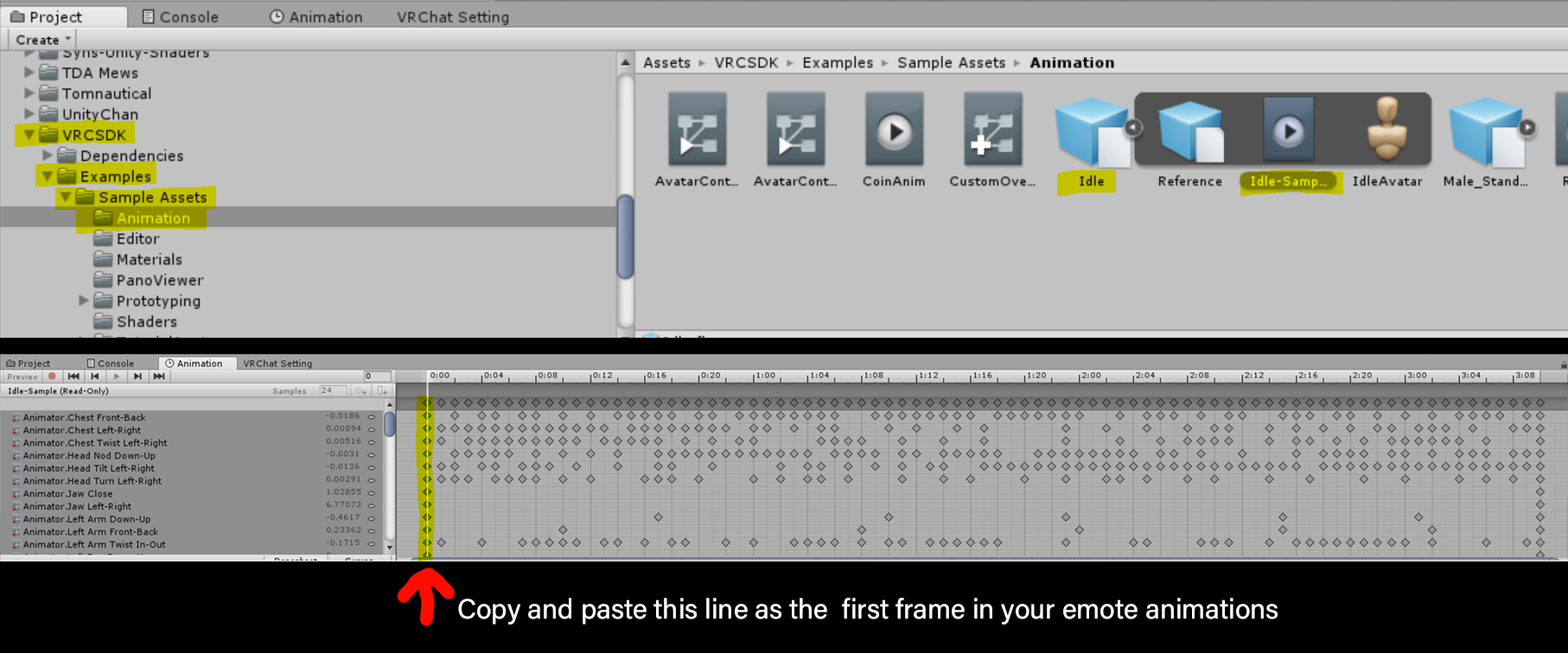 languid matrix
@rough oyster brilliant, I'll try this thanks!!
languid matrix
@rough oyster ty It worked! I wanted to do that before but it wasn't editable so I thought I wont be able to "ctrl+c" but seems that even if its "read only" you can "ctrl+c". brand new information!
now if I want to walk while making that music, I need to copy the "walking" animation?
rough oyster
@languid matrix normally you are locked in place by playing an emote, a friend told me that is the emote is too long it gives him back control and the emote keeps playing while he can move again.
clear yew
@languid matrix you would need to make the emote a toggle if you want it to just animate an object on and still have freedom
languid matrix
@clear yew oh you mean like attach it to shift+1/8? how do I do it? is it with the customoveride?
clear yew
no i mean an emote, but it just turns the thing on and you have freedom
gesture override would also be a good option though
languid matrix
@clear yew what is gesture overide oO how do you get it
clear yew
@languid matrix i updated a package of mine with an example for you, with a video

video still processing, so wait a second
clear yew
yeah this the longest processing time ive ever had, no idea why
languid matrix
appreciate very much
clear yew
@languid matrix ok it processed now
languid matrix
Yeah I can see, thanks!
 toxic solar
Aye~ It's been a while since I've done avatars & am used to the 'old' unity. I just made a very simple gesture animation that would reveal a particle emitter, and yet, I cannot seem to see it in VRChat itself. I thought it was because it was attached to my head so wouldn't see it in the mirror, but I certainly recall being able to see it before. Any ideas? There are only 2 keyframes, both of which are exactly the same, and simply loop between eachother 1 frame apart.
fierce bane
@toxic solar particles will not show locally in the mirror or cameras
use holoport to move your character away from you and use the gesture with the other hand to activate it
also make sure the keyframes are 0:00 and 0:01
If you want to see a head-based particle effect locally you'll need to use a fixed joint/rigid body combo because the head is scaled down to be out of your vision locally
toxic solar
@fierce bane Ah, I see! Thank you~
clear yew
Where do people get that Anime Salute animation?
 paper kraken
how can i put the animation in the same place of where I am so I can move and see? do I need final IK?
 ionic nova
@paper kraken as i remember you can keep in place another model with its own animation via fixed joints component (how-not remember) / or final ik instead (but its more expensive if I'm right)
paper kraken
@ionic nova so you can put a fixed joint there but how can i do that?
ionic nova
@paper kraken not remember, i think you can search in that chat, you need something like not assign target in fixed joint, add rigid body, put inside empty, 🤷
paper kraken
alright thanks
clear yew
@paper kraken https://github.com/oofdesu/lin-unity-packages/blob/master/world_fixed_joint.unitypackage
GitHub
Contribute to oofdesu/lin-unity-packages development by creating an account on GitHub.
paper kraken
@clear yew thank you for the package
clear yew
You're welcome
clear yew
Anyone knows how to play sounds on collision for a whip prop
clear yew
@clear yew https://github.com/oofdesu/lin-unity-packages/blob/master/sound_on_collision.unitypackage
GitHub
Contribute to oofdesu/lin-unity-packages development by creating an account on GitHub.
clear yew
Thanks @clear yew lindesu
 small kernel
where i can get the persona (p5)effect particles or animation ?
 true cloak
Hi ho I need some help with animation i can do Basic animation to pull out a sword or gun but i wanted longer animations to work with a gesture so i read that i need a gameobject what i activate that play my animation but i don't know how. Context to that is my Animation ist i play a line that spawns a Bucket in my right hand und than in a specific time a secound bucket in my left hand. It worked with the normal animation but get the issue that it will not rest when i do a diffrent gesture so it keeps playing. thats why i need to learn that with the game object that plays the animation in my hand would be nice if someone can explain and help me pls dm me then. thank you
torn pawn
you add game object, put everything under it, then add animator on game object and create animation > done, then with gesture you enable the game object
woven surge
Yep, always keep your synchronized animations withins 2frames or else will bug all emotes
Delay particles on the inspector and models as Yuumi said, empty gameobject, and buckets on it, then create animation there they way you want, then on the original animatiom turn on that gameobject and it will play the animation
true cloak
Can i Dm one of you because i don't get it right away and before i spam with screens and you can see want i mean
woven surge
I'm sorry, I would like to help you but I'm at the job rn
true cloak
No Problem i unterstand that job is important ^^
clear yew
How to make a vrctrigger play an animation? using Play Animation or Animation Trigger?
paper kraken
It's strange one of my avatars gesture with animator can be seen moving on the mirror or camera but some of my Avatar, their animators cannot move when looking at the camera or mirror but can be move by looking with your own perspective, dunno why or how
torn pawn
in animator change culling to "always animate" @paper kraken
 warm salmon
Yo can anyone help me with a gesture idea i have?
Specifically, I have an emote toggle having a stand from jojo appear, and the gesture i wanna use is the point gesture
I want the stand to ora ora in front of me, but i want a transition of it flying out from behind me, ora oraing as long as i hold the gesture, and then whenever i let go of the gesture, it stops, turns around and floats back into place. is there a way to do this easily or in any way?
torn pawn
"easily" I don't think so, would need a "play on release" approach with couple animators
lapis arrow
Alright, so I was stupid and accidentally worked on an animation on the main model, now it won't get out of the animation pose. Any way to fix that?
Tried reinforcing T-pose, but no dice there.
clear yew
@warm salmon you could use this for it
GitHub
Contribute to oofdesu/lin-unity-packages development by creating an account on GitHub.
No readme, but it's not that hard
The rest of what you described is certainly possible but maybe not easy
 cedar cobalt
my unity and sdk have been weird
i have my animations in the animations controller, and the animation controller is on the avatar, but in game it uses default rather than the animation in the override controller
im using them as gesture
i have the file as a zip if anybody wants to see
clear yew
is your override controller set up on the avatar descriptor as the sitting and standing ?
clear yew
use this to test the gesture in play mode to make sure nothing is wrong
take the prefab, put it under your avatar as a child object
start play mode
clear yew
also the override controller on the avatar animator can be set as none
doesn't need to have the override controller in it
just the sitting/standing do
clear yew
something has to be wrong with the clip in the controller then
make sure it's testing the right controller
since i see you have 2 different ones for sitting and standing
cedar cobalt
i did
i took it off adn on
nothing
and checked
do u want the file so u can see for urself?
paper kraken
Alright thanks @torn pawn
 marsh spoke
Anyone know where I can download Pokemon avatars with the animations? Or where to dl the pokemon animations to put onto the models?
 misty holly
my issue is that the animation i did shows up in the Emote menu it does work but nothing happens except that it hides my avatar as intended and its sopost to pop a room up where i was currently it plays the entire length of the animation and only hides my avatar nothing else happens
true cloak
So i got it with the 2 Animation but the problem is it's not spawning in my hands. It's spawning only on my body and did not follow my hands. what is to do that now the one bucket is spawning in my right hat and than in my left do i need to target them or something?
 gleaming pawn
Hello guys do u know by any chance how people make emotes as gestures as they can move while they dance or do an emote with the shift and F keys what is the way to do it
clear yew
I know how to do world particles etc and all the basic stuff and I've seen people do this before hand and was wondering how they do it, Lots of people have said fixed joints would do this but thats not the problem I am having
I am wondering how someone would go about putting an item in their hand (via gesture) then when they put the item so that it is touching the floor (hidden box / game object) that it would then cause an animation to take place, so if you were to put a jack in the box down on the floor (hidden box) it would then cause the animation to play it springing up?
slim sparrow

Get the package HERE: https://vrcmods.com/item/3813--Prefab-Animate-On-Collision-VRCModsVER-1-W-TUTORIAL How to Use Move the "PulseAnimator" object so that t...
clear yew
^ here is a package to do it
no readme, but the package itself is relatively readable. ping me if you need help
if the enable particle dies(it dies in the collider), the object "Set" will be enabled
if the disable particle dies, Set is disabled
you can simulate this in play mode
or put the prefab at root, put a cube under Set so you can see it turn on, and test with the provided gestures in game
to get familiar
extending the system to cover different hierarchy areas is the least intuitive part, but the package explicitly supports that
so just ask if you get stuck
rero has a package linked there in the vid but it's like 80+ days behind latest development
 normal glade
I'm trying to set up a custom Idle animation and the left Transform is offset and I can't seem to move it
 gentle zodiac
@normal glade if you know how you can make animations in blender or what ever 3d model software you use. personally i think the unity animation creation stuff is a little complicated, also what model is that looks legs and feet seem familiar to a really nice avatar i seen
normal glade
so I've already made the animation I just have the problem where the avatar sinks half into the floor, so I was using the transforms from the sample idle animation but its being weird
er I mean it already has a pose that I can't seem to change
gentle zodiac
Thats normal as far as i know
everyone of my animations made the model sink down and have a weird pose
normal glade
well I mean in VR chat though
gentle zodiac
oh that's weird then
 undone fern
@normal glade is the avatar's origin in the 3D software set correctly?
gentle zodiac
i found the model and opened it in maya and it seems perfect
normal glade
?
undone fern
@normal glade brb in 30 mins
gentle zodiac
it could just be a very similar avatar, but the feet and legs are exactly the same color and such
normal glade
probably the same one then
gentle zodiac
The only thing i could see weird is the bones but i didnt use cats on the model
gentle zodiac
Yeah after cats im not sure what the issue would be. i know some times people duplicate a avatar for gestures and it will sometimes act weird. but since its an idel and has to be on the base model it should just work
clear yew
Hello ladies and gentlemen , im currently having a bit of a problem with my avatar making (with animations) could someone who knows about these stuffs add me on discord and help me for a bit? i would really appreciate it.
normal glade
@gentle zodiac I figured a workaround of just having it play all the time instead of trying to override the Idle
not quite what I wanted but it shall have to do
shut sky
does vrchat work with bone scaling animations?
clear yew
hello, i was wondering if it was possible to have a rotating animation on a mesh like this wheel on all the time. i want it to rotate it over the shoulder piece but im not sure how to go about doing that if at all possible. any help would be fantastic
clear yew
also if it is possible should i do it in blender or unity?
 marsh heron
I feel like it’s definitely possible if you record it in an animation, rotate it and play it on a loop
clear yew
not sure if i should be doing it in blender or unity though
undone fern
@clear yew make the rotation animation in blender, and loop it in unity with an animation controller
cobalt bramble
I'm having an issue where my animation continues to play (as if its trying to finish the animation) even after I press a different a button it still plays the first one.
I'm using the CustomOverride for the Thumbsup and Handgun.
fierce bane
@cobalt bramble does the gesture override have exactly two keyframes on both 0:00 and 0:01 frames (and no more)?
cobalt bramble
no it goes from 0.00 to 0.45. I have it set up like that because i want to change my material at 0.45
fierce bane
that is why it doesn't work correctly, gestures must be only those two keyframes and they should be the same thing
if you want to use a gesture to enable an animation you need an animator that you enable with the proper animation
so gesture enables animator, which does the actual animation
clear yew
does anyone know a good tutorial on animation in blender so i can make the rotating wheel animation in blender?
https://www.youtube.com/watch?v=jqaB13ekn6I would using this method work once i put it into unity and vrc?

Today we learn how to use extrapolation to apply a constant rotation on an object, now this can be a car tyre, a clock, or anything that needs a set speed --...
 trim violet
Hi everyone! I'm trying to figure it out, but there are some avatars out there with 2 in 1 gestures and I was wondering, if that using Lindesu's Multi hand trigger? Or is it a mixture of toggles enabled on an avatar, or some form of parenting tricks used within animations but don't work say when another isn't active.
Goal is just to have a 2 stage attack animation, one to prime and warn, and then another to fire. Not too worried about those specifics, just how to smoothly setup the gesture for that sweet 1 frame goodness
fierce bane
@trim violet if a parent is disabled, a child cannot be enabled.
So if you set it up as below the "Warning stage" would HAVE to be on for the firing stage to activate.
both are disabled by default, and you would enable each with a separate gesture
|- Firing stage```Which I figure, but I do know there are avatars/animations out there that share gestures, or at least intertwined where there are 2 actions tied into 1 set per say. Either through some form of Behavior keyframe trickery, or just having one Control Gesture, and one child gesture doing varies animations.
So I figure most of them are doing something similar to that then?
fierce bane
@clear yew personally I'd just do it in Unity in your case.
I've not looked at the video, however you'll have to set up an animator in Unity for the spin no matter what.
If using a blender animation you'd just skip an equal step in Unity
Unity animation would just be a looping animation that you could adjust more easily (as you wouldn't have to go back to blender) and this is a simple animation.
Probably 3-4 keyframes to make it spin one direction endlessly either way (over however long you want it to take to make a full rotation).
trim violet
Because I've seen some where it's the same gesture activation that changes the animation, (Like activate gesture on one hand, and then activate same again on the other) and proceeds to play it out like some form of behavior toggle or such
fierce bane
@trim violet same method, but "warning stage" would just be "set one" and you could have others enabled along side firing stage and a separate set turned off
it's simple parenting. If a parent is disabled, anything under it cannot be activated (even if, say, fingerpoint enables gesture 1 in 3 separate sets, if the parents of those gestures are not enabled they cannot activate)
clear yew
if i did the animation in unity wouldnt that mean having the meshes of the wheel and anything else separated? if i did it in blender couldnt i join the meshes together and still have the animation on the wheel mesh making it more optimized?
fierce bane
no, it'd only mean you'd need a bone to animate on that wheel that was bound to the wheel mesh.
If you don't have a bone for it and don't want to make one, Blender is the better option.
just as your arm and body don't need to be separate to be animated
clear yew
ah i think i get what your saying
im just gonna try it out in blender anyways, might as well experiment and learn from it. if it doesnt work out correctly i can just do it in unity then
fierce bane
learning to make things in blender can be helpful down the road anyway
IE using IK bones to move chains of bones, accelerating the animating process
Example: https://imgur.com/YDE704k
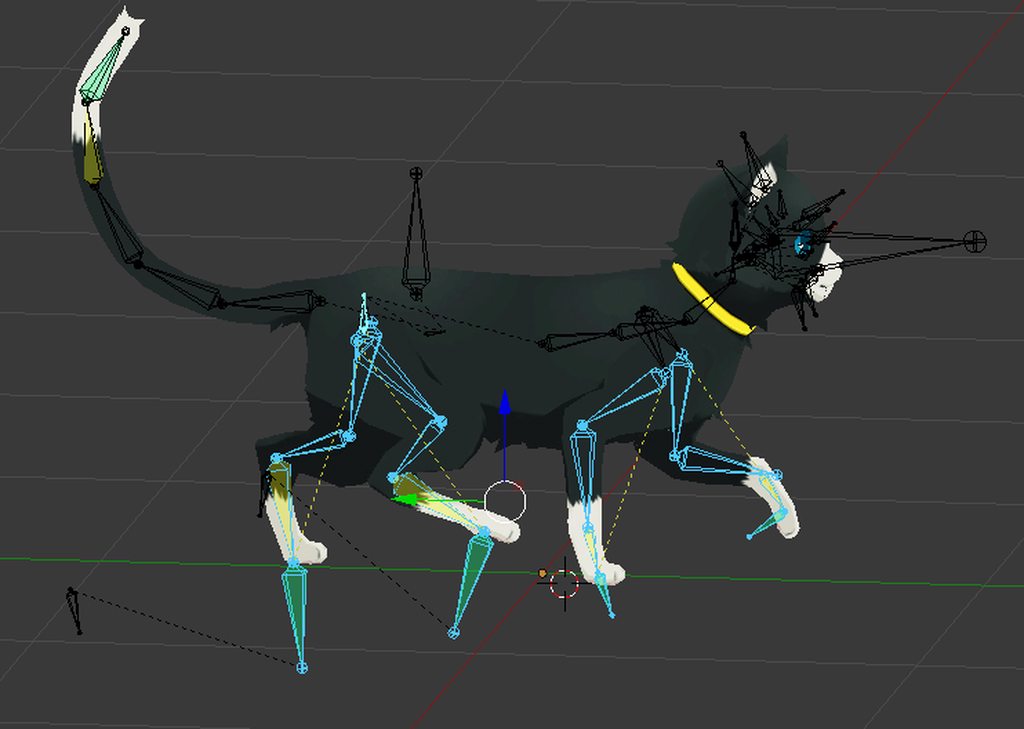 trim violet
Ah okidokie. But that still kinda leaves me in the dark of how dual gestures work on the SAME Gesture.
So with original question, is it using Lindesu's Multihand Trigger of some sort? Or is there some other community trick/prefab I'm missing
fierce bane
set 1 would be enabled by default; 2, 3, etc would be disabled by default
set 1 would be disabled by sets 2, 3, and however many other sets there are
so set 2 cannot activate until the gesture enabling it (and disabling set 1) is active
I have not touched looked at the multihand thing you mentioned, so I don't know anything about it
if you only want to hold a gesture to activate a different set, it's as simple as enabling and disabling parents where other gestures are placed
if you want to tap a gesture to swap between multiple sets, and have gestures other than that swap one overlap but do different things depending on the state, a more complex state machine is required.
I think it was lindesu that had a prefab for that already made...
Example layout for a simple "hold to select gesture set"
https://i.imgur.com/GUm75AM.png
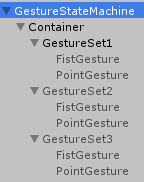
Fist Gesture for the above image
https://i.imgur.com/4DDeLED.png
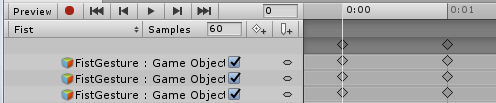
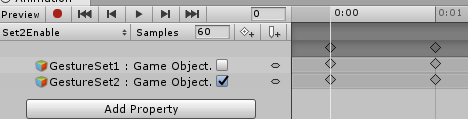
This is the Animation that enables gesture set 2:
https://i.imgur.com/r354oAv.png
 misty moat
what Lindesu prefab is? that is ^?
fierce bane
that is just an example I set up a while ago to explain the same thing, I have no simple to use prefab to give.
misty moat
well, I learned Infinite Gesture System from HeroesNFools Zeshin.
misty moat
I have 50 gesture hand from 24 obejects(12 per right and left), and up to 24 animators. that for sign language. my avatar take 970 KB
clear yew
so i set up an animation for the wheel to rotate clockwise while laying flat like this but what i want is for it to rotate while at the same angle as the shoulder. when i tried to rotate to match the same angle as the shoulder and hit play on the animation it just resets to laying flat and rotating clockwise. does anybody know a fix for this?
clear yew
well i thought i had an answer but it didnt work when i joined the meshes together. Is it even possible to have the rotating wheel animation and the meshes to be joined together?
slim sparrow
Yes, just give it a bone
clear yew
the tutorial i have seen use the shape keys for the animation but thats for moving the position, but all i want to do is add rotation. not sure how to do that with shape keys
slim sparrow
You don't, really
You give it a bone of its own parented to the shoulder
And you make an animation that rotates it, preferably done in Unity
clear yew
i guess ill put it in unity then
clear yew
@trim violet sounds like you are talking about a one handed cycling animator gesture
That's the most common way people do gesture state management
There are various prefabs out there, and a few guide videos which cover different cycling patterns
Usually the Infinite Gesture System or retrogeo's animator guide
The multi-hand trigger isn't for cycling, I don't really like cycling patterns much for hand interfaces
trim violet
That's what I thought since it seemed like it locks out the other hand or pose with whatever it's doing.
Dang ok😚, was trying to avoid using cycler because it's really glitchy and if someone misses or drops the frame of that information they can be stuck a cycle behind.
And I know there's on off states of objects with pre looped anims, but even that can limit my you too.
Then Is there anyway you can have any type of params from VRChat/BlendTrees in Unity? I know we can't do much scripting but even having a int++ or something simple would do wonders.
Appreciate the input @clear yew
Also @misty moat that looks hella wicked. I'd love to see that in VRC
clear yew
what effect are you trying to do?
Cycling gestures are economical because it's a single gesture with many states, but yeah there are more desync opportunities. I prefer to do animators which output a single state for that reason
Luckily, you don't have to miss out on having many states, because you can output state with gestures on-press, on-hold, on-release, and with multi-hand, and on top of that you can do touch based things and use surface area to select many states with a single gesture
trim violet
Sorry for late response. Basically a simple display after weapon activates then cycle into charging to fire, then fire. I'm not to worried on the cycler tbh because I've done them and set them up, they are pretty simple once you get the hang of them. It's just I hate frames dropping because say your doing a performance or a comedy bit and it's ruined by it.
Maybe I can do something with avatar masks, but it seems weird to do unity layers a bit for VRC since they don't really share I think. That or just have multiple objects with different renderers/animators but that's convoluted and uncessary.
So [Display (Warning etc)] -> [Charging] ->[Fire] -> [Reset] and then loop. Which a cycler is perfect for, but runs into frame issues.
Which is why I was wondering how to do multi gestures as it'd let you do state 1 (Display) then start 2 (Charging to Fire )
Which is much more manageable. And I'd be able to stop the anim say if it keeps looping or I need to cancel it.
clear yew
to do a charge shot i would do something like multi-hand to activate, then fire/reset on-release on one of the gestures
shouldn't be very hard if you are used to cyclers. the multi-hand trigger comes with a sample output. pretty much just use that, and nest objects as children of the output, and hard to go wrong
@trim violet
 dreamy osprey
there is a way to stop an animation as son as you stop doing the trigger? for example a 4sec animation i have on openhand but i want it to end as soon as i stop doing the trigger
mighty steppe
guys i need a little help or suggestions here
how do you make an animation like
opening the wings (witch is done already) by an emote
and my question is this:
how to make it close when disable animation instead of using a second animation for that
also when i open the wings i want them to remain opened
but when closing animation i want to repeat the same animation but in reverse.
a suggestion pls?
trim violet
You want a toggle basically. You start with the original animation of what you want ( say like 30 secs of it being open or opening) , then last 30 secs you want them closed/closing. In that middle point of the animation, basically throw in a Behavior Keyframe to disable the animator on the object. You then need to make 2 separate animations that enable or disable the animator of that object. One to Toggle On, One to Toggle Off. If I'm off on describing pls add in anyone, I haven't messed with toggles too much timing wise but I think this is the general way you do them. There is a youtube tutorial for it online that I can link if you prefer using video as a follow along.
clear yew
yeah thats correct
trim violet
Also I'll check it out and mess with it @clear yew thanks. I eventually want to make a big ol animation how to for VRChat as it feels like alot of the info is out there for peeps, but it's not condensed too well.
clear yew
refer to the physics projectile package as well, it's a working example of multi-hand trigger
so is button inventory
trim violet
Thank you! I really appreciate it 😃 You should throw those tidbits on your github btw or in the readme. I understood the underlying logic, but an example is usually easier to play with.
clear yew
yee i probably will
trim violet
Don't worry, just take your time and reread alot of the stuff said. It'll click long as your patient, I'm DM you the video so you have something to kinda smash your brain against to at least kinda guide you.
mighty steppe
dont i need a script for that?
trim violet
Yes and No. Script makes it easier. Uhh I think it's RetroGeo's Script yes?
Sent you the video link, happy animating 😃
trim violet
And @clear yew I think I get it now. Your using the animations themselves to enable child disabled objects and vice versa.
clear yew
yep but you can animate anything, not restricted to enable/disable game objects, could enable other animators for instance
and the gestures themselves do not disable game objects, so no interruption
trim violet
Yeah Yeah. I know there are logic gate terms and whatnot, but I think MHT is a something akin to an OR gate, and On Release is a NOT. Don't quote me, I'm very hazy and unsure O.e
Or NAND/AND idk
clear yew
you can use the concept of a gate, or lock, to understand MHT. It has 3 parts. Trigger / Lock / Output. The trigger starts the output, unless the lock prevents it. The output is arbitrary. one gesture interacts with the trigger, and the other gesture interacts with the lock
the lock functions by enforcing a disabled state on the output animator, and it will stop the output from animating anything unless the lock animator is disabled
mighty steppe
hmm..
what im trying to do...it might be a little tricky..
when i do the animation with an emote im not able to move my self..
but if i was doing that with a gesture...that would alow me to move but the animation wont be the same how i want it to be
it needs 2 animations for 1 gesture to make that look how i want.
well...
opening -remaining open- while the gesture is on...
and then closing using reverse animation when disabling the gesture.
i think i might be a little stuck here.
mighty steppe
i cant see the animations in the mirror...
ffs
tried an animation as idle.
for other ppl it works.
but not in the mirror to see myself.
there should be something to check to make the visible maybe?
mighty steppe
ive tried to put the animation on a gesture
and for some reason doesnt work or i cant see it in the mirror?
wait a sec. why cant i?
gesture isnt the same thing?
slim sparrow
@mighty steppe the animator's culling type has to be set to "Always Animate" in order to see it in the mirror
mighty steppe
oh..
no wonder why i cant see anything if works or not..
emote or gesture.
il try that too.
hope it will work
not even idle animation i could not see..
alright idle animation is visible now...but still the other animation as emote or gesture isnt visible or it breaks the gesture for a limited time.
mighty steppe
well i can only play the animations only in idle 😄 since i suk at scripting.
emote doesnt work... for some reason...neither for a gesture...or i miss something
 fluid crescent
Anyone can explain why it explodes before even touching the wall?I'm new to sub emitters https://gyazo.com/2e7501bd3b3f33db94c6c3cd7399fb28
 fluid crescent
nvm i fixed it
 rustic mesa
how do i change textures for expressions?
i tried using the skinned mesh renderer but it's not working in game
torn pawn
material change is broken in mirror
misty moat
there has other way see when broken in mirror. go to sit and you walk out range avatar.
 supple needle
So I was attempting to set up a chair on my avatar's hand to carry whomever clicks on it. I looked into it a bit more. Is that blocked or nah?
clear yew
no it works
strong arrow
Guys and gals, so i have a prefab animation, how do i add it ty avatar so i can put it on a gesture?
trim violet
Uh, it needs a controller, then slap the prefab anim into that. Then throw the animation onto a gesture if you want to activate it
mighty steppe
any ideas how to animate an object that is attached to the avatar?
because i already made some animations that works just fine on the object but not with gesture or emote...with those doesnt work
mighty steppe
guys i need a map of key controls witch is Shift+F1 to F8
mighty steppe
They said when creating animations the avatar that goes like this and it wont be a problem for desktop users...
mighty steppe
is this a problem if the idle avatar looks like this as t pose?
torn pawn
you make animations on duplicate, then delete duplicate
mighty steppe
rly?
its same.
but in vrchat it doesnt even work the idle animation.
for the wings works just fine 3 anim repeating all at once.
@torn pawn if i make an animation for the tail...and apply near the animation and then connecting them together to play
but for wings works
for avatar nope.
torn pawn
if you make animation for tail, then you put animator on tail bone and then create animation from it
you dont put animator on main avatar
mighty steppe
on the tail the animator?
torn pawn
or you can put animator on something like Hips, then create animation from there
then it can be 1 animator for tail and wings movement
mighty steppe
wait wait
i need to make animation while i selected the tail?
make me understand
torn pawn
ok, select Hips>add Animator component>go to Animation tab (while Hips are selected) > create new animation > record all movement u want to happen for tail and wings
done
checkmark Loop
mighty steppe
if i already have the animation
cant i just put the animator then load the animation ?
@torn pawn i can use existing animation right?
torn pawn
no, because it has wrong path
well you can, but would need to edit the path it has
cuz it's prob pointing from avatar root
mighty steppe
as avatar i need to select the same avatar right?
only difference will be the animator component that is insalled on hips or tail
also for the controller? should i use the same the avatar has or a new one like the wings has?
those from wings has no control button only animations selected
i think i understand
locations of the animation are missing i see
ok i think i get it
it is possible to edit the locations from the animation or i have to make a new one?
i guess i have to make a new one
torn pawn
F2 to edit
mighty steppe
late.
i lost the hole animation
and it took me few hours to do it...
so when i create animation i need to have selected the hips?
torn pawn
doesn't matter, if u want for wings and tail to be in 1 animation, then it needs to be a parent object of both of them
and the highest is Hips
it's better to have 1 animator than two, so I'd make it on hips
mighty steppe
now for some reason the animations arent playing.
something is wrong.
animation i play arent showing 😐
dafuq?
ok fixed after a restart
mighty steppe
@torn pawn i think it worked
at least in unity works fine
without moving the avatar bellow the floor.
il try it in vr
also do i need to check apply root motion?
mighty steppe
works buddy thanks a ton
@torn pawn
most likely goes the same for the wings witch it didnt worked for me neither for gesture or emote
 unkempt dune
hi im still a little new to unity but how would you add a model onto the shoulder of another one is it just like adding props to a model
mighty steppe
u should add the model to the scene
position the model u added where u want...
then attach the model where u want. (shoulder,spine,chest etc)
unkempt dune
ok thx
trim violet
Anyone know any good hotkeys or ui editor script mods that makes using the animation window in unity more easier? Like instead of having to have to open each drop down box instead having something to open them all or at least make the window for it bigger?
Or even add a porperty, but not close out the box like some sort of shift-click etc
I tried searching online but couldn't find much
 mighty steppe
i could use some suggestions of how to make new from nothing NEW gestures on unity...
i cant seem to find the components so i can make them manualy just like a normal animation..
misty moat
okay, I give up for more gesture in one hand, Animator with avatar tab. I guess I stuck with Infinite Gesture System. I don't want mirror gesture with object hands.
clear yew
wot
@misty moat what problem are you having?
@trim violet retrogeo's editor a scripts make some things a bit easier
Like the copy path thing for editing animation paths
misty moat
@clear yew I know how to Infinite gesture system (turn on object) but I have 24 objects. I like learn other way.
clear yew
This is good for an extreme amount of objects/animations
Otherwise you can use combination gestures to output persistent states
Or use more discrete stop action systems
You can also put things behind emotes
misty moat
I did stop action systems. it is good. It have 50 gestures on 24 objects hand. thank you for tell me. I will learn you posted video.
trim violet
Nah I have that already, thanks tho @clear yew it's just a pain when the window is so small o.e
clear yew
yeah i agree
trim violet
Btw, do you know the timeframe for behavior keyframes and if they update/show? Even if I don't use a cycler I want to add more frames so if it drops people can still see it.
I know 30 secs is usually good but VRC is natively 90 so goal is to hit that at a point
clear yew
as long as the animator is on for the required length, the active keyframes can last 90 frames or more, and the only thing that matters is the last keyframes being animated before behavior.enabled 0 is written to the animator component
mighty steppe
im finaly able to make custom face expression..yey
trim violet
But the disabling of the behavior is to one frame yes and doesn't update naturally?
I've always known this to a degree, but it always still seems janky as I'm triyng to show anims and I get errors sadly
Not for myself, but for others
trim violet
I know there's things like perfomance cube and such, but generally for an animation, if the frame is missed, it ain't showing.
trim violet
Also Congrats @mighty steppe
mighty steppe
once ive learned how to make animations...now i know about face expresions as well.. but still..i might not know tricks to make them faste.r.
 clear yew
@trim violet as long as you are at a playable fps, 30 frames of active keyframes before the suspend is enough to have consistency. Cycling animators are more sensitive though. I think the key for a consistent cycling animator is probably to cycle on release
 dusty plume
@mental needle that animation looks like it is t keyframing the animator components and instead is directly affecting the bones
if the animation is from an fbx file, make that fbx file a humanoid rig 
it will automatically switch those bone transforms to animator components
(but only in the fbx file itself, and will not change an exported animation/ an animation file.)
reason being, is that any bones assigned to the humanoid rig, (or are a parent in any form to a humanoid assigned bone) is overridden by the animator and its humanoid components. there fore making any transform related keyframes useless on those assigned bones
Best way to make sure this doesnt happen is definitely learning how to do animations in blender instead  it will guarantee its compatiblity when imported into unity
 as it will automatically switch the animations over to humanoid rig compatible animations
 marble oasis
how do i edit a animation
slim sparrow
Drag it on a model and then you can edit it
mental needle
@dusty plume well it definitely is a humanoid rig, since i did upload it and it’s animating and running fine
mental needle
I’m pretty sure I animated it when it was not humanoid. Could that be the problem?
dusty plume
Yep
mental needle
Yeah because my bones definitely do not look like that in animator
 slim sparrow
Animate in Blender and not in Unity
trim violet
I thought most animation data wouldn't import to Unity tho? Or is there some sort of MechanimPlugin etc
Tried googlefuing originally but unless your avatar is generic it ain't porting I thought
slim sparrow
You can import external animations into Unity if embedded with the FBX
And then when rigged as humanoid, the animation is converted to humanoid too
@trim violet
trim violet
Which I get, but maybe there's more I need to look up, is there a good guide on the process anywhere online?
Thought Blender to Unity Animation export was impossible except basic shape keys
Unless Generic etc
slim sparrow
The official Unity tutorials I guess
 feral tulip
Is there a way to have a blendshape always at 100? I tried making a basic animation and add that to the Animation Component in Unity, but it doesn't run the animation in game. Any ideas how to get this working?
slim sparrow
Just set it to 100 on the mesh
In unity
Under "blend shapes"
@feral tulip
Also, Animation components and legacy anims don't work ingame, only Animators will.
You could potentially put an Animator on the mesh directly, but it's much easier and better to just alter the default blend shape value.
feral tulip
Oh! So when the blendhapes are modified in Unity, it doesn't reset to zero on an upload? Oh, that's perfect! Thank you, I'll go try that out now.
gentle zodiac
it shouldnt but sometimes it will reset and just needs a reupload atleast did for me on one of my models
but once its uploaded correctly you wont have a issue
feral tulip
Worked perfectly. Thanks Rokk!
trim violet
I'll check again but don't recall seeing anything transfer over to Unity except primitive ShapeKeys
slim sparrow
Animations get exported in the FBX if you tick it
mighty steppe
guys
it is possible to stop the re-play animations as a gesture? like playing the animation and stops at the end?
only these are longer animations.
torn pawn
what do you want to do? @mighty steppe
mighty steppe
il try to do that thing again @torn pawn (opening + closing) wings
but most likely i need to make the opening and closing mechanics in blender then import it to unity (just like an avatar lips sync eyes....)
probably that might be the answer of that..
@torn pawn u have a suggestion of how to transform a normal animation in to an emote or gesture?
torn pawn
always depends on what is looking to be done
mighty steppe
well for a start it needs a lot of bones to be edited for now ..
with blender i was thinking that i could do something like an eye or face gestures animations, i think u know what i mean
for now the wings has only bones..
 unkempt root
does anyone know how i can make my custom animation apear in mirrors?
torn pawn
in animator change to cull: always animate
unkempt root
what one do i change on, the original or duplicate ?
 hoary coral
I have maybe an odd question. I have an animation in blender I got from elsewhere, but the rig for it had the spine bone as a sibling to the hips rather than as a child.
This won’t work out if I try to import into unity as a humanoid rig.
So I want to change the rig in blender to make the spine a child of the hips, but if I do that the spine bone animation does not appear to get modified. So the result is that the spine bone rotation is compounded by the hip bone rotation. (Ex Both the hip and spine are originally animated to rotate 10 degrees. When I reparent the spine it will then essentially rotate 20 degrees)
Anyone know of a way to address that or am I going to have to learn how to code something up in blender to muck with it?
unkempt root
@torn pawn i tried this and it doesnt show in mirror?
torn pawn
whatkind of animation is not playing
torn pawn
you do exactly what i said, you change to always animate in animator on the dancing model
unkempt root
like this?
torn pawn
duplicate doesn't matter
unkempt root
i try again
someone said this to me change the animation method from Cube's IsActive to MeshRenderer's Enabled, then it works correctly
what does that mean
still doesnt show in mirror
any suggestions ?
clear yew
The dance is active by a gesture, and not emote?
clear yew
@unkempt root
 grim shard
So I am in the animation tab, I am trying to move a few bones, I move them to the position I want, but when I leave record and double click preview (deactivating a reactivating preview) about 3 of the 10 bones I am moving go back to their unedited state. why?
I think this is my issue
slim sparrow
You cannot move bones directly
Or rotate
Use the humanoid animator properties
Get muscle animation editor to make this easier
Or animate in Blender and not in Unity.
Or get umotion pro.
@grim shard
You can only move, rotate and scale bones that are not bound in the humanoid rig config.
Such as tail bones
grim shard
@slim sparrow I am fairly new at this, I have muscle animation editor already in my unity, tbh I dont know how to use, nor "use the humanoid animator properties"
if I can fix it with in unity that would be nice
do you mean set my rig to humanoid? cause I definitely did that
slim sparrow
No, you can't animate the bone rotations
You have to use muscle animation editor normally
Slide the sliders etc.
grim shard
@slim sparrow Says "No humanoid Targets found" in muscle editor.. before even draging my model in I set it to humanoid.. and I double checked... its humanoid... I have my duplicate selected in the hierarchy...
slim sparrow
Update muscle animation editor from the unity asset store
This is an issue with older versions
slim sparrow
Well in that case good luck in your quest to buy muscle animation editor, since anything else would be piracy
You could also make the pose manually or animate in Blender instead
grim shard
gotcha
brittle granite
Animation broke you guys
It only starts animation if your looking at the avatar... It will be out of synch for everyone
With the new ik system. There is so much body language lost... I dont see the person through the avatar anymore... I see a machine interpretation of them.
As an animator this pains me. @grand mango
All the subtleties of the individuals... I dont see them anymore
I feel like we just moved from hand drawn animation to early 2000's flash cartoons
clear yew
have you tried a really big cube?
@brittle granite
also, what do you mean? i haven't really been in game much today, is it really bad?
i tested to confirm that the vrik stuff was broken and haven't been to any public worlds
do people move weird now?
i did test my animations and they were fine but i do use a really bib qube
brittle granite
@clear yew its not that. You will be able to see your animations completely fine..... Everyone else will see your animations based on their Internet speed.
@clear yew so lets say you draw a circle with your arms... If their internet speed is slow, it interpolates and makes it look like your draw a square
Its reliant on both parties internet, then a server interpolates, a LOT of subtly and human non-verbal communication is lost in the translation. I can't see the person behind my silent fullbody members anymore.... Only a machine's interpretation of them
misty moat
@trim violet you wonder my gesture hand look that. https://gfycat.com/granularfinishedflee
 trim violet
Is your animation affecting both hands? I know If you leave mirror on in muscle Anim you can forget sometimes (I've done it to myself) and adjust both hands and not the other. If you want the other hand resting or otherwise you want to make sure behavior is on/off(looping).
And there's a muscle animator keyframe for it in the animation.
I might be wrong, but my best guess
clear yew
@brittle granite i spoke to tcl about the issue you mentioned, they said the rates for updates are tunable and they are going to improve it
brittle granite
Yeah its not just emote overrides I'm talking about.. it's the tracking for characters. All of our body language subtle weight shift, bounces, head nods have been buffered out by this new system. To me it feels The human behind the avatar has replaced.
 signal dove
Is there some kind of volume preservation magic Mechanim does with models, because my shoulder deforms look heckuva lot better in-game than in blender
 neat blaze
it depends. it could be that your rotate your shoulder on its center, while the game rotate on pivot
 olive smelt
does anyone have a naruto run kind of animation i can have
 dim galleon
I mean
have VRChat ever considered allowing for us to choose between the type of network interpolation you use?
Eg: Offer a performance interpolation (since we're doing those calculations for ourselves anyways), or choose a "quality" interpolation where we calculate for everyone or even a certain number of people/level of people?
 golden minnow
Wassup boys can anyone help a man out it's probably a rookie error but when I go to animate my avatar in unity adding a gun or whatnot when I hit record to create it the avatar curves into a ball and spazzes out when I get out of the animation mode it pretty much breaks the avatar and I can't ctrl z it
mighty steppe
unity lags so much when trying to create a face expression 😦
clear yew
@mighty steppe collapse the pipeline manager component, only expand it when attaching/detaching an ID
 gritty elbow
@golden minnow when making an animation always do it on a duplicate of the model not the one ur going to be uploading or it will break the model
olive smelt
does anyone know where i can find the take on me dance thats like 15 to 20 seconds long i have a 5 second one and i dont know how to extend it without making it slower
trim violet
Has anyone messed with LimbIK to replace a fixed joint? I have basically something like a Persona/Stand and I wanted to have some puppeteering for it. I know there's guides for LimbIK on fixed objects but one in a parenting esqe way with bones.
spring nova
yes, it's pretty common. It basically just makes the "hand" of the limb match the exact position of the object you want to target
final IK is broken for other players right now, but you can still use it locally while waiting for them to fix it.
trim violet
Oh hey its Phasedragon! Your Tut's were so helpful on VRCat! And ah ok, so final bone transform is set on puppet hand then right? Or would it be the bend point in the IK system. I was getting a weird carousel effect the way I had it rigged 🤔
I know ;-;, it was just working too but if they get NetworkIK Workin it'll do wonders for performance.
spring nova
nah, bend point is irrelevant for this application. But you need to make the "arm" long enough to reach the target, which might be what you're running into
try making a new gameobject, put another gameobject inside that at position 10 on some axis, then another inside that at -10 on that same axis. Those are your bones 1, 2, 3 in limb ik, and bone 3 will match the position of the target as long as it's within 20 meters.
bones 1 and 2 will be all over the place rotating to where they need to be, but you can ignore that because all you need is 3
trim violet
Ah okay, but it shouldn't be causing the main armature to bend at all right? It seems like I'm getting some sort of pull or tugg when I hit the play button to test the movement
spring nova
limb ik when used for this has nothing to do with the main armature. everything it affects is outside the armature
 gaunt pebble
Anyone know how to fix arms stuck in t pose when importing an vmd on a mmd model in blender?
 pliant plank
@gaunt pebble are you importing the VMD on a modified or normal MMD model?
gaunt pebble
normal
tried multiple models
Lower and upper arm stay in t-pose, everything else works
trim violet
Ah ok, I now know what you mean since I have it working properly. Thanks @spring nova
lusty delta
Please set your User Preferences' 'Translation Branches Directory' path to a valid directory"
what is this
mighty steppe
any ideas why i cant see in the mirror or just by looking at it
the particles from my own caracter?
but the other ppls sees it.
torn pawn
just vrchat things
mighty steppe
so...i cant see my own particles at all but other guys can..
is this have to do with the sdk?(well didnt quite update it after the last update of vrchat...)
olive smelt
does anyone have a take on me animation lying around?
clear yew
i have no idea if this is possible but the idea just came to my head. is it possible to have something like pulling something out of a hat (like the classic magic trick) but not only pull something out of the hat i wanna be able to stick my whole arm into the hat and not have it appear out the other side. would be cool if possible
clear yew
@clear yew combine these two things


https://www.patreon.com/lindesu https://github.com/oofdesu/lin-unity-packages https://discord.gg/KkpfHz9 When you put your hand in the box when using an over...
 low relic
Is there a way to cancel out VRChat's autoblink during a user-triggered animation?
 flat solar
hello there! I hope im right in this channel with my cry for help^^
i have a little problem and since im a bloody beginner who can mostly just follow youtube tutorials for vrchat avatar creation, im in need of help for some "advanced"stuff!
i have successfully got a gun, its a nice gun, came with animations
But! since its a dubstep gun i wanted to put some music on a trigger onto it. I gave up to use the "OnKeyDown" trigger since it seems to be impossible to use this with the oculus touch controllers, so i tried the "onTimer" trigger to set it to a delay of 2 seconds.
I have the audio source set up with a...40s music clip and put it also into the OnTimer trigger
My problem is now that the "VRC_event handler" has no ID and in the build menu i get told that if i upload, the trigger and event handler will be removed.
Could someone either explain why it doesnt work as easy as my head thinks it should, or if someone has the time, explain to me how i get to play music on my gun on a trigger?
pliant plank
@flat solar you can't use event scripts on avatars, those are exclusive to worlds
What you can do is have the audio source enable via a trigger gesture, the audio source should keep playing as long as that gesture is held
Gestures can only be 2 frames in length, from 0 to 0,01 respectively, so you simply enable the audio source component on both start and end
Once the gesture is let go, the audio source will disable itself
The audio source is disabled by default for this to work of course
Also make sure that play on awake on the audio source is checked, otherwise the audio source won't start up
flat solar
ohhhhhh its world specific! well that explains it then xD thanks alot for this explanation!!! then i will try to go with the gestures, somehow @u@
 neat breach
Is there a way to change materials on an emote for example replacing the clapping emote with a material change animation. I do know it's easier with a hand gesture, but I would also like to know if it's possible to change it with an emote.
clear yew
@neat breach depends on what you are trying to material change
if its your main body mesh its harder
neat breach
Main body ;-;
 patent crane

In this Short Tutorial I try to Show You how to recreate This Particle system If it help you i woud love to see a Thumb up or a sub :D also dont forget to co...
neat breach
@clear yew the skin part of my body. No clothes
 atomic lily
I'm trying to make a state machine for my avatar, it switches states in game like HeroesNFools Zeshin's example tutorial. but when i try to do another gesture with the same hand, the gesture takes a long time to complete while at the same time the toggle for the state machine starts again and keeps cycling until my new input gesture completes (the new input gesture lags like 4 secs to complete). Does anyone know what might be causing this lag? I already checked to turn off loop for everything.
clear yew
how would i go about setting up an animation for a mesh that is attached to my avatar that i want it to play constantly on loop? like someone sitting on my shoulder and waving at all times for example? The only thing i can think of so far is put whatever mesh i would use that would sit on the shoulder into an empty game object then create an animation on that game object but im not sure what to do after that?
 spring wigeon
um... does anybody here know how to make menu animations that won't lock the avatar in place? like one that when used will make an object appear in the room or a chair on the avatar activate without a hand gesture?
clear yew
@neat breach skin on face too?
@atomic lily cycling animators aren't the best. You are maybe having garbage keyframes start your cycle, but IDK why it's lasting so long. What are you trying to make using a cycling animator?
atomic lily
just toggling props that are under each state
clear yew
@clear yew you just need to put an animator on a game object that will animate the armature of your mesh
atomic lily
i am trying to make this system now with suspends to see if it helps
Editing by Cheese Link to the package with assets from the video (Includes scripts) https://drive.google.com/file/d/1oi1Ryc2O5FAKQg1_92G6CbEaUBmKnzhU/view?us...
clear yew
That way is better yeah, but imo is more for learning than using. Cycling animators in general are obsolete
atomic lily
oh, then what should i use for cycling props?
clear yew
How many states/props do you have?
atomic lily
roughly 5 states
clear yew
You can use one of the inventories I've made, you can store props on locations of your body, or you could use a multi-hand state management scheme
Here is one, with no guide

i think i figured it out thanks
Here is one with a guide: https://youtu.be/OtltuDNuuko
Stop action kit and multi-hand trigger on my github are the other methods I referenced
You can also cycle with the on-release gesture if you use the output as a proxy animator
Cycling on-release is less hazardous
atomic lily
interesting, i saw the particle death trigger prefab before but couldnt quite understand it at the time, but your button inventory seems to be good for what i want, ill try it out. Thank you very much!
clear yew
@spring wigeon follow this guide
GitHub
Contribute to oofdesu/lin-unity-packages development by creating an account on GitHub.
spring wigeon
@clear yew thank you sooooo much!
clear yew
@spring wigeon no problem. If you need to leave objects in world space too, refer to world fixed joint or world fixed ik package(if you have final ik), on my github
Both packages have emote prefabs
 glossy raven

skribbl.io - Free Multiplayer Drawing & Guessing Game
Skribbl.io a free multiplayer drawing and guessing game. Draw and guess words with your friends and people all around the world! Score the most points and be the winner!
clear yew
i need help with my avatars animation
clear yew
Type out details for people
spring wigeon
@clear yew how do you do it for something that is attached to the character? Like a chair on the character's hand?
Im sorry if this is a dumb question
clear yew
You can add a fixed joint component to one of the objects Thay doesnt get disabled. Connect it to a wrist rigidbody
Or you can change the animation path of the emote overrides and move the prefab under wrist bone
 raw mortar
i know there are some avatars that have combo handgesture animations i was wondering how i can do that?
if antone knows how to make combo gestures work
clear yew
The most popular way to do it is to nest a game object in another one and disable both
Then one gesture turns on the parent object, and the other one turns on the child
If the parent object is off, then the child object will not appear regardless of it being animated on
@raw mortar
mighty steppe
it is just me or unity is broken???
every time when i try to move/rotate a bone it just goes back from where it was
also the play button is off if u gonna ask about it
 quasi hinge
Do you have dynamic bones?
mighty steppe
yes..
quasi hinge
Bingo
mighty steppe
but i never had this problem before
before it worked just fine.
now it just goes back when i go exploring somewhere else
to make the change remain changed i have to play and then unplay.
i need to remove the dynamic script?
also i dont see the lines of the bones for some reason..
every time when i was selecting a bone from that part it was always visible
mighty steppe
i was doing it all the time...
slim sparrow
The white lines are only visible if the object with the dynamic bone is selected, or its parent
mighty steppe
neither parent
slim sparrow
Well not in play mode
mighty steppe
slim sparrow
And outside of play mode it goes back
mighty steppe
its not in play mode.
thats the point
it goes back to where i was before
but this time i cant make any change to it if it wont let me.
quasi hinge
Yes, welcome to Dynamic Bones.
slim sparrow
Well then you must have done something different back then. This has always been the case.
You can only make changes with the dynamic bone component disabled.
mighty steppe
well the point is now...i cant make any change 😐
slim sparrow
Then disable the component
mighty steppe
but if i disable the component i cant see the bones 😄
slim sparrow
¯_(ツ)_/¯
mighty steppe
so i have no idea what am i moving.
sheesh.
alright then
when u said disabled you meant unchecked the bone? @slim sparrow
 worldly zealot
@true scroll https://i.imgur.com/IiQmPI2.png Came in here to talk about animation and first thing i see.


Letting ya know so it can be taken care of 😃

Can someone elaborate on how this is actually set up? Trying to get animations to trigger from this with a VRCTrigger for pitch shifting a single audio source.
The website only talk's about the functionality which kinda make's me a little upset. Unless I am missing something.
Pointless site for trying to learn how it actually works lmao
 true scroll
Thanks for giving us a hint, but please do not ping individuals if there is something that really needsto be removed
you can ping the mod group and the one available will take care 
true scroll
the Active chat mod role is pingable for something that needs to really be taken care of in a quick manner.
worldly zealot
Ah so for spam it's not really something you guys need to be pinged for then. Got it.
true scroll
I still gladly remove it ofc. 
worldly zealot
🙏
 next dew
XD
 half harbor
Is it possible to have a random idle animation for a generic rig?
 wanton oxide
So uh, my custom avatar seems to have a problem talking, how does one make mouth flaps moveth
 leaden marlin
Hiya, how do you change an animation state via emote?
leaden marlin
I've looked about but people drag out tutorials too long, I'm trying my common sense then Ill go about finding out if that dosnt work
wanton oxide
I can try and find one for you
leaden marlin
I just need an animation to trigger the bool for my animation controllers animation to true or false
wanton oxide
Nope, I don't know
leaden marlin
if vrchat allowed scripts I could do that instantly but gotta do the long work arounds because of well justified limitations
I just simply need to turn an animation on and off at will and have it work with my other animations playing, its that simple but so confusing to figure out
https://docs.vrchat.com/docs/animationbool for anyone wondering the possible answer.
Sets a bool variable in an animator controller on the selected Animator(s)
clear yew
@leaden marlin you can't animate parameters on avatars
clear yew
Are you just trying to animate an object persistently on/off?
leaden marlin
nope
clear yew
Turn animator on/off?
clear yew
Conditionally? What are the animations?
leaden marlin
animation one is blink and is on the "body" animation controller where the blendshapes are animation two is a smoking animation
no hands smoking animation aka blunt is in mouth and smoked without hands
clear yew
Are they both running all the time
leaden marlin
I want them to both run at the same time
thats my issue
idk how
and yes I want them to run at a toggle
clear yew
Smoking animation is somewhere else in the hierarchy right
leaden marlin
its on the root
clear yew
On the main avatar object?
clear yew
I think I see. So, the thing with the Body and blinking, that is correct and should be fine. Animator on Body object animates blendshapes. Yes.
leaden marlin
the smoking animation needs to animate the blunt object on the head transform and also the body blendshapes
for it to work too
clear yew
That's a bit more problematic. So, the animator on the root avatar object gets replaced as far as I know
What blend shapes are you animating?
leaden marlin
just mouth and blink
clear yew
For puffing and closing eyes?
leaden marlin
yes
clear yew
Is the blunt currently on a gesture