#animation
1 messages · Page 103 of 1
 rancid valley
 slim sparrow
Well actually I think it'll be fine
rancid valley
it doesnt bounce tho even with the "Fake" animations
slim sparrow
You need fake leg bones either way. If you have no legs at all, can't you just make fake leg bones that are way below the model?
rancid valley
i have fake leg bones
slim sparrow
It won't bounce because the whole thing is just offset upwards
 spice urchin
then what the issue
rancid valley
When i dont do anything "Idle" starts and puts me a foot below the floor
but then again im using the same animation for idle like running forward
spice urchin
probably bc again of the custom idle animation being fake?
rancid valley
but running works
slim sparrow
If you override the idle animation with nothing, that means Root T is 0
rancid valley
but idle doesnt
spice urchin
also is this a generic avatar then?
slim sparrow
The default idle animation should already have proper root
rancid valley
if i change root y to 1 it puts it to a random numbr lower
spice urchin
u could make this humanoid and use default animations if u have fake bones for everything else u dont have
rancid valley
what you mean by assets?
spice urchin
text editor on the .anim
assuming ur project settings are set to compile assets as plain text not as compressed/binary file format
rancid valley
Wait a second
in unity configure settings it was below the floor eventho in the scene it wasnt and before i added the animations it didnt do it either
spice urchin
what kind of model is this anyways
 spice urchin
o then i dont really see y u cant just
use a humanoid rig and the default animation sets
rancid valley
because it has wobble movement
spice urchin
as for the robe part, u can try adding a bone as a parent to the hip
rancid valley
i wanna silently hover
im checking right now if the configure tab hip change did something
spice urchin
well u can also replace all ur movement animations with the same exact animation using overrides
if u dont have vr it would look dumb but
rancid valley
It actually worked oh my god
finally
i have vr no worries
i do know how stuff works with vr, without it and full body^^
its just im not experienced with movement of avatars
Thanks both of you
really appreciated
 honest quarry
Can anyone tell me how to use world particles and collisions?
 unreal basin
Hey @hollow perch is there any youtube video for tutorial how to create ur own camera for creating that u suggested??
 icy crow
How would I go about changing the scale of a user when they sit down on my avatar chair?
spice urchin
u can try scaling the avatar objects transform properties, the armature, or the hip
meaning u need a custom animation controller
icy crow
is there no way of doing it with a normal animator controller? Changing the mesh scale or armature scale doesn't work normally
spice urchin
U cant move the viewpoint
and if u do it will move the viewpoint low but the scale will be bugged
like the visual scale
icy crow
I'm not too worried about how the scale looks locally
But I've seen some avatars that have seats that scale you down
 timid prawn
like putting a chair and edit the hips high of the small avatar?
 olive yacht
Is there a way to create a link between specific bones in an animation? Like say I have a bone attached to the chest, but I want it controlled by the hand for a gesture, what would I do to make that happen?
spice urchin
use rigidbodies
and have some other animation reset the position of the bone
or just hide the mesh the bone is attached to
 void kernel
You could make animation in Blender because it allows to do that easily
as for Unity, I'm not sure because I'm looking for an answer too 😛
is there a limit of how long can animations be? I think it was something like 32 seconds?
tbh Unity's animation window feels like it's at the bottom of the devs' 'to-do' list
 clear yew
Animations can be how ever long you want them to be atleast in unity. But in vrchat animations on emotes have min timer where you have to hit the emote again to continue playing it normal without errors. The reason for this is so that you don't get stuck in a endloop animation.
@void kernel
void kernel
I'll check it out later, thanks
Do moving particle effects cause nausea in VR users here?
slim sparrow
No
Although I'm glad you're considering it
Particles generally don't cause nausea, but bright effects might hurt eyes a bit
spice urchin
shaders are the main source of nausea
specifically: filter, effect, or full screenspace shaders
filters and effects can create a desync between head movement and what the user sees in the game, as well as shaking and distorting their vision.
some full screenspace shaders also induce nausea if they seem 3d but move with the persons head
void kernel
well I hope to get oculus this weekend so I can try my animation myself
I'm trying to make it epic, but at the same time not too spammy lol
 brittle flicker
Is there a way to make a particle system emit another particle before any prior emissions are destroyed (and without destroying those ones in the process)?
void kernel
to emit a new particle before the previous one dies?
just play around with either rate over time or bursts, depending on what you need
it's in the Emission tab
slim sparrow
You can either toggle just the emission module on/off, or use an unparented subemitter trick along with bursts to activate one "burst" per animation activation
The former works fine for rate over time, the latter works fine for bursts
 onyx agate
Is it possible for an emote animation to actual move the user (lets say my animation is the avatar running forward ,face planting and then standing up)
 hollow perch
As far as I know there's no way for an animation to actually move the user. Only thing I know is Chairs can move the person who sits on them in certain cases; and collider based flight. But while an emote is running I think movement is locked
In VR you could position yourself in your playspace such that you will be at the end point of the emote when it's done
(Or use playspace mover/adv settings if your playspace isn't big enough)
onyx agate
ok guess just have to have the faceplant as a gesture and a custom stand up as another
hollow perch
That could work...depending on how you do it you could activate a separate body mesh and even use a joint to lock to world so you can move to the stand up point before activating the next gesture
 crude valve
Hey does anyone have a tutorial to upload custom emotes to other avatars when i try (and i have been for hours now) it doesnt let me upload and yes i have permission to upload
 fierce bane
@onyx agate you CAN move your avatar with an animation, however only the character will move. Your actual position and name tag won't move. So when the emote ends it resets to you.
You could technically use a collider to shift your position like how flight works, but it wouldn't be predictable enough to reposition with the emote
 tranquil parrot
void kernel
tranquil parrot
void kernel
What exactly are you struggling with?
 copper bramble
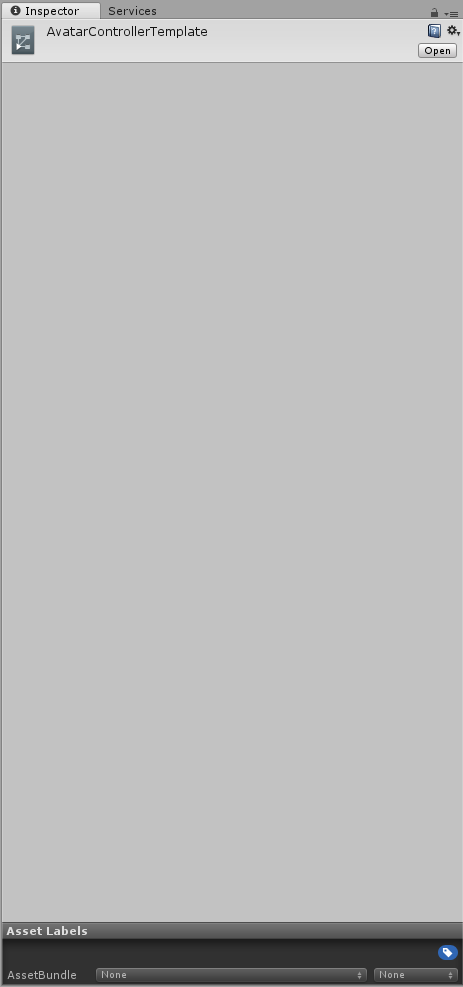
Can anyone tell me if the animation controllers have changed? I swear the drag and drop system was still in place, but even with a fresh SDK install and unity 2017.4.15f1 - it doesn't show the areas to pick animations or drag and drop them. https://i.imgur.com/bA6kHkg.png It simply shows the ability to open the animator and that's it.
 copper bramble
Never mind me, I'm an idiot who forgot the naming conventions.
 orchid wasp
What’s max frame limit or is there one
 blissful wedge
Hey guys, I have a question
How do I create spawn animation? Ok the real question how do I have animation at spawn without it carrying on...
 covert girder
@blissful wedge try to add Animator to something inside the model, and use not loop animation from Entry state, i think it work like that
blissful wedge
Ok thankyou @covert girder
spice urchin
keyframe limit? not rlly but it gets laggy after a while
 abstract kestrel
is it possible to sit in your own seats?
spice urchin
no iirc
u can however grab a world seat and sit in it while holding it
or sit on someones avatar while they sit on urs
still glitchy
olive yacht
Someone had told me a few days ago a rigidbody can help move a bone for a gesture. My character has a stethescope attached to the chest bone, and I want to move it with my hand during a gesture. How would I use the rigidbody to achieve this, or is there another alternative besides making it its own mesh?
hollow perch
You can move bones same way as meshes. Make a child bone in blender and weight paint to that.
olive yacht
I'm not sure what you mean. Weight paint the stethescope to a bone attached to the hand?
hollow perch
Yeah
olive yacht
Wouldn't that cause it to move with the hand though?
hollow perch
And you can put a rigid body in that bone
olive yacht
Even when I'm not using the gesture
hollow perch
Bones are just game objects
olive yacht
Oh, you apply the rigidbody to the bone itself?
hollow perch
You can
Or put it outside on the chest and rigid from something in the hand that you activate
olive yacht
So, say, I put an empty gameobject in the hand. I make it only active when gesturing. Would I then make the rigidbody move the stethescope to the empty gameobject when it's active?
hollow perch
In vr you would first physically move your hand as if to pick up the stethoscope
brittle flicker
Is it possible to test blend shapes in Unity?
olive yacht
I'm still relatively new to this, so I'm not sure how to go through this process. Would I need to attach some sort of script to the rigidbody controlled bone?
hollow perch
@brittle flicker skinned mesh renderer has. Blend Shapes submenu you can open up. Shapes are in % so set to 100 to test
You can hold click the shape name and drag your mouse left and right (works for interactively changing any value in the inspector)
brittle flicker
Where is the submenu at?
hollow perch
Fixed joint or configurable joint on a toggleable object .
Like a line with a ➡️ Blend Shapes
brittle flicker
Oh. I feel dumb.
hollow perch
It's a terribly confusing UI, it's not just you
clear yew
Im having a issue where I hit preview on animation and edit the rotations of bones. The bones go back to their original rotation. Some times it works but after I hit preview or click off of the animation file is goes back to the original rotation where the animation values return to the original ones before the animation. I tryed editing the animation by not hitting the preview button, hitting preview button, and the red record button. What I tried to do to fix it was create a new .anim, a new controller, and a new dupiclate
 ionic nova
shift+d to duplicate anim file
void kernel
@olive yacht rigidbodies are used for calculating physics and detecting collisions. I don't think it's useful in this case? If your stethoscope has its own bone and it's attached to the chest, then you can just animate it along with your hand movement. If you make it a child of the hand then you're right, it will move every time the hand moves
It either has to be a separate mesh or a separate bone to animate it
Or a blend shape :P
 gray spoke
~~How can I make an object in my hierarchy visible with an emote? (not gesture)
For example, I want an emote to make my avatar's flame wings visible. I've seen some avatars have emotes to enable/disable markers, particles, etc.
How do I do this? Just to make the wings (actually a prefab off the unity store) visible when I do the emote, so I can turn it on/off whenever I want, unlike gestures, which would make them turn off if my gesture changed.
I've also posted this on #avatars-2-general but this also has to do with animation, so I thought publishing it here would probably get some more help.~~
EDIT: Found a method, thanks Lyuma!
clear yew
Is there a way to get a prop I enable in a gesture to stay in one place while I move around?
slim sparrow
Yes, put a fixed joint on it attached to nothing
Also put an animator on it with apply root motion and any controller
clear yew
Do I remove the rigid body? @slim sparrow
clear yew
So just like this? https://i.imgur.com/0UqE7HZ.png
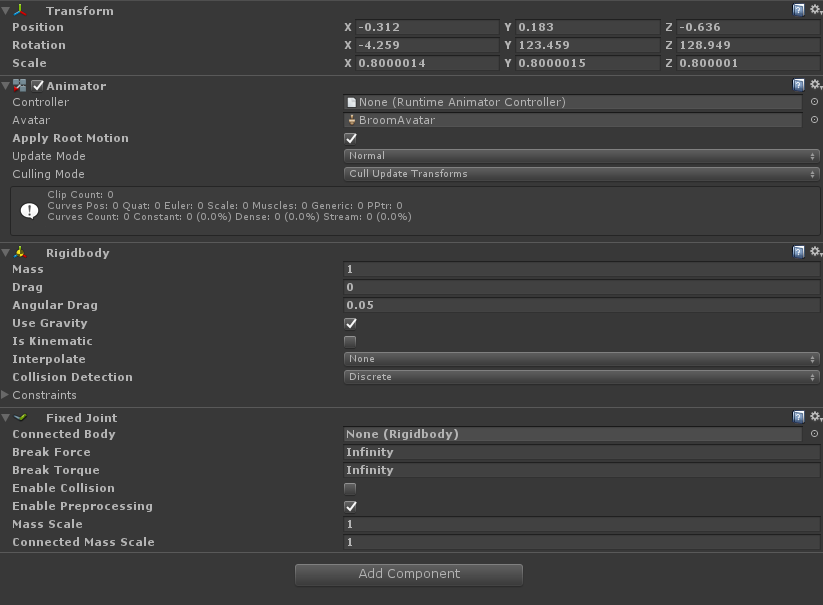
Or do I just need to make a random controller and add it
clear yew
ooo okay, thank you!
slim sparrow
The animator part is necessary due to a new bug introduced in the Unity 2017 update, where other users will see the object still move with you until you stop walking.
I recommend making prefabs of this kind of stuff
I need to fix up my world object prefab, because it's not quite easy to also make the world object reset its position when you disable it again.
blissful wedge
hey guys, if I have multiple animations , does this mean I need multiple avatar duplicates for each animation
 lusty aurora
What are people using for a marker nowadays? The Marker master looks to be outdated
void kernel
@blissful wedge nope, you can use multiple animations with just one avatar
blissful wedge
@void kernel thanks
spice urchin
if u mean for animating purposes
u can just keep removing the controller or changing its clip
blissful wedge
Ok that sorted cheers, but theres another issue. Sorry lol
I'm on the show build control panel
it wont let me upload, as it states " following component types are found on the avatar : csLightIntancityControl
void kernel
do you use any custom scripts or light sources on your avatar?
void kernel
so you only use particle effects during animations?
blissful wedge
yes with addition to audio sources
spice urchin
no custom scripts are allowed
void kernel
then you should disable gameobject with your particle effects and turn them on at the start of your animation
spice urchin
only the whitelisted scripts like dynamic bones and final ik scripts
void kernel
so it should be grayed out in the hierarchy before uploading
and then you just enable it when your animation starts
blissful wedge
They are already greyed out , I think its the script that is causing this issue
would deleting it , solve it?
void kernel
what script do you mean?
blissful wedge
I solved it
blissful wedge
it was a custom script for the light effects
void kernel
ah, there you go
void kernel

clear yew
@clear yew @slim sparrow I have a prefab for that if you want to try. comes with instructions. https://github.com/oofdesu/lin-unity-packages/blob/master/reset_joint.unitypackage

GitHub
Contribute to oofdesu/lin-unity-packages development by creating an account on GitHub.
slim sparrow
I already have mine fixed, thanks though
clear yew
👌
clear yew
@clear yew bless you ;~; thank you!
 round crater
is there a proper tutorial for adding audio to characters in vrc? Ive used a couple but they have never ended up working.
clear yew
Can someone please teach me how to animate?
void kernel
Watch youtube tutorials
There's too much stuff to cover for just few sentences on discord
@round crater is your audio too low or it doesn't work at all?
clear yew
@round crater https://youtu.be/iN-q04h0gQ4

VrChat Unity Add Audio To An Existing Emote.
 vapid spindle
not sure if this is the right channel to ask but: how many "emotes" or "gestures" can you do on one controller?
spice urchin
literally its called an "animation override"
override
u can "make" as many animations as u can slots
vapid spindle
yeah, that's what I meant
spice urchin
but u can also do neat stuff like cycling
vapid spindle
how many slots are there
spice urchin
and double activation
literally just check the animation override sample thing
has all the gesture and emote slots as well as movement and etc
spice urchin
and depending on if u want a different sitting one (typically never different gestures)
no
theres a sample asset for overrides that everyone uses
cuz it has all the slots there
vapid spindle
and that's easier than just telling me a number now? >_>
spice urchin
bc i don't know the exact number
spice urchin
think its like 8 gestures and 8 emotes
vapid spindle
okay
spice urchin
and then some number of walking animations
but again heres the thing
filling up slots means theres less u can actually "do"
so the goal is 2 use as few slots as possible and do the most simultaneously
or at least still be able 2 do actual gestures without always firing something off
cuz especially in vr it gets annoying when u literally have no hand gestures anymore or always accidentally spurt off particles
vapid spindle
yeah, makes sense
I was just curious aboout how many facial expressions/finger gestures are max available
spice urchin
so yea ppl do stuff like emote toggles, double activation, cycling, etc toggling, combos,
vapid spindle
ok
spice urchin
there are no "facial expression override slots"
and again ur replacing them and u cant rlly make it so u can still use them unless u set it up in specific ways
clear yew
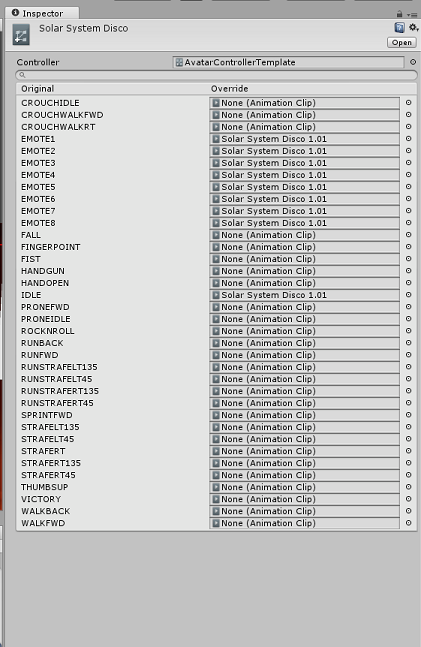
@vapid spindle here is a list of the slots on an override controller (https://i.imgur.com/hI7hz3j.png)
 vapid spindle
ok, thanks
so these Emote1-8 are the things you trigger by touching the touchpads (on Vive controllers)?
spice urchin
again its in the sdk and u use it for making overrides so when its done downloading it u can see them urself
no they are literally the emotes in the emote menu
vapid spindle
yeah, the terminology is a bit... ambiguous
spice urchin
also handopen and fist are typically the 2 off-limits slots
vapid spindle
figures
spice urchin
handopen triggers every single time u let go of anything
spice urchin
fist triggers every single time u grab anything or make a fist
vapid spindle
so fingerpoint, fist, handgun, thumbsup, victory
spice urchin
yea but sometimes they can be used right
for example my friend had a very cute party favor
that they could choose how hard they blew into it and how noisy it was
using the fist gesture
but it was also a double activation gesture
so that only applied when doing the victory gesture simultaneously
vapid spindle
yeah, like my avatar has it where when you do flat hand + fingerpoint you can draw lines
and fist deletes the lines
anyways, thanks, it make sense now
clear yew
I usually use finger gun as draw but make to be animated as a finger point. So that I can point without have a line drew
spice urchin
i typically make my characters have double activation for drawing tools
so i would need 2 have one gesture active for both erasing and drawing
and another would switch which one
clear yew
Im adding that to my avatar because I like the idea
 winter sundial
Why does it say "Skinned Mesh Renderer.Blend shape.eyes_egao_cl (Missing!)" ? I know the shapekey is there
hollow perch
Can you show a screenshot? Also which object is this animator on?
Or just copy here what it has for the path and describe the hierarchy
winter sundial
I copied the avatar, then copied the shapekeys from the previous animation (I wanted to change the animation)
I just redid them now. It's a pain when you have 500+ shapekeys in random order though
As for the rest, I'm not sure what you mean
hollow perch
if a key is missing that either means the path is wrong or the name of the key is wrong. so I wanted to find out if your path was correct.
what shows when you press F2 with the (Missing!) key selected. Are all keys missing or just that one?
 rocky pier

anyone know how to fix this ? im using final ik for 2 handed weapon.
you can see when i move the wrist... the gun does not follow the wrist properly
blissful wedge
Hey guys
I'm using particles effects in unity. But on everyone ive got pink squares firing out. I realise this is due to missing shaders. How do I add a shader to particles effects?
fierce bane
@blissful wedge shaders are controlled by the material in use by the particle effect, make sure it has a shader applied and the material you want to use is applied to the particle effect.
clear yew
also don't use asset store particle effects that use scripting, make your own using just the particle system
blissful wedge
Ok
clear yew
because the scripts will be removed when you upload
some asset store particle effects work fine in vrchat, you can remove all the scripts to test if they do
but if they rely on the scripts to change materials etc, they break in vrchat
 left bobcat
Hello. I have a problem with world model. What is different in Unity 2017 when working with world models?
I have (e.g.) sphere on my characters hand. I made a joint for an object. Made a joint for a wrist. Connected them. Put the sphere in the object. Made a gesture for the sphere to appear. It doesn't appear in my hand in game.
slim sparrow
What do you mean "world model" exactly? An object that stays in the same place in the world? You will want a fixed joint connected to nothing for that.
left bobcat
Instead it's stuck in air.
fierce bane
if you just want an orb in your hand, attach it directly to the wrist, no need for joints
left bobcat
Well. I need world particles.
slim sparrow
Oh, I see.
left bobcat
Yeah
slim sparrow
Did you duplicate your avatar at any point?
It might point to the wrong "right wrist" if you're working on a duplicate.
Also about the particle system scripts earlier, a lot of scripts can be safely removed without compromising the particle system's functionality at all
Notably a lot of ultimate VFX ones
And War FX
slim sparrow
Well there you go lol
left bobcat
That was so dum
slim sparrow
Also I recommend having the sphere actually parented to your hand, and only having the particle system inside the jointed object.
fierce bane
drag+drop is the best way to apply the rigid for the fixed joint, avoids that whole issue XD
slim sparrow
I had the same issue a while back lol
left bobcat
Still thank you.
spice urchin
well u can also use IK_Follower
since it was "fixed" and works in worlds where rigidbodies wont (combat / PVP)
round crater
@void kernel @clear yew thanks for the suggestions guys. turns out i was just being a tard and forgot to put the overide into the animations slot. derrr
 violet moss
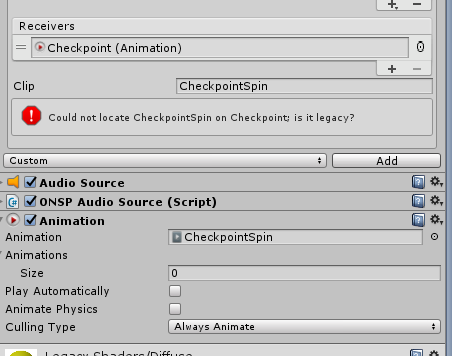
Can't seem to figure out how to make the animation receiver happy? I checked, animation is not legacy
Has VRC's PlayAnimation trigger been depricated?
spice urchin
cant tell u anything about or from that site (someone said bad place name and ask thing)
also that site is not allowed at all in this server so <@&385550615012573186>
its been pasted multiple times also check other channels
slim sparrow
@violet moss animation only does legacy.
If you wanna play an animation you should use animator state machines with an AnimationTrigger instead
 thin flint
Anyone got a link to a video or knows how to create a particle effect system that once it collides with a object it will make a poof a spark effect?
thin flint
Ahh Okay, after looking into as well I have a better understanding for the wanted effect, thanks for the information.
violet moss
Anyone have a link to a animator behavior property file?
hollow perch
@violet moss https://gist.github.com/lyuma/0485f6191357eec03c7fd402768ffc75
Copy it into assets, open the animator, copy the keyframe, paste and press F2 to rename the key (e.g. Body for blinking or Armature/Hips/Tail)
 violet moss
Thanks
 icy hare
Hey guys, how do I create an animation that only works if another animation is currently active? There's this avatar I've seen that can take out a whip, and you can open your other hand to make a whip crack sound, but only while the whip is out. I'm trying to re-create something similar, for science 😏
hollow perch
You can stack game objects inside each other and one turns on/off the outer object (whip container game object) while another turns off an inner object (normal whip) and turns on a different inner object (Crackling whip)
icy hare
Oh I think I get it, so both animations would technically show the whip, but because they're in the same spot you can't tell, except one of those animations makes the cracking whip sound?
If I understood that right
hollow perch
Not quite what I meant. You have two whips. One is always turned on and one is turned off. One animation switches which one is on. For the main show whip animation, put both whips into another empty game object and uncheck that whole game object and then have your animation show it
 quasi hinge
Wouldn't you just enable an audio gameobject under the whip gameobject?
fierce bane
@icy hare It's easier than you think.
Whip
   |- Audio Source
Whip and Audio Source would BOTH be disabled by default (unchecked in inspector top left)
One animation to hold the whip is enabled by one gesture (say fingerpoint for example)
And another animation enables the "Audio Source" to play the sound (maybe finger gun for example)
So if you are holding Fingerpoint (whip), Finger Gun (audio source) can be used to make the crack sound
but if the whip is not enabled, the audio won't be either, so only pressing finger gun (audio) will not play the sound
icy hare
That makes more sense, thanks man, I'll give that a go
 fluid crescent
I want to change material on animation,I click record button and drag material to body,but ingame it doesn't happen
 torn pawn
doesn't work in mirrors
fierce bane
It works for everyone but yourself in mirrors
so someone else could verify for you...has been an issue for some time now
clear yew
unless you use a seperate mesh or play around with layers
or view yourself in holoport mode
holoport mode you can see your material changes
 worldly drift
sup guys. so i have a slight issue with my audio source. i can hear the audio fine, but others cant. any idea what im doing wrong?
guessed this would be the right place to ask since its on an animation anyways.
clear yew
put an animator on the audio source
worldly drift
🤔
worldly drift
i would love an explanation though
slim sparrow
Kuro doesn't really understand, don't worry lol
clear yew
even tho i do
slim sparrow
I can't imagine why it wouldn't work ingame only for others @worldly drift
Which trust rank are you?
clear yew
you force the values with the animator component
slim sparrow
Kuro you don't even know what the issue is
worldly drift
oh even friends cant hear it
clear yew
animator component is the best thing ever
slim sparrow
You have an unmodified SDK right? Messing with certain audio properties makes it no longer work
worldly drift
im not messing with modified sdks
slim sparrow
Your SDK should be up to date as well
Since they did some audio changes a long time ago
worldly drift
well yeah i had this issue since ive first made this avatar. i was able to hear the sound fine, but others wouldnt at all.
slim sparrow
If you have an ONSP Audio Source component on the audio source, remove it
Make sure the object is not called "Audio Source"
worldly drift
will do, aight
slim sparrow
And if that still doesn't work, post a screenshot of your audio source settings
worldly drift
i was about to try linear rolloff but i think vrc changes that to logarithmic anyways eh?
slim sparrow
It changes to a custom rolloff
worldly drift
oh k
slim sparrow
Make sure the min distance is set to 2 and max to 30
worldly drift
oh i had min set to 0 so far
slim sparrow
Yeah that might be the issue
You should set it to 2
Min distance 0 means that the falloff will start immediately
worldly drift
aight, ima test it. deleted the onsp source as well
slim sparrow
And will make the sound almost inaudible from further than a few centimeters away
worldly drift
oh i see
 twin sinew
so like im having an issue with trying to get this effect
https://gfycat.com/DishonestPoisedDeermouse
i have absolutely no clue how to make a gesture draw the portal like a marker, then when the gesture is released stop drawing it, but it stay
im pretty sure it'll have something to do with a world particle inheriting velocity from a gameobject, but a fixed joint doesn't actually have any velocity, so it doesn't do anything
anyone know how to do this?
 clear yew
grabpasses are fun
If you've seen that world avatar with the 3 mirrors surrounding it that changes based on which you're looking through, its the same effect essentially as there, just the material with the grabpass is on a trail instead of just on a 3d object @twin sinew
twin sinew
oh, that's not really my issue i think
i'm trying to get the trail to draw and stay in the world
twin sinew
everything else works fine i just cannot get the trail to work for the life of me
clear yew
that sets the lifetime of the trail to like infinite
twin sinew
oh yeah i got that
clear yew
Then you can also have it detach from hand
twin sinew
oh?how
clear yew
One sec I need to confirm a few things
twin sinew
alright
clear yew
Im thinking if you put the trail attached to a particle
then use an animator to change that particle into world collision
while also making the trail have infinite time length
but i cant remember if you can change sim space with an animator
clear yew
yee
twin sinew
if you can actually do that it would make life so much better
clear yew
if not then you'll have to time it with an animator entirely
twin sinew
ive been beating myself up with like, a million different ways of doing this
clear yew
like for example
timing it after idk, 5 seconds of trail, it spawns a new trail in the same space with a world particle
that'd make it stay
hollow perch
does a trail or line renderer work?
clear yew
but you'd need to animate the new particle trail in a single frame
or else it'd look spook
clear yew
ok so then
what you can do is
animate that particle moving in world sim
but just move your hand with it
to make it look as if your hand were doing it
hollow perch
there's something way too complicated going on here. @twin sinew what are you trying to do?
you want something that stretches? anything else or that's it
clear yew
@hollow perch they're trying to make a trail stay disconnected from hand
twin sinew
yea
twin sinew
it is its just....complicated
hollow perch
are you ok using a skinned mesh with two bones, and using a fixed joint to drop one bone immediately and use a gesture to set a fixed joint and drop the other bone later?
I mean trails are if you want a wavy line and all that
but it looks like you just want to connect two points?
twin sinew
i mean that would work i suppose
id much rather do it with a trail though if possible
hollow perch
but you're trying to move the other point with your hand until it is set right?
twin sinew
also another idea i had was like, making it a world particle with inherit velocity, bc that would totally work
yeah thats basically it
clear yew
the trail detaching is the hardest part
twin sinew
yeah i can get the trail to work fine it just wont detatch
clear yew
only way to make it detach
is if you disconnect it from your hand entirely
mid animation
hollow perch
why do you have to make it detach? just drop the fixed joint
the thing it is attached to has a disabled fixed joint, to detach just enable that joint ant lock it in world space
it's the same approach
though making this all work without fixed joints is an interesting exercise.... maybe better if you can figure it out I guess
clear yew
oh shit wait
idk if this is what you were trying to get at lyuma
but why not just get some fixed joints, make them the child of the hand
hollow perch
yes
hollow perch
yeppers
twin sinew
oh!!! yeah
clear yew
so it might just stick in air
hollow perch
a skinned mesh renderer the way I described is basically a trail/line renderer with two (or more) points
why would it offset?
twin sinew
i dunno i remember having that issue before
hollow perch
sorry you would enable it so it gets locked to world
there's a trick with an animator + apply root motion + simple empty animation clip to keep it from drifting when you walk
like the jittering you get with fixed joints
to fix the offset, your first gesture or an animator resets the position to 0,0,0 while the fixed joint is disabled... or you "pick it up" where you left it to avoid the offset
twin sinew
hold on you kind of lost me
clear yew
They're talking about reset animations
so vrchat doesnt lose track of where it is for everyone
because if you're using something that is world bound multiple times
then over time the position of said object will be different for everyone
cus desync i guess
if you have a reset animation that puts the position of the object to 0,0,0
then it'll pop up there for everyone
every time
clear yew
ye i literally have this on an avatar but its broke cus rigidbodies
just not the trail part
i have the fixed joints n stuff and the reset anim
twin sinew
okay so like
what im getting here is
the trail would be attatched to a fixedjoint outside of the armature right
twin sinew
see if i could just get a world particle to follow the fixedjoint instead of the whole system this would work fine
clear yew
I mean you can do that
wait a minute
can't you make world particles follow your hand
wasn't there a method to do that
twin sinew
was there??
because thats like
literally what im looking for here
just like get a world particle to follow my hand and then stop doing it when i let go of the gesture
thats basically the gist of what im trying to accomplish here
clear yew
to keep the portal open you'd need to keep the gesture active at all times
unless you wanna get into toggleprops n stuff like that
with a gesture
twin sinew
i mean ive gotten it to stay open with the gesture disabled before so
clear yew
wait wtf
twin sinew
it just stuck to my hand
clear yew
why not just put a fixed joint on the world particle itself
and attach the fixedjoint to hand
then when you want the particle to let go
disable the fixed joint
twin sinew
keep the particle system enabled and just disable the emission by default nd then in the gesture enable the emission instead of the system itself
also wait can you do that?
twin sinew
i thought you could only put fixedjoints on the system itself
which locks the particle in place
clear yew
?
twin sinew
i just changed the emitter velocity to transform
and the particle inherits velocity from the fixedjoint
clear yew
would that detach it though?
clear yew
alrighty then
twin sinew
so like ill just say what i did for future reference incase anyone else is doing this
tl;dr have a world space trail on a fixed joint, change the emitter velocity to transform, and make it inherit velocity to the parent fixedjoint, have the inherit velocity setting disabled by default, same with the emission, and then in a gesture enable both
in theory atleast, it works exactly how it should in unity so
it works!!! its just really offset for some reason
hollow perch
I believe you can fix offset by adding an animator always running that sets position to 0,0,0. if you have a fixed joint activated, the fixed joint will override the animation so it will not actually reset the position until you disable it again
twin sinew
oh no i forgot to say i fixed it
i was just a dumb and forgot to re-disable something
hollow perch
oh cool. I must say quite a bit of what you did with inheiring velocity went over my head but it's interesting
twin sinew
it was super duper simple now i just gotta make the portal's background work properly
 sturdy flint
I'm a bit confused, how do you override the animations for an avatars hands?
fierce bane
do you mean adjusting the hand itself, or just make a gesture do something like pull out a sword for example?
fierce bane
like a peace sign for example? not enabling another object
do you understand the basics of the override or are you new to it
that's basically what I'm trying to ask...still waking up, my bad
sturdy flint
Well I know how unity animations work, but I just dont know how vr chat handles things
Like where would I put a gesture animation?
fierce bane
inside the VRCSDK/examples/sampleassets/animation is a CustomOverrideEmpty controller, duplicate that and move it to your avatars assets
when you select that you'll see slots for various gestures, emotes, and animations. Those are your override slots.
this controller should also be dragged into the standing/sitting animations (depending on what it is for) on your avatar descriptor
fierce bane
remember that you cannot just move/rotate any humanoid component (fingers, legs, etc) and need to use the animator component to adjust it (or muscle editor for ease)

 leaden rapids
I have an avatar blinking animation problem. These two avatars uses the same base model(same blendshapes, except the witch has a wand and a book blendshape), they use the identical blinking animation, identical animator components(placed in Body in the armature) but the avatar one on the left doesn't work. I remember it working at some point but one day just wouldn't. It plays in unity, and in the avatar selection screen but won't in-game.

 fiery garden
I have a similar problem. The blinking works fine in unity, but in game only the left eye blinks.
icy crow
do you have an animation on the fist gesture?
leaden rapids
Nope
leaden rapids
Neither of the two uses the blender blinking.
That's why I use the animator and animation components
slim sparrow
@leaden rapids Animation component does not work at all.
Legacy animations are gone
If you're using regular Animators, the prime reason for it not working is the emotes or gestures you have on it.
Make sure that not a single animation in your emotes or gestures touches the blink shape keys at all.
leaden rapids
I know legacy animations are gone, that's why I use the animator component that I placed on Body
It works for the witch avatar, so that's confusing
slim sparrow
Well one quick test, remove the custom standing/sitting anims entirely and see if that fixes it. If it does, you have the blink shape key being touched somewhere in one of your animations.
And you have to remove it
Even if the animation is not active it will lock the shape key
clear yew
my blinking animation works
except i made mine more complicated than it should be https://imgur.com/iWj947b 😏
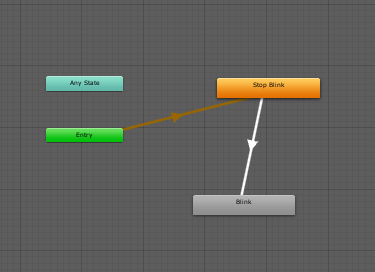 slim sparrow
That's pretty much what I had released prefabs for from day one
And is also mandatory if you want to turn the blink on/off
clear yew
gimme your prefabs
leaden rapids
ooh that's weird... the blinking works now that I removed the sit/stand anims....
I have one animation use the Blink Happy blendshape, which I swapped to in attempt to fix this, so I have to swap back to the normal Blink, which was not used on any animation at all to my knowledge(can't remember, actually)
I'm gonna check if any of the animations uses the Blink blendshape
hmm nope, none of my animations uses the Blink blendshape, except for the animator i placed on Body
I could only find one animation that uses the Blink Happy blendshape 🤔
slim sparrow
Well if it works when removing the stand/sit anims, somewhere it is being used.
Check all of your emotes too, especially ones from external sources.
leaden rapids
The witch one uses the same emotes, so it's none of those
slim sparrow
You'll have to check the walks and idles too, pretty much everything
leaden rapids
I don't have any walks or idles animations. hmm I'm gonna try and upload the avatar with only one of the animations one by one and see which one it is to narrow it down
slim sparrow
And of course, make sure you didn't accidentally use "Blink Happy" in your blinking animation instead. It happens.
leaden rapids
Nah it was always using the Blink one, as I'm looking at my screen. I did swap to the Blink Happy just to try, but didn't do anything and swapped back
oh i'm so stupid, i thought I brought all the animations into the Animation tab, but I seem to have forgotten the Sad animaiton, and it indeed uses the Blink blendshape
Edit: stupid Dyno. anyways, now if I replace the blink with blink happy and upload it.......
Aha, it works! Thank you Rokk, I deeply appreciate your help ^^
sturdy flint
so I have this avatar with a gameobject on its hand that gets enabled from a override animation when I do a hand gesture, but sometimes it sticks around even when I stop doing the gesture. How do I fix this?
sturdy flint
no its on rocknroll
slim sparrow
Make sure all of your gesture animations are exactly 1 frame long. One frame at 0:00 and one at 0:01.
slim sparrow
No, it's one frame in length, but there are two keyframes. A start and an end
sturdy flint
ohhh I see what you mean
so the animation should look like this https://cdn.discordapp.com/attachments/418510776215535640/554660028641050624/unknown.png where the second keyframe disables it right?
 slim sparrow
That's just how unity's animations work
It does something else with just one keyframe. An animation is expected to have a start and an end.
 gleaming tusk
I'm looking for a shader that shakes the screen in an area, trying to make my fight animation look fancy
Anyone know the name and how to get it?
slim sparrow
In case it wasn't obvious, I was linking to a specific message telling you that you're not gonna get help here doing something that makes VR users sick. @gleaming tusk
 hollow silo
So I have a animation for the gesture : hand open, and when I use the animation, the animation is suddenly triggered by all the other gestures. Does anyone know why this is happening? This is the second avatar that it happend to. I turned off loop time on the animation, if that could cause the problem tho, but that would be kinda wierd tho
slim sparrow
@hollow silo the animation is too long
It has to be one keyframe at 0:00 and one at 0:01
And none at 1:00 for example
hollow silo
oh...
How does people do animation when they can move their own avatar at the same time tho?
if you know what I mean
animation longer that 0:01
than*
slim sparrow
They enable another object with an animator on it
The gesture itself is 1 frame long long but the other activated object will animate itself.
 spice urchin
wat lol
 tardy abyss
So, I'm trying to achieve 'perfect flight'. I feel there has to be more than a single box collider under the avatar's feet (and toggled with an animation).
Though, I would also like it to be compatible with the way Windows MR controllers are (having emotes on the same touchpad as general movement).
If anyone would be willing to teach me (that only a handful have been able to master), please DM me.
left bobcat
Hello. I have a world particle. I've put it on object that is connected by joint to my hand. I don't see the particles ingame though.
Nothing seems to be a problem though. A joint is set correctly, the particle is a world one. The only thing that might be a problem is that a particle is not on an object that has a joint object as its parent.
The particle has a joint as a parent directly.
Anyone?
And yeah it's triggered by gesture.
brittle flicker
@hollow perch Sorry to ping you, but is there a way to make your mesh tools plugin affect only a certain axis when using the keyframe blend shapes merger?
 cyan chasm

[CLICK 'SHOW MORE' FOR MORE INFO] For those of you that forgot, I do mocap stuff! Although I guess that's harder to forget since I also do vtuber but anyway ...
hollow perch
@brittle flicker hmm I can't say I understand what you mean....i feel like that's something better done in blender.
If you want to do it yourself you can edit the code and loop over the vertices for each blendshape and set the .x or .y you don't want to 0
brittle flicker
Ah, okay.
 ruby thistle
is anyone here decent in unity animation? im trying to make my yeen grip a waterbottle, but i cant seem to get his fingers to move in the animator.
the only catch, is that it's one of those hyena avatars. so idk if his fingers are rigged or not.
 naive niche
@ruby thistle sent you a DM
ruby thistle
thnks myguy
 calm zenith
Could anyone help me change some of the default animations to custom ones, please?
 rain reef
Are you talking about emotes or gestures
Aka, wanna go to menu and click on emotes or do you want to move your hands to trigger them
calm zenith
gestures I think
rain reef
In unity you have an avatar descriptor
What do you have in the Custom Standing Anims or Custom Sitting Anims slots
calm zenith
my character's name
rain reef
can you take a screenshot, upload it to a different discord server or an image hosting site, and link it here
calm zenith
What do you want a picture of?
rain reef
your avatar descriptor
 rain reef
double click the custom standing anims slot
it should take you to the override controller
can you send me an image of that
 rain reef
the actual contents
of the controller
its gonna change on the right
your inspector window will show what the controller is made up of


 calm zenith
weird
rain reef
it has gestures on Handgun, Handopen, Rocknroll and victory
unless the actual animations are empty
i mean you could just go through this and make your own https://www.youtube.com/watch?v=vrY3FgpzLRY

Subscribe if you haven't and click Like if you enjoyed the video! Helps me out a lot! Hello VRChat, welcome to my very first Tutorial Video for VRChat! I am ...
calm zenith
maybe when it's not literally my first day using unity x.x
rain reef
This is probably one of the easiest things
in unity.
And if you dont put yourself on a challenge you wont learn
these things arent spoonfed easy things, they are not easy if you dont wanna learn.
calm zenith
And I appreciate that
and I've had this program for less than 3 hours
so
gonna take it alittle slower then that
And also it didn't work
reuploaded
animations aren't there
@rain reef
rain reef
All i can say is watch the tutorial and understand how animations work
its 12 minutes of your time
rain reef
Well we cant tell you more than what you learn in the tutorial
because thats the only way to do it
calm zenith
I'll work on it
hollow perch
Can you check the emote menu in vrchat and see if the emotes are there?
Also it's a bit unusual that you duplicated your override controller for sitting and standing. I would put the same in both as it's less confusing
Final thing to check: when making animations you duplicated your avatar. Are you sure you put the override in your original avatar (I would delete your duplicates for a bit)
rain reef
@hollow perch Its a downloaded avatar from the unholy website
He didnt make the anims.
Thats why i told them to make the anims themselves
hollow perch
Ok fair enough, you need to go through that process
abstract kestrel
So I'm still failing to understand this world anchor
@venom wolf When the anchor is disabled it needs to be reset by an animation controller (usually back to 0,0,0 position and rotation), but that animation controller has to have it's behavior disabled while the world anchor is active or it will stick to you.
Check out the example mentioned before. It is a working version that has everything needed, including the difficult to make controller behaviour disable animation
Take the world object package and swap both animations.
The reset should be disabled (unchecked behavior), and the animation to pick up the sword should enable it (checked behavior in animation)so when it resets the anchor to 0,0,0 it locks it back to where it should startand the child is the anchor which is set to 0,0,0 on position and rotationyou position the game object above it where you want it to beyes, that's why you have the animation resetting the world object to 0,0,0 (because that is LOCAL not based on the world)so you can "stab" it into the ground and release the "held sword" gesture, switching to the "stuck in ground" gesture
I'm so cobfused
 brittle granite
🤔 how long can an emote overide be? I know IK snaps back after a minute. but is there a way to have the emote spawn a stage and then i act out with my body what I need to do? (i have full body tracking)
I was wondering if i can do some sort of Paper Mario Battle stage with all the gimmicks of attacking.
🤔 or i sing like a disney princess and all the woodland creatures come out and gather around
torn pawn
there's couple ways to do it, one would be to use an emote that spawns a world object stage
look up xiexe inventory system
brittle flicker
Is there a way I can modify a shape key so that it only affects certain vertices or bones?
I have a blink shape key, but it works for both eyes. I want to "split" that shape key into two new shape keys for each of my model's eyes.
 pastel island
dunno but if you have bones for the eyes you can simply make a new blink morph
most faces should deform correctly to form a blink morph if they have bones
spice urchin
just use blend from shape tool
after making 2 of the same shape key
u select one half of face and blend to basis
etc
brittle flicker
Ah, thanks.
I just had to make a new vertex group, select the vertices I wanted to change, and assign those to the vertex group.
And then use Blend From Shape.
spice urchin
u dont need 2 do that but sure
brittle flicker
Is there a way to get eye tracking to work correctly on models with non-humanoid heads?
spice urchin
not if u make ur own shader or animation to mimic it
fierce bane
@abstract kestrel I've tried a few ways to explain it as well as listing what needs to be changed where. I'm not sure how to put things any other way.
Ask specific questions or explain what is confusing you. Maybe someone else can help explain too.
clear yew
There is an eye tracking shader
abstract kestrel
im sorry
clear yew
venom I can help you if you need it
brittle flicker
An eye-tracking shader?
abstract kestrel
ive done all that you said, and it still turned out bad, i finally got it to stay in place, but its always active and is- hang on
i may just be a huge idiot
spice urchin
yea but it doesnt blink or look randomly naturally afaik it just stares and does some eye movement and looks neat but
fierce bane
"turned out bad" is not very helpful in troubleshooting 😛
clear yew
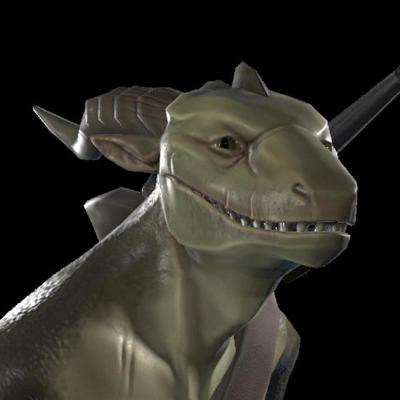
GitHub
Vilar's Shaders for VRChat. Contribute to Vilar24/VilarVRC development by creating an account on GitHub.
@brittle flicker
i think this still works
@abstract kestrel a world fixed joint thats on by default will do that
fierce bane
"grab" it to turn it off and reset with your hand
spice urchin
use IK_Follower
it was "fixed" and should work in every world not just non-combat worlds
fierce bane
you should be disabling the anchored one whenever you're enabling the non-anchored one
abstract kestrel
i am, or should be
fierce bane
if both are on at once, something isn't being disabled that should be
abstract kestrel
i see it
clear yew
the world fixed joint should be turned off and animated to position, rotation 000 for it's next usage
fierce bane
he's trying to do the opposite with the world anchor. One that's active unless grabbed
fierce bane
You want to disable the fixed joint, the animator above it that resets its position needs to stay enabled
- the animator it is parented to
clear yew
im assuming the hierarchy looks like this
reset animator
- world fixed joint
-- object prop
abstract kestrel
yep
clear yew
you want to set is.active 0 on the world fixed joint, and while the world fixed joint is off, enable the reset animator with behavior enabled 1
that will turn off the world fixed joint and reset it while it's off
with the same gesture which does the above, you pull out your prop sword
when you release the gesture, values will return to default
which if you animated is.active to 0 and behavior.enabled 1, the default values are 1 and 0 they will go back to that
which would be world fixed joint ON, and reset animator OFF
clear yew
just make sure that your reset animator is off by default, and that you're animating it on with the sword grab gesture(as well as animating the joint off, which should be on by default)
what might help you grasp why is that a world fixed joint position and rotation can only be animated while it's off, and world fixed joint offsets it's position/rotation to you while it's on and you're moving. so you have to turn it off then animate it to 0 for when you turn it on again
clear yew
which part
abstract kestrel
hang on
realized i was using the wrong anim too
also the placement is off
and im not seeing it right now, dunno where it went
@clear yew
uh do i need the animater on or off anywhere?
clear yew
your defaults should be
reset animator component off
world fixed joint object on
and your gesture needs to animate is.active 0 on world fixed joint object, to turn it off, and behavior.enabled 1 on the reset object, to start the reset animator
abstract kestrel
ah
brittle flicker
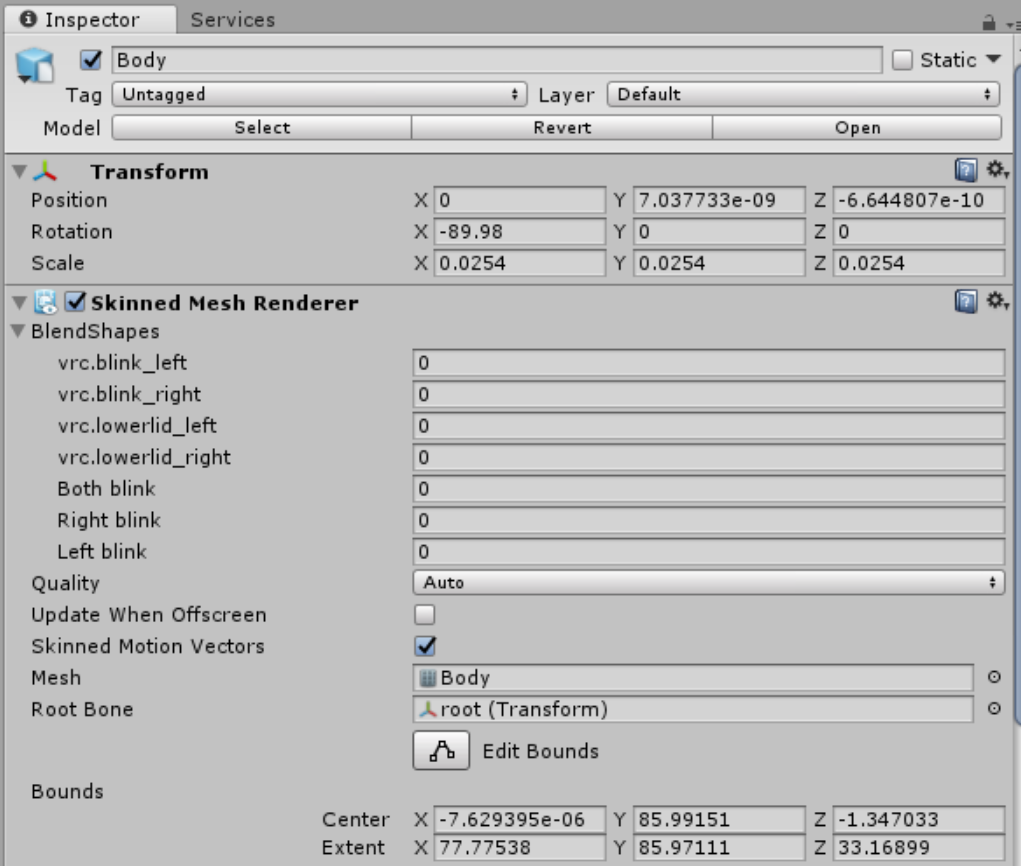
I have blink shapekeys, but they're not working in VRChat.
spice urchin
u need eye bones
and they also need 2 be the first 2 shapekeys on a mesh called Body
with the next 2 being lowerlid
brittle flicker
I changed the name of the mesh to "Body", but it still doesn't work.
spice urchin
does it have all those other things
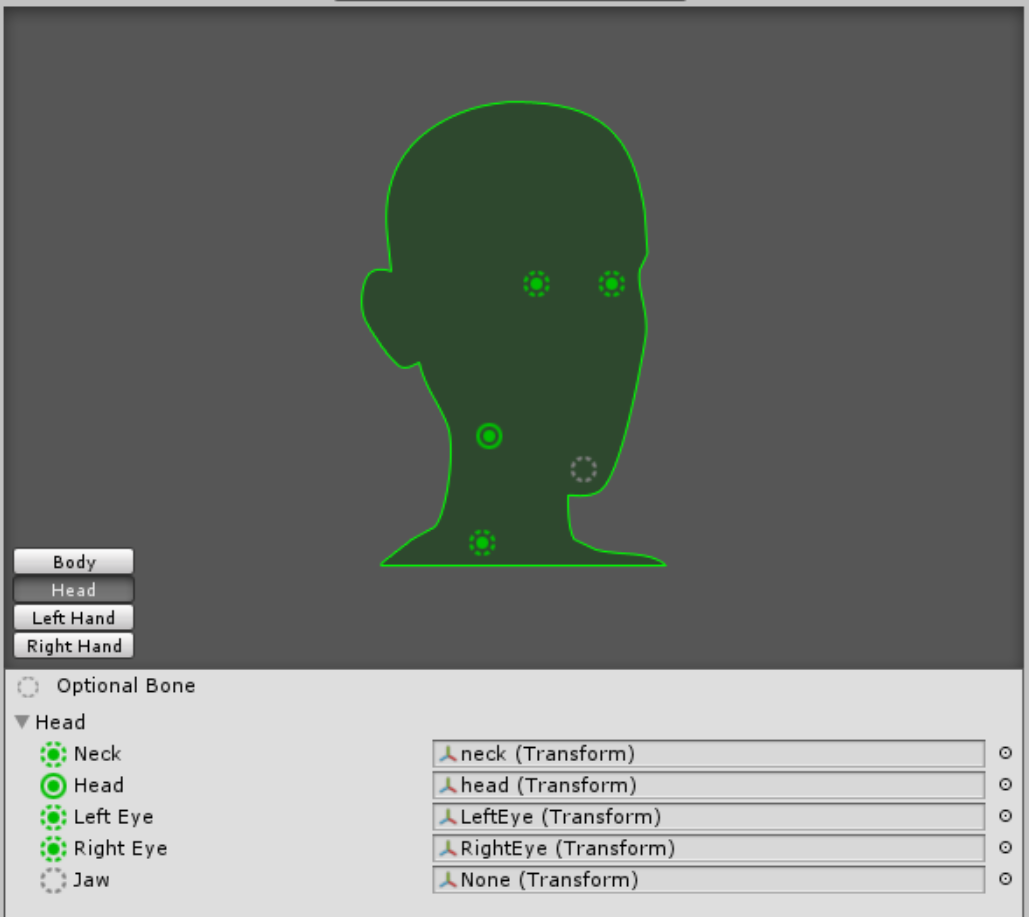
cuz the eye bones also need 2 be called RightEye and LeftEye and put in the right spot in the config menu
brittle flicker
Does it really need to have LeftEye and RightEye?
spice urchin
ye
brittle flicker
Still didn't work.
spice urchin
wym didnt work
brittle flicker
The eyes still don't blink.
spice urchin
im pretty sure it doesnt take u a minute 2 fix it, reupload the whole thing, swap avatars, and test it in the game,
but in case it does did u reload the avatar
and also show what the blend shapes and bones look like in the unity window and config window
brittle flicker
Yeah, I reloaded it.
Here are the blend shapes: https://i.gyazo.com/314b016cd227abef05dcab245d5b5156.png

And the bones: https://i.gyazo.com/d78d7d67352e11830ee860f0991f2284.png
 spice urchin
that should work, maybe it has 2 do with the bone names
cuz CATS will say something like ' u need the right bone names, Hips, Spine, Chest, Neck, Head ' etc for eye tracking 2 work
might be case sensitive also
slim sparrow
@brittle flicker your armature is named incorrectly
The hierarchy has to be Armature->Hips->Spine->Chest->Neck->Head->LeftEye/RightEye in Unity
Your bone names are different.
spice urchin
yea that wat i just said
brittle flicker
Ohh.
spice urchin
it very specific and it super anoying
brittle flicker
Is it case-sensitive, too?
spice urchin
that y i just use CATS Fix Model and Generate Eyetracking
granted that not the only things i do
but it will give all the bones the right names no matter the rig
ye
brittle flicker
I only used CATS for the eye-tracking, but not the "model fix", since I have animations to go with it that I'd rather not have to remap their hierarchies for.
spice urchin
well u dont need to
u can just map the animations to humanoid
and then give to another humanoid
brittle flicker
Yeah, but that only maps the bones that are mapped to the humanoid rig.
brittle flicker
I'm importing the other things, like cape movement.
spice urchin
which u can rename just fine
brittle flicker
It doesn't import the generic bones for me.
spice urchin
will have 2 change any names tho
brittle flicker
Whenever I convert the animation to humanoid, it scraps everything that is not part of the humanoid rig.
spice urchin
so when it does hips/spine/chest
u change 2 Hips/Spine/Chest
and na its not supposed 2 do that
if u look at bottom of animation it should have transforms
also u can do 'cape movement' with stuff like animators and cloth
brittle flicker
Yeah, but most of those are useless.
They always clip, no matter what the settings are.
 strange cipher
I need a bit of help to create a long animation. I'm trying to make a gun that fires at the drop of a song, but I don't really now how to make an animation longer?
spice urchin
u add a keyframe further away
strange cipher
I tried that, but then the animation just just messes up
spice urchin
??
if ur using emotes it messes up when IK is turned back on after some time
if ur using gestures u need an animator not a long gesture
spice urchin
a couple
but u cannot animate ur body
u have 2 duplicate ur body if u want 2 animate the avatar
and then put an animator on the duplicate
but if its just particles then thats fine
just use an animator and enable the thing with the animator
and the animation goes on that
strange cipher
But the gestures needs to be one frame right?
Because that's the problem, mine is longer than that
spice urchin
yea
like i said
ur gesture just activate the animator or watever it attached 2
and the animator do the actual animating
strange cipher
Sry, I'm pretty new to this 😄 So just to be sure: The animation, which was created from the clone by animating it, is placed in the animator spot of the original avatar and the clone?
spice urchin
no
the animator animate only whatever it children is
and children of thos children etc
so u could for exampl
make a animator where all particle are placed
 rustic mesa
i'm having a problem with adding audio files in an expression
everytime i put the audio file in the avatar i get these errors
Your avatar is humanoid, but it's feet aren't specified!
Your avatar is humanoid, but it's upper arms aren't specified!
Humanoid avatar must have head, hands and feet bones mapped.
spice urchin
u sure u have those
spice urchin
where
ur suposed 2 make an empty game object with a audio source component
or whatever Create -> Audio does
rustic mesa
oh, i used the hierarchy to put it in
i guess i can do that and delete the mesh renderer to make it invisible
spice urchin
wat
rustic mesa
how do i put custom expressions in the avatar?
spice urchin
animation overrides
rustic mesa
how do i do that?
rustic mesa
which expression is F5?
rustic mesa
F5 on a public avatar looks like a peace sign
spice urchin
yea so victory
also gestures can only be a single frame long
0:00   0:01   0:02
|      |
if u want lengthened gesture animations then u need 2 use animators
rustic mesa
i can't click add property in the animation window
spice urchin
needs 2 be in the editor
as in like put into a character with an animator for example
which is y u duplicate ur characters and animate gestures on them
also it wont keep the gestures original finger positions
2 do that u need 2 copy all the keyframes for fingers
and move them to their right spots
u can copy and paste keyframes onto others so u can easily mirror what u did 4 1 hand
and u need same start and end keyframe
rustic mesa
i'm making a new clip, but if i do that a new controller is made
hollow perch
A new controller is fine. Make sure to duplicate the avatar
rustic mesa
it still won't let me click add property
hollow perch
Select the top level of your duplicate avatar in the hierarchy view. Then you should be able to add property ( or you can click record and start changing stuff inside that avatar and it will record it)
rustic mesa
got it
rustic mesa
how do i make the audio play only when i do F5?
spice urchin
turn it on
rustic mesa
if i'm done animating what do i do with the dulplicate avatar?
slim sparrow
Delete
slim sparrow
yes
rustic mesa
what does it mean to "turn it on"
rustic mesa
what if i already deleted the duplicate?
rustic mesa
i brought back the duplicate model, but do i have to redo the whole animating process again?
spice urchin
u put an animation in the model to animate it
rustic mesa
wait do i have to make a new property for the audio?
spice urchin
ye
rustic mesa
which one?
spice urchin
whatever
u could enable the audio
u could enable the audio component
u could set the volume to .5-.6
etc etc etc
bunch of ways 2 "turn it on"
rustic mesa
the audio component doesn't show when i click add property
spice urchin
it should if ur actually adding it where it is
also if u hit record it will record any changes u make like toggling the sound
rustic mesa
so i put the audio on the empty in the avatar and do it?
i'm getting the same errors again
well not if i delete the original and keep the duplicate
how do i update the viewpoint in an animation?
hollow perch
You cannot, however you can attach a camera to your avatar and set it as the main display, in which case it will override your viewpoint and that can be animated. I'm not sure I advise doing this because it will force the viewpoint in vr and could cause nausea for vr players unless you are extremely careful how you use it
rustic mesa
but if i were to scale an avatar up, it would look like i'm crouching weirdly
hollow perch
To you yes, to others possibly no (for the moment, until the IK networking is finished). You are scaling the root or the armature?
rustic mesa
the root
hollow perch
You can use playspace mover to move yourself up to your head. If you want you can use a shader to scale it instead. However depending on your root bone configuration this might scale from the wrong point. You could also build a rigid body/fixed joint clone and scale up the clone. That should work without trouble
rustic mesa
playspace mover?
hollow perch
To move your head position vertically in VR
You can use it to correct for head position (when not in full body tracking)
Comes built in with OpenVR Advanced Settings
rustic mesa
i'm a desktop user
rustic mesa
i'm doing a different avatar. when i try to upload it says i have a mesh collider and i don't have one in my avatar
nvm got it
 flat marsh
how fix gesture delay
fierce bane
@flat marsh make sure gestures are only one frame, a keyframe on both 0:00 and 0:01 (both the same)
If you are missing the second or it is too far ahead you'll have delays
flat marsh
@fierce bane sounds good i'll try that, thanks for the info
and also how do you have the avatar not randomly rubber-band out of the map or into the sky
fierce bane
I'd guess you have a collider enabled somewhere in your avatar that's launching you
flat marsh
ahh ok i'll have to go over it
 fervent vale
Does anyone know if there a way to trigger an item to show up with a gesture and have it stay there until i use another gesture to turn it off? or maybe use an emote to turn item on and leave it there?
slim sparrow

GitHub
An Inventory system that is easy to set up for your avatars, using emotes. - Xiexe/VRCInventorySystem
fervent vale
Thank you so much! got it to work! 😄
spice urchin
i no like 2 use it cuz it break a lot of stuff and can use a cycler
fervent vale
i dont know how to do a cycler lol
spice urchin
cool
clear yew
Hi, I set a couple second long animation to a gesture and whenever I trigger the animation in game it stops me from using any other animation on that hand, replacing whatever gesture it should have been. Is this because the animation is looping? I only intended it to happen once, would setting it to play once fix this?
I’m new to animating c:
spice urchin
u can however enable object or animator
 red mortar
I have a gesture animation that, when activated, plays a sound clip. I have another similar to that. Both audio clips have the same settings, the only difference is the sound clip itself. But one sounds off and the other doesn't, does anyone might know why?
clear yew
Well, is the animation correctly referencing both objects? Also, you have any audio sources which may be left on? You have a limit of 3 audio sources active at once
 weak fractal
Hello, I was re-directed here since I was having issues with my animation gestures - and referred to creating state machines - Any explanation for completing such task ?
torn pawn
could start with writing down what you're trying to achieve and what's giving the issue
weak fractal
ok, sorry about that -
Basically I am trying to create an avatar with gestures that activate a certain object in the head part of the avatar - so far, it works, yet the gesture does not disable the mesh/ obj that was first/ last triggered - causing z-fight and other unwanted results -
torn pawn
every state needs to disable every other object
like if u have 1-2-3
first state enables 1 and disables 2 and 3, second state enables 2 and disable 1 and 3, third state enables 3 and disable 1 and 2
spice urchin
state machines are fairly basic
u would have an animator or multiple if ur grouping isnt that great
and u would start with a clear state which is ur default animation state where everything extra is disabled
and then u can have a looping animation that toggles each item or one animation per item in sequence, either way
u would activate all animators used by enabling them in an animation
torn pawn
it needs only 1 animator
spice urchin
also requires fiddling with actual .anim file
torn pawn
don't overcomplicate it
spice urchin
yea only 1 if u grouped things together
spice urchin
yea but
it could be stuff like clothing too
and generally those are meshes within main avatar
torn pawn
yea, here it's not the case
spice urchin
unless u group them together into armature or some other group
weak fractal
oh - Would the animator be on the actual avatar or an avatar withoutdescriptor?
torn pawn
never put anything in your descriptor cuz it gets replaced
it's anywhere starting from Armature up to your Head bone, but you will need to adjust all of the animations
weak fractal
Ok - So far I understand: use the animator to enable/ disable each mesh. Within the animation - its used to keep every obj disabled and in check - ? From there, do the state thing and follow the flow of 1 - 3 - correct? Also, is there a vid about this, so I dont bother much or not?
weak fractal
Most likely I am doing something wrong -
torn pawn
you need transitions from state to state, then if u want for it to cycle back then last transitions to first
clear yew
hello