#animation
1 messages · Page 102 of 1
 red mortar
 fierce bane
it's not actually a state machine
you just make an empty game object to put things in, then enable the parent to use them
any children of an object are also disabled when the parent is. So you're just re-enabling (and disabling the default) a group of things you can use
it doesn't have to be all together either. Just put an empty object as a parent of whatever you normally enable for something, and set one of the set gestures to enable it (and disable the same thing in use for the idle "set")
imagine enabling a gun, and below it is a particle emitter that fires the bullet. But the emitter is disabled so it doesn't fire when you don't have the gun out.
Normally you'd enable the gun which also gives access to the items below it (the bullet emitter).
And a second gesture would fire the bullet.
same idea, just with a blank object (or multiple if the things you want to enable in a group are spread out)
Similar to enabling two separate arms, and then having them attack or shoot or whatever
red mortar
So wherr does the gesture overrides come in when uploading to vrchat. Can i just have 2-X overrides in therr and enable/disable them for the avatar?
fierce bane
you make ONE gesture that disables the default and enables the second state group (or several in different areas if they're spread out)
you can't have multiple overrides on one avatar, nor can you override one gesture multiple times (it wouldn't know which one to use in either case)
red mortar
I feel like i'm understanding, but just to be sure, all of this is being done in an animation, right? The enabling/disabling. And if were talking combination, does the game not recognize between left and right hand gestures?
fierce bane
it does NOT detect left/right no
anything except the default set should be disabled by default (which means outside the animation)
see the link above for an example. Notice ALL of the fist/point gestures are disabled as well as the set2/set3
red mortar
Its just one picture though, i understand the whole disabling idea but what I dont get is what to put in these sets, in the animation, what components i use. Do i use an animator or a simple gesture?. I have pre made gestures and animations.
fierce bane
you can do it with a simple gesture
you don't need any special component, as I said, EMPTY GAME OBJECT to use as a parent...just something there you can turn off
right click -> Create Empty
https://i.imgur.com/uuDqhw6.png
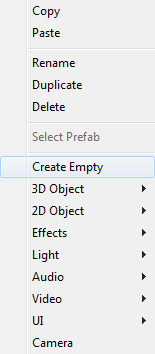
it's only purpose is to be turned on and off, disabling or everything below it or not.
red mortar
Okay, i understand that concept now. And now its just this one gesture you mentioned, in the gesture to enable/disable a set, in the animation window for it, i can. . Load other gestures to be played?
fierce bane
no, you're disabling the parent of whatever belongs to the main set, and enabling the parent of whatever belongs to the second set
you're faking a second set of gestures because there's no way to switch between actual sets...That's why you have fist (or whatever) activating multiple things (of which only one parent is active, so only one activates)
In this All the Fist and Point gestures are disabled, as are the GestureSet2/3. GestureSet1 is the only one left enabled.
This is OUTSIDE the animations, not in it.
https://i.imgur.com/GUm75AM.png
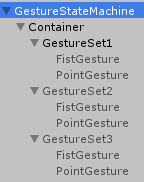
Fist Gesture for the above image
https://i.imgur.com/4DDeLED.png
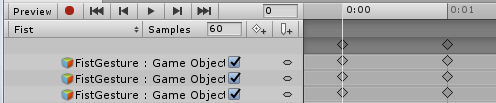
Point is the same, but for point instead obviously.
This is the Animation that enables gesture set 2:
https://i.imgur.com/r354oAv.png
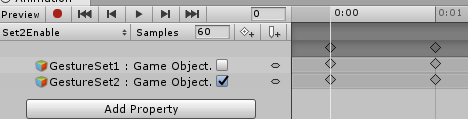
and the set 3 is the same, except it enables 3 instead of 2 obviously. Note the "GestureSet1" being disabled
that's it...."set 2 enable" would go into whatever your set to gesture is going to be (rock and roll for example, or fingergun, or whatever you choose)
And the "fist" gesture would just go in fist override (again, or whatever you plan to use to enable that set)
And point in point (or whatever is chosen)
@red mortar read above, there's multiple images of everything needed now that I had a few minutes.
 clear yew
I'm attempting to replace the 'Open Hand' animation in my journey to use Snail's marker.
As is, my hand is 'flickering' open, and I'm not sure why. Here's my animation:
https://i.imgur.com/uBqfAga.png
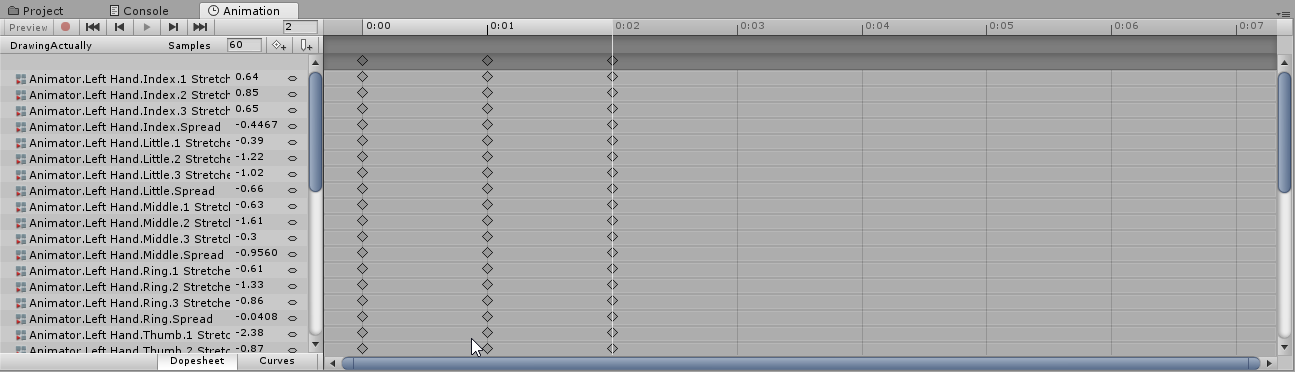
All the keyframes are the same, with the hand being 'open' like default
fierce bane
you have 3 frames for a gesture, you should have only 2
clear yew
I've tried it with 2, and it made no difference.
fierce bane
0:00 and 0:01 should be the only ones, and should be EXACTLY the same, copy paste if you have to to make sure.
clear yew
Mhmm, all copy/pasted
fierce bane
but if it's flicking back and forth it's likely being overridden somewhere. And more than 2 frames can cause its own issues
clear yew
I'll re-fix the file to just have 2 and give that a go again then
fierce bane
personally I'd delete the two second frames, make sure the first is showing the right position, then copy back over to the second frame
sometimes Unity just seems finiky too, so remaking it or copying it to a new animation seems to fix the corrupted one. So if you keep having issues you could try that
red mortar
https://gyazo.com/c89dab4ad393c4ee80f4c706769cecbd Okay, I get that, but what I'm really confused about is what to put in what I highlighted, the actual gestures themselves. On the bottom are all custom gestures, each changing body parts, summoning material, and playing audio.

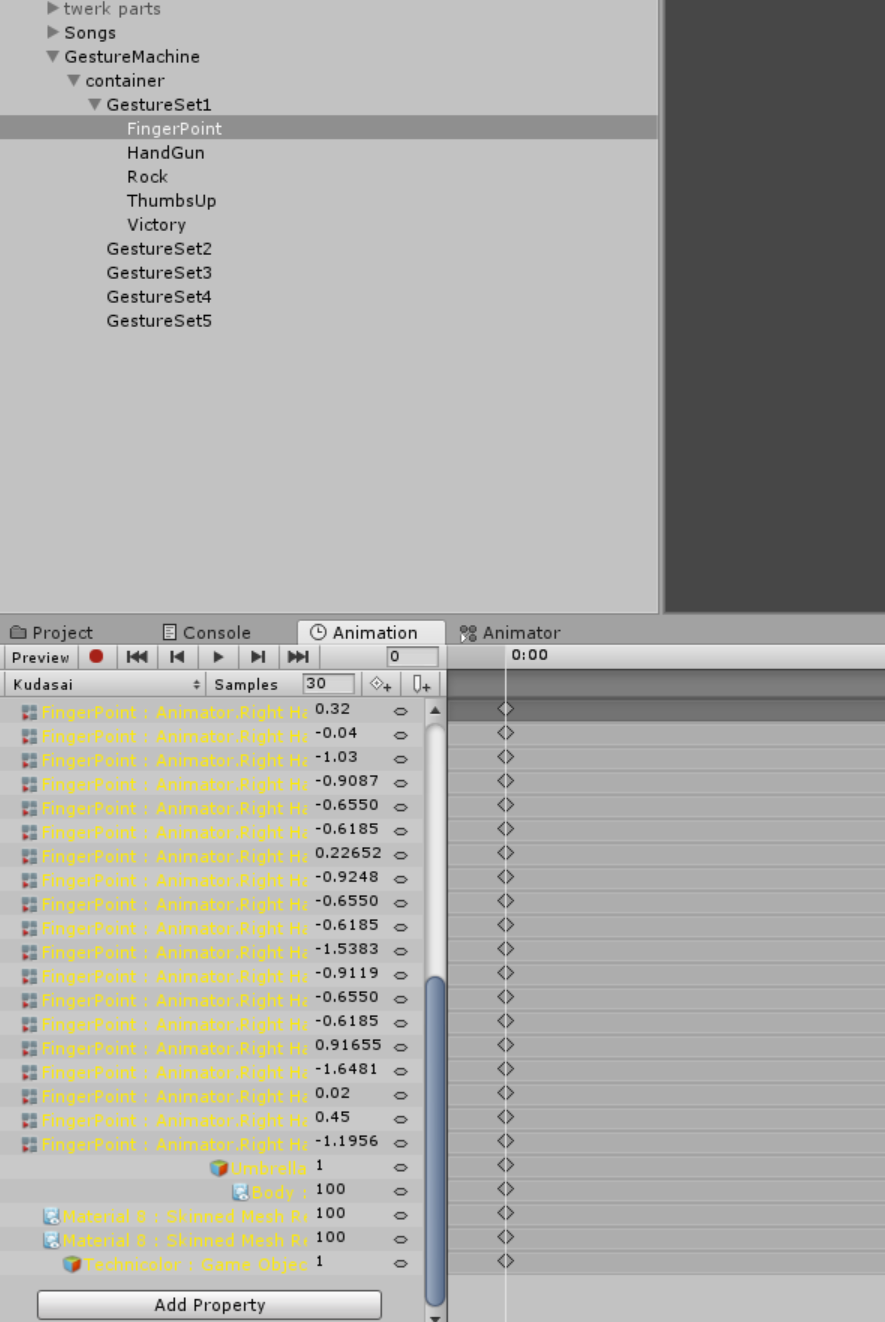
I thought I knew what you meant, and to test, placed one of the gestures into one of the sets, but I got this lol
using gestures to disable one set and enable another, but I suppose now, I'm just curious on how to activate or what ever, the gestures for that gesture set I enabled.
fierce bane
yes you have to fix it, the path changes when you move it, click a property in the animation and hit F2, it'll open the path for editing, make sure it matches what you have
red mortar
https://gyazo.com/f7bcc6301455c5c62aa4b191a13047ee Uhhh, but now, when it does come to this, in game, how does it activate? This isnt changing the model at all when I hit preview
 fierce bane
the only thing you needed to do is put a SINGLE empty game object above your gesture location then fix the (now yellow for invalid) path.
If you are doing body movements (other than mimicking the fist or point etc) make an animator controller and enable it with the rest of the gesture on it.
If you're just enabling different sounds or objects, an animator isn't needed, but the body/shapekey movements would need it.
like that skinned mesh render something would have to be on an animator because it changes something you cannot place below the empty object
red mortar
Yea, I put in an animator, and placed the avatar where its asking for avatar and it made all those animators fixed, but that do I have to do to fix the skinned mesh renderer>
fierce bane
select component, F2, Fix path
red mortar
F2 just allows me to change the name?
https://gyazo.com/69fc575632bb2781a0ff29de056d3170 Would this just work too? Imagine along with the fingerpoint object under parent GestureSet1 with other objects/musics. Would just putting the animation componant achieve the same thing and play when activated?

 velvet ginkgo
Whenever I do a custom hand gesture, I get a delay. Anyone know how to fix this? Thanks.
 hollow perch
@ruby canyon can you click the animation clip itself and screenshot the inspector? Have you tried changing the bake to root bone setting for each thing
@velvet ginkgo that indicates usually that one of your hand gestures has a keyframe other than 0:00 and 0:01
For properly functioning gestures you should have two identical keyframes at 0:00 and 0:01 and delete the default frame at 1:00
 ruby canyon
@hollow perch I have tried changing all the baking settings but it hasnt changed the outcome. This is what the inspector looks like https://cdn.discordapp.com/attachments/338208221313368064/548731562670161938/unknown.png
 hollow perch
Does the animation have keyframes for Animator.Root T and Animator.Root Q?
ruby canyon
@hollow perch Yes it does
 bold dome
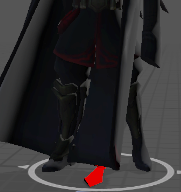
i overrided the default idle animation with my own. it looks fine in unity: https://i.imgur.com/lyXeSIM.png
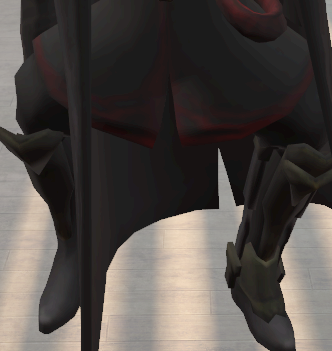
but the legs squat strangely when in-game. https://i.imgur.com/NCdBAW9.png
is this because the feet are wide apart in the custom animation?
is there a way to retain the pose that i want by disabling leg IK, or am i forced to use the default leg pose?
 bold dome
the squatting is affected by looking up and down. looking down makes it worse
clear yew
not exactly sure on an answer but when one of my avatars had a squat like that it was the leg bones rotations and positions so you could try that out
bold dome
was that in avatar configuration or the animation itself?
clear yew
for me i just fiddled with the bones in blender
bold dome

 spice urchin
try applyig the full body tracking fix in CATS
bold dome
didn't work. it's not an MMD model
the legs look fine with the default idle animation so it's surely not the model's bones that are the problem
 proven flint
Is there any way to get the game to stop VR tracking during a run animation?
Or do I have to use emotes and state changes to get the animation I'm looking for
 void roost
Anyone know offhand how long a gesture's animation can be?
 torn pawn
it takes 5x the frames to go back to default state from what i remember
so if you have 10 frame gesture, that gesture will be locked for almost 1 second
 slim sparrow
It's like 0.13 seconds
torn pawn
if you have 10 frame gesture, your gesture gets locked for 50 frames
 paper kraken
How should I make an object stay without moving,?cuz I already did add a fixed join on my main avatar's bone and added a rigidbody on the gameobject that I wan't to stay without moving
 reef nexus
I posted a picture of what your armature should look like if cats FBT fix doesn't work in #avatar-rigging
paper kraken
I'm not talking about what should I do with the armature (I already did that b4), I'm talking about how to make a game object with a rigid body stays without moving while I move
@reef nexus
paper kraken
Oh ok it's fine
 fiery compass
hi, I'm having a similarish issue as the one prior with idle animations. I replaced the default idle with my own, and this happens. As you can see it kind of.. breaks when I move my camera down, any idea why? thanks https://streamable.com/7jbu0

every other animation also works fine, in unity and vrchat
hollow perch
@fiery compass You asking about the crossed legs? That happens when unity isn't sure which way your knees are supposed to bend because they are perfectly straight. Applying a small 1 degree bend in your knees should be enough to make sure they bend in the correct direction
In the humanoid rigging page or in blender
fiery compass
@hollow perch oh that's simple enough, thank you!
 onyx agate
Can someone tell me how i can make animation to always play (i have wings slowly flapping on the hand open gesture now but this makes all other gestures turn to a slow crawl), adding the flaps to idle doesn't seem to do anything)
hollow perch
@onyx agate You put your wings animation as an animator on armature. You have to edit all your keys with F2 to remove Armature/ from the beginning of each key. This tool can help you do this: https://github.com/s-m-k/Unity-Animation-Hierarchy-Editor
GitHub
Contribute to s-m-k/Unity-Animation-Hierarchy-Editor development by creating an account on GitHub.
fierce bane
A bit late, but another note:
You can also make animations for specific animators by selecting it instead of the avatar, then it'll work from the animator down.
clear yew
Does anyone know which armature translation/rotation values are ignored in custom animations when you're in VR?
Obviously the shoulder/elbow and hip/knee rotations are ignored in favor of the IK, but I noticed that toe and finger rotation values stayed, despite being in VR. Also, if the animation causes the character to sink into the ground, that is included as well.
So therefore I have to make sure, in a custom animation meant to be used in conjunction with the arm/leg IKs for VR, that the:
- Finger rotation values are set
- Toe values are set
- Root translation values are set
Is there anything I'm missing?
The reason I ask is because when trying to create a custom idle animation, I'm trying to use as little keys as possible. Unfortunately, though, if I just use keys for my character's blinking and breathing, he also sinks into the ground in that weird, default unity humanoid position. When looking at the sample animations for reference, I noticed that the "Animator.Root Q" and "Animator.Root T" properties had to be paired up with SOME sort of property of another piece of the armature, otherwise it would again sink into the ground.

Root Q and T with a random leftover shoulder property from a sample idle animation. And when I delete it..
 paper kraken
How can I make an object stay still while I move? I already added a fixed joint and a rigidy body with a constraints on it but didn't work
fierce bane
@paper kraken you want the fixed joint with an empty rigid body slot, nothing applied in it.
You also need to have an animation reseting the position of the object when it's not in use. Rokk's world object example has everything you need.
paper kraken
So how can I do that?
@fierce bane
Like I know some rigidbody but making an object stay while your avatar moves, that's my only problem
fierce bane
fixed joint, nothing in rigid body slot. Just said that
https://i.imgur.com/yW2likZ.png
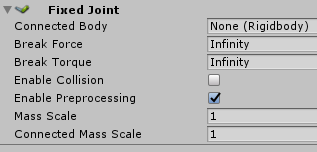
that'll anchor in place wherever it's enabled because there's no rigid body to connect to
void roost
Is it possible to use the animator to make an animation start another animation? For example, a gesture being a single frame, but then make it so whenever you use the gesture animation, it starts another?
hollow perch
@void roost Yes, you can activate a whole disabled object hierarchy with an animator on it... or to enable an animation on an active object, you can have an animator component which is unchecked and use something called a Behaviour.Enabled toggle to play the animation while holding the gesture:
Copy and paste from here into your hand gesture the usual keyframes 0:00 and 0:01 only and press F2 to rename the path to whichever object has the disabled animator https://gist.github.com/lyuma/0485f6191357eec03c7fd402768ffc75
 torn pawn
https://docs.vrchat.com/v2019.1.1/docs/vrc_ikfollower or youtube "vrchat world particles"
IKFollower is intended to be used to help particle systems sync up with their proper location after the IK has been solved, so you can shoot particles out of your hand into world space without having to use RigidBodies. This is far more optimal and has almost no performance c...
 acoustic plover
I made some animations (blinking, tail, etc.) in Blender and exported them via FBX. Although they show up in the unity prefab, I cant seem to use them in that state. I havent found any tuts on what to do with them at this stage.
slim sparrow
@clear yew idle animations work completely and are later overridden by the IK. Walking animations work, but only for all humanoid muscle values. Hand gestures ignore all humanoid muscle values that aren't fingers or hands.
@acoustic plover for the tail, CTRL+D to duplicate the animation out of the FBX
slim sparrow
Put an Animator on the first tail bone in Unity, drag the animation on the first tail bone, then press F2 to fix the paths
acoustic plover
👍
Should I just do an animation that includes all the bits used? Say that I make happy emote that involves ears, tail, facial expression and eye blinks
slim sparrow
If you're doing a full emote then yes
If it's only a hand gesture (done with Shift+f1-f8 on desktop), you should only include the relevant bits and no full body animation
acoustic plover
well the idea is to make moods that are triggered with hand gestures. Its not really full-body as the rig is for VR gear. But I did want to involve the tail, ears, blinks and naturally the expression
slim sparrow
Just include the ear, tail and facial expressions in the hand gesture. You'll probably want a finger pose too, but that's easier done in Unity than Blender
Hand gestures are generally easier in unity anyway
acoustic plover
You didnt mention the blinks, though. I should add that I am not using Cats for this
slim sparrow
Yeah, blinking is best done with an Animator on the main mesh. @acoustic plover
That is, if blinking is a shape key (which I recommend)
If it's not a shape key, you will have to put an animator on the first common ancestor of all eyelid bones, such as the head bone.
And then animate it from there
acoustic plover
yes they are shapes.
any particular reason why the blinks are better done in Unity?
slim sparrow
Well, they don't necessary have to be done from within Unity, but you will have to change the animations in Unity regardless
If you do the animation in Blender, the blinking is animated from the perspective of the "main model". Problem is, you can't control the animator that's on your avatar. You can only control animators further down
If you do it in Unity, you can put an Animator on the body or on the head and create the animation with the paths correct the first time
Otherwise, you will have to press F2 to change the animation paths and strip off all the Armature/Hips/Spine/Chest/Neck stuff
Which is also an option of course
 low ruin
what type of animation should i use on my wings for a idle animation ? legacy, generic or humanoid ? its separate from the main mesh
slim sparrow
Put an animator on the wings, choose generic type if it's external
You should attach it in Blender rather than Unity though
low ruin
attach both armatures ?
slim sparrow
Yes
low ruin
is there any particular reason why i should do that ?
cus i already added and positioned all the objects on the main mesh on unity
 honest quarry
can anyone help me I got a gun that has a shooting animation already so how would I set that up with a gestor override.
low ruin


you duplicate that
and rename it to whatever name you want
then you open it and drag the gun animation to the handgesture you want to replace
after that you drag the custom override you created and drag it here http://prntscr.com/mpj4ld

on your vrc avatar descriptor tab
if im wrong someone pls correct me
slim sparrow
@low ruin it's more optimized to have everything on the same mesh and also sharing as many materials as possible
Don't be that guy with 25 materials and 5 skinned meshes
low ruin
oh its all about optimization, il give it a try then
 brittle flicker
Would it be possible to create shape keys from existing animations?
hollow perch
You mean poses? Pose to Shape key in cats will do what you want. Shape keys are linear (move in a line) so animations that include rotations might not handle so well. Also they are applied on top of bone deformations. If you mean moving animations, shape keys in unity do support keyframes: so in theory it might be possible to run a simple animation as a shapekey
brittle flicker
I kinda wanted to do both. There's a pose in one of my avatar's animations that I want to save as a shape key, and for my other model, Shadow the Hedgehog, the moving animation is what I need for his blink to work correctly.
hollow perch
Do you have the animation loaded in blender? Pausing the animation at a frame and doing pose to shapekey should do what you want. Or you want to do this entirely in Unity?
brittle flicker
"Pose to shape key" is only through CATS, right?
hollow perch
I mean it's just a feature made easy by CATS. The real logic is done with blender operations and should be possible even without cats. Cats is mostly a bunch of separate buttons. You don't have to use any features you don't want to.
brittle flicker
Yeah, I find that a lot of CATS extra buttons are useless to me since they go a little overboard sometimes.
How can I save the pose as a shape key?
hollow perch
I Agree. Some cats features are overcomplicated and don't work in some situations or have unintended side effects like joining all your meshes or unhiding all objects (though I think they fixed that bit in the past months)
brittle flicker
Because when I try it with CATS, it just resets it to T-pose.
hollow perch
But should have also created a shape key with it
Hmm maybe you should google how to do it. Someone else must have written a simple script to do exactly that or you can try some code in the python shell yourself
brittle flicker
Ah, never mind. Figured it out.
So there's a way to edit shape key keyframes in Unity?
hollow perch
No way to import or ui to edit. However, unity does support keyframes and accessing them by code is fairly straightforward. If you want I could throw together a simple editor script to take a set of blendshapes named with prefix and percent like Blink_25 Blink_50 and merge them into a single blendshape at those percents. I have a template already for mesh edits so would only take me a few minutes to write
(It's possible unity runtime doesn't support them either: I know of nothing beyond their existence in the scripting api)
brittle flicker
That sounds perfect! Thank you!
paper kraken
@fierce bane alright thanks
 finite rock
Hey guys, so i made an animation for a gesture were a prop is enable, the problem is for some reason i can only see the prop on the mirror, even do for other ppl it works normal. Anyone knows how to fix it so i can see it without having to look/use a mirror?
hollow perch
if your prop is attached to your head it will be scaled down for only you to roughly 0.0001 scale, so it might be basically invisible. If you want to see it you must attach to your neck (will rotate half the amount as head), or to get exact motion of head, make a game object inside neck and then use rigid body/fixed joint to copy rotation from head
finite rock
Oh yeah it was attached to the head, ty vm
hollow perch
@brittle flicker Updated my editor script here: https://raw.githubusercontent.com/lyuma/LyumaShader/master/LyumaShader/Editor/AssetizeMeshes.cs - now contains a function called Keyframe Blendshapes in that little Gear dropdown in the inspector on a mesh/skinned mesh renderer component.
The way it works is you must import blendshapes named like this:
coolface 10%
coolface 30%
coolface 50%
coolface 100%
and it will generate a single blendshape called coolface that hits those keyframes on the way from 0 to 100. It also supports _ instead of space if spaces cause problems.
Another cool thing you can do with this script is create instant blendshapes. nice for those 2D visemes that people like to do because you don't have the clipping or interpolation issues. Just name the blendshape like vrc.v_ch_0% and run the script and vrc.v_ch will now show 100% of the keyframe if it's a nonzero value
so even like 0.00001 will be the same as 100
brittle flicker
Sweet! (I usually tend to use underscores most of the time anyway.)
So, by "instant blendshapes", you mean that it's essentially possible to get my model's blink animation to work correctly by moving the eyelid vertices back to their default positions (which is necessary, and the reason they are moved out of view in the first place is because it would look like the avatar is half-asleep) and then perform its blink animation from there?
SEGA has a really stupid way of making Sonic character models' eyes blink.
hollow perch
can't say I fully understand what you want but putting a keyframe at 0% has the effect of making it fully apply if you set the blendshape to anything above 0, even 0.0001. basically you can control the speed your visemes take effect
similarly you can put it at 10% and your blend shape will take effect 10x faster than normal
brittle flicker
So, whatever the end value (the 1.0 value) is set to, setting the shape key value to any number above zero will be like setting the value to 1.0?
hollow perch
I don't understand the question sorry. Do you mean 100 (unity works in percents)
brittle flicker
Well, I'm talking Blender-wise.
It should be somewhat similar, though, right?
Anything above 0% can basically be 100%, right?
hollow perch
yes, that's what this feature will do if you name the keyframe _0% and run this script
brittle flicker
Okay, cool.
hollow perch
unity made things really confusing by doing blend shapes in percent while everything else in unity is 0 to 1 and every other program is 0 to 1
brittle flicker
Agreed.
clear yew
right now i have an empty game object with a trail renderer on them,,
if i want to have the trail renderer activate on gesture, would it be better to:
keep game object active and disable/enable trail renderer on gesture
or keep the trail renderer active at all times and toggle game object on on gesture?
or does it not matter
also sorry if wrong channel, not sure which iwi
hollow perch
I think they are the same performance wise: in both cases the trail will be completely hidden (and cleared?) However, the avatar optimization will not show the trail if the whole game object is disabled so maybe do it that way

 spring wigeon
i need a bit of help
im trying to make the open hand gesture on an avatar, but the animator option won't appear in "add property" menu.
even when i tried importing the open hand animation from the vrchat animations it just gave yellow text saying (missing) on it
clear yew
did you rig it as a humanoid? @spring wigeon
spring wigeon
will double check
did not know it needed to be
well i knew it needed to be to work on vrchat, but not for doing that, i thought it was the vrcsdk that made that appear
it was in fact that
note to self: set model as humanoid first before doing ANYTHING
clear yew
need an idle animation done for wings on a model i made. willing to pay.
spice urchin
ez money btw ^
clear yew
Yes lol
honest quarry
Hey can I have some help? I have been trying to add multiple custom animations to my avatar but for some reason it will not work can someone help?
slim sparrow
You'll have to be more specific than "it will not work"
honest quarry
When I try to do the animation it will merge the two sound clips i have on my avatar
When I try to do the animation it will merge the two sound clips i have on my avatar @slim sparrow
Do I need multiple avatar controllers?
hollow perch
Porting legacy animations is in pins. But basically you make an animator on something inside your armature like Hips or Root_Tail or whatever. Then you record the animation there
If you already have a good animation you can press F2 and remove Armature/ or Armature/Hips/ from each one or open it in notepad++ and find replace if you have asset format as text, or use this tool to change your paths https://github.com/s-m-k/Unity-Animation-Hierarchy-Editor
GitHub
Contribute to s-m-k/Unity-Animation-Hierarchy-Editor development by creating an account on GitHub.
@clear yew make sure your animation is no longer set to legacy also
 placid wigeon
whats the set up for the rigidbodies for the 4 arms and such
oh wait NVM
got it to work
 odd mist
Im having some problem with invisibility on one of my avatars, have done animations where i disable the body mesh before, and that worked fine, but apparently on this avatar the body mesh don't reappear for anyone else but for me locally. Anyone had any experience with this bug ?
slim sparrow
Yeah, your avatar is being culled and isn't reactivated @odd mist
Put a cube with an invisible shader somewhere and activate it on the gesture that disables the body
slim sparrow
Yes
odd mist
Weird
slim sparrow
To prevent your avatar from getting culled
It's because for others, your avatar is out of view and therefore no longer needs to be processed
So it never realizes you stopped doing the gesture or emote
slim sparrow
Yeah, that would explain it
 brittle granite
@torn nebula Hello!! i actally had this exact problem
first off, don't have the animator turn on or off mesh renderer, it doesn't always work well in situations and some peoples games may not get the call to 're-render' a mesh
its best to have Objects turning on and off.
SECOND: you must always have something being rendered on your avatar at any given time.
if for even one frame, all objects are unrendered some clients may end up completely culling your avatar
to get around this, have an invisible box being rendered at all times.
 torn nebula
@brittle granite I think you pinged the wrong person, but thanks for the tip anyway. xD
I was considering trying something like this soon, and is nice to understand the exact reasons for this bug. I've seen it happen to others.
hollow perch
You're not going to find people here willing to help you make vr users sick.
 candid pasture
How would i go about taking an animation from vcrmods and adding it to my model
brittle granite
@odd mist Hello!! i actally had this exact problem
first off, don't have the animator turn on or off mesh renderer, it doesn't always work well in situations and some peoples games may not get the call to 're-render' a mesh
its best to have Objects turning on and off.
SECOND: you must always have something being rendered on your avatar at any given time.
if for even one frame, all objects are unrendered some clients may end up completely culling your avatar
to get around this, have an invisible box being rendered at all times.
honest quarry
also can anyone help me with creating multiple gestor override animations I don't know how to put more than one on my avatar
 west vortex
@hollow perch you are litterly a genious
hollow perch
Hi?
west vortex
so your shader helps issues with certain visemes not working properly either its to far in the head or barely shows outside the face?
because i have that issue and its not one i've been able to fix myself I ment blend shape issues where the eyes don't fully show the thingy idk what to call it
or is it a script idk? but if i can figure out how to use that then i can actually make emotes for the eyes work, for round eyes and star eyes
hollow perch
I don't quite understand. It might just be you need a cutout or transparent shader
west vortex

for ref
the blendshapes arent 100% working
thats max value
not quite sure why, but yeah thats what i'm talking about @hollow perch
hollow perch
How is it supposed to look? Looks fine in blender?
Is it maybe a weight painting issue if you turn the head or eye bones
west vortex
it moves with the head
its a blendshape that isnt fully working
so it does this wierd bs where its not positioned right
no idea how to fix it
i feel like that blendshape also requires another blend shap to work right but i doubt it
hollow perch
Do you have blender? Can you make sure it looks good there? I've never seen it look different in the two
west vortex
yeah i have blender
how would i adjust it there if its completely fucked
in blender if i increase the value past 100% to 120% the blendshape works
honest quarry
can anyone help me I am trying to make my avatar have a space texture that changes position depending on the way that you look at it can anyone help please
hollow perch
Prazel you should be able to use a command in blender to take the 120% blendshape and clone it as a new blendshape
 steady nexus
cool
 main light
hello, i was wondering if i have a weapon on a avatars back, and i want it to dissapear to the hand with a gesture, how would i make it gone? i got the gesture working, but there is two of the item, oner in and one on the back, how would i remove the one on the back
red mortar
@main light So what I do is make two copies of the weapon, one that is always on (the one on the back) and the other that positioned in the hand, but disabled so it doesnt show. Then in the gesture animation window I enable the one in the hand, and also after puting the model on the back in the same animation window, I check mark it off.
 spring seal
How do people have the gestures set to where one hand pulls out a weapon or something, and the other activates particles or a material change built on the weapon being out?
spice urchin
u simply just do the change anyways
if the object isnt active u wont see any of that so
spring seal
lets say i want a gesture with just my sword, and i want the gesture on the other hand to then change my body material with the sword still out
spice urchin
exactly
u simply just do the change anyways if the object isnt active u wont see any of that so
one gesture could change material
the other would activate the sword
fairly simple
if sword isnt active u wouldnt see the material change
bc its not active...
thats also how a lot of people do dual activation gestures
such as binding gestures to different particles or items
and having one gesture that triggers the active one
like a laser gun and a minigun that both fire on victory but are pulled out on different gestures for example
spring seal
i see, have different gestures be the activation
spice urchin
well not really
again the object and its parents have 2 be active in order 4 u 2 actually c it
so no matter what u do 2 the objects
if its not active u wont see anything happen
so simply u would just have 1 gesture activate the entire object group
and another activate the particles within the group
and such
spring seal
yes, like i said. Have a different gesture activate the extra stuff.
red mortar
https://i.gyazo.com/ad1953f3372a66f70a7f888152be3444.mp4 Is there a reason why its getting unchecked while in preview? Its not allowing me to check them, does this effect anything?
candid pasture
Nevermind figured it out myself thanks
 last mica
Can someone tell me how to add a song,dance, and particle effects to an emote 1
So its not a hand trigger
 pliant plank
Emotes can play as long as you'd like them to but your IK resets after a minute or so, so you need to select a random emote or else your IK will override the animation
(Your animation keeps playing untill it's done, selecting a random emote in that time will just keep that emote playing properly)
spice urchin
they also end prematurely
clear yew
I guess you can also disable ik during the emote
pliant plank
@spice urchin Increase the animation by like 2-3 seconds and it won't end prematurely anymore
slim sparrow
Yeah, but it's still a bit of an annoying workaround. Is the exit time on the emote states possibly set wrongly?
It seems to be 0.8 something
pliant plank
It is rather annoying to do, but it is fairly simple to setup thankfully
 livid socket
How do I use an animation for Lip syncing?
My intention is to sync illumination intensity of a material to the volume level of my mic
slim sparrow
Not possible unfortunately
The best you can do is duplicate the material's faces and move them inside a bit
Then on a shape key, move them outwards
And make the duplicate faces more emissive
livid socket
So using an animation as Lip sync is not possible?
slim sparrow
No
slim sparrow
Only shape keys or vibration of the jaw bone
brittle granite
@livid socket you can do a work around but it's a lot of heavy lifting. You double rig the face. and lip synch. Basically on top of your blend shapes you rig up a full set of factial bones on your character. You can have the animator override thge facial bones while the visemes are used by the blend shapes.
spice urchin
yea u cannot change anything other than vertex offsets with blend shapes
how people do stuff like volume indicators is the blend shapes just move the indicators up and down
u can however make characters lip sync to songs if using an animation
using ur own or existing keyframes
 slender rivet
Anyone know how to fix this problem?, i made an animation that hides 2 bodies (body and hair) and one of the bodies has a sound source, and i placed that animation on the finger point, for me it works fine, but for others i suddenly go permanently invisible.
slim sparrow
If your entire avatar is turned off it's culled and won't turn back on correctly
Just make an invisible cube and put it on your avatar, activate it when you hide your meshes @slender rivet
slim sparrow
Put an invisible shader on it, Standard with Fade set to fully transparent or something
slender rivet
ah alright, thank you very much for the advice
 winged tide
so, how do i replace the emotes in the emote menu?
 torpid cobalt
Animation override in unity
Its in the example assets of the SDK, you duplicate it, put it in the standing animations slot of the avatar descriptor, and place animations in the labelled slots @winged tide
winged tide
ok
clear yew
Am aware custom crouch animations don't work but do custom crouch walking animations work? O w O
spice urchin
wym
clear yew
Ah
slim sparrow
Prone idle also works
clear yew
Thank you
Could be fun to customize the crouch walking animation
For like a lazy slower walk
 olive yacht
I'm having trouble with an emote, I have it applied as an override but when I try to view it in unity or vrchat, it puts my character into a bugged state
The thing where they're sunk into the floor with their hands forward
slim sparrow
That's just the default animation pose.
 marsh tiger
I had that issues once, I had to bake the animation
slim sparrow
Your emote probably doesn't include any humanoid animator properties
For example, don't use "Left arm : rotation"
Use "Animator: Left Forearm Stretch"
You can't rotate humanoid bones directly
Show a screenshot of your animation window perhaps @olive yacht
olive yacht
That's probably it, honestly. I imported it from 3DS Max and none of the parts have animator on them
Is there a way to convert the animation or do I have to do that manually?
slim sparrow
If the animation is imported, that means it came attached to a model. @olive yacht
Configure this model as humanoid, then CTRL+D the embedded animation to get a new animation file out of it.
The animation should then be automatically made humanoid
olive yacht
Oh, no I modified the animation in 3ds max and exported it as just a rig, but I can do that as well
I'll give that a shot
slim sparrow
Ah, I have no idea how that works to be honest. As long as you can import an armature with animation attached, rigging the armature as humanoid should convert the animation. You can expand the imported FBX in assets and press CTRL+D to duplicate it out of the FBX afterwards.
This might not work if the animation has weird characters in it, like |
In which case you'll have to rename it in the import settings first
olive yacht
Oh, I just realized I can convert it even without a mesh
 stray helm
Does anyone know why Mixamo would randomly decide to not take my model anymore? I got it to upload before and haven't made any changes to the model since.
olive yacht
Thank you, changing it to humanoid fixed it
brittle granite
@olive yacht. OOOOHHH???!! YOU USE 3DS MAX?!
@olive yacht. OH BUDDY WE GONNA BE FRIENDS!
clear yew
🎵 Master of puppets, I'm pulling your striiiiings 🎵
 proper blade
. . . .
brittle granite
@olive yacht hey buddeh. The bi-ped is really good for rigging the human IK in max. Also if you rig with the bi-ped the mocap mixing tools are VERY VERY nice.
But hand keyed animation is best left up to the CAT rig system.
Basically what you can do, you can mix and match mocap data with your skinned mesh in 3ds max using biped. HOWEVER if you want to hand key something. Make a humanoid character with CATS and animate that. Then export the animation out in .fbx. take it into unity. Convert the rig to human IK. Then you can apply the animation you made to the your avatar in unity
You ever mess with any of the re-top tools in 3ds max. They are 😘 👌
clear yew
@proper blade What ?
olive yacht
To be honest I'm still pretty new to 3DS Max. I appreciate the tips, but I'd rather not derail this section with program discussion
proper blade
@clear yew what did u say what for
clear yew
Why did you put the dots ?
proper blade
yall was being yall and i was hoping to ask something
clear yew
You want to ask something ?
Do it
brittle granite
@olive yacht ah well basically to have a deeper understanding what is going on within unity. The human IK rig system is essentially a re targeting system to get rigs on a generic level. That is why the animation data changes after you apply Human IK rig
it's essencially converting an animation file type into human mocap data
stray helm
If I wanted to make a single frame for an animation would I be better off trying to do it in blender or in unity itself?
brittle granite
that is why in the animation section of the inspector you have to choose the root node.
clear yew
@stray helm What do you mean ?
proper blade
@stray helm what
clear yew
@stray helm Blender is mostly for the long animation as i heard
proper blade
me no get
stray helm
When my character stands still, instead of the default I rather use a custom. Since I don't have VR right now.
proper blade
ohh
stray helm
And ok Konix, i'll try it in unity then ty
stray helm
Yeah.. Unity doesn't have the best animation making system..
That might actually be an understatement lmao
But it gets the job done for making one object appear, i'll give it that
clear yew
Yeah exactly
 drifting brook
anyone know why my particle emitter sometimes fires higher than the emitter location is?
drifting brook
anyone know whats up with the hip rotation when you convert a vmd animation?
stray helm
So in my search to find something out of getting annoyed at the unity animator I found a unity asset called "UMotion" it has a free and a pro version and is an in unity animation editor/creator. It works really well with a bunch of different settings and options for you to mess with. Just thought I'd put that out there for you guys. And for someone like me who has no experience in animations it was really helpful~
 ruby thistle
question, is it possible to go back and fix up an animation after you've uploaded an avatar with said animation to vrchat?
stray helm
Yeah, just gotta re-upload your avatar after fixing the ani
ruby thistle
ok. i guess im just looking at my animation timeline wrong. it zoom in any farther than 1 second itervals on the dopesheet i guess?
stray helm
It can go a lot shorter time than one second yeah
fierce bane
the animation timeline is Frames not seconds (IE 1:00 is one second, not 0:01)
ruby thistle
oh shit i forgot bout the whole 60fps thing. is there an easy formula for someone to get timing down properly? im really bad at math >.>
fierce bane
well...there's 60 Frames Per Second so...
ruby thistle
ignore me. im dumb :p
ruby thistle
i must be having issues. im doing a small animation where a statue of venus grows in my hand, but i have it scalled down super small in my hand when it spawns, it would grow into view, but when i get it full size it protudes out of my hand. i've tried deleting the keyframe, double clicking on the spot on the dope sheet that i want and position it properly, but when i play the preview, i wont move to the palm of my hand.
 hallow elk
Hey I've been having this issue with muscle animation editor, is there anyway I can make it realise there are humanoid models in the hierarchy or will I just need to do it manually?
https://cdn.discordapp.com/attachments/529269108064387093/550647701381971968/unknown.png
https://cdn.discordapp.com/attachments/529269108064387093/550649152825196545/unknown.png

 slim sparrow
@hallow elk delete Muscle Animation Editor and import the latest version from the asset store.
Older versions have this bug
hallow elk
ah ok, thank you
 abstract lynx
Does anyone know how to put an animation on a gesture?
spice urchin
yea
they can only be a single frame long unless u use it 2 enable/disable an animator or object with an animator
honest quarry
can i have some help? how do i use multiple gestor override
clear yew
I have a tail on my avatar and when I animate it to move towards my chest, I have to disable the dynamic bone component. Also, it moves way too qucikly. Any help?
fierce bane
@clear yew enable an animator with a timed animation if you want it to move slowly. Gestures go between off and on, they don't flow into them smoothly. (triggers in VR can allow you to do partial or slow gesture movements though)
And if you want to keep a dynamic bone turned on when moving you have to disable the component while you animate it. (turn it back on after of course)
@honest quarry you'll have to clarify exactly what you mean by that
clear yew
Hm. I just figured I'd make a shape key, and even though it looks slightly worse, it'll work better.
Thanks tho!
honest quarry
I want to play two different sound files for two different Gestor override animations
fierce bane
A shape key also snaps between off and on unless you make an animation, and the bones will stay wherever they were, so the dynamics may look off
@honest quarry you just make two separate animations that enable the audio source you want to play, then drag those animations on top of the custom override and make sure the custom override is in your avatar descriptor
fierce bane
not if both of those audio sources is disabled by default, and the gesture only enables one of them
can you screenshot what you have currently? both for the override controller and your animations?
and hierarchy too
honest quarry
sure on sec I'm still working on the avatar and i will be on that stage in about a sec i will send the screen shot soon thanks
@fierce bane here
i cant upload in the channel
fierce bane
hence the "here are several tools that can take and immediately upload screenshots if you don't currently have a way"
you post a link and it'll display in channel
fierce bane
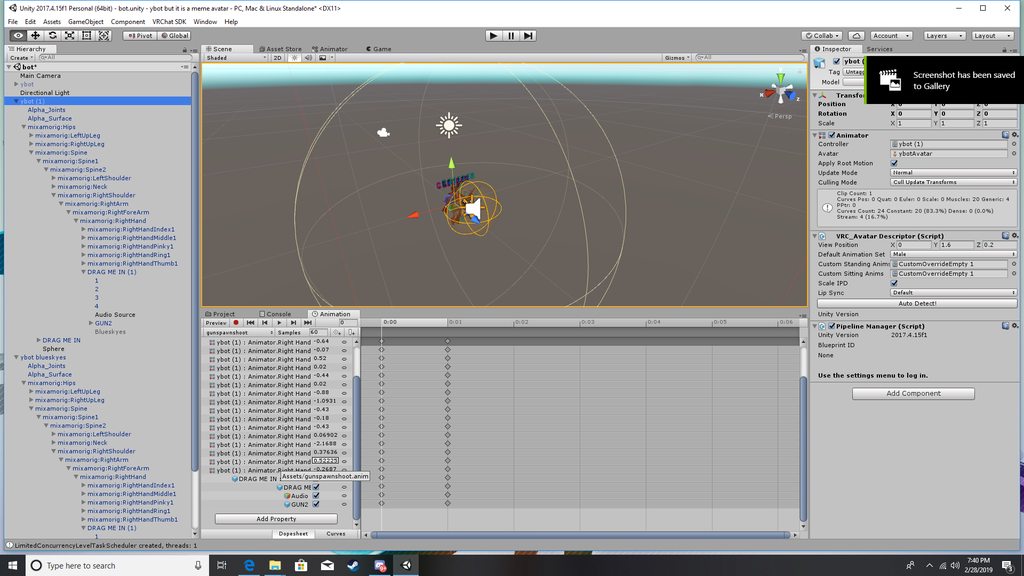
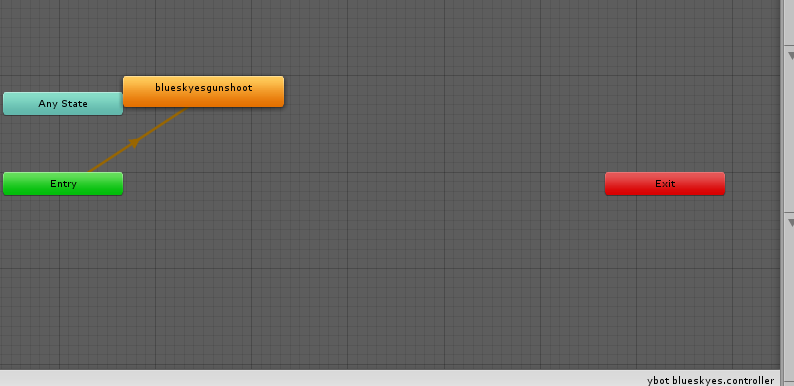
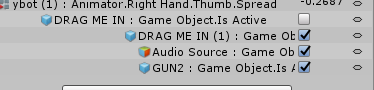
your "audio Source" is enabled by default, so when you activate that gesture it will immediately play, you're also enabling your "blueskyes" audio source so that's why both are playing
both are enabled at the same time
when you enable a parent object, any child of it is also enabled.
honest quarry
i know i disabled them
fierce bane
I assume your GUN2 is a gun in your hand, and the Blueskyes is a gunshot or something?
fierce bane
what is DRAG ME IN (1)
honest quarry
that is the gun
fierce bane
and you have a sound effect that plays when you pull it out or something?
honest quarry
yes i have the gestor overide set up and everything it is just when i activate the overide both of the sound clips play
fierce bane
currently you have two animations shoved into a single animation.
You have the "enable the gun" animation and sound being enabled
And you have the "Fire the gun" bound to the same thing.
the "enable gun" animation should not have Blueskyes and GUN2 in the animation, those should be in the "fire" animation
honest quarry
yes because when i start the animation i want the particle's to activate and the music and the gun
fierce bane
you are currently enabling the GUNSHOT when you pull the weapon out
you don't have two animations from what you're showing me, you're just enabling both at once
honest quarry
yes because i use it to play music
i do hold on
can i send them to you through messages
fierce bane
this is why I asked for multiple screenshots here of different things >.>
no, upload it like everyone else. If you don't want to download something just upload it to imgur or somewhere and post the link
honest quarry
 fierce bane
that...doesn't show me anything new except that you have your CustomOverrideEmpty 1 (which you should really rename btw) in your avatar descriptor properly
It doesn't show me your second animation, nor the override itself
honest quarry
click on the link it has more pictures
fierce bane
@orchid wasp place thin box collider at foot level just in front of character, enable with animation, jump and move forward
It will take a lot of tweaking
as I said...none of that is what I asked for
Those are screenshots of multiple avatar duplicates selected, which only changes the avatar descriptor area...and one unknown sphere selection
a duplicate is NOT your animation
honest quarry
so what do you want pics of?
fierce bane
they are used only to MAKE and EDIT an animation
 orchid wasp
wia so should the cube go up
fierce bane
if you're trying to use a collider to fly, you're basically just walking onto the collider while in mid air, so the game is trying to get you up onto it, allowing you to "fly"
orchid wasp
oh i mean like flying around fast
fierce bane
Dryes I need to see the OTHER animation you said you have for this as well as the override controller itself (the one you copied in your assets and assigned to the avatar controller)
Explain what exactly you're trying to do too, which audio should play when? Timed or on a second gesture? Any info you can give helps people help you
honest quarry
there got them
fierce bane
Rubics, it's the same thing, you just adjust the position of it a very small amount and it'll accelerate or decelerate (further is faster as it's trying to put you onto something a bit further away)
honest quarry
what i want to do is when ever i do the animation for the sound gun and particles to play for that animation and when i do the other animation it plays the other sound clip but with the same particles and gun
fierce bane
headdesk you have to screenshot the ANIMATION pane, not the inspector for me to see any difference in the animations.
And I did say the animation override in your assets, not the assets folder itself. Select it and screenshot the inspector with it up.
Which audio is which? which ones do you want on one gesture, which do you want on the other one?
Most people hold a gun with one gesture, and use a second one to fire it without releasing the first one. (You can hold and fire with the same hand but the gun might flicker off and back on)
honest quarry
i did screen shot the animation pane
i want the blue skys to play for one animation and for the other sound to play for the other
@fierce bane there they should be there
fierce bane
https://i.imgur.com/C4h8hVf.png
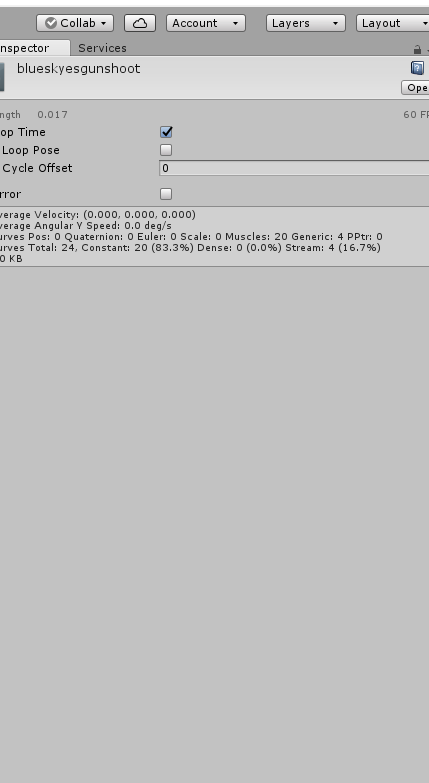
This is not the animation pane....this is the inspector
 fierce bane
does it say "Animation" directly on top of that? That one says "Animator"
The giant pane in the bottom center of your screenshots
 fierce bane
yes that is the important part of the animation in this case.
clear yew
Guess I'm back here again. How can I make a shapekey move slower in an animation?
spice urchin
wym
clear yew
so that when I activate it, it doesn't move so quickly?
spice urchin
u cant rlly
u cant change getsure transitions
i mean u could do something where for example
it activates an animator
animator slowly changes it
and then u activate another animator
and that one slowly lowers it
but thats like rlly overcomplicated
clear yew
hm, kind of disappointing, but whatever. Thanks.
marsh tiger
My visemes stopped working after animating extra bones (tail.) I added mask>created from model>transforms. I selected the extra bones from my humanoid rig that I wanted to animate and bam, Visemes are gone but the extra bones animate the way they should. Any ideas?
clear yew
Check your body meshes and shape keys
marsh tiger
I have not changed the body or shape keys, just added the tail bones to the idle animation
spice urchin
did u check the descriptor
fierce bane
@honest quarry "Audio Source" in your avatar should be DISABLED by default unless you want it to play any time the gun is out (if it's music that's probably the case) If it is NOT disabled by default then you don't need to enable it in the animation at all.
If you hold the "gun" animation you should have music only, when you use the other gesture it should activate the firing animation and sound only while it is held.
If your music source is enabled by default you will hear that music even when firing, if it is disabled by default the music will not play while holding the "fire" animation
fierce bane
@marsh tiger Generally you just want to have an animator that has a tail idle animation and not change the main one for something like that.
You also don't need to add bones to the humanoid config for a tail idle (as a tail is not part of a humanoid rig).
Check your avatar descriptor and make certain the visemes are set correctly, and that you do not have a jaw bone set in the humanoid rig.
marsh tiger
i tried having a separate animation for the tail but it did not actually work until I did that method
I guess I would have to remove the tail from the meshbody and add an animator to it?
fierce bane
to have a seperate animation you need an animator and animation controller
you can NOT place it on the top level avatar however
You could make an empty game object and attach it to that, or you could place it at the base of the tail (above whatever it animates obviously), etc
but it cannot be directly on the top level (with the avatar descriptor) because VRC has it's own animator for the humanoid rig
marsh tiger
Yah I had issues attaching animators to bones tho
it says missing but i can not actually rename
when I place an animator on mesh it works fine and I can rename it
fierce bane
you can re-path the animations, select a component and hit F2 or click 3 times
fierce bane
(it's actually just two clicks needed...but Unity delays and misses it most of the time)
marsh tiger
if its on a bone I can not rename it no matter what
but if its on mesh that is attached to a bone I can rename the path
fierce bane
IE armature/hips/tailroot/tail1 would become tail1 if placed on the root
fierce bane
it...should absolutely work on a bone, let me check just to be sure...but a bone is just an object...tehcnically
slim sparrow
@clear yew put the animation keyframes further apart
This will lengthen the hand gesture transition time though
marsh tiger
Yea the video I saw said you could rename the bone path also but its just never let me select it to rename...even with f2
clear yew
but that wouldn't make (ex: the tail) come up slower would it?
fierce bane
longer keyframes means slower animation
fierce bane
more fames between 0 and 1 means it takes longer to reach it
spice urchin
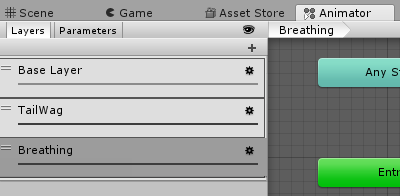
and in the animator add layers for each idle animation
i have 1 extra animator per avatar
with layers for breathing, wagging, etc
all animations that move bones and play out of sync
fierce bane
you just have each layer set to run by default correct wulfe?
marsh tiger
Yeah I had all my breathing and finger movements on the idle pose
spice urchin
u dont need 2
marsh tiger
I should break it up into animators I guess
spice urchin
no
u dont need multiple
u can just use 1 animator and multiple layers for each animation
only thing u have 2 change is set the weight of the animation layer
cuz it defaults 2 0
then ez pz u just animate all ur stuff in separate clips for each chain
marsh tiger
Im not sure about layers yet. I just got back into this ^ ^;
spice urchin
and then u create layers for each clip u made
fierce bane
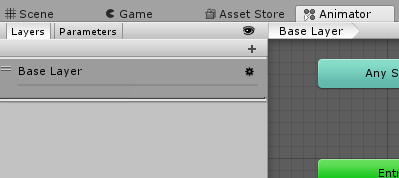 marsh tiger
ah
fierce bane
layers are simple
spice urchin
yea but thats not what end product is
fierce bane
no this is a blank
spice urchin
ye in this case u just add a layer
marsh tiger
Looks like learning how layers work will fix my issues
spice urchin
set its weight to 100%
and then just animate each thing individually
like one layer for tail wag
one layer for twitching
so on
fierce bane
https://i.imgur.com/saEyLNw.png IE like this
 marsh tiger
oh this is easy
ty!
I didnt know you could do that ^^
is there a limit?
to how many layers you can have I mean
spice urchin
no
marsh tiger
thats awesome
 spice urchin
yea but
better than having like a dozen animators
and yea u can do the idle thing sure
but its in sync
this is out of sync
slim sparrow
Oh yeah, animator layers are cool. Just make sure you set the layer weight to 1
It's 0 by default
brittle granite
spice urchin
thas kool but y in vrchat
i seen people that had a similar avatar except they were the car themselves and animations not as complex
brittle granite
because if im leaving a server or logging off for the night i want to do it in the most epic manner possible
like, "adios amigos!" Activate delorean. I have to animate my character shrinking down and getting inside the delorean lol
 final gazelle
i wonder if you can shove a seat on the other side of the delorean as an easter egg for anyone who tries to get in...although it's probably a really bad idea if it's possible 😛
because i've got no idea what'd happen to that player when the delorean goes inactive
slim sparrow
I don't see why not. If it's that small, you can actually use a custom sitting animation to make the person inside smaller.
If a seat becomes inactive or destroyed while someone is sitting in it, the player is simply forced out of the seat.
final gazelle
ah, no biggie there then -- so just a guy hitching a ride for a few seconds 😛
brittle granite
how do you add seats to an avatar?
final gazelle
VRC_Station, i believe? or do people just prefer using the VRCChair prefab to make things easier?
slim sparrow
Yes, it's a VRC_Station component. I recommend not using the "Chair" prefab
As that one is meant for worlds
brittle granite
ah k, that is why it didn't work for me that one time
cool thanks
now i know what to look for
slim sparrow
You get better results by just putting a VRC_Station on an object, the VRCChair prefab may not always meet the station "rules" and ends up getting automatically removed
brittle granite
whoa!!! alright after reviewing the documentation on this thing any Tips with using VRC_Station? like common mistakes I want to avoid?
slim sparrow
If the VRC_Station object is inside your armature, keep it as close to the bone it's parented to as possible. Far away it might jitter.
Always keep "Seated" ticked even if you want them to stand.
You can assign custom sitting animations that can even include emotes and hand gestures. This will override the user's custom animation set, however.
You can assign entire animator controllers to the seat, not just overrides
brittle granite
ok, how do i make sure the avatar is sitting the correct way/facing the right way?
im seen some avatar seats where when i clicked on it, i was upside down
slim sparrow
The VRC_Station's rotation will determine which way they're facing. Blue arrow pointing forward, green arrow pointing up
It might take a little bit of testing to figure it out sometimes
brittle granite
🤔 you mean Y- up Z- forward? so this is put on an empty game object on the rig?
slim sparrow
You just put an empty game object anywhere. I'm talking about the transform gizmo in Unity, that tells you which way an object is facing
brittle granite
yes i deduced that. it uses the transform of object it's attached too
how do I control the hitbox of said seat?
is it the objects bounding cords?
boundries
slim sparrow
By default, a fairly large interaction trigger is generated
A cube of like 1.5 meters I think
Put any kind of collider(s) on the VRC_Station and enable "Is Trigger" on them to alter the interaction size.
spice urchin
u want to use a custom animation controller also
that resizes the armature or hip bone and sets hip as root
won't always work and would have 2 use generic hip transform instead of humanoid params
but would work for most characters
if u choose resize hip not all avatars have same hip name or hierarchy
if u choose resize armature some armatures are scaled 100,100,100 and others 1,1,1
slim sparrow
If you want to resize the player you should scale down the entire avatar object
Not the armature or the hips
spice urchin
yea but can u even get the object itself
the animator controller plays on the object
also i dont think that would work
my avatars arent scaled to 1,1,1
some are .024 and such
slim sparrow
You won't run into issues I think due to a nifty thing
When you upload your avatar, a prefab is generated and that prefab is uploaded.
I dunno if that's how it works exactly but it's a good point
spice urchin
all the prefabs show up in the parent folder for the assets
i deleted like all of them
they never get cleaned up its extremely annoying
spice urchin
dont double post, at least delete
 smoky whale
@spice urchin I'm having trouble with
C:
the animation enabled the audio
I cant find the option for that
spice urchin
u literaly just
make a new audio object (empty with audio source component)
disable it
and enable it in the animation
smoky whale
In the video when he/she drags his animation to the copy of the avatar he opens the animation windows and he can add the audio to the custom animation
when I do it it just open the animation timeline for the idle position
and I dragged my custom animation to the copy of the avatar

VrChat Unity Add Audio To An Existing Emote.
at 41 seconds
@spice urchin
smoky whale
When you preview an animation on the animation window should audio play or is it only the animation?
spice urchin
u need the audio to be in the copy and the original
also right click and choose to create a new audio source inside of the character
smoky whale
Nothing is working. Could the video be outdated?
spice urchin
na wat i said should work
ignore anything the video says about the SDK or unity version other than the override stuff
smoky whale
Its my 7th time doing the steps of the video and nothing works
I only managed to make the audio play when the avatar is loaded and thats it, no emote sound
spice urchin
ur doing it rong
again u make it disabled
and only time u ever activate
is on the emote animation
and that it
so somehow ur leaving it active
smoky whale
I dont understand. Maybe a screenshot would help. Tell me what to screenshot so you can see what my configuration is
spice urchin
u make
smoky whale
thanks for your time btw, I really apreciate it
smoky whale
thats what I do
spice urchin
r u 100% sure
smoky whale
I think I do. Wheres that option?
it seems I cant post pictures here
the audio source object in my avatar is off and its checked on my animation avatar
(on the inspector window"
clear yew
@smoky whale You upload images elsewhere like imurg & then link that here
ruby thistle
is there a way to add sound to read only animations?
smoky whale
@ruby thistle Thats kinda what im doing. You have tu duplicate the avatar, asign the animation to that and then you can add sound idk why
smoky whale
@ruby thistle I saw a youtube video explaining how to modify animations like that
yeah I dont follow too dont worry
its not very intuitive
ruby thistle
if you could link me the vid that would be baller tho
smoky whale
I think it was this one https://www.youtube.com/watch?v=cNnnaHqhks0

One of the annoying things when you are working with third party animations is that they show up as Read Only in the Animation window. This means you can't e...
but its not specific for adding audio
ruby thistle
as long as it allows me to click new property and allow me to speed it up just to match a song im ok with it
smoky whale
worth it?
ruby thistle
for me, yes
ohhhh ok i get this. So if you have an animation that is written as read only, you have to make sure you have an animation controller made, duplicate the read only animation , drop it into the animator window delete the old animation and the duplicate one will become the default, thus allowing you to edit it in the animation tab!
It suprisingly makes alot of sense
smoky whale
it does not for me really. I wouldn't guess it in a million years i guess
ruby thistle
this the animation file part of an fbx file with animations or a stand alone animation?
smoky whale
no idea
ruby thistle
id say just show me a screenshot of what you got in your assets folder
smoky whale
one moment, Im finishing another project
Did you successfully add audio to an animation/emote?
ruby thistle
it says i can add properties. buuuuuuut i gotta get a clean cut of the audio i want
oh wait i forgot, my internet is speeds are shot, and wont be back up untill tommarow
ruby thistle
ok yeah i got the sample i needed, just gotta test it out in vrchat
smoky whale
@ruby thistle tell me if it works
ruby thistle
gotta make some fixes, the animation im trying to get work is having a smaller version of my avatar dancing on my palm. but he wont show up
i'll give i a whack tommarow after work
smoky whale
@ruby thistle sounds great. Im glad I could help you tho I cant help myself fellsbadman
ruby thistle
some people take longer to learn things
 vast river
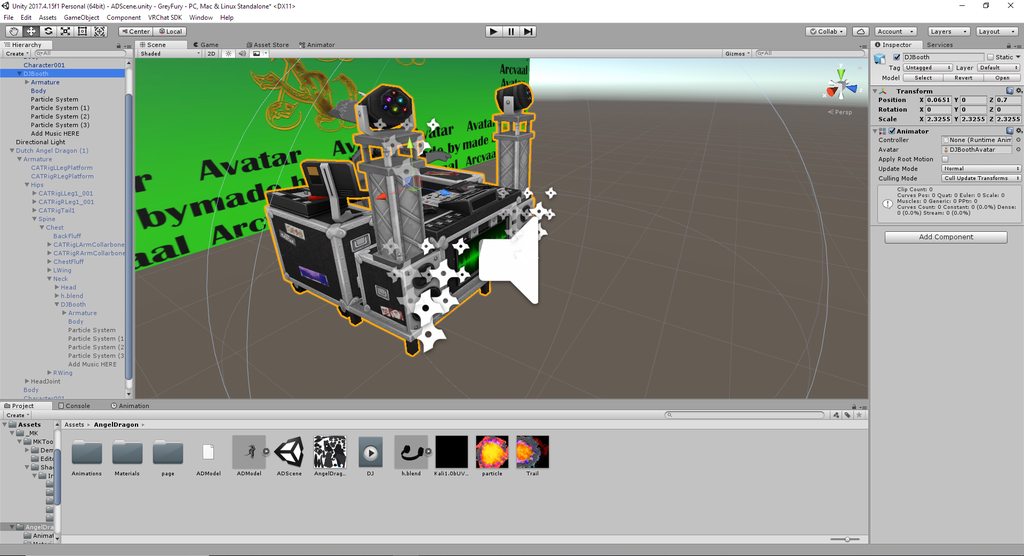
Hey, I'm hope its right to post it here... I need some help with a animation.. Idk why but it will not "Spawn" the Dj Setup after pressing Shift + F2 and doesn't play the music...: https://imgur.com/a/5UcNxaQ
 paper kraken
does anyone can help me how to put a box collider properly? So I can propel forward, all i get is just going 360 spin, do I have to add a rigidbody?
slim sparrow
Move the box collider forward a little so your feet are only touching the backside and it's not centered under you
 high stump
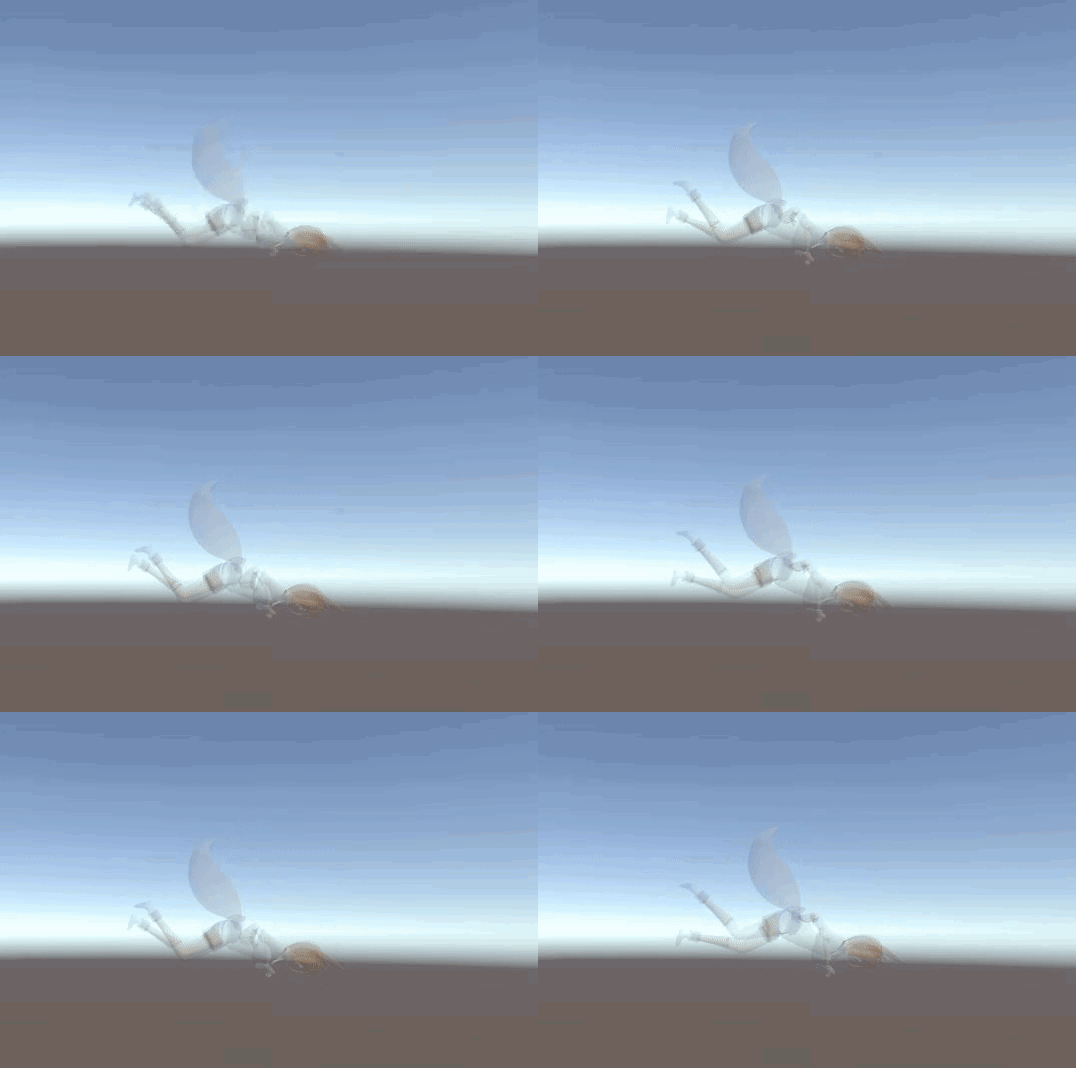
i have many questions
why doesnt it apply the rotation, why does it not let me render the textures other way than transparent 
and why in the world did it appear laying face down in unity if it was just t posing in blender lol
slim sparrow
Press CTRL+A on both the mesh and the armature in Blender to get it upright
spice urchin
also extract ur materials
slim sparrow
As for transparent, you have to click on the FBX in assets, go to Materials and then Extract Materials to a new folder.
Yeah
high stump
alright ty ill try that
okay that fixed half of it

...literally lol
materials work now though
 median orchid
If ithis is about why your avatar is still transparent
you could make your material a different shader
high stump
these are okay now
high stump

more problems are appearing though 
the weight painting in my model works well because in blender this doesnt happen
it could be because my model doesnt have a toe bone ?
median orchid
You could try going to the Armature's Rig and Resetting it
I don't know that much about this though,
 high stump
oh looks like it was because of the names
median orchid
Perhaps that could be the reason
high stump
thx for the heelp
 wild plover
for some reason, animations aren't importing
i have a very simply blinking animation for a character, exactly 4 keyframes
nothing i do in the fbx exporter brings the animations into unity
 lavish scaffold
If you state your issue, we might be able to help you.
 mortal edge
well im trying to get my animation and my music to go at same time but dont know how and the turtorials dont help
 stray sinew
What kind of animation
brittle granite
You have to be more specific @mortal edge your asking to general of a question.
mortal edge
a dance
to be correct
this one

Smug dancing al maximo Esta es una pequeña compilacion de videos del Smug Hat Kid y un poco de mi propia edicion porque estaba aburrido, aqui los links respe...
spice urchin
honestly i strongly hate unitys animation editor when editing animations
it lags and freezes for ages if u try 2 edit any complex animation and edit a lot of keyframes
slim sparrow
Unity's animation editor is a very sore spot
It's lacking in so many ways
Can't multi-add properties either
There's a reason Unity 2017 now has "playables" for stuff like choreographing particles and audio and stuff.
brittle granite
@spice urchin heh
brittle flicker
Anybody know how to make it so that an audio source will continue playing even after the animation has finished its loop?
spice urchin
yea
instead of turning it on
turn it off then turn it back on right afer
and have it default to on
u can turn off play on awake also and turn it on only when u turn off the audio
prevents it from playing on spawn
brittle flicker
I also need it to be able to overlap in case the animation is triggered again. I'm trying to make a weapon fire animation for a rapid-fire pistol, but the audio file is longer than the animation.
clear yew
The start of a new animation is the works (^w^) https://gph.is/g/4wWGXn4
 spice urchin
should probably not animate that in unity
u can make IK constraints and stuff in blender so it would be a ton easier and quicker 2 just make the characters footplanting and stuff work well
brittle flicker
The audio source does play over the next animation, but it doesn't overlap the next time the audio source is triggered again.
I want it to overlap over the next time the sound effect plays instead of just cutting off.
slim sparrow
I don't think you can do that.
Not in avatars at least
Without adding more audio sources
spice urchin
yea
not rlly possible theres no overlap property afaik
game devs usually just make a copy of an audio source or use the play script command
or whatever it is
brittle granite
@brittle flicker edit the audio in audacity
brittle flicker
I'd rather not do that.
brittle granite
Why?
brittle flicker
I kinda want the full audio to play.
brittle granite
Then edit the animation to the audio?
brittle flicker
I can't do that either because the animation is supposed to be pretty short. It's a gunfire animation for a rapid-fire weapon.
brittle granite
So you have rapid fire gun but not rapid fire gun audio?
brittle flicker
It's fan-firing hand cannon.
So the sound effects are supposed to overlap each other.
spice urchin
then just make it automatic or something
u can loop the sound
u can also try just not firing that fast
or having an animator that changes which sound plays
etc
 raven glade
Really quite confused about whats causing my particle system to die. Theres nothing in my scene that'll cause my particle system to die from a collision when set on high however it ends up dying without triggering the sub-particle system that'll emit on collision.
Haven't messed around with animations since the update.
 ripe torrent
does anyone have that website link where it tells you how to keep an animation in one place even though you are moving?
 void kernel
I made particle part of my animation in Unity, but then I animated my character in Blender. Now I have two animation clips. Do you know how can I combine them/play them together?
Usually I'd add a new layer in Animator and blend them together but this doesn't seem to be good for VRChat
slim sparrow
@void kernel what's the animation for?
You can definitely use animator layers in VRChat, just not on your "main" model unfortunately
void kernel
Emote. I think I have found the solution. I'm uploading the model now to see if it works
Hm, yeah, I think I've used animator layers to animate a windmill and stuff like that
slim sparrow
In the emote, you can disable your own Body and enable a duplicate of your model
This duplicate can then have any Animator controller assigned, including one that uses layers
void kernel
Ctrl + C and Ctrl + V one animation into another did the job. I messed up my hierarchy while working on the model so I had to create a new animation clip and paste everything again
 lethal rampart
So i'm working on a particle animation for a gun.
the gun fires a bullet, which on impact with a wall, will spawn a puff of smoke, some debris, and a bullet hole.
ive gotten the first two working, but the bullet hole baffles me. Is there ANY way to make it stick to the proper orientation against the wall? I can't get it to face the direction it's fired at from. either it's set to follow the camera, which is a problem because then its always facing you even when it shouldn't, or it sticks to it's default orientation and therefore sometimes spawns sideways on the wall. How do i make it so when it hits the wall, it sticks to that wall's surface properly?
clear yew
Try the velocity setting for meshes
lethal rampart
that doesnt really do anything. even if I have it set as a mesh particle with a bullet texture it still doesnt align to the wall properly
slim sparrow
@lethal rampart sticking mesh particles into surfaces is ridiculously difficult just so you know
lethal rampart
I mean, ive seen it done, which is why I wanted to do it
It doesnt have to be a mesh particle
I was using a normal billboard too
but I cant find a way to stick either to a surface
properly anyway
brittle flicker
Is there a way to make an animation play different audio sources each time it's run?
clear yew
Can someone teach me how to make animations?
 severe sierra
Anyone have any idea how I would apply an animation that changes pieces on an entire model to work with one animator on an avatar? Example, I have a unicorn gundam model that I animated in 3ds max each piece changing into its NT mode, I exported it at a separate object and imported it into unity. Ideally I would like to have 1 single animator that only animates the bones that transforms it (which are their own bones separate from the main avatar bones)
severe sierra
blendshapes?
clear yew
or gesture
severe sierra
gesture
severe sierra
I would prefer to have it on an animator thats off by default and a gesture/emote that just enables the animator
hmm
clear yew
use an animator
if the bones are still there
its easier
unless you have the blendshape playing it perfectly
then yea you can keyframe it
severe sierra
no blendshapes, I keyframed it all in 3ds max
severe sierra
no blendshapes
clear yew
what
severe sierra
Its all bone animations
severe sierra
because blendshapes move in a linear direction which is terrible for rotating pieces
clear yew
use the animator and transform
severe sierra
the issue with that is it starts the hierarchy from the root bone so If I put an animator on anything but the armature, it doesn't work
clear yew
what
if it doesnt export proiperly from 3dsmax then do it in unity with the animator / transform/keyframe it
clear yew
i dont even know if you can export a compatible animation file from 3ds max to unity
i use blender
severe sierra
it uses FBX so why wouldnt you
severe sierra
alright ill try to think of something else, thanks
clear yew
instead of wasting time trying to get the anmation to convert just manually do it again in unity
just copy the values
the timing anyways
just rotate the bones at each oft he timing points
how long is the animation file
is it a 3 minute animation?
if it isnt a 3 minute keyframed animation just do it again in unity prolperly
Can someone help me make animations?
i bet its not as difficult doing a manual keyframed psycho pass dominator transform from scratch
I'm trying to use Unity to animate and I don't know what I'm doing
create an animation file and move thigns around
or add a particle to the scene
press record
then move to anotehr keyframe and change the positon
I can't really move the limbs
humanoid it
Alright so I created an animation file
I don't know how to actually move the body parts
How do I actually move the body parts
fierce bane
@severe sierra You can change the path components in an animation are looking at by selecting them and pressing F2 (sadly one at a time)
You can use that to "fix" your currently working animation to work in whatever location you need it in.
Note: I sugest using notepad or something to edit the actual path...Unity is screwy when you try to scroll through it, often reseting position
severe sierra
I actually went in and did that 😛
And I got it all working be enabling an animator on the root bone
slim sparrow
You can serialize the animation as text and then find-replace Path: Armature/Hips/ to Path: for example
Ez fix
severe sierra
o:
fierce bane
wait what, that would have been great to know before XD
slim sparrow
That's how we did animator behaviour keyframes before we got editor scripts to insert them.
I actually knew about the text editor before I knew about F2.
severe sierra
 fierce bane
ah I see, yeah F2 is a weird one too....or "triple click" which is really just double click with a pause
severe sierra
if yall were curious
fierce bane
@slim sparrow Do you happen to have a link or upload of the editor scripts for that? I'm still just copy/pasting and repathing one >.>
and that looks nice and smooth brightside
severe sierra
It's timed up with a section of audio I got from an episode with the least amount of background music
slim sparrow
I don't have a link for it because I don't use editor scripts
I don't use behaviour keyframes often enough to need them outside of the prefabs I already made
Which is basically just blinking and world objects
fierce bane
ah ok
 turbid needle
That a cool mech you got there my guy
 unreal basin
I have a problem with particles on animation. for me i cant see particle in mirrors and on camera In my personal view when i use it. i wonder if there is way to fix for i have a goal that i wanna accomplish but cant do that when the particles doesnt show.
fierce bane
@unreal basin Known issue, no current fix or workaround
Others can see your stuff fine in mirror/camera just fine however.
The same goes for material swaps.
unreal basin
Yeah But i want it to show when i do it for im a streamer and i wanted to show the animation to the viewers but cant if it doesnt show on camera
hollow perch
You can build your own stream camera and mesh displayed with a screenspace shader instead of the stream camera. That camera can be set to playerLocal or MirrorReflection layer. However, if you do this your body will be headless. One technique used in some worlds is to include both layers PlayerLocal and MirrorReflection. This shows everything and your head, but renders most things twice. (Possibly an accident but the dance floor cameras in the Volt Club have all layers enabled and let you see your own effects)
unreal basin
dont even see point then to create my own one then if it removes the head when i use it
or if there was something i missunderstand the plz explain it better plz for i do understand it could work to create my own but what do i do without getting headless on my avatar then?? for i have no idea about the renders most thing twice u talking about
hollow perch
You can Show both layers to get your head and effects
Looks good enough and it's pretty much the only way to view your avatar with everything
PlayerLocal = effects + body without head. MirrorReflection = no effects + body with head
Cameras let you select layers to show
spice urchin
theres also the Player one i think
idk if that will hide ur own self but probably not
 timid prawn
I have a generic rig. I try to put an animation on the custom override and put it on my avatar. But the emote wont show in the list in game. I do something wrong? Work easy on a humanoid rig normally.
fierce bane
@timid prawn Generic rig does not get emotes or gestures or any form of IK, Humanoid only.
onyx agate
What is the way to get a spawn animation (animation that only plays on first load)
slim sparrow
An Animator on your avatar
Possibly using stencils to hide your main mesh, or also have an Animator on your body
Or disable your body, duplicate it and put the duplicate deeper down under another object
onyx agate
do you know any good tutorials for that?
spice urchin
u dont need to put 2 animators sometimes
ive seen people that use a dissolve shader added on top of existing shaders
and they can just animate the dissolve feature and particles within the body
onyx agate
but how do i make it work is my question ... the imported avatar model has an animator on by default when you drag it in the hierarchy ... do i alter that ? , do i have to create a animator controller and override the runtime one?
spice urchin
no that doesnt work
the animator placed in the avatar is ignored, but not any placed in its descendants
onyx agate
then what do i put the animation on to have it play when the avatar spawns into a world (so confused right now)
spice urchin
again
depending on what it is
say a dance or spawn in animation
u would need to copy and paste the full avatar
somewhere inside of the main one
and 1 animator will play the spawn in animation on the duplicate
and another would temporarily hide the main avatar
if u wanted particles or some shader effect
u could use 1 animator to change both effects
onyx agate
So just like making the animation duplicate the avatar but not delete the original
spice urchin
but again it couldnt be placed in the avatar itself, would have to be in the descendants, such as any of the meshes, bones, etc
no not rlly
when u make an animation u dont put the avatar anywhere
ur not making an animation
at this point u would/should already have an animation
and u would create the duplicate bc u cannot really animate your own body with an animator
thats why a lot of people who have dance gestures have a copy of their avatar for each animation
onyx agate
can you dm me later , might be easier (at work right now)
 rancid valley
How can i make my avatar have a hovering animation, basically all i want to do is to delete all the movement my body has while walking, no bouncing no nothing just hovering like a ghost
spice urchin
then make ur own hovering animation for every single override
rancid valley
yeah but what values would be important?
after all in the animation your avatar flies below the floor
rancid valley
yeah but there's bone rotations and there's animator changes like muscles, theres roots that you can change, i think you have not really an idea of what all exists actually, pardon me
spice urchin
what
all of the bones mapped in the humanoid configurator
will need to be keyframed in order to have a proper animation
if u happen to import any animation into unity using the humanoid configuration
all of the keyframes will already be imported, including extra keyframes if u didnt animate that part in specific
rancid valley
yeah that i know, im just struggling right now with the normal idle animation given by vrchat sdk puts me below the floor, just a little
like i dont know how to fix it, it doesnt let me change root points
thats why i am asking what is the important part, because if i run it works, but if im idle im a whole foot lower than my descriptor
spice urchin
because none of the idle or movement animations are actually imported i believe bc of the fact they arent from vrchat anyways
rancid valley
they are, they are literally in the sdk and connected to the controller template delivered by the vrchat sdk
it should work and it does
up to a point where every movement works like hovering just the idle is putting me lower into the floor
which is my problem i want to not change height of the avatar while my descriptor stays
as well the robe is in the floor if im not moving


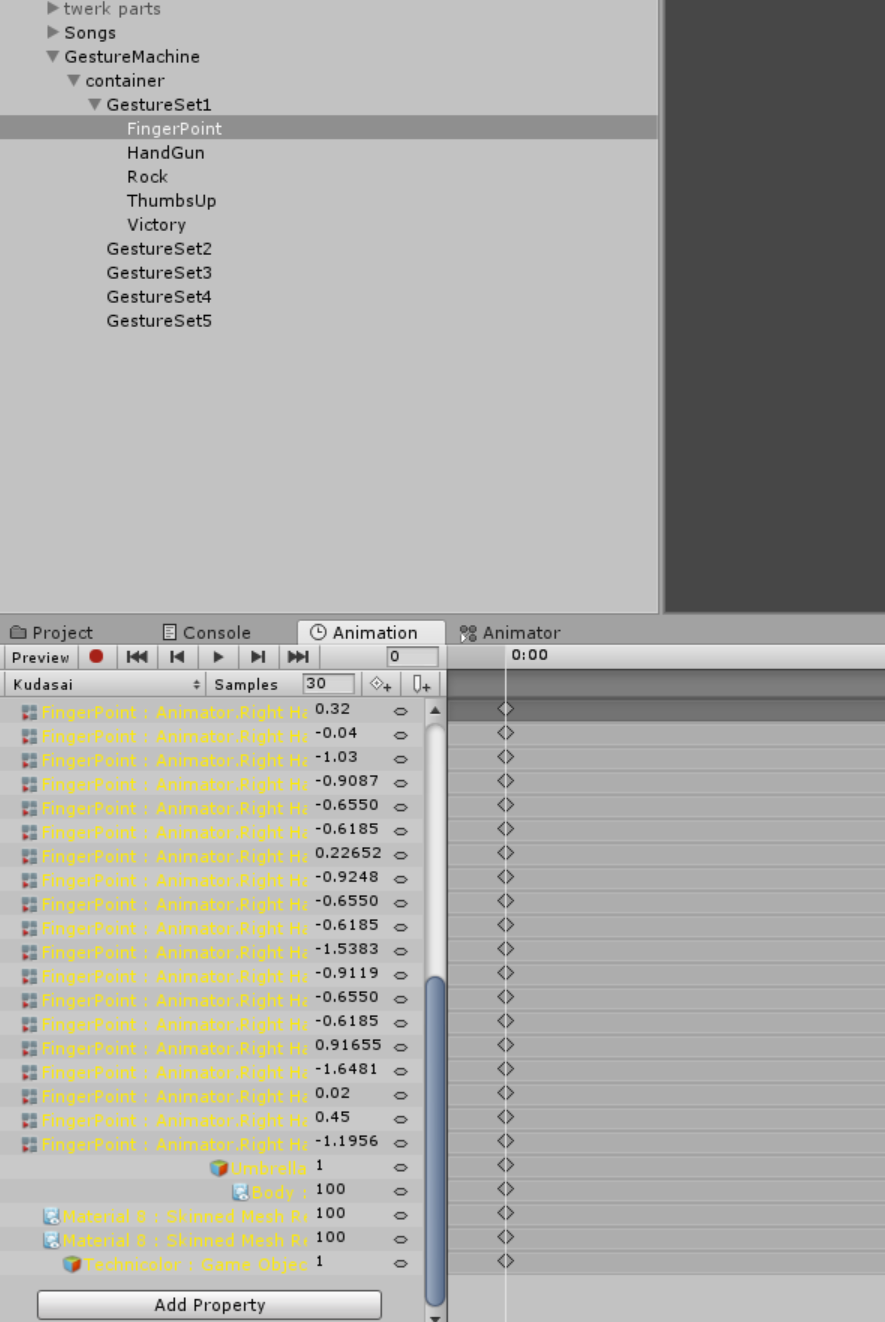


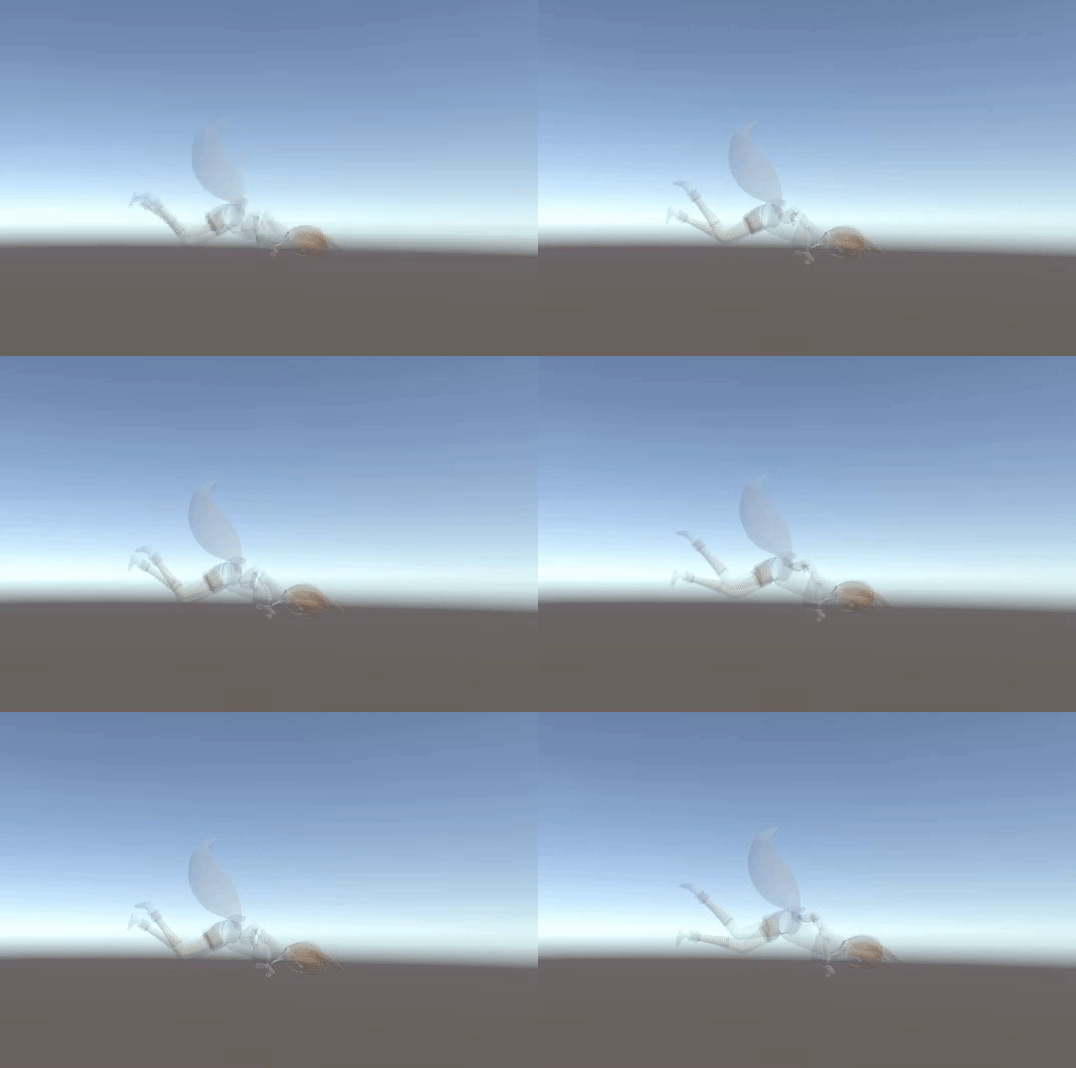
 slim sparrow
They're only there so you have override slots in the CustomOverridesEmpty override controller.
spice urchin
so i have no idea where ur getting ur info from
slim sparrow
@rancid valley if you wanna hover with your legs off the floor that won't be easily possible
None of the animations in the SDK are real
spice urchin
u would have 2 replace every single slot with its related animation
meaning u would need at most an animation for 3 directions
slim sparrow
You should increase Root T but you can't do that
The IK plants feet on the floor
So you have to raise your entire model up in Blender and give it fake leg bones
Or just
spice urchin
or that ye
slim sparrow
Raise the hips up in the humanoid rig config and apply.
So the feet are way above the floor
rancid valley
hips in the humonoid rig config mhm
spice urchin
but then when it walks its gonna bounce really weirdly
slim sparrow
Yep