#animation
1 messages · Page 96 of 1
 south lynx
 torn pawn
fixed already
it was render alignment to local instead of world/whatever else
❤ Rokk
 slim sparrow
@south lynx put a fixed joint on the tutorial avatar and delete his meshes
Then put your world objects under there
In the meantime wait for them to fix it I guess
south lynx
Wait what? How is the tutorial avatar different from using a gameobject?
slim sparrow
Nobody knows
If the game object is a humanoid model with an Animator and a controller, it works
Otherwise it doesn't
Use the AvatarTPose controller
Jitters less than before too if you parent it to the hips (still jitters locally)
south lynx
Okey lol... do I need to keep the avatar active all the time then and just make a new override to activate the animation?
slim sparrow
Just use the same setup as before
But instead of having an empty object with a fixed joint, have a tutorial avatar with fixed joint
The rest is up to you
You can put your stuff under the tutorial man's hips or next to his armature. You can delete the meshes too
I shared a 2017 world objects prefab in Quantum's Discord in case you want an example, but it should be simple enough already
south lynx
Alright thanks
 serene lava
Yo how do I put down a prop and walk away
I got it to kinda work once but whenever I put it back down it didn't appear in front of me
slim sparrow
Take the tutorial avatar, delete the meshes, put a fixed joint component on him. Attach the joint to nothing. Put your desired prop(s) underneath the tutorial avatar.
You may have to assign something like AvatarTPose in his controller slot
Make sure the tutorial avatar is disabled by default
 stuck spade
Heya anyone has the standard idle but atleast 10 secs long?
slim sparrow
And you enable him on an animation
serene lava
Why do you have to use the tutorial avatar and not an empty game object?
slim sparrow
Because of a new bug
I have no idea why, but you have to use a humanoid model to put the fixed joint on.
Otherwise it will move with you for other people
serene lava
So I've done that before, but how do I make the position reset when I redeploy it
slim sparrow
Uhm
Hard
I made a prefab for world objects that you should use
But I cannot send it right now since I'm not at home
I will be home in like 2 hours
Remind me then
But basically, you have to use an animator to reset the position
And use a hidden property on the animator to trigger a state change
serene lava
big thank
 ivory laurel
Hello! So I tried to make an animation that involves a separate object with separate armature. I got them to Unity and now I've got these files. Can I somehow connect them in Unity so that they play at the same time? https://imgur.com/x8HpetQ
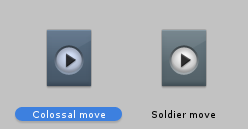
Like, merge these two into one animation, is it possible?
slim sparrow
@ivory laurel you can change the animator controller that you put these on
Add another layer and add the second animation to it
That's the easiest and cleanest solution
That way the single animator will play both animations at the same time
ivory laurel
I can already tell It's gonna be hard since I'm new to Unity, but still thanks, I'll try my best
 novel lagoon
Is it possible to make a custom idle animation for your avatar?
slim sparrow
Yes.
Simply override the idle animation
However, the game's IK will make your head try to stay in the same place, and you cannot float off the ground in idle animations as easily.
novel lagoon
Can you maybe rotate your avatar tho?
slim sparrow
Not really
Don't expect anything more than being able to pose your arms, reliably that is
 solar birch
is there a quick way to add fingers when doing hand related animations?
 fiery star
how do i do the thing that when i do an emote it kind of summons other models/avatars to do the emote as well?
when i try it the other models are just stuck in tpose
fiery star
they work properly when i test them in unity
oh, nvm, it does work, it just dosent show up in the mirror
 bronze pilot
Is it possible to put different body pose on hand gesture?
 hollow perch
No, due to something called an avatar mask, only hand poses can change. However it is possible to hide the body and show a new mesh/avatar with its own animator/armature. You can link some bones using fixed joints if you want the "puppet" to behave somewhat in sync
 hollow helm
Hey is there a way to change the running animation speed?
slim sparrow
Yes, just change the running animation with a new one
@solar birch muscle animation editor, it's a $10 asset on the store
 spark fox
@solar relic Rule 13.
No discussion of ripping content
You can ask around in other places
I myself don't know
I'll DM you something though
 solar relic
roger.
 clear yew
Boi
 sacred swift
how do i get my animation to go back to its original spot without it just being drug there

 flat cipher
You mean without it teleporting back to the start?
If that thing of yours is in a map and uses a custom animator controller you can make a copy of the animation inside the animator and set it's speed to -1 to revert it, then make a transition to it from the other animation and it will just play the animation both animation back to back with the second one being in reverse.
sacred swift
the dino is attached to a game object that im dragging around
i dont understand what u mean
slim sparrow
@sacred swift untick apply root motion in the Animator
flat cipher
Nevermind then
sacred swift

got it better but its still not right
there has to just be something in the transform tab i need to fix
 lavish scaffold
@sacred swift What exactly are you trying to do? A loop animation where it goes from point A to point B then back to point A?
lavish scaffold
On your animation, you can simply copy the 1st keys and paste them at the very end of the animation.
lavish scaffold
That is very strange. It is supposed to work. Have you tried doing the animation again? Or trying it with another gameobject ? (as a test)
sacred swift
it happens to me all the time so i know its something in the settings i need to chaneg
lavish scaffold
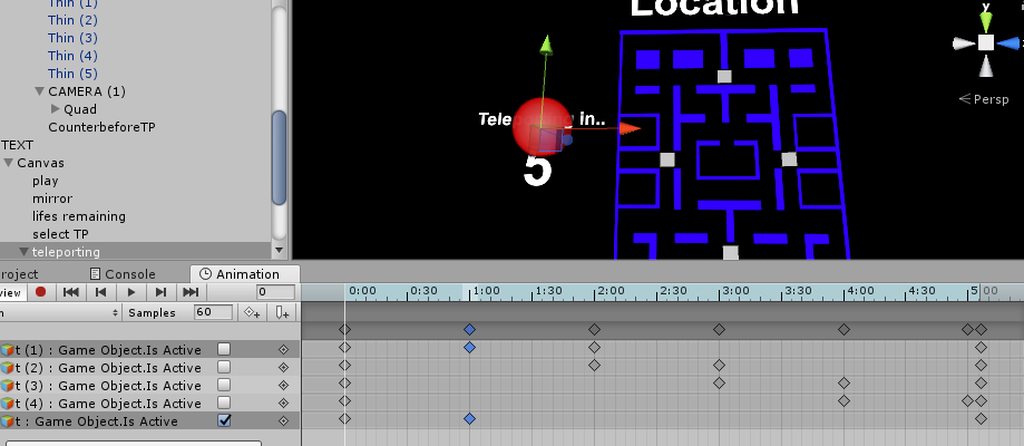
It would be very helpful if you show a gif (like above) but including the animation tab showing the keys. Like this https://imgur.com/a/IMH3OR3
 lavish scaffold
So the keys at 29 seconds are the exact same as the 1st frame? it looks like it continues to animate even after the animation ends 🤔 (it is hard to tell without seeing the full animation)
Ok I will try to make an example for you to try. Just for testing. 1-create a new game object. 2-create a cube inside the gameobject. 3-on the cube, create an animation 4-click the red dot (recording mode) 5- on frame 60 (1 second) move the cube to the right (you will now see 2 keys, one on frame 0 and one on frame 60) 6- on frame 120 (2 seconds) move the cube forward (you will se now 3 keys) 7- on frame 180, copy the keys from frame 1 and paste them on frame 180. If you hit play, the cube should go right, front, then back to it´s starting position in an infinite loop. @sacred swift Is that how you are doing it?
sacred swift
yes
lavish scaffold
Did you try the test? does it go in an infinite loop in circles?
 rancid valley
Does someone here have a working Muscle editor for 2017 unity? mine somehow broke and cant find the models and so on
 late phoenix
 torpid wadi
@slim sparrow sorry to mention you about this, but for using a humanoid avatar as a world object thing, should i make the worldobjectparent the humanoid avatar or the worldobjectjoint the humanoid avatar?
 grizzled snow
hey is there a way to shoot fire out of your hands?
like a flamethrower or something
 rain reef
@grizzled snow make a particle system
 red linden
@sacred swift what's the values for rotation on the timeline
because if you used the orignal rotation it will rotate back just like that
like if you had a rotation from 0 to 180 it would rotate to 180 clockwise, but if you used the original rotation of 0 later it would rotate counter clockwise from 180 to 0, you'd want to have it set to 360 instead of 0 if that makes sense
stuck spade
hmm anyone know how to edit like a tail animation? Like if i enter something the position just resets
with Unity 2015 it worked but now it just removes my number after pressing enter
and shows the old one again
like rotations doesnt work but size does

nvm dynamic bones script removed and it works now.
 tidal elm
Hi, some question here, is there a decent way to change the coordinate of our character at the end of an animation? Like, i start at 0.0.0, i end my animation at 5.0.0 and i want to have my new position at 5.0.0, is it possible?
 timid prawn
you cannot change your position I think since its is a specific one.
tidal elm
An alternative could be to make my character invisible when the animation trigger with a hand gesture and move to the end position i want, but i'm not sure if i can have the animation on a "secondary visible character" keeping the initial coordinate and not following me.
timid prawn
you can put an animation on a duplicate
sacred swift
@red linden which would need to be 0 and which would need to be 180
begining 0 and last 180?
 hollow cove
Most likely a simple question but.
How do I do animations in Unity. I've watched videos, and do that steps, but when I get into the game, it doesn't work, mostly.
So I know I'm close.
I make a duplicate. Make a new animation. Set my game object (gun, sword, etc) to active. Grab the animation finger whatever's. Shape my hand proper. Turn off that model, throw the new animation in an override, and it doesn't work.
By mostly I mean, the hand will take the right shape, but the game object doesn't show up.
Or it shows up in the wrong place, size, and attached to the wrong bone.
The particles don't go off, but the sound dose.
Shit like that.
red linden
the last one, it depends on what your original rotation was though
hollow cove
Here's a good question. If I want Particles, do all my models need to have it in the hierarchy, or just the one for the animation.
 spring nova
the models you use for animating are simply a puppet you use to create the animation, and then that animation is applied to the main model that actually gets uploaded
hollow cove
That explains a lot
See I knew it was something simple
Thank you. It should work now. I hope
torpid wadi
nevermind seems people found out that you can just use an animator with an empty controller with root motion set to on attached to the joint
to fix the world object fixed joints
hollow cove
The Game Object at least appears, but no sound or particles.
Progress it progress though
fiery star
anyone have the anim and sound file of kannas version of tipsy?
slim sparrow
@stuck spade disable the dynamic bone script before animating
Dynamic bone is pretty invasive and will "hold on" to rotation values really easily
stuck spade
ik i found it out but still ty
hollow cove
Does it matter when in my models hierarchy the particles and audio go?
Like, do they need to be attached to a bone, or something
slim sparrow
It depends on where you want them to be attached.
If you just want them generally on your model, put it on a game object next to your body and armature.
hollow cove
Then just change the animation to make the game object active
slim sparrow
Yes
 violet moss
Where can I get the Animator.Enable property? I need my animator to disable another animator.
I was told you can't add it on your own but can download a file with it already added
hollow perch
It is will show up as Behaviour.Enable. You need to copy it from another animation and change the path with F2. Try vrc inventory system for a generator
violet moss
My problem is i don't have another animation to copy it from
I don't know what vrc inventory system is
hollow perch
It's a free editor script available on Xiexe's github. You can also copy from that old toggle props thing by twisted wheelbarrow though the system doesn't work any more
timid prawn
its possible to have an shape key that go 0 to 100 in the same frame ?
hollow perch
Off a gesture? Or in a general animation
timid prawn
for like a blinking
hollow perch
For animations yes you can make two keyframes one frame apart and change the bezier curve to create a vertical step in the curve.
If you go to dope view in the animation editor you get two grip handles next to each point. Move one to be vertical so it is shaped like a stairstep
And make sure there is a keyframe one frame earlier (like 0:05 at 0 and 0:06 at 100
timid prawn
thank
because those model change the hole face and not just the eyes or mouth that why I needed strait up
spring nova
What you're looking for lyuma is select both keyframes and set both tangents to "constant"
hollow perch
Ah even better ^ didn't know that was a thing thanks
timid prawn
to be optimize its one mesh with viseme
timid prawn
I put the blink animation in the animation comp but doesn't play on the avatar
i follow a tutorial put idk what is wrong :/
hollow perch
Make sure it is in an animator and not marked as legacy. See First pin
@timid prawn
timid prawn
its dont play in unity at all beside manually press play in animation on my duplicate
 last wolf
quick question does F2 gesture work properly now?
 small tapir
Anyone know how i can get arm animations to work? What i'm trying to do, I'm using fist animation. https://imgur.com/a/pCdyD6N
 torn pawn
u can try enabling animator that does the animation, you can't change hand positions with gesture
novel lagoon
hey, for some reason, my animations i made in blender are not exporting into Unity
can anyone help?
 lusty dew
my hand isn't moving the way it should be when i do my gesture to hold a gun
it should look like: https://prnt.sc/lvjjix

and scuffed desktop screenshot reveals:
https://prnt.sc/lvjjf1

default hand position
i'm not sure what i did wrong
lusty dew
how can i fix this?
red linden
desktop gestures are a bit broken on this patch
Hand gestures locked in open palm in desktop mode
@red linden What do you mean with locked in open palm in desktop mode?
clear yew
@red linden if you sit down on chairs while opening your palm, you will get locked into that animation frame until you swap avatars
or is this a desktop only known bug?
small tapir
@clear yew I don't know after update but vr people had that bug too
clear yew
yes, not sure if he means that, that has been a bug for years
grizzled snow
how would i make a particle system fire like a flamethrower? is there a guide?
because i want to shoot out of my hands so i can do cool fire tricks
small tapir
@grizzled snow https://www.assetstore.unity3d.com/en/?stay#!/content/73777
Free asset with a flamethrower, that way you can see how it's done if you don't like it
small tapir
@lusty dew Your problem is that the arm don't move to right position when you do the animation, right? Have the same problem will tell you if i find i fix
slim sparrow
@clear yew they fixed gestures getting stuck when you sit down
You would think they would make a bigger deal out of announcing the fix or something, since most people have been very pleased about it
I'm assuming it's something they wanted to knock out before avatar chairs
clear yew
it wasn't fixed last time I played? what version is this @slim sparrow
yeah, I'd be ecstatic about it personally
slim sparrow
The current live version. When I sit down or stand up while holding a gesture, the gesture will correctly release itself.
I confirmed this with several other people
They all had the same thing
hollow perch
Haven't had any locked gestures since at least 2017 update either. Does eliminate a way to lock emotes but I'm so happy I don't need to be afraid of sitting any more
clear yew
that's the best news ever
 dawn leaf
Oh bet that’s good to know lol
lusty dew
@small tapir it doesn't move the arm, just puts the gun in the hand
getting vr soon so i thought i'd just add something like that in advance
timid prawn
since they remove the legacy. I cant figure out to make my simple animation to just work. I put it in an animation component. set to loop. and its not on legacy. it dont play in unity ether. what i do wrong. its probably stupid
torn pawn
u use animator component not animation, and don't use your avatar animator as root for animation file
small tapir
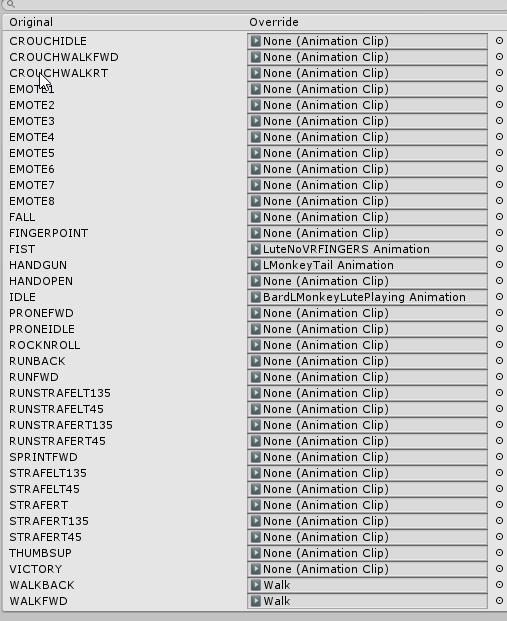
I just edited the animation called walk, to make a custom walking animation, do i just put that in walkfwd and walk back? Is this right? https://i.imgur.com/ZRvyb7N.png
 muted prairie
clear yew
muted prairie
clear yew
anyone know if it is possible to change avatars with hand gestures? like hide one mesh and show a new one 🤔
spark fox
@clear yew It is possible, but you better know how to weight them all to the same skeleton
 spice coral
Don't need people with like 8 avatars worth of data on one taking forever to load
with 100MB+ bs
clear yew
need to use imgur?
got it
so basically i just want to take off my boot with a gesture like this so it's almost the same mesh (don't mind the broken foot) https://imgur.com/a/GZhgW9h
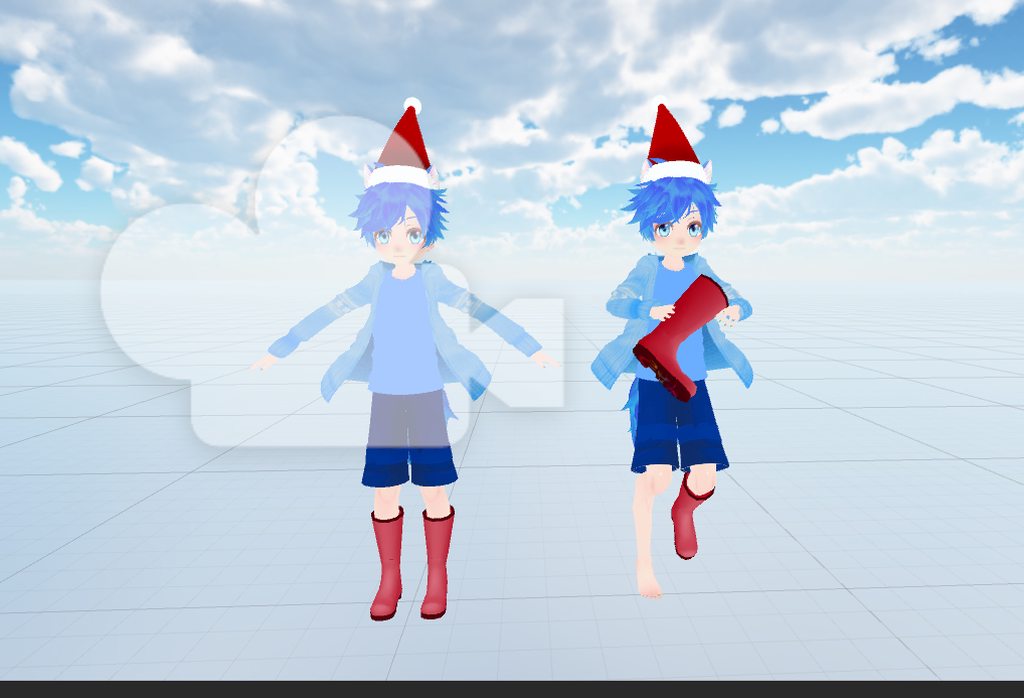
just can't figure out how to replace the mesh of the avatar with a gesture
spark fox
Just make it so instead of making an entirely different model that's holding the boot, just make the boot that you want to take off a separate material, then just summon an object in your hand
No need for an entirely separate model
clear yew
well it's a different model because the og model doesn't have a foot so i added one from another avatar and removed the boot
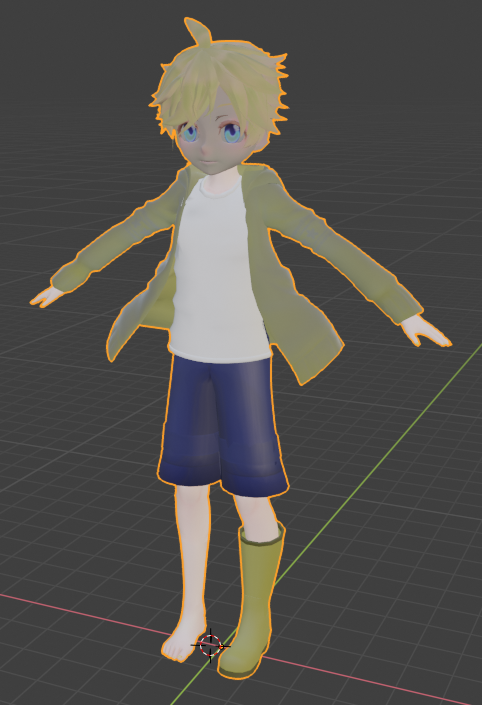
are you saying that i should put a foot texture on the boot to make it look like a foot? xD
spark fox
@clear yew nononono
Put a transparent material on it
Like just make a material in your project
Make it Standard with Fade
And turn the alpha on the color to 0
clear yew
gotcha only thing is the current model has no feet 😛 https://imgur.com/a/VvReOSB
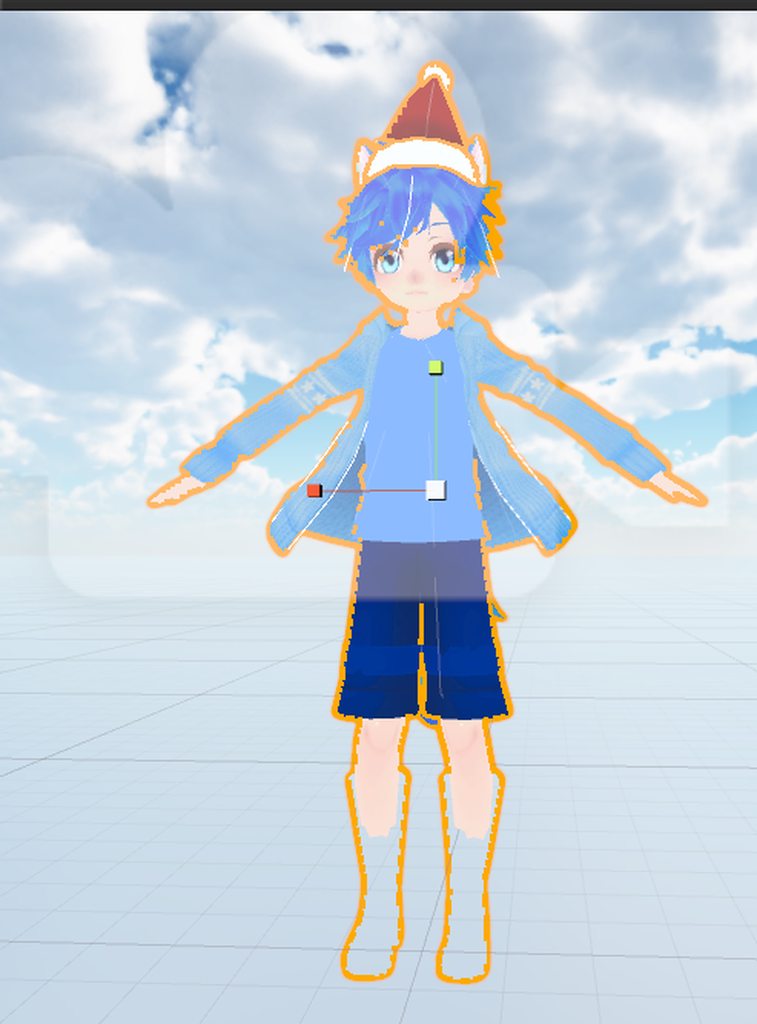
that's why i made the new one with the foot one it
 lunar pasture
noice
timid prawn
Make 2 mesh. One on the feet and one in your hand. Hide the mesh of one and reveal the other one in an animation for a gesture
spark fox
@timid prawn that's kinda what we're trying to avoid?
Just have the feet render at all times and just replace the boot material when you don't wanna use it, like when you take it off
 harsh mural
stupid question, is there any way to get a copy of the default animations or at least a video of each one?
I'm just having a hard time visualizing each one without much reference
eh, I'll just grab a custom pack and reference that
timid prawn
Yeah
clear yew
hey so i wanna make a finger pen again, but this time i wanna make it stay after i let go
so that i can actually write
instead of one continous line until i let go
anyone know the trick?
 misty tiger
the way that snail's marker does it is you just have the pen always writing
when you want to stop writing, you shoot your trail object like SUPER far away, like 1000000 units away
and you use a custom shader to discard triangles that are around that size
that's the trick if you wanna do it with trail renderers
misty tiger
you can look up snail marker and find a thing to set it up for you, but that's how it works if you were curious
clear yew
much thanks ❤
misty tiger
np
clear yew
Having an issue with Gestures and objects. I've set everything up correctly in the gesture but in game the object is floating away from the hands.
Any ideas as to why? I've never had this happen before.
slim sparrow
@clear yew are you uploading with Unity 5.6.3p1 or 2017.4.15f1?
clear yew
2017
 rough pasture
anyone tried to make custom strafe animations?
small tapir
@rough pasture I tried https://gph.is/2BoCgye
 rough pasture
yes - same thing for me. i know that left and right strafe use same animation clip, just mirrored, but why it rotate - i have no idea
small tapir
Same, i have no clue what's wrong
I wonder if we need to make a Male_Standing_Pose with all the animations in it or something
rough pasture
tried it - still rotates in game
small tapir
Oh
rough pasture
maked all animations for every slot - but it rotate anyway. closest i could get to this effect inside unity - is blending between standing and strafing with root motions. it looks like it update body rotation at the end of animation as default state. and then it tried to blend again, and again, and again. and this continues as long as you press strafe
 vale yoke
Is there any way to make multiple animations that affect a single skinned mesh? For example, one animation that is always on (Custom eye blink), and another that uses an animation override to do an animated material property change
The only way I've figured this out is to seperate the material that gets changed into another mesh and put the animator on that which isn't optimal for optimization
slim sparrow
@vale yoke you can put an Animator on the Body to have it blink
And you can put another layer on the same animator for the property change
You can also disable your Body mesh, duplicate it and put it under a few game objects to have as many separate animators on it as you need.
Should work just fine but IMO isn't ideal
vale yoke
Ah, so how do layers work with animators? It's possible to change layers in an animation override? And would it disable the blink when switching?
slim sparrow
Layers are just ways to put multiple animator state machines in 1 animator
But you can't swap out layers or anything like that
It wouldn't disable the blink if you make sure it's on both meshes
More concerned about the visemes
vale yoke
So you can't have a layer be disabled and enable it with an animation? Damn, so looks like multiple meshes are needed then, but it's good to know about
slim sparrow
You can probably get away with one mesh buried in several game objects
vale yoke
True
slim sparrow
With one animator directly on the mesh for blinking, then one animator above that for the material change
Unless you can do the material change directly in a gesture
vale yoke
It's a change that I'd like for to use up a half second to fade in, so I'd prefer using the animator to make it look good rather than instant
Well, thanks for the help!
rancid valley
Is it possible that rigid bodies on particles arent working on world particles anymore?
slim sparrow
They work fine for me
rancid valley
WEll then i have an issue, my particles are as a heart im holding in my hand, once it dies it shoots out the same mesh into a direction i aim at
but instead of where i aim at, it just flies straight front
Always flies the same direction, no matter where i rotate it to
rancid valley
yea
slim sparrow
For subemitters to move the right way, the parent needs the slightest amount of speed.
Give it a speed of like 0.0001
slim sparrow
If you hold it in your hand, you can make the one in your hand local while having the subemitter be world space
rancid valley
so basically the heart im holding has speed 0 and is local
yeah
so speed up by minimal value and it should work?
slim sparrow
Yes
rancid valley
would make sense actually
Weird it seems to work but once i change directions with my hands it doesnt react to collision anymore hmm
 analog kelp
Hello people. Can someone tell me how to make an animation stop? I can't figure out how to make them stop looping
small tapir
I'm not sure but i think you check the box on the animation https://i.imgur.com/lXEsSwr.png
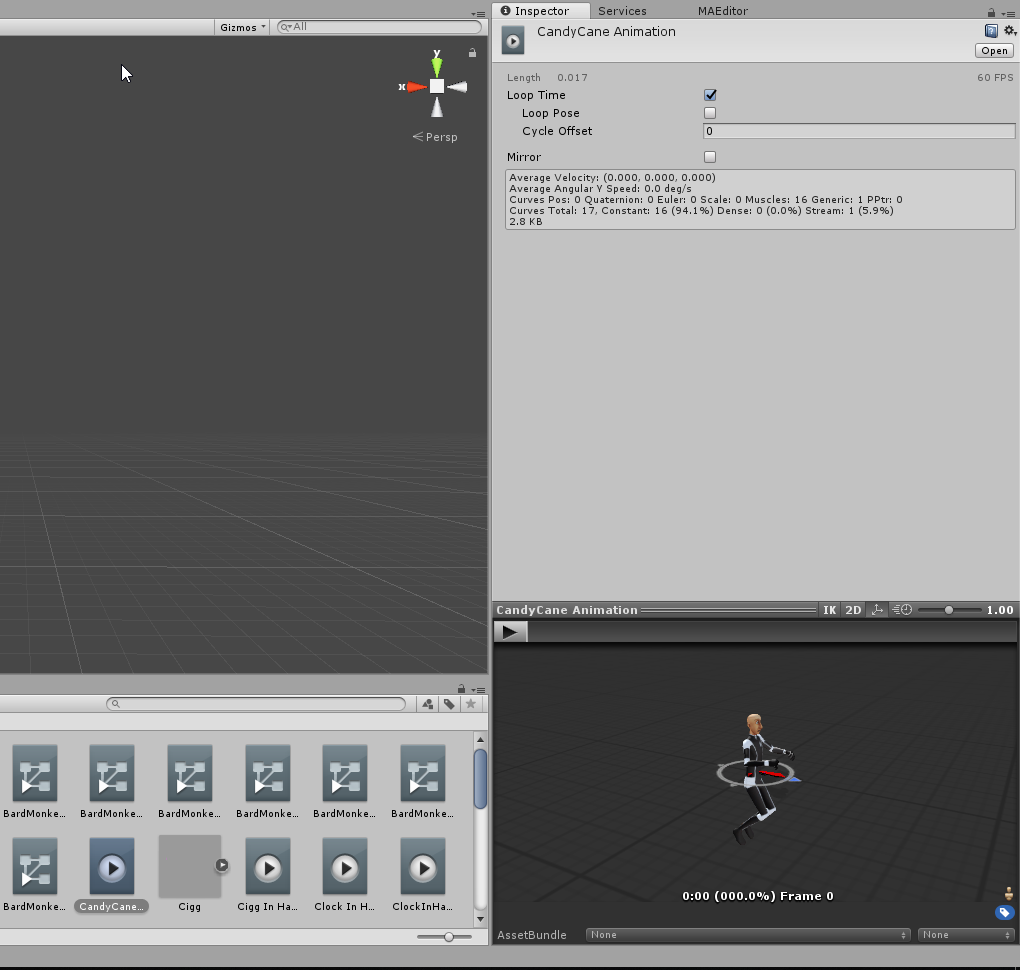 analog kelp
That may be that yes, I'll test it in a few minutes
small tapir
@rough pasture Is the spinning only happen when you use Crouch?
rough pasture
nope, any strafe. exept prone one
but in prone strafe uses same animation as forward
 buoyant dove
why can't move fingers
small tapir
@rough pasture For me it's only when i use Crouch and move left and right i spin. And when i move to the left it mirrors my arms like you said.
rough pasture
on my model - any strafe turn me in beyblade
small tapir
People also say it looks like i'm lagging when i'm walking but not when i talk. and it's only the avatar with with edit walking animation
 unkempt spruce
how do u add both guns on both sides
i know how to put them there
but when i go back to vrchat it only shows one
buoyant dove
why can't move fingers. how fix it ?
torn pawn
@buoyant dove you need at least middle, index and thumb mapped for IK to work
spark fox
@torn pawn He meant animation. Apparently he hasn't animated fingers without using the Muscle Animation Editor before
If he needed rigging help he would go to another channel
I know James is good enough with avatars to know how to do that thougj
 ivory atlas
its lonely in rigging send help
analog kelp
Does someone know why when I stop an animation, it takes a long time to go back to normal, and the elements appear again if I'm doing any hand gesture (even the ones that aren't mapped)
spark fox
@analog kelp You need to assign a second set of keyframes that's just a copy of the first bunch.
analog kelp
What do you mean by that exactly?
spark fox
I mean just what I mean by that
Copy the keyframes from frame zero to frame one.
Just copypaste
analog kelp
Ow ok, I think I got it, thanks
spark fox
No problem
small tapir
Question i can't turn off viseme with animations right?
spark fox
@small tapir Nope
spark fox
If you use the viseme shape keys in an animation
It'll render those shape keys useless
 spice urchin
no like
spark fox
From what I've picked up
small tapir
@spice urchin Yeah that's what i thought
spark fox
Well yea but then multiple meshes
Or you mean like just putting a mask on
If I were to guess though, try making an animation that sets all visemes shapes to -100
spark fox
...you mean faces right?
spice urchin
ye
small tapir
I can even do it with texture change if i have 2 mouth but one mesh
spark fox
Vertices themselves cannot be resized, they're a single spacial point
Yea that works komat, but at the cost of some materials
P O O R L Y O P T I M I Z E D
small tapir
What's best extra material or extra mesh?
spark fox
Material
With more meshes calls for more skinned mesh renderers
Plus multiple meshes using the same material? That technically still counts as its own material in Unity's eyes
small tapir
Nice
red linden
it won't count if it's instanced but you can't instance skinned mesh renderers
small tapir
Oh material change don't show up in mirror right?
analog kelp
Well I can't seem to find a way to fix my animation, it just slowly comes back to normal and any hand gesture shows it again for a long time. Copying the first set of keyframes to the first frame didn't work
small tapir
@analog kelp how many frames do your animation have? Is it a hand gesture?
analog kelp
It is a hand gesture yes, and it goes on for 3:40 sec sooo.. 220 frames I believe
slim sparrow
Hand gestures can only have a frame at 0:00 and 0:01 or they will take a long time @analog kelp
analog kelp
Then I have to create an emote I guess? But I think you can't move your avatar while doing an emote right?
slim sparrow
Yep
Why do you need such a long gesture? You might be able to offload the animation to an Animator somewhere
analog kelp
Well if you know Penny from RWBY, I'm trying to create what she does with her blades in the show
slim sparrow
Ahh yeah
Well, that should be possible
Instead of animating the blades directly in a gesture
Put them inside an empty game object, and make the animation from there instead
You can edit your existing animation's path with F2
Like, make sure the game object has an Animator component on it
And animate it from there. Make sure it's self-contained so it plays when you press play mode and enable the object.
Then just enable/disable that object in a gesture.
The object activation is only 2 frames, but the object will play an animation on its own while active, this can be any length.
analog kelp
So do I need to put the blades in the object aswell?
analog kelp
Then I may need to redo the animation
slim sparrow
I'm assuming the blades will go on your spine or chest
Well, you can press F2 on animation properties to change their path
analog kelp
Yeah I'll try that. thanks a lot for the advices
Ow yeah one more thing tho. How do I interact with her blendshapes from the Gameobject? @slim sparrow
slim sparrow
Oh, uh
Well, there are two answers
The first answer is "you can't"
The second answer is a solution:
Duplicate the Body mesh, disable it in the gesture, and put it inside the game object. Then you can freely animate on it.
But then you won't have lipsync while you are doing the animation
If you still want lipsync during it, there are two solutions to that but both involve Animator logic, which is hard
Basically you can enable/disable animators on a gesture using a specially crafted property, which can enable/disable the blades animation without disabling the game object
Then you can put this new mesh as the one with visemes on it, permanently
Or you can put an animator directly on the Body and do the same thing there
analog kelp
That seems a bit complicated for me right now. I'll keep that in mind but will probably not try it right now
 round panther
hey, is there a tutorial for this? https://youtu.be/2YpOCMObJrU?t=34
Catch up with the latest from me! - MERCH! - https://www.designbyhumans.com/shop/EpicMerch/ - Discord Server - https://discord.gg/w5GnsE7 - Twitter - https:/...
 quartz adder
for particles?
i mean stuff like this has a good chance of just getting you blocked unless its just around friends
just look up a guide on particles if you really feel the need to do stuff like this.
 uneven acorn
when im making emotes some of my shape keys get stuck after previewing them in the animator tab, is there any way to fix this
 craggy sage
is there a reason why my mesh animates when i make the animation, but not when i hit play?

am i just missing something?
 crimson pecan
I added an audio source as a custom animation but it runs automatically when I enter a world
any idea?
 drifting locust
@crimson pecan sounds like you have it enabled in unity when you upload it. Presuming the animation is set up to turn the audio source on, then you need to have the audio source disabled when you upload it.
drifting locust
Yeah. It its enabled. It will..well.. be on haha
drifting locust
In the animation you should have two key frames. One at 0 and one at 0.1
Both keyframes should be the same. And both should be setting the sound to On/Enabled. Otherwise you might have issues
slim sparrow
@craggy sage make sure you're animating the whole thing
If the gun has an armature, animate the whole thing and not just the mesh
crimson pecan
@drifting locust yeah I dunno my guy just convulses and no music plays
 quasi perch
If I want to keep particles constantly emitting off my avatar, even while I'm just walking around or standing there, do the particles need an animator?
slim sparrow
No
crimson pecan
Is there a way to run custom emotes from Unity?
Rather than having to export to VR chat to test?
slim sparrow
@crimson pecan duplicate model, drag animation onto duplicate, press play mode
torn pawn
btw does any1 know if we still have to use fixed joints for world particles? it's the IK breaking world particles, and not the 5.6 unity?
 obsidian vigil
@torn pawn if we dont have to, please inform me 😛
slim sparrow
Pretty sure it's just the IK executing after the particle system component that made it necessary
I think it's still like that but you should test it out
solar relic
hello someone showed me an animation... so I want to recreate it. but I having a lil problem figuring it...
basicly he shoots a particle after he stop his gesture.
since when theres a offtrigger on avatars??
slim sparrow
Particle system on by default, emission module off. Emission module has a burst defined.
On frame 0:00 of the hand gesture:
- Particle system off
- Emission module on
On frame 0:01:
- Particle system on
- Emission module on
@solar relic
When you release the hand gesture, it will play the gesture animation to the end and fire off the burst, but it won't fire by default
You can do a similar thing with audio sources using play on awake
solar relic
owh... the particle is like the by product of the animation?
so how do I turn it off quick?.. 0:00 and 0:01 both particle system off?
clear yew
Instead of drawing like a pleb... I spawn a keyboard layout on a quad with a collider... And i use a laser pointer with a projectile particle that has a subemitter
Only needs 2 gestures
Distance fade on the quad btw
buoyant dove
why very slow finger on vr chat
spark fox
@buoyant dove You need to make a copy of the keyframes, so a set on frame zero and another set on frame one.
buoyant dove
like is 0:00 0:01
 lucid pasture
Anyone else’s muscle editor no longer working for the new unity?
buoyant dove
what version you use muscle editor
vale yoke
Go to the asset store in New Unity and update it
 sweet zealot
2 questions:
- where do i find mmd dances to download
- how do i convert them into something i can use in unity?
 misty bolt
i hope this is the right channel for my following question: When i try to enable a Particle System on a specific second, the particle starts at the beginning from my animation... The particle should enable after like 1-2 seconds... any ideas?
 undone niche
https://imgur.com/a/heQDFP5 any idea why the animation does that weird thing on the face? lol
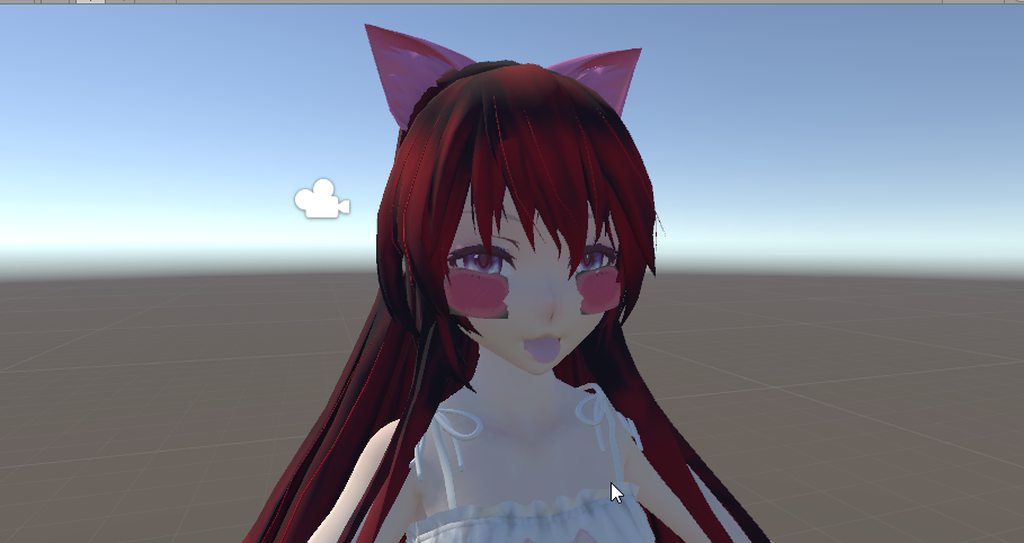 slim sparrow
@undone niche it's blush. Change the blush material to cutout or fade/transparent
 cobalt linden
I have an override for a hand gesture in this override template, but when I do it in game, nothing happens
I know it's going through the animation though because the avatar dissapears after a few seconds (intended)
anyone got any ideas on what's wrong?
round panther
im trying to do a animation with blush too, in unity and blender it works normaly
but in vrchat doesnt appear only the blush
any idea?
 arctic rain
does anybody have a ears down (cat ears) animation? also a ears up?
crimson pecan
Hey is there anyone who can explain or point me towards docs for two-handed gestures?
 finite carbon
i am socialist

Los amigos son amigos para siempre y por siempre en las buenas ... y en las malas .. siempre estare a tu lado nunca te abandonaré .. por que así los AMIGOS S...
 marble flicker
I'm trying to export a vmd file to an anim file, it works fine in blender but the anim file doesnt appear in unity
 wary parcel
@undone niche change it to standard sprite Shader and you will be good.
Cutout is bad
marble flicker
Can anyone help me with vmd to anim for unity
spark fox
@marble flicker You literally put an MMD model into Blender, put the VMD on it, and then export as FBX. All you do
marble flicker
When I do that blender either crashes or the model file doesn't have the animation on it in unity
spark fox
It should
last wolf
anyone know how to make sound play when you run only? it still plays when i'm walking
spark fox
@last wolf The reason it does that is because when you're moving, the running blends with your walking depending on your speed
last wolf
damn so i'll have to put the running animation on both walk and run then
spark fox
@obsidian vigil Pretty much that's how it's done.
 pure ledge
Is there any way to switch animations in a gesture?
Trying to make a pet of mines switch from a normal idle animation to an animation where it moves its head to pat it.
(The two animations are done, I just need to know how to make it in a gesture)
slim sparrow
@pure ledge either disable the pet and enable a copy that has a different animator
Or use the animator behavior stuff to make it transition to the new animation
pure ledge
The second one is the one I'm trying to get, any idea on how to do it?
 cursive gulch
how would i go about making custom animations and having them all in one state machine? i need them to have a delay and some are more than 2 keyframes so i need to use state machines (to my knowledge) but i dont know how to only use 1 state machine instead of 1 for every animation, and seeing as the object has to be inside of the object with the state machine i have to copy the object for each animation, how do i fix this?
torn pawn
open animator and make transitions from animation to animation?
cursive gulch
what i just realised i forgot to mention is that i wanted to use different gestures but activating the same objects
torn pawn
you can enable with gestures different animators, if you nest the object under multiple game objects
sweet zealot
i animated a dance and most of it works but for some reason the hips will not move, so it looks extremely weird - it looks fine in unity though. Any ideas?
violet moss
Is it possible to have a custom animations with only 1 animator on the avatar total
 calm pelican
is there something im missing with hand gestures? i have the animations created on a duplicate and theyre 2 frames they show up in unity but they dont show up in game when applied to the uploaded avatar's override. the only one that works is half of a smile gesture but it doesnt change the lowerlid visemes only the 70% a which is the correct value
 frozen delta
For some reason, my audio doesn't play when I do a custom animation. What am I missing?
I've set the animation to enable the audio and the audio source is disabled.
 mortal nova
Try creating an empty object and placing the audio source in it, then disabling the empty object but leaving the audio source enabled
then in the animation, enable that object
and make sure that its in the exact same spot in the hierarchy in the avatar you upload and the duplicate avatar you use to make the animation
mortal nova
So make sure that its set to linear roll off
I turn the max distance up to 2000 because the SDK will change it
when its uploaded
frozen delta
but isn't that too huge?
mortal nova
Im not 100% but I know that on my avatar its not overpoweringly loud and I was having issues with people not being able to hear my audio
frozen delta
What was the volume?
mortal nova
I dont remember off the top of my head and Im at work. I believe it was 50%
mortal nova
hmmmmmmmm
vrcat's website is blocked by my work computer so Im not able to look up things for you right now
if anyone can share optimized audio settings for sound coming from an avatar that'd be 10/10
frozen delta
It's not loud enough but I guess it's better now
violet moss
Urgh, is there any way to put an animation that runs all the time on an avatar, without creating a second animator? you used to be able to do it with legacy animations
but those are gone now
hollow perch
Yes you have to put it one level deeper, or do the thing on idle, walk, run and prone
And separate sitting override with its own idle. And when you are on stations it will break
 tardy abyss
The 2017 update changed the way animations are saved (apparently). Because I'm trying to update an old one, and it's not actually being updated (according to the timestamp of the .anim file).
violet moss
I was trying to avoid a second animator because the upcoming performence rating only wants one animator
hollow perch
I think that animator is the main one, so you have to do it in idle/walk/etc in that case
Not allowed to upload an avatar without the main animator
violet moss
If I put a animation in idle/walk/etc it tends to override the IK stuff
this is just a tail wag
tardy abyss
There's this new 'Preview' button, and the record button. I hit record, I do a change, I hit record again, and it should be updating the animation... but it's not.
I really could use help.
hollow perch
Ya the tail wag puts you from very good to good... nothing you can do about that I think. I've done tail wag with dynamic bone but again no dynbone in very good
violet moss
So Very Good just can't have custom animations in any form
because it requires a second animator
because they took legacy anims out
hollow perch
Not entirely true. You could do wag in a shader
violet moss
that's /more/ laggy
hollow perch
Or do some rigid body /configurable joint tricks to make tail follow eye tracking or somthing. I don't see joints on the list.
No, vertex shader code to compute tail position could just be a couple sin function calls. Wouldn't even notice it
violet moss
Darn, too bad i don't know shader code 😦
hollow perch
Essentially a vertex distortion of vertices painted with a particular color
tardy abyss
Could anyone help me, please?
hollow perch
Ya really not worth the effort for a very good rating imho, but theoretically possible haha
Are you doing the change in the inspector? Did it turn pink/red when you changed it?
What I do is hit record (also turns on preview) then I hit preview to turn record off and preview off when done. What type of value are you trying to animator @tardy abyss
violet moss
welp if i can't have my green star i might as well use everything Good is allowed to have, lol
tardy abyss
I'm just trying to change the position of a flashlight. In Unity, I got it, but ingame, it's clearly not saved.
Checking the time of the animation file, it was saved when I published the model in Unity. But outside of that, it doesn't show the animation actually being updated (going by the time).
It's another one of those 'works in Unity but not VRChat' things.
hollow perch
Is this in a world? You are changing position/rotation of a game object in an animator?
tardy abyss
I am changing the position/rotation of a game object in the animator (in Unity).
This is an avatar.
Well, the prop of an avatar I'm trying to change.
hollow perch
Where is the animator placed in your heirarchy? Is it on the prop? Are you trying to do the lock in world position thing? It is slightly more complicated now
Also not a legacy animation correct? Legacy Animation with the red play button are no longer allowed
tardy abyss
I don't think we're seeing the same thing here.
This is a flashlight. A model, in the avatar's hand, that I'm trying to change in the Animator.
I have done it like this in the previous version, and it has always worked. But apparently it has to be done in a different way with this new version.
This is literally a simple animation of using an object.
I hope that clarifies things.
Hello?
Anyone?
Please.. I need help.
 shell vale
How does one Select an avatar's Shape keys in blender. IE: I'D like to select the vertices that got moved for a specific shapekey. To make more shapekeys.
For example, Selecting the mouth for only the lips and all that.
hollow perch
@tardy abyss i still don't quite understand the setup you have? You made a flashlight object, with an animator on it containing a controller with one animation that does something cool (like say flicker the light level for spookiness). Your flashlight is unchecked/not active by default? When you use a hand gesture to activate the flashlight game object it doesn't play your animation?
A screenshot of your heirarchy and inspector could help as well. Just trying to figure it out. Does it all work correctly in play mode?
tardy abyss
I actually figured it out. I am an idiot. I completely forgot that the position of the flashlight also has to be changed of the original avatar.. not just the dupe.
Oy...
 waxen ore
Guys i trying to make animation for hand gesture and it taking many parts of of my hand bones, but when im trying to use it in VRC my avatar just have some broken moves, like spinning and going under the floor. All what i need its just rotate some child bones of my hand in 3-4 sec without looping the animation. Can some1 send me some tutorial or just help in PM pls.?
hollow perch
So for gestures they can only do one thing (2 identical keyframes at 0:00 and 0:01) - changing anything over time will break things in weird ways. So one solution is to use another animator on your hand to animate those parts and use a animator toggle aka "Behaviour.Enabled" toggle which you can only get by copying and pasting from something else like a prop toggle or inventory system prefab
spice urchin
u don't rotate the finger bones
u use the muscle params from the animator
the index stretch and etc
hollow perch
Oh I thought he was talking about rotating a prop. Good point
spice urchin
or the unity muscle editor plugin/asset
that lets u animate humanoids by rotating things without needing to use the params manually
hollow perch
Hmm but in that case you must use the gesture system not a separate animator. However Controlling the length of time is not possible from a gesture
spice urchin
they just sayinf they want a hand gesture
o 3-4 sec
yea then u will put an animator on something like the hand
and use m_Enabled as a keyframe
hollow perch
Animator can't touch bones rigged as humanoid
spice urchin
o yea
hollow perch
Also for this you can disable the whole game object so you don't technically need animator enabled toggle. Bones don't have to be active to work
spice urchin
anyone know how to use final ik for actual ik
hollow perch
You only have to rig 3 of the 5 fingers in humanoid so you could make a fake finger or two and leave the rest unrigged then you can animate them as you please. But whateever you do here is not going to be pretty
Better off dealing with not having the 3-4 second delay or some people combine two gestures: one at the beginning and one later on and they just practice to make it all look smooth
hollow perch
Oh man that's a dream of mine. I assume you have tried the obvious approaches of using freeze position fixed joints to copy rotation
I've seen questions about final IK pop up occasionally. Does anyone have examples of working systems made for vrchat that use extra IK components?
spice urchin
is there also a way to make emotes use foot IK
cuz ik u can use foot IK if u make an animator
but for an emote can u do it
cuz like u can see how much better it is with foot ik
https://i.gyazo.com/5846a357773d6d55a20c260a6425ad28.mp4
hollow perch
Emotes can do anything animators can do. The only restrictions I know of are interacting with bones controlled by humanoid muscles
spice urchin
u know what i think ima just use an animator
and make it a cloned version of model
and put it on gesture or something
cuz i used to do these gesture combo things
where one gesture enables all animations
and the second hand gesture chooses which one
waxen ore
Thanks guys ↑↑↑
But i have blade between elbow and wrist bones and i need to make animation for pulling it off from inside of the hand
spice urchin
then use an animator or somehting
spice urchin
why does this happen

in one of my animations
and it wont fix when i try to change the Right Hand Q
nvm fixed
weird bug when import
 waxen hound
I guess i post this here? In unity if i want to test colider instead of spazing the avatar around. Could i make the avatar have like a controler function to walk them around? Or i guess i could add a random animation. Problem is i cant zoom in closer when shaking the model around to check clipping
slim sparrow
Yes, you can assign any animator component @waxen hound
waxen hound
Ok i will take a look
tidal elm
Hi, little problem here, i have an animation triggered on hand gesture (turn my character invisible and a particle effect at the same time), the first time i use it after my avatar is loaded, the animation work perfectly fine, but if try another iteration, i can still spam the invisiblity part, but there is a HUGE lag on the particle effect, and trigger randomly 5-10 second after it's supposed to happen.
Any idea why it's happen and how to work around?
torn pawn
lag can be cause by how many particles are emitted, if they are mesh, if they have high level of noise and other things, if they are very high resolution, or high res texture sheet, lights
u need to show screenshot of the particle system that's causing issue @tidal elm
round panther
Anyone knows if the model position in the animation (x,y,z) is different then the normal model affect the position in game?
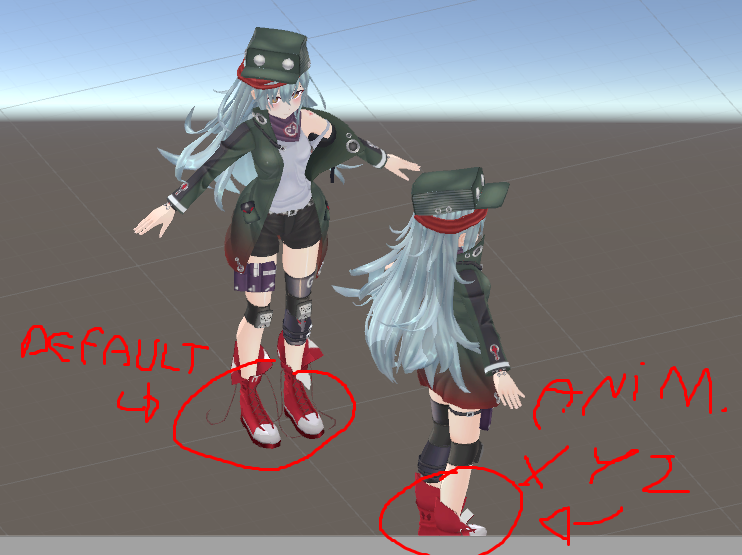 hollow perch
@tidal elm lag in hand gesture is often caused by keyframes other than the required identical ones at 0:00 and 0:01. Please open the animation you have on your gesture and delete everything after 0:01
tidal elm
@hollow perch Going to try that, the 0:00 and 0:01 identical is mandatory in every animation?
hollow perch
Every hand gesture animation yes
 pale nimbus
Somewhat similar question to the one from Crepe.
I have an avatar that plays a song with a gesture, and I want something to happen at certain parts during the song. How do I do that without going over the one frame limit?
 nocturne moon
Been trying to figure this out ever since the new Unity came out, but i can't rotate bones in an animation anymore, like to rotate ears and such for certain gestures. I've seen some public avatars with it so i know it's possible. Anyone have any idea how?
slim sparrow
@nocturne moon disable the dynamic bone component before you make changes
It "locks" the transforms in place for some reason
nocturne moon
Thanks
timid prawn
I just want to have my blinking animation working but since legacy is gone try to multiple thing but its not working. what am suppose to do ?
people say put an animator put the character go in the ground and soo on
 south olive
Not sure if this is the right room to ask but, I been looking for a way to, with a gesture/animation, change my character's hair/clothing colors from one to the other and back. Anyone want to clue me in? I'm sure its possible but I am newb and M not even sure of what im looking for really.
 hasty drum
I'm animating an armband that spins in a loop but I'm having trouble with slowing down the rotation speed. tips?
 glad cape
hi i wanted to ask if somebody knows if its possible to make a particle only appear when its moving and maybe even making it changing the size depending on the speed
stuck spade
@hasty drum you can also use a particle system for that that's what i do
@glad cape yes you can i think it was under particle lifetime where you choose how many spawn
@south olive you can add an animator to your hair or body and and animation that loops, just change the material you want to use
glad cape
but therefor its going to spawn particles like trail wouldnt it?
id kinda like it to spawn only one which follows the bone
stuck spade
@timid prawn i used the Idle from Mixamo and put my blink animation on that, works fine
the particle will appear when you move
glad cape
but thatd be rate over distance right?
south olive
@stuck spade but will that allow me to trigger it with an animation? like if I fingergun I want all my green to turn red ya know? Ive got several shaders that cycle colors but can not find something to create a trigger for to change coloration.
stuck spade
fixed joint i guess but not sure
@south olive if you want to change your hair with your hand then just make an animation that changes the hair colour
@nocturne moon if the bones have the dynamic bones script on you need to remove it to rotate the bone.
@round panther it doesn't. You can savely upload it
stuck spade
btw anyone has a tutorial to make a spawn animation when joining?
clear yew
where could i find an animation file for the default dance?
or remove the model from an FBX with the animation
 naive niche
dance ?
 rich marsh
For some reason in unity the music for my avatar that is OFF is constantly playing
anyone know how to fix it?
rich marsh
no one?
round panther
its possible to edit multiple keyframes at once in one animation?
round panther
what you mean?
@rich marsh

i want to edit all this keyframes at once
its possible?
rich marsh
left click on all of them while holding shift I think @round panther
round panther
and then?
spring nova
fixed joints are broken, not rigidbodies. And there are two fixes: Either add an animator to it with nothing in it and root motion enabled, or use a configurable joint instead
they're a little more involved in the settings they have, but just filling out the target body and setting all the axis and rotation to limited should behave the same as a fixed joint
small tapir
Is there away for me to change all of the selected keyframes and edit the value all at once? Or do i need to go one by one? https://i.imgur.com/eGim5GI.png
 spice urchin
just select them all and type in the value
i don't know if this still works but you might also be able to do stuff like +2 and add 2 to all values
small tapir
It will only change the keyframe the white line is on not all of them
spice urchin
then try just copying the keyframe and pasting it to the others
small tapir
That's what i ended up doing, but it's weird there isn't an option for that
 naive ledge
unity is trash for animating
 ancient fiber
can someone confirm that they can upload their fbx to mixamo because it can no longer map any skeleton I throw at it
misty bolt
How can i make an obejct to an world object? I mean how can i do it so that the object is spawned stays where it is and it is not connectet to me. For example i wan't to place a mirror in front of me with an animation but it is following me. Is there a way to just place it in the room and i can move freely?
tidal elm
Hello, got something i don't really understand. I added an animation (just one frame but meh) on my override for my proneidle, it worked just fine and the head movement was fine too.
After some times, not sure what changed but now the avatar is just frozen, and can rotate if i change orientation but the head just don't move anymore, any idea why?
 raven oyster
how to make an animation on a gesture while doing another animation on a different gesture?
tidal elm
@raven oyster You kinda can use a gesture with a left maj + F* and use another animation at the same time with a right maj + F*, still need to be carefull about some bad interaction but it can work like that
raven oyster
what is a maj + f
tidal elm
F* for F1, F2, F3....
raven oyster
I'm in VR, but what I meant is how to make combined hand gestures if it makes sense lmao
 winter sundial
maj, you mean shift? And I think you need animation states or something to do that. Haven't worked much with it myself though, sorry
I think he means like, if his left hand is doing finger point, he wants the right hand fist (for example) to do something else
cobalt linden
I added a crouch idle animation to my avatar's override, but in game it doesn't do anything. Any ideas on what I'm doing incorrectly?
 fallow spire
is there a fix for the old problem that when i switch through the animations that it needs some seconds until the other animation will start?
 abstract kestrel
Is there a reason my hands don't stay in a position when I try to pose them?
slim sparrow
You need to pose them using the Animator properties, you cannot rotate the hand and finger bones directly.
slim sparrow
Add Property->Animator->Index 1 Stretch etc.
Of course this is a tedious as hell process so I recommend grabbing Muscle Animation Editor
slim sparrow
Yes
abstract kestrel
Alright
spice urchin
you don't need to make all the muscle params also if u have an empty hand animation
slim sparrow
Offload it to some other thing
So if you want a longer animation, put an Animator on an object and activate that object in the gesture
 fierce bane
@undone niche one of your gestures is likely set to more than one frame for activation
undone niche
Lol yeah Hime u were right ,
Ok, they are fixed now, but my hand gestures dont work where the animations work
what can be wrong?
fierce bane
assuming you're using the custom override for animations. They override the gestures you put them in.
You also need to have index/middle fingers and thumb for gestures to work at all. (one bone each minimum)
fierce bane
you can make your own gestures to go with the animations that way too
fierce bane
make sure if you do you edit the animator, not the actual bones
undone niche
i just don't understand
why one of the animations i did the hand gesture kept working
and not on the others
nevermind im dumb
lol
 valid star
so animations are freezing after the update any one here have a fix its getting quite annoying now
tidal elm
I have the same issue, i searched and the "Thumb, Index, Middle need to be bind" come a lot, but i think it's something else, as i already had everything fine on that before
raven oyster
I've made an animation with particle effects, and it works perfect in Unity and many other avatars. But on this avatar the particle systems wont show up (invisible) in-game.
tidal elm
You use it on emote or on hand gesture?
raven oyster
gesture
when having particle systems in a game object, then the game object should be outside of the armature, right? it is world particles
 sharp cove
Ok so I have an animation right... It shows in the custom override menu but in-game there is nothing
raven oyster
yea, still wont work
sharp cove
Any ideas?
raven oyster
is it particle systems mderp?
sharp cove
No
raven oyster
have u applied the animation controller to your avatar?
valid star
well mine is they show up but soon as they play they play a frame then freeze
undone niche
https://imgur.com/a/3Wbrift sry to invade , but any ideas why some animations are doing this green weirdness?
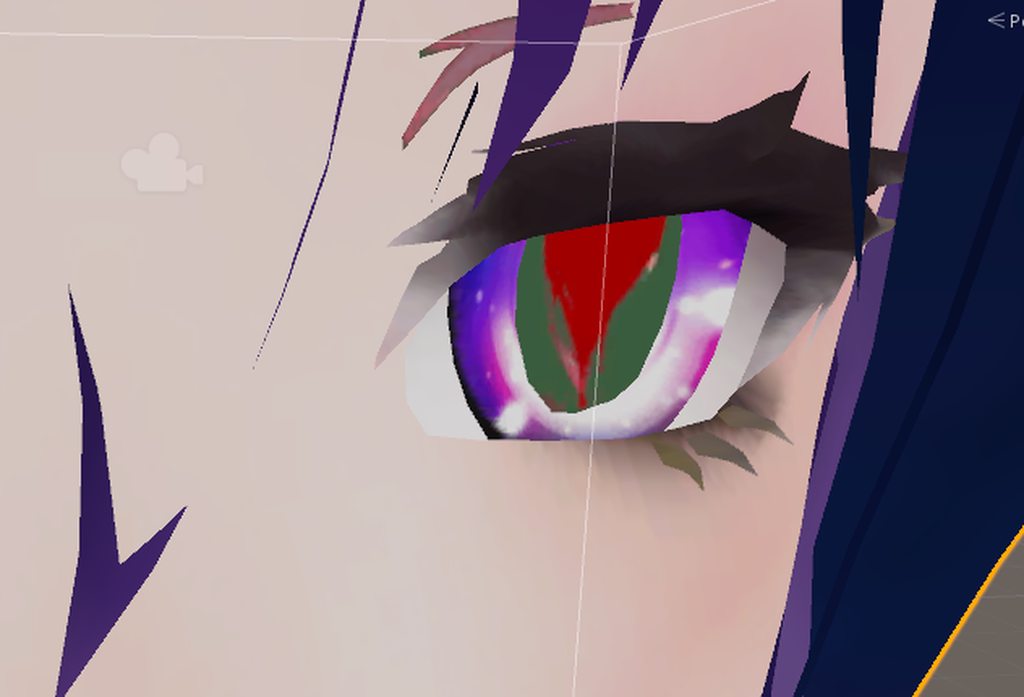 raven oyster
is the new sdk not working properly, since I have done every single thing the same on this avatar like I have on all of my others, yet the effects wont show up
@undone niche does the green thingy show only on animations?
undone niche
yea
raven oyster
then I have no clue xd .. unity and vrchat can be so confusing at times
valid star
is the texture for the heart eyes set to cut out btw
sharp cove
Yeah that didn't work Sharctic
raven oyster
oof, kinda having the same problem. animations works perfect in unity, everything set up, and yet it wont work ingame xd
sharp cove
Lol
valid star
guess ill go else where if no one can awnser my question
raven oyster
for me it works on items like knifes etc, but no particle systems
sharp cove
I just had a legacy model with an animation from blender
valid star
didnt they remove legacy last few updates ago?
valid star
they did in the unity
valid star
well i know if its a huminod avtar animation has to be set to huminoid
sharp cove
Hmmm
sharp cove
Mmn
valid star
but now thye just freeze in the mose recent update but work in unity still\
sharp cove
Ok
I'll try setting the object to humanoid
See if that works
If not then idk wait for another update I guess
valid star
well there are solutions i guess the people arnt on for it
fierce bane
Legacy animations were removed. They will not work any more.
Check the pinned messages to get a quick solution for it.
and if it's just a particle gesture for your hand, you don't need to use legacy or animator for it.
If you need it to change aspects of it mid-animation, then you'd need an animator to do so.
But just enabling the particle system, or the emission for it (depending on what you're doing) is just a simple gesture
valid star
what about freezing animations after uploading to vrc?
slim sparrow
Legacy still works in worlds I think
valid star
since thats the only issue im having rreally
fierce bane
really? I thought they removed it for worlds too
what exactly do you mean by freezing animations?
valid star
play animation plays a whole frame then freezes
this is recently after the vrc update
slim sparrow
You mean it plays the animation once?
valid star
nope
slim sparrow
Also make sure you have uploaded the avatar in Unity 2017
valid star
yep have unity 2017 have the latest sdk
fierce bane
are you turning on an animator with a gesture?
Or are you trying to use the animation in the gesture itself?
valid star
both
they both do the same
start playing then it freezes in that poser or whatever im playing
pose*
sharp cove
Does VRChat accept generic objects?
slim sparrow
Yes
valid star
yeah
sharp cove
Ok I'll try setting it to that
slim sparrow
Yeah, it should work similarly
sharp cove
Hopefully
Ok one problem is
I set the roller coaster to my animator
But it plays when the scene is played
raven oyster
ok I got the particle effects to show, but they wont follow my wrist, they just stay in place where I spawn. I have rigidbody and fixed joint. any fix u know about?
valid star
game object has rigged bodie set to wrist or what ever part your moving?
raven oyster
lmao I am stupid, thanks!
valid star
lol k see if that works
raven oyster
the only gameobject I forgot to do it on was that one xd
valid star
if dosnt then ill have to open my particle gun prodject
thankfully that one still works
just new anitaions arnt workiing for me just want my gun to have a simple transformation
raven oyster
thank you it worked <3
abstract kestrel
How would one keep an object on the ground? Ie, stabbing a sword into the ground and it stays there.
fierce bane
Gestures can only be 1 frame, so don't try it that way. Use the gesture to enable an animator that has the animation in it. Generally you want Start->blank animation->actual animation
valid star
thats what im already doing himeki
it activates my animator then acts like its set to one frame
abstract kestrel
But won't that only work in the same position each time? So I wouldent be able to put it into the side of something
valid star
would have to make it enable and disable the fixed joint with diffrent gesture
then can place any where you want
fierce bane
@abstract kestrel What you want is a world anchored object with a reset while it's off.
Example "World Object" package (made by Rokk): https://www.dropbox.com/s/jyqwkrxevr5utcy/WorldObjects.unitypackage?dl=0
 valid star
yes that^
fierce bane
have to toggle the behavior of the animator and not the animator itself (there is an animation in that prefab set up correctly)
abstract kestrel
Ok, so I could set it to be enabled unless I put it down? Or only pick it up on a gesture then on the release it stays there
fierce bane
yes depending on how you set it up
the example is set up for on activation it stays in place
valid star
hmmm maybe controllers are broken for me maybe thats the issue my custum run controller the vrcsdk controller is causeing this freeze issue
hmm interesting
ill try no vrc controllers then
going to have to make my own yay more hours of work wasted
fierce bane
if you're using a custom controller on an avatar things aren't going to work well.
If it's just an animation override for the controller it shouldn't interfere as long as it doesn't mess with anything related (or disable parents of it)
valid star
well its there controller so if there stuff broken then that should be fixed guess ill do it some other way
fierce bane
custom controllers don't work for humanoid rigs. That's why the custom OVERRIDE is set in the avatar descriptor and not in the avatar's controller itself
valid star
isnt for a huminod
sharp cove
And setting it to generic doesn't help....
Whelp guess I can work on other projects for the time being
The one work around is have the animation not start for 30 or so seconds
Other than that there is nothing else i can really do
fierce bane
non-humanoids don't get gestures/emotes/IK or similar.
They do however work as expected when animations are set up for them.
so other than head/eye tracking/etc they work
Just make sure your blend trees (or however you have it set up) are working correctly. I've not run into any issues with them yet.
sharp cove
Ah that makes much more sense
But one more question
I set the roller coaster to my main model right
But it still didn't register the animation
 turbid sorrel
hey everyone
Haven't played since June and when I logged in I noticed all my animations involving external objects like say a knife got all scrrewed up
Was there something that changed since June involving objects and their physical location w/ avatars?
turbid sorrel
Do I just need to go into Unity and readjust it or is the solution more complex than that?
valid star
might have to redo a few in unity some just need to reload them them to make them work again plus bit father up chat theres a world object spawn prodject for out side objects
turbid sorrel
Oh? That doesn't seem too bad. This world object spawn project, how does one use that in relation with the avatar's project? Assets folder?
valid star
import to prodject and should show you an example how to set it up for your self
turbid sorrel
Ah so basically just a template. Nice.
valid star
yeh
turbid sorrel
Yeah I had a pretty big wave of relief about 15mins ago
A couple months ago, my windows corrupted and I had to wipe my OS drive completely and since it was a SSD, recovery software failed to gather anything useful. I was worried I had my unity projects on said drive, but luckily found everything tucked away on my 2TB SSHD
turbid sorrel
I must've spent hours upon hours getting Bakugo, Chara and Yamato KanColle from Blender to Unity, including animations and uploading
heh
valid star
well if you want to upload to the new unity remove the old sdk from prodjects
then should work as nomrally
turbid sorrel
I was working on a new animation for Bakugo last I remember where he put his hands forward and does his giant explosion flamethrower thing. It even plays audio from the anime where that scene happened
valid star
well im haveing a bit of animation and audio issue
turbid sorrel
The only issue I always have with my animations, is after they do it, their fingers kind of like...
uh
Slowly go from a fist back to resting position and basically animations dont work while that happens. Takes like 5 seconds for it to do this weird thing and I could never figure out why
valid star
oooh
check your key frames make sure theres nothing past your first 2 frames
usally thats the cause for me any ways
turbid sorrel
hmmm
Well
The animation that occurs for Bakugo requires multiple keyframes as there is body motion
turbid sorrel
I couldn't figure it out. Something about "make an animation of that animation with multiple keyframes and have the parent-animation be two keyframes"
yeah
valid star
well hand gesture nees to be basically 1 key frame that activeates the animator on the object for your choosing
turbid sorrel
Hmmm
Lemme get my project loaded and I can send some screenshots. Maybe we can figure this out? Mind if I PM you?
valid star
yeah sure ill be little busy but ill try my best its holidays here so things are crazy @.@
turbid sorrel
I hear ya. I'm only free because I am Jewish lmao, but everyone I know including my gf celebrates christmas, so I do get wrapped up in some of it myself 😛
 hearty bramble
hey so I have an animation to have a gun on my avatar which works in game but I have another animation to have a particle shoot out of the gun but when I try to use it in game only the gun appears and not the particles.
the particle system is attached to the gun in the hierarchy
spice urchin
if its a world particle
theres problems with those
i cant get them to work for me 100% of the time but ive tried fixed joints with kinematic on
round panther
anyone knows how to fix it?
https://i.imgur.com/L09uSji.png
 raven oyster
what is the default/idle-handgesture named in the override controller?
clear yew
Why does it continue to loop my animation after I go to a different handpose? (I already have it set to 1 tick)
hollow perch
@clear yew Bad gesture animations can be caused by extra keyframes after 0:01. Make sure you have two identical keyframes at 0:00 and 0:01. It's easy to mistakenly add an extra keyframe later or change a value in one frame not the other so it will loop quickly between the two values
hollow perch
Check all your gestures. Any gesture having the wrong keyframes can mess up any other gesture
clear yew
Nothing. is. wrong.
:/
@hollow perch
It only happens when I set something to loop and even then some other things break too.
hollow perch
Oh weird. Never knew the loop checkbox had that effect. Got to watch out for that then
 sullen spruce
Hey quick question but is there any way to have custom run/walk/idle animations for yer models?I make the animations in blender and import them to unity
 digital flume
its removing my animator for my tail wag, anyone know why?
 sinful oak
If i want to do a sequence of particle effects (different start times and such) under 1 animation whats the term(s) i should use to find a tutorial video on it?
 ruby elk
How do i make walking animations on generic avatars?
rain reef
@ruby elk you make animation clips and then assign them to an override controller. The controller you wanna use is in VRCSDK/Examples/Animation i think. Its called CustomOverrideEmpty.
Just copy it and assign your animation clips in the movement slots
raven oyster
has anyone figured out how to hide snail's marker bound size?
rain reef
Select your avatars mesh and edit its bounds to be smaller
Do the same with the pen mesh
It should barely cover your avatar
The best way is probably removing any marker meshes you might be using and just make your marker come out of your finger
raven oyster
I have it coming out of my finger, but will hiding the trailposition on default and then enable it on gestures work?
rain reef
Im not entirely sure to be fair, the way the marker works is pretty bad with the new system, probably best to wait for an updated marker
raven oyster
ok
ruby elk
do trigger animations also work on generic rigs?
rain reef
@ruby elk what do you mean by trigger Animations, you mean hand gestures? Havent tested but should work
ruby elk
alright thanks for the info
rich marsh
The following component types are found on the avatar and will be removed by the client: VRC_Station, VRC_EventHandler
anyone know a fix?
rain reef
Update sdk
 main grail
anyone know a way to fix festure animations where they dont spazout
rain reef
Define spaz out
main grail
Two exact keyframes but the animation plays at if one is different
rich marsh
@rain reef thank you
rain reef
@main grail delete one set of keyframes, select the top most one on the ones that are left and copy it, paste it to the other keyframe
main grail
I did that everytime doesnt work
rain reef
Make sure ur on the newest sdk
main grail
i am
rain reef
If you do it correctly it shouldnt spaz out
main grail
its unity
main grail
ok
rain reef
Upload to an image host and paste link
main grail

 main grail
Yes
rain reef
@rich marsh idk if the station will work without an eventhandler, select your seat and remove the eventhandler script and test it
main grail
they work all you have to do is remove the trigger and event handler
But a for the animation do you think the animator is breaking it
rain reef
An animator shouldnt interfere unless it changes the same things
So if your animator changes finger muscles then yea it might interfere
Im kinda busy rn so i cant really check it out myself sry
clear yew
Hey Im looking for someone who knows about Importing Characters, w/ animations, Anyone be able to message me
It'll be awhile until someone picks up on your message, so sit tight for awhile
 unkempt moat
Also- Saying what you need help with might get you not ignored...
clear yew
Basically I want someone to either link me to some helpful sights/videos of how to Animate your models, or Ill pay someone to do it for me
spice urchin
theres plenty of other places for both of those
like utube/google for videos or patreon/whatever for commissions
 sudden bay
Hi there Creators!
I'm trying to do something that causes me more headache than it should.
I have an invisible particle emitting when the animation is activated, and when that collides it creates another effect.
I would like to know how to add a sound that only activates after collision.
Is it possible???
 torn pawn
no u cant
 wild cedar
Looped animations not working anymore?
Tried to do an animation where I summon 3 dudes, but they just stop dancing in the middle of everything (After the dance is over).
The Wrap mode is in Loop
Anyone knows what it might be?
Or if anyone knows a workaround for this.
Ping me if anyone has an answer for this
slim sparrow
@round panther blink works but you need to use Animators, not legacy animations
@wild cedar you are trying to use Legacy animations which do not work
Use Animators
wild cedar
I tried mate
I took away legacy, and used the regular loop option
Still did not work
wild cedar
Yea, I did
slim sparrow
Does it work in Unity when you press play mode?
wild cedar
Yea, that's the thing
It works perfectly then
But in VRchat it just stops when it's finished
I thought it was just for me first, but then I asked a friend to check for me. And he said it stopped for him too
slim sparrow
Make sure Loop Time is on on the animation file itself
And every "dude" as you said, needs an Animator of their own
wild cedar
I might got it to work
I'm an idiot, I put it in debug mode on loop. And then loop as normal
It kinda messed it all up, not in unity but in VRchat
Thank you all for your help
And merry christmas
 spark coral
Is there any way to condense the animator overrides down so my avatar rating isn’t moderate?
I have 6 overrides for face and hand poses and it says I should get it down to 1
spark coral
No like 6 animation overrides lol
torn pawn
can u make screenshot of what u actuallymean
spark coral
Once I get home ye
 pliant plank