#animation
1 messages · Page 95 of 1
 clear yew
oof yeah
you can't
you need to either remake the animation
or modify it with a text editor
feels bad
 hollow perch
You could also fix the blendshape names in blender
 muted prairie
I couldn't see them in blender, it just messes up with Unity on import
Looking at the forums, i'm not the only person with that problem
I actually don't think i can fix all this, feelsbadman
 vital musk
as a noob to animation, how can I get a custom blink animation in vrchat for when CATS won't work properly?
I can make one in unity itself, but it gives me warnings about non-humanoid animations and doesn't seem to have anywhere to actually select it as blink animation
making the animation in blender itself is an exercise in pain since I use bones to control the eyelids, but can't apply the movements as a shapekey to use with CATS without messing up the actual geometry of the eye somehow
 misty tiger
you'd want to set it up as an idle animation
 hardy osprey
Make a 10 second animation of the eye shape key blinking
Set the animation on avatar
vital musk
that's the thing, I can make it as an animation in Unity
but vrchat build tools complain of a non-humanoid animation and it doesn't show in game
even when set to be the custom override idle
hardy osprey
It'd not the idle animation
It's an animation script
Or component
Hmm wait
Did vrc stop using legacy animation
Yea probably
vital musk
so no using .anim files?
hollow perch
See the pins . It's easy to convert to animator and then it will work
Also animators have state machines so you can do clever stuff to make the blinking more random by going through states
The only difference is you can't put an animator at the top level of your avatar heirarchy so you put it on the Body for viseme/blend shape animations or on the Armature for bone related. If they are yellow because you moved them, You can select entries in your animation and hit F2 to fix them so they dont contain the extra Body or Armature/ in the path
vital musk
I think I understand the whole transition thing
but do I need an animator controller for every animation, or can I have one animation controller with idle anim and transitions to other emote animations?
hollow perch
You need one per. If you want to transition one way is to use multiple animators on different levels of your tree (Hips, Spine, Chest etc) and use something called a Behavior Enabled toggle to switch which animator is running)
Or you can do what RedMage suggested and do these as idle animation in your vrc animation override
The downside is if you want emotes, the animations must be exactly 1 frame long so you won't be able to affect blinking during emotes: it will always use idle or maybe walk or run if you happen to be moving
If you use nested animators make sure you do not touch the bones in any gesture or animator override because then they will conflict and not work. So then you mist do everything through turning animators on and off I think
vital musk
er, I just uploaded a test with just the one animator and transitions
idle anim works... I think?
and emotes seem to work fine
hollow perch
That is probably good enough? Or you want to change the blinking pattern in some gestures
misty tiger
don't actually use the idle override, since you'll have to fix the standing pose
just set up the animation on an animator somewhere
vital musk
okay I give up for now
didn't realise it was that difficult to get blinking
I never got eye tracking working either, only seems to work for anime eyes
hollow perch
It's not hard. Just take the anim you made for idle and drag drop into your armature
Then select armature open the animation and on each line click it hit F2 and delete the part that says Armature/ at the beginning
Then make sure to remove idle from your animator override controller. That should be it
Eye tracking is easy to fix. You need to create empty blend shapes and configure eye tracking in cats using the empty blinking blend shape (or let it create them)
misty tiger
you don't need to do that for cats, just check the "disable blinking" box
so it doesn't try to set up blink visemes
vital musk
CATS doesn't seem to work properly for my avatar (patrick from spongebob), since it's cartoony and the eyes bulge out a bit
eye movement seems to move the eyes in and out of the head way too much
that's the whole reason I wanted to make a custom blink anim instead of using CATS
that, and trying to set up visemes in blender when I pose using bones is a massive ballache
misty tiger
yeah if your viseme involved rotating something, it won't turn out well
since the shape key is just going to move the vertex in a straight line
eye tracking might be a bit tricky if the eyes aren't uniformly sized like a sphere would be
hollow perch
TheSearch #avatars-2-general for lefteye and you will find a nice post by Svelsen explaning requirements for vrchat to turn on eye tracking, mostly things being named correctly. Cats will do this all for you if you go through that
If eyes are quirky you can make them track less by weight painting attached vertices 75% to head and leaving only 25% on the eye bones
 low relic
is there a way in Unity that I can bring my avatar back to a normal standing pose after editing animations?
 torn pawn
@low relic 2nd pinned msg
low relic
from the top or from the bottom
 fallen flax
torn pawn
fallen flax
torn pawn

GitHub
A tool to speed up setting up VRChat avatars in Unity - rurre/PumkinsAvatarTools
low relic
woah omg thanks
 cedar heath
Anyone know how to go about animating a hammer to spawn in like far behind my avatar then come flying in and landing on my back sorta like for a load in animation
torn pawn
@cedar heath put hammer under empty game object and animate it to go from behind to 0 0 0 = returning to it's original position
 topaz narwhal
Ey bois
Having a problem
activating my animations
Am a desktop player
For some reason can only use 2 animations [f4 and f8]
clear yew
how did you set up the override controller ?
clear yew
then the avatar don't have more than those 2 animations
topaz narwhal
Combo gesture?
torn pawn
combining your left and right shift
torn pawn
then it's not the same ava
topaz narwhal
Hm... Okey thanks for the info 😄
 velvet urchin
I have been going at this for over an hour now. How do I spin an item on my character? I want to place an object over his head that does a slow spin, couldn't figure out how to do it with an animation. Like I did a transform axis and set a number, but it just rotates it that far, one time, instantly. I tried with a JavaScript I found online, that worked, but found out vrchat must not support that because it said it would remove it on upload. So can anyone help me with spinning this thing?
 flat cipher
Create an empty game object and parent the thing you want to rotate onto it. You don't have to parent the empty to anything just yet. Go to window > animation. Select the empty game object and click create animation in the animation screen. Press record and move the playhead a few frames ahead. Rotate the child a bit in the direction you want, then round the number in the transform to 360 or -360 respectively. Right click on the keyframe at the start and set the interpolation mode to linear in the "both" submenu (i think it has to be linear, if it doesn't work, try another mode). Do the same for the last keyframe. Change the sample rate or move the keyframes further apart to change the speed. This should have put an animator on the empty game object with one animation that will loop forever. The animation should be changing the local rotation of the child only. If it doesn't loop, click the animation clip in your assets and tick "loop time". Now parent the empty to whatever you need. You can parent it to your head bone, you can parent it to the root of your armature, hips works well too. @velvet urchin
velvet urchin
Now is this going to rotate it or spin it though? Because I don't want it rotating. It needs to stay stationary and just spin. Like a top.
See, and I've figured out how to get it to spin, however, the spinning isn't consistent because it slows down when it gets closer to the end, so I tried stretching out the animation to like 3 minutes, but then it spins real slow at the beginning and end and super fast in the middle
Alright, so after about 2-3 hours of trying to make a simple item rotation, I fixed it :) I fixed the speed up/slow down by making both keyframes linear
flat cipher
👍
velvet urchin
Thanks for trying to help anyways though. To be honest, half of what you said, I didn't even understand lol
flat cipher
It was step by step stuff that you've probably already done
clear yew
Hello everyone, sorry to interrupt but uh I'm having an issue with the hand gestures. One of the gestures keeps appearing with me activating it. As in a duplicate of the weapon I have in one hand is activated when I didn't even touch it. Is there any solution to this?
 cursive gulch
how would i go about adding a delay to my animations? i keep accidentally triggering them
 icy crow
In your gesture you could enable an object that has an animator on to automatically play your desired animation
And then you could have a delay at the start of that object animation
cursive gulch
wait is it because its used in a gesture that the delay gets removed?
because otherwise i dont know how to add a delay to this new object
icy crow
Gestures are usually only 2 identical keyframes so you wouldn't be able to add a delay there. So you can put an animator on an empty game object and record your actual animation on that animator
Then in your gesture animation, just enable that object
cursive gulch
im not experienced with unity animations so i still dont know how i actually make the delay, do i just move the start a few seconds ahead on the second animation?
cursive gulch
ok
 violet moss
I want different hand gestures to do different body animations, but the problem is, my animation loops are long, so they get “stuck”. I’m told the solution is to have the animation merely turn on an animator, which is always playing the animation. But if I turn the animator off, it turns its bones off too, which means any other animator for a different gesture won’t work. Plus the animator has to contain the bones they animate as children... how do I set this up for multiple animations on different gestures, that all use the same bones?
clear yew
hey would anyone happen to know how to make a working bow and arrow?
like for an avatar and not a world?
 brittle granite
yo!
I've never made a bow and arrow but here is how I would do it
requires two geutures
1: gesture spawns the bow and drops a rigid body into the world.
2: gesture releases the arrow from the bow as a mesh particle that is linked to the rigid body. so it can fly in a parabolic angle if you put physics on the partcle with gravity and such. you can even have it bounce off walls if you have it look for a world colliderd
I made a taco cannon on my doggo character and used this method
clear yew
is there a tutorial online for setting this up?
brittle granite
not that im aware of. but you have the terms you need to search up. thats half the battle
do you know how to do rigged body world drop?
clear yew
no
brittle granite
k, look at the unity documentation on rigid bodys. What you need is a fixed joint rigid body attached to an empty game opject that is part of your character. have it attached to nothing and gravity be nothing. but it looks for the rigid body component that is on the hand bone of your character that you are shooting from. So it will attached itself to your hand but it's really in world space. The particle arrows are attached to the fixed joint.
torn pawn
proper dual-wielding bow and arrow is a complex system (multiple rigid bodies, multiple fixed joints, inverse colliders, spring joint, configurable joint), simple bow and arrow is just dynamic bone inverse collider on string and a particle system
brittle granite
^that way also works, but your particles will inherit the avatar translation aver they leave the bow
torn pawn
and u have to create extra game objects and rig + origin point the bow properly
brittle granite
@violet moss hello! adeon, im investigating this exact problem. Have you tried having the animator control some of the state machine animation system?
torn pawn
so i suggest just going the easy way
clear yew
ok
violet moss
@brittle granite Avatars support State machine animation systems, but not parameters. So the only thing you can do with them, for avatars, is time-based things. No logical transitions. That only works for worlds.
So basically it's only useful for stringing animations together end-to-end
 slim sparrow
You can play, pause and rewind state machines
As far as I know, you cannot pause and then play where it left off, it starts from the first state every time
brittle granite
@violet moss what is your rig? you wanted to have different animation on the same rig right?
violet moss
yes, basically ear+tail animations, that are pretty long, so they shouldn't be on a gesture, since they'd get "stuck", but if they're on an avatar, I can't think of how to have multiple different gestures trigger different animations on the same bones, since they both need to be placed on a hiegharchy where they contain all the bones they animate, can't be in the same game object, and also can't have one inside the other.
seems impossible catch 22'
slim sparrow
Sorry wut
violet moss
basically: How can I turn on and off different animators that each control the same bones with a different animation.
slim sparrow
I'm sure there is a solution to your problem, but you'll have to outline it more clearly
violet moss
basically, how can i work around the fact that animators can't use parameters
slim sparrow
Animators can have layers, which means one animator can have multiple animations playing
violet moss
but can i turn them on and off independently with hand gestures?
slim sparrow
Well, for your tail for example
Yes
There's the first tail bone where you can put an animator, but you can also put it on the hips, the armature object, etc.
violet moss
now do I turn an animation layer on/off via an animation?
slim sparrow
You can't turn individual layers on/off unfortunately
I wish we had better parameter control
violet moss
Well basically i want different states for different hand gestures
slim sparrow
You'll need one animator per state.
violet moss
the problem is if i turn off an animator, it turns off all the children, which turns off the bones, too, so they can't animate
unless there's a way to disable an animator without disabling the whole game object
via animation? i'm confused how this works
 clear yew
you can enable/disable an animator with the behaviour property
violet moss
I don't seem to see the other animators as a selectable parameter
Oh wait do I use record mode?
slim sparrow
No, it's
Uh
I posted a blinking prefab in the Cats Discord, and it's been posted around here too. Basically, you need an animation file that contains the Animator.Behaviour property, since you normally can't select it.
It only turns the animator component on/off
If an animator is turned off, its animation keeps playing but it stops state transitioning.
If an animator is turned back on again, it will revert back to the first state
The idea is that the gesture has animator off at keyframe 0 and animator on at keyframe 1. This way, it will keep turning off and on, which will hang it in the first state.
Then when you release the gesture, it goes to the next state, which does nothing.
You might have to untick "write defaults" on all of the animators if multiple animators have to control the same bones
violet moss
Ok that sounds hacky but I guess if it works... so I can't add Animator.Behavoir on my own? I need an edited file or something?
slim sparrow
Yes, you need an existing animation file that already contains the property. You can then press F2 to change its path
Toggle props includes an animation file like that too.
violet moss
Thanks much
*is there a reason parameters were disabled on avatars
Reading outdated VRChat tutorals, they clearly worked at one point?
slim sparrow
I don't think they're "disabled", it's just an animator limitation within unity
You can only animate parameters within your own animator for whatever reason
So a parent cannot set parameters on child animators. It's a shame, because that would be really useful.
 cyan chasm

 violet maple
Anyone know where I can start to learn more advanced animations? I know how to do animation overrides so,
 hexed pelican
like what do you mean more advanced?
 charred oar
Does anyone know how to put like a weapon in the ground and be able to walk away from it?
Also be able to pick it up again
 fierce bane
@charred oar What you want is a world anchored object with a reset while it's off.
Example "World Object" package (made by Rokk): https://www.dropbox.com/s/jyqwkrxevr5utcy/WorldObjects.unitypackage?dl=0

"pick up" portion is just activating a different gesture to put the same weapon in your hand
so for example you'd switch from fingerpoint to thumbs up while reaching for and "grabbing" the weapon on the ground
violet maple
@hexed pelican I guess to just learn more? Because on YouTube it’s just basic like hold items, I guess like learn how to use particles if that makes any sense?
fierce bane
Don't specify VRChat when searching. Search for Unity related things instead.
Let me grab a particle video
violet maple
Thank you!
fierce bane
@violet maple This should teach you the basics of particles and get you started. You can always look up more specific things or ask questions if you get stuck or confused. https://www.youtube.com/watch?v=FEA1wTMJAR0

Udemy: http://bit.ly/BRACKEYSMEM Everything to know about the Particle System in Unity! ♥ Support Brackeys on Patreon: http://patreon.com/brackeys/ ● Learn m...
violet maple
Tysm (:
fierce bane
good luck, have fun with it
charred oar
Cheers for the help
 honest spear
If I'm trying to make someone's screen shake when the Bass of a song hits, how would I do that?
slim sparrow
A shader
honest spear
Im new to making animations in UNITY, whats a shader?
or really whats a good shader, im sure i could figure it out if i download it
 ivory atlas
Xiexes has worked for me just fine
clear yew
distortion field?
does anyone know how to make a beat visualizer (like a beat distortion field that sends out a distortion shader wave)? i need help with this specific thing. im really new to shaders so any tips would be epic
 cobalt linden

 spring nova
If it's a bone that's part of the humanoid, you can't move it with the raw transform of the gameobject, You have to move it with animator properties
spring nova
Does that make sense or do you get what I mean?
spring nova
Raw transforms are tied specifically to the thing it was animated for because all it's doing is looking for a thing called armature.spine.spine2 etc and telling it to move to a specific place. Humanoid on the other hand is sort of like a standard, so you can apply a humanoid animation to any character that has been set up as humanoid. This means instead of having control over the X Y Z of a specific gameobject you have more like "indexfinger 1 bend in/out". But if you try to do both of these they will interfere with each other and throw errors like you're seeing.
So just get rid of the keyframes that manipulated the transforms and replace them with animator properties
spring nova
Which are at the top of the list when you do add property
violet moss
in VR, is it possible to momentarily disable VR IK and revert to desktop user animations via disabling something with an animation?
like, VR IK takes priority overtop of walking animations, for example
 novel lagoon
would you guys recommend making an animation for your models in blender or Unity?
 whole dew
Hello, this is going to be a pretty lengthy message, so please bare with me. I'd be forever grateful if someone could help me with this issue. So basically, to start, I am an Oculus Rift user. I have been experiencing this issue for quite a while, I will try my best to explain it in words. So basically, when I load up VR chat, I experience this issue where my avatar's arms wont fully extend straight. Even if I hold my arms straight down at my sides. My avatar's arms will never properly straighten out. If I turn my wrist to it's neutral position, the arms of my avatar will be in a rather awkward position. I cant figure out what the issue is. It seems to track my arms just fine, it's just my avatar's arms wont straighten out when I hold them at my sides. Before you make any suggestions, keep in mind that I have tried quite a number of things in attempt to fix this. Here is what I've tried so far:
-Making sure my height was correct for both in-game and in the oculus setup. (The problem actually gets worse if my height is correct.)
-Going through the entire oculus setup.
-Using different types of avatars, I've even used the vanilla avatars that the Devs created.
-Reinstalling/Verifying VR Chat
-Making sure drivers were properly updated.
-Kneeling all the way to the ground, switching to seated play, then standing back up and switching to standing play.
After having this issue for an extended amount of time, I found a temporary fix. Hopefully this can be a clue for you guys, and it might tell you what's wrong. Basically, if I set my height to way shorter then I actually am in real life, like 5'5 (I'm actually 6'0) and then switching to sitting play while I stand up IRL, it works perfectly fine, but it's extremely annoying still, and I'd really prefer to have a proper fix.
 rancid valley
Does someone have this idle animation and is willing to send it to me? it'd be really appreciated
 ivory atlas
WAIT.... is that a female do you have custom avatar?!
rancid valley
Not mine but im working on mine atm and i wanna get it as similar as possible except the hair
https://gyazo.com/bbea531d76be586d3c8b30fb1b2e547f

all i need is that idle to get it to close its legs a little more
 deft mountain
Could anyone tell me why animations on hand gestures loop when they last longer than the minimum time? They start and end fine when set to an emote, but on gesture they won't end immediately if you switch to another gesture, but instead loop through the frames of the animation. For example: I make an animation where a spear I'm holding shoots forward, but when I release the gesture the spear goes back and forth between my hand and its destination a few times before ending.
novel lagoon
anyone knows how to swap between textures in an animation, all on the same mesh?
 unique inlet
Materials
 frigid viper
Any good tutorial on implementing audio file into mixamo animation?
 upper bone
hey uh i accidentally animated with my main avatar and now it's broken. is there any way to fix it?
fierce bane
@upper bone second pinned message in this channel
upper bone
oo ty ty
 glossy radish
I've been debating on a custom animation set. My main worry is workload. What's the minimum amount of required animations? I assume it's walking in all 8 directions and running in all 8 directions
And in case I do that, I'd need to override everything else that's incompatible (especially since I plan to use a non-biped rig) to be an empty animation.
clear yew
hey dm me if you want howard the alien emote
fierce bane
@glossy radish Technically speaking, there are no required animations. But you'd just slide around.
Otherwise a forward walk and left/right would be needed. Backwards walk can simply be a negative animation speed to reverse it.
And sprint can just be double speed animations (or some other multiplier).
Diagonals can usually be a blend of forward/backward and left/right if you use a blend tree.
You would also want an idle animation.
Crouch/prone versions will bring your height down to the right camera height, otherwise it isn't required.
glossy radish
Right. Thanks.
 royal sable
Do I need to make separate animations for the left and right hand gestures or can I keep them in one animation?
royal sable
Also how do I make it so that an item appears in my hand only when I use my right hand?
torn pawn
u cant
royal sable
Aw shucks
 viral hazel
So I thought that I'd be able to make an anim where I could just pull out a pistol, when I'm doing that, do i need to put the model (pistol) in, then make a copy of my model, (the main avatar) and animate my avatar gripping it? I was told by a friend I should have someone else do it or I should use a program to make it easier, it was muscle animator, I was personally thinking about having someone do my anims but I can't find anyone willing to do that. If I choose to do it on my own is there anything I should know?
I'd like to believe that i can do things on my own but I've been told by many people to just have someone else who's got an idea on what they're to do it for me, though I'd like to do things, most of my ideas would be hard to explain
 viral hazel
Thanks lad
novel lagoon
any of you guys know any good methods to animate textures?
 cold talon
So, I'm trying to make an animation in Unity, where it changes it's texture, and I'm trying to make a gesture toggle it. I've already tried to use a gesture to activate an animation component with the animation inside, and it does nothing, anyone have an idea?
 silver holly
hey guys
i know weapons can be a gesture override but if i wanted to shoot flames out of my hands or something what would that be called?
I cant really find anything about it
clear yew
particle system
silver holly
thanks
cedar heath
Anyone know what I can do in a particle system to make a world completely dark without being able to see anything at all
Like as a trigger
For hand
On a model
slim sparrow
Sounds like a shader. Also sounds like a good way to get blocked.
cedar heath
What kind of shader
Also they can't block u if they don't know it's u
Especially when they can't see
slim sparrow
Considering that's your response, I doubt anyone would be willing to tell you where to find such a thing. Keep in mind they can still see their menu fine. So now instead of just getting your avatar hidden, you will now be blocked entirely by half the lobby (you can't block avatars from social, so they have to block you entirely).
 pliant dust
Also sounds like a good way to get banned from this Discord.
novel lagoon
anyone knows any methods to change a texture during an animation?
pliant dust
Hmm? No, he is. In #rules, it mentions all Community Rules also apply in this Discord. He would be breaking rule "Modification of VRChat App or SDK" point 3.
@cedar heath So yeah. Please don't be a jerk to other players.
slim sparrow
@pliant dust using a shader like that is not modifying the client or SDK at all, though.
pliant dust
@slim sparrow It is, and I quote: "Disrupting & Interfering with the experience of VRChat users". This isn't the place to do this, by the way.
slim sparrow
I have absolutely no idea what you are on about. While I agree that it would still break the rules by being disruptive, you absolutely do not need to modify the SDK to upload such a shader. What would the SDK complain about, exactly? @pliant dust
frigid viper
If you use it for private usage among your friends then I see no problem there imo.
pliant dust
@slim sparrow This isn't the place to talk about this, so I'm not going to respond anymore.
slim sparrow
k dude
¯_(ツ)_/¯
You can just say "I was wrong" next time, no need to be like that.
@frigid viper that goes for a lot of stuff in this game, same with NSFW content
But the guy above was probably trying to use it in public hence his reaction
Shaders like those are a good way to get blocked. Just like shaders that render over everything else.
icy crow
menu overrender shaders 😩
slim sparrow
Oh yeah, I've seen a few of those around. No idea how they do it
It's some wacky stuff for sure
It's usually not as simple as just rendering over the menu, they cause a lot of glitches and artifacts while doing so
I haven't seen any gore overlays that also block your menu, for example. I've only seen menu blockers that are just black.
icy crow
it's usually a particle
frigid viper
Ok now on a serious note, done my animation and everything but somehow the game doesnt recognise it, when i test it in unity it works perfectly and animates perfectly
slim sparrow
@frigid viper are you using an Animation component by any chance? Or a legacy animation?
Is it on a gesture or on a game object?
frigid viper
Using a stock animation from Mixamo and added few of my components, using it as a emote function not a hand gesture
but it only plays the default animation from mixamo, even tho i added keyframes for the aditional objects i've placed
slim sparrow
Go to your overrides, and click on the animation itself
It should highlight the animation in assets
It is possible that it's referring to the wrong animation, such as an animation file embedded in an FBX.
Or just the wrong one elsewhere
frigid viper
I doubt its refering to that since i had no issues adding aditional audio source on pervious one and it works fine but on this one particular it just doesnt want to budge, also checked the override and it referes to correct animation that i've made
Could screen share if you'd want to cooparate
 elfin furnace
I making a particle emmiter and having the gesture turn on burst emission. Any way to sync audio to that emission? I timed it out and it line up for the first use of the gesture, but get off sync more and more from repeated uses.
 onyx agate
Hi guys/gals, question..i have an avatar with gem fx shaders and now wgat i like to have is to get the Die emote to be the avatar shattering in pieces... any idea on how i would go about that
brittle granite
been having fun with the animation on my avatar's face https://cdn.discordapp.com/attachments/511011593551872052/518880611687989272/angrylook.webm
 lofty radish
Anyone here know if there’s a way to make the behind geometry of a mesh not render over the front geometry if you use ztest gequal in your code?
 vestal copper
So my model says it has shape keys for expressions but it's not doing anything
Is there anything I can do or would I have to make them myself
Every time I try to move the eye to the correct position it deletes itself once I leave edit mode
novel lagoon
question would it be possible to swap between textures during an animation? i'm trying to make it so the color of my eyes changes during an animation
flat cipher
yes
just start recording an animation and change the material
You can use particle triggers for colission animations I think
novel lagoon
@flat cipher is that on blender or unity?
misty tiger
@lofty radish have you tried changing the face culling?
novel lagoon
thanks!
 obtuse swan
im trying to animate a door but when i do the trigger it wont let me put the anim in
lofty radish
@misty tiger yeah I’ve tried all types of culling. On spheres turning on backface culling works but on more complex geometry it doesn’t. The problem is that any faces that are being rendered and are facing your view render over the geometry of the same shader in front of it
misty tiger
ah i see
 misty tiger
have you tried changing the render queue and turning off zwrite instead of doing ztest gequal? assuming you just want it to render on top of stuff
should be a way of setting the queue so that it renders on top of geometry
lofty radish
Pretty sure I have but I’ll try again.
misty tiger
if that doesn't work, another idea i have would be making a shader that modifies the screenspace position of the vertices to be closer to the camera
err, not screenspace, but the projective space that comes after view space i mean
lofty radish
Hmm that could work. I’ll try some more stuff
misty tiger
it'll probably take a bit of fiddling to get it right, unity docs don't really describe the zw component of that space, which is what you'd need to modify
cedar heath
I'm trying to make a particle glow and I can't seem to find a way to make it glow I turned emission on and still nothing
hollow perch
You want them to emit light or just show up in the dark?
Emission will allow it to show in the dark and possibly emit a small bloom halo if you make it really bright hdr. But it won't light up objects around iy
velvet urchin
Just had the worst experience in Unity's discord so maybe I can get help with this here lol.
I had a quick question about how to do a zoom in effect in unity. I want to spawn in a small galaxy in front of me. I want this galaxy to zoom in until it gets to a small version of our solar system. I've thought about just making the pieces of the Galaxy get larger, giving a zoom in effect, and then just disable it, however, I would prefer if it slowly disappeared as it got further away from the center (outer edges to inner area), and my current idea would just make it all disappear at once, which will look like crap. Is there maybe something I can place around it, like an invisible sphere that will make the parts of the Galaxy go invisible once they come in contact with the sphere? I want it to like zoom in, getting bigger and going through players models, kind of as if to pull them into the middle. Hard to explain, it's an effect used in movies though
 unkempt spruce
how do i enable facal exprestions
such as blush and other stuff, that is to do with the face and combine them with fingers
novel lagoon
is there a way to hide/disable material during an animation in unity?
hollow perch
You have multiple materials and only want to hide one? Make a simple hidden shader and put it on a material. Then you can use material reference to swap that specific material.
Search this channel for hidden.shader for a simple invisible shader one liner
lofty radish
If I’m trying to use the position of a light source in a shader and there is no real time light source in the world what value would be returned?
 polar elbow
got an issue with my animations not playing on my characters....the VRCsdk basic animations work on character but the Animations i download from Maximo dont ever play... they either just stay T-posed, or the character squates down into a ball below the plane. Yes huminoid is on...
just trying to learn basics of applying animations
hollow perch
@lofty radish what type of shader? Vertex lit? ForwardBase and ForwardAdd (delta pass)? If the latter, the way you "know" is unity doesn't render the delta pass
You have to somehow look for the presence of lighting probes in the base pass. Xiexe has an easy to read example shader on his github (called wireframe?) that shows how to use some of the lighting functions/variables.
lofty radish
@hollow perch I’m not really sure about which type of shader I’m using. I’m transitioning from shader forge to using code and am trying to make a type of fake lighting for the shader since many worlds don’t use real time lights. So I’m trying to make figure out the values that directional lights give the light direction node so I can fake that. All I know is that I’m not using the normal unity lighting but I’m doing my own custom lighting
hollow perch
I'd definitely check out Xiexe's examples then, both using surface shaders (his famous xstoon) and the simplified wireframe example
lofty radish
Ok thanks!
hollow perch
Sry didn't see it. Can you check that your avatar was imported as humanoid and that the animations were also imported as humanoid
Mixing humanoid with generic or legacy will just not work
Also are you putting them as emotes or hand gestures or animators? Depending on what you are doing it matters
polar elbow
Uh... I honestly don't how to check that. If used full character scenes that have the character already as humanoid. And I just tried using the character model alone and switched it from generic to humanoid. But still didn't work. The animation is just one I downloaded from maximo and imported in
Uh....i guess empotes
Trying to play them with play button but nothing happened...last night I ran into issue where ei hit play..and literally every program on my desktop opened themselves
hollow perch
Ok emotes should be easy. Click the fbx file and check the selection under rig
polar elbow
I'm just trying to add an animation to one of the I guess gestures so if I hit Shift+F7 it will play like a spell summon
However I'm making the spell su?mom animation with practical effects and stuff
I'm just trying to apply the body movements to the character right now
]
\
That's the issue I'm having now lol ^
hollow perch
Shift f7 sounds like gesture not emote menu. If it's a gesture it applies something called an avatar mask so only your hand will be animated
In that case the only way is to swap out your mesh for another animated one, possibly with its own armature.
However I've been thinking about this, and theoretically you can use an editor script to create partially overlapping armatures such that your second mesh has its own arm but otherwise shares the rest of the body with your actual avatar
polar elbow
....
i htink ill start with emotes for now xD
can you apply animations to emotes...say like the character swigns her arms around and stuff. Am i able to apply like a magic circle to itand some partical effects?
 jagged rune
Earlier I rigged a roblox avatar in blender, ran some mixamo animations through it, and it was moving and working fine.
I imported it to unity, and tried to run some animations on it to see if it'll work, and he was a solid model.
I had an armature
No limbs were moving or anything
polar elbow
im in unity trying to do that now @jagged rune but issue im having is when i go to the demo window at the bottom to play the animaiton with my character...it jsut stays Tposed or it squats down into a ball below the plane
jagged rune
help?
in this case i have fortnite emotes and they work with the rigged models of hornet from hollow knight, ralsei, etc
they move in the demo window
polar elbow
where did you get hte avatar from? @jagged rune
jagged rune
the roblox one or the ralsei and hollow knight one?
i rigged the roblox one correctly
in blender
the ralsei and hornet really were already rigged
but i still had to make them animate in the demo window which i somehow did

here is all the roblox avatar is doing
and here's hornet, which works PERFECTLY fine

even worked in vrchat fine
so im confused why the roblox avatar isnt moving
he has a rig
but there is a rig and a rig_meta
for the roblox
 polar elbow
am i not able to post screenshots?
polar elbow
ah

i click on the animation in at the bottom....the ndrag the Character into demo box and hit play...but nothing happeneds

?
jagged rune
click on the mixamo.com asset
jagged rune
click on the model in the scene.
Look to the right, do you have an animation and a animation controller?
polar elbow
Uhh no. Let me add those components. The mixamo.com is the animation I just didn't edit the title
Should i just add the over ride that SDK comes with in the samples?
@jagged rune

Gyazo
there iv added it
@jagged rune
polar elbow
Or wanna do this in PM? @jagged rune
jagged rune
Okay, good.
click on the model in the asset tray again, and click on the rig tab at the right
Do humanoid and the rig is create from model I believe
polar elbow
yes already done
polar elbow
or didi that
frigid viper
Ok so when I put my animation in Emote it plays my animation normally with the animation and sound that I've edited but when used with gesture it does the sound but not the model animation, anyone know the issue with that?
Rigging is done correctly with humanoid and with all 5 fingers
torn pawn
@frigid viper if u do it through gesture then u have to disable your mesh and enable model with the animation
frigid viper
By disabling the mesh you mean disabling my main avatar through animation?
@torn pawn
torn pawn
disable mesh renderer for Body or "Body" object
frigid viper
Could you dm me "hint" for what exactly I need to do?
 outer magnet
Henlo henlo. I seem to have an odd issue.
My gesture override animation is taking forever to do-- and this had happened my first time creating animations, but I learned how to fix it.
I've created multiple avatars since then which have proper animations, and yet, applying that method to this avatar doesn't seem to work?
I've got the first Keyframes set for 0:00, and I've copypasted it onto 0:02 (I also tried 0:01). Yet the issue remains. I've also tried just copying those first two frames, selecting and deleting the whole thing, and then repasting them. Nothing gives there either. My previous avatar had the same issue, and I fixed the animations there by using this method as well, so I'm not exactly sure what the cause is.
For context, it's a simple sword equip, but my other overrides have the same issue. Having the Sword default to Unseen, and then Seen during the Anim.
slim sparrow
@outer magnet you probably have another keyframe at 1:00
The last keyframe should be at 0:01
The thing is, having just one gesture animation be too long will also affect the others when you switch from/to it.
So you have to check all of them
outer magnet
No, I've checked all the way through. I copied the first two keyframe properties, selected everything else with Ctrl+A, and then deleted everything in that animation. Then I pasted the keyframes back in so that it was only the two. And I've got it pulled up here.
slim sparrow
Post screenshots of the dopesheets of all your gesture overrides, in that case
outer magnet
Erm. Well, where could I do that? I can't exactly add images in this channel.
clear yew
upload it to another website and post the link
slim sparrow
Use imgur
 slim sparrow
That one looks fine, but can you also upload screenshots of all the other gestures?
clear yew
you only need frame 0.00 and 0.01
if a hand gesture take very long to return to his normal state then you have more than those 2 frames
outer magnet
 eternal topaz
I can't remember who it was, but I was speaking to someone a while ago about their avatar transforming into another. I wanted to ask them a few questions and stuff
actually anyone who does avatar transformations, how do you guys do it?
outer magnet
Hm. I'm actually doing that rn. Well, what I generally do is I get the base avatar, and rig the other avatar accordingly-- as in, I try and retain the same sequence of bones.
Then, I add the second avatar in Unity and after positioning the different body parts to match up with the avatar, I move the bones of the other avatar under the bones of the base avatar.
https://i.imgur.com/Ct1xIqY.png
Overall, it looks like this. The Red Boxed things are the bones/meshes of the base avatar, and the yellow highlighted ones are the avatar I want to transform into.

Then I simply disable the second avatar's mesh, and in the animation, I disable the base avatar meshes and enable the second avatar's mesh.
https://i.imgur.com/rBK0KVC.png
If I'm satisfied, I can then just rotate the base avatar's bones and it'll look like this
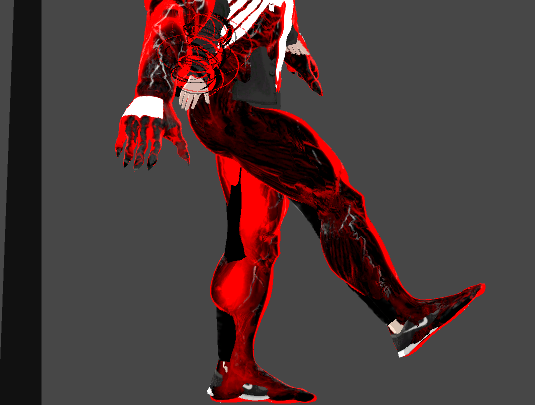
As a side note, I usually don't combine fingerbones, as it leads to super scuffed fingers.
outer magnet
Well, you know how to activate props like swords and such, right? The Gesture Overrides?
eternal topaz
yes, I did that, and the two meshes just flicker between each other
outer magnet
Hm.
eternal topaz
and yeah I have just 1 frame of animation
outer magnet
Did you make sure to have the base meshes disabled in both keyframes?
and vice-versa, to have the second avatar's meshes enabled in both?
eternal topaz
yes I do
outer magnet
Hm
Do you have a picture of your dopesheet for the anim? I'll compare it with mine.
eternal topaz
Well the swords and stuff are temporary things that come and go, I'm looking for more of a toggle
and rn i'm updating vrchat and reimporting all my stuff to 2017
outer magnet
Ah. Toggles. I do know of one method, but I've yet to perfect it properly, so I haven't really worked with those much.
eternal topaz
I was thinking an emote that simply triggers an animation controller animation, which simply enables/disables and sets it correctly
slim sparrow
If you need toggles you can use Xiexe's inventory system
outer magnet
^
slim sparrow
On emotes
outer magnet
I believe they removed the original method of doing that, and so Xiexe's method is your best bet. Orrrrr, if you wanna delve into more black magic, there's infinite gestures. Which is the thing I haven't been able to perfect just yet.
eternal topaz
never heard of that, I'll check it out
in the mean time, you got any tips or anything I should know about going into it?
hey this looks pretty easy though
outer magnet
I've got nothing, honestly, because I don't have much experience with actually using that method. All I can say tho, is, if you're planning to move fingers with your second avatar for hand gestures, make sure you move the second avatar's bones, rather than the original avatar's bones.
outer magnet
So, uh. Could anyone help me with my issue? The animations are all cool and good, and yet testing them in VRChat is lukewarm and inadequate. I'm genuinely not sure what's causing this issue.
 warm delta
I can’t remember if you need the duplicated avatar when you do and animation?
Or can I just delete it??
It’s has an item on it that needs to only appear when the gesture is done
 stray sinew
Just delete and duplicate again when needed
warm delta
Ok thank you so much
violet moss
Where can I get VRChat's default emote animations? I want the wave for a dummy in my world
I've seen other people using it in worlds
slim sparrow
You can find quite a few of them on Mixamo @violet moss
novel lagoon
does anyone know how to import Blender animations into Unity?
slim sparrow
@novel lagoon they should be attached to a model
Just export the model with animations (FBX)
Then on import, it'll be imported into Unity along with the model
novel lagoon
i did, i see it. But whenever i make an animation override and put that animation into my model, it doesnt play
even with all the keyframes showing
violet moss
I couldn't seem to find VRChat's specific doopy wave though
slim sparrow
@novel lagoon rig the model as humanoid, then try using the animation again
The one embedded in the model
@violet moss I found it really quickly
It's one of the first waves on mixamo, but they set Emotion and Exaggeration higher on the right
 spark fox
@violet moss I would give them to you if I had my PC right now
 hollow cove
Could anyone tell me why Unity won't let me animate things.
I put my property into the Animation, but I can't change the numbers at all.
If I change them in the inspector, they don't stick. Once I click off the keyframes, it's as if I didn't do anything.
I think I got it now. I guess it was the wrong property.
novel lagoon
The blend shapes from a model I imported from blender are greyed out, and I can’t seem to change them in my animation.
Anyone knows a fix?
onyx agate
So what i want to do is to have a mini version of my avatar to spawn where i point (using the point gesture), and have it walk/run towards the next point i point at ... I was thinking something like make it move to a particle but no idea how and if it is possible!
slim sparrow
That sounds practically impossible
onyx agate
Should be possible as some games utilize similar mechanics
slim sparrow
Yes, but not on an avatar with the current toolkit we have.
Probably possible in worlds using raycasting and a character controller
onyx agate
🤔

Unity is the ultimate game development platform. Use Unity to build high-quality 3D and 2D games, deploy them across mobile, desktop, VR/AR, consoles or the Web, and connect with loyal and enthusiastic players and customers.
So this would not be possible on an avatar animation
 west widget
I hate myself for doing the animation i just did :/ lol
clear yew
okay so I have two avatars , one is the main one and the other one is like the ''shadow version'' , so my default avatar has particles and an audio that is always on , so what I am trying to do is , make an animation that closes the particles and audio and turns me into a shadow form and brings up a model (like a sign) but for some reason I couldn't figure out how to stop the particles and the audio and the ''shadow version'' is just standing still , could someone please help ?
 median orchid
Instead of disabling the particle itself,
turn off the emission by default and activate the "emission.enabled" itself in your animation
Is the 'shadow version' an entirely other mesh?
And also with the audio, disable it's host (or parent)
clear yew
yes it is entirely other mesh .
median orchid
In that case
you'll probably need to connect it to your other mesh limb by limb via rigidbodies and fixed joints
clear yew
um , what would I do in the other case ? where if it wasn't another mesh
median orchid
You could try using another material?
clear yew
how can I change materials in animation , rather than the model itself ?
median orchid
You would just make sure it's recording your actions (red circle on animation thing and turns the playbuton itself red), then proceed to drag a material onto your avatar.
clear yew
okay uhm , it seems to be working but.. for some reason when I paint the body black it turns green for no reason , its pissing me off .
 open cipher
https://gyazo.com/a74713ebe184cf4c093cfa17a50920f4
What's animation override name ofr point with finger without using fist ?
median orchid
?
hollow perch
Fingerpoint?
open cipher
When, in oculus, you're pointing, without pressing the fist button
hollow cove
How does the Min/Max range would for the Audio Source.
Correct me if I'm wrong, but I've been guessing that the Minimum bubble is where the sound starts, and the max is where it ends, with anything inside the minimum, not hearing anything.
fierce bane
That is how it works, but the VRCSDK overrides settings for most of it sadly...open the build panel and look at the sound again, it resets it to their "safe" setup
hollow cove
Any idea on what the settings will actually look like after the SDK changes it?
fierce bane
open the build and control panel then go back to the audio, you'll see their forced settings
hollow cove
Lame. Completely understandable, but lame.
 reef nexus
Anybody got some tight dynamic bone settings for a long pony tail
I already got colliders on her spine bone flush with her back both on the X and Y axis
hollow cove
Tight like "Cool" or as in "Well put together"
 topaz dome
i want to put some sounds on my avaters/animations wheres the best place to get them
hollow cove
I put in just in the hierarchy. Not attached to anything. But if there's an object that's making the sound, (like a Light Saber or gun) than it'd be better to attach to sound to the object.
topaz dome
ok but what website would be good to get sounds from iv'e seen some avaters have memes play durning animations
reef nexus
Ok never mind. I just found a solution. I'm using a looping walk animation to dial i values on the fly then saving them after
hollow cove
Any audio clip site would work, as long as you can make the file an ogg type.
I would say that there are probably sounds on vrcmods, but most to all of those are going to horrible, and probably get you in trouble, I would advise against those types.
Some sites let you save youtube videos as just the audio, so you could also try that.
reef nexus
also found out you cant use plane colliders in vrchat
 undone glade
is there a more updated version of snail marker, because it doesn't work for me
Because snailmarker and the tutorial are both way outdated
slim sparrow
Works fine for me
undone glade
is there an updated version for me, because it just doesn't work
reef nexus
snail marker works
GitHub
theepicsnail has 142 repositories available. Follow their code on GitHub.
undone glade
I'll make the attempt, wish me luck
clear yew
can anyone tell me if you can lock bones' positions in an animation for idle sitting? i created one with the legs to the sides, but when i move my head up and down, the spine movements spread and close the legs even further.
(makes the anim look a bit lewd in the end)
 hoary coral
Is there a way I can have an object locked in the world, and then use a gesture to bring it from wherever it is into my hand, and when I release the gesture it becomes locked to the position I just moved it to?
fierce bane
The only way I can think of to do that would probably be to have a gesture that activates a timed animation that slowly resets the anchor to 0,0,0 position/rotation to have it "return" to you, and releasing it anchors it in the world again.
not sure if it'd work though
glossy radish
How do I edit my sit animation? My avatar is short and has the issue of clipping through the bottom of any chair I use. I need to offset the root position up, but I don't know how. The animation controllers only have a few gestures and sitting isn't one of them.
fierce bane
It should be the "Idle" animation, but place the controller in the "Custom sitting animation" instead of custom standing
I'm not certain it will work though. Small avatars generally just use small chairs to get around it.
glossy radish
I don't see anywhere where I can access a "Custom sitting animation" option or anything of the like
fierce bane
It's in the avatar descriptor
glossy radish
I'll have a look there. Now that I know where it is, i should be able to get the rest done on my own. Thanks.
fierce bane
I'm not certain it'll work, but that'd be my best guess for the override if accessible
frigid viper
Anyone knows how to make like a shockwave effect like what shader does it use? Was looking all over online
glossy radish
If it's what I'm thinking of, you'll want to use a refraction shader on a torus mesh.
This is the shader that appears to bend light, like what you see at the edge of an explosion.
frigid viper
YES exactly that!
glossy radish
I don't know of any refraction shaders offered by unity but I know that's what you need to use to get it done.
frigid viper
Thank you so much, i only needed some hint of what i need, i really appreciate it
glossy radish
Yeah
I'm not sure of how to use the animation thing here in unity. I don't know how to make a keyframe. I'll search it up unless it's simple enough to explain here.
Or more, when I add a key, it just resets instantly.
Oh nevermind. I got it.
frigid viper
Yeah you have to select the point in timeline while recording or add keynote to that line in timeline and then do your bajigarjager
glossy radish
ffs it keeps resetting it even after I set the keyframe
slim sparrow
Are you trying to change finger positions?
glossy radish
No.
Hold on, I can't link images here, so one moment while I go open imgur.
Oh I see. Tiny warning in the bottom stating "Keyframing for humanoid rig is not supported!"
Which makes zero sense. I'm trying to override my sit animation to raise my body up a bit since I clip through chairs.
And I need to also rotate my legs a bit.
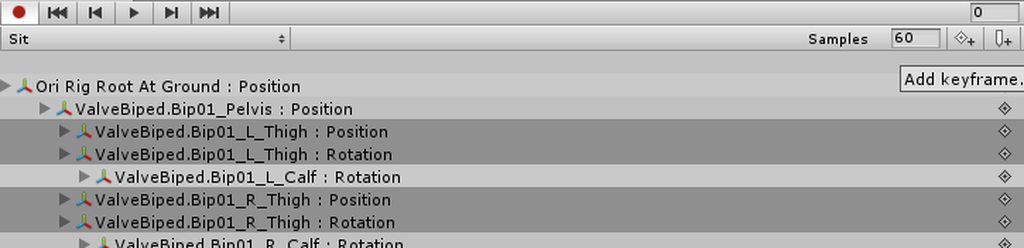
Clicking the "Add Keyframe" button up in the top right is doing nothing, presumably because of that warning.
slim sparrow
You cannot directly manipulate bones @glossy radish
You need to use the Animator properties
Such as Root T to change your height and Leg Stretch etc.
It's under the animator component
glossy radish
Animating within unity is entirely foreign to me.
I'll see what I can do.
What section under the animator component do I use? Here's an image of it. I've pointed out the lengthy warning's cause for some context. https://i.imgur.com/X8vR2na.png
 slim sparrow
In the animation window, go to add property
Then animator and you'll find all the properties there
glossy radish
Ah-ha. I see now.
slim sparrow
Do yourself a favor and either make the pose with Muscle Animation Editor or do it in Blender
glossy radish
I know how to use blender - that's why I was doing it the way I was. I need to know how to import animations in exclusively without overwriting the mesh, if possible.
slim sparrow
Ah, well
glossy radish
I have to overwrite the mesh, oh well.
slim sparrow
You can export the model with the animation embedded inside the FBX
Then import it as a new separate model
glossy radish
Yeah alright that's what I'll have to do then.
hollow perch
The trick is you make a new fbx/mesh just for the animation
slim sparrow
After importing it as a separate model, you can configure it as humanoid and then duplicate the animation out of it
No need to overwrite anything.
glossy radish
Coolio.
glossy radish
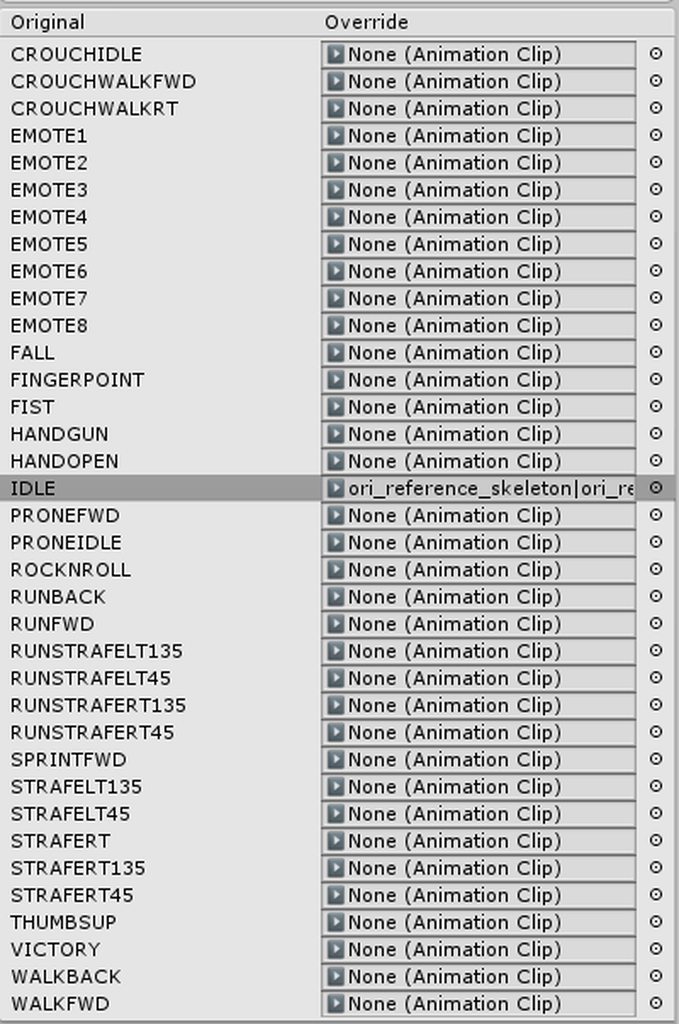
I'm still having some trouble with it. I'm going to try one thing right now to see if it works. For the moment I have the Custom Sit Animation set to my own animation override. That failed, I'm about to try overriding the AvatarControllerTemplate's IDLE animation entry with my custom sit animation to see if that works.
My confusion resides in the lack of any "Sit" animation listed here: https://imgur.com/a/tXliuPb
 slim sparrow
To override your sit animation, you need to grab an override controller and override the "IDLE" animation, then put it in "Custom sitting anims".
It should work fine then
glossy radish
Ok that's what I'm doing for this current upload. Good
novel lagoon
https://gyazo.com/b07982629319db3eceecb9e9bc1f19fb , hey i made these animations in blender and imported them in unity. Is there a way to duplicate them or move them separately? I can't seem to edit them as long as their in the model
 glossy radish
Was about to ask the same thing
Alright I'm still having issues.
Initially it worked, but I had selected the wrong animation and it was simply in my avatar's idle pose as defined in blender. It was not the default VRC animation so I knew I had it correct.
Upon correcting it to point to the right animation, it goes back to the default VRC animation... i think. It's hard to validate since my legs are in the ground.
Yes, it's on the default VRC animation.
hollow perch
Click one from inside the fbx and press ctrl d
It will make a copy outside the fbx
You can delete the fbx or ignore it once you have done this for all of them
glossy radish
Oh and in relation to ^ does the animation need to be a child of the model I'm using?
Because if that's true, that'd be why this is failing.
hollow perch
Make sure the fbx with the animations is rigged as humanoid. If it is, it will be compatible with any humanoid avatar including my little butterfly with antennae as arms
glossy radish
Hm.
I know that the animation works because when I used the wrong one (I exported it incorrectly from blender) it played that one
I think it's because the animation is part of a separate model. That Ctrl+D trick failed for me because there's a pipe in my animation name. I'll try fixing this on my own here.
(It failed because that's an invalid path character)
hollow perch
Aha
novel lagoon
@hollow perch i can't duplicate an object inside a model
glossy radish
I was able to duplicate it.
Ensure that the animation has no invalid path characters in it
Examples are: | * ; : ? < >
novel lagoon
@glossy radish what about "_"?
glossy radish
That's valid.
And unfortunately for the issue I was having, position offsets in animations don't seem to work.
hollow perch
Yep had same issue here. Anyone know which keys do work for position?
glossy radish
^
hollow perch
I could probably write an editor script to migrate from one type to another if I know what works... maybe I'll take some of the anims I downloaded and see what they did differently
glossy radish
THere is one thing I want to try because in unity the position value for the skeleton itself is still zero. I want to see what happens if I set that to y=1, which is about the amount I need to go up.
I offset pelvis to try to move myself up, that failed. So now I'm testing the entire skeleton
novel lagoon
i'm still lost on how i can move an animation from a model to a folder, that CTRL-D trick just isn't working
hollow perch
You have the fbx open? Select the thing and do Edit -> Duplicate ... it just does nothing?
novel lagoon
https://gyazo.com/68792c0b2c05192823689a75a377e922 , no i just don't see any duplicate button
 novel lagoon
o
glossy radish
I can't send a pic.
It's under the Project tab where you find the actual asset for the animation itself
This is why VRC admins need to just allow file sending..
They have an entire bot they can moderate messages with attachments that aren't images.
glossy radish
The unfortunate part is that you can't put it into another model
But yea sure thing
You know I just realized a really hacky way to move myself. since position changes aren't working in animations.
Move my root bone to be a dummy bone connected to a second so that it forms an elbow joint
And by default, have those bones folded up. Then when I need to move up just extend them
@hollow perch Gonna ping you in regards to ^ since I can't get position offsets to work and that may be a solution
omg if this works i swear
 sacred swift
can a teleporter work with animation
like a train going in a tunnel and the entrance being the teleporter and just being sent somewhere else while ur sitting in a chaitr in the train?
glossy radish
If a chair or other prefab you are sitting on teleports, you will move with it automatically
sacred swift
ya i know that but im not going anywhere, i just restart with the animation loop. its not taking me to the place i want to teleport and im sure my vrc trigger inspector is right
glossy radish
since imgur is having an anuerism ima just use github gyazo
this is probably one of the hackiest ways I've thought of to force a position offset
 round path
I'm sorry, this is probably a dumb question- does anyone know if you can apply an animation to an object to work with the general bone's vrchat models are rigged with? Like the way sitting works with a chair, but not a single pose.
glossy radish
I think you can.
Namely via what I've been doing - overriding my sit animation.
Do you know how to override the sit animation?
Wow it actually worked!
Hahaha. Okay so if you need to move your root position, just make an elbow joint and do some tricky rotation
 uncut pier
sorry if this is in the wrong section, but does anyone know how to convert mmd poses to work on avatars in unity?
hollow perch
@glossy radish there must be another way because the mmd worlds and such work I believe by just attaching an animator to any humanoid without changing the bone heirarchy
 plucky abyss
holy shit hi xan
 hollow yacht
how do i set shift f1 command in unity?
 dim lava
So I've got an animated tail attached to my hips as a separate FBX. It plays an animation through an animation controller, and I can see it moving behind me. However it doesn't show up on any mirrors or screen?
Anyone got a better solution for looping idle animations such as tails?
slim sparrow
You should probably make it part of your mesh for optimization reasons and reasons like these
Are you by any chance enabling the tail's mesh renderer on an animation?
Such as having the tail's skinned mesh renderer component be off by default
dim lava
an hour late but the animation is simply bone rotation on the tail. It auto-plays on an animation controller
slim sparrow
Alright, but is the mesh enabled by default?
And the mesh renderer
Because mirrors currently have issues regarding those
dim lava
yes they are all enabled all the time.
the tail is animated through an animation controller, so it plays and loops always
It's a separate FBX because animation controllers break avatars and it has to be attached somewhere else
it's my duct-tape AF solution for tail idle anims since the devs killed legacy animations
slim sparrow
Uh
You can put an Animator component on literally any bone though
If the tail is part of your model, that probably means you have a tail bone on your hips
Then you just put an Animator on this first tail bone
dim lava
That's essentially what I've done
the animator is on the root of the FBX
and it plays an animation of the tail moving
slim sparrow
Yeah, but what I'm saying is you don't have to make it separate
dim lava
won't an animator component break the avatar?
slim sparrow
Nope
You can put an Animator component anywhere you like
You just can't directly control the Animator component that's on the "top level" of your avatar
dim lava
hmmm ok, I'll try combining the tail to the main mesh and doing that instead
thanks for the tip
👍
novel lagoon
is there a way to change your model's appearance in an animation? I'm using blend shapes for one of my animations but it always reverts back to the way it was when it ends
undone glade
@novel lagoon Do you mean sort of a transformation?
Because I have an animation for my Kamen Rider that goes from Civilian to Super Hero no problem.
novel lagoon
@undone glade yes, just like a transformation. Only problem is, i kinda want my avatar to stay in that transformed state 😅
by using animations, it alwasy reverts the changes i've made in the animation
undone glade
What I did was make sure my body meshes were separated, but weight painted to one armature
Then once you have it in your Unity project, you can create an empty game object in the root and place the body mesh you want to transform into on the game object, then turn off the game object.
It will break the prefab, but that won't effect the avatar in anyway.
I do it like that so once you make the animation you can just turn on the game object and show the body mesh. Also easy to adjust what you need without having to recreate the animation.
That's sort of like a full avatar switch though
You can do the same with bit's and pieces just as if you were adding a sword or a gun to your model
As long as the body is separeted by the main avatar mesh and what you want hidden until the gesture or animation plays.
undone glade
This is assuming this is a part of the avatar sense you mentioned blendshape so I thought to throw my hat in the ring when it came to the topic 👌
If I had a better idea on what you're going for I may have an idea on what to do
novel lagoon
yup, i mean i can really use anything, as long as i can somewhat trasnform/change the appearance of my avatar
oh really? i would appreciate it if you could 😄 im kinda of a nooby
but im learning
undone glade
Is it a clothing swap of sort or a full on avatar change?
novel lagoon
its a hair mesh swap
undone glade
Oh, then just separate in Blender by the main body, the hair that will be visible, and the hair you will change into. So you'll in the end have something like:
Your avatar
Armature
Body
Main Hair
Secondary Hair
novel lagoon
yup i got that
i made sure to place both meshes the armature head in unity, now i need to make them swap
undone glade
Make game objects and place the hair in each, it makes editing a bit easier in my opinion since if you have to go into blender. All you really need to do is move the empty game objects
Then just a matter of turning one game object off and the other on
novel lagoon
https://gyazo.com/f473b55f535d9143bcfc219a5361004c , by "game object", you mean like the hair meshes i imported from blender? because thats what i did
 undone glade
Oh, if it's own separate thing you can just put those in the head bone and do the same thing really
I'm guessing it's a super Saiyan thing you're going for
novel lagoon
it is
undone glade
Yep, just treat them as if it was a sword or a gun. Pretty simple item spawning thing once you know it :+1:
A lot of your animations really are just turning something on with the prop itself or a empty game object
Just make sure that creating the animation that the key frames are at 0:00 and 0:01 with all the same values.
novel lagoon
https://gyazo.com/27f43a41dbc645771ce121665a416f81 , alright, so it would be somethin like this?

to "turn on and off"
undone glade
If you're doing super Saiyan you can keep the base hair on, but in the animation you have the base hair box unchecked and the SSJ box checked.
undone glade
No problem
With the base hair unchecked it will know that it needs to be turned off during the animation.
Then you duplicate the same values at the 0:01 mark so it doesn't flicker in and out of existence or it feels delayed toggling
novel lagoon
yeah i've noticed
undone glade
Empty game objects are a handy little tool I suggest you try to use more, you be surprised on how much you can do with them :+1::
and you can even get to a point where you can sort of weave together animations so you can still use normal hand gestures as well as whatever you want
novel lagoon
well, when you put it like that, i guess i'll just have to 😅
sacred swift
I need help once you go into the tunnel there's a train that you sit down in and the train pulls you all the way to the end of the other tunnel well the other side of the tunnel and you go through and when you go through that's where the other teleporter is but it's just pulling you through and then just restarting the animation loop it's not teleporting you to where you should be going so I'm confused if that is possible to be on an animation ride and going through a Teleport at the same time because it's not fucking working
is this possible?
 woven surge
Trying to temporize a gameobject, creating an empty game object and inside the sword, creating outside an animation for the gameobject and temporizing it there, and "legacy - once" that animation, then creating a component on the empty game object and dragging that animation onto the animation component of the empty game object. Finally I create a normal animacion activating that gameobject, but sword is activated by default when I do the animation on vrchat, and months ago I always did this and worked really good, and now is not working, do they broke something? I don't know what to do to temporize props on my animations now..........
dim lava
@woven surge Legacy animations are no longer supported as of 2 updates ago
novel lagoon
hey is there a way to make it so your avatar freezes/doesn't move during an animation?
novel lagoon
well, im trying to make an animation override, but for some reason the head bone and hip bone doesn't move with the animation. something like an emote
@spark fox
spark fox
Hand gesture or an actual emote? And sorry for the late response @novel lagoon
If it's a hand gesture, those only mask the finger transforms in a humanoid rig
Everything else is ignored
novel lagoon
oh i see
thanks
@spark fox is there an emote that lets you move the whole body though?
spark fox
Using the emote slots
Look in the override controller where it says EMOTE1 EMOTE2 EMOTE3 and such
@novel lagoon
If you want to do something like this, being toggleable and all, sorry to say you can't.
Toggleable in the sense of a hand gesture
clear yew
@spark fox you are wrong
Gesture based locks are doable
You can ask anyone that knows about it
@novel lagoon
I know how to do it as well but i wont be home for a few days
novel lagoon
thanks i will
west widget
Im having trouble with some animations, I made animations for emotes that work but the music doesnt work with them. also I have a particle effect in one animatoin that doesnt show up in the game, but the rest of the animation works besides sound once again
west widget
please @ me if you reply
hollow cove
I got a Skeleton, with an animation that plays a audio file (laughing) and moves his jaw very silly. But the jaw part isn't happening when I play the gesture. Also for some reason, his mouth is slightly open all the time, but his jaw is closed on the non-animation copy.
The Animation just has the Jaw Close and Audio Source Active on it.
spark fox
@clear yew First, I love how you try to point out how I'm "wrong" every chance you get. When I said "toggle," I meant you can't toggle something like an emote. Sure, you can make the excuse that "You can just create a separate prefab of your avatar playing an animation" but really, that's not what he's going for here. He was asking why his head and such weren't moving when he was playing a hand gesture. A hand gesture is just that, a gesture you do with your HAND. It masks the animation for your fingers, allowing them to move, but the rest of your bones that are part of your humanoid rig will not follow suit. And yes, I'm aware of the existence of toggle props, defunct with the removal of Legacy animations, and I'm also aware Xiexe made an easy inventory system creator, which is basically an easy to set up toggle prop system. I use this myself sometimes as well, though not much.
And gesture based locks, I do that sometimes as well, usually for audio and such since I sometimes trigger it way too often
clear yew
you can use a hand gesture toggle
you can freeze a hand gesture without a vive
using an animator component
spark fox
I never mentioned the Vive
spark fox
But again, what this guy is specifically asking for
Was not what you were trying to correct me on
clear yew
lol
toggle props isnt defunct
what year are you living in
the non legacy version exists
clear yew
i dont use his system
spark fox
His system is basically an easy Toggle Prop
And the system used before used Legacy. Now here is where you can say that I don't know what I'm talking about, and I'm ready to admit it
clear yew
ive always used the non legacy version
spark fox
I had no idea people found another workaround for custom animators without Legacy, if that's what you're trying to say at least
Unless when you mentioned animators earlier, it was something completely different
clear yew
the non legacy version is a non legacy version of the legacy toggle prop system
spark fox
I get that much
clear yew
it's just a slight modification without the use of the legacy animation component
spark fox
It's evident by the term "non legacy"
But anyway, you understand what I was saying to him up there, just to clear this up.
He was asking if he could freeze or move the head or hips in an animation
Using hand gestures
I assumed he was asking about those anyway.
clear yew
yes using keyframing
hollow perch
sorry I missed part of the discussion, but can't you use a gesture to trigger a VRC Inventory System-like Animator Behavior toggle the same way you could in an Emote? In other words, I can make one gesture like fingerpoint enable a "Turn on" animator and make another gesture like handopen trigger a "Turn off" animator, just like the enable and disable emotes you might use.
spark fox
I mean you CAN but it's more practical to just use an emote slot
hollow perch
mostly true, in my experience too.
I met someone who showed me a really elaborate system using only gestures, basically doing exactly this but with an animator system that could be paused at any of like over 10 states, because you can choose how long to hold the gesture, compared to an emote that is fixed length.
 rain reef
Its called xiexes inventory system and its on github
clear yew
that's not the elaborate one lyuma is talking about, xiexe's uses animation states to toggle props
set to emotes not gestures
here's the elaborate one https://www.youtube.com/watch?v=sbL9k0VA4OY

I explain how to create a potential infinite amount of gestures using an animator state machine. ========IMPORTANT======== Thank you Bertrand Steenhaut for t...
west widget
im having trouble with some animations, I made animations for emotes that work but the music doesn't work with them. also I have a particle effect in one animation that doesn't show up in the game, but the rest of the animation works besides sound once again
novel lagoon
hey anyone knows how to change the material of a mesh during an animation in Unity?
 stuck spade
Heya, someone can help me with a animation? I want to play an animation in the background (custom blink) if i put it on the Avatar or empty object it doesn't play on the Avatar and if i edit the idle the legs are broken ingame.
tried with animation and custom controller, both doesn't affect the Avatars eyes unless i put it on the Idle.
slim sparrow
@stuck spade you need to put an Animator on your body mesh
Idle animation controls your entire body, so of course you would have to make sure the idle animation actually concerns the whole body
If you left it half crouched then it'll be half crouched ingame
But doing it through idle is not a good idea
stuck spade
body where the materials are?
slim sparrow
Just put an Animator component on your Body mesh, yes
Then you can make an animation from there
stuck spade
thankies i try that soon!
also do you know a way to make materials invisble? Unlit doesn't work anymore
(on the avatar body)
like i want to remove a backpack thats a single material
west widget
How do I fix sound on animations?
stuck spade
wym by fix?
west widget
they are in the animation but wont play when it is activated
stuck spade
did you try it ingame?
west widget
yea thats how i know
stuck spade
Hmm okay, send a screenshots of the settings?
west widget
they are checked in the respective animation window
stuck spade
where the audio source is
west widget
okay
stuck spade
should work like normal if they didn't change stuff with Unity 2017
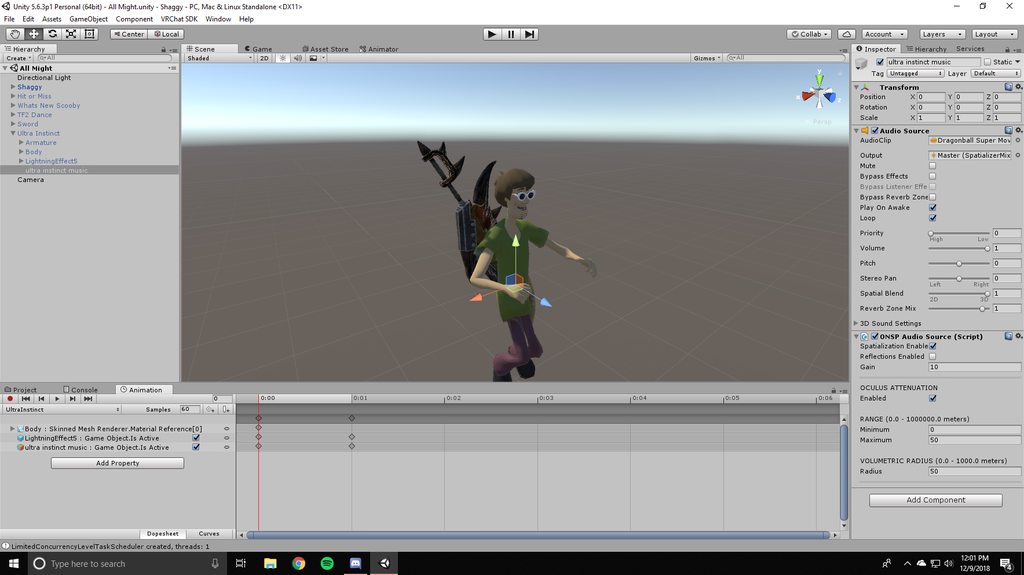 clear yew
@west widget lol
clear yew
im both
stuck spade
i always remove ONSP
slim sparrow
You're supposed to
Any SDK that is not horribly out of date should tell you to remove the ONSP component anyway
I thought at least
west widget
okay so they should work after that?
 stable remnant
how do i basically do animation overrides
i want to add an object into the scene and move it to my hand. how do i do this
does it have to be rigged onto my model or
novel lagoon
hey anyone knows how to change the material of a mesh during an animation in Unity?
 winter sundial
I've done it, but it's likely not the correct way. I make sure that the avatar is recording (that changes are added to the animation) and then I go to the avatar's body and change the material to another.
It should add a "material reference" block in the animation
novel lagoon
@winter sundial https://gyazo.com/adea62ca86440dcbf65ff66507e2455a , does it look like this?

if so, do i have to make 2 elements or just one?
winter sundial
Mine looked like that, yes. I just made that change and copied it to both keyframes (1 and 2) and used that as a gesture
novel lagoon
i did exactly what you did but nothing is changing
i think it might have something to do with the way i use elements on my mesh
 quaint marsh
https://vrchat.canny.io/feature-requests/p/allow-us-to-upload-the-playable-director-component-on-avatars-and-worlds-in-vrc-
Please upvote 🙏
The Unity time line is super powerful!
this will literally make everything to do with animations way better and less tedious.
novel lagoon
Oh wait never mind
Apparently you can’t see your own material change in mirrors
Weird
 lone verge
hey, does anyone know (what i assume to be) particles well enough so that i can throw a kunai? i'm trying to work on a scorpion avatar
torn pawn
kunai is just a mesh particle, for that you need a shader that aligns mesh properly
if you want for it to stick in walls and align properly, then you'll need to usemultiple subemitters to realign itself
lone verge
i... don't know what that means xd
i have very little experience with particles
i couldn't really find a good tutorial online for vrchat
 pliant furnace
Hey guys, not sure if this would be an animation question or not, but is it at all possible to enable and disable an animator inside an animation?
torn pawn
yes
reef nexus
So I am trying to learn blender's animation system. Can we export the animations in to unity to use with VRC? I like blenders dope sheet better because I can use IK to animate bone chains
 spice urchin
yea
as long as u map it to humanoid u can use it on any avatar
it shows up in animations tab
 cosmic idol
anyone know how to make audio sources be affected by avatar sound settings rather than sound fx
 slender onyx
Hey, im trying to get a model to unsheathe a sword, but the sword in the sheathe wont disable, any idea whats wrong?
reef nexus
Ok so I did the animation, baked it in to the FBX and unity sees it but the tail isn't moving. Works fine in blender
reef nexus
Ok I figured out I need to bake the action since I'm using bone constraints
 spice coral
anyone got that howard dance anim laying around?
undone glade
@slender onyx is the sword and sheath two separate props?
Just like having the box checked in your animation, make sure you have the box unchecked in your animation for the sheath
slender onyx
Thanks for responding but I’m good, I figured it out, everything was working fine it just wasn’t picking up the updated version of the model. All is fine now :)
hollow yacht
okay cam someone that knows what there doing walk me through the process of setting up animations bound through function keys?
stuck spade
my blink animation still doesnt work..
tried using a animator on the body and animation only, nothing works
slim sparrow
Does it work in Unity when you hit play mode?
It has to be animated from the perspective of the body
slim sparrow
If the animation property is Body/Skinned Mesh Renderer.Blend Shape Blink, that won't work
Because it'll look for a sub object called "Body"
Press F2 on the animation property
With the animation window open
hollow perch
Press f2 edit the name and delete body (make it blank)
Then it will work in an animator directly on Body
 radiant falcon
Has anyone been able to use the muscle editor in the new version of unity?
rain reef
Anyone having problems with muscle animation editor since after the unity 2017 update? It keeps saying my avatar isnt humanoid even though it specifically is, bones are mapped, normal animations work perfectly fine just muscle editor doesnt realize my avatar is humanoid.
In fact it doesnt detect any of my humanoids
Already reimported it
clear yew
anybody having issues using hand gesture templates on this new unity? i drag it on to a dupplicate of my avatar and its not applying the keys properly, just giving me missing yellow error
 reef sandal
Does anyone have a good tutorial for World simulation space particle systems? I can't quite get them to work
lofty radish
@reef sandal setting the simulation space to world instead of local is all there should be to it
reef sandal
Hm maybe there's just something else I'm doing wrong
lofty radish
whats the problem youre having exactly
novel lagoon
can you make it so your hands dont move when you make a hand gesture using override?
 willow veldt
Just copy paste the idle animation's hand animations onto the gesture.
 stuck spade
still can't get a cusotm blink animation to work.. Is there somewhere a tutorial for Unity 2017?
spark fox
@stuck spade Use an animator. Put it on the body mesh. Create an animation and then assign it to the mesh with the animator
Then gut record and mess with the shape keys
Check the pinned messages in this channel
There's a video for this exact topic
stuck spade
i tried putting an Animator on the Body and it didn't play
I will check that out soon
spark fox
Because you need to have an animation state on the animator
It needs to know you want to animate the body
stuck spade
ah okay, before i used legacy and since VRChat stopped using that
so the video explains everything?
spark fox
Pmuch
 rain pumice
Questions how does one do constant running animations since legacy animations have been removed I haven't worked on models in a while and was wondering what I had to do to get it working again if someone could link me to a video or something on how to set it up that would be great 👍
torn pawn
animator, but don't use animator that's on your avatar
if u want tail idle, put animator on your tail, have the bone selected, create animation and done (don't need to make duplicate avatar)
rain pumice
Is there a way to get an old animation because I have one set up from before but the bones are missing as the hierarchy is different as it's going straight from the tail instead
torn pawn
if u have animation component on tail, then put animator instead and remove legacy from the animation file
and drag it ont he animator bone
rain pumice
Thank you all for the help ❤
reef sandal
@rain reef Thank you so much, I'll give that a shot as soon as I migrate to the updated unity version
rain reef
@reef sandal I just tested it on a new upload and the process still works, if you run into any issues let me know
 tame jasper
Does anyone know how to fix one of their other models animation on their main model from being animating with the models eyetracking? Just recently when I made the update to Unity 2017 it did this, the other models aren't parented to the eyes, just the hat that I have them on so I don't know how to fix it. Any help would be great.
 magic drum
I want to animate material properties as I am doing here: https://imgur.com/a/q8PeZFf
Works fine in editor as expected, vut does not animate ingame. Is this a common thing? Is VRC hijacking my material instance?
It is just a looping animator sitting on the sphere itself. Works when animating e.g. scale.


 red linden
I found that animating material properties does not show locally but they should show up for others
some of them anyways, not really sure why
oh and mirrors don't show them properly either
magic drum
oh
how about cameras?
cause I don't see it in world cameras either
mind meeting me ingame real quick to check? I am kinda curious @red linden
red linden
It should show in world cameras so there's probably something wrong with the animation then
slim sparrow
@magic drum @red linden it does not show in cameras either
You need to ask someone else if they can see it
Cameras are just looking at your mirror copy so it would have the same result anyway
magic drum
Thank you @slim sparrow 👍 very nice to know
slim sparrow
Your animation probably works fine ingame, just the mirrors
If you are in VR, turn on holoport and walk around
Your local avatar is fine
hollow perch
Everyone else always sees you fine even in mirrors
red linden
weird I swear they've shown up in camera's before
clear yew
Excuse me, but is there way to reupload generic avatars without the animations being messed up or no?
 serene lava
I'm having trouble animating a material, can someone help?
Whevever I set the main model to record, then switch to my mesh with the material, it stops editing the animation
Should be noted that I'm trying to animate the material of something that isn't part of the main mesh normally, it's an accessory
nvm I can just animate the accessory
red linden
there's a little lock where you can lock on to what the animation timeline sees
 prime gale
So I always forget this channel is more appropriate for this
My muscle editor doesnt seem to be working, likely because it needed updated


of course I should have removed any traces of the old version, but I forgot
and now even updated and reimported it isnt working
in fact even newer issue
I restarted Unity, re opened my prject
and now I dont even have the option under Window for the Muscle Editor like I did before
but it is imported apparently
and now it magically works
¯_(ツ)_/¯
 restive bane
Inside of unity, is there a way to have an animation start at a specific time/frame when the object appears, or play certain time/frames of an animation and stop?
Or is that something I have to do in Unity's Animator?
Maybe this will just work the way I think anyway, it's supposed to play the animation one (and stop) time on activation. So as long as the animation is applied and not looped I think it should work
 vivid ocean
So, apparently when i do an animation for both blendshapes and hand gesture, the animation jitters on the hand animation. They keyframes have the exact same properties ad the exact same values for said properties in the animator, there is zero movement in the animator itself when switching between frames, and there isn't a dummy end keyframe way out like in 5.6. yet in game and in the animation preview pane, the fingers jitter as if there is a difference or they aren't looping properly. if the blendshape is removed, the animation works fine, but that defeats the purpose. I've tried remaking the animations, tried single keyframes, and nothing seems to work. Help
unfortunately I've found the cause. apparently unity 2017 absolutely hates it when you copy keyframes from one animation to the other. The best course of action is to duplicate the entire animation and modify it from there, which sets me back all the editing i did to the hand gestures already.
viral hazel
So quick question, I've already tortured myself with modeling a gun to a character, is adding a custom emote/dance to the model going to be harder or easier?
misty tiger
depends if you already have the dance animation
 south lynx
Is there a fix for rigid bodies on the new update? For me it’s working fine in game and I can walk around and the animation plays where I drop it’s
But everyone else it look like it’s attached locally...... which defeats the purpose of using a rigidbody....!
I tried reuploading with unity 2017 and the new SDK and my animations are still broken
torn pawn
Umm, how to stop world particles following armatures rotation?