#animation
1 messages · Page 92 of 1
 slim sparrow
Put your particle system object under the fixed joint object instead, then toggle that object
 nocturne lodge
kk thanks will give that a shot
nocturne lodge
curious question if what im bringing up has 2 things like a particle and a sound would i have to enable both of them
just asking for 2 things in general i know i can just put the sound to the armature and activate it there
 prisma trout
hey, anyone knows how to make an object appear by animation that stays in place?
 clear yew
 prisma trout
ok so just put my thing in (replace)the cube and put the entire thing somewhere in my avatr but not on any bone?
 clear yew
@fierce bane use animator component to force audio settings
Make sure to duplicate the audio source and animators as well
Just to make sure it works
 onyx agate
How difficult would it be to get a flying controllable avatar (with a walk/fly emote toggle)
prisma trout
ok for some reason
instead of staying in one place
my thing flies all over th place
so the exact opposite of what i should do
 lone bronze
Hi people ! I have a model in unity with a chain. It is composed of a hook with multiple segments at the end. I need to have the hook in the hand by default, and then by some process have the chain lengthen.
How can I achieve that ?
To get better understanding of my question, the character I wanna implement is Scarecrow from Injustice 2. He holds the hook in his hand, and whenever he throws it it just lengthens. Here's the character in action : https://www.youtube.com/watch?v=-h9ZbQZ9NJo&t=0m29s

My first combo video for highly the anticipated Injustice 2! Scarecrow is a brilliant psychologist turned super-villain who fights Batman in Gotham City, spe...
 violet moss
How can I set up a closed eyes gesture without the default blink causing me to blink twice as hard?
lone bronze
@violet moss I personnally map it to the first gesture, and if you use the blendshape you shouldn't have any problems
Cause the maximum is 100 anyways
violet moss
Oh I made it separate because I thought the default blink would open my eyes back up
Thanks
lone bronze
Besides I'm not sure if the blink animation can override the gesture
So you might be out of trouble anyways
violet moss
Actually I’m always seeing default blink blinking over my gestures 🤔
lone bronze
Keep us posted
Do you have any idea about what I'm trying to do ? I put a message above yours
violet moss
I imagine it just it stretches but uses a shader that repeats the texture instead of stretching it...
lone bronze
No no no
I have the actual model from the game
and the chain is really long
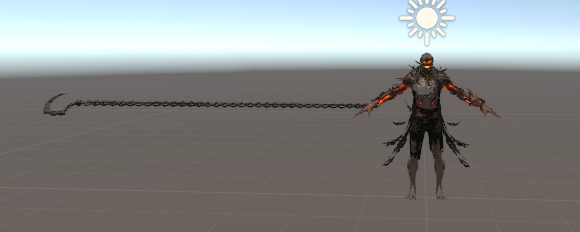
This is the model in unity right now
violet moss
Then I guess the extra is hidden with a stencil? Hard to say
slim sparrow
@violet moss you can't disable the default blink
violet moss
A lot of games just use camera fakery and it looks terrible off camera
You could always shrink the unused parts of the chain down to zero
lone bronze
Yeah but my goal is to have that mapped with gestures
The goal would be to be able to
- Hold the hook in the hand, like a little scythe
violet moss
Right I’m sure it’s all an animation
lone bronze
- Let it hang with only two chain links
- Let it loose so if put inertia it goes far, and if I stop the gesture it comes back
violet moss
There are many ways to accomplish it but if you are asking which way the game did, no clue.
violet moss
In my opinion the easiest thing to do if you are making the animation yourself, is to have the hidden bones just compressed to zero length as they get thrown out of your hand they are full scale
I’m thinking more overwatch’s roadhog though
lone bronze
Thing is if I scale to 0 the bones
All the children get affected
Oh but maybe with the position
I should put each one of them in the same position
Giving the illusion that there's not a lot of chain links
That could work
Also do you know how to prevent the said hook going through walls/floor ?
People ? =3
violet moss
Should be able to scale one bone without scaling its children if you cannot it’s the fault of the animation tool for not having the option
Unity sort of has this whole inheriting heiarchy going on in every facet of its design
lone bronze
Dw I think I found something
I select all the the chain links
And I set them to have the same position
 proven oasis
Does anybody know if a punch-rush animation exists anywhere
Particularly https://youtu.be/iEU2Kk3qc-M?t=192

Couldn't Okuyasu just erase it...? JoJo's Bizarre Adventure Diamond is Unbreakable Episode 31
Something that might look like that
 jade kraken
ugh, i forgot >< how do u set an animation to start on / be always on?
i remember it had somethin to do with like debug or whatever
 normal skiff
you make it the initial state in the Animator I guess
jade kraken
no thats for like overrides or such. there was a way to...ill screenshot, but somehow i managed to change this animation clip to a diff style

i forgot how i got it to do that, but
 fierce bane
@jade kraken click the 3 horizontal lines in the top right, select debug and change it from wrap to loop to set that directly
jade kraken
oooooh
also is there a way to make the animation not like..."curve"? like if im goin for a 360 degree rotation of somethin
fierce bane
Just remember legacy animations don't work any more, have to use animators as listed in pinned messages
fierce bane
yes, open your animation and check "curves" at the bottom
you can also just select all properties of the animation and right click and...set to linear I believe?
clear yew
having issues with making an animation...how do i get it out of this pose? every time i try to rotate the limbs around they go right back... https://imgur.com/a/x4MO8TI
I tried adding the property Animator Root T but all that did was help me fix it falling through the floor.
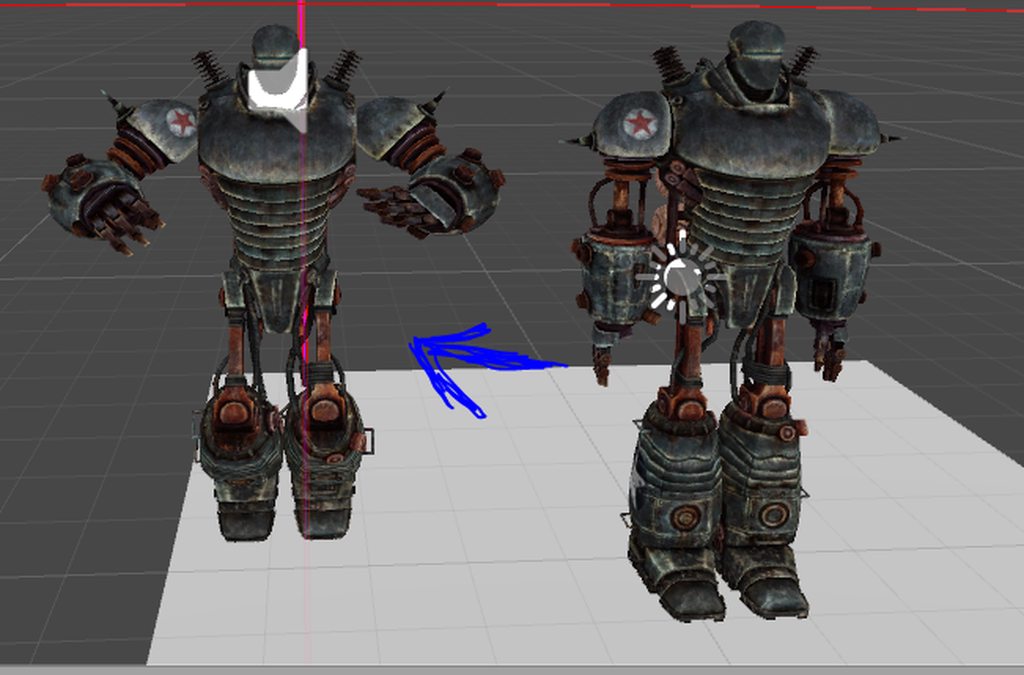 clear yew
anybody got any ideas?
 lavish scaffold
Try setting the animator controller to none
clear yew
@lavish scaffold that disables me from animating it...
clear yew
Figured it out- copied the keys from the first frame of the sample IDLE animation in Sample Assets and pasted them into my anim. works! found the fix here https://www.reddit.com/r/VRchat/comments/7zalq9/helpcharacter_halfway_under_ground_during_custom/
reddit
1 vote and 7 comments so far on Reddit
clear yew
are there any sleeping animations ready made that I can just attach to a chair to finish the bed in my world?
thanks
 sweet zealot
quick question - if i want my avatar on gesture to grow an extra foot in height, what do i scale?
 icy crow
Just the root avatar scale, but I don't think you can change the height of the viewpoint in an animation
So you will probably be crouching down
sweet zealot
i tried root, armature, even hips/pelvis - nothing would make me taller on gesture
its not that much taller, its just about a foot
sweet zealot
even on camera nothing changed
 tidal coral
I have a problem porting legacy animations. I can't click the properties in the animation editor to change their "path", like the video tells you to do.
clear yew
select a property and press F2
tidal coral
Oh, a triple click also works
Thanks
Why do they tell you to double click then...
ah well
clear yew
2 slow clicks i guess
lone bronze
Hi people ! Do you know how I could prevent a prefab to go through walls / floor ?
It's attached to my wrist, has dynamic bones
 nocturne radish
Is that even possible? I don't know if dynamic bones are able to interact with colliders in the world
Also, does anyone know how to stop an animator's animation? I added an animator that plays a blinking animation on my body mesh and its works perfectly, but I also replaced hand gestures with face expressions so I need to make it stop when I trigger them. When I used legacy animations I just disabled them and it kinda did the job (if we ignore that they got stuck sometimes), but now I have no idea how to stop it from playing
slim sparrow
@nocturne radish I published a blink prefab somewhere
nocturne radish
Was it in this channel?
slim sparrow
Probably not
Someone might have reposted it here
But I don't share stuff in this Discord since I can't upload it directly and don't wanna bother hosting it
nocturne radish
Oh alright, any tip on how to look it up?
slim sparrow
Well I don't share any servers with you so I dunno
The idea is that you can enable/disable animator behavior
Which will rewind the state machine into a no blink state
nocturne radish
Is it something complicated or you could tell me how it works?
slim sparrow
That's basically how it works
Try downloading the old toggle props package, it contains an animation that can enable/disable animator behavior
My blinking prefab has a controller that starts in a "blink off" state, and transitions into the blinking animation after 1 second
And then stays there
If I wanna disable blinking on a gesture, I disable the animator behavior on frame 0 and enable it on frame 1
Of the gesture override
That way, it'll constantly reset to "no blink" until I release it
nocturne radish
Oh I think I understand where I messed this up, I will try once more
(Update: nope, rip)
Is this the toggle props package you mentioned?
https://www.youtube.com/watch?v=5m8RZQd4JAw

Edit: The changes to legacy animation unfortunately mean that this should no longer be possible. This is just a quick tutorial on how to set up prop toggling...
slim sparrow
Yeah
nocturne radish
Which animation is it? I see DisableChildObj, EnableChildObj and Suspend
Also this is the first time I work with animators, sorry if I ask dumb questions as I have no idea how they work ^^'
slim sparrow
It's suspend
nocturne radish
How should I use it? When I try to copy the Behaviour.Enabled component to one of my facial animations it tries to enable/disable the behaviour of the whole prefab and doesn't let me edit the path, is this how it's supposed to work?
Alright, nope, it disables all animations when I do that lmao
 tame grove
 fathom atlas
Anyone know how to make a 2d sprite that walks? when u move https://gyazo.com/b27f8ccad28f02e89e283b6e3e497240 kinda like this
 fierce bane
I mean....that's basically just two frames of animation. If it's actually just a 2d sprite, just make a single "step" frame and then mirror it for the other step. Then play in sequence as a material swap animation on loop
or in the case of using a humanoid rig, same thing but using walk override for the animation slot
@fathom atlas Woops forgot to mention ⬆
fathom atlas
well ima noob only understand about 40% of what u said tbh XD
fierce bane
Google is your friend for learning etc https://www.google.com/search?q=2d+sprite+animation+unity
 weary magnet
@clear yew
lone bronze
Hi guys, asking my question again, I have basically a long chain that goes through the floor with gravity. How do I make it collide with ground and walls?
slim sparrow
That's gonna be very hard, not sure if that's even possible
I think you would need some sort of joint system that makes it drag along the floor
If you're using dynamic bone, you can at least make it not go underneath you @lone bronze
By making a stupidly large dynamic bone collider under yourself, large enough that the top of the sphere is essentially flat
lone bronze
Oooh I think I get it
I love how you described it
"Stupidly large dynamic bone collider"
 languid gull
Earth size (assuming it's a sphere)
slim sparrow
Probably not that big since you'll get floating point issues but yeah
Just really big so it's at least sorta flat
Plane colliders would make this easier tbh
That would require the game to update Dynamic Bone if they haven't already, and whitelist dynamic bone plane colliders
languid gull
I would love for a simple cube to be added
Btw are emote animations with moving parts still possible? The few tutorials about it say they're outdated
Most of them are just activating a gameobject that has a looping animation
slim sparrow
Yeah, why wouldn't they be?
languid gull
I was thinking objects that would be animated by the emote. In my case some little cars driving in and stopping
I probably set it up wrong but the emote shows on the menu but doesn't play
slim sparrow
It doesn't use legacy animations right?
languid gull
Just the default
languid gull
Are there any links to setting that stuff up. I tried the docs and searched youtube but it's only stuff like holding guns or animating the avatar itself
lone bronze
Btw guys apart from that I'm trying to have a custom texture for a marker
And I'd like to achieve this effect : https://www.youtube.com/watch?v=YvZZjMHndTM&t=1m04s

Scarecrow All Extra Abilities : -Soaring Murder -Terror Charge -Floor Flame -Panic-Port Away -Sacrifice -Plague Thanks For Watching
The thing he has on the chest, the light sort of comes out
Any ideas ?
Or maybe just a gas shader thingy ?
 muted prairie
All can be done with a particle system I believe
 late fjord
Now that legacy animations are not supported anymore, how can I make a separate animation that only affects part of my avatar, like the tail? I used to do the tail swishing with a legacy anim.
Do I need to make the tail into a separate mesh now?
lone bronze
@late fjord I read this comment on a video about porting legacy animations, maybe it will help you :
A simpler way of doing this step is to simply drag the animation file (make sure its non-legacy first) onto the avatar object on the hierarchy on the left and that will create an Animator object for you that is already set up to play that animation.
It will also add an Animator component and assign it correctly for you.
Important: Do NOT delete the Animator component of the root object of the avatar if you are putting one also on the body mesh. Deleting the Animator component on the root will make your avatar stuck in T-Pose.
muted prairie
Look at the pinned messages
lone bronze
@muted prairie btw thanks for your answer, but I'm trying to use a snail marker and I have no idea how to put a particle system on it. Do you have any idea ?
muted prairie
Particle system was for your second question, snail markers are everywhere, i'm surprised you haven't found a video on how to make one yet
lone bronze
@muted prairie I've been using those, don't worry. I'm just wondering about a texture/shader that would make the trail look like the effect seen on the character torso on the video above. Sort of a light coming from a crack, with god rays.
slim sparrow
@late fjord put an Animator on your first tail bone
Then just animate the tail directly
muted prairie
With emission i guess you could get something cool, but god rays is not something i've seen used here before
late fjord
Ok. Thanks. I just need to make a controller now and put the animation there in non-legacy mode.
clear yew
guys how do i reset the motion dance and the songs also the visemes after playing the motion dance in world
?
 kindred trout
some worlds have reset button for your shape keys
slim sparrow
Planning on doing a pretty damn big animation. Is there a limit on animation length?
It's on an animated game object. I know emotes can't last very long but I won't be doing the entire thing in an emote
It's just an animation on a game object
 rain reef
Hello kids, i have a blinking animator on my body mesh, how can i disable it in an animation, i cant seem to find the animator in the hierarchy :c
 narrow veldt
yo, I have to add an animator to be able to make my avatar run on vrchat, but I am not sure which controller to use (unity)
help?
slim sparrow
@narrow veldt is it humanoid?
narrow veldt
yes
slim sparrow
If you rig it as humanoid and add an animator component, it should already run fine ingame
No controller necessary
Animator component should be pre-added already too
slim sparrow
Post a screenshot, you probably forgot the neck.
Or you tried to make an animation and the model is crouched into the floor halfway
narrow veldt
screen shot of what?
rain reef
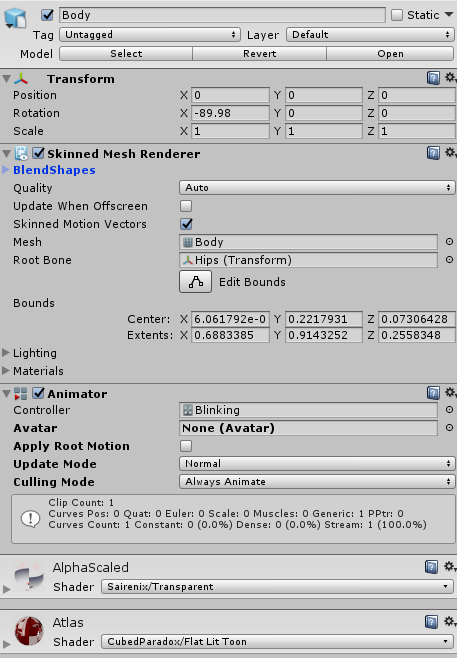
Screenshot of my blinking setup, is there a way to disable the animator in a hand override? :c https://i.imgur.com/fFHPmaJ.png
 slim sparrow
The error, your scene, and your rig configuration
@rain reef I posted a prefab in BM
You'll have to enable/disable animator behavior and have the entry state not blinking
Then have it transition into the blink state after 1 second
narrow veldt
@slim sparrow It says your avatar is humaniod, but it's feet aren't specified, upper arms not specified, avatar must have head,hands and feet bones mapped
the two first ones are, but I am not sure about the last
slim sparrow
Post a screenshot of what the model looks like in your scene as well as the humanoid rig configuration
clear yew
what's not letting you ?
narrow veldt
discord
clear yew
how did you share pictures before discord ?
slim sparrow
That all looks fine, can you post a screenshot of the model in your scene?
In your regular scene, not in the rigging tab
slim sparrow
Sure, include the inspector if you want
narrow veldt
 slim sparrow
Odd, but at the same time @narrow veldt
Where is your avatar descriptor component?
It's either not there or not in the right place. Did you put it on the Armature or Body by accident?
narrow veldt
no
slim sparrow
Then where is it? It's not in your screenshot at all
clear yew
seems like it's on the body mesh
slim sparrow
Yep
You added an animator and avatar descriptor to the body instead
That would be your issue then
narrow veldt
oof ty
slim sparrow
That also explains why your avatar didn't animate in VRChat, all you uploaded was a mesh with no bones and no animator possibility
narrow veldt
it works, but animations and groups need some fine tuning
 midnight comet
how do i overwrite the idle position? like if i want to put my hands forward with an animation
with a gesture
rain reef
use the provided animation controller
theres a state for idle
just put your animation clip in there
clear yew
This is odd...I did an animation with a weapon but it ain’t showing up in vrchat. I put the customoveride and the animation in it but it ain’t appearing .
 vestal river
so im trying to add sound to the defalt handemotes but there all read only is there a copy of non read onlys?
 paper haven
Does anyone have the animation file for a simple ok-hand? 👌
Since I can't seem to get the thumb and index finger correct
fierce bane
@vestal river just duplicate them (Ctrl+D) and edit the duplicate instead of the original
@clear yew check over your animation. Make sure your paths are correct (not showing yellow) when you check it on a duplicate avatar.
Also make sure you have frame 0:00 and frame 0:01 both with the weapon enabled. And that animation is in the correct Custom Override Template copy, in the standing animation of the avatar and not the duplicate.
fierce bane
You just said they were read only, so you found them already didn't you?
vestal river
on the overrider
fierce bane
First note based on the image you sent me MAKE A DUPLICATE AVATAR TO ANIMATE INSTEAD OF YOUR MAIN ONE
VRCSDK > Examples > Animation > "Male_Standing_Pose" is where the defaults are located.
clear yew
 fierce bane
@clear yew click the bottom property where you enable your sword, wait for a second, then click again to select the path. Copy it and paste it in here
violet moss
Where can I get all of the default VRChat animations? Specifically whichever one contains relaxed neutral hands
because whenever i override it i go into the ground
slim sparrow
You can't basically
clear yew
here as in discord?
slim sparrow
You gotta make an animation yourself
violet moss
How do i make an animation that triggers when i go to relaxed hand pose
fierce bane
Gem, Yes here in discord
@violet moss that's generally a bad idea as it'll always activate.
But if it's on your default avatar and enabled it'll be on when your hand is relaxed. Disable it when you want it off.
violet moss
so i have a sign that says certain things for each hand pose (let's just assume they say relaxed, fist, thumbs up, etc) but whenever i go black to relaxed, my "relaxed" sign stays vanished and doesn't reappear
fierce bane
the sign has to be ENABLED by default for it to show in relaxed hand pose
relaxed is basically just "idle"
clear yew
how..
clear yew
do I copy and paste it here? I'm dumb
fierce bane
@clear yew Yes, copy and paste it here
On the parameter: Click once, wait a second, click again and you will have the text box for the path open. Control+C will copy.
On discord: Control+V will paste it into the text box
clear yew
 fierce bane
nothing about a screenshot was even stated there >.>
fierce bane
that parameter you have selected right now
click 3 times in a row
it'll open a text box like this
https://i.imgur.com/20bTPBz.png
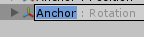
Copy all of that with Control+C
Go to discord and press Control+V to paste it (or right click and hit paste)
fierce bane
Why is it listed as "umbraSkianna out" but named "umbraSkianna" in the hierarchy?
fierce bane
you renamed the parameter?
clear yew
I renamed the sword model
fierce bane
the parameter MUST match what it is trying to change. If not it is looking for something that doesn't exist
like going to "C:\games\vrchat" but "vrchat" doesn't exist
fierce bane
click that animation 3 times again, you should see "UmbraSkianna out" in the path. Change that part to just "UmbraSkianna"
(you could also just remove it and re-add it, but this is good learning for if needed later)
fierce bane
it is defintely incorrect. I'd remove and re-add it
clear yew
Alright
fierce bane
Extra note. If all you're doing is using a gesture to pull the sword out while held (and wrap the hand around it), then you don't even need an animation controller for it. You can just have it be the animation to turn it on/off.
Controllers are needed for other things more complex than just a prop enable/disable while a gesture is held.
If you're doing a prop toggle you do need the animation controller however.

 daring mica
I am repeating this question in animation as well due to me not knowing if it should be in here in the first place. Could anyone give me give good settings for dynamic bones in terms of hair, cloths, tail, and ears? Or show me where I can get some?
muted prairie
there's youtube videos for it afaik
daring mica
Thank you, I will browse YouTube for a bit then.
 craggy sage
is there a way in blender when your making a shape key to edit the way it changes from 0 to 1?
 cursive moon
Legacy anims got disabled a while ago, so how can I set animations to always play?
fierce bane
@cursive moon see top pinned message
cursive moon
oh, ha. Thanks
 neon aurora
anyone think they can help me? my audio spectrum and my 3d cylinder with skybox shader doesnt show on command but the song and particle does
craggy sage
like is there a way to animate something like the idle hand to fist like how it closes depending on how much the trigger is depressed?
i am using a shape key atm, but its animating in reverse and looping
 fading ridge
ive been looking everywhere for the animation that comes with the fluffy miku from the shy avatar world!!!!!! can anyone help?
 fallow spire
i made an animation for an object. this object is on a avatar. i want that the animations is playing when i walk or run, is this possible?
violet moss
I have a bunch of face animations. I would like to string them together end to end or even play them in a random order. Is that possible, or must I make one long animation?
Similar idea as derpchan
 quasi hinge
Are you manually making them or using a tool?
quasi hinge
Look up Xiexe Inventory, there's an editor script to help you.
 livid basalt
https://cdn.discordapp.com/attachments/426573054274174996/503735994223165464/unknown.png How could I go about animating this to slyther when it walks?
 violet moss
Well you make the animation first
do you already have one?
afterwards put it in an AnimationOverider then apply that to your avatar descriptor
 plain finch
In the moving animations it's obvious what forwards and backwards movement is but Strafe left and right are not as clear in the movment animations
I.E. i have custom walk left and right animations becasue itsa non standard model
as well as forward left and right strafe
 frosty pendant
Does anyone know how to make a world particle burst with a gesture? I have a confetti cannon that plays a sound but it's out of sync most of the time because of the duration of the particle system
 obsidian vigil
@frosty pendant wdym, the duration?
frosty pendant
The timer of the particle system. The one that stops particles if you play it only once
obsidian vigil
soooo, it works once but if you try to use it again, it breaks?
frosty pendant
I have it on loop. Because when I have it play once it doesn't work at all. But when it loops it sometimes delays it by up to 5 seconds depending when I activate the emission
obsidian vigil
yeah, of course it breaks
if you toggle emission
and have it running once
its already playing even if you dont use your gesture
and then its over
until you toggle it
frosty pendant
I can't disable it though because I want the confetti to still be there after I release the gesture
obsidian vigil
so youre stuck to use a loop
so...
does it like
spit out a lot of confetti at once?
as in
high emission
frosty pendant
It's shooting 100 confetti particles in a burst. Like one of those confetti cannons
frosty pendant
5 seconds atm
obsidian vigil
there you have your problem
imagine a bumpy road
if you activate it
while its in a cooldown period
of course no confetti will spawn
frosty pendant
I know, I was just looking for a solution to maybe remove that problem 😅
obsidian vigil
Well, higher particle limit or lower emission
so its a continuous spawn
not a burst
and then toggle emission for a really short time
or switch gesture
frosty pendant
The sound is 2 seconds long so I guess my only possibility is to set the loop to 2
obsidian vigil
well, have your gesture toggle an empty object
with your particle system inside
then animate the empty
to toggle the emission for 1 frame
and set another frame with emission off at like 30 seconds
unless you hold the gesture for 30+ seconds
itll look like a single burst
frosty pendant
I would have to use a second one for the sound though right?
frosty pendant
Ok. Gonna try that when I get home from work xD thx for the help 😊
obsidian vigil
alright 👌
 grizzled badge
Hey I tried making an animation for a runescape character where a hand gesture makes a text appear on top of his head. Why doesnt it appear?
Im trying it on desktop and hand gestures work with other avatars but with this rs character, not
I made the animation with duplicate character, imported the animation in the customoverrideempty file and imported that into the character avatar descriptor
obsidian vigil
Well, does the avatar have 3 fingers with 2 bones each assigned?
grizzled badge
the runescape avatar doesnt have fingers as the hands are basically just balls
obsidian vigil
Then theres your answer
grizzled badge
but shouldnt the hand gesture functions work with any random character, for example I saw this tranformer car
obsidian vigil
If you dont have at least 3 fingers per hand gestures wont work
grizzled badge
without fingers*
but what if the character doesnt have fingers?
will I just still assign finger bones?
slim sparrow
It's a really weird system though
You can choose between fingers, full body IK and hand gestures
Or none of the above
grizzled badge
I see, thanks! Have tried doing bone stuff once but it was a mess, I guess I'll just have to learn it
slim sparrow
Can't have the regular Limb IK without yeeting your hand gestures
grizzled badge
Are dummy bones basically bones that dont affect the avatar?
slim sparrow
Yeah
You just extrude three bones from the hand in Blender
And then assign those in thumb, index and middle finger slots
grizzled badge
One more guestion, how do I export the avatar from unity into blender?
slim sparrow
Why do you need to do that? Did you download a premade one from somewhere?
There should be an FBX or DAE file somewhere in assets that you can import into Blender
grizzled badge
So I can add bones in unity?
slim sparrow
No
grizzled badge
And yea, its a preamde avatar Im trying to modify
slim sparrow
You can import the model's files into Blender, do what you need, then export again
grizzled badge
Yea I guess I have to find the "avatar" file somewhere
because I think the scene itself is not importable
fallow spire
has anyone good knowledge about override stuff for walking and running??
slim sparrow
@fallow spire there's a blend tree in the AvatarControllerTemplate controller in the SDK
In the locomotion layer
I think that's roughly how the game has the walking/running animations set up
Try to have your animations blend properly, or assign the same animation in walk, run and sprint
fallow spire
locomotion layer?
slim sparrow
Just open that animator controller and you'll see
It's a sample but it looks remarkably close to what's used ingame, as far as animator controller goes.
Doesn't really cover how it interacts with a lot of things, but you should be able to see how the walking is done.
fallow spire
hm hard to compare if you dont understand what all the stuff is...
can anyone else maybe help?
craggy sage
nvm, figured it out my question all my own :V
 frosty root
If I got this right, doing blinking the old way (with legacy) does not work anymore, how do you guys do it now?
slim sparrow
Animators.
Just put an animator on the body mesh, apply the blinking animation to it, and you're done.
 royal escarp
Any idea why my walking animation doesn't move like in vrchat? I've repositioned the skirtbones in the motion so they wouldn't clip through the legs. But they still clip through in vrchat. ;_;
frosty pendant
@obsidian vigil i dont get it... either i am just stupid or something is broken... could you help me out again?
or anyone else^^ im having an animator problem again^^
fallow spire
someone here who knows how to make own walking animations??
fallow spire
oh i see, but i need it for unity
 woeful flame
yeah, you port it from blender
fallow spire
no, i want to create the animation in unity
fallow spire
it's just a habbit, for all vrchat stuff i made animations in unity... but in general i have my animation finished but idk how to setup it correctly to use it in the override stuff, until now nothing works
woeful flame
So you already have the walking animations done(?)
fallow spire
i think so, in unity it works fine but everything what i try does not work in vrchat
fallow spire
no, standard animation window of unity
woeful flame
have you tried to see if putting the anim in a hand movement to see if the anim works in vr chat?
fallow spire
as gesture it also doesnt work, but yesterday when i was finished and it was in the animator and setup as loop the animation was permanantly playing on the avatar in vrchat.. then i changed some options and it was only playing when i loaded the avatar new in vrchat... but never what has to do with the override stuff
woeful flame
Something like this is happening for me too
fallow spire
:S
woeful flame
I made a custom animation with blend shapes and it breaks in unity and doesnt work at all in vrc
As a blend shape it works, as an animation it breaks
fallow spire
hmm... maybe i try to create a simple animation to test if this work or not... otherwise it is an special setup thing i dont know
woeful flame
But it's weird because some time back I made something like this and it worked fine
fallow spire
my memories of animations in general is sometimes they work and sometimes not
and no one can tell me the fucking reason
woeful flame
yikes
 golden schooner
I have an animation of someone taking out a cigarette and putting it in their mouth. The animation works, but I can't for the life of me figure out a way to get the cigarette to stay in the mouth after the animation ends. I can make the animation work by itself, and using the Neps/error.mdl/weong/xiexe inventory system I can make the cigarette stay active with an emote, but I cannot figure out how to end the animation with it becoming active. Does anyone know if this is possible?
 quaint marsh
might as well just use a mesh particle for that.
violet moss
Can I disable the default leg walk / prone crawl animations so I just slide around with my normal full body tracking
violet moss
Like, when I walk around it just glides my avatar while staying with tracking
no IK movement other than repositioning
 thorny cloak
Veteran Animators I need help
So I have a model that is a CSGO Terrorist and currently I have a Bomb that when I pull out plays an audio file of the CSGO bomb numbers being keyed in, and then being planted
I need to know how to be able to drop it after the audio ends
Currently it is just stuck to my hand, ive seen avatars that throw grenades and stuff so I know its possible I just dont know what to look up in order to find a tutorial
If someone knows how, or could link me a tutorial on how to make this happen, I will love you long time
 blazing bluff
Hey guys how do I make an avatar blink normally but not during an animation override?
slim sparrow
Enable/disable the body's animator
I made a blinking prefab and someone posted it here, not sure if I can find it again
 peak pasture
My avatar's fingers are jittering when I do hand gestures even when the two keyframes of the animation are identical in Unity.
peak pasture
https://i.imgur.com/ubmmwpB.png This bit yeah?

I have a feeling it might be because I made some of the values higher than 1?
and lower than -1
https://gfycat.com/VacantNippyCrow showing the frames are the same
 slim sparrow
Alright
Yeah, that's probably because of the high/low values
What you could do instead
In the humanoid rig configuration, you can configure the minimum and maximum muscle settings @peak pasture
Try that instead
peak pasture
Alright I'll try playing with that.
slim sparrow
Yes
¯_(ツ)_/¯
Nobody knows that menu exists apparently
It's a normal process for importing a model into Unity
frosty pendant
Any idea why I don't hear my own audio sources sometimes? Everyone else hears them just fine
icy crow
Just vrchat being vrchat
slim sparrow
Well, that particular bug can happen a bit
Not SDK related, audio just gets overwritten
frosty pendant
I'm using the latest sdk. Was just wondering because sometimes it works, sometimes it doesnt
 edgy relic
Anybody good with conditional objects in unity? Pls pm me, am desperate lol
 meager saffron
Having a weird problem with an animator. I have various triggers that increment/decrement values locally and everything performs as expected. Things animate based on the actions of individual clients.
However, I also have an AnimationTrigger action that is acting strangely while set to Local. It's only performing actions based on the state of the Master in the room, rather than the state of the animator for the person initiating the trigger.
 main grail
Im currently having a problem where i change the material in the animation and it says its changed but it doesnt show the change and ingame its also not changed

what it suppose tp look like
slim sparrow
You may be missing the second keyframe for that animation
Also make sure it isn't a legacy animation
main grail
http://prntscr.com/l9hulh its a fresh animation so it shouldnt be and it changes everything else

but i can either have the legs change or the torso
But it wont do both
slim sparrow
Oh right, I heard of material changes being buggy for some reason. I could never get certain materials to change properly
It seems you also have several duplicate materials, which is bad for optimization
But that aside
Try giving every material slot in the mesh its own unique material first
You can do that by changing the model's material import settings
I think swapping materials is most reliable when they're all different
main grail
Yea they all have there own
main grail
What do you mean @obsidian vigil
obsidian vigil
ive done material switches but ive never used that window before
🤔
i just press record and drag n drop into my scene
slim sparrow
It's red because it's being controlled by the animation
The same happens when you enable/disable objects in animations, it's normal
obsidian vigil
ive never used that tab before tho
nor have i ever had material switching difficulties
main grail
So it only lets me either change material 2 or 4 i cant have them both change
only changes the one i apply first
main grail
I fixed it i just basically just went into blender and assigned a whole new material to it
golden schooner
Trying to figure out gesture overrides and managed to get a held object to animate out of the hand on a gesture, but when I release the gesture, it pauses for a few seconds, then spends the next few seconds after that slowly transitioning back to the default state. I am trying to make the transition back from the gesture as quick and smooth as the transition into the gesture. Does anyone know what I might be doing wrong?
 hollow perch
You need to have your gesture override animations with two identical keyframes at 0:00 and 0:01
Make sure there isn't a scrollbar with another keyframe. Unity likes to make another one at 1:00 sometimes and that will cause what you see
 small tapir
Can i put a material change on my body on layerd animation without it triggering on the first one?
hollow perch
Can you explain in a bit more detail what you want? Animations can trigger material changes which is sudden, or they can change a shader property like a color which will be interpolated
small tapir
You know how you can make an animation on layer. so lets say you have a gun in your hand and you don't want it to show up when you are just running around. so you put the gun on a empty game object and both are turned off. in the first animation (thumbs up) you turn on the empty game object, and in the secound animation (finger point) you turn on gun. that way i need to hold both thumbs up and finger point to get the gun to show up. Now can i do this with a material change on body without it trigger on frist animation
Sorry bad english and speller
icy crow
I don't think so no
 left bobcat
Hello. I have an animated object with rigidbody set up to appear in world space. How do I teleport it back to parent character when I hide it with animation?
hollow perch
assuming you are using the vrc inventory system style with a disabled animator? In that case, you can edit the animation you use for hiding/showing it and have it also set the position to 0,0,0. Those animations are temporary so after it pauses the animator it will stop forcing the position to 0,0,0
if you are using a traditional gesture, you can do something similar and create an animator on your object that is enabled by default which forces the rigid body to 0,0,0. Then in the gesture you can disable the animator. Due to a bug/mis-feature in unity you can't create the Animator ("Behaviour") disable checkbox in an animation--I recommend getting the vrc inventory system and you can copy and paste the Behaviour item from one of those animations and paste it in your own and edit the path
left bobcat
I have this:
Character
-body
-armature
-object(has a rigid body on it)
Animation:
Object appear on gesture hold. Body dissapear (Basically I can still walk while the animation on the object is playing). When gesture is released object dissapears and body appears. The problem is that whenever I press the gesture again the object doesn't appear in the position where it is put but it appears in the place where it dissapeared the first time relative to body.
hollow perch
the way that was fixed in the past is to have a temporary animation that sets the position of the object with rigid body to 0,0,0 (or the original position)
left bobcat
Was it used with legacy animations?
I tried to set object position to 0,0,0 and it didn't work
Still was appearing far from body on second gesture click
I have 2 animations basically
1 on character which makes the object appear and character dissapear
2 on object which makes the object and its components move
hollow perch
you should not be using legacy animations
left bobcat
Yes I am not
hollow perch
ok the one on the object, you enable it temporarily (while showing the object)?
left bobcat
Yes
Should I separate rigidbody and object. I mean:
Character
-Armature
-Body
-New object(with rigidbody)
--Old object (Without rigid body but with animation)
Animation:
First animation on character makes New object move to 0,0,0 and appear. Second animation on object just animates Old object.
hollow perch
hmm not sure that will solve your problem. it's the fixed joint (rigid body) itself that is moving
hollow perch
I think the animation that resets to 0,0,0 needs to be on an animator on some object, preferably one that is always enabled. maybe something like this:
Character
- Parent object (Has enabled animator to set RigidBodyObject to 0,0,0)
-
- RigidBodyObject (has rigid body, Not active)
Gesture to enable rigid body:
Set RigidBodyObject active true
Set Parent object. Behaviour enabled false
ya that's correct: fixed joint with no connection is fine. I think the issues are: you can't have the 0,0,0 animator on the character object because the animator will take over that property and keep animating it. It may be difficult to have the animator on the RigidBodyObject because you want to disable the animator at the same time you enable the object, and so the animator might not have any frames where it gets to actually animate...
another possible explanation: you can't change the position of the object with a Fixed Joint while it has an active fixed joint on it because the physics system will take over... and unity doesn't let you turn off a fixed joint/rigid body. So you need to move the position while the whole object is not active
slim sparrow
I think I made a prefab for world objects a while ago, before legacy was even officially gone
I didn't post it in here but I posted it just about everywhere else
clear yew
i have the dropbox link, so ping me if you want it 🤷
left bobcat
@hollow perch It works, but only in half of the gestures XD. I mean one time I press the animation stays in the world, next time I press it, the animation follows me, the third time - again the world and so on.
Strange
If I make a 1 frame animation is it always looped?
slim sparrow
Gestures are always looped, yes
left bobcat
This is strange... The world object works half of the time when I trigger an animation. Other half it just sticks to me
left bobcat
@hollow perch Set Parent object. Behaviour enabled false
How do I do this?
hollow perch
Find an animation that sets behavior enabled and copy and paste a keyframe from it
If you don't have one, download the vrcinventorysystem by xiexe and co and copy it from one of the sample animations. The old broken toggle props also has some animations with it
Then you can click the name (or f2?) and edit the path to point to the object you want to enable. You can click some other thing and then copy and paste the path if you aren't sure
@left bobcat
It might actually not be necessary to disable the reset position if you have it working without. It sounds like the fixed joint overrides the position anyway
left bobcat
@hollow perch Unfortunatelly it's not reseting the position of a rigidbody with no joint (world object) without animation and for the last day I am trying to find out how to do it.
hollow perch
Well you do have the animation I thought. What I suggested with behaviour disable is to turn off the animation while the object is active so it can remain fixed...but it sounds like the fixed joint is doing that anyway. The thing I don't understand is why it would be sometimes different. Make sure you keep the parent object always active
left bobcat
Basically what I wanted to do is that whenever I start a gesture a rigid body should teleport to my position and stay in that position even if I move.
Make sure you keep the parent object always active
This doesn't work.
If the parent is active it teleports a rigid body once when I initially spawn and then it never does that again.
What I have now
Character
- Parent object (Has enabled animator to set RigidBodyObject to 0,0,0)
-
- RigidBodyObject (has rigid body, Not active)
Gesture (On hold):
parent object unhide
Parent animation:
RigidBodyObject teleport and unhide
@hollow perch
clear yew
can you give me a quick TL;DR on what you want to do ?
left bobcat
I want to spawn a world object that has animations on it when I hold the gesture
And when I stop holding it I want to teleport it to my position whenever I press the gesture button again
clear yew
rokk made a prefab for that
you can drop an object
to world position
and it will move back to you when you stop
left bobcat
How does it work? Where can I find it?
clear yew
here you go, i made a dropbox link https://www.dropbox.com/s/jyqwkrxevr5utcy/WorldObjects.unitypackage?dl=0
txt file for explanation is inside
left bobcat
That is what I tried to find all this time XDDDD
Omg
It works!!
Spent all day.......
I mean 2 days
clear yew
good job 
 sand badger
Hey, anyone got some time and braincells to waste?
I've been trying to get a world particle to work, to no avail.
Currently I have the particle in an empty game object outside of my armature. I have a gun meanwhile attached to my model's hand. I'm using one animation to enable the gun, and another to trigger the particle which is acting as bullets.
When testing it ingame, however, I cannot see the particles. I was assuming it was something to do with the animation not triggering but that doesn't seem to be the case. For testing purposes, I changed a laser attached (made with particles) to the gun within my armature to "world" instead of "local", and have noticed this also doesn't enable, even though the rest of the gun's animation does.
Any ideas?
icy crow
are you using rigid body/fixed joints?
sand badger
Indeed I am.
I noticed other anomalies when using the "world" setting such as a gun flash not being visible to me myself, but via a mirror.
I figure I've set this up wrong.
icy crow
is your empty game object always enabled?
sand badger
Yes, I've left that permanently enabled. Its only the particles within I have disabled.
However, I have the child linked to the gun as well, which I have disabled.
Would that break the "link" per se?
icy crow
what do you mean linked to the gun? via rigid body?
sand badger
Yes. The gun itself is set up as the rigid body, and the game object has a fixed joint on it
icy crow
yes, that's probably breaking it
sand badger
Ah, I see.
icy crow
the rigid body should be on your wrist if you are using a gun
sand badger
I've just changed it to that, thank you.
With regards to other items not appearing, is that due to them being set to world whilst within the armature?
icy crow
hmm I'm not sure about that
sand badger
I figure the reason we put world particles outside the armature is something related to that.
icy crow
I have world particles on some wings and they appear fine for me and in the mirror
sand badger
Hm...
I'll try what you've suggested just now and let you know. In the meantime, thank you for the help.
icy crow
np
sand badger
Hello,. Your suggestion worked. However, it broke after about a split second and won't trigger again. I'm not even sure why that is happening
icy crow
hmm, can I see your hierarchy setup?
 icy crow
and that's outside your armature?
sand badger
Correct. odst-2 is the model's root.
The child below that with "skeleton" in its name appears to be the armature.
The animation did appear to trigger, but broke after one frame.
I tried changing avatars quickly to test the animation again. Similar result, but after more time. The audio effect I use for the weapon firing was choppy, and the particles themselves were behaving in abnormal ways. For example, they were far smaller than I have them set to be. The animation parts within the empty object then simply ceased after a few moments, but other parts within the armature continued
icy crow
can you show your animation
sand badger
I could probably screenshare it via a discord call if you wished.
I'm using VR so its a little clunky for me to capture stuff.
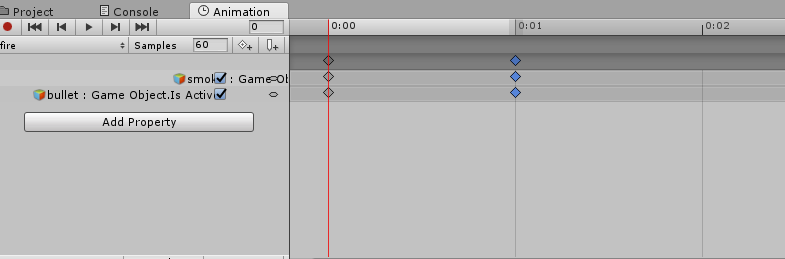
If you mean the timeline for it.. https://i.gyazo.com/5bcdcc5033d56503652ac9f1ef10bea2.png
 icy crow
and your rigid body is on ValveBiped.Bip01_R_Hand?
sand badger
Correct, yes.
icy crow
hmm
and you have all the constraints ticked on the rigid body?
I don't know what else could be the problem
sand badger
I can't say I know entirely how unity engine works enough to be sure, but is it possible the animation is overloading or breaking itself?
icy crow
I doubt it
sand badger
I'll change some aspects and see if it has any effects
icy crow
empty game object (always enabled)
particle system under that (enabled in animation)
rigid body on hand/wrist (all constraints ticked)
fixed joint on empty game object (linked to hand/wrist)
so you have all of that?
icy crow
check your fixed joint is linked to the correct rigid body
sand badger
I'm thankfully only making use of one rigid-body at the moment
I've recreated the animations and empty object in question and will re-test them
Hello. Thank you for your assistance. Whatever was causing it appears to have stopped.
icy crow
ayy 👌
sand badger
On a somewhat related note. Am I correct in saying you need to use subemmiters to make, for example, bullets spark when hitting a surface?
icy crow
yeah
sand badger
The effects don't seem to be taking place, and the bullets just hit the wall, slide down and stop in a corner until their lifetime stops. I assume I'm doing something horrible wrong here heh
icy crow
when they collide you should set lifetime loss to 1 I think
sand badger
Ah, so die instead of colide?
clear yew
no
on the collision module
you can choose how much of their life time they lose
put 1
so they instantly die when they collide
and for the subemitter
use die
sand badger
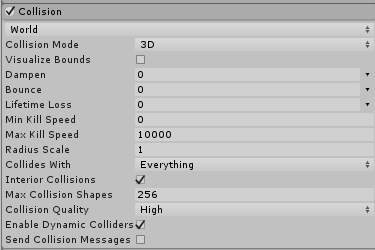
At the moment my collision module looks like this. https://i.gyazo.com/9a6a9d4d7523aae114d6c164780e26b8.png
 clear yew
lifetime loss
sand badger
Ah, I see. I'll give that a try
clear yew
put 1
so it instantly dies when it collide
and it will spawn the subemitter
i believe that subemitters needs to be set as burst emission
but someone that knows more can correct me here if i'm wrong
sand badger
I'll test what you've suggested just now and get back to you. Thank you.
fierce bane
If your particles are moving quickly I highly suggest setting min kill speed to 10,000 as well. It helps to kill it at the propper point with lifetime loss.
lifetime loss seems to have a slight delay to it and kill speed is more accurate
sand badger
Hiya. The particles are properly dying on impact with walls etc, but the collision effect doesn't appear to be playing
fierce bane
Sub emitters cannot have the usual "over time" emission. Burst or...I think distance work however
Do you have the sub emitters set to burst, and the sub emitter set to "on death" ?
sand badger
I have my subemitter set to "on death". However, I'm not sure where to find the option for "burst".
Ah, one moment.. Think I found it
Are there any other prerequisites for the subemitter?
clear yew
not really
just use burst emission
and parent them to the particle system that his using them
fierce bane
yep that's about all that is needed
if it still won't fire it, drag it out of the parent emitter, delete the sub-emission for that particle, then re-add a sub emission and drag it into the slot and hit "yes" when it asks to re-parent
sand badger
I'll give this a shot now. Thank you.
That worked perfectly guys. Thank you very much
 fervent elm
So whenever i try to put an animation on my model the hair begins to frantically start spazzing out when im just standing, and it didn't do this before so im not sure how to fix that.
livid basalt
could anyone teach me how to set a particle effect to a gesture so its not constantly effecting the screen
fierce bane
@livid basalt disable the particle emitter by default. Enable it with an animation, put the animation in a gesture override slot.
 fickle slate
is there a way to make your character make a sound footsteps when you walk in vrchat? because i saw few people are able to do that but didn't tell me how because they don't have a mic or they just dont want to use it it..
 chilly vapor
custom walk animation with timed sounds
fickle slate
any video tutorial for that?
chilly vapor
not sure if there are any vids off the top of my head, google might be able to help with that, but if i had to guess, they got a walk animation from mixamo or some other site and once loaded into unity, they added a sound effect toggle timed with the foot hitting the ground. There should be a vid tut on getting mixamo animation and there might be a seperate vid on audio for an avatar
fickle slate
so mixamo is the key... i think i know where this is going.. thanks
chilly vapor

One thing that I forgot to include is that I had uploaded my avatar .FBX to Mixamo before recording, so make sure you do that first! Another thing to note is...
very basic run down. instead of emote, you put the animation in the run/walk section
then just edit the animation to have the sound trigger
 grim spear
so whats the trick with making walking animations for vrchat
chilly vapor
the the animator override controller, there is an option for walk, run, emotes, etc. Just put any animation in there. It's how you see people like rare spice doing thier crazy runs 😛
grim spear
ok i know about that, i know a decent amount of animations. when i put and animation on walk fwd run fwd or sprint fwd, it just does not work
slim sparrow
@grim spear it works, but due to avatar masking, I don't think you can move any transforms in walking animations
So you cannot animate an extra pair of legs for example
Walk sounds should work fine
grim spear
well there some setting i dont have right
 torn pawn
https://imgur.com/DYpUmtk smol thing that I did today, rest spells unlocked through emote, also changes outfit accordingly, possibly adding a cooldown for lvl 3 spells (as in visual way, atm everything is locked at 2-4 max, could lock last at 1) if not too lazy then more improvements (visual)

tho I like emoji tablet better, even if it's simpler http://prntscr.com/ladtx9

 solar bloom
what's the default max lenght of a emote again?
 spark fox
@solar bloom Around a minute
solar bloom
aight thanks
 blissful grove
When because extract the map from OverWatch I wonder how they get the full animation to work on the maps like in the game
They must use a different program to get them to work
clear yew
hey does anyone know ehere to get the pokemon animations (idle, walking, running etc.)
chilly vapor
i'll let eevee take that one 😛
fierce bane
Anyone know a way to make a "prewarmed" particle effect fade in?
Preferably without having to make an animation just to ramp up the start alpha from 0 to normal...
 hybrid roost

 dusty plume
You have to rotate the body from the hip bone, then bake that motion into the animation by checkmarking all the bake options.
However for the 45 degree run cycles, I suggest making the body face forward and have the stepping motion move across to the left or right (And just using a front run animation and rotating the body)
dusty plume
Click the animation in unity and you will see all the bake options
After applying the humanoid rig
hybrid roost
Ahhh, okay, thanks! ^^
hybrid roost
I did what you said to, and uploaded the model with the animation in sprintfwd, and the animation is sorta playing.
The thrusters on the shoes activate just fine. No problems there.
But the model is using the default sprint instead of the sprint I made.
Anyone know how to fix it?
icy crow
I think sprint is only used in worlds with high enough movement speed modifiers
Otherwise it's just walk and run
 lusty phoenix
So, I'm having this weird issue where in VR, particle emitters I connect to the hand/wrist of my armature are, instead of following my hand/wrist, stuck floating in front of me and moving around as if following desktop avatar animations. (Idle, running, crouched, prone, etc.) Does anybody have any ideas why that may be?
For clarification, it doesn't seem to matter if it's directly on the armature, connected with the ikfollower property, or connected using a fixed joint and a rigid body on the hand/wrist.
slim sparrow
@lusty phoenix you need to follow this tutorial https://www.youtube.com/watch?v=VmEED0E_e4w

The IK follower method requires the particle system to be inside the armature though
livid basalt
https://cdn.discordapp.com/attachments/504889754882670592/505358871653777426/unknown.png Could anyone tell me why my particles aren't working i bound them to gestures and everything and its not toggling in game
 clear yew
if you are using that for a hand gesture
you are missing the keyframe to the next frame
copy paste the frames from 0.00 to 0.01
hybrid roost
Does anyone know how to open/convert a .prs file for use in Unity?
I'm trying to rip some Animations from Sonic Adventure 2, but the file that holds all the animations is a .prs file.
livid basalt
@clear yew Didn't fix my issue
jade kraken
i wonder, is it possible to fake visemes / mouth movement when in Unity? like if i wanted to make a light turn on and off when talking on a robot
clear yew
No
@livid basalt 0 1 keyframe make sure both frames are on and make sure your particles system settings are correct. Check your emission settings
@slim sparrow ik follower is bad
slim sparrow
Not necessarily
If used in a particular way it works fine for me
I still stick to fixed joints but IK follower is a solution that I've seen people use successfully
The way to use it:
- Put empty game object on wrist (or wherever you need it). Make sure the positions and rotations are zeroed out.
- Put IK follower component on this object.
- Put your particle system(s) on objects underneath this object. Move/rotate the particle systems rather than the IK Follower object for best results.
lusty phoenix
@slim sparrow Thank you very much. ._. I've seen that video before, and completely forgot about it anyway. That was indeed the problem, as far as I can tell.
 narrow stump
 short maple
Quick question regarding walking animations and sound. Do I have to grab the standard animations and place a sound on it in order to have sound playing when the avatar walks or runs?
Mainly I'm doing something where a humanoid avatar plays a sound effect for each step it makes
fierce bane
@short maple Yes, you need to have the sound activated as it takes the step in the same animation.
short maple
alright
but if there's a particular animation that has 2 steps for example, then I can activate and disable that sound effect within the animation so that it plays as 2 steps?
fierce bane
As soon as you disable the sound it will stop and reset. So if you disable it then a frame later enable it, it will end whatever was playing and restart.
short maple
awesome
fierce bane
it depends on how long your sound effect is, and how fast the steps are
depending on those, you may need more than one audio emitter to spread them out without a cutoff
short maple
the sound is about 0.261 seconds, so it's pretty quick anyway
which I can reduce down to about 0.125 seconds since the rest is just silence
fierce bane
so just give it a bit more than that enabled (.3 seconds maybe?) and disable it in the animation
short maple
yea
fierce bane
or go with the other method to disable, then enable both right before a step
 vagrant mango
i have a model that with animation data it looks awsome but when the data is taken away its a lump of nothing. any idea how to convert the data so the model can be properly rigged and maintain its animation data?
hollow perch
Is it rigged as humanoid?
hollow perch
Once your model is properly rigged as humanoid, unity will take control of things
vagrant mango
to somthing blender can read
the animations are smooth
but i cant rig it properly so i am having issues
hollow perch
What is its default pose? You can try putting it into a t pose in blender and make it default. I know you can do it by saving the pose as a shape key and doing an apply shape key modifier. I don't know if there is a simpler way
vagrant mango
with animation it looks humanoid
hollow perch
Best is to figure out how to get enough bones in place to successfully rig as humanoid in unity: at least 3 fingers, spine, neck, head , legs and arms
hollow perch
You can add bones in unity pretty easily. Doesn't matter if they have nothing weighted to them
hollow perch
Is it fbx or blend?
vagrant mango
blend
ShareDrop is a peer-to-peer file sharing app powered by HTML5 WebRTC.
ill give it to you here if your intrested
hollow perch
I'll be home within the hour. But I think you should be able to figure it out. Just try rigging it as humanoid and fix the errors. Missing a bone like neck? Just add it and reparent the children like head to it
hollow perch
Ok then you need to apply an animation pose as a shape key and go from there
vagrant mango
i got animation applyed
hollow perch
And make it the basis
vagrant mango
no clue how to do that
hollow perch
If you can go into pose mode and move bones to get it into a t pose, cats plugin has a button to apply as shape key.
Then there is a trick to make that shape key applied as basis
vagrant mango
i dont have a pose mode in blender i am in object mode
there is edit mode
vertex paint?
hollow perch
Cats has a button start pose mpde. Did you try that
hollow perch
It's a blender plugin to make vrchat avatar creation easier, though geared at mmd models
hollow perch
You still need unity but it has a lot of fixups
Like a fix model button that can do stuff like fix full body for humanoid rigging
Your goal needs to be to get unity humanoid to accept your model. Once you have that you will be in good shape
vagrant mango
it looks humanoid when animated
hollow perch
Looks humanoid means it should be possible. But you need to make unity see it that way too 😃
vagrant mango
the thing is to make it this way i had to put the animation into the armature
hollow perch
I think local particles might be local to the world position of the fixed joint. What do you want to happen
vagrant mango
so i belive my model has a part for each bone
that is 0,0ed
and when the bones animate
they are xyz coordanits
for each bone
hollow perch
Azii you could make another rogid body and fixed joint attached to your hips
vagrant mango
the animation looks good
hollow perch
You want it as a sub emitter of a world particle?
If they are not sub then why not duplicate it and put it outside the fixed joint rigid body so it moves with yojr avatar
vagrant mango
if i move a point the entire body dosnt follow
but that point moves
and the section of the body moves
and streaches all weard like
its like nothing is attached
 solar relic
Excuse anyone knowledgeable with particle trigger with world particles.

It is working in unity aswell as working in vrchat.
But for some reason its local. Only the person who is using it can see it.. but it only appear in the mirror for the person
Is it about the particle render of the child particle?
 spring nova
In order to use colliders in this way, you have to attach them to the bones with rigidbodies/fixed joints in exactly the same way as you would a world particle @solar relic
solar relic
@spring nova they attached with rigid bodies and fixed joints
Do u mean with the child particles aswell?
spring nova
The colliders too, not just the particles
and the particles only if they're world space
solar relic
Okay. But is that the solution? Like it only shows for the person using it
Or is cause of vrchat safety system bugging
spring nova
Only showing in the mirror is just a quirk of how mirrors work
 sharp cove
hey so I have a 75 sec animation
but when I try and play it
the animation wont play properly
@ me if you know how to fix this :p
fervent elm
Everytime i put an animation on my model the hair starts to move and spazz out on its own, would anyone know how to fix this?
hybrid roost
Do you have any dynamic bones on the model?
And is the hair set as the jawbone in the armature's humanoid configure? That happens automatically a lot of the time.
fervent elm
1.Yes and 2. No
hybrid roost
What is the root of the dynamic bones, and did you put an exclusion for the proper points?
Note: Don't have the root be the head. Make the root the first bones of the hair itself.
fervent elm
Well then that might be it b/c its the head
hybrid roost
Change it to the hair, and make an exclusion for the head bone. If there's multiple hair roots, you'll need to make more dynamic bones for each root.
fervent elm
👍
clear yew
Anyone have advice on how to combine animation clips into one anim for an emote? Thought I could copy and paste the frames from each part into a new animation clip but each time i try this unity just crashes. I know newer versions of unity support timeline editing but 5.6.3p1 does not. Help?
hybrid roost
I have some custom sprinting animations on some models, but they still have some slight movement issues. For example, I have one that is floating, but they still move their arms and legs a bit in a similar motion to the default sprint animation.
It's like a blend of my custom animation, and the default.
Anyone know any way to fix this?
 hollow salmon
For a avatar I'm trying to put into VRChat, is there a way I can use .dmx files, or convert those to .anim, for custom animations? Like walking, jumping, etc?
 quaint spindle
Anyone know of some good floating animations that have subtle movements?
Something like this:
https://i.pinimg.com/originals/4f/62/61/4f6261d4f421a046e16ad9f979b03e7a.gif

 gritty schooner
Anyone familiar with vmd animations? I'm having problems with the hips not moving after changing to humanoid.
clear yew
Question would it be possible to change my avatar during an animation? I have a dbz model and I wanted goku to be base then an animation that turns him super Saiyan without changing only his hair
slim sparrow
@gritty schooner select animation in assets
Tick all "bake into pose" options
Set all "based on" options to "original"
 pliant plank
Vmd animations do not move the hip at all when attempting to turn the model into a humanoid, since the hip that actualy moves is impossible to assign in unity, so no bake-to-pose will fix that either unfortunately, it's either generic or no hip movements
slim sparrow
I think that's only an issue with MMD Tools
You can fix the animation manually in Blender
Or use a different plugin for importing the animation
pliant plank
It's not, i've tried nigh everything to make it work
slim sparrow
Well, there are several MMD maps that have converted VMD's so it should be possible
pliant plank
They fixed it manually or generic'd it
slim sparrow
Probably manually fixed then
Generic is impossible because everyone has different bone names
pliant plank
On a frame-by-frame basis
slim sparrow
Can't use generic animations to move humanoid-assigned bones anyway
pliant plank
Unless you can copy every frame variable onto another bone, they had to assign every keyframe manually
Or recreated the VMD in MMD to only use the hip bone instead of the groove, which is essentially the same
I've tried merging bones, renaming them, reparenting them, nothing works
In the end i had to generic it
If somebody knows of an actual way to fix it, feel free to chime in, i nearly tore hairs out trying to get it to function properly, having to look up a generic vmd tutorial up instead
fallow spire
someone here who can explain me how to create custom walk animation correct?? everything what i try doesnt work
muted prairie
@quaint spindle Try that one, you may have to edit the animation a bit
hollow salmon
I guess no one has an answer for me?
I mean if none come, I'll probably just keep looking around...maybe...I don't know...
fallow spire
@hollow salmon probabaly open it in blender and export it there to a useable file for unity.... but in general i dont know^^
muted prairie
You need an addon on blender for dmx files

The Blender Source Tools add Source engine support to Blender. Whether you're making a simple hat or a fully-articulated character, the Blender Source Tools make exporting it easy.
In Blender:
Select File > User Preferences
Move to the Addons tab
Click Install From File... in the bottom of the window
Find the downloaded zip file and select it (Double click)
Under 'Categories' on the left, click 'Import-Export'
Find 'Blender Source Tools' in the list and check the box to the right. Wait a moment for activation to complete.
Click Save User Settings and close the window.
(don't unzip it btw)
hollow salmon
Okay, I'll try it.
Real quick, is there a way I can rotate on a axis in Blender? Like rotating on the Y axis for example.
slim sparrow
Press R to rotate and press Y to lock it on the Y axis
hollow salmon
Oh okay, thanks.
@muted prairie Would I export the animation file as .fbx? (Also sorry for ping.)
torn pawn
@gritty schooner you need to convert it with mmd4mecanim (have to use different project for this) and then hips are not broken for mmd models
quasi hinge
Mmd4mecanim is malware by definition
torn pawn
u use different project, and there are no issues
muted prairie
@hollow salmon You might need to add a mesh before you export, like a cube, so that it shows up correctly in Unity.
hollow salmon
Oh okay.
Do I add the mesh to the animation, (or vice versa.) or do I just have the two separate from each other?
muted prairie
I don't think you need to combine them, that's what exporting should do automatically
Then in Unity you'll have your cube, that you expand, and the animation file should be in there ?
I've only worked with .dmx animations for skeletons, so i'm not too sure what the workflow is for animations without skeleton
hollow salmon
What would I export it as though?
muted prairie
fbx
hollow salmon
Okay.
Just as a test real quick, is there a way I can play the animation with the model in blender?
muted prairie
Sure, duplicate the animation file, and then apply your model onto it in Unity
hollow salmon
Well for some reason it doesn't play in Unity, so that's why I said Blender instead.
muted prairie
If you have the appropriate skeleton, sure
hollow salmon
Yeah the skeleton for the model and animation are the same.
fierce bane
you can animate bones that aren't part of the humanoid rig (tails are a good example that are fairly common)
a tail could be animated during a walk cycle only if you wanted. The game just blends between the idle and the walk animations. So technically a portion of both are playing
at least I'm fairly certain it works normally >.>
the always wagging tails are done in the armature with an animator so that they play always even when the animation changes
As for a generic rig, You would not have any gestures, emotes, eye tracking, or other IK movement (no arm/leg/head movement for example).
You have to animate EVERYTHING you want animated (idle, walk directions, run, etc). But it is far less restricted in what can be animated.
prone/crouch are triggered by the game (like gestures). No custom controllers get input on the parameters they set
So no, no prone/crouch on generic either.
Although...I wonder if there's a way to get the camera Y value and assume crouch/prone based on that...
fallow spire
someone here who knows how to create custom walk animations?
hybrid roost
Oh Hi, Hamu. Lol
I've made 3. @fallow spire
Well, actually Sprint animations, but still meant for movement.
By the way, I'm still looking for help with finding either Sonic the Hedgehog related animations, or just help with ripping animations from Sonic Adventure 2. (Or any other Sonic games.)
fallow spire
@hybrid roost i tried to make an override animation for walking/running but the animations has nothing to do with the avatar self, the animation is made with objects they are a part of the avatar, is this still possible to do this? like when i walk the object are moving like in the animation i made??
hybrid roost
Did you try baking everything on the animation? If not, click on the animation, and check mark everything that says 'bake'.
fallow spire
where do you mean? in the inspector settings or in the animation window where you create the animation?
 dawn cypress
sooooooo like whats up with unity
last time i was in it it was all fine but now animation overide is weird
insted of a drag and drop i have nothing to drag into
just says list is empty
i made a neat flying animation for her to
fallow spire
@hybrid roost i know now what you mean, this is like an animation it comes with an avatar... but what i mean is when i do the animation in unity and then there is no Animation window in the inspector
dawn cypress
Still looken for help
dawn cypress
well im just gona reinstal lthe sdk and se what happnes
 earnest axle
I see people with animated tales and wings how would i go about do that?
torn pawn
put animator on bone and create animation
earnest axle
thank you
 tough ferry
okay, so this is proving to be a real bitch


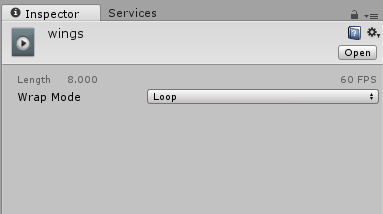


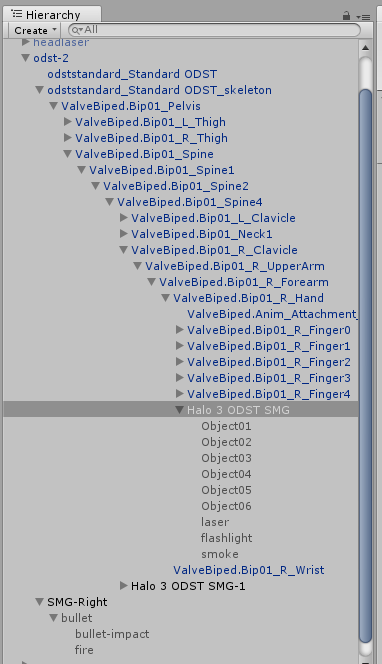
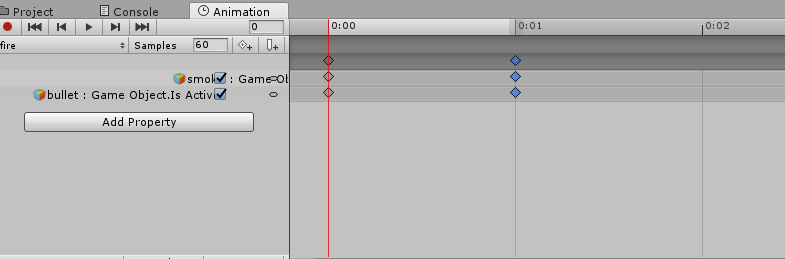
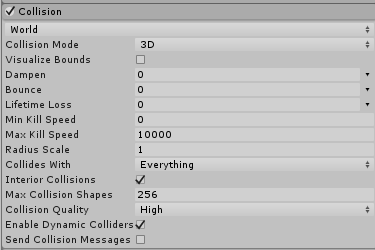


long story short, the hips aren't rotating
tough ferry
can I get some help before I tear my hair out?
quaint spindle
@muted prairie Is there a way to extract the animation from the .fbx file that you sent me so I can place it on a controller on the model I want to apply it to?
muted prairie
Yep, import that fbx, there's an arrow next to the model in your assets, ctrl + D after you clicked on the animation file, it should appear duplicated outside of the model, and you can use that
quaint spindle
Oh wow, that was easier than I thought. Thanks! 😃
Er, ok, so the animation has different... components or game objects, so none of the movements translate to my model. How do I assign my model's components to this animation? (All the components appear yellow with the message "The Game Object or Component is Missing")
muted prairie
The animation itself shouldn't have anything
quaint spindle
Ah ok, so for like say Root_0 on the animation, I replace that with Root T from my model and copy the same values for each key frame?
muted prairie
When you move your model (in your assets) onto that animation file, does it work at all ?
You should be able to use unity's retargeting
and since it's an humanoid model, if yours is too, then it should work correctly
quaint spindle
Ohhh ok, now it does, now I can edit the animation. Thank you! 😃
dawn cypress
im having an issue with an animation not playling like it is in unity
i have one of my character foating and my legs are in my body/hips not below where i had them
om if you know any fixes
fallow spire
someone here who knows how to make a custom walk animation?
 nimble kestrel
Why i'm not having "Skinned Mesh Renderer Blend: Blink" in my animation list in Unity? Did someone experienced this issue too?
slim sparrow
Your model doesn't have that shape key. Make it in Blender or edit the animation to use wink (if it has those).
@nimble kestrel
 slender rivet
hey guys, do you guys know how to add a gif or a video, without the whole adding each frame in photoshop
clear yew
@slender rivet http://www.bottomap.com/Software/A4B/A4B.html
slender rivet
THANK YOU VERY MUCH
nimble kestrel
@slim sparrow i need to make it from zero, thanks for the info
 glad cape
somebody knows why my particle effect only shows up in my camera but nobody else can see it?
fierce bane
@glad cape I've had some times where after uploading it took a bit before friends were able to see my particle effects. I'm not sure what causes it.
If they're not friends and you're not "Trusted User" (purple) rank, people have to allow particles to be seen on your rank, or directly allow you (Safety System)
fierce bane
not visible in Unity in play mode with the particle emitter and all parents enabled?
or not visible when selected in scene mode? (particle emitters have to be selected in scene mode to simulate)
fierce bane
They don't activate at all times because times because that would be way too many effects going off at once and could be really laggy :P
If it's not a simple particle effect I highly suggest having it on a gesture to enable it when you want it on.
glad cape
hm it is 10 identical particle effects with a rate over distance of 50
shouldnt be that much
fierce bane
nope that's a pretty simple one. probably fine
 misty tiger
anyone know why modifying the default idle animation would mess with legs bending? it wasn't doing this in the last update and it's driving me insane
the settings are the same as the default idle
onyx agate
They changed some of it server sided I believe (for desktop users as it looked weird to them)
misty tiger
🤔
onyx agate
Anyone know how or where to find/get/do the Thanos snap fade to dust animation (i have seen it in a few YouTube videos and wonder how or where i could find it)
misty tiger
make a geometry shader and have the triangles fade out randomly
 whole panther
Anyone else having trouble getting blend shape animations to work in VRChat? I can't even get a simple Blink animation to work. I'm so frustrated, I just want my avatars to work so I can play in VRChat instead of working in Unity. T~T
Its not like i don't know what to do. I see everything working fine in Unity Game Preview but not in VRChat.
 narrow current
Are you using legacy animations? If so you'll need to do a bit of tweaking to get them to work in VRChat.
narrow current

Here is a quick tutorial on converting your legacy avatar animations to the animation state machine system. :)