#animation
1 messages · Page 88 of 1
 final gazelle
 slim sparrow
Yeah, apparently that's not possible with quaternions
final gazelle
you probably also want to double check the animation curves after setting the keyframes, because i remember needing to do...something, but ah
slim sparrow
I had to do it in Blender instead by making sure the hips point straight up, then rotating it with euler angles in the way you described
Then importing into Unity
final gazelle
yeah, i'm not sure what you'd have to do to get it working as an import from blender then -- i've only really tried that particular one by directly making it in unity
slim sparrow
Alright, now that I've got that solved
How do I edit the animation curves in Blender?
It's a rotation from 0 to 3600 degrees over time
But it's smoothed out right now. I need to edit the curve to be different
Unity allows me to add tangents in the curve just about anywhere, but that doesn't work if it's a quaternion at that point
 sweet zealot
Is there a way to make a legacy idle animation reset every time i move? I have an idle animation where after 60 seconds of not moving my character slowly falls asleep, i want to make it so that the animation resets when i move. How do I do this?
 blissful grove
Does anyone know where I can get animation for a chicken or a pigeon
 regal hollow
@sweet zealot I don't think there is any way to do that
 spring nova
Yes there is. Prop toggle package, turn off the animator while moving
 brazen crater
you could maybe find the forward walking animation add that and sprinkle the deactivation of the animation component in there
regal hollow
turn off which animator
 rustic jewel
when making animations for the fist to have them be gradual, do you set it up like a regular animation where both keyframes are the same end-goal, or do you use the first keyframe as the basis, and the second as what you transition into
spring nova
The animator that makes you fall asleep. You'd probably have to make a duplicate of your model though, and enable that while disabling mesh renderer of your main one.
regal hollow
@rustic jewel make them like any gesture
That doesn't do what she asked, but it's as close as you'll be able to get
spring nova
Well yeah making your actual model itself fall asleep won't be possible, but that's hardly a problem
regal hollow
It's the only thing she's trying to do though
so not being able to do it is the problem
but what you said is pretty close
spring nova
But you can do it on a duplicate...
brazen crater
I'm still pretty sure, that disabling the animation component while walking should do what she want
spring nova
Jeeze ok
regal hollow
How did you know my name was Jeeze?
brazen crater
cause it should reset to on while she's idling
and it turns off while walking and baisicly breaks the cycle, but not sure how she wants to do the sleeping animation, except if it has like a max time limit
spring nova
It's not out of the question to do it all on one model though. You could have an invisible model, connect a model to that with joints, then when you want to animate it set all the rigidbodies to kinematic then animate it
Might have some unforeseen complications, but I'm pretty sure that would work
brazen crater
that sounds doable, but how would you make it start the animation after 10 min and then go on for "infinity"?
I'd assume an animator component
spring nova
One state that does nothing, after a time transition to the other state which animates stuff. Not possible with legacy animatiom, so you'll have to use animator and toggle props anyway
brazen crater
by toggle props you mean the one frame toggling thingy, right?
sweet zealot
The face closes its eyes. Lol thats all i wanted
I mean itd be great for it to start emitting Zs too but the eyes are priority
regal hollow
Like mentioned above
your best bet would be to have someone on an emote toggle
but that has its own issues, especially with syncing with some players
sweet zealot
That wouldnt be hands free though would it?
regal hollow
nope
you'd have to turn it on when you want to go afk
which sort of defeats the purpose of what you were initially going for
spring nova
The hard part will be finding or making a new walking animation. But once you have that, just add keyframes to t that disable, enable, then re-diable an animation on your mesh which closes your eyes after a certain time. disable alone will just pause, leaving your eyes still open. Enabling will restart the animation, opening your eyes. Disable again to pause with your eyes open.
And of course you could add particles to that. The only reason I went off suggesting a duplicate is because I assumed you wanted to like sleep on the floor. An it's not possible to directly animate an avatar that's already being controlled by your VR hands
brazen crater
^ yep phasedragon is on point
sweet zealot
Yeah, all i wanted was the eyes to close after 60 seconds. But this info is useful for something else im doing
 royal escarp
@torn pawn I've managed to get 600frames in a 22mb jpg file, but ive no idea how to properly play it in unity with the particle system.
 torn pawn
enable texture sheet tab
and select how many x/y rows uhave
and u can edit how many frames it has too
royal escarp
hmm ok thanks 😃
 violet moss
I'm having an issue with the Unity animator, i'm trying to animate the color property of a material, but it seems to effect every material on the object (even other materal's colors) i cant figure out why
 odd chasm
Is it the same material by any chance? @violet moss
What else would come in mind: do you have the animator on the other meshes aswell?
violet moss
It's a different material; and no I don't think so
i can change the color outside the animator and only that material changes
but when i put the color property in the animator and change it, it changes every material in the object
odd chasm
Can u post a screen of the properties in the animator?
violet moss
sure, give me a moment, was virtual desktop'd on a friend's unity project, i'll just get them to join the server
odd chasm
Aight
violet moss
Oof, I may have to get back to you in a few days, they aren't approved for this chat channel yet
they're stuck in #vrchat-general-1
 clear yew
Is there a way to have your avatar use the female standing animation along with the male sitting animation?
slim sparrow
You will have to make your own sit pose or get one from Mixamo
That would be easiest
clear yew
Which slot should I put my sitting animation in? https://i.gyazo.com/b4f4d6a0e3c9e2f6489f42c6555cd91d.png
 clear yew
 jade kraken
how would i make / set an animation / gesture to like...stay down once its gone through the animation
like if i was slapping an animation onto a robot to open its cockpit up
i wanna make it STAY up till i do somethin else
clear yew
anyone know how to get walking animations working? they just stall and make my character kinda float/glide
what are the animations in
 clever trail
@slim sparrow Okay, got phoenix to work in unity, but he still doesn't animate in vr, now he jumps up and down forever
slim sparrow
Is he rigged as humanoid or generic?
 ashen elk
anyone possibly know how to cycle props
regal hollow
Ye
ashen elk
ooo
ashen elk
could you maby explain
torn pawn
no 😂
clear yew
pretty sure someone made a video about it already
torn pawn
don't think so
inv. system is not shared so easily, eventho it's nothing too difficult
clear yew

I explain how to create a potential infinite amount of gestures using an animator state machine. ========IMPORTANT======== Thank you Bertrand Steenhaut for t...
regal hollow
There is a really cool guy mentioned in the video description
Also imo this 'infinite gesture system' isn't really worth it
torn pawn
it's to impress others mostly
but still, it's nice to have like multiple weapons on single gesture
tho not having it to cycle back to all disabled (as per video animator setup) might cause some desync for some1, especially if it cycles too fast
 spring nova
It works really well for charging up weapons. Like tap for light attack, hold for heavy attack. But for a rotating inventory yeah it's really janky
 tough cargo
right, im working on a model because some friends made a dumb bet. i want to make a panel that rotates with people locally, how do.
clear yew
@clear yew in walkfwd and walkbwd
 hasty hare
If the animation is only walking forward, there is no reason to put it in walking backward
 neon aurora
so i got a problem where it says itll remove the effect when i try to upload my avatar, anyone know why that is?
 forest dove
@neon aurora if it's a script or something its probably not whitelisted
neon aurora
@forest dove I downloaded a unity file online, it comes as a prefab, whitelist?
forest dove
Scripts need to be whitelisted
It could be your prefab relies on some sort of script
spring nova
Unless it was specifically made for vrchat, chances are it involved scripts
forest dove
What does it say it's going to remove if you upload it
neon aurora
It removes the effect then the name of the effect@forest dove
forest dove
Screen cap the upload panel
neon aurora
One moment gotta start up pc
 stray sinew
Any other sites similar to Mixamo?
slim sparrow
@neon aurora remove the script
odd chasm
@! Silhk#7570 depends what u want to do. Auto rig a avatar?
 valid crest
Could anyone lend some knowledge on this longer animation thing. I dont understand from what ive been reading as to how its done. They say make an empty game object then have it toggle the long animation but thats where i get stuck
 obsidian vigil
@valid crest
Create the empty Object, give the empty obj a new component called "animator"
then you animate whatever you want on this empty object using the newly created animator.
When youre done, duplicate your whole model and create a gesture like you normally would,
but all it does is toggle the created empty object thats turned off by default back on loped to frame 0 and 1.
valid crest
I see
obsidian vigil
If you still have questions ill try to help ^^
valid crest
Appreciate it
stray sinew
@odd chasm Different animations to use and a more accurate auto rigger
slim sparrow
I'm pretty sure Mixamo is as good as it gets. The next best thing is automatic weights in Blender @stray sinew
Which will do 95% of the weight paints for you, but you gotta place the bones yourself
There are templates like rigify but those are made with like 2 more spine bones than VRChat wants
stray sinew
🤔
valid crest
@obsidian vigil So before i actually already made the animation on a seperate model before knowing that emotes didint last as long as i though. Could i just use the already made animator form that animation i already made and tie it to that game object?
obsidian vigil
Youd have to try that out, cannot guarantee ^^
valid crest
alright
I got it to some what work but the model doesnt show up when i do the gesture
my entire avatar disappears and the model that is animated doesnt show up
 lilac cave
I mean if the animated model isn't a child of the avatar being uploaded nothing is going to be active
Because there's nothing to activate
If you make it a child you'll have to change the animation so the parenting is correct anyway
obsidian vigil
@valid crest that sounds like you want to hide your own avatar and have a 2nd version with an animation playing
am i correct?
if thats the case Do not toggle your model off
toggle the skinned mesh renderer on the body mesh
obsidian vigil
😄
valid crest
Swear my patience is getting the best of me today. Now when i do the gesdture it holds it for 1 frame then it gos back to flaat pals with no animation running...
valid crest
Im just gonna call it for the night. I either get no avatar with no animation or the other thing i mentioned. Maybe ill get it tomorrow
Or im just stupid dont know for sure
stray sinew
....
clear yew
👏
slim sparrow
Buhuhuhu
obsidian vigil
What
 wide heron
anyone know how to make an animation that switches between 2 textures?
 undone glade
@wide heron simply apply your material while recording
That's the fastest way at least
 dry zealot
can someone say good settings for colision with world
valid crest
i was finally able to get the animation to work but my main avatar is still there. Need to find a way to disable it so the animation will work
any knowledge for that one by chance?
nvm i got it figred out. Thank you for all the help @obsidian vigil and @lilac cave
obsidian vigil
👌
 old matrix
when i look down the mouth of my avatar progressively opens its mouth more and more
why does this happen
torn pawn
remake eyetracking and overwrite your fbx, check in Unity if you have under Body blendshapes 2x for blink and 2x for lowerlid as first
if after overwriting still missing one or both, remake again and overwrite
old matrix
the model in question doesnt or at least isnt supposed to have blinking, if that changes anything
 left bobcat
Hi. I want to make a cute charge up animation for hand gesture. I just noticed that hand animations are 1 frame only. How do I bypass that?
I saw multiple people make hand animations with charge ups of some sort.
old matrix
@torn pawn that worked, thank you!! 
torn pawn
@left bobcat enable game object that has the animation on it doing all of the stuff
 torn nebula
@left bobcat When you say "charge up", I assume you mean stuff like a particle effect/sound gradually charging up?
Because if so, in that case that's all in the particle system or other aspect, rather than done via the animation tab.
So like Yuumi mentioned, you simply have the game object holding the particle system be activated by the gesture, and it will play out for as long as you hold that gesture.
Also, on the side... be sure to make your gestures exactly 2 frames not one, or else they'll be "sticky" and unresponsive to being switched or turned off.
Use identical frames at 0 and 0.01. Make the first frame, and then just copy paste it.
left bobcat
Thank you a lot. My work can be much more easy and flexible now. @torn pawn @torn nebula
torn nebula
Just on the side, watch out for the red record button adding anything unintentionally. It gets activated any time you hit the play button to preview the animation. Is the source of a lot of beginners animation bugs, such as becoming invisible or lurching around.
 gilded copper
Any possible means of having an audio source play when a world particle collides with something (be it playing from a sub emitted particle or the main one)? Looked around and haven't been entirely sure on how or if it would involve some scripting
It's been a long night of trial and error for this sort of thing on my end lol
clear yew
oof
 frosty pendant
Afaik you can't use particle collision to trigger sound without scripts 😕
 fierce bane
You are correct, particles cannot spawn an audio source or emit sound with any other way without scripts
 jagged adder
I have a question
is it the model or the avatar override controller that makes it so that I can't bind full body animations to hand gestures
it animates the hand instead, I'm trying to learn this shit I've taught myself how to make hand gestures sound effects and particle effects but I can't figure this shit out lol
oh and also anyone got the milly rock animation?
 icy crow
you can only animate fingers and enable/disable objects with gestures
jagged adder
except
you can animate the hole body with gestures
I know a lot of people that do it
icy crow
no you can't. They might be enabling a duplicate of their model which plays an animation
then disable their main body mesh
frosty pendant
Exactly. You can't animate any bones used by the IK for movement and stuff
valid crest
Dont know if any mods want to pin this or not. But i threw a little tutorial together on how to do longer gesture animations using game objects. It will help with Lowering the question rate down about them.
https://www.youtube.com/watch?v=9DwNxirwzCw

Discord for contact is Sir Matrix#1337. Im also in the vrchat discord group as well
 mint prism
how do i spawn an object that doesnt move with me?
 steady mantle
Im having trouble with a gesture animation to go away. I made 2 spinning blades, but when I switch gestures it takes them a while to stop. Is there a way to make them instantly stop? Also if I use default gesture to stop them then use another gesture they reappear again....
clear yew
you are using more than the frame 0.00 and 0.01 on the gesture
which make it blend in with other gestures
steady mantle
so no way around it?
 novel otter
Hello
I would like a help
It's simple I just wanted to add a custom dance for my avatar
Anyone knows
I downloaded the animation package
 elfin oak
is your character rigged?
novel otter
I am on unity I know how to put my character to vrchat
I need to add custom dance
Anyone
K
valid crest
@novel otter when you say custom dance do you mean make a custom dance?
clear yew
@steady mantle animate an empty game object instead
and just activate it with a gesture with frame 0.00 and 0.01
valid crest
There is a tutorial on how to do that above as well if you need to see a visual representation of it
novel otter
Sorry here is the dance I want to add
steady mantle
@clear yew like making a separate animated object?
novel otter
No pictures allow
Dam
It's the orange justice dance from fortnite
😂
There this vrmod
Anyone knows
clear yew
yes @steady mantle
novel otter
You know
steady mantle
thanks I'll try o. o
clear yew
you can add an empty game object on the wrist
parent the sword to it
animate the empty game object to make the sword spin
novel otter
Hu
clear yew
remove the animator from the empty game object
find the animation file that you just made
make it legacy and set it to loop
give that empty game object that animation file
disable it by default
and use a hand gesture to activate the animation component
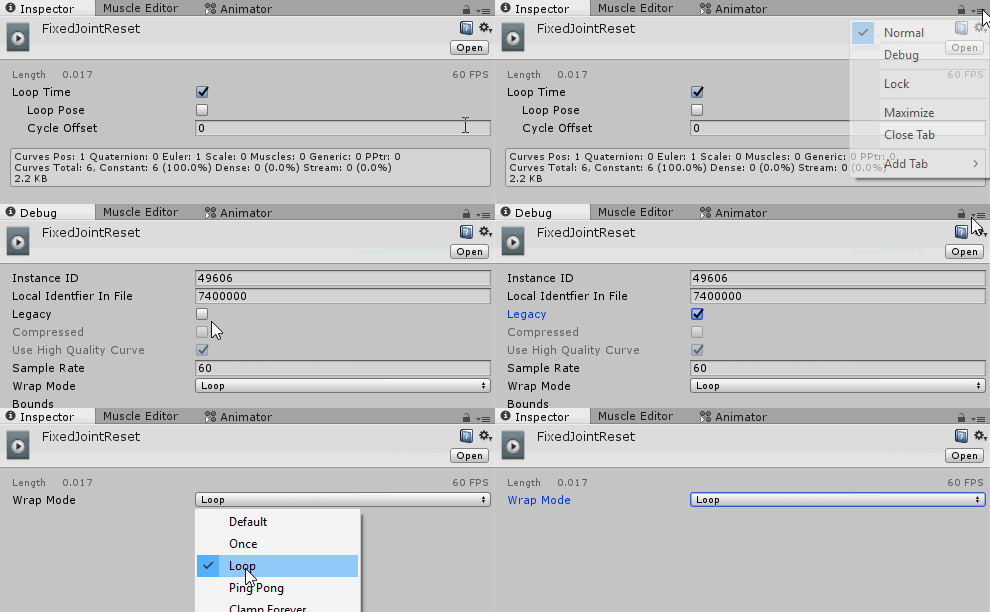
this is how to make an animation file legacy btw https://i.imgur.com/rQltyhy.gif
 steady mantle
oh o. o
 fallow pier
What audio files work for vrchat?
What I heard is that mp3 does not work for animations?
clear yew
they do
mp3 ogg and wav all work
sometimes audio breaks if the audio file is too large/long
clear yew
np
gilded copper
ogg or wav are the better options from what I have seen especially for looping sounds. mp3 files tend to have this automatic fade out sort of deal which makes audio loops from beginning to end less seamless
Basically they don't loop well from what I've seen when using them
Easy to convert tho
Also aren't mp3s fatter?
clear yew
ogg is more optimized
fierce bane
mp3's fading out depends on how they're made, if they have a faded ending, they fade, otherwise they don't. It's just a format.
and yes, prefer ogg as well
clear yew
mp3s do tend to have a split second of silence at the start of the file due to the way they're encoded though
 slender rivet
Anyone knows how do you trigger multiple gestures? as in when you do rock and roll with the left hand a prop appears and nothing in the right hand, and when you do rock and roll in the right hand another prop appears but none in the left hand.
clear yew
Hm...how do you anime multiple humanoids? I have an avatar and attached to it (inactive) is another one. I basically want to animate the second one approaching the original. If the animation contoller is the main one, every time I try animating the second one, it is the main one that moves. Do I make separate animations and trigger them both with an emote? I'm not sure how to go about this. Halp.
@slender rivet - you can't do it if it's mutually exlusive. If gesture 1 makes the item in right hand active (AND NOTHING ELSE, no touching of the left) and gesture 2 does the same for the left, then you can activate one gesture with the right shift and one with the left and both props should appear. Otherwise, no.
slender rivet
well shit, thanks anyways
 dense plover
spring nova
dense plover
spring nova
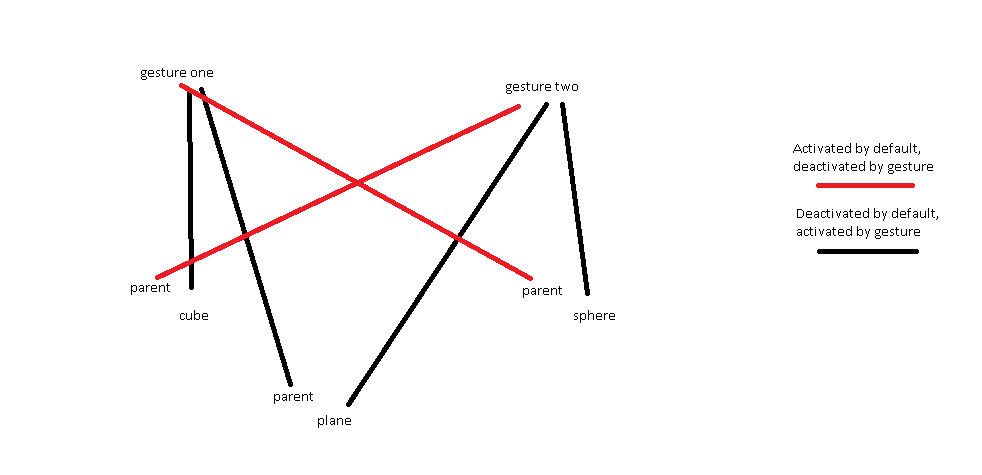
@slender rivet no you can do that. Think of it this way; if you have a cube inside a gameobject, you can disable the cube and it will disappear just like normal. But if you disable the gameobject, that too will make the cube disappear, because anything under it is inactive as well. You can't control a single gameobject with multiple gestures on it's own, but you can control it's parents. Using this, you could make some basic AND or NAND functions
slender rivet
@spring nova i kind of get what do you mean, but idk how to implent it in the animation
spring nova
Have you done regular gestures, like a sword or a gun or something?
slender rivet
Yeah, plenty
spring nova
ok well let's map out what exactly you want to happen. Fill in the blanks:
Gesture one active:
Gesture two active:
Both gestures active:
slender rivet
Lets say gesture one cube
Gesture two sphere
Both gestures plane
 slender rivet
Oh i get it (thank you for the trouble btw) but isnt there a way to just let the left hand (lets say) point gesture spawn a gun, and the right hand point gesture spawns a sword
Or is this the only way?
spring nova
What you're talking about is called split gestures, and right now it's not really possible
You can sort of do it with particles, but that comes with a lot of annoying limitations, like no sound
slender rivet
Oh, well screw that then, I'll stick with your method
Thank you very much, and sorry if i wasted your time or bothered you
spring nova
nah don't worry about it, that's what these channels are for. I wouldn't have replied if I was busy with something else 😛
 hollow perch
You can do split gestures to spawn particles using particle inside triggers on the fingers of your hand to detect when they move together or apart
But particles won't show to nearly as many people in the upcoming version of vrchat so that's sadly now a concern when using them to design features of your avatar
spring nova
Ah, good point. That's unfortunate
Particle logic has always been really sketchy anyway since it's not synced, so stuff might not work every time for every person
 grave stream
Hey guys i someone still awake here?
When my character is standing or going from a movement to a standing position it just flickers back and forth to the positions, kinda teleporting but the character is allways on 0,0,0 in the editor. Problem is it is using the standart animations.
clear yew
make sure that they end at 0.01
grave stream
That what ends on 0.01?
clear yew
the frame
grave stream
The positions?
clear yew
yes
grave stream
In unity or in Blender?
grave stream
I dont want to acutally animate something ^^ Its just that the transition from the standing and walking animation is extreme
clear yew
its probably unity
grave stream
Like my viewpoint is on my right shoulder when I stop walking, thats kinda weird
clear yew
you know the dot?
grave stream
Yeah I thought so too first
clear yew
like, on custom avatars
grave stream
Yes and Ive placed it right between the eyes, when I walk its at the exact place
but not when i just stand there
clear yew
oof
 muted prairie
Custom idle animation ?
grave stream
no nothing custom at all
muted prairie
make sure your armature is correct in blender then, if one bone has a rotation, it might try to adjust in the app and your model could be arched on the side
And make sure you're at 0;0;0
grave stream
Hm good thought with the rotation, I'll check that and get back to you guys if i dont fall asleep.
Thx 😃
 tribal root
I know it's late but I'm having issues with adding a pistol to my character and while trying to stop using it the emote takes a considerable time changing
but it is only my custom ones that do this
spring nova
The animations need to have keyframes at 0:00 and 0:01, nothing else. You probably have some out at 1:00
and both of those keyframes should be identical otherwise it will flip-flop back and forth. Just copy the first frame to the next and delete anything else
tribal root
not so much the case for me. although this only happened once I added audio
spring nova
if it takes long to transition I 100% guarantee it's because the frames are not at 0:00 and 0:01
tribal root
but they are set at 0:01
spring nova
you must have another one further out
tribal root
I'll see what I can find thank you
Although I do suspect that for the one it may be the chambering animation that is affecting the on but the other is just a silent static still experiencing the same issue
novel otter
anyone
pleae can u help me on simple thing
so i have a file pakage animation on unity but wen i enter unity i can find the file
any help
clear yew
I’ve seen people add video files or gif files to there avatar how is this done?
 grand lichen
hey guys, is it possible to have two animations playing on your avatar at once?
I have a set of wings and a tail that both have an animation playing at all times
but it will not let me have them both animated in the game, they both run in unity but not vrc
(i know i can mix them both in the same animation but i'd like to have some randomness to the animations)
novel otter
any helpers here
final gazelle
@grand lichen if you've got your avatar set as humanoid, it's got something to do with how VRC or the muscle animator handles things -- it can't animate anything outside of the normal humanoid bones for some reason
if you've got the wings and tail as separate objects with their own generic animators, that can still work, but might be a little bit of a problem making them look perfectly attached to your model unless you clip them inside a little bit
@clear yew i believe it's this, or something similar:
https://github.com/thnewlands/unity-surfaceshader-flipbook

GitHub
Surface shaders with flipbook / spritesheet animation functionality - thnewlands/unity-surfaceshader-flipbook
you can't get videos or gifs playing directly on your avatar from what i understand, but you can use a shader which takes animations from a spritesheet
novel otter
so thi emote i wanted to add to my avatar but it says nothing to import wen i try to open the file
grand lichen
ah damn, i figured out the issue, but i dont know how to solve it lol
so i got both animations playing at random
but when i add my gesture override for my wing closing animation it disables the one animator
here is it actually working with both on it
clear yew
Hm...how do you anime multiple humanoids? I have an avatar and attached to it (inactive) is another one. I basically want to animate the second one approaching the original. If the animation contoller is the main one, every time I try animating the second one, it is the main one that moves. Do I make separate animations and trigger them both with an emote? I'm not sure how to go about this. Halp.
@final gazelle but I’m pretty sure you can put gifs on a sprite sheet with some work
you can use gifs with either a shader or a particle spritesheet
or if you are insane enough you can key frame every single picture yourself
Thanks man 👍😘
 molten elm
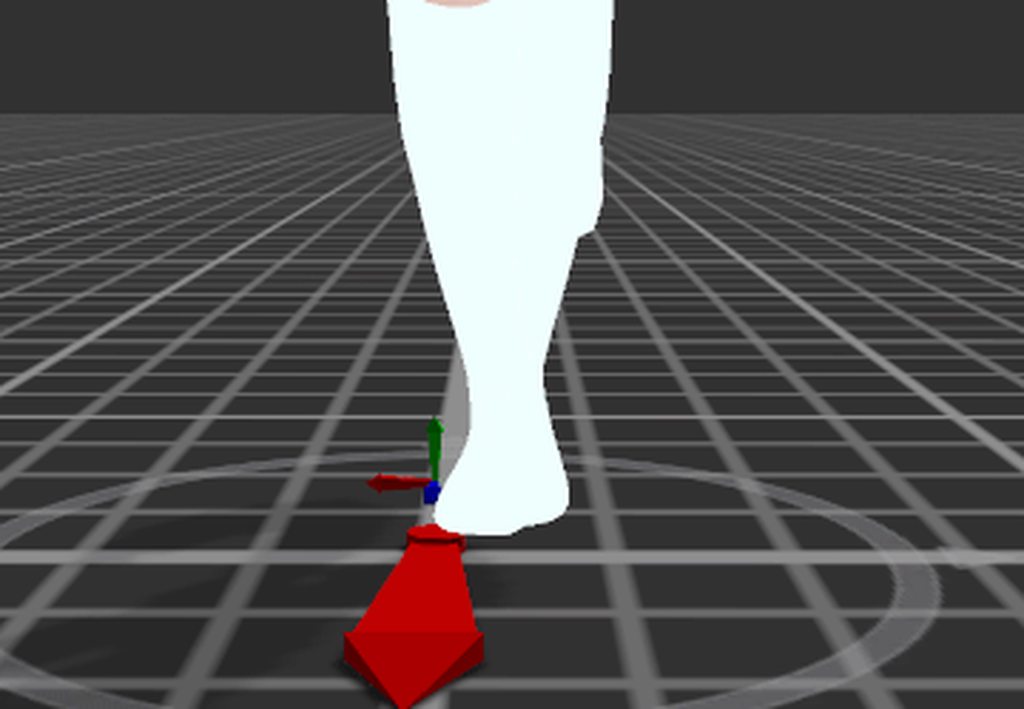
When importing animations, how do I keep the feet from moving around on the ground and make it look like the "Feet IK preview" in unity.
molten elm
 fallow pier
Does anyone know why "Trail Renderer.Time" is shown as missing when I copy and paste for snail trail?
 unique inlet
Who wants to help me with an animation? 👀
grand lichen
@molten elm there is an option to bake parts of your pose in the animation. One locks the height to your feet
molten elm
where's that?
clear yew
click on the animation file
molten elm
it just sets the height of the animation itself
it doesn't make the feet not move and slide around weirdly
i was just wondering what you do to make it look like when you click on "Activate feet IK preview"
which basically makes the animation look way less scuffed
tribal root
Ok new issue from last night I fixed everything and worked fine. went in this morning to add some new stuff and was content with it. As I entered the game my audio no longer worked. as I returned I've found the the sdk keeps pushing my audio priority back to 200. any idea on how I can fix this as it keeps reseting it? The volume isn't set super loud either but now I can no longer hear it.
tribal root
plz help
novel otter
anyone here
 tardy abyss
Is there a way to toggle an animation off/on (in VR)? Basically, for something like eyebeams. Where instead of holding down the secondary trigger, it would be 'locked' until I press it again (like a flashlight).
stray sinew
^ Please, I want that too lol
fierce bane
TECHNICALLY yes, but it isn't always sync'd properly for other people, and there are some other limitations.
https://www.youtube.com/watch?v=5m8RZQd4JAw

This is just a quick tutorial on how to set up prop toggling in VRChat to enable yourself to permanently toggle a prop on using emotes instead of gestures. I...
wide heron
I have this problem where my trail stays for a bit frozen, when the particle hit a collider and explodes
spring nova
turn on die with particle
obsidian vigil
@spring nova soooo... im tryna get a shockwave to work when a square of particles collides with anything to appear, though, they only appear once and if i hit the ground again before waiting at least 10 seconds they wont appear again
any way to change that?
spring nova
This is using particle triggers?
spring nova
max particles too low?
obsidian vigil
theyre set to 1000000
still wont change anything
😂
if i play with the amount it just spawns all of em in one place
and increases them stacked
on top of eachother
spring nova
The thing that initially collides and subemits, does it properly re-spawn a new particle after being used? You could do that with a constant emission or a gesture
obsidian vigil
well, my gesture enables the emission which is set to 10 per second
and they collide like they should
i felt like the subsystem set to a lower lifetime would fix it
but its barely visible now
whenever it triggers
fierce bane
lowering the lifetime of the subsystem wouldn't help unless it was running into the max particles limiter (which you said is 1mil so that's not it)
so the gesture enables emission on the parent, which is also a high limit I assume?
clear yew
Could someone explain to me how i can make custom Crouch/Prone animation on my avatar (VR if it even works) and sitting animation on chairs in my world?
 wild bluff
hey i have a question, i am doing a model for a friend and he wants to thro the models glasses away with an animation and wants it to stay on the ground (amaybe particles)
any idea how i can make it an infinite throwable pair of glasses
obsidian vigil
Well... you need an animation which shoots the mesh particle with gravity probably
And another one that turns your system back off
wild bluff
hmmm interesting. i have seen a gun where the particles dont break upon ending the emote and i was thinking of something like that.. like it doesnt die when the emote does but when the lifetime runs out
any idea on that? if not ill do the way you said
obsidian vigil
Thats done by turning the emission on and off
And leaving the particle system itself always active
And put lifetime reaaaaally high
To reset disable and reenable the particle sys
torn pawn
there's two ways to do it, oneis emission, but if u want to hide it behind combo u have to spawn a ghost particle that subemits main
 next shard
 weak summit
Im curious
is it possible to have a animation play in the direction you're looking at
like a walking animation
If the base of a avatar does not move
can you have certain parts of the avatar animate based on what direction your facing
 twilit latch
do someone know how to change the crouch Idle?
i tried in the override but it does nothing 😐
clear yew
i need sum help when i put my animation on my avatar and use the animation tab on the avatar it doesnt move
or do the animation even though i did it already
clear yew
Anyone happen to have experience with ripping UNITY3D models?
rule 13
oops my bad @clear yew
i also just noticed i posted in the wrong sub.. sorry for that too..
fierce bane
@weak summit when you start an animation it will be based on the direction you're already looking, look at backflip for example
fierce bane
you can animate your avatar (including the root) with an emote to move it around. For example, run forward and slide into a portal or something
your own position will be where you started, camera included
weak summit
I have another question
My avatar wont animate at all
yet it has the proper humanoid rig
fierce bane
take a bone and rotate it, does the bone move separate from the mesh?
fierce bane
you need to go into blender and weight paint the avatar
weak summit
how do you do that?
fierce bane
if the bones move separate from the mesh, the mesh isn't bound to it with weight painting
weak summit
whats weird is
fierce bane
that's semi complicated, I suggest checking a tutorial
weak summit
in blender
it works fine
I can move the bone
and the mesh moves with it
what does blue mean?
fierce bane
in pose mode it moves with the bone?
weak summit
yes
fierce bane
then it should be painted fine
 fierce bane
other than maybe an extra bone, that looks fine for skeleton
I can't tell you about weight painting unless each bone is seen with it though >.>
or at least one to see if it is properly set up
weak summit

I dont get it
I mean
it works fine in blender
but the second its imported as fbx to unity
everything implodes
fierce bane
if it implodes you've got blend shape issues
make sure you have a "basis" and 4 after it for eyetracking (required even if you don't want it, just have blanks)
weak summit
I meant inplode as a joke
it does not actually cave in on itself
its just stuck as a tpose
clear yew
you rigged it as humanoid in unity and it give you 0 errors ?
clear yew
what hand error ?
weak summit
1 sec
fierce bane
if you want emotes/gestures to do anything as well as headtracking, you NEED 3 finger bones at minimum as well as the rest of the skeleton
clear yew
if you dont add the override
the model will be in T-pose
or A-pose
add the override
and then test the model in play mode
fierce bane
er...isn't the override only to override the pre-set ones?
 clear yew
add it ?
clear yew
customoverrideempty
clear yew
yep
weak summit
where do I drag it?
 buoyant iron
weak summit
buoyant iron
weak summit
decriptor?
weak summit
derp
nothing was controlling the animator
So
If I use simple avatar animator
would that work fine?
fierce bane
you shouldn't have an animator at all unless you're using generic rig
fierce bane
wait...what exactly are you looking at?
correction, "animator" are fine, avatar controller is what you shouldn't have
 clear yew
how how i make particles have physics and collide with world
aaa
Attach the particles to the model with fixed joints, and then set the particles to react to the world. If you attach the particles directly to the model, the world collision will not work
you confuse me
screenshots?
nvm
fierce bane
@weak summit Yes that looks fine, though generally you want "apply root motion" checked
 ruby thistle
Question, in an animation clip if i want a song to play say during a dance anmation what would i need to do?
clear yew
i'm figuring that out too lol
ruby thistle
I think it would be like adding any guesture override. But idk where i should put the animation source to the hierarchy
clear yew
aight, so
is your animation imported
if it is duplicate your model and drag and drop your imported animation into it
if you did it right you should see it in the animation section

 ruby thistle
yeah i would be importing a clip from mixamo
but with that said. would i need to upload the mesh im using for this imported animation to work?
ruby thistle
nice
clear yew
unless you don't have the bones for it
ruby thistle
i only have one more problem. i cant add audio source to this animation
fierce bane
make a duplicate avatar, drag and drop animation onto the duplicate, add to/edit animation
 west nacelle
hey can someone help me
i just want to know how to make an animation, and have the animation sit there, while im moving
ruby thistle
tried that, keeps saying the animation's armature is missing :/
muted prairie
Look up animation override, you'll add that animation on the walk forward @west nacelle
fierce bane
@ruby thistle then the bones are probably not set up correctly for that specific animation
ruby thistle
goddamn it
fierce bane
the bones must match what was used to make them exactly
west nacelle
@muted prairie so will it spawn when i move
ruby thistle
so then i will have to drop my model into miximo instead of using the place holder
fierce bane
you could fix it by clicking twice on each property of the animation and fixing the path to the correct bone, but you may have issues of them not moving exactly right if it wasn't simply a differently named bone
ruby thistle
its only allowing me to delete said properties. idk man i feel like should talke this when i have more time
fierce bane
you can fix the path by clicking, pausing, then clicking a second time on a property, it'll open up a text box that you can edit (I'd suggest copying it into notepad or something to compare)
but yeah, it'll take a while if you didn't use a matching rig
ruby thistle
i'll say this. i have mad respect for you animators. this seems to take longer and seems harder than painting or sketching
gotta have the patience of a saint.
muted prairie
@west nacelle When you'll move it'll use that sitting animation
west nacelle
can someone help me delay an animation on my avatar
ruby thistle
is there a quick way to set my models rig to active? not using MMD modle.
sweet zealot
Legacy gesture animation question - is it possible to have my idle animation be inturrupted by a gesture then reset after the gesture?
 paper glade
@sweet zealot To my knowledge, no because hand gestures only affect finger positions.
sweet zealot
i found a way 😄
sweet zealot
legacy
my legacy animation particles wont stop emitting. they are only supposed to last 1 second...
undone glade
@sweet zealot is it set to loop?
sweet zealot
nope. I tried Default and Once, the particles wont stop
clear yew
@sweet zealot lol
Uncheck the box on your last keyframe to disable the particle system
And remove loop
On the animation file
@sweet zealot or disable emission
In your keyframes
 cedar thicket
Anyone know how to convert a VMD motion file to work with cats translated armatures?
clear yew
Use either blender or mmd4mechanim
@cedar thicket
If you use mmd4mech make sure you create a new project file just for vmd conversion
Or you will corrupt your existing project
clear yew
does anyone know how to import and use animations from mixamo?
icy crow
when you import the fbx into Unity, make it a humanoid rig then duplicate the animation file thats inside the fbx@clear yew
sweet zealot
Alrights, so if i want a poof of particles to play once on gesture what do i do then?
clear yew
Thank you @icy crow !
 rare stag
I just added a dance emote to my avatar, but when i use it in game its hips are stuck in place and it doesnt move around like the original dance. How do i fix this?
rare stag
ok, i got it to move around, but now the hips stop rotating after a few seconds of the animation
weak summit
Can somebody help me?
My avatar does not move or preform any animations
I would ask Richdur
but he's offline
Also the head bone does not dissapear
 short maple
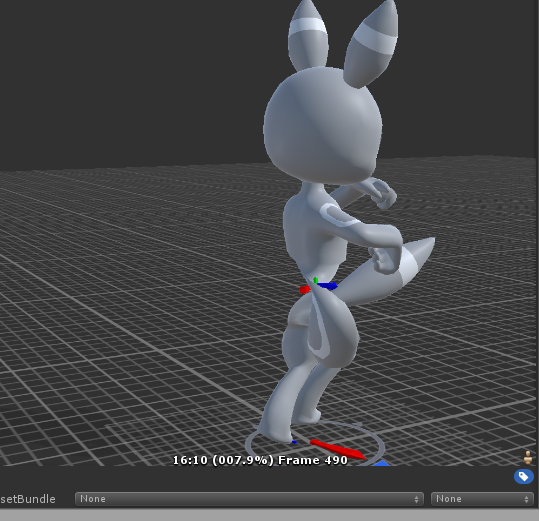
does anyone know how the hell do you fix the hip rotation when dealing with vmd animations?
torn pawn
^ i need to know that too ❤
short maple
yea 😦
hips look twisted for you too, right? Kind of like this I guess https://imgur.com/BIXRNjp
 torn pawn
also, does any1 know if Milly rock motion is public and where I could get it?
too lazy to download fortnite 😦
tardy abyss
Is it possible to make an animation to pull a gun out, and another one to fire it?
short maple
after looking at the history of vmd discussions here it seems they are getting avoided so idk @torn pawn 🤷
we'll just have to research online
lol
torn pawn
@tardy abyss yes, make the particle+audio a child
and activate it with different gesture
so u can trigger it only when the gun is out
short maple
something is happening between the export process of fbx because in blender the animation looks to be fine completely 🤔
tardy abyss
Hmmm. I'll try that, @torn pawn. Thanks.
torn pawn
u can shoot 5 different guns with 1 gesture
and only active gun particle/audio will be used
as all other parents are disabled
short maple
I'm starting to get the feeling that the way how people do it is probably not a proper way but in a way that they hide the real model and show a generic avatar that's playing it
but then again the fbx export doesn't save the hip data so idk...
stray sinew
@short maple The way I fixed my hip problem
Well if any, they had me set the animation like this https://cdn.discordapp.com/attachments/466464545322565652/480018887136509953/unknown.png
 short maple
oof...
tried that but still doesn't work
wait..
So I checked the bones of my main avatar with the one that I use to export with the animation. They both have different bone names
problem is that if I decide to fix the model with CATS in blender it stops the dance animation except for the shape keys of the character.
main character has:
- Armature > Hips > ButtTail1, Left Leg, Right Leg, Spine
character with motion has:
- ParentNode > Center > Lower Body, Upper Body
hollow perch
Ya I had the same issues. I think the way you are supposed to do things is use the model with center etc to import as a humanoid model and then take the humanoid format animation and apply it to your avatar
short maple
yeah that's what I've tried to do but it seems to forget the hip rotation 😦
yay I just accidentally deleted my project
hollow perch
😢 Maybe you can combine both somehow: copy and paste center rotation and position from the generic animation into the humanoid version and you can edit the path by clicking once or twice on the left part of the row that says Center Position or Rotation and just backspace everything to rotate the whole avatar for example. I've heard also of people fixing this sort of thing manually so I hope that is not necessary
neon aurora
anyone help me on this? so i made a 3d transparent sphere that rotates, however it follows my headmovement and rotates when i look around, how do i make it not rotate with my head?
obsidian vigil
@neon aurora by putting it into an empty object thats parented to your armature and has a fixed joint on it
with your armature as a rigidbody attached
 woeful flame
What's the best program that you guys found for animations?
short maple
I just had a crazy idea but idk if it's worth doing but
@hollow perch if I duplicated a generic avatar that works with the animation. Would it be better to hide my current avatar and then reveal the generic one while the emote is playing? 🤔
managed to recover the other avatar that I deleted too
final gazelle
that's a fairly common technique actually -- just make sure you're hiding the mesh renderer rather than the whole avatar
short maple
yea
hollow perch
hiding the main avatar and showing another copy is a common way to do animations anyway
final gazelle
it's used a lot with MMD dances
hollow perch
hiding body mesh is usually what I do rather than hiding just the mesh renderer
is there a difference?
I mean the whole Body game object
short maple
I had a bit of a thought regarding the MMD world map and I noticed that in some cases my actual avatar wasn't playing the animation, but possibly a generic one. So faking the animation might be worth it
if you can match the textures and the mesh with your current one, definitely
final gazelle
that should work too -- there might be a difference, but it's something obscure that i'm not too sure about if there is
short maple
this is the current avatar I have but the one selected is the generic, so I made sure it doesn't look different to my current one https://imgur.com/RkgI8On
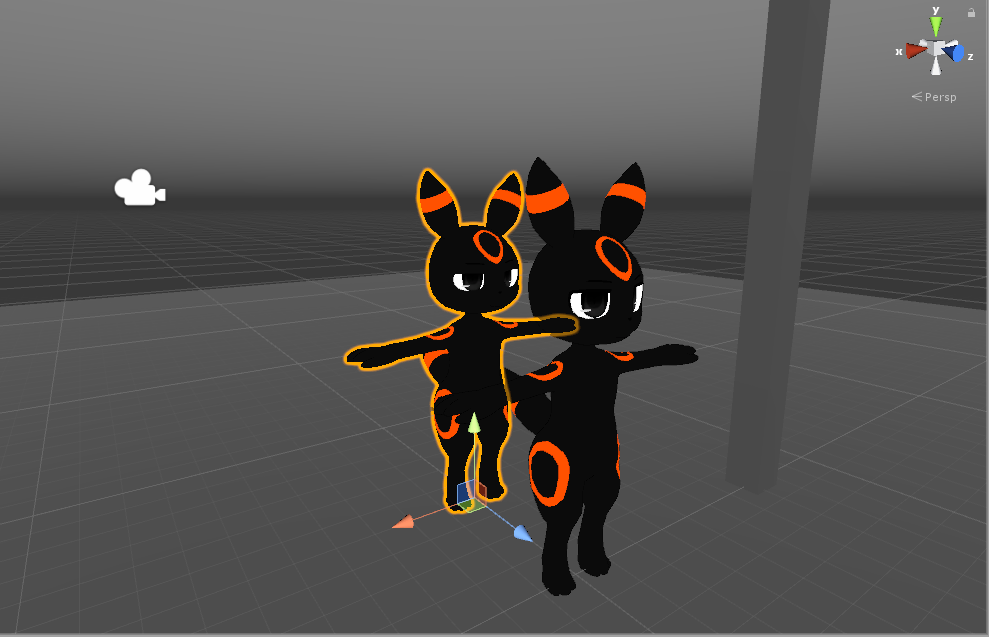 obsidian vigil
@short maple that looks very similar to a cartoon ive seen
somewhere on youtube owo
short maple
ye
hollow perch
I suppose the humanoid animations are useful mainly for the MMD worlds where anyone's avatar needs to be able to dance. it also would let you apply the same animation on all of your avatars without having to reimport each one as generic
short maple
its an umbreon from pokemon
hollow perch
but other than that generic is probably more faithful to the original VMD animation
short maple
ya
obsidian vigil
i know 😂
hollow perch
it is cerzix's evolved form
short maple
🤣
obsidian vigil
Tru
but i never evolve ❗
Eevee best mon
but yeah i remember a cartoon where the protag looked like that umbreon
short maple
yea
@final gazelle mesh renderer would mainly also be the property one called "Is Active"?
final gazelle
it should probably only have "Is Active" as an option in the animation, i'd think
short maple
yeah
final gazelle
though yeah, that'd be the only thing you need to animate if you're trying to toggle it on and off
short maple
yea
final gazelle
@hollow perch i haven't been able to find the old conversation on this discord about it yet, but the difference between toggling the body mesh and the skinned mesh renderer might have something to do with where your animation continues from when you switch it back on
as in, whether it restarts from the beginning or continues from where you left it last
short maple
@torn pawn I figured it out but it took me almost 9 hours to do, but what you want to do is make the vmd animation a generic for a hidden avatar inside your current avatar.
short maple
That way when you use a hand emote, your current avatar disappears and the generic avatar appears.
True
But it definitely works
It was really the only way I could fix the vmd issue
torn pawn
yea that's what i'vebeen using, but would like to actually know how it's fixed, for instance in MMD dance map
short maple
I think that map uses generic animations too
Idk
They've either went ahead and manually fixed any hip issues with the animations or done some kind of method where it used your own avatar as a generic or something
stray sinew
Might someone have some troubleshoot for me? I have a avatar I want to breathe out fire but the stream of fire particle keeps moving into different spots than where I have it placed in Unity. Been trying to do this in video but still doesn't work https://www.youtube.com/watch?v=yZxfQkxvxRI

Had to re-upload because of audio being too quiet should be fine now. I forgot to mention it in the video, but Murmur also answered questions I had and helpe...
has there been changes to these things ?
icy crow
Make sure the game object containing the particles is always active
And only enable/disable the particles in the animation
stray sinew
🤦 GG that worked
But now my fire shoots straight down instead of forward lol
okay, looks to be fixed now. Had to reset the rotation on the flames . GG thanks @icy crow
icy crow
Np
 bitter gyro
Wondering if anyone knows a way to make a world particle sub emit without it having to be child of the particle system it's sub emitting from or at least emit from a specific location every time without it being affected by the rotation/location of it's parent.
Using particle triggers and trying to figure out how to, for example, stick my hand out in front of me and activate a sub emitted world particle system that's exactly two meters right in front of me on an empty fixed joint so I can walk around and admire it myself.
The problems of saving gestures. 😩
obsidian vigil
sooo....
ive animated a luma

but everytime it goes back to the middle
it does this weird bounce
i tried messing with the curves
but i dont really know how to prevent it from doing that

those are my curves
the small highlighted section is where it happens
/where the end joins with the start
clear yew
So I have some chainchomps as earrings on this avatar
and they have fully working mouths
so I was wondering if it was possible to make them bark if I were to touch them or something?
Or do I have to put it as a gesture override?
fierce bane
in a world you could use triggers I believe, but you'd need a gesture for avatars
hollow perch
You might be able to parent them to the eye bones so they will chase whoever is looking at them with the eye tracking
And attach dynamic bones to make the chain move around.
muted prairie
@obsidian vigil Is it looping correctly on your keyframes ?
steady mantle
Hi guys what are the common gesture to emotions animation?
Like
fist = angery
victory = smile
what are the rest?
Its my 1st time trying to animate full emotions .- . (I dont usually do this as a desktop user but im planning to publish the model for everyone)
muted prairie
I don't think there's any rule on that, it's more about what you feel matches well together
bitter gyro
@clear yew I don't know how badly you want it to work, but there is a blendshape shader made for VRChat that will activate a shapekey either by how close your camera is to the object or if you have a mesh with a specific shader intersecting its mesh.
Just google Blendshape shader and it'll be on github.
It's a little hard to set up initially though.
Honestly, you'd probably have to resort to theatrics if you wanted the full effect. That means giving up a gesture to activate them at the correct time.
steady mantle
Do ye guys keep the animator files for gestures or ye can delete em?
muted prairie
Keep your files 😃
steady mantle
okay thanks =w=
neon aurora
anyone know why it says "error uploading... unable to upload unity package"?
clear yew
no
short maple
is it possible to restart an animation of a generic model when the animation is set to your hand emote?
 upper bone
how do i get the avatar to stay like this in game but with the legs still moving like normal? just want him looking like he's holding a guitar

 solar bloom
depends if it's an emote or a gesture. if it's a emote i don't think you can, if it's a gesture just not animating the legs at all should do the trick by itself
undone glade
VR or Desktop?
Well actually now that I think about it I assume desktop
The only way I think of going about this is either an animation override or an animator on the avatar itself
As in making an animation with nothing but guitar, arm-finger animators. Debug the animation make sure it's set to legacy and looping depending on the length (assuming) and adding an animator component to the avatar you're going to upload
@upper bone
That's if you want it out at all times
Otherwise possibly same thing, but instead of debugging you just put it on a controller and replace one of the VR gestures
Don't think any debugging is necessary if the animation is at 0:00 and 0:01
upper bone
i tried just putting it on a gesture as it is but it would only show the guitar, the arms were just the standard idle
what i was trying to do is i have the guitar on his back and then have him hold it in his arms when triggered
its for a fren and he doesnt have vr so
undone glade
Try the animator thing then and have it deactivated by default, believe there is an option where when you activate the guitar you can also activate the animator.
@upper bone
It's sort of like this https://youtu.be/jrfx3v45OJU

In this video you'll learn how to make your VRChat custom avatar blink. Read the description for more information. Timestamps: 0:00 - Demonstration 0:11 - Tu...
Not the blinking, but the whole setting up an animator
But it can also be applied
upper bone
doesnt work :c
undone glade
Hitting play and everything?
I have a friend who knows a way of sort to do this, but they're likely asleep at the moment. I'll message them
upper bone
lmao i didnt think animating arms would be so complicated
icy crow
Make a duplicate of the model and put it inside your original model, put a new animator controller onto the duplicate, record your guitar animation
Then just enable that duplicate and disable your main body mesh in a gesture or whatever
violet moss
As I understand it, emotes disable tracking while they play, you can’t have tracked motion playing under an emote at all
upper bone
but other desktop users have their hands for example resting on their hip and the legs still track?
upper bone
oh nevermind i got it
clear yew
I'm sure you all have had an avatar where the mouth was open in normal gameplay. Well I have an avatar that does that. However, I have an animation that I ripped from a game (Dead or Alive 5 in this case) where the mouth functions like it should. Should I apply a rotation to this model in the rigging tab, the mouth with work for normal VRChat animations, but not the DOA5 animation.
Does anyone know what to do in this case?
I need the jaw bone to be assigned for the mouth to move in the animation.
If required, I can provide files needed.


I tried asking #avatars-2-general but no one had a solution
fierce bane
@clear yew Make sure the top of your shape key list in Blender looks like this
https://i.imgur.com/oTtJZ7S.png Whether you have eye tracking and lower lids or not, they need to be there in this order.
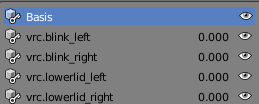 clear yew
This model doesn't have shape keys though
fierce bane
it NEEDS to have all 5 of those in that order at the top
the names don't actually matter though
clear yew
Is it possible you can look at this?
fierce bane
VRC uses visemes, and not animations to show talking
clear yew
At the model?
fierce bane
so you could transform the animations into the shapekeys you need for visemes
clear yew
I'm not trying to talk though
Look. The animation I've ripped needs to have the default jaw rotation.
fierce bane
I don't know what to tell you there. If the jaw isn't in the right position when the animation runs, it doesn't match what the animation is looking for as starting values. I don't think I'm understanding what exactly the issue is you're having
clear yew
Let me see if I can word it better.
For vanilla VRC animations, the jaw will be open.
But the custom animation will work correctly.
However, the vanilla VRC animations work if I rotate the jaw bone, but the custom animation will not work.
fierce bane
I think you may just be stuck there, as the two different animation sets are looking for different starting points...
clear yew
I think I might have a potential solution
tribal root
sorry I'm such a bother but I messed around and now my pistol I added no longer shows up in vrchat. I have my animation time right and it added under the animation. the fingers move appropriately but it no longer appears
clear yew
What if I made a shape key that would correct the jaw bone during the animation?
 chilly vapor
if you use a shapekey, you dont even need the jaw selected in the humanoid at all
clear yew
I need it though
The animation uses the jaw bone for animation
I’ll test my theory once I finish homework
tribal root
I suppose this means no help
chilly vapor
if the animation is directly from the game, then it will know how to use the jaw correctly reguardless. If the animation is just a mouth pose, then it's probably easier to just turn it into a blend shape
@tribal root did you move the gun around the hierachy at all?
tribal root
Well I have it under my wrist
I had it working but for some reason it no longer appears in game
chilly vapor
what i mean is, did you change the location of any components from the fist time you set it up?
or did you rename anything
tribal root
No I started from scratch to try and fix it
chilly vapor
and in the animation, nothing has a yellow name?
violet moss
Question about the Trust System's custom animations. If someone's custom animations are blocked by my safety settings, will I have any way of knowing I'm blocking it?
 ashen sedge
When you open up the quick menu you enter "scan mode", then above people's nameplates you can see if users got shaders, avatar audio and such currently playing. There will be a symbol with a red cross if it's being blocked. @violet moss
hollow perch
I think that's the other way: people blocking your animations. If I understand, the question is about how to know if I am missing out on an animation that someone else is trying to show me.
For animations, if you see someone flipping through hand gestures or doing backflips (or default emotes) without reason. I think all gestures revert to defaults if animations are blocked.
fierce bane
Direct from the first announcement on it
Avatar Feature Icons: If these have a red X on them, they have been disabled by your Safety Mode Settings. If there’s no red X, then the features are present on that user’s avatar, but they aren’t being disabled.
For you Lyuma, they'd just have to tell you they're trying to show you something.
hollow perch
Oh interesting. I feel like I experienced something different in the open beta. Also if I block animations wouldn't all avatars in that color show the same symbols?
fierce bane
not if they didn't have custom animations at all
hollow perch
Is this about the little icons that show up above the nameplate when you open the menu?
fierce bane
yes, this is for the scan mode icons
if they don't have custom animations, or non-standard shaders, etc. The icon will not show up at all.
If they have it and you can see it it will not have the red X, if you have it disabled with settings and they have it, it will have the icon with the red x
hollow perch
Oh so they need to have something custom for the icon to show up. That's why everyone's avatar had a different set of icons
wide heron
if its not against the rules, does anyone know how to make an animation where it flashes an image on people's screen (only people very close to you) i want to make a Slender avatar. (not trying to be a troll)
clear yew
i think you can use canvas art
wide heron
canvas art? @clear yew
clear yew
im getting pinged every second
anyway i forgot what its called
canvas art is like for games i think??
its on top of other layers if im correct
final gazelle
@wide heron I recall reading of one world that was denied from going public because one of its baldi avatars had some kind of malicious shader on it, probably either a screenshake or a jumpscare done with a shader like what you're describing (can't remember if the type of denial was listed as "Other" or "ToS violation"). Would probably advise against anything that'd could be considered a jumpscare, otherwise it probably depends on the reactions of people you run into while using whatever you're doing
 sharp helm
I think you'll manage with a screen space shader set to a non default shading layer
Not sure if it's high or low but either one
icy crow
Yeah but that's for a public world, the shader itself isn't against tos
final gazelle
it's more just implicit reading on my part -- if that one avatar was enough to get a world a ToS violation strike, then the moderation team probably isn't going to look kindly on any kind of similar things being done on avatars if it's reported to them
though yes, i don't think the shader itself is necessarily the problem, or any worlds that use it to make a HUD system would encounter problems
icy crow
Yeah I guess they just don't want the shader spread across the game as they can be annoying
But then again, Pepe is banned for some reason so who knows 🤷♂️
final gazelle
the shader itself should be fine -- it's just more, don't use it to annoy the general public
and with something that gets rendered right in front of your face, that's a bit more problematic than something you can just look away from
slim sparrow
I'm sure they tolerate a lot more stuff on personal avatars than they do on public ones
I know someone who had an avatar with a gesture that spawned an entire room prop of about 3x3 meters
He put it in a world and the world was denied due to the room covering too much space
Not listed as TOS violation though
final gazelle
hmm, fair point -- that one's just an example of something gimmicky though, so understandable 😛
 wooden shuttle
Hi, I would like to ask if anybody could help me with animating an object. I am trying to make it rotate on its z-axis but all the tutorials I was able to find are using scripts. Already blew 2 hours before finding out that the sdk doesn't support scripts. So, problem is, I'd need to make an animation for that but I don't know how to use anmations for anything else but spawning and activating with 1 frame animations
stray sinew
@wooden shuttle Would this probably help?
https://www.youtube.com/watch?v=9DwNxirwzCw
Discord for contact is Sir Matrix#1337. Im also in the vrchat discord group as well
wooden shuttle
@stray sinew Yes, I think I can do it with that tutorial. Thanks
 granite sapphire
Yo, I got a particles that only appear FOR ME in the mirrors ; any idea of what's the issue ? I didn't change the layers at all.
granite sapphire
Well ; I created a custom layer and it's working. Weird.
 hoary coral
For an Avatar, If I put a custom Animator Controller on say, a rifle, and make a state machine with various animations for said rifle (clip in the rifle or out, etc) would the current state of that state machine be synced to all other players in the world?
Further, would the current state be synced to players who newly join the world?
Or will there be a problem where 1 person sees the clip in the rifle and another person does not?
 timid prawn
why I cant put to 2 animation component ?
timid prawn
what I can do if I want to a tail to move and something else like ears or something
clear yew
you can sue multiple animation files into one component
oh that
create a root bone for each of those
and animate the root bone
timid prawn
I don't get it
 rain flicker
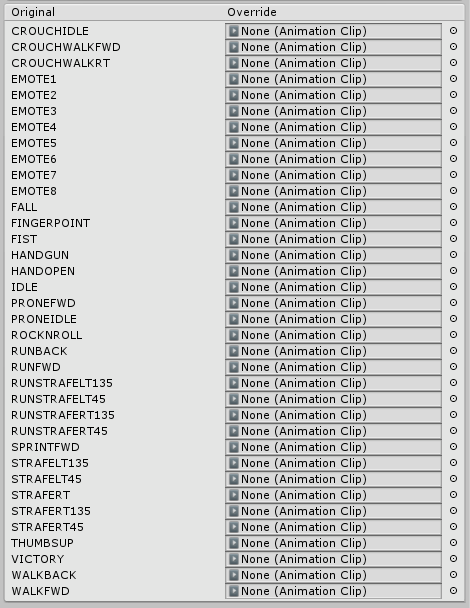
Anyone know where I can get the default idle animation? I'm trying to override the idle hand gesture because it looks kinda scuffed but that means I need to have an idle animation for the rest of the body or my character sits under the ground. If i use the sample idle in the sdk files the legs on my avatar bend the wrong way
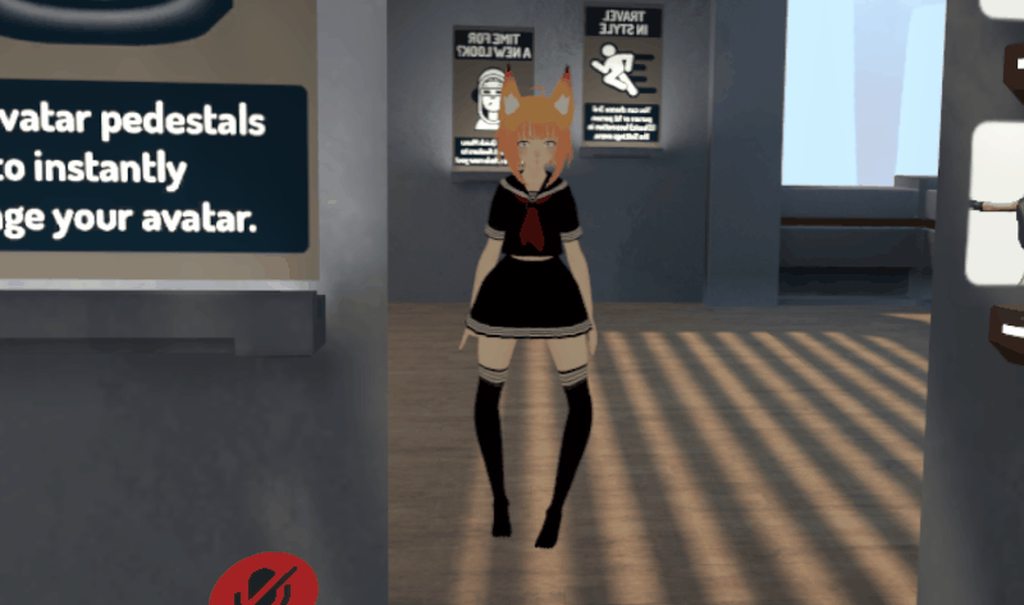
the rig doesn't seem to be the problem since it works fine if I don't override the idle anim
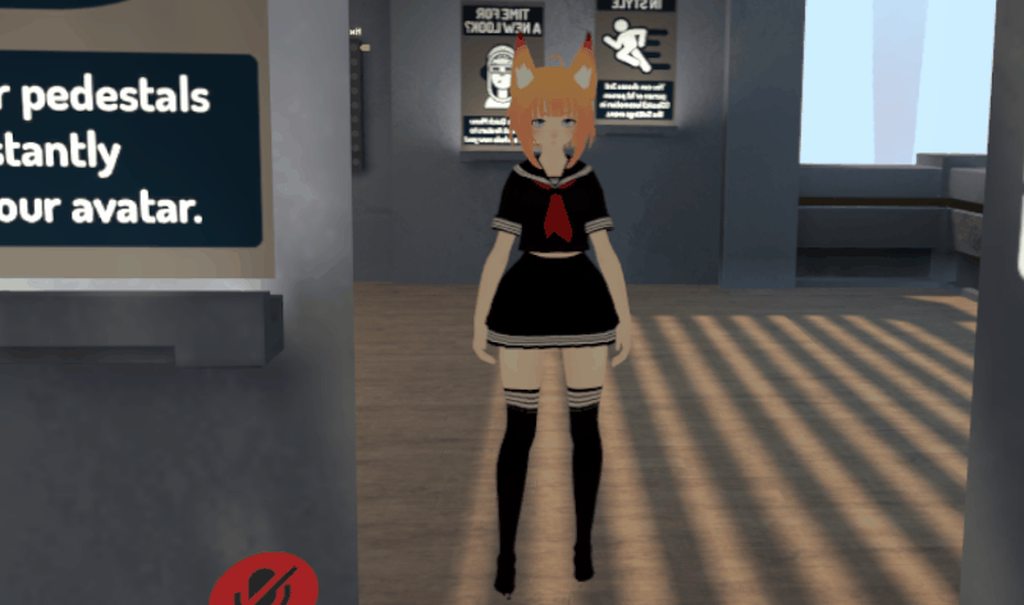


 lucid arrow
so trying to get a kagune(tokyoGhoul) animation on my avatar, I follow videos and when i up load it nothing happens in game
lucid arrow
Also my dude is stuck in this potition https://im3.ezgif.com/tmp/ezgif-3-9f1449bbe5.gif

 lucid arrow
I did
clear yew
you didnt since the model broke
or you fucked up at some point and activated an animation on the main model
 rugged steeple
you can fix it i believe
on the animator panel for controller select avatar controller t pose. then press the play button activate record in the animation window, deselect the play button and then deselect record i believe
lucid arrow
ok its no longer stuck like that, but the animation still wont play when i activat it
 olive stump
would anyone happen to have a fortnite dance emote fbx or other animation file? asking for (cough) a friend
upper bone
is it possible to get the trail renderer to show in the mirror
 glad cape
im new at making avatars and i have the problem that in my particle system the sub emitter wont work when the particles collide or die
i basicly wanted to make it that when particles hit something they spawn an image
anybody has ideas why?
clear yew
use burst emission on the sub emitter
glad cape
thx a lot ^^
but it looks kinda weird :/
it spawns a few pictures at once
even tho i made the particle system only spawn 1
glad cape
works perfectly now thx
you might know how i change it so the pic wont move with the angle but stays perpendicular or horizontal depending on hitting a wall or the floor?
clear yew
change the render mode or the alignement of the renderer module
glad cape
alignement?
clear yew
yes, the billboard alignment in the renderer module
glad cape
changing the render mode makes it horitzontal and changing the alignment makes it perpendicular but can you make it depending on the place it collides on?
glad cape
well thx anyway you were a big help 👌
 celest trout
Did custom blinking animations break just now?
My eyes seems to blink very slowly or not at all even though in the animation I have, it shows just fine
clear yew
Is there a way to get translated blendshapes on a vmd import?
neon aurora
anyone think they can help me on this? so i put audio source as a fixed joint so it stays where i activate it, problem is that at the center is where its at good volume, but barely move away probably like 5 steps and it becomes super low
clear yew
@clear yew I know how
Let me pull up a tutorial on how I did it

Basically, the animation you exported from Blender has characters that prevent it from being duplicated in Unity.
You just need to remove them
Also make sure both the model with the animation and the one you’ll use in VRC have their armatures named “Armature”
@clear yew This doesn't show how to translate the shapekeys
xD
grand lichen
So, if the legacy animations are going away.
How will we be able to animate multiple parts of our models?
I have an avatar that has a few things animated on it to make it look alive, the wings twitch and tail moves separately as they are not in the same idle animation. They are separate animations, but if legacy animations go we cant make these right? Because having a second animator on the same mesh does not get animated in vrchat.
Is there a way to add more than one animation to your avatar through only the base animator? I might be just overlooking something super simple though.
 runic frost
any way to have two animations running from one gameobject now that the animation component is useless?
runic frost
rip
 pliant plank
Yep... gotta improvise yet again for literaly no reason...
pliant plank
At this rate it's more like
Working just fine, throw it away
pliant plank
I could've sworn that ALOT of people used legacy animations though
 next pilot
yeah a good half of the player base does
pliant plank
"We are aware that some avatar creators use Legacy animations for various edge-case solutions where a non-Legacy animation might cause issues with the animator. "
Some
paper glade
I mean I don't use Legacy.
clear yew
Does this affect facial expressions and gun animations?
i dont use legacy animations??????????????????????
pliant plank
"However, almost all cases where a Legacy animation is currently used can be worked around by using a non-Legacy animation, "
A little bit of a skeptic myself, but if this was truly the case then why would creators opt into legacy instead?
Unless they mean fully animating it into a idle or something of the sorts
paper glade
They use Legacy as an easy way out to create a constant animation on an avatar
pliant plank
Yes, i use them myself aswell, otherwise one would need to animate an entire model for a simple animation attached to it, unless sleep deprivation is catching up to me and i'm horribly mistaken
paper glade
I have an animator on my body that tells my model when to change its eye material to a halfblink or a full blink
Small stuff like that
runic frost
to make an animation loop, leave that animator on, to make it play once disable loop time on the (non legacy)animation. to enable and disable the acting animation, enable and disable the game object.
Main issue I see with this is that you can stop and start animations without sacrificing the children
paper glade
Alright I've been given the go by Xiexie to explain. To set up an animator for your model, you'll need to first look at your project files for Unity. Right click and hover over "Create" and then click on "Animator Controller." Go to the object you want to animate and then click "Add Component." What you want to do is type "Animator" (NOT ANIMATION) and then add that component to your object. If it's blinking using shape keys you want, add it to your body. If it's something else, attach it to what you feel is necessary to animate, but be sure if it's an object, assign it to an empty game object first, then attach the animator to that game object. After doing so, create your animation from there starting from that object. Hopefully this helps clear ANY confusion brought on by all this. Forgot to mention that you need to assign the animator to the component as well whoops
runic frost
id say that is pinnable
paper glade
The Animator component has been a thing already.
pliant plank
My only confusion was honestly in regards to why it's being removed, it was and at the moment still is fairly simple to setup, it just feels like things are being overcomplicated for no reason at all, sure people can adapt, but that's honestly my only "issue" i guess you could call it
paper glade
Thing is setting up animators isn't super complicated at all.
runic frost
i believe it getting at making a controller for multiple animations
but we still have to sacrifice the children
paper glade
Have to sacrifice some children, yes, but I assume it's easily fixable by applying an animator to another part of your hierarchy along with the main avatar.
runic frost
how do you reliably start and stop the animation from playing
pliant plank
I acknowledge that controllers are effective, a bit more complex no denying that, but functional, yet i still see no reason to deprecate legacy
Good question
runic frost
no unless most of all this Discord shows the desire to do it
pliant plank
That explains why i couldn't find anything about it being gone for good
How was it exploitable though?
Excuse my slowness but sleep deprivation n' all...
clear yew
im a night owl
 dusk fjord
To keep a particle from rotating with someone's head, do you set billboard alignment to facing?
pliant plank
Me too quen, although it's almost like 8am now so a morning owl atm
Welp there's a request not to remove legacy animations on the canny
115 people already upvoted it apparently
paper glade
Boi lol
pliant plank
Let's see if the community has an impact on it at all eh?
I'm a skeptic as i've already told you but i'm curious on the outcome
 languid lark
well big part japanese use that Legacy Animation
some cool stuff make it base on it
@pliant plank
pliant plank
Aye, and some cool stuff they do make, i'm hoping it stays but i have a feeling it won't no matter how much support it ends up getting
paper glade
With how easy it is to replace the Legacy animations with an Animator
I doubt they'll be doing it
Plus the threshold for models that won't be affected is more than good enough
 maiden wigeon
What is the security issue, though? Like why do they have to can it?
paper glade
Any models uploaded before September 1st will be unaffected
clear yew
heck
paper glade
@maiden wigeon Don't worry about it
clear yew
i haven't uploaded any models since last month or two
paper glade
You'll be unaffected by this then
clear yew
/e dab noobys
paper glade
You'll just need to use animators instead of Legacy from now on
clear yew
(wait i released the devil reincarnated aka despacito monster)
(its a generic model tho)
paper glade
Generic doesn't matter
clear yew
gg no re
paper glade
Assuming you didn't for some reason set it to Legacy in any way
clear yew
(wAIT IM RELEASING THE DEVIL V2 WHICH IS HUMANOID SAJIKOAFDKIW)
i dont use legacy
it scare me
pliant plank
I'll take option numbah three, i'll just be bland emotionless and maybe t-posing just for added effect
maiden wigeon
Just don't make much sense to me.
paper glade
Clinical, if you don't use Legacy, you don't need to worry
In fact that goes for everyone
 molten oak
well thats the thing, a lot of stuff does use legacy
paper glade
Literally stop worrying UNLESS you've used a Legacy animation before.
maiden wigeon
I do use Legacy, and even I didn't, it still doesn't make too much sense.
paper glade
Why they stopped the use of it or...?
maiden wigeon
I'm just curious why they plan to can it, yeah.
pliant plank
They just want it gone plain and simple, it wasn't deprecated in unity and i'm pretty sure any exploitations (or most of them) could be replicated with standard animations, so, y'know, it's gotta go for... reasons
molten oak
in the beta, any legacy animations just dont work at all
maiden wigeon
If it's crashers they wanna punish, it's not gonna work, lol. People can use simple animations on gestures to wipe out a whole room of people.
It's just irritating to learn something one way, that works, and you gotta do something else for a cause that doesn't even... seem like it'll have much effect.
pliant plank
I know the feel all too well
Been there done that, about 4-5 times now i think don't even know
clear yew
Yeah.
Anybody know of any ways I can modify animator parameters through the systems we have right now?
pliant plank
There's 3 plausible outcomes to this whole situation
1
Legacy goes, everything goes as vrc previously had planned```
2
Legacy is kept, based on the support of the community in the canny and vrc actually listening to them```
3
Legacy goes, for every model, because i know somebody's gonna complain about models before the due date being untouched```thats how i see it just like the particle system they tried to remove and that had a big backlash
pliant plank
Oh you were here when that happened aswell?
Remember the whole audio issues back then?
And the whole ONSP component being disabled aswell...
maiden wigeon
This is a game with a wide variety of people, there are gonna be some toxic assholes in it, you're gonna get crashed, and people are gonna make trash. I've done accepted that fate, lol. I wasn't around when the particle stuff happened, but I guess it gives me a little hope for this.
pliant plank
Oh and i just remembered they also enforce audio settings for models too... before when the audio was completely FUBAR i had to use an inverted curve to amplify the sound radius, that solution helped alot of people apparently back then
I'm a creator crisis veteran i guess haha
maiden wigeon
I see lol
pliant plank
Been here since oct-sep 2017
 coarse veldt
Is there an alternative to legacy animations? I had blendshapes for blinking, twidling toes and pulsing emission maps etc. All done in legacy animations. Would be happy if there is an another way to implement these.
pliant plank
Surprised i stuck around for so long
maiden wigeon
I started playing before that, but I didn't know jack about Unity until some time after. And there is, I guess. LoneEevee posted how if you scroll up
next pilot
been here since late January
molten oak
early january
maiden wigeon
same, early january
pliant plank
Early jan 2017?
maiden wigeon
Yeah
pliant plank
Damn, ya been here for almost more than a year than i have haha
Got yer fair share of creator crisis' i imagine
maiden wigeon
Not like this. I didn't pay attention to that stuff back then, I guess I was just here to... play and create, nothing more? But now I know a few people who do a lot for this game, and I started paying attention. This is my first "crisis" technically speaking lol
paper glade
This isn't a crisis for me
I barely have any animations that are Legacy
And even then I can easily get past it
Because I know how to use the animator as stated up
pliant plank
I came in here mainly for the creative aspect of it, i know it might sound ridiculous but i had no intention of communicating with anybody in-game (aside scribbling text with pens) spent atleast 80% of my time related to vrc making avatars and helping people in this discord (and others), literaly spent my first 3 months without saying a word haha
I always paid attention to these situations as i hate changes with a burning hatred (when it comes to feature removals and changes that don't add anything to something aside overcomplicate it), so i've always been very "vocal" in these topics, regardless of using them or not, i knew people who did, and i could've one day done so myself
maiden wigeon
I mean, that's all well and good for you Lone, but for us, it's frustrating. I've worked on maybe four or five models with Legacy animations this month, plus models that were commissioned that use them - so now people that paid me are gonna have something of lesser quality - and I was given no grace period. A whole month's work, gone, and I was only just informed now. Some of those Legacy animations took me a good few hours, and what's worse is I can't go in a copy/paste keyframes from them because, well. Legacy. Lol.
It's just really agitating and unnecessary to me.
paper glade
Ah then yea that's harsh
maiden wigeon
So that's about... I dunno, maybe 11? Ish? Avatars, I gotta go in and fix.