#animation
1 messages · Page 87 of 1
 slim sparrow
 clear yew
Is there a different way to change a material during an animation than dragging a different material onto the mesh while recording? Trying to change my eye colors but one of them won't let me swap the material by dragging it on
slim sparrow
I don't think you can change all materials in an animation
Weird limitation but it's buggy
Can also press record mode and change that one material
 icy crow
body -> skinned mesh renderer -> Material reference
there will be multiple depending on how many materials the mesh has
clear yew
Found a way around it, I pulled out the eyes while the animation was recording and changed the material then deleted the position change
 wicked kindle
anyone know a fix to slow idle animations?
 paper jacinth
change anim speed on the animation or if thats not a thing then compress the keyframes
paper jacinth
is it better to use a animator with a single clip, or a animation component? I never used the anim comp due to being legacy, and as far as I know its not even in unity 2018, but I dunno if I should use it or not
slim sparrow
Always use Animators whenever possible.
The only reason to use Animation components is if you're doing an avatar, and you need to disable an animation from another animation (such as in a gesture override)
Such as blinking
paper jacinth
alright
 granite sapphire
Recurrent problem i see haha
 spring nova
and even then you can still do that with toggleprops
 versed ocean
how to put animations avatar
 vague dove
Sometimes when I try rotating a bone for an animation, I can't rotate it at all. It just snaps back to its original position. How can I actually get it to rotate? It seems to work randomly, but usually it doesn't.
 wraith owl
The animation plays when i press play in the animation panel, but when i go into "game mode" in unity it doesn't play?
https://prnt.sc/ks9e7c
 wraith owl
I can't figure out how to use the "animator" component for an inanimate object. (a coin)
The "animation" component is the only one that looks like it would work, but still doesn't.
 torn pawn
@wraith owl make so animation file is NOT legacy, then drag n drop it onto your coin object
when u select your coin and enter animation tab, if properties are yellow then it means that animation path is wrong for what's supposed to be done
wraith owl
Dang. Seems to be the problem.
Thanks for the help, i should be able to fix it now.
Well, the keyframes were hard to position, is there any way i could reroute the path of the coin to my current coin?
Without re-doing the whole animation?
 final gazelle
"path of the coin"...did you create the animation and then change the hierarchy of stuff within the animation later on?
just read through the recent messages and i'm not sure if i'm fully understanding what you're trying to do now
wraith owl
No, i just had a copy of my avatar and then deleted the copy and re-added the coin, because i added it in the copy first.
Alright, so basically i'm animating a coin to loop itself flipping. Then i'm going to use a hand gesture to activate the coin to appear in my hand and then start flipping, because it has the animation playing on the coin. But i ran into a problem of it not playing, then i realize that the path is messed up to the coin, it can't find it even though it's in the right place.
final gazelle
ah -- so the stuff within the animation file is all yellow text right now?
wraith owl
Yep.
final gazelle
how many elements are there in there?
wraith owl
Just position and rotation of the coin.
final gazelle
if it's just a few, easiest way is to probably double click each element (the yellow text stuff), which will let you rename them
if it's a lot, to the point where manually renaming it like that seems daunting, there's a slightly more hacky way of doing it that'd involve messing around with some unity settings and then directly editing the animation using a text editor
wraith owl
Here's the problem.. it's named right even when i double click it. It shouldn't be yellow.
final gazelle
hmm, can you post a picture of your current avatar's hierarchy, as well as the animation path right now?
wraith owl
 final gazelle
slowly double click on the coinFR yellow text and see what the full path is right now
clear yew
or press F2
final gazelle
never knew that one, neat 😛
final gazelle
within the animation itself -- it might be pointing to a different root element to where it's actually placed right now
it just shows "coinFR" right now, but there's a good chance that it's hidden some extra directory bits that you can only see when you actually try to rename it
 final gazelle
yeah...hmm, so is that animation currently placed on "Finished_Look"?
because if it's placed on "Armature", that'll be the reason it's not finding the coin
wraith owl
Ah.. that could very well be the problem. Let me correct that and see if it works then.
final gazelle
if you need it placed elsewhere in the hierarchy, then you need to edit the path of every bit in the animation that's still showing in yellow text
the hierarchy element it's applied to is sort of considered its "root element" so to speak -- that root element shouldn't be in the path of any of its animation text
wraith owl
Hmm.. now i'm confused on what to do here..
I've renamed the yellow bits to have "Finished_Look/" infront of "Armature/" but it's still yellow.
final gazelle
my unity terminology's a little sloppy at the moment, let me think of how to ask this
okay, see where your animation "Flipping" is in here, right? it's applied to your coinFR element
https://prnt.sc/ks9e7c
is that where you've got the animation clip applied to right now?
wraith owl
Yes.
final gazelle
if so, then the current root is "coinFR" itself -- you actually need to remove everything in front of /coinFR
including coinFR itself
i'm not sure if that would break any of it though because of how you originally set it up -- it might be easier to instead take the whole animation clip and apply it to Finished_Look instead
let me think of how to explain that in a less confusing manner...
so with the way it should've worked originally:
go to Finished_Look on your Hierarchy to the left, and click it once -- then in the Inspector on the right, click "Add Component" and choose "Animation"
wraith owl
Ah, i've applied it to Finished_Look and it seems it isn't missing anymore. So would i just put the "animation" component on Finished_Look then?
final gazelle
if the animation works, then yes -- leave it on Finished_Look
if you can't activate the animation as you need to with it on Finished_Look, then you can move it further into your hierarchy -- but the further you move it in, the more you need to delete from the paths of the elements in your animation
wraith owl
Alright, gonna try that. I'll say if it works.
final gazelle
so if you were to move it down to Spine, then you need to delete Armature/Hips from the front of everything in the animation text
wraith owl
Finally! All works well!
final gazelle
nice going 😛
wraith owl
I've tested it, the coin flips!
Thanks a ton for the help btw, I have asked multiple people and none wanted to help.
final gazelle
i'm not sure if that one's common knowledge, but it's definitely a good one to keep in mind -- it's definitely a little messier to work with if you have more bits within the animation itself to edit though
still doable though
wraith owl
It's definitely useful knowledge i'd say. Leads to very cool animations, and especially through hand gestures.
 tacit musk
@everyone Im Looking for tail animation for the a fox loli
clear yew
are you a troll or are you that dumb that you tried to ping 15k+ people just for your shitty animation ?
tacit musk
whats problem with that?
well dynamic bones all already done just need animation
do i make a puppet?
yrs
yes
ok thx
Im going to youtube find rest of progress
 winter sundial
Often, my animations just flat out doesn't work in game. Right now it's a game object with a directional light on it, it never toggles on in game when I press the key (Desktop mode, can't test in VR) The animation is a simple "gameobject active 1" on frame 1 and 2
 wise rover
if I add bone colliders to my model after I add an animation to it, do I have to redo the animation or does the animator not process dynamic bones?
clear yew
i dont think the animator processes dynamic bones
tacit musk
how do i merge 2 animations in cuz i want blink and tail movement
clear yew
you should be able to just make both animations and put both of the animations on your avatar with two seperate animation things
or just make it so theres 2 animations in 1 animation thing
tacit musk
how do i do that
 tacit musk
ok next
the other wont move can we go to screen share?
im gonna call ok
are you there
hello anyone?
@clear yew the other wont move can we go to screen share?
slim sparrow
Tbh svel is right
slim sparrow
It's incredibly rude to even try and ping that many people for something that is not urgent
Even if it's obviously disabled
@paper jacinth you need an animation that can disable an animator. When an animator is disabled, it will actually keep playing the animation, but the current state will be suspended, and it will not transition any further.
slim sparrow
Why what?
paper jacinth
i put at everyone and it was blue :/
slim sparrow
That's only for yourself, you can't ping everyone here. I didn't get notified
paper jacinth
oh thank god
slim sparrow
Lmao
paper jacinth
@everyone please help avatar bad
how do I do the cycling thing though, on a more detailed level? so it would be say, a second of having one thing active, another second of having another thing active?
slim sparrow
Have all objects disabled by default
Make an Animator with one state for every object
Every state has one object turned on and nothing else
You don't even need to tell the animation to disable all other objects
Then just add an exit time and 0 transition time to every state transition
tacit musk
how do i put 2 animations in avatar i want blink and tail movemente
slim sparrow
You need to actually open the Animator controller, something you normally do not do
@tacit musk put an Animator on the tail and animate it
paper jacinth
yes I get it now
slim sparrow
Keep pinging people I'm sure that'll help
I already told you to put an Animator on the tail
And then animate it
I can not make this process any clearer
clear yew
did you set element 1 to anything
paper jacinth
how do I do animation overides again? I try to put the override controler into the animator but it wont go in, complaining about not overriding a controller, but my other override controllers go in just fine
nvm
 clear yew
turn off animate physics
tacit musk
next?
clear yew
see if it works
clear yew
nah
i've never tried doing 2 things before
2 animations
add another animation block
i'm gonna go afk, good luck
slim sparrow
If you have dynamic bone on the tail disable that first
tacit musk
where do i do that
clear yew
go to your armature in your character named autism... what a fitting name
tacit musk
im in armature now what
clear yew
go to your waist or whatever where the tail is
clear yew
does that have any dynamic bones
tacit musk
how do i know i have
tacit musk
screenshot it for me
 dusky venture
does anyone know how to make a fixed joint/rigidbody work with a rate over distance particle system? whenever i have a rigidbody attaching it to my hand the particle system stops working no matter if its under an empty game object or on the system itself
icy crow
is the empty game object always enabled?
dusky venture
i've tried both always enabled and disabled
icy crow
does it work with normal rate over time emission
dusky venture
It does yeah, it's purely the rate over distance which is what the particle system's intended use works on : (
torn pawn
umm, is there a decent way to fix vmd dances breaking hips?
paper jacinth
what does the custom sitting anims override do?
 regal hollow
lets you use custom gestures while sitting
paper jacinth
so I can just use my existing controller for that or do I need to make a separate one?
regal hollow
you can use your existing one
but you can use another one
if other gestures only possible during sitting is something you require
 gritty elbow
i need help with a particle animation, im trying to a particles that shoots out but is a world particle and the point it spawns from moves with an object in my hand but for some reason instead of following with it, its just shooting into the ground?
 fierce bane
@gritty elbow Example scene using a "fake" armature (empty objects) with hand/head tracking particles.
https://www.dropbox.com/s/nr6wzhdj4663py0/Fake char with Head and Hand Targeting.unity

basically you use a fixed joint in the armature that the particle gets parented to, place rigidbody on the wrist and align to the path you want it to follow. Link joint to wrist rigidbody, tweak a few setting from default, and it'll work.
or place the rigidbody on whatever object in your hand it fires from, that works too
gritty elbow
so wait do i add anything to the object the particles are parented to?
fierce bane
Download and open that scene, it'll open on any setup.
Look at the wrist for how to set up the rigid body on where it fires out of.
Look at the "FJoint-" objects for how to set up the particle holding object. Don't toggle the object with the joint or it'll cause issues, use a child of that to toggle it instead, or toggle the "emission" on your particle emitter instead.
gritty elbow
so in the animation have it toggle a game object with the particles parented to it>
fierce bane
under the one with the fixed joint, yes
If you look at that scene, the "spell toggle" left/right/head are what you'd be toggling, and the particle system is a child of that (again, as shown in the example)
 ashen gulch
has anyone ever had a problem where they try to add a weapon and when they try to press is active it doesnt add it?
 sand coral
I've seen animations that spawn objects (like health packs, rocks) that stay in place even when the player moves around, and don't expire immediately after the animation finishes. Does anyone know how this works in Unity?
 hollow perch
It's a combination of two things: prop toggle and lock an object to world position (in the pinned messages)
Both things suffer from desync for players who join after you do it, but that's pretty much a given for anything complicated that is not directly done by holding a gesture
slim sparrow
@paper jacinth custom sitting anims override is mostly meant for changing your sitting animation
By overriding idle
But you can actually change gestures and emotes too
clear yew
What emotes are what in the override? I wanna know what ones I'll be overwriting
 forest dove
Pretty sure the standard override has them listed as 1 through 8
So open your VRchat menu and count across
clear yew
It's left thru right on the menu right?
forest dove
Yeah starting at the top
clear yew
Trying to have some flags (that use cloth) on my back that appear on a dance
Unity is telling me

yes ?
did you fix what they told you ?
I don't know how to
That why I be here
it's pretty clear tho
remove the mesh renderer
and put a skinned mesh renderer instead
on the mesh that you have the cloth component
@clear yew Ok so on the animator what do I do?
Or click
becuase I know is active adds it
but I don't know how to do skinned mesh renderer
it's just a unity component
add that on the mesh with cloth component
I think It's allready there
Not sure
at least when I click on the flags it shows a skinned mesh renderer on them
Hmmmmm
Aight I figured it out
So when I added the cloth it added a skinned mesh renderer
all I had to do was disable or remove old one
slim sparrow
Yes
Skinned mesh renderers have more features than regular ones
But Unity will generate regular mesh renderers whenever possible since it's less performance-intensive
Cloth requires skinned ones so Unity will add one, but won't throw away the old one automatically
 pallid bear
how come there is not an animation tab for me on unity https://i.gyazo.com/526512cf757c181d9edeea242ea82f34.png
 clear yew
because you didnt add it ?
ashen gulch
i know i asked this last night but it seemed it was too late and one answered so ill try asking again. you know how you press the + icon in the unity animation editor to make an object active? when i press it nothing happens.
slim sparrow
That just adds the property
Try hitting record on the model and changing the is active property
ashen gulch
still not working...
ashen gulch
infact its not just objects i cant add or do anything in the animation editor
 heavy stirrup
Question about animations--- say you had an animation that slowly turned things on, say 100 objects, over time. If that animation was then turned off, these would all turn off at once.
If instead the exit animation turned them off one by one like the reverse, it wouldn't skip at all in between right?
I'm particularly worried that there'll be a moment where they all turn off, then on again to slowly turn off
clear yew
@pallid bear at the top of unity I think in window tab you can open it via there it will open it in a new small window, just grab the tab and drag it down next to the others.
@heavy stirrup yes it would all go off at once
Or it should if not you set it up wrong
heavy stirrup
I'll just test it in Unity on a test map.
fierce bane
Anyone happen to know if changing Dynamic bone settings in an animation works properly or not? (for example, damping/inert/stiffness/elasticity)
It doesn't seem to be working for me, so I'm wondering if I'm doing it wrong or it just doesn't work.
IE a 0.05 inert up to 0.9 seems no different
fierce bane
From testing it seems you can't edit dynamic bone settings via animation, despite them being recorded/listed.
You'd have to swap another bone instead (toggling between two on the same bone won't work as they are considered the same component)
 quasi hinge
fierce bane
quasi hinge
fierce bane
yeah that's the planned workaround, thanks
 heavy basin
is there anyone who could help me figure out how to grab the tail on my model? please dm me if you'd like to help me~
slim sparrow
Probably with their hand.
I actually don't know how that works. Pretty sure it's just a dynamic bone with an inside-bounds collider
But I think some sort of Final IK component would work a lot better for this
I need to try it out
An actual IK solver that has the hand set as target. Should be super easy with CCDIK or FABRIK.
It's an expensive asset but very much worth using for these tiny little things (if you have it already).
fierce bane
you can use a dynamic bone with an outside collider if you want to move it around, but if you want to GRAB it and hold onto it, you could either use an inside collider, or use a joint even if you want to always grab it in one spot.
slim sparrow
I'm trying Final IK now
I tried it and it twists oddly while moving
Damn
Maybe I need more rotation limits if that's even supported here
Ohh, FABRIK works really well.
clear yew
gib prefab
slim sparrow
There is no prefab
It's just the FABRIK component
You add all the tail bones, set target and you're basically done already
Best of all, it auto resets when the target is disabled
 old matrix
is there any way at all to make mouth moving animations for models that arent mmd
 muted prairie
Yeah, it's called shapekeys
ashen gulch
i have a question which i hope has a quick answer. ive been working on a lich king model from world of warcraft and thankfully i can rip the animations from the game too. but i did do alot of messing around with the original models rig. so would it be possible to have it so when i walk it shows the walking version of the model. and etc
ashen gulch
basically i want to have an animation from another model onto the original, but unity is saying that the bones arent the same. despite the fact that they are.
ashen gulch
nvm i got it figured out
 carmine pilot
Hey guys, so i just noticed the Unity bundle on humblebundle. Is it worth the price, and can it be used for animations on characters?
(i wanna get into animation, and stuff like that, so i can pimp my characters up a bit 😅 )
slim sparrow
Most of the assets are not usable in VRChat
carmine pilot
oh :/
slim sparrow
Only the particle pack basically
carmine pilot
Just effects i guess, like shooting, lasers, auras etc.
emotes work fine too i guess
With sound effects too, that would be nice 😛
slim sparrow
You should get into particle systems and audio sources then. Mostly particle systems
Just start experimenting
slim sparrow
Put an Animator component on a Game Object, and you can animate any particle system beneath that
Not that I know of, you could try a regular Unity particle tutorial
slim sparrow
Everything in Unity is a game object
You can make an empty one though, and add components to it
 ebon leaf
anyone know how to get trails to work based on movement i made one but it only works in unity when in a rigidbody

the particle burst trail works but not the trail in Vrc
old matrix
every single guide i turn to for mouth moving tutorial is in regards to MMD models
is there a mouth moving guide someone can send me that uses a non mmd model as reference
regal hollow
thats a good reference, I use it for my visemes 👌
old matrix
i have no idea what its talking about right when after the google drive link in rigging your mesh
im so lost
old matrix
theres no object data tab
clear yew
search for that error in google 🤷
old matrix
i dont know where it would be to begin with
i dont know if im looking in the wrong place or it really just isnt there
i dont even know what exactly the guide is referring to when it says "face mesh"
does it just want me to select what is the face of my avatar?
or something else?
old matrix
yeah i have absolutely no idea what to do
clear yew
its the mesh you eyes and mouth are in, usually called Body
drag Body from hierarchy into the slot in your avatar descriptor and youre done
@old matrix
old matrix
i, what? the head itself and the eyes/eyebrows/nose/ears are different objects
and they're called surface_001_ref_0 and surface_000_ref_0
and even if i know exactly what to drag, what do you mean drag body from heirarchy into the slot in your avatar descriptor
this is in blender
theres no visible hierarchy or avatar descriptor
@clear yew
clear yew
@old matrix then I have no idea what context or guide you're talking about :/
I was talking about Unity and vrc SDK complaining you haven't set a face mesh
old matrix
im trying to make my avatar have mouth movements when i talk, if thats what you mean
face mesh?
clear yew
the mouth movements are shape keys on the mesh that contains the face
if you downloaded an MMD model, that is
old matrix
i dont have an mmd model
i apologize for being so riled up but every single gosh diddly darn guide or whatever the heck i look up either doesnt apply to me because my model isnt an MMD one or expects me to have such an in depth knowledge of everything in blender that i end up completely lost by the first gosh darn minute
its a little frustrating
 winter adder
I believe what you're asking about is Visemes?
clear yew
yeah making them yourself
old matrix
how do i do that
clear yew
like you said, you need in depth knowledge in blender
old matrix
argh
winter adder
Yea.
Essentially, Visemes are considered a dominantly 'MMD' element.
In other words, MMD models oftentimes have native support for them via blendshapes.
old matrix
blender is the only program that actively demotivates me to use because its so hard
clear yew
better try some MMDs first and use the cats plugin to learn how everything clicks together
winter adder
Of course you can add your own to any model; however, it's not easy.
old matrix
i dont want to use mmd models, i dont like anime
winter adder
Perhaps try a Blender Crash Course?
old matrix
i tolerate the abundance of anime people on vrchat but i sure as heck dont want to be one
winter adder
They're helpful.
old matrix
ok any suggestions
winter adder
If you're a university student look into Lynda.
old matrix
hnng
i thought you meant something i could like just look up and screw around with
not a college course
 ashen sedge
Visemes is merely the term for the shape your mouth makes for each phonetic sound (Ah, oh, ou, ih, e...). It's not a MMD thing.
winter adder
You can reference YouTube?
@ashen sedge MMD natively supports them. That's all I said. A majority of models come with blendshapes.
A variety of models out of the MMD/TDA subset typically don't.
If you'd like to add your own Visemes, you can; however, you do need a bit of Blender Knowledge.
Look this up on YouTube: How To Add 2D Blinking & 2D Visemes - VRChat Tutorial
old matrix
ok hold on one econd
winter adder
In-Depth Tutorial assuming you don't have a pre-blendshaped model.
winter adder
Pardon?
old matrix
the video you suggested
ashen sedge
I feel looking up blendshape tutorials in general would be more informative to get the technical know-how first
winter adder
While I agree I feel like that would then require him to know how to use the Blender Framework, modules, etc.
It may be easier to just follow step by step.
Depends on how much time you have.
ashen sedge
Those guides usually teach you the necessary blender steps
old matrix
ive already used blender to texture my model but thats it in terms of trying to use blender to do anything
winter adder
I agree however if there's excess material not pertaining to Blendshapes, Texturing and Viseme generation then it may be a little too indepth.
Yea. @old matrix You may want to consider either Zarni's approach to learning the general fundamentals of Blendshapes, texture mapping and then Viseme generation or follow the tutorial I provided.
There's unfortunately no easy way to get around it if your model doesn't have native Blendshapes.
winter adder
Blendshapes sort of act how they sound.
Essentially, they're physical changes to the model that allow for different mesh appearances.
They require their own textures, location opting, etc.
Think of a simple blink.
You have a standard 'resting' face then when a blendshape is 'triggered' by some means the model mimics its predefined 'mesh setup' for that shape (Lowering the eyelid).
Visemes USE blendshapes. Visemes essentially trigger certain blendshapes (typically on the mouth) to control speech shapiong.
shaping*
clear yew
TLDR: blendshapes are like keyframes in animations, but in 3D
old matrix
oh ok
ok well
better idea
i sculpt a much simpler model to test on instead of using this huge hyrule warriors medli model
and then learn ways
clear yew
so theres a mouth close and mouth open blendshape ... and you can morph from one to the other creating all shapes in between
old matrix
and then come back to this later
winter adder
^
old matrix
me or him
old matrix
i wanna make a duplicant
clear yew
a lot of models you can make the mouth move not with blendshapes but just flapping the jawbone
winter adder
The default VRChat avatar.
That's also an option however the accuracy of the mouth movements isn't quite there.
clear yew
it looks less advanced than blendshapes but the mouth will move with your voice, just flap the jaw open and shut
clear yew
uhuh
winter adder
That'd likely be easier to add then blendshapes.
Perhaps start with 1001's suggestion of using Jaw Flap and then migrate to Visemes.
All require you to know your way around Blender though.
Unless your model has a jaw bone already.
clear yew
yeah, blender is not the friendliest UI in the world ....
winter adder
Then you're fine.
It certainly isn't.
I feel like if Blender took a page out of Adobe's book with UI Design it'd be beautiful.
clear yew
blender confusing? how do you think so? /sarcasm http://giudansky.com/images/downloads/blender/blender3d-shortcuts-infographic.png

that is not a meme ....
winter adder
Gotta love it.
clear yew
it's very steampunk
old matrix
blender seems like its pretty multipurpose and suffers tremendously as a result
winter adder
It is highly multipurpose. While it is extremely effective at what it does it does create a lot of its largest issues by itself.
clear yew
isnt the new version a lot more UI friendly?
it's still abysmal compared to Maya etc, where everything is pretty much where you think it is
old matrix
im using the one thats on steam
clear yew
blender always feels like they changed their plans last minute and added some extra things
winter adder
UI is hard to do right for a program of that size. More so, screen real-estate is hard to come by in larger quantities.
ashen gulch
can someone help me for a minute? im trying to add a custom animation to my model from another fbx thats similar to the original. when i apply it to the base model it works fine but when i put it in vrchat it just looks like a very slow version of the vrchat walking animation
clear yew
make the frames a shorter distance between
 little copper
hey guys, did someone know how to make a particle animation where the particles doesn't move when your character moves? just stay in the position it appears? i tried with world simulation space but it doesn't work for what i want
little copper
im trying to make some kind of trail/nail people use to draw, how they get to draw and stay the trails in the world?
clear yew
the snail marker is a trail renderer https://docs.unity3d.com/Manual/class-TrailRenderer.html

it only stays were you put it because there's some hacks send the trail source all over the map when you 'lift your pen'
it also has a material/shader that hides the trail under certain angles
you can study the source and the animations here https://github.com/theepicsnail/Marker
GitHub
VRC Marker for presentation room like drawing anywhere - theepicsnail/Marker
little copper
thank you
clear yew
it's a lot like the trail module on particles, but there's some tricks so it doesn't get culled and has a huge area to be used in
and also stays put for 2-3 mins before it's lifespan runs out
fierce bane
So...is there any way to edit audio sources without the vrcsdk overriding the whole thing? The forced default is terrible for any kind of larger effects.
clear yew
not that i know of
icy crow
edit it in an animation @fierce bane
fierce bane
You can edit the range, but not the curve. Was hoping for a way around that other than just massive range, thanks though.
 timid prawn
The shorcut of blender are easy to learn and are logic too
 normal skiff
yeah, totally logical. scale = S, rotate = R, translate = oh shit
ashen gulch
(why do i always have to have problems with animation while this channel is dead) anyone know a fix for bones becoming dislocated with running animations in vrchat when they look fine in unity?
 old mesa
when i set the animation so the fingers wrap around the item they hsow in unity but when i go ingame the fingers dont wrap around the item
anyone know what is going on?
ashen gulch
@old mesa usually emotes animations last only one second, did you make sure the first second has the same positions as the start?
old mesa
@ashen gulch yea i did but im not sure why it has the hand still stationary
ashen gulch
sorry but that was the only idea i had.
old mesa
its ok thanks for trying to help
 fossil verge
anyone know how to back .anims into models
to export
I'm trying to make a snapchat lens in Lens Studio and it only accepts shit like, .lsanim and .fbx
 distant tulip
Let's say I was going to add an animation from mixamo, though when I tried to it was in the ground. How could I fix this?
icy crow
did you set the downloaded fbx from Mixamo as a humanoid rig?
 tall zodiac
So i made a custom idle for my character but it appears vrchat still overrided it with its default
put it on all idles in the avatar controller and on my characters descriptor to make sure.
nvm i realised, im stupid
 static vortex
How can you add curvature to images (sprites)? I'd like to experiment with animated rotating images similar to that of Toga's arm watermark
fierce bane
The arm watermarks are normally just a capsule with a "rotation" component on them, or a particle with a rotation over lifetime (like a capsule or cylinder mesh with a custom texture)
static vortex
I read that earlier and tried it, but then you get the image on the top and bottom faces of the cylinder
And it looks pretty bad
Am I missing a setting?
static vortex
Nvm, I just realised capsule works fine - silly me
 languid void
My blendshapes work, but they dont have any names
http://prntscr.com/kukhv1

What can i do about it?
gimme a sweet @languid void if yakno
they also don't show up in the animation window

 short maple
So I managed to find a decent animation for my character which is of a .vmd format. I imported it into a .mmd character, then translated everything except for the shape keys. I exported it to .fbx, then imported it into Unity but I cannot seem to copy the animation stored in the .fbx file so I can use it or even preview it on the other character I have. 🤔
Also that said. The animation looks fine as a generic but when I make it into a humanoid the hips look screwed up. :/
ashen gulch
how come my idle animation works fine in unity but im in the fetal position in vrchat?
well i say it works in unity but really its a long series of steps to get it to work in unity at all.
clear yew
Any of you good with creamatory cannon rotation animation and how to get that to work? See I kinda need the animation to work because apparently the gaster blaster thing doesn’t have a laser thing so I need that to work separate from the Regi model (Incinerator) look it up if you have too.
 nimble ridge
the component just needs to be enabled from what i know
the particle system is set to play on awake
clear yew
Okay how do i do that
nimble ridge
or how did you get the particle system ?
you should make a prefab out of it for convenience
clear yew
Uhm out of a model
The thing itself is called creamatory canon
It was a part of the hand armature but took it out of the hand armature
nimble ridge
yeah i know that but you need to separate it from the model and make it a prefab by dragging it into the menu at the bottom
nimble ridge
oh ok, than you only need a 2 frame animation that will be a gesture to enable the component
nimble ridge
yup since the particle plays on awake
i dont remember if the audio source was also in the particle system as a child object, if it is the it will also play automatically
clear yew
Thank you I really was having trouble figuring this out and I was about to give up
nimble ridge
👌 no problemo always here to help if i know
clear yew
Question
When i added the canon
It shows with a check box not marked
When testing it out should i mark it or no
A third frame appeared
Delete it?
hand gesture should only have 2 frames
and they should be the exact same
Oh okay so apparently
When I first put in the cannon
It already did the 2 frames itself?
fierce bane
Make sure the frames are 0:00 and 0:01 delete any other frames
clear yew
Ah okay thank u
Apparently when I first put the gaster blaster in the animation tab (on sans) it made it move a little and rotate a little
How do I fix that
Apparently I did put the creamator cannon in the animation but its not showing up
clear yew
okay
i found the model
and managed to put it on another model
took me 1 minute
what's your issue ?
How to activate it in a animation
literally put the "crematory CannonRotation" on the wrist bone of any model you want
make a duplicate of the model so you don't break it
create an animation where you activate the crematory cannon
on make sure to have that on the first and 2nd frame
that's it
OH okay so thats a step I missed then

Okay like all the prefabs are there but
It says its missing them??????
They are in the creamatory cannon
What
the hand gesture are missing
because they don't have the same name as the original model from where you copied the animation
So what am I supposed to put the animation on the hand
??
Then what do i do to fix that
also how do I put the hand gesture in?
????
search on youtube for a video on that
What but how and b but there would be none specifically for the cannon
.....
doesnt matter
it just to activate a game object
and use it properly
Ffs but how WITH the cannon
Fine
I will try that
 nocturne lodge
Hey how would i limit rotation of a bone on a one or more axis more specifically for a dynamic bone would i need to set a restriction in the bone in unity or blender?
 granite hound
Quick question
i made an animation where a car spawns from my avatar but its not one you drive its suppose to be static. when im in game and spawn said car via the animation the car moves around when i turn my head or move my character
i want to make it so the car doesnt move when i spawn it in
fierce bane
top pinned message in this channel
 jade kraken
how would i go about ADDING a constant animation to somethin
like wether im moving, sitting, or just idle
its still animating constantly
like a pair of insecty wings or such swaying around
or more simple: a tail swaying back and forth
fierce bane
add an animation component and attach an animation to it set to play always
jade kraken
k
clear yew
Hey can someone do me a favor
Look up sans version 2.2 model and check the visememes to see which one is to hide the eyes
Either that or I can send u the FBX
 fringe needle
so
How would someone make a custom gesture on a 3d model with a 2d picture?
ashen gulch
what should i do if my avatar doesnt enter a fetal pose when creating an animation and animating?
icy crow
is it rigged as humanoid?
ashen gulch
yes it is
everything works
i even have other animations working with it
its only creating this one
thats the problem
ashen gulch
i also tried renaming all the bones aswell and that didnt fix it
clear yew
Hey do you know how to make a shapekey for the sans model that can hide the eyes? If u know how to please PM me and I can send you the file
??
Help?
 turbid beacon
does anyone know why my animations work in unity but when they go to vrchat
turbid beacon
they dont
jade kraken
oof
short maple
is there any way of fixing the rotation of the hips for a vmd animation? This is what I'm facing https://imgur.com/u7CSr2n
This is also the tutorial I've been using to import the vmd animation (Video is in Japanese but captions can translate it to English): https://youtu.be/-GSOHOedO3U


終於~我也從只會用maximo動作畢業了 現在會華麗的舞步啦😎 其實這個VMD導入比想像中簡單呢! 雖然會有一些出入 但我覺得已經好實用了 找VMD的地方 除了youtube搜尋關鍵字加mmd 下面這兩個網站也很好用! Deviant Art...
clear yew
Is there any way of triggering a different hand gesture animation based on the previous hand gesture used? basically I've got my avatar holding a bow via the victory hand gesture, and would like it to be able to switch to an animation of the arrow nocked and bow string constrained to the hand via finger guns only when I'm already doing the bow holding animation. But say if I do finger guns when I'm not already holding the gun, I just do normal finger guns. Hope that makes sense. Thought I saw a tutorial to do this before but can't for the life of me find it.
Isnt anyone going to help me?:(
short maple
Okay it looks like the twist issue is happening on the model in blender also. I think the hips aren't being translated upon import :/
channel seems dead apparently :/
clear yew
.......
short maple
however I have handled with shape keys though so I might try to help you tho
clear yew
Okay I will send u the fbx I currently have
short maple
if your model already has shape keys, you can create an animation but remember to duplicate your model in the hierarchy in unity just in case your original model breaks
clear yew
Okay but it doesn’t have a certain one that hides the eyes
short maple
hmm
so you mean like hiding the actual eyes 'n stuff? Do you know if it had a shape key for it before importing into Unity?
clear yew
I think i saw from a older version of the model i got it from the 1.0 it shows it with that
I think the new one is supposed to have it
But idk why it doesn’t show up
short maple
shape keys should look like something like this in Unity when in the animation editor https://imgur.com/GBCGPFv
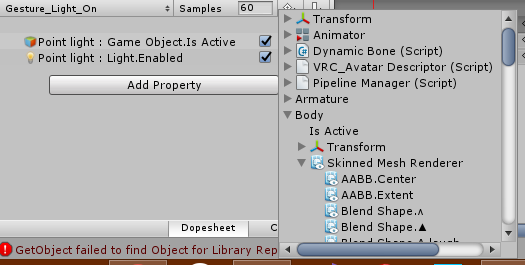
Skinned Mesh Renderer is where I found my shape keys
clear yew
Let me show u
short maple
alright
 clear yew
you disabled the sounds that's probably why
 clever trail
I need help with an animation and model I ripped from a game
Mixamo shows the model can use the animations
But the humanoid rig from vrchat breaks the model
Can someone help me?
Ping or msg me please
nimble ridge
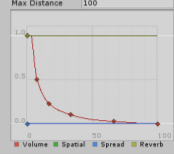
@clear yew where's your camera located?
https://i.imgur.com/fu7GgQG.png seems to be out of range
 covert hawk
Does anyone know a good Harley Davidson model?I need one to slap my avatar on it..I searched around deviant art and bowroll,not much luck there.
jade kraken
how would i make an animation START on and stay that way? ik theres the loop options in the animation file
but idk how to make it start when i change into that avatar / not via a gesture
jade kraken
cuz my avatar has an animation for something similar to a tail swaying, and i want it on at all times
slim sparrow
@jade kraken put an animator on the tail's first bone and animate it
Or put the existing animation on it, select all properties, press F2 to change path
jade kraken
i found out i think, just set it for always on and slap into Idle in an override ive been told
cuz i have the animation already made
slim sparrow
That will work, but only if the idle animation also covers the rest of your body
Otherwise you'll be half in the floor
jade kraken
ech
i mean its not just one thing, its a movement of like...8 lil insectish wings
just to constantly be fluttering while im doing...anything really
slim sparrow
I think an animator on the common parent of all wings would be better, but as long as it works right?
jade kraken
already got the animation all set
wut
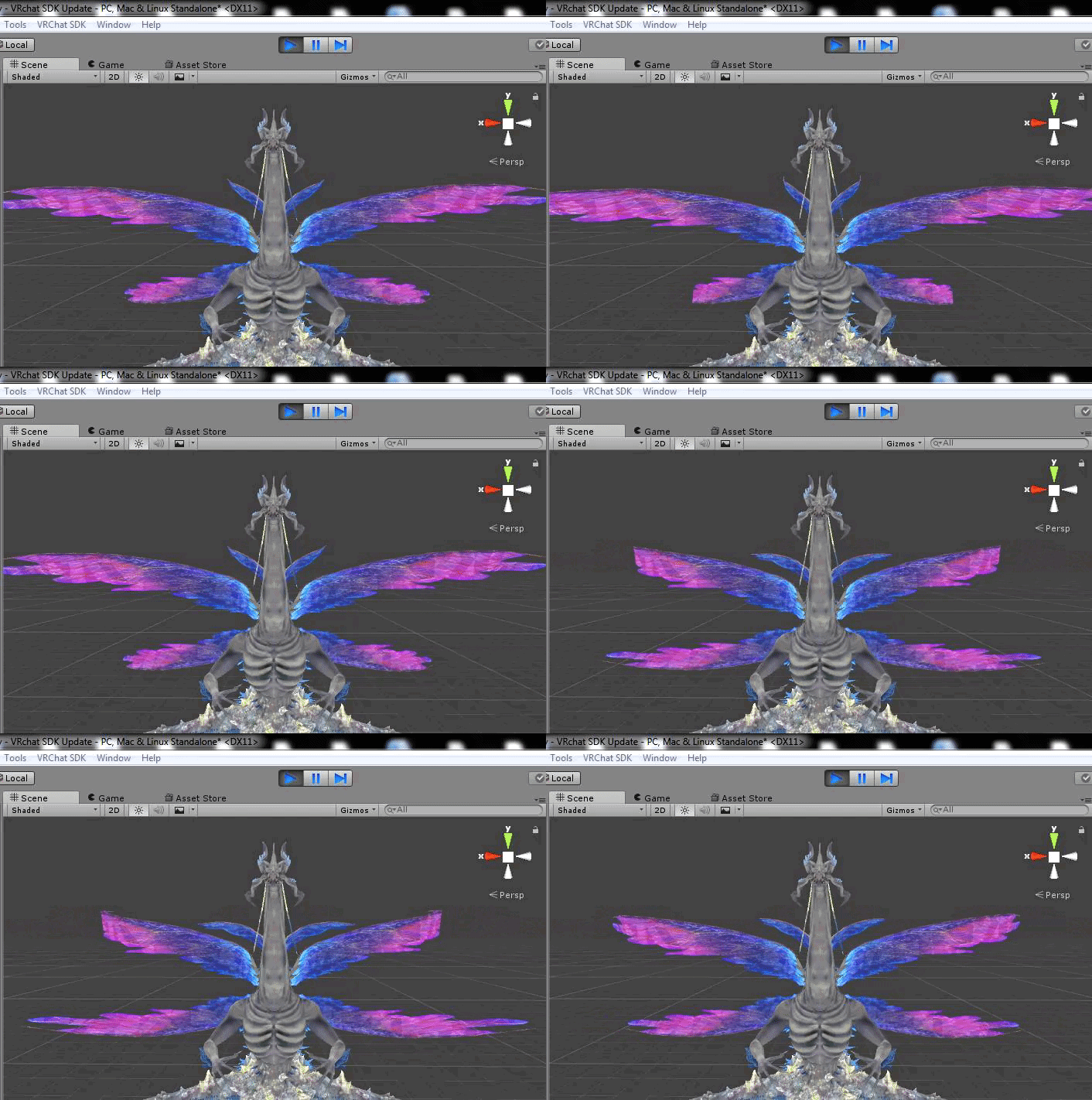
like it legit was just 2 blendshapes i made in blender, that i set in Unity to like cycle / move between the 2
only moves the wings
i just want it to animate as i walk around in-game
fierce bane
as rokk said before, you just have to put an animation component on a part and put the animation in there., you can even put it on the avatar itself instead of somewhere specific (and since you didn't know how, is probably easier than changing the path for all the properties)
clever trail
How can I make an animation ripped from another game work with unity, it always get stuck in the default pose https://imgur.com/YZJSiFs
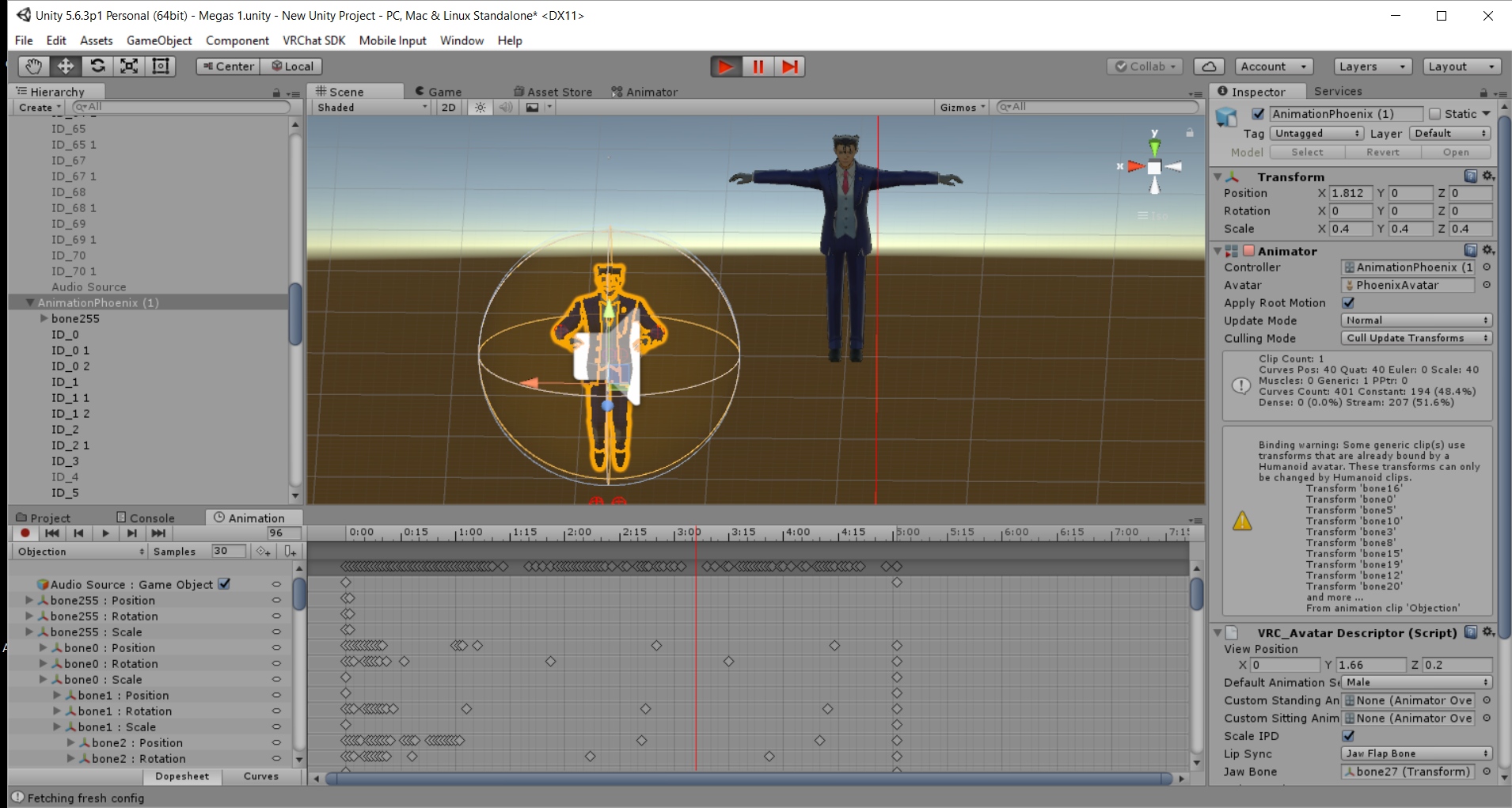 icy crow
its using bone movements rather than animator properties
clever trail
It should still work, does it not?
I'm still a bit of a noob so can I get a bit of an explanation?
The mouth still moves, but the body doesn't
 paper haven
Does anyone have the tidy animation from fortnite? Can't seem to find it in any of the packs I download shrug
 lunar snow
Mouth is done with shapekeys
slim sparrow
@clever trail good taste lol
The animation has to be imported along with a model
When you configure the model as humanoid, it will convert the attached animations to a humanoid animation
 slim sparrow
So the animation is currently imported along with the model inside the FBX? @clever trail
It should have been retargeted if it's actually still inside the FBX
slim sparrow
Then I don't know. I imported Ace Attorney animations before and they always worked. They are imported inside the model, model is configured as humanoid, animation becomes humanoid itself.
I put them on there in 3DS Max
slim sparrow
Spirit of Justice. How I got them I can't discuss here. And ultimately, where I got them doesn't matter
What matters is how you export and import them. If the steps I described don't work then you're on your own
clever trail
Same
I already know what you did
But how did you get yours to work?
I pulled out the objection animation
With Phoenix
But that's about all I got
Like, can ya show me?
slim sparrow
Well I can't really show since I'm not home right now
Basically, I exported the model with its animation from 3DS Max. After import in Unity, the animation is there in the "Animations" tab when I click the model in the inspector.
When I expand the FBX in assets, I can also see the animation there.
clever trail
Does it play in unity?
slim sparrow
It references bone0 through bone255 much like yours (I don't rename the bones when just importing animations)
Yes
But the model isn't humanoid at that point yet
I configure the model as a humanoid rig
Then the animation gets converted to humanoid
And it still plays
slim sparrow
However, I never tried any objection poses because their hands are always separate meshes
I only use the facial poses
And an idle stance
slim sparrow
Yeah, you probably won't be able to convert the hands to Unity 1:1
clever trail
The face moves
slim sparrow
But the rest of the body should work
clever trail
I just want his body to move
slim sparrow
The face probably works because it's not part of the humanoid rig
clever trail
I can fix the hands
slim sparrow
The body movement should be done automatically when the animation is retargeted
slim sparrow
Yes, Unity should do that automatically. https://docs.unity3d.com/Manual/Retargeting.html
clear yew
So I have a 2d avatar and am wanting emotes and gestures for it
but when I make a animation it doesn't play
Although my 2d avatar is just 2 planes on a empty object
do I need to get a armature?
you need an humanoid rig, yes
fierce bane
if you want gestures, emotes, walk, or any other normal animations to work yes
slim sparrow
Just get the tutorial avatar, delete the meshes (3 of them, shame on the example devs lol)
Put your 2D avatar inside the tutorial avatar, next to the armature.
clear yew
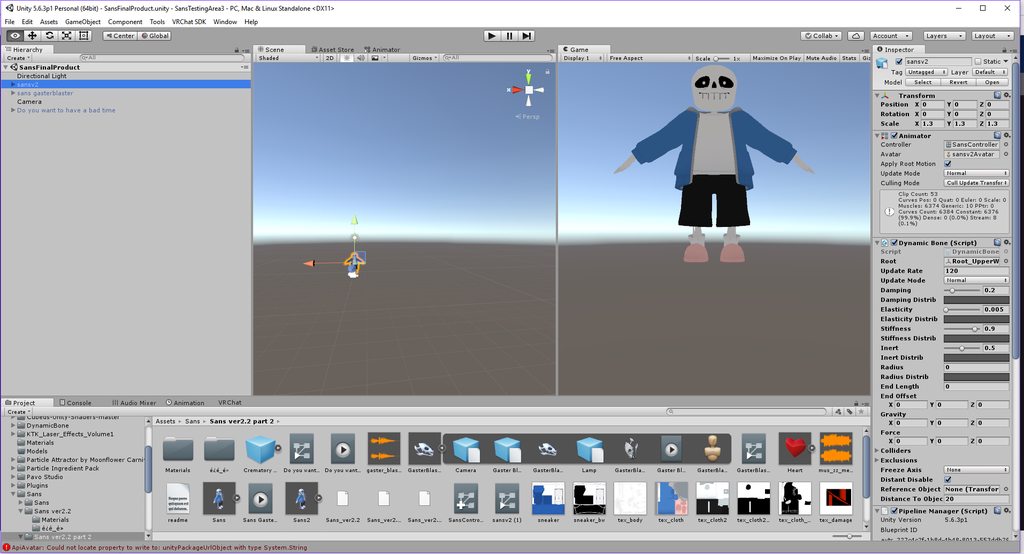
can somoen help me out? apparently the gaster blaster appears and it does the eye animation but it doesnt do the gaster blaster animation the gaster blaster has
http://www.mediafire.com/file/mri9iab88kvvv0h/Sans_The_Skeleton_(Emotes%2C_Visememes%2C_Eyetracking_and_Dynamic_Bones).unitypackage/file can you maybe download this and check it out for me?

MediaFire
MediaFire is a simple to use free service that lets you put all your photos, documents, music, and video in a single place so you can access them anywhere and share them everywhere.
clear yew
Is there a way to playback the vrchat standing animation in unity?
clear yew
help? ;w;
regal hollow
@clear yew playback the standing animation?
clear yew
apparently I get ignored..
regal hollow
Yep
regal hollow
I don't care enough about your issue to download a whole avatar
Import it into unity
Import it into vrchat
clear yew
well excuse you then!! my computer CANT take screenshots
Yeah my knees are bent forward a bit in game
Trying to figure out how to fix it
regal hollow
To test of something easy is working
clear yew
......
regal hollow
@clear yew it can
clear yew
what is that suppose to mean?
regal hollow
🤢
clear yew
okay welp you are literally not helping me when i need help which the vrchat discord is suppose to do when im in need of help like this
and yet i told u my coputer cant take screenshtos
and i tried testing and seeing whats wrong and redoing everything again and it keeps getting stuck like that
so all at least you could do is do me the favor and help me out
slim sparrow
@clear yew are you missing a print screen button or something?
clear yew
I already tried pressing the screenshot button
No but it aint working . help me out!
use gyazo
slim sparrow
Have you tried any of the other alternatives, such as the snipping tool, puush, or gyazo?
 royal summit
or even snipping tool
clear yew
@bronze cloak Please help this situation i am literally about to quit
slim sparrow
Yeah, snipping tool is god
clear yew
sniping tool?! im going to have to use ALOT of memory making alot of screenshots
slim sparrow
I'm pretty sure the devs have even less time to debug your issues than we do
slim sparrow
VRChat takes up 5 GB of RAM by itself, the snipping tool can't be more than a few kilobytes. Then another megabyte for all the screenshots
regal hollow
🤦
slim sparrow
Imgur or gyazo
royal summit
if someone is interested then copy paste them in a dm or use imgur for this channel
slim sparrow
If you can't work with computers then you probably can't develop avatars well enough to fix any issues that may arise
clear yew
Also trying to send your model onto others is not you asking for help
you're asking them to fix the problem for you
I guess I will just have to keep waiting for someone that can do that
LOOK I ALREADY TRIED BY MYSeLF
I dont know what else you want from me man
clear yew
O MY LORD FINE
regal hollow
If you want someone to do it for you
clear yew
@bronze cloak this person is really being mean to me please kick him
regal hollow
Check #community-servers-old
clear yew
look i did
regal hollow
Go to vrc traders
clear yew
What lol
royal summit
😂
regal hollow
And pay someone
slim sparrow
Lmao
clear yew
r u kidding me?!
regal hollow
This kid is so fucking entitled
clear yew
You're just trying to get essentially a commission to fix your model for free
regal hollow
🤣
clear yew
not a comimssion I AM ASKING FOR HELP
slim sparrow
No
royal summit
someone not wanting to help isn't being mean
clear yew
what do you not get i am having a PROBLEM with it
slim sparrow
You are demanding help
regal hollow
YOU ARE ASKING US TO DO IT FOR YOU
clear yew
It could definitely fit the bill for a commission
slim sparrow
By screaming across the entire discord
regal hollow
that's not help
clear yew
its not!!
O M L I am asking for u is to help me
@bronze cloak
Just download gyazo and make a gif showing your problem
slim sparrow
You're not asking, because the answer "no" makes you angry
regal hollow
XD
royal summit
well u may have to wait. or try asking in other vrc related discords in there help channels
clear yew
I'm sure they can better help you after you do that
I AM LITERALLY
ASKING
FOR
HELP
Yes
i cannot take screenshots
look i tried
slim sparrow
Ok, have fun then
regal hollow
You aren't though sweetheart
regal hollow
You want a commission for free
clear yew
Anyyyywayyyyss
Does anyone know how to playback the vrchat standing animation in unity B)
NOT A COMMISSON O M L I already have th emodel ready im just askingg u to take a look at it and to help me fix it at least
to HELP me fix it
Allow me to blow your minds with an actual screenshot of my issue
fine i will have to make my game on non fullscreen mode and SCREENSHOT by creenshot
look i will even do it with ALL the animations and what not
slim sparrow
Yeah, you're asking. We said no.
clear yew
but wtach as it doesnt do anything ur going to take a look at it
slim sparrow
Then you got really angry
slim sparrow
🤦
royal summit
stop pinging them,
clear yew
kyle , and no you guys are not helping me what so ever
royal summit
they only want to be pinged in urgent matters
clear yew
urgent as in needing HELP which you arent providing
 errant acorn
Yo uhh, please stop spamming mentions to the devs.
They don't appreciate that very much.
clear yew
GV if these guys really would help me out
but apparently even though i already have th emodel made they think im asking for a commision when im not i told them my computer cant take screenshtos
apparently they dont know what "cant take screenshots" mean
at least i would appreciate it if you at leats would take a look
also sorry Aev
fine I will just post the screenshots as you guys think im asking for a commision
slim sparrow
So you can't take screenshots but you can upload files?
And now you suddenly can post screenshots, alright then
clear yew
well yes I tried pressing even SPAMMING the print screen option
royal summit
well try the other options suggested
clear yew
look i had to use snipping tool i hope you guys are happy with this if this doesnt work out. i am going to get someone to look at it fo rme
vvivih;oavrih;oqefwinoererbkjvri3f
clear yew
dangit
 unique night
it lets you take screenshots and auto uploads
unique night
no other program required
slim sparrow
Dude, you can't paste in this channel
You need to upload it to some image host like imgur, gyazo or whatever
 slim sparrow
Oof
clear yew
okay how i am going to have to keep going back and forth between each chat for EACH screenshot
errant acorn
You don't have permissions
You have to upload the screenshots to imgur or something and post the album here
 odd chasm
Upload to imgur and post imgur link
unique night
shinku, its gonna be hard for anyone to help you if you can't post a screenshot in here
trying to do animation is way harder than taking a screenshot
royal summit
👋
clear yew
Here is my issue with my legs, in the first gif I have the model with full body ik disabled and the legs are how they should look like https://i.gyazo.com/2fa24a2096a6f1cf76fa44a4f5663103.mp4
odd chasm
How do i upload custom screenshots
clear yew
this second gif is my avatar but with full body ik enabled, noticed how my ribbons clip through my legs? https://i.gyazo.com/3d4d85e4c66ba46e151a53076ac4db1d.mp4
slim sparrow
It's the weird knees bent issue that sometimes happens on desktop
clear yew
I want to playback the standing animation for vrchat and adjust my bones in unity to straighten out my legs
slim sparrow
It's the same thing that makes you do really weird stuff when looking up/down, not sure how to fix that
regal hollow
This convo has already made my day
slim sparrow
Unfortunately, the standard standing animation is not available. What you can do though
clear yew
actually when I look straight up and down my legs extend to how they normally should look like
slim sparrow
@clear yew I think you can duplicate your avatar in Unity and assign the AvatarTPoseController controller
See if there's any oddities there
When you hit play
clear yew
alright
slim sparrow
But yeah, random stuff happens when you look up/down on some models. It seems less common on MMD's and more common on any type of game model. Not sure what's going on.
Oh, this might also be your viewpoint. The avatar descriptor has a X, Y and Z field. What's the Z value at?
clear yew
does my model being .fbx have anything to do with it?
slim sparrow
Nope
slim sparrow
Hmm
odd chasm
Sounds really low to me
slim sparrow
Well, that's generally where I put mine so that should be fine. You could try putting it at 0.1
@odd chasm I put mine at Z 0.02 lol
odd chasm
Lmao wat
slim sparrow
For VR you want it really far into the head
So that when stuff starts disappearing from being too close, your face is actually clipping into said object
And I can touch my own face properly etc
This might be less of an issue with properly proportioned models, though.
odd chasm
I usually have it where glasses would be sitting on the nose
slim sparrow
MMD's are not known for their great proportions
regal hollow
Same jawbones
slim sparrow
That's where I always put mine on desktop
odd chasm
Ill try it being more insidr the head tho
slim sparrow
But that's too far forward for me
slim sparrow
Someone else told me you should have it between the two "eyeballs" basically
Like where the middle of your eyeballs would be
clear yew
yep
that's where i put mine
works pretty good
but i'll try inside the head
@slim sparrow where do I click play at for the avatar t pose controller?
curious to see the difference
slim sparrow
@clear yew just enter Unity's play mode
odd chasm
With fullbody i sometimes have the problem when i lay down on the side that my view is inside my chest
slim sparrow
I'm not sure what it's supposed to look like though
With that controller
Need to test some time
It's used to determine bend targets for the IK
final gazelle
@clear yew think people are already trying to address your root issue directly, but i don't think any of the VRChat animations actually come bundled with the SDK -- i'm under the impression it's got something to do with copyright with mixamo, or something along those lines -- the closest you've got is a single still standing pose
slim sparrow
Yeah
clear yew
well I never put the avatar through mixamo it's using it's og bones from the game
slim sparrow
He was referring to the fact that we don't have access to the animations used ingame
Because they're licensed
clear yew
@slim sparrow do I click ctrl+p to play? should I get sent to the game tab when I do?
slim sparrow
You should click the play button at the top
odd chasm
There is a play button at the top of the window
slim sparrow
Then go back to the editor window and just look at how the model is standing
nimble ridge
Do you have a license for that animation Sir ?
odd chasm
Ima tell the queen you dont have license
regal hollow
You got yer queen tellin loicense sir?
nimble ridge
👀
clear yew
So I got my 2D avatar animated with gestures and such, I just got a crouch and prone, when I prone it works great, when I crouch it doubles my shit
regal hollow
Doubles your shit?
nimble ridge
🤔
clear yew
are those red balls supposed to far out in front of my knees like that? https://i.gyazo.com/7edefe39b86cfa385f4cdddf81dc1deb.mp4
So the crouch is there
but then the stand is there as well
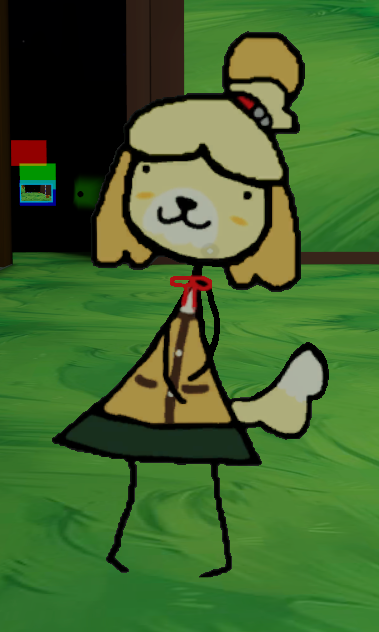
me standing
Me proneing which works

 foggy loom
Wow that's cute
clear yew
But crouching isn't working

Basically just moved down
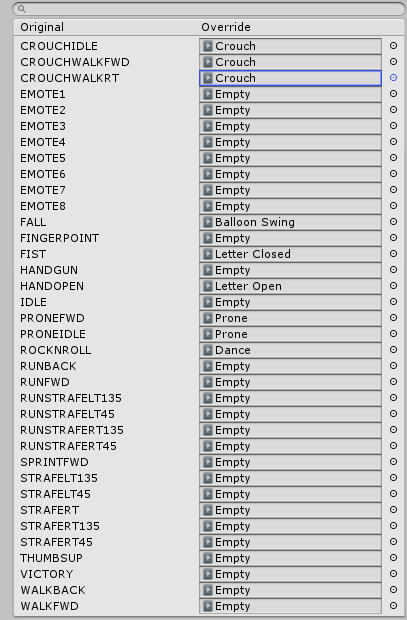
Heres my override
the empty emote is just a empty one I put there so the armature wouldn't cuase any fucky rotation on the 2D avatar
Don't know if it works but all i did was create a anim put nothing in it in hopes the armature just tposes
errant acorn
Are you sure the other mesh is turned off in the crouching animation? That might be causing the problem.
clear yew
https://imgur.com/a/tIbUpDM https://gyazo.com/c40d580223a9dce8b5c83f645d749ebc heres the screenshots
I showed u all i did
Apparently the laser appears but the gaster blaster animation doesn’t play when in unity it does
slim sparrow
@clear yew ah, that is interesting.
The position of the red balls I mean
@clear yew crouch blends with idle in such a way that it's not "one or the other", sometimes it is both.
No way to fix
Hold on while I figure out what the red balls are again
@clear yew red balls are IK goals so that seems fine
clear yew
what about me ;w;
royal summit
Are u trying to have it so the mouth opens with the laser?
clear yew
Yes
The gaster blaster animation apparently works on the gaster blaster itself and when in played in unity with the creamatory cannon it shows it perfectly
But apparently its not showing up in vrchat
What
royal summit
Hmmm is the animation that opens the jaw on a animator on the gaster blaster?
 obsidian vigil





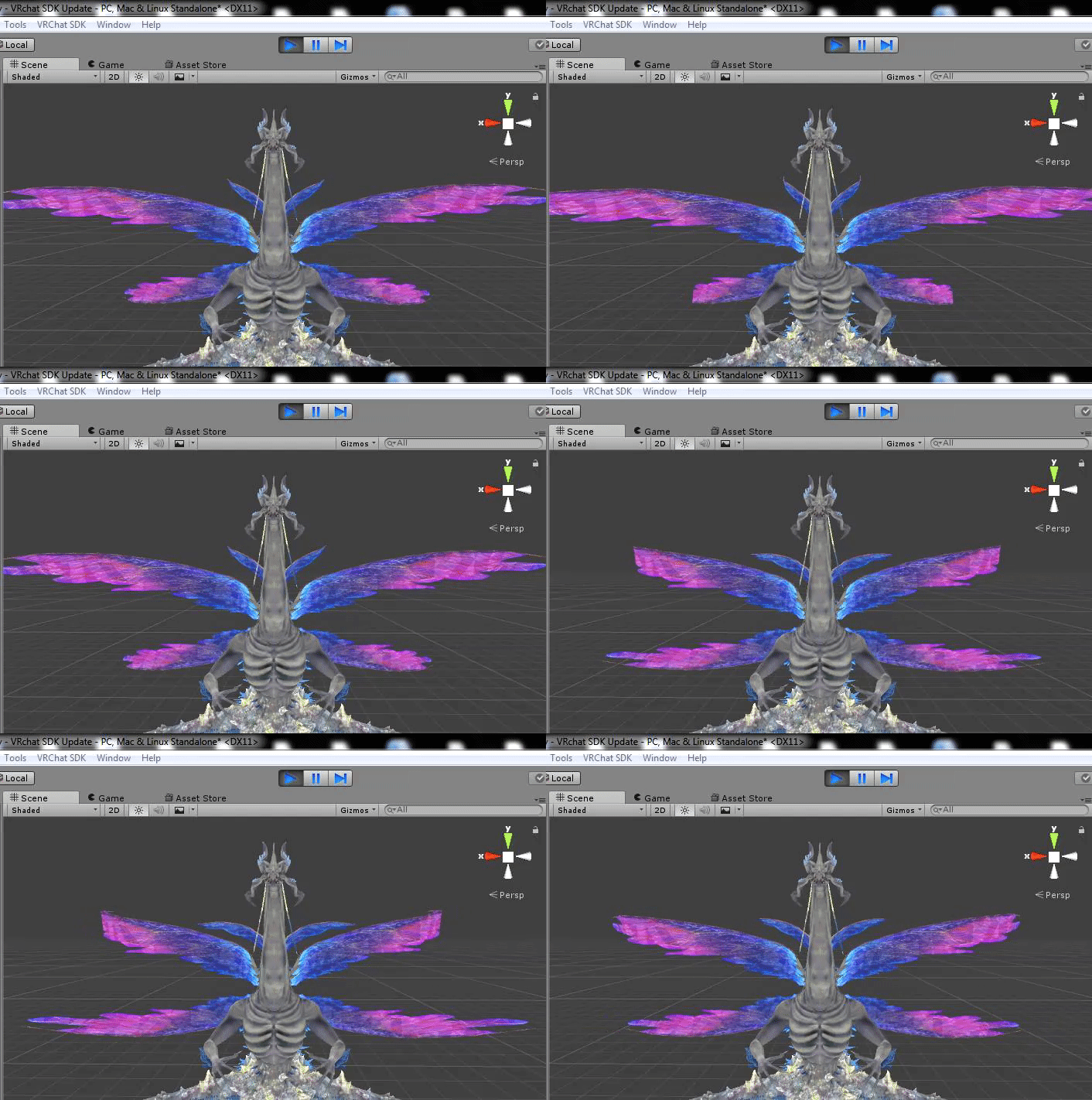


 vivid pond
can you replace the default crouch and prone animation or is that not in game yet
slim sparrow
Yeah, you have been able to do that for quite some time.
It just didn't work very well in VR (in most cases), it works OK in desktop.
Prone is a flat transition rather than a blend, so that should work
vivid pond
ok thanks
sorry for even asking it was just that i havent touched unity for vrchat stuff in the last 3 months
 split vine
creating a new animation is gone in the animation window, only options are top select pre-made animations. i have made custom animations with this avatar before
clear yew
remove the controller in the animator component
or use the correct controller if you used the same one to make multiple animation
split vine
okay, thanks. it has been a while since i have made vrchat avatars, but i am good sat it.
jsut been 3 months
fierce bane
You can also just drag/drop an animation onto your avatar-duplicate to edit it. It will automatically create the new controller it needs.
 royal escarp
any way to use videos or gifs on your avatar? Or is that not allowed? :S
Wanted to use it for this
file is only 10mb
torn pawn
you use texture sheet, either particle or shader
particles have texture sheet animation tab, and allows you to use shader of your choice
royal escarp
hmm thanks I'll try to figure that out 😃
torn pawn
use virtualdub, select render every X frame (somewhere in options) so u dont have 3k frames, then export it as images, then u can open everything as layers (also resize) in gimp and make a texture sheet from it (need to find plugin that does it)
is tl;dr process
royal escarp
ok thanks 😃 I'll try it out
clear yew
Is anyone good with the creamatory cannon timing of the lasers? If so I want to turn this to time at the same time as this https://cdn.discordapp.com/attachments/491198734219083776/491327005598416915/unknown.png https://cdn.discordapp.com/attachments/491198734219083776/491327141515100160/unknown.png


Thing is I don’t know what setting it is and what to change it into
fierce bane
@clear yew assuming you're using a particle to "fire" the laser you can just set the start delay to whenever it should fire.
Bonus note, the animation in that screenshot has your Crematory CannonRotation with an incorrect path so it won't work. Fix the path for it by clicking it twice and making sure it's set correctly.
Probably sans gasterblaster/GasterBlaster/Gaster Blaster/Crematory CannonRotation assuming it is still the same as the grey'd out section in the screenshot
clear yew
No himeki I checked ingame the animation works
fierce bane
You can tell the path is incorrect since the text is highlighted yellow
clear yew
I just need to fix the timing
Uhm what number should it be then
Or numbers
I can send you a screenshot of each laser