#animation
1 messages · Page 85 of 1
 regal hollow
I tend to use oggs tho
You can use a program like Audacity to quickly edit and reformat audio files
 magic river
sweet, thank you ❤
regal hollow
np fam
magic river
Alright, one more question. If i'm making a simple "turn sound on when I point" override animation, do I still want to create a clone of my avatar to handle that?
Right now I have an avatar which drops bombs, but it's just one avatar where i turn the particle emitter on and off. I don't have a clone of him which i turn on and off though and there doesn't seem to be any problem
regal hollow
If you are making any gesture overrides you want to make them on a duplicate of your model
always
Also you don't have to make a clone of your model that turns on when you use a gesture
You may be misinterpreting previous advice, or I might be misinterpreting you message
magic river
i mean duplicate, not clone. my bad
 tulip crest
I am using a non-human avatar with a AvatarControllerTemplate to control avatar movements, and when i change the default emote "Die" with a custom one, it just keep looping, the animation is not a loop animation, what should i do?
magic river
Apparenty if you have a "generic" model and you do an emote, it gets stuck in a loop
I've heard you can create a "Ghost" humanoid figure which is just an armature
and then put the generic avatar under that
tulip crest
you mean i can copy another humanoid armature under my avatar?
magic river
Not in blender, no
but like... Export JUST an armature
put that into unity. Then put in your normal avatar. and make the armature a parent
of the actual avatar
i've only heard of this though. I've never done it
 clear yew
yep, that's how you do it
tulip crest
are those non-human animations still working?
clear yew
so you can have hand gesture with a non-humanoid model
magic river
Yes, they will work
Now Svelsien, where does the descripter go?
on the armature ghost?
tulip crest
ye that's a question to me too
regal hollow
You want the base of your model to have the avatar descriptor
tulip crest
ok, i'll try , thank you all~
actually, those animation won't working directly, because the hierarchy is changed, i need to change those animations as well
magic river
So i'm watching a tutorial on how to animate a weapon into the avatar's hand.
tulip crest
now the emote is working, and the idle animation is working too, but not the walk animation or run animation...
magic river
and I was under the assumption that the animation turns off the MAIN character (without the weapon) and turns on the Duplicate character (with weapon)
regal hollow
This is what I meant
clear yew
is there a reason why you activate a whole new model ?
magic river
Lemmie clarify that there's also the hand gripping animation lol
regal hollow
All you need to do
Is turn on the gun object
and move the finger bones to fit the gun
are you also turning a new model of your character on?
magic river
I haven't done it yet. I'm just looking at tutorials and making observations
regal hollow
ok
When you are animating on a humanoid in unity
it will make the model do a weird balled up pose
so you want to duplicate you model
and animate on that
rather than the original
so that your main model doesnt end up like that
clear yew
if you are watching the tutorials i think about then yeah
magic river
Then once the animation is done, do you get rid of the duplicate?
clear yew
they just duplicate the model to create an animation
then they put the animation on the original model
magic river
Since you just needed it as a dummy to model on
magic river
That makes sense
regal hollow
nice
clear yew
if by any chance
you fuck up
and animate the original model
you can check the pins
to get it back to a T-pose
magic river
Pins?
magic river
Ooooh gotcha
clear yew
other way to reset it if you fuck up
it's to select all bones
of your fucked model
and only the bones
not the objects or props
and then reset all bones
magic river
haha sounds good
With that knowledge i can probably give it a shot
Out of curiousity, how exactly does the avatar "break" if you don't animate on a duplicate? I know it appears to scrunch up, but does that also happen in game or something?
clear yew
yep
regal hollow
^
magic river
Does it happen when you activate the custom animation or does it simply stay fixed in a scrunched position despite all input?
tulip crest
I think when you make an animation it will change the model's bones' postions
magic river
So it's overall impact is sort of unpredictable?
magic river
Thanks a lot you guys! I learned a lot and can hopefuly help others in the future!
 cinder cipher
i have an afk pose set to 5 minutes when i do nothing, but where should i bind it?
what's the gesture on the animation controller for the idle hand that doesn't have a gesture
clear yew
i'm pretty sure it's just idle
cinder cipher
ok, i'm just worried cause the other idle animations i have don't interact well with vr controllers
magic river
I think even in "idle" the vr controllers overwrite the animation hand position
cinder cipher
exactly that
magic river
I definitely have running animations that should make my arms swing back and forth, but in VR they stay in position
clear yew
yep
cinder cipher
desktop godtier
magic river
If you could figure out a way to switch that OFF after 5minutes, you might be on to something
clear yew
the hands take full control with VR
and if you have FBT then the legs get full control too
cinder cipher
oh god
clear yew
i guess after 5 minutes you can hide your main model and show another model
magic river
Svelsien, is there a way to emulate full body tracking with simple switches?
clear yew
what do you mean with simple switches ?
magic river
Like, say I had a swiper that sent a signal 1-90, and I wanted to map that to say... the angle between the Thigh and Calf
regal hollow
swiper?
clear yew
the fuck is a swiper
magic river
A linear potentiometer
or even just like... a digital interface
like a light switch?
a dimmer
that sort of thing
clear yew
pretty sure you can't do that
regal hollow
that is not possible I dont think
clear yew
i dont see how that would work
magic river
Right now I have a simple VR glove i made
and it sends a signal 0 - 90 based on the bending of my finger
to unity
cinder cipher
gotta love the "lock an object to world position" link
it's been so useful thus far
magic river
in unity i have it change the euler angle of my finger based on the input
it works for my custom scripts, but obviously you can't do that in unity
err, in VR chat
regal hollow
the only way to use fullbody in vrchat is vive trackers, any other method like the xbox kinect works by emulating vive trackers
magic river
I've heard of an Open VR emulator which allow you to plug in your own controllers. I plan on looking into that at some point
regal hollow
So your idea could work
magic river
sweeeeeeeeeet
clear yew
@cinder cipher the one i made ?
cinder cipher
yeah
regal hollow
but you would need an interface between vrchat and your thing
clear yew
i did some albums after people ask again and again the same thing
got tired of explaining every time
cinder cipher
it's so straightforward it's great
magic river
Well Open VR emulates the vive tracker, and imputs it into SteamVR
so then VRChat will just read it as a vive tracker
clear yew
yeah, pretty easy to do after you understand
regal hollow
I remember when explaining world position objects was the only thing svel ever seemed to do xD
clear yew
all the fucking time
regal hollow
xD
tulip crest
i've asked that once too...
clear yew
oh wait
tulip crest
but the fixed joint keep shaking when avatar is moving
magic river
Sorry to be discord illiterate, but how do i view the "pins" you were talking about?
clear yew
i actually put the thing i wanted
the infinity to angular drag to reduce the jittering
regal hollow
THere will always be some jitter xmals
cinder cipher
hold on
regal hollow
holding
 cinder cipher
if i set this animation to be on the "idle" spot, then it will activate no matter what i do after the timer goes down
in 5 minutes of model loading
tulip crest
so i change to configurable joint, lock every angular and motion
cinder cipher
that's a problem, i need it to be 5 minutes of not using a hand gesture or something along those lines

clear yew
@cinder cipher can't do that
magic river
That's strange, i don't seem to have those Svelsien
clear yew
before they removed the final IK triggers
regal hollow
You definetely have pins
cinder cipher
maybe i'll just set it to active on fist+ some gesture
clear yew
you could have a afk animation
regal hollow
We all do
clear yew
that's why people are asking for custom animators
you could create an afk animation
a loading animation too
cinder cipher
i have a loading animation that plays once but it's not similar
i know what you mean
tulip crest
we cannot change the custom avatar controller now, is that right?
magic river
If you put it on Open hand, then it'll just reset the timer every time you do any other gesture won't it?
regal hollow
But ye upvote the canny if you want custom animator https://vrchat.canny.io/feature-requests/p/custom-animator-controllers-on-humanoid-avatars
cinder cipher
tthanks
magic river
then when you leave your hand open (when you're afk) it'll tick down to eventually ur animation
clear yew
does the idle animation actually reset when you use a hand gesture ?
magic river
I don't know if the idle one does, but based on what stargazer says it doesnt
cinder cipher
i dont see open hand on my list, just handopen which is the gesture you do to open your hand
wish there was one slot for the default hand gesture
magic river
but on some other gesture, have it set the timer back to 300seconds
so even though it's tickin down, as long as you .... say.... make a fist, it'll reset to 5min and have to count down again
then after 5min of not closing your fist at least once, u'll afk
cinder cipher
yeah that's what i'm after
magic river
Also Svelsien, derp... i didnt realize you were looking at the TOP of discord when u took that screen shot haha i thought it was the left side panel
cinder cipher
how'd you do the timer reset tho?
magic river
If your timer is a public variable, you should be able to adjust it while in animation recording
For me, for example, I have an animation which sets the life time on my particles to 1.
Where are you keeping your timer?
cinder cipher
i have the afk pose set like this https://gyazo.com/faf1c39760c568873067a6f86e839ec1
 cinder cipher
pretty sure there's a way just gotta come up with it
tulip crest
i have no idea why my walk animation not working, god it drives me crazy
cinder cipher
i know what to do
i'll bind it to fist with the timer and just click fist once if i go afk
so it sets the timer
since you don't have to hold it for gestures
oh wait
then i gotta go back to 1:1 keyframes
nvm, gonna put the timer on a gameobject that enables things after 5mins
magic river

Unity is the ultimate game development platform. Use Unity to build high-quality 3D and 2D games, deploy them across mobile, desktop, VR/AR, consoles or the Web, and connect with loyal and enthusiastic players and customers.
so u can do it in a script. I wonder if there's a standard script that you can do
magic river
Aren't there standard scripts though
like the coliisions, or the descriptor and what not
clear yew
no script allowed
Here is a list of the components you are allowed on avatars VRChat - VRC_AvatarDescriptor - VRC_IKFollower - PipelineManager Unity - Transform - [Animator](ht...
magic river
oh that's super convenient
bookmarked
"Culling Type Determine when not to play the animation."
under animation
so maybe you could do that somehow?
tulip crest
@clear yew when does vrchat determine to run walk animation? I just put a ghost armature and make a customoverridetemplate, then the emote system is working, and the ilde animation is working too, but RUNFWD or WALKFWD not working at all
clear yew
based on your speed i guess
magic river
Xmals, did you add ur animaation to all the different runnings?
"RUNSTRAFELT135" ect
clear yew
because there is also a "sprintFWD" if i remember
tulip crest
i'm just testing walking now
clear yew
and it's only used on maps with a very high running speed
magic river
For walking there's "STRAFELT135" , "STRAFELT45" ect
close to the bottom
"WALKFWRD" is for when you are walking DIRECTLY foward. but if ur finger is pushing slightly to the right or left of your joystick, it is calling those other animations
and if u leave them blank, they won't animate at all i assume
or it'll do the default animations
tulip crest
yes, i fill them all, still only idle is working
magic river
i actually have one working, let me bring it up
tulip crest
are there any specific settings in avatar or animations that i should notice too?
magic river
you've got your running animation set to loop right?
tulip crest
i disable apply root motion, because that makes idle not working too
yes
i check loop time and loop pose
magic river
and do you have the controller on both the avatar's animator and the custom standing controller?
(sorry i have to re-upload this avatar then try it in game to see if it's working)
tulip crest
what do you mean custom standing controller?
tulip crest
there is an animator in the root, with the avatar descriptor
no controller in animator, just custom standing anims and sitting anims
magic river
i always put the controller in both
i hoenstly don't remmeber if I'm supposed to or not haha
tulip crest
customoverride can only be set in avatar descriptor, i do fill them all as well
magic river
I have my customoverride in the "Controller" part of the animnator as well
tulip crest
you create an avatarcontroller in animator as well?
magic river
well probably just forget everything i've said. I just tried uploading my avatar which uses a ghost armature and a generic avatar, but it also doesn't do it's walk animation hah
tulip crest
😂
 paper jacinth
the strafe animations, and walk animations are triggered when moving, right?
tulip crest
maybe i should give up using ghost armature and use an avatarcontroller to do that
paper jacinth
will overriding them mess up me moving my arms at all? or doing gestures while moving?
tulip crest
i don;t think so, if you are using vr, animation's animator movement won't working
paper jacinth
oh, do those play at all?
tulip crest
even playing with pc, it just doesn't work
paper jacinth
I assume the movement animations only play when I move my thumbstick?
tulip crest
in gesture animation
paper jacinth
not when moving locally?
magic river
Xmals, were you able to get it to work without the ghost armature? U just couldnt use emotes?
I think so, yes meme guy
tulip crest
yes, i use a avatarcontroller template to do so
paper jacinth
aight, also, should gesture animations be on loop time?
tulip crest
without customoverride
paper jacinth
it toggles something on if that helps
magic river
loop time if u want them to repeat 😄
paper jacinth
so If I dont want it to flicker on and off I keep that off?
tulip crest
gesture animation should only be one frame and loop
 fierce bane
frames 0:00 and 0:01 should be the object toggled on too
not just one, or it will flicker
tulip crest
the most common way to do a gesture animation is to use an one frame animation to activate some object or animation to animate the real one
fierce bane
for anything other than a toggle on, yes.
fierce bane
you make a separate animation that lasts longer when you want a longer one, and you use the gesture to "activate" the animator instead of the actual object
tulip crest
yes
fierce bane
er....instead of the gesture being the animation, sorry
fierce bane
so: gesture animation -> animator enable -> full animation
tulip crest
that's it
paper jacinth
now, suppose I used that to edit the particle emission using the scalar, if the animator was toggled off, would it change the scalar back to 0 or would the particles directly disapear?
assuming the particles are on all the time
fierce bane
or be stupid like me and trigger a multi-stage particle system with built in delays and positional dummies to do it all based on terrain...
paper jacinth
wait, terrain?
fierce bane
animations reset to default when disabled and re-enabled
paper jacinth
aight, so the particles would fade out just like if the scalar was 0?
fierce bane
I haven't tried a particle based animation designed around an animation yet, fairly certain it would just pop out of existance as if you toggled a prop off
if the animator is disabled, anything it would do should revert to default start state (unless something else is editing one of them with another gesture or something)
tulip crest
if you disable a particle system, it just disappear directly, won't be like fade out
magic river
hey xmals
did u say you used an "avatar controller" the first time? instead of a custom overide?
fierce bane
what are you trying to do?
magic river
We were talking about how to get non-humanoid avatars to work correctly
and since they don't always have hands, u can't use many overridews
fierce bane
you CAN use an avatar controller, but you will not be able to use gestures, emotes, or have any form of IK (including head/eye/lipsync)
 slim sparrow
You can make a fake humanoid rig
magic river
what does IK stand for?
magic river
I've been trying to do that Rokk, but we're stuck
slim sparrow
Less important on desktop, but desktop still has Head IK
Also, the "SimpleAvatarController" animator controller only works on truly generic rigs
Humanoids can only have overrides
magic river
Right now I have a ghost armature, and then my generic avatar underneat hti
and the descriptor is on my ghost armature
slim sparrow
Right, that makes sense
slim sparrow
Where is the controller for your generic?
If you're putting the animations on the generic rig itself, that won't work. It's not getting your movement parameters from the game.
You need to make the animations on the ghost armature
magic river
I have the controller on both my generic's animator, on the ghost arm's animator and custom standing anim
tulip crest
ghost armature walking animation won't working, just ilde
slim sparrow
You can make it work, you just gotta override the walking animation to
Oh, you might be right.
Right, so
There is this issue with the animator used ingame
There's an avatar mask on the locomotion layer (walking animations)
This means walking animations can only affect a few small things. I don't think they can move any bones inside your armature.
tulip crest
walkfwd is decided by postion y right?
slim sparrow
MovementZ
tulip crest
from what i am thinking about is that i move y like 2 then it should play walk animation
slim sparrow
Yes, that's what you should normally do, but you might not be able to do that since the animator is kinda limited
You can do it if you just stick to generics though
tulip crest
yes, generic model, all movement is working right, but with the limitation of not being able to use gesture or emotes
wait, actually emotes is working, but just can not exit
clear yew
Generics are neat cause you can cuatomize walk and run animations all you want but cant do basic waving
paper jacinth
having some issues, have a animation for a gesture that activates a animator object, and the animator object has a controller with a clip in it, but for some reason when I do the gesture the clip won't play
slim sparrow
Test it in Unity's play mode. Does it work there?
Enter play mode, manually activate object
paper jacinth
okay
slim sparrow
If it works there, go to the next step: Duplicate your avatar, drag the gesture animation onto the duplicate, then hit play. Make sure your avatar has no animator controller set when you drag the animation onto there, or this won't work.
After dragging the animation onto the model, the duplicate should get an autogenerated controller
Then when you hit play mode, it should play the gesture and you can see if the object is activated correctly. Makes it easier to diagnose.
paper jacinth
hmm, for some reason the particles needed got yellow'd in the animation tab
time to redo the entire animation 😦
paper jacinth
hmm
thats strange
when I make a dupe and make the animation, it works fine, but when I select the animator object they are yellow
OH its because its too low in the hierarchy
it should be a root object yeah
slim sparrow
Yeah, animators always animate from their own perspective
So if you have an animator on a child object, you need to click on the child object and then create the animation
You can probably press F2 and change the path though
To cut out the first parts
slim sparrow
If you click them and press F2, you can change their path. They might still be set to Armature/Hips/Spine/Object/Particles. Set them to Particles instead, for example.
If Object is the one with the animator on it
paper jacinth
dont work
time to remake the animation again
hmm
animator seems to only accept its own transforms
do I just put it as the parent of the armature?
this is so confusing 😦
if I have the particles as a child to the animator, when it goes to turn off, the particles will directly disapear
if its not the parent then it wont work
slim sparrow
If you want a game object or its children to animate, you put an Animator component on it.
When a particle system is disabled, its particles despawn
slim sparrow
You have to make the animation by clicking on the object with the animator, and then animating the clip
paper jacinth
YES I KNOW
I KNOW HOW TO USE UNITY
I need the animator disabled but not the particles
I am not and will not disable the particles, I am using the emission scalar
regal hollow
Ye chill
slim sparrow
You can't disable animator components if that's what you mean
 frigid pine
can you not overwrite EMOTE1-9 anymore?
slim sparrow
@frigid pine you can, why?
frigid pine
not listed in the empty overwrite anymore
slim sparrow
Emote1-8 should be listed in CustomOverridesEmpty. Do you have a screenshot? @frigid pine
frigid pine
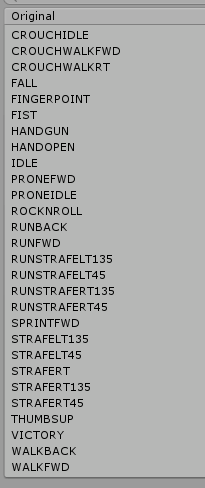 slim sparrow
Is your rig a generic one? That's weird
You sure this is the correct one from the SDK, using AvatarControllerTemplate as a base?
It might be set to the TPoseController by accident
You can change that
frigid pine
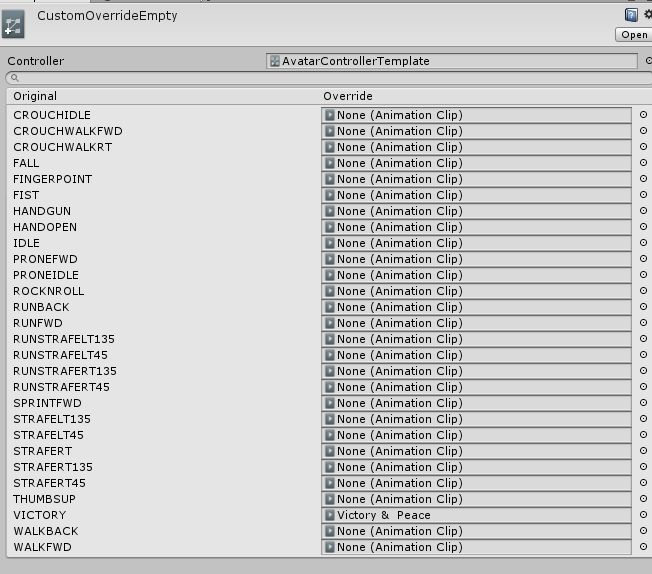 paper jacinth
is the only action you can do with gestures toggle objects?
regal hollow
Are you using the new sdk tsuna?
frigid pine
i can make finger gestures
it should be the newest sdk
i dont think my sdk could be so old as to those not existing
regal hollow
@paper jacinth you can do almost anything to objects and components on your model
slim sparrow
You should probably delete your SDK and reimport the latest one from the website
slim sparrow
And then duplicate CustomOverridesEmpty again
Yeah, it's weird
Maybe some other asset is overwriting it. I know that some people have had their own attempts at making custom override controllers for god knows what reason
frigid pine
or somebodys comission file had stone age sdk remnants
slim sparrow
Yeah
 frosty spade
my animations are playing on gestures that i didnt even assign the animation to
slim sparrow
@frosty spade one of your animations is too long, maybe multiple
You need to make sure that all of your gesture animations only have keyframes on 0:00 and 0:01. None on 1:00 for example.
frosty spade
30 seconds is the most for them
slim sparrow
That's way too long
frosty spade
and i have another character that only goes on 5 seconds and it still happens for that
slim sparrow
In fact, that is 900 times too long
Make sure you only have keyframes at 0:00 and 0:01
frosty spade
alright
thanks
how would i make a rise animation then though
trying to make a mimic appear from a chest and slowly go up
clear yew
create an empty game object
parent whatever you need to it
create an animation for the empty game object
disable it
parent it to your model
and use a hand gesture to activate that game object
frosty spade
i know i can do that but i want a smoother animation not just 1 moment its a chest then another its a mimic
slim sparrow
You need to have an object that animates itself
Then activate that object
The object activation is only 1 frame long, but the object will play the longer animation itself
slim sparrow
Yes, but the IK will override the arms and head. @paper jacinth
The leg idle will work, but the game's IK system might not make certain leg orientations possible unless you unmap a finger bone.
paper jacinth
I don't have legs on my model
but if I override idle I won't be able to move my head or arms?
oh nevermind, you mean my movement will override the idle anim okay, and the idle plays when I'm not pressing my joystick, right?
slim sparrow
The idle animation always plays
Your hand and head movement will override the animation
However, you will lose hand tracking if your controllers are out of reach, out of view, or if you are in the SteamVR overlay.
And then the idle will play normally again
 nocturne lodge
ok so i have a weird issue getting a gesture to work
in a nutshell i had it working just fine it was a simple make a item visible in your hand
i changed the size of the object to make it fit better now the object wont show up anymore
i do know its still trying to do the gesture but it isint showing the object
slim sparrow
Duplicate your model in Unity, drag the animation onto the duplicate
Then you'll be able to see if it still works. The property might be yellow, in which case the object's path is invalid. Perhaps the object was moved or renamed.
nocturne lodge
yes
clear yew
on the frame 0.00 and 0.01 you have the same keyframe
including the one to actually activate the object, correct ?
nocturne lodge
yes i have two properties one to activate the object and one to hide a object on the model
clear yew
okay
double click on the object when the animation is playing
if your cameras gets far away
just zoom in
without moving it
maybe the object got moved very far away
nocturne lodge
wait so when making a animation for a gesture you have to have two frames and both have to be the same frame not 0.00 is off then 0.01 is on
that might be the problem
slim sparrow
They have to be the same frame, yes.
Unless you're doing some very specific stuff
The object has to be enabled on both frames
clear yew
both frame needs to be the exact same
nocturne lodge
ok i think that might be where the problem is
somehow i got it to work where both frames where different on another avatar so i tried to do the same thing on this one
side question when you are enabling a sound to play with a gesture do you do the same thing as well?
nocturne lodge
ok cool thanks
magic river
Hey folks. Is there a way to add a looping mouth movement to talk?
I was looking at the "Lip Sync" option in the descripter
I've tried "Jaw Flap Bone" but it doesn't seem to do anything
 spring nova
You don't want it synced to our voice, just looping on it's own?
clear yew
How would you make audio attached to an animation louder. I'm not trying to troll or anything, but it's way too low in-game
spring nova
Your falloff settings might be the issue, what are they?
clear yew
you mean rolloff? It's linear, min 0 max 25
slim sparrow
Set min to 2
spring nova
Yeah, the game forces it to exponential rolloff, so when the min is 0 it drops off way too fast
clear yew
ah
magic river
Naw, I dfinitely want it synced to my voice. But since I can't open my model in blender, all i have to work with is a premade talk animation
spring nova
The premade talk animation, does it use bones to move the mouth or does your mesh have blendshapes? Check the skinned mesh renderer component and see if there's a blend shape drop down, should be at the top if it has it
magic river
It uses bones to move the mouth
spring nova
Yeah, then you're sort of out of luck. You could use jaw flap but it's not very good. You'd have to open it in blender and make them yourself. It's not too bad though, plenty of tutorials out there
What do you mean by can't open in blender though?
magic river
for whatever reason when I try to import the FBX into blender, all that shows up is the armature and one bone
it's really strange
it might have something to do with all the " / " marks in the bone names, but i'm not sure
.
sorry
spring nova
Oh yeah, that might have something to do with it
magic river
i might just bind the animation to a hand gesture and call it a day
 alpine fox
So I have a fireball particle bound to my hand, set up with rigidbodies/fixed joint. Does anyone know how I could make it so i can throw it?
Preferrably with gravity
spring nova
you would use the inherit velocity module, however unforunately inherit velocity doesn't work with the rigidbody/fixed joint thing. You'll have to use an IKFollower instead
alpine fox
oof
fierce bane
you could do it with particle-triggers technically, though you'd have to pass it "through" the trigger to make it throw...I know I saw a video posted recently...let me find it
took a bit
https://www.youtube.com/watch?v=guUpGjEMqa8
 spring nova
if you're using it for something fast, like throwing, the whole "constantly spawn a particle and kill it over and over" method isn't that good of an idea, since it takes a moment. That method is better for static objects, like reaching in and pulling a book off a shelf. If you're throwing, you'd be better off having a particle die kill on enter of the collider you want to use to throw so that it immediately subemits your actual particle. Only problem is that now you need some way to respawn the detector particle, which can be done with a gesture
that still leaves the problem of inherit velocity though, unless you just want it to have blind startspeed
 errant oar
Any idea why when a certain avatar loads the sound breaks for everyone? Sometimes changing worlds fixes it, but it usually requires a restart. Could it be due to using a .wav file instead of .mp3?
 sand crater
Quick question, Shift+F1-8, if all of them are filled with emotes, then how does one reset it back to neutral/no animation?
Or is having an empty slot a requirement to do so?
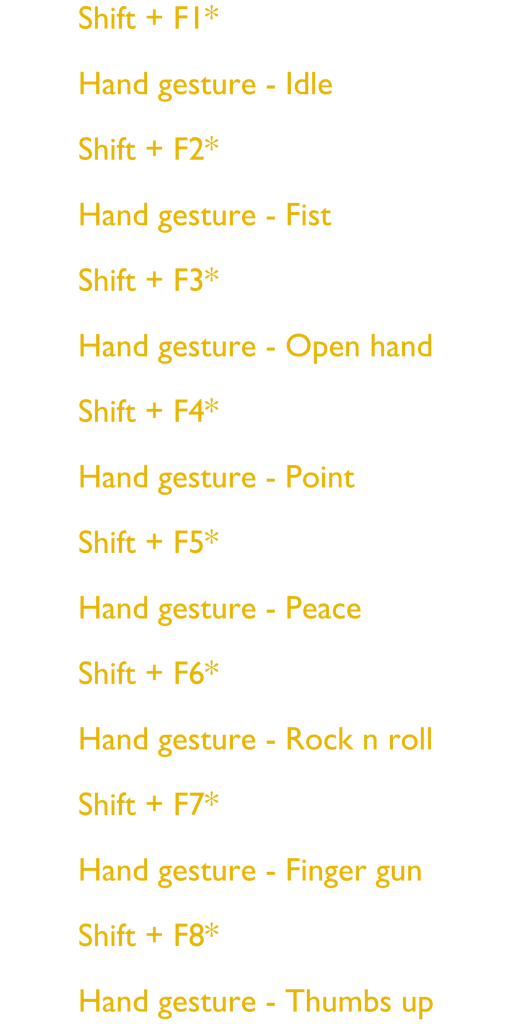 sand crater
Yeah..
I'm asking if there's a key to deactivate all emotes/gestures without leaving a slot empty
clear yew
i just showed you
it's the "idle" animation
it's when you dont have any hand gesture active
sand crater
Is my question that hard to understand
regal hollow
Your question was answered
clear yew
your question doesnt make any sense
sand crater
It does
clear yew
there are only 7 hand gesture that you can map
sand crater
Shift+F1-8
clear yew
"idle" is just when you dont do anything
regal hollow
He answered your question tho
sand crater
You can override all of them
clear yew
it's not counted as a "hand gesture"
regal hollow
Idle is empty
clear yew
emote can't be stopped, they will play until they are done
"idle" is not a hand gesture
sand crater
I've never tried since I've always left the "IDLE" empty
but I'm pretty sure you can override it with a facial animation
clear yew
the that facial animation will basically be permanent
sand crater
Yeah
clear yew
you'll have to animate everything else on your model too then
or it will just stay perfectly stiff if you only change the facial expression
sand crater
Alright, thanks for the answer
clear yew
also what the fuck
why do you want to change the idle animation for the expression ?
just change the blend shape on the "body" mesh directly
 tidal niche
I want to add a sound to one of my gestures, which formats work?
also how do I add a sound
clear yew
.ogg /.wav / .mp3
apparently ogg is the best one but you can use whatever
create an empty game object, put the sound on it, disable the empty game object and activate it with a hand gesture
tidal niche
how do I se that to activate?
clear yew
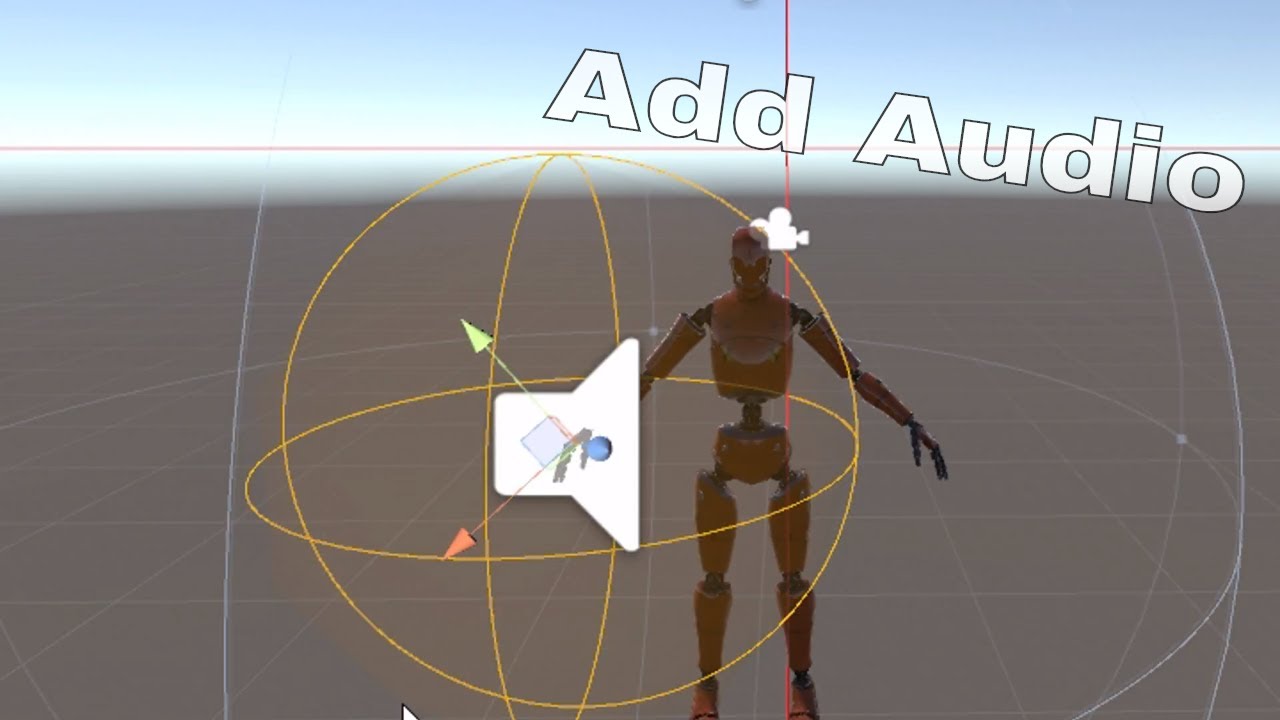
Very basic tutorial on how to add audio to vrchat that is controlled by gesture override / this can also be used for weapons or other objects along with part...
sand crater
I just wanted more facial animations as a desktop user @clear yew
tidal niche
some of my animated gestures are changing really slowly
clear yew
you have one or more hand gesture with more than frame 0.00 and 0.01
tidal niche
two of my gestures have a 30-frame tail-wagging animation, and switching to another takes a bit longer than usual
tidal niche
there any way to bypass that?
clear yew
no
tidal niche
fug
clear yew
you can put an animation directly on the tail to make it automatically wiggle
you on desktop ?
clear yew
the fist hand gesture
allows you to slowly move it
i have an animation that make my tail go in front of me
if i slowly make the fist gesture it will very slowly move in front of me
instead of instantly teleporting in the final position
if you don't want to use the fist gesture, you can also put an animation on the tail directy too and disable the animation component by default and activate it with a hand gesture
clear yew
i'm pretty sure that if you use a hand gesture to move bones that have an animation on them then the animation will just break
what you can do is put an animation that move the tail like you want
and activate the animation with a hand gesture
so you are not directly moving the bones
i usually have a root bone for that
i put the wag animation directly on the root
and an animation disabled by default on the first bone of the tail
nope since i never had that issue
fierce bane
@sullen spruce it's likely an animation made with the avatar selected, and not based on the animator position. You can always manually edit them by double clicking properties (as if you would rename them) and change the heirarchy structure (remove "armature" if it was originally outside it for example)
or just remake the animation from the animator instead
 south eagle
Does anyone know how to use an emote override to toggle something to stay active?
Example, I'm making an animation where bits of armor attach to a model, and I want the armor to stay on after its done
I know it's possible, because I've seen it, but no one I ask seems to know.
regal hollow
There is a prefab for emote toggling
give me one sec
@south eagle https://www.youtube.com/watch?v=5m8RZQd4JAw

This is just a quick tutorial on how to set up prop toggling in VRChat to enable yourself to permanently toggle a prop on using emotes instead of gestures. I...
This is a decent tutorial on how to do it
slim sparrow
Unfortunately it has sync issues
regal hollow
prefab is in the video description
but ye it has sync issues like rokk says
you can sort of fix them
by customising the animator to allow 2 gestures
slim sparrow
I think a more reliable method is mesh particles, as long as the armor pieces only have to be attached to one bone at a time and not weight painted to two.
slim sparrow
Do you need to edit the amount of time the animator is active in the animation in order to do that?
south eagle
The thing I'll be doing will only be used in front of people that'd be there to see it, so there shouldn't be sync issues
slim sparrow
I still don't know how you did that lol
regal hollow
I'm too cool hehe
It's been a while since I did it
I don't think i touched the animator time
I sort of made two toggle systems
and made it so they toggled the same target object
always on or always off depending on what animation is triggered
slim sparrow
Ah, interesting
 rain reef
Hey, does anyone know of a way to animate an image/text on someones view orb? We play a lot of werewolf and our gamemaster would make different animations to tell people to wake up and such. Any help is appreciated c:
slim sparrow
The best way to do that would be a screenspace shader of some sort
rain reef
Do you know of any shaders that do something like this?
slim sparrow
Bendertherobo has shaders that can do that, an overlay shader for example
rain reef
So i make a giant sphere or something on my model without a collider, throw that shader on and add the texture?
slim sparrow
Yes
rain reef
Thank you very much!
nocturne lodge
ive got something weird going on when i try to animate if i start animating on the animator tab the model wont follow where its supposed to be
like i have a object linked to my hand but when i want toggle it it doesn't follow and floats
 hollow perch
is the object attached using rigid body or actually a child of the hand?
I think the issue is physics might not function outside of playmode, so when you start animating the avatar goes into that sitting pose and I'm guessing the rigid body isn't pulling the object in that case.
What I suggest is to try playing your animation in play mode and see if it does what you want. There's a good chance the animation is actually working unless you are trying to directly move the position of that floating object inside your animation
nocturne lodge
its a child of the hand and im just trying to make it popup in my hand
errant oar
Hey guys any idea why when I load my avatar in, sound breaks for the entire server? Sometimes the only way to fix it is for everyone to restart their game
 short mulch
May i get the CustomAnimationOverride for unity plz <33
fierce bane
it's in the SDK
short mulch
oh thank you
fierce bane
VRCSDK>Examples>Sample Assets>Animation> "CustomOverrideEmpty"
make a duplicate and move it to your model path
 fossil aurora
Hello. I'm trying to create a gesture override for a custom sitting position, everything needs to stay static, besides the head, so i can still look around, while in the gesture (because desktop mode). Furniture on what i'm sitting will be added later on, i just need to figure out how to make the pose work in game. The issue i'm stuck with now is this:
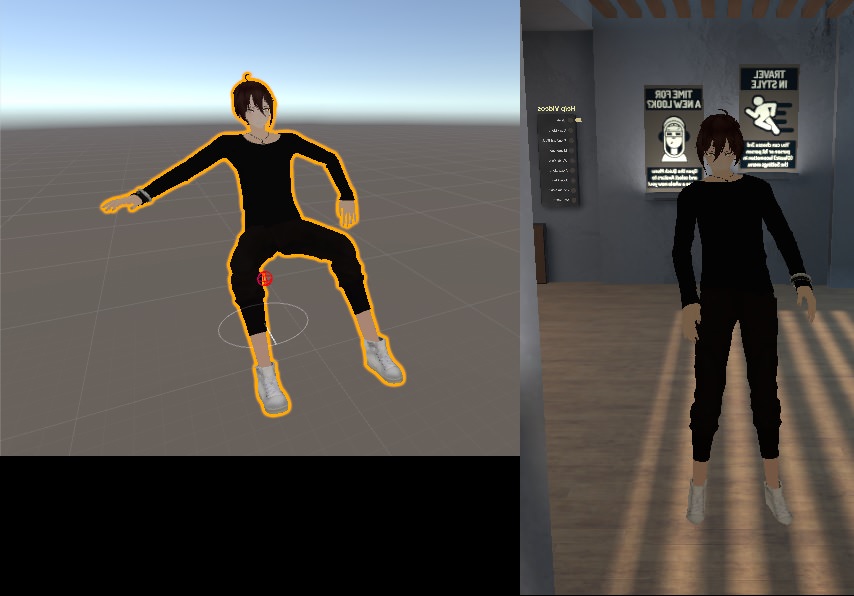
Unity animation VS in-game. It looks like the standing idle animation is overlaping with the custom sitting animation, altho that's just my guess, since i'm fairly new to animations, i learn as i go. Any insight in my current progress?!
slim sparrow
So, one thing to note
@fossil aurora you have separate custom overrides for standing and sitting, right?
And you have overridden the sit animation by changing the "IDLE" slot in the sitting controller?
fossil aurora
I think we might have different views on the wanted outcome: Let me try to specify... There's a avatar in-game by Miku, found in MikuVR world:
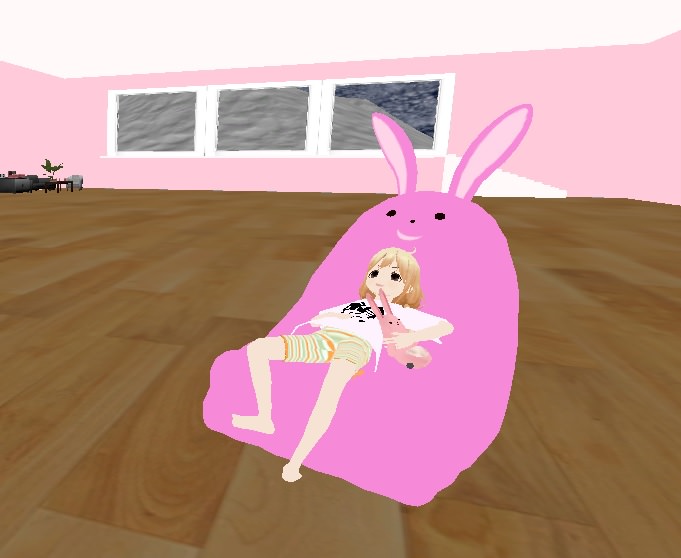
That has a animation override, that while standing, he changes in this static pose in his own arm-chair, and is free to move around with his chair.
slim sparrow
Ohh, I get it. Sorry, I misread
Gesture overrides can only animate your fingers and perhaps your hands.
You will have to disable your own mesh and enable a fake model of yourself that sits down
You might be able to character joint/fixed joint this fake model's head to your real one so it follows the rotation, but no guarantees
fossil aurora
Mkay thank you, that saved quite a bit of headache, regarding this project. On paper it all seemed so simple, summon a prop chair, change animation to a custom sitting one, boom done. Yeah right, Nothing is ever that simple. Thank you again. 😉
 neon aurora
lol i feel stupid, ive been watching many animation vids and literally cant pull anything off smh
errant oar
Hey guys any idea why when I load my avatar in, sound breaks for the entire server? Sometimes the only way to fix it is for everyone to restart their game
 granite sapphire
I guess this is where I should ask somehow
Is there any way in unity to make the particles detect which layer i'm colliding with
And use a different subemitters depending on the layer ?
I want to add a blood subemitter if I hit a player
And just an impact if i hit a wall or smh
 obsidian vigil
Id try to use 2 particle systems on the according layers shooting simultaneously
granite sapphire
Then the second one will travel the player tho would not it ?
obsidian vigil
yes... probably
obsidian vigil
true
spring nova
You can duplicate for each layer after the collision instead of before. The initial projectile can be just one and set to collide with everything, then it subemits two separate detector particles which have size over lifetime, starting out slightly smaller than the initial projectile and ending slightly larger, and those each have their own layer to collide with
 fickle slate
so uhh, i have a question, i have seen alot of people manage to bypass the audio limit by doing something with the animation key. do anyone know step by step? im kinda tired from being stuck at maximum range 30 only.. 😔
 torn pawn
You don't need more than that range tho, unless you want to be too invasive, which is not cool
fickle slate
don't worry, im not using this in a harmful way. infact im sensitive on loud stuff. i just wanna know how to so i can use for my cool animation. the music is chilling sooo... yeah..
fierce bane
The base audio has a ridiculously fast falloff, good for talking and limited else. I've got a giant explosion particle animation that can't have a proper sound setup without doing stupid workarounds etc.
Just because someone wants a different sound range or falloff, doesn't mean they intend to be invasive. (IE I only use it when asked, people are fine with it, or I'm in a private/friends world)
slim sparrow
They adjusted the sound limits in such a way that you can't earrape people anymore, but unfortunately this means that you have to make your sound earrape-levels loud to be properly audible.
 icy crow
you can earrape in an animation
fierce bane
that....explains why none of my audio files seem to play anymore...so another half-baked attempt at fixing something
slim sparrow
No, that was a while ago
If your audio isn't playing remove the ONSP Audio script if you have it
fierce bane
They do not have it, and this was a change as of the most recent update. The upload worked before it. Several sounds and triggering animations for them were untouched
slim sparrow
They did something, but it's very inconsistent. Some of my friends with malicious sounds still work
fierce bane
well that's great...malicious ones working and legitimate ones not...
Sorry, little irritated with this one...I just came back to work on more animations right as it happens, bad timing I guess...
 gentle osprey
is there a guitar emote with a guitar attached to it that i can download?
 frosty moat
Hey all, I have a question about unity, I have a horse that is comprised of two guys in suits, one is the butt one is the front, in Unity I can only seem to designate a single avatar as the animated object, is there a way to make both receive animating instructions instead?, sadly it is not as simple as just adding a second animator to my master empty avatar, as unity does not allow this?
 lavish scaffold
Hi, I am trying to make a cube move from one place to another. The cube moves very slow at the beginning , then speeds up in the middle, and slows down at the end of the animation. Does anyone knows how to make the animation move at one speed all the time? Thanks
torn pawn
@lavish scaffold animatio tab, change to Curves, ctrl+A > rightclick > both tangents = linear
lavish scaffold
@torn pawn Thank you very much! I appreciate it
 lone bronze
Hi guys, I wanted to animate a prop in my hand and I didn't think I had to make a duplicate for it since it's not on the main model. Now my model is broken, is there anyway I can get it fixed ? Or do I need to reimport and do everything again ?
slim sparrow
It's fixable
Alt+click on your armature to expand the whole armature at once. Select every bone, but avoid selecting any objects that you have added to the armature.
In the Transform component in the Inspector, click on the gear icon and do "Revert to prefab" @lone bronze
lone bronze
Will it keep everything ? Dynamic bones, colliders, animations, textures ?
slim sparrow
If it looks fine in Unity but breaks in play mode, your model still has an animator controller set. Unset it.
lone bronze
Okay and this is not required right ?
 blissful grove
Is there a way to do a back to the future DeLorean animation where it reach 88mph and it does disappears like the movie
 forest dove
There's no real way to make an animation trigger based on velocity so you would need to make a full animation that sends the car off then disappears
 cedar thicket
Trying to convert mixamo animations, but it's not working right. uploaded my own model, downloaded as fbx, set as humanoid, duplicated the animation out of it, but the bones look like this:
https://gyazo.com/439fc42c137002b61db0cc011ca94499

can anyone help out real quick?
 sweet zealot
is there a way to make an animation where i cant move for 10 seconds? cause accidentally moving in my animation will mess it up.
spring nova
Thats what emotes do
clear yew
Make it an emote
spring nova
Haha, hour and a half late but within a second of eachother
clear yew
Me sad i was last 
 dry zealot
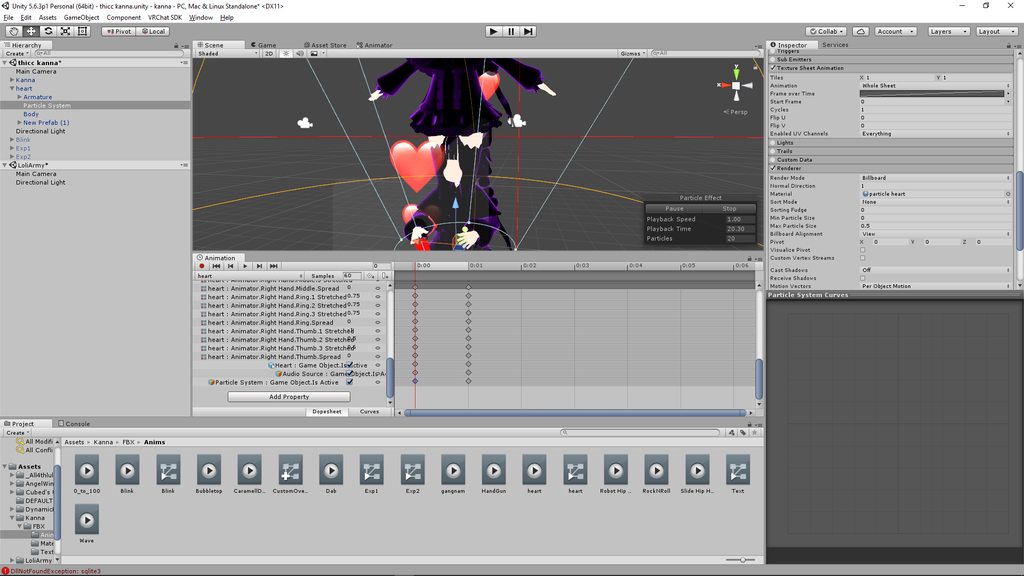
 dire timber
Jw if someone could answer this for me, does the animation controller for the base of the avatar get set by vrchat? I've been trying to see if I can modify the controller rather then the override so I could actually use an animator paramator tied to a gesture
spring nova
Yeah it overrides it, you can't use it for anything. Unfortunately there's no way to use parameters with gestures right now
dire timber
Oof
It's so frustrating cuz I first saw the ability to add the float parameter to an animation of an animator lower in the higherarchy, but it does nothing xD
regal hollow
https://vrchat.canny.io/feature-requests/p/custom-animator-controllers-on-humanoid-avatars canny for custom animator controllers
give it an upvote if you want to support 👌
dire timber
Absolutely did :D
A function I wanted to do with it is have a statemachine on loop that each state turns on a different partical system, then have a gesture that actually let's it flow. So you hold a button, it cycles till you are on the system you want, let go, and all your other gestures are free to trigger said system
But I can't get it to work with the current system
dire timber
How?
slim sparrow
By editing a .anim file or generating one through an editor script, you can enable/disable animators. Interestingly, a disabled animator will still play its current animation, but it will stop cycling through states.
The prop toggling package has an anim file like that built in that you can probably use and then edit the path with F2
So you want to make an animator with one state for every particle system
Every state turns the current system on and all the others off
And a gesture enables emission on all of them
Keep in mind this isn't easy stuff. I made a package for this a long time ago to be distributed among friends (I lost it), and even then it was a pain for people to figure out.
dire timber
What's the value for disableing an animator?
slim sparrow
It's the same way you enable/disable a component, except Unity won't let you do that through the animation tab. It's m_enabled when you serialize the anim files as text.
In your case, you want to have the animator disabled by default
dire timber
Right, then hit m_enabled with a value of 1?
I was trying to do this before, but i couldn't figure how to target the animator and not the game object
Cuz to do what I needed, I wanted the animator in the armature, although maybe I can get around that
spring nova
you can put the animator anywhere
slim sparrow
Yeah, you can target the animator
Not sure how, I've never done manual retargeting through scripts or anything. I just used an existing anim file from prop toggling that already does this.
dire timber
You can target an animator higher in the higherarchy?
slim sparrow
No
spring nova
if you have the toggleprops package, you can just select the animation file you want to enable it, then in the inspector panel use the gear icon top right to add a pulsegate keyframe to the animation. Then you select it and hit F2 to rename it to the path of your animator
use behavior.enabled and delete the other one, it adds two
dire timber
I'll need to experiment with this when I get home
Where could I get the toggle props package?
regal hollow
This is just a quick tutorial on how to set up prop toggling in VRChat to enable yourself to permanently toggle a prop on using emotes instead of gestures. I...
Description of that video
dire timber
Thanks!
regal hollow
no problemo
 dusty plume
Anyone know of any issues or sideeffects with animating the Hip bones transforming up and down? Does it work better in Desktop or does it screw up VR?
slim sparrow
@dusty plume that's called "root motion" for humanoids. It works in emotes and walking animations, but not in idle or in gestures.
It works in idle if you unmap a finger bone and lose your gestures in the process
I mean, it sorta works in idle but it'll be scuffed
Also, the animation has to have "Bake into pose" ticked for all three root motion options, as well as all "Based on" settings set to Original.
 lofty crypt


 muted prairie
that's a city of death if i've ever seen one

 undone glade
Anyone know anything about that whole Fixed Joint/Fixed Point thing that can probably send me how I need to animate it? I sort of need a refresher course. Unless it was one of the many things that were "fixed".
sand crater
Any pointers on how to go about animating ears on models with ears?
undone glade
Probably easier to make dynamic if you can
sand crater
in Blender?
undone glade
Unity
undone glade
Unless you wanted to do things such as folding ears, lowering ears, etc. Sort of stuff
undone glade
Could probably still do that in Unity by moving bones and setting them the keyframes to 0:00-0:01, or if you're in Blender you could try to make them into Shape keys, which if you manage to do that makes the whole process easier when it comes to animating i'd say
clear yew
@undone glade here https://m.imgur.com/a/XWzPKZ7
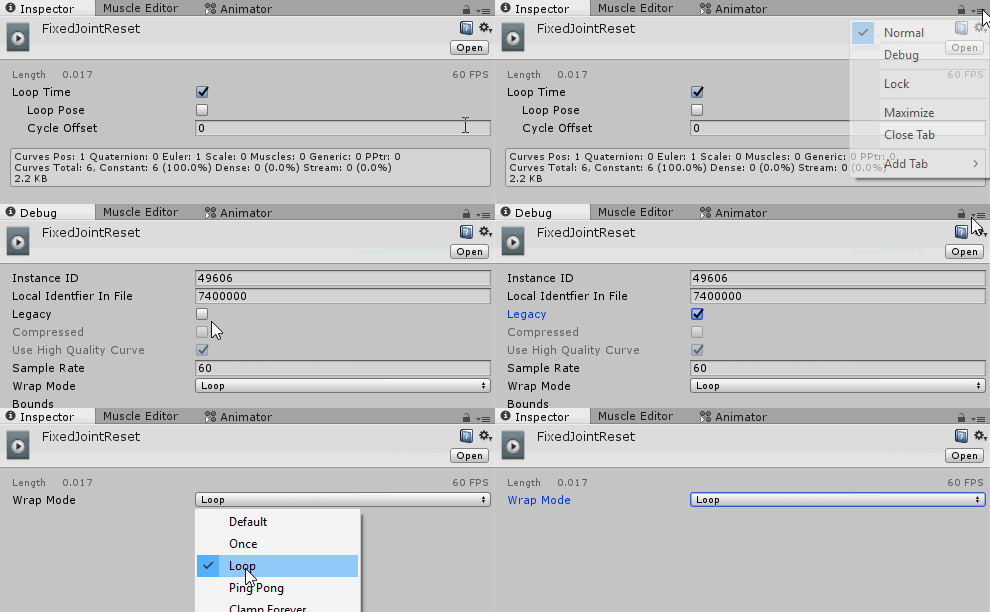 clear yew
What are you talking about?
obsidian vigil
fixing an object in a world position
can be done by
placing it in an empty object
applying a fixed joint
with no reference body
done
but im guessing the animation is to reset it after youve moved while its on correct?
clear yew
Thats exactly what my album is explaining
fierce bane
yeah...it's never clear in discord that it's actually an album and not just a single image (other than the /a/)
clear yew
Pretty annoying tbh
 trail hazel
can anyone help me how to get balloon pop animation?
 uneven wing
How do i add these animations to my avatar in unity to override the normal? i dont wish to animate but to use animations i found
to override emotes
 fiery bough
anyone know why audio sources in unity dont make sound
but when i upload the model the sound works fine in vrchat
obsidian vigil
they work in unity
fiery bough
oh
fiery bough
dude unity has not been too friendly to me recently
obsidian vigil
i may know why tho
fiery bough
everythings been messing up recently
obsidian vigil
neato 👌🏻
fiery bough
it HAS to be logarithmic
obsidian vigil
😄
fiery bough
the hell....
 fiery bough
xd
you could just have the distancing screwed or you could have it in the wrong place
like the audio source sometimes spawns way far from your avatar
obsidian vigil
nope
thats the weird thing
everything worked before vrchat had its latest update
fiery bough
lol
obsidian vigil
😅
fiery bough
when was this latest update exactly
obsidian vigil
The one with the Status
fiery bough
oh
obsidian vigil
Before that came out everything worked fine
fiery bough
are we allowed to post screenshots here
 fiery bough
i was gonna make a dope particle animation
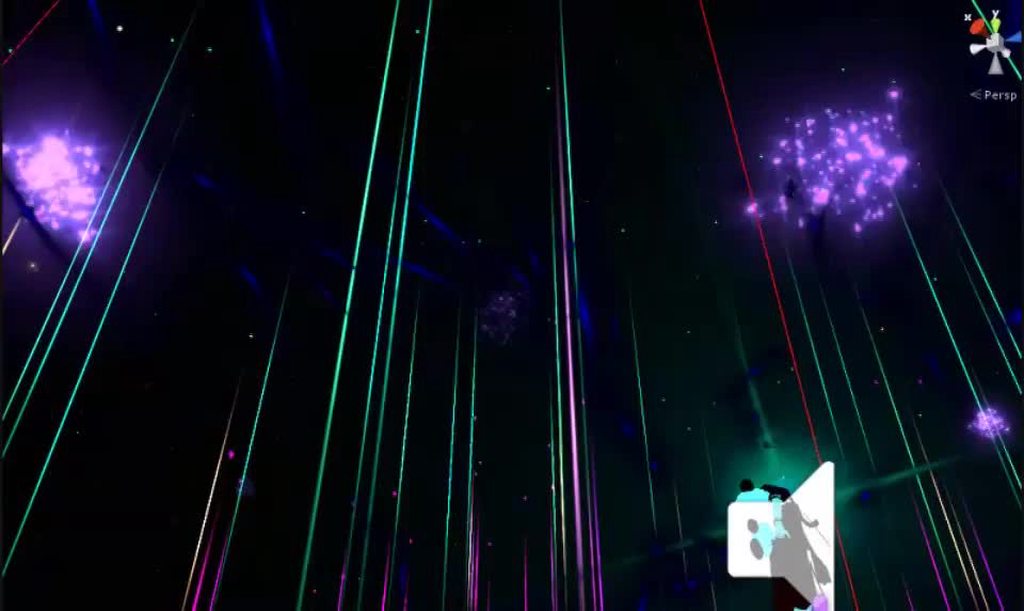
but the ball making the giant space is too big xd
feelsbad
you guys know any way to work around it
some people told me to use a modded sdk but i dont want to brake any rules
spring nova
Particles don't count for size
spring nova
yes, make it a particle
fiery bough
with a space shader on it
clear yew
Or disable it by default
fiery bough
i did but it still doesnt appear
spring nova
considering it's something huge like that, I wouldn't want it active all the time anyway
fiery bough
actually wait i think something is messed up when i upload it let me try something
no it wasnt meant to be active 24/7
it was just for the animations
spring nova
anything deactivated by default then activated by gesture won't count
fiery bough
yes but i think that the ball even when sized down doesnt appear let me try hold on
fierce bane
Just making sure here...are you doing this in an OPEN map or a room when testing in VRC?
fiery bough
private gaia night xd
fierce bane
had to ask just in case XD
double check your animation and make sure the 0:00 and 0:01 are both enabling it. And that it is off by default.
Also double check the override and that the override is on your avatar
fierce bane
screenshots of the setup might help people pick out the issue, I have to head to bed, good luck
fiery bough
i think the shader might actually be the problem
obsidian vigil
@fiery bough what shader are you using?
fiery bough
starnest
obsidian vigil
wth is that XD
fiery bough
its like a galaxy except it actually sparkles and doesnt look like a crappy png
fiery bough
you have to mess with the value a lot tho
obsidian vigil
is it visible from the inside in unity?
fiery bough
yes
obsidian vigil
hmm
fiery bough
i downloaded a seperate sphere so it could be visible from the inside and out but ill try without the shader to see if it works
fiery bough
if you use the sphere in unity
its invisible on the inside
so i literally googled mmd ball
and donwloaded it xd
and it was the shader that was invisible
fiery bough
the ball is there without the shader
obsidian vigil
someone with shader knowledge should be able to tell you where
but basically you need to edit it
and add 1 snip of code
then itll work
obsidian vigil
nah
fiery bough
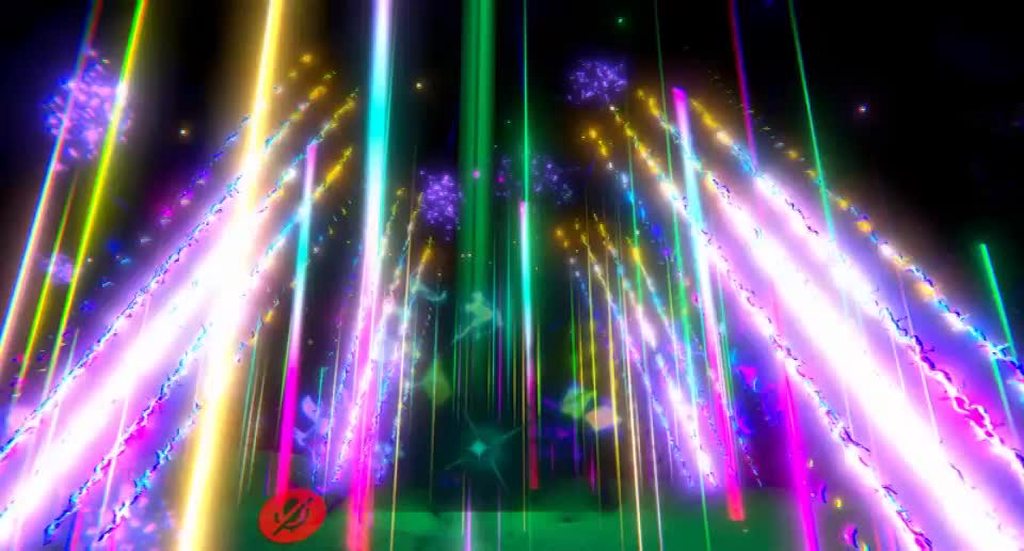


 clear yew
Why dont you use a normal unity sphere ?
fiery bough
not visible on the inside
undone glade
@clear yew thank you, found where I went wrong with it :+1:
fiery bough
and it doesnt matter as the problem is in the shader, not the object
fiery bough
did u have any problems with the visibility of the shader on the inside of the sphere
and if u remember mind explaining how u did it xd
clear yew
I used the double sided version of it
clear yew
Dunno
It was in the unity package for starnest
fiery bough
all i have involving is starnest, starnest hue, and starnest mask
clear yew
Your missing a lot of them
regal hollow
You can use scripts in vrc
 turbid beacon
im using a script
but it just keeps going around instead of staying in one spot and rotating
#pragma strict
var spinx : int = 0;
var spiny : int = 0;
var spinz : int = 0;
function Update ()
{
transform.Rotate(spinx,spiny,spinz);
}
turbid beacon
i could .-.
regal hollow
also you cant use custom scripts in vrchat
regal hollow
no problem, you can just select your object and go into the animation window
if you are animating the actual avatar then make sure to do it on a duplicate
turbid beacon
okay thanks again
regal hollow
no problem
turbid beacon
you were a big a help
turbid beacon
i still cant seem to make it stay in the same spot
and just rotate
it spazez out
(using animation > rotation)
 dark walrus
I have a problem.
I want:
2 Humanoid animations.
2 Avatars.
1 Main avatar 1 Mini avatar.
Main avatar dont dance. Mini avatar should dance
I give the mini avatar an dance as Animator, works fine in unity. It gets removed in VRChat and mini avatar is always sitting in a T-Pose.
Any solution for it?
dark walrus
Fuk, any idea how to convert an existing Humanoid animation to my Mini avatar, in case of that only the Mini avatar dance?
 frozen swift
when making my particle system simulation space world, my particles come out of my character feet? even though its parented to my wrist bone?
regal hollow
There is a bit of a trick to fix that
you want to use fixed joints, which are components in unity
@frozen swift try watching this video https://www.youtube.com/watch?v=eu3OAkkgHHM

Want props? I gotchu. Stressed as shit over work particles in the armature not working? Time to fix that issue of yours fam. Join my Discord community SenSqu...
frozen swift
ahh ok thanks 😃
dark walrus
Well if nobody is answering me / can answer that question i may have todo it from scratch.
icy crow
are you using the animator properties, or the bone movements?
dark walrus
Bone i guess.
tulip crest
@dark walrus If bone properties, refactor the animation bone hierachy, it is simple, press F2 or double click to rename the key, but may cost you a lot of time. If animator properties(like start with Animator:), you can move the animation to the mini avatar, add Animation component, change animation to legacy animation, disable the Animation component by default, and in your parent avatar, use an animation to enable mini avatar's animation component
 wind swift
Is there a guide anywhere on how to make a weapon do an animation after its drawn, I know how to add a weapon to my character and particles and ect, but for example: how would I make a minigun barrel spin while firing?
spring nova
There is a way to enable just an animation on it's own, but that's not what you'd want in your case because when it stops, it doesn't reset it just pauses wherever it is. Instead what you want is to just have a duplicate of the minigun with an animation that's shooting. The gesture that enables that would also turn off the idle minigun, and vice versa
wind swift
I see
So similar to how I would make a sword look unsheathed when drawn, by having two of them and just disabling the one that isn't equipt
spring nova
Pretty much. And you can put the firing one inside the first so that you ha e to activate both at the same time, if you want
wind swift
Last question about this, i've had issues importing weapons with armatures into unity and putting them on a character, how would I get a minigun with bones in so I could spin the barrel?
last time I did this unity considered the weapon the avatar and not my character, despite everything it was weird.
usually I just add a weapon mesh
spring nova
This happened when you tried to click create animation?
wind swift
It was when I uploaded, everything seemed fine, but upon uploading and going into the game it screwed my character up it was hard to explain
it was a while ago, when I didn't know as much though, so it was probably just a parenting issue
i'll give it another shot and see if the problem persists
spring nova
When you click create animation, bring the thing you want to animate outside your model first, then you can bring it back in after it has an animation. Idk if you know this or not, but it sounds related because if you don't drag it outside, it will create the animation on the model itself instead
wind swift
interesting
so i'll drag the barrel out before spinning it
thanks for the info i'll give it a shot
sand crater
Is it me or is it impossible to take an animation you've created and edit/make changes to it afterwards?
and if it is, how do I open .anim files so I can edit them?
thanks in advance! 😄
fierce bane
@sand crater to edit an animation file, make a duplicate of your avatar and drag/drop that animation directly onto your duplicate. It should allow you to access it in the animation pane after doing so and clicking on the pane.