#animation
1 messages · Page 84 of 1
 rain reef
kk
Thanks a lot !
So once ive set the layers up i can reuse this scene whenever i need to disable player collision?
 slim sparrow
Yes
rain reef
tyvm
slim sparrow
Or the whole project
 frosty jacinth
hey guys, quick question, i'm currently trying to make my model use multiple face meshes as shape keys, so far the only way i'm seeing to do this is to shrink the meshes to 0 and resize them to each shape key. only problem is that the shape key is animating the whole transition of one shrinking to the other upscaling. is there anyway to make the shape key play only frame 0 and frame 1 or first and last only instead of a transition between the 2? or maybe an easier way to do this? lol
this is in blender btw sorry
 spring nova
Are you doing this on gestures or as it's own animation inside your model?
 pliant dust
I don't suppose anyone has any tips or tutorials on making a good Idle pose, do they? I mean, the IK system appears to be forcefully adjusting my idle pose (especially the legs and knees) like the Kool-Aid Man adjusts walls.
slim sparrow
Yep
There is no way to do that right now unless you unmap a finger bone
If you're OK with losing hand gestures @pliant dust
pliant dust
Well drat.
slim sparrow
The game's IK plants your feet onto the floor
Floating in particular is hard
So is just about any idle that affects legs
pliant dust
I guess I just have to be happy with the "somewhat okay" result I have right now then.
Thanks for the answer, Rokk.
I'm trying to do the finishing touches on a floating avatar at the moment, (well, adjusting it anyway) and ran into this. After trying five times and not seeing any results, I decided I should probably stop ramming my head against a brick wall and try asking.
slim sparrow
Well, there is another thing though
If it's a floating avatar, you can make the legs just touch the ground nearly
You can use an empty game object to raise the avatar up @pliant dust
If you put the avatar descriptor on an empty game object, you can put the floating model inside it and raise the model up in Unity.
pliant dust
I did it by adjusting the origin point in Blender. Carefully. Very carefully.
slim sparrow
This will make it float at a fixed height
I guess that might also work
But the game object method is easier generally
You can then put an animator on the parent object and set the "avatar" field to the avatar belonging to the child model
pliant dust
(If you do it wrong in Blender, bad things happen once it lands in Unity :< )
pliant dust
It turned out pretty good. The real problem is that once I stop moving, my posture becomes a bit strange for a second or two.
slim sparrow
Yeah, that too. I forgot why that was
It has to do with IK being re-initialized when you stop moving
pliant dust
(shakes fist towards the heavens) IK! I take it a lot of these leg issues go away (or get replaced with new issues) with hip and foot trackers?
 craggy sage
is there a way to only animate the elbow? and not the rest of the body?
slim sparrow
@pliant dust if you have full body tracking, your entire idle animation is nonexistent basically
Your whole body is just controlled by the trackers
Can float with a playspace mover
A really easy tool that you can install in 5 seconds and use ingame seamlessly
pliant dust
Ah I see. Thank you again for the explantions!
slim sparrow
When you walk, your IK is temporarily replaced with a solver that does only your head and hands though
But that'll probably be made more seamless soon
craggy sage
like would i have to animate the upper arm and have it ignore IK?
if there even is a way to do so
pliant dust
@craggy sage Easiest way I can think of instantly at the moment is to make an Emote?
craggy sage
@pliant dust well i have VR so i need it to a gesture
im trying to make the IK more fluid, atm its very rough around the edges having the elbows not match IRL
or stabbing into me
slim sparrow
You can't do that unfortunately
craggy sage
so i cant animate a single bone?
the IK would over ride it?
or no?
so the IK wont over ride it?
craggy sage
would seem if i animated the upper arm, the ro. . . oh
slim sparrow
The IK ignores your animations entirely for the upper body
slim sparrow
Because this way we can have several types of idle animations without breaking the model for VR users. Final IK isn't made to alter settings by using animations
You're meant to alter the IK settings itself, which we cannot do
And have no hope of ever doing now that they took Final IK off the avatar whitelist
craggy sage
guess i will just have to wait for actual full body tracking
slim sparrow
Or at least the responsible component, VR IK
 clear yew
huh
you can use a animator component
for an idle animation
except for arms/legs if you have vr/fbt
 devout igloo
Does the female animation set differ very much from the male's?
clear yew
any tips for making a pointing laser?
trying with particles but all i can get is a flickering light and i ran out of ideas
clear yew
@devout igloo just the sitting animation
@clear yew You need to get a shader for that
most of them are private tho
what's the shader called?
 fierce bane
@clear yew you'd probably want a transparent shader used on a simple cylinder mesh. I think cubed shaders had one
you...might be able to get away with a stretched standard particle too...
0 start speed, local simulation, 1 particle max, 3d start size using...z (?) as the stretched line
clear yew
thing is i dont want the laser visible
only the red dot
i'm trying with particles collision but it dosent work well
clear yew
will the VRIK script be back ? 😦
slim sparrow
@clear yew no
It was an exploit
Instead, upvote the "custom animator controllers for humanoid avatars" canny
People are casually talking about the VR IK triggers as if they were super normal things to use
😂
slim sparrow
Yeah, most people didn't think of it which is why they spread it around so casually
I'm amazed that this was in circulation for months without any abuse
clear yew
how did people even abuse it though
slim sparrow
I'm not gonna explain how, but you could basically do anything you can do in worlds
Use any component in the game, whitelisted or not
Use your own VRC_Triggers
I've seen people spawn web panels with them, I really hope that isn't what prompted the devs to remove the panels
The triggers are basically as close to custom scripting as you can get in this game, so you can see why this would be extremely bad
And on avatars, too
If a world pulled that stuff they just wouldn't get approved
clear yew
@slim sparrow ive seen people spawn visible lamps that anyone can grab
They lag the world out
slim sparrow
Yes, that is one thing you could do with the IK triggers, but I think the lamps you refer to are done with modified clients.
clear yew
@clear yew if you want the good laser thing you need to get the good shader
slim sparrow
I found a red laser shader, but it didn't show up on white surfaces until I inverted the colors
So now it's a cyan laser
No pun intended, CyanLaser.
clear yew
You need to get the good stuff
slim sparrow
I already have the good stuff my dude
I'm telling you this one didn't show up on white surfaces
Unless you have a different one that you are willing to send
clear yew
Nope
Lol
well what "good stuff" are you talking about?
imma test these out because ive never actually used 1 of these

managed to make one with particles
but i would pref something that dosent hit performance as much as particles
slim sparrow
Yeah, I thought of using particles too
But particles aren't laggy @clear yew
Not too laggy at least
Depends how many you're emitting and how high quality the collision is
clear yew
you need alot of particles to make it work
slim sparrow
Your entire avatar is probably far laggier than that one particle system will ever be
Particles are almost zero cost if they're not rendering
You're using a subemitter right?
clear yew
yea
slim sparrow
That one subemitter is the only thing being rendered
The particles themselves aren't laggy
What's the max amount of particles?
clear yew
on sub? 50
slim sparrow
And how fast are you emitting them? Emission over time etc
clear yew

and on sub i use this settings

oh
u just wanted a dot
nvm then
lol
yea
is there a better way to make it?
i dont know how to use this thing but this is what i made https://gyazo.com/43e5378a391ce0e10014ad2e9cfe5e06

i dont want people to see where it's coming from
why not
what's the point in being a sniper if they see you?
What are you shooting them with?
I hope you're not shooting people with things that'll get you that #1month
nah
 slim sparrow
That's cool
clear yew
need the laser to help with aim since scope is not very accurate over very long distance
clear yew
you can use a spotlight with a small radius
and unlimited range

is that custom made Kuro ?
i made the crown version of the texture
because i saw a lot of people with that crown
this one is different
i have the psd file for this
or you mean the shader?
my shader is different from every1 elses because mine actually renders black properly
and it has a high render q
it's just a capsule mesh
its the same as the armband every1 uses
that default capsule mesh
you just throw any texture on it
I don't think many people would be walking around with this version of my texture
only a handful of people have access to this psd file
lol
i was thinking of the crown mesh
i saw it a lot of time
exactly the same appearance
its not a mesh
its a texture on a capsule mesh
lol
it's not a crown mesh
XD
crown Object if you prefer, doesnt matter.
 ashen kraken
how can i move my avatar up so its not in the ground in a emote
slim sparrow
Raise root transform up @ashen kraken
In the animation
And make sure all Root transform/rotation options are ticked to "Bake into pose"
With orientation set to "original"
ashen kraken
is there any video explaining this ?
slim sparrow
Try a basic animation tutorial perhaps
You need to set the Root T.Y property (or Root Transform Y in Muscle Animation Editor)
Set it to 1
This property determines where your hips are
 timid prawn
I know we can toggle props with a emote but can we hide/unhide mesh too ?
fierce bane
same thing, it's just enabling/disabling a visual component (mesh renderer)
@ashen kraken I know it's a bit late, but make sure you make a duplicate of your avatar to make animations on, and not make them on the actual one.
 severe moss
Would anyone happen to have a greyscale sharder they could let me use?
SHADER*
I am trying to make and emote look sadish. if that makes any sense'
timid prawn
Not as a gesture but an emote
 old mesa
can somone explain to me how i can get glowing lights like red and blue ones for a police avatar?
 muted prairie
Particle with emission, color over time probably
muted prairie
You can create it yourself, it's very easy and simple in this case
It's also better to make it yourself to learn how it works, then you can make more complex systems after that
old mesa
ive just never done this before so im very confused on what to do
and yt isnt helping much sadly
muted prairie
Look up particle systems Unity in google
their website has a ton of documentation
then look at the particle system in the inspector
there's color over lifetime and emission
those are the two main ones you'll use
spring nova
this is my go to video https://youtu.be/FEA1wTMJAR0

Udemy: http://bit.ly/BRACKEYSMEM Everything to know about the Particle System in Unity! ♥ Support Brackeys on Patreon: http://patreon.com/brackeys/ ● Learn m...
muted prairie
And it's only 10 minutes long 😮
old mesa
ah ok ty
timid prawn
You need to learn step by step. Event if see something online you cant apply that right away
 bright sparrow
uhm, does anyone have like a pose/anim for crouching idle and crouch idle walk fwd or how to make one?
spring nova
Yeah, this has some good crouching https://assetstore.unity.com/packages/3d/animations/magic-pack-36269

Create, rig and animate your characters with Mixamo !
Rain down fire and ice or heal wounded allies with white magic using these 55 high quality magic themed animations from Mixamo's professional motion capture studio.
Features:
• 55 Animations with Root Motio...
If you're in desktop, your arms will be in a really exaggerated combat pose, but VR won't use the arms
 tulip crest
Can anyone tell me how can i make a left hand triggered only animation in my avatar?
 wild cedar
Yo boys and gals, anyone know what the bass effect is called that people use?
clear yew
so onlythe left hand can make animations ? currently not possible
wild cedar
And also, I have an issue with my audio on my animation
It wont play at all, spawned a gameobject with the song in it together with my particle effects, nope
Put the song on my avatar and activated the song together with the Game Object spawn
Nope
I have no idea what's going on, so strange
It works in Unity, I can hear my audio. But in VRchat it seems to only play my particles
I am le confuzzled
Tried like 2 hours to get it to work, but so far nothing has worked 🤔
 undone glade
Did you just drag the music or did you make an audio source?
tulip crest
yes, i want press left hand palm to show something, and right hand palm to show another thing, but i can not figure it out, i've tried to override avatarcontrollertemplate with a custom animation in LeftHand layer, nothing changed, it seems like the template is just a sample, vrchat is using an program inside template to do the real thing
wild cedar
@undone glade I dragged and made an audio source
undone glade
Well if your audio is on the audio source it should be able to play. Such as playing the scene and having the camera near.
wild cedar
Yea I tried that ;(
 main geyser
How do I get music and particles to play only when I’m using an animation?
 royal summit
Have em disabled and have them reenabled in the animation that u want them to activate in
 serene hornet
Hello everyone ^^ I found a sick nuke for unity with scripts and everything. Some Avatars are using it already. I want to add it to an Avatar too but i dont know how. Can anyone explain it to me in detail please? I know how to add weapons and gestures and stuff, but this is something else.

thats the unity pack for it
slim sparrow
Scripts don't work on avatars
royal summit
^^^ u wanna dump the prefab on your avatar, remove all scripts inside the prefab, Disable it and re enable it in a gesture/emote animation. U may wana test if it will work correctly without the scripts too.
slim sparrow
Yes
royal summit
Probably a good move to remove some of the sub emitters, lights or particle lights in it
Or not use it
slim sparrow
Just remove the lights in general
That will make it lag less
Or perhaps not at all
 lunar snow
how do you toggle gameobjects with emotes so they stay on after the emote
slim sparrow
Toggle props
lunar snow
and thats done how
 regal hollow
there is a prefab for prop toggling on this discord I think
Just search and you should find it
you basically use an emote to toggle the state of an object on or off
it has some sync issues as late joiners will have it off by default if you toggled it on before you join
so if you try turning it off it will turn on for them
You can fix this by editing the animator to allow 2 emotes to be used
one for always on and one for always off
clear yew
there is even a video explaining it
and a link to the toggle prop package

This is just a quick tutorial on how to set up prop toggling in VRChat to enable yourself to permanently toggle a prop on using emotes instead of gestures. I...
 surreal iron
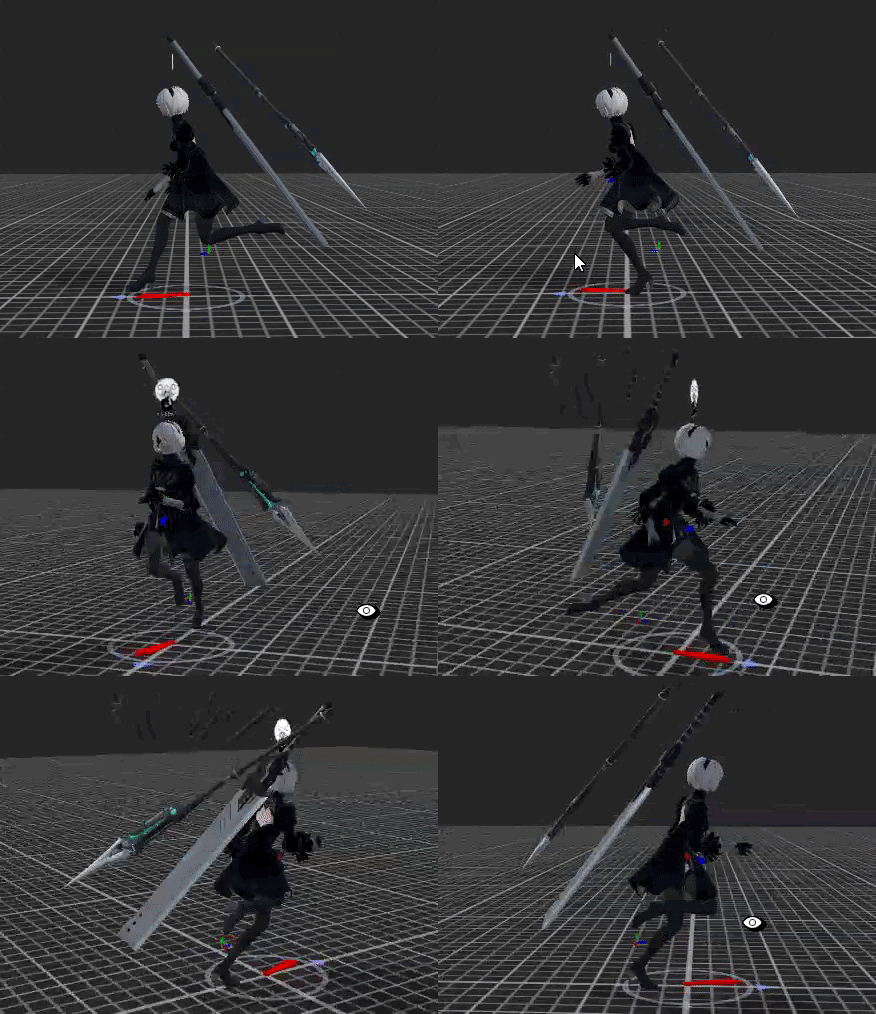
https://gyazo.com/084cdc2ede0d0ee8e170dfcb4e18894d sooooooooooooo.... went to test out the run cycle that i made... it makes my walk animation look bad again... should i just replace all the default run animations to the one i made?
 pliant dust
If you're making your own, yes. I suggest making your own full suite so that none of the default "tweens" assert themselves in odd ways.
pliant dust
Ha ha... good luck! (It's so much freaking work.)
surreal iron
ikr 👀
didnt work
oh... forgot to replace the crouch animations as well
@pliant dust do you know the diff between "sprint forward" and "run forward" ??? they seem to be the same to be
slim sparrow
Sprint is used in very fast worlds
It's based on your forward speed
There's walk and run in normal worlds, easiest to see on desktop
Sprint is in faster maps, maybe Hotel Mirai
surreal iron
oh
strangely enough my walk back animation is working fine with the walk animation, but looks bad when i move forward after adding the run cycle
pliant dust
Yeah. Sprint only has one direction too.
surreal iron
soooooo... > walk back and run back are somewhat linked together so maybe walk and run forward are linked as well... > for testing purposes i put my walk back animation as my walk forward one, and the run back as my run forward one, strangely enough, when walking backwards, my avatar does a mix of the walk and run animations.... same for the walk and run forward ones... while the running cycle looks fine, the walk ones looks messed up.... any way to fix it?
https://gyazo.com/1b8d3729b10ea6deefd5721a7ec250d3 walk cycles looking bad
https://gyazo.com/d5bf295eba75360dbb72faa7fcd49c03 while the running cycles looks good
pliant dust
Might have to speed your walk up a touch. VRChat avatars move dreadfully fast, even when walking.
surreal iron
nonono
https://gyazo.com/5d6df5751ea168c7a4d77626bd033322 this is my walk animation, it looks like this in game if i dont add the run cycle as well

as soon as i add the run cycle to the avatar, it looks bad, glitched, wobbly
pliant dust
Are you sure you're assigning your animations right? Also, how long are they?
surreal iron
https://gyazo.com/39f733612e7a847275b5925379fb4dad for testing purposes, as soon as i remove my run cycle and add the walk one to both run and walk forward boxes, the walk/run works perfectly fine on their own, when i add one or the other, it messes up my walk cycle

walk cycle has 28 frames, the run cycle has 18 so it can go faster
pliant dust
You're using the same two animations, huh.
surreal iron
ye for testing purposes
because idk which default animations might affect my custom ones
pliant dust
That's not really testing when the output is the same for multiple events.
surreal iron
as i said
as soon as i remove the run cycle from the run forward box
and add a walk one
it works wonders
if i leave it empty or add anything in there, it will interfere with my walk cycle
pliant dust
Tweener's probably getting confused somewhere. Sorry, don't really have a suggestion here.
slim sparrow
I'm off VR and can give my input now @surreal iron
The game does not switch between walk, run and sprint. It blends between them.
Using a blend tree
So both animations are actually playing at once, with different weights on them.
We could fix this with custom animators on humanoid avatars however, make sure to upvote it on the Canny
You could change the blend tree so it instantly switches between walk and run, rather than trying to blend the two.
surreal iron
ohhh i knew the walk/run animations were connected somehow
so how do i change the blend tree? how do i even access it? 
slim sparrow
You can't.
That's the problem
We cannot change our animator, we can only override the existing animations.
That is why a lot of people have been asking for custom animators lately.
Right now, your only option is putting walk or run in both slots or dealing with the jank
slim sparrow
If we had access to our own animators like generics have, we could change this
Thanks
surreal iron
sooo... does the emotes part also have issues with custom ones?
slim sparrow
No, why?
@surreal iron
There's just a rather specific thing you need to do in order to get emotes working
You need to click the animation in your assets, and tick "Bake into pose" for all Root Transform/Rotation options
And set all "based on" options to "Original"
surreal iron
good, guess ill do an emote then while we wait for the animator changes
thanks a lot rokk and alaylle for the help so far
pliant dust
Huh... they blend the walks, runs, and sprint together?! You learn something new everyday.
surreal iron
so... youre pretty much screwed if you want custom humanoid animations
 upbeat willow
im trying to have two gesture overrides on the same avatar and the second one wont do anything and my fingers will just spaz out
regal hollow
Make sure your override is only 2 frames long
 stuck spade
heya, any of you know where i get that animaton where the model bends a bit the legs down and walks like drunk but dance? Idk the name and explaining isnt my thing uhh.
muted prairie
Check mixamo, i believe there is a drunk walk anim
slim sparrow
Yep
 icy crow
do you mean the bernie walk?
devout igloo
I would like to add an animation of bones on my avatar that aren't technically "supported" by VRChat, but when I navigate to the model's animator in the animation window, the extra bones aren't listed as options.
Do I have to do something special to get them to show up?
Is it because they have a different bone group than the rest of the body?
 stray sinew
How do I go on with converting a .VPD(MMD pose) into an idle animation for Unity?
 covert girder
@stray sinew you need to export model with this applied animation as fbx, after changing this model to humanoid or generic(not-humanoid) in unity you will able to use this included anim as idle
stray sinew
🤦 I'm getting the same answer others are giving. vpd is a pose and not an animation vmd is the animation. I know how to convert a vmd into Unity. I don't know how to get a vpd into an animation as the setup is not the same as vmd unless I am completely missing something.
covert girder
@stray sinew import vpd pose, select armature, change to Pose mode, select all bones by hitting A, press I and choose LocRot, that will create an animation with local rotation of bones
devout igloo
Does anybody here have a hand gesture for grabbing glasses with your thumb and forefinger?
covert girder
@devout igloo you can use shape keyses for this
copy glasses mesh and pose them to the hand, apply Hand weight(to copy) and delete Head weight(from copy), than resize this copied glasses to 0.0001 scale
create a shape key, scale main glasses to 0.0001 and resize copied ones to 10000
than you are able to use this shape key in unity for gesture
-
- -or - - -
have glasses as another object in unity, put it inside head bone inside of armature of model, shift+d them to get a copy, and pose them inside hand bone, and with animation for gesture Disable main and Enable copy
- -or - - -
stray sinew
Have you tested to be working in Unity? I'm not getting a model to work with it 🤔
 bronze peak
ok, if you have an answer please ping cuz my normal notifications wont save for some reason RN, anyway i can not figure out why my particles or not working correctly, i am making a simple single shot blast, and it looks fine in unity, i have parented this particle to a gun in unity, i have it worlds so after it shots they can not control. looks fine in play mode i move gun particle shoots out of barrel still, i upload to game, and it shoot to the right and is attached to where my head is turned, like it will always shoot out almost out of your peripheral view?
 round yacht
Does anyone know how to make an army march emote?
stray sinew
@bronze peak try rigidbody/fixedjoint combo

Had to re-upload because of audio being too quiet should be fine now. I forgot to mention it in the video, but Murmur also answered questions I had and helpe...
 sand crater
I've got a more technical question which is more understanding of how VRChat and animations work and not asking how to do something
Alright, so the MMD dance worlds, I was wondering if it is possible through the use of Unity to maintain the eye position (the source where players view out of) to follow the model itself while it does the dance?
or is that simply impossible due to the lack of support from either Unity or VRChat SDK?
pliant dust
Can't be done currently.
pliant dust
Well, if there is a way, it would be through the chair/vehicle stuff in worlds. Because sitting animation while keeping field of view updated. That's out of my field of expertise, though!
sand crater
Yeah, I'm also out of this field, which is why I came here to ask
the MMD magic blows my mind
devout igloo
So I have a bone structure that's not part of the usual bones you use for your character, meant to allow animation of a large glove that goes around my hands. The bones are parented to my hands and look/wok fine in blender (in post mode they all move fine and work as intended) but they don't show up in the "animator" tab when I try to add them in the animation window.
giant glove fingers: https://i.imgur.com/a1hdcVa.png
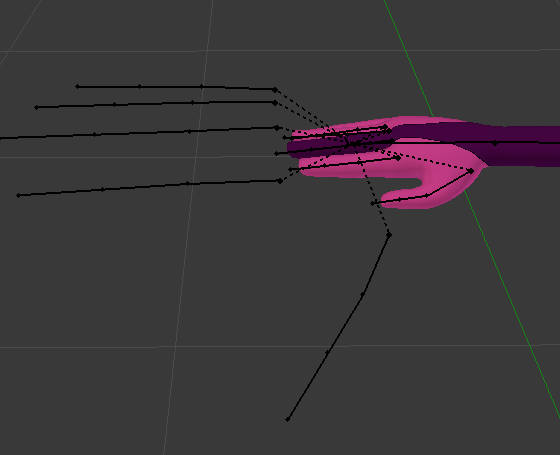
nothing in the left hand area (all fingers are already selected) tho https://i.imgur.com/uMtCvc8.png
 pliant dust
Those are some huge glove fingers. Have you tried rotating them while making your animation with the "record" button on?
devout igloo
hm, no I haven't
pliant dust
Give that a shot then.
devout igloo
Okay so that works, but I want their animator settings, not necessarily their position/rotation if that makes sense
pliant dust
It's how I made my skirt move nicely when I made my floating walking animations, anyway.
What exactly do you mean?
devout igloo
like you have to navigate to the "animator" to get those "left shoulder down-up" parts and stuff
but rotating them just animates their transform settings..
Is there a way to get the animator settings like the normal gestures use?
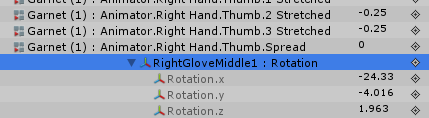
So it would be Animator.Right Glove.Middle.1 Stretched instead of the transform settings it's adding
pliant dust
Oh that. I've no idea there.
devout igloo
Thanks for letting me know about the transform settings tho. Something tells me that'll work, I'll just have to do different values.
I was hoping I could just grab all the glove finger bones' animator settings then copy/paste the animator settings from the original finger bones into the glove bones'
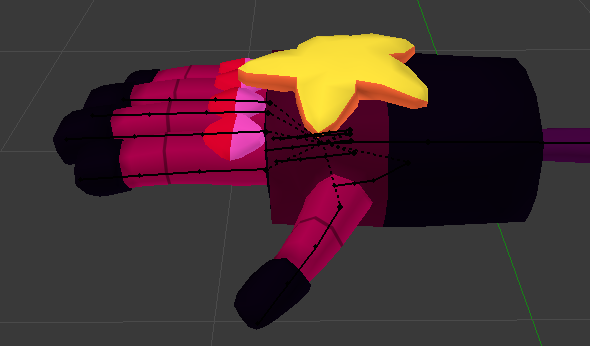
I'm doing Garnet's gloves
 pliant dust
I take it you're doing it that way rather than weight painting the gloves to the fingers because you want a rocket punch or something.
devout igloo
...Rocket punch? 🤔
pliant dust
What? This is #animation! People weight paint all sorts of different stuff onto bones just to make fun emotes.
sand crater
So if a model doesn't have certain emotions such as blush or starry eyes, is there a guide on how to give a model custom BlendShapes?
covert girder
@sand crater blend shapes - just a changing positions of vertexes, you just need to add this parts to your model, create new shape key, and change their (scale/position) when this blend shape was selected
so in Basis for example you can scale this to 0.0001 scale, and on shape key rescale to 10000
 west nacelle
Someone who kno really well the particle issues and some bugs about that can PM me ? i have one bug i never see in 8/9m of doing ava.
 ripe torrent
hey does anyone know how to make animations that dont rotate with your body?
slim sparrow
What?
You mean spawn objects that stay in the world?
If the objects need to be full-on objects for animations, sound or particles, use a fixed joint attached to nothing. If you only need an object, try a world mesh particle
@west nacelle probably nobody is gonna PM you
Just post the issue here
Much more chance of getting it fixed
I know a bit about particles (especially mesh particles) but I don't do any support for non-friends through DM
ripe torrent
fixed joint
 lone bronze
Hi ! I want to make a drawing finger kinda thing. I have a trail renderer set on an object. I want to use the basic handgun animation to trigger the drawing. Is there anyway I can get the file ?
 hollow perch
You can google for vrchat gesture set. It's really handy to have. Someone said it was in the sdk at one point but I never was able to find it.
lone bronze
Yeah that's what I'm looking for
I have found the animation override template, along with some idle animations and stuff
But no trace of the hand gestures
surreal iron
question, for animating action stuff like sword slashes and stuff, do i need to animate them in blender alongside the body movements or i can animate the sword movements separately?
 fervent plaza
How do I get my avatar to undo the animation pose? I accidentally had the wrong model selected.
slim sparrow
@fervent plaza alt-click your armature to expand everything
Select all bones, but only the bones
In the transform component hit the gear icon and do revert to prefab
clear yew
Nope. Doesn't seem to work. The cammera is right at the position the fixed object is (was) but I can hear no sound despite it being active.
The bloody thing still moves around
 timber valve
hey does anyone know where I could get the default female animations for movement like walking and running? I'm trying to make an animation that will play a sound effect when the avatar moves but I don't want to replace the normal running animation
spring nova
I believe vrchat got it's animations from mixamo, you can try there. They have several free animation packs on the asset store
timber valve
ok I guess a response question would be, is there any good tools that can convert mixamo animations to work with MMD bone structure?
slim sparrow
Unity itself
You can convert Mixamo animations to Humanoid ones that work on any humanoid model within Unity.
Just download the animation + model, rig the model as humanoid. Then you can CTRL+D duplicate the animation out of the imported model
For best results, rig the downloaded Mixamo model the same way you rig an MMD for VRC. Unmap upper chest, put what was originally there in the Chest slot
Unmap toes probably
timber valve
ah okay thank you, I'll try that now
yes that worked perfectly
thank you @slim sparrow
slim sparrow
Cool, np
 heavy stirrup
Any way to get the "Create New Clip" at the top, and not bottom of an animator's list of clips?
tulip crest
How can i make my avatar's animation object not move with my avatar?
I use an animation to active some object under my avatar, and when i move, it moves with me, is there any method to detach it with my body?
hollow perch
Check the pinned message by Svelsien in this channel
tulip crest
ok~
tulip crest
I think it is done, @hollow perch thanks a lot!
clear yew
Another question - I have object A as an avatar that has subobjects and the entire thing is animated. Now I want to add object B and have It be my avatar with object A being a child. Is there any way to re-map the animation without having to do it all over again (since it will look for A.right_gun as a animation property bu now it will be B.A.right_gun)
icy crow
press f2 on the animation property (A.right_gun) to edit the path of it
tulip crest
@clear yew I don't the legend way, but i know the AnimationHierarchyEditor can help you refactor your animation properties quickly
tulip crest
why i can only hear the audio source when i get close to it like 0.1 mm? even with max distance 10m?
it'a all ok in unity, but not working correctly in vrchat.
slim sparrow
@tulip crest set the max distance to 30
And min to 2
The SDK applies a weird custom rolloff
tulip crest
ok, i'll try, thank you👌
lone bronze
Hi ! My character has a tail, and although it has dynamic bones I'd like it to not just stay still when I'm standing up, so my goal is to edit the Idle animation. It is readonly so I copied the keys and pasted them onto a new animation.
But when I want to edit the rotation of the tail, it seems to lock in place and I can't edit the values of the keys. Any ideas ?
slim sparrow
@lone bronze it's a better idea to put an Animator component on the first bone of the tail instead.
Then you can animate the tail and not have to deal with a custom idle
Also, the readonly idle animation is a sample one that's best not used ingame without some larger edits
But if you just put an Animator on the tail, you can animate the tail separately and keep your regular idle animation, which will probably look better.
lone bronze
Alright gonna try that
First time I've ever heard of the animator component tho
So do I need an animation controller for that special component ?
slim sparrow
You need a controller, but Unity generates one automatically when you make an animation @lone bronze
The Animator component is how you animate stuff primarily
Your main model has an animator too, but you can't change the controller on it.
You can put controllers on everything else though, just not your main model
Just put an animator on the tail's "root" and make a new animation for it
That animation should then play automatically in play mode
Dynamic bone should make it look pretty good even if the animation is super simple
lone bronze
Okay, just added an animator to the bone, called ButtTail1. I can't edit the keys, just like last time.
slim sparrow
So you press record, rotate the bones, but nothing happens?
lone bronze
Yep
slim sparrow
That's weird, it should be adding new properties and keyframes. Can you post a screenshot of your Unity window, including the animation dopesheet and the ButtTail1 itself in the hierarchy and inspector?
lone bronze
And if I edit the key value manually, once I press enter it just goes back to the original value
slim sparrow
Hmm, you don't have the tail accidentally mapped in the rig configuration right? I know that your problem can happen if you try to animate the leg bone for example, but it should work on something like the tail.
lone bronze
I don't think so, cause while testing I could only move the tail by turning around
And thus making it wiggle with dynamic bones
slim sparrow
Okay, one more thing that crossed my mind
In your main model, make sure the animator controller is empty
It should remain T-posing in play mode
Or A-posing, or whatever the default pose is
So you can actually add the rotation property on the tail, but the values reset themselves?
lone bronze
rather A posing
slim sparrow
Because if you tried to mess around with the idle earlier, you could still have an animator controller on your model itself that's messing it up
lone bronze
I'm using a duplicate for the animations
slim sparrow
Yeah, that should be fine
lone bronze
Okay
It has an animator component
And the controller for that is called "Kanna (1)"
(cause it's a duplicate)
So what should I do ?
slim sparrow
Unset the controller on all of your models first
You don't need it ingame anyway
Then try animating the tail again
lone bronze
really ?
slim sparrow
You can't have your own controllers
And I'm sure that if you could, they would let you put one in at the avatar descriptor, since so many people have the wrong animator set in the Animator component right now
lone bronze
Okay
so for the animator component of the tail
Should I remove the controller as well ?
slim sparrow
I don't know, unfortunately
You're making a new animation, right? Not trying to copy an existing one?
lone bronze
No no, new one
icy crow
try deleting the dynamic bones while you animate, I've had a similar problem in the past
slim sparrow
Oh, that could be something. Weird, though.
I usually add my dynamic bones after the fact
Actually, that could explain why one of my models can raise the tail in a gesture and the other can't.
You might just be a hero @icy crow
icy crow
yeah I find that sometimes the bone will jitter and try to stay where it is when you're trying to animate it
slim sparrow
That's interesting, but I can see why.
I thought that would only happen in play mode
lone bronze
Didn't delete anything, but suddenly worked
Can't edit the bones with record
Cause the animation can't find them
I have to add the property manually and use a drag cursor
I made an animation that's kinda goofy
does it look that way in the game ?
slim sparrow
You can hit play mode and that's how it will look
clear yew
could anybody show me how to make an name tag turn around?
in unity
like is there a script for it
regal hollow
turn around?
clear yew
no since you can't use custom script in vrc
yeah
either use a billboard particle or a billboard shader
but i see so many people whit name tags that turn around and shit
clear yew
yeah
regal hollow
Thats just an animation that rotates the model 360 degrees I imagine
clear yew
how to make that?
clear yew
so i need to goto animations
put 1 time line normal
other 360 degrees
like for 5 seconds of animating
like that?
regal hollow
If you want it to move with the head then yes
clear yew
could u teach me im little confused on how to animate doe
timid prawn
can we prevent animation on gesture to restart when some one join the map
slim sparrow
Next update that is fixed
tulip crest
what is the possible reason that i cannot hear some of my audio sources? I just place the right setting just like the normal one, and active the audio source in the animation, but still not working
with min distance to 2 and max distance to 30
 magic river
Hey, is there a way to make a sword loop it's animation instead of having to make a controller and replacing all things with the animation?
spring nova
Looping should be default behavior. Are you putting the controller on the object itself, or are you animating the avatar/gesture?
magic river
Well before my sword wasn't performing the animation when I tried adding an "animation" component, and plugging in the animation
buit it DOES work when I create an override controller, and plug that into the "Animator" component
spring nova
Make an animator, not animation, and put it on the sword itself
Then add your animation. To the animator
magic river
there is only a slot for a "controller" in the animator tho
so i can't just add the animation to the "animator"
Or do you mean that I should create a controller, and then add...... oooooh i see if i don't make a copy of the override then the controller i have is just a loop
got it
Man....
This unity stuff is SOoooo easy when you have an idea of what you're doing. otherwise there's tons of long ways to do everything
magic river
hnnng. Sorry. Another problem. I'm trying to make an animation to make a weapon appear in my hand. However in the animation tab, i can't add any properties / bones to adjust
when I try going through the "add property" menu, all the way to the weapon, then click the + sign next to it, nothing happens
hollow perch
You need to have an animator controller on a copy of your avatar and put the animation you want to edit into the controller for it to show up properly as a dropdown to select your animation
Be careful to make a duplicate copy of your avatar. Don't put a controller on your main avatar because it will sink into the ground.
magic river
Yeah, that's what I was trying to do
but for some reason it wouldn't let me make a new animation of the weapon appearing
spring nova
@magic river sorry for dropping off on you, I'll give a more complete description. If you want to summon a sword and have it animate into existence, then you cannot use a gesture. Gestures should only be used for turning things on and off, since they only work properly when they are a single frame (one keyframe at 0:00 and one at 0:01). So if you want to have something animate for more than just that single frame, you need to add an animation to the object itself, not inside the gesture. You do this by adding an animator to it and then putting animation clips inside it. To put animation clips in, you need to go to the animator tab (not the same as animation tab), which you can find at the top next to scene, game, and the asset store.
In this view you can arrange animation clips and set up transitions between them. If you want to, lets say, animate it when it first spawns then once it's in have it continously loop another animation (without constantly re-appearing), you would have two animations; one is the appearance animation, and you can drop this into the controller and if it's not already, right click it to set it as the default state that the animator first goes to when it becomes active, then drop in a second animation that does the looping you want. Then right click the first to make a transition to the second. Make sure the second is set to looping on the animation settings
magic river
Gotcha, thanks phase!
spring nova
oh and just to be clear, you do use a gesture (with the duplicate of your model and everything) but all it does is activate the sword, nothing else. Once it's activated, then the sword's animations will play out.
spring nova
the animator is what you put on the object, and you put animations inside the animator
You can also put animations directly on the object using a legacy animation component, but that has significantly reduced capability and it's more annoying to work with
magic river
And the "animations" are all inside a controller which is a copy of the premade over ride controller?
spring nova
In the case of your sword, no, this is a brand new fresh animator, nothing to do with the override controller for gestures
magic river
Ok... so instead it's just a "Controller" which would string together some sceries of animaions... like "Spawn" then "bob up and down loop" ?
spring nova
yeah
magic river
Ok
So if I don't need a fancy spawn animation, i just want the blade to bob up and down while it's out
and i already have the animation from blender
I just make a controller pointing to that one animation?
spring nova
yeah
magic river
Okies~ I'll give it a shot!
Ok... in my controller, how do I link it to "any state' instead of just "entry"?
nvm .... right clicking...duh haha
spring nova
You don't want to use any state though, that's for more complicated logic. Unfortunately, avatars can't really do any of that at the moment
Entry is what will play when the object is first turned on
magic river
Oh ok, fantastic
magic river
So in the tutorial that I am following, when you are in "animation mode" or recording mode or whatever, the guy is able to click his weapon and then turn it on in the inspector. However when I try to do that it leaves recording mode
so the action isn't saved in the animation
spring nova
that's probably because the object you're trying to turn on has an animator, so when you click on it it goes to that animator instead of staying on the one that's in record mode
spring nova
You can also click the add property button to add stuff
magic river
W hen I try to to go through the property menu, and click on it, it doesn't seem to work for whatever reeason
i click the + sign next to the weapon and it doesnt add anything
spring nova
the plus next to "is active"?
magic river
yeah
and now my animation tab seems to be locked up. even when i try to add property, or adjust the transformation of one of the bones, or a new bone, nothing is added or changed
spring nova
maybe you're clicking the wrong plus button? Scroll to the right to see them all
magic river
i can now only adjust the fingers whose animations i've already done
magic river
i tried making a whole new file and this is where i got stuck last time as well
spring nova
could we screenshare real quick?
spring nova
call me on discord, then add your screen to the call
magic river
haha so phase, i know it seemed like it would take a long time to rename all that, but i finally found a use for a macro keybaord. f2 > left arrow, delete button 21 times hahahahha
Works liek a charm now. You're the best!
spring nova
Nice
magic river
Alright... the bad news is that now the names dont coorespond with the rig lol
spring nova
ooh yeah you might need to change it in blender
magic river
It's actually really weird, but when I try to import the FBX into blender, only one bone pops up and zero mesh
magic river
Oh well. seems like i won't be able to spawn weapons on exports from WoW unless i can figure out how to open the FBX and change the armature names. but i'm done trying heh. Anyone have a tutorial on how to spawn C4? that's my next thing ;D
spring nova
yeah just a world particle
Probably set to collide with just default and the environment, then turn bounce off and damping up in the collision module
you'll need to do something a little special in order to use world particles though, do you know about that?
magic river
Not a clue 😄
I've heard a little bit about how they do it
and i've got a particle system up now, spewing white balls of light
not sure how they change the balls to a 3D object. but then if i understand correctly, they turn the life of it up to max
spring nova
alright, well it's pretty simple, just add a rigidbody component to your hand bone, then make a new gameobject right under your model's root, but in the same position as your hand. Just make the gameobject inside your hand then drag it outside to your root to do that. Then add a fixed joint component to the new gameobject (this will also add a rigidbody too), and point it to the hand. Now just set the rigidbody on the hand bone to iskinematic, and turn the mass of the rigidbody on the new gameobject down to 0.
Once you have that, you just put your particles inside the new gameobject and set their simulation space to world
clear yew
why do you set it to kinematic ?
spring nova
So that it doesn't go anywhere
spring nova
It's being controlled by the IK, you don't want it also being affected by physics
Doesn't really break anything if you don't, I suppose
clear yew
i was just curious if it changed anything in the end
spring nova
But it might be weird at low framerates
clear yew
so i can go back and fix it if needed
magic river
So this method will allow me to place down objects?
and that object will emit particles?
spring nova
it allows you to use world particles, which means once the particle is sent out it doesn't stay stuck to you, it flies through the world naturally
magic river
that's really curous
i'd like to learn more about it. but it's really late
I know rigidbodies are for physics so i'm curious why you'd need it
unless it's just what you NEED to be able to use the fixed joint
in which case, what exactly is the fixed joint doing?
spring nova
it's because a fixed joint is a physics thing, which needs to attach to a rigidbody
And I can't say exactly why it breaks or how a fixed joint fixes it, but for some reason the way vrchat or unity controls the bones of your body to match you in VR, world particles break and will shoot out from the position of where you would be if you were tposed, instead of where your actual body is
magic river
that.... that actually makes sense
so this is definitely how people get their crazy bullets and loud brap brap emoji face stuff
i've seen someone drop a dog house before
would it work similarly how you said before? after collission they stop?
spring nova
Anything that moves independently from the avatar
Well, anything that's attached to a bone. If it's directly on your root and you don't need it on your hand or something you don't need to do this
Especially relevant for desktop users
Yeah, a dog house would probably be the same idea. Except you don't want the dog house to fly through the air, so they probably had an invisible particle and when it collides with something, then it subemits the actual doghouse particle
magic river
So essentially, shoot a bullet at the floor, on collision it shoots a doghouse with zero velocity ?
spring nova
yeah
magic river
How do you stack particles ontop of particles?
i'm looking at the particle effect editor now but i'm not seeing anything like that
magic river
ooooo nice
spring nova
you'll use that for the explosion of the c4
magic river
Do you mind if i keep asking dumb questions? xD
spring nova
I'd rather dumb, easy questions than complicated, way-in-over-your-head questions 😛
magic river
haha sweet!
spring nova
Check out this video though, it explains all the basics https://youtu.be/FEA1wTMJAR0
Udemy: http://bit.ly/BRACKEYSMEM Everything to know about the Particle System in Unity! ♥ Support Brackeys on Patreon: http://patreon.com/brackeys/ ● Learn m...
magic river
Ok well i JUST found the part where i can put a material on the particle. So that's simple enough. Oh god thank you that's what i needed
alright htis video gives me everything i need
which means i can go to bed!
Thanks again Phase ! If you ever need a mechancial engineer let me know!
spring nova
Seeya around 😃
magic river
^^ Cya
lone bronze
Hi ! I want my character to be able to show a sprite with two different animations. I plan to use one to activate the object, and the other one to activate the mesh renderer.
I would like to use the victory gesture and the open hand gesture for this.
Problem is : I don't have the default openhand gesture. All I could find was either a gesture where all fingers are straight, or a gesture that looks like the default idle hand animation.
Where can I find the open hand gesture that my character would use if I didn't use any overrides ?
slim sparrow
The default animations are not available
You have to make your own
Muscle Animation Editor makes this a lot easier @lone bronze
I would suggest starting with the open hand gesture itself, then saving it somewhere for later use
lone bronze
And just downloaded a shader that you made. Amazing.
clear yew
does anyone know how to add idle animations?
muted prairie
timestamp https://youtu.be/V0l4-pH3vI4?t=675

Creating custom animations for hand gestures and emotes in VRChat
 finite rock
Does anyone can help me with my audio source?
clear yew
parent
it to your hand
add a audio file
and bam
lol
i think thats how i do it anyway
finite rock
hmm but can u hear it? or just your friends/ppl near u
clear yew
near you
finite rock
Yeah, i want to be able to hear it too
clear yew
yeah you and the people near you
muted prairie
Yes, if you click the link it explains you how to change idle
muted prairie
Why not ?
muted prairie
make an account first ?
magic river
G'afternoon errybody~
clear yew
Trying to import a vmd into vrchat and the hips are kinda fucked?
The hip rotation/movement doesn't happen at all
It's fine when the fbx to generic, but when I make it humanoid it breaks
lunar snow
so make a generic ghost
then when you do the VMD hide the humanoid avatar and unhide the generic
clear yew
There has to be a way to fix this method though, I've seen plenty dances with fine hips that's humanoid
 hardy bone
Hey, ive got a gun firing animation Gesture replacement on a character. Problem is, is that at the end of the firing animation everything animated moves to its original spot -but very slowly.

For example: If I fire the gun, then let go of the gun. My fingers open slowly, then the gun goes away.(goes away as intended, but slow)
slim sparrow
@hardy bone gestures can only be 0:00 and 0:01
It's a limitation with the current animator. It can be worked around though
Have two gun objects in the same place. Have an animated firing one, and an unanimated non-firing one
Instead of animating the gun directly inside the gesture, just enable the firing gun and disable the other one
hardy bone
Soo
Gesture anim: 0.00 0.01
^enable firing gun anim ^disable firing gun anim
er
hm, cut off that last bit.. Just enable firing gun anim at 0.00, and it will disable itself when I stop the gesture. Right?
slim sparrow
Yeah
Well, no
Both keyframes should be identical
An animation will reset to default once you stop doing it
So pull out a gun on one gesture
Have it fire on another
Or rather, pull out a gun on another gesture, and this gun then fires itself
hardy bone
Oh, well if I read that right. Thats exactly what I already have. If you look at the image, in my Hierarchy I have a Shaggy-PullGun thing.
My Gestures
Victory: Shaggy-PullGun
RockNRoll: Shaggy-FireGun
slim sparrow
Yeah, but the problem is
You're firing the gun directly inside the animation
You need to animate the gun firing itself instead
Then have a duplicate of the gun that plays the animation when activated
Gestures can only be 1 frame long
hardy bone
So, the gun itself has an "at all times" animation of it just firing. And the gesture just turns on the gun, allowing me to see it do its "constant firing" anim. Correct?
slim sparrow
Yeah, or an animation that makes it fire once
The idea is that you have a gun that isn't animated, and one that is
And you just switch between the two objects. It should be seamless if it's the same gun.
hardy bone
I got it, only one thing left. When the "constant firing" gun gets enabled, will its animation get reset so I can watch it fire from the start -everytime?
hardy bone
ok, cool. Ima set that up
hardy bone
@slim sparrow works, thanks
though I somehow messed up the normal gun, so that it flickers constantly
slim sparrow
Yeah, both keyframes have to be identical @hardy bone
Make sure the normal gun is enabled on 0:00 and on 0:01
hardy bone
yeah, its weird that it broke tho. i never touched the normal gun gesture keyframes.
got the flicker to stop
I deleted and replaced the Enable keyframes, then deleted an accidently made anim controller for the normal gun
hardy bone
Alright, now im trying to get a reload gesture to work right.
When I make a fist, I want a mag to drop from my gun.
Though when the mag is Enabled through the animator and falls(as intended, with rigid body), it stays fallen the next time I activate the gesture. Instead of popping back up to the gun and start the falling over again -like I want. It stays in the abyss below me.
In the animator I tried: 0.00 0.01
^Set Mag to hands caordinates ^Use gravity
clearly that doesnt work
am I supposed to use something unrelated to animations to get this to work?
 plain dew
Is there any guide on how to modify the walking animation? Like, what I need to look out for etc
Can't find anything
pliant dust
The biggest thing you need to be careful about the walking animation is that it blends walk, run, and sprint all together when you're doing something as simple as walking forward.
plain dew
So I need to change all 3 of them to make it look not totally stupid?
And prob strafing too etc
pliant dust
Yes. And they all must somewhat coexist peacefully while playing simultaneously. It's basically (these %s aren't official, but just to give you an idea of how daunting your task is), a walk forward is blended together of 100% of your walk animation, 10% of your running animtaion, and 5% of your sprinting animation.
Yes, strafing as well.
plain dew
Dang... this is gonna take a while then
pliant dust
Making it look good is very difficult. To say the least.
It's also the reason why default animations feel ever so slightly off.
plain dew
Yeah, I reckoned... do you know any resources, which I can use as a base of some sort?
pliant dust
Sure. Look in your VRCSDK folder in Unity. They're under Examples > Sample Assets > Animation.
plain dew
Ah, I see
pliant dust
Of which, Idle's Idle-Sample, Walk's Walk, WalkLeft, and WalkRight are there.
They aren't very helpful though. Good luck!
plain dew
The animation ends at 1min, is that the length I should go for too?
pliant dust
Yes.
pliant dust
And those aren't minutes. Those are seconds.
plain dew
Oh shoot
pliant dust
You're welcome! Just... well, don't expect this to be easy.
plain dew
Yeah... Proper animations can take ages =.=
Speaking of, every time I animate one of the dummys I create, the character goes into a weird pose, I guess I have to take that into account or can I just reset the positions?
plain dew
Yeah I know, that's what I mean with dummy
But if I'm gonna do something like the walking animation, do I have to "work" with the broken model, like adjust the legs as if they were not broken?
clear yew
it's probably easier to make it have a normal pose to make the animations
clear yew
check the pins for my album
to make your model have a T-pose again
it will also help you understand how that works
plain dew
Alright, thank you 😄 Very appreciated!
tulip crest
em... now i'am facing a very strange problem, after add a gesture animation, my avatar sink into the ground in the game, and the target audio source not playing at all
and the most strange part is, i am not playing the animation...
clear yew
you are supposed to make your animation on a duplicate
not the main model
or it will break
tulip crest
avatar problem is because of bones, i just figure it out
now only have the problem of not playing musics
the game preview is fine, but not working in the game
i mean the vrchat, not unity editor
 velvet heart
yo i made a world animation on my avatar but it takes like 30 seconds to switch too another emote
spring nova
your gestures need to be a single frame, one keyframe at 0:00 and another at 0:01
If you want longer, you can get around this by having the gesture activate a gameobject which has a longer animation on it
velvet heart
it is a gameobject tho
spring nova
great, you're already halfway there. Now make sure the gesture is only at 0:00 and 0:01
velvet heart
oh wait
plain dew
I had the same thing few days ago
velvet heart
so i put the animation on the game object and activate it with 0:00 - 0:01
plain dew
There's a keyframe at 1:00 and you can't see it until you zoom out a little
spring nova
the animation on the gameobject can be whatever you want. The animation that runs on your avatar that you plug into the gesture override needs to be at 0:00 and 0:01
plain dew
Question: How can I get my avatar to lay on the ground? I've been fiddling a round with the Root Q values a little, but it just doesn't look right... And 2nd one, what does the Q and the T stand for?
I think T is transform but I'm not sure
Oh! Quaternion
So yeah... I think I gotta convert my euler angles to quaternion values...
clear yew
So I have learned how to get a vmd and how to attach it to an avatar as an emote, as well as how to add sound to it...
However I would like to learn how to do the sort of gesture override within the f keys that spawn other models to do the dance instead.
Would anyone be able to give me a brief run-down of how this works? For reference, I am talking about the stuff you'd see the user Toga's avatars do..
plain dew
I don't really know how to do that, though I'd assume you create duplicates, create animations for them, attach them to the main avatar (but deactivated), then create another dupe of the main where you activate the dupes attached
But this is just my theory
No idea if that works
clear yew
A theory worth testing i'd say.
plain dew
Yea
clear yew
I'll look into it unless you'd rather do it sooner.
you create a duplicate
give it the animation
disable it
parent it to your model
hips or spine usually
and with a hand gesture you enable the duplicate
and disable the skinned mesh rendered of your main model
so it's invisible
ahhh i get it. Okay that's really helpful
Thank you
both.
plain dew
Ayy I got something half right xD
plain dew
Ah... So Unity doesn't let me change the quaternion to what I want it to be
Rip
Wanna change it to {'w': 0.5253219888177297, 'x': -0.8509035245341184, 'y': 0.0, 'z': 0.0}, but it always resets so I guess I'll go with the value Unity sets for me
tulip crest
@spring nova actually, it suddenly works, even with noting changed, i don't know if it is a kind of game bug or something else
 stable basin
Guys, is there a maximum time a anim can play ?
I had a dance, where somewhere around 50% it resets the avatar, but animation is still playing.
And looks really bugged afterwards.
Is there some kind of time-limit until the avatar gets resetted ?
regal hollow
Are you talking about an emote?
or gesture?
either way a gesture can only be 2 frames long. and an emote has a limit of about 1.5 mins
stable basin
Animation
Emote
When you start the emote, it plays just fine for a while
But then it feels like the avatar resets to idle position.
But the body is like still moving.
And you cannot move until the animation ends.
And eventually it looks like it's possessed or something xD
In unity it looks fine.
Either vrchat has a time-limit a animation can play, or there is a bug.
@regal hollow Sigh, overread what you said.
Sorry, it's early here, still waking up
1.5 minutes, I see.
Thanks 😃
regal hollow
no problemo
stable basin
Mmm @regal hollow You have any idea how I can shorten easy a animation file ?
Is there perhaps a simple way of editting a anim file.
Nevermind, I'll try editting the VMD manually.
And then convert it.
stable basin
Worked with mmd, guess that's solved 😉
 amber mantle
 pale nimbus
Hopefully this is the right channel for this question. I'm trying to make an effect appear at the end of a prop, with the use of 2 gestures. One to activate the prop in my hand, the other the activate the effect. The effect itself is a sphere with a specific material attached. It works fine in-game, but there is a small problem I was hoping to fix related to the animations used to create the prop and apply the effect.
The problem is the gesture override to activate the effect. I can no longer make a fist as a side effect of having the activating animation. I found a public avatar that manages to do a very similar effect, but without disabling the user's ability to make a fist. How can you make something active without overriding the gesture used to do it?
slim sparrow
@pale nimbus you still have to override the whole gesture
They just re-make the finger movements
Fist is easy, you set all stretch and spreads to -1
It's a tedious 10 minute job, with Muscle Animation Editor that becomes 10 seconds
pale nimbus
Thank you!
 errant oar
How come my audio doesnt play? I can hear it for a split second when im moving some sliders around, but thats it
Can send a vid if need be
errant oar
Make a sound play
I plan to animate it, but right now I can't even hear it in play mode when it's on
I'm using the audio source property
errant oar
I tried both
I put it directly in the avatar
I made an empty game object and parented that to the avatar and put it in that
I even tried putting the game object outside of everything as its own, and disabling everything else
It's weird because I just tried doing the same thing in a different unity project and it works fine
 errant oar
ermm

its pretty normal
Oh it was also working but I touched some sort of reverb graph actually
clear yew
HMM
errant oar
I just remembered that
errant oar
I cant lol
I tried everything I could think of
also deleting the audio source and remaking it would have reset it anyways
cuz it was a graph in the audio source
so its like touching that graph broke it completely
I just synched up its settings with the reverb graph to a working audio source on a different project
as a matter of fact, i synced everything in both debug and normal mode to the working source, with no luck
clear yew
can anybody help me when i press on my animation it takes like 6 presses to make it work how to fix that?
 livid socket
Is there a way to make animations toggle/switch?
slim sparrow
Google prop toggling, that's the only way right now
You can do it
But it desyncs a bit for late joiners and people not looking at you
livid socket
I have a few animations that enable one of the props and disable the other ones. Now I want to hook them up so you can switch between them using the Emotes menu
I have a screen that should be able to display different things. For that purpose I have put up planes on the screen that correspond to the images I want to show
slim sparrow
You might be able to do that with particles too, that might be a lot easier than setting up prop toggles.
livid socket
now I have an animation for each one; it disables every plane except the one I want to display
How do I do that with particles?
slim sparrow
For every image, make a particle system with a mesh particle
This mesh particle has a plane or a quad with the image on it
Every particle system has a max particles of 1. Every particle system is always on, but Emission is disabled.
In an emote, you disable every particle system except the one you want to show. On the one you want to show, turn on the Emission Module.
When the emote ends, all the particle systems are back on, but the spawned image is still showing.
livid socket
but will the particles move when I move?
slim sparrow
You can set them to worldspace so they stay behind, or leave them on local and they will move with you.
livid socket
and if another image has been spawned; how does that get removed
slim sparrow
When a particle system is disabled, all the spawned particles are deleted
So when you do one emote, all the other images get deleted
The key is having the particle systems always enabled outside of the animation, but not actively having them emit.
livid socket
I ahve found a tutorial by a YT user named TwistedWheelbarrow
he uses some kind of self made(?) toggle switch
slim sparrow
Yeah, that's prop toggling. There's a YT tutorial on that
But it doesn't sync very well
And I still haven't figured out how to separate it in such a way that you have deterministic toggles
An "always turns on" trigger for example
Prop toggling, by default, has one emote as a toggle. This desyncs very heavily and I don't recommend it. For your purposes, particles are a lot better.
Always go for particles unless you need audio or animations on the object itself
fierce bane
I still think that was a really strange limitation for Unity, considering some very common application of the particle system (bullets, rockets, magic, etc)
not being able to place an audio emitter on collision/death is kinda strange...
slim sparrow
True, but it makes more sense when you consider scripts
And the fact that audio sources generally have to be game objects
A simple script or even a Playmaker action can play sound on subemit
Besides, games don't really use particles the same way we do.
@fierce bane games basically just raytrace where your bullet should land, spawn an impact particle and sound at the location.
They don't actually use the particles to determine where the bullet will hit
errant oar
Did the new SDK just like, break audio sources? I reluctantly started my project over and the sound now plays in unity, but I can't hear it in-game...
Also dear god the new avatar upload times
fierce bane
@slim sparrow that depends if you have hitscan or actual projectiles, as well as the speed of said projectiles. If the impact time would be near instant anyway, raytrace is definitely better. But not all projectiles move at such high speed. A colliding fireball for example, a grenade, or a pulsating plasma orb are good examples of collision-based projectiles that can be intercepted or dodged.
The script-based audio spawning is a good point though. It just seems an oversight to require a script for something that could have been natively implemented.
 wicked kindle
if i wanted a crown to spin and do a 360 how would i do that
spring nova
Drag the crown outside your avatar so that you can go to the animation tab and click create without causing issues. Then you can drag it back in. Now just add property, rotation, and have it start at 0 than go to 360 after a few seconds or however long you want. Then go to the curve tab and right click the end points to change them to automatic so it goes a constant speed
wicked kindle
gotcha what if the crown has a little tilt
spring nova
Then make it straight, put it inside a gameobject, and tilt the gameobject instead
wicked kindle
ahhhhhhhh thank you so much
errant oar
Yeah
I'm becoming convinced the new SDK broke audio
Because now when I activate the gesture in game, I hear it play for a SPLIT second, and then it shuts off
As if somethings forcing it off
How can I go about reporting this
fierce bane
@wicked kindle if you want it to continuously rotate you can also use a mesh particle with "rotation over lifetime"(separate axes). no start speed/delay, local simulation, 1 max particle, and a long lifetime.
clear yew
any reason why i can't "add property" to an existing animation
wicked kindle
ill have to try it out thank you
clear yew
like, the "add property" button is greyed out
fierce bane
I've heard people using a similar system with a capsule and a texture that wraps around it instead too.
@clear yew, duplicate avatar, drag/drop animation onto the duplicate, then you should be able to edit just fine. The animation needs a heirarchy to be able to add properties
clear yew
hmm okay
clear yew
another question, how would you guys add sound over your animations (emote animations)
sorry, im new to this
pale nimbus
@clear yew Have an audio source activate when you want the sound to happen in the animation. Example: https://i.imgur.com/kScTEMG.png

Get an audio source from GameObject -> Audio -> Audio Source
clear yew
kk
pale nimbus
Slightly better example, end product should like something like this: https://i.imgur.com/SPb4JAP.gifv



Click the link, it's a gif and discord hates me
 coarse veldt
Say I am putting a blinking animation (legacy) on my avatar and I don't want it to interfere with my hand gesture animations (eg : closing eyes while smiling). What is the right way to do this?
Will cancelling the blink ( setting blink shapekey to 0) in the gesture animation help?
 tidal niche
http://puu.sh/Bk2qE.png I'm unable to add the blend shapes to the gestures


also how do you export jsut the animation from blender, without needing to export the skeleton
regal hollow
Nope
magic river
balls
regal hollow
Yep
magic river
So if I have a firework explode
wait... how are people giving bullets a sound then?
I've seen them when the bullet collides, it makes a noise
regal hollow
audio source that plays when the particles play
You haven't
It's just timed together
the collision of particles cannot trigger audio on vrchat models
regal hollow
I'll watch it if you can find it. But there is no way to have an audio source play on a particle collision on a vrchat avatar. The closest you could do is have it seem like it does by timing the collision and the audio source individually.
magic river
Could it be, that a model has an invisible object at a set length away from the gun, fixed to the gun, and then on THAT is a sound clip that plays when fired?
so it gives the illusion of ranged audio?