#animation
1 messages · Page 83 of 1
 frozen swift
 regal hollow
Bypassing is against the rules, so I don't think anyone here will tell you
frozen swift
ahh ok np
 slim sparrow
Besides, you don't want to bypass that
If you get smaller than that, the clipping plane of the camera is so close by that you cannot see your menu and you won't be able to switch out
@frozen swift
 lethal sonnet
Can wrists/hand bones be animated on gesture overrides?
 rapid cypress
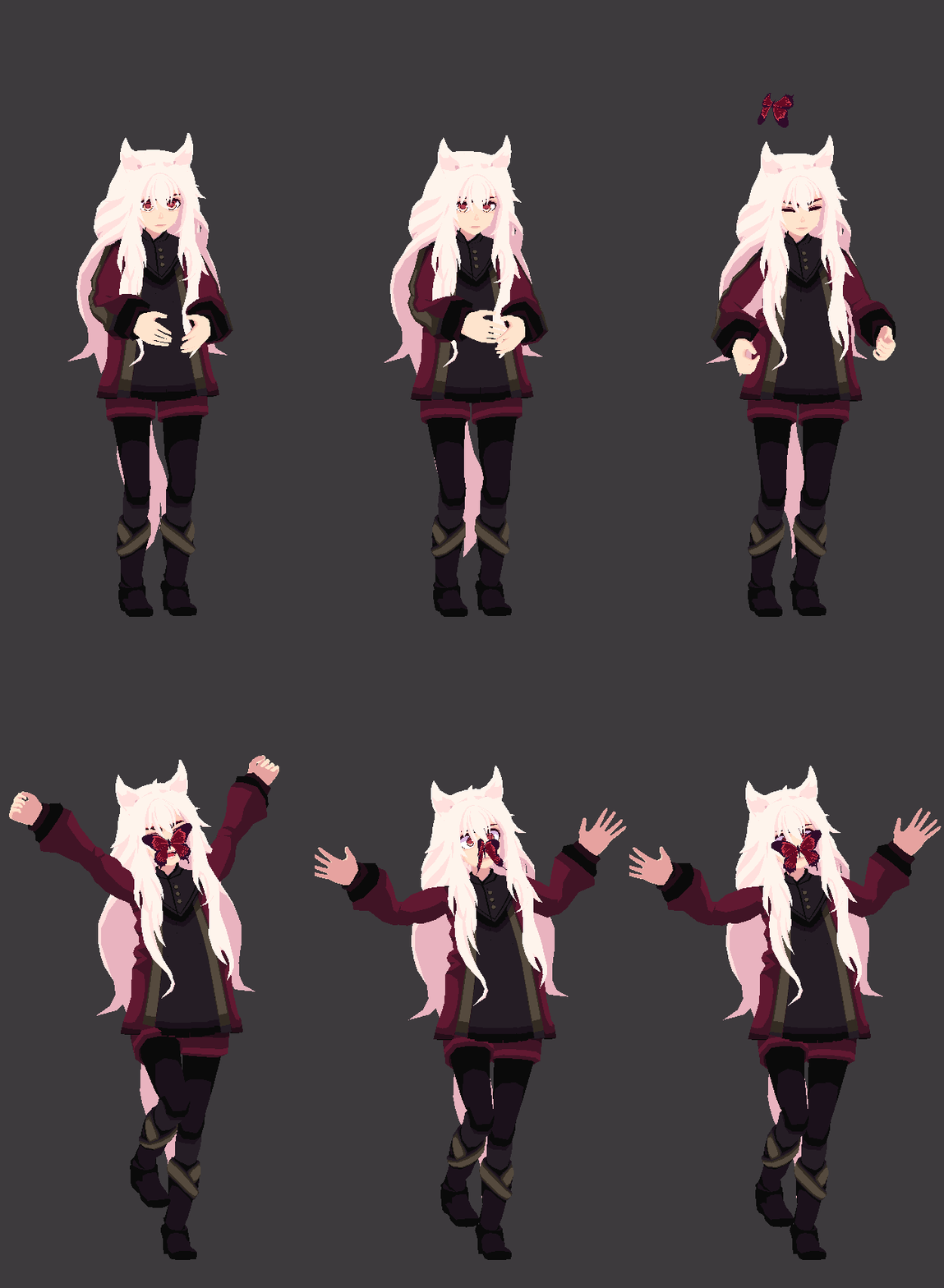
 obsidian vigil
@rapid cypress is that manually animated?
rapid cypress
aye
 obsidian vigil
actually kinda reminds me of the animations from animal crossing
i feel like ive seen that before =w=
 fierce bane
@slim sparrow Just a note: "will be unable to switch out" isn't actually true, you can press Control+\ to switch into a default robo-avatar locally (no one else sees it) and it will stay that way until you go into the menu to change it.
The old hotkey was apparently Ctrl+A instead, but was changed at some point (probably because it's really easy to accidentally hit that if you're moving and miss the shift key)
They really need to update their docs though, it's not listed under controls anywhere.
obsidian vigil
that is fucking awesome to know
because i often experience glitches on newly uploaded avatars which force me to restart my game entirely
 clear yew
anybody know how to make an effect thats like it makes the colors go black and white and the screen shakes
obsidian vigil
@clear yew Shaders
clear yew
what type?
obsidian vigil
theres a shader that makes everything black and white
for the shaking
no idea
ive been searching for one myself
clear yew
i saw it on a few avatars and i'd like to play it with a cool song i found but..
i legit have no idea what it is xD
slim sparrow
@lethal sonnet technically yes, but the IK system might override it.
You can move hand bones in gestures due to the simplicity of the avatar masking
clear yew
@upper parrot try binding it to emote
Or make a second avatar ,drag animation into it and make it inactive. Then hide ur main avatar and unhide the second avatar when you trigger a gesture.
slim sparrow
@upper parrot you need to put it on an emote or a sub model as the person above me said
Hand gestures can only affect your hands
clear yew
Am I able to put my main Body into a toggleprop? So that I can toggle off my main body and replace it with my secondary body?
How do i even set that up
toggle off/on in 1 emote
 hollow perch
@clear yew yes I've done it before. You don't need the body to be directly inside the avatar. If you also want the same animation to control bones you can put Body inside Armature/Hips
Then armature gets the pulsegate
hollow perch
Also they have to share the same armature. Cats plugin can do this
clear yew
because i also want it to enable other empty gameobjects when i swap bodies
oh
im not using separate actual bodies
it's the same body
just different
hollow perch
But two separate objects with their own skeleton?
slim sparrow
You could achieve that with stencils if you can't get it to work any other way
slim sparrow
@hollow perch it's just the Body mesh, except twice
hollow perch
Ah stencils is a solid choice too but stencils draw both objects.
clear yew
cant use stencil on multi material meshes
tried it
doesnt work
it glitches out
my materials get changed to random things
hollow perch
You can. I've done it. But you have to be very careful about render order. I may have actually put each material into its own render queue by duplicating the shader a ton
Anyway let's see if we can get it to work with toggle props since that was the question
clear yew
i just want to use toggle prop to disable/enable render meshes on 1 emote
hollow perch
So to start with you want your avatar to have Bosy and Body.001. This is what you will get if you use cats to marge armatures and you separate into two meshes
clear yew
no
hollow perch
How is it set up in your case?
clear yew
Unity
Duplicated body mesh
1 armature
materials and shaders are different
it works
i just need to get it working using toggle prop on 1 emote
everything else is irrelevant
hollow perch
Oh you don't even need a duplicate body then. You can change material reference directly in an animation
clear yew
the objective is toggle prop
nope
it doesnt work
ive tried that
my materials get changed during the animation
to the wrong ones
in the wrong spots
i just want to do a toggle prop body swap
i am not going to do a material change because it doesnt work
hollow perch
Ok so you don't use your main body and you put a body under a pulseOut ?
clear yew
.....
toggle prop.... 1 emote... disables the orignal body object mesh.... enables the new body object mesh
hollow perch
Duplicate the body mesh and disable one enable the other from the pulse out animation
slim sparrow
Stencils do work though
You don't change your materials in an animation
You just enable a box with a stencil on it
clear yew
yes they work on 1 material models
slim sparrow
They work on any number of materials
slim sparrow
Ok fine, I guess all those stencils I made are actually fake.
¯_(ツ)_/¯
I'm not talking about material swapping
clear yew
it works if i duplicate the shaders
and give each material its own shader
yea that works
im not gonna do that tho
anyways
slim sparrow
I made an avatar a month ago that's two separate meshes merged into one. 4 materials total
I toggle a box with stencils on it to switch between the two
clear yew
toggle prop.... 1 emote... disables the orignal body object mesh.... enables the new body object mesh
i dont want any alternative methods
slim sparrow
I don't think this is possible with toggle props
clear yew
i just want that 1
slim sparrow
Alternative methods are all you have
hollow perch
Ok can you explain which object had the pulse gate animation when you used toggle props to swap materials
slim sparrow
Toggle props requires you to freeze the animator of the mesh's parent object
Since that is your avatar itself, you can't do that
Stencils are the best option
hollow perch
No it's the body mesh
clear yew
so gestures are the only option then
hollow perch
And you don't need the avatar body to be directly under avatar
slim sparrow
@hollow perch the parent of your mesh isn't body
hollow perch
Yes
slim sparrow
But we don't
Unfortunately
Stencils work perfectly well for what you want to accomplish
hollow perch
Avatar -> pulsegate -> pulseout -> body
slim sparrow
I've done it so many times
clear yew
however i need it for conditional based animations as well
hollow perch
Just because the prefab has no pulse gate doesn't mean you have to leave it like that
hollow perch
What's wrong with my proposed setup
And you duplicate body so one is the on object and one is the off
 gaunt fractal
hey, I'm making a rotating animation, but at the start it like speeds up and at the end slows down. As a windup and windown. How would i make the speed consistant ?
So it also is able to loop on it's own otherwise it looks wierd, like it starts and stops
slim sparrow
@gaunt fractal go to Curves
Then set all tangents to linear
Just right-click the keyframes in there
You'll see that the line is smoothed out until you set it to linear, then it should be perfectly straight
I don't know if you can put meshes that far down into objects @hollow perch
But now that I think about it, it makes sense. It will break the prefab instance, though.
Just make a toggle props setup then, that should actually work
Since the mesh has the root bone as reference object
hollow perch
To avoid breaking prefab just uncheck the original body and duplicate it
Make sure to edit the avatar descriptor viseme reference
If you want visemes and eye tracking to work for both they should share a single face mesh and you use material reference instead. A lot of mmd avatars have same TDA face but different eyes. I put the colored part of the eyeballs together with the avatars actually because those rotate using bones not shape keys
So i can change eye color but not lose eye tracking or visemes
gaunt fractal
ah ok ty
slim sparrow
I don't know if you can still have eye tracking with a disabled Body mesh
hollow perch
Ya in my case I leave body to be only the face or you can make it actually a blank mesh with just the vrc eyelid blink stuff but enabled
And Body.001 has the real avatar and 002 etc if you want different meshes
Because the eye tracking itself it done with bones. And you can make your own animation for blinking. The game is just stupid with checking you have a Body to move eyes
slim sparrow
Yeah
hollow perch
For visemes to work on all meshes they have to all be a single mesh but I think it can be anywhere in your tree if you set up the avatar descriptor correctly
Then you swap materials or use a shape key to morph the face into the correct shape for each toggled avatar
The same problems exist with stencils btw unless they share one face
clear yew
I just wanna eat particles
hollow perch
Ha, sounds fun. Let us know what they taste like
slim sparrow
I made mine share a mesh
I had two separate meshes each atlased individually, I joined them and applied stencils to them
So only one material is visible at a time
I'm sure it would look like an abomination if you shine a polygon flashlight on it in Avatar Testing.
hollow perch
Ah I see then you have everything from one bosy mesh
slim sparrow
Yeah
 little cedar
How do you use the IK follower script for the world particles?
nvm I figured it out
 royal summit
Probably be better to use the rigid body set up instead and of that
 red rampart
Is there a way to make an emote that replaces the avatar with an image?
 silk portal
Something I’m rather curious about. Would it be possible to add in a fight with two characters? One being the user’s avatar and the other a non-controllable non-dynamic animated character.
Just with being able to toggle a gun’s visibility and then activate a firing animation, I was curious if this would be possible with another character model.
hollow perch
You just activate another unchecked model inside your avatar. You can use fixed joints in a certain way to lock it to world space (search this discord how to do this) if you don't want it to turn and move with you. Also you can put your an animator into it to follow an animation you create
silk portal
Interesting. Does the non-controllable character need to follow the same standards as a player avatar?
Wondering if it needs to be rigged similarly.
hollow perch
For rigging if you want to use humanoid animations like muscles and stuff then yes for rigging. But unlike the player you are allowed to make and use your own animator controller
Rather than needing to make an override controller and set emotes
silk portal
@hollow perch Would animating in Blender or Unity be more practical?
In Blender you have higher control with the characters, but in Unity, it's documented a bit better.
 wise rover
(republished just in case original was in wrong channel) so I made a rough draft of a particle effect for my avatar in which all origins are attached to the head bone through another game object. when I uploaded the avatar and tried the animation, the particles that were set to a world simulation space only went in one direction vertically regardless of the angle of my head and crouching down, the emitters stay in the air instead of following my head. what's stranger is that mirrors correctly display the particles. my locally simulated particles are just fine however. I go back into unity completely deleting the animation and I try to attach the particle systems to the head bone without the game objects being in the middle and now the particles completely disappear. I've done this with other models and sometimes this doesn't happen. how do I prevent the particles from going invisible or will the game correctly display the particles anyway?
slim sparrow
@wise rover use fixed joints, google rigid bodies VRchat world particles
hollow perch
Don't cross post @wise rover people do see the messages and I already replied in the other channel. Fixed joints are a good idea too yes
 gloomy plume
im having an issue, whenever i try to animate my model, if i rotate or move a bone, then rotate or move another one, the first one completely resets
gloomy plume
humanoid animator properties?
sorry, im still very new to this custom animation thing
 icy crow
when you have an animator component on a humanoid avatar, you'll be able to access properties like: "Animator:Head" or something like that
instead of just moving the bones directly
gloomy plume
ohh i think i get it now
icy crow
the dance animations, etc that you see on a lot of avatars use the animator properties, meaning they can be used on any humanoid avatar
 slender mango
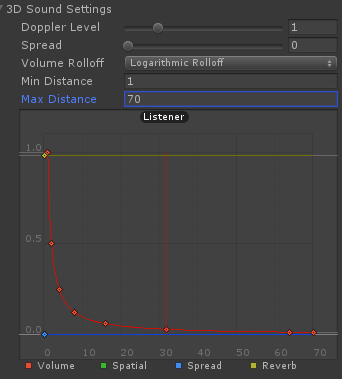
hey guys when adding an audio source I find that the volume is very quiet on vrchat. I changed the volume in the audio source on unity and still quiet. How do i make it like a decent volume for listening?
 muted prairie
How high is your volume ?
 muted prairie
the only thing i changed on mine was the volume
set to 0.1
per Cynhann suggestion
slender mango
and at 0.1 itll be loud enough?


 spring nova
When you upload it forces it to logarithmic, and if you set the minimum to 0 on logarithmic, it falls off way too fast. Volume setting is directly proportional to actual volume, and setting it to 0.1 will be pretty quiet. But it's the falloff that is really messing with your volume as you have it. Try increasing the minimum
I usually use minimum 1 and maximum 5
 calm pendant
I do not have VR and I want to activate the animations there is another way without VR?
clear yew
shift + f1, f2, etc
 dusk yacht
Ive tried adding a thing to my avatar where there would be a toggled mask that comes in front of my face and blocks my view but not nobody elses. I have the toggle props downloaded and with a help of a friend I was able to somewhat set it up. The only problem is when its attached to head, it disappears automatically. So we tried attaching to somewhere else on the body and linking it with rigidbodies and fixed joints to the head. According to him and his friends it should work but the mask either doesnt show up at all or it floats off into space or its inside the head and changes position everytime I toggle the animation
hollow perch
Unfortunately the scale of the neck and head is 0 for you which multiplies all coordinates by 0 of everything attached to the head. That's why the first thing did not work. You could do it but you need some sort of shader to fix the coordinates. The second idea is creative. The issue you are running into here is the fixed joints preserve the distance and angle to the other object but only when they are running
So basically it keeps its last position from when it was turned off and when you turn it on again it now tries to lock to that new position. The problem here is disabling the object with the fixed joint on it. I think the solution involves finding a way to keep the fixed joint object always enabled. Maybe put the mask as a child object, or disable the mesh renderer instead of the whole object
dusk yacht
Weve tried with doing the mask renderer too on the mask. Might just be easier having the mask on its on (which I got working to appear and staying on my face but it doesnt actually block the view) and then do a sphere around the head with a shader that blocks it for me but not for anyone else
hollow perch
I think the fixed joint could work but you have to just make sure the rigid bodies and fixed joints are always enabled. Put the mask inside and activate it instead
You might be able to use this for the face mask. Someone posted it to avatars discord earlier today
https://vrcat.club/threads/errors-hud-shader.2210/

VRCat: Community-Run VRChat Forums
%--------------------------------------------------------------------------
%
% Error's Heads Up Display (EHUD) Shader Version 1.01
% 2018-08-05...
What you do is make the mask 100000 distance away or something and attach it to head. Then this should position it in front of your face. If you want it to also show up for other people you can make another mask with a normal shader on it
obsidian vigil
@dusk yacht i dont get the problem here
dusk yacht
@obsidian vigil so im trying to have a mask that is on toggle animation and it blocks my view as it turns on. But I havent been able to do that in any way. Ill give that shader a go tho!
obsidian vigil
well
so
its see thru when its on your face
correct?
iirc thats because objects that are on the head bone will be render seethrough for the user
you could try doing an outline via cubeds
and see if that is able to force it to render
dusk yacht
If its attached to the head yes its see through. But if I do the thing with rigidbodies and fixed joints, it works and I can see it in front of me but the rigid bodies make it wobble around
dusk yacht
And also using rigidbodies makes it almost impossible to have it on toggle
obsidian vigil
/ tried setting it to kinematic?
dusk yacht
ive set it to kinematic and thats what seems to have it move with my head
obsidian vigil
hmm
maybe set drag to 0
grav off
just mess around with it
but i still dont get why you want it to block your view
🤔
dusk yacht
Its just to get a certain effect. Its hard to explain 😛 And yeah gravity is off, both drags are off. The other drag was set to like 0.1 or something by default and that caused problems earlier but theres still some drag
obsidian vigil
you could maybe try and mess with a configurable joint
 devout igloo
Is it possible to convert a model that has bones to animate a mouth into shapekeys?
Like a VRChat-specific tool that will automatically search for mouth bones of a certain name and animate them around and make shapekeys out of them? 🤔
dusk yacht
@hollow perch I was able to get the shader working but is it local? I wanna make sure im not blinding anyone else
devout igloo
oh nvm you can apply as shape keys in the armature modifier tab
hollow perch
@dusk yacht what you see in unity and what you see in the mirrors should be how it looks to other people. If it was bad you should already see a big mask blocking your unity editor view.
But can't say for certain. You can ask some friends to help you test.
Mirrors are notorious for showing the wrong thing too so don't trust them completely either. In vr I use the holoport 3d setting to get a 3rd person view of my avatar, or you can walk past a fence in vr and your avatar will stop moving with you
 balmy crest
need help applying an animation+audio source to a shift+f key
been trying to figure it out for the past couple days
someone come save me from staying up to 2am
just to make myself do an animation XD
obsidian vigil
Well... create your animation on a duplicate of your model, make sure it has only 2 frames. In the animation have the audiosource enabled, put in on an override, put the override on an avatar, done.
balmy crest
tried that
clear yew

 limber aspen
Max how
clear yew
what the f*ck is happening with him legs? D:
limber aspen
Is that with the headset on?
clear yew
ok, i'll try that ty
I love you @limber aspen
That's better than before, but it's still cowboy dante
https://cdn.discordapp.com/attachments/218562501732859904/478903008735002625/3eb6e1079556b68755583ef55709c9f9.png

Thanks you so much
clear yew
Oh ok, i'll try that too
slim sparrow
Good point
limber aspen
Rokk you're the one who helped me yesterday?
obsidian vigil
@limber aspen i always put the view point at a z of 0.05
slim sparrow
I help a lot of people
I put my viewpoint at Z 0.02, the height is between the eyes
obsidian vigil
interesting 🤔
limber aspen
0.18 here
limber aspen
 slim sparrow
That's still fine-ish, but I would recommend putting it further inside.
limber aspen
but @slim sparrow It was really nice of you, and it did help but too bad I coulden't reuse my old unity projects because of the sdk
slim sparrow
Ah, yeah
clear yew
i usually put 0.07 on the Z axis for the viewpoint
usually it's right between the eyes inside the head
clear yew
and i can get real close to stuff before they disappear
limber aspen
Oh did you turn off personal space?
clear yew
yes
slim sparrow
Basically everyone has personal space off
limber aspen
Ok then I know what you mean
slim sparrow
Or they should, at least
There is another thing that hides close-by objects, which is the world's camera clipping planes
By default, everything closer than 0.1 meters is not visible
That's why you can't be a ridiculously tiny avatar
limber aspen
What if I want to be the ultimate loli
slim sparrow
You gotta be at least 20cm tall (shoulder height)
limber aspen
How do you know?
slim sparrow
That's what the SDK says.
If your shoulders are under 20cm off the floor, you won't be allowed to upload the avatar. Personal safety and all.
Otherwise you might not be able to switch out of the avatar at all
limber aspen
I usually make my avatars 2 meters tall
slim sparrow
That's pretty big by VRC standards
I work with MMD's and always keep the original scale, since they're almost all Touhou characters they're like 1.5 meters
limber aspen
I find it pretty good, I can show you my current ones in game I think you'll agree with me
slim sparrow
Yeah, big avatars are fine
limber aspen
Walking animation is fine?
clear yew
Yep, all animations is fine but idle animation is a cowboy XD
limber aspen
Did you change that?
clear yew
No, is default a animations
maybe if i try with the default controller
one moment
Oh @slim sparrow was right its the IK hello darkness my old friend
I dont know how to fix the rig
I will investigate
That is the problem
https://cdn.discordapp.com/attachments/218562501732859904/478913359933210635/7baa2e541e18280b5a3f0d770e3e605a.png
 slim sparrow
Just manually rotate the leg bones @clear yew
Any change you make in that window will stick ingame
Just straighten out the legs
clear yew
Oh, thanks Rokk, I love you
limber aspen
Awesome
gloomy plume
i have a question based on animation, is there a way to make a standard animation into one VRChat can use without having to re-create it or anything like that?
gloomy plume
i mean like using an animation ripped from a game where the bones are moved to be used as an emote, if that makes sense
slim sparrow
Oh
Yes
If the animation is imported with the model, the animation will be converted to a standard Humanoid animation as soon as you configure the model as Humanoid rig. @gloomy plume
You can then expand the model and CTRL+D duplicate the animation, giving you a generic humanoid animation usable anywhere.
gloomy plume
alright, thank you very much
one more thing, which emote number is for the "Dancing" one?
gloomy plume
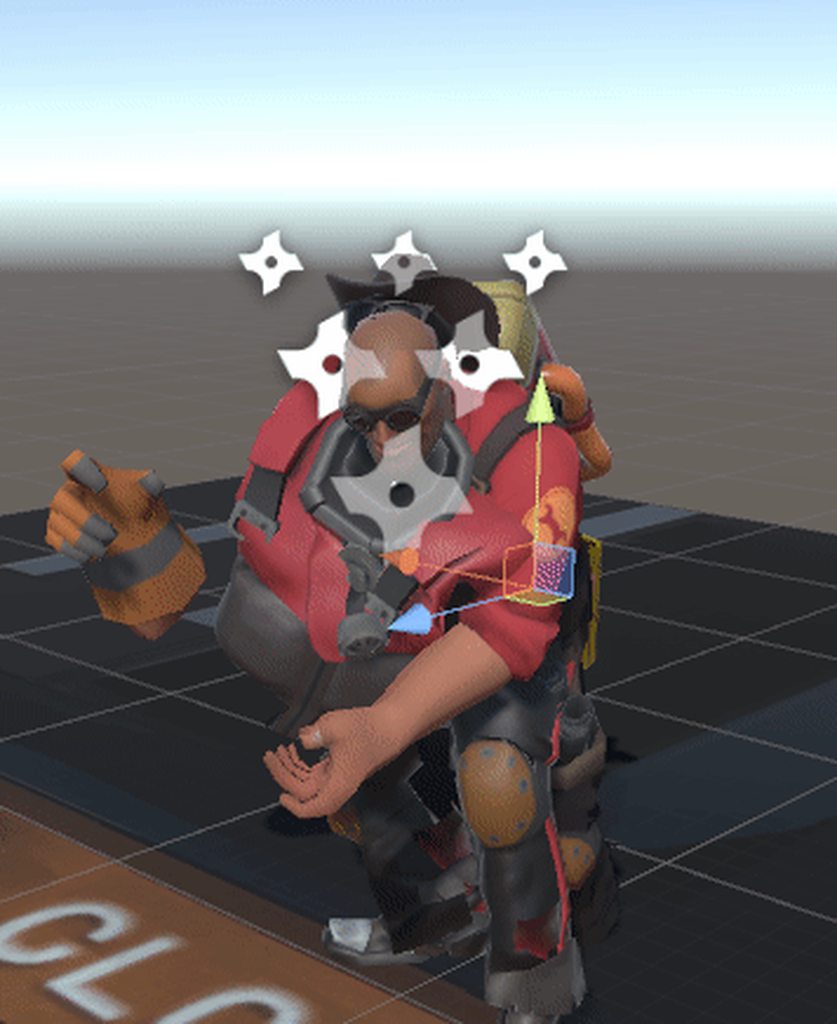
now i have another animation related question, but its a bit difficult to explain so im gonna attach a gif to help
that gold box on the back of the character is supposed to fly into the air and land in his hand, but since i made the model the animation was on use the humanoid rig, no props, such as the gold box or his pockets do the animations they originally did
https://i.imgur.com/rIMkiB1.gifv
 crystal pike
anyone know how to do the double animation override where you can only activate one animation if another is already activated?
hollow perch
@crystal pike depends a bit on what the animation is supposed to do
crystal pike
lets say its a gun
instead of having 2 gesture overrides, one aiming and the other firing, how do you make it so the trigger fires but only when the gun anim is out
hollow perch
If it's for making props appear you can make one object inside another and activate the outer one and the inner one in two separate gestures
That also lets you attach a different gun to each gesture
Ah I see the same approach may work with a particle system and sound
crystal pike
so if the inner one is set to peace sign, and i activated peace sign, nothing would happen unless i have the other gun animation on?
hollow perch
So the gun is therr but you can only activate the flash and sound if anothet gesture is active
crystal pike
yea
hollow perch
Gun -> aimed empty game object -> particle system etc
hollow perch
So the animation that does aiming also turns on the aimed empty object
crystal pike
that was my theory but i didnt know if it would work
gloomy plume
nevermind about my question/problem, i solved it
 stuck pendant
for some reason the blendshapes/shapekeys on a character I'm working on are not translating properly into unity
they're there but not acting in the way I set them up, both for visemes and other face expressions, using existing bones on the model I made them from scratch, fbx export, no extra modifiers, attempted standard and CATs export settings
am I missing something?
clear yew
hey, is there anyway to make it so i can animate something longer than the 1 frame they normally give you
i know there is but i dont know how
slim sparrow
No
You can, however, animate an object
And then activate that object
The object activation is only 2 frames, but the object will play the animation on its own if you put an animator on it
clear yew
I've seen people do it though, im trying to do a super saiyain animation to the sound
 cedar root
just build an animation, put it on a game object, and just spawn in the game object with your hand gesture
clear yew
i thought that could only be one frame though
slim sparrow
No, the gesture animation can only be one frame
cedar root
the one to spawn it can only be 1
slim sparrow
Whatever objects activated by this gesture can do whatever they want
You put the animation on the object, so the object animates itself
cedar root
yeah the one on the object can be as long as you wish
cedar root
basically just make an anim as you normally would, then drop it onto the game object, which obviously has to be somewhere in your models armature . then make a normal hand gesture to turn the game object on and off
you will have to hold the gesture the whole time the anim is playing
or you could try setting up toggle props but that still doesnt work well
clear yew
so like i could put it on my avatars body
cedar root
yeah, best just to parent it to ur armature
clear yew
because i just need to toggle the particle effects on at different times of the animation
cedar root
yeah so just make the anim that toggles the effects as you need them and do the steps i set above
clear yew
thank you!
cedar root
Glad to help :)
no for a question of my own lol
ive converted a few mmd dances to unity with varying levels of sucess and it works mostly fine but sometimes in a dance ,instead of the model turning around. it will awkwardly spin around at what seems to be the spine but only the top half of the model will rotate while facing forward if u get what i mean
is there some export setting im missing cuz it looks fine in blender? or is that just a thing that would have to be fixed manually
hollow perch
Are you importing them as humanoid?
cedar root
yes
slim sparrow
Ah
Have you tried ticking the bake into pose options for root transforms and stuff?
I can't remember if you did that already
On the animation files
Other than that, hips are broken with MMD Tools import
Not sure if you can fix that
cedar root
yeah i baked into pose
like the rest of the dance looks fine its just occasionally it does the rotate at the spine instead of turning the model
clear yew
hey @cedar root , what animation do i have to place as the gesture to activate the animation in my arc?
i added a very tiny cube to my armiture, if i were to activate it via gestures would it play an animation I applied to that block?
 ripe torrent
ive got a question, some avatars have animations that makes the screen shake or move and i was wondering on how to do that. Can someone help?
icy crow
they are screenspace shaders, most people will block you if you use them
ripe torrent
im using it for a spaceship crashing
 mint prism
hai, i wanna make a finger gesture that raises the apron from the dress of my avatar by using my fingers to move it.
How can i do it?
I had fixed joints in mind but it doesn't reset the position of the apron after i switch finger gesture
slim sparrow
Try dynamic bone colliders with bounds set to Inside @mint prism
mint prism
i set the colliders on the fingers to inside?
clear yew
hey guys, im really struggling to make a gesture that activates an animation longer than .01 seconds
does anyone know how to do that?
create an ewmpty game object
animate it
parent it to your model
disable it
and enable it through a simple gesture
thats what im trying, can i use a box and make it tiny with no shaders and stuff and animate the box?
yes ?
most people use an empty game object
because it's literally nothing
clear yew
ty!
devout igloo
Does anybody have any base gesture animations they're willing to give me so I can make gesture animations without sacrificing the hand gestures themselves?
Because I'm in the process of trying to make them and it's so hard to tell if I'm doing it well or not xD
 devout igloo
That's 100 pounds of a week of stress down the drain
clear yew
yeah, these should be in the SDK with a big bow around it
devout igloo
I've been putting this off more than a week becuase I knew it would be insanely difficult. I tried doing a fist earlier today and it looked horrible
clear yew
I stumbled on them when adding markers, I've used them for every gesture anim since
devout igloo
I asked if they were in the SDK a while ago and somebody told me they're not
So something tells me most people don't know they exist
clear yew
ive been wondering how you tie animations into facial anim things.
@clear yew you add keyframes to the gesture anims that animate parts of the face
clear yew
yes most MMDs come with a bunch of blendshapes ideal for facial expressions
oh
you mean in blender right
devout igloo
Depending on where you got them, your models will usually have "shape keys" built into them that allow you to animate certain parts of the face at a ratio of 0% - 100%, and you customize those in Unity
clear yew
yeah it has face keyframes
devout igloo
So a facial animation is just an animation of 1-10 different shape keys, setting each value to whatever you want to make them make a face
First of all if you're gonna tackle this, download what 1001 posted earlier
because assigning a facial animation to a gesture will override the gesture so your fingers just hang limply in front of you
clear yew
limp fingies
devout igloo
What he just provided is the base hand animations so you can modify them and add the shape key animations to that
clear yew
do you do that in unity
clear yew
oh alright
devout igloo
Animating a face is way simple
clear yew
yeah because i just finished an mmd model a few days ago and i only made lip sync visemes without eye tracking to do anim stuff
devout igloo
@clear yew You okay with me distributing that all over the place?
devout igloo
yaaay
clear yew
scuff my fingers like some new nikes
 olive lynx
Hi everyone. Does anyone know where I can find the Ruby Roses Cresent Rose transformation animation?
slim sparrow
I found a Crescent Rose model on Deviantart a while ago
It had a VMD of the transformation
olive lynx
I think I found the same thing. When I tried the VMD in blender, it was broken to all hell lol
and I don't know the first thing to fixing it
 surreal iron
i am getting super triggered :^)
slim sparrow
@olive lynx how did you import the model?
surreal iron
still trying to make my walk animation to work in vrchat
slim sparrow
You need to use MMD tools to import the crescent rose, then when you import the VMD, it will work.
olive lynx
@slim sparrow by using cats
slim sparrow
The problem is that Cats Blender Tool imports at 0.08 scale
So all the animations are completely off
Import it with MMD tools instead
It comes included with Cats
slim sparrow
Np
In my opinion the animation should also be sped up 2x in Unity through the Animator, but that's personal taste
It's kinda slow
olive lynx
How would I go about reversing it so it becomes a scythe when I take it out?
surreal iron
rokk, please be my saviour
olive lynx
Sorry with all the questions lol
surreal iron
https://gyazo.com/5d6df5751ea168c7a4d77626bd033322 https://gyazo.com/a290f8a22b0a627e75748bc513adeede


my walk animation, looks bad inside the game, nothing like it does in unity
slim sparrow
Ohh
Set all the "Based Upon" options to "Original" @surreal iron
That is a nice walk
surreal iron
it was my first attempt at making a walk cycle
i still need to tweak the hands to make it look smoother
but i want to first be able to use it properly inside the game

slim sparrow
For a first attempt that's crazy good
surreal iron
yeah... watching a fuckton of videos on youtube, a lot of all nighters learning stuff
lets see... uploading the new settings to see if its gonna work...
waaaait...
could it be?
https://gyazo.com/c403c08ec443aa37296a523d63813ffc can the feet staying below the ground like this affect the walk cycle?
 muted prairie
Would be better to see what it looks like in app
surreal iron
looks bad, just tested
slim sparrow
It might affect the IK
surreal iron
ill make a gif showing how it looks like in game
https://gyazo.com/229a2935f88a050cf5932f40985f55c1 in game it looks like im a robot, not an android...

gonna upload again, with the avatar just a tad above where it was before...
 pliant dust
If you want to change the walking animation, you're gonna have to do that yourself. Good luck with that. Making a good looking walk is hard.
slim sparrow
He already did that
That's the point
He has a good looking walk but the game messes it up
@surreal iron try assigning the animation in runfwd and sprintfwd too
surreal iron
k, ill try that out
pliant dust
Looks normal to me. If you mean how your movement isn't matching your feet (aka the sliding), that's something you need to fix by adjusting your keyframes.
VRChat avatars move really fast, even when walking, so you have to be very cautious about that.
surreal iron
yo
i think it fucking worked
👀
it worked..... IT FUCKING WORKED
so... i need to make animations for the sprint forward as well so it will work properly
surreal iron
time to open nier automata, record her run cycle and recreate it in blender 👀
 frozen rose
does anyone have any settings for music? i dont want it super annoyingly loud but its always right on my body and not loud at all
i dont know where else to ask this lol so sorry if its in the wrong place
surreal iron
the vcr auto configs the vol if you set it to 1
i think it caps it to 0.9
so unless you use some ear rape sound sample, it should be ok
frozen rose
is there anyway to make the sound disperse around me better?
because its way too quiet unless you are right ontop of me
that will make it better?
silk portal
Hey, I'm working on a world both for the standalone Vive and VRChat.
I'm wondering about something: Would it be alright to add in a cloth sim in my world?
frozen rose
Thanks a bunch @surreal iron
silk portal
Hoping to get curtains blowing in the wind.
Kind of going for a haunted house vibe.
I'm just seeing what would be practical to keep and what would be best to take away.
 true basin
animate your curtains in blender/maya using wind effects
find a way to make a seamless loop
or hand animate
actually, just vary your wind effects to get a seamless loop then bake
silk portal
@true basin Would there be a way to bake in Unity? My scene is currently modular.
 frosty jacinth
hey guys is there any way around unity bugging your model out when making an animation? i'm trying to make an override but it is moving my model and changing where the item the model is supposed to be holding far away from it
 lunar snow
You made a mistake then
I'm assuming the item is attached to the bone but if it's over translating I'll assume you have an intermediate game object that isn't in the right spot and it's pivoting on that
ripe torrent
anyone know a tutorial on how to use screenspace shaders?
slim sparrow
How to use them varies per shader
regal hollow
it's unlikely people will give out information about screenspace shaders
slim sparrow
Also if it's the chromatic aberration one (red/green/blue distortion), people will hate you
Or any irritating shader in general
ripe torrent
i wanna use it to make the camera shake/move to simulate a spaceship crashing
ripe torrent
still need help
clear yew
pretty sure nobody is going to help you to make other people's screen to shake
ripe torrent
k
 solar bloom
so i made a gun with animations, but the sling animation keeps looping permanently, is there a way to prevent this?
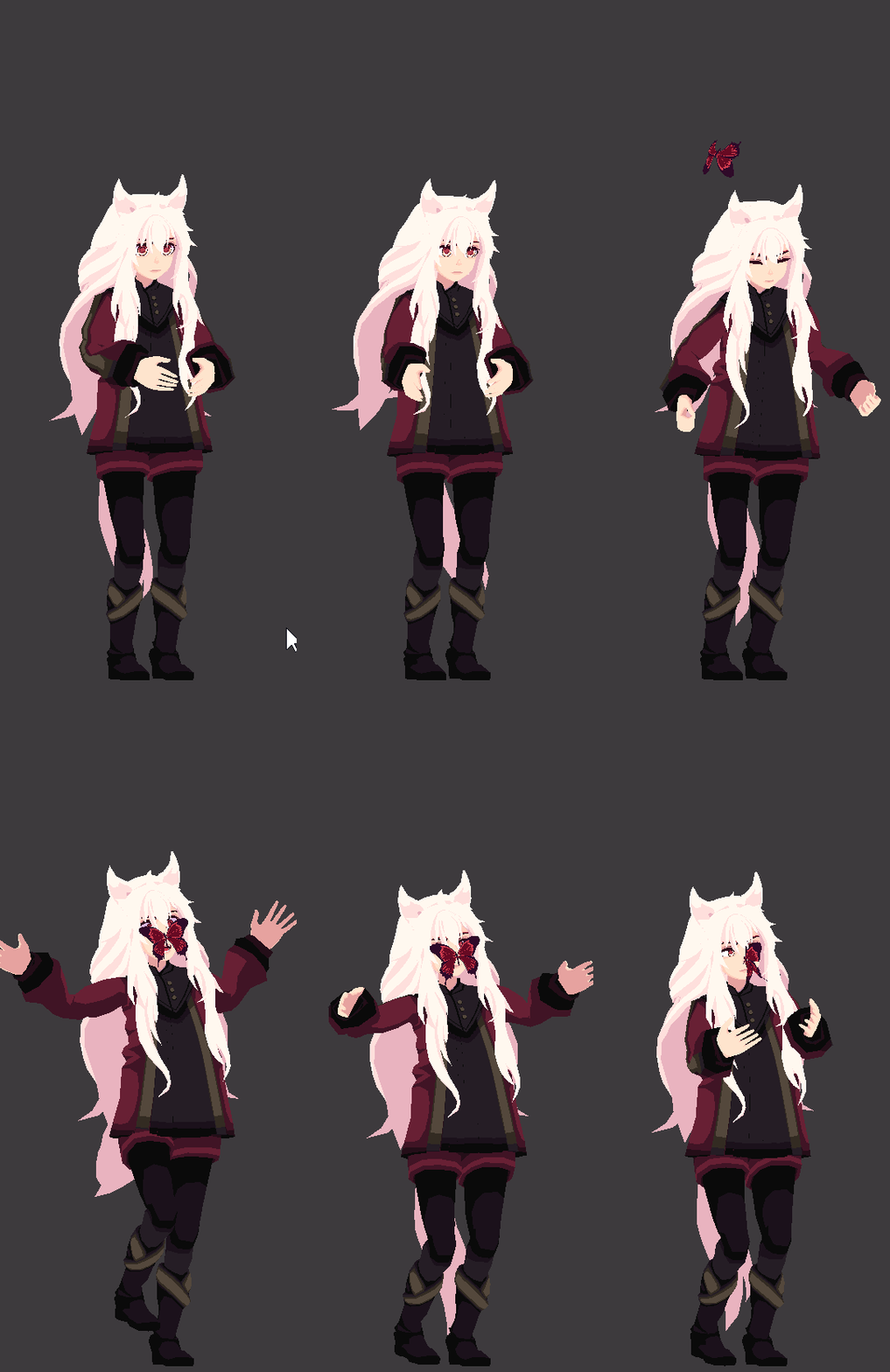
 prisma trout
hey i made myself a custom override and placed it on my model and stuff but the replaced emotes are not showing up, they're just at default. could this be because my avatar doesnt have a humanoid rig?
 main geyser
I have a question. How do I import an animation for my vrchat model?
I'm making an avatar and want a custom animation to go along with it
 craggy sage
is there anyway to play an animation then pause it then continue it using hand gestures?
clear yew
Not that I know of.. all animations play through.
@main geyser if you have the animation made, you can drag it to the model and apply a loop to it, so the animation stays.. if that's what you're meaning I believe someone did a YouTube video for a tail wag so you could use the same application for other animations.. unless someone has a better way.
main geyser
(its orange justice from fortnite)
clear yew
If you're taking it from one file to another I'm assuming you'd have to match the bone names and everything which is probably why the vrcat bone setup makes things easier.
devout igloo
Can you set a different animation to be applied to each hand's gesture?
So instead of like 5 gesture-animations, you'd have 10, with 5 on each hand?
slim sparrow
Nope
However, you can combine gestures and nest objects so you can activate stuff with certain gesture combos
regal hollow
Would be cool zerithax but not possible, unfortunately
slim sparrow
We really need custom animator support
It would be so easy for the devs and for us
And it would be literally impossible to use maliciously
Or at least, it wouldn't add to any maliciousness. I'm sure people can activate crash particles with those the same way they can with any other animator
 quasi hinge
It is possible btw, just not really supported
slim sparrow
Yeah, on generics
But I want official support on humanoids
They already gave us the proper controller in the SDK, we just gotta fill in the animations ourselves.
quasi hinge
Ah generics is it, never heard that much
slim sparrow
But those don't allow for gestures, probably don't allow emotes (I don't know what happens if you just alter the Base Layer), and can't track hands and head
Gestures is like 90% of the reason we want custom animators to begin with
quasi hinge
Oh I mean different hand gestures
devout igloo
I just made a gesture that both animates the hand into their base positions and animates the face, but the face animations aren't changing 🤔
The hands are doing what they're supposed to be doing, but no face changes
slim sparrow
Face bones or shape keys? @devout igloo
Are you sure the hands are doing the same animation?
devout igloo
shape keys
Yeah they are, because I can see the weirdness that happens when I try to activate them twice at a time (once on each hand)
slim sparrow
Weirdness?
devout igloo
They kinda freeze in place until I hit a new animation. That wasn't happening on the base model
slim sparrow
Oh, maybe your animation is too long
It needs to be one frame at 0:00, one at 0:01
You might still have a frame at 1:00
devout igloo
So that's obviously the new animations I've appplied glitching out. I'm okay with that glitchiness, I'm just curious as to why it's not applying the face changes too
oh
wait a sec
no they didn't save the blendshape animations I added
I copy/pasted them to a different folder then deleted the originals
But the new ones didn't have the blendshape animations I added
 inland urchin
Cripe, consider me buggered. What would cause a blend shape from Blender to Unity to only ... half work? About half the vertices transform, and the other half just don't move?
devout igloo
Okay I think I've fixed my issues o/
Just re-uploading a change because I forgot to copy some basis-blendshape changes to the other ones
tfw talking makes your thumbs grow
inland urchin
I SORTA got somewhere with making Unity calculate the meshes normals on import but... seems like no matter hwat I do. It's either: Good light and garbled blendshapes, or horrendous lighting and working blendshapes. I'm outta ideas right now, someone git me when yah can.
craggy sage
if i make an animation for a mesh, could i use that in unity/vrc?
 winter sundial
It's impossible to move the main body with regular 2 frame emotes, right?
slim sparrow
@winter sundial you mean gestures?
There is avatar masking applied which makes you only able to affect your hands in gestures
And bones not connected to the humanoid rig, such as wings
winter sundial
Alright, thought so. Same for shapekeys?
slim sparrow
No, shape keys work
Literally anything works except the humanoid animator properties that aren't on your hands
I think you can technically move your hands in gestures, but in VR it will get overridden by the IK.
Not that it matters much because the freedom of movement is small
You can still do "emotes" on gestures though, by disabling your Body mesh and activating a child model that plays an animation.
winter sundial
Oh, so I can make a shapekey to pose my avatars body and apply that as a gesture?
lunar snow
i think that may end badly
slim sparrow
@winter sundial yes, but
That will deform in very strange ways
Because they will still be affected by the bones
If you want a pose, just enable a sub model
winter sundial
Aww, I will do the sub model thing then. This avatar just looks good when it poses (drossel von flugel)
Thank you, by the way
slim sparrow
If you're on desktop you could just have an idle animation
clear yew
if you want an animation on a gesture you have to use an animator component that contains the animation.... your gesture activation still needs to only have 1 keyframe tho
hollow perch
You mean rotate the elbow bones? That would have the effect of moving the rest of the arm which will cause ik tracking issues. In general anything that interferes with ik tracking or mechanim humanoid animation cannot be directly changed
You want to rotate the bottom part of the arm or you want to rotate at the shoulder and keep the wrist at the same place like a chicken dance
 wild cedar
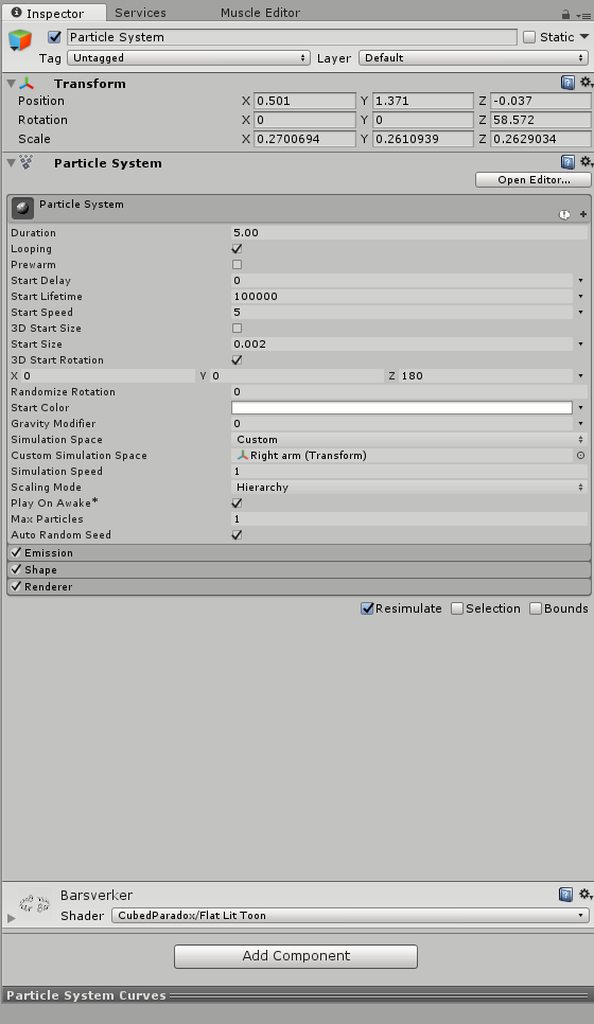
How do I make my name spin around my arm?
I obviously have to animate a sphere, but thing is. How do I make the name go around etc?
clear yew
i used a particle to do that
set the renderer to mesh and select a sphere
i only spawn 1 particle with a very long life duration
and use the "rotation over lifetime" part
wild cedar
So just regular particle effect?
clear yew
yes
wild cedar
Alright, got you. Cheers once again man
wild cedar
@clear yew I'm not finding the rotation over lifetime part, I must be blind XD
clear yew
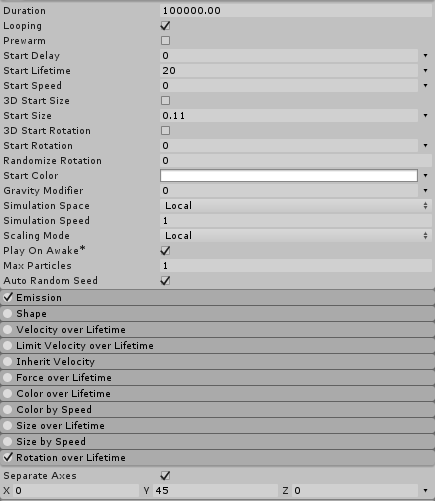 wild cedar
https://imgur.com/a/5T2ZWhW This is what I get
 clear yew
something is very wrong with your unity
wild cedar
Yea, looks like I'm missing some parts
 turbid beacon
is there anyone like a pro with unity i cold really use some teaching and guidance
with my model
im going to drive myself insane
x.x
clear yew
hey guys i created a emote for my avatar i put it in a animation overide on emote 1 how do i get it to play sound that i want just till the emote is done
anyone able to help please?
clear yew
You have to time it
And clip the audio
Or
If your animation is 2 pieces
Add the audio to the animated version
And have it automatically clip
Gesture animation and the empty object with the animator component
Put the audio file onto the empty object version
Add 1 keyframe at the start of the audio
Put the end keyframe at the end
But if it is a prefab animation file you have to change the animator reference so you can add the audio file to it
@clear yew
main geyser
dragged an animation to my model. I now have this file with the model name and it doesn't have anything
how do I make it have an animation
(apologies if that was worded poorly)
 severe moss
Where to learn about advanced/crazy/trippy animating? Anyone have any suggestions? I've seen some crazy animations that do things like create sonic-booms in the air or mess with peoples vision and change the skybox
spring nova
This is a great start on particles https://youtu.be/FEA1wTMJAR0

Udemy: http://bit.ly/BRACKEYSMEM Everything to know about the Particle System in Unity! ♥ Support Brackeys on Patreon: http://patreon.com/brackeys/ ● Learn m...
 strong horizon
But don't abuse them to crash people.
severe moss
@spring nova so you use particles to do those trippy animations?
Also I have been trying to flip normals of a sphere for a while now and can't figure it out. (unity3d)
spring nova
You need to do that in blender. Edit mode, select all, spacebar > flip normals
Actually you could do that I. Unity, just make the scale -1 on one axis
And yeah, 90% of animations are going to be particles. The animation just activates/deactivates certain particle systems in order. The other 10% are custom shaders
severe moss
Alrighty
 charred quarry
I got 2 questions for you modelmakers - how the hell do you make a giant humanoid (scaling things with no skeleton is easy, but doesn't work on anything with a skeleton) adn how the hell do you make a humanoid fly and generally do emotes that are fixed in place? I've seen that "you" can move around when doing those emotes like some ghost, so I assumed that it's a copy of the model that is animated with the main model being made invisible, but trying that method in Unity also doesn't work. You can't make the main model inactive and you can't really animate an attached copy the way I've seen...so how?
 karmic meadow
so i have a question;
https://gyazo.com/1bf547fef5277b48a495af63b0a5da3a
The eyes on this model are using the texture: "eyes" and i want to be able to change the texture to "eyes2" on an animation is there an easy way to do this?
 spring nova
With that shader you can't change the texture directly, but you can change the entire material.
I don't believe you can add it with add property, but you can just hit record in the animation and change the material, it will record it
karmic meadow
oh sorry i not quite sure how to do that would you mind going into more detail?
spring nova
have you done gestures before?
spring nova
Oh, it's the red circle in the animation tab
karmic meadow
and what just go change the material while its recording?
spring nova
is the thing you're animating a child of the animator?
karmic meadow
dont know.
i duplicated the model and am animating an angry face on that, ive got shape keys for all the facial expressions except the eye colour and want to change the texture in this animation only
spring nova
Maybe you were changing the material of the main model or something while the duplicate was recording?
 obtuse tendon
Has anyone fiddle with the nuclear explosion product off of the unity store?
karmic meadow
i changed the body eye texture of the one i am animating on but it just didnt record idk
spring nova
Yeah, not the texture, the material
karmic meadow
oh
obtuse tendon
I’m literally at a loss as to which folder to select to import the premade nuke animation over to my avatar
:/
spring nova
idk exactly which explosion you're talking about, but pretty much all of those particle effect packs in the store use scripts in some fashion or another. Usually it's gonna take some work to remove the scripts and create raw particle system equivalents. In the most extreme examples, the only usable thing is the shaders and textures themselves
karmic meadow
sorry but how do i change the material
spring nova
Duplicate your material, change the texture on that, and then select the new one in the mesh renderer component
karmic meadow
yeah thats what im confused about how do i select it in the skinn mesh renderer part
spring nova
the little circle next to the name of the material currently on it
obtuse tendon
It’s a nuclear explosion by diamond fox, I was looking at the folders to see what files it contains
Prefabs, scripts, mats... pretty much everything to replicate a explosion scene.
severe moss
so i need help. when I am doing a gesture override how can I make me avatar to an emote when i am standting still but when I move it is like normal until I stop again?
 novel narwhal
boys
how do I get my avatar to hit a Dab with gestures?
I got it down packed with emotes but I can't get gestures to work for the life of me ;~;
clear yew
just create a duplicate of your model
and put the animation on it
and with a gesture just activate the duplicate and hide your main model
novel narwhal
how? when I did that it made my hand disappear instead of playing the animation
and the attached sound played on all my gestures :/
severe moss
so ur saying put 2 models in 1 animation. then disable my main model for the dancing one when it gets activated?
clear yew
@novel narwhal because your hand gesture can't be more than frames 0.00 and 0.01
novel narwhal
oh I see
clear yew
you actually activate the model or an empty game object that got the whole animation
novel narwhal
I was straight up just using my emote animation
so how come the sound played on all the gestures? just because that broke the model at the time?
severe moss
btw @clear yew Your pinned message wasnt too clear to me for the static objects by joints. in the animation do you just set the joints location to 0,0,0 twice? Also in the pic it shows that the FixedPoint and FixedJoint are disabled. Should they be enabled?
clear yew
"Basically what you will do now, is disable the "fixedJoint" by default"
so everything is enabled by default except the fixed joint
and what do you mean set to 0 twice ?
severe moss
via the animation. once on the first frame once on the second.
clear yew
both frame needs to be the same
you need a beginning and a end frame when you use those 2 frames
 eager vault
That's how it is with every gesture, you need 2 frames
severe moss
Gotcha. and the "by default" thing meaning disable it by the checkbox?
severe moss
oh okay but then it is enabled in the models animation
novel narwhal
if I have an already existing animation is there anyway I can cut out just the part I want for my gesture?
seems like the animation's goin all weird when i try to snip it apart
novel narwhal
how would I go about copying what I need?
novel narwhal
okay so I got my frame
if I want audio on the pose do I just load it on like I would for an emote?
clear yew
just put it on an empty game object inside the duplicate
so it will play automatically when you activate the duplicate
novel narwhal
okay
so the animation should be set up exactly like an emote except its 1 frame, sound is in a empty game object, am I missing anything or can I drop it into a gesture controller?
novel narwhal
yeh I got the frame I wanted from the Dab anim I have, and ctrl+c, ctrl+v it twice beside eachother
clear yew
you basically use your hand gesture to activate the duplicate and hide your own model, the duplicate should have the whole animation on it so it plays automatically when you activate it
novel narwhal
pretty sure that's what I have
we will see tho
nope
sound is working fine, animation never played
spring nova
you don't activate the duplicate as a replacement. You use the duplicate to create an animation file, then you play that animation on your main model. Once you have that file, the duplicate is irrelevant.
novel narwhal
ok wait
what?
I think that's true for emotes
but I'm tryina go for a gesture rn
gesture with sound
spring nova
It's true for gestures too
Oh I misunderstood svelsien at first, but there is a step he's missing. The problem is that you can't convert an emote directly into a gesture because while emotes are able to animate and move your whole body, gestures cannot, they can only move fingers. So instead you need to make a duplicate of your model (not the same as the duplicate you use to record animations, which I assumed he was talking about), and instead have that model play out the animation while your real model is hidden
novel narwhal
oh well that's what I have
I've got a duplicate with the animation as it's controller and a game object with the sound in it
then i set the animation as rocknroll gesture
sound played but my hand like crumpled up and no animation happened
spring nova
the animation that's playing should be on the model, and the actual gesture is nothing more than enabling the object
novel narwhal
http://prntscr.com/kjro2q that's the duplicate
 spring nova
remove the descriptor and pipeline manager
Then have it off by default and make a gesture that enables it
novel narwhal
http://prntscr.com/kjronq like this then?
 spring nova
the animation inside will play out automatically when it's enabled, separate from the gesture
novel narwhal
yeh I knew that was my goal
didn't know i needed to remove those scripts
no one told me to ;~;
so thank you for mentioning it xD
spring nova
that shouldn't necessarily have broken it. I'm not sure what happens when you put a descriptor inside a descriptor, but either it won't let you upload or it probably wouldn't affect anything
Is this duplicate inside your main model?
novel narwhal
it's in the same place as my emote overrides
spring nova
Could I see your hierarchy?
slim sparrow
I don't think you're getting it quite
novel narwhal
sure
slim sparrow
You need to have the duplicate model inside your main model
Next to the armature and the body
spring nova
yeah, it's not like an emote that animates your model. It's more like an accessory on your model that you're enabling, so it needs to be inside it and everything
just like a sword or something
novel narwhal
incase that looked weird, GestDab is my gesture duplicate tho that was probably obvious
spring nova
But GestDab needs to be inside the model, because it's not something you're using to record an animation, it's the accessory you want to be enabling in the first place
severe moss
Let me ask because I am doing the same thing. How does VRChat decide which model is you? Like do I need to remove something to make the duplicate act as a "object". I think we are doing the same thing.
slim sparrow
Whatever object the Avatar Descriptor component is on will get uploaded
Anything outside of that is ignored
So you need to put your stuff inside that object
spring nova
The duplicate you create gestures on is not uploaded, it is simply used to record animations that are played out on your model
severe moss
Oh okay so we aren't doing the same thing. I am saying having a duplicate in an animation.
spring nova
yes, then you create a gesture that enables GestDab
novel narwhal
okay
spring nova
and disables your mesh
novel narwhal
so at this point I just need to drag n drop GestDab's animation into a gesture slot right?
that's what you meant by create a gesture?
spring nova
no, GestDab's animation is it's own thing
novel narwhal
:I
spring nova
You need to make a new animation that is enabling GestDab
novel narwhal

I have this
though idk if that even says anything xD
that animation there is just telling GestDab what todo if I understand correctly?
so how would I go about creating the gesture it's self?
spring nova
You just need an animation that has a frame at 0:00 and a frame at 0:01, both setting GestDab's state to enabled. Then plug that into rocknroll
novel narwhal
okay
because that animation there, the one titled GestDab is a frame 0 and frame 01 animation. it is plugged into the GestDab duplicate
the frame it's made up of is a keyframe I ripped out of the Dab emote there
spring nova
Then you can plug the GestDab animation into the rocknroll slot, that's what you need, and that will enable it just fine but then the model will do nothing
so you need to put a dab animation into the GestDab duplicate so it does something
novel narwhal

this's all I understand
I drag n dropped the animation I want for it
and I'm back where I have been
so I am the confuse
spring nova
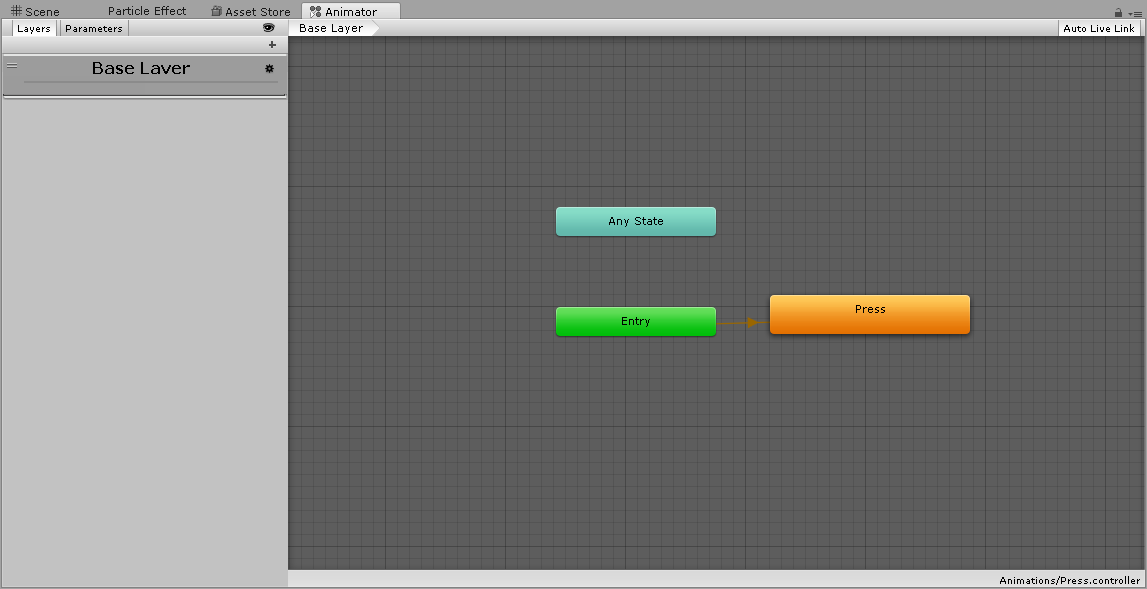
go to the animator tab at the top (different from animation) to this screen https://i.imgur.com/4aokf23.png
 novel narwhal
 spring nova
now remove both of those, and drop in the same animation you previously used as an emote
spring nova
should be
novel narwhal
cool I'll upload an brb with the details
severe moss
How would I do so? having a duplicate of myself in a gesture. Lets have an example. one of me dancing so when I enable it I can see myself dancing
novel narwhal
I think you'd have todo that as an emote?
severe moss
ive seen people have it as gestures. I was talking to a guy about it last night
he had one
spring nova
that's what falcon is working on right now. Enable a duplicate of your model that has the emote playing automatically
severe moss
could it be at a fixed point?
spring nova
yes, but that's another thing that I don't have the time to explain at the moment
novel narwhal
I know what you're tryina do acid. You want that back-up dancers effect
novel narwhal
ye my animation's still not workin. I think I know the problem tho
severe moss
All im askin is if I need to disable anything on the duplicate model. as in the descriptor or the pipeline manager components
spring nova
if you are putting it inside your model to use it as a prop you're activating/deactivating, yes
The reason you don't need to remove those things when you make a traditional gesture is because those types of duplicates are not uploaded at all, they're just used to record animations.
novel narwhal
with an emote you mean?
spring nova
you create emotes and gestures in the same way
the only difference is how they're activated ingame and what they're allowed to affect
novel narwhal
ye my anim's sill broke xD
you think it would have something todo with how I put the anim together?
cus I literaly copy-pasted a keyframe from the Dab emote I had downloaded
clear yew
probably
spring nova
does the gesture work? Activating/deactivating the duplicate?
clear yew
since the bone structure isnt the same i would guess
novel narwhal
@spring nova idek what that question means my man
spring nova
When you turn on the gesture, what happens
novel narwhal
looks like my hand turns into a fist and the sound plays
should my Duplicate's controller be the gestdab controller or the controller override?
 spring nova
No, only your main model uses controller override. The duplicate needs to have a controller that does nothing but play the emote
can I see the animation that you plugged into the gesture and the animation that you put inside the duplicate's animator?
novel narwhal
that's supposed to be the same thing right?
spring nova
no
the one you plug into the gesture is enabling the model, the one you put in the model is doing all the movement
novel narwhal
http://prntscr.com/kjsa8y left one is the actual animation, right one is in the model's controller
 spring nova
right but what do they look like in the animation tab
novel narwhal
 spring nova
Sorry, unity's terminology is stupid. Animator tab is different from animation tab
novel narwhal
that is the animator tab?
spring nova
that's animator at the top, I'm talking about animation at the bottom
clear yew
the animator tab is very different
novel narwhal
it says animator at the top ;~;
spring nova
yeah I mean animation
spring nova
well they're not backwards, they're pretty much accurate. They're just confusing because they're so similar
slim sparrow
Unity's terminology isn't that stupid
The only confusing thing is the existence of the Animation component, which they should visually rename to Legacy Animation.
Or Animation (Legacy)
novel narwhal
http://prntscr.com/kjsc5c there's more than one screen's worth so brb
 spring nova
I'm not one to hate on unity, and I can't say all of it's terminology is stupid, it's just the difference between animator and animation, that's all
 novel narwhal
lol thought so
spring nova
now get the original dab animation and put it in the model's controller
novel narwhal
the model being the duplicate im using for the gesture eh?
spring nova
no, the duplicate that's inside your model
spring nova
now make a new animation that just enables gestdab
and plug that into the rocknroll gesture
novel narwhal
wouldn't I just plug Dab into the rocknroll gesture?
novel narwhal
wait im just realising idk how todo the "create an animation that just enables GestDab" that's the part I've been glossing over this whole time ;~;
spring nova
the entire point of making a duplicate inside your model is because you can't just put dab as a gesture since gestures can only animate your fingers
duplicate your main model, click create animation, add property gestdab enabled, set keyframes to 0:00 and 0:01 both enabled
severe moss
u should just make a tutorial like the one in the pinned. Like a imgur tutorial.
spring nova
yeah, then plug the new animation into your gesture slot
novel narwhal
yeh
okay
ima try it
I was def missing like 5steps earlier
HAHA! new problem
so the gesture plays now, awesome
but now! the sound doesn't play
and my original model doesn't disappear
:I
spring nova
ok so go back to the animation you just created
and enable the sound
then disable your model
clear yew
more specifically, disable the mesh renderer on the "Body"
spring nova
actually it would be a skinned mesh renderer 😛
clear yew
novel narwhal
add property is greyed?
spring nova
you need to select the model that has the animation on it, not the animation itself
Which is why we create duplicates to create gestures
spring nova
disable skinned mesh renderer on body
 spring nova
yes that's fine
novel narwhal
that's only with duplicate enabled?
 spring nova
then you're fine
 spring nova
scroll to the right so you can see the plus button
novel narwhal
ffs I promise im not normally this dense ;~;
okay so I got my sound, the body skin mesh thingy, all the good stuff down
we should be ready to rell eh?
spring nova
should be
novel narwhal
oki doki
I shall brb with the final report
I thought putting shaders on my materials was gunna be the hard part, Kudos to those of you who actually do these animations yourselves
ALMOST
my og model is still there tho
spring nova
after adding the mesh enabled keyframe, did you uncheck it?
spring nova
nope, you're turning it off so uncheck
novel narwhal
oh that makes sense ye
spring nova
make sure you uncheck on both fraames otherwise it'll flash on and off
severe moss
should this work if the kakashi (3) is acting as a prop and has an animation while under the hierarchy of my main character.

thats in the animation of my main gesture.
 torn pawn
@severe moss you can just drag that animation file on the prop, be sure it's not legacy and is on loop, then that prop will have an animator with animation that plays whenever the prop is activated
severe moss
nvmd it i gave up xD
severe moss
@clear yew when do i turn off the fixed point animation? at the begining of the emote or the end?
clear yew
Emote? Its for hand gestures so both frames
clear yew
i
 rain reef
Just a quick question, if i dont want my particles to collide with my avatar, which setting in the colliders tab do i need to turn off?
hollow perch
My understanding is all avatars have a capsule collider automatically added on them in game.
rain reef
k, guess im just gonna turn down the radius scale.,
slim sparrow
You can turn off PlayerLocal collision
slim sparrow
In the particle system's collision module
You need to drag a VRCWorld prefab into the scene first and set up the collision layer matrix in the upload window
Then remove the vrcworld again
hollow perch
You just use the world to preload the layer list



 slim sparrow
Yeah
rain reef
So i drag a vrcworld into the scene and then i ?
slim sparrow
You go to the upload window and click setup layers
Then you can make the particle system not collide with PlayerLocal
rain reef
can i do that in a new scene and then save it as a prefab?
slim sparrow
No