#animation
1 messages · Page 82 of 1
 twin carbon
 obsidian vigil
So, you have an empty object that has 1 minute of keyframes on there right
you toggle that object off
and in the gesture override you toggle the object on
causing your 1 minute animation to play
basically
but youre not directly making a gesture 1 minute long
twin carbon
Wait you mean when i press the gesture it toggles it? I already have it like that

 tough cargo
right, i am fully confused.
i am attempting to edit a custom model with custom hand animations
the normal hand animations work in game, however when i attempt to load the animations in unity, it doesnt work
 clear yew
?
 mint prism
hello i have an animation that has the problem that root q and root t are not working ingame
every other animation works fine with root q and root t but not this one
does someone know how to fix it?
if someone would be interested i can send the animation in dm^^
 slim sparrow
@mint prism Root T and Root Q do not work in idle animations
In any case, you need to click on the animation in your assets
Tick all the "Bake into pose" options, all three
And for all three, set "based on" to "Original"
mint prism
thank you gonna try
 dull zenith
hey um....Im trying to make a character that show his heart using the RockNroll hand gesture, but the heart doesn't appear in the character's hand even thought is says is suppose to be active in the animation
slim sparrow
Are both frames of animation the same in Unity? If you move the red line from 0:00 to 0:01, they need to be identical
 eager shadow
is the heart just invisible in mirrors or for others as well ? what is the mesh of the heart called ?
dull zenith
well...heart
eager shadow
there is a similar problem when you add a new mesh with the name body in the hirachie but that doesn't seem to be the case here.
are you experienced with making gestures ?
eager shadow
okay then the usal stuff: is your model humanoid and has all finger bones ? did you draged the right animation override onto the vrc descriptor ?
is your animation 1 frame long ?
dull zenith
yes, yes, AND yes
eager shadow
poop those were the easy fixes
dull zenith
...I think I found the problem
the heart model was the same name as one of the bones
eager shadow
that could be the problem unity is picky when it comes to names
eager shadow
does the animation other stuff ? with that you could test if the animation even gets triggerd
to pinpoint where exactly the problem lies
dull zenith
yeah, is also shrink down the heart on his chest (becaus ethe one on his hand is a seperate model)
also I don't undertsand "does the animation DO other stuff"?
eager shadow
basically i wanted to know if anything happens at all when you press shift f6 in game
dull zenith
it does the hand gesture, the heart on the chest shrink but the heart on the hand dosen't show up
dull zenith
yes
eager shadow
i have in a similar animation the line Mesh Renderer.Enabled 1 as well
not sure if that is still necessary but you could try it
dull zenith
AH! is working1 thank you!
eager shadow
no problem. i am happy i could help you in the end
tough cargo
ok, so if i wanted to make a revolver spin on a characters finger, how would i do that?
slim sparrow
Place the revolver in the desired spot in the armature. I would advise the wrist.
Put an Animator on the revolver, make sure it spins when the revolver is activated.
Then activate the revolver in a gesture
Optionally, make another gesture where a non-spinning revolver is enabled instead.
@tough cargo
tough cargo
mhmmm...
ok, so revolver has separate animation from the main animation, attach revolver animation to main.
got it
tough cargo
ok, i have the two animations, both should play at propper times, but how do i make it so when i play animation X, it plays Y at same time?
(i.e x = the pose for character, y = the spinning revolver)
 hollow perch
Is Y an animation component on the object
You can keep y unchecked and then from X you can add Animation -> Enabled set to 1. I assume X is a gesture?
slim sparrow
@tough cargo make an object that plays the animation when it "wakes up"
This is default if there's an animator on it
Then just uh, enable that object.
tough cargo
alright
 trim zinc
what's a good way to reset a fixed joint gameobject so that if I activate it a 2nd time it doesn't get placed where I activated it the first time again
clear yew
with an animation that loops it's position and orientation to 0,0,0
check the pins for my album
i explain how to do that
trim zinc
that's a weird solution but I guess it should work, thanks for that
slim sparrow
Everything is a weird solution
Having the parent reset the child position a lot isn't what I consider weird
 night crescent
any way to fix visemes getting stuck
 wicked mica
Has anyone h ere managed to get world particles attached to props working correctly?
 spring nova
Yeah, you have to attach them with rigid bodies and fixed joint
Rigid body on hand bone, turn off gravity turn on is kinematic. Bring prop outside of armature, still inside of model though. Add fixed joint, point it to rigidbody on hand bone
wicked mica
ty
gonna try it out rn
@spring nova you, my sir, are officially better than 20 minutes of tutorials
❤
night crescent
Can I change my hair's shader/material with an animation?
spring nova
Yep, sure can. Just turn on record mode with the red circle and change the material yourself
night crescent
that was p easy. cool. will it change back to the other one when the animation is done?
spring nova
Yeah, unity's animation system will try it's best to reset back to default after
night crescent
Lol so that's a no then 😉 thank you man
spring nova
No it's a yes, it does change back
Did you want it to stay? There are methods for that too
night crescent
i was just joking bc i dont love unity
 abstract grail
how do you make custom animations without mixamo? I have certain .anim files I want to turn into animations but they aren't from Mixamo, they're their own files
abstract grail
nevermind I got it, I just didnt give it enough time to update before I logged in again lol
 uneven acorn
Anyone know how to fix the snail marker erase all animation? I made a copy of my avatar to put the marker as a gesture but the erase all animation says its missing trailrenderer.time in my animation tab. Does anyone know how to fix it?
 torn island
Im trying to make a non-player avatar dance with a player avatar, I select the dance and an avatar controller but it stays in A-Pose in game when I do the Emote, what do I need to add/change to get it to work
Here is the screenshot of the settings I have for the non-player avatar
https://gyazo.com/c6c07b5d2727ff407b02071878d34c3f
 slim sparrow
The problem is probably that you're using a legacy animation
Just give the child model an Animator that plays the animation when it "wakes up"
You have a controller in there, but it's a wrong one entirely
And also no Avatar definition which you'd expect in a humanoid model
torn island
So remove the Animation tab, and create the controller in this https://gyazo.com/692a51d8fd13bc195ee5bcfd85e74409 @slim sparrow

 sand crater
I remember asking about this and someone told me that it's impossible to fix the waist not following an MMD dance, is that true?
because the waist just remains fixed in the front position
 polar loom
how do i remove the (read only) thingy in the animator for the idle animation that makes me unable to add stuff to it?
 devout igloo
How does one animate a shape key animation after saving and exiting the animation window?
It's all greyed out and I can't add any new properties. I can remove them and modify current values, but any way to add more?
polar loom
same problem i have with the greyed out add property button
devout igloo
uhh
nevermind
@polar loom Just open the animation window without selecting any animations, then use the dropdown built-into the animation window
And you'll be able to select and modify them 🤔
sand crater

polar loom
lmao
used to be a bird
me and my girlfriend always have matching pfp's and she wanted to change them to this xd
clear yew
Can somebody tell me what animation is this and where can i get one ? https://gyazo.com/11e951d69e585c92b8dc9f2406c55371

 little cedar
everytime I try to freeze some constraints on a game object using the rigidbody, it starts to freaks out. Is there a way to fix that?
obsidian vigil
@little cedar are you freezing them on the fixed joint object or the one with only the rigidbody
little cedar
@obsidian vigil the one with fixed joint
if I don't freeze anything, everything is fine. But as soon as I freeze one axis, it freaks out
obsidian vigil
thats wrong
you freeze the ones on the rigidbody object
unless you want the other thing to stick exactly where it is
/ itll glitch
i use that technique for freezing objects in world space
little cedar
hmmm, I don't think I get it
for example my game object is attached to my head
the rigid body on the head has all the axis freezed
obsidian vigil
wait what
what are u trying to attach
a separate particle system
or just an object
obsidian vigil
just drag it onto the head and itll stay there =w=
little cedar
and I want this mesh to move using Y axis
obsidian vigil
give it an animator
or am i getting sth wrong
so..
you want that mesh to just stick
, permanently move up and down
or sth else
obsidian vigil
then you
make the head straight
add the thing
put an animator on the ting
make your animation
set it to legacy
and that shouldve been it #w#
little cedar
but I don't think the "thing" will follow my Y head movements only
thing is driving me crazy...
this*
obsidian vigil
wait what
i dont exactly get whatcha mean
so you only want it to move on certain axis?
little cedar
I'm sry abt my english, I try to be as clear as possible
obsidian vigil
its alright 😛
little cedar
I want this object to follow my head movement but only the Y axis
obsidian vigil
you could still try the fixed join thing
put the fixed joint on there
dont assign a body
and freeze axis x and z
never done that before but it might work
little cedar
and parent the object to the head I suppose?
obsidian vigil
yuppers
little cedar
still freaks out
and if i remove the fixed joint and keep only the rigid body, it just follows the head movements without freezing Z X
I actually saw an avatar in a public world with the kind of thing I'm trying to do
and it works just fine, I wonder how they did that
obsidian vigil
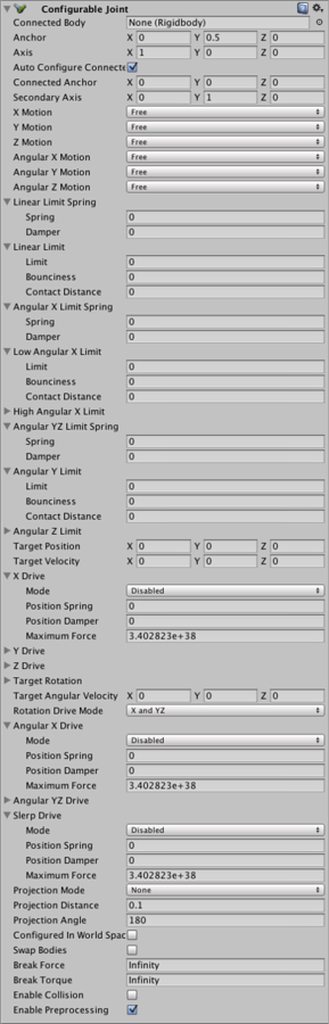
maybe using a configurable joint
but that thing is scary
i mean
only the component looks like this
 little cedar
oh...
hmm I try not to touch anything except the X Y Z motions
and I guess it replaced the fixed joint
replaces
Too complicated... oh well
 echo dagger
hay is there a download for that Roy Purdy dance ive seen a few people with it and it looks the same for all so there must be one that people can get.
thanks
 winter sundial
This particle thing is harder than I thought. How do I make it change direction?
Relatively to itself. For example, circle around me
dull zenith
hey again, um... I was expirementing with animations on a generic dog avatar, and I wanted to add some expressions to the dog using hand gestures overide, but aparently, hand gestures does not work with generic avatar, So I tried to use emotes but they end up looping endlessly, got any idea why? https://orig00.deviantart.net/c39c/f/2018/215/2/1/dog_animations_by_mela_the_cat-dcj36cy.png
 slim sparrow
Emotes and gestures don't work on generic rigs
You need a fake humanoid armature with the generic rig underneath @dull zenith
dull zenith
like...use the tutoral avatar rig and put the generic avatar under it?
slim sparrow
Basically yeah
Just take the tutorial avatar, delete the meshes
Then put the generic avatar next to the armature and animate it as desired
dull zenith
but I already animated it XD
slim sparrow
Yeah, but you might need to retarget them
Since VRChat only accesses the "root" avatar's animator and not the one that belongs to the generi rig underneath
So you might have to retarget all the animations
dull zenith
?
 muted prairie
Unity applies an animation to an armature while trying to maintain the best animation compression (loss of quality)
dull zenith
well, I've added the generic avatar under the tutorial avatar, but idk what to do after that ( im a real noob I know...)
you say retarget the animations, but idk how to do that
muted prairie
Do you have an .anim file ?
dull zenith
yes
13 of them in fact
each coresponding to an action or emotion made by the character
 gusty atlas
does someone have a hugging animation? xD
 naive maple
can you connect particle systems to emotes? not gestures
devout igloo
So when I apply some new animations to gestures in the animation override, it replaces that gesture. How do I make it so your hands still make the original gesture, but the new animation is also played?
eager shadow
there is no automatic way to do that. you need to manually animate the model to point ( or the gesture you override)
 icy crow
can you change the rolloff of an audio source in an animation?
dull zenith
hey, sorry if im being annoying, but you guys still didn't resolve me problem ^^"
spring nova
So you have the animations that are meant for the generic rig, and instead you need to put them on the humanoid rig. When you do this, all the animations will show as yellow and (missing). You need to retarget them so they're pointing at the right thing. What that means is going into every animation and selecting the name of each property and hitting F2. When you do that, it will show where it's trying to point to, let's say armature/hips/left leg/etc. All you need to do is add nameofmodel/armature/hips/left leg/etc so that it knows to go into your model first to find the armature in there. If you did this right, it'll turn black and get rid of missing
dull zenith
aaaaaaah, alright thanks
 steel juniper
So i have a sniper animation on my HandGun anim, but i want to know how to make it shoot with sound and a muzzle flash and put that on a seperate gesture so when i make thumbs up it shoots, how do i do that?
clear yew
put a sound component on the gun and disable that component, so when you do the thumbsup gesture activate the same gun but also enable the sound component
as for the shooting and muzzle flash you'll need to create those using particle system
you can either make your own or try to download some already made prefabs in the unity store
dull zenith
hey again....so I 've re centered all the animations, but now when I upload it, the character just stay still, whith no animation what so ever, did I do something wrong?
clear yew
did you give him a animator override ?
dull zenith
is a generic model, I hade to use a fake humanoid rig
so that I could use the emotes corectly
clear yew
the humanoid rig is probably moving correctly
but since your main models doesnt have any animation
then it's going to be completely still
muted prairie
It's both the anim controller and custom standing anims
dull zenith
so....i would have to make a duplicate of the same animation, but with diffrent paths for each of them?
muted prairie
nope, assign the same animation to all movement animation for example in the override controller
dull zenith
eh???
wouldn't that just make the avatar stay in his standing anymation all the time?
muted prairie
Use idle for idle and walk/run for walking and running animations slots
dull zenith
I did
but since the main model/generic model is part of the humanoid's armature, is just staying still
muted prairie
If it's set as humanoid in the configuration and you used the override controller in both the Animator's controller and the custom standing/sitting anims, it should work
dull zenith
but it dosen't though....
muted prairie
Post a few screenshots of your components and override then, i'd like to see it

 muted prairie
What does your humanoid skeleton looks like ?
muted prairie
And you're using an humanoid configuration for what ?
dull zenith
so that I can use emotes and hands gestures to be able to make this dog have diffrent expressions
muted prairie
Does it play in unity when you drop the avatar onto the anim file ?
dull zenith
what?
muted prairie
Click on your anim file, it's going to open a window in the bottom right corner, drag your avatar file in it
dull zenith

 frank tulip


 uneven acorn
Anyone know how to fix the snail marker erase all animation? I made a copy of my avatar to put the marker as a gesture but the erase all animation says its missing trailrenderer.time in my animation tab. Does anyone know how to fix it?
 eager lynx
I made a blink anim for an avatar but when I apply it as a component it wont work, any help?
dull zenith
me, I put an animation component on the avatar, then I go in the debug option of the blink animation a set it to legacy + mark the loop option, after that you put the blink animation in the animation component and it will supposedly work
eager lynx
debug options?
dull zenith
 dull zenith
if your on debug mode, click on you animation, it should be in your assets
eager lynx
 eager lynx
ok
dull zenith
and put warp mode to "loop" just to be sure the character always blink
after that, go to normal mode, and put your blinking animation in your characters's animation component
 dull zenith
yes
eager lynx
it works! thank you
dull zenith
no problem ^^
eager lynx
oh and good luck with your model, I recognize the character.
dull zenith
ah?
anyway, my character seem to be now able to make the right expresions on Vrchat, but is still looks like my character is hopping in place
eager lynx
the red nine tailed fox featured in an animated music video by MysteryBen27 you wanna link?
you might have an animation in the idle slot
idk much else
dull zenith
I do have one, but since is linked to a humanoid rig, is messing up the animations
also, in the animation, this fox has 7 tails, not 9
eager lynx
ok, new problem. the expression animations I set don't do everything they're supposed to, is this a similar problem to the blinking animation?
I have expresion animations that are supposed to change the avatars color, but when placed in the override or on the other avatar the color stays the same
dull zenith
oh well, idk I never made expresions on human avatars
eager lynx
I think I fixed it...
eager lynx
nope made it worse
ok found out I had it right the first time and VRchat mirrors are lying to me
eager lynx
I have done myself a learn
dull zenith
indeed
eager lynx
now I need to undo whatever I just did to finalize things
wish me luck
oh crap what's the redo button?
dull zenith
Crtl+Z
eager lynx
no the redo button not the undo button
dull zenith
crtl+Y
eager lynx
oh no its worse
dull zenith
oh no
dull zenith
good news, the dog can now make the diffrent expressions whitout problems, but it still looks like he is hopping in place in his idle animation
 dawn shale
Hey guys, I have a model ripped out from the game but I can't seem to get the animations to work with them. I have everything for idle, running, etc. I was told to use generic and use a controller, which I am, but the animations aren't looping and seem sort of fucked. Anyone know what to do?
eager lynx
WOO, saved by the save!
dull zenith
also now, including the "character hopping in place glitch" after some times, the dog start vibrating and slowly change direction
night crescent
i can't move parts of my armature once in play mode, can't figure out why
 ashen sedge
Most likely you have an animator applied
night crescent
An animation controller?
night crescent
says there isn't one :(
its specifically the hips and some other parts past the hips
ashen sedge
Then there is a possibility the armature isn't properly weighted to the mesh?
Unless you can move everything when the scene is not playing
ashen sedge
I can only imagine an animation controller being an issue, or the avatar being animated some other way
naive maple
can someone solve my audio issue? whenever i turn the play button off my emote then looses the audiorolloff settings i had, then, when i get in game they are silent
night crescent
it might be animated somehow, i just don't have any clue how that would be possible
i really cant think of anything else to check :(
 mental dew
So I am trying to make poi balls where I can flow with them in a 360 radius while moving my hands, but I can't seem to get it to that point unless I apply a lot of effort as in swinging my controllers frantically. I am using dynamic bones to make this happen
spring nova
dynamic bones won't be what you want, you'll need unity joints. Hing joint might be enough, but if it doesn't have enough options try configurable joint
mental dew
@spring nova Thanks!
 karmic meadow
https://gyazo.com/cb83013f0fcde7e2b9cdea5cf20916b1?token=4e182b2269b29787b6b251aead4a71e7
so my lip sync isnt working for some reason, anyone have any suggestions?
 dull zenith
me for the lips syncs, I usually use blender's MMD tool to make them, aapparently they will only accept visemes with those names :
vrc.v_aa
vrc.v_ch
vrc.v_dd
vrc.v_ee
vrc.v_ff
vrc.v_ih
vrc.v_kk
vrc.v_nn
vrc.v_oh
vrc.v_ou
vrc.v_pp
vrc.v_rr
vrc.v_sil
vrc.v_ss
vrc.v_th
 wary parcel
It was working before without that naming setup, but last time i tested that was a long time ago
The thing i think was that the system usually auto setup the visemes but that part broke and never got fixed
gusty atlas
Hey guys, I downloaded an .anim file for unity, is there any tutorial I can follow to use that animation on vrchat? thanks!
 ashen kraken
how do i stop my model from resetting into animation pose when moving body parts
 half moth
Does anyone have a copy of the default anims for an animation override controller?
So that I can add onto eg Victory without manually re-positioning the fingers
nvm found them in VRCSDK/Sample Assets/Animation
no I lied, those aren't them
hollow perch
I also had trouble finding them... if anyone knows
naive maple
why are my particle effects dissapearing after i attach them to my character
clear yew
check the scale
naive maple
oh- thank you
 upper sapphire
why are my fingers resetting back to their original position after I move them? they just completely reset and the position i set doesnt exist anymore in either of the frames 😡
hollow perch
How are you setting them? Is this in a gesture in animation override?
upper sapphire
@hollow perch im trying to wrap them around a harp that im spawning into existence
clear yew
are you moving the bone directly?
upper sapphire
the animation is, spawn harp, and wrapping my fingers around the harp
hollow perch
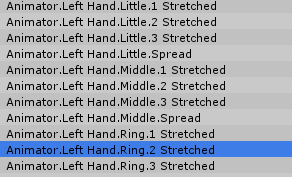
Fingers have to be through animation proprties like ones with root.t and such muscles. You can't animate finger bones directly
upper sapphire
 clear yew
yeah that wont work buddy
clear yew
you could never do it like that
clear yew
since it's not how unity make fingers move
the properties to move the fingers looks like this https://i.imgur.com/1s9trNp.png
 clear yew
yup
upper sapphire
why thee heck cant i find it
hold on

yeah im stumped
did i open some different animation shit
hollow perch
Way at the top of the menu. It's like thr first called Animator. Open it
Scroll all the way up and screenshot again
upper sapphire
OH WAIT
yeeeeeeeeeeeeeeeeeeeeeeee
jesus
ty
was losing my mind
last time i did this was back in january
karmic meadow
hey so ive imported dynamic bones into unity but when i go add component and type dynamic nothing comes up
 true basin
import it again
karmic meadow
i have like a gazillion times
 royal summit
Pretty sure there’s a unity package in it that needs importing. If it’s already imported u could try dragging the dynamic bone script from its folder into the components tab
 lunar snow
Yeah dynamic bones is a standalone and needs to be installed to every project
 frail nexus
what's the time limit of emote
1min? 2min?
and how i could finished my long dancing animation without being cut by the limit
clear yew
no limit
i normally just set my animation 15 seconds longer
add a key behind it
hey guys you probably get thus question a lot, but Ive got my custom animation, but Im not sure how to add it to my unity model
you mean triggering it by emote?
well I have the asset in unity, but yea I need to replace the default emote
go to your vrcsdk/examples/sample assets/Animation folder
copy CustomOverrideEmpty to your asset folder (or just move it)
then just drag your animation to one of the emote
after that drag the customoverride to your avatar's controller,standing /sitting animation
Ok I moved the custom animation to the asset folder
So I just take the custom emote now and?
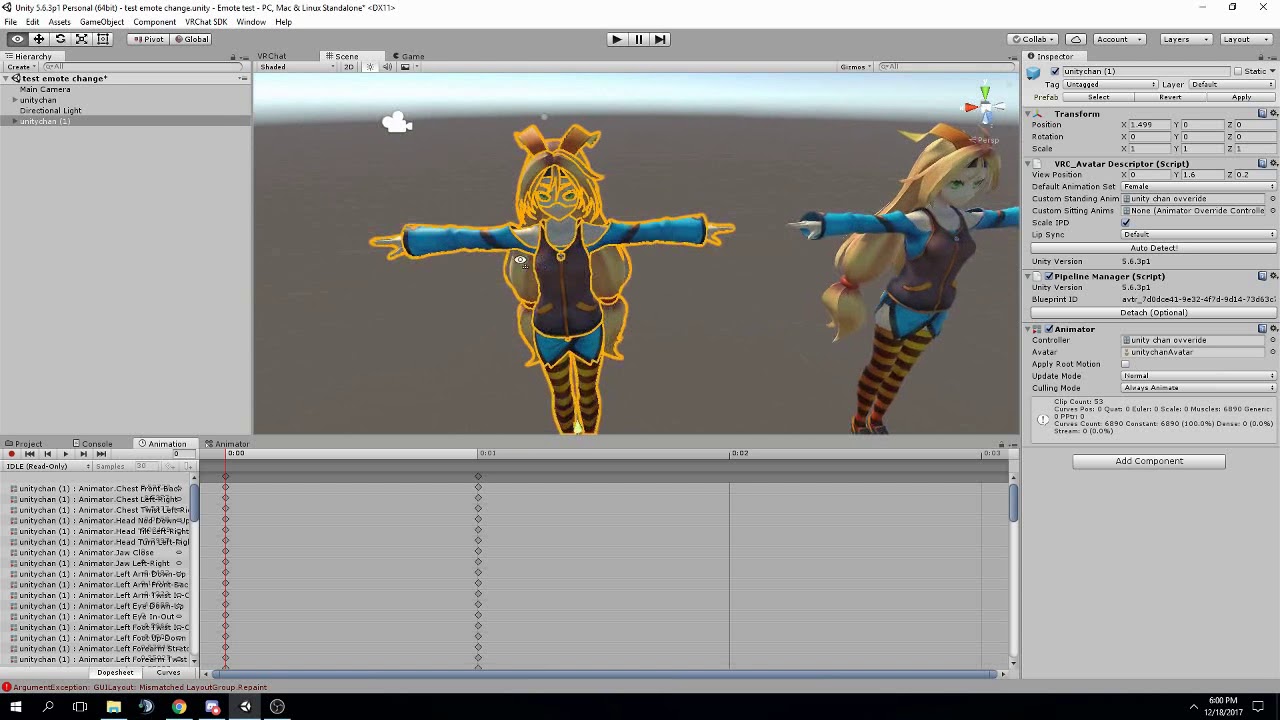
FAQ: 1. If you can't find the animator or animation tab go to window at the top and select animator or animation 2. If your character is going in the ground ...
ignore the animation edit part
Alright, thanks brother
np
@clear yew I got it to work!
gratz!
 next shard
someone know how to lift skirt up with hands? 
like i saw avatar where you can do that umu umu
i think it has something to do with dynamic collider but i can't find how 🤔
 valid spire
Dynamic bones?
clear yew
inverted colliders most likely
clear yew
yes
next shard
can you do that in an animation
clear yew
do what ?
clear yew
yes, that's how you are supposed to do it
clear yew
yes it is
next shard
or if you mean the outside bound for dynamic bone collider, i already tried that
clear yew
but inverted
next shard
i mean the inside bound
i can't activate a dynamic bone on animation, i tried
xD
if the skirt isn't inside the dynamic bone, it just goes toward it weirdly
clear yew
put it on a empty game object and activate the empty game object instead
valid spire
I've got a question regarding lip sync. I heard that jaw flap bone doesn't really work well so i tried jaw flap blend shape, but it barely moves when i speak and i have to be quite loud to move it just a bit. Any ideas what i do wrong?
next shard
did you lip sync in blender first?
with cat plugin
and then in unity you use viseme
also the dynamic bone thing is still activated even if i desactivate the gameobject eh
valid spire
its not a real mouth, so i just need a open and close for my lip sync. Shouldn't jaw flap blend shape suffice for that?
next shard
ahh well i only just use mmd avatars so idk if it is original work xD
valid spire
do you know if bones affect blend shapes?
night crescent
So if you're doing colliders + dynamic bone colliders, you can't put the dynamic bone colliders on anything lower in the heirarchy with dynamic bones right? because it freezes anything below it in play mode
 split laurel
Is it possible to set up 2 different animations for the same gesture on each hand?
clear yew
nope
 stark galleon
Yes you can
i did it myself on one hand i hold a guitar pick and on the other i putted the hand in a position to touch the notes on a guitar
there are both on rock and roll gesture
spring nova
yes but can you do only the guitar without the pick? Or only the pick but without the guitar?
There is sort of a way to do it with particles but it's really janky. It's using particle triggers in the same way as my first video, just putting the collider on a finger so it curls in to touch the particle
 wraith owl
I'm using muscle animation editor plugin, how would I rotate a joint (a finger in my case) with the plugin? Would I have to do that the conventional way or is there a feature I'm not seeing?
clear yew
you need to be in record mode
wraith owl
(Nevermind, figured it out. pressed on the visible joint farthest away from the tip of the finger and increase/decrease spread) Oh, I realize my wording could be confused with that problem. I can stretch a joint with the sliders just fine. It's only that i'd like to rotate it sideways, because some of the fingers are misaligned for the animation i'm intending (the 'ok hand').
wraith owl
Ran into another problem. When I switch to a different hand gesture after using my custom ones, it takes ~3 seconds to get there! It goes into slow motion, basically. I've had this with other gestures such as a marker. What is the reason behind this and how would I fix it?
icy crow
are your animations only on frames 0:00 and 0:01?
wraith owl
I actually don't know, let me check.
wraith owl
It's only on frame 0:00, should I clone everything to 0:01?
icy crow
yeah
wraith owl
Thanks for the help, should hopefully work now
 worldly sable
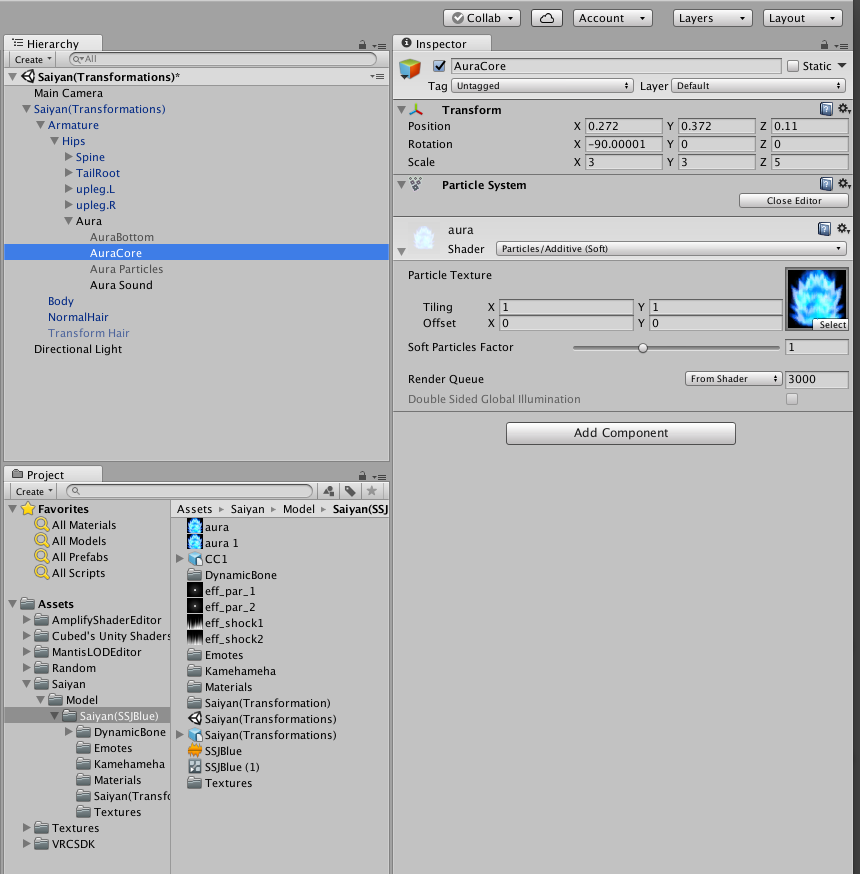
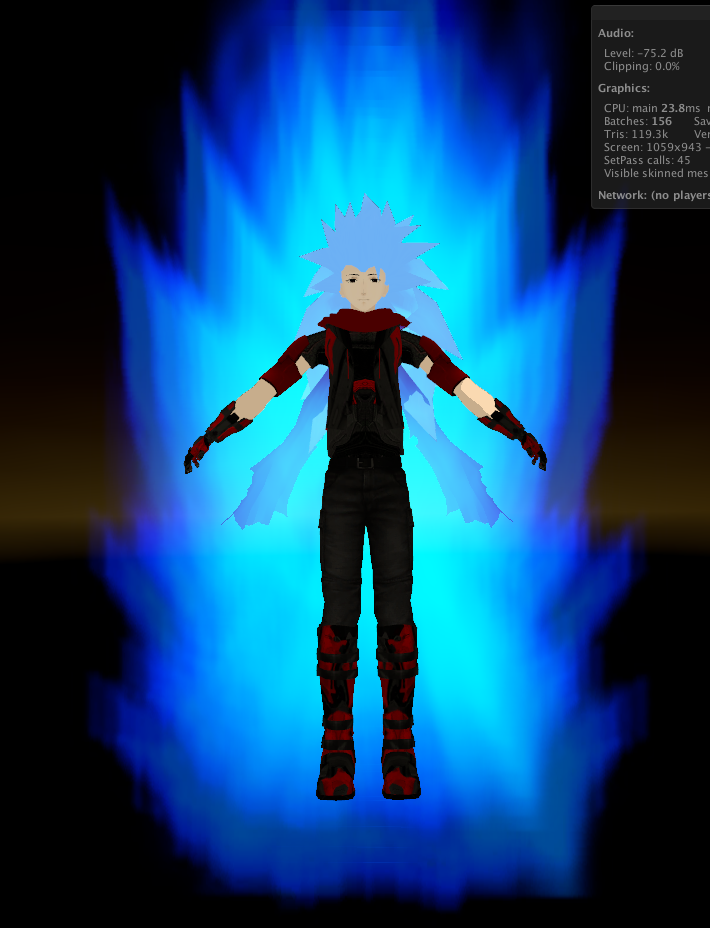
Can someone help me with animations? Im tyring to make my character charge up a kamehameha and turn SSB with aura, if anyone knows how to do this please help
 dawn cypress
yo im in unity and i swere there used to be a sitting emote in the animation controll overide but where is it
/ what is it called if you know Pm me it personaly thanks
dawn cypress
Thats a shame
slim sparrow
Override the idle slot
They don't give us any animations except a somewhat working idle pose
dawn cypress
o wait YA THATS RIGHT
its in Avatar descripter
Derr
hahaha i was looking for it cause i swere i used to change it al lthe time
slim sparrow
Yeah, you can change the idle sit
dawn cypress
Rokk if your still there where is the base animation located for sitting
clear yew
idle ?
slim sparrow
There is no example/sample animation for anything in the SDK
Only for standing idle, and even that isn't the same one, it has a weird value for rotations
All the ingame animations are licensed
You have to make your own sitting animation from scratch or by grabbing one from Mixamo
I've had a lot of success grabbing one from Mixamo
 fierce bane
@worldly sable basically you want an empty game object that is disabled by default, and an animation that enables it for the 0:00 and 0:01 frames.
Under the empty game object place your particle systems. The easiest way to time them is using start delays.
the animation being set in one of your gesture overrides of course
worldly sable
oh ok thank you
worldly sable
I got an animation problem, the first picture is how it looks in game and the second one will be how it should look like
worldly sable
 fierce bane
did you delete those after linking them? can't open original because they no longer exist apparently
worldly sable
my brother went and did it as a troll hold up
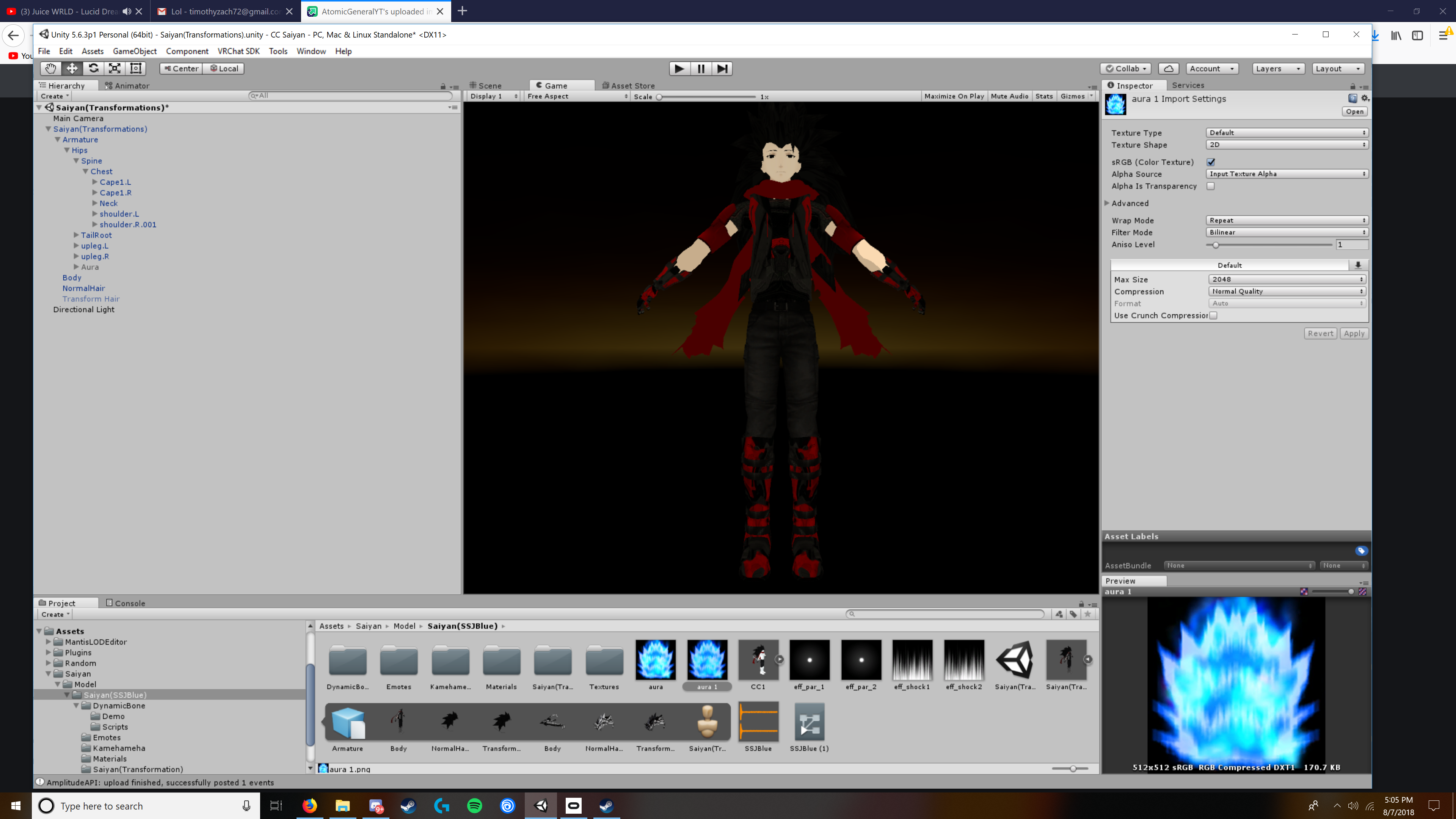
why isn't the first one appearing? copied the direct link
fierce bane
if you post two links in one message it picks one to embed into the discord message, the link still works fine
worldly sable
oh ok
fierce bane
I'd check the setup for the particle effect, what you currently have selected is just the aura's texture itself in image 2. If you downloaded this from somewhere, check the instructions or comments for anything special you may have to do
worldly sable
everything there came in with the file
when i imported the model
and what should i be looking for in the particles?
fierce bane
it looks like the texture you have selected isn't being applied to the effect. It could be it's not applied to the material, or the particle isn't using the right material and is just colored blue
 fluid lion
Hey guys. just a quick question if anybody can help me out with it. if i have a walking animtaion is there a way to make it so that it's only active when i have a gesture on like fist. i tried adding the animation to the override then to the avatar but it's not playing it
worldly sable
I looked and one particle has bilinear and the other doesn't have a filter could that be the reason why?
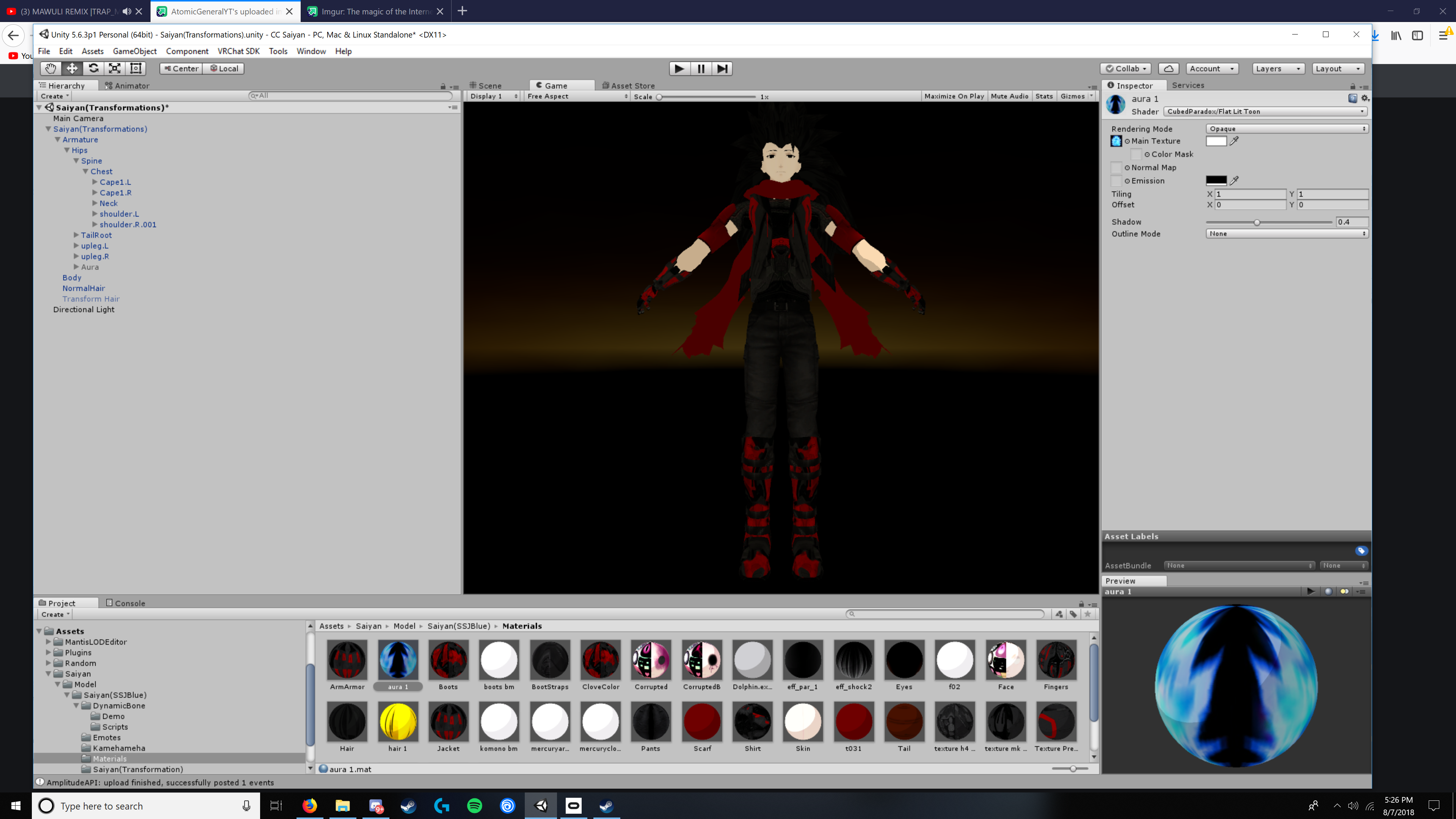
theres the picture of the aura material
so what should i do?
 silk portal
Hey, hoping to get some advice on preventing a character's feet from clipping through the floor.
The Floor constraint is a bit of a mystery for me, and last time I tried it, it seemed to work inconsistently.
Not sure if I was using it correctly.
fluid lion
toggle
 frozen swift
im using a gesture override, but i only want it to work for 1 hand, any idea's?
slim sparrow
Not possible unless the gesture override is only a finger pose @frozen swift
frozen swift
even a custom finger pose?
slim sparrow
You can have separate finger poses per hand, just pose both hands in the animation the way you want them
I have world mesh particles that disappear when looked at from certain angles. What could be the cause?
They're subemitters but that should not matter
hollow perch
Is it a one sided mesh? Have you tried it with a double sided shader
If you use a mesh it won't billbord by default (face the camera automatically)
 sharp pebble
If I'm using Legacy Animations to control additional effects on my avatar, do I need to create an animation for the "default" state to revert to? The Unity preview doesn't revert when toggling the component. (Specifically I'm doing this in an inventory system, not normal gestures.)
slim sparrow
No, it'll revert once the animation is turned off
sharp pebble
Thank you!
 fossil verge
does anyone know how to enable foot ik for anims?
i've been looking but i cant find any answers
clear yew
protip : use empty gameobject with an animator with your props inside if you are a good boy/girl and are at 20k polys
karmic meadow
not sure if this is the right place to ask this but,
When i try to use dynamic bones i get this https://gyazo.com/959d87f903de999940cdd0f92fa3dc09


im not sure why i have this
obsidian vigil
@karmic meadow you may have imported something with script errors
/ something broke another import
karmic meadow
this error seems to happen when i import dynamic bones

anyone else had this or know how to solve it?
nm i managed to get it working
fossil verge
my bad
ashen sedge
No worries
fossil verge
still stupid that they did that garbage. what a waste
ashen sedge
In my personal opinion it was for the better. Forces people to optimize their MMD models instead. ☺
fossil verge
true
it was more for the animation part, i have no problem using blender
when i baked the animation into the model, it already had jiggle physics for the dress
but oh well. i'll just take a detour
ashen sedge
Good luck
 fiery lark
so im trying to fix my tpose but it wont stay
fossil verge
@fiery lark on what?
fiery lark
nvm i got it to fix
 sterile vigil
Hi, I'm trying to add a facial expression to my avatar. I've already done a gesture override for Fist and that would summon a sword to my hand. As such I have a separate duplicate of the Avatar in the same Unity file, but hidden.
If I wanted to add a facial expression, do I need to make yet another duplicate model? Or can I continue to use the one for equipping the sword?
spring nova
yeah keep using the same one. Use this dropdown to select between different ones and add new ones https://i.imgur.com/SQiInmi.png
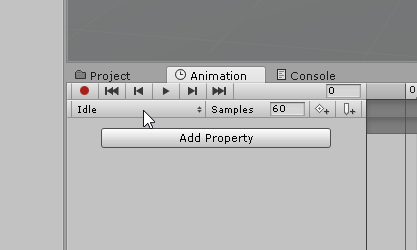 sterile vigil
Im still kinda new to this, but thank you
Can I please DM you if I have more questions?
spring nova
Here is fine, and maybe you have a question I can't ask, someone else can help
sterile vigil
Thanks, the drop down menu worked. Time to figure out what blend shapes do what
If I just add the blend shapes to wink to this Animation file (I guess you would call it that), would I still be able to make a peace sign?
Or nah it overrides it and I'd need to add finger stretch animators to the wink and smile things too
slim sparrow
I usually make a new duplicate but that's preference
@sterile vigil nope, you also need to add the finger stretch
Muscle Animation Editor makes this a lot easier
spring nova
yeah, you can. Put the override animator on your duplicate, then in that same dropdown you'll see all the default animations. You can then copy the keyframes, put your duplicate animator back on, and paste the keyframes
slim sparrow
Muscle Animation Editor turns it into a 10 second job. Just set stretch and spread to -1 on all fingers, but set index finger and middle finger to stretch out almost entirely
Oh, are you sure the default gestures are supplied in the SDK?
Because none of the other animations are
spring nova
yep
sterile vigil
Guess it updated?
slim sparrow
You can also go to VRCSDK/Example Assets/Animation
And then expand one of the things there, might be male standing
spring nova
that's peace sign yeah
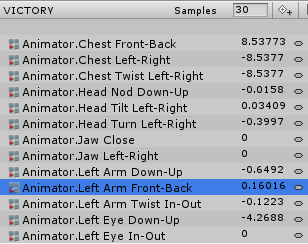 slim sparrow
Yeah, that's exactly what I mean
sterile vigil
Why is it necessary
spring nova
uhh yes they are
slim sparrow
You might have the wrong ones
spring nova
copy the entire thing
sterile vigil
Copy all the keyframes?
slim sparrow
You can probably delete the properties you don't need
VRChat gives you placeholders for all the ingame animations so you can fill the override controller
spring nova
if you click the node at the very very top, it selects the entire column
sterile vigil
And make a new animation using those right?
spring nova
copy both columns, paste in new animation
sterile vigil
I add the animation to the hidden duplicate though, right??
spring nova
yes
slim sparrow
I wouldn't hide the duplicate, just hide the original temporarily
While you're working on it
spring nova
yeah if you have to pose fingers and stuff
slim sparrow
The default finger pose for victory looks weird to me
It usually has this weird gap next to the index finger
sterile vigil
uuuuuhhh
It just kinda makes you stand up straight, but the hand isnt posed at all what
slim sparrow
Yeah, that's a placeholder animation. They're all like that.
I'm not sure which one Phasedragon is referring to, but the ones in "Male Stand" are not usable
Maybe there are others
sterile vigil
maybe someone would be kind enough to supply us with a google drive of usable hand animations
slim sparrow
@spring nova can you triple check? I'm 99% sure that none of the animations in the example SDK are usable, other than the sample idle/walk in SimpleAvatarController, which is standard unity anyway.
They're all weirdly posed idle sample animations, looking slightly off to the side
I don't have any usable hand animations because I make them on the fly, it always differs per model
spring nova
I've done it before, let me check
slim sparrow
You mean the ones that Unity gives you in CustomOverridesEmpty, right?
spring nova
should be
slim sparrow
I'm looking at those right now
None of them are hand posed in any way
I think you are misremembering
Or maybe you got another package from a site like the one we can't mention here
spring nova
I don't get anything from there, but give me a min to look where it was, because it was definitely in the sdk
slim sparrow
Yeah, that one site has a few, just no handopen
sterile vigil
Thank's for helping me along guys
 brisk rain
So, i vant to make a crossbow that shoots a bolt, and i vant to bolt to stay.
i know how to do that.
But i vant to be abel to shoot at another place, and have another bolt fly in that direction, while the first is still active.
How do i make the particle emmiter activate only when i do an animation?
slim sparrow
@brisk rain have the particle system always active. Enable the emission module in a gesture.
Unfortunately, it will be quite difficult to make sure it can only fire once.
What I found out recently
You can make a particle that spawns a subemitter on birth. Have this subemitter be your crossbow bolt particle system, with Burst emission at 0:00, so it fires one bolt on every activation.
Let's call the parent particle the "Trigger particle", and the subemitter the "Real particle"
Now, once the subemitter is set up, unparent the Real particle from the Trigger particle.
Make sure the Trigger particle has 0 speed, shape and renderer modules disabled. Short lifetime is also a good idea
Disable the Emission module on the Real Particle, but make sure it still has a burst configured.
Have the Trigger particle be disabled by default.
Now every time you activate the Trigger particle system, it will spawn one particle from the Real particle system.
No matter how long you hold it
I should prefab this
sterile vigil
mm dats some good ancient texts right there
I understand all those words separately
slim sparrow
These texts are exactly one day old since I found it out yesterday
And yeah, I need to prefab this so people can understand better.
And maybe record it in action.
spring nova
you can do some pretty cool stuff with moving subemitters to a different parent
slim sparrow
What else could you do with that?
I was thinking of improving my knives system a little using the knowledge I learned
spring nova
mostly categorization, but also animations that are able to affect things outside their hierarchy
slim sparrow
Hmm
Animations outside of their own hierarchy sounds interesting
But isn't that just to emit particles and stuff?
spring nova
Yeah, but once you have a particle you can do stuff with it
spring nova
have it local simulation and no speed, now you can use it as a platform for launching other particles
clear yew
Hey, forgive me if I'm in the wrong section but I want to learn how to make animations like floppiii and stuff. Would anyone know where I should go to learn ?
spring nova
this video is the best starting point on particles in my opinion https://youtu.be/FEA1wTMJAR0

Udemy: http://bit.ly/BRACKEYSMEM Everything to know about the Particle System in Unity! ♥ Support Brackeys on Patreon: http://patreon.com/brackeys/ ● Learn m...
clear yew
Thank you !
:)
Also, so let's say I have a sword. Can I make the sword emit a fire effect ?
 torpid light
change the shape to mesh instead of cone or whatever the default is
clear yew
Ty
fierce bane
side note, if you want particles to come out from something you can also use a long thin cone shape with angle set to 0 (making it a cylinder) and have it "emit from volume" instead of from base.
Emit from volume is exactly what it sounds like, they spawn anywhere within the volume.
Useful in the case of a single material sword if you only want the emission to be from the blade, or hilt or whatever.
Spherize direction can also be used to make it flow in more than a single direction
 snow rover
Uhm..Guys, does anyone know how to give a shaking screen effect to others during an animation ?
spring nova
You don't
devout igloo
Is there a place I can get the default hand animations so I can add my shapekey animations to the already existing ones and keep the finger gestures alongside the facial animations?
slim sparrow
No
devout igloo
Really? Gotta make it myself 🤔
slim sparrow
Yes. Muscle Animation Editor makes this a 10 second job.
A worthy investment, IMO.
The alternative is making each hand gesture yourself, by hand with the animator properties. Then once you've made it, you can save it somewhere for later.
And just copy it every time.
I'm having an issue with my particle systems
I'm spawning mesh particles into the world
But when the particle system on my hand is out of view, the particles disappear too.
Any way to fix that?
Tbh I have never had that happen before
 calm pendant
Hi I have avatar with animations but I do not know how to do them where clicked?
 floral mist
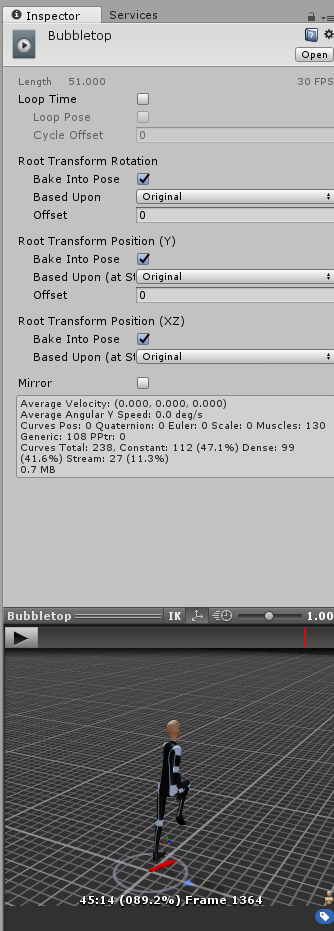
hey this animation goes ingame only ~45 sec but it should go 51. does anybody know why and how to fix it? https://i.imgur.com/qQPhE2A.png
 night crescent
there's a quick way to fix the model's tpose thing getting messed up with the animator right? forgot how to do that
spring nova
Ohh I just remembered what model I copied the hand gesture for, I'll take a look at it when I get off work
slim sparrow
@night crescent alt+click to expand the whole armature
Select all bones
Go to the transform component in the inspector, click the gear icon, and revert to prefab
Make sure you avoid selecting any objects or stuff outside the armature
calm pendant
Hi I have avatar with animations but I do not know how to do them where clicked?
clear yew
@calm pendant Your animations are triggered either by doing a certain hand gesture in VR (or Shift+F1, Shift+F2, etc.) or you start them in the "emote" menu, accessed from the main menu
Hey can someone confirm the Snail Marker extension still works with the latest SDK and VRChat version ?
clear yew
Very nice. Thanks Rokk
calm pendant
not work 😦
clear yew
Hey guys, I'm trying to make a Pokemon trainer that throws a pokeball which later turns into something funny
I'm completely new tbh and I'm lost :(
calm pendant
But I do not have VR and I do not have this thing in my hands
 jaunty fox
is there a way to make a animation texture center off from a shape?
would post a pic but cant here..
worldly sable
Learn from me @jaunty fox and use imgur, because I didn’t either until Himeki told me
Just a future reference
 paper haven
Does anyone know why the eyebrows clip with the face sometimes when I use 'A Laugh' shapekey for a happy expression?
I usually change the shapekey or bring the eybrows slightly forward on the mesh, but that can cause other problems
 raven oyster
How can I copy paste an animation from a avatar to another avatar?
obsidian vigil
@raven oyster if they are exactly identical just copy the keys / drag the animation onto the model
raven oyster
ait
karmic meadow
anyone know if facial animations need to be on legacy loop or nah?
also anyone have any suggestions for best settings for dynamic bones short hair
karmic meadow
like emotions, smiling, shocked etc
obsidian vigil
on a gesture?
karmic meadow
yeah
karmic meadow
oh ok
obsidian vigil
i only use legacy for stuff like idles
obsidian vigil
^^
karmic meadow
k thanks that clears a lot
obsidian vigil
np :3
karmic meadow
https://gyazo.com/c7ae280476a9764cb43ff21fca51df2f
another question lol

how come the animator drop down menu doesnt come up?
slim sparrow
@karmic meadow you might accidentally still have the model rigged as a Generic.
 tall river
I'm looking for the animation tab but it's not there unlike the picture above ^
slim sparrow
Go to window and add it
tall river
Alright, thanks
tall river
I got the animations working but people can't seem to see them
worldly sable
can someone help me to get to option?
because i dont know how to
to make it look like this
 olive lynx
@worldly sable Nice! You are doing a SSJ Aura! I have one that I made. It isn't exactly like that.......but a lot of people seem to like it haha. :p If you want, I can private message you my settings. 😃 I am currently working on a SSJ4 model. 😄
worldly sable
oh shit id like to see your model
frozen swift
can i use a trigger, to trigger an animation to play for 1/10 of it time?
(trying to make a collectable system, where a crystal grows each time)
spring nova
Do you mean a vrc trigger, like for worlds? Or a gesture for avatars
frozen swift
worlds*
spring nova
I would probably go with 10 separate animations, have an integer and they only transition to the next one if the integer is greater than a certain value. And have the trigger just add to that integer
slim sparrow
Yeah, that would be best
spring nova
It's a bit messy, but it's the easiest way to do it right now. If we were able to add to floats, we could do a blend shape, but unfortunately we can't and blend shapes don't work with ints
slim sparrow
I don't think you can stack animations
 polar flare
is anybody willing to fix my avatar's animations: the audio for the animations are not working in game and i looked for guides on youtube and that didn't help me
 normal skiff
I thought you could change animator properties from an animation too, which could essentially cause a state change
it isn't something I'm using yet though
I think some people use it for fire-once animation loops - at the end of the animation set the thing which triggered it back to 0 and the state machine resets for you
I saw a demo somewhere where when you enable a game object it disables itself again, which was probably the same trick
I was trying to trigger animation stuff from a video player finishing the video but found that syncing the animation state and the video's syncing were fighting too much to make it reliable
 worldly drum
http://data.fruityfusionmusic.com/screenshot-2018-08-09_16-31-3808ab9ab436a403592.mp4
I think that one turned out pretty well ^^
hollow perch
@normal skiff the thing you can do is pause and resume an animation. The editor for some reason doesn't let you so what you do is set Enabled on the Animation instead and then you can edit the .anim file by hand and change Animation to Behavior (that is what unity calls Animator internally I guess). There is an editor script and prefab to do this whole thing for you. Search this discord for toggle props and you will find it.
Changing animator properties from legacy I have never gotten to work. The whole thing seems quite glitchy. You can change properties from inside the same animator but I haven't found any use for this extra state
A note about the behavior enabled; this pauses the animation not resets it. That's how this works. You pause in the middle of an animation that shows a prop for example and it stays showing. The state is not synced well over the network because it is all based on time (pause vs resume) and may be wrong due to lag etc. I think the trick for this to combine this with turning off is active on the whole system regularly to reset the animator and resync.
normal skiff
it seems like the state machine should work, in that if you animate a property to some value and the state machine says that condition means it moves to a different state, it should move to that state.
but hmm, toggle props .. I do that in some other way entirely
I do use a script though, it's just one I wrote
now that I think about it, it seems like it should be possible to do toggling of props using just an animator as well, but it might be hard
spring nova
I don't believe you can change parameters of an animator on an avatar.
If you could, it would open up TONS of options
If I'm wrong and anyone knows for a fact you can though, that'd be awesome
 obtuse gale
How can I make a character turn invisible through animation?
icy crow
turn off your body mesh
 quasi hinge
keep in mind you need an active mesh (Can have an invisible shader) in order for others to see gestures n stuff
obtuse gale
Like the plan was to have a bird and put a crysis hexagon effect for invisibility
wary parcel
Was it not said not to talk about that site here in this discord?
obtuse gale
sorreh'
karmic meadow
dunno if the right place to ask but; https://gyazo.com/697f60c811c65427013db9bfb769b87e

if i have a snippet of a song and want to play from my avatar with an animation what settings should i use?
slim sparrow
Remove the ONSP audio source script, set volume to 0.9. Open the 3D sound settings, set minimum distance to 2, max distance to 30.
All the other settings will be correctly configured automatically. @karmic meadow
karmic meadow
cheers
 ivory laurel
Hi guys, recently i have realised, that even desktop users can use some emotes, not those like ,,Wave/Dance/Backflip'', but those like changing your face expression etc. I haven't played Vrchat for half a year so i have no idea what happened to unity options for vrchat and my question here is: how do i do that? I can handle the face changes in blender by myself, but how do i make it work in unity? (Video tutorial would be great, but if it's easy then I would be grateful for any answer :D)
slim sparrow
Left shift for left hand, right shift for right hand
Np
Although which hand you do it with won't matter much for desktop users, since you usually can't see your hands very well anyway
And the other animation properties are shared between left/right
ivory laurel
That's good enough, better than nothing :D
 tardy abyss
Having one of those "happens in the animator but not ingame" issues.
What I expect to see;
https://i.imgur.com/iEL4CBh.png
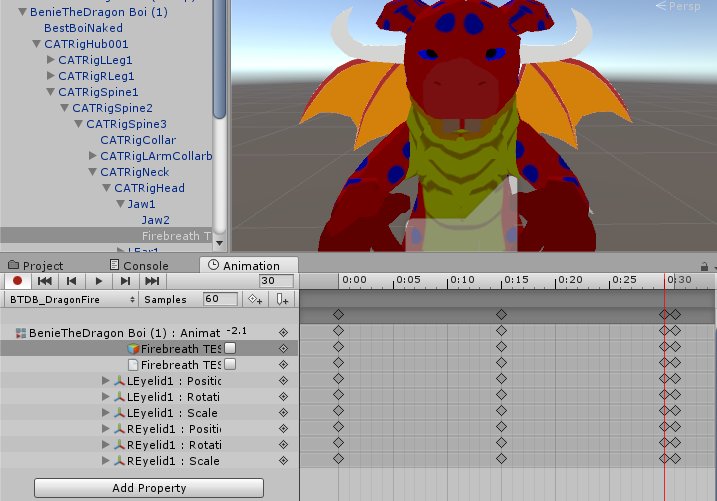
What I actually see;
https://i.imgur.com/FLTon34.png
 slim sparrow
Maybe it's eye tracking messing stuff up
Make sure you don't have any blink or lower eyelid shape keys
tardy abyss
Would that also explain why the jaw isn't opening? In the animation, I'm using the Humanoid animator (as it says I have to). But it's like as soon as it tries to narrow the eyes, the animation stops.
slim sparrow
To be honest, I would suggest leaving the jaw bone unmapped in Unity
Because gestures can't affect the "Jaw" property of the animator
Only the fingers
tardy abyss
But the jaw is needed for the Jawflap animation.
slim sparrow
If the jaw bone becomes a generic movable bone, you can move it inside gestures again
Jaw flap looks bad
Make a blend shape and use "Jaw Blend Shape" instead
You can pose the jaw in Blender to be open, then use Cats "Pose to shape key"
Then use that one shape key for the "Jaw Blend Shape" option
It's either jaw flap, or jaw blend shape and being able to open your jaw in gestures
The latter looks and functions better
Same lipsync effect
tardy abyss
Is there a non-Blender option? Because this model doesn't react well after being exported.
slim sparrow
The non-Blender option is leaving the jaw bone unmapped and going without lipsync
tardy abyss
Well, is there a way to (at least) disable eye blinking through the animator?
Hello?
slim sparrow
Be patient
You cannot disable the builtin eye blink
You need to make empty blend shapes for the blink, then make your own blink animation that you can disable.
 limpid plover
Anyone have any recommended settings for dynamic tails/tendrils?
 slim sparrow
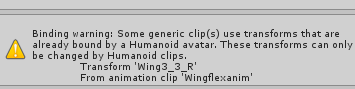
@paper lantern the error message is fairly descriptive already.
What this means is that the "Wing3_3_R" bone is already mapped somewhere in your rig configuration. Unmap it.
Humanoid rigs need to use the humanoid animator properties for all of their movements. Such as leg stretch rather than directly rotating the leg bones.
uneven acorn
I put my avatar into vrchat after adding some gestures and the body is bouncing side to side, how do I fix this
I have all the axis on unity at 0 so I dont know what is causing this
 paper lantern
As it turns out, it was because I had dynamic bones on the bones. @slim sparrow . Removing them first,animating them then readding dynamic bones fixed them
¯_(ツ)_/¯
frozen swift
animators affect my character in editor, but not ingame? any idea's?
hollow perch
the way you phrase your question makes me wonder if you tried changing the animator on your main character (the one with the vrc avatar controller on it). Vrchat overwrites it with their own controller ingame (the same one included in the SDK). This is why you have to use an Override Controller to override the gestures and emotes, and you are limited to the set of gestures provided by vrchat
so basically the options are: do what you are trying to do as a standalone animation (like hand gesture) in the Override Controller; do what you want as a Legacy "Animation" (not Animator, big difference) - this works for looping stuff like wiggling ears, and only if the bones aren't part of your Humanoid Rig / IK setup; or if it's a sub-object, you can add your own Animator or Animations to the sub object and it will control that object only
@frozen swift in reference to your question
clear yew
can som,eone explain me please how i can hide my name ingame with a cube or sphere
pls
 nimble ridge
This is kinda the wrong channel
slim sparrow
@frozen swift you can't use your own animators ingame, only on generic rigs
And even those are very limited
 next shard
no one knows? xD
 reef mason
If I wanted a animation file from another avatar, say one is a Blend file and the other is imported as a FBX, Is there a way where I can still use the animation files where the character/avatar won't break on me? Because I'm using a SimpleAvatarController for a Idle animation and then will use it for the CustomOverride.
 tepid mango

the cut in the animation is just the video restarting, the animation itself doesn't do that
reef mason
I'm saying as a SimpleAvatarController, This right here is the idle animation https://i.gyazo.com/8168b2c8fb90dacb5ea9fef3359e1fba.mp4
That is underneath a Blend file with all it's animation files placed in the generic avatar. I want it to work with the avatar that I rigged in Blender Which is the FBX file, but for some reason, it just tends to break the model and places it in the ground like a CustomOverride animation, which I don't want the character/avatar to do when using this idle animation.
stark galleon
Does someone knows how to break the animation time limit for mmd dance the maximum on an emote i can get seems to be 1m20seconds at best and i need 2 minutes
clear yew
How do you get effects like muzzle flashes and sparks?
hollow perch
@stark galleon you can use a gesture instead of an emote to hide your mesh renderer and show a new object with a long animation in the same place. This object will stay there as long as you hold the gesture
clear yew
@hollow perch do you know how effects like mussle flashes or sparks?
hollow perch
I've never done it, but for flashes or sparks you can use a particle system and set emission to 0 and turn emission on from the animation that fires it.
 balmy crest
im trying to make it so when i press shift+f4 it equips my gun but idk how to someone pls help 😄
karmic meadow
is there a way to make dynamic bones follow gravity like a piece of cloth or no?
spring nova
yeah, just use force instead of gravity
karmic meadow
anyone know how to join two animations from mixamo because when i do the avatar just goes crazy
karmic meadow
is the max emote duration 20seconds?
slim sparrow
Nope
clear yew
no
 zinc robin
Is it possible and what is the best way to use visemes and custom animations, like smiling and blinking, at the same time? Because my visemes suddenly became invisible, when i talk.
slim sparrow
You can't touch any of the visemes in animations @zinc robin
Otherwise they will no longer work
You can stop your blinking animation by generating eye tracking without blinking in Cats Blender Tool, then making a custom blink animation.
zinc robin
i created a blinking animation and smile animation based on the visemes and that simple action just broke all of them? also i was playing with them to know how they work.
slim sparrow
If you touch any of the vrc.v_ viseme shape keys in an animation, they break even if you're not using the animation at that moment.
Same for blinking. You need to make a custom blink if you want to enable/disable it at will.
 viral yarrow
Hello, I need some help with custom animation with humanoids. I animate most of my generic avatars in unity, however, I would like for once to make a custom animation for my humanoid avatar, as the default one doesn't really look good with my avatar. The problem is, whenever I try to make an anim with the avatar, it gets in a weird position (see below) and a message says that [bone that I included in the animation] is already used for the humanoid animations https://cdn.discordapp.com/attachments/478221475959013406/478242131299926028/unknown.png

help?
karmic meadow
I think that's normal
viral yarrow
it's not actually
even when I exit the animator, my character stays in this pose
which is annoying, because then I have to manually put it back in T pose
slim sparrow
@viral yarrow that is why you should animate on a duplicate.
You can fix it by alt-clicking the armature to expand everything, selecting all the bones
And in the transform component, go to the gear icon and press Revert to Prefab
You are generally expected to create animations on a duplicate of your avatar, you throw away the duplicate once the animation is done.
viral yarrow
oh okay, didn't know that.
Anyways, is there a solution for this?
my only idea would be to make the duplicate a generic avatar, as the problem only seems to occur with a humanoid object
slim sparrow
Ohh, I missed your second problem
The thing is, when rigged as humanoid, you cannot move the bones directly like with generics @viral yarrow
Instead of moving the legs, you need to use the Animator properties like Lower Leg Stretch, etc.
Get Muscle Animation Editor to make stuff easier.
Or make the animation in Blender beforehand and import it with the model.
viral yarrow
Oh alright, thanks
slim sparrow
If you do that and animate on a duplicate, everything should go fine
viral yarrow
which one is easier in your opinion? (blender or unity?)
slim sparrow
That's personal preference. I would say that Blender is more suited to full-on animation work.
But for simple poses, Unity works well.
Unity isn't really made for making animations from scratch
You'll run into all sorts of issues like root transform
viral yarrow
huh, ok
hollow perch
I'm trying to make my own blinking animation to run along my avatar so I can turn it on/off and have more control. Has anyone done this? Is there any way to randomize the timing between blinks?
slim sparrow
Yes
Well, I have done it plenty of times
There is no good way to randomize the time between blinks. But you can make the blink animation as long as you want.
For example, you could make a two-minute blinking animation with enough variation between blinks to look entirely random. @hollow perch
hollow perch
Ah trur there is no timr limit
slim sparrow
The one thing though, if you turn the blink off at the wrong time, it "pauses" at that point, which can look weird on your gestures. You can prevent this by making another legacy animation on your Body mesh, which turns the blink shape keys to 0 when activated.
You cannot directly manipulate these shape keys in your gestures, because that will break blinking entirely
I have a blinking animation of roughly 16 seconds that I reuse on all of my avatars
It just blinks once every 4 seconds, and at the last blink, it blinks twice
And there's a bit of shape key blending in-between the blinks so the eyelids have some idle movement to them
hollow perch
Ah cool suggestions
 grave otter
I am trying to create a particle system that uses meshes
but only some meshes show while the mesh I want to use doesn't show
its just invisible


and I am getting this error:
Particle system meshes will only work with exactly one (1) sub mesh
UnityEditor.DockArea:OnGUI()
slim sparrow
@grave otter your mesh has multiple materials
Mesh particles can only have one material.
Open the mesh in Blender, and go see what's up. If it's two materials that share a texture, just assign them to the same material. If it's multiple different textures, texture atlas it.
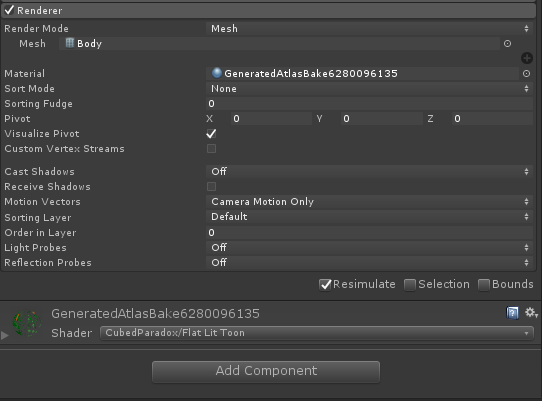 slim sparrow
With the same error?
It might just be really, really small. Set the start size to 100. @grave otter
Make sure the mesh really has only one material slot in Unity
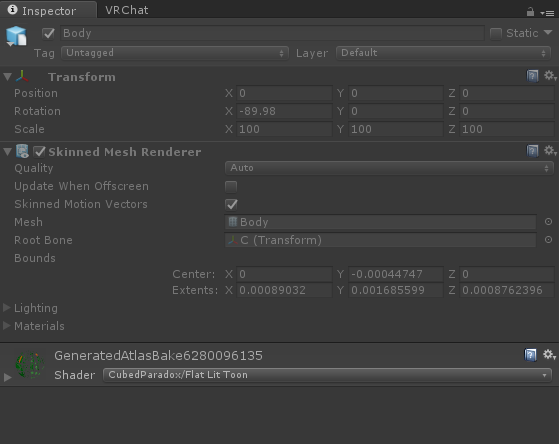
 slim sparrow
Expand materials
slim sparrow
Yeah
You can fix that actually, if you really want to
You can either export the mesh as an obj, or you can tick "!!EXPERIMENTAL!! Apply Transforms" in the FBX export settings
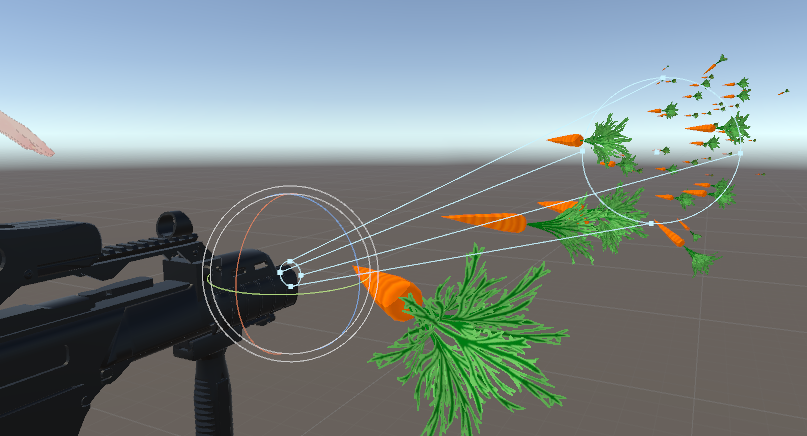 slim sparrow
Cool
slim sparrow
If you need collision it might be really big, in which case you need to set the import scale of the mesh to like 100 in your assets
World-space mesh particles cannot rotate without a special shader.
They are always in a fixed rotation relative to the world
grave otter
"special shader" you say?
slim sparrow

GitHub
Contribute to Shader-Collection development by creating an account on Github.
ArrowTravel
Aligns mesh particles to their velocity
Probably needs custom vertex streams such as Center and Velocity in the particle system's renderer module.
grave otter
never worked with shader coding
slim sparrow
Check out CubedParadox's Flat Lit Toon or Noenoe Toon Opaque for examples
 arctic ivy
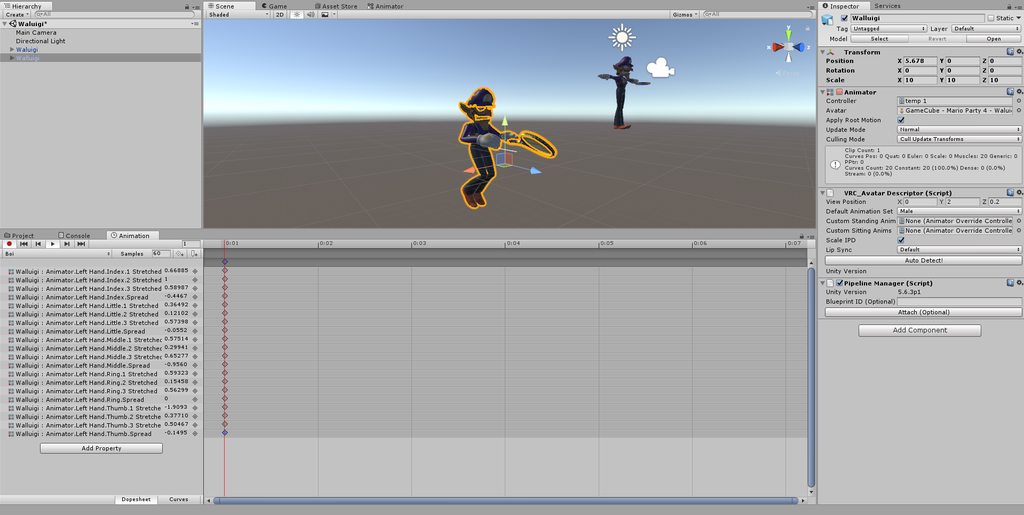
Hey. I'm only new to Unity and stuff like that and was trying to create a model but whenever I try to add animations to use weapons the model just curls up a bit and sits in the ground. Is this normal or have I done something wrong? https://imgur.com/a/XL0vkyF
 spring nova
That's normal, it's why you create your animations on a duplicate so that you don't mess up your main model
arctic ivy
I've done that but can't seem to not make it sit like that. Sometimes it glitches and stays there even when I cancel the animation.
spring nova
oh you're making emotes?
spring nova
If you're only adding small changes like enabling an object or changing fingers, use a gesture. If you're doing emotes, the animation has to control the whole body
arctic ivy
oh ok I understand now. So if I wanted to add weapons would I do that in animations or what would I use?
spring nova
You'd do it in animations, same place you're already working on. The difference is where you plug it in to the customoverride
slim sparrow
If you're making emotes, you need to make a full body animation
Muscle animation editor is your friend here
Raise the Root Transform Y so it's out of the ground, stretch the legs and move them back so you're standing
spring nova
Emote1,2,3, etc are full body, uninterruptible animations. Gestures, like fingerpoint, rocknroll, victory, thumbsup, and fist are just for the hands and only active when you hold the button down
slim sparrow
Pose arms as desired
But I see you really want a gesture and not an emote if you're in VR
arctic ivy
ok. That's alot to take in. I'll try that
spring nova
Also another small detail is that if you're doing an emote, you want two frames, one at 0:00 and another at 0:01, like this https://i.imgur.com/peXlByw.png
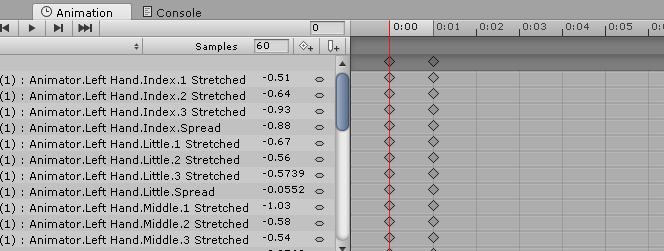
Both of them need to be identical otherwise it will constantly flip back and forth between the two
gesture, I mean
arctic ivy
When I do that the character just freezes in place
spring nova
Yeah that's emotes
Emotes freeze you in place and play the animation
Gestures can be done while walking around and don't stop you
viral yarrow
Hello I seem to have a problem with a humanoid avatar with custom animations, I successfully impoted an fbx with animations for the idle and walk, then put them in the override and put the override in the custom standing anim, except that ingame my avatar seems to be stuck on the first frame of the animation (ex : walk cycle, my avatar stays with 1 leg in the air)
 prisma trout
guys, is there a way to add in a video into your avatar
like it pops up behind you and plays
 hearty sorrel
no
slim sparrow
Yes, but only with spritesheets. Try the flipbook shader
frozen swift
i have a gun
active = point
deactivate = fist
but some reason when i de-clench my fist, the gun comes back?
i could go through all of my animations to set the gun not active, but i dont want to do this?
spring nova
my best guess is your gesture animations are too long. The keyframes for them need to be at 0:00 and 0:01, nothing more nothing less
frozen swift




just one frame 😦 i also have the snail tool attached, but it also re-appears when i un-clench my fist
spring nova
Are they set to active on your avatar on default?
clear yew
then you don't even need a deactivating gesture ... it will only be on when you point
frozen swift
ah cool!
clear yew
just enable it on point, nothing else, have it disabled by default when you upload
frozen swift
i thought i would of needed to de-active it, or it would always be there after it appears, il test it out thanks 😃
clear yew
toggles are a bit more advanced
frozen swift
1 day il learn ^^
clear yew
if you just want it to show when doing a gesture, just turning it on will be enough
if the default state is off
frozen swift
iv done a toggle for a door open/close, i guess it will be similar using the animator panel?
clear yew
it's trickier and buggier, search this discord for toggle props

This is just a quick tutorial on how to set up prop toggling in VRChat to enable yourself to permanently toggle a prop on using emotes instead of gestures. I...
frozen swift
ty 😃
frozen swift
ohh, thats a toggle off/on with the same emote, i was wanting one emote on, and one emote off :/
i wonder if you could run webcam feed on your avatars face 😛
 regal hollow
For the webcam thing not possible atm.
You can have the prop toggling set to 1 gesture for on and another for off, but you would need to edit the animator yourself
frozen swift
how do i upload small avatars? it says its under 20cm