#animation
1 messages · Page 81 of 1

 hollow perch
Oh sweet
 fierce bane
I'll try that out tomorrow, thanks svelsien
Does that also work for mesh particles or would that have to be the shader?
 clear yew
mesh particle will lock into the world anyway
but for the shader to work you need velocity
so put a very low speed like 0.000001
fierce bane
yeah, the idea with the particle and shader was move it to orient, then stop using velocity over lifetime...hopefully
 opal lodge
Oooh, nice album
Always stalled out making something fixed to world so it'll be a good help for when I do
 urban sapphire
Does anyone know how you can enable/disable objects/particles via the emote menu?
clear yew
so they stay after you used the emote?
urban sapphire
yes
clear yew

This is just a quick tutorial on how to set up prop toggling in VRChat to enable yourself to permanently toggle a prop on using emotes instead of gestures. I...
urban sapphire
Ty ty ty ty I love you ^^ this has been driving me mad trying to figure it out.
clear yew
👌
 simple badger
might as well run this by the channel

I got the animation rips from the game, but I had to add a chest, neck, and shoulders to the rig in order to make it vrchat compatible
the animation still works, but you can see the problem. The limbs are offset by the distance created by the new bones
is there an easy way to fix this, or am I in for a world of pain
 steel horizon
Is there any way to remove or disable the character walking animation when you move the VR headset around?
 slim sparrow
Yeah, by unmapping a finger bone @steel horizon
But that will remove gestures entirely
 lusty grove
Hi hi. this might be a very basic question but I can't get to figured it out. whenever I add animations to my avatar the dynamic bone meshes start to jitter around like crazy. is there any cause for this?
 rough wind
I need help to know if it is possible to make an animation of a gun pointing for desktop users , not a idle but an acutal animation , my character raising his hands and i still be able to walk arround with legs moving etc.
something like this https://images-ext-1.discordapp.net/external/PDtySZLZgp2okhX5Sk9T_rbQ4O81h-7e8nCmYEWLKXs/https/images-ext-1.discordapp.net/external/gB18Ne7VabMZLrCJHAPQAOdpWiTiNn-c4bM3lQHNHSg/https/images-ext-2.discordapp.net/external/Y5g0QbkdhRf-qyz0bv3Xc_ZhO7-Id35QcRbgEtkVdrQ/%25253Fwidth%25253D746%252526height%25253D559/https/media.discordapp.net/attachments/471110967925932063/471126939931770910/image_1709.png

i mean , i was able to make this ''animation'' my avatar could move but he was locked at this position , no leg moving etc.
slim sparrow
The only way would be to use emotes, or a fake model that doesn't have leg movement
rough wind
what do u mean?
 eager shadow
as far as i now with gestures you cant move the parts of the body that a vr user could move. So you would need addition arms that are not connected to the bones and with a gesture you would toggle the active arms
slim sparrow
Gestures can only move the fingers, everything else in the humanoid rig is ignored.
That includes the hands, arms, legs, feet, torso, head, etc.
slim sparrow
We could do this if we had our own Animator Controllers
eager shadow
@slim sparrow but you can activate object with gestures ? as far as i undrestand he doesn't want to move the arms just point them forward
rough wind
yep
point the arms foward and still be able to move my legs
while my arms are pointing
slim sparrow
You might be able to use something like Final IK to pull that off, but that's a very expensive asset.
Aim At IK
rough wind
you tested it?
hollow perch
Use a shader to make it always point at the camera lol
simple badger
wouldn't the fake arms trick work?
rough wind
fake bones?
simple badger
it would be jank, and not work correctly in most situations
rough wind
what do u mean with fake arms?
can u show me an example?
Rigidbodies & fixedjoints would work?
maybe?
simple badger
it would look jank as hell, but it's possible
you'd create 2 sets of arm bones in each arm, the real rms that would stay down at the sides, and the fake arms you would move in the animation
would break a lot of stuff and look weird in most situations, but it would do what you want
eager shadow
Anyone know of good tutorial that deal with replacing Running / idle animation ? I feel like i am missing something basic to make it look okay
simple badger
what specifically about it?
eager shadow
well there is the part about what can i move. head movements are ignored what i get. but what else is not possible? how long can they be? What unity playback speed is equivalent to vrchat?
slim sparrow
@eager shadow head movements aren't necessarily ignored
But generally due to the IK system it'll basically end up that way
Walk and run can be as long as you want
 muted prairie
It'll be a lot of testing to figure out which speed you have to use to match your animation, i don't think the speed matters in client
simple badger
avatars of different heights tend not to have very well matching speeds anyway
 undone glade
Depends on the world if speed is set to a specific value
eager shadow
as far as i understand you can change the material through animation. i wasn't able to find the option in the list. where exactly is it? somewhere under mesh renderer i suppose ?
fierce bane
@eager shadow yes
https://cdn.discordapp.com/attachments/259002368840957952/471421588852703232/unknown.png

add those, then drag and drop the new material over onto the timeline
eager shadow
ahhh thanks a lot
i think i tried that one but couldn't figure out how to change it
fierce bane
or...I believe you can also just pull up the mesh and change the material there (on the duplicate) while record mode is on (then toggle it off to lock it in)
shader changing is done the same way but with duplicate materials that have the other shader
just be aware that sometimes it can switch on other people when someone loads into the world (if you're using a gesture at least). The fix I found was to toggle both hands to the gesture then back to default to reset it
 amber mantle
Does some1 have the idle Animation with the Umbrella?
 wild cedar
I have some issues with Rigid Bodies.
I did an animation, but somehow my spawned objects still move with me
Anyone knows how to fix this? Already disabled drag etc
clear yew
you want them to be locked into the world ?
wild cedar
Yea
 wild cedar
Oof
clear yew
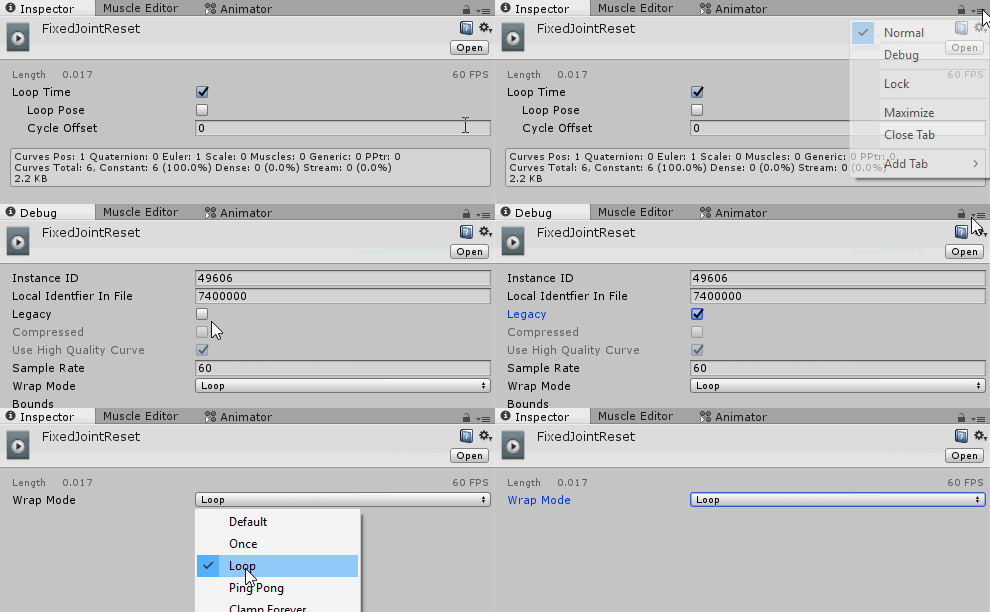
just open that link to see the whole process
clear yew
👌
wild cedar
So this will also stop it from moving with me and glitching out I guess
Because before it was working "ok" but then I tried to lock it and all hell broke loose XD
clear yew
yep
it will stay where you spawn it until you let go of the gesture
then it will reset back to the initial position relative to your avatar
wild cedar
Sweet, and here I thought I had to restart everything from the beginning
Aw shiet, it did it again. But it's smoother now. And I think I know what the problem is
It's because my items have a placement lock on them aswell in their animation
Atleast that what I think it is
Ugh... Apparently it wasn't that
It must be the collider I have on one of them
@clear yew
Can that be it? The Collider I have on one of my things messing up and crashing against the other colliders in the world?
clear yew
no clue, never put colliders on my fixed object
try to remove the colliders and test it without it
wild cedar
Yea, gonna try it now
simple badger
what's the override for the neutral hand position
clear yew
idle ?
simple badger
ah, that's what I figured
wanted to be sure just in case I was overriding some idle stance
clear yew
idle is also the normal standing pose if im not wrong
simple badger
oh. so there's no way to fix the idle hands without also "fixing" the idle stance
slim sparrow
Yeah, it's just like everything
If you want a different idle hand pose you need to change the whole idle animation
Fortunately there's a sample one
slim sparrow
Not the SimpleAvatarController one, but the Male_Standing things inside the AvatarControllerTemplate thingy
Yeah, you CTRL+D them
Then modify the duplicate however you wish
simple badger
I do, they're still read-only after duping them
I'm very careful with data preservation
slim sparrow
That shouldn't be happening, you're probably not dragging the correct one in then
Make sure you have absolutely no controller set in the Animator component when you drag in the animation
You don't need an animator controller because it's ignored by the game
simple badger
well, I need one to test out the animations
I swap between them to copy numbers
working on the metal face hands right now
have openhand and fingerpoint done, as well as the idle hand position

noice
wait, why's the head like that?
should I move it?
I'mma move it
 paper haven
Does anyone know how to stop bones randomly rotating along all axis? I've trying to make a handle on a music box rotate on the Y Axis only, so it spins around, but it's spinning in all directions when I try to make a passive animation.
slim sparrow
Yeah, I legit hate that lol
@paper haven I think you have to rotate the bone in edit mode
Or move the tip of the bone at least
So it can spin perfectly along one axis
paper haven
Hm? I'm making the animation in Unity
slim sparrow
Or you need to somehow change the rotation smoothing
paper haven
on Blender
slim sparrow
Yeah I know
paper haven
Oh
slim sparrow
I had a slot machine that was like
paper haven
you mean take it back to blender
slim sparrow
Yes
paper haven
and change the position of the bone?
slim sparrow
I had a slot machine where the middle slots were fine, but the outer ones were messed up. I'll post pictures to show you what I did.
paper haven
Alright, thanks. I'll tr yto center the bone better
slim sparrow
So, I had a slot machine where the bones were like this
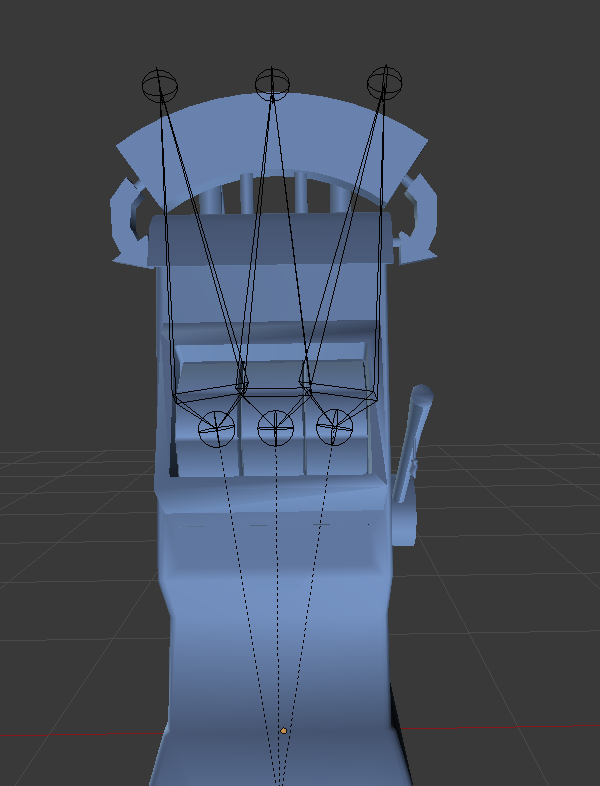
The outer ones were messed up because it couldn't rotate around just one axis neatly.
I moved the tips of the bones inward, and this was the result:
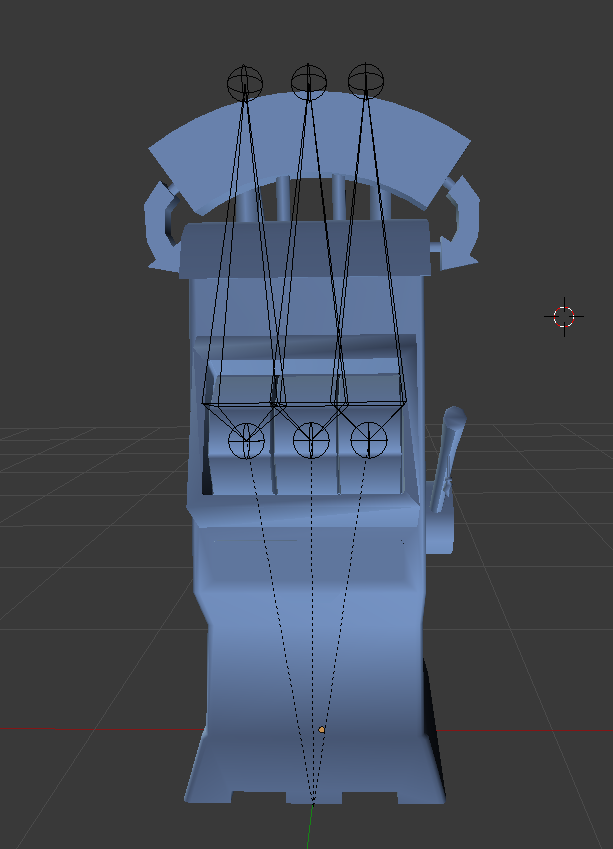
Worked perfectly after that
What you could do, is select the root of the bone, and do Snap Cursor to Selected
Then select the tip of the bone in edit mode, and do Snap Selected to Cursor
Then you can move the tip of the bone outward, off to the side or up or anything
So that you can rotate it around just one axis and have it spin around fine.
I could force the rotation in Unity by setting the rotation mode to Global rather than Local, but the smoothing was all wrong in Unity until I fixed the bones
simple badger
isn't the reason why the bones move all 3 axis unexpectedly because of gimbal lock?
slim sparrow
I have absolutely no clue what that is
I think it's just because the interpolation between frames is wrong because of the rotation mode
It tries to do them all separately
The result is fine but the journey is all over the place
 spring nova
Uhhh gimbal lock is like a real world term, doesn't really apply here
 olive lynx
Hello everyone. I am currently trying to use skinned mesh render for a particle effect so the particles will cover my body. However when I select the models body mesh, the particles just start blinking everywhere. I am guessing something is wrong with the body mesh but I don't know what. Can someone help?
 lunar snow
Nope nothing wrong
Mesh makes the verts or selected setup emit the billboards or particles
But the time your animation runs and the max number of particles allowed in the system along with the emission rate mean you will never reach every very populated
Say your animation allows 1000 particles and you let the runtime go for 5 seconds at a emission rate of 5 that's 5/sec for 5sec
When it hits 5 seconds it loops the emission points
And you never get 1:1 vert to particle
Does that make sense?
At most you would have 1000 out of 20,000*3 verts
olive lynx
I'm completely lost lmao, sorry. The best way that I explain how I want to make my particles look., is by saying that it should look like the aura that Goku has when he goes Ultra Instinct. However, when I apply the bodies mesh to do that,m the program acts like I scaled the mesh to oblivion and the particles are huge as hell. It would be alot better if I could post a picture of what i see in the chat but I can't lol.
lunar snow
Then you need to resize them simple as that
The system or the start size or both
That will fix that
olive lynx
I'll give it a try haha. Thank you.
 spice urchin
is there a way to fix sitting animations
bc they are mapped 2 ignore chest rotation and they are also foot-based so leg animations look awkward
 raw kayak
does anyone have an avatarsitting down kicking their feet animation
spice urchin
look in mixamo theres one
but it won't work bc of the stupid foot being always root bug
aka its gonna keep moving u up and down bc it bases root position off of foot
hollow perch
Even when sitting?
One of the sitting anims had legs crossed and they must have been off the ground
simple badger
gimbal lock exists in simulation space as well
it's why sometimes 3d models will not rotate cleanly in a direction
spice urchin
yes but u don't understand
they always use the root based off of foot thing for sit animations even if u set it off
its annoying
at least for the sitting anim
clear yew
does anyone got the drunk idle animation?
spice urchin
use mixamo...
 silk needle
Could anyone point me in the direction to a good Generic avatar tutorial? I'm attempting to get animation overrides and gesture overrides to work and just end up with a looping mess
spice urchin
u cant use gestures on generic avatars
clear yew

Google Docs
Advanced Avatar Creation: Making Non Humanoids This tutorial was made using Unity Version 5.6.3p1 This tutorial assumes you already have the current SDK imported and knowledge of how to upload a basic avatar. You will also need an avatar you wish to upload as non-humanoid w...
clear yew
Anyone know how to fix the hips not moving when I convert an mmd dance to an animation? It looks fine on the preview in unity but in game the hips don’t move
spice urchin
bc ur supposed to
parent the spine to the hips
so u can use humanoid animation set
and u also sometimes have to turn off inherits rotation
bc most animations dont use the 'hips' properly
and do animations on the leg hip and upper body hip
but if u do that it should fix it
also recommend exporting one in tpose
that way u can copy the avatar for all other motion exports and use the model later on for importing anims
olive lynx
By chance, does anyone know how to make particle effects "outline" your model?
hollow perch
I think that’s what setting a skinned mesh under particle system shape does
olive lynx
Thank you 😄
fierce bane
skinned mesh sets the particles to come out from the normals of said mesh, not in a set dispersal of any kind, so you'd need a LOT to maybe get it to outline you.
shaders are probably what you want to use for an outline instead
slim sparrow
If you want to fake an emission-like effect on your avatar using particles, that won't work
The shape module is just to set the shape of the emission, as Himeki said
If you want a particle shaped like yourself you would need a shader of some sort
clear yew
how would i fix my mmd dance animation from starting off to the left? i want it centered
olive lynx
Ah pudding
 wind torrent
Someone know how (if its possible) to make a material/texture become unlit with a hand gesture
?
fierce bane
you could have it toggle the material to one with a different shader and/or disable "recieve shadows" with the animation
wind torrent
ah
 grave estuary
Does anyone know how people make emote animations persist? For example enable/disable brush, light or other objects.
hollow perch
Search this discord for prop toggle
grave estuary
Thanks. Found what i needed~
 timid prawn
sometime i would like to rotate the thumb because its not well placed with the animator. But if I use transform, after that I set a value its reset position. why ?
slim sparrow
@timid prawn you cannot move bones directly
You need to use the animator values
Like thumb 1 stretch
 shut tusk
does anyone remember the glowsticks in most worlds that leave trails? does someone know how to recreate something like this? (for a sword slash thing)
or is it like a thought it is. just with a particle on 0 speed and a trail?
🤔
fierce bane
use a trail renderer component instead of a particle
shut tusk
🤔
i don't really know how to set this up 👀
cause if it takes the entire sword for the real it'd look weird too
oh i can pick materials that leave a trail?
that's neat.
wait no
that's different
😆
@fierce bane ye idk how to set that up
fierce bane
click "add component" and type "trail"
fierce bane
if you need it to be off a specific point, use an empty game object, or an invisible mesh for the sizing as you want
shut tusk
@fierce bane hmmm. the trail works well but it doesn't really look good... 👀
fierce bane
I don't know what to tell you, it takes adjusting to make it work the way you want. Textures/shaders can be applied to them through the selected material
shut tusk
🤔
spice urchin
lol i made the ss viseme stick out my characters tongue
also proportional editing is bae for visemes/other blend shapes
timid prawn
Can i change material/texture in an animation?
hollow perch
Yes it’s called Material Reference[0] etc in Skinned Mesh Renderer
You can change the whole material but you can also change values like numbers color etc. don’t know about texture but you can duplicate the material and make a new one with diff texture
If you want to smoothly fade between two textures you would need a shader which has two textures and a blending param. It is not hard to modify a shader to work this way.
 somber flint
Can anyoen help me i pretty much good i think other than i litterrally cabnnnot for the life of me make the shapekeys for blinking
ive been tryign for hours and im just at the point of i want to bash my head off a brick walll heh
somber flint
i get the idea of hwo you do it i just cant make it look naturel at all
yes
but that dosent help when no shape key for blinkign excists
 buoyant dove
ok so go to eye tracking
somber flint
yeah
and click the driop dfown box on blinking
Theres nothing
other than the hsape keys ive made which dont have any animation to them so to speak as ive nto managed to make it work
the onyl shapekleys there are the ones i added
buoyant dove
show screenshot
somber flint
which dotn have anyth shape deformation added to them cause i coudl make it naturel
damnit i cant post screenshots in here
@buoyant dove i cant send you it in a pm either it would seem
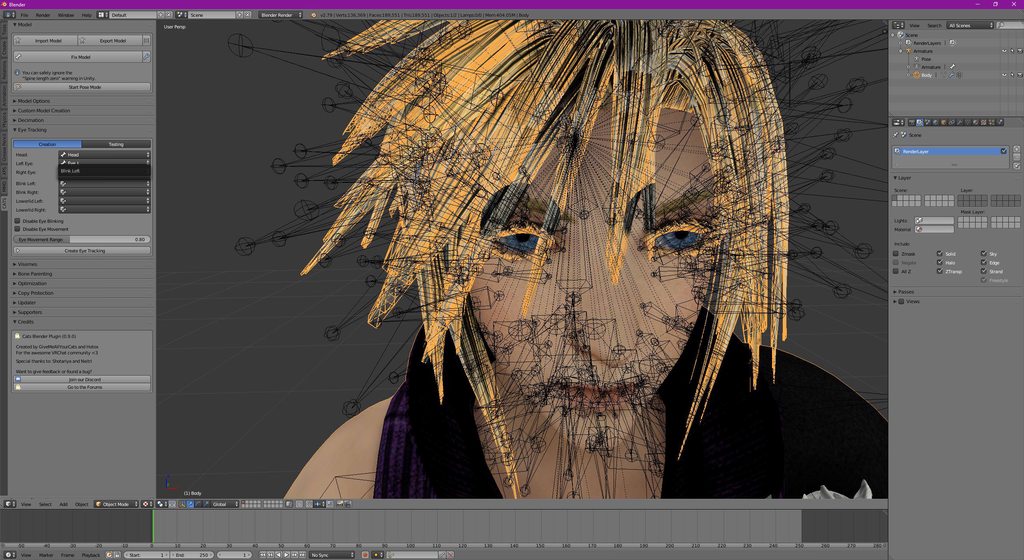
didnt htink abotu imgur
i haven slept been workign on thsi for hours
buoyant dove
OK see that wired
somber flint
not really its not an mmd model
that soemoens allready doen that shit on
its an xnalara import
buoyant dove
can't do that xnalara
somber flint
yes you can
youve jsut got to make the shape key
which si the issue im havign
i no hwo to make the hsape key
i jsut can make it look naturel
at all
buoyant dove
only mmd do have shape key
somber flint
you can make shape keys on any models
shape keys are litterally just movign the mesh aroudn and it takign were thje mesh belogns at tis basic poiont
and where it ends up
you have basic shapekey thats mesh in its normal base form
them you make anothe shape key
which is hte key you move the mesh of the model to where youd liek ti to end up
then it can take a value from 0-100
0 been basic
buoyant dove
i can't make shapekey
timid prawn
Are you drunk or something
somber flint
100 been that shape key at its full morphing point
Sleep deprived
and disabled
well not fully disabled
but i have issues with fine motor control
timid prawn
Type slower
somber flint
that dosent make a difference when you have a condistion similar to parkinsons
but anyway thats got of topic
timid prawn
Shape key are easy. Learn the basic and it should be good. To have a realistic result its mosly try and error. But dont bother to much about perfection. People dont give a dam
Broken avatar are funny to
 timid merlin
Anyone else having problems uploading emotes with audio in them recently?
slim sparrow
Nope. No issues whatsoever.
clear yew
can i have some help with an override animation, when i activate it it repeats for like 3 or 4 times even when i switch to another animation
slim sparrow
The animation loops, you can't prevent that.
Make sure the animation has only two keyframes
One at 0:00 and one at 0:01. No frame at 1:00.
paper haven
Does anyone have the motion file for Bubbletop? Since the download was taken down
 fickle rune
how to make a flying avatar
spice urchin
box collider
paper haven
Ah, well the only Bubbletop animation I could find that was the full 52 seconds has broken thumbs (and won't let me edit them back into position), does anyone have the original download?
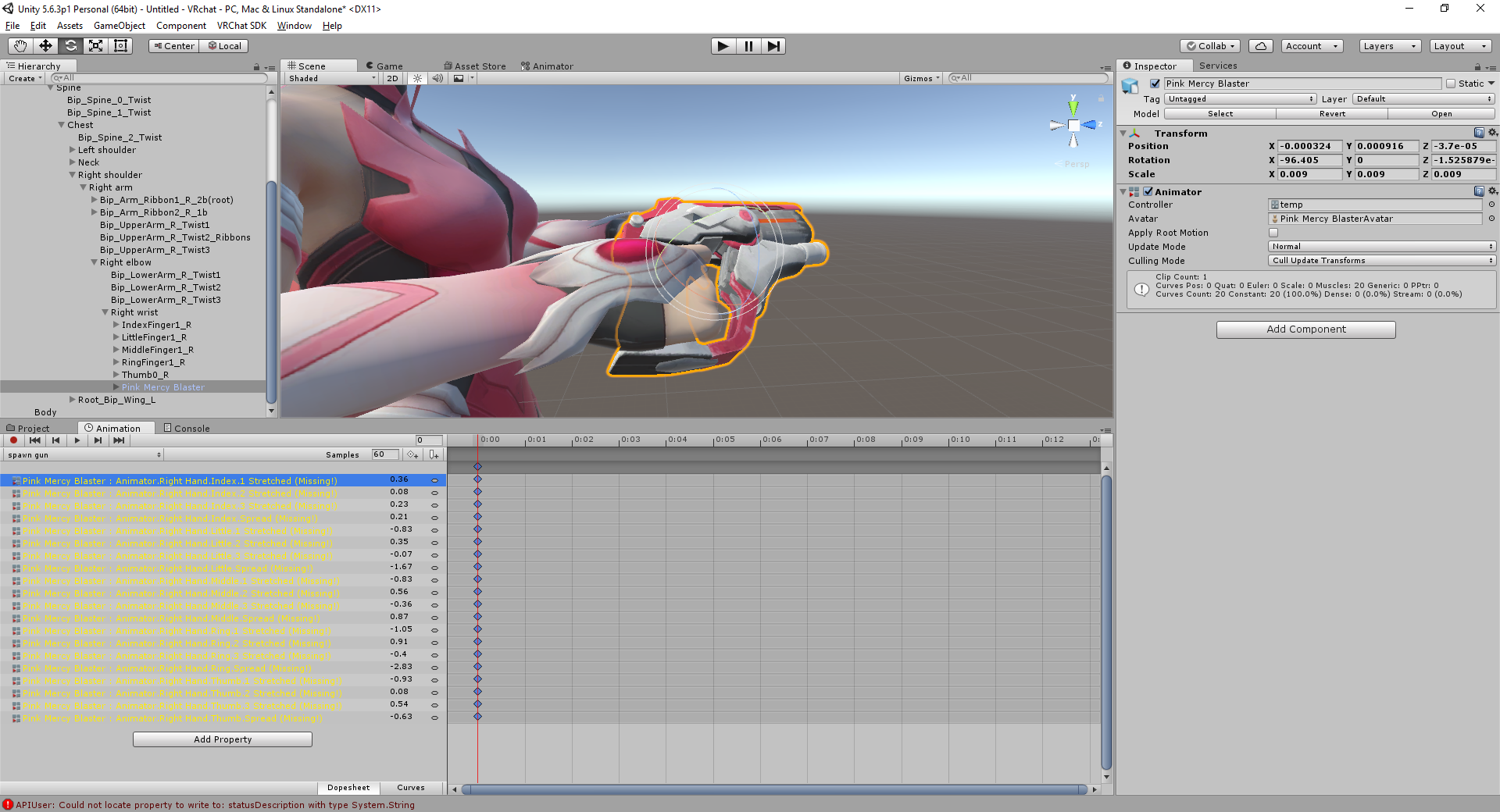
 stable cosmos
and someone tell me what went wrong here? https://imgur.com/KZ3QaRk
 clear yew
you mean the yellow stuff ?
stable cosmos
yep T_T
spring nova
you put the animation that's looking for your armature on a thing that does not have your armature in it
clear yew
press F2 to fix it
you'll have to it for all of them
or use the correct tname and hierarchy to what the animation is looking for
stable cosmos
still trying understand what that means and i following this guide Q_Q https://www.youtube.com/watch?v=GkVJSd3Js8o&t=828s
 simple badger
svelsien and phase already explained it
the animation can't find the parts it's looking for because it's looking for the wrong parts
it doesn't seem like you have the avatar selected in that frame at all
 wary parcel
Is F2 a shortcut for editing the path for an animation root you have selected?
@clear yew
spring nova
yes, basically renaming the animation path
wary parcel
If so thats very helpfull shortcut
spring nova
you can also slow double click it, like you're renaming something
slim sparrow
I did not know you could use F2
For some reason the path editing is incredibly limited though
spring nova
how so?
slim sparrow
For example, if you have an animation referencing the "Blink" shape key, you cannot F2 it to refer to "Wink" instead.
Which is extremely irritating
It's even more irritating because you can manually fix it in Notepad
wary parcel
The slow click is annoying an not consistent, and if you want to rename. A non existent path then you got a problem with clicking
spring nova
oh yeah, you can change the path but not the action
wary parcel
Ye i will remember that
slim sparrow
I should remember that too, then.
 hardy hornet
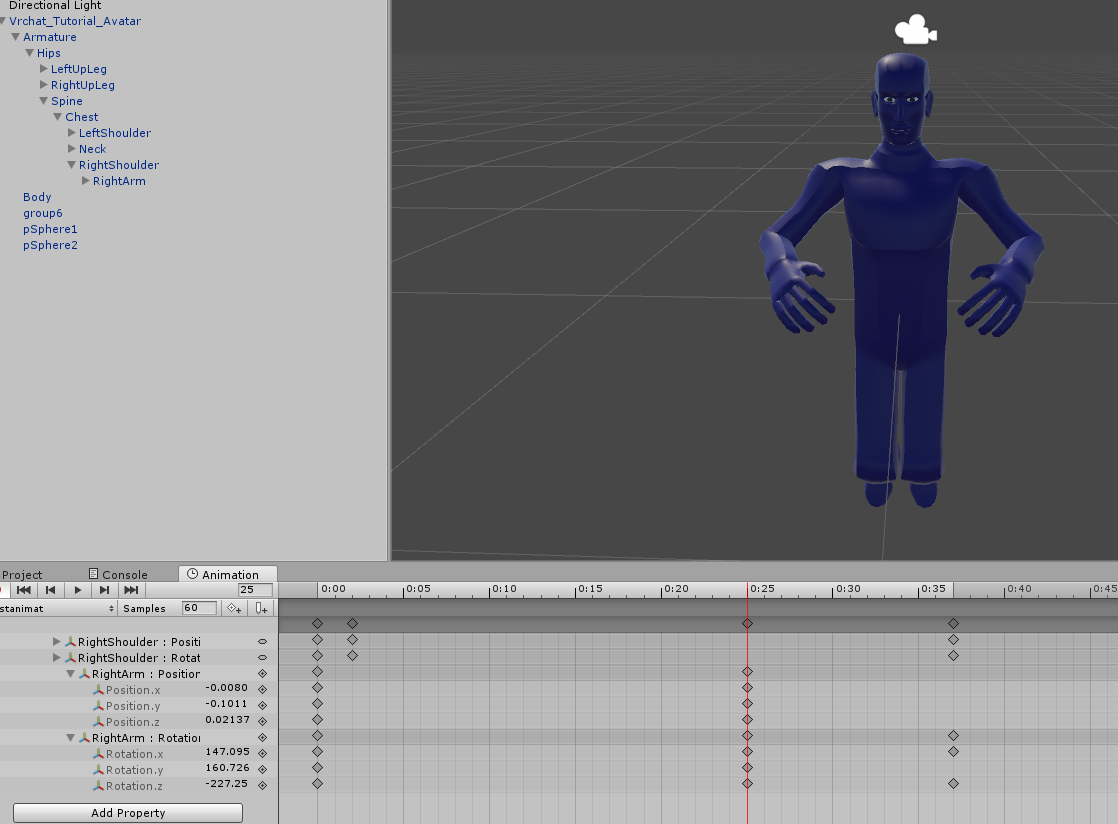
Hello, is it possible to rotate the arms through animation in Unity? I kind of tried it but the model just breaks and doesn't show any changes despite changing its keyframe in the timeline
(Using transform rotation though, not sure if it's the right one (?))
 wary parcel
With the IK tracking you get when using VR you lock them out and overlap any changes made to the Arm, so you would have to deactivate the Weight the Layer gives them witch i think is not possible right now, but the fingers is not affected with this overlap because there is an override animation nodes you can link them with. Would have to have an override option to the arms to then.
simple badger
also hand gestures are limited to two keyframes
just in case thats what ypu're doing
hardy hornet
Oh I see, that makes sense, thank you. I was kind of planning to make an emote(gesture) by rotating the arms so I was surprised it isn't working because making an animation in blender kind of breaks the model last time I tried it
simple badger
if they're more than two keyframes then there's a problem with exiting the gestures
so while it's still technically possible, you'll run into numerous technical problems if you do
hardy hornet
Ah, I was trying to make something similar to the wave emote they have in game. My bad for calling it a gesture (since it's a wave gesture "orz) and confusing it with the hand gestures
Ah, nevermind. I found out you just need to use the Animator one instead of Transform. Thanks anyway!
wary parcel
you can use the avatar on Generic to make animation for it, and unhide that Model and attach an Animator that does the animation for you on that Generic avatar.
clear yew
When importing a mmd dance how do I get the animation to be centered and not far left?
slim sparrow
Try messing with the root transform settings
Bake into pose, set Based On to original
clear yew
yup i have those settings
everything is bake into pose and original
yeah it still goes off to the side
offset just makes it rotate
and go into the ground
@slim sparrow
slim sparrow
¯_(ツ)_/¯
I only ever did two animations and they worked fine
You can manually adjust the root transform yourself, but good luck with that
Since it'll change a lot
No way to just translate it all without an addon of some sort
amber mantle
I got all the Animations from Soulworker 😃
The Bad part is, that they are a .anim file, but dont display as one in Unity
slim sparrow
Then they might not be valid unity animations
amber mantle
sadly not
shut tusk
i never tried out the IK_Follower vrc script. so is it really set simulation space of particle to world and add the follower script component and it'll act like a world particle?
was using the fixed joint method before but i guess this one's more convenient now 👀
shut tusk
hmmm okay
paper haven
Anyone able to identify this motion file?

Performer: Stromae Author: Stromae Models: Tda Musical Tone Tda Melodious Miku Tda Calm Melody Yukari Tda Overlapping Tune Teto Tda Illusion Sound IA Tda Laz...
Since the ones in the description are two seperate dances.. It's confusing
 solar relic
whats the duration for emotes?
 cinder cipher
trying to cast several transmutation circles and even though i would move they'd stay in the world
is rigidbodies my answer?
slim sparrow
@cinder cipher no, use world particles
 oak meteor
some one?
Audio source found Avatar they will be adjusted to safe limit
How to fix?
slim sparrow
It's not an issue
 icy crow
fixed joint?
cinder cipher
Let's say you want to place a radio or a gramophone on the world
I tried fixed joint but it just keeps shaking
icy crow
yeah a fixed joint on the object connected to nothing
cinder cipher
So just I see it?
slim sparrow
Others will see it but far less so
cinder cipher
👌
icy crow
apparently if you go too far away from the object, it will disappear for other players
slim sparrow
Probably animation culling or something
cinder cipher

 sand crater
Okay I baked an animation onto a model in Blender, but since there is also eye and mouth syncing to the animation music, even the frame 0 of the animation has the eyes closed. How do I make it so that the eyes are open again on the first frame of the animation?
sand crater
Alright 1 more question, how do I remove the animation entirely and reset everything back? I select everything, press spacebar, and remove animation, but it does not reset her eyes
^ within Blender
slim sparrow
It's better than making them in Unity since you can more freely adjust the bones
But the interface for animations is pretty unintuitive to say the least
You also need to export the model in pose position in order for the animation to even work, otherwise it's just empty. Baffling.
cinder cipher
well the thing is, the ui doesn't look very welcoming
solar relic
https://gyazo.com/a963e20298f839e00f555f99abf35e0a i just did this. what can I improve.

 stark galleon
I need help with sound range on my avatar. When you are near the avatar the sound is perfect but it will drops very fast if you move away from audio source. i used linear rolloff with min 1 max 30 and i increased the sphere around the avatar in unity but it does not apply my setup in the game
stark galleon
ok
i duplicated my avatar for an animation and i putted the same settings for the audio source on the animation but i get the same results when i start the emote
 tall river
Does anyone have a good video regarding how to add/make emotes, please?
 edgy eagle
Im wondering how i can make a animation for the bullet ejection for my assult rifle which im going to have in VRchat
clear yew
Anyone got a sitting animation?
fickle rune
is there a way to set facial expressions through emotes instead of hand gestures
 oblique hawk
hi there people please don't laugh because maybe even a grandma can do that. well...here's what i want to ask. how to set two avatars location possition to dance facing each other. because i try'd to press E button for rotation but that's not help me at all.
hollow perch
You mean like play an animation that causes two avatars to appear and start dancing?
Or you want to dance and you want another avatar to mirror whatever dancing you do?
oblique hawk
that first
hollow perch
Ok so basically make two copies of your avatar inside your avatar. Make them disabled
oblique hawk
you see...i put deferent animation for each avatar and when i press play they not dancing facing each other even if i set them to face each other trough E button rotation
hollow perch
Then have a gesture that turns off your main mesh renderer and activate the two objects
Ah I understand. Make two new empty game objects and put one of the dancers in each one
Then rotate the empty object
oblique hawk
i'm not planing to use them as playable avatar's i set them as a npc avatar
hollow perch
The animation is probably rotating itself to some absolute angle
hollow perch
The objects are relative to the parent. So making a game object to be the parent of the avatar lets you change their position/rotation without editing the animation
You could probably also fix this by editing the animation and changing the rotation it sets
 devout igloo
Shape keys are so fun :3 https://gfycat.com/WhimsicalBriefGoldfish
 clear yew
is that going on a hand gesture ?
devout igloo
We'll see. First time trying. Does it look like it'd break?
That was the idea, though.
devout igloo
Oh so is it designed for only those two frames?
clear yew
yes
devout igloo
I was hoping that using more frames would just slow down the animation speed
clear yew
nah
devout igloo
rip
spring nova
You can get away with a couple more but it's not what you want
clear yew
pretty sure if you use more than 2 frames
devout igloo
What exactly happens if I were to upload this as is? Would it lag uncontrollably or just explode my face?
clear yew
they will jsut start to blend into each other or not play properly
devout igloo
I'm kinda curious to see what happens
spring nova
it makes it take longer to turn off the gesture
so when you do other gestures it can't switch to them properly
devout igloo
ohh because it has to rewind the gesture at the same pace it played at?
So a 3 second gesture needs 3 seconds of empty face to revert correctly?
clear yew
no, because vrchat is garbage
devout igloo
lol that was a given
spring nova
It's designed to take 5 frames to blend between gestures, so when gestures are 1 frame, it takes 5 times playing through the animation to blend. But when the gestures are 1 second, it takes 5 seconds to blend
slim sparrow
Yep
The transition time between gestures is based on the animation length
It's a fairly easy fix but we haven't gotten a fix yet
Just give it a fixed transition time of 0.13s
devout igloo
oh
spring nova
nah, if you want more than that you have your gesture animation activate a secondary animation
slim sparrow
If you need to animate an object then just enable an animated version of that object
devout igloo
time to revert then lool
clear yew
why is it asking me to remove a component when I go to upload?
spring nova
You probably have a script or component that isn't allowed in vrchat
devout igloo
oof
So my animation is playing in a loop
Where do I disable the looping for the animation?
clear yew
I see.
I tried removing it for a moment but it still was saying the same error.
odd
and it's an avatar ive uploaded before
spring nova
Playing in a loop is another reason why you need just two frames, and they need to be identical
devout igloo
Ohh you set them both to 100 okay
Also, can I not just disable this? https://i.imgur.com/7a1WYTz.png
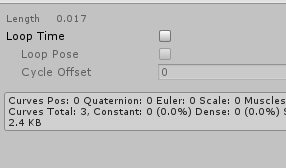
"Loop Time"
spring nova
You can, but that causes other issues
clear yew
MysticLight Fade isn't allowed?
spring nova
if you want to do basically anything fancy with an animation like not looping or more than two frames, you can't do it on the gesture, the gesture has to enable a secondary animation
devout igloo
alright
slim sparrow
@devout igloo gestures always loop
Disabling looping won't actually give you any issues
The gestures are set up so you can transition from any state into a gesture state. However, they can also transition into themselves.
So even if the animation doesn't loop, the transition will make sure it does.
Once again a limitation we could fix with custom animators
spring nova
It would be sooo easy to split gestures into two handed if we could use our own animators
spring nova
It's so stupid, they have the logic for splitting, they just use clips that include both hands
slim sparrow
Yeah
Their system was originally intended for hand poses, and their system works perfectly well if you only do that
Since it already splits those using avatar masks
So that explains why it's set up that way
Custom animators would give us a load of freedom
spring nova
apparently somebody got split gestures working though, so they got around it somehow
slim sparrow
The only tricky part is integrating the emote menu with custom animators properly
Because the emote menu generally expects there to actually be an emotes set somewhere. I think it's a blend tree or sub state machine or something
Although tbh I think losing emotes would be a worthy tradeoff for getting our own custom animators
Or maybe if emotes were changed to be those "trigger" thingies instead that you can use in your animators
Then you could interpret those triggers any way you wanted
Or just an even simpler solution: make sure your animator matches the SDK animator controller structure/layers if you want emotes and gestures
¯_(ツ)_/¯
 fallow pier
My avatar has a gun and im trying to rig it so that it shows animation with sound
But it doesn't actually play the animation when in game but works fine in Unity
Plz help out a rookie
How do I fix this?
 sweet zealot
is there a quick easy way to duplicate shapekeys in blender?
spring nova
yeah, turn the shapekey all the way up and then hit the plus button and create from mix or blend or whatever it is
spring nova
yeah that's what it does
Oh it's not plus, it's the dropdown
and new shape from mix
sweet zealot
AH! thank you!
solar relic

is there anyone experience on animation using Umotion? I want to know the proper way of animating.
solar relic
currently I just do a simple point 1 and point 3 then 2 as the filler animation. n then adjust it or add more filler to make look smoother
slim sparrow
I can confirm the fix for blinking getting stuck
When you make custom blink and disable the blink animation at the wrong time, your eyes will be stuck in that part of the blink. You can fix this by putting another legacy animation on the Body mesh itself, which forces the blink shape key(s) to 0 once activated.
You cannot do this directly in the gesture because that breaks blinking entirely.
Now I gotta go back to so many of my models and apply the fix...
Because otherwise it just looks stupid
simple badger

Dunnoy why it did that
it's still in the origin position, if I try to zoom into him he gets frustom culled out of existence
spice urchin
unity crashes when i try to remap the shapes of the mdd in animation
shut tusk
can someone tell me how i can scuff my model like this 👀 https://i.gyazo.com/97122229a111aab2635f5f159d951ee6.png

cause the eyes still seemed to move
or is it a unity thing hm.
just an idle animation?
 daring mica
Hey guys/Girls, I am currently trying to refresh myself with animations. It's been awhile, I'm stuck on one part due to me forgetting to put it in my notes. When you put an avatar into blender to attach an animation to, what is the scale you use when attaching the animation to the model? https://gyazo.com/b3c5246bc7f73eb56fa827ea26e476c5

Never mind, I have figured it out.
 obtuse tiger
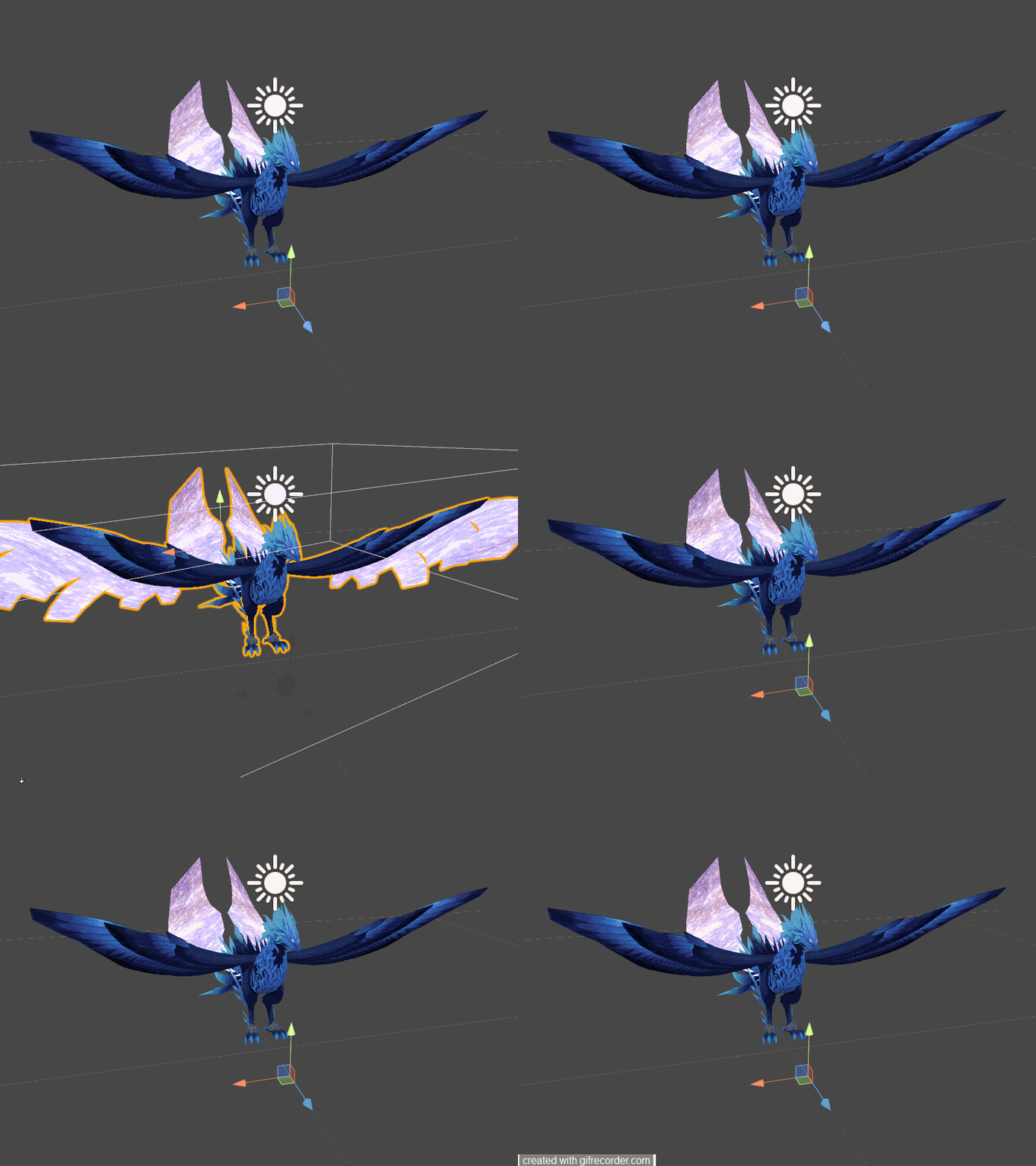
Hello, I was hoping to create an animation that hid a certain material. To accomplish this, will I have to deactivate the main body and activate a new one? Or perhaps just have a separate model that only has the mesh associated with that material tied to an identical armature that is only active on the animation? Or am I making this entirely too complicated? It has humanoid rigging. https://imgur.com/Gv5pBNr
 jade sparrow
Hey, does anyone know how to spawn an object and make it stay in it's place using Rigid Bodies? (Not particles)
hollow perch
@jade sparrow https://imgur.com/a/XWzPKZ7
jade sparrow
Ok ill try that now 😃
hollow perch
@obtuse tiger You can hide a material. Create a text file Hidden.shader and put the following line in it:
Shader "Hidden" { Properties {} SubShader { Pass { ZWrite Off ColorMask Off } } }
Then make a new material and select Hidden as the shader.
And finally for the animation, you can change Material Reference[0] or 1 or whichever material you don't want visible to be Hidden
Another option aside from separate model is Blend shapes. Basically in blender make a new shape, select all vertices with the material you don't want, and resize them to be small/hidden. The advantage of this is the animation will morph those vertices away and it won't look like a sudden change.
obtuse tiger
@hollow perch Thank you so much! I'll give it a try.
jade sparrow
@hollow perch THANK YOU SO MUCH! I WANA HUG YOU RIGHT NOW!
hollow perch
🤗
 obsidian vigil
@hollow perch cant you create a material with fade and transparency set to zero as well? 🤔
paper haven
Is it possible to make a mesh particle inhereit the rotation of the emitter?
obsidian vigil
@paper haven theres a shader which does that
paper haven
Arrow Travel?
I tried it, it seemed to make the bomb-shaped mesh into a long thin line that was transparent and came out at some random point
obsidian vigil
not sure which one, i have a link to it somewhere in my dms
spring nova
@paper haven you need to make sure you enable custom vertex data and add center and velocity
paper haven
mhm, I did both, it seemed to help slightly but I have the model on a plane, emitter aimed at the plane and they were rending beneath the plane, to the side and fading away in the wrong direction
it was.. ood
spring nova
could you send a picture?
simple badger
gonna post this again because it's still a problem
fucken what
why's he over there now
slim sparrow
Is that 0,0,0?
When animating duplicates I usually disable the original rather than moving the duplicate
 karmic meadow
hey just wondering how easy is it to take an animation from mixamo and put it in one of the emote slots on unity?
slim sparrow
Easy enough
Download model + embedded animation from Mixamo, import into Unity, configure as humanoid rig. Then you can expand the imported model, CTRL+D duplicate the animation, and you're done.
Make sure you edit the animation to remove the jaw movement though.
karmic meadow
hmm ok thanks ill see if i can get that to work
slim sparrow
So, does anyone know why editing Root T or Root Q in animations never seems to work correctly?
If you type in 1, it shifts to a value slightly higher or lower
This makes it almost impossible to add new keyframes because all the damn Root T and Q values will be wrong
 untold surge
can I animate in blender and import the animations into my model in unity?
 wicked crypt
can someone explain me how to spawn an empty game object and let it stay where it is despite me moving around ?
icy crow
put a fixed joint on the object, set the drag on the rigid body to infinity
you'll also need a reset animation, otherwise the orientation/position will progressively get more messed up when you keep enabling/disabling it
wicked crypt
its like a stage show, so ill probably just spawn it once
icy crow
theres an imgur album with how to set up everything, just need someone to post it here
you could probably just use world particles for that maybe
as long as the whole thing is a single mesh
wicked crypt
ah, its more then just some particle systems 😅
simple badger
@slim sparrow I didn't move the duplicate, he's still at 0,0,0 he's just over there for some incomprehensible reason
if I try to zoom into him he gets culled
wicked crypt
hmm maybe if i cant come anny further with the one i have atm
icy crow
but if you want to use fixed joint, i can dm you my set up
wicked crypt
would be nice
simple badger
 hollow perch
@icy crow @wicked crypt https://imgur.com/a/XWzPKZ7
wicked crypt
Thank you @hollow perch
clear yew
people already sharing my little album, Huh?
hollow perch
@clear yew seems to have saved the day a few times already. You should see if you can get it pinned
wicked crypt
can someone tell me if its normal that an Animation is running faster in VRC than in unity
or if i did some mistake
muted prairie
That is due to the animation controller, you can edit that
slim sparrow
Depends on what the controller is on
You can't do that if it's on your own avatar
Only on a game object of some sort
clear yew
Does anyone have the okay finger gesture?
lunar snow
Make it yourself? It's not hard to repose fingers
clear yew
idk how ;-;
 pliant plank
@simple badger a bit late but, once the camera loses sight of the bounds box (the outline box on your gif) meshes turn invisible, if it's still in view, then you'll be able to see the model
simple badger
How do I put it back in the bounds box
 dawn shale
Hey guys, I have this animation file that belongs to this character I have, and the animation is basically moving the body and doing some sort of pose, while moving the face and what have you.. But, the animation only affects the characters face, it doesn't move anything else. Anyone know what to do? http://puu.sh/B62qA/87dc556c7b.png

 uneven acorn
Does anyone know about snail markers?
For some reason my trailrenderer time file in my eraseall file is missing even though it actually isnt
 limber heron
Somtimes if you've changed the place in the hierarchy where you attached it to originally it will mark as missing. One easier solution is just to manually add the Set time to 0 yourself.
dawn shale
@limber heron who was that to
 gray rune
Hi I'm having a bitt of a problem where in unity after adding a animation and trying to upload ( before the making of the animation it works ) i cant get past the control panel it just pips and nothing. Copied the override, made the animation, added it to the override and added it to the original.
karmic meadow
yo is there a way so that i can animate my knife to flip out when i activate it but not loop and constantly be flipping out?
spring nova
Yeah, add an animator to your knife, set the animation to not looping. When activated, default behavior is to just automatically play
In order to animate it separately from your character, drag the knife outside your model, click create animation, then you can drag it back in
opal lodge
Can i add 2 different animations on the same model? I can't put 2 components there but when i make the one animation component 2 long and add both one doesn't play
hollow perch
I'm not sure I dully understand what you are asking. You want both to play at the same time? Or activate them independently? Legacy or humanoid? Activated from gesture or emote or something else?
On a single game object, You can only put one legacy and one non legacy animator. On your avatar itself the non legacy animator controller is built into vrchat and shouldn't be overridden
opal lodge
I have 2 seperate animations. One makes the wings flap and i have one that will make the eyes blink
but i have them both seperate so i want them both to play as a animation on my model
clear yew
So, is there any way to assign more complex animations to hand gestures?
hollow perch
You want to control them separately so you can turn them on or off? Or you just want them always running. Something like eyes blinking can be done with an extra legacy animation object on the Body mesh always running. You can set enabled or not enabled on the animation from a gesture
For wings flapping find a place in your armature that is above one or both wings and put an animation there. One thing to keep in mind is you can't reuse existing animations easily because you are inside something else so the path from the animation to the wing or mesh is shorter. Like you will remove Armature/Hips from each one
opal lodge
I planned on having them being on non stop
I can't just re-map my animation to look for the object but a level down in the hierarchy right?
 south eagle
Is there a way I can make a prop/item appear after a certain amount of time? I have a particle effect, something happens at 3s, something happens at 6s, and then I wanna have a prop appear at the 9s mark, but if I do it in a normal override, it'll bug out.
hollow perch
If you want it from a gesture, You can use a legacy animation for this. Have the legacy animation turn on stuff at various times. Uncheck the animation component. Then have the gesture enable the animation component which will do everything in order. Otherwise, it should also be possible to use a normal animation override for an emote. What is bugging out?
@opal lodge remapping a level down is what I was suggesting. If you want all of the animations running all the time, just copy and paste all the wings and eyes and everything into a single combined animation and put it in the Animation component in your actual avatar. No complication in this case
south eagle
@hollow perch The normal override, if not 2 frames, makes your hands glitch when trying to switch gestures, the the prop needs to spawn at 9s.
Never heard of legacy animations, I'll have a look
hollow perch
For gesture do what I said. Add an Animation component and uncheck it, and your gesture has both frames that say set animation enabled to 1
fierce bane
@south eagle for legacy animations:
- Make animation on a part below the animator it will be on (for ease of setup)
- Select animation
- In the Inspector, top right corner click the button with three horizontal lines and select "debug"
- Check "Legacy"
See end gif in this album for visual https://imgur.com/a/XWzPKZ7
uneven acorn
@limber heron set time to zero on the animation tab on the copy of my avatar?
I just tried that and it doesn't work either ;-;
paper haven
Is there a way to trim MMD Motion files in blender/unity?
as I need to remove the first 500~ frames
Unity almost crashes most of the time when trying to copy/paste or edit keyframes on the dances, or copy them to a new animation
Will changing the playback range in Blender and then saving over it fix it?
ah.. no, it doesn't seem to
Ah, fixed it - Had to go into the .fbx's animations tab and set a new start frame
 frozen rose
how do people make spawned animations, such as a table, stay in place as they walk around? Like is there certain setting somewhere? sorry if this isnt the place to put it lol idk where to ask this question at.
clear yew
add fixed joint to the table
 twin carbon
could someone make me an ice animation? like how shoto or esdeath makes ice
karmic meadow
hey so i have a problem:
i have a weapon on my characters leg, and one in his hand. ive have it set up so when i do an emote the one in the leg disappears and the one in the hand appears, (so it looks like i grabbed it from my leg) but i miscounted and the character's poly count plus the one on the leg are too high.
so is there a way to make the leg one invis until im in game?
if its too hard or whatever ill just remove the leg one
clear yew
hide it , make animation to make it active
clear yew
i haven't tried before ( i mean making it active 24/7 in the game), but my guess is putting it in your idle animation
the usual way of triggering an animation using shift is the customer override controller, but i don't think that is what you want.
custom override*
karmic meadow
yeah
clear yew
try including it in your idle animation
karmic meadow
honestly no clue how to do that, is it hard?
clear yew
i can only try it once i get home, or maybe wait for some experienced creator, but if my guess is right, it shouldn't be hard
karmic meadow
its how to make a item inactive so it can pass the poly count, but then activate it once ingame (only like 2k poly over)
twin carbon
all ive wanted was a ice animation like when shoto makes a glacier
but smaller
any expert unity people
clear yew
hard to imagine what you want, haven't watch the anime, can't watch it in company 😦
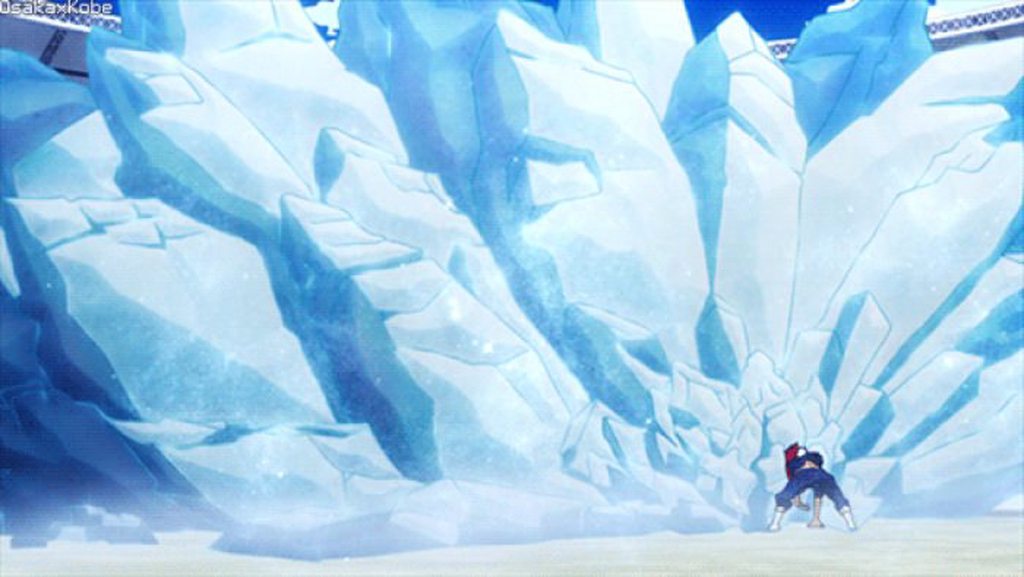
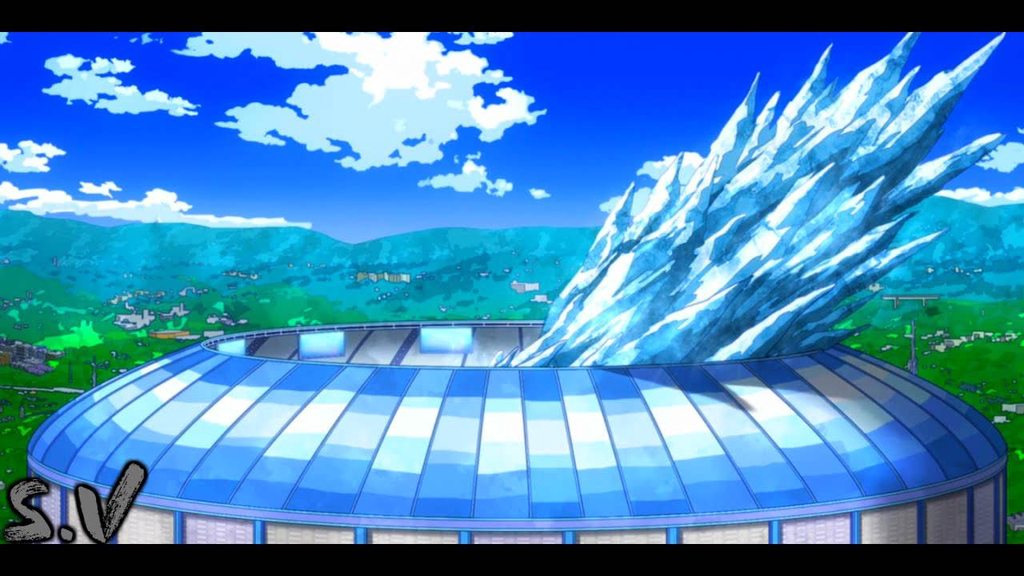 clear yew
wtf...
clear yew
i have seen some mmd stage with this kind of ice
maybe i can separate it from the stage, then make it part of the animation
twin carbon
if you could that would be awesome
clear yew
then make the scale small
at the beggining of the animation
at the end of the animation set the scale to 1
twin carbon
if you look up when todoroki plays vrchat
and watch for a bit
there is an animation like that
clear yew
that will make the ice grow bigger during the animation duration
that is one way of doing it
 south mango
Hi guys, I'm trying to make a spinning animation for my planet but I have an issue where the planet spins slowly at the beginning and speeds up during the middle and slows down again towards the end. How do I make it so it spins at a constant speed?
twin carbon
there should be an option for constant speed
if theres like 2 slots for it then its doing it between those 2 numbers
south mango
Where do I find the option for constant speed?
south mango
Yeah It's an object. It's okay, I just ended up making a script to rotate it
I used: transform.Rotate (0, 0.3f, 0);
icy crow
in the animation tab, go to curve view instead of dopesheet view and flatten out the line for constant rotation speed
twin carbon
trying to make ice animation for a gesture is so frustrating
F ML
No idea what im doing
twin carbon
i bought an asset for like a dollar but i have no idea how to make it into a gesture
clear yew
have u managed to get the particle simulated?
twin carbon
its werid cause everything is seprated. i thought it would just be an animation but its so confusin to me
clear yew
try to find out which one is the main particle system
then drag it out to break the prefab
that is what i usually do
clear yew
then drag it out of the prefab
twin carbon
i can see it if i press play
clear yew
put that into your character
clear yew

Creating custom animations for hand gestures and emotes in VRChat
twin carbon
idk im still confused
clear yew
basically go to the example folder in vrcsdk
find a file call customActionOverride ( or something)
copy one of it and move it to your asset folder (not required but it make things easy)
then get a sample animation, make a copy of it, delete all the keys, add property to set your particle active, then drag that animation in your customoverride
twin carbon
the video doesnt help with this.
twin carbon
the animation ingame literally throws my character
no ice
just throws my character
clear yew
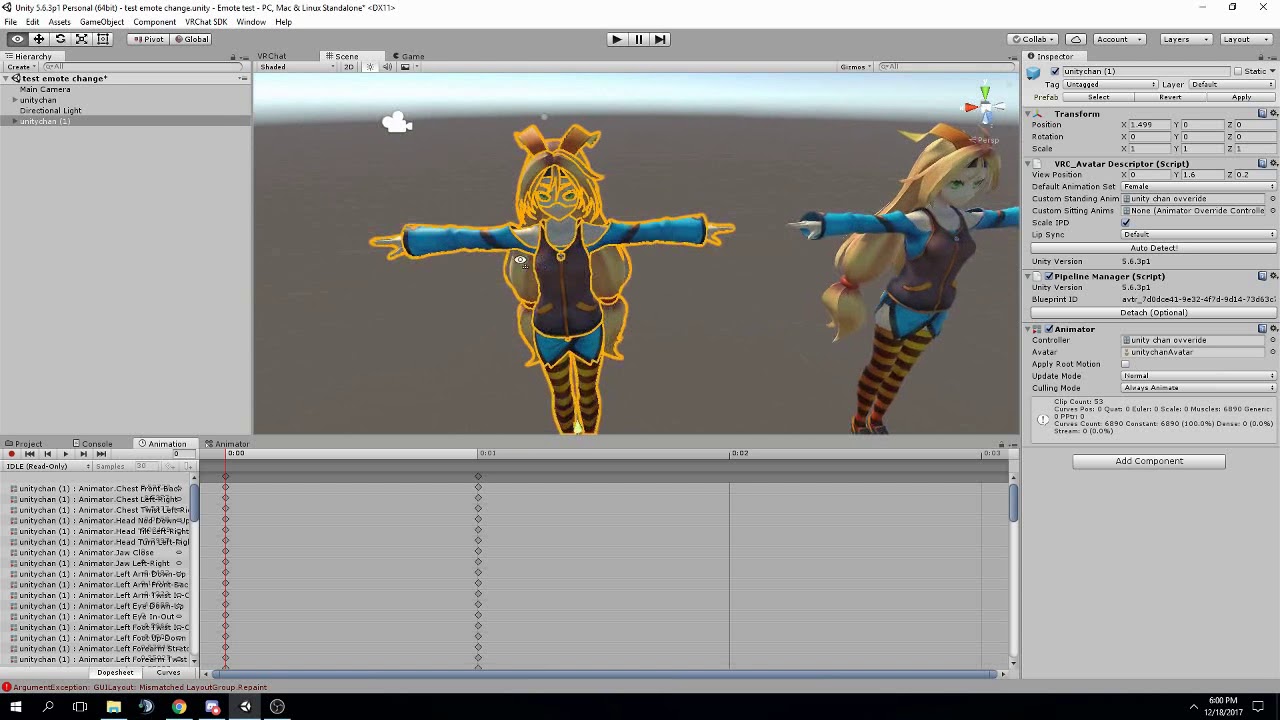
FAQ: 1. If you can't find the animator or animation tab go to window at the top and select animator or animation 2. If your character is going in the ground ...
wait
you know how to override gesture right?
clear yew
k
then do you know how to edit an animation?
make a copy of avatar, drag the animation in etc
twin carbon
i know how to get to the animation but the animation isnt what i want
twin carbon
its just a thing off of the prefab
clear yew
go into the edit
delete all the keys
no
thats not what i mean
the thing off the prefab is not an animation
we call it a particle system
there is a sample animation file in vrcsdk folder
rotate or coin flip, either one
twin carbon
mhm
clear yew
copy one of those into your asset folder
twin carbon
mhm
twin carbon
animator or animation
twin carbon
k
clear yew
then drag the animation you want to edit into it
in this case
rotate animation
not the particle system
drag it into your copy avatar
twin carbon
waitwait
is it called roatater? because thats the only thing that will go into animator
clear yew
rotator?
clear yew
did you copy the animation file from the vrcsdk folder?
clear yew
yep
that file
drag it to your copy avatar after you set the animator to none
not dragging it to the animator
it is at the left side of your unity
clear yew
did you see alot of "keys"?
twin carbon
i think it created a new thing for the animator
clear yew
yeah
or go to window->animation
forgot the exact location
i relied too much on my muscle memory
twin carbon
Ok im to where he started creating the flip animation
Now, how do i add the ice trail animation to this
twin carbon
umm
clear yew
you have dragged the ice trail particle to your avatar before you made a copy right?
twin carbon
ive told you its not a particle
twin carbon
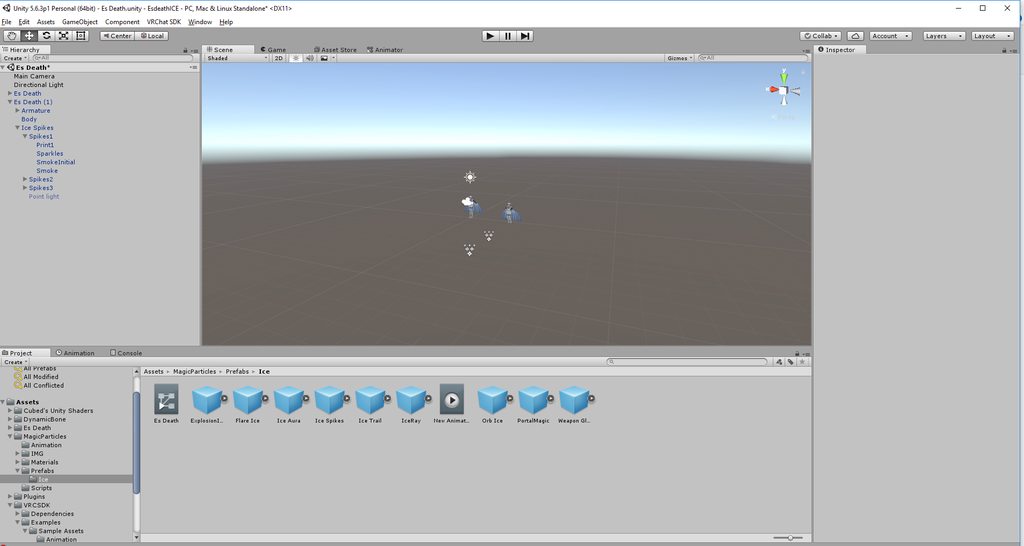 clear yew
try to drag the print1 out
usually i break the prefab into multiple particles
might be able to take a screenshot once i reach home
clear yew
actually pretty easy, but i am never good at explaining stuffs
i will show you once i reach home, about 1 hour later
twin carbon
i rather someone else make me one now
twin carbon
my model?
clear yew
unitypackage
clear yew
i know how to
and i strongly suggest you learn it too due to how easy it is
literally a lot easier than decimation and bone rigging
or wait
twin carbon
yes
clear yew
good
then just tell me the name of your unity asset
then i should be able to do it from my side
twin carbon
the asset im using i bought
clear yew
yes
twin carbon
you want the name of the asset for the ice right?
clear yew
yep
twin carbon
Ice Particle Systems
clear yew
k
twin carbon
you want the link for the model or you good?
twin carbon
k
twin carbon
thats completely fine, if you want to do anything to the ice stuff to make it better you can
clear yew
k
twin carbon
?
clear yew
i will start doing it now
 trim zinc
I can't seem to get particles moving with a weapon right, as any movement of the weapon just places the particle into worldspace even tho I set it to local
Could it have to do with it being a skinned mesh renderer?
clear yew
no idea, but applying the particle on hand seems to works fine
spring nova
@trim zinc if you're using a skinned mesh renderer emitter, set the simulation space to that of the gameobject with the mesh too, using custom simulation space
trim zinc
I thought that might be it, I'll give it a try
that wasn't the solution, now the particles aren't even aligned to the weapon and are instead misplaced while still not moving directly with the weapon https://imgur.com/a/50qgElr https://imgur.com/a/fb8zXGj
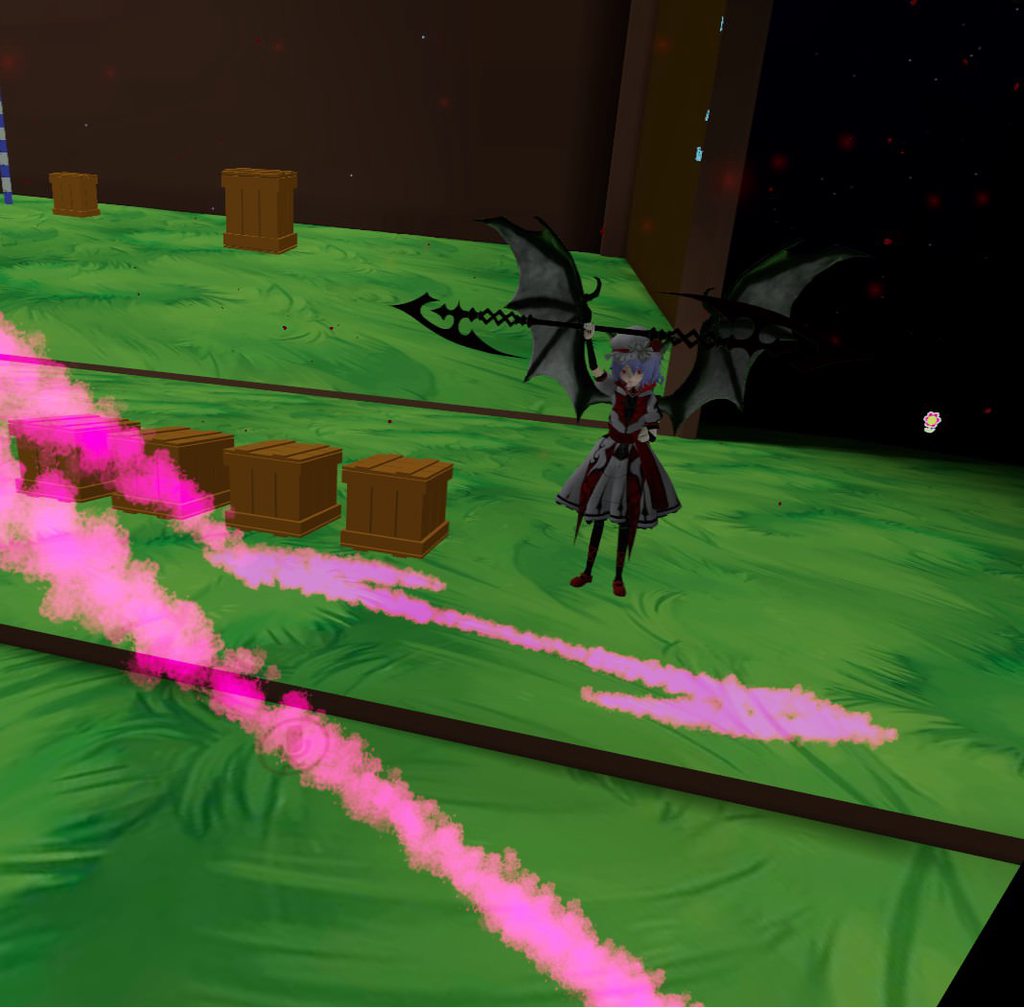
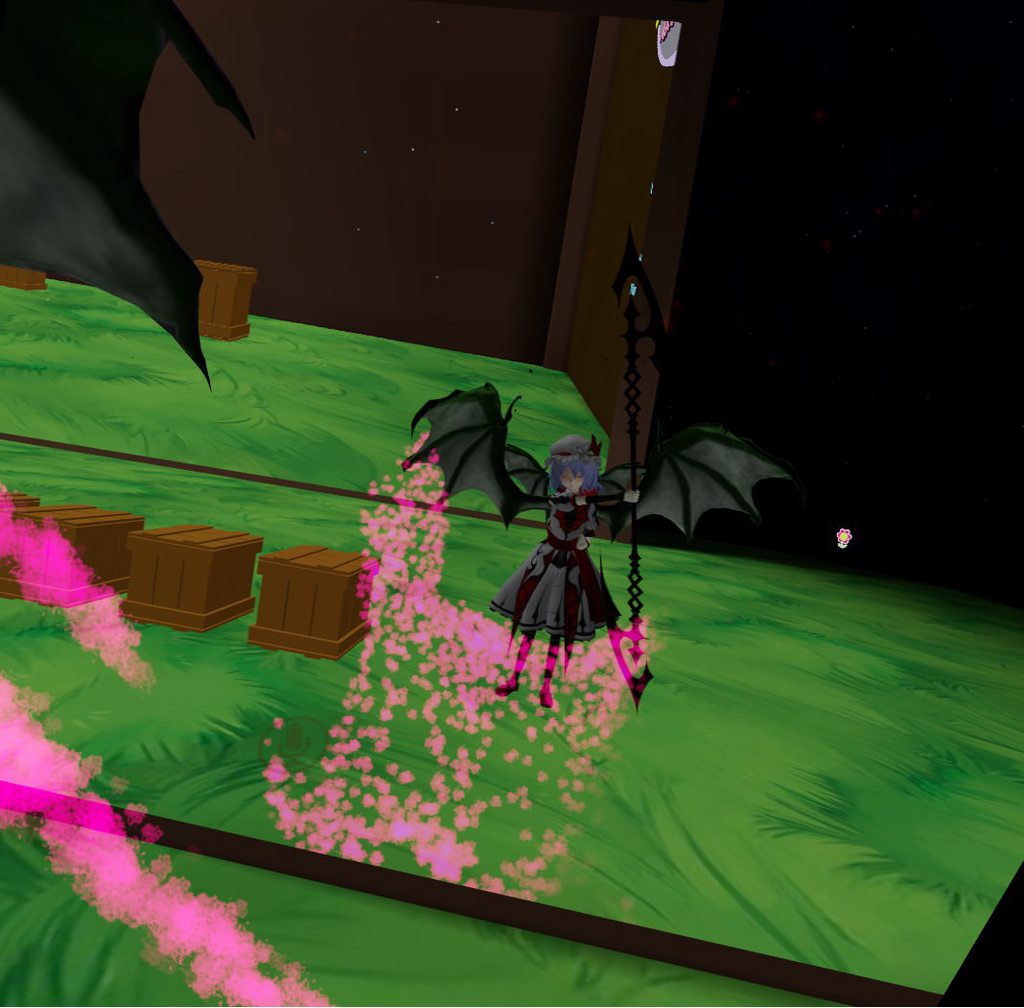 lunar snow
just use an edge emittion shape and attach it with the usual methods
spring nova
Skinned mesh renderer emitter has some issues. Edge emitter would be an easy option if you just want it done, but f you really need the shape, it's better to just use a regular mesh emitter and specify the mesh from the file, then position it on top of the weapon. Only use the skinned mesh renderer shape when you need to animate and deform that mesh with bones.
lunar snow
^
trim zinc
good to know
 simple birch
Any ideas how to bypass particle disappearing after finishing using gesture?
Or emote
clear yew
make the particle system always active
and activate the emission with a gesture instead of the whole system
simple birch
That's a good point
I'll experiment with it later
I want to make an emote with which I can spawn the mesh
Like a box
@clear yew but if it's always active, wouldn't the particle spawn in the spawn point?
Or... Nvm sorry for bothering, gotta experiment with it
Thanks
twin carbon
sure
clear yew
you might need to adjust the x y z of the particles though
twin carbon
k
simple birch
Can it work if done same way as snail writing?
Warping a mesh from the distance to designated area
twin carbon
noice
 naive maple
could somebody help me get audio working with anims? i got the animations on the character and they work in game just not the sound
nvm i did it
 mint prism
hello i have an animation that has the problem that root q and root t are not working ingame
every other animation works fine with root q and root t but not this one
does someone know how to fix it?
mint prism
if someone would be interested i can send the animation in dm^^
naive maple
anyone know how to make an animation louder?
they sound VERY quiet compared to other emotes ive seen
clear yew
either animate the sound to force it to a bigger volume (since vrchat will automatically tune it down) or boost the original sound file
naive maple
boost the sound? alrighty
 winter sundial
You could also make the sound area larger and center it around your head I guess
naive maple
@winter sundial which setting is making the sound area larger? (im new to this stuff) would it be max distance?
clear yew
be aware that you can't change the rolloff as far as i know
it will be force
but you can change the min and max distance within the animation
min distance is simlpy the minimum distance that the sound will be heard at full volume, max distance is the maximum distance that the sound will be heard
past that it will be completely muted
winter sundial
Minimum is the area where it's always 100%, maximum is the area where it stops playing, and between those values it slowly decreases.
But if you change the rolloff setting (or loudness to above 0.9) the SDK will just change it back
uneven acorn
Anyone know how to fix the snail marker erase all animation? I made a copy of my avatar to put the marker as a gesture but the erase all animation says its missing trailrenderer.time in my animation tab. Does anyone know how to fix it?
 tepid mango
That's what it is
sand crater
Oh, it's called Hand Open isn't it
tepid mango
Oh
sand crater
lol
tepid mango
B O I
winter sundial
Fist is the rock of rock paper scissors, it doesn't get any more closed than that
sand crater
Is there a way to disable the blinking eyes position when using face emotes?
sand crater
Well it does for me and I was just wondering if anyone else has experienced this problem and how to fix it if possible 😛
tepid mango
Probabaly not possible
It's a constant animation that can't be stopped
And the > < face for exemple has for most model the lower part beeing the normal brow
 fallen flax
It's possible but only if you create the blinking animation in unity and have blank visemes for the actual eye tracking
Then you simply disable the blinking animation via your gesture override
 heavy stirrup
Is there any way to make an animation reference a specific line that it looks for, for a game object? For example, could i have it look for the word "UnderCard" such that it might notice and accept "Undercard (1)" as a viable target?
 mental dew
Does anyone know how to add audio to the headset where the audio is specifically in the earphones
twin carbon
Question. So i put 2 animations i have into gesture slots but ingame sometimes they dont play and sometimes they both play, any idea?
spring nova
Are the animations longer than 1 frame?
twin carbon
I think so
spring nova
Gestures can only be one frame, with keyframes at 0:00 and 0:01, otherwise it runs into issues
You can have an animated object on your avatar with as many frames as you want, and your gesture activating that object, but the gesture itself needs to be only one frame
twin carbon
Could you show an example?
spring nova