#animation
1 messages · Page 78 of 1
 cyan chasm
 spring nova
You can put animations on any gameobject you want
Just drag it outside the model, click create, then bring it back in
if you want to have two different animations affect the same single object, like your mesh, just nest that mesh inside two gameobjects so both have access to it
Animation one > animation two > mesh
 sweet zealot
Since you cant animate dynamic bones, is there some trick to switching dynamic bones off on the same gesture to animate those bones?
They are frozen, cant animate them unless i turn dynamics off
Strange, thats what ive done, yet the tail stays limp. Its supposed to sway.
spring nova
You can animate dynamic bones just fine. However if you're looking in a mirror, animations like that won't show
spring nova
I think it's just animations activate by gesture, I'm not sure
sweet zealot
Ive been pulled away from my computer, i will test it later
I think he has a point, idle animations play no matter what
 opaque patio
You can do the same thing with the hand gesture animated items??
Like rotating floating heart in your hand if you thumbs up or ok gesture
spring nova
Yeah definitely
opaque patio
What do i do if i want the heart to be animated the rainbow patern??
spring nova
shaders could do that alone, but animations could modify the material directly too
spring nova
yeah, make sure you get unity 5.6.3p1, not the latest
opaque patio
It's free or purchasable
?
Blender for making the avatar then unity is for animation??
Just asking for my future custom avatar.. XD
Got it my friend ^.^
Mmmmkay
To see it to my custom avatar menu rightttt
I literally avatar hoppin' to other worlds..XD
Not knowing you could use unity to make your own XD
Ok thanks a lot ... animation stuffs here and if i want to talk about avatars i go there .. got it senpai XD
opaque patio
Gtg need to sleep XD
 clear yew
@ashen sedge i need help i uploaded my avatar but it doesnt show in game ive uploaded twice i even restarted game multiple times
 ashen sedge
This isn't an #animation issue and please don't ping me or other mods for issues like that. We're not tech support, even though some do help out sometimes
clear yew
sorry i was told to at a mod
ashen sedge
Just make sure you're using unity 5.6.3p1 and you're logged into your VRchat account ingame
 weak dawn
Need help!
When I make my animation, it ends shorter than its supposed to be
- in VRchat
I checked the keyframes, nothing is yellow
 fallow rose
Any chance I can get some help with making my animations appear when I use a gesture? I've made separate animations on different models of the same avatar (for example, one is for a sword and the other is for music and some effects). I've set the animations for the avatar gesture controller and set the custom standing/sitting animations to those gestures. The extra models are hidden and the main avatar isn't hidden. When uploaded and tested I'm just getting the open hand animation. The timer is set to 0 - 1 and there's no errors in the animation.
cyan chasm

Did I forget to mention that my mocap could be used in MMD? Yes I will now be able to produce mmd animations with the motion capture setup! It took a while t...
I've successfully converted my mocap into a usable mmd motion
 open scroll
Why not just combine the two idle animations into 1 idle animation
Find the default fist animation that comes with the sdk and copy the hand values from the animation tab into your animation
Type fist in the search bar and it will give you the animation
.
What did you do wrong now
Don't drag the animation
Open the animation tab and copy only the hand values
So all 3 stretch values and the spread values for every finger on each hand
Then copy paste into your animatoon
Click the animation once then click the animation tab
All the default animations have the idle animation values in them as well
Just the hands are changed
If your sdk doesn't have the values then download an older sdk
You could also just make the fist animation yourself
I usually do that since most of the default animations don't look the best
 echo wraith
Anyone know how to make an animation that stays after a hand gesture? Like, spawning a picture I could hang on a wall and just leaving it there for a while.
echo wraith
I used a model yesterday that could spawn in Warcraft mines, and they'd just sit there even when I wasn't playing. Was pretty cool.
echo wraith
That's the main problem for me, I know how to use both, but not how to make something really stay once I leave the hand gesture behind.
 icy crow
they are probably mesh world particles, did you activate them with a gesture or an emote?
echo wraith
Gesture
echo wraith
It'd pull out a picaxe and spawn a node. Upon leaving the gesture the picaxe would leave but the node stayed.
Hmm, I think I'll try messing with that
icy crow
have the particle system always enabled, but the emission disabled. then enable the emission when you want to spawn one
icy crow
then set the lifetime to however long you want them to stay
 spice urchin
and ya u still probably want finger/hand colliders bc then u can grab it and move it around in 3d space after you spawn it
echo wraith
Oh man, I think Moons nailed it. That sounds so right
But Imma use that idea for sure so I can move it. That'd be sick.
Thanks guys
echo wraith
I never felt compelled to animate until VRChat, so you should always keep trying and asking for help until things work for you, Azii. lol
spice urchin
and enable emission before it
that way it doesnt spawn until after ur gesture thing
but u would also need to make it emit only 1 particle
echo wraith
Oh yeah, for sure
spice urchin
but idk do whatever
echo wraith
1 Particle sounds good, not looking to be annoying. lol Thanks again
spice urchin
1 particle every time emission turns on
not 1 particle in total
but ye u could i guess
icy crow
you might want burst emission instead of over time emission
spice urchin
is there a way to use emitters to emit a projectile with a special trail behind it
echo wraith
Not sure exactly what I'll be doing yet, just need to think up some ideas
spice urchin
anyone
echo wraith
One more question, can you make a "world" sound like you do with a particle? For example, I place a TV, and the audio source is the TV.
spice urchin
idk how to emit objects only mesh
echo wraith
I know you can add trails to particles, but I don't know if that's what you're talking about
icy crow
the tv/audio would have to have a fixed joint to keep them from moving with you @echo wraith
echo wraith
Ah, thanks =)
I know for trails I just check the box for trails under the particle system
spice urchin
no i dont just want trails
echo wraith
Ah, my b
spice urchin
i want the particle itself to have particles 0.o

ill try to make it easier to see
icy crow
so a particle with particles attached to it?
echo wraith
Ah, I get ya. For something like that I would use 2 particle systems, but that's the route I took so I didn't have to learn stuff.
 icy crow
not sure if you can just attach particle systems together
spice urchin
do u know how i can get a similar effect or something
icy crow
i'd probably just have the 2 particle systems enabled at the same time and then make the trail system look like its attached
spice urchin
and to make it go away when it hits colliders
icy crow
by making sure it moves the same speed, etc
icy crow
to make it die when it collides you can set the collision damping to 1, then set it so that if the particle is moving at 0 speed, it dies
spice urchin
i have them bound to gestures so when the anim controller thing is hopefully added
makes it much more interesting
clear yew
can someone help me with this animation im having trouble getting it to work i got it uploaded but can seem to get it to work on any of the keys msg me if you can get in a call and help
shouldnt take long im just missing something
clear yew
its a 1 keyframe thing someone showed me how to do it in a call yesterday but i know im forgetting things i just need to get in a call for a few if you could help i can screenshare so itll be easier
icy crow
ok, I won't be on mic tho
clear yew
okay thats fine
 brazen crater
ehhm sorry to disturb, but does anyone know if particle/mesh rotation in the particle system has been disabled? Haven't been on in a while so I don't really know
 lunar pasture
don't think so, i think it's just bugged
 main lotus
Is there a tutorial where I can learn to edit my avatar so it has a weapon holstered then brings it out with a hand gesture?
lunar pasture
how much do you already know?
main lotus
I know enough to do it, but when I do the weapon remains holstered
I can't seam to find a way to get the holstered weapon to dissappear
lunar pasture
Well have it has two objects, use animation to turn one off and one on
main lotus
Ah, and that works? Do you have a tutorial vid or can you give me a hand if I share my screen?
lunar pasture
well are you useing a gesture to turn the weapon on and off?
main lotus
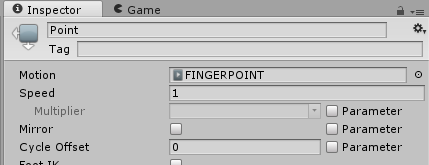
FingerPoint
lunar pasture
ok, have you made a holstering animation?
main lotus
hmm nope
lunar pasture
ok, well that'll keep you busy for a while, while you're making it consider that you want to have two versions of the weapon to switch between, as long as your animation is in record mode it will record the on or off status of game objects. It would be simplest to have a holstered gun that you can replace with an empty holster, put the in the same place, turn one off and one on while your handheld weapon is masking the change.
you could probably look into using conditions to break the process down into phases.
I have more experience of using that in world development though
brazen crater
thanks pushedbutton, I was concerned that they removed the feature, would also understand why, I think
main lotus
I got a new issue, my avatar's arms aren't following mine in VR.
They move but weirdly, like my arms are too short for it
oh nvm, my viewpoint was wacky
 spring reef
What's the frame limit on custom emotes?
 deft mountain
Can anyone tell me why some of my model's coordinates snap back to their original values when I try to animate them?
I'm trying to move/rotate arms and legs, but they go back to the original position whenever I click something else.
There must be something very basic I'm missing.
 slim sparrow
@deft mountain don't move the bones directly
Use the animator properties like forearm stretch and arms up/down
deft mountain
ty
 quaint spindle
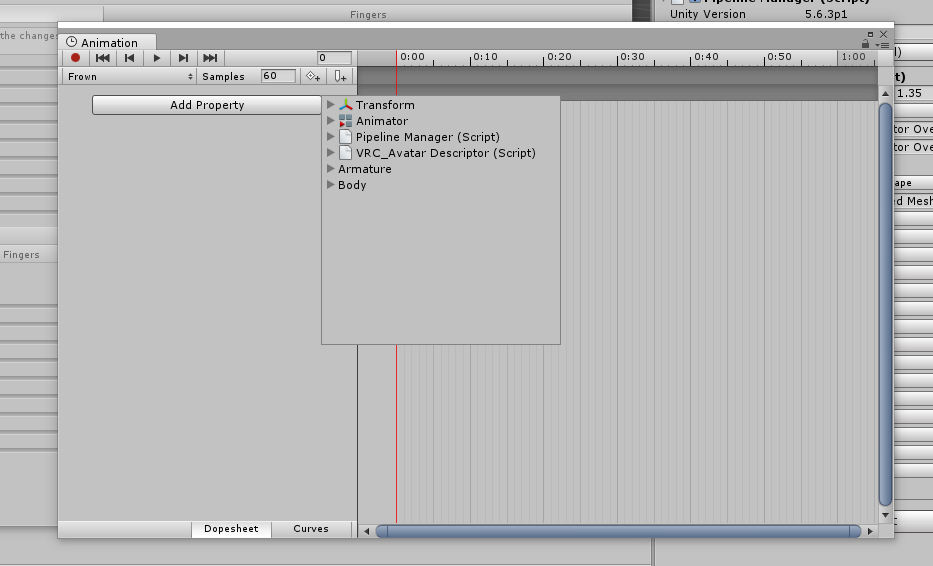
Hi there! So, I want to cancel my blink animation for a gesture, and I know I have to do that with the option called Animation, which should show up between Animator and Pipeline Manager (Script). How do I get that option to show up?
https://i.imgur.com/IbHPXe7.png
 slim sparrow
You need to add an Animation component to your avatar
And then put the blink animation in there
You can enable/disable the component at will
quaint spindle
Oh ok, thank you! 😄

 red summit
for some reason, I can't change the scale of an object during an animation... is there any reason for this?
it won't let me scroll the scale value up or down. if I change the scale value on the model while the animation is recording, it appears to work but the scalings all reset to 1 once the animation is opened again.
cyan chasm
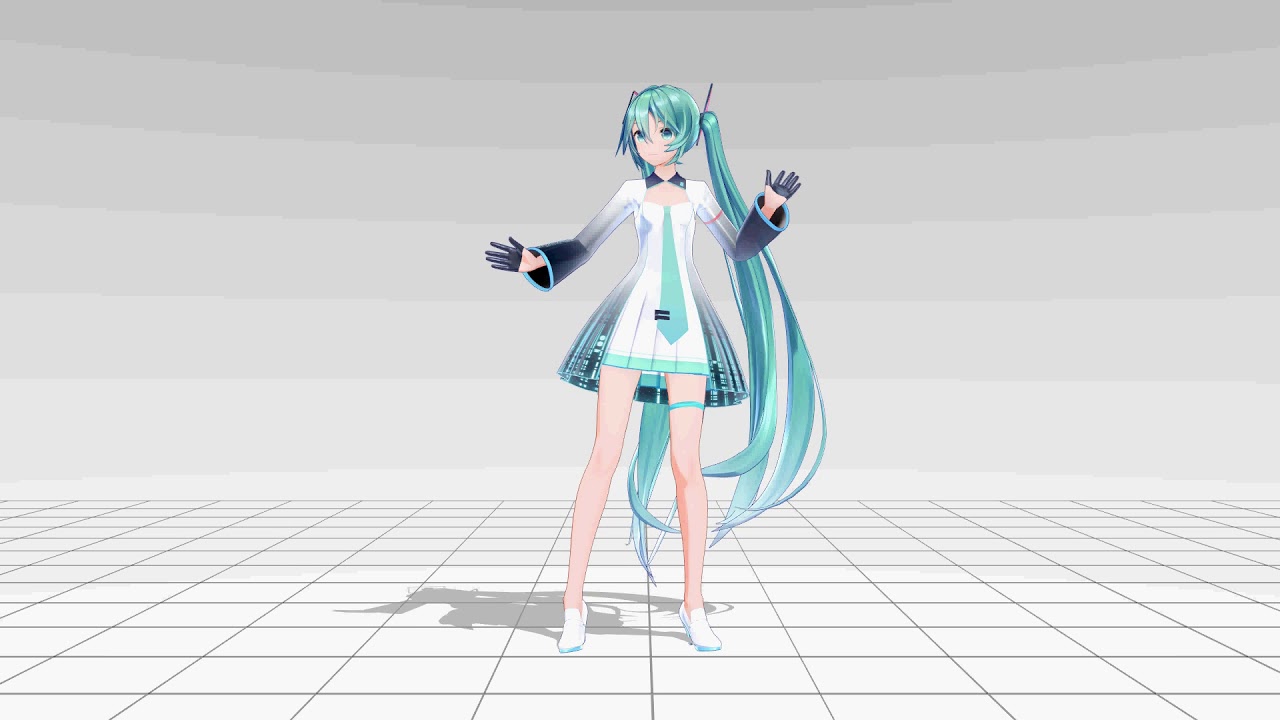
Another test of my motion capture setup that ended up longer than expected. I was originally just testing out if the hand rotations were working but then the...
Video test for the hands and foot rotations
clear yew
how to make custom standing animation
spice urchin
use blender or unity
easiest way is to import an idle animation or a tpose one then just make ur own
unitys curve graphs are a bit easier to work with
clear yew
ok thanks
spice urchin
if u want to change out animations
use the animation override, example asset is in the examples part of the SDK
and then u place the override animation in the overridden animations spot and make sure to place it in 'custom standing animations' of the avatar descriptor
 ocean knot
@brazen crater if you are talking about worldspace particle systems configured to emit meshes, those meshes will not respect start rotation settings. it's some sort of engine limitation, although details are very scarce. it is a difficult problem to solve - you either keep your mesh particles in local space, or perhaps use some kind of (very) fancy shader to accomplish what you are trying to do.
 frosty spade
anyone know a good place to get particle images since i've just been using google images and deviant art
@clear yew https://www.youtube.com/watch?v=cL3-Rtxksi4

Hello there, this video will show you how to add a camera to your vrchat character. Everyone will be able to see the screen and the frozen picture. If you st...
you can put a camera on any model you want
i doubt you'll find the same exact camera model but you could make something similar
ocean knot
just a heads up btw that other people can only see stuff that you do with custom cameras if they are on your friends list
like if it has a screen or something for example, others wont see that if you arent friended
clear yew
how to make that guns in your hands be all the time except sitting and make that guns in idle be diffrent position
main lotus
Hey, need some help with a simple animation. I want my character to hold their hat in their hand, anyone know of a youtube guide for that? I assume its the same kind that deals with holding a holstered weapon
frosty spade
its the same as making a normal weapon animation
you'd just duplicate the hat and position it in your hand then make an animation to disable the hat on your head and enable the one on your hand
 somber veldt
Hey does anyone know how to have an object play an animation on summon. I wanna have a breakdancing guy above my model
frosty spade
should be an option to make it play automatically when its activated
pretty sure its defaulted that way too
somber veldt
http://prntscr.com/k1o92r he kinda just does this

my settings

http://prntscr.com/k1o9x5 changed to this?

 torn pawn
@somber veldt create animator, drag animation in it, then put animator on the dude
somber veldt
uhh i have an animator and an animation in the animator the animator has a controller
@torn pawn do i need to set the animation to default or do i need to put it on legacy
 obsidian vigil
quick question, if i put an object under an empty one with a fixed joint, will it stick to where it spawns?
obsidian vigil
then... im doing sth wrong
obsidian vigil
 slim sparrow
The fixed joint object has to be disabled by default
slim sparrow
And it has to be connected to nothing
obsidian vigil
oooh
slim sparrow
So unset the connected body
If it's enabled by default and connected to nothing, it'll always spawn at world position 0. If it's disabled by default, it sticks to where it originally spawns
obsidian vigil
so i dont place it under armature but under the top most object, right?
slim sparrow
Yes
slim sparrow
I mean you could place it under Armature, but you probably shouldn't
slim sparrow
You mean the connected body?
spice urchin
the bone
slim sparrow
He wants to spawn a world object so it should not be connected to anything
spice urchin
oh ok
slim sparrow
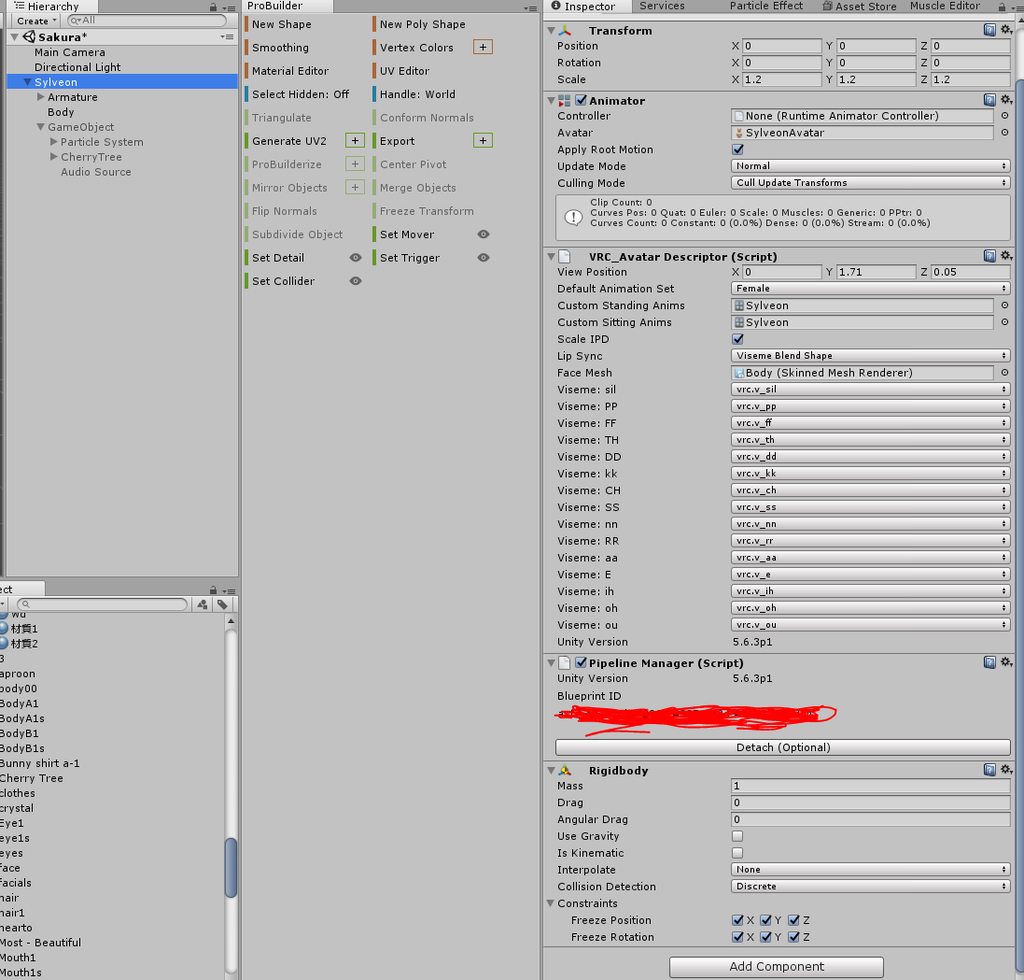
The rigid body itself should probably have all constraints frozen
No gravity and drag
slim sparrow
The topmost object
 slim sparrow
You need to leave the "connected body" empty like I said
Set it to none
And freeze all the constraints on the rigid body itself
 slim sparrow
You can remove the rigid body on your main object
main lotus
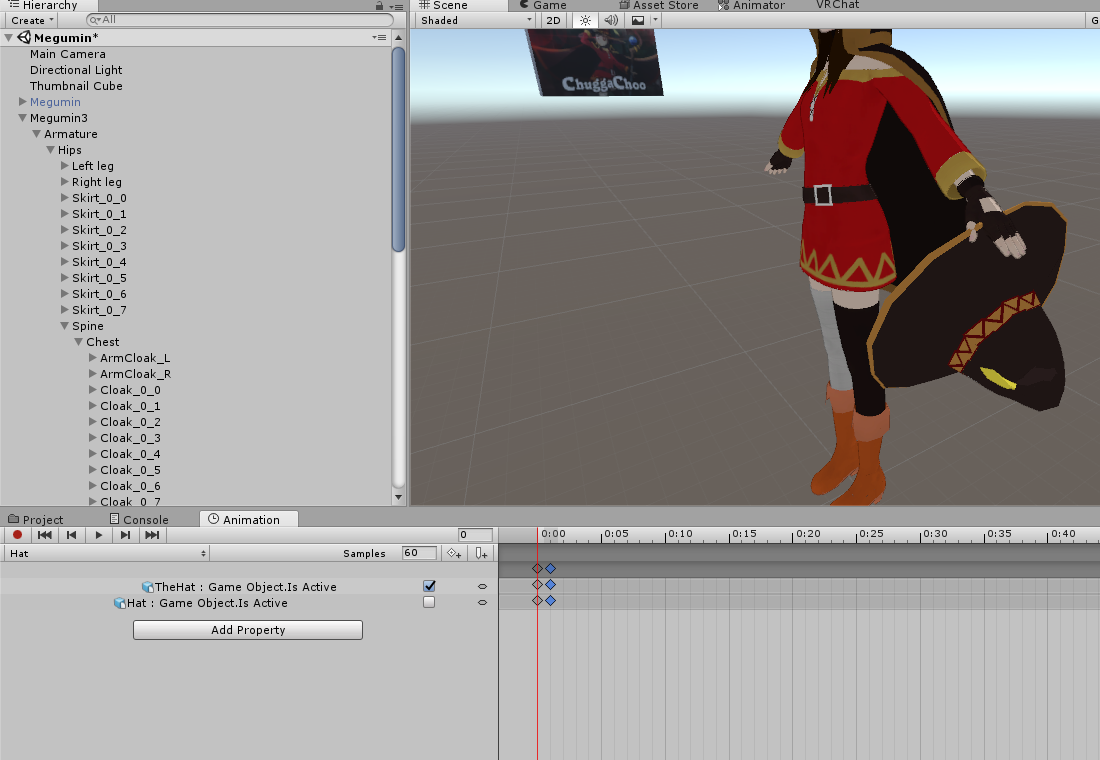
@frosty spade I tested, she can bring out the hat, but the hat hat on her head doesn't disappear. am I setting this animation correct? https://i.imgur.com/04cesdC.png
I'm trying to make the character take it's hat off with a gesture (fingerpoint)
 slim sparrow
Move the red line over to the second frame
See if the objects are still set correctly
obsidian vigil
eh, it still sticks to me...

have it like that now
and it still sticks to my avatar
slim sparrow
Are you sure it updated correctly? Probably gotta switch avatar, expand avatar list, then switch back
I'll check how mine is set up
slim sparrow
@obsidian vigil oh my bad, try unfreezing the constraints.
main lotus
If I make an animation to equip an object by making it "Object.Is Active", is there a similar animation to make an object not active, so I can hide my hat during the animation?
main lotus
k, it didn't work
slim sparrow
Did you drag the red line over to the second frame?
main lotus
checking
slim sparrow
And did you make sure it was the same?
@obsidian vigil my fixed joint object is disabled by default. I enable it on a gesture and nothing else
spice urchin
it will reset values to their original after the animation is completed
so you can just make the entire animation hiding the hat
and it will come back when its done
slim sparrow
Oof
You make another good point
Look at the timeline on @main lotus 's animation
There's a keyframe at 1:00
He needs to remove that
spice urchin
if its a gesture
slim sparrow
The hat is only being disabled for one frame if it's a gesture
spice urchin
just make both start and end off
it will appear when u stop gesturing
bc again of animation thing
 red lodge
Hey how do I make the effect that the screen color changes?
spice urchin
use a filter
red lodge
like the kanna with mad world
spice urchin
u can use shaders and then apply them
usually people will spawn like a gigantic bubble with the shader
red lodge
is it like noenoe?
spice urchin
which is why its usually ranged
main lotus
@slim sparrow Ya, I saw that. The part where her hat dissappears is like 5 minutes in... lol, fixed, works fine now. thanks
spice urchin
derp
main lotus
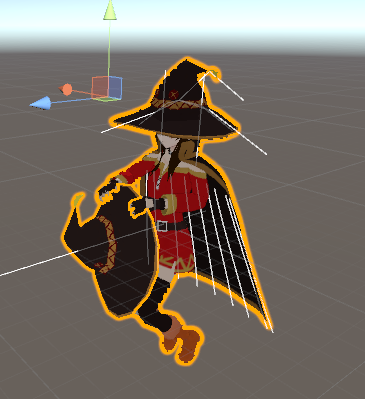
uhg, now she is standing in this weird situation https://i.imgur.com/TLhJ390.png, how do I get her back to the normal pose?
 frosty spade
did you duplicate it before animating
main lotus
k
spice urchin
also to get out of animation menu next time click something that isnt animated then change to a different toolabr
bc the animation editing tab will keep trying to edit animations until u select something that doesnt have any
(shows the orange play button etc)
spice urchin
u can 'fix' it by trying to edit a t-pose animation on them i guess
frosty spade
if you dont have an unbroken avatar you'll need to reimport it
spice urchin
the same way it happened
frosty spade
usually doing that makes it bad too
spice urchin
unity doesnt have a copy all components which is annoying
and when u copy components with references to the objects items they wont automatically change to references of the pasted objects items
so u need to manually reassign jiggles etc
main lotus
uhg wtf, I can't get her to stand upright again
frosty spade
yeah thats why you duplicate before animating
have one main model and then one copy thats meant for making animations
spice urchin
every time u update avatar u update main 1 tho
main lotus
ARG
spice urchin
and also another tip is u can drag it from there into the folder and it will create a backup
frosty spade
the only problems i've had with posting avatars broken from animating is that their feet stick in the ground sometimes
spice urchin
i havent had any but its just annoying and makes the thumbnail look stupid bc theyre in fetal position
frosty spade
its not that bad but if you want it to look good you should redo the model
main lotus
I'll have to start from scratch? what crap is that
frosty spade
you just put the model in again from the projects tab and then copy and paste all the components
spice urchin
i still kinda wish vrchat would let me use my animation controller on humanoid rigs
main lotus
that's what I mean, I have to redo all the dynamic bones and animations.
such a pain.
spice urchin
u dont have to redo animations
its a humanoid rig
all humanoid rigs map bones to muscles
and in the animation it just changes muscle values
so it should work for any other humanoid rig
main lotus
ya don't get it, don't worry. I'll just redo it.
spice urchin
i wanted to use left and right handgun gestures to fire weapons but it doesnt work bc vrchat is vrchat
frosty spade
redoing dynamic bones wouldnt be too bad
spice urchin
https://i.gyazo.com/2d853cf0167d2a6fb6c8a26ccda999d0.mp4
wouldve been nice though
frosty spade
just right click on the broken models dynamic bone and do copy component
then make a new dynamic bone on the new model and right click then paste component as values
 main lotus
ok ty, I've already begun the process and I am halfway done. There's just a lot of dynamic bones in my hat and cape is all
 icy crow
oof
clear yew
lool
frosty spade
did you crash people?
clear yew
no
frosty spade
then howd you get the ban
icy crow
start up the game, see what the reason says
 slim sparrow
I mean, it tells you that you were banned and why
Don't use modified clients
And especially don't fall for those "anti crash clients"
spice urchin
??
clear yew
i haw that
slim sparrow
Well there's your issue
clear yew
but is not working
slim sparrow
You willingly modified your client and these are the consequences obviously
icy crow
clearly
spice urchin
anticrash < antiban
slim sparrow
You don't even need an anti crash client with the new particle limiter anyway.
clear yew
hmm ok im going uninstall that shit
slim sparrow
You're still banned for a month though
clear yew
but im going to uninstall anyway
spice urchin
xd
frosty spade
dunno if i should go on a crasher witch hunt
i see tons of them in presentation room
but presentation room has always been one of the most cancer filled worlds
icy crow
what are you gonna do when you see them 🤔
frosty spade
get them to crash me and file a beanboozle
spice urchin
lul
icy crow
I like to disable avatars and watch them wonder why their thing doesn't work
spice urchin
drinking games in vrchat
frosty spade
funny thing is you can usually tell who a crasher is before they even try anythin
icy crow
yup
slim sparrow
How so?
clear yew
god demet 😦
spice urchin
y in animations
spice urchin
no u
frosty spade
btw are any of y'all good with making particles in photoshop
spice urchin
clear yew
in the bright side i can make avatars 😄
what?
if you think that i'm making crashing avatars you totally wrong because i even know simple things in unity 😄
spice urchin
??
main lotus
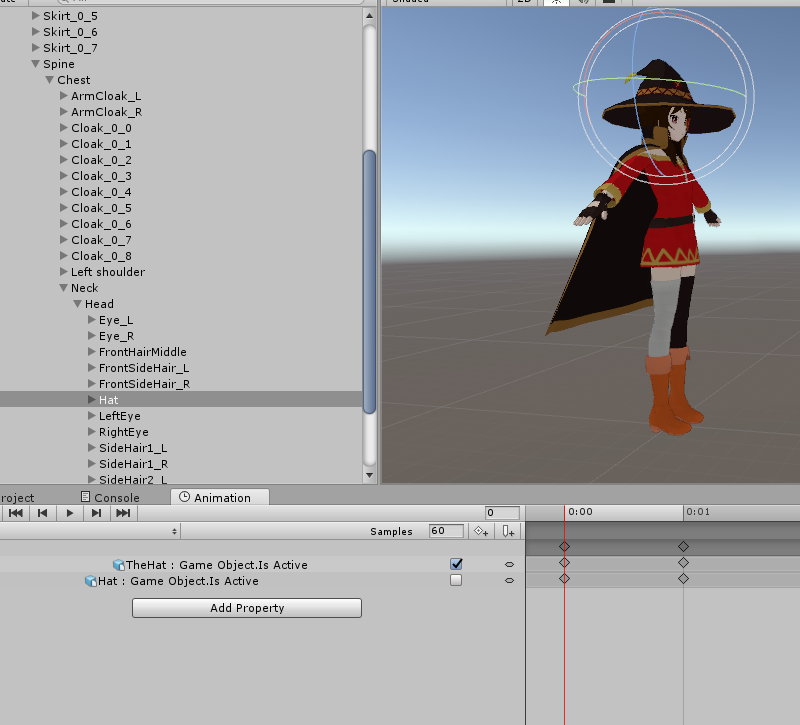
Okay I finally made it back to where I was, I got the animation looking like this again: https://i.imgur.com/AqNyTK2.png
I tested it, the hat appears in her hand, but the hat on her head remains there
 main lotus
duplicated my model?
frosty spade
if its the same values
the hat in your hand should be enabled and the hat on top should be disabled
main lotus
yes
oh wait
hmm
so it looks like this: https://i.imgur.com/toiwwoz.png
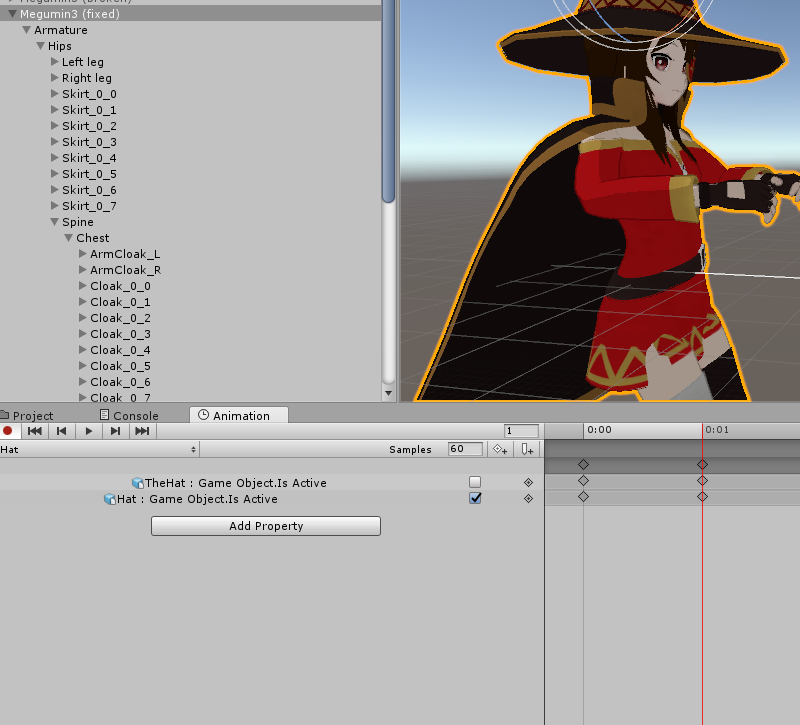
one is checked, the other isn't
"hat" is on her head, "thehat" is in her hand
frosty spade
then it should be the other way around
main lotus
okay, unchecking the hat on her head doesn't make it dissappear
frosty spade
it should be the same in the 1st keyframe too
main lotus
so both keyframe 1 and 2 are the same? I want them to be uncheck head-hat for both, and check hand-hat for both?
frosty spade
yes
frosty spade
what do you have the animator set as
main lotus
checking
it's name megumin3, which is the model it's using
or do u mean something else
frosty spade
that seems fine
and you separated the hat mesh from the rest of the body mesh right?
in blender
main lotus
dunno, does it have to be seperated? they share a bone join
main lotus
ah ok, so I need to seperate the mesh in blender for this to work, and import the hat on her head at all times.
frosty spade
yea
frosty spade
you dont have to move anything around just make sure its all one mesh then select all the vertices for the hat in blender and then p then click "by selection"
it will seperate the mesh from the head but it will still act the same
main lotus
oh ok, and then when I import the model it brings the hat with it
frosty spade
yes
main lotus
gotchya, I'll try that.
frosty spade
i'd import just the hat so you don't have to redo all the dynamic bones
if you dont move the hat at all you wouldnt have to manually position it on the head and all you'd have to do would be putting it in the head hierarchy
main lotus
ok, that sounds easier
brazen crater
@ocean knot thanks I already know the problem you're talking about, but what I meant was to activate rotation speed by using a different animation. This does not seem to work anymore, I'll do some research, still thanks
red summit
is it impossible to change the scale of an object through a gesture animation, or am I just doing it wrong?
it won't let me change the scale values in the animation window, if i change them on the model while the animation is recording then they snap back to 1, 1, 1 when I re-play the anim
come to think of it, it won't let me change position or rotation either
spice urchin
it does
frosty spade
have to do it through add property and then find the object, hit transform and then scale
red summit
I was doing it through add property, it wasn't working
I'm trying to scale part of the original avatar and I think it's getting pissy for me rescaling something that's attached to a rig or something
red lodge
hey I just saw a guy with a big cylinder with an video on it high quality 30fps and sound 360 degree, how did he do that? dont think it was a spritesheet
slim sparrow
If it's on an avatar, spritesheets are basically the only way
Could just have been an optimized spritesheet
red lodge
it was 2 minutes long and in hd with minimum 30fps xD
if you can do that with spritesheet pls teach me senpai 😄
slim sparrow
The only other option is a modified client
red lodge
you mean a hack?
slim sparrow
Yes
red lodge
thats lame xD
let us say I want to put an musicvideo in a plane would it be possible that its look good? because i converted an yt vid to single images (only every fourth frame 20 seconds low quality) its nearly 50mb 437 images ,how would I do an spritesheet out of it?
icy crow
I don't think its a hack, a friend of mine had a video on his avatar, not sure how he did it though
The avatar did take forever to load though for a short video
 last ember
How do i add a animation on a avatar?
 wind torrent
Anyone know how to trigger a dance emote with a hand gesture?
frosty spade
@last ember what do you want to animate
and limited just make a dance animation then duplicate the custom overide empty (in the vrcsdk folder) and put the animation on any of the gestures
you have to set custom override empty for the model's animator too
last ember
can i dm you?
frosty spade
just say what you need here
 celest trout
I'm having trouble with material animations. After setting an transition, it seems like Element 2 and Element 4 get defaulted to another material and don't change
sweet zealot
trying to animate a walkcycle and i cant seem to correct the height of my armature, its stuck int he ground
it wont let me correct it in animation
wind torrent
@frosty spade still didnt work, only the audio for the animation plays
unless its because im in vr
frosty spade
vr shouldnt affect it
using an emote might work better but i've had alot of problems with getting emotes to work
wind torrent
it works as an emote no prob, just wondered if i could have it loop while i walk around
frosty spade
so as a walking animation?
wind torrent
kinda but only triggers with a gesture
frosty spade
not with run foward run back etc?
wind torrent
its like tf2 taunts where some allow you to move while taunting
its kinda what im aiming for
frosty spade
might conflict with run animations if you try and move mid animation
wind torrent
ive seen some avatars that are able to do it
frosty spade
not too well versed with those kind of animations so you'd need to find someone else to help
there might be tutorials online too
wind torrent
ok, well thxs for the help anyways 😃

this was what i was trying to have as a gesture btw
frosty spade
if you set that as the idle animation and all the run/crouch animations it should work
wind torrent
maybe ill make a duplicate of the model for that
frosty spade
dunno if that would constantly restart the animation every time you go from idle to walking to running though
clear yew
yo can someone with animation experiance call and help me with something real quick
 lyric plaza
Yo how can I make a custom emote
 gleaming tusk
Why even tho I made sure to put the exact same frames on 0 and 0:01 the weapon animation still lasts 5 seconds?
@lyric plaza Check mixamo
ocean knot
do you have any more keyframes to the right of 0:01?
gleaming tusk
nope
ocean knot
hmm mind sharing a screenshot of what the animation looks like?
 lofty crypt
https://gyazo.com/bf5de4b791690d30d1538a8bc04369eb
https://gyazo.com/ce0191f9a484e2b482aa8a2c75b07953
https://gyazo.com/44547b8540f2d8a9674b20a8cda7ab6b
https://gyazo.com/0d6156fcdf1ac6d60ce243575c5000c6


 red lodge
can someone tell me the shader/effect from the kanna mad world animation? where all turns grey
icy crow
search greyscale shader, I'm pretty sure you'll find it
red lodge
@icy crow found it , but how do I apply it to an sphere that only the phere is grey? it is over the hole screen no matter the size
icy crow
hm? Whatever size the sphere is, thats the range that the effect will be
Obviously if you're inside the sphere, the whole screen will be affected
and if you're looking at the sphere from a distance, whatever is behind the sphere will be seen as greyscale by you
 brazen plinth
Hello, I have an animation that activates an animation of another object using a trigger, it works in Unity correctly but in VRChat it does not. Is it possible that this function is disabled in VRChat?
red lodge
@icy crow nah the hole screen is grey even if the sphere is size of a finger
and is it possible to change the color?
icy crow
show me?
icy crow
yeah you can change the colour, but its not as easier as just picking a colour
clear yew
no matter the size of the pshere everything will turn grey
icy crow
is that a grabpass shader?
brazen plinth
Someone can help me with my problem? Thanks
clear yew
yes, it's a grab pass
the moment you have the sphere in your view your screen will turn grey
it's supposed to go on quads
icy crow
looks like you want a different shader @red lodge
clear yew
and only turn grey what's behind them
red lodge
I understand
clear yew
so if you put it in a sphere everything turn grey
red lodge
if I want to change the color can I write the color in the shader or is it really that complicated?
icy crow
depends what colour, if you want a negative/inverted colours effect, you just need to subtract the final colour from 1
red lodge
red for example
 torpid light
multiply the greyscale output by float4(1,0,0,1);
red lodge
@cinder cipher thats want I want to do xD
 cinder cipher
yeah
icy crow
is it for an avatar or a world animation? @brazen plinth
brazen plinth
Avatar
icy crow
so you want like a dancing avatar to appear or something?
brazen plinth
Yes, it's something like that
icy crow
oh and if you're trying to use scripts, they won't work
brazen plinth
But the control panel does not tell me anything about that script.
icy crow
is it a javascript/c# script?
brazen plinth
Because it is a script that is inside the animator.
Not in the gameobject
Maybe vrchat ignores the script? Or ignore the personalized tags?
icy crow
I don't think you're allowed scripts at all
brazen plinth
How bad, very limited the game. Thank you anyway.
icy crow
I guess to stop abuse
look at what people do at the moment without scripts
is there a way to disable blinking in an animation?
brazen plinth
I understand, I'm remaking the animations.
For the blinking: You erase the blinking shape keys or make an animation so that those shape keys are constantly "0".
icy crow
hmm, setting the shape keys to 0 in the animation isn't working
my character is always blinking without animations if that makes any difference
 grave estuary
Made blinking animation and ear twitch, put it on legacy loop. It works fine in unity, but once i upload avatar it's just not there. Any help? >_<
https://cdn.discordapp.com/attachments/463656897783005185/463781270766354442/Capture.png

 coarse veldt
@grave estuary Try asking a friend if they can see the animation.
Sometimes, the animation doesn't play from the local perspective, but plays for everyone else.
I don't know how to fix this though.
clear yew
can you make an emote toggle somthing on or off by turning off looping and have the last frame leave it on?
 rocky copper
hi guys, im trying to pose a model for a screenshot in unity, but when i try to rotate or move a body part
it doesnt do anything
in the inspector the position and rotation dont change it all, so it's not that it's not attatched to the body part, it's literally just not moving
scaling it still works too
it's weird because some parts do move, and the value changes
but when i try to move an elbow compared to the whole arm, it will not rotate
slim sparrow
@rocky copper that's because it's a humanoid rig
You cannot alter the bones directly, you need to make an idle pose using animations
And using the animator properties
You can make a pose during play mode but it'll be gone the next time
rocky copper
oh christ
well this is gonna be annoying
i'll just make a duplicate
and set its rig to generic
slim sparrow
Yeah, that's what you could do
I personally use Muscle Animation Editor to make my preview poses
frosty spade
anyone know how to make it look like particles are being drawn into something
https://www.youtube.com/watch?v=ZMnU3Ejuxm4

EXPLOSION!!!!!!!!! Subscribe: https://www.youtube.com/channel/UCJ1bl7FJMhw8Gpw3KYszNSQ
0:47 - 0:52
 hollow loom
You still working on that Megunin thing
frosty spade
ye
looks great but still need to make the explosion and the charge up
got the runes and everything else done
hollow loom
Oof my dude
 deep kindle
I just want to ask for 100% conformation that you cant have hand tracking with a custom walk animation?
cyan chasm
Every step of progress I make seems to bring me one step backwards. https://www.youtube.com/watch?v=vdoMM3vB9SM&feature=youtu.be
Finally managed to get some more trackers for the elbows. Every step I take brings me two steps backwards as new problems arise. But they won't keep me down,...
spice urchin
u should sell mocap animations lol
deft mountain
Kind of an odd question, but whenever I make a custom emote animation and put it on an avatar, that avatar will bug out whenever I click anything in the game menu, It's fine any other time, but does anyone know what causes this?
cinder cipher
Hey could someone quickly brief me what the IK components are
VRC_IKFollower
this for example
i heard that they replace rigidbodies but i dont know how
frosty spade
anyone know how to contain particles cause i tried using a transparent collider but it just phases right through it
 unreal latch
I'd also like to know about the vrc_ikfollower. I can never get it to work. I still just use rigid bodies
spring nova
Rigidbodies are better anyway. Ikfollower has several issues
obsidian vigil
@frosty spade what do you mean?
like make particles collide with stuff?
set them to world
activate collision in particle system
set collision space to world as well
then they should collide with stuff
what they should collide with can be configured further using layers past that point
frosty spade
its still outside of it

its electricity and i made it so that it should stay inside the invisible sphere
im looking at it in 0.1 playback and its defintely spawning inside the orb but it just zooms out
obsidian vigil
oooh
play with the lifetime
and speed
maybe emit from shell
and negative speed
never tried what youre trying to do before
frosty spade
the speed is 0 to -0.5 and its still really fast
 unreal creek
Does anyone know how to make clothing disappear using an emote and still have control over your avatar?
cyan chasm
@spice urchin I'm hoping to make them for gestures and stuff once I've got everything working correctly
icy crow
If the clothing is part of the model in Blender, you'd have to make a shape key for it @unreal creek
and do you mean emote or gesture?
unreal creek
Emote
So it is just one click of an emote and they stay off until you switch avatars
icy crow
You can use toggle props for that, but it won't be synced up with other people
so if you remove the clothing then somebody new joins, they will still see your clothes
unreal creek
Where is the toggle props feature, never seen it in unity
icy crow
its a unity package you can find online
1 sec, i'll try find it
https://youtu.be/5m8RZQd4JAw here, the dl is in the description

This is just a quick tutorial on how to set up prop toggling in VRChat to enable yourself to permanently toggle a prop on using emotes instead of gestures. I...
unreal creek
cheers
torn pawn
using toggle props is prob worse than not using it, considering example animator logic  also animation states are different for people that are culled while activating, so you either make better logic or make your own
sweet zealot
Is there a way to activate a particle to play for 2 seconds for a gesture?
obsidian vigil
yes @sweet zealot
so...
you create an empty object
under there
create another
on the 2nd empty object place an animator
animate the 2 seconds
and animate the single frame on the topmost one
basically you activate an object for 1 frame which activates the animation on another object
 regal hollow
couldn't you just set the particle system to not loop and last 2 seconds?
obsidian vigil
or that
xD
i guess i was overthinking @regal hollow
i overread thats its a particle system
woopsie
regal hollow
i was wondering why you went straight to 11
obsidian vigil
😂
brazen plinth
https://drive.google.com/open?id=1sKrH7504WIAH9wRTxpFEk-vW4_90CTz-
Hi guys, does this work for something?
If I change the animations directly from here they do not work in VRChat. Any type of change that I make, change conditions, add new layers... nothing.
Is it possible that VRChat has its own "animator" ingame and only replaces the animations if they are added to the override?
Not even Unity's "idle" is the same as VRChat

Google Docs
These changes are for my avatar, I am making a secondary model execute animations with conditions when I make the gestures of the fingers.
clear yew
you trying to get left and right hands separated ?
brazen plinth
Something like that.
I want to change the animations without replacing them in the customoverride
It's as if VRChat ignore this animator.
spice urchin
u can only use those with generic avatars
and it will also not support gesture params (atm)
brazen plinth
I will give an example of what I want to do.
brazen plinth
 spice urchin
u can only use those with generic avatars
and it will also not support gesture params (atm) [2]
brazen plinth
For example, I added a new animation called "Idle", which runs with the same condition as "Point"
spice urchin
pls read
brazen plinth
I know I know...
So why does the "CustomOverriderController" need this animator (AvatarControllerTemplate)?

Just to show the animations that can be replaced?
spice urchin
yes
and previously it needed to be filled with every animation u didnt use
but now they made it so that if its empty dont replace
 red lodge
just saw an music visualizer on an avatar, anyone knows how to do that?
icy crow
Was it an accurate visualiser or just moving boxes?
red lodge
boxes , but that many and accurate that it would take extremly long to get it that perfect, and his other avatars where all "trash" so I dont think he had worked so hard for one animation
red lodge
yes it was
red lodge
too bad vrc not allowing scripts xD have an working visualizer xD
 upper bone
does anyone have a good screenshake shader for me? xo
red lodge
how do I change the color on an greysurface shader?
icy crow
i'm making one rn, I'm testing how it looks if you want it @upper bone
upper bone
@icy crow yes pls ! owo
red lodge
@icy crow I can't get it to work :/
icy crow
can you show me your shader
also if you're wanting a colour filter, doesn't that defeat the point of the greyscale?
red lodge
I have a color filter but it has a negativ color effect too and the models are transparent
 midnight garden
i am trying to do a animashen to put my sword in the ground then be able to walk awy from it
icy crow
put a fixed joint on the sword
midnight garden
and thats it?
icy crow
yeah once you enable the sword in the animation it'll stay where it is
also, it'll automatically create a rigidbody with the fixed joint. set the drag of that to "Infinity"
clear yew
Any way to make an emote toggle a game object so it stays on after the animation finishes
icy crow
toggle props, but it won't sync up with other players
clear yew
toggle props?
icy crow
so if you use the emote and the object gets enabled, when someone joins, they won't see it
red lodge
@icy crow i have sent you the shader
clear yew
ah i get that but how would i construct the ani whould i leave the object on at both sides
icy crow
look up vrchat toggle props, there's a vid explaining how to use it. It's not the best thing to use though
clear yew
what would be better?
clear yew
alright well thank you!
 copper whale
Hey guys, So I just started using particles and found a sound file I thought was perfect, but I have absolutely no idea how to delay the animation to 2.6 seconds ( The moment the sound file starts ) and I really want to know!
icy crow
delay the particles appearing, or delaying when the audio starts?
spice urchin
play the sound at the beginning of animation, wait 2.6 seconds, play rest of animation
u can also just use non-looped particles with a set duration and set the 'delay' to 2.6
clear yew
is it possible to test in unity animations besides walk
clear yew
can somebody help?
im trying to override the animation of my avatar
but the property thing becomes greyed out
spice urchin
?
icy crow
You need to use the animator controller that created when you made that animation, otherwise you'll have to copy everything in that animation and make a new one @clear yew
 jade sparrow
Does anyone know how to use ".smd" files in unity. I'm trying to figure out the process to convert them into working files
spice urchin
use blender
valve source tools plugin lets u import smd
set it up in blender also cuz u dont just import and export
and u also need to export vtf to jpeg
spice urchin
ye
but usually
u have to
load the model or a model that uses the animation
then u import the animations
bc when u import u can play them and test and on export it will export model along with all the anims u imported
 night crescent
cant find any good orange justice emotes
theyre all too slow or glitch when looping
icy crow
you can try increasing the frame rate of them
night crescent
Oh wow i didnt even know you could do that! Thanks :)
icy crow
also you can try clicking "loop pose" to make the pose loop better
that might look weird though if the final pose and the start pose of the animation are too different
 chrome elbow
how do i setup fix joint so when i reactivate it goes back to its original position
slim sparrow
You mean stop it from breaking every time you use it twice?
The parent object of the fixed joint needs to have a legacy animation that resets the fixed joint object's position and rotation to 0. You disable this animation in the same gesture you use to activate the object. @chrome elbow
icy crow
https://i.imgur.com/K9eHszz.png this is svel's explanation for it
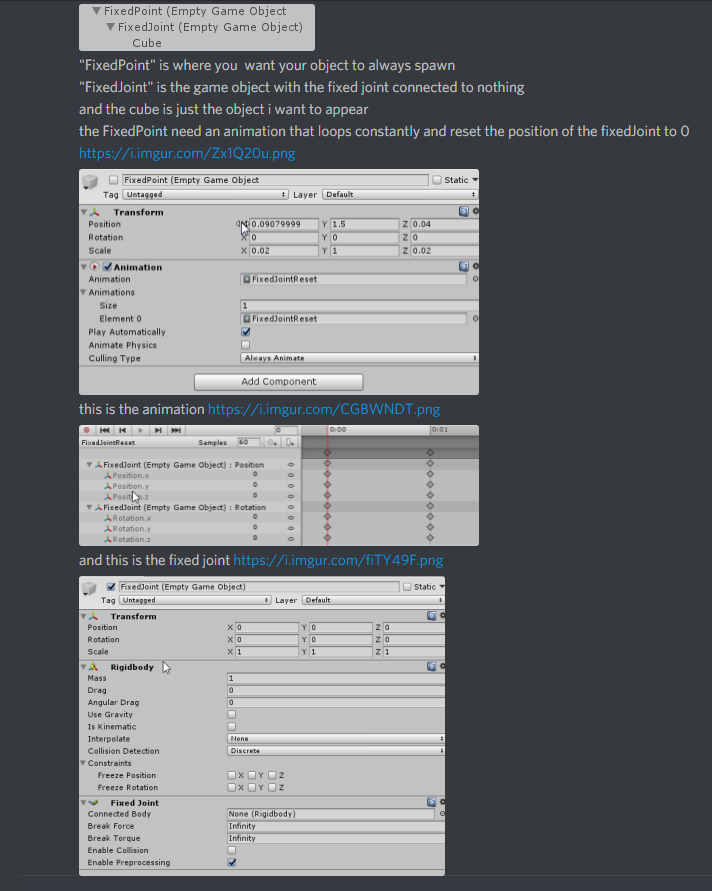
it's in #avatars-2-general if you scroll up a bit
 lethal sonnet
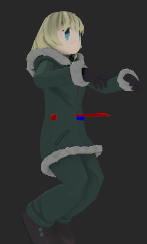
Is there any way for me to use a legacy animation to make a custom sitting animation? When I import/set up the animation and go in game, instead of the animation I want, I get this, even when I set the animation as legacy in the debug menu. https://i.imgur.com/DzYNOFh.png
 upper bone
does anyone know any cool dance animations?
icy crow
are you looking for any in particular?
upper bone
like some meme dances or anything like that?
upper bone
would be cool
 hasty wind
So I've managed to Add a Finger Marker to my Avatar where She'll start drawing when I point her finger and it works well but..... Whenever I start or stop writing it always draws a Line down off into the distance... How do I stop that from happening?
slim sparrow
@lethal sonnet why do you need a legacy animation as custom sit?
That sounds like a very bad idea, and you can't do that anyway
Legacy anims cannot use muscle properties
lethal sonnet
It was an animation from a different project, and I can't really find a good/easy way of converting it to the newer system other than paying for something on the asset store.
copper whale
Just gonna repost this.
" Hey guys, So I just started using particles and found a sound file I thought was perfect, but I have absolutely no idea how to delay the animation to 2.6 seconds ( The moment the sound file starts ) and I really want to know! "
I'd like to delay the animation, not the audio if possible.
spring nova
By animation do you mean particles?
If so, theres a spot to type in delay right at the top
If you actually did mean animation, then you can just grab all the nodes and move them forward however far you need
lethal sonnet
I'm trying to do an animation where my avatar's kicking her legs when she's sitting, but instead of doing that, she does this. When I preview the animation in Unity, it seems to work okay. Is there a setting I forgot to set? https://a.safe.moe/4oV2Azo.mp4
Here's how it looks in unity, if it helps: https://a.safe.moe/KmgO5Zj.mp4
spring nova
Ugh sitting idles are the worst
Did you start with the default sit and modify it, or did you start from scratch?
lethal sonnet
Started from scratch.
spring nova
Yeah there are a couple things that need to be very specific, it's probably better to start from the default sit if you can bear starting over
Somebody who's done more than a singld sit idle might have better input though, idk
lethal sonnet
I don't really mind having to start over it's pretty simple anyway
Where do I find the .anim for the default sitting animation?
spring nova
Idk where it is as the raw animation file but you can put the gestureoverride controller directly on an avatars animator instead of in the descriptor and everything will show up in the animation window, which you can copy the keyframes from
Do this on a duplicate though
So you don't get the crouch thing
 mystic relic
Hey-o! I don't normally work on avatars, but today i'm working on one for someone.
I came across an issue while setting up the custom animation override. I set the weapon on the avatar's hands, but when I go to enable it in the animation menu, the weapon goes behind the avatars and isn't parented to the hand as it should be. Does anyone know why it does this when adding an object to an animation menu?
I would post images, but it seems this feature is disabled.
spring nova
Make sure when you're positioning it, you're not in record mode. Delete any keyframes involving location, rotation, or scale, and then see where it is
mystic relic
alright thanks
It has no rotation or position on it.
On the first state, I placed it in the avatar's hands. It dispositioned it when i added it in the animaton editor.
Not sure why. There isn't a reason for it to do that.
slim sparrow
@lethal sonnet you need some specific settings
Select the animation and tick all of the bake root transform/rotation options.
In all of the "based on" options, select "original".
cinder cipher
upper bone
hey so i tried to make like a timed animation where music starts playing and some effects activate couple seconds later. but ingame it's kinda scuffed and won't stop even when i stop doing the hand gesture
regal hollow
is the gesture more than 2 frames long?
obsidian vigil
@upper bone Make an empty object
animate the empty object to turn on
put all your stuff under the empty
put an animator on the empty
start animating
now, when you turn the empty on your animation will play
upper bone
so i animated the game object like this

and then made another animation where i activate it
right?
obsidian vigil
yup @upper bone in the other animation you just activate the object for 1 frame
then when you hold it the thing you took a picture of will play in full length
upper bone
hmm it still continues playing when i stop the gesture tho :/
slim sparrow
That happens when you put it on Fist
Try any other gesture slot except fist
Or switch to another gesture like handopen before you go back to neutral
I always leave fist empty since it's super buggy if you put anything on there that isn't hand movements
I only use it for combination gestures
upper bone
i have it on rock n roll tho
the animation works fine but when i take my hand away or try to do any other gestures it just does that animation
jade sparrow
I am looking for someone with Particle System knowledge to maybe help me figure out how to control particles to move with my hand, smoothly. I can give more detail in time, just a bit hard to explain over text in a short manner.
icy crow
I've seen 1 guy with a particle he could control with his hands, apparently it doesn't sync up with everyone though
because of collision, etc
jade sparrow
@chrome elbow The effect I am trying to achieve is to sort of "drag" the particles around in mid air. I know how to attach particles to my hands, just not sure how to get this effect
chrome elbow
i dont get what you mean @jade sparrow sorry
frosty spade
Set the particles simulation space to world
Dunno how to make it track your hand though
 jade kraken
how would i set up those um...fixed joints I think they're called?
the thing to have another set of arms mimic the real ones
slim sparrow
Rigid bodies with all constraints frozen on the real arms
Fixed joints on the fake arm bones
Connect them to the corresponding bones but don't freeze anything on the fixed joint's rigidbody (added automatically)
In both cases, disable drag and gravity
 slim sparrow
Yes
cinder cipher
yes
clear yew
how do i make my animation stay still when i move around i want it to stay still locked to the world
icy crow
fixed joint
clear yew
how does one do that
i have a car i want to spawn and just stay still how do i do that
icy crow
add a fixed joint component onto the car
icy crow
also set the drag on the rigid body to "Infinity"
it'll reduce the jitter on the object when you move
slim sparrow
Well then you need to fix that
Is your avatar half stuck in the ground due to an animation?
clear yew
but its not a avatar and no i made a duplicate to prevent that
clear yew
no i fixed it had to make it a genaric model not none
 glacial fog
Is it possible to make avatar changing texture when talking ? I mean, I'm working on Bill Cipher from Gravity Falls, and I'm planning to make this light that showed every time when he was talking, as a texture.
slim sparrow
@glacial fog yes, just put it in your visemes
 lunar snow
Best way I've seen this done is to have them all inside the head and use shapekeys to pull them out over the face mesh for each faceshape
 thorny fox
hii
 fathom atlas
Hey is anyone able to help me add a Kamehameha Wave to my character I have the Animation for it just can't figure out how to add it :/
mystic relic
@spring nova thank you for the reply. I just duplicated the origional file.
 fallow spire
i made the flying animation with the plane but when i run forward while i'm flying it pushes me backward, what can be the problem?
frosty spade
found out what caused my model to break ;/

if y'all wanna know what spreading ass does when your character has no ass this is what happens
y'all know what this shits supposed to be? https://cdn.discordapp.com/attachments/461711219569721347/465074718349983744/unknown.png

 void roost
Anyone familiar with Configurable Joints? I want to make a series of objects emit a particle beam, and have the emitter object rotate to fire where the hands are pointing on an avatar, but only in front of the avatar.
cyan chasm

CLICK 'SHOW MORE' FOR MORE INFO ======================================= Unlike the last test, this time I didn't knock anything over when recording it! I'm s...
chrome elbow
idk if this possible but i there a way to make it so when i enable animation sometimes it do one thing and somethings it does another thing so its like random
mystic relic
My animation editor won't let me animate, it keeps resetting the positions when i make a new keyframe or when I unclick record. Do you know why this is?
 hard eagle
do you have any motion trail effects?
slim sparrow
@mystic relic depends on what you want to animate
Are you trying to animate bones that are already defined in the Humanoid rig?
Or change their scale etc
Because you can't do that
lethal sonnet
@slim sparrow did what you said, still didn't seem to work. https://a.safe.moe/ruUbzmY.mp4
 fresh warren
So hello! Did someone have a problem with uploading a custom walk animation to the character? I download the animation in the slot "WALKFWD" and in Unity it works fine, but not in the game. The animation of walking forward changing, but does not play correctly. Other animations - poses and emotions work fine.
 muted prairie
In what way is it not playing correctly ?
slim sparrow
In some worlds, the walk speed is so fast that it's blending with RunFwd
In which case you need to also put it in there, but that might look weird
You should first try if a custom emote or gesture override works, so you can troubleshoot where the issue lies.
jade sparrow
does anyone have any idea why some of my particle effects refuse to show up in play mode?
I have been working on this for hours now and I am unable to understand this
slim sparrow
Ah
Use MMD Tools then
You need to import the model and the VPD using MMD tools, not Cats Blender Tool. You also need to not press Fix Model at any point.
 open tundra
i did but the animation breaks for some reasone
slim sparrow
You can use a temporary model to let Unity convert the pose into a humanoid animation
Define "breaks"
open tundra
this is how it is sopposed to look like
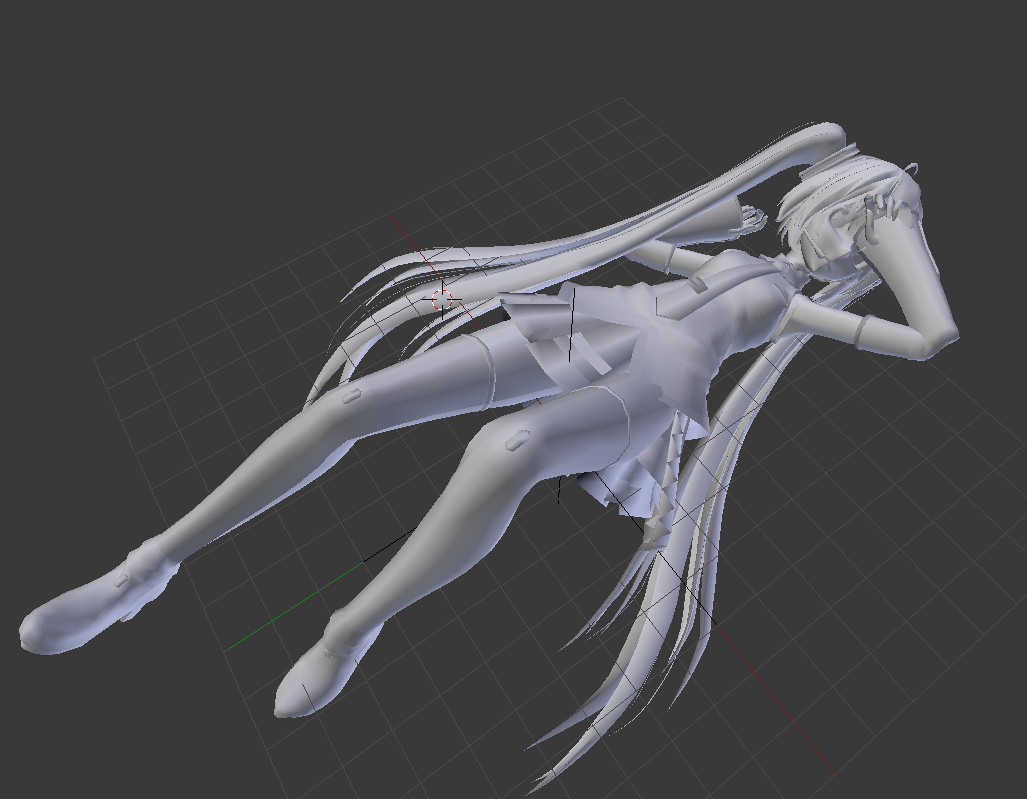
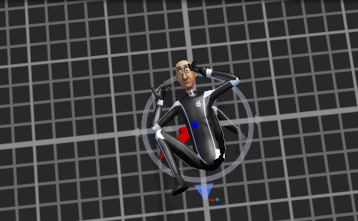
and this is how it looks like in unity
i only exported the armeture
and also set the fbx to humanoid
this only seems to happen with vpd files
i can convert vmd fine
but these file break all the time
is there a way to translate the armeture?
im guessing thats the problem
cuz unity gets confused in rigging
fresh warren
@muted prairie It's hard to explain, the character is barely moving. Can there be any restrictions on walking animation? https://a.safe.moe/HLKQcF0.mp4
The same animation of walking in the form of emotion works.
muted prairie
What i would suggest first is disabling the animation compression, and locking all the transform locations
fresh warren
I disabled animation compression and locked transform locations. The animation has really changed a little and the character has become more active, but it's still not what I see in Unity. And it's still a very distorted animation
 violet moss
i have about 6 animations that i want to play back to back on loop but in a random order (no repeats) is this possible
if the random part is not possible than just 6 sequentually on loop
cyan chasm


 unique night
anyone know how to get unity to follow a joint or object when previewing the animation? (Its just the perspective view which gets locked to the selected object basically, its not recorded with the animation)
I've activated it by mistake a few times and its really useful but i have no idea how to toggle it on at will
nevermind, found it. Its shift+F on selected object 😄
 vagrant swift
guys
when making an fbx anim
where do you make it? blender or unity?
also, is there a tutorial on how to do so?
 indigo mauve
I do blender
It's quicker since I'm used to it.
I proceed to edit the textures if I need to in unity.
vagrant swift
well, i'm planning to do an animation for dota 2 and yeah, i'm using my shitty knowledge on blender/unity that i acquired to import mmd models for vrchat. needless to say, my knowledge is really REALLY low lol
indigo mauve
oh k
vagrant swift
anyway, is there a tutorial video on how to get started? lol
indigo mauve
for what
vagrant swift
animation
indigo mauve
i know but blender or?
vagrant swift
blender
slim sparrow
@open tundra did you tick "bake root transform/rotation" on all the properties of the animation?
And did you select "Original" as the "based on" option?
glacial fog
How to change the color of the environment in the animation, and curve the image. I don't even know how to name it xd
lunar snow
You mean distortion
open tundra
is that in blender?
glacial fog
@open tundra In Unity
glacial fog
Anyway, I still can't find how to make that ball in animation, in which everything would change color .-.
indigo mauve
@vagrant swift https://www.youtube.com/watch?v=sCDLiRXoDS4 this is the video

A guide for the animation interface in blender Liked it? Help me make more videos! https://www.patreon.com/csharpaccent? Jump start your new game! https://go...
sorry for replying late
vagrant swift
tyyyy


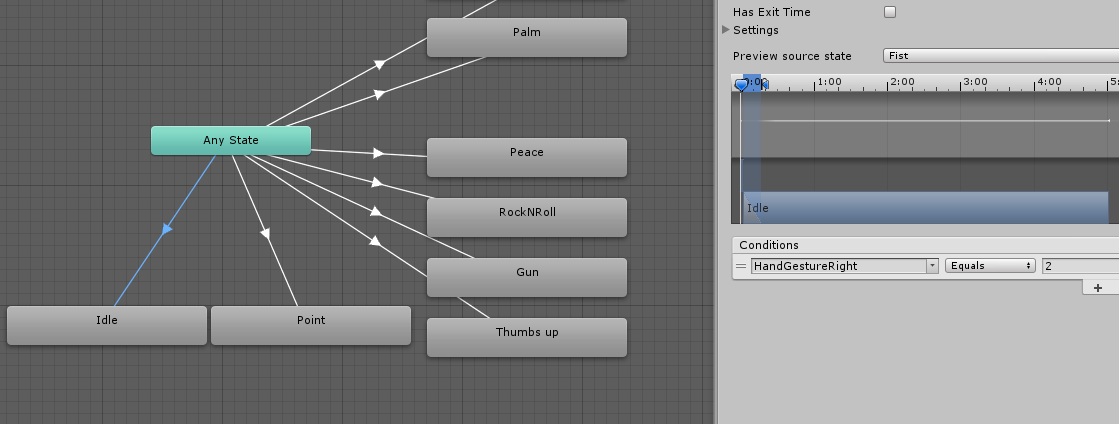
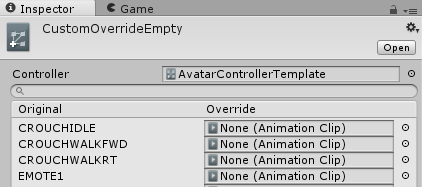
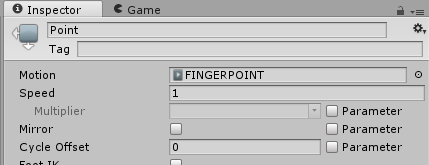


 open tundra
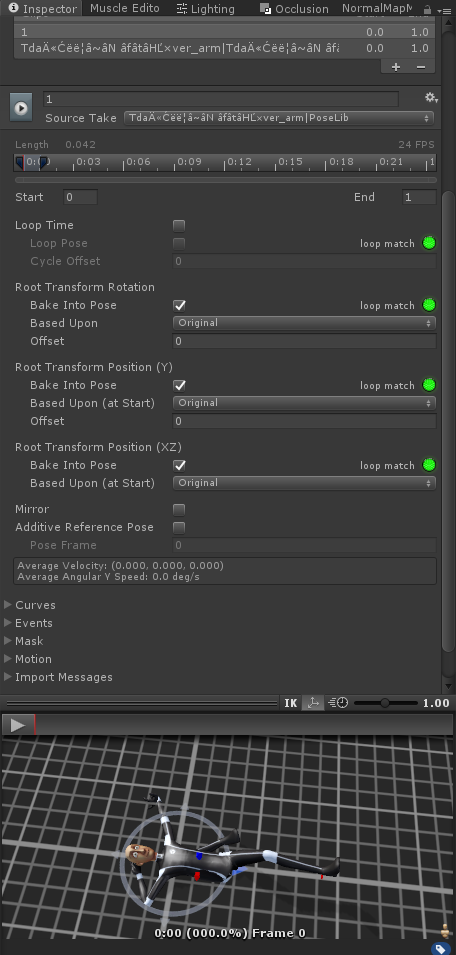
how does one convert a vpd to a anim file?
 fickle slate

so im trying to do a ki blast and i want to extend the balls distance
do you guys know how?
also how do i make it when it collide at anything it explodes
icy crow
change the lifetime to increase how long it stays in the air
fickle slate
is it Size over lifetime?
icy crow
no just lifetime
fickle slate
oh my bad
icy crow
the number of seconds each particle is alive for
fickle slate
and what about the explostion thing when it collides something?

this one is in sub-emitter
slim sparrow
I don't think you can put prefabs as subemitters, nor can you have a subemitter be an entire particle system with its own sub systems
spring nova
You can have as many subemitter layers as you want, there's nothing stopping you
Since subemitters are identical to regular particles once they're out
celest trout
Im having issues again with animating material changes on my avatar. When I change specific pieces, it does not apply or switches things with other materials
icy crow
I don't think thats possible
 wide arch
So I have the blend shapes for the facial expressions set up on my avatar, however I am trying to add hand gestures like pointing or a fist closed when they are activated. Every time I try to rotate or move a part of a finger to a new location in the animator, it resets when I go onto the next one. In game the hands default to a partially closed state but I would like them to do these gestures.
slim sparrow
@wide arch you need to use the Animator values
Like index finger stretch
Can't move the bones directly
 hollow salmon
So I'm trying to get this animation to show whenever I play a hand gesture, or play an emote:
https://cdn.discordapp.com/attachments/410285194629611531/465668467006242834/bandicam_2018-07-08_19-59-32-548.mp4
But when I go into the game and try to play the animations, nothing plays.
frosty spade
you have to make the animator custom override empty for the model
frosty spade
the animation shouldnt play by default when it's set as one of the overrides in custom override empty
hollow salmon
I put animations in the CustomOverrideEmpty file, replacing emote 8, and the open hand gesture.
I also have that file in the Custom Standing Anims
I already had this stuff set up.
 rose bluff
hey there, anyone is an expert on animator animation here?
ah nevermind, i just found the solution, just need to bake pose
vagrant swift
@indigo mauve is it ok if i pm you? got something to ask
 nova pilot
for a gesture, do i need to animate both the hands with the muscle editor or just one?
clear yew
If you only animate one, the other will just use the default open hand. It's best to animate both
icy crow
With the muscle animator I think theres an option to mirror one hand to the other
spice urchin
the default movement animations in vrchat are from gmod right
they look rlly similar lmao
slim sparrow
No
I think some are from Mixamo
But I'm not sure where they got them, it's not a stretch to say that they could be custom made for the game
 indigo jolt
Does anyone know how to make emotes toggle a persistent state change? For example, toggling a weapon on and off? Rather than using a finger gesture.