#animation
1 messages · Page 74 of 1
 slender latch
 orchid trench
if you have the Animator on your object it should show up next to the Asset Store tab
orchid trench
weird, mine shows Any State, Entry and Exit

 clear yew
I need help with unity, my avatar has a few audio sounds and they’re all together. Meaning that I have them on only one gesture but it’s colliding with the others, so it sounds like everything is playing all at once.
clear yew
Try copying the first frame of the idle animation into your new animation and use that as a starting point
Yes, there should be a file with some animations in it
Or at least one frame of the animations; it's all you need
clear yew
It's possible with generic rigs but I'm not sure about humanoid rigs
I wonder if an animation can activate an animator on something completely different and cause a chain reaction that way
As in:
Palm sets [something].Animator.Enabled to 1
Fist sets [something].Animator.Enabled to 0 again
It could probably still work in emotes as well; just activating the Animator at some point during the animation. I'm not sure if it'll stay active when the animation ends though
Alternatively, you could merge the two animations together.
 slow estuary
How can I keep my animated object from following me when I do the animation
 valid estuary
Render it in world space
 slim sparrow
Isn't that a project setting?
There's a setting that serializes stuff as YAML instead.
No idea how to change it back
 exotic pilot
is there a way to put audio on a world particle
 regal hollow
Not really
You could try timing an audio source to trigger at the same time as your particle
But you can't make it follow the particle
exotic pilot
ah, its more like i want the audio to come from the same position in world space
its a non-moving particle
ah i got it
rigidbody on the world particle and fixed joint the audio
lmao
 torn pawn
@exotic pilot does it work?
exotic pilot
yea
torn pawn
i mean like in game work work
cuz what u see in unity doesn't always translate to game
clear yew
I need help with unity, my avatar has a few audio sounds and they’re all together. Meaning that I have them on only one gesture but it’s colliding with the others, so it sounds like everything is playing all at once.
regal hollow
You must be triggering them all with the gesture
clear yew
i have a few audio files on my character and when i goto use it the audio from the on just overlaps the other one
how would i optimize it to a single gesture?
regal hollow
You want to trigger them all with one gesture?
torn pawn
u put them all under a parent, have all disabled, then use combo gesture to trigger different ones
lets say u activate clip 1 2 3 with your finger, victory and thumbsup
put them all under object that u activate with openhands
ull be able to trigger sound only when your openhands is active
clear yew
no not with one gesture, why dont people read what i post? jesus...
i want sound to be separated for the gesture
it didnt work
regal hollow
If you want people to understand you, write legibly and don't be so pissy.
clear yew
How can i be anymore clear on what i want, dont be a jackass
regal hollow
All you had to say was that you wanted to play your audio sources in sequence
clear yew
im pretty sure thats what i said
regal hollow
It isn't though sweetheart.
regal hollow
And you got your answer from very cool dude
clear yew
i dont understand what he said because ive never done this before
plus everytime i go and mess around with something it wants to instantly record everything
regal hollow
You can click the red button on the animation window to disable recording
clear yew
yeah but it comes back on even if i click on my model
like it never turns off
Well since no one wants to help me out i guess this project is just a waste of time that i could be using to be on vrchat. Thanks a alot everyone....
regal hollow
No problem dude! Let us know if you need more help.
 woeful seal
anyone know of a unity anim for giving the middle finger i can download?
 undone glade
If you want to do just a middle finger I can just walk you through it if you like.
Do you have the animation tab by chance?
slim sparrow
Muscle animation editor makes this a lot easier
undone glade
Definitely
slim sparrow
But basically, you'll want to set all stretch values to -1. Set all stretch values of the middle finger to +1. You might have to tone down the stretch a slight bit if you want the finger to be straight
Optionally, you can spread and stretch the thumb
undone glade
Eh, I usually do about a .8, .8, .9. but that's simply preference.
But that's the summary of it
woeful seal
are you guys talking about the muscle editor? is it an asset?
woeful seal
k, thanks peeps
woeful seal
anyway to mirror it to extra hands?
i guess i could re-rig the other arms and make multiple animations
but then i can't use anim controller for overrides and then i'd have to do that weird round about way of making another instance of the avatar a child of the main and have another anim which makes both instances visible/hidden
i don't think re-rigging will help anyway
slim sparrow
Fixed joints
Joint the fake fingers to the real ones
It basically always works, even in VR, and without having to do weird animation stuff
Sometimes it makes stuff stretch though, no idea why.
 compact obsidian
yo
how do people make this cameras as overlays
where they can see their own avatar in front of them
woeful seal
@slim sparrow if i add fixed joints to my main avatar instance does that mean any anim will apply to the connected joints?
regal hollow
@compact obsidian What streamers do is use the stream cam ingame with the greenscreen background, which they can add as a video source for their stream in obs etc.
 dusky junco
I think this is the right place to put this.
For whatever unknown reason, some of the shape keys on this model randomly "twitch."
The current version you see here has no animation overrides and is using the default set provided by the SDK.
I have no other information or clue as to why this is happening, so apologies on that.
woeful seal
@slim sparrow i wouldn't want them always active, i tried seeing if i could do something l like adding break force as a anim property but it doesn't get added
slim sparrow
@dusky junco blink
Your avatar has eye tracking, but the first four blend shapes in Unity are not blinking and lower eyelid related.
dusky junco
So it's just connected to the wrong shapes?
slim sparrow
Unmap the eyes or give them working shape keys. If you don't want blinking, have CATS generate the eye tracking without blinking, or make four "dummy" shape keys in Blender that move one vertice a tiny bit
Yeah
You can't configure eye tracking yourself
woeful seal
@slim sparrow is there a way to to have fixed joints disabled and enabled by anims?
slim sparrow
Yes, but it'll be bad
The extra arms won't snap to your real ones, they'll kinda stay in place if disabled, and start copying again when enabled again
regal hollow
Your arms will follow the real ones when the fixed joint is activated
When the joint is dissabled they will stop following
and remain fixed
so when you activate the fixed joint again that will start following but they wont be in right place
in relation to your real arms
woeful seal
i understand but i would like to animate more than 2 arms without having to have the extra arms always following the main 2
slim sparrow
What would be the easiest way to have another model follow me, including walking animations etc?
I already have a full animation set for the second model, but I'm wondering how I would apply it
So that it walks when I walk
regal hollow
You could try putting all the keyframes into one anim file
slim sparrow
Urgh
Was kinda hoping I could just pass the animator state to the child somehow
I know you can do some weird fuckery if you have an object with the animator component's Avatar slot set to a child object's avatar
But that would make my own avatar T-posed
 midnight moss
Hey, does someone know how to make a gif an animation ?
 west panther
@upper parrot i think u could hide 2 extra body mesh that when the gesture is played, 10 seconds of audio go with the 10 seconds of 2nd body's blank animator, then making armor do its thing, then switching to the 3rd body mesh which activates with the armor. Its convoluted but not impossible to implement
 median phoenix
can i override idle/prone idle/ walk/run FW and BW animations?
it seems like not working some reason assume i can override them for humanoid avatar.
 violet kraken
yup it works
median phoenix
well then
i make animation from blender, and imported into unity
extracted those files by duplicating from legacy setting
and put them into assigned tabs in override controller
then put the override controller into Descriptor section
but some reason, avatar cannot able to read the animation and do nothing in game.
 muted prairie
Is there something special about the idle animation on an override controller ? Do i have to check a box somewhere ?
Nevermind, i'm a goof.
slim sparrow
Lol
Is there a way to have two Animators on an object by any chance? I think this would break a ton of stuff, but I tried doing it by serializing the scene as YAML and editing the scene file directly. Didn't work obviously
median phoenix
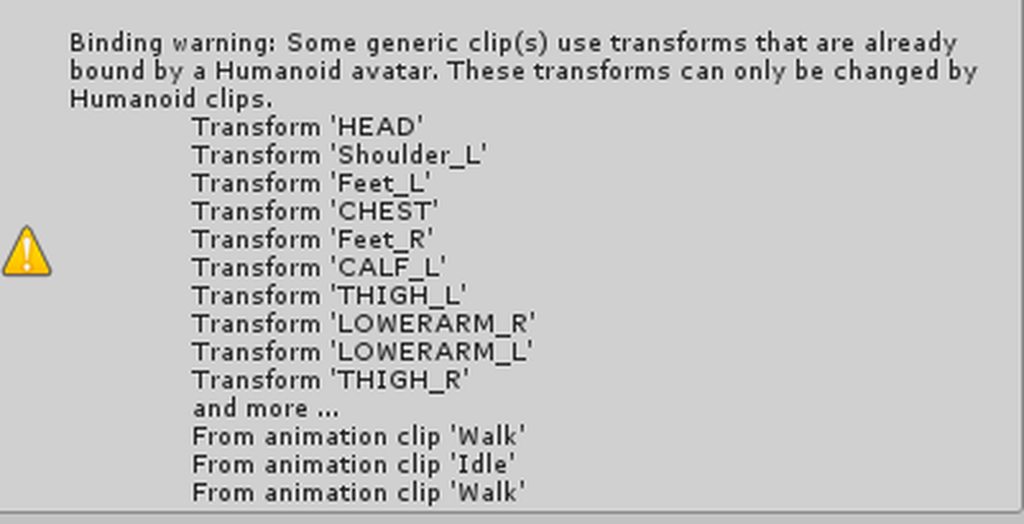
if i'm getting this kind of message, then is it saying this animation wont work for idle or other stuffs?
if some1 knows how to get around this problem, plz help me
 lean patrol
does somebody know how to fix this bug whenever you look up the mesh particle will dissapear

 icy crow
isn't that to do with the material used on it?
lean patrol
i changed the material a bunch of times even the normal material
its not appearing when straight looking at it. its weird
i googled it, people say but it on world instead of local. but thats not working either
still not appearing xd
icy crow
have you tried a double sided shader or one that doesn't cull any faces
exotic pilot
why do some parts of my run animation work as an emote but not as my actual run
median phoenix
any1 ever created idle animation from blender and import into unity custom override?
I need help to apply animations that i made from blender that some how not properly working on unity custom override for humanoid avatar
clear yew
Making all of my gestures for my avatar for when generic rigs finally get the ability to use them
 visual blaze
Anyone know where to get the orange justice animation?
 neat path
I have a gesture that enables a game object that gets stuck. The game object is a fire breath, and the gesture is only animated with the 0:00 and 0:01 frames. I took off the looping and made the duration one .1 to see if that would help, but I still get stuck on the gesture if I use it and it super slowly transitions to the next one I'm trying to use, any solutions?
slim sparrow
@neat path is it on fist?
neat path
No it's on handgun
slim sparrow
It needs to be 1 frame long at any rate, and if it's on fist, you need to do another gesture to cancel it
neat path
It's one frame long and it's not on fist
I can stop gesturing and it will stop the particle system
But if I try to use another gesture it will use it again
And I have to wait it out while my hands very slowly transition to the next gesture I'm trying to use
slim sparrow
If your hands transition slowly, one of your gesture animations are too long.
Double check that there aren't any keyframes at 1 second
neat path
Okay, thanks.
 signal elm
Can you put an animation on each hand?
Like I am currently animating genji's Dragonblade and Wakizashi
And I want to only be able to pull out his dragonblade with right hand and his Wakizashi with left hand is that possible to bind it like that?
clear yew
U can override for example handgun for dragomblade and roknroll for wakizashi.
But even if u set dragonblade on right hand handgun the left hand handgun also will trigger it
(If u even understand what i said, sorry)
 lilac cave
Gestures are not separated into left hand and right hand yet
The best you can do is have a gesture to activate weapon a, and have another to activate gesture b
*weapon
Hands are treated as separate ingame though, so you can have left hand activate weapon a, and have right hand activate weapon b
signal elm
Ah so I can't currently just set rocknroll to pull out the weapon on a certain hand
lilac cave
Just remember that l hand and r hand will both be able to activate weapon a and b
signal elm
But I can bind two different gestures
And makes sure I know which hand I'm using it on lol
Also I don't think this is the exact area for this
But everything except my weapons like shrink in game
My entire model except swords become smaller ingame
lilac cave
When you move a bone, it happens seemingly randomly, or it spawns smaller then it should be?
signal elm
It spawn and is shown in selection shorter than it should be
lilac cave
Did you scale the mesh "Body" by scaling the mesh, not the the armature at any point?
In unity.
Also, ensure the mesh is sized correctly in unity in general
Have both the weapons and mesh active and compare sizes
signal elm
So my friend told me as a beginner it was fine to do this but I split the model into meshes instead of using body
Also I should probably try to scale in unity
Is there any references to help scale?
lilac cave
You'll have issues if the head isn't called Body firstly
There is the default model in the sdk
I'll give you the location in a sec
VRCSDK/Examples/Sample Assets/TutorialAvatar
It should be there
Make sure you're scaling the armature, not the meshes
slim sparrow
Oh yeah, and you should definitely not split your meshes
At least, the final product in Unity should be one mesh for your main model
Having the weapon as a separate mesh is fine
Someone told me that you can use your own animation controllers with Final IK, but is this true? I doubt how well this would work
median phoenix
So
Everyone knows that when you making animation, we have to make a duplication first in order to make one
when we apply the animation, avatar do weird shape right?
if that weird position kept carries on to when i apply animation into custom override, what is the problem?
lilac cave
You dont want to upload with the weird position
Thats all
I think that would mean you want it to be t or a pose before you upload, even if you have a custom idle
It is fine to have the weird pose with hand gestures but for others its a no no
median phoenix
hum
so i found out it is because mainly i'm using animation for "generic clip" for "humanoid" avatar
Is there anyway i can convert them around?
wonder why the avatar wasn't moving hands, legs, and etc even i try to run on duplicate model, and that was the reason i guess
lilac cave
If its an imported animation (built into the fbx) you want to set that avatar to humaniod
Oh thought that was a question
Well gj anyway!
median phoenix
yes, it is an imported animation that i made from blender
i already set my avatar into humanoid
lilac cave
Both need to be humanoid, and masking needs to be applied if you have any bones that aren't part of the humanoid bone structure
Eg a cape
Other then that there shouldn't be any issues
median phoenix
oh well
i think you give me the way
i think i extract the animation file while fbx files was set into generic
i will try it to extract them after when i change into humanoid
lilac cave
Humanoid, apply masking, duplicate animation, add duplicate to controller
Easy if you know how
median phoenix
so what apply masking is
just simply drag my avatar into the right down cornor of video?
 lilac cave
Ignore settings, it should be below
median phoenix
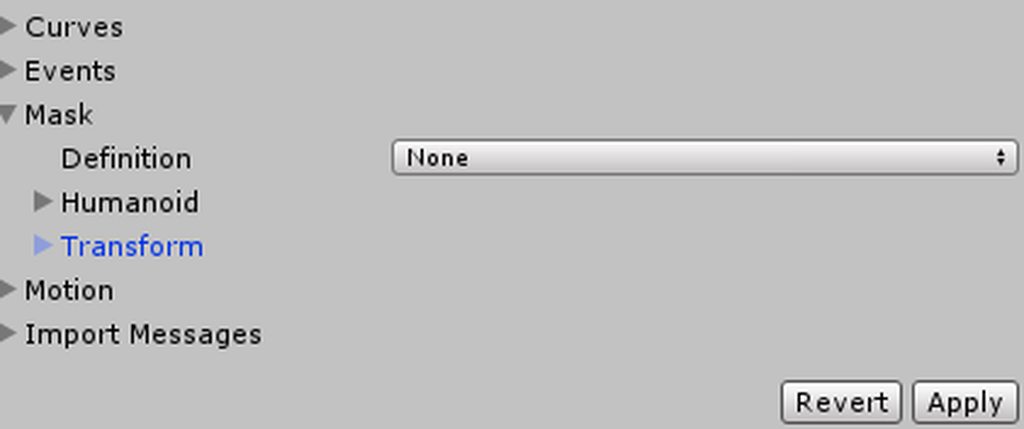 lilac cave
You want to make it be custom and check everything
median phoenix
umm
when i click that "none"
it only gives me three choices
create from this model, copy from other avatar, none
do not see any check box nor custom
lilac cave
Create from this model
median phoenix
so
sorry for saying this late
but i made avatar bone and animation from Blender and import them together
isnt that meaning masking is already set into the avatar that comes with?
lilac cave
Blender isn't unity
median phoenix
lol
lilac cave
Unity has this feature for game devs
lilac cave
So they can reduce animations
median phoenix
even for the parts that is not humanoid?
lilac cave
If you animated them, tick em
lilac cave
Yes is duplicate it will be fine
lilac cave
You can open the window animator in unity, chose the avatar you want the anim to be assigned to and then drag
No copy and paste!
median phoenix
aye
so far so good, i just try to put one animation into duplicate avatar, there was no distortion in pose nor location. everything worked fine!
lilac cave
👍
median phoenix
so when i put them into override controller
are they automatically become looped?
or should i set look option at the animation file?
lilac cave
I dont remember, but I think it defaults to loop
median phoenix
: D
lilac cave
As long and you aren't doing gestures with more then two frames and your walking etc. Animations have rotation to be facing the right direction, but there is no movement, only rotation you should be good!
lilac cave
I dont know if there is a cut off for the time, but as long as they loop id think they're good
slim sparrow
Gestures are looped even if the animation itself is not, I think
median phoenix
i see
slim sparrow
Or it at least stays active, so if the two frames are identical it doesn't matter if it's looping or not
median phoenix
humm
slim sparrow
I accidentally put a 30 second blink animation on my fingerpoint once, could not figure out wtf was going on
lilac cave
I had maya happy crying once
median phoenix
alright i set all the animation
and try to see how it look in game
give me a min
median phoenix
xD
well
they are not looping
xD
and seems like everything is to working some reason
model position got fixed tho
i think, i have to manually go into debug setting and put animation file into legacy
then put them into loop
i think...
median phoenix
well
it is not looping xD
and half of surface animation is not working
gotta find why tho..
lilac cave
When you go to upload you can see in the normal view if idle is working
Make sure you have the vrchat avatar overrides in use
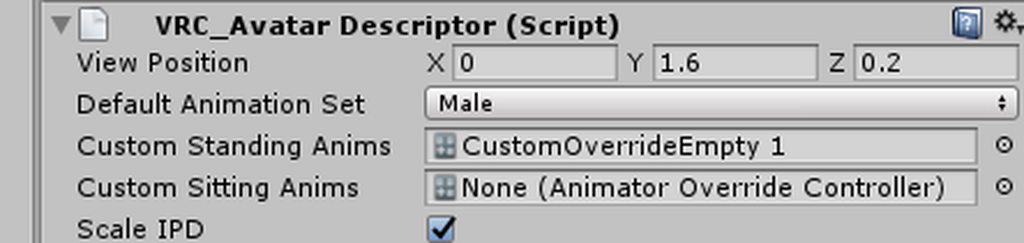
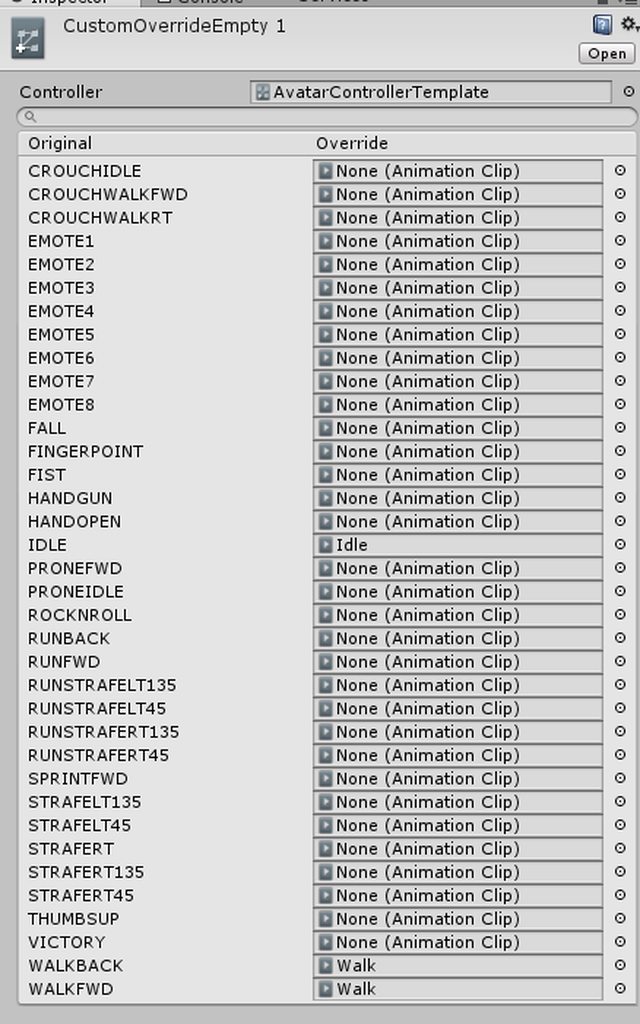 lilac cave
And the other one?
slim sparrow
No
lilac cave
Not sitting
slim sparrow
Animator can be left empty
lilac cave
I've heard people have issues with it blank
median phoenix
what do u mean for other one then?
slim sparrow
Just make sure the avatar is in there (which it is by default)
Literally all my avatars have no animation controller assigned in the Animator
All it does is change which animation your avatar plays in the preview screen
In your avatar menu
slim sparrow
Walk animations are weird
lilac cave
That could be used to determine if its looping though
median phoenix
on unity it looks same tho
lilac cave
Ingame, does it loop or nah
median phoenix
i mean same in terms of original animation
slim sparrow
Walking animations sometimes fail to loop if you're also trying to run in-between
median phoenix
so here is my animation how it looks, think about heart beat that something pumping
i have those pumping effect animation on the surface of my avatar
at least there are 4 of them
but some reason those animation are not working
and not looping
slim sparrow
Wait, you're animating bones in your walking animation?
Ones that aren't part of the humanoid rig?
Could you post the properties you're using in your animation here? Just a simple screenshot of your dopesheet
lilac cave
No, that means they won't show
slim sparrow
VRChat's humanoid rig animation controller has an avatar mask applied to the walking animation
Which makes it only affect specific bones
If you try to animate other bones, it won't work. I haven't tested enabling/disabling objects though, although I heard shape keys can actually work.
Maybe try turning the pump stuff into shape keys rather than bones
It's similar to how gestures can only move your fingers (although regular non-humanoid bones are not excluded from gestures). And how they only move the fingers on the hand you use the gesture on.
median phoenix
so basically as conclusion, in idle or walking animation , other than normal humanoid bones wont work. correct?
i wanted this pumping animation as default setting for my avatar that is why i choose use Idle animation, but seems like that was not a good idea.
lilac cave
Oh if you want it to play when you walk, idle etc, just set it as you would with a custom blink
median phoenix
but those animations are bound together with walk and idle
lilac cave
So you only wanted it on idle?
median phoenix
is that a problem? should i make separate animation for them?
no, actually not xD
want them to be on all the time
slim sparrow
Is it the same animation for forward and backward?
Oh yeah, it is
You might be able to put it on a legacy animation and toggle the animation component instead
median phoenix
yes, that is same animation
should i make them separate too?
walk fWD Back
even tho they are basically the same animations
slim sparrow
I don't think so
lilac cave
Well if you need to be facing backwards when you walk make two
But if not only do one
median phoenix
so
for my idle animation
that animation has large motion that involve head movement
it basically swings the head front and back
but seems like because head bone is bound to my vision (aka mouse pointing direction) only neck is moving, not head xD
lilac cave
It'd think that'd work normally, but it might be best that you dont have it anyway
Your view point doesn't seem to follow head so you'll have issues seeing
Since you'll be seeing a neck and or head swinging back and forth 24/7
median phoenix
wait
you saying my view position also will follow with it?
lol
wait
it wont
well, here it is not a big problem, i check and it wont block my view position.
the problem is, this thing is not working xD
lilac cave
There isn't really any non painful way to fix that so id probably drop the idle
median phoenix
xD
trying to solve issues here
i'm trying to un-mask everything that is not part of humanoid bone
try it our to see whether head and rest of body is moving properly
and convert pumping animation into way people set their avatar as blinking animation.
dunno why my idle is not looping...
: *
some reason, walking animation working pretty well
but idle is only the problem
clear yew
I have a running animation but some reason model clips through floor any reason why?
slim sparrow
Try ticking "Bake root transform Y" on the animation @clear yew
And make sure it's not sinking lower when played in Unity, otherwise you'll need to add/fix root transform yourself
median phoenix
@slim sparrow i'm just decide to use regular idle and walking animation
but when my avatar decide to move from idle to walk (any direction) some reason its floating
how can i solve this?
all my avatar is set at origin tho.. 0,0,0
 halcyon bramble
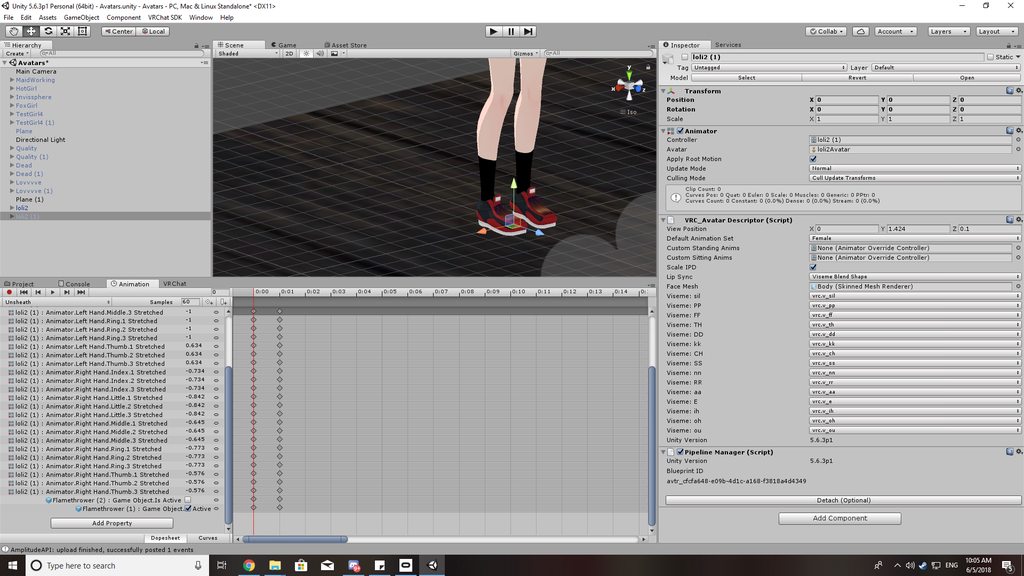
I did an override animation to add a weapon. Pulling out the weapon works fine but when i try change hand gestures it goes in slow motion. Is there any reason for that or is it just a bug?
 slim sparrow
@halcyon bramble your animation is too long
You forgot to remove the keyframe at 1 second
halcyon bramble
What really??? I thought that was normal??
slim sparrow
No, gestures need to be exactly 1 frame long
One at 0:00 and one at 0:01 @halcyon bramble
You have a keyframe at 1:00 too
I can see that because the rest of the timeline in your screenshot is not greyed out
halcyon bramble
OHH. I see it now. Thanks!
muted prairie
Is there a way to manually enable retargetting on an animation file ?
Or if anyone's willing to help me edit an animation, i'd be grateful.
 clever onyx
how do i create an objekt in an animation that moves but stand on there spwan location?
 dim fern
If you're looking to edit the .asset file directly, you can enable "Force Text" under Asset Serialization in the Editor Settings. The YAML is alot easier to read.
icy crow
Put a fixed joint on the object @clever onyx
clever onyx
nice. thats all xD ? ty
icy crow
The position/rotation will get messed up which you'll see
 lofty crypt


 chilly vapor
i love it
 blazing bluff
How do I toggle the mesh renderer through an animation? What drop down menu is it under? This is probably a question better suited for channel.
icy crow
whatever your body mesh is called
it's the skinned mesh renderer
or I think you can just turn off the mesh game object if you're trying to go invisible
blazing bluff
Wow didnt realize it was that simple.
Also do you know how I would make like a sphere of darkness where people cant see anything but you?
 crystal vigil
could someone please help guide me through making a fog effect on my avatar?
icy crow
with particles? @crystal vigil
orchid trench
I have an object in hand connected to an object in wrist with rigid body / fixed joint. Every time I toggle the animation on the hand object is in a different xyz location like its drifting each time I turn on the anim. I can't parent it to the wrist in my situation, is there some way to fix this?
icy crow
I think the fixed joint object has to be always enabled
orchid trench
Oh. I'll give that a try. Thanks
Actually that won't work because I need to toggle the parent object to trigger the animation but they also need to be under that object so that I can animate them. 😦
 woeful flame
Did I do something wrong or you can't animate hip bone movements?
halcyon bramble
Is there a particle limit? I tried finding notes about it in the SDK patch notes but couldn't find anything. I've heard about it though
 spring nova
They did have one for a little bit but got rid of it
muted prairie
Is there really no simple way to slow down animations in unity ?
clear yew
If it's in an animation controller you can set its speed value either in its state or in its blendtree node if it uses one
I think you can also slow down the sample rate of the animation and that could also slow it down, but I'm not sure if that has other consequences with it
https://dl.dropbox.com/s/f7h2fzkrn7qdm1b/AnimSpeed.png
As for legacy animations, I think you can edit its sample rate here:
https://dl.dropbox.com/s/t68sxov0v7s651v/AnimSpeed2.png
But this changes the speed anywhere the animation is used

 muted prairie
Sample rate didn't seem to have an effect
clear yew
I'll look a little deeper
You can select all of the keyframes and drag the right edge of the selection to scale it up
Note that it still rounds all of the keyframes to the nearest frame though
muted prairie
Ok, that worked, thank you very much ! Now i have to understand why the animations are so sped up in client though
the engineers are asleep so i can't bother them 😄
clear yew
I wish you good luck :P
muted prairie
Actually, is there a way to scale the keyframes in a way that doesn't break the animation as much or is it just luck/animation dependant ?
I guess that's maybe too much to ask for complex animations 🤔
clear yew
I think it probably depends on the animation, sadly
The legacy animation component is weird
 wide egret
https://i.gyazo.com/23d87c774346bfc9f1097f9012b4def6.mp4 , Right Leg seems to be doing something different then the animation...
Keeps sticking out...
This is how I intented it to go out... https://i.gyazo.com/c38743d68c856690b0abea40eb765c00.mp4
 thin mortar
How do you make it so the hair changes color every so often
wide egret
Shader, next.
 fiery lark
yo can some one help me with an issue
i want to test somthing on my main model to see if i got the animation working
but now it wont go back to defult t pose
torn pawn
u test it on duplicate not main model
slim sparrow
You always have to animate on a duplicate
If you messed it up, I think you need to manually animate it back into T-pose, or drag in a new model into your scene and copy over the avatar descriptor and dynamic bone components
Then you can delete the old one
@fiery lark
fiery lark
yeah thats what i did
 royal summit
Why should I animate on a duplicate? I’ve never really do It and don’t run into issues much.
woeful flame
Did anyone ever make a walk cycle animation from scratch? I'm trying rn but when I animate the hips (to make the body rotate) then in game it doesnt move at all
slim sparrow
@woeful flame tick Bake Root Transform and root rotation in the animation file itself
In Unity
woeful flame
@slim sparrow http://prntscr.com/jrinip
 woeful flame
They dont move in the preview
And now the ghost bones are not animated anymore even tho in blender they work
I'm definitely missing something
lilac cave
you if they wernt animationg before you need to do some masking
animating*
make sure that the rig is humaniod, correct bones assigned etc.
rotation needs to be done to the model for walks but you dont need to move the avatar in the anim
masking is near where you found the transform settings
create from this model, tick everything
duplicate the animation, open animator and drag the dup into that screen when you have the charater you want to do the action selected (in scene) drag the anim in
when i say "rotation needs to be done to the model for walks but you dont need to move the avatar in the anim" i dont mean setting wise, i mean animation wise
the game moves the model for you but does not rotate the avatar iirc
woeful flame
@lilac cave about moving the avatar you mean in space?
I mean, I know I make him move in place
This is the model, since he has a wheel instead of feet I wanted to make a walk anim in which he rotates a bit forward (like to keep balance) But that movement doesnt translate at all
 woeful flame
Oh wait @lilac cave I was wrong, I was not talking about the ghost bones. I'm talking about the bones that are not part of the humanoid rig, these bones are not animating anymore
Like the wheel and the shoulder flaps
 chilly topaz
is there a limit as to how long running animations can be?
slim sparrow
I don't think so, I have a very long one
@woeful flame I think the IK system prevents you from doing something like that, especially in VR
woeful flame
So i figured out what the problem is for the wheel and the flaps
But I'm not in vr tho
That's why it's so weird, maybe I've got an idea. I'll keep you guys posted
slim sparrow
Hmm
Well, if the animation itself has working root rotation, then it should work in Unity as well if you tick the right properties
Hold on, I'll try to find the ones I used for a flying animation
Head won't rotate in the animation though, even on desktop
chilly topaz
alright thanks
 nimble mason
Hey guys, does anyone know how I can prevent the shaking/looping of an animation? I am attempting to animate the bolt of a firearm to move backwards and forwards upon being fired, however, the animation continues to loop and gives it a “shaking” look.
icy crow
Have you unchecked "loop time" on the animation?
nimble mason
Yeah, I still have the same issue
The shake effect isn’t as bad, yet it still moves
clear yew
It looks like it's just playing for too long; try reducing the transition time in its animation controller if it has one
nimble mason
I’ll try that
chilly topaz
i'm stuck making the head rotate with the body in flying animations
i'm not sure how to fix it
 waxen hound
in unity is there a limit to the rotatoin of the hands? because in RL the finger can bender farther and i can't get a nice close fist for the hand. even wanting it to clip a bit.
is there a way to set up pose animatoin in blender then just import into unity instead of having to set it up in unity?
icy crow
the bones can rotate as much as you want them to
slim sparrow
@waxen hound you can change the muscle settings in the rigging window
Including the minimum and maximum stretch
waxen hound
happy it worked 😃
is it possible to animate a custome bone like I insert a extra bone just free floating between the thumb and the pointer finger to be able to control the fat skin area that strteches to much sometime so i can control it better when moving those other bone. Is that possible to use? i can pose reference.
or would that be a twist bone i need to use to have the skin not deform?
sorry for all the questoins XD
 lyric edge
I need help with animations 😣
icy crow
specifics?
lyric edge
I want to make the eyes blink when talking (i have robot eyes)
slim sparrow
Might be easiest to use Jaw Blend Shape
That requires one shape key that activates and deactivates itself as you talk.
You'll probably need to make a duplicate of your eyes in Blender and move them slightly behind your real eyes. Make the duplicate light up
Then in a shape key, swap the two eyes.
lyric edge
Ok. I have made two separate eye meshes. One is lit up, the other is off.
I'm sorry. I don't understand what you mean by shape key and swapping the two eyes
 hexed fern
not really sure whats going on but this walking animation seems to not work right, his left arm is in a different position then it should be, and one of his feet is raised off the ground and bends wierd upon a certian part of the animation

at a certian part that foot does this

 mint prism
Hello
im looking for a way to activate a particle effect that only activates when two different gestures are active
clear yew
Parent it to two empties; have one gesture activate one and have the other gesture activate the other. The particle will only activate when both empties are active
mint prism
and the particles should be checked or unchecked?
royal summit
Should be checked as u won’t be able to activate it via hand gesture cuz u need each hand to active both empires
 jade kraken
how would i turn on a particle emitter in animation? for example, my character breaths in, then spits out a horizontal column of fire
clear yew
Have it disabled to start with, then in the record mode acivate it on the frame you want it to enable
jade kraken
so...disabled as in like...hidden? like how u hide models in the Unity Scene via that checkmark box? (sowwy im still somewhat new to terminology)
 white herald
yes
west panther
But put it on an empty and turn the empty on btw
 queen pewter
mm anyone has good idea on how to animate the rig that is attatched to armature with ridged body?
it just won't work.
west panther
Ive answered that question 3 times in here alone
west panther
https://images-ext-2.discordapp.net/external/anrL-GsLAbRWT1dWRXZKbVmvrgb1OGrf5i2pNpW4Xsk/https/cdn.discordapp.com/attachments/429623600769662987/444088096900907028/Rigidbodies_arms.png?width=1202&height=544 but ser inteepolate to none
 queen pewter
wait.. how did.. yo..wah
west panther
This is how its set up for extra arms and people always figure it out from this much but ive never personally done it
queen pewter
i'v made it work but its gun-arm
so I wanted to put animation but .. o-o whenever I make duplicated -animation and apply on main model it just wont apply unlike everything else
west panther
That doesnt need rigidbodies
west panther
I think Just duplicate the entire mesh in blender, in unity hide second mesh, give second mesh animator with the dance
And i dont think theres a tutoral
And in a gesture turn off your main mesh and turn on the second one
I think thats how it goes but.not sure. Someone else has answered it better before
queen pewter
woa but thanks mayo.. such kindness
west panther
Lowkey not thay kind just bored
jade kraken
wait
i made a new animation and drug it onto the dude
it has the frames / animation from my last emote
do i need to make another model dupe to do another?
west panther
Emote or gesture
Oh wait
My bad didmt understand the question, on the keyframe window at the left tou shohld see the animations name somewhere
west panther
Should be a drop down minue with any anomarion youve drsgged o to it
Np i learned tjst yesterday XD
queen pewter
urg mayo could you look at my screen o-o
queen pewter
awm... phewp.
jade kraken
so i got the thing to un-hide itself
but doesnt seem to you know...blow fire
like i have to manually click the Simulate button to make it do so
like the "Is_Active" keyframe seems to only un-hide the emitter itself, not simulate the particles
i confuzled #-#
mint prism
"Parent it to two empties; have one gesture activate one and have the other gesture activate the other. The particle will only activate when both empties are active"
Me again it seems it didnt worked
jade kraken
um..wot
mint prism
Basically i want to activate a particle effect with 2 finger gestures
so it only activates when both are active
but it doesnt work for me
mint prism
sorry about that :/
 spring nova
By parent it to two empties, did you copy the same particle into two separate empties? Because those empties need to be one inside the other, like empty > empty > particles
jade kraken
mine is attached to the bone / armature the fire system is located by
dunno if that fucks it up or not
spring nova
It might, are you using world space particles?
jade kraken
nien
spring nova
Then it shouldn't
spring nova
You should have hips > spine > whatever > hand > empty > empty > particles
jade kraken
but as you can see by the gif, its clearly unhiding / "turning on"
but not like...turning on
 hexed current
Hey guys, does anyone know a good starting point to learning particles for vrchat? 😮
spring nova
Also both of those empties should be off on default, and the gesture turns them on
mint prism
for me its hip > empty > empty > particle, particle, light
both emptys are unchecked only particle, particle, light is checked
jade kraken
considering whenever i un-hide / enable it (not in the animation window), a lil box pops up with buttons for Stop and Simulate, id say im missing a step to turn it on somehow
mint prism
i have two animation one where the "parent empty" is getting activated and one that activates the "child object"
 spring nova
I can't tell what's going on there, show the whole unity windoe
 spring nova
Looks like the fire is turned off
jade kraken
well then perhaps i did fuck up in animation. i have it hidden, then in the animation, flip on that "Is_active" thing
wot
whenever i turn it on / test in the animation window, that box being like "Simulate Stop" pops up in the scene
so its def unhiding
i just need to find out how to actually make it go
clear yew
The emitter is active?
spring nova
This should be on by default, but if it's not, check something about activate on wake in the particle
clear yew
I would do it something like this too:
[something in armature]
--Empty1
----Empty2
------Particle Emitter
Have one gesture unhide Empty1, have the other unhide Empty2
jade kraken
yeah, the Play on Awake thing is on
clear yew
Particle Emitter will only work when both are active
spring nova
And in bloats example, the particle will always be "active" it's just the empties you manipulate, which are hidden by default and the gestures unhide them
 thick cedar
how to spawn audio from colliding? like for example. rocket launcher. it create audio when it collides wall?
jade kraken
i could try somethin like that, its just the actual armature bone its attached to is actually a bone that does something / i need for the other parts of the animation
ech idk
im so bad at this x3
spring nova
Don't mess with the bones, if you've got a snout that does something, just put all the empties inside of it
So like snout 1 > snout 2 > empty > empty > particles
jade kraken
i dont even have empties, i just got the particle emitter thing and slapped it on snout 2
spring nova
Yeah, so make empties
jade kraken
idk if i can even do that in Unity tho
spring nova
Right click in herarchy > create empty
blazing bluff
Hey can anyone help me figureout how to do this https://clips.twitch.tv/PleasantGeniusDunlinTheTarFu on my model?
 jade kraken
k, so now its like... Snout2 > Gameobject > emitter thing
@blazing bluff not rlly to be a douche, but pretty sure no ones gonna help make something obnoxious like that. no one wants to have a random sphere block their vision cuz someone did it
or so id assume
blazing bluff
@jade kraken Its actually not for anything you just assumed. Its purely for the purpose of rp. Not gonna lie I hate shit like that to, but it fits with the character im doing.
jade kraken
idk if its the same, but in Roblox, doing somethin like that just meant turning a sphere inside out. so instead of seeing the texture on the outside / empty inside, it was empty outside / texture inside
so idk, maybe try like inverting a sphere object
@spring nova so...i make 2 empties, hide them, then unhide them via animation? does that mean i leave the particle thing unhidden?
spring nova
Yes
spring nova
So put it in play mode
jade kraken
nope
idk
unless theres some sort of keyframe / component im missing to actually turn the particle thing on, idk
WAIT
cracked it
i think
ye it works on the new copy of the model for animation
guess only way to see if it REALLY works is a test port to VRC
 jade sparrow
Would anyone know how I would animate a small model on my avatars hand using a hand gesture.
I have the animation and the gesture set up to make him appear when using a gesture. I just don't know how I would set that small guy to animate when I make him appear.
spring nova
Yeah, drag the object outside your model, click create animation, then bring it back in. Then you can do the animation
jade kraken
oh gee would you look at that
spring nova
The key is that you can't click create animation on anything inside your main model, otherwise it will think you want to animate the main model itself and put it into that crouch pose which you don't have want
jade kraken
emotes dont work ingame
or atleast idk how id make em work
cant use a humanoid controller / avatar since its 4 legged
and idk how to bind it to the whole Shift + F6(ex) thing
spring nova
Yeah gestures don't work on generic rigs
jade sparrow
@spring nova I have the option to create animations, but I do not know how to drag my animation into that model without freezing my game
jade sparrow
@jade kraken I can help you with that if you want
Those effects are pretty simple to do
jade kraken
no i got that down
jade sparrow
ight
jade kraken
just making it work on an avatar that doesnt have the usual Hips > legs / spine > chest > arms / neck > head ting
is what i need to figure
jade sparrow
yah I can help you with that
I just had to figure out that issue
@jade kraken You need to add a working humanoid model into the scene within your generic model and then just disable her mesh. She will basically do the animations, and you can position them wherever you want.
@spring nova Mind if I PM you, I really want to figure out this animation thing.
spring nova
I'm not sure about why it's freezing, but of you already have an animation file you should be able to add an animator component to it and then drop the file into it in the animation tab
And it's better to keep it here in case someone else can chime in to help
jade sparrow
I am not really sure what you mean. Sorry I have only been doing this for about a week
jade kraken
well i mean, i could do that, but i plan on making the thing animated / move
so idk if it would work like dat
jade sparrow
You can't animate something without bones
jade kraken
it has bones
spring nova
Which part do you not understand?
 sweet zealot
particle question - my particles are shooting straight up, and simply rotating the root cube 90 degrees does not affect it, how can i control the direction the particles are going?
spring nova
Is the particle system inside the cube? It should
Unless you're using velocity over time set to world instead of regular speed
sweet zealot
the particle system is in the cube yes
to ME it shoots straight forward (cause i rotated the cube 90degrees) but to EVERYONE else in vrchat its shooting to the side (its original angle)
spring nova
Is it attached with a rigidbody and fixed joint?
jade kraken
ech
then perhaps its possible to animate the model when i have the human slapped on it?
clear yew
It's possible but you'd have to adjust all of the animations I think. I tried parenting mine to a human rig but it only ever played its idle animation
jade kraken
k
jade sparrow
So I am still having issues making that character move. I have inserted the animation file into the animation component but when I try to test it out in vr chat using a hand gesture, he just stands there T posed
clear yew
Can someone please help me with this problem I’m having
My animations I made on blender keep ending midway in vrchat
And when I put them in. My visemes stopped working
chilly topaz
i sort of figured out my flying animations not rotating my head by disabling full ik rig
violet kraken
@clear yew if its a longer one just go into debug mode and make the end time longer
chilly topaz
is there a way to use a custom animation that uses IK rigging for non-IK rig models?
 mortal nymph
hey everyone! is there a tutorial or someone that could explain to me on how to add expressions to a character? (while using Shift + F1-F8)
clear yew
https://www.youtube.com/watch?v=yfVmfGOOkOw&t=5s @mortal nymph

A VRChat tutorial on how to override hand gestures and emotes with your own custom animations. It can be used not just for VR users, but for desktop users to...
mortal nymph
Thanks Svelsien!
i take it this also works to add other props such as swords / guns and what-not
clear yew
more or less yeah
valid estuary
can i add random events to animations?
instead of activating that, it activates the other instead randomly. stuff like that
waxen hound
i notice something stramge. when im animation the finger in unity the short sleeve move yet it not wights panted to any of the bone. ill double check. ill tske a screenshot later
clear yew
Anyone know how to combine an animation pack from mixamo in on fbx
Like I want the breakdance pack into one FBX like how it shows in the preview.
clear yew
It has 34 animations and when you click on it. It plays a huge animation of all the breakdances together. I want that animation. But when I download the pack. It comes in separate animation files
I want it for one FBX animation
Just like how it was shown in mixamoe
 civic harbor
it's unfortunately not possible anymore @clear yew
adobe kinda gutted the site
you have to download 1 by 1 now
clear yew
@civic harbor I have the skeletons animations already
civic harbor
oh, sorry, i misunderstood your question
clear yew
Yeah when I downloaded the pack
civic harbor
yeah, merging animations from multiple FBXes is tricky
not sure how you'd do that
it might be possible to do it with a custom animation controller in unit
unity
clear yew
It gave me all the skeleton animations
Yeah but
If I do that
How do I put that as an emote
civic harbor
using a custom animation controller
same deal
it's definitely a complex thing though, not gonna lie
clear yew
Yeah but like. Vrchat uses its own animation controller
I can’t just change to another one. Like can I extract the animation FBX of the new animation controller
Also fuck Adobe for closing that shit
civic harbor
just do an override!
if you dont specify anything in this list

it doesn't change anything
just put in your new clip on whatever taunt/emote etc you wish to override
and i presume you'll have to somehow assemble all your dance moves in unity
as a new clipo
clear yew
You’re gonna have to guide me....when I get home.
civic harbor
i do believe unity has tools to modify animation clips etc
i can't guide you sorry
look up the docs
it ain't hard 😛
everything is a lot more simple than it seems, i think.
except eye tracking.
THAT stuff is wizard ritualistic shit.
clear yew
Yeah I just want the dance shit
FBX
So I use the override to put all the animations together and it’ll become one FBX animation
civic harbor
no
override is how you specify what clip you want to override which stock animation slot
the question is
"how are you going to merge all your 36 clips from mixamo into one" (since that's what you want to do)
thats the tricky question
and one i dont know the answer to
you can either try to do it in your 3d package of choice
blender 3ds max etc
or try to assemble a new animClip out of the 36 animClips directly in Unity
but i don't know if thats even a thing
clear yew
Ughh fuck Adobe for removing the site
clear yew
Wait.....can I use the wayback machine
civic harbor
...no
wayback is all static content
mixamo is the very opposite of static content
clear yew
Fuck abode in the ass
You know i don’t understand why mixamo plays all 36 that transition together
civic harbor
to give you a preview.
clear yew
And not give me an option to download that
When I get home I want someone to help me with this
clear yew
You can copy/paste animation curves I think
jade kraken
what would i override in the thing in Unity if i wanted stuff to be triggered by like
F6, F7, etc?
EMOTE6, EMOTE7?
civic harbor
whichever you think is best to replace
people usually replace the fingerpointing gestures
e.g. rockandroll
jade kraken
yes but i dont have finger movement as i am on desktop
clear yew
Shift-F1 to Shift-F6 trigger finger movement animations on desktop
Emotes are the ones you find in the emotes button in your main menu
f7 and f8 as well
Keyboard Gesture Overrides
- You can now trigger gestures with keyboard!
- Hold down Left Shift and F1-F8 for left hand gestures.
- Hold down Right Shift and F1-F8 for right hand gestures.
- F1=open fist (relaxed), F2=closed fist
- F3-F8 are: LetGo, Point, Peace, RocknRoll, Gun, Thumbup
- Your arm is not animated by default, so these are mainly useful for animation overrides.
jade kraken
o
civic harbor
how can you edit an animation clip that you've made for an override, once it's done?

after an editor restart, it was greyed out for me 😦
 minor spoke
i think you can drag it to the one you were editing it with and it should let you work with it again
clear yew
does anyone have orange justice if yes plz send me the unity file
civic harbor
i found the answer
jade kraken
if i wanted to make a like
toggle
like press an emote once to turn something on, press again to turn it off
how would i do that?
clear yew
there is explanation in the package
jade kraken
um k...? wtf is "add logic to pulseout"
nvm found a video
owait also
what im toggling isnt a seperate prop
this model has a like
long Yoshi-like tongue that i made a Blendshape to have it hide inside the mouth
and i just wanna toggle that animation on and off
so i dont have to hold down a button to keep the tongue hidden
so idk if thats any diff @clear yew
jade kraken
nvm figured it out
 steel perch
Is their a way to use Mmd poses for idle animations or do you actually need to do it in unity?
I checked pin but I don't understand what he means lol.
 wide steppe
What i want
https://gfycat.com/AbandonedSmoggyAidi

What i get in vrchat
https://gfycat.com/HardSpeedyAxisdeer

 raw hinge
I've seen quite a number of animal avatars like cats that have running/walking animations on them, how do people do that? I assume they're not all making it from scratch.
@wide steppe Dynamic bones aren't going to behave like that when you're in desktop mode.
also the amount of bones on that model, and having them all be dynamic. big oof for performance
especially when you're a desktopper that will barely be able to show them off
 celest trout
Does anyone know if you can have a prefab object be emmited from a particle system?
wide steppe
@raw hinge I'm not talking about dynamic bones
I'm talking about the 3 balls
ignore the dynamic bones =_=
spring nova
@celest trout do you mean like actual gameobject meshes or just prefab particles?
raw hinge
are they set up as local particle effects or world particle effects?
spring nova
They're rigid bodies and joints, we talked about it already over in development advanced
spring nova
If they're gameobjects with meshes, you'll have to remake them as mesh particles and then just be a subemitter
wide steppe
Phase
He actually asked if he can project prefab
prefab is created when you pull thigns from scene to asset folder
it's basicly a blueprint for things
spring nova
Yeah, no need to make fun of him for it
spring nova
I'd rather correct a simple misunderstanding about prefabs than answer the 500th " I played an hour and I still can't upload"
 lyric latch
can i get a quick rundown on how to use the ik follower
spring nova
Just make an empty gameobject on your hand, put the ikfollower component on it, and then put all your particles into it
torn pawn

Google Docs
Advanced Avatar Creation: Making Non Humanoids This tutorial was made using Unity Version 5.6.3p1 This tutorial assumes you already have the current SDK imported and knowledge of how to upload a basic avatar. You will also need an avatar you wish to upload as non-humanoid w...
midnight moss
@Yuumi, that works with avatars without bones??
queen pewter
is there anyone who can help me out with making weapon? o-o this thing is confusing as ehhh
icy crow
making it appear in an animation?
queen pewter
uhh yes.
icy crow
have the weapon disabled by default
at 0:00 in the animation, enable it
at 0:01 in the animation, enable it
assuming you want this as a gesture
queen pewter
uh yes but like
how do you take out a weapon and shoot when you want?
o-o without pull out a gun and fake it with 2nd gesture
well like failsafe
icy crow
one gesture would be the gun, the other gesture would be the gun + the shot
queen pewter
how do you make 2nd animation to only work if 1st animation is enabled;
i know some people made this..
icy crow
so you only want the gun to shoot if the gun gesture has been used?
icy crow
have the bullet particle system attached to a disabled empty game object, then when you enable the gun, also enable that game object
this way, the particle system will only activate when after the first gesture has been used
slim sparrow
Or just attach the particle system and sounds to the gun
valid estuary
problem with that is that you can make the particles only local without breaking everything
mostly
slim sparrow
IK Follower or fixed joints works
But yeah, fixed joint particles can't be a child of the gun then
 waxen echo
Can anyone help me when i use my emote my animation wont play only the sound
 charred oar
Can anyone help me, I'm trying to get a video to play in a animation but it is not working. What is the right way to add a video in a animation?
slim sparrow
@charred oar to play a video, you need a shader like the flipbook one
And a spritesheet
charred oar
ok cheers
clear yew
did you put it directly in the particle system ?
valid estuary
yes
waxen echo
Can anyone help me when i use my emote my animation wont play only the sound
charred oar
I have the shader / the sprite sheet done, but how can i add the video mp4 to it or do i need to change the video file type or something else?
royal summit
If it’s apart of a avatar u need to make the mp4 into a gif then into a sprite sheet then apply it to the flipbook shader or a particle system
charred oar
ok i have done all of that and when i wanted to test to see if it plays, it does not 😦 sorry for asking for all this help
waxen echo
Can anyone help me when i use my emote my animation wont play only the sound
regal hollow
Your audio source might be to quiet
You might not be toggling it on
It might be disabled in a way you aren't changing
icy crow
Does your avatar go into the broken pose? @waxen echo
crystal vigil
hey, is anyone available to help someone who knows nothing about animation add a knife and sound to an avatar?
icy crow
put the knife and audio source onto the avatar, disabled. Then in the animation, enable them both at 0:00 and 0:01
and make sure there aren't any keyframes at 1:00
crystal vigil
could you post a pic or something? sorry, never done this before for anything
icy crow
not at my pc atm but youtube has some good tutorials
crystal vigil
I think i might have it. thanks
when adding the override controller do i need to put in every animation or just ones im changing?
 nimble ridge
crystal vigil
nimble ridge
crystal vigil
https://imgur.com/a/LSRLyb2 I think I messed up a little
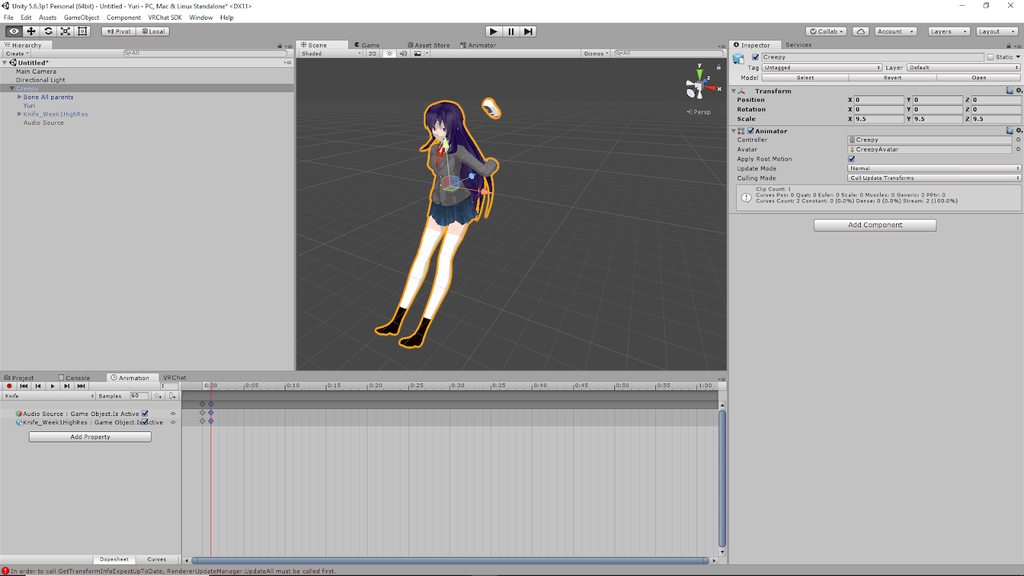 clear yew
rip
crystal vigil
If i upload a gif of what i did up to this point can you guys help me see what went wrong?
 zinc lichen
Okay, so does anyone know how to add vertical motion with an animation? I've been trying to get my avatar to do a back flip and pose as two other characters drop down behind him. I first thought that this could be done with "Root T" but discovered that it's the start position or something. So now he just floats in the air with no vertical movement at all.
slim sparrow
@zinc lichen is this on an emote?
If so, you need to tick "Bake root transform Y" on the animation
slim sparrow
Yeah
zinc lichen
Thanks
slim sparrow
Root T is actually vertical movement by the way
Inside the animation
Or rather, Root T is movement. The Y property is vertical movement
zinc lichen
I did wonder why it worked in unity but not vrchat
slim sparrow
That's simply because of those settings. Not sure why, but VRC ignores Root T unless you tick the bake option
Probably due to their IK system
zinc lichen
Again thank you
crystal vigil
so i tried using a duplicate and my model still buggs out like in the picture above. what am i doing wrong? it happens when i start to animate it.
slim sparrow
It's normal for your model to sink into the ground when animating
It'll look fine ingame
The problem is that the limbs are the wrong way around for some reason
Check the rigging tab and make sure it's properly T-posed
crystal vigil
https://imgur.com/a/wN4HwId Before i start animating it looks like this
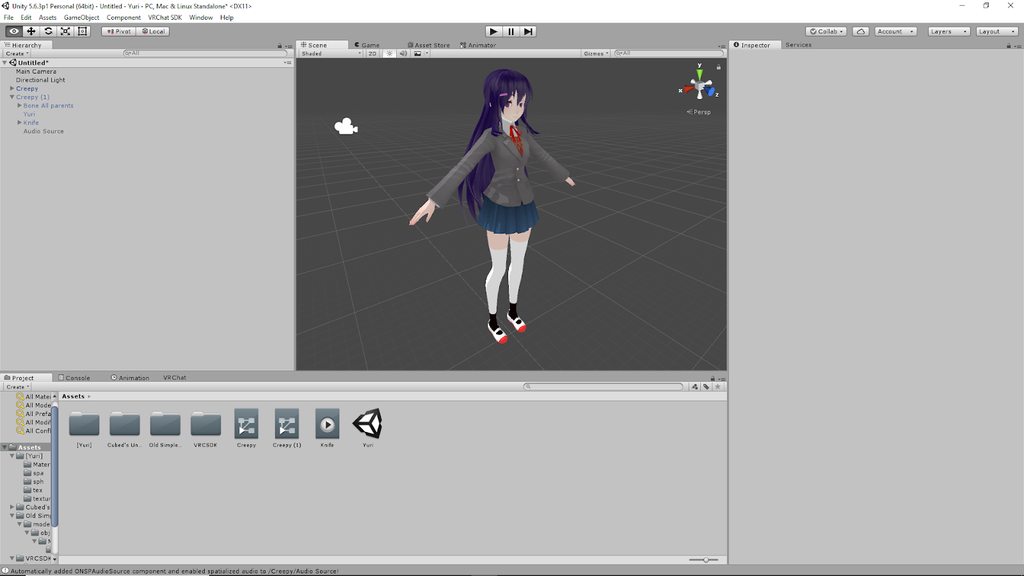


so when adding just the knife and not the sound, it looks fine, but when i add the sound it goes to hell
Nevermind. i fixed it by making them 2 seperate animations
 dark ether
@crystal vigil you activate both the knife and audio source in 0/1 seconds
crystal vigil
I ended up having to ditch the entire armature and give it a new one through mixamo
dark ether
Why
crystal vigil
it had so many extra bones i couldn't upload it and it made animation too difficult
 fallen flax
@crystal vigil have you tried to use Cats plug in instead of the old method?
clear yew
Am I supposed to disable my duplicate before I export my actual avatar?
no
I can't export without removing it?
It says that it has no rig.
 weary oak
got trouble with a invisible makeing animation it will let me become invisible but won't undo it when i cancel the hand gesture how can i fix that?
slim sparrow
Some models have that issue
I have no idea why it happens or how to fix it
Does your model have normal maps? @weary oak
weary oak
i think so? is it in the materials or ?
icy crow
how are you becoming invisible, just turning off your mesh?
weary oak
yeah i disable the body mesh i even made a animation which turns it on again but it doesn't work
icy crow
are you disabling the skinned mesh renderer component, or completely disabling your mesh/body object?
weary oak
completely
icy crow
hmm, that's the way I do it and it seems to work fine
are your animation keyframes set up properly?
weary oak
yes the keys are on frame 0 and frame 1
icy crow
I don't think the materials should have an effect on that
weary oak
there are 2 other things i added to the model : weapon and a crown but it shouldn't affect it because they got their own mesh
slim sparrow
I had similar issues
No idea why it did, but I stayed invisible for others
Looked fine to me
I ended up using stencils to hide myself instead
The only difference between that model and others, is that the problematic model had normal maps. That's the only thing I can think of
icy crow
would that matter though if you're completely disabling the body anyway?
slim sparrow
I dunno
It's a very specific bug that seems to be on VRC's end, and only affected that one model
The model in particular was an XPS model with normal maps
icy crow
what are the 2 best gestures to use for VR users to trigger a weapon and shoot animation?
weary oak
imo handgun and rock'n roll
these are the 2 which i don't use that often
and it won't get in the way if you're in your menu
icy crow
are the buttons roughly the same for both Vive and Oculus?
weary oak
vive has a (excuse me for that outburst) CANCER touchpad it depends where you shove the finger of the direction of the touchpad oculus has button combination for that