#animation
1 messages · Page 68 of 1
 pliant plank
 proud estuary
@slim sparrow oh it wasnt less of hell it juts meant instead of downloading blender id have to download a second version of unity
at the time i thought i was being smart and saving space
ended up downloading blender anyway
and unity was bigger than blender
pliant plank
But i did find their steam account by remembering what they developed prior
'ere we go
CaptainBigButt#9180 is the dev for it iirc, no major news that i could find atleast
 slim sparrow
Why would you have to download a second version of Unity???
That makes no sense at all
proud estuary
well
mmd4mecanim is a thing that turns mmd files into fbx files
the mmd guy or whoever didnt like seeing mmd models in vrchat
so he put malware in it that specifically targets the vrcsdk
pliant plank
Oh i see what you did...
proud estuary
so i used a diff version of unity to get the FBX, then put it in the one that vrchat needs
pliant plank
You got the models into .fbx, scraped all the malware scripts and dumped into a normal unity project
proud estuary
yes
pliant plank
Smart
 pliant plank
But do avoid talking about mmd4, sadly it's agains't the rules and could lead people into trying it out themselves, which would then bring in questions that, maybe even we can't answer
proud estuary
awie alright
pliant plank
Just don't want you getting into any trouble is all, everybody's quite lenient about things and sometimes, things slip by but better safe than sorry y'know?
proud estuary
ofcourse
 foggy loom
@proud estuary I once used it as well but I had the hips issues all the time. Also visemes and eye tracking are impossible with it
So I switched to blender and it was so much better :D
slim sparrow
Wow, putting malware into your stuff is a dickish move
Reminds me of those Minecraft mods which would explode your world if you used a launcher that the mod author didn't like.
A launcher.
proud estuary
yeah, its why we have to use blender now
atleast, others do, i still use unity but its very hellish for me
ive added too much to my model and now im too lazy to use blender to remake it
much less learn how to use it
pliant plank
I always wondered if people couldn't just use a previous version of it before the malware bs rolled out, i wasn't here at that time so i wouldn't really know, but i sounds kind of a logical thing to do, unless nobody had a previous version of it available of course
slim sparrow
Yeah, you could
proud estuary
i tried i couldnt find a previous version that didnt have the malware
proud estuary
also my avatar still doesnt blink T~T
 languid pier
Any idea on how to make a animation with three props, and that we can select which one im gonna play ? (Each of them have a different song) like a karaoke system but with my avatar ?
 chilly vapor
i odnt know the specifics of how to make it but it would be using animation states to do so
one gesture to cycle the state, the other gesture to select the current state it's on
or something like that
 plush apex
how do i change my models hair color in an animation
 lunar pasture
@plush apex Is your hair an object?
plush apex
no 😦
lunar pasture
Drill down through your hierarchy, Hips, Spine, Neck, Head....Hair?
did you find anything?
plush apex
yea
lunar pasture
have you got a shader on the hair?
plush apex
just the original one
lunar pasture
I think what you need to do is have the hair as a separate material, I'll be honest, not something I know well enough to be sure of, but if it was separate it would be a simple matter of changing the base colour of the shader in the animation time line, perhaps import your hair as a separate fbx, turn off the hair layer in your model and treat it like you would a prop.
youd have to fix the hair using a fixed joint attached to the head once you'd positioned it
 granite sapphire
is there any way
to get the default sitting animation ?
so i can fixe the god damn clipping in the chair myself
lmao
lunar pasture
I'm not sure about that, I'm trying to recall how I fixed mine
 cursive moon
@plush apex You can just change the material of the hair while the animation record button is enabled
No need to have it as a seperate mesh
plush apex
oh my god thank you i even asked my friend and he said id have to go into blender and make it
That sounds 10x easier
granite sapphire
@lunar pasture well i just need an idle sitting animation and just change the position in the animation
but i would need a base one
and usually the animations out there suck
 spark shard
anyone know of a way to move the transform position of your avatar during an animation without it destroying dynamic bones?
plush apex
how do i add gravity to push hair up?
spark shard
should be an option on dynamic bone scripts
use "force" on the y axis
If I understand what you're saying
 ashen sedge
A positive value (above zero) makes the bone go world-up, while a negative value makes the bone go world-down
spark shard
^
ashen sedge
Regardless of rotation
plush apex
and i should be able to activate it in an animation?
ashen sedge
I believe you can adjust the parameters via the unity animator, yeah
spark shard
Yeah just checked you can
plush apex
so use force not gravity?
ashen sedge
That's what I do atleast, works great
 ashen sedge
Try manually moving the hairbones and see they actually move the hair
plush apex
ahh i just think my hair bones are screwed from blender
like they made them SUPER big and i had to make them smaller so they arent 100% accurate
languid pier
i want a particles to stop at a certain point and stay alive, any idea how
plush apex
how do i make an aura effect around the model with out it being 2d and actually look decent?
plush apex
@slim sparrow just wraps the image around in a sphere?
slim sparrow
I dunno, it seems like there must be a better way to do auras
But billboards/stretched billboards should look good. Try the other rendering modes too
plush apex
its just a 2d background if i do billboard
lunar pasture
@cursive moon that was my initial thought, but if he's using an atlas the material is the same for the whole thing,
my avatar seems to be stuck in a frame from one of my animations, is there a simple way to reset the pose in unity?
 dense canyon
I have a turtle that I downloaded off of sketchfab that won’t animate in unity, even though in blender it animated fine. Does anyone know what’s going on?
 wise rover
the way vrchat is handling this animation makes no sense. I parented a particle effect to another particle effect. ideally, the source would actually follow the parent and transform to wherever the main effect is, right? but for some strange reason, even after testing that the particle systems all follow each other in the unity test, for some strange reason, the projectile system, which should be emitted from the static sun, shoots upwards and slightly diagonally to the right and back of me. not even close to where the parent system actually is. everything works well except for that one system that wants to be retarded even after I completely recreate that entire segment from scratch. What am I doing wrong?
lunar pasture
same
slim sparrow
@wise rover two questions
- Does your particle have collision?
- Is it a world-space particle?
wise rover
I have 3 systems in that one animation
the first system is a local particle with the velocity over time set to local as well.
the projectiles are set to world as they move in one direction
the final particle is what I use for sub emissions which is set to world and has no velocity over time. that one is parented to the projectile system.
the third one behaves just as it should
the projectile system seems to never be moveable by the objects it's parented to
slim sparrow
Yeah, world particles don't work correctly. There are multiple options
The first and most reliable option is fixed joints. https://www.youtube.com/watch?v=VmEED0E_e4w

Basically, you want the particle system outside of your armature. You use fixed joints to attach it to your hand (or wherever you need it).
The second option is probably better, but I can't speak for it as I haven't tried it, but
Update your SDK and put the new IK Follower component on your particle systems.
 young hearth
Does anyone know a tutorial for audio sources? I can hear the audio fine in Unity but other people can't hear it.
slim sparrow
If your particles have collision on them, they will actually collide with yourself. In that case, disable dynamic collisions or set up your collision layers probably
wise rover
would setting it to world fix the problem of not following the source
slim sparrow
Nope, probably not. World particles don't work correctly in VRC due to the IK
wise rover
I mean local
languid pier
when i try to make a props appear, it appears like 1 meter away. everything is set in my hands. When i move my wrist, the props move as it should but not in my hands.
wise rover
the main particle system had to be set to world on velocity over time because it somehow didn't follow the hand on local even though that is exactly what it was designed to do
 dense granite
Can some on help me with naimations. When i import it in unity. It doesnt do any anymation. It just stands there in the preview. While in blender, it workes just fine.
And yes, it is humanoid.
https://imgur.com/a/sCz9BF1
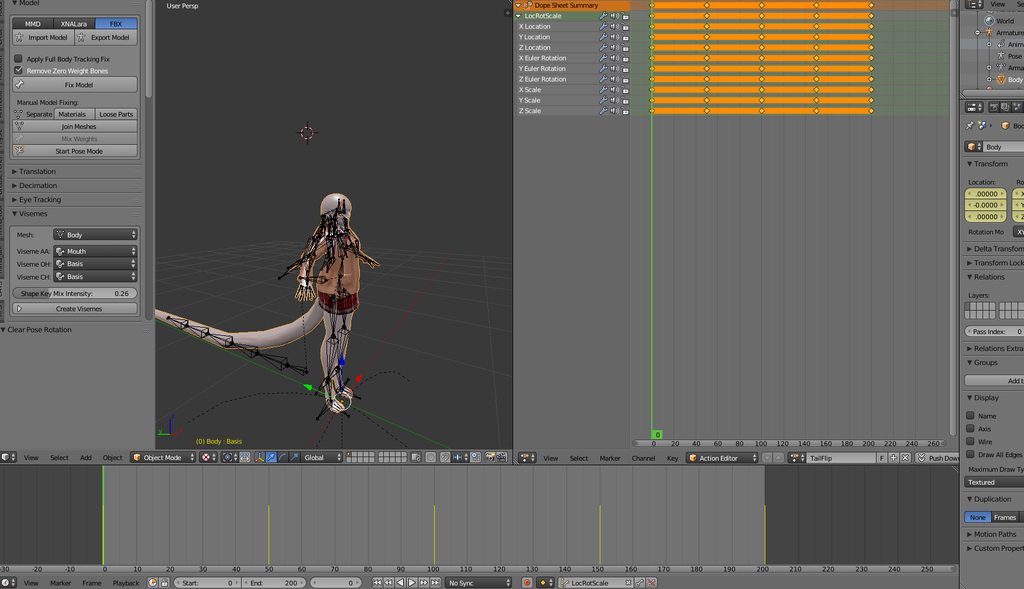
feel free to tagg me
lunar pasture
did you import the animations?
slim sparrow
Did you export with baked animation checked?
And yeah, it won't actually play any of its animations if you don't tell it to, lol.
young hearth
Can anyone help me with audio sources? I got it working in Unity but in game nobody can hear it.
dense granite
Yes, I had baked animation on
I clicked on play in unity, but. yea..... it didnt work
lunar pasture
so, now you have it in your model file, did you set up your rig then apply your animation?
dense granite
good to know, its an animation of a tail.
Not hands and such
I have that ye, i setup a rig and applyed it'
lunar pasture
then the next tab over....? the animation one?
dense granite
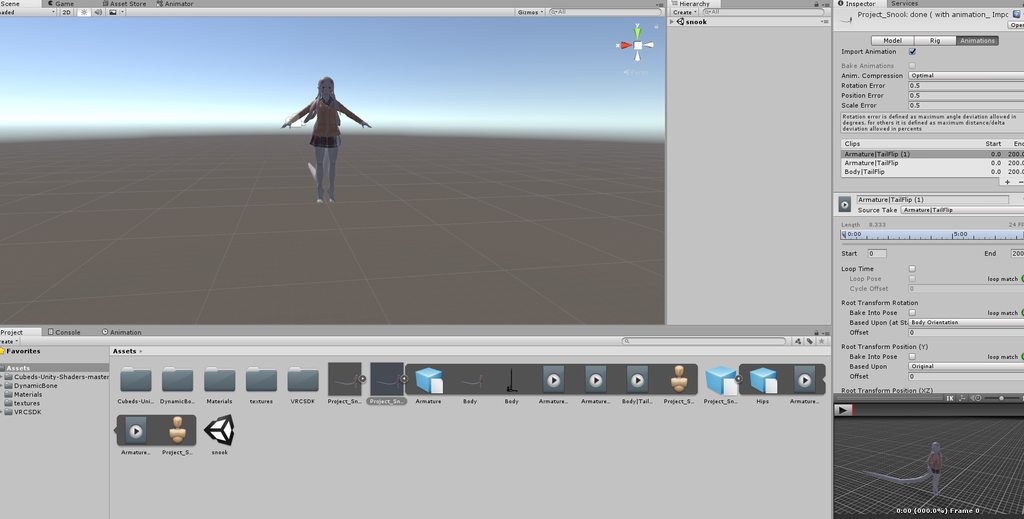 lunar pasture
so you scrolled to the bottom of the list on the right and clicked apply?
dense granite
Well. It is grayed out. So i cant apply
lunar pasture
my face is tired
dense granite
?
 fleet river
question a bit off topic but anyone know about fallout 4 tv animations youtube to a split wav and dds file for the tv station along with info for a mod called videos of the wastland
also helpfull with world making
 vocal zinc
so i added a "radio" that appears on the ground close to my avatar but is there a way that the radio doesn't move with me ?
 earnest trail
how to remove duration limit on emote Animations
vocal zinc
you can't
its server sided
what you can do is duplicate your model without vrcdescriptor
and add a controller with the animation
its kinda hard to explain and im working so
earnest trail
Do you have any video?
vocal zinc
let me search 5 sec
earnest trail
if I disable my avatar in the animation timeline, and enable an avatar that just dance would work?
 slim sparrow
Oh yeah, that's a good idea
To do that, the best way is to disable your own skinned mesh renderer
vocal zinc
i disable my body
slim sparrow
Just one note though: after duplicating your avatar, you should rename the Body mesh to something else
vocal zinc
@slim sparrow any idea for that ? so i added a "radio" that appears on the ground close to my avatar but is there a way that the radio doesn't move with me ?
slim sparrow
I don't know anything about that. I heard rigid bodies
But it'll be jittery
World particles are your best bet
But those can't have audio of course
I do know that you will want other players to test this. You will still see the radio move with you.
Others will see it laying still
earnest trail
i put this animation in my hand or my emotes?
 slim sparrow
Body->Is Active, or Body->Skinned Mesh Renderer->Is Active
earnest trail
this is correct F1 = Neutral
F2 = Fist
F3 = Handopen
F4 = Fingerpoint
F5 = Victory
F6 = Rock n Roll
F7 = Handgun
F8 = Thumbs up
?
slim sparrow
Yes
 languid lantern
I'm wondering, I know there's a shader that makes you invisible until someone walks up to you, but I'm wondering if there's one in reverse. Basically visible from afar and fade away when near
 silent gust
Hello animation channel!
I just finished making a rig for my ROBLOXian avatar.
May I ask how one would go about making custom animations for generic rigs?
earnest trail
@slim sparrow issi the stool does not work I click shift f4 and it goes in another animation
 olive yacht
I recently made a generic avatar attached to an invisible humanoid one, how do I separate the generic avatar's animations from the humanoid?
 frigid mesa
having an issue with an avatar material being partly transparent for some reason no matter what texture I put in anyone know what to do ?
 lusty dew
for some reason i can't change the position of my eye bones in my animation
i keep getting an error at the bottom that says "Keyframing for humanoid rig is not supported!"
nevermind
i had to unassign my eye bones
 clear yew
Hello. Does anyone know good "Arrow Rain" SFX? i made basicly 1min of all the SFX i need for my animation but i couldnt find Sounds that arrows would make when falling from the sky (A lot of them). I would take it from anime itself but the one i found had diffrent sounds mixed in alongside characters speaking :/
anyone got a invisible shader that ain't making fake-lag?
basically making what ever inside the obj, invis
u need shader that makes something behind it invisible or basicly 100% tansparent shader to make something hidden
behind invisible
tried occlusions, stencil mask, both making the fake lagg
 halcyon carbon
Hello everyone! I have a problem with my avatars, I have long been trying to use the hand gesture overrides but as far as I try I can't make it work in any way. Right now I'm trying with a model with a generic rig, but I can't make it work even with the humanoid (it play the default hand gesture). So my question is, are there any specific requirements for making hand gestures work? Ah, and I'm from desktop
slim sparrow
@halcyon carbon you're pressing SHIFT+F2 for fist, right?
And F3 for hand open, F4 for fingerpoint, etc
Left shift is left hand, right shift is right hand
halcyon carbon
Yup, none of them work, at least, with humanoid does the default animation for the hand, for generic it does nothing
slim sparrow
Basic checklist
You made an animation in Unity. You put this animation in an override controller (you duplicated the sample CustomOverridesEmpty controller in the sample assets). On your avatar, you put this override controller in the "Custom standing anims" slot.
And of course, you put this animation in the correct slot of the override controller, such as FIST for Shift+F2.
halcyon carbon
Yes, did that, I even tried making a override controller/animator and the animation is 1 frame long (I only enable objects visibility for now)
slim sparrow
So with 1 frame long, you mean one frame at 0:00, and one at 0:01?
halcyon carbon
Exactly
slim sparrow
Alright
 lilac cave
tried fn shift fnumber?
slim sparrow
Yeah, he can activate default gestures he says
Could you show us some snips of your VRC_Avatar Descriptor component, and the contents of the override controller that you assigned in custom standing anims?
 slim sparrow
Doesn't matter, there's protection on blueprints. If you're really concerned, you could detach blueprint and reupload
halcyon carbon
Yeah, I already did that, just to make sure 😛
slim sparrow
Hmm, this all seems fine
I haven't seen that particular override controller though
Is it because it's a generic rig?
The regular walking animations work as they should?
halcyon carbon
Yup, that's the one I made, but I copied exactly the part of the gestures from the prefab of VRChat and yes, all the other animation works perfectly
slim sparrow
That's odd. Maybe there's something wrong with the animation itself, or gestures really don't work on Generic rigs (they should though)
halcyon carbon
I'll try again with the humanoid one, just to make sure, but the last time I tried (with the override of VRChatSDK) it didn't work
Well, the animation is just a change of visibility of a cube in front of my avatar
ashen sedge
Gestures are part of VRchats animation set, which the SDK says doesn't play with generic avatars.
halcyon carbon
But it doesn't work with humanoid either, at least, for me lol
I tried now, same result as before
ashen sedge
Yesterday I did upload an avatar with my own gestures and they worked fine to me
halcyon carbon
But that's the point, I see that everyone works but apparently for me it doesn't work, maybe it's because often others use MMD models and I create them from 0, I'm probably doing something wrong in the rig at this point lol
Well, thank you both anyway for the help! At least now I can exclude that I'm doing something wrong with Unity 😛
halcyon carbon
Yup, it's inside the avatar :P
 stray sinew
Is there a way to fix the hip issue with mmd dance animations? Like when the avatar moves around everything turns but the hips :\
 gleaming gyro
Why is it when I use an animation on a model for expressions, it's starts to come apart? (Polys start going everywhere)
clear yew
Did you trigger CATS copy-protection shapekey somehow?
clear yew
Nvm then. But that is strange, it shouldn't happen. It sounds like your shapekeys are bugged for some reason
 agile kayak
If I were to put a custom sitting animation in override, would it work without glitching out?
Not doing it right now, but for future reference
slim sparrow
Yes
You'll need a separate override controller for the "Custom Seated Anims" slot, of course. You can override the IDLE slot
@agile kayak
granite sapphire
Mixamo seem to fk up my skeletons armature ; any other compatible website ? i just need a female sitting animation.
Nvm i'm just autistic
granite sapphire
The idle sitting animation logic is cancerous
Changing the Y to 1 make the body go down ; changing to -1 make it go up; changing to -0,5 does not change anything ; changing to 1 make the char get in the ground lmfao ; I won't even talk about the fact that i apparently can't fixe the X Y Z of the legs itself without breaking it oof
vocal zinc
so i added a "radio" that appears on the ground close to my avatar but is there a way that the radio doesn't move with me ?
 violet kraken
somebody know how to achieve a drag effect with a joint and rigidbody ?
and my world object worked before but know it spawns waay off me
vocal zinc
so i have to create 2 empty objects then add the radio to it ?
lunar pasture
well the game objects need to have something in them by the time they're done, otherwise what's the point? lol
clear yew
@vocal zinc fuck sorry i forgot to answer
give me a sec
let's say i want to spawn a simple cube 1 meter in front of me
I put an empty game object 1 meter in front of me
create a 2nd game object that i parent to the first one
and then i parent whatever i want to be locked into the world to the 2nd game object
so you should have something like this
https://imgur.com/Xzin2yI
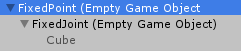 clear yew
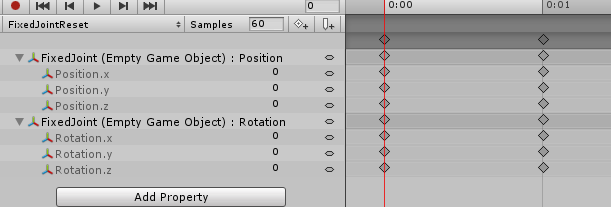
now, you need to put an looped animation on the "fixedPoint", the animation will basically reset the "FixedJoint" to rotation and position 0,0,0 constantly
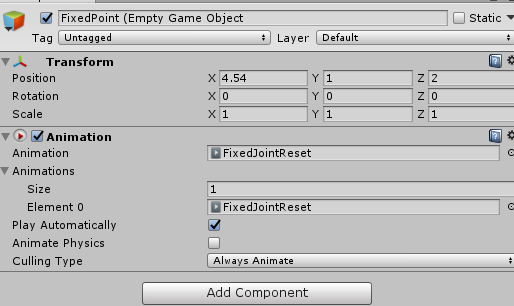
like so : https://imgur.com/7Uuma2g
 slim sparrow
Is that why spawned objects are so jittery like that?
clear yew
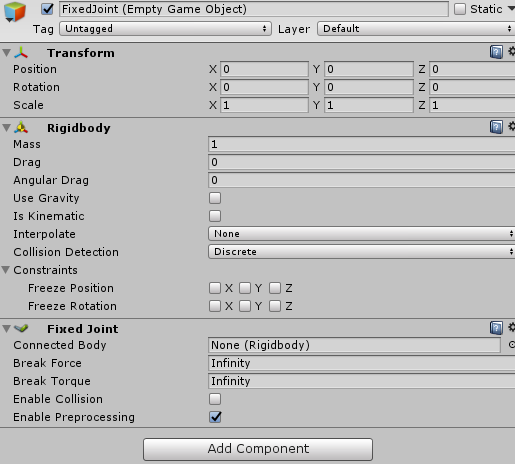
then on the 2nd game object you add a fixed joint like this :
https://imgur.com/f5gWc0H
@slim sparrow no, it's because vrchat suck ass when stuff is related to world
slim sparrow
Lol
clear yew
now
those 2 game object needs to be active at all time
you just need to use a hand gesture to spawn the cube
and when you spawn that object, you need to disable the animation component, so it doesnt reset the object position while it's active
@slim sparrow apparently using a shit ton of drag can fix the jittery bullshit
never tried it myself tho
slim sparrow
I need to test this out right now so I don't forget, lol.
Have been looking for a guide like this for a long time
lunar pasture
I saw a cool mech avatar yesterday, it had a seat on it so another user could hop on, very imaginative, just saying btw, I don't need instructions.
slim sparrow
Yeah, I've been experimenting with seats a lot. I got custom dance animations on one of mine
And I got a broken version that I use to T-pose myself (and friends) with
clear yew
@slim sparrow also i did this, if you wanna test it for you:
https://imgur.com/a/bUpUHpI
it's an album btw
lunar pasture
@clear yew that reminds me, I've somehow let my avatar get stuck in an animation frame in unity, do you know how to get it back to a standard pose?
clear yew
exactly the album i posted just above i guess ?
i don't create duplicates anymore since i can use that method
saves a lot of time
lunar pasture
lol no wonder that reminded me
clear yew
also that T-Pose is a bit different but i didnt notice any problem with it
i was just wondering if it's a good explanation
i tried to make it simple for people
slim sparrow
Yeah, that sounds easy enough
slim sparrow
It's pretty smart, but it probably won't work the same for every model
Bigger models would have their feet in the ground, I'd imagine
clear yew
apparently not
slim sparrow
Oh, that's interesting
lunar pasture
I'd love to do iron man style hand boosters, reckon that's possible?
clear yew
you'll probably have to mess around with animation to get a good effect
and use colliders to make you fly
slim sparrow
I have legitimately never gotten colliders to work properly in VR
It's always glitchy as hell. Works really well on desktop though.
Now that stations exist, you might actually be able to attach a station to your hand, then use it to fly yourself around very carefully, lmao.
clear yew
it's weird to fly with them
i managed to make myself run really fucking fast tho
like REALLY fast
slim sparrow
Yeah, I can imagine that running would work well
clear yew
(also shader forge is now free)
Shader Forge v1.38
Note: Shader Forge is no longer actively being developed
Links: Website | Forum thread | Nodes | FAQ
简体字 | 正體字
Note: Unity 4 support dropped after v1.06
Shader Forge is a node-based shad...
lunar pasture
awesome, I have a tpose again 😄 , now maybe I can get my laser rainbow fingers working properly 😄
slim sparrow
By the way, about that world spawning stuff. How does that work in practice? You used a cube for your example. Do you have the cube disabled by default, then activate it on a gesture?
clear yew
yeah
the 2 game objects
are always active
and i just use a hand gesture
to spawn the cube and disable the animation component
lunar pasture
that's about it, just use the checkbox in the inspector and have it on for frame 1 and off for frame 0
slim sparrow
Ohh, so you actually have to mark it as legacy
clear yew
needs to be set to legacy
slim sparrow
And then put it on an Animation component
Alright, thanks
I get how it works
It just makes the objects always follow you until you press a gesture
clear yew
yep
if you remove the animation reset
for example, i spawn the cube 1 meter in front of me, work great, first time spawning and all
Then i move backward 1 meter and turn to my right about 90° and despawn the object
Now, the next time i spawn the cube, it will not be 1 meter in front of me but 2 meters to my left
violet kraken
@clear yew i tried your method when i press it it spawns but then disappears ?
violet kraken
i just enable my object and disable the animation component ?
clear yew
yep
 mighty trellis
Anybody can help me?, i got the problem that i have a object (car) that i want to spawn with a hand gesture, and i want i to spawn next to me (or on me) and the stay in that place even when i move away. i have gotten as far as making a gameobject outside the amature that i have the car in and the activate the car with a animation, but that spawns the car, and i can move around and the car stays the same place, but the car spawns at the maps 0.0.0 ( where i put the car in unity ) So anybody knows how to make it spawn at my avatars location?
clear yew
what happen if you respawn it again ?
@mighty trellis read my messages above, i explain how to do that
clear yew
show me your animation and how you setup your stuff
clear yew
also, the reset animation on the game object, did you set it to legacy?
violet kraken
yeah ofc
clear yew
so all good then
violet kraken
yeas
@clear yew ok for some reason in avatar testing it works but in never have i ever it just disappears
clear yew
i don't know my dude
i literally only have what i posted above
nothing else
this is the animation that i use to spawn my cube
https://imgur.com/WtgCkAF
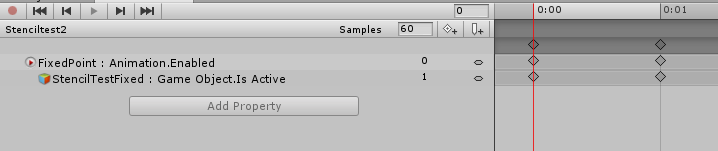
both frames are the same
languid pier
i just cant find the legacy things you guys talk
mighty trellis
hmm.. i tried doing it exactly how you descibed, but i still spawns at the same location 0.0.0 on the map
clear yew
@languid pier lol you suck lmao
https://imgur.com/38hYGr7
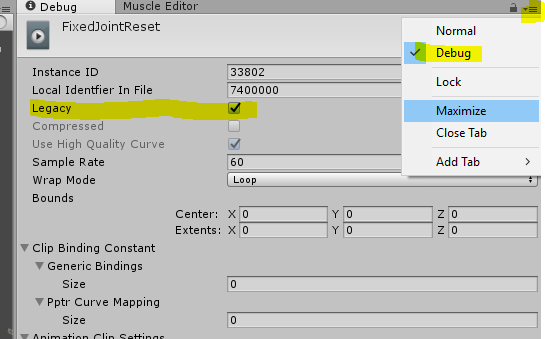
select the animation file
and when you set to legacy
go back to "normal"
and set it to loop
clear yew
nah man
the first 2 minutes when you open unity, you need to be a master of it
no excuses

 frosty root
Hey. Is there any specific requirement for walking, running and idle animations?
I tried putting mine into the override and it just makes the character slide across the floor, stuck on the first frame of the animation.
I couldn't find any documentation regarding this. All Youtube tutorials just focus on custom gestures.
 crimson flume
im actually wondering the same, i had a walk cycle made to include the extra legs my character has and they dont trigger the animation
the animation originally slid across the floor so i tried to set the hips up to normal height and that just made any dynamic bone go nuts
clear yew
U need to map all bones into animation as far as im aware
frosty root
I've been trying to port a model from half-life 2 today, metrocop to be exact and while it all seemed fine in unity, in game the walking animation just makes the character slide
clear yew
Like literally. All ur bones
crimson flume
all the bones or the mapped ones
 sick musk
All
crimson flume
how does the normal walk animation deal with extra bones then
sick musk
Umm I don’t think you should have extra unless they’re like parts that are on the character like a gun or something
crimson flume
hair and stuff
 drifting gust
I dont know if this is the correct place to ask but is FinalIK supported on custom non-humanoid avatars?
I have looked everywhere and cant find anything on it...
sick musk
Normally they shouldn’t be messed with because it messes with the model mesh entirely
So yea in this case map them
frosty root
Hmm, well, I've got another question then. How would I go about mapping them in read-only animations that get imported with the model?
frosty root
Yeah, I was gonna say
frosty root
Dang it
sick musk
Normally a generic model would have the animations in them
sick musk
Now getting them to play in vrchat is not that hard
frosty root
Hmm, nevermind, they might not be
crimson flume
but getting them to play as a walk cycle is different story?
sick musk
And don’t try to copy the entire animation you will crash unity
frosty root
I was thinking of it wrong
But either way, I'm pretty sure all bones were mapped in the animation from the beginning
frosty root
Yes.
crimson flume
ctrl D
sick musk
Ok I played with this yesterday so go grab an animation controller
And Ctrl D would duplicate the entire file so don’t do that
Wouldn’t duplicate the animation
frosty root
So you mean drag the animation into the controller?
sick musk
No
Open the animator not the animation window
Once that’s open select your animation controller and you should see 2 rectangles
frosty root
Well, I can't do it right now, so just go on.
sick musk
Ok once it’s open right click in the animator and hover over the first text then click the 3rd slot in it
A rectangle called blend tree should appear
In its properties drag the animation that’s in the file into the blend tree
frosty root
Hmm, so what would that do?
sick musk

Should look like this
What that does is when you have your model set to generic it will auto play the animation
Because it doesn’t work with humanoid for whatever reason
Once that’s done click on your model in the hierarchy and drag the controller to the box it goes to
Press play in unity and (if I didn’t miss anything) it should play the animation
frosty root
Hmm, I see. So that's only a single animation, meaning I have to do it for all of them?
sick musk
You would have to make duplicate models for the animation you want
frosty root
Well, considering I'm using a generic rig, I'd have to do it for all walking, running and idle animations
sick musk
Err
That’s the problem
It would play the moment you load the model
It’s kinda how those things work
sick musk
Yep
That can’t be solved under normal circumstances
Anything beyond that is beyond my understanding
frosty root
What I don't get is why it doesn't play when I use the override
sick musk
Because override works with ones that aren’t read only
And it was made in unity and not some other program
That’s how it recognizes it
 half shell
not sure if this is the right channel but i have an avatar that works 100% perfectly fine except gestures do not work, nor does vrchat's default animations, fingers are all mapped, set as humanoid, works perfectly fine in unity
anyone got ideas?
sick musk
What’s the model?
crimson flume
does it give errors when uploading
half shell
0 errors when uploading, it's a model i grabbed from SFM
half shell
well, except the usual polycount and complaining about the hips degree
sick musk
Gmod or sfm models tend to kinda be tricky with unity
crimson flume
so i had a similar issue and i could not find the issue, i ended up copying everything over to a new avatar and it worked
sick musk
Ah
half shell
could adding a custom animation controller to it be messing it up?
i only used it for the preview image ;p
 sick musk
If your triggering the animations then maybe
half shell
animations do not trigger
crimson flume
after you do build control panel stuff it goes into play mode
half shell
gestures do not trigger
if i apply a sound to a gesture trigger as an override then use it, nothing happens
gestures are just outright not functioning
when i move he just kinda stands there tpose too ;D
other than that, arm and leg tracking works 100%
sick musk
Well it’s humanoid so that’s off the list
half shell
 frosty root
Hmm, well, I may not be getting something, however, the idle animation worked when stuck into the override. And sorry for bringing this topic back, but I want to make sure it's not possible before stopping working with it.
The problem only comes with the walking and running animations.

 hexed heath
I think it's the animation controller you added, I believe I had a problem with that before
half shell
maybe related but when it goes into play mode from the upload it starts paused
trying without a controller anyway
 wild cedar
Sup bois n gals, it's yo boi Barsverker here.
I was wondering how people actually make animated items to stay still during the animation. And not move with your avatar.
lunar pasture
you mean like something you can put down and let it do it's thing?
wild cedar
Yea, literally anything. Just make it stay put
I only done animations inside of my own body, but idk how people spawn world items or whatever it is that makes it stay put
@lunar pasture
lunar pasture
ok, it was discussed in a good amount of detail about 5 hours ago in here. best to recap on that and see how you get on
half shell
still no animations
@wild cedar parent them to a game object with a rigidbody (both tickboxes turned off) and a fixed joint (no extra settings on the fixed joint)
congrats you now have an object that stays put and can be animated
 midnight garden
hey dose any one know about partical FX
 clear flicker
https://discord gg/TtUK6xx go there i'm making avatar/animation for free
midnight garden
i just need to know how particals work lol
 little walrus
When I add a custom animation overrides to my avatar my lip sync in game doesn't work in game anymore,and when I take the animation off it works again. is there anything I could do to fix it?
 spice eagle
when creating an animation my avatar sinks to the floor, i dont find useful help of how to fix this
spice eagle
ye
midnight garden
it will do that just press play and go to seen it should be normal
spice eagle
buuut... it does fix it? i mean for creating animations without the avatar sinking
midnight garden
it should like i sead just press the play on the top of unity and it should look normal
hexed heath
in order to create animations on your avatar without it destroying the rig you need to duplicate your character first and use the duplicate
hexed heath
after you make the animation, then you throw the animation on the override or whatever on the original avatar
spice eagle
I was testing it right now
doesnt work
the animation is still on always active
or kind of
its a hand gesture tho
 hollow silo
how do I add sound to a costum emote
I dragged the emote into costumoverride
but how to add a song with it?
spice eagle
Maybe you add a gameobject disabled with an audio source component thats checked in play on awake
then you in the animations activate the gameobject
lunar pasture
@spice eagle the way i fudge it it to copy the Root T animator values from your IDLE animation into it.
 peak gyro
Does anyone know how to create a emote that can be toggled on and off to be used a for AKF?
lunar pasture
for some reason all my gestures seem to be toggles now, (since the last update) I'm not sure I like it
slim sparrow
Vive movement option in settings
 torn pawn
change vive controls to advanced
lunar pasture
I dont have a vive controller
torn pawn
which has bugged trigger, i dont know if they have fixed it
slim sparrow
Nobody even needs the option anymore
lunar pasture
it's WMR
slim sparrow
Not sure if you even can enable it, but you should try
I read something a few minutes ago about that option also affecting WMR
lunar pasture
all it does it give me an overlay of a vive controller, which is annoying
 limpid mica
What are the correct settings for an audio thing?
 turbid sorrel
hey guys
question
Why is it when I create an animation longer than 2 frames...like say....a 2 second long animation, in vrchat, after it finishes, it doesnt reset and i notice if i hold an emote with my hands, my fingers slowly reset and then I can use the animation again
why is that?
torn pawn
u dont make 2 second gesture animations
if u want something to animate for longer than couple frames, u need to do it through enabling an object that has an animator or legacy animation running
turbid sorrel
yeah but I have something where I have Yamato from KanColle. Her cannons swivel, shoot and then go back down
i cant do that in 2 frames lol
you wouldnt see it
torn pawn
then u do it through animator or legacy animation
turbid sorrel
you mean ctrl+6 window right?
like assigning an animation object
because I do that already
torn pawn
no
limpid mica
Which gesture is what? What's the diference between fingerpoint, handgun and fist?
turbid sorrel
Oh I see the animator object
torn pawn
you can enable an object that has an animation on it, and it can be whatever length
turbid sorrel
OHHHH
torn pawn
either animation component with legacy animation or an animator that has on entry animation
turbid sorrel
So I don't edit things directly in the animator for things like that
I put it on the animator like a middleman
torn pawn
i think u need to do it with enabling animation component through gesture
turbid sorrel
ill try that out thank you~!
torn pawn
animator can be iffy
turbid sorrel
uploasding now to try out
limpid mica
I'm trying to do an audio thing, is it correct to make it play on awake and then just untick the box next to the name? Then in the animation just make that thing active?
 white herald
yes
limpid mica
Righto. Thanks
 long jacinth
I see like animations on avatars that are /always/ playing, whether idle or running around or anything else (sitting/grabbing/any emote or hand gesture/etc) such as like a tail moving around.
Would those be put into an animation that would be put as an override for the idle animation? Or would that only work while idle and not like running or other stuff?
lusty dew
http://prntscr.com/jc7g97
i have a plane as a child of the head bone so that it would follow the mouth where it is, and i have an animation to unhide it, but when i take it out in-game it doesn't show up.
i have a similar animation with planes but they're just children of the base object and they show up just fine when i use the animation.
why does this happen?
don't judge me it's for a good cause i swear


i've uploaded this so many times trying to get it to work and it just won't
if i put it as a child of the base object it kind of goes off freely when i start moving and goes in the way of my viewpoint
i just wanted it to stay on the head.
lusty dew
if anyone can help, maybe ping me or something
 arctic quiver
Don't trust the game, trust other people
lusty dew
@granite sapphire @arctic quiver you two indeed were right, don't know why that's the only one i couldn't see
 true scroll
mesh named body?
granite sapphire
^
 gleaming gyro
I've been trying to fix shape keys in blender. for some reason whenever I put the shape keys where they're supposed to go they won't work. (For example Shape keys: Wink, (Blend: Vertex group: Head, Shape: Wink)) however if I put another shape in it does work. (It's very scuffed like this, but it does something) (For example Shape keys: Wink, (Blend: Vertex group: Head, Shape: Wink Right)) I am adjusting the range as well.
languid lantern
So I just added my very first weapon/item animation, only to realize that I forgot to add the avatar descriptor before duplicating the model. Is that going to be a problem or will I need to go back and add it?
clear yew
I'm 95% sure it doesn't matter
long jacinth
avatardescriptor only matters for uploading
limpid mica
@long jacinth In my experience, for things like avatar blinks you just add it as an animation to the model
Then it always plays
long jacinth
thanks!
 sharp helm
@prisma pendant another animator/animation component is having write defaults and applying modifications on the said properties, possibly
limpid mica
What animation override should I use for when something like the grip button is pulled in? If I use point, then make a fist, it goes off of that. Should I just apply the same animation to a lot of the hand movements?
Also how do I activate a sound? I can't get it to play
torn pawn
@lusty dew if u want to see it yourself, have tghe mesh renderer disabled instead of the quad (also use quad instead of a plane)
stuff on your head gets culled, so u wont see anything unless using mesh renderer approach
 lament hearth
any idea how to add 3D-Eye Tracking?
pliant plank
I think if the eyebones are directly in the center of the eyeball they'll rotate around that axis, however logical as that may sound i don't normally use eyetracking so i may be wrong
 fervent bone
Boo! Was wondering if it's possible to use an emote to toggle an item to be visible/invisible on my avatar, while also being able to move normally? O:
Am basically wondering if there's a way to do things with emotes without having them always freeze you? O:
 celest pewter
 prisma pendant
thanks @sharp helm
torn pawn
no that is not for world, it's for avatars
fervent bone
Sooo, any time I try to create my own hand animation in blender, it keeps resetting all the values I enter back to the default crouch :<
fervent bone
https://gyazo.com/d36936a39127ab2777aeb23f3dc7a6cc <- the problem I'm having :<
clear yew
you using humanoid rig?
 carmine pilot
anyone knows why my animations keep looping instead of playing once as long as i hold a gesture?
clear yew
uncheck ''loop time'' box of the animation
frosty root
Will overrides on multiple objects work?
torn pawn
^ more detail @frosty root
frosty root
Okay, well, I am trying to attach an object that will have its own animations to my avatar, is it possible to do that with the override, or do I have to make my own custom controller?
frosty root
Alright, thanks.
 sweet zealot
why arent viseme mouths working anymore for me? they are properly named and everything. They USED to work... 2 sdk versions ago.
torn pawn
muted mic? or wrong mic?
torn pawn
didn't assign visemes in the first place?
sweet zealot
i already did
heck i even went BACK to my old projects to upload a copy and THAT one doesnt work anymore
did they change it at all? like the ones without movement must be marked as none? Or no repeated same mouth shape? or must have a certain amount of them to work?
seriously, no one else has been able to help and im losing my mind cause visime is the only option i have for this particular avatar
i assigned the visemes, i assigned the correct mesh, i even tried the jaw bone blend, NOTHING works
and im usung a model where i can see its face, so its not "a trick of the mirror"
sick musk
Did you merge the face and mouth
sweet zealot
thats how it is for all my other avatars before this and they work just fine
the model is very tiny, if i remove the face then the head will clip out cause its so small
i was in the middle of a project and when i decided that it worked just fine, i logged out. when i logged back in, since then they stopped working.
foggy loom
@sick musk No, always join your meshes!
foggy loom
But why
violet kraken
i made a gesture animation that animates muscles but they dont move ingame its just the normal running animation
sweet zealot
one solid peice has always worked before
but i think i left one blendshape "on" so im going back to test it
nope that did nothing
i have expressions linked to gestures, they are working. i just cant get the viseme to respond to the mic. and my mic is working, people can hear me.
i have no idea what else to do and im losing my mind
limpid mica
Is your viseme a gradual thing?
Or is it like some eye blinks where it instantly swaps
sweet zealot
its just one, "open_mouth"
limpid mica
After passing a certain value
sweet zealot
my expressions are eye expressions, never suprassing 80%
the lipsynch is just not working, or responding at all.
and its definatly not the mirror, cause the model is small enough that i can see its face myself
limpid mica
Have you asked if others can see your mouth moving?
Because it might not jsut be the mirror, but your entire client
sweet zealot
they said they cant see it move
limpid mica
O
sweet zealot
im using the technique ive always used that has worked before, it just stopped working one day and hasnt worked since then.
limpid mica
Did you fill out all of the shapes? Even with duplicates?
limpid mica
Yeah in mine I filled it
So like ff, th, sh, tc were all the same
It didn't work for me otherwise
 devout cave
Hey i ve got a question
I made an idle and walking animation for my humanoid model
the idle seems to work but not the walking animation
I tried replacing the idle with walking animation to see if it works and it does
but when i put idle to idle and walking to walking overrides , only the idle works
sweet zealot
@limpid mica bless your soul it works! You just saved me 4 days of work!
its extremely subtle though so im gonna have to make the mouth comically over exhaggerated just to look like tis moving a good amount
limpid mica
Nice! Yeah I was having the ssme problem with one of mine
How do you edit them?
I have one that pushes s mouth texture forward to show it, but the problem is it only becomes visible at 92%. How can I make it so that 92% is maybe 30%, but then also make it so it doesn't go forward any more after that?
@sweet zealot
sweet zealot
honestly im just pushign buttons and hoping things work XD
ive never had to do this before, so its new to me
currently her mouth is large enough to eat someone's head, hoping that makes it normal sized when its put in the visemes
limpid mica
Ah, yeah new to me too
 autumn yew
Question! When I use a 2 frame animation to enables a game object, does that object stay active until I use that same animation again to disable it?
sweet zealot
it stays active as long as the gesture si there, yes
autumn yew
@sweet zealot I mean via Emote instead of hand gestures.
sweet zealot
ah, then no, sadly
sharp helm
@foggy loom earlier you said: "@sick musk No, always join your meshes!" You don't have to at all. You can use Unity shader instancing to get the same performance while having multiple meshes. Granted it requires you to do proper atlassing and use a single shader. But eh, we're talking about performance so I think it was relevant to share. Though as a rule of thumb, always merge your meshes and use bones to 'separate' pieces or parts.
autumn yew
@sweet zealot I'm fairly sure it's possible since I seen it toggling game objects on youtube before. watch?v=7e7kHiWB0lc @ 5:00
But just do not know if it was done 'legally' or if custom scripts would be required
sharp helm
@autumn yew you might want to play with disabling a object. When its disabled, all properties aside enable become detached. Personally I'd use two animation components with play automatically. Then during gesture, you disable an object. Then upon release, one of the two clips will play automatically. In those clips, you disable the local play automatically and enable the other.
I can guarantee using some clever glitches its possible to toggle items without applying the animatin glitch of the VRC_Toggle unity package floating around here
I achieved it by resetting object states by disabling them (and playing with auto playing animation components)
in fact using an animator got me the worst and most unreliable results
the reason the other unity package works, is because the state of an animator is not reset despite it being disabled (the animator, not game object)
so you can use another component to change its properties
but you can't nest any toggling with that, so you're bound to a single item
 orchid kestrel
Does VRC support non-humanoid animations? I have a spider I'm bringing in from Unity Asset Store, and it seems to be rigged and animated properly in preview. Rigging is set to Legacy and Generation is set to Store in Root. It has default walking animations with Import Animation checked, and the previews all work. I've tried Avatar Descriptor in Male, Female and None but doesn't seem to be a descriptor issue. The error from the SDK is Avatar does not contain an animation, and will not animate in VRC. There are no obvious import messages. Or warns/stops in Console. Not sure what else to check...
sharp helm
You have to set it to humanoid rig, and create custom animations to match the non-humanoid shape
personally I'd recommend using an animation clip to override the vr controllers' effect if you use actual vr gear
if you'd upload your avatar, it would be noted during upload that non-humanoid rigging won't use the vrc controllers
autumn yew
My goodness... I put 2 keyframe (0.00 and 0.01) Game Object.IsActive and my character would be stuck in place for like a whole minute or two... and the object keeps enabling and disabling... I'm pretty sure I didn't set it on loop...
orchid kestrel
no vr gear let, just playing around with asset store models. thanks for the tips I'll fool around with the custom rigging
autumn yew
Only line is game object.isactive
just enabling 1 object xD
Going to reupload and try again... that same animation works fine on hand gestures though. But I just trying to get it to work on Emote.
 novel flower
Dumb question, but im trying to make a gun fire automatically rapidly by holding down the gesture. i added the commands to the animation at 0:00 & 0:01 and put it on loop, but it will only fire the gun once but still hold the gun and face animation. I tried duplicating the animations ever 0:20 but it fires sporadically and then holds the animation too lng after i let go even though its only 3s in length...
lunar pasture
you need to get your gesture to trigger a game object that has an animation on it
novel flower
I am able to make the gun fire. Everything works as intended. Just can't get it to fire rapidly as long as I hold trigger gesture down
It fires the muzzle flash and bang once then just holds the gun and facial expression. Tried looping it. didn't work then tried repeating the activation in the animation every 0.2s but it fires weirdly and then does the thing where the fingers slowly move to a position for a while even when gesture is let go.
clear yew
did you actually animate an "empty game object" to fire the gun ?
novel flower
Meaning? I animated it where it fires correcly. But it only will do it once every time I click the trigger. Cant figure out how to make it so holding the trigger keeps the gun firing
So i can get it to work like a semi-auto but cant figure out how to make it go full-auto lol
lunar pasture
ok, so what you could do is to set up an animator with some conditions, 1 the muzzle flash and first shot, 2 a looping animation where the bullets are spraying - the animator only moves to this if the trigger is held, then 3, a condition where you return to the gun in idle state, maybe even throw a cute little holster animation into it.
novel flower
I have to make an animator component? You can't just add in an animation to fire the gun but do it as long as I hold trigger down?
lunar pasture
yeah, I'm not your mom.
novel flower
Not sure why either thing I did didnt work. Tried animation and made it loop, but wouldnt loop the firing animation. and then made it activate the animation every 0.2s then turn it off after completing it and then turning it on again. It almost worked but then had that weird laggy hand movement and still held gun after i let go. Unity can be weird lol
clear yew
no it's not
you just did it wrong
you can't* have more than frame 0.00 and 0.01 for your avatar directly
that's why you use empty game ojbect for longer animations
lunar pasture
can't*?
novel flower
hmm need to hopefully find a tutorial for that. Because I've animated some longer animations when I spawn an avatar fine, but this is giving issues. So will have to see how empty object to work with gun and firing 😛
clear yew
exactly the same as normal animation
you create an empty game object
parented to nothing
put the gun
particles
whatever you want to it
animate the empty game object, you can use more than frame 0.00 and 0.01
then you put the animation file inside the empty game object, set it to legacy and looping
put it on your model, disable it and just activate it with a hand gesture and it will play the animation automatically
novel flower
Hmm, if i do that how would I animate my avatars face and hand hold pose if im just animating the gun and then attaching that to a gesture?
clear yew
by animating the face and hands like every normal animation ?
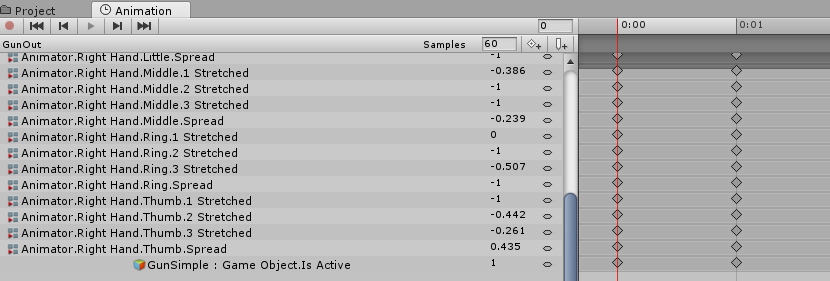
i just animate my hands like that
novel flower
Ah, was confused. Thought I was animating the gun and putting it into the empty object and then somehow attaching that to a hand gesture. But if i did that then I wouldnt be animating the face
clear yew
"GunSimple" is a empty game object that i turn ON
and the animation plays automatically
novel flower
ohhh ok
clear yew
this is my empty game object with the firing animation
https://imgur.com/2IgPRZm
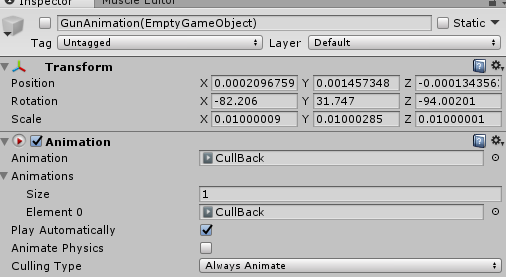 novel flower
So for the empty object do I do the normal animation file or do I create and animator on the side panel
clear yew
very important to set it to legacy :
https://imgur.com/CBlgeYv
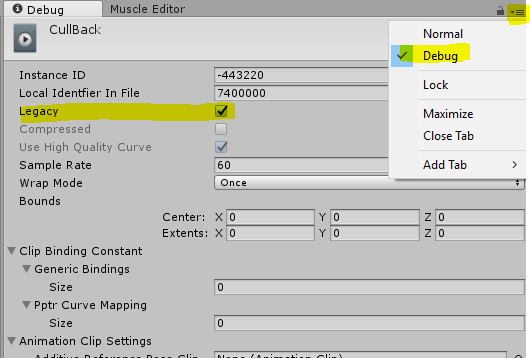 novel flower
ah ok so i do the animation component on the side panel for gun cool
clear yew
then you can back to normal mode and set it to whatever you want
https://imgur.com/mLD0zUU
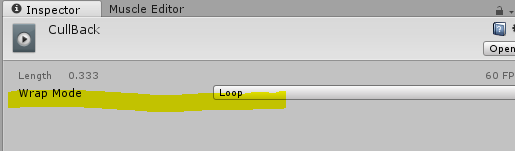
looping in your case i guess
novel flower
So, if i wanted a gun to fire automatic bursts would I activate the muzzle flash/bang ever few 0.2s or I only need to do the 0:00 & 0:01 in the empty object. but as long as I do legacy/loop it will fire as long as i hold gesture?
lunar pasture
So no holster animation? 😦 sad times.
novel flower
Unfortunately the gun did not come with holster and kinda silly to do holster animation but just have it float on hip
clear yew
that depend
if you need to use more than frame 0.00 and 0.01 then you do it on the game object
but it's kinda hard for me to understand why you are doing this like that
and not using particle system
novel flower
Usually if it had some holster I just mimic the action. Have a holstered version attached and a hidden gun in hand then trigger one to despawn the gun in holster while spawning one in hand
@clear yew I used a particle system for the muzzle flash...=P
lunar pasture
you can make a particle system pulse out a stream of bullets, you'd just need to set it up and turn it on
clear yew
and for the shooting part ?
just for fun
i tried to do a simple gun shot and an full auto assault rifle
i only used particle system
novel flower
Ah yes, Im doing tracer looking rounds to simulate fire. But was first just trying to figure out how to make it fire on full auto as long as I held gesture down. instead of having to squeeze trigger each time i wanted gun to fire 😛
clear yew
by putting it to loop
novel flower
Need to keep facial expression and hand position same the entire time I hold the gesture, but also have the gun loop auto fire while gesture was held down 😛
yep
Gonna try that empty object thing and see how it works
clear yew
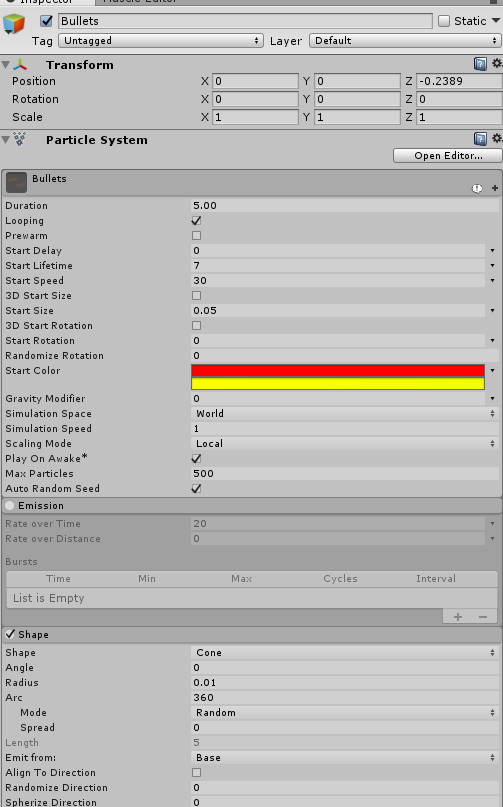 novel flower
Only thing that sound weird is if I make it fire a few burst and it lasts 3s. for the empty object, but then I put that into the animation that is 0:01 long wasn't sure if it conflict
@clear yew is that your tracer bullet particle system?
 novel flower
@clear yew did you do anything else to that particle system to make it look like video? copied what u posted in image and looks like rapid orange balls instead of image. maybe because zoomed in? lol
novel flower
https://imgur.com/a/ubTCZ1H
hmm not sure what did wrong. Animated the game object, put to legacy/loop, added that object to hand gesture animation, then hit play and it only fired once >_<
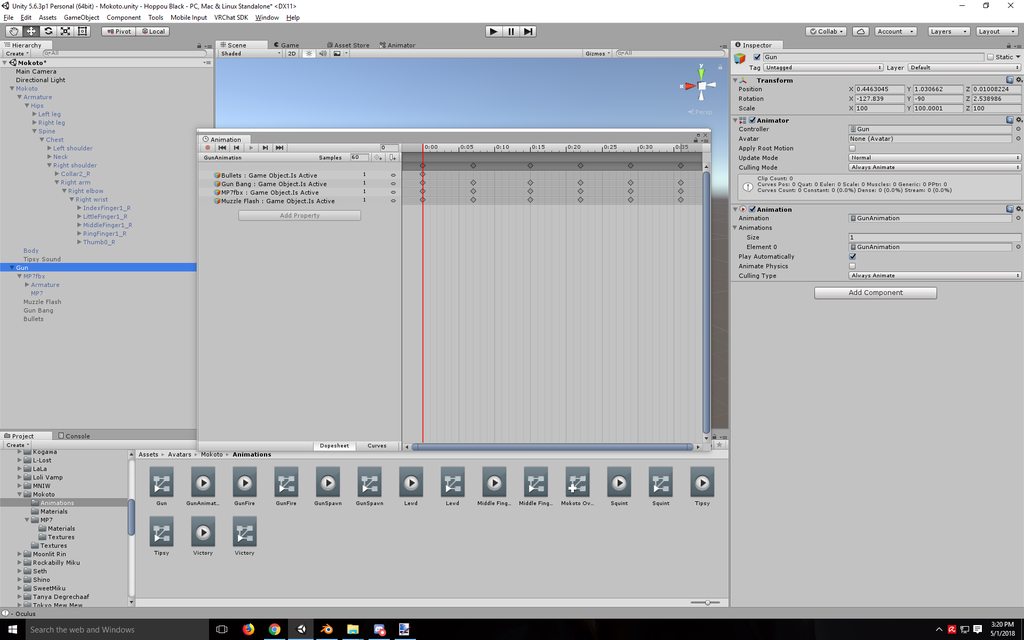 slim sparrow
Oh yeah @clear yew quick question
You outlined earlier how to do world objects
But mine just snap to world position 0 once I activate them
They temporarily appear in front of me, but then they snap to world 0 for everyone
I did them exactly as you explained
cursive moon
I remember someone posted a ZIP/RAR file with all the default hand animations - does anyone have it on them? I've been searching for a while and can't find it. Trying to recreate them doesn't quite work out exactly as I want.
clear yew
I got a but load of mocapped animations (fbx) 2k+ and was wondering if theres a way to mass configure them?
novel flower
Anyone have image of particle system that simulates bullet fire?
clear yew
Anyone have issues with animations of weapon slide / bolt movement alongside firing? The animation plays once then constantly loops about 10% of the way through always really weird. Makes no sense.
 blissful frigate
 turbid sorrel
got another questgion
Is it possible to copy and paste properties of an animation file to another animation file?
So I don't have to redo them all?
Looking to combine two animations into one
nevermind. ctrl+C and ctrl+V works
I'm still having an issue with animations longer than 2 frames causing issues with resetting
Someone mentioned using an animation component, but I already am using one that is created when you use the VRCSDK
Do I need to create another one or something?
slim sparrow
An actual Animation component
As in, the Unity component
On your avatar
It can only play animations marked as legacy
But you can enable/disable them at will
turbid sorrel
by usnig the .Enabled property?
And I believe to mark an animation as legacy, I just do Debug menu under inspector and check the box for Legacy yeah?
slim sparrow
Yes
To both questions
The primary use of those legacy animations is to make your own blinking animation, then disable it during certain gestures
turbid sorrel
So for both frames of the animation component, the .Enabled property is checked and I am assuming the natural state of the animation component is unchecked
natural state as in, Inspector window
turbid sorrel
change character pose and fire off a flamethrower effect
I have a .mp4 I recorded. One second
 slim sparrow
It might be easier to just use regular animations.
turbid sorrel
Well, I'm building this in a .anim file
slim sparrow
Create a gesture where you disable your own skinned mesh renderer (or the entire mesh), and enable a copy of your avatar. This copy then plays the animation
turbid sorrel
If that helps?
slim sparrow
No legacy stuff, no animation components, just regular stuff
turbid sorrel
So basically, C&P my .fbx on the hierarchy, attach the animation override controller to it and then create a second override on the normal .fbx for running around and stuff and somehow tell it to turn off one skin and then do the other?
languid lantern
So with my first animation using a weapon, I noticed it's offset in game while in unity it's right where it needs to be. What could be the problem?
cursive moon
@blissful frigate You da MVP
clear yew
@slim sparrow is the rigid body and fixed joint enabled at all time ?
frosty root
Alright, so, I'm trying to make a gesture that makes my character hold an object that was originally attached to the left shoulder. Is there a way to make it use that exact object (reparent it to the hand only within the animation clip) or do I need to make a duplicate and hide the original?
clear yew
it's easier to make a duplicate
you can't reparent things in animation as far as i know
frosty root
Well, depending on how hard it is, I may be willing to do it.
As long as it doesn't include scripting
clear yew
?
it's just a simple animation
you put the object on your shoulder and one in your hand and you diable it
then with an animation you hide the one on the shoulder and enable the one in the hand
frosty root
No, I know how to make a duplicate and do it like that, I mean the other way
Without duplicates
clear yew
it's by far the fastest and easiest method, i don't really understand why you want to use another way
frosty root
I don't know, I guess it's just OCD.
But I suppose you can't always have the perfect solution.. oh well.
clear yew
with how the animation system work in unity, it is the perfect solution
 final gazelle
yeah, with programming and game design, you'll have to settle for "close enough" quite often as opposed to "exactly how it's supposed to work"
i don't think there's an animation set-up that'll let you de-parent stuff in unity
clear yew
maybe with fucking around with fixed joint and rigid body
but that's dumb
just hide/unhide and that's it
final gazelle
i was thinking about the joints, but he wanted it to go from tracking his shoulder to tracking his arm -- if he actually used some kind of collider for that, i imagine it's going to be a lot glitchier than the un/hide option
clear yew
you can put collider on empty game objects and move them with the hand gesture i guess
but again
so much work just to show a weapon an object in your hand
final gazelle
yeah -- if you want to make the transition look smooth rather than having it seemingly jump from the shoulder to the hand, then i'd probably recommend having an emote which moves the hand over to the shoulder section and seemingly lifts the item off, then use a well-timed gesture during or after the emote to actually switch the active objects seamlessly
probably easier with full body tracking if you can position your hand accurately and use the gesture at the right time
clear yew
oof
frosty root
Airtight, another question then. The object I mentioned has animations, and I would like to activate one of them on a gesture or emote, how would I go about doing that?
clear yew
create an empty game object
parent your object to it
animate the empty game object how you want
put the animation file inside the game object and set it to legacy
disable the game object, parent it to your avatar and use a hand gesture to activate it
frosty root
Hmm, I'll try that when I get back home, thank you.
slim sparrow
@clear yew yes
They're enabled at all times
Only the object underneath is disabled
clear yew
YOU FUCKED UP SON
i honestly don't know
never had that issue
the first game object with the reset animation is always exactly where i want it to spawn
and it reset everything under it to 0,0,0
so every object will move exactly where that empty game object is
slim sparrow
So, let me get this straight
Game Object. With a legacy animation that constantly resets its child to 0 rotation and position
Underneath that, another game object with a fixed joint component (and rigid body, implicitly)
And finally underneath that, the actual thing I want to world object?
No special stuff necessary on that final object, right?
clear yew
right
remove gravity and angular drag from the fixed joint rigid body part
also that game object need to be parented directly to your model
same hierarchy as "armature" and "body"
that's how i did it
dunno if it works if you put it anywhere else
 fallen flax
I have an animation with 192,192 keyframes, so it plays really really slow in Unity, is there any way to make it play faster?
slim sparrow
Depends.
Is this animation imported? If so, you can change import settings. Do you have control over the animation controller that controls this animation? If so, you can change the playback speed.
fallen flax
The animation was baked onto a character and then imported into Unity, which setting do I need to change?
slim sparrow
Select the model and go to the "Animations" tab, see if you can fiddle with them there
Or you can fix the animations in whatever modeling program instead
fallen flax
https://i.imgur.com/Zprfi0E.png Doesn't seem like I can change much
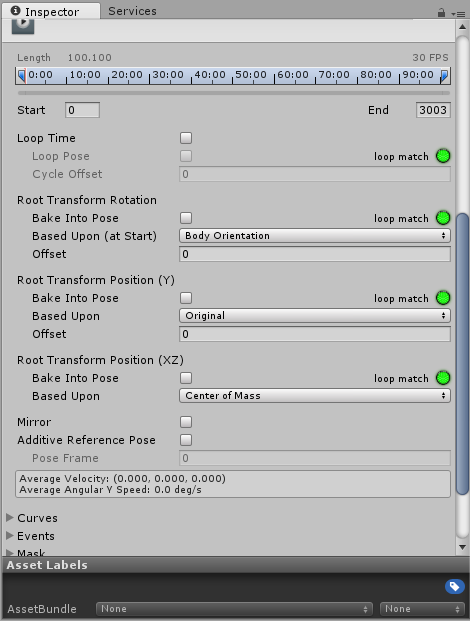 frosty root
Alright, so, going back to my object-with-animations thingy.. I created an avatar that activates an object attached to it via a gesture.. The object, when activated, plays two animations (one after another, looping the second one(done via animator controller)). Is there any way to make the object go back to idle state that it was originally in, so that it can replay the animation sequence from the start? I also kind of want to have the second animation loop while it is playing (which is why I don't want to just disable the loop on the second animation and make it super long.. it's probably not a good idea anyway).
 quiet jetty
What's a good width for snail marker? :>
cursive moon
0.8 is about the size of your finger or slightly larger, so 0.6-0.7 would be good if you want thin
quiet jetty
Alright, i'll look into it, thank you :)
 topaz ermine
How do I make an animator loop properly? It seems to pause for a split second at the start of every loop
torn pawn
@topaz ermine go to curves bottom left and select all > both tangets linear
limpid mica
I have 2 animations for a character, one for idle blinking and one for another idle thing. Is it possible to add both? If I add them to one Animation component only the first one plays
torn pawn
you can edit your idle animation, or make them both as one
violet kraken
@fallen flax higher the frames per second in the animation tab
fallen flax
I've set them as high as 3000 and it doesn't really do anything sadly
violet kraken
it definetly should make it faster then try to copy the keyframes and put them in a new animation
limpid mica
@torn pawn Yeah I might have to make both one. I want them to play even when walking
How can I open animations in the timeline that I created with a duplicate model thing?
Oh I see how, got it. I can edit them but not add new components. Oh well
 golden garden
I can't seem to find a solution to my problem and I thought I'd ask here. I'm new to particles wanted to test a small stream of particles emit from my avatars head bone when I trigger an animation gesture. I assumed all I'd have to do was put the particle system under the head in the hierarchy unchecked and when I go to animate the gesture, I'd trigger the particle on a keyframe. Apparently this is wrong cause it's not working at all in the game
Is there something I'm missing here? I've tried the various things I could think of like creating an empty game object and putting the particle in there and leaving the particle on but turning off the gameobject
but that didn't work
clear yew
that depend
is it showing up in unity ?
when you activate it, do you actually see the particles ?
golden garden
Yeah, the particles are emitting
clear yew
is it set to world ?
golden garden
do you mean are they emitting under the keyframes their set at in the gesture animation?
no Local
cause I see them when I check the keyframes
golden garden
One second,
sorry bout that, here's what I got currently https://i.imgur.com/xpLuDIx.png

Will I even be able to see them emit from my head in mirrors? Cause that's all I'm testing by
someone else said that I myself probably couldn't see them
clear yew
oh yeah
i forgot about that
everything parented to your head will be invisible for you
and you can't see your own particles in the mirror either
so you'll have to ask somebody to tell you if it's working
or maybe the cameras in avatar testing will work but not too sure about it
golden garden
Ok I've reuploaded and gonna test, I'll tell ya if that is all it was
 glad pasture
while that's happening, is there a copyright blocker in audio?
either that, or I'm not rigging something right for the audio to work properly because I keep uploading this one avatar with a song on it's neck and it isn't playing
glad pasture
which is weird since I did the exact same thing over and over with other models and they worked fine
doing animations is still a semi-foreign thing for me, so it's highly possible I made something wrong.
lunar pasture
Can anyone help me with my finger laser? I thought I had it right but it seems to be emitted from my back rather than my finger tip, my finger bone does effect the trajectory though
quiet jetty
Are there any good tutorials on how to remove for example a helmet or head? Or can someone just lend me a hand :>
carmine pilot
which one in the override controller is for the two fingers? What is it called?
clear yew
victory ?
glad pasture
yeah it's victory
lunar pasture
@clear yew I know you showed me how to get a tpose back but as soon as I try to export my avatar it jumps back to the scuffed position, so when I'm trying to position the game object attached to a finger I'm not sure where in unity I should be positioning it, where it should be on the tpose or where my finger ends up when it's scuffed
clear yew
you should position it in the T-pose
if you placed it correctly
and parented it correctly
it will move with the parented bone even in the scuffed position
never add nay issue with that
lunar pasture
ok, maybe the issue is with colliders, I'm stubbornly trying to get the particles to bounce off everything
it does move with the parented bone, it just appears to be coming from over my left shoulder to me, someone said it looked like it was coming out of my back
but it's pretty fast and it's hard to tell exactly
I guess at this point i'm just moaning and I should debug it myself
carmine pilot
@clear yew thx 😄
clear yew
does anyone know how to fix animations that are yellow because i dont want to add the 40+ properties one by one?
final gazelle
how displaced are the properties?
like, are they all off by the same naming structure?
olive yacht
I've got a bit of an issue. For some reason all my humanoid walking animations are stuck floating. The idle and emotes are fine, but walking makes my avatar float
clear yew
@final gazelle the properties are in everybone that is moveable in vrchat
final gazelle
yeah, but is the "fix" required the same for all of them? like, do all the bone paths have something like Armature/Hips/... that need to be renamed to NewName/Hips/... or something?
clear yew
Okay so the hierachy goes the name so activation giant/god(armature of anothermodel)-armature and body in that same path
 final gazelle
so was the animation originally designed for the "god" level, but now you're trying to apply it at the "activation giant" level?
hm, it might be easier if i explain what can be done under the right conditions, and then you determine whether it'd work with your particular .anim clip
clear yew
it was placed on armature
final gazelle
if you need to mass-rename a whole bunch of your animation properties in a way similar to how you'd use "Find and Replace" in a word document, then first go to Edit > Project Settings > Editor and set "Asset Serialization" to Force Text
this will basically change all the .anim files you have in that project to ASCII format, meaning you can open them up and read them with a text editor
you can then open up the animation clip you want to edit with Notepad or another text editor, and then use Ctrl+H to Find and Replace a string you need mass replaced -- so if you needed all the properties to start as god/armature/... instead of armature/hips..., you set it to find all instances of "armature" and replace it with "god/armature"
whether that works and exactly what strings you need to find and replace depend specifically on how you've got your stuff set-up -- i'm not entirely understanding where your animation was created and where it needs to be moved, so it might be best for you to determine that part yourself
yellow-coloured properties are because the animation can't find the bone that it's meant to animate -- the animation's either been moved to somewhere else from where it was originally created, or you renamed some bones and changed the relative path to that bone
clear yew
so my animation was created on armature, because it was easier to slap in all the properties by using the inspector so i copied the keyframes and but it on activation giant and they are now yellow
final gazelle
ah right -- then all your properties now need to have Armature/ added to the front of their names
clear yew
so does that mean it searches all the bones under Armature
final gazelle
you can either do that by using the method i wrote above, or by slowly double-clicking each property so that you're able to edit their names, and manually add in "Armature/" at the front of each of them
yes -- it needs to be told that all those bone paths are under Armature now, since that's not where the animation clip starts from anymore
it doesn't know where to look for Hips/LeftLeg from "activation giant", because you didn't tell it whether it needs to look under "god" or "armature"
clear yew
Currently the force text thing is loading still
final gazelle
it can take a minute or two depending on how much content you have in the project, yeah
if you have more than one animation clip you need to fix, there's a program called "Notepad++" which has a "Replace all in Opened Documents" function
probably don't really need to use it if you just have one or two animation files to fix up, but it's useful if you have like 10 of them
clear yew
so would it be like this ? http://prntscr.com/jd13dg

http://prntscr.com/jd13pv or more like this
 final gazelle
it was created under "Armature", right?
clear yew
yes
final gazelle
then it should be:
Find: Hips
Replace with: Armature/Hips
clear yew
okay
final gazelle
to be safe, i'd also include the path: bit beforehand, but this should also work
you're basically just shoving all the paths of your bones one level lower
clear yew
didnt seem to work
final gazelle
did you save it before returning to unity?
clear yew
yes
final gazelle
if it's still showing yellow properties in unity, then i'd suggest trying to add one property to the file, and then comparing that property's naming pattern with what you have right now
see if there're any major differences
you can view the property's full pathname by slowly double clicking on it
final gazelle
the non-yellow one means that it's named correctly -- try comparing that one's naming structure to the rest of them to see if there's a string you can easily mass-replace across all of them to get them working
 fluid shore
Would anyone be able to tell me why I can get a humanoid animation to work fine in unity, but in VRChat they just kinda run in place without actually moving the centre of mass?
clear yew

okay its fixed now thank you @final gazelle also should i change it out of force tex or just leave it just incase i need to do it again
final gazelle
leaving it in force text makes the size of the project a bit bigger overall, but if that's not a concern to you, i'd suggest leaving it as-is so you don't need to wait for the conversion again later on
clear yew
ahh okay thanks once again
 deft hatch
Hey, anyone knows if I can set the simulation space of particle effect which is patented directly under the avatar to world? Will this work?
 noble totem


