#animation
1 messages · Page 67 of 1
 slim sparrow
 red linden
ah
slim sparrow
There's a shader that rotates them towards the direction they're going, though. This makes the knives at least look good while in the air
But to make them stick into walls, they would have to be moving very slowly. There's no way to accomplish that since sub-emitters trigger after collision, not before.
@clear yew those aren't rotated
At least, they can't be worldspace and rotated at the same time
 clear yew
i don't have that shader
slim sparrow
Yeah, I know
That's the problem
This would all work fine if mesh particles respected rotation if they're in world space
slim sparrow
You could send me a prefab if you like. I've been struggling with this for a very long time
slim sparrow
The cubes themselves don't seem to actually be rotated towards the ground, though.
clear yew
you have something called "dampen"
slim sparrow
In your gif
I know, but the problem is that they have to be moving for that shader to work
slim sparrow
I can't make the sub emitters inherit the correct velocity if the parent isn't moving, unfortunately
I already tried setting dampen to 1
clear yew
if they still need to move, you can put it at 0.99, they will barely be moving but still moving if that is required for the shader
slim sparrow
Problem is that they then "slide off" the wall they're colliding with
clear yew
i put something like 0.99999 i can't tell if they are moving at that point personally
slim sparrow
Trust me, I think I tried every possible permutation. For this to work, I would need one of the following to happen:
- World mesh particles respect rotation without having to move.
- Sub emitter triggers before collision, not after.
- Collision can be made to only happen once per particle, without having to kill the particle immediately on impact.
I actually found a tiny loophole, if I rotate the sub emitter manually, the child mesh particles will actually respond to that. Essentially, if I can make the child mimic its parent rotation twice, this could be done
I tried joints but no dice
 vocal zinc
guys i need help
like im working on a particle but i want it to move > stop move > stay alive > die i tryed to limit velocity but i can't get to it anyone have an idea ?
slim sparrow
Change the simulation speed of the particle system.
This will affect particles that are already in motion
That's what I did for my timestop knives
vocal zinc
im not sure to understanding how simulation speed can impact this
slim sparrow
Simulation speed is 0.002 by default. When I press a gesture, the simulation speed goes back to 1 and the knives fly out
But do you want each particle to do this individually?
Try velocity over lifetime rather than limiting the velocity.
vocal zinc
its like 50 particles going in everydirection but they don't stop moving until they die and i want them to stop moving 5 sec before dying
slim sparrow
Sounds like you need velocity over lifetime then

There's a regular velocity over lifetime module, not just limit velocity
 steep citrus
You would use velocity over lifetime like Rokk said but then you would add a curve to the velocity. Simply make it drop off all the way to 0 an the very end an they will stop.
vocal zinc
even with noise ??🤔
steep citrus
Curves allow you to do things that standard values won’t allow. If you want something to get faster as it’s lifetime increases then completely stop an start again curves are your answer
Yes noise shouldn’t effect it, you’d have to use velocity instead of speed though
0 speed an put a curve on velocity so that it completely stops. You’ll prolly have to mess with the curve to make it look the way you want. The default curves are a good place to start. Just use the straight line an make the right end of the line drop all the way Down in the grid.
The more sudden the drop the quicker they will slow down
vocal zinc
ok its working
its because i was changing the velocity from 1 to -1 and not 0
'-'
ty
 agile kayak
Any way to have a similar animation to blinking constantly playing?
but also have blinking at the same time
 bronze peak
Just loop the animation
Yeah you can do it the same way I have done it to make helicopter blades spin.
agile kayak
i mean i already have Animation component in Unity
i can put there only 1 if i recall
one animation file
but i need both blinking and that animation to play
bronze peak
Ah I noticed that the other day. I have not tested but can you put the animation on an empty object then on your model? I am not sure sorry.
agile kayak
not too sure what you want me to do really
you mean to put this animation into the Override?
though i dont think i can do that through override
bronze peak
Oh i think you said that you can not Add another animation component to the module so I was curious if it worked to put it on an game object the put the game object to the model. Now that I think of it depending on what the animals you should be able to do it with the blink in the same animation.
agile kayak
hm
ah i just thought
you are right
i can do just that 🤔
why didnt i think of it lol
 turbid sorrel
oh man..
This is going to take me a while
I'm animating a MMD fbx import of KanColle Yamato
Making all the turrets swing up, fire, and then swing back down
its gonna be so cool ❤
 plush apex
any one know of a good way to go about levitation
like so

trying to re do this scene
 lofty crypt
anyone know how to use rigid bodies
i want to use an override that spawns dva's mech in for my avatar, and have me be able to move around in the mech
have it mirror my movements
 torn pawn
@lofty crypt put rigid bodies on your own fingers, arms, lock all rotation and position, then on mech u put joint and lock position (first row)
i dont remember if diva mech has fingers
so u can skip the finger part if she doesn't
let me actually 2check how my claw works
cuz i had to freeze addittionally claw fingers so they do not detach from eachother
lofty crypt
do i have to edit the mech armature in any way
torn pawn
i don't think so
i cant find the claw avatar i have in unity, but u want to freeze all rotation and position on your main diva armature, then for the mech i think you'd want to freeze position so they don't detach from eachother
torn pawn
by detach i mean that the movement on mech bones will be higher than on the main
if you see detaching them from eachother, then u want to freeze positions in mech armature bones too
and yea u need to uncheck Gravity and set angualr drag to 0
lofty crypt
so heres another question
since im in full body i cant physically pose myself to be into the mech
so
can I attach the mech to the armature
turn my avatar's mesh off
and have it still work?
torn pawn
yes
lofty crypt
nice
lofty crypt
Hm
Maybe I did it wrong?
It's not koving
I put rigid bodies on the arms
On both
Gravity off
And on the meka I had only the top row checked
torn pawn
u put fixed joint on mech?
u need to drag n drop the main armature bone into the joint @lofty crypt
torn pawn
yes, into mech joint
like elbow to mech elbow in joint component
and freeze position and rotation on all axis in main armature rigid bodies u put on, then probably all axis positions on mech rigid bodies
lofty crypt
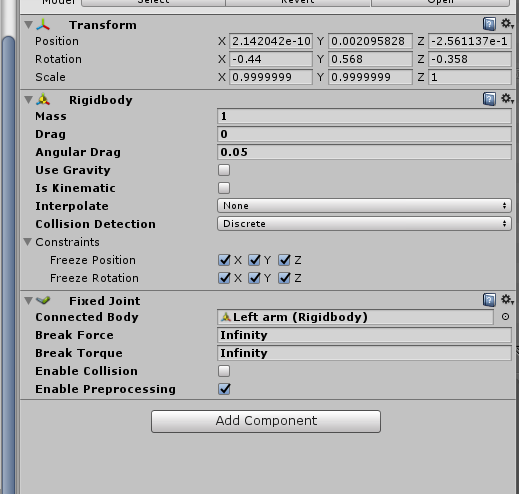
like this?
also how do i know which rigid body is which
since theyre both lefr arm left arm, right arm right arm ect
this is on the elbow of the original avatar
torn pawn
don't freeze rotation on mech
you need to freeze position only i think on mech, and u have to freeze position and rotation on main bones @lofty crypt
lofty crypt
thats the original avatar
or does the fixed joints have to be on the mech and the avatar
@torn pawn
torn pawn
fixed joint has to be on mech
on main u have only rigid body
fixed joint = connects to assigned bone
lofty crypt
ooo
torn pawn
also change angular drag to 0
angular drag = 0, use gravity = no, on all rigid bodies
u can select multiple and change values for all of them
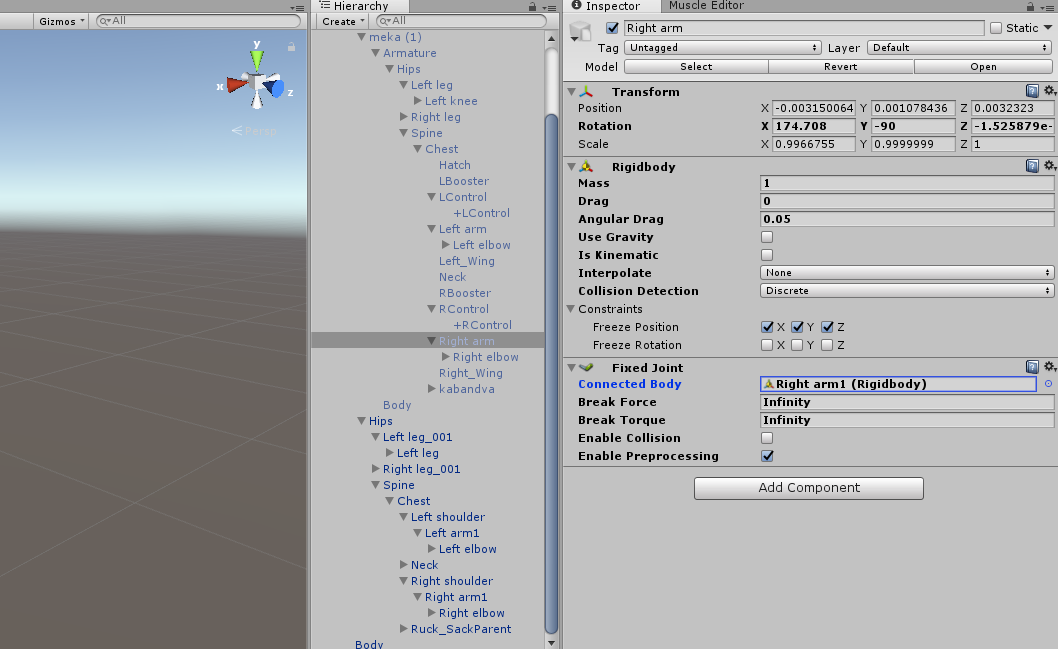 torn pawn
oh shit
its missing bone
but it would have a bone with rigid body in it
like RIght Middle finger
or whatever
i forgot that i edited all of that
http://prntscr.com/ja88fd main armature finger

claw finger http://prntscr.com/ja88js

for elbow you put a rigid body on your avatar elbow, freeze all pos and rotation
then put fixed joint on mech elbow, then drag n drop your avatar elbow into the fixed joint connected body
i am 90% sure you will hav eto freeze position on your mech rigid bodies
i haven't worked much with them for external armatures, but I know how it works
and have done it only with claws as most complex experience for me yet
lofty crypt
Yes?
torn pawn
she shouldnt be tposed
lofty crypt
Well she is
Can't calibrate with full body
Avatar is just stuck in front of me tposed
No gestures, aniamtions
In the avatar menu she's tposed
torn pawn
to me it seems taht the mech is main
and not the diva
because if u parent anything to your avatar it will be tposed
unless it is rigged under the same armature
torn pawn
did she move fine before this?
lofty crypt
Yep
torn pawn
errrrrr
can you by any chance send me the file? i could try to check, don't need textures
lofty crypt
how would i do that
 ocean knot
is there any way to access/duplicate&modify the default humanoid walk/run anims
the sample ones from the VRCSDK dont seem to actually be animations
 topaz ermine
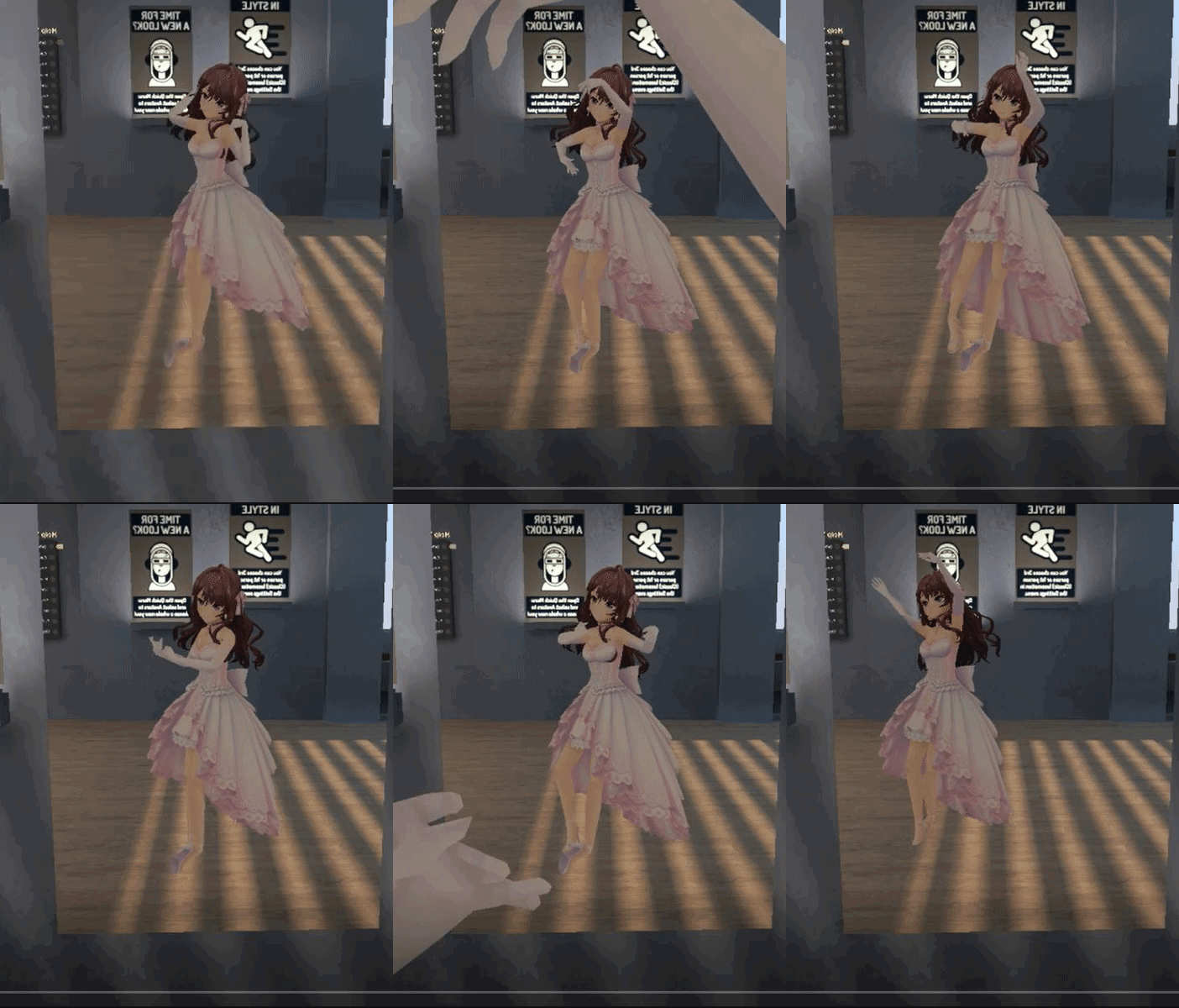
@reef mason Just reduce the starting size of the particle
 ebon vault
 reef mason
@topaz ermine Alrighty
 woeful rapids
Anyone know how one would be able to spawn a particle or mesh onto other peoples screen at a fixed location and size no matter where someone would turn their head? Seen it in a particle video contest and know some worlds do this as a loading screen when you spawn in. It's the last part I need for my particle label to work as intended.
clear yew
it's a shader not a particle
woeful rapids
I see thanks. Now to try and find it since I can't script for shit.
 livid stream
hello guys, can someone tell me how to get a MeshEffect on my weapon? I'm thinking of buying Mesh Effect from KriptoFX, but I do not know how it works 😃 Maybe can someone help me 😃
slim sparrow
Be careful with that, not all components are allowed
If they're particles, it shouldn't be a problem
livid stream
They are particle yes
slim sparrow
Well, then it's fairly simple. I got Ultimate VFX and it probably works roughly the same
These assets come with prefabs
You drag the prefabs on the objects you want them on, such as your weapons. Then you're done.
livid stream
Oh shit, this is rly simple, thx for the information 😃
slim sparrow
I have a particle that collides with myself using PlayerLocal layer, but it can also collide with others
As in, if they put their viewball into my particle, it triggers collision
Is there any way to prevent that by choosing another layer, or will I just have to live with it?
 mild python
is it possible to completely hide your avatar with overrides
i'm trying to make a model transform when crouched
clear yew
just disable the mesh renderer
mild python
how so? i've tried disabling "skinned mesh renderer" as a part of my animations but the main model still sticks around
 fickle slate
how do i make this into an actual bullet projectile instead of this... http://prntscr.com/jaglbj

A F K BOIS
 languid pier
when i use VRC_ik the particles and even my sword spawn at another locations
ocean knot
does anybody know how to access, duplicate, or modify the default humanoid walk/run animations
 lost musk
Hi there !
Can someone with the Vive Controller tell me which button you must press to do each gesture ?
Based on this picture ? https://cdn.discordapp.com/attachments/408291774923276297/439150643152683029/vive_controllers.png
 clear yew
 lost musk
Thank you @clear yew ! You rocks !
Does that mean that when you move the camera, or move in space with the vive controller, you are also doing gestures ?
clear yew
no clue, i don't have the vive
mild python
how do you turn off the mesh renderer with animations? trying to make part of my avatar invisible
lost musk
into the animation, you use the record button, and you just unchek the mesh checkbox of the body part.
If you have a one mesh avatar, then you'll want to change the material instead. But I dunno if it work
mild python
how do i make it change materials?
lost musk
Maybe reccording yourself at some point of the animation dropping a new material into the Body mesh material slot ?
Never done it into an animation
mild python
recording doesn't seem to like my avatar
mild python
does anyone else have trouble with gestures "sticking" and not disappearing when you release them?
oculus btw, not related to vive controls
 cursive moon
Did you make the animations 2 frames long? Gesture animations tend to crap their pants if they aren't two frames
languid pier
I want to do a droplet effect
But in the air
Like if you blasted air in a donut form
vocal zinc
if you had to synchronise multiples particles with a song how would you do ? im not sure that im doing it correctly
 chilly vapor
depends on what you are trying to sync but it would be done as part of the animation
vocal zinc
like im trying to synchro drops of a song with shockwaves and more but its kinda slow to press play see if its right if not restart with a new values...
 molten shore
anyone know how to replace the walking animation?
chilly vapor
something like the emission range for example, you would set keyframes for different sizes for the different beats in teh song. is it tedious, yes. Will it look cool in the long run, yes
if there is a better way, i dont know it
vocal zinc
actually im just pressing play and trying to find the good values -_-
and restarting every time for re adjust the values
chilly vapor
you could probably look at the wave form of the song in something like audacity and try to mimic some values base don that
might speed things up
vocal zinc
i tryed but the playmode add a little delay betwen orignial soundtrack and when it starts in unity
like it can varies from 0.2sec to 1.5 sec
so the values in audacity are the same in the playmode cause the play mode is delayed
because of that little freeze when you click play
 vivid burrow
Hey guys i’ve had this problem where once i do an animation override and try to use another one it only plays the first override for a while over all other gestures. When i play with other peoples models this doesn’t happen only with the ones i make what do i do wrong?
languid pier
No answers
slim sparrow
@vocal zinc play the song in a music player that shows you very specific times
Then pause, note time, and put that in your animation. Etc
languid pier
Distortion i found the name
slim sparrow
@mild python there's your issue
Gestures need to be exactly one frame long. One keyframe at 0:00, one at 0:01.
You can bind longer animations to them if you get creative. For example, don't animate an object directly in your gesture. Instead, activate an object which then plays an animation itself.
vocal zinc
@slim sparrow unity add delay from the original song...
slim sparrow
Oh, that's normal
vocal zinc
like in audacity the drop can be at 10:20 but in unity it will be at 9.5 or 9
so how do i do ?
slim sparrow
In play mode, just disable and enable the object you're animating and it'll properly play
It's probably not in memory yet
vocal zinc
oh so you want me to disable and enable the object so it restart without delay
slim sparrow
While in play mode, yes
vocal zinc
but it will be the same ingame ?
vocal zinc
gonna check it so TY
so when i "restart" it it take 1 sec before start playing the song but the particles are already spawning that's the reason
like the song don't start instatly like the particles there is a little delay
so in audacity there was a little tick like 0.5sec of no sound and unity wasn't calculating it that's why it was delayed.
finally im not sure that it was that it could also be that i was using a shockwave with texture sheet animation.
can't tell
 oak steeple
hey so im making my model do an mmd dance, and i see that at the twist in the dace i dont rotate. Would i just actually add a transform/roation in the animation? I see that the rest of my animation is adding an animator and not transforms.
 slim sparrow
Yeah, you can add Root Q into the animation to make yourself rotate if you want
oak steeple
Root Q thanks. i was seaching though the list for hip the whole time
is there any other little tips on differnt named things like thoses
slim sparrow
Nope, that's pretty much it
Oh yeah, Root T is root transform
So root movement basically
oak steeple
okay thanks good to know!
 shut tusk
has someone tried world particles with the new script now?
i specifically want to know if the rotations are still fixed 👀
shut tusk
yep
shut tusk
oof
slim sparrow
You need a shader that aligns them to their velocity
Which works
It actually works pretty well, I use it all the time. Just be aware that it only works if the mesh particles are moving. They can move incredibly slowly for it to work though
So it's not a big deal if they have to stay still
slim sparrow
Uh, hang on
Apparently it's fixed in later unity versions
Like, literally one version later
Haha kill me

Real Time VFX
Here is a shader based solution to get particle meshes orienting with velocity: Particle Component: Shader based on ShaderForge Custom Lit: meshes are pointing in Y direction. options for Particle Rotation might work different than...
One unity version later and I'd have my knives stick in walls
shut tusk
so if they collide and stick to stuff they revert back to their original rotation?
slim sparrow
Like, that's literally the only thing you cannot do with world mesh particles. Have them collide and stick in walls.
If they're not moving, they stop being rendered.
shut tusk
ah
slim sparrow
They have to be moving, even if slowly
shut tusk
am i blind? where is the download button
slim sparrow
I actually got them to stick into walls by abusing bounce, but they were oriented wrongly if the knives didn't approach the wall at exactly the right angle
It's just an unfortunate series of events. The meshes sticking in walls would have worked if sub-emitters triggered before collision and not after
Or if particles could collide only once. Or if they could spawn a particle on collision, but still keep going into the same direction. You know, without sliding off.
vocal zinc
any ideas how i could remove the imperfections of that halo without impacting intensity ? http://prntscr.com/jamk4r
 vocal zinc
adpating particles to a song is so weird because i get lost in the song like i forget about the particles and keep hearing x)
oak steeple
@slim sparrow ive been playing around for awhile and not making any progress it feel like. it can actually tell if my values are even being adjusted because they are greyed out

not to mention its pretty slow on my PC
 simple venture
by any chance how can i add additional animations to one model?
there is no "create new" prompt
shut tusk
my object keeps changing it's position when i try to adjust the fingers it's so annoying. why does this happen all of a sudden

 uneven wing
Anyone happen to put out a tutorial on how to use the new IK Follower?
uneven wing
Nm figured it out 😃
 sweet zealot
my particles are not tracking with my avatar's body, for some reason they are tracking to my head. do i set particels to a bone or a model?
ok... bone doesnt track, and model doesnt track. the particles are only tracking to my head. i need them to track to my hand. what do i do?
(the particles are by wrold not by local, would that effect it?)
clear yew
ok, so this is probably pretty simple, but i know next to nothing about unity.
I'm looking to turn a mesh on and off with 2 seperate emotes. how does one go about this?
slim sparrow
Hands
languid pier
anyone can help me with a distortion effects
torn pawn
no
 atomic aurora
In bad hands distortion effects are cancer.
torn pawn
there's rarely an occasion where they are not that
 sharp epoch
Anyone here know how to implement camera shakes? I have an animation where a giant comes falling from the sky and I want to have a subtle camera shake effect as it hits the ground.
 verbal granite
Can someone show me how to animate a model of an animal or object that I have imported from Devian Art. Thanks
 quaint spruce
First should probably declare what it is and then if it has bones or not
verbal granite
Yes it has bones. The animal is a pony
 slender latch
My keyframe won't play.
It just stays stuck on the first keyframe(0) and won't transition to the next one.(1)
clear yew
@sharp epoch you need to find a distortion shader
 next shard
i saw someone avatar who could grab people's head and stay stuck on it no matter how you moved
i wonder how he did that, he did that to me and no matter how i moved, he was stuck to me
🤔
sharp epoch
Don't distortion shaders just add a haze type effect, not shakes?
atomic aurora
its depend how you use them
 shut dragon
Is there any way to make gifs work as game objects without having to make a sheet and using it as a particle?
 undone glade
With Natsix's tutorial you can set a animated gif up as a quad if that's what your looking for.
@shut dragon

Since Natsix is new to VRChat She still does not know all the complicated things in Unity like idle animations and all sorts of stuff. She was able to animat...
Then it's just a matter of treating it like any other prop
shut dragon
Oh, I see, thanks @undone glade
languid pier
I want to use it for the shake screen. Like when i put my swords into the ground, it does the shaking things before thunder regroup at the tip of my swords.
I can use it, but it does the haze things, and thats what im trying to avoid
sharp epoch
^^ I would also like to know
shut dragon
@wintry vapor even for still planes?
 wintry vapor
i use a cube and then squish it
wintry vapor
its basically a plane
texture sheets are what make good looking particles that don't kill frames
shut dragon
Yeah, but considering it's a particle
wintry vapor
its just a texture sheet
any animated particle that people use are texture sheets
its the same thing
shut dragon
Hmm, I see
wintry vapor
i don't think it would add more drawcalls
clear yew
it's like a flipbook particle
wintry vapor
but its unity
clear yew
no, same amount of drawcalls, just different UV coords for each frame
wintry vapor
basically
torn pawn

GitHub
unity-surfaceshader-flipbook - Surface shaders with flipbook / spritesheet animation functionality
wintry vapor
i just never felt like using it
 clear yew
cool
torn pawn
but uhave to enable mesh renderer for quads cuz otherwise it'll get culled and you'll be left with just whites lol
 final gazelle
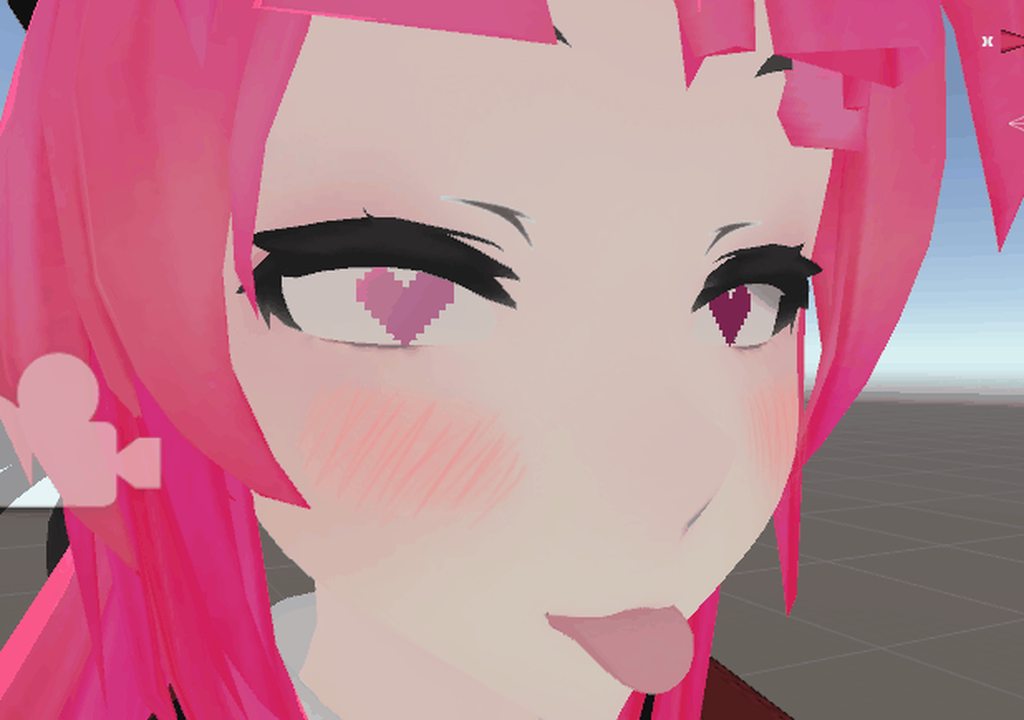
your tongue seems to be stuck there, good sir
torn pawn
i enable dynamic bones for it too 😏
shut dragon
Oh god
torn pawn
you can't even imagine where that tongue has been
shut dragon
oh god
torn pawn
i still need to L I C C Svel
torn pawn
but he's quite an evasive person
clear yew
is that what they call it these days?
shut dragon
Expand
torn pawn
i'm planning to add a combo gesture for saliva
shut dragon
I'm glad nobody liccs me
torn pawn
blacklisted lul
clear yew
honestly it wouldnt surprise me with how much bullshit i have
screenshake BOI right here mah dood
wintry vapor
it feels weird that I have access to these things but I'm so busy just making worlds
i still want a slight blur for my bullets
final gazelle
^the joys of having multiple things to do -- though i suppose it beats being bored out of your mind with nothing to do 😛
 glossy shard
Can anyone tell me how can i do something like this Min: 1:48
https://www.youtube.com/watch?v=jL88WV3ifiI

dydjec went 0/8 as garen 🎬Edited by senzeeh ‣ https://twitter.com/senzeehpai Produced by spooks ‣ https://twitter.com/SpooksOP Outro Music: https://soundclou...
clear yew
that's a custom shader
you'll have to wait for them to release it, if they releas eit one day
wintry vapor
that is some next gen particle shader
there's one I know but requires the newest unity
 molten elm

 odd sphinx
is there anyway to make a avatar's standing idle into a sitting position? like i have a car model i want my model sit on it
so i can move around
 lyric edge
I made a custom animation that works in game but my avatar is half underground. Is there a way to resolve this?
 zealous prism
@odd sphinx I think you have to unmap a few bones to purposefully break your models foot IK so that you can animate the legs yourself. If you don't specify any fingers while customizing your humanoid avatar that should do it.
odd sphinx
thanks!! I will try this
 blissful grove
How do I use walk animation
 chrome elbow
how do i change colour of sky when doing animation overide
slim sparrow
@odd sphinx yeah, you can override the IDLE animation in the custom overrides
But your feet might do weird stuff, so it would be a good idea to make the leg bones fake, as mentioned
 slim steeple
Which animation should I choose to override if I want to have footsteps sounds?
slim sparrow
The various walking animations
Such as run, walkforward, strafeleft etc
But I wouldn't recommend it tbh, it's annoying
slim steeple
Yeah, but there's only need for one constant, and I'm making sure this would be as non-intrusive as possible
slim sparrow
Just be careful, you'll have to redo all the walking animations yourself
slim steeple
Runfwd seems to glitch the animation and I'm not sure whether pressing the topmost button on a vive initates a walkfwd animation or a runfwd animation
slim sparrow
I think that depends entirely on how fast you're going
Also, how does it "glitch" the animation exactly?
slim steeple
I copied the original runfwd animation from the samples, then just enabled the audio source in addition to it on a new animation override clip basically, running forward makes your character take very tiny steps and it looks comically silly
Never mind, it works, minus the silly animation, you just have to be really close and crouch down near my character to hear it
 little walrus
When I add a custom animation overrides to my avatar my lip sync in game doesn't work in game anymore,and when I take the animation off it works again. is there anything I could do to fix it?
 strange forum
Hey guys mind if someone could help me with the final part of an animation
 proud estuary
quick question
when i add a custom gesture will i need to add another gesture to revert it
or will it revert once i use another gesture
cursive moon
The gesture will stay as long as you hold it. Given you have two hands, you can hold two gestures (and thus two gesture animation overrides) at a time
atomic aurora
Yep
cursive moon
if you're messing with shape keys, they will concatenate with each other, so if one closes your eyes and so does another one via a different shape key, they'll add together and your eyes'll likely not look like you want them to
proud estuary
if i were using a keyboard, will the gesture stay until i let go of the button?
final gazelle
the gesture will stay until you override it by inputting another gesture, whether or not you're holding the button down
proud estuary
oh thank you!
all three of u
oh and a quick question
my avatar usually has a blinking animation, but it stops whenever i use custom overrides
is there any way to prevent that?
 limber hazel
how do i get my audio source to work on trigger idk why it wont work for me
clear yew
anyone know where i can get an awoo sound clip, and how to add it to an animation?
 shrewd moon
YouTube
clear yew
been looking. nothing much yet
clear yew
well, found one. cropped and pitch shifted, now to get it into an animation
atomic aurora
@clear yew still need help?
clear yew
i may be good. i'll see if the animation with the sound actually goes through this time, unlike my hoppou's poi
worst case scenario, i'll just have to wait to awoo
vocal zinc
is anyone sharing goodshit like sdk without emote limit ? (10sec)
clear yew
if they were, i doubt it'd be in the official VRChat discord 😛
vocal zinc
kinda x)
 ionic ridge
is it possible to create after-image?
 safe citrus
hi, why do animations on generic rig avatars loop endlessly? is there a workaround for this?
proud estuary
@safe citrus be sure wrap mode isnt set to loop
my custom animation overrides arent enabling/disabling detachable objects
i dont know why ;o;
reef mason
If I'm doing a animation and have particles for the character, Do I have to activate them in the animation or no?
ionic ridge
@reef mason yes you need to activate it
reef mason
Alrighty, Thanks
proud estuary
@ionic ridge hey, my particles wont activate in the animation, im not sure why, can you help?
it works in unity but not in vrchat
reef mason
@proud estuary Same here, When doing the animation that I did with a muzzle effect, It only stood with the animation stay below. So every time I would fire the gun, The muzzle effect would stay in the same position as I made it.
torn pawn
wrong name for object or not in the same place in hierarchy
be sure that the object/system you're enabling is named the exactly same on your avatar
ionic ridge
@proud estuary did you activate it in your animatiom? be sure to add the particle and tick the box
steep citrus
anybody know how to fix the eyes of an avatar that move upwards/crosseyed when tilting your head up/down? it seems to be part of the lowerlid animation but I have it set to basis
proud estuary
@ionic ridge i did, i can get the fingers to pose just fine, but neither the object nor particle is showing up
they're both ticked in the animation on both frames
ionic ridge
@proud estuary which finger pose did you override?
proud estuary
both thumbs up and victory
ionic ridge
did you put the custom override in your avatar's custom standing animation? @proud estuary the fingers shouldn't even move if you did it correctly
proud estuary
yes, all the other gestures work fine
but any with objects in them fail to display the object
ionic ridge
@reef mason try parenting it to the object you're trying to shoot from
 ionic ridge
can i see the other frame
 ionic ridge
@proud estuary can you tell me what you did after finishing the animation
proud estuary
i pressed ctrl + s
i closed it
i saved the scene
and i put it in the custom animation overrides under victory
i then went to the model, and put the custom animation override under walking overrides
i saved the scene again then uploaded it
for some reason, i can upload the model just fine with the objects permanently enabled, i cant disable/enable them though
 proud estuary
yep
ionic ridge
sorry im out of ideas
proud estuary
ahh its fine
something interesting is that
when i do enable the object, i can see it in the mirror
which usually doesn't happen
@ionic ridge would that mean anything
 devout oracle
anyone good at making emotes with handgestures❓
proud estuary
is it possible to use animation overrides to enter 3rd person
slim sparrow
Probably not
If you need 3rd person, try the 3P locomotion setting
@devout oracle you mean full-length emotes?
proud estuary
oh wow where could i find that
slim sparrow
Disable your own skinned mesh renderer and enable a duplicate of your model which then plays the animation
@proud estuary in the options of VRC
devout oracle
wait a sec im a bit buzzy now
proud estuary

i tried this, it didnt work, is it wrong in any way?
i just want to make sure before i give up and move to the 3P setting
slim sparrow
You can't alter the view position like that
proud estuary
oh gee
it seems to work in unity though
dang well thanks, and there isnt another way?
proud estuary
there are unreliable ways? >~>
proud estuary
thank you!
 vestal rock
When i'm making an animation do i have to make it as long as the sound source for it, or do you still need to make it a milisecond?
slim sparrow
If you want to see yourself in 3rd person, you can actually put a camera behind you in the position you want, then use a gesture to spawn a screen where you can view yourself
@vestal rock gestures should always be one frame long
slim sparrow
But if you activate an audio source, it'll keep playing as long as the gestures are active
vestal rock
Ohhhh okay, thank you 😄
slim sparrow
@proud estuary cameras are allowed, actually. But they will only work for yourself. That's perfectly fine
proud estuary
oh dang i've never messed with a camera before
slim sparrow
As long as you don't use any ways to bypass the "only for yourself" restriction, you're golden.
proud estuary
thanks dude, i'll check a tutorial on cameras
oh, and the screen should appear as nothing to other players, right?
vestal rock
I'm pretty much a noob in animation and i'm trying to make a Kamehameha XD
proud estuary
as in, no floating square or whatever, im scared of breaking the rules lol
oh gee
a kamehame emote? or a gesture
vestal rock
Gesture
vestal rock
Thanks, i'm using some borrowed prefabs for the start and beam though
So it's not that impressive XD
proud estuary
i bet it is
vestal rock
Last time i tried to make it, the animation was stuck on every gesture i did
But i bet that was because i made it as long as the sound source XD
proud estuary
@slim sparrow oh quick question! will it automatically stop others from seeing it, or will i need to set that myself?
slim sparrow
Yeah, cameras are not visible for others by default
vestal rock
Yessss it works, thank you guys for the help 😄
 tall zodiac
Does anyone know how to move my character to a different position or pose when doing a override, like hop on a bike
or would i have to use a static mesh of my character and just hide my original mesh
slim sparrow
@tall zodiac yes, the latter
Disable your "real" skinned mesh renderer, then activate another model which actually plays the animation
tall zodiac
aww darnit
slim sparrow
I mean, you might be able to control a part of your pose, but IK will override most of that pose (especially in VR)
If you're on desktop, you might be able to make it look good
tall zodiac
i decided to export a pose as a fbx and just unhide main mesh
proud estuary
oh dearie
so, i've set exclusions for my dynamic bone
yet theyre still jiggling around
is there another step?
oh wait, i figured it out
 red lodge
hey how do I bind an object to the world space? so I can move free around
proud estuary
im not sure if this is the right channel, but i cant see the panel i put on my avatar in vrchat, only in mirrors can i do so
 clear yew
you parented it to the head ?
clear yew
yes
everything parented to the head will be invisible for you
if you use humanoid rig
proud estuary
rigid body? fixed joint? im sorry im not that experienced, could you elaborate
clear yew
give me a sec
proud estuary
alright!!
clear yew
okay
first thing you need to add a rigid body component on your head bone
like this https://imgur.com/7ktwgHp
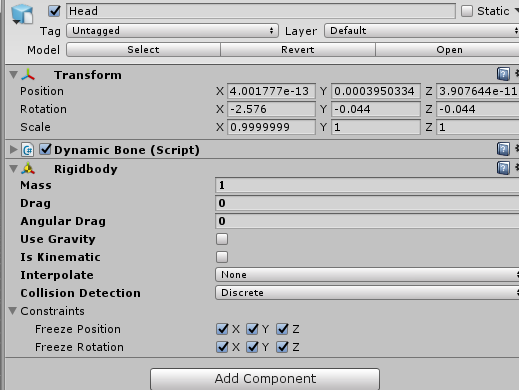
remove the angular drag and gravity
and freeze position and rotations on all axis
then you create an "empty game object"
directly under your model name
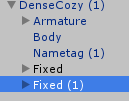
"Fixed" and "fixed (1)" are my empty game object
as you can see they are at the same place as the armature and body mesh
on that game object
you add a fixed joint component :
https://imgur.com/JGh7stH
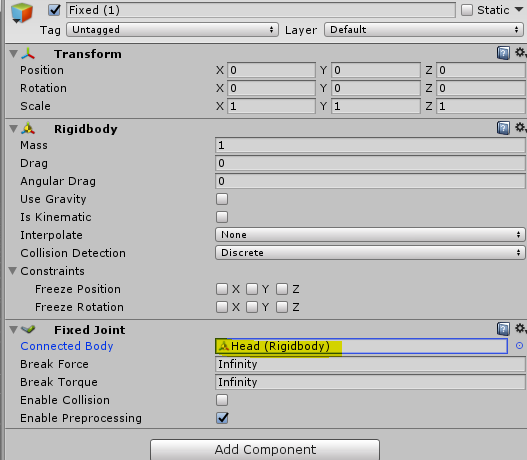
remove the angular drag and gravity from the rigid body but don't touch anything else on it
on the fixed joint part, drop the head bone with the rigid body component to the connected body
your empty game object will now follow your head rotation and position
just parent whatever you want to the game object with the fixed joint
and move the game object where you want it to be
proud estuary
thank you so much
clear yew
👌
proud estuary
oh dear
so um, in play mode if i rotate the head the fixed joint does follow it
but the head itself no longer rotates, and the joint bounces back into place as soon as i let go
hopefully i didnt miss something let me check
weird i did exactly what you told me one second
clear yew
it's not always working as intented in untiy for some reason
also if you have any dynamic bone script and a avatar controller you won't be able to rotate the bones
proud estuary
i used the simple avatar controller to test and it seems to be working fine thank you
 arctic tulip
How do you make a prop part of the animation of the body of the avatar, I’m trying to put a cigar in the hand of mccree but it wants to start a separate animation from the body of the avatar
Instead of being part of the animation of that avatar

 sullen arrow
can someone explain to me how to use the ik follower correctly?
 lunar pasture
Awesome, thanks 😄
arctic tulip
I need help with having my props show up in animations
clear yew
@sullen arrow https://docs.vrchat.com/docs/vrc_ikfollower
(proposed)
lunar pasture
@clear yew they seem to do the whole drop through the floor thing
sullen arrow
thanks! will try it out
clear yew
@lunar pasture
lunar pasture
yeah but when I activate them my model shifts down
arctic tulip
That’s normal for the animation mode I think
clear yew
@lunar pasture okay, NEVER add animations to your avatar mesh itself, make a duplicate and do all your changes and animations on that, it will go fetal position the moment you open the animation window and add/create animations but it's fine
lunar pasture
No, I've fixed this problem before
it's the RootQ and Root T Values. I think I can fix it
arctic tulip
Now how do you make props show up with the animations? I tried putting a make active property to it but it didn’t show up
clear yew
@lunar pasture you will have to keep fixing it every time you touch it, everybody just dupes the avatar and works this way
saves a lot of time and headaches
lunar pasture
I just coppied the Q and T's from another anim, panic over, forget I spoke
I'm making a custom Fist animation
adding a boob scale to it, it should looks pretty funny when i squeeze the trigger
arctic tulip
Any help with props?
lunar pasture
how far have you got @arctic tulip ?
arctic tulip
i've made the avatar dupe, ive made the gesture overrides, ive placed the prop in the skeleton at the hand and posed the hand on the dupe
lunar pasture
I would do it on the model you're going to use, but @clear yew might shout at me for telling you to do that
as in placing the object in the hand
you'll wanna use a rigid body to link the object to the hand so it follows its movement
clear yew
lol, if you like fixing poses, by all means
@clear yew i'm still testing it
but i think i found a way to fix the model and get it back in T pose
arctic tulip
Ok rigid body got it
lunar pasture
and you probably wanna have it set as Is Kinematic - as in 'doesn't move'
then just make it a child of your hand bones
and to make it show up when you use a gesture, edit the gesture animation to have the object off at frame 0 and on at frame 1
I think that's all you need to worry about
sullen arrow
it worked now ty for the link
slim steeple
Any idea why my particle systems fire up in a completely different angle than what I assigned it to when collision is set to world and why it works perfectly fine angle wise if collision is local?
I.E https://steamuserimages-a.akamaihd.net/ugc/930433772026489396/056D8601360855882CD0CD119D5367101D2F63C4/ in contrast of http://prntscr.com/jbegp3

 slim sparrow
@slim steeple world particles are broken if inside your armature
The good news is, the latest SDK fixed this.
You need to put an IK Follower component on your particle system(s)
The particle system isn't "aware" of the IK on your model
Before this SDK update, we had to use fixed joints to joint a particle system to our hand from outside our armature
slim steeple
@slim sparrow I actually did so (somewhat) thing is while the angle's proper now with IKFollower in my particle systems, the transform position of it is slightly off than what it shows
so it's around 8 cm to the left of my weapon's barrel at a proper angle
Should I parent the particle systems to my wrist rather than on my accessory?
slim sparrow
That might be a good idea, yes
If all else fails, fixed joints have never failed me
 olive yacht
Is it possible to make animations 60 frames per second for avatars?
olive yacht
Just didn't know how to go about increasing it. Unity shows it at 30 and I would like to increase it to 60
Or will that require re-baking it in my modelling program?
slim sparrow
I'm not sure honestly. Have you tried just adjusting the sample rate?
Then seeing what happens
You can press play to see how it'll look obviously
olive yacht
How would I change the sample rate?
slim sparrow
Can't you just change the little number in the top left? Or maybe find the animation in assets, and change the sample rate there? Otherwise, you might have to change the sample rate in your program
I've got an animation from some random MMD model into my Unity project. How do I turn this into a generic humanoid animation? The mixamo animations always allowed me to just CTRL+D them, but that doesn't seem to be possible here.
The animation is currently tied to the model, I want the raw animation file
On top of that, I also can't change any of the animation properties, such as loop time etc.
Figured it out, Unity was choking on some japanese characters in the animation. Renamed it and now I can duplicate it
 pure summit
Quick question- if i override an animation (like thumbs up), and leave the rest of the other override slots empty, will my other animations work as default or do i have to put all the right animations in?
pure summit
Thanks fam 👌
 wise rover
if you wanted to add one component to an animation, can you duplicate it from the main avatar and then paste it onto the animated one?
slim sparrow
Yeah. You just duplicate your main avatar again, drag the animation onto the duplicate, and edit it
vocal zinc
hi, im trying to transfer a motion vmd to fbx so i can play it in vrchat but even in blender the animation is fked up http://prntscr.com/jbg97n
 slim sparrow
You need to use the MMD Tools model import function, not the one in CATS
Then use the MMD tools motion import function
Do not click Fix Model in-between, that will break the animation. You'll have to work with the original "unfixed" bones.
vocal zinc
i did everything you said :/
slim sparrow
¯_(ツ)_/¯
This is kind of uncharted territory
Like, this happened when I tried to import an MMD walking animation
 vocal zinc
sexy
slim sparrow
Broken arms are sexy indeed
 lusty dew
i'm making an avatar with a generic rig (a vehicle)
so i made animations that rotated the wheels with bones, and in vrchat they don't move at all
did i do something wrong?
 languid lantern
https://steamcommunity.com/sharedfiles/filedetails/?id=1370593100 i'm wondering if anyone could help me identify this particle effect so I look up a tutorial on how to set it up. Not sure how to describe it, basically it started out as an orb made of tiny particles, then the person was able to manipulate them and make them pull towards their hand, which I guess I could best describe it as a starfield/galaxy. Couldn't find the avatar since another person who had the same one was able to reproduce the same effect.

Steam Community: VRChat.
clear yew
Almost had same issue which worked on particle system for 4 hours, when to upload, it did not show up and in unity it just 100% broke everything which had DJ table which that table was completely broken that destroys everything that you put up so r.i.p my work, even wings that I put animation on did same thing till downloaded a very low quality one and worked fine, don’t get it >_> think need to update my SDK finally now
 delicate swan
Is it possible to include emotes and animations to generic avatars? I managed to create an idle animation for my generic avatar but I always seem to flop over emotes and such.
lusty dew
@delicate swan i tried to make animations for mine by rotating bones but in vrchat nothing happens when i perform the actions, do you know anything about this?
my avatar is generic too and it's a car
so i created some bones for the wheels
and animations that rotate them
delicate swan
@lusty dew My generic avatar is also a car and I managed to create a blinking idle pop-up headlight for my vehicle. You will need to copy the SimpleAvatarController from the VRCSDK
Use the animations you’ve created before and replace the default “Walk” animation in the animator in the Animation Layer
lusty dew
@delicate swan http://prntscr.com/jbi1bw

i've got one named "Airbourne"
but that's it
not sure what to do
final gazelle
@slim sparrow with the walking animation you tried to import, there're quite a few missing/unrecognised properties at a quick glance in the animation clip; as for what's happening with the arms, that may have to do with the model in question having a different bind pose to the model that walk cycle was made on
could be anything to do with the relative position of the shoulder bones to the chest/upper body bone to the difference in the angle of the arms (MMD models typically have an A-pose as their bind pose -- the way your model's being forced to drop her arms so low seems to suggest the walk cycle may have been made on a T-posed model)
final gazelle
what're you trying to do with the airborne state?
lusty dew
i'm not trying to do anything with it
i have animations for my generic rig that rotate bones
it's a car so i want the wheels to go when i move forward
i made a bunch and put them on a controller and added it to the descriptor
uploaded it and nothing happens when i move around
@delicate swan told me to replace the "walk" state in the simpleavatarcontroller example but there is none so idk
final gazelle
let me boot up unity quickly so i'm sure i'm looking at the same controller as what you're looking at
if you're using the right one that i'm thinking of though, "walk" is in the locomotion layer
lusty dew
i only have Base Layer and Animation Layer
final gazelle
hmm -- yeah, "Simple Avatar Controller" wasn't the one i used
final gazelle
i used AvatarControllerTemplate.controller -- well, made a copy of it to work on
lusty dew
yeah but i don't see a Walk one still
final gazelle
that one should actually give you a different window view
this is what i see on mine:
https://snag.gy/6X5PHQ.jpg

 final gazelle
this is where it gets a little boggling on the eyes -- double click on StandingState
*StandingHeight rather
final gazelle
let's see...it's StandingLocomotion you want
crouch and prone are irrelevant as far as i can tell, especially to desktop users
lusty dew
alright so i've got the animations i need
what do i do now? i've got standing locomotion on screen
final gazelle
what types of animations did you create?

all the ones ending with "FWD" correspond with forward movement, so replace those with the animation you have for driving forwards
it's a car, so i don't think it's too important if you didn't create several different animations for how fast forwards you're driving
the stuff ending with "BACK" is also fairly self-explanatory -- i'm just thinking about what to do with the turning and strafing ones...though again, you could probably get away with shoving any of your movement animations on those since you just need to see wheel turning to believe that it's doing something
lusty dew
i made ones for running and walking forward and back as well as an idle one
final gazelle
the idle one, just replace IDLE with that
walking forward/back, those ones are also fairly self-explanatory -- for your "running" ones, replace both the RUN and SPRINT variants with them
 final gazelle
there might've been two walkback's i would'e used on the bottom half, but i'm not sure it'd really matter much either way
lusty dew
agh wait i messed up
final gazelle
strafe...a car's not really designed to strafe to begin with, so you've got free reign on what to do there
lusty dew
now that you mention it
final gazelle
i don't think it's that important, honestly
for a car to be moving diagonally, its wheels need to be moving somewhat out of sync to begin with
final gazelle
so with the animations you've got, one side will look "right" while the other side will look a little "weird", but it'll still look more natural than if the wheels weren't moving at all no matter what
from the looks of things, the first two after STRAFERT should be "walkback", going from your pattern of using BACK for the 135 angled ones
you should have the most important parts down already though -- moving forward and back, your wheels should turn as long as the animations were created correctly
lusty dew
i did indeed make them walkback
after you said it i realized i made 135 fwd by mistake
final gazelle
i don't think it should matter too much on a generic/non-humanoid rig, but for safety's sake, you should also untick the two boxes on the right column which are ticked
lusty dew
alright, thanks for your help
final gazelle
good luck -- try not to run too many people over 😛
unless they're knuckles -- in which case, go as wild as you want 
lusty dew
don't have to
my ride is so sexy that it kills people when they see it http://prntscr.com/jbi87m

i made it so i could test out seats on avatars
it has 2 you can sit in, hopefully
since i've seen a good few that have them
final gazelle
i've yet to try out that seat thing, although i'm not sure if i'm going to play around with it all that much -- most of what i want to do probably requires me to get back into world building first
a burger car with cruise control though...don't think i'd complain about that
lusty dew
not sure if it even works honestly i just put 2 chair prefabs on and removed the event handler and trigger since the uploader didn't like them
clear yew
that's all you need to do
 stray sinew
Does anyone have bubbletop full version?
languid pier
someone know great inside out shader
for a sphere, where i can choose the textures in the miidle and still has great quality &
?
clear yew
https://prntscr.com/jbiu6x
Question, its been awhile since i did this, i wanted a sword attached to my waist but forgot how to make it disappear when want to draw it out on my hands, totally forgot how to do this xD any help

ahh nm figured it out, easy lol
proud estuary
does anyone have a tutorial on how to do combo gestures
torn pawn
idea is very simple = you have a parent that u enable with one gesture on one controller
and that parent has a child that is disabled and u enable it with other gesture
so it will be activated only when the parent is active
proud estuary
oh gee thanks dude
torn pawn
lets say Object1 that u enable with fingerpoint, then under that u have an audiosource that is disabled and enable with openhands
if u use openhands the audio source will not be activated unless the fingerpoint is being held on other controller
lunar pasture
Hello
proud estuary
hiya button
lunar pasture
how's life?
proud estuary
@torn pawn thats simpler than i thought it would be thank you
torn pawn
yes, it's very simple
you can use 2 buttons that activate a parent for 5 child objects
i think this way u can have 16 gestures
lunar pasture
can anyone give me a quick answer, I know Root Q and Root T are to do with relative positional coordinates, but which is which?
lol i guess not
proud estuary
oh yeah i forgot to ask
the other day i put a fixed joint on my character that follows my head movement
for some reason its very jittery in both unity and vrchat
whenever the head moves i mean
ah nevermind that, is there a way to make an animation alter Y coordinates without X or Z
slim sparrow
Fixed joints are jittery yes
@proud estuary yes, just delete the key frames for X and Z
But you probably don't need to do that, just don't touch the X and Z transforms. Animations don't actually take full control over the position/rotation, they just alter it by a relative amount
proud estuary
oh thank goodness
@slim sparrow its funny, whenever i move my head the screen i put infront of it either gets closer/farther then bounces back to where it's supposed to be
slim sparrow
You could try parenting it to your neck instead
Directly, without fixed joints
Oh, and if you do use fixed joints, make sure you have all the drag and gravity stuff off, lol
proud estuary
does linerenderer work in vrchat
slim sparrow
If I want to make my particles collide with only the world and not players (and not myself either), which collision layer(s) do I need?
clear yew
default
it will collide with world
and collision component
like the box or capsule collider
slim sparrow
Default also collides with myself
I already set up the VRCWorld collision layers, but that's not gonna retroactively prevent Default from also including PlayerLocal, is it?
Otherwise I would have chosen Default, friend of mine has a shield and it would be nice to actually see them bounce off of it
torn pawn
removing dynamic collision doesnt do the ttrick?
slim sparrow
It does, but I do want dynamic collision
I've got the layer set on Environment now, I'll test. If that doesn't work I'll try adding Default to the list. You can't exactly negate layers unfortunately.
I've got the knives thing coming out of my hand, but it does weird stuff when I point it to the right (I'm left-handed)
clear yew
dont forget if your particle is set to world
it will collide locally for players
so it will collide with you
but for others it will still continue to move
slim sparrow
Oh yeah, true
But I wanna see my own particles move tho
I only want them to collide with world ideally. Environment layer did not work
I found a japanese article lol
For some reason, environment didn't work to make my particles collide with world, which is weird.
 upper bone
how to make particle effects collide with other players?
torn pawn
if they are set to world collission then they do collide with other players locally
upper bone
where do i set them to world collision? i have simulation space set to world if that's it
ohh got it under the collision tab
torn pawn
checkmark Collision tab and change it to world
set bounce to 0 and lifetime loss to 1 if u want them to die when collides
upper bone
nah i want them to kinda bounce off the person, it's supposed to be shooting a nerf gun bullet xD
torn pawn
it won't show on your end if it collides with other users
upper bone
aw bummer. no way to fix that?
proud estuary
id like to know if theres a way to fix that too o.o
 wary parcel
I guess it is the engine and hitboxes, i guess you could make that with a map/playmaker
proud estuary
i have a few animations that play indefinitely, they used to work just fine but ever since i put animation overrides they stopped working. anyone know why??
the animation is blinking btw
and it doesnt work even when im not using any gestures or anything
the blink works fine in play mode in unity, i should note
slim sparrow
Alright, this is weird
My particles are no longer colliding with the world as reliably
In avatar testing, they will collide with the mirror and back screen, but not with the floor at all.
I set the layer to Default
 pliant plank
@proud estuary that sounds pretty odd, does any of the overrides perhaps have shapekeys to them?
slim sparrow
Actually, setting up the layers did fix my particles colliding with myself at least
proud estuary
@pliant plank yeah, is that whats causing it? theres no blink even before i activate any
pliant plank
I mean, even with that as a possibility... it'd still play the blink anim without issues... aside clipping of course...
proud estuary
maybe its a problem with the anim file?
pliant plank
Perhaps the anim somehow lost its legacy loop values and you need to re-set them?
proud estuary
i'll check em now
wrap mode is loop and its set to legacy
and i can confirm it works without error in unity
pliant plank
Just going through a mental checklist atm
slim sparrow
My particles collide fine with planes in unity at least
pliant plank
Do you have anymore animation components?
slim sparrow
I'm starting to suspect that the floor in avatar testing is just a weird quad or something
proud estuary
@pliant plank you mean the custom overrides?
i have a couple custom emotes and 3 viseme gestures, 4 gestures that enable/disable props
pliant plank
No the animation component
pliant plank
This one's a real pickle...
proud estuary
play automatically is enabled, animate physics is disabled, culling type is always animate
maybe it's clientside?
pliant plank
I doubt it
slim sparrow
And you're absolutely sure about the following two things:
First of all, the blinking animation. Which blend shapes does it use to animate blinking?
pliant plank
Unless they somehow fucked the mirrors/cams even more
slim sparrow
Blinking works fine in mirrors for me
proud estuary
Blend Shape blink
pliant plank
Then there ye go
proud estuary
or its more
slim sparrow
Like, what are the names of the blend shapes you manipulate in your blinking animation, and is this blend shape part of the first four blend shapes in Unity?
proud estuary
Skinned Mesh Renderer.Blend Shape.0.Blink
slim sparrow
Might wanna uncheck legacy and check the animation on a dupe of your avatar. See which properties it uses
Ah
Tbh that's a weird property name but sure
0.Blink?
slim sparrow
Nah, that's fine
proud estuary
i just discovered something though
slim sparrow
The first four blend shapes of your avatar's mesh need to be empty then
Open up the mesh in unity and check that
Unless you don't have the eyes mapped in the rig of course
proud estuary

ive just noticed Dynamic Bone.Enabled
this doesnt cause problems in unity and i dont remember putting it there
pliant plank
Not sure why that is there but it shodn't really conflict afaik
slim sparrow
I'm concerned about the fact that it's called 0.Blink instead of Blink though
pliant plank
But remove it i guess?
proud estuary
removed
slim sparrow
Can you try to rename that blend shape to just Blink in Blender, and make sure it's not in the first four shape keys?
Actually, you might just wanna upload this and test it out first
Mark it as legacy again of course, if it's not already
proud estuary
oh gee i've barely used blender for this model
the thing is it always worked before
pliant plank
What's the issue with it being one of the first 4 shalekeys? :o
proud estuary
i think the moment it stopped working was when i uploaded the custom animation overrides
slim sparrow
@pliant plank if it detects that eye tracking is possible, VRChat assumes absolute control over the first four shape keys. First two are blinking, the two after that are lower eyelid.


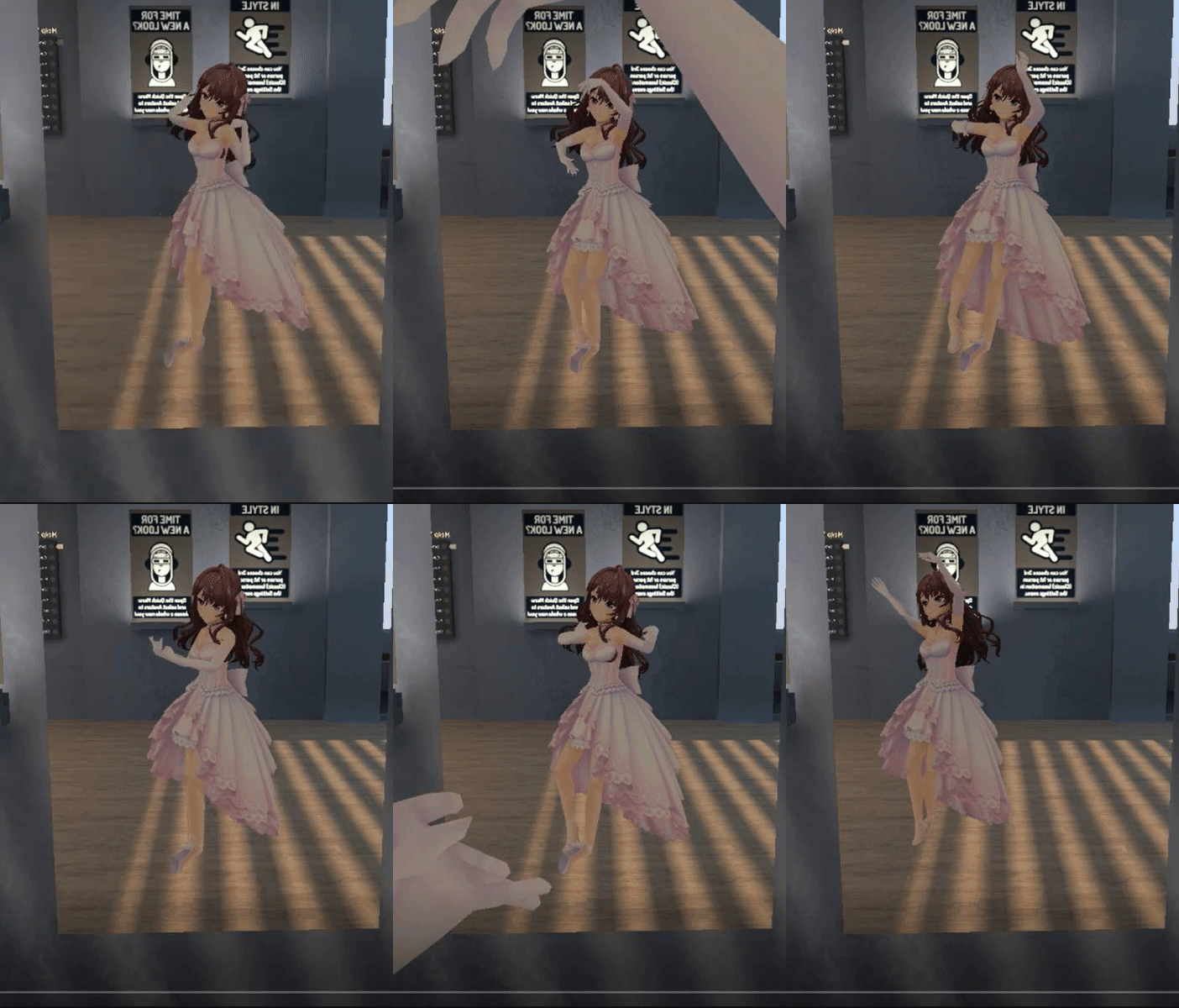


 slim sparrow
This is why sometimes, your mouth will hang open when you look down.
@proud estuary alright, that could easily be the issue
Unmap the eye bones in the model's rig
proud estuary
u h
slim sparrow
Or create proper eye tracking in CATS Blender Tool
proud estuary
doesnt know how to do that
slim sparrow
You open the model's rig, where you set all the bones
proud estuary
you mean in unity right
proud estuary
yeah okay wait let me remember
i'm a heckhole in blender
in unity im only less of a heck
slim sparrow
This is a Unity fix though, so that should be good
Just click on your avatar, go to Model Select in the top right (or just click your model in assets), go to rig->configure, click head, then set the eye bones to none.
pliant plank
Huh, well i personally never had said issues, even with eye bones (that weren't used) but i guess unity has its days
slim sparrow
Yeah, CATS makes sure that this is never an issue
proud estuary
but im still confused because, it definitely worked before
slim sparrow
If you manipulate the lipsync or eye tracking shape keys in an animation, they break completely.
Even if it's on an inactive gesture
proud estuary
ive unmapped left eye and right eye
ive never used eye tracking
you mentioned lipsync though?
pliant plank
I mean... i also don't use CATS for eyetracking as i well, don't use eyetracking
proud estuary
in one of my overrides it opens the mouth slightly
slim sparrow
There are special shape keys that you need to use for lipsync. CATS does all of this for you already.
I mean, they're not special per se
proud estuary
you mean in the descriptor right
slim sparrow
Any shape keys used in the Viseme Blend Shape section of your avatar descriptor absolutely cannot be used anywhere else.
Yes
proud estuary
well theres my problem
slim sparrow
This is why CATS generates visemes specifically for putting into this section.
Use it
pliant plank
Doubt any animation will use the cats generated visemes, all of the shapekeys used to make them are still available atleast
slim sparrow
Well, how else are you getting the models into Unity?
There's like a one-hour megatutorial on how to port MMD models to Unity. You can ignore the first "import MMD" part if your model is not MMD. https://www.youtube.com/watch?v=7P0ljQ6hU0A

VRChat Community Discord: https://discord.gg/VRChat Download VRChat! http://store.steampowered.com/app/438100/VRChat/ mmd_tools GitHub: https://github.com/po...
proud estuary
hehe
i got an MMD model into vrchat using only unity
i TRIED to use blender but it was honestly hell
pliant plank
As migero once posted, https://i.imgflip.com/28zqr1.jpg

 slim sparrow
And you think getting MMD into Unity directly without CATS will be less of a hell?
Mine looked like a balloon animal
 foggy loom
So true. All the new people don't know the struggle 😂
slim sparrow
This is what mine always did if I didn't let CATS fix them up first
This was after I got rid of all the weird balloon stuff that MMD models had on them for whatever reason. Looked incredibly strange, every bone had capsules around it
pliant plank
To be honest CATS is really useful but i only use it for visemes since i'm too lazy to make ehm
slim sparrow

 pliant plank
Oddly enough, not lazy enough to fix models up manually
slim sparrow
I use CATS all the time. Don't know anything about MMD or XPS models, but CATS seems to get them right every time
And there's lots of little things that makes life easier. Visemes, eye tracking, etc. VRC is picky about how it wants its stuff, and CATS can automate a lot of it
Even when just working with game rips, I can't tell you how often I use "pose to shape key"
pliant plank
I can teach you mostly everything about fixing up mmd's
slim sparrow
Or even just a bloody "start pose mode now" button which Blender makes a little more difficult without CATS
Nah, I don't need to know much about MMD models lol
The only thorn in my side is model makers who use .sph textures to give color to the mesh, such as hair
pliant plank
I wonder if that mmd shader ever saw the light of day...
It was going to support .sph files~
slim sparrow
Yep