#animation
1 messages · Page 66 of 1
 silent gazelle
 ivory lagoon
OMG I'D DIE IF THAT HAPPENED
 clear yew
anyone know how to make a camera work in game? i am trying to have some sort of smartphones to take pictures, but other peoples only see a black screen, is there a trick like where to place the camera in the hierarchy or how to activate it with animation?
clear yew
there is a trick but global cameras are not allowed
 violet kraken
my animation stops too early somebody know how to fix that ?
 agile kayak
I have gotten perhaps a simple issue, whenever I try to make an emoji surely it succedes, but then if i were to use it in game, I would get stuck, I tried to play with Start and End or animation or remove Duration at all so moving can cancel it, but even if i remove duration i still get stuck. Any idea why could this happen?
 keen panther
a quick question. how do i change a single texture during an animation. so that it is only changed during the animation
ok found out. you dont change the texture. you change the material to the one with the new texture
 final gazelle
@agile kayak if you're using a generic rig, the emotes are bugged -- you can't break out of it for about 60 seconds
agile kayak
oh i see
How do I go around that then?
oh, nvm i think i get it
Thanks for the reply
I guess I do need some sort of Proper Video guide for animations on vrchat
huh cant find one
So, the question is. If I can't use the generic Unity Humanoid rig, that means I need to Make a custom rig?
To prevent Emotes from bugging me in place for 60 seconds?
 lilac cave
use a dummy rig
agile kayak
Sorry if this isnt approriate question. But what do you mean by the dummy rig?
silent gazelle
Hello there. I'm trying to add passive ear twitching to my avatar. It worked until I added ear movements to one of my hand gesture overrides. Now the idle ear twitching does not work (though the hand gesture ear movements do). Is there a way to have both or do I have to choose?
 lunar pasture
@silent gazelle is there a way you can create a copy of the ears and use the animation to turn one of them off while you turn the other one on?
silent gazelle
@lunar pasture so go back in blender and separate out the ears? have two copies, one for hand gestures and one for idle
lunar pasture
it would be one way to work around it, I'd not rule out the possibility of another approach
silent gazelle
thanks 😃 i'll do that in the mean time while i keep thinking about it
 fluid crescent
my emote animation cuts last 8 secoonds ingame,anyone knows why?its not that long aniamtion aswell
 silk portal
Looking for some help with a DefaultTake in Blender.
It might be causing an issue with the armature in Blender.
Removed the animations and somehow, Unity’s complaining about the bones being offset compared to an animation. I’d ignore it, but it’s carrying over in game.
Also Unity complained the mesh was too small, despite being sized exactly like the ExampleAvatar (which is at 1,1,1 scale).
Wouldn’t let me export it, so I altered the armature to be bigger in the head.
 pseudo iris
can i make it so when something collides with the world it makes a sound?
clear yew
nah
pseudo iris
no way at all?
clear yew
not exactly how you want at least
 dense hornet
@half shell ask again!
Never give up on it. Someone will eventually come around who can answer your question
 half shell
:>
dense hornet
Does anyone here know how to make an OnEnter trigger a switch from and Idle animation to a different one and then back to the idle upon completion?
@lunar pasture is good with this stuff I think
Is that what you're trying to do @half shell
pseudo iris
im tryin to make a rocket launcher but ofc i want it to play a explode sound when it hits something
dense hornet
@pseudo iris is the rocket a spawned projectile
pseudo iris
Spawned?
dense hornet
Created upon firing
half shell
@dense hornet yes
dense hornet
When it collides with a solid object you need to set an OnDestroy --> PlaySoundAtLocation
Idk anything about c#
But that's how Id see it working
clear yew
but that0s using scripts right ?
dense hornet
Yes
 pure ledge
Anyone know why after previewing an animation, it would delete the object that has the animation controller?
dense hornet
Not yet at least, and thats what I thought too
dense hornet
@clear yew do You know how to fix @half shell s problem?
pure ledge
still allows scripting for worlds though
clear yew
what's the problem ?
pure ledge
Which is good
dense hornet
He/she needs an OnEnter box trigger to swap animations on an actor from idol to the new anim and back to idol
Any idea?
clear yew
on the avatar ?
dense hornet
@half shell I think so. Can you elaborate Ten
half shell
so the character is sat with an idle animation
when a palyer gets within 1m, i want it to swap to an entirely different animation
then when it's done, swap back
dense hornet
Seems like it needs scripts which we can't use yet
half shell
:<
dense hornet
The original cheat I gave you wont do?
dense hornet
Make a duplicate right on top with the right animation, turn it inactive
silk portal
Hey
half shell
i wanted to avoid that
silk portal
Would you know anything about how to reset a default take, Tony or Tenshinen?
dense hornet
You mean set a take back to default?
silk portal
Unity’s offset the rig because it believes the bones have changed from the animation when in actuality there are no animations applied to the rig.
dense hornet
Or did the actual default change
silk portal
The default take or some animation is causing the T-pose to get seriously messed up on my mesh.
Thing is I deleted all the animations on the .blend
dense hornet
Try applying an animation and removing it? It might re-observe to understand the animation doesn't exist anymore. If it runs a check after you remove it like I'm hoping
silk portal
And the timeline in Blender isn’t showing any key frames that might be affecting the rig.
pseudo iris
okey, now i wonder how to make toggable emotes.
silk portal
Yesterday, I also tried to add an animation, but it didn’t recognize the animation as I hoped it would.
Did it for one before I created.
clear yew
i'm pretty sure you can't use trigger
especially trigger that works with other players
pseudo iris
i just wanna override one of the existing Emotes and i wanna be able to turn it of at any time
so im not stuck in the animation until its done
 finite portal
Hey, I'm trying to disable my name plate during an animation, made it work, but the skybox gets all messy and distorted
@pseudo iris Takatsuki actually got togglable emotes to work yesterday
pseudo iris
hmm means i gotta talk to him 😉
 muted prairie
How would i make a double sided particle for a particle system ? Like a floating burnt piece of paper but different color on each side
clear yew
hmm, never tried this actually
maybe a specific shader that allows you to have 2 different textures ?
muted prairie
If i textured my mesh i blender and imported it in my project, could it retain its color values ?
clear yew
if you are using the same texture/material it should retain it
muted prairie
Cool, thanks
clear yew
any idea why my model is in 2d and in pixels? in unity
agile kayak
You might need to give more details
 cedar thicket
Anyone have a shader to invert colors inside a sphere? I did a bunch of searching here and tried the code @clear yew posted a while back, but it doesnt even kinda work. Just gives me a black sphere
 regal hollow
// Upgrade NOTE: replaced 'mul(UNITY_MATRIX_MVP,)' with 'UnityObjectToClipPos()'
Shader "custom/dd_Invert" {
Properties
{
_Color ("Tint Color", Color) = (1,1,1,1)
}
SubShader
{
    Tags { "Queue" = "Overlay"
    "IgnoreProjector" = "True"
    "RenderType" = "Transparent"
    "PreviewType" = "Plane" }

    Pass
    {
       ZWrite On
       ColorMask 0
    }
    Blend OneMinusDstColor OneMinusSrcAlpha //invert blending, so long as FG color is 1,1,1,1
    BlendOp Add

   ZTest Off

    Pass
    {
CGPROGRAM
#pragma vertex vert
#pragma fragment frag
uniform float4 _Color;
struct vertexInput
{
float4 vertex: POSITION;
float4 color : COLOR;
};
struct fragmentInput
{
float4 pos : SV_POSITION;
float4 color : COLOR0;
};
fragmentInput vert( vertexInput i )
{
fragmentInput o;
o.pos = UnityObjectToClipPos(i.vertex);
o.color = _Color;
return o;
}
half4 frag( fragmentInput i ) : COLOR
{
return i.color;
}
ENDCG
}
}
}
@cedar thicket That should give you what you want
 naive pelican
hey guys
how I can make the gun disperse when I trigger it ?
my gun is on my back and when I trigger it it still on my back I want it to disperse
cedar thicket
@regal hollow You're the best
regal hollow
No probs my dude
 torn pawn
@naive pelican if it works in your unity then it works in game, disabling mesh does not show up for you in game, you need to ask to others if it does
you could disable mesh renderer for it
naive pelican
@torn pawn what I mean is I want my gun disperse when I use it for example my gun is in my back and everyone can see it and when I want to trigger it to my hand I want to disperse from my back so it looks like I took it from my back etc...
torn pawn
that's what im saying
disablingmesh does not show on your end
where it works for others
 bronze peak
just going to place this here hoping that someone might know.. I want to put VMD motion on some of my models. when i import the motion in blender the dance does not look right. but i have a program that is literally called MikuMikuDance if i import the same model and same dance it look a million times better. so i there a way to make it work in blender or to export it in the MikuMikuDance EXE. Thanks In advance.... Thx for reading all of this lol
 nocturne pasture
Does anyone know if there's a way to make an animation where it has a startup animation when activated and when the button/hand gesture is released it plays an exit animation?
 void pasture
Do you have to do something special for Idle animations, when I put the animation in the idle slot, in game my model falls half way into the floor
torn pawn
@bronze peak you need to change scale to 0.1 when importing vmd, and to have best results u need original armature
clear yew
@nocturne pasture i don't think that's possible yet
you'll need some trigger and maybe scripts and those are not allowed and doesnt work in vrchat unfortunately
bronze peak
@torn pawn thank you having the OG Bones fixed it alot.
 lofty crypt
need some help
for some reason in the unity animator component, I cannot add any blendshapes
clicking add property then selecting the plus button doesnt add it
nor does changing the blendshape in the inspector
fixed
clear yew
what was the fix for that problem?
lofty crypt
Mesh must be called "Body"
clear yew
oh okay
easy fix
 slim sparrow
I don't think that was the issue, but I'm glad it worked
If you have your avatar inside an empty game object, that was probably the issue
clear yew
Can someone help? I have a PLANE 3D object (with a child plane) attached to my head armature, but it won't show in game when i put it on the animation. Do I have to assign it to my hand or something? It uses the rocknroll gesture
everything parented to head is invisible for you
even mirrors?
What should I assign it to then?
slim sparrow
No, it appears in mirrors obviously
I mean
Actually
Mirrors have a different issue
slim sparrow
If you enable objects, you can't see them in mirrors. Locally, you cannot see your head or anything parented to it.
Yeah, that's the best solution. Cameras in avatar testing can also work
slim sparrow
That can work, try it out
Depends on the type of object. I'm not convinced that head = neck in every scenario, but it might be close enough
slim sparrow
Then that should be good enough
clear yew
Ok
that still didnt work.
yeah
because everything
in the head mapping part
is considered as "head" by game
and will be rendered invisible for you
 floral imp
I made an moving vehicle for a world I’m making. Any reason why it’s speed isn’t consistent? It starts slow, speeds up, then slows back down at the end
clear yew
so eyes, neck, head and jaw
 obsidian jasper
Hello everyone, I need your help. Right now, I'm doing some gestures overrides on a generic rigged avatar. We know that to do so, you need to put a humanoid armature within the avatar to activate the gestures and it works.
However, by doing so, my avatar moves forward when I look down and back when I look up. Plus when I walk or run, it moves alternately to the right and to the left.
Do you know any tricks to avoid that ?
 dusk nexus
Does a shader exist similar to the one in avatar testing for the poly checker? The creator can't remember where they originally got it?
 frosty pendant
@floral imp sounds like the animation curve is not linear
floral imp
I’ll double check it but I thought I set it to linear
 cobalt horizon
Should questions about particle systems be asked here or is there a better channel?
clear yew
particle are usually used in animation so here is probably the best place
cobalt horizon
Understood, thank you.
slim sparrow
@obsidian jasper I think that's because of the full body IK stuff
If you unmap the middle fingers, that should stop
Unmapped fingers is what causes those awkwardly moving avatars where the head stays in control during emotes.
But this will actually benefit you in your setup, I think.
obsidian jasper
fingers ? But I play in desktop mode, so is it still related ?
I'll try it anyway
 orchid trench
How do I make my animation stop when i stop doing the gesture?
If i change hand gesture in the middle of the animation i can't ever do the animation again because everything is all screwed up and playing at once
dusk nexus
For anyone who wants to know how to toggle objects, I explained it to Shonzo in his latest VOD
On Twitch
Sharing is caring
 sweet zealot
if i want particles to occur when i move what should i do to set ti that way? (I want my fairy to drop pixie dust whenever she moves even the slightest)
 eager vault
I believe that would be under emission as rate over distance
sweet zealot
thanks!
 reef mason
Anybody know how to make a ragdoll animation? (Not for emote, only gesture)
 remote blaze
I'm guessing something to do with dynamic bones
Idk how to make that a gesture though
reef mason
That's just the thing though. I told a VR friend if it was okay if he can tell me how to do it, But he said something about duplicating it, animate it, then go under 3D Object and create as Ragdoll. Once that, You place the armature in the animation, But he got cut off half ways because someone was trying to ask another question.
 bleak otter
how should one import vmd files into a translated and fixed mmd model using CAT?
I am able to do it but without CAT I am not able to fix spine issues?
 pliant plank
@bleak otter
vmd's rely on bone names, if anything is changed, it just doesn't work, you'd need to bake the animation into a untranslated and unmodified mmd
And then in unity, you must rig that model as a humanoid to then extract the vmd anim file that should now work on any humanoid
The vmd may play out fairly decently, or beyond horrible depending on complexity
The same process can be applied to any other sort of animation type, if it can be baked into a model and read in unity, it can be extracted
(Provided it's actually humanoid)
 forest dove
Alright so if I were to say have an animation that made a hair suddenly use dynamic bones physics
I would need to have two seperate meshes and two sets of bones for it right
You cant turn dynamic bones on and off with an animator right
would having a game object that enables dynamic bones being turned on and off work?
pliant plank
Having dynamic bones on a gameobject that you can turn on or off sounds rational, you can set the root bones independently of where it's placed supposedly
In theory it sounds doable
forest dove
I'll have to try it
THats what my friend suggested
YO IT WORKS
THIS IS GOING TO BE SHITPOST MAGIC
 strong badger
Is there a way to get the lip sync to control an emission shader? I want to get this avatar's eyes to light up brighter when I am talking but it looks like blend shapes can only be used for physical changes to the mesh instead of adjusting shader settings. Anyone know of a workaround?
slim sparrow
@orchid trench don't switch back to neutral directly, switch to another gesture first
@strong badger you could duplicate the eyes in Blender, assign them a separate material used for emission, and then make them appear on a shape key
strong badger
Thanks, I'll try that! 😃
 languid pier
i got a rpoblms with particles, they dont follow my props. i have 3 particles and 2 of them follow the props but one stay in the same position as when im trying animations in unity. we i move the objects in unity, the particles follow, but not in vrchat.
languid pier
Nvm, i found it.
If someone has the same problems type: legacy particle and yummii sent a youtube link
 pure phoenix
Does anyone know how to assign an audio cue when an emote is pressed ig?, i can get the emote working ig and the audio to play when i spawn in, thats about it. anybody have any ideas or know how, Thanks!
torn pawn
emote or gesture
 undone glade
@pure phoenix have the audio on "play on awake" and inactive.
 noble sinew
is it possible to "borrow" the unity asset Muscle Animation Editor like people do for dynamic bones? (im broke 😢 )
 upper bone
^
clear yew
is there an easy way to make facial shapekeys when you only have one mesh? like i imported this model straight from a video game so he only has 1 mesh so its kinda hard to make his face do a different expression without touching another part of his body
clear yew
idk how though, i do all my facial shapekey stuff in pmx
slim sparrow
Well I dunno how it works in PMX
In Blender, you just create a new shape key, go into edit mode, and make sure the mesh looks the way you want it to look.
This can involve dragging vertices around
slim sparrow
@clear yew you mean the originals? Probably not
Use the muscle animation editor and it'll take you literally 10 seconds to pose the fingers yourself
Even for "complex" gestures like Rock 'n Roll
Otherwise, you can manually add them but that takes a little while
Like, add the animator properties for the fingers
 sick musk
Probably not possible to switch meshes in animations is it
slim sparrow
While creating hand gestures, why does one of the fingers sometimes do weird stuff when I press play?
It rapidly switches between two positions every frame
Even when I literally delete the last keyframe and make a new one
sick musk
It’s kind of weird because during the end of my animations my left hand does a piece sign and stays there until I do a generic emote
And I don’t even notice it in unity
 olive lynx
Hello everyone, I have a general question. I am currently working on a smart phone that allows you to "Take pictures". Good news is, when I pull it out in game, I can see the screen and picture perfectly fine but everyone else sees a black screen. Is there any way to fix this? Any and all help would be greatly appreciated! Thank you. :)
clear yew
there is no "fix" to it
because that's how it's supposed to behave
the cameras are not global for performance reasons
olive lynx
Ohhhhhhhhhhh gotcha! Thanks @clear yew for letting me know :D
Saves me the trouble from spending anymore time on this animation lol.
clear yew
btw
i don't know if you saw the announcement
but they will release a camera for everyone that you can take out
olive lynx
I have not! That's awesome to know though! :)
clear yew
@olive lynx https://www.youtube.com/watch?v=te1FRAiOMQs
Community/Developer Support team member Tupper gives an update on what we have been working on and what to expect soon. 00:08 - Intro 00:59 - Safety 02:29 - ...
https://www.twitch.tv/videos/252317186 at 12 minutes you can see the camera
 clear yew
i honestly can't wait for playmaker
and seeing someone make a full skyrim world with all the RPG system
 celest pewter
suks PM isn't coming out until 2024
clear yew
hope i'll still play that fucking game
celest pewter
oof
agile kayak
What do I need to do in order to not get stuck for 60secs doing custom Emote?
if i were to move the Animation file into slots emote 1-8, Humanoid rig and all ready, but
There's some trick to adding Non-bugged emotes?
dusk nexus
How do people modify shaders so that they affect players around them? Never actually tried it, but attempting to replicate the poly torch in avatar testing
agile kayak
how do I make a facial Animation using Shape keys from MMD model and still being able to move?
i just get stuck in place if i try to change any emotes
or am i forced to give up custom emotes on desktop mode?
slim sparrow
@dusk nexus you can't do that
The poly torch is a Projector, which is not an allowed component
@agile kayak use gestures?
Not emotes
agile kayak
hm
slim sparrow
Look up some YT tutorials on how to do custom gestures
agile kayak
oh shit
that's quiet a far way isnt it
but alright i understood how to make gestures now
that sure was a quick guide
agile kayak
I never felt better pressing the Upload button
 white herald
nope
 restive yew
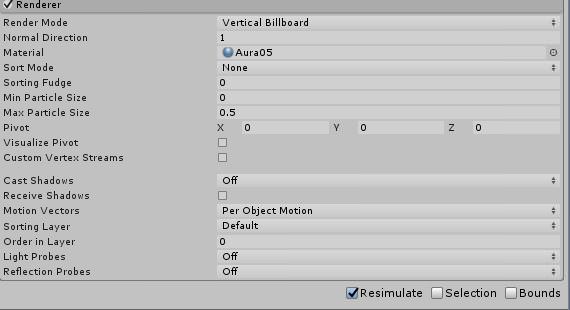
whenever i put any kind of particles in my model, the size of the particles change depending how close my camera is to them, is there any way to disable that?
 zealous needle
@restive yew screencap the renderer settings tab of the particles
uploading atm so I cant go to it, but I believe it's one of those settings, just cant remember which
restive yew
 zealous needle
billboard shouldn't scale, im not sure if vertical billboard scales but I assume you have that for a specific reason
restive yew
ay, i've got an spinning star in my eye, so it's kinda annoying that it changes sizes
zealous needle
lemme finish this model upload and ill glance at mine
restive yew
thank you kind person
zealous needle
looks like it's the max particle size setting, according to google
at least for the consistent answer
that setting it to 1 should tell it not to, or can try 0, to see which one says it doesnt
I've had it happen to myself, and I've had it fix itself, but I've never messed with that setting. My particles are set to that myself actually
restive yew
well at 0 it dissapears, changing it to 1 doesn't fix it
wait
i changed the wrong setting
zealous needle
F
restive yew
sadly, doesn't fix it
ah
nevermind, it did fix it, gotta set min particle to 0 and max to 1
thank you 🤗
zealous needle
❤
 molten elm
Could anybody show/explain to me how I can apply two idle animations to my avatar.
For example; I have a blinking animation ready, and just finished a wag animation to the tail, I wanted to know if it's possible for them both to loop in their own seperate animation files, because I have a "Disable Animation" component for blinking when using specific face gestures.
eager vault
for other face gestures, i usually set blinking to 0 instead of disabling the whole animation for that reason
molten elm
That'll override it?
eager vault
ye, it should
molten elm
I'll give it a shot!
But that also means I got to combine the blinking and wag animations
eager vault
also, im not sure if youve ever done a face gesture mid blink with that other method, but it gets scary sometimes
 kindred thicket
Hey, i am currently in the VRCSDK folder in unity so i can try and get the SimpleAvatarController duplicated so i can use it to apply a changing animation for one of my models
it isnt copying it so i can paste it again to have another so i can get the animation set
kindred thicket
thanks
 pine hinge
thats why I do all my facials on 50 so you can combine them with the other hand for some cool stuff @eager vault
welll not all of them, but the eyes definitely.
kindred thicket
How do i get the animations to apply in the SimpleAnimationController to have the walk animation(s) toggle when i walk forward, backwards, left or right?
slim sparrow
What do you mean toggle?
You cannot actually alter your animation controller I think, you can only override the animations within
orchid trench
Would someone know why my animation is starts over in the middle instead of the beginning?
like when i restart it it starts on the last played audio clip
reef mason
As always, no comment nor help on it. Thanks.
 reef mason
Uhh.... I .... What the hell happen to the Heavy?!
bronze peak
lol
reef mason
Did you set the ragdoll as for the whole armature?
bronze peak
yeahh kinda...
i just used cloth lol
and this is with dynamic.. but i want it to drop to the floor https://s1.gifyu.com/images/dyn.gif
 reef mason
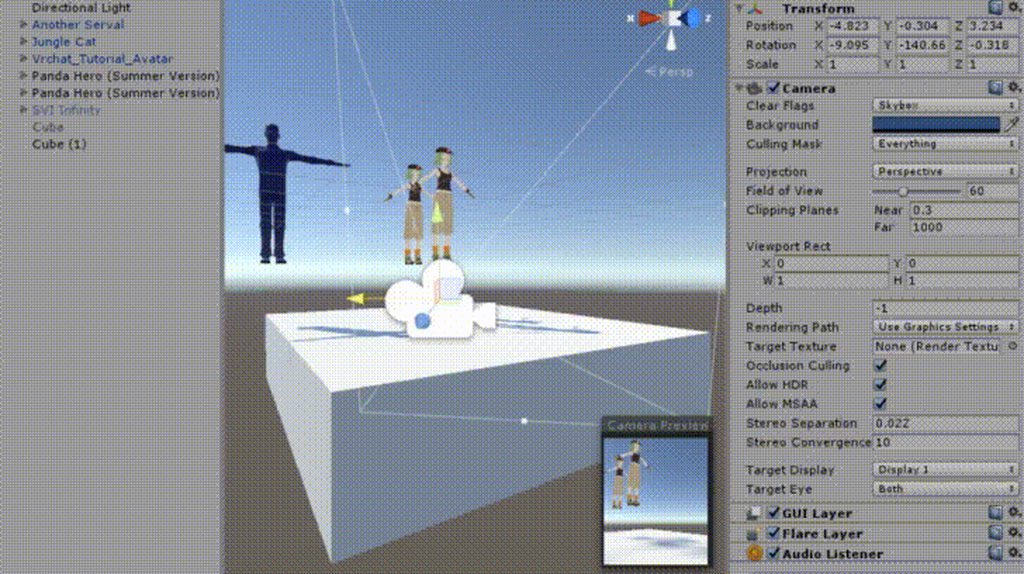
This is basically mine with the whole armature https://i.imgur.com/BhegoOW.gif
 final gazelle
@bronze peak cloth particles move a set distance from where the bones are -- with the way ragdolling is meant to look, you probably want to be using dynamic bones or some kind of joint system instead
bronze peak
@reef mason that looks really good what do you need help with?
final gazelle
with the dynamic bones...i've got no idea what you're meant to set as a root, or if you need multiple scripts to really make it behave like Christmas's one there
reef mason
@bronze peak I'm trying to set it as a animation for a gesture control, Not a emote control. But I don't know what kinda plugins that I need to place in for the animation.
And plugins, I mean (Armature, Colliders, Mass and Gravity)
final gazelle
that's being done with physics rather than a baked animation, right?
final gazelle
is it set as a separate prop/model from your main avatar?
bronze peak
oh ok that is pretty easy ... it looks like you have to add add your plane or box there to it unless you have it colliding some other way.. i wish i could re copy what you did so i can try to copy it but basically you'll want to add the model to be attached to the main model and in the animation deactivate the main while activating the ragdoll on.


any chance you want to wrap your scene and DM so i can take a look at it?
final gazelle
yeah, fpsgamer70 pretty much said where i was leading with that line of thought already -- your gesture should be hiding your main avatar while activating your ragdoll duplicate to fall on the ground, because i'm not sure how VRChat will try to behave if you attempt to activate dynamic bones or rigidbodies on the actual humanoid bones being animated in the avatar
reef mason
But that's just the thing, How do you hide the main avatar?
final gazelle
lessee...where was your "Ragdoll test" animation clip created from?
final gazelle
thinking of how to explain this properly, because i'm not sure if there's proper terminology for it...
so with your main avatar, does it look something like this in the hierarchy?
Avatar
Body
Mesh
with the VRC_Avatar_Descriptor component being on the "Avatar" level
if you create a new animation clip from the "Avatar" base level, you'll be able to specify the isActive states of your Body and Mesh -- if you were to turn off the isActive state of your mesh, then that's basically hiding your avatar
the reason it matters "where" you're creating your animation clips from in the hierarchy is because the properties you see in the animation clips are all path-based, and relative to each other -- so if you were to change the names of anything in your hierarchy or try to apply that animation clip to a different level of your hierarchy, things may break or not work
reef mason
Ah, Okay
 gusty pawn
I have a bit of a problem with a particle effect. I have this shot effect. And there is this ring that moves with it. The ring texture is applied to a ball mesh to give the ring the appearance that it's bending back around the shot to give it that really cool look to it. The problem is, if I set it to be a World particle so I can shoot it and keep moving my hand without moving the shot around, the ring texture renders relative to the world. So, if I fire northward relative to the world, it looks normal. If I fire east or west, the texture will continue render in the same fixed direction relative to the world, and makes it look really weird. Is there a way to keep that mesh particle a world particle, but make it render in the direction the shot is fire rather than rendering northward relative to the world?
languid pier
How can i toggle animation, with toggleprops from lights?
I can toggle thing now, but i dont know about animation. Do i need to create an who has the animation on it? Its only particles
clear yew
how do i create a ragdoll animation?
white herald
you would have to have a separate character from your humanoid avatar that is a ragdoll and enable it via an animation
see the unity ragdoll wizard as well
agile kayak
Which entries are gestures in the Custom override?
just wanna know which 7 are gestures
those names confusing me
clear yew
F3-F8 are: LetGo, Point, Peace, RocknRoll, Gun, Thumbup
agile kayak
I see, thanks
clear yew
LetGo - OpenHand
Point - FingerPoint
Peace - Victory
RocknRoll - RocknRoll
Gun - FingerGun
Thumbup - ThumbsUp
slim sparrow
Fist is F2
And it is a gesture, but I wouldn't recommend putting anything on there other than finger movements
agile kayak
i see
slim sparrow
Unless you're on desktop
slim sparrow
If you activate blend shapes on fist, you'll activate those blend shapes or any attached objects if you sit down in VR
So you'll be stuck with those until you switch avatar
agile kayak
oh i see
lets not then
cuz this sounds scary
btw
Idle animation has no issues right?
or
What happens if i change Idle, is this Afk face or just All time face?
slim sparrow
IDLE always plays
agile kayak
i see
slim sparrow
But the arm and leg movements are overridden by whatever the walking animation specifies, or if you're in VR
agile kayak
lets say I have a key that allows me to reduce size of the eyes
can i put that in idle?
agile kayak
it wont work?
slim sparrow
If you want to toggle it, put it on a gesture. If you want it to always be active, just set the blend shape to 100 in Unity.
No need to mess with idle anims
agile kayak
it's just a bit too big
i can do it straight on original model?
no need for dublicates?
agile kayak
i see
but lets say i already have an animation with same effect on gesture and it's 100
changing Body shape key wont change anything?
from default 0 to 20
When it's just facial expressions animations are easy, but when you need to animate hand movements, lets say to create a sort of face palm, that's when it gets hard
i guess ill spend a lot of time on that one
slim sparrow
I mean, it should do something
It'll just be set to 100 in the animation
Have you tried it?
agile kayak
not yet
I decided to not go too far
made only 5/100
it doesnt seem like having animation at 100 changes anything too
it will just Overwrite the default Shape
as i see it at least
Here's a weird thing or at least i dont know if its weird, when im talking visemes work properly but as soon as i release push to talk visemes get stuck in place
it happens if i disable push to talk mid animation of visemes
if i were to press v and say nothing after shape is stuck it fixes
is this how its supposes to work?
 stray sinew
I believe only you(yourself) see that in the mirror. It happens to me too and I use VR, I get bugged by it so I tap my HMD . Its the same when just tapping V to fix it. 😃
clear yew
yes, your mouth can be blocked open in mirror but only for you
can get fixed by just talking again most of the time
agile kayak
ah i see
i heard there are things also caused by low Ram
Like Dynamic bones whenever you stop they Re-load and jump up and then back to neutral
kinda bugs me but after asking few friends in game
they dont see it
I might need to buy Ram to stop this from happening in mirror
weirdly enough it only happens inside of mirror hm...
huh for some facial expressions i forgot to turn off the blinking animation Q_
How do I go around disabling Blink Animation made with Cats during a Gesture?
torn pawn
u cant
 grizzled snow
Which would be the best method for animation for emotes, blender or unity?
agile kayak
need to create a custom blinking animation in unity?
and delete the one made in cats?
or i just have to give up closed eyes?
so basically, I need to turn off blinking animations in CATS first
and then create a blinking animation in Unity
that should do the trick?
 atomic aurora
Turn off blinking in cats, and make a animarion for blinking, then you can disable it during gestures
violet kraken
@Glaciate the Glaceon#2701 unity mostly
molten elm
why are there multiple slots for animation if it doesn't let you drag in like, 2 different idle animations?
agile kayak
what for?
slim sparrow
@molten elm slots for animation? What do you mean?
Every animation only has one slot in the overrides
And your avatar descriptor has room for sitting overrides and standing overrides
molten elm
well, all I know is my fingers get messed up when I sit down
and nobody wants to show how to fix sitting positions yet
slim sparrow
You can fix sitting positions by overriding the IDLE animation in a separate override controller for seated anims
atomic aurora
Without scripts only the 1 work
dusk nexus
How are people using what looks like particle attractors but without using them
 vocal zinc
negative speed
@dusk nexus you do a sphere and you set the particle speed to -
not especially a sphere
you can set emit from the shell for a better render
dusk nexus
Ah right okay
vocal zinc
the particles will go to the center
 lament hearth
heyhey, probably someone can help me out.
I've imported a MMD Model, but her eyes are closed and the shapekey for the eyelids are broken it seems.
https://i.snag.gy/NUd5Xj.jpg

 vocal zinc
can't help on that
agile kayak
maybe there's shape keys such as Wink
lament hearth
when I change the values Min to -1 and Max to 0, it looks correct

but how can I overwrite the standard model with the shapekey infos from -1?
so that 0 is open eyes and 1 is closed eyes
@agile kayak this is the shapekey for wink.
But the mesh itself seems to be bugged (has closed eyes by default which shouldn't be)
is it possible to overwrite the Basis Mesh with the Shapekey Value -1?
like: I change the Shapekey for wink to -1 (eyes Open) and set the current state as Basis.
clear yew
yes it's possible
lament hearth
and how? :S
clear yew
i think it's something called blend from shape
agile kayak
huh blinking keeps fucking up darn it, btw nice name Svelsien
lament hearth
Thanks @clear yew found a way to fix it with "Blend from Shape"
clear yew
Thanks
slim sparrow
The way I'd do it, is first set the blink to -1 so the eyes are open, then hit New Shape Key From Mix
Then use the new CATS update to set that key as Basis
But I'm glad you got it fixed. Weird.
If that didn't work, then I would have just set the "eyes open" shape key to 100% in Unity all the time
agile kayak
Here's a thing, I removed catch Eye tracking blinking, then returned to unity and made animation
but the whole eye doesnt want to blink
my Pupil only awkwardly shakes when it should blink
there's 3 shape keys with Blink in the, Blink the usual, Blink Right and Blink left which i assume is from blender cats
slim sparrow
You need four of those actually
agile kayak
the blink right and left dont do shit
slim sparrow
The first four blend shapes in the mesh need to do nothing
While animating custom blink, you use the original wink and wink right blend shapes obviously
agile kayak
ah so i shouldnt use the Blink blend?
slim sparrow
You ignore the vrc.blink_left shape keys since those are handled automatically. They're empty
Yeah, that could work too. It's up to you
clear yew
for eyetracking and blinking to work:
The blend shapes vrc.blink_left, vrc.blink_right, vrc.lowerlid_left, vrc.lowerlid_right must exist as the first four blend shapes. (index 0 through 3).
agile kayak
i mean this model has seperately Blink and Wink
slim sparrow
Yeah, you can do it either way
clear yew
yes, they are generated by cats
clear yew
no 😄
agile kayak
so i guess i could just get rid of them
slim sparrow
No
agile kayak
hm
Wink is really wrong way to do it perhaps
in unity Blink makes animation work right
slim sparrow
If you use eye tracking, the first four blend shapes need to be either empty, or blinking and lower eyelid related.
clear yew
the order is required, but they can be empty
slim sparrow
If those blend shapes aren't there, your mouth will do really weird stuff
You want to make custom blinking animations, right?
Then just put the empty shape keys up top. This should already be handled by default.
agile kayak
y
though what weird stuff happening isnt with mouth
but more like with pupils
Haha
but i get the idea
clear yew
this is from the eyetracking/blinking setup docs, FYI:
1- The bone hierarchy Hips->Spine->Chest->Neck->Head->{LeftEye,RightEye} must exist!
Exact names are required, there can be no in-between bones.
The bones don’t need any vertices skinned to them. They can be “empty”.
2- The blend shapes vrc.blink_left, vrc.blink_right, vrc.lowerlid_left, vrc.lowerlid_right must exist as the first four blend shapes. (index 0 through 3).
Exact order is required, names are actually unimportant though.
They can be the same as the basis shape. They can be “empty”, but blender won’t export empty blendshapes.
3- The skinned mesh must be named “Body”.```it saved my life a bunch of times, but I know you're doing your own blinking 😉
slim sparrow
Eye tracking is still nice though, even if you don't use VRC's blinking
clear yew
yeah it makes the game so much more personal
clear yew
make sure the lower lid is set to zero when generating eyetracking in blender and the lower jaw is unassigned in unity
and check what bones are LeftEye and RightEye, those are the ones that will do the eyetracking afaik
agile kayak
yeah just checked
clear yew
k cool
agile kayak
seems fine too
🤔
i need some testing
i have a feeling that
Blink Blend is broken
or 2nd theory, I moved in blender the Pupil into the head further
because Pupl kept clipping into Eyelids
but that should do it 🤔
gonna try Winking
molten elm
I really hope they fix the animations
I've noticed that when you use the same shape key for an animation and the idle animation, it'll cancel out the idle animation even if you're not using the gesture that uses the same shape key
So if I'd like to for instance, make a gesture with my eyes closed, and use the same shape key for blinking, blinking breaks
agile kayak
oh really
so maybe that's why i cant blink?
🤔
@blazing elbow thanks
what if... dublicate Shape key?
🤔
molten elm
It's basically why
celest pewter
doesn't hurt to try 🤔
molten elm
You can make a separate shape key and it won't break it yeah
agile kayak
isnt that a fix?
molten elm
But I noticed if you use blinking with the gestures it'll break if you're using it for idle animation
agile kayak
🤔
molten elm
Can't even keep my wagging animations because it breaks when I try to make the tail "perk up" during a gesture, it just cancels it out completely
So dumb
molten elm
I don't think you can in Unity, no
Might be wrong, but I don't see Unity being reliable for that
 floral tinsel
Hey guys, Does anyone know how to import GoldSRC/Source Engine animations?
agile kayak
@molten elm hm, it seems you cant just copy paste shape key, but i found my way around it, just need to install Corrective Shape Key add-on script
that can create a dublicate of your entire model to which you trasfer shape key
change it's name
and then transfer back to original
🤔
molten elm
That's really useful
agile kayak
yeah
so
that's the fix with Blink conflict
in fact i thought I would have to split model apart first and then transfer one by one the shape key, but i guess it works to just
transfer whole mix with un-dismantled model
gotta remember to delete the Clean_Body afterwards
I thought Unity would fuck me over, it doesnt seem anywhere wrong at all. I guess this works
floral tinsel
So does anyone know how to import Source animations?
agile kayak
Quick question. To make gestures toggle only I need to make only 1 entry in Animator?
only the start and no end
clear yew
I always put it on start and endframe just to be sure
you don't want any tweening
maybe its fine with just one
slim sparrow
Are you on desktop?
You need to switch to another gesture before going back to neutral
Especially if it's on fist or something
Get into the habit of pressing shift+f3 and then f1
slim sparrow
Try holding both shift keys while you do that, and make sure you have at least one gesture that is not overridden
dusk nexus
Is having an object tied to a gesture spawn and stay fixed to it's spawn point possible without using particle systems?
Whilst holding the gesture obviously
agile kayak
i think you just need animator for all of that?
Little question. When I made blinking animation and put it into "Animation" component slot Animation. inside of Animations Element 0 and 1 should stay empty?
Was wondering if it's normal that only element 2 shows Blinking animations applied
clear yew
@dusk nexus yes it's possible
@agile kayak for blinking you should only have element 0
agile kayak
interesting
why does it assign it into element 2 then
ok ill manually drag into element 0
mb that's why my blinking was broken whole time
clear yew
just delete the component
add a new one
and drop the animation in the main slot
it will automatically add it as element 0
agile kayak
yup
already did dont worry
ok this fixed it
it seems i had to remove Blink from gestures anyways
 spice meteor
@grand mango can you tell us what exactly is a reasonable level for particle system and does it affect older chars?
 grand mango
A description of the limits placed on particle systems on avatars
That's reasonable! And yes, it affects any and all avatars uploaded at any time.
spice meteor
alright thanks
grand mango
It is not enforced by the SDK (because people would just change the SDK 🙃 )
spice meteor
yeah i dont mind i just thought i maybe have a to reupload some gun effects depends on how much it is
 zinc turret
got a quick question, anyone know how to make a lightsaber blade with particle effects?
white herald
make the emitter a cylindar of the right shape and the particles move really slow a very short distance
probably better off just usinga solid mesh with a glowy shader rather than particles though
 outer plinth
I'm sure it has been asked, but is there any info on these new animation options, how to use them and what they'll be useful for? It sounds exciting either way.
 tidal gull
So the big one for animators is only really usable for world authors as I think you can't do VRC trigger stuff on your avatar?
outer plinth
Ah yes, you are right. I misread that
clear yew
Hey I have a avatar error but it wont let me post a picture of it here, where do i go?
 sullen aurora
you should be able to just hit PrntScr on your keyboard and then press ctrl v in this chat and it will show a screenshot


 sullen aurora
it almost looks like its just zoomed in and maybe something is clipping
im not experienced with model issues but try zooming out (im serious lmao)
when i use alt + rightclick to zoom with mouse it does that to avatars if i get too close
clear yew
well ok... let me try
nope
zoomed in, out, and spun around it
https://cdn.discordapp.com/attachments/342412477176217600/438433285924847646/Help2.PNG

This is what it is supposed to look like

after I ran it through Maximo it glitched out like that
sullen aurora
dont know what to tell you there besides make sure you saved the rigged version as .FBX
ive had a master chief model become nearly microscopic after rigging in mixamo
 bright inlet
idk if that's an animation question, compute
clear yew
guys is there away to but the particle effect inside cube and doesn't effect other player that not inside the cube ?
I want to put cube and inside it like a party and I don't want my particle to effect other player that not inside the cube
can I do that ?
o
3d modeling?
bright inlet
probably Avatars or 3d-Modeling, yeah
clear yew
A description of the limits placed on particle systems on avatars
languid pier
Its still a lot, it makes that less abusives
 shadow jungle
anyone on?
 royal summit
RIP mesh particles then
royal summit
Yep 4 of my avatars got hit by it but i know a bunch of people who have 20+ avatars which particles don’t work now
 errant acorn
Lights a candle to remember his particles.
slim sparrow
So far, at least one avatar was basically broken. Had to decimate the particle mesh even further and lower the collision quality.
errant acorn
My thoughts go out to all of you, too.
royal summit
Definitely not a fan of 10 active limit
slim sparrow
Friend of mine is missing half his particles basically
Yeah, the 10 active limit is stupid.
I use Ultimate VFX and their prefabs have a lot of emitters.
errant acorn
That friend is me, I had a hammer with a custom particle effect but it's half broken now.
For no reason, really.
royal summit
Same.. Gona have to remove a lot of particles out of it
errant acorn
It was really well optimized and didn't even cause framedrops on low-specs.
royal summit
Well I know a few discord groups are starting to kick off about the changes so it will be interesting to see what happens next
slim sparrow
Anyway, the Ultimate VFX prefabs use a lot of emitters. These emitters are usually very simple billboards, nothing more than 5 at a time. Maybe 30 billboards total. But thanks to the new limit, we have to scrap half the emitters basically
Really hope they'll relax the limits on mesh particles and particle system counts.
royal summit
If they changed just the active max then I would be fine with decimating particle meshes and using lower collisions
slim sparrow
We already know that tris count barely matters for performance. And this is doubly true for mesh particles, which are one material, have no bones, and do not have any of the lighting stuff that regular mesh renderers have
errant acorn
I honestly hope they just get rid of it. All these limitations are driving a lot of passionate folks into the ground.
slim sparrow
I already decimated my knives as far as I can, they're still too limited
They're not gonna get rid of the limits. At best, they'll relax them in a month. Or they'll ignore the feedback
royal summit
Hopefully they do something quick cuz quite a lot of people are not happy at the mo
errant acorn
I hope it's a quick and effective response.
regal hollow
I wouldnt be hopefull about a quick response
There was instant backlash about the vive movement changes
lunar pasture
Once VRC is off CPU and uses the GPU properly we'll get more options, but that'll take a little while to impliment
regal hollow
and we only just got a toggle option
My guess is that they will wait for the outrage to die down
 heady sundial
Well changing VR controller schemes and make a system that successfully ports them without a restart isn't the easiest thing to write in Unity
So I can see why that took a while
Thankfully the particle stuff is not hard on purpose.
royal summit
I really hope they do change it. Maybe in the update that fixes the ID in menu which just got mentioned
heady sundial
I think that's a hot fix. The particles thing they'll have to have a talk about it first
lunar pasture
well my particles are extremely annoying and they've been unaffected
heady sundial
Yeah, I think between inefficient use of particles and not enough when needed for certain situations there was confusion on the amount of emitters people actually used
Saying this, turn off your particle emitters when they're not being used
Paused emitters count as active and toward your 10 count
At least I'm pretty positive that's the case
royal summit
Kind of happy I only recently started to enable emissions. Most of my avatars disable the particle
heady sundial
Also I'm pretty sure each mesh particle is its own draw call, so I don't know what @slim sparrow is saying here
I could very well be wrong but I don't believe I am
slim sparrow
Yeah, but then it doesn't make sense to limit mesh particles on tris count
heady sundial
No comment on the tris, just the draw calls and limiting for that
clear yew
guys is there away to but the particle effect inside cube and doesn't effect other player that not inside the cube ?
I want to put cube and inside it like a party and I don't want my particle to effect other player that not inside the cube
can I do that ?
languid pier
What could be anicenin between, is world where particles are allowed and some not.
Nice*
Like i want in this world to have a limit of 10 particles or this world doesnt have any limits.
I loved to watch flopiii animation and particles
 soft lynx
Ruined my favorite game thanks devs
 arctic quiver
What happened
stray sinew
Heya, gots a problem here. I have animation of a dancing avatar and I am trying to set it in the hierarchy for the head to have control of where it is and activate with gesture. The model is invisible when I have it set for the Head but works when I move it to spine, chest etc..
 steep citrus
lots of my animations are broken.... really good stuff too. my master piece hiei model with over 75 different particle systems timed anw ell optimized is gone forever...
looks like I wont be creating or playing this game nearly as much. really unfortunate. if its a 10 system limit thats so lame. I can go through 10 systems just creating one gesture.
clear yew
NOOOO not the hiei ;-; that one was amazing
steep citrus
😦 I know he was my favorite man!
clear yew
I was just about to start working on a byakuya model from bleach with the same type of particle effects as your dragon but sakura petals
lame :\
steep citrus
somethings might still be possible lol. you wont know till you try but once you hit 10 systems thats it lol
 real plover
Rip in spaghettis awesome animations 。゚(゚´Д`゚)゚。
soft lynx
It feels like the actual limit is six because my animation has 10 systems but only 6 of them are functional
Broke everything months of work. Yet trolls can still crash people and make hideous eye raping Seizure inducing garbage and my beautiful animations That causes like no lag And don’t hurt people’s vision are all broken I’m sure the VR chat Devs don’t care either I guess all animators I just garbage people to them. All they did was remove artistry from the game.
My favorite game because it allowed for so much creativity is destroyed
It’s like I have an entire art studio full of all these art tools and the vrchat Devs handed my a dry erase marker and said you can only use this.
 mild python
how do you set a viseme to a gesture without breaking the gesture itself?
 silver falcon
wait hold on
is it a limit of 10 particles each system or 10 particle systems on each avatar?
soft lynx
Systems but I think it’s broken mine has ten only 6 are working
eager vault
10 particle systems
A description of the limits placed on particle systems on avatars
soft lynx
The all worked yesterday
eager vault
10 systems active at 1 time
silver falcon
confusion
soft lynx
Yeah it’s terrible
eager vault
yea, mine are broke too, even though i have like 5 active
eager vault
can't even spin a beyblade half the time
soft lynx
They destroyed animations for anyone that makes anything artistic
silver falcon
im confused
eager vault
yea, and crashes still happen, i know
soft lynx
And it’s not the particle systems that lag people either
silver falcon
can you only have 10 particle systems on your avatar or can you only have 10 particle systems ACTIVE (emit particles with gesture) at a time?
soft lynx
My friend had an animation with 270 active particle systems he played it in a world with 20 people no lag
eager vault
10 ACTIVE, up to 200 systems in all
soft lynx
I’m saying active
silver falcon
r e l i e f
eager vault
i was clearing it up for the other guy
silver falcon
well clearly your friend knows how to optimize avatar particles
eager vault
10 active is nothing, imagine just a snail trail being 10% of the total you can use at once
Smoking a ciggy with fire, sparks, and smoke, up to 3 systems constantly
soft lynx
10 active is way too low
silver falcon
well personally
i dont really have any particles active by default so im not really affected by this
soft lynx
I know a lot of people aren’t affected by this it’s just the top animators who are or people who are trying to get to those levels in animation
silver falcon
yeah
eager vault
I have an alchemy circle that rotates in different directions and some parts that emit upwards, 8 systems just for the circle
soft lynx
That’s why I don’t think the Devs will fix it
eager vault
if you want your particles to do different things you need to separate it
All the parts are in 1 texture sheet
1 material for all 8 systems
silver falcon
i think i get it
soft lynx
Because who cares about the 5% of animators who have been playing the game to Make grand animations
silver falcon
ikr
eager vault
It's just the first iterations of change, things like this happen all the time, just remember to give feedback on the canny
This is the most popular suggestion so far as an alternative
https://vrchat.canny.io/feature-requests/p/toggle-particle-systems
soft lynx
I Have an event that I’m trying to throw it supposed to be an EDM festival thrown by animators but now we can’t do it
Because of these restrictions
silver falcon
yeah i saw that
soft lynx
I one hundred percent agree
The suggestion I’ve heard from all my animator friends is make these restrictions Only effective in public worlds but a toggle is a much better idea
eager vault
But these changes would take at least a month
silver falcon
im not really a programmer at all but
wouldnt it take an if gate?
you know
set it to detect if the instance of the world is public or not
if yes, restrict systems
and so on
soft lynx
You have no idea I have actually devastating this is for me and most of my friends
I have friends who spent literally for months on animations that are meant to entertain people and not for trolling And now they don’t work
silver falcon
im trying to say how they could implement the thing where the restriction makes only 10 systems active at once
soft lynx
Oh yeah I know I’m just complaining I’m mopping right now
silver falcon
well
yeha
i cant really experiment with sub emitters now
and one of my friends actually made an inventory system with particles
soft lynx
Sub emitters Don’t work either
silver falcon
i know
thats why if he wants the inventory system hes gonna have to put it on a dedicated avatar or be in a private world
does friends only and friends+ work?
soft lynx
No private world don’t work with our animation restrictions either
silver falcon
and is it so that only 1 person can only have 10 active at once
or is it so that the WORLD only can have 10 active at once
soft lynx
One person I think
soft lynx
Saying that like we haven’t been screwed already
silver falcon
well we would be more screwed
eager vault
lul, imagine that way though
"Hey man, put your ciggy away so I can smoke mine"
silver falcon
wheeze
soft lynx
I was planning on making a short film But now I don’t know if I can
arctic quiver
Yes because otherwise there are people who are going to abuse it
remote blaze
Yeah but like
It had no restrictions before
And most people were reasonable
I personally don't do much with particle effects, I think they're too flashy, but it's really a downer
arctic quiver
You know why this happened? The Great Pug had a bunch of people who were crashing others with particles this weekend
Not only that but it happened other times in the past too
remote blaze
Oh I know about these people
But I think making it so only 10 particles can happen is pretty disappointing
That's a massive cut
But hey, it's their game, I respect their decisions
arctic quiver
Doesn't really affect me but I feel bad for other people who wanted this to work
remote blaze
Oh wait, really?
Well that changes my mind completely
10 is more than enough lmao
Why tf would you want more
eager vault
10 systems is only bad for the big animators
eager vault
ye, scroll up a lil, we had a convo about it an hour ago
eager vault
lul, ye, that wouldve been bad
eager vault
Nah, machine gun doesn't shoot 20k, it's still good
but anyway here
https://docs.vrchat.com/docs/avatar-particle-system-limits
A description of the limits placed on particle systems on avatars
eager vault
pew...
pew...
 wary parcel
The thing is, that you want more locations for the particle to spawn but you cannot do that with the way particle system is limited now, so say: you have an ironman with 4 rocketboosters that makes you fly, 1 on each hand and 1 on the feet. You now have 4 active, the trials you are putting out would equal to 8 active with a bit of smoke sub emitter. Then you would want an rocket to shoot. 2-3 more active systems to make that work. Oh damn you cant because its up to 10-11 systems active. You are strictly limited right now because of this
clear yew
don't make iron man then
just create a gun
with a simple shit
no smoke
or flash
enjoy vrchat with gun animation 👌
wary parcel
Well wouldnt that make it less atractive?
wary parcel
Dont limit the creativity and perfectionists
remote blaze
and they're all animated
but for some reason they won't animate despite being generic and having the animation component
what am I doing wrong
remote blaze
yep
torn pawn
@remote blaze i usually use animator component then add an animation on entry
torn pawn
http://prntscr.com/j9uxos contains vmd animation

and the animator is on the spawned avatar, when it spawns it begins the animation
remote blaze
that's new
I've never used that view
so basically your put an animator on the main avatar, then what else?
torn pawn
not on main
on your pokemon
when it enters (gest spawned), it plays the animation it's set to
slim sparrow
You can let Unity automatically create such an animation controller
remote blaze
can I use override controllers?
wary parcel
You activate the pokemon with the animator controller through your mains animation.
This way you will activate the pokemon, it will unhide itself, it will start the animator when spawned, and trigger the next animation on the list in the animator controller
 ionic ridge
How do I make an animation where a humanoid model like a persona or a stand just floating behind my model?
wary parcel
Generic and move him behind you attached to your hips. Or joint it in to the model
Hide/unhide to achieve less polygons
ionic ridge
but how and where do i make the animation for her to float in the first place?
 fast moon
Hello there. Do you know where I can find animation packs like MMD ressources for a music band, like guitarist, singer or drummer ? On Mixamo there's only one for each member of the band, it's not really nice to see that in loop for each song. (and I don't really have time to animate that myself for now)
slim sparrow
I find most of mine on Bowlroll
 chilly wind
Could someone send me a message kind of explaining/showing how the IK script works? Trying to get it working w/ world particles, but not working properly. Would appreciate the help!
languid pier
same as bray
slim sparrow
I feel like a noob asking this, but how do sub-emitters work again? My sub emitters are children of the main particle system, but they seem to activate instantly
clear yew
What is C# Script?
slim sparrow
Oh, now my sub emitters aren't activating at all
Ohh, I got it. Subemitters can only have burst emission
clear yew
@slim sparrow update your game, particles should work again
gusty pawn
Anyone know how to work that IKFollower script yet?
clear yew
yeah
just put the component
to whatever bone you want your world particle to follow
it's a better and easier way to do rigid body / fixed joint
gusty pawn
Do I make an empty game object with the IK Follower script on it and just dump it along with particle effects, on the bone that I want them to track?
clear yew
(proposed)
gusty pawn
Yeah, I'm looking at that right now. I just don't know if that IK_Follower is just an empty game object.
Or the game object that the particle system is contained in.
I'm assuming it's the latter.
clear yew
yes
gusty pawn
Okay. Thanks.
clear yew
yes
 jagged pine
but because it isn't rigidbody it should be more performance friendly
jagged pine
...well I'll be the judge of that...
gusty pawn
And setting it up is now just a one/two click process.
But yeah, I want to test this first.
clear yew
you just put the component to whatever bone you want it to follow
and parent your particle to it
that's it
jagged pine
it kind of baffling that this comes right after a particle fiasco
clear yew
so the particles can be in your armature and not outside with a fixed joint tied to a rigid body
jagged pine
mixed signals at best
jagged pine
yeah I don't like that phrasing
jagged pine
yes it is
gusty pawn
Not if done right.
jagged pine
how can you say freedom and creativity and then enforce limits on stuff they know nothing about
gusty pawn
Hoping they take the community advice and then it into a toggle.
gusty pawn
To put the limiter in non-friends.
jagged pine
I donno if I'd want that either
I like my particles
but I don't want to friend people just to see them
=\
a toggle would work fine
gusty pawn
It would prevent random lag spikes from unknown players and people using crash guns.
gusty pawn
Well, I wouldn't know. I never found anyone with it during the limiter period.
gusty pawn
At this point, I just want separate gestures for each hand.
clear yew
it's planned apparently
gusty pawn
Yosh!
jagged pine
are rigidbody/fixed joints broken...?
clear yew
nope
 languid lantern
I'm still new to this, but I was wondering if it's possible to make an animation similar to gun fire, but with a throwing dart, and possibly stick to the wall and disappear after a short period of time?
orchid trench
Whenever I set my dance animation to trigger with a hand gesture, only my hand moves. It works fine if I set it to an emote though, but then I can't cancel it. Is there a way to fix that?
 dense canyon
I downloaded a file from Sketchfab and it says it has animation on it, but when i play in unity, it doesn't animate
Also, the data on the file shows two different animations, but neither of them see to be activiating
slim sparrow
@languid lantern nope. I tried my best
But you cannot actually make stuff stick into walls
At least, not world particles.
I tried the same thing with knives. Gave up because it couldn't be done. You're welcome to try, though.
languid lantern
Damn, alright, ty for the reply though.
slim sparrow
I settled for making them bounce instead
clear yew
@slim sparrow https://i.gyazo.com/e9c18f51cee12aa690511687c2f8d68f.mp4
languid lantern
I wonder if there's an effect like a bullet hole you see in other games, but just change that image to an object, though not sure how well that would work
slim sparrow
The problem is complex, but well defined.
- World mesh particles ignore rotation. This can be fixed with a shader.
- This shader needs the particles to be moving in order for them to show up. This is to give them rotation. Movement can be very slow.
- Upon collision or on death, a sub-emitter should trigger, spawning a new collision-less particle going into the same direction. This particle should move very slowly so it'll appear to be sticking into the wall.
- Sub-emitters inherit their parent's movement after collision! This means that the parent will either have bounced off already, or slid off to the side of the wall. Without scripting, you cannot make a particle spawn something on collision but still keep going.
@clear yew those are billboards, which don't suffer from the issues I outlined above.
Basically, I ended up with two possibilities for my knives: they either stuck into the wall the wrong way, or they bounced. I gave them bounce because it technically still fits within the Touhou bullet hell realm.
clear yew
i set them to mesh, still works or did i not understand something ?
slim sparrow
Yeah, but do they also still stay rotated the same way?
If so, you gotta send me a prefab or something lol
 red linden
doesn't the new IK thing fix the rotation issue
slim sparrow
I've thought the problem over for hours