#animation
1 messages · Page 61 of 1
 clear yew
 ebon pebble
Oh I know that
but if I could spawn a world space object, though Im not seeing a way to set an object to operate in world space
then it would be fine
clear yew
put a fixed joint to the object that you want to be in a fixed position
remove gravity
angular drag to 0
ebon pebble
but then it has to be attached to something, doesnt it?
clear yew
to your model i guess?
ebon pebble
IE if I attach it to myself, it then follows me just as it would if I parented it
clear yew
it won't follow you if you put that fixed joint
ebon pebble
which is what im trying to avoid. I want said object to stay where it's originally placed, even if i move.
hmm..
so you're saying if I just give it a fixed joint and dont attach it, it wont move?
with my character
clear yew
what do you mean by attach exactly?
ebon pebble
when you give something a fixed joint... you typically attach it to another rigid body
yea?
then it follows said rigidbody
clear yew
yeah
but don't do that and it will be in a fixed position in the world
clear yew
just remove gravity and the angular drag
ebon pebble
done and done
clear yew
also
you need to reset the position of the object that you want to spawn
let's say i want to spawn a cube 1 meter in front of me
ebon pebble
it was just an audio source, your advice worked perfect
it stays where i want
and does what I want
ooooo esiy
wait...
i see..
how do I reset it?
clear yew
see what i mean by reset?
very simple actually
just for exemple
let's say i want to spawn a cube 1 meter in front of me
put an empty game object 1 meter in front of your model
parent the cube with the fixed joint to your empty game object
Now, animate the empty game object to reset the position and rotation of the cube to 0,0,0
Go into that animation files --> Debug --> check legacy --> go back in normal --> set to wrap to loop
add the animation to the empty game object
when you spawn the cube, disable the animation component
ebon pebble
im a little confused..
so i made empty object where i want the sound to always go. the sound source is a child of said object
clear yew
okay
ebon pebble
i shouldnt have to use a fixed joint on the audio source
because it should auto follow the empty object as a child, it's just getting the empty object to reset it's spot each time.
clear yew
the first game object should only have the animation looping to reset the child, which is the audio source with the fixed joint
and when you spawn the audio source
you disable the animation component
so it doesnt reset the position when you spawned it
ebon pebble
i guess what im not understanding is what you mean about animating the object...
ebon pebble
I get that, but the animator is all of my avatar's animations. regardless of whether the object has a property added or not.
clear yew
select the game object that needs the animation
ctrl+D to duplicate it
remove it from your avatar
animate it
 remote blaze
I think a video might be more useful
ebon pebble
alright.. I now have a game object with entry, any state and cube
clear yew
@remote blaze never found a video that explain a simple fixed joint and a reset animation
ebon pebble
i get fixed joints, the reset animation is where you're getting me.
clear yew
you just need to animate that first game object to reset the position of the fixed joint
that's it
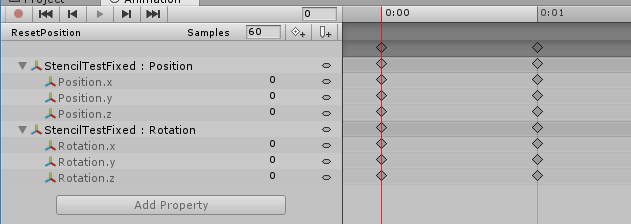
that's it
that's my animation resetting the game object
ebon pebble
Oh.... wow I feel dumb
clear yew
you want more picture of my setup ?
ebon pebble
Might be helpful.... i was wondering if I could have just added the objects position to another of my animations? so that when I used the animation it reset the objects position?
clear yew
never tried it
ebon pebble
IE finger gun caused the object to go, then fist had the objects transform mapped to it?
ebon pebble
if your way works, I'll just do it that way.. would probably behoove me.
clear yew
okay
took my screenshots
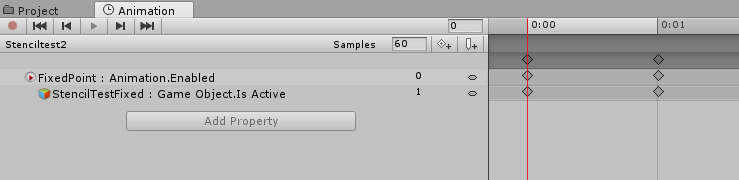
basically i spawn a cube with stencil in front of me
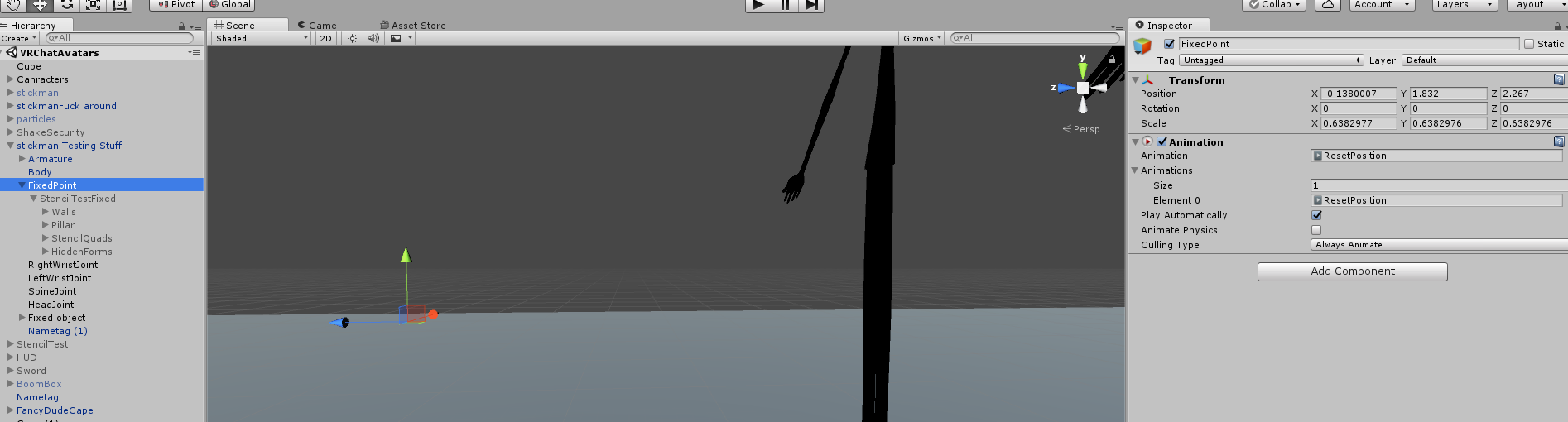
Fixed point with the animation
1 meter in front of me
https://i.imgur.com/s6KpucJ.png
game object with the fixed joint, it stay where i spawn it
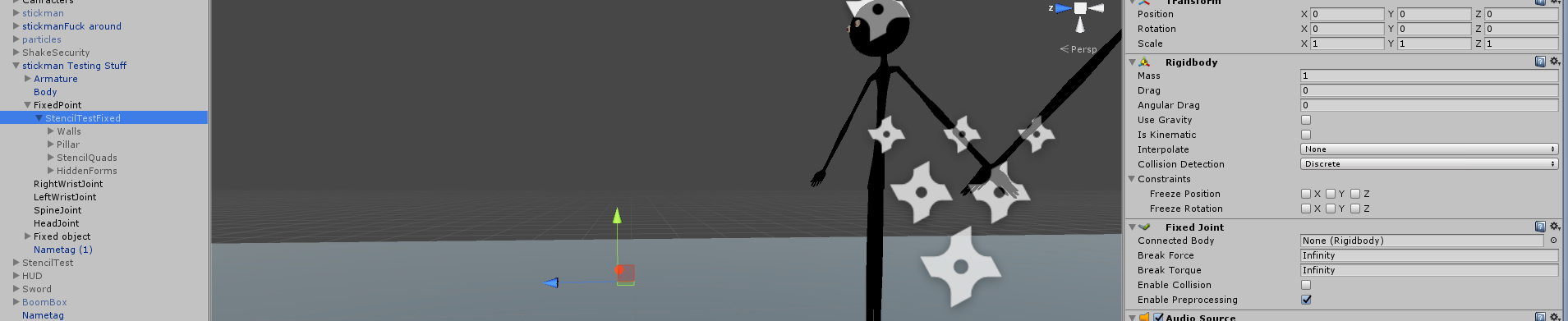 ebon pebble
yea
clear yew
Reset animation
https://i.imgur.com/GzHN1Hy.png
ebon pebble
so that looks a lot like what I have, the only other thing is that mine has the animator as part of it
clear yew
remove it
it's useless
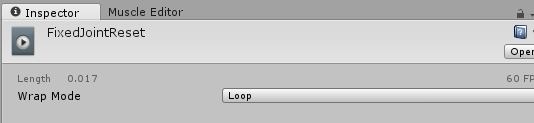
select the animation file
and do this

the debug mode is in the top right
that little thing to the right of the lock
check legacy
select that thing right of the lock and go back in normal
set it to loop
https://i.imgur.com/qmUcoeF.png
 ebon pebble
so i dont have a debug thing
clear yew
and this is my spawning animation
https://i.imgur.com/JD6p39W.png
 clear yew
got it ?
ebon pebble
yea yea
clear yew
if you want to reset the position with a hand gesture
you can do that it should work
but you need to reset just before you spawn it
ebon pebble
so I've added the object to the animation i wanted to activate it and the sound file.....
with animation enabled.
so when I run it, it should activate?
or does the reset have to be on a seperate animation?
clear yew
well i personally just spawn a empty game object with everything i want in a fixed poisition parented to it
the audio file is directly inside the empty game object with the sound component
so when i spawn the game object the sound will play automatically
ebon pebble
yea the audio file is inside the empty object.
Now I just add the empty object to the animation I want
and it should reset each time, yes?
clear yew
you use the same method as me ?
ebon pebble
from what Im seeing, yes
clear yew
then everytime you despawn it --> meaning no more hand gesture
the animation component will be activated again and will constantly reset the position until you spawn it again
ebon pebble
ima go run a test
to see if I followed you correctly or not
okay man
what you gave me works perfectly! I derped out when I originally set it up
but i figured out what exactly I did wrong (It was one box not being checked that should have been) thanks a ton man!
clear yew
you are welcome my dude
ebon pebble
i just started with unity two weeks ago, and this community + the game has already taught me a lot of things.
😄
clear yew
yeah, just need to pick up tips and tricks
it's pretty easy to do something when you actually know how it work
ebon pebble
yea... that was a lot harder for me to understand than it should ahve beeb
clear yew
animations are weird honestly
work fine for your model
but when you want to animate something else
for exemple that game object and you want to put that animation file in it
you need to check legacy or it won't work at all
Hey
 slim sparrow
Animating game objects seems to work fine for me
clear yew
i don't have problems with them
but still need to do some random bullshit to make them work correctly
and it's annoying
 stoic valley
I was wondering how to do something like this or just make a panoshpere-shadered material with the texture on the inside of the sphere so you can still see the character like this
https://www.youtube.com/watch?v=rr10iIV1JuA https://www.youtube.com/watch?v=WbYpuurFwAs Like maybe a one-way portal type of deal

Cubed Paradoxx showing off his new avatar in VRChat. http://store.steampowered.com/app/438100/VRChat/

CREDIT: https://www.twitch.tv/strippin Help keep us running: Donate: https://tinyurl.com/streamlights BTC: 3CZaBbkfoUrL8pHyScsNYsmkPkb5dj7L2D Get $10 FREE wh...
sorry to interrupt
clear yew
isnt that just stencil shaders ?
stoic valley
idk
slim sparrow
You can actually do a whole lot with stencils, but the easiest is to simply recreate an avatar like in the preview picture
The only reason I put it up is because people kept asking how to do it
stoic valley
alright. sweet. Thanks man
slim sparrow
Oh, guess links aren't allowed. My bad.
 ashen sedge
Mentions of that website isn't allowed.
slim sparrow
Ah
ashen sedge
Specifically by name
slim sparrow
Could you explain why? Something I don't know about?
ashen sedge
There are a couple of reasons for it, one of them being they host unallowed VRchat content, such as modified SDKs among other things
slim sparrow
Ah, alright
ashen sedge
But yeah, talking about that website by name isn't allowed. If you want to share links from it then please do it by DMs
 signal dove
Do movement animations animate bones outside the humanoid skeleton?
 zenith topaz
Anyone have a good 3d mushroom cloud effect that can be used in 5.6.3p1?
I'm having difficulty finding a good 3D one in the asset store
clear yew
i need to figure out the particle settings for a proper "puff of smoke"
and when he reappears i want it to look like he's coming through a fracture in time/space
black hole effect or something
i know how to make him disappear/appear
i need eyecandy tho
signal dove
Can I re-use visemes or does each one have to be a different blendshape?
 steep helm
Any1 know how to do selfie cameras, or can link me a tutorial?
clear yew
This probably isnt the place to suggest it but anyone know any good songs that I can make an animation to. Like a song that I can sync my animations to is what im trying to say
want some edgelord bullshit?
 torn pawn
can never go wrong with snoop dogg
 icy hazel
If you twerk in vr does it even work well
I like sorta tried on somebody elses vive before but i didnt know how it actually looked
 celest pewter
if u have hip tracking
clear yew
nvm /.\
 proven shadow
This has probably been asked before, but is there any way to make a hand gesture not left/right hand specific? I want to make a better fist animation.
slim sparrow
I don't think there is
When you define a gesture, you actually have to pose both hands in the animation. The game is set to actively ignore muscle movements in the other hand
It's a weird setup
I wouldn't be opposed to having the gesture slots split up
 vivid pond
How exactly would you add in a physical object into the end of a animation over 1 minute long without adding a keyframe over 2 seconds to avoid it taking over other animations after playing it
Eg I want rocks and a real sword to appear after lighting hits the ground in front of me but I still need that avatar for other animations
 kindred thicket
Hey i am trying to get a model's animation to walk when my model walks and do the Idle animation when the model is standing still. I have gotten both animations made and the Animation controller created.
 plucky isle
What is the problem when an animation is stuck on any gesture you do?
kindred thicket
it is in the Idle animation
slim sparrow
Is there any way to make root transform work in idle animations?
It does weird stuff right now
kindred thicket
it only does the Idle animation, let me see if there is a way to make that
slim sparrow
Well, you might be able to mess with the avatar or the rigging a little and have the animator transform both bones?
kindred thicket
I am trying to get the walk animation to toggle when i am moving and stop when i am standing
slim sparrow
Well, you'll probably want to edit the walking animation to then also trigger the walk in your other model
I guess root transform is just ignored in idle animations for some reason. That sucks
I need my model to move up/down a little in idle
 ruby elk
Guys i have a skateboarding animation cutsom made. The avatar is supposed to stay on the skateboard when moving andn ot move but somehow it isn't working. Any ideas on how to fix this? Thanks in advance
 narrow locust
have you replaced your walking animations with the skateboard animation? Is the skateboard added to your avatar hierarchy?
 turbid silo
Does anyone in here have experience with animation? If so I’d like a bit of help creating an emote which more or less is a miku dance
ruby elk
@narrow locust yes iti is
narrow locust
ok and is it a child of one of your foot bones?
 oak steeple
is it possible to move an avatar descriptor during an animation?
narrow locust
tbh thats something I've never thought to try
clear yew
you mean the viewpoint ?
oak steeple
im attempting to make a tank open up the cockpit and then my avatar comes out switching to that viewpoint
narrow locust
yeah, thats what the descriptor is
clear yew
no
oak steeple
well yes the viewpoint is the descriptor
narrow locust
figured as much
 dusk bear
@turbid silo first get the .vmd, then import model you want in "mmd tools" not cats. Then import motion on "mmd tools" if you like how it is, export as .fbx
Once In unity, open your scene or project. Then drag the .fbx motion. Rig as humaniod, then drag the animation file INSIDE the fbx to the override emote.
oak steeple
okay thanks
ruby elk
not it's not part of my foot bones
i'll add it and then try
thanks for the suggestion @narrow locust
oak steeple
other question. ive seen someone before with a model of a halo warthog and the passengers inside it be controlled. like the arms and mouth and stuff were working on them. how would one accomplish that?
narrow locust
yeah your armature needs to be parented to an object if you want it to move with your avatar
They probably just used custom walking/turning animations and added lip sync to the passengers
clear yew
@oak steeple blender. Visemes so every time you speak it also move the mouth of every guy inside
and probably some fixed joint and rigid bodies
dusk bear
Everytime I use the viseme in blender, it works but in unity , nothing is showing, help please ?
dusk bear
Ok thanks
turbid silo
Could ya??
ruby elk
@narrow locust so I attached it to the ankle bone and did the animation all over but it's still walking when I move. I want the legs not to move and stay on the skateboard. Do you have any other ideas?
narrow locust
Did you replace the walking animation with the one you made in the customanimationoverride file?
@ruby elk
ruby elk
yes i did
dusk bear
Try googling mmd motion download
 earnest trail
I spent some mmd animations for the vr chat and they work but some stop the action without reason
does anyone know how to solve
turbid silo
I think I failed miserably
 fluid crescent
anyone knows how to make to change your avatar textures when you do a hand guesture?
turbid silo
Yeah I failed
Something went wrong
Does anyone know how to put custom MMD animations on an avatar you already ported to unity??
narrow locust
@fluid crescent make another material with the texture you want, and switch to the material in your animation
@ruby elk I'm not sure what else to tell you without seeing a screenshot of what its doing and your settings in the inspector
 wide egret
... How do I play sounds with animations?
They seem to only play as soon as I switch into the avatar but not animation...
narrow locust
you have to disable the audio sources by default and only enable them during your animation
wide egret
Ohhh,, alright.
 sweet zealot
how do i emit a 3d mesh particle? my character will be throwing a ball.
narrow locust
in the inspector, under the renderer tab where it says render mode, select mesh from the drop down menu. Then, select the mesh you want to use for the particle
@sweet zealot
turbid silo
Is anyone able to get my avatar to have miku dances etc. I already ported it into unity
earnest trail
wath emotes is f1 f2 f3 f4 ...
turbid silo
????
ruby elk
@narrow locust https://imgur.com/a/KLVvL
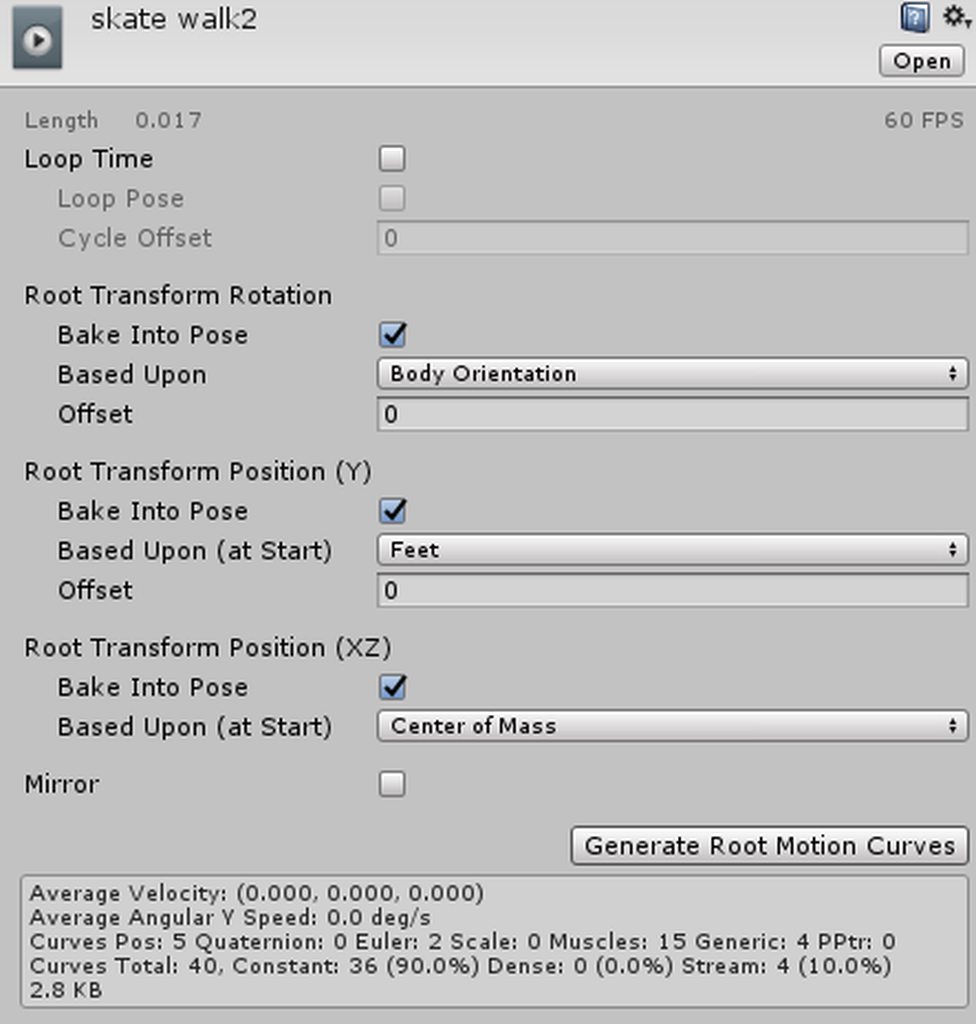
the avatar walks and the board gets just dragged on by the foot i connected it to
signal dove
Can bones outside the humanoid skeleton be animated in movement animations?
clear yew
omg
i just want to do particles
i hate stitching models
😠
hate doing models
rip
well
dont really need any blender animations other than ahegao right
all the defaults are fine
oh
looks like i need to add tongue animations
fk
aaaaa
this guy has no tongue bone
oak steeple
how would i do a walking animation override that just stands still?
I basically just want my lowerhalf not to move at all and be still
turbid silo
If someone has a classic miku with the different miku dances as emotes could you please send me it?
 south lynx
Hey can anybody help me? I'm trying to find a way to spawn an object and make it attached to the world insted of local, I've tried using a rigid body cube object and a mesh particle emmitor, but Idk if I'm setting it up properly
clear yew
@south lynx if the object is outside of the Heirarchy you don't need rigid bodies. Just set to world and it should spawn as placed in the world. If it's on a arm/leg/body part, then you need rigid bodies
south lynx
Don’t you need to attach the object to your avatar in order to upload. Let’s say for example I want to spawn a tree, but still be able to move around w/o it following my camera. How do you set a mesh object like that to world?
clear yew

 ionic ridge
hey guys, I'm trying to make mmd dance for my avatar but when I set the animation to humanoid it just discarded some rotaion animation so it's doesn't work properly. any idea on how to fix this?
 dusty canyon
it has to be generic
ionic ridge
@dusty canyon will it be able to work on my humanoid avatar?
 raw sparrow
It won't work. Except if you alter parts and redo it by hand. Which is quite a extensive thing to do.
ionic ridge
so.. is there any way that I can prevent it from discarding the animation?
 zinc moth
The structure of the model is different when humanoid, so it can't carry over the same transformations
 rose helm

 heady cove
could someone help me figure this out, im trying to make gestures with audio attatched to them and i cannot, for the life of me, figure out why it wont play
 azure iris
i was adding a blushing override to my model in unity instead of blender because shapekeys are dumb and i thought i could do it like a weapon but i have this happening http://kurousagi.pw/xd/ceoi4.png

i think i messed up something
azure iris
:v
clear yew
@azure iris what's the exact problem here?
azure iris
i fixed that but now i cant figure out how to make my emote show
i'd like to skip making a blendshape for adding a blush and add it into an override much like addign a weapon, adding an is active, but i cant recall what i may have missed @clear yew
the blush object isnt showing in the correct place and im not sure where to name the position
clear yew
so you have a separate blush object instead of a blendshape?
 dim vine
i cant get facial expressions to work is there a certain wrap mode i need
remote blaze
On the topic of facial animations
I've got 6 meshes each for different faces on a robot
could I possibly join the meshes and then make a shapekey where one face moves forward and the others move back?
remote blaze
whats up
remote blaze
okay, sounds easy enough
remote blaze
do you have a seprate model for the disc?
clear yew
yes
remote blaze
which video did you follow, out of curiosity?
clear yew

Creating custom animations for hand gestures and emotes in VRChat
remote blaze
what doesn't make sense about it?
remote blaze
where did you get stuck
clear yew
how many versions of the model do i need
remote blaze
two. one on the back, and one in the hand
by default, the one in your hand needs to be disabled (in the inspector tab next to the blue cube, don't tick the box)
the one on your back is enabled by default
but when you activate the animation, the one on your back gets disabled, and in your hand it gets enabled
clear yew
you mind if i dm you?
remote blaze
I'm going out soon so might not be able to reply, but I'll DM you the vid I used to learn overrides
clear yew
alright
 boreal trellis
hello i need help with weapon animation, gesture must be 0.00 0.01 so the only way is triggering animation object from weapon itself, i know what to do but idk how
if someone know how to animate weapon on 0.00-0.01 gesture message me pls xD
 fallen crypt
Anyone know why my walking anims and running anims are mixing together? I mean, on walking, the running anim is trying to play so it made the walking anim weird and stiff.
clear yew
Put it only on running animation
clear yew
@fallen crypt you have to control your walking/run speed
boreal trellis
how to animate weapon on 0.00 0.01 gesture
boreal trellis
[13:37] Bartholomau: hello i need help with weapon animation, gesture must be 0.00 0.01 so the only way is triggering animation object from weapon itself, i know what to do but idk how
[13:38] Bartholomau: if someone know how to animate weapon on 0.00-0.01 gesture message me pls xD
i am doing reload animation
2.4sec total
clear yew
just put the weapon in your hand and turn it on
oh
reload animation
seperate object
turn off loop
make it set to active in the animation
it should work then
and if your dude is falling through the floor make sure you apply the default t pose settings
 amber mantle
could there be something on an avatar that blocks out animations? im trying to make an animation where i use some of my own shape keys that i made, and i added audio, i tried the audio on other avatars, it works, except on the one im working on, and even if the shape keys work on unity, when i test them on vrc i get nothing
kindred thicket
hey i am trying to remember how to create a SimpleAvatarController in Unity so i could have my avatar toggle the animation sets
 brazen crater
@kindred thicket Just so you know, vrchat overwrites the animator controller when somebody in the room loads in your avatar, so we are kinda stuck with animation overrides
amber mantle
anyone know how to fix my issue, or why is it happening?
brazen crater
sadly not smart enough for that
kindred thicket
is there a way for the Animation Override to have two animations toggle?
brazen crater
if you're using a vr set then you can use one on either hand
maybe that also works on desktop if you press multiple "F" buttons
@kindred thicket you mean having two animations toggled at the same time or just having two different animations?
slim sparrow
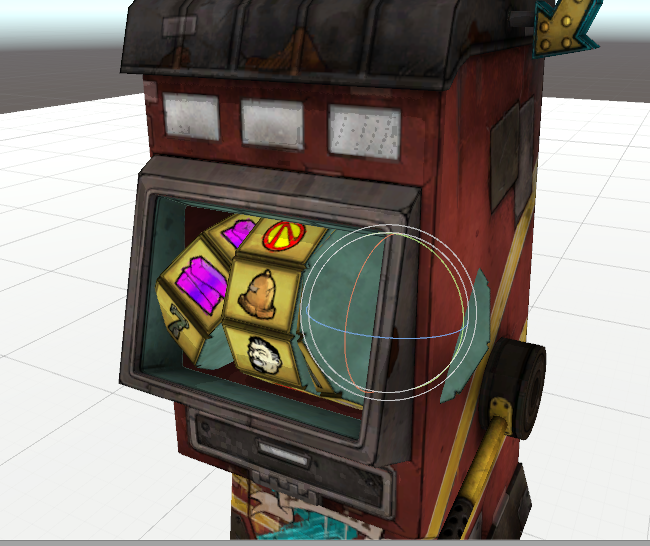
So I changed the tool handle rotation to Global instead of Local to animate the slot machine, but now the thing rotates incredibly wonky between keyframes. Like, it rotates around entirely the wrong axes
Is there a way to fix that?
The middle one rotates fine, but on the left and right they don't. On the left and right, the bones are rotated outwards a little
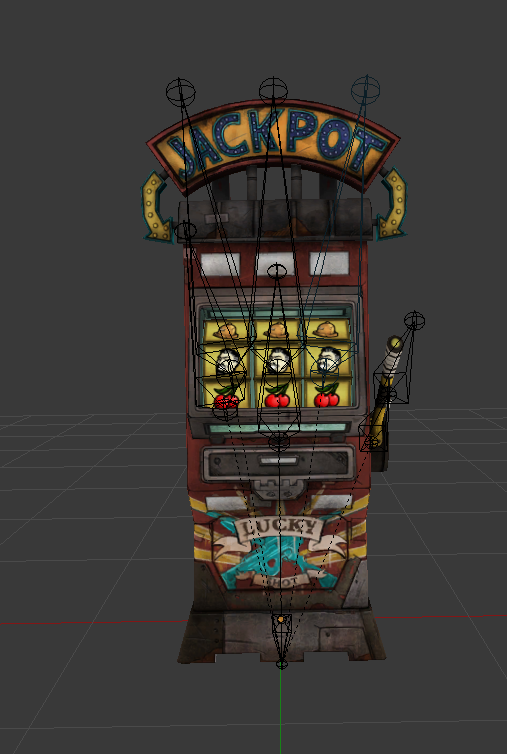
Is there a way to fix that? Can I just rotate the bones in edit mode?
torn pawn
hmm, parent and connect them to a different bone
and set them straight?
or move bottom of the bone to the exact middle of slot and then make it rotate just on 1 axis, it probably should do fine?
slim sparrow
I'll try that
Unity's animation smoothing makes it look like this in-between keyframes lol
 torn pawn
i gave up on my book idea, or i need to think of something else for pages
i think u need to have the bones exact straight to have a smooth rotation
torn pawn
you can create new bone
or extrude on 1 axis so it's straight
i had an idea with book, have a book, then i can enable a legacy anim for a split second that activates controller and it flips 2 pages, then inside i have a particle and I have a collider in my finger, then it subemits the next page, but 've tried so many things.. kinda giving up already
kindred thicket
@brazen crater It is two aniimations, one is a walking animation, the other is an Idle animation. I want the walk animation to activate when I walk and the Idle to activate when i am not walking
torn pawn
the inside gets all killed instantly on spawn or doesn't react with collider at all
i can't link gif, it's close to nsfw
 chilly vapor
@slim sparrow, you could always move the bone rotation in edit mode in blender
make them all face perfectly up
slim sparrow
I tried that and couldn't get them to face the way I wanted to
chilly vapor
oh?
slim sparrow
I ended up deleting the two outer bones, and duplicating the middle one
Then I moved them outward a little
It seems to spin well enough now, but I'll have to see how it looks
Yeah, it actually spins perfectly now.
chilly vapor
come playmaker, i want to see those reworkd to actually be randomized 😛
with loot
and explosions
slim sparrow
Yepp
My thoughts exactly
Right now it's just a fixed animation that spews out a coin rain
slim sparrow
Now I just have one final problem: I want to copypaste the rotations a bunch of times, but to do so, I need a smooth transition from -360 to 0
It looks kinda weird right now. Is there a way around that?
Like, if I set the rotation from -360 to 0, it will actually show the slots going backwards. I can add a one-frame segment where it goes from -360 to 0, but it looks "jerky"
 lunar pasture
@slim sparrow try selecting the frames and setting them to 'free smooth'
slim sparrow
Didn't work. I ended up moving the curves in a weird way, so that the transition is instant
It's good enough™
lunar pasture
it's one of those, I'm looking into it
slim sparrow
I set it to Broken
brazen crater
@kindred thicket there should be a slot for that in the animation override thingy. If you don't know what or how animation overrides work check out this video https://www.youtube.com/watch?v=V0l4-pH3vI4
Creating custom animations for hand gestures and emotes in VRChat
kindred thicket
I found out how, I just need to get the model to cooperate
brazen crater
ahh ok perfect
brazen crater
what do you mean by that? A shader is the rendering part of a material. You can just switch out the material or am I misunderstanding you
brazen crater
Ok then I really don't get what you're going for LUL
clear yew
lololol
 novel flower
Is there a good way to get avatar to stand normally when animating them? I need to create an sfx for summoning a sword but it needs to go up to certain height, and doesn't help the avatar in a weird crouch pose
brazen crater
What I do is I create a copy of the model, and then do everything there and apply it to my untouched avatar
novel flower
But I need the sfx of a sword to rise from ground til about shoulder height. So it's hard to see how hi it needs to rise in animation
 lofty crypt
whats the emote time limit?
novel flower
About 55s
I've gotten it to go over that but I have to keep clicking the emote every time it kicks me out of it to keep it going.
torn pawn
there is no limit if u use it through animator
but regular is 10s
i think it was through animator, well.. at least there is a way to bypass the 10s limit
clear yew
How do i edit an animation file in unity without having to make a duplicate every time
torn pawn
select the anim file and click animation tab
clear yew
doesnt work
i cant change anything
i need to change a directory location
i cant remove or change anything
it lonly lets me add keyframes
clear yew
sigh
this is frustrating
wish there was another way other than copy and pasting 3 items at a time
if i copy the entire thing my computer crashes
hello
does any1 know how to edit prefab writeable animation files?
i dont know how to link it to an existing project
i dont know how people do it
the prefab animations dont come with their sounds
it has to be added in because not every1 has the same directory structure
asjhndjkahdkjsahdlsa
WHY IS THERE NO WAY TO LINK AN EXISTING PREFAB TO A SCENE/MODEL???? WTFFFFFF
THIS IS RIDICULOUS WTF
i cant even edit my own animations without making a duplicate
if i mess up i have to redo from keyframe 1
thats so dumb
clear yew
Cause using prefabs for animations is the worst, just make your own particle systems and learn how it's used. You'll be much more successful
clear yew
I know how its just i cant even edit the ones i make without duplicating the character and redoing everything again
I know theres a way to link an animation file to a model in unity but i cant figure it out
Google has 0 results
Nothing on youtube
 torpid wadi
game object with a legacy animation component set to loop attached to it
 scenic pelican
is there a way to get hand overrides to play a looping animation or does it only work with single frame animations?
slim sparrow
There is a way, but it's convoluted. What do you want to do, exactly?
@scenic pelican
Like, what kind of animation do you want to play?
Gesture overrides should only ever be one frame long
But you can activate other components/objects inside that override
scenic pelican
i want to make my character's eyebrows wiggle up and down rapidly
maybe it was done by putting it on the handclose and then pressing the controller trigger constantly
i dunno
slim sparrow
Well, most people do that by putting the eyebrows on a bone or shape key, and then just pressing the triggers
I've done a similar thing with bunny ears on keyboard, by putting one ear on HANDOPEN and the other one on FINGERPOINT
Then I can hold shift and alternate between F3 and F4
But what you want could also be accomplished with legacy animations
But you can only have one legacy animation on your avatar at a time I think, otherwise things get hard to manage
The idea is that you create the eyebrow wiggle in a regular animation, can be any length you want. Then you mark the animation as Legacy. You put an Animation component on your avatar (disabled by default), and assign it the eyebrow wiggle
Then you enable the animation component inside a gesture
slim sparrow
People do that for blinking usually, but that's not always necessary
scenic pelican
wait if i turn the legacy animation component off will the shapekey return to 0
 dusk nexus
In terms of emotes in VRChat... By default, is movement disabled on emotes or is the dances that actually disable movement. So having a weapon appear on an emote instead of a gesture, for example? Could you move?
scenic pelican
nope, you can't move
slim sparrow
@scenic pelican yes
It will turn off
@dusk nexus unfortunately, the emotes themselves disable movement
Though I've seen a very glitchy emote that was like 5 minutes long, and the guy could move after a full minute
But the emote kept going
If you still want to move in emotes, consider using gestures instead.
You can't put longer animations in gestures, but you can disable your own skinned mesh renderer and enable a copy of your model, which then plays the "emote"
I've done that for an avatar of mine, works well
Just make sure to name the body mesh of your copy differently than your regular model
scenic pelican
ok im struggling to get unity to let me record keyframes into a legacy animation
slim sparrow
Just make the animation and only mark it as Legacy when you actually finish it
scenic pelican
i need to assign it to an animation controller slot then?
and then remove it after?
i tried copying keyframes from another animation into it and it doesn't animate
slim sparrow
Well, you will need an Animator component on the model to actually give it an animation, yes
If you're doing things right, you're not animating on your main model, you're animating on a duplicate
So any talk of "slots" is moot
I always prefer to leave my duplicates without any animation controllers, Unity will create one but you can always remove it afterwards
scenic pelican
i thought you meant i put the legacy animation component on the root object or the skinned mesh renderer object
and use that to control the shapekeys
slim sparrow
Yeah, you don't want to do that
Just put it in the same place where your animator and avatar descriptor are
scenic pelican
on the root object
slim sparrow
Yes
Follow a tutorial on manually creating blinking animations
The process is the exact same
scenic pelican
ok
oh this must be how they do the derp loli thats blinks one eye and then the other
slim sparrow
Yes
VRChat has default blinking animations built into the eye tracking, but support is limited and sometimes wonky
Plus, you can't disable blinking there, which can be problematic in gestures where your eyes are closed
scenic pelican
nice ok got it working
gonna have to update all my avatars now with legacy blinking
dang i can't do both can i
can't put more than one animation component on
slim sparrow
Probably not, unfortunately
I mean
You can put multiple animations in one animation component
But what you can do, is put the animations somewhere else on the armature.
@scenic pelican you said you wanted an eyebrow wiggle animation, right?
scenic pelican
that and i would like to switch to legacy blinking
since i have a hand override that also closes my eyes
slim sparrow
Eh, most people won't notice the blinking stuff
scenic pelican
yeah
slim sparrow
But how are you doing the eyebrows? Shape keys or bones?
slim sparrow
Ah
Well, I haven't tried this for myself, but what you could do
Put an animator component on the Body mesh itself, and do your blinking in there
Then you can put the Animation component for blinking on the body mesh, and leave the eyebrow wiggle on your root object
The animator component is only there temporarily, to actually be able to make the blinking animation
Then you'd end up with an Animation component on the root object for eyebrow wiggle, and an Animation component on the body mesh itself for the blinking
And you'd be able to toggle them independently
scenic pelican
i tried putting an animation component on the body mesh and that doesn't work
maybe i need to rerecord the animation
by making a dummy animator controller on the body mesh and removing it after
or, hell, is there anything stopping me from just using an animator controller on the body mesh?
with only 1 state
slim sparrow
I mean, you could do that too yeah
scenic pelican
ok yeah the eye brow wiggle doesn't return to 0 when the animation is disabled
slim sparrow
Actually, that's probably a better option
Actually, it isn't
I just realized that you cannot disable Animator components
The point of the Animation component on the blinking is so you can disable the blink
scenic pelican
ok yeah recreating the animation on the mesh object worked
cool
now i can have both 😃
or not, actually
the one on the root object stopped working
can't do both, just gonna stick to one
 manic torrent
anyone have a tutorial for making cape dinamic bone, trying to make batman cape
 toxic hatch
Is anyone kind enough to give me a naruto running animation? 😄
slim sparrow
There's an animation pack floating around
100+ animations or something
It has an "AnimeRun" animation which does what you want
manic torrent
Mixamo have it
 mint mulch
So anyone know how to keep the volume up in vrchat when using custom sounds?
Its still broken af. As in n oone can hear the sounds unless they're standing inside of the object and even then its quiet af
slim sparrow
Set rolloff to linear, minimum 10 maximum 100
Volume to 0.5
That usually gives me good results if the source is loud enough
clear yew
@slim sparrow how do i apply a shader to just the eyes?
 obsidian vigil
yes
obsidian vigil
??
slim sparrow
If you use texture atlasing, you have to keep the eyes separate
Otherwise you can't add a shader to the eyes
slim sparrow
Yes and no
clear yew
oh
slim sparrow
You cannot alter the material, but you can actually switch the material to a transparent copy @obsidian vigil
clear yew
wheres that option in blender that lets me delete floating vertices?
slim sparrow
Just make a duplicate
obsidian vigil
oh how would i do that
slim sparrow
Change a property in the skinned mesh renderer
slim sparrow
It does more
slim sparrow
For changing the material, you probably want to turn on record mode and change the material in the skinned mesh renderer properties
Dupe the material
slim sparrow
No idea what you're talking about
obsidian vigil
wait i lll send a pic

it looks like this
and should only be 1 frame long
not sure if thatll break it @slim sparrow
slim sparrow
It's probably fine, but you'll want two keyframes in any given animation tbh
Even if the two frames are identical
Just make one at 0:00 and one at 0:01
slim sparrow
Oh nvm, that's already the case
obsidian vigil
😄
clear yew
damn
slim sparrow
Just be aware, you probably cannot swap out every material in an animation like that, it never works properly for me when I do that
obsidian vigil
fyi im working on rems crazy face https://imgur.com/a/lzZWY
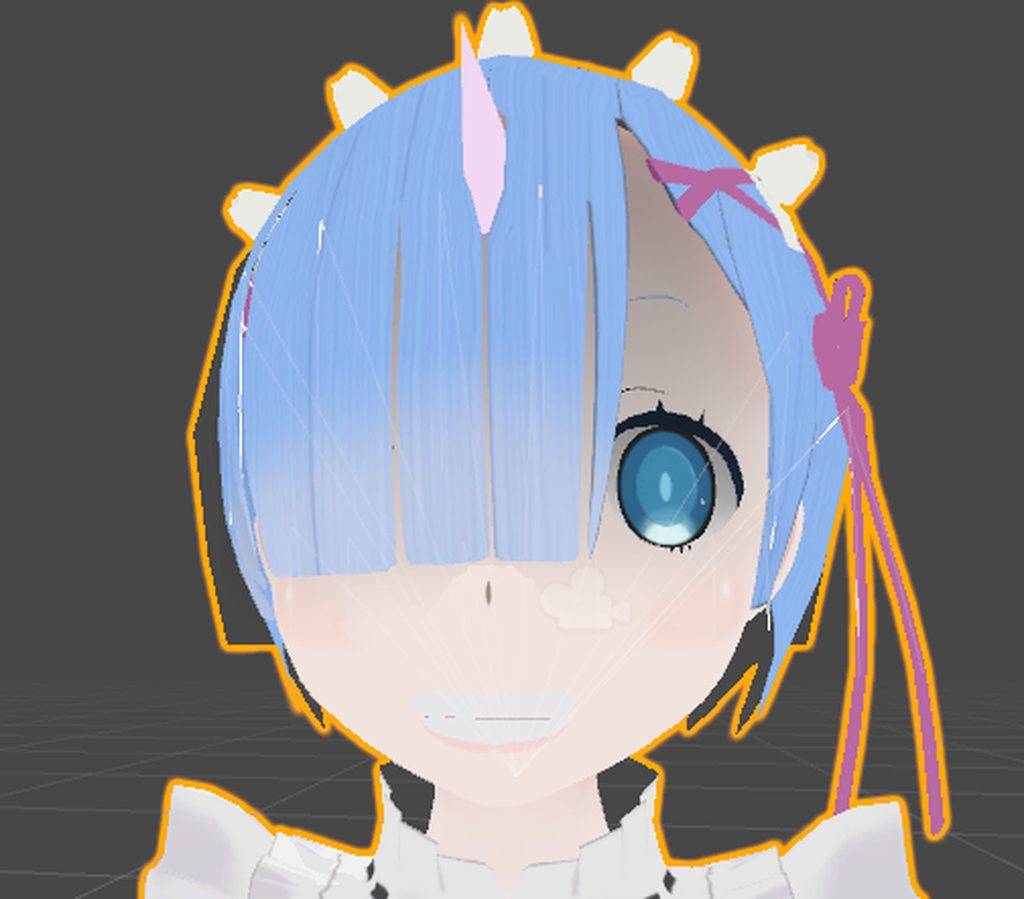
i only need that one
^^
only the eyes
slim sparrow
Ah, that looks good
 regal hollow
@obsidian vigil pls dont mace me
 slim sparrow
@clear yew I asked in the CATS Discord and never got an answer
slim sparrow
You don't have to texture atlas
clear yew
i have to
slim sparrow
Why?
slim sparrow
Then you don't have to
clear yew
ok
slim sparrow
It's kinda overblown
regal hollow
agreed
obsidian vigil
umm Rokk, im also trying to do a lense flare as in 1 particle, no speed and when i put my texture inside its a weird square and cutoff nor fade help
what do i do
regal hollow
@obsidian vigil what shader are you using
obsidian vigil
the particle additive standard
it kinda removes my stuff but leaves a square on the outside
slim sparrow
Texture atlasing is actually good practice, but if you have any reason not to do it, then don't do it
Unless you know exactly what you're doing
I manually atlased a model yesterday because the model turned out to be 166 MB
All the textures were like 2048x2048, even the teeth and mouth
clear yew
how do i inverse hide
clear yew
no
slim sparrow
@obsidian vigil I never did lens flares
slim sparrow
Did you tick "alpha is transparency" in the texture itself?
Oh
Uh, can't you just select all, press H to hide, then select the thing you hid and enable it again?
clear yew
because its hard to select
slim sparrow
¯_(ツ)_/¯
clear yew
nvm i got it
mint mulch
@slim sparrow 10, 100, volume 1.
Still cant hear shit.
 pseudo iris
Anyone know how to make a bow animation?
clear yew
Zzzz
repairing the shirt
guys
is there a way to grab the edge of the mesh and extrude it
?
without individually selecting every vertice
or can i just extrude in 1 direction and it automatically stretches
brazen crater
With shift you can select multiple verticies or by pressing c you can take out a "paint brush" to select multiple verts more easily
just make sure that to exit the paint brush mode you have to press the escape key
brazen crater
ohh ok perfect
clear yew
What is 1 direction extrude button
mint mulch
E?
brazen crater
press either x y or z after pressing g
clear yew
But i just need to extrude the edge
brazen crater
to lock it to an axis or hold down the middle mouse button to select one dynamcily
brazen crater
np
brazen crater
never really used extrude so I can't really help you there
clear yew
Sigh
brazen crater
but yeah I just tested it out with extrude you can lock it to the axis by either pressing x y or z
on the bottom left you can see you coord system
clear yew
i did it
😄
well
i just painted it then pulled it up
lol
im down 17 polys from 50k
XD
down to 17000*
brazen crater
nice
clear yew
can someone tell me about the Cell Phone Camera thing iv been at it for ages and cant Seem to do it
 pliant arch
in the custom override thing, which slot is for the peace sign gesture?
clear yew
Victory
pliant arch
thanks
clear yew
np
regal hollow
@clear yew The devs dont want people to use the cell phone cameras, they disabled the way people used to do it.
clear yew
oh kk
pliant arch
okay, I managed to create a gesture animation, plug it into the .anim, etc. Now I don't know how to create a separate anim? do I have to create another duplicate and work that way for each face animation I want to do?
oh, wait
I found a button to create a new anim
problem solved 👍
slim sparrow
Yes, but I don't think it's allowed
It doesn't even work by default, so that should be enough of a hint
clear yew
All them upskirt shots lololol
That would be why its not allowed
I either make my panties black or delete them and make the body part near there all black with no textures
XD
What i should do tho is put that purple space shader on that area
XD
it's not allowed because it makes the whole world laggy AF
 nocturne anvil
Selfie camera on avatars works local only
But some ppl managed to bypass that tho
fluid crescent
my audio on hand gesturre animation doesn't play randomly,anyone knows how to fix that?
 vivid wraith
hey guys im legit completely braindead to how .smd files work in unity, since im making a pokemon model the zip came with a .smd file and i exported it as an fbx, what do i do?
 icy crown
does anybody else have issues with Maxamo for animations the website loads soo slow, I've tried turning animated thumbnails for everything off by default. is there anything I can do to increase performance there? I can barely watch the animation on the model im trying to work on
wow it's totally just chrome that lags, works perfect in firefox (answers own question kinda)
heck i can leave the thumbnails animated too with no issue no guessing what "dance" looks like lol
wide egret
Is there a fast way to input what bones I want to animate?
 spice urchin
is there no '10 sec long emote' limit
cuz i seen people making dance anims and stuff that last like 15 sec
torn pawn
if u do it through animator it has no limit
spice urchin
o ok
wide egret
So I just posed a copy of a model into a pose in unity, how do I make it a idle animation?
spice urchin
do emotes play over other anims
so if u like have idle playing and all u have is a keyframe for blend shapes will it play over it or only play the blend shapes
wide egret
I finally learned that there is a circle to start animation recording!
celest pewter
u have now ascended!
wide egret
Now... how do I set the initial state and then animate the next segments...
turbid silo
Does anyone here make custom avatars??
wide egret
This is animations.
turbid silo
Sorry wrong chat 😅
 shut tusk
can anyone help me getting world particles to work?


according to a tutorial i did everything right
but they don't show up in vrchat and don't follow my wrist
 wise rover
So I want to make an animation where one model is completely replaced by another model. which hierarchy do I put the second model under to achieve that effect or do I just put the new mesh where the body hierarchy is?
for example: dettlaff from the witcher 3 changing into his combat state
torn pawn
@wise rover you have the mesh under the same armature
have 2 bodies, under the same armature, hide one mesh renderer, then on gesture switch
wide egret
Alright... I managed to actually do the Animation! In blender... cause Unity only records hip rotation.
 dawn shale
Could anyone help me figure out how I could make it so my model has this same exact pose ingame? The model itself is in this default pose, but is of course not functional in VRChat without the proper idle animation. https://puu.sh/zLsfQ/f563d2863c.jpg

been wanting to figure it out for some time now, as the default VRC pose is disgusting
wide egret
As long as it's not moving the head...
dawn shale
..?
wide egret
You know how the head is linked camera and rarely moves? Imagine your feet swinging instead...
dawn shale
I'm not sure I follow.
wide egret
Nvm.
 patent quail
does anyone know if its possible to have collision billboard particles align to the face of the mesh? https://nyanpa.su/i/PJvdYfu.jpg i imagine you could do it with scripting but without it i can't find any options that might allow me to do something similar

 shrewd moon
Fiddle with the render queue
fallen crypt
Can someone explain what are the blue faded colors emitting from the blue points? Could they be the animation range activity?
https://docs.unity3d.com/uploads/Main/AnimatorBlendTreeInspectorPreview.png
I suspect the reason why my avatars walking still plays running animation that mix them up together till the walking animation looked stiff
 turbid silo
Anyone know of any animation tutorials
 surreal crater
Creating custom animations for hand gestures and emotes in VRChat
I used this 1
turbid silo
Thanks
 rugged rain
So... Does anyone know how to make a custom blinking animation? I have a model that uses textures for expressions, and I want a smooth blinking animation.
clear yew
@rugged rain https://www.youtube.com/watch?v=jrfx3v45OJU&t=1s

In this video you'll learn how to make your VRChat custom avatar blink. Read the description for more information. Timestamps: 0:00 - Demonstration 0:11 - Tu...
rugged rain
Gonna check it out. Thanks!
slim sparrow
If you're rolling your own blinking, you will want to disable the eye blinking portion of eye tracking, though
In CATS, this comes down to ticking "Disable Blinking" when you generate eye tracking
rugged rain
Yeah I know about that part.
toxic hatch
How do I make an object light up a room? I plan on adding a lamp to my character which lights up the small area around it
slim sparrow
Yeah, true
People use lights for stuff like glowing eyes, you might as well just up the emission instead
torn pawn
MK free shader has glow shader, or just use emission
also a question to any1 that does emote overrides - which bones/or whatever else I need to animate/add so my character doesn't go half-ground? but so it preserves the previous bone state? i just need a 1-2 second animation where I don't fall under ground and no bone movement is needed
slim sparrow
Root Transform
You need to alter the Root Transform property in the animator, set the Y level to 1 or something.
By default, the hips are in the ground as you might be able to see. @torn pawn
Root transform is normally either ignored or overridden in regular idle animations, but it's used in emotes.
You can get some weird results if you change root transform too much in idle animations. I've had my model squat in the air for example
torn pawn
😄
thanks, I'll try it, just need it for toggle props to see if with an emote it syncs with other people better than using a 1 frame gesture
wise rover
when I put the second body on the model, it originally came from a different one. so it didn't even show up after I deleted the second model's armature
said something about breaking the prefab
is it possible to make an animation that switches to an entirely new avatar with its own descriptor?
celest pewter
no
torn pawn
what do u want to do?
wise rover
make an animation where dettlaff switches forms
torn pawn
but u don't need to change descriptor, if u have 2nd avatar under the same avatar
it works with the same bones
wise rover
is it possible to have multiple bodies in one model file in unity?
torn pawn
yes
you can have 2 avatars under same armature, 1 is hidden
and if u hide your main and unhide your 2nd it will move with the bones
wise rover
the problem is that the extended nails may not move like normal
torn pawn
if it's way bigger then yea you'll encounter problems with joints
but if the size is like the same then it works
wise rover
so I'll have to use the transformed model as the base and the human model to show first
 small tapir
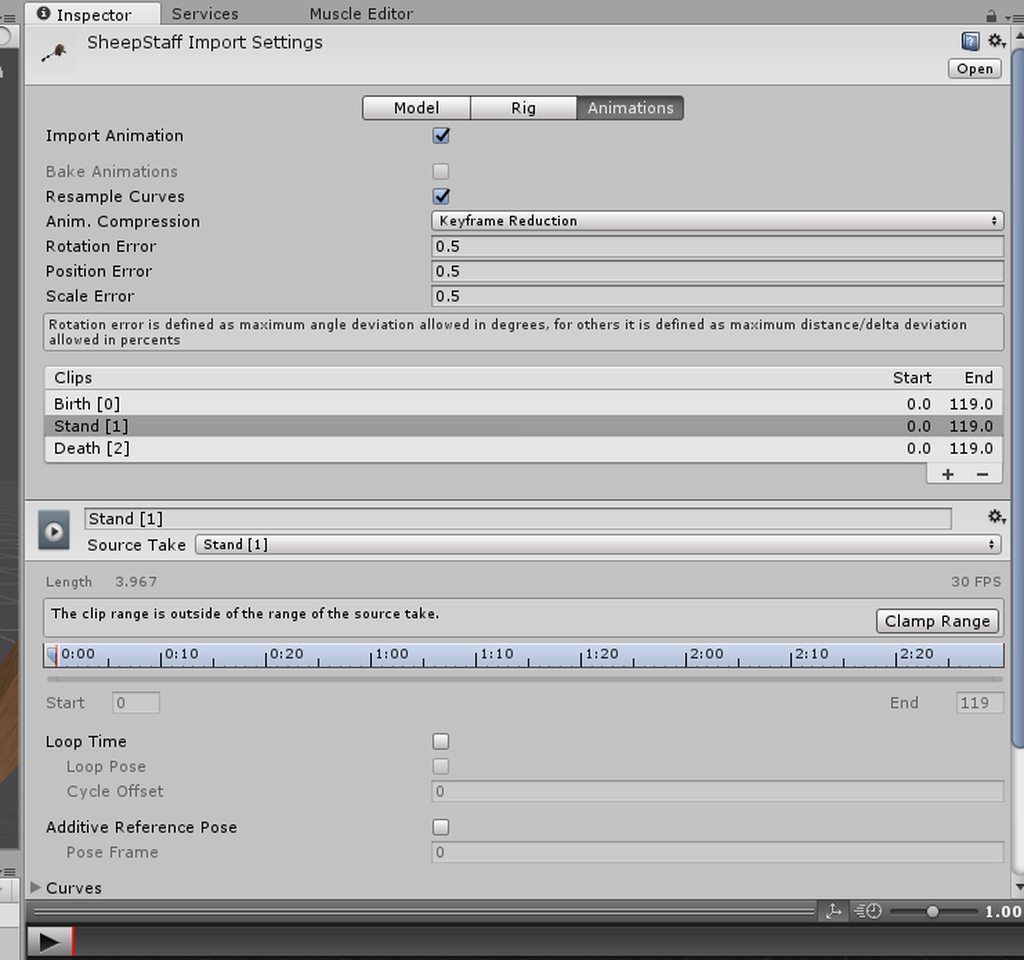
I Riped a staff from wow and it have animations how do i make them work? https://imgur.com/a/dTznn
 torn pawn
not ripping from superior game that is WC3 
small tapir
Will look weird i think lol and don't thinki can find this staff in WC3 😄
torn pawn
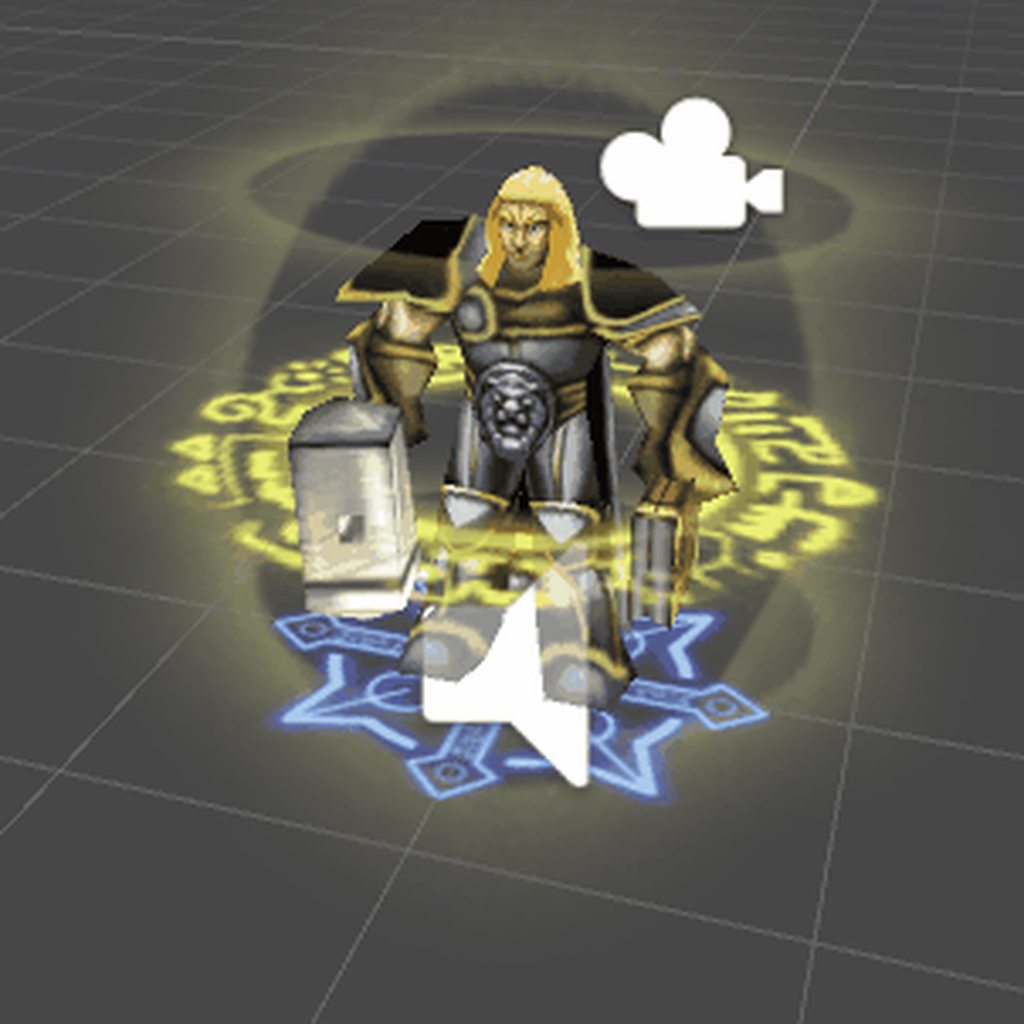
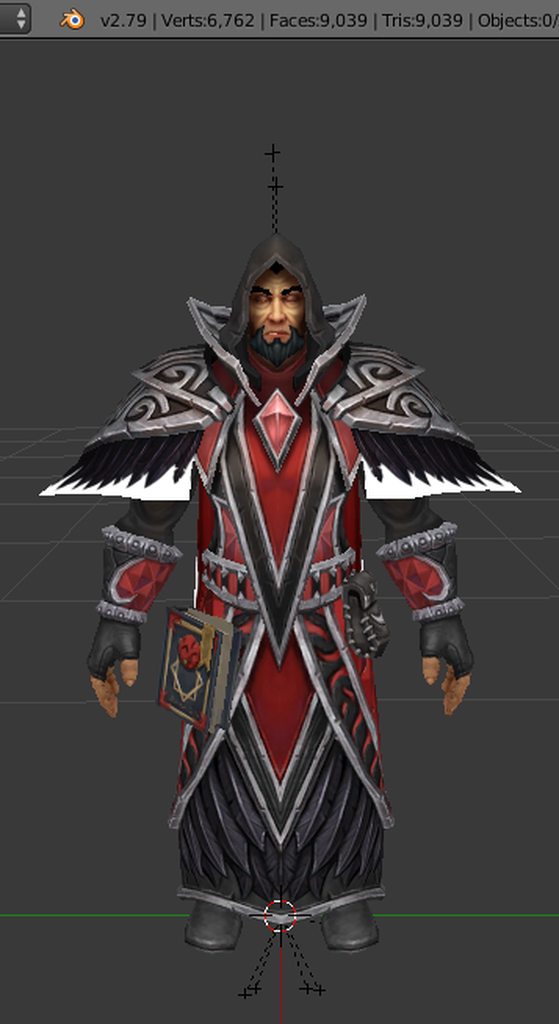
talking abou tit, i still need to finish https://imgur.com/xYdhEfH
 torn pawn
low poly scuffed avatars > your high poly crap
wise rover
why did they remove the ability to put files on this chat?
it's just unnecessary at this point
small tapir
They are not really high poly 😄
torn pawn
true, but relative to wc3 they're very high poly 😄
small tapir
Haha ofc 😄
 wise rover
ok. how are you supposed to put two bodies into one armature if it breaks the prefab in the scene and the assets section doesn't allow you to move parts of avatars anywhere?
small tapir
Hmm, what are you trying to do?
wise rover
make an animation in which the avatar transforms from one model into another.
the problem is that I don't know how to do this without messing up the animations of movement
everyone's descriptions of what to do are so vague I don't know what to do
shrewd moon
anyone know how to make the particle stay after letting go of the gesture?
wise rover
there are no tutorial videos for it so I have no resources to get the information
and since they took away the ability to directly post images on this channel, I can't accurately show my end goal
small tapir
@wise rover I would have know how to do this if you didn't want it to get bigger, that's the part i have a hard time getting my head around
small tapir
Use https://imgur.com/upload if you want to upload pics

 small tapir
Ohhh that's easy, i did the same with one of mine
wise rover
left is human state*
 final gazelle
as long as those finger claws aren't meant to bend or move too much relative to the fingers, you could have both meshes parented to the one armature in blender
torn pawn
keyshapes, unhide 2nd body rigged under same armature, material reference, certail mesh hide/unhide
there's couple ways to do it, but easiest is probably having both under the same armature
wise rover
oh. so it's in blender
torn pawn
yes
wise rover
I had both separately exported from blender
torn pawn
try this - fix model and delete his armature, then copy into your mainmodel window and join meshes
check if moving bones moves the other model
wise rover
and with this being said, after exporting the fbx, there will be four bodies in the thing instead of two, right?
small tapir
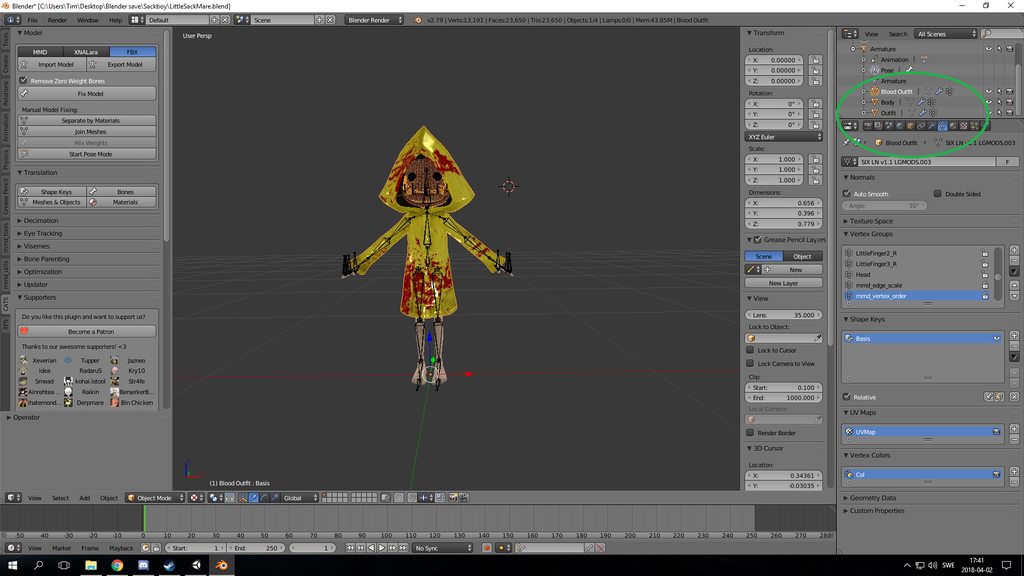 torn pawn
@small tapir i mean it would be prob easier with a material reference change 😄
small tapir



 torn pawn
ah no
final gazelle
not sure why there'd be 4 bodies unless the meshes aren't joined in their pre-rigged states
torn pawn
his face also changes
wise rover
I'm talking about the file showing up in unity
torn pawn
@wise rover if the mesh is above 65k then unity splits it
small tapir
@torn pawn Yeah tried it that way didn't work beacuse of the face D:
torn pawn
@wise rover can u give me a link to dl those models? i can try it
small tapir
I have been working with The witcher and xps models some of them are really good some are just broken, cats don't like fixing xps stuff
wise rover
it worked well when I did it with caranthir
small tapir
I like the face bones on xps 😄
wise rover
too big.
wise rover
we can both try
torn pawn
or google drive
small tapir
I can whisper the link too it Yuumi
wise rover
I'll use your example as reference
small tapir
Yeah np if it was me you said it too :D, then in unity you just hide one of the meshes and then in animation you hide the human then unhide the vampire
 keen gazelle
What is the easiest way to offset the Y axis drop that happens whenever you do an animation?
small tapir
I think i had a bit of problem with this but you can try to dublicate one of the SDK animations and try to use those valus sorry bad spelling
wise rover
I think the bodies mixed with each other. I only see one still
in the hierarchy
@torn pawn how many did you put in that avatar?
torn pawn
how many what?
wise rover
how many bodies
 naive pelican
How I can convert vmd motion to unity to use it on my avatar?
torn pawn
@naive pelican https://www.youtube.com/watch?v=kWFvuRmTeFg
Hi my name is Shana from vrchat and i started not long ago Learning how to import mmd dances to vrchat was one of the fun stuff to do for me so today im maki...
or have an avatar with original armature hidden under yourmain that uses a controller with animation
so u dont have to switch avatars or use an emote, u can trigger it with a gesture and stop at any time
@wise rover both models work with the same armature, fix model on both, delete the bones on vampire version
to join them and have both bodies split i added a plane to main body, joined it so it's as one, then I seperated the plane, then I pasted the vampire version into the human and joined it with the plane and deleted plane afterwards

they both move under the same bones
and in unity you hide one body as default, which would be vampire, then with a gesture you disable your main mesh renderer and enable the vampire
for better transition i would guess you'd want some kind of effect that masks your avatar, like smoke mb
torn pawn
just shift+A > plane > select plane then the body ctrl+J > then enter edit mode, select plane > P > selected > copy-paste 2nd model in and select the pasted model and shift select plane > ctrl+J, now both bodies are under 1 armature and u can delete the plane
@wise rover
 subtle pilot
Hey could anyone give me a list of what the Shift F1 to F8 are on the animations CustomOverrideEmpty panel?
wise rover
so what I first did was import both models subsequently and both bodies were premerged but the armatures were separated
I take it that that won't do
when you say copy and paste model, do you mean make a copy of the vampire body from an existing model or move the vampire model into the armature?
HAHAAA
FINALLY
@torn pawn thank you
torn pawn
@subtle pilot http://prntscr.com/izvxmi
 wise rover
ok. why is it that when I put it in unity, both bodies copy each other's textures?
hmm. I guess I can fix that when making the animation
I can use that to change the textures
turbid silo
I got a question, what is the software I need to make custom animations
clear yew
Hey
Does anyone know how to edit animation files without starting them from scratch every time it needs to be fixed?
wise rover
if it's made in unity then you should be able to edit them from that.
clear yew
How
wise rover
I'm not sure if that's the same for animations from other programs
wise rover
woah woah woah
clear yew
What
wise rover
the duplicate was required for the animation
wise rover
you go onto the duplicate with its animation and then you go to the animation tab to edit it from there
correct
 wheat scroll
You duplicate the model you are editing because animating will break your model
wise rover
when you're making the animation in unity, texture changes show up on the avatar, right?
if you put them in that is
clear yew
@wise rover yes

Just a quick little taste test of what I've been working on. :) I also have a few other projects I've made since then. Like what you saw? Subscribe/thumbs-up...
pretty much all the animations in the asset there are for this one animation
 nocturne yarrow
It's not possible to change the color of an object during an animation is it?
slim sparrow
It is, you can change the material to a different one
Just make a duplicate of the material, give it the right color
nocturne yarrow
I knew that worked but with the amount of color changing that I was about to do I figured it could cause some frame drops with constantly deactivating and enable other materials
slim sparrow
Probably no frame drops, all materials have to be re-drawn every frame anyway
nocturne yarrow
I had a dj table setup and wanted to change the colors of the lights based on the beats of the music. I just wished I didnt have to duplicate so much and was hoping there was a better way lol.
slim sparrow
Yeah, you'd think there would be a better way to do that
But I think changing materials around is the way to go
final gazelle
as far as VRChat's concerned, that's probably the best way to go about it -- if we didn't have script restrictions, there might've been a way down that way too
slim sparrow
I mean, it's not so bad. I would recommend changing the material in record mode, not by manually adding the material as a property
clear yew
or have a shader with HUE system on hit
and just move the slider to change the HUE with the animation
slim sparrow
That's cool, I should remember that
clear yew
i have a "horror" animation that make your screen goes darker very slowly
it's really nice to know those little tricks for animations
nocturne yarrow
Can you explain more of the hue system on hit? Might be useful @clear yew
clear yew
basically
you can control the sliders on a shader
with an animation
so if you find a shader that can control the HUE of a materials
you could change the colors that way
nocturne yarrow
I didnt know you could do that sounds interesting. Where would it show as an option to change it in unity if I find a shader?
clear yew
directly on the materials
you can apply shaders to materials
and you can change the values of them with an animation
that's basically it
really easy to do
nocturne yarrow
Oh yeah I totally forgot some shaders let you change values like that. I hardly use them except for certain things. I'll keep an eye out for some shaders. If not, then the long way it is for me then. Thanks for all the help guys much appreciated!
clear yew
hi guys how do i activate the weopon when its on my left hip and i wanna take it out ??
 crisp imp

I'm trying to make a flying avatar, but something does not work out. Where is the mistake?
 half shell
trying to enable a prop upon a gesture, property refuses to add to the animation
seems like past a certain point down the armature it refuses to
crisp imp
Heck. I do not know how to do that!
clear yew
use bones to fly