#animation
1 messages · Page 58 of 1
 zenith topaz
 placid wigeon
I noticed there are some avatars that are able to spawn a GameObject , and that gameobject actually has its own transform even if its a child of that avatar
basicallt that Game object has its own independent Transform
amd trying to find out how it works without using World Anchor
 solid trail
I don’t think their game objects
Just a stationary world particle that’s been set up to spawn at the feet or from the hand
It won’t move and will last quite a long time
You can then add a on spawn or on removal animation to it too
Or subparticles would be a better way to word it
I used this to make placable claymores
I can place as many as I want to then with a second gesture I can explode them
I assume that’s what you want to do
Or similar
@placid wigeon
10 seconds is a limit set by the SDK, same with the poly counts etc.. there are ways around it but I would recommend against such ways..
@zenith topaz
zenith topaz
Ah
placid wigeon
Yeh that the one ive been trying to do
i have to change the Particles Simulation Space settings to World
ive seen people Instantiating(or Spawning) bombs, clamore, and other GameObject
But i never knew they were Particles
 clear yew
FYI, you can drop GameObjects in world space via rigid bodies and joints. But it's not very reliable in terms of everyone seeing said object in the same location/rotation.
I SEE YOU TYPING
I figured out your deform issue.
 fallen crypt
@Liberty_Prime_87#5747 I tested my centaur using gesture, trying to make him sit on the ground but the humanoid rig do not animate sadly...
clear yew
@fallen crypt If you want a gesture to take over the entire IK, it'll be a little fancy. It is doable though.
I couldn't tell you. People that do animation for a living are the ones coming up with those things.
 slim sparrow
I do that by hiding my own mesh and animating a copy of my avatar instead
Problem is that disabling your body mesh or skinned mesh renderer works, but when you enable it again, nobody else sees you
And I have yet to find a way around that
I could make a shape key which hides my mesh (makes it really small), but shape key transitions are smoothed and it would look weird
fallen crypt
Wait, you're saying main body is buggy on toggle atm?
slim sparrow
I think so, yeah
When I disable my skinned mesh renderer or my body mesh in a gesture, other people can no longer see me until I switch avatars
But I can still see myself once I disable the gesture
But I don't think it's fixable
The next best thing is setting all your materials to an empty one, but I can't seem to set all my materials to an invisible one
There's always one thing left behind. Maybe it's because the material I tested it with is textureless
clear yew
Anyone know how I can de attach an object from my model and let it stay still while I move around? Like using hand gestures
slim sparrow
You mean the object has to stay in the exact same place while you move?
You'll need a particle system for that, and set the space to World
You can render meshes with particles too
clear yew
okay thanks ill check it out
clear yew
Animating the appearance of a mesh using particle system is extremely scuffed and I wouldn't recommend. Just make an animation using keyframes for when you want the item to appear, attach the animation to the controller of said item, then make an on/off animation keyframes in your duplicate model/animation model
clear yew
i converted a vmd to anim file
i want to do some tiny edits
to it
i duplicated the anim from the fbx
and added the animation controller and stuff
it all works
slim sparrow
@clear yew but then the object moves with you, right?
 amber mantle
does some1 now how I can add Avatars to an emote?
slim sparrow
You already asked that, I don't know what you mean
amber mantle
Is it the same step as adding Sound to Emotes?
clear yew
Rokk if you add me on VRC I'll show you some of my animations after I'm done work
slim sparrow
Drag the other models that you want onto your avatar. Disable them by default (the checkbox in the top left of properties)
Then in your emote, activate the extra avatars
You may need to give the extra avatars their own Animators, so they play the same animation once they spawn
amber mantle
I gave them a custom Override already
look
I did it
I added 2 Avatars and disabled them by defaul
then I "connected" them with the Emote I want to use in "Animations"
I add the Sound and the two avatars and check the box
then I upload it and If I try using the Emote then there is no sound anymore and the Avatars wont spawn
and When I removed the 2 avatars then the Music comes back
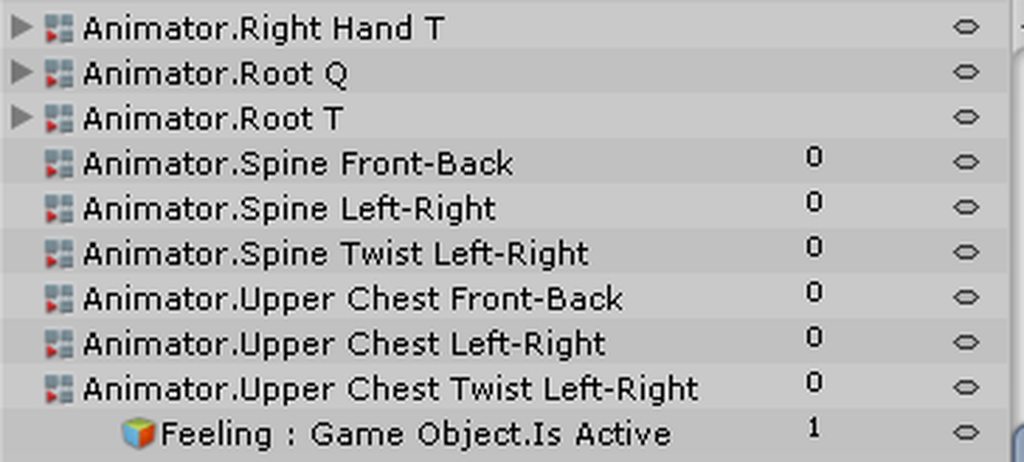
This is the Emote with only the Sound init
Why Did you stop answering?
 remote blaze
yo lads quick question
remote blaze
people who do different facial expressions do it with different meshes right?
amber mantle
First telling me that you know hwo to add them
remote blaze
I got meshes for different faces/eyes/mouths
slim sparrow
@remote blaze depends on the model. Usually shape keys
amber mantle
and then saying "I dont know"
remote blaze
ah I see
slim sparrow
@amber mantle sorry for trying to help, guess I'll refrain from doing that from now on.
¯_(ツ)_/¯
amber mantle
...
slim sparrow
But anyway, a lot of MMD models have shape keys
remote blaze
mine isn't MMD, but I was thinking of turning off the neutral face mesh and turning on the emote face mesh with animations
slim sparrow
They're listed as blend shapes under Unity, you can alter the values to give them different facial expressions. I have seen different face meshes be used too, but those are often still managed through shape keys. Manually unsetting meshes can be a pain.
slim sparrow
Ah
Well, there's a thing about meshes in this game. Sometimes when you disable a mesh or mesh renderer in your animations, it won't come back on for other people. Only for yourself
But other than that, this should be relatively easy to do with gesture overrides
But personally, I'd take the model back to Blender and try to turn the expressions into shape keys instead. Even if the shape key is just swapping out face meshes. Makes everything much more manageable
slim sparrow
Is your model a game rip by any chance? I usually see games do different meshes for facial expressions
clear yew
swapping out head meshes is a massive painand causes a ton of issues with mirrors, other players and eyetracking etc, use blendshapes/animations instead
remote blaze
Yep, it's MinMin from arms
she's got like 4 faces for her expressions (happy, neutral, hurt, angry)
and different eyes like closed, half
slim sparrow
You should look up how shape keys work in Blender. The gist of it, is that blend shapes define how a model should deform in certain situations. Shape keys go from 0 to 100. For example, a shape key for blinking would deform the eyelids in such a way that 0 is eyes open, and 100 is eyes closed.
clear yew
think of them as 3D keyframes with tweening
remote blaze
ohh
slim sparrow
If you want to enable/disable meshes with shape keys, a common way to do that is to put all the meshes on the face at once, but make the extra ones really small. Then make it normal-sized whenever a shape key activates.
Not sure how good this looks in Unity though, since this game tends to "smooth" shape keys out when you put them on gestures. Still not sure how to avoid that.
remote blaze
hmm, wouldn't that give the impression that the emotion-face is instantly growing in size
yknow what, screw emotions
 obsidian vigil
youd pretty much see your head go morph while switching
remote blaze
lmao
I had another question about animation though!
with the same model
I want her arms to get super long when I use the fist emote
I know how to do stuff like curl fingers for a gesture override
obsidian vigil
ez
remote blaze
but never did stuff like the arms
remote blaze
do I need to add any property
slim sparrow
You could also do this in Blender if you'd like. CATS Blender Tool has a function that can turn the current pose into a shape key
remote blaze
are you referring to the faces or the arms
slim sparrow
Weird
obsidian vigil
VIVE Tracker brings any real-world object into your virtual world! Add it to specially-designed accessories to play your favorite games. Attach it to a camera and put yourself in your own mixed reality videos. The possibilities are endless!
officially
slim sparrow
Oh
obsidian vigil
no more dev shit
slim sparrow
Probably because of the Vive Pro and all
obsidian vigil
hell yea
remote blaze
vive pro is ridiculous
obsidian vigil
no need to buy from ripoff resellers anymore
remote blaze
the vive pro price is borderline exploitation imo
remote blaze
also @obsidian vigil don't want to be a pain but a quick question about the arms animation
remote blaze
do I need to add any property
obsidian vigil
dont think so
if you hit the record button
and drag the bon
it should add that automatically
remote blaze
ahh okay
thanks
hmm, it's not working
even though there are 2 frames
neither of them has the arms moving
it's not saving my movement
obsidian vigil
but does the arm bone stay extended?
obsidian vigil
hmmm
remote blaze
it snaps back when I change frames
slim sparrow
Oh yeah, I've had similar issues when dragging bones. Just refuses to stick
remote blaze
any way to fix that? 😦
slim sparrow
Well, I don't know
But like I said, you could try the blend shape method instead
By making the extended arms into a shape key in Blender instead
But I'm not sure how that will affect the mesh
 loud hamlet
You can use the unity animator to make a shape key animation for the over ride controller.
remote blaze
it's what I'm trying to do
but whenever I try to move the position of a bone in the animator, it doesn't save
and it goes back to the default position when I switch away from the frame
slim sparrow
Shape keys are made in Blender
You can then set the blend shape to 100 in your animation after you import the model again
 crystal pike
ok so im in unity and i imported a big drumset but now my camera goes way too fast and i cant zoom in properly on my model
my camera seems as if my model got tiny but the size never changed
but my camera goes too fast and sensetive
 tawny wyvern
Hmm. Would anyone know if there any way to spoof animations from one bone to another on the fly in Unity? Say, if a character had a third eye and I wanted to grab the motions of one of the tracked eye bones?
crystal pike
and now my mouse is stuck on the zoom in tool
when im zoomed in on my model, im not even that far away and its looking like im clipping through it
 slim sparrow
@tawny wyvern weird solution maybe, but you could parent the third eye bone to one of the other eyes
crystal pike
oof i fixed it
i accidentally pressed f
which unfocuses
the camera on an object
tawny wyvern
@slim sparrow On first thought wouldn't that simply make it rotate on the parents axis rather than its own, though? Unless theres some advanced armature hierchy trickery I'm unaware of
slim sparrow
Well, it would have the same effect I'd imagine
If the left eye rotates, the third eye rotates with it
Otherwise you'd have to look at weight painting, so the left or right eye also moves the third one
@crystal pike adjust the clipping distance
Your model might just be really small or something
crystal pike
anyone know what the sitting animation is called in the avatar controller?
 grand lichen
@crystal pike just press "f" to focus on the model. It will fix the weird zoom issue
grand lichen
Heh sorry only saw your question
missed that you fixed it
crystal pike
its fine
 chrome python
Hello there. So i am trying to make a animation where i have a expandable sphere. I have goten the sphere to expand. So i use the glitch shadet to get some cool effects. But the texture is onley on the outside. Is thete any way to get it to show on the inside as well?
 dawn shale
Does anyone know how I go about making it so my model stands like so ingame? https://puu.sh/zLtWG/a4a65f2ef6.jpg - The model itself comes with this original pose already set, but I have no idea how to go about making it an idle animation.
 obsidian vigil
@tawny wyvern if you find a good solution for the bone spoofing dont mind pming me
slim sparrow
@crystal pike the sitting animation is just "IDLE"
obsidian vigil
id like to get in on that
slim sparrow
You will want a separate override controller for your sitting animations
crystal pike
im making a drumset animation and idk if posing the legs will be enough
bc theres a chair
 keen panther
what do i have to put into my particle effect settings to get realistic bullets. like when i shoot them now and wave my gun they follo my gun.... is there a way to make them go forward all the time so that when waving my gun aroudn wont change their direction at all?
crystal pike
i dont think so
u should only add bullet particles for machine guns and autos
but if u make a pistol
dont bother adding bullets
just add a flash and a bang
keen panther
it is possible for sure. i have seen it multiple times. like the naruto kanas that can do the fire spell. its pretty much what i want but at a slower speed
i just can figure it out after 2 days trying and googling
crystal pike
good luck then
 celest pewter
world particle is what u want
look up the work around aswell cause world particles won't appear in vrchat otherwise
keen panther
ok thanks alot.
slim sparrow
What workaround?
celest pewter
applying rigid bodies
slim sparrow
Oh yeah. Wasn't that to make sure the rotation was correct?
celest pewter
🤔
 outer lake
can anyone help me with somthing like Discord call n such.
because i swear its like i have a small problem and apparently its easy to fix.
Im having a problem to where my Item i have to appear on my animation doesnt appear but apparently i just have to check and uncheck it.
so it can appear etc.
slim sparrow
@outer lake you cannot see those objects in the mirror
Try one of the cameras in avatar testing
 torn pawn
you won't see stuff on cameras if it's on your head, so you must ask others
crystal pike
ok i have a drumset animation and i put the drumset under the spine hierarchy and then posed the thighs to make it look like i was sitting. is this correct? because in game my legs dont change and the drumset is floating off the ground bc its way too high up. should the drum set be under hips? and do i need to add any other property to get the legs to work?
slim sparrow
No, he means like the jaw flap lip sync
crystal pike
visemes
slim sparrow
It's the one that uses the jaw bone rather than visemes. Looks ugly IMO
slim sparrow
It makes the mouth flap too quickly for my tastes. If the model already has a jaw bone, you might as well just generate visemes. Even if you only make the mouth move up/down.
crystal pike
do u know any solution to my problem?
slim sparrow
I think animations are iffy unless they only involve the arms and the head
crystal pike
ok
slim sparrow
Chest/spine and leg rotations and transforms are overridden by the game itself unless you're in an emote
crystal pike
oh
slim sparrow
Same reason why root transforms are wonky
crystal pike
so i just need to fix my drumset heigh problem then
slim sparrow
And you probably don't want to attach the drumset to your spine
Just attach it to your avatar instead. Outside of the armature and body, but inside your avatar descriptor object
crystal pike
ok thanks
"this action will break the prefab instance"
dammnit i accidentally dragged ringfinger
 slim steeple
If I want to just animate a closed hand should I bother with using animators in the animation keys properties or can I just be lazy and directly transform the bones of the fingers to the way I want them to be?
Adding each and every individual "finger1 stretched, finger2 stretched, finger3, stretched" etc seems like an inconvenience
slim sparrow
Use animators, definitely
There's a solid chance that regular animations won't even work
I can recommend the Muscle Animation Editor for this kind of stuff, but it costs $15
Still the best asset I ever spent money on, though. Except maybe dynamic bones
Moving the fingers is like a 10 second job with that asset
You might also be able to copy the gesture animations out of the SDK, if your avatar is male
slim steeple
So, where do I start, which property should I add first? I have like right middle1, right middle2, right middle 3, etc for each individual fingers so I need a general direction on where to start
slim sparrow
Just pose all the fingers. Doesn't matter which one you start with
It depends which way you want to bend them. Just experiment, you can always remove the properties later
Oh, and make sure you always animate on a duplicate of your avatar object.
Generally, Right Middle1 will bend the first joint of your right middle finger, and RightMiddle2 will bend the second joint, etc. It should be relatively easy to figure out
slim steeple
Yeah, I've animated in the past but I never had an avatar with fingers that I animated the hands of so this is new territory for me
slim steeple
Thanks
@slim sparrow Sorry to bother you, but if I'll do consider getting that muscle animation editor, how will I go about making use of it with clips I have, where in the UI do I go to in order to open it, unlike particle system I didn't see a "Animator editor" option for stuff
slim sparrow
If you have the Muscle Animation Editor installed, you can go to "Window" at the top and open an instance of the editor
You can pin it in the sidebar on the right, which is what I always do
Then when you're editing a humanoid animation, you'll be able to drag the sliders around.
So instead of doing "add property", you mess around in the muscle animation editor instead. It will automatically create the necessary properties for you
slim steeple
Alright, thanks, I'll consider getting it since I've been doing a lot of animations anyways so something that'll be convenient to use might benefit me
slim sparrow
Alternatively, you can even click the yellow orbs that appear on the avatar
Like, you can click the shoulder and then just drag the shoulder around and stuff
It's worth the $15 for me personally, but I'm not sure if that's true for everyone. I have a background in programming so I can always use assets like those, even when I'm done with VRChat
 signal dove
For starting particle animations with gestures, how can I use emission toggle instead of object activation?
 mystic kite
I've created an animation in blender as a kinda extra idle (ears twitching on a 30 second loop). Exported the model and imported to unity, duplicated the animation from the model while set to legacy the changed to humanoid for the rest of the standard set up. Added the blender animation to a animation component... It works fine in play mode and no errors when uploading. But the animation sometime uploads? Most of the time no. I'm so confused that this post may not even make any sense because I'm so tired!
clear yew
yup, worth every penny if you're gonna do a lot of animations within unity
slim sparrow
I'm trying to make my model invisible in an animation, by setting all the material slots to an invisible material. But one specific material keeps reverting back. How do I fix this?
I first tried disabling the Skinned Mesh Renderer or the Body object, but it won't re-enable for other people
So I just stay invisible until I select another avatar
clear yew
i just have my whole mesh disabled, but then again i only have one mesh with 2 materials
do you have it on a gesture or an emote toggle system?
slim sparrow
Gesture
Normally I'd disable my whole mesh, but it refuses to reappear when I do that.
I made a shape key in Blender which makes the model really small, but it just looks weird in Unity
Like, the mesh actually reappears locally, just fine.
But other people can no longer see me
clear yew
huh, mine works just fine, weird
slim sparrow
Is yours disabled by default, or enabled?
I'm also getting weird issues when changing my materials in an animation. The materials eventually stop appearing as properties on the skinned mesh renderer, and the arms stubbornly stick to their original material
So that's not an option either apparently. Kind of running out of alternatives
clear yew
enabled by default
clear yew
i am as well
slim sparrow
I can still see myself when I look down, and I can see myself in the mirror. But other people just stop seeing me for whatever reason
clear yew
theres an issue where sometimes gestures wont trigger unless you do both shiftright+shiftleft or something like that
like mine sometimes trigger with only right shift
but i need to click on both for it to trigger
slim sparrow
Yeah, I tested that too. Fiddled with stuff endlessly
My next attempt will be altering the bounds of my mesh renderer I guess
 slim sparrow
Yeah, that's exactly the thing I'm doing too. It's weird
I guess there's always the empty gameobject as a last resort, but that breaks my blinking
Alright, altering the bounds of my mesh renderer didn't work either. Kind of running out of options here
clear yew
Animating materials require the materials gameobject to have an animator component. You add the animation/timing for that object itself there and attach it to the animator. Then just enable it with your main animation
signal dove
Do I have to insert a duplicate object for every animation I want it to display?
 signal dove
I know about that. So how do I trigger each of these animations?
I'm talking about an additional object inside the hierarchy of my avatar. Maybe it has a firing animation, and a reload animation.
slim sparrow
Alright, the empty game object solution didn't work either. I changed my root object to an empty game object, then added my model as child of that.
But I cannot disable the child for whatever reason
It just won't let me disable it in the animation
Yeah, I'm out of options :/
Disabling the mesh will break my model until I switch avatars
 junior epoch
Unknown if this is the right place to ask, but does anyone know how to make a particle system for water coming out of a faucet? More or less the specific settings to use, im new to particle systems
 wild cedar
Ok, so how do I add a world around me when I make an animation?
Attach a world to seperate planes etc
slim sparrow
My skinned mesh renderer still won't re-enable for other people after disabling it in an animation
slim sparrow
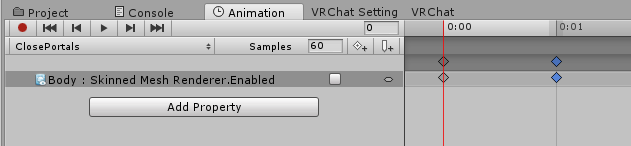
I don't understand why this isn't working
I mean, it works, but other people can't see me once I cancel the gesture. Other people are doing the same thing and it works fine for them.
clear yew
How do i make a laser charge and shoot when i point
 shut dragon
do a bullet for the shooting
there are some good tutorial on youtube
and the charge you probably can get some nice animation on Unity store on make one yourself
...making it yourself would be a pain in the ass btw
clear yew
O
tawny wyvern
@obsidian vigil I for sure will. It's not an easy thing to google trawl, for sure, because if its out there terms like 'duplicate animation', 'clone', transfer etc tend to be used for other things.
clear yew
Hey guys I created a particle effect using meshes and im wondering how I can make it stay in place. I already set it to world but when i move it moves like 5 seconds after. Do I just have to make the duration of the particle system last long?
 torn pawn
@clear yew set high lifetime and duration
i mean it's pretty obvious why it respawns after 5 seconds, no? 😛
clear yew
yea i was just wondering if there was another way to do it
torn pawn
 clear yew
thanks though
 ripe lily
is there a recommended video guide for making simple animation/props like a knife?
slim steeple
So, a general question, I've seen MMD avatars changing expressions when their arms are raised or stretched without using gestures, what is responsible for that, how is it done?
 eager vault
it's still probably a gesture, they just didn't set the same fingers
slim steeple
Odd, most of the time the expressions happened it didn't seem like it was intentional but rather accidental, while that easily happens with how gestures are handled, it seemed like they genuinely managed to bind some form of transformations using only hand positions
 fickle rune
is there any way to make a respawning animation?
 grand loom
So I created an animation for a model I was to use when I'm AFK, but I want to make it so this model only uses this animation (No running, walking, etc). Do I have to plug this animation into every override or is there a simpler way?
placid wigeon
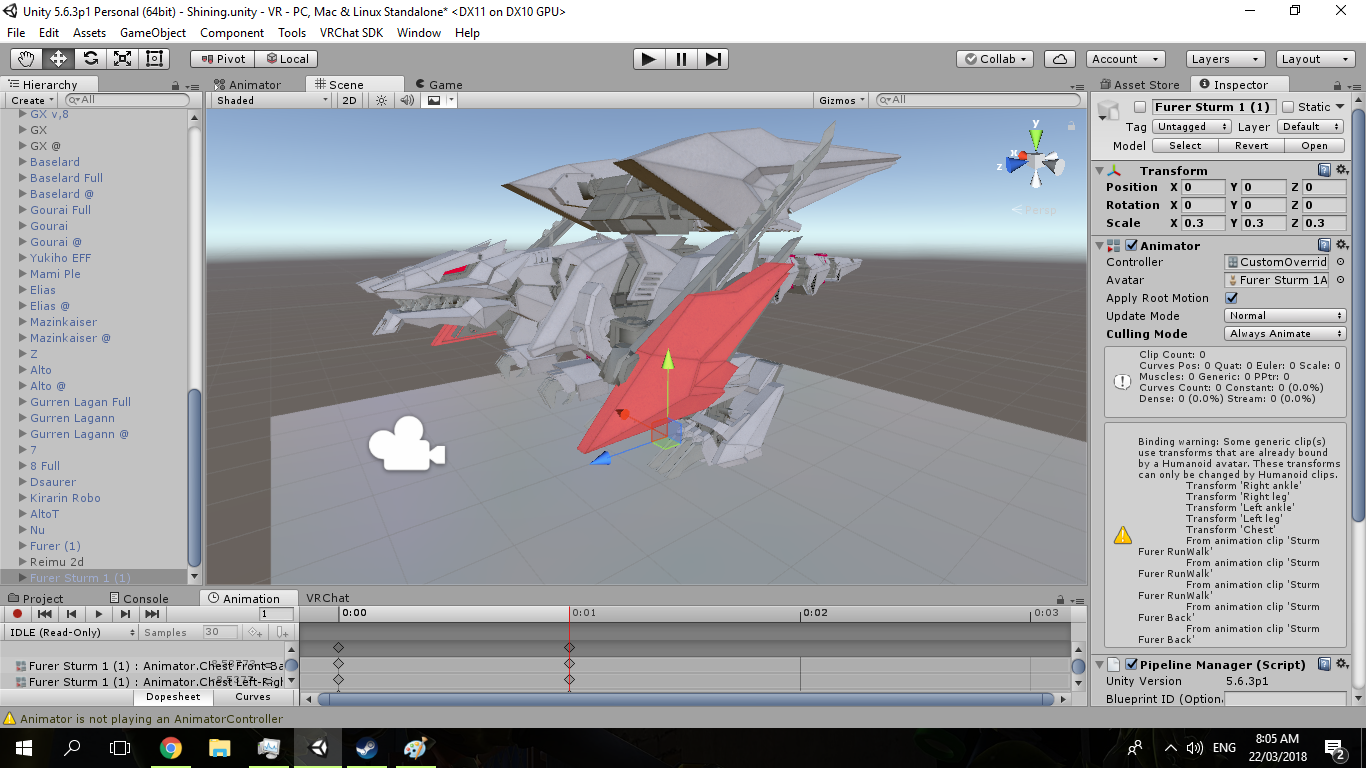
Does anyone here have any Walk, Idle, or Run Animation for a Dinosaur like Avatar
Im trying to animate a Sturm Furer https://ibb.co/nxHEXx
 celest pewter
@grand loom just make it a generic model
grand loom
The generic model isn't able to use the animations? It's saying something about bones missing, but its just a copy of the model I animated.
solid trail
Is anyone able to guide on where to look for; 1. Creating a spinning prop animation in the hand, my biggest question for this is do i make the animation more than one frame and 2. Adding a sound to say a lightsaber so when i swing it, it triggers the sound
grand loom
I guess the better question is: Is it possible to use an animation I created in unity as the default animation for my avatar or is that something I need to bake into the avatar in blender first?
placid wigeon
Question is there a way to animate an Avatars Hair, Skirt, Brest, Tail, and etc without buying the Dinamic Bone Unity Asset?
 vapid cipher
Hey guys im trying to do an animation for a gun on my avatar but..
there is no "animator"
even though on the right panel there is an animator.
But when i go to "add property" there isn't one
Please help u.u.
 modern phoenix
How do you add an animation like the dance emotes from Mixamo. I have the .fbx of the model in unity, the model still in blender, and the 2 .fbx files of the animations I wanted from mixamo
fallen crypt
Does anyone think if we only add humanoid fingers to the generic avatar, will gesture work?
clear yew
My particle system starts when I load it but in unity it’s hidden
torn pawn
it's not hidden if it starts, doublecheck your main avatar what only matters
or put it under empty game object but have the system active, then create new override that enables the object @clear yew
 glacial lichen
is there a way to have a gameobject on the avatar but have it fixed in its position?
obsidian vigil
@glacial lichen Youre talking about them doing a gesture and spawning an object right?
 blissful grove
Does anyone know how to add a full functioning lightsaber to a skin because I can’t figure how to do it in unity
 nimble ridge
@glacial lichen like fixed in world position?
glacial lichen
yea exactly it would be unaffected by the avatars rotation and position but still be a child of it
obsidian vigil
i know that can be done using a particle system
nimble ridge
Yes but that spawns the object in only one direction
 sick crag
Im looking for the same thing
glacial lichen
i tried a rigidbody with a fixed joint and freezing the rotation of the rigidbody but the object still followed my avatar
nimble ridge
In world rotation
obsidian vigil
Just get a particle system set the renderer and to mesh and the rendering space to world
apply a mesh
poof
nimble ridge
It doesn't matter with way you stay it will always spawn facing North for example
And that's the problem
@obsidian vigil I did that but there's the rotation problem
obsidian vigil
then tell me how you fix the rotation problem
obsidian vigil
anyway lemme tag the peeps which where asking about it
@sick crag @glacial lichen Get a Particle System, set the rendering space to world, go to the renderer set it to mesh, (maybe also something in shape to mesh not sure tho) and apply a mesh to them
glacial lichen
alright thanks a bunch
nimble ridge
It would be really cool if they had whitelisted a script that allows to rotate the particles to the rotation of the parent
nimble ridge
Nah
nimble ridge
I just did it in unreal once but not unity
Rigid bodies won't work because vrchat moves the whole hierarchy in-game
You need it outside somehow
obsidian vigil
actually they do @nimble ridge
someone told me they did bullets using rigdbodies on the particles
slim sparrow
There's definitely a way to apply world particles in a specific rotation using rigid bodies
Or empty game objects for that matter
 forest dove
I have an animation that has a spin in it but in game it doesn't do it
What do I need to do
He just keeps his body forward
 lunar pasture
I've had that problem, let me know if you find a good solution
does anyone know what TDOF is in the Animator?
 zinc chasm
So I made a sword animation with his hands.
For some reason when he pops it in VRchat it like glitches rapidly in his hand
Like it's vibrating.
Anyone know?
forest dove
Did you loop the animation but accident
 low basin
are the values for the default hand animations anywhere?
low basin
like if you're making an animation override in unity
zinc chasm
Ya the animation is in the override, and hte override is in the standing/sitting
low basin
oh nice thanks
i found it
but it only has it for the male pose
but that will probably work
zinc chasm
shrug
it's like my hand just rapidly vibrates. It only does it when I pop the animation. I can't seem to find out why.
Should the object have an animation type..?
clear yew
you need the 0.00 and 0.01 frame to be the same
zinc chasm
Ya they have that.
slim steeple
Anyone have any idea how to add models with bones (Armatures) on a humanoid model without them merging and creating an eldritch abomination due to bone binding?
lunar pasture
I guess that would be down to how your hierarchy is set up
 knotty sleet
anyone know how to palce an 3d object as an animation locked on one place on the floor ?
 tidal gull
you cannot do it.
There's no ability right now to lock something in place in the world via your avatar.
clear yew
you can lock something in place, but not orient it a certain way
knotty sleet
@celest pewter what do you mean with world mesh particle ?
celest pewter
Google™
click the magnifying glass and type it
ull prob fund a expalabyiob
oenrpdbf
clear yew
lmfao
celest pewter
phone keyboards were a mistake
 bronze peak
i cant help laughing at this xD
slim steeple
Is it possible to make a controller do gesture animations for a prop?
I have my avatar, on it is another avatar(which is the prop) with a controller
The prop has it's own idle animation that constantly plays, but I want to set a gesture to have it do something else
I can't seem to figure out how to get it to work properly, in this case specifically a skinned mesh render changes the expression of the prop while an audio source is meant to become active
it doesn't do any of that in game though
 vivid burrow
im trying to do the same thing
i tried adding the animation to a animation controller to no avail
i mean component
slim steeple
yeah, it seems like it would be something that is easily fixed but I'm really lost
 white herald
anyone have default hand-poses as humanoid fbx animations somewhere? (for gesture overrides)
i might make a set
clear yew
yes gimme a sec
@white herald I think this is all the default hand animations https://www.dropbox.com/s/7b15xnkgqqkuh89/AnimationQuickBase.zip?dl=0

for gesture override templates ❤
 clear yew
not my upload ... savages
white herald
this is awesome @clear yew
any reason this isn't openly available? did the original creator release it for anyone?
celest pewter
its open
clear yew
@white herald ehm, I think they're in the SDK avatar somewhere and somebody pulled them out to make snail markers easier to set up
white herald
the sdk has gesture animations but they don't work
clear yew
and it saved me having to pose hand myself 😛
oh? well I don't know where these came from but they're perfect
white herald
probably posed them himself
might make a video or something referencing this but with the appropriate title so it's at least googleable
the source i think https://www.youtube.com/watch?time_continue=2&v=zLI5mxCBnlk

Hello, as promised, this is the updated method for drawing in VRChat, courtesy of Snail, and his Snail Marker. Repository Link: https://github.com/theepicsna...
clear yew
yes! I got it from there, the tutorial didn't work for me btw, but the animations were super handy
white herald
lol
celest pewter
wtf why is that tutorial 22min long
white herald
^
clear yew
followed a different way to get the marker working
celest pewter

Tutorial on adding the marker to your avatar and customizing it. Github: https://github.com/theepicsnail/Marker Unity Package: https://github.com/theepicsnai...
thats the proper one
white herald
thanks
clear yew
I heard there was issues with snail's original setup
not the prefab, it works fine
I followed this https://www.youtube.com/watch?v=nKNvjIw5KwM and skipped posing the hands by using the templates in the zip posted earlier

Link to the Snail Marker package: https://github.com/theepicsnail/Marker Link to the Muscle Editor I used in the video ($15 USD): https://www.assetstore.uni...
forest dove
Alright again, does anyone know how to fix the issue of the body staying forward when an animation does a spin
clear yew
@forest dove go to the animation tab and tick 'bake into pose' and 'original' on all three and apply ... more info https://docs.unity3d.com/Manual/RootMotion.html
 vivid burrow
im making a spinning animation with a card above my head, it starts rotation at 0 and ends at 180 but it eases when beginning and ending making the animation not look fluid how do i fix this
basically i want the spin to look endless
clear yew
click the keyframes and set interpolation to linear @vivid burrow
 clear yew
ehm, can you set it on the rotation parent?
if you select all of the keyframes you can right click one and select Both Tangents -> Constant
not linear, my bad
 clear yew
yikes, ehm, I never seen euler and I've rotated stuff in animations ...
better maybe to google it or have somebody else answer this
vivid burrow
oh sweet its good now, you select the start and end keyframes>both tangents>linear
clear yew
ayy
vivid burrow
thanks bro!
clear yew
yw!

 nocturne anvil
something for wmr users http://ayaldev.com/wp-content/uploads/2018/03/wmr.png
 lunar pasture
Anyone good at importing animations and getting them to actually work as intended?
solid trail
Anyone got any decent lightsaber animation overrides i can learn off?
experimented with a few but for the most part the scripted ones are blocked and using a mesh blade gives a low quality finish
clear yew
Not sure if I should have asked this in another section but, I saw a streamer who somehow had his avatar on the bottom right of his screen as if you're looking straight at it in real time as he moves, someone in the chat said it was a shader. Does anyone know what shader/if it is true?
solid trail
@clear yew Pretty sure thats just the built in panorama camera in the game
clear yew
@solid trail Doesn't that just take like a picture? What I'm saying is if he crouched in VR we would see what he sees but on the bottom right we would also see his avatar crouch in a third person view.
nocturne anvil
Can you share a link to the stream?
clear yew
@nocturne anvil He stopped streaming but yea, you can see it here it automatically shows up once he enters the hub https://www.twitch.tv/videos/241753661

 serene lava
If I have an animation that enables an audio source for a second, will the character still be able to move?
vivid burrow
yeah if you use the other controller for movement
 red grove
Any one knows to make create avatars that can fly 😦
been seeing a lot of flying avatars recently
so cooll
 echo dagger
do you need to do the animation in unity or can you import an animated fbx into unity and use that
clear yew
Im doing facial animations live if anyone wanna watch 😄 I'm working with a kanna model.
 minor trellis
Okay so I was trying to import a MMD dance to my avatar for VRChat of course and the thing is her hips stay in place so she cant move around or spin.. what do I do?
 visual summit
HOW DO I CHANGE THE ANIMATION IN THE ANIMATION TAB
torn pawn
@minor trellis you don't touch bones, that's what you do 😃
minor trellis
lol thanks
torn pawn
vmds work best with not edited bone armatures
i have two dancing avatars under main model which both work, because they have original armatures
 mint mulch
Why is the volume so low on custom audio clips in vrchat?
People can just barely hear it standing insdie of whatever the sound is attached to.
The volume is fine even at some distance in unity.
clear yew
because vrchat "fixed" the sound problems
glacial lichen
hey can somebody help me with the trails on my particle system: i have a particle system with trails but whenever i tick off the world space box in the trails menu the trails are completely gone when moving the particle system.
mint mulch
@clear yew "Fixed" essentially made sounds completely useless
clear yew
exactly
 meager crescent
so, I'm trying to use some in-game rips of models from the pokemon games, and I have the in-game animations as actions in blender, which, as expected, come out as animations in unity. However, these animations do not actually work in VRchat for some reason. Any clue why? I have the overrides set up properly.
torn pawn
doublecheck if they get exported to unity, otherwise enable in animation tab baked animations
nocturne anvil
@clear yew this is the best i can do lol. but trying to replicate the one you showed without modifying the sdk woooop https://streamable.com/dehzg
 meager crescent
@torn pawn they're definitely in unity, but instead of playing the animations, the character seems to be stuck on a one-frame action when I upload it
nvm, I can at least give it an idle animation that works.
slim steeple
I'll ask again just in-case someone popped up with an answer, is there any way to have gesture animations switch the animations of other props that have their own animator? if so, how? because once you give a prop with an animator an animation it just stuck on that animation and changes don't happen until the animation clip of the idle animation of it end first but since the idle is meant to be a loop it never stops and the animations never change
 tropic rover
oi, is there a way to make the position of someting not reset after the end of an animation ?
clear yew
Umm, did VRchat limit audio? No matter what I do with my audio it's really quiet and i cant fix it 😦
yeah vrchat "fixed" the audio problems
But my audio shouldnt be this low o.o
i've changed max volume/max distance and everything but nothing works
nvm ima just make 8 game objects and put an audio source on them all
that'll fix it
torn pawn
use min 2 max 30, audio at 0.5 volume is more than enough
mint mulch
Yuumi, the rolloff changes when u hit Show Build Control Panel
torn pawn
it doesnt matter
with min 2 max 30 your audio is fine
even after adjustment
and never requires the audio to be over 0.5-0.6 volume, unless it's very low as original
mint mulch
my audio is boosted by 36db and its still quiet ingame
lunar pasture
I dont have a problem with audio levels, which aspect of audio do you mean?
do you mean sounds you attach to your model or sounds in the world?
 lament hearth
 slim sparrow
If your sound file isn't loud enough, you probably have to boost the file itself
I never had any issues with sounds not being loud enough. In fact, trying to go above 0.5 volume usually just makes the sound earrape-y.
slim steeple
Is there no way to make props that use an animator that are active by default not active when using a gesture? You'd think just making them non-active in the animation clip would work but it actually doesn't because I assume the animators clash
 hybrid imp
Yo, is there a fast way to add keyframes for hands(fingers and all) other than manually put them in?
clear yew
either you use the muscle editor asset or you can copy and past them from one of the animations in the vrcsdk folder
hybrid imp
cool, thank you 😃
slim sparrow
Muscle animation editor is a godsend, takes like 20 seconds to do both hands
 cobalt oyster
Does anyone know the right settings for the Muscle Animation editor to get the hands to look like the natural gesture?
celest pewter
type dropbox on the search bar for this server
cobalt oyster
Oh wow, thats very helpful, thanks
 gaunt sundial
hi i have just started modeling a wile ago and i am having a problem with unity saying my model does not contain a animator, and wil not animate in vrchat. does anyone know how i can fix this
?
 sour hedge
did you go to the rig tab in unity and changed it to humanoid instead of generic?
gaunt sundial
yes i have
sour hedge
oh, is the model from scratch?
sour hedge
a screenshot of the error would prolly help ppl; preferably what the sdk says in the upload tab and the inspector settings + rig
having troubles myself though cuz I can't seem to enable/disable animators on objects that are lower in the hierarchy.. like, it doesn't show at all as an option
https://i.imgur.com/Ozd6zRi.png book has an animator; book is the root of the object
https://i.imgur.com/uWy4riZ.png when trying to enable/disable it, it doesn't show.
The transform component of said objects shows though. Anyone got an idea what I'm doing wrong here?


Or are animators simply not accessible ?
 cyan quest
How do i apply a particle to an animation
And a sound mp3
Like a default fist animation from vrchat sdk
gaunt sundial
@sour hedge i dont think i am alowd to post pics yet it wont let me😅
sour hedge
oh, you can't upload files. Gotta link it
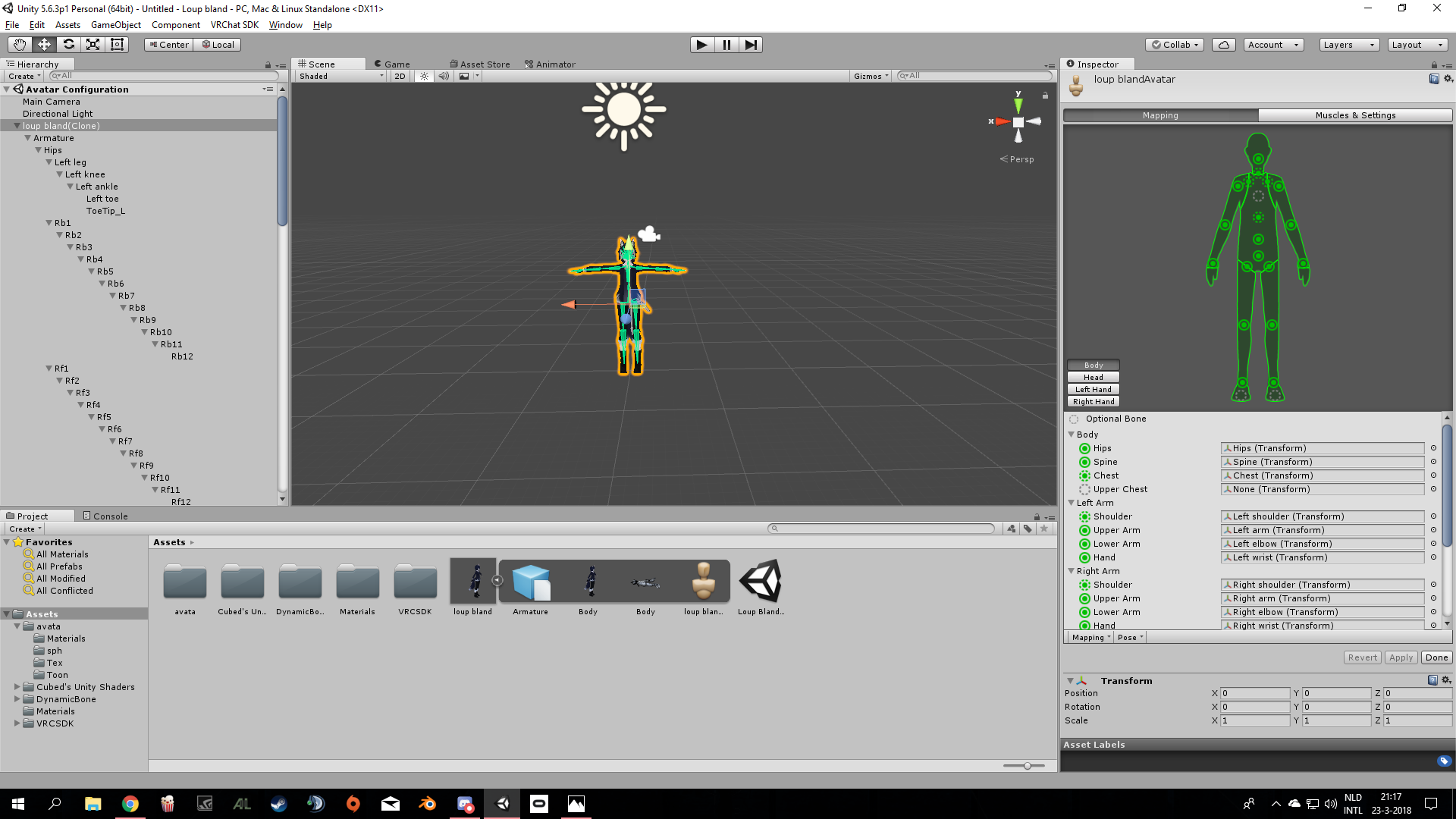
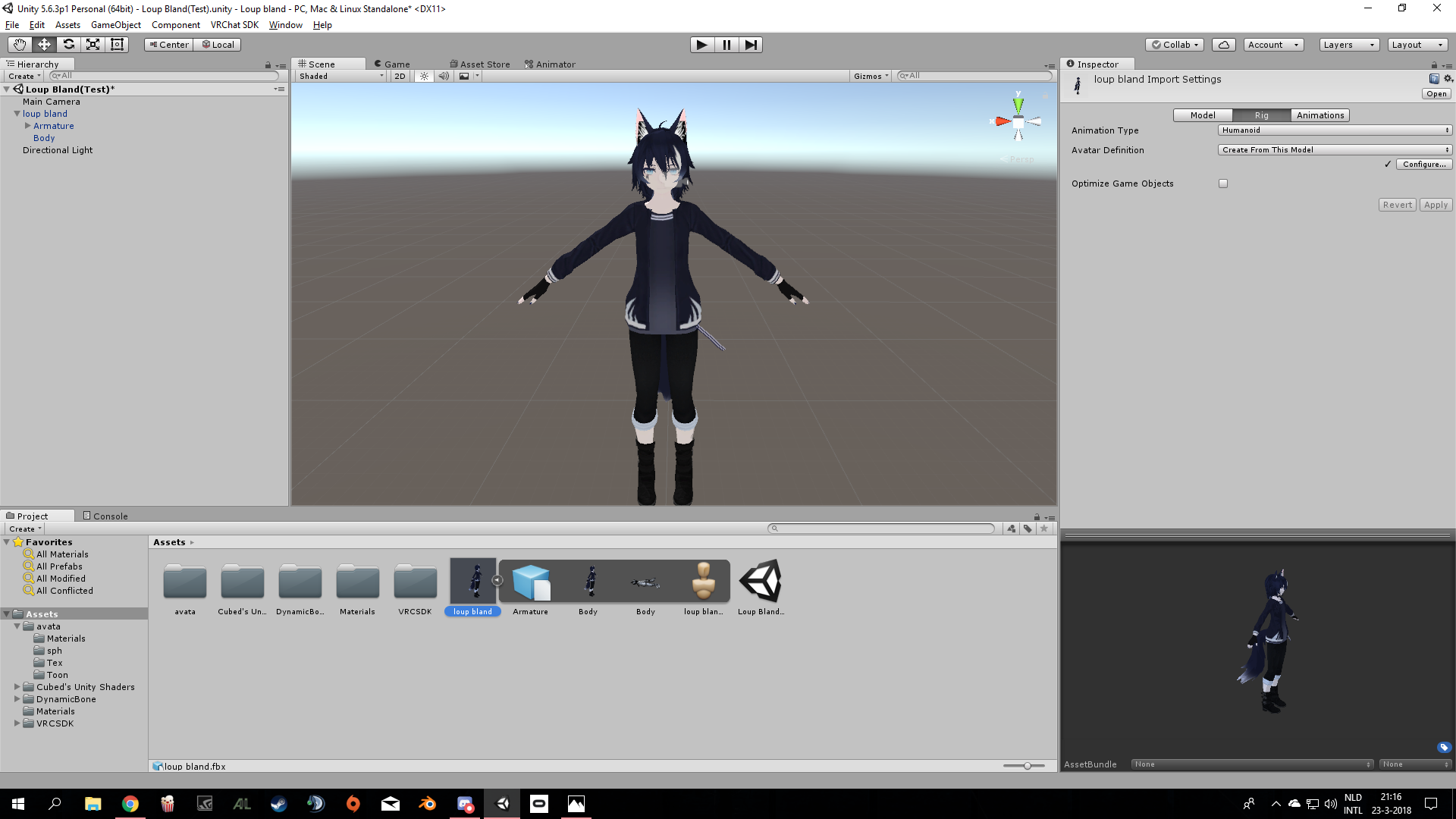
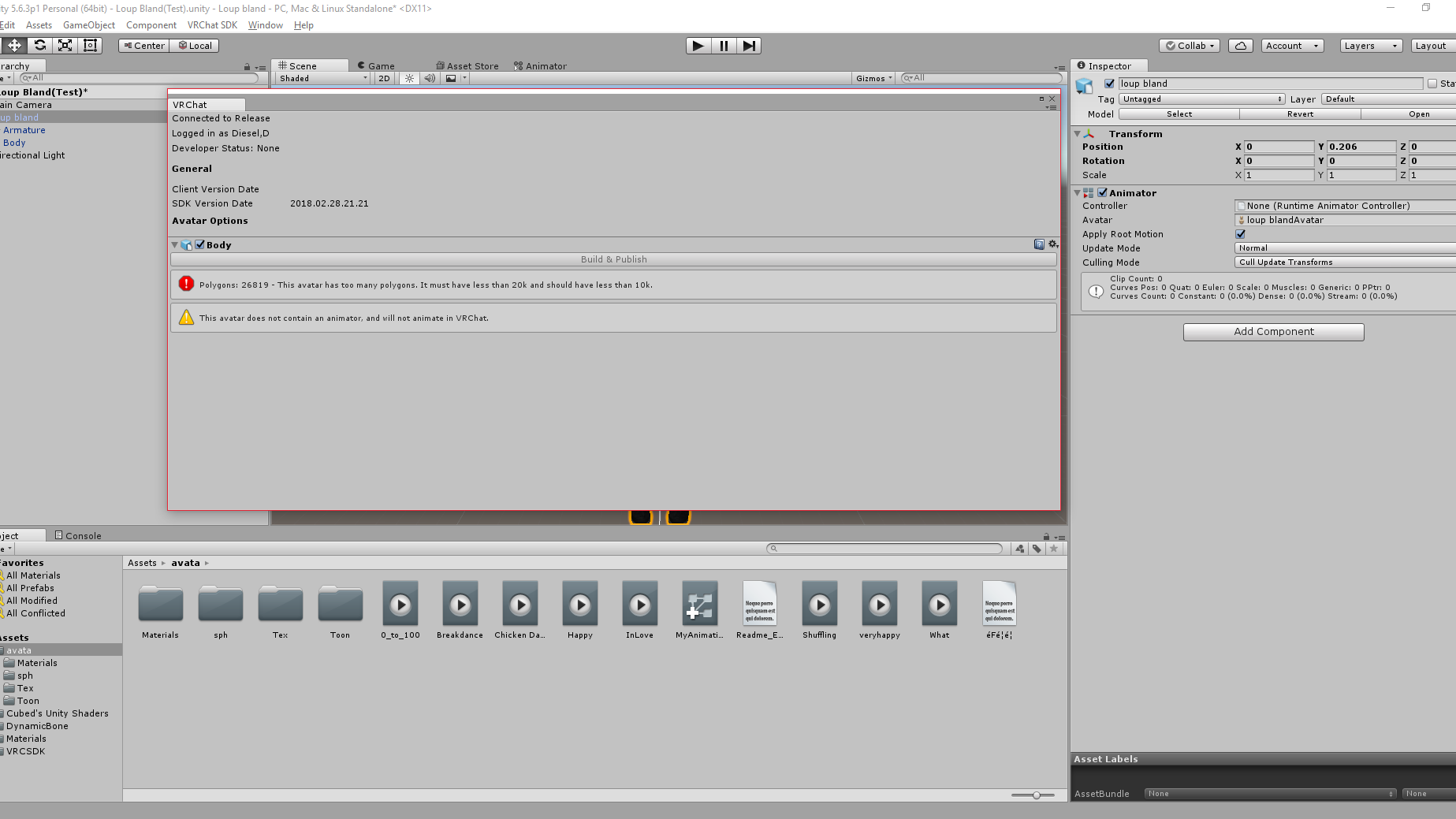 sour hedge
o
add an avatar descriptor
that's the thing that makes it work in vrchat
VRC_Avatar_Descriptor
gaunt sundial
@sour hedge https://imgur.com/GwGX9Yd
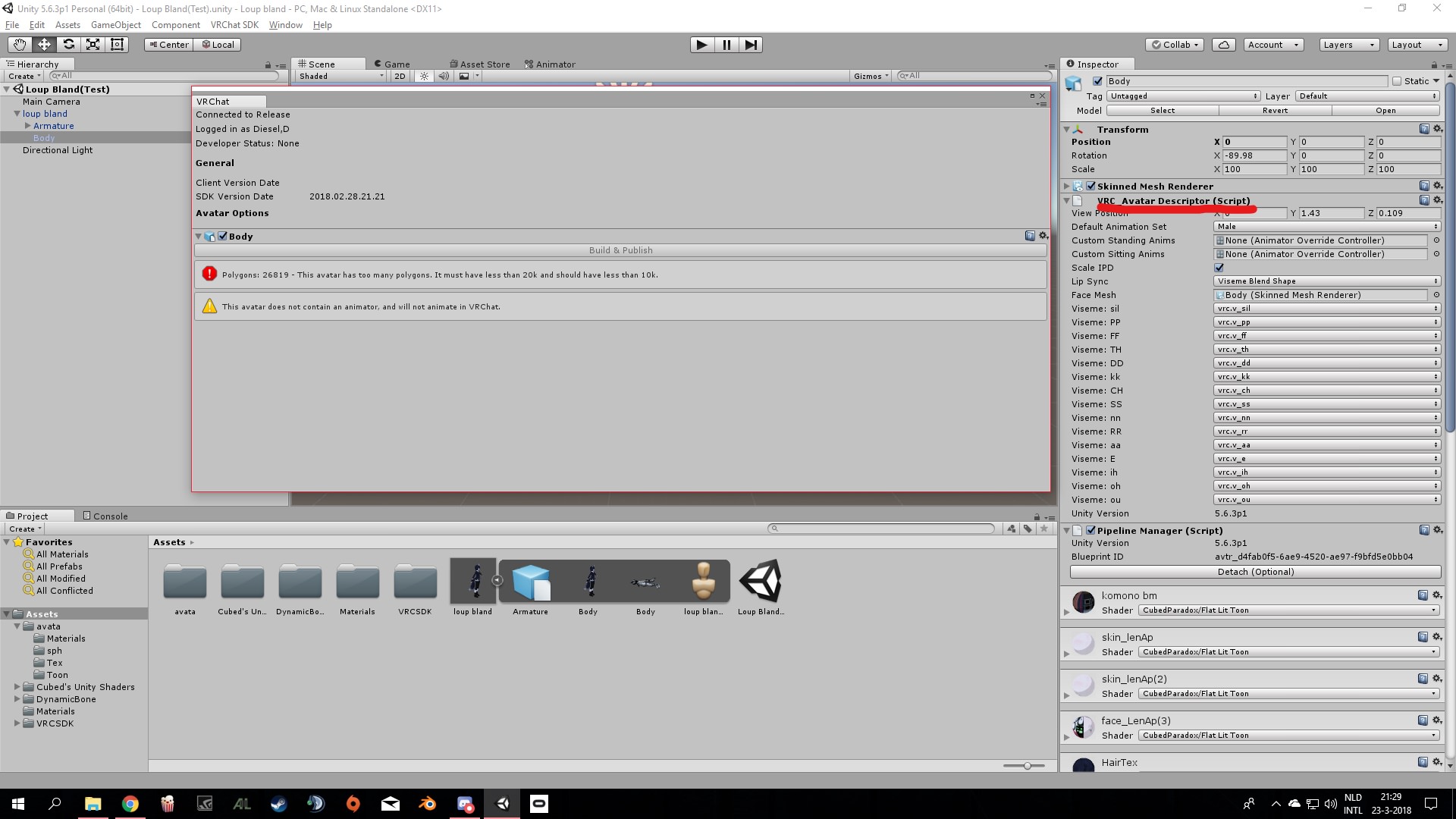 gaunt sundial
yeah this is what i have been dealing with for a whole week
nobody seems to know a fix
white herald
@gaunt sundial the screenshot seems to show that you put the avatar descriptor on the mesh (Body) and not the whole thing (loop bland, above it)
you can at least do a texture atlas :P and decimation never hurt anyone
gaunt sundial
@white herald i dont realy understand with what you mean with ,mesh/loop bland above it
can you explain
never mind i got it
omg fixed it
thank you @white herald
 abstract bridge
I need a bit of help. I downloaded an animation, it works in unity, but in game the character doesn't move, it just does the animation on the spot unlike in unity
sour hedge
did you put it to humanoid?
abstract bridge
Yep
sour hedge
also lmao, didn't even check if he had it on the root
abstract bridge
My custom sit animation works just fine.
sour hedge
feelsFailMan
 zinc moth
I'm having a problem creating a custom emote with particle system and a hand gesture. The problem is while in vrchat, the arm gesture snaps to the end result without the transition that I animated for. Originally, I did not have this problem. Before hand, the animation itself would go in the ground while in vrchat. When I added the root T transformation however, it fixed the problem of the animation being in ground in vrchat. But now the beforehand problem is occurring now while having a root T transformation .
Side note: It is an emote, and I am a desktop user if that helps at all.
 final gazelle
@slim steeple that should actually work, last i looked at it -- saw someone else do the reverse where they had a prop (animated with its own animator) appear only when they used a certain gesture
he couldn't see the prop himself in any mirrors or cameras, but the rest of us could see it -- the only indication he had that it might've worked on his end was that he could hear the audio source he had set for that prop
nocturne anvil
@clear yew got it working!!! rough test https://streamable.com/cks6a ignore the music
 final gazelle
is that a facerig add-on, or what the model's actually doing?
celest pewter
it's a camera so its what it's seeing ye
zenith topaz
does anyone have documentation on all the gesture override slots?
what is Proneidle?
final gazelle
not all the gesture override slots seem to work for desktop users, because there're some stances/conditions that we can't access -- the "Prone" animations in particular are supposed to activate when you're below a certain height, so i imagine they're something similar to crouching or lying down
seems like the prone animations are meant to activate when "HeightScaleNOMOVE" is less than 0.3 -- guessing that's supposed to mean when you're standing at less than 30% of your avatar's default height, but i get the feeling full body IK might just override those animations anyway
zenith topaz
What about crouchidle then? Sorry I'm working on gesture override for oculus user
I mean there are three idle gestures
Idle, proneidle, and crouchidle
zenith topaz
Yep
zenith topaz
Oh in the hierarchy
Click the eye on the armature
Or select the bones in object mode and hit H
clear yew
oh wait
i meant the outlines of the bones
the black lines
how do you hide those
i cant find the preview button
lunar pasture
Select the Armature in the Hierarchy, press H, next to where you select object mode you can select texture view
lunar pasture
press A, what happens?
clear yew
nothing
lunar pasture
press A again. now what?
clear yew
i can turn the orange lines into black lines
but i want the black lines to disappear from view
lunar pasture
well when they're orange, hit H
 lunar dawn
Anyone know how to change your models hair in an animation? Like Super Saiyan?
I'm trying to get this Custom animation to work, one that replaces ROCKNROLL. My character has 2 models, a normal version and a 9-tailed version. All i am trying to do is make an emote override that causes the hair to be replaced with the new hair and makes the tails appear...
I'v gotten as far as making the animation but i can't seem to make it work, as in have the hair and tails appear on command
final gazelle
@zenith topaz crouching supposedly happens when "HeightScale" is at 0.6 or so...but honestly, i'm not sure if the "Crouch-" and "Prone-" animations are ever used or seen normally
lunar dawn
Anyone?
clear yew
YeS?
lunar dawn
Was just wondering if anyone could help me with the above
clear yew
oh I can’t;-;
lunar dawn
oh well 😛
clear yew
I don’t even play vrchat;-;
 bright sparrow
I'm kinda lost, but I tried running through blender to make sure I didn't decimate face, eyes, emotions, etc and it still does this, any help? https://imgur.com/vWwDhDq

 cursive moon
@bright sparrow You might be selecting the shape keys of only the inner face mesh as opposed to the whole face. If you haven't already, join your meshes and try again.
bright sparrow
ok
I tried joining meshes in blende then testing, still same thing
o wait
i think I accidently used the other fbx
hold on lemme check
bright sparrow
i tried going through blender aGaiN and now it seperated into 2 meshes and I can no longer find the blendshapes @cursive moon
clear yew
@nocturne anvil Oh shit, you're the goat. I imagine if you got that far you know how to make it so it shows the full body.
celest pewter
just move the camera further away
nocturne anvil
^
slim sparrow
How do I disable lipsync in a gesture? I know that you can disable blinking when you make the blinking yourself
I tried forcing all the blend shapes to 0 in the animation, but that makes lipsync not work ever
fallen crypt
Anyone know how to set intro animation in the controller? o.o
Especially for the generic avatars, they never mention how to add the intro state
They just say you can
 ashen sedge
@slim sparrow AFAIK it's not technically possible to temporarily disable visemes
 remote helm
Would anyone with knowledge of particle systems and the collision module be willing to help me out?
Particles arnt colliding with Plane. It should work but it doesnt :l
 frosty jacinth
Hey guys, i've been working on an animation where the character holds up a sign. and was wondering if i could have it appear in mirror?
remote helm
Worked it out 😉
Anything thats animated via turning on and off the object won't show in mirrors.
Use a camera to test
frosty jacinth
okay thanks @remote helm i was told to use skin mesh render to active instead of just set object to active and it'd appear in mirros but i guess that was incorrect.
frosty jacinth
Tried Didn't Work, Thought i had did something wrong. Guess i could still be wrong either way. thanks a bunch
 blissful wave
How do you set the name of an emote? As in, the ones you select from the menu.
frosty jacinth
@blissful wave ti Click on your animation's package (I.E The little blue box for the animation) and it'll bring up the model, Rig, Animation tab and click animation. on that tab it'll show the length and the name of the animation just change the name there. (i'm assuming your using a mixamo animation package?
 whole igloo
 frosty jacinth
whoops wrong indeed sorry
blissful wave
No, I'm animating it myself
I'm assuming you can create an animation in Unity and assign it to one of those six animation slots?
 sturdy mantle
can anyone help me with getting my character to float through the air. kinda like a fairy.
clear yew
people have animation overrides to do the floating
white herald
i saw a fairy yesterday, she had a humanoid rig with dummy legs, placed high above the ground, didn't seem to have any animation overrides and it looked fine
depends on your character
clear yew
oh that's colliders between your legs I believe
where they can just move the whole avatar up right?
white herald
nah your rig is just up in blender
the rig's origin has to be at the ground and your character has to be above it, in blender, not in unity
clear yew
you can just fly by pushing a collider up .2 units from origin then jump ...
white herald
ah actual flying
white herald
i uploaded those hand gestures
surprisingly they don't work on every character
dunno if it's an mmd-only thing or a cats-only thing but my avatar i made way before i knew cats was a thing gets all gang-signey when i try it lol
clear yew
lol reppin the fam
 old cave
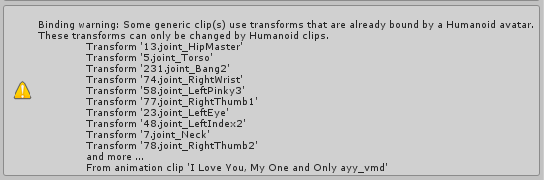
I'm trying to rig my character manually (since Mixamo is not rigging all of his finger), and when I go to armatue deform>with automatic weights the thing on the second image happens.
The mesh of my character becomes much bigger and I get the error on the top of the screen. Anyone know what this might be?

 old cave
Nobody knows about this issue? I already tried a lot of stuff and no success :(
I have no idea of why the meshe becomes giant when I try to apply automatic weights
 pine hinge
are particles with rigid body stuff on them not supposed to work in play mode?
 violet kraken
i got a custom blink animation where i change the eye material cause its like different expression textures it works when i have the controller on the model but when i make it legacy and loop and put an animation on the main model without the controller it doesnt work ?
lament hearth
@old cave
try to select the meshes only
and resize it to fit the Armature
that's what I'm doing with all my FFXIV Exports to fit Meshes with the Armature. And it works
old cave
I tryed to do this, but even if the mesh doesn't expand I still get the same error >.<
On #avatars-2-general I got some help but tried to do everything they told me to do but no success
clear yew
Have you checked that all of your vertex groups match the names of the bones correctly?
It might be a stretch, but perhaps it's something to do with a name not matching up and influence is assigned improperly as a result, causing the error.
old cave
It looks like they do
clear yew
And you have an armature modifier (you can check modifiers by clicking the box with the blue wrench on the right) that declares the armature for the object (mesh), right?
 clear yew
What I would recommend is removing the Armature modifier by literally removing it and then reapplying it by selecting the armature for the parameter there.
In other words, re-add the same modifier to the mesh just to see if it might update any information and help fix the issue
old cave
hmmmm didn't work, I did this but I tried to pose the model and the armature is still not binded to the model
clear yew
Oh, okay, this is good to know, because now we can work our way to figure out why it isn't bound.
Okay, step one, is your character mesh one object or is it made up of several objects?
 old cave
@clear yew several objects
clear yew
Okay, what you'll need to do is to select all of the objects, make sure the last object you select has an origin point of 0 for X, Y, and Z and a Scale of 1 for X, Y, and Z. Then go to the bottom left bar, where you have settings like "Select" and go to the one that's the furthest to the right there. It should be labeled "Objects" but my memory is failing me. Click it and click Join. The hot-key shortcut for this would be Ctrl + J.
Also, make sure the objects are ONLY the mesh, not the armature or anything that's not a mesh.
 crystal meteor
@clear yew Hey man sorry to ask, but how would I be able to make the AT AT legs move and give them audio?
clear yew
@crystal meteor I'd love to tell you, but I honestly don't know how to, I haven't experimented with that kind of stuff just yet. If I can, I'll get back to you on it when I do get a chance to figure it out
crystal meteor
ok
clear yew
I know that you need to animate the legs and then set up triggers within Unity and add audio that would activate, but I don't know the exact specifics of setting it up.
violet kraken
@crystal meteor make a walking animation and activate a audio source in the animation put that in all the walking animation slots on the override controller
old cave
I joined all the objets but I still have the problem
violet kraken
@crystal meteor unity
crystal meteor
mk
clear yew
Next you have to select the mesh and remove the armature modifier again and then re-add the modifier, so that it has fresh data for what it needs to be doing.
crystal meteor
@violet kraken How would I set up the animation and be able to set the animations individually on each leg?
clear yew
From there, we can see whether or not the mesh binds to the skeleton yet or not.
crystal meteor
old cave
Did this, no success
clear yew
Go to the vertex groups and go into weight paint mode, check if any of the groups meant to have influence by the bones are actually coloring the mesh anything other than the normal blue color?
violet kraken
@crystal meteor in unity duplicate your model and make muscle animations for each leg so an atat is probably really hard i cant explain that u need to watch tutorials for something like that
old cave
everything is blue
clear yew
Okay, that means there is zero influence from the bones to the mesh
Which is why the armature isn't able to do anything with the mesh, you'll have to select each individual bone and carefully paint the weights onto the mesh for each corresponding bone that you select from the vertex groups section.
Pretty much means that you'll need to paint only the parts of the mesh where the bone is depending on which bone you have selected for the vertex group
Another thing you can do for the sake of seeing if it works is select a vertex group, click the little select button. This should highlight all the vertices that are part of that group and then change the slider below it to max, which should be 1 and then click assign. Make sure to click anywhere outside the mesh first, just to make sure you de-select any rogue vertices that are not part of the group you're going to select.
Do this for the bones and see if the armature starts working.
It'll look choppy, because the weights won't be evenly distributed, you'll just have very rigid influence from bone to bone, but it will be at least some form of progression in making the armature do its job. You can always go back and fine-tune the weights by fixing them at a later time.
crystal meteor
@violet kraken https://gyazo.com/bd0683316e7b47ddd8b5bf62845be5ce

Do I have to duplicate the AT AT model?
old cave
@clear yew all the bones are selecting the entirity of the mesh. I think I'll need to weight paint everything. I didn't knew how to do that but after your explication now I know.
I wish there was an easier way but oh well...
Thanks for the help!
clear yew
Not a problem!
crystal meteor
I give up on the AT AT animation
clear yew
Always happy to share my knowledge from experience to help others in their quest for making the best avatars they can make.
crystal meteor
Jesus christ it's way too complicated @_@
If anyone can add animation to this damn machine and can share it with me I would appreciate it so dearly.. https://gyazo.com/bd0683316e7b47ddd8b5bf62845be5ce
Mainly the four legs and head with audio.
I've tried and it's way too damn hard lmao
@violet kraken I tried adding animations, but that was too hard. How would I add audio when I walk in VRchat? I use deskstop so..
Or can anyone tell me on how I can add in custom audio when walking?
clear yew
It'd be based on a trigger that activates depending on whether or not your avatar's walking animation is playing.
That trigger can then activate the audio that you attach.
 old cave
@clear yew Sorry for bothering again, but can you help me with something?
So, I was doing a rig for my character because Mixamao wasn't rigging his fingers well (he was mapping only 4 fingers). I edited the Mixamo's fbx and I putted the fingers that were missing, but I don't know how to put them on the vertex groups.
Considering that the Mixamo's rig is already weight painted on the mesh I think that maybe it would be easier to just add the missing finger.
vapid cipher
Hey guys, I'm trying to make a trail animation for in-game use, I got everything done but in-game when i use the trail my character goes invisible, why?
clear yew
You go into edit mode and select vertices on the mesh that line up with the bone, click on the big plus button next to the vertex groups and then name it after the bone that corresponds and click assign, make sure to also check the influence you want to apply underneath the assign button.
@old cave
Make sure the name of the vertex group is exactly like the name of the bone it is supposed to belong to
old cave
I'll do it, thanks again!
clear yew
You might lose weight paint data, not sure how that will play out, but hopefully it will just retain whatever the premade weight paint data was when you make the groups.
old cave
Yeah, Considering that Mixamo didn't rigged the hands well I think I will have to erase the weight painting on all the fingers and redo them
clear yew
How to make an animation on the default / always showing model?
 ionic cobalt
How goes work on the issue of non-mecanim bones not animating on locomotion overrides, devs? Any leads or fixes? @grand mango
old cave
When I edit the weight painting of the fingers nothing happens :/
I erased the parts that the bones was influencing but when I switch to pose mode the bone still moves the parts that I erased
clear yew
Believe me, it usually looks like you erased it, but you need to make sure you made the influence be at an absolute 0
Otherwise it will still move the mesh around even a little if it can help it.
 clear yew
You can go to the vertex groups, select each individual group at a time and assign influence to be 0
Since you can just tell it to make the influence be at an absolute 0, it'd be the best method


 ruby bear
doubt I'll get an actual answer but might as well try.
Does anyone know how to get the rotation of bones to actually "stick" in regards to the animation tab?
Normally I just use the Muscle Editor add-on but I'm trying to rotate some bones that are not in the add-on. Everytime I try to record the rotation of the bones they simply reset when I try to rotate another bone.
Also typing out new numbers far as the rotation angles go do nothing they simply go to the default number that was already there.
clear yew
hey guys
where are the default hand gestures stored
i want my facial animation to play and keep the default hand gesture
but i cant find it in unity
default hand animations*
You mean while using a VR emote/F key keep your hand as a fist?
?
i mean like i want my character to still display the default peace sign but also play a face animation
but i cant find where the default hand animations are stored
it cant be the things under the animator tree would it
left hand q and t
?
Nope
You can make the piece sign yourself with index and middle finger
in unity ?
spread or stretch
it didnt work
it made a weird hand
guess ill just have to make custom hand animations zzz
placid wigeon
Anybody know how to make a GameObject child have its own Individual Position/Translation
I dont know which Joint should i use in the Inspector since theres so many
 nimble pumice
can someone tell me how to get my hands being animated when I move my fingers irl?
clear yew
i cant figure out how to just flip the hand when i do the shape key so that my other hand also has a shape key
it flips the entire model when i use mirror
 lilac cave
only select the bones you want flipped
slim sparrow
My root transform keeps changing itself when making a custom emote
How do I stop it from doing that?
I set it to 0.3 and it just keeps reverting stubbornly to 0.13
lilac cave
remove the property?
in the animation tab try rightclicking root transform and deleting it
lilac cave
it might work if you remove it and then add it again
slim sparrow
Still happens
I had it on idle animations before but I ignored it, since non-emotes don't really respect root motion anyway
It always seems to happen. I cannot set the root motion at all, it just keeps reverting itself
slim sparrow
Well, I got it close enough
Now, is there a way to make my animation loop X times in an emote?
Or do I have to copy the values a bunch of times?
slim sparrow
Root transform jumped into a random value that I actually wanted, so then I just left it there
¯_(ツ)_/¯
 tepid pollen
can somebody help with a unity problem? I'm trying to duplicate a fbx's animation because it is read-only, but unity displays an exception error (illegal character in path) but does not show me what the path is
is there some way to debug this? i've tried attaching visual studio, but VS wont break
lilac cave
if youve got anything not in english it might be that
tepid pollen
i suspect it's that, but i cant see anything suspicious in blender, i even use _ instead of space everywhere
tepid pollen
i've checked everything i think (meshes, armatures, bones, vertex groups, animations, etc.)
tepid pollen
my project folder looks fine
lilac cave
the names in blender and in unity are fine?
tepid pollen
yes, everything i could think of, only alphanumerics and space and underscore
although the animation is called "Armature|Cycle"
but i did not choose that name, that just seems to happen on export in blender
lilac cave
pretty sure mine doesnt list it as that
i think you might be able to rename animation names in unity though
tepid pollen
okay, ill try that
alright, that worked
Thanks for the tip, no idea why it's called like that though
in blender the name is "Cycle" and in unity it is "Armature|Cycle"
@lilac cave thanks
lilac cave
np!
remote blaze
hey guys quick question
where do I put the blinking shapekeys in unity?
I can't see any blinking thing in the visemes list
 scarlet wave
I would like to make like a sword slash animation, anyone knows how I can apply it to a gesture? 1 Keyframe per gesture is just not enough for such animation and I'm wondering how you can make it longer without it glitching.
remote blaze
yeah, I made the shapekeys in blender
but how do I make them work in unity now?
or in VRC rather
ruby bear
I need help with recording animations. Normally I would simply use an add-on by the name of Muscle Animation Editor but I'm trying to rotate some bones manually rotate some bones but when I move onto another bone to rotate their positions are not saved most of the time. The few times they do stick like say for example with some limbs I got with 7 bones when I can rotate them and then try to stop recording the bones go back to their default position when I try to test the animation.
slim sparrow
Is there a way to put a custom idle animation on a gesture?
remote blaze
@lilac cave actually no, I made the shapekey myself, didn't do anything with CATS yet
slim sparrow
I have an animation that would look weird if it always played on idle, but it would also look weird if I just put it on a gesture like that, think it'll mess up walking a bit
lilac cave
i dont know how to do it custom, but its easy to do in cats
remote blaze
Ginrikuzuma#0001 it's because your model is humanoid
@ruby bear
you need to use "Animator" to move the humanoid bones
okay Jolly, I'll see if it works
then once I use cats, that's it?
 sharp lance
can someone show me how to animate a middle finger animation on my avatar?
can i find the animation online or do i have to make it myself?
slim sparrow
Animating it yourself is probably easiest
But you could check sites like Mixamo anyway
ruby bear
I'm assuming that's a seperate addon right not to confuse it with the Animation tab right?
@remote blaze
remote blaze
no no
if you go to "Add property"
you'll find a bunch of stuff like finger/arm/leg movements
ruby bear
and I'm quite familiar with that
like I said the values are not sticking during recording
remote blaze
oh, is that what isn't sticking?
I thought you meant it was bone transforms not sticking
sorry 😦
ruby bear
no the rotation of the bones isn't that is sticking
normally I would use a seperate add-on but I added some extra limbs which since its still technically a humanoid rig the seperate add-on I got (Muscle Animation Editor) doesn't know how to work with the extra bones on those extra limbs
I been trying to record the rotation of those bones (both by Add Property as well as trying to just set record and rotating the bones myself after selecting them in the hierarchy) but they aren't sticking
don't know what's going on I remember back in January I did manage to animate some wings like this so I don't know why its not working now
lilac cave
once you use cats for blinking, you dont have to change blinking anywhere else
remote blaze
hmm, it's not working
I set up my shapekeys, but when I try to test the eye tracking nothing happens
oh wait, nevemind!
I just had to press "test"
so now that's it?
the model is automatically going to blink?
I don't have to do anything in unity for it?
slim sparrow
Yep
Eye tracking is arcane magic in this game, CATS works around that for you
The game detects that your model is eligible for eye tracking and then uses the first four shape keys to do blinking.
tepid pollen
can you trigger sounds and particle effects WITHOUT using "Is Active" currently?
I'm asking because i noticed that particle systems completely reset if I use the normal way to trigger them
i would like my gunshot smoke to continue to fade out even if the animation starts again
 tall zodiac
does anyone know if one can get the crawling animations from vrchat to be part of your idle stance etc
scarlet wave
is it possible to make longer animations than 1 keyframe for gestures
tall zodiac
yes
scarlet wave
when I make one longer than a keyframe it starts acting weird for some reason
tepid pollen
@scarlet wave yes, that seems to be what happens when you make them not 2 frames long, i'm also wondering if there is a way to make long gesture animations
slim sparrow
@tepid pollen there is no way to do so directly, but you might be able to do it a different way.
@scarlet wave
For example, a friend of mine made a stormtrooper model. He wanted to activate and slowly extend a lightsaber on a gesture. The way he did it, is as follows
He put an Animator component on the lightsaber object itself. Then he made an animation which slowly extended the light saber, roughly 1 second long.
Then you can just activate the object and the animation will play automatically, even if the gesture is only 1 frame long
slim sparrow
I have also made emote-like gestures on my main model. I used the same method as I just described, but set up a little differently. I put a duplicate of my model under my avatar descriptor. This duplicate then plays an animation when it wakes up. In a gesture, I activate the duplicate and disable my main model's skinned mesh renderer.
tepid pollen
that doubles the polycount, right?
slim sparrow
Not really, since the duplicate is not enabled
clear yew
I have a question about facial gestures, i have done a bunch on many avatars but whenever i first do any gesture it takes 3-5 seconds to execute the facial gesture. I only use 2 keyframes & it looks as if theres some interpolation/smoothing going on. Also the hands do the same & take a while when switching between gestures
slim sparrow
Are the default animations available anywhere? I need the default idle animation, but the example one in the SDK is different.
@clear yew take a screenshot of your animation keyframe thingy
You probably forgot to set the last keyframe to 0:01
It's still at 1:00 most likely
clear yew
its on 0:01
slim sparrow
Oh
scarlet wave
what about adding empty gameobject and assigning animator to it with the avatar itself and assigning the animation to the controller. you think that could work?
clear yew
It wears off if i switch between gestures a few times
scarlet wave
then just have a gesture that enables that gameobject
 fluid wraith
Stupid but simple question. For animation overrides do you need to fill in all the options or just the ones you want to change?
clear yew
I always delete the keyframe at 1:00, i never have this problem if i create animations that are around a second or over. But yeh if i do a wink or any basic gesture it takes way too long to execute the wink
@fluid wraith just filled in the ones you want to change, whatever you dont overwrite basically uses what is default
So say if you overwrite the Wave and Die emotes, you will still have the other default emotes
tepid pollen
ok, im stuck now
so it seems like you need to have animations be created in such a way that all properties are specified through the player object hirachy
but when i copy the animation thats in the fbx of my gun i created in blender, the properties are specified relative to the gun hirarchy, so if i put a animation of the gun onto the player the animation breaks
remote blaze
@slim sparrow you lied to me!!
you have to assign left and eye bones in unity
or the eye tracking won't work
I did have to something in unity myself!
disgusting. making me do a simple task rather than a machine doing it.
 celest trout
Is there way to emulate mouth movement to song lyrics outside of playing music through your speakers?
slim sparrow
Manually activating some visemes in your emotes/gestures
Are the sitting animations anywhere? I need to edit one and I have no idea where to start