#animation
1 messages · Page 57 of 1
 warm salmon
let me test this and if it works ill come back with one more question
didnt work and back to square one GODAMNIT
srsly i wanna kill myself cause i dont understand how or why this isnt working
 novel flower
Has anyone messed with Weapon Trail effects? Trying to give my sword a trailing effect when moving it around. Tried free one on assest store but dont think script is working because it doesnt activate.
 fallen crypt
Hey guys, I tested adding audio to movement animations
But it started playing running audio when I walk, there's fix to this? I tried disable the running audio in walk animation, but I guessed it that it will not work because it's a separate animation?
 violet kraken
i want my object to stay in the same postition and not move with me in the animation how can i do that ?
 prime elm
is there any method to overlap the same animation before it finish without scripting? like without disabling audio/particle, and make them active again
 clear yew
holy jesus guys, use world particle i already told you didnt i ? what's the actual problem with that ?
violet kraken
@clear yew can you like show with screenshots ?
clear yew
show you what ? to put a particle to world ?
all i did was set the duration to like 1000 seconds
0 speed
spawn only one particle and that's it
it spawn on my wrist position and stay at the place it spawned
violet kraken
but how do i like parent the 3d object to a particle system and put it in my hierachy of my model
i wanna spawn it somewhere in the sky infront of me
clear yew
that's a bit more complicated
because vrchat is a little bitch with world particles
if you want better result you need to use rigid bodies
violet kraken
yeah already tried that didnt quite work tho
 slim sparrow
What's the rigid body for?
Is that so the particle respects your rotation?
I keep hearing people talk about rigid bodies for world particles
clear yew
yes
slim sparrow
Ah
warm salmon
yo
my problem with that
is that i DONT WANT IT TO FOLLOW me. like, i want the audio and the visual to stay with the particle left behind then, but the prob is it pulls the emitter with it and all, and as such it wont do so easily
for now im just working on bites the dust
clear yew
to give you an exemple of what i used it for.
i have a bullet particle set to world, so when i shoot it doesnt follow my movement. In unity it looks fine but in vrchat the bullet is always going DOWN.
I used a rigid body and the particle had the right rotation
warm salmon
like, the biggest problem is i cant put a particle emitter as a child of another particle emitter, and then have said emitter emit FROM the particle
it emits from the emitter
which comes with you
clear yew
use a empty game object and put your particles under it
warm salmon
so empty game object for the ones of the explosion, or the ones of the emitter emitting the explosion emitter
slim sparrow
I don't think you can actually make sounds stay somewhere. It sorta sticks to your avatar
clear yew
nah, you can put them anywhere
warm salmon
cause what im trying to do is have something with audio and particle system stored on it, and hve it stay in its spot, then have it later emit said sound and particles
slim sparrow
Oh, really? Wut
clear yew
doesnt always works tho because vrchat is kinda fucking up the sound
how do i make my gun spins and shoot ?
revolver
slim sparrow
I have an animatable object as child object of my avatar. It's a humanoid rig animation. How do I make this animation always play?
I added an Animation component to the child object, but in play mode, it still sits there in a T-pose
violet kraken
@slim sparrow make the animation legacy and if you want loop loop it
 heavy stirrup
Is there a way to make an animation component only sometimes play?
slim sparrow
I made it a legacy animation, still won't play
I've done this before for blinking and such, so it should just work
Alright, I got it to work by duplicating the CustomOverrideEmpty controller, then replacing the idle animation with the animation that I want.
Had to disable legacy for that to work
 bronze peak
@covert linden can you explain what your were saying the other day where if i don't want an object i spawn using a finger emote to move with me. how i would do that, something about rigid bodies?
 scenic shuttle
anyone here knowing stuff about render textures?
 regal hollow
@scenic shuttle you trying to make a working camera?
scenic shuttle
yes
regal hollow
They started forcing cameras to local so only you can see them, others will see a black texture.
scenic shuttle
theres gotta be a way tho
regal hollow
There is a workaround but I don't know how to do it and I'm pretty sure its against the rules to talk about how to do it.
scenic shuttle
ive seen multiple ppl having it
regal hollow
So have I.
scenic shuttle
i see
regal hollow
Using the cameras means you have to render everything twice, halving your performance. So using it in a public world is pretty inconsiderate, pretty sure thats why it's out of here.
Maybe it'll come back someday though in a more controlled form. One can hope.
bronze peak
so anyone know if can make something pop up later in an animation. ie i have a song on a flute playing and at the end of the song i want a statue to appear?
scenic shuttle
yeah but the thing is they should disable it for everyone then
fix the workaround
like it just sucks that some ppl know how to cheat the system and they can do all the cool stuff
same with the poly limit
fallen crypt
Hey guys, I tested adding audio to movement animations
But it started playing running audio when I walk, there's fix to this? I tried disable the running audio in walk animation, but I guessed it that it will not work because it's a separate animation?
 placid wigeon
I have seen people use a 2D sprite in VRCHAT with Idle, Running animation, and etc. like this one https://runruncycle.tumblr.com/image/146756906721
I was wondering how are they able to do this i have experience in using Sprite Sheet animation in UNITY but since VRCHAT SDK does not allow Sprite Sheet in the gameobject i have also tried using SurfaceSpriteSheet shader in 3D but it can only animate 1 Sprite sheet (duno if it can do multiple since i have tried)

Post anything (from anywhere!), customize everything, and find and follow what you love. Create your own Tumblr blog today.
prime elm
anyone know what is the name for "LetGo" on the override?
 dapper rampart
What’s it called so a 2D image is forced to show itself to you straight on, so as never appearing practically to be able to walk around it?
I have a cylinder that would be lower poly if I could just make it a 2D image.
 torpid wadi
@prime elm late but it's HANDOPEN
prime elm
@torpid wadi wait....then what is for open fist??? same as handopen?
or it just nothing
torpid wadi
Open fist is based on your idle pose
 velvet ginkgo
How can I create something where A message such as welcome shows up in an oculous rift screen.
Like follows their head movement or something, so I could put rules that they have to read.
prime elm
kk thx
 covert linden
@bronze peak short version is, put a empty game object under your model NOT under your armature and put your particle system under that. Add a fixed joint to the game object, make sure to disable gravity. In your animation just make the gameobject show up. This will allow you to walk away from the particle system as it will stay in place. You should turn up its duration, since it will appear around your avatar.
clear yew
@placid wigeon try to search something about "doom shader"
placid wigeon
Thanks
is it called the Doom style billboard shader

 wary parcel
Change the frame is possible
 visual summit
@wary parcel How to change frame?
wary parcel
You can change the frame timing inside the animation window either that or compress the animation nodes
 green roost
Anyone know how to over ride head rotation when doing walking animations?
Pretty much, i want to turn off all of the IK rigging when doing an animation
green roost
just like how when you emote, the head rotations and position aren't tied to where your mouse is
 swift cloud
So I'm trying to import a weapon to unity. Exported it as an fbx, but when I import to Unity, there's no materials for the texture of the gun. All it has is this 'analytical_specular_contribution_etc..'
 boreal trellis
I am doing world particles for a gun using fixed joints, after i start doing animation, do i need to reposition the particles object on a gun one more time or just leave it like this and dont worry, im doing fixed joints for the first time, so it is important to me
green roost
The Head seems to be Locked to the "Y" Axis, that's my main problem.
boreal trellis
Someone please explain me if the world particles will follow my wrist anyways, with the fixed joint
regal hollow
@boreal trellis If the particle system is fixed jointed to the bone it should follow no matter what.
boreal trellis
okay thank you 😃
just wanted to ask because while doing animation i noticed it is still in this position https://gyazo.com/dae3fda2e5ab70fc22fe56351c526dc8
 scenic shuttle
does anyone here know how to lock rotation of an object
but keep position tracking
boreal trellis
@regal hollow just to make sure, https://gyazo.com/780c0289f07345a8de3a0af802f5b2de it wont look like this ingame? xD

 nocturne radish
I wonder, did anyone successfully replaced an iddle or walking animation without it getting stuck in the first frame?
 bitter light
Is there a good tutorial for someone just starting out on animations?
 dusk nexus
Just don't start the animation on the first frame and walking should work?
 loud hamlet
I've been away from vrchat for a wile. Anyone figured out how to animate walking and idles for 4 legged creatures yet?
Like an easier method then custom animating the whole process and using over rides. So far mapping and using a custom animation has resulted in some possesed looking movement.
@nocturne radish I've replaced Idle animations on multiple avatars. They have to be looped in order to not get stuck.
clear yew
struggles of animation as a desktop user: how to i make something follow the head (so i can actually aim it) without it being made invisible??
 dark thicket
is there a way to change my avatar after a animation has been done? Like https://gyazo.com/c52789cc6f231f260a7b51e474707d85 to https://gyazo.com/6f740d3a59081cb15a90b93cd846de63 ?

 clear yew
I have made a phone with a working screen with 2 cameras. problem is i'm the only one that can see the screen. How can i make it so that other people can see it?
i've seen people do camera rendertexture that others can see, but i think it involves modifying the sdk, unfortunately.
unless they found some kind of workaround in a material
 final sphinx
gettinga weird issue ever since i added a second animation activated audio source to myt avatar. The sounds no longer play for me but still play for others. Anyone els encounter this or know a fix?
nocturne radish
@loud hamlet so just looping it should work? In the properties of the animation? I tried and I didn't work for an iddle animation but i will try again in a while
loud hamlet
It needs to be looped in legacy and then set back to the defualt. I think tupper made a tutorial on youtube if you don't know how to do that. Other wise it's a drop down in the inspector when you have the animation selected.
nocturne radish
Ooooh in legacy too? I didn't do that because it didn't let me preview it in unity and I thought I screwed it up
 shy island
@final sphinx just made a avatar mit multi ani with audio and it works fine for me. sometimes i get the bug that the audio won't play so maybe it was just a bug. u tried change avatar/world?
final sphinx
yes
 glass anchor
@scenic shuttle look into using hinge joints
 signal dove
I want one of several animations to play on awake for a single object. How do I do that?
One gesture awakens the object, and from there other gestures decide which animation it plays
clear yew
@clear yew so modding the sdk is the only way to do it? rip
@clear yew the problem is it hammers people performance, because it basically ups their game resolution by whatever pixel ratio the camera object has... in terms of performance
ㅤ
can someone help me with how to pin a rigidbody to a bone?
 silent gust
I'm trying to work on an avatar that uses a billboard shader
 tacit latch
anyone got an idea on how i can improve this? https://cdn.discordapp.com/attachments/391461523941490699/424396316219539486/Unbenannt.PNG

 nocturne radish
I noticed in the sdk, all the included animations are just placeholders, does a dev have them on hand?
 limber horizon
Is there a way around the 10 second emote limit?
 naive portal
Just tried using a custom animator controller on my avatar, but the changes aren't showing up in-game. Are you still able to add custom animators to avatars?
tacit latch
yes, did you add them to both?
the animator and the sdk avatar thing?
you need t put the animation overwrite into 3 things for it to work for sure
naive portal
Wait 3? Not just the animator in the inspecor?
tacit latch
yep
2 in the sdk component
and 1 in the animator
thats how i do it and it works 100%
you can use the same animation overwrite controller doe
naive portal
Well I'm not trying to use direct to avatar custom animations, I edited a copy opf the animator template (not the animation template) to give me a little more control over what animations play (combined hand gestures)
tacit latch
which is normal
lemme start unity, then i can take a screenshot and show ya
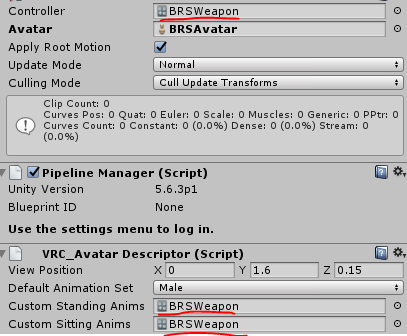
dere
naive portal
Ah those are overrides
tacit latch
yep
naive portal
What I'm trying to use is this https://imgur.com/CPLnRzt
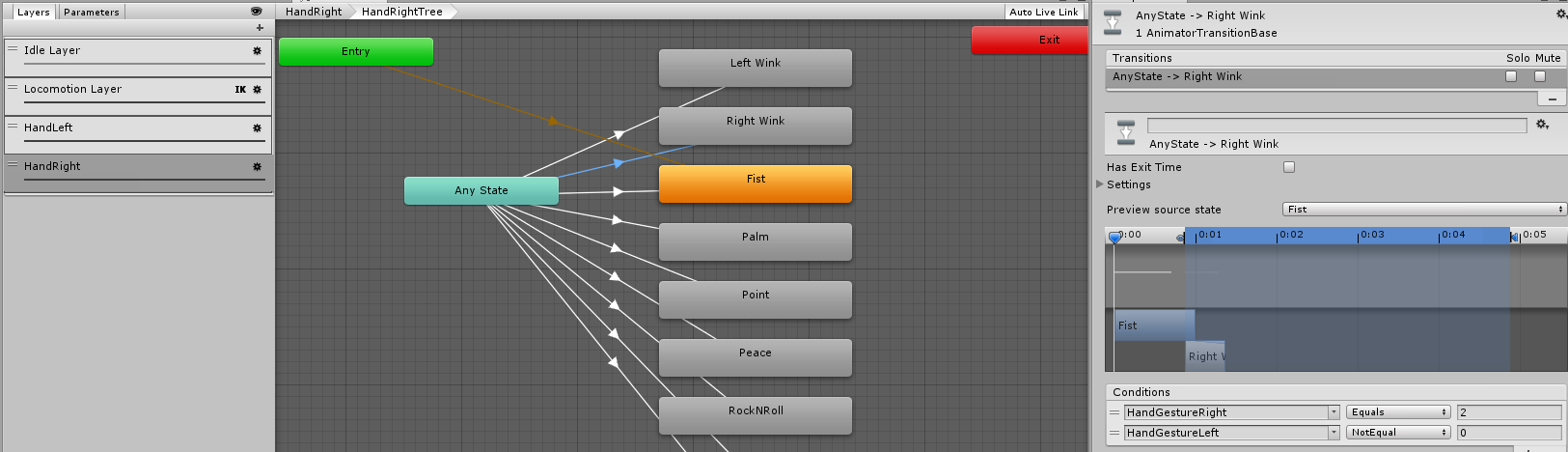 naive portal
It's for a good reason
tacit latch
which is?
naive portal
To make modifiers to gestures on the hand controllers, extending the number of animations you can play
naive portal
So a combo of fist on one hand and point on the other will make a new animation of its own
 torn pawn
i mean you can have 16 overrides with utilizing both controllers, it's already hard to come up with that many
@naive portal to have 15 you can use 5 regular buttons and 2 toggle buttons, where on those 5 buttons u have 3 overrides, 1 main and 2 child that get toggled by other controller
and toggles will work only when other button is active, as all of toggle objects are children
naive portal
For regular animations I'm assuming?
torn pawn
what do u mean
this way is good if u want lets say your gun to shoot only when the gun is out
or to trigger bigger stuff
naive portal
So, 5 of the controller buttons are remapped by the override controller, and the other 2 buttons change the override?
slim sparrow
To give a basic example of what he means: suppose you have one avatar with 3 different guns. You can assign 3 gestures to pull out different guns. You then only need one more gesture to actually fire them. You're actually firing all three at once, but since you only have one of them out, only one is visible
torn pawn
basically yes, you trigger all child objects, but only 1 is activated
slim sparrow
You can apply a similar concept to other gestures, and basically make an animation that only triggers with a specific combination
torn pawn
as other parents are not active
naive portal
I tried something similar to that before, but I could only get the first animation to play
Even when turning off parents
torn pawn
you dont turn parent off, because then children will not ever play
what do u want to achieve
would be a good starting point to give an idea how you'd have to set it up
the basic idea is like this, you have your Gun object, then under the gun is empty object that holds your sound effect and particle effects, your Gun is disabled and empty object is disabled, with 1 gesture you activate your gun object
which means that only the gun will be active and not play the sound/particles, as the object is inactive, then with 2nd controller while holding gun override
you activate your empty object, which will play only when the gun is active, as it's a child of it
naive portal
Hmm
 normal skiff
the problem I found with multiple guns at once is that there aren't enough gesture keys to use once you rule out all the ones which are too easy to accidentally trigger
naive portal
That works well if you have the gun model on the end, but I'm trying to do it with the main character mesh
torn pawn
that's what im asking - explain what u want to do
naive portal
If I point with my right hand, one facial animation plays, if I point with fist on the left hand closed, it plays another animation, but the fist has its own 3rd animation
Is what I'm trying to get working in the test anyway
clear yew
anyone know how to make a toggle system for emotes?
naive portal
To lock the emote to loop until you turn it off?
clear yew
yes, with another emote
torn pawn
@clear yew it's what i explained above
clear yew
alright, ill take a look at it
i dont think im following
like PARIDISO said, i want an emote to bascally loop, but it "exits" and whatever i turned on with the emote stays on
normal skiff
someone once said, if you have an empty game object somewhere on the avatar with a legacy animation that turns something on, then when you activate that from another animation, the thing it turned on doesn't turn off
and you want a second empty game object which has a legacy animation that turns the thing off
I haven't tested it though
also it totally smells like a bug that could one day be fixed
clear yew
alright, ill try doing something like that
normal skiff
I think a similar sort of trick might be required to get cameras to work because my normal attempts aren't working
clear yew
been wondering about that as well, it'd be dope if it can be done that way
nah, for cameras there is another trick to make them work
mind shedding some light?
normal skiff
someone had said, put a disabled parent above the camera and disable the camera component, then turn both back on in the animation, but it didn't work when I tried it
I also tried disabling the camera object itself, and various other indirect tricks, like having the first animation enable the parent object and then having that object's Animator turn on the camera
normal skiff
yeah I'm basically out of ideas until someone drops a working prefab
or unless something significantly different to what is already being tried works
knowledge of it is already hitting critical mass anyway so knowing our luck they'll just find another way to disable it
normal skiff
not if they eventually solve it by removing the component 😃
clear yew
they can't remove it, it's the unity camera
normal skiff
they can remove it, they remove a bunch of other unity things
clear yew
and weirdly enough, you can bypass these too
like custom script arent allowed
but you can still bypass that
clear yew
the citation is that i have 2-3 friends that bypassed it
normal skiff
sounds more like they probably just worked around it
if someone has figured out how to bypass it, people in the worlds channel would be really interested to hear about it
torn pawn
guys please dont use cameras in game
they disabled them for a good cause, don't try to use them or find ways to overcome it
normal skiff
tell that to everyone else doing it
torn pawn
don't be like every1 else
normal skiff
I want it for a specific trick
clear yew
just wanna learn how to lol, not to cause everyone else trouble using it in public
just wanna say to close friends
"hey, i can do this"
normal skiff
even people using it right now aren't causing trouble from what I'm seeing
I mean there was that one guy using it to show panty shots in japan town I guess
clear yew
saw someone as well in japan town lol
normal skiff
in a sense it sort of made the world more immersive
clear yew
had his name on the camera too
normal skiff
(joke)
clear yew
lol
normal skiff
I think the thing is, the camera only has a rendering cost while it's active, so if you're just taking a photo with it, you can activate it for one frame to do that
so even if everyone had some kind of mobile phone-like device for doing that, to get a real problem multiple people would have to fire at the same time
clear yew
well, i always say the same thing, if someone wants to cause trouble, there is better ways to do so
normal skiff
indeed, there are easier ways
clear yew
the thing is that some people while spawn 5-6 cameras looking at each other and they will start to render each other making everyone lag
torn pawn
ppl want to show off their cool shit, and they trigger it often
normal skiff
maybe you just hang around worse people
torn pawn
that's a normal public world
normal skiff
in public worlds you don't even need cameras, there are enough people wrecking those with particles, and those aren't banned
much easier to use too
torn pawn
particles are #1 thing i hate
clear yew
yup, anyone can just make a really simple particle system that crashes computers or have everyone at 3fps
normal skiff
yeah just drag that slider up 😐
normal skiff
depending on how it's done anyway
torn pawn
have 3-5 particle systems with 500 emission of emojis and every1 goes WoW
clear yew
lul
normal skiff
those are cool as long there's eggplants in it
torn pawn
oh, add earrape too
 fathom plaza
I've grown to hate this emoji 😂
clear yew
😂 😂 😂 😂 😂 😂 😂 😂
 low forge
Speak spanish?
torn pawn

 clear yew
lul
 icy hazel
I approve
 solar patrol

Does anyone know how to delete this?
Wasn't happening before but now it is and I don't really know what to do lol
For clarification it did it on my original model then I made it in a new unity and re-exported
 night steeple
is there a faster way to animate fingers so i don't have to select each and everyone in the drop down menu?
 cursive moon
With the Muscle Animation Editor asset
fallen crypt
Anyone here make generic avatars with gestures working? I want to learn how to make one and understand the controller settings
 grave topaz
How can I get an animator to not play an animation until triggered by VRC_Trigger? Literally first time animating in Unity.
signal dove
Can I change an animation controller's entry animation within an animation?
placid wigeon
Question what Shader/Material is the Predator using to become invisible when its doing the Invisible custom emote
(Not referring to the CUBED'S distance Shader)
fallen crypt
Anyone here know how to assign animation more than 2 frames in generic avatar's gesture commands?
clear yew
use a empty game object and animate it instead
 woven surge
Yesterday saw something interesting. People having a mobile phone, and doing a photo (freezing the frame) then putting it on a big screen. Any clue of how to do it, if it's a shader and where to get it?
clear yew
just a camera component
signal dove
I need a world space mesh particle to have local orientation. Is this a contradiction in terms?
woven surge
Just the normal unity camera?
clear yew
yes
woven surge
Okay, thank you for the help and for putting the freeze frame on a screen the same way?
clear yew
the freezed frame is just stopping the camera from working
it will freeze to the last frame seen by the camera
woven surge
Oh, okay, thank you very much @clear yew
 crystal pike
does anyone know if theres a way to connect an accordion to my hands and then with the dynamic bone plugin make the part that stretches be all stretchy?
violet kraken
https://ibb.co/hTJaHx any idea how i can do the inside with an particle system?
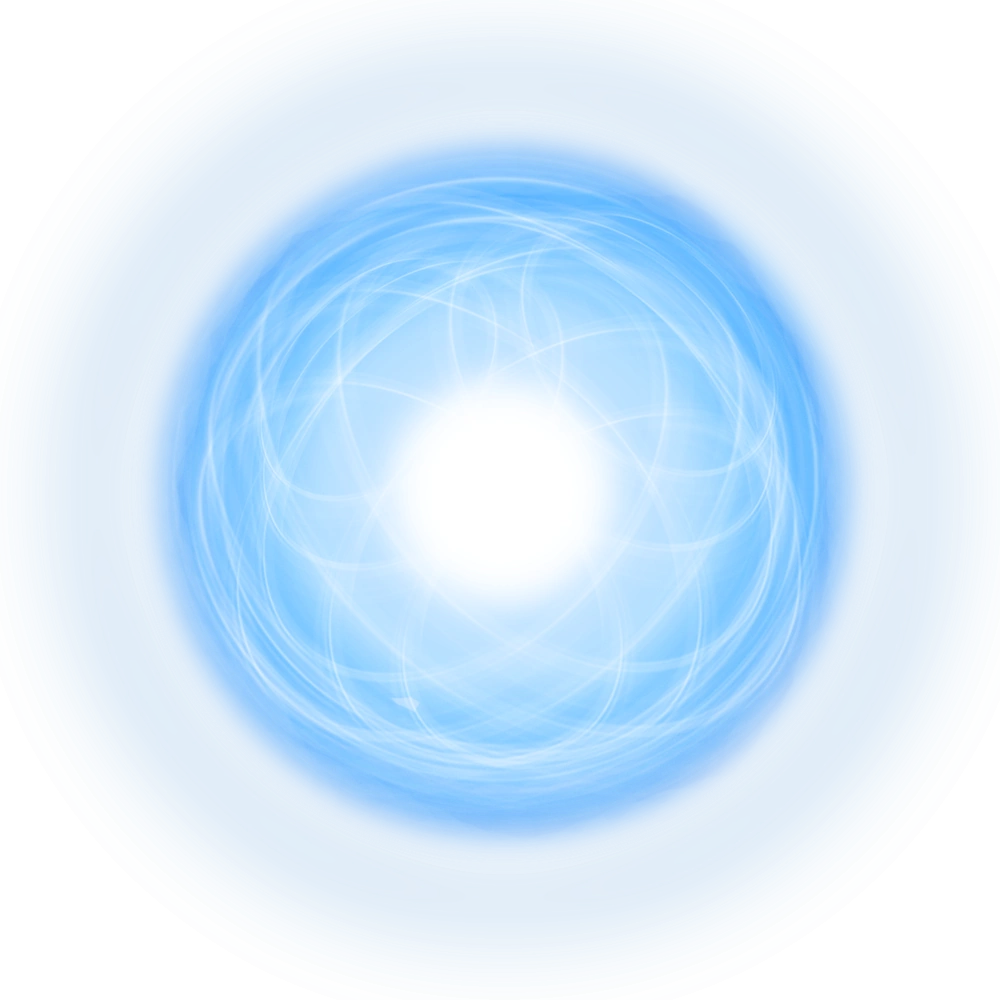
i could make a lot of small rings but probably not the best way
covert linden
you could find some scrolling texture shader and just use like 2 spheres and one circle for the shine (an easy example, you can make it as detailed and complex like you want)
violet kraken
@covert linden i'll try that
covert linden
you could prob just use circles if you want that too @violet kraken if as long as you don't exceed a total of 200 particles, most people will be fine
I'd guess you'd need around 4 for the ball and like 20 ish for the white circles for a very simple one
 eager vault
or if you wanna be lazy, you can legit just plug that picture into a material lul
woven surge
I cant get my mobile phone camera to work, I added a camera component to a cube that I resized to be the screen. But not working, showing like soft colors but nothing more
crystal pike
is there a way to have an object that u hold with 2 hands
im trying to make an accordion anim
 hoary iris
Hey everybody, I've had this issue in the video below for a while. I can't add properties to my avatar, or separate items (like a weapon) for some reason. Googling hasn't given me any answer, nobody really seems to have this issue, and this is the only thing disabling me from doing the last touches on my avatar. Has anyone experienced this? Or perhaps you've heard or seen this issue before?
 slim sparrow
You duplicated your avatar first, right?
And then made the animation using the dupe
I heard that Unity sometimes considers them readonly or something
¯_(ツ)_/¯
crystal pike
@hoary iris did u click upload avatar it might be stuck in the thing where after u upload it goes to the game tab and u can change the name and final upload
hoary iris
Yeah, i'm adding the property to the duped avatar
crystal pike
is it possible to add a grab interaction to an object on your model like how u can pick up bottles and cubes that are in game
slim sparrow
You mean add an object to your avatar, which can then be picked up by yourself or others?
Like the world objects
If so, no. That's literally impossible.
Those are only allowed in worlds since they're triggers and all. What you can do is hold predefined objects in your hand, however. You can also set them down in the world using the particle system. But this is purely visual
 quiet needle
@crystal pike The best way to do that is to utilize the world object method using rigid bodies and joints, then disable/enable them on a gesture.
Then you yourself can "pick it up" but nobody else will be able to.
quiet needle
I'd suggest watching videos on world particles, as those are the steps you need to use, but instead of setting it on a particle, you set it on a game object in your hierarchy.
crystal pike
Ok thanks
woven surge
I got my mobile camera to work, but the problem is that only works for me, and when I spin the camera, my head spins on the display too, like its working bad, the camera spins instead of stay in place, tried a fixed joint but nothing. How can I display it for all the people? I'm using camera component on a cube
clear yew
@woven surge when u upload the avatar the game disables the camera from non-local avatars so only u can see it
grave topaz
Does an animation trigger stay triggered?
woven surge
@clear yew I saw yesterday people using a camera, not on his own world, that could see everyone and capture the last frame to do photos
So there is a way to do it, don't know how
That's what today I'm trying to know 😦
clear yew
the game dosent let u do that for a good reason. people spaming multiple cameras and making everyone lag. the ones u saw prob found a way to bypass it
woven surge
Yeah, I know it's a very good reason, but already saw 3 people yesterday, so maybe as you said they found a way to do it
clear yew
it might involve modding the sdk so try at ur own risk
torn pawn
themore ppl use it the quicker it gets kicked back to where it belongs
clear yew
@torn pawn exactly
torn pawn
please use 5 cameras in a room so every1 crashes
clear yew
use 10 to be very sure to crash everyone
 clear yew
not like half the people have them now anyway eh
woven surge
Not like using it to crash people
clear yew
doesnt matter if you dont do that
you have 5 people who use their camera at the same time
woven surge
Just like doing one frame freeze in just 20 seconds in a only friends room xD
clear yew
and welcome to lag
crystal pike
ok so I put a drum on my back and put it under spine now when I go in game im invisible except for the drum mesh and my pupils which are all brown and other people can see my avatar fine so I went into avatar testing and when I look in the camera everything is there except for my head
woven surge
There is already ways to crash and to lag people
torn pawn
@crystal pike rename object mesh from Body to different
crystal pike
ok
torn pawn
anything that you added to your existing avatar, check if their mesh is not named Body
woven surge
The other thing is that there are no tutorials so everyone is not doing that so the game stays good for everyone
torn pawn
if it is - rename it to anything else
crystal pike
The mesh of the drum or my body
clear yew
drum
torn pawn
only your main avatar mesh has to be named Body, check any other objects that u added
crystal pike
ok thanks
torn pawn
if their mesh name is Body, then rename it
clear yew
to put it simple u cant have multimple meshes with the same name
torn pawn
you can, but they have to be under different parents
crystal pike
ok but before I had a drum anim overrode and there was a mesh in it named body
it worked fone
fine*
grave topaz
Anyone have an answer?
crystal pike
wait r u saying u can’t have a body somewhere above a body in the hierarchy?
torn pawn
wait, unless the animation uses name and not hierarchy position
crystal pike
uh idk i just renamed the bodies to Drum Body
torn pawn
yeah it should be fine then
crystal pike
thabks
tacit latch
anyone got an idea for an ability for a cannon?
torn pawn
use lolis as cannonballs that have collission on death subemitter of innocent hentai magazine covers
tacit latch
no
torn pawn
that's what I'd use if I had a cannon 🤷
clear yew
im keeping that idea in mind, Yuumi.
tacit latch
better question.
know how to make a particle effect that has the shape cone and looks like a whirlwind?
covert linden
Firing something that summons a meteroite storms
tacit latch
^already got something similar to it
torn pawn
each meteorite explodes into 15 additional rocks that explode into additional 15 and all of them use world collision + bounce 
covert linden
There's a tutorial on it, easiest way I would say is use the cone and change distribution to base shell and loop instead of random
crystal pike
Ok I uploaded and the same thing happened except after a while the arms on the taiko drum extended out into the shape of my humanoid and it moved with me
clear yew
also put renderer to "Mesh" so it draws more ressource and you lose ven more fps
crystal pike
the meshes of the drum took the shape of my arms and legs
tacit latch
Yuumi, i dont want to lag everyone out >->
crystal pike
@torn pawn
torn pawn
wait, particles isn't meant for lagging out people? shit, I gotta tell that to every1 I've met in game
cuz they for sure do the lagging out part
tacit latch
hence why i dont go to public places that often
torn pawn
one guy legit had a rain particles covering 1/3 of the hub that had world collision
crystal pike
I still have the body of the other taiko drum
tacit latch
oh god
crystal pike
Yuumi should the drum on my back be under spine or chest?
covert linden
Just optimize it, then it won't lag people who are playing the game with the actual specs required to run it
torn pawn
doesnt matter i'd say, they both don't move at all almost
 rich dome
Is there any way to insert an animation on for example a set of wings?
torn pawn
you can create an animation for them moving, then set that animation to legacy, and put it in a animation component
crystal pike
I changed the name of all the bodies I still get the same issue
I can’t find anything online about it
torn pawn
did you also change the animations so they don't "disable", "enable" your Body?
crystal pike
how do I do that?
quiet needle
Make sure in Unity that your model appears as normal. Set up your animation to enable the game object you want to add to the gesture. (I'm assuming you're making an 'on gesture' type animation?)
crystal pike
yea
I’ve done many anim overrides before and this drum one was working but ever since I put a drum on his back it broke
quiet needle
So your animation would be something like: 0.00s > Property (DrumObject>IsActive) > 0.01s > Property (DrumObject>IsActive)
Simple and clean
quiet needle
ok yeah, still simple.
crystal pike
so what’s the issue
quiet needle
That's kind of weird considering a new object shouldn't affect your main model.
crystal pike
yuumi said it was something to do with the body names
quiet needle
Well, you'll get weird things happening in mirrors with duplicate meshes being named "Body" but nothing else.
Everyone else will still see things normally without the issue. That's local only.
crystal pike
yes
limber horizon
I've done something odd and I'm not sure how. My model plays his anim for longer than 10 seconds from emotes but after about 30 it gets wonky
quiet needle
delete the duplicate, reduplicate your main, drag the controller onto the duplicate, then the animation onto it also, then check to see if it works.
crystal pike
ok but the dupe doesn’t have the drum on the back
is that ok
I’m trying to make it so he normally has a drum on his back then te anim is its in front of him
Like taking ur hat off
quiet needle
@limber horizon Yeah, the documentation states that the animation bone lockout is 10s, but I've been able to get it up to 3min and extend it for an additional indefinite amount of time using a lockout emote.
rich dome
@torn pawn And how would I "create" this animation for my wings? >.<
quiet needle
Oh, then you'll need two drum copies. one on back and one in front.
Disable the one on the back in the anim, then enable the front.
limber horizon
The wings you could manually do if the secondary model is a generic rig, a bit easier
 chilly topaz
do gestures remain toggled if an emote is turned on?
slim sparrow
I'm pretty sure gestures stop when you emote @chilly topaz
Or at least, overrides stop
chilly topaz
alright
quiet needle
Yeah, gestures would be disabled during an animation emote lockout.
crystal pike
@quiet needle how do I disable the drum on the back for the anim
signal dove
I need a world space mesh particle to have local orientation. Is this a contradiction in terms?
quiet needle
@crystal pike So use your primary as your starting point. This will be "how you look by default in vrchat". So probably with drum front disabled and drum back enabled. Once you duplicate, create the animation to say (DrumRear>IsActive>Unchecked) and (DrumFront>IsActive>Checked) then copy the first frame to a second frame at .01 and you're golden.
crystal pike
Ok I’m uploading now. Also I noticed that the drumsticks had “Body” in them so I changed those to “Stick Body”. This probably explains why the mesh was the same color as the drum sticks
 royal summit
I think u can make a world particle mesh have local orientation if u set it up through rigid bodies and joining it to a bone.
signal dove
Joining it to a bone?
quiet needle
joints and rigid bodies
royal summit
Doing the whole rigid body and joint way
crystal pike
@quiet needle when I look in the mirror the arms and legs of the drum have replaced my own
and I’m still invisible
idk wtf to do anymore
quiet needle
lol the drum has arms and legs?
signal dove
@royal summit @quiet needle I already had a rigidbody setup with an emitter parented to an empty game object joined to a bone on the object
The mesh still has world orientation
But The object is the gun instead of the avatar. Is that the problem?
royal summit
It should work on the gun, but try putting it on the avatar just in case that does it.
I’ll have a look at how I got my particle’s orientation to work when I get home.
crystal pike
It’s a taiko drum
slim sparrow
My particle system doesn't appear to be playing ingame when I activate it
It works fine in Unity
royal summit
Is it set to play on awake?
slim sparrow
Yes
quiet needle
Got two keyframes on the animation, animation in override, override in avatar descriptor?
quiet needle
Reduplicate and reassign to see if it's a targeting issue?
slim sparrow
But it seems to work fine when I play the animation in unity
quiet needle
from a duplicate?
delete the duplicate, duplicate your model, drag the anim controller onto the duplicate, then the animation itself onto it also, then check the animation to be sure nothing changed to yellow. If it did then retarget it and it should work.
signal dove
Retarget?
slim sparrow
Yeah, it still works when I drag the original animation on the dupe
But it's just showing the shuriken icons until I click on it
But that's normal
torn pawn
@slim sparrow you need to refresh manually with drag n dropping the anim file and controller when u make any edits to the files, I do not believe they auto-refresh
and some people have spent hours on this simple thing
 gusty plank
Any idea why my model doesent move its mouth when I talk? Its working when I leave the Override at default or if I override only my Idle animation but if I add anything else, it stops working
torn pawn
show a screenshot of your avatar descriptor @gusty plank
gusty plank
I can only show you part of it because I am uploading and Unity wont let me scroll down
 torn pawn
no clue other than 2checking if your mic actually works (if using VR sometimes autoassigns wrong mic), might also try unmapping jawbone, but don't think it impacts anything
gusty plank
I have jawbone umapped, my mic is working because I am talking with people: I already spent 10h today trying to fix it but so far I found no solution. When I override only my Idle animation, its working. If I add anything else, even jsut an emote, it stops working.
torn pawn
but these are most likely not even remotely close, as your issue stems from adding new stuff onto the avatar
I've had some odditties happen with visemes and blinking, but nothing really that is remotely close your issue (if I understand it correctly)
gusty plank
The most annoying thing is that my upload is really bad and going with trial and error and trying different combinations of overrides takes ages 😦 I troed googling so much but I found nothing close to my problem.
torn pawn
if you ever solve it - please PM me
gusty plank
yeah
warm salmon
yo
ive got a problem
so ive got the bomb working and all
and idk if this falls under animation
but ive made it where when i spawn a world particle, it moves forward from spawn. when it collides with something, it kills the particle and sub emits visuals of an explosion. is there any way i can make the audio of the explosion play on the death of the particle, the birth of the explosion particle, or something?
 tawny wyvern
@gusty plank Re earlier - do you have any custom emote animations built into the model? The last time I had a problem with the visemes breaking, it was because I had a model with an animation that had keyframes on the jaw/eyes.
gusty plank
@clear yew I do. But I want to use them and I have seen avatars that use them and can still move their mouth
clear yew
mmm
tawny wyvern
That's true. but if there are keys on either just the jaw or possibly the eyes, it seems to break them completely, whether the animation is playing or not. just having them in the model just shuts visemes down.
gusty plank
but blinking works and emotes should not override idle anyway as they are not active
tawny wyvern
You may have to edit the animation to cull any reference to keys on the jaw and eye bones whatsoever, which is relatively simple at least
you would think so but I spent many hours banging my head against this wall only to find it to be the root of my problems.
gusty plank
but thats basicaly either I get mouth movements or I get facial emotes/gestures
I cant have both like this if I remove key frames
and I know that both must work together
tawny wyvern
I am simply relaying my personal experience of something that completely broke mouth movements for me on a model I was making. Perhaps it may lead you to a solution. 😃
signal dove
I still need a world mesh particle that initially faces the direction it's moving
shy island
quick question: can i put animation in the place of handgestures? via CustomOverride
crystal pike
is there a way to make dynamic bones only swing certain axis? like if i wanted something to have movement on every axis except the Z axis
signal dove
@crystal pike There's a freeze axis drop down, I think that's what you're looking for
except that you can only choose one axis
grave topaz
If I use AnimationInt and set value to "+1", will it add 1 to the value or just set it to one?
night steeple
is there a limit to how many particle systems you can have?
clear yew
Hey guys, when you make a dancing animation how to you stop the body from dancing in one place and let it move around?
icy hazel
Idk I just play with those animation settings on the right.
Until it works
Cause you can preview it in the bottom right window
cursive moon
IIRC you have to use the root.T and root.Q components in the animation tab, but I've never tried it and thus am not sure
 dull wedge
I just made a long-winded animation that canceled before the animation was finished. Is there a way to fix this?
@clear yew I just had a similar issue. Click on the animation file itself and change the baked root positions from "center of mass" to 'original."
 rich hatch
Would it be too laggy to make an animation that makes rain clouds form and pour down some rain for a minute?
I've noticed I haven't seen any maps/worlds with rain animation in them, but I wondered if it's possible to make an animation that makes clouds in a far, FAR off distance above your character's model, enough to nearly fill the skybox, and then lil lines or rain animation below it
or would that be too much and lag people?
torn pawn
probablly tough to make it non-laggy, one thing you have to do for sure - DO NOT enable collission
one dude had a rain on 1/3rd of a map with world collission and it tanked me from 90 to 30~ fps
rich hatch
collision wouldn't make sense to add on that anyways, but yeah geez lol
torn pawn
i mean u add a subemitter of splat
torn pawn
pretty low
rich hatch
hmm
torn pawn
it was quite subtle, the collission would take the most I'd think
you could make an umbrella anim with a rain cloud+cartoony lightning + rain that has collission
rich hatch
yeah I've seen a couple of those that are relatively small
I was thinking of something as simple as like

maybe a lil less, obviously no animation for hitting characters or anything in particular or any animation for hitting the ground
definitely less lil lines spread more around the map
going for mostly large scale
the vision I have in mind is an animation involving an item shooting a small bolt far up into t he skybox and then forming 1 cloud, then 3, then 5, and then just a couple more to cover a large amount of area, then some small rainfall like that for about 1 minute
big enough to where it doesn't look like it's locked onto my character's movement specifically
but that's the dream lol
torn pawn
I'd get in touch with ppl who know what actually affects performance when it comes to particles and how to optimize them properly
i stick to small scale stuff or world mesh particles, hate obnoxious particle systems 🤷 + can't work with bright stuff
rich hatch
rip lol
I saw someone's animation where they basically shot a kamehameha FAR ito the skybox, and it had a large explosion for about 15 seconds worth
it looked... pretty damn good.
I might dig for that now actually.
torn pawn
that's not hard to make, but that stuff impresses people
rich hatch
^
torn pawn
have huge ass explosions or 5000 emojis shooting out of your fist that bounce
rich hatch
hoping for something akin to that effect but ya know, rain :D

Woops Merch NOW AVAILABLE ▶ https://www.designbyhumans.com/shop/WoopsSquad/ 🎬Edited by Senzeeh ‣ https://twitter.com/senzeehpai Produced by: https://twitter....
found it
7 mins in
though idk if the sun was actually moving up in the map or if their char's avatar actually had all of that as one giant animation
looking at it now... that's more impressive than what I'm even considering doing, looks like it used more effects
torn pawn
won't lie, it does look very nice
rich hatch
^ just found it used in a dark lit map

Finally getting to meet some of the coolest streamers ever and rp with them shout outs to them all and thanks so more for letting me hang out with you guys e...
2 mins in
starting to think my concept actually might be easier to pull off now considering the amount of ambient glows and effects used for all of that
covert linden
@rich hatch such a small scale effect won't hurt anyone who has basic specs. And you can put it as a world particle on a empty fixed joint so it won't follow you at all
 ornate anchor
where is the finger point animation in the sdk
I want to copy the keyframes for my drawing avatar
 celest trout
How do you override the default blinking animation? I tried using my legacy animation and disabling eye blinking in Blender but no luck
covert linden
@ornate anchor same place you get the override from
 dawn shale
Does anyone know how I get this pose as my idle animation for my model? The stance ingame is different from what it looks like originally when placed in Unity. http://puu.sh/zKJxE/cc123ec0ed.jpg
 rich hatch
@covert linden Oooooh, that's nice :D so I could potentially make a near world filling cloud storm with rain and it wouldn't bother anyone? Also, prolly a dumb question because I imagine it needs the collision on it, but if I used an animation like that in a relatively small world or somewhere with a low ceiling, would it clip through the visible ceiling and just have rain come down through the ceiling? And also if it was a small world horizontally, would the textures of the clouds and etc bend around the world or would they just stop at some point at the world's edge and clip off any excess or would that even be a factor?
also with this animation in mind
applying a rain subtle sound effect, I'd have to link that to the character though wouldn't I?
or is there a way to allow everyone to be able to hear an audio of subtle rain after the use of the animation? that wouldn't be fixated to my character
covert linden
@rich hatch As long as you don't put colliders on particles, they won't care about boundries that much. The tricky thing is you'll always get someone who complains, but they usually use specs below the recommended. Keep it to a total of 200 particles at once and they'll only lag a little, for normal people 400-500 ish should be your max. and could always ask you to stop. And yeah it will just clip through the ceiling. You could add collision to your shot particle in order for that to not happen.
You could put audio on empty game objects, but the max range is dicdated by the sdk (min 3 max 30 or 10 I believe) you could just put empty game objects everywhere, parented to the particle object
rich hatch
Also I'm not that tech savvy, what exactly counts as a particle?
covert linden
Anything from the particle system
covert linden
Basically, yeah
covert linden
But it won't look very good to have one giant texture slapped onto the sky, unless you can find one that fakes depth
rich hatch
^
I figure it'll take multiple that would have to fade in one after another
the rain drops were mostly what I was concerned about
considering the coverage of a map, you'd need enough to fall to cover that area and also looking consistent enough
what about putting audio to the particle of say the cloud and then increasing it's volume just enough?
or is that even possible
covert linden
Seeing as you want it very high, wouldn't be the best, also if you make it as a death subemitter for your shot it'll play at the beginning
rich hatch
idk half those words, mostly just death subemitter
and I mean, couldn't you fill the audio with something else in the beginning and then fill another half of the audio with a louder volumed thing to fill in the gap between the start of the animation and the end of it?
covert linden
Yeah sure, you could use audacity (a free app) to edit your sound to ramp up or put things in
rich hatch
@brave basin btw, I'm tagging you here since you're technically helping me make all this LOL, this might be helpful XP
covert linden
So for example, you could set it so that the moment your particle dies, it spawns the clouds, altho you prob aren't looking for the effect that gives now that I think of it
rich hatch
ahh
well to be honest, it could work that way
the idea is to be able to shoot a thunderbolt straight out of a sword
and then spawn the clouds one by one
covert linden
Well the death subemmiter only triggers bursts, so it won't spawn one by one
rich hatch
so basically it wouldn't work if the particle I attach it to, would go away?
covert linden
Unless you edit some values
rich hatch
as far as the audio goes*
and ah
well I wasn't going for one by one anyhow XD
def has to be multiples for it to work
covert linden
Nah, the audio source plays at the source of the particle system
rich hatch
ah okay
So I'd have to have a subemitter for the initial cloud formation so the audio would start there and have the volume of it loud enough to be barely hearable from the ground
or at least from the last cloud(s) formation
maybe I should find a gif or video of what I'm trying to mimic too
covert linden
Basically effect could be:
Lightning sparking around the sword: 5-30 particles depending on look and simplicity
Shot: 10 particles
Projectile: 1 particle traveling up
Clouds forming, make them giant with a good texture you'd have about 5-10
Rain: however much you can use without lag
No, subemitters are basically active with the particle system itself. The easiest way is to add an Xs silence to your audio file
rich hatch
would a fade in effect cause need for more particles for the clouds forming?
covert linden
Not at all
rich hatch
okay good x.x; trying to make what I'm imgining I don't wanna make more of a mess than I think the rain will already be lmao
but damn I really wish I could find an example now
it's like a mix between the thundercats sword animation and something else... that something else is the part I need a reference for though
covert linden
Can you dm me the idea?
rich hatch
sure <3
 amber mantle
I need help adding sound to Emotes
I watched a Tutorial on Youtube, did everything he did but it didnt work
clear yew
yeah i have that issue with every video
amber mantle
I only have it with the Sound in Emotes Video
amber mantle
let me try something and if it doesnt work then I write you back @obsidian vigil
 obsidian vigil
sure
amber mantle
ok I need your help
clear yew
okay, having issues finishing off snailmarkers
i'm close, i'm sure of it
https://i.imgur.com/CPZ08z2.png
this happens in the idle animation
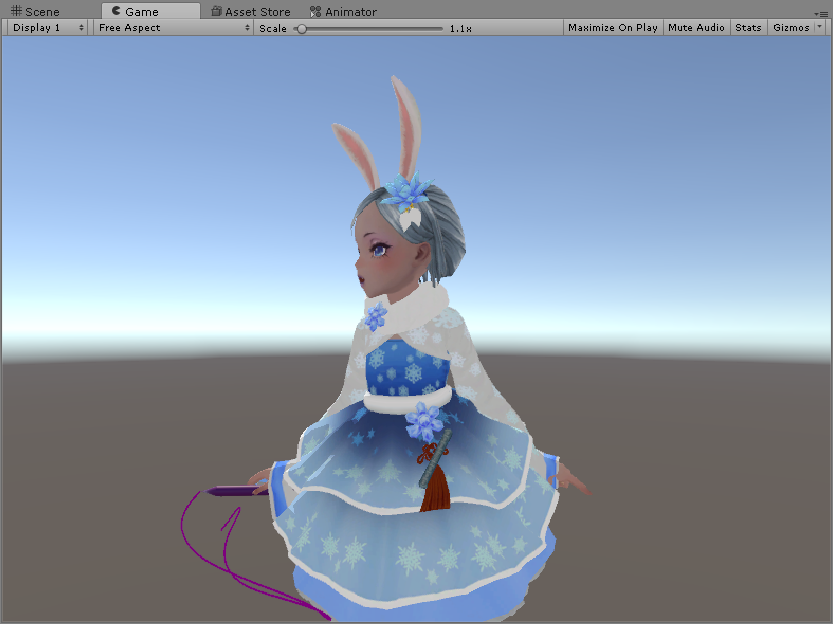
 fickle rune
idle animation for custom override is the sitting animation right?
for one of them right
clear yew
hm

@fickle rune as far as i can tell, i can't have it stay invisible, then change to showing
clear yew
?
wait, this is for markers, wouldn't that stop me from sitting?
and i don't quite get what you mean
 sharp epoch
Is there a way to change models without actually changing avatars? I want to try and transform into a different model using hand gestures and stay as taht model while still being able to move around and stuff. How do I go about doing this? I've tried putting the secondary model under the main model's hierarchy and this works for emotes however when I try to change, the second model just sticks to T-pose. How can I get this to work properly?
green roost
Here's a Challenge for anyone who uses Generic Rigs instead of Humanoid. Has anyone figured out how to make Emotes work properly and work around the fact, VRC doesn't update the Emote Parameter and set it back to 0 after clicking the emote on it's own?
 willow arrow
So i have a strange question... is it possible to have a light on my avatar flicker when i speak. For example if i was a lamp
clear yew
I think so, make different animations for the viseme shapes on the Body mesh changing lamp properties and it SHOULD work™
willow arrow
alright makes sense thanks
clear yew
I've seen people swap textures on a TV screen for visemes and it looks great, so stuff like that is totally doable but a lot of work
willow arrow
i havent really gotten into visemes yet so its more of a future project after i have more practice i guess
 remote blaze
hey there friends
so I have a question
if my model has multiple meshes for the facial expressions
can I just turn the meshes off by default and use animations to turn them on when needed?
clear yew
You could, but it'd be better if you joined your meshes and used a material change from transparency instead.
That'd be less expensive in terms of performance and you could still see it in the mirror also.
slim sparrow
What's the best way to put a longer animation behind a gesture?
Since putting longer animations in the gesture override itself kind of breaks stuff
It takes forever to stop the gesture
green roost
This is what you do
- Make a gesture with only 1 frame
- make that gesture animatoin frame, turn something else on with the longer animation
so the original gesture animation can have 1 frame, and the animation on the other thing can have like, 100000000 frames.
slim sparrow
Ah, that sounds good.
But how do you put animations on child objects like that?
Since I can only put them on the avatar itself
It's actually an animation that doesn't loop, it requires specific timings and all
Ah nvm, I think I got it. I have to put the child object outside of the avatar descriptor, create the animation, then apply the original animation to the child object again
slim sparrow
Oh, the sound in the animation is really choppy for some reason now
Is there some sort of guide for these types of animations? The ones with specific timing and not looping? I see them rather often so it shouldn't be too difficult
slim sparrow
Alright, I got it now. For the curious, I had to put an Animator component on the child object.
dusk nexus
How do you lock the position of something in an animation?
So for example, avatar jumps on a trampoline and shoots into to the air. The trampoline goes with the avatar when it shouldn't...
torn pawn
you can make it a world mesh particle
dusk nexus
How do you do that? ;_;
 final gazelle
it's apparently not well documented on google (at least under the search terms "world mesh particle" or "world particle mesh"), but just from guessing around, seems to be a shorthand term for some specific settings that can be found underneath the "Particle System" component you can add to any GameObject
at least two specific settings you want in the particle system's settings in the inspector:
GameObject > Simulation Space > World
Renderer > Render Mode > Mesh (as well as setting the accompanying mesh shape you want to use)
then after that, you probably need to fiddle with the other settings depending on exactly what you need (max number of particles, velocity, duration etc)
definitely don't go overboard with the max particles on-screen at any given time, that can be a framerate killer
 forest dove
can anyone help me with 3ds max animation
i have a bunch of animation files that i can import
but im not sure how to do them with all seperate clips
slim sparrow
Hey, I made an animation that's played on an object whenever it's activated. Problem is, it only works the first time.
I need it to play from the beginning every time the object wakes up
I'm using an Animator component on the child object
I tried enabling the animator component from my animation itself, but it seems you cannot do that.
 ocean dagger
How would I set up a panosphere that can be seen from the inside?
torn pawn
have 2 spheres and flip normals on the inner one?
clear yew
Any presets that could remake this spell attack? (cringy music vid) https://youtu.be/EzkfWliz3CE?t=103

^^ I could not think what to make with this song untill I saw Yugioh GX ep where DMG comes in heh hope you all like it
 outer lake
hey?
clear yew
Hi
 dusty canyon
anyone came across issues with the default animations lasting 0.03 seconds?
I created a duplicate set from the male standing pose fbx
cursive moon
As in 2 frames?
dusty canyon
yep
cursive moon
Yeah that's normal
cursive moon
AFAIK they're just placeholder animations, not the actual animations used in-game
I thought they were too but generally I just remake gestures and such
dusty canyon
I'll double check the default controller
yep, it's mecanim
I was trying to enable/disable audio components to play along each animation
yeah, I'll just go ahead and replace them.
 hardy bone
Im having an issue applying my animation to my model, or atleast a step in the process.

thats the animation I made and imported from blender^
But i get this error after configuring its rig to my existsing character

and then when i try to press 'ctrl+D' on the far right thing in my imported armature nothing happens

im trying to do that but nothing happens
clear yew
How would I go about inverting the world colors for a "Za Warudo" animation from jojo?
I have an invert shader but it only inverts objects on the other side of mesh/particle
 dire rock
has anyone else had problems with generic avatar emotes looping for over a minute, with no way to cancel them?
all the loop stuff in unity are unticked, but they act in game as if they were
outer lake
hey?
if anyones online at the moment.. i need a bit of help im pretty sure i got this posing down but i need a effect i cant seem to find for the moment.. if any of you ever played call of duty zombies youl know what this gun is. and i need a particle for it. http://prntscr.com/itq3pg
 clear yew
I was thinking a flamethrower lol
I don't play cod
Check google for fire texture sheets
Texture sheets are the best
obsidian vigil
looks like a laser thingy
clear yew
Just make it spit out emoji particles with killer earrape music like everyone else does
obsidian vigil
yes, that would be perfect
obsidian vigil
never messed with mesh particles before
clear yew
Under the shape tab
Not render
If you change it to mesh, it'll literally just shoot the particles forward in a line
clear yew
Also make sure to change simulation space to world. Or else the bullets move if you move your hand
obsidian vigil
i mean most of the time my weapons use lasers but good to know
wait
that works?
clear yew
Yeah
clear yew
My whole 3 minute sword summon animation is done with world simulation space
Nop
Not if you use a rigid body
obsidian vigil
on gesture overrides tho
clear yew
Rigid bodies fix that
obsidian vigil
whats a fixed joint
clear yew
Then put your particles in that gameobject
A fixed joint lets you simulate a joint on your armature
Without the particles actually being inside the armature
obsidian vigil
is it a script?
clear yew
Nope
obsidian vigil
.o.
clear yew
Its stock with unity
obsidian vigil
Then it is a script 🤔
clear yew
Ah okay
obsidian vigil
Y E E T
clear yew
Yeet
obsidian vigil
thats neat to know
clear yew
Yeh
You will prob struggle a bit, they're confusing to use properly
I still scuff it up sometimes
Practice practice
obsidian vigil
so you just pose the empty object instead of the p-system then
obsidian vigil
mkay
clear yew
Pretend the blue arrow (on everything) is your aim
obsidian vigil
fk now im sad that i still have to work 4 hours XD
clear yew
XD
obsidian vigil
i wanna try that
clear yew
I work in 5 mins, so I gotta go now
clear yew
Ttyl c: anytime
slim sparrow
I'm pretty sure those two-frame idle animations are actually the real animations used ingame
The game just applies some rotation and positioning on top of that
obsidian vigil
context? xD
slim sparrow
Discord needs quotes
Is there a way to play an animation on awake? I've got an object that plays an animation as soon as it wakes up, but if I deactivate and activate it again, it doesn't replay the animation.
The object in question is a humanoid with an animator component
slim sparrow
Well, this might be an odd way of doing it, but I want to play an animation on myself using gestures. To achieve this, I made a gesture which disables my own Skinned Mesh Renderer, then activates a child object (which is really just a duplicate of my avatar model). The child object then does an animation. I did it this way, because animating your main avatar object outside of emotes is very limited
My child object "jumps down", vertical movement in animations is ignored on your avatar descriptor
obsidian vigil
i dont think thats possible via gesture
slim sparrow
Well, it should be
I've seen people do it, and I already got it working just the way I want it to. I just need the animation to play every time the child object awakens, rather than only the first time.
slim sparrow
No, but I don't think I want it on loop
obsidian vigil
cuz loop could screw it up
oh okay
i dont really know that much about animation
slim sparrow
Apparently this is possible with scripting by enabling the animator component, but scripts are disallowed, and you cannot activate animators inside animations
obsidian vigil
maybe the few people you saw modded their sdk
slim sparrow
Nah
Modded SDK's still won't allow you to use scripts, since everyone else's clients will just remove the script
outer lake
@obsidian vigil Pal. its a wander weapon that fires electrcity. it isnt no laser.
outer lake
but rip me anyway.
because. it was my fault for getting a cinematic version of the weapon.. well i honestly couldnt help it because THERE WAS no other model.
but look how high the polys raised. from that weapon it self. http://prntscr.com/itrl1a
 outer lake
it kinda is. its disalowing me from uploading.
obsidian vigil
just make it invisible an toggle it on a gesture
slim sparrow
Still, uh
outer lake
oh. right.
slim sparrow
You might want to decimate the weapon model a little anyway
slim sparrow
Yeah I know, materials and all that, yada yada
slim sparrow
But I'm pretty sure that many polys will increase load times by quite a bit
That's 300k
obsidian vigil
rip
obsidian vigil
yes, that should be decimated at least a little...
obsidian vigil
yeah XD
outer lake
also how am i going to decimate it..
slim sparrow
Blender
outer lake
no what i mean is.
obsidian vigil
65k is 2 already right?
outer lake
the file type.
slim sparrow
The decimate modifier. Separate by materials. Start with planar
outer lake
its a 4c file
slim sparrow
If you got it into Unity, you can get it into Blender
outer lake
its a cinematic thing.
and apparently
you cant put cinematic files into blender but you can unity
sigh... i give up............ i literaly spent a entire night on this thing and just to realise this shit...
outer lake
well.
it lagged a little bit but not like to where it would kill me.
and thats hard to belive because im running this off a 560 radeon
obsidian vigil
hmm
i dont really know how to work with 4c files
i only fiddle around with fbx, obj and pmx / pmd
clear yew
did you really import a 300k polys weapons in the game ?
slim sparrow
@outer lake apparently it's a Cinema 4D thing
If you have that program, you can export it as FBX or obj instead
outer lake
well like i said
i just got a friend to find the Mmd for me.
it seemed to be the only one we found.
clear yew
if you really have a 300k weapons on your model, you should remove it, you'll get instant banned if you get caught with it
obsidian vigil
@clear yew they couldnt upload it
outer lake
okay i figured out the problem
there was 2 of the same model.
i mean the polys has went down alot but its still kinda high.
it went from 300k to 185
obsidian vigil
yeah, you still need to decimate it
outer lake
true.
obsidian vigil
maybe someone has cinema 4d and could convert it for you
slim sparrow
There's a trial version that lasts 42 days with full save functionality
outer lake
no no its okay.. i apparently figured it out.
you was right. i just had to hide it and both models had a extra of the same model i took them both away and the polys are good now
i think its like maybe only a little above 20k now
obsidian vigil
@outer lake The whole scene or just the gun?
outer lake
the whole scence.
slim sparrow
Alright, my animation seems to actually play from the beginning when I untick "Apply root motion" (it makes heavy use of root motion)
But then the root motion doesn't work
So I either have a broken animation that can't actually move my model, or I have one that only works the first time. How can I fix this?
outer lake
you guys still here?
obsidian vigil
yes
slim sparrow
I fixed my issue, I enabled "Bake into pose" on the Root Transform Y portion of the animation
Problem was that the animation actually replayed correctly, but it started at a lower root transform every time
slim sparrow
Yes and no
The way I did it, is putting a copy of my model under my main avatar. It's disabled by default
Whenever I trigger the right gesture, I disable my main model's mesh renderer, and I enable the copy. The copy then automatically plays the animation I want.
slim sparrow
Yeah, that too
But it takes up a gesture slot
This wouldn't be such an issue if we could use root motion on our main avatar model
obsidian vigil
Yeah, i think they should introduce multiple gesture overrides which can be switched out ingame
slim sparrow
Well, gesture overrides for each hand would be pretty cool
 grim coyote




 gray pier
Does anyone know a way to copy the contents of a RenderTexture to Texture2D material without custom scripts?
 scarlet wave
I've got a question when it comes to gestures: How long can the animation be, or should be? I have made 3 seconds long animation for one of the gestures but it seems to be a little glitchy.
clear yew
if you use the animation directly on your avatar then it can only be 2 frames, 0.00 and 0.01
signal dove
So you can only use gestures to activate other objects with longer animations?
slim sparrow
Yes, basically.
Well, you can make longer gestures, but then you switch really slowly, which is probably not what you want
dull wedge
Is there a way to make a spawned object stay in its world position? Currently, it tracks according to my avatar's hip bone.
torn pawn
use world mesh particle that has 0 velocity and high lifetime, it has to be 1 material tho
signal dove
How can I force a particle to start without awakening it?
torn pawn
more specific @signal dove
signal dove
I want the same effect as awakening a particle emitter, where it restarts its emission cycle, without awakening it. I want to leave it on
I need the emission to stay in sync with an animation
clear yew
Looking for a shader that inverts the color inside of the object its applied to
or help getting the effect to work, looking to do a "Za Warudo" effect from joj
jojo*
but my shader only applies like a filter to whats on the other side of a mesh
not inside
torn pawn
flip normals, or duplicate mesh and then flip
clear yew
@clear yew have the outside of the sphere write a stencil value and have the inside of the sphere reads that value and keep on notequal, and set ZTest Always on the color invert
@clear yew Unfortunately I have no clue how to do that. Never written a shader. Using an Invert grab pass filter
that's exactly what I'm talking about
I have a BaW filter that gives the desired effect, except in BaW, not Invert
but you need to do the stencil trick to make it take over the screen only when inside the sphere
I wouldn't know how to do that :/
learn how to do write shaders I guess, it's the steps I mentioned
signal dove
Can an object animate things higher in its heirarchy?
clear yew
welp, I messed up the stencil test, I editted it ... it keeps confusing me
I can send you the shaders if you'd like to take a look
Even if only for your own curiousity
I think I posted the shaders 😄
color invert and black and white whole screen
Pretty much
The BaW has the desired effect
just not the desired filter
But ther Invert only applies to objects on the other side of mesh
like I said add ZTest Always
but also add stencil so it works only inside the sphere
Currently ShaderForge is bricking my unity
So idek if i can mess with it
Appreciate the info though
it pays off learning more about shader basics
I could probably benefit from it but learning ground up atm for a simple effect, don't have alot of time for it currently
thank you though :^)
yw, ask anytime
Would tweaking the BaW ones color setting to match the inversion be possible?
That seems more my speed
I told you exactly what to add
to the invert one
I apologize but you're saying it as if I have any understanding of HLSL
I wouldn't know where or how
you need at least the bare minimum
clear yew
I hope it works now 😉
slim sparrow
When I disable my Skinned Mesh Renderer in an animation, it won't re-enable for other people
Only for myself
Am I doing something wrong? Should I be hiding my mesh in another way?
amber mantle
how to add Avatars in Emotes? (I know how to give then Animations already)
slim sparrow
For some reason, re-enabling my body doesn't seem to work either
Nobody else sees me, I can only see myself after I do that
Is there any other way to hide my body mesh that doesn't break?
cursive moon
You could try setting all your materials to an invisible material instead of hiding the mesh
slim sparrow
That's gonna be quite a lot of work, but I could try
slim sparrow
Setting all the materials to an invisible one didn't work
It keeps reverting to at least one or two visible materials whenever I upload it
The weird thing is that I can make myself invisible by disabling the body or the skinned mesh renderer, but I cannot make myself visible again
I can see myself just fine but others cannot
slim sparrow
Yeah, changing all the materials simply isn't working for some reason. Odd.
It always needs at least 1 material to remain normal
Well, I guess I'll just have to use the hackiest solution I can think of: making a shape key that hides the whole model when activated
 wicked garnet
i'm having the same problem but idk how to do shapekeys
or anything like that
i would like to do a total model swap gesture but idk how i could do that
 lunar pasture
shape keys are hard, i feel your pain
I made a minor edit to my eyes and now my avatar defaults to having its eyes half closed, luckily it suits the models
 gray flare
Anyone know how to get the spider animation to work properly in game? I'm referring to the popular one on Free3d, I've seen it in-game before but I've heard there is a certain way you have to do it.
 zenith topaz
anybody here deal with the VMD animations?
 nocturne anvil
Me, but thats 3 months ago
I used mmd tools to import the motion
Exported as fbx
Then in unity, imported as generic or none on rig
Then drag the animation part of fbx to model property inspector animation settings
Ahh. I forgot the rest.. I just followed this https://youtu.be/kWFvuRmTeFg
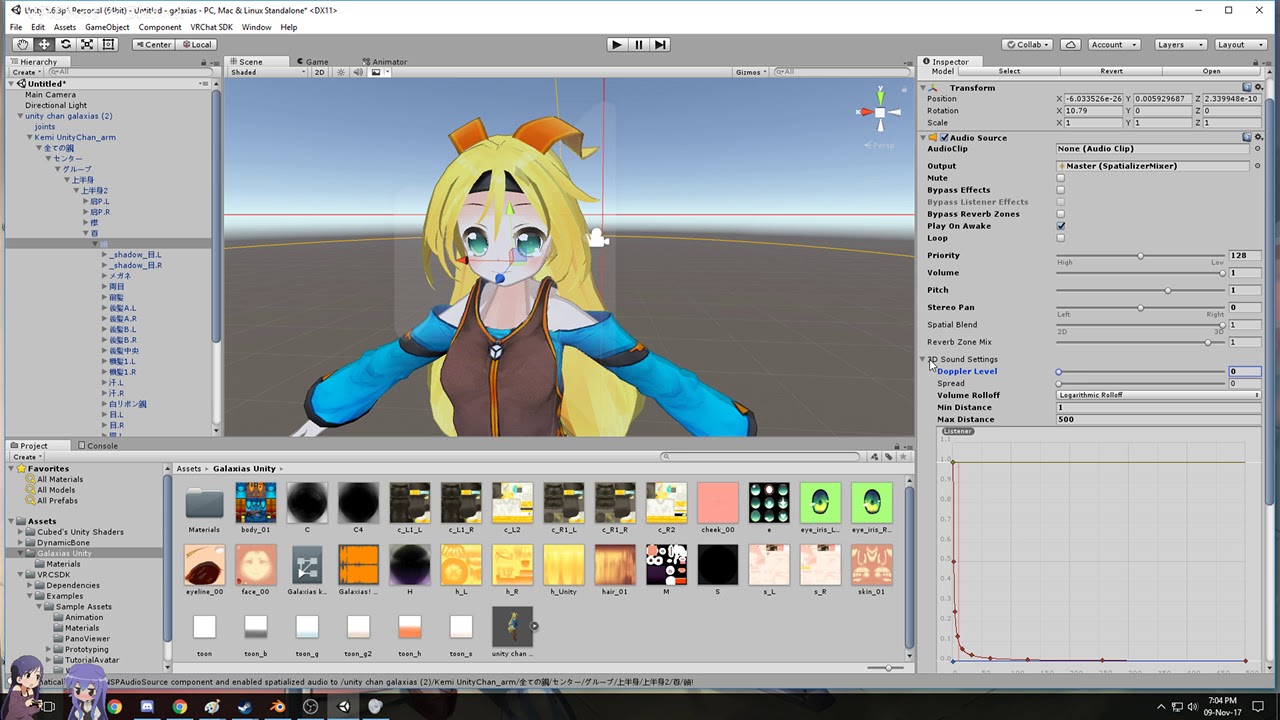
Hi my name is Shana from vrchat and i started not long ago Learning how to import mmd dances to vrchat was one of the fun stuff to do for me so today im mak...
Please note putting many dynamic bones in ur dancing model can crash your friends. Thats why i never done that again
zenith topaz
thank god you told me lol
i wanted to test so i didn't feel like adding the dynamic bones
would importing it as humanoid be bad?
i'm not using it with an avatar descriptor, just a doll that disappears when the gesture is shut off
nocturne anvil
iirc it wont animate if its humanoid rig.
But follow the video, i dont really trust my memory these days
zenith topaz
oh i set the humanoid rig to the animation and it runs while playing the scene in unity
will that be different in game?
nocturne anvil
It will work then. There goes my trust in my memory xD