#animation
1 messages · Page 53 of 1
 icy hazel
 spice meteor
@pulsar raptor i do stutter a little but should do it https://streamable.com/2w7gj

 restive flax
I have a quick question, for some reason the pupil I added to this model just zoops off when I run one of it's animations. The other pupil works just fine, any suggestions? In the mesh it's placed correctly. Nvm, fixed it.
 pulsar raptor
uh
the animation with sound works fine but, i got another problem
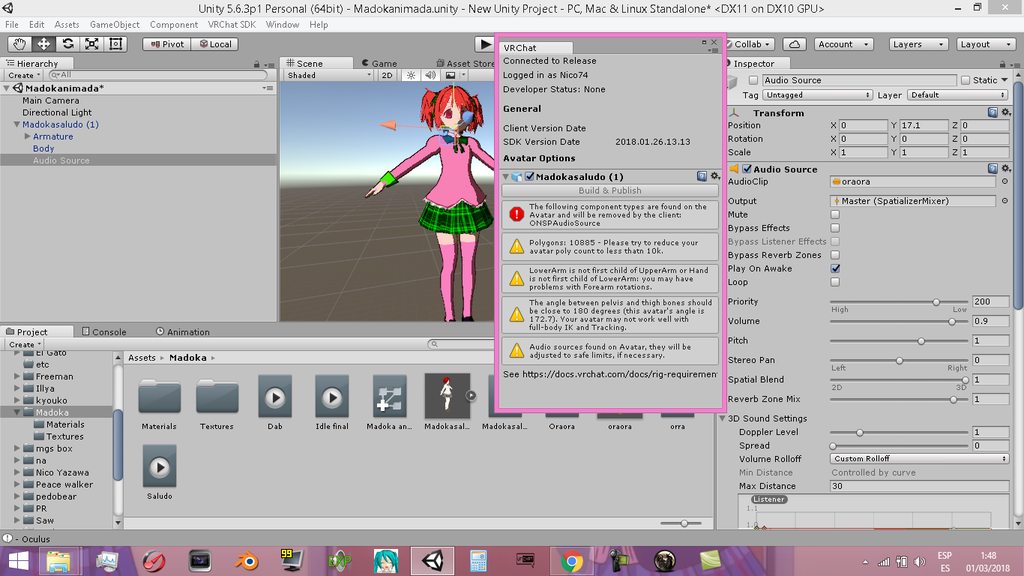
a red warning, how i get rid of that?
@spice meteor
spice meteor
haha thats a lot of god damn warnings but click on ur audio source and scroll down on the right side and remove the onsp script from ur audio
pulsar raptor
done
idk why but i cant edit the audio source, it reset his own settings when i click the model again
XD
im gonna try if works
 neon burrow
Anyone know how to get the cameras working again? I've seen several people have it working again
spice meteor
the vr sdk has a script that is auto detecting audio sources and is setting it to a standard value so yea
 pearl pilot
anybody know how to set a particle system to follow a specific direction like where u point your hand?
 clear yew
select cone as emitter shape for example
 spice echo
clear yew
spice echo
clear yew
Can anyone here help me with particles
dm me
I have been spending 3 days trying to figure out why they wont show in vrchat. I've looked at video tutorials
but none of them fix my problem
 cunning saffron
when i import an object i want to add on my avatar in unity, the object takes all the weight of the avatar and the bones are transferred on it https://cdn.discordapp.com/attachments/413199275292491798/418678611885948934/unknown.png

the arm rotates around the bat instead of the opposite... and all the bones do that
 wind torrent
Did you just import the model from download to unity? @cunning saffron
cunning saffron
no i made it myself
wind torrent
Does the bat have its own bones?
cunning saffron
yeah i did one bone
wind torrent
I see in the screenshot that youre moving the bat itself around
cunning saffron
well it moves the bat at the same time
but if i select the bat it moves the bat on its own
wind torrent
Hmm strange
 wind torrent
Wouldnt hurt to try. Just make a back up just incase
cunning saffron
nah didnt change anything
 queen karma
cunning saffron
queen karma
cunning saffron
how?
wind torrent
Yea like its own fbx file
Import to blender then export as fbx
Thats how i do it at least
cunning saffron
yes thats what i did
wind torrent
Wow, never have i had a problem like that before
wind torrent
Good luck to ya. @cunning saffron
pulsar raptor
@Gilgamesh#6935 yeah i found a fix ty!
cunning saffron
i even tried removing the bone and armature and i still get the same issue
its like if its making all the bones above it in the hierarchy its parent
 heavy stirrup
Can we use armature rotations in a humanoid movement animation yet?
 tardy abyss
Has anyone made a Dab emote, that they wouldn't mind me using for free?
I can't find any on that rigging website.
 gray flare
Anyone know why the animations on this spider from free3d won't work for me properly? I thought I set everything up in the avatar controller right but it doesn't work correctly in-game. https://i.imgur.com/qoHk2zI.jpg

This is the model I'm talking about https://free3d.com/3d-model/spider-animated-low-poly-and-game-ready-87147.html
heavy stirrup
Honestly, no idea what i did to get that spider to work
I did it weeks ago
I do remember messing with a lot of things though... including something in Blender for some reason
gray flare
hmm okay I'll try messing around in there and see if I can make something work. I know I've seen someone in-game with this as some point so there has to be a way.
heavy stirrup
Yeah, i've been using it for weeks, and i just saw someone else with the model too
BTW, you're going to want to change the animation inside the locomotion layer at some point, if you get it working
The walk right doesn't mirror properly. -- but that's down the road
 tight arrow
How come my idle and walk animations play so slowly in game?
Anyone have a solution?
gray flare
That's essentially why my animations don't work either
tight arrow
So it ain't just me.
 torn pawn
@clear yew very descriptive
icy hazel
@tight arrow i have a vague notion about that because not as experienced but i feel like somebody else had this problem and said it was cause their keyframes are too far apart
like i thought if they were closer it would be speedier or something like that???
and that they are scalable
tight arrow
I'll look into it. Also I just got back from something, great timing.
tight arrow
Didn't seem to work.
 safe quest
Anyone have any good tutorials on how to do animations for models in blender. I want to animate a model in blender, export it as an FBX, and import the model and its animations in unity
clear yew
Does anyone have a list of components that vrchat will accept since the one that does auto rotation for animation will be removed when upload? And does that mean I have to do animation manually like rotating an object around me frame by frame?
just make an animation and add 0, 180 and 360 degrees keyframes @clear yew
it will tween the rest
 shy island
there is also a link to a yt vid with explanation
 quasi gale
@clear yew Avatars are limited to the following components:
https://docs.vrchat.com/docs/whitelisted-avatar-components
Worlds are limited to standard Unity components, components found in FinalIK, components from RainAI, and anything found in the Unity Standard Assets package.
Standard Assets contains the AutoMoveAndRotate script which might be applicable to your interests.
 grand copper
There is no "hips" in animator? or does it have a different name?
 tiny meadow
Can voice activity trigger a continuous animation that only stops once the activity ends?
clear yew
Perhaps if you change your mouth shape keys to include the animation it could be done, otherwise I can't think of another way for voice activity trigger.
Hips should be in armature. I think, perhaps not.
grand copper
I know where hips is in my hierarchy, it's just I want to animate my character but can't find the hips in animator. Just like how you add fingers for adding a weapon
unless you don't use animator to move your hips joint. then I guess you would just have to add a position parameter but whenever I change the position and key it, it resets back once I press enter
 small tapir
If i have 2 Audio Sources with diffrent setting in one animation, will both of them get the same settings?
After i upload my avatar the one of them change the sound curve to the same one as the other one
grand copper
that's probably because of that third audio component thing "SNP" or something, can't remember well
you have to delete that, it's not being used anymore anyway
ONSP
small tapir
I have deleted that already
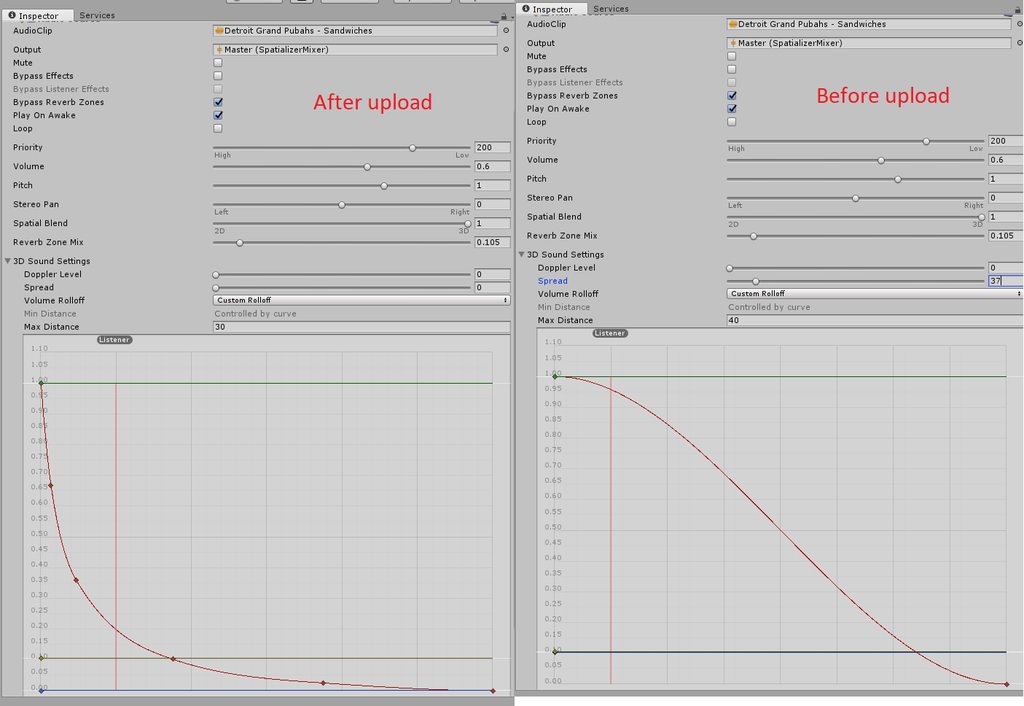
Don't mind the range im just trying to fix the volume right now will make it smaller
small tapir
To the same as my light saber?
The resone im using those setting are beacuse a friend use that and he's voulme is good
clear yew
keep max distance at 100 and lowest on default and set it to linear not custom
then just adjust volume on top
btw there is an issue stopping people from updating avatars so idk if you can update it now
 wild bluff
so i have this issue that i play animations by hand gestures (Book spawning etc) but it plays when i open my hands make a fist or actually do the assigned gesture, is there a way to fix that?
torn pawn
wat 
small tapir
@torn pawn How can i change volume too 2 -30 when it gose to one?
torn pawn
you make it 2 mn max 30 before, then after the sdk adjust your volume its gonna be fine
 tidal gull
Quick Q: in VR mode, if I want a gesture to override a walk anim, that is reasonable to do, right?
Supposing I want to pose me legs without leg tracking
tidal gull
Nah, I only want to animate the legs with an override when a certain gesture is on
 fluid crescent
anyone knows how to combine 2 aniamtions in 1 aniamtion?
 wild cedar
When Unity deletes all your animations instead of 1 section
Made me ragequit for the 6th time now XD
wild cedar
3 hours of work just gone so, decided to take a break
grand copper
is there a way to spawn something into the world and not have it attached to my character?
@fluid crescent I know how to combine 2 in maya but not unity
fluid crescent
@grand copper i already found out how to combine aniamtions 😄
grand copper
👍
grand copper
is there a way to spawn something into the world and not have it attached to my character?
 true scroll
not as a character i belive
grand copper
I've seen someone do it tho
he spawned a grave thing and he could walk around freely without it following him
clear yew
if you want a particle to not follow you, you need to set it to World
if it's a 3d model you need fixed joint and rigid body i think
 agile ruin
^
grand copper
it's not particles
clear yew
fixed joint and rigid body is it then
agile ruin
set it to world and apply it to a rigidbody
grand copper
it can't be an animated character?
agile ruin
it's up to you what you want to do
clear yew
what do you mean animated character ?
like another model that spawn besind your own avatar ?
you can do it but you'll need to aniamte it yourself
grand copper
I have a kylo ren character and I want to try to spawn a trooper to guard me for instance
I've got the animation, it's just the placement that's an issue
agile ruin
if you could copy from the simpleavatarcontroller, would make it easier
but it's read only
@grand copper have you animated his stance already?
grand copper
the trooper's? yes everything is already animated
agile ruin
then what do you need?
you just need to duplicate your main model and do the spawn animation
grand copper
but if I put it in my character's hierarchy, wouldn't they float with me?
clear yew
you need to parent the clone trooper to a fixed joint
agile ruin
create a rigidbody
grand copper
I'll look up how to do that 👍
@agile ruin so you meant a rigidbody component right?
grand copper
@clear yew you mean add a joint to my skeleton?
clear yew

Had to re-upload because of audio being too quiet should be fine now. I forgot to mention it in the video, but Murmur also answered questions I had and helpe...
grand copper
thanks! I'll take a look
 hexed current
so guys
My newest project I wanna try
how would I do particles in such a way that I want to charge up energy and as I charge the skybox gets cloudy
 mystic umbra
you needa create a texture thats looks cloudy, and apply a particle shader with low A
tardy abyss
I would like suggestions for custom emote ideas, that would work with a penguin (that I could get from the rigging website).
I'm not that creative unfortunately.
Sadly, Tap Dancing isn't there.
If you have VR, you can sit down.
fluid crescent
i have 20 second long animation but ingame when i do that aniamtion it cuts last 5 seconds
 forest slate
is there a way to change shaders on an animation?
 eager vault
where do you guys usually download sound effects for your animations?
clear yew
I love soundsnap
torn pawn
i got all my needed sounds in folder named "gachi" 🍆
 molten kayak
Guys after doing the animation in unity how do i restore the T-Pose of the character?
 cursive moon
did you not make a duplicate to animate on
molten kayak
I did make a duplicate
But the one i worked with has some models i didn't put in the main one 😛
Nevermind got it
 dawn shale
Does anyone an idle animation for having hands in pockets?
true scroll
wear pants with pockets and put the controllers in them 😏
dawn shale
what
dawn shale

hexed current
Just asked vrtraders to make me madara uchiha with a meteor strike
hopefully
annnd someone is doing it
woo~
wait. wrong chat
S:
 rancid furnace
Ok so I want to be able to use a gesture to reveal an item, for example a sword, and it stay revealed after I've released the gesture. I then want a second gesture which hides that item and keeps it hidden after I let go of the gesture. Does anyone know if this is possible? I seem to only be able to find a way to reveal it but not a way to hide it again.
 spring remnant
Am I right in thinking you can't just pick any FX pack from the Unity store and expect it to work in the game? Do some work?
rancid furnace
@spring remnant : Some use scripts which don't work
 crystal nest
Can anyone help me with a issue i got, so my normal emotes are working when i replace them, But when i replace hand gestures with stuff like dab, salute, anime salute, they arent playing.
clear yew
Anyone know why this is happening? https://i.imgur.com/FNyQrpJ.png

I'm trying to add animation emotes just like I always do but the model is acting really weird
it'll drop down like it normally does when I first make them, but when I hit body all the actual dynamic bones and stuff are stuck in their default height instead of dropping with the model
and then sometimes the model will end up sitting in the upper location
nvm figured otu the issue
dynamic bone on the hip was breaking it
 echo cargo
Anyone know how to make particles collide with avatars?
rancid furnace
Don't think you can, although it will collide with people's menus on their side, but nobody else will see it collide
tight arrow
Anyone know how to fix animations playing super slowly?
tidal gull
Was screwing around with particle emitters emitting meshes today. I could not get the emitted mesh to have a rotation applied on spawn. :(
Probably because of my stack of projectiles? One local projectile emitter has an on death for a world projectile emitter, and I could not get the world-space emitter to emit a mesh that was transformed. Which sucks, as I was hoping to use this to emit a cool-looking mesh as a fireball grom ny hand
No clue how to fix it. It's like the rotation of the fireball being emitted is being zeroed out. But this only happens ingame, not in editor
mystic umbra
mesh rendering is trickey and doesnt always render properly in vrchat
are you using subemitters?
@tidal gull
 coarse frost
could anyone teach me how to make an animation of a particle firing from a gun on the avatar itself? i try to do it in game but all it does is freeze me in place
 red lodge
does anyone have the motion for the umbrella shuffle dance?
clear yew
Hey guys, since the new SDK the Sound of my Animation is broken. I cant (and no one else) hear it in game. But my slap sound still working. I tried uploading the character back with the old SDK and it still dont fixed the problem. Like since the new Update my soundtrack is just broken...
 copper bramble
Guess I'll ask here as well - just in case. Anyone here know how to get a face to animate along-side the main avatar? So that when you talk, not only does the main avatar you have and its visemes move - but so do any that are parented to it. Is this possible or what?
mystic umbra
^ I was wondering the same thing
I think you can do it if you put the two models in blender, join em and then do shape key work with both models at the same time
but I wonder if its possible to apply visemes to both models in unity
copper bramble
Yeah I think that's what I'd have to do - as putting multiple avatars together in Unity doesn't seem to register the visemes on anything parented
I assume it'd be pretty straight forward if the models used already have blend shapes with the visemes?
mystic umbra
well what component does the visemes use
copper bramble
Just join 'em together and export it out
mystic umbra
I forget
mystic umbra
oh ok then you should be able to in unity
copper bramble
VRC_Avatar Descriptor
mystic umbra
add a new skinned mesh render in the component
find the second body of the model you pulled in
and then add visemes
that should work
mystic umbra
because I thought it was a vrchat component
but im pretty sure the skinned mesh render is a unity thing
test it out and lemme know what happens 😄
copper bramble
Well
Something has to control the visemes right?
So if I just have a skinned mesh renderer, there is nothing there to control the visemes still
The problem isn't uh, visemes being enabled / active -- it's figuring out how to get them to also move when you speak in-game
Unless I'm missing something
mystic umbra
apply the component to the second model. Im not sure what controls visemes 100% but if you look at the prefab components of the avatar descriptor it should tell you what is controlling it
wait I think I know what you can do @copper bramble take a custom overlay, duplicate it, and then all the custom overlay to both skinned mesh renderers
thats 100% the controller, Im so stupid
copper bramble
Custom overlay?
Yeah, I'm not sure how to get the controller to be used on more than one object. I assume it just isn't possible right now
mystic umbra
um my dude I just checked with a friend of mine the component is the vrc avatar descriptor you use for visemes
the skinned mesh is what you add to the view descriptor
I mean I guess you can make two view descriptor and see whatd happen
but I dont think that'd work
copper bramble
Already tried multiple avatar descriptors with the visemes set, doesn't animate alongside sadly
So I think what you said is what I'd have to do - have all the blend shapes set together in one export
More work than I want to do right now honestly, but it's good to know for future projects. Just gonna be a huge PITA to completely re-do the avatar once more.
@mystic umbra thanks for your help though
mystic umbra
np, that one clip of the skeleton and knuckle had me wondering
heavy stirrup
How do i attach animations to accessories, to move during a walking animation?
I heard it's possible, and can't do it directly otherwise armatures won't actually ortate.
cunning saffron
Is there anyone advanced in blender here?
icy hazel
depends
 vivid burrow
@heavy stirrup you walk with the left controller and hold the animation with the right controller
icy hazel
a B student in calc is advanced to a D student but the B student knows he's a fuck up still
lol
same with blender
heavy stirrup
I mean, i have an avatar that needs to have a separate set of legs going with the walking animation-- problem is i can't rotate the armatures during walking animations
Not an actual accessory
cunning saffron
no you can just import the animation as a legacy
vivid burrow
i think thats a blender not unity thing idk
cunning saffron
and then modify the animation to add your walking animation and put it in the walking overrides
vivid burrow
btw anyone else have problems with new animations after the patch
all my old animations on old characters are fine
but new characters dont have any of the animations i make
they're in unity and in my animation overrrides but not VRchat
cunning saffron
can you hear the sounds?
cunning saffron
havent seen that o.0
cunning saffron
hmmm
cunning saffron
did you try putting your animations in the controller as well?
vivid burrow
it says none (runtimes animator vontroller)
cunning saffron
yeah put your overrides in that too
vivid burrow
in the main animator?
vivid burrow
it works in unity
cunning saffron
you made the blinking in blender?
cunning saffron
what about if you try putting old animations on new avatars?
vivid burrow
idk how to do that
cunning saffron
um find an old animation
vivid burrow
like, cross project stuff?
cunning saffron
and drag it into your assets
it will make a prefab
then drag that prefab into your new avatar
vivid burrow
where are animations not made in a current project at?
cunning saffron
in the other projects
if you want them on all projects you have to make them prefabs
 ashen python
anybody know if vrchat supports any of the point cache animation plugins?
vivid burrow
...prefab? sorry im pretty new
cunning saffron
oh wait
yeah you can search in your assets your should be able to find your animations if you are a bit organised
cunning saffron
drag
vivid burrow
imma reupload and see if it works now
cunning saffron
@icy hazel did you say you were advanced in blender?
vivid burrow
wait but that doesnt explain the blinking still
cunning saffron
tbh idk why you didnt make the blinking in blender
cunning saffron
how do you make your blinking animations in unity?
vivid burrow
you go the the unity animation tab, open the blink blend mesh and animate it using keyframes
cunning saffron
ok and on which overrides did you put that animation?
cunning saffron
what versions did you have?
vivid burrow
had VRCSDK-2018.02.21.10.48_Public
cunning saffron
oh then i guess i should update as well xD
vivid burrow
just got VRCSDK-2018.02.28.21.21_Public
yeah haha
im sure this will fix my problem
cunning saffron
i hope itll fix mine too D:
vivid burrow
what was your problem?
cunning saffron
um
i made my own object in blender and when i put it on my avatar in unity its like the center of rotation of every bone on my avatar becomes the center of rotation of my object
so the arms turn around the object instead of the object turning around the arm
vivid burrow
sounds a little too advanced for me lol
i mea
i would export tje object separate
and then add them together in unity
heavy stirrup
Still can't figure out these legs either
 keen reef
Anyone good with animations on? I'm attempting to make a flare gun and the particle gravity is confusing me. Its on a curve near the end of its life so it should start to fall just as it dies, but it just plummets to the ground
 ebon harness
https://skfb.ly/6wF8r One day I hope I can get this working in VRC, even has animations. already made. :>

Navier the big freaking cybernetic dragon.
“Keep your paws off the glass!”
Created by Stickman
Textures & eyes created by Dins
Album: Tales From The Kingdom Of Fife (Special Edition) (2013)
Song: GloryHammer - Magic Dragon
Track # 05
small tapir
If i wanna change the sound on my weapon do i just need to change to audio file in the audio source on my avatar that i upload?
small tapir
That works with the settings too? 😄
clear yew
you can also change the settings if you want but just swapping audio works fine
spice meteor
does anybody know if the idle-sample in the vrsdk is the female default stance?
 tawdry ruin
Guys I have a question;
I just wanted to create a new animation on unity for my model but whenever I click on "create a new animation" in the animation tab,
unity keeps asking me what to call the new animation's name and where to save it (like it normally does), but then after that I save it on the folder I wanted but it happens that the animation tab doesnt keep that animation so I can't edit it.
In that case I cant click onto "add property" because is unclickable.
To make it simple:
- creating a new animation from the animation tab
- name it and save it into a folder
- at this point the new animation should appear into the animation tab, right? Well, it doesnt.
- I cannot add any meshes or anything with "add property" button because its grey and unclickable.
- I can only copypaste framekeys from other animations or custom ones.
Am I missing something??
What should I do? Please, Helpu! 。・゚゚・(>д<)・゚゚・。
rancid furnace
don't click the animationn itself and then click the animation tab - you need to click the thing you made the animation on and then click the animation tab
tawdry ruin
@clear yew I dont! Oh my, I've forgot to create one! I'll try then. Thank you!
 lunar pasture
hello
clear yew
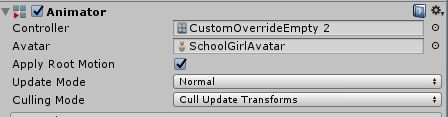
If it's your main avatar that you animate, you can remove the controller if you want to start a new animation from scratch
https://i.imgur.com/50JJm0s.png
 echo wraith
Does anyone know if anything can be done about world particles locking a mesh to a certain axis? I want to shoot a model in the direction I'm facing, but the model is always facing forward.
https://puu.sh/zz7jO/3d0a47fc74.gif
https://puu.sh/zz7Xn/c5ee2a870f.gif

 rancid furnace
I don't think it's possible, I've tried before
echo wraith
Yeah, I've put in a lot of effort. Just thought I'd ask just in case. Thanks for the response. =)
 blazing glacier
Is there a way to animate hands with the record feature without it having resetting the transforms the whole time?
 craggy sage
this might be an old question, but there is a way to create your own idle hand animations for VR right?
or is that not a thing?
red lodge
hey anyone have exp how to show video in vrchat?
I have implemented the video and in unity its working but it is not shown in vrchat
 half shell
can i change a material with an animation?
such as applying an entirely different texture to something when i use a gesture?
 late fjord
Unity isn't saving my animation for thumb bone... when I leave animating, the thumb snaps back to default position as if I hadn't animated at all, and the key frames I just added contain the same value as in rest position.
I'm really getting aggravated at this
Trying to save a keyframe with new value and it just resets to previous frame...
 boreal trellis
Hello, i made a shoting gun for my avatar, people can see the weapon and hear sound
but they cant see muzzle flash
half shell
trying to change material on my avatar to a panosphere using an animation, any way to do this?
echo wraith
@late fjord Use the option Animator for fingers.
 severe star
hey guys, i have a question. i don't know if this is the right channel for it, but oh well. so, i have this avatar that has the snail marker on it's fingertip. is it possible to have the avatar's eyes track the finger or hand while drawing and then once it's done, they go back to normal? if so then how?
 clever onyx
is it possible to use a VideoMaterial on an vrc avatar?
dawn shale
Does anyone know how to make simple idle animations?
late fjord
@echo wraith What if I need to also deform the mesh? Can I do the entire animation with transforms and rotations instead?
echo wraith
All I know is that you need to use animator for fingers because I made the same mistake you did a while back. Not sure about deforming mesh in an animation, sorry. 😔
late fjord
I guess I'll see how badly it works then
 high field
why is this happening on a gesture O_o ? http://recordit.co/f9vnpmOWnY
aha sorted it 😃
 slim cosmos
can somone help me?
'help' Can somone help me im a beginner and im uploading a charcter to VRchat it has working humonoid rig bones ect but im wanting to put a weapon with animation on one of the animation on the hand/ oculus controller rocknroal sign so when i do that hand sign it bring it out???
 hot umbra
I need some help with audio source
What im trying to do was add a music source to a boom box which triggers from hand gesture i.e i do the rock and role gesture and the boombox spawns and plays the music. However what is happening is the boombox spawns plays like 1 second of the song and then despawns all together. Can someone help :/
hot umbra
sorted it now 😄
late fjord
I have some animation overrides bound to gestures, which override blendshapes. I can't have another default animation running on the model changing those blend shapes? Seems like any blend shapes that I'm touching in an animation override, even while not triggered, cannot be animated by another anim.
clear yew
what i did,
-duplicated the model
-made the new animation fil
-added the face expression
-upload
-set up camera to be in face
-upload and the picture is the feet
 slate elk
This is the first time i'm trying to make an emote but the objects i made don't show up in game? How do i fix this?
 little sparrow
I'm trying to add a bullet to my gun, but every time i make the mesh a bullet instead of the default particle effect it starts going in random directions, do any of you know a fix for this?
I have it set to align to direction and randomize direction is set to 0
mystic umbra
try a different shape like a cone or something and narrow the cone down
if that doesnt work then you can setstarting velocity in the x or y direction I believe
little sparrow
it works just under mesh, but i can't change the particle to a bullet, its just the white dot.
i dont want to shoot a 2d picture, I want to shoot my actual 3d bullet xD
mystic umbra
Im pretty sure you can change the shape of the particel effect wit ha mesh renderer without it affectign the mesh
if not then just change the starting velocity
little sparrow
if i switch it to the bullet under mesh rendering it doesn't fire anymore =/

 lusty jewel
Anyone know what gesture is Shift + F4?
 golden wyvern
hey guys is there any way to combine 2 anims? my friend wants to add menacing from jojo to dab
heavy stirrup
How to activate/inactive objects in a gesture? It just doesn't seem to be working for me. Tried disabling/enabling in animation the mesh and also scaling but it doesn't seem to want to work right for me
 raw sundial
kvls, you would have to take the parts of each animation and combine them I think
keen reef
Anyone know much about putting lighting effects on particles?
 plain finch
Ok
so how do i do this
in Unity


I have no idea how to preform a a Y-axis rotation
there are infact bones in the turret i just have no idea what the hell i'm doing
plain finch
is it possible to create the animation in blender, export the animation to unity and then plug it in?
 outer plinth
Are you making an avatar where the head is that front turret? Because that's some funny shit if you are.
plain finch
right now
the issue is that the view doesn't use the view ball and instead defaults to above the center of the model becasue there are no bones on the model for unity to identify as a human
so the view sits right behind the radar array
these models need a lot of work to really be useable
on an aircraft carrier, this isnt an issue becasue clear run way
but on a destroyer, crusier, or battleship
its an issue
outer plinth
You can probably take a default biped skeleton and bind the whole mesh to the hips. Then scale/move as needed. Just, please. Don't make this thing huge. It's the kind of person I block instantly.
plain finch
i have a 1:1 scale yamato but its actualy difficult to move arround becasue its so freaking big
and the view is like 20m in the air
so its near unusable
only time its useable is on Very open spaces
outer plinth
Sounds like you should be making worlds instead of characters
plain finch
it looks cool becasue its pretty detailed but impractical
imma do an MMD conversion so i dont blow a fuse on these boats
becasue these boats are next level fusterating
and like you said, ill have to probably import a humanoid model, steal its bone structure, modify it, and then use that for the animations
but theres a lot that will have to go into that
because the models have TONs of separate meshes
I might try worlds
eventualy
 karmic sparrow
I'm fairly new to avatar developing, and came a long way with the help of Tupper's megatutorial video. However custom animations remain a problem. Doesn't matter if it's something complex or just a simple wink, tried different animations on 2 different models but with every single one, it keeps happening that my avatar sinks up to her waist into the ground. The animation itself is properly displayed, aside from the avatar sinking down and coming back to normal position after the animation finishes
I've done the animation on a duplicate dummy of my avatars, following the exact procedure shown in Tupper's video. And I am using the latest SDK 2018.02.28.21.21
Anyone have an idea in what direction to look? I'm running out of ideas
 digital anvil
is there a way where i can remove clothes with keyboard gesture override/emote. if not is there a way i can change the shader for clothes and make it invisible in an gesture override?
karmic sparrow
If the model is designed for it, then yes. By designed for it, I mean that it contains full body skin and the clothes being a seperate material covering it up. Then yes it can be set invisible by an animation
 regal hollow
If you have your clothes as a separate mesh you can disable them with animations
karmic sparrow
*mesh, that was the word 😃
mystic umbra
@digital anvil yes you can
if you change the shader in unity animation it should register the key
but you need an object on the body tyhat has that transluent shader from wha ive been otld
digital anvil
thanks i figured it out just had to turn my model into multiple meshes.
mystic umbra
SUH
 willow reef
I was trying to do an animation, but i can't move any body parts, and it's making the weird pose, how can i be able to move the arms, legs.... https://gyazo.com/8c50d1f416b645b09f8890f460b4cacb
 boreal trellis
Hello can someone help me doing shot animation for my gun? I know how to use unity just need some advices
clear yew
Can anyone tell me why the light on my particle is only being reflected on my avatar but not on the environment
 glacial badge
how can i make a object on my avatar stay in place?
in the world that is
I know it has something with rigidbody but i dont know the settings ,o
clear yew
@glacial badge https://www.youtube.com/watch?v=yZxfQkxvxRI
Had to re-upload because of audio being too quiet should be fine now. I forgot to mention it in the video, but Murmur also answered questions I had and helpe...
 leaden whale
@boreal trellis - https://www.youtube.com/watch?v=wsaGVhIVSf8
@open hazel - https://www.youtube.com/watch?v=V0l4-pH3vI4&t=2s
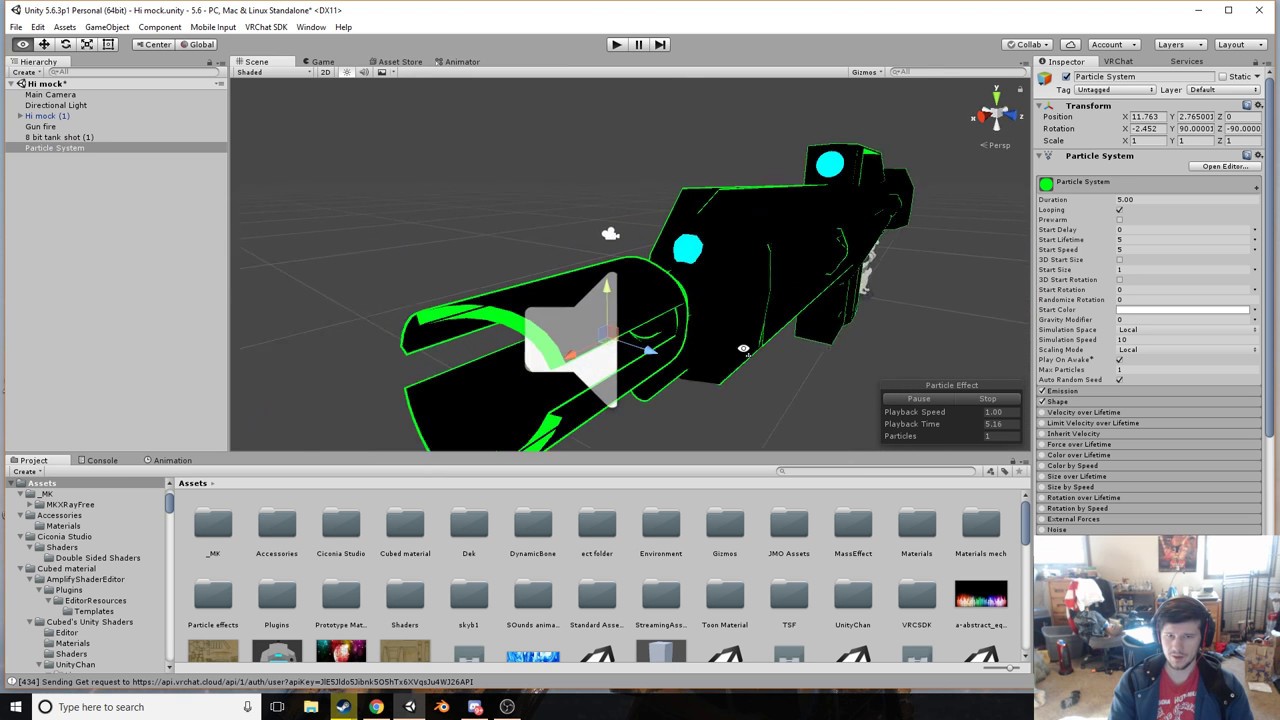

Creating custom animations for hand gestures and emotes in VRChat
If anyone have a question you can ask, but first of all you can search in google 😂
I muted the server so ask in private
glacial badge
Thanks c,
 solid plaza
anyone know if I need to have a rigged hand on the model for gesture triggers?
mystic umbra
Lots of available resources
 ashen sedge
@solid plaza You need to have a handbone for each hand to even upload as humanoid, which gestures require the model to be set as, so yes. However fingerbones are not technically necessary for gestures.
 thorn mango
I added facial expression but I can't trigger them with keyboard in game....-.-
 astral summit
i want to ask about particles
so i have done an animation where i pull out a ocarina and it begines to rain
problem is the rain moves with my hand
i dont want it to move
how do i fix this
clear yew
set particles to world orientation
lunar pasture
hello
I'm trying to get an existing mmd to play nice with bvh mocap but seen as my mmd doesn't have collar bones it looks derpy, anyone know a good way to do it (and hopefully less tedious)?
clear yew
@astral summit where is says simulation space, pick world https://koenig-media.raywenderlich.com/uploads/2015/09/ParticleSystemAllModules.png
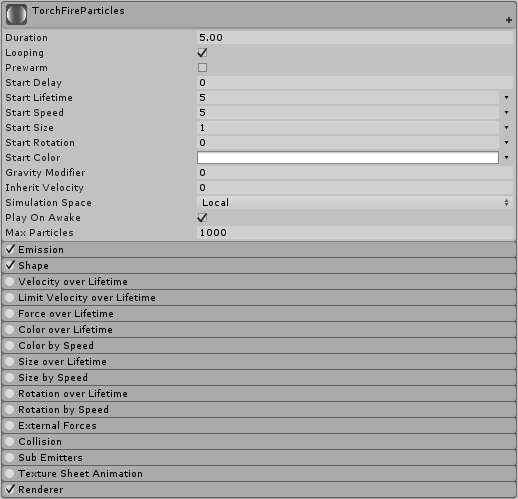 astral summit
yeah i got it
clear yew
oh cool, I said orientation instead of simulation 🤦🏼 😄
 lucid ore
does unity block certain noises?
lunar pasture
block?
lucid ore
yeah, cant get any doot noises to play
lunar pasture
i dont think there'd be a reason for anyone to code censorship into unity
lucid ore
well, it doesnt work.
lunar pasture
what format is your sound sample?
lucid ore
mp3
lunar pasture
where are you putting it?
lucid ore
its one of my friends who's having this issue, idk, but anything longer/not doot does play
does the sdk have issues with short noises
lucid ore
nop
dawn shale
If anyone knows how to make an idle animation with hands in pockets, pls message me
 muted prairie
@dawn shale Are you a desktop user ?
dawn shale
Yes.
muted prairie
In that case you can just put your character's hands in your pockets as your default pose
dawn shale
I literally do not know how to do that
muted prairie
You can find tons of tutorials on how to do that with blender, it's fairly straight forward
dawn shale
link?
muted prairie

How to move and place objects in Blender. 1. Grab key 2. Axises 3. Snap to cursor 4. Snap to center....oh wait, I did it wrong! Check us out @ http://www.the...
And do that with your bones
 grim coyote
i...
i'm scared.
custom animation look hard 😦
i want custom animation for not Vr.

and have like walking/running/idle animation for this guy
any help?
anybody?
err i guess this channel is really underrated
wait. what if i take a animation from the model it's self. how do i import it
muted prairie
@grim coyote Did you look at the tutorials for custom animations ?
grim coyote
didnt really help.
muted prairie
why not ?
grim coyote

https://mega.nz/#!g4103CbQ!GEhkxkwoo3I2YJxKjiXxqOckkTPWT-fZVnmvyGwyEes Music: 1) Harsanyi Laszlo - "Mars 2188AD" 2) Divinity - "Help, please" 3) Darkrai - "C...
i wanna do somthing like that
animation that is already finished.
muted prairie
Did you look for an animation like that on the web ?
grim coyote
no?.
dawn shale
If you want those specifically, you have to rip them from the devkit
grim coyote
What i want to do is.
Take a model
Find a animation for it
Put it as Idle/Running/walking
muted prairie
You just told me you didn't look for the animation, so i'm confused
grim coyote
fuck
sorry i'm really stupid
at friday
in other words. how to switch these animations instend of humaniond's
muted prairie
You'll have to make the model generic, and replace the animations with the ones you find/create
grim coyote
find*
muted prairie
this won't be an humanoid model
grim coyote
good.
i hate humanoid anyway lol

shit
why i'm so stupid
WHY they uploaded that if is there no fucking model in it
what is c4d anyway
UGH
WHY ANYTHING HAVE TO BE SO HARD
muted prairie
because it's things people use for their jobs, which require skills and experience 
muted prairie
c4d is a file used with the software cinema 4D
muted prairie
Click on the link https://youtu.be/V0l4-pH3vI4?t=665
Creating custom animations for hand gestures and emotes in VRChat
grim coyote
but that is for the fucking weapon
muted prairie
for anything
 spring remnant
I'm trying to have a weapon fire once when pulling the trigger, which works fine when I unhide the particle effect on override. But then I have to hide the weapon again and get it back out if I want to shoot again, can somebody help me with this?
 muted prairie
If it has the correct bones and weight paint, it shouldn't be too difficult, but you should probably find the animation that goes with the model instead
@spring remnant Can't you create a duplicate anim on trigger that is just the particle effect at the end of the gun ?
spring remnant
@muted prairie Basically I'm using two overrides. The first unhides the weapons, so you can point at something. The second unhides the weapons AND the particle effect, which is set to "no loop". Basically, until I destroy the second override with something else, it keeps playing the "one time" particle effect
muted prairie
It's probably an option on the software you use to see the animation
@spring remnant What about having two anims, gun both at the same place for the two, but the second one has particle and sound ? When you trigger the second, gun won't appear to move, but the particle and sound will trigger ?
 muted prairie
@spring remnant look at #avatars-2-general
someone's describing what you're trying to do
spring remnant
Yes thanks
grim coyote

okay. where to put it.
i'm starting to learn slowly but.
i'm thinking i'm doing okay
muted prairie
Watch the link i send above, that's how you replace the generic anims
grim coyote
k
 ebon ingot
I was wondering. Are we allowed to implement a gesture to the A and X buttons in the oculista controller? Or more like an animation
 waxen hound
I really hate the camera in unity. wish it was like blender where i can fly around. instead of being frustrated hitting a button. unless there is a way to change the speed of the camera.
 tidal rampart
If the Unity Animator is set to 60 samples, does that mean that 1:00 in the timeline equals 1 second? I'm trying to sync up my audio triggers.
 celest trout
Does anyone know how to chain animations?
karmic sparrow
@tidal rampart 1:00 in the timeline always equals 1 second, that's why it's called a "time"line. Setting it to 60 samples, means the 1:00 mark will be on the 60th frame of your animation. If you set it to 90, it'd be on the 90th frame.
More frames means smoother animation, but the default for VRChat is 60, and in Ultra settings 90
tidal rampart
Ah I see. Thanks Ashelia, appreciate the response. I can convert that to ms nicely now 😃
@celest trout Sounds like something you could do with state machines; https://m.youtube.com/watch?v=JeZkctmoBPw
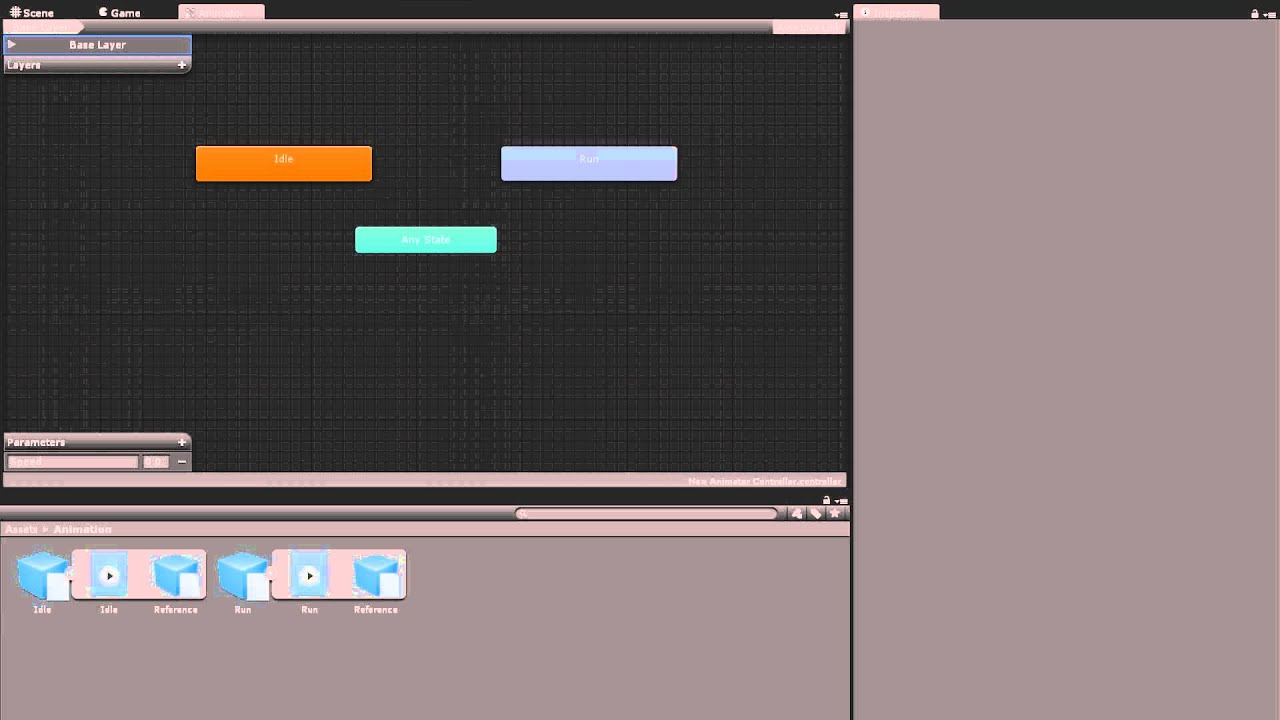
Watch this video in context on Unity's learning pages here - http://unity3d.com/learn/tutorials/modules/beginner/animation/animator-controller Animator Contr...
karmic sparrow
I keep having 1 problem with animations. We all know to create them on a duplicate because of the weird crouched position messup in Unity, so I do followed the many tutorials to the letter, making animations on a duplicate before adding them to a copy of CustomOverrideEmpty from the SDK and applying that as a Custom Standing Anims on the good model.
And yet, every animation I've tried (even as simple as a wink) makes my avatar in VRChat still go into that weird crouched position half into the floor while doing it. Followed tutorials to the letter and even made a new avatar from scratch yesterday, all resulting into the same. What am I overlooking?
celest trout
Thanks @tidal rampart I'll take a look at that
 dark frost
Does anyone know what the 👌 values are for the animations? I've seen a bunch of people have them and I want it
lunar pasture
has anyone tried to add particle effects to find it goes over 20K and you can't upload it?
I literally added 1 particle and it said no:(
tidal gull
I'm taking a guess here: gesture overrides on the face and visemes go badly together right
dark frost
Only when you talk
tidal gull
kk
 heavy plank
Hello, I am trying to make a custom animation controller but it doesn't seem to work at all in game. Is custom animation controller something supported right now? I want to make my own state machine and everything (not overriding gestures)
 little sierra
rate my first emote anim
https://gyazo.com/77230e3635290dcde3784426d6e89857

 old hull
@little sierra That's pretty nice, love the model by the way.
little sierra
♥
tidal gull
Bah, I broke the eyes on my model somehow 😦
Totally fine in Blender and Unity but the irises don't show in game
I think it's an eye tracking issue, I can see the eyes in the preview in game
hmmmmmmmmmmmm
dark frost
sometimes mirrors dont pick up eyes
 final gazelle
mirrors don't show a lot of things, from what we've seen recently...there're a lot of things that you don't see client-side that appear properly to everyone else
craggy sage
does anyone have a good tutorial on how to replace the hand idle and other basic hand gesture animations?
spice meteor
hey, does somebody know what happens to idle animations while being in vr i guess since the bones get overriden right but what happens to the part that are not effected by ur vr such as fingers, tails ? do they keep playing the animation ?
craggy sage
cause the preset ones break my avatar
 clear barn
what are the MOST basic visemes shape keys for voice tracking?
craggy sage
so any reason why when i rotate a bone to animate in unity, it doesnt stick?
 narrow sluice
How do you make facial animations switch instantly. Whenever i switch from one facial anmiation to another, it slowly transitions between the two and looks horrifying
 celest pewter
 odd cave
Hey, how do I get a quadruped avatar to have animations?
craggy sage
it is one frame
odd cave
me?
 odd cave
Can anyone help me with animal animations?
karmic sparrow
@narrow sluice I remember tutorials saying it needs to be at least 2 frames, so copy the keyframes and put them on 0:01
narrow sluice
ah i see. I'll try that then
craggy sage
as soon as i move to the next frame the animation resets
narrow sluice
@karmic sparrow that worked. Thank you!
karmic sparrow
You're welcome
Wish I could get my own animations to work now 😦 Still stuck with the char sinking into the crouched position problem, and I did make the animation on a duplicate before adding it to the good avatar's override
 lone raven
Could anyone help me out? Im currently working on a boxing animation for my avatar, but every time I import the file it keeps deleting the animation and says that my transform hierarchy does not match. https://gyazo.com/62e9feaf0ed904fd8a1dd97fecbe22af

 south lynx
How to you make objects (like a cube or something) set as world so you can still walk around after triggering it. I know you can do that with particles, but how would you do it to normal objects
clear yew
Any of you know alot about animations that can help?I got the animation to work on the gaster blaster
I just need to find out how to get it to appear in vrchat and such. it was a animation that CAME with the model and it was a vmd but in blender was imported from a vmd into a fbx animation and imported into unity and the animation works. so what do I do next? the animation is on the gaster blaster itself. okay so like if i want to like do a finger pointing animation i want the gaster blaster to pop up from next to me and shoot a laser (part of the animation im pretty sure so i dont have to add any particle effects!)
if you want i have a dropbox or email if you want i can send it to your dropbox/email if i have too in order to get help
what I have so far
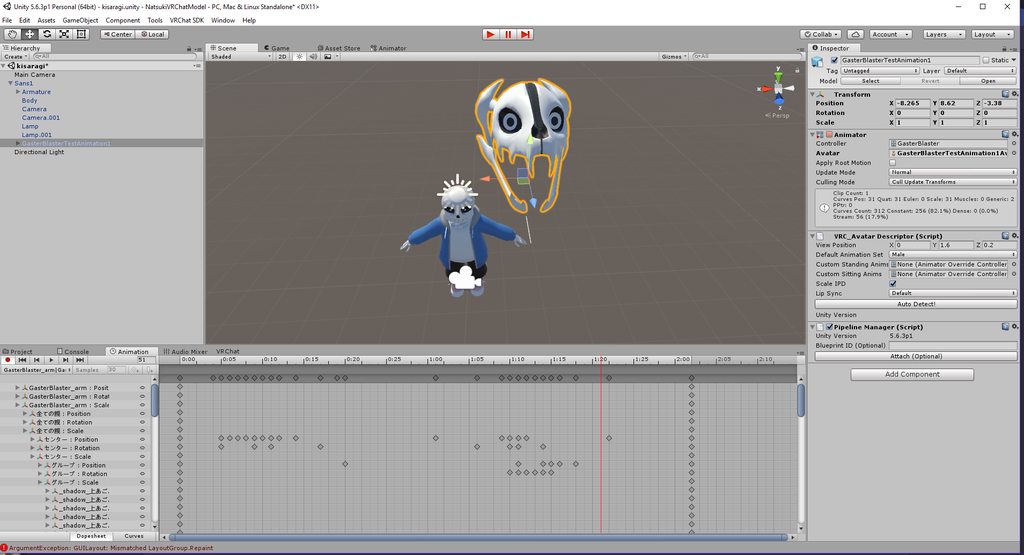


see when i put the controller on "GasterBlaster" SimpleAvatarController the animation works but wont let me add any finger bones or whatever if thats what i had to do for it to work
but see when I put the animation on the SimpleAvatarController the animation works and shows up when I press the play button in the Animator Tab
and I did put the gaster blaster animation in the Animation Override on "fingerpoint"
on my main model (not blaster)
 zenith topaz
if I have an animation to make a hat disappear and re-appear on the avatar's head by using the Thumbs Up Gesture or F8Shift+F8, the animation works to make a hat in the right hand appear and disappear to show basically like me taking off my hat.......but the instance of the object attached to the head will not disappear. I've checked the frame animations, and everything matches, and there are no animations attached to the object on the head itself. So playing the animation in unity everything works, but in game the hat will not disappear on the head.....how can i fix this?
south lynx
@zenith topaz I had the same issue, try making the hat mesh disappear on the animation to, it should solve your issue
clear yew
isnt anyone going to help me?
zenith topaz
The animation should have an in game object its calling to for scale, location, and rotation
That is the object in such you need to have disabled on the hierarchy, but enable with your animation
zenith topaz
So for instance, have the object attached to the hand but disabled on your avatar
then make a duplicate of the avatar, create an animation controller, place it in the animator for the avatar, create an animation in the tab, and with the animation edit panel in record mode enable the object for 2x frames
zenith topaz
then set the animation to a gesture override controller and attach those to the avatar descriptors
clear yew
i dont want to create a new one
okay hold on
said theres already a animation that came with
zenith topaz
hrm
i'm not sure to as how its being called to then
he had a laser blast animation for his hand
clear yew
okay ah ha i know
okay so i will do what you said but
in the dup i will put the animation in the dup
not the first
so the main will have uhh the animation tab already to where its in its hands
right?
zenith topaz
i just copied how they called to it on a different avatar and copied the object over
clear yew
finger bones and everything
and then like uhh
dupe the avatar (before putting it in the hand of the avatar)
okay i know what to do now thanks
zenith topaz
trying to find a tutorial video on youtube that was very helpful for understanding how the animation controls work
there is a lot of youtube tutorials on the same stuff
i suggest finding one in which you can tolerate and understand the narrator to and go from there
clear yew
if i can ever find one with the animation already imported it in with the model
if you know what i mean
like the blaster i mean
(not put on the avatar/models yet but it is in the blaster in the project folder)
 paper haven
Hey all, for some reason I attached dual swords to my model's chands and when in game and they're summoned via the animation (turned on) they're floating a few inches away from the hands for everyone else but they're in the hands for the user, does anyone know why? I've seen this a few times, animations appearing different for other users
 desert shore
I wanted to create an animation in which I change the appearance of the sky, can anyone help?
clear yew
@zenith topaz so when you said attached to the hand you mean in animator or just the model in general
zenith topaz
model in general
clear yew
O
zenith topaz
like on your bone hierarchy
clear yew
like in the armature u mean?
zenith topaz
yeah
clear yew
okay then try that?
zenith topaz
yeah
clear yew
i will let you know if it works brb
zenith topaz
disable it by default but make the animator enable it
so that way for example you do a thumbs up gesture command
it starts the animation
clear yew
Uhm how?
like
ware you talking about in
the main or in the dup?
because in the dup i mean like what if uhh
like
zenith topaz
only program animations in the duplicate
clear yew
errr
zenith topaz
because it wreaks havoc on the t-pose
clear yew
okay so hide it in the main?
zenith topaz
yeah
zenith topaz
ok the animation can be applied to any avatar in the hierarchy, but it still needs the properties to match up for it to work
but what im saying is the animation control panel, needs to show that you added the enable property for the object in your hand
clear yew
I was talking about when you said to make the animator enable it are you talkinga bout in the dupe?
Ummm because if your talking about with the dupe
zenith topaz
so that way when you apply the animation to a gesture it carries out that specific command of enabling the object
clear yew
what if the animation is enabled with the simpleavatarcontroller in the animator on the dupe
because remember its a animation that CAME with the model
and so when i do that in the animator because theres already something with the simpleavatarcontroller
zenith topaz
well, when you hit record in the animation control panel using a different animation controller besides the simple animation controller it will cause the avatar to lurch over and break t-pose
thats why you use a duplicate
clear yew
it wont like let me add in the gaster blaster itself so i cant make it not enabled in the thing
i know
thats why i said dupe
like ugghh
here let me show u
clear yew
Is there a way to add multiple properties for my hands at the same time instead of selecting one by one
 lilac orbit
Could anyone help me with how to animate a skinned mesh renderer?
 cerulean grove
Any Guru of Unity Particle System around?
mystic umbra
what up
 radiant crown
Apparently you cant animate humanoid avatars with bone rotations the easy way (And I'd rather not add 15 'animator' properties per bone); anyone know something that'll let me visually animate humanoid models for unity?
mystic umbra
I use blender
 halcyon solar
How would i go about adding a movement animation to a generic avatar?
radiant crown
Armature>[bone name, may be under several layers of bones, whatever bone you want]>Transform>Rotation
 meager saffron
can you change idle animation with a gesture override?
clear yew
does anyone know if it's easily doable to have 2 different sounds, one for close and one for distant?
 remote blaze
hey guys, quick question: I've got an avatar with a generic rig (because it's not humanoid) and I've animated its walk cycle, but I want to be able to control its head. anyone know how to do that?
the walk cycle works ingame too which is great
clear yew
actually yeah, i'm seeing this, there's min & max distance, i'd just set one to fall off once you get too close and crossfade with the other...
radiant crown
I dont know that you'd be able to change idle with a gesture, as far as I know you can only change the idle by setting a new idle in the controller.
remote blaze
I managed to get a new idle by making it in blender
it came in with the armature when I put it in unity
radiant crown
But I'm fairly sure you cant make it work with a gesture
@clear yew The distance for sounds has a very short max in vrchat
clear yew
@radiant crown yeah i think i noticed that, that's a recent patch isn't it?
radiant crown
Couple months
clear yew
well i've heard plenty of longer ranged sounds made since then... i only noticed the really short ranged within like the last couple weeks
cerulean grove
after the bug fix in positional sound maybe? @clear yew
clear yew
hmmm... i mean if vrchat had a sound engine like frostbite's then you could have really cool travelling sound whilst limiting the potential earrape distance... making it short range doesn't really help anything because they could just walk up to you and do it.
cerulean grove
sure but some will abuse it quickly i guess
clear yew
all i want to do, is like, imagine a gunshot, that bangs pretty good close up, but has a more separated reverb softer sound if you're farther away...
people are gonna abuse the sound anyways, only difference is that they have to walk up to you instead of aoe
cerulean grove
i get it, but flooding everyone no matter the distance is a bad idea i think
clear yew
if i were in charge of sdk, i'd be think about stuff like that, such as having a longer tail falloff for sounds, so that you can do sounds that are heard from far, but it's always lower % no matter what vol you set it to
they just overcompensate way too much, and it sucks when it kills fun and still doesn't actually solve any problems.\
radiant crown
They limited volume too but they can only limit the Audio Source volume, not the clips default
clear yew
doesn't matter
original clips will always be at max, else clipping, otherwise lower volume... you can't actually make a sound file louder than 100%, it just clips.
radiant crown
Basically yeah, it doesnt matter because of that
 safe citrus
guys is it just me or do animations exceeding 1 minute snap the character back to idle pose
thorn mango
I'm having trouble making a gesture for arms up... I set the muscle editor and it looks fine, but arms won't move in game
but fingers animated tho
radiant crown
The animation keeps going sort of, if you click the emote again you'll fix it; its just because you exceed the default animation length
Also it appears you cant move limbs/body with gesture overrides ;<
thorn mango
i saw somebody uses override to move arms
my facial expression and fingers work but arms won't move
radiant crown
I think you can only move major bones with emote overrides
Meaning I cant chase people in a hugging pose
thorn mango
...damn it, that's pretty much what I'm trying to do
radiant crown
Me too lol
You might be able to disable your mesh and enable a second model locked in that pose
For now I've given in and made it an emote
thorn mango
hmm..
tidal gull
A second mesh in that pose is not a bad idea.
radiant crown
Make sure mesh 2 has a different name so you dont have material bugs
thorn mango
I see... does it affect tris count ?
radiant crown
Disabled by default meshes dont
 quiet needle
I wonder if that would work... disable primary then enable a duplicate with arm bones unrigged, then use that with an arm animation 😮
Interesting ideas
 cold bison
How does it work if I want to make custom hand animation ?
I make the animation for the right hand, put it in the custom override and the game will mirror it automatically to the left hand ?
or do I need to make the two hands and it only uses the R or L bones depending on the controller I'm using ?
cursive moon
I think you need to add both hands to the animation. You can leave just one, but if you do the gesture with the one you didn't add, you'll get the default weird grabby hand along with whatever you animated.
cold bison
Ok, but if do them both, and do the overriden animation on one controller, it's not going to affect the other hand ? or is it ?
craggy sage
Maxwell Rodgers - Yesterday at 10:54 PM
as soon as i move to the next frame the animation resets
can anyone help with making custom hand animations in unity?
all i see on youtube is how to add weapons
 snow blade
is there any way to get the default animation for the original gestures e.g. rock n roll
my aim is just to add a noise onto rock n roll and i was wondering if i could copy it
radiant crown
You can duplicate the default gestures, the dupe will autoselect and now be modifyable
Duplicate using ctrl D
quiet needle
@cold bison Correct, if you put both hands into the animation, your gesture will only call the hand you use.
snow blade
@radiant crown where are they tho
radiant crown
In the project window there's a searchbar, just search the name
quiet needle
They're attached to an item in the animation examples folder in the SDK
I think it's called "male" something or other
cursive moon
male_standing_pose IIRC
@cold bison it won't affect the other hand if you don't do the gesture in that hand
celest trout
I'm having issues with importing a VMD onto my character in Blender. If I import my pmx without cleaning, my legs seems to glide around. If I clean the model, then only the lip syncing works
clear yew
@stark lagoon you didnt do it in a duplicate, right ?
yep
it's fucked
remove it and drag and drop the same model again from the assets
clear yew
I'm sorry but as far as i know, everytime you start to animate the model, it will get fucked, that's why you use a duplicate
final gazelle
this comes up as a search result, but i've never seen a "default T-pose animation" on most of my imports:

Unity Community
While I was in the editor, I was sliding through some animation frames for my character. I've noticed that after doing so, my character remains in...
clear yew
you can always put the same model again in the scene and drag'n'drop all the accessories on that new one
but you can't do much about it
final gazelle
there's actually a default T-pose animation you can copy?? where'd you find it? o_O
clear yew
even in play mode ?
karmic sparrow
@final gazelle It's under Assets > VRCSDK > Examples > Sample Assets > Animation, under de "tpose-new" model
final gazelle
ah right, that example one rather than on a model you imported -- that helps, thanks Kohta and Ashelia 😛
clear yew
animations are weird in unity honestly
karmic sparrow
I'm still stuck with my char going into the crouched and halfway through the floor position during animations, the same position as the duplicate that gets corrupted. Been on it for 3.5 days and I can't seem to find out how a facial expression manages to drag over that corrupt pose from my dupe to my main. Doesn't show in Unity btw, only in VRChat, and happens with every attempt I've done
Replacing hand gesture custom anims (simple 2 frames expression) works and doesn't have this problem. Binding an actual animation with more frames to one of the 8 menu emotes always has this problem though
final gazelle
what happens after 30 seconds for a humanoid emote?
karmic sparrow
It's disabled, was never meant to loop anyway. And it's between 4 and 5 seconds so not ridiculously long
final gazelle
that's...definitely different to the kind of problems a generic rig gets
clear yew
the animations looks fine in play mode in unity?
 hexed fern
so i have these 3 custom animations, is there a way to make them into one huge animation?
final gazelle
you can copy-paste the keyframes between different animation clips -- but heed Svelsien's warning above
go over 30 seconds, and weird things start happening
hexed fern
crap
clear yew
only for emotes tho
karmic sparrow
The moment the emote starts, my avatar instantly goes into the weird crouched position that in Unity only my duplicate goes during the creation of the animation. When emote ends, it pops back up to normal position
lunar pasture
Hello World
hexed fern
then the thing i want to do won't work
clear yew
ashelia, that looks like the same problem as above, you fucked up the original model, there is no other reason for it to glitch out
@hexed fern what do you need'
karmic sparrow
@stark lagoon That's what I feared too. So yesterday I made a new model from scratch and the same problem keeps happening so I don't get it
lunar pasture
@clear yew I don't think I have a very specific question but do you know if there's anything I should be looking out for to stop my arms from giving up half way through an imported dance motion?
karmic sparrow
Sorry that was @clear yew
And yes Kohta, it only happens with a non-hand gesture animation
clear yew
i don't have experience with imported animation
but from what i know the animations can get pretty fucked with some models
it's kinda luck and random to be honest
some dance will work great on some model and sometime they will not
lunar pasture
lol fair enough, I'll just remember to freestyle those parts
final gazelle
@lunar pasture i'm not sure about the arms specifically, but i'd definitely play out the whole animation to check out for any particularly exaggerated motions that may be a result of weird things happening with the animation curves -- look for seemingly duplicated keyframes one after another which are almost in the same position, and see if the tweening between them is causing any exaggerated motions
karmic sparrow
@stark lagoon Are you telling me that for a non-hand-gesture animation I will have to enforce the entire pose of my character inside the animation? That would explain a thing or two
clear yew
i dont know how to do it, but if you find those MMD dance type you can find some file for the animation, you can import them in blender on a MMD model to test them out
karmic sparrow
Ahhhh I'm glad I finally have a solution, thanks!
lunar pasture
@final gazelle thanks, so they might fall off the graph or something like that
final gazelle
something like that, i think, yeah -- i've got an imported blinking animation where my character's just supposed to blink normally, but his eyelids open so wide that you'd think his eyeballs would fall out before they return to a more normal position
lunar pasture
nice lol
final gazelle
copy-pasting and deleting some keyframes around solved that, but i honestly have no idea what happened during the export process
clear yew
isnt that because the "bone" movement is too wide for your model ?
final gazelle
i'm not sure at all -- it looked completely fine back in blender, before i exported it as a baked animation
clear yew
you tested that on a model in blender right ?
final gazelle
on a copy of the same model i eventually applied it to in unity, yeah
clear yew
so same model in unity and blender
final gazelle
looked normal in blender, did the weird exaggerated eye popping thing upon export into unity
clear yew
well i'm not even going to try to understand why it gets fucked
final gazelle
i thiiiiiiink it has something to do with unity thinking there always has to be some kind of motion between keyframes, and then it incorrectly exaggerating whatever the motion was...yeah, i don't know either
i just copy-pasted some keyframes where the bone position looked quite similar, and that mostly fixed it
clear yew
also just for curiosity, why did you import a blinking animation ?
lunar pasture
I just found a spine twist of -1.189... that can't be good for you lol
final gazelle
original model uses facial bones rather than visemes, and the blinking was part of a bigger overall idling pose
clear yew
negative value will just make the bone spine all around
final gazelle
@stark lagoon i'll remember that for next time thanks -- i haven't had to import anything problematic for a while since that fix 😛
clear yew
facial bones for expression ? never saw that yet
final gazelle
yeaaah, you'd probably just want to work with visemes instead unless you've got premade animations for that specific model's facial bones -- they honestly just look scary
hexed fern
i was gonna say
i can't do the emote i wanted to do
because its highly likely it will be longer than 30 seconds
what i wanted was for this character do fall backwards http://prntscr.com/imvfu2

then lay there for a bit
final gazelle
@clear yew never mind that these are SMD bones, this just does not look like a good time to manually pose for facial expressions:

 lunar pasture
I'm getting too attached to my avatar, she just danced up to me in the preview window and I was little too impressed.
final gazelle
@lunar pasture i need to stay away from mirrors with one of mine, or i'm liable to stare at my reflection and go "that cape is majestic af"
hexed fern
but after about 5-10 seconds i want him to just suddenly roll back and hop back up http://prntscr.com/imvgev

it'd be a funny way to scare the shit outta people
final gazelle
isn't that basically what the default "Die" animation is?
hexed fern
yeah but
that one look wiers
wierd
its either that or this http://prntscr.com/imvhaa

and his hips f*cked up in this one
well the belt is
^ and id rather not have something so......odd on him
or any character for that matter
i just noticed something wierd
when i imported one folder of animations it rigged them all to huamonoid
because the one model in the folder was a humanoid rig
but the ones i just imported stay generic rigs
even if the models are humanoid
which means i have to rig all 30+ animations by hand
 fallen scarab
Just a quick question. Can you not use custom animations if you set your rig type to humanoid in unity?
The animations for an avatar I'm working on wouldn't import properly (they wouldn't play in the viewer and keyframes were missing in the animation panel) with the model when adding them to the existing model in the project (which had already been set up with humanoid rigging). Yet when I made a new project and just imported the same model, the animations appeared fine. The only difference I can think of is that the fresh project attempt didn't have the model set up as a humanoid
Basically I want an humanoid model but only want to override the walking animations.
hexed fern
@fallen scarab the ones i use work
but it might be because mine are premade
for unity
fallen scarab
It's just strange how it works in a fresh project but not my existing one.
hexed fern
did you set the animation rig to humanoid?
fallen scarab
Yeah.
lunar pasture
how are you on particles? lol
fallen scarab
The model was already there before. I decided I wanted to add custom animations after and added them to the model in blender. Then overwrote the model in unity with the new one. Maybe it was just some fuckery to do with overwriting instead of deleting and reimporting?
hexed fern
that might be it
since you added it to them in blender
i honestly don't know though
ive never tried animatons in blender
thank god i can make one really fast
just a simple ear twitch
fallen scarab
I figured blender was the main way people around here did it. Since trying to animate inside unity fucks up your avatar rig for some reason.
fallen scarab
Problem is no tutorials seem to actually explain the process of getting the animations from blender to unity properly. Only what to do when they are already in unity, which is the easy part honestly.
hexed fern
yeah thats the thing about most tutorials
they skip the harder stuff
which is what the tutorial should REALLY have
fallen scarab
One of them straight up said "you can just look up a tutorial for how to get them in unity" and then skipped it. WHUT?
fallen scarab
Some of the tutorials on here are really good and actually explain what's happening though. Tupper's tutorials are probably the best ones out there currently. I don't think he covered anything strictly animation related though.
hexed fern
yeah
tupper's is what i used with my first model
and it really helped me understand what the hell i was doing
and because of that tutorial http://prntscr.com/imvm6d

i got this baby into vrchat
but i had to redo him due to his feet sinking into the ground
and noticing his goggles lenses were pure white
but i have a updated version im working with http://prntscr.com/imvn0c
 fallen scarab
Most of it just seems to be learning how 3D stuff works in general. I came in knowing basically nothing but can actually get models in the game now. Just trying to learn the more flashy stuff
hexed fern
same
ive been using premade animations i got from some unity models a friend got me
which was expensive af for all of them
4 of the 5 were $35
and she bought be all 4
the 5th one was free
so that was over $100
omfg i forgot that cats translates his tail bones to this http://prntscr.com/imvnlx

he normally holds 2 guns
but the animations im gonna use for it work better when he has one
lunar pasture
is there a way to edit an armature in unity or do i need to take it back to blender?
final gazelle
if you need to fiddle with the bone lengths and orientation relative to the mesh, i think you'll need to send it back to blender
half shell
not sure if this is the right channel but would it be possible to have a prop on my avatar that doesn't move when i walk around in my play space?
final gazelle
you can change around the bone parenting order a bit in unity, but your options are definitely more limited than blender
@half shell i believe it is, but i'm not entirely sure what the details are on that other than the fact that "world particles" is somehow involved
final gazelle
if you see a user named "Yuumi" active, try asking him -- i'm pretty sure i remember him being able to spawn in a mini room on one of his avatars
craggy sage
can someone help me? for some reason the animations in VRchat are messed up badly like misshapen, but they look fine in unity and blender
lunar pasture
is 3.644256e-07 the same as 0.000003644256 ?
and if so, is something so tiny worth giving a toss about?
craggy sage
can someone help me? for some reason the animations in VRchat are messed up badly like misshapen, but they look fine in unity and blender
lunar pasture
i get that, it's a thing.
cursive moon
@craggy sage Screenshots would be useful in helping us diagnosing the issue.
Also, try not to spam your questions in all these channels, that's not what there's multiple for.
 patent needle
How exactly do you put multiple avatars in a single dance animation? I got two avatars in Unity, but when I load up the avatar in VRChat they both get put in the same position clipping into eachother, searching Google gave me about 0 solutions.
Also I put the other avatar on the main avatars armature, if that helps.
hexed fern
Hey guys, i need some help making a small custom animation
im just trying to make a models ears twitch slightly and then make his eyes dart left and right as if he was alarmed by something
lunar pasture
yeah I hear a lot of that, mine are a bit janky, parts seem to randomly give up part way through, some curves seem a bit too extreme, generally derpy behaviour all round. @stark lagoon
 fathom drum
My avatar won't stop drawing anyidea what i can do to fix this?
lunar pasture
drawing?
cursive moon
Did you add like a Snail Marker or something?
fathom drum
i did add snail marker
cursive moon
Did you make sure the animation for drawing is 2 frames long
fathom drum
yeah it two frames long
lunar pasture
wtf is a snail marker?
cursive moon
Lets you draw without a pen in the world
Generally activated through a gesture
Trippy did you follow a tutorial at all?
lunar pasture
yeah stuff is generally 60, I've seen some people say 90 but i can't imagine 60 causing problems
tbf there's no simple answer, some stuff gets recorded at 120 so it can be downsampled
anyhow. it's 1am on a sunday night, I've been noodling on an avatar since friday afternoon, gotta get back to reality in the morning
 hallow acorn
my particle effect doesnt follow my gun, what do i do?
that should be an easy fix, to make it move with my hand/gun
so pls help me ❤
patent needle
No one has a tutorial on how to do dance animations with multiple models? :\
fathom drum
i followed the video and it still just keeps on drawing
hallow acorn
@patent needle i'd assume you actually use many models but hide them and unhide them + dance with animation
patent needle
@hallow acorn Well, I get both models in game, they are just on the exact same location on top of eachother even though in Unity it shows just fine