#animation
1 messages · Page 51 of 1
 eternal jetty
I have yet to master it myself, comparing it to another tutorial.
 heady wren
@somber kayak
 somber kayak
Hi
heady wren
You DO NOT need to have the audio sources or particle systems in the animation
delete them
their parent is the weapon, so they already get activated.
What you want to do now is go to the gun on the NON ANIMATED MODEL
And just make sure you have the sounds set up right in the components. 😃
somber kayak
Awesome! So how will i trigger the sound and fx when i want to fire my weapon?
heady wren
Well that's where you need to make a choice.
 languid nimbus
@heady wren No I mean body animations through gestures
I kinda figured it out but kinda not
heady wren
Because if you set the gun to fire on open, every time you pull it out it fires.
I guess that's what a lot of people do.
somber kayak
Interesting. theres a model ive seen which fires when you press the left touchpad to the right
heady wren
Or you can add a new animation and override a different ..
languid nimbus
true true
heady wren
Yup!
eternal jetty
Button combos would come in handy in this game
somber kayak
Im still quite new to this. How come two guns will work?
eternal jetty
There is no "firing" in this game
if you have two weapons that are the same in every way but one is just constantly firing, you can pull out the none firing one, and then change gestures so that you are then holding the one that is firing, it looks as though you fired the gun that wasn't firing a second ago.
somber kayak
I will give that a go. I'll let you know. gimme a few minutes
eternal jetty
Also, I have a question of my own. I set up a gesture to change my characters material and turn on a light. It works fine, but trying to do anything else will trigger that gesture again. So if I were to do something like trigger my custom gesture, and then let go it stops as it should, but if I were to hit the open hand button (no overrides on it) it goes back to my custom gesture.
What could cause this?
eternal jetty
The anim? I believe so, the keyframes were right next to each other. Will double check.
You know what, there was a random keyframe waaaay out in the timeline I didn't see.
Hopefully that was it.
https://imgur.com/daQLClt
Going to test it out.

 spice echo
I hope it works
eternal jetty
Sort of, it now flickers while trying to do the animation and. Flickers a bit more when trying to do another.
eternal jetty
The light turns on and off and the materials switch really fast.
 covert hawk
so i found a new emote on an avatar called Anime_salute,any idea where i can get it for my own avatar?
 surreal iron
need help from someone with knowledge on custom walk/idle animations
x,x
im almost giving up on this shit
somber kayak
hey again. I tried it. I got the gun to fire... however it only fires when i open it up.
Ill post pics of what ive done

I've made 2 duplicate models
on the GUNFIRE Model, i've kept the particles and audio in the gun folder https://cdn.discordapp.com/attachments/369908229326503948/417436923464908815/unknown.png

on the OPN model, ive removed all gun effects. and left just a blank model of the gun

is this correct so far?
@eternal jetty ^ thats my progress
 patent quail
has there been any change to legacy animations recently? I use legacy animations for blinking for some avatars because it allows me to toggle blinking off while i have other facial expressions on, and those avatars still work properly, but for 2 avatars i just did they're not working at all. I can see my avatar blink in the preview in the menu, but when i switch to it the blinking doesnt play at all
 mystic umbra
I had no issues with legacy
question what sdk are you using?
cause a few of my animations arent working properly either and Im using an old sdk
somber kayak
anyone have any idea about what i posted above? 😃
patent quail
no
mystic umbra
hmm
is there any desktop users who many animations in here cause with the new changes to the shift + f keys
I feel like those arent wokring
Im thinking its the sdk Im using but not 100% sure
setting it on emotes it works just fine
patent quail
well if it was the client update, then previously working legacy animations would have been broken too
but mine are fine
so sdk seems like most likely cause for now
mystic umbra
yea
lemme use this new sdk
and see whta happens
cause my commision work ive done for animation + scratch models the shift + f key works just fine
and that was pre the newest sdk
 clear yew
Anyone know how to make a vmd that uses the animation for another model or mesh but it’s supposed to be bound to the playermodel or sans in this case and know how to make it work?
anyone know why the animation panel in unity have the play button and recording button greyed out even though I already have my animations in there?
 quiet needle
@clear yew because you don't have a controller selected.
@clear yew What do you mean? Importing VMDs into Unity?
clear yew
and for my controller, do I make the original avatar the controller or the duplicated one that has the animations?
somber kayak
@quiet needle do you mind scrolling up and taking a look at what i posted? Not sure if you're familiar with it or not
clear yew
Something like that let me show you what models (sans and gaster blaster) that the animation im trying to get it to work
quiet needle
@somber kayak https://www.youtube.com/watch?v=YzYvNKgzTKY

This video assumes you have already watched this one: https://www.youtube.com/watch?v=61vO-IswFps&t=546s *Make sure you scale your model down to the size y...
@clear yew Duplicate.
somber kayak
That video doesnt actually show the part im talking about. It tells me how to do it but not how to add it to the CustomOverride
quiet needle
@clear yew VMD animations use more bones than Unity, which means if you import them, some motion will be shaved off and discarded due to the missing bones. You can get around this a few ways, but none of them are easy. Check the pins on this channel for details on one method.
clear yew
@quiet needle err i did try to like import it into blender once then exporting it into unity with the model as a fbx even when like
 fierce geode
Anyone know how to activate a prop on gesture but have it static to the world so I could hold the gesture and walk around it without it moving or spinning with my headmovement?
quiet needle
@somber kayak You make your animation a .01s animation of "Turn on my gun firing game object" and copy/paste keyframe 1 for all keys to frame 2 so you have two identical lines at .01 and .02. After that, drag the animation into an override sheet, then drag the override sheet into your avatar descriptor.
@fierce geode World particles.
fierce geode
Its not a particle though
clear yew
okay well when i did duplicate the model and gaster blaster after having the gaster blaster in sans right wrist i had both gaster blasters hidden on the clone I put on the CAO animation and the CAO on the clone and when I tried uploading the clone when I tried doing the hand gun and fingerpoint hand gestures it wouldn’t do the hand gesture
quiet needle
Then it will always be tied to a bone.
clear yew
when I don’t have it on that on the cao the finger point or finger gun works fine
fierce geode
Ive seen people drop entire rooms and move around in them tho 🤔 must be a way
clear yew
see thing is I don’t know if the vmd is broken or how to fix it so i was kinda wondering if you could maybe take a look at it and see? I sent you a link to the model where i got it from
quiet needle
@clear yew When animating, you don't upload your duplicate. You use the duplicate as a template for making the animation. I'm not quite sure what you're saying.
clear yew
and yes before putting the animation on i did rig it as humanoid
ohh okay well
When there is already a animation file made should I just put it on the main for it to work?
People are telling me I should never do it on the main
quiet needle
After you create the animation on your duplicate, you drag it onto an override sheet over whichever animation you're replacing, then drag that override sheet into your main model's avatar descriptor override slots.
clear yew
Override sheet would that be the cao?
If so yeah i had done that already
Okay but after that i tried this, when i did upload just the mine putting the CAO on it it still doesn’t seem want to work
quiet needle
Never create an animation controller using your main model is what they should be saying. If by CAO you mean the object that when you click it you see all your gestures in the right panel, then yes.
clear yew
the Control Animation Override thing
Yes that
I even put that in the animator and vrchat descriptior for custom standing anim
For the main
but when I upload the main still does not work
quiet needle
Was this a prefab animation or did you make it yourself?
clear yew
Prefab? I didn’t make it myself but if your asking if its from sketchfab its not from that its from deviantart
heady wren
@eternal jetty Any luck?
quiet needle
@clear yew I'd have to import it and take a look, but it's likely that the animation needs to have its properties retargeted using your model's bone structure.
I can't look at it right now though. Sorry.
clear yew
oh thats okay maybe i can add you and so when you do it later youll tell me?
heady wren
So I'm in a tough spot right now if someone can help.
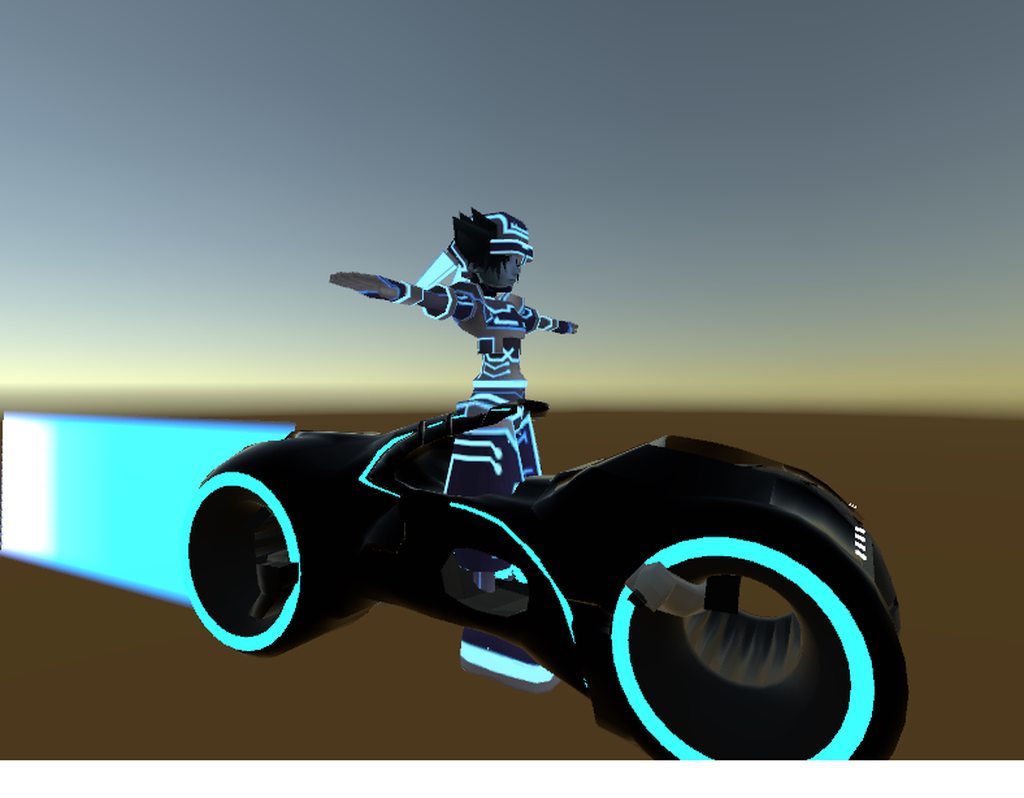
I'm trying to place sora on a bike basically. And I can't position him on it. Like at all without him going crazy.
How am I supposed to pose him accurately without things like the eyes going crazy.
 somber kayak
hey @heady wren did you see what i wrote above? I followed your advice but im still having an issue where it wont shoot when i switch gun. For example when i pull out the gun it instantly fires.
somber kayak
I gotcha
 muted prairie
i've create animation for finger gesture override, the object itself is on the model but hidden, i'm using 5 different objects for the 5 different finger gestures on vive, i can see the fingers moving/not moving when i trigger those gestures but the object doesn't appear, any idea where i missed a step ?
surreal iron
https://thumb.gyazo.com/thumb/1080_w/eyJ0eXAiOiJKV1QiLCJhbGciOiJIUzI1NiJ9.eyJpbWciOiIyOTUzN2I5MWE1M2MxNmQ4Y2JjNDVlZGFlYzI5Yjc0YyJ9.QhI12vaUVMoBvJ45ARLg6KUMgcq5FU13qTj42OGaRVI-gif.gif posting for the over 9000 time because i lost hope already

i made this custom walk animation
it looks fine in blender and unity
but when uploaded to vrchat, it looks trash, 50% at best
how to proceeD?
@muted prairie did you set the object as active in the animation?
muted prairie
Yep
surreal iron
das weird, thats pretty much what you need to do
quiet needle
@muted prairie on both frames of the animation?
Double check, sometimes the second frame doesn't copy correctly.
muted prairie
Yes i copied pasted the first frame onto the second
could that be because the object itself has a different name since i made a copy of the first model used for animation ?
e.g the object is called X(1)
surreal iron
i dont think the object's name matters
quiet needle
Yeah if you've got anything involved in the anim named differently, you'll want to either rename/reposition it to match your main model, or delete your duplicate and reduplicate your main so the targeting on the animation is correct.
clear yew
Ok I add an controller to my main character and the play and record button is still greyed out
surreal iron
tupper senpai help me plos, need help with muh walk animation
quiet needle
easy way is to delete your duplicate, create new duplicate (rename optional) then drag your old controller onto the dup in the hierarchy and it should be ready for animating again.
@muted prairie as far as the name of the duplicate goes, it shouldn't matter as long as it's not a bone or child object that has a different name.
muted prairie
@quiet needle Ok, so if i were to have 5 objects in the same spot in my hand, do i need to deactivate them on the main model before making the animation, or do i have to deactivate them all for my hand open gesture + deactivate all non used objects for each hand gesture ?
languid nimbus
Okay, I don't get it, I litterally copy-pasted the sitting animation from my seal, but it works WORSE than the original animation
like it works for a split second
then I go into the ground
eternal jetty
@heady wren I had a lot of luck actually. It stay on, doesn't flicker, and doesn't mess with other animations. My only problem now is that it flashes very briefly when when triggering another. I think it has something to do with that extra space after the last keyframe. https://imgur.com/px590dK

Not sure how to get rid of it.
eternal jetty
That's not a normal thing?
heady wren
add something to the 2 second mark then delete it?
eternal jetty
Nada
heady wren
That might be normal to look like that honestly.
 solid palm
What kind of audio file does unity take into the audio source? idk where to ask this lol
solid palm
oh thanks
clear yew
Format Extensions
MPEG layer 3 .mp3
Ogg Vorbis .ogg
Microsoft Wave .wav
Audio Interchange File Format .aiff / .aif
Ultimate Soundtracker module .mod
Impulse Tracker module .it
Scream Tracker module .s3m
FastTracker 2 module .xm
heady wren
yeah thats not normal.
clear yew
@solid palm
heady wren
@clear yew my man!
eternal jetty
Mine isn't normal?
heady wren
oh nvm then if you're doing that. Wasn't sure what that was for.
That's weird.
I don't even know how to create that extra gap you have.
eternal jetty
I love getting search results like this https://forum.unity.com/threads/how-do-i-change-the-animation-clip-length.470031/

Unity Community
this animation clip i just worked on has extra time at the the end of it... how do i change the length of the clip to stop at my last keyframe?...
Not a single reply
heady wren
-.-
eternal jetty
@heady wren I found out how the extra time is getting there. The Skinned Mesh Renderer property seems to automatically add an extra frame to the end. So I guess the next thing I have to do is find another way of changing the eye material or finding a way of animating a material property...but I can't seem to find a reference to any properties this way.
languid nimbus
If you want to animate a material you have to do it using shaders
 final gazelle
are inactive objects set to appear during a specific emote or animation meant to automatically go inactive again after the animation has finished or been interrupted?
languid nimbus
yes
final gazelle
i think i found an interesting bug then 😛
eternal jetty
Any literature to get me started with coding a shader that could be controlled by gestures like a need them to be?
languid nimbus
you can't control shaders with gestures
clear yew
sure you can
final gazelle
if you've got an object which appears only during a sitting emote, and then you interrupt that animation by getting off your seat before the object vanishes...it remains active in your standing animations
clear yew
if you can animate it you can put it in gesture overrides, so shader variables too
final gazelle
yo?
languid nimbus
If you're messing around with sitting animations
final gazelle
that i am, yeah
languid nimbus
why am I falling through the ground when I'm pulling myself up .55?
eternal jetty
@clear yew So shader variables is what I should be looking for? And I change them through an animation as I have been doing?
clear yew
yep
languid nimbus
1001, the shader animation and bone animation are completely separate
quiet needle
@muted prairie As long as they're deactivated when you upload and the animation has the "IsActive" for the object checked, it should work.
final gazelle
up by .55? huh, i've never had that happen, at least on the avatar testing stage
languid nimbus
yeah I'm on avatar testing, wanna see it? lol
clear yew
it works for me
languid nimbus
then where do you find the shader variables
final gazelle
sure -- i might as well show you what's happening on my end too (though i have no mic)
clear yew
you put them in yourself or you animate material properties
languid nimbus
you didn't give a clear answer
eternal jetty
Are the cubedparadox flat toon materials not exposed to animations?
final gazelle
you're gonna get a friend request from a random, but the timing should make it clear who it is 😛
eternal jetty
Because I can't find any references
languid nimbus
that's like saying "what weather is it?" Oh well it has to do with clouds
It's non-information
clear yew
you mean my answer?
languid nimbus
yes @clear yew
clear yew
why so passive aggresive?
I'll reiterate, anything you can edit in the material window, you can animate
languid nimbus
I'm trying to ask questions and you're replying to me dismissively, that's why
clear yew
ask me anything else and I will help
languid nimbus
Where do you find the shader variables
eternal jetty
@clear yew But how do you find a reference to it in the animations window? I tried to find it there but couldn't
languid nimbus
in the animator
clear yew
you hit record and see if it picks it up
languid nimbus
again with the non-answer
clear yew
I never feel like scrolling through the list
ok, I added a controller to one of my models and the play and record button is still greyed out in animations in unity.
IS there a way to get them not grey?
do you even know how shaders work? I'm answering your question, have patience and be civil
quiet needle
That's not really a non-answer, it makes sense to record and see if the animator picks up your changes.
clear yew
if you want to see what's exposed in the inspector open/edit the shader and look at the properties that are not set to hidden
languid nimbus
Yeah but the information it gives me is that I have to try 100+ properties, possibly more to even figure out a bit of the information he's already sittin on
clear yew
or add your own
you are really not making sense
and should learn about shaders before you get angry at people trying to help you out
quiet needle
@clear yew You need to attach the animations to the controller. Drag them onto the model (hopefully duplicate) which is assigned to your controller and they should be added to the clip list
clear yew
@languid nimbus let me open unity and tell you where in the list to find them
languid nimbus
Thank you.
clear yew
for avatars under Skinned Mesh Renderer.Material
it depends on the shader what variables are exposed, and you can edit the shader to add more
languid nimbus
do you know specifically what the reference arrays are?
are those the order of the materials?
eternal jetty
Is there a specific line to expose them? Because there is nothing keeping them hidden for the ones on mine.
languid nimbus
that's strange because I get normal array numbers with two different shaders
Anyways thanks for the more informative answer @clear yew
clear yew
if I open a shader in an editor it starts with the properties:
Shader "Custom/DistortingGrabPass" {
    Properties {
        _Intensity ("Intensity", Range(0, 50)) = 0
}``` Properties {
_MainTex ("Glass Main Texure", 2D) = "white" {}
_Transparency ("Transparency Main Texture", Range(0, 1)) = 1
_EmissionColor ("Emission color", Color) = (1, 1, 1, 1)
_CubeMap ("CubeMap", Cube) = "white" {}
}```etc etc
that's how you pass animated values to shaders
eternal jetty
And if this is what I'm dealing with should I see Emission exposed?
    {
        _MainTex("MainTex", 2D) = "white" {}
        _Color("Color", Color) = (1,1,1,1)
        _ColorMask("ColorMask", 2D) = "black" {}
        _Shadow("Shadow", Range(0, 1)) = 0.4
        _outline_width("outline_width", Float) = 0.2
        _outline_color("outline_color", Color) = (0.5,0.5,0.5,1)
        _outline_tint("outline_tint", Range(0, 1)) = 0.5
        _EmissionMap("Emission Map", 2D) = "white" {}
        [HDR]_EmissionColor("Emission Color", Color) = (0,0,0,1)
        _BumpMap("BumpMap", 2D) = "bump" {}
_Cutoff("Alpha cutoff", Range(0,1)) = 0.5```yeah, under [HDR]_EmissionColor
languid nimbus
Sorry I was a bit hard on you @clear yew but for beginners in that kinda stuff they wouldn't understand anything from what you say, they try to process it but it doesn't make any sense
I didn't really need this info, I was playing devils advocate for hervey hahah
clear yew
I know a lot of people keep stuff to themselves in vrchat because they wanna be the cool kid, but I don't care, I love seeing people make impressive stuff
languid nimbus
I usually share things if I think that it can't be abused against other players
like for example this one time I tried uploading an avatar pedistal
unfortunately it removes everything that makes it an avatar pedistal XD
I was gunna put the avatar pedistal on the avatar pedistal I uploaded
clear yew
I can only figure out how much you know when you ask again in detail what's missing 👍🏼
 tight flower
anyone else having a problem with uploading avatars? mine is when i upload it to vrchat, the very first world (hub) that i load into, everything works the way it should, animation overides look good, facial expressions, etc. but its when i chance instances to different worlds, those animations no longer exist and the gestures revert to their normal gestures :/
eternal jetty
Now if I have several materials of the same shader, how do I know which material I am referencing, because I only See Material.Blah and not something like Material.Eyes.Blah
languid nimbus
@tight flower I can't upload avatars to the same avatar ID because of the new SDK
eternal jetty
Actually, it looks like I am referencing all materials
clear yew
@eternal jetty yeah, I never look at those 😐 I hit record, change a number and then edit the keyframes accordingly
it affects the mesh you're animating
eternal jetty
My mesh has 8 materials :/
clear yew
that's fine for a skinned mesh
eternal jetty
Wouldn't it be possible to edit just the 8th material? Recording gives me nothing, but I have the property to edit it in animator window :/
clear yew
what do you mean recording gives you nothing? no keyframes are recorded?
languid nimbus
Okay so, anyone has any ideas as to why my height transform doesn't change the actual height of my character?
eventhough it's 3 meters above the ground in unity but I'm sitting halfway into the ground in vrchat
clear yew
the IK animator will put your avatar on the ground, always
ie: drop you until your feet hit the ground collider
languid nimbus
Yeah but my feet didn't hit the ground
it's passed through the ground completely
also that wasn't the case for my seals humanoid rig..
clear yew
what is your root motion set to?
clear yew
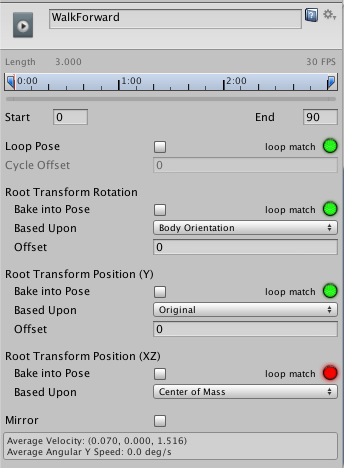
go to your animation and change the root motion to 'bake into pose' and 'original' for all three options
Does anyone know how people animate those world bubbles is it with the particle effects in unity? Is there a tutorial or something since I would like to try to make one myself? Ex: I seen people have oceans or the kingdom heart scene with all the key blades in the ground.
@languid nimbus https://docs.unity3d.com/uploads/Main/MecanimRootMotion.png
 languid nimbus
I don't even have 10% of those options
clear yew
you should have, lemme link more info
it's the only way to displace your avatar during animation the proper way
languid nimbus
yeah I'm looking at the information above the pic you sent
but all it tells me is "Animation clip editor settings"
and I'm like
wtf is that and where do I find it
languid nimbus
 clear yew
don't forget to hit apply after changing anything

 grand bloom
when using custom overrides I only need to place my controller in the "Controller" space under animator, right? No need to put it in "Custom Standing Anims" under VR_Avatar Descriptor?
 fluid wraith
Is there a way to make an animation change the material of the model?
clear yew
When you are trying to animate it or just when imported? @covert hawk
ok, I got the animation working for my duplicate and for my original, but somehow it keeps saying the particle and audio is missing on my original avatar even though I copy and pasted from the animation duplicate
covert hawk
animate @clear yew
clear yew
how do i fix this?
covert hawk
trying to put a gun on it,and it just jumped up,
clear yew
It’s normal for the avatar to sink down or look like it doing a jump because you don’t have the other bones Riggs in the animation but hopefully you made a duplicate and not using your original for animation.
clear yew
Just position the gun on the hand you want and you should be fine when you animate it in game, also place the gun in the wrist amarture so it will move when you move that hand
 glossy coral
Hello i need help with something, i have a model that i recently made some small texture changes too then reuploaded, and on the new version my animations do not show up in the emotes list anymore but nothing changed on the hierarchy
 vocal zinc
i added a permanent animation to my avatar
if i press play my avatar get fked up i have to load last save to get it back
any ideas why ?
glossy coral
Why can i not post screenshots here?
 ruby spoke
so that the discord doesnt get crammed with uploads, use sharex/puush
anyone got any clue as to why this shit is wonky
glossy coral
Well can anyone tell me what happened?
final gazelle
were the texture changes made directly in unity, or did you re-import a new version of the model's FBX file?
for screenshots, upload them to an image hosting website like imgur, and then paste the link of your screenshot here
glossy coral
@final gazelle did it all in unity all i did was go into the model in unity and change her cloths textures and her skin exported it as a unity package and moved it to my uploading pc
final gazelle
hmm, and yet the animations don't show up in the emote list...what did it say in-game? was it the default ones you see on stock avatars?
final gazelle
hmm, going from one of the screenshots you posted in another thread:
https://cdn.discordapp.com/attachments/412761094210322462/417133773990395914/unknown.png

is "CAO" the override controller?
 final gazelle
hmm, nothing looks out of the ordinary there just yet
glossy coral
Yet when it uploaded in game the animations didnt show up
final gazelle
did you check in the Animation window that your animations aren't showing yellow nodes?
glossy coral
What do you mean?
final gazelle
although i don't think that would be it, if the override's working correctly...hang on
like this, in the keyframe editor (if that's the right name for it)
https://answers.unity.com/storage/temp/106640-animation-missing.gif
 glossy coral
@final gazelle https://imgur.com/a/QSneY
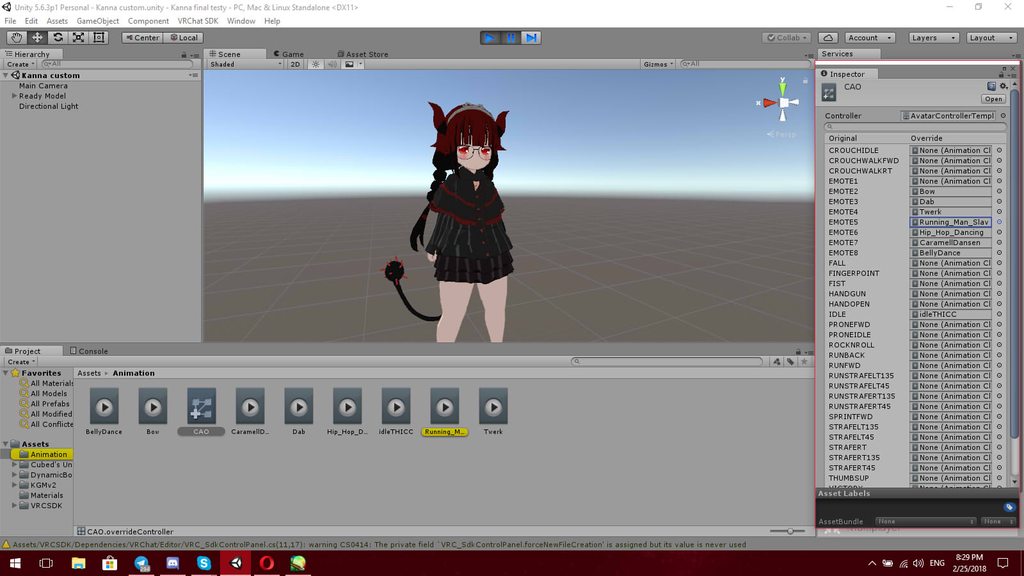
That?
i dont know how to find what you just did
final gazelle
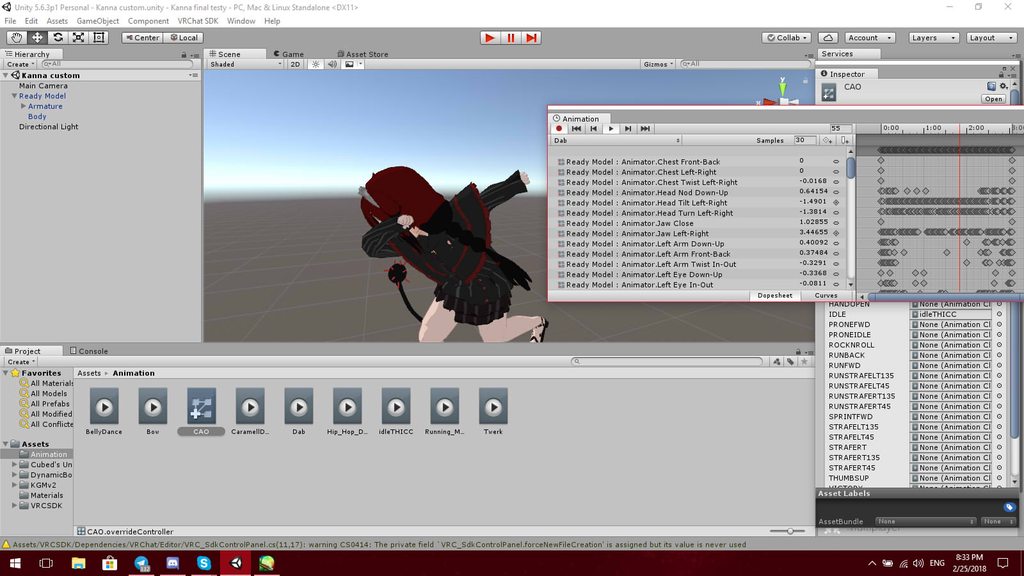
go to Window > Animation
then click on your "Ready Model" in your hierarchy, and see if any options show up
 final gazelle
none of the list items are in yellow text when you scroll up and down, right?
glossy coral
right
final gazelle
okay, so shouldn't be a naming/hierarchy issue
glossy coral
oh wait
whats this stuff
@final gazelle https://cdn.discordapp.com/attachments/336409060813307904/417495213712343040/unknown.png

i found some
but i dont know what it is
final gazelle
hmm, that's not good -- it means some parts of the animation aren't finding the components they're meant to animate
that normally happens if a bone or object in the avatar was renamed at some point, or if the imported animation wasn't originally for this model
final gazelle
if the animation still looks normal to you when you run it, then those yellow bits might be a bit inconsequential
glossy coral
Now.....my friend added dynamic bones to her for me..could it be that/
okay so....if its not that then why do they not show up in game
final gazelle
i haven't worked with dynamic bones before, so i can't really comment on what happens there
as for why they're not showing up in game, that normally happens if the override controller wasn't assigned correctly, but yours seems to be set up correctly at a glance
glossy coral
I did not add any extra animations, she came with all that, she was a prefab kanna hence the name ready model
final gazelle
there's only one file called CAO, right?
glossy coral
Yes
And when i got the model it was not assigned to her, the default idle spot was blank, it was in there in the list
BUT she worked in v1
v2 lost the animations
The only thing ive done is change the sdk to the february version
final gazelle
there seem to be a few things happening with the newest SDK release, but this isn't one i've heard of before
hmm -- just to be sure: go to Window > Animator, and then select Ready_Model on your hierarchy again
Animator this time, not Animation
final gazelle
is it showing something like this, inside the animator window?

 final gazelle
that appears to be the correct animation controller set-up, yup...which implies that CAO is still pointing at the correct animation controller
glossy coral
so maybe it was literally an issue with the sdk?
final gazelle
or perhaps the upload process, i can't really rule out either
the most likely problem would've been an error or mix-up in how you had your animation and override controllers set up, but that doesn't seem to be the case from what you've shown
because them not actually managing to tell the game what animations you want to replace would be the easiest explanation for the default ones showing up
hmm, one other thing to check: is this the same model file as before, with differently assigned textures on its material?
the avatar in the animator is currently set as KGMv2Avatar
glossy coral
Well
o saved the scene the other day and it replaced the previus name
cuz i was trying to figure out how to send it to a friend before i knew how to make unity pakages
But

@final gazelle
final gazelle
hmm, probably the last idea i have in mind for now:
right click on Ready_Model and choose "Go to prefab" -- remember where unity goes to in the Assets tab
glossy coral
 final gazelle
when you've done that, click the dropdown arrow on Ready_Model, and use "Go to prefab" again on both your armature and the mesh
 velvet ginkgo
Probally shouldn't be using those maximo animations.^^
final gazelle
see if it goes to the same folder, or somewhere different
velvet ginkgo
If you want the animations to work properly, do them yourself.
glossy coral
@final gazelle what do you mean
final gazelle
i'm trying to see if all the components of that Ready_Model instance in your scene are being drawn from the same imported file
because if the Avatar field in the Animator on the right-hand side of your screen is pointing to the incorrect avatar, that may possibly be causing some problems
glossy coral
HMMM
i have two in there, ready model, and kgmv2
@final gazelle i think i dragged the wrong one out of the kgmv2 folder when i was setting her up maybe
 final gazelle
hmm, try changing it to Ready_ModelAvatar, if something like that exists
from the looks of it, it probably does exist
glossy coral
i pulled the other version out of the folder...and she has no avatar discriptor
final gazelle
yeah, that one hasn't been set up -- delete or ignore that one
click on Ready_Model again, and then look in the "Inspector" on the right hand side of your screen
glossy coral
But you said the animation is tied to that one
final gazelle
we most likely just need to change one setting i'm about to point you to
glossy coral
ok
final gazelle
after clicking Ready_Model, look at the Inspector on the right-hand side of your screen -- go down to the bit where it says "Animator"
look at the bit just underneath it where it says Avatar: KGMv2Avatar
glossy coral
yes
final gazelle
click the circle next to it, it should open up a little menu window
find Ready_ModelAvatar, if it exists on the list, and select that
glossy coral
it does not
final gazelle
what options does it show?
 final gazelle
hmm, not what i expected to see...okay, look at your Assets folder again
there're arrows next to your KGMv2 and Ready_Model assets, right? click them to expand and show their contents
 final gazelle
possibly, because from that, i don't even know what "Ready_Model" actually is
that file isn't showing anything like a model mesh inside its prefab
glossy coral
Hmm
final gazelle
so that actually makes me unsure of what that Ready_Model instance you've got in your scene actually is
it might be best to discuss it with your friend first, if they know their way around models, because i'm not sure if they've done something special with this set-up
 signal mango
how do you make a plane on a timer
like appear and reappear
final gazelle
whatever it is, i don't know what that Ready_Model prefab is -- personally, i would've tried to drag and drop the KGMv2 one into the scene
@signal mango the "isActive" property might be what you're after?
glossy coral
@final gazelle holy cow the avatar disciptor on the other one is tiny..she must be massive
or something
final gazelle
there're quite a few things i don't understand here, especially if your friend added dynamic bones to the model for you to use
are there dynamic bone scripts you can see on any part of her?
glossy coral
oh i see whats going on, the "Ready model" is a modded version of the kgmv2 the maker put in there...cuz the kgmv2 has no glasses added to the face
@final gazelle i just renamed ready_model to KGMv2
in the inspector
she is now called kgmv2
final gazelle
i'm not sure if that's the issue, but it's probably worth a shot to see what happens
glossy coral
there is no other option @final gazelle cuz the other kgmv2 is standard, the second one has added parts on it the other doesnt
final gazelle
hmm, alright
i'm kind of tapped out of ideas of what might be the cause though, but that Ready_Model prefab is something i've never seen before since it doesn't look anything like a regular imported FBX file
glossy coral
i have no clue
final gazelle
the original aim i was going for was seeing if the animator was trying to apply the animation and override controllers to another model which wasn't actually in your scene, which may have explained why the one you had in-game wasn't getting the custom emotes
i might need to let a more knowledgeable person tap-in on this one -- i'm out of both ideas and sleep, so i'll need to drop out for now =_=
muted prairie
@quiet needle thanks !
quiet needle
anytime
 fair slate
Question. Since the desktop got animation update my animations on my controllers are no longer toggle (htc) Before the update my override animations would toggle until i did another animation but now if i let go off the animation it stops it. Any way to revert this back?
vocal zinc
guys im trying to add an animation that plays auto and forever but when i press play my character get fked up
clear yew
I made a money rain particle system animation for my friend whos on pc and set it to fist so he hits shift f2 but when he lets go it keeps doing it and doesn't stop so I made another animation which disables it and when he does it it doesn't work and keeps going...
 covert gale
Any reason an idle animation (using Animation component, legacy anim is set to loop) wouldn't be working in-game? In Unity play mode I've got a tail that sways side to side, but on upload it's standing still completely. This same animation worked earlier today, but suddenly broke and remaking it from scratch won't even fix it.
 dire rock
does anyone know what would cause an avatars head to not move with the rest of the body in a custom animation? it just stays facing forward no matter what the animation is
should note it animates fine in unity, but in vrchat is where the head doesnt move
vocal zinc
hey guys i added an handspinner rotation animation close to my chest
but it moves the whole body when i press play
 wind torrent
Anyone know how to trigger a texture/material to change when you do a certain gesture?
i have a model whos eyes change when i make it unlit/texture, and im wondering how i could make it change through a gesture
 late phoenix
Adding to the endless list of questions here... I have a custom animation set for all the idle/walking animations, but when I'm idle it messes up the legs/feet and I dont know why. (first pic is idle, 2nd is moving) https://imgur.com/a/3zEXc
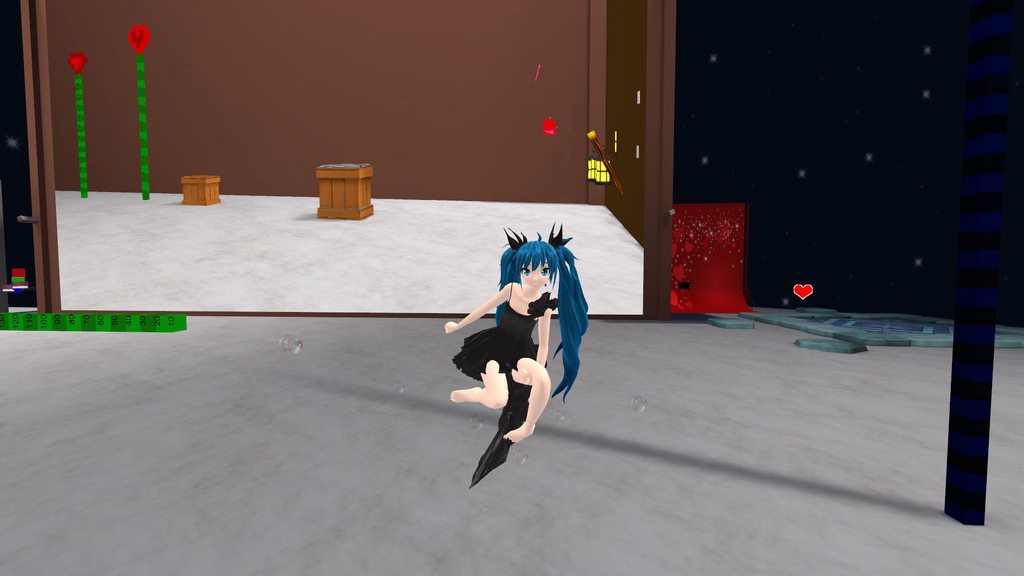
 ocean dagger
Whenever I'm trying to do a rotating plane animation from 0-359.9. it just slows down towards the end of every loop
does anyone know why
glossy coral

VRChat Funny Moments: VRChat Funny Moments! Only The funny VR Chat Moments From Twitch & More! Funny VRChat Moments Montage. Only the best VRChat Funny Highl...
 still idol
This question is not really an animation theme, but... Do you have a tutorial on how to move easily from the original position a tail or a cape on blender? I only know how to do shape keys
glossy coral
Can someone explain this to me?
How can you make an avatar with removable parts work in vr chat?
still idol
@glossy coral it should be easy with shape keys on Blender I guess... But I didn't tried so much animations. I'm in this since a week or so
clear yew
Hi guys, I have a question, a shapekey doesn't go all the way out the face, so it doesn't show up when it's at 100, how do I fix it? :c
 lone bramble
is it confirmed that all animations are constantly looping on this sdk? even my facial features are infinitely looping if i make new ones
 white herald
any way to get emotes working on generic rigs
for me animation overrides don't show up
as in i have just default emotes
lone bramble
@clear yew yeah the way i normally do animations have me doing a really crazy animation loop for simple things
i'm capping it real quick
clear yew
I could send u my sdk that Im pretty sure works, I had it working for 10 more avatars after the new update and everything was fine
lone bramble
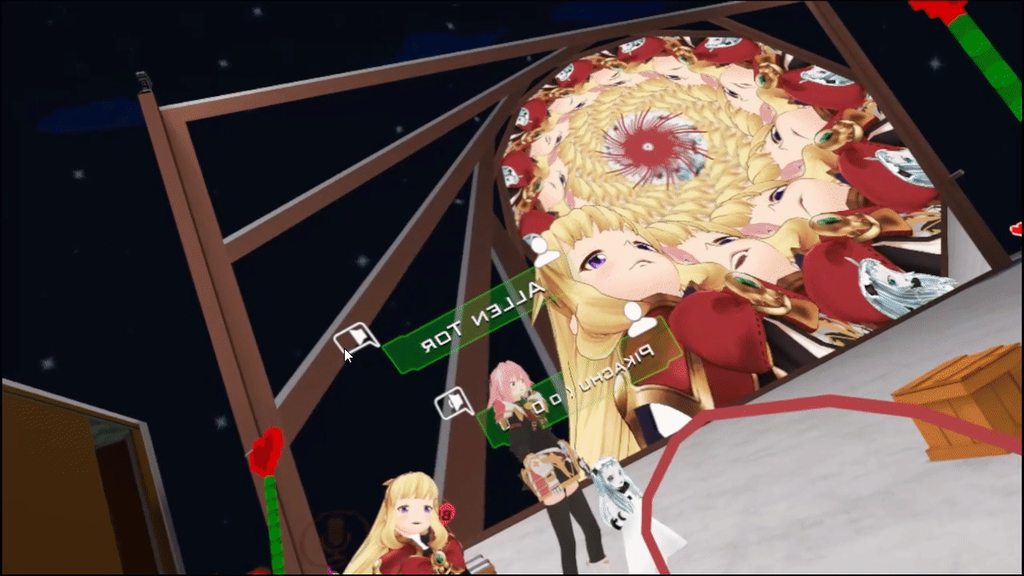 clear yew
Oh
that looks more like
wrongly saved animation
than a bug
show me that exact animation in unity
like the whole ''pattern'' of it or soemthing
all the shape keys used
scroll down on em please.
gif it or soemthing
that looks like deafult face being saved as 0.00
and an actual aniamtion
on¨
0:01
0.01*
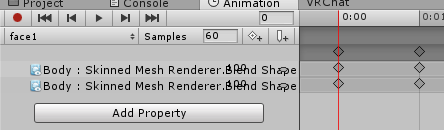 clear yew
have u ever done animations before?
It still might be wrongly ''recorded''
Im not sure cuz I cant maually sit there and check
does it happen when you play the animation
in unity
lone bramble
yeah i make these all the time, they're the most basic animation
clear yew
Okay
lone bramble
that's why i think it's the new update since this is my first avatar after the update
lone bramble
i can see if it helps lol
clear yew
It should
lone bramble
i've made 5 animations and all 5 do the same
clear yew
Okay
lone bramble
4 at :01 and 1 at :20 lol
clear yew
Ill pm u it
lone bramble
thanks
 winged narwhal
yo okay so I'm having some trouble with the audio source for my animation
every time I change it to linear rolloff or edit the volume rolloff at all, it immediately reverts back to this default state
clear yew
can someone tell me what "LetGo" (F3) is as gesture? is that reset?
 frosty pendant
Does someone have a tutorial for particles with rigid bodies? My particles are everywhere but not where I want them...
 scarlet swift
anyone know how i can make a gun shot effect and add the sound clip?
 true scroll
that is every exxagerated
it might just be that those who would know answere to your question are ig, currently doing something else or asleep
 torpid wadi
@ocean dagger late answer but select your animation keys, right click and set "both tangents" to linear
 wary parcel
Well, VRChats SDK reverts those settings cause it is something that can be messed with to make audio bad or annoying ingame. So they want us to just use the volume slider until 0.5 and range of audio and 2d or 3d audio
wary parcel
There may be some settings i am forgetting but dont remember all right now, have to check the script then.
late phoenix
Is there another idle animation hidden that i dont know about
I've been trying to get this floating avatar to work for hours and still nothing
it like hunches a bit after doing the idle animation for like .5 seconds
should I mess with the locomotionheightblend thing??
wary parcel
There may be some delay to the server and your client before detecting your standing still i guess?
No idea about flying animation, so sorry about that
late phoenix
T_T maybe eventually someone will know.. been trying to get this to work all night and no progress
wary parcel
Ye heard flying avatars are a nightmare
late phoenix
it should be so simple I dont get why it's this complicated, the animations are easy to make
wary parcel
Also ive heard that animating in blender is better than unity when you do those kind of animations, but have no clue on how to import animations from blender or why it would help
late phoenix
or more like I have no idea what I could be missing.. Tried turning foot IKs off but still did nothing
torpid wadi
it's most likely reverse kinematics messing with your idle animation
no idea how to fix that
inverse? reverse? i forgot
torpid wadi
is it actually possible to have different hand gestures for each hand
 quasi gale
@late phoenix That is indeed the full body IK affecting your idle animation. It generally takes control of both your legs and the upper body when active. You can disable it by unbinding a finger bone in your avatar's rig, but that will also lead to a variety of other issues.
late phoenix
Oh I see... Any finger bone will work?
quasi gale
I think it has to be one of the main ones - up to the first or second knuckle.
It'll give you a warning in the sdk if you do it right.
late phoenix
Hmm ok I'll try that tomorrow then
late phoenix
All 3?
quasi gale
Ahh, okay. Thanks for the clarification.
quasi gale
You may also find yourself sinking into the ground when moving.
late phoenix
Ahhh so that's what happens
That makes sense since a game model I imported before didn't have hand bones... And the head didn't move
So the head won't move even if I animate it?
quasi gale
It will always look the direction you look.
quasi gale
No prob. Hope you manage to get it working.
late phoenix
Seems weird that there's no place to just disable full body ik... Like a button
Maybe in the future 😖
torpid wadi
well in general it's something you usually don't want to do, so it'd make sense for them not to include it
 rocky river
Does anyone of you knows how to make my humanoid floats all the time? Instead of walking by feet, I want it to hover the ground.
heady wren
You can make it float by parenting your character model to an empty object on 0.0.0
But I'm not sure about the legs. :/
lone bramble
still having trouble with any animations made in unity since the update infinite looping instead of remaining static
 cunning saffron
@rocky river you will need to make it non humanoid (generic or legacy) if you dont want your avatar to have a walking animation while levitating
if you do so its easy to go in blender, move your character up and add a bone that touches the ground to the armature
you can also make a floating animation in blender and import it in unity via legacy

MAKE SURE TO DECIMATE MODEL BEFORE YOU ANIMATE IT, OR ELSE MODEL WON'T ACTUALLY DECIMATE AND IT WILL MAKE YOU COMPLETELY ANIMATE MODEL AGAIN! Links: Tinkerca...
Does anyone know how to make collisions in particle systems rubbery instead of the normal flat collision?
rocky river
@cunning saffron thanks (i love u)
heady wren
I'm trying to postition a character on a bike in an animation. Think I'll have to do the same on that one? When I try to position him in unity, his eyes stretch to feet long....
cunning saffron
@heady wren is it only for a gesture/emote or always?
cunning saffron
did you try bringing the bike to him instead of lowering his head?
heady wren
Well yes! But the issue is more of.. I have to move pretty much every part of his body. Including putting his feet on the back, and head towards the front wheel.
cunning saffron
what im saying is you keep the head where its at and you move the rest accordingly
heady wren
Oh I see. How would the bike still be on the ground then?
cunning saffron
im only saying this from a guess based on previous experience but it seems in unity the base of the character stays in the same relative spot to the ground so even if you move your avatar up its not going to be levitating in vrchat
so im guessing moving everything up will just bring everything down automatically in vrchat
heady wren
I'll give it it a try, but it will take a while. I might just make 2 totally different models so I can switch. haha
Thanks, @cunning saffron !
cunning saffron
@heady wren dont try it to perfection on the first time lol just try bringing the bike and the legs up and try it in unity to see if it works before putting in efforts that might not even work
heady wren
I mean I've got too many hours and too many failed attempts. Perfection is my middle name. I lied. It's actually "Try too hard"
cunning saffron
@heady wren ok but dont come crying if you put in an hour and it doesnt work
heady wren
LOL. Trust me, I don't plan on it. Just looking for some poiinters.
cunning saffron
Does anyone know how to make collisions in particle systems rubbery instead of the normal flat collision?
heady wren
I'm confused on what you mean by rubbery. What are you trying to do?
cunning saffron
trying to make a particle float around in random directions but i need collisions to make sure the particle doesnt disappear into the distance. Right now the collisions make the particle stop and bounce back. What i want is for it to look smooth like there wasnt even a collision
cunning saffron
no kind of like bouncing back but not hitting a wall
just slowly returning
like a rubberband
still idol
any of you know how to refresh/reimport a model if I fuckup something on Blender so I don't need to redo all the dynamic bones and stuff in Unity?
cunning saffron
@still idol ive just read that saving the blend files in the asset folder for the unity project works
still idol
@cunning saffron just replacing? ok i'm gonna try it. Thanks
heady wren
Boy I'm seeing your issue here.
 shrewd prawn
still idol
shrewd prawn
still idol
@cunning saffron nah it didnt work
 proud estuary
hi! could i have help with an animation override thingy
i overrode a gesture to hold a cube
the cube appears and the fingers bend just fine, but, the arm doesnt stretch out like it should
is there anything specific i should do?
heady wren
@still idol It really depends on what you messed up in blender. If it's really similiar you should just be able to copy the components from the old model.
 rapid cypress
Having a bit of issue with something.. Maybe someone can help me understand what i might be doing wrong here:
I made an animation with a ton of shapekeys in unity, and all of them behave exactly how i want them to while inside unity, but the moment it gets to VRC, the only animation that plays is the rotation on a single bone that i used as a sort of anchor. None of the "IsActive" or individual shapekeys take any effect.
I've made the animation legacy, and i have it applied via the "Animation" component.
It should be mentioned that other shapekeys that are attached to the model and not the "ornament" are completely intact, and heck, they're even part of the same animation file.
clear yew
Has anyone had any luck with making gestures move your arms/legs into a certain pose?
rapid cypress
derp, think i solved it
proud estuary
@clear yew trying to do the same thing ;w;
proud estuary
how do you test the gestures in unity .w.
quiet needle
Happy Monday, animation chat!
 shrewd moon
quiet needle
shrewd moon
quiet needle
Nice try
 fluid crescent
hey i want to make the animation longer but when i do that his legs and arms are moving weird
quiet needle
How long we talkin?
proud estuary
@languid nimbus i want the same thing as nepgear umu'
fluid crescent
well its a 4 second animation where he raises he hands up,i want him to raise those hands up for 10 seconds
quiet needle
That shouldn't really be a problem. Are you doing it as an emote or a gesture?
fluid crescent
emote
quiet needle
Yeah, the lockout period should cover 10s no problem.
Just make sure you're animating properly using a duplicate with a controller attached.
 languid nimbus
btw techpanda I still didn't figure that sitting out hahah
quiet needle
sitting for flyers?
languid nimbus
no just sitting in general
someone said I should bake into pose
but when I look it up it's supposed to be here http://puu.sh/zw4jp/6a8d1bf26d.png

but there's nothing there
quiet needle
That would be for baked animations. Ones that are tied to the blender model export.
You'd want to click the anim file itself for baked ration/translation.
Either that or learn to do anims in blender
(or MMD gasp!)
languid nimbus
gasp the horror!
the file it self only gives me this http://puu.sh/zw4vz/032d9a85b7.png
 quiet needle
Yeah sometimes I see the bakes, sometimes I don't. I'm not sure yet why it's not always there.
languid nimbus
but i did find something interesting
 icy hazel
P sure yes. Many i see are of them in chairs though.
Idk if there is a sitting on floor anim
quiet needle
even if it's a single frame, it would work for editing
icy hazel
'chairs' so the height needs to be paid attention to
quiet needle
I'm contemplating setting up an MMD generic rig animation set. It would be a lot of work, but it would enable me to do a few things. Most MMDs are set up to a standard now so things would be intercompatible pretty well across the entire set of models.
languid nimbus
eehm
why can't I sometimes change the value of things
like I change it but it just goes right back to what it was
Well that idea's bust
I found something called Animator.Root.T
figured since it has to do with the animator and root
might help with the animation itself
no change whatsoever
@muted prairie Sorry if you're busy but do you think you can give me a few insights in how the animations work?
muted prairie
I'm pretty clueless when it comes to animations, sorry
languid nimbus
Aah, you know who I should be talking to then?
Basically it's a couple questions about possible IK interference
muted prairie
Right now you'd be better off sending an email with your questions to hello@vrchat.net, discord isn't a good platform for keeping track of things, especially if you think you've found a bug
languid nimbus
I don't know if it's a bug is the thing
I do know someone who did find a bug and explained it to me, I could include that
anyways, thank you for your help
@quiet needle didn't you make an animation of eating an apple?
quiet needle
Not me, you must be thinking of another panda
languid nimbus
Nah it was probably @final gazelle
it's just that it was you two that I've been talking to about animation recently
fluid crescent
my avatar has crouching animation on prewiev it looks fine but ingame his legs go inside the ground
 dapper tangle
Good Morning guys, I have a quick question. Im working on my avatar's gestures. I want to add face expressions to my hand animations, my question is do I have to animate the whole hand gesture from scratch + add the properties for the face expression OR theres a way to edit a duplicate of the animations that are in the VRSDK?
white herald
@dapper tangle duplicate them, they're in the sdk folder called animation in the male_standing fbx
dapper tangle
@white herald Hey, I did tried duplicating them but for some reason looks like the duplicated file is as read only because the add property button is greyed out
I copied the keyframes within a gesture and pasted them on a new animation and then added the face gestures, I still need to see if it works
white herald
uh drag the animation onto the character i think then you can edit it
dapper tangle
ahh that seems to work, i can add the properties now
final gazelle
@languid nimbus the eating apple animation would've been me, yeah -- i've written about it over in #user-support-old , but i don't feel like it's a particularly pressing issue to kick up a fuss about in light of some of the more pressing things happening right now
quiet needle
@fluid crescent You've likely not made a duplicate puppet model for your animations
covert hawk
i made an animation with a gun.but the gun is not appearing in vrchat
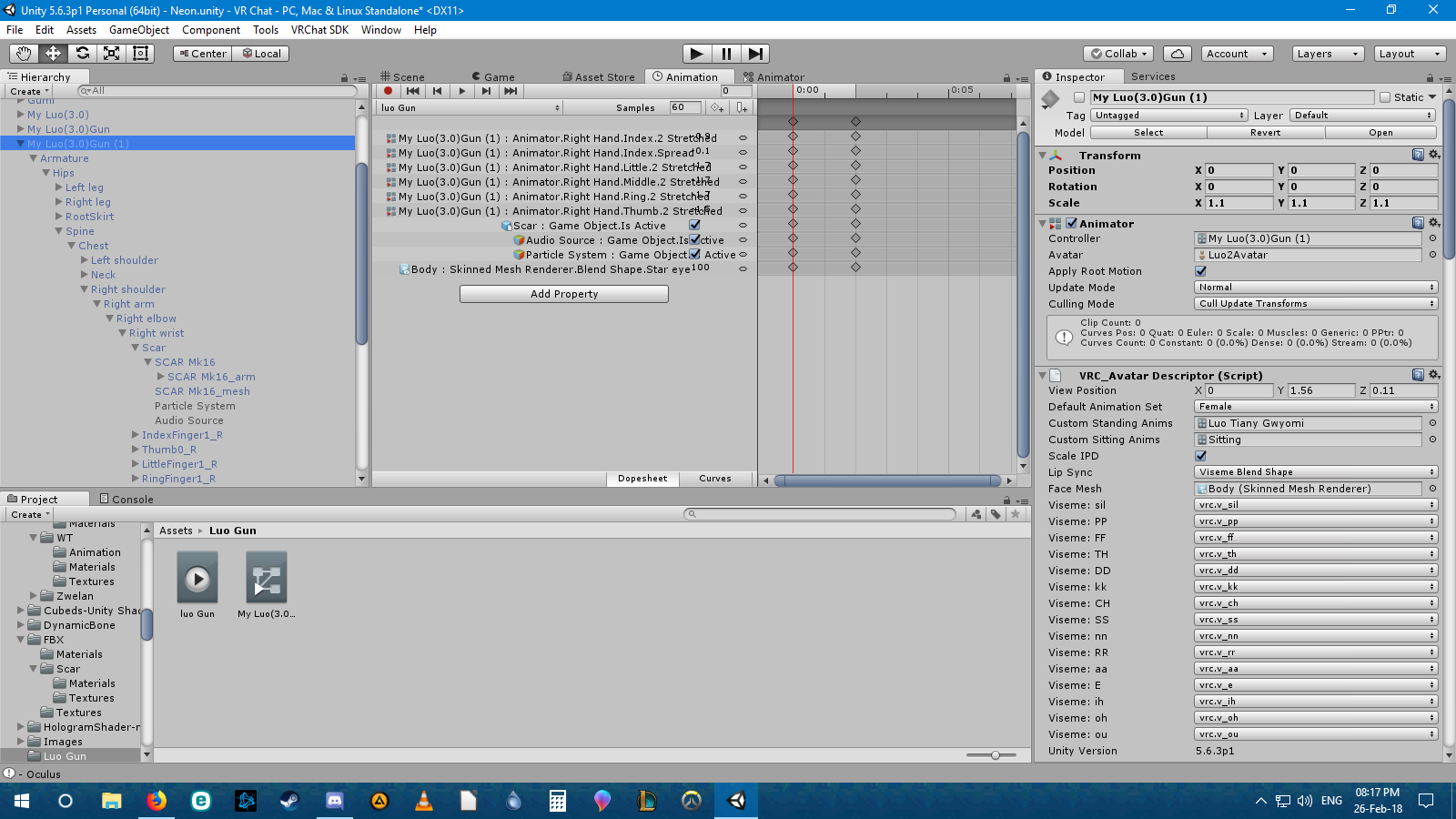 covert hawk
and how do u put it on the first one?
clear yew
Anyone have experience with world particles shaped like meshes? I have a sword that I can plant in the ground and walk away from but it's always at the same rotation. I was wondering if there was a way to have the particle emit based on the rotation of its rigid body parent bone.
 latent swallow
How do u plant a sword and walk away from it
clear yew
😏
 agile ruin
@covert hawk drag it to the 1st frame
covert hawk
i did,it now has only 1 frame instead of 2
 slim steeple
Any idea how to make a prop that is on an avatar invisible when you call a gesture? I.E Gun in holster on the avatar, when gesture is used gun disappears from holster and is only shown in the hand
clear yew
Using a fixed joint above the armature in the hierarchy and a rigid body on the parent bone that emits it, you set the shape as mesh renderer and the renderer as mesh and set the speed to zero. @latent swallow
covert hawk
k
slim steeple
I'd assume so, but I didn't figure it out yet so I'm looking for some help
My gun just shows up in the holster regardless of if I make it inactive in the animation clip or not
agile ruin
@slim steeple Duplicate the weapon that is in the holster and place it in the hand you want it to appear
don't forget to attach it to the wrist
then go to the Animation tab, place both guns (the one in the holster and the duplicate) and uncheck the one in the holster and check the duplicate
slim steeple
Yeah, I have the gun's duplicate appear on the wrist, problem is the one in the holster doesn't disappear it just turns into a gun in the hand in addition to gun in the holster
This is how I set up the clip


m9 (1) is the one that is in the holster and M9 is the one that is in the hand
agile ruin
delete all the shape keys
add the gun and the duplicate again
uncheck the holster gun and check the wrist gun
then just ctrl + c and ctrl + v them to the 1st frame
and it's done
slim steeple
Should I keep the gun in the holster active on the model itself outside it's animation?
slim steeple
I'll give it a shot then
Though that's not much different than what I initially did except in the 0:01 frame the m9 is still active
slim steeple
Is there any way to have a shader change between two props that use the same model or is it not possible to change a model's shader between two duplicates and have them seperate?
 candid token
Is there anyway to Scale apart of the body for a humanoid?
I want an Arm going enlarged when activated but i can not seem to scale it with normal amature
 fathom atlas
https://www.youtube.com/watch?v=zr4KrowRRYw Anyone know how they did 2:48 to about 3:10 ? with displaying what music to pick and what is playing?

Woops Merch NOW AVAILABLE ▶ https://www.designbyhumans.com/shop/WoopsSquad/ 🎬Edited by Shake ‣ https://twitter.com/ShakeDrizzle Produced by: https://twitter....
 short wing
it shouldn't be possible to interact with other avatars like that but I don't know enough to be sure
it looks more like a still image being attached to his hand
I'm trying to make facial gestures work on my avatar, but I don't know how to make the transition smooth
atm her expression changes instantly, so I tried messing with the animator
but the animation just loops when I try making it smooth
clear yew
why is avatar crouching down instead of saluting after i did the proper animation override for the 2nd emote?
short wing
I have an idea to my problem
I don't know supreme commander miku
you have to give us more details
clear yew
@clear yew Copy and paste the idle animation in the sample assets into your animation.
Otherwise you'll get stuck with the default auto muscle squat position
 hexed fern
can someone help meh please? i've been trying to give this guy animations but his hands are so big that they make the animations looks super awkward and wierd http://prntscr.com/ik4lta
 lone bramble
Let me know if anyone is having a similar problem/fixed the problem of any simple animations constantly looping in the new update
 clear yew
Change the animation values to be stronger/weaker to match your model
 zenith scaffold
does anyone know what cats pluggin names the blinking animation
clear yew
Join meshes first and it should auto select it if it's a well put together model
Otherwise it's something like Eye Wink Right 2 etc
zenith scaffold
@hexed fern for the eye tracking
hexed fern
oh, it can be anything from blink 1 or blink 2 to wink 1 and wink 2 or so forth
thats what i have had them be at least, god i can't english today
zenith scaffold
kk
clear yew
If you've already made eye tracking it'll already be on the model and you don't need to touch it from there.
hexed fern
http://prntscr.com/ik4ui9 .....idk wtf is going on with the legs

his right leg is legit fucked up
 wooden aurora
With?
 hexed current
SO
I laid it all out in blender already and exported it into unity
its an mmd dance
wooden aurora
Do you have an anim file?
hexed current
in the middle of the dance, Id like my character to hide one mesh and then show the other
(costume change)
I just need to know
A:
do I do this as an avatar switch
or a gesture
and B: how do I animate it for the switch to happen?
hexed current
Woah wait
what
My setup is
one model animation, with two meshes laid out on top of each other with identical rigs (linked to just one rig)
I have an avatar alreadu
of the same model in the dance file
I want to have the dance have my avatar physics
and do the switch
Im just lost af
wooden aurora
Can I see your higharchy?
hexed current
Yeah sure
hexed fern
ive got this model set to the animations and every 10 or so seconds his eyes derp for a second and spread out slightly http://prntscr.com/ik4zow


thats the eyes normally
idk why he does this, is it because he has eye tracking (i believe he has eye tracking)
clear yew
Did you test your eye tracking?
clear yew
Tested blinking and rotation?
hexed fern
yeah, i remember blinking worked fine
i don't remember for rotation
i can throw him in blender real fast and see
@clear yew if i get to 25 his eyes clip though the face
clear yew
Shouldn't be a problem if blinking and eyes are working.
Any dynamic bones or anything?
Any idle animations?
mystic umbra
unity paused for me for about 10 mins when I copy pasted a vmd animation onto a new animation model
Rip
hexed fern
@clear yew im trying to test idle animations on him and thats when i noticed that
im gonna try it on a model without eye tracking
hexed current
any idea why my dance clips through my clothes in the preview window?
imported an mmd dance
and used same exact model the og dance did
hexed fern
@hexed current at least your clips through clothing, i have a animation made for a model on the asset store and the foot bugs out

it does this on all models
shes supposed to be running
clear yew
Ok I just got an animation from maximo and put it on override. Why does it comes out as a squat in vrchat?
hexed current
now get this
Now i cant even fucking get the animation file out of my fbx
its missing
ive reimported and everything
its vanished.
ophhhhh... nvm..
preview window minimized
S:
in blender it doesnt do that
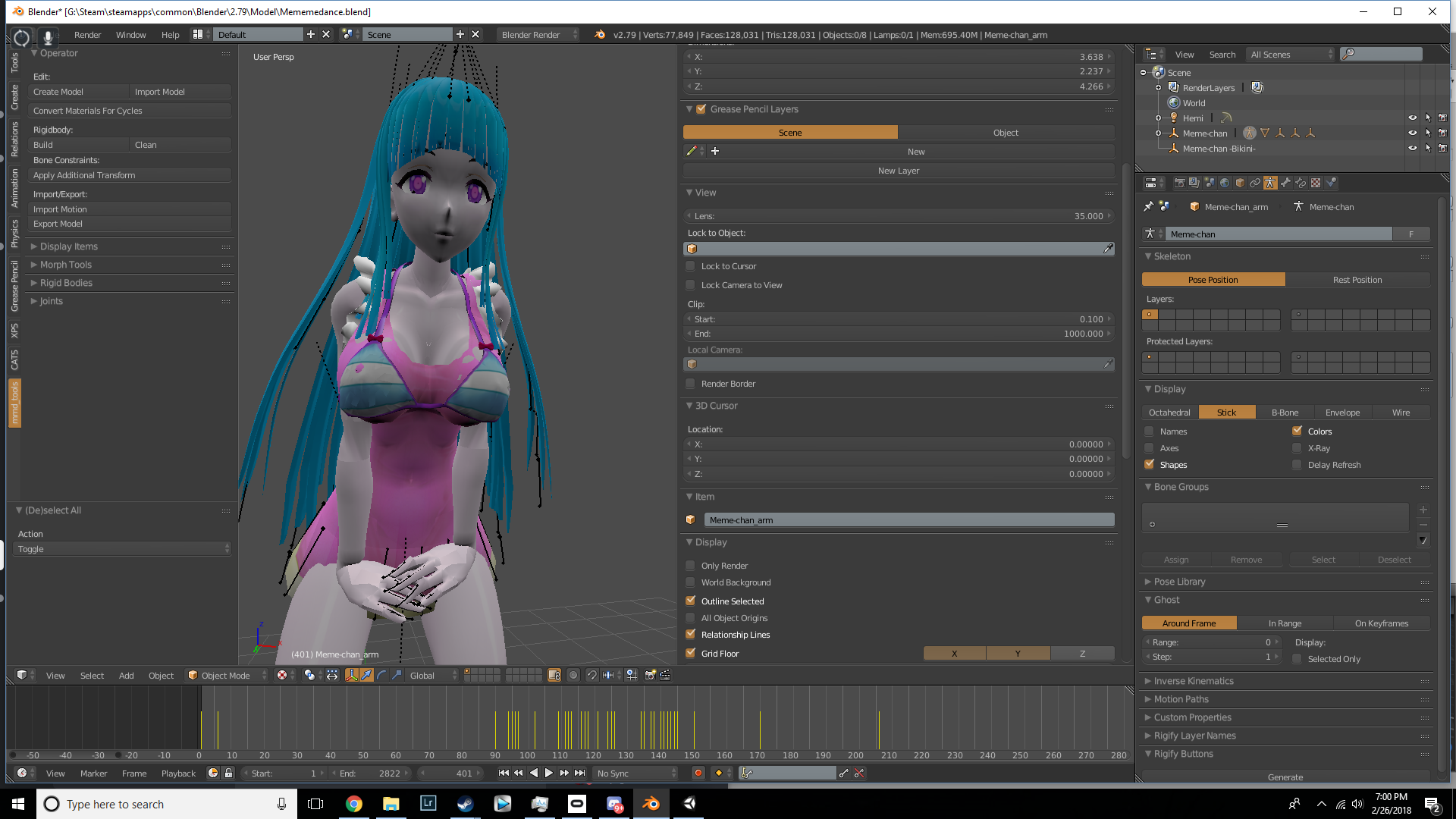
In blender
<Look at hands
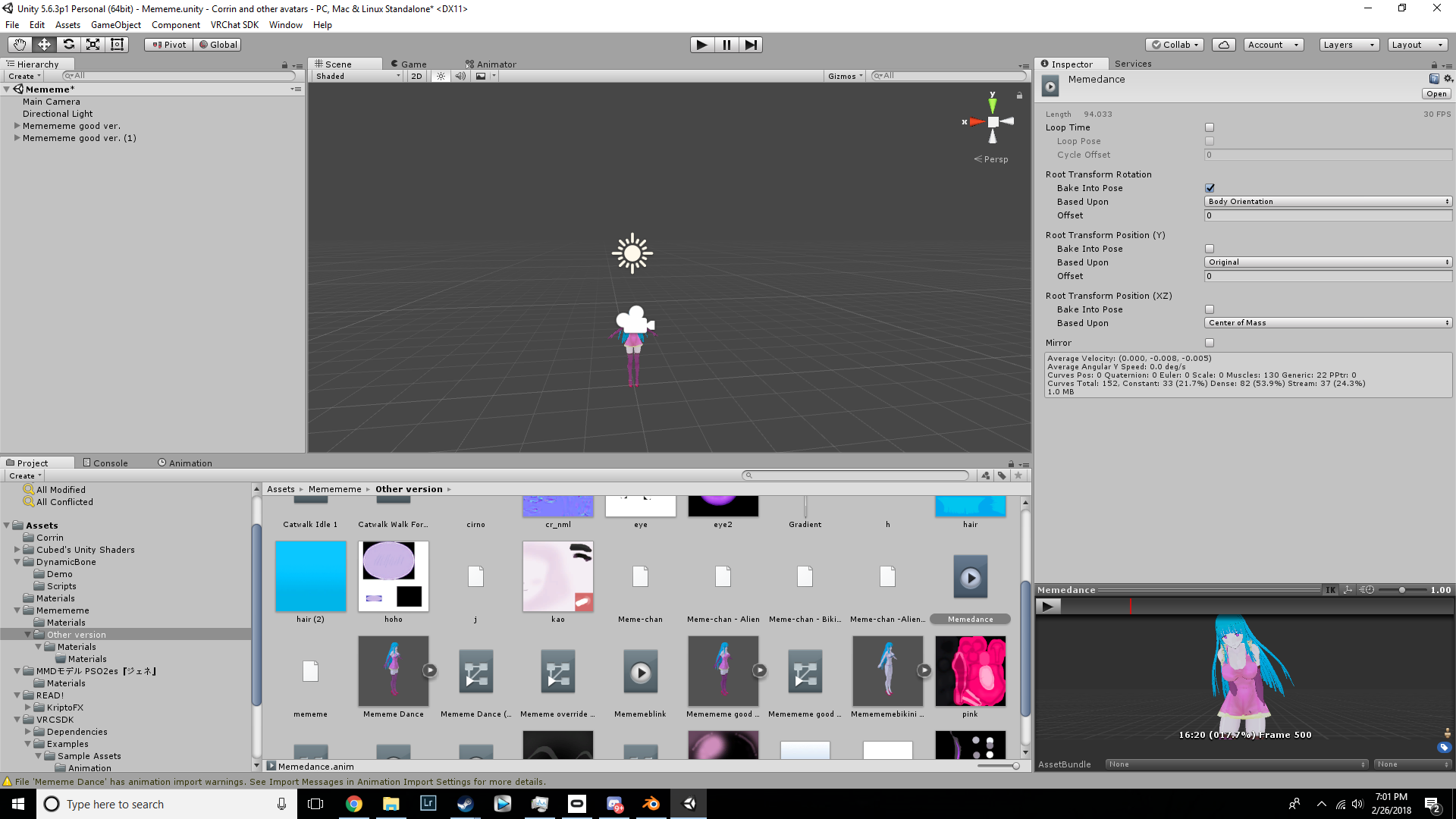
unity
look at bottom right corner
ideas?
clear yew
guys? how do i get animations for animals? do i have to make them? if so, how do i do it?
 lofty crypt
i have a model that has a toggle, which makes an object visible. The object itself has animations, but the animations wont play on the toggle object. How do I make the object play it's animation?
could it be an issue with the way how it is? Considering my avatar has to trigger an animation override to get the robot to show up, then the robots animation plays. Too many animations?
hexed current
im wondering same thing ^
lofty crypt
Ive seen some users have an avatar they switch to, which has an MMD animation or some where the model is always loaded, and it mirrors the players movement as well as some doing what I'm trying to do
id be fine making it into a seperate avatar, I just want to be able to use the animation Ive made
or should i just export the robot itself as a vrcmodel and have an emote that plays the animation
hexed current
Im in the exact same predicament
I wanna do an emote
but it clips when on humanoid
so im gonna have to avatar switch
Lol
clear yew
If that animation is the only thing you want the object to do.
Add an animation component to the object, and put your animation on there.
It will now have that animation as an idle animation.
Or, you can instead put the enable animation and whatever other animation you're doing together since it should still be in the armature and can be animated.
clear yew
So I made one animation using emote override for my avatar, how do i add the second custom animation on my avatar properly without the squat replacing my animation. I tried the idle method but it still squats instead of what I want for second emote.
clear yew
also i dragged my first animation on my model and it becomes idle animation.
hexed current
my predicament is
I wanna
unhide a mesh
in the middle of an animation
Lol
And idk how
possible?
hexed fern
ok guys, does no one know why some of my running animations do this with one of the feet? https://image.prntscr.com/image/Op1dUtLMS_aBdWs67Djlqw.png

and its always the ones i really want to use as well
cunning saffron
@hexed fern do you have ik on your feet?
cunning saffron
get rid of it lol
hexed fern
i went into the config and found this http://prntscr.com/ik7q5b
 signal mango
how would you make a chain dangle like in a keychain
hexed fern
i forgot how to edit the ik's
cunning saffron
@hexed fern same i usually just delete the bones and make new ones
hexed fern
i did it earlier xD
but i forgot how
and there were premade animations so.... i dont wanna screw with em
and only the sprint animations do it
cunning saffron
@signal mango id attach the chain to a bone, parent that bone to the chest bone and use dynamic bones in unity to make the chain move as your character moves
@hexed fern did you try looking into the sprint animation?
signal mango
i have it attached to my back so it looks like its just sticking up :/
hexed fern
@cunning saffron what do you mean by that?
cunning saffron
@hexed fern did you check if there was anything different with the sprint animations that might make the feet derp?
hexed fern
i dont think there was anything different
cunning saffron
@signal mango i dont understand what you mean by attached to your back
signal mango
its a keyblade attached to my back as like a sword but the chain just sticks out
cunning saffron
oh
yeah same thing
attach the chain to a bone then attach that bone to the spine or chest and use dynamic bones
lofty crypt
I got the animation to show
But it cuts off after 1 second
Even though it's suppose to last 1:60
I turned off looping
 tight arrow
I HAVE an animation in Blender, I see it playing even, but when I put it in Unity it somehow loses the animation.
What's the deal?
cunning saffron
did you export the fbx with the animation?
tight arrow
Nope, no idea how to do that... Is it glaringly obvious?
cunning saffron
 tight arrow
These things are always hidden ain't they? Cheers boss.
cunning saffron
@tight arrow do you know you first need to import your model as legacy in unity?
tight arrow
I've imported plenty of things, but this is my first animation.
cunning saffron
MAKE SURE TO DECIMATE MODEL BEFORE YOU ANIMATE IT, OR ELSE MODEL WON'T ACTUALLY DECIMATE AND IT WILL MAKE YOU COMPLETELY ANIMATE MODEL AGAIN! Links: Tinkerca...
tight arrow
I'll check that out.
cunning saffron
@tight arrow just look at the end of the video when he imports in unity
Does anyone know how to make particle collision rubbery instead of a solid bounce?
hexed current
anyone know why future proofing content is taking ages?
mystic umbra
so these shift+ f keys are really weird
I play one animation and if I chooser a different animation it wont play it
and if I press on diferent f keys the animation will play the first one
I should post that in the bugreport
hexed fern
ok so i have more animations that are both for mechanim and legacy, which ones should i import for use with vrchat?
 fierce crypt
For generic models is there a way to just set a animation for walking that'll show consistant walking while your moving, or like someone i saw who set a flying animation for a dragon who is constantly flying anyway.
cunning saffron
xD
tight arrow
It makes an animation file but that's about it.
cunning saffron
what do you mean it doesnt play?
hexed fern
at least you dont gotta rig your animations one by one,(when theres about 30+ per folder)
tight arrow
Oh that sounds like hell.
cunning saffron
@fierce crypt if you want an animation that is always on you make the animation in unity and then export the animation with the fbx and import it in unity via legacy
tight arrow
And exactly that, Luxoy. I put a character in the little box and click play and he just stays sunk in the ground.
hexed fern
im about ready to jump off a bridge, someof them dont even work
oh shit, will legacy animations play with humanoid rigs? because if so my ass is saved
fierce crypt
so i have to somehow come up with my own walking animation or
cunning saffron
@tight arrow well you killed your character
you were supposed to duplicate it
and make the animation on the duplicate and only bring the animation to the main character via the override
hexed fern
only duplicate it if your creating an animation
because im testing my models in the box for animations
fierce crypt
If the file is a playbutton, do i duplicate that, or is there something else i need to duplicate.
hexed fern
fuck its been 5 minutes and this damn folder still isint imported
cunning saffron
@fierce crypt give me a minute ill help then ill come to you after


 cunning saffron
@fierce crypt basically you put the play thing in the override for your avatar
hexed fern
oh there it goes
fierce crypt
yeah, i did that though, and it doesn't work.
tight arrow
OK so i make it legacy, then duplicate the animation.
hexed fern
but someone please tell me legacy animations will work on humanoid model rigs? because i can just import the animations as legacy since they came with legacy versions
cunning saffron
@tight arrow legacy wasnt about you at all lol
hexed fern
because that would save me half a week of my life id never get back
tight arrow
Oh.
cunning saffron
@tight arrow you make it humanoid just like before
tight arrow
The tutorial vid said that anyway.
cunning saffron
@hexed fern legacy works
hexed fern
YES!!!
I DONT HAVE TO WASTE HALF MY WEEK RIGGING THIS FUCKERS
because nearly all the models come with legacy animations 😄
throws other folders out FUCK U TOO MECHANIM
god that just made my day
cunning saffron
idk how mechanim works but i believe youd import it just like a legacy
hexed fern
yeah but they idnt work
unless rigged to humanoid
and like i said theres 30+ animations per model
cunning saffron
yes you first bring them in legacy to get the animation out of the character
hexed fern
so that pretty much = fml
cunning saffron
then you reimport as humanoid and add the animation to the overrides
cunning saffron
um
when you import an fbx
you usually put humanoid
with an animation you need to put legacy to pull the animation out of the fbx
then you select the fbx again and bring it back to humanoid
hexed fern
oh ok.....
with the mechanim ones i just rigged them to humanoid and they worked
but it takes so damn long
for some of them
plus i have to work tommorow so i dont got alot of time to do this shit xD
and then again on thursday....
cunning saffron
again i have no clue how mechanim works ^^!
hexed fern
yeah, i only work 2 days a week, i love my life xD and neither do i xD
hexed current
is uploading working for you guys???
hexed current
its also saying my client is newer than my sdk