#animation
1 messages · Page 50 of 1
 zinc dagger
go to the animation tab
and then add a new property to the animation
then scroll to the gaster blaster mesh/s
and hit the plus next to "is active"
make sure its ticked
go 1 frame forward
and tick it again
and that sorta makes it a toggle with your hadn gesture
*hand
 clear yew
umm
wont let me add any other property because the animation file was already on the model
 onyx charm
Can you upload the blaster file here
zinc dagger
please screenshot
clear yew
and so because it was attached the bones when i exported it into the model both the
okay hold on
zinc dagger
or something i have no idea what you're seeing
clear yew
okay how do i send you it
why wont it let me send the creenshot heres
hold on
let me put the screenshots here!!
onyx charm
i added you
 dawn shale
Hey guys, I have a model set as a particle system in Unity. It seems to work perfectly fine in game, but it vanishes when you look at it a certain way, and get close to it. Does anyone know why this is happening, and how to fix it? http://puu.sh/zuy59/f5d90ec6bf.jpg http://puu.sh/zuy6r/6527553535.png

 dawn shale
As the emote plays and I'm able to move again, that's when the problem comes up.
zinc dagger
is this a berserk reference?
dawn shale
.. Yes
I have no idea how to fix this damn issue
It only happens when I move around
clear yew
can someone tell me if gestures can animate shapekeys or if it's just analog?
say if i wanted to transition into expression instead of just snap to
 final gazelle
never tried myself, but in Tupper's tutorial, he set his shapkey values straight to 100 when he was creating the animation override
i think that implies it should be possible, if you're allowed to choose the degree to which the shapekey is invoked?
clear yew
well yeah you can put whatever on the first frame
but i mean if i wanna put it several frames in so it goes smoothly from normal expression to gesture
desktop user tryying to use new gesture possibilities
final gazelle
yeah, but the fact that you're allowed to choose from a value of 0-100, rather than just a straight "on" or "off" -- i'd imagine what you're trying to do should make it happen
clear yew
iirc vr people have pressure sensitive keys etc for that
final gazelle
though could you set your first frame as your normal expression and just have it transition into that later on?
clear yew
that's what i want to do, i wanna know if it'll work...
final gazelle
might be faster to directly try it, if all the people who actually know are afk 😛
final gazelle
i imagine it should though, unity's animation behaviour shouldn't be vastly different to other keyframe-based animation programs
and what you wanted to try is exactly how MMD behaves with shapekeys
clear yew
uhh
final gazelle
only time i've seen things snap on/off in an instant is with material changes or active states
clear yew
problm with that assumption
for example
you can't move humanoid rig with gestures
if i'm not mistaken, it's because gestures are ik mode and set to only affect hands
final gazelle
shapekeys aren't bone-based though, right?
clear yew
no, that's why i didn't know if it would work lol
especially with vr people being able to use gesture part-way by holding it down part way iirc
final gazelle
now that you mention it though, i might have a few experiments of my own to run -- i haven't tried using shapekeys in custom idle animations on my avatars
clear yew
oh i have
final gazelle
bone rotations get completely blocked with everything i've tried so far in the idle/walk/run cycles
clear yew
i have expressions in all my custom anims
oh wait
not the movement ones hmm
wait yes i have
dawn shale
does no one know how to fix this issue I'm having? :|
final gazelle
neat, thanks for the info -- yup, that'd imply that it's the muscle animator overriding any attempted bone rotation inputs
@dawn shale i'm half wondering if your thing is to do with near/far plane clipping or the bounds, but haven't fiddled around with that enough to really be sure or have a clear idea of it
clear yew
well... yeah if it's origin is outside of rendering view it might poof
like if it clips through camera or something
i'm just guessing tho
final gazelle
guesses are better than no ideas at all, considering the amount of uncharted/undocumented stuff we have between unity and the fact this game is still early access 😛
clear yew
i don't like how it's treating my avatar like it's completely new when i upload tho :<
clear yew
my avatar upload didn't even work wtf
final gazelle
wonder if it's possible teething problems with the new patch and/or SDK -- seeing various issues and bug reports about it over the various channels
that "completely new thing" sounds mildly similar to what i saw when trying to upload avatars while we had server issues
clear yew
i uploaded, but it never showed up in my avatar list
final gazelle
yeah, methinks the behaviour's similar to server issues then -- probably means your client thinks it sent it out properly, but the server didn't actually register the reception...maybe
i'm probably going to wait a couple of days to see if things get ironed out first
clear yew
grrr
i need to know if this works now
cuz i'm gonna spend a bit making all my facial expressions
also, if you use a 50% shhapekey, then use other hand to do 50% same shapekey, does it go to 50%? or add them and go to 100%?
need to knnow these things!
final gazelle
huh...that's an odd thought, i imagine it might try to add them together
because you can sum the effects of shape keys together, so it should be possible to get a 200% value of a shape key unless it's got some constraints preventing that...
 ocean dagger
I have a rotating 2d plane with text but when the animation comes close to finishing the loop, it slows down and doesn't look smooth at all
 amber mantle
is there a way to use the new gestures for desktop, to switch the avatar model to another? (for example i have two monika models, the main one looks normal, but the other one is the creepy one, i want to use the gestures to be able to switch between them and then when i release the button it goes back to normal)
clear yew
@amber mantle yes, there's multiple people i know of that do that
desktop keys seem to be hard-set not hold, so you'd have to key back to normal
klaus and winterstarr iirc both have creepy modes they switch to... but i think it's all texture not full swap of mesh
amber mantle
hmm do you know how? or some vid you can send? @clear yew
clear yew
no i don't
i'm a desktop user, and i'm just now tyring to get into gestures
buuuuut i can't upload squat apparently so it's kinda hard to test anything
Does anyone...know how to make animation on emote menu?
 signal dove
@final gazelle Animation import warnings I've received mention enabling DOF in the muscle settings if I want bone translation, maybe that helps with whatever rotation problem you're having?
I skimmed the chat
final gazelle
reading through some of the documentation on that, seems like it's mostly to do with bone movement/translation rather than rotation -- i'll give it a shot though, thanks for the suggestion
 languid nimbus
Hey does anyone know if it's possible to animate left and right strafe separately?
@clear yew If you make an animation and put it on EMOTE1-8 it overrides the current emotes in the game
final gazelle
@languid nimbus should be possible if you change the assigned animation clips in the actual animation controller
"STRAFERT" doesn't show up on the override controller because both left and right movement have been set to use "STRAFELFT" -- only that the rightwards movement is set to use a mirrored version of the left strafe
languid nimbus
What do you mean by that spearmonkey?, I tried adding a STRAFELT to the animation controller but that didn't work, if I have to assign it to something
No it's the opposite, STRAFELT doesn't show up
 final gazelle
ah right, so it's the other way around...gimme a sec to dig it up
that screenshot's the override controller
@languid nimbus you need to get down to here, in the animation controller (not the override controller)
 languid nimbus
I'm looking in the animator for the avatar controller template
clear yew
yes, but if you put it in emotes instead of gesture override, the avatar will squatting like the normal bug when you open it
final gazelle
it's in the locomotion layer
 final gazelle
STRAFERT has been assigned to 4 different movement states -- you need to change two of them to an animation named something else (not sure if a "STRAFELT" actually exists with the SDK pack, but anything named differently will give you a new option to override in the override controller once set)
yup, now double click on StandingHeight
clear yew
@languid nimbus I just wanna make some long-frame animation on emote...
final gazelle
should open some crazily complex boxes
languid nimbus
Yeah I see it
I'm used to this part hahah
I've been doing general rigs
@clear yew In difference to regular guestures you have to animate every single part of the body to do anything in emotes
final gazelle
@languid nimbus now click on the box for standing locomotion, should show you all the animations that...thing uses
underneath the animation for "RUNBACK", STRAFERT is assigned 4 times
languid nimbus
so basically can I just swap the second STRAFERT for STRAFELT
final gazelle
or any other animation clip that's named differently, yeah (i'm not sure if "STRAFELT" actually exists)
languid nimbus
Technically it doesn't?
final gazelle
basically, the reason STRAFERT doesn't show up in the animation controller is because there aren't two differently named clips assigned to those movements
clear yew
@languid nimbus Do you mean by manually reset every body parts to the initial position that I want?
languid nimbus
@clear yew Yes
final gazelle
so as long you assign something named differently, even "I_Eat_Hotdogs", you can use that to override whatever movement that animation's been assigned to
clear yew
Oh...mg....that's a mass of work!
languid nimbus
@clear yew you could try using the idle animation as a template, like delete everything but the first keyframe and start from there 😃
Alright Spearmonkey, imma get some breakfeast and get crackin on this
final gazelle
yup, good luck
languid nimbus
if it works I hope you have a paypal
final gazelle
i don't -- and i don't need anything either 😛
clear yew
just find that template then copy everything of the first frame and paste?
final gazelle
i just like to float on this discord making trouble 😛
languid nimbus
Dangit, because I value information
and people who give out information, especially advanced information should be rewarded :p
well that's my opinion atleast, I teach people stuff all the time but I never ask for anything
final gazelle
the ones i think you want to replace are the ones with the negative X values
the other animations for left movement seem to be negative X, while right movement is positive X
languid nimbus
when I click on them I see that the left part of the white box is coloured on the left side so yes, I would assume so 😃
final gazelle
as for how it works, i'm guessing it's to do with the tickbox on the far right -- that column's for "mirror animation"
seems more fiddly for generic rigs
languid nimbus
honestly generic rigs are way easier than this hahah
final gazelle
i'm still waiting on a fix to the emote looping, but until then, one actual generic and one fake humanoid of the same model will have to do
languid nimbus
Ahaha
you also have a fake humanoid one XD
what do you mean by the emote looping?
I kinda had a problem with that on my generic rig
@final gazelle Hey do you know how to force head movement in the movement animations?
because I have an animation where I roll to the left, right?
for me it's fine, but for others my head stays still while I roll
 dusky venture
if you ever figure out how to fix that gatreh i'd love to find out, i have the same issue except i also see it
i just want an idle where they look like they're floating but they look more like they're squishing their body into their stationary head then back down where they stretch to touch the floor
 quiet needle
Set up an animation that raises the hips up then back down. It will move the whole model.
 storm berry
is someone good with Particles and Animations and would maybe teach me one or two things?
Tutorial Videos and I are going horrible together ,_,
dusky venture
hmm- im changing the hip's position but it never seems to stick and instead reverts back when i click out of the field @quiet needle
quiet needle
Might be time to restart Unity. That happens sometimes and I'm not sure why. Usually a restart fixes it.
@storm berry I'm at work right now but I could perhaps give some insight?
dusky venture
@quiet needle sorry if im being annoying aha- but yeah i've restarted and it's still not changing, it's almost as if the armature is locked?
quiet needle
Hmm... I'm not in a position to try it myself. Maybe they have those bones locked.
I know there's a way to do it though, because I've seen multiple floating models.
Maybe see if it will let you move the root or the armature root?
dusky venture
yeah it's strange, like no part of the armature is able to be moved unfortunately- i was previously using root T to move them up and down but then of course i had the issue that started this basically? like the animation looked fine in unity and bobbed up and down but in vrc the head stayed absolutely still
it's all good though about the trying it though i'm just completely stumped
quiet needle
Maybe look up float tutorials on Youtube? Somebody might have a prefab animation that works and it could save some work.
clear yew
Does anyone know is that possible to add a sound to a sub emitter in particle system?
like explosion when hit something
Only active when sub emitter occured
quiet needle
@clear yew You could try adding the audio source as an additional component on the particle, but I'm not sure it will fire with it being a sub-emitter.
dusky venture
unfortunately (unless im just real bad at searching) i've not been able to really find a youtube tutorial or much else in the sense of prefabs, i guess if anyone can find one that's for making floating avatars dont be afraid to @ me since im honestly just like huh...
clear yew
@quiet needle Gottcha Thx! I'm gna tryXD
clear yew
that component...you mean add in the hierarchy? or "add components" like dynamic bone?
quiet needle
Emotes lock out movement for up to I believe 180 seconds. You need to reup the lockout if you want it to be longer.
@clear yew Add component
 covert hawk
and how i do that?
quiet needle
Hit another emote while the first is firing.
Sometimes that can cause weird things to happen.
clear yew
@quiet needle Seems it doesn't work...
quiet needle
@clear yew Hmm. Is it a full animation or just a gesture?
clear yew
gesture.

I disable the "play on Awake" So now it won't activate with the main emitter, but either subemitter...
quiet needle
Did you add the audio source to the main emitter or the sub? It should be on the sub.
 sour hedge
how would one go around adding sound to e.g. the walking or running animation? I copied the animation itself and made it enable an audio source. The animation only had 2 frames tho, which made my model ig with the overwrite weirdly waddle in one spot.. like, it looks funny, but that wasn't what I was shooting for.
Anyone got an idea what I'm doing wrong?
quiet needle
@clear yew I'm not sure what else you could try. I'm asking some of my resources and I'll tag you back if they have an easy way.
@sour hedge Which animations did you override?
clear yew
Thank you so much!!@quiet needle
 fluid crescent
Head is not moving when doing a aniamtion,anyone knows why?
covert hawk
so my emote still stops early,i have the Gwiyomi emote and it just stops around 37 seconds while the files(both the animation and sound track )are 42 seconds
no idea what to do
sour hedge
@quiet needle RUNFWD
i put the cao with the overwrite in both animator and avatar descriptor. Not sure if later one could cause it
 cedar root
im trying to set it up to have 3 versions of me dancing, and the dance itself works fine when i used it as a solo emote, but when i duplicated it and converted it to the proper settings and put it on the animation component for the other 2 and try to play the scene, nothing happens and it just constantly says reloading assemblies in the log. is there something wrong? i left it sitting like that for like an hour and nothing happened.
 quiet needle
@clear yew ONSPAudioSource is a component that is automatically added whenever you add an audio source. Just remove the component from your Audio Source and you're golden.
clear yew
roger that!
quiet needle
@sour hedge I believe you just need the override, and you should have an animation puppet with the controller assigned. Leave your main model's Animator set to None.
@cedar root Generally speaking you should just be able to create your anim file with your timeline pips, add it to an override, then add the override to the avatar descriptor. Unity has problems when you get a large number of keyframe pips, and depending on your rig, it might just freeze up entirely.
final gazelle
@languid nimbus emote looping, it's like you can't move, jump or select any other emotes to use for about 60 seconds if you use an emote from a generic rig -- did some experimenting with the avatar controller which suggested what the cause might be (though without a solution we can use, details over in this link if you wanted to look into it: https://vrchat.canny.io/bug-reports/p/generic-rig-gets-stuck-when-emoting )
forcing head movement...i don't really remember having an issue with that with any of my emotes in generic or humanoid rigs, but with humanoid rigs, the IK system/camera control seems to take control of the head bone whenever you're idling or moving -- it's only during emotes where it seems to release control of it, as far as i can tell. If you're getting something else happening, I don't think I've encountered that before
cedar root
i essentially have it set up so that when i activate the emote it plays the animation on the middle model. then also at the same time enables the other 2 with the animation on an animation component linked to them which should play automatically. making all 3 dance at once, but when i try to test it it just says reloading assemblies and nothing happens, even on the main one which the animation worked fine for when it was alone
the unity app itself isnt frozen, i can do other stuff in unity, it just wont play my animation
quiet needle
Maybe try removing the animation component in the inspector and re-adding it?
When in doubt, turn it off and on again.
 agile ruin
Is there a way to hide meshes through an animation? I tried doing it but it didn't work
fluid crescent
I have default animations even i added custom wtf
clear yew
@quiet needle My dear TechPanda, I found a custom script for playing sound under the sub emitter....but it seems need some changes...do you know something about coding on Unity?
quiet needle
@clear yew I don't know much, but I do know that custom scripts might not be allowed in VRChat.
(yet)
languid nimbus
@final gazelle That's exactly what's happening with the head movement, while I roll it completely takes control of the head movement serverside so it looks fine on my end but renders differently for other people
quiet needle
Does your animation use baked rotation and translation options? @languid nimbus
cedar root
i tried that and nothing changed. out of curiosity i changed one of them to a very simple tail wagging animation i have and when i hit play that worked but the other 2 with the dance animation didn't
idk maybe i just try rebuilding it from scratch in a new project file
i dont think my specs are the issue, i have a pretty strong machine, so idk
quiet needle
@cedar root Yeah probably, but Unity can only handle so much, regardless of beastliness.
final gazelle
@languid nimbus if it's something only happening now, but not before, that may be another quirk of the recent app/SDK update -- i don't think i've tried creating custom emotes on "true" humanoid builds now that i think about it, so that's an area i can only make guesses about
if it's happening with a generic build though, that's complete news to me -- we didn't even have any sort of head tracking as far as i could tell, so if it's a generic problem, that might be a teething problem with new features they're trying to add (though i'm guessing this scenario is less likely)
quiet needle
@cedar root It could be that it doesn't like the addition of multiple animation components into the scene.
cedar root
@quiet needle I guess but I've seen other people add equally complex dances like this so clearly it's possible.
IDK like i said I'll try redoing it from scratch and see
languid nimbus
Tech my rolling animation looks like this http://puu.sh/zuIFA/f972adff5d.png

Nah @final gazelle it's a fake humanoid rig
http://puu.sh/zuIGV/03f326a8ad.pngI added two legs that don't do anything

@quiet needle I showed the rolling animation above
idk what you mean by baked translation and rotation
quiet needle
Emote or motion/gesture?
languid nimbus
 quiet needle
So basically in humanoid rigs, the neck/head bone are hijacked by the animation controller, so your VR headset position will always determine the rotation of the neck unless you are performing an emote.
quiet needle
Technically it's no different from being in VR except that the mouse controls the neck bone instead of a VR headset.
languid nimbus
Yeah I know
quiet needle
You'd have to know how to modify the animation controller to make it take control of the neck while that anim is playing. That's a bit beyond my knowledge.
languid nimbus
ouch
Well I started messing around with the avatar controller
but I'm not really that advanced
maybe I can ask tupper or something
I know SOMEONE did it at some point
now I gotta figure out the other two things I'm working on
quiet needle
Yeah it's definitely not impossible.
 covert linden
Hey guys, I'm trying to animate something that just goes in circles, its a 2s animation but its painfully clear when it resets, I want it to loop smoothly, does anyone know how to make that work?
languid nimbus
make sure the last animation frame looks the exact same as the first one
if you want a smooth animation
Why won't my animation work damnit T-T
covert linden
kinda got it working, its not really smooth but at least it repeats okay
languid nimbus
@quiet needle Now I'm trying to figure out how to separate left/right strafe hahah
covert hawk
is there any issue if an emote animations is 60 fps? i see most of them at 30
 rancid furnace
@covert linden is it obvious because it slows down at the end of the slow and slowly start at the start?
signal dove
I have an emote for my humanois avatar, with 116 frames at 60fps. On the very first frame it activates an otherwise inactive object that has a generic animation also with 116 frames at 60fps. The latter keeps falling out of sync
clear yew
I have a unity problem where when i enter the bone config some parts of the body turn 180 degrees, pm me if you know a solution
quiet needle
@languid nimbus I believe it just uses a mirrored version for the opposite strafe
@covert linden You're going to need to edit your curves.
languid nimbus
Yeah @quiet needle that's what it's supposed to do but it doesn't
probably because I directly animated bones
so I was trying to change it so I actually had a STRAFELT
so I could animate them separately
quiet needle
Doesn't the animation override sheet have them both?
languid nimbus
nope
only STRAFERT
I'm trying to go into the animation controller to see if I can mess with it
quiet needle
They were there on the last SDK, I haven't had a chance to play with the new one yet.
covert hawk
can u make idle animations to play when u don;t move ur character for like 3 minutes?
languid nimbus
TechPanda, there is a Left and Right strafe on the generic rig animations, that might be what you were thinking of
quiet needle
I never noticed that before lol
Yeah I was looking at generic
it has the angled strafes, but no STRAFELT
 quiet needle
Did you mod the anim controller to get that?
 quiet needle
adding an entry is one thing, getting it to do the thing is another beast
languid nimbus
 quiet needle
looks correct so far
languid nimbus
the main difference is that they're different animations and they aren't mirrored versions of eachother
before those boxes on the right were checked
and the strafeLT was STRAFERT
so there were 4 STRAFERT
(Oh I obviously copied the thing so I'm not modifying the basic one)
that'd be pretty bad hahah
I also changed the controller to my custom one

 quiet needle
I wonder why they didn't just go ahead and add that in instead of writing in a mirror standin
languid nimbus
no idea :/
like at this point I'm curious about what happens when I delete the forward walking animation
is it even going to care
actually I'm gunna do that
okay
I no longer have a walk forward
quiet needle
Did you only add the strafe component into the override, or did you add anything to the controller also?
languid nimbus
No I created a duplicate of the controller in the animation examples, renamed that to HSAvatarController
Removed 2 of the STRAFERT
Created a new clip called STRAFELT that I duplicated off of the examples in the mixamo animations that are provided (I duplicated the IDLE one so there would be no problems with having duplicated STRAFERT)
Then it showed up in the HSCustom properly after I added the controller in the top
GAAAH WHY IS IT TAKING SO LONG FOR MY CHARACTERS TO UPLOAD
deleted forward walking animation
forward walking animation still works
so basically we can't edit the avatar controller
quiet needle
Match up the controller on your avatar with the controller assigned to the override sheet.
languid nimbus
what do you mean?
quiet needle
Your override is set to HSAvatarController but your model is set to HSCustom
signal dove
As in the pictures you posted
languid nimbus
Right because if I put the controller in the animator

this happens when I check the animations of the character
rancid furnace
but wondering why my emote isn't working and a thought just came to me...
is there a max length for emotes?
quiet needle
@languid nimbus set your model to none then
quiet needle
Animator > None
rancid furnace
Was that yes to me?
languid nimbus
on the animator/avatar box?
quiet needle
Yeah
languid nimbus
yes @rancid furnace
quiet needle
Ensure your puppet model has its own controller with all the animations attached.
languid nimbus
sorry but just for clarification again http://puu.sh/zuLpd/fdf053a6b8.png
 quiet needle
Controller
rancid furnace
ah thanks, what's the max length thenn?
quiet needle
None
languid nimbus
now it just gives me that I don't have any animations at all

added random animation
quiet needle
So now drag your anim files onto your puppet in the hierarchy
it should add them to the cliplist. Then add them to your override and attach that to your standing/sitting override slots on your avatar descriptor
languid nimbus
no locomotion layers, no idle layer, no HandLeft/Handright layers
quiet needle
Yep
languid nimbus
I need you to speak simpler, or provide me with pictures of what you mean by puppet or hierarchy in this case
brb gunna do some dishes
quiet needle
Sorry, I'm at work, so I don't have access to Unity at the moment. I'll be on later tonight if you still need help.
signal dove
So I have an animation for my avatar, that activates an object added to it.
How can I paste an animation for this second object into the animation of the first one?
clear yew
I really dont understand this new update....If my previous avatars are public and now I wanna change to private, I have to import fbx and do everything again??
quiet needle
@clear yew Supposedly there is a checkbox in the uploaded content menu. Some people are reporting that not all of their avatars are showing up there any longer.
clear yew
that's what I met
quiet needle
The fix in that case would be to reupload your avatar after detaching the pipeline ID.
clear yew
okay....
quiet needle
@signal dove Animation keyframe pips are fully copy/pasteable. If it is a large animation you may lag during pasting.
If you don't want to have the full animation every time you activate it, you could just add a passive animation as a component on the root of your game object in the hierarchy.
languid nimbus
@clear yew, you will have to downgrade to an older version of the SDK and reupload the avatars, that should let them be visible by the new SDK
signal dove
@quiet needle I know I can copy paste, but how do I paste them into an animation that references the object being animated?
quiet needle
Animations are simple. Move/rotate/activate/deactivate this bone/object at this timestamp. That's all it does.
Animations don't show up as a property as they are not part of your model.
You can add a component to models for triggering an animation on it, and that will show up in an animation, but not many other ways to get it to appear.
As far as Unity specifically, if your animation is not editable, then it is either not attached to a controller properly, or you don't have your controller highlighted in the hierarchy (your dummy/puppet)
If that is the case, reach out to me and show me some screenshots and I may be able to assist.
clear yew
My avatar has a successful upload but doesnt appear ingame
PM me if you know the solution
languid nimbus
So anyways @quiet needle I'm back hahah
is there a way you can explain it in steps to see the hierarchy and the puppet?
quiet needle
Yeah, so what I wanted to try was just to make it a basic puppeteer style animation controller situation and see if that works, seeing as you have it set to humanoid.
Did you duplicate your model to create the animation?
quiet needle
Yeah it's probably going to be a little different since it's not truly a humanoid
but since it's rigged as one, mayhaps we should animate it like one and see if we get the results we want
languid nimbus
sure
but all animations work properly
well besides my handgun guesture
which I just can't get to work
even though I follow tutorials to the letter
quiet needle
I suppose that's true, and if it's just the neck rotation issue I'm not sure what we could do different to fix that... Gestures are easy though.
languid nimbus
See you say this, but I had people who did gestures before guide me over discord
and it still didn't work
quiet needle
it's an animation which is .01 or .02 sec long with the same keyframes on both ends, add anim to override, add override to model.
Super simple
languid nimbus
yeah that's exactly what I did
and the keyframe is to show the thing you wanna show
quiet needle
gameobject > isactive
languid nimbus
then apply it on handgun
since that's the gesture I wanted it on
I did that exactly
and nothing happened
works fine in unity
quiet needle
maybe try the puppet technique and see if that helps?
languid nimbus
mmh maybe
quiet needle
Set your controller to none on your primary model, duplicate the model and add the controller to the duplicate, make sure your animation cliplist shows all your animations, set the override sheet back to the default animation controller and make sure it has all your overrides, add to override slots on avatar descriptor and test.
Might have been easier to just rerig it as generic and see if that fixes things too, especially if you already have a full animation set.
languid nimbus
I already have a full animation set for my generic model
like it's a generic/humanoid model with 2 versions
quiet needle
You're in a very unique position as far as animators go. You have something non-standard rigged using a standard setup and seem to know at least enough to get the basics working, but to get any further you need somebody who can rewrite Unity scripts.
languid nimbus
urgh
Like on the humanoid model I added a left walk (Basically since it was mirrored on right I just put the left roll on right strafe)
a sitting animation
and an idle animation
it's only gestures and left strage that doesn't work T-T
totally ruins the immersion of the model
quiet needle
Looking over it, it's likely that the controller doesn't have an animation call for a STRAFELT, so even though you added it to your override sheet, it's not being utilized. Sad day.
languid nimbus
no like
I added it to the controller manually

like on a custom controller
but it still didn't do anything
goddamnit I wish there was a way to actually talk to the vrchat team so I could just ask if this was possible
I guess there isn't though because people would swamp them with mundane questions about how to make an avatar
signal dove
Oh neat. I wonder if you can use this to force animations to play correctly on humanoids, and not get mixed up with each other?
clear yew
im in dire need of help
languid nimbus
@signal dove Nope, I even tried deleting base animations like WALKFWD
but it just overrides them with the game ones no matter what
languid nimbus
Callum a great way to get help faster is to describe the problem in your initial post
clear yew
Yeah haha
Well I have edited a mixamo animation within the Animations tab whilst its in the scene and it uploads fine and plays perfectly in preview, but when it gets into the game it doesnt work as shown in the preview and it sticks me in the ground
So i was wondering if that it could be fixed easily or if there's any chance i can export the edit out and put it back in
My avatar is meant to spin around and shrink but it's stuck in the ground and the shrink instead is just the character's arms and legs moving inwards
Would a video be helpful?
 final gazelle
@languid nimbus hmm, the strafing stuff not working?
clear yew
hold on getting the ingame footage
final gazelle
just scrolled through most of the discussion, but my mind's still a bit imploded from another fairly lengthy discussion
clear yew
see, it doesnt look at all like the unity preview https://www.dropbox.com/s/zma6h4fneroe094/2018-02-24-2005-10.mp4?dl=0
 quiet needle
@clear yew You added the animation controller directly to your avatar, yes?
clear yew
My main one yes and I have seperate Animation character duplicates in the scene, the animation i edited is in one
Like how you add sound to an emote, thats the set up
quiet needle
swats with newspaper BAD!
clear yew
what am i doing wrong lol
quiet needle
So you always want your main model to have the Animator controller set to "None"
Then all your other animations can usually be attached to one duplicate/puppet
clear yew
So this should fix it?
quiet needle
Yep, you lose your T-Pose when you add an animation controller to your model. This is likely why you fall through the floor.
clear yew
Oooh okay
quiet needle
Do you know how to add multiple animation clips to one controller?
signal dove
Do tell
clear yew
Are there any particle effect packs in the unity store where I can replicate anime effects like the kamehameha and like huge mecha lasers?
Ermm, Nope
@quiet needle
quiet needle
Think of the controller as a folder, it holds all your animation clips. All you have to do is drag the anim onto the controller or the model the controller is assigned to (your puppet) and it will add it to your clip list.
You only want one folder with all the anims inside, as you can only assign one controller to your puppet.
Once you have the anims configured, add them to an override sheet, then add the overrides to your override slots in your vrc_avatar_descriptor component.
If it's an emote that causes you to fall through the floor (as opposed to a gesture) then you need to animate the entire model, not just the hands or game objects.
clear yew
Hmmm right, I think i get you
quiet needle
If you want to edit a specific animation, click your model with the controller assigned (puppet) and go to the animation tab. Below the pause/play/record buttons, you'll see the name of your animation. Click that and it will open your clip list.
Keep things clean and organized and they will work for you every time.
clear yew
So should I put my animations in my main model's folder?
quiet needle
Anims (the circle/play icon) should be attached to your controller, which should be attached to your puppet/dupe
clear yew
Yeah I got that
Should I remove my controller for the animation's animator too like i did with my character?
languid nimbus
@final gazelle Yeah it's not working
I even changed it in the animator controller but it seems it gets overridden by the controller in the game anyways :/
quiet needle
@clear yew Your main model should have "None" set for the controller, and your duplicate should have a custom named controller (which you saved when you clicked "Create" on the animation tab) assigned.
clear yew
Yeah, I got that too :/
quiet needle
Are all your anims showing up in the cliplist for your puppet?
clear yew
Oh yeah
quiet needle
Is it an emote or a gesture you're having trouble with?
quiet needle
Which? Emote or gesture?
quiet needle
It could be related to the way emotes interact with the character armature. I've not had a chance to play around with animations that raise a character off the ground, but I know they have some restrictions in VRChat regarding how some root bones can be manipulated.
clear yew
:/ im so bummed this isnt working
quiet needle
lol
languid nimbus
and idk what happened
but adding fingerbones apparently fucked with my base animation
so now it looks like I'm begging for food
quiet needle
got puppet?
quiet needle
I'm willing to bet you money that it's got something to do with it.
languid nimbus
Nah dude
it's that I'm using an animation that has less bones than the actual model
clear yew
@quiet needle i just made a brand new animation and now my character is in the like hands closed/semi sitting position it put you in, will this be alright when i upload it?
 opal cliff
Yeah its perfectly fine
When u go to upload just turn that model off
And keep the one before u duplicated on
 slim steeple
Any idea how I can make a prop gesture play an animation at the beginning of it's frames and then have it stay at it's end state instead of having it loop over and over?
slim steeple
Basically I have a glowstick that at the start plays a snap sound then goes from light intensity of 0 to the intensity I want to keep it at
quiet needle
@clear yew Your main character should always be in T-Pose. If that changes, go re-enforce T in the rig config.
signal dove
Finally, my second object is playing its animation in sync with the avatar that activated it
quiet needle
You should never be adding animations or controllers to your main model.
 flat citrus
Can someone help ? I can't upload an avatar because "ONSAPaudiosource will be deleted". I deleted the component, but still get the error. What can I do ?
quiet needle
What was the sync issue @signal dove ?
signal dove
@quiet needle I was trying to use legacy animations, but now I've set up a controller
I already new how keyframes work thank you very much. But I didn't know about controllers, thank you very much!
Alright, now I just need to set up all the particle animations
quiet needle
Do the thing!
signal dove
As long as I hang on to these controller files, I shouldn't need to hang on to any animation editing clones, right?
I can just make a new clone and insert an old controller, as long as the heirarchy doesn't conflict
quiet needle
@clear yew Show me your hierarchy and avatar descriptors for main and puppet?
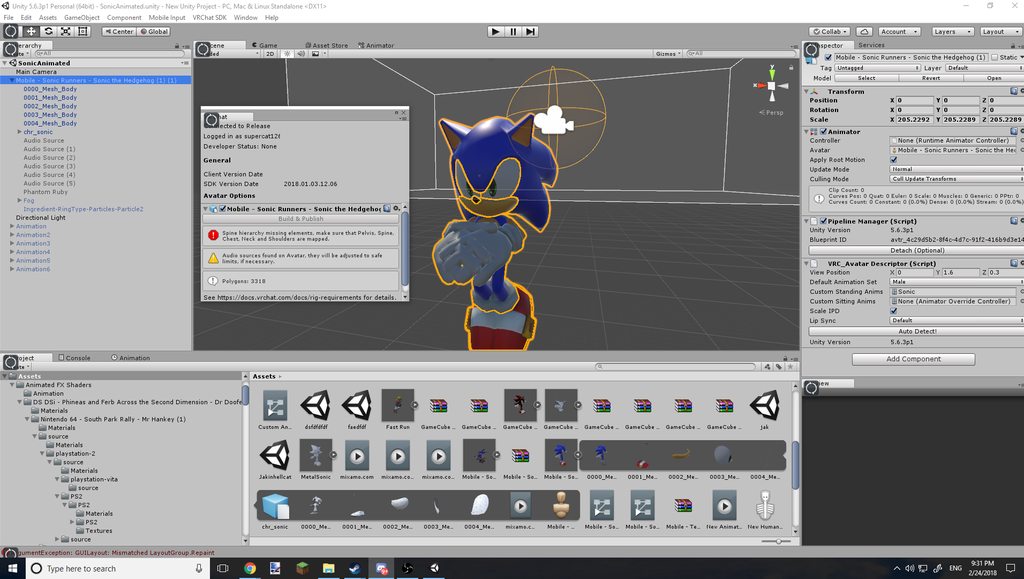 opal cliff
@flat citrus Detatch the OnsapAudioSource from the audio source u added
quiet needle
@clear yew I don't see a puppet in that scene. How are your animations tied to the model?
clear yew
@quiet needle with a controller?
quiet needle
@flat citrus You got the new SDK right? Supposedly ONSP is re-enabled in it.
flat citrus
@opal cliff
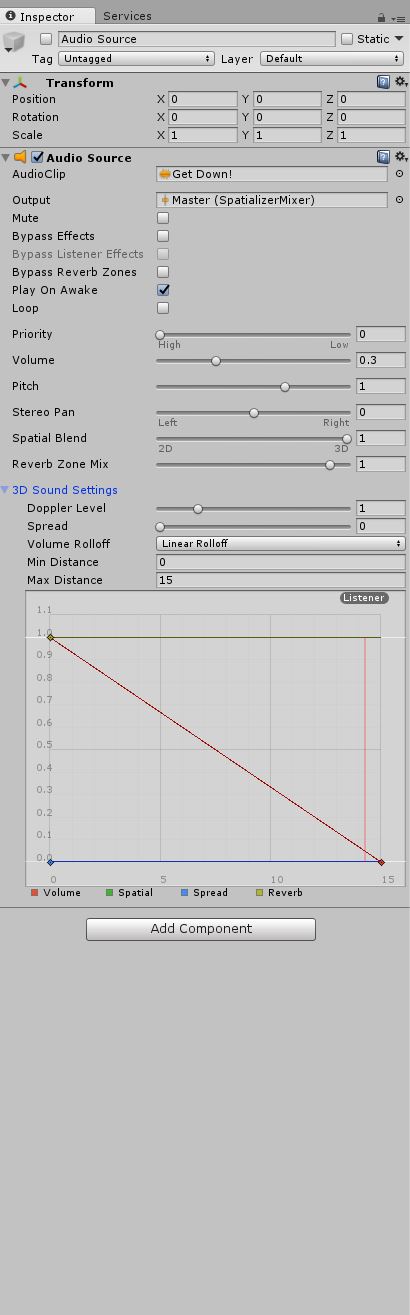 quiet needle
@clear yew But the controller isn't assigned to a model?
I'm a bit confused I guess.
clear yew
same here
flat citrus
don't think so, didn't get it since it causes problems for some avatars, I'll DL it and try.
quiet needle
Let's - for the sake of following steps - duplicate your model and attach the animation controller to the duplicate.
@flat citrus Make sure you delete the old SDK while Unity is -closed-
clear yew
i've fixed the T-Pose now by reimporting, thats not a problem now
 vocal zinc
guys i uploaded an avatar but i don't see him lol
is there an avatar limit or are servers down ?
quiet needle
Did you update or upload a new one? @vocal zinc
quiet needle
updates are broken, remove the ID and reupload.
vocal zinc
how ? x)
opal cliff
There should be an id
vocal zinc
where ?
quiet needle
click model in Unity > right side, pipeline manager > detach
vocal zinc
let me check booys
i don't find it @quiet needle
what is right side ?
i mean what do you mean x)
quiet needle
Where you put your VRC_Avatar_Descriptor and dynamic bones.
Your component list in the inspector.
quiet needle
Yes.
vocal zinc
sry
where
i can edit it
first time im doing that dud
so i just remove the instance id allright
 empty owl
clear yew
empty owl
clear yew
hi , so here is my problem : im trying to add audio source that will activate when i do gesture, (i know how to add audio sources to animations) so i created animation with only the audio source and i grabbed the animation to the handgun gesture in the custom overrides. but its not working ingame
please pm me if you know the problem , thanks
quiet needle
@clear yew Did you remember to copy and paste on frame 2 and to add your custom override sheet to your avatar descriptor?
languid nimbus
Hey @quiet needle is there a way to make an animation play once when you swap avatar and then never play it again until you swap to it again/switch worlds?
also if you're home you need to add me on vrchat, the broken idle animation is ridicolously cute
quiet needle
lol
I believe you'd just set the animation on the components and set it not to loop.
languid nimbus
ok but where would I put it?
normally you'd put it to the idle animation right but how would you continue it then?
languid nimbus
the hierarchy is on the left side?
 lucid ore
i downloaded this custom avatar which has animations
but on his installation vids all his projects are folders, allowing him to open everything with everything preapplied
but the one i download is just a unityproject with loose animations and idk how to apply
 spring remnant
I have a really strange problem. I have a model that's specifically exported without eye blinking selected in CATS since I'm doing a rather complex idle animation in Unity instead. Everything works fine when I create a "Animation" object, drag my custom blinking/idle animation and upload to VRchat. But if I now add custom standing/sitting anims for animation overrides and upload the model to the game, then the previously working idle animation does not move the eyes any more, but DOES move the mouth, so like 50% is working. The animation looks fine in Unity at all times. I can't figure this out, any ideas would be appreciated
languid nimbus
@quiet needle So right on this one as a component? http://puu.sh/zuY9q/ecc5364266.png
 quiet needle
@languid nimbus Yup
 rugged elm
Hey i have a question if it's possible to change overrides in with a trigger in game so i can have multiple animation for hand 1 gesture
 nocturne radish
What do you mean? There's a few gestures for the hands, you can replace them with different animations
Also I'm having a really weird problem. I added a couple of visemes/blendshapes into the head mesh of my character, but none of them are showing up in blender.
I tried with .blend and .fbx files, and both have this component but blendshapes are nowhere to be found. I looked it up on google and I didn't find anything at all...
https://cdn.discordapp.com/attachments/277243165478748160/417122098578849792/unknown.png
(Edit: solved thanks to this -> https://blender.stackexchange.com/questions/56795/shape-keys-and-applying-subdivision-surface-modifier)


I have been creating a dragon model lately (it might come familiar to someone) and I've done a lot of work so far, I've also spent alot of time with creating shape keys for my eye. However, I see now
rugged elm
Like i saw a person using one of those dance emote that he remplaced by something that changed his character model and give him a new another set of emotes for hand gestures
nocturne radish
They changed the whole model with an animation? I'm not sure if you can do that, are you sure they didn't switch into another avatar manually?
rugged elm
no they just changed helmet with an animation and particles
vocal zinc
is anyone sharing animations with effects/particles ?
 amber sable
Is it possible to add blendshapes to your gestures without having to animate the hands every time?
 pearl solar
Has anyone that you have seen tried making animations for ASL hand signs? I was thinking of making a version of my main avatar that has major signs that I can't do with the hand controllers.
 normal skiff
there's no way to get particles to orient themselves to match the slope of the ground when they land is there 😦
why is this not just an option 😦
nocturne radish
About my problem for earlier, it's solved. Turns out modifiers can only be applied on meshes with visemes by deleting those, and it was a mirrored mesh. Had to do a bunch of stuff to fix it but it's working now.
amber mantle
So with the new gestures for desktop, can we use them to animate the bones too? Or is it only for face mesh and like textures? Bcz im trying to make my model hold a knife in its hand and just pointing it forward, but it seems like only the eyes are working
 simple birch
From what I can see, you can only have facial expressions, or spawn particles with it. If you add a gun, it will probably end up sticking out of your crotch
clear yew
how to trigger audio source by using gesture ? only audio source , pm me if possible , thanks
im a non vr user btw
amber mantle
@clear yew add an audio source to the hierarchy, put the clip in it, set it as inactive, then add it in the animation where you want it to be
clear yew
thats what i did, didnt work
simple birch
Do you have Sound FX muted though?
clear yew
nope i have avatars with audio sources attached to an animations and i can hear them
it as 2 keyframes which is the audio source , idk why it doesnt work its really weird
azii
go to pm ill try to help you
 blazing bluff
Is there a way I can edit a pre existing animation? I have a drawing animation, but I want it to actually point when I do the override and not do the claw hand
 mortal patrol
Quick, can someone link me a particle tutorial video? Trying to make particles from a png I have, nothing too crazy
simple birch
Is that possible to spawn a mirror with the emote or gesture?
mortal patrol
Probably not, but that would be absolutely wicked to see
 icy hazel
just simple particles, you click any bone you want on your model in unity and then you create the particle system from the menu up top to add that component
and then you can just make a material ball, set the texture to the png, then drag the material ball with the new tex right onto the main screen as your pink untextured particles are shooting out
and then it just instantly adds it there like that
from there i adjust particle stuff after that
mortal patrol
Ok, and those particles are 2d, correct?
icy hazel
yea
mortal patrol
Ok. I’m doing something completely original and doing something w/ emojis as part of a joke avatar for a friend
mortal patrol
Ok, cool
dusky venture
does anyone know how to stop character's feet from trying to shimmy or tap against the floor when you turn around/stand?
mortal patrol
Vr or desktop? Perhaps it’s height issue?
dusky venture
im testing in desktop right now, one of the feet in particular looks like it's stepped up on an invisible rock
mortal patrol
Huh. TBH I have no idea, I think I can envision what you’re saying though
icy hazel
does it do it constantly?
when mine did that it was a custom animation for idle anim issue
dusky venture
it's not like the foot tapping that some people get like if i go still the foot just sticks to one spot instead of moving
for reference this is a floating idle
icy hazel
ah
yeah for mine it had to do with idle anim too -and- my hip bone was a little bit too small for me
but idk if that last part matters
dusky venture
http://puu.sh/zvdMx/b479dec53c.jpg you can see here i turned a little and the foot that's stuck in place basically is trying to stay on this invisible floor im assuming that's up there

funny enough it's not the foot that's closest to the legitimate floor
icy hazel
hmm
so are you floating and flying at all times?
or when you walk do you start to land?
dusky venture
i've changed all but the prone and crouching anims so there's ones for strafing and stuff
im wondering if it's crouching but i think i tested with crouching replaced and it did the same
icy hazel
cause i feel like somebody else who did a floating/flying fairy girl, he just made the legs totally useless and dangle sway with DBones
to avoid weird feet issues since he wasn't using them really
dusky venture
i was tbh wondering if there was a way to remove the like.. im not sure the right word but the flag that says hey these are feet that should be on the floor
 wary parcel
Must be the bone rotations and where the bone is located in Space that could be the issue here @dusky venture
dusky venture
oh? do you know what would fix that kinda situation @wary parcel
wary parcel
Blender and zero bone rotations
Though you need to know if your body and lega are bendt the correct way or else you get a wonky squatting movement of the legs
simple birch
I mean. I saw people with fully functional cameras. However I am not sure if mirror is a completely different case
dusky venture
i finally got a video of the issue it's the stepping at the end of the gif https://gyazo.com/c4a647d83994ac18c6eb981e1bb5dbc2 though im noticing that also when i access the in game menu my character shoots off to the side- i dont see any rotated bones so im just a little uhh
wary parcel
Oh you are flying?
Have you tried to move all the transforms in the animation related to feet? So they are all following the animation?
 sand apex
Has anyone seen if your body clips through the ground when using a hand gesture override on desktop?
dusky venture
yeah it's suppose to be a floating kinda idea- and i've had all the overrides at least following the floating anims i've done
wary parcel
I was just thinking that the animation may not have moved all the bones and some are following the vrc setting
dusky venture
i must of missed one somewhere or it's broken somewhere if my avatar's flying off when i open the menu though
wary parcel
If you have dynamic bomes on them or joints, try to disable them prior to going into animation window
Then set them afterwards, ive gotten some bugs with dynamic bones when activated in the animation window when i want to move a bone attachet with the component.
sand apex
@dusky venture do you use muscle editor? just curious
dusky venture
i think i used it a lil on this yeah- do you think that's messed something up?
sand apex
Possibly, I use muscle editor and I get the same effect where the model would start to spazz out overtime or shoot off when the menu is open
wary parcel
Though zeroing the bones could fix it, since it seems its an fbx export problem from blender or if you are using desktop it may be the animation override. You could try to open the fbx in blender and check how the bones are after the export
sand apex
I don't know why it could be muscle editor that causes the issue but that might be it since muscle editor is just a lazy shortcut for bone movements
wary parcel
If you used blender that is*
sand apex
You could always try making a simple emote override without muscle editor to see if it really is the problem
wary parcel
Dont think thats the case
Its not an component
Its an addon changing the raw values for you
sand apex
Do you think the raw values it's changing are flawed in some ways that it's causing the model to glitch?
wary parcel
Then you can see it in the normal animation when playing it of in unity
dusky venture
i do have this thing where the bones/armature is horizontal when rotation is at 0 0 0 but i assumed that's normal since most if not all my avatars have that and work fine, this is the first like custom idle/move i've made though
wary parcel
The bones should have the flatside out, if you make an tiny < angle on the feet bone it should be good
If you make it perfect vertical it messes up the rotation
Ive had alot of avatars that when doing squats beds the knee inwards to much
Found the issue to be the 🔶 rotated bones instead i want them to be 🔲 when looking forward.
dusky venture
like you'd be able to see they're angled down instead of flat in the inspector when you're doing the humanoid rig thing right?
wary parcel
Dont think you can through that
Dont remember
So how do i link stuff here? Need to do a imgur link?
dusky venture
i think either imgur or any other photo sharing stuff
wary parcel
This is what i mean about wrong direction on the bones
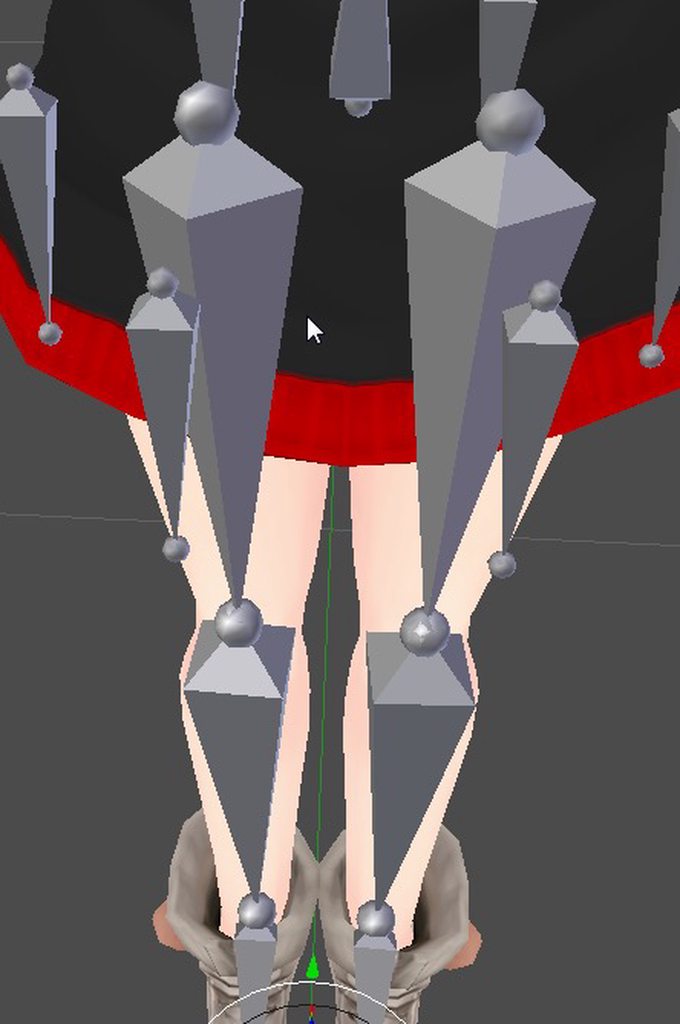
They should be more like the lower legs
Upper legs are wrong
Best way to do it is to zero the bone rotation in the armature menu
Or move the joint a tiny bit forward and then zero
Or the upper leg joint between the hips a bit back
But then you wont have the angle correct for full body tracking i guess
dusky venture
that's not an issue aha- though mine arent tilted like that there is something umm... interesting? i guess
http://puu.sh/zvgPN/8b67c9ed19.png i'm not exactly sure what's happened here
 dusky venture
the 'that's not an issue' was to the tracking i mean not- what you're saying thank you for helping lol- yeah the toes are a little strange..
wary parcel
Hmm, also i see 2 orange dots, you have 2 origin points?
dusky venture
i think i just had two tails selected
wary parcel
Ah alright
dusky venture
that bottom 'toe' isnt weighted to anything and the top is weighted to literally the toes only, i actually had to fix them in unity because otherwise the character's feet were half in the ground when they didnt have their custom idle
wary parcel
Anyways, flying animation is hard, ive listened to a modeller and animation expert that it was a headake to get that correct.
Dont know what he did though
dusky venture
aha- well for my first try even with the tapping i guess i did okay.. i just wish there was a way basically to make vrchat not look for feet since it does seem like it's just trying to treat the feet like they are on the floor
wary parcel
Btw, you using the desktop version right?
dusky venture
yeah i'm testing on desktop version, i know height when in vr would probably cause it to be weird too
wary parcel
There has always been a problem with tapping with the desktop version.
Tought hight adjustment could reduce it
 last wolf
does anyone know how to make the animation 'get down' play with the sound?
wary parcel
The animation "get down"?
last wolf
yeah
wary parcel
And what sound
last wolf
the sound that matches it
wary parcel
I dont know this get down animation and the soundfile its like working in the blindspot
last wolf
i'm assuming you place the audio in your avatar?
wary parcel
If you want it to be attached to the avatar yes
Else you can attach it to a gameobject
last wolf
you can't hear it but others can right?
wary parcel
You can hear it
last wolf
there's none
amber mantle
Thats bcz none of them talk only about the sound. But theyre pretty much the same
 frosty pendant
someone knows how to do like weather effects on gestures / particles that collide with the terrain?
fluid crescent
how to make a spining animation?
 unreal creek
I feel stupid for asking this but does anyone know what causes gesture overides to transition slowly between different ones? I have made sure both keyframes are exactly the same
wary parcel
Loop it?
unreal creek
It is just a facial expression, not an actual animation
wary parcel
Looped it?
unreal creek
It's looped by default
wary parcel
Tested it without loop then? Else ther must be something wrong
unreal creek
I'm trying out different things, last thing I am going to resort to is just redoing them
wary parcel
What are you using as gestures?
unreal creek
What do you mean
unreal creek
It produces same results on both vr and desktop, it shouldnt matter ethier way though
wary parcel
Desktop just released so i thought may be something there
unreal creek
Maybe, but vr is same
wary parcel
Alright, i dont know. Seems something is weird
fluid crescent
I found out why your audio source on avatar is quiet.You must detach the blueprint and reupload the avatar
dusky venture
https://gyazo.com/0b0c5d099282ad1eb9dbd68f40c302c8 well this did the opposite of trying to fix my problem, i've made an abomination

leetts go back to the previous version
unreal creek
Wave are you animating in Blender or Unity?
dusky venture
unity aha
unreal creek
There's your issue lol
dusky venture
i accidentally put root up too much on that one
i like how though, i moved her feet so much higher and she's still tappin away
unreal creek
@wary parcel Just double checked the animations and somehow there was keyframes made two whole minutes out lmao
wary parcel
Hahaha 😃
clear yew
So something is wrong with my blinks. When I look down my avatar closes her eyes
quiet needle
You have lower eyelids set up, yeah?
go back to blender and redo your blink visemes without lower eyelids.@clear yew
clear yew
Does anyone know if its possible to run 2 animations at once? perhaps by manipulating the AvatarControllerTemplate?
quiet needle
Yes and not needed?
What do you mean by 2 animations at once? You have two hands, so you can do up to two gestures at once and an anim component plus your current locomotion anim.
clear yew
Ok so I have a gaint airship which I want it to make a bomb drop to the ground, but I also have an idle animation in which the wings rotate so its more realistic. but If I do the bomb drop it stops rotating because it doesnt play that animation obviously
quiet needle
Is that rotation anim set as a passive animation component?
clear yew
uhm where can I configure that?
quiet needle
under the inspector panel on the far right. Add component > animation
https://www.youtube.com/watch?v=VXU12lIqcfE Follow this and you should see how it's done, you can even set it to loop.

Apologies for the cold. Thanks to Haitchyy for his tutorial, which is what helped me intuit tail wagging: https://www.youtube.com/watch?v=p0txtOuZtx0&t=431s ...
clear yew
Oh yeah you might be onto something I always tried to override it onto the idle animation
@quiet needle I don't have lower eyelids...just had them set to basis
quiet needle
That's pretty odd, because there would have to be some sort of a shape key or bone weight manipulating the eyelids based on the neck or head.
clear yew
I know
and once I deleted eye blinks and made my own my jaw started to hang open when I look down
quiet needle
Does your model have a jaw bone?
clear yew
no
it doesn't even have anything mapped in the head
I also noticed that the "laugh" shape key is totally ignored when I try to emote
something is broken baaad somewhere and I can't find it
I'm half tempted to just yank the head off my other avatar, graft it to this one (since it's the same basis) and just say screw it lol
thanks alot techpanda that solved my Issue 👍
quiet needle
@clear yew I'd go back to blender and test your shape keys. It sounds like something fishy is up with them.
clear yew
they all work perfect 😦
quiet needle
Otherwise, make sure your avatar's animator is set to None, rig is set to humanoid, override sheet controller is still set to default controller, and that your anims are correctly keyframed.
Drag your timeline (red bar) across the top of your keyframes and it will show you your animation (or press play on it, same effect) to double check for accuracy.
clear yew
yeah 😦 all of them all work flawlessly
the only issue is when I look down, eyes shut
disable blinking, jaw opens
quiet needle
Do you have blend shapes set for the lip sync?
clear yew
I have them. I turned off lip syncing and it still does it
didn't delete the shape keyes yet
wait
i found something i thnk
quiet needle
It almost sounds like a bone weight issue. Strange though unless you've modified the weights at all manually.
quiet needle
no
clear yew
darn 😦
nah, i'm using a TDA base (same one my other avatar is based on) without any weights altered outside of what they already have/need to function
I already checked all that stuff to see if i had some weird weights
quiet needle
Hmm. How much work would it be to reimport the PMX and send it back through blender?
clear yew
x.x well, it's pieced together from 7 models for the outfit XD
honestly it might be easier to rip the head off and plop my other models head onto it
spring remnant
I have a really strange problem. I have a model that's specifically exported without eye blinking selected in CATS since I'm doing a rather complex idle animation in Unity instead. Everything works fine when I create a "Animation" object, drag my custom blinking/idle animation and upload to VRchat. But if I now add custom standing/sitting anims for animation overrides and upload the model to the game, then the previously working idle animation does not move the eyes any more, but DOES move the mouth, so it's like 50% is working. The animation looks fine in Unity at all times. I can't figure this out, any ideas would be highly appreciated
quiet needle
@clear yew Yeah, try that. It should fix it as long as the shape keys aren't buggy.
 surreal iron
@spring remnant im having similar issues with my custom walk animation
it looks good in unity and blender
but it looks like trash / 50% working in game
spring remnant
@surreal iron I find it super weird since some portions of the animation play (the mouth and another one that deforms the eyes slightly), while a specific other one does not (the eyes blinking). I'd expect it to either work 100% or not at all
surreal iron
i think our best option is to wait for someone who managed to get the custom animations to work and ask them for help
x.x
spring remnant
Removing the custom overrides in my VRC_Avatar Descriptor and reuploading makes my idle animation work again, but I'd like to use them, so...
Your walking animation is defined via custom standing anims?
spring remnant
So that's not a thing you could try for you, okay
I've not done walking animations so I could not be of help there, sorry
surreal iron
i mean... it feels like if you upload the model as humanoid with the overrides, something starts messing around with your custom animations
quiet needle
@surreal iron Humanoid rigging will use the full set of standard humanoid locomotion anims, so you need to make sure you override all of them - the walk, run, strafe, and sprint anims with something custom. Keep in mind also that they are trigger sensitive, so only a portion of the anim will play if you hold the stick slightly, and full anim should play when you press the stick down one direction fully.
surreal iron
not using a vrset
quiet needle
doesn't matter
surreal iron
ill just override everything with my walk animation then
and see if theres any change
 remote blaze
hey guys, for some reason hand gestures don't work on any of my avatars despite all 5 fingers being rigged 😦 what's the problem?
quiet needle
@remote blaze Do you have custom animations set up and attached to an override?
or just talking about the default hand gestures?
wary parcel
@remote blaze Did you link the custom overwrite to the avatar descriptor?
 tawdry ruin
Yeah, it seems that something is off for the animation tab for the new SDK.
For example, it wont let me add things into new .anim files and audio seems to not work either.
I would fix it easily, but it seems that the only way I know can't be done atm.
Is this problem also happening to you, guys?
(im talking about custom overrides, ofc.)
wary parcel
Its acting up with my uploads also, does not remember my picture and avatar description
tawdry ruin
Wow...so weird.
wary parcel
So when i want to upload again i need to delete and use a new ID
tawdry ruin
Yeah, happened to me too!
wary parcel
Never happened before
tawdry ruin
I simply detached the ID into the pipe line and created a new one and worked. That was yesterday, so I dont know if now is different.
I heard too many people who are saying weird things atm.
wary parcel
Ye unconsistent bugs i guess
tawdry ruin
For example, about audio sources into animations, yesterday were already not working.
Today, they are even deleted from the anim . So they are there into the anim, but they dont work and names are different like when you create a new one.
Bugs? Maybe. I think we will have to wait a little bit longer to see fixes.
So right now, we cant edit our avatars. Just play the game .
wary parcel
Or upload new ones
tawdry ruin
Yeah, if everything else is still working.
Honestly, I will wait a little longer, since when something is not working I get bored easily.
quiet needle
I haven't migrated into the new SDK yet. I'm dreading it tbh, seeing all these kinds of posts.
wary parcel
Mhm, need to be streamlined a bit for everything to work correct and to have fun while doing it
tawdry ruin
@quiet needle Nothing to be scared of. Just a little bit of patience and the admins & devs will fix those issues.
Its just a matter of time, I guess.
wary parcel
You need it though dont you?
quiet needle
Nope.
wary parcel
Tupper lieing? :p
quiet needle
Yup.
quiet needle
He said in the patch notes that no previous SDK will work any more lol
tawdry ruin
He didnt say that they were not working, he said that they were not supported.
I dont know what is the difference tho.
"You MUST download the new SDK. Using ANY older versions of the SDK will not work properly and will not be supported."
quiet needle
Mine seems to be working quite properly.
tawdry ruin
¯_(ツ)_/¯
wary parcel
Oh well.
clear yew
@wary parcel That's because they're now defaulted to uploading as private avatars. It strips the ID off them after it uploads to your profile so it can't reference back to the blueprint ID to update avatars.
That's what it seems like at least. I haven't tested uploading as a public avatar
amber mantle
not sure where to ask about this, but i am making it an animation so here it goes: how do i put text on a cube? only one side, and straight, no curves and such, just plain text on a cube.
 woven surge
Now that I can move free on animations, I'm trying to put a sword as a particle system so I set that to world space and I can move and the sword, on the ground, doesn't move, tried shape > mesh and mesh renderer and is not working, do someone knows how to do that?
 opaque orbit
What is the LetGo? Is it the Fall slot in the override? Kinda silly they didn't make them the same names
For desktop
quiet needle
I think LetGo would be the fully open hand, which is HANDOPEN.
@woven surge World particles don't care about your character. They detach and use the world space for their positioning.
Use a local particle and attach it to your wrist.
Interesting way to do it, also. You could just use it as a game object instead, unless for some reason you need it to be a particle?
opaque orbit
It already says that open fist is F1, so what would that be then?
woven surge
No, it doesn't need to be a particle, I just want a sword to be on the ground, and when I move, it doesn't move
opaque orbit
UV map it in blender
will remove submeshes
or use cats if possible, ez way to do that
woven surge
That's my first time... so I don't know how to do all that xDD but thank you
About particles no problem, but with this.. totally noob I am
quiet needle
@woven surge If the sword appears but doesn't move, change it from world to local.
woven surge
No, I think you misunderstood me, I want the sword to appear on an animation, on the ground, so it doesn't move when I move, that's what I want to do
quiet needle
Is that not what you stated that it is doing?
Oh you want to set it up
First thing you want to do is get the particle working with the correct scale/start size
If you set it to mesh render, it will spit out the sword mesh, but it may not be textured, refer to Sato's instruction regarding that, but once you have the particle spitting, disable the "Shape" and "Start Speed" options and it should just sit still. You can then position the emitter where you want, and it should work the way you're talking about.
woven surge
Okay, I will try that, about what @opaque orbit said, what's the option on Cats to do that?
fluid crescent
When im doing the animation in Great Pug i get respawned,but in other world my animation works fine
opaque orbit
@fluid crescent In the pug, if an object on your model touches a collider in the pug it will teleport you to spawn
just a funny pug bug
woven surge
So I have to redo UVs? I think I will search for tutorials because never did that
quiet needle
Is it a single material?
Basically particles can only have a single mesh and a single material on them, so if you can get your weapon down to one mesh and one material (atlas or otherwise) it should work no problem.
woven surge
This sword is not very good, has a lot of meshes
quiet needle
Yeah, for the sake of everybody around you, please combine those.
1 vs 2+ meshes is an absolutely huge jump in CPU usage for a model.
In blender, make sure each UV map is named the exact same thing (should be on the data tab) and once you have that, select multiple meshes and do CTRL+J to join them together. It might take some fiddling to get them to merge properly so save often.
clear yew
@quiet needle swapping heads fixed it. I noticed that CATS busted something when it was making the eyetracking stuff because there were NO lower lid shapekeys created. I think this caused it to bug out and start making lower mesh area's function as a lower eyelid
quiet needle
interesting
clear yew
the head I swapped to the body does have all those shape keys intact so luckily it wasn't a tough fix. just a bit tedious
luckily I somehow got good at doing mesh swaps lol. Doing a head transplant is easier than putting on underwear >.<
woven surge
@quiet needle thank you very much for the advice, I will do that xDD
 small tapir
Trying to make a shooting animation with particle system and sound but it's the first time trying to do it. Do i need to make the shooting animation as long as the sound or can i put end fram on 0:01 and trun of looping?
 crisp valve
anyone know this error ? the following component types are found on the avatar and wil be removed by the client: deadtime
in unity
nvm found the problem already
opaque orbit
An animation I have toggles a box on and off, I set this to a gesture. When I load the model, it immediately starts looping, even without hitting the gesture. The animation is not set to loop either, anyone have ideas?
quiet needle
@small tapir You just have to have a 0.01s animation to enable it. As long as you hold down the gesture, it will continue playing the file. If you let go early it will cease.
Same thing applies to particles. They will follow the particle animation path you set for them in the particle component, then turn off if you stop the gesture early.
woven surge
@crisp valve One of your particles or gameobjects, or anything has a component on the Inspector that is called Deadtime and you have to find it and delete it
quiet needle
@opaque orbit Is the object it toggles set to "off" by default on your model?
small tapir
@quiet needle Okey thanks
quiet needle
Show me the anim?
 ripe osprey
ANYONE ELSE HAVING ISSUES GETTING AVATARS UPLOADED WITH GESTURES
USING THE NEW SDK ?
 undone glade
Anyone know how to have animations transition by chance? Example being have a gun fire animation activate only when the gun animation is activated.
 heady wren
That's a very very good question. I'll do some digging.
 spice echo
hello
does anyone know how to make the mesh
not follow the character
during the animation
undone glade
I would assume it would be something like [gun] <---> [fire], but I have [gun]<--->[fire]<---[entry]
spice echo
i want the mesh to just stay there while the animation is playing
heady wren
Also I'm running into something. I'm trying to basically make an animation that puts the character on the bike. But I have no idea how i'll be able to position that. Being that when I put the character in animation mode on unity, the model moves, but the bike doesn't.
 golden egret
can we use shader uniforms or something like that in avatar animations
 quasi sun
Could somebody tell me how to change the sky using an animation override ?
undone glade
Well you would need a 3D object and a shader I know that much. @quasi sun
quasi sun
I figured, but what shader tho ?
undone glade
I wouldn't know to be honest, I've heard people talking about shader forge, but I don't think that would help changing the sky.
quasi sun
I tried to put the included Panosphere shader on a cube, but the sky texture only shows outside the cube, not the inside
undone glade
you need an inverted cube which I have if you like to try it
heady wren
@spice echo I'm not quite sure what you mean. What is the animation?
quasi sun
Oh hell yeah man that'd be great if you could share it
spice echo
oh
undone glade
let me find it.
spice echo
i have like
a wall pop up
when i finger gesture rock and roll
and i want to move around
and the wall follows me
i want it to stay there
heady wren
Gimme a second to try something.
heady wren
Of course!
spice echo
i did the animation on the character instead of the duplicate
and now its stuck in a weird pose
heady wren
I'm having some issues now and no idea how to get around it.
Just swap where the descriptor is. I just did that same thing. xD
heady wren
As long as your second model has NO animation on it yet and is still in T Pose.
spice echo
i dont have a second model
onyx charm
Does anyone know how to summon an object and have it not follow your model? Like I saw someone stick a sword in the ground and it stayed there
languid nimbus
Does anyone know how to play an animation once and make it stick at the end?
 spice meteor
can someone tell me real quick how can I make my character stop blinking in an gesture with cats generated blink?
i tried manually setting the vrc blink_right and left to 0 while I hold the animation but she still does it, do I have to deactivate more?
 rocky river
hey guys
how do i add a trigger button for particles?
like if I do some rock n roll gesture it summons a particle on my right hand
is that possible?
heady wren
Very possible!
spice echo
^
heady wren
You already know how to do basic animations with like items and guns?
It's ALMOST the same process.
@rocky river You'd start by adding an empty object in your right hand, and adding the particle system to that.
Then really you'd just make a new model and add the animation to the second one. Same process as with the guns from there.
 mystic umbra
so I attached a helicopter with an legacy animation of it crashing in 30 secs, then I hid that heli in the armature and added another legacy animation to pull that helicopter out
But its not a working animation
Im so perplex as to why
Ive done this so manytimes with no issues
 late phoenix
with gesture animations for keyboard users can you have a gesture that moves your arms? I made the animation do it, but it doesn't do it in game (is it because I have a custom idle animation and that's interfering?)
heady wren
Yes I think that's exactly why @late phoenix
 molten kayak
When i tried doing animations for my avatar i got this https://gyazo.com/c53b53ddd77dbfcf78dea0955d661cfd any idea on how to fix it?


 heady wren
If you remove your arm from the animation it might work?
from the idle animation I mean.
late phoenix
Yeah guess ill try that... 😦 wish there was a way to override that though
I like the arm animation i made for the idle RIP
languid nimbus
So noone knows how to make an animation stick around when it finishes?
heady wren
If only we could layer multiple Override scrips. 😛
In world space you mean Gatreh?
@languid nimbus
woven surge
I don't know why, all is fine, when I play my animation on unity, but ingame my hand gets bugged and nothing happens..
 lone bramble
@molten kayak you moved the locations of whatever you're animating and it can't find the path
 somber kayak
hey guys, how do i post pictures in here? I need to shgow you an issue im having
somber kayak
ok 1 sec
So im currently trying to add a gun + particle effects +audio to fire a shot. I believe im doing something wrong in the process. So i have already made the particles and the sound. Im just confused how to add them to the animation. This is currently what I have.
So i have made it so my gun appears https://cdn.discordapp.com/attachments/401664357404246016/417416942383792128/unknown.png


Thats correct i believe
 eternal jetty
Did you add the properties to bring the particles in?
Edit: oops, I see below
somber kayak
Now here is the screenshot of a different animation of me adding the effects and audio https://cdn.discordapp.com/attachments/401664357404246016/417417920919109635/unknown.png

