#animation
1 messages · Page 49 of 1
 pseudo pewter
 topaz barn
no
 red obsidian
ello. could anyone help me out with some custom walk / idle animation? im trying to make my avatar float above ground. i did create a custom idle animatikon and it does work, but the avatar is stuck in the ground, even though i moved the armature above ground in unity. it also seems to ignore my forward animation. thank you
oh and, im not sure if i should be using the animator controller from the sdk, or just use the custom standing animation override
it didnt seem to work when i put my animation in the animator controller
 muted prairie
Did you change any setting in the animation file settings ? @red obsidian
red obsidian
what animation file setting?
first of all, im not sure how to make the avatar float above ground. im not sure which height i should be changing. secondly, im not sure where should i be dragging my forward animation to override the default forward one
same for left and right
 red obsidian
this is the menu of the anim file?
muted prairie
yes
muted prairie
Did you check the boxes ?
red obsidian
cant drag an image to show you
but i only have loop time, loop pose, offset and mirror
thats it
i think perhaps the forward animation does work for me, so my main issue is that avatar being stuck in the ground
 ruby elk
Is there a way of adding sounds on 2D avatars?
 tribal sparrow
same way as normal avatars
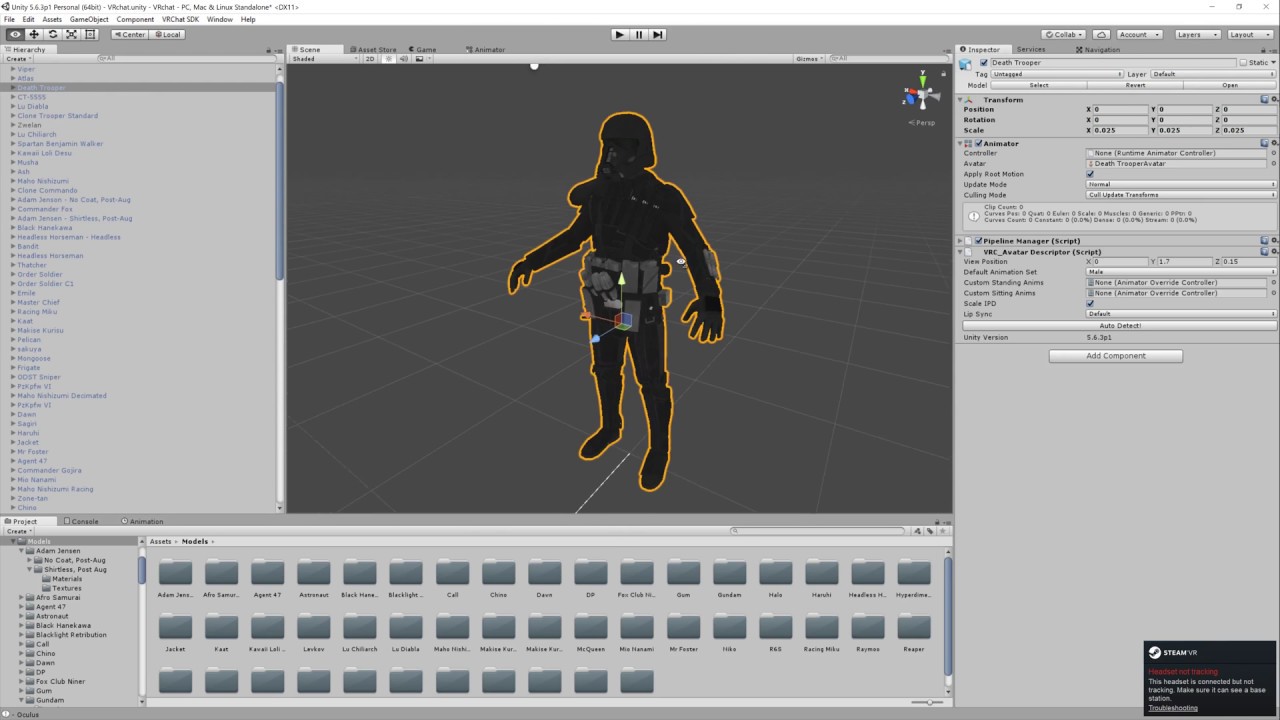
Basic VRChat gun animation override. Audacity used to convert audio files to .ogg.
ruby elk
i made one and put the override into the animation controller
but the emote won't show up in-game
 covert hawk
how long can an emote be ?
i have an emote with music that's around 42 seconds but it seems to stop at around 38 in vr chat
tribal sparrow
@ruby elk My guess is you missed some tiny detail. Best bet is to start it over from scratch and it will probably work the second time around
 pseudo iris
anyone that can help me how to do a fire effect on eye?
 spice furnace
hi guys
so im trying to add a shapekey animation where my character is blushing, and ive made the blush texture transparent, looks good and all in unity and even in mirrors ingame - but friends cant see the transparency, making it look weird
any ideas?
 patent scroll
Hello, connoisseurs. Who knows how to add a second character to the animation?
 blissful grove
@clear yew Have you completed the model yet
 shut nebula
Hey question. I want my avatar to have his rifle on his back when it's not in his hands. How would I do that?
 stray gulch
@shut nebula do two seperate animations for your gun on your back and one in your hand
@shut nebula do the animation for gun on your back and uncheck the avtive button when you make a new key for your animation. then do your gun animation as usual in your hand. you will have two guns in your scene
shut nebula
Okay cool Thanks
 gray briar
Hey, so I'm animating a character within Unity and I want them to turn there neck a little and then turn back to the original position. Instead of doing a normal neck turn, they do a full 360 to return to the original position. Is there any way to stop them from doing this?
 tidal gull
So I have a particle set up for a fireball
I want to have a gesture override that spawns the fireball and shoots it forward
Is there a good way to do this? 😃
 wise rover
is there a way to play audio in when you play your animation in unity?
nvm figured it out. though it's not the most optimal method I could think of
 grand loom
@wise rover Can you explain? I was just about to ask the same question. A video tutorial works too if you used one.
I know how to make animation overrides for emotes, but not really sure how to work audio into it
tidal gull
Another Q: is there a gesture override for the finger flex you get when you squeeze the side buttons
on the Vive
For audio, I think you make a gameobject, attach your audio emitter to it, attach it to your model
Then when you build the animation, you can add that game object's visibility as something that is animateable
Have the game object invisible by default and then when the animation triggers you can set it to be visible
And when the object becomes visible the sound plays
I think
Same mechanic as spawning a weapon in your hands
 torn pawn
yes, to add audio to a gesture you create an empty object, add an audio source to it and you enable the empty object with your override
wise rover
@grand loom for checking the sound, you just have to be on the model with the audio on it and press play on the scene
tidal gull
I think I have a nice solution for my fireball
Nested particle effect, light sources, fun times
Attached to a game object attached to the hand
Gesture override on the game object visibility, default off, turns on when animation happens, set to override HANDOPEN
grand loom
What if I added an audio source to a body part, but had it unactive by default? If I used a gesture which would set the audio to active would that work or no?
torn pawn
how would I go about making an object to be attached to a world? like a dancing avatar pet that would stay in place (static world mesh particle doens't do for this), is it something to do with clever use of rigid bodies?
 clear patio
Question, my black hole animation had weird mirror like parts to it in VR, but in non-VR it looks like its supposed to. How do i go about fixing it for VR clients too?
torn pawn
most likely a shader problem?
it can be extremely uncomfortable for VR users
at some times even physically hurting
 thorny fox
anyone seen the room called "A Trip" how the heck do they do all those screen effects
wise rover
so I made a new animation in which my fog would be delayed but when I start it in vrchat, the fog shows up instantly. What did I do wrong?
torn pawn
what exactly did u set for delay
 shut iron
quick question, does anyone know where to find the carmeldansen animation, or a model with it?
wise rover
I set the fog to appear roughly 27 seconds into the animation
and I made sure to subdivide to account for the frames per second
so I set it to 27 minutes
 uneven moat
is there a way to make vrchat not have the animations go super above the floor? it looks fine in unity and blender weirdly
it also stops mid cycle
after walking once
wise rover
another problem I'm facing is that the stalagmites I added aren't showing up in the animation either
grand loom
Is there default levels for the sound emitter so its not blowing peoples ears off?
wise rover
I added an audio source to see if that solves it
grand loom
That's what I've been using.
wise rover
is it at least playing?
good
and wait. do you need the assets to be on both parts of the model for them to show up on the animation?
grand loom
Both parts?
 raw hinge
Can anyone answer this question for me? Before I make an animation override for a sword to appear in my hand, why do I have to pose the sword in the hand before I pose it in animation mode like this video tells me to? Couldn't I just pose it in the animation with a position so that it's where I want it anyway?
wise rover
do you think I should just send in a screenshot of what I have and someone could guide me on what I actually need?
wise rover
ok this is really strange now. my stalagmites are bigger than they were before I deleted them and I now need to scale them down further
torn pawn
@raw hinge you have to most likely adjust the sword in pose anyway, when u make any changes in the duplicate to position or rotation to sword - copy the transformation component and then paste it on original
 static panther
Noob question, how do I stop the model from resetting its position everytime I try twist a new fucking limb when trying to make my own animation?
 slim solar
 lilac cave
you could position the character dabbing and save that as a key shape
raw hinge
How do you add a particle effect to an animation override?
I put it in under Game Object.Is Active and checked it off but its not appearing
torn pawn
have particle active int he object, while object disabled, enable the object in override, but you dont need to put it in object, can do just system alone
 outer plinth
Looking at making my own sitting animation. Should the character 'sit' on their origin (0 0 0) or some arbitrary height?
 final gazelle
arbitrary height, i believe -- the actual seat itself isn't consistently set so that you'll meet the chair at 0,0,0
0,0,0 would probably put your hips inside the chair itself
 iron flume
quick question, my particles effects are following my head movment even though its not connected to the head, eny sulutions?
tidal gull
Particle question: I want a particle after spawning to move in a fixed direction in the world rather move when the spawner is moved
I.e. world space movement rather than local space movement
Is there a way to do this?
 tawdry token
Hey guys, I need to ask if there are any good idle animations/poses. The one I got looks off and my arms stick out when I move abit and then stop. I was just wondering if there was a place I could get them.
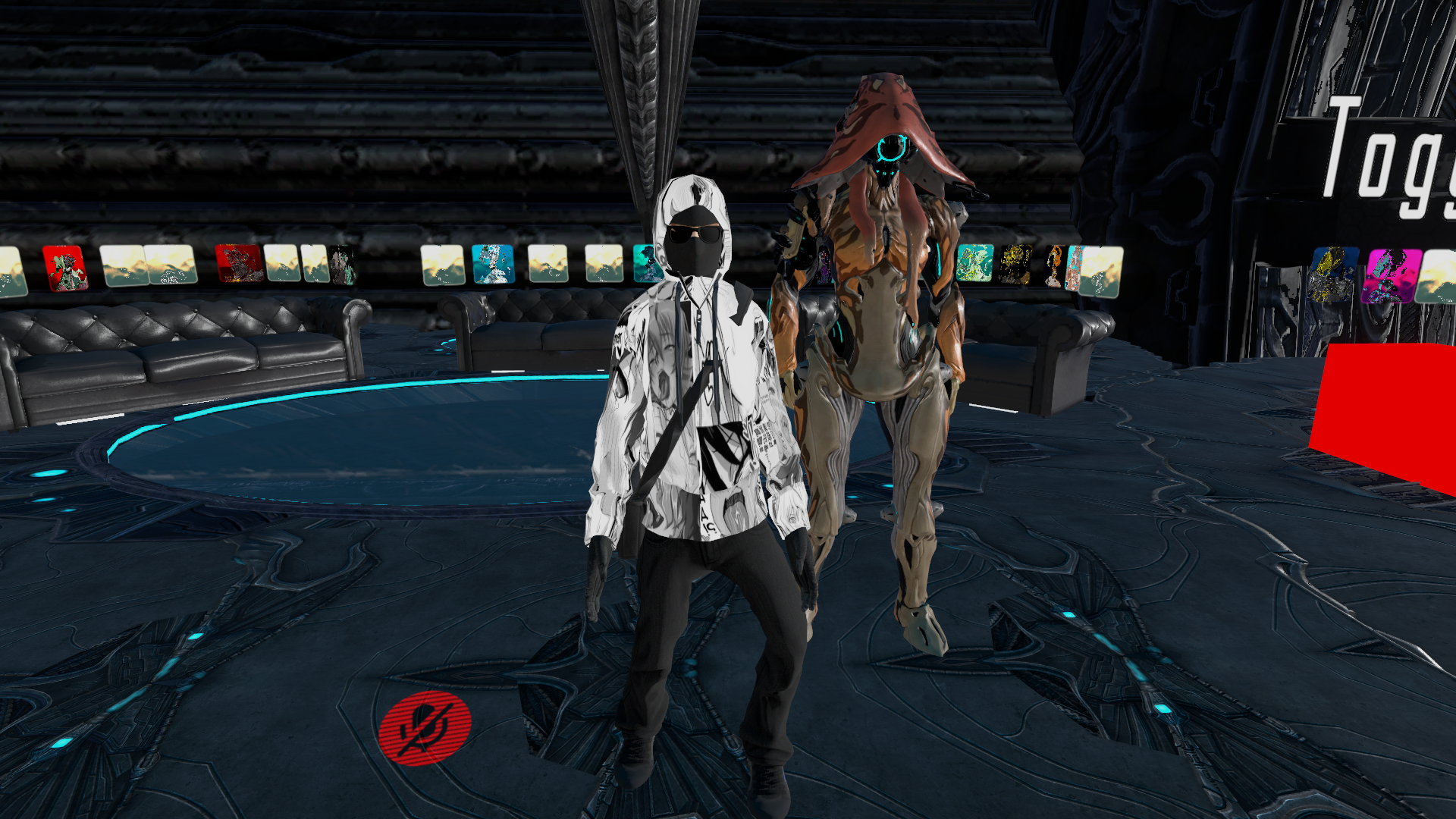
My model is meant to have a normal idle pose but is instead doing the "mad man" pose.
I want to make mine look like the warframe besides me, but I am not sure how to do that.
Could anyone please help?
 modest tulip
any are animation transitions not consistent from inside unity to inside vrchat
how my animation transitions look in unity
http://ss13.moe/uploads/2018-02-17_13-10-59.webm
How they look in vrchat
http://ss13.moe/uploads/2018-02-17_13-22-35.webm
 fluid crescent
How to have 2d image spining on your head
modest tulip
make it a really thin 3d thing?
fluid crescent
@modest tulip yeah but how to make it to rotate
modest tulip
in unity or blender?
either way open the animation then set the rotation of it on various key frames
 clear yew
guys, I have a question... ;-; so I have this avatar that has like 50 shape keys in blender but they don't work when I change them, and I'm not super upset about that.. but you know the what face.. as in this face ''>.<'' the name is there on blender on the mmd model, but it's not there on unity just like 30 other shape keys that are there in blender, I did not decimate the model by the way. And also my avatar has the like ... lash line from the ''what face'' in her head, but I can't use it, cuz 1. the what face is not in the blendshape list on unity, 2. it doesn't work on blender either, even tho the lashline is in her head, and it's written in the shapekey list... what do I do to bring that out? or make it work? or something :/
 old cave

anyone know why this is happening and if there is a way to fix it?
The original model is on .nif format, and when I import it to 3DS Max the skeleton seens ok, but when I export it to .obj this happens
old cave
When I try to export to .fbx 3DS Max crashes
modest tulip
Odd
try dae?
Only other guess would be to try and export the animation by itself and use blender
 modest tulip
wew
old cave
I wonder if I can clean the meshes on the .dae and then export only the skeleton
And then load the skeleton and the model withouth it on blender and mix them
modest tulip
hmm does blender not support importing as the original file?
or could try this fix idk if its valid
https://forums.autodesk.com/t5/3ds-max-forum/bug-in-3ds-max-2017-cat-animation/m-p/6503399/highlight/false#M117268
Hello and Thank you very much for the detailed write up and cordial communications, this is really great. I have included this text as well as the link to this thread in the tracking system. This thread is a testament to the sheer dedication and cooperation typical of the 3ds Max community, ...
old cave
There is a.nif plugin for blender, but it works only on older versions and I tried to install here and it didn't work for some reason
I was able to export it to .fbx
It looks kinda normal but there is those white blocks on him.
 modest tulip
white blocks where?
old cave
under him, on his body, above his head...
modest tulip
are those not the bones?
if they are
http://ss13.moe/uploads/2018-02-21_11-40-50.gif
 clear yew
Can anybody point me towards the necessary documentation to animate some certain things.
Like how to create a lightning animation.
And how particles, emission and such work.
And how baked animations work as well.
 amber mantle
uhm. so i made this animation to put as an emote. but when i looked on its settings, it didn't have the root transform things, so its gonna look messed up. how do i add them?
tidal gull
Can you do simple animations via code?
I.e. if I have a box and I want it to rotate, in normal Unity stuff I could do some sort of on-each-frame transformation
 violet plume
is there a way to force a gesture animation to end, and not repeat?
but remain in the end pose.
 vocal zinc
hey guys i have a problem
so i downloaded the flash avatar and on it there is particles when i walk/run but they are small
is there a way i increase them ?
 icy hazel
Yea go find the bone that the particles are bound to and you can play with the settings
 echo cargo
For some reason my particles spawn out of me and change with the camera position instead of the gun. Even though it works fine in unity
Anyone know why?
modest tulip
wish i knew, my animations look fine in unity but not ingame
clear yew
What are your particles parented to?
echo cargo
They are parented to the gun
both are world space
the first particle system and the sub emitters
 full breach
Some animation overides leave models behind untill the player clears them with another overide. How. Is this made?
 frozen whale
https://imgur.com/a/P2Mlb Hi I have a bit of a problem with heat distortion. It looks totally fine in Unity but ingame the effect is super strong and the texture of the normal map is not visible at all, only square blocks...
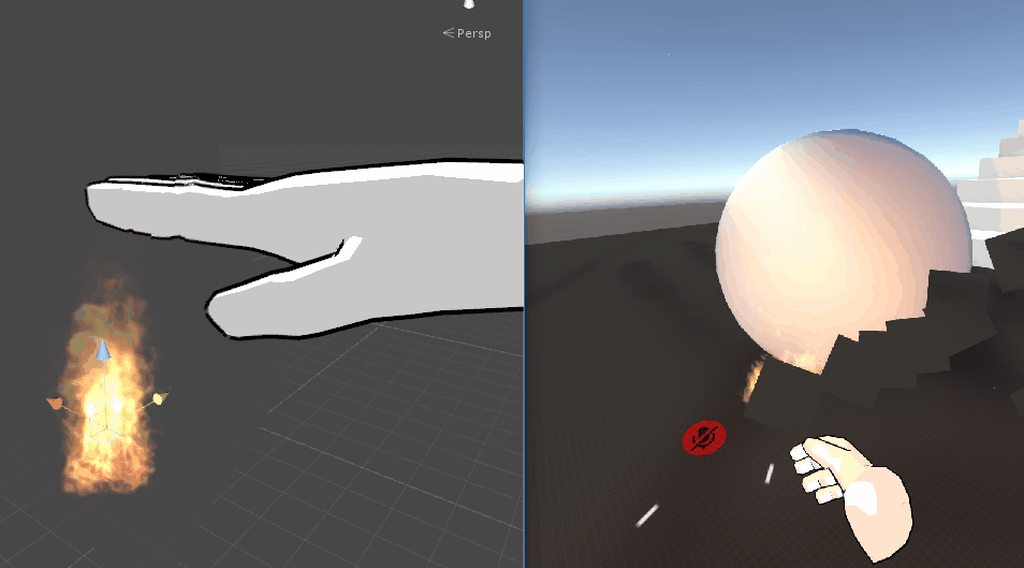 blissful grove
@clear yew mate where’s the model you said you will do for me it’s been like 3days and just tell me if you don’t want to do the model for me
clear yew
Does anyone know any references about how to make an animation on emote menu?
 spring remnant
I don't think I understand blinking right... When I let CATS build eye tracking with blinking enabled and then do a custom blinking loop in Unity, I get two different blinking animations at a time. But if I build the eye tracking in CATS without blinking, my custom blinking animation plays just fine in Unity, but not at all in the game. Can someone help me do this correctly please?
 cloud nexus
So I'm making an animation that will make this FBI guy kick down a door that will appear
But I'm running into a couple of issues
 agile ruin
Anyone knows how to make particles instantly die after the duration is over?
instead of them disappearing a few each miliseconds
cloud nexus
One thing that's happening is that the door is following the avatar (I have it set under the avatar name in the heiarchy) and another issue is that for whatever reason the avatar rotates like 60 degrees to the right
When I scroll the red line across the timeline it looks fine as you can see

But this is the result when I hit play https://gyazo.com/a11a08e91a261385536be5876fcd5da7

Anyone know what I'm doing wrong?
uneven moat
how do i make it so my walking animation isnt floating when i walk
the character itself isnt floating when standing
 iron tusk
Roks, the Door will alway sfollow your Avatar, it must be part of your Model, to get included while uploading
tribal sparrow
hm... I have figured out how to have animations on things you spawn from handgestures. But only by animating them in unity. I can't figure out how to get imported animations to work on spawned objects 😐
What are the common mistakes when importing animated objects into unity?
 celest pewter
could make the door a world particle mesh
 clear yew
yeah those are scripts, they are not allowed
clear yew
you can use the shaders and materials fine though
just don't use the lame scripts some prefabs have in that pack
 pine hinge
do you recommend a good asset pack for animations
i want to experiment some more
I already use cartoon fx but thats pretty much it
clear yew
I don't really use them, most of them look terrible too, but what kind of animation do you mean?
 patent needle
I just started out on animating, got animation through Mixamo but is there any way to add particles to the Emote override animation? (since I cannot use hand gestures)
patent needle
Ah, but how do I add the mixamo animation into that? As of right now I have the image and animation as two seperate files
The image used in the particle I mean
clear yew
In this introduction to Unity's Animation tools, all we'll do is make a ball bounce. It's wickedly simple but hey, we have to start somewhere! I'll also intr...
patent needle
Will look into that, thanks! Been trying for a few hours now it's so intimidating :v
clear yew
it's less complicated than it seems really, unity allows for almost anything to be part of the animations
 tight arrow
I was just about to ask if someone could link an animaiton tutorial. Is this real life? Is this fate?
grand loom
Is it hard to move animation overrides from one project to another if its the same model?
 copper bramble
https://gfycat.com/HiddenConcernedCranefly I wonder if I can edit her idle animation to actually hold that plane

Figured out how to create IK solvers in the engine, probably able to animate pretty decently with it -- but I assume it's just better to use Blender rigging for that
Curiously, is there a way to loop animations after they hit a certain point in their animation?
Like after a certain amount of time elapsing while standing still in the idle animation, have it transition into another animation?
 heavy stirrup
I've asked before but don't think i got an answer. Where is the transition time to starting a walking animation-- so i can eliminate the "slow start" getting into a walk?
Would that be the MovementX/Z in the locomotion layer?
pine hinge
@copper bramble how did you do the tag thing above your head?
sorry random question but im just curious
copper bramble
Uh
Created a PNG file in photoshop with the text and background on the bottom
And in Unity I just made a plane, slapped the texture with a material on it
Make sure outside of the image it's actually transparent
so you have the name tag, and nothing behind it in photoshop
And set the blend mode to cutout on the material
pine hinge
yeah cause I had a friend try to help me out but its pretty uh

lets say it didnt work too well
copper bramble
Haha
copper bramble
yee
pine hinge
frick lol. ty
copper bramble
Then you modify the alpha cut
just a slider that modifies how much it clips off
and ya, good to go
ym
 copper bramble
Uhm
CTRL + 6, Create > Name it > Add Property > Transform - Rotation > Set Key Frames of rotation
And make sure inside the locomotion it is set to Always Animate [X]
pine hinge
ah ok ill experiment
copper bramble
Just see what works best for a smooth transition
pine hinge
ya i was just curious cause ive gotten a lot of comissions lately
\and wanted to tag my work :p
and i have a paypal now!
so paid comission soon :p
pine hinge

@copper bramble whenever im in play mode this happens O-o
but its normal out of playmode
what should I attach it to in the hierarchy ?
copper bramble
I just attached it to the base root of everything
pine hinge
oh hips seems to work
copper bramble
I don't want it to follow the head but just be above it
celest pewter
commisions for importing a avatar?
copper bramble
Some people do yeah
celest pewter
y tho
copper bramble
Hmmm, this is frustrating
Anytime I apply an object to the head bone, as a parent, it changes where the pivot point is at
so the head break
breaks*
Might've fixed it
tribal sparrow
If I have made an animation in Maya on a model with no skeleton, I only used 1 blend shape and Position Transform, then baked the animation and exported object as FBX...
How exactly would I get that animation to play ingame?
Using an Animation Component doesn't seem to work. I have so far only been able to use that for animations created in unity.
 tropic rover
Greetings, does someon know how to fix the problem where separate objets woud not stay where they are supposed to and instead all fuse within the main avatar ?(And it only happends for you in the mirror, other peope can see it just fine).
tribal sparrow
Is there a max duration for animations made in unity?
 hardy osprey
no but there is a max duration for emotes on vrchat which is 10 seconds
@tropic rover if your avatar has more than 1 mesh it will show up either invisible to you or broken
but to others it will look fine
more tha 1 mesh as in
you adding stuff to your avatar like swords hats
which only happens in animation overides i guess
 astral summit
Guys question
I want to add an object behind my avatar when i do a weapon animation
do i add the object to my body instead?
like i want to have an object appear standing behind the avatar
tidal gull
Yeah something like that
The orientation of the object is affected by the orientation of whatever it is parented to. Parent it to the root of your avatar's heirarchy
And you can summon whatever Stand you like
astral summit
i had to add it to my left hand
because it was a specific motion i wanted to do
i set its rotation to face forward
i hope it works
 boreal trellis
tropic rover
boreal trellis
tropic rover
@hardy osprey oh ok ^^
 surreal warren
or even the gameboy selfie?
 cedar root
Weird question but I need help fixing a dance. I found a dance animation and it looked fine in unity and everything but when I do it in game it acts as if my character is sort of locked in the air or something. Like instead of bending down if I bend my legs the legs just kind of lift up into the air if you get what I mean. This happens with a few dances I have but then some others I found clearly work just fine so is there some sort of setting I need to change or value I need to set so that it actually behaves like a proper dance?
 fallen rampart
You need to have root motion enabled
cedar root
@fallen rampart thank you :)
I just looked at the settings and set them the same as they are on the dances that actually worked. So hopefully that'll fix it.
I'm going in now to test
echo cargo
anyone familiar with particles?
echo cargo
I have this problem of my particles attached to a gun not actually coming from it
instead it spawns and turns with my camera on the left side
In unity it works fine
topaz barn
Global particles?
echo cargo
World simulated
topaz barn
Vrchat doesnt like world particles
there is a tutorial on youtube telling you how to perperly do world particles in vrchat
echo cargo
Is it in the tutorials channel?
The weirdest thing is, the subemitters are appearing at the right place
However, if I change the first one to local space, the emitters spawn there instead xD
topaz barn

Had to re-upload because of audio being too quiet should be fine now. I forgot to mention it in the video, but Murmur also answered questions I had and helpe...
do as this says
echo cargo
Alright thanks ^^
 wary parcel
@hardy osprey that is actually wrong, emotes can last up to 3 minutes now
 azure vault
Any idea as to why the middle finger is not detected by the Muscle Editor even though it is mapped in the bones? https://puu.sh/ztlre/99e27b56fa.png
 tidal gull
weights
 tame falcon
whyy particle system not work on vrchat 😫 weapon works particle system nope ((((
azure vault
@tidal gull how do I fix that?
wary parcel
Weightpaint or find the correct bones if you are using right from an mmd
azure vault
Yeah this is an MMD model
wary parcel
Either cats removed simething wrong if you used that or you deleted weighted bones. Just find the wertexgroup that is weightpainted and make new bones
clear yew
Which might be the most common chair in VRchat?
I wish to create a sitting animation and would like to use the most common height I can use
azure vault
I'm kinda new to blender... xD
wary parcel
Everything starts with a w :p
tidal gull
Got a question about particle trails
wary parcel
I always have problem to write the correct english word or letters for the word.
azure vault
Is there something wrong in this?
https://puu.sh/ztmCM/0314060728.png
 tidal gull
I have a bwillboard pwarticle emitted, and I don't want to hwave hwhat I cuwently have with my twail hwere there is a twail of flat pwieces of pawaper
😄
OK more seriously
wary parcel
@azure vault You can search up vertex groups and bones and what they have in connection
Lol
tidal gull
I need to have the particles emitted as the trail of a particle I've emitted not look like this from the side -> |||||||
Ideally they'd just be the same orientation as the projectile they're spawning as a trail for
wary parcel
Thats just how you face the billboard
azure vault
Okay and what do I do with these wertex gwoups?
azure vault
:^)
tidal gull
owo
wary parcel
Hmm. Did you let it adopt the particles rotation?
tidal gull
No, using the trails function
Not sub parts
I'll do that if it fixes it 😃
Anyway for vert groups: you've got a set of bones, right
wary parcel
But ofc if you want an line it would need a trail option :p
tidal gull
Every .2 of a second spawn a sub particle that is smaller, doesn't move, has view space, where the particle was...
Anyway for vert groups: you need to make sure that the bones of the middle finger are assigned as the bone for the vertices of the middle finger
Bugger me how to do that in Blender
wary parcel
Small particles are not that expensive to process than large ones though
tidal gull
I can do it in Max
Bilboard particles, provided you don't spawn 100k of them, are generally fine
2 tris each
azure vault
uhhhh
tidal gull
I'm damn close to my Akuma being able to throw cool fireballs 😃
wary parcel
In blender you just call the bone the same name as the vertex group and they are linked
tidal gull
Freaking Blender
azure vault
 tidal gull
Alright so you need to go look at the vertex groups
azure vault
They are though
tidal gull
Are both hands doing this
azure vault
yes
tidal gull
ok
For those vert groups, try and find out what verts they are assigned to
It's possible they're empty?
wary parcel
Check in weightpaint mode
wary parcel
Select an vertex group and check if there is some. Green/yellow/red parts
tidal gull
Green = 100% weight, red = low % weight
So you want green on at least some bits of the finger 😃
wary parcel
Nope opposite in blender
wary parcel
Red is max
tidal gull
(╯°□°)╯︵ ┻━┻
 mild plankBOT
┬──┬ ノ( ゜-゜ノ) There you go
mild plankBOT
┬──┬ ノ( ゜-゜ノ) There you go
tidal gull
aaah
wary parcel
And lightblue is minimum
wary parcel
Make it easy
Add the pie addon in blender
Well, activate it
Its a default addon that makes it easier to navigate later on
azure vault
okay activated it
clear yew
Cute bot, lol
wary parcel
Then hold in tab while you selected a mesh (the one with had and fingers) and hold tab in the 3d window
azure vault
found it

OH
I think I found it https://puu.sh/ztn4H/05d66fffee.png

Done, turned it blue
azure vault
I undone it
wary parcel
Also
azure vault
but only that cylinder is left
wary parcel
Increase the undo history in settings
wary parcel
That cylinder is weightpainted to a certan bone
The vertex group youhave selected is the bone that it is weighted towards
azure vault
Oooooh I see
wary parcel
That means that the red paint you see there moves when that bone moves in any direction
azure vault
So that's what vertex groups are for :3
wary parcel
There is several vertex groups to make an hand move like an hand
Or fingers for that matter
If it is painted dark blue in blender it means it is not moving that part
wary parcel
Well then you need to parent them correct
May have mistaked the last bone of the middle finger to something else
azure vault
Oh wait
I might have found my mistake
I renamed the bones in Unity to distinguish it from those of other avatars
and that most likely broke it
Yup, that was it, thanks a lot!
wary parcel
If you rename the bones in blender the connected vertex group also gets renamed 😉
azure vault
But the problems don't end here >_>
 remote helm
I have a long reload animation I made. When using it in-game it seems to bug out after one use. Any knowledge of a fix?
azure vault
The hands are still messed up ingame
wary parcel
The best way is to make it a loop or make so the animation reverts everything back to the original possition before ending, this way the animation breaks alot less
azure vault
Nvm nvm, i'm stupid
wary parcel
Baka!
azure vault
D:
remote helm
The final keyframe on every property sets it to it's original position/setting
It's set to not loop but keeping it activated say using rocknroll causes it to repeat eventually but a lot slower and seems to miss a bunch of frames
So strange
 vivid burrow
hey guys im trying to give my avitar a sweater and it works except the arms of the sweater dont follow my in game arms and stay in T pose
wary parcel
The not loop option is kinda weird.
Think it is a bug on the serverside but we need to find workarounds
@vivid burrow You should check 3d or avatar channel for that, it has to do with weightpaint
vivid burrow
...
wary parcel
If you use blender i recommend to check up on videos about bones/vertexgroups/weightpaint
wary parcel
No easy fix in unity no
wary parcel
Nah you dont
 dull wedge
I recently made a complex animation of dragon fist that involves the model uncoiling and then flying forward. Before I added on these animations, the model simply flew forward and easily canceled when I let go of the designated trigger. All I added was the extra animation to the model itself, leaving the finger poses as one frame, but now the animation breaks and the model stays active after I let go. Is there something I'm missing?
wary parcel
If you make the sweater its own mesh and vertexgroup the weightpaint to the same bones as in your avatar it should work, but not always
vivid burrow
i might as well use a sleevless sweater to save the trouble lol
wary parcel
Though its advanced :p
vivid burrow
yeahhh im good lol
wary parcel
@dull wedge You made another animation on the same model you have an animation on from beforehand?
Oh,
dull wedge
I made all the animation on the dragon itself, moved it under the right wrist, and had a single frame of animation on the avatar activate it.
wary parcel
Hmmm.
dull wedge
It worked when the dragon had a very simple animation, but with all of the animation I added, it no longer cancels as easily.
wary parcel
Not worked with the dual animation where you activate another animation yet, cant say.
dull wedge
Is there a different method?
remote helm
I've decided to combine my reload animation with my firing animation
Means at least I can get a smooth cycle of the animation before it breaks the avatar
Lmao
No wonder no one is making complex animations. The trigger system must mess with them
alternatively keep a copy of the avatar without the animations and switch to it quickly between them. Effectively resetting the avatar but if youre smooth, no one notices.
spring remnant
I don't think I understand eye blinking right... When I let CATS build eye tracking with blinking enabled and then in addition do a custom blinking loop in Unity, I get two different blinking animations at the same time. But if I build the eye tracking in CATS without blinking, my custom blinking animation plays just fine in Unity, but not at all in the game. Can someone help me do this correctly please? I'd just like to use my custom blinking animation loop.
azure vault
would creating animation that loop at 60 seconds mark create any problems?
after I activate the animation I can't switch to anything else anymore
if I press the trigger button (HTC Vive) it does the animation instead of making a fist
 wind swift
anyone know if it's possible to make a character with 4 arms move the non main arms in a certain way upon hand gesturing?
or possibly link the four arms together so they both move when I do stuff
 lavish scaffold
@spring remnant Hello, I had the exact problem as you. Disabling blinking in CATS will fix the problem BUT you have to create a new blinking animation for your character again instead of using one that you already have.
 spark shard
Is it possible to get an animation exported from blender to not be read only in unity?
The animation is super jittery when exported in unity when it wasn't in blender so seeing if some of the keyframes may have been messed up
Nvm haha just putting the blend file instead of creating an fbx export fixed my issue ❤
dull wedge
Does anyone know why I'm not able to cancel out of my animation? I've made the finger animation on my avatar a single frame while the object it activates has all of the animation. It worked when the animation on the object was a simple position transformation, but now that I've added several more keyframes, I can't cancel out of the animation anymore.
 true nymph
How to VMD import to Emote?
stray gulch
@true nymph emotes cant be more than 10 sec you have to cut it
true nymph
Like Frame 30
stray gulch
change the sample to 1 and time it
true nymph
I know cute dance
 signal dove
How do I make an activated instance play its animation?
spark shard
Actually emotes can be longer than 10 seconds I think it's up to 45 ish
I've got one that's around 30
 surreal iron
am i doing something wrong ? the head of my character isnt moving on custom idle animation
or its because of the head tracking?
signal dove
So. Objects playing their animation on activation.
tidal gull
I get the feeling that for best results, you should be emitting fireballs as a low poly model rather than a sprite? 😄
I need a lower poly model to muck around with I guess
pine hinge
Why is the SDK so limited?
Ive been trying so many animation types / even meshes and shaders
And SDk just doesnt allow them even if theyre the simplest thing
It's just silly.
I know it was my bad, but for a simple Mesh pack it wouldnt let me upload because of a tiny trail on it. And it costed 22$
surreal iron
well... for starters, we're forced to use models with lower poly count than a NieR character which is a ps2 character with 25k poly XD
clear yew
Hey folks. Anyone know how I'd go about making an animation where an emote turns eyes into something like flashlights? 😄
 hexed fern
if only the ps2 klonoa model worked properly and didn't just become a giant blob of mesh whenever someone ripped it
heavy stirrup
Armatures work yet in movement animations?
 grand copper
Is it possible to put just sounds under the emotes? My character starts glitching heavily when I do this
grand copper
Instead of an audiosource object, use a gameobject with an audiosource component?
celest pewter
ya
grand copper
Cool thanks I'll try that tomorrow
celest pewter
and place the empty gameobject where u want
old cave

This happens on all my characters. On the sitting animation the arms clip through the legs.
Anyone know if there is a fix for this?
surreal iron
does anyone in here have some experience with custom walk animations for vrchat?
i need some help to find out why does my walk animation looks okay in unity/blender but absolutely trash in vrchat
 final ledge
Hey question, Im using a model that came with a weapon as part of the original model. Is there a way for me to make an animation to toggle it to be visible/invisible? I would like it to be invisible by default if possible.
 sharp cove
@final ledge yes
Make sure the weapon is a seperate mesh from the body
Once done
Click on said weapon
And either delete it
Or press the blue check mark in the top left-hand corner of the inspector
pine hinge
does anyone have a moving star shader? like the stars shader thing.
sharp cove
?
pine hinge
uhh lemme find an example
sharp cove
K
final ledge
in unity I assume? currently its part of the main model I think. When I click on it the main model is also selected, so I assume that's what you mean. How do i go about separating them?
sharp cove
^^^^^
In blender
final ledge
okay, and then i have to import it into unity separate from the main model right?
surreal iron
not really
they will become 2 separate meshes, so you can do whatever you want then
https://gyazo.com/1c2259326db29402602237fca12005b6 help plos.... > did a walk animation in blender > but when i upload, the animation looks ABSOLUTELY TRASH in vrchat

 sweet zealot
my animation seems locked, cant adjust any fo the values or even drag the keys, the proper animated body is selected - what am i doing wrong?
wait, says "some transformations are already bound to a humanoid character" then lists the things im trying to animate, this has never happened before, all im trying to do is make an animation gesture
sharp cove
Did you make a duplicate avatar and turn it into legacy
And then duplicate the animation
?
sweet zealot
i duplicated the avatar yes
but i cant seem to create an animation, the values are locked
sweet zealot
ill give that a shot right now
sharp cove
Duplicate the animation
By clicking that arrow on the legacy avatar
And then left click the animation file
And press ctrl D
sweet zealot
if the avatar is a dupe of the same source avatar, how do i make the duped avatar a legacy one?
sharp cove
Press ctrl D on the first avatar in the project area
And the newly duped avatar should be a seperate file
sweet zealot
oh
sharp cove
Ye
sweet zealot
okay, ive duplicated it, now do i drag that one into scene and add animation to that one?
the raw avatar is a different size from the editted avatar, will that mess it up or is it simply going by bones?
sharp cove
No
Keep the of avatar in the scen
Keep the dupe off
You just needed a legacy animation
To apply to your walk cycle
Legacy allows you to mess with it
sharp cove
Ohhhhhh
sweet zealot
i need my dragon to open its mouth on rocknroll but the values are locked i cant make an animation for it
sweet zealot
no
sharp cove
Mmk
sweet zealot
i just need the jaw bone to open 50 degrees but the values are locked it wont allow me to adjust them in animation
sharp cove
Did you create a new animation
sweet zealot
yes
i even duplicated the avatar to apply the animations to THAT one, but its not allowing me to change the values in animation
sharp cove
Ok
sweet zealot
if i duplicate an old animation and change it from there will that force it to work?
sweet zealot
😦
sharp cove
Is the dragon rigged
sweet zealot
yep
sweet zealot
oh i figured out why it wasnt moving, i was trying to move the armature itself, but there already is a preset "jaw" anim so i adjusted it from there.
im dumb XD
sharp cove
Lol
 lofty crypt
so
ive been trying to get custom emotes to work
i made sure to turn off looping in the animation and move the model out of the ground with Root T
when i play the animation, it just repeats super fast 5 times
 versed yacht
Quick question about gesture-triggered animations. If I'm gonna have my character bring out an item with a gesture, the item has to be in my model's hand in the original Blender file, correct?
heavy stirrup
It has to have its own bone armature, and be in the same file
You can have it modeled around the hand in unity even if its separate
versed yacht
Oh so if it's positioned separately in the FBX file, I can move it into the hand in Unity?
heavy stirrup
Aye, I'm not fully sure about turning it on and off, but i know that you can have a mesh with an armature separate from the actual body -- and you can change where it is in the hand in Unity
I haven't actually tried anything like that though, so my answers are from a vague understanding
versed yacht
Alrighty, np
 rancid ingot
im honestly getting annoyed, no matter what I do my animation overrides wont work
clear yew
The only time your gesture object should have an armature is if you're object is going to be using dynamic bones for some reason. Or if you want to morph it with a separate animation but don't have shape keys for it.
heavy stirrup
MMhn, i thought it was related to how people turned portions on or off-- guess they can do that with just the mesh?
Oh, i want to make a character with a whip now. I've seen a few
clear yew
You just use "Is Active" on the mesh where you have it placed in your avatar's hierarchy.
It doesn't need an armature.
Unless you're sneaky and use a shrinking shape key.
Then you just set the key to 100.
@heavy stirrup It's not difficult. Just get your gravity values about right unless you want it to look like a fishing rod or a spring.
😅
heavy stirrup
You know anything about walking animations in the locomotion layer by any chance?
Trying to remove the transition time between animations on a certain model, so it jumps to the first in movement animations
clear yew
I haven't touched outside gestures when it comes to animations, sorry. 😢
Just because I haven't had a reason to yet.
 lone bramble
if you set a world particle animation to an emote1-8 but trigger it while in vr, can you still move around or is your character going to be stuck there
lofty crypt
ive had it both
stuck
and movable
not sure how i did it movable
doesnt look good anyways
 keen reef
Anyone have any idea what makes a Particle effect move during an animation where its suppose to remain stuck to the object?
Apperently the harder i press the trigger the further the effect goes
clear yew
http://prntscr.com/iio67q How would i go about making this tail rotor spin slowly by itself?

oh wait i think i got it
wary parcel
You got 2 options or 3 if you want the whole body to rotate with it 😉
clear yew
This looks not decimated 😃
 dusky venture
hey does anyone know a place to find floating/flying anims for idles and the like?
torn pawn
@clear yew make a bone for it (if it doesn't have), put 100% weight on it and then create animation (unity or blender) and then put it in Animation component (debug > legacy + loop ), or you make a shape key that spins it, which you also make as animation and then put in animation component
clear yew
Its fine i got it sorted
xP
just needed to animate the bone for the rotor and put it on the controller and its fine
 oblique wadi
Anyone know a quick model I can rip the dab off of?
Im lazy af right now and just want a new dumb emote on my new avatar
oblique wadi
Thank you ^^
 rose lake
accidentally changed an animation while the main instance of my model was active, so now she's stuck in the base animation pose. does this need to be fixed, and how can I fix it?
keen reef
There's a revert button on the right side somewhere when you select your model
I'm not sure where exactly it is, but good luck.
rose lake
that worked, thank you
grand copper
@celest pewter I still have the problem even with everything changed to gameobjects
anyone knows if its possible to put sounds into emotes
not hand gestures
 white herald
@grand copper yes
 stoic ridge
Yo, Anyone know any great particle effects that have really nice orbs? Or are willing to share some files that do? I am looking to make rasengan
 scenic pelican
how do people make their models move away from root position in an animation?
i made an animation for an emote that moves my avatar around but it doesn't work in-game
i just stay rooted in place
clear yew
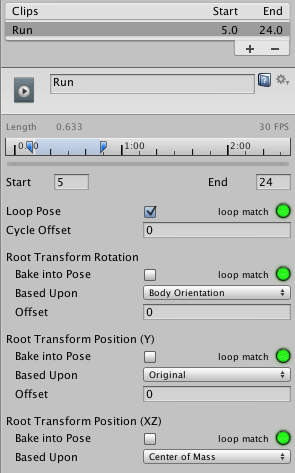
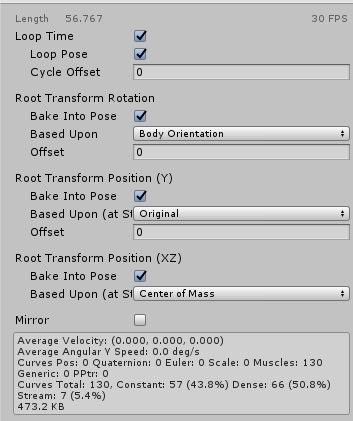
@scenic pelican try going to the animation tab and ticking 'bake into pose' and 'original' on all three
so I mean in this .anim property window https://docs.unity3d.com/uploads/Main/MecanimRootMotionChristmasTree.png
 scenic pelican
what if i copied the keyframes into an .anim to add effects and stuff
scenic pelican
so tick bake into pose and set based upon to original for root transform rotation, position y and position xz?
scenic pelican
well that worked for the imported animation
clear yew
oh 😐
clear yew
oh 😄
scenic pelican
thanks
clear yew
yw my dude
muted prairie
@remote junco Let's not link to that website please
 remote junco
ok but i did find the link in here by searching animation-set
muted prairie
No worries
celest pewter
variety ruining
dusky venture
does anyone know if there's a way for a custom idle animation to move the character's head at all? i have an avatar that bobs a little in the air but the head sticks in one static place so instead they look like they're sorta squatting and unsquatting
clear yew
how do i loop an animation for like 10 seconds
vocal zinc
hi, is there a way i can see how my model will walk in vrchat in unity ?
surreal iron
https://thumb.gyazo.com/thumb/1080_w/eyJ0eXAiOiJKV1QiLCJhbGciOiJIUzI1NiJ9.eyJpbWciOiIyOTUzN2I5MWE1M2MxNmQ4Y2JjNDVlZGFlYzI5Yjc0YyJ9.QhI12vaUVMoBvJ45ARLg6KUMgcq5FU13qTj42OGaRVI-gif.gif reposting because i need help, did a custom walk cycle in blender, it looks good in blender and unity, but when i upload it to vrchat, it doesnt look good

idk if im doing something wrong in unity for the avatar to look bad inside the game
couldnt find any tutorials regarding custom walk/idle cycles
vocal zinc
hf dud lol
stoic ridge
I had a question, So when I zoom into my animation it shrinks the closer I get, Is this going to be the case in game and if so how do I fix it?
 trail grotto
Is it 2d?
 heavy void
please help,im trying to animate a vehicle only rotation, as generic rig, please take look at my work, the animation works inside unity , but not ingame http://oi67.tinypic.com/2eovg4y.jpg http://oi64.tinypic.com/zwhv6t.jpg is it because avatar is none on 2nd picture? how to fix this?

 clear yew
Hey does anyone know how to import vmd files and make the animation work in Animation Overrides?
@clear yew https://www.youtube.com/watch?v=oUSe5uDLSJM
Tupper video on New MMD tool for blender https://tinyurl.com/y8yeonsd MMD Tool update version https://tinyurl.com/ybku6xft EvolvedAnt Gesture Overrides for T...
I tried that with the CAO here maybe I should show you screenshot after screenshot what i do? Add me
the steps worked for me but sure
 olive yacht
Is there any function with the VRCSDK to force stop an animation? Like, have it loop for a specific amount of time then stop?
 pliant plank
@clear yew which part isn't working for you specifically?
clear yew
Hold on can i add you and show you screenshots of what im trying to do
Tell me if im doing the animation override part right
clear yew
Anyone thats able to help me?
If you want i will even give you the link where i got the model from
 rancid hamlet
Is sharing assets for unity done here? someone told me i could ask for em here.
hexed fern
@rancid hamlet what assets do you need?
rancid hamlet
I was watching tupper's model tutorial and he said I should get Muscle Animation Editor
hexed fern
oh
clear yew
im trying to make it to where if i were to do a finger point/finger gun/hand gun hand gesture it summons a gaster blaster and it shoots a laser in the animation
Except its in a vmd file
https://yukanuntiusel.deviantart.com/art/MMD-Undertale-Sans-ver2-2-DL-662836691 this is where i got the model from
https://www.dropbox.com/sh/nydpc7rnskpdd0f/AAADmqnuWTtDtT-ZQ3-B1FOTa?dl=0 screenshots of what i did
 hexed fern
i have everything BUT that xD
hexed fern
@clear yew i think it'd be better if you just explained what you did, the screenshots are confusing
heavy void
is it possible to animate a vehicle? i been try all day, not work ingame
as generic rig
hexed fern
then agian its probs confusing for me cause i know shiz about vmd xD
@heavy void ive been told its possible, but ive never tried it myself
clear yew
uhmm hold on do you mind if I post a chatlog here of my explanation
hexed fern
thats not really something i can decide @clear yew i dont know if its alright to
heavy void
i tried alot of different settings, with customoverride file and different templates
my vehicle has no bones, but alot of parts can be moved out
clear yew
https://pastebin.com/wv8b0vnb chatlog

Pastebin
dont worry this is safe btw
Hopefully this kinda explains on what i did or what’s supposed to happen
vocal zinc
hey, how can i found others particles animations ?
hexed fern
@heavy void https://www.bing.com/videos/search?q=putting+veichles+in+vrchat&&view=detail&mid=671C75AEFAB1D56CF3B7671C75AEFAB1D56CF3B7&&FORM=VRD best video i could find
hexed fern
i understand what your trying to animate
clear yew
Yeah but if you saw my screenshots or whatever
hexed fern
i think i can bake the vmd for ya too
clear yew
I don’t think even with the tutorials that it would work for me
Yes please
And publish it for me?
Here ill add you
hexed fern
http://prntscr.com/iixhub sure and i i thankfully have all that stuff for mmd's xD
 hexed fern
@heavy void np
heavy void
my vehicle is ingame, but animations dont work
clear yew
The mmd link that has the model has gloves on which i took off so if you have to ask me for the gloveless model so that you’ll be able to help me better Be right back! I have something to do real quick
sent a friend request
hexed fern
okay @clear yew
heavy void
anyway, i gotta try later, i feel so ded right now, been trying to fix it all day
hexed fern
@heavy void i tried hard to find one for animations
but i was told you can have it in game without animations
heavy void
np, i still have some ideas left to make it work, its just a rotation
hexed fern
brb
great
my dads pissed at me because he thinks i stole his bluetooth speaker
which i haven't touched in 3 months
but im backs
vocal zinc
hey i would like to add an handspinner to my avatar
like on my chest an hand spinner that rotate constantly
i have the model of the handspinner but how can i make it rotate constantly ?
 red lodge
hey is the amount of keys for gesture animations limited? in unity all works fine but ingame only few things where triggered
clear yew
Hey guys
is there some one who can send me some tutorials, i only know the basic stuff 😭
grand copper
@white herald how tho? I made an animation that enables the sound. It works fine when in a hand gesture, but when I put it in an emote, my character starts glitching a lot and i can't move it anymore + no sound plays
covert hawk
does anyone know how to make an animation to trigger when ur afk for like 2 minutes?
i have an idle animation and i don't know how i can make it to not trigger all the time
agile ruin
Anyone knows how to make it so a helmet disappears from the head and appears in the hand? I tried duplicating the helmet meshes and placing them in the hand but then it doesn't follow the hand
 onyx frost
https://imgur.com/a/7cLA2 So, my face animations are looping and her makeup is not there?
 thin meadow
hi, does anyone know where i can find info on making an avatar hold out another dancing avatar? i allready got the second model in my hand, i just need to add a dance animation to it. anyone know any tips?
 long jacinth
@thin meadow The second model must have the bones for dancing, then you apply it to that specific model
then drag the second model into the first model's "hand"
for the armature
and if you don't have an animation already, that's when you'd create it and all
It's basically the exact same as giving an avatar a fluffy doll that moves around
thin meadow
been looking into converting an mmd animation to it
long jacinth
converting .vmd is basically a no-go
thin meadow
oh
long jacinth
You'd have better luck making it yourself from scratch altogether
thin meadow
you think it will work to use a maxamo animation for it+
long jacinth
Mixamo is super easy to port to it
thin meadow
mixamo*
icy hazel
super easy when it works
long jacinth
Basically
 fathom plaza
Did something change with animation with the new patch? When I add a legacy animator it doesn't play
thin meadow
allright, cos i so have the secod model in my hand as a standing ragdoll atm
long jacinth
take the second model .fbx or whatever file
add that into mixamo so that the animation will be for that specific model
download without texture
at max possible fps (I think 60)
It'll give you a .fbx for the animation
now back in Unity
add the second model in
then add the newly created .fbx in
You'll see a little arrow to open up the stuff inside
there's going to be one for the animation specifically, and if you look at the right hand bar
it'll show the rigging settings
set it to use another pre-existing model
and select the second model you want as the doll
then you can duplicate just the animation part you just edited (CTRL-D)
then you can delete the original animation stuff
then just add the animation thing into the animation override
thin meadow
hm allright i will try ginving that a go
long jacinth
and to make it so the doll is tied to the hand or such rather than just by itself, like I said, just add it into the main model's armature under the hand section
and you'll be good to go hopefully
thin meadow
i know those steps, itss just making the avatar i got in my hand, preform animations, cos i can't manualy edit it when its in my hand, cos its animation set does not exicte when setting up the animation
like its going to be a doll that i can pull out, and trying to make it so that when its pulled out, it starts its own animation. like a wave, or a dance
icy hazel
idk if you can do that cause people can't even rig a second rig behind them like jojo stands
and that might as well be another doll but no animation and just bone constraints or whatever
maybe tho
 nimble mason
Hey, does anyone know why visemes would stop working all of a sudden, even though they’re assigned properly and worked previously?
For mouth animation of course
icy hazel
dunno but have you tried to redo your avatar with visemes with the new sdk yet?
nimble mason
Yeah, I have
thin meadow
thing is i have seen it done, i could try ask the guy who i saw do it, but though might try my luck here first hehe
 tawny sail
hey i need some help whit my animation so i have tryed to make a animation to appear something in the game when you do thumbs up and when i do it in game nothing happens
heavy void
is it possible to make moving parts on a vehicle?
i made several avatars, but this one not work
using generic rig
i set a customoverride file, and choose this controller, is this right? http://oi65.tinypic.com/211vvx4.jpg
 dusky venture
for @thin meadow 's thing would putting the dance's animation as a component on the 'doll' do what they're wanting?
im not saying it would but just shooting in the void here
thin meadow
always worth a try mb
dusky venture
yeah! it's how people do like blinking when that was broken so it's worth a try
covert hawk
can u put normal emote animations in gestures?
clear yew
just when I actually gound a fix to my viseme issue the new sdk rejects it entirely
 scarlet adder
anyone know how to add audio on an animation in unity?
 meager bronze
anyone else having issues with snail trail not working? after i downloaded the new sdk and updated the game my avatars with snail trail can no longer do the animation
clear yew
in mixamo is it possible to import custom animations
like vmds or whatever
im trying to make it to where if i were to do a finger point/finger gun/hand gun hand gesture it summons a gaster blaster and it shoots a laser in the animation
Except its in a vmd file
https://yukanuntiusel.deviantart.com/art/MMD-Undertale-Sans-ver2-2-DL-662836691 this is where i got the model from
https://www.dropbox.com/sh/nydpc7rnskpdd0f/AAADmqnuWTtDtT-ZQ3-B1FOTa?dl=0 screenshots of what i did
trying to find someone who can actually help me make it work im not the best at explaining things
 mystic kite
@agile ruin Did you drag the second helmet onto the wrist in the armature Hierarchy?
agile ruin
@mystic kite yes
I also tried just hiding the meshes for a simple animati9n but when doing the gesture nothing happens
 zinc chasm
Alright so my avatar is all set on animation.
How do I activate it in the VR?
Im on a desktop xD
 ember olive



 muted prairie
Can you try closing unity and launching again ?
scarlet adder
@ember olive just remove that client
 eager vault
is there a way to lock an axis for dynamic bone movement, i have something on a hinge
signal dove
How do I make animations faster?
@eager vault I don't know if Unity uses transform locks from model files, but if so then you could do it in Blender or whatever modeling program you use
eager vault
oh wait, just found a freeze axis option
zinc chasm
Could I screenshare iwht somebody that is good with animations? I have it all set up I just need to make sure its all in the right place because teh Emote I set it too, when I press it, it glitches. Thanks 😃
fathom plaza
I have a blinking animation set to play on loop, but it's disabled when an animation is placed in the open hand override. Is this intended? Anyone know if there is a workaround?
 onyx charm
Does anyone know how to summon an object that doesn’t move with my avatar and is stuck to the ground?
zinc chasm
Also can you even do custom animations on computers? or is that only headsets.
signal dove
If you mean gestures, they just added keyboard shortcuts for that yesterday
@zinc chasm
zinc chasm
Well mine is the avatar pulls out swords....... that part of that?
signal dove
Yes
zinc chasm
Aye so does anyone know how to do it yet? I could use serious help.
onyx charm
Read the steam patch notes
zinc chasm
Thanks! Ima check this out
I actually have a question @signal dove @onyx charm regarding "Controller" under animator. What should that be set as?
signal dove
I'm not sure. Probably none.
zinc chasm
Ill try it.
I can't seem to find out why when I use the animation my guy just freezes in place :/
clear yew
Oh my goodness feels like my message was ignored
zinc chasm
From my experience I'm gonna say yes.... don't go off of me completely tho.
clear yew
@everyone in mixamo is it possible to import custom animations
like vmds or whatever
im trying to make it to where if i were to do a finger point/finger gun/hand gun hand gesture it summons a gaster blaster and it shoots a laser in the animation
Except its in a vmd file
https://yukanuntiusel.deviantart.com/art/MMD-Undertale-Sans-ver2-2-DL-662836691 this is where i got the model from
https://www.dropbox.com/sh/nydpc7rnskpdd0f/AAADmqnuWTtDtT-ZQ3-B1FOTa?dl=0 screenshots of what i did
i am trying to find someone who can help i am the worst at kinda explaining things but am kinda hoping someone can make it clear and easy for me to understand
icy hazel
We see your message but ten of us are like 'idklol'
clear yew
thats why im trying to find someone who can help
icy hazel
Also idk, mixamo is kinda... Pooptown
zinc chasm
My brother uses it
He doesnt think so
More of a "get your bone structure and szeeing what your character looks like moving."
In his words.
icy hazel
That is if it uploads...
clear yew
okay waht i mean since the animation is in a vmd file and since its using not one but two models
uhmm
it will be directly applied to the hands but its not like a hand weapon
its more like do a hand gesture and something pops up from the side of the shoulder and its suppose to summon a gaster blaster and shoot a laser
zinc chasm
Don't think maximo deals with that xD more of a unity thing.
clear yew
problem is i dont know how to get it to work even when exported as a fbx animation when exporting the model and the animation both into a fbx and importing it into unity
zinc chasm
Like if you mean make your own gesture/animation
clear yew
Yeah thats what im saying i am trying to find a easy way
zinc chasm
Unity has tutorials for that.
clear yew
NO i mean
to use like animatiion
that already has been made
that comes with the model
clear yew
no i mean i KNOw how to use it in the game
i am saying how to make it work and such or how to import it
like look atm y screenshots and tell me if i did it right or not
zinc chasm
Oh haha omg so
Usually people who have it all premade
When you import the uhh whatever the unity symbol model is called
Its actually already set
clear yew
okay but
zinc chasm
You just have to ad your textures
zinc chasm
Like my kirito one
clear yew
i am meaning like
VMD files
like theres a gaster blaster pmx and a sans model pmx which i already decimated both to be under 20k
but the animation will be applied directly to sans hand
but the animation will be on the gaster blaster
but i generally think since its going to be applied to the character shouldnt i do it on the character but how will it work with the gaster blaster
i duplicated the sans model and gaster blaster and put both gaster blasters into both models into both models wrists on right hand
okay so i had one where its like invisible and the other one not i believe i had the main model invisible but
the other model i think has the animation
unless if it was suppose to be the other way around
anyway so in the clone i did put the animation on it but like when i do put the Control Animation Override on the main
of course because in the CAO I did like put the animation (after being imported into blender of course its like in a amature.gasterblaster motion bone it said it was )
in the hand gun/finger point or whatever its called
and then when i uploaded into vrchat the main sans model i did try to like
do the hand gun or finger point
it wouldnt like do anything it wouldnt let me do the finger point for some reason
i did put it in the animator and vrchat descriptor in custom standing animations
but like when i try doing the hand gestures it just wont like, work
i had seen it to where people imported the sans model to do that in vrchat and i am just wondering how to make that work
zinc chasm
Do you use a VR headset, or play it on your computer
clear yew
with oculus rift controllers
zinc chasm
Ok then I wouldn't know because im a PC xD
clear yew
and when i dont have the animation on the figner point it lets me do that finger point but
THATS why I am asking for someone who CAN help me?!
@everyone anyone who can help me?
zinc chasm
@onyx charm Hey so I published it with a gesture and not emoji and according to the announcment channel I tried the f3-8 and now I'm not even getting a reaction.
clear yew
are you able to help me or not
look i will send you the link where i got the model from
please take a look at it and see if you can help okay
zinc chasm
@onyx charm @signal dove GUYS I GOT IT ITS COOL OMG THANKS
 zinc dagger
so i made an animation ovverride and now its always active when i get in game
and when i jsut hit play in unity if the SimpleAvatarController is on
its jsut always toggled on
if i dont use the SimpleAvatarcontroller the ovveride doesnt autoplay
haven't tried uplaodign it without the SimpleAvatarcontroller on
anyone else had this happen?
clear yew
i dont know but is anyone to help me with my situation? (look up and look at all of my messages/chatlogs to understand what im trying to do)
zinc dagger
i cant comprehend the stage ur at through all those can you summarize?
clear yew
okay so
when i do a hand gesture
you know what a gaster blaster is right?
well like when i do a finger point or something like that its suppose to come from the side and a gaster blaster summons and shoots a laser
and im trying to figure out how they managed to do that in vrchat
but the problem is from the file i downloaded it from it was a vmd file
so i had to import it into blender and export it with the model into a fbx into unity (without gaster blaster)
and when i did duplicate the blaster and the sans model i did put both the blasters into both the models right wrists
and i did rig both sans as humanoids
and of course i did duplicate the control animation override and put it in my assets
named it CAO
and i put the animation (which had "armature gaster blaster sample motion bone" or something like that for the name
i did put the CAO on the clone and i did try uploading the clone but wouldnt work on that either
i dont know what i did wrong exactly or how to make it work
I was just kinda hoping to find someone who can help
onyx charm
Did you make an animation for it
clear yew
there was a animation file already i told you the VMD file that i had to import into blender and export it with the model
to make it work
and that will export it from a VMD into a FBX animation
yes its the animation file that came with the downloaded model
zinc dagger
aren't unity animations .anim files tho
clear yew
Yes
but when you import into blender a
VMD file with miku miku dance tools
it will like when exported into a fbx animation
i think thats when its a anim file idk
but i had seen people where that works for them
but wont work for me which wth
idk if i skipped a step or
if i did it wrong maybe
i am confused
zinc dagger
does the animation work if you just try to play it on your character in unity
like before tryign to add it as an ovveridde or anyhting
clear yew
i dont know i am pretty sure it does? except on the sans model itself i dont see anything
but i think because even tho
it is applied on the sans model but
the animation is on the gaster blaster though
but of course enabling it when doing a hand gesture on the sans of course
zinc dagger
is hte gaster blaster part of the sans model?
clear yew
well no its in a seperate mesh but
the animation is suppose to be like
on the gaster blaster itself yes
but it is suppose to be a part of the sans model
but again in two seperate pmx
but the animation as far as i saw in a VRChat world
that its suppose to be applied to the sans model and i can do a hand gesture
and like i explained how the animation is suppose to work/do/animate
like how it animates i mean
get what im saying?
zinc dagger
well for one you need to make sure the hand gesture enables the mesh for the gaster blaster
and that its attatched to ur sans model
clear yew
okay well how do i do that
zinc dagger
so if its an animation file you'll need to add that to it
clear yew
well its not directly on the hand in the model/mesh itself
but i mean it is in the hand
zinc dagger
so make a duplicate of sans