#animation
1 messages · Page 48 of 1
 clear yew
does anyone know how to fix this issue: I tried to fix jaw movement by using the CATS blender plugin and creating visimes that way, but when i re-export it as fbx and put nit into unity, unity wont detect them.
 uneven moat
it works when its generic but then i cant apply it to the humanoid one to actually make it an idle
clear yew
@uneven moat Are you keyframing the changes?
uneven moat
yea
clear yew
I'm still learning about connecting animations to the avatar so we'll both need help on that
 fluid crescent
can someone make my animation 15 seconds long ill send it.thats pretty easy animation i just don't know how to make it longer to loop or something
 muted prairie
Can't you chose loop time and put the number of frames ?
fluid crescent
i have no idea how to do that
muted prairie
What do you see on top of your animation file ?
fluid crescent
on Inspector?
muted prairie
yep
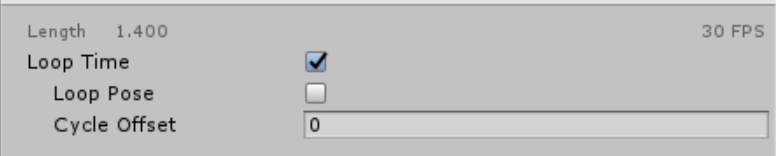
Something like this ? https://i.gyazo.com/ea89e31611a96d986d8249fc65cd0dd4.png
 fluid crescent
yes
muted prairie
Then just check the first box i assume
clear yew
make animations longer also by dragging the last keyframe further ahead
fluid crescent
@clear yew 1 then my avatars legs are getting weird
clear yew
yeah, that's a know unity bug, reload your project
or better still, do all animations on a copy fbx and when happy drag them to the actual avatar
it sux
fluid crescent
ohh okay ill try
clear yew
pressing play will mess up the pose sometimes
 gaunt gyro
Oh snap, Tupper and Rubick got a promotion. ( ͡° ͜ʖ ͡°)
 eager vault
Im so proud of my boys, moving up in the food chain
gaunt gyro
Probably has something to do with colliders. Like, UNITY colliders, not dynamic bone colliders.
problem is, when you try to google/youtube that, you find onehunderedmillionthousands of videos about dynamic bone colliders, and none about box/sphere colliders
 short oxide
does anyone know how to solve the weird crouch pose you get when you make an object on your avatar active?
without having to bind the animation to a hand gesture
 shrewd moon
The weird crouch happens to all models when animating even when just simply activating a object
 shut iron
quick question, does anyone know a good video for triggering audio? i just can't seem to get the hang of it
eager vault
My fingers move super slow sometimes when pulling out/putting away weapons with the hand gestures, is this normal?
 analog onyx
How do I make a trigger play an animation?
I've tried using every animation related action but I can't get a door to animate.
shrewd moon
@eager vault make sure there’s no random key frame at the end of the animations tab
 cerulean hull
Is there any other places I can find animations for characters other than mixamo?
 chilly vapor
you could always go through the 2534 mocap animation pack that is on the unity asset store. its free
 night steeple
where can i get animated shaders?
 clear flicker
Someone know how to made this : https://youtu.be/ZHXz8uj84Cc on an emote of my avatar?

Гайд по созданию магического кругав Unity 3D. Particle system effect. Game effect tutorial. Ссылка на пак с эффектом - https://www.patreon.com/posts/16654009...
clear flicker
Guys someone can help me ?
 warm geyser
is there a way to scale an entire particle system
 soft tiger
quick fact, first try to put the particles in game
i couldn't do that
I mean i can make them appear just when the character appears and that's it
I can attach them to an emote
can't
clear yew
Is there anyone who is using VR device has tried to solve the static arm movement problem when the avatar are walking?
 torn pawn
@clear flicker what the issue? just make the particle system, attach it to your avatar, have all children of that system enabled, disable the parent system - in gesture override enable the parent system
 red lodge
hey how do I put an vmd on an fbx model? I dont have the pmx to bind it with blender on root bone
clear flicker
in fact i want to create a magic circle on my avatar when i use emote
but
it don't work
i don't know if the animation don't work
or if it's the emote with the animation which are not compatible
soft tiger
@torn pawn for me that doesn't work 😦
torn pawn
@soft tiger to an emote you can create new empty object, put particle system under it, havce the game object disabled as default state while all particle systems are enabled as default
then in animation you enable the empty object
soft tiger
with isActive right?
let me try like you with an empty object
@torn pawn nop, it doesn't work :/.Basically isActive in the animation has no effect and I don't know why.Where should i put the particle system, in the avatar copy or the normal avatar? I put in both
torn pawn
You need it it both, for instance i have a valentines card in my left hand that has particle systems under it. On my avatar the card is inactive, while the particle systems are active, so all i have to do is enable the card and it will appear with all the particles
empty object should do the job, I did it on my other avatar
or just no empty object and just particle system, have the parent disabled and all child systems enabled
and then in animation you enable the parent system
torn pawn
sure, but i can reply with a delay, am busy atm
clear yew
How to tie sound to an emote?
 dawn shale
There any idle animations for standing and praying?
gaunt gyro
@clear yew Simply add a sound source to your avatar and enable/disable it in the animation.
 keen panther
helped me alot and is very easy to follow
gaunt gyro
Although aren't sounds still bugged in-game?
Where the volume is way lower than it should.
keen panther
no. my dabbing soudn emote works just fine
just had to upload it with 1.0 volume at the duplicated model
gaunt gyro
Hmmm. Actually yeah, I used to "bypass" the sound bug by raising the volume with 10dB, but yesterday when I played my SSJ3 animation, it was loud as hell
So maybe I should adjust my sounds again. 😂
Best way to test this is by using an alt account, or asking a friend to walk around your character and test the sound roll-off distances
 final gazelle
do custom sitting animations work for generic rigs?
i have the normal override controller assigned in the Animator's controller slot, as well as the Custom Standing Anims slot in the Avatar Descriptor
for "Custom Sitting Anims", i have a modified copy of the first override controller, with a sitting animation assigned to its idle state -- but when sitting down, the avatar performs the normal standing idle animation
clear yew
@Pigsqueal#3921 @Nicknero#1337 thank you !
final gazelle
actually, additional/related question to my earlier one immediately above: can generic rigs even sit down on their own? o_O
can't seem to click on the sitting box in the Avatar Testing world at all unless i'm in a humanoid one
muted prairie
Did you have a custom sitting animation on your generic model ?
final gazelle
yeah -- i placed it in the "Idle" slot of the override controller
the Custom Standing Anims and Custom Sitting Anims are using modified copies of the same override controller, both of which point back to the same avatar controller
i've tried changing the Animator's controller (highlighted in red below) to the base avatar controller, but that causes the model the T-pose and not animate

i've also noticed that the VRCChair prefab outlines don't seem to show up at all when i'm using a generic rig -- if i change into a humanoid rigged avatar, i can see the outlines just fine to actually sit down
muted prairie
Could it somehow be a height difference that's causing you to not see the outline ?
final gazelle
not sure if that's actually the root problem, because i've been sitting down as a humanoid avatar, and then changing into the generic avatar i want to test
i tried checking that across several generic avatars with different heights, it doesn't seem to show up with any of them
i've also got "fake humanoid" copies of the same generic avatars, where they've got extra dummy bones rigged to mecanim's humanoid mapping thing -- those ones can see the outline just fine
their viewball heights are almost identical to the actual generic rigs
it might also be worth mentioning that if i sit down as a humanoid avatar, and then switch to other humanoids, they all automatically go into their sitting positions as long as i stay seated -- but with any of the generic ones, they're doing their standing idle animation
muted prairie
If you can try it, use the same model, same rig, both in generic and humanoid and let me know if it still doesn't show up
final gazelle
will do, i'll be a couple of minutes
 golden egret
I was wondering , can we use emotes to show or hide objects attached to the character like weapons. For now I have a light saber that appear when I trigger the emote but it returns to his hidden state when the emote end.
final gazelle
general consensus on that one is that it's not possible, but i dimly remember reading about a complex workaround involving state machines...the user didn't seem too willing to elaborate on it though
so that's only a hint that it might be possible to do it via something convoluted
@muted prairie pardon the ping, but yup -- as soon as i set a couple of the humanoids i had to generic, they could no longer click on the VRCChair prefab in the Avatar Testing world
muted prairie
Thanks for the heads up, will check internally if something was changed recently
final gazelle
many thanks -- take what time you need though, heaven knows you guys have enough on your plates as-is
also, congrats on the promotion 😛
muted prairie
It's just a discord role but thank you 
Even though we have a lot of generic rig users, it's surprising that it's the first time i've heard of this issue, so it's definitely important.
final gazelle
just noticed that the chair prefab i'm testing with is almost completely inside another mesh -- i'm going to try jumping to another world to see if that may be part of the influence
though it wouldn't entirely explain why normal humanoid rigs have no problem seeing it as soon as their cursor is on top of it
hmm, i don't think it's about having the prefab be inside another mesh, no -- the chairs in "The Great Pug" are showing the same behaviour relative to humanoid/generic rigs
 misty kraken
Hey, I got an non-humanoid avatar which walks weird when I choose a humanoid rig. is this the right channel to ask how to give it accurate animations 🤔 ?
final gazelle
seems like a suitable place to ask about it, yeah, although i don't know if we have a proper solution on that one...
is your avatar bipedal, or something else?
final gazelle
hmm -- someone else should jump in and correct me if i'm wrong, but i don't think custom walk/run cycles work with humanoid rigs
 granite shell
anyone know what the shader is where you can see like a 3d space inside of them is?
final gazelle
feels like mecanim completely overrides it with whatever automatic black magic they're doing
misty kraken
😰 i have no idea what most of that means
final gazelle
@granite shell is it VRChat > Panosphere?
misty kraken
Is there any popular video explaining how to animate, sort of like tupper's vid for uploading avatars?
granite shell
@final gazelle Sure is, Thank you.
 stray gulch
if you have a non huminoid avater you need to rig it like you would a human
final gazelle
@misty kraken by that, i pretty much mean that you're not allowed to use your own walk animations -- unity forces it onto you
stray gulch
fake bones and stuff
misty kraken
hmmm
final gazelle
so if your models legs aren't positioned or structured anything like a human's, unity trying to automatically give it motions based on how a human walks and runs is probably going to look pretty weird
misty kraken
http://prntscr.com/ig0so7 yep, pretty sure what it's doing is it straightens out the spine

and then my murloc man walks upright
final gazelle
yeah, it's trying to force your murloc into a more human idling pose
he...doesn't look happy :/
stray gulch
create an animation for your model to walk and rig invisible human legs to walk on
misty kraken
He seems to be missing a lower jaw
final gazelle
@stray gulch a couple of us tried that approach -- VRChat won't play the custom walking animation for us when we move around
even when the custom animation targets the non-humanoid bones
we were pretty much sliding around in the idle animation, although the emote looping bug was at least resolved
misty kraken
so is there anything that can be done?
I saw a short clip from the vid I linked earlier of the guy animation a basic walk cycle
Pretty sure I could do that too but I have no idea how creating an animation in blender transits into unity and/or the game
stray gulch
i would just make him upright if you try to do ez workarounds your just gonna end up with a height problem or hand control problems
misty kraken
but he's not supposed to be upright 😦
final gazelle
if the animation is muscle-based, or targets mecanim (that weird unity system that asks you to map all the bones to a human body part node), that might work...but i've never tried that since i don't have muscle poser or any of the related tools
i don't think there's any easy solution to this one
misty kraken
 final gazelle
yeah, that's not what unity/VRChat considers a normal human idling pose
misty kraken
 final gazelle
you might be able to get away with it with full-body tracking in VR, but that'd require you always being hunched over like that...
which...really doesn't sound good for your health
misty kraken
It also causes his feet to bend up into his own legs for some reason 🤔
http://prntscr.com/ig0vdq maybe because of those 2 bones leading up into the foot
 final gazelle
it's a bit hard to say...it's possible, but there're a few different things going on there if we were treating it as a human
misty kraken
Basically I should just give up and go find a more human model huh 😦
final gazelle
that doesn't line up with the standard T-pose, so it's doing some pretty weird stuff
you could use it as a generic rig, but you'll need to actually do all the animations yourself
the main drawback to that is that trying to use an emote causes you to get locked into a loop for a good 60 seconds, and there's no head tracking
but you can at least animate the walk cycle how you please that way
non-humanoid avatars have quite a few obstacles to tackle -- not sure if anyone's actually fully gotten one working
stray gulch
i have
misty kraken
I think i could animate a walk cycle on my own but i don't know how to start
final gazelle
that'll be a bit of a project on its own, if you can't use the original motion data for that murloc
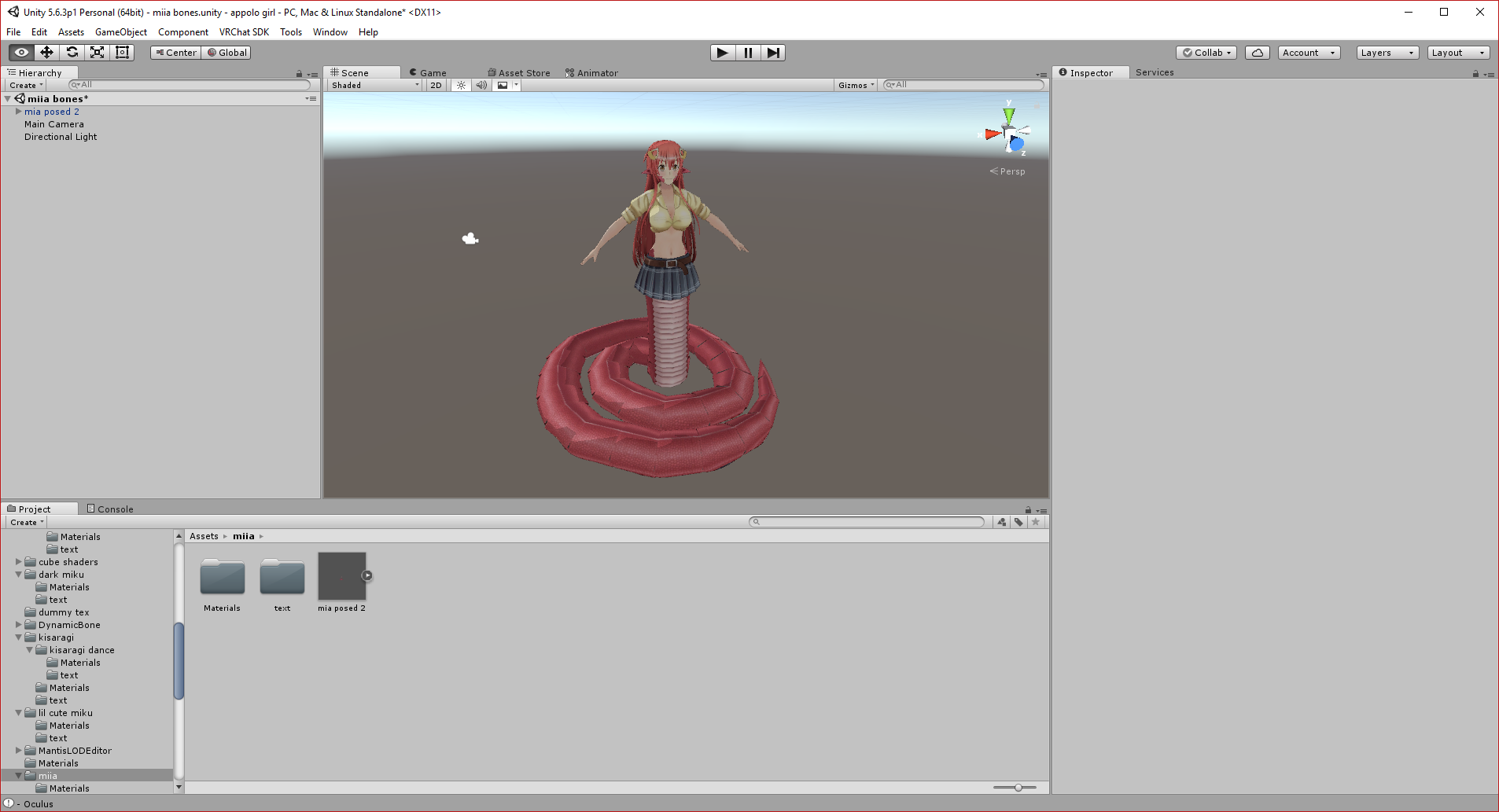 final gazelle
is that rigged as a humanoid, or a generic?
stray gulch
humanoid
final gazelle
although i could see that one getting away with humanoid, since she's got a humanoid upper half -- the hip swaying should look natural
can you get the snake tail to animate/wave around naturally while moving around though?
stray gulch
it has invisable legs and dynamic bones for tail
muted prairie
@misty kraken How is it mapped in unity ?
final gazelle
hmm, that's fair enough -- dynamic bones would work pretty well there, but bone rotation based animations seem to get blocked
stray gulch
like a normal human but i rigged bones in blender and mapped in unity
misty kraken
😓 idk
muted prairie
That's kinda important
misty kraken
How can I check
final gazelle
what he's asking for is the "humanoid configuration" window, if that makes sense
muted prairie
If your skeleton is busted, you should have different priorities lol
Try making a default one with mixamo
Then fix it with cats plugin
But as it is right now, your skeleton is unusable
misty kraken
because it's not humanoid?
stray gulch
@misty kraken your model is very simialr to a golem try looking up golems models
muted prairie
It's because the bones are all over the place
final gazelle
it looked like it was mapped sort of correctly from an earlier picture he posted:
but what i believe he wants (correct me if i'm wrong) is for it to move less like a human, and more like its original hunched posture:
misty kraken
yyyes
final gazelle
which i don't think is entirely possible with the constraints we have right now, unless he used full body tracking and hunched down himself like that
misty kraken
also the coloring / lighting seems off but i figured that's less important than the model actually moving correctly
golden egret
can we use custom animators on characters ?
final gazelle
if you mean the avatar controllers or controller overrides, you can get those uploaded, yeah -- there're some constraints on how they behave though
if you mean something else though, i'd be a bit clueless on that one
golden egret
I already add a custom controller override
but it seems I can't edit the avatarControllerTemplate
like adding a new layer doesn't do anything
final gazelle
the avatar controller is edited from a separate window
oh right, like that...hmm, can't say i understand at all how to edit separate layers
you can modify the way in which the states transition between each other though
golden egret
I created a new layer -> change it to additive -> change its weight to 1
but it doesn't do anything in game
final gazelle
this kind of works for me, for example -- it cycles between the two idle animations

the layer thing, i can't really comment on, because i've got no idea how to work those at all
all i can really say from my end is that it's possible to tweak and see some changes made to the controller, but there're certain things that we seemingly can't really modify
like one thing i tried was to get one particular emote to exit out to a separate idle state (specifically, a yawning emote that transitions to a sleepy idle cycle), but that doesn't work with humanoid rigs
whereas with generic, it does show up -- but it goes into the emote loop bug
golden egret
what's weird is that I removed emote7 and emote8 from the controller and add them in a new layer to make them behave differently but they get triggered the same way as before
I'm gonna remove them completely to see if they still trigger
final gazelle
i think they still would somehow, yeah -- that controller seems to be more a placeholder than anything
if you look at the animations assigned to each state, they're all only a split second long, rather than what we see in-game
that, and with the emotes specifically -- it seems like they're getting triggered by some kind of variable/value on VRChat's end
golden egret
I thing the game replace them with other animations when it start
final gazelle
yeah, i think it just uses the default ones if the override controller hasn't specified anything
if it has, that's when the in-game ones get replaced
(or at least, that's how i'm guessing it works)
 haughty glade
Anyone knows how to to make a custom facial animation for the default gestures?
I know how to make an animation, but overriding the gesture slot changes the default gesture to nothing if I also didn't animate the hand gesture itself, is there a way to do it without touching the hands? so that when I point the point stays but the facial animation changes?
 mystic umbra
how many keyframes are there per second of animation. I want to get an animation exactly down like a scene in one piece down to the second. how many frames are in one second
in the past Id just throw random intervals between movements
is it 24?
 white herald
depends on your blender render fps settings i'm pretty sure though if you are doing it in blender
i've made emotes at 24fps in blender, exported as fbx, it synced up to the same audio correctly ingame
mystic umbra
I done it before too but never did an animation down to the second
Id do it at random intervals
 novel flower
Anyone happen to have a full breakdance animation? Ones i find are like 2-3s long and only partial parts
 pseudo iris
anyone that can help me with particle effect, i want it to play a few sec after activation
mystic umbra
move the first frame
mystic umbra
give me a moment
Ill give you a call
yea give me a sec I see the pom
pm*
I need to fix something quickly
pseudo iris
okey, ill wait
clear flicker
Someone know how to create emote overrides
please
with particle animation like a magic circle
 gray pier
interesting, it seems with NoloVR my Idle animation is actually open hand, and when i pull the trigger, it goes to idle
 surreal iron
uhm... can i use rigify on a base model and then use the animation that i made from it on another model?
clear flicker
SOMEONE KNOW HOW TO transform a .prefab into an animation (.anim) ?
 signal dove
@surreal iron If the bones are the same, should be able to
surreal iron
alright, thank you 👌
 lost musk
Hey there I need some help, I wanna make a custom facial animation (I know how to do it already) and keep the hand gesture (which I dunno)
Any tutorial idea ?
clear yew
I am trying to make a drawing animation with a pen. The thing with trail renderer is that as soon as I break the animation, the trail disappears because the trail renderer time is set 0 and in the drawing animation I am setting it to 500. How do I fix my problem?
night steeple
how do you make an animation trigger once instead of looping?
 shell quest
@night steeple make a separate game object that plays the animation once, and use the override animation to trigger that
night steeple
is there a specific place i put the game obj.?
shell quest
Just depends on what you want the animation anchored to, other than that no
shell quest
So you would probably want it to be under the right wrist
shell quest
You give the game object it's own animation, and make sure loop time is set to off on the animation file
night steeple
alright, thanks dude
 drifting gust
Advanced question: Is the Animation controller slot (Animator > Controller) utilized in VRC at all?
Anytime i make my own modifications to the provided template it simply gets ignored even though it works in unity itself.
 astral cobalt
Ok so, I know you're supposed to make a duplicate and do animation work on that. But I accidentally forgot and now my character is stuck in a crouching position and sunken below the ground. I did too many changes to revert at this point. What can I do to fix back to default pose?
This is an issue everyone has, so there must be a way to resolve it!
drifting gust
remove the animator controller
set it to mone
ill just move the question to the dev tab
shell quest
@astral cobalt I always just remake the avatar and copy over any dynamic bones or other objects I had on it
lost musk
Help any complet tutorial to override hand gesture properly ?
night steeple
ok so i got the gameobj on my right wrist and i made the animation on it but it still is kinda doing the same thing in game like its only simulating the last portion of the animation and then does the beginning half as if it want to relapse
am i supposed to have an animator on the game obj and the ovveride?
override*
shell quest
@night steeple Okay, what kind of animation are you trying to have it do
night steeple
im trying to have the blade fly into the hilt and then it plays a couple audio sources and has a particle system throughout the blade
astral cobalt
@shell quest Haha, avatar is lying on his face now
lmao this is hilarious
he died
i deleted the animation controller completely
and he just fell over on his face
LOL
shell quest
@night steeple So you want to create a gameobject in your right wrist with all the audio sources, effects, etc in it, and you want to give that an animator with an animation to do what you want. And then the gesture override animation will simply activate that game object
night steeple
alright imma do that right now
astral cobalt
I changed his rotation to 180 degrees and he's fixed. thanks
night steeple
Im also using a particle that is world simulated so its under the base armature in a game obj, its the particles in the sword
im not able to select it in the gameobj animation im creating
shell quest
@night steeple add a delay on the particle so that it activates alongside the other parts of the animation, and then activate the particle with the override as well
night steeple
alright
novel flower
Anyone happen to have a good break dance animation? Ones if find are only parts or like 3s long
night steeple
k yea it works now but the particle system wont activate :/
shell quest
@night steeple is the particle system set to play on awake?
night steeple
yes
shell quest
And both frames of the override animation turn the particle system on
night steeple
k yea everything works but the particles activate immediatly
shell quest
increase the delay in the particle system settings
night steeple
is 3:00 on the animator menu 3 seconds?
shell quest
Yes
night steeple
alright
thank you so much dude you are the best
is there like anyway i could like +rep you 😛
shell quest
Nah, it's no problem, happy to help.
night steeple
thanks dude! 😄
shut iron
hey quick question, I got my audio to play on trigger from an emote (dont have vr for gestures), but I wasn't able to add an animation property for the model with the SimpleAvatarController on. It made the animations Read-Only so I couldnt add anything
so right now, the replacement model when playing the audio effect is in a frozen pose. any ideas to maybe copy over the idle animation?
 shut nebula
I am having an issue with attaching a weapon to my avatar the gun I have for him does work and shows up in game but its facing the wrong way? Anyone know what to do?
shut iron
rotate it in unity or blender?
shut nebula
Oh...duh...proof I am a noob to this
shut iron
in case anyone was interested, i figured out my problem. you have to ctrl-D the animation to make a new one, and then that one won't be read-only and you can therefore edit it
fluid crescent
http://prntscr.com/ig5eip Can anyone tell me why particles of my avatar are playing at the start of my aniamtion even keyframes are on middle not start

only audio is on start
gaunt gyro
Anyone has any experience with box colliders? (No, not dynamic bone colliders) I'm trying to get it to interact with my own body, but it does nothing.
 opaque compass
I'm looking for a super rare animation but it's called bubbletop
Legit finding animations for vrchat is like running a drug business
lost musk
Hello there, can someone tel me how I can overide gesture by emote and keeping the gesture ? I need some tutorial I guess 😄
opaque compass
wowzers thanks @lost musk
shut iron
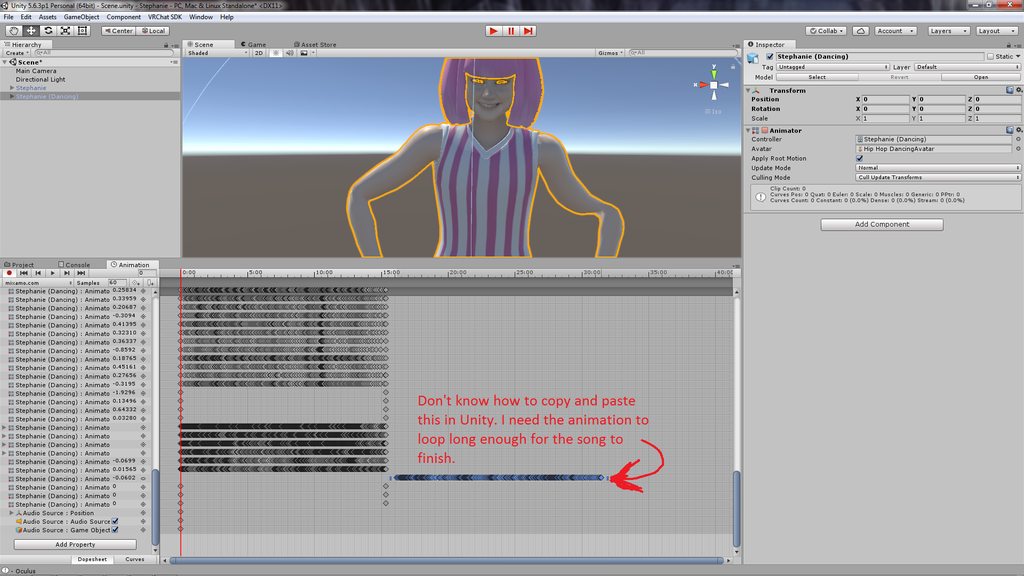
quick question, but does anyone know if I can copy and past animation keyframes in Unity?
i want the animation to last as long as the sound effect
just normally looping the animation only lasts as long as the animation, which isn't long enough
gaunt gyro
It's literally ctrl c ctrl v
You can select the whole column of keyframes by selecting the gray top row, copy them, drag the red line to the end, and paste them.
clear yew
can someone help me with this? I have no idea why this is happening https://imgur.com/a/sHN7j
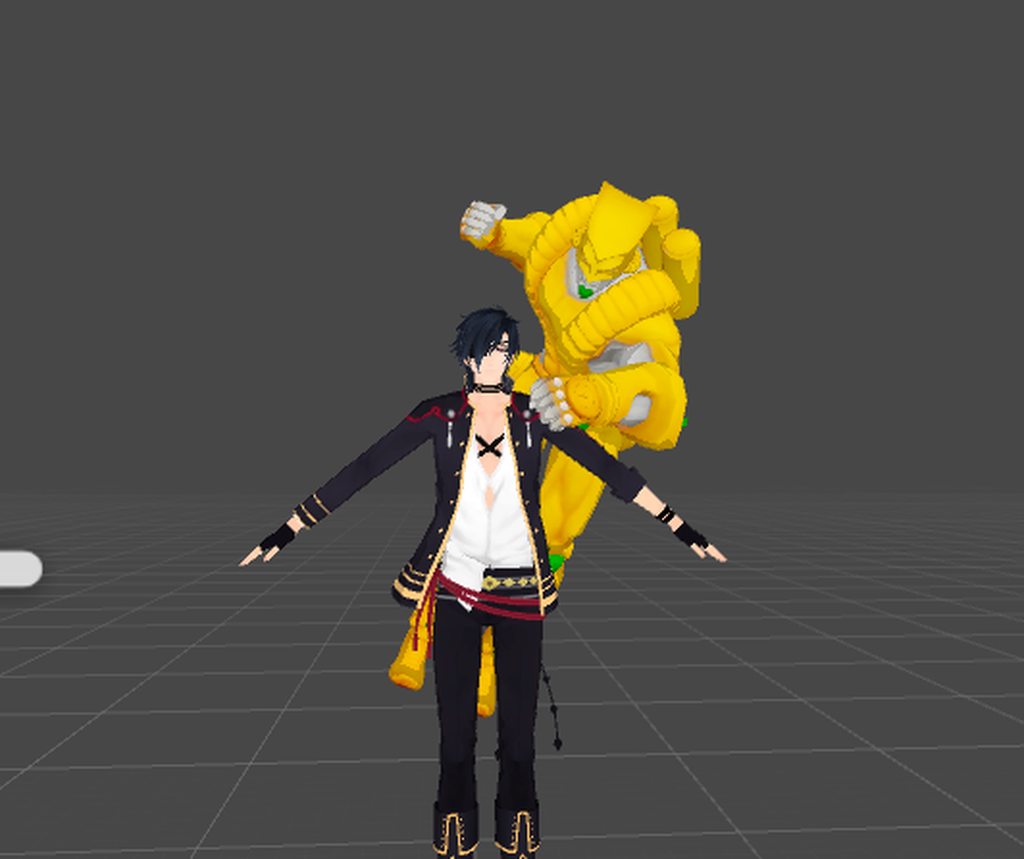
it only does this if it has an animation
 sweet zealot
my animation components work in unity but as soon as they are put into vrchat they no longer work, any ideas why? Not gestures, Animation Components - I animated fairywings that twitch constantly and it works perfectly in unity, yet does not move in vrchat
clear flicker
Same for me
I wanted to make magic circle that pop up when i use a emote
But i never see them
I sometimes i'm glitched in the floor
@alpine halo
 alpine halo
Hello
clear flicker
I mp you
lost musk
Are your animation fixed in legacy mode ?
 agile ruin
@lost musk u gotta set the fingers to the position of the gesture - to mimic it
No othet way i believe
Other*
 small orchid
how many gestures are there again? 5?
 celest trout
How do you transform your height during an animation?
celest trout
I've tried using Animator.RootT but in game I'm just rooted under the ground
sweet zealot
yes i was in legacy mode and in loop
lost musk
@agile ruin thanks
@sweet zealot Do you solved it ? I also have a problem where my blink do not loop
sweet zealot
i have not found a solution for it
it works in unity, it just doesnt play in vrchat
and i cant figure out why
 uneven slate
Anyone having a problem making something shoot, using World as simulation space, but it goes straight down instead of from your hand? (OR wherever you want it to come from) Specifically this is a particle effect and it always shoots down, but in Unity, the simulation, shows it shoot straight
 lucid remnant
are the default animations in the sdk, I want to slightly tweak some of them. Basically I just want to edit the way the hands are rotated when walking/standing
 mint wagon
whats the time limit on emote animations? I think My Francium dance animation goes on for too long (174 mins) my dance breaks half way and makes me be able to move around but my legs are broken
gaunt gyro
Default animations are in the standard_male_prefab in the templates, same place you find your SimpleAvatarController and such.
lucid remnant
all the values are the same and they are all 1 frame. am i missing something?
celest trout
Anyone know how to animate flight/hovering characters?
I just need help with the Y coordinates working right
gaunt gyro
You're not missing anything. Most animations like hand gestures are 1 frame animations.
Wait my bad, those aren't the actual animations. Those are just placeholders for your overrides
 south lynx
Are you not allowed to attach audio sources to avatars anymore?
 paper lantern
Is it possible to add sound to an animation?
 cursive moon
@south lynx You can, but you need to remove the ONSP script from the Audio Source.
@paper lantern Yes, you can. https://www.youtube.com/watch?v=pC6sW4kJwa8
That tutorial includes spawning objects via hand gestures, but around the end of the video he also explains adding audio. Just remember to remove the ONSP script from the Audio Source.

This shows you how to put weapons and audio into the game vrchat. More stuff here: Where I got the gun model: https://abyssleo.deviantart.com/gallery/5925409...
paper lantern
I knew how to do it that way @cursive moon but I meant as in literally in the animation
Not on an object being revealed but I mean by pressing the trigger button it plays.
I think I got it though
lucid remnant
i have the same issue
 mental cedar

 swift shoal
Hello! I was wondering if someone could possibly help me with some trouble I'm running into animating a model?
 sharp nova
how do i stop my body from dropping down when animating? ill move a bone and it moves down further until i let go
mental cedar
Hello everyone, I can not add a lightsaber to my avatar
I watched the guide and the problem is there
https://i.imgur.com/zmN0ZUP.png
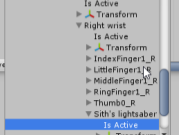
there should be + symbol or something similar?
 shut matrix
If any one is available, I have been having problems with my animations all day. Is there a way to make an animation freeze on the final frame until the Rocknroll emote is released?
shut matrix
Would I be able to screen share Unity with you quickly?
 velvet ginkgo
Erm.
Sure.
Does anyone know how to simulate a flashing red light on an explosive. For example the red light on the c4 from Counter strike.
 sonic axle
I added face emotions to my model which do work in game but the hand gestures themselves don't really change at all.
So, idk what faces im making since I want to use the hand gestures as reference (Vive)
 unborn sun
Anyone willing to turn a vmd into a .anim?
 wispy night
Anyone makes animations in 3ds max? I'm having trouble getting it to play one of its animations in-game. My character keeps sinking through the floor despite having an animation
 brave torrent
@unborn sun You can import VMD animations to blender using mmd_tools, then you can export the animation as fbx
unborn sun
I tried that, but it didn't work on my avatar, does it vary per animation?
final gazelle
it's dependent on your model having the right bone names
brave torrent
you'd have to modify the bone names used in the animation if they don't match your character's armature
You can do so in fbx file ascii encoded
final gazelle
so if you're trying to load an animation made for an MMD model onto something like a valve model, usually won't work since it's Japanese vs English
brave torrent
just export as ascii when exporting as fbx, and then open in a text editor and change the bone names
final gazelle
actually, related question: does unity have any problems with reading japanese characters in file or bone names?
brave torrent
no
final gazelle
thanks -- i might leave mine untranslated in that case when porting
unborn sun
uh. gonna be harder then I thought.
 white seal
In the Muscle Animation editor, is there a way to move fingers left and right instead of just curling them in and out?
 peak hare
is there a way to assign an animation to separate triggers? I've got 2 guns and i want shoot them separately through the controller triggers, i don't know if anyone knows if this is possible.
 fast void
Hello! Is there anyway to make the audio clip on emotes go louder? I set it to max but it's still low when ingame
white herald
no
white seal
you probably have the sound drop off really high
or you have it so loud that the game is moderating it
clear yew
Anyone know why my animations stay active for 5 seconds after releasing the animation trigger? My first custom animation worked fine but now I can't even add a simple object animation without running in to this issue.
 fallen flax
Check your keyframes, should only have 0:00 and 0:01, any more than that will cause that issue
clear yew
Oh, I only have 0:00, do I just copy it and paste at 0:01? @fallen flax
fallen flax
yeah and zoom out to make sure there’s no strays anywhere
clear yew
Thanks a lot! @fallen flax
fallen flax
Did you set the animation to legacy @small tapir
 frosty pendant
hey xD is it possible for a particle to have collision? i want to make a rocket launcher with the explosion happening when i hit something
clear yew
It's possible, I've seen it done. Not sure how though. @frosty pendant
 small tapir
@fallen flax Oh didn't see someone answer im not sure how i do that
@frosty pendant Yes just add the collision to the particle system
@fallen flax How do i set animation to legacy and where?
frosty pendant
but how would i do that
small tapir
Press your particle system and there should be a tab called collision just press the box on that
Not sure how to make it exploded when the rocket hit something tho

 boreal trellis
where can i find nice ready fbx animations? except mixiamo
 desert shore
the body stays that way when active animation
small tapir
@desert shore What kind of animation are you trying to do?
Weapon animation or a dance or something else
muted prairie
@desert shore Don't post links from that website please
small tapir
@muted prairie Sorry to bother you, i have a pair of wings i added to my avatars back, that's always on and they should have an animation but they dont move, anyone know what i could have done wrong? The animation is in the wings controller
muted prairie
Did you also change the custom standing animation controller ?
small tapir
Oh do i need to add it to there too? in the override controller?
muted prairie
you need to make a duplicate of it and probably replace the idle animation with it
i might be wrong though, but that's how i personally do it
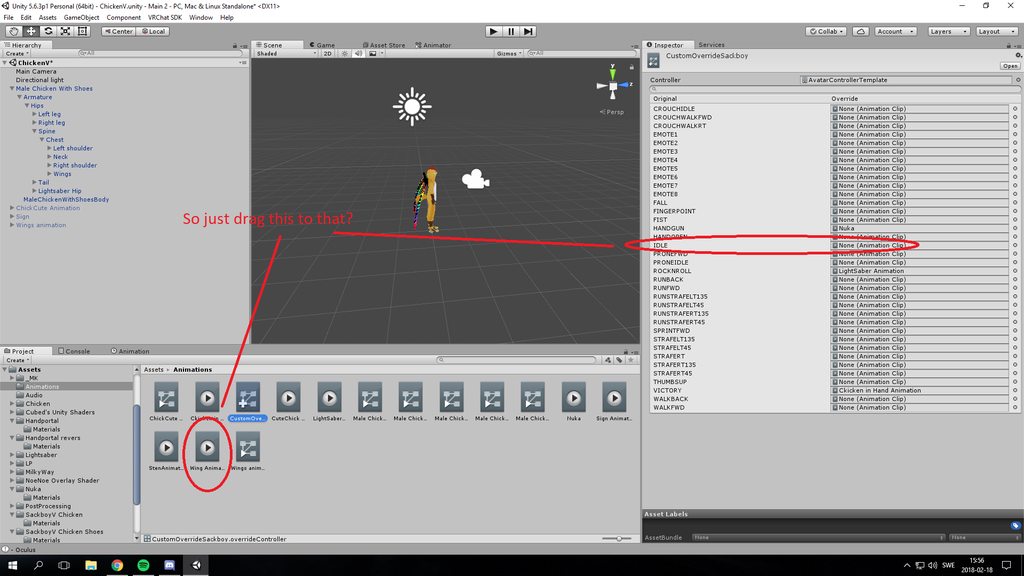 muted prairie
yep
muted prairie
yep
small tapir
Hmm, im not sure if i done something wrong somewhere else then, the copy i did the animation on is working i see that moving. I'm stupid and had renamed the body mesh on my wings so it didn't find the animation haha working now
 surreal crater
Does anyone know how I can steer particles with my hand?
sonic axle
Anyone know why my hand gestures dont change, but my face emotes work just fine?
surreal iron
https://gyazo.com/49a0ed1523eb45aeb5576d59612847a6 guys, is there a way to copy and paste the first frame without the little pause that it has?
 small tapir
@sonic axle I think you need to animate the hand gestures when you do the face emotes
sonic axle
@small tapir You mean like in unity? I figured theyd automatically do it when I do the emote as long as its assigned
small tapir
@sonic axle Yes in unity, i'm not sure but i think you need to animate them with the emotes
I'm not sure tho maybe a better way i don't know
 fervent plaza
I was working on a previous animation, and am looking to create a new one but the animation tab wont give me the option create an animation.
small tapir
@fervent plaza You need to make a new copy of the thing you want to animate and the start a new animation on that
fervent plaza
Well I made a new copy, but It still wont give me the option to create a new one
Like, I can add an animation to my sword, but I dont think thats how it works for adding weapons to avatars
small tapir
Im going to take a few pics, wait a bit
fervent plaza
okay ty

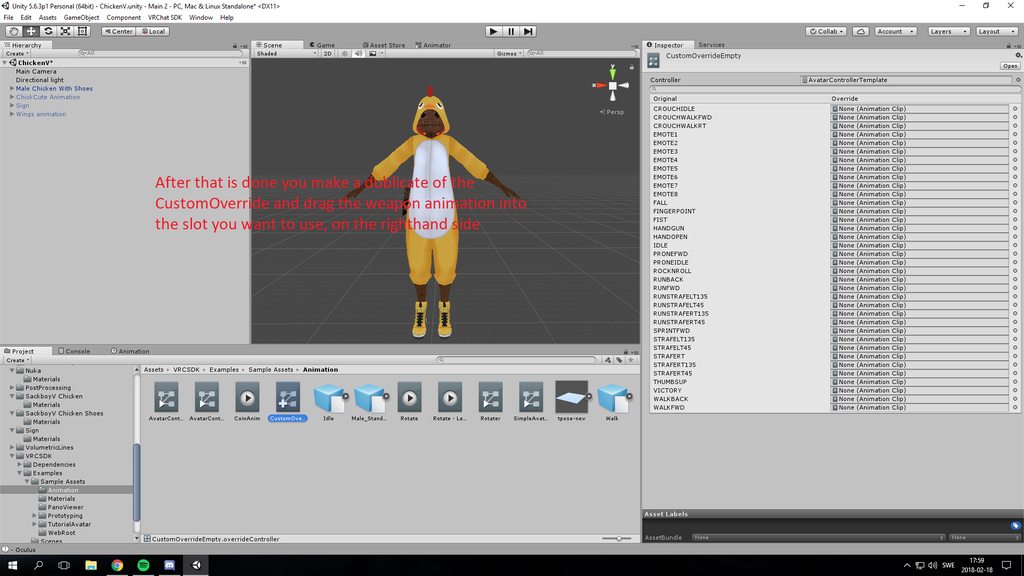 fervent plaza
ty
 old cave
Anyone know where I can download alternative sitting animations? The default anyones doesn't work well on my models (the arms clip through the legs)
small tapir
Then drag the the customoverride you made and put the animation in, too custom standing and sitting anims on your avatar
@fervent plaza Not the best at explaing things sorry
To dublicate the customoverride you press ctrl+D i think
fervent plaza
ty
 woven surge
Is there a way to move, while in an animation, and the animation doesn't cancel? I know you can with oculus, what about vive..?
Don't want to put "animation" script into my avatar and to load when I change avatar because It takes time for some people to load the animations
clear yew
I'm trying to add snail marker to my avatar but when I load the avatar in game the hands are just stuck in the half-open position and no gestures work. Does anyone know why this happens? Thanks.
woven surge
Verify that your animation only has two frames, and the two frames has the same finger position and everything is on @clear yew
if there is a third hide frame wont work
clear yew
Only has two frames, I'll try copying the custom override from the vrchat asset instead of using the one that came with the snail marker. Maybe that fixes it.
The snail marker thingy does everything about the animation automatically so I doubt there's anything wrong with the animation itself.
 foggy cloud
where is the vrc walking animation located?
muted prairie
VRCSDK/Examples/Sample Assets/Animation/CustomOverrideEmpty.overrideController
It's using default IK standard animations afaik
foggy cloud
thanks
surreal iron
guys, any fix for when i try to CTRL + shift + V and it doesnt flip my pose properly? bone rolls are at 0 and bone names are all the same with .L or .R at the end
 icy hazel
That sounds like your x axis mirroring isnt working for your bones so you prob need to make sure some things are consistent first like ive heard the origins have to be properly placed.
But ive looked into that and had only little success with really fixing it when blender fails to recognize a bone on the other side tbh
 zealous needle

If I want this circle to rotate as it's being used, is there any way besides rotating it in the animation?
I ask because I tried that, but when you get to say 360d and want to go back to 0d, it rotates back, even at 1 frame it doesn't look clean
clear yew
In unity, how do I change the settings when importing to make a png not become a square?
 eager vault
@zealous needle Have you tried using rotation over lifetime yet?
zealous needle
oh herp, good idea
I can just change that piece into a particle that rotates
Thanks for saying that actually!
 glass anchor
anyone know how to turn off kinematics for an avatar?
shut matrix
Is it possible to make a game object stay stationary during a hand emote while the avatar moves?
agile ruin
How do you change the skybox with an animation?
 nocturne radish
Hey there! Does anyone have a list of what every of animation name in the override thing does? Cause I'm having some problems while overriding them and I can't find anything about it in the documentation.
 weary fiber
how do i add a rotation to a bone cause i have a propeller and i want it to spin x3 and it is its own bone
 stark geode
anyone good at making changes to an animation if yes dm me
 covert linden
Hey guys! I've recently seen some people who touch things and change their texture, like models and mirrors and such. Does anyone have ANY idea how they do this?!
 remote helm
Hey there. I'm making an animation with sound effects but when I press play in unity animation editor no sound plays at the keyframe.
Anyone know whats up?
Ty!
nevermind
I managed to work it out
@covert linden I too have seen folks running about with this. If you find out please hmu!
 flint light
Im trying to add a flametrower effect to my wrist, it has a light part and a flame part, in game the light part follows my wrist but the flametrower effect doesnt... anybody know why this is happening?
 hexed fern
http://prntscr.com/iglsb4 does anyone know what this error means and if its something i should be worries about or not?
 remote helm
@flint light World and Local.
Further look at this tutorial. Same principles will apply. Use Rigidbodies and Fixed joints.
hexed fern
i dont know if its because of mixamo or the bones the model came with but when i put this guy into unity after using mixamo to rig him his left fingers become deformed and his right thumb does too http://prntscr.com/iglwrg

 agile ruin
Anyone knows how to change the skybox through an animation?
hexed fern
crap, because if i dont use mixamo, his rig becomes jacked up some how xD
and it might because he's boneset is from a wii game and isint rigged for this sort of use
signal dove
I had problems with my bone roll being wrong
I changed the roll and my limbs stopped being twisted in animations
hexed fern
how do i do that though?
signal dove
In blender select the armature in edit mode and select the bone, then find the "Bone Roll" field on the right
icy hazel
@clear yew go to material ball that corresponds to that iris and try the cutout dropdown setting for that texture, which are the shader settings
cause if it was just opaque and full it sometimes just becomes weird
 vestal niche
Quick question. Is there a way to change the sitting animation for avatars? I attempted to change it in debug (due to it not being in the list on the overrides) and it didn't work.
Nevermind I figured it out! 😄
surreal iron
https://gyazo.com/360998e85bbc5aa84dd2a55a70011d4f can someone help me?

im trying to use my custom walk animation in vr chat
but in game, each step is like half of what i did in blender
icy hazel
so it's like kiiiiiinda there?
signal dove
I have trouble with walking and idle animations too
icy hazel
does that mean your keyframes need adjusting then if it's too slow
or something like that
icy hazel
huh.
surreal iron
the legs spread for like... half of what i made in blender

this is how it looks in blender
and in vrchat
again, dont mind the poor model XD
 snow sparrow
How would I go about, not replacing gestures, but ADDING to them? For example, have my character smile while also performing the "hand open" gesture? I want to still have my hand gestures, but I want other things to happen as well. Can I do this without having to reanimate the hand gestures manually?
 devout trellis
Pretty sure you have to animate the hand to be open again manually. Pretty easy if you have the Muscle pose animator asset
 heavy stirrup
What's the current max emote length? I need to make sure my emotes are barely longer so they don't loop
torn pawn
remove loop from them?
 cedar moon
I want an override for this weapon
so that when it spawns it kinda has an activation animation
before it goes to its like permanently idle state until i stop doing the gesture and it'll disappear
anyone know how to make this happen?
Or will it have to be 2 separate overrides?
 twin lintel
How do I rotate the whole body in an anim?
Rotating the armature/hips flat out doesn't work,
Rotating the main avatar GameObj works in the anim play, but not in Play Mode,
Adjusting the Root Q works, but not in game.
?
twin lintel
I'm guessing it's part of the emote lock... no way to get around it?
been at this for several hours
gaunt gyro
Why not try to look at an existing animation and see how its done there.
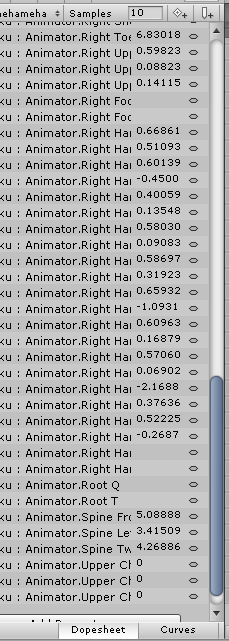 gaunt gyro
Oh yeah? https://imgur.com/cnT9Wis?r
 twin lintel
vrchat anims only have those
gaunt gyro
Open up root T or root Q. One of them is moving on XYZ and the other is rotating XYZ
twin lintel
like I said, root Q works in Unity, but not in game
would've been done with this anim several hours ago if that weren't the case
gaunt gyro
Well it is certainly possible. And like I said, just look at existing anims to see how they did it there
Find a pack that has headspin, and look at it
twin lintel
meh guess I'll just have a duplicate model with no controller to enable just for the emote
head doesn't really need to move [with the cam] during it anyways
torn pawn
didn't add fidget spinner in each hand 1/10 anim
 blissful grove
Does anyone know how add a custom light saber that actually works in vrchat
I am trying to add a light saber to Darth Vader that will open and close with animation
clear yew
Yea I do @blissful grove
blissful grove
Is it easy to do in unity
clear yew
Not if you haven’t done it before...
blissful grove
I haven’t done it before
clear yew
Do you have the darth Vader model and is it rigged?
blissful grove
Yes
clear yew
Ok I will dm you the steps
blissful grove
https://saltpowered.deviantart.com/art/SW-Battlefront-2015-Darth-Vader-for-XPS-687416304
Here’s the model that is rigged

DeviantArt
I DO NOT OWN THIS MODEL Porter notes: The model is rigged Original bones Tag me a bit in your creations :3
clear yew
I could do it for you if you want...
clear yew
I don’t know what time it is where you live but it’s 12:50 so I’ll do it when I get up in the morning at like 7 😉
icy hazel
hey so if i have a looping spin animation, and i want it to just play twice by itself, what do i need to do? i just find that it is a little bit too short but i also don't want it to loop forever lol
it is about 2 seconds long is why
will i achieve this if i use the + add button to add the same clip in the .anim or something?
brave torrent
just.. duplicate the frames to animate a 2nd time?
 flint elm
Hey guys, how can I make it so that my avatar is invisible and then when I play an emote, it appears and plays a sound effect and then after a certain time disappears again.
Or, how do I add audio to an animation that's triggered with an emote?
flint elm
Anybody?
brave torrent
It's general animation overrides
Search youtube for a video on it
But when adding properties to frame, you want to add property specific to making your avatar toggle visibility
flint elm
I have an animation overide and I've made the animation.
I've also made a audio source
brave torrent
Which could be done a number of ways. If you toggle its active state you'll have trouble with your avatar never appearing in mirrors.
I personally would create a shapekey to scale the avatar, or you can do it with unity transforms
flint elm
Ok. but firstly how do I add audio to an animation to be triggered in an emote?
That's a good start
brave torrent
I don't know exactly how people do it for vrchat because I've never tried, but what I would imagine would be: create new empty game object that is by default not enabled, add audio source component to that object. Then toggle the active state of that object to enabled on the frame that you want the sound to play.
alternatively you can set that audio source onto your avatar, then set play on wake to false and make it muted by default, then unmute in the animation when you want it to play
flint elm
It must be easier than that
brave torrent
that is easy
flint elm
To simply have a sound play when you play an animation
brave torrent
To simply have a sound play when you play an animation you have to:
#1: Setup a sound with an audio source.
#2: Have the sound play on an animation frame.
The methods I just explained do that.
brave torrent
okay, then on your animation on the frame you want it to play, add property for unmuting the sound, or enabling the sound, or whatever method you are using to toggle it
flint elm
ok I added the property to enable the sound
But when I click play
it doesn't work
silence
brave torrent
what do you mean by click play
brave torrent
I'm not sure if sounds play in animation window in general
flint elm
I think they do
Heard it before
I don't get it, I have it set to mute by default and to enable on animation
and it's not playing the sound
icy hazel
mfw somebody in my house is so excited that i imported somebody for them, that they're gonna give me free ice cream tomorrow
YESSSSSSSSS
brave torrent
@flint elm I just tested and I can only have the sound play in editor if I have the animation set as default state and enable play testing
you should just make game object that has the sound with play on wake, and enable it in the animation
brave torrent
then test it in game
flint elm
Although I have one question, for some reason the avatar is face down in VRChat
It's a stationary object
so it doesn't require to walk
or have any animations
But it's face down
small tapir
One thing i don't understand is how people use an animation and on that animation they can use more animation. So if they don't have the first one up it locks the other ones behide it. Not sure if anyone understand what im talking about
icy hazel
i know what you mean
small tapir
It would be usefull to know that for my sword animation
gaunt gyro
Simple: when you trigger an animation, it only locks up your screen for about 30 sec. So if the animation is longer than that, it will unlock your screen and when you move then it could break your animation. To prevent this, people just play another animation while the previous one is still playing. This will just lock your screen for another 30 sec or s
So*
small tapir
This is not what i saw im pretty sure. The thing that im trying to explain is i saw an avatar that spawn a monters hand and when that is activated, you could activate new animations that you could not use without the monster hand animation activated
 serene glacier
anyone know why my audio on my avatar plays twice? but doesnt for others
boreal trellis

what settings should i use to make my model move with animation
its stuck in 1 place
 lost musk
Yes
You can see that your base stay at the same place, but your character is able to follow the animations bellow
Though if your animation put your character up to 2 meters away it's all your animation fault
Usually on good animation your character will just moove around the circle
boreal trellis
Any ideas how to attach 2 handed weapon to character? Including walking animation with the gun etc
 rain reef
anyone good with particles that can help me out here a sec? I have a particle with noise that flies around until it collides with the world, i want to use a sub emitter to make particles rain down as it hits, but the particle hits at random rotations so the raining down particles come at a lot of different directions
how would i go about this?
 lunar trellis
Is there no way to have emotes in non-humanoid characters yet?
 obsidian vigil
@lunar trellis Never done it before but isnt doing emotes for generic rigs like making a walkcycle for generic rigs
lunar trellis
you can do the walking animations, yes I have them, but I mean a non looping action that doesn't require movement, an emote
while in humanoid characters you can use the override chart, the skd doesn't pick it up for non humanoid
obsidian vigil
yes, cant you do the animation and assign the controller just like you would on a walk-cycle and then drag them on?
oh okay
didnt know that
lunar trellis
thats the mayor problem
final gazelle
the closest workaround any of us have to that is to either create a humanoid rig with the non-humanoid avatar in it somewhere
either by adding dummy human bones to be assigned to unity's humanoid rigging window, or by inserting two entirely different armatures into the one avatar descriptor to be uploaded
that'll stop the emotes from looping, but you'll get other strange behaviours with the avatar involving no walk/run cycles playing (it'll just stay in its idle pose until you use an emote), and the likelihood that it'll hover or go through the ground while you're walking around
 alpine viper
is it possible to change the material of an object using animations?
 gaunt pebble
Does anyone know how to get longer then 0.01 animations on gestures working?
My hands keep getting stuck in the animation
 hidden spear
Don't think you can, the animations will always get stuck and slowly play out until the duration is over. One keyframe is the only thing you can do if you don't want that stuck/slow animation reset to happen
gaunt pebble
You sure? I've seen people do longer ones
Such as that character from Made in Abyss with the charging laser from its hand
hidden spear
You can do longer ones, but what I mean is that the animation won't cancel until it's completed. If you accidently trigger it, you'd have to wait it out until the animation time is completely finished
alpine viper
is there a way to change a shader on a material using an animation?
brave torrent
@alpine viper Yes you can change material of an object in animation
brave torrent
not sure, but you could have a duplicate of the material with a different shader
alpine viper
¯_(ツ)_/¯
mystic umbra
odd issue but has anyone had a problem with particle effect attached to the feet sinking the feet into the floor
 pale orchid
Guys, I need some help with my first animation, I want to make the dragon fly over Daenerys, but when start to record the animation the wings rotation aways reset (look the screenshots description) https://imgur.com/a/1M6iQ Someone knows a tutorial to make a similar animation?
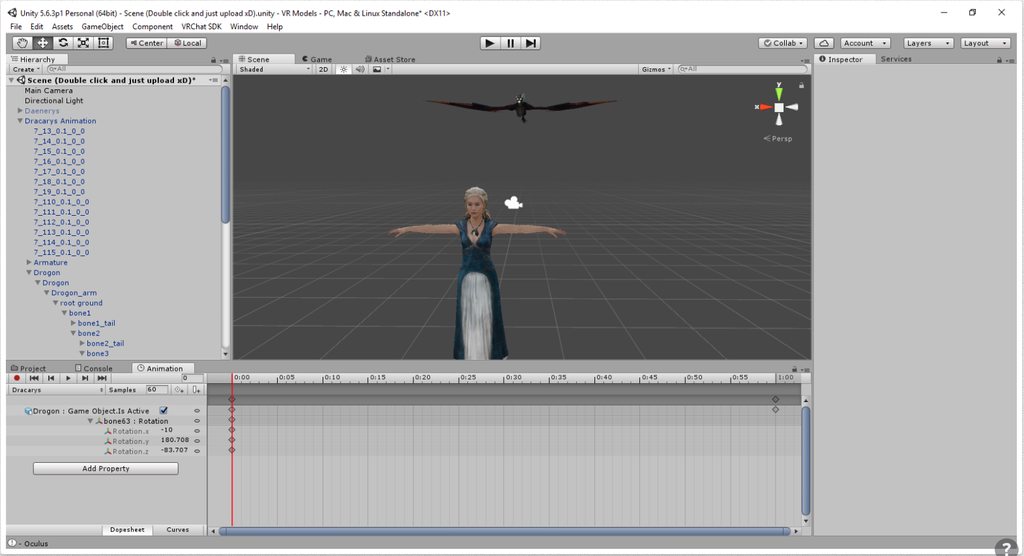
I can change the position of the entire dragon, but can't change the wings rotation
 green kraken
I would like to change the running animation
What should I do?
white herald
@pale orchid bone animation or any kind of complex animation is best done in blender and exported in the fbx
mystic umbra
@white herald have you done a walking aniation in blender before?
I wanna do one but my issue is the positioning
white herald
i have had varying results doing animation overrides on a humanoid using nonhumanoid bones and gave up sorry
what's your issue in blender though i can help you there
mystic umbra
yea I noticed nonhummanoid bones dont get the animations done in blender applied to them
like I was doing a cape fluttering with my animation in bledner
I imported that animation and noticed only the humanoid bones moved
the cape laid still
I dont know if its bevause the animation I baked into the fbx is humanoid rigged
maybe have to change that
white herald
you can set the animation mask in the unity fbx import settings to include those bones but it doesn't always work for me ingame so dunno
you've gotta be humanoid for most vrchat features
but yeah you just have to enable the bones in each animation under where it says mask
mystic umbra
have you done any scene animation, like applying a cube and then throwing a shader onto that cube to make the world your avatar is in trippy?
you seem to know your stuff
so ima throw some advanced aimation questions towards you if you dont mind 😛
white herald
i don't know shader tricks but yes. i know blender a lot better than i know vrchat :P
so you can have a separate skeleton with its own animation and trigger that animation via a gesture or whatever
novel flower
Is there a way to download multiple animations from Mixamo and then string them together so they fit under one emote?
mystic umbra
more or less I want to throw a glitch shader I made onto a cube in unity
and that cube is attached to my hips
issue I have is it fucks the avatar up
white herald
how
mystic umbra
like visemes would randomly break etc
white herald
was the cube not a separate object?
mystic umbra
or the feet will sink into the ground
pale orchid
@white herald I just want to make the dragon fly, why is this so hard 😫 Do you know some tutorial to make a similar animation on blender?
mystic umbra
its a seperate object but I parented it to the hips
white herald
strange, it shouldn't change the character at all
dunno what you're trying for but you could try and merge it with your body and weight it to the hips so that it's just part of your mesh
mystic umbra
im doing it all in unity
but atlas
if your a blender wizard can you tell me how to assign multiple textures oto one material
and like tell me the work flow of texturizing a created object
what id do is this
white herald
@mystic umbra separate shaders = separate materials though
mystic umbra
yupyup but this is regarding something different
white herald
Sorry Kone i don't have any blender animation tutorials but there are plenty out there. Gotta learn the basics of blender to do this
model > unwrap > texture
separate materials = separate textures unless they overlap or are just 1 huge texture or whatever (cats plugin atlas might help)
mystic umbra
model>seem>unwrap>new material>assign material to vertexes>???? assign material to multiple textures???-> profit
there is overlap of textures
i just cant figure out how to assign a material to have multiple textures
I can do one texture
but last night I was literally slamming my desk with my fist trying to figure this out
white herald
in blender it works but in unity it depends on the shader
mystic umbra
it does tho, cause Ive seen mmd models that have a material with multiple textures tho
white herald
but in the textures window you can add more textures right? they just need alpha enabled and i'll find you a link about that since it's weird
white herald
so basically there are diffuse textures, which are color, normalmaps and other stuff which affect lighting, and different kinds of textures
what are you trying to make
mystic umbra
well I was making a face an hair for a 3d model im working on but instead of breaking the model into 50 materials and texturizing it I thought I could make 3 materials with multiple textures I can apply to the entire model when Im done with the character
white herald
yeah but it doesn't work like that
mystic umbra
I thought of instead of doing a texture map which im terrible at I can apply multiple textures to a few materials
oh
white herald
multiple textures are basically just gonna be layers
white herald
well bump maps and stuff are separate but if you have 3 diffuse textures on top of them you're just gonna see the one on top
you can make 50 materials and later bake them into 1 big texture
mystic umbra
Ill just segement it to 3 material with textures of the face body and accessories
white herald
ok
mystic umbra
well I guess thats the only choice thanks dude
I guess my desk took a unneed beating 😦
white herald
you're trying to learn how materials work through trial and error can be a bit painful heh
mystic umbra
Im trying to learn everything, and if one project fails I either go onto a different project or do a new project
I have like a dozen things going on at once
white herald
you might do well with a start-to-finish tutorial on character creation in blender since there's a lot of stuff that isn't self explanatory
and i'd recommend texturing a sword or something simple before an entire character
mystic umbra
ive done a tutorial like that already and did texturize and uvmapping before
white herald
ok
mystic umbra
still if you ever figure out how to do that unity import lemme know
Ill try to mess around with the importsettings
clear yew
Does anyone can tell me the gravitymotifier in Particle system, which value of it is exact equal to the real earth gravity?
 wheat moat
So I'm having an issue with this generic rigged model. For some reason in VR chat, the blinking animation doesnt play UNLESS I move which is totally weird. Does anyone know of this issue?


example images
bottom is unity working fine
 dapper rampart
Could anybody tell me how I change the animated wings position so they’ll be attached to my avatar? https://youtu.be/8Ht3zHy9wsM

Trying to figure out how to keep wings attached to avatar as they flap.
wheat moat
you attach the wings onto the armature
ie the chest or neck spine
depends on where you want it
dapper rampart
Is this how I attach it to my armature?
https://gyazo.com/d3e2439b5f9212948ace30ba6fcb087f

@wheat moat
 covert hawk
does anyone know where can i find those animations where the character goes apeshit and dances around in wierd ways and has that wierd music while the animation is triggered?
surreal iron
still trying to fix this mess... https://thumb.gyazo.com/thumb/1080_w/_500022946b6d21ad6eee0242de312b4c-gif.gif made a custom animation in blender, but it looks absolutely trash in vrchat for some reason https://gyazo.com/3f1a0a7266a5663c8eeaf10b3ae3a936

 wheat moat
fun fact looking in a mirror and stuff is client side, it might look perfectly fine to others
surreal iron
already asked others
surreal iron
they say it looks bad XD
 late phoenix
I have the same walking animation issue with the walking animations from mixamo
mystic umbra
@wheat moat can I see your heiarchy
 surreal knoll
anyone know how to make a character fly with the override? I see some people able to do it and I want to add it to my avatar but I can't find anything on it. I know to animate it just the whole flying part.
 granite dust
Flying like a plane or just floating?
pale orchid
I want to make a fly animation too, but I can't rotate the wing bones (I want to rotate the bones (bone63 - Left wing and bone98 - Right wing) just to make the wing go up and down, but when I change the rotation value they reset when I record the animation https://imgur.com/a/1M6iQ
read the screenshots descriptions, If you know something to help me i'll appreciate
 dusty bough
Has anyone had issues with an emote ending too early?
clear yew
hi, does anyone know the issue where i give an animation to my character and she does the emote but stays in one place, like for a dance for example, and their legs go through the floor or they float around
blissful grove
@clear yew I can’t send any message to you on a private chat because it doesn’t work and you know you can push the polygons to higher
shut nebula
Hey I made an avatar that can pull out a weapon and fire it but both the firing animation and weapon itself stay out for a few seconds even when I stop doing the finger gestures that trigger them. Does anyone know how to fix that?
boreal trellis
any idea why vrcsdk removes my custom override while uploading?
covert hawk
so i'm trying to load 2 emotes both of them have sound in unity but in vr chat only one has sound
any ideas ?
pseudo iris
anyone knows how to make a glowing sword?
dusty bough
@covert hawk they arent both named audiosource are they?
heavy stirrup
There's a little bit of a delay in the transition into my walking animations.
Would this be the MovementX and MovementZ under the locomotion layer?
blissful grove
@clear yew just to let you know I can’t send you any messages on private chat because it say disabled direct message
 gray onyx
anyone know how to set textures in animations. trying to change the face texture on a gesture, but not sure how to go about it, thanks~
clear yew
@gray onyx make two materials, then with record enabled in the animation tab switch between them to put them in your keyframes 👍🏼
clear yew
two identical materials with only the albedo texture being different
gray onyx
oh ok thanks!
clear yew
yeah, works on an avatar fine
desert shore
Can someone help me?
related to particle
muted prairie
@desert shore For an animation ?
muted prairie
Sure what's up ?
muted prairie
Shouldn't be too difficult, what have you got so far ?
muted prairie
sure
desert shore
I can not send you a message
muted prairie
need to accept my friend request
 lusty jewel
For some reason my head doesn't move while doing animations even if they're bake into pose, even the default animation do that (the backflip looks so weird)
 ashen sedge
When doing emotes IK is temporarily disabled
lusty jewel
That's the problem for me, IK is enabled instead of disabled for me, let me take a screenshot lmao
https://puu.sh/zrqvP/ae1aaac8c8.png Regular backflip, the head follow the camera instead of moving with with the animation
 ashen sedge
All I can think of the headbone has been set improper in the avatar config scene
But that shouldn't affect it...
I've seen that happen with a few avatars but I got no real clue how to fix it
lusty jewel
Maybe the avatar is too short? I really have no clue lmao, first time happening to me on an avatar
ashen sedge
That or you need to reassign the headbone to a proper one if there are several ones there.
Could be something else entierly too 🤷
lusty jewel
https://puu.sh/zrqKL/3779c1f4e5.png Idk, looks fine from here :/
 ashen sedge
I think this is a bit beyond me then :(
 fickle rune
visemes wont work with custom animations??
cursive moon
Describe your animations
 olive yacht
So I'm having an issue with animating my character. It is non-humanoid with a humanoid created skeleton, and I created an animation for it in 3DS Max. I imported the model with its animations into unity and rigged it as a humanoid. The only problem with this is that it completely breaks the animation and makes it static. I can't figure out how to fix this, as it only happens when I rig the model as a humanoid.
fickle rune
@cursive moon
 unique wind
anybody have experience with importing mmd motion data to unity? I baked the animation into the model and imported it to Unity, which has worked before but now when doing the same thing, the legs would spaz all over the place. It looked fine in blender
clear yew
@unique wind I have imported some MMD motions to custom emotes, when in the animation import tab select 'bake into pose' and 'origin' on all three options, that helped for me
and ofcourse the rigging has to be exactly the same
covert hawk
is animation controller useful for sound and animation emotes?
clear yew
the animation controller is the controller that allows the mesh to play an animation file
the animator is deprecated and old, don't use it, use the controller for all your animations
covert hawk
well,i got some emotes that use sounds(music) and for some reason they have an animator controller.
clear yew
well, they should work fine, but I avoided animator myself because people told me the controller is preferable
covert hawk
the problem i have is that the sound of the emotes don't work in vr chat except for one,thats why o was asking if it has something to do with that
clear yew
ah, no that shouldn't be a reason for it not playing
 iron tusk
https://puu.sh/zrsl3/702362f0ee.png https://puu.sh/zrsld/3d36ecb27d.png Okay guys, I am getting deperate and pissed at the same time, can anyone explain to me why I am not allowed to "rotate" my model for the emote? I have no fcking clue why it thinks, that it is part of the humanoid rig? It never was on any of my models...


I want to rotate the complete model, no Idea why it is so pissed me rotating it
 red linden
if it's part of the armature you need to rotate from the properties
iron tusk
I am rotating the blue marked part
red linden
I don't think you can rotate the model object itself either
 red linden
is it humanoid? Were the others humanoid?
iron tusk
yes and yes
red linden
hmm strange
iron tusk
The biggest group is not part of the humanoid rig
It just binds the armature into one group
thats why you usually can move it without annoying the humanoid crap
surreal iron
https://gyazo.com/45fd6b01496a695b56fb09f275edf610 since vrchat hates custom walk animations.... guess ill try do make a custom idle animation instead 👀
 olive yacht
Is there any way to prevent the custom override controller from adding in animations by default?
Like, I'd rather have my character essentially be in a T-Pose
But have things like emotes
clear yew
username is relevant 🤔
olive yacht
Relevant yes, actual situation no.
unique wind
@clear yew I only see baked into animation when exporting, but nothing when importing, am i missing something?
clear yew
in unity click the fbx and look in the animation tab
 tidal gull
quick question
Is there a way to make both hands have a custom gesture at the same time
unique wind
@clear yew Ah found it... the model's still spazzing all over the place
olive yacht
You can put custom emotes on generic rigs, but there seems to be a bug where it will loop the animation until it times out @lunar trellis
I've tried the same, and it only works to a certain degree
iron tusk
Okay guys I am desperate
How do I get my Avatar out of the ground when using my emote?
If I put it above the ground in unity it still doesnt change in game
icy hazel
if it's custom animation, it was the animation itself and not anything to do with your moving model up and down
in the animation file make sure that it plays properly too
and i guess as last resort you may wanna check all your origin points
cause the game is gonna use what it thinks is your feet or whatever else is causing that
iron tusk
I usually transform my model on top of the ground, what usually always works but now it doesnt
tidal gull
Answer to my q btw is yes 😃
lusty jewel
Still couldn't figure it out, my avatar's head doesn't move with the body when doing emotes, what could be wrong? https://puu.sh/zrqvP/ae1aaac8c8.png (that's regular backflip)
It follows the camera instead
clear yew
could be theres no ik tracking on it
lusty jewel
Shouldn't the avatar still bake into pose w/o tracking?
 torpid light
@lusty jewel You need to have finger bones mapped in order for your head to rotate properly
lusty jewel
Do the bone have to work or they can just be empty? This character doesn't have hands lmao
iron tusk
Just make invisible fingers. You need at least 2 fingers and 1 thumb
Will force you to make upper arm and lower arms tho too
lusty jewel
Yeah the character has that, thanks 👌🏻
 gusty pawn
I need help with two problems. FIrst one involves animation. I have a game object containing some particle effects to make my rifle a giant laser. That works all fine and dandy right now. But the problem is, once I switch to a different finger gestures on the Vive wand, when I try using the laser gesture again the laser fires from a completely random point around my body. Is there anyway to keep it from popping off my gun like that?
The second issue with transparency. The rifle has an energy blade as well that I want to make transparent. But when I use the Flat Lit Toon shader with Transparency on, it just vanishes when held around a lot of things. If I hold it up a bit, it vanishes behind the sky, mirrors, etc. Is there any way to fix that?
 blissful grove
@clear yew When will you be finish with doing the model today
lusty jewel
It worked, thanks a lot guys 👊🏻
 quasi gale
@iron tusk Try offsetting the animation itself: https://i.imgur.com/MM4Thqm.png
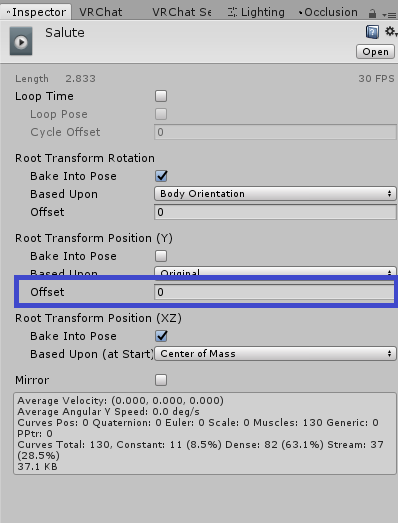 south lynx
Ok how do I get sound to work?? It was fine with the last SDK, but every time I try to get it upload by removing the ONSP it doesn’t play in game
unique wind
So I'm importing an mmd motion from blender to unity it looks like this in blender https://i.gyazo.com/8513fe1d8c7c6487dac00c9675c56185.gif
But it ends up looking like this in unity
https://i.gyazo.com/87601d398ef99e8c854d9aa941abe91b.gif


or better yet https://i.gyazo.com/897c29496c40b8f3b525acbceda43f67.gif
 signal dove
@unique wind Maybe there are some settings you messed with in the animation clip inspector. After setting all mine from root transform node under <motion> to all bake into pose, I had similar results with my emotes
unique wind
to be honest i don't actually have those options because i haven't set a root, the model is generic btw not humanoid, it's worked with another model though
unique wind
@signal dove nvm, Igot it, the axis is different between blender and unity so the rotation was all wrong , Thanks for answering though
signal dove
D'oh. Glad to try to help though
So, how do I get a custom idle animation on a humanoid rig and make it look right?
and don't say edit the base pose
icy hazel
Idk i got mine to play ingame but the hips jank out like elvis and do little jiggles randomly
And changing height in settings only mildly improves so im wondering if i need to fix a bone
unique wind
Yeah I'm remember hearing that it was a bone problem
icy hazel
Probably hips and spine for me, ill look later
unique wind
although my memory's wors than that of a fish
icy hazel
xD
unique wind
And sorry I only have experience with generic rig animations
although i made an extremely basic walking animation not sure if that would help you
south lynx
I’m having an issue, I’ve got an audio file set up as an animation, it’s on linear roll off, it plays fine in unity, but it fails to play in game, what’s going on?
 kindred crest
I need help on a mixamo Animation! I upload my character, but once I do, and add an animation, it gets stuck on "Loading" forever. I cant download it either. Says "cannot download asset".
 fathom atlas
Looking for someone to help me make a logo above my character that spins saying Baby's Husband , and one that says Oniichan's Wife please and thank you.
Hopefully someone can help me
^^
clear yew
@fathom atlas look for Natsix tutorial in youtube ( photoshop and gifs )
clear yew
Loli Army's discord has tutorials about it...I think
clear yew
K
 rose lake
I want to lock tracking to a single axis so that my hand moves as if on a rail. i'm hoping this can be done with the humanoid rigging so i can avoid doing a bunch of tedious animation work but i'm all ears for anything that works
if someone finds a solution please @ me
 copper bramble
Anyone know how to make it so objects attached to my avatar use an idle animation at all times? I have the animation done, I did it in unity but in-game when uploaded - they are static.
Although oddly enough the avatar preview shows them working
 torpid wadi
is there a way to disable blinking while doing emotes
eager vault
I just uncheck the blinking animation in unity
torpid wadi
where is this blinking animation in the animation hierarchy-
copper bramble
Oh. Just had to tick "Always animate".
That was easy
Damn it, now only one of the objects I animated is showing instead of both
torpid wadi
do they both have the same name
in the hierarchy
if they do they won't show up in mirrors
same goes for the objects parented to it
copper bramble
They use the same object as a base
But their actual names are different with underscores next to them
But the object is still there to other players, mirrors just are bugged?
copper bramble
I think so
I don't think this is possible, but is there any way to make it so objects that are childs of the avatar not rotate when you do?
Scripts aren't allowed, so I can't do simple C# rotation locks. And I don't think anything in animations let you keep it that way
torpid wadi
i don't think so
unless you use mesh particles set to world
which wouldn't move at all
torpid wadi
exactly
torpid wadi
i really can't find this blinking animation i'm supposed to uncheck
eager vault
look on your main object in unity, the one with the vrc descriptor on it, thats where i have my blinking
torpid wadi
 eager vault
hmm, the curious case of "where the heck is that blinking animation"
im not sure anymore
brave torrent
@copper bramble You could use bone constraints to achieve that, but it's something you need to add in blender
you basically just add new bone with offset to a parent bone, and set rotation bone constraint on it, then in unity add the object as child of that new bone
 full breach
Ok I have a problem. I made animation ovride blend shapes and seem to have gottem them all in the right place but in game when I do a guesture it seems like they are fast looping from active to not active.
copper bramble
@brave torrent Oh so you just create an object that has a rotation lock from blender and add that to the project?
I'm guessing it doesn't even need any polygons but
The parent will stop it from being rotated?
brave torrent
no
It's a bone with constraint
@full breach Make sure both frames of your animation have the blendshape set to 100
copper bramble
ah alright
full breach
@brave torrent Oh man they both have to be 100?? I thought the first had to be left at 0
Also do they have to be 100? I had some at 65 on the second keyframe becasue the shape looks better at that value
brave torrent
The value is a percentage of how much of that shapekey is applied
doesn't have to be 100
@copper bramble In blender, the bone constraint you're looking for is "limit rotation"
you can define an angle range to limit a bone to on x/y/z axis from its initial starting rotation
full breach
So both keyframes have to be the same value and we are all good? Also thank you so very much for this info
brave torrent
yes
@copper bramble Though limit rotation may not be the only constraint you want depending on the effect you're trying to achieve, try out other constraints too
Like for example, there's "locked track" which you can use to make a bone always face towards something which might be better than limit rotation/position if you want it to keep with an offset to a target
 pine rampart
Hey guys, anyone know how to get text on my character, and how to make it move around a certain mesh like etc a ring
brave torrent
If by "move around" you mean rotate around, you'd need a cylindrical shape with the text textured to it. Then animate its rotation in an animation override
pine rampart
So if I have some 3d text all I need to do is animate it to spin around certain mesh, and it'll stick to the mesh and follow it around when I move certain mesh?
pine rampart
Alright, so since I need the text to move around and follow a ring, I need to parent the text to the ring bone?
 gentle tide
Id say yes if that's what you want
Then make an animation of it rotating around the finger
pine rampart
Alright thanks a lot 👌
full breach
It just gave me a "Avatar is humanoid but the feet arnt specified"
What... yes they are...
torpid wadi
goddammit even after i set the blink visemes to 0 on the animator it still doesnt work
full breach
I have no clue what the hell happened. I merged some verticies in the face and saved out the fbx and in unity it just turned into a monstrousity. Like the head verticies are connecting to others
cursive moon
If I'm spawning an object at hand, does it have to have bones? It isn't going to move other than with the hand like any other weapon, and I'm going to add a particle animation to it.
Mainly asking because I got the model of Modelers Resource and as such it's an .obj
gentle tide
Objects dont need bones
cursive moon
Neat, thanks
 tawdry token
Hey, I am having a issue with the customoveride with other avatars. On my main one it works fine, I can use any animation I put into it while others (Tested with proper rigs and non-proper rigs) seem to only have the defaults.
gaunt gyro
Did you assign the CAO to the standing and sitting animations in the avatar descriptor?
tawdry token
I was having a break down with this, thank you.
gaunt gyro
No problem
Kinda like me derping around here. https://i.imgur.com/kM3gttm.png Took me hours to figure out wtf I did wrong. Turns out it was just one connection going from the wrong point....
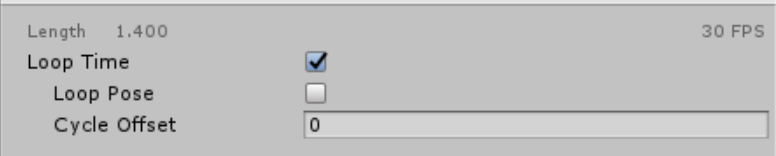





 pine rampart
How would I go about making an animation for moving objects, etc making a 3d model(text) move around a ring?
Any slick guides out there I can slowly work through?
covert hawk
so i've seen people having this nice looking rgb effect on their hair,i believe is done with neo shader and not cubed.anyone know what that texture can be?
gray pier
Is there a way to make an animation glow area light emmission? IE, flame thrower illuminating walls?
remote helm
@gray pier Say if you have a flamethrower object you could create a 3d cube in unity place it onto the object and move it to where you want the light to cast from then just add a light component to the cube. Animate it's activation and boom. Light emission.
gray pier
Wasnt sure if it would properly use lighting in the same way as say a world object, thanks
remote helm
Anyone know how I'd go about adding bullet ricochet to an animation?
 rose bluff
anyone here can work with .kf animation file?
white herald
no lol