#animation
1 messages · Page 39 of 1
 frosty pendant
could someone tell me how i can move for example a plane rotor in an gesture override?
so it rotates while the plane is out?
 plush jungle
particle system or within the animation
 royal summit
I’m making a flamethrower at the moment using particles and animations but every time I use it in game the flames drop to the floor. Any ideas how to fix this?
 nimble ridge
@royal summit it might be a problem with the simulated space check it to be local
royal summit
Ok thanks
 harsh ridge
Does anyone knwo where I can find more premade animations like Mixamo? Specifically Im looking for that Dab emote if anyone knows where that is
 charred lotus
anyone know how to make longer animations not "unwind" if that makes sense? I have a 2 sec long animation , and everytime i let it go or use a different trigger the hands go really slow back to their original posistion
 brazen crater
@charred lotus have also been struggling with that, haven't found a solution
 clear yew
I have a question.
I can not change animation of the rig in Unity because the rig is already set to Humanoid.
It is on AnimationOverrideController.
Is it possible to edit that inside of Unity?
frosty pendant
can someone tell me why my looped animation stops for a moment after each loop?
 west cypress
@frosty pendant You don't have extra frames in it? :O
frosty pendant
my animator component has none as the controller and i assigned only 1 animation inside the animation component
its a 1 second animation with a 360 degree rotation in it
and it starts slow and stopst towards the end
found it^^
west cypress
What was it?
frosty pendant
i looked into the animation curve and it was rounded at the start and the end. i edited it to be linear and now its fine
frosty pendant
yup
west cypress
glad you sorted it out xD
frosty pendant
yeah learning by searching^^
west cypress
you been doing custom animations a long time? I ran into a problem myself
frosty pendant
not really... but i´m messing around alot^^
west cypress
Maybe you can help me out still :o
I just started yesterday
I made a custom idle animation that's set up as prone

but when I plugged it in, the head dragged the body upwards so now it looks like I'm standing up

any ideas what I might be doing wrong?
frosty pendant
no idea... havent messed with idle animations so far...
clear yew
any tips for non humanoid custom anims?
frosty pendant
ok ill be afk for a bit^^ need to see if my stuff works^^
clear yew
How to change an animation of the rig?
From inside of Unity.
I mean,
I have an animation that I override with.
I wish to change it.
I can only change the part of it that has nothing to do with the rig.
But changing parts of the rig does not work.
They snap back and the Animator tells me that I am not allowed to do this, because this is a humanoid rig.
west cypress
maybe change it to a generic rig?
Humanoid rig keeps you from translating/scaling some bones
clear yew
Then it does not animate.
Yes.
There is supposed to be a way to animate the humanoid rig.
Mec-something.
yeah, animations arent running unless i force it to humanoid, which looks straight up funny, but not what im looking for
yeah...
harsh ridge
Using premade animations in Mixamo, why is it that my characters legs are backwards? How do I tweak that?
 white herald
@clear yew : non-humanoid animations tut https://docs.google.com/document/d/10BuA_ybyXSSXqXuf6cDyPm52VIpqptgyvuRaphcYH0M/edit

Google Docs
Advanced Avatar Creation: Making Non Humanoids This tutorial was made using Unity Version 5.6.3p1 This tutorial assumes you already have the current SDK imported and knowledge of how to upload a basic avatar. You will also need an avatar you wish to upload as non-humanoid with it’s own set of a...
clear yew
TYTY youre a lifesaver
white herald
thank the author lol
west cypress
@white herald this saved my ass too holee
 grand copper
Is anyone familiar with importing a lightsaber as a weapon? So instead of only making the weapon appear in your hand, it must also be able to turn on and off. For some reason the "turned off"-state is being ignored and the lightsaber is always turned on.
https://imgur.com/a/rJpJs
as you can see, I have 3 states to switch between and 2 animation overrides to make it switch to them. but until now I get a turned on lightsaber on both hand gestures.
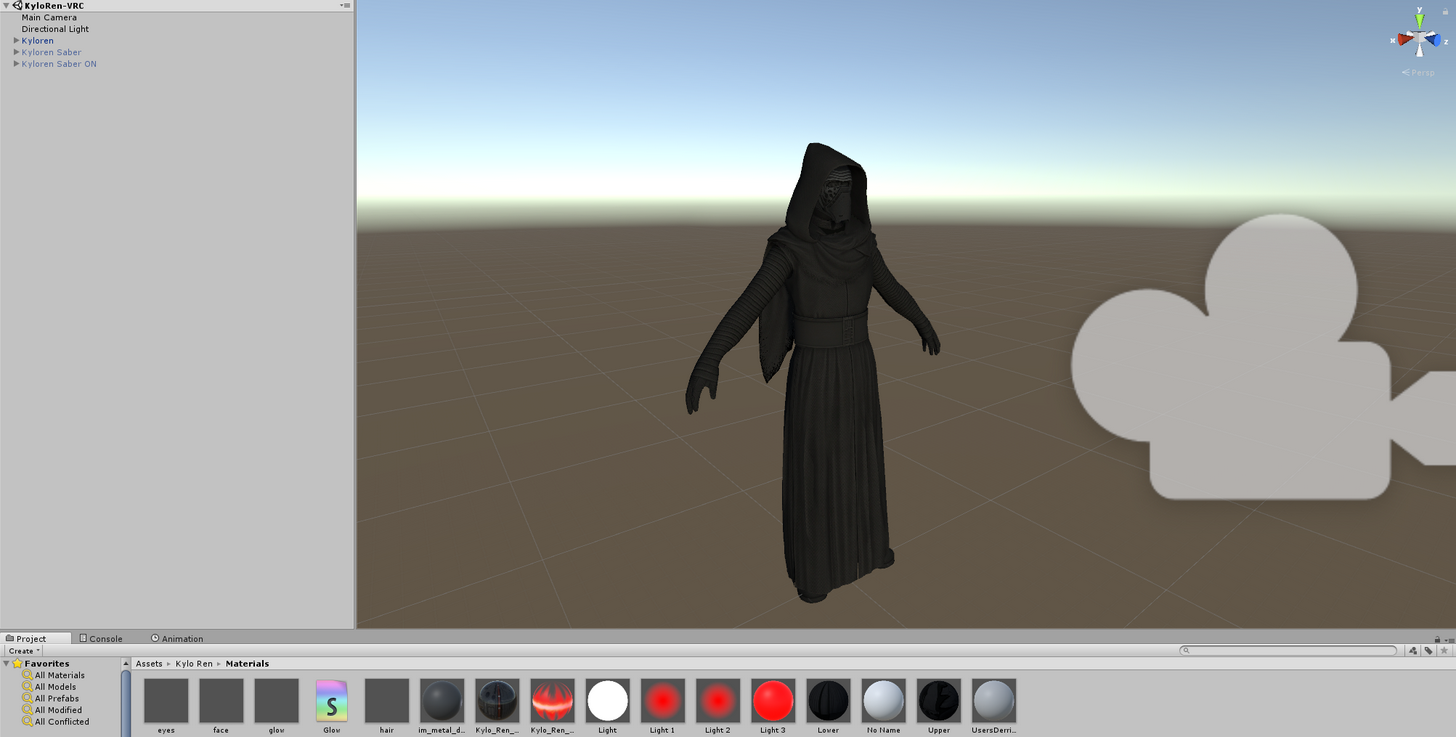

 south lynx
I finally figured out how to do animations properly, it only took me 2 days of annoyance 😊
grand copper
this is taking me a week now xD
 bleak fractal
Is it possible now to make a selfie phone which can reflect things in front of it, and then use gesture to active it so that I can take it out anytime? (like a normal weapon)
 fluid valley
Need some help with getting the base animations working. Character is currently just stuck in a T-pose with no animations whatsoever
grand copper
look at the error messages you get in the upload window of the SDK
west cypress
@grand copper you could create a separate "laser light" mesh with its own shader and add a blendshape to it to animate when you get the light saber in the "in my hand" state
fluid valley
The only errors I have is about having high poly count, no finger bones and stuff about full body tracking, nothing about animations
Anyone?
grand copper
what kind of rig is it? humanoid? does it have a rig? did you follow a tutorial?
 agile ruin
Was it set to humanoid or generic?
 opaque orbit
I have some long animations, and some will play all the way, while some will be cut off short. It doesn't seem like its a timer because each one cuts off early after a random amount of time (one cuts off after 60 seconds and other after 45 seconds etc) and it's really annoying
Anyone know why that might happen?
grand copper
the sudden disappearance of its T pose?
That's normal
ignore it
oh it happens in game?
so you did the standard procedure? apply the effect to the original but deactivate it, duplicate the original, activate the effect on the duplicate and so on?
 plush meadow
Did you make sure that both main and duplicate model have the same position coordinates? @clear yew
 violet gyro
Does anyone know how to make a music trigger for a weapon? ive followed atleast 5 tutorials and none of them are working
clear yew
how to prevent animation happening with first animations
like I did a animation
and after that animation I did a fall animatio
but the fall animation and the first animation happens at once
plush meadow
Is this within vrchat?
Or within unity?
For an animation, the model is supposed to clip through the floor in a crouch position in unity.
What's your animation supposed to do?
 sour harbor
(I hope this is the right place to ask this) I'm working on a joker avatar that can take his hat off. Right now I've added a seperate object (hat) to the top head bone and made an animation where it says to move object: hat to another position (in his hand) but when I press the button I have assigned the animation to (fist animation), it does move the hat, but not to his hand but to the side of his head. What am I doing wrong here?
plush meadow
Isn't the key frame supposed to be a second long? @clear yew
If I'm thinking correctly, if you are using vr and want to draw a prop for however long you want it, you would have to maintain the gesture.
sour harbor
I am using VR yes if that was directed to me. I saw a video where an anime girl could take of her hat and move it in her hand and pretend to put it on people. I want to achieve something like that as well.
plush meadow
I think that's with the positioning of the object. @sour harbor
clear yew
nvm found out how to fix it 😠
plush meadow
You have to position it decently well on the main model prop wise. @sour harbor
So you were able to get working the removal of the hat and the hat being gone from the head? @sour harbor
sour harbor
Yes, but it only moves about 50centimeters to the right of his head, not to his hand.
plush meadow
How did you position the hat on the main model?
Or rather, how many hats do you have in unity for the model?
 plush meadow
Just the one?
 plucky isle
Im having an issue where i am not able to edit my animation. I have the duplicate model and Animation file but if i click on the duplicate model under animation I do not see my stuff to edit anymore
sour harbor
Just the one yes
sour harbor
Yes, connected to HeadTop_end bone on the main model
clear yew
how to disable infinite loop on animations
plush meadow
What I'm thinking you should do is have it so that you have two hats.
When you trigger the animation, you make the hat on your head disappear.
And you make another hat appear in your hand.
sour harbor
How would I do that? Scirpting? I have zero knowledge of that.
plush meadow
But how you would do that I'm not exactly sure.
I don't remember exactly, but it was something as simple as making the hat value in the animation on the head zero and making the hat in your hand active.
Something like that.
sour harbor
Ah, thanks. I'll try to figure it out that way.
Now I think of it, the way I was doing it the hat would stick in the position where his hand is when you're making the animation but it would not move if your moving your hand in-game.
plush meadow
Yeah.
so you would have to make the hat connected to your head zero.
And make a hat not connected to anything appear in the other hand.
Akin to summoning a prop/gun out of nowhere.
Not sure if this will help, but this video helped me add props to some of the models I've worked on. @sour harbor https://youtu.be/pC6sW4kJwa8

This shows you how to put weapons and audio into the game vrchat. More stuff here: Where I got the gun model: https://abyssleo.deviantart.com/gallery/5925409...
sour harbor
Think I figured it out, made it now that the head on his head will be resized to 0, 0, 0 when I activate the animation and a new one will "spawn" in his hand 😃
plush meadow
Seems about right.
 devout star
Hey guys so I have a bug in-game where my model wont show correctly in the mirror. Is there any way around this?
sour harbor
Can you give an example? Is it when you have a weapon drawn for example?
opaque orbit
A lot of my animations now cut off short, and I didn't edit them. Was there an update? Or a change?
It doesn't make sense that almost all my animations are glitching now
 red lodge
hey, how to convert vmd motion data to unity? want to put dance animation on model
 shrewd moon
How I did my hat grabbing animation is, add 2 hats onto the model, the one on the head will be active and the one on the hand will be inactive, create a animation so when I do a hand gesture the hat on my head’s mesh is disabled and my hat on my hands is active, do some finger posing so it looks like I’m holding the hat.
 soft axle
I have a question. Is their two animation for running and walking?
 brave torrent
you can check from animation controller
 fading solar
is there any free particles like ultimate vfx ( thats not free).
sour harbor
@shrewd moon Where can I find the option to disable a mesh in the animator? When I previewed my current animation in Unity it worked, but ingame I now have a hat in my hand and one on my head which moves to the ground (eventho it says to just resize it to 0x0x0 in the animation)
clear yew
Question for you guys: I've ran into an issue a couple of times when making an override in which certain parts "stutter" I guess you could say for a lack of better terms, as in they seem to flick on and off when I activate an override with a gesture and keep the gesture active. I'm trying to figure out what causes this and how to prevent it because I've had some overrides work just fine without the issue, but then on others it randomly happens. Any ideas/solutions?
sour harbor
Is it set to 1 second?
clear yew
Yup
 remote helm
Hey there. Does anyone know by chance if there is a download for the derpy animation floating about?
derpy eyes ani*
clear yew
The current problem I'm having is the fingers on my model are moving in and out when I'm holding a prop. I'm trying to figure out what caused this. I've had a similiar issue before with blend shapes where my facial animations were just going from what I set back to the default state in a quick loop instead of staying to the shapes which I intended them to be in
clear yew
Bummer. I can't figure out what I did or didn't do to cause it
shrewd moon
@sour harbor I just hit record and disable the mesh on the right side or you can disable it in the animations under the mesh renderer
Not at home so I have a vague memory of what to do
sour harbor
Thanks, I'll try to disable it while recording. I already looked under mesh renderer, but could not find anything that said disable/hide or something in that manner.
sour harbor
Nvm, I take it is just Mesh Renderer.Enabled which you add to the animation and then untick the box that is on by default? Let's see if it works now when I upload it again 😉
 tawny wyvern
Hmmm.. The example character animations in the sdk (those found in Male_Standing_Pose - idle, runfwd, etc) seem to be all blank. Does anyone know if they've published a more fleshed out set I can use as reference anywhere?
remote helm
@clear yew Had any luck?
clear yew
@remote helm I managed to fix it. Just make sure that everything is exactly the same from the first frame and the second. Delete your second frame, recopy the first again, and paste into the second frame. Double check them both to make sure all of the values are identical. Somehow, something was mismatched for me so I tried that and it fixed it.
remote helm
@clear yew Ah nice one dude. Problem solving at its finest. I'll give it ago and Ill report back. ThanksWWWWWwwwwwwwwww
clear yew
np mate, good luck
 normal skiff
it's odd how blend shapes on gestures properly interpolate from say 0 to 100, but I can't do the exact same thing on a particle emitter to make it emit more particles when I press a trigger harder
 spark shard
I'm trying to add a sprite animation onto my model, but when I upload I get a red warning preventing me from uploading saying I can't have a sprite renderer
I'm confused because I see people who do sprite like animations all the time like error.mdl, is there anyway I can have the animation without the sprite renderer
remote helm
Able to take a screenshot of the error message in your VRChat SDK Build controls?
spark shard
Yeah, I just can't post here
remote helm
Upload to imgur
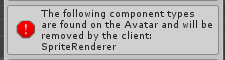 remote helm
Are you using a script you found on the asset store?
spark shard
No, just default unity stuffs
remote helm
Strange
spark shard
Yeah idk, a bit confusing to me >.< first time doing something like this
 heavy stirrup
Is there an animation i could place for turning?
 paper lantern
So I've been playing with some facial animations using hand gesture overrides - but is there any way to keep the hand gesture intact while keeping the facial gesture? For example if I give 'Victory' a facial emote it breaks the hand into the default claw-like open. I was hoping to fix this.
Or am I missing something?
 cobalt oyster
Is this the right place to ask about attaching a sound effect to a specific part of my avatar?
paper lantern
Maybe? There isn't a sound section...
cobalt oyster
Then does anyone know how to attach a sound effect to a bell thats on my avatar? I want it to play a sound when it moves through the dynamic bones, or if someone touches it I guess.
spark shard
Athir you have to make the hand gestures yourself
And Kaiser all you have to do is attach the sound to your armature somewhere and set it to be active during an animation
cobalt oyster
Could you help me? I'm new to animations in unity
 celest trout
Does anyone have Muscle Animation Editor? It makes animations of fingers a lot easier.
 signal raptor
anybody know of a really good tutorial video on particle systems?
celest trout
Search up Unity Fire. that's where I learned.
plucky isle
Im trying to do different finger signs to change facial expressions and i got it to work but had to redo it and now whenever i do it it glitches out the hands for a second then goes to the correct hand placement. Im not sure what I did right the first time and what I am doing wrong now
heavy stirrup
For me, it keeps the hands unusable for a while after.
It'll do the animation, then i lose that hand for a while
clear yew
I know about gesture animations, but does anybody know if I can do a emote overide animation where I press the emote then commence the animation with the object (ex. sword or gun) pulled out when I didn't have it out before? (Without vr of course)
spark shard
Kroama for your issue make sure there aren't any more keys after the first two frames of the animation
that's why you can't use your hand
Same with you atomicstorm
Make sure both frames of your animation are exactly the same
plucky isle
Ive checked yeah, it acts like theres another key but there isnt
i have only two, 0:00 and 0:01
heavy stirrup
It says the length is 7.000
spark shard
Check at the one second mark
plucky isle
and says my length is 0:017
spark shard
One sec..
So when you do your animation atomic does your hand spaz out
like on repeat
or face
plucky isle
no, it spazes out for 1 second then goes to the right placement
and the face looks fine
spark shard
Ingame, right?
heavy stirrup
My own animation runs perfectly, only once-- i have it set to Legacy and Wrap Mode once-- should i change this?
spark shard
Hmm I never set gesture animations to legacy
I just leave as is
And Atomic I've never seen it only spaz out once >.<
heavy stirrup
K, i'll try that and see what it does
spark shard
Maybe try copying one of the keyframes into a different animation entirely
and try that
and then just pasting that same keyframe for both frames
plucky isle
Am i able to screenshare or send a vid to you @spark shard in dm to better understand
spark shard
sure
 foggy pier
Anyone have any idea where I can find a tutorial on making a animation like fire breathing with sounds?
spark shard
#tutorials may have something, however I'm not sure
heavy stirrup
Completely separate question: Scale animations work right? Was trying to simulate breathing... would dynamic bone stiffness affect this i wonder?
spark shard
Never tried a scaling animation so I wouldn't be too sure on that
I'm sure it's possible just may require some tinkering around with stuff
heavy stirrup
Basically, it works in Unity, with the tail rotation, but not the scale once actually in game >,>
I'll see what i can mess with.
clear yew
simple question... if i make an emote that only has animators for the arms for example, will the idle animation continue looping for the rest of the body?
clear yew
so if i wanted to keep idle animation, i'd have to copy it in etc, ok, i won't worry about that then
need vr for gestures haha
just making a simple shrug emote
thx
while we're at it, do you know which emote # is which slot? or is it just left->right
@.@
heavy stirrup
I always thought it was left to right...
don't know, either way it overwrites the name though
with animation's name
clear yew
yeah but it'd be nice to know ahead of time
 ashen sedge
I'm not sure, sorry
clear yew
rip, nobody seems to know
ashen sedge
Assuming emote 1 is upper left, emote 2 is the next one to that and so on
clear yew
yeah i'll just give it a blind shot at a middle one.. maybe, backflip
if i nail it i can assume it's left to right
 sweet zealot
please tell me there is a faster way to add all the finger bones to an animation......
clear yew
one knuckle at a time bruh
heavy stirrup
You're using a baseline animation as an outline for all future animations right?
clear yew
who?
heavy stirrup
Is gear talking about adding properties?
clear yew
i mean if you want, you can copy a preexisting animation's first frame keyframes then just 0 out all the values, if you don't wanna dig through the bloody menu
sweet zealot
i am making a dragon girl animation and she has 2 free fingers, a thumb and the index, but i have to pose all the other fingers (wing fingers) and its 3 bones per finger for 5 animations. Im gonna die if theres no shortcut to add all the fingers.
*hand gestures
clear yew
if you're just talking about adding the animator properties
sweet zealot
yeh
heavy stirrup
What i've been doing is for every model, i create a "Name.FullProperties" as a baseline that i can copy from the bones i need for any new given animation
That way i only have to add them once.
clear yew
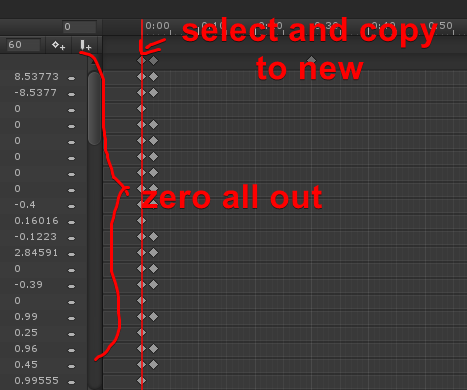 sweet zealot
fullproperties..... i must test that cause im not sure what that is but it sounds useful
heavy stirrup
I'm just labeling that
Either way, you still have to make the first one...
I think genesis is suggesting an easier way to do it.
sweet zealot
so i make a blank animation with all the bones inside of it, then save it as a template, then reopen and save as other animation to edit?
clear yew
find an animation in sdk that has all the properties added
heavy stirrup
Basically, yeah. I don't know a faster way to make that said template though.
heavy stirrup
Yeah, after the first 2 animations i was about "Fuck this." And made my templates.
clear yew
i'm always copying animation keyframes (from sdk or from mixamo) to make my new ones... it's way easier.
also lets you edit, cuz imports are read-only
sweet zealot
wait it doesnt seem to let me edit an animtion once its saved and imported into a new file...
heavy stirrup
My model's bone labels are off i think, so Mixamo has my character doing the limbo.
sweet zealot
all my avatars use the same rig i made
clear yew
mixamo you have to convert animation type to humanoid so it uses animator instead of transform
sweet zealot
some are just more stretched
heavy stirrup
Basically, duplicate it and rename, or just "create new clip"
Where is the option to change that-- humanoid characters i mean?
clear yew
create new animation, copy keyframes from another, paste in anim you made, ez
sweet zealot
create animation, save it, import to new project, rename it, edit it. is this correct?
oh, lol didnt read the last message
clear yew
you can select the top dark row to celect all keyframes in that frame (ex the first), or you can ctrl+a to copy everything
oh right
heavy stirrup
In mixamo i mean, is there a way to fix it so i can determine to mixamo what bones are what?
clear yew
you either upload your model to mixamo
heavy stirrup
Right now it's self-determining from my skeleton, poorly.
clear yew
or you dl the mixamo anim raw, and then convert the dl'd model rig to humanoid
sweet zealot
it wont let me add new properties to it in the copied keyframed new animation
clear yew
then you copy the animation
i still haven't worked that one out tbh... i dunno why sometimes you can add properties and sometimes you can't
just click around and select different things etc until it stops being greyed out
oh right, i think you need to apply it to a model as an animatior component
cobalt oyster
So is there no way to convert a .vmd file to work with non-MMD models?
heavy stirrup
You do need to have your avatar selected when adding properties-- using a duplicate since you dont' wanna mess with your original.
clear yew
choice 1) duplicate your model and work on your animation with that new model, which you can delete later
choice 2) work with animations on your current model then do the fllowing when done to reset pose to t-pose:
https://i.imgur.com/mZAE2Fa.png
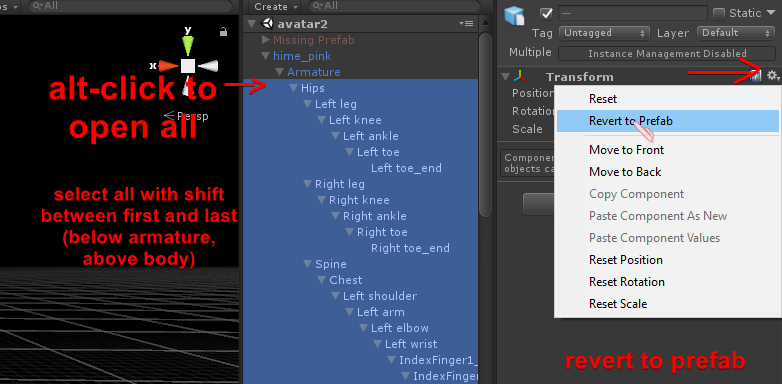
to get the model to occupy the animation, i just stick the anim in the idle slot of an override controller duplicate, which i then apply to the animator module
plush meadow
Doing duplicate is easier, no?
heavy stirrup
There's no issue with having, for instance, an arm and leg together in an animation without the bones between them is there?
In terms of actually getting said bones to move, at least.
 proud oasis
Hmm blend shapes are tricky
clear yew
@plush meadow hmm it might be simpler, but prefab reset method is quicker, because you can swap out anims without having to reapply the component etc
 thorny fox
hey everyone, how do I change my avatar's head size for an animation?
It doesn't seem to like that and spit's out an error/yellow message
clear yew
i dunno if you can do that with humanoid mode avatar rig
heavy stirrup
Hm.. Do Emotes listen to dynamic bones?
clear yew
you'd have to make it a shape key in blender, or make a particle that is your head mesh overtop of your actual head
thorny fox
gah to some extent that was the error message i got X(
Oh! thats a thought
but.. mmm 😦 i wont get the neck bending effect
clear yew
shape key is your best bet then
cuz then you can just stick it in as skinned mesh renderer property
YE
clear yew
yes
youtube how to make shape keys in blender... it's a bit fiddly (isn't everything in blender so? lol) but not hard or complex
heavy stirrup
Do emotes respond to dynamic bone, or override?
clear yew
what do you mean?
plush meadow
I don't think they do.
heavy stirrup
Basically, if you have a tail, does it flow with you
plush meadow
I don't think dynamic bones affect emotes like dances.
clear yew
dynamic bones will always be dynamic as far as i know
heavy stirrup
Emotes are weird though, they take all of a character don't they?
clear yew
hmmm
hmmmmmmmmmmm
i wonder if you apply ik to the emotes 🤔
i'm really sick of painful fk posing
even if can't have the animations themselves in ik because of whatever vrchat stuff... making the anims with ik would be way easier... cuz then you could just, for example, drag a hand where you want it, then rotate and fix elbow, instead of balancing act one joint at a time
 wet grove
I believe there's a way to record animations through vrchat. I'll look for the link, but no guarantees on if the thing still works.
GitHub
VRCMotionCapture - A unity project which you can use to record your own motion capture recordings directly out of VRChat.
clear yew
that doesn't help when you don't have vr
which is the main reason someone would be using emotes as opposed to gesture overrides
wet grove
Have friends with vr that are willing to create it for you maybe?
heavy stirrup
Dances, i think
 onyx bramble
Has anyone resolved hair detaching from their head?
thorny fox
for any partcle effects or meshs you use.. do you have to put it inside your avatar somewhere?
clear yew
particles spawn independently
thorny fox
no i mean if you want it to work in vrchat do all those things have to be children of your avatar
or does that not matter?
clear yew
particles are spawned by the particle system... i haven't fiddled with that yet though
thorny fox
mm nvm i dont think you get what im trying to say, yes i know about particle system but..
does particle system have to be put inside your avatar-object, aka the avatar you are about to upload
clear yew
oh, probably
sweet zealot
quick question - what is the normal hand relaxed pose called?
 nova pilot
asking for a friend, where might one find a dab animation?
 spice urchin
heavy stirrup
spice urchin
heavy stirrup
My gesture animation overrise still takes the hand's use away for a while
Though it's 7.000 it doesn't give me the hand back until well after the end of it.
clear yew
@grizzled cobalt crouch walk right, strafe right (strafe = a/d sidewas movement)
or wait
 grizzled cobalt
but
clear yew
hmm actually nvm
clear yew
i'm wrong, that's good question
clear yew
can non humanoid models use animationoverride for emotes?
or are they stuck to the animation controller
clear yew
@clear yew i'd imagine they can, but it'd be a different type of animation.
 primal gull
does anyone know how to make an emote from scractg
clear yew
you could also gimmick it into being a humanoid model with invisible unweighted bones and use shapekeys for animating
primal gull
i made a transformer avatar and i want it to transform but the bones go back into place
clear yew
@clear yew ill try the invis bones, thanks!
emotes are time limited
cause i have already have my animations baked in blender
i just need shapekeys for visemes i think and custom moving anims
if you have the animations as mesh shapekeys in blender, then you can add them as skinned mesh renderer properties to the animation timeline

okey, so i can use those for visemes right?
yes and no
it uses the shapekeys straight from model, not viseme in unity
ah
i see now
you use the same shapekeys that are used for visemes if you want to change expressions during anim
if you wanted to make your avatar mouth move with a played sound for speech in animation, you'd have to lipsynch it manually lol
im doing something similair to that
ive just been adding animations to the blender timeline and exporting them as fbx files
and then duplicating the animations from the models
and adding them to the controller
for a model configured as a generic rig
but i wanted to have visemes for animation overrides
not just being able to walk forward and backward with jump and idle
but if i can just use it as a humanoid rig with invisible bones, and use all the animations i already have prebaked for movement, and make my own visemes with lipsync then i think that will solve all my problems maybe
ugh, is there a way it doesnt force my model into a t-pose when i rig it? or is that where the invisible bones come in?
thats something i dont really understand
 torn sail
My model is suddenly in a position with bent knees and arms after making an anim. how do I get them back into t-pose?
primal gull
its supposed to do that
torn sail
yes I know
but Ive already deleted the duplicated model-
and the original is like that now
primal gull
then idk
clear yew
@clear yew yeah sorry, i dunno anything about animation importing
plush meadow
You could just hide the duplicate model.
clear yew
@clear yew okey, thanks for the tips tho, you solved one of my issues i had with a different model
plush meadow
Instead of deleting.
clear yew
@torn sail to restore t-pose https://i.imgur.com/mZAE2Fa.png
torn sail
@clear yew Thanks for the help, but I dont have that option
clear yew
you must be doing something different then
clear yew
what do you mean?
what i showed is for restoring your model's default position back to t-pose instead of the animation pose you were working with
torn sail
the process went fine
the second time I did it my model got stuck in a weird position
I dont have an animation pose atm
I was just doing face animations
but my whole model is different now
clear yew
different how
heavy stirrup
Is there a way to apply a shift in the Y axis across an entire animation?
Basically, due to some changes my animation now has the model walking through the floor
clear yew
hmmm
 ivory lagoon
i'm doing 2d mouths, how do i get it to where the visemes don't fly 5 feet off your face when speaking?
clear yew
@heavy stirrup check the Q & T properties in the animation
if they have keyframes, nuke them and make a 2-frame no-change
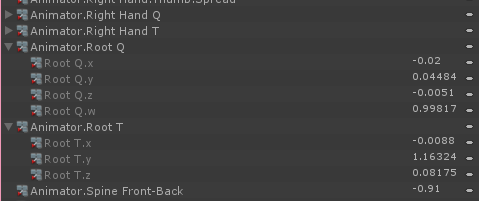
iirc Q is rotate, and T is pos
 limpid tulip
What is PRONEFWD and PRONEIDLE
clear yew
@limpid tulip when you are on the floor in vr, your char goes onto belly
limpid tulip
thanks
clear yew
that's called prone
heavy stirrup
My animation window looks a bit different. The do label themselves as positions and rotations.
I think I'm going to sleep on it for now. Thanks.
 mental ledge
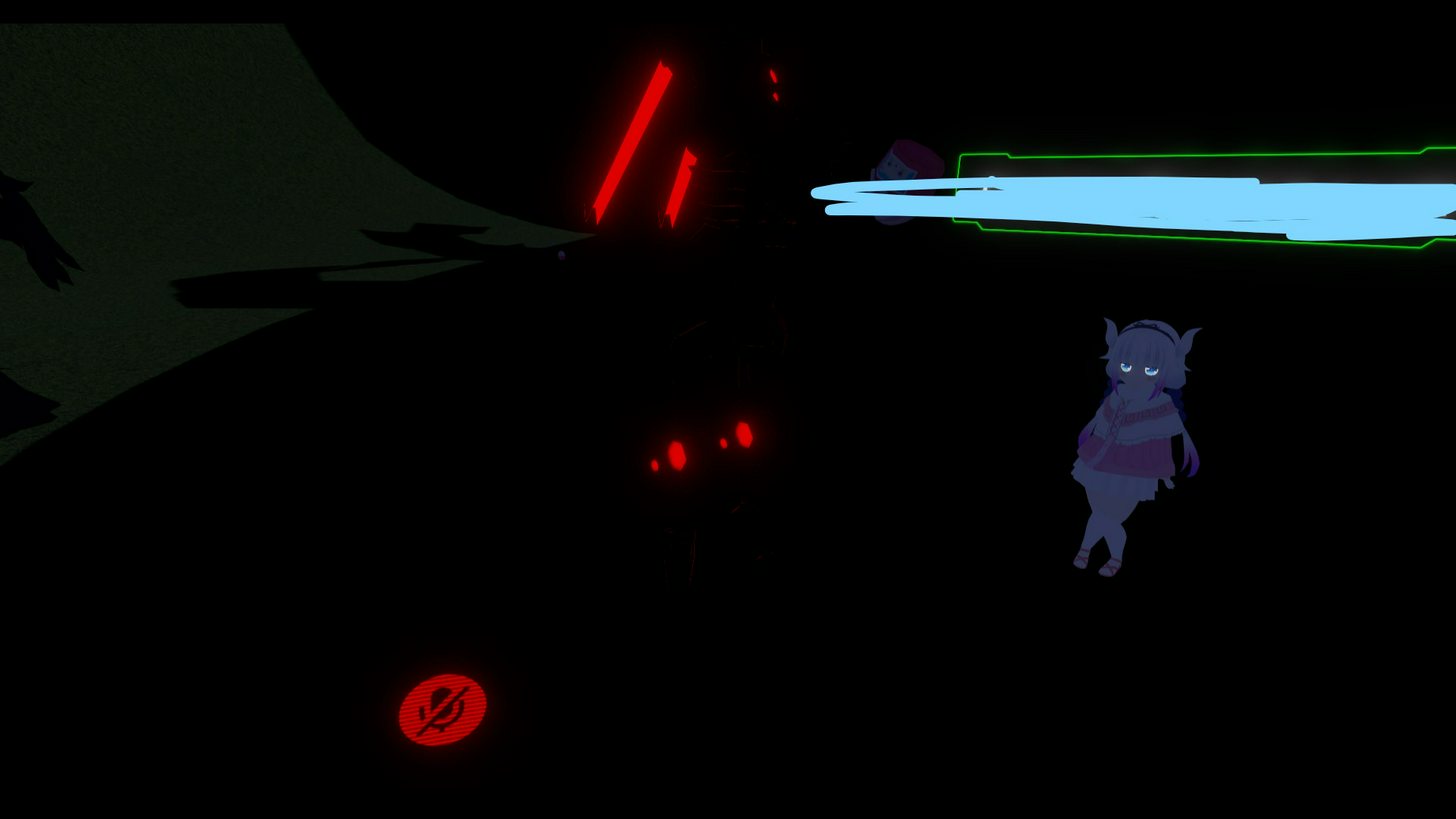
can somebody please tell me how to create glowing effects on certain materials like this? https://imgur.com/Y7YqYAM
 clear yew
@mental ledge emission
you either need to custom make in shader forge, or get a glow shader
mental ledge
ah i see. now doing that, how can i make just a specific part glow? for example the part i want to glow is on the eye but doing anything to it also changes the color of the shirt. is it possible to just do the eye?
@clear yew
clear yew
it's per material
clear yew
why's that a damn?
your char's eyes should have their own material
etc
you can also easily separate certain mesh with same texture as another material using same tex in blender if you want
mental ledge
oh i see I'll give that a try
clear yew
if you want like
tech overlay
you'll have to make it a separate texture with only the parts you want glow, then use glow shader
mental ledge
would you happen to know of any tutorials i can watch for creating separate textures? still kinda new to all this stuff
 pastel solar
@clear yew well my mmd model comes with different eye meshes but am I gonna need the bones to them to work in unity or can I just delete them (the weights)
 trim vine
yo has anyone figured out how to fix animations from looping on generic models in Vrchat (loop time turned off in unity)
clear yew
@mental ledge just select the mesh and press p and separate it
then makea new material with same texture and uv etc
i think you can duplicate it or something, forget
but yeah... as long as it's identified separate
you may ahve to reassociate the meshes for materials in unity... for instance, i had multiple meshes with same tex, one was supposed to be darkened, but it just put it flat with tex
so i had to remake the mat in unity
but it was in the mesh groups list or w/e it's called
@pastel solar you want eyes to be 100% weight to eye bones, ie paint should be red
mental ledge
@clear yew alright, thanks. I'll see if I can figure it out
 civic oracle
I'm trying to make an animation where it's a sphere that grows then shrinks, I got it to work but it breaks my whole hand, so evidently something is wrong
clear yew
@civic oracle make it a mesh particle
civic oracle
Good idea
 steep citrus
anyone care to share some nice dynamic bone settings for hair??
clear yew
high inert, high damp, medium-high stiffness with a curve that does down towards end, and low elasticity
specifics depend on how your hair is
steep citrus
thank you thats a nice setting I just tried it! next I just have to figure out why one piece of the hair is flying out of my head lol
clear yew
@steep citrus you can also add some gravity, no more than like -0.05 i'd say (uses negative numbers, only set on Y)
though if you use gravity, i HIGHLY recommend you set it up so it collides with head and torso
then it'll roll around body instead of go through
 quasi helm
does anyone know of a generic singing animation i could use for my model?
ive found a bunch but they seem rigged for a specific song and dont really have too many motions
clear yew
singing as in..?
quasi helm
like an opera singer would move their arms about while singing
dont know if mouth movements can be bound to them but would be nice if it had that
fluid valley
I need some help making an avatar have a sort of swaying hover animation instead of the normal walking one
 bitter nebula
guys, so i added snail marker to my avatar but whatever i do, my hand just sticks in unnatural position when i draw, anyone knows how to fix it?
fluid valley
ctrl+z?
grand copper
so you added a marker that's able to draw?
bitter nebula
@grand copper uh, yes?
grand copper
did you give your fingers the position they must take when you summon the marker?
grand copper
Are there more animations on your character?
bitter nebula
yes
grand copper
could it be that they are interfering with eachother?
one animation tells your finger to hold that pose and the other gives a different one?
bitter nebula
can't be
grand copper
I have seen many cases where people do 2 hand gestures at the same time and there face animation glitches out
bitter nebula
they don't interfere at all, i checked
grand copper
Then I'm not really sure what the bug might be, sorry
I would say wait a little and the american will wake up, most of them know a lot of unity
americans*
bitter nebula
well, ok, thanks anyways
grand copper
yah sorry man haha
bitter nebula
if you want to add me - lemostick
guys, so i added snail marker to my avatar but whatever i do, my hand just sticks in unnatural position when i draw, anyone knows how to fix it? (so the question remains)
 wide palm
is there a limit on the length of an emote
bitter nebula
@wide palm i believe so. what do you mean by that? the frame limit? the time limit before it erases? wut?
wide palm
the length of the animation
I remember reading about there being a 10s limit but I think I've seen some which go longer than that
bitter nebula
@wide palm i did 2 frames, like 1st and 2nd second
pretty much like all the other anims
bitter nebula
oh, nope
its a gesture
i made it so i point my finger when i summon the marker, but it just stays like half-folded
 pearl urchin
could i ask a question and would it be possible to do?
right basically i am thinking about using a jesture to summon a card on fire like gambits, but i wish to throw it too. Would that be possible?
wide palm
yeah
you'd probably separate the summoning, holding and throwing animations into different gestures
and then switch between them at the right time
pearl urchin
ah okay thanks just that ive never seen anyone have like a throwing firecard so i was thinking about making it.
 dire tusk
Thought one of the rules was not to talk about mechanim or something
 fair sentinel
anyone explain/help me with animation commands for items on characters?
 thick ledge
avatar chest puffs when standing still anyone know how to fix it?
paper lantern
Can anyone help me with some pose rigging? I've got a hand gesture mapped to a face gesture but it's overridden the hand so it looks like a claw, but I've seen people keep their hand gesture too. Can anyone help?
 half shell
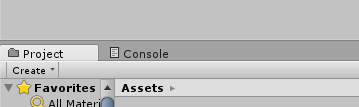
so there's no animation tab at all in Unity for my model?
not sure what to do about it
 thick ledge
add it
 fleet hill
anyone here done any advanced shit with world particles and shit, trying to make working grenades and i need to know how to make a particle stay after the gesture is finished
grand copper
@half shell press Ctrl+6 or go to windows and click on animation. And then put the window that popped up next to these tabs
half shell
already solved it but ty! <3
grand copper
awesome (y)
@fleet hill You mean the grenade fragments from the grenade you dropped won't stay? that's normal. It's something of your character and not an object from the world you are in.
fleet hill
dw found a diff way to do what i want
 hot orbit
Does anyone know how to make a particle system independent of the original position? I don't know how to quite put it in words but here, say you have a smoke effect at the end of a cigare, how do you make it so that when you move the cigare, the smoke effect doesn't just follow the movement of the cigare but remains in one place while you move the cigare to a diff one?
ashen sedge
@dire tusk To clarify, it's MMD4mechanim that is not allowed to discuss about. The creator of the asset has requested that.
grand copper
@hot orbit I'm interested in the answer to this question too
fluid valley
A'ight I've given up on the wraith for now and just wanna finish my current model. Does anyone know how to geth the base humanoid animations working on a normal model? The model I'm working on atm gets stuck in t-pose no matter what I do.
clear yew
@fluid valley Yes.
You need to revert those animations to generic.
And then do this:
Google Docs
Advanced Avatar Creation: Making Non Humanoids This tutorial was made using Unity Version 5.6.3p1 This tutorial assumes you already have the current SDK imported and knowledge of how to upload a basic avatar. You will also need an avatar you wish to upload as non-humanoid with it’s own set of a...
fluid valley
Really? Thought they had to be set on Humanoid
 little raft
anybody know how to fix the floating issue from mixamo animations?
clear yew
If you want your model to be humanoid, then all has to be humanoid.
If generic, go for that.
Hmm.
So.
You get all to Humanoid.
You create an Animation Override Controller, where you replace what you need with your animations.
You link the override to the Avatar Descriptor Animators.
That is for Humanoid.
fading solar
how to add animation or pose as an idle default?
paper lantern
Can anyone help me with a little thing to do with animation overrides? ^^
Using hand gestures.
 lapis ledge
so the model i just installed has a sword with it, how do I make the sword work? Are there animations I need to make or?
clear yew
Hey guys! Does anyone know the Vive wand input settings? I did some animation on guesture button ( like victory one) and they works, but really confusing on how to pause or stop it = =#! Anyone can help me?
lapis ledge
I have the vive.
you pause the emotes by clicking another emote.
so like when you do the rock n roll emote
click the trigger to make a fist
and it will disappea
r
if that's what youre asking
clear yew
yes, but my case seems like customed animation is out of controll. When I click trigger or side-button, hand will do fist or handopen. While I click again it keep playing
or even I click another defalt guesture, it was like "kinapped" by this animation
lapis ledge
sometimes they get stuck. Like a lot of times when i pull out guns or particle effects they get stuck.
Then i have to change the avatar or respawn for them to get fixed
clear yew
thats it...Now i'm getting mad with this issue
but when I do some test with those avatar made by others, those animation work so well
lapis ledge
Welcome to the "unsolveable issue" club
rip
i have an issue aswell, i fixed it for one model but the others arent fixable.
clear yew
seriously....? oh I really wanna figure it out QAQ
lapis ledge
maybe youll be able to help if not its ok.
so the models I have (some not all) have textures, but when I go in blender and click shadless to show the textures the model turns all pink.
How do I fix that?
clear yew
nah it's okay, at least I found a guy with same problem I have lol
lapis ledge
lmao
clear yew
you mean.... that kind of "dazzling" pink?
clear yew
well, with weapon and flying object
appox. 10 second last long
but with facial meme it's the same. I did some at another avatar as well
paper lantern
Hmm
paper lantern
Alright... hmm
Okay, in your animation
The actual animation file
No, wait, hm.
I'm thinking it has something to do with the keyframes.
When I was making a face gesture for my character with a wink, the eye would twitch violently.
Until i removed the last keyframe in the animation

Like here.
Maybe the final keyframe is causing issues?
clear yew
could be. so I just followed a tutorial, that to add an event at very late timing (means never reach to that), and the animation didnt loop all the time at least.
final keyframe? hmm..
paper lantern
What I think is happening is whatever animation your trying to do is looping too fast. But if there isn't a final keyframe, it will remain as is until you stop the animation (I.E choosing another hand gesture)
 noble fern
@here, Trying to figure out how to get a particle to spawn in the same spot every time
any idea how to do this?
paper lantern
I don't, Razzle 😦 Someone was here earlier asking but I don't know if they got an answer.
noble fern
the testing is frustrating
Because it's working fine in unity
but when I move it to game it's like nah B. You have some variation in where this thing spawns. Oh don't like it? Tough
clear yew
Do you have the 'shape' portion turned on? That can cause variation
clear yew
@paper lantern " if there isn't a final keyframe, it will remain as is until you stop the animation (I.E choosing another hand gesture)" really? I just wanna to have the function of " to STOP the animation at any moment by clicking side button or trigger"
The emitter moves with your avatar so that probably causes some variation too
paper lantern
I should've said don't quote me on that, cause I'm actually not sure. I'm just going off of what I know and have tested.
lapis ledge
i know this is not the channel for it but can anyone at all help me with the texture issue?
paper lantern
I'm just throwing ideas around.
clear yew
and never continue again
paper lantern
Cause it sounds like an issue I had before.
lapis ledge
When i click on shadless the model turns pink instead of getting the textures
clear yew
okay... but anyway thx Athir!
noble fern
@clear yew it doesn't matter if I keep the same exact pose. If I bring the particle in again it's in a different spot. I can be in the same space every time and it moves around where it spawns
clear yew
well here we need an animator !
paper lantern
Yeah we do ;-;
clear yew
Is the particle system parented to anything aside from just the avatar?
lapis ledge
anyone pls?
 lucid forge
Hey everyone, sorry for the noobish question but I really can't work this out. When I am making animation for my avatar his position will screw up and he will go half in the floor. Even if I set all of the body parts of every keyframe to certain positions it makes no difference. Interestingly, even if I turn off the character model in the hierarchy it still stays there in that position it will only go if I turn the whole thing off instead of the textures.
Any suggestions?
paper lantern
Yeah, it does that.l
brazen crater
@lucid forge make a duplicate model, where you then change everything there
paper lantern
Duplicate your model, make the animation using that model, then delete the old model
lucid forge
Honestly*
paper lantern
Not the old mdoel
Delete that model you just made
After you've done the animation
lucid forge
Yeah taht's what I'm doing. Duplicating the model doing the animation deleting the duplicate but the animation does the same thing in game :/
brazen crater
yeah that's kinda weird
paper lantern
I'm assuming its a full body animation then? Like an actual emote?
lucid forge
Yeah it's an emote. Essentially for the character all I'm trying to do is make it go under the floor or turn off either way will work but when I add the key frame he just goes screwy and then when I just continue and ignore it then import into VRC it does what the duplicate did
I must be doing it wrong
There's no way it isn't me
paper lantern
I'm relaly not sure, I've yet to dip my toes into the full body emote animations 😦
I can barely get facial working, but it breaks the hands.
 gaunt gyro
Characters with animations attached to them always go into the ground like that, unless you actually set the Q and T positions and whatnot. That is why you always duplicate your character in the scene tree and make your animations on one of them while keeping the other untouched.
lucid forge
Well it doesn't matter what I do in the animation even if I just enable a particle system it does the same thing D: I couldn't bare to think about facial animation lmao
 mint ginkgo
Oh I had this same problem yesterday. You have to pose the whole body for an emote or it will sink underground in that curled up position
lucid forge
Yeah thats what I mean even if I move it the animation playing moves it back
I think I might just make the rest of my animation knowing I've put my character under the floor and see what happens
gaunt gyro
That's just how it is. Don't worry about it, as long as you don't attach animations on your original character, it shouldn't matter.
mint ginkgo
Also you have to raise the model above ground level for every frame
gaunt gyro
You mean you want to hide your character during an animation? Just disable the IsActive of the body mesh.
mint ginkgo
I don't think I understand
lucid forge
Yeah I have done that, also moved the position of the character but when I press play to view the animation it put him back there and the keyframe position actually changes back to what it was
if this makes sense
paper lantern
While people have poked their head here, does anyone know how to fix the hands breaking when mapping them to face animations? ^^
lucid forge
Ok so if you've ever played the legend of zelda I have my character model as link with majoras mask on. I want the body of the character to be invisible and the mask go on the floor but when I play back the animation i've made, the link model just reverts to half way in the floor and the keyframe changes to that position too
Sorry this again will be me being an idiot
gaunt gyro
@paper lantern If you replace a hand gesture with any animation (face emotes, body movement, or whatever) the hands will go to their default "resting" position (kind of a claw form) unless you manually re-create the hand gesture you are replacing.
paper lantern
Ah...
 open vault
hey ya'll qq, what's the animation called in the override for the open hand/wave?
 small tapir
When i do the animation can i move my avatar to a better position i can't see the hands they are too close?
paper lantern
@open vault Handopen I think
gaunt gyro
@lucid forge Are you sure you actually set the keyframes in the animation correctly, both start and finish?
lucid forge
Yeah I have definitely
paper lantern
@gaunt gyro Where do I fix that then? I wanna keep the peace sign and have my facer animation ^^"
open vault
@paper lantern thanks a bunch
lucid forge
I tell you what, let me finish my animation and put it in VRchat to test and I'll make a vid showing what I mean
gaunt gyro
@paper lantern Same place you created your face expression, just add all the "..._streched" or each finger. So that's 5 times 3 properties. Then set them to your desired pose.
Do that for whichever hand you will likely use to trigger the pose. It will work on both, but if you for example want to use your right hand for face pose (peace sign) only add all the streched properties of your right hand, so you can still use your left hand for other signs.
small tapir
When i do animation can i move my avatar to a better position? I can't see the hands they are too close too each other
brazen crater
On a side note, has anyone dabbled into audio sources and has some tips he/she could give me?
gaunt gyro
@paper lantern If you still need help regarding finger posing, I would suggest these videos. They are very helpful: https://www.youtube.com/watch?v=oGHzuk5YD1I&t=6m

Tutorial on importing weapons and tools to your character to use in game. Links: Model: https://meennie46.deviantart.com/art/MMD-TDA-Mythic-Flower-Dress-Miku...
clear yew
@gaunt gyro Hi Nicknero sensei Could you help me on the question I mentioned above? QAQ
About how to "control" an customed animation on Vive
paper lantern
@gaunt gyro Thank you x.x thats so tedious though.
gaunt gyro
As far as I know, there is no way to forcefully stop an animation when it's already playing. It would always play to the last keyframe before going to another animation or whatever.
Meh, watching videos might be tedious but trust me, you'll learn how to do it yourself soon enough. ^^
paper lantern
It snot the video thats tedious
It's that you can't select all the stretched finger animators at once
You have to add one at a time
Going back to each and every one over and over again
clear yew
so....I should disable "loop time" on animation file property right?
gaunt gyro
Oh yeah, that is a pain in the ass indeed.
clear yew
but I dont know why... those animation others did, I can stop them by pressing side button and easily swith to other guestures....
gaunt gyro
Are those multi-second animations? Or just one single pose that they switch to?
Also, once you get the hang of everything, you can make a combination of body movement, facial expressions, sound effects, and particle effects. Look at this abomination I'm working on:
https://puu.sh/zbyDY.mp4
paper lantern
Jesdus christ
Yjays
Thats
So awesome I can't even type
Wish me luck, I think I got the finger animation thingy working
clear yew
Hmmm.... @gaunt gyro sensei, sorry for my limited knowledge about animation...I really dont know how do they work
what do you mean multi-second animations?
gaunt gyro
"How they work" is a very open question. Anything more specific you want to know? 😛
clear yew
Cuz now im also doing an animation with combined movements and flying objects and audio sound...
gaunt gyro
Oh, just animations that are longer than just 1 frame
clear yew
yup I knew this point. My animation is 10s last XD
gaunt gyro
That's fine. Although I realized that some of my animations get cut off in-game for some reason. If that happens, just add a few seconds of empty frames at the end of the animation.
clear yew
especially with left and right hands movement, so I found that I have to touch both left and right vive wand to activate all the hand guesture
gaunt gyro
Huh? Your animation should trigger when you press either left or right hand gesture. Not both.
clear yew
empty frames? you mean without changing?
gaunt gyro
Yeah
clear yew
I put an event tag at the very ending
gaunt gyro
For example, your animation is 10 seconds long, but in-game it already stops at 8 seconds (Just an example, I don't know) then simply add 2 seconds extra to your animation so it's 12 seconds, and cuts off at 10 how it's supposed to be.
clear yew
for all the properties?
I really hope I can contact with you on VRC... to show how weird my animation is....
this confused me all the time QAQ
well, it would play at the end of animation, but for more times, things go in a mess ;_;
lapis ledge
yo anyone help lol
im trying to do this

particle effect btw
but how do I make it bright
and how do i remove the black background
lapis ledge
no im not lol i got help from @zealous needle
paper lantern
Thank you again @gaunt gyro ! I managed to get it! ❤
gaunt gyro
Awesome
paper lantern
Now I need to ask
Is there any way to edit animations AFTER you've made them?
Cause the 'add property' thing is greyed out
gaunt gyro
Of course, just go to the animations tab in unity.
gaunt gyro
It's because the animation is not assigned to a model.
paper lantern
Are you sure? Cause these certainly are...
The model I have was half made by a friend, and I wanna edit some of the things he added
lapis ledge
anyone has experience with particle effects?
clear yew
@gaunt gyro and is that possible to add extra object to an exsist animation for more action? Like add that object to the origin model first...then drag it to the animation model...?
gaunt gyro
Yes.

 oblique wadi
👌 👌 👌
clear yew
thx! well I just tested at VRC, I can't call out any other guesture after I play my customed animation
 clear yew
and also when I click side-button, it turned from nomal claw position to my customed guesture
wow great job buddy

@gaunt gyro this is my animation flow...could you fighure out something plz? ;_;
lapis ledge
yo why did this get smaller https://cdn.discordapp.com/attachments/406551199580684298/407258514000576514/unknown.png lol
 clear yew
I'm looking for someone to animate my MMD model for an amount of money, if someone is good at it and willing to do it, send me a friend request so we can discuss it :3

 glossy finch
does anyone know any other websites to download custom emotes other than mixamo? :))
 hazy fog
Any idea where I can get a breakdance animation?
 echo wraith
Mixamo has some
hazy fog
Can you drag and drop those into unity? Looks like a bunch of pieces for a breakdance
dire tusk
Anyone mind explaining how I take out this animation in this? Ctrl D isn't doing anything
https://imgur.com/TDXd6I2
 gaunt gyro
Rename it before ctrl D works
echo wraith
It's a whole thing to get a animation from Mixamo. Usually includes having an avatar with that animation then stealing it from them. lol
dire tusk
F2 doesn't work on it either :\
gaunt gyro
While you have it selected, the name of the animation is somewhere on the right menu. There you can rename it
dire tusk
Yup that worked, int he edit box, thanks nick
 pliant plank
The issue is it having a | in the name, removing that is enough for unity to not lose it
 warm furnace
Hey does Custom space for particles system works correctly with vrchat ?
 hazy pawn
adding an audio clip to avatar yet when I hit play to test sound and range I can't hear the audio. anyone know what's going on?
pliant plank
Copy pasta frames?
 stray gulch
@pliant plank in blender right? the only way i can import a vmd is mmd tools. but it only allows one vmd at a time. when i import another it overwrites it
pliant plank
No i mean in unity
If both have the same components it'll allow you to paste them onto eachother
 drifting portal
Dose anybody have the insect walking animation like thoes cocroaches have? Kinda need it for a model.
 brave torrent
@glass anchor You should be able to
 true basin
I can create full body/facial animations, how much would you guys charge per second for that kind of animation?
agile ruin
Anyone knows why after triggering a gun animation the gun doesn't appear?
true basin
do you have the mesh enabled on both ends of the animation?
agile ruin
yeah
true basin
did you remember to set the animation to legacy?
agile ruin
Do you need to make it legacy? Even for just weapon spawning animation?
true basin
not sure
the legacy part confuses the hell out of me, I have to disable legacy for animations to work on my particular model
enable legacy when animating, disable before build
that's my workflow
I just successfully repaired my motion capture suit, required resoldering connectors. Also needed to rebuild my facial mocap helmet.
gonna have fun with VRChat animation tonight

A small hour-long project. Just raw realtime face and body mocap imported into Lightwave, no post-processing. Source: https://www.youtube.com/watch?v=wBMOc24...
I was able to export 80 seconds of this motion capture session to a VRChat avatar via gesture overrides
true basin
I wish VRChat had a mocap api for that
there are over 30 sensors on my suit
great for motionbuilder, not really ready for VR
 glass anchor
fair enough lol
true basin
I don't doubt that there may be something in the works though
we are so close to putting the mocap industry out of business
even the hand tracking with just oculus touch impresses me
the more sensors that are supported, the better
grizzled cobalt
@true basin if you don't mind me asking how much did you pay for that mocap suit
true basin
$2000
it's been discontinued for the time being, unless you're a student
Perception Neuron by Noitom
they only have the student version available while they roll out the newest version
there is a possibility that the company may work with VRChat in the future
But for now, I need to come up with a business model for commissions.
 north iris
So has anyone found the best solution for the avatar in the ground thing that happens?
When my character is in idle, his feet are in the ground.
Any movement, character is in the air.
brazen crater
@north iris do you have your toes assigned as a bone in blender?
brazen crater
Hmm
north iris
I feel like it's unity doing it somehow
because I made a base bone that doesn't go under
armature is always at 0,0,0
brazen crater
Well I'm not really a rigging expert tbh, maybe you can try asking in that part of the discord
north iris
hmm
red lodge
hey someone knows the issue if I trigger an animation ,it sinks more in the ground and the start position is rotating
 quiet needle
You will want to change the material properties. Click the material in your assets and there should be options for transparency (provided you're using a shader on it that supports it)
omg I'm terrible at chat
 nimble jewel
I have an issue where, in VR my avatars arms are either bent or sticking straight forward like a zombie, despite them being at my side. They are also not animated either, like they would be in desktop mode. can someone help?
 sharp cove
Hey so I got an animaton that I want as an emote
Right
I got my avatar to do the said animation but he stayed in one place
Anyone know how to fix this?
quiet needle
did you bake rotation and translation into the animation?
base it off "original" also
play around with those settings, some animations are weird and need some things on and some off.
 tepid mirage
sooo my visemes controls the eyebrowsn ot mouth anyway around that
quiet needle
Make sure when you generate visemes that the correct mesh and shape keys are selected
true basin
What is the animation time limit for gesture overrides?
normal skiff
either one frame or two frames depending on how you count it
true basin
if I try building with 30 seconds of animation, it only plays 25 seconds; if I try building with 25 seconds of animation, it only plays 20
it's confusing
normal skiff
wait, it works with more than a couple of frames now? >_>
quiet needle
Yeah, I have full dance sequences. I purposely make them longer than they need to be so the cutoff works out.
Zim, I've gotten it up to about 30 seconds max. The official forums say 10, but I don't know that the timescale ingame is the same.
normal skiff
the 10 seconds I hear about is about emotes rather than gestures
if gestures can go past the usual limit then the max time could be anything...
quiet needle
Yeah, my dances are emotes, and my gestures have some set to 5sec+
I dunno if that's the case.
normal skiff
I just use the usual workaround where the gesture turns on some other longer animator
true basin
hmm
more testing needed I guess
need to find that sweet spot where the animation won't cut off if it's too long
normal skiff
I have something I'd like to test which I can't find a use case for yet, which is animating putting the gesture away
normal skiff
emotes as well as gestures? or when you said gestures you actually meant emotes?
true basin
I misspoke when I said gestures
normal skiff
heh
ok so I guess emotes go longer than the usual limit people claim, but with an odd cutoff rule
true basin
but yeah, VRChat seems to allow over 10 seconds of custom emotes, but the hard limit is not clear
normal skiff
this should be testable...... I was meaning to make an animation where it has something to show the time it has been running
true basin
brb testing with 15 seconds
normal skiff
at the moment though I'm more fascinated with the idea of replicating an acquaintance's stencil buffer magic trick
just wondering whether there is any better way to demonstrate it than with a picture frame
true basin
15 seconds seems to be acceptable
that's what, 2 minutes total for dance purposes?
I need to try 20+ seconds later
normal skiff
if 30 seconds gave you exactly 25 in a reliable way you could just pad 5 seconds of nothing onto the end
true basin
I wanted to avoid that
normal skiff
but I guess the problem is reproducing it first and figuring out exactly what the cutoff would be for each length
true basin
yep
I can do it, but I would rather find the sweet spot that doesn't require that extra step
 slim steeple
I have a question, I animated the tail of my avatar, after doing so, I went in-game, checked it out, and sure enough the animations work perfect, problem is, my character is now half way through the ground when it wasn't previously, for clarification I overridden "IDLE" for my animation clip, do I need to fetch the keys from the "IDLE" clip in the SDK to keep it on the ground proper or did I do something wrong here?
 severe sierra
For something to be animated constantly would need to be a seperate object attached to the avatar with its own avatar controller
from what i understand
animation controller**
true basin
lol, I just use a standard animation that plays automatically
for idle stuff
anything that's not controlled by Unity's avatar rig
is free game
 pure summit
do you think there would be some way to put "animations" in the Emotes tab but have them last forever? I hate having them on my hand shortcuts because in vr its easy to accidentally touch the thumbpads and pull it out
 pseudo kernel
Emotes lock you in place
pure summit
ah
i was assuming that was behavior, i guess i'll have to just be careful or have a seperate character w/o emotes
thanks!
pseudo kernel
He knows
severe sierra
I tend to keep any on the rock n roll override
on oculus I dont do that emote by accident
pseudo kernel
If they add rebinding we could have gestures on click, and touch move.
slim steeple
I'd love if gestures weren't forced on both the controllers, I use classic locomotion and end up doing gestures for props while moving too much
pure summit
^
same eevee
thats my main issue
it'd be nice to maybe have an option to have gestures as button-based (so like open the menu>gestures>click desired one)
normal skiff
I even do rock and roll by accident :/
but OTOH it would be annoying to have to go into a menu to do basic emotes, so some kind of compromise would be nice
e.g. new gestures don't trigger while you're moving
or while moving at some speed
 west panther
I just switch between an avatar that does and doesnt have gestures
quiet needle
right click object in unity, particle system, enable trails, modify the particle to what type of trail you want. This is in a nutshell. likely best to watch a youtube tutorial.
https://www.youtube.com/watch?v=agr-QEsYwD0
This Unity Tutorial teaches you how to make various Trail Effects using Unity's Particle System. This video is part of the Unity Particle Effects series. Her...
pure summit
so, in the animator, do you think it would be possible to fade between two different materials? 🤔
im tryna avoid scripting it
true basin
if shaders were animatible, it would be possible
slim steeple
Alright, I managed to fix my animation issue, turns out fetching the keys from the example "IDLE" clip really did fix it
pure summit
hmm ill check it out
 meager saffron
When you add props or particle effects to your model, do those take up draw calls at all while they are hidden? I would assume not, but I wanted to make sure.
 toxic ice
anyone have a link to a tutorial on how to add audio to a gesture?
 shell salmon
how do i fix the issue of only me hearing the sound of the animation?
true basin
do your audio clips have "Preload Audio Data" enabled?
glass anchor
I must be missing something important here. When I try to add frames beyond the initial 0/1 for a gesture animation, it starts glitching out in-game and playing on its own while preventing me from using other gestures
normal skiff
that's my experience too, which is why I don't do it
glass anchor
but I've seen plenty of avatars with long detailed gestures
like powerup sequences and stuff
so I know there's a way around it
normal skiff
well, I know I'm doing those by triggering another object with an Animator on it
like my rotating cube thing, that just animates forever because the cute itself has an Animator
glass anchor
would that mean you can't cancel it once it's started?
normal skiff
well, once I put the item away the Animator isn't around anymore so it has to stop
normal skiff
yeah, the only fun bit is whether you can also animate putting it away again
which I think is possible but I haven't got a good idea for using it yet
glass anchor
in my case I just need a chain of particle effects
so I could make a tiny dot in the center of my ava that works
normal skiff
empty game objects I seem to keep using all over the place on this stuff
glass anchor
ah that's a better idea lol
normal skiff
but if you already have particle effects then you have a game object those are on, so maybe that is the one which can hold the Animator too
but lately like all my issues have been worked around by "just add more dummy game objects"
glass anchor
now, how do you trigger the game object to appear later in the gesture?
wouldn't that cause the same issues as just adding the frames into the initial anim?
 prime elm
does anyone know why when animating an attached object to appear when trigger, the materials from the object also applied and covered on main body's materials?
normal skiff
yeah, now you need another game object which is the master animator one
which turns on and off the other game objects
well need might be a strong word, there are multiple ways to go
I think it's also possible to have an Animator which is always sitting there waiting to go, and you change "parameter" on it to have it change states
brave torrent
What you do is:
Create empty that has animation clip assigned to it.
On your gesture you activate the object that has that animation on it.
The animation clip that is on the object can be any length, it's played independantly from your gesture animation.
You can have that animation trigger anything on any frame similar to the same way you do it with gestures.
normal skiff
^-
glass anchor
so I'd put the particles and stuff later into the animation that's on the game object?
and the initial gesture is justto spawn it?
brave torrent
Well your particle system can be irrelevant to the object that plays the animation, it depends where you want it to be located
initial gesture is just to spawn it, yes
glass anchor
alright well I'mgonna dick around with this stuff, thanks for the help
prime elm
i went to search some video for triggering attached object, exact same steps, but out come is different, it is bcuz i'm on keyboard/mouse with idle overrided??
glass anchor
@brave torrent am I adding an "animator" or "animation" component to the game object?
prime elm
pretty hard to explain, if i can't send pic...
i got my avatar working perfectly fine. When i dragged my object and attach it under chest, hide it, duplicate the whole avatar for animation, with the default idle + object activate animation, but then in vrchat, i can see my avatar's materials are perfectly fine, but i see my avatar from mirror and camera are messed up with object's materials
brave torrent
@glass anchor It is similar to your avatar with gestures animation
The empty object should have animator component, and you'll need to create an animator controller which is attached to that animator
glass anchor
I see
prime elm
and when i delete the object's materials which made it into whole pink, but that same goes with some parts of my avatar, is there anyway to fix this.....
brave torrent
then on the animator controller, go to animation tab and create new animation which is whatever animation you want to be triggered
@prime elm You attached the object as child of chest bone right?
Then you duplicate for animation, and add a new animator controller to your duplicated model's animator component.
Then with duplicated avatar selected, go to animation window and create new animation clip, with only the object activated set on frame 0 and frame 1 right?
prime elm
yup
brave torrent
and then on the animation override controller, you drag that animation clip to the Idle slot, and add the animation override controller to your avatar descriptor
you can post pictures here, but you'll need to upload them to something like http://imgur.com first
 prime elm
this is the first avatar that encounter the problem, https://i.gyazo.com/27acfab273ef063dc76f7ac6a57effa5.png, currently working on one also encounter which rly bothers me
 brave torrent
what is the object you're attaching
prime elm
the armor that didn't show on the mirror is the attached object
slim steeple
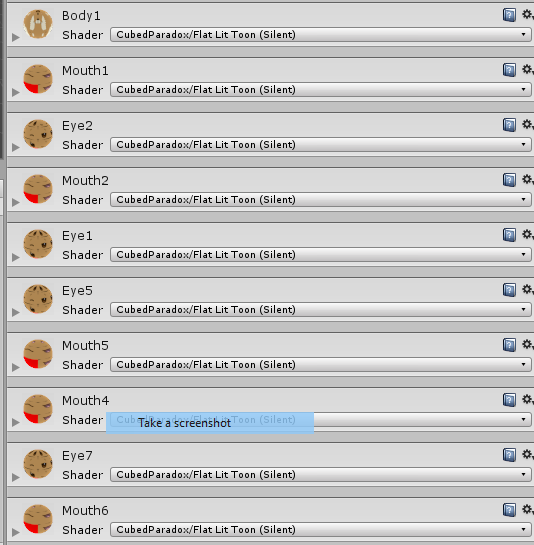
There's no easy way to change a material to a different one via a gesture animation right? my avatar sadly has no actual facial expression viseme, and it's expressions are stored in various different materials but only a single one is always active: http://prntscr.com/i6y6pq
from those the only materials that show up on the face of the avatar is "Eye1" and "Mouth1"
anyone got any ideas?
 brave torrent
oh wait so it shows normally when not in mirror ?
That is an issue with deactivated objects, you should use a shapekey to toggle visibility instead
prime elm
the armor is show perfectly on my view and camera view, but the avatar itself is all sort of messed up on mirror and camera beside my view
brave torrent
@slim steeple It is easy, you change material element on the mesh
you can do it on animation frame
Add Property > [Your Model] > Skinned Mesh Renderer > Material Reference





 brave torrent
they are numbered in the same order that the materials appear in the list of materials on your mesh
slim steeple
How do I know which one I'm meant to choose and which texture corrolates to it?
oh
that's easier