#animation
1 messages · Page 37 of 1
 noble fern
I have the audio source work
when I fire it
but I'm just trying to figure out how to get it to activate on a particle birth/death
because you can't use a script
 daring frigate
even google couldn't help me on this one x)
 clear yew
is there a way to animate the panosphere shader?
noble fern
google isn't helping me either, because I'd have to write a script that calls the audio source
on particle death
daring frigate
so we just have to hope for the devs to add some scripting on avatars ^^
noble fern
I'm still looking for something
I'll find it
like there's a play on awake
there should be a play on death 😂
 narrow canyon
Is there anyway to have a prop that I toggle through an animation override visible to myself?
Other people can see it but I can't
daring frigate
it should be visible, just not on mirrors
 twin lintel
so how does one go about making just the head move, with the bike and body acting as the hips (shift only at an angle limit)?
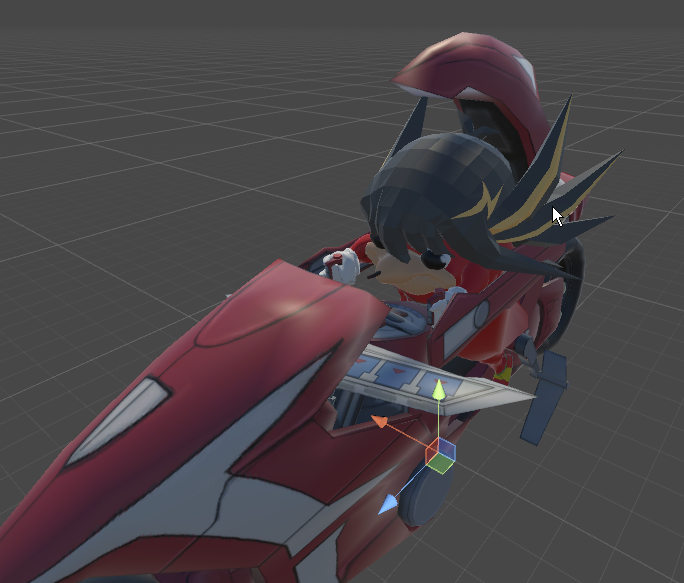
parent everything (mesh) but the head to the hips and use overrides?
 muted prairie
Bone constraints i would guess ?
 trim vine
so does anyone know how to stop an animation from looping for like 2-3 mins after clicking on an emote in vrchat? I turned off loop time btw
trim vine
like what do you mean
 thick ledge
well i get how to activate emote1 animation
but theres handgun animation
i assume its for vr users
or somthing odd
 white parcel
Unless its a emote, only way for some avatars that have guns, is hand gestures
which is vr only
 spice furnace
anyone know how to properly simulate particles in world space when a particle system is parented to the player?
for some reason they always appear at my hip
spice furnace
thats what im trying to do, ive attached a particle system to my character wrist. basically trying to shoot the particles out from his hand, but in world space so that i can move my hand without moving the entire system
but they always shoot out from the hip unless i set it to local
ive seen other people do it, so im curious how
 sweet zealot
what is the difference between finger stretch and finger spread on the animation? I want my fingers stretched out but i hate adding all 3 bones to each finger, will the Spread one cover the whole finger?
thick ledge
hm... i am too new for that
im still trying to get my char out of the ground every time i activate a override
spice furnace
fair
its really frustrating because it works fine in unity
just doesnt work in vrchat
trim vine
what's frustrating is when my animations keep looping lol
thick ledge
@trim vine do you know why my emote puts my guy 3ft in the ground?
spice furnace
untick looping in the animation? :p
trim vine
http://vrchat.wikia.com/wiki/Common_issues_and_solutions I think this covers the issue @thick ledge
VRChat Wikia
Make sure if your scene has fog enabled, that you have a value specified higher than 0, or turn off fog. You can find fog settings under your scene lighting. This is known to occur when a...
spice furnace
are you having the issue where you have an animation that is long and keeps looping even after you turn it off?
trim vine
@spice furnace i have looping off
it is only 5 seconds long
and have tested with different animations that i have remade
it loops for like 2-3 mins in game and then finally turns off
spice furnace
i had this issue when i was animating a beating heart, it keps looping even after i'd stop using the gesture. found out that i had to make a 2 frame long activation animation which made the heart appear (which i then assigned to a gesture) and then animated the heart itself by attaching an animation component to it
now it works fine
sweet zealot
i found a way to make my tail slowly sway and i want to add that to my idle animation but overriding the idle animation puts it in the slumped over pose, how do i avoid that slumped pose?
thick ledge
@trim vine fog disabled
trim vine
did you click on the link @thick ledge
thick ledge
yes
trim vine
yeah
id make sure that during the animation in unity, it is above the ground at the beginning of it, and during it. If that is already the case, then i don't know what to tell yoiu
you*
trim vine
@spice furnace the animation is for emotes though so idk if that will be the same fix
sweet zealot
I found out the difference between finger stretch and finger spread for the animation bits. Stretch is your finger curling, Spread is litterally your finger spreading out in the sideways directions.
thick ledge
Cant get the animation out of the ground >.<
its just a activation animation
why is it in the ground >.<
trim vine
@chrome ferry there are tutorials on youtube if you search up animation overrides for vrchat, but if you want a quick tut, basically what you do is search up override in the little seach bar in your project tab in unity, then you put the controller on your animator tab. From there you can override any animation you want
oof so your rig is generic
switch it to generic
you will have to animate everything from scratch though if you want it to work
like walking and everything if that is what you are trying to do
 frigid torrent
is there anywhere that i could read/watch a tutorial on how to make your avatars legs bend down when you do in vr?
trim vine
what do you mean
like in vrchat?
or unity
i can select mine
hmm
are you trying to select it in the hierachy
so it won't even click on it
id restart unity because it should work
make sure you save though
sweet zealot
if your character becomes slumped in the ground that means you applied the animation directly to your model which you shouldnt do. Go to a save point before the animation. Now that you have the animation saved, look for the .anim file and simply drag it into assets of this older "before-animation" avatar. Create the override and drag the .anim file into it and reapply it to the clean avatar.
thick ledge
hm...
ill try not sure if i understood all that
@sweet zealot how do u apply animations directly to model?
screen share?
sweet zealot
let me find the tutorial i used....
but essentually you drag your fbx to be into the scene, then duplicate it and apply the animation to that duplicate. Once the animation is done, you can delete that duplicate and just apply the animation to the clean avatar
thats basically it
and once the animation is made, you can apply it to any avatar that has the same bone set as the one you used for the animation
 acoustic talon
if your model goes into the ground during an animation and it messes up in game as well, then read the video description here to fix it https://www.youtube.com/watch?v=xxSezH13vAI
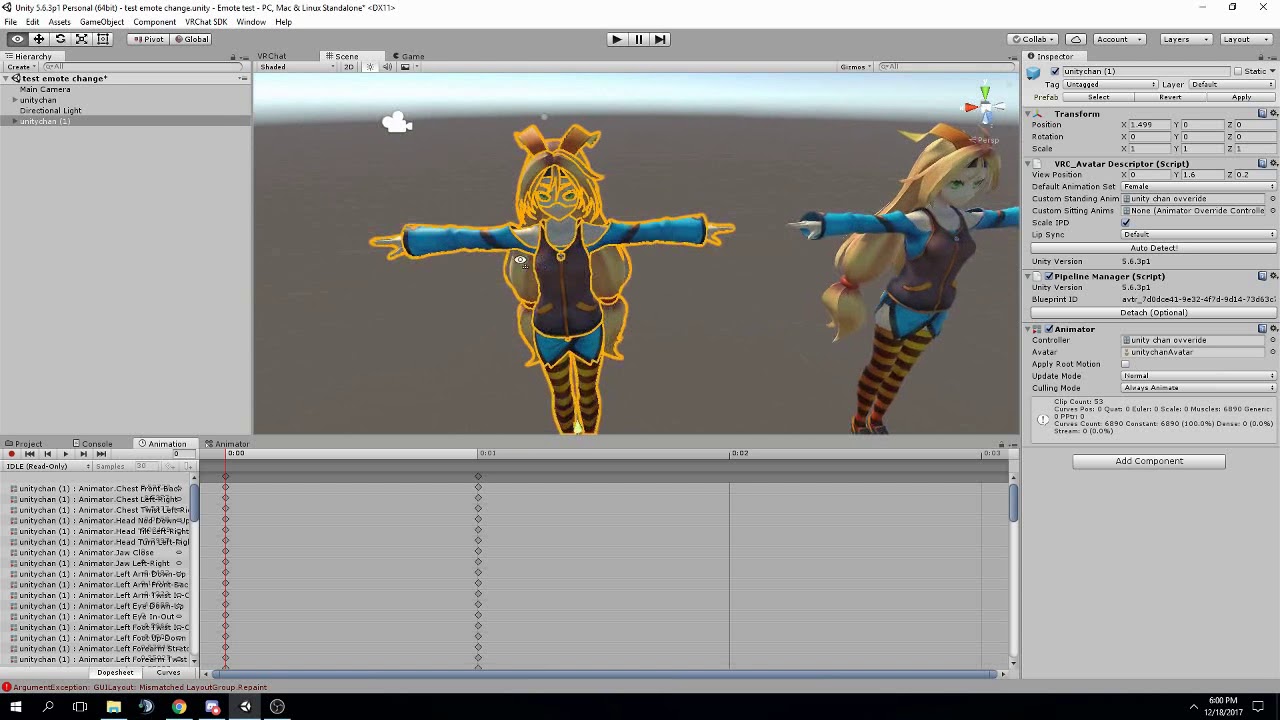
FAQ: 1. If you can't find the animator or animation tab go to window at the top and select animator or animation 2. If your character is going in the ground ...
 errant solstice
Which things should you bake into the pose in animations?
I assume root transform rotation if your animation has your avatar spinning, root transform position Y if your avatar moves up and down, root transform position XZ if your avatar moves forward, back, left or right
Is that correct?
sweet zealot
i am not sure, i have not gotten to baking animations yet
 proper grove
;; hi, is there any way to select multiple properties at once when doing a custom animation in unity? (like changing the facial expression) i realised after replacing the normal finger gestures with facial the fingers no longer do the gesture... and now have to redo the gestures manually though doing it one finger appendage at a time is v time consuming
thick ledge
@sweet zealot followed the tutorial still messing up
sweet zealot
oh, forgot to get the link, oops, hold on
@thick ledge im sorry fox, the video i followed was deleted. 😦
Im still learning everything myself, but what can i do to help @chrome ferry
im not at that level yet, im sorry 😦
twin lintel

did I set this up wrong? animator still moving all those normally
looking to freeze everything but the head
they are frozen when I try to rotate them in pose mode though..
 candid kayak
Why does eye tracking break my imported vmd motion?
 wild bluff
hey anyone here who can help me with dynamic bones as i cant afford to buy the asset
 next obsidian
Hi, anyone knows how to change the running animation?
I want my character to run different
 mental ledge
is it possible to trim vmd animations? I have one that I like but only want a certain part of it
 marsh tide
I beleive you can adjust the slider in animation to choose the frames you want.
mental ledge
hm. i adjusted the start and end points in blender but it still exports the whole animation
candid kayak
@mental ledge were you able to get the anim working and eye tracking too 😦
mental ledge
@candid kayak the animation does work, i believe the eye tracking does as well. not sure how but it just does lol
candid kayak
Hm
I wonder how it’s breaking
In blender the animation works all the way to eye tracking via CATS then once I create eye tracking, it only works when i’m doing the eye testing
 keen plank
Ay I'm trying to make an animation with the unity animator of my model rising from the ground but how do I stop it from going into this pose?

 fading solar
where do you get animated shaders ?
 granite dust
Github
There are some on the unity asset store too
Not sure if they are all supported though, you'll have to try them out
fading solar
i can find only a grass shader in github
 brave torrent
Is it possible to assign 2 different animation clips to an animation override gesture, for each hand?
Eg. When doing the same gesture on each hand, I want one of them to cause an object to spawn while the other toggles a particle effect on that object or such.
spice furnace
what i do is that i have 2 animations, one to bring the prop out and another to toggle the particles. then i use the hand im holding the prop with to gesture for it to spawn, then i use my other hand to toggle the particles on. have to be two different gestures though. you can also make sure the particles can only be toggled on when the prop is out to prevent accidentally toggling it on constantly.
brave torrent
yeah I know it's possible if you use multiple gestures for it, but then you have less gestures to work with in all
It'd be nice if you could just assign gestures for individual hands
 gaunt gyro
https://puu.sh/z8RGx.mp4 The start of something GREAT! ( ͡° ͜ʖ ͡°)
clear yew
Are you allowed to share like Unity package Files in here?
If So then Anyone want A Anmation package? I have some rare emotes
mental ledge
@candid kayak i finally see that eye thing you were talking about
@candid kayak did you get it figured out?
clear yew
Lol Sure
 dusky shale
Can you replace an entire model with an animation override? I basically have 2 models that are the exact same just with some textures swapped
mental ledge
does anybody have any idea as to why the eyes on an animation are going crazy when it's in action?
clear yew
Anyone else want the Animation pack?
 mystic umbra
I guess you can mike. Just hide one of the models in the heirarchy like you would with a weapon. But you might need t attach that model to your other model
So it might be odd
dusky shale
hmm
brave torrent
I made a feature request for what I mentioned, hopefully they'll implement it someday https://vrchat.canny.io/feature-requests/p/separate-animationoverride-gestures-for-each-hand
dusky shale
At least I know you can now, thanks!
mystic umbra
Make sure your models are both humanoid rigged
Try it out and lemme know
Ive done something like that in the past where i made two copies of my avatar dancing with each other face to face
 naive heart
guys I have a question: how can I put a sound file to an animation that is finished?
gaunt gyro
Just add a sound source on your model and enable it with the animation
naive heart
No you don't understand I mean I imported a MMD Dance to Unity and the Animation is finished how can I put sound on the animation that its start playing when the animation is playing
 spice urchin
@keen plank u duplicate it and animate the duplicate
u also make sure u download a t-pose or idle animation from mixamo
and edit that so that the character is in a ready to animate pose already
otherwise it will crouch down and go into floor due to default muscle parameters
 verbal ravine
@naive heart put the Audio inside the hierarchy of your character, then add it to the dance animation you've created (just so it would exist). Add the animation to your custom animation override, and then hide the audio file by unselecting the box near its name on the top right. Works with particles, probably should work with audio sounds as well.
mystic umbra
^thats clever
 cyan sparrow
Anyone have the get down dance animation?
spice urchin
wym thats clever its what everyone does lol
mystic umbra
I just upload a song version with the paritcle effect on my avatar if I want music on my particle effect. its a bit... brutish
 unreal barn
Anyone know if you can add an object to appear on a keyframe of an animation in blender? im re-creating an emote from runescape for my model
spice urchin
cant u make it in unity
make the character animation in blender and then make the actual object manipulation in unity
bc again ur modifying something in the engine as opposed to the rig
 finite arch
: D
naive heart
Thanks @verbal ravine worked for me ! <3
finite arch

unreal barn
@spice urchin how can i edit the .ANIM file within unity? to add an .OBJ to appear on a set keyframe?
spice urchin
no
unreal barn
here is an example, i have the animation already made in blender of the model movent on this GIF, but the white trail is an .obj file that appears within the emote
spice urchin
it has to be exported as fbx and the rig has to be mapped to a humanoid
unreal barn
eh nvm i cant upload GIF's in this chat
spice urchin
then u just edit it and add keyframe to hide or show object using isactive property
clear yew
https://imgur.com/iqq0HNn
oki how would i get the animations to work for the little for a follower?
 mystic umbra
I have no idea but thats a scuffed looking pikachu
verbal ravine
@wooden orbit if you talking 'bout white spaces behing the blush, go to Materials folder where your model is located and adjust the textures. Unity is not very friendly with transparency.
gaunt gyro
Oh man, I'm really enjoying making animations now. It's not much yet, but every single small update it making it better and better. 😂 https://puu.sh/z8Vth.mp4
verbal ravine
Oh god, that's beautiful.
gaunt gyro
Now for my todo list tomorrow, the scream part. ( ͡° ͜ʖ ͡°)
And this.... is.... to go.... even.... further.... BEYOND!!!
 signal dove
You can have more than one material per mesh
gaunt gyro
It's called "Seperate by materials" for a reason. :novaKappa:
signal dove
In Blender select the verts you want in edit mode, add and select a new material on the right (material tab looks like a checkered sphere), and hit "assign"
@wooden orbit
Now I have a question. How do I port animations from blender to unity? Saving as fbx isn't getting anywhere, is there something I have to do after import?
 fleet hill
Anyone know how to set things to follow world instead of player?
 tepid mango
@clear yew i think you would have to make him move a bit and keep that as its constant animation, if you give dynamic bones to the head it'll look cooler dw
gaunt gyro
@signal dove export blender model with baked animation as fbx (make sure you leave the animation in the export settings. Not touching any settings would be fine) and import to unity. Set model as humanoid and make sure its rigged properly. Then rename the animation within the model and press ctrl D to extract it out of the model.
 terse lagoon
I'm having an issue with animation overriding on an avatardecriptor, attaching it makes my avatar's visemes stop working, even though the emote overrides work.
 woven surge
Hello
I'm having problems with my magic circle animation, it's vertical, but if I go with the unity camera to see behind, the circle is facing me everytime instead of being completely static and just spinning. How can I make it static?
gaunt gyro
Remember that eyetracking is broken since last patch. It might not be your fault if vicems don't work
 normal skiff
@woven surge is this some particle thing?
woven surge
It's a particle system
gaunt gyro
What anymation pack?
normal skiff
which Render Mode?
woven surge
Vertical Billboard
normal skiff
ah, nuts, the fix I knew about was a Billboard-only property
where you set the alignment to Local so that it is always perpendicular to the direction you point the particle system
clear yew
Just a animation pack I own
normal skiff
it might still work I guess, but I don't know what vertical ones do 😄
clear yew
It's custom
gaunt gyro
@clear yew I'm interested. Feel free to DM me them ^^
woven surge
I share a image right now of the renderer
clear yew
Alrighty
gaunt gyro
Ty
verbal ravine
@clear yew may I have some too?
clear yew
Sure
woven surge
I've been looking for videos and everything but I don't find nothing...
normal skiff
vertical billboard = "The particle is upright on the world Y-axis, but turns to face the Camera."
so I think if you want it to face forwards/backwards you just have to use a normal Billboard and set the alignment
normal skiff
funnily enough I think Morgus had a similar thing going on with his smoke rings in that video recently
I watched a video literally this morning which described what that setting does so I didn't know until today
clear yew
Anyone else want my custom Animation pack?
Has a Full HeadSpin Some Run and walk animations
woven surge
That's something I didn't know! thank you very much for that! I will try the normal Billboard!
You are a god xD
normal skiff
I wish, I'm just trying to catch up to the people I see hanging around our group XD
too bad I can't model though
woven surge
You can't model?
normal skiff
well, I can model, but I am no good at realistic organic shapes
so I can't model a character
I have been modelling fragments of my base though when I want custom slope shapes since there is no better option that I can find
wtb shear transform for objects in unity
making custom models for it is making things more reusable anyway I guess, so I'll just do that
dusky shale
Can you set an idle moveset or a custom walking animation within Unity?
signal dove
@gaunt gyro Bake the animation? Doesn't that turn it into a blendshape?
 steady mantle
Isnt 300 frames the max animation length? Forsome reason the last part of the animation I made gets cut... tho it was measured at 300 frames .- .
spice urchin
emotes cut off, its a bug
steady mantle
hmmm =_=
 muted oyster
I messed up adding in a gun as an animation and now my fingers just open and close at high speed
not sure what i messed up
woven surge
@muted oyster You have to be sure that on the second 0:00 where you adjust the fingers, you copy that values to the 0:01 and are the same values the two, if are different it will do that
muted oyster
I think i know what to do, Thanks @woven surge
normal skiff
I met someone with an avatar where the hands did that flapping thing but they found it hilarious so they kept it
 broken wagon
do anybody know a bullet shell effect that have collider and rigidbody that 100% work in vrchat ? I'm ready to spend some money on it but I don't wanna burn it either , tag me if you know some , btw I was looking at this one called on unity3d (Modern gun effect pack)
 plush meadow
Define bullet shell? Like muzzle flash plus sound? @broken wagon
broken wagon
no I mean literraly bullet shell that fall on the ground after you shoot
plush meadow
That wouldn't look any good though.
The bullet would fall through the ground.
And it would just disappear.
Because it has no collider with the vrchat worlds.
broken wagon
that why there is a collider on the shell
plush meadow
It's not that simple though.
broken wagon
and yes all the floow have collider in vrchat otherwise you will clip out
broken wagon
still does not answer my question i dont ask if its possible or not im looking for a bullet shell effect that work , i can do so it will not clip out
plush meadow
For example, if I use a dance animation and I'm next to the wall, my character will go through the wall because it's an animation.
 sand apex
Anyone know why a tool like snail marker slows down animations?
broken wagon
that a dance animation im talking animation on gesture
broken wagon
nope you can't clip out with animation on gesture
plush meadow
And where did you get that information from?
broken wagon
but you animation like a dacing script you can
plush meadow
If I draw a gun via gesture, it can still clip through walls.
broken wagon
some wall you can't
plush meadow
You would have to create an animation where the bullet ejects and then you would have to time it right.
That's rather complex.
broken wagon
depend how the did the wall collider on it
complexity is not a problem
I make all my stuff from scratch , I'm just looking for a effect that will work and vrchat base programming will accept
plush meadow
You would have to animate a separate bullet object ejecting from the gun.
broken wagon
because some effect vrchat dont accept it
but i can actually do what you said last message and manually map it the bullet
but the thing is that im making so much model that i need something quicker to work with
plush meadow
To be honest, I'm not even sure if you can make the bullet collider off against the wall.
I have no experience with that type of particle effect.
normal skiff
I have particles which bounce off walls on mine actually
I don't think I have the parameters quite right yet because I want it more like a wet thud than a bounce
 placid copper
having the same looping issue as @trim vine
if anyone knows, please send help
lol
clear yew
https://imgur.com/I24CCZf
im having way to much fun with animating, what do you think of the kinda glitchy affect?

 verbal zealot
i have a simple animation where it just turn on object with audio and make some face and hands shape, but in the start it didn't play audio at all, and only progress i came to that it is really quiet now, only i can hear it
so i just wanna to ask a screenshot of the audio source and ONSP audio source settings so i can maybe see some differents with working one
 late phoenix
what's a good setting for walk animations? I added one but the legs don't move as much as it shows in unity so i was thinking maybe i have a setting wrong. By setting i mean like Bake Into Pose and that stuff. Also should the animation be in place or going forward
 native aurora
if u want it u purchase it, theres some glitch shader in assets store
 candid kettle
Do overrides on the fist animation work the same way as the other hand gestures? Since it's non-binary with vive controller triggers? Last time I tried to add a custom emote to it I was having a bug where it would make my entire avatar dissapear until I changed worlds
clear yew
i know that but is there any free ones
muted prairie
I think you can find that out by yourself by googling a bit
clear yew
just did and found one hope its a good one
 stray sinew
Does anyone have a cute female pose? trying to setup an AFK avatar :\
 remote helm
Hey Ive uploaded my avatar but its invisible but some of its object infront of a mirro but I can see it first person just fine. Anyone know why?
 jaunty moth
derp. i saw a video where someone was moving their model around in unity to see the bones work, how do you do that?
thick ledge
all animations even mixamo keep collapsing my charter into the ground with broken legs.
 fossil verge
hey, say im making a an animation override for the clenched fist
and i'm simply equipping a weapon onto my model
do i only need to specify the way that hand looks or do i need to specify how the entire character looks?
plush meadow
The hand holding the weapon only.
@fossil verge

This shows you how to put weapons and audio into the game vrchat. More stuff here: Where I got the gun model: https://abyssleo.deviantart.com/gallery/5925409...
fossil verge
@plush meadow thank you!
@plush meadow do you by chance know how to add different facial expressions? i would like my model to wink when i do the "victory" pose
plush meadow
No experience with that.
stray sinew
Any way to use a VPD file to create a pose for my avatar?
 gleaming drift
is there any way of fixing it so gestures dont get canceled by movement on the vive?
 lusty jewel
What happens if you change your avatar's entire position during an animation? Will that work in game?
clear yew
I think it'll work but I also think it'll snap back to the starting position when the animation ends
lusty jewel
Yeah that's fine I'll end my animation at the default position, What I'm trying to do is backflip off a cliff and then fall from the sky back to where I was
 small ice
is anyone familiar with scrolling animations
lusty jewel
Copy everything that's in the second animation and paste it at the end of the first one I assume
 hexed current
Well It makes sense
if you do it like you would a blink
or a viseme
for a gesture
Id assume it works similarly
except instead of plugging into an animator
you plug it into the anim override
-feels smart-
plush meadow
But how would you link 3 mixamo animations into one long animation?
If you use it to override an emote?
hexed current
well
youd go into animator
add all of your emotes onto the timeline
and make into a new anim
is my theory
im testing it now
clear yew
Could copy the keys from one animation onto the end of another I think
plush meadow
But whether or not somone could test would be great.
clear yew
Issue with visemes... if i have two layers that must work in tandem to make proper face movements and im unable to mesh them together, how do i get visemes to play on both layers?
help pls pls help
spice urchin
i dont get it
do u mean u have 2 different shape keys
cant u just pick the best ones and get cats to generate visemes
 keen reef
Is the time scaling weird in animation? I have it set to what I think 12 seconds is but the animation is pretty much instantly over when i start it
spice urchin
whats time scaling
all i do is extend the duration of animation by dragging the entire keyframe set
if u select all the keyframes it will give u buttons on the side to extend and decrease duration
keen reef
Theres 7 key frames spread over 12 seconds, with 2/7 not being like the others
One contains an audio file to be played lasting 2-3 seconds, the other contains a particle effect
 hearty bramble
anyone know where i can get muscle animator at?
spice urchin
idk but it should be pretty easy to animate if u start with a tpose or idle animation from mixamo
keen reef
It does not even last 10 seconds of no animation
spice urchin
just by messing with t he muscle params
and winter the max dur is 10s
so it might cut off the animation
i dont have any that last more than 10s so im not sure
also the time in unity is
ss:ss
where ss is seconds and ss is milliseconds
keen reef
So I need to set the timing to be 00:00 - a maximum of 10:00?
spice urchin
ye
keen reef
thanks, hopefully it works
 pliant plank
Animations can play indefinetely, however after 10 seconds your camera locks back into your character and you can move
The animation itself keeps playing, however stops when you move, continuing when you stop
clear yew
Can someone please help me, I've made these animations and only 1 of them works, the defualt one (The gun) and the rest just don't trigger. The hand gesture's do but the item is gone https://imgur.com/a/VFtTt
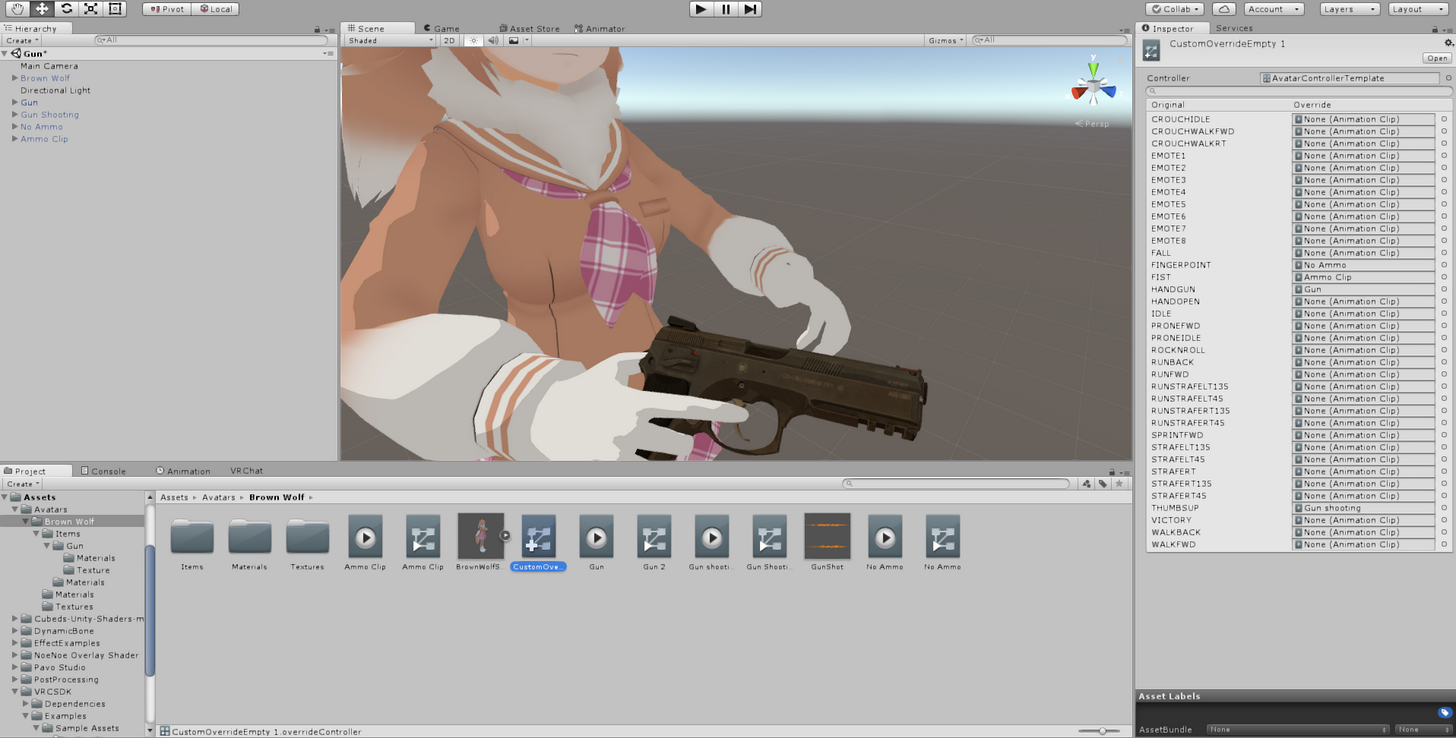
 undone glade
@clear yew gun animation and a fire animation?
clear yew
Is there some way to keep the hand open animation and have it Erease the writing from a Trail ?
 barren wigeon
Got a problem:
My avatar has an eqipable knife.
That knife is a separate mesh, that activates on hand gesture.
But for some reason when I mowe my arm with controller, the knife disappears in some positions (e.g. I rise my hand up). And then reappears when I return my hand to previous position. Like an avatar has some area where it shows the mesh of a knife and does not show when the knife is out of that area. Any Ideas of what could be the problem?
undone glade
@barren wigeon wrist parent to knife?
undone glade
Try to do that as well as checking your animations for a position/rotation/scaling key frame that would be with your animators and or body mesh.
barren wigeon
k, thanx
undone glade
Also make sure that your :00 key and :01 are the exact same.
barren wigeon
ok thank you
undone glade
Hope it helps
 obsidian elm
need some help putting an animation onto a hand gesture ❤
it's like a energy ball i've made that when i do the rock and roll symbol then it shows up
barren wigeon
what's the problem?
 long ridge
why does the VICTORY animation from vrsdk files not actually work?
obsidian elm
just wondering how to go about it, when i watch videos it feels like they do a bunch of stuff thats un-needed for what i want to do
long ridge
I tried copying over the hand stuff from VICTORY from VRCSDK files to another .anim that I'm trying to use but they don't actually do anything
why
do i really have to manually recreate the whole thing?
barren wigeon
@obsidian elm >they do a bunch of stuff thats un-needed
I wouldn't say so
obsidian elm
i mean most of the time yeah adding in extra animations and chaning hand positioning when i don't need to 😦
long ridge
i mean, you don't NEED to do anything
but if you want something good, then you may WANT to
obsidian elm
no it'll be good thats not the issue because i need it to be an open palm
so no point me chaning that
obsidian elm
it already is my dude
barren wigeon
@obsidian elm adding finger positions is not reqired I guess
Bu t I'm not shure in what position will fingers stay
Just try it)
obsidian elm
i just don't know how to clip it or just make it apear on my hand when i do a hand gesture
long ridge
unless you add animations the hands will use default idle hand
set GameObject to active
undone glade
@obsidian elm https://youtu.be/61vO-IswFps
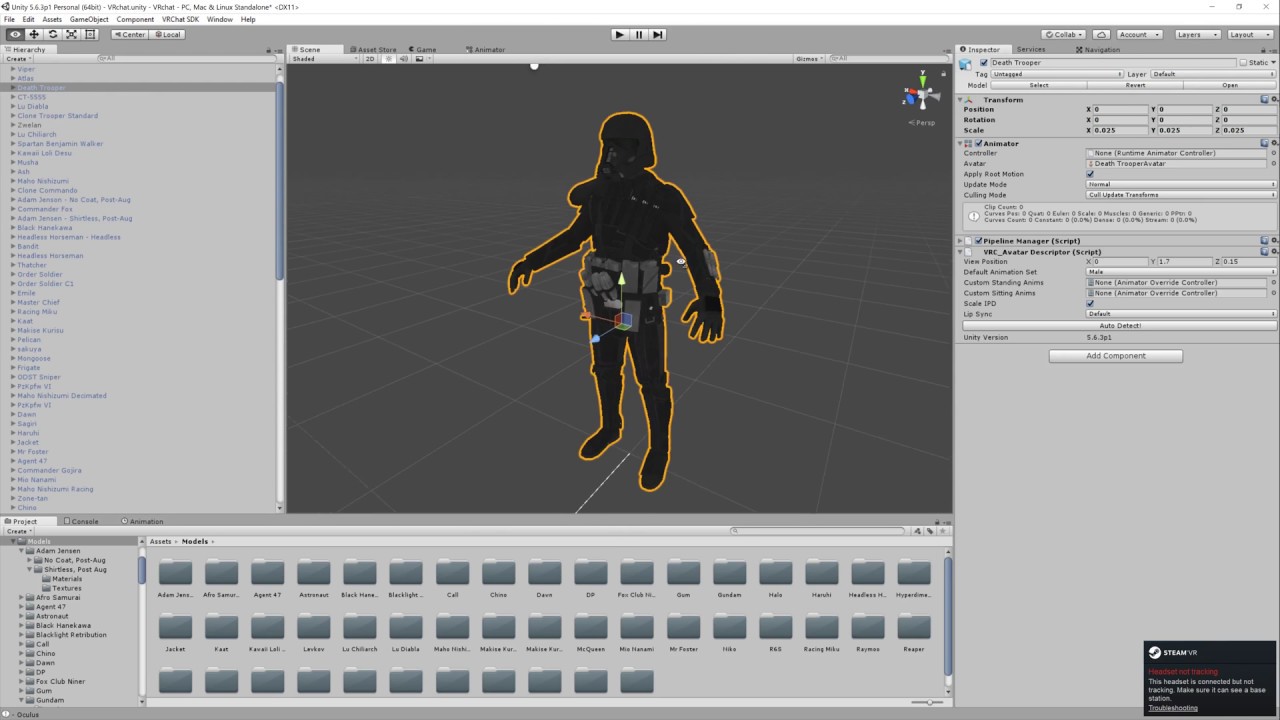
Basic VRChat gun animation override. Audacity used to convert audio files to .ogg.
undone glade

This video assumes you have already watched this one: https://www.youtube.com/watch?v=61vO-IswFps&t=546s *Make sure you scale your model down to the size y...
obsidian elm
@undone glade it has some much stuff i don't need to do in it though
long ridge
then you skip to when they add an item
you can tell when that is because
there'll be an item
basically, you set gameobject to active in the animation
obsidian elm
whats the point in a helping discord when you just get redirected to videos all the time XD
undone glade
Sometimes videos explain it better.
long ridge
this could be solved by going back through what you already were, or looking for a simpler tutorial
remember we aren't slaves to provide screens, and we really can't speak it out either
tutorials show video help and have someone speaking
also i have my own problem >:C
undone glade
Knowing the basics can help you get creative.
long ridge
daemongrave, do you know about the .anim files in the VRCSDK
?
why don't they actually do what they do in game
?
undone glade
@long ridge example?
long ridge
Okay, I copied all of the finger/hand animator movements
and pasted into a new anim, from VICTORY
but I don't do VICTORY
I do nothing
Do those .anims actually contain hand animations or are they just a big joke? lmao

they preview as nothing and they do nothing in-game
 undone glade
Victory should be working.
Oculus, Vive, are you using the updated SDK?
Should have the 2018 one
long ridge
Oculus, new SDK
i mean that
the literal file
doesn't work
the .anim for VICTORY does nothing but put my avatar into a casual pose
all of the .anims here dont work
undone glade
Are you using a duplicated animation override controller?
undone glade
Let me see the controller
long ridge
everything is fine, it's literally the file
it has nothing to do with that
i'm gonna reinstall the fucking sdk hold up
undone glade
Otherwise all I could think of is make your own Victory hand gesture.
long ridge
which is what i'm trying to dodge
long ridge
hmm, yeah reinstalling the SDK
i was cheeky last time
i didn't delete the folder
realised that could be it
undone glade
Make sure the old SDK is deleted if you have not done that already
long ridge
yeah just deleted it
undone glade
That could be what happened.
long ridge
still broke
undone glade
As in the 2017 version
long ridge
that's right
thick ledge
even animations that do nothing
thick ledge
anyone know what i can do to fix it?
long ridge
you don't
thick ledge
??
long ridge
you just use a dupe avatar
it doesn't go through to the game
create the anim on a duplicate
then extract the anim
undone glade
@thick ledge always make a duplicate when making an animation
Use said duplicate for animations.
thick ledge
i have been
thick ledge
but in game i merge with the floor?
undone glade
Did you hide/delete the duplicate and use your main one?
long ridge
^
thick ledge
yes
long ridge
you can always copy and paste the original stuff onto a new .anim on a new dup though
undone glade
meh i'm lazy to
undone glade
It will have to wait.
long ridge
:<
undone glade
Mobile and should be sleeping because 1am
undone glade
I'll try to do that when I get the chance unless someone else does so
@thick ledge Also check aninations for position/rotation/scaling that is with your animators or mesh.
If you mess with the avatar during the recording it will have it recorded.
Moving it for a better look, changing shaders, etc.
Done. Sleep. Hope it helps. Tired.
long ridge
okay so
does someone have a peace animation for both hands that I can have?
Not keen on doing it all myself lmao
 maiden mountain

how to tell which emote is which?
so I don't override the default emote which I think is cool to have
 tidal garnet
they go from top left to right
daring frigate
does anyone know the best way to make some sort of one time particle trigger ? by that i mean like pressing the trigger will shoot 1 particle, for now what i do is have the particle system always enabled , max particle to 1 and emission to 0 , then pressing the trigger wil set the emission to 10000 so a particle will spawn instantly
but doing that will prevent me from firing the particle 2 times in a row ( if the first one isn't dead yet)
clear yew
anyone have experince with particles?
 robust hound
@clear yew honestly just mess around with them for an hour or two and learn how to use them. Its really not complicated, just there are a lot of different options
clear yew
yeah i already have one set up but i am trying to have it with collision so it can bounce around and what not but i cant even get it to show up in game anymore. @robust hound
 bleak basalt
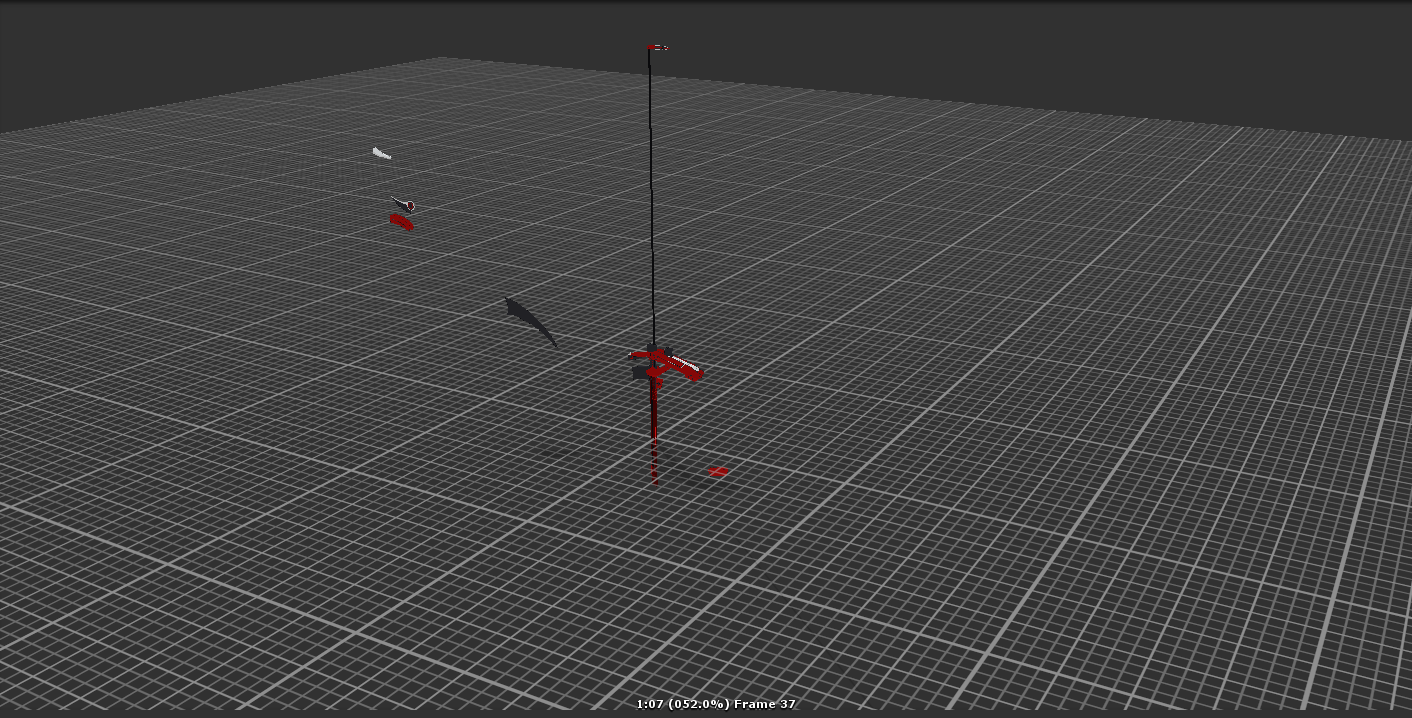
https://imgur.com/vCdXtS5 Anyone know why my animation turned out like this in unity? It looks similar in blender the weapon isn't suppose to break apart like this.
 thick ledge
keep running though these animation override tutorials but my char keeps having crazy leggs and going into the ground
Dont suppose anyone would want to sit in on a screen share and catch what i am doing wrong
 bleak basalt
@maiden mountain fix your emote animation in unity so you're on the grid so you'll be (the ground in game)
Anybody know why this is happening to me? https://www.youtube.com/watch?v=WPncZP801tI&feature=youtu.be

trying to import an VMD animation to a pmx and it's pulling apart the weapon
maiden mountain
how do i fix the emote animation?
all i did was animating a single shape key and that is the mask
clear yew
How to make a non-humanoid avatar orient relatively to my rotation?
Oh.
It already does.
Perfect.
gaunt gyro
God damn work... I just want to go home and continue working on this masterpiece. https://puu.sh/z8Vth.mp4
 drowsy gazelle
@bleak basalt when i last time tryed to change positioning in animation it broke everything else and i end up flying
So, is there any way to replace the idle animation and maintain the normal positioning? Becouse for avatar 0/0/0 position is his feet on the floor, but for animation 0/0/0 it's a center of avatar, so he's feet under the floor.
 mortal creek
Hello fellas i want to know fi there is a way like to put out a sword without using vr and keep the sword in the hand
gaunt gyro
@drowsy gazelle I'd say try to solve your issue by baking the Y position onto the ground with these settings https://puu.sh/z85zM.png
 drowsy gazelle
@gaunt gyro Hmm. How i can get thise options on custom animation? My file only have the first three lines
so i had to put positioning into animation itself
clear yew
Is it possible to play an animation on spawning the model?
drowsy gazelle
or maybe here the way to edit the existing animation instead of creating a new one?
keen plank
Ay I'm gonna ask again but how do I animate a avatar without it going into the default muscle state and going into the ground? I have a Mixamo idle animation but that doesn't seem to do anything
gaunt gyro
I think you get those options if you apply the animation to a humanoid model
robust hound
@clear yew Just set the animation always running and when your object spawn it will be running automatically
 cosmic hinge
i am new to animations but, i created flapping wings for a fairy avatar in blender, put it in unity seen the animations section next to rig and created an animation controller from that, i applied it to the animator component, and i hit play in unity and her wings flap, but when I go into game they do nothing... I also don't know if this is the right area to ask, but is there a way to have her float rather than walk on the ground and for her to stop using her legs?
clear yew
Can someone please help me, I've made these animations and only 1 of them works, the defualt one (The gun) and the rest just don't trigger. The hand gesture's do but the item is gone https://imgur.com/a/VFtTt
@cosmic hinge Have you applied it to the avatar desctription?
robust hound
@clear yew
be more accurate on what you want to do.
What I understood was that you wanted to run an animation all the time starting when you spawn (so just all the time basically)
and also what kind of animation is it?
(particle, movement or others)
clear yew
No.
I want an animation to run on spawn.
Is it possible to play an animation on spawning the model?
on spawning
That means = once.
It is simply a portal with a person stepping out of it while catwalking.
I have all of that set.
I can make it in Unity.
But in VRChat it does not work.
cosmic hinge
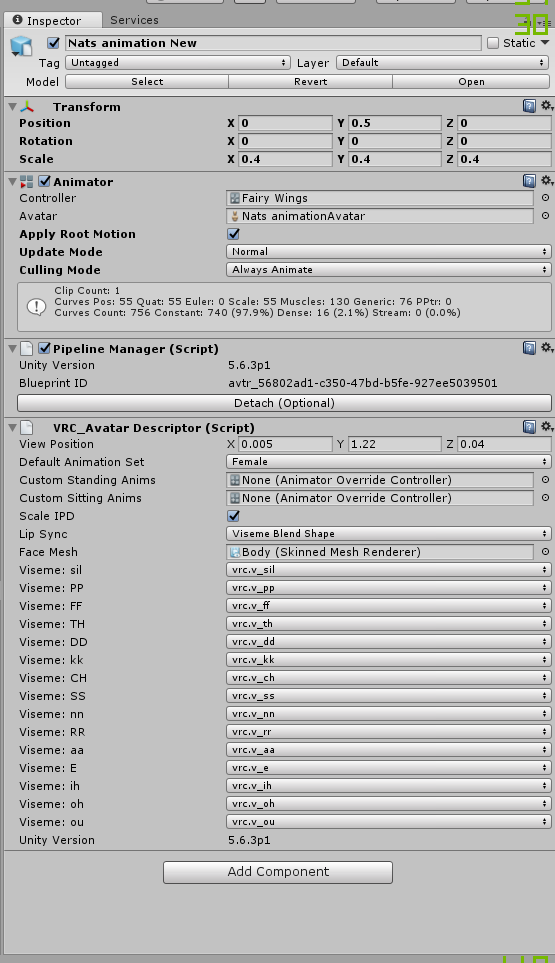
I have this, if i try to add it to the avatar description it doenst pop up, is it because it is animation controller rather than animation override? https://i.imgur.com/HAs5RSr.png
 robust hound
Since you can't script, I don't think ti will be possible to access the "onCreate" function
So I really do not know if it's possible, my guess would be a no. sorry
robust hound
and sadly there is no "spawning" state, you just go from "loading" to "idle"
clear yew
Can anyone please fix my problem?
robust hound
if we knew your problem it would be a lot easier
muted oyster
So i had an animation on "thumbsup" that made a gun appear which works fine. I tried to add another one on "handgun" that would then be the gun firing with sound aswell. But now whenever i do the "handgun" thats supposed to be the gunfire nothing happens and when i do the "thumbsup" to just have the gun out it fires constantly but there is no sound.
I clearly did at least two things wrong here but i can't figure out what
 devout star
Hey guys how would I make certain parts of my model glow in the dark and such
robust hound
you set emission
duplicate the image texture
and make black what you don't want to emit
then set the on the "emission" option of your body texture
clear yew
@robust hound What do you need to know of?
devout star
Thanks 😄
clear yew
Is it possible to create a sound effect triggering animation on an emote without a humanoid rig?
Yes/No.
 hearty bay
Is there a way for weapons and other items in an emote to be seen in the mirror?
cosmic hinge
so i finally was able to get my flying animation to work, the only problem is...im somehow upsidedown...is there anyway to fix that?
 snow basin
how would i go about making or finding a custom animation for my model? its a big fish model that i want to swim in the air
 noble fern
Man I wish there was a way to add sound when a particle dies. Would make the report on my rocket launcher that much better
@snow basin just create it. It's tedious but not difficult
snow basin
how do i do that?
noble fern
With the animation window in unity?
snow basin
ive never done animation before
noble fern
Oh. There are some good tutorials on YouTube
They'll cover the basics. The more you do it, the better you get
snow basin
okey
clear yew
Oh yes.
 gaunt pebble
Does anyone know how to increase the max duration of animations?
seems to be around 45 secs atm
gaunt gyro
You cant. Thats a limit in VRchat itself
pliant plank
I'm assuming that's emote animations right?
Because overall animation can be way over that in VRC if not a direct override
gaunt pebble
yea
my animations are like 4 mins, but the camera of the emote thing unlocks after like 45 seconds, which makes it glitchy
so I want to lock it for the whole duration
gaunt gyro
Yeah 45s goes for CAO only. if you want longer animations, you need a seperate model for it that triggers the animation on awake.
Also, working on my "Going Beyond" animation. https://puu.sh/z8OIz.png Kappa

 cinder lodge
It’s odd but all emote animations I set work with the exception of fist and victory. I use the same method to create all my emotes. Do you think it is an issue with the custom override file in general?
noble fern
I use custom on fist. Sometimes it works. But any time you try to pick something up it plays
cinder lodge
Yeah I had a fairly goofy face with that in mind. I’m just not sure why the custom hand I made for the emote works but the emote fails to activate
gaunt gyro
https://puu.sh/z8Vth.mp4 The animation so far. I know I've posted this a few times now. But I just can't get enough of it. 😂
cosmic hinge
So i did an animation of my wings flapping, and im above ground. I got the animation into the game, but im upsidedown, and my arms don't seem to move the way they should (in VR). any tips or help on how to fix this? Been working on this for hours and still have not been able to fix it https://i.imgur.com/u9waHoY.jpg
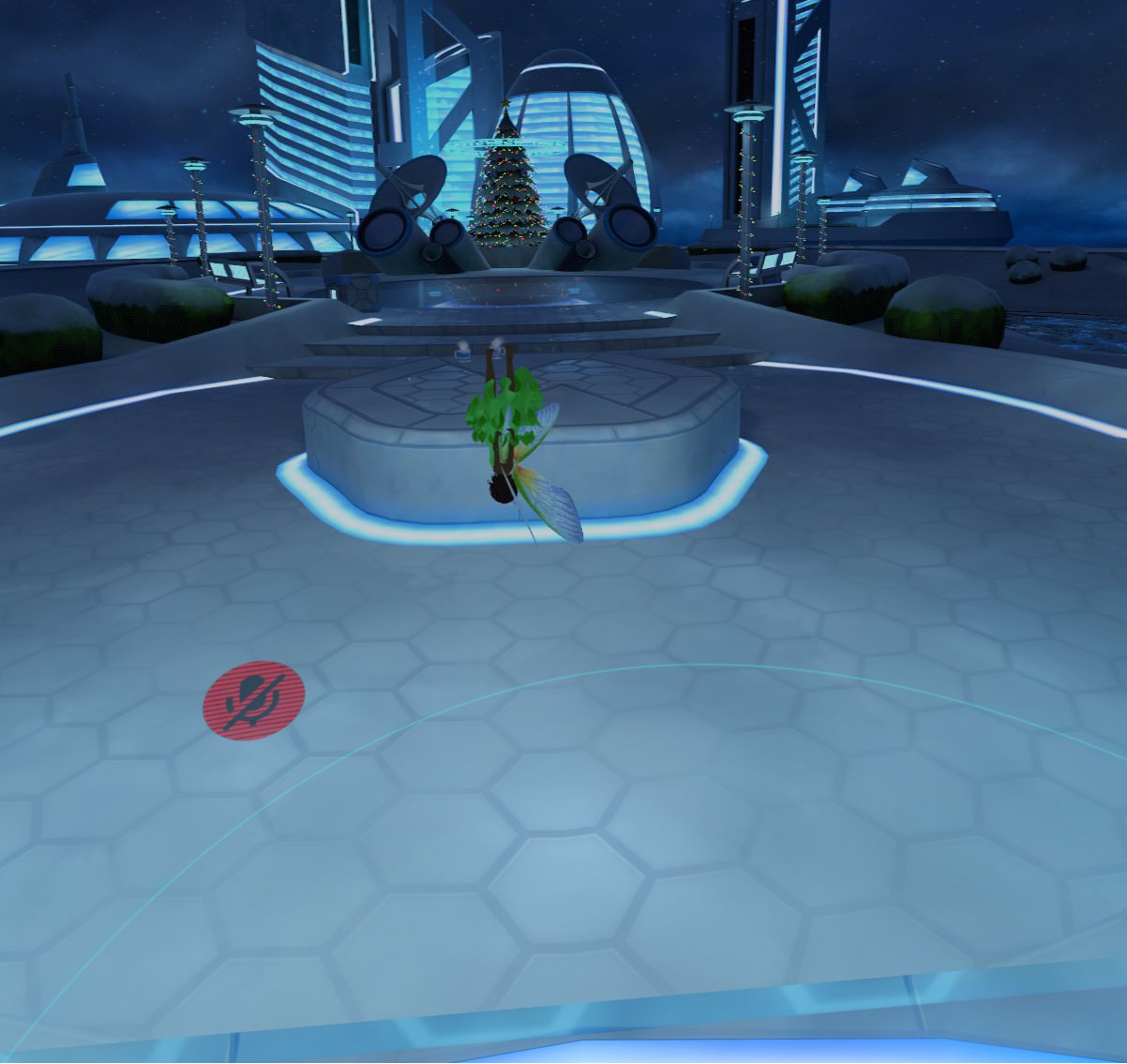 noble fern
Oh Lord
Um. What does the animation panel look like
I have noticed that just because it's perfect in unity, doesn't mean it will work the way it should in VR. I had a severed head with a face inside it, and made it so that if you looked inside it would scream at you. The sounds were configured in unity so you could only hear if the listener was inside the head. In VR, the sound would scream from like 15 meters away, even though the max distance was like .1 meter
cosmic hinge
Wow
yeah when i play the animation in unity she looks fine, but then again the animation doesnt show her moving or walking lol
the odd thing is when im playing in desktop mode she will float upright (but idles upsidedown) and her arms are stretched out in A pose instead of moving back and forth like they should
I dont want her legs to move so thats alright lmao
but in VR she turns upsidedown for everything (since i put the animation in idle and other movements) and my arms don't seem to work, but my hands can move
I imported this animation from blender, then i made the customoverride thingy and placed the animation in the places i wanted them to be in like idle and what not
noble fern
Oh I don't know about animating in blender
I've only done it in unity
I made a working rocket launcher yesterday
Actually shoots a projectile that will blow up on collision
muted oyster
So i added a animation for my gun to fire but it only shoots for a second before the gun and particles dissapear
noble fern
Then increase the particle flight time
cosmic hinge
I tried making the animation in unity as well before and it didnt work well. I can make my wings flap, but not sure how to make myself hoover above ground and not use my legs
noble fern
Technically you could add a bullet hole to where it lands if you want
muted oyster
the gun itself dissapears too
noble fern
But you gotta make it a world particle so it flies in the same direction it started
Did you make sure that you set your animation keys right?
muted oyster
yeah
noble fern
Hmm
noble fern
Do you change hand gestures,
muted oyster
thumbsup is just having the gun out and handgun is shooting
cosmic hinge
Ive tried that even without animations and i would just always stay planted to the floor
muted oyster
when i go from thumbsup to handgun its there for a second then gun is gone
noble fern
When you made your second model did you have the gun object enabled by default?
muted oyster
third model technically but everything is hidden as far as i know right now
yeah the gameobject with the particle system in it is hidden by default
it does shoot for a second when i do the animation
noble fern
Ok well the game object needs to be active in the shoot
And it needs to stay active until you change gestures
muted oyster
yeah
i was told the gameobject needs to be inactive in the hierachy or else it will just shoot nonstop when i have the gun out
which is a problem i did have a while ago
noble fern
I'm not home so I can't really show you what my animation panel looks like
It won't shoot nonstop if you don't have your sounds and particles set to loop
muted oyster
the particle system was alreaddy set to looping
noble fern
The game object needs to be inactive, until you gesture to shoot. When you shoot the model needed to have the gun active with sound play on awake and particle do the same. Ensure that the sound and particle are not set to loop and then you can get a gunshot
Well if it loops, then it will keep firing until it doesn't anymore
I'm trying to make a gun that has muzzle flash, has the slide rack, and eject a shell. So far I have everything except the slide racking
muted oyster
i'm a tad confused now tho, you said it needs to be set to loop but it already was so that cannot be the problem
muted oyster
but it wasent
it was not firing nonstop
it just poofed after a splitsecond
with looping on
also is the whole point not to have it fire over and over?
noble fern
Well you said you didn't want the gun to disappear anymore
muted oyster
i want the gun to stay and fire untill i change gesture
noble fern
How many times do you want it to fire?
muted oyster
aka back to thumbsup
endlessly
if i want to stop i go back to thumbsup which is just the gun itself
noble fern
Ok then set it to loop with the gun object active upon gesture
Make sure the sound length is the same as the particles
 grizzled cobalt
could someone help me out real quick
noble fern
And set sound and particle to loop so you can fire endlessly until you change
Have the shoot make the audio sources enabled and particle system enabled
muted oyster
eeeeh
going bit beyond my understanding here
both sound and particle are set to loop in the firing animation. Not sure how i am supposed to change the sound length
 proud estuary
im try8ing to get my avatar to do a selfie pose but god do i suck at making animations
noble fern
Then when you switch back the gun is enabled but the sound and particle is disabled
noble fern
Well let's say the gunshot sound is 1.5 seconds
If you have a muzzle flash particle
And that duration is 1 second then the firing sound and animation aren't synced
Make sense?
muted oyster
think so
noble fern
So basically here's what your animation does
Inside the gun there is a particle system and a sound
The particle, sound, and gun are disabled by default. When you gesture to pull your gun, it enables the game object gun to show in your hand
When you go to fire, the gun is enabled and the particle and sound are enabled and loop and fire until you change gestures
Does that make sense?
muted oyster
eeeh nope
"When you gesture to pull your gun, it enables the game object gun to show in your hand"
one animation does that and switching over to another animation does the firing
so why would the object be active in the one thats just for holding the gun?
noble fern
Because if you don't have the gun game object enabled it doesn't show?
You have to have the gun model enabled in both gestures for it to show in your hand for both animations. Animation overrides are their own things and don't carry over from on gesture to another
What I'm saying is that for holding gun the gun object is enabled in the animation panel. For firing the panel would have the gun active, the particle active, and the sound active
I can't explain it any better in chat. I'm more of a visual person to explain anyway. So if you're on later today. (I'm EST and will be home around 430) I can show you what I mean
proud estuary
in the animation for the gun
make sure you enabled the gun object
youll find the property "is enabled" when checking the skeleton in the animation
yeah i cant really explain ti too well myself lol
is there a way to roatate an avatar during an emote, btw
proud estuary
yeah doing that dont work
noble fern
Should be under body transform or armature transform
I've never made emotes so idk
I only make the gestures
daring frigate
Quick question , let's say i have a hand gesture override animation , with the properties set on 2frames like usual.
If i set a different property value on the 2nd frame, using the hand gesture will constantly loop between the 2 values ? or is there a way so this animation only plays 1 time ?
 red bough
I think it will only play once if you just don’t set it to “loop” in settings
daring frigate
i'll check that as soon as i get home
 meager saffron
 surreal grove
@meager saffron You can, but you would need to trigger an animation to play rather than having the animation on the override.... if that makes sense
daring frigate
@surreal grove and how exactly would you do that ?
surreal grove
I am not at my primary computer right now so I can only give rough explanations
clear yew
Is it possible to create an animation on a non-humanoid rig?
On a model without rig.
(It is just invisible with triggering some simple particle effects like a heart.)
That is what I want.
daring frigate
i would also like to know what exactly happens if the 2 frames of the animation have different values ?
surreal grove
To start you would create the animation on the child hierarchy, rather than the avatar parent.
It it had two different values on each keyframe, it would flick between the two, if they are 1ms apart. If they are a few seconds apart, then the override will try to play it, but will kinda break
daring frigate
ok thx
because i'm looking for a way to have an animation override to sort of trigger a particle spawn
like for exemple when shooting with a gun
of course just having a One particle system enabling / disabling is not a solution since i dont want the particle to disappear as soon as i released the trigger
surreal grove
Ahhh
daring frigate
and i've never found a good way to do it yet ^^
the best i could do right now was to have the particle system always Enabled with emission 0 and max particle to 1, and the trigger would set the emission to 1000, this works good with a simple gun since you know that since the bullets are fast , you generally won't have time to fire the seconde one before the first die (so max particle 1)
but then i wanted to also add a droping shell animation to the gun
and here i know that i could fire multiple times and have the first shell still dropping
brave torrent
You could set the emission count to 0 by default and then have the animation increase the count
toggling the active state despawns prior particle instances, but changing emission count doesn't
brave torrent
oh sorry I was scrolled up
daring frigate
to what value do i set emission ?
if i set it to something like 1
the particle will not always spawn right when i press the trigger
since all particles will have delays between them
if i put it to 1000 , then it will start to spawn instantly but i would need to hav max particle set to 1 so it don't pop a thousand particle in 0,001s
noble fern
Oh that's easy. Make it a world particle
I did something similar with my rocket launcher
daring frigate
they already are world particles
but how does that affect the spawn delays etc ? x)
daring frigate
no it just make them keep their trajectories in the world instead of relative to me
noble fern
Yes
daring frigate
this has nothing to do with triggering a particle spawn
noble fern
Well
How many times are you trying to shoot
You just set the durations to be the same as your sound. And set them all to loop
daring frigate
that's not what i'm trying to do again x)
noble fern
And then you shoot until you're done
daring frigate
to shoot i have an animation set to my side buttons (using vive)
noble fern
I get that
daring frigate
i want it so pressing the button 1 time without holding
will shoot
this way the shoot speed isn't consistant
noble fern
So you'd have to make it loop or idk. Yes
Well the particle goes away
And restarts when you shoot again
daring frigate
it will not if i use the emission method i said earlier
brave torrent
have you tried increasing simulation speed
that should remove start delay
then you can adjust the particle speed to counter that
daring frigate
yeah but wouldn't that have the same effect has increasing emission to higher values ?
noble fern
Not really. Emission just tells how many polys in the particle
daring frigate
emission tells how many particles in a second x)
noble fern
Like my rocket has a trail, a flame, and a warhead
brave torrent
decrease the duration too?
noble fern
The warhead emission is one
There wasn't a need to make more than one. The smoke trail is 250, and the flame is 100
The explosion that spawns on particle death is like 500 I think
daring frigate
i also tried to decrease duration
the problem was that a simple button press without hold sometimes still managed to end up without the cycle restart in it
and its not really helping with the " 1 particle each trigger"
since even with small cycle duration , the particles still depends on emission
a way i tought of was maybe the rate over distance thing
but if i have 0 particle at start , setting a value to rate over distance will not spawn any particle
 iron flume
Is there away to make face expressions without override hand gestures? Or keep the hand gestures
daring frigate
if you override hand gesture you can still reproduce the hand gesture with the face animation
iron flume
Oh ueah, just animate the hands
clear yew
Yo Can Somone Help me
I Tried to upload something on Unity and it gave me the "Uploading With exception Object" Message
and doesn't Move the bar at all
daring frigate
did you check the console to see if there is any error ?
clear yew
Yeah
There was nothing at all
Im gonna try to Do my models on a new Project
I'll let you know if it works or not
daring frigate
ok
i'm gonna do some test with the rate over distance
does anyone know what exactly is a "distance unit"
clear yew
So we can animate particles as a constant stream.
daring frigate
?
daring frigate
you can yes
make an particle system that does not loop
but play on awake
wich create any number of particles in a burst for exemple
daring frigate
just enable the particle system
 tribal sparrow
If i have an object that becomes Active when using handgesture. Can I assign an Animation Component to it and have it be animated just like how you animate blinking eyes?
clear yew
Thank you.
daring frigate
np
clear yew
@daring frigate Another questino.
Am I supposed to have the animation be as long as the whole duration of the explosion?
aaand It says it again 😐
"Exception while posting the result Object"
I'll reinstall SDK I suppose
aaaand I got this https://gyazo.com/5c3a2ed1e73d9cd5b7859bd1959f886b
 daring frigate
@clear yew no , the animation will still be 1 frame long
daring frigate
if you want emotes you can set the duration to whatever you need
clear yew
It just activates-deactivates it repedeately.
daring frigate
for gestures its 1 frame
daring frigate
np ^^
daring frigate
exactly
clear yew
Thank you.
Then the last-last-last question.
Is it possible to attach an explosion like this to a movement command?
daring frigate
you mean like exploding on walking ?
clear yew
Yes.
daring frigate
you can yes
clear yew
And how do I set that up?
daring frigate
you can override the walking / running animations
clear yew
I know.
But the thing is,
They need looped animations.
I know that because I overrode that with my avatar.
The walking cycles and the idle pose/.
daring frigate
well if you know how many time your walking animation takes for a full loop
you can then set your explosion particle system to loop with a corresponding "rate over time"
clear yew
Oh.
daring frigate
or burst if you want
clear yew
I want it to do only once.
daring frigate
whatever you want your particle system to be x)
daring frigate
gj !
clear yew
It like a small black hole explosion that I want to play every time I step backwards.
drowsy gazelle
 daring frigate
and it will be every steps right ?
drowsy gazelle
so how i create animation with options like this
http://puu.sh/z9vGR.png
 daring frigate
so just the first step ?
drowsy gazelle
by default i cant change positioning
daring frigate
well then i would make a particle system wich does not loop
a particle system that will spawn 1 particle
and also set its delay value if i want the explosion to happen at a specific time
daring frigate
isn't that what you want ?
make sure the particle system is Disabled by default
and make it enabled in the animation
 daring frigate
and make sure that "play on awake" is checked
daring frigate
play on awake will play the particle system as soon as its enabled
so if you set the particle system to not loop, everytime the walking animation starts the particle will fire one time
 boreal trellis
Hi, can i have more than 8 emotes in my emote menu?
tribal sparrow
If i have an object that becomes Active when using handgesture. Can I assign an Animation Component to it and have it be animated just like how you animate blinking eyes? |
After experimenting and reuploading a bunch of times my own conclusion is that this does in fact not work... All I want is to have blend shapes on my hand gestures 😦
boreal trellis
Im totally new to this, still working on my avatar so, just wanted to ask
clear yew
Thank you very much.
daring frigate
you can still set a blendshape value in the animation override
but it will not be animated
xD
np @clear yew
tribal sparrow
non-animated blend shapes FeelsBadMan
boreal trellis
So 8 animations per character is max?
Tell me if i am wrong, to have more animations i need to copy my avatar and put more to the second one (both avatars are same)
boreal trellis
That will work right?
daring frigate
exactly , you will need to know which avatar has which emotes tho
clear yew
And OMG.
The question I have never got an answer for.
Is it possible to create animations WITHOUT a humanoid rig?
Like I just want to be a cute ball, that explodes into a black hole suddenly.
daring frigate
i never created non humanoid avatars , but i think you can yes
daring frigate
its just that the animation controllers are not the same if i'm not mistaken
clear yew
I see.
 chrome ridge
how do i add emotes to the avatars?
chrome ridge
ok
clear yew
@daring frigate When I stop walking, the particles disappear.
Is it possible to make them persist?
daring frigate
well technicaly there is but when you also want a particle to trigger only one time there it gets difficult x)
thats actually close to what i'm trying to do
clear yew
I want to be able to quickly tap my back button.
And explode.
Like a gesture of sorts.
So that I do not move.
Well.
I guess that is impossible without events.
daring frigate
you can do some hacky way but it will need tweeking
clear yew
I see.
daring frigate
like for exemple having the particle system always enabled
even without animation
but emission to 0 for exemple
then set it to 1 when your walk animation start
when you stop walking it will go back to 0 , but the already created particle will still be there
daring frigate
you can also have "duration" set to something really small like 0.1 by default
and set it to 1000 during the animation
so that the particle will not spawn a second time unless you walk A LOT
but again it will need tweeking to get what you want
i'm trying to do something similar with a bullet shoot x)
but in hand gesture override
clear yew
@clear yew oh hey, thanks for showing your awesome creations yesterday
remote helm
Anyone able to explain why I can see my body when looking down but not in a mirror? Im stumped. It looks thin in unity and ive been using it/playing with it for days.
https://imgur.com/a/jmRYU
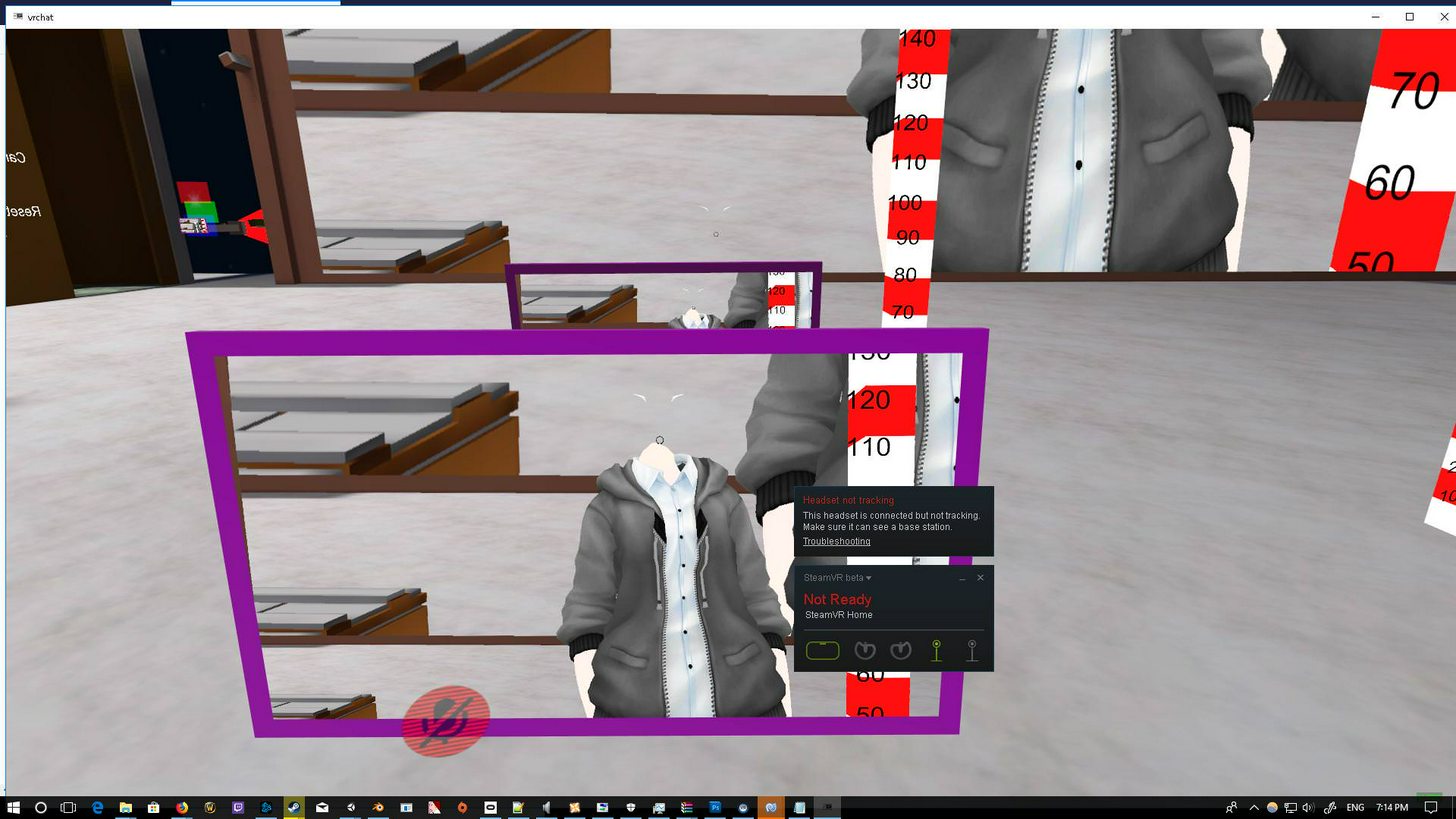
I'm using Snail's marker
remote helm
Sweet. Thanks. is there anyway to fix it?
daring frigate
and sometimes adding meshes to a model , like the snail's marker , create this kind of bugs
and i dunno about fixes sry :/
remote helm
Ive got a bunch of additional meshes. Ill have a go at removing some unneeded ones. It's a scene ive been rendering the avatar out over days and different ideas
So it's messy as hell.
See if thats a fixWwwwwwwww
 placid oriole
Do you know what is what on htc controllers ? It's like I can't put my face animations there and I lost my ability to point my fingers plus few of my animations are like in slow motion 🤔
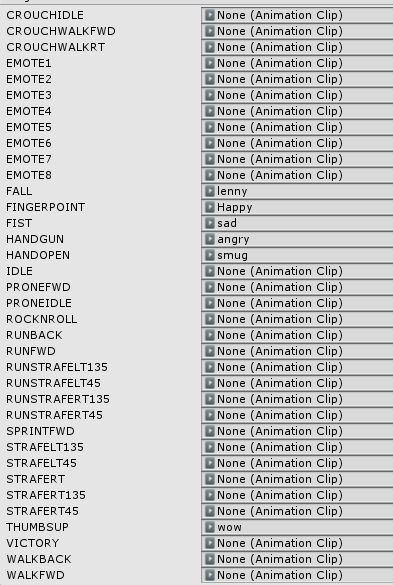 surreal grove
@placid oriole THat is what happens when you put an animation in that has more than two key frames and/or lasts longer than 1ms
You need to have an animation on the child itself in the hierarchy. And create the override to enable to animation
placid oriole
let me check
@surreal grove I created my face expressions on copy of my avatar and I used Blend Shapes and they are 0->1 frames each
surreal grove
How far are your keyframes apart?
 worthy harbor
Err, I was messing around with some animation overrides too, at which point my hands just completely stopped responding to any input at all despite the animations being two frames long. And now they remain completely frozen even after removing the animation overrides completely. Does anyone know how to revive my hands?
surreal grove
and how many do you have there? You might need to zoom out
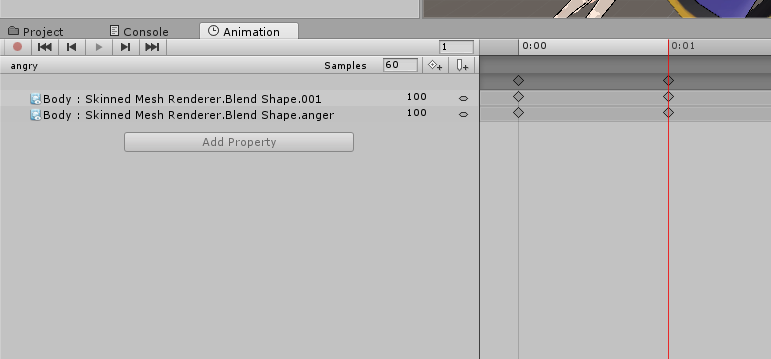 remote helm
@daring frigate Removed an object and reuploaded it. My avatar and the rest of the the custom meshes/objects are visible. The rogue object had a deactivated bone structure
 fluid light




 surreal grove
@placid oriole Hmm I would need to take a closer look at it. Not at my personal computer now....
placid oriole
@fluid light I heard that there is bug with eye blinking at this build
surreal grove
VRChat build
placid oriole
vrchat
surreal grove
it's currently bugged in the game
daring frigate
@remote helm sry i'm late bt glad to hear that
placid oriole
damn I'm doing everything like in tutorials and I can't even point anymore and my hands are moving like in slow mo 😛
 woeful flame
Someone has the breakdance .anim?