#animation
1 messages · Page 36 of 1
 grizzled cobalt
 craggy sage
like i move part of the ear to make it twitch, but it doesnt record it
 scarlet pumice
@normal skiff , people use the 'vr animations' not as animations
 solid trail
anyone able to teach me how to do the drawing with finger animation override?
scarlet pumice
@normal skiff so they have an animation of 'no gun' then an animation of 'a gun', then they bind it to a VR emote
grizzled cobalt
waits for orders
scarlet pumice
then when u press the emote on the controller, the gun appears
 normal skiff
I know, but I also set the fingers to actually be in the right position for holding a gun
otherwise it just looks stupid
craggy sage
is there a way to animate in unity?
scarlet pumice
@grizzled cobalt think about it mate, if it worked on one avatar and no another, its most likely not the animations fault
scarlet pumice
?
craggy sage
or is that not a thing
scarlet pumice
are u putting the nimation into the override slot then assigning the controller to the vravatar ?
grizzled cobalt
pretty much all the animation is done in unity @craggy sage
normal skiff
basics of animating in unity is covered by many many videos...
craggy sage
so how do then?
grizzled cobalt
yes @scarlet pumice
But wait
Does the Controller go into the Animator
Or VRC Descriptor (Custom Standing Anim)
normal skiff
you don't need the controller in the animator for the avatar
craggy sage
when i rotate bones, thet dont record
scarlet pumice
custom standing anim
grizzled cobalt
yeah
when I did that on the other avatar for some reason the animations didnt trigger
and none of the gestures on his hands were showing
when I removed it again it did
but whatever
craggy sage
is there something special i have to do?
grizzled cobalt
ignore that other avatar now
so when he triggers this animation with RockNRoll now
scarlet pumice
u cant really just grab an animation from one avatar and use it on another
grizzled cobalt
how do I make the hand stay open
normal skiff
they should just record... if it's in record mode, anyway
scarlet pumice
its talking to bones, if the bones are diff names, problems
grizzled cobalt
@scarlet pumice nah forget about that ;
craggy sage
it is, but it wont
normal skiff
if it doesn't then maybe the thing being moved isn't inside the thing with the animator on it
grizzled cobalt
these avatars have nothing to do with each other now
craggy sage
do i have to specify the part im moving?
scarlet pumice
@normal skiff his issue is not that mate, just adding the scuffed version, is breaking things
normal skiff
which "his"
scarlet pumice
well an animation is for a 'set' of bones with '
normal skiff
this is why chat is problematic
scarlet pumice
names', u cant just throw it onto a diff model and expect it to work
normal skiff
also what is "scuffed" in this situation
scarlet pumice
has to have the exact same bones + names
craggy sage
like which part of "Add Property" do i use?
scarlet pumice
@normal skiff mate, he is trying to take an animation from one model, and use it on another, without changing it, that is the issue
normal skiff
Maxwell is?
craggy sage
me? no
scarlet pumice
lol the last guy
normal skiff
because that's who the message you were replying to is about
so this is why it's confusin
craggy sage
when i rotate an ear it doesnt record that i rotated it
 normal skiff
so my comment about Maxwell's situation was, if it isn't recording, then either it isn't in record mode, or the thing being moved is on the original model and not on the duplicate created for animation
grizzled cobalt
I take the TakeCrown Anim and put it into the RockNRoll Slot on the AvatarOverride (Zeke)
craggy sage
it is on recording tho
grizzled cobalt
@scarlet pumice
normal skiff
so it would be the second thing I mentioned in the same sentence then
or you've found some other weird edge case which could be avatar-specific, I dunno
but if you really want to be sure, Add Property does work too, it's just more work
grizzled cobalt
So.. I still dunno if im done
craggy sage
ok, see it knows i recorded it: http://puu.sh/z8j2l/46e0473ed3.jpg
 normal skiff
oh, so it did record it now
craggy sage
but as soon as i scroll the bar: http://puu.sh/z8j38/b0b62d56d9.jpg

it acts like it never happen
normal skiff
that seems to be working..?
craggy sage
 normal skiff
it did change the values
craggy sage
could it be locked in a certian pose?
craggy sage
animator?
normal skiff
the ears won't be in the animator though will th.......actually the word animator is overused in unity so I dunno which one applies here lol
craggy sage
might just do a Blend Shape Key
 mystic umbra
see I was wondering about this
normal skiff
mm most of mine for things like ears are using blend shapes too...
mystic umbra
Can you make a blender shape key to move the bones ?
normal skiff
because the modeler was nice enough to put them in for me
mystic umbra
I havent done it but I thought it could be possible
craggy sage
well shape keys keep track of the mesh, so i figure since the bones move the mesh, it should work
craggy sage
i wouldnt think so
mystic umbra
Ima try the bone movement instead and see what happens
craggy sage
if anything it would allow for more finer control
mystic umbra
true
craggy sage
blend keys dont track anything but the mesh
mostly to keep out any conflicts
shrugs
mystic umbra
I know some really good animator prefer doing animations on blender than unity
craggy sage
tbh this avatar has been thru the ringer, and imma make sure it works
mystic umbra
because unity... Is a bit of a pain in the ass
craggy sage
yeah, ive heard that too >.<
mystic umbra
Ive made some emotion animations with shape keys with ease
then apply that shape key on a custom animation overide
 dull parcel
 severe palm
@scarlet pumice i solved the avatar stuck in the ground issue
severe palm
i just used an example idle animation from the sdk and added viseme animations to it
mystic umbra
did you not duplicate the avatar before creating animations?
if so thats a clever fix
grizzled cobalt
I have another small problem now
so the animation works ingame with gesture
but this:
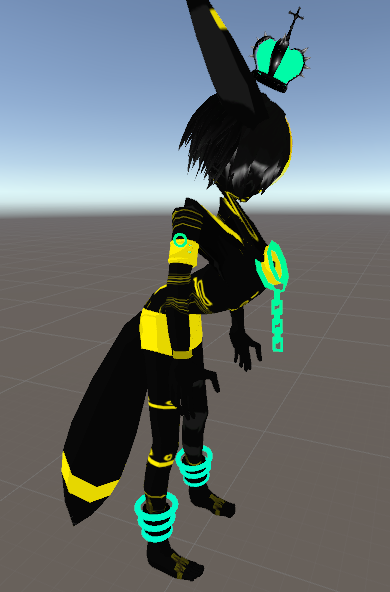
Its nothing with dynamic bones; this only happens when it uses the new Custom Avatar Override
 candid light
Is there a way to say, play an animation for taking out a rifle, and then keep the rifle out, and have another animation when you put it away, all with one gesture?
grizzled cobalt
not with one
candid light
so it would play animation clip1 on activation, 2 on idle, 3 on deactivation
normal skiff
I was looking at the animation controller and it seems like it might be possible, but not easy
grizzled cobalt
@normal skiff any idea on ym thing
normal skiff
nope :/
candid light
so is that a copy of your model? My model goes into weird poses when I animate anything involving its body
I think that happens for everyone
grizzled cobalt
no thats the actual model but only after applying the AnimationOverride
Basically as soon as the AvatarControllerTemplate ingame starts, the character g oes into that position
dunno why
 somber yacht
Hey guys, so how does sound in animation overrides work? If I were to shoot a gun, would I have to set two different animation overrides: 1 for the gun when idle and 1 for when the gun is shooting/making sounds?
normal skiff
two animations, one animation override controller
 modern ether
if i have an animation that hides an object when i gesture, does it automatically unhide when i stop gesturing or do i need to have another animation for that?
candid light
it automatically unhides afaik
candid light
Basically whatever the state your avatar was in before it reverts to i believe, as far as which objects are enabled or disabled
modern ether
great thank you both
normal skiff
I wonder if my gun wobble is actually some dumb issue with the animation that I couldn't see when I was checking it...
...ah actually it happens for both animations so it seems unlikely
... nah both frames are the same, so it's still a mystery
I want to immediately blame Fixed Joint though, it's the only new thing in the mix
candid light
ah yeah that's the problem it's because you have to not freeze xyz
so that you can actually move the gun
and I think that gives it room to wobble
normal skiff
so... there's two rigid bodies
candid light
yeah you probably freeze your wrist right and then don't freeze the gun
candid light
Right, my stuff attached by rigidbodies like that wobbles too
normal skiff
ah, so it's normal. 😦
candid light
no i think there's probably a fix
normal skiff
so I guess one workaround is keeping the banana itself on the wrist directly
candid light
it definitely has to do with the fixed joint and rigidbody, there is some give between them
normal skiff
there is. apparently Fixed Joint still operates using the physics system
as do all joints
so the common workaround I see is a custom script which locks it to the right position and then turns off the constraints
which is a hack, but an elegant one
someone said to try Configurable Joint as it might be possible to allow for less give
https://answers.unity.com/questions/230995/fixed-joint-not-really-fixed.html the post about it which I found
candid light
geeze there are a lot of properties on this thing
normal skiff
yeah that's why I haven't figured it out yet lol
candid light
i guess it is true to its name
normal skiff
apparently it has a superset of all other joints' functionality
so you can configure it to act like any of the others, and then more
"Turning the limits to 0 reduces the wiggling significantly" is the bit which made me think it might work, but when I set what I thought were the limits he was talking about, it made no difference
I guess another benefit of doing it by splitting the gun from its effects is that the bullets would continue to render when the gun isn't out
at a cost of however many polygons the particle system costs
I think I'm gonna login here and necro this thread to ask about the limits, because when I make a new Configurable Joint, all of them are already 0
either that or I make a whole new post just to document my issue
 trim vine
So I have an issue with animations. My model rig is set to generic under animations for the animations I am trying to do, but in game the animations keep on looping for a good 2-3 minutes. I have Loop Time off as well. (This is in Unity btw.)
normal skiff
'a "fixed joint" is actually simulated as an extremely rigid and stiff spring'
lots of lewd words in there but it gives the gist of what's going on
normal skiff
no /lenny command? 😦
normal skiff
such disappoint
trim vine
anyone know why my animations keep looping? (Loop time off)
 clear yew
in vrchat or unity?
trim vine
vrchat but unity is what i used to create them
they are only like 5 seconds long but they keep looping for what ever reason
and it takes like 3 mins just for it to stop
clear yew
jesus
I have no idea how to fix that sorry
But Try limiting your Frames in The animation
just a suggestion
trim vine
alright, i am at 60 rn so should I try 30?
clear yew
Yes 30
Most of my animations are 30 and they last the exact time
30 frames to be specific
clear yew
Ok
I won't be on for much longer
cuz it's 10:25 am And I need to urgently sleep lmfao
Im in india btw
So 10:26 pm in toronto and 10:26 am in india
trim vine
00f
clear yew
I've been in toronto before so that's how I know
I played 1 pm to this xD
I need my full 12 hour sleep
trim vine
ah rip it didn't work D:
clear yew
Np Bro
normal skiff
what happens if you set spring to Infinity
is that infinitely droopy, or infinitely rigid
clear yew
Or Both?
lol
I got a question
anyone here heard of Lil pee and marshmello's "Spotlight"
It's A Very Good Song
normal skiff
what if we ask a staff person nicely for a script to attach two game objects together reliably lol
asking for them to fix the original issue clearly didn't work though [/snark]
normal skiff
could seriously be worth considering though
 grand loom
Sorry if this is an over asked question, but how long can an emote animation be? How many seconds/frames.
normal skiff
if I weren't in such a shit time zone
either 8 or 10 depending on who you ask
please time it and confirm for us 😄
grand loom
lol
normal skiff
there is a game dev stackexchange, maybe all the problems we find we should create as questions over there and put answers up as community wiki
at the moment I'm dumping the basic summaries into a google doc because I'm not aware of any better option
and vrchat themselves have too many new issues coming in to have time to set up a better place to ask questions
I'm really surprised though that there are no questions on the gamedev stackexchange even mentioning VRChat as a side-note
trim vine
yeah same lol
normal skiff
there's a gamedev stackexchange post about fixed joints where they set up the fixed joint on the hand side, with connected body set to their prop
so basically the exact reverse of my setup
trim vine
do you think they would be able to fix an infinite animation loop?
normal skiff
?
trim vine
im trying to fix my animation from looping in vrchat
normal skiff
ah
trim vine
it loops only on emotes though
normal skiff
and of course Loop Time was unchecked
trim vine
yeah
normal skiff
my initial reaction was maybe the controller is doing something unexpected, but when I went looking for loop settings in there, there aren't any
grizzled cobalt
@normal skiff
I have this little problem that the crown is in front of the hand rather than floating above
how do I reposition it during the animation
If I can
normal skiff
hit record and move it, or what I have done for my props is, I move it into the right place and then manually copy those values back to the real item's position and make it the default settings
trim vine
there are these really cool vids of some guy that made an osrs player model with some sick animations which I am trying to re create
grizzled cobalt
this is what it looks like btw https://i.imgur.com/Rqru15C.png
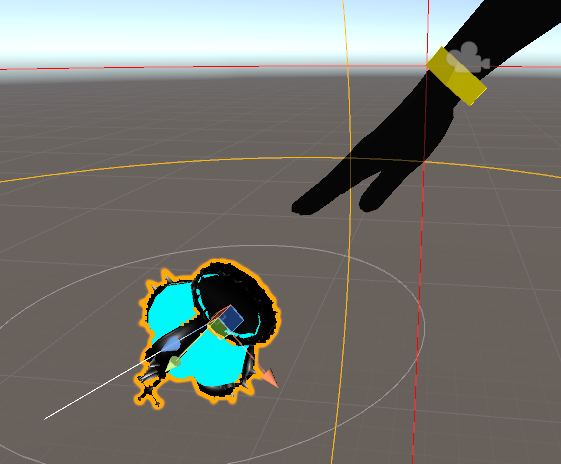
alright let me try that
normal skiff
is there a consensus that the best place to anchor props is always the wrist... because I was having a conversation last night that sounded like maybe I was being recommended to avoid it, but the guy's mic was terrible so I couldn't really hear clearly, and I had to operate in a foreign language at the time
grizzled cobalt
yeah it is anchored to the wirst
so my duplicate is now in the fucked up sitting floor position as you know
how do I exactly position the crown to this
normal skiff
you can just ignore the rest of the pose and try to position it relative to the hand
grizzled cobalt
because for that I already had it moved
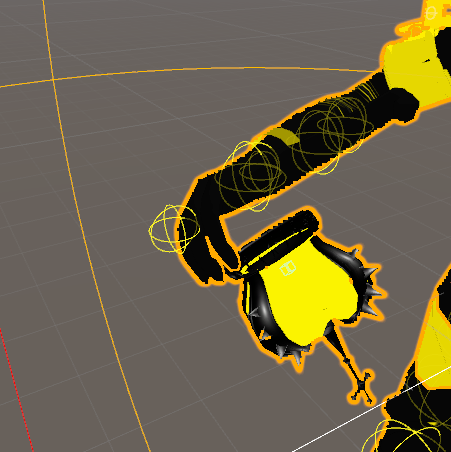
I had that like this
but this was the result
normal skiff
ah okay, hmm
 thorny fox
hii
anyone getting the following problem: "animations I make dont lag me at all but for others they complain about lag"
or complain about bad fps*
normal skiff
with my gun I did it all while in record mode because I had to move both the gun and the fingers quite a bit, but once I had the position and rotation for the gun, I copied it out to a text doc and then back onto the actual gun in the real hierarchy, and then deleted the rules for it in the animation
trim vine
im pretty sure there is a fix for that boop hold on a sec
normal skiff
so my animation doesn't change the prop positions at all, just the hand and the visibility
thorny fox
oh boy! that would be super useful
my animations dont even use that much particles nor is it high in polys (albiet it is scaled in size)
trim vine
VRChat Wikia
Make sure if your scene has fog enabled, that you have a value specified higher than 0, or turn off fog. You can find fog settings under your scene lighting. This is known to occur when a...
thorny fox
"My avatar causes everyone in VR Chat to have severely reduced frame rate" is this what you are referring to?
trim vine
yeah
thorny fox
my model is under 10k and my animations use 1k meshs
normal skiff
it probably isn't the poly count since that's enforced by the sdk now
thorny fox
1k mesh*
 primal gull
how do i stop an animation from looping
primal gull
no idea
trim vine
click on your animation in unity and under the inspector, make sure loop animation is unchecked
grizzled cobalt
@normal skiff
Is it possible to have an idle animation on 2 things?
Each crown their own? Because that way I can set both's position to be different
normal skiff
incidentally I just checked my youtube notifications and Morgus is also saying that the prop itself (and everything other than the world particles) should be kept in the normal part of the hierarchy
so I mean, that is going to end up being the "solution" at this rate
I will just go back to the guy who posted the video before his one, who didn't do that, and ask him what he thinks lol
clear yew
Can someone please help, my model which has snail marker isn't making a trail in game when I do the hand gesture to activate it, nothing happens. Here's what it looks lik in the animation folder https://imgur.com/a/LLAdP
and here's what the whole model looks like https://imgur.com/a/Kur0Q
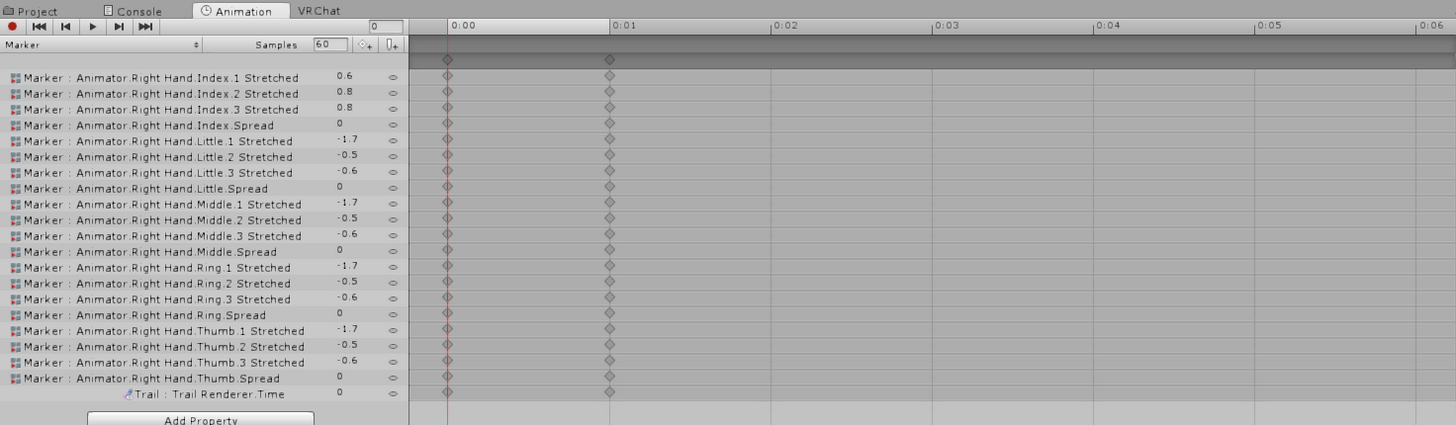

 vast dove
does anyone know good dynamic bone values for earrings?
when i try them out they just stretch back behind the head
vast dove
they look fine in unity
clear yew
What he said
grizzled cobalt
@normal skiff could it be that the idle animation keeps it locked in the place
vast dove
they look completely normal in unity then ingame they just stretch
 spice urchin
are they even parented to the head
vast dove
yeah
spice urchin
are they mapped to something
clear yew
Can anyone help me with my problem please?
 drifting coral
tbh i cant use snail marker too lol
vast dove
how do i double check?
https://gyazo.com/a2e0c926532a83ead753c33eb8946bb3 the bone starts in the middle of the body and goes up to the earrings like this
 normal skiff
@grizzled cobalt you can definitely have an Animator on both the head copy of the hat and the hand copy of the hat. But I dunno about the positioning thing. The animations VRChat itself is doing shouldn't know about the hat at all, and the idle animation itself I don't think even messes with the fingers
spice urchin
i cant see it
vast dove
cant see the bone?
normal skiff
I have snail marker working after following one specific youtube video by snail himself
mine erases the line when I put the pen away though, while some other people's don't seem to
I'm still not sure which behaviour is better though, the ability to hide the line temporarily has its uses
drifting coral
i only watch one of its video, in case he uploaded more than 1 videos
normal skiff
it's probably that one
other people did videos on it too but I never got it working from the others
drifting coral
i might try it again soon™
i just need to fix this first
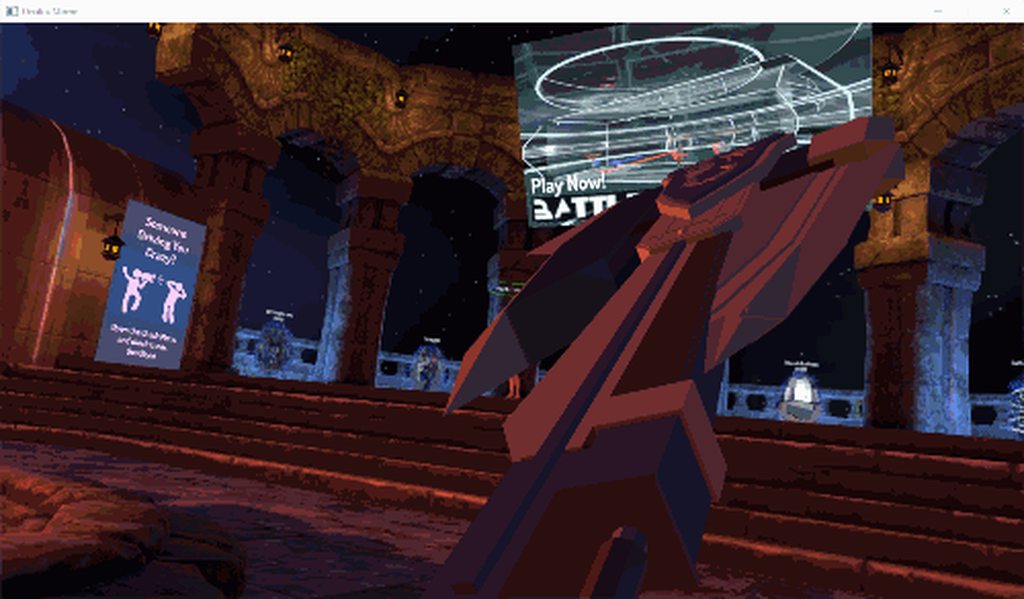
https://i.imgur.com/v4S2ezw.gifv
 vast dove
the inertia didnt fix it
clear yew
is amaing
 clear yew
can you show me how you made it please? @drifting coral
drifting coral
also its switch axe
normal skiff
I wish we had state changes
drifting coral
it uses 3 different animation
1 for showing the model
1 for the actual animation from axe to sword , the other is from sword to axe
normal skiff
can you chain one onto the other or did you end up using two gestures?
vast dove
https://gyazo.com/10189659a74375f0c3137d4808d9d6dc here's how it looks
anything obvious?
normal skiff
the animation controller docs made it seem like there might be a way to have a state change immediately after another state change, but I do not know de way
drifting coral
basically right hand rock gesture for showing it
Left hand for the changing animation
1: gun gesture to change to sword
2: point gesture to change back to axe
vast dove
is it an easy fix?
spice urchin
u have to weight paint it in blender
then u have to replace the prefab and it should update
drifting coral
can i see the elasticity and the damping?
or just the whole option you use ?
@vast dove
spice urchin
its not a dynamic bone issue
drifting coral
0 elasticity, and high damping could do that
from what i try
spice urchin
if you rotate the head and look at earring
if it doesnt move it needs weight painting fix
drifting coral
if it isnt dynamic bone issue, then its weight painting issue
spice urchin
idk y u would put those settings unless on purpose
vast dove
@drifting coral https://gyazo.com/75502b84be8b1d846103baff10f5b284
 drifting coral
well for sciences
vast dove
been messing around with it
spice urchin
make elasticity much larger
drifting coral
try higher elasticity
 vast dove
okay
spice urchin
if u have any animations imported u can see it react to character movement
before uploading
vast dove
it looked normal in unity so im not sure if its something i can see in there
spice urchin
it is
but u dont have any physics or character movement
and rotating the character wont come close
you need to import an animation and play it on the character in runtime
to be able to see it react
vast dove
ah
spice urchin
that way the character is in motion
drifting coral


trying to make semi controlable cloud with dynamic bones in vrchat
(lags while recording) https://t.co/yVIS8RQFv4
 Twitter
i tried "remote controlling" with dynamic bones stuff
spice urchin
why it act so weird xd
also u should use 0 stiffness that way it moves on its own not based on body
1 stiffness make its movement entirely based on previous bone
vast dove
gonna test those settings
normal skiff
if only we could have things which react based on the position of bits of a character mesh http://blog.leapmotion.com/wp-content/uploads/2017/12/dimple-mesh2.gif
 drifting coral
tbh i used stiffness to get the cloud face where i want
normal skiff
this effect uses a shader but it has to know the position of the finger somehow to do it
 latent swallow
Does anyone know what I can do to make it look as though I'm grabbing a weapon from my avatar instead of It randomly appearing -- For example: I have a sword on my hip and I use the animation in-game, I want the sword to appear in my hand and the sword to disappear from my hip.
I have the animation done but I am not completely sure what I should do to make the sword on my hip disappear once the animation is active.
spice urchin
scripts probably
drifting coral
move the gameobject ?
spice urchin
and bang you have to play an animation
drifting coral
on animation ?
normal skiff
yeah, definitely scripts
normal skiff
they ray trace the fingers to find the insertion and then use that data with the shader
drifting coral
or place 2 model , just toggle both
normal skiff
also this gif is pretty lewd for a hand being put into a sphere
vast dove
so i tried the settings and its still stretching, so I need to weight paint?
spice urchin
rotate the head and see if earrings move
vast dove
okay
drifting coral
im still searching a way to use gesture as Weilding equip instead of appear/disappearing it
latent swallow

spice urchin
u can make it on and off
drifting coral
so i could wield different object based on what i grab on my avatar
drifting coral
if only i found the way
vast dove
yea they move in there
spice urchin
i think all u do is put active off at end of the animation
drifting coral
try removing the dynamic bones if it still stretch
you might add 2 dynamic bones on the earings
spice urchin
bc people have made stuff where they use handgun gesture to hold out gun
vast dove
do it separately on each of the earring bones instead of the root?
spice urchin
yes
latent swallow
http://prntscr.com/i4r15e
http://prntscr.com/i4r17p
I'm trying this but I'm not sure it's going to work.

 spice urchin
weighting modifies how much that part of mesh follows bone
spice urchin
ya it should hide when let go
drifting coral
it just not gonna appear on mirror
normal skiff
depends on how advanced the stuff is
this one guy's 2B had so many dynamically enablable bits that you couldn't even see her skin in the mirror
latent swallow
I tried it -- Headphones is the object on my head and Kitty is what appears once I use the gesture. It didn't appear in the mirror as you said and it did appear in my hand but the headphones didn't disappear/hide from my head.
When I looked in the mirror, It was still on my potato head
 onyx cape
dose any one know of a tutorial to put audio over an animations
or knows what i should do
spice urchin

A VRChat tutorial on how to override hand gestures and emotes with your own custom animations. It can be used not just for VR users, but for desktop users to...
uses blend shapes but same idea
turning on and off
drifting coral

Tutorial explains: - How to create the soundfile - How to create the animation - How to trigger the animation Morgus tutorial: https://www.youtube.com/watch?...
normal skiff
does it cover audio though
drifting coral
custom sound
normal skiff
I mean the previous link, you just happened to paste at exactly the same time I hit enter
onyx cape
so that will tell me how to add it to an animation that i did not make?
spice urchin
???
i dont think u can make like full on equip and stuff animations that arent super fast
drifting coral
try follow it
spice urchin
bc vrchat says animations 1 frame
normal skiff
the process isn't that different, you just skip the bits where you have to make the animation
normal skiff
the most important thing to remember about audio sources though is
always set it to 3d
normal skiff
oh yeah that too lol
spice urchin
with linear rolloff for best results
normal skiff
but mainly, always set it to 3d
latent swallow
I can pretend to reach for my sword and then use the gesture
normal skiff
because if you set it to 2d, everyone in the world will hear it
 vast dove
hmm separate bones didnt work
drifting coral
have you tried disabling dynamic bones for the earings ?
vast dove
ill do that now
drifting coral
just to check if it normal or still stretched
normal skiff
every time I see a video recommended it automatically goes into my google doc of resources for development
so they'd better all be good lol
(someone immediately posts a howtobasic episode) goddamnit
normal skiff

Google Docs
MMD to FBX conversion Cats Blender Plugin Tutorial: Tupper : VRChat - Importing an MMD to VRChat Mega-tutorial! Tutorial: Tupper : VRChat - Manual Texture Atlasing (didn’t work for me, but here for completeness) Custom animation overrides Tutorial: Kuno Plays : THE NEPIEST VRCHAT OVERWRITE TUTO...
drifting coral
nice, thanks, gtg check
normal skiff
it's starting to get a bit untidy though
every time I have a problem and then sort it out I try to record that but there are just things I could never figure out and the tutorials are all over the place
latent swallow
I have two seperate swords -- One in my right hand and One on my hip. On the main avatar; The hip sword is checked and the hand sword is disabled.
So the sword on my hip is always seen no matter what.
Once I use my gesture; The hidden sword appears in my right hand.
What I want to do is while I'm using the gesture and have the sword in my hand -- I want the sword on my hip to be hidden -- So it emulates as though I pulled it off my hip.
@spice urchin
drifting coral
main avatar : disable hand, enabled thigh
Animation : Enable hand, Disable thigh
spice urchin
^^^^^^^^^^^^^^^^^^^^^
drifting coral
are you still there ? - turrets
vast dove
well then
i took off the dynamic bones and they're still moving around
parented to something else?
normal skiff
it worries me slightly that so many of the people I hang around in VRChat have an unhealthy obsession with bananas, but then I go and make a banana weapon, and even my audio mixer is called.... shit, what am I doing with my life
drifting coral
you might need exception on the body for the earing bones
vast dove
how would I do that?
drifting coral
check the dynamic bones on the body
vast dove
all just hair bones at the moment
drifting coral
but are the bone connected to the earings ?
vast dove
should i go into the armature to look?
normal skiff
so with the new ability to do world space particles and have them appear more or less in the right position, is using Noenoe's pens on avatars an option yet, or is that still going to fall over because of the wobbling
they work perfectly in worlds
drifting coral
Screenshot the dynamic bone properties for the hair ?
 hexed current
I know this isnt the right thread, but everyone keeps ignoring me with my issue -_-
spice urchin
maybe nobody knows
drifting coral
Depends on your issue lol, i might not know what is the issue
hexed current
My model is supposed to look like this

when imported
it looks like this

notice the hole
Idk why there's a giant hole in the zipper.
Its fine in blender.
vast dove
https://gyazo.com/700c2ca646035e4dbe6d671a47573bfc @drifting coral
 drifting coral
Decimated automatically?
spice urchin
why is stiffness so big
hexed current
it shouldnt have decimated
spice urchin
the hairs gonna be almost completely attached to the head
hexed current
it does it even when I dont press 'fix model'
vast dove
i looked at a video to get my values for dynam, thats what it told me
spice urchin
if too slow just increase elasticity and damping a bit
drifting coral
Check if there are any other dynamic bones that connect to the earings, if you still have that earing stretched problem
Hair back doesnt look like it connect to the earing, right ?
vast dove
doesnt look like it no
drifting coral
My current suggestion is to make a duplicate, and delete all the dynamic bones , and try if it still do stretch
vast dove
so i should delete the original and copy it?
well
i deleted all dynamic bones and its still stretching
its moving like it has them with none
scarlet pumice
Guys, i made an animation by moving bones of a cloned avatar, the animation works in the preview window, but in game, it simply doesnt. I took the idle animation is changed it a bit to make a custom emote
spice urchin
yes i told u
if u can rotate head
and it doesnt follow head
then its not weight painted correctly
spice urchin
i would recommend saving blend files of characters
re-importing sometimes is very buggy
vast dove
i have the blend file
spice urchin
ok then yes
scarlet pumice
anyone ? doing the animations just like the videos getting pasted around here. Does the 'animator' properties not work for a 'emote' animation and only a 'vr hand emote' ?
vast dove
where is weight painting?
scarlet pumice
Does anyone know why my animation created in animator shows in the preview window, shows up in the emote menu, but doesnt work
spice urchin
is it looping
scarlet pumice
ya
spice urchin
u cant loop an emote
and it has to back into original position and stuff
not whatever its currently set to
 mint wagon
can you loop a sound coming from hand gesture?
scarlet pumice
@spice urchin are u saying that the keyframes for the end and start must end with the same value ?
no one :/
I took the idle animation, edited it so the head tilts up, and the jaw opens like :O. In unity, the animation looks fine, the name appears in the emote list, but it simply doesnt play. It says its 'playing', but it does nothing then ends.(length correct)
scarlet pumice
strange, its started working, but only the headtilt. Are jaw animators uncontrollable when u have jaw lip sync on ?
is it possible that the lip animation isnt showing to myself in a mirror, the same way jaw lip sync doesnt ?
 keen reef
When I'm doing an animation even though it puts the model in the ground it wont do that while playing right?
 sudden marsh
Did I get mentioned by someone here? o.o
 blissful root
Was it possible to go past 10 seconds on an emote or we stuck at 10 seconds i forget.
scarlet pumice
@grizzled cobalt hey did u resolve the bend body stuff ? just happened to me, no idea how sigh
grizzled cobalt
Yeah
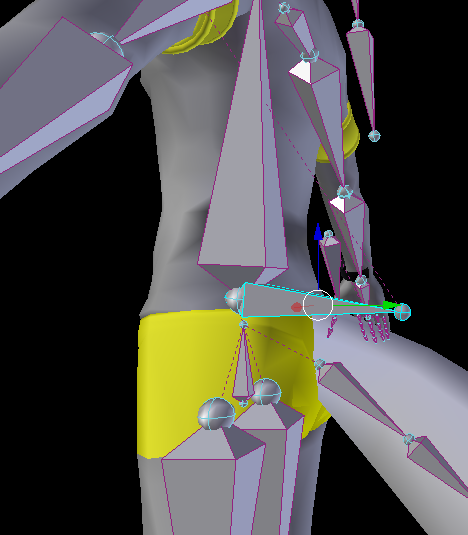
This was my spine bone
I fixed the whole problem by putting it up straight and moving the chest bone up aswell
so it would look like a normal skeleton
that fixed it
@scarlet pumice
scarlet pumice
blah
grizzled cobalt
?
scarlet pumice
i just undid the 'humanoid' skele
and put it back on
lol
and it fixed it
damn unity
scarlet pumice
its so funny, all i did, was get annoyed at jaw bone move moving not showing up in game, and screwing up my emotes
so i went and created visemes lol
for AH OH etc
bring model back in, bend body
lol, but caused by the unity 'humanoid' thingy
grizzled cobalt
its kinda funny
scarlet pumice
not what i did to the model lul
grizzled cobalt
about 2 weeks ago
when I started with Tuppers megatutorial
I hated Blender like a fucktard and messed up because I pressed random keys
now I prefer it over unity sometimes
scarlet pumice
haha
i use to do a lot of 3d modeling back in the day with 3dsmax
so blender is annoying for me
but, all the info and stuff is blender
scarlet pumice
would rather have that info than try work it out in max lol
damn, also doesnt help that i have 1mb upload so every time i want to see a change in game i gotta wait 5mins

grizzled cobalt
damn
@scarlet pumice but without future proofing
it should take a lot less
lol
you only need future proofing when ur done with your avatar anyways
so it doesnt break on next patches
scarlet pumice
how do u disable future proof
scarlet pumice
ahh ta
 dire tusk
Is it possible to make an emote do a particle effect animation? Like an explosion?
scarlet pumice
that should help me a lot, thanks mate
clear yew
how do you keep a model above the ground during a fully custom animation?
grizzled cobalt
;]
 potent obsidian
The SDK uploader is blocking some of the components on my particle effect when I try to upload. It won't let me use the scripts even though it's a Unity 5.5.x asset. Where can I find out what is disabled on VRChat?
grizzled cobalt
Try and Error ?
:]
scarlet pumice
@clear yew i went and took the 'idle animation' and used it as a base
clear yew
but it's read only :c
scarlet pumice
i assume you trying to do an animation that isnt full body
potent obsidian
It's a particle effect from the Unity store.
scarlet pumice
non full body animations only work for 'VR HAND EMOTES', aka not the 'emote' menu
scarlet pumice
@clear yew dupe the idle animation, then open it up, click the animation within, ctrl+d(dupe it), and it pops out and is editable
 steady dragon
augh trying to find a particular dance animation to download, but having 0 luck finding it at all, and not able to do mocap or animate whole thing myself
scarlet pumice
unity usablity for you right there LUL
 hollow whale
Anyone having any issues with Snail Marker? I cannot for the life of me get it to work.
 late phoenix
anyone know how to fix this? I made an idle animation but for some reason the body is a lot further back compared to the head/neck

i tried changing where the root z position is as well as making the spine go more forward but it doesnt seem to change anything
late phoenix
yeah its pretty dang helpful
normal skiff
this this is freaking insane, all I did was move the physical gun to a different place and now the particles are coming out in another direction >_>
 candid kayak
so there's no way to trigger animations without VR right?
normal skiff
emotes
candid kayak
oh i can replace vrc emotes?
normal skiff
yeah
candid kayak
Yeah I tried importing a dance @normal skiff
it's weird - everything works fine until i do eye tracking via Cats on blender
When I exit eye tracking, no animations work
but when i'm doing the eye tracking testing, it works
clear yew
@potent obsidian pretty late but here's the whitelist https://docs.vrchat.com/docs/whitelisted-avatar-components
Here is a list of the components you are allowed on avatars VRChat - VRC_AvatarDescriptor - PipelineManager Unity - Transform - Animator - [Skinn...
 tepid mango
what's the maximum lenght of an animation? and i'm pretty sure it's not 30 seconds
 hot orbit
Is there a way to instantly add, say, all figers in the animation tab, when you're working on a project so that you can edit their position
 proud lintel
If you have the muscle animation editor addon you can do that. When you move a slider for a finger it adds all the bones in that finger to the animation tab. Certainly quicker than navigating trees and adding single bones one by one.
 echo wraith
@tepid mango 10 seconds, or 300 frames.
 modest mantle
Awfully frustrating that my humanoid character just squats in unity and teleports everywhere when I'm trying to animate the bugger.
tepid mango
@echo wraith that was refered to you btw
 red moat
Is it possible to set a custom gesture animation only on one hand so the other one is still free to use with all default gestures? As soon as i make one, both hands only use the default pose or to what i have set it
 gaunt gyro
@echo wraith Wrong, they upped the max length. Some say 45s but my animations still get cut off at some point. But that goes for both 20s, and 44s animations that get cut off at the last 3-5 sec.
So I lean to believe the cut-off is not due to max limit, but due to another problem.
echo wraith
@tepid mango Sorry about giving you the incorrect info!
gaunt gyro
@tepid mango Do your animations also cut off randomly regardless of their length?
For example, a 15s animation cuts off at 10-12s
And a 35s animation cuts off at 30-32s?
And yes, I made sure I dragged the blue bar of the animation all the way to the end before I duplicated it out of the baked model.
tepid mango
@gaunt gyro depends, i have a get down animation tht works fine and is 38 seconds, and a very long one that after a bit let me move again but continues the animation, feet too, tho i have to not move or else they'll jut move with me
gaunt gyro
Hmm so the cutting off is something I'm doing wrong then. I'll look into it when I'm home tonight
tepid mango
i gotta look at how long the song in the mmd nightclub is
gaunt gyro
You're going to mimic that one then?
 swift wyvern
Have they changed how you set mouth visemes in the unity or it's just me who is bugged
gaunt gyro
Eyetracking is broken since last patch.
https://cdn.discordapp.com/attachments/404722542012792842/405098686734139392/2018-01-10_23-24-38.gif

 sand apex
Hey when I use snail marker why do my animations slow down?
 robust hound
https://cdn.discordapp.com/attachments/403564616984166400/405695210006380544/airfieldFloat.gif
finally got the animation particles of my little bois down :^)

 stray sinew
Do particles not follow an item when I have it set to world? I'm trying to make a fire torch and my fire stays low where that animation pose instead of staying with my staff
 robust hound
lol, just make the particle child of your torch item :^)
stray sinew
I did
robust hound
still doesn't work?
 proud estuary
so um, i have a problem, uhh
well dynamic bone colliders work for me in the scene but
inside vrchat, the dynamic bones themselves work, but the colliders dont
as in the legs still clip through the skirt
 daring frigate
when using world particle, you have to use a rigid body
proud estuary
i asked yesterday no one was able to help so if anyone could help me that would be appreciated ;w;
robust hound
@proud estuary
- basic, porbably done. assign the bone collider to the colliders they will react
- if a movement is too fast or sudden it will clip through a collider most of the time because the update rate is sometimes too slow. (at least I had this issue for running animations)
otherwise I don't know
proud estuary
the colliders assigned yh
as for the 2nd one how could i solve that? if it rly was the case
daring frigate
Oh and another question , does anyone know if its possible in vrchat to have an audio source playing an audio multiple times ( like getting triggered by an gesture animation ) but also make sure the previous one is not canceled ?
robust hound
reduce movements of the object if it's a dyna bone
make wider colliders
and if it still doesn't work I really don't know, had the problem for a skirt going through legs. but a bigger single collider fixed it just fine
stray sinew
@daring frigate RIP Thanks. Simulation space for the fire has to stay Local. Man I wish I can use world, it would look cooler when moving. Thanks 村雨
robust hound
what is exactly the looking difference when using local or world ?
grizzled cobalt
So I tried around a bit
What is the maximum animation time on an emote?
It's definetely less than 25 I think
But over 15~
daring frigate
@stray sinew I managed to make world particle works by using some tricks on an avatar
stray sinew
World would make look more realistic with fire floating and disappearing, Like a small trail, when I have it set to local, the fire follow my hand rotation which I am trying to help the fire go up no matter which way I am holding my staff
daring frigate
@stray sinew i used this video : https://www.youtube.com/watch?v=yZxfQkxvxRI&feature=youtu.be

Had to re-upload because of audio being too quiet should be fine now. I forgot to mention it in the video, but Murmur also answered questions I had and helpe...
stray sinew
I'll check this out
proud estuary
i can confirm that it might be clipping through the colliders
daring frigate
i did it about a week ago , if i remember corectly i had to do some tweek before it works corectly
proud estuary
thank you @robust hound
daring frigate
and you can then also use collider to make it interact with the map
i made a gun for my tanya degurechaff model that shooted a lazer and exploded when collidig with walls
 hushed hazel
Why is my audio clip so quiet for no reason? I dont have the volume turned way down, its just next to impossible to hear
robust hound
@stray sinew if you are acknowledged a little bit to unity scripting I think you could make the particles follow the tranform.position of the torch
stray sinew
Yea, I don't know anything about scripts lol
robust hound
well I think I could do it, but I'd need the scene
meh fk it I have no work left to do, gotta try to make you a script ❤
daring frigate
but you can't do custom scripts on avatars right ?
robust hound
you can't ?
then how do you use dynamic bones?
daring frigate
its a whitelisted component
robust hound
erf
thought you just couldn't add complete instance of new object, but unity basics were fine
like just getting a position and setting it on another X)
daring frigate
according to the doc : Adding custom scripts to avatars (or worlds) is currently not possible as of November 5, 2017
daring frigate
i know the playmaker update will allow us scripts on worlds , but no news for avatars
so yeah the best way to use world particle right now is to use some rigidbodies and fixed joints
robust hound
yeah and it's not even for avatars
daring frigate
you can on avatars with this
robust hound
but the particles won't follow x-y of the object no?
daring frigate
i used it for a shooting lazer + explode on collision animation
it will*
using the joint
proud estuary
ah so
i might be making a mistake here
when testing animations on avatars, are the colliders supposed to work?
mine definitely are not
robust hound
if not in playmode, no
if in playmode yes
daring frigate
i just place a random Cube object in front of the shooting particle to test it
proud estuary
i mean, im playing the scene
robust hound
then it's supposed to work
proud estuary
then i must be doing something wrong
robust hound
just remember, 95% of the time playmode will work pretty much like it will in game
robust hound
few exceptions but, at least it's that for physics such as dyna bones and colliders
daring frigate
@proud estuary did you correctly link them in the DynmicBone Component settings ?
robust hound
"gosh i must suck at this"
it's called learning
I suck too tbh
always spend 2hours on simple thing that should take 10mins
proud estuary
yh i linked em correctly tho
i spend like 10 hours lol
dw ill figure this out
i can learn
daring frigate
One time when using the quick select for the DynamicBone Colliders i selected the colliders of a cloned avatar i used for an animation , so check in case of ^
robust hound
I started like 12 days ago
spent proably 25-30 hours in Unity / Blender doing shit
daring frigate
or to be more safe just drag the bone containing the collider directly in the collider setting of the dynamicbone component
robust hound
But I already did some Unity programming, so I already knew the environment
so it's normal if you to get acquainted with Unity to be slow on some things here and there
proud estuary
i deleted all my cloned avatars to be safe frmo that then reassigned them ;w;
daring frigate
i started unity with vrchat too x)
robust hound
If you're not into programmation, a lot of things will seem unlogical tho
daring frigate
but i directly started with the hardest possible things, Drawing , local / world particles , animations etc . So i could be way more confident when doing simple things
proud estuary
nah im rlly into programming
but gosh why can i not get the colliders to work properly
i will figure this out if it means the death iof me
daring frigate
But still managed to get limited a lot by Vrchat sdk , Since you can't use script to call PlayOneShot() of an audio source for exemple :/
robust hound
Yeah, if you could script little things, life would be a lot easier
daring frigate
Because right now in the end your avatar ends up with 3000 Empty GameObject that you enable / disable with animations just to use props or sounds
gaunt gyro
I'm a software engineer as my carreer. But not in the game industry.
daring frigate
same
gaunt gyro
I'm going to have to learn Javascript for my job. That's amazing since it can be used for so many occasions.
robust hound
well true that Unity differs a bit from regular programming
since everything is done with scripts, you lose that hierachy of classes and all. It feels less natural if you are into software dev
@gaunt gyro Don't you dare use Javascript for Unity
gaunt gyro
Well, funny thing is that the way how Unity objects work, is the exact same idea as how my work's software works
robust hound
It's here, you can do it
but it's less optimised by A LOT
compiles literally 50times slower
and everything about it makes it useless in Unity compared to C# scripting
gaunt gyro
You basically create blocks (objects) with inputs and outputs, and you can link other stuff to it, or open the block and edit the internal script for it.
robust hound
well it's basic parenting
but when you script and have to create getters for every object in your scene in order to use them
it feels weird
It's mainly because you aren't using instances of your own objects, but Unity objects you just dragged and droped. Which have, at first no link at all with the code
gaunt gyro
https://puu.sh/z8COn.png That's how my work's programming looks like
 daring frigate
those W98 feels in the GUI design x)
gaunt gyro
Well, the software was first created in the 90s, and I guess they never bothered to update the GUI for their tools.
robust hound
ye
gaunt gyro
I mean, they did include a new way of programming that looks a lot more like Function Blocks though.
robust hound
I hate that X)
I never actually worked with it
But coding in drag / drop functions looks terrible to me
I really prefer writing myself, at least I'm sure at 100% I'm the one who messed up when it doesn't work
gaunt gyro
https://puu.sh/z8CXD.png Aka this

But we don't use that often because yeah, it sucks.
Although you can just open up those blocks and edit them entirely to your liking
robust hound
looks like SQL table relations
gaunt gyro
However, in my free time I also program with visual basic
robust hound
I programmed smth in excel once with VB, I prefer Java and C# a lot more but I guess it was okay compared to some others
gaunt gyro
Yeah this software I use at my job is for physical controllers with I/O that we have to assign from an excel sheet with all I/O in a list. So I was like "fuck that shit" and completely automated that process with a 3000 line VBA script in excel. 😛
robust hound
holy moly
what a hero
gaunt gyro
Yep, it took me about 2 weeks to make it. But it has saved us days of work already. Usually we needed about half a day to a whole day to get one controller ready. Now, just 30 minutes.
gaunt gyro
Hehe
I remember this story about some dude that found out the coffee machine at his job was hooked up on the internet. So he wrote a script that took exactly 12 seconds to trigger. The exact time that took him to walk from his desk to the coffee machine.
robust hound
genius
gaunt gyro
And the same guy also programmed his PC so it automatically sends a "late for work" with a random generated excuse to his boss if his PC didn't register logging in activity at a certain time.
gaunt gyro
Hehe
robust hound
this is even better than automated fishing with motor on the reel




 robust hound
:^)
 noble fern
Anyone know how to add a screen to an object to allow it to see what a camera sees?
I can't seem to find a component that allows that
stray sinew
Alrighty, I got the world particle to work by following the video. the problem now is that when I use the animation, the fire particle is in a complete different spot than where I placed it and each time I activate the particle, it changes its starting position :\
daring frigate
ok so it was the thing i had to tweek so it would work
but i'm at my job right now so i can't really check what i changed
noble fern
@stray sinew Did you make sure that random start was unchecked?
daring frigate
oh yeah
i think i remember
so you have your particle disabled by default ? or the empty game object ?
if you have the gameObject disabled by default , the fixed join will not work
you have to have the gameObject always active , and the particleSystem disabled
stray sinew
hmmm
daring frigate
you then activate the particle system with the animation
stray sinew
I'll try check both
noble fern
gameObject must stay enabled
daring frigate
yep
noble fern
And you gotta make sure that you froze x y z on the rigid body
daring frigate
the freeze part is showed in the video i gave him if i remember corectly
noble fern
And ensure that the angle is 0 and that no gravity is used. Then depending on the type. You must keep the particle effect on, AND use the animation to enable the emission of the particle
Some you can get away with turning the particle effect on and off. Others you have to turn the emission on and off
daring frigate
mine worked just enablind/disabling the particle effect itself
but i guess its safer to enable the emission
noble fern
mine worked with a blood stream, but for the blood spatter I had to enable the emission
but know that doing the emission way will increase your polycount
daring frigate
it will since the particleSystem will always stay enabled if doing it the emission way
robust hound
as long as you have 1k poly free to use it should be fine either way
daring frigate
but since its a simple fire particle system
i guess enabling / disabling the particle system would work
noble fern
I'm struggling right now trying to make a selfie cam
daring frigate
never tried that one
noble fern
Well I have the tablet and camera, but I can't find anything on where the camera would display what it sees
Maybe I have to script it?
stray sinew
Yass!!!! It works! Thanks so much !
daring frigate
No problem 😉
stray sinew
I was on edit number 17 on this thing omg
daring frigate
You can now even use Collisions to make the fire spread hirozontaly when against a roof or somethin x)
noble fern
I made a rocket launcher that fires like that and I'm gonna script in an explosion on collision
daring frigate
i did an explosion collision on a "laser" gun i made
just add a subemitter on death
stray sinew
baby steps
noble fern
hmm
daring frigate
this way the rocket will explode either on max dist reached or when it hit any obstacles
you could add sound if scripting was permitted on this
stray sinew
Now I need to add the crackling of fire to it 😮
daring frigate
just add an audiosource next to the particleSystem under the same gameObject
and make sure it loops i guess
stray sinew
yeye 😄
robust hound
it would be good but also risky for them
noble fern
yep
daring frigate
use the death subemitter
it will create a new particle everytime a particle die
you can use free explosions particles from the unity asset store
daring frigate
also on your particle system , under collision , just make it so that on collision : set Lifetime of the colliding particle to 0 , so it will die instantly
noble fern
got that working
daring frigate
dunno what would happen if you added a audio source to the subemitter system ( if possible) ? you could still try , i'm at work right now ^
daring frigate
oh nice x)
so yeah you can still try to add an audio source to your particle subemitter but not sure
noble fern
yeah it only allows for particles
daring frigate
so i don't think it's possible without scripting then x)
 heady sundial
Just attach sounds to the device that trigger when the device becomes active
Oh, of course it needs to scroll down...
daring frigate
the sound must be emitted by a particle subemitter
heady sundial
Saying this, don't attach sounds right now as you can break the 3D spatial audio for people
clear yew
why cant you upload an object with a video player on it?
heady sundial
I mean you can probably imagine @clear yew .
That one isn't really rocket science...
clear yew
but i've seen people do it before
daring frigate
so let's say my gun emits a particle and a firing sound , the particle on death / collision emits a subemitter particle, but can't emit a sound
heady sundial
I haven't seen anything recently
clear yew
so are they modding the sdk to do so then?
heady sundial
@daring frigate I think that's because you've left the invisible ball of which your avatar is permitted to make sounds
@clear yew Unlikely, as the server strips those things out
Not the SDK
daring frigate
i mean how am i supposed to attach a sound to the subemitter ?
heady sundial
That is a good question, but I don't assume it'd work. If you're doing a firing sound for a gun, add an animation that toggles the sound effect when your particle is toggled
daring frigate
the firing sound is done without problem ^
heady sundial
Oh, then I guess I'm confused
daring frigate
it was about the collision sound
heady sundial
Ah, so when the bullet hits something?
daring frigate
yep
we can easily setup the collision to produce a subemitter particle , but it cant produce a sound
heady sundial
Yeah I don't think that's currently an enabled thing since it's exploitable from a distance
daring frigate
well a subemitter is exploitable by itself already
heady sundial
Well yes, but they are focusing on sudden sounds more than sudden images
daring frigate
ok
daring frigate
still dangerous for epyleptic people i would say ^
 muted prairie
People with epilepsy shouldn't be using a VR headset in the first place
heady sundial
Of course, but that's a whole can of worms that should really be finalized as...yeah, that ^
daring frigate
the posibility to disable some shaders or particle can still be a good thing i think
heady sundial
Would probably also say that people with PTSD shouldn't be playing VRChat as well
 tawny comet
Anyone know how its possible for a animation that works on rock and roll but on other gestures it locks all controls till they go back to idle position???? I cant find anything about it .... i have two frames with the same value =\
heady sundial
@tawny comet Sounds like you're not properly triggering the animation on the other gestures
Your animation should be a 0-to-1 "trigger" animation. If there's a longer animation that needs to play, that trigger animation should trigger your animation to play
Else it'll get stuck playing until completion
 acoustic talon
nah Ive had that happen too with a 0-1 keyframe animation trigger before
you trigger it and then your hand tries to do the gesture super slow and it messes stuff up
daring frigate
it did that to me with pen drawing for exemple
acoustic talon
think it has to do with certain animations messing with meshes
daring frigate
but i think its because of a too big difference in value between the 2 frames
heady sundial
I only had that issue when I was animating directly to the object instead of proper setup, but who knows...
Animations are whimsical magic
daring frigate
take some vodoo artefacts with you and try again ^^
tawny comet
Still confused, I got a handful of animations, making objects active work on any hand but for instance, a tail wag bugs out the hands. I had no maniuplation of the hands but they always bug out, then the animation stops >_> i know on one video there was a guy talking about it and he fixed it with two keyframes at the same value back to back. After i tried that the tail worked on rock and roll but last night i noticed it didnt on fist for example.
proud estuary
ahh you guys probaby
get this question alot but
how do i stop my character frmo going into a fetal position everytime they play a custom emote
daring frigate
you have to set their position when creating the animation
proud estuary
ahh, how do i do that
daring frigate
well the same way you do anything else in an animation
for exemple when do you a new hand gesture you have to set each fingers etc
proud estuary
ohh yeah
daring frigate
i guess for a whole emote you would have to set the avatar position too ( i never did custom emotes but that would be how it works i guess)
proud estuary
so i cant have it use what it was before the animation started?
so if it was in a t-pose, for example, cant have it start from there rather then shifting to a fetal position
acoustic talon
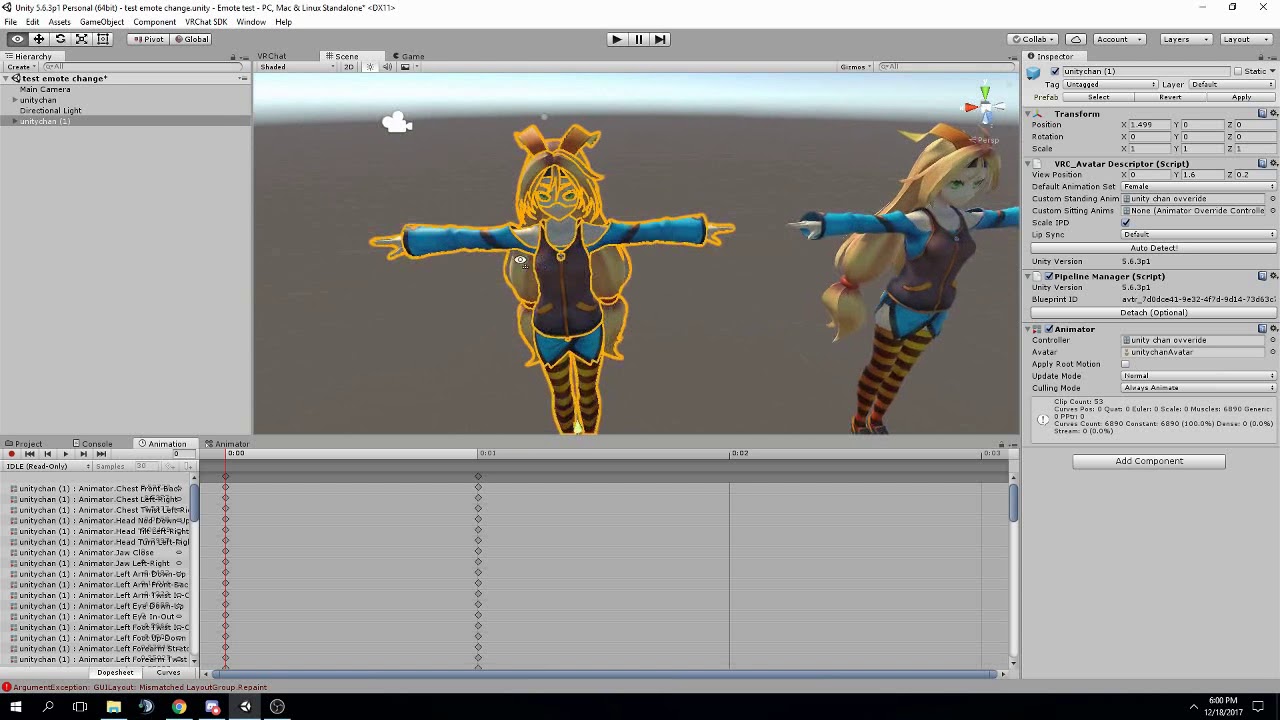
FAQ: 1. If you can't find the animator or animation tab go to window at the top and select animator or animation 2. If your character is going in the ground ...
check the video description
- talks about the root tpose
daring frigate
So you just have to put in the animation the same RootT Value as your avatar then i guess
proud estuary
thank u kreme
acoustic talon
np
daring frigate
but do this only for emotes of course, doing this with hand gesture would f*ck up a lot for vr users xD
proud estuary
lol
noble fern
So I added an audio source to a particle that turns on on death of another particle but I can't get the audio to play