#animation
1 messages · Page 35 of 1
 plush meadow
 final ledge
funny, I would have sworn I saw someone do a dance emote where their character was moving all over the place. they said they were on desktop to shrug
 hollow lion
Isn't that a looping idle?
final ledge
if I wanted to override the walking animation for every direction would I just put the same animation in all the strafe options? or do I need different animations for each
 unborn comet
is there a certain time limit on custom emotes?
 broken merlin
From what it looks like 8 for standing and 8 for sitting
 keen reef
For animation, when spawning a prop to use thats normally hidden how do you get the model to stop doing the weird crouch in the ground?
 main bone
Anyone know if there is a way to make eye tracking and visemes disable during an emote animation?
or is that just not possible
 fluid wraith
Question, Ive seen what looks like people using the panosphere but the picture is animated. Is it an idle animation or something else? Ive tried using a gif with the panosphere but it just ends up being a still image in VRChat & Unity.
 clear yew
Could be a custom shader that allows for scrolling textures.
fluid wraith
Ahh that would make sense. Would anyone happen to know where i could find one?
 sullen hill
@main bone lemme know if you find an answer lol. I've been trying to find a way to do that myself
plush meadow
Zero the coordinates. @keen reef
Make sure animation and main model are positioned in the same coordinates.
So X Y Z for position is the same: 0.
 rancid valley
Quick question, i've recently gotten into Animation overwrites and stuff, everytime i do an animation ingame my character seems to move perfectly but my head's viewdirection is stuck to where i look when the animation plays. can i fix that somehow?
 normal skiff
that seems to come up a lot
I even had it happen to one of mine but then later it wasn't doing it and I never figured out the cause
rancid valley
hmm
normal skiff
it's too bad there isn't a FAQ
I figure at least one of the people who asked in the past week probably got an answer but I wasn't around to see it
plush meadow
That is supposed to happen.
@rancid valley
Since the avatar camera remains in the same position.
Unless you can make the camera move along with the animation, I don't think there's any way to avoid that.
normal skiff
the camera certainly stays even after it was fixed for the head
oh did I just misread the question
plush meadow
In the end, you can't make the camera move along with the head in animation.
normal skiff
so changing the View Position was tried and it had no effect?
rancid valley
As example in a dance emote, my character jumps from side to side but the head always looks towards where i look
plush meadow
He's asking like why your camera would remain in the same position if your model dances.
Example.
There's no preventing that I believe.
normal skiff
there was a similar question where a lot of people were asking why the head itself didn't move while the rest did
rancid valley
I had an emote where i rotate around and that looked fine
head did go with my body rotations
normal skiff
I guess even if changing View Position did work, it doesn't let you change the angle anyway
clear yew
My avatars that have IK working don't have the problem, but the ones that have IK disabled (no finger bones) have the same issue
 naive geyser
is this the place to ask about mixamo problems?
normal skiff
people with animations turning particle effects on... what exactly is in the animation, and how is the particle system configured?
keen reef
As far as I can see the model I'm using is set at 0/0/0, same with the animation model (I think unless I'm looking at it wrong, but it sould be the duplicate model right?)
 unreal barn
anyone have experiene with custom emote animation over rides? i had a quick question....
plush meadow
Like?
unreal barn
I had set animations, one is a jumping sword swing attack. when i upload the model and do the emote my charater does the motion of the emote, but does not move while doing the emote. like he just stays still swinging the sword while the animation has him jumping forward into the air
unreal barn
its like the model stays directly under my name and wont move
static to its location yea
while doing the animation
it moves its arms, swings the sword, tucks its legs like its jumping, but doesnt actually move. you know?
unreal barn
idk if there is some setting in the animator component in unity i need to mess with or if anyone here knew what i could do to fix it...
plush meadow
Or does it not jump at all?
unreal barn
it does not move in any axis. stays static 0 on X Y and Z
i can show you in game, its weird.
but when i play the animation the character moves forward.
in unity
plush meadow
Generally, an animation at the end will revert to its initial position.
No matter where they end.
 chrome onyx
i downloaded a chara model from the internet because it had this black eye/ dripping effect that i wanted to use on one of my overides.......... but the problem is that it doesntshow up in shape keys (i think this is because it only calls out a texture instead of changing anything related to the shape of the face) anyone know where i could activate this emote?
NEW MESSAGES
unreal barn
but it never leaves its inition position
unreal barn
Mixamo, sword jumping slash
plush meadow
Did you do the 2 minute tutorial way?
Or did you have different options?

One thing that I forgot to include is that I had uploaded my avatar .FBX to Mixamo before recording, so make sure you do that first! Another thing to note is...
plush meadow
Might be your options.
But that tutorial works for me.
If your avatar was able to upload to mixamo.
unreal barn
it was
i mean the animation works, it just stays in 1 place and wont move while doing the emote
it looks really dumb lol
plush meadow
All the mixamo animations I've used move the character around without problem.
unreal barn
it does in unity, just not in game, im redownloading them atm starting over to see if this tut can help
will update in a sec
keen reef
So whenever I activate the prop the model does the crouchingish pose, I checked the transform of the animation and it matches up to what the original is on, anyone have any ideas?
plush meadow
Position coordinates of both main model and animation model must be the same.
@keen reef
So X Y Z in both models should be 0.
To prevent inconsistency with main model and animation.
keen reef
Everything is 0/0/0 except for the scale at 1/1/1
plush meadow
What about the prop?
keen reef
Its there as well
plush meadow
When you're adding the animation, do the coordinates remain the same?
As in making the animation clip.
keen reef
No, the prop changes to red boxes with -'s in them, I'll change that and see if its fixed
unreal barn
im uploading a test model now to see if that worked. I didnt settup the Root Transform Rotation/Position last time so hope thatfixed it. loading up vrchat now to see if it worked
AYEEEEEEEE @plush meadow that worked man. im gonna bookmark that video for reference lol
keen reef
Ok, so I duplicated the model, went throguh the arm to bring out the props position and rotation transforms, then brought out the is active checkbox, checked it, and it reverts to the pose, does the prop need to be active in the model itself?
plush meadow

This shows you how to put weapons and audio into the game vrchat. More stuff here: Where I got the gun model: https://abyssleo.deviantart.com/gallery/5925409...
@keen reef
keen reef
I'll give that a go, thanks
unborn comet
i followed that video but im still having an issue where if i do a custom emote i just do some kind of vibration
unreal barn
@plush meadow is there a way to combine 2 animation clips in unity? the ones from mixamo
like if i want 2 animations to play when i do 1 emote
 void sonnet
can anyone give me some good dynamic bone settings for a tail? i want it to kinda sway around even when i'm not moving. But not go spastic. lol
keen reef
So I managed to get the model to not crouch, and managed to position the prop in the way it needs to be for the animation, but then I started to try to animate the legs it went back into crouch mode.
clear yew
Anyone here good at animation? I really need help
my character is sliding instead of animating from mixamo and I dont know what to do
normal skiff
sounds oddly familiar
normal skiff
I dunno if I saw the solution, it was something about root T and Q right?
if it's the thing where the animation works but the position doesn't change
clear yew
Hm... remember anything said so I can search it?
normal skiff
translation and rotation were in the same line I thought but I can't see it when I scroll up 😄
clear yew
I went to animation and it says "Game object or component missing"
 winter valley
Does anyone have the values for the finger animations for the Victory Sign? Or any of the hand gestures in general.
normal skiff
I've been wondering the same thing, I never see anyone who knows
I did mine manually so far
keen reef
Stupid crouch mode!
I'm gonna give up for today, maybe I'll figure out what I'm doing wrong tomorrow when I'm not frustrated
normal skiff
that's what I did last night 😦
and I showed some people my problem in game, and they laughed
so at least I made some comedy
unborn comet
im on my 18th upload attempt today for this model im trying
normal skiff
does "Play on Awake" for particle systems even work?
so I can confirm at least that my particle animation doesn't work in unity either, and I'm sure that once I sort that out, it will probably work fine in-game
so at the moment, as far as I can tell, the problem is that the animation isn't doing the right thing to enable the particle system, and I can't find a working example of an animation which works
normal skiff
custom shaders
 earnest trail
do you know the name?
normal skiff

VRCat: Community-Run VRChat Forums
NEW UPDATE: https://a.pomfe.co/cgwdrk.unitypackage
Added "speed" sliders to the 2D tiled versions. This causes the overlay texture to scroll over time...
but you can write them yourself too, it is easier than it sounds
earnest trail
tnks
normal skiff
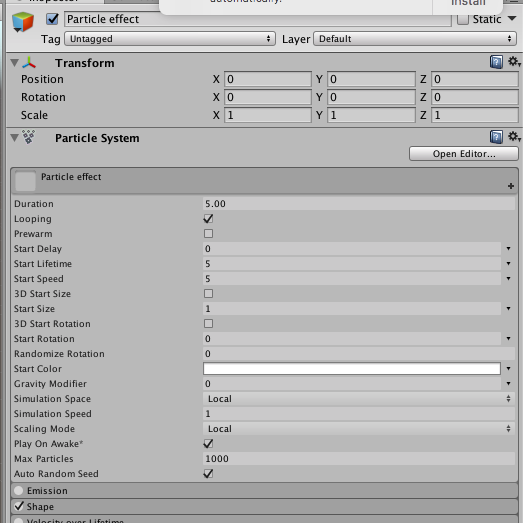
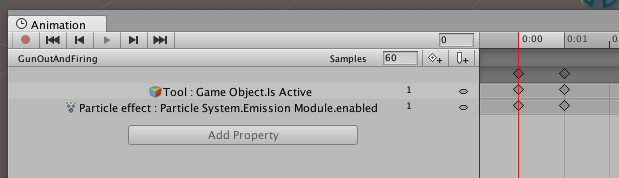
as far as I can tell, this does turn on emission when the animation starts - but particles don't actually appear
if I manually click Emission back on, they appear
earnest trail
vrsdk was updated?
normal skiff
you tell me
my copy here says 2018.1.3 is still the latest
and every guide out there says "just call Play()" as if they're talking about scripts being available
how do I get an animation to do the same thing as Play()?
clear yew
Anyone Know how to Mix Animations In Unity? I have 3 Animations that I need to be mixed into 1 entity
hey guys, do you know how to make it so that an animation activates only when another animation is active?
say I want to have it so the shooting animation only activates when my gun is active
 safe bay
@keen reef I can teach you how to do animations btw.
@clear yew You need to make 2 separate animations
clear yew
yeah that ik
but how do i override it so that the shooting only works when my other animation is active?
because i dont want to compromise trigger button
@safe bay
safe bay
just make the same animation and add muzzle fire to another gesture.
like, gun alone with handgun, and muzzle fire and sound on another gesture
done.
clear yew
that is what im talking about
but what im trying to do is only have it trigger the fire and sound when object is active
in other words when i dont have object active, my trigger button would still be a fist
safe bay
yep.
safe bay
mhm.
clear yew
yes
plush meadow
Especially if it's handgun.
clear yew
handgun
yes
i want it so i can shoot the gun only when gun is active with my trigger button
plush meadow
I've made two animations.
One that draws and the other that fires.
It's two separate animations.
But you can transfer the same pistol positioning keys over to the firing animation,
clear yew
but when gun is not active i want it to stay a fist like the original vrc animation
plush meadow
Then don't place anything in the fist gesture.
clear yew
but i want to use trigger for firing
lmao
do you guys usually use grip?
for shooting?
clear yew
vive
 clear yew
one sec
 mortal edge
Hello. I made my Victory gesture change my face expression, but now my fingers dont do the actual Victory/peace sign anymore. is there a way to do a face expression and keep the fingers motion untouched?
clear yew
one second let me find the file
plush meadow
Well the facial expression overrides the default victory/peace sign.
So I'm not sure how you would go about that.
 cloud copper
Does anyone know why visemes would stop working when I have a custom emote installed?
 plush meadow
First find gestures you are willing to sacrifice.
For the gun animations.
You need to sacrifice one for drawing the gun, and the other for shooting it.
clear yew
Im still figuring out how to merge 3 animations to 1 individual One
normal skiff
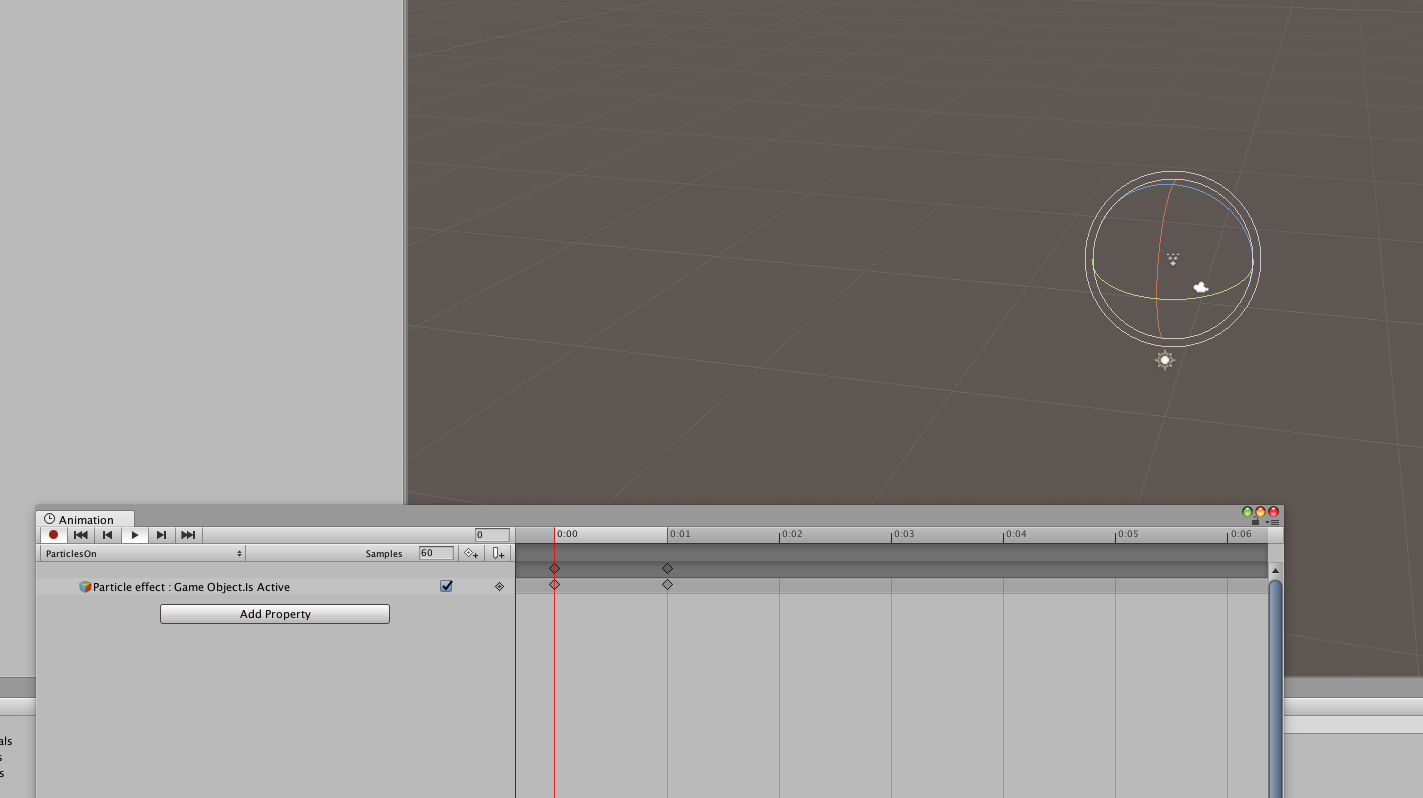
blank project with no crap in it, set everything up the same way, animation doesn't turn on particles
(╯°□°)╯︵ ┻━┻
 mild plankBOT
┬──┬ ノ( ゜-゜ノ) There you go
normal skiff
it isn't, that is the entire problem
plush meadow
There should be an option to play the particle system.
normal skiff
how do I get it to play
normal skiff
you mean the Simulate | Stop buttons?
plush meadow
yeah.
normal skiff
those are there, and manually playing it works fine
but I want the animation to play it, not me manually clicking a button
plush meadow
That's how it's supposed to be.
normal skiff
so... I can't turn on particles then
because the current setup doesn't work in-game either, I have to find a way to turn it on in-game
 normal skiff
sounds identical :/
plush meadow
particle system and audio source are checked on the top right.
normal skiff
well, you have a parent object I guess
I tried that last night too, thinking it might be the workaround
I also tried leaving the particle effect enabled but turning off Emission, and then enabling that
sadly I can't test in-game with these minimal projects because gestures get disabled unless you have an actual humanoid rig :/
 spice urchin
or u could just
make 1 part with particle emitter and sound
and make that active/inactive
normal skiff
I can't even get the particles to appear after they're enabled because the simulation doesn't seem to be playing
spice urchin
has to be in run mode
normal skiff
where is this?
normal skiff
ah
hmm, can I test animations in that mode... time to find out
yeah, in run mode this test seems to work
ok, backing out to the one with the character in the scene...
seems to play on her too
so ... broken in-game only then?
 stoic valley
idk
clear yew
if im overriding particles should i make the gameobject active or the particles active?
 spare bramble
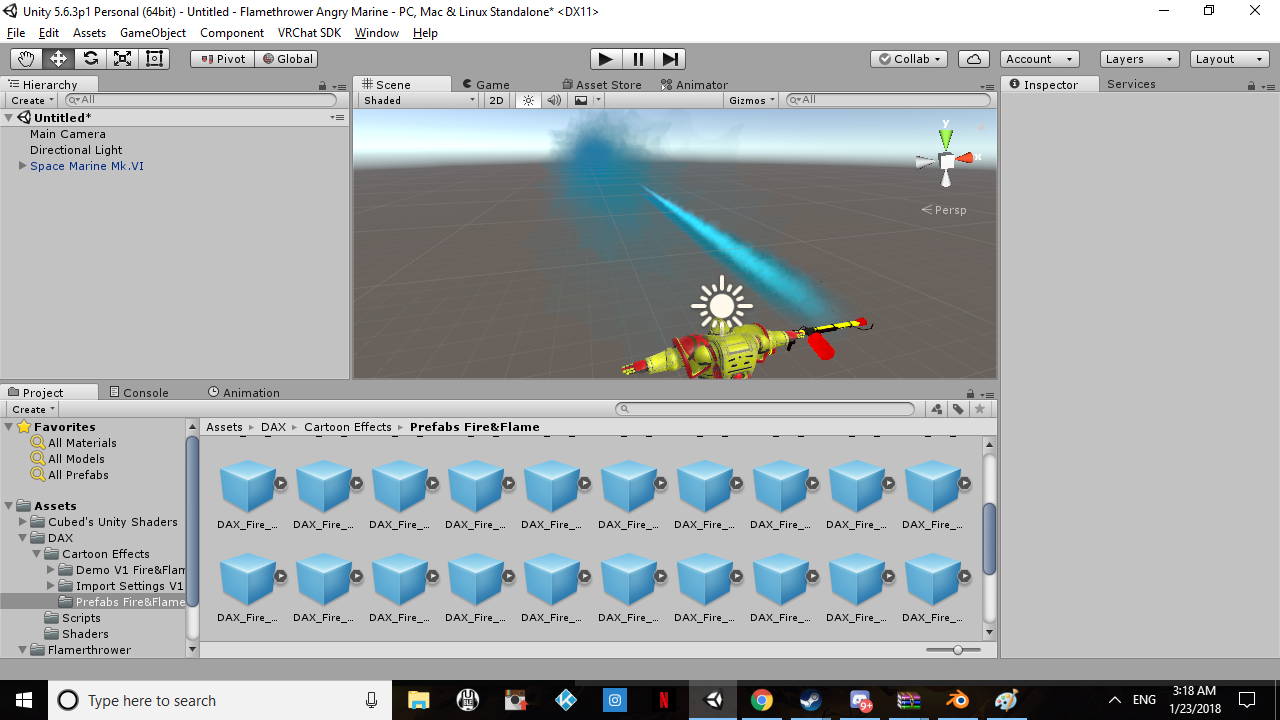
okay so i am trying to make a flamethrower animation but i am having a issue on it for some reason even though the particle effect is attached to the weapon its not emitting straight from the weapon any help?
 normal skiff
with the question of which particle thing to make active I had three options and none of them worked on mine
so I dunno anymore
someone was saying to turn off Emission because if you turn off the game object the particles stop rendering
stoic valley
umm sorry to interrupt ,and this may be simple to you guys, but im having trouble getting a sound to play on the start of an emote animation...
I want to make mario say yahoo right when the emote animation plays, and I can't seem to do it.
 silver lichen
is there a way to test vrchat's hand animations in Unity without going ingame? example to see if making thumbs up with VR works in unity
normal skiff
having just done this, I hit Run, then navigated to the animation and pressed Play on that
but I did it while the clone of my model for animation purposes was the active one
and for the sound, I think you'd just put a game object somewhere with the Audio Source component, disable the game object and have the animation enable it at the right time
maybe there is a more elegant way though
stoic valley
do I put the audio source in the 2nd anim model for the emote?
normal skiff
you'd want it in both
stoic valley
oh ok. Thanks man
normal skiff
(or you'd put it in the main one before cloning it)
stoic valley
kk
 frozen rose
Would anyone happen to know how to put a health bar next to a character?
 royal timber
where can I find pens to paint ...im googling and cant find it ?
 drowsy cape
I'll try to ask here. So I have a hand gesture which spawns a table in front of my character but the table moves with my view. Is there any way to make it static?
 noble fern
So I made an avatar and instead of running I want it to ride in a warthog, but every time I start moving the model moves under the warthog and doesn't sit in the seat. I've tried adjusting the body position and moving it up and down in the animation duplicate but I can't for the life of me figure this out. Any ideas?
 fallow dawn
i made a model with a cloak/aura. its transparent already and working but i wanted to animate it not sure what shader to use to get this
 drifting brook
does anyone have any tail animations?
 civic oracle
Anyone know how to make this? https://www.youtube.com/watch?v=Hr2WYEmPlUA&t=341 i think I have to use cutout textures maybe, I'm not sure

Random VRChat funny moments and VR Twitch highlights 3 👍 If you enjoyed this video hit that "like" button and Subscribe! VRChat Ugandan Knuckles intro song T...
hmm, maybe its a mesh filter actually
clear yew
Does anyone know how to start investigating why a character gets in the correct pose but doesnt animate pastthat?
 ripe osprey
@civic oracle it's just a flat circle. Normals only face one direction and from the back they're invisible.

 dim valve
Well, baby steps are still steps, nonetheles. I'm finally going about learning this animation stuff with visemes.

 loud tusk
dim valve
loud tusk
dim valve
I have yet to figure out anything else other than actually finding how to load visemes.
That'll come soon, I guess.
civic oracle
I wonder how some people are getting gifs/animated stuff onto their models
 languid lark
@civic oracle https://www.youtube.com/watch?v=evzOLICiUv0

Since Natsix is new to VRChat She still does not know all the complicated things in Unity like idle animations and all sorts of stuff. She was able to animat...
 ashen mesa
oh I was just about to ask how to make 2D animated avatars
I've been trying to make pixel Mario
royal timber
Is there a compoment in unity which lets you target e.g. the trail for the index finger bone?
or is there an easier option
normal skiff
seems like most of the battle is getting my prop to appear in the right place after it changes places in the hierarchy
that and upload time being so long between iterations
now the position is right but the object wobbles like crazy .. I thought the point of a fixed joint was that it would literally remain in the same relative position >_>
clear yew
in sdk i cant figure out where to get to the bone configuration thing idk what im doing
normal skiff
click model > Inspector > Model > Select > Rig
clear yew
my hero
normal skiff
youtube is having one of those days today where the comments section doesn't load
clear yew
isnt that a good thing?
normal skiff
at least on the two videos I wanted to go and add comments to tonight. some others are fine
maybe it's a good thing, depends on who you watch
now I'm back to where I was half way through last night but with the gun in the right orientation, just wobbly, and with particles stuck on
now, will animating them work this time >_>
adding damping has improved the wobbliness a bit, though I do wonder why it would even be wobbly for a "fixed" joint
this time turning on particles from the animation does work, so now I don't even know what was wrong last night. turning on the actual game object is rubbish though, gotta try doing the emitter instead
clear yew
i went back to the main scene, now i cant find that model - select - rig thing on the model's inspector
normal skiff
I know what you mean and I still don't know how I get into that state when I do
I love how the banana getting out of position is some kind of gyroscopic progression, like when I rotate my hand in a given direction, the banana goes out of whack in a direction 90 degrees to that
silly unity... I wonder if another joint might do a better job than fixed
clear yew
did someone say joint 🤔
normal skiff
yus?
 grizzled cobalt
Has anyone here worked with Animations triggered via Gestures yet (working)?
normal skiff
yeah
normal skiff
the gesture itself still has to be 2 frames
normal skiff
but it can make an item appear which has its own Animator with a longer animation in it
grizzled cobalt
thats what happens
I have 2 animations for a blade on each side (applied to 2 different gestures)
opening unity
@normal skiff https://i.imgur.com/W9IduPK.png
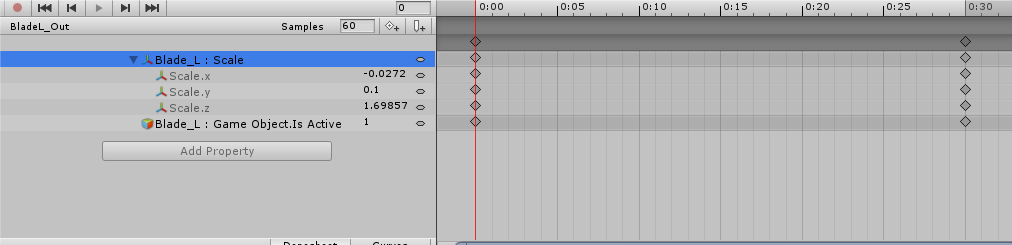
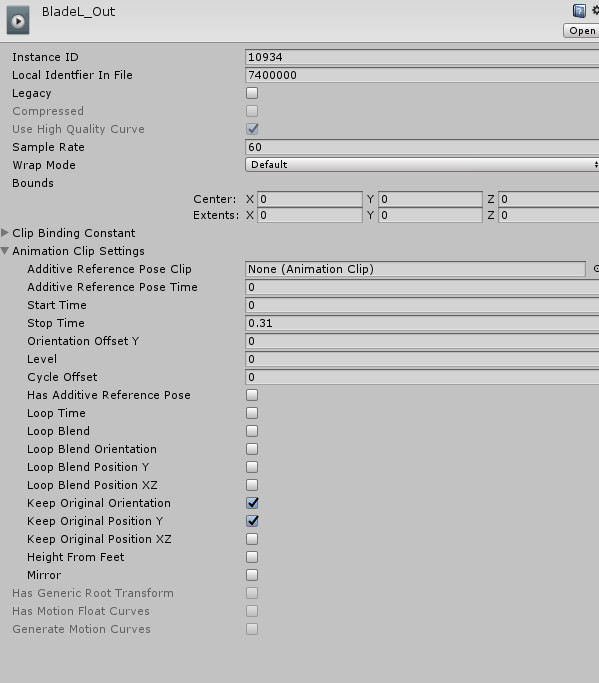
 late fjord
Can I make my avatar float with an idle animation or do I have to increase the model height in Blender, or what's the solution? I just wanna hover a little off the ground.
 wispy goblet
I'm trying to replace my characters backflip emote with a standard jump animation i got off mixamo. When i use the emote however my characters just stays in place on the ground. Any idea why?
normal skiff
hmm
so what I'd expect is that Game Object.Is Active would be on the gesture animation
but any other longer thing would be on a different animation
like in the case of pulling out my prop, the only thing the gesture does is GameObject.Is Active plus posing the hands
grizzled cobalt
oh so a gesture only triggers 1 frame?
late fjord
Doesn't seem like you can affect your y position easily with an animation
normal skiff
yeah, and it has to be at 0:00 and 0:01
grizzled cobalt
but the problem is that not even the first frame is played
otherewise the blade wouldve appeared
normal skiff
it wouldn't surprise me if non-compliant gesture animations just get completely ignored
normal skiff
I'd initially test dragging that right keyframe back to 0:01 to see if that animates
grizzled cobalt
Well I dont have VR to test it; so I have to wait until my friend gets back on sadly
normal skiff
but then any long animation would have to be on some new animation which is inside a different Animator on the blade itself
grizzled cobalt
So to keep the blade out ; do they have to hold the gesture?
Or does it stay out after animation
normal skiff
yeah AFAIK you have to hold it
grizzled cobalt
because I also added (on request) 2 animations for retraction aswell
normal skiff
there's no concept of state change as far as I know, but there might be tricks
grizzled cobalt
so basically it will be: RockNRoll Gesture for Left Blade out; HandGun for RightBlade Out -> Pointing Finger for RightBlade In and Fist for LeftBlade In
hopefully that works out well
normal skiff
for instance, what if a weapon were rendered using a particle in local space...
grizzled cobalt
As for the options on the right side
anything specific Id have to change?
I remember someone told me to use Legacy mode for VR Gestures
normal skiff
I avoided using legacy with mine but I feel like legacy mode is easier
I think the legacy way is add an Animation, the modern way is to add an Animator
Animator is this complicated state machine which is probably overkill for prop animations
 soft axle
Need help. What's the name of standing animation?
grizzled cobalt
idle?
@normal skiff btw this is the change the animation should do
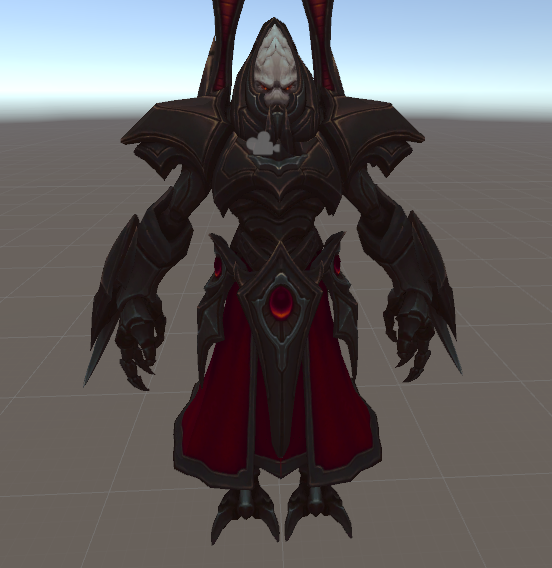
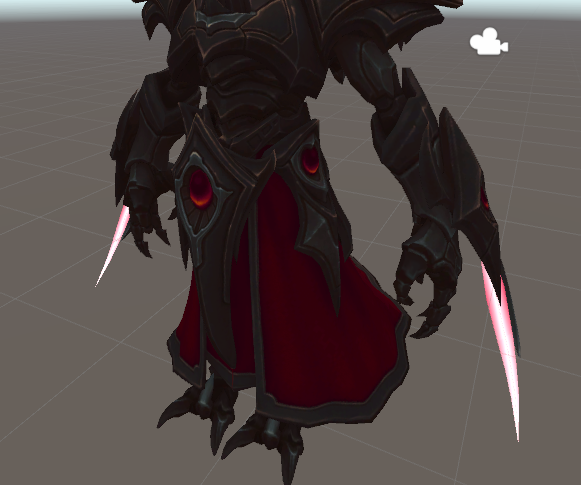
Well; the 2 animations of course
I feel like it looks good xd
normal skiff
yeah you'll probably end up with a different animation controller on each blade for this
each one with just a single non-looping animation to bring the blade out
normal skiff
I feel like it might be possible to retract it with an animation too but it would be getting into controller territory that I haven't played with yet
the idea is that controllers have parameters which you can tweak from other animations
grizzled cobalt
you mean retracting without a new gesture right
normal skiff
correct
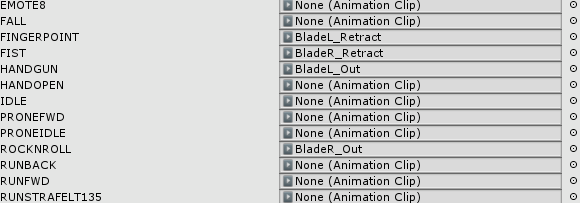 normal skiff
that seems... hmm, separate entries for retract?
grizzled cobalt
Yeah
So it goes Handgun (Out) -> Pointing (In)
RockNRoll (Out) -> Fist (In)
That was my idea atleast
normal skiff
it will retract instantaneously I think as soon as the other gesture ends but if the idea is you have to manually switch hand gestures really fast, it might be OK
normal skiff
if that's oculus touch controls it would work I think
normal skiff
I dunno how vive maps things
grizzled cobalt
He tried it on his vive ; he says he has to get used to it but it might work
also retracting and pulling them out plays a sound :p
normal skiff
sching
anyway looks like my shit works almost well enough to show it to someone who might know how to fix the rest, so I'm gonna go and see who's on
I still have a good hour or so in paint3d or something to actually paint the texture
 keen plank
Hey how would I get a bone to move on a gesture override?
 wind swift
hey everyone simple question. I made an avatar custom override for shooting and it works, but how do i get it to stay active while i'm running?
I've seen people run with guns and swords before but i only have it so when i'm standing it works
 tepid nymph
although there must be a solution
wind swift
it's not a huge deal would just help immersion
 strong wharf
on gesture command, do i need to keep the cuplicate when im done?
 frosty pendant
I dont think so. Just the animation files
clear yew
my characters mouth is stuck open 😦
 proud estuary
does anyone think i could get overwatch emotes into vrchat?
proud estuary
alright i got seanim files for the emotes but
its seanim
how am i supposed to use that
god dammit >:c
 warm harness
 proud estuary
oh cool thanks, i dont have blender ive used unity but
ill try to download it
now that i think about it i dont know what im going to do once i download it hgh
warm harness
well, I don't think you can get anything custom made into vrchat without blender
unsell someone hands you a package ready for upload
unless*
proud estuary
naw i have an mmd model
it works just fine, i did it through 2 versions of unity
all i really wanna do is add this animation
i have the fbx file for the model, so its ready to have the animations applied to it
if you could help me a little that'd be great but that's up to you ofcourse
i wouldnt wanna bother you if youre busy
oh yeah um before you ask the model's uploaded to vrchat its ready and all that i just wanna add the emote ;w;
ive opened blender
warm harness
yeah, if you have an fbx then it's much less work
anyway, I don't know how to export animations into unity so I can't help you
all I know is that you'll need blender and the plugin
proud estuary
hmm
okay ill try
can you tell me how to apply the animation to the model, though?
in blender, i mean
warm harness
sorry, I didn't do anything with animations yet
but I was thinking about OW emotes, so I'll be working on it too
proud estuary
gasp, could you inform me if you get anything done?
warm harness
I guess. don't hold your breath though 😉
I don't know when and if it's going to work
proud estuary
thanks dude ;p
dang i odn tthink this thing wants me to use this emote
i added the plugin and the seanim option is grayed out in import
sigh
if anyone could help me with this, i have the avatar as an fbx and the emote as a .seanim
proud estuary
well its okay, i have another problem ive been wanting to solve
i have dynamic bones on my avatar, and they work just fine, but what doesnt work is the colliders i put in
 rustic jewel
any idea why my sound effects are very quiet and sound kinda muffled when i activate them?
 wise minnow
hello. help me please, hands clipping into a skirt. how to change the standing animation ?
 dense canyon
I need help making elevator doors that open and close
I have the animator working, but I have no control
wispy goblet
I'm trying to use some custom emotes for my avatar (which is full IK btw) but the legs and feet just seem to float around when doing some emotes. In the Animation preview window in unity the feet are perfectly stuck to the ground. Anyone have an idea as to whats going on?
proud estuary
i still cant figure out why colliders wont work in vrchat ;w;
 abstract current
Is there a way to change the idle pose?
 tawny comet
Does anyone know how to fix loss of animations when some animations trigger? Have 2 keyframes at 0 and 1 but it still locks the controls. Invovles keyshapes on the face
 covert linden
Am I right to assume when you wanna sheathe something like a sword, you basically have your regular model in unity, add the sword there and with the animation remove it from the model and add it to the hand?
tawny comet
Nah my sword works figure that out. Its the keyshapes for stars in the eyes, and having a tail wag
Its the keyshape on most mmd models
Set to 100 on both keyframes but in game when the animation triggers the hand stops and slowly moves back to idle postion
covert linden
oh no it wasn't a solution ^^' It was a question
 robust hound
anyone succeeded to override leg position or animation on trigger (ex handgun, not emotes)
proud estuary
so, i figured out theres a component in animations for dynamic bones
and, well, i havent set any custom walk/idle animations in order to enable dynamic bones on them
gosh i need help with this ;;
spice urchin
??
u don't need animations to 'enable dynamic bones'
u only need them if u wanna see how they react to character motion
at least accurately
clear yew
working on mimikyu's claw, what do you think?
https://imgur.com/ezr8Vrv

 thin shell
Need a simple way to "Disappear" a switch for a set amount of time, to stop abuse of the switch. Tried animations with no luck.
clear yew
is there a way to button map so when you press a key it ativates a animations?
abstract current
ah idk then
 daring frigate
does anyone know if it is possible to have a hand gesture animation that trigger an audio source to play 1 time , and even releasing said gesture the sound would keep playing until finished ?
languid lark
yea just equip like weapon
daring frigate
the problem is
let's say the handopen animation is supposed to play the sound
what do i put in the animation ? audiosource.enabled ? doing this will surely play the sound but as soon as i release the handopen, the audiosource will go back to disabled and the curently playing sound will stop
covert linden
You could maybe just put an empty game object in the hand, then put the sound under that
thin shell
Still need advice on the trigger thing
daring frigate
This wouldnt change anything i think
you want to use EmptyGameObject.enabled instead ? putting it back to disabled would still stop the curently playing sound
 agile ruin
Anyone knows why while animating in unity, a skinned mesh for a third eye makes clothes move as well?
clear yew
is there a way to button map so when you press a key on the keyboard it ativates a animations?
robust hound
nope
you need VR to activate animations
or else you have to trigger them with emotes, that disables your movement have a time limit
clear yew
poo
robust hound
I was trying to learn how particle systems worked
So I overdid a bit the particles
https://cdn.discordapp.com/attachments/403564616984166400/405425089710915585/20180123191207_1.jpg

https://cdn.discordapp.com/attachments/403564616984166400/405425074615877642/20180123191203_1.jpg
but I realised I had this problem, no matter how far I look, particles stay the same size on screen anyone knows the fix to that?

 quasi gale
@daring frigate Add an audio source that both starts enabled and has PlayOnAwake enabled. Set the volume to 0, and add an Animation component to automatically set it back to 100 after the duration of the audio. Whenever you want to trigger the audio, use another animation to disable the audio source for 1 or 2 frames. After the animation ends, the audio source will get re-enabled and play the full audio clip.
@robust hound Set the MinSize to 0 and the MaxSize to 1000 in the renderer rollout of the particle system. Then set your particle size accordingly.
robust hound
thx a bunch ! I'll try in a minute
 sonic wadi
ayo dudes.. i accidentally started animating my main character in the unity scene and now its no longer in tpose, any fix for this?
robust hound
should have done a backup
always have a second character hidden before doing smth
I don't know how to solve it, usually when it happens I just go back to the backup after doing the animation on the "broken" one
sonic wadi
ayyy shit.. oh well thanks anyway
robust hound
just think of this disagrement as a reminder for always doing a backup
at least you didn't lose 5 hours of work :^)
sonic wadi
well i kinda did cuz its a completely custom character and alot of work went into making custom animation overrides and to get the colliders for my dynamic bones just right so the hair naturally falls onto the body etc. etc. etc.
oh well too bad
 acoustic talon
@sonic wadi https://www.youtube.com/watch?v=xxSezH13vAI look in the video description to fix your problem
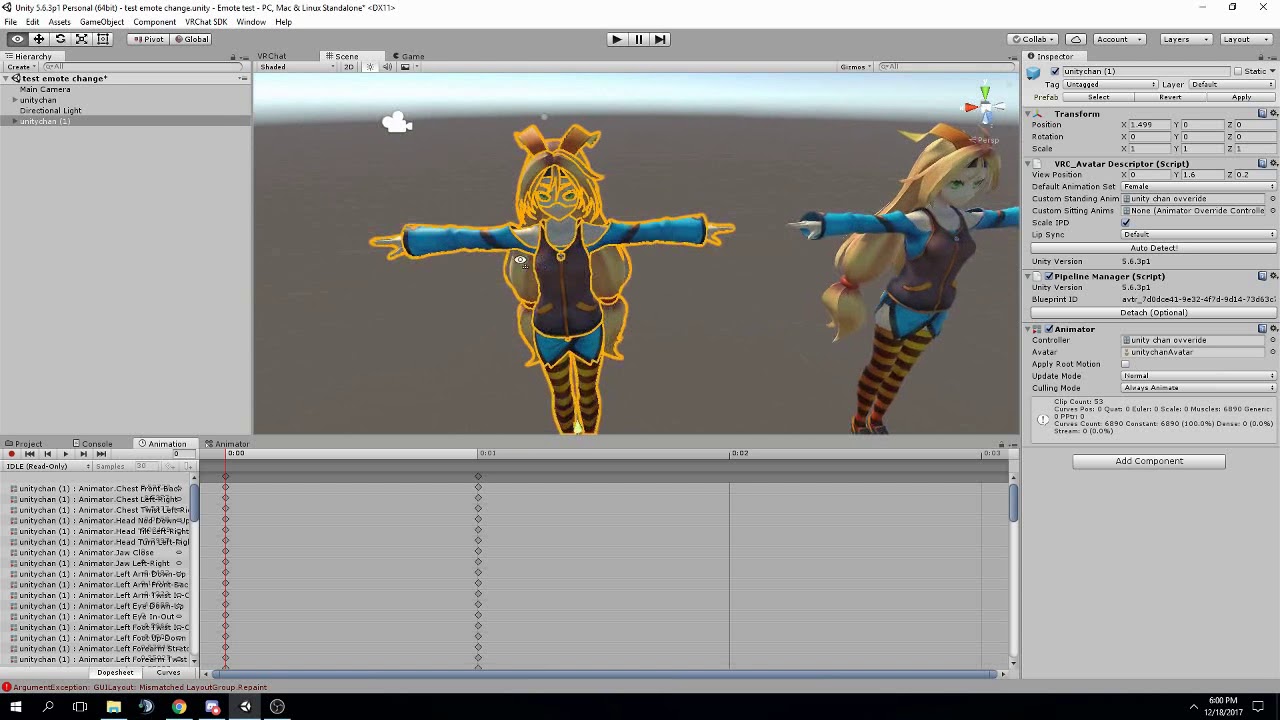
FAQ: 1. If you can't find the animator or animation tab go to window at the top and select animator or animation 2. If your character is going in the ground ...
do the root tpose thing
sonic wadi
aaaaaaaaayyyy
nice thanks
hopefully this will fix it,, will look into it in a minute
acoustic talon
hope it works
sonic wadi
😃 ty
tawny comet
Anyone know anything about the issue of animations locking hand controls for a while till they go back to pose psotion? I have two identical keyframes on 1 and 2 but it still does it ?
 turbid sluice
So can an animation be playing within an animation? Example I have a copy of my character in the sitting position on a moped as seen here. So i'll disable the main body and unhide the moped/copy to appear to be driving. Is this how you'd do it? http://prntscr.com/i4l4im

 sharp nova
when making an custom animation, is there an alternative way to make it other than using the keyframe method?
like why can't i just move the bones? would be quicker and easier
sharp nova
so it works with vrchat animations ye?
turbid sluice
it generates the keyframes instead of you doing it manually. So yes.
turbid sluice
okay let me rephrase.
there is manually as in adding each bone in the animator and typing in the numbers to bend each part painfully
and then there is muscle animatior which gives you bones and scroll bars you can just move and rotate the parts, which is also manually but not painful.
 gaunt pebble
So when playing an emote, the movement is locked for some time during the duration of this emote
but my animation is too long and unlocks early
how do i make it locked longer
 jolly plank
@turbid sluice ah ok taht makes more sense than what i was thinking you meant XD lol
 mystic umbra
Cant you also make the shape keys in blender for movement of the body
I was gonna test that after school
 ornate edge
so i have a problem that when I grab my weapon in VRChat it is Vibrating .. how do i fix that?
mystic umbra
Vibrations? Oh my
turbid sluice
first suggestion would be to check if your toes are rigged. if so remove all toe rigs. same with jaw. If vibration still happens, try adjusting in game height as well. Another cause would be you made the animation on keyfame 0 and didn't copy it all over to 0.01 correctly. Also check if you deleted the original second keyframe generated when you add properties.
normal skiff
I have a wobbly weapon problem too but it's because I'm trying to work around the world space issue with particles, and apparently Fixed Joint isn't actually fixed
turbid sluice
are there any worlds where i can see my character and models that are hidden? The avatar testing world no longer shows them on camera.
 rugged yew
If I mute myself does it mute any sound produced by my model ? like from animations ?
turbid sluice
no
rugged yew
and what if someone mute me ? it doesn't mute sounds from animations ?
turbid sluice
still plays
in fact some asshole yesterday learned how to have their avatar even play sounds when people lower their game fx to 0%
mystic umbra
Sorry kareeda 😡
rugged yew
that's dumb tho, why should any sound bypass mute ?
 lucid parrot
it plays through the system not the user i believe
rugged yew
audio source component ?
lucid parrot
its basically a sound in game that isnt associated with the player if it bypasses mute
kinda like in the presentation room when you can still see what people write
grizzled cobalt
Hey
Whenever I try changing any of these rotations
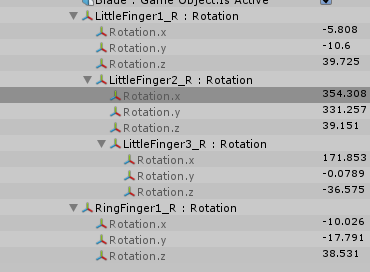
they instantly change back
grizzled cobalt
how exactly
 severe sierra
same way you add those bones in the first place
except instead of going through the skeleton hierarchy you just go through animator and add all the fingers
grizzled cobalt
Idk how to use the animator though
everyone ive seen did it with the animation panel thing
severe sierra
animation panel > add property/component whatever it says > animator > fingers
grizzled cobalt
oh
nvm im stupid then i did it wrong xc
@severe sierra
quick question
how do I rotate the thumb
 severe sierra
you add the thumb to the animation tab through animator as well
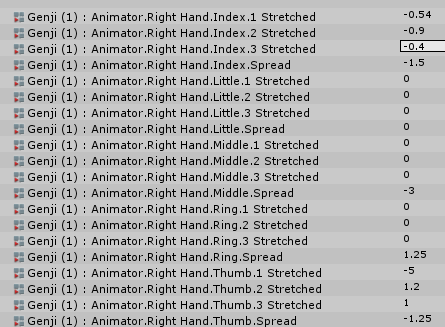 severe sierra
try adjusting the spread value
agile ruin
Anyone knows how to fix the avatar floating after adding an animation to it?
 orchid rock
severe sierra
orchid rock
severe sierra
Sup fool
@grizzled cobalt You just have to keep tweaking the first thumb bone and the spread until you get it more or less where you want it
 manic oracle
Hey so, I setup a custom avatar and walk cycle for it, but it only plays the first frame of the animation while I'm moving and just stays on that first frame the whole time. Does anyone know how to fix that, I can't seem to find anything online for it.
gaunt pebble
Anyone know how to do longer emote animations? Like they continue playing but I can walk after some time, i dont want to happen till the whole animation is played
 muted prairie
Dang kids and their fidget spinners
 late phoenix
Seems like the animation is way too short
Maybe you're more zoomed in than you think on the animation timeline
 slender mango
hey guys i have an issue. added a simple animation but now when im in game some of my hand gestures get locked up for 3 seconds or sometimes it does the gesture very slowly. anyone have an issue simlar to this before?
 junior epoch
Anyone happen to know anywhere else I could find animations aside from Miaxmo?
I was thinking maybe the unity store, or maybe some animations related to MMD somewhere. Not entirely sure.
rugged yew
you can use mmd_tools to import mmd motions in unity
junior epoch
so id have to bring them into blender first and then unity?
rugged yew
yes, mmd_tools is a Blender addon
and mmd motions should be compatible with any mmd model
junior epoch
yeah im aware of mmd_tools
I have it already
ok, ill check it out. Do you happen to know where I can find mmd motions and such?
im guessing maybe deviantart?
rugged yew
mmd dances are all over youtube, not sure about other type of motion
junior epoch
Alright. Guess I can look around, maybe I can find a animation to download and go from there.
rugged yew
you want to find motions for your mmd avatar ?
normal skiff
this wobbly joint issue I've got, in Unity it doesn't wobble at all, so it's another in-game-only thing
stoic valley
im trying to get an audio source and its not working quite right
is it supposed to be one frame of it being active? i got it to play only once on startup and thats is. I made it to not play on awake and its not playing at all in run mode
wait wait i think i figured it out now
its playing but it has a delay
 spice meteor
is there a better way than copy paste keyframes to make a short emote to a long emote? because u know unity handles them pretty shitty if they become like 300
 gaunt gyro
Anyone knows the current max lenght for animation overwrite? I heard 45s but my 40s animation still cuts off near the end.
drifting brook
how do i duplicate teh Victory default animation?
also how does it know to do left or right hand in the override?
gaunt gyro
@stoic valley My trick is to add an Empty to your avatar, set head as parent (or wherever the sound should come from), add sound source to the Empty, disable empty in tree, and enable with isActive in your animation
You can't choose left or right hand. It will always work for both hands
drifting brook
no it doesnt :p
you can do seperate gestures for each hand
like victory or point
i was just asking how it knows
which hand to pose
gaunt gyro
Yes, but if you overwrite victory gesture, it will play that animation if you do victory with left OR right hand.
drifting brook
okie thats fine, i was just curious how it knew
all the frames for left and right are in the animation
how does it know which hand to apply xD
anyway, thats not my question
how do i copy that animation so it's not read only?
i wanna add some facial expressions to it
gaunt gyro
Gotta manually remake it if you want to keep the original hand gesture but only add facials to it, sadly.
drifting brook
i cant just copy the pieces and paste into a blank animation?
gaunt gyro
Idk. Try it?
drifting brook
hmmm it puts weird bars around the keyframes
gaunt gyro
Can't copy them?
 prisma vessel
Hey guys, my blinking animation works in unity and in the avatar preview in vrchat but in the world my avatar doesn't blink, any ideas?
drifting brook
eyes are broken in vrchat right now
gaunt gyro
Eye tracking is broken since last patch
drifting brook
they broke it yesterday
prisma vessel
I can't believe I've suffered this much for naught, well at least now I know.
gaunt gyro
Only if you add key shapes named vrc.blinkright etc
drifting brook
cats does that doesnt it?
gaunt gyro
Yes
drifting brook
when you create the eye tracking?
ok, as long as the eyeright/eyeleft are assigned in rigging in unity it will blink?
gaunt gyro
Well no actually
drifting brook
?
gaunt gyro
You have to make them and tell cats which key shape is for blink left/right and lowerlid left/right
But cats as an test eye tracking feature
drifting brook
yeah cats usually picks them up and i can click test blink and the eyes close
so as long as that is good it will work in vrchat automatically?
gaunt gyro
Doesn't harm to check if you really have the key shapes with theright names
gaunt gyro
You need to add a buch of mouth shapes anyway
gaunt gyro
No, only mouth shapes are assigned in unity.
drifting brook
ok
huh i could have sworn there was a tongue sticking out corner of the mouth viseme but i cant remember the goofy translated name...
 junior remnant
Is it possible to modify the default sitting animation, or can you only override it with an entirely new one?
My legs clip through my dress, and colliders don't seem to help (even though they work perfectly in Unity) :p...
but if I could just modify the dress in the default sitting pose, it should be ok
muted prairie
@junior remnant Afaik you can copy the sample one and replace it in a copy of the anim file
junior remnant
Wait, the sample is included :p? Is it just a standard Unity animation..? Nvm, friend found it!
clear yew
https://imgur.com/0sELF96
can anyone help here please

 hearty bramble
if i have a sword in a sheathe on my hip (the hilt and sheathe are different models) and i use a hand gesture to put a sword into my hand, how would i make the hilt on my sheathe disapear?
grizzled cobalt
How can I get something to rotate above my head like the Loliarmy coin?
normal skiff
easiest way is probably to put an Animator on it and have an animation which just loops a rotation forever
normal skiff
I think looping might be the default, but it's one of the options in the Inspector when an animation is selected
as far as actually making the animation, I do it by cloning the item itself and putting the copy outside the armature, then creating the animations on that
and copying the controller back to the real one later
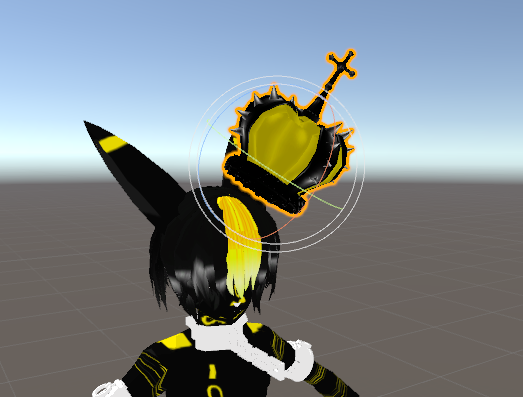 normal skiff
all in an attempt to avoid breaking the model
grizzled cobalt
so now duplicate it?
 smoky sedge
if anyone knows a good tutorial to add lip sync in blender that would be much apreciated because blender seems very complicated to me.
hearty bramble
is there a faster way to add all the right hand animator things? (index1, index2, index3, etc)
normal skiff
yeah, I would duplicate it (out of pure fear though)
 blissful root
you should always duplicate a model for animation.
normal skiff
@hearty bramble are you already using Muscle Animation Editor?
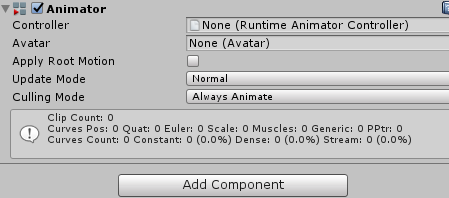 normal skiff
I think that is good enough, what you want to do is open the Animation window while the duplicate is selected and create an animation for the rotation
grizzled cobalt
Did
normal skiff
and that animation will set itself as the one for the default state
grizzled cobalt
Now just add property transform -> rotation?
 naive heart
so hey guys, I have a question I made a custom Animation in Unity and the problem is that in the preview the Animation works if I skip from keyframe to keyframe but not it doesn't work if I click play.
What should I do?
normal skiff
that may well work, I usually use the recording feature
hearty bramble
 grizzled cobalt
oh ye
normal skiff
i.e., hit record, manually rotate the object, see what it did, clean up the values if it's wrong
repeat until it's 3am
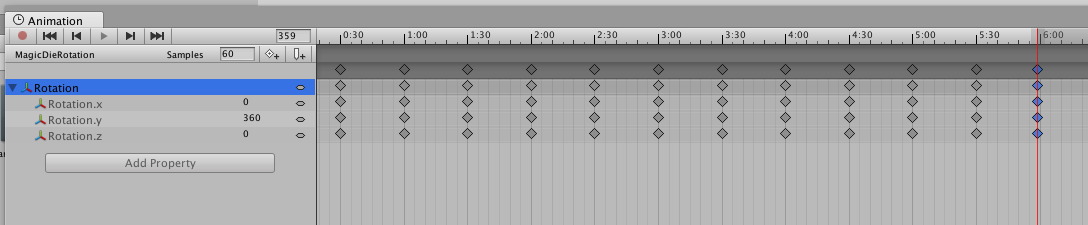
for a simple rotation presumably you only need two keyframes, one at 0 rotation and one at 360, though mine has 8 keyframes because I wasn't trusting the interpolation at the time
hearty bramble
its annoying how i cant select them all and put them in or anything like that. I dont mind it but was just curious if there was a faster way
naive heart
Made a gif to demonstrate


In the normal preview everything works fine, but If i click play the character don't move at all.
Can someone help me pls?
normal skiff
does clicking play usually reset the counter to 0:00 and then run the animation, or does it play from where the red marker is?
(I usually do looping ones, so... )
naive heart
I reset the Marker everytime do the zero position, don't worry
normal skiff
ah, the gif didn't show it at the 0 position
naive heart
the thing is that the animation at the body works fine but the character should move upwards
towards the sky
but it doesn't
if I click play
normal skiff
ah, it's the old thing where root T might not be bound correctly or something, but I haven't seen that happen to me yet so I don't know the fix
clear yew
Does anyone have the Bubbletop mmd animation? i cant find it anywhere :c
normal skiff
I wonder why people do those temporary data releases, like what are they hoping to achieve by cutting it off at some point
I would love to make a site for keeping hold of those things past the shutoff date 😄 but people would hate it so much
I know the filename and the md5 for that motion data but it doesn't help huh
grizzled cobalt
Hey
@normal skiff
What do you think about this

Does it look good or meh
normal skiff
I dunno, I'm bad with aesthetics 😄
grizzled cobalt
;c
So
how do I make it that it plays all the time
I can get rid off the duplicate now right
normal skiff
I would keep it around just in case, but now you can go to the original and set the same animation controller to that if it isn't already the same one
 glass anchor
is it actually possible to apply a mixamo animation to an mmd model?
without rigging it using their page
normal skiff
since the mmd model has been rigged as humanoid, and you're converting the mixamo one in the same fashion, it should just work right
glass anchor
so it wouldn't change anything in regards to the skeleton?
 severe palm
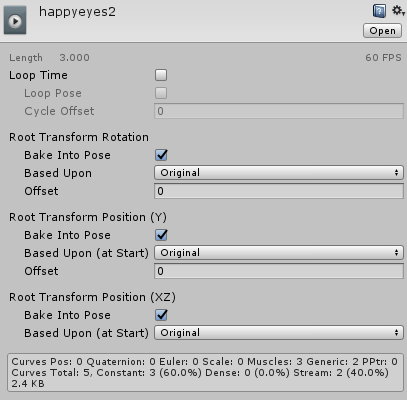
i'm adding an animation as a normal emote, how can i make it so that i only do the actual facial animations instead of being put in the ground as well? I have a Animator.Root T added to all the emotes and in inspector all the bake into pose settings are ticked. https://i.imgur.com/5WpFd2M.png https://i.imgur.com/ZVbMM8Y.png
 normal skiff
the animation rules should be the same as if you somehow got the same animation as a VMD and imported it via the other route
glass anchor
like, I have the avatar ready to upload right now, but then I decided I wanted to add a dance override
so if i uploaded my FBX that I exported from blender to mixamo
it wouldn't change any of the bone parenting stuff?
I'm a total newb when it comes to rigging
normal skiff
whether it does or not, all you want out of it is the animation data
so you can import the fbx in whatever state mixamo left it in, copy the animation out, and then remove the fbx from the project again
or you can keep it around as an fbx forever, depends on preference
glass anchor
so I wouldn't have to use the fbx I uploaded to mixamo?
normal skiff
I like my animations as unity assets because they diff better
glass anchor
err, bad phrasing
I wouldn't have to use the fbx I download from mixamo, just the animation from it?
normal skiff
actually yeah I wonder about that, maybe you can even grab any old existing model from mixamo and download that, and even that might work since it's all using the same humanoid system
glass anchor
and I could keep the model I have in unity already
normal skiff
I was using the same model when I tried it but I just threw away the fbx file afterwards and kept only the animation rules
glass anchor
hm
junior remnant
Seems like the SDK only includes sample animations for idle and walk... No way to get stuff like crouch and run, right?
grizzled cobalt
@normal skiff do you know I can change it so
there isnt this frame stop when the animation starts looping again?
glass anchor
I totally misunderstood mixamo... I thought you HAD to use the auto-rigger when uploading a character
normal skiff
all I'm doing with mine is that the very last frame has rotation 360 and then when it loops back it seems to match up
grizzled cobalt
yeah but its difficult getting mine into the original position again
normal skiff
yeah that is the trick
glass anchor
so when you dl the animation, is it 30 or 60fps?
normal skiff
bugsssssss
glass anchor
fun times
normal skiff
there's an interesting note here saying that the mixamo animations were only going to be free for a "limited time", but now it's over a year later lol
it looks like someone already downloaded the entire set at the time, just in case
oh yeah @grizzled cobalt ... animation for rotating at a tilted angle, I have a workaround for that too
 spice atlas

 meager saffron
@glass anchor I had that problem and I deleted all excess bones (skirt/tail/hair/etc). That let it rig automatically fine and I was able to download the animations.
It'll look weird in Mixamo but normal in Unity preview.
meager saffron
Though I'm having a problem with a lot of my animations looking fine in Unity, but then being weird in VRChat. :/
Not sure why. :/ Stuff like break dancing makes you float because I suspect VRChat doesn't let your hips/root bone move but the animation is trying to move it down.
But walk overrides I'm not so sure about. It's like you just freeze up and glide forward. :/ Maybe the animation length has to be a certain speed/frame-length?
normal skiff
https://imgur.com/a/fnV3i my rotating object setup
 foggy pier
ArgumentException: GUILayout: Mismatched LayoutGroup.Repaint Anyoneone know what that mean?
normal skiff
someone said it was just a bug in the SDK which doesn't matter
 scarlet pumice
can someone help. Im trying to do a basic animation of a bone moving, all is good, but whenever i create the animation, its below 0,0,0 in the prewiew and in game :/
scarlet pumice
5 i think
glass anchor
kk
normal skiff
something for the notebook...
I found an old guide for adding arbitrary additional key events into the animation controller... I assume that is no longer a thing?
I would really love for a way to switch animation override sets / props without having to switch avatars
glass anchor
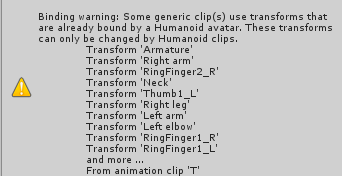
@normal skiff https://imgur.com/bwo4p7b you ever had this with your mixamo anims?
 clear yew
hey does anyone have any animations for luffy from one piece
glass anchor
welp, lets see what happens lol
normal skiff
did you set up the humanoid mappings for the animation itself?
normal skiff
if you click on the animation in the assets window, it should show an inspector similar to what you see when you're on a model
normal skiff
so you can go into the same place you went to set up the rigging for the model originally
when you view the animation, if it's set up correctly I think most of the rules in there will start with "Animator." and refer to Mecanim names for bones
whereas when it's not set up correctly it will look like "Armature." or something
but with whatever mixamo's naming for that was
grizzled cobalt
@normal skiff
how do I make it now that the crown spins all the time
basically as idle
normal skiff
my imgur album I linked above shows my setup
except in your case you wouldn't uncheck the game object
normal skiff
there's a second approach for the case where you want it on idle, which is you find the original idle animation and paste the additional stuff into that .. buuuut, it's just easier this way I think
I wonder if there are performance issues
unreal barn
Hey guys im trying to make a custom animation in unity. Its an emote from Runescape. i have a GIF broken down into still frames for reference for each key frame but i just cant find a good tutoral to figure out how to do it. anyone know how do achive what im trying to do? lol
grizzled cobalt
or can I hook it onto a new one
normal skiff
the one you created by making the clone and setting up the animation on the clone can be used
normal skiff
you can make a new one and drag the .anim into it too
grizzled cobalt
ah ok
normal skiff
I would be really worried about breaking the model though...
there is probably a safe order and an unsafe order to do things in
grizzled cobalt
I cant drag the anim into the controller
;w,
oh wait
drag it onto the dupliacte
to create it
facepalm
grizzled cobalt
thx
normal skiff
you can also drag additional animations onto the same game object to add them into the controller that's already bound
rather than having to open the controller
also in the event that one day you don't want the first animation you drop in to be the idle animation... you can manually create the first animation in the controller by creating a new state
grizzled cobalt
so this is basically now the idle animation?
grizzled cobalt
dont I need to change it so its on the actual one; not the duplicate
normal skiff
yeah that too, you have to have an Animator on the original and put the same controller onto that
grizzled cobalt
so drag the controller onto the original now?
or
select the
ah
select it in the animator
normal skiff
mmmmmm I dunno if that's safe yet
yeah the little circle in the Animator on the original is how I always do it
grizzled cobalt
yeah
naive heart
got a question: how long custom emotes can be?
normal skiff
always with this stuff there is that constant fear of unity applying that default animation state to my actual avatar model
grizzled cobalt
@naive heart I only know there is a limit; im guessing around 15/30s
naive heart
ohh okay
normal skiff
science must be done I think
maybe if I make an animation where it updates some text to show the time...
grizzled cobalt
Kudos to you @normal skiff thank you very much! ❤
meager saffron
Is there a frame limit or length limit on movement animation overrides? I can't seem to get most of them to work right.
normal skiff
working? 😃
glass anchor
@normal skiff yo, so I got it in game with no errors, but my feet don't stay planted
during the dance
like it has this weird floaty thing going on
normal skiff
lol literally the same problem everyone has with mixamo stuff
normal skiff
there is a fix, I just don't know it yet
youtube videos about it presumably do mention it
severe palm
i'm adding an animation as a normal emote, how can i make it so that i only do the actual facial animations instead of being put in the ground as well? I have a Animator.Root T added to all the emotes and in inspector all the bake into pose settings are ticked. https://i.imgur.com/5WpFd2M.png https://i.imgur.com/ZVbMM8Y.png
glass anchor
yeah, I'm using the same dance I've seen on some world avatars
and they have it working right
normal skiff
I wish people who successfully converted some free motion data would just put it up somewhere heh
meager saffron
I have this same question and it's not pinned yet. 😄
normal skiff
the last time I heard about the "I just want to change my face using an emote" thing the answer I saw was to also put in all the bone positions for the rest of the skeleton
but I do all my face stuff on gestures instead so I don't know anything about it
severe palm
puttin in all bone positions for rest of the skeleton sounds very unappealing
but it is a solution, so thanks
hopefully there's another way though
i saw someone talking about forcing a T pose for the animation but that didn't seem to help
junior remnant
Tupper casually just knows all the values for the hand shapes in his video :p... is it possible to view the default animations?
scarlet pumice
@severe palm i got the same issue
meager saffron
I saw some under examples in the SDK but they don't play very well and I can't rig them to my model. :/
scarlet pumice
@severe palm seems for the 'VR HAND ANIMATIONS' its fine, and doesnt screw up(what most ppl use it for). But 'emotes' dont work and go under the ground
severe palm
no vr
scarlet pumice
and u cant trigger 'vr hand emotes' with a keyboard so
i donno if solution besides moving every single bone
does anyone know what the attual key is that gets pressed on a vr controller for the emotes ?
like joystick1 button 32 etc
severe palm
there was half a solution over here for our problem but it didn't work https://i.imgur.com/7EbjlHf.png
 scarlet pumice
i can only assume they dont want 'desktop users' being able to trigger 'vr hand emotes'
hmm
that solution of adding root T seems to just allow you to bring it out of the ground
its still in some strange 'no position' pose
normal skiff
how does Tupper know the hand values actually, I assume in the video he is just copying them from a previously manual process
for a lot of the hand gestures the values are like "1, -1, 1, 1" and predictable stuff like that though
someone should probably just go through and manually make all the hand position data and share it, and we can put the question to rest permanently
I've already had to do it for about 4 gestures so far
really it should be on that example animation set, since it goes to the trouble of even having animations named after the hand gestures
junior remnant
Would certainly make editing animations a lot easier
junior remnant
I really want to fix the sitting pose but it's not in the samples :c
normal skiff
sitting is also an interesting mess because the male and female ones do differ
but also I find myself wanting a different sitting pose anyway
maybe mixamo has something usable
junior remnant
The sitting pose fits my character, it's just that her dress gets messed up lol
normal skiff
I kind of want knees together with feet apart a bit
scarlet pumice
true
damn wish it was just easier to add a damn simple emote for a desktop user lol
keen reef
Anyone know how / if its possible to attach one prop to another in unity? I'm trying to attach a magic circle to just past the tip of a wand, and I want to be able to wave it around with it remaining at the end of the wand.
 mint wagon
I have an empty object that plays a sound and I made an animation file so that it'll summon the empty object to play the music. But how do I disable the original sound object because it's enabled rightaway when I spawn in VRChat? do I need to put it in certain hierarchy?
nvm found an answer
normal skiff
@keen reef if you can, just position it under it in the hierarchy
if there's a reason you can't (e.g. you're trying to work around particle-related bugs), then Fixed Joint supposedly works, but I find it wobbles
keen reef
Thanks
normal skiff
some people seem to suggest Configurable Joint as a replacement but it has so many knobs to turn that I haven't been able to figure out the right settings yet
annoyingly, and as usual, there is an excellent workaround on stackexchange, but which requires, you guessed it, custom scripting
grizzled cobalt
@normal skiff So im adding one more thing
Having the crown being taken off; I know how to that already (Frame 0 disable the crown on hat; Frame 1 enable it in hand)
and of course animated that on duplicate
how do I avoid the character doing any weird thing in the ground though now
im scared that it might happen ingame
normal skiff
that's the same thing everyone was just talking about
so the solution, whatever it is, will be the same...
if it happens in-game
maybe it won't though
grizzled cobalt
also lastt time I tried triggering animation via gesture
for some reason the hands didnt do any gestures anymore (basicall ydidnt react)
normal skiff
yeah you have to manually copy in new gesture settings for every finger
which can be a pain depending on which gesture it is
grizzled cobalt
so I have this now btw

and I put this in the character controller
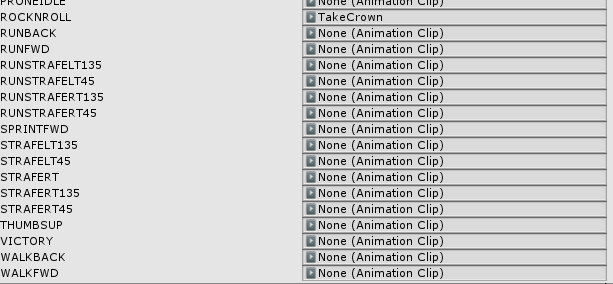
as the RocknRoll
normal skiff
yeah so now you'll probably have to go into TakeCrown and add all the finger positions which would normally be there for RocknRoll
grizzled cobalt
how do I do that
normal skiff
if you don't have Muscle Animation Editor, you add each finger bone one by one to the animation and change the value to the right thing between -1 and 1
which is totally possible (and what Tupper appeared to be doing in his tutorials) but takes ages
grizzled cobalt
what if I have muscle animation editor
normal skiff
if you have Muscle Animation Editor then you hit Record, then open the muscle editor, click on the Right Hand tab and drag sliders around until it looks right
which I think for rock and roll took me about 2 minutes
if you already have an animation for open palm or fist, probably 1 minute 😉
normal skiff
yeah
grizzled cobalt
what if I dont want it to show the rocknroll gesture
and it can just be an open hand (prefered actually)
normal skiff
you could just do an open hand which will be a little easier I think
grizzled cobalt
but can the gesture trigger still be RockNRoll?
normal skiff
the hardest bit about open hand was getting the thumb in a sensible spot
yeah of course
grizzled cobalt
let me get muscle animation editor real quick
normal skiff
and the hand holding the hat you might want to position so that it looks like you're holding it
normal skiff
it does cost money, that editor
normal skiff
wow
grizzled cobalt
yeah..
normal skiff
I wish I could build a source of income outside work but everything just seems too hard when I look at it
grizzled cobalt
well
I dont have work yet
so doing commissions is fine
I live at my parents still anyway
normal skiff
true that, if I had no work that's probably what I would be doing
then I could really learn this stuff properly too instead of having to race it during 2-4 hours each day while still trying to fit in game time
the thought of knocking out some pre-built animations for all the hand gestures is rather appealing right now, because being able to copy it from a standard location would save time
plus I always wanted to make a custom one for the middle finger
grizzled cobalt
alright so I bought the editor now
normal skiff
the editor basically adds a new standalone window which becomes usable if the currently selected thing has animations on it and the animation is in record mode
but using it is pretty straight-forward, I was surprised
grizzled cobalt
so what do I do exactly now
normal skiff
it's still fiddly positioning thumbs though. I think I can blame the model creator for this a bit too, but I couldn't get the thumb to be in line with the rest of the fingers 😄
the first thing is getting into record mode for the animation you're editing
normal skiff
yeah
then you get into the muscle editor which I think was somewhere in the Window menu
IIRC
grizzled cobalt
let me re-do the take crown animation real quick
normal skiff
it should have a bunch of tabs where it groups together each part of the body, and you'd only have to do left hand + right hand
grizzled cobalt
so im in record mode now
normal skiff
and if you want both the same there is a button to copy one to the other
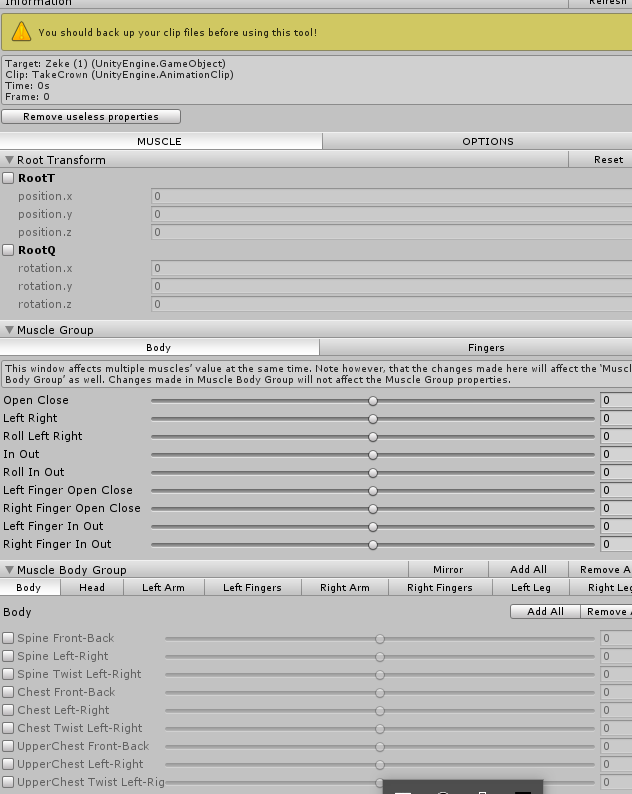


 craggy sage
how does one make an animation in unity?
normal skiff
click on Left Fingers or Right Fingers (whichever you're using)
scarlet pumice
u dont need to do that
VR gestures will never end up below 0 0 0
its taking the position of the HMD as 'king'
grizzled cobalt
s o w h a t d o i d o n o w t h o u g h
scarlet pumice
the hat trick should just work with all the tuts
place custom animation into the slot and done
normal skiff
you'll still have to set the hand position though because hands aren't tracked by the VR gear
scarlet pumice
nah
normal skiff
unless you're happy with the claw
scarlet pumice
unless he wants it looking super real
grizzled cobalt
@scarlet pumice when I tried putting that in slot on another avatar
grizzled cobalt
for some reason none of the gestures seemed to work anymore
scarlet pumice
hmm
grizzled cobalt
yeah it doesnt need any crazy animation
normal skiff
none... is some different weird problem
scarlet pumice
prob not related to the animation